14 |
15 | ***
16 |
17 | # Welcome to the Pybullet Workshop
18 | ## Get ready to learn some control and shake some robots using your newly learnt pybullet skills
19 |
20 |
21 |
22 |
23 |
24 |
25 |
26 | ***
27 | ***
28 |
29 | #### Excited to see the workshop structure??? Here it is - [Workshop Details](Webinar_Details--.pdf)
30 | ***
31 | #### Here is the link to the presentation for logistics - [Logistics ppt](https://docs.google.com/presentation/d/1O95ysYv-3qMkkOQMw9LQI2EBZuO9FzHiiAK_Zz8rAsg/edit?usp=sharing)
32 |
33 | ***
34 | ***
35 |
36 | ## We hope you will enjoy the workshop
37 |
38 |
39 |
40 |
41 | All the best!!!
42 |
43 |
44 |
45 |
--------------------------------------------------------------------------------
/Day_1/Some Basic Stuff/2_R_robot.urdf:
--------------------------------------------------------------------------------
1 |
2 |
3 |
4 |
5 |
6 |
7 |
8 |
9 |
10 |
11 |
12 |
13 |
14 |
15 |
16 |
17 |
18 |
19 |
20 |
21 |
22 |
23 |
24 |
25 |
26 |
27 |
28 |
29 |
30 |
31 |
32 |
33 |
34 |
35 |
36 |
37 |
38 |
39 |
40 |
41 |
42 |
43 |
44 |
45 |
46 |
47 |
48 |
49 |
50 |
51 |
52 |
53 |
54 |
55 |
56 |
57 |
58 |
59 |
60 |
61 |
62 |
63 |
--------------------------------------------------------------------------------
/Day_3/README.md:
--------------------------------------------------------------------------------
1 | ## DAY 3
2 |
3 | # Introduction to Dynamics
4 |
5 | Robot dynamics is concerned with the relationship between the forces acting on a robot mechanism and the accelerations they produce. Typically, the robot mechanism is modelled as a rigid-body system, in which case robot dynamics is the application of rigid-body dynamics to robots.
6 |
7 |
8 |
9 |
10 |
11 |
12 | ## Why study Robot Dynamics !
13 | Robot Dynamics is really important since it will give you a complete understanding not only how robots move (kinematics) but also WHY they move (dynamics).
14 | You will learn to develop the dynamics models of basic robotic systems, as well as create intelligent controllers for them.
15 |
16 | # Simulate Dynamics in Pybullet
17 |
18 | **To make our simulation resembling real world, We need to add/specify various physical parameters to our virtual world.**
19 |
20 | Pybullet have inbuilt functions, which gives us easy access to get look or change these parameters.
21 |
22 | You can look out to these parameters by [getDynamicsInfo](https://docs.google.com/document/d/10sXEhzFRSnvFcl3XxNGhnD4N2SedqwdAvK3dsihxVUA/edit#heading=h.d6og8ua34um1)
23 |
24 | For changing these parameters, refer [changeDynamics](https://docs.google.com/document/d/10sXEhzFRSnvFcl3XxNGhnD4N2SedqwdAvK3dsihxVUA/edit)
25 |
26 | **To get access to slides, click [here](https://docs.google.com/presentation/d/1vGKwD2EJSueq33uvhZ20sk-TNXI8er3x4b5begjo1JM/edit?usp=sharing)**
27 |
--------------------------------------------------------------------------------
/Day_2/Kinematics/Forward_Kinematics_SRC/Forward_Kinematics.py:
--------------------------------------------------------------------------------
1 | import pybullet as p
2 | import pybullet_data
3 | import os
4 | import time
5 | import math
6 |
7 | file_name = "2R_Robotic_Arm.urdf"
8 | p.connect(p.GUI)
9 | p.loadURDF(os.path.join(pybullet_data.getDataPath(), "plane.urdf"), 0, 0, 0)
10 | orn = p.getQuaternionFromEuler([0, 0, 0])
11 | robot = p.loadURDF(file_name, [0, 0, 0], orn)
12 |
13 | p.createConstraint(parentBodyUniqueId=robot, parentLinkIndex=0, childBodyUniqueId=-1,
14 | childLinkIndex=-1, jointType=p.JOINT_POINT2POINT, jointAxis=[1, 0, 0],
15 | parentFramePosition=[0, 0, 0], childFramePosition=[0, 0, 0])
16 |
17 |
18 | l1 = 1 # update the length of link-1,from the urdf
19 | l2 = 1 # update the length of link-2,from the urdf
20 |
21 |
22 | def Forward_Kinematics(angle_1, angle_2):
23 |
24 | y = (l1 * math.cos(angle_1)) + (l2 * math.cos((angle_1 + angle_2)))
25 | z = (l1 * math.sin(angle_1)) + (l2 * math.sin(angle_1 + angle_2))
26 |
27 | print("\nPosition of End-Effector : ")
28 | print(f"y : {y:.2f}, z : {z:.2f}")
29 |
30 |
31 | angle_1, angle_2 = [0, 0]
32 | Forward_Kinematics(angle_1, angle_2)
33 |
34 | while True:
35 | p.setJointMotorControl2(bodyIndex=robot,
36 | jointIndex=0,
37 | controlMode=p.POSITION_CONTROL,
38 | targetPosition=angle_1,
39 | force=2000)
40 |
41 | p.setJointMotorControl2(bodyIndex=robot,
42 | jointIndex=1,
43 | controlMode=p.POSITION_CONTROL,
44 | targetPosition=angle_2,
45 | force=2000)
46 | p.stepSimulation()
47 | time.sleep(1. / 240.)
48 |
--------------------------------------------------------------------------------
/Day_2/Kinematics/Forward_Kinematics_SRC/2R_Robotic_Arm.urdf:
--------------------------------------------------------------------------------
1 |
2 |
3 |
4 |
5 |
6 |
7 |
8 |
9 |
10 |
11 |
12 |
13 |
14 |
15 |
16 |
17 |
18 |
19 |
20 |
21 |
22 |
23 |
24 |
25 |
26 |
27 |
28 |
29 |
30 |
31 |
32 |
33 |
34 |
35 |
36 |
37 |
38 |
39 |
40 |
41 |
42 |
43 |
44 |
45 |
46 |
47 |
48 |
49 |
50 |
51 |
52 |
53 |
54 |
55 |
56 |
57 |
58 |
59 |
60 |
61 |
62 |
63 |
64 |
65 |
66 |
67 |
68 |
69 |
70 |
71 |
72 |
73 |
74 |
75 |
76 |
77 |
78 |
79 |
80 |
81 |
82 |
83 |
84 |
85 |
86 |
--------------------------------------------------------------------------------
/Day_2/Kinematics/Inverse_Kinematics_SRC/2R_Robotic_Arm.urdf:
--------------------------------------------------------------------------------
1 | <
2 |
3 |
4 |
5 |
6 |
7 |
8 |
9 |
10 |
11 |
12 |
13 |
14 |
15 |
16 |
17 |
18 |
19 |
20 |
21 |
22 |
23 |
24 |
25 |
26 |
27 |
28 |
29 |
30 |
31 |
32 |
33 |
34 |
35 |
36 |
37 |
38 |
39 |
40 |
41 |
42 |
43 |
44 |
45 |
46 |
47 |
48 |
49 |
50 |
51 |
52 |
53 |
54 |
55 |
56 |
57 |
58 |
59 |
60 |
61 |
62 |
63 |
64 |
65 |
66 |
67 |
68 |
69 |
70 |
71 |
72 |
73 |
74 |
75 |
76 |
77 |
78 |
79 |
80 |
81 |
82 |
83 |
84 |
85 |
86 |
87 |
--------------------------------------------------------------------------------
/Day_3/Robot Control/src/quadrotor.urdf:
--------------------------------------------------------------------------------
1 |
2 |
3 |
4 |
5 |
8 |
9 |
10 |
11 |
12 |
13 |
14 |
15 |
16 |
17 |
18 |
19 |
20 |
21 |
22 |
23 |
24 |
25 |
26 |
27 |
28 |
29 |
30 |
31 |
32 |
33 |
34 |
35 |
36 |
37 |
38 |
39 |
40 |
41 |
42 |
43 |
44 |
45 |
46 |
47 |
48 |
49 |
50 |
51 |
52 |
53 |
54 |
55 |
56 |
57 |
58 |
59 |
60 |
61 |
62 |
--------------------------------------------------------------------------------
/Task/README.md:
--------------------------------------------------------------------------------
1 | # Challenge for the Week !
2 |
3 | 
4 |
5 | ***As they say, all good things come to an end, but importantly you learn and you cherish. We hope it's been an awesome journey for all of you. We certainly had lot of fun teaching you
6 | guys, all kinds of interesting stuff, and it's always pleasure interacting with you all.***
7 |
8 | ***Presumably, you have learned a lot of things, implemented your unique ideas, test-drived all the codes that we had made available, and ofcourse
9 | making silly mistakes and getting frustrated for the entire day.***
10 |
11 | ***We've all been there, and that's how you step through the ladders of any new field of technology.***
12 |
13 | # Task
14 |
15 | ***However, nothing ever comes without a challenge and so do we!***
16 |
17 | ***We have a simple task put together to test out, everything that you have learned and possibly to learn more.***
18 |
19 | 
20 |
21 | ## Description
22 |
23 | * **A car is loaded onto an arena. You have to develop a PID controller for that car such that it runs along the circular track.**
24 | * **The trajectory of the track will be a circle, given by x^2 + y^2 = 3^2**Z
25 | * **Calibrate the PID gains such that car follows the track without much disturbance.**
26 | * **A template codee has been given, where you have to implement the task. The code contains detailed instructions and a few hints to help your way out.**
27 |
28 | 
29 |
30 | ## Submission
31 |
32 | 
33 |
34 | * **You will have 1 week to present a working simulation, make sure there are no errors.**
35 | * **All the details regarding submission of the task, will be informed later.**
36 |
37 | ## P.S
38 |
39 | ***We want you to understand, that the goal of the task is not to be the most perfectly working model, or getting the highest scores in evaluation. This often leads to either directly copying
40 | from other resources, or feeling dissapointed with yourself for not reaching anywhere. Instead we want you guys, to have a taste of the action, have fun working out and brainstorming
41 | through the difficulties and most importantly enjoy yourself,teach yourself. We encourage you to do your best and incase you need any help, feel free to reach out to us !***
42 |
43 |
44 |
45 | # Good Luck !
46 |
47 |
48 |
--------------------------------------------------------------------------------
/Day_2/Kinematics/Inverse_Kinematics_SRC/Inverse_Kinematics.py:
--------------------------------------------------------------------------------
1 | import pybullet as p
2 | import pybullet_data
3 | import os
4 | import time
5 | import math
6 |
7 | file_name = "2R_Robotic_Arm.urdf"
8 | p.connect(p.GUI)
9 | p.loadURDF(os.path.join(pybullet_data.getDataPath(), "plane.urdf"), 0, 0, 0)
10 | orn = p.getQuaternionFromEuler([0, 0, 0])
11 | robot = p.loadURDF(file_name, [0, 0, 0], orn)
12 | p.createConstraint(parentBodyUniqueId=robot, parentLinkIndex=0, childBodyUniqueId=-1, # Fixing the robot in place.
13 | childLinkIndex=-1, jointType=p.JOINT_POINT2POINT, jointAxis=[1, 0, 0],
14 | parentFramePosition=[0, 0, 0], childFramePosition=[0, 0, 0])
15 |
16 | l1 = 1
17 | l2 = 1
18 |
19 | def Inverse_kinematics(target):
20 | global l1, l2
21 | y, z = target
22 |
23 | angle_2 = math.acos(((y ** 2 + z ** 2) - l1 ** 2 - l2 ** 2) / (2 * l1 * l2))
24 | angle_1 = math.atan(z / y) - (math.atan((l2 * math.sin(-angle_2)) / (l1 + l2 * math.cos(-angle_2))))
25 |
26 | return angle_1, -angle_2
27 |
28 |
29 | # Equation of circle we will be using (y-1)^2 + (z-0.5)^2 = (0.5)^2
30 | theta = 0
31 | r = 0.5
32 |
33 | y_old = 1.5
34 | z_old = 0.5
35 |
36 | use_custom = False # Switch to True, to use custom-built Inverse_Kinematics function.
37 |
38 | while True:
39 |
40 | y_new = r * math.cos(theta) + 1 # Cartesian to Polar Cordinate Transformation
41 | z_new = r * math.sin(theta) + 0.5
42 |
43 | if use_custom:
44 | angle_1, angle_2 = Inverse_kinematics([y_new, z_new])
45 | else:
46 | rotation = p.getQuaternionFromEuler([0, math.pi, 0]) # For rotated configuration of the arm
47 | angle_1, angle_2 = p.calculateInverseKinematics(robot, 2, [0, y_new, z_new], rotation)
48 |
49 | p.addUserDebugLine([0, y_old, z_old], [0, y_new, z_new], [1,0,0]) # For Visualization
50 |
51 | y_old = y_new
52 | z_old = z_new
53 |
54 | theta += 0.05
55 |
56 |
57 | p.setJointMotorControl2(bodyIndex=robot,
58 | jointIndex=0,
59 | controlMode=p.POSITION_CONTROL,
60 | targetPosition=angle_1,
61 | force=2000)
62 |
63 | p.setJointMotorControl2(bodyIndex=robot,
64 | jointIndex=1,
65 | controlMode=p.POSITION_CONTROL,
66 | targetPosition=angle_2,
67 | force=2000)
68 |
69 | p.stepSimulation()
70 |
71 | time.sleep(1. / 240.)
72 |
--------------------------------------------------------------------------------
/Day3_PIDCode/README.md:
--------------------------------------------------------------------------------
1 | ## PID CONTROL CODE FOR LINE FOLLOWING BOT
2 |
3 | ### We congratulate you that you attended the workshop and learnt some of the awesome concepts of PID
4 | ***
5 |
6 |
7 |
8 | Great that you understood all
9 |
10 |
11 | #### Here is the link to the presentation - [Pid code](https://docs.google.com/presentation/d/17YfKPhv_uMvD9R8D_MHTj4MmfPZunx2cIbABcZJz-Fs/edit?usp=sharing)
12 |
13 | # Autonomous Car Challenge
14 |
15 |
16 |
17 |
18 | car control
19 |
20 |
21 | ***
22 |
23 | ### Enough of boring theory, lets dive into code now!!!
24 | We have prepared a code file with a car loaded and all the code written and well explained using comments. It is loaded at some parallel distance with the line Y=0.The car needs to follow the line Y=0 marked with black color.
25 |
26 |
27 | #### Each and every line of code will be expalined in the workshop. Your task is to download the code and try to change the P,I,D values and see how the result changes in the simulation
28 |
29 | Here is a reference video to help you with understanding the code-
30 | * [Controlling a self driving car](https://www.youtube.com/watch?v=4Y7zG48uHRo)
31 |
32 | Here you can learn more about differntial drive if you don't know yet. Contact Organisers for hints if you still don't get it-
33 | * [Differential Drive](https://www.societyofrobots.com/programming_differentialdrive.shtml)
34 |
35 | ***
36 |
37 | # INSTRUCTIONS FOR USING THE CODE-
38 |
39 | 1. Download this folder, along with the python code and src.
40 | 2. The code is well commented
41 | 3. Execute the python code.
42 | 4. Press Escape key after selecting the track-bar window in order to start the simulation.
43 | 5. Press Escape again to reset it and run it again.
44 |
45 | ***
46 | ***
47 |
48 | # You did it
49 |
50 |
51 |
52 |
53 | We are proud that you made it till here.
54 |
55 |
56 | ***
57 |
58 | # Task
59 |
60 | ## Now that you have understood the code and learnt to balance the car to follow a line Y=0, we want you to try this challenge.
61 |
62 | 1. Try to change the line direction from Y=0 to some slant line, you may change positions in the p.debugVisualiser line.
63 | 2. Now try to change the pid values accordingly such that the bot now follows the newly formed line.
64 |
65 | ### That's all for PID Code. Do try the above tasks and understand the code properly.
66 |
67 | ***
68 | ***
69 |
70 |
71 |
72 |
73 | Happy Learning!!!
74 |
75 |
76 |
77 |
--------------------------------------------------------------------------------
/Day_2/Controlling robot/robot_arm.urdf:
--------------------------------------------------------------------------------
1 |
2 |
5 |
6 |
7 |
8 |
9 |
10 |
11 |
26 |
27 |
28 |
29 |
30 |
31 |
32 |
33 |
34 |
35 |
36 |
37 |
38 |
39 |
40 |
41 |
42 |
43 |
44 |
45 |
46 |
47 |
48 |
49 |
50 |
51 |
52 |
53 |
54 |
55 |
56 |
57 |
58 |
59 |
60 |
61 |
62 |
63 |
64 |
65 |
66 |
67 |
68 |
69 |
70 |
71 |
72 |
73 |
74 |
75 |
76 |
77 |
78 |
79 |
80 |
81 |
82 |
83 |
84 |
85 |
86 |
87 |
88 |
89 |
90 |
91 |
92 |
93 |
94 |
95 |
96 |
97 |
98 |
99 |
100 |
101 |
102 |
103 |
104 |
105 |
106 |
107 |
108 |
109 |
110 |
111 |
--------------------------------------------------------------------------------
/Day_1/Some Basic Stuff/r2d2.urdf:
--------------------------------------------------------------------------------
1 |
2 |
3 |
4 |
5 |
6 |
7 |
8 |
9 |
10 |
11 |
12 |
13 |
14 |
15 |
16 |
17 |
18 |
19 |
20 |
21 |
22 |
23 |
24 |
25 |
26 |
27 |
28 |
29 |
30 |
31 |
32 |
33 |
34 |
35 |
36 |
37 |
38 |
39 |
40 |
41 |
42 |
43 |
44 |
45 |
46 |
47 |
48 |
49 |
50 |
51 |
52 |
53 |
54 |
55 |
56 |
57 |
58 |
59 |
60 |
61 |
62 |
63 |
64 |
65 |
66 |
67 |
68 |
69 |
70 |
71 |
72 |
73 |
74 |
75 |
76 |
77 |
78 |
79 |
80 |
81 |
82 |
83 |
84 |
85 |
86 |
87 |
88 |
89 |
90 |
91 |
92 |
93 |
94 |
95 |
96 |
97 |
98 |
99 |
100 |
101 |
102 |
103 |
104 |
105 |
106 |
107 |
108 |
109 |
110 |
111 |
112 |
113 |
114 |
115 |
116 |
117 |
118 |
119 |
120 |
121 |
122 |
123 |
124 |
125 |
126 |
127 |
128 |
129 |
130 |
131 |
132 |
133 |
134 |
135 |
136 |
137 |
138 |
139 |
140 |
141 |
142 |
143 |
144 |
145 |
146 |
147 |
148 |
149 |
150 |
151 |
152 |
153 |
154 |
155 |
156 |
157 |
158 |
159 |
160 |
161 |
162 |
163 |
164 |
165 |
166 |
167 |
168 |
169 |
170 |
171 |
172 |
--------------------------------------------------------------------------------
/Day_1/Some Basic Stuff/Quadruped Robot.urdf:
--------------------------------------------------------------------------------
1 |
2 |
3 |
4 |
5 |
6 |
7 |
8 |
9 |
10 |
11 |
12 |
13 |
14 |
15 |
16 |
17 |
18 |
19 |
20 |
21 |
22 |
23 |
24 |
25 |
26 |
27 |
28 |
29 |
30 |
31 |
32 |
33 |
34 |
35 |
36 |
37 |
38 |
39 |
40 |
41 |
42 |
43 |
44 |
45 |
46 |
47 |
48 |
49 |
50 |
51 |
52 |
53 |
54 |
55 |
56 |
57 |
58 |
59 |
60 |
61 |
62 |
63 |
64 |
65 |
66 |
67 |
68 |
69 |
70 |
71 |
72 |
73 |
74 |
75 |
76 |
77 |
78 |
79 |
80 |
81 |
82 |
83 |
84 |
85 |
86 |
87 |
88 |
89 |
90 |
91 |
92 |
93 |
94 |
95 |
96 |
97 |
98 |
99 |
100 |
101 |
102 |
103 |
104 |
105 |
106 |
107 |
108 |
109 |
110 |
111 |
112 |
113 |
114 |
115 |
116 |
117 |
118 |
119 |
120 |
121 |
122 |
123 |
124 |
125 |
126 |
127 |
128 |
129 |
130 |
131 |
132 |
133 |
134 |
135 |
136 |
137 |
138 |
139 |
140 |
141 |
142 |
143 |
144 |
145 |
146 |
147 |
148 |
149 |
150 |
151 |
152 |
153 |
154 |
155 |
156 |
157 |
158 |
159 |
160 |
161 |
162 |
163 |
164 |
165 |
166 |
167 |
168 |
169 |
170 |
171 |
172 |
173 |
174 |
175 |
176 |
177 |
178 |
179 |
180 |
181 |
182 |
--------------------------------------------------------------------------------
/Task/task.py:
--------------------------------------------------------------------------------
1 | '''
2 | Task -
3 |
4 | A car is loaded. You have to develop a PID controller for that car such that it runs along the circular track.
5 | The trajectory of the track is given by x^2 + y^2 = 3^2
6 | Calibrate the PID gains such that car follows the line without much disturbance.
7 |
8 | INSTRUCTIONS -
9 | Select the simulation window and Press ENTER to execute
10 | '''
11 |
12 | import pybullet as p
13 | import time
14 | import math
15 | import cv2
16 |
17 |
18 | def printTrack(): # This functions draws the track that we need to follow.
19 | theta = 0
20 | r = 3 # The track is a circle of radius 3 centred at origin.
21 | while theta <= 2 * math.pi:
22 | theta += 0.1
23 | z = 0.02
24 | x = r * math.cos(theta)
25 | y = r * math.sin(theta)
26 | line = p.loadURDF("src/line.urdf", [x, y, z], p.getQuaternionFromEuler([0, 0, theta + math.pi / 2]))
27 |
28 |
29 | p_id = p.connect(p.GUI)
30 | p.setGravity(0, 0, -10)
31 | plane = p.loadURDF("src/plane.urdf")
32 | carPos = [0, 3, 0.1]
33 | car = p.loadURDF("src/car/car1.urdf", carPos, p.getQuaternionFromEuler([0, 0, 0]))
34 | printTrack()
35 |
36 | num = p.getNumJoints(car) # Getting the total number of joints in the car
37 | for i in range(num):
38 | print(p.getJointInfo(car, i)) # Printing the information of each joint to get the motor joints
39 |
40 | # These are the 4 motor joints that we need to manipulate, we declare them here.
41 |
42 | fl = 2 # Front Left wheel
43 | fr = 3 # Front Right wheel
44 | bl = 4 # Back Left wheel
45 | br = 5 # Back Right wheel
46 |
47 | p.setJointMotorControlArray(car, [fl, bl, fr, br], p.VELOCITY_CONTROL, forces=[0, 0, 0, 0])
48 | # This is done to enable torque control in wheels of the car
49 | p.stepSimulation()
50 |
51 | '''
52 | Above this is the loading code, make no changes to it
53 | Below this is the code that you need to work with.
54 | '''
55 |
56 |
57 | def callback(): # Callback for the trackbars, leave empty.
58 | pass
59 |
60 | # Declaring the Trackbars, use this to tune your PID.
61 |
62 | ''' Remember trackbars can only set integer values, therefore after getting values from these trackbars,
63 | using cv2.getTrackbarPos(), you might have to scale up or down these values appropriately.
64 | For eg. If your I gains are found to be in the range of 0 - 0.1, you will scale down the I values by 10,0000.
65 | For more information on trackbars, refer OpenCV documentation.
66 | '''
67 |
68 | cv2.namedWindow('Controls')
69 | cv2.createTrackbar('P', 'Controls', 0, 1000, callback)
70 | cv2.createTrackbar('I', 'Controls', 0, 1000, callback)
71 | cv2.createTrackbar('D', 'Controls', 0, 1000, callback)
72 |
73 | # Declare the desired_state and base_torque globally
74 | desired_state = 0 # Set Value Yourself
75 | base_torque = 0 # Set Value Yourself
76 |
77 |
78 | def moveCar(base_torque, action):
79 | pass
80 | # Enter the motor control here to move the car, give base torque and action calculated as input
81 | # Use p.JointMotorControlArray() function in torque mode
82 | # Use differential drive.
83 | # The differential drive must increase or decrease the speed of the tyres about a constant base torque using gains
84 |
85 |
86 | def pid_control(): # You can calculate the error and required action using this function
87 | pass
88 | # Calculate error by getting the car's position using getBasePositionAndOrientation() function
89 | # The error is up to your imagination to select. Hint : It can be the distance between the origin and the car
90 | # After getting the error, calculate and return action using the PID Equation
91 | # Calibrate your PID gains experimentally.
92 |
93 |
94 | # Select the simulation window and Press ENTER to execute
95 |
96 | while True: # This while loop will run until ESCAPE key is pressed, then it will start the simulation.
97 | k = cv2.waitKey(1)
98 | keycode = p.getKeyboardEvents()
99 | if keycode.get(p.B3G_RETURN) == 1: # As soon as any key is pressed and it's ENTER key, simulation starts
100 | p.resetSimulation()
101 | p.setGravity(0, 0, -10)
102 | plane = p.loadURDF("src/plane.urdf")
103 | car = p.loadURDF("src/car/car1.urdf", carPos, p.getQuaternionFromEuler([0, 0, 0])) # Plane and car loaded again
104 | p.setJointMotorControlArray(car, [fl, bl, fr, br], p.VELOCITY_CONTROL, forces=[0, 0, 0, 0])
105 | printTrack()
106 |
107 | while True:
108 | p.resetDebugVisualizerCamera(7, -90, -45, p.getBasePositionAndOrientation(car)[0]) # This will keep the camera on the car always
109 | p.stepSimulation() # This steps the simulation further by 0.01 seconds approx
110 |
111 | action = pid_control() # Calculate actions using PID Control
112 |
113 | moveCar(base_torque, action) # Pass the actions into moveCar for controlling the car.
114 |
115 | k = cv2.waitKey(1) # Use this while using trackbars, otherwise they won't work in real time.
116 | time.sleep(1. / 240.)
117 |
118 | keycode = p.getKeyboardEvents() # This will keep tracking if ENTER key is pressed again.
119 |
120 | if keycode.get(p.B3G_RETURN) == 1: # We end the current simulation and start a new one again if ENTER key is pressed
121 | print("Episode finished") # This is a way to re-run the simulation without re-executing the code
122 | p.resetSimulation() # Resetting the simulation
123 | break # Breaking out of the inner while loop
124 |
--------------------------------------------------------------------------------
/Day_3/Robot Control/drone_pid.py:
--------------------------------------------------------------------------------
1 | '''
2 |
3 | Task 2 -
4 |
5 | This problem aims to experimentally show you the importance of the Integral term for removing the steady state error.
6 |
7 | A PID controller has been implemented to adjust the altitude of the drone.
8 | You can adjust the PID gain throught the track-bars which will appear when you run the code.
9 |
10 | Experiment with the PID gains and observe what effect they have on the drone's motion and can you relate them with what you have learnt so far.
11 |
12 | Find the ideal PID gains such that the drone reaches the height of 3 meters without much fluctuation and as fast/stably as possible.
13 |
14 | Observe why it is almost impossible to control the drone perfectly with using an additional integrating term.
15 |
16 | The code is not necessary to go through, but understanding the code will benefit while doing the Task 3 and further weeks. That's why the code has been well-commented.
17 |
18 |
19 | INSTRUCTIONS -
20 | Select the simulation window and Press ENTER to execute
21 | '''
22 |
23 |
24 |
25 | import numpy as np
26 | import pybullet as p
27 | import time
28 | import math
29 | import cv2
30 |
31 |
32 | p_id = p.connect(p.GUI) #Loading the simulation
33 | p.setGravity(0, 0, -10) #Setting the gravity
34 |
35 | plane = p.loadURDF("src/plane.urdf") #Loading the plane
36 | dronePos = [0,0,0.2] #Initial Position of the drone
37 | drone = p.loadURDF("src/quadrotor.urdf", dronePos) #Loading the drone
38 |
39 |
40 | def callback(): #Dummy function for the track-bars
41 | pass
42 |
43 | #P-D gains to be adjusted
44 | cv2.namedWindow('controls') #Creating Track-Bars that can be used to adjust the PID values in real time.
45 | cv2.createTrackbar('P', 'controls', 0, 500, callback) #Setting the lower and upper limits on track-bars
46 | cv2.createTrackbar('I', 'controls', 0, 500, callback) #Creating three different track-bars for each P-I-D
47 | cv2.createTrackbar('D', 'controls', 0, 500, callback)
48 |
49 | P=cv2.getTrackbarPos('P', 'controls')/10 #Loading the PID constants from the trackbars
50 | I=cv2.getTrackbarPos('I', 'controls')/1000
51 | D=5*cv2.getTrackbarPos('D', 'controls')
52 | #press escape key to execute
53 | k=cv2.waitKey(1) & 0xFF #This is needed to keep the track-bars active in real time
54 | #P, D = 0.1, 0.5
55 |
56 |
57 | desired_state = 3 #This is the desired state that we want the drone to reach. That is a height of 3 meters
58 |
59 |
60 | #Select the simulation window and Press ENTER to execute
61 |
62 |
63 | t=0
64 | while(True):
65 | # if t == 0:
66 | # p.configureDebugVisualizer(p.COV_ENABLE_GUI,0)
67 | # p.resetDebugVisualizerCamera(cameraDistance=3.5,
68 | # cameraYaw= 0,
69 | # cameraPitch= 0,
70 | # cameraTargetPosition = [0.0,0.0,desired_state] )
71 | k=cv2.waitKey(1) #This is written to make the taskbars operate in real time
72 | keycode = p.getKeyboardEvents() #Getting the keyboard events through PyBullet
73 | if keycode.get(p.B3G_RETURN) == 1: #If ENTER key is pressed then the simulation executes
74 | integral = 0 #Reseting all the gains to 0 at the start of the simulation
75 | derivative = 0
76 | prev_error = 0
77 | t = 0 #Also setting the time to 0
78 | p.resetSimulation() #Reseting the simulation
79 | p.setGravity(0, 0, -10)
80 |
81 | plane = p.loadURDF("src/plane.urdf") #Loading the plane and drone again
82 | dronePos = [0,0,0.1]
83 | drone = p.loadURDF("src/quadrotor.urdf", dronePos)
84 | state = p.getBasePositionAndOrientation(drone)[0][2] #Getting the state to calculate error. In this case, it is the height of the drone
85 | p.createConstraint(drone, -1, -1, -1, p.JOINT_PRISMATIC, [0,0,1], [0,0,0], [0,0,0]) #Contraining the drone to move along Z-axis only
86 | p.stepSimulation() #Stepping the simulation by a step
87 |
88 | while(True):
89 | P=cv2.getTrackbarPos('P', 'controls')/10 #Get P from trackbar, dividing P by 10 to get it into range of 0-50 from 0-500 as desired value is in range of 0-50 and track-bar return values between 0-500
90 | I=cv2.getTrackbarPos('I', 'controls')/1000 #Get I from trackbar, dividing I by 10000 to get it into range of 0-0.05 from 0-500 as desired value is in range of 0-0.05 and track-bar return values between 0-500
91 | D=5*cv2.getTrackbarPos('D', 'controls') #Get D from trackbar, desired value is in range of 0-500 only
92 |
93 | '''
94 | Divinding factors are determined experimentally, we let track-bars have values from 0-500
95 | and divide the value we get from them to get adjust them to the required range
96 | For example, if track-bar is at 100, but I should be around 0.01, so we divide by 10000 to get the final value in desired range.
97 | This is done as track-bars only support integer values
98 | '''
99 |
100 | k=cv2.waitKey(1) #This is necessary to keep the track-bars active
101 | t+=1./240.#0.01 #Keeping track of time into the simulation
102 | state = p.getBasePositionAndOrientation(drone)[0][2] #Getting the state, i.e. the current altitude of the drone
103 | error = state - desired_state #The error is the difference between current state and desired state
104 | derivative = error - prev_error #The D term is the difference in current error and prev error, As the simulation is called at regular intervals, we don't divide by time. It gives us the rate at which the error is changing.
105 | prev_error = error #Updating the prev error for using in next loop
106 | if(p.getBaseVelocity(drone)[0][2]<0.01): #Integrating/Summing the error for I gain only when drone is almost stationary, as we only want the steady state error for integration term.
107 | integral += I * error #Summing up the error #multiplying error later is not good multiply during summation
108 |
109 | pid = P * error + D * derivative + integral #I * integral #Calculating the upthrust to be given to the drone by multiplying error with different gains and adding
110 | action = -pid #Action is the negative of our gain , This is experimental
111 | print("The height is {}".format(state))
112 |
113 | p.applyExternalForce(drone, -1, [0,0,action], [0,0,0], p.WORLD_FRAME) #Applying the resultant force as an upthrust on the drone.
114 | p.stepSimulation() #Stepping the simulation
115 |
116 | time.sleep(1./240.)
117 | keycode = p.getKeyboardEvents() #Getting the keyboard events through PyBullet
118 | if keycode.get(p.B3G_RETURN) == 1: #Reseting the simulation when Enter is pressed
119 | print("Episode finished after {} timesteps".format(t+1))
120 | p.resetSimulation()
121 | p.setGravity(0, 0, -10)
122 |
123 | plane = p.loadURDF("src/plane.urdf")
124 | dronePos = [0,0,0.2]
125 | drone = p.loadURDF("src/quadrotor.urdf", dronePos)
126 | p.stepSimulation()
127 | break
128 |
129 |
130 |
--------------------------------------------------------------------------------
/Day_2/Kinematics/README.md:
--------------------------------------------------------------------------------
1 | # Introduction to Kinematics
2 |
3 | ### Kinematics is the study of the relationship between a robot's joint coordinates and its spatial layout, and is a fundamental and classical topic in robotics.
4 |
5 | ***Kinematics*** can yield very accurate calculations in many problems, such as
6 | * Positioning a gripper at a place in space.
7 | * Designing a mechanism that can move a tool from point A to point B.
8 | * or Predicting whether a robot's motion would collide with obstacles.
9 |
14 |
15 | # What we like to know?
16 |
17 | Take the case of a 2R robot kept on a xy plane, Now let us say the end of the arm needs to reach a point (1,1,0) in 3D space, how would you go about solving this problem?
18 |
19 | ## Logically, the questions you should ask will be,
20 |
21 | * Whether such a configuration of the robot is possible in the first place ?(given the length of links, joint angle limits, etc)
22 |
23 | * If yes, what should be the individual angles required to be kept at the joints of the arm.
24 |
25 | This also gives rise to the problem that is the inverse in nature. Hence, in a nutshell, we broadly classify these two problems as two types of kinematics for a given robot namely,
26 |
27 | * Given a value for each joint angles where will my end effector be? - answered by ***Forward Kinematics***
28 | * Given a value, the end effector target position, what will by corresponding joint angles be to reach such a configuration? - answered by ***Inverse Kinematics***
29 |
30 | ## *Forward Kinematics* and *Inverse Kinematics* are the tools, we'll use to tackle these problems.
31 |
36 |
37 | # Forward Kinematics
38 |
39 | ## ***Forward kinematics*** refers to the use of the kinematic equations of a robot to compute the position of the end-effector from specified values for the joint parameters.
40 |
41 | The forward kinematics is an “easy” problem. This means that for each set of angles, there is one and only one result, which can be calculated with no ambiguity.
42 |
43 | For a more in-depth mathematical perspective, you can check out this video, which solves the Forward Kinematics for a 3-DOF Robot Arm
44 |
45 |
46 |
47 | [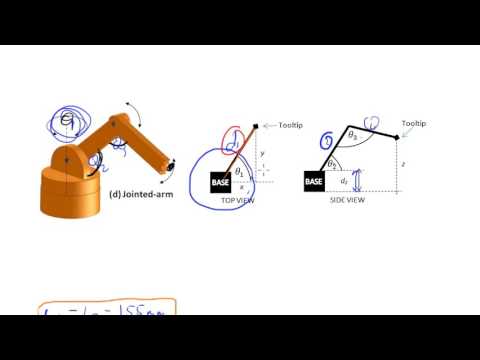](https://www.youtube.com/watch?v=NRgNDlVtmz0)
48 |
49 |
50 |
51 | ## Task:
52 |
53 | * Try the implementaion of a 2-DOF Robotic Arm on your own, using Pybullet. I have attached a helper code and the URDF, but only seek it just in case you are completely stuck.
54 |
55 | ## Optional Task:
56 |
57 | * If you found that to be way easy, additionaly try implementing the above mentioned 3-DOF Robotic Arm in a similar fashion, by building your own 3-DOF Robotic Arm urdf file.
58 |
59 | ## Note:
60 |
61 | * To be completely honest, I am obliged to inform that this is not the full picture, truth be told, you should be aware of the complications in higher dimensional robots, ***Denavit-Hartenberg procedure, Transformation and Rotation Matrix-based approaches and other sophisticated formulations*** but this camp is motivated towards giving you an head start with all the wholesome fundamental concepts. So,it is essentially out of the scope of this course. You can always find good resources on the web, just in case you want to dive deeper.
62 |
63 | # Inverse Kinematics
64 |
65 | ### ***Inverse kinematics*** is just opposite to forward kinematics. It refers to process of obtaining joint angles from known coordinates of end effector.
66 |
71 |
72 | It is in general very difficult to solve, and you may find that there may be ***no solution, one single solution or two solutions for the corresponding inverse kinematics***, but it has a lot to offer, once you get the solutions. It is often used for determining the optimum trajectory, motion planning, obstacle avoidance etc.
73 |
74 | ### You can refer to this video, to get a hands-on mathematical perspective on Inverse Kinematics for a 2-DOF Robot Arm.
75 |
76 |
77 | [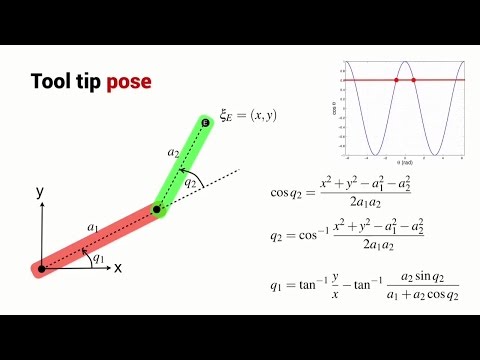](https://www.youtube.com/watch?v=IKOGwoJ2HLk)
78 |
79 |
80 | If you are bored and frustrated by all the math, equations, triangles and stuff. I'll suggest you to watch this video, where all the math and equations comes alive into action and creates a masterpiece.
81 |
82 |
93 |
94 | ### ***All hail Inverse Kinematics !***
95 |
96 | ## Task:
97 |
98 | * Try implementing Inverse Kinematics on your same 2-DOF Robotic Arm for moving it in a circle or any other trajectory.
99 |
100 | ***Your creativity is your limit !.***
101 |
102 | I have once again attached a helper code, but try to work it out on your own as much as possible.
103 |
104 | ## Note:
105 |
106 | * Both Forward and Inverse Kinematics, is not only used in Robotics, but finds many applications in ***3D Animations and Renderings*** as well.
107 |
108 | # Pybullet In-built Inverse Kinematic Solver
109 |
110 | As you can imagine, as our robots get much complicated, the equations get tricky to derive and are often nasty looking. This makes it very difficult to calculate the inverse kinematics from scratch. So,Pybullet has an ***inbuilt function*** for solving the Inverse Kinematics for a given robot urdf.
111 |
112 | ### Refer the documentation for help: [calculateInverseKinematics](https://docs.google.com/document/d/10sXEhzFRSnvFcl3XxNGhnD4N2SedqwdAvK3dsihxVUA/preview#heading=h.9i02ojf4k3ve)
113 |
114 | ## Optional Task:
115 |
116 | * If you have worked out the 3-DOF Robotic Arm in the previous section. ***Why not take it for a spin?*** Get creative and trace out some cool trajectories, this time using the in-built functionality of Pybullet.
117 |
118 | # Very well,
119 |
120 | ***Here's the link for the presentation, if you want to revisit some of the ideas : [Pybullet-Workshop-Day_2](https://docs.google.com/presentation/d/18tvmY9KVb5HuPlCss2nQbipHd_KSeYrAJLTOwBHKItU/edit?usp=sharing)***
121 |
122 | You are now equipped with a good amount of knowledge in the very ***fundamentals of Robotics.*** Ofcourse, things don't end here. There are lot more things to explore, learn and implement. There are resources everywhere around the web, that can help you achieve this. Our aim was to get you started, and lay down the foundation on which you can further build upon.
123 |
124 | ### ***As you progress, Kinematics and Robotics can get you from this,***
125 |
133 |
134 | 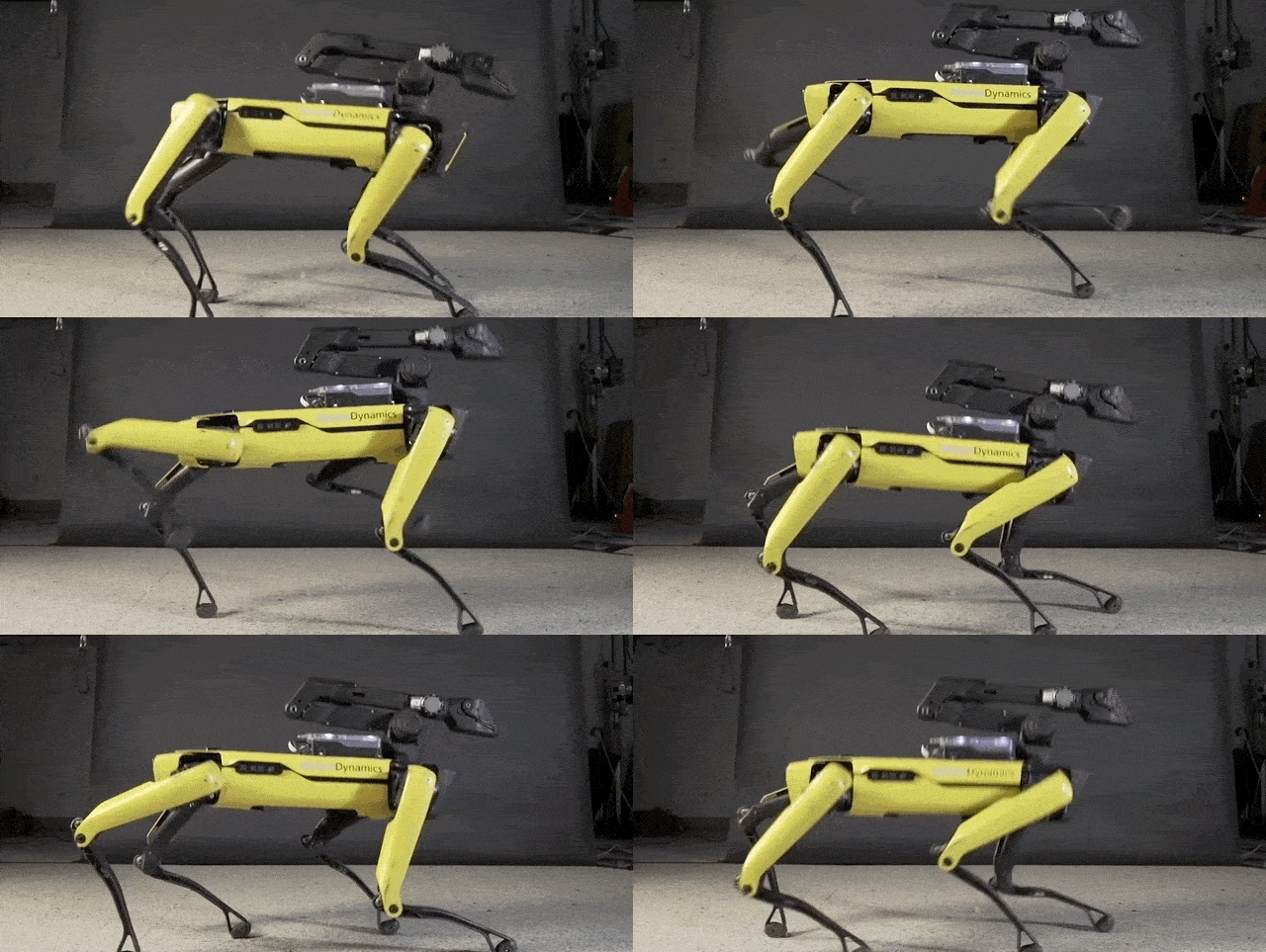
135 |
136 | # All the Best !
137 |
138 |
139 |
140 |
141 |
142 |
143 |
--------------------------------------------------------------------------------
/Day_3/Robot Control/drone_pid_withgraph.py:
--------------------------------------------------------------------------------
1 | '''
2 |
3 | Task 2 -
4 |
5 | This problem aims to experimentally show you the importance of the Integral term for removing the steady state error.
6 |
7 | A PID controller has been implemented to adjust the altitude of the drone.
8 | You can adjust the PID gain throught the track-bars which will appear when you run the code.
9 |
10 | Experiment with the PID gains and observe what effect they have on the drone's motion and can you relate them with what you have learnt so far.
11 |
12 | Find the ideal PID gains such that the drone reaches the height of 3 meters without much fluctuation and as fast/stably as possible.
13 |
14 | Observe why it is almost impossible to control the drone perfectly with using an additional integrating term.
15 |
16 | The code is not necessary to go through, but understanding the code will benefit while doing the Task 3 and further weeks. That's why the code has been well-commented.
17 |
18 |
19 | INSTRUCTIONS -
20 | Select the simulation window and Press ENTER to execute
21 | '''
22 |
23 |
24 |
25 | import numpy as np
26 | import pybullet as p
27 | import time
28 | import math
29 | import cv2
30 | import matplotlib.pyplot as plt
31 |
32 | p_id = p.connect(p.GUI) #Loading the simulation
33 | p.setGravity(0, 0, -10) #Setting the gravity
34 |
35 | plane = p.loadURDF("src/plane.urdf") #Loading the plane
36 | dronePos = [0,0,0.2] #Initial Position of the drone
37 | drone = p.loadURDF("src/quadrotor.urdf", dronePos) #Loading the drone
38 |
39 |
40 | def callback(): #Dummy function for the track-bars
41 | pass
42 |
43 | #P-D gains to be adjusted
44 | cv2.namedWindow('controls') #Creating Track-Bars that can be used to adjust the PID values in real time.
45 | cv2.createTrackbar('P', 'controls', 0, 500, callback) #Setting the lower and upper limits on track-bars
46 | cv2.createTrackbar('I', 'controls', 0, 500, callback) #Creating three different track-bars for each P-I-D
47 | cv2.createTrackbar('D', 'controls', 0, 500, callback)
48 |
49 | P=cv2.getTrackbarPos('P', 'controls')/10 #Loading the PID constants from the trackbars
50 | I=cv2.getTrackbarPos('I', 'controls')/1000
51 | D=5*cv2.getTrackbarPos('D', 'controls')
52 | #press escape key to execute
53 | k=cv2.waitKey(1) & 0xFF #This is needed to keep the track-bars active in real time
54 | #P, D = 0.1, 0.5
55 |
56 |
57 | desired_state = 3 #This is the desired state that we want the drone to reach. That is a height of 3 meters
58 |
59 |
60 | #Select the simulation window and Press ENTER to execute
61 |
62 |
63 | t=0
64 | while(True):
65 | k=cv2.waitKey(1) #This is written to make the taskbars operate in real time
66 | keycode = p.getKeyboardEvents() #Getting the keyboard events through PyBullet
67 | if keycode.get(p.B3G_RETURN) == 1: #If ENTER key is pressed then the simulation executes
68 | integral = 0 #Reseting all the gains to 0 at the start of the simulation
69 | derivative = 0
70 | prev_error = 0
71 | t = 0 #Also setting the time to 0
72 | p.resetSimulation() #Reseting the simulation
73 | p.setGravity(0, 0, -10)
74 |
75 | plane = p.loadURDF("src/plane.urdf") #Loading the plane and drone again
76 | dronePos = [0,0,0.1]
77 | drone = p.loadURDF("src/quadrotor.urdf", dronePos)
78 | state = p.getBasePositionAndOrientation(drone)[0][2] #Getting the state to calculate error. In this case, it is the height of the drone
79 | p.createConstraint(drone, -1, -1, -1, p.JOINT_PRISMATIC, [0,0,1], [0,0,0], [0,0,0]) #Contraining the drone to move along Z-axis only
80 | p.stepSimulation() #Stepping the simulation by a step
81 |
82 | ts = 0
83 | ax = np.zeros(0)
84 | ay = np.zeros(0)
85 | while(True):
86 | P=cv2.getTrackbarPos('P', 'controls')/10 #Get P from trackbar, dividing P by 10 to get it into range of 0-50 from 0-500 as desired value is in range of 0-50 and track-bar return values between 0-500
87 | I=cv2.getTrackbarPos('I', 'controls')/1000 #Get I from trackbar, dividing I by 10000 to get it into range of 0-0.05 from 0-500 as desired value is in range of 0-0.05 and track-bar return values between 0-500
88 | D=5*cv2.getTrackbarPos('D', 'controls') #Get D from trackbar, desired value is in range of 0-500 only
89 |
90 | '''
91 | Divinding factors are determined experimentally, we let track-bars have values from 0-500
92 | and divide the value we get from them to get adjust them to the required range
93 | For example, if track-bar is at 100, but I should be around 0.01, so we divide by 10000 to get the final value in desired range.
94 | This is done as track-bars only support integer values
95 | '''
96 |
97 | k=cv2.waitKey(1) #This is necessary to keep the track-bars active
98 | t+=1./240.#0.01 #Keeping track of time into the simulation
99 | state = p.getBasePositionAndOrientation(drone)[0][2] #Getting the state, i.e. the current altitude of the drone
100 | error = state - desired_state #The error is the difference between current state and desired state
101 | derivative = error - prev_error #The D term is the difference in current error and prev error, As the simulation is called at regular intervals, we don't divide by time. It gives us the rate at which the error is changing.
102 | prev_error = error #Updating the prev error for using in next loop
103 | if(p.getBaseVelocity(drone)[0][2]<0.01): #Integrating/Summing the error for I gain only when drone is almost stationary, as we only want the steady state error for integration term.
104 | integral += I * error #Summing up the error #multiplying error later is not good multiply during summation
105 |
106 | pid = P * error + D * derivative + integral #I * integral #Calculating the upthrust to be given to the drone by multiplying error with different gains and adding
107 | action = -pid #Action is the negative of our gain , This is experimental
108 | print("The height is {}".format(state),action,integral)
109 |
110 | p.applyExternalForce(drone, -1, [0,0,action], [0,0,0], p.WORLD_FRAME) #Applying the resultant force as an upthrust on the drone.
111 | p.stepSimulation() #Stepping the simulation
112 | if ts % 24 == 0:
113 | ax = np.append(ax,[ts/240])
114 | ay = np.append(ay,[state])
115 | ts += 1
116 | time.sleep(1./240.)
117 | keycode = p.getKeyboardEvents() #Getting the keyboard events through PyBullet
118 | if keycode.get(p.B3G_RETURN) == 1 or (ts/240) == 30: #Reseting the simulation when Enter is pressed
119 | print("Episode finished after {} timesteps".format(t+1))
120 | p.resetSimulation()
121 | p.setGravity(0, 0, -10)
122 |
123 | plane = p.loadURDF("src/plane.urdf")
124 | dronePos = [0,0,0.2]
125 | drone = p.loadURDF("src/quadrotor.urdf", dronePos)
126 | p.stepSimulation()
127 | #graph of single simulation
128 | fig, (gph) = plt.subplots(1, 1, constrained_layout=True, sharey=True)
129 | gph.plot(ax,ay)
130 | gph.hlines([desired_state], 0, 1, transform=gph.get_yaxis_transform(), colors='r')
131 | gph.grid()
132 | gph.set_title('height vs time')
133 | gph.set_xlabel('time (s)')
134 | gph.set_ylabel('amplitude')
135 |
136 | fig.suptitle('PID CONTROL', fontsize=16)
137 |
138 | plt.show()
139 | break
140 |
141 |
142 |
--------------------------------------------------------------------------------
/Day3_PIDCode/line_follower.py:
--------------------------------------------------------------------------------
1 | '''
2 | Task 3 -
3 |
4 | A car is loaded. You have to develop a PID controller for that car such that it runs along the line y = 0.
5 | The line is also visible on the plane.
6 | Callibrate the PID gains such that car gets to the line as fast as possible and follows it without much disturbance.
7 | Refer to the past two taks and their codes for hints.
8 |
9 | INSTRUCTIONS -
10 | Select the simulation window and Press ENTER to execute
11 |
12 | '''
13 |
14 | import numpy as np
15 | import pybullet as p
16 | import time
17 | import math
18 | import cv2
19 |
20 | p_id = p.connect(p.GUI) #Loading the simulation
21 | p.setGravity(0, 0, -10) #Setting the gravity
22 |
23 | plane = p.loadURDF("src/plane.urdf") #Loading the plane
24 | carPos = [0,3,0.1] #This is where the car will spawn, this is constant.
25 |
26 | m = 0 #Declaring the slope of the required line y = mx + c
27 | c = 0 #Declaring the contsnat of the reuired line y = mx + c
28 | angle = math.atan(m)
29 |
30 | car = p.loadURDF("src/car/car1.urdf", carPos, p.getQuaternionFromEuler([0,0,angle]))
31 | #Loading the car with head parallel to the given line
32 |
33 |
34 | def printLine(m, c): #This functions draws a line that we need to follow
35 | angle = math.atan(m)
36 | z = 0.02
37 | origin = [0,c,z]
38 | line = p.loadURDF("src/line.urdf", origin, p.getQuaternionFromEuler([0,0,angle]))
39 |
40 | printLine(m, c) #Calling the function to print the line
41 |
42 |
43 | num = p.getNumJoints(car) #Getting the total number of joints in the car
44 | for i in range(num):
45 | print(p.getJointInfo(car, i))
46 | #Printing the information of each joint to get the motor joints
47 |
48 |
49 | #These are the 4 motor joints that we need to manipulate, we declare them here.
50 |
51 | fl = 2 #Front Left wheel
52 | fr = 3 #Front Right wheel
53 | bl = 4 #Back Left wheel
54 | br = 5 #Back Right wheel
55 |
56 | p.setJointMotorControlArray(car, [fl, bl, fr, br], p.VELOCITY_CONTROL, forces = [0,0,0,0]) #This is done to enable torque control in wheels of the car
57 | p.stepSimulation()
58 |
59 |
60 |
61 | '''
62 | Above this is the loading code, make no changes to it
63 | Below this is the code that you need to work with.
64 | '''
65 | def callback():#Dummy function for the track-bars
66 | pass
67 |
68 |
69 | cv2.namedWindow('controls')
70 | #Creating Track-Bars that can be used to adjust the PID values in real time.
71 |
72 | #Setting the lower and upper limits on track-bars
73 | cv2.createTrackbar('P', 'controls', 0, 500, callback)
74 | cv2.createTrackbar('I', 'controls', 0, 500, callback)
75 | cv2.createTrackbar('D', 'controls', 0, 500, callback)
76 |
77 | #Creating three different track-bars for each P-I-D
78 | #And Loading the PID constants from the trackbars
79 | P=cv2.getTrackbarPos('P', 'controls')/10
80 | I=cv2.getTrackbarPos('I', 'controls')/1000
81 | D=5*cv2.getTrackbarPos('D', 'controls')
82 |
83 | #press escape key to execute
84 | k=cv2.waitKey(1) & 0xFF #This is needed to keep the track-bars active in real time
85 | # Basically cv2.waitKey(1) returns a 32-bit integer and 0xFF makes first 24 numbers = 0 to cpompare the last 8 bits(i.e. number between 0-255) in order to verify input from our keyboard.
86 |
87 | #Declare the desired_state and base_torque globally
88 | desired_state = 0 #Set Value Yourself
89 | base_torque = 10 #Set Value Yourself
90 |
91 |
92 | def moveCar(base_torque, action): #Enter the motor control here to move the car, give base torque and action calculated as input
93 |
94 | '''
95 | 2=Front left
96 | 3=Front Right
97 | 4=Rear Left
98 | 5=Rear Right
99 | '''
100 |
101 | mode=p.TORQUE_CONTROL
102 |
103 | left=base_torque+action
104 | right=base_torque-action
105 |
106 | print("reqd_torque_left=",left)
107 | print("reqd_torque_right=",right)
108 |
109 | p.setJointMotorControl2(car,jointIndex=2,controlMode=mode,force=left)
110 | p.setJointMotorControl2(car,jointIndex=3,controlMode=mode,force=right)
111 | p.setJointMotorControl2(car,jointIndex=4,controlMode=mode,force=left)
112 | p.setJointMotorControl2(car,jointIndex=5,controlMode=mode,force=right)
113 | #Use differential drive to nullify the error
114 | #The differential drive must increase or decrease the speed of the tyres about a constant base torque using gains
115 |
116 |
117 | #Reseting all the gains to 0 at the start of the simulation
118 | integral = 0
119 | derivative = 0
120 | prev_error = 0
121 |
122 | def calc_error(): #You can calculate the error and required action using this function
123 |
124 | global integral
125 | global derivative
126 | global prev_error
127 | P=cv2.getTrackbarPos('P', 'controls')/10 #Get P from trackbar, dividing P by 10 to get it into range of 0-50 from 0-500 as desired value is in range of 0-50 and track-bar return values between 0-500
128 | I=cv2.getTrackbarPos('I', 'controls')/10000 #Get I from trackbar, dividing I by 10000 to get it into range of 0-0.05 from 0-500 as desired value is in range of 0-0.05 and track-bar return values between 0-500
129 | D=10*cv2.getTrackbarPos('D', 'controls') #Get D from trackbar, desired value is in range of 0-500 onl
130 |
131 | k = cv2.waitKey(1) #This is needed to keep the track-bars active in real time real time
132 |
133 | state = p.getBasePositionAndOrientation(car)[0][1]
134 | #Getting the state, i.e. the current altitude of the drone
135 |
136 | x=p.getBasePositionAndOrientation(car)[0][0]
137 | error=state-0
138 | derivative = error - prev_error
139 | #The D term is the difference in current error and prev error, As the simulation is called at regular intervals, we don't divide by time. It gives us the rate at which the error is changing.
140 | prev_error = error #Updating the prev error for using in next loop
141 |
142 | if(error>-0.1 and error<0.1):
143 | integral+=error
144 | pid = P * error + D * derivative+I*integral
145 | action=pid
146 |
147 | return action
148 |
149 | #Calculate error by getting the car's position using getBasePositionAndOrientation() function
150 | #The error is upto your imagination to select. Hint : It can be a distance between the line and the car
151 | #After getting the error, calculate actions using PID gains.
152 | #Calibrate your PID gains experimentally. Refer to the earlier tasks for hints.
153 |
154 |
155 |
156 |
157 | '''Select the simulation window and Press ENTER to execute'''
158 |
159 | #This while loop will run until ESCAPE key is pressed, then it will start the simulation.
160 | while(True):
161 | keycode = p.getKeyboardEvents() #Getting the keyboard events through PyBullet
162 | if keycode.get(p.B3G_RETURN) == 1:
163 | #As soon as any key is pressed and it's ENTER key, simulation starts
164 | p.resetSimulation() #Simulation is reseted
165 | p.setGravity(0, 0, -10)
166 |
167 | plane = p.loadURDF("src/plane.urdf")
168 | car = p.loadURDF("src/car/car1.urdf", carPos, p.getQuaternionFromEuler([0,0,angle])) #Plane and car loaded again
169 |
170 | p.setJointMotorControlArray(car, [fl, bl, fr, br], p.VELOCITY_CONTROL, forces = [0,0,0,0])
171 | #This is done to enable torque control in wheels of the car
172 | printLine(m, c)
173 | #This draws a line along y = 0, which we have to follow
174 |
175 | while(True):
176 | p.resetDebugVisualizerCamera(7, -90, -45, p.getBasePositionAndOrientation(car)[0]) #This will keep the camera on the car always
177 |
178 | p.stepSimulation() #This steps the simulation further by 0.01 seconds approx
179 |
180 | #Call all the other functions inside this while loop
181 |
182 | x=p.getBasePositionAndOrientation(car)[0][0]
183 |
184 | action=calc_error()
185 |
186 | x1=p.getBasePositionAndOrientation(car)[0][0]
187 |
188 | if(x>x1):
189 | print("Wrong.......................")
190 | break
191 |
192 |
193 | moveCar(10,action)
194 |
195 | time.sleep(1./240.)
196 | print("running")
197 | print("action=",action)
198 | print("x posn=",x)
199 | print("x1 posn=",x1)
200 |
201 | keycode = p.getKeyboardEvents()
202 | #This will keep tracking if ENTER key is pressed again.
203 | if keycode.get(p.B3G_RETURN) == 1: #We end the current simulation and start a new one again if ENTER key is pressed
204 | print("Episode finished") #This is a way to re-run the simulation without re-executing the code
205 | p.resetSimulation() #Reseting the simulation
206 | break #Breaking out of the inner while loop
207 |
208 | '''Note that the optimum values for P,I,D are around 27,203 and 319'''
209 |
210 |
--------------------------------------------------------------------------------
/Day_1/Some Basic Stuff/Readme.md:
--------------------------------------------------------------------------------
1 | # Some Basic Stuff
2 |
3 | Now that your PyBullet is running, its time to define or rather redefine what a robot is !!!
4 |
5 |
6 |
7 |
8 | ## Universal Robot Structure
9 |
10 |
11 |
12 |
13 |
14 | Any robot is constructed by a combination of rigid bodies and joints. These rigid bodies are called Links.These links are inter related by means of different types of joints.
15 |
16 | **Base:**
17 | As the name suggests, this is the primary link of the bot to which all the other links are joined.(Link 1 in the picture)
18 |
19 | **Parent and Child links:**
20 | A link is named as a parent link with respect to a joint. For instance, wrt the joint 2, Link 1 is the parent and Link 3 is a child.
21 |
22 | **Joints:**
23 | Any form of motion causing inter linkages are called as Joints. Joints are broadly classified into:
24 | * Fixed: rigid connection, no motion
25 | * Revolute: support rotation in 1 dimension (along a single axis)
26 | * Continuous: unlimited variant of revolute joints
27 | * Prismatic: support translation in 1 dimension (along a single axis)
28 | * Planar: translation in two dimensions
29 | * Floating: unlimited motion (translation and rotation) in all 6 dimentions
30 |
31 |
32 | **Note:** In simulations we don't consider the electronic systems required for the control of the robots rather we program a joint level controller (will be explained in future parts).
33 |
34 | ## Unified Robotic Description Format (URDF)
35 |
36 | The Unified Robotic Description Format (URDF) is an XML file format native to ROS that describes the robot properties like geometry, mass, inertia, collision model, etc in the form of tags which is cross platform and easy to work with. Thus the same urdf of a given robot can be used across various simulation tools.
37 |
38 | **URDF can be generated in two ways:**
39 | 1. By compiling the model file in ROS(Robot Operating System).
40 | 2. By directly exporting the URDF of a 3D cad model.(Only Solidworks supports it)
41 |
42 | Since, in this camp, we try exploring a beginner friendly approach towards robot simulation we don't prefer getting into ROS and also the camp aims to concentrate more on addressing the control-related problems and not the fabrication of the robot using CAD softwares. Hence,the required URDF files will be provided along with the tasks and the creation of these files is not required for now.
43 |
44 | **Note:**
45 | Though you can't create these files, you are always free to edit a given URDF file using a simple text editor (like notepad). A more in-depth understanding is provided here
46 |
47 | 1. [ROS URDF](http://wiki.ros.org/urdf/Tutorials).
48 | 2. [A sample lecture](https://ocw.tudelft.nl/course-lectures/2-2-1-introduction-to-urdf/)
49 |
50 | ## Example Implementation:
51 | We have added a example urdf file of a **Visual_Robot** code and a pybullet code to visualize it.You can directly download the two files and try experimenting with it.Make sure to add the path of the urdf file in the visualizer file if both the files are not present in the same folder.
52 |
53 | 1. Example urdf file of a R2D2 robot:-[2_R_robot.urdf](https://github.com/Robotics-Club-IIT-BHU/Robotics-Club-x-NTU-MAERC-collab/blob/main/Day_1/Some%20Basic%20Stuff/2_R_robot.urdf)
54 | 2. PyBullet code to visualize any urdf file:-[2_R_robot.py](https://github.com/Robotics-Club-IIT-BHU/Robotics-Club-x-NTU-MAERC-collab/blob/main/Day_1/Some%20Basic%20Stuff/2_R_robot.py)
55 |
56 |
57 | 1. [Robot Geometry in URDF](http://wiki.ros.org/urdf/Tutorials/Create%20your%20own%20urdf%20file)
58 | 2. [Building a Visual Robot URDF](http://wiki.ros.org/urdf/Tutorials/Building%20a%20Visual%20Robot%20Model%20with%20URDF%20from%20Scratch)
59 |
60 | ## Robot Configuration/State:
61 | It becomes crucial to represent the robot in 3d space in an effective way as it greatly determines the design and performance of our controller and other higher-level control modules of the robot.
62 |
63 | **Configuration Space**: The configuration of a robot is a complete specification of the position of every point of the robot. The n-dimensional space containing all possible configurations of the robot is called the configuration space (C-space). The configuration of a robot is represented by a point in its C-space.\
64 |
65 | for eg,
66 |
67 |
68 |
69 |
70 |
71 | **Task Space**: Task space (or Cartesian space) is defined by the position and orientation of the end effector of a robot. Joint space is defined by a vector whose components are the translational and angular displacements of each joint of a robotic link.
72 |
73 | for eg,
74 |
75 |
76 |
77 |
78 |
79 | As you can see the points where tip of arm can reach come under task space
80 | ## Robot orientation and position (for mobile robot):
81 | Another important information about a robot or specifically a **mobile robot** is its absolute **position and orientation** in the simulation world. In real-world terms, it is something like the GPS position, map cordinates, compass readings. In a nutshell, we need data to get a sense of position and localization. The term orientation, however, comes into the picture when we consider **frame** based tracking of the space over position-only 3d space. Thus, if we consider a global frame with the i,j, and k directions defined, then the amount of **inclination** about all the axes (_ie. rotation ) of a **local frame** taken on the robot gives its orientation.
82 |
83 | ## Robot Orientation Formats:
84 |
85 | **Euler angles:**
86 |
87 | This the most intuitive and straight forward approach towards accounting the changes in orientation with respect to a global frame.
88 | 1. [Check this video for a better picture](https://www.youtube.com/watch?v=q0jgqeS_ACM)
89 | 2. Though these angles might look like they serve the purpose, there is a very serious problem that they hold called **gimbal lock**. The solution to this will be the next type of orientation description. More details about the problem are in the links below,
90 | 1. [Axis Angles, Euler Angles and Gimbal Lock](https://youtu.be/Mm8tzzfy1Uw)
91 | 2. [Gimbal lock](https://www.youtube.com/watch?v=zc8b2Jo7mno)
92 | 3. [Apollo 13 and gimbal lock](https://www.youtube.com/watch?v=OmCzZ-D8Wdk)
93 |
94 | **Quaternions:**
95 |
96 | _Q.Well, what could be an effective soltuion for a simple angle tracking problem?_
97 |
98 | _You are absolutely right if complex numbers were your answer !!_
99 |
100 |
101 |
102 |
103 |
104 |
105 | We do hear you screaming that, but hold on...Quaternion is perhaps one of the most beautiful formulations in geometry.
106 | Rather than we explaining something that is **"simply complex"**, we leave it to this beautiful work from the channel 3Blue1Brown.
107 |
108 |
116 |
117 | ## Some Important Links
118 |
119 | Now, for basic information about pybullet and how to spawn urdf please visit [User manual](https://usermanual.wiki/Document/pybullet20quickstart20guide.479068914/html) [This will be the most important core source of your information through out the camp]
120 |
121 | For detailed explanation of urdf you can watch [URDF Video](https://youtu.be/g9WHxOpAUns)
122 |
123 | For visualization of euler,quaternions and gimbal lock visit [Angle visualization]( https://quaternions.online/ ) Note:for gimbal lock put y angle under euler to 90 degree
124 |
125 | For visualizing your urdf on net visit [Visualize](https://mymodelrobot.appspot.com/5629499534213120)
126 |
127 | For slides of this topic visit [slides](https://docs.google.com/presentation/d/114ekhkQ5Lh_5CDKcpMY0d9-vZYP8y4QwgcDUFl1UFM0/edit#slide=id.gb19371b85b_0_32020)
128 |
129 | All the urdf and codes used in presentation are added in repository,go through other links also,download files play with them explore.More you try and test more you learn!!
130 |
131 |
132 |
133 |
134 |
135 |
136 |
137 |
138 |
139 |
140 |
141 |
142 |
--------------------------------------------------------------------------------
/Day_2/Controlling robot/README.md:
--------------------------------------------------------------------------------
1 | # Robot Motion Control
2 |
3 | Until now we havent addressed one of the primary control needs of a mobile robot, which is to control the indepedent joints of the robots.Motors as we all are aware of, are machines that induce some form of motion, by creating a torque in the case of rotational motors and a force in the case of linear motor/actuators.Thus,motors are the motion causing elements of a robot.However, in simulation the details,specifications and design of a given motor type is insignificant and we only need the physical properties of that motor we want to mimic.
4 |
5 |
6 |
7 |
8 |
9 | So, every motor in Pybullet is characterized by the maximum velocity and maximum force (it is generalized velocity and force as in lagrangian mechanics and hence it is angular velocity and torque in rotational motors) it can exert.Every joint by default has a motor attached to it and hence we just need to give the motor's desired position / velocity / torque to control them.
10 |
11 | #### Controlling the robot state in Pybullet basically involves-
12 | - Obtaining joint information/ Reading joint State
13 | - Determining the control action
14 | - Setting the desired control mode
15 |
16 | ## Querying robot Info and configuration in PyBullet
17 |
18 | Here are some important functions which are used in getting the details of links, joints and the state of robot. Each link has well documented input parameters and outputs.
19 |
26 |
27 | # Time to Control !
28 | We can control a robot by setting a desired control mode for one or more joint motors. During the stepSimulation the physics engine will simulate the motors to reach the given target value that can be reached within the maximum motor forces and other constraints.
29 |
30 | #### We have to our rescue [setJointMotorControl2](https://docs.google.com/document/d/10sXEhzFRSnvFcl3XxNGhnD4N2SedqwdAvK3dsihxVUA/preview#heading=h.jxof6bt5vhut)
31 | setMotorControl2 is an import function which is used to control the motors in our robot by providing the desired velocity and max force to use to reach the desired velocity
32 |
33 | ### Modes of Control-
34 | * Position control mode
35 | * Velocity control mode
36 | * Torque control mode
37 |
38 | ##### POSITION_CONTROL
39 | This happens when the joint motor is enabled as well as the control loop.You simply need to specify the position you want a particular joint (specified by joint unique ID) to be at.
40 |
41 | For example- Take the case of a 2R robot arm
44 |
45 | Here theta_1 and theta_2 can be set as desired for both the joints.
46 | ###### CAUTION- The position needs to be in radians since the joints here are revolute. We can use position in meters for prismatic joint.
47 | You can refer to the demo code attached to understand this mode better.
48 |
49 | ##### VELOCITY_CONTROL
50 | Here joint motor is on or enabled while the control loop is disabled. You can feed in the desired velocity along with the torque limits .When that maximum torque/force is very high, the target velocity is instantaneously reached and the joint operates in velocity control, otherwise it operates at the specified torque/force until the desired target velocity is reached.
51 |
52 |
53 |
54 | Now try to perform velocity control over a husky. You can take reference of the helper code attached in case you get stuck.
55 |
56 | ##### TORQUE_CONTROL
57 | Torque control mode makes motor a torque or force transducer.You can set the desired torque/force to be applied on a joint at each simulation step. Be cautious with this control since simulating the correct forces relies on very accurate URDF/SDF file parameters and system identification (correct masses, inertias, center of mass location, joint friction etc).
58 |
59 | For an in depth understanding of these modes you can refer [here](https://www.coppeliarobotics.com/helpFiles/en/jointDescription.htm)
60 |
61 | ### Do we need to call the function multiple times??
62 |
63 | Definitely not! For a multi-joint system we can use [setJointMotorControlArray](https://docs.google.com/document/d/10sXEhzFRSnvFcl3XxNGhnD4N2SedqwdAvK3dsihxVUA/preview#heading=h.jxof6bt5vhut) which would reduce the calling overhead by performing control over multiple joints together.
64 |
65 |
66 |
67 | # External Force/Torque:
68 | Q.Why do we really need to simulate a external force on the robot ??
69 |
70 | Ans: To kick robots and bully them and have fun !! why,else ?:-)
71 | 
72 |
73 | Well on a serious note,one of the key challenge to overcome in transfering a robot from simulation to reality is the undezireable and unpredictable disturbance caused in the real world.The source of these disturbances that hinders the motion of our robot is generally a force or torque.Thus, as robotic professionals it is important that we make robot controllers that are robust,agile and versatile.So, we should learn to simulate such undezirable conditions in our simulations aswell.
74 |
75 | The function(s) that enables you to design such forces are designed below:
76 | [applyExternalForce/Torque](https://docs.google.com/document/d/10sXEhzFRSnvFcl3XxNGhnD4N2SedqwdAvK3dsihxVUA/preview#heading=h.mq73m9o2gcpy)
77 |
78 |
79 | # Constraints:
80 | Constraints limit the movement of two rigid bodies in relation to each other, or the movement of one body in relation to the global world space. Another often used term word for constraints is joint.There might be scenarios where we need to apply constraints in between the robot and a unit in the environment and simulate such constrained conditions.
81 |
82 |
83 |
84 | We create bodies as a tree-structures without loops. The [createConstraint](https://docs.google.com/document/d/10sXEhzFRSnvFcl3XxNGhnD4N2SedqwdAvK3dsihxVUA/preview#heading=h.fq749wu22x4c) allows us to connect specific links of bodies to close those loops.
85 | Like joints we have different types of constraints -
86 | * Fixed constraint
87 | * Point2point constraint
88 | * Prismatic constraint
89 | * Hinge constraint
90 | * Gear constraint
91 |
92 | ##### As a visual understanding aid you can refer [here](https://www.youtube.com/watch?v=yR6xc2XqCAE&list=PLbyYlLq2pvAZx37qDnsDBcCw-1CxVVU26&index=5&t=338s) for understanding different types of constraints.
93 |
94 | After creating constraint you can also customize them and and get their Pybullet state using the following functions-
95 | [changeConstraint](https://docs.google.com/document/d/10sXEhzFRSnvFcl3XxNGhnD4N2SedqwdAvK3dsihxVUA/preview#heading=h.fq749wu22x4c)
96 | [getNumConstraints](https://docs.google.com/document/d/10sXEhzFRSnvFcl3XxNGhnD4N2SedqwdAvK3dsihxVUA/preview#heading=h.hsbb69vwmyl0)
97 | [getConstraintUniqueId](https://docs.google.com/document/d/10sXEhzFRSnvFcl3XxNGhnD4N2SedqwdAvK3dsihxVUA/preview#heading=h.hsbb69vwmyl0)
98 | [getConstraintInfo/State](https://docs.google.com/document/d/10sXEhzFRSnvFcl3XxNGhnD4N2SedqwdAvK3dsihxVUA/preview#heading=h.zjkkp84f52f)
99 |
100 | Now you are well equipped to take the control. Keep referring the [document](https://docs.google.com/document/d/10sXEhzFRSnvFcl3XxNGhnD4N2SedqwdAvK3dsihxVUA/preview#) for future case tasks .
101 |
102 | Here is the link to the workshop presentation [Day_2](https://docs.google.com/presentation/d/1pYUm7eOMbzRRKaEr5AB4gpxgsPZaO_GFCeGwOmyuUXc/edit?usp=sharing)
103 | 
104 |
105 |
106 |
107 |
108 |
109 |
110 |
111 |
112 |
113 |
114 |
115 |
116 |
117 |
118 |
119 |
120 |
--------------------------------------------------------------------------------
/Day3_PIDCode/src/car/car1.urdf:
--------------------------------------------------------------------------------
1 |
2 |
3 |
4 |
5 |
6 |
30 |
31 |
32 |
33 |
34 |
35 |
36 |
37 |
38 |
39 |
40 |
41 |
42 |
43 |
44 |
45 |
46 |
47 |
48 |
49 |
50 |
51 |
52 |
53 |
54 |
55 |
56 |
57 |
58 |
59 |
60 |
61 |
62 | Gazebo/DarkGrey
63 |
64 |
65 |
66 |
67 |
68 |
69 |
70 |
71 |
72 |
73 |
74 |
75 |
76 |
77 |
78 |
79 |
80 |
81 |
82 |
83 |
84 |
85 |
86 |
87 |
88 |
89 |
90 |
91 |
92 |
93 |
94 |
95 |
96 |
97 |
98 |
99 |
100 |
101 |
102 |
103 |
104 |
105 |
106 |
107 |
108 |
109 |
110 |
111 |
112 |
113 |
114 |
115 |
116 |
117 |
118 |
119 |
120 |
121 |
122 |
123 |
124 |
125 |
126 |
127 |
128 |
129 |
130 |
131 |
132 |
133 |
134 |
135 |
136 |
137 | Gazebo/Grey
138 | false
139 |
140 |
141 |
142 |
143 |
144 |
145 |
146 |
147 | transmission_interface/SimpleTransmission
148 |
149 | 1
150 |
151 |
152 | VelocityJointInterface
153 |
154 |
155 |
156 |
157 |
158 |
159 |
160 |
161 |
162 |
163 |
164 |
165 |
166 |
167 |
168 |
169 |
170 |
171 |
172 |
173 |
174 |
175 |
176 |
177 |
178 |
179 |
180 |
181 |
182 |
183 |
184 |
185 |
186 |
187 |
188 | Gazebo/Grey
189 | false
190 |
191 |
192 |
193 |
194 |
195 |
196 |
197 |
198 | transmission_interface/SimpleTransmission
199 |
200 | 1
201 |
202 |
203 | VelocityJointInterface
204 |
205 |
206 |
207 |
208 |
209 |
210 |
211 |
212 |
213 |
214 |
215 |
216 |
217 |
218 |
219 |
220 |
221 |
222 |
223 |
224 |
225 |
226 |
227 |
228 |
229 |
230 |
231 |
232 |
233 |
234 |
235 |
236 |
237 |
238 |
239 | Gazebo/Grey
240 | false
241 |
242 |
243 |
244 |
245 |
246 |
247 |
248 |
249 | transmission_interface/SimpleTransmission
250 |
251 | 1
252 |
253 |
254 | VelocityJointInterface
255 |
256 |
257 |
258 |
259 |
260 |
261 |
262 |
263 |
264 |
265 |
266 |
267 |
268 |
269 |
270 |
271 |
272 |
273 |
274 |
275 |
276 |
277 |
278 |
279 |
280 |
281 |
282 |
283 |
284 |
285 |
286 |
287 |
288 |
289 |
290 | Gazebo/Grey
291 | false
292 |
293 |
294 |
295 |
296 |
297 |
298 |
299 |
300 | transmission_interface/SimpleTransmission
301 |
302 | 1
303 |
304 |
305 | VelocityJointInterface
306 |
307 |
308 |
309 |
310 |
311 |
312 |
313 |
314 |
315 |
316 |
317 |
318 |
319 |
320 |
321 |
322 | Gazebo/White
323 |
324 |
325 |
326 |
327 |
328 |
329 |
330 |
331 |
332 |
333 |
334 |
335 |
336 |
337 |
338 | Gazebo/DarkGrey
339 |
340 |
341 |
342 |
343 |
344 |
345 |
346 |
347 |
348 |
349 |
350 |
351 |
352 |
353 |
354 | Gazebo/DarkGrey
355 |
356 |
357 |
358 |
359 |
360 |
361 |
362 |
363 |
364 |
365 |
366 |
367 |
368 |
369 |
370 | Gazebo/DarkGrey
371 |
372 |
373 |
--------------------------------------------------------------------------------
/Task/src/car/car1.urdf:
--------------------------------------------------------------------------------
1 |
2 |
3 |
4 |
5 |
6 |
30 |
31 |
32 |
33 |
34 |
35 |
36 |
37 |
38 |
39 |
40 |
41 |
42 |
43 |
44 |
45 |
46 |
47 |
48 |
49 |
50 |
51 |
52 |
53 |
54 |
55 |
56 |
57 |
58 |
59 |
60 |
61 |
62 | Gazebo/DarkGrey
63 |
64 |
65 |
66 |
67 |
68 |
69 |
70 |
71 |
72 |
73 |
74 |
75 |
76 |
77 |
78 |
79 |
80 |
81 |
82 |
83 |
84 |
85 |
86 |
87 |
88 |
89 |
90 |
91 |
92 |
93 |
94 |
95 |
96 |
97 |
98 |
99 |
100 |
101 |
102 |
103 |
104 |
105 |
106 |
107 |
108 |
109 |
110 |
111 |
112 |
113 |
114 |
115 |
116 |
117 |
118 |
119 |
120 |
121 |
122 |
123 |
124 |
125 |
126 |
127 |
128 |
129 |
130 |
131 |
132 |
133 |
134 |
135 |
136 |
137 | Gazebo/Grey
138 | false
139 |
140 |
141 |
142 |
143 |
144 |
145 |
146 |
147 | transmission_interface/SimpleTransmission
148 |
149 | 1
150 |
151 |
152 | VelocityJointInterface
153 |
154 |
155 |
156 |
157 |
158 |
159 |
160 |
161 |
162 |
163 |
164 |
165 |
166 |
167 |
168 |
169 |
170 |
171 |
172 |
173 |
174 |
175 |
176 |
177 |
178 |
179 |
180 |
181 |
182 |
183 |
184 |
185 |
186 |
187 |
188 | Gazebo/Grey
189 | false
190 |
191 |
192 |
193 |
194 |
195 |
196 |
197 |
198 | transmission_interface/SimpleTransmission
199 |
200 | 1
201 |
202 |
203 | VelocityJointInterface
204 |
205 |
206 |
207 |
208 |
209 |
210 |
211 |
212 |
213 |
214 |
215 |
216 |
217 |
218 |
219 |
220 |
221 |
222 |
223 |
224 |
225 |
226 |
227 |
228 |
229 |
230 |
231 |
232 |
233 |
234 |
235 |
236 |
237 |
238 |
239 | Gazebo/Grey
240 | false
241 |
242 |
243 |
244 |
245 |
246 |
247 |
248 |
249 | transmission_interface/SimpleTransmission
250 |
251 | 1
252 |
253 |
254 | VelocityJointInterface
255 |
256 |
257 |
258 |
259 |
260 |
261 |
262 |
263 |
264 |
265 |
266 |
267 |
268 |
269 |
270 |
271 |
272 |
273 |
274 |
275 |
276 |
277 |
278 |
279 |
280 |
281 |
282 |
283 |
284 |
285 |
286 |
287 |
288 |
289 |
290 | Gazebo/Grey
291 | false
292 |
293 |
294 |
295 |
296 |
297 |
298 |
299 |
300 | transmission_interface/SimpleTransmission
301 |
302 | 1
303 |
304 |
305 | VelocityJointInterface
306 |
307 |
308 |
309 |
310 |
311 |
312 |
313 |
314 |
315 |
316 |
317 |
318 |
319 |
320 |
321 |
322 | Gazebo/White
323 |
324 |
325 |
326 |
327 |
328 |
329 |
330 |
331 |
332 |
333 |
334 |
335 |
336 |
337 |
338 | Gazebo/DarkGrey
339 |
340 |
341 |
342 |
343 |
344 |
345 |
346 |
347 |
348 |
349 |
350 |
351 |
352 |
353 |
354 | Gazebo/DarkGrey
355 |
356 |
357 |
358 |
359 |
360 |
361 |
362 |
363 |
364 |
365 |
366 |
367 |
368 |
369 |
370 | Gazebo/DarkGrey
371 |
372 |
373 |
374 |
--------------------------------------------------------------------------------
/Day_3/Robot Control/src/quadrotor_base.obj:
--------------------------------------------------------------------------------
1 | ####
2 | #
3 | # OBJ File Generated by Meshlab
4 | #
5 | ####
6 | # Object quadrotor_base.obj
7 | #
8 | # Vertices: 300
9 | # Faces: 1080
10 | #
11 | ####
12 | vn 4.712352 -0.000018 -5.804880
13 | v 0.823618 0.673869 -1.366201
14 | vn -4.712348 0.000002 -5.804878
15 | v -0.823618 0.673869 -1.366201
16 | vn -4.712421 4.104710 -4.104690
17 | v -0.823618 0.685264 -1.361481
18 | vn 4.712396 4.104707 -4.104671
19 | v 0.823618 0.685264 -1.361481
20 | vn -4.712366 5.804888 0.000002
21 | v -0.823618 0.689984 -1.350086
22 | vn 4.712383 5.804898 0.000024
23 | v 0.823618 0.689984 -1.350086
24 | vn -4.712404 4.104681 4.104702
25 | v -0.823618 0.685264 -1.338691
26 | vn 4.712404 4.104684 4.104700
27 | v 0.823618 0.685264 -1.338691
28 | vn -4.712383 -0.000002 5.804899
29 | v -0.823618 0.673869 -1.333971
30 | vn 4.712387 0.000007 5.804901
31 | v 0.823618 0.673869 -1.333971
32 | vn -4.712386 -4.104694 4.104674
33 | v -0.823618 0.662474 -1.338691
34 | vn 4.712373 -4.104692 4.104666
35 | v 0.823618 0.662474 -1.338691
36 | vn -4.712401 -5.804910 -0.000002
37 | v -0.823618 0.657754 -1.350086
38 | vn 4.712401 -5.804910 -0.000024
39 | v 0.823618 0.657754 -1.350086
40 | vn -4.712403 -4.104718 -4.104666
41 | v -0.823618 0.662474 -1.361481
42 | vn 4.712417 -4.104721 -4.104674
43 | v 0.823618 0.662474 -1.361481
44 | vn 12.566370 0.000000 0.000000
45 | v 0.823618 0.673869 -1.350086
46 | vn -12.566372 0.000000 0.000000
47 | v -0.823618 0.673869 -1.350086
48 | vn 12.566370 0.000000 0.000000
49 | v 0.823617 -0.673869 -1.350086
50 | vn 4.712387 4.104727 -4.104664
51 | v 0.823617 -0.662474 -1.361481
52 | vn 4.712359 -0.000001 -5.804899
53 | v 0.823617 -0.673869 -1.366201
54 | vn -12.566370 0.000000 0.000000
55 | v -0.823618 -0.673869 -1.350086
56 | vn -4.712344 0.000012 -5.804890
57 | v -0.823618 -0.673869 -1.366201
58 | vn -4.712438 4.104721 -4.104712
59 | v -0.823618 -0.662474 -1.361481
60 | vn 4.712419 5.804935 0.000004
61 | v 0.823617 -0.657754 -1.350086
62 | vn -4.712384 5.804914 -0.000056
63 | v -0.823618 -0.657754 -1.350086
64 | vn 4.712369 4.104695 4.104680
65 | v 0.823617 -0.662474 -1.338691
66 | vn -4.712369 4.104702 4.104674
67 | v -0.823618 -0.662474 -1.338691
68 | vn 4.712395 -0.000010 5.804920
69 | v 0.823617 -0.673869 -1.333971
70 | vn -4.712395 -0.000001 5.804920
71 | v -0.823618 -0.673869 -1.333971
72 | vn 4.712382 -4.104702 4.104685
73 | v 0.823617 -0.685264 -1.338691
74 | vn -4.712382 -4.104696 4.104691
75 | v -0.823618 -0.685264 -1.338691
76 | vn 4.712401 -5.804924 -0.000004
77 | v 0.823617 -0.689984 -1.350086
78 | vn -4.712401 -5.804924 0.000004
79 | v -0.823618 -0.689984 -1.350086
80 | vn 4.712399 -4.104721 -4.104680
81 | v 0.823617 -0.685264 -1.361481
82 | vn -4.712399 -4.104727 -4.104674
83 | v -0.823618 -0.685264 -1.361481
84 | vn -5.235984 6.069087 0.000004
85 | v 0.561441 0.081383 0.000000
86 | vn -5.235989 5.255984 -3.034544
87 | v 0.561441 0.070480 -0.040692
88 | vn -5.235989 3.034546 -5.255983
89 | v 0.561441 0.040692 -0.070480
90 | vn -5.235986 0.000001 -6.069088
91 | v 0.561441 0.000000 -0.081383
92 | vn -5.235989 -3.034547 -5.255976
93 | v 0.561441 -0.040692 -0.070480
94 | vn -5.235989 -5.256006 -3.034549
95 | v 0.561441 -0.070480 -0.040692
96 | vn -5.235986 -6.069103 0.000002
97 | v 0.561441 -0.081383 0.000000
98 | vn -5.235991 -5.256007 3.034550
99 | v 0.561441 -0.070480 0.040692
100 | vn -5.235989 -3.034554 5.255973
101 | v 0.561441 -0.040692 0.070480
102 | vn -5.235984 -0.000003 6.069086
103 | v 0.561441 0.000000 0.081383
104 | vn -5.235991 3.034543 5.255986
105 | v 0.561441 0.040692 0.070480
106 | vn -5.235989 5.255980 3.034551
107 | v 0.561441 0.070480 0.040692
108 | vn 5.235987 6.069087 0.000004
109 | v 2.084521 0.081383 0.000000
110 | vn 5.235984 5.255982 -3.034545
111 | v 2.084521 0.070480 -0.040692
112 | vn 5.235995 3.034549 -5.255984
113 | v 2.084521 0.040692 -0.070480
114 | vn 5.235981 0.000005 -6.069085
115 | v 2.084521 0.000000 -0.081383
116 | vn 5.235990 -3.034547 -5.255983
117 | v 2.084521 -0.040692 -0.070480
118 | vn 5.235993 -5.255982 -3.034551
119 | v 2.084521 -0.070480 -0.040692
120 | vn 5.235984 -6.069095 -0.000011
121 | v 2.084521 -0.081383 0.000000
122 | vn 5.235989 -5.255995 3.034542
123 | v 2.084521 -0.070480 0.040692
124 | vn 5.235988 -3.034554 5.255987
125 | v 2.084521 -0.040692 0.070480
126 | vn 5.235987 -0.000004 6.069088
127 | v 2.084521 0.000000 0.081383
128 | vn 5.235989 3.034540 5.255986
129 | v 2.084521 0.040692 0.070480
130 | vn 5.235988 5.255981 3.034548
131 | v 2.084521 0.070480 0.040692
132 | vn -12.566370 -0.000008 -0.000000
133 | v 0.561441 0.000000 0.000000
134 | vn 12.566370 0.000000 0.000000
135 | v 2.084521 0.000000 0.000000
136 | vn 0.355499 4.972161 -2.775034
137 | v 0.673869 0.689984 -1.332763
138 | vn 3.292306 3.292306 -2.318008
139 | v 0.685264 0.685264 -1.332763
140 | vn 4.972162 0.355500 -2.775033
141 | v 0.689984 0.673869 -1.332763
142 | vn 4.490691 -3.564183 -4.375483
143 | v 0.685264 0.662474 -1.332763
144 | vn 0.542895 -5.966685 -6.684689
145 | v 0.673869 0.657754 -1.332763
146 | vn -4.122719 -4.122719 -7.710718
147 | v 0.662474 0.662474 -1.332763
148 | vn -5.966685 0.542895 -6.684690
149 | v 0.657754 0.673869 -1.332763
150 | vn -3.564185 4.490689 -4.375484
151 | v 0.662474 0.685264 -1.332763
152 | vn -0.542897 5.966677 6.684656
153 | v 0.299497 0.315612 -0.303241
154 | vn 4.122744 4.122751 7.710777
155 | v 0.310892 0.310892 -0.303241
156 | vn 5.966676 -0.542893 6.684656
157 | v 0.315612 0.299497 -0.303241
158 | vn 3.564179 -4.490701 4.375489
159 | v 0.310892 0.288102 -0.303241
160 | vn -0.355480 -4.972164 2.775051
161 | v 0.299497 0.283382 -0.303241
162 | vn -3.292296 -3.292280 2.317987
163 | v 0.288102 0.288102 -0.303241
164 | vn -4.972173 -0.355465 2.775058
165 | v 0.283382 0.299497 -0.303241
166 | vn -4.490700 3.564181 4.375489
167 | v 0.288102 0.310892 -0.303241
168 | vn 0.000000 0.000000 -12.566372
169 | v 0.673869 0.673869 -1.332763
170 | vn 0.000000 0.000000 12.566369
171 | v 0.299497 0.299497 -0.303241
172 | vn 5.966708 0.542897 6.684694
173 | v 0.315612 -0.299497 -0.303241
174 | vn 4.972180 -0.355517 -2.775037
175 | v 0.689984 -0.673869 -1.332763
176 | vn 4.490703 3.564161 -4.375446
177 | v 0.685264 -0.662474 -1.332763
178 | vn 3.564178 4.490701 4.375466
179 | v 0.310892 -0.288102 -0.303241
180 | vn 0.542888 5.966686 -6.684695
181 | v 0.673869 -0.657754 -1.332763
182 | vn -0.355491 4.972161 2.775047
183 | v 0.299497 -0.283382 -0.303241
184 | vn -4.122740 4.122723 -7.710721
185 | v 0.662474 -0.662474 -1.332763
186 | vn -3.292300 3.292297 2.318002
187 | v 0.288102 -0.288102 -0.303241
188 | vn -5.966705 -0.542928 -6.684684
189 | v 0.657754 -0.673869 -1.332763
190 | vn -4.972191 0.355500 2.775033
191 | v 0.283382 -0.299497 -0.303241
192 | vn -3.564183 -4.490709 -4.375484
193 | v 0.662474 -0.685264 -1.332763
194 | vn -4.490696 -3.564181 4.375465
195 | v 0.288102 -0.310892 -0.303241
196 | vn 0.355491 -4.972157 -2.775042
197 | v 0.673869 -0.689984 -1.332763
198 | vn -0.542871 -5.966687 6.684691
199 | v 0.299497 -0.315612 -0.303241
200 | vn 3.292302 -3.292305 -2.318004
201 | v 0.685264 -0.685264 -1.332763
202 | vn 4.122734 -4.122715 7.710742
203 | v 0.310892 -0.310892 -0.303241
204 | vn 0.000000 0.000000 12.566369
205 | v 0.299497 -0.299497 -0.303241
206 | vn 0.000000 0.000000 -12.566370
207 | v 0.673869 -0.673869 -1.332763
208 | vn 0.000000 0.000000 -12.566370
209 | v -0.673869 -0.673869 -1.332763
210 | vn -3.292290 -3.292300 -2.317995
211 | v -0.685264 -0.685264 -1.332763
212 | vn -0.355509 -4.972198 -2.775056
213 | v -0.673869 -0.689984 -1.332763
214 | vn 0.000000 0.000000 12.566370
215 | v -0.299497 -0.299497 -0.303241
216 | vn 0.542906 -5.966710 6.684697
217 | v -0.299497 -0.315612 -0.303241
218 | vn -4.122705 -4.122732 7.710721
219 | v -0.310892 -0.310892 -0.303241
220 | vn -4.972171 -0.355494 -2.775043
221 | v -0.689984 -0.673869 -1.332763
222 | vn -5.966691 0.542908 6.684670
223 | v -0.315612 -0.299497 -0.303241
224 | vn -4.490705 3.564189 -4.375466
225 | v -0.685264 -0.662474 -1.332763
226 | vn -3.564171 4.490714 4.375473
227 | v -0.310892 -0.288102 -0.303241
228 | vn -0.542894 5.966691 -6.684712
229 | v -0.673869 -0.657754 -1.332763
230 | vn 0.355498 4.972172 2.775045
231 | v -0.299497 -0.283382 -0.303241
232 | vn 4.122747 4.122738 -7.710707
233 | v -0.662474 -0.662474 -1.332763
234 | vn 3.292301 3.292283 2.317991
235 | v -0.288102 -0.288102 -0.303241
236 | vn 5.966716 -0.542900 -6.684727
237 | v -0.657754 -0.673869 -1.332763
238 | vn 4.972217 0.355505 2.775045
239 | v -0.283382 -0.299497 -0.303241
240 | vn 3.564143 -4.490687 -4.375431
241 | v -0.662474 -0.685264 -1.332763
242 | vn 4.490695 -3.564148 4.375445
243 | v -0.288102 -0.310892 -0.303241
244 | vn -5.966710 -0.542906 6.684696
245 | v -0.315612 0.299497 -0.303241
246 | vn -4.972151 0.355530 -2.775038
247 | v -0.689984 0.673869 -1.332763
248 | vn -4.490701 -3.564152 -4.375435
249 | v -0.685264 0.662474 -1.332763
250 | vn -3.564142 -4.490708 4.375428
251 | v -0.310892 0.288102 -0.303241
252 | vn -0.542903 -5.966713 -6.684718
253 | v -0.673869 0.657754 -1.332763
254 | vn 0.355513 -4.972204 2.775044
255 | v -0.299497 0.283382 -0.303241
256 | vn 4.122728 -4.122761 -7.710725
257 | v -0.662474 0.662474 -1.332763
258 | vn 3.292291 -3.292302 2.317997
259 | v -0.288102 0.288102 -0.303241
260 | vn 5.966693 0.542908 -6.684679
261 | v -0.657754 0.673869 -1.332763
262 | vn 4.972177 -0.355509 2.775049
263 | v -0.283382 0.299497 -0.303241
264 | vn 3.564167 4.490698 -4.375471
265 | v -0.662474 0.685264 -1.332763
266 | vn 4.490724 3.564162 4.375457
267 | v -0.288102 0.310892 -0.303241
268 | vn -0.355461 4.972190 -2.775077
269 | v -0.673868 0.689984 -1.332763
270 | vn 0.542909 5.966693 6.684693
271 | v -0.299497 0.315612 -0.303241
272 | vn -3.292262 3.292327 -2.317995
273 | v -0.685264 0.685264 -1.332763
274 | vn -4.122717 4.122703 7.710712
275 | v -0.310892 0.310892 -0.303241
276 | vn 0.000000 0.000000 12.566369
277 | v -0.299497 0.299497 -0.303241
278 | vn 0.000000 0.000000 -12.566371
279 | v -0.673869 0.673869 -1.332763
280 | vn -0.000000 0.000003 -12.550662
281 | v 1.969194 0.000000 0.187186
282 | vn 0.382901 -0.158603 -0.001035
283 | v 2.886225 -0.379846 0.221851
284 | vn 0.293061 -0.293061 -0.001034
285 | v 2.671059 -0.701864 0.221851
286 | vn -0.000000 -0.000002 12.545240
287 | v 1.969194 0.000000 0.262060
288 | vn 0.158603 -0.382902 -0.001034
289 | v 2.349041 -0.917030 0.221851
290 | vn 0.000000 -0.414450 -0.001035
291 | v 1.969195 -0.992586 0.221851
292 | vn -0.158603 -0.382902 -0.001034
293 | v 1.589348 -0.917030 0.221851
294 | vn -0.293061 -0.293061 -0.001034
295 | v 1.267330 -0.701865 0.221851
296 | vn -0.382902 -0.158603 -0.001034
297 | v 1.052164 -0.379847 0.221851
298 | vn -0.414451 -0.000000 -0.001035
299 | v 0.976608 -0.000000 0.221851
300 | vn -0.382902 0.158603 -0.001035
301 | v 1.052164 0.379846 0.221852
302 | vn -0.293061 0.293061 -0.001035
303 | v 1.267330 0.701864 0.221852
304 | vn -0.158603 0.382902 -0.001035
305 | v 1.589348 0.917030 0.221852
306 | vn -0.000000 0.414450 -0.001034
307 | v 1.969194 0.992586 0.221852
308 | vn 0.158603 0.382902 -0.001035
309 | v 2.349040 0.917030 0.221852
310 | vn 0.293061 0.293061 -0.001034
311 | v 2.671058 0.701864 0.221852
312 | vn 0.382902 0.158603 -0.001034
313 | v 2.886224 0.379846 0.221852
314 | vn 0.414451 0.000001 -0.001035
315 | v 2.961780 0.000000 0.221851
316 | vn -0.000008 12.566368 -0.000000
317 | v 0.000000 -0.561441 0.000000
318 | vn 6.069087 5.235987 -0.000000
319 | v 0.081383 -0.561441 0.000000
320 | vn 5.255986 5.235990 -3.034542
321 | v 0.070480 -0.561441 -0.040692
322 | vn 0.000000 -12.566371 0.000000
323 | v -0.000000 -2.084521 0.000000
324 | vn 5.255986 -5.235988 -3.034540
325 | v 0.070480 -2.084521 -0.040692
326 | vn 6.069087 -5.235988 0.000004
327 | v 0.081383 -2.084521 0.000000
328 | vn 3.034549 5.235987 -5.255981
329 | v 0.040692 -0.561441 -0.070480
330 | vn 3.034550 -5.235990 -5.255981
331 | v 0.040691 -2.084521 -0.070480
332 | vn 0.000003 5.235986 -6.069087
333 | v 0.000000 -0.561441 -0.081383
334 | vn 0.000004 -5.235984 -6.069086
335 | v -0.000000 -2.084521 -0.081383
336 | vn -3.034544 5.235990 -5.255979
337 | v -0.040692 -0.561441 -0.070480
338 | vn -3.034543 -5.235991 -5.255985
339 | v -0.040692 -2.084521 -0.070480
340 | vn -5.256004 5.235986 -3.034550
341 | v -0.070480 -0.561441 -0.040692
342 | vn -5.255981 -5.235989 -3.034549
343 | v -0.070480 -2.084521 -0.040692
344 | vn -6.069103 5.235987 0.000003
345 | v -0.081383 -0.561441 0.000000
346 | vn -6.069096 -5.235986 -0.000007
347 | v -0.081384 -2.084521 0.000000
348 | vn -5.256007 5.235991 3.034549
349 | v -0.070480 -0.561441 0.040692
350 | vn -5.255994 -5.235988 3.034542
351 | v -0.070480 -2.084521 0.040692
352 | vn -3.034551 5.235987 5.255974
353 | v -0.040692 -0.561441 0.070480
354 | vn -3.034557 -5.235989 5.255986
355 | v -0.040692 -2.084521 0.070480
356 | vn -0.000000 5.235986 6.069087
357 | v -0.000000 -0.561441 0.081383
358 | vn -0.000008 -5.235987 6.069087
359 | v -0.000000 -2.084521 0.081383
360 | vn 3.034541 5.235992 5.255988
361 | v 0.040691 -0.561441 0.070480
362 | vn 3.034538 -5.235988 5.255987
363 | v 0.040691 -2.084521 0.070480
364 | vn 5.255979 5.235983 3.034549
365 | v 0.070480 -0.561441 0.040692
366 | vn 5.255981 -5.235987 3.034548
367 | v 0.070480 -2.084521 0.040692
368 | vn 0.158603 -0.382902 -0.001035
369 | v 0.379846 -2.886224 0.221852
370 | vn 0.000003 0.000000 -12.550662
371 | v -0.000000 -1.969194 0.187186
372 | vn 0.000001 -0.414451 -0.001034
373 | v 0.000000 -2.961780 0.221851
374 | vn -0.000003 0.000000 12.545240
375 | v -0.000000 -1.969194 0.262060
376 | vn 0.293061 -0.293061 -0.001035
377 | v 0.701864 -2.671058 0.221852
378 | vn 0.382902 -0.158603 -0.001034
379 | v 0.917030 -2.349040 0.221852
380 | vn 0.414450 0.000000 -0.001035
381 | v 0.992586 -1.969194 0.221852
382 | vn 0.382902 0.158603 -0.001034
383 | v 0.917030 -1.589348 0.221852
384 | vn 0.293061 0.293061 -0.001034
385 | v 0.701864 -1.267330 0.221852
386 | vn 0.158603 0.382902 -0.001035
387 | v 0.379846 -1.052164 0.221852
388 | vn -0.000000 0.414451 -0.001035
389 | v -0.000000 -0.976608 0.221851
390 | vn -0.158603 0.382902 -0.001035
391 | v -0.379847 -1.052164 0.221851
392 | vn -0.293061 0.293061 -0.001035
393 | v -0.701865 -1.267330 0.221851
394 | vn -0.382902 0.158603 -0.001034
395 | v -0.917030 -1.589348 0.221851
396 | vn -0.414450 0.000000 -0.001035
397 | v -0.992586 -1.969194 0.221851
398 | vn -0.382902 -0.158603 -0.001034
399 | v -0.917031 -2.349040 0.221851
400 | vn -0.293061 -0.293060 -0.001035
401 | v -0.701865 -2.671059 0.221851
402 | vn -0.158603 -0.382901 -0.001035
403 | v -0.379847 -2.886225 0.221851
404 | vn -0.414451 -0.000000 -0.001035
405 | v -2.961780 0.000000 0.221851
406 | vn -0.382901 0.158603 -0.001034
407 | v -2.886225 0.379847 0.221851
408 | vn 0.000000 -0.000003 -12.550660
409 | v -1.969194 0.000001 0.187186
410 | vn 0.000000 0.000003 12.545241
411 | v -1.969194 0.000001 0.262060
412 | vn -0.293060 0.293061 -0.001034
413 | v -2.671059 0.701865 0.221851
414 | vn -0.158603 0.382902 -0.001035
415 | v -2.349040 0.917031 0.221851
416 | vn 0.000000 0.414450 -0.001035
417 | v -1.969194 0.992587 0.221851
418 | vn 0.158603 0.382902 -0.001035
419 | v -1.589348 0.917031 0.221851
420 | vn 0.293061 0.293061 -0.001034
421 | v -1.267330 0.701865 0.221851
422 | vn 0.382902 0.158603 -0.001034
423 | v -1.052164 0.379847 0.221851
424 | vn 0.414451 0.000000 -0.001035
425 | v -0.976608 0.000000 0.221851
426 | vn 0.382902 -0.158603 -0.001034
427 | v -1.052164 -0.379846 0.221852
428 | vn 0.293061 -0.293061 -0.001034
429 | v -1.267330 -0.701864 0.221852
430 | vn 0.158603 -0.382902 -0.001034
431 | v -1.589348 -0.917029 0.221852
432 | vn 0.000000 -0.414450 -0.001034
433 | v -1.969194 -0.992585 0.221852
434 | vn -0.158603 -0.382902 -0.001034
435 | v -2.349041 -0.917029 0.221852
436 | vn -0.293061 -0.293061 -0.001034
437 | v -2.671058 -0.701864 0.221852
438 | vn -0.382902 -0.158603 -0.001035
439 | v -2.886224 -0.379846 0.221852
440 | vn 5.235981 -5.255978 3.034548
441 | v -0.561441 -0.070480 0.040692
442 | vn 5.235986 -6.069087 -0.000000
443 | v -0.561441 -0.081383 0.000000
444 | vn -5.235989 -6.069088 0.000004
445 | v -2.084521 -0.081383 0.000000
446 | vn -5.235990 -5.255980 3.034549
447 | v -2.084521 -0.070479 0.040692
448 | vn 5.235992 -3.034540 5.255989
449 | v -0.561441 -0.040691 0.070480
450 | vn -5.235989 -3.034539 5.255987
451 | v -2.084521 -0.040691 0.070480
452 | vn 5.235986 0.000001 6.069087
453 | v -0.561441 0.000000 0.081383
454 | vn -5.235987 0.000008 6.069087
455 | v -2.084521 0.000001 0.081383
456 | vn 5.235988 3.034551 5.255973
457 | v -0.561441 0.040692 0.070480
458 | vn -5.235989 3.034557 5.255987
459 | v -2.084521 0.040692 0.070480
460 | vn 5.235992 5.256007 3.034549
461 | v -0.561441 0.070480 0.040692
462 | vn -5.235987 5.255994 3.034543
463 | v -2.084521 0.070481 0.040692
464 | vn 5.235989 6.069104 0.000003
465 | v -0.561441 0.081383 0.000000
466 | vn -5.235985 6.069095 -0.000007
467 | v -2.084521 0.081384 0.000000
468 | vn 5.235990 5.256006 -3.034548
469 | v -0.561441 0.070480 -0.040692
470 | vn -5.235988 5.255981 -3.034549
471 | v -2.084521 0.070480 -0.040692
472 | vn 5.235989 3.034546 -5.255977
473 | v -0.561441 0.040692 -0.070480
474 | vn -5.235990 3.034543 -5.255985
475 | v -2.084521 0.040692 -0.070480
476 | vn 5.235987 -0.000001 -6.069087
477 | v -0.561441 0.000000 -0.081383
478 | vn -5.235984 -0.000004 -6.069086
479 | v -2.084521 0.000000 -0.081383
480 | vn 5.235985 -3.034547 -5.255981
481 | v -0.561441 -0.040691 -0.070480
482 | vn -5.235991 -3.034550 -5.255980
483 | v -2.084521 -0.040691 -0.070480
484 | vn 5.235989 -5.255986 -3.034541
485 | v -0.561441 -0.070480 -0.040692
486 | vn -5.235990 -5.255986 -3.034541
487 | v -2.084521 -0.070479 -0.040692
488 | vn -12.566370 0.000000 0.000000
489 | v -2.084521 0.000001 0.000000
490 | vn 12.566370 0.000008 -0.000000
491 | v -0.561441 0.000000 0.000000
492 | vn 0.000008 -12.566371 -0.000000
493 | v 0.000000 0.561441 0.000000
494 | vn -6.069087 -5.235986 -0.000000
495 | v -0.081383 0.561441 0.000000
496 | vn -5.255983 -5.235986 -3.034544
497 | v -0.070480 0.561441 -0.040692
498 | vn 0.000000 12.566370 0.000000
499 | v 0.000001 2.084521 0.000000
500 | vn -5.255984 5.235989 -3.034543
501 | v -0.070479 2.084521 -0.040692
502 | vn -6.069086 5.235986 0.000008
503 | v -0.081382 2.084521 0.000000
504 | vn -3.034545 -5.235988 -5.255983
505 | v -0.040691 0.561441 -0.070480
506 | vn -3.034548 5.235993 -5.255983
507 | v -0.040691 2.084521 -0.070480
508 | vn -0.000002 -5.235987 -6.069087
509 | v 0.000000 0.561441 -0.081383
510 | vn -0.000004 5.235984 -6.069086
511 | v 0.000001 2.084521 -0.081383
512 | vn 3.034546 -5.235990 -5.255977
513 | v 0.040692 0.561441 -0.070480
514 | vn 3.034543 5.235989 -5.255985
515 | v 0.040692 2.084521 -0.070480
516 | vn 5.256006 -5.235992 -3.034552
517 | v 0.070480 0.561441 -0.040692
518 | vn 5.255981 5.235987 -3.034550
519 | v 0.070481 2.084521 -0.040692
520 | vn 6.069102 -5.235987 -0.000002
521 | v 0.081384 0.561441 0.000000
522 | vn 6.069095 5.235984 -0.000008
523 | v 0.081384 2.084521 0.000000
524 | vn 5.256007 -5.235992 3.034549
525 | v 0.070480 0.561441 0.040692
526 | vn 5.255994 5.235986 3.034542
527 | v 0.070481 2.084521 0.040692
528 | vn 3.034550 -5.235988 5.255974
529 | v 0.040692 0.561441 0.070480
530 | vn 3.034556 5.235989 5.255987
531 | v 0.040693 2.084521 0.070480
532 | vn 0.000000 -5.235987 6.069087
533 | v 0.000000 0.561441 0.081383
534 | vn 0.000009 5.235988 6.069088
535 | v 0.000001 2.084521 0.081383
536 | vn -3.034540 -5.235992 5.255989
537 | v -0.040691 0.561441 0.070480
538 | vn -3.034540 5.235986 5.255985
539 | v -0.040691 2.084521 0.070480
540 | vn -5.255979 -5.235981 3.034548
541 | v -0.070480 0.561441 0.040692
542 | vn -5.255982 5.235995 3.034551
543 | v -0.070479 2.084521 0.040692
544 | vn -0.158603 0.382902 -0.001035
545 | v -0.379845 2.886224 0.221852
546 | vn -0.000003 -0.000000 -12.550661
547 | v 0.000001 1.969194 0.187186
548 | vn -0.000000 0.414451 -0.001034
549 | v 0.000001 2.961780 0.221851
550 | vn 0.000003 -0.000000 12.545241
551 | v 0.000001 1.969194 0.262060
552 | vn -0.293061 0.293061 -0.001034
553 | v -0.701863 2.671058 0.221852
554 | vn -0.382902 0.158603 -0.001034
555 | v -0.917029 2.349041 0.221852
556 | vn -0.414450 0.000000 -0.001035
557 | v -0.992585 1.969195 0.221852
558 | vn -0.382902 -0.158603 -0.001034
559 | v -0.917029 1.589348 0.221852
560 | vn -0.293061 -0.293061 -0.001035
561 | v -0.701864 1.267330 0.221852
562 | vn -0.158603 -0.382902 -0.001035
563 | v -0.379846 1.052164 0.221852
564 | vn -0.000000 -0.414451 -0.001034
565 | v 0.000001 0.976608 0.221851
566 | vn 0.158603 -0.382902 -0.001035
567 | v 0.379847 1.052164 0.221851
568 | vn 0.293061 -0.293061 -0.001034
569 | v 0.701865 1.267330 0.221851
570 | vn 0.382902 -0.158603 -0.001035
571 | v 0.917031 1.589348 0.221851
572 | vn 0.414450 -0.000000 -0.001035
573 | v 0.992587 1.969194 0.221851
574 | vn 0.382902 0.158603 -0.001035
575 | v 0.917031 2.349040 0.221851
576 | vn 0.293061 0.293060 -0.001034
577 | v 0.701866 2.671059 0.221851
578 | vn 0.158603 0.382901 -0.001034
579 | v 0.379847 2.886225 0.221851
580 | vn 2.221441 5.363034 -4.712390
581 | v 0.336934 0.561557 -0.299497
582 | vn 2.221442 -5.363034 -4.712392
583 | v 0.336934 -0.561557 -0.299497
584 | vn -2.221441 -5.363034 -4.712388
585 | v -0.336934 -0.561557 -0.299497
586 | vn -2.221440 5.363033 -4.712384
587 | v -0.336934 0.561558 -0.299497
588 | vn 2.221442 5.363033 4.712387
589 | v 0.336935 0.561557 0.299497
590 | vn 2.221439 -5.363034 4.712385
591 | v 0.336934 -0.561558 0.299497
592 | vn -2.221441 -5.363034 4.712389
593 | v -0.336934 -0.561557 0.299497
594 | vn -2.221442 5.363035 4.712392
595 | v -0.336934 0.561557 0.299497
596 | vn 5.363035 2.221442 -4.712393
597 | v 0.561557 0.336934 -0.299497
598 | vn -5.363034 2.221443 -4.712390
599 | v -0.561557 0.336935 -0.299497
600 | vn 5.363034 2.221440 4.712386
601 | v 0.561558 0.336934 0.299497
602 | vn -5.363035 2.221442 4.712391
603 | v -0.561557 0.336934 0.299497
604 | vn 5.363035 -2.221442 -4.712392
605 | v 0.561557 -0.336934 -0.299497
606 | vn -5.363034 -2.221440 -4.712389
607 | v -0.561557 -0.336934 -0.299497
608 | vn 5.363033 -2.221442 4.712387
609 | v 0.561557 -0.336935 0.299497
610 | vn -5.363034 -2.221441 4.712388
611 | v -0.561557 -0.336934 0.299497
612 | # 300 vertices, 0 vertices normals
613 |
614 | f 61//61 37//37 38//38
615 | f 62//62 50//50 49//49
616 | f 61//61 38//38 39//39
617 | f 62//62 51//51 50//50
618 | f 61//61 39//39 40//40
619 | f 62//62 52//52 51//51
620 | f 61//61 40//40 41//41
621 | f 62//62 53//53 52//52
622 | f 61//61 41//41 42//42
623 | f 62//62 54//54 53//53
624 | f 61//61 42//42 43//43
625 | f 62//62 55//55 54//54
626 | f 61//61 43//43 44//44
627 | f 62//62 56//56 55//55
628 | f 61//61 44//44 45//45
629 | f 62//62 57//57 56//56
630 | f 61//61 45//45 46//46
631 | f 62//62 58//58 57//57
632 | f 61//61 46//46 47//47
633 | f 62//62 59//59 58//58
634 | f 61//61 47//47 48//48
635 | f 62//62 60//60 59//59
636 | f 48//48 37//37 61//61
637 | f 62//62 49//49 60//60
638 | f 49//49 37//37 48//48
639 | f 49//49 48//48 60//60
640 | f 47//47 59//59 60//60
641 | f 47//47 60//60 48//48
642 | f 46//46 58//58 59//59
643 | f 46//46 59//59 47//47
644 | f 45//45 57//57 58//58
645 | f 45//45 58//58 46//46
646 | f 44//44 56//56 57//57
647 | f 44//44 57//57 45//45
648 | f 43//43 55//55 56//56
649 | f 43//43 56//56 44//44
650 | f 42//42 54//54 55//55
651 | f 42//42 55//55 43//43
652 | f 41//41 53//53 54//54
653 | f 41//41 54//54 42//42
654 | f 40//40 52//52 53//53
655 | f 40//40 53//53 41//41
656 | f 39//39 51//51 52//52
657 | f 39//39 52//52 40//40
658 | f 38//38 50//50 51//51
659 | f 38//38 51//51 39//39
660 | f 37//37 49//49 50//50
661 | f 37//37 50//50 38//38
662 | f 152//152 136//136 135//135
663 | f 138//138 136//136 152//152
664 | f 137//137 139//139 135//135
665 | f 138//138 139//139 137//137
666 | f 140//140 141//141 135//135
667 | f 138//138 141//141 140//140
668 | f 142//142 143//143 135//135
669 | f 138//138 143//143 142//142
670 | f 144//144 145//145 135//135
671 | f 138//138 145//145 144//144
672 | f 146//146 147//147 135//135
673 | f 138//138 147//147 146//146
674 | f 148//148 149//149 135//135
675 | f 138//138 149//149 148//148
676 | f 150//150 151//151 135//135
677 | f 138//138 151//151 150//150
678 | f 182//182 179//179 183//183
679 | f 183//183 179//179 180//180
680 | f 182//182 184//184 185//185
681 | f 185//185 184//184 180//180
682 | f 182//182 186//186 187//187
683 | f 187//187 186//186 180//180
684 | f 182//182 188//188 189//189
685 | f 189//189 188//188 180//180
686 | f 182//182 190//190 191//191
687 | f 191//191 190//190 180//180
688 | f 182//182 192//192 193//193
689 | f 193//193 192//192 180//180
690 | f 182//182 194//194 195//195
691 | f 195//195 194//194 180//180
692 | f 182//182 196//196 181//181
693 | f 181//181 196//196 180//180
694 | f 197//197 198//198 199//199
695 | f 200//200 198//198 197//197
696 | f 201//201 202//202 199//199
697 | f 200//200 202//202 201//201
698 | f 203//203 204//204 199//199
699 | f 200//200 204//204 203//203
700 | f 205//205 206//206 199//199
701 | f 200//200 206//206 205//205
702 | f 207//207 208//208 199//199
703 | f 200//200 208//208 207//207
704 | f 209//209 210//210 199//199
705 | f 200//200 210//210 209//209
706 | f 211//211 212//212 199//199
707 | f 200//200 212//212 211//211
708 | f 213//213 214//214 199//199
709 | f 200//200 214//214 213//213
710 | f 270//270 267//267 271//271
711 | f 271//271 267//267 268//268
712 | f 270//270 272//272 273//273
713 | f 273//273 272//272 268//268
714 | f 270//270 274//274 275//275
715 | f 275//275 274//274 268//268
716 | f 270//270 276//276 277//277
717 | f 277//277 276//276 268//268
718 | f 270//270 278//278 279//279
719 | f 279//279 278//278 268//268
720 | f 270//270 280//280 281//281
721 | f 281//281 280//280 268//268
722 | f 270//270 282//282 283//283
723 | f 283//283 282//282 268//268
724 | f 270//270 284//284 269//269
725 | f 269//269 284//284 268//268
726 | f 17//17 1//1 4//4
727 | f 3//3 2//2 18//18
728 | f 17//17 4//4 6//6
729 | f 18//18 5//5 3//3
730 | f 17//17 6//6 8//8
731 | f 18//18 7//7 5//5
732 | f 17//17 8//8 10//10
733 | f 18//18 9//9 7//7
734 | f 17//17 10//10 12//12
735 | f 18//18 11//11 9//9
736 | f 17//17 12//12 14//14
737 | f 18//18 13//13 11//11
738 | f 17//17 14//14 16//16
739 | f 18//18 15//15 13//13
740 | f 16//16 1//1 17//17
741 | f 18//18 2//2 15//15
742 | f 19//19 21//21 20//20
743 | f 22//22 24//24 23//23
744 | f 19//19 20//20 25//25
745 | f 22//22 26//26 24//24
746 | f 19//19 25//25 27//27
747 | f 22//22 28//28 26//26
748 | f 19//19 27//27 29//29
749 | f 22//22 30//30 28//28
750 | f 19//19 29//29 31//31
751 | f 22//22 32//32 30//30
752 | f 19//19 31//31 33//33
753 | f 22//22 34//34 32//32
754 | f 19//19 33//33 35//35
755 | f 22//22 36//36 34//34
756 | f 35//35 21//21 19//19
757 | f 36//36 22//22 23//23
758 | f 79//79 63//63 64//64
759 | f 80//80 72//72 71//71
760 | f 79//79 64//64 65//65
761 | f 80//80 73//73 72//72
762 | f 79//79 65//65 66//66
763 | f 80//80 74//74 73//73
764 | f 79//79 66//66 67//67
765 | f 80//80 75//75 74//74
766 | f 79//79 67//67 68//68
767 | f 80//80 76//76 75//75
768 | f 79//79 68//68 69//69
769 | f 80//80 77//77 76//76
770 | f 79//79 69//69 70//70
771 | f 80//80 78//78 77//77
772 | f 70//70 63//63 79//79
773 | f 80//80 71//71 78//78
774 | f 97//97 81//81 84//84
775 | f 83//83 82//82 98//98
776 | f 97//97 84//84 86//86
777 | f 98//98 85//85 83//83
778 | f 97//97 86//86 88//88
779 | f 98//98 87//87 85//85
780 | f 97//97 88//88 90//90
781 | f 98//98 89//89 87//87
782 | f 97//97 90//90 92//92
783 | f 98//98 91//91 89//89
784 | f 97//97 92//92 94//94
785 | f 98//98 93//93 91//91
786 | f 97//97 94//94 96//96
787 | f 98//98 95//95 93//93
788 | f 97//97 96//96 81//81
789 | f 98//98 82//82 95//95
790 | f 99//99 101//101 100//100
791 | f 102//102 104//104 103//103
792 | f 99//99 100//100 105//105
793 | f 102//102 106//106 104//104
794 | f 99//99 105//105 107//107
795 | f 102//102 108//108 106//106
796 | f 99//99 107//107 109//109
797 | f 102//102 110//110 108//108
798 | f 99//99 109//109 111//111
799 | f 102//102 112//112 110//110
800 | f 99//99 111//111 113//113
801 | f 102//102 114//114 112//112
802 | f 99//99 113//113 115//115
803 | f 102//102 116//116 114//114
804 | f 115//115 101//101 99//99
805 | f 102//102 103//103 116//116
806 | f 133//133 117//117 120//120
807 | f 119//119 118//118 134//134
808 | f 133//133 120//120 122//122
809 | f 134//134 121//121 119//119
810 | f 133//133 122//122 124//124
811 | f 134//134 123//123 121//121
812 | f 133//133 124//124 126//126
813 | f 134//134 125//125 123//123
814 | f 133//133 126//126 128//128
815 | f 134//134 127//127 125//125
816 | f 133//133 128//128 130//130
817 | f 134//134 129//129 127//127
818 | f 133//133 130//130 132//132
819 | f 134//134 131//131 129//129
820 | f 133//133 132//132 117//117
821 | f 134//134 118//118 131//131
822 | f 153//153 154//154 155//155
823 | f 156//156 157//157 158//158
824 | f 153//153 155//155 159//159
825 | f 156//156 160//160 157//157
826 | f 153//153 159//159 161//161
827 | f 156//156 162//162 160//160
828 | f 153//153 161//161 163//163
829 | f 156//156 164//164 162//162
830 | f 153//153 163//163 165//165
831 | f 156//156 166//166 164//164
832 | f 153//153 165//165 167//167
833 | f 156//156 168//168 166//166
834 | f 153//153 167//167 169//169
835 | f 156//156 170//170 168//168
836 | f 153//153 169//169 171//171
837 | f 156//156 172//172 170//170
838 | f 153//153 171//171 173//173
839 | f 156//156 174//174 172//172
840 | f 153//153 173//173 175//175
841 | f 156//156 176//176 174//174
842 | f 153//153 175//175 177//177
843 | f 156//156 178//178 176//176
844 | f 153//153 177//177 154//154
845 | f 156//156 158//158 178//178
846 | f 239//239 217//217 218//218
847 | f 240//240 215//215 216//216
848 | f 239//239 218//218 220//220
849 | f 240//240 219//219 215//215
850 | f 239//239 220//220 222//222
851 | f 240//240 221//221 219//219
852 | f 239//239 222//222 224//224
853 | f 240//240 223//223 221//221
854 | f 239//239 224//224 226//226
855 | f 240//240 225//225 223//223
856 | f 239//239 226//226 228//228
857 | f 240//240 227//227 225//225
858 | f 239//239 228//228 230//230
859 | f 240//240 229//229 227//227
860 | f 239//239 230//230 232//232
861 | f 240//240 231//231 229//229
862 | f 239//239 232//232 234//234
863 | f 240//240 233//233 231//231
864 | f 239//239 234//234 236//236
865 | f 240//240 235//235 233//233
866 | f 239//239 236//236 238//238
867 | f 240//240 237//237 235//235
868 | f 239//239 238//238 217//217
869 | f 240//240 216//216 237//237
870 | f 241//241 242//242 243//243
871 | f 244//244 245//245 246//246
872 | f 241//241 243//243 247//247
873 | f 244//244 248//248 245//245
874 | f 241//241 247//247 249//249
875 | f 244//244 250//250 248//248
876 | f 241//241 249//249 251//251
877 | f 244//244 252//252 250//250
878 | f 241//241 251//251 253//253
879 | f 244//244 254//254 252//252
880 | f 241//241 253//253 255//255
881 | f 244//244 256//256 254//254
882 | f 241//241 255//255 257//257
883 | f 244//244 258//258 256//256
884 | f 241//241 257//257 259//259
885 | f 244//244 260//260 258//258
886 | f 241//241 259//259 261//261
887 | f 244//244 262//262 260//260
888 | f 241//241 261//261 263//263
889 | f 244//244 264//264 262//262
890 | f 241//241 263//263 265//265
891 | f 244//244 266//266 264//264
892 | f 241//241 265//265 242//242
893 | f 244//244 246//246 266//266
894 | f 300//300 296//296 298//298
895 | f 296//296 294//294 298//298
896 | f 291//291 300//300 298//298
897 | f 291//291 298//298 287//287
898 | f 299//299 290//290 286//286
899 | f 299//299 286//286 297//297
900 | f 295//295 299//299 297//297
901 | f 295//295 297//297 293//293
902 | f 300//300 291//291 299//299
903 | f 291//291 290//290 299//299
904 | f 296//296 300//300 299//299
905 | f 296//296 299//299 295//295
906 | f 297//297 286//286 287//287
907 | f 297//297 287//287 298//298
908 | f 293//293 297//297 298//298
909 | f 293//293 298//298 294//294
910 | f 296//296 292//292 294//294
911 | f 292//292 288//288 294//294
912 | f 293//293 285//285 289//289
913 | f 293//293 289//289 295//295
914 | f 292//292 296//296 289//289
915 | f 296//296 295//295 289//289
916 | f 285//285 293//293 294//294
917 | f 285//285 294//294 288//288
918 | f 289//289 285//285 292//292
919 | f 285//285 288//288 292//292
920 | f 286//286 290//290 291//291
921 | f 286//286 291//291 287//287
922 | f 265//265 246//246 242//242
923 | f 265//265 266//266 246//246
924 | f 263//263 266//266 265//265
925 | f 263//263 264//264 266//266
926 | f 261//261 264//264 263//263
927 | f 261//261 262//262 264//264
928 | f 259//259 262//262 261//261
929 | f 259//259 260//260 262//262
930 | f 257//257 260//260 259//259
931 | f 257//257 258//258 260//260
932 | f 255//255 258//258 257//257
933 | f 255//255 256//256 258//258
934 | f 253//253 256//256 255//255
935 | f 253//253 254//254 256//256
936 | f 251//251 254//254 253//253
937 | f 251//251 252//252 254//254
938 | f 249//249 252//252 251//251
939 | f 249//249 250//250 252//252
940 | f 247//247 250//250 249//249
941 | f 247//247 248//248 250//250
942 | f 243//243 248//248 247//247
943 | f 243//243 245//245 248//248
944 | f 242//242 245//245 243//243
945 | f 242//242 246//246 245//245
946 | f 216//216 217//217 238//238
947 | f 216//216 238//238 237//237
948 | f 237//237 238//238 236//236
949 | f 237//237 236//236 235//235
950 | f 235//235 236//236 234//234
951 | f 235//235 234//234 233//233
952 | f 233//233 234//234 232//232
953 | f 233//233 232//232 231//231
954 | f 231//231 232//232 230//230
955 | f 231//231 230//230 229//229
956 | f 229//229 230//230 228//228
957 | f 229//229 228//228 227//227
958 | f 227//227 228//228 226//226
959 | f 227//227 226//226 225//225
960 | f 225//225 226//226 224//224
961 | f 225//225 224//224 223//223
962 | f 223//223 224//224 222//222
963 | f 223//223 222//222 221//221
964 | f 221//221 222//222 220//220
965 | f 221//221 220//220 219//219
966 | f 219//219 220//220 218//218
967 | f 219//219 218//218 215//215
968 | f 215//215 218//218 217//217
969 | f 215//215 217//217 216//216
970 | f 177//177 158//158 154//154
971 | f 177//177 178//178 158//158
972 | f 175//175 178//178 177//177
973 | f 175//175 176//176 178//178
974 | f 173//173 176//176 175//175
975 | f 173//173 174//174 176//176
976 | f 171//171 174//174 173//173
977 | f 171//171 172//172 174//174
978 | f 169//169 172//172 171//171
979 | f 169//169 170//170 172//172
980 | f 167//167 170//170 169//169
981 | f 167//167 168//168 170//170
982 | f 165//165 168//168 167//167
983 | f 165//165 166//166 168//168
984 | f 163//163 166//166 165//165
985 | f 163//163 164//164 166//166
986 | f 161//161 164//164 163//163
987 | f 161//161 162//162 164//164
988 | f 159//159 162//162 161//161
989 | f 159//159 160//160 162//162
990 | f 155//155 160//160 159//159
991 | f 155//155 157//157 160//160
992 | f 154//154 157//157 155//155
993 | f 154//154 158//158 157//157
994 | f 118//118 132//132 131//131
995 | f 118//118 117//117 132//132
996 | f 131//131 132//132 129//129
997 | f 129//129 132//132 130//130
998 | f 129//129 130//130 127//127
999 | f 127//127 130//130 128//128
1000 | f 127//127 128//128 125//125
1001 | f 125//125 128//128 126//126
1002 | f 125//125 126//126 123//123
1003 | f 123//123 126//126 124//124
1004 | f 123//123 122//122 121//121
1005 | f 123//123 124//124 122//122
1006 | f 121//121 120//120 119//119
1007 | f 121//121 122//122 120//120
1008 | f 117//117 119//119 120//120
1009 | f 117//117 118//118 119//119
1010 | f 103//103 101//101 115//115
1011 | f 103//103 115//115 116//116
1012 | f 113//113 114//114 116//116
1013 | f 113//113 116//116 115//115
1014 | f 111//111 112//112 114//114
1015 | f 111//111 114//114 113//113
1016 | f 109//109 110//110 111//111
1017 | f 110//110 112//112 111//111
1018 | f 107//107 108//108 109//109
1019 | f 108//108 110//110 109//109
1020 | f 105//105 106//106 107//107
1021 | f 106//106 108//108 107//107
1022 | f 100//100 104//104 105//105
1023 | f 104//104 106//106 105//105
1024 | f 101//101 103//103 104//104
1025 | f 101//101 104//104 100//100
1026 | f 82//82 96//96 95//95
1027 | f 82//82 81//81 96//96
1028 | f 95//95 96//96 93//93
1029 | f 93//93 96//96 94//94
1030 | f 93//93 94//94 91//91
1031 | f 91//91 94//94 92//92
1032 | f 91//91 92//92 89//89
1033 | f 89//89 92//92 90//90
1034 | f 89//89 90//90 87//87
1035 | f 87//87 90//90 88//88
1036 | f 87//87 86//86 85//85
1037 | f 87//87 88//88 86//86
1038 | f 85//85 84//84 83//83
1039 | f 85//85 86//86 84//84
1040 | f 81//81 83//83 84//84
1041 | f 81//81 82//82 83//83
1042 | f 71//71 63//63 70//70
1043 | f 71//71 70//70 78//78
1044 | f 69//69 77//77 78//78
1045 | f 69//69 78//78 70//70
1046 | f 68//68 76//76 77//77
1047 | f 68//68 77//77 69//69
1048 | f 67//67 75//75 68//68
1049 | f 75//75 76//76 68//68
1050 | f 66//66 74//74 67//67
1051 | f 74//74 75//75 67//67
1052 | f 65//65 73//73 66//66
1053 | f 73//73 74//74 66//66
1054 | f 64//64 72//72 65//65
1055 | f 72//72 73//73 65//65
1056 | f 63//63 71//71 72//72
1057 | f 63//63 72//72 64//64
1058 | f 23//23 21//21 35//35
1059 | f 23//23 35//35 36//36
1060 | f 33//33 34//34 36//36
1061 | f 33//33 36//36 35//35
1062 | f 31//31 32//32 34//34
1063 | f 31//31 34//34 33//33
1064 | f 29//29 30//30 32//32
1065 | f 29//29 32//32 31//31
1066 | f 27//27 28//28 30//30
1067 | f 27//27 30//30 29//29
1068 | f 25//25 26//26 28//28
1069 | f 25//25 28//28 27//27
1070 | f 20//20 24//24 26//26
1071 | f 20//20 26//26 25//25
1072 | f 24//24 20//20 21//21
1073 | f 24//24 21//21 23//23
1074 | f 2//2 1//1 16//16
1075 | f 16//16 15//15 2//2
1076 | f 15//15 14//14 13//13
1077 | f 15//15 16//16 14//14
1078 | f 13//13 12//12 11//11
1079 | f 13//13 14//14 12//12
1080 | f 11//11 10//10 9//9
1081 | f 11//11 12//12 10//10
1082 | f 9//9 8//8 7//7
1083 | f 9//9 10//10 8//8
1084 | f 7//7 6//6 5//5
1085 | f 7//7 8//8 6//6
1086 | f 5//5 4//4 3//3
1087 | f 5//5 6//6 4//4
1088 | f 1//1 3//3 4//4
1089 | f 1//1 2//2 3//3
1090 | f 138//138 137//137 136//136
1091 | f 136//136 137//137 135//135
1092 | f 138//138 140//140 139//139
1093 | f 139//139 140//140 135//135
1094 | f 138//138 142//142 141//141
1095 | f 141//141 142//142 135//135
1096 | f 138//138 144//144 143//143
1097 | f 143//143 144//144 135//135
1098 | f 138//138 146//146 145//145
1099 | f 145//145 146//146 135//135
1100 | f 138//138 148//148 147//147
1101 | f 147//147 148//148 135//135
1102 | f 138//138 150//150 149//149
1103 | f 149//149 150//150 135//135
1104 | f 138//138 152//152 151//151
1105 | f 151//151 152//152 135//135
1106 | f 179//179 181//181 180//180
1107 | f 182//182 181//181 179//179
1108 | f 184//184 183//183 180//180
1109 | f 182//182 183//183 184//184
1110 | f 186//186 185//185 180//180
1111 | f 182//182 185//185 186//186
1112 | f 188//188 187//187 180//180
1113 | f 182//182 187//187 188//188
1114 | f 190//190 189//189 180//180
1115 | f 182//182 189//189 190//190
1116 | f 192//192 191//191 180//180
1117 | f 182//182 191//191 192//192
1118 | f 194//194 193//193 180//180
1119 | f 182//182 193//193 194//194
1120 | f 196//196 195//195 180//180
1121 | f 182//182 195//195 196//196
1122 | f 200//200 201//201 198//198
1123 | f 198//198 201//201 199//199
1124 | f 200//200 203//203 202//202
1125 | f 202//202 203//203 199//199
1126 | f 200//200 205//205 204//204
1127 | f 204//204 205//205 199//199
1128 | f 200//200 207//207 206//206
1129 | f 206//206 207//207 199//199
1130 | f 200//200 209//209 208//208
1131 | f 208//208 209//209 199//199
1132 | f 200//200 211//211 210//210
1133 | f 210//210 211//211 199//199
1134 | f 200//200 213//213 212//212
1135 | f 212//212 213//213 199//199
1136 | f 200//200 197//197 214//214
1137 | f 214//214 197//197 199//199
1138 | f 267//267 269//269 268//268
1139 | f 270//270 269//269 267//267
1140 | f 272//272 271//271 268//268
1141 | f 270//270 271//271 272//272
1142 | f 274//274 273//273 268//268
1143 | f 270//270 273//273 274//274
1144 | f 276//276 275//275 268//268
1145 | f 270//270 275//275 276//276
1146 | f 278//278 277//277 268//268
1147 | f 270//270 277//277 278//278
1148 | f 280//280 279//279 268//268
1149 | f 270//270 279//279 280//280
1150 | f 282//282 281//281 268//268
1151 | f 270//270 281//281 282//282
1152 | f 284//284 283//283 268//268
1153 | f 270//270 283//283 284//284
1154 | f 61//61 37//37 38//38
1155 | f 62//62 50//50 49//49
1156 | f 61//61 38//38 39//39
1157 | f 62//62 51//51 50//50
1158 | f 61//61 39//39 40//40
1159 | f 62//62 52//52 51//51
1160 | f 61//61 40//40 41//41
1161 | f 62//62 53//53 52//52
1162 | f 61//61 41//41 42//42
1163 | f 62//62 54//54 53//53
1164 | f 61//61 42//42 43//43
1165 | f 62//62 55//55 54//54
1166 | f 61//61 43//43 44//44
1167 | f 62//62 56//56 55//55
1168 | f 61//61 44//44 45//45
1169 | f 62//62 57//57 56//56
1170 | f 61//61 45//45 46//46
1171 | f 62//62 58//58 57//57
1172 | f 61//61 46//46 47//47
1173 | f 62//62 59//59 58//58
1174 | f 61//61 47//47 48//48
1175 | f 62//62 60//60 59//59
1176 | f 48//48 37//37 61//61
1177 | f 62//62 49//49 60//60
1178 | f 49//49 37//37 48//48
1179 | f 49//49 48//48 60//60
1180 | f 47//47 59//59 60//60
1181 | f 47//47 60//60 48//48
1182 | f 46//46 58//58 59//59
1183 | f 46//46 59//59 47//47
1184 | f 45//45 57//57 58//58
1185 | f 45//45 58//58 46//46
1186 | f 44//44 56//56 57//57
1187 | f 44//44 57//57 45//45
1188 | f 43//43 55//55 56//56
1189 | f 43//43 56//56 44//44
1190 | f 42//42 54//54 55//55
1191 | f 42//42 55//55 43//43
1192 | f 41//41 53//53 54//54
1193 | f 41//41 54//54 42//42
1194 | f 40//40 52//52 53//53
1195 | f 40//40 53//53 41//41
1196 | f 39//39 51//51 52//52
1197 | f 39//39 52//52 40//40
1198 | f 38//38 50//50 51//51
1199 | f 38//38 51//51 39//39
1200 | f 37//37 49//49 50//50
1201 | f 37//37 50//50 38//38
1202 | f 152//152 136//136 135//135
1203 | f 138//138 136//136 152//152
1204 | f 137//137 139//139 135//135
1205 | f 138//138 139//139 137//137
1206 | f 140//140 141//141 135//135
1207 | f 138//138 141//141 140//140
1208 | f 142//142 143//143 135//135
1209 | f 138//138 143//143 142//142
1210 | f 144//144 145//145 135//135
1211 | f 138//138 145//145 144//144
1212 | f 146//146 147//147 135//135
1213 | f 138//138 147//147 146//146
1214 | f 148//148 149//149 135//135
1215 | f 138//138 149//149 148//148
1216 | f 150//150 151//151 135//135
1217 | f 138//138 151//151 150//150
1218 | f 182//182 179//179 183//183
1219 | f 183//183 179//179 180//180
1220 | f 182//182 184//184 185//185
1221 | f 185//185 184//184 180//180
1222 | f 182//182 186//186 187//187
1223 | f 187//187 186//186 180//180
1224 | f 182//182 188//188 189//189
1225 | f 189//189 188//188 180//180
1226 | f 182//182 190//190 191//191
1227 | f 191//191 190//190 180//180
1228 | f 182//182 192//192 193//193
1229 | f 193//193 192//192 180//180
1230 | f 182//182 194//194 195//195
1231 | f 195//195 194//194 180//180
1232 | f 182//182 196//196 181//181
1233 | f 181//181 196//196 180//180
1234 | f 197//197 198//198 199//199
1235 | f 200//200 198//198 197//197
1236 | f 201//201 202//202 199//199
1237 | f 200//200 202//202 201//201
1238 | f 203//203 204//204 199//199
1239 | f 200//200 204//204 203//203
1240 | f 205//205 206//206 199//199
1241 | f 200//200 206//206 205//205
1242 | f 207//207 208//208 199//199
1243 | f 200//200 208//208 207//207
1244 | f 209//209 210//210 199//199
1245 | f 200//200 210//210 209//209
1246 | f 211//211 212//212 199//199
1247 | f 200//200 212//212 211//211
1248 | f 213//213 214//214 199//199
1249 | f 200//200 214//214 213//213
1250 | f 270//270 267//267 271//271
1251 | f 271//271 267//267 268//268
1252 | f 270//270 272//272 273//273
1253 | f 273//273 272//272 268//268
1254 | f 270//270 274//274 275//275
1255 | f 275//275 274//274 268//268
1256 | f 270//270 276//276 277//277
1257 | f 277//277 276//276 268//268
1258 | f 270//270 278//278 279//279
1259 | f 279//279 278//278 268//268
1260 | f 270//270 280//280 281//281
1261 | f 281//281 280//280 268//268
1262 | f 270//270 282//282 283//283
1263 | f 283//283 282//282 268//268
1264 | f 270//270 284//284 269//269
1265 | f 269//269 284//284 268//268
1266 | f 17//17 1//1 4//4
1267 | f 3//3 2//2 18//18
1268 | f 17//17 4//4 6//6
1269 | f 18//18 5//5 3//3
1270 | f 17//17 6//6 8//8
1271 | f 18//18 7//7 5//5
1272 | f 17//17 8//8 10//10
1273 | f 18//18 9//9 7//7
1274 | f 17//17 10//10 12//12
1275 | f 18//18 11//11 9//9
1276 | f 17//17 12//12 14//14
1277 | f 18//18 13//13 11//11
1278 | f 17//17 14//14 16//16
1279 | f 18//18 15//15 13//13
1280 | f 16//16 1//1 17//17
1281 | f 18//18 2//2 15//15
1282 | f 19//19 21//21 20//20
1283 | f 22//22 24//24 23//23
1284 | f 19//19 20//20 25//25
1285 | f 22//22 26//26 24//24
1286 | f 19//19 25//25 27//27
1287 | f 22//22 28//28 26//26
1288 | f 19//19 27//27 29//29
1289 | f 22//22 30//30 28//28
1290 | f 19//19 29//29 31//31
1291 | f 22//22 32//32 30//30
1292 | f 19//19 31//31 33//33
1293 | f 22//22 34//34 32//32
1294 | f 19//19 33//33 35//35
1295 | f 22//22 36//36 34//34
1296 | f 35//35 21//21 19//19
1297 | f 36//36 22//22 23//23
1298 | f 79//79 63//63 64//64
1299 | f 80//80 72//72 71//71
1300 | f 79//79 64//64 65//65
1301 | f 80//80 73//73 72//72
1302 | f 79//79 65//65 66//66
1303 | f 80//80 74//74 73//73
1304 | f 79//79 66//66 67//67
1305 | f 80//80 75//75 74//74
1306 | f 79//79 67//67 68//68
1307 | f 80//80 76//76 75//75
1308 | f 79//79 68//68 69//69
1309 | f 80//80 77//77 76//76
1310 | f 79//79 69//69 70//70
1311 | f 80//80 78//78 77//77
1312 | f 70//70 63//63 79//79
1313 | f 80//80 71//71 78//78
1314 | f 97//97 81//81 84//84
1315 | f 83//83 82//82 98//98
1316 | f 97//97 84//84 86//86
1317 | f 98//98 85//85 83//83
1318 | f 97//97 86//86 88//88
1319 | f 98//98 87//87 85//85
1320 | f 97//97 88//88 90//90
1321 | f 98//98 89//89 87//87
1322 | f 97//97 90//90 92//92
1323 | f 98//98 91//91 89//89
1324 | f 97//97 92//92 94//94
1325 | f 98//98 93//93 91//91
1326 | f 97//97 94//94 96//96
1327 | f 98//98 95//95 93//93
1328 | f 97//97 96//96 81//81
1329 | f 98//98 82//82 95//95
1330 | f 99//99 101//101 100//100
1331 | f 102//102 104//104 103//103
1332 | f 99//99 100//100 105//105
1333 | f 102//102 106//106 104//104
1334 | f 99//99 105//105 107//107
1335 | f 102//102 108//108 106//106
1336 | f 99//99 107//107 109//109
1337 | f 102//102 110//110 108//108
1338 | f 99//99 109//109 111//111
1339 | f 102//102 112//112 110//110
1340 | f 99//99 111//111 113//113
1341 | f 102//102 114//114 112//112
1342 | f 99//99 113//113 115//115
1343 | f 102//102 116//116 114//114
1344 | f 115//115 101//101 99//99
1345 | f 102//102 103//103 116//116
1346 | f 133//133 117//117 120//120
1347 | f 119//119 118//118 134//134
1348 | f 133//133 120//120 122//122
1349 | f 134//134 121//121 119//119
1350 | f 133//133 122//122 124//124
1351 | f 134//134 123//123 121//121
1352 | f 133//133 124//124 126//126
1353 | f 134//134 125//125 123//123
1354 | f 133//133 126//126 128//128
1355 | f 134//134 127//127 125//125
1356 | f 133//133 128//128 130//130
1357 | f 134//134 129//129 127//127
1358 | f 133//133 130//130 132//132
1359 | f 134//134 131//131 129//129
1360 | f 133//133 132//132 117//117
1361 | f 134//134 118//118 131//131
1362 | f 153//153 154//154 155//155
1363 | f 156//156 157//157 158//158
1364 | f 153//153 155//155 159//159
1365 | f 156//156 160//160 157//157
1366 | f 153//153 159//159 161//161
1367 | f 156//156 162//162 160//160
1368 | f 153//153 161//161 163//163
1369 | f 156//156 164//164 162//162
1370 | f 153//153 163//163 165//165
1371 | f 156//156 166//166 164//164
1372 | f 153//153 165//165 167//167
1373 | f 156//156 168//168 166//166
1374 | f 153//153 167//167 169//169
1375 | f 156//156 170//170 168//168
1376 | f 153//153 169//169 171//171
1377 | f 156//156 172//172 170//170
1378 | f 153//153 171//171 173//173
1379 | f 156//156 174//174 172//172
1380 | f 153//153 173//173 175//175
1381 | f 156//156 176//176 174//174
1382 | f 153//153 175//175 177//177
1383 | f 156//156 178//178 176//176
1384 | f 153//153 177//177 154//154
1385 | f 156//156 158//158 178//178
1386 | f 239//239 217//217 218//218
1387 | f 240//240 215//215 216//216
1388 | f 239//239 218//218 220//220
1389 | f 240//240 219//219 215//215
1390 | f 239//239 220//220 222//222
1391 | f 240//240 221//221 219//219
1392 | f 239//239 222//222 224//224
1393 | f 240//240 223//223 221//221
1394 | f 239//239 224//224 226//226
1395 | f 240//240 225//225 223//223
1396 | f 239//239 226//226 228//228
1397 | f 240//240 227//227 225//225
1398 | f 239//239 228//228 230//230
1399 | f 240//240 229//229 227//227
1400 | f 239//239 230//230 232//232
1401 | f 240//240 231//231 229//229
1402 | f 239//239 232//232 234//234
1403 | f 240//240 233//233 231//231
1404 | f 239//239 234//234 236//236
1405 | f 240//240 235//235 233//233
1406 | f 239//239 236//236 238//238
1407 | f 240//240 237//237 235//235
1408 | f 239//239 238//238 217//217
1409 | f 240//240 216//216 237//237
1410 | f 241//241 242//242 243//243
1411 | f 244//244 245//245 246//246
1412 | f 241//241 243//243 247//247
1413 | f 244//244 248//248 245//245
1414 | f 241//241 247//247 249//249
1415 | f 244//244 250//250 248//248
1416 | f 241//241 249//249 251//251
1417 | f 244//244 252//252 250//250
1418 | f 241//241 251//251 253//253
1419 | f 244//244 254//254 252//252
1420 | f 241//241 253//253 255//255
1421 | f 244//244 256//256 254//254
1422 | f 241//241 255//255 257//257
1423 | f 244//244 258//258 256//256
1424 | f 241//241 257//257 259//259
1425 | f 244//244 260//260 258//258
1426 | f 241//241 259//259 261//261
1427 | f 244//244 262//262 260//260
1428 | f 241//241 261//261 263//263
1429 | f 244//244 264//264 262//262
1430 | f 241//241 263//263 265//265
1431 | f 244//244 266//266 264//264
1432 | f 241//241 265//265 242//242
1433 | f 244//244 246//246 266//266
1434 | f 300//300 296//296 298//298
1435 | f 296//296 294//294 298//298
1436 | f 291//291 300//300 298//298
1437 | f 291//291 298//298 287//287
1438 | f 299//299 290//290 286//286
1439 | f 299//299 286//286 297//297
1440 | f 295//295 299//299 297//297
1441 | f 295//295 297//297 293//293
1442 | f 300//300 291//291 299//299
1443 | f 291//291 290//290 299//299
1444 | f 296//296 300//300 299//299
1445 | f 296//296 299//299 295//295
1446 | f 297//297 286//286 287//287
1447 | f 297//297 287//287 298//298
1448 | f 293//293 297//297 298//298
1449 | f 293//293 298//298 294//294
1450 | f 296//296 292//292 294//294
1451 | f 292//292 288//288 294//294
1452 | f 293//293 285//285 289//289
1453 | f 293//293 289//289 295//295
1454 | f 292//292 296//296 289//289
1455 | f 296//296 295//295 289//289
1456 | f 285//285 293//293 294//294
1457 | f 285//285 294//294 288//288
1458 | f 289//289 285//285 292//292
1459 | f 285//285 288//288 292//292
1460 | f 286//286 290//290 291//291
1461 | f 286//286 291//291 287//287
1462 | f 265//265 246//246 242//242
1463 | f 265//265 266//266 246//246
1464 | f 263//263 266//266 265//265
1465 | f 263//263 264//264 266//266
1466 | f 261//261 264//264 263//263
1467 | f 261//261 262//262 264//264
1468 | f 259//259 262//262 261//261
1469 | f 259//259 260//260 262//262
1470 | f 257//257 260//260 259//259
1471 | f 257//257 258//258 260//260
1472 | f 255//255 258//258 257//257
1473 | f 255//255 256//256 258//258
1474 | f 253//253 256//256 255//255
1475 | f 253//253 254//254 256//256
1476 | f 251//251 254//254 253//253
1477 | f 251//251 252//252 254//254
1478 | f 249//249 252//252 251//251
1479 | f 249//249 250//250 252//252
1480 | f 247//247 250//250 249//249
1481 | f 247//247 248//248 250//250
1482 | f 243//243 248//248 247//247
1483 | f 243//243 245//245 248//248
1484 | f 242//242 245//245 243//243
1485 | f 242//242 246//246 245//245
1486 | f 216//216 217//217 238//238
1487 | f 216//216 238//238 237//237
1488 | f 237//237 238//238 236//236
1489 | f 237//237 236//236 235//235
1490 | f 235//235 236//236 234//234
1491 | f 235//235 234//234 233//233
1492 | f 233//233 234//234 232//232
1493 | f 233//233 232//232 231//231
1494 | f 231//231 232//232 230//230
1495 | f 231//231 230//230 229//229
1496 | f 229//229 230//230 228//228
1497 | f 229//229 228//228 227//227
1498 | f 227//227 228//228 226//226
1499 | f 227//227 226//226 225//225
1500 | f 225//225 226//226 224//224
1501 | f 225//225 224//224 223//223
1502 | f 223//223 224//224 222//222
1503 | f 223//223 222//222 221//221
1504 | f 221//221 222//222 220//220
1505 | f 221//221 220//220 219//219
1506 | f 219//219 220//220 218//218
1507 | f 219//219 218//218 215//215
1508 | f 215//215 218//218 217//217
1509 | f 215//215 217//217 216//216
1510 | f 177//177 158//158 154//154
1511 | f 177//177 178//178 158//158
1512 | f 175//175 178//178 177//177
1513 | f 175//175 176//176 178//178
1514 | f 173//173 176//176 175//175
1515 | f 173//173 174//174 176//176
1516 | f 171//171 174//174 173//173
1517 | f 171//171 172//172 174//174
1518 | f 169//169 172//172 171//171
1519 | f 169//169 170//170 172//172
1520 | f 167//167 170//170 169//169
1521 | f 167//167 168//168 170//170
1522 | f 165//165 168//168 167//167
1523 | f 165//165 166//166 168//168
1524 | f 163//163 166//166 165//165
1525 | f 163//163 164//164 166//166
1526 | f 161//161 164//164 163//163
1527 | f 161//161 162//162 164//164
1528 | f 159//159 162//162 161//161
1529 | f 159//159 160//160 162//162
1530 | f 155//155 160//160 159//159
1531 | f 155//155 157//157 160//160
1532 | f 154//154 157//157 155//155
1533 | f 154//154 158//158 157//157
1534 | f 118//118 132//132 131//131
1535 | f 118//118 117//117 132//132
1536 | f 131//131 132//132 129//129
1537 | f 129//129 132//132 130//130
1538 | f 129//129 130//130 127//127
1539 | f 127//127 130//130 128//128
1540 | f 127//127 128//128 125//125
1541 | f 125//125 128//128 126//126
1542 | f 125//125 126//126 123//123
1543 | f 123//123 126//126 124//124
1544 | f 123//123 122//122 121//121
1545 | f 123//123 124//124 122//122
1546 | f 121//121 120//120 119//119
1547 | f 121//121 122//122 120//120
1548 | f 117//117 119//119 120//120
1549 | f 117//117 118//118 119//119
1550 | f 103//103 101//101 115//115
1551 | f 103//103 115//115 116//116
1552 | f 113//113 114//114 116//116
1553 | f 113//113 116//116 115//115
1554 | f 111//111 112//112 114//114
1555 | f 111//111 114//114 113//113
1556 | f 109//109 110//110 111//111
1557 | f 110//110 112//112 111//111
1558 | f 107//107 108//108 109//109
1559 | f 108//108 110//110 109//109
1560 | f 105//105 106//106 107//107
1561 | f 106//106 108//108 107//107
1562 | f 100//100 104//104 105//105
1563 | f 104//104 106//106 105//105
1564 | f 101//101 103//103 104//104
1565 | f 101//101 104//104 100//100
1566 | f 82//82 96//96 95//95
1567 | f 82//82 81//81 96//96
1568 | f 95//95 96//96 93//93
1569 | f 93//93 96//96 94//94
1570 | f 93//93 94//94 91//91
1571 | f 91//91 94//94 92//92
1572 | f 91//91 92//92 89//89
1573 | f 89//89 92//92 90//90
1574 | f 89//89 90//90 87//87
1575 | f 87//87 90//90 88//88
1576 | f 87//87 86//86 85//85
1577 | f 87//87 88//88 86//86
1578 | f 85//85 84//84 83//83
1579 | f 85//85 86//86 84//84
1580 | f 81//81 83//83 84//84
1581 | f 81//81 82//82 83//83
1582 | f 71//71 63//63 70//70
1583 | f 71//71 70//70 78//78
1584 | f 69//69 77//77 78//78
1585 | f 69//69 78//78 70//70
1586 | f 68//68 76//76 77//77
1587 | f 68//68 77//77 69//69
1588 | f 67//67 75//75 68//68
1589 | f 75//75 76//76 68//68
1590 | f 66//66 74//74 67//67
1591 | f 74//74 75//75 67//67
1592 | f 65//65 73//73 66//66
1593 | f 73//73 74//74 66//66
1594 | f 64//64 72//72 65//65
1595 | f 72//72 73//73 65//65
1596 | f 63//63 71//71 72//72
1597 | f 63//63 72//72 64//64
1598 | f 23//23 21//21 35//35
1599 | f 23//23 35//35 36//36
1600 | f 33//33 34//34 36//36
1601 | f 33//33 36//36 35//35
1602 | f 31//31 32//32 34//34
1603 | f 31//31 34//34 33//33
1604 | f 29//29 30//30 32//32
1605 | f 29//29 32//32 31//31
1606 | f 27//27 28//28 30//30
1607 | f 27//27 30//30 29//29
1608 | f 25//25 26//26 28//28
1609 | f 25//25 28//28 27//27
1610 | f 20//20 24//24 26//26
1611 | f 20//20 26//26 25//25
1612 | f 24//24 20//20 21//21
1613 | f 24//24 21//21 23//23
1614 | f 2//2 1//1 16//16
1615 | f 16//16 15//15 2//2
1616 | f 15//15 14//14 13//13
1617 | f 15//15 16//16 14//14
1618 | f 13//13 12//12 11//11
1619 | f 13//13 14//14 12//12
1620 | f 11//11 10//10 9//9
1621 | f 11//11 12//12 10//10
1622 | f 9//9 8//8 7//7
1623 | f 9//9 10//10 8//8
1624 | f 7//7 6//6 5//5
1625 | f 7//7 8//8 6//6
1626 | f 5//5 4//4 3//3
1627 | f 5//5 6//6 4//4
1628 | f 1//1 3//3 4//4
1629 | f 1//1 2//2 3//3
1630 | f 138//138 137//137 136//136
1631 | f 136//136 137//137 135//135
1632 | f 138//138 140//140 139//139
1633 | f 139//139 140//140 135//135
1634 | f 138//138 142//142 141//141
1635 | f 141//141 142//142 135//135
1636 | f 138//138 144//144 143//143
1637 | f 143//143 144//144 135//135
1638 | f 138//138 146//146 145//145
1639 | f 145//145 146//146 135//135
1640 | f 138//138 148//148 147//147
1641 | f 147//147 148//148 135//135
1642 | f 138//138 150//150 149//149
1643 | f 149//149 150//150 135//135
1644 | f 138//138 152//152 151//151
1645 | f 151//151 152//152 135//135
1646 | f 179//179 181//181 180//180
1647 | f 182//182 181//181 179//179
1648 | f 184//184 183//183 180//180
1649 | f 182//182 183//183 184//184
1650 | f 186//186 185//185 180//180
1651 | f 182//182 185//185 186//186
1652 | f 188//188 187//187 180//180
1653 | f 182//182 187//187 188//188
1654 | f 190//190 189//189 180//180
1655 | f 182//182 189//189 190//190
1656 | f 192//192 191//191 180//180
1657 | f 182//182 191//191 192//192
1658 | f 194//194 193//193 180//180
1659 | f 182//182 193//193 194//194
1660 | f 196//196 195//195 180//180
1661 | f 182//182 195//195 196//196
1662 | f 200//200 201//201 198//198
1663 | f 198//198 201//201 199//199
1664 | f 200//200 203//203 202//202
1665 | f 202//202 203//203 199//199
1666 | f 200//200 205//205 204//204
1667 | f 204//204 205//205 199//199
1668 | f 200//200 207//207 206//206
1669 | f 206//206 207//207 199//199
1670 | f 200//200 209//209 208//208
1671 | f 208//208 209//209 199//199
1672 | f 200//200 211//211 210//210
1673 | f 210//210 211//211 199//199
1674 | f 200//200 213//213 212//212
1675 | f 212//212 213//213 199//199
1676 | f 200//200 197//197 214//214
1677 | f 214//214 197//197 199//199
1678 | f 267//267 269//269 268//268
1679 | f 270//270 269//269 267//267
1680 | f 272//272 271//271 268//268
1681 | f 270//270 271//271 272//272
1682 | f 274//274 273//273 268//268
1683 | f 270//270 273//273 274//274
1684 | f 276//276 275//275 268//268
1685 | f 270//270 275//275 276//276
1686 | f 278//278 277//277 268//268
1687 | f 270//270 277//277 278//278
1688 | f 280//280 279//279 268//268
1689 | f 270//270 279//279 280//280
1690 | f 282//282 281//281 268//268
1691 | f 270//270 281//281 282//282
1692 | f 284//284 283//283 268//268
1693 | f 270//270 283//283 284//284
1694 | # 1080 faces, 0 coords texture
1695 |
1696 | # End of File
--------------------------------------------------------------------------------

 6 |
6 |  7 |
7 |  13 |
13 |  22 |
22 |  40 |
40 |  9 |
9 |  7 |
7 |  17 |
17 |  52 |
52 |  72 |
72 |  6 |
6 |  11 |
11 |  69 |
69 |  77 |
77 | 


 6 |
6 |  52 |
52 |  65 |
66 |
67 | # External Force/Torque:
68 | Q.Why do we really need to simulate a external force on the robot ??
69 |
70 | Ans: To kick robots and bully them and have fun !! why,else ?:-)
71 | 
72 |
73 | Well on a serious note,one of the key challenge to overcome in transfering a robot from simulation to reality is the undezireable and unpredictable disturbance caused in the real world.The source of these disturbances that hinders the motion of our robot is generally a force or torque.Thus, as robotic professionals it is important that we make robot controllers that are robust,agile and versatile.So, we should learn to simulate such undezirable conditions in our simulations aswell.
74 |
75 | The function(s) that enables you to design such forces are designed below:
76 | [applyExternalForce/Torque](https://docs.google.com/document/d/10sXEhzFRSnvFcl3XxNGhnD4N2SedqwdAvK3dsihxVUA/preview#heading=h.mq73m9o2gcpy)
77 |
78 |
79 | # Constraints:
80 | Constraints limit the movement of two rigid bodies in relation to each other, or the movement of one body in relation to the global world space. Another often used term word for constraints is joint.There might be scenarios where we need to apply constraints in between the robot and a unit in the environment and simulate such constrained conditions.
81 |
65 |
66 |
67 | # External Force/Torque:
68 | Q.Why do we really need to simulate a external force on the robot ??
69 |
70 | Ans: To kick robots and bully them and have fun !! why,else ?:-)
71 | 
72 |
73 | Well on a serious note,one of the key challenge to overcome in transfering a robot from simulation to reality is the undezireable and unpredictable disturbance caused in the real world.The source of these disturbances that hinders the motion of our robot is generally a force or torque.Thus, as robotic professionals it is important that we make robot controllers that are robust,agile and versatile.So, we should learn to simulate such undezirable conditions in our simulations aswell.
74 |
75 | The function(s) that enables you to design such forces are designed below:
76 | [applyExternalForce/Torque](https://docs.google.com/document/d/10sXEhzFRSnvFcl3XxNGhnD4N2SedqwdAvK3dsihxVUA/preview#heading=h.mq73m9o2gcpy)
77 |
78 |
79 | # Constraints:
80 | Constraints limit the movement of two rigid bodies in relation to each other, or the movement of one body in relation to the global world space. Another often used term word for constraints is joint.There might be scenarios where we need to apply constraints in between the robot and a unit in the environment and simulate such constrained conditions.
81 |  82 |
83 |
84 | We create bodies as a tree-structures without loops. The [createConstraint](https://docs.google.com/document/d/10sXEhzFRSnvFcl3XxNGhnD4N2SedqwdAvK3dsihxVUA/preview#heading=h.fq749wu22x4c) allows us to connect specific links of bodies to close those loops.
85 | Like joints we have different types of constraints -
86 | * Fixed constraint
87 | * Point2point constraint
88 | * Prismatic constraint
89 | * Hinge constraint
90 | * Gear constraint
91 |
92 | ##### As a visual understanding aid you can refer [here](https://www.youtube.com/watch?v=yR6xc2XqCAE&list=PLbyYlLq2pvAZx37qDnsDBcCw-1CxVVU26&index=5&t=338s) for understanding different types of constraints.
93 |
94 | After creating constraint you can also customize them and and get their Pybullet state using the following functions-
95 | [changeConstraint](https://docs.google.com/document/d/10sXEhzFRSnvFcl3XxNGhnD4N2SedqwdAvK3dsihxVUA/preview#heading=h.fq749wu22x4c)
82 |
83 |
84 | We create bodies as a tree-structures without loops. The [createConstraint](https://docs.google.com/document/d/10sXEhzFRSnvFcl3XxNGhnD4N2SedqwdAvK3dsihxVUA/preview#heading=h.fq749wu22x4c) allows us to connect specific links of bodies to close those loops.
85 | Like joints we have different types of constraints -
86 | * Fixed constraint
87 | * Point2point constraint
88 | * Prismatic constraint
89 | * Hinge constraint
90 | * Gear constraint
91 |
92 | ##### As a visual understanding aid you can refer [here](https://www.youtube.com/watch?v=yR6xc2XqCAE&list=PLbyYlLq2pvAZx37qDnsDBcCw-1CxVVU26&index=5&t=338s) for understanding different types of constraints.
93 |
94 | After creating constraint you can also customize them and and get their Pybullet state using the following functions-
95 | [changeConstraint](https://docs.google.com/document/d/10sXEhzFRSnvFcl3XxNGhnD4N2SedqwdAvK3dsihxVUA/preview#heading=h.fq749wu22x4c)