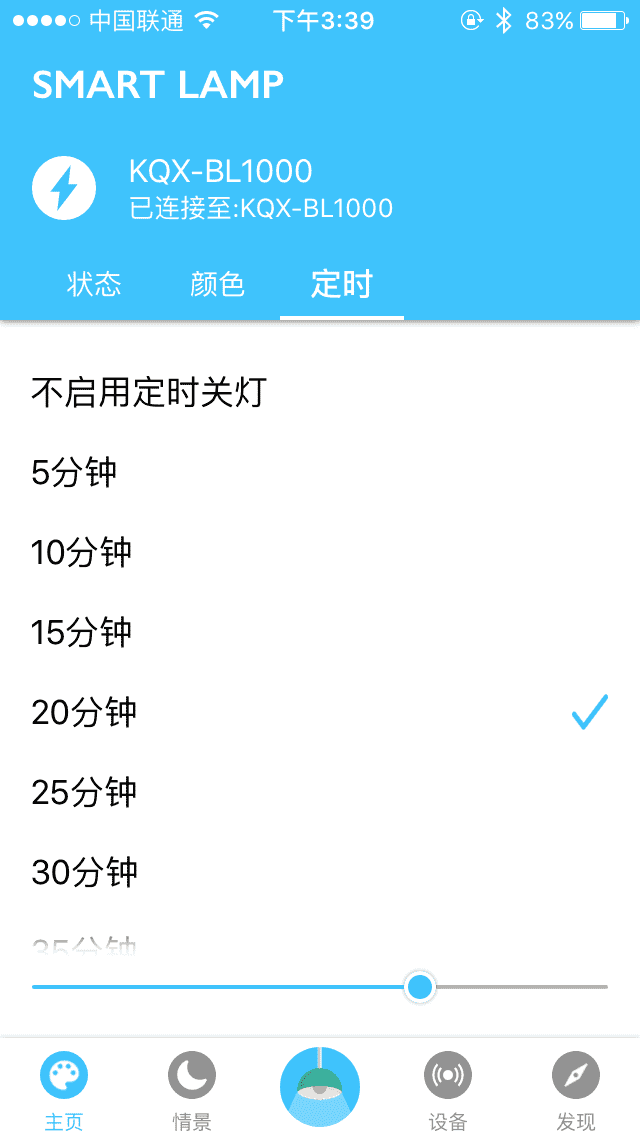
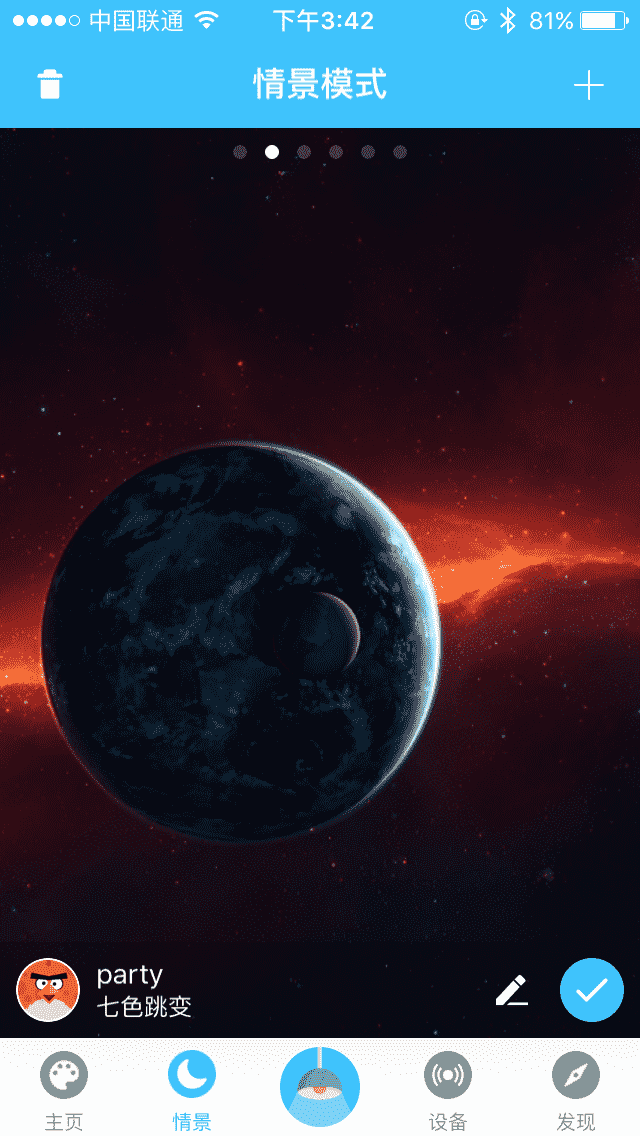
├── source ├── CNAME ├── robots.txt ├── _data │ └── widgets.yml ├── notes │ ├── index.md │ ├── json │ │ └── index.md │ ├── nodejs │ │ └── index.md │ └── flutter │ │ └── index.md ├── wiki │ ├── tag.sh │ │ └── index.md │ ├── prohud │ │ ├── getting-started │ │ │ └── index.md │ │ ├── custom │ │ │ └── index.md │ │ ├── scene │ │ │ └── index.md │ │ ├── toast │ │ │ └── index.md │ │ └── index.md │ ├── podspec.sh │ │ └── index.md │ ├── nexus │ │ └── index.md │ ├── git │ │ ├── index.md │ │ └── git-server │ │ │ └── index.md │ ├── inspire │ │ └── index.md │ ├── smartlamp │ │ └── index.md │ ├── vim-cn.sh │ │ └── index.md │ ├── volantis │ │ └── index.md │ ├── resume │ │ └── index.md │ └── heartmate │ │ └── index.md ├── _posts │ └── blog │ │ ├── 2016-02-11-smart-life.md │ │ ├── 2016-05-22-to-be-a-titan.md │ │ ├── 2013-02-06-effective-teamwork.md │ │ ├── 2020-08-23-issues-api.md │ │ ├── 2017-06-28-ios-strava.md │ │ └── 2016-11-06-ios-framework.md ├── install └── friends │ └── index.md ├── themes └── stellar │ ├── .gitignore │ ├── giscus.json │ ├── .npmignore │ ├── source │ ├── css │ │ ├── _common │ │ │ ├── control.styl │ │ │ ├── image.styl │ │ │ ├── pre.styl │ │ │ ├── svg.styl │ │ │ ├── input.styl │ │ │ ├── span.styl │ │ │ ├── cap.styl │ │ │ ├── blockquote.styl │ │ │ ├── toast.styl │ │ │ ├── html.styl │ │ │ ├── blur.styl │ │ │ ├── loading.styl │ │ │ ├── title.styl │ │ │ ├── base.styl │ │ │ ├── device.styl │ │ │ └── button.styl │ │ ├── _plugins │ │ │ ├── scrollreveal.styl │ │ │ ├── aplayer.styl │ │ │ ├── comments │ │ │ │ ├── beaudar.styl │ │ │ │ ├── artalk.styl │ │ │ │ ├── utterances.styl │ │ │ │ └── waline.styl │ │ │ ├── fancybox.styl │ │ │ ├── copycode.styl │ │ │ ├── lazyload.styl │ │ │ ├── index.styl │ │ │ └── swiper.styl │ │ ├── _layout │ │ │ ├── tag-plugins │ │ │ │ ├── ghcard.styl │ │ │ │ ├── emoji.styl │ │ │ │ ├── mark.styl │ │ │ │ ├── tag.styl │ │ │ │ ├── override.styl │ │ │ │ ├── navbar.styl │ │ │ │ ├── copy.styl │ │ │ │ ├── toc.styl │ │ │ │ ├── inline-labels.styl │ │ │ │ ├── image.styl │ │ │ │ ├── grid.styl │ │ │ │ ├── folders.styl │ │ │ │ ├── poetry.styl │ │ │ │ ├── frame.styl │ │ │ │ ├── about.styl │ │ │ │ ├── note.styl │ │ │ │ ├── folding.styl │ │ │ │ ├── friends.styl │ │ │ │ └── quot.styl │ │ │ ├── index.styl │ │ │ ├── widgets │ │ │ │ ├── toc_blog.styl │ │ │ │ ├── related.styl │ │ │ │ ├── tagcloud.styl │ │ │ │ ├── recent.styl │ │ │ │ ├── timeline.styl │ │ │ │ ├── ghrepo.styl │ │ │ │ ├── toc_wiki.styl │ │ │ │ ├── widgets.styl │ │ │ │ └── toc_common.styl │ │ │ ├── partial │ │ │ │ ├── bread-nav.styl │ │ │ │ ├── footer.styl │ │ │ │ ├── paginator.styl │ │ │ │ ├── article-footer.styl │ │ │ │ ├── navbar.styl │ │ │ │ └── cover.styl │ │ │ ├── main.styl │ │ │ ├── pages │ │ │ │ └── error.styl │ │ │ ├── layout.styl │ │ │ └── sidebar │ │ │ │ ├── sidebar.styl │ │ │ │ └── footer.styl │ │ ├── main.styl │ │ └── _defines │ │ │ └── const.styl │ └── js │ │ └── plugins │ │ ├── linkcard.js │ │ └── copycode.js │ ├── layout │ ├── _partial │ │ ├── main │ │ │ ├── header │ │ │ │ └── index.ejs │ │ │ ├── post_list │ │ │ │ ├── paginator.ejs │ │ │ │ └── wiki_card.ejs │ │ │ ├── article │ │ │ │ ├── ai_abstract.ejs │ │ │ │ ├── related_posts.ejs │ │ │ │ └── read_next.ejs │ │ │ ├── navbar │ │ │ │ └── list_wiki.ejs │ │ │ └── footer.ejs │ │ ├── plugins │ │ │ └── comments │ │ │ │ ├── script.ejs │ │ │ │ ├── artalk │ │ │ │ ├── layout.ejs │ │ │ │ └── script.ejs │ │ │ │ ├── twikoo │ │ │ │ ├── layout.ejs │ │ │ │ └── script.ejs │ │ │ │ ├── waline │ │ │ │ ├── layout.ejs │ │ │ │ └── script.ejs │ │ │ │ ├── giscus │ │ │ │ ├── layout.ejs │ │ │ │ └── script.ejs │ │ │ │ ├── beaudar │ │ │ │ ├── layout.ejs │ │ │ │ └── script.ejs │ │ │ │ ├── utterances │ │ │ │ ├── layout.ejs │ │ │ │ └── script.ejs │ │ │ │ └── layout.ejs │ │ ├── cover │ │ │ ├── index.ejs │ │ │ ├── post_cover.ejs │ │ │ └── wiki_cover.ejs │ │ ├── widgets │ │ │ ├── markdown.ejs │ │ │ ├── tagcloud.ejs │ │ │ ├── timeline.ejs │ │ │ ├── ghissues.ejs │ │ │ ├── related.ejs │ │ │ └── search.ejs │ │ ├── sidebar │ │ │ ├── menu.ejs │ │ │ └── header.ejs │ │ └── menubtn.ejs │ ├── tags.ejs │ ├── 404.ejs │ ├── layout.ejs │ ├── categories.ejs │ ├── mermaid.ejs │ ├── page.ejs │ ├── mathjax.ejs │ ├── post.ejs │ ├── wiki.ejs │ └── archive.ejs │ ├── scripts │ ├── generators │ │ ├── 404.js │ │ ├── tags.js │ │ ├── categories.js │ │ └── wiki.js │ ├── helpers │ │ ├── scrollreveal.js │ │ ├── category_color.js │ │ ├── utils.js │ │ ├── stellar_info.js │ │ ├── parse_config.js │ │ └── related_posts.js │ ├── events │ │ ├── index.js │ │ └── lib │ │ │ └── config.js │ ├── filters │ │ ├── index.js │ │ └── lib │ │ │ ├── img_onerror.js │ │ │ └── img_lazyload.js │ └── tags │ │ ├── lib │ │ ├── mark.js │ │ ├── folding.js │ │ ├── checkbox.js │ │ ├── tag.js │ │ ├── ablock.js │ │ ├── note.js │ │ ├── emoji.js │ │ ├── swiper.js │ │ ├── poetry.js │ │ ├── grid.js │ │ ├── ghcard.js │ │ ├── navbar.js │ │ ├── folders.js │ │ ├── quot.js │ │ ├── about.js │ │ ├── friends.js │ │ ├── copy.js │ │ ├── tabs.js │ │ ├── frame.js │ │ └── toc.js │ │ ├── inline-labels.js │ │ └── index.js │ ├── .github │ ├── ISSUE_TEMPLATE │ │ ├── article-share.md │ │ └── any-question.md │ └── workflows │ │ ├── label-commenter.yml │ │ └── npm-publish.yml │ ├── _data │ ├── links.yml │ └── widgets.yml │ ├── package.json │ ├── README.md │ ├── languages │ ├── zh-TW.yml │ ├── zh-CN.yml │ └── en.yml │ ├── LICENSE │ └── npm-publish.sh ├── scaffolds ├── draft.md ├── page.md └── post.md ├── .gitignore ├── README.md ├── package.json ├── LICENSE ├── .github └── workflows │ └── auto-deploy.yml └── _config.stellar.yml /source/CNAME: -------------------------------------------------------------------------------- 1 | xaoxuu.com -------------------------------------------------------------------------------- /themes/stellar/.gitignore: -------------------------------------------------------------------------------- 1 | .DS_Store 2 | node_modules -------------------------------------------------------------------------------- /source/robots.txt: -------------------------------------------------------------------------------- 1 | User-Agent: * 2 | Allow: /sitemap.xml -------------------------------------------------------------------------------- /scaffolds/draft.md: -------------------------------------------------------------------------------- 1 | --- 2 | title: {{ title }} 3 | tags: 4 | --- 5 | -------------------------------------------------------------------------------- /.gitignore: -------------------------------------------------------------------------------- 1 | .DS_Store 2 | node_modules 3 | db.json 4 | .deploy_git 5 | public -------------------------------------------------------------------------------- /scaffolds/page.md: -------------------------------------------------------------------------------- 1 | --- 2 | title: {{ title }} 3 | date: {{ date }} 4 | --- 5 | -------------------------------------------------------------------------------- /themes/stellar/giscus.json: -------------------------------------------------------------------------------- 1 | { 2 | "defaultCommentOrder": "newest" 3 | } 4 | -------------------------------------------------------------------------------- /scaffolds/post.md: -------------------------------------------------------------------------------- 1 | --- 2 | title: {{ title }} 3 | date: {{ date }} 4 | tags: 5 | --- 6 | -------------------------------------------------------------------------------- /themes/stellar/.npmignore: -------------------------------------------------------------------------------- 1 | .github/ 2 | npm-publish.sh 3 | node_modules 4 | giscus.json -------------------------------------------------------------------------------- /themes/stellar/source/css/_common/control.styl: -------------------------------------------------------------------------------- 1 | .dis-select 2 | disable-select() 3 | -------------------------------------------------------------------------------- /themes/stellar/source/css/_plugins/scrollreveal.styl: -------------------------------------------------------------------------------- 1 | .reveal 2 | visibility: hidden -------------------------------------------------------------------------------- /themes/stellar/source/css/_plugins/aplayer.styl: -------------------------------------------------------------------------------- 1 | .md-text 2 | .aplayer 3 | border-radius: $border-block -------------------------------------------------------------------------------- /themes/stellar/source/css/_plugins/comments/beaudar.styl: -------------------------------------------------------------------------------- 1 | .cmt-body.beaudar 2 | margin: 0 -4px 3 | width: 'calc(100% + %s)' % 8px 4 | -------------------------------------------------------------------------------- /source/_data/widgets.yml: -------------------------------------------------------------------------------- 1 | welcome: 2 | layout: markdown 3 | title: '欢迎,旅行者:' 4 | content: | 5 | 这是一个世界边缘的佛系小站,建于21世纪初,长期维护并保持低频更新。 6 | -------------------------------------------------------------------------------- /themes/stellar/source/css/_plugins/fancybox.styl: -------------------------------------------------------------------------------- 1 | img[fancybox='true'] 2 | cursor: zoom-in 3 | 4 | .swiper-slide 5 | cursor: zoom-in 6 | -------------------------------------------------------------------------------- /themes/stellar/source/css/_layout/tag-plugins/ghcard.styl: -------------------------------------------------------------------------------- 1 | .tag-plugin.ghcard 2 | line-height: 0 3 | a.ghcard 4 | display: inline-block 5 | -------------------------------------------------------------------------------- /README.md: -------------------------------------------------------------------------------- 1 | # rockyzsu's blog 2 | 3 | 4 | 5 | ## 运行 6 | ```shell 7 | npm i # 可能需要 yay -S nasm(安装nasm,编译jpegtran需要) 8 | npm run s 9 | ``` 10 | -------------------------------------------------------------------------------- /themes/stellar/source/css/_common/image.styl: -------------------------------------------------------------------------------- 1 | div.lazy.img 2 | width: 100% 3 | height: 100% 4 | background-position: center 5 | background-size: cover 6 | -------------------------------------------------------------------------------- /themes/stellar/source/css/_common/pre.styl: -------------------------------------------------------------------------------- 1 | pre:not([class]):has(>code) 2 | display: block 3 | padding: 1rem 4 | overflow: auto 5 | code 6 | padding: 0 -------------------------------------------------------------------------------- /themes/stellar/source/css/_common/svg.styl: -------------------------------------------------------------------------------- 1 | svg.icon 2 | width: 1em 3 | height: 1em 4 | vertical-align: middle 5 | fill: currentColor 6 | overflow: hidden 7 | -------------------------------------------------------------------------------- /themes/stellar/source/css/_layout/index.styl: -------------------------------------------------------------------------------- 1 | @import 'partial/*' 2 | @import 'tag-plugins/*' 3 | @import 'sidebar/*' 4 | @import 'widgets/*' 5 | @import 'pages/*' 6 | -------------------------------------------------------------------------------- /themes/stellar/source/css/_layout/widgets/toc_blog.styl: -------------------------------------------------------------------------------- 1 | .widget-wrapper.toc.single .doc-tree 2 | &.active>.toc 3 | border-left: 2px solid var(--block-hover) 4 | -------------------------------------------------------------------------------- /themes/stellar/source/css/_plugins/comments/artalk.styl: -------------------------------------------------------------------------------- 1 | .cmt-body.artalk .artalk 2 | --at-color-main: $color-theme 3 | .atk-main-editor 4 | border-radius: $border-block -------------------------------------------------------------------------------- /themes/stellar/layout/_partial/main/header/index.ejs: -------------------------------------------------------------------------------- 1 | <% if (page.header != 'auto' && page.header != false) { %> 2 | <%- partial('../../sidebar/header', {where: 'main'}) %> 3 | <% } %> 4 | -------------------------------------------------------------------------------- /themes/stellar/layout/_partial/plugins/comments/script.ejs: -------------------------------------------------------------------------------- 1 | <% if (page.cmt && page.cmt.service && page.cmt.service.length > 0) { %> 2 | <%- partial(page.cmt.service + '/script') %> 3 | <% } %> 4 | -------------------------------------------------------------------------------- /themes/stellar/source/css/_plugins/comments/utterances.styl: -------------------------------------------------------------------------------- 1 | .cmt-body.utterances 2 | margin: 0 -4px 3 | width: 'calc(100% + %s)' % 8px 4 | 5 | .related-wrap#comments .cmt-body svg.loading 6 | top: 62px -------------------------------------------------------------------------------- /themes/stellar/source/css/_layout/tag-plugins/emoji.styl: -------------------------------------------------------------------------------- 1 | .md-text .tag-plugin.emoji 2 | display: inline-block 3 | margin: -4px 2px 0 4 | vertical-align: middle 5 | img 6 | display: block 7 | object-fit: contain 8 | height: 1.75em 9 | -------------------------------------------------------------------------------- /themes/stellar/source/css/_common/input.styl: -------------------------------------------------------------------------------- 1 | input 2 | background: none 3 | border: none 4 | 5 | input.copy-area 6 | display: block 7 | font-family: $ff-code 8 | font-size: $fs-12 9 | font-weight: 700 10 | color: var(--text-p3) 11 | -------------------------------------------------------------------------------- /themes/stellar/source/css/_layout/widgets/related.styl: -------------------------------------------------------------------------------- 1 | .widget-wrapper.related .widget-body a 2 | margin-top: 0.5rem 3 | margin-bottom: 1rem 4 | .title 5 | font-weight: 700 6 | font-size: $fs-14 7 | .excerpt 8 | -webkit-line-clamp: 3 9 | -------------------------------------------------------------------------------- /themes/stellar/source/css/_layout/widgets/tagcloud.styl: -------------------------------------------------------------------------------- 1 | .widget-wrapper.tagcloud .widget-body 2 | margin-top: 0.25rem 3 | a 4 | word-break: break-word 5 | color: var(--text-p2) 6 | line-height: 1.5 7 | &:hover 8 | color: $color-hover 9 | -------------------------------------------------------------------------------- /themes/stellar/scripts/generators/404.js: -------------------------------------------------------------------------------- 1 | /** 2 | * 404 v1 | https://github.com/xaoxuu/hexo-theme-stellar/ 3 | */ 4 | 5 | hexo.extend.generator.register('404', function (locals) { 6 | return { 7 | path: '/404.html', 8 | layout: ['404'] 9 | } 10 | }); -------------------------------------------------------------------------------- /themes/stellar/source/css/_common/span.styl: -------------------------------------------------------------------------------- 1 | span.dot,span.sep 2 | font-size: 0.9em 3 | margin: 0 .25em 4 | span.dot:before 5 | content: '·' 6 | font-weight: 900 7 | span.sep:before 8 | content: '/' 9 | padding-left: 2px 10 | padding-right: 2px 11 | -------------------------------------------------------------------------------- /themes/stellar/.github/ISSUE_TEMPLATE/article-share.md: -------------------------------------------------------------------------------- 1 | --- 2 | name: Article Share【文章分享】 3 | about: 与Stellar相关的文章分享 4 | title: '[分享] ' 5 | labels: '分享' 6 | assignees: '' 7 | --- 8 | 9 | 10 | 11 | **[]()** 12 | 13 | 14 | -------------------------------------------------------------------------------- /themes/stellar/source/css/_layout/tag-plugins/mark.styl: -------------------------------------------------------------------------------- 1 | .md-text .tag-plugin.mark 2 | padding: 0 1px 3 | border-radius: 2px 4 | background: var(--theme-bg2) 5 | border: 1px solid var(--theme-border) 6 | color: var(--text-p0) 7 | &[color=dark] 8 | border-color: var(--theme-bg2) 9 | -------------------------------------------------------------------------------- /themes/stellar/.github/ISSUE_TEMPLATE/any-question.md: -------------------------------------------------------------------------------- 1 | --- 2 | name: Any Question【问题反馈】 3 | about: 主题使用方面任何问题或建议 4 | title: '' 5 | labels: '' 6 | assignees: '' 7 | 8 | --- 9 | 10 | 16 | -------------------------------------------------------------------------------- /themes/stellar/_data/links.yml: -------------------------------------------------------------------------------- 1 | # 不要直接在这里写,要复制到 blog/source/_data/links.yml 位置 2 | '示例': 3 | - title: XAOXUU 4 | avatar: https://bu.dusays.com/2021/09/24/2f74810ceb3d3.png 5 | url: https://xaoxuu.com 6 | screenshot: https://bu.dusays.com/2022/10/23/63542895cfd29.png 7 | description: 8 | -------------------------------------------------------------------------------- /source/notes/index.md: -------------------------------------------------------------------------------- 1 | --- 2 | robots: noindex,nofollow 3 | sitemap: false 4 | menu_id: notes 5 | layout: wiki 6 | wiki: Notes 7 | header: true 8 | breadcrumb: false 9 | title: 便笺 10 | seo_title: 收藏的站点 11 | --- 12 | 13 | {% toc wiki:Notes display:mobile TOC %} 14 | 15 | {% sites not:examples %} 16 | -------------------------------------------------------------------------------- /themes/stellar/layout/_partial/cover/index.ejs: -------------------------------------------------------------------------------- 1 | <% 2 | function layoutCover() { 3 | if (page.layout == 'wiki') { 4 | return partial('wiki_cover'); 5 | } 6 | if (page.layout == 'post') { 7 | return partial('post_cover'); 8 | } 9 | return ''; 10 | } 11 | %> 12 | <%- layoutCover() %> 13 | -------------------------------------------------------------------------------- /themes/stellar/scripts/helpers/scrollreveal.js: -------------------------------------------------------------------------------- 1 | 'use strict'; 2 | 3 | hexo.extend.helper.register('scrollreveal', function(args){ 4 | const cfg = hexo.theme.config; 5 | if (cfg.plugins.scrollreveal && cfg.plugins.scrollreveal.enable) { 6 | return ' reveal'; 7 | } 8 | return ''; 9 | }); 10 | -------------------------------------------------------------------------------- /themes/stellar/layout/_partial/main/post_list/paginator.ejs: -------------------------------------------------------------------------------- 1 | <% if ((is_home() || is_category() || is_tag()) && page.total > 1) { %> 2 |
3 | <%- paginator({ 4 | prev_text: '', 5 | next_text: '', 6 | force_prev_next:true 7 | }) %> 8 |
9 | <% } %> 10 | -------------------------------------------------------------------------------- /themes/stellar/source/css/_common/cap.styl: -------------------------------------------------------------------------------- 1 | .cap 2 | font-weight: 500 3 | font-size: $fs-12 4 | scrollbar-width: none 5 | color: var(--text-p3) 6 | &.blue 7 | color: darken($color-md-blue, 6) 8 | &.cyan 9 | color: darken($color-mac-cyan, 6) 10 | &.theme 11 | color: darken($color-theme, 5) 12 | -------------------------------------------------------------------------------- /themes/stellar/source/css/main.styl: -------------------------------------------------------------------------------- 1 | // 无需修改的常量 2 | @import '_defines/const' 3 | 4 | // 自定义参数 5 | @import '_custom' 6 | 7 | // 含自定义参数的常量以及函数 8 | @import '_defines/theme' 9 | @import '_defines/func' 10 | 11 | // 通用组件 12 | @import '_common/*' 13 | // 布局 14 | @import '_layout/*' 15 | 16 | // 可选插件 17 | @import '_plugins/index' 18 | -------------------------------------------------------------------------------- /themes/stellar/source/css/_common/blockquote.styl: -------------------------------------------------------------------------------- 1 | blockquote 2 | display: block 3 | margin-left: 0 4 | margin-right: 0 5 | padding: 0.25rem 0.75rem 6 | background: var(--block) 7 | $bd-left = 4px 8 | border-left: $bd-left solid var(--text-meta) 9 | border-radius: $bd-left $border-bar $border-bar $bd-left 10 | color: var(--text-p2) -------------------------------------------------------------------------------- /themes/stellar/scripts/helpers/category_color.js: -------------------------------------------------------------------------------- 1 | 'use strict'; 2 | 3 | hexo.extend.helper.register('category_color', function(cat){ 4 | const cfg = hexo.theme.config; 5 | if (cfg.article.category_color && cfg.article.category_color[cat]) { 6 | return ' style="color:' + cfg.article.category_color[cat] + '"'; 7 | } 8 | return ''; 9 | }); 10 | -------------------------------------------------------------------------------- /source/notes/json/index.md: -------------------------------------------------------------------------------- 1 | --- 2 | robots: noindex,nofollow 3 | sitemap: false 4 | menu_id: notes 5 | layout: wiki 6 | wiki: Notes 7 | order: 401 8 | seo_title: Json在线解析工具 9 | --- 10 | 11 | {% folding Json 在线解析工具 child:codeblock open:true %} 12 | 13 | {% endfolding %} 14 | -------------------------------------------------------------------------------- /themes/stellar/source/css/_layout/tag-plugins/tag.styl: -------------------------------------------------------------------------------- 1 | .md-text .tag-plugin.tag 2 | padding: 0px 4px 3 | border-radius: 2px 4 | background: var(--theme-bg1) 5 | color: var(--text-p2) 6 | margin: 2px 0 7 | display: inline-block 8 | font-size: $fs-14 9 | trans2 background color 10 | &:hover 11 | background: var(--text-p2) 12 | color: var(--theme-bg1) 13 | -------------------------------------------------------------------------------- /themes/stellar/source/css/_layout/tag-plugins/override.styl: -------------------------------------------------------------------------------- 1 | .tag-plugin.note, .tag-plugin.folding 2 | blockquote 3 | border-top-left-radius: 0 4 | border-bottom-left-radius: 0 5 | background: none 6 | padding-top: 0 7 | padding-bottom: 0 8 | table:not([class]) 9 | th 10 | background: var(--block-hover) 11 | td,th 12 | border-color: var(--block-border) 13 | 14 | -------------------------------------------------------------------------------- /themes/stellar/source/css/_layout/widgets/recent.styl: -------------------------------------------------------------------------------- 1 | .widget-wrapper.recent .widget-body 2 | display: flex 3 | flex-direction: column 4 | align-items: flex-start 5 | margin-top: 0.25rem 6 | a 7 | line-height: 1.2 8 | font-size: $fs-13 9 | margin: 0.25rem 0 10 | .title 11 | font-size: $fs-13 12 | color: var(--text-p2) 13 | &:hover 14 | color: $color-hover 15 | 16 | -------------------------------------------------------------------------------- /themes/stellar/scripts/generators/tags.js: -------------------------------------------------------------------------------- 1 | /** 2 | * tags v1 | https://github.com/xaoxuu/hexo-theme-stellar/ 3 | */ 4 | 5 | hexo.extend.generator.register('tags', function (locals) { 6 | if (locals.tags && locals.tags.length > 0) { 7 | return { 8 | path: hexo.config.tag_dir + '/index.html', 9 | data: locals.posts, 10 | layout: ['tags'] 11 | } 12 | } else { 13 | return {}; 14 | } 15 | }); 16 | -------------------------------------------------------------------------------- /source/wiki/tag.sh/index.md: -------------------------------------------------------------------------------- 1 | --- 2 | layout: wiki 3 | wiki: tag.sh 4 | title: 「tag.sh」一个方便发布git版本的脚本 5 | --- 6 | 7 | 8 | ## 安装脚本 9 | 10 | 打开终端,输入并执行这一行命令即可: 11 | 12 | {% copy width:max curl -s https://xaoxuu.com/install | sh -s tag.sh %} 13 | 14 | ## 发布版本 15 | 16 | 当您需要进行版本发布时,在 git 仓库中打开终端,输入: 17 | 18 | ```sh 19 | tag 版本号 描述 20 | ``` 21 | 22 | 然后稍等片刻即可完成发布。 23 | 24 | 25 | ## 删除版本 26 | 27 | ```sh 28 | tag del 版本号 29 | ``` 30 | -------------------------------------------------------------------------------- /themes/stellar/source/css/_common/toast.styl: -------------------------------------------------------------------------------- 1 | div.toast 2 | max-width: 60% 3 | padding: 1rem 3rem 4 | line-height: 1.5 5 | color: var(--text-p1) 6 | font-weight: 500 7 | text-align: center 8 | border-radius: $border-card 9 | background: var(--card) 10 | position: fixed 11 | top: 50% 12 | left: 50% 13 | transform: translate(-50%, -50%) 14 | z-index: 9 15 | disable-select() 16 | box-shadow: $boxshadow-float 17 | -------------------------------------------------------------------------------- /themes/stellar/scripts/generators/categories.js: -------------------------------------------------------------------------------- 1 | /** 2 | * categories v1 | https://github.com/xaoxuu/hexo-theme-stellar/ 3 | */ 4 | 5 | hexo.extend.generator.register('categories', function (locals) { 6 | if (locals.categories && locals.categories.length > 0) { 7 | return { 8 | path: hexo.config.category_dir + '/index.html', 9 | data: locals.posts, 10 | layout: ['categories'] 11 | } 12 | } else { 13 | return {}; 14 | } 15 | }); 16 | -------------------------------------------------------------------------------- /themes/stellar/layout/_partial/main/article/ai_abstract.ejs: -------------------------------------------------------------------------------- 1 | <% if (page.layout === 'post' || (page.layout === 'wiki' && page.wiki && page.wiki.length > 0)) { %> 2 | 6 | 7 | <% } %> 8 | -------------------------------------------------------------------------------- /source/notes/nodejs/index.md: -------------------------------------------------------------------------------- 1 | --- 2 | robots: noindex,nofollow 3 | sitemap: false 4 | menu_id: notes 5 | layout: wiki 6 | wiki: Notes 7 | title: Node.js 相关问题 8 | order: 350 9 | references: 10 | - url: https://nodejs.org/en/ 11 | - url: https://www.npmjs.com 12 | --- 13 | 14 | 查看当前的源: 15 | {% copy npm config get registry %} 16 | 17 | 官方源: 18 | {% copy npm set registry https://registry.npmjs.org/ %} 19 | 20 | 淘宝源: 21 | {% copy npm set registry https://registry.npm.taobao.org/ %} 22 | -------------------------------------------------------------------------------- /themes/stellar/source/css/_layout/widgets/timeline.styl: -------------------------------------------------------------------------------- 1 | .widget-wrapper.timeline 2 | .widget-body 3 | margin-top: 0.5rem 4 | .tag-plugin.timeline .timenode 5 | .header 6 | margin-bottom: 0.5rem 7 | txt-ellipsis() 8 | .user-info 9 | background: var(--block) 10 | &:hover 11 | background: $color-hover 12 | color: var(--card) 13 | &:before 14 | display: none 15 | &+.timenode 16 | margin-top: 0.75rem 17 | -------------------------------------------------------------------------------- /themes/stellar/scripts/events/index.js: -------------------------------------------------------------------------------- 1 | /* global hexo */ 2 | 3 | 'use strict'; 4 | 5 | hexo.on('generateBefore', () => { 6 | // Merge config. 7 | require('./lib/config')(hexo); 8 | require('./lib/doc_tree')(hexo); 9 | require('./lib/utils')(hexo); 10 | }); 11 | 12 | hexo.on('ready', () => { 13 | const { version, homepage, repository } = require('../../package.json'); 14 | hexo.log.info(`Welcome to Stellar ${version} 15 | DOCS ${homepage} 16 | REPO ${repository.url} 17 | `); 18 | }); 19 | -------------------------------------------------------------------------------- /themes/stellar/source/css/_common/html.styl: -------------------------------------------------------------------------------- 1 | * 2 | outline: none 3 | html 4 | font-family: $ff-body 5 | font-size: $fs-root 6 | -webkit-text-size-adjust: 100% 7 | -ms-text-size-adjust: 100% 8 | if hexo-config('style.smooth_scroll') 9 | scroll-behavior: smooth 10 | body 11 | background: var(--site-bg) 12 | margin: 0 13 | -webkit-font-smoothing: antialiased 14 | -moz-osx-font-smoothing: grayscale 15 | text-rendering: optimizelegibility 16 | -webkit-tap-highlight-color: rgba(0, 0, 0, 0) 17 | -------------------------------------------------------------------------------- /themes/stellar/source/css/_layout/partial/bread-nav.styl: -------------------------------------------------------------------------------- 1 | // 面包屑导航 2 | .bread-nav 3 | padding: 0.25rem 1rem 0 4 | color: var(--text-p3) 5 | font-weight: 500 6 | div#breadcrumb 7 | display: flex 8 | align-items: center 9 | flex-direction: row 10 | &:not([style]) a 11 | color: var(--theme-link) 12 | &[style] a 13 | color: inherit 14 | span.sep 15 | color: var(--text-p3) 16 | a.cap:hover 17 | color: $color-hover 18 | div#post-meta 19 | margin-top: 2px 20 | -------------------------------------------------------------------------------- /themes/stellar/source/css/_layout/main.styl: -------------------------------------------------------------------------------- 1 | .l_main 2 | position: relative 3 | padding-bottom: "calc(1 * %s)" % var(--gap-l) 4 | @media screen and (min-width: 1400px) 5 | margin-left: "calc(2 * %s)" % var(--gap-l) 6 | margin-right: "calc(2 * %s + %s / 2)" % (var(--gap-l) var(--width-left)) 7 | @media screen and (min-width: $device-mobile-max) 8 | padding-top: "calc(2 * %s)" % var(--gap-l) 9 | @media screen and (max-width: $device-mobile-max) 10 | padding-top: 1rem 11 | header 12 | margin: 2rem 1rem 1rem 13 | .logo-wrap 14 | margin: 0 15 | -------------------------------------------------------------------------------- /themes/stellar/layout/_partial/widgets/markdown.ejs: -------------------------------------------------------------------------------- 1 | <% 2 | function layoutDiv() { 3 | if (!item.content?.length) return '' 4 | var el = ''; 5 | el += ''; 6 | if (item.title?.length > 0) { 7 | el += '
'; 8 | el += '' + item.title + ''; 9 | el += '
'; 10 | } 11 | el += '
'; 12 | el += markdown(item.content); 13 | el += '
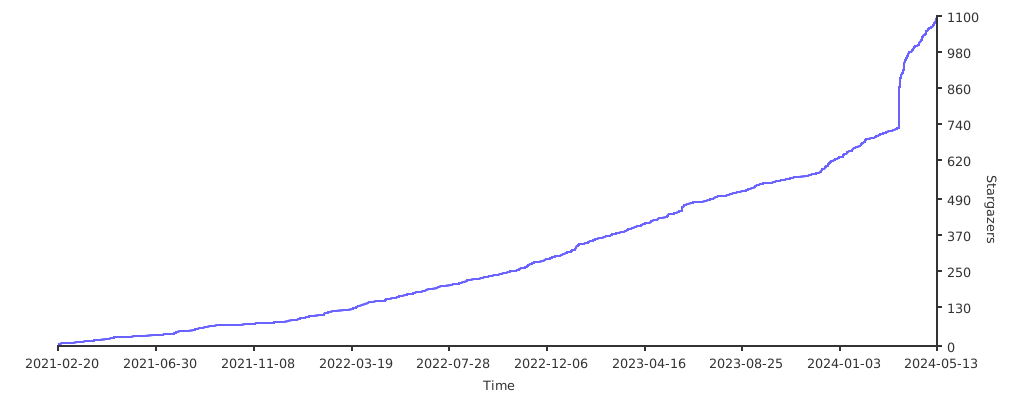
'; 14 | el += '
'; 15 | return el; 16 | } 17 | %> 18 | <%- layoutDiv() %> 19 | -------------------------------------------------------------------------------- /themes/stellar/layout/_partial/main/article/related_posts.ejs: -------------------------------------------------------------------------------- 1 | <% 2 | function layoutDiv() { 3 | if (theme.article.related_posts.enable) { 4 | var el = ''; 5 | el += ''; 11 | return el; 12 | } 13 | return; 14 | } 15 | %> 16 | <%- layoutDiv() %> 17 | -------------------------------------------------------------------------------- /themes/stellar/scripts/helpers/utils.js: -------------------------------------------------------------------------------- 1 | /** 2 | * utils v1 | https://github.com/xaoxuu/hexo-theme-stellar/ 3 | */ 4 | 5 | 'use strict'; 6 | 7 | hexo.extend.helper.register('get_page', function(id) { 8 | const pages = hexo.locals.get('pages'); 9 | let page = pages.data.find(element => element._id == id) 10 | if (page && page._id == id) { 11 | return page 12 | } else { 13 | const posts = hexo.locals.get('posts'); 14 | let post = posts.data.find(element => element._id == id) 15 | if (post && post._id == id) { 16 | return post 17 | } 18 | } 19 | return null 20 | }); 21 | -------------------------------------------------------------------------------- /themes/stellar/source/css/_layout/pages/error.styl: -------------------------------------------------------------------------------- 1 | .md-text.error-page 2 | text-align: center 3 | margin-top: 2rem 4 | img#error 5 | width: 30vw 6 | max-height: 150px 7 | margin-bottom: 2rem 8 | h1 9 | font-size: 4rem 10 | margin-bottom: 0 11 | p.what,p.why 12 | margin: 0.5em 13 | p.why 14 | font-size: $fs-13 15 | a#back 16 | margin: 2rem 0 17 | display: inline-block 18 | background: #FDB62F 19 | color: black 20 | border: 2px solid black 21 | 22 | @media screen and (max-width: $device-tablet) 23 | .md-text.error-page 24 | margin-top: 4rem 25 | -------------------------------------------------------------------------------- /themes/stellar/source/css/_plugins/copycode.styl: -------------------------------------------------------------------------------- 1 | .highlight 2 | position: relative 3 | 4 | .highlight .code .copy-btn 5 | position: absolute 6 | top: 0 7 | right: 0 8 | padding: 4px 0.5rem 9 | opacity: 0 10 | font-weight: 700 11 | color: var(--theme) 12 | cursor: pointer 13 | 14 | .highlight:hover .copy-btn 15 | opacity 0.25 16 | 17 | .highlight .code .copy-btn:hover 18 | color: var(--theme) 19 | opacity: 0.75 20 | 21 | .highlight .code .copy-btn.success 22 | color: $c-green 23 | opacity: 0.75 24 | 25 | .highlight .code .copy-btn.warning 26 | color: $c-orange 27 | opacity: 0.75 -------------------------------------------------------------------------------- /themes/stellar/scripts/filters/index.js: -------------------------------------------------------------------------------- 1 | 'use strict'; 2 | 3 | hexo.extend.filter.register('after_render:html', require('./lib/img_lazyload').processSite); 4 | hexo.extend.filter.register('after_render:html', require('./lib/img_onerror').processSite); 5 | 6 | function change_image(data) { 7 | if (this.theme.config.tag_plugins.image.parse_markdown) { 8 | data.content = data.content.replace( 9 | /!\[(.*?)\]\((.*?)\s*(?:"(.*?)")?\)/g, 10 | '{% image $2 $3 %}' 11 | ); 12 | } 13 | return data; 14 | } 15 | 16 | 17 | hexo.extend.filter.register('before_post_render', change_image, 9); 18 | -------------------------------------------------------------------------------- /themes/stellar/source/css/_layout/tag-plugins/navbar.styl: -------------------------------------------------------------------------------- 1 | .md-text .tag-plugin.navbar 2 | text-align: center 3 | nav.cap 4 | margin: 0 5 | padding: 1px 6 | background: var(--card) 7 | box-shadow: $boxshadow-button 8 | border-radius: 6px 9 | display: inline-flex 10 | max-width: 100% 11 | a 12 | margin: 1px 13 | padding: 0.25em 0.75rem 14 | color: var(--text-p2) 15 | &:after 16 | display: none 17 | &:hover 18 | background: var(--block) 19 | &.active 20 | background: var(--block) 21 | box-shadow: none 22 | color: var(--text-p1) -------------------------------------------------------------------------------- /themes/stellar/.github/workflows/label-commenter.yml: -------------------------------------------------------------------------------- 1 | name: Label Commenter 2 | 3 | on: 4 | issues: 5 | types: [labeled, unlabeled] 6 | pull_request_target: 7 | types: [labeled, unlabeled] 8 | 9 | permissions: 10 | contents: read 11 | issues: write 12 | pull-requests: write 13 | 14 | jobs: 15 | comment: 16 | runs-on: ubuntu-20.04 17 | steps: 18 | - uses: actions/checkout@v3 19 | - name: Label Commenter 20 | uses: peaceiris/actions-label-commenter@v1 21 | with: 22 | github_token: ${{ secrets.GITHUB_TOKEN }} 23 | config_file: .github/config/label-commenter-config.yml 24 | -------------------------------------------------------------------------------- /themes/stellar/layout/tags.ejs: -------------------------------------------------------------------------------- 1 | <% 2 | page.robots = 'noindex,follow'; 3 | if (page.menu_id == undefined) { 4 | page.menu_id = 'post'; 5 | } 6 | %> 7 | <% if (site.tags.length) { %> 8 | <% page.title = __('btn.tags'); %> 9 | <% page.layout = 'tags'; %> 10 | <%- partial('_partial/main/navbar/list_post') %> 11 |
12 |
13 | <% site.tags.sort('length', -1).each(function(tag){ %> 14 | 15 | <%= tag.name %> 16 | 17 | <% }) %> 18 |
19 |
20 | <% } %> 21 | -------------------------------------------------------------------------------- /themes/stellar/scripts/tags/lib/mark.js: -------------------------------------------------------------------------------- 1 | /** 2 | * mark.js v1.0 | https://github.com/xaoxuu/hexo-theme-stellar/ 3 | * 格式与官方标签插件一致使用空格分隔,中括号内的是可选参数(中括号不需要写出来) 4 | * 5 | * {% mark text [color:color] %} 6 | * 7 | */ 8 | 9 | 'use strict' 10 | 11 | module.exports = ctx => function(args) { 12 | args = ctx.args.map(args, ['color'], ['text']) 13 | if (args.color == null) { 14 | args.color = ctx.theme.config.tag_plugins.mark.default_color 15 | } 16 | var el = '' 17 | el += ' **Swift Packages** -> **Add Package Dependency** 14 | 15 | 输入 `https://github.com/xaoxuu/ProHUD.git` 并选择需要的版本。 16 | 17 | ### CocoaPods 18 | 19 | ``` 20 | pod 'ProHUD' 21 | ``` 22 | ### Manually 23 | 24 | 下载 [源码](https://github.com/xaoxuu/ProHUD) 然后拖入工程即可。 25 | 26 | 27 | ## 体验 Demo 程序 28 | 29 | 从 GitHub 下载 ProHUD 的 [源码](https://github.com/xaoxuu/ProHUD) 并打开其中的 Example 程序。 30 | 31 | - **Example-Old** 是由 Xcode10 以及更古老的版本创建的项目。 32 | - **Example-Xcode11** 是由 Xcode11 创建的基于 SceneDelegate 的新项目。 33 | -------------------------------------------------------------------------------- /themes/stellar/layout/404.ejs: -------------------------------------------------------------------------------- 1 | <% 2 | page.menu_id = '404'; 3 | page.layout = '404'; 4 | page.comment_title = ''; 5 | page.header = 'auto'; 6 | page.robots = 'none'; 7 | %> 8 |
9 |

404

10 |

11 | 12 | <%- __('page.error.what') %> 13 | 14 |

15 |

16 | <%- __('page.error.why') %> 17 |

18 |

19 | <%- __('page.error.action') %> 20 |
21 | <%- partial('_partial/plugins/comments/layout') %> 22 | -------------------------------------------------------------------------------- /themes/stellar/layout/layout.ejs: -------------------------------------------------------------------------------- 1 | 2 | 3 | <%- partial('_partial/head') %> 4 | 5 | <%- partial('_partial/cover/index') %> 6 |
7 | 10 |
11 | <%- partial('_partial/main/header/index') %> 12 | <%- body %> 13 | <%- partial('_partial/main/footer') %> 14 | <%- partial('_partial/menubtn') %> 15 |
16 |
17 |
18 | <%- partial('_partial/scripts/index') %> 19 |
20 | 21 | 22 | -------------------------------------------------------------------------------- /themes/stellar/layout/_partial/sidebar/menu.ejs: -------------------------------------------------------------------------------- 1 | <% 2 | function layoutDiv() { 3 | var el = ''; 4 | el += ''; 23 | return el; 24 | } 25 | %> 26 | 27 | <%- layoutDiv() %> 28 | -------------------------------------------------------------------------------- /themes/stellar/source/css/_common/blur.styl: -------------------------------------------------------------------------------- 1 | :root 2 | --blur-px: 12px 3 | --blur-bg: alpha(white, .5) 4 | if hexo-config('style.darkmode') == 'auto' 5 | @media (prefers-color-scheme: dark) 6 | :root 7 | --blur-bg: alpha(black, .5) 8 | if hexo-config('style.darkmode') == 'always' 9 | :root 10 | --blur-bg: alpha(black, .5) 11 | 12 | .blur 13 | background: var(--blur-bg) 14 | @supports ((-webkit-backdrop-filter:blur(var(--blur-px))) or (backdrop-filter:blur(var(--blur-px)))) 15 | background: var(--blur-bg) !important 16 | backdrop-filter: saturate(200%) blur(var(--blur-px)) 17 | -webkit-backdrop-filter: saturate(200%) blur(var(--blur-px)) 18 | &:hover 19 | background: var(--card) 20 | -------------------------------------------------------------------------------- /themes/stellar/scripts/helpers/stellar_info.js: -------------------------------------------------------------------------------- 1 | 'use strict'; 2 | 3 | hexo.extend.helper.register('stellar_info', function(args){ 4 | const repo = 'https://github.com/xaoxuu/hexo-theme-stellar'; 5 | const wiki = 'https://xaoxuu.com/wiki/stellar/'; 6 | const issues = repo + '/issues/'; 7 | const { version } = require('../../package.json'); 8 | const cfg = hexo.theme.config.stellar; 9 | if (!args) { 10 | return repo; 11 | } else if (args == 'name') { 12 | return 'Stellar'; 13 | } else if (args == 'version') { 14 | return version; 15 | } else if (args == 'issues') { 16 | return repo + '/issues/' 17 | } else if (args == 'tree') { 18 | return repo + '/tree/' + version; 19 | } 20 | return ''; 21 | }); 22 | -------------------------------------------------------------------------------- /themes/stellar/layout/_partial/widgets/tagcloud.ejs: -------------------------------------------------------------------------------- 1 | <% 2 | function layoutDiv() { 3 | var el = ''; 4 | if (site.tags == undefined || site.tags.length == 0) { 5 | return el; 6 | } 7 | var opts = Object.assign({}, item); 8 | delete opts['title']; 9 | delete opts['layout']; 10 | opts.class = 'tag '; 11 | el += ''; 12 | if (item.title) { 13 | el += '
'; 14 | el += '' + item.title + ''; 15 | el += '
'; 16 | } 17 | el += '
'; 18 | el += tagcloud(site.tags, opts); 19 | el += '
'; 20 | el += '
'; 21 | return el; 22 | } 23 | %> 24 | <%- layoutDiv() %> 25 | -------------------------------------------------------------------------------- /source/wiki/podspec.sh/index.md: -------------------------------------------------------------------------------- 1 | --- 2 | layout: wiki 3 | title: 一个方便发布podspec的脚本 4 | wiki: podspec.sh 5 | --- 6 | 7 | 8 | ## 开始使用 9 | 10 | let `path` = 你的项目的 `podspec` 所在的路径 11 | 12 | 打开终端,cd 到 `path` ,输入下面这条命令下载脚本到当前文件夹: 13 | 14 | {% copy width:max curl -s https://xaoxuu.com/install | sh -s podspec.sh %} 15 | 16 | 如需安装指定版本,在后面加上版本号即可,例如: 17 | 18 | {% copy width:max curl -s https://xaoxuu.com/install | sh -s podspec.sh 1.2.1 %} 19 | 20 | 需要发布 podspec 到时候,在终端中输入: 21 | 22 | {% copy width:max . podspec.sh %} 23 | 24 | 就会自动开始执行发布流程。 25 | 26 | ## 发布流程 27 | 28 | - 如果目录下有一个 podspec 文件,直接询问版本号,然后打包验证、询问是否发布。 29 | - 如果目录下有多个 podspec 文件,遍历每一个 podspec 文件,询问版本号,然后打包验证、询问是否发布。 30 | 31 | ## 脚本运行权限 32 | 33 | 如果提示没有权限,就输入以下命令修改 `podspec.sh` 的权限 34 | 35 | {% copy width:max chmod 777 podspec.sh %} 36 | -------------------------------------------------------------------------------- /source/notes/flutter/index.md: -------------------------------------------------------------------------------- 1 | --- 2 | robots: noindex,nofollow 3 | sitemap: false 4 | menu_id: notes 5 | layout: wiki 6 | wiki: Notes 7 | title: Flutter 相关问题 8 | order: 250 9 | references: 10 | - title: 'flutter.cn' 11 | url: https://flutter.cn/ 12 | - title: 'flutter.dev' 13 | url: https://flutter.dev/docs 14 | - title: 'flutterchina.club' 15 | url: https://flutterchina.club/docs/ 16 | - title: 'alibaba/fish-redux' 17 | url: https://github.com/alibaba/fish-redux/blob/master/doc/README-cn.md 18 | --- 19 | 20 | 运行时弹出「无法打开“iproxy”,因为无法验证开发者。」弹窗,手动添加信任: 21 | 22 | ``` 23 | sudo xattr -r -d com.apple.quarantine futter的SDK目录/bin/cache/artifacts/usbmuxd/iproxy 24 | ``` 25 | 26 | 清除缓存,重新 build: 27 | 28 | ``` 29 | rm -rf build 30 | flutter clean 31 | flutter build ios --debug 32 | ``` 33 | -------------------------------------------------------------------------------- /themes/stellar/layout/_partial/plugins/comments/artalk/layout.ejs: -------------------------------------------------------------------------------- 1 | <% 2 | function layoutDiv() { 3 | var el = ''; 4 | el += '
18 | 19 | <%- layoutDiv() %> -------------------------------------------------------------------------------- /themes/stellar/layout/_partial/plugins/comments/twikoo/layout.ejs: -------------------------------------------------------------------------------- 1 | <% 2 | function layoutDiv() { 3 | var el = ''; 4 | el += '
18 | 19 | <%- layoutDiv() %> -------------------------------------------------------------------------------- /themes/stellar/package.json: -------------------------------------------------------------------------------- 1 | { 2 | "name": "hexo-theme-stellar", 3 | "version": "1.19.0", 4 | "description": "Elegant and powerful theme for Hexo.", 5 | "main": "package.json", 6 | "scripts": { 7 | "test": "echo test" 8 | }, 9 | "repository": { 10 | "type": "git", 11 | "url": "https://github.com/xaoxuu/hexo-theme-stellar.git" 12 | }, 13 | "keywords": [ 14 | "hexo", 15 | "theme", 16 | "stellar" 17 | ], 18 | "author": "[@xaoxuu](https://github.com/xaoxuu/)", 19 | "license": "MIT", 20 | "bugs": { 21 | "url": "https://github.com/xaoxuu/hexo-theme-stellar/issues/" 22 | }, 23 | "dependencies": { 24 | "hexo-renderer-ejs": "^2.0.0", 25 | "hexo-renderer-stylus": "^2.1.0" 26 | }, 27 | "homepage": "https://xaoxuu.com/wiki/stellar/", 28 | "devDependencies": { 29 | } 30 | } 31 | -------------------------------------------------------------------------------- /themes/stellar/layout/_partial/plugins/comments/waline/layout.ejs: -------------------------------------------------------------------------------- 1 | <% 2 | function layoutDiv() { 3 | var el = ''; 4 | el += '
18 | 19 | <%- layoutDiv() %> 20 | -------------------------------------------------------------------------------- /themes/stellar/source/css/_common/loading.styl: -------------------------------------------------------------------------------- 1 | svg.loading 2 | display: block 3 | position: absolute 4 | color: var(--text-p3) 5 | z-index: -1 6 | width: 100% 7 | height: 2rem 8 | margin: auto 9 | animation: spin infinite 2s 10 | animation-timing-function: linear 11 | @keyframes spin 12 | from 13 | transform:rotate(0deg) 14 | to 15 | transform:rotate(360deg) 16 | 17 | .loading-wrap 18 | margin: 0 19 | text-align: center 20 | background: var(--block) 21 | border-radius: $border-card 22 | position relative 23 | padding: 2rem 24 | svg 25 | margin: 4px 26 | &:after 27 | content: hexo-config('style.loading.loading') 28 | color: var(--text-p1) 29 | display: block 30 | font-size: 14px 31 | &.error 32 | &:after 33 | content: hexo-config('style.loading.error') -------------------------------------------------------------------------------- /themes/stellar/layout/_partial/plugins/comments/twikoo/script.ejs: -------------------------------------------------------------------------------- 1 | -------------------------------------------------------------------------------- /themes/stellar/layout/categories.ejs: -------------------------------------------------------------------------------- 1 | <% 2 | page.robots = 'noindex,follow'; 3 | if (page.menu_id == undefined) { 4 | page.menu_id = 'post'; 5 | } 6 | %> 7 | <% if (site.categories.length) { %> 8 | <% page.title = __('btn.categories'); %> 9 | <% page.layout = 'categories'; %> 10 | <%- partial('_partial/main/navbar/list_post') %> 11 |
12 | 22 |
23 | <% } %> 24 | -------------------------------------------------------------------------------- /themes/stellar/source/css/_common/title.styl: -------------------------------------------------------------------------------- 1 | h1,.h1 2 | font-size: $fs-h1 3 | font-weight: 700 4 | @media screen and (max-width: $device-mobile) 5 | font-size: $fs-h1 6 | h2,.h2 7 | font-size: $fs-h2 8 | h3,.h3 9 | font-size: $fs-h3 10 | h4,.h4 11 | font-size: $fs-h4 12 | h5 13 | font-size: $fs-h5 14 | h6 15 | font-size: $fs-h6 16 | 17 | // 次级段落字号 18 | .fs14 19 | font-size: $fs-14 20 | p 21 | font-size: $fs-14 !important 22 | li 23 | font-size: $fs-14 !important 24 | // 脚标字号 25 | .fs12 26 | font-size: $fs-12 27 | 28 | .widgets 29 | .post-title 30 | margin: 0.75rem 0 31 | line-height: 1.2 32 | display: block 33 | txt-ellipsis() 34 | .cap 35 | margin-bottom: 2px 36 | opacity: 0.5 37 | a 38 | color: inherit 39 | font-weight: 500 40 | &:hover 41 | color: $color-hover 42 | -------------------------------------------------------------------------------- /themes/stellar/.github/workflows/npm-publish.yml: -------------------------------------------------------------------------------- 1 | name: npm-publish 2 | 3 | on: 4 | push: 5 | branches: 6 | - npm 7 | 8 | jobs: 9 | npm-publish: 10 | name: npm-publish 11 | runs-on: ubuntu-latest 12 | steps: 13 | - name: Checkout repository 14 | uses: actions/checkout@v3 15 | - name: Publish if version has been updated 16 | uses: pascalgn/npm-publish-action@1.3.9 17 | with: # All of theses inputs are optional 18 | tag_name: "%s" 19 | tag_message: "%s" 20 | commit_pattern: "^release\\:\ (.*)" 21 | workspace: "." 22 | env: # More info about the environment variables in the README 23 | GITHUB_TOKEN: ${{ secrets.GITHUB_TOKEN }} # Leave this as is, it's automatically generated 24 | NPM_AUTH_TOKEN: ${{ secrets.NPM_AUTH_TOKEN }} # You need to set this in your repo settings 25 | -------------------------------------------------------------------------------- /themes/stellar/layout/_partial/widgets/timeline.ejs: -------------------------------------------------------------------------------- 1 | <% 2 | function layoutDiv() { 3 | var el = ''; 4 | if (item.api == undefined) { 5 | return el; 6 | } 7 | el += ''; 8 | if (item.title) { 9 | el += '
'; 10 | el += '' + item.title + ''; 11 | el += '
'; 12 | } 13 | el += '
'; 14 | el += '
{ 16 | if (item[key]) { 17 | el += ' ' + key + '="' + item[key] + '"'; 18 | } 19 | }); 20 | el += '>'; 21 | el += '
'; 22 | el += '
'; 23 | el += '
'; 24 | return el; 25 | } 26 | %> 27 | <%- layoutDiv() %> 28 | -------------------------------------------------------------------------------- /themes/stellar/scripts/filters/lib/img_onerror.js: -------------------------------------------------------------------------------- 1 | /** 2 | * img_onerror.js v1 | https://github.com/xaoxuu/hexo-theme-stellar/ 3 | * 发现这个和 img_lazyload 有点冲突,会被 img_lazyload 覆盖 4 | */ 5 | 6 | 'use strict'; 7 | 8 | const fs = require('hexo-fs'); 9 | 10 | module.exports.processSite = function(htmlContent) { 11 | const default_image = this.theme.config.default.image; 12 | return htmlContent.replace(//gi, function(imgTag) { 13 | if (/="data:image(.*?)/gi.test(imgTag)) { 14 | return imgTag; 15 | } 16 | if (/onerror/gi.test(imgTag)) { 17 | return imgTag; 18 | } 19 | if (imgTag.includes(' no-lazy ') == false) { 20 | return imgTag; 21 | } 22 | return imgTag.slice(0,imgTag.length-1) + ' onerror="javascript:this.classList.add(\'error\');this.src=\'' + default_image + '\';"' + imgTag.slice(imgTag.length-1); 23 | }); 24 | }; 25 | -------------------------------------------------------------------------------- /themes/stellar/layout/_partial/plugins/comments/giscus/layout.ejs: -------------------------------------------------------------------------------- 1 | <% 2 | function layoutDiv() { 3 | var el = ''; 4 | const cmt = page.cmt; 5 | if (cmt && cmt.service && (cmt.service.length > 0)) { 6 | const name = cmt.service; 7 | const body = cmt[name]; 8 | el += '
19 | 20 | 21 | 22 | <%- layoutDiv() %> 23 | -------------------------------------------------------------------------------- /themes/stellar/layout/_partial/plugins/comments/beaudar/layout.ejs: -------------------------------------------------------------------------------- 1 | <% 2 | function layoutDiv() { 3 | var el = ''; 4 | const cmt = page.cmt; 5 | if (cmt && cmt.service && (cmt.service.length > 0)) { 6 | const name = cmt.service; 7 | const body = cmt[name]; 8 | el += '
19 | 20 | 21 | 22 | <%- layoutDiv() %> 23 | -------------------------------------------------------------------------------- /themes/stellar/layout/_partial/plugins/comments/utterances/layout.ejs: -------------------------------------------------------------------------------- 1 | <% 2 | function layoutDiv() { 3 | var el = ''; 4 | const cmt = page.cmt; 5 | if (cmt && cmt.service && (cmt.service.length > 0)) { 6 | const name = cmt.service; 7 | const body = cmt[name]; 8 | el += '
19 | 20 | 21 | 22 | <%- layoutDiv() %> 23 | -------------------------------------------------------------------------------- /themes/stellar/layout/_partial/plugins/comments/giscus/script.ejs: -------------------------------------------------------------------------------- 1 | 27 | -------------------------------------------------------------------------------- /themes/stellar/layout/_partial/main/post_list/wiki_card.ejs: -------------------------------------------------------------------------------- 1 | <% 2 | function layoutDiv() { 3 | var el = ''; 4 | el += '
'; 5 | if (proj.logo && proj.logo.src) { 6 | el += '
'; 7 | el += 'logo 0) { 16 | let tag = proj.tags[0]; 17 | el += ''; 18 | } 19 | el += '

' + (proj.title || proj.name) + '

'; 20 | if (proj.description) { 21 | el += '

' + proj.description + '

'; 22 | } 23 | el += '
'; 24 | el += '
'; 25 | return el; 26 | } 27 | %> 28 | <%- layoutDiv() %> 29 | -------------------------------------------------------------------------------- /source/wiki/nexus/index.md: -------------------------------------------------------------------------------- 1 | --- 2 | layout: wiki 3 | wiki: NEXUS 4 | title: NEXUS 5 | --- 6 | 7 | 8 | 点击屏幕左上角,即可呼出搜索栏,此搜索栏对于一些常用的网站如[优酷]、[淘宝]等等可以直达官网,省去了搜索引擎检索的步骤。左上角热键是透明的,不影响视觉,只有在允许后台运行时才会生效。 9 | 10 | {% image https://fastly.jsdelivr.net/gh/cdn-x/wiki@1.0.2/nexus/IMG_0355.PNG %} 11 | 12 | {% swiper %} 13 | ![](https://fastly.jsdelivr.net/gh/cdn-x/wiki@1.0.2/nexus/IMG_0356.PNG) 14 | ![](https://fastly.jsdelivr.net/gh/cdn-x/wiki@1.0.2/nexus/IMG_0357.PNG) 15 | ![](https://fastly.jsdelivr.net/gh/cdn-x/wiki@1.0.2/nexus/IMG_0358.PNG) 16 | ![](https://fastly.jsdelivr.net/gh/cdn-x/wiki@1.0.2/nexus/IMG_0359.PNG) 17 | {% endswiper %} 18 | 19 | 20 | 21 | 22 | ## 适用平台 23 | 24 | Windows 7~10 25 | 26 | ## 下载 27 | 28 | {% link https://github.com/xaoxuu/NEXUS-Windows/releases/ 核心程序 %} 29 | {% link https://github.com/xaoxuu/NEXUS-Windows/releases/ 核心程序 %} 30 | 31 | ## 已归档 32 | 33 | 这是一个已经归档的项目,最后一次更新时间是在2017年1月。 34 | -------------------------------------------------------------------------------- /themes/stellar/source/css/_layout/partial/footer.styl: -------------------------------------------------------------------------------- 1 | .page-footer 2 | margin: 4rem 1rem 3rem 3 | color: var(--text-p3) 4 | a 5 | color: var(--text-p3) 6 | &:hover 7 | color: $color-hover 8 | 9 | .page-footer .sitemap 10 | margin: .5rem 0 2rem 11 | display: grid 12 | scrollbar-width: none 13 | grid-gap: 1rem 1rem 14 | grid-auto-flow: column dense 15 | overflow: scroll 16 | scrollbar(0, 0) 17 | 18 | 19 | .page-footer .sitemap .sitemap-group 20 | display: flex 21 | flex-direction: column 22 | align-items: flex-start 23 | >span,>a 24 | text-decoration: none 25 | txt-ellipsis() 26 | >span 27 | margin: .5rem 0 28 | font-weight: 500 29 | color: var(--text-p1) 30 | >a 31 | margin: .2rem 0 32 | 33 | 34 | .page-footer .text 35 | p 36 | margin: 4px 0 37 | line-height: 1.5 38 | a:not([class]) 39 | text-decoration: underline 40 | font-weight: 500 -------------------------------------------------------------------------------- /themes/stellar/layout/_partial/plugins/comments/beaudar/script.ejs: -------------------------------------------------------------------------------- 1 | 27 | -------------------------------------------------------------------------------- /themes/stellar/source/css/_plugins/lazyload.styl: -------------------------------------------------------------------------------- 1 | trans-cover($p, $t = 0.28s) 2 | trans2pro: transform 0.5s $p $t 3 | trans-site($p) 4 | trans2: box-shadow transform $p 5 | trans-user($p) 6 | trans3: box-shadow transform $p 7 | 8 | if hexo-config('plugins.lazyload.transition') == 'blur' 9 | img.lazy 10 | trans-cover filter 11 | &:not(.loaded) 12 | filter blur(8px) 13 | -webkit-filter blur(8px) 14 | &.loaded,&.error 15 | filter none 16 | -webkit-filter none 17 | .group-body .site-card .card-link>img 18 | trans-site filter 19 | .group-body .user-card .card-link>img 20 | trans-user filter 21 | else 22 | img.lazy 23 | trans-cover opacity 0.5s 24 | &:not(.loaded) 25 | opacity: 0 26 | &.loaded,&.error 27 | opacity: 1 28 | .group-body .site-card .card-link>img 29 | trans-site opacity 30 | .group-body .user-card .card-link>img 31 | trans-user opacity 32 | -------------------------------------------------------------------------------- /themes/stellar/layout/_partial/plugins/comments/utterances/script.ejs: -------------------------------------------------------------------------------- 1 | 27 | -------------------------------------------------------------------------------- /themes/stellar/layout/mermaid.ejs: -------------------------------------------------------------------------------- 1 | <% if (theme.plugins.mermaid.enable) { %> 2 | 3 | 4 | 32 | <% } %> 33 | -------------------------------------------------------------------------------- /themes/stellar/source/css/_plugins/index.styl: -------------------------------------------------------------------------------- 1 | @import 'aplayer' 2 | 3 | // 根据主题配置加载 4 | if hexo-config('plugins.lazyload.enable') 5 | @import 'lazyload' 6 | if hexo-config('plugins.swiper.enable') 7 | @import 'swiper' 8 | if hexo-config('plugins.scrollreveal.enable') 9 | @import 'scrollreveal' 10 | if hexo-config('plugins.fancybox.enable') 11 | @import 'fancybox' 12 | if hexo-config('plugins.mermaid.enable') 13 | @import 'mermaid' 14 | if hexo-config('plugins.copycode.enable') 15 | @import 'copycode' 16 | 17 | 18 | // 评论 19 | if hexo-config('comments.service') == 'beaudar' 20 | @import 'comments/beaudar' 21 | if hexo-config('comments.service') == 'twikoo' 22 | @import 'comments/twikoo' 23 | if hexo-config('comments.service') == 'utterances' 24 | @import 'comments/utterances' 25 | if hexo-config('comments.service') == 'waline' 26 | @import 'comments/waline' 27 | if hexo-config('comments.service') == 'artalk' 28 | @import 'comments/artalk' 29 | -------------------------------------------------------------------------------- /package.json: -------------------------------------------------------------------------------- 1 | { 2 | "name": "hexo-site", 3 | "version": "0.0.0", 4 | "private": true, 5 | "scripts": { 6 | "c": "hexo clean", 7 | "s": "hexo clean && hexo server", 8 | "g": "hexo clean && hexo generate", 9 | "d": "hexo deploy" 10 | }, 11 | "hexo": { 12 | "version": "6.3.0" 13 | }, 14 | "dependencies": { 15 | "hexo": "^6.3.0", 16 | "hexo-all-minifier": "^0.5.7", 17 | "hexo-autonofollow": "^1.0.1", 18 | "hexo-deployer-git": "^4.0.0", 19 | "hexo-generator-archive": "^2.0.0", 20 | "hexo-generator-category": "^2.0.0", 21 | "hexo-generator-feed": "^3.0.0", 22 | "hexo-generator-index": "^3.0.0", 23 | "hexo-generator-seo-friendly-sitemap": "^0.2.1", 24 | "hexo-generator-tag": "^2.0.0", 25 | "hexo-related-popular-posts": "^5.0.1", 26 | "hexo-renderer-ejs": "^2.0.0", 27 | "hexo-renderer-marked": "^6.0.0", 28 | "hexo-renderer-stylus": "^3.0.0", 29 | "hexo-server": "^3.0.0" 30 | } 31 | } 32 | -------------------------------------------------------------------------------- /themes/stellar/scripts/tags/lib/folding.js: -------------------------------------------------------------------------------- 1 | /** 2 | * folding.js v1 | https://github.com/xaoxuu/hexo-theme-stellar/ 3 | * 格式与官方标签插件一致使用空格分隔,中括号内的是可选参数(中括号不需要写出来) 4 | * 5 | * {% folding [color:yellow] [child:codeblock] [open:false] title %} 6 | * body 7 | * {% endfolding %} 8 | */ 9 | 10 | 'use strict' 11 | 12 | module.exports = ctx => function(args, content) { 13 | args = ctx.args.map(args, ['color', 'child', 'open'], ['title']) 14 | var el = '' 15 | // header 16 | el += '
' 24 | // content 25 | el += '
' 26 | el += ctx.render.renderSync({text: content, engine: 'markdown'}).split('\n').join('') 27 | el += '
' 28 | 29 | return el 30 | } 31 | -------------------------------------------------------------------------------- /themes/stellar/source/css/_layout/tag-plugins/copy.styl: -------------------------------------------------------------------------------- 1 | .md-text .tag-plugin.copy 2 | display: flex 3 | justify-content: space-between 4 | box-sizing: border-box 5 | background: var(--block) 6 | border-radius: $border-bar 7 | border: 1px solid var(--block-border) 8 | overflow: hidden 9 | width: 320px 10 | max-width: 100% 11 | &[width='max'] 12 | width: 100% 13 | @media screen and (max-width: $device-mobile-425) 14 | min-width: 100% 15 | 16 | input.copy-area 17 | display: inline-block 18 | padding: 0 19 | width: 100% 20 | color: var(--text-p2) 21 | line-height: 3 22 | text-indent: 1rem 23 | button.copy-btn 24 | margin: 0 25 | line-height: 3 26 | border-left: 1px solid var(--block-border) 27 | display: inline-block 28 | background: var(--block-hover) 29 | line-height: 0 30 | font-size: 1rem 31 | padding: 0 .75rem 32 | color: var(--text-p2) 33 | &:hover 34 | background: var(--card) 35 | -------------------------------------------------------------------------------- /themes/stellar/README.md: -------------------------------------------------------------------------------- 1 | # Stellar - 每个人的独立博客 2 | 3 | Stellar 是一个内置文档系统的简约商务风 Hexo 主题,支持丰富的标签和动态数据组件,请配合 [文档](https://xaoxuu.com/wiki/stellar/) 使用。 4 | 5 | [![Stargazers over time](https://starchart.cc/xaoxuu/hexo-theme-stellar.svg)](https://starchart.cc/xaoxuu/hexo-theme-stellar) 6 | 7 | 8 | ## Getting Started 9 | 10 | Check your environment: 11 | 12 | ```yaml 13 | Hexo: 5.4.0 ~ 6.3.0 14 | hexo-cli: 4.3.0 ~ latest 15 | node.js: 14.17.3 ~ 18.12.0 16 | npm: 6.14.13 ~ 8.19.2 17 | ``` 18 | 19 | Edit your `_config.yml`: 20 | 21 | ```yaml 22 | theme: stellar 23 | ``` 24 | 25 | Install Stellar in terminal: 26 | 27 | ```bash 28 | npm i hexo-theme-stellar 29 | ``` 30 | 31 | ## Usage 32 | 33 | See docs: https://xaoxuu.com/wiki/stellar/ 34 | 35 | ## Examples 36 | 37 | https://xaoxuu.com/wiki/stellar/examples/ 38 | 39 | ## Feedback 40 | 41 | Issues: https://github.com/xaoxuu/hexo-theme-stellar/issues/ 42 | 43 | Discussions: https://github.com/xaoxuu/hexo-theme-stellar/discussions/ 44 | -------------------------------------------------------------------------------- /themes/stellar/scripts/tags/lib/checkbox.js: -------------------------------------------------------------------------------- 1 | /** 2 | * checkbox.js v1 | https://github.com/xaoxuu/hexo-theme-stellar/ 3 | * radio.js v1 | https://github.com/xaoxuu/hexo-theme-stellar/ 4 | * 格式与官方标签插件一致使用空格分隔,中括号内的是可选参数(中括号不需要写出来) 5 | * 6 | * {% checkbox [checked:false] [color:cyan] [symbol:plus/minus/times] text %} 7 | * {% radio [checked:false] [color:cyan] text %} 8 | */ 9 | 10 | 'use strict' 11 | 12 | module.exports = (ctx, type) => function(args) { 13 | args = ctx.args.map(args, ['color', 'checked', 'symbol'], ['text']) 14 | var el = '' 15 | // div 16 | el += '
' 27 | // div 28 | el += '
' 29 | return el 30 | } 31 | -------------------------------------------------------------------------------- /source/_posts/blog/2016-02-11-smart-life.md: -------------------------------------------------------------------------------- 1 | --- 2 | date: 2016-02-11 3 | updated: 2016-09-20 4 | title: 我关于未来的智能生活的畅想 5 | categories: [闲聊时间] 6 | comment_title: 你想象中的未来生活是什么样子呢? 7 | indent: true 8 | --- 9 | 10 | 我从小就对「活着」的机械十分着迷,就是我们现在所说的人工智能,当我初次了解到这个概念的时候,~就确定了我将奉献一生的事业~。 11 | 12 | 然而梦想很遥远,遥远到我这辈子无法见证 [《I, Robot》](https://baike.baidu.com/item/%E6%88%91%EF%BC%8C%E6%9C%BA%E5%99%A8%E4%BA%BA/1189079) 那样的时代。 13 | 14 | 15 | 16 | 17 | ## 智能家居 18 | 19 | 我相信,不久的未来会有越来越多的东西要接入互联网,接入互联网就可以用手机控制。 20 | 网络就像神经,门窗联了网,门窗就活了,扫把联了网,扫把就活了。等所有的家具家电都联网的时候,就需要一个平台来管理这些智能硬件了。 21 | 22 | 所有接入互联网的传感器都成为了这个智能系统的感官,神经将这些信息传递到可以分析、处理数据的终端,经过计算后作出应答,并由这些神经传递指令到相应的智能设备上。 23 | 24 | 人与人、人与物之间的联系就更加紧密了,随时的远程互动,远程协助都更加方便了。 25 | 当然,这中间涉及到的隐私和网络安全问题也十分重要,但问题总要解决,不能因噎废食。 26 | 27 | 传统硬件,将一步一步被替换为智能硬件,至少是能用手机 app 控制,用手机 app 来控制,就是一种雏形了。毕竟目前没有足够多的智能硬件,没有到需要开发一个系统的程度。 28 | 29 | 30 | ## 平台化 31 | 32 | 现在智能硬件也越来越多了,网络也十分发达了,但是它们的「语言」不同,各厂商的产品都用自己的标准,不同厂商之间的硬件是无法协同工作的。它们需要一个协议、或者一个平台,来实现合作。平台,也许就是智能家居时代来临的一个必要条件吧。 33 | -------------------------------------------------------------------------------- /themes/stellar/scripts/helpers/parse_config.js: -------------------------------------------------------------------------------- 1 | /** 2 | * md_link(theme.sidebar.menu['home']) is '/' 3 | * md_text(theme.sidebar.menu['home']) is 'Home' 4 | */ 5 | 6 | 'use strict'; 7 | 8 | hexo.extend.helper.register('md_text', function(args) { 9 | if (args == undefined) { 10 | return ''; 11 | } 12 | let tmp = args.split(']('); 13 | if (tmp.length > 1) { 14 | tmp = tmp[0]; 15 | if (tmp.length > 1) { 16 | tmp = tmp.substring(1, tmp.length); 17 | } 18 | } 19 | if (tmp == 'config.title') { 20 | tmp = hexo.config.title; 21 | } else if (tmp == 'config.avatar') { 22 | tmp = hexo.config.avatar; 23 | } 24 | return tmp; 25 | }); 26 | 27 | hexo.extend.helper.register('md_link', function(args) { 28 | if (args == undefined) { 29 | return ''; 30 | } 31 | let tmp = args.split(']('); 32 | if (tmp.length > 1) { 33 | tmp = tmp[1]; 34 | if (tmp.length > 1) { 35 | tmp = tmp.substring(0, tmp.length-1); 36 | } 37 | } 38 | return tmp; 39 | }); 40 | -------------------------------------------------------------------------------- /source/wiki/git/index.md: -------------------------------------------------------------------------------- 1 | --- 2 | layout: wiki 3 | wiki: Git 4 | title: 认识 Git 5 | references: 6 | - title: RUNOOB:Git 教程 7 | url: https://www.runoob.com/git/git-tutorial.html 8 | - title: 廖雪峰的官方网站:Git 教程 9 | url: https://www.liaoxuefeng.com/ 10 | --- 11 | 12 | 13 | 14 | ## 什么是 Git ? 15 | 16 | Git 是目前世界上最先进的分布式版本控制系统,用于敏捷高效地处理任何或小或大的项目。 17 | 18 | ### Git 与 SVN 区别点 19 | 20 | 1. Git 是分布式的,SVN 不是。这是 Git 和其它非分布式的版本控制系统如 SVN,CVS 等最核心的区别。 21 | 2. Git 把内容按元数据方式存储,而 SVN 是按文件。 22 | 3. Git 分支和 SVN 的分支不同:分支在 SVN 中一点都不特别,其实它就是版本库中的另外一个目录。 23 | 4. Git 没有一个全局的版本号,而 SVN 有。目前为止这是跟 SVN 相比 Git 缺少的最大的一个特征。 24 | 5. Git 的内容完整性要优于 SVN。Git 的内容存储使用的是 SHA-1 哈希算法。这能确保代码内容的完整性,确保在遇到磁盘故障和网络问题时降低对版本库的破坏。 25 | 26 | {% image https://fastly.jsdelivr.net/gh/cdn-x/wiki@1.0.2/git/svn-git.jpg width:400px 图片来源于 RUNOOB %} 27 | 28 | ## Git 工作区、暂存区和版本库 29 | 30 | - 工作区:就是你在电脑里能看到的目录。 31 | - 暂存区:英文叫stage, 或index。一般存放在 ".git目录下" 下的index文件(.git/index)中,所以我们把暂存区有时也叫作索引(index)。 32 | - 版本库:工作区有一个隐藏目录.git,这个不算工作区,而是Git的版本库。 33 | -------------------------------------------------------------------------------- /themes/stellar/layout/page.ejs: -------------------------------------------------------------------------------- 1 | <% 2 | function layoutTitle() { 3 | const title = page.h1 || page.title; 4 | if (title && title.length > 0) { 5 | return '

' + title + '

'; 6 | } else { 7 | return ''; 8 | } 9 | } 10 | function layoutDiv() { 11 | var el = ''; 12 | if (page.post_list) { 13 | el += partial('_partial/main/navbar/list_post'); 14 | } 15 | if (page.mermaid == true) { 16 | el += partial('mermaid'); 17 | } 18 | if (page.h1 || page.title || (page.content && page.content.length > 0)) { 19 | el += partial('_partial/main/navbar/breadcrumb'); 20 | } 21 | el += '
'; 22 | el += layoutTitle(); 23 | if (page.content && page.content.length > 0) { 24 | el += page.content; 25 | } 26 | el += '
'; 27 | el += partial('_partial/plugins/comments/layout'); 28 | return el; 29 | } 30 | %> 31 | 32 | <%- layoutDiv() %> 33 | -------------------------------------------------------------------------------- /themes/stellar/source/css/_layout/widgets/ghrepo.styl: -------------------------------------------------------------------------------- 1 | .widget-wrapper.ghrepo 2 | .repo 3 | display: block 4 | padding: 0.75rem 0.5rem 5 | color: var(--text-p2) 6 | background: var(--card) 7 | border-radius: $border-block 8 | box-shadow: $boxshadow-card 9 | trans2 box-shadow transform 10 | >div+div 11 | margin-top: 0.5rem 12 | span 13 | color: var(--text-p2) 14 | &:hover 15 | box-shadow: $boxshadow-card-float 16 | transform: translateY(-1px) 17 | svg 18 | margin-right: 4px 19 | .flex-row 20 | display: flex 21 | align-items: center 22 | .repo-name 23 | font-size: $fs-14 24 | font-weight: 700 25 | color: var(--text-p1) 26 | .repo-desc 27 | font-size: $fs-13 28 | margin-left: 2px 29 | margin-right: 2px 30 | .grid 31 | font-size: $fs-13 32 | display: grid 33 | grid-gap: 2px 34 | grid-template-columns: repeat(auto-fill, "calc((100% - 2 * %s) / 3)" % 2px) 35 | -------------------------------------------------------------------------------- /themes/stellar/layout/_partial/main/navbar/list_wiki.ejs: -------------------------------------------------------------------------------- 1 | <% 2 | function layoutDiv() { 3 | var el = ''; 4 | el += ''; 28 | return el; 29 | } 30 | %> 31 | 32 | <%- layoutDiv() %> 33 | -------------------------------------------------------------------------------- /themes/stellar/source/css/_layout/tag-plugins/toc.styl: -------------------------------------------------------------------------------- 1 | details.toc 2 | background: var(--block) 3 | border: 1px solid var(--block-border) 4 | border-radius: $border-bar 5 | overflow: hidden 6 | color: var(--text-p2) 7 | summary 8 | cursor: pointer 9 | padding: 0 .5rem 10 | line-height: 2 11 | color: var(--text-p2) 12 | font-size: $fs-13 13 | font-weight: 500 14 | &:hover 15 | background: var(--block-hover) 16 | 17 | >div.body 18 | margin: var(--gap-p) 1rem 1rem 19 | 20 | details.toc[open] >summary 21 | border-bottom: 1px solid transparent 22 | &:hover 23 | border-bottom-color: var(--block-border) 24 | 25 | details.toc[open] >div.body 26 | section+section 27 | margin-top: 1rem 28 | section 29 | .header 30 | line-height: 2 31 | font-weight: 500 32 | .header+.doc_tree 33 | margin-top: 0 34 | 35 | 36 | @media screen and (max-width: $device-mobile-max) 37 | .tag-plugin.toc[display=mobile] 38 | display: block !important 39 | -------------------------------------------------------------------------------- /themes/stellar/layout/mathjax.ejs: -------------------------------------------------------------------------------- 1 | <% if (theme.plugins.mathjax.enable){ %> 2 | 10 | 11 | 18 | 19 | 27 | 28 | 29 | <% } %> 30 | -------------------------------------------------------------------------------- /themes/stellar/source/css/_layout/layout.styl: -------------------------------------------------------------------------------- 1 | .l_body 2 | display: flex 3 | margin: auto 4 | padding: 0 var(--gap-l) 5 | justify-content: center 6 | 7 | .l_body .l_left 8 | z-index: 8 9 | width: var(--width-left) 10 | flex-shrink: 0 11 | position: sticky 12 | position: -webkit-sticky 13 | top: 0 14 | 15 | .l_body .l_main 16 | flex-shrink: 1 17 | flex-grow: 1 18 | width: 320px 19 | max-width: var(--width-main) 20 | 21 | 22 | // 手机布局 23 | @media screen and (max-width: $device-mobile-max) 24 | .mobile-only 25 | display: block !important 26 | .l_body 27 | padding: 0 28 | .l_left 29 | position: fixed 30 | transform: translateX(-320px) 31 | margin: 0 32 | left: 0 33 | background: var(--site-bg) 34 | box-shadow: $boxshadow-card-float 35 | z-index: 9 36 | .l_main 37 | max-width: 100% 38 | .l_body.mobile 39 | .l_left 40 | transition: transform .3s ease-out 41 | .l_body.mobile.sidebar 42 | .l_left 43 | transform: translateX(0px) 44 | -------------------------------------------------------------------------------- /themes/stellar/scripts/generators/wiki.js: -------------------------------------------------------------------------------- 1 | /** 2 | * wiki v1 | https://github.com/xaoxuu/hexo-theme-stellar/ 3 | */ 4 | 5 | hexo.extend.generator.register('wiki', function (locals) { 6 | var hasWiki = false; 7 | locals.pages.forEach((page, i) => { 8 | if (page.layout == 'wiki') { 9 | hasWiki = true; 10 | } 11 | }); 12 | if (hasWiki) { 13 | var ret = []; 14 | ret.push({ 15 | path: (hexo.config.wiki_dir || 'wiki') + '/index.html', 16 | data: {'filter': false}, 17 | layout: ['wiki'] 18 | }); 19 | if (hexo.theme.config.wiki && hexo.theme.config.wiki.all_tags) { 20 | for (let id of Object.keys(hexo.theme.config.wiki.all_tags)) { 21 | let tag = hexo.theme.config.wiki.all_tags[id]; 22 | ret.push({ 23 | path: tag.path, 24 | data: { 25 | 'filter': true, 26 | 'tagName': tag.name 27 | }, 28 | layout: ['wiki'] 29 | }); 30 | } 31 | } 32 | return ret; 33 | } else { 34 | return {}; 35 | } 36 | }); 37 | -------------------------------------------------------------------------------- /themes/stellar/scripts/tags/lib/tag.js: -------------------------------------------------------------------------------- 1 | /** 2 | * tag.js v1.0 | https://github.com/xaoxuu/hexo-theme-stellar/ 3 | * 格式与官方标签插件一致使用空格分隔,中括号内的是可选参数(中括号不需要写出来) 4 | * 5 | * {% tag text href [color:color] %} 6 | * 7 | */ 8 | 9 | 'use strict' 10 | 11 | const tag_colors = ['red', 'orange', 'yellow', 'green', 'cyan', 'blue', 'purple'] 12 | var tag_index = 0 13 | 14 | module.exports = ctx => function(args) { 15 | args = ctx.args.map(args, ['color'], ['text', 'href']) 16 | if (args.color == null) { 17 | const default_color = ctx.theme.config.tag_plugins.tag?.default_color 18 | if (default_color) { 19 | args.color = default_color 20 | } else { 21 | args.color = tag_colors[tag_index] 22 | tag_index += 1 23 | if (tag_index >= tag_colors.length) { 24 | tag_index = 0 25 | } 26 | } 27 | } 28 | var el = '' 29 | el += ' function(args, content) { 13 | args = ctx.args.map(args, ['color', 'child'], ['title']) 14 | const { title } = args 15 | if (args.color == null) { 16 | args.color = ctx.theme.config.tag_plugins.note.default_color 17 | } 18 | var el = '' 19 | // header 20 | el += '
0) { 25 | el += '
' + title + '
' 26 | } 27 | // content 28 | el += '
' 29 | el += ctx.render.renderSync({text: content, engine: 'markdown'}).split('\n').join('') 30 | el += '
' 31 | 32 | return el 33 | } 34 | -------------------------------------------------------------------------------- /themes/stellar/layout/_partial/plugins/comments/artalk/script.ejs: -------------------------------------------------------------------------------- 1 | -------------------------------------------------------------------------------- /themes/stellar/languages/zh-TW.yml: -------------------------------------------------------------------------------- 1 | btn: 2 | home: 首頁 3 | blog: 網誌 4 | wiki: Wiki 5 | recent_publish: 近期發布 6 | all_wiki: 所有 Wiki 7 | category: 分類 8 | categories: 分類 9 | tag: 標籤 10 | tags: 標籤 11 | archives: 封存 12 | getting_started: 開始使用 13 | 14 | meta: 15 | recent_update: 最近更新 16 | toc: 本文目錄 17 | read_next: 接下來閱讀 18 | prev: 回顧上一篇 19 | next: 接下來閱讀 20 | older: 較早文章 21 | newer: 較新文章 22 | references: 參考資料 23 | related_posts: 您可能感興趣的文章 24 | comment_title: 參與討論 25 | back_to_top: 回到頁首 26 | more: '更多%s' 27 | created: 發布於 28 | updated: 更新於 29 | license: 授權條款 30 | share: 分享文章 31 | date_suffix: 32 | just: 剛剛 33 | min: 分鐘前 34 | hour: 小時前 35 | day: 天前 36 | month: 個月前 37 | 38 | page: 39 | error: 40 | what: 抱歉,找不到您存取的頁面 41 | why: 可能是網址有誤或已經刪除 42 | action: 返回首頁 43 | 44 | search: 45 | search: 站內搜索 46 | search_in: 在 %s 中搜索 47 | no_results: 沒有找到內容! 48 | 49 | message: 50 | copied: 複製成功 51 | 52 | symbol: 53 | comma: "," 54 | period: "。" 55 | colon: ":" 56 | brackets_l: "(" 57 | brackets_r: ")" 58 | -------------------------------------------------------------------------------- /themes/stellar/languages/zh-CN.yml: -------------------------------------------------------------------------------- 1 | btn: 2 | home: 主页 3 | blog: 文章 4 | wiki: 项目 5 | recent_publish: 近期发布 6 | all_wiki: 所有项目 7 | category: 分类 8 | categories: 分类 9 | tag: 标签 10 | tags: 标签 11 | archives: 归档 12 | getting_started: 开始使用 13 | 14 | meta: 15 | recent_update: 最近更新 16 | toc: 本文目录 17 | read_next: 接下来阅读 18 | prev: 回顾上一篇 19 | next: 接下来阅读 20 | older: 较早文章 21 | newer: 较新文章 22 | references: 参考资料 23 | related_posts: 您可能感兴趣的文章 24 | comment_title: 快来参与讨论吧 25 | back_to_top: 回到顶部 26 | more: '更多%s' 27 | created: 发布于 28 | updated: 更新于 29 | license: 许可协议 30 | share: 分享文章 31 | date_suffix: 32 | just: 刚刚 33 | min: 分钟前 34 | hour: 小时前 35 | day: 天前 36 | month: 个月前 37 | 38 | page: 39 | error: 40 | what: 很抱歉,您访问的页面不存在 41 | why: 可能是输入地址有误或该地址已被删除 42 | action: 返回主页 43 | 44 | search: 45 | search: 站内搜索 46 | search_in: 在 %s 中搜索 47 | no_results: 没有找到内容! 48 | 49 | message: 50 | copied: 复制成功 51 | 52 | symbol: 53 | comma: "," 54 | period: "。" 55 | colon: ":" 56 | brackets_l: "(" 57 | brackets_r: ")" 58 | -------------------------------------------------------------------------------- /themes/stellar/source/css/_layout/tag-plugins/image.styl: -------------------------------------------------------------------------------- 1 | .tag-plugin.image 2 | margin-top: 1rem 3 | margin-bottom: 1rem 4 | .image-bg 5 | text-align: center 6 | border-radius: $border-image 7 | position: relative 8 | overflow: hidden 9 | &:hover 10 | .image-download 11 | opacity: 1 !important 12 | img 13 | display: block 14 | object-fit: cover 15 | .image-download 16 | position: absolute 17 | bottom: 8px 18 | right: 8px 19 | font-size: 1.125rem 20 | padding: 6px 21 | line-height: 0 22 | border-radius: 4px 23 | trans3: color opacity background 24 | color: var(--text-p1) 25 | &:hover 26 | background: var(--card) !important 27 | color: $color-hover 28 | .image-meta 29 | display: flex 30 | justify-content: center 31 | padding: 0.5rem 0 32 | .image-caption 33 | display: inline-block 34 | font-size: $fs-12 35 | color: var(--text-p2) 36 | line-height: 1.5 37 | text-align: justify 38 | &:empty 39 | display: none 40 | -------------------------------------------------------------------------------- /themes/stellar/scripts/tags/lib/note.js: -------------------------------------------------------------------------------- 1 | /** 2 | * note.js v1.1 | https://github.com/xaoxuu/hexo-theme-stellar/ 3 | * 格式与官方标签插件一致使用空格分隔,中括号内的是可选参数(中括号不需要写出来) 4 | * 5 | * {% note [color:color] [title] content %} 6 | */ 7 | 8 | 'use strict' 9 | 10 | module.exports = ctx => function(args) { 11 | args = ctx.args.map(args, ['color'], ['title', 'content']) 12 | if (args.content == undefined || args.content.length <= 0) { 13 | args.content = args.title 14 | args.title = '' 15 | } 16 | const { title } = args 17 | if (args.color == null) { 18 | args.color = ctx.theme.config.tag_plugins.note.default_color 19 | } 20 | var el = '' 21 | // header 22 | el += '
0) { 27 | el += '
' + title + '
' 28 | } 29 | // content 30 | el += '
' 31 | el += ctx.render.renderSync({text: args.content, engine: 'markdown'}).split('\n').join('') 32 | el += '
' 33 | 34 | return el 35 | } 36 | -------------------------------------------------------------------------------- /themes/stellar/source/css/_layout/tag-plugins/grid.styl: -------------------------------------------------------------------------------- 1 | .tag-plugin.grid 2 | display: grid 3 | grid-gap: 16px 4 | grid-template-columns: repeat(auto-fill, "calc((100% - 1 * %s) / 2)" % 16px) 5 | >.cell 6 | margin: 1rem 0 7 | p:first-child>strong:only-child 8 | font-size: 1rem 9 | >.cell> 10 | p 11 | line-height: 1.5 12 | :first-child 13 | margin-top: 0 14 | :last-child 15 | margin-bottom: 0 16 | p:first-child 17 | margin-top: -0.25em 18 | p:last-child 19 | margin-bottom: -0.25em 20 | 21 | .md-text .tag-plugin.grid 22 | margin-top: -0.5rem 23 | margin-bottom: -0.5rem 24 | 25 | .tag-plugin.grid 26 | @media screen and (max-width: $device-tablet) 27 | display: block 28 | 29 | .tag-plugin.grid 30 | &[bg]>.cell 31 | padding: 1rem 32 | border-radius: $border-card 33 | &[bg='block']>.cell 34 | background: var(--block) 35 | &[bg='card']>.cell 36 | background: var(--card) 37 | box-shadow: $boxshadow-card 38 | trans2 box-shadow transform 39 | &:hover 40 | transform: translateY(-1px) 41 | box-shadow: $boxshadow-card-float -------------------------------------------------------------------------------- /LICENSE: -------------------------------------------------------------------------------- 1 | MIT License 2 | 3 | Copyright (c) 2021 xaoxuu 4 | 5 | Permission is hereby granted, free of charge, to any person obtaining a copy 6 | of this software and associated documentation files (the "Software"), to deal 7 | in the Software without restriction, including without limitation the rights 8 | to use, copy, modify, merge, publish, distribute, sublicense, and/or sell 9 | copies of the Software, and to permit persons to whom the Software is 10 | furnished to do so, subject to the following conditions: 11 | 12 | The above copyright notice and this permission notice shall be included in all 13 | copies or substantial portions of the Software. 14 | 15 | THE SOFTWARE IS PROVIDED "AS IS", WITHOUT WARRANTY OF ANY KIND, EXPRESS OR 16 | IMPLIED, INCLUDING BUT NOT LIMITED TO THE WARRANTIES OF MERCHANTABILITY, 17 | FITNESS FOR A PARTICULAR PURPOSE AND NONINFRINGEMENT. IN NO EVENT SHALL THE 18 | AUTHORS OR COPYRIGHT HOLDERS BE LIABLE FOR ANY CLAIM, DAMAGES OR OTHER 19 | LIABILITY, WHETHER IN AN ACTION OF CONTRACT, TORT OR OTHERWISE, ARISING FROM, 20 | OUT OF OR IN CONNECTION WITH THE SOFTWARE OR THE USE OR OTHER DEALINGS IN THE 21 | SOFTWARE. 22 | -------------------------------------------------------------------------------- /source/wiki/git/git-server/index.md: -------------------------------------------------------------------------------- 1 | --- 2 | layout: wiki 3 | wiki: Git 4 | title: 搭建 Git 服务器 5 | order: 3 6 | --- 7 | 8 | 网上相关教程挺多,但是步骤略繁琐,本文将借助 Gitblit 开源工具使用最简单的方式搭建和维护 Git 服务器,支持 Linux、Windows、Mac 平台。 9 | 10 | 11 | 12 | ## 服务器搭建 13 | 14 | ### 安装 JDK 15 | 16 | 下载并安装 JDK:https://www.oracle.com/java/technologies/javase-downloads.html 17 | 18 | ### 安装并配置 Gitblit 19 | 20 | - 下载 Gitblit:https://github.com/gitblit/gitblit 21 | - 解压 Gitblit,进入目录 `~/gitblit-1.8.0/data/defaults.properties` 22 | - 用编辑器打开 `defaults.properties` 23 | ``` 24 | git.repositoriesFolder = /Users/用户名/gitserver/gitRepository 25 | server.httpPort = 7070 26 | ``` 27 | 28 | 29 | ### 启动服务 30 | 31 | 在终端中执行 `gitblit.sh` 脚本即可启动服务: 32 | ```bash 33 | ./gitblit.sh 34 | ``` 35 | 36 | {% folding 建议设置开机自启动 %} 37 | 通过 Mac 的自动化工具,将启动指令写成脚本,系统启动后自动运行脚本即可。 38 | Windows 平台可以添加到启动计划任务中。 39 | {% endfolding %} 40 | 41 | ## 客户端访问 42 | 43 | 用服务器 IP + 端口号来访问。例如我的电脑的 IP 是 `10.8.12.200`,那么在局域网内另外一台电脑访问 `http://10.8.12.200:7070` 就可以看到管理页面了: 44 | 45 | {% image https://fastly.jsdelivr.net/gh/cdn-x/wiki@1.0.2/git/gitblit01.jpg width:500px %} 46 | 47 | 网页操作和使用 GitHub、Coding 等平台相似,非常简单。 48 | -------------------------------------------------------------------------------- /themes/stellar/source/css/_layout/sidebar/sidebar.styl: -------------------------------------------------------------------------------- 1 | .l_left 2 | display: flex 3 | flex-direction: column 4 | word-break: break-all 5 | text-align: justify 6 | height: 100vh 7 | .header 8 | margin: var(--gap-l) var(--gap-l) 0 9 | margin-top: "calc(2 * %s)" % var(--gap-l) 10 | @media screen and (min-width: $device-mobile-max) 11 | >.widgets:first-child>.widget-wrapper:first-child 12 | margin-top: "calc(2 * %s)" % var(--gap-l) 13 | @media screen and (max-width: $device-mobile-max) 14 | height: 100vh 15 | 16 | 17 | .l_left[layout=wiki] 18 | padding-bottom: 0 19 | height: 100vh 20 | @media screen and (max-width: $device-mobile-max) 21 | height: 100vh 22 | .widgets >:last-child 23 | margin-bottom: 6rem 24 | 25 | 26 | .l_left .widgets .widget-wrapper.logo-wrap.wiki .widget-body 27 | display: flex 28 | margin-bottom: 1.5rem 29 | flex-direction: column 30 | align-items: flex-start 31 | a.wiki-home 32 | margin-bottom: 0.5rem 33 | color: var(--text-p1) 34 | svg 35 | margin-right: 2px 36 | &:hover 37 | color: $color-hover 38 | filter: unset !important 39 | 40 | -------------------------------------------------------------------------------- /themes/stellar/scripts/tags/lib/emoji.js: -------------------------------------------------------------------------------- 1 | /** 2 | * emoji.js v1 | https://github.com/xaoxuu/hexo-theme-stellar/ 3 | * 格式与官方标签插件一致使用空格分隔,中括号内的是可选参数(中括号不需要写出来) 4 | * 5 | * {% emoji [source] name [height:1.75em] %} 6 | * 7 | */ 8 | 9 | 'use strict' 10 | 11 | module.exports = ctx => function(args) { 12 | const config = ctx.theme.config.tag_plugins.emoji 13 | args = ctx.args.map(args, ['height'], ['source', 'name']) 14 | var el = '' 15 | if (args.source == undefined) { 16 | return el 17 | } 18 | el += '' 19 | if (args.name == undefined) { 20 | // 省略了 source 21 | for (let id in config) { 22 | if (config[id]) { 23 | args.name = args.source 24 | args.source = id 25 | break 26 | } 27 | } 28 | } 29 | if (config[args.source] && args.name) { 30 | let url = config[args.source].replace('${name}', args.name) 31 | el += ' 26 | 27 | ## 物竞天择 28 | 29 | 世界是残酷的,强者以弱者为食。 30 | 31 | 32 | 33 | ## 个体意识 34 | 35 | 每个人都是一个独立的个体,群众的力量再强大,他们也不属于你,只是在某些时刻能够帮到你。与其成为一个强大群体中微不足道的一员,不如成为一个强大的个体。 36 | 37 | 38 | 39 | ## 群体意识 40 | 41 | 社会不需要太多巨人,需要团结在一起才能发挥威力的蚂蚁。像牧羊一样,管好头羊,其他都会乖乖跟着头羊,即使有不听话的,也不会威胁到牧羊人。但如果羊羔中有几个或更多比牧羊人掌管的头羊更加强壮的个体,牧羊人就会地位不保。这些羊羔如果足够聪明的话,是不应该过早展露实力的,冲动的结局则是变成一桌美食。 42 | 43 | 44 | 45 | ## 珍惜当下 46 | 47 | 活着本来就是如临深渊,如履薄冰,永远不能保证下一刻不会遭遇意外。每天早上睁开眼能够看到熟悉的世界,能够记得自己走过的人生,都值得庆幸。不做别人的棋子,更不教育自己的后代如何做好这一颗棋子,生活是你自己的。 48 | 49 | 50 | ## 时间、效率、实力 51 | 52 | 我一直把时间作为衡量价值的标准,因为只有时间是有限的、平等的。效率则是将时间转化成实力的最关键一步,是靠自己的努力获得的,谁也赠予不了,谁也偷不了。实力则是我的人生观中的价值所在,也是唯一的追求。 53 | 54 | 55 | ## 选择 56 | 57 | 你可以选择随遇而安,只需要一双发现美的眼睛和积极乐观的心态。 58 | 59 | 也可以攀爬,你会发现到处都是陷阱,一步跌落,就是万丈深渊。哪怕你认为现在的处境已经跌落人生谷底,但是事实是前方依然会有更深的陷阱在等着你。 60 | -------------------------------------------------------------------------------- /themes/stellar/source/css/_common/device.styl: -------------------------------------------------------------------------------- 1 | .mobile-only 2 | display: none 3 | @media screen and (max-width: $device-mobile-max) 4 | display: block !important 5 | 6 | .mobile-hidden 7 | @media screen and (max-width: $device-mobile-max) 8 | display: none !important 9 | 10 | .float-panel 11 | position: sticky 12 | right: 0 13 | bottom: 2rem 14 | float: right 15 | z-index: 10 16 | display: flex 17 | border-radius: 2rem 18 | margin-right: 1rem 19 | overflow: hidden 20 | --blur-px: 16px 21 | --blur-bg: alpha(#fff, .4) 22 | trans1: all 23 | if hexo-config('style.darkmode') == 'auto' 24 | @media (prefers-color-scheme: dark) 25 | --blur-bg: alpha(#000, .4) 26 | if hexo-config('style.darkmode') == 'always' 27 | --blur-bg: alpha(#000, .4) 28 | 29 | .sidebar-toggle.mobile 30 | cursor: pointer 31 | color: var(--text-p0) 32 | background: none 33 | padding: 0.5rem 34 | line-height: 0 35 | font-size: 20px 36 | margin: 0 37 | 38 | 39 | .l_body.mobile.sidebar 40 | .float-panel 41 | box-shadow: $boxshadow-float 42 | transform: translateY(-2px) 43 | .sidebar-toggle.mobile 44 | background: var(--card) 45 | color: $color-hover 46 | border-color: var(--block-border) 47 | -------------------------------------------------------------------------------- /themes/stellar/scripts/tags/lib/swiper.js: -------------------------------------------------------------------------------- 1 | /** 2 | * swiper.js v1 | https://github.com/xaoxuu/hexo-theme-stellar/ 3 | * 格式与官方标签插件一致使用空格分隔,中括号内的是可选参数(中括号不需要写出来) 4 | * 5 | * {% swiper [width:max] [effect:cards] %} 6 | * ![img](src) 7 | * {% endswiper %} 8 | */ 9 | 10 | 'use strict' 11 | 12 | module.exports = ctx => function(args, content) { 13 | args = ctx.args.map(args, ['width', 'effect']) 14 | var el = '' 15 | function slide() { 16 | let imgs = ctx.render.renderSync({text: content, engine: 'markdown'}) 17 | imgs = imgs.match(//gi) 18 | if (imgs && imgs.length > 0) { 19 | imgs.forEach((img, i) => { 20 | img = img.replace('' 22 | }) 23 | } 24 | } 25 | el += '' 45 | el += '
' 46 | return el 47 | } -------------------------------------------------------------------------------- /themes/stellar/layout/_partial/cover/post_cover.ejs: -------------------------------------------------------------------------------- 1 | <% 2 | function div() { 3 | var el = ''; 4 | if ((page.banner == undefined || page.banner == false) && !theme.article.auto_banner) { 5 | return el; 6 | } 7 | var url; 8 | if (page.banner != undefined) { 9 | if (page.banner.includes('/')) { 10 | url = page.banner; 11 | } else { 12 | url = 'https://source.unsplash.com/2000x400/?' + page.banner; 13 | } 14 | } else { 15 | // 自动以 tags 作为关键词搜索封面 16 | if (page.tags) { 17 | var params = ''; 18 | page.tags.reverse().forEach((tag, i) => { 19 | if (i > 0) { 20 | params += ','; 21 | } 22 | params += tag.name; 23 | }); 24 | url = 'https://source.unsplash.com/2000x400/?' + params; 25 | } else { 26 | url = 'https://source.unsplash.com/random/2000x400'; 27 | } 28 | } 29 | el += '
'; 30 | el += '
'; 31 | if (theme.plugins.lazyload && theme.plugins.lazyload.enable) { 32 | el += '
'; 33 | } else { 34 | el += '
'; 35 | } 36 | el += '
'; 37 | el += '
'; 38 | return el; 39 | } 40 | %> 41 | <%- div() %> 42 | -------------------------------------------------------------------------------- /source/wiki/prohud/custom/index.md: -------------------------------------------------------------------------------- 1 | --- 2 | layout: wiki 3 | wiki: ProHUD 4 | order: 210 5 | title: 自定义样式 6 | 7 | --- 8 | 9 | ## 微调样式 10 | 11 | 你可以在 AppDelegate 中配置好颜色、字体、间距等 12 | 13 | ```swift 14 | ProHUD.config { (cfg) in 15 | cfg.rootViewController = window!.rootViewController 16 | cfg.primaryLabelColor = .black // 标题颜色 17 | cfg.secondaryLabelColor = .darkGray // 正文颜色 18 | cfg.alert { (a) in 19 | a.titleFont = .bold(22) 20 | a.bodyFont = .regular(17) 21 | a.boldTextFont = .bold(18) 22 | a.buttonFont = .bold(18) 23 | a.forceQuitTimer = 3 24 | a.iconSize = .init(width: 48, height: 48) 25 | a.margin = 8 26 | a.padding = 16 27 | } 28 | cfg.toast { (t) in 29 | t.titleFont = .bold(18) 30 | t.bodyFont = .regular(16) 31 | } 32 | cfg.guard { (g) in 33 | g.titleFont = .bold(22) 34 | g.subTitleFont = .bold(20) 35 | g.bodyFont = .regular(17) 36 | g.buttonFont = .bold(18) 37 | } 38 | } 39 | ``` 40 | 41 | ## 完全自定义布局 42 | 43 | ```swift 44 | ProHUD.config { (cfg) in 45 | cfg.alert { (config) in 46 | config.reloadData { (vc) in 47 | // 这是数据模型 48 | vc.vm 49 | // 这是要弹出的vc 50 | vc 51 | // 你可以在这里完全自由布局 52 | } 53 | } 54 | } 55 | ``` 56 | -------------------------------------------------------------------------------- /source/wiki/prohud/scene/index.md: -------------------------------------------------------------------------------- 1 | --- 2 | layout: wiki 3 | wiki: ProHUD 4 | order: 200 5 | title: 场景及其扩展 6 | 7 | --- 8 | 9 | 你可以在一个文件中扩展场景,例如: 10 | 11 | ```swift 12 | extension ProHUD.Scene { 13 | static var confirm: ProHUD.Scene { 14 | var scene = ProHUD.Scene(identifier: "confirm") 15 | scene.image = UIImage(named: "ProHUDMessage") 16 | return scene 17 | } 18 | static var delete: ProHUD.Scene { 19 | var scene = ProHUD.Scene(identifier: "delete") 20 | scene.image = UIImage(named: "ProHUDTrash") 21 | scene.title = "确认删除" 22 | scene.message = "此操作不可撤销" 23 | return scene 24 | } 25 | static var buy: ProHUD.Scene { 26 | var scene = ProHUD.Scene(identifier: "buy") 27 | scene.image = UIImage(named: "ProHUDBuy") 28 | scene.title = "确认付款" 29 | scene.message = "一旦购买拒不退款" 30 | return scene 31 | } 32 | } 33 | ``` 34 | 35 | 这样你在发布横幅或者弹窗的时候,scene 参数就可以填写 `.confirm, .delete, .buy` 这三种了。例如: 36 | 37 | ```swift 38 | Alert.push(scene: .delete) { (a) in 39 | a.update() { (vm) in 40 | vm.add(action: .destructive, title: "删除") { [weak a] in 41 | // 删除操作 42 | a?.pop() 43 | } 44 | vm.add(action: .cancel, title: "取消", handler: nil) 45 | } 46 | } 47 | ``` 48 | 49 | 这样就可以弹出一个预先配置好的确认删除样式的弹窗。 50 | -------------------------------------------------------------------------------- /themes/stellar/layout/post.ejs: -------------------------------------------------------------------------------- 1 | <% 2 | if (page.menu_id == undefined) { 3 | page.menu_id = 'post'; 4 | } 5 | if (page.header == undefined) { 6 | page.header = 'auto'; 7 | } 8 | function layoutTitle() { 9 | const title = page.h1 || page.title; 10 | if (title && title.length > 0) { 11 | return '

' + title + '

'; 12 | } else { 13 | return ''; 14 | } 15 | } 16 | let post = page; 17 | let heti = ''; 18 | if (theme.plugins.heti && theme.plugins.heti.enable) { 19 | heti = ' heti'; 20 | } 21 | %> 22 | <% if (page.mathjax == true){ %> 23 | <%- partial('mathjax') %> 24 | <% } %> 25 | <% if (page.mermaid == true){ %> 26 | <%- partial('mermaid') %> 27 | <% } %> 28 | <%- partial('_partial/main/navbar/breadcrumb') %> 29 |
<%- scrollreveal() %>'> 30 | <%- layoutTitle() %> 31 | <%- post.content %> 32 | <% if (theme.plugins.tianli_gpt.enable && ['all', 'post'].includes(theme.plugins.tianli_gpt.field)) { %> 33 | <%- partial('_partial/main/article/ai_abstract') %> 34 | <% } %> 35 | <%- partial('_partial/main/article/article_footer') %> 36 |
37 | <%- partial('_partial/main/article/read_next') %> 38 | <%- partial('_partial/main/article/related_posts') %> 39 | <%- partial('_partial/plugins/comments/layout') %> 40 | -------------------------------------------------------------------------------- /themes/stellar/source/css/_layout/tag-plugins/poetry.styl: -------------------------------------------------------------------------------- 1 | .md-text .tag-plugin.poetry 2 | display: flex 3 | flex-direction: column 4 | align-items: center 5 | .content 6 | >.title 7 | font-weight: 500 8 | font-size: 1rem 9 | margin-top: var(--gap-p) 10 | >.meta 11 | color: var(--text-p2) 12 | font-size: $fs-12 13 | font-weight: 500 14 | span+span 15 | margin-left: 4px 16 | >.body 17 | margin: var(--gap-p) 0 18 | border-top: 1px dashed var(--block-border) 19 | border-bottom: 1px dashed var(--block-border) 20 | p 21 | font-size: $fs-14 22 | >.footer 23 | font-style: italic 24 | color: var(--text-p4) 25 | margin: var(--gap-p) 0 26 | font-size: $fs-12 27 | 28 | // 描边修饰 29 | .md-text .tag-plugin.poetry .content 30 | padding-left: 1rem 31 | position: relative 32 | &:before 33 | content: '' 34 | position: absolute 35 | width: 4px 36 | left: -4px 37 | top: 4px 38 | bottom: 4px 39 | border-radius: 4px 40 | background: var(--block) 41 | >.title 42 | position: relative 43 | &:before 44 | content: '' 45 | position: absolute 46 | width: 4px 47 | left: calc(-1rem - 4px) 48 | top: 6px 49 | bottom: 6px 50 | border-radius: 4px 51 | background: $color-accent 52 | -------------------------------------------------------------------------------- /themes/stellar/layout/_partial/main/footer.ejs: -------------------------------------------------------------------------------- 1 | <% 2 | const content = theme.footer.content; 3 | function layoutDiv() { 4 | var el = ''; 5 | el += '
'; 38 | return el; 39 | } 40 | %> 41 | <%- layoutDiv() %> 42 | -------------------------------------------------------------------------------- /source/wiki/inspire/index.md: -------------------------------------------------------------------------------- 1 | --- 2 | layout: wiki 3 | wiki: Inspire 4 | seo_title: 「Inspire」基于主题的Swift开发工具包 5 | --- 6 | 7 | 8 | ## 特性 9 | 10 | ### 可缓存的 11 | 12 | - App 的样式参数(颜色、字体、布局)存储于 json 文件中。 13 | 14 | ### 可配置的 15 | 16 | - 可由用户修改主题参数并保存或者分享。 17 | 18 | ### 提供便利 19 | 20 | - 便捷的方式获取屏幕布局参数、如各边安全区域尺寸,便于机型适配。 21 | 22 | 23 | ## 开始使用 24 | 25 | ```ruby 在 Podfile 中添加: 26 | pod 'Inspire' 27 | ``` 28 | 29 | ```sh 然后执行: 30 | pod install 31 | ``` 32 | 33 | ## 用法示例 34 | 35 | 36 | 37 | ### 颜色 38 | 39 | ```swift 40 | view.backgroundColor = .background 41 | view.tintColor = .accent 42 | ``` 43 | 44 | ### 字体 45 | 46 | ```swift 47 | let lb = UILabel() 48 | lb.font = .regular(15) 49 | lb.font = .bold(20, for: .title) 50 | lb.font = .regular(14, for: .code) 51 | ``` 52 | 53 | ### 边距 54 | 55 | 56 | ```swift 57 | let topMargin = layout.topBarHeight(for: self) 58 | let bottomMargin = layout.bottomBarHeight(for: self) 59 | let safeArea = layout.safeAreaInsets(for: self) 60 | let safeArea2 = Inspire.shared.screen.safeAreaInsets 61 | ``` 62 | 63 | ```swift 64 | let layout = Inspire.shared.layout 65 | view.frame.size.height = layout.rowHeight 66 | view.layer.cornerRadius = layout.cornerRadius.large 67 | ``` 68 | 69 | ### 缓存 70 | 71 | ```swift 72 | // 保存 73 | Inspire.shared.cache() 74 | Inspire.shared.cache(named: "myTheme") 75 | // 读取 76 | let ipr = Inspire.init("myTheme") 77 | ``` 78 | -------------------------------------------------------------------------------- /themes/stellar/layout/_partial/widgets/ghissues.ejs: -------------------------------------------------------------------------------- 1 | <% 2 | function layoutDiv() { 3 | var el = ''; 4 | var repo; 5 | var branch = 'main'; 6 | if (page.repo) { 7 | repo = page.repo 8 | } else if (page.layout === 'wiki' && page.wiki) { 9 | let proj = theme.wiki.projects[page.wiki]; 10 | if (proj && proj.repo) { 11 | repo = proj.repo; 12 | if (proj.branch != undefined) { 13 | branch = proj.branch; 14 | } 15 | } 16 | } 17 | if (repo == undefined) { 18 | return el; 19 | } 20 | item.api = theme.api_host.ghapi + '/repos/' + repo + '/issues?per_page=' + item.limit; 21 | if (item.labels) { 22 | item.api += '&labels=' + item.labels; 23 | } 24 | el += ''; 25 | if (item.title) { 26 | el += '
'; 27 | el += '' + item.title + ''; 28 | el += '
'; 29 | } 30 | el += '
'; 31 | el += '
{ 33 | if (item[key]) { 34 | el += ' ' + key + '="' + item[key] + '"'; 35 | } 36 | }); 37 | el += '>'; 38 | el += '
'; 39 | el += '
'; 40 | el += '
'; 41 | return el; 42 | } 43 | %> 44 | <%- layoutDiv() %> 45 | -------------------------------------------------------------------------------- /themes/stellar/source/css/_defines/const.styl: -------------------------------------------------------------------------------- 1 | // 用来进行设备适配,请勿修改 2 | $device-mobile-375 = 375px 3 | $device-mobile-425 = 425px 4 | $device-mobile = 500px 5 | $device-mobile-max = 667px 6 | $device-tablet = 768px 7 | $device-laptop = 1024px 8 | $device-desktop = 1440px 9 | $device-2k = 2048px 10 | $device-4k = 2560px 11 | 12 | // 预定义颜色,不需要修改 13 | $color-md-red = #f44336 14 | $color-md-pink = #E91E63 15 | $color-md-purple = #9c27b0 16 | $color-md-deep-purple = #673ab7 17 | $color-md-indigo = #3f51b5 18 | $color-md-light-blue = #4BA7EE 19 | $color-md-blue = #2196f3 20 | $color-md-deep-blue = #3367d6 21 | $color-md-teal = #009688 22 | $color-md-green = #4caf50 23 | $color-md-light-green = #8bc34a 24 | $color-md-orange = #ff9800 25 | $color-md-deep-orange = #ff5722 26 | $color-md-brown = #795548 27 | $color-md-blue-grey = #607d8b 28 | $color-md-grey = #9e9e9e 29 | $color-md-light-grey =#e0e0e0 30 | $color-md-yellow = #FCEC60 31 | $color-md-amber = #F6C344 32 | 33 | $color-mac-cyan = #1BCDFC 34 | $color-mac-green = #3DC550 35 | $color-mac-yellow = #FFBD2B 36 | $color-mac-red = #FE5F58 37 | 38 | $color-google-blue = #4688F1 39 | $color-google-green = #3AA757 40 | $color-google-yellow = #FABB2D 41 | $color-google-red = #E8453C 42 | 43 | $c-red = #F44336 44 | $c-orange = #FA6400 45 | $c-yellow = #FFBD2B 46 | $c-green = #3DC550 47 | $c-cyan = #1BCDFC 48 | $c-blue = #2196f3 49 | $c-purple = #9c27b0 50 | -------------------------------------------------------------------------------- /themes/stellar/source/css/_common/button.styl: -------------------------------------------------------------------------------- 1 | button 2 | border: none 3 | font-weight: 500 4 | outline: none 5 | disable-select() 6 | cursor: pointer 7 | 8 | a.button 9 | font-weight: 500 10 | line-height: 1 11 | padding: 0.75rem 2rem 12 | border-radius: $border-button 13 | font-size: $fs-15 14 | user-select: none 15 | &.theme 16 | background: $color-theme 17 | color: var(--card) 18 | &:hover 19 | background: $color-hover 20 | &.start 21 | border-radius: 100px 22 | background: var(--text-p1) 23 | color: var(--card) 24 | 25 | a[onclick]:hover 26 | cursor: pointer 27 | 28 | a.button.start.gradient 29 | transition: 0.38s ease-out 30 | position relative 31 | z-index: 0 32 | background: convert(hexo-config('style.gradient.start')) 33 | background-size: 1000% 34 | color: white 35 | text-shadow: 0 0 1px rgba(0,0,0,0.12) 36 | animation: glow 60s linear infinite 37 | @keyframes glow { 38 | from { 39 | background-position: 0% 40 | } 41 | to { 42 | background-position: 1000% 43 | } 44 | } 45 | &:after 46 | content: '' 47 | position absolute 48 | left: 0 49 | right: 0 50 | top: 0 51 | bottom: 0 52 | border-radius: 100px 53 | background: inherit 54 | z-index -1 55 | filter: blur(36px) 56 | transition: 0.38s ease-out 57 | opacity 0 58 | &:hover:after 59 | opacity 1 -------------------------------------------------------------------------------- /themes/stellar/scripts/tags/inline-labels.js: -------------------------------------------------------------------------------- 1 | /** 2 | * 修饰文本标签 | https://github.com/xaoxuu/hexo-theme-stellar/ 3 | * 4 | * example: 5 | * {% psw 这是密码 %} 6 | */ 7 | 8 | 'use strict' 9 | 10 | 11 | hexo.extend.tag.register('u', function(args) { 12 | return `${args.join(' ')}` 13 | }) 14 | hexo.extend.tag.register('emp', function(args) { 15 | return `${args.join(' ')}` 16 | }) 17 | hexo.extend.tag.register('wavy', function(args) { 18 | return `${args.join(' ')}` 19 | }) 20 | hexo.extend.tag.register('del', function(args) { 21 | return `${args.join(' ')}` 22 | }) 23 | hexo.extend.tag.register('kbd', function(args) { 24 | return `${args.join(' ')}` 25 | }) 26 | hexo.extend.tag.register('psw', function(args) { 27 | return `${args.join(' ')}` 28 | }) 29 | hexo.extend.tag.register('sup', function(args) { 30 | args = hexo.args.map(args, ['color'], ['text']) 31 | var el = '' 32 | el += '' 33 | el += args.text 34 | el += '' 35 | return el 36 | }) 37 | hexo.extend.tag.register('sub', function(args) { 38 | args = hexo.args.map(args, ['color'], ['text']) 39 | var el = '' 40 | el += '' 41 | el += args.text 42 | el += '' 43 | return el 44 | }) 45 | -------------------------------------------------------------------------------- /themes/stellar/source/css/_layout/partial/paginator.styl: -------------------------------------------------------------------------------- 1 | .paginator-wrap 2 | margin: 1rem 3 | display: flex 4 | justify-content: space-between 5 | align-items: center 6 | font-size: 1rem 7 | font-weight: 700 8 | background: var(--card) 9 | border-radius: $border-card 10 | overflow: hidden 11 | box-shadow: 0 2px 8px 0px rgba(0, 0, 0, 0.03) 12 | .page-number 13 | padding: 4px 8px 14 | border-radius: 8px 15 | background: var(--block) 16 | margin: 2px 17 | .extend 18 | text-align: center 19 | background-size: contain 20 | width: 1rem 21 | height: 1rem 22 | background-origin: content-box 23 | background-clip: content-box 24 | &.next 25 | border-left: 1px dashed var(--block-border) 26 | background-image: url('https://gcore.jsdelivr.net/gh/cdn-x/placeholder@1.0.4/arrow/064b95430caf4.svg') 27 | &.prev 28 | border-right: 1px dashed var(--block-border) 29 | background-image: url('https://gcore.jsdelivr.net/gh/cdn-x/placeholder@1.0.4/arrow/f049bbd4e88ec.svg') 30 | .current 31 | font-family: $ff-code 32 | color: var(--text-p3) 33 | .extend 34 | color: var(--text-p3) 35 | padding: 1rem 36 | line-height: 0 37 | filter: grayscale(100%) 38 | img 39 | height: 1rem 40 | &.disable 41 | pointer-events: none 42 | span.extend 43 | opacity: 0.25 44 | a.extend:hover 45 | filter: unset 46 | -------------------------------------------------------------------------------- /themes/stellar/layout/_partial/menubtn.ejs: -------------------------------------------------------------------------------- 1 | 6 | -------------------------------------------------------------------------------- /themes/stellar/source/css/_layout/partial/article-footer.styl: -------------------------------------------------------------------------------- 1 | .md-text .article-footer 2 | margin-top: 4rem 3 | padding: 1rem 4 | background: var(--block) 5 | border-radius: $border-block 6 | border: 1px solid var(--block-border) 7 | &:empty 8 | display: none 9 | .header 10 | font-weight: 500 11 | color: var(--text-p2) 12 | font-size: $fs-h4 13 | .body 14 | input.copy-area 15 | margin: 0.75rem 0 16 | padding: 0 17 | width: 100% 18 | p 19 | color: var(--text-p2) 20 | margin: 0.5em 0 21 | a 22 | font-weight: unset 23 | ul 24 | margin: 0 25 | overflow: hidden 26 | .post-title 27 | margin: 0.5rem 0 28 | line-height: 1.2 29 | word-break: break-all 30 | section+section 31 | margin-top: 1rem 32 | padding-top: 1rem 33 | border-top: 1px solid var(--block-border) 34 | 35 | .md-text .article-footer .social-wrap 36 | grid-gap: 0.5rem 1rem 37 | margin: 0 38 | 39 | .md-text .article-footer .qrcode 40 | width: 128px 41 | padding: 4px 42 | background: white 43 | border-radius: 4px 44 | box-shadow: 0 4px 8px 0px rgba(0, 0, 0, 0.1), 0 0 32px 0px rgba(0, 0, 0, 0.1) 45 | overflow: hidden 46 | trans1 height 47 | img 48 | object-fit: contain 49 | 50 | .md-text .article-footer .qrcode.display 51 | margin: 2rem auto 1rem 52 | height: 128px !important 53 | visibility: visible !important 54 | -------------------------------------------------------------------------------- /themes/stellar/layout/_partial/widgets/related.ejs: -------------------------------------------------------------------------------- 1 | <% 2 | function layoutDiv() { 3 | if (page.layout !== "wiki") { 4 | return ''; 5 | } 6 | var related = []; 7 | let proj = theme.wiki.projects[page.wiki]; 8 | if (proj.related && proj.related.length > 0) { 9 | proj.related.forEach((pid, i) => { 10 | let p = theme.wiki.projects[pid]; 11 | if (p && p.title !== proj.title && p.index !== false) { 12 | related.push(p); 13 | } 14 | }); 15 | } 16 | var el = ''; 17 | if (related.length > 0) { 18 | el += ''; 19 | el += '
'; 20 | var title = __('btn.wiki'); 21 | if (proj.tags && proj.tags[0]) { 22 | title = proj.tags[0]; 23 | } 24 | el += '' + __('meta.more', title) + ''; 25 | el += '
'; 26 | el += ''; 37 | el += '
'; 38 | } 39 | return el; 40 | } 41 | %> 42 | <%- layoutDiv() %> 43 | -------------------------------------------------------------------------------- /themes/stellar/scripts/tags/lib/grid.js: -------------------------------------------------------------------------------- 1 | /** 2 | * grid.js v1.0 | https://github.com/xaoxuu/hexo-theme-stellar/ 3 | * 格式与官方标签插件一致使用空格分隔,中括号内的是可选参数(中括号不需要写出来) 4 | * 5 | * {% grid [style:block/card] %} 6 | * 7 | * left body 8 | * 9 | * right body 10 | * {% endgrid %} 11 | */ 12 | 13 | 'use strict' 14 | 15 | module.exports = ctx => function(args, content) { 16 | args = ctx.args.map(args, ['bg']) 17 | var el = '' 18 | el += '
/g).filter(item => item.trim().length > 0) 23 | if (arr.length > 0) { 24 | var nodes = [] 25 | arr.forEach((item, i) => { 26 | if (i % 2 == 0) { 27 | nodes.push({ 28 | header: item 29 | }) 30 | } else if (nodes.length > 0) { 31 | var node = nodes[nodes.length-1] 32 | if (node.body == undefined) { 33 | node.body = item 34 | } else { 35 | node.body += '\n' + item 36 | } 37 | } 38 | }) 39 | nodes.forEach((node, i) => { 40 | el += '
' 41 | el += ctx.render.renderSync({text: (node.body || ''), engine: 'markdown'}).split('\n').join('') 42 | el += '
' 43 | }) 44 | } 45 | 46 | el += '
' 47 | 48 | return el 49 | } 50 | -------------------------------------------------------------------------------- /themes/stellar/source/css/_layout/sidebar/footer.styl: -------------------------------------------------------------------------------- 1 | .l_left>.footer 2 | margin: 0.5rem var(--gap-l) 1rem 3 | 4 | .social-wrap 5 | display: grid 6 | grid-gap: 0.25rem 0.25rem 7 | grid-template-columns: repeat(auto-fill, 32px) 8 | a.social 9 | line-height: 0 10 | display: inline-block 11 | padding: 6px 12 | border-radius: 4px 13 | filter: grayscale(100%) 14 | overflow: hidden 15 | background: transparent 16 | trans3: box-shadow background transform 17 | &:hover 18 | color: $color-hover 19 | z-index: 1 20 | filter: unset 21 | transform: translateY(-1px) 22 | background: linear-gradient(145deg, #ddd, #fff) 23 | box-shadow: 2px 4px 8px #ddd, -2px -4px 8px #fff 24 | if hexo-config('style.darkmode') == 'auto' 25 | @media (prefers-color-scheme: dark) 26 | box-shadow: none 27 | if hexo-config('style.darkmode') == 'always' 28 | box-shadow: none 29 | 30 | .proj-wrap 31 | display: grid 32 | grid-gap: 0.25rem 0.25rem 33 | a.item 34 | border-radius: 4px 35 | font-size: $fs-13 36 | font-weight: 500 37 | color: var(--text-p2) 38 | background: var(--block) 39 | border: 1px solid var(--block-border) 40 | overflow: hidden 41 | padding: .75em 42 | text-align: center 43 | svg 44 | margin-right: .5em 45 | &:hover 46 | color: $color-hover 47 | background: var(--card) 48 | -------------------------------------------------------------------------------- /source/_posts/blog/2013-02-06-effective-teamwork.md: -------------------------------------------------------------------------------- 1 | --- 2 | date: 2013-02-06 3 | updated: 2015-03-11 4 | title: 如何进行有效的团队合作 5 | categories: [胡思乱想] 6 | banner: https://fastly.jsdelivr.net/gh/cdn-x/xaoxuu@1.0.1/blog/2013-0206a@1x.svg 7 | indent: true 8 | --- 9 | 10 | 本文只是我在大学时期关于小组决策效率与分工方面的思考,可能不适用于其它场景。 11 | 12 | 在任何一个团队中,我始终都是先做一个观察者,因为在掌握足够的信息之前,我的看法可能是片面的,由此产生的观点及推论发表出来可能会误导人。 13 | 14 | 15 | 16 | ## 偏执 17 | 18 | 我印象非常深刻的一次经历:初二的时候,物理老师提问一个思考问题,我的答案和班上其它同学的都不一样,我有点犹豫了,老师说了一句话:{% quot el:span 有时候,真理往往掌握在少数人手中 %},而正是那一次的正确的坚持,让我受益匪浅。这件事在我的成长过程中起到了非常重要的作用,所以现在我是一个对认定事情非常偏执的人。 19 | 20 | 要相信自己有理有据的判断,在追求真理的路上敢于以一敌众,后来的某些经历也表明,即使所有人都反对你,你也未必要因此放弃,因为真相总有浮出水面的时候。 21 | 22 | 23 | ## 交流意见 24 | 25 | 然而我却又是一个不爱争论的人,往往我发表完我的意见,也理解了对方的意见之后,就不会再继续谈论了。 26 | 27 | 为什么不说服别人呢?我会尝试去说服别人,但是当说服的难度远远大于它所带来的意义的时候,我就放弃了。我没有当过领导者,所以说服别人对我来说也不是个必选项,尤其是考虑到这个过程所花费的时间成本跟成果的价值孰轻孰重,我会越来越谨慎行事。 28 | 29 | ## 独立决策与民主决策 30 | 31 | 两者并非不可兼得。为什么要兼得?为了效率。 32 | 33 | 我的眼中只有效率,不在乎形式,假如一个问题有两种既定方案,如果三十个人讨论半天各执己见,有些人选择A方案,有些人选择B方案,选择A方案的人试图说服选择B方案的人,选择B方案的人也试图说服选择A方案的人,最终的结果可能是选A也可能是选B,也可能出来一种新的C方案。 34 | 35 | **不是所有人都能看见真相**,经过讨论可能会让更多人走向正确的道路,也有可能会让少部分持有最佳方案却意志不够坚定的人被说服放弃,历史上这样的例子并不少见,每时每刻,都有数不清的人会在讨论中与**成为历史**或**被历史遗忘**擦肩而过。 36 | 37 | 我们更需要的是:交流意见 --> 独立思考 --> 独立决策。 38 | 39 | ## 合力不等于力量的叠加 40 | 41 | 力量都是有方向的,方向相同则相加。很多时候一次糟糕的合作导致若干力量相抵消,最终还不如一个人的效率高,一个聪明的团队应该在力量和方向上都作出最优选择。 42 | 43 | 我自认为是一个没有大家所谓的“团队精神”的人,因为我认为即使我们做不到最好,也不要硬撑着搞形式,作出最糟糕的选择,效率才是最终目的。 44 | -------------------------------------------------------------------------------- /themes/stellar/scripts/tags/lib/ghcard.js: -------------------------------------------------------------------------------- 1 | /** 2 | * friends.js v1 | https://github.com/xaoxuu/hexo-theme-stellar/ 3 | * 格式与官方标签插件一致使用空格分隔,中括号内的是可选参数(中括号不需要写出来) 4 | * 5 | * {% ghcard user/repo [theme:xxx] %} or {% ghcard user %} 6 | * 7 | * example: 8 | * {% ghcard xaoxuu %} 9 | * {% ghcard xaoxuu/hexo-theme-stellar %} 10 | * 11 | * API: https://github.com/anuraghazra/github-readme-stats 12 | */ 13 | 14 | 'use strict' 15 | 16 | module.exports = ctx => function(args) { 17 | var params = ['show_owner', 'theme', 'title_color', 'text_color', 'icon_color', 'bg_color', 'hide_border', 'cache_seconds', 'locale'] 18 | args = ctx.args.map(args, params, ['repo']) 19 | const path = args.repo 20 | var el = '' 21 | el += '' 38 | return el 39 | } 40 | -------------------------------------------------------------------------------- /themes/stellar/source/css/_layout/tag-plugins/frame.styl: -------------------------------------------------------------------------------- 1 | .md-text .frame-wrap 2 | position: relative 3 | overflow: hidden 4 | margin: 0 auto 5 | max-width: 100% 6 | display: flex 7 | flex-direction: column 8 | align-items: center 9 | img,video 10 | border-radius: 0 11 | .md-text .frame-wrap .frame 12 | z-index: 1 13 | display: block 14 | position: absolute; 15 | background-size: 100%; 16 | background-repeat: no-repeat; 17 | overflow: hidden; 18 | 19 | .md-text .tag-plugin.img-wrap .frame-wrap 20 | &[focus] 21 | height: auto 22 | 23 | .md-text .frame-wrap 24 | &#iphone11 25 | img,video 26 | width: 287px 27 | margin-top: 19px 28 | margin-bottom: 20px 29 | .frame 30 | background-image: url(https://gcore.jsdelivr.net/gh/cdn-x/placeholder@1.0.4/frame/iphone11.svg); 31 | width: 329px 32 | height: 658px 33 | &[focus='top'] 34 | img,video 35 | margin-bottom: 0 !important 36 | &:not([focus='bottom']) 37 | .frame 38 | top: 0 39 | &[focus='bottom'] 40 | img,video 41 | bottom: 0 42 | margin-top: 0 !important 43 | .frame 44 | bottom: 0 45 | 46 | @media screen and (max-width: $device-mobile) 47 | .md-text .frame-wrap 48 | &#iphone11 49 | img,video 50 | width: 208px 51 | margin-top: 13px 52 | margin-bottom: 14px 53 | .frame 54 | width: 238px 55 | height: 476px 56 | -------------------------------------------------------------------------------- /source/wiki/prohud/toast/index.md: -------------------------------------------------------------------------------- 1 | --- 2 | layout: wiki 3 | wiki: ProHUD 4 | order: 120 5 | seo_title: Toast - 通知横幅组件 6 | title: 通知横幅组件 7 | --- 8 | 9 | Toast 是用于顶部通知横幅的组件,它的层级最高,只接受一个点击事件,可以预先对不同的场景配置不同的默认值(图标、持续时间)。当多个 Toast 同时存在时,它们从上往下平铺。 10 | 11 | {% frame iphone11 img:https://fastly.jsdelivr.net/gh/cdn-x/wiki/prohud/docs/toast-loading@2x.jpg video:https://fastly.jsdelivr.net/gh/cdn-x/wiki/prohud/docs/toast-loading@2x.mov focus:top %} 12 | 13 | 默认提供的场景有:`default, loading, success, warning, error`。 14 | 15 | 示例1:发布一个警告 16 | 17 | ```swift 18 | Toast.push(scene: .warning, title: "设备电量过低", message: "请及时对设备进行充电,以免影响使用。") 19 | ``` 20 | 21 | 示例2:发布一个警告并设置其他属性 22 | 23 | ```swift 24 | Toast.push(scene: .warning, title: "设备电量过低", message: "请及时对设备进行充电,以免影响使用。") { (toast) in 25 | // 设置identifier 26 | toast.identifier = "这是唯一标识" 27 | // 禁止通过手势将其移出屏幕 28 | toast.isRemovable = false 29 | // 监听点击事件 30 | toast.didTapped { 31 | debugPrint("点击了这条横幅") 32 | } 33 | } 34 | ``` 35 | 36 | ## 如何避免重叠 37 | 38 | 示例:发布一个横幅或者弹窗,如果已经有了就更新标题。 39 | 40 | ```swift 41 | Toast.find("aaa", last: { (t) in 42 | t.update() { (vm) in 43 | vm.title = "已经存在了" 44 | } 45 | }) { 46 | Toast.push(title: "这是一条id为aaa的横幅", message: "避免重复发布同一条信息") { (t) in 47 | t.identifier = "aaa" 48 | t.update { (vm) in 49 | vm.scene = .warning 50 | vm.duration = 0 51 | } 52 | } 53 | } 54 | ``` 55 | -------------------------------------------------------------------------------- /source/_posts/blog/2020-08-23-issues-api.md: -------------------------------------------------------------------------------- 1 | --- 2 | date: 2020-08-23 3 | title: 静态博客使用 Issues API 来实现动态发布友链、书签 4 | categories: [设计开发] 5 | tags: [博客, GitHub] 6 | banner: https://fastly.jsdelivr.net/gh/cdn-x/xaoxuu@1.0.1/blog/2020-0823a@2x.jpg 7 | repo: xaoxuu/issues-api 8 | --- 9 | 10 | 由于发布 issue 的成本远远低于发布一次博客更新(即便是使用了持续集成),可以用 issue 来简化每个独立博客都必备的友链系统,也可以通过 issue 来快速发布动态资讯,弥补静态博客必须更新静态文件才能更新内容的缺点。此功能已经集成到了主题中,使用非常方便。 11 | 12 | 13 | 14 | ## 实现思路 15 | 16 | 如标题所说,例如 Issues API 来实现,把请求到的结果进行解析,然后生成 HTML 标签,添加到页面中。为了获取到需要的信息,创建 Issue 需要遵循一定的格式,例如「网站卡片」就需要截图、网站标题、网站链接、网站描述、头像。可以设置 [Issues 模版](https://github.com/volantis-x/examples/issues/new/choose) 来简化步骤。 17 | 18 | 通过 issue 方式发布内容可以支持 `script` 脚本,为了安全起见,最好设置一个限制,例如用标签来激活 `labels=active` 或者只对自己发布的有效,可以在解析数据的时候过滤掉 `script` 标签。 19 | 20 | 21 | ## 如何在主题中使用? 22 | 23 | 在 GitHub 或者 Gitee 创建仓库,仿照下面的示例,把 api 中的用户名和仓库名改成自己的。Issue 内容中需要有一段满足 JSON 格式的代码块: 24 | 25 | ```json 26 | { 27 | "title": "", 28 | "description": "", 29 | "screenshot": "", 30 | "url": "", 31 | "avatar": "", 32 | "version": "版本:^4.0" 33 | } 34 | ``` 35 | 36 | 示例代码: 37 | 38 | ``` 39 | {% issues sites api:https://api.github.com/repos/xaoxuu/friends/issues?sort=updated&state=open&page=1&per_page=100&labels=active %} 40 | ``` 41 | 42 | 上述示例对应的仓库链接: 43 | 44 | {% link https://github.com/xaoxuu/friends/issues GitHub: xaoxuu/friends %} 45 | 46 | ## 在线演示效果 47 | 48 | 见本站友链 49 | 50 | {% link /friends/ 友链 %} 51 | -------------------------------------------------------------------------------- /themes/stellar/layout/wiki.ejs: -------------------------------------------------------------------------------- 1 | <% 2 | if (page.menu_id == undefined) { 3 | page.menu_id = 'wiki'; 4 | } 5 | if (page.layout == undefined) { 6 | page.layout = 'wiki_index'; 7 | } 8 | if (page.title == undefined) { 9 | if (page.tagName) { 10 | page.title = page.tagName; 11 | } else { 12 | page.title = __('btn.wiki'); 13 | } 14 | } 15 | function layoutTitle() { 16 | const title = page.h1 || page.title; 17 | if (title && title.length > 0) { 18 | return '

' + title + '

'; 19 | } else { 20 | return ''; 21 | } 22 | } 23 | %> 24 | <% if (page.layout === 'wiki_index') { %> 25 | <%- partial('index') %> 26 | <% } else { %> 27 | <% 28 | if (page.header == undefined) { 29 | page.header = 'auto'; 30 | } 31 | %> 32 | <% if (page.mermaid == true){ %> 33 | <%- partial('mermaid') %> 34 | <% } %> 35 | <%- partial('_partial/main/navbar/breadcrumb') %> 36 |
<%- scrollreveal() %>'> 37 | <%- layoutTitle() %> 38 | <%- page.content %> 39 | <% if (theme.plugins.tianli_gpt.enable && ['all', 'wiki'].includes(theme.plugins.tianli_gpt.field)) { %> 40 | <%- partial('_partial/main/article/ai_abstract') %> 41 | <% } %> 42 | <%- partial('_partial/main/article/article_footer') %> 43 |
44 | <%- partial('_partial/main/article/read_next') %> 45 | <%- partial('_partial/plugins/comments/layout') %> 46 | <% } %> 47 | -------------------------------------------------------------------------------- /themes/stellar/source/css/_layout/tag-plugins/about.styl: -------------------------------------------------------------------------------- 1 | .tag-plugin.about 2 | background: var(--block) 3 | border-radius: $border-card 4 | padding: 2rem 5 | position: relative 6 | .nav-back 7 | display: none 8 | position: absolute 9 | line-height: 1 10 | overflow: hidden 11 | left: 0.75rem 12 | top: 0.75rem 13 | align-items: center 14 | @media screen and (max-width: $device-mobile-max) 15 | display: flex 16 | svg 17 | width: 1rem 18 | height: 1rem 19 | .about-header 20 | display: flex 21 | justify-content: center 22 | flex-wrap: wrap 23 | margin: 1.5rem 0 24 | img 25 | object-fit: contain 26 | >img 27 | margin: auto 0 28 | >p 29 | font-size: $fs-12 30 | font-weight: 500 31 | color: var(--text-p3) 32 | padding-top: 0.75rem 33 | strong:first-child 34 | font-size: 3rem 35 | font-weight: 700 36 | color: var(--text-p1) 37 | margin-right: 0.75rem 38 | .avatar 39 | display: inline-flex 40 | margin: 0 1rem 41 | .about-body 42 | >p 43 | line-height: 1.5 44 | &:first-child 45 | margin-top: 2.5rem 46 | p+.tag-plugin.navbar .cap 47 | margin-top: 1rem 48 | .about-header+.about-body 49 | margin-top: 2rem 50 | 51 | @media screen and (max-width: $device-mobile) 52 | .tag-plugin.about 53 | padding: 2rem 1rem 54 | .about-header 55 | p 56 | width 100% 57 | -------------------------------------------------------------------------------- /source/_posts/blog/2017-06-28-ios-strava.md: -------------------------------------------------------------------------------- 1 | --- 2 | date: 2017-06-28 3 | updated: 2017-06-28 4 | title: iOS 接入 Strava 分享模块(下篇:StravaSDK) 5 | categories: [解决方案] 6 | tags: [iOS, StravaSDK] 7 | references: 8 | - url: https://strava.github.io/api/ 9 | - url: https://github.com/StravaKit/StravaKit/ 10 | - url: https://github.com/xaoxuu/StravaSDK/ 11 | --- 12 | 13 | [StravaKit](https://github.com/StravaKit/StravaKit) 是一个比较新而且代码比较规范的第三方SDK,但是目前还没有上传功能(详见 [todo](https://github.com/StravaKit/StravaKit/blob/master/TODO.md)) 。所以我不得已对 `StravaKit 0.9.5` 增加上传功能,并进行一些简单封装和改编,使之能够植入到公司项目中。由于时间有限,我只增加了上传fit文件的功能,并且使用了第三方框架 `Alamofire`,所以需要在项目中导入 `Alamofire`。 14 | 15 | 16 | 17 | 18 | ## 开始使用 19 | 20 | StravaSDK 下载:[StravaSDK.zip](https://github.com/xaoxuu/StravaSDK) 21 | 22 | 23 | ## 配置环境 24 | 25 | 需要三个参数:`ClientId`、`ClientSecret` 和app的 `URLSchemes`。其中前两个是在 [Strava平台](https://labs.strava.com/developers/) 注册一个app的时候会给出。 26 | 示例代码: 27 | 28 | ```swift 29 | StravaSDK.config(clientId: "18583", clientSecret: "a05fde98a830effde2e0f84cc39d76b040d4d67e", appSchemes: "hitfit") 30 | ``` 31 | 32 | 33 | 34 | ## 授权 35 | 36 | 获取授权 37 | ```swift 38 | StravaSDK.authorize() 39 | ``` 40 | 41 | 取消授权 42 | ```swift 43 | StravaSDK.deauthorize() 44 | ``` 45 | 46 | 查询是否已授权 47 | ```swift 48 | StravaSDK.isAuthorized 49 | ``` 50 | 51 | 52 | ## 上传活动数据(.fit) 53 | 54 | ```swift 55 | StravaSDK.uploadActivity(path: ".../test.fit", type: "run", name: "Afternoon Run") { (response, error) in 56 | 57 | } 58 | ``` 59 | -------------------------------------------------------------------------------- /themes/stellar/source/css/_layout/tag-plugins/note.styl: -------------------------------------------------------------------------------- 1 | .md-text .tag-plugin.note 2 | position: relative 3 | padding: 0.25rem 1rem 4 | border-radius: $border-block 5 | background: var(--theme-bg2) 6 | overflow: hidden 7 | if hexo-config('tag_plugins.note.border') == true 8 | border: 1px solid var(--theme-border) 9 | color: var(--text-p1) 10 | >.title 11 | font-size: $fs-15 12 | line-height: 1.5 13 | margin-top: var(--gap-p-compact) 14 | font-weight: 500 15 | color: var(--text-p0) 16 | >.body 17 | &,p 18 | font-size: $fs-14 19 | line-height: 1.5 20 | margin-top: var(--gap-p-compact) 21 | margin-bottom: var(--gap-p-compact) 22 | >.body:only-child 23 | margin: 'calc(%s - 0.25rem)' % var(--gap-p) 0 24 | 25 | 26 | .md-text .tag-plugin.note[color] 27 | code 28 | background: none 29 | .md-text .tag-plugin.note:not([color]) 30 | .highlight 31 | background: var(--block-hover) 32 | .md-text .tag-plugin.note[child=codeblock] 33 | padding: 0 34 | >.title, >.body:only-child 35 | margin-top: 0 36 | >.body 37 | margin-bottom: 0 38 | .highlight 39 | margin: 0 40 | border: none 41 | background: none 42 | 43 | .md-text .tag-plugin.note[child=tabs] 44 | >.body 45 | margin: 0 46 | >.tabs 47 | margin-top: .5rem 48 | 49 | .md-text .tag-plugin.note[child=iframe] 50 | padding: 0 51 | >.body 52 | margin: 0 53 | iframe 54 | margin: 0 55 | 56 | 57 | .md-text .tag-plugin .tag-plugin.note 58 | --gap-p: 1rem 59 | -------------------------------------------------------------------------------- /themes/stellar/source/css/_plugins/swiper.styl: -------------------------------------------------------------------------------- 1 | :root 2 | --swiper-theme-color: $color-theme !important 3 | .swiper 4 | width: 100% 5 | border-radius: 4px 6 | --gap-p: 2rem 7 | .swiper:not(.swiper-initialized) 8 | display: none 9 | div.swiper-slide 10 | text-align: center 11 | display: -webkit-box 12 | display: -ms-flexbox 13 | display: -webkit-flex 14 | display: flex 15 | align-self: center 16 | -webkit-box-pack: center 17 | -ms-flex-pack: center 18 | -webkit-justify-content: center 19 | justify-content: center 20 | -webkit-box-align: center 21 | -ms-flex-align: center 22 | -webkit-align-items: center 23 | align-items: center 24 | width: 50% 25 | img 26 | border-radius: 4px 27 | 28 | .swiper[width='max'] .swiper-slide 29 | width: 100% 30 | 31 | .swiper[width='min'] .swiper-slide 32 | width: 25% 33 | 34 | .swiper[effect='cards'] .swiper-slide 35 | max-width: 75% 36 | 37 | .swiper-button-prev,.swiper-button-next 38 | padding: 1rem 0.25rem 39 | margin-top: -2rem !important 40 | border-radius: 40px 41 | background: alpha(white, 0.25) 42 | trans1 background 43 | --swiper-theme-color: var(--text-p0) !important 44 | &:after 45 | font-size: 1.2rem !important 46 | font-weight: 700 !important 47 | color: var(--swiper-theme-color) 48 | &:hover 49 | background: white !important 50 | --swiper-theme-color: $color-hover !important 51 | 52 | .swiper-button-prev:after 53 | transform: translateX(-1px) 54 | 55 | .swiper-button-next:after 56 | transform: translateX(1px) -------------------------------------------------------------------------------- /themes/stellar/layout/_partial/plugins/comments/layout.ejs: -------------------------------------------------------------------------------- 1 | <% 2 | var cmt = { 3 | service: theme.comments.service 4 | }; 5 | if (cmt.service) { 6 | cmt[cmt.service] = Object.assign({}, theme.comments[cmt.service]); 7 | } 8 | var loadComment = false; 9 | if (theme.comments.service && theme.comments.service.length > 0) { 10 | if (page.comments == undefined || page.comments != false) { 11 | loadComment = true; 12 | } 13 | } 14 | // 合并项目评论 15 | if (loadComment && page.layout == 'wiki' && page.wiki) { 16 | let proj = theme.wiki.projects[page.wiki]; 17 | if (proj.comment_title != undefined && page.comment_title == undefined) { 18 | if (['utterances', 'beaudar', 'giscus'].includes(theme.comments.service)) { 19 | page.comment_title = proj.comment_title; 20 | } 21 | } 22 | if (proj.comments && proj.comments.service) { 23 | cmt = proj.comments; 24 | let s = proj.comments.service; 25 | cmt[s] = Object.assign({}, theme.comments[s], proj.comments[s]); 26 | } 27 | } 28 | if (cmt.service && page[cmt.service]) { 29 | Object.assign(cmt[cmt.service], page[cmt.service]); 30 | } 31 | page.cmt = cmt; 32 | %> 33 | <% if (loadComment) { %> 34 | 42 | <% } %> 43 | -------------------------------------------------------------------------------- /source/wiki/smartlamp/index.md: -------------------------------------------------------------------------------- 1 | --- 2 | layout: wiki 3 | wiki: SmartLamp 4 | title: 蓝牙智能灯毕业设计项目 5 | --- 6 | 7 | {% swiper %} 8 | ![](https://fastly.jsdelivr.net/gh/cdn-x/wiki@1.0.2/smartlamp/screenshot01.png) 9 | ![](https://fastly.jsdelivr.net/gh/cdn-x/wiki@1.0.2/smartlamp/screenshot02.png) 10 | ![](https://fastly.jsdelivr.net/gh/cdn-x/wiki@1.0.2/smartlamp/screenshot03.png) 11 | ![](https://fastly.jsdelivr.net/gh/cdn-x/wiki@1.0.2/smartlamp/screenshot04.png) 12 | ![](https://fastly.jsdelivr.net/gh/cdn-x/wiki@1.0.2/smartlamp/screenshot05.png) 13 | ![](https://fastly.jsdelivr.net/gh/cdn-x/wiki@1.0.2/smartlamp/screenshot06.png) 14 | {% endswiper %} 15 | 16 | 17 | 18 | ## 特性 19 | 20 | **调节亮度、颜色、定时关闭** 21 | 22 | 主页是核心功能,实现一键连接蓝牙灯、自由调节颜色、亮度、设置定时关灯等功能。 23 | 情景页是保存用户设置的情景模式,可以根据使用场景不同快速切换至对应的工作模式。 24 | 设备页可以管理多台蓝牙灯。 25 | 发现页提供一些智能家居相关资讯。 26 | 27 | 28 | ## 技术点 29 | 30 | ### ATTitleBar 31 | 32 | - 支持横向滑动切换tab,并具有点击涟漪效果。 33 | - titlebar是在app中广泛应用的一种tab设计。我写的这个小框架模仿Google的Material Design设计,涟漪效果代码由MaterialControls框架改写。 34 | - 页面较多时采用类似tableview的懒加载模式,只加载需要显示的几页,减少内存占用,提高流畅度。 35 | 36 | ### ReactiveCocoa 37 | 38 | - 本项目大量使用了ReactiveCocoa框架进行响应式编程,大幅简化代码、提高可读性。 39 | - RAC的订阅机制使得一对多传值有了新的选择,如蓝牙中心设备。 40 | - RAC的信号监听机制使得我更容易根据需要定制个性化控件。如带翻转、旋转效果的tabbar、带缩放和回弹效果的slider等,使app的界面栩栩如生。 41 | 42 | ### CBCentralManager 43 | 44 | - CBCentralManager是蓝牙类app的核心,本项目在编写这部分代码时使用了链式语法进行封装,外界调用起来十分方便。 45 | 46 | ### ATCarouselView 47 | 48 | - 轮播图也是在app中广泛存在的一种自定义控件,我将这部分代码封装至ATKit中,以Pods导入方式使用,便于维护和扩展,同时也使得本项目代码更加简洁。 49 | - 部分app的轮播图可以根据下方列表的滑动而改变高度或者添加蒙版效果,我目前实现了改变高度的功能。 50 | -------------------------------------------------------------------------------- /source/friends/index.md: -------------------------------------------------------------------------------- 1 | --- 2 | robots: noindex,nofollow 3 | sitemap: false 4 | menu_id: more 5 | seo_title: 友链 6 | toc_title: 友链索引 7 | comment_title: 快来交换友链吧~ 8 | comment_id: '留言板' 9 | --- 10 | 11 | ## 海内存知己 天涯若比邻 12 | 感谢人生旅途中的每一份真挚的友谊,按结识先后顺序: 13 | {% friends only:group1 %} 14 | 15 | ## 特别感谢的开源大佬 16 | 感谢开源大佬们的无私奉献,按结识先后顺序: 17 | {% friends only:group2 %} 18 | 19 | ## 来自 GitHub 的朋友 20 | 以下友链通过 [GitHub Issue](https://github.com/xaoxuu/friends/issues/) 提交: 21 | {% friends only:group3 %} 22 | 23 | 24 | {% grid color:yellow 友链更新通知 %} 25 | 26 | 由于近期对友链系统进行了重做,原链接失效的小伙伴请按照下方交换友链的步骤进行填写。在新的友链系统中,您随时可以对自己的信息进行修改而无需等待博主更新。 27 | 28 | {% endgrid %} 29 | 30 | ## 如何自助添加友链? 31 | 32 | 33 | 先友后链,在我们有一定了解了之后才可以交换友链,除此之外,您的网站还应满足以下条件: 34 | 35 | - 合法的、非营利性、无商业广告 36 | - 有实质性原创内容的 `HTTPS` 站点 37 | 38 | {% timeline %} 39 | 40 | 41 | 42 | 新建 [GitHub Issue](https://github.com/xaoxuu/friends/issues/) 按照模板格式填写并提交。 43 | 44 | 为了提高图片加载速度,建议优化头像: 45 | 1. 打开 [压缩图](https://www.yasuotu.com/) 上传自己的头像,将图片尺寸调整到 `96px` 后下载。 46 | 2. 将压缩后的图片上传到 [去不图床](https://7bu.top/) 并使用此图片链接作为头像。 47 | 48 | 49 | 50 | 请添加本站到您的友链中,如果您也使用 issue 作为友链源,只需要告知您的友链源仓库即可。 51 | 52 | {% codeblock lang:yaml %} 53 | title: xaoxuu 54 | avatar: https://fastly.jsdelivr.net/gh/cdn-x/xaoxuu/avatar/rect-256@2x.png 55 | url: https://xaoxuu.com 56 | screenshot: https://i.loli.net/2020/08/21/VuSwWZ1xAeUHEBC.jpg 57 | {% endcodeblock %} 58 | 59 | 待管理员审核通过,添加了 `active` 标签后,回来刷新即可生效。 60 | 61 | {% endtimeline %} 62 | 63 | 如果您需要更新自己的友链,请直接修改 issue 内容,大约 3 分钟内生效,无需等待博客更新。如果无法修改,可以重新创建一个。 64 | -------------------------------------------------------------------------------- /themes/stellar/scripts/tags/lib/navbar.js: -------------------------------------------------------------------------------- 1 | /** 2 | * navbar.js v1 | https://github.com/xaoxuu/hexo-theme-stellar/ 3 | * 格式与官方标签插件一致使用空格分隔,中括号内的是可选参数(中括号不需要写出来) 4 | * 5 | * {% navbar [markdown link] ... %} 6 | * 7 | * example: 8 | * {% navbar active:1 [Home](/) [About](/about/) [Comments](#comments) %} 9 | */ 10 | 11 | 'use strict' 12 | 13 | module.exports = ctx => function(args) { 14 | if (args.length == 0) { 15 | return 16 | } 17 | args = ctx.args.map(args, ['active'], ['links']) 18 | if (args.links) { 19 | args.links = args.links.split(' ') 20 | } 21 | var el = '' 56 | return el 57 | } 58 | -------------------------------------------------------------------------------- /source/wiki/vim-cn.sh/index.md: -------------------------------------------------------------------------------- 1 | --- 2 | layout: wiki 3 | wiki: vim-cn.sh 4 | title: 一个快速批量上传图片的脚本 5 | --- 6 | 7 | 8 | 9 | ## 直接使用 10 | 11 | 打开终端,`cd` 到存放图片的文件夹,输入这行命令就开始上传图片: 12 | 13 | {% copy width:max curl -s https://fastly.jsdelivr.net/gh/xaoxuu/vim-cn.sh@2.1/upload.sh | sh %} 14 | 15 | {% note color:cyan 为了简化指令,建议下载安装后使用。 %} 16 | 17 | ## 安装脚本 18 | 19 | 打开终端,输入这行命令: 20 | 21 | {% copy width:max curl -s https://xaoxuu.com/install | sh -s vim-cn.sh %} 22 | 23 | 如需安装指定版本,在后面加上版本号即可,例如: 24 | 25 | {% copy width:max curl -s https://xaoxuu.com/install | sh -s vim-cn.sh 2.1.0 %} 26 | 27 | 然后就会开始下载脚本并安装到 `usr/local/bin` 路径,可能需要输入电脑密码以授权。 28 | 29 | ## 上传文件 30 | 31 | 需要上传图片到时候,打开终端,`cd` 到存放图片的文件夹,输入 `upload` 就可以了。当然,还可以传递参数: 32 | 33 | ```sh 34 | upload [扩展名] [操作] 35 | ``` 36 | 37 | | 扩展名 | 含义 | 38 | | :---------------------------------- | :------------------ | 39 | | `all` 或者不传任何参数 | 上传所有格式的文件 | 40 | | `png`、`jpg`、`ico` 等具体的某个扩展名 | 上传指定格式的文件 | 41 | 42 | | 操作 | 含义 | 43 | | :--------------- | :------------------ | 44 | | `open` | 上传成功后打开链接 | 45 | 46 | 47 | {% folding 常见的用法示例 %} 48 | 49 | 上传当前文件夹中的所有文件 50 | 51 | ```sh 52 | upload 53 | ``` 54 | 55 | 上传当前文件夹中的所有文件,并打开链接 56 | 57 | ```sh 58 | upload all open 59 | ``` 60 | 61 | 上传当前文件夹中的所有png格式的图片 62 | 63 | ```sh 64 | upload png 65 | ``` 66 | {% endfolding %} 67 | 68 | 69 | ## 支持的文件格式 70 | 71 | 72 | 经测试,可以上传的格式有:png、jpg、ico、gif、svg、tiff、webp、pdf、mp3、mp4、zip等。 73 | 74 | 支持的文件大小大概在 50MB 以内。 75 | 76 | ## 请勿滥用 77 | 78 | {% note color:yellow 注意 为了大家都能愉快使用,请不要上传一些奇奇怪怪的图片。 %} 79 | -------------------------------------------------------------------------------- /themes/stellar/source/css/_layout/widgets/widgets.styl: -------------------------------------------------------------------------------- 1 | .widgets 2 | .loading-wrap 3 | margin: 0.5rem 0 4 | 5 | .widgets 6 | overflow: scroll 7 | flex-grow: 1 8 | scrollbar-width: none 9 | scrollbar(0, 0) 10 | z-index: 1 11 | line-height: 1.2 12 | .widget-wrapper 13 | .widget-header 14 | padding-left: var(--gap-l) 15 | padding-right: var(--gap-l) 16 | display: flex 17 | justify-content: space-between 18 | align-items: center 19 | font-weight: 500 20 | position: sticky 21 | top: -2px 22 | background: var(--site-bg) 23 | padding-top: 2px 24 | z-index 1 25 | .item 26 | display: block 27 | >span 28 | margin: 0.25rem 0 29 | text-align: left 30 | &:empty 31 | display: none 32 | .cap-action 33 | hover-block 4px 4px 34 | line-height: 0 35 | color: var(--text-meta) 36 | trans2: color background 37 | .icon 38 | fill: var(--text-meta) 39 | &:hover 40 | color: $color-hover 41 | .icon 42 | fill: $color-hover 43 | 44 | .widget-body 45 | margin: 0.5rem var(--gap-l) 46 | color: var(--text-p1) 47 | p 48 | margin-top: .5em 49 | margin-bottom: .5em 50 | line-height: 1.5 51 | .widget-header+.widget-body 52 | margin-top: 0 53 | .widget-wrapper+.widget-wrapper .widget-header 54 | margin-top: 3rem 55 | .widget-wrapper+.widget-wrapper.toc .widget-header 56 | margin-top: 1rem 57 | 58 | .widget-wrapper 59 | display: block 60 | margin: 2rem 0 -------------------------------------------------------------------------------- /themes/stellar/layout/archive.ejs: -------------------------------------------------------------------------------- 1 | <% 2 | page.robots = 'noindex,follow'; 3 | if (page.menu_id == undefined) { 4 | page.menu_id = 'post'; 5 | } 6 | %> 7 | <% if (page.posts && (is_category() || is_tag())) { %> 8 | <%- partial('index') %> 9 | <% } else { %> 10 | <% page.title = __('btn.archives'); %> 11 | <%- partial('_partial/main/navbar/list_post') %> 12 |
13 | <% var years = []; %> 14 | <% site.posts.sort('date', -1).each(function(post) { %> 15 | <% post.year = date(post.date, 'YYYY'); %> 16 | <% if (post.year && (years.includes(post.year) == false) && (post.title || post.date)) { %> 17 | <% years.push(post.year); %> 18 | <% } %> 19 | <% }); %> 20 | <% years.forEach((year, i) => { %> 21 | 41 | <% }); %> 42 |
43 | <% } %> 44 | -------------------------------------------------------------------------------- /themes/stellar/scripts/tags/lib/folders.js: -------------------------------------------------------------------------------- 1 | /** 2 | * folders.js v1 | https://github.com/xaoxuu/hexo-theme-stellar/ 3 | * 格式与官方标签插件一致使用空格分隔,中括号内的是可选参数(中括号不需要写出来) 4 | * 5 | * {% folders [color:white] %} 6 | * 7 | * body 1 8 | * 9 | * body 2 10 | * {% endtable %} 11 | */ 12 | 13 | 'use strict' 14 | 15 | module.exports = ctx => function(args, content) { 16 | args = ctx.args.map(args, ['color']) 17 | var el = '' 18 | el += '
/g).filter(item => item.trim().length > 0) 23 | if (arr.length > 0) { 24 | var nodes = [] 25 | arr.forEach((item, i) => { 26 | if (i % 2 == 0) { 27 | nodes.push({ 28 | header: item 29 | }) 30 | } else if (nodes.length > 0) { 31 | var node = nodes[nodes.length-1] 32 | if (node.body == undefined) { 33 | node.body = item 34 | } else { 35 | node.body += '\n' + item 36 | } 37 | } 38 | }) 39 | nodes.forEach((node, i) => { 40 | el += '
' 41 | // summary 42 | el += '' + (node.header || '') + '' 43 | // content 44 | el += '
' 45 | el += ctx.render.renderSync({text: (node.body || ''), engine: 'markdown'}).split('\n').join('') 46 | el += '
' 47 | }) 48 | } 49 | 50 | el += '
' 51 | 52 | return el 53 | } 54 | -------------------------------------------------------------------------------- /themes/stellar/source/css/_layout/partial/navbar.styl: -------------------------------------------------------------------------------- 1 | .nav-wrap 2 | position: sticky 3 | position: -webkit-sticky 4 | margin-top: -0.5rem 5 | top: -2px 6 | background: var(--site-bg) 7 | padding: 0 1rem 8 | z-index: 8 9 | margin-bottom: 1px 10 | &:after 11 | content: '' 12 | width: 'calc(100% - 2 * %s)' % 1rem 13 | height: 2px 14 | border-radius: 2px 15 | position: absolute 16 | bottom: 0 17 | left: 1rem 18 | background: var(--block-hover) 19 | 20 | nav.cap 21 | display: flex 22 | overflow: scroll visible 23 | scrollbar(0, 0) 24 | >p 25 | margin: 0 26 | a 27 | padding: .25rem 1rem 28 | margin: 10px 0 8px 0 29 | line-height: 2 30 | color: var(--text-p3) 31 | border-radius: 4px 32 | font-weight: 500 33 | white-space: nowrap 34 | position: relative 35 | z-index: 1 36 | &:after 37 | height: 2px 38 | position: absolute 39 | bottom: -8px 40 | left: 1rem 41 | right: 1rem 42 | background: $color-theme 43 | border-radius: 2px 44 | pointer-events: none 45 | &:hover 46 | background: var(--block-hover) 47 | &.active, &:hover 48 | color: var(--text-p1) 49 | &.active 50 | background: var(--card) 51 | box-shadow: $boxshadow-button 52 | &.active:after 53 | content: '' 54 | a+a 55 | margin-left: 4px 56 | 57 | @media screen and (max-width: $device-mobile-max) 58 | .nav-wrap 59 | margin-top: 0 60 | padding-left: 0 61 | padding-right: 0 62 | nav 63 | a:first-child 64 | margin-left: 1rem 65 | a:last-child 66 | margin-right: 1rem 67 | -------------------------------------------------------------------------------- /themes/stellar/layout/_partial/cover/wiki_cover.ejs: -------------------------------------------------------------------------------- 1 | <% 2 | function layoutWikiCover() { 3 | var el = ''; 4 | let proj = theme.wiki.projects[page.wiki]; 5 | if (proj == undefined) { 6 | return el; 7 | } 8 | if (proj.homepage.path !== page.path) { 9 | return; 10 | } 11 | if (proj.cover == undefined || proj.cover === false || proj.cover === '[]') { 12 | return el; 13 | } 14 | var cover = proj.cover; 15 | let logo = proj.logo; 16 | let title = proj.title || page.title; 17 | let desc = proj.description || page.description; 18 | if (cover === true) { 19 | cover = ['logo', 'title', 'description']; 20 | } 21 | el += '
'; 22 | el += '
'; 23 | 24 | if (logo && logo.src && cover.includes('logo')) { 25 | el += '
'; 26 | if (logo.large) { 27 | el += ''; 28 | } else { 29 | el += ''; 30 | } 31 | el += '
'; 32 | } 33 | if (title && cover.includes('title')) { 34 | el += '
'; 35 | el += '' + title + ''; 36 | el += '
'; 37 | } 38 | if (desc && cover.includes('description')) { 39 | el += '
' + desc + '
'; 40 | } 41 | el += ''; 44 | el += '
'; 45 | el += '
'; 46 | el += '
'; 47 | return el; 48 | } 49 | %> 50 | <%- layoutWikiCover() %> 51 | -------------------------------------------------------------------------------- /themes/stellar/scripts/tags/lib/quot.js: -------------------------------------------------------------------------------- 1 | /** 2 | * quot.js v1.2 | https://github.com/xaoxuu/hexo-theme-stellar/ 3 | * 格式与官方标签插件一致使用空格分隔,中括号内的是可选参数(中括号不需要写出来) 4 | * 5 | * quot: 6 | * {% quot [el:h2] [icon:default] text %} 7 | * 8 | */ 9 | 10 | 'use strict' 11 | 12 | module.exports = ctx => function(args) { 13 | var el = '' 14 | args = ctx.args.map(args, ['el', 'icon'], ['text']) 15 | if (!args.el) { 16 | args.el = 'p' 17 | } 18 | 19 | var type = '' 20 | if (args.icon && args.icon != 'square' && args.icon != 'quotes') { 21 | type = ' type="icon"' 22 | } else { 23 | type = ' type="text"' 24 | } 25 | function content() { 26 | if (!args.icon) { 27 | return args.text 28 | } 29 | var el = '' 30 | const cfg = ctx.theme.config.tag_plugins.quot[args.icon] 31 | if (cfg && cfg.prefix) { 32 | el += '' 33 | } 34 | el += args.text 35 | if (cfg && cfg.suffix) { 36 | el += '' 37 | } 38 | return el 39 | } 40 | if (args.el.includes('h')) { 41 | el += '' 42 | el += '<' + args.el + ' class="content" id="' + args.text + '"' + type + '>' 43 | el += '' 44 | el += content() 45 | el += '' 46 | el += '

' 47 | } else { 48 | el += '' 49 | el += '<' + args.el + ' class="content"' + type + '>' 50 | el += content() 51 | el += '' 52 | el += '
' 53 | } 54 | return el 55 | } 56 | -------------------------------------------------------------------------------- /.github/workflows/auto-deploy.yml: -------------------------------------------------------------------------------- 1 | name: auto deploy # workflow name 2 | 3 | on: 4 | [push] # 触发事件 5 | 6 | jobs: 7 | build: # job1 id 8 | runs-on: ubuntu-latest # 运行环境为最新版 Ubuntu 9 | name: auto deploy 10 | steps: 11 | - name: Checkout # step1 获取源码 12 | uses: actions/checkout@v1 # 使用 actions/checkout@v1 13 | with: # 条件 14 | submodules: true # Checkout private submodules(themes or something else). 当有子模块时切换分支? 15 | - name: Setup Node.js 16.13.x 16 | uses: actions/setup-node@master 17 | with: 18 | node-version: "16.13.x" 19 | - name: Generate Public Files 20 | run: | 21 | npm i 22 | npm install hexo-cli -g 23 | hexo clean && hexo generate 24 | # Deploy to GitHub Pages 25 | - name: Deploy to GitHub Pages 26 | uses: peaceiris/actions-gh-pages@v3 27 | with: 28 | deploy_key: ${{ secrets.DEPLOY_KEY }} 29 | external_repository: xaoxuu/xaoxuu.github.io 30 | publish_branch: gh-pages 31 | publish_dir: ./public 32 | commit_message: ${{ github.event.head_commit.message }} 33 | user_name: 'github-actions[bot]' 34 | user_email: 'github-actions[bot]@users.noreply.github.com' 35 | # Deploy to Server 36 | - name: Deploy to Server 37 | uses: easingthemes/ssh-deploy@v2 38 | env: 39 | SSH_PRIVATE_KEY: ${{ secrets.SERVER_SSH_KEY }} 40 | ARGS: "-rltgoDzvO --delete" 41 | EXCLUDE: ".well-known" 42 | SOURCE: public/ 43 | REMOTE_HOST: ${{ secrets.REMOTE_HOST }} 44 | REMOTE_PORT: ${{ secrets.REMOTE_PORT }} 45 | REMOTE_USER: ${{ secrets.REMOTE_USER }} 46 | TARGET: ${{ secrets.TARGET }} 47 | -------------------------------------------------------------------------------- /source/_posts/blog/2016-11-06-ios-framework.md: -------------------------------------------------------------------------------- 1 | --- 2 | date: 2016-11-06 3 | updated: 2016-11-06 4 | title: 如何封装自己的 iOS Framework 静态库 5 | categories: [解决方案] 6 | tags: [iOS, Framework] 7 | references: 8 | - title: iOS开发——创建你自己的Framework 9 | url: http://www.cocoachina.com/articles/11022 10 | --- 11 | 12 | 像工作中使用的第三方SDK基本上都是闭源的,因为公司不能把自己的机密泄露出去。所以当需要给别人提供SDK但不让他们知道代码的实现时就需要封装成静态库。 13 | 14 | 15 | 16 | ## 步骤 17 | 18 | 1. 创建工程,最好是起名为 `xxxDemo` 例如 `AXKitDemo`,然后新建一个 target 名为 `AXKit`,并把原来的工程改名为 `AXKit`。(为了方便在 demo 中调试静态库) 19 | 2. 新建一个 target ,选择类型为 `framework`。 20 | 3. 在 `framework` 中创建需要封装的类,写好代码。 21 | 4. 在 `Build Setting` 里更改参数,`Math-O Type` 为 `Static Library`。 22 | 5. 在 `Build Phases -> Headers` 里将需要暴露出来的头文件从 `Project` 移动到 `Public`。 23 | 6. 添加一个 `Aggregate` 的 target,并添加运行脚本。目的是把编译出来的真机版和模拟器版的 `framework` 合并。 24 | 7. 模拟器编译一下,真机编译一下,然后 `Aggregate` 编译一下,然后在项目的 `Products` 文件夹里就有了最终生成的静态库。 25 | 26 | ## 自动合成脚本 27 | 28 | `Aggregate` 的 Run Script 脚本: 29 | 30 | ``` 31 | if [ "${ACTION}" = "build" ] 32 | then 33 | INSTALL_DIR=${SRCROOT}/Products/${PROJECT_NAME}.framework 34 | 35 | DEVICE_DIR=${BUILD_ROOT}/${CONFIGURATION}-iphoneos/${PROJECT_NAME}.framework 36 | 37 | SIMULATOR_DIR=${BUILD_ROOT}/${CONFIGURATION}-iphonesimulator/${PROJECT_NAME}.framework 38 | 39 | 40 | if [ -d "${INSTALL_DIR}" ] 41 | then 42 | rm -rf "${INSTALL_DIR}" 43 | fi 44 | 45 | mkdir -p "${INSTALL_DIR}" 46 | 47 | cp -R "${DEVICE_DIR}/" "${INSTALL_DIR}/" 48 | #ditto "${DEVICE_DIR}/Headers" "${INSTALL_DIR}/Headers" 49 | 50 | lipo -create "${DEVICE_DIR}/${PROJECT_NAME}" "${SIMULATOR_DIR}/${PROJECT_NAME}" -output "${INSTALL_DIR}/${PROJECT_NAME}" 51 | 52 | #open "${DEVICE_DIR}" 53 | #open "${SRCROOT}/Products" 54 | fi 55 | ``` 56 | -------------------------------------------------------------------------------- /themes/stellar/npm-publish.sh: -------------------------------------------------------------------------------- 1 | #!/bin/bash 2 | # 3 | # https://xaoxuu.com/wiki/stellar 4 | # 5 | # 只有 rc 阶段的测试版本和正式版本发布到 npm 6 | # 7 | # 1. 输入要发布的版本号 8 | # 2. 修改主题 _config.yml 中的 stellar.version 9 | # 3. 修改主题 package.json 中的 version 10 | # 4. 提交 commit 11 | 12 | # 版本号 例如 1.0.0-rc.1 13 | VERSION=$1 14 | 15 | # 替换版本号 16 | function prepare() { 17 | text="'"${VERSION}"'" 18 | sed -i "" "s/^ version:\([^\"]\{1,\}\)/ version: ${text}/g" '_config.yml' 19 | sed -i "" "s/^ \"version\":\([^,]\{1,\}\)/ \"version\": \"${VERSION}\"/g" 'package.json' 20 | main=${VERSION%%.*} 21 | sub=${VERSION#*.} 22 | sub=${sub%%.*} 23 | jsdelivr=$main'.'$sub 24 | sed -i "" "s/\(gcore.jsdelivr.net\/npm\/hexo-theme-stellar@[^/]\{1,\}\)/gcore.jsdelivr.net\/npm\/hexo-theme-stellar@${jsdelivr}/g" '_config.yml' 25 | } 26 | 27 | # 提交 28 | function commit() { 29 | msg="release: ${VERSION}" 30 | 31 | printf "\n\n> \033[32m%s\033[0m" 'git add --all' 32 | printf "\n" 33 | git add --all 34 | 35 | printf "\n\n> \033[32m%s\033[0m" 'git commit -m' 36 | printf " \033[35m%s\033[0m" ${msg} 37 | printf "\n" 38 | git commit -m "${msg}" 39 | 40 | git checkout npm 41 | git rebase main 42 | 43 | printf "\n\n> \033[32m%s\033[0m" 'git push origin' 44 | # printf "\n" 45 | git push origin main 46 | git push origin npm 47 | 48 | # npm publish 49 | 50 | # git tag ${VERSION} 51 | # git push --tags 52 | 53 | git checkout main 54 | # done 55 | printf "\n\n> \033[32m%s\033[0m\n" 'Congratulations!' 56 | } 57 | 58 | 59 | while : 60 | do 61 | case $VERSION in 62 | '') 63 | read -p "请输入要发布的版本号: " VERSION 64 | ;; 65 | *) 66 | break 67 | ;; 68 | esac 69 | done 70 | 71 | prepare && commit 72 | -------------------------------------------------------------------------------- /themes/stellar/scripts/tags/lib/about.js: -------------------------------------------------------------------------------- 1 | /** 2 | * about.js v1 | https://github.com/xaoxuu/hexo-theme-stellar/ 3 | * 格式与官方标签插件一致使用空格分隔,中括号内的是可选参数(中括号不需要写出来) 4 | * 5 | * {% about [avatar:xxx] [height:80px] %} 6 | * title / body 7 | * {% endabout %} 8 | */ 9 | 10 | 'use strict'; 11 | 12 | module.exports = ctx => function(args, content) { 13 | const url_for = require('hexo-util').url_for.bind(ctx) 14 | args = ctx.args.map(args, ['avatar', 'height', 'border', 'back']) 15 | var rows = ctx.render.renderSync({text: content, engine: 'markdown'}).split('\n') 16 | var el = '' 17 | // wrapper 18 | el += '
' 19 | if (args.back) { 20 | el += '' 21 | el += '' 22 | el += '' 23 | } 24 | // avatar 25 | var avatar_url = args.avatar 26 | if (avatar_url) { 27 | el += '
' 28 | el += '
' 29 | el += ' 0) { 31 | el += ' style="border-radius:' + args.border + '"' 32 | } 33 | if (args.height && args.height.length > 0) { 34 | el += ' height="' + args.height + '"' 35 | } 36 | el += '/>' 37 | el += '
' 38 | el += '
' 39 | } 40 | 41 | // content 42 | el += '
' 43 | el += rows.join('') 44 | el += '
' 45 | 46 | el += '
' 47 | return el 48 | } -------------------------------------------------------------------------------- /themes/stellar/scripts/helpers/related_posts.js: -------------------------------------------------------------------------------- 1 | /** 2 | * https://github.com/tea3/hexo-related-popular-posts/wiki/More-Settings#customize-html 3 | */ 4 | 5 | 'use strict'; 6 | 7 | var util = require('hexo-util'); 8 | 9 | hexo.extend.helper.register('popular_posts_wrapper', function(args){ 10 | const title = args.title; 11 | const json = args.json.json; 12 | const cls = args.json.class; 13 | if (json == undefined || json.length == 0) { 14 | return ''; 15 | } 16 | const cfg = hexo.theme.config.article.related_posts; 17 | if (cfg.enable != true) return; 18 | var returnHTML = ""; 19 | var div = ` 20 |
21 |
${title}
22 |
23 |
24 | `; 25 | 26 | const posts = this.site.posts; 27 | const root = this.config.root; 28 | 29 | function listItem(obj){ 30 | var el = ''; 31 | el += ''; 32 | var p = posts.filter(p => root + p.path == obj.path) 33 | if (p && p.length > 0) { 34 | p = p.data[0]; 35 | } 36 | el += '' + obj.title + ''; 37 | if (obj.excerpt && obj.excerpt.length > 0) { 38 | el += '' + util.truncate(util.stripHTML(obj.excerpt), {length: 120}) + ''; 39 | } 40 | el += ''; 41 | return el; 42 | } 43 | 44 | if (json.length > 0) { 45 | for(var i = 0; i < json.length; i++) { 46 | returnHTML += listItem(json[i]); 47 | } 48 | } 49 | 50 | if (returnHTML != "") returnHTML = "
" + returnHTML + "
"; 51 | div += returnHTML; 52 | div += '
'; 53 | return div; 54 | }); 55 | -------------------------------------------------------------------------------- /themes/stellar/source/css/_layout/partial/cover.styl: -------------------------------------------------------------------------------- 1 | .l_cover 2 | height: 100vh 3 | text-align: center 4 | display: flex 5 | flex-direction: column 6 | justify-content: center 7 | align-items: center 8 | position: relative 9 | &.post 10 | height: inherit 11 | 12 | 13 | .l_cover .cover-wrap 14 | margin-bottom: 0 15 | display: flex 16 | flex-direction: column 17 | justify-content: center 18 | align-items: center 19 | .cover-title 20 | font-weight: 700 21 | font-size: 1.5rem 22 | margin: 1rem 0 23 | line-height: 1.2 24 | .description 25 | margin: 1rem 0 26 | .start-wrap 27 | margin: 2rem 0 28 | flex-shrink: 0 29 | a.start 30 | display: inline-block 31 | 32 | .l_cover.post 33 | .cover 34 | z-index: -1 35 | width: 100% 36 | height: 30vh 37 | max-width: $device-2k 38 | min-height: 150px 39 | max-height: 400px 40 | @media screen and (max-width: $device-tablet) 41 | height: 25vh 42 | @media screen and (max-width: $device-mobile) 43 | height: 20vh 44 | @media screen and (min-width: $device-2k) 45 | margin-top: 4rem 46 | .img 47 | border-radius: 2rem 48 | 49 | 50 | .l_cover.post .cover-wrap 51 | z-index: 1 52 | .article-title 53 | text-align: center 54 | padding: 1rem 55 | margin: 1em 0 0 0 56 | @media screen and (min-width: $device-2k) 57 | font-size: 3rem 58 | 59 | 60 | .l_cover.wiki .cover-wrap 61 | max-width: $device-mobile 62 | .preview 63 | margin-bottom: 2rem 64 | img 65 | object-fit: contain 66 | max-height: 35vh 67 | max-width: 100% 68 | @media screen and (max-width: $device-mobile) 69 | max-width: 60% 70 | .cover-title 71 | &:first-child 72 | font-size: 3rem 73 | -------------------------------------------------------------------------------- /themes/stellar/source/css/_layout/tag-plugins/folding.styl: -------------------------------------------------------------------------------- 1 | details.folding 2 | display: block 3 | padding: 1rem 4 | margin: 1rem 0 5 | border-radius: $border-block 6 | background: var(--theme-bg2) 7 | border: 1px solid var(--theme-border) 8 | summary 9 | cursor: pointer 10 | padding: 1rem 11 | margin: -1rem 12 | color: var(--text-p2) 13 | font-weight: 500 14 | font-size: $fs-14 15 | position: relative 16 | line-height: 1.2 17 | outline: none 18 | > 19 | span 20 | margin-left: 0.25em 21 | p,h1,h2,h3,h4,h5,h6 22 | display: inline 23 | border-bottom: none !important 24 | &:hover 25 | color: var(--text-p0) 26 | &:after 27 | position: absolute 28 | content: '+' 29 | text-align: center 30 | top: 50% 31 | transform: translateY(-50%) 32 | right: 1rem 33 | line-height: 1 34 | 35 | 36 | details.folding[open] 37 | >summary 38 | color: var(--text-p1) 39 | font-weight: 700 40 | z-index 1 41 | &:after 42 | content: '-' 43 | >div.body 44 | padding: 0 1rem 1rem 45 | margin: 0 -1rem -1rem 46 | color: var(--text-p1) 47 | >:first-child 48 | margin-top: 1rem 49 | >:last-child 50 | margin-bottom: 0 51 | 52 | details.folding[child=codeblock]>div.body 53 | padding: 0 54 | background: transparent 55 | overflow: hidden 56 | .highlight 57 | border: none 58 | border-radius: 0 59 | background: transparent 60 | margin: 0 61 | figcaption 62 | display: none 63 | .code:before 64 | content: none 65 | 66 | details.folding[child=iframe] 67 | overflow: hidden 68 | background: none 69 | >summary 70 | background: none 71 | >div.body 72 | padding: 0 73 | background: none 74 | overflow: hidden -------------------------------------------------------------------------------- /themes/stellar/scripts/tags/lib/friends.js: -------------------------------------------------------------------------------- 1 | /** 2 | * friends.js v2 | https://github.com/xaoxuu/hexo-theme-stellar/ 3 | * 格式与官方标签插件一致使用空格分隔,中括号内的是可选参数(中括号不需要写出来) 4 | * 5 | * {% friends [group] [repo:owner/repo] [api:http] %} 6 | */ 7 | 8 | 'use strict' 9 | 10 | module.exports = ctx => function(args) { 11 | args = ctx.args.map(args, ['repo', 'api'], ['group']) 12 | var links = ctx.locals.get('data').links 13 | if (links == undefined) { 14 | links = {} 15 | } 16 | var api 17 | if (args.api) { 18 | api = args.api 19 | } else if (args.repo) { 20 | api = 'https://api.vlts.cc/output_data/v2/' + args.repo 21 | } 22 | 23 | var el = '
' 24 | if (api) { 25 | el += '
' 35 | cell += '' 36 | cell += '
' + item.title + '
' 37 | cell += '
' 38 | return cell 39 | } else { 40 | return '' 41 | } 42 | } 43 | el += '
' 44 | const items = links[args.group] || [] 45 | items.forEach((item, i) => { 46 | el += cell(item) 47 | }) 48 | el += '
' 49 | } 50 | 51 | el += '
' 52 | return el 53 | } 54 | -------------------------------------------------------------------------------- /themes/stellar/layout/_partial/plugins/comments/waline/script.ejs: -------------------------------------------------------------------------------- 1 | 40 | -------------------------------------------------------------------------------- /themes/stellar/source/css/_layout/tag-plugins/friends.styl: -------------------------------------------------------------------------------- 1 | .users-wrap 2 | overflow: hidden 3 | .group-header 4 | margin: 0 0 1rem 5 | p 6 | margin: 0 7 | font-size: $fs-14 8 | &:first-child 9 | font-size: 1.25rem 10 | font-weight: 500 11 | .group-body 12 | width: 100% 13 | display: flex 14 | flex-wrap: wrap 15 | align-items: stretch 16 | &+.group-header 17 | margin-top: 2rem 18 | .stellar-friends-api 19 | display: block 20 | 21 | 22 | .users-wrap .user-card 23 | flex-shrink: 1 24 | display: flex 25 | align-items: stretch 26 | width: 12.5% 27 | @media screen and (max-width: 980px) 28 | width: 14.28% 29 | @media screen and (max-width: 900px) 30 | width: 16.66% 31 | @media screen and (max-width: 820px) 32 | width: 20% 33 | @media screen and (max-width: $device-mobile-max) 34 | width: 16.66% 35 | @media screen and (max-width: $device-mobile) 36 | width: 25% 37 | .card-link 38 | margin: 0 39 | width: 100% 40 | color: var(--text-p1) 41 | font-size: 10px 42 | font-weight: 500 43 | display: flex 44 | justify-content: flex-start 45 | flex-direction: column 46 | align-items: center 47 | text-align: center 48 | line-height: 1.2 49 | border-radius: 4px 50 | overflow: hidden 51 | position: relative 52 | padding: 1rem 0.5rem 53 | img 54 | object-fit: cover 55 | display: block 56 | width: 48px 57 | height: 48px 58 | background: var(--card) 59 | border-radius: 64px 60 | margin: 0 0 0.5rem 61 | 62 | // transform 63 | .users-wrap .user-card .card-link 64 | >img 65 | trans2 transform box-shadow 66 | &:hover 67 | background: var(--block-hover) 68 | img 69 | transform: scale(1.2) rotate(8deg) 70 | box-shadow: $boxshadow-card-float 71 | -------------------------------------------------------------------------------- /themes/stellar/source/css/_layout/widgets/toc_common.styl: -------------------------------------------------------------------------------- 1 | .widget-wrapper.toc .widget-header 2 | margin-top: 1rem 3 | 4 | .widget-wrapper.toc.single .widget-header 5 | font-weight: 500 6 | font-size: $fs-12 7 | >span 8 | margin: 0.5rem 0 9 | 10 | .widget-wrapper.toc .widget-body 11 | margin-top: 0 12 | ul ul, ul ol 13 | padding-left: 0 14 | ol ul, ol ol 15 | padding-left: 0 16 | 17 | .doc-tree 18 | margin: 4px 0 19 | .toc 20 | padding: 0 21 | margin: 0 22 | padding-left: 0.25rem 23 | .toc-item .toc-link 24 | padding: 0.5rem 25 | font-weight: 500 26 | font-size: $fs-13 27 | color: var(--text-p2) 28 | .toc-child .toc-item .toc-link 29 | padding: 0.25rem 0.5rem 0.25rem 1.3rem 30 | font-weight: 400 31 | color: var(--text-p2) 32 | .toc-child .toc-child .toc-item .toc-link 33 | padding-left: 2.1rem 34 | font-size: $fs-12 35 | color: var(--text-p3) 36 | .toc-child .toc-child .toc-child .toc-item .toc-link 37 | padding-left: 2.9rem 38 | 39 | 40 | .widget-wrapper.toc .toc-item 41 | color: var(--text-p2) 42 | font-size: $fs-12 43 | padding: 0 44 | list-style: none 45 | &.active 46 | color: $color-theme 47 | border-left-color: @color 48 | .toc-child .toc-item 49 | padding: 0 50 | .widget-wrapper.toc a.toc-link 51 | color: inherit 52 | display: block 53 | line-height: 1.2 54 | border-radius: 4px 55 | position: relative 56 | &:before 57 | content: '' 58 | position: absolute 59 | left: -6px 60 | top: 'calc(50% - %s)' % 6px 61 | bottom: 'calc(50% - %s)' % 6px 62 | width: 2px 63 | border-radius: 2px 64 | background: $color-theme 65 | visibility: hidden 66 | &:hover 67 | background: var(--block-hover) 68 | &.active 69 | color: $color-theme !important 70 | &:before 71 | visibility: visible 72 | -------------------------------------------------------------------------------- /themes/stellar/scripts/tags/lib/copy.js: -------------------------------------------------------------------------------- 1 | /** 2 | * copy.js v1 | https://github.com/xaoxuu/hexo-theme-stellar/ 3 | * 格式与官方标签插件一致使用空格分隔,中括号内的是可选参数(中括号不需要写出来) 4 | * 5 | * {% copy xxx %} 6 | * {% copy git xaoxuu/hexo-theme-stellar %} 7 | * 8 | */ 9 | 10 | 'use strict' 11 | 12 | var copy_index = 0 13 | 14 | module.exports = ctx => function(args) { 15 | args = ctx.args.map(args, ['width', 'git'], ['text']) 16 | if (args == undefined || args.text == undefined) { 17 | return '' 18 | } 19 | var text = args.text 20 | if (args.git) { 21 | if (text.substr(0,1) == '/') { 22 | text = text.substring(1) 23 | } 24 | if (args.git == 'ssh') { 25 | text = 'git@github.com:' + text + '.git' 26 | } else if (args.git == 'gh') { 27 | text = 'gh repo clone ' + text 28 | } else { 29 | text = 'https://github.com/' + text + '.git' 30 | } 31 | } 32 | 33 | const copy_id = 'copy_' + ++copy_index 34 | 35 | var el = '' 36 | el += '
' 43 | el += '' 46 | 47 | el += '
' 48 | return el 49 | } 50 | -------------------------------------------------------------------------------- /themes/stellar/source/js/plugins/linkcard.js: -------------------------------------------------------------------------------- 1 | // 本插件由CardLink定制而成,原项目源码: https://github.com/Lete114/CardLink 2 | 3 | function renderer(el, obj) { 4 | var autofill = []; 5 | const autofillStr = el.getAttribute('autofill'); 6 | if (autofillStr) { 7 | autofill = autofillStr.split(','); 8 | } 9 | if (obj.title && obj.title.length > 0 && autofill.includes('title')) { 10 | el.querySelector('.title').innerHTML = obj.title; 11 | el.title = obj.title; 12 | } 13 | if (obj.icon && obj.icon.length > 0 && autofill.includes('icon')) { 14 | el.querySelector('.img').style = 'background-image: url("' + obj.icon + '");'; 15 | el.querySelector('.img').setAttribute('data-bg', obj.icon); 16 | } 17 | let desc = el.querySelector('.desc'); 18 | if (desc && obj.desc && obj.desc.length > 0 && autofill.includes('desc')) { 19 | desc.innerHTML = obj.desc; 20 | } 21 | } 22 | 23 | /** 24 | * Create card links 25 | * @param {NodeList} nodes A collection of nodes or a collection of arrays, 26 | * if it is an array then the array must always contain node element 27 | */ 28 | function setCardLink(nodes) { 29 | // If the `nodes` do not contain a `forEach` method, then the default `a[cardlink]` is used 30 | nodes = 'forEach' in (nodes || {}) ? nodes : document.querySelectorAll('a[cardlink]') 31 | nodes.forEach((el) => { 32 | // If it is not a tag element then it is not processed 33 | if (el.nodeType !== 1) return 34 | el.removeAttribute('cardlink'); 35 | const link = el.href; 36 | const api = 'https://api.vlts.cc/site_info/v1?url='; 37 | fetch(api + link).then(function(response) { 38 | if (response.ok) { 39 | return response.json(); 40 | } 41 | throw new Error('Network response was not ok.'); 42 | }).then(function(data) { 43 | renderer(el, data); 44 | }).catch(function(error) { 45 | console.log(error); 46 | }); 47 | }) 48 | } 49 | -------------------------------------------------------------------------------- /themes/stellar/layout/_partial/sidebar/header.ejs: -------------------------------------------------------------------------------- 1 | <% 2 | var proj; 3 | if (page.layout === 'wiki' && page.wiki) { 4 | proj = theme.wiki.projects[page.wiki]; 5 | } 6 | function layoutTitle(main, url, sub) { 7 | var el = ''; 8 | el += ''; 9 | el += '
' + main + '
'; 10 | if (sub) { 11 | let arr = sub.split('|'); 12 | if (arr.length > 1) { 13 | el += '
' + arr.shift().trim() + '
'; 14 | el += '
' + arr.join('|') + '
'; 15 | } else { 16 | el += '
' + sub + '
'; 17 | } 18 | } 19 | el += '
'; 20 | return el; 21 | } 22 | 23 | function layoutDiv() { 24 | var el = ''; 25 | if (page.layout == 'wiki' && page.menu_id == 'wiki') { 26 | return el; 27 | } 28 | el += '
'; 33 | 34 | el += '
'; 35 | if (md_text(theme.sidebar.logo.avatar)) { 36 | el += ''; 37 | if (theme.style.animated_avatar.animate) { 38 | el += '
'; 39 | } 40 | el += ''; 41 | el += '
'; 42 | } 43 | let main = md_text(theme.sidebar.logo.title); 44 | if (main) { 45 | let url = md_link(theme.sidebar.logo.title); 46 | let sub = config.subtitle; 47 | el += layoutTitle(main, url, sub); 48 | } 49 | el += '
'; 50 | 51 | if (where != 'main') { 52 | el += partial('menu', {where: where}); 53 | } 54 | el += '
'; 55 | return el; 56 | } 57 | %> 58 | 59 | <%- layoutDiv() %> 60 | -------------------------------------------------------------------------------- /themes/stellar/source/css/_layout/tag-plugins/quot.styl: -------------------------------------------------------------------------------- 1 | .md-text .tag-plugin.quot 2 | text-align: center 3 | align-items: center 4 | display: flex 5 | flex-direction: column 6 | 7 | .content 8 | display: flex 9 | align-items: center 10 | border-bottom: none 11 | font-weight: 700 12 | padding: 16px 24px 13 | a.headerlink:before 14 | content: '' 15 | @media screen and (max-width: $device-mobile) 16 | padding: 12px 20px 17 | line-height: 1.2 18 | 19 | .md-text .tag-plugin.quot .content 20 | max-width 500px 21 | position: relative 22 | // override 23 | .md-text.content .tag-plugin.quot 24 | h1 25 | font-size: $fs-h1 26 | font-weight: 900 27 | padding: 20px 32px 12px 32px 28 | @media screen and (max-width: $device-mobile) 29 | padding: 20px 24px 12px 30 | h2,h3,h4,h5,h6 31 | font-size: $fs-h3 32 | margin-top: 1em 33 | margin-bottom: 0 34 | p 35 | font-size: $fs-h4 36 | color: var(--text-p0) 37 | 38 | // type=text 39 | .md-text .tag-plugin.quot 40 | .content[type=text] 41 | &:before,&:after 42 | content: "" 43 | position: absolute 44 | width: 8px 45 | height: 14px 46 | &:before 47 | top: 8px 48 | left: 0 49 | border-top: 6px solid $color-accent 50 | border-left: 6px solid $color-accent 51 | &:after 52 | right: 0 53 | bottom: 8px 54 | border-right: 6px solid $color-accent 55 | border-bottom: 6px solid $color-accent 56 | h1.content[type=text] 57 | &:before,&:after 58 | width: 12px 59 | height: 20px 60 | border-width: 8px 61 | 62 | // type=icon 63 | .md-text .tag-plugin.quot .content[type=icon] 64 | .icon 65 | height: 1.5em 66 | display: inline-block 67 | color: $color-accent 68 | border-radius: 0 69 | &.prefix 70 | margin-left: -0.5rem 71 | margin-right: .5rem 72 | &.suffix 73 | margin-left: .5rem 74 | -------------------------------------------------------------------------------- /themes/stellar/layout/_partial/main/article/read_next.ejs: -------------------------------------------------------------------------------- 1 | <% 2 | function layoutDiv() { 3 | var prev,next; 4 | var title = __('meta.read_next'); 5 | var title_prev = __('meta.prev'); 6 | var title_next = __('meta.next'); 7 | if (page.layout === 'post') { 8 | prev = page.prev; 9 | next = page.next; 10 | title_prev = __('meta.newer'); 11 | title_next = __('meta.older'); 12 | } else if (page.layout === 'wiki' && page.wiki && page.wiki.length > 0) { 13 | let proj = theme.wiki.projects[page.wiki]; 14 | if (proj) { 15 | const current = page.order || 0; 16 | proj.pages.forEach((p, i) => { 17 | if (p.order < current) { 18 | if (prev == undefined || p.order > prev.order) { 19 | prev = p; 20 | } 21 | } else if (p.order > current) { 22 | if (next == undefined || p.order < next.order) { 23 | next = p; 24 | } 25 | } 26 | }); 27 | } 28 | } 29 | let el = ''; 30 | if (prev || next) { 31 | el += ''; 54 | } 55 | return el; 56 | } 57 | %> 58 | <%- layoutDiv(); %> 59 | -------------------------------------------------------------------------------- /themes/stellar/layout/_partial/widgets/search.ejs: -------------------------------------------------------------------------------- 1 | <% 2 | function layoutDiv() { 3 | var el = '' 4 | el += '
' 5 | el += '' 35 | el += '
' 36 | el += '
' 37 | return el 38 | } 39 | %> 40 | <%- layoutDiv() %> 41 | -------------------------------------------------------------------------------- /themes/stellar/scripts/filters/lib/img_lazyload.js: -------------------------------------------------------------------------------- 1 | /** 2 | * img_lazyload.js v1 | https://github.com/xaoxuu/hexo-theme-stellar/ 3 | * 4 | */ 5 | 6 | 'use strict'; 7 | 8 | const fs = require('hexo-fs'); 9 | 10 | function lazyProcess(htmlContent) { 11 | const cfg = this.theme.config.plugins.lazyload; 12 | if (cfg == undefined || cfg.enable != true) { 13 | return htmlContent; 14 | } 15 | return htmlContent.replace(//gi, function(imgTag, src_before, src_value, src_after) { 16 | // might be duplicate 17 | if (/data-srcset/gi.test(imgTag)) { 18 | return imgTag; 19 | } 20 | if (/src="data:image(.*?)/gi.test(imgTag)) { 21 | return imgTag; 22 | } 23 | if (imgTag.includes(' no-lazy ')) { 24 | return imgTag; 25 | } 26 | var newImgTag = imgTag; 27 | if (newImgTag.includes(' class="') == false) { 28 | newImgTag = newImgTag.slice(0,4) + ' class=""' + newImgTag.slice(4); 29 | } 30 | // class 中增加 lazy 31 | newImgTag = newImgTag.replace(/(.*?) class="(.*?)" (.*?)>/gi, function(ori, before, value, after){ 32 | var newClass = value; 33 | if (newClass.length > 0) { 34 | newClass += ' '; 35 | } 36 | newClass += 'lazy'; 37 | if (value) { 38 | return ori.replace('class="' + value, 'class="' + newClass); 39 | } else { 40 | return ori.replace('class="', 'class="' + newClass); 41 | } 42 | }); 43 | // 加载图 44 | const loadingImg = 'data:image/png;base64,iVBORw0KGgoAAAANSUhEUgAAAAEAAAABCAYAAAAfFcSJAAAABGdBTUEAALGPC/xhBQAAADhlWElmTU0AKgAAAAgAAYdpAAQAAAABAAAAGgAAAAAAAqACAAQAAAABAAAAAaADAAQAAAABAAAAAQAAAADa6r/EAAAAC0lEQVQIHWNgAAIAAAUAAY27m/MAAAAASUVORK5CYII='; 45 | newImgTag = newImgTag.replace(src_value, loadingImg + '" data-src="' + src_value); 46 | return newImgTag; 47 | }); 48 | } 49 | 50 | module.exports.processSite = function(htmlContent) { 51 | return lazyProcess.call(this, htmlContent); 52 | }; 53 | -------------------------------------------------------------------------------- /themes/stellar/source/js/plugins/copycode.js: -------------------------------------------------------------------------------- 1 | const codeElementArr = document.querySelectorAll('.code') 2 | codeElementArr.forEach(code => { 3 | const codeBeforeWidth = window.getComputedStyle(code, '::before').width.split('px')[0] 4 | const codeBeforePadding = window.getComputedStyle(code, '::before').padding.split(' ').pop().split('px')[0] 5 | 6 | // copy btn 7 | const codeCopyBtn = document.createElement('div') 8 | codeCopyBtn.classList.add('copy-btn') 9 | codeCopyBtn.style.right = Number(codeBeforeWidth) + Number(codeBeforePadding) * 2 + 'px' 10 | codeCopyBtn.innerText = stellar.plugins.copycode.default_text 11 | 12 | code.appendChild(codeCopyBtn) 13 | 14 | codeCopyBtn.addEventListener('click', async () => { 15 | const currentCodeElement = code.children[0]?.innerText 16 | await copyCode(currentCodeElement) 17 | 18 | codeCopyBtn.innerText = stellar.plugins.copycode.success_text 19 | codeCopyBtn.classList.add('success') 20 | 21 | setTimeout(() => { 22 | codeCopyBtn.innerText = stellar.plugins.copycode.default_text 23 | codeCopyBtn.classList.remove('success') 24 | },3000) 25 | }) 26 | }) 27 | 28 | async function copyCode(currentCode) { 29 | // console.log(currentCode) 30 | // console.log('复制代码') 31 | if (navigator.clipboard) { 32 | try { 33 | await navigator.clipboard.writeText(currentCode) 34 | } catch (error) { 35 | // 未获得用户许可 36 | codeCopyBtn.innerText = '未获得用户许可' 37 | codeCopyBtn.classList.add('warning') 38 | setTimeout(() => { 39 | codeCopyBtn.innerText = stellar.plugins.copycode.default_text 40 | codeCopyBtn.classList.remove('warning') 41 | },3000) 42 | } 43 | } else { 44 | codeCopyBtn.innerText = '当前浏览器不支持此api' 45 | codeCopyBtn.classList.add('warning') 46 | setTimeout(() => { 47 | codeCopyBtn.innerText = stellar.plugins.copycode.default_text 48 | codeCopyBtn.classList.remove('warning') 49 | },3000) 50 | } 51 | } -------------------------------------------------------------------------------- /source/wiki/volantis/index.md: -------------------------------------------------------------------------------- 1 | --- 2 | layout: wiki 3 | wiki: Volantis 4 | title: Volantis for Hexo 5 | --- 6 | 7 | Volantis 是一个高度模块化的 Hexo 主题,拥有丰富的内置标签和第三方插件支持,拥有庞大的开发者团队和年轻活跃的社区文化。得益于其强大的模块化特性,您可以轻松搭建一个极简风格的轻博客,也可以仿照社区主页搭建一个多人协作的、包含 wiki 的综合型站点。 8 | 9 | Volantis(瓦兰提斯)取名自《冰与火之歌》,寓意为自由。Volantis X 是 Volantis 社区文化的符号。在过去的 3 年里,30 余名开发者为其贡献了 1600+ commits,数以千计的用户为瓦兰提斯点亮了星星,50 余名来自各行各业的热情的小伙伴们参与了社区建设,因为大家的参与,Volantis 变得越来越强大和富有生命力。 10 | 11 | {% link https://volantis.js.org Volantis 中文社区 %} 12 | 13 | ## 开始之前 14 | 15 | 尽管我们致力于降低使用门槛,但是自建独立博客仍然需要一定的相关知识,[markdown](https://www.runoob.com/markdown/md-tutorial.html) 常用语法是必须要掌握的,除此之外,您还需要知道 `yaml` 文件格式、简单的 `git` 知识,最最重要的是,遇到问题知道该如何高效地寻找答案: 16 | 17 | 1. 翻阅和搜索文档 18 | 2. 搜索 issues 中是否已经有解决办法 19 | 3. 如果没有,新建 issue 并按照要求进行操作,详尽地描述您遇到的问题 20 | 21 | 如果您没有使用过 Hexo 也不要着急,可以先通读一遍 [Hexo](https://hexo.io/zh-cn/docs/) 中文文档,要想使用地得心应手,最好参照团队提供的开源项目的源码进行搭建: 22 | 23 | [Demo 源码](https://github.com/volantis-x/demo) | [官网源码](https://github.com/volantis-x/community) 24 | 25 | 如果您从旧版本更新或着其它主题迁移,请确保环境版本不要太低,否则会产生兼容性问题。 26 | 27 | ```yaml 28 | Hexo: 5.3.0 29 | hexo-cli: 4.2.0 30 | node.js: 14.15.4 LTS # 选 LTS 就行,过高的版本 hexo 还没有进行兼容。 31 | npm: 6.14.10 LTS 32 | ``` 33 | 34 | ## 快速体验 35 | 36 | 如果您已经具备环境配置条件,可以在终端中输入下面这行代码,稍等片刻就可以看到示例站点已经运行起来了: 37 | 38 | {% copy git clone https://github.com/volantis-x/demo.git && cd demo && npm i && hexo s %} 39 | 40 | ## 下载与安装 41 | 42 | - 如果您是 Mac 用户,可以在博客路径打开终端,下载安装并应用主题: 43 | {% copy curl -s https://volantis.js.org/start | bash %} 44 | 45 | - 如果您是内容创作者,推荐使用 npm 稳定版本: 46 | {% copy npm i hexo-theme-volantis %} 47 | 48 | - 如果您需要定制主题,请 [fork](https://github.com/volantis-x/hexo-theme-volantis/) 主题,然后添加为子模块,详细教程如下: 49 | {% link https://github.com/volantis-x/hexo-theme-volantis/issues/459#issuecomment-679465906 如何正确地更新主题(Fork篇) %} 50 | {% note color:orange 温馨提示 请一定不要直接下载源码并进行修改使用,因为这样会导致**失去版本管理系统**且**无法获得更新**。 %} 51 | 52 | ## 配置与使用 53 | 54 | 完整而详细的文档请移步瓦兰提斯社区查看: 55 | 56 | {% link https://volantis.js.org/v4/site-settings/ 配置与使用 %} 57 | -------------------------------------------------------------------------------- /themes/stellar/scripts/tags/lib/tabs.js: -------------------------------------------------------------------------------- 1 | /** 2 | * tabs.js v2 | 基于NexT修改: https://theme-next.js.org/docs/tag-plugins/tabs 3 | */ 4 | 5 | 'use strict' 6 | 7 | var tab_index = 0 8 | 9 | module.exports = ctx => function(args, content = '') { 10 | var arr = content.split(//g).filter(item => item.trim().length > 0) 11 | if (arr.length < 1) { 12 | return '' 13 | } 14 | var tabs = [] 15 | arr.forEach((item, i) => { 16 | if (i % 2 == 0) { 17 | tabs.push({ 18 | header: item 19 | }) 20 | } else if (tabs.length > 0) { 21 | var tab = tabs[tabs.length-1] 22 | if (tab.body == undefined) { 23 | tab.body = item 24 | } else { 25 | tab.body += '\n' + item 26 | } 27 | } 28 | }) 29 | 30 | args = ctx.args.map(args, ['active', 'align']) 31 | const tabName = 'tab_' + ++tab_index 32 | const tabActive = Number(args.active) || 0 33 | 34 | let tabId = 0 35 | let tabNav = '' 36 | let tabContent = '' 37 | tabs.forEach((tab, i) => { 38 | let content = ctx.render.renderSync({ text: (tab.body || ''), engine: 'markdown' }).trim() 39 | const abbr = tabName + ' ' + ++tabId 40 | const href = abbr.toLowerCase().split(' ').join('-') 41 | const isActive = (tabActive > 0 && tabActive === tabId) || (tabActive === 0 && tabId === 1) ? ' active' : '' 42 | tabNav += `` 43 | tabContent += `
${content}
` 44 | }) 45 | 46 | tabNav = `` 47 | tabContent = `
${tabContent}
` 48 | 49 | var el = '' 50 | el += '
{ 13 | 14 | const { cache, language_switcher } = hexo.theme.config; 15 | const warning = function(...args) { 16 | hexo.log.warn(`Since ${args[0]} is turned on, the ${args[1]} is disabled to avoid potential hazards.`); 17 | }; 18 | 19 | if (cache && cache.enable && language_switcher) { 20 | warning('language_switcher', 'caching'); 21 | cache.enable = false; 22 | } 23 | 24 | if (cache && cache.enable && hexo.config.relative_link) { 25 | warning('caching', '`relative_link` option in Hexo `_config.yml`'); 26 | hexo.config.relative_link = false; 27 | } 28 | // hexo.config.meta_generator = false; 29 | 30 | // merge data 31 | const data = hexo.locals.get('data'); 32 | // merge widgets 33 | var widgets = hexo.render.renderSync({ path: path.join(hexo.theme_dir, '_data/widgets.yml'), engine: 'yaml' }); 34 | if (data.widgets) { 35 | for (let i of Object.keys(data.widgets)) { 36 | let widget = data.widgets[i]; 37 | if (widget == null || widget.length == 0) { 38 | // delete 39 | delete widgets[i]; 40 | } else { 41 | // create 42 | if (widgets[i] == null) { 43 | widgets[i] = widget; 44 | } else { 45 | // merge 46 | for (let j of Object.keys(widget)) { 47 | widgets[i][j] = widget[j]; 48 | } 49 | } 50 | } 51 | } 52 | } 53 | if (hexo.theme.config.data == undefined) { 54 | hexo.theme.config.data = {}; 55 | } 56 | hexo.theme.config.data['widgets'] = widgets; 57 | 58 | // default menu 59 | if (hexo.theme.config.sidebar.menu == undefined) { 60 | hexo.theme.config.sidebar.menu = []; 61 | } 62 | 63 | }; 64 | -------------------------------------------------------------------------------- /themes/stellar/scripts/tags/lib/frame.js: -------------------------------------------------------------------------------- 1 | /** 2 | * frame.js v1 | https://github.com/xaoxuu/hexo-theme-stellar/ 3 | * 格式与官方标签插件一致使用空格分隔,中括号内的是可选参数(中括号不需要写出来) 4 | * 5 | * {% frame iphone11 [img:src] [video:url] [focus:top/bottom] [alt] %} 6 | */ 7 | 8 | 'use strict' 9 | 10 | module.exports = ctx => function(args) { 11 | args = ctx.args.map(args, ['focus', 'img', 'video'], ['device', 'alt']) 12 | const img = args.img || '' 13 | const video = args.video || '' 14 | const device = args.device || '' 15 | const focus = args.focus || '' 16 | const alt = args.alt || '' 17 | if ((img.length == 0 && video.length == 0) || device.length == 0) { 18 | return 19 | } 20 | var el = '' 21 | function imgTag(url, alt) { 22 | let i = '' 23 | i += ' 0) { 25 | i += ' alt="' + alt + '"' 26 | } 27 | i += '/>' 28 | return i 29 | } 30 | if (video.length > 0) { 31 | el += '
' 32 | el += '
0) { 34 | el += 'focus="' + focus + '">' 35 | } else { 36 | el += '>' 37 | } 38 | el += ' 0) { 40 | el += ' poster="' + img + '"' 41 | } 42 | el += ' playsinline="" muted="" loop="" autoplay="" preload="metadata">' 43 | el += '' 44 | el += '' 45 | 46 | el += '
' 47 | el += '
' 48 | el += '
' 49 | } else if (img.length > 0) { 50 | el += '
' 51 | el += '
0) { 53 | el += 'focus="' + focus + '">' 54 | } else { 55 | el += '>' 56 | } 57 | el += imgTag(img, alt) 58 | el += '
' 59 | el += '
' 60 | if (alt.length > 0) { 61 | el += '' + alt + '' 62 | } 63 | el += '
' 64 | } 65 | return el 66 | } 67 | -------------------------------------------------------------------------------- /themes/stellar/scripts/tags/lib/toc.js: -------------------------------------------------------------------------------- 1 | /** 2 | * toc.js v1 | https://github.com/xaoxuu/hexo-theme-stellar/ 3 | * 格式与官方标签插件一致使用空格分隔,中括号内的是可选参数(中括号不需要写出来) 4 | * 5 | * {% toc wiki:xxx [title] [open:true] [display:mobile] %} 6 | */ 7 | 8 | 'use strict' 9 | 10 | function layoutDocTree(ctx, pages) { 11 | const url_for = require('hexo-util').url_for.bind(ctx) 12 | var el = '' 13 | el += '' 22 | return el 23 | } 24 | 25 | module.exports = ctx => function(args) { 26 | args = ctx.args.map(args, ['wiki', 'open', 'display'], ['title']) 27 | 28 | var el = '' 29 | el += '
1) { 51 | el += '
' 52 | proj.sections.forEach((sec, i) => { 53 | el += '
' 54 | el += '
' 55 | el += sec.title 56 | el += '
' 57 | el += layoutDocTree(ctx, sec.pages) 58 | el += '
' 59 | }) 60 | el += '
' 61 | } else { 62 | el += '
' 63 | el += '
' 64 | el += layoutDocTree(ctx, proj.pages) 65 | el += '
' 66 | el += '
' 67 | } 68 | } 69 | el += '' 70 | // end 71 | el += '
' 72 | return el 73 | } -------------------------------------------------------------------------------- /source/wiki/prohud/index.md: -------------------------------------------------------------------------------- 1 | --- 2 | layout: wiki 3 | wiki: ProHUD 4 | title: 为什么选择 ProHUD 5 | --- 6 | 7 | 8 | ## 易于上手 9 | 10 | 您可以用相似的接口调用 Toast、Alert、Guard,发布一则通知或者弹窗可以简单到一行代码: 11 | 12 | ```swift 13 | Toast.push(title: "Hello World", message: "This is a test message from ProHUD.") 14 | ``` 15 | 16 | 17 | {% frame iphone11 img:https://fastly.jsdelivr.net/gh/cdn-x/wiki/prohud/docs/toast-helloword@2x.jpg focus:top %} 18 | 19 | 您可能好奇上方的图标从何而来,别着急,后面的「场景及其扩展」章节将会告诉您如何自定义一个实例的默认效果。 20 | 21 | 22 | ## 功能强大 23 | 24 | ProHUD 对每个实例记录 ID ,您只需要知道它的 ID 就可以随时修改它,例如把「正在加载」修改为「加载成功」。ProHUD 改善了传统弹窗类控件重叠的糟糕体验,如果您无法保证业务上万无一失,那么能够优雅处理极端场景的 ProHUD 就能够帮助您避免意外,关于这部分,详见「[如何避免重叠](/wiki/prohud/alert/#如何避免重叠)」。此外,ProHUD 容器对横屏和 iPad 也做了优化,使得您的应用能够适应多种场景。 25 | 26 | ## 样式与逻辑分离 27 | 28 | 在程序初始化时配置样式,调用的地方只需要专注于业务逻辑。ProHUD 提供了「场景」模板特性,可以更加统一高效地规划这些控件的样式。ProHUD 的 UI 与逻辑分离,这就意味着您可以自由的在 ProHUD 容器中设计您的 UI 样式而无需处理控件逻辑问题。如果您不打算重新设计 UI ,使用默认提供的样式也可以轻松调整字体、颜色、边距等细节,新增「场景」模板。 29 | 30 | {% swiper width:min %} 31 | ![](https://fastly.jsdelivr.net/gh/cdn-x/wiki@1.0.2/prohud/screenshot01.png) 32 | ![](https://fastly.jsdelivr.net/gh/cdn-x/wiki@1.0.2/prohud/screenshot02.png) 33 | ![](https://fastly.jsdelivr.net/gh/cdn-x/wiki@1.0.2/prohud/screenshot03.png) 34 | ![](https://fastly.jsdelivr.net/gh/cdn-x/wiki@1.0.2/prohud/screenshot04.png) 35 | ![](https://fastly.jsdelivr.net/gh/cdn-x/wiki@1.0.2/prohud/screenshot05.png) 36 | ![](https://fastly.jsdelivr.net/gh/cdn-x/wiki@1.0.2/prohud/screenshot06.png) 37 | ![](https://fastly.jsdelivr.net/gh/cdn-x/wiki@1.0.2/prohud/screenshot07.png) 38 | ![](https://fastly.jsdelivr.net/gh/cdn-x/wiki@1.0.2/prohud/screenshot08.png) 39 | ![](https://fastly.jsdelivr.net/gh/cdn-x/wiki@1.0.2/prohud/screenshot09.png) 40 | ![](https://fastly.jsdelivr.net/gh/cdn-x/wiki@1.0.2/prohud/screenshot10.png) 41 | {% endswiper %} 42 | 43 | 对横屏也进行了适配: 44 | 45 | {% swiper width:max %} 46 | ![](https://fastly.jsdelivr.net/gh/cdn-x/wiki@1.0.2/prohud/screenshot11.png) 47 | ![](https://fastly.jsdelivr.net/gh/cdn-x/wiki@1.0.2/prohud/screenshot12.png) 48 | ![](https://fastly.jsdelivr.net/gh/cdn-x/wiki@1.0.2/prohud/screenshot13.png) 49 | {% endswiper %} 50 | -------------------------------------------------------------------------------- /source/wiki/resume/index.md: -------------------------------------------------------------------------------- 1 | --- 2 | layout: wiki 3 | wiki: Resume 4 | title: 一个简约的在线简历主题 5 | --- 6 | 7 | {% link https://resume.js.org/zh-cn/ 在线演示 %} 8 | {% link https://github.com/xaoxuu/hexo-theme-resume 主题源码 %} 9 | 10 | 11 | 12 | ## 如何使用 13 | 14 | ### 方式一 15 | 16 | 1. 下载 [示例源码](https://github.com/xaoxuu/resume-docs) 的整个仓库代码。 17 | ```sh 18 | git clone https://github.com/xaoxuu/resume-docs 19 | ``` 20 | 21 | 2. 然后安装必要的依赖包 22 | ```sh 23 | npm i 24 | ``` 25 | 26 | 27 | ### 方式二 28 | 29 | 创建全新的博客,通过 `npm` 命令安装: 30 | 31 | ```bash 32 | npm i hexo-theme-resume 33 | ``` 34 | 35 | 然后删除多余的依赖包(重要),打开 `package.json` 复制并全部替换为以下内容: 36 | 37 | ```json 38 | { 39 | "name": "hexo-site", 40 | "private": true, 41 | "hexo": { 42 | "version": "5.0.0" 43 | }, 44 | "scripts": { 45 | "start": "hexo server", 46 | "build": "node pre-deploy.js && hexo clean && hexo generate", 47 | "deploy": "npm run build && hexo deploy" 48 | }, 49 | "engines": { 50 | "node": ">=8.9.0" 51 | }, 52 | "dependencies": { 53 | "hexo": "^5.0.0", 54 | "hexo-all-minifier": "^0.5.3", 55 | "hexo-autonofollow": "^1.0.1", 56 | "hexo-deployer-git": "^2.1.0", 57 | "hexo-fs": "^3.1.0", 58 | "hexo-lazyload-image": "^1.0.9", 59 | "hexo-offline": "^1.0.0", 60 | "hexo-renderer-ejs": "^1.0.0", 61 | "hexo-renderer-marked": "^3.0.0", 62 | "hexo-renderer-stylus": "^1.1.0", 63 | "hexo-server": "^1.0.0" 64 | } 65 | } 66 | ``` 67 | 68 | 然后输入 `npm i` 安装依赖包。 69 | 70 | 71 | ## 编写简历 72 | 73 | 打开 `index.md` 文件: 74 | ``` 75 | resume-docs/src/index.md 76 | ``` 77 | 78 | 按照示例中的提示语将信息修改为自己的。 79 | 80 | ## 部署 81 | 82 | 打开站点配置文件: 83 | ```yaml resume-docs/_config.yaml 84 | deploy: 85 | - type: git 86 | repo: # 项目路径 87 | branch: master 88 | message: update pages 89 | ``` 90 | 91 | Hexo官方教程: https://hexo.io/zh-cn/docs/one-command-deployment 92 | 93 | {% grid 小提示 %} 94 | 95 | 图标从这里找:https://fontawesome.com/ 96 | 如果需要更多DIY,请自行修改源码。 97 | 简历主题不支持评论,如果需要,请自行集成。 98 | 99 | {% endgrid %} 100 | -------------------------------------------------------------------------------- /source/wiki/heartmate/index.md: -------------------------------------------------------------------------------- 1 | --- 2 | layout: wiki 3 | wiki: heartmate 4 | title: 心率管家 5 | h1: 心率管家:一个简单易用的掌上心率计 6 | references: 7 | - title: 心率管家 App 的设计与开发流程 8 | url: /blog/2019-07-23-heartmate 9 | --- 10 | 11 | 专为那些没有智能手环或手表却需要测量心率的用户而设计,可以方便快捷的测量和记录心率。 使用Heart Mate心率助手,你可以在没有智能手环等心率监测设备的情况下随时检测并记录自己的心率。 通过设置tag标签,快速记录当前状态,如饭后、运动后等,方便以后检索具有同样标签的心率数据,从而分析这些情景下的心率数据,发现健康问题。 12 | 13 | 14 | 15 | {% swiper width:min %} 16 | ![](https://fastly.jsdelivr.net/gh/cdn-x/wiki@1.0.2/heartmate/screenshot01.jpg) 17 | ![](https://fastly.jsdelivr.net/gh/cdn-x/wiki@1.0.2/heartmate/screenshot02.jpg) 18 | ![](https://fastly.jsdelivr.net/gh/cdn-x/wiki@1.0.2/heartmate/screenshot03.jpg) 19 | ![](https://fastly.jsdelivr.net/gh/cdn-x/wiki@1.0.2/heartmate/screenshot04.jpg) 20 | ![](https://fastly.jsdelivr.net/gh/cdn-x/wiki@1.0.2/heartmate/screenshot05.jpg) 21 | ![](https://fastly.jsdelivr.net/gh/cdn-x/wiki@1.0.2/heartmate/screenshot06.jpg) 22 | {% endswiper %} 23 | 24 |
25 | 26 | 心率管家App(仅iOS端),专业版不定期限免,欢迎下载体验。 27 | 28 | 如果您看到的时候已经过了限免期,可以先下载免费版使用。为了吸引app推荐类网站的爬虫进行推荐,专业版的价格通常在1元到68元之间浮动变化的。 29 | 30 | ## 下载安装 31 | 32 | {% link https://apps.apple.com/cn/app/heart-mate-lite-hrm-utility/id1475747930?ls=1 心率管家(免费版) %} 33 | 34 | {% link https://apps.apple.com/cn/app/heart-mate-lite-hrm-utility/id1463348922?ls=1 心率管家(专业版) %} 35 | 36 | ## 如何测量 37 | 38 | {% frame iphone11 img:https://fastly.jsdelivr.net/gh/cdn-x/wiki/heartmate/docs/usage01.jpg video:https://fastly.jsdelivr.net/gh/cdn-x/wiki/heartmate/docs/usage01.mp4 focus:top %} 39 | 40 | ### 第一步,调整位置 41 | 42 | 请用一只手指同时按住手机后方的摄像头和闪光灯,调整遮挡的位置使上方的取景器看起来是红色的。 43 | 44 | ### 第二步,保持不动 45 | 46 | 太好了,现在手指尽量不要动,请等待数据稳定,这大概需要10秒钟。 47 | 48 | ### 第三步,继续保持不动 49 | 50 | 正在采集数据,马上就要成功了,手指请继续保持不动。 51 | 52 | ### 第四步,请松开手 53 | 54 | 恭喜您,测量已经完成,您可以松开手指结束此次测量,也可以保持不动继续测量更长时间以提高准确性。 55 | 56 | > App内部有详细的使用帮助。 57 | 58 | 59 | ## 近期限免日程 60 | 61 | ![](https://7.dusays.com/2021/02/26/24622fa8268f1.jpg) 62 | 63 | 付费真不是为了赚钱,是为了骗应用推荐类网站的爬虫给我做推广,同时这样也减少了免费时的莫名其妙的大量差评。已经高价购买的用户实在是抱歉,我的其它 App 也会采用类似的定价策略,所以请多多关注我的博客,能省下不少钱呢。 64 | 65 | 66 | ## 安装测试版 67 | 68 | 安装地址:https://testflight.apple.com/join/rqNjAxg1 69 | -------------------------------------------------------------------------------- /_config.stellar.yml: -------------------------------------------------------------------------------- 1 | sidebar: 2 | menu: 3 | post: '[博客](/)' 4 | wiki: '[项目](/wiki/)' 5 | notes: '[便笺](/notes/)' 6 | more: '[更多](/about/)' 7 | widgets: 8 | # Recent update 9 | recent: 10 | rss: /atom.xml # npm i hexo-generator-feed 11 | 12 | article: 13 | # 分类颜色 14 | category_color: 15 | '新闻稿': '#DA0F47' 16 | '设计开发': '#03a9f4' 17 | # '奇思妙想': '#009688' 18 | '解决方案': '#ff9800' 19 | '技术加油站': '#4caf50' 20 | '开源库': '#4caf50' 21 | '博客主题': '#ffa000' 22 | # '应用程序': '#e91e63' 23 | # '实用脚本': '#009688' 24 | share: [wechat, weibo, email, link] 25 | related_posts: 26 | enable: true 27 | auto_cover: false 28 | 29 | comments: 30 | service: beaudar 31 | beaudar: 32 | repo: xaoxuu/blog-comments 33 | 34 | footer: 35 | social: 36 | github: 37 | icon: '' 38 | url: https://github.com/xaoxuu 39 | music: 40 | icon: '' 41 | url: https://music.163.com/#/user/home?id=63035382 42 | unsplash: 43 | icon: '' 44 | url: https://unsplash.com/@xaoxuu 45 | comments: 46 | icon: '' 47 | url: /about/#comments 48 | sitemap: 49 | '博客': 50 | - '[近期](/)' 51 | - '[分类](/blog/categories/)' 52 | - '[标签](/blog/tags/)' 53 | - '[归档](/blog/archives/)' 54 | '项目': 55 | - '[开源库](/wiki/tags/开源库/)' 56 | - '[实用脚本](/wiki/tags/实用脚本/)' 57 | - '[博客主题](/wiki/tags/博客主题/)' 58 | - '[应用程序](/wiki/tags/应用程序/)' 59 | '社交': 60 | - '[友链](/friends/)' 61 | - '[留言板](/about/#comments)' 62 | '更多': 63 | - '[关于本站](/about/)' 64 | - '[GitHub](https://github.com/xaoxuu)' 65 | - '[GitLab](http://42.192.89.158:8099/explore)' 66 | source: '[GitHub](https://github.com/xaoxuu/xaoxuu.github.io/)' 67 | 68 | 69 | style: 70 | codeblock: 71 | scrollbar: 0px 72 | --------------------------------------------------------------------------------