├── img
├── lifecycle_of andoird_apps.png
└── lifecycle_of andoird_apps-nobackgourd.png
├── LICENSE
├── gles_checker.py
├── vpk_gen.py
├── apk_port_validator.py
├── README.md
└── install_on_linux.sh
/img/lifecycle_of andoird_apps.png:
--------------------------------------------------------------------------------
https://raw.githubusercontent.com/Rocroverss/vitasoguide/HEAD/img/lifecycle_of andoird_apps.png
--------------------------------------------------------------------------------
/img/lifecycle_of andoird_apps-nobackgourd.png:
--------------------------------------------------------------------------------
https://raw.githubusercontent.com/Rocroverss/vitasoguide/HEAD/img/lifecycle_of andoird_apps-nobackgourd.png
--------------------------------------------------------------------------------
/LICENSE:
--------------------------------------------------------------------------------
1 | MIT License
2 |
3 | Copyright (c) 2024 Rocroverss
4 |
5 | Permission is hereby granted, free of charge, to any person obtaining a copy
6 | of this software and associated documentation files (the "Software"), to deal
7 | in the Software without restriction, including without limitation the rights
8 | to use, copy, modify, merge, publish, distribute, sublicense, and/or sell
9 | copies of the Software, and to permit persons to whom the Software is
10 | furnished to do so, subject to the following conditions:
11 |
12 | The above copyright notice and this permission notice shall be included in all
13 | copies or substantial portions of the Software.
14 |
15 | THE SOFTWARE IS PROVIDED "AS IS", WITHOUT WARRANTY OF ANY KIND, EXPRESS OR
16 | IMPLIED, INCLUDING BUT NOT LIMITED TO THE WARRANTIES OF MERCHANTABILITY,
17 | FITNESS FOR A PARTICULAR PURPOSE AND NONINFRINGEMENT. IN NO EVENT SHALL THE
18 | AUTHORS OR COPYRIGHT HOLDERS BE LIABLE FOR ANY CLAIM, DAMAGES OR OTHER
19 | LIABILITY, WHETHER IN AN ACTION OF CONTRACT, TORT OR OTHERWISE, ARISING FROM,
20 | OUT OF OR IN CONNECTION WITH THE SOFTWARE OR THE USE OR OTHER DEALINGS IN THE
21 | SOFTWARE.
22 |
--------------------------------------------------------------------------------
/gles_checker.py:
--------------------------------------------------------------------------------
1 | import os
2 | import subprocess
3 | import re
4 | import sys
5 |
6 | APKTOOL_PATH = "apktool.jar"
7 |
8 | def decompile_apk(apk_file):
9 | try:
10 | apk_name = os.path.splitext(os.path.basename(apk_file))[0]
11 | output_folder = f"decompiled_{apk_name}_apk"
12 | subprocess.run(["java", "-jar", APKTOOL_PATH, "d", apk_file, "-o", output_folder], check=True)
13 | return output_folder
14 | except subprocess.CalledProcessError as e:
15 | print("Error decompiling APK:", e)
16 | return None
17 |
18 | def get_gles_version(manifest_path):
19 | try:
20 | with open(manifest_path, "r", encoding="utf-8") as manifest_file:
21 | manifest_content = manifest_file.read()
22 | match = re.search(r'android:glEsVersion="(\d+\.\d+)"', manifest_content)
23 | if match:
24 | return match.group(1)
25 | except Exception as e:
26 | print("Error reading manifest file:", e)
27 | return None
28 |
29 | if len(sys.argv) != 2:
30 | print("Usage: python script.py path/to/your/app.apk")
31 | sys.exit(1)
32 |
33 | APK_FILE = sys.argv[1]
34 |
35 | output_folder = decompile_apk(APK_FILE)
36 |
37 | if output_folder:
38 | manifest_path = os.path.join(output_folder, "AndroidManifest.xml")
39 | gles_version = get_gles_version(manifest_path)
40 |
41 | if gles_version:
42 | print(f"GLES Version: {gles_version}")
43 | else:
44 | print("GLES Version not found in the AndroidManifest.xml")
45 | else:
46 | print("APK decompilation failed.")
47 |
--------------------------------------------------------------------------------
/vpk_gen.py:
--------------------------------------------------------------------------------
1 | import os
2 | import subprocess
3 | import shutil
4 |
5 | # Path to the decompiled APK directory
6 | APK_DIR = "decompiled_apk"
7 |
8 | # Path to the PS Vita SDK's utilities directory
9 | VITA_SDK_UTILS_DIR = "path/to/psvita/sdk/utils"
10 |
11 | # Output VPK file name
12 | OUTPUT_VPK = "output.vpk"
13 |
14 | # Check if the VITA_SDK_UTILS_DIR exists
15 | if not os.path.exists(VITA_SDK_UTILS_DIR):
16 | print("PS Vita SDK utilities directory not found. Please provide the correct path.")
17 | exit(1)
18 |
19 | # Check if the decompiled APK directory exists
20 | if not os.path.exists(APK_DIR):
21 | print("Decompiled APK directory not found. Please provide the correct path.")
22 | exit(1)
23 |
24 | # Create a temporary directory for the VPK package
25 | TMP_DIR = "tmp_vpk"
26 | if os.path.exists(TMP_DIR):
27 | shutil.rmtree(TMP_DIR)
28 | os.mkdir(TMP_DIR)
29 |
30 | try:
31 | # Copy necessary files and directories from the decompiled APK
32 | shutil.copytree(os.path.join(APK_DIR, "assets"), os.path.join(TMP_DIR, "sce_sys", "livearea", "contents"))
33 | shutil.copytree(os.path.join(APK_DIR, "res"), os.path.join(TMP_DIR, "res"))
34 |
35 | # Generate the param.sfo file (metadata) - You may need to customize this
36 | with open(os.path.join(TMP_DIR, "sce_sys", "param.sfo"), "w", encoding="utf-8") as param_sfo:
37 | param_sfo.write("""ATTRIBUTE=512
38 | CONTENT_ID=MyApp0001
39 | STITLE=My App
40 | TITLE=My App
41 | PUBTOOLINFO=0x00000001
42 |
43 | # Customize these fields as needed
44 | APP_VER=01.00
45 | CATEGORY=GN
46 |
47 | """)
48 |
49 | # Create the VPK package using the VITA_SDK_UTILS_DIR's vpk.exe utility
50 | vpk_tool = os.path.join(VITA_SDK_UTILS_DIR, "vpk.exe")
51 | subprocess.run([vpk_tool, OUTPUT_VPK, "."], cwd=TMP_DIR, check=True)
52 |
53 | print(f"VPK file '{OUTPUT_VPK}' created successfully.")
54 | except Exception as e:
55 | print(f"Error: {e}")
56 |
57 | # Clean up temporary directory
58 | shutil.rmtree(TMP_DIR)
59 |
60 |
--------------------------------------------------------------------------------
/apk_port_validator.py:
--------------------------------------------------------------------------------
1 | import os
2 | import subprocess
3 | import re
4 | import sys
5 | import tkinter as tk
6 | from tkinter import filedialog
7 |
8 | class ApkToolGUI:
9 | def __init__(self, root):
10 | self.root = root
11 | self.root.title("APK Decompiler")
12 |
13 | self.label = tk.Label(root, text="APK Decompiler", anchor='w')
14 | self.label.grid(row=0, column=0, sticky='w', padx=10, pady=5)
15 |
16 | self.path_entry = tk.Entry(root)
17 | self.path_entry.grid(row=1, column=0, padx=10, pady=5, sticky='w')
18 |
19 | self.browse_apktool_button = tk.Button(root, text="Browse apktool.jar", command=self.browse_apktool)
20 | self.browse_apktool_button.grid(row=1, column=1, padx=10, pady=5, sticky='w')
21 |
22 | self.browse_button = tk.Button(root, text="Browse APK", command=self.browse_apk)
23 | self.browse_button.grid(row=1, column=2, padx=10, pady=5, sticky='w')
24 |
25 | self.extract_button = tk.Button(root, text="Extract APK", command=self.extract_apk)
26 | self.extract_button.grid(row=2, column=0, padx=10, pady=5, sticky='w')
27 |
28 | self.check_button = tk.Button(root, text="Check", command=self.check_gles_version)
29 | self.check_button.grid(row=2, column=1, padx=10, pady=5, sticky='w')
30 |
31 | self.error_label = tk.Label(root, text="", fg="red")
32 | self.error_label.grid(row=3, column=0, padx=10, pady=5, sticky='w')
33 |
34 | self.console_text = tk.Label(root, text="", height=10, width=50, anchor='w', justify='left', fg="green")
35 | self.console_text.grid(row=4, column=0, padx=10, pady=5, sticky='w')
36 |
37 | self.apktool_path = ""
38 |
39 | def browse_apktool(self):
40 | apktool_path = filedialog.askopenfilename(filetypes=[("APKTool files", "apktool.jar")])
41 | if apktool_path:
42 | self.apktool_path = apktool_path
43 | self.show_message(f"APKTool selected: {apktool_path}")
44 |
45 | def browse_apk(self):
46 | file_path = filedialog.askopenfilename(filetypes=[("APK files", "*.apk")])
47 | self.path_entry.delete(0, tk.END)
48 | self.path_entry.insert(0, file_path)
49 |
50 | def extract_apk(self):
51 | apk_file = self.path_entry.get()
52 | if apk_file:
53 | self.console_text.config(text="") # Clear console text
54 | output_folder = self.decompile_apk(apk_file)
55 | if output_folder:
56 | self.show_message(f"APK decompiled successfully. Output folder: {output_folder}")
57 | else:
58 | self.show_error("APK decompilation failed.")
59 | else:
60 | self.show_error("Please select an APK file.")
61 |
62 | def decompile_apk(self, apk_file):
63 | try:
64 | if not self.apktool_path:
65 | self.show_error("Please select apktool.jar first.")
66 | return None
67 |
68 | apk_name = os.path.splitext(os.path.basename(apk_file))[0]
69 | output_folder = f"decompiled_{apk_name}_apk"
70 | cmd = ["java", "-jar", self.apktool_path, "d", apk_file, "-o", output_folder]
71 |
72 | if sys.platform.startswith('win'):
73 | # On Windows, hide the console window
74 | startupinfo = subprocess.STARTUPINFO()
75 | startupinfo.dwFlags |= subprocess.STARTF_USESHOWWINDOW
76 | process = subprocess.Popen(cmd, stdout=subprocess.PIPE, stderr=subprocess.STDOUT, stdin=subprocess.PIPE, startupinfo=startupinfo, text=True)
77 | else:
78 | # On non-Windows systems, use stdout=subprocess.PIPE to capture the output
79 | process = subprocess.Popen(cmd, stdout=subprocess.PIPE, stderr=subprocess.STDOUT, text=True)
80 |
81 | while True:
82 | line = process.stdout.readline()
83 | if not line:
84 | break
85 | current_text = self.console_text.cget("text")
86 | self.console_text.config(text=current_text + line)
87 | self.root.update_idletasks()
88 |
89 | process.wait()
90 |
91 | if process.returncode == 0:
92 | return output_folder
93 | else:
94 | return None
95 |
96 | except subprocess.CalledProcessError as e:
97 | print("Error decompiling APK:", e)
98 | return None
99 |
100 | def check_gles_version(self):
101 | output_text = self.console_text.cget("text")
102 | if not output_text:
103 | self.show_error("No output available. Please extract APK first.")
104 | return
105 |
106 | # Extracting the output folder path from the console text
107 | output_folder_line = output_text.split("\n")[-2] # Assuming the output folder path is the second-to-last line
108 | output_folder = output_folder_line.split(":")[-1].strip()
109 |
110 | manifest_path = os.path.join(output_folder, "AndroidManifest.xml")
111 |
112 | # Check ARM architecture
113 | lib_folder_path_armeabi = os.path.join(output_folder, "lib", "armeabi")
114 | lib_folder_path_armeabiv7a = os.path.join(output_folder, "lib", "armeabi-v7a")
115 |
116 | if os.path.exists(lib_folder_path_armeabi) or os.path.exists(lib_folder_path_armeabiv7a):
117 | self.show_message("ARMv6 or ARMv7 executable is present.")
118 | else:
119 | self.show_message("IMPOSIBLE PORT: No ARMv6 or ARMv7 executable found.")
120 | return
121 |
122 | try:
123 | with open(manifest_path, "r", encoding="utf-8") as manifest_file:
124 | manifest_content = manifest_file.read()
125 |
126 | # Check GLES version
127 | if 'android:glEsVersion="0x00010000"' in manifest_content:
128 | self.show_message("GLES 1.0 is supported.")
129 | elif 'android:glEsVersion="0x00020000"' in manifest_content:
130 | self.show_message("GLES 2.0 is supported.")
131 | elif 'android:glEsVersion="0x00030000"' in manifest_content:
132 | self.show_message("GLES 3.0 is supported.")
133 | else:
134 | self.show_message("Unknown or unsupported GLES version.")
135 |
136 | # Check for libgdx.so or libunity.so
137 | libgdx_path = os.path.join(output_folder, "lib", "libgdx.so")
138 | libunity_path = os.path.join(output_folder, "lib", "libunity.so")
139 |
140 | if os.path.exists(libgdx_path) or os.path.exists(libunity_path):
141 | self.show_message("IMPOSIBLE PORT: libgdx.so or libunity.so found.")
142 | return
143 |
144 | # Check FMOD files
145 | fmod_files = ["libfmod.so", "libfmodevent.so", "libfmodex.so", "libfmodstudio.so"]
146 | for fmod_file in fmod_files:
147 | fmod_path_armeabi = os.path.join(lib_folder_path_armeabi, fmod_file)
148 | fmod_path_armeabiv7a = os.path.join(lib_folder_path_armeabiv7a, fmod_file)
149 |
150 | if os.path.exists(fmod_path_armeabi) or os.path.exists(fmod_path_armeabiv7a):
151 | if fmod_file == "libfmod.so" or fmod_file == "libfmodstudio.so":
152 | self.show_message("POSSIBLE PORT: FMOD files found.")
153 | return
154 | else:
155 | self.show_message("IMPOSIBLE PORT: Unsupported FMOD file found.")
156 | return
157 |
158 | # Check for Kotlin folder
159 | kotlin_folder_path = os.path.join(output_folder, "kotlin")
160 | if os.path.exists(kotlin_folder_path):
161 | self.show_message("IMPOSIBLE PORT: Kotlin folder found.")
162 | return
163 |
164 | # Additional check for GLES version 3.0
165 | if 'android:glEsVersion="0x00030000"' in manifest_content:
166 | self.show_message("ALLMOST IMPOSIBLE: GLES 3.0 is supported.")
167 | else:
168 | self.show_message("POSSIBLE PORT: No additional limitations found.")
169 |
170 | except Exception as e:
171 | self.show_error(f"Error reading manifest file: {e}")
172 |
173 | def show_error(self, message):
174 | self.error_label.config(text=message, fg="red")
175 | # Clear console text when showing an error
176 | self.console_text.config(text="")
177 |
178 | def show_message(self, message):
179 | self.error_label.config(text=message, fg="green")
180 | current_text = self.console_text.cget("text")
181 | self.console_text.config(text=current_text + message + "\n")
182 | self.root.update_idletasks()
183 |
184 | if __name__ == "__main__":
185 | root = tk.Tk()
186 | gui = ApkToolGUI(root)
187 | root.mainloop()
188 |
--------------------------------------------------------------------------------
/README.md:
--------------------------------------------------------------------------------
1 | # Android so loader vita ports
2 |
3 | ## Description
4 |
5 | - Welcome to Vitaports, your comprehensive resource for porting Android games to the PlayStation Vita platform. Whether you're a seasoned developer or just starting out, Vitaports offers the tools, guidelines, and community support you need to bring your favorite Android titles to the Vita.
6 |
7 | ## Project Status
8 | - 
9 | - 
10 |
11 | ### Features:
12 | - [x] Apk checker
13 | - [X] License
14 | - [ ] Workspace installation (in progress sh slighly works)
15 | - [ ] How to test the workspapce (coming soon)
16 | - [ ] How to start a port (not well implemented right now)
17 | - [ ] Very simple so file to port (coming soon)
18 |
19 | # Index:
20 |
21 | ### [1. rocroverss apk port checker](#section1)
22 | ### [2. Workspace installation](#section2)
23 | ### [3. Rinnegatamante basic rules](#section3)
24 | ### [4. How to start a port](#section4)
25 | ### [5. Code port examples](#section5)
26 | ### [6. FAQ](#section6)
27 | ### [7. License](#section7)
28 | ### [8. Build Instructions (For Developers)](#section8)
29 |
30 |
31 |
32 | ## rocroverss apk port checker:
33 |
34 | The APK Port Checker helps to determine whether a specific APK is a candidate for porting to the PS Vita. It checks if essential rules are followed, as defined in [Rinnegatamante’s Android2Vita-Candidate-Ports-List](https://github.com/Rinnegatamante/Android2Vita-Candidate-Ports-List).
35 |
36 |
37 | Usage guide:
38 |
39 | 1) Download apk tool from https://apktool.org/
40 | 2) Ensure you have Python installed (version 3.12 or above).
41 | 3) Run the script apk_port_validator.py.
42 | 4) Select the APK you want to check along with the APK tool.
43 | 5) Press the "Extract APK" button.
44 | 6) Press "Check" to validate the APK.
45 |
46 | > **_NOTE:_** False positives/negatives may occur, so each case must be manually inspected. Another checker is avaliable by [withLogic](https://github.com/withLogic/vitaApkCheck)
47 |
48 | Common Issues:
49 | - APK Decompilation Fails: Ensure apktool is up-to-date and that the APK is not corrupted.
50 | - Python Version Conflicts: Make sure you are using Python 3.12 or newer.
51 | - False Positives: Occasionally, some APKs will be flagged incorrectly. Always verify the output manually.
52 |
53 |
54 |
55 | ## Workspace installation
56 |
57 | A pre-configured workspace installer .sh script is available for Linux, but it has known bugs and is not recommended. However, a future virtual machine (VM) or improved .sh script is planned, which will include and install all the necessary tools, such as the gl33ntwine port template, VitaSDK with softfp, and vitaGL.
58 |
59 | 1) The first step is to installl [vitasdk with softfp](https://github.com/vitasdk-softfp)
60 | (similar installation to vitasdk):
61 | 2) Install [Vitagl](https://github.com/Rinnegatamante/vitaGL)
62 | 3) Compile a sample/ port to test that it is working.
63 | > **_NOTE:_** Test that your workspace is functioning by compiling a port
64 | > (e.g., "Baba is You"). Be ready to tweak compilation options.
65 | > Other might work but use one that it's kind of new and simple.
66 | 4) Clone the [gl33ntwine Port template](https://github.com/v-atamanenko/soloader-boilerplate)
67 | 5) Edit the CMAkelists.txt to make it suit your port.
68 | 6) Prepare Build Directory:(this is where the vpk is going to be built):
69 | ```
70 | mkidr build
71 | cd build
72 | ```
73 |
74 | 7) Build the Project:
75 | ```
76 | cmake ..
77 | make
78 | ```
79 | If successful, you should have a working port ready for testing on the PS Vita.
80 |
81 | Common Issues:
82 | - VitaSDK Installation Fails: Verify dependencies and ensure you're following the correct softfp setup.
83 | - Compilation Errors: Ensure CMakeLists.txt matches your environment and the game’s requirements.
84 |
85 | Debugging Tips:
86 | - Use the vitaGL logging feature to trace OpenGL calls and check for missing symbols.
87 | - Enable verbose output in cmake for detailed error tracking:
88 | ```
89 | cmake -DCMAKE_VERBOSE_MAKEFILE=ON ..
90 | ```
91 |
92 | Other interesting links:
93 | - VitaSDK: https://github.com/vitasdk
94 | - VitaSDK precompiled: https://github.com/vitasdk/buildscripts/releases
95 | - Vitagl precompiled: https://github.com/Rinnegatamante/vitaGL/tree/legacy_precompiled_ffp
96 |
97 |
98 |
99 | ## Rinnegatamante basic rules:
100 |
101 | GTA: SA is referenced (is it really such? Quite sure no one of us references that repo directly anymore since years) probably cause it was the first Android port. The repo itself should not be used as reference for two main reasons:
102 | 1) has a lot of game specifics patches
103 | 2) It's fairly outdated (quite sure even the so_utils version it uses is outdated with it lacking stuffs like SO_CONTINUE or LDMIA patches).
104 | 3) For the documentation, no. Long story short:
105 | if you've solid C knowledge and basic RE capabilities, you should be able to figure out how the thing works on your own (or in general asking few sensed/well-proposed/targeted questions, so not stuffs like "how do i port gamerino.apk to vita?"). Usually you grab an existing port and start from that as base after clearing it from any game specific patch and jni impl. There are two major skeletons you can use, the ones using FalsoJNI (any gl33ntwine repo, Soulcalibur, Jet Car Stunts 2) and the more barebone ones using raw so_utils (any other Android port as far as I'm aware).
106 |
107 | The whole idea around the "so loader" is:
108 |
109 | 1) You grab so files (which are ELFs) from the apk and load them using so_utils.
110 | 2) During the loading process, you resolve its imports with native versions of said functions (eg: you resolve OpenGL symbols with vitaGL or PVR_PSP2 ones).
111 | 3) During the loading process, you also apply any game specific patch (eg: skipping license checks, skipping broken code on Vita, etc)
112 | 4) You analyze the .dex file to know how the game actually jumps into C code (entrypoint) and use same entrypoint in your port.
113 | 5) You launch the app you created and proceed into implementing any JNI method (through FalsoJNI or through raw JNI reimpl.) and any specific game patch required until everything works. FalsoJNI: https://github.com/v-atamanenko/FalsoJNI
114 |
115 | ## DEX Files:
116 | - DEX files are bytecode files that are used by the Android Runtime (ART) or the older Dalvik Virtual Machine (DVM) to execute code written in Java or Kotlin.
117 | - When you write an Android application in Java or Kotlin, your source code is compiled into bytecode. This bytecode is then translated into DEX format during the build process.
118 | - DEX files contain the compiled bytecode of your Android application's classes, interfaces, and methods. They are stored in the /dex directory within the APK file.
119 | - DEX files are platform-independent and can run on any device that supports Android.
120 |
121 | ## .so Files:
122 | - .so files, also known as shared object files or native libraries, contain compiled native code that is specific to a particular CPU architecture (e.g., ARM, x86, x86_64).
123 | - These files are typically written in C or C++ and are used when you need to include native code in your Android application for performance reasons or when interacting with system-level features that are not accessible through the Android SDK.
124 | - Unlike DEX files, .so files are platform-dependent. You need to compile them separately for each target architecture that you want to support.
125 | - .so files are usually stored in the /lib directory within the APK file, with subdirectories for each CPU architecture (e.g., /lib/armeabi-v7a, /lib/arm64-v8a, /lib/x86, etc.).
126 |
127 |
128 |
129 |
130 |
131 |
132 | ## How to start a port:
133 |
134 | 1) Understanding Android App Functionality:
135 | To begin, it's essential to grasp the workings of an Android application. (Which other internal functions may vary depending on ythe specific android app)
136 | 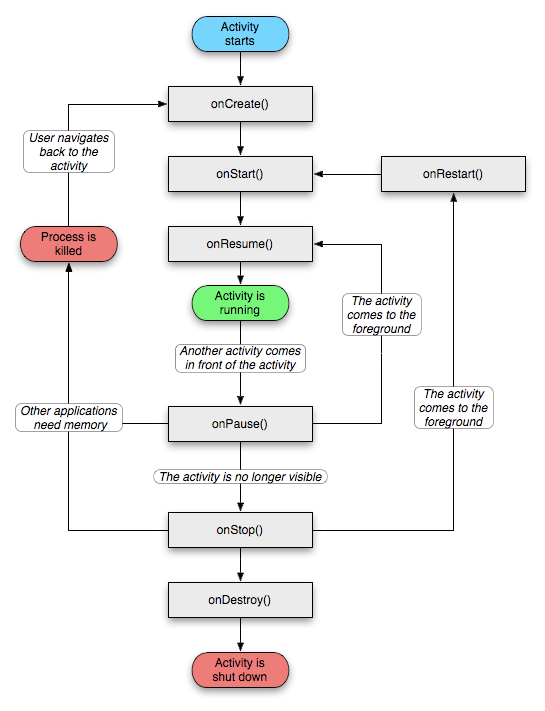
137 |
138 | 2) Inspecting the Dex File
139 | Examine the Dex file to identify the methods it contains. Analyze these methods to determine:
140 | - Which native functions they call.
141 | - The order of these calls.
142 | - The arguments passed to these functions.
143 | For this process, it is recommended to use tools like Ghidra or IDA Pro to better understand the behavior of the file.
144 |
145 | 3) Translate to vitagl: https://github.com/Rinnegatamante/vitaGL/blob/master/source/vitaGL.h
146 | During this phase, you need to inject your custom function into the workflow. The general approach includes:
147 |
148 | Patching a JMP Instruction:
149 | - Redirect the original function (OG function) to your custom function.
150 | - If only one function calls the target, you can patch it directly.
151 | - If multiple functions call it, you’ll need a more dynamic approach, such as the method used in so_loader.
152 |
153 | Dynamic Hooking Process:
154 | - Inside the target function, patch a JMP to your custom function.
155 | - Perform your desired operations in the patched function.
156 |
157 | If you want to execute the original function:
158 | - Temporarily "unpatch" the function by restoring its original bytes.
159 | - Execute the original function.
160 | - Re-patch the function after it executes.
161 |
162 | EXMPLES:
163 | Example that rinnegatamante explained:
164 | Hooking with so_loader
165 | - Here’s how hooking is implemented in so_loader:
166 | ```c
167 | h.addr = addr; // Address of the original function to hook.
168 | h.patch_instr[0] = 0xf000f8df; // LDR PC, [PC] - Load the address of the next instruction.
169 | h.patch_instr[1] = dst; // The address of the custom function to redirect execution to.
170 |
171 | // Save the original instructions from the target address.
172 | kuKernelCpuUnrestrictedMemcpy(&h.orig_instr, (void *)addr, sizeof(h.orig_instr));
173 |
174 | // Overwrite the target address with the patch instructions (redirect to custom function).
175 | kuKernelCpuUnrestrictedMemcpy((void *)addr, h.patch_instr, sizeof(h.patch_instr));
176 | ```
177 |
178 | The following macro, provided by Rinnegatamante in so_util.h, demonstrates how to temporarily unpatch, execute, and re-patch the original function:
179 |
180 | ```c
181 | #define SO_CONTINUE(type, h, ...) ({ \
182 | kuKernelCpuUnrestrictedMemcpy((void *)h.addr, h.orig_instr, sizeof(h.orig_instr)); \
183 | /* Restore the original instructions to temporarily unpatch the function. */ \
184 | kuKernelFlushCaches((void *)h.addr, sizeof(h.orig_instr)); \
185 | /* Flush the cache to ensure the CPU sees the original instructions. */ \
186 | type r = h.thumb_addr ? ((type(*)())h.thumb_addr)(__VA_ARGS__) : ((type(*)())h.addr)(__VA_ARGS__); \
187 | /* Execute the original function (restored to its unpatched state). */ \
188 | kuKernelCpuUnrestrictedMemcpy((void *)h.addr, h.patch_instr, sizeof(h.patch_instr)); \
189 | /* Reapply the patch to hook the function again after execution. */ \
190 | kuKernelFlushCaches((void *)h.addr, sizeof(h.patch_instr)); \
191 | /* Flush the cache to ensure the CPU sees the updated patch instructions. */ \
192 | r; /* Return the result of the original function call. */ \
193 | })
194 | ```
195 |
196 | 4) Understand how the so_loader works to be able to port games:
197 |
198 | PS Vita SO Loader: load and execute .so (shared object) files, which are typically not natively supported by the PS Vita.
199 | - Kernel/User Bridges (kubridge) to escalate privileges.
200 | - File and Memory Utilities (fios, so_util) to manage file I/O and dynamic library management.
201 | - Patching Mechanisms (patch.c) to modify the system or work around the restrictions imposed by Sony's PS Vita firmware.
202 |
203 | lib folder:
204 | - falso_jni: JNI stands for Java Native Interface, which is a framework that allows Java code to call or be called by native applications (e.g., C/C++). In the context of the PS Vita, this is related to handling Java interactions with native libraries.
205 | - Fios: I/O system libraries, which handle the reading, writing, and manipulation of files. Custom implementation or patch related to file access on the Vita.
206 | - kubridge: "kubridge" it stands for "kernel user bridge," which is a mechanism to bridge user-level operations to kernel-level functions. On the PS Vita, this could be used to exploit kernel-level privileges to load .so files or homebrew applications (not sure right now).
207 | - libc_bridge: This folder contains libraries and functions related to bridging the standard C library (libc) to the PS Vita environment.
208 | - sha1: A folder dealing with SHA-1 hashing, which is often used for verifying the integrity of files or data.
209 | - so_util: Utilities for handling .so (shared object) files. This folder contains code to help with loading and managing these files on the PS Vita.
210 |
211 | source/loader folder:
212 | - reimpl: Likely short for "reimplementation," this folder contains reimplemented versions of key functions or libraries to run shared libraries or homebrew more smoothly on the PS Vita.
213 | - utils: A common name for a folder containing utility scripts or helper functions. These can handle various auxiliary tasks for the SO loader (e.g., managing memory, file paths, debugging).
214 | - dynlib.c: A C file dealing with "dynamic libraries." This script contains the core logic for handling .so files, including how they are loaded and linked during runtime.
215 | - java.c: A C file is involved in handling Java-specific functionality. If the PS Vita environment requires interaction with Java components (e.g., through JNI), this file would manage those calls or interactions.
216 | - main.c: This is usually the entry point of a C program. It is responsible for initializing the SO loader, setting up the environment, and handling overall control flow (key element of the loader).
217 | - patch.c: A C file that could contain patches or modifications to the PS Vita system, enabling it to load and run non-native libraries or bypass certain security mechanisms. (e.g, skip a broken cinematic).
218 |
219 |
220 | 5) Get back to the rinnegatamates basic rules.
221 |
222 | ## Troubleshooting Common Issues during a psvita port.
223 | Undefined References (e.g., FMOD)
224 | - Issue: Missing or incompatible .so files.
225 | - Solution: Ensure correct stub files are used. For example, rename FMOD Studio API files to match the required format.
226 |
227 | Graphics Errors (e.g., GL_INVALID_ENUM)
228 | - Issue: These errors often arise during OpenGL calls.
229 | - Solution: Most errors are harmless unless they explicitly cause crashes or rendering issues.
230 |
231 | Shader Format
232 | - Question: How to determine the shader format?
233 | - Answer: Android games typically use GLSL shaders.
234 |
235 | Error 0x8010113D during VPK installation
236 | - If you encounter error 0x8010113D while installing a VPK for your PS Vita application, it may be related to an issue with the LiveArea assets. Specifically, ensure that all images in the sce_sys folder (such as icons and backgrounds) are in 8-bit color depth. Incorrect image formats can cause installation failures.
237 | - Cause: Issues with LiveArea assets (e.g., incorrect image formats).
238 | - Fix: Ensure images in sce_sys are in 8-bit color depth.
239 |
240 |
241 |
242 | ## Code port examples:
243 |
244 | ### Example of porting a slice of code (fix for a port that made rinnegatamante):
245 | ```c
246 | // VitaGL Wrapper for Android SO Loader Port
247 |
248 | // Global variable to store the reference to the main.obb block
249 | void *obb_blk = NULL;
250 |
251 | // Wrapper function for calloc
252 | void *__wrap_calloc(uint32_t nmember, uint32_t size) {
253 | // Forward the call to vglCalloc
254 | return vglCalloc(nmember, size);
255 | }
256 |
257 | // Wrapper function for free
258 | void __wrap_free(void *addr) {
259 | // Prevent freeing the main.obb block
260 | if (addr != obb_blk)
261 | vglFree(addr);
262 | }
263 |
264 | // Wrapper function for malloc
265 | void *__wrap_malloc(uint32_t size) {
266 | // Allocate memory using vglMalloc
267 | void *r = vglMalloc(size);
268 |
269 | // If allocating memory for main.obb
270 | if (size > 150 * 1024 * 1024) {
271 | // If allocation failed, pass the reference taken the first time
272 | if (!r)
273 | return obb_blk;
274 |
275 | // Store a reference to the main.obb block to prevent erroneous copies
276 | obb_blk = r;
277 | }
278 |
279 | // Return the allocated memory address
280 | return r;
281 | }
282 | ```
283 | This code is a set of wrapper functions for memory allocation and deallocation (malloc, calloc, free) in the context of a VitaGL wrapper for an Android SO Loader port. Let's break down what each function does:
284 | 1) void *__wrap_calloc(uint32_t nmember, uint32_t size): This function wraps around the calloc function. It forwards the call to vglCalloc and returns whatever vglCalloc returns.
285 | 2) void __wrap_free(void *addr): This function wraps around the free function. It checks if the memory address being freed is not equal to obb_blk. If it's not equal, meaning it's not the main.obb block, it proceeds to free the memory using vglFree.
286 | 3) void *__wrap_malloc(uint32_t size): This function wraps around the malloc function. It first allocates memory using vglMalloc and stores the result in r. Then it checks if the size of the memory being allocated is greater than 150MB (150 * 1024 * 1024 bytes). If it is, it checks if r is NULL, which would indicate a failed allocation. If it's not NULL, it assigns r to obb_blk, effectively storing a reference to the main.obb block to prevent erroneous copying. If r is NULL, it returns obb_blk, which presumably is the previously stored reference to the main.obb block. Otherwise, it returns r, which contains the allocated memory address.
287 | 4) To port a game you need to translate/wrap its opengl to vitagl for example:
288 | void __wrap_free(void *addr) on opengl is going to be void vglFree(void *addr) on vitagl
289 |
290 | ### Another porting block example:
291 |
292 | The Vita and some Android phones both use the same CPU architecture, so it's possible to run code designed for Android directly on the Vita. However, there are differences in how they handle executable files and interact with the operating system. Android is similar to Linux, while the Vita has its own unique system loosely based on BSD.
293 |
294 | When porting from Android to the Vita, the main task is to create a version of the Android-specific functions for the Vita. For example, let's take the "open()" function, which is used in Android to open files:
295 |
296 | ```c
297 | int open(const char* pathname, int flags, mode_t mode);
298 | ```
299 |
300 | On the Vita, there's no direct equivalent to "open()", but there is a similar function called "sceIoOpen":
301 |
302 | ```c
303 | SceUID sceIoOpen(const char *file, int flags, SceMode mode);
304 | ```
305 |
306 | To make the Android code work on the Vita, you'd need to create your own version of "open()" that translates it into a call to "sceIoOpen". Here's a simplified example:
307 |
308 | ```c
309 | int open(const char* pathname, int flags, mode_t mode) {
310 | SceMode vmode = 0;
311 | if(IS_BIT_SET(mode, O_RDONLY))
312 | vmode |= SCE_O_RDONLY;
313 | if(IS_BIT_SET(mode, O_WRONLY))
314 | vmode |= SCE_O_WRONLY;
315 | if(IS_BIT_SET(mode, O_RDWR))
316 | vmode |= SCE_O_RDWR;
317 |
318 | return sceioOpen(pathname, flags, vmode);
319 |
320 | }
321 | ```
322 | However, this isn't perfect. It doesn't handle all the flags properly, and it lacks error handling. In Linux, "open()" returns -1 if there's an error and updates the "errno" variable with an error code. But on the Vita, it returns the actual error code directly, which is always negative for errors and non-negative for success.
323 |
324 |
325 |
326 | ## FAQ:
327 |
328 | **1) Can I port X game to psvita?**
329 |
330 | - Well there are some ways to port games to psvita, but unfortunately this guide is focused on android games that are compatible with .so loader. To check if the apk is a candidate use the port checker. After figure it out to port it propertly.
331 |
332 | **2) Can someone port X game to psvita?**
333 |
334 | - Check the apk port checker and after open an [issue](https://github.com/Rinnegatamante/Android2Vita-Candidate-Ports-List/issues), possibly if a developer it's interested it could be ported.
335 |
336 | **3) Wouldn't it be easier to develop an overarching "vita porter" than to pick/ choose at individual games?**
337 |
338 | - No, that's not the case. Some games on the Vita were able to be transferred because they utilize a specific game engine that has already been adapted for the Vita, thus making the process of porting them feasible and straightforward. However, not all games employ the same game engine, and it's entirely conceivable that the engine may not have been adapted for the Vita at all. Porting processes are unique to each game because, even if the game engine has been adapted, there are numerous adjustments that need to be made, and these adjustments can't be easily automated.
339 |
340 | **4) How can I learn how to port?**
341 |
342 | - There is no porting tutorials as each game has it's own things to be wrapped. You can learn by reading online, forums, discord servers as well as checking on github how people have ported games.
343 |
344 | ** 5) Can I contribute?
345 |
346 | - Of course, open a pull request and it will be checked.
347 | -
348 |
349 |
350 | ## License
351 |
352 | This project is licensed under the MIT License - see the [LICENSE](LICENSE) file for details.
353 |
354 |
355 |
356 |
357 | ## Build Instructions (For Developers)
358 |
359 | In order to build the loader, you'll need a [vitasdk](https://github.com/vitasdk) build fully compiled with softfp usage.
360 | You can find a precompiled version here: https://github.com/vitasdk/buildscripts/actions/runs/1102643776.
361 | Additionally, you'll need these libraries to be compiled as well with `-mfloat-abi=softfp` added to their CFLAGS:
362 |
363 | - [SDL2_vitagl](https://github.com/Northfear/SDL/tree/vitagl)
364 |
365 | - [libmathneon](https://github.com/Rinnegatamante/math-neon)
366 |
367 | - ```bash
368 | make install
369 | ```
370 |
371 | - [vitaShaRK](https://github.com/Rinnegatamante/vitaShaRK)
372 |
373 | - ```bash
374 | make install
375 | ```
376 |
377 | - [kubridge](https://github.com/TheOfficialFloW/kubridge)
378 |
379 | - ```bash
380 | mkdir build && cd build
381 | cmake .. && make install
382 | ```
383 |
384 | - [vitaGL](https://github.com/Rinnegatamante/vitaGL)
385 |
386 | - ````bash
387 | make SOFTFP_ABI=1 HAVE_GLSL_SUPPORT=1 NO_DEBUG=1 install
388 | ````
389 |
390 | After all these requirements are met, you can compile the loader with the following commands:
391 |
392 | ```bash
393 | mkdir build && cd build
394 | cmake .. && make
395 | ```
396 |
397 |
--------------------------------------------------------------------------------
/install_on_linux.sh:
--------------------------------------------------------------------------------
1 | #!/bin/bash
2 |
3 | # Define helper function for logging errors
4 | log_error() {
5 | echo "ERROR: $1"
6 | exit 1
7 | }
8 |
9 | # Check if required dependencies are installed
10 | echo "Checking required dependencies..."
11 | required_packages=("git" "cmake" "python3" "curl" "make" "gcc" "g++")
12 |
13 | for package in "${required_packages[@]}"; do
14 | if ! command -v "$package" &>/dev/null; then
15 | log_error "Required package '$package' is not installed. Please install it first."
16 | fi
17 | done
18 |
19 | # Define GitHub repository URLs (public repositories)
20 | VITASDK_REPO="https://github.com/vitasdk-softfp/vdpm"
21 | VITAGL_REPO="https://github.com/Rinnegatamante/vitaGL.git"
22 | GL33NTWINE_REPO="https://github.com/v-atamanenko/soloader-boilerplate.git"
23 |
24 | # Define the target include directory
25 | INCLUDE_DIR="/usr/local/vitasdk/arm-vita-eabi/include"
26 |
27 | # Function to clone a repo using HTTPS (for public repositories)
28 | clone_repo() {
29 | local repo_url=$1
30 | local destination=$2
31 | if git clone "$repo_url" "$destination"; then
32 | echo "Successfully cloned $repo_url into $destination"
33 | else
34 | log_error "Failed to clone $repo_url"
35 | fi
36 | }
37 |
38 | # Function to install CMake if missing
39 | install_cmake() {
40 | echo "Checking for CMake installation..."
41 | if ! command -v cmake &>/dev/null; then
42 | echo "CMake not found. Installing CMake..."
43 |
44 | # Attempt to install via package manager
45 | if command -v apt &>/dev/null; then
46 | sudo apt update && sudo apt install -y cmake || log_error "Failed to install CMake using apt."
47 | elif command -v yum &>/dev/null; then
48 | sudo yum install -y cmake || log_error "Failed to install CMake using yum."
49 | elif command -v dnf &>/dev/null; then
50 | sudo dnf install -y cmake || log_error "Failed to install CMake using dnf."
51 | elif command -v brew &>/dev/null; then
52 | brew install cmake || log_error "Failed to install CMake using Homebrew."
53 | else
54 | log_error "No supported package manager found. Please install CMake manually."
55 | fi
56 | else
57 | echo "CMake is already installed."
58 | fi
59 | }
60 |
61 | install_VitaSDK(){
62 | echo "Installing VitaSDK with softfp..."
63 | if [ ! -d "$HOME/vitasdk" ]; then
64 | echo "Cloning VitaSDK..."
65 | clone_repo "$VITASDK_REPO" "$HOME/vitasdk-installer"
66 | cd "$HOME/vitasdk-installer" || log_error "Failed to enter VitaSDK directory."
67 | ./bootstrap-vitasdk.sh || log_error "VitaSDK bootstrap failed."
68 | ./install-all.sh || log_error "VitaSDK installation failed."
69 | source ~/.bashrc
70 | else
71 | echo "VitaSDK already installed."
72 | fi
73 |
74 | # Install vitasdk packages
75 | if [ ! -d "/usr/local/vitasdk/vitasdk-packages" ]; then
76 | echo "Cloning VitaSDK packages..."
77 | git clone https://github.com/vitasdk/packages.git /usr/local/vitasdk/vitasdk-packages
78 | fi
79 |
80 | #cd /usr/local/vitasdk/vitasdk-packages || log_error "Failed to enter VitaSDK packages directory."
81 | #./install_or_build.sh || log_error "VitaSDK packages installation failed."
82 | }
83 |
84 |
85 | # Function to copy files with checks
86 | copy_files() {
87 | SRC_DIR="$1"
88 | DEST_DIR="$2"
89 | LIB_NAME="$3"
90 |
91 | if [ -d "$SRC_DIR" ]; then
92 | echo "Copying $LIB_NAME libs from $SRC_DIR to $DEST_DIR..."
93 | cp -r "$SRC_DIR"/* "$DEST_DIR"/
94 | echo "$LIB_NAME libs copied successfully!"
95 | else
96 | echo "Warning: $SRC_DIR does not exist. Skipping $LIB_NAME libs."
97 | fi
98 | }
99 |
100 | install_vitaGL_REQUIRED_LIBS() {
101 | # Step 1.5: Install vitashark
102 | echo "Installing vitashark..."
103 | cd /usr/local/vitasdk || log_error "Failed to navigate to /usr/local/vitasdk."
104 |
105 | echo "Cloning vitaShaRK..."
106 | git clone https://github.com/Rinnegatamante/vitaShaRK.git "/usr/local/vitasdk/arm-vita-eabi/include/vitaShaRK" || log_error "Failed to clone vitaShaRK repository."
107 | echo "Cloning SceShaccCgExt..."
108 | git clone https://github.com/bythos14/SceShaccCgExt.git "/usr/local/vitasdk/arm-vita-eabi/include/SceShaccCgExt" || log_error "Failed to clone SceShaccCgExt repository."
109 | echo "Cloning math-neon..."
110 | git clone https://github.com/andrepuschmann/math-neon.git "/usr/local/vitasdk/arm-vita-eabi/include/math-neon" || log_error "Failed to clone math-neon repository."
111 | echo "Cloning math-neon-rinne..."
112 | git clone https://github.com/Rinnegatamante/math-neon.git "/usr/local/vitasdk/arm-vita-eabi/include/math-neon-rinne" || log_error "Failed to clone math-neon repository."
113 | echo "Cloning taiHEN..."
114 | git clone https://github.com/yifanlu/taiHEN.git "/usr/local/vitasdk/arm-vita-eabi/include/taiHEN" || log_error "Failed to clone taiHEN repository."
115 |
116 | # Clone math-neon repository
117 | if [ ! -d "/usr/local/vitasdk/taiHEN" ]; then
118 | # Navigate to the taiHEN repository
119 | cd "/usr/local/vitasdk/arm-vita-eabi/include/taiHEN" || log_error "Failed to navigate to taiHEN directory."
120 | # Copy files to destination, excluding CMakeLists.txt
121 | echo "Copying taiHEN contents to /usr/local/vitasdk/arm-vita-eabi/include..."
122 | find . -type f ! -name "CMakeLists.txt" -exec cp --parents -n {} /usr/local/vitasdk/arm-vita-eabi/include/ \;
123 | # Confirm completion
124 | echo "Contents copied successfully, existing files were preserved."
125 | else
126 | echo "taiHEN is already cloned."
127 | fi
128 | cd /usr/local/vitasdk || log_error "Failed to navigate to /usr/local/vitasdk."
129 |
130 | # Clone SceShaccCgExt repository
131 | if [ ! -d "/usr/local/vitasdk/SceShaccCgExt" ]; then
132 | cd /usr/local/vitasdk/arm-vita-eabi/include/SceShaccCgExt
133 | mkdir build
134 | cd build
135 | cmake ..
136 | make
137 | cp /usr/local/vitasdk/arm-vita-eabi/include/SceShaccCgExt/build/libSceShaccCgExt.a /usr/local/vitasdk/arm-vita-eabi/lib
138 | else
139 | echo "SceShaccCgExt is already cloned."
140 | fi
141 | cd /usr/local/vitasdk || log_error "Failed to navigate to /usr/local/vitasdk."
142 |
143 | # Copy SceShaccCgExt libraries
144 | copy_files "$INCLUDE_DIR/SceShaccCgExt/include" "$INCLUDE_DIR" "SceShaccCgExt (include)"
145 | copy_files "$INCLUDE_DIR/SceShaccCgExt/src" "$INCLUDE_DIR" "SceShaccCgExt (src)"
146 |
147 |
148 | # Clone vitashark repository
149 | if [ ! -d "/usr/local/vitasdk/vitaShaRK" ]; then
150 | cd /usr/local/vitasdk/arm-vita-eabi/include/vitaShaRK
151 | make VERBOSE=1
152 | cp /usr/local/vitasdk/arm-vita-eabi/include/vitaShaRK/libvitashark.a /usr/local/vitasdk/arm-vita-eabi/lib
153 | else
154 | echo "vitaShaRK is already cloned."
155 | fi
156 | cd /usr/local/vitasdk || log_error "Failed to navigate to /usr/local/vitasdk."
157 |
158 | # Copy vitaShaRK libraries
159 | copy_files "$INCLUDE_DIR/vitaShaRK/source" "$INCLUDE_DIR" "vitaShaRK"
160 |
161 | cd /usr/local/vitasdk || log_error "Failed to navigate to /usr/local/vitasdk."
162 | # Download the tarball directly to the destination directory
163 | echo "Downloading taihen.tar.gz..."
164 | wget -O /usr/local/vitasdk/taihen.tar.gz https://github.com/yifanlu/taiHEN/releases/download/v0.11/taihen.tar.gz || log_error "Failed to download taihen.tar.gz."
165 | # Extract the tarball in place
166 | echo "Extracting taihen.tar.gz..."
167 | tar -xzf /usr/local/vitasdk/taihen.tar.gz -C /usr/local/vitasdk || log_error "Failed to extract taihen.tar.gz."
168 | # Remove the tarball after extraction
169 | rm /usr/local/vitasdk/taihen.tar.gz
170 | # Confirm success
171 | echo "taihen.tar.gz downloaded and extracted successfully in /usr/local/vitasdk/arm-vita-eabi/lib."
172 |
173 | cp /usr/local/vitasdk/lib/libtaihenForKernel_stub.a /usr/local/vitasdk/arm-vita-eabi/lib
174 | cp /usr/local/vitasdk/lib/libtaihen_stub_weak.a /usr/local/vitasdk/arm-vita-eabi/lib
175 | cp /usr/local/vitasdk/lib/libtaihen_stub.a /usr/local/vitasdk/arm-vita-eabi/lib
176 | cp /usr/local/vitasdk/lib/libtaihenModuleUtils_stub.a /usr/local/vitasdk/arm-vita-eabi/lib
177 |
178 | cd /usr/local/vitasdk/arm-vita-eabi/include/math-neon-rinne
179 | make
180 | cp /usr/local/vitasdk/arm-vita-eabi/include/math-neon-rinne/libmathneon.a /usr/local/vitasdk/arm-vita-eabi/lib || log_error "No file or directory"
181 | #cp /usr/local/vitasdk/arm-vita-eabi/include/math-neon-rinne/libmathneon.a
182 | echo "math-neon-rinne is cloppied."
183 | cd /usr/local/vitasdk || log_error "Failed to navigate to /usr/local/vitasdk."
184 |
185 | # Copy math-neon libraries
186 | copy_files "$INCLUDE_DIR/math-neon/src" "$INCLUDE_DIR" "math-neon"
187 | echo "All libraries processed."
188 | }
189 |
190 | install_vitagl(){
191 | # Step 2: Install VitaGL
192 | echo "Installing VitaGL..."
193 | if [ ! -d "/usr/local/vitasdk/arm-vita-eabi" ]; then
194 | log_error "VitaSDK installation is incomplete. Please check the installation process."
195 | fi
196 |
197 | # Check if VitaGL is already installed
198 | if [ ! -d "$VITASDK/arm-vita-eabi/include/vitaGL" ]; then
199 | echo "VitaGL not found. Cloning the repository..."
200 | # Clone VitaGL repository
201 | clone_repo "$VITAGL_REPO" "$VITASDK/arm-vita-eabi/include/vitaGL" || log_error "Failed to clone VitaGL repository."
202 |
203 | # Navigate to the VitaGL directory
204 | cd "$VITASDK/arm-vita-eabi/include/vitaGL" || log_error "Failed to enter VitaGL directory."
205 |
206 | # Install required libraries (function needs to be defined elsewhere)
207 | echo "Installing VitaGL required libs..."
208 | install_vitaGL_REQUIRED_LIBS || log_error "Failed to install required libraries for VitaGL."
209 |
210 | # Build VitaGL
211 | echo "Building VitaGL..."
212 | cd "$VITASDK/arm-vita-eabi/include/vitaGL" || log_error "Failed to enter VitaGL directory."
213 | echo "Current directory: $(pwd)" # Debugging step
214 | ls -l # Check if the Makefile exists
215 | make || log_error "VitaGL compilation failed."
216 |
217 |
218 | # Copy the built library to the VitaSDK lib folder
219 | echo "Installing VitaGL library..."
220 | if [ -f "libvitaGL.a" ]; then
221 | cp libvitaGL.a "$VITASDK/arm-vita-eabi/lib/" || log_error "Failed to copy VitaGL library."
222 |
223 | # Copy headers
224 | echo "Installing VitaGL headers..."
225 | cp -r $VITASDK/arm-vita-eabi/include/vitaGL/source/* $VITASDK/arm-vita-eabi/include/ || log_error "Failed to copy VitaGL headers."
226 | cp -r $VITASDK/arm-vita-eabi/include/vitaGL/source/utils/* $VITASDK/arm-vita-eabi/include/ || log_error "Failed to copy VitaGL headers."
227 | cp -r $VITASDK/arm-vita-eabi/include/vitaGL/source/shaders/* $VITASDK/arm-vita-eabi/include/ || log_error "Failed to copy VitaGL headers."
228 | cp -r $VITASDK/arm-vita-eabi/include/vitaGL/source/shaders/texture_combiners/* $VITASDK/arm-vita-eabi/include/ || log_error "Failed to copy VitaGL headers."
229 |
230 | echo "VitaGL installed successfully!"
231 | else
232 | log_error "VitaGL compilation failed. 'libvitaGL.a' not found."
233 | fi
234 | else
235 | echo "VitaGL is already installed."
236 | fi
237 | }
238 |
239 |
240 | install_rest() {
241 | # Step 3: Clone the gl33ntwine Port Template
242 | echo "Cloning gl33ntwine port template..."
243 | cd "$HOME" || log_error "Failed to navigate to home directory."
244 | clone_repo "$GL33NTWINE_REPO" "$HOME/gl33ntwine" # Cloning using HTTPS for public repo
245 |
246 | cd gl33ntwine || log_error "Failed to enter gl33ntwine directory."
247 |
248 | # Step 4: Edit CMAkelists.txt (Automate if possible, or ask user to configure)
249 | echo "Editing CMAkelists.txt... (you may need to manually tweak the configuration)"
250 | echo "Ensure the CMAkelists.txt is set up according to your port's requirements."
251 |
252 | # Automatically set basic variables if the CMAkelists.txt is in a known state
253 | sed -i 's/PROJECT_NAME "project_name"/PROJECT_NAME "Baba is You"/' CMAkelists.txt || log_error "Failed to modify CMAkelists.txt."
254 |
255 | # Step 5: Prepare Build Directory
256 | echo "Preparing build directory..."
257 | mkdir -p build
258 | cd build || log_error "Failed to navigate to build directory."
259 |
260 | # Step 6: Build the Project
261 | echo "Building the project..."
262 | cmake .. -DCMAKE_TOOLCHAIN_FILE="$VITASDK/share/vita.toolchain.cmake" || log_error "CMake configuration failed."
263 |
264 | # Optionally enable verbose output for debugging
265 | echo "Running make with verbose output..."
266 | make VERBOSE=1 || log_error "Compilation failed. Check the output for errors."
267 |
268 | # Step 7: Verify successful build
269 | if [ ! -f "eboot.bin" ]; then
270 | log_error "Build failed. No 'eboot.bin' found in the build directory."
271 | else
272 | echo "Build successful! You can now test your port on the PS Vita."
273 | fi
274 |
275 | # Step 8: Test the port on your PS Vita (use FTP to transfer)
276 | echo "Testing on PS Vita..."
277 | echo "You should now transfer 'eboot.bin' and the necessary files to your PS Vita using FTP."
278 | echo "Run the following commands to upload and launch the app on your PS Vita:"
279 | echo "1. Upload eboot.bin via FTP: curl -T eboot.bin ftp://:1337/ux0:/app//"
280 | echo "2. Launch the app: echo launch | nc 1338"
281 |
282 | # Common Issues and Debugging Tips:
283 | echo "Common issues and debugging tips:"
284 | echo "1. VitaSDK installation fails: Ensure dependencies are installed and you're using the correct softfp setup."
285 | echo "2. Compilation errors: Make sure CMAkelists.txt is correctly set up and matches your environment."
286 | echo "3. Use the VitaGL logging feature to trace OpenGL calls if you're having issues with graphics."
287 | echo "4. Enable verbose output in cmake for detailed error tracking: cmake -DCMAKE_VERBOSE_MAKEFILE=ON .."
288 |
289 | echo "Done!"
290 | }
291 |
292 | test_VitaSDK() {
293 | echo "Testing VitaSDK installation..."
294 | temp_dir=$(mktemp -d)
295 | echo "Compiling a simple test project in $temp_dir..."
296 | cat < "$temp_dir/main.c"
297 | #include
298 | int main() {
299 | printf("Hello from VitaSDK!\n");
300 | return 0;
301 | }
302 | EOL
303 | arm-vita-eabi-gcc "$temp_dir/main.c" -o "$temp_dir/main.elf" &>/dev/null
304 | if [ -f "$temp_dir/main.elf" ]; then
305 | echo "VitaSDK is installed and working correctly!"
306 | rm -rf "$temp_dir"
307 | else
308 | log_error "VitaSDK test failed. Ensure the SDK is properly installed."
309 | fi
310 | }
311 |
312 | test_vitagl() {
313 | echo "Testing VitaGL installation..."
314 | sleep 5
315 | pwd
316 | if [ -f "$VITASDK/arm-vita-eabi/lib/libvitaGL.a" ]; then
317 | echo "Compiling a sample project using VitaGL..."
318 |
319 | # Navigate to the sample project directory
320 | sample_dir="/usr/local/vitasdk/arm-vita-eabi/include/vitaGL/samples/rotating_cube"
321 | if [ ! -d "$sample_dir" ]; then
322 | echo "Sample project directory not found: $sample_dir"
323 | exit 1
324 | fi
325 |
326 | cd "$sample_dir" || exit
327 | make clean
328 | make || { echo "Compilation failed. Check the output for errors."; exit 1; }
329 |
330 | # Check if the VPK file was generated
331 | if [ -f "$sample_dir/rotating_cube.vpk" ]; then
332 | echo "VitaGL is installed and working correctly!"
333 | else
334 | echo "VitaGL test failed. Ensure VitaGL is properly installed."
335 | fi
336 | else
337 | echo "VitaGL is not installed. Install it first."
338 | fi
339 | }
340 |
341 | compile_sdl2_vitagl() {
342 | echo "Compiling Northfear's fork of SDL2 with VitaGL backend..."
343 | sleep 5
344 |
345 | # Navigate to a working directory
346 | working_dir="/usr/local/vitasdk"
347 | if [ ! -d "$working_dir" ]; then
348 | echo "Working directory not found: $working_dir"
349 | exit 1
350 | fi
351 |
352 | cd "$working_dir" || exit
353 |
354 | # Clone the SDL2 repository
355 | repo_url="https://github.com/Northfear/SDL.git"
356 | project_dir="$working_dir/SDL"
357 | if [ -d "$project_dir" ]; then
358 | echo "Repository already cloned. Pulling latest changes..."
359 | cd "$project_dir" || exit
360 | git pull || { echo "Failed to pull latest changes. Exiting."; exit 1; }
361 | else
362 | echo "Cloning repository..."
363 | git clone "$repo_url" || { echo "Failed to clone repository. Exiting."; exit 1; }
364 | cd "$project_dir" || exit
365 | fi
366 |
367 | # Checkout the VitaGL branch
368 | echo "Checking out the VitaGL branch..."
369 | git checkout vitagl || { echo "Failed to checkout 'vitagl' branch. Exiting."; exit 1; }
370 |
371 | # Configure and build SDL2
372 | build_dir="$project_dir/build"
373 | echo "Running CMake configuration..."
374 | cmake -S. -B"$build_dir" \
375 | -DCMAKE_TOOLCHAIN_FILE="${VITASDK}/share/vita.toolchain.cmake" \
376 | -DCMAKE_BUILD_TYPE=Release \
377 | -DVIDEO_VITA_VGL=ON || { echo "CMake configuration failed. Exiting."; exit 1; }
378 |
379 | echo "Building SDL2..."
380 | cmake --build "$build_dir" -- -j"$(nproc)" || { echo "Build failed. Exiting."; exit 1; }
381 |
382 | echo "Installing SDL2..."
383 | cmake --install "$build_dir" || { echo "Installation failed. Exiting."; exit 1; }
384 |
385 | echo "Northfear's SDL2 with VitaGL backend successfully compiled and installed!"
386 | }
387 |
388 | install_stb_library() {
389 | echo "Installing stb libraries..."
390 |
391 | # Define the destination and repository
392 | destination="/usr/local/vitasdk/include/stb"
393 | #destination="/usr/local/vitasdk/lib/stb"
394 | repo_url="https://github.com/nothings/stb.git"
395 |
396 | # Check if the destination directory exists, create it if not
397 | if [ ! -d "$destination" ]; then
398 | echo "Creating destination directory: $destination"
399 | mkdir -p "$destination" || { echo "Failed to create directory. Exiting."; exit 1; }
400 | fi
401 |
402 | # Navigate to a working directory for cloning
403 | temp_dir=$(mktemp -d)
404 | trap 'rm -rf "$temp_dir"' EXIT
405 |
406 | echo "Cloning stb repository..."
407 | git clone "$repo_url" "$temp_dir" || { echo "Failed to clone stb repository. Exiting."; exit 1; }
408 |
409 | # Copy the header files to the destination
410 | echo "Installing stb headers to $destination..."
411 | cp "$temp_dir"/*.h "$destination" || { echo "Failed to copy header files. Exiting."; exit 1; }
412 |
413 | echo "stb libraries successfully installed to $destination"
414 | }
415 |
416 | install_zlib_vitasdk() {
417 | # Define the installation paths
418 | VITASDK_PREFIX="/usr/local/vitasdk/arm-vita-eabi"
419 | INCLUDE_DIR="${VITASDK_PREFIX}/include"
420 | LIB_DIR="${VITASDK_PREFIX}/lib"
421 |
422 | # Ensure directories exist
423 | mkdir -p "$INCLUDE_DIR" "$LIB_DIR"
424 |
425 | # Define the zlib version and source URL
426 | ZLIB_VERSION="1.3.1"
427 | ZLIB_URL="https://github.com/madler/zlib/releases/download/v1.3.1/zlib-1.3.1.tar.gz"
428 |
429 | # Download zlib source
430 | echo "Downloading zlib ${ZLIB_VERSION}..."
431 | wget -q "$ZLIB_URL" -O "zlib-${ZLIB_VERSION}.tar.gz"
432 | if [ $? -ne 0 ]; then
433 | echo "Error: Failed to download zlib."
434 | return 1
435 | fi
436 |
437 | # Extract the source code
438 | echo "Extracting zlib..."
439 | tar -xf "zlib-${ZLIB_VERSION}.tar.gz"
440 | cd "zlib-${ZLIB_VERSION}" || return 1
441 |
442 | # Use vita tools for compilation
443 | export CC=arm-vita-eabi-gcc
444 | export AR=arm-vita-eabi-ar
445 | export RANLIB=arm-vita-eabi-ranlib
446 | export STRIP=arm-vita-eabi-strip
447 |
448 | # Build and install zlib for VitaSDK
449 | echo "Building and installing zlib for VitaSDK..."
450 | ./configure --prefix="$VITASDK_PREFIX"
451 | if [ $? -ne 0 ]; then
452 | echo "Error: Configuration failed."
453 | return 1
454 | fi
455 |
456 | make
457 | if [ $? -ne 0 ]; then
458 | echo "Error: Build failed."
459 | return 1
460 | fi
461 |
462 | make install
463 | if [ $? -ne 0 ]; then
464 | echo "Error: Installation failed."
465 | return 1
466 | fi
467 |
468 | # Clean up
469 | cd ..
470 | rm -rf "zlib-${ZLIB_VERSION}" "zlib-${ZLIB_VERSION}.tar.gz"
471 |
472 | echo "zlib installed successfully in $VITASDK_PREFIX"
473 | }
474 |
475 | install_opensles_vitasdk() {
476 | # Define paths
477 | VITASDK_PREFIX="/usr/local/vitasdk/arm-vita-eabi"
478 | INCLUDE_DIR="${VITASDK_PREFIX}/include"
479 | LIB_DIR="${VITASDK_PREFIX}/lib"
480 |
481 | # Ensure the target directories exist
482 | mkdir -p "$INCLUDE_DIR" "$LIB_DIR"
483 |
484 | # Clone the OpenSLES repository
485 | echo "Cloning OpenSLES repository..."
486 | git clone https://github.com/Rinnegatamante/opensles.git /usr/local/vitasdk/opensles
487 | if [ $? -ne 0 ]; then
488 | echo "Error: Failed to clone OpenSLES repository."
489 | return 1
490 | fi
491 |
492 | # Navigate to the repository
493 | cd /usr/local/vitasdk/opensles || return 1
494 |
495 | # Build the OpenSLES library
496 | echo "Building OpenSLES..."
497 | make
498 | if [ $? -ne 0 ]; then
499 | echo "Error: Build failed."
500 | cd ..
501 | #rm -rf opensles
502 | return 1
503 | fi
504 |
505 | # Install the headers and library
506 | echo "Installing OpenSLES..."
507 | cp -r include/SLES "$INCLUDE_DIR"
508 | cp libopenSLES.a "$LIB_DIR"
509 |
510 | # Clean up
511 | cd ..
512 | #rm -rf opensles
513 |
514 | echo "OpenSLES successfully installed in $VITASDK_PREFIX"
515 | }
516 |
517 | test_android_port_compilation() {
518 | echo "Testing Android port compilation..."
519 | sleep 5
520 |
521 | # Navigate to the VITASDK directory
522 | sdk_dir="/usr/local/vitasdk/"
523 | if [ ! -d "$sdk_dir" ]; then
524 | echo "VITASDK directory not found: $sdk_dir"
525 | exit 1
526 | fi
527 |
528 | cd "$sdk_dir" || exit
529 |
530 | # Clone the repository
531 | repo_url="https://github.com/v-atamanenko/baba-is-you-vita.git"
532 | project_dir="$sdk_dir/baba-is-you-vita"
533 | if [ -d "$project_dir" ]; then
534 | echo "Repository already cloned. Pulling latest changes..."
535 | cd "$project_dir" || exit
536 | git pull || { echo "Failed to pull latest changes. Exiting."; exit 1; }
537 | else
538 | echo "Cloning repository..."
539 | git clone "$repo_url" || { echo "Failed to clone repository. Exiting."; exit 1; }
540 | cd "$project_dir" || exit
541 | fi
542 | cd "$project_dir/lib/libc_bridge"
543 | make || { echo "Compilation of "libSceLibcBridge_stub.a" failed. Check the output for errors."; exit 1; }
544 | cp "/usr/local/vitasdk/include/stb"/*.h "$project_dir/lib/stb" || { echo "Failed to copy all stb .h files. Exiting."; exit 1; }
545 | # Create and navigate to the build directory
546 | build_dir="$project_dir/build"
547 | mkdir -p "$build_dir"
548 | cd "$build_dir" || exit
549 |
550 | # Run CMake and make
551 | echo "Running CMake..."
552 | cmake .. || { echo "CMake configuration failed. Exiting."; exit 1; }
553 | echo "Compiling project..."
554 | make || { echo "Compilation failed. Check the output for errors."; exit 1; }
555 |
556 | # Check if the VPK file was generated
557 | vpk_file="$build_dir/BABAISYOU.vpk"
558 | if [ -f "$vpk_file" ]; then
559 | echo "Android port compiled successfully! VPK generated: $vpk_file"
560 | else
561 | echo "Compilation failed. VPK not generated."
562 | exit 1
563 | fi
564 | }
565 |
566 | # Function to print the box
567 | echo_box() {
568 | # Print top border
569 | echo -e "${GREEN}#########################################${NC}"
570 | # Print the message in the center
571 | echo -e "${GREEN}# You did it, workspace installed, #${NC}"
572 | echo -e "${GREEN}# you can start porting! #${NC}"
573 | # Print bottom border
574 | echo -e "${GREEN}#########################################${NC}"
575 | }
576 |
577 |
578 | install_cmake
579 | install_VitaSDK
580 | test_VitaSDK
581 | install_vitagl
582 | test_vitagl
583 | compile_sdl2_vitagl
584 | install_stb_library
585 | install_zlib_vitasdk
586 | #install_opensles_vitasdk
587 | test_android_port_compilation
588 | echo_box
589 |
590 | #install_rest
591 |
--------------------------------------------------------------------------------