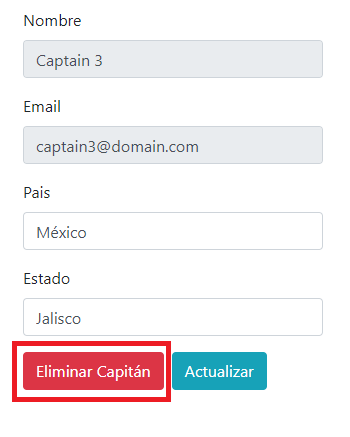
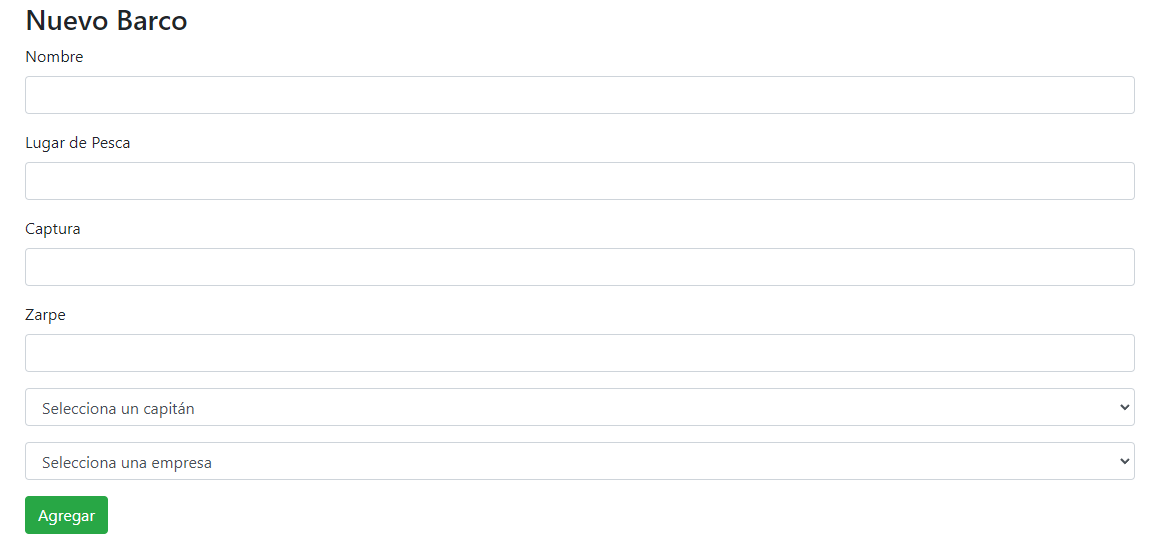
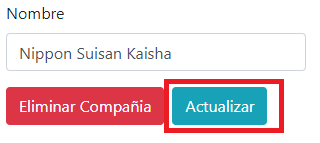
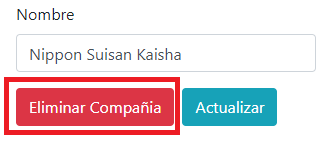
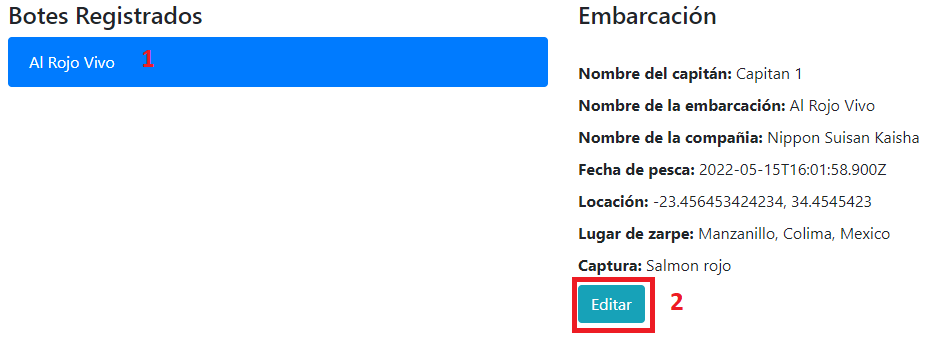
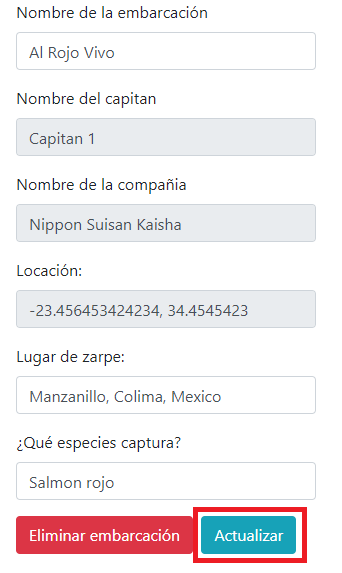
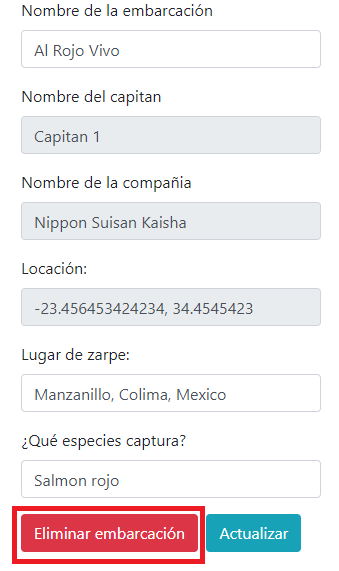
├── vue.config.js ├── babel.config.js ├── public ├── favicon.ico └── index.html ├── src ├── assets │ ├── logo.png │ └── LogoApp.png ├── http-common.js ├── main.js ├── services │ ├── BoatService.js │ ├── CaptainService.js │ └── CompanyService.js ├── App.vue ├── router.js └── components │ ├── AddCompany.vue │ ├── CompaniesList.vue │ ├── CaptainsList.vue │ ├── CompanyDetails.vue │ ├── AddCaptain.vue │ ├── CaptainDetails.vue │ ├── BoatsList.vue │ ├── AddBoat.vue │ └── BoatDetails.vue ├── .gitignore ├── package.json ├── .github └── workflows │ └── azure-static-web-apps-black-smoke-018887f10.yml └── README.md /vue.config.js: -------------------------------------------------------------------------------- 1 | module.exports = { 2 | devServer: { 3 | port: 8081, 4 | }, 5 | }; 6 | -------------------------------------------------------------------------------- /babel.config.js: -------------------------------------------------------------------------------- 1 | module.exports = { 2 | presets: [ 3 | '@vue/cli-plugin-babel/preset' 4 | ] 5 | } 6 | -------------------------------------------------------------------------------- /public/favicon.ico: -------------------------------------------------------------------------------- https://raw.githubusercontent.com/RodolfoBaume/artisanal-fishing-client/main/public/favicon.ico -------------------------------------------------------------------------------- /src/assets/logo.png: -------------------------------------------------------------------------------- https://raw.githubusercontent.com/RodolfoBaume/artisanal-fishing-client/main/src/assets/logo.png -------------------------------------------------------------------------------- /src/assets/LogoApp.png: -------------------------------------------------------------------------------- https://raw.githubusercontent.com/RodolfoBaume/artisanal-fishing-client/main/src/assets/LogoApp.png -------------------------------------------------------------------------------- /src/http-common.js: -------------------------------------------------------------------------------- 1 | import axios from "axios"; 2 | export default axios.create({ 3 | baseURL: "https://artisanal-fishing-api.herokuapp.com/", 4 | headers: { 5 | "Content-type": "application/json", 6 | }, 7 | }); 8 | -------------------------------------------------------------------------------- /src/main.js: -------------------------------------------------------------------------------- 1 | import { createApp } from "vue"; 2 | import App from "./App.vue"; 3 | import "bootstrap"; 4 | import "bootstrap/dist/css/bootstrap.min.css"; 5 | import router from "./router"; 6 | createApp(App).use(router).mount("#app"); 7 | -------------------------------------------------------------------------------- /.gitignore: -------------------------------------------------------------------------------- 1 | .DS_Store 2 | node_modules 3 | /dist 4 | /build 5 | 6 | 7 | # local env files 8 | .env.local 9 | .env.*.local 10 | 11 | # Log files 12 | npm-debug.log* 13 | yarn-debug.log* 14 | yarn-error.log* 15 | pnpm-debug.log* 16 | 17 | # Editor directories and files 18 | .idea 19 | .vscode 20 | *.suo 21 | *.ntvs* 22 | *.njsproj 23 | *.sln 24 | *.sw? 25 | -------------------------------------------------------------------------------- /src/services/BoatService.js: -------------------------------------------------------------------------------- 1 | import http from "../http-common"; 2 | 3 | class BoatService { 4 | getAll() { 5 | return http.get("/api/v1/boats"); 6 | } 7 | get(id) { 8 | return http.get(`/api/v1/boats/${id}`); 9 | } 10 | create(data) { 11 | return http.post("/api/v1/boats", data); 12 | } 13 | update(id, data) { 14 | return http.put(`/api/v1/boats/${id}`, data); 15 | } 16 | delete(id) { 17 | return http.delete(`/api/v1/boats/${id}`); 18 | } 19 | } 20 | 21 | export default new BoatService(); 22 | -------------------------------------------------------------------------------- /src/services/CaptainService.js: -------------------------------------------------------------------------------- 1 | import http from "../http-common"; 2 | 3 | class CaptainService { 4 | getAll() { 5 | return http.get("/api/v1/captains"); 6 | } 7 | get(id) { 8 | return http.get(`/api/v1/captains/${id}`); 9 | } 10 | create(data) { 11 | return http.post("/api/v1/captains", data); 12 | } 13 | update(id, data) { 14 | return http.put(`/api/v1/captains/${id}`, data); 15 | } 16 | delete(id) { 17 | return http.delete(`/api/v1/captains/${id}`); 18 | } 19 | } 20 | 21 | export default new CaptainService(); 22 | -------------------------------------------------------------------------------- /src/services/CompanyService.js: -------------------------------------------------------------------------------- 1 | import http from "../http-common"; 2 | 3 | class CompanyService { 4 | getAll() { 5 | return http.get("/api/v1/companies"); 6 | } 7 | get(id) { 8 | return http.get(`/api/v1/companies/${id}`); 9 | } 10 | create(data) { 11 | return http.post("/api/v1/companies", data); 12 | } 13 | update(id, data) { 14 | return http.put(`/api/v1/companies/${id}`, data); 15 | } 16 | delete(id) { 17 | return http.delete(`/api/v1/companies/${id}`); 18 | } 19 | } 20 | 21 | export default new CompanyService(); 22 | -------------------------------------------------------------------------------- /public/index.html: -------------------------------------------------------------------------------- 1 | 2 | 3 | 4 | 5 | 6 | 7 | 8 | <%= htmlWebpackPlugin.options.title %> 9 | 10 | 11 | 18 |
19 | 20 | 21 | -------------------------------------------------------------------------------- /src/App.vue: -------------------------------------------------------------------------------- 1 | 25 | 30 | -------------------------------------------------------------------------------- /package.json: -------------------------------------------------------------------------------- 1 | { 2 | "name": "launch-x", 3 | "version": "0.1.0", 4 | "private": true, 5 | "scripts": { 6 | "serve": "vue-cli-service serve", 7 | "build": "vue-cli-service build --dest build", 8 | "lint": "vue-cli-service lint" 9 | }, 10 | "dependencies": { 11 | "axios": "^1.6.7", 12 | "bootstrap": "^5.3.2", 13 | "core-js": "^3.35.1", 14 | "jquery": "^3.7.1", 15 | "popper.js": "^1.16.1", 16 | "vue": "^3.4.15", 17 | "vue-router": "^4.2.5" 18 | }, 19 | "devDependencies": { 20 | "@babel/eslint-parser": "^7.23.10", 21 | "@vue/cli-plugin-babel": "^5.0.8", 22 | "@vue/cli-plugin-eslint": "^5.0.8", 23 | "@vue/cli-service": "^5.0.8", 24 | "@vue/compiler-sfc": "^3.4.15", 25 | "eslint": "^8.56.0", 26 | "eslint-plugin-vue": "^9.21.1" 27 | }, 28 | "eslintConfig": { 29 | "root": true, 30 | "env": { 31 | "node": true 32 | }, 33 | "extends": [ 34 | "plugin:vue/vue3-essential", 35 | "eslint:recommended" 36 | ], 37 | "parserOptions": { 38 | "parser": "@babel/eslint-parser", 39 | "babelOptions": { 40 | "presets": [ 41 | "@babel/preset-env" 42 | ] 43 | } 44 | }, 45 | "rules": {} 46 | }, 47 | "browserslist": [ 48 | "> 1%", 49 | "last 2 versions", 50 | "not dead" 51 | ] 52 | } 53 | -------------------------------------------------------------------------------- /src/router.js: -------------------------------------------------------------------------------- 1 | import { createRouter, createWebHistory } from "vue-router"; 2 | const routes = [ 3 | { 4 | path: "/", 5 | alias: "/captains", 6 | name: "captains", 7 | component: () => import("./components/CaptainsList"), 8 | }, 9 | { 10 | path: "/captains/:id", 11 | name: "captain-details", 12 | component: () => import("./components/CaptainDetails"), 13 | }, 14 | { 15 | path: "/add-captain", 16 | name: "add-captain", 17 | component: () => import("./components/AddCaptain"), 18 | }, 19 | { 20 | path: "/", 21 | alias: "/companies", 22 | name: "companies", 23 | component: () => import("./components/CompaniesList"), 24 | }, 25 | { 26 | path: "/companies/:id", 27 | name: "company-details", 28 | component: () => import("./components/CompanyDetails"), 29 | }, 30 | { 31 | path: "/add-company", 32 | name: "add-company", 33 | component: () => import("./components/AddCompany"), 34 | }, 35 | { 36 | path: "/", 37 | alias: "/boats", 38 | name: "boats", 39 | component: () => import("./components/BoatsList"), 40 | }, 41 | { 42 | path: "/boats/:id", 43 | name: "boat-details", 44 | component: () => import("./components/BoatDetails"), 45 | }, 46 | { 47 | path: "/add-boat", 48 | name: "add-boat", 49 | component: () => import("./components/AddBoat"), 50 | }, 51 | ]; 52 | const router = createRouter({ 53 | history: createWebHistory(), 54 | routes, 55 | }); 56 | export default router; 57 | -------------------------------------------------------------------------------- /src/components/AddCompany.vue: -------------------------------------------------------------------------------- 1 | 24 | 25 | 59 | -------------------------------------------------------------------------------- /src/components/CompaniesList.vue: -------------------------------------------------------------------------------- 1 | 41 | 77 | -------------------------------------------------------------------------------- /.github/workflows/azure-static-web-apps-black-smoke-018887f10.yml: -------------------------------------------------------------------------------- 1 | name: Azure Static Web Apps CI/CD 2 | 3 | on: 4 | push: 5 | branches: 6 | - main 7 | pull_request: 8 | types: [opened, synchronize, reopened, closed] 9 | branches: 10 | - main 11 | 12 | jobs: 13 | build_and_deploy_job: 14 | if: github.event_name == 'push' || (github.event_name == 'pull_request' && github.event.action != 'closed') 15 | runs-on: ubuntu-latest 16 | name: Build and Deploy Job 17 | environment: 18 | name: Production 19 | url: ${{ steps.builddeploy.outputs.static_web_app_url }} 20 | steps: 21 | - uses: actions/checkout@v2 22 | with: 23 | submodules: true 24 | - name: Build And Deploy 25 | id: builddeploy 26 | uses: Azure/static-web-apps-deploy@v1 27 | with: 28 | azure_static_web_apps_api_token: ${{ secrets.AZURE_STATIC_WEB_APPS_API_TOKEN_BLACK_SMOKE_018887F10 }} 29 | repo_token: ${{ secrets.GITHUB_TOKEN }} # Used for Github integrations (i.e. PR comments) 30 | action: "upload" 31 | ###### Repository/Build Configurations - These values can be configured to match your app requirements. ###### 32 | # For more information regarding Static Web App workflow configurations, please visit: https://aka.ms/swaworkflowconfig 33 | app_location: "/" # App source code path 34 | api_location: "" # Api source code path - optional 35 | output_location: "build" # Built app content directory - optional 36 | ###### End of Repository/Build Configurations ###### 37 | 38 | close_pull_request_job: 39 | if: github.event_name == 'pull_request' && github.event.action == 'closed' 40 | runs-on: ubuntu-latest 41 | name: Close Pull Request Job 42 | steps: 43 | - name: Close Pull Request 44 | id: closepullrequest 45 | uses: Azure/static-web-apps-deploy@v1 46 | with: 47 | azure_static_web_apps_api_token: ${{ secrets.AZURE_STATIC_WEB_APPS_API_TOKEN_BLACK_SMOKE_018887F10 }} 48 | action: "close" 49 | -------------------------------------------------------------------------------- /src/components/CaptainsList.vue: -------------------------------------------------------------------------------- 1 | 46 | 82 | -------------------------------------------------------------------------------- /src/components/CompanyDetails.vue: -------------------------------------------------------------------------------- 1 | 33 | 82 | 83 | 89 | -------------------------------------------------------------------------------- /src/components/AddCaptain.vue: -------------------------------------------------------------------------------- 1 | 57 | 58 | 98 | -------------------------------------------------------------------------------- /src/components/CaptainDetails.vue: -------------------------------------------------------------------------------- 1 | 62 | 111 | 112 | 118 | -------------------------------------------------------------------------------- /src/components/BoatsList.vue: -------------------------------------------------------------------------------- 1 | 51 | 111 | -------------------------------------------------------------------------------- /src/components/AddBoat.vue: -------------------------------------------------------------------------------- 1 | 91 | 92 | 162 | -------------------------------------------------------------------------------- /src/components/BoatDetails.vue: -------------------------------------------------------------------------------- 1 | 79 | 153 | 154 | 160 | -------------------------------------------------------------------------------- /README.md: -------------------------------------------------------------------------------- 1 | # Artisanal Fishing Client 2 | La Artisanal Fishing Client nos permite crear, visualizar, editar y eliminar compañías, embarcaciones y capitanes. 3 | Esto se puede realizar gracias a la [Artisanal Fishing API](https://github.com/WollenMoth/artisanal-fishing-api). 4 | 5 | ## Dependencias utilizadas 6 | - **Axios:** Cliente basado en promesas que nos facilita realizar peticiones HTTP. 7 | - **Vue:** Framework progresivo para construir interfaces de usuario. 8 | - **Boostrap:** Bootstrap es un framework CSS que nos facilita dar estilos a nuestro cliente. 9 | - **Vue Router:** Biblioteca de enrutamiento oficial del lado del cliente que proporciona las herramientas necesarias para asignar los componentes de una aplicación a diferentes rutas de URL del navegador. 10 | - **ESLint:** Analiza el código para encontrar problemas con el formato del código. 11 | 12 | ## Instalación 13 | 1. Clonar repositorio 14 | 2. Dirigirse al directorio `artisanal-fishing-client` 15 | 3. Ejecutar el comando `npm install` para instalar dependencias 16 | 4. Ejecutar el comando `npm run serve` para correr la aplicación 17 | 5. Ejecutar el comando `npm run lint` para ejecutar el linter
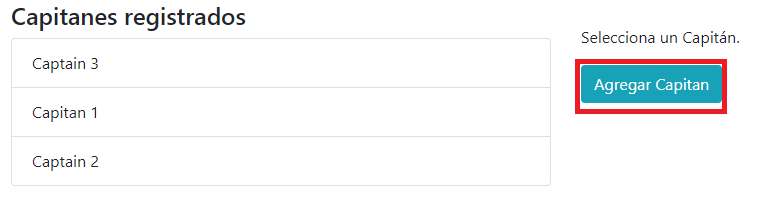
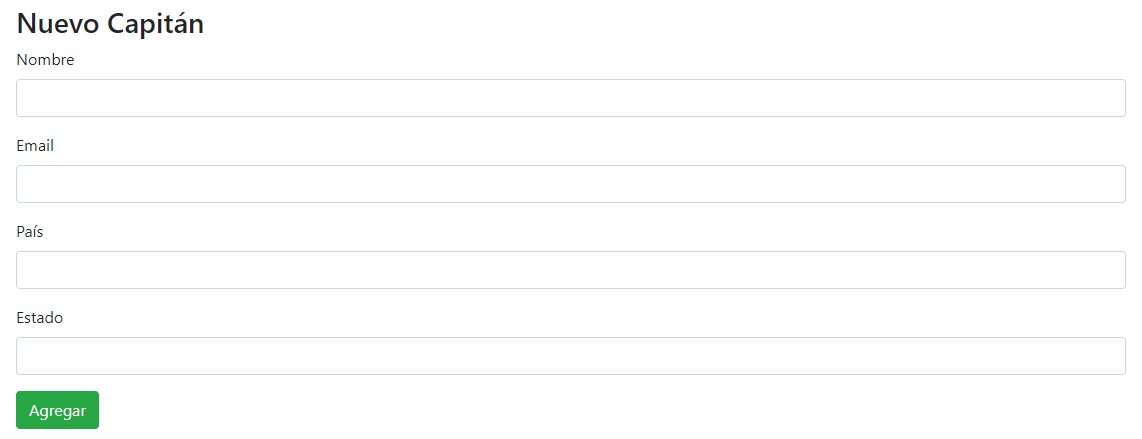
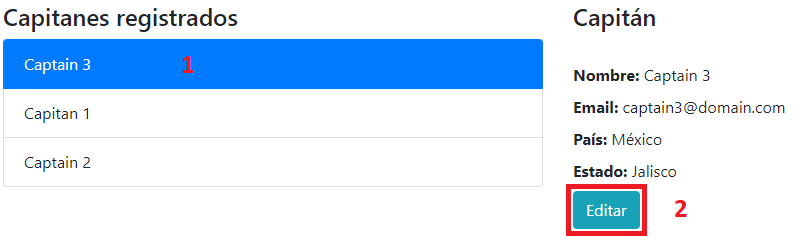
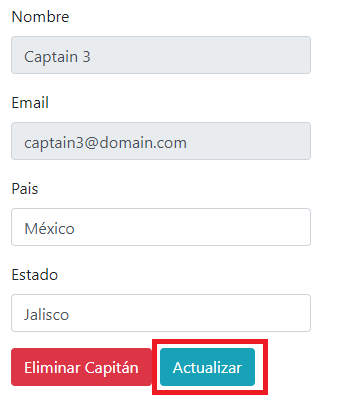
18 | 19 | ## Capitanes 20 | Para visualizar la información, solo basta con dar clic en el nombre del capitán, la información aparecerá en el lado derecho. 21 | 22 | ### Crear capitán 23 | 1. Clic en el botón "Agregar capitán" 24 | 25 | ![image](https://user-images.githubusercontent.com/54995852/168506736-b57601c3-0779-4185-b6cd-4ee5c7401b59.png) 26 | 27 | 2. Llenar formulario y dar clic en el botón "Agregar" 28 | 29 | ![image](https://user-images.githubusercontent.com/54995852/168506857-5a5dbab5-3513-4128-ba36-3fb4093fc78b.png) 30 | 31 | ### Editar Capitán 32 | 1. Dar clic en el nombre del capitán y después en el botón "Editar" 33 | 34 | ![image](https://user-images.githubusercontent.com/54995852/168507271-3f9e828b-c961-4611-aa91-675404ffae65.png) 35 | 36 | 2. Editar el formulario por los nuevos valores y dar clic en el botón "Actualizar" 37 | 38 | ![image](https://user-images.githubusercontent.com/54995852/168507580-fecba9fe-050b-40b9-9012-a9d80979bc12.png) 39 | 40 | ### Eliminar Capitán 41 | 1. Realizar los mismos pasos para editar, con la diferencia de que ahora se debe presionar el botón "Eliminar Capitán" 42 | 43 | ![image](https://user-images.githubusercontent.com/54995852/168507516-feefab0d-6143-4478-9bb4-b8f0b071ea4d.png) 44 | 45 | ## Compañías 46 | Para visualizar la información, solo basta con dar clic en el nombre de las compañías, la información aparecerá en el lado derecho. 47 | 48 | ### Crear Compañía 49 | 1. Clic en el botón "Agregar Compañía" 50 | 51 | ![image](https://user-images.githubusercontent.com/54995852/168508042-850cf91a-0ecf-47e4-8872-460298bf809f.png) 52 | 53 | 2. Llenar formulario y dar clic en el botón "Agregar" 54 | 55 | ![image](https://user-images.githubusercontent.com/54995852/168508070-3b8601dd-e23b-4927-831b-26b6470aaba7.png) 56 | 57 | ### Editar Compañía 58 | 1. Dar clic en el nombre de la compañía y después en el botón "Editar" 59 | 60 | ![image](https://user-images.githubusercontent.com/54995852/168508151-3dff7734-d5d2-4922-b2c1-5d5813c71001.png) 61 | 62 | 2. Editar el formulario por los nuevos valores y dar clic en el botón "Actualizar" 63 | 64 | ![image](https://user-images.githubusercontent.com/54995852/168508233-d8c48779-4fe0-4662-aa75-3e392dfd4d3d.png) 65 | 66 | ### Eliminar Compañía 67 | 1. Realizar los mismos pasos para editar, con la diferencia de que ahora se debe presionar el botón "Eliminar Compañía" 68 | 69 | ![image](https://user-images.githubusercontent.com/54995852/168508250-98eddd43-b6d0-47b8-ad0b-ba15a4898a13.png) 70 | 71 | ## Embarcaciones 72 | Para visualizar la información, solo basta con dar clic en el nombre de las embarcaciones, la información aparecerá en el lado derecho. 73 | 74 | ### Crear Embarcación 75 | 1. Clic en el botón "Agregar Bote" 76 | 77 | ![image](https://user-images.githubusercontent.com/54995852/168508509-f1735570-64f6-4d25-8133-920a0a8987ee.png) 78 | 79 | 2. Llenar formulario y dar clic en el botón "Agregar" 80 | 81 | ![image](https://user-images.githubusercontent.com/54995852/168508070-3b8601dd-e23b-4927-831b-26b6470aaba7.png) 82 | 83 | ### Editar Embarcación 84 | 1. Dar clic en el nombre de la embarcación y después en el botón "Editar" 85 | 86 | ![image](https://user-images.githubusercontent.com/54995852/168508755-f1cc5eff-7566-4436-8050-0e2b7c7afd0e.png) 87 | 88 | 89 | 2. Editar el formulario por los nuevos valores y dar clic en el botón "Actualizar" 90 | 91 | ![image](https://user-images.githubusercontent.com/54995852/168508819-9b83cbcf-e285-48df-9a34-8323c012abb8.png) 92 | 93 | 94 | ### Eliminar Embarcación 95 | 1. Realizar los mismos pasos para editar, con la diferencia de que ahora se debe presionar el botón "Eliminar Compañía" 96 | 97 | ![image](https://user-images.githubusercontent.com/54995852/168508839-1fc77132-d249-49de-96c1-60ca48831ea3.png) 98 | --------------------------------------------------------------------------------