├── src
├── typings
│ └── express
│ │ └── index.d.ts
├── models
│ └── User.ts
├── routes
│ ├── profileRoutes.ts
│ └── authRoutes.ts
├── app.ts
├── utils
│ └── secrets.ts
└── config
│ └── passport.ts
├── .env.example
├── views
├── login.ejs
├── home.ejs
└── profile.ejs
├── package.json
├── README.md
├── LICENSE
├── .gitignore
├── tsconfig.json
└── blog.md
/src/typings/express/index.d.ts:
--------------------------------------------------------------------------------
1 | import { UserDocument } from "../../models/User";
2 |
3 | declare global {
4 | namespace Express {
5 | interface User extends UserDocument {}
6 | }
7 | }
8 |
--------------------------------------------------------------------------------
/.env.example:
--------------------------------------------------------------------------------
1 | PORT = your_preferred_port
2 | NODE_ENV = your_env(production or development)
3 | MONGO_LOCAL = your_local_database_url
4 | MONGO_PROD = your_production_database_url
5 | GOOGLE_CLIENT_ID = your_client_id
6 | GOOGLE_CLIENT_SECRET = your_client_secret
7 | COOKIE_KEY = your_cookie_key
--------------------------------------------------------------------------------
/views/login.ejs:
--------------------------------------------------------------------------------
1 |
2 |
3 |
4 |
5 |
6 |
7 |
8 | Login
9 |
10 |
11 |
12 | Homepage
13 | Login to Continue
14 | Login with Google
15 |
16 |
17 |
--------------------------------------------------------------------------------
/src/models/User.ts:
--------------------------------------------------------------------------------
1 | import mongoose, { Document } from "mongoose";
2 |
3 | const Schema = mongoose.Schema;
4 |
5 | export type UserDocument = Document & {
6 | username: string;
7 | email: string;
8 | googleId: string;
9 | };
10 |
11 | const userSchema = new Schema({
12 | username: String,
13 | email: String,
14 | googleId: String,
15 | });
16 |
17 | const User = mongoose.model("User", userSchema);
18 |
19 | export default User;
20 |
--------------------------------------------------------------------------------
/src/routes/profileRoutes.ts:
--------------------------------------------------------------------------------
1 | import express, { NextFunction, Request, Response } from "express";
2 | const router = express.Router();
3 |
4 | // middleware to check if the user is logged in
5 | const checkAuth = (req: Request, res: Response, next: NextFunction) => {
6 | if (!req.user) {
7 | res.redirect("/auth/login");
8 | } else {
9 | next();
10 | }
11 | };
12 |
13 | router.get("/", checkAuth, (req, res) => {
14 | res.render("profile", { user: req.user });
15 | });
16 |
17 | export default router;
18 |
--------------------------------------------------------------------------------
/views/home.ejs:
--------------------------------------------------------------------------------
1 |
2 |
3 |
4 |
5 |
6 |
7 |
8 | Oauth App
9 |
10 |
11 |
12 | This is home
13 | <% if (user) { %>
14 | Go to Profile Page
15 | <% } else { %>
16 | Go to login page
17 | <% } %>
18 |
19 |
20 |
--------------------------------------------------------------------------------
/views/profile.ejs:
--------------------------------------------------------------------------------
1 |
2 |
3 |
4 |
5 |
6 |
7 |
8 | Profile Page
9 |
10 |
11 |
12 | Profile Page
13 | <% if (user) { %>
14 | Username : <%= user.username %>
15 |
16 | Email : <%= user.email %>
17 |
18 | Homepage
19 | Logout
20 | <% } %>
21 |
22 |
23 |
--------------------------------------------------------------------------------
/src/routes/authRoutes.ts:
--------------------------------------------------------------------------------
1 | import express from "express";
2 | import passport from "passport";
3 | const router = express.Router();
4 |
5 | router.get("/login", (req, res) => {
6 | if (req.user) {
7 | res.redirect("/profile");
8 | }
9 | res.render("login");
10 | });
11 |
12 | router.get("/logout", (req, res) => {
13 | req.logout();
14 | res.redirect("/");
15 | });
16 |
17 | router.get(
18 | "/google",
19 | passport.authenticate("google", {
20 | scope: ["email", "profile"],
21 | })
22 | );
23 |
24 | router.get("/google/redirect", passport.authenticate("google"), (req, res) => {
25 | res.redirect("/profile");
26 | });
27 |
28 | export default router;
29 |
--------------------------------------------------------------------------------
/package.json:
--------------------------------------------------------------------------------
1 | {
2 | "name": "authentication",
3 | "version": "1.0.0",
4 | "description": "",
5 | "main": "index.js",
6 | "scripts": {
7 | "start": "node dist/app.js",
8 | "dev": "nodemon src/app.ts",
9 | "build": "tsc -p ."
10 | },
11 | "keywords": [],
12 | "author": "",
13 | "license": "ISC",
14 | "devDependencies": {
15 | "@types/cookie-session": "^2.0.43",
16 | "@types/express": "^4.17.13",
17 | "@types/mongoose": "^5.11.97",
18 | "@types/node": "^16.10.3",
19 | "@types/passport": "^1.0.7",
20 | "@types/passport-google-oauth20": "^2.0.10",
21 | "nodemon": "^2.0.13",
22 | "ts-node": "^10.2.1",
23 | "typescript": "^4.4.3"
24 | },
25 | "dependencies": {
26 | "cookie-session": "^1.4.0",
27 | "dotenv": "^10.0.0",
28 | "ejs": "^3.1.6",
29 | "express": "^4.17.1",
30 | "mongoose": "^6.0.9",
31 | "passport": "^0.5.0",
32 | "passport-google-oauth20": "^2.0.0"
33 | }
34 | }
35 |
--------------------------------------------------------------------------------
/src/app.ts:
--------------------------------------------------------------------------------
1 | import express from "express";
2 | import mongoose from "mongoose";
3 | import { COOKIE_KEY, MONGO_URI, PORT } from "./utils/secrets";
4 | import authRoutes from "./routes/authRoutes";
5 | import profileRoutes from "./routes/profileRoutes";
6 | import "./config/passport";
7 | import cookieSession from "cookie-session";
8 | import passport from "passport";
9 |
10 | const app = express();
11 |
12 | app.set("view engine", "ejs");
13 |
14 | app.use(
15 | cookieSession({
16 | maxAge: 24 * 60 * 60 * 1000,
17 | keys: [COOKIE_KEY],
18 | })
19 | );
20 |
21 | app.use(passport.initialize());
22 | app.use(passport.session());
23 |
24 | mongoose.connect(MONGO_URI, () => {
25 | console.log("connected to mongodb");
26 | });
27 |
28 | app.use("/auth", authRoutes);
29 | app.use("/profile", profileRoutes);
30 |
31 | app.get("/", (req, res) => {
32 | res.render("home", { user: req.user });
33 | });
34 |
35 | app.listen(PORT, () => {
36 | console.log("App listening on port: " + PORT);
37 | });
38 |
--------------------------------------------------------------------------------
/src/utils/secrets.ts:
--------------------------------------------------------------------------------
1 | import dotenv from "dotenv";
2 | import fs from "fs";
3 |
4 | if (fs.existsSync(".env")) {
5 | dotenv.config({ path: ".env" });
6 | } else {
7 | console.error(".env file not found.");
8 | }
9 |
10 | export const ENVIRONMENT = process.env.NODE_ENV;
11 | const prod = ENVIRONMENT === "production";
12 |
13 | export const PORT = (process.env.PORT || 3000) as number;
14 |
15 | export const MONGO_URI = prod
16 | ? (process.env.MONGO_PROD as string)
17 | : (process.env.MONGO_LOCAL as string);
18 |
19 | if (!MONGO_URI) {
20 | if (prod) {
21 | console.error(
22 | "No mongo connection string. Set MONGO_PROD environment variable."
23 | );
24 | } else {
25 | console.error(
26 | "No mongo connection string. Set MONGO_LOCAL environment variable."
27 | );
28 | }
29 | process.exit(1);
30 | }
31 |
32 | export const GOOGLE_CLIENT_ID = process.env.GOOGLE_CLIENT_ID as string;
33 | export const GOOGLE_CLIENT_SECRET = process.env.GOOGLE_CLIENT_SECRET as string;
34 |
35 | export const COOKIE_KEY = process.env.COOKIE_KEY as string;
36 |
--------------------------------------------------------------------------------
/README.md:
--------------------------------------------------------------------------------
1 | [](https://www.samippoudel.com.np/blog/google_oauth)
2 |
3 | Demo Project for a blog
4 |
5 | ## 🚀 Local Development
6 |
7 | Run the project in your machine locally.
8 |
9 | ### Step 1: Clone the repository
10 |
11 | Clone the repo locally using:
12 |
13 | ```sh
14 | git clone https://github.com/SamipPoudel58/nodejs-ts-google-oauth.git
15 | ```
16 |
17 | ### Step 2: Install Dependencies
18 |
19 | Install dependencies in the root folder
20 |
21 | ```sh
22 | cd nodejs-ts-google-oauth
23 | npm install
24 | ```
25 |
26 | ### Step 3: Setup Environment Variables
27 |
28 | You will need to provide your own `.env` variables, here's how you can do it:
29 |
30 | - create a new file `.env` in the root
31 | - open [.env.example](./.env.example)
32 | - copy the contents and paste it into your own `.env` file
33 | - make sure you replace the values with your own valid values
34 |
35 | ### Step 4: Run the server
36 |
37 | ```sh
38 | npm run dev
39 | ```
40 |
--------------------------------------------------------------------------------
/LICENSE:
--------------------------------------------------------------------------------
1 | MIT License
2 |
3 | Copyright (c) 2021 Samip Poudel
4 |
5 | Permission is hereby granted, free of charge, to any person obtaining a copy
6 | of this software and associated documentation files (the "Software"), to deal
7 | in the Software without restriction, including without limitation the rights
8 | to use, copy, modify, merge, publish, distribute, sublicense, and/or sell
9 | copies of the Software, and to permit persons to whom the Software is
10 | furnished to do so, subject to the following conditions:
11 |
12 | The above copyright notice and this permission notice shall be included in all
13 | copies or substantial portions of the Software.
14 |
15 | THE SOFTWARE IS PROVIDED "AS IS", WITHOUT WARRANTY OF ANY KIND, EXPRESS OR
16 | IMPLIED, INCLUDING BUT NOT LIMITED TO THE WARRANTIES OF MERCHANTABILITY,
17 | FITNESS FOR A PARTICULAR PURPOSE AND NONINFRINGEMENT. IN NO EVENT SHALL THE
18 | AUTHORS OR COPYRIGHT HOLDERS BE LIABLE FOR ANY CLAIM, DAMAGES OR OTHER
19 | LIABILITY, WHETHER IN AN ACTION OF CONTRACT, TORT OR OTHERWISE, ARISING FROM,
20 | OUT OF OR IN CONNECTION WITH THE SOFTWARE OR THE USE OR OTHER DEALINGS IN THE
21 | SOFTWARE.
22 |
--------------------------------------------------------------------------------
/src/config/passport.ts:
--------------------------------------------------------------------------------
1 | import passport from "passport";
2 | import passportGoogle from "passport-google-oauth20";
3 | import User from "../models/User";
4 | import { GOOGLE_CLIENT_ID, GOOGLE_CLIENT_SECRET } from "../utils/secrets";
5 | const GoogleStrategy = passportGoogle.Strategy;
6 |
7 | passport.serializeUser((user, done) => {
8 | done(null, user.id);
9 | });
10 |
11 | passport.deserializeUser(async (id, done) => {
12 | const user = await User.findById(id);
13 | done(null, user);
14 | });
15 |
16 | passport.use(
17 | new GoogleStrategy(
18 | {
19 | clientID: GOOGLE_CLIENT_ID,
20 | clientSecret: GOOGLE_CLIENT_SECRET,
21 | callbackURL: "/auth/google/redirect",
22 | },
23 | async (accessToken, refreshToken, profile, done) => {
24 | const user = await User.findOne({ googleId: profile.id });
25 |
26 | // If user doesn't exist creates a new user. (similar to sign up)
27 | if (!user) {
28 | const newUser = await User.create({
29 | googleId: profile.id,
30 | username: profile.displayName,
31 | email: profile.emails?.[0].value,
32 | });
33 | if (newUser) {
34 | done(null, newUser);
35 | }
36 | } else {
37 | done(null, user);
38 | }
39 | }
40 | )
41 | );
42 |
--------------------------------------------------------------------------------
/.gitignore:
--------------------------------------------------------------------------------
1 | # Logs
2 | logs
3 | *.log
4 | npm-debug.log*
5 | yarn-debug.log*
6 | yarn-error.log*
7 | lerna-debug.log*
8 | .pnpm-debug.log*
9 |
10 | # Diagnostic reports (https://nodejs.org/api/report.html)
11 | report.[0-9]*.[0-9]*.[0-9]*.[0-9]*.json
12 |
13 | # Runtime data
14 | pids
15 | *.pid
16 | *.seed
17 | *.pid.lock
18 |
19 | # Directory for instrumented libs generated by jscoverage/JSCover
20 | lib-cov
21 |
22 | # Coverage directory used by tools like istanbul
23 | coverage
24 | *.lcov
25 |
26 | # nyc test coverage
27 | .nyc_output
28 |
29 | # Grunt intermediate storage (https://gruntjs.com/creating-plugins#storing-task-files)
30 | .grunt
31 |
32 | # Bower dependency directory (https://bower.io/)
33 | bower_components
34 |
35 | # node-waf configuration
36 | .lock-wscript
37 |
38 | # Compiled binary addons (https://nodejs.org/api/addons.html)
39 | build/Release
40 |
41 | # Dependency directories
42 | node_modules/
43 | jspm_packages/
44 |
45 | # Snowpack dependency directory (https://snowpack.dev/)
46 | web_modules/
47 |
48 | # TypeScript cache
49 | *.tsbuildinfo
50 |
51 | # Optional npm cache directory
52 | .npm
53 |
54 | # Optional eslint cache
55 | .eslintcache
56 |
57 | # Microbundle cache
58 | .rpt2_cache/
59 | .rts2_cache_cjs/
60 | .rts2_cache_es/
61 | .rts2_cache_umd/
62 |
63 | # Optional REPL history
64 | .node_repl_history
65 |
66 | # Output of 'npm pack'
67 | *.tgz
68 |
69 | # Yarn Integrity file
70 | .yarn-integrity
71 |
72 | # dotenv environment variables file
73 | .env
74 | .env.test
75 | .env.production
76 |
77 | # parcel-bundler cache (https://parceljs.org/)
78 | .cache
79 | .parcel-cache
80 |
81 | # Next.js build output
82 | .next
83 | out
84 |
85 | # Nuxt.js build / generate output
86 | .nuxt
87 | dist
88 |
89 | # Gatsby files
90 | .cache/
91 | # Comment in the public line in if your project uses Gatsby and not Next.js
92 | # https://nextjs.org/blog/next-9-1#public-directory-support
93 | # public
94 |
95 | # vuepress build output
96 | .vuepress/dist
97 |
98 | # Serverless directories
99 | .serverless/
100 |
101 | # FuseBox cache
102 | .fusebox/
103 |
104 | # DynamoDB Local files
105 | .dynamodb/
106 |
107 | # TernJS port file
108 | .tern-port
109 |
110 | # Stores VSCode versions used for testing VSCode extensions
111 | .vscode-test
112 |
113 | # yarn v2
114 | .yarn/cache
115 | .yarn/unplugged
116 | .yarn/build-state.yml
117 | .yarn/install-state.gz
118 | .pnp.*
119 |
120 |
--------------------------------------------------------------------------------
/tsconfig.json:
--------------------------------------------------------------------------------
1 | {
2 | "compilerOptions": {
3 | /* Visit https://aka.ms/tsconfig.json to read more about this file */
4 |
5 | /* Basic Options */
6 | // "incremental": true, /* Enable incremental compilation */
7 | "target": "es5" /* Specify ECMAScript target version: 'ES3' (default), 'ES5', 'ES2015', 'ES2016', 'ES2017', 'ES2018', 'ES2019', 'ES2020', or 'ESNEXT'. */,
8 | "module": "commonjs" /* Specify module code generation: 'none', 'commonjs', 'amd', 'system', 'umd', 'es2015', 'es2020', or 'ESNext'. */,
9 | // "lib": [], /* Specify library files to be included in the compilation. */
10 | // "allowJs": true, /* Allow javascript files to be compiled. */
11 | // "checkJs": true, /* Report errors in .js files. */
12 | // "jsx": "preserve", /* Specify JSX code generation: 'preserve', 'react-native', 'react', 'react-jsx' or 'react-jsxdev'. */
13 | // "declaration": true, /* Generates corresponding '.d.ts' file. */
14 | // "declarationMap": true, /* Generates a sourcemap for each corresponding '.d.ts' file. */
15 | // "sourceMap": true, /* Generates corresponding '.map' file. */
16 | // "outFile": "./", /* Concatenate and emit output to single file. */
17 | "outDir": "./dist" /* Redirect output structure to the directory. */,
18 | "rootDir": "./src" /* Specify the root directory of input files. Use to control the output directory structure with --outDir. */,
19 | // "composite": true, /* Enable project compilation */
20 | // "tsBuildInfoFile": "./", /* Specify file to store incremental compilation information */
21 | // "removeComments": true, /* Do not emit comments to output. */
22 | // "noEmit": true, /* Do not emit outputs. */
23 | // "importHelpers": true, /* Import emit helpers from 'tslib'. */
24 | // "downlevelIteration": true, /* Provide full support for iterables in 'for-of', spread, and destructuring when targeting 'ES5' or 'ES3'. */
25 | // "isolatedModules": true, /* Transpile each file as a separate module (similar to 'ts.transpileModule'). */
26 |
27 | /* Strict Type-Checking Options */
28 | "strict": true /* Enable all strict type-checking options. */,
29 | // "noImplicitAny": true, /* Raise error on expressions and declarations with an implied 'any' type. */
30 | // "strictNullChecks": true, /* Enable strict null checks. */
31 | // "strictFunctionTypes": true, /* Enable strict checking of function types. */
32 | // "strictBindCallApply": true, /* Enable strict 'bind', 'call', and 'apply' methods on functions. */
33 | // "strictPropertyInitialization": true, /* Enable strict checking of property initialization in classes. */
34 | // "noImplicitThis": true, /* Raise error on 'this' expressions with an implied 'any' type. */
35 | // "alwaysStrict": true, /* Parse in strict mode and emit "use strict" for each source file. */
36 |
37 | /* Additional Checks */
38 | // "noUnusedLocals": true, /* Report errors on unused locals. */
39 | // "noUnusedParameters": true, /* Report errors on unused parameters. */
40 | // "noImplicitReturns": true, /* Report error when not all code paths in function return a value. */
41 | // "noFallthroughCasesInSwitch": true, /* Report errors for fallthrough cases in switch statement. */
42 | // "noUncheckedIndexedAccess": true, /* Include 'undefined' in index signature results */
43 | // "noPropertyAccessFromIndexSignature": true, /* Require undeclared properties from index signatures to use element accesses. */
44 |
45 | /* Module Resolution Options */
46 | // "moduleResolution": "node", /* Specify module resolution strategy: 'node' (Node.js) or 'classic' (TypeScript pre-1.6). */
47 | // "baseUrl": "./", /* Base directory to resolve non-absolute module names. */
48 | // "paths": {}, /* A series of entries which re-map imports to lookup locations relative to the 'baseUrl'. */
49 | // "rootDirs": [], /* List of root folders whose combined content represents the structure of the project at runtime. */
50 | "typeRoots": [
51 | "./src/typings",
52 | "./node_modules/@types"
53 | ] /* List of folders to include type definitions from. */,
54 | // "types": [], /* Type declaration files to be included in compilation. */
55 | // "allowSyntheticDefaultImports": true, /* Allow default imports from modules with no default export. This does not affect code emit, just typechecking. */
56 | "esModuleInterop": true /* Enables emit interoperability between CommonJS and ES Modules via creation of namespace objects for all imports. Implies 'allowSyntheticDefaultImports'. */,
57 | // "preserveSymlinks": true, /* Do not resolve the real path of symlinks. */
58 | // "allowUmdGlobalAccess": true, /* Allow accessing UMD globals from modules. */
59 |
60 | /* Source Map Options */
61 | // "sourceRoot": "", /* Specify the location where debugger should locate TypeScript files instead of source locations. */
62 | // "mapRoot": "", /* Specify the location where debugger should locate map files instead of generated locations. */
63 | // "inlineSourceMap": true, /* Emit a single file with source maps instead of having a separate file. */
64 | // "inlineSources": true, /* Emit the source alongside the sourcemaps within a single file; requires '--inlineSourceMap' or '--sourceMap' to be set. */
65 |
66 | /* Experimental Options */
67 | // "experimentalDecorators": true, /* Enables experimental support for ES7 decorators. */
68 | // "emitDecoratorMetadata": true, /* Enables experimental support for emitting type metadata for decorators. */
69 |
70 | /* Advanced Options */
71 | "skipLibCheck": true /* Skip type checking of declaration files. */,
72 | "forceConsistentCasingInFileNames": true /* Disallow inconsistently-cased references to the same file. */
73 | }
74 | }
75 |
--------------------------------------------------------------------------------
/blog.md:
--------------------------------------------------------------------------------
1 | OAuth (stands for Open Authorization) is a standard protocol that allows an app to get delegated access to resources of a 3rd party service like Google, Facebook, Github, etc. OAuth is one of the most popular ways to authorize users in modern web apps because of its:
2 |
3 | - **Security:** OAuth doesn't share passwords, instead, it uses authorization tokens to identify users. So the consumer's password is safe from breaches.
4 | - **Better UX:** It's more convenient for users to sign in with a few clicks than to fill out a giant form.
5 | - **Better DX:** OAuth is simple to implement and developers don't have to worry about the complexity of authenticating users.
6 |
7 | In this article, we will build a Node.js app that uses Google OAuth to sign in users and we will use passport.js which will make the whole process simpler. So, without further ado, let's start.
8 |
9 | ---
10 |
11 | ## Initial Setup
12 |
13 | Create a folder and initialize the application as follows:
14 |
15 | ```sh
16 | mkdir oauth-app
17 |
18 | cd oauth-app
19 |
20 | npm init -y
21 | ```
22 |
23 | Install all the necessary packages, we will be using these to build our app.
24 |
25 | ```sh
26 | npm i express mongoose ejs passport passport-google-oauth20 cookie-session dotenv
27 | ```
28 |
29 | We need `express` to create our server, `mongoose` to query our database, `ejs` as our templating engine to render HTML pages to the client, `passport` & `passport-google-oauth20` to handle the whole OAuth process, cookie-session to store user session data in a cookie, and `dotenv` to manage environment variables.
30 |
31 | Besides these packages, we will need some more for our development process.
32 |
33 | - **typescript** - We will need the typescript compiler to compile our `TypeScript` files into `JavaScript`.
34 | - **ts-node** - ts-node can run typescript files directly without compiling them to a javascript file.
35 | - **nodemon** - nodemon automatically refreshes the server as soon as it detects a change in the files.
36 | - **Type Definition files** - Some of the packages that we installed need their respective "Type Definition" files to work with typescript.
37 |
38 | We can install these packages as dev dependencies (using -D flag)
39 |
40 | ```sh
41 | npm install -D typescript ts-node nodemon @types/node @types/express @types/passport @types/passport-google-oauth20
42 | ```
43 |
44 | We can configure typescript's behavior using `tsconfig.json`. To generate this file, use this command
45 |
46 | ```sh
47 | tsc --init
48 | ```
49 |
50 | We will set our root directory to be `./src` and the output directory to be `./dist` ( this is where typescript will output our javascript files ). In your `tsconfig.json` find "outDir" and "rootDir" and comment them out and edit them as
51 |
52 | ```json
53 | "outDir": "./dist",
54 | "rootDir": "./src"
55 | ```
56 |
57 | Inside the src folder create a file `app.ts`
58 | Now let's add scripts in `package.json`
59 |
60 | ```json
61 | "start": "node dist/app.js",
62 | "dev": "nodemon src/app.ts",
63 | "build": "tsc -p ."
64 | ```
65 |
66 | ---
67 |
68 | ## Importing Environment Variables
69 |
70 | We will be using credentials and keys that should be secret from the public. We can store them in a `.env` file. Create a `.env` file at the root of your project.
71 |
72 | > Make sure you add it in your `.gitignore` file, so you don't accidentally commit and push it for the whole world to see.
73 |
74 | Add these variables and their appropriate values.
75 |
76 | ```
77 | PORT = 3000
78 | NODE_ENV = development
79 | MONGO_LOCAL = your_local_db_URI
80 | MONGO_PROD = your_production_db_URI
81 | ```
82 |
83 | These variables can be directly accessed using `process.env.VARIABLE` but I feel we can do better. We will create a file that will check if the required variables are available and valid and then export them.
84 |
85 | Create a `utils` folder inside `src`. Inside `utils` create a file `secrets.ts` which will look something like this.
86 |
87 | ```ts
88 | import dotenv from "dotenv";
89 | import fs from "fs";
90 |
91 | // checking if .env file is available
92 | if (fs.existsSync(".env")) {
93 | dotenv.config({ path: ".env" });
94 | } else {
95 | console.error(".env file not found.");
96 | }
97 |
98 | // checking the environment, so that we can setup our database accordingly
99 | export const ENVIRONMENT = process.env.NODE_ENV;
100 | const prod = ENVIRONMENT === "production";
101 |
102 | export const PORT = (process.env.PORT || 3000) as number;
103 |
104 | // selecting the database URI as per the environment
105 | export const MONGO_URI = prod
106 | ? (process.env.MONGO_PROD as string)
107 | : (process.env.MONGO_LOCAL as string);
108 |
109 | if (!MONGO_URI) {
110 | if (prod) {
111 | console.error(
112 | "No mongo connection string. Set MONGO_PROD environment variable."
113 | );
114 | } else {
115 | console.error(
116 | "No mongo connection string. Set MONGO_LOCAL environment variable."
117 | );
118 | }
119 | process.exit(1);
120 | }
121 | ```
122 |
123 | Now we are ready to create our server.
124 |
125 | ---
126 |
127 | ## Setting up the server
128 |
129 | Let's create a basic express server, connect it to the DB (database). We will also set our `view engine` to be `ejs` so that we can render pages to our client. Your `app.ts` should look as follows:
130 |
131 | ```ts
132 | import express from "express";
133 | import { MONGO_URL, PORT } from "./utils/secrets";
134 |
135 | const app = express();
136 |
137 | app.set("view engine", "ejs");
138 |
139 | mongoose.connect(MONGO_URI, () => {
140 | console.log("connected to mongodb");
141 | });
142 |
143 | app.listen(PORT, () => {
144 | console.log("App listening on port: " + PORT);
145 | });
146 | ```
147 |
148 | Now, let's create our homepage. Create a `views` folder in the root, this `views` folder is where our app will look for when it has to render a page. Next, create a `home.ejs` file which you can fill with basic HTML as follows
149 |
150 | ```html
151 |
152 |
153 |
154 |
155 |
156 |
157 | Oauth App
158 |
159 |
160 |
161 | This is home
162 | Go to login page
163 |
164 |
165 | ```
166 |
167 | We want this home page to be rendered when clients visit the `/` route. So let's set up the home route and see if the page is rendered. In `app.ts` add the following route handler.
168 |
169 | ```ts
170 | app.get("/", (req, res) => {
171 | res.render("home");
172 | });
173 | ```
174 |
175 | If you go to `http://localhost:3000` you should be able to view the homepage. Yay!
176 |
177 | Next up, to set up our authentication routes let's create a folder `routes` inside the `src` folder and add a file `authRoutes.ts`
178 |
179 | ```ts
180 | import express from "express";
181 | const router = express.Router();
182 |
183 | router.get("/login", (req, res) => {
184 | // this will render login.ejs file
185 | res.render("login");
186 | });
187 |
188 | export default router;
189 | ```
190 |
191 | Import this route in `app.ts` and use it as follows:
192 |
193 | ```ts
194 | import authRoutes from "./routes/authRoutes";
195 |
196 | app.use("/auth", authRoutes);
197 | ```
198 |
199 | This will render a login page when someone visits the route `/auth/login` as all the routes in `authRoutes.ts` will be prefixed with `/auth`.
200 | So, let's create a `login.ejs` file inside the views folder.
201 |
202 | ```html
203 |
204 |
205 |
206 |
207 |
208 |
209 | Login
210 |
211 |
212 |
213 | Homepage
214 | Login to Continue
215 | Login with Google
216 |
217 |
218 | ```
219 |
220 | ---
221 |
222 | ## Google Developer Console Setup
223 |
224 | Before we continue with our app, we will need to register our app through the Google developer console and get `CLIENT_ID` & `CLIENT_SECRET`. Follow these steps:
225 |
226 | 1. Visit [Google Developer Console](https://console.cloud.google.com/apis/dashboard)
227 |
228 | 2. From the navigation bar at the top, create a new project.
229 |
230 | 3. Now click on `Enable APIs & Services`, scroll down and choose Google+ API and click "Enable".
231 | 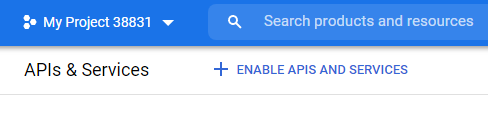
232 |
233 | 4. Navigate to the `OAuth consent screen` tab, where will set up our consent screen. You will be asked to choose the user type, choose `External`, and hit `Create`.
234 |
235 | 5. Under App Information, add your app name, email, and logo (optional)
236 | 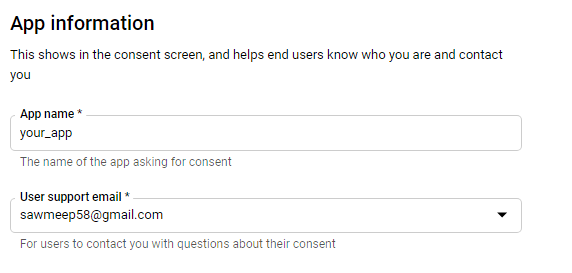
237 |
238 | 6. Under App domain, add application homepage (it can be http://localhost:3000 for now, later you can change it when you have deployed it). Navigate to the bottom of the page add your email in the "Developer contact information" field and click "SAVE AND CONTINUE".
239 |
240 | 7. You will be directed to the scopes page, click on "Add or Remove Scopes" and check the first two ie. `userinfo.email` & `userinfo.profile`.
241 | Scope means what data do we want to access from the user's Google account. Here we want just the email and profile, if you need more or less data check the boxes accordingly. Now, save and continue.
242 | 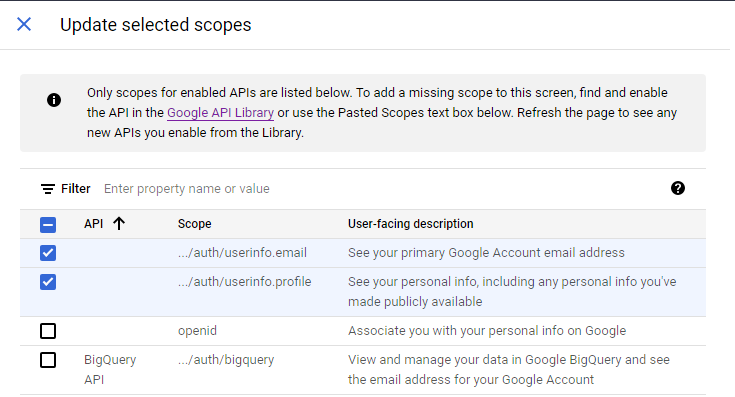
243 |
244 | 8. Check the summary and see if you've filled the details right and click on "Back to dashboard".
245 |
246 | 9. Go to the "Credentials" tab and click on "Create Credentials" and choose the "OAuth Client ID" option. Choose the application type to be "Web Application" and give it a name. In Authorized Javascript Origin, use the current URL of the application i.e `http://localhost:3000`. In the authorized redirect URI, put `http://localhost:3000/auth/google/redirect`.
247 | 🚨 Make sure the route is precisely "/auth/google/redirect" because we will set up our routes accordingly. Now hit create.
248 | 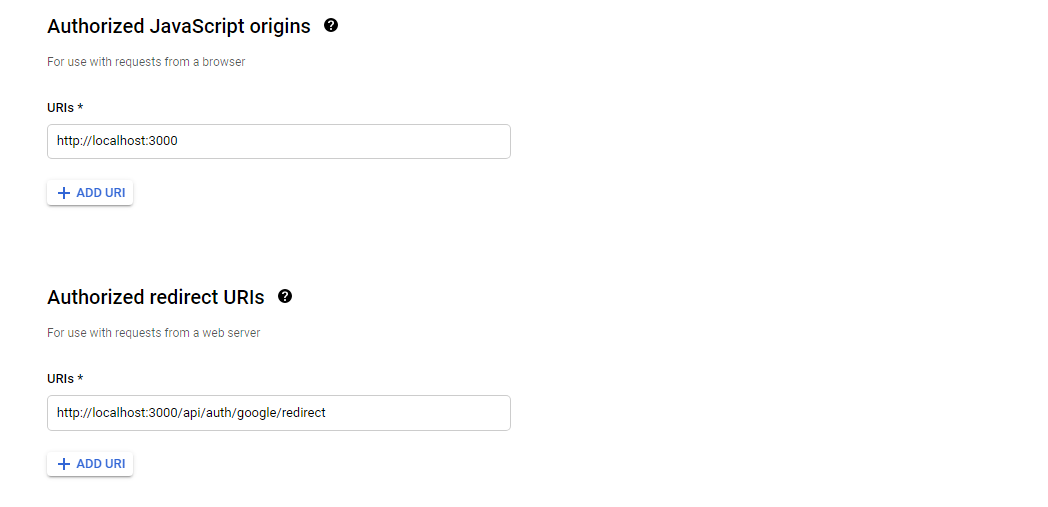
249 |
250 | 10. You will be provided with `client ID` and `client Secret` copy those into your .env as
251 |
252 | ```
253 | GOOGLE_CLIENT_ID = your_google_client_id
254 | GOOGLE_CLIENT_SECRET = your_google_client_secret
255 | ```
256 |
257 | 11. Now, in your `secrets.ts`, export these credentials as
258 |
259 | ```ts
260 | export const GOOGLE_CLIENT_ID = process.env.GOOGLE_CLIENT_ID as string;
261 | export const GOOGLE_CLIENT_SECRET = process.env.GOOGLE_CLIENT_SECRET as string;
262 | ```
263 |
264 | ---
265 |
266 | Now that we have our credentials, we can start setting up passport.js strategy in our app.
267 |
268 | ## Passport Setup
269 |
270 | Passport is an authentication middleware that will handle most of the complexity of implementing OAuth through different strategies. Passport provides a wide variety of strategies to implement different types of authentication. Here we will set up the `passport-google-oauth20` strategy.
271 |
272 | First, create a `config` folder inside `src` and create a `passport.ts` inside it which should look as follows:
273 |
274 | ```ts
275 | import passport from "passport";
276 | import passportGoogle from "passport-google-oauth20";
277 | import { GOOGLE_CLIENT_ID, GOOGLE_CLIENT_SECRET } from "../utils/secrets";
278 | const GoogleStrategy = passportGoogle.Strategy;
279 |
280 | passport.use(
281 | new GoogleStrategy(
282 | {
283 | clientID: GOOGLE_CLIENT_ID,
284 | clientSecret: GOOGLE_CLIENT_SECRET,
285 | callbackURL: "/auth/google/redirect",
286 | },
287 | (accessToken, refreshToken, profile, done) => {
288 | // get profile details
289 | // save profile details in db
290 | }
291 | )
292 | );
293 | ```
294 |
295 | Now import the `passport.ts` in your `app.ts`;
296 |
297 | ```ts
298 | import "./config/passport";
299 | ```
300 |
301 | In `login.ejs`, you can see we had an anchor tag that links to the route `/auth/google`, we will use this route to redirect users to the Google consent screen. So let's set up that route in `authRoutes.ts`. Add these following lines
302 |
303 | ```ts
304 | import passport from "passport";
305 |
306 | router.get(
307 | "/google",
308 | passport.authenticate("google", {
309 | scope: ["email", "profile"],
310 | })
311 | );
312 | ```
313 |
314 | You can see we use `passport.authenticate()` which accepts 2 arguments, first one is the "strategy" we want to use i.e Google in our case, the second is an object that defines the scope.
315 | Scopes are the pieces of data that we want from the user's account.
316 |
317 | Now if you go to `http://localhost:3000/auth/login` and click on login with google, you will hit the route `/auth/google` which will take you to the consent screen, and if you try to login you will get an error
318 | `Cannot GET /auth/google/redirect`
319 | This is because, after we login with google, it redirects us to this callback route (which we configured in our developer console ) but we have not yet set up this route in our app. So let's do it.
320 |
321 | In the same `authRoutes.ts` file just below `/google` route handler, create a handler for `/google/redirect` as
322 |
323 | ```ts
324 | router.get("/google/redirect", passport.authenticate("google"), (req, res) => {
325 | res.send("This is the callback route");
326 | });
327 | ```
328 |
329 | This will get rid of the error but you might have noticed the consent screen is stuck, this is because the callback function in our passport.ts file is empty. Inside this callback function, we receive data from Google about the user, so this is where we can store the user data in our database.
330 |
331 | ---
332 |
333 | ## Storing User Data
334 |
335 | Now, we need to set up our database to store the user data. Let's build the user model. Create a folder "models" inside the src folder and inside it create a `User.ts` file where we can define the schema as:
336 |
337 | ```ts
338 | import mongoose, { Document } from "mongoose";
339 |
340 | const Schema = mongoose.Schema;
341 |
342 | export type UserDocument = Document & {
343 | username: string;
344 | email: string;
345 | googleId: string;
346 | };
347 |
348 | const userSchema = new Schema({
349 | username: String,
350 | email: String,
351 | googleId: String,
352 | });
353 |
354 | const User = mongoose.model("User", userSchema);
355 |
356 | export default User;
357 | ```
358 |
359 | As you can see we will only store the username, email and googleId which will help us to identify users. We are also exporting a type "UserDocument".
360 | Now let's complete our callback function in `passport.ts`
361 |
362 | ```ts
363 | passport.use(
364 | new GoogleStrategy(
365 | {
366 | clientID: GOOGLE_CLIENT_ID,
367 | clientSecret: GOOGLE_CLIENT_SECRET,
368 | callbackURL: "/auth/google/redirect",
369 | },
370 | async (accessToken, refreshToken, profile, done) => {
371 | const user = await User.findOne({ googleId: profile.id });
372 |
373 | // If user doesn't exist creates a new user. (similar to sign up)
374 | if (!user) {
375 | const newUser = await User.create({
376 | googleId: profile.id,
377 | name: profile.displayName,
378 | email: profile.emails?.[0].value,
379 | // we are using optional chaining because profile.emails may be undefined.
380 | });
381 | if (newUser) {
382 | done(null, newUser);
383 | }
384 | } else {
385 | done(null, user);
386 | }
387 | }
388 | )
389 | );
390 | ```
391 |
392 | This callback function receives an accessToken and refreshToken
393 |
394 | - **accessToken** - accessToken allows the application to make API requests to access or modify users' data on their behalf.
395 | - **refreshToken** - accessToken expire after a certain time, so we use refreshToken to refresh them.
396 |
397 | > We won't be needing these two tokens in our current app for now.
398 |
399 | This callback function also receives a profile as you can see. Using the google id we get from the "profile", we will check if the user exists in our database, if it does we will pass it using the "done" function that we received otherwise we will first create & save the user and then pass it using the "done" function. What this "done" function does is, it passes the user information so that it can be accessed by `passport.serializeUser` for login sessions
400 |
401 | ---
402 |
403 | ## Serialize & Deserialize User
404 |
405 | Passport has a `serializeUser` method which receives user data from the passport callback function i.e from `done(null, user)` and stores it in a cookie, (when done function is called). Here we are storing only user.id which will help us identify the user. Let's add this method in `passport.ts`
406 |
407 | ```ts
408 | passport.serializeUser((user, done) => {
409 | done(null, user.id);
410 | });
411 | ```
412 |
413 | Passport has a `deserializeUser` method that reads the cookie and gets the stored user id, here we use that Id to find the user in our database and after we call done function it attached that user data into our request, which can be accessed through `req.user`. Let's add this method in `passport.ts`
414 |
415 | ```ts
416 | passport.deserializeUser(async (id, done) => {
417 | const user = await User.findById(id);
418 | done(null, user);
419 | });
420 | ```
421 |
422 | In the serialize method, You might have encountered a typescript error:
423 |
424 | > Property 'id' does not exist on type 'User'
425 |
426 | To understand this error, let's look at the type definition file of passport.js.
427 | In VS Code you can press Ctrl and click on the package name from any of the import statements, or simply navigate to
428 |
429 | `node_modules > @types > passport > index.d.ts`
430 |
431 | You should see something like this
432 | Note: This is just a small portion of the code
433 |
434 | ```ts
435 | declare global {
436 | namespace Express {
437 | // tslint:disable-next-line:no-empty-interface
438 | interface AuthInfo {}
439 | // tslint:disable-next-line:no-empty-interface
440 | interface User {}
441 |
442 | interface Request {
443 | authInfo?: AuthInfo | undefined;
444 | user?: User | undefined;
445 | }
446 | }
447 | }
448 | ```
449 |
450 | As you can see, this type definition file overrides the interface of Request and adds a property user whose type is an empty interface, so that's the reason, for the error because there is no property `id` in User.
451 |
452 | So to solve this, create a `typings` folder inside `src` folder. Inside the `typings` folder create an `express` folder and inside it create a file `index.d.ts`. This is where we will override the type of User.
453 | Your index.d.ts should look something like this
454 |
455 | ```ts
456 | import { UserDocument } from "../../models/User";
457 |
458 | declare global {
459 | namespace Express {
460 | interface User extends UserDocument {}
461 | }
462 | }
463 | ```
464 |
465 | Here we are setting the `User` interface to extend `UserDocument` interface which we created in the `UserModel.ts`.
466 | Now go to your `tsconfig.json` file and add typeRoots value as
467 |
468 | ```json
469 | "typeRoots": [
470 | "./src/typings",
471 | "./node_modules/@types"
472 | ]
473 | ```
474 |
475 | Now the error should be fixed, so let's move on.
476 |
477 | ---
478 |
479 | ## Setting up cookies
480 |
481 | To store session data in a cookie, we will use the package "cookie-session" and also initialize passport to use sessions. We can do that using the following code:
482 |
483 | ```ts
484 | import cookieSession from "cookie-session";
485 | import passport from "passport";
486 | import { COOKIE_KEY } from "./utils/secrets";
487 | // setting up cookieSession
488 | app.use(
489 | cookieSession({
490 | maxAge: 24 * 60 * 60 * 1000,
491 | keys: [COOKIE_KEY],
492 | })
493 | );
494 |
495 | // initialize passport
496 | app.use(passport.initialize());
497 | app.use(passport.session());
498 | ```
499 |
500 | As you can see "cookieSession" requires a secret key that will be used to encrypt the cookies, which we are importing from "utils/secrets.ts". But we haven't really exported it. so let's do that.
501 |
502 | First, add the secret key in your `.env` file, the value can be literally any random string you want:
503 |
504 | ```
505 | COOKIE_KEY = any_long_and_random_string
506 | ```
507 |
508 | And then, In your `secrets.ts` add this line:
509 |
510 | ```ts
511 | export const COOKIE_KEY = process.env.COOKIE_KEY as string;
512 | ```
513 |
514 | That was a lot, wasn't it? Just to check if you got everything correctly setup, your `app.ts` should look something like this:
515 |
516 | ```ts
517 | import express from "express";
518 | import mongoose from "mongoose";
519 | import { COOKIE_KEY, MONGO_URI, PORT } from "./utils/secrets";
520 | import authRoutes from "./routes/authRoutes";
521 | import "./config/passport";
522 | import cookieSession from "cookie-session";
523 | import passport from "passport";
524 |
525 | const app = express();
526 |
527 | app.set("view engine", "ejs");
528 |
529 | app.use(
530 | cookieSession({
531 | maxAge: 24 * 60 * 60 * 1000,
532 | keys: [COOKIE_KEY],
533 | })
534 | );
535 |
536 | app.use(passport.initialize());
537 | app.use(passport.session());
538 |
539 | mongoose.connect(MONGO_URI, () => {
540 | console.log("connected to mongodb");
541 | });
542 |
543 | app.use("/auth", authRoutes);
544 |
545 | app.get("/", (req, res) => {
546 | res.render("home");
547 | });
548 |
549 | app.listen(PORT, () => {
550 | console.log("App listening on port: " + PORT);
551 | });
552 | ```
553 |
554 | Now, if try to login, you will successfully get a message "This is the callback route" which means your login is complete.
555 |
556 | ---
557 |
558 | ## Setting up the profile page
559 |
560 | Instead of just giving a message let's redirect the user to something meaningful, like a profile page.
561 |
562 | So, in `authRoutes.ts`, navigate to `/google/redirect` route and change the controller function as:
563 |
564 | ```ts
565 | router.get("/google/redirect", passport.authenticate("google"), (req, res) => {
566 | res.redirect("/profile");
567 | });
568 | ```
569 |
570 | Now as the user signs in, they will be redirected to the `/profile` route, but we have not created it yet. So, let's create a `profileRoutes.ts` file in your `src/routes` folder.
571 |
572 | ```ts
573 | import express from "express";
574 | const router = express.Router();
575 |
576 | router.get("/", (req, res) => {
577 | res.render("profile", { user: req.user });
578 | });
579 |
580 | export default router;
581 | ```
582 |
583 | Here we are rendering a profile page (i.e `profile.ejs` which we have not created yet) and passing in an object that contains the user's data, which we can use in our markup in `profile.ejs`
584 |
585 | So, now create a `profile.ejs` file in the `views` folder. Ejs helps us embed javascript in our markup, so we can use the user data that we passed and render it to the browser.
586 |
587 | ```html
588 |
589 |
590 |
591 |
592 |
593 |
594 | Profile Page
595 |
596 |
597 |
598 | Profile Page
599 | <% if (user) { %>
600 | Username : <%= user.username %>
601 | Email : <%= user.email %>
602 | Homepage
603 | Logout
604 | <% } %>
605 |
606 |
607 | ```
608 |
609 | Now, to use this route in our app, we need to import it in our app.ts and use it as
610 |
611 | ```ts
612 | import profileRoutes from "./routes/profileRoutes";
613 |
614 | app.use("/profile", profileRoutes);
615 | ```
616 |
617 | The next problem we need to tackle is that anyone can access the `/profile` route. We don't want that, we only want those users who are logged in to access that page.
618 |
619 | So to handle this let's create a middleware function, in your `profileRoutes.ts` create a function "checkAuth".
620 |
621 | ```ts
622 | const checkAuth = (req: Request, res: Response, next: NextFunction) => {
623 | if (!req.user) {
624 | res.redirect("/auth/login");
625 | } else {
626 | next();
627 | }
628 | };
629 | ```
630 |
631 | Now let's add this middleware function in our `/profile` route handler that we created previously
632 |
633 | ```ts
634 | router.get("/", checkAuth, (req, res) => {
635 | res.render("profile", { user: req.user });
636 | });
637 | ```
638 |
639 | Now that we have a login system in place, let's add a way for users to log out. In `authRoutes.ts` add a logout route as
640 |
641 | ```ts
642 | router.get("/logout", (req, res) => {
643 | req.logout();
644 | res.redirect("/");
645 | });
646 | ```
647 |
648 | Our app now has a good authentication system. Now let's improve a few more things.
649 |
650 | ---
651 |
652 | ## Tackling a few concerns
653 |
654 | Currently, our `/auth/login` route can be accessed even by logged-in users, which doesn't need to happen, so let's redirect users to the profile page if they try to access the login page.
655 |
656 | In `authRoutes.ts`, change the `/login` handler as
657 |
658 | ```ts
659 | router.get("/login", (req, res) => {
660 | if (req.user) {
661 | res.redirect("/profile");
662 | }
663 | res.render("login");
664 | });
665 | ```
666 |
667 | Here we are doing a simple if check to see if `req.user` exists and redirect them to the `/profile` route.
668 |
669 | Now, on our homepage too, there is a link to go to the login page even for the logged-in user which is unnecessary, so let's add a link to the profile page if the user is logged in.
670 |
671 | To do that we have to pass user data to our view, in `app.ts` change the `/` route handler as
672 |
673 | ```ts
674 | app.get("/", (req, res) => {
675 | res.render("home", { user: req.user });
676 | });
677 | ```
678 |
679 | Now in `home.ejs` file, add an if check to render different anchor tags as per the auth state.
680 | Here's what the body should look like:
681 |
682 | ```ts
683 |
684 | This is home
685 | <% if (user) { %>
686 | Go to Profile Page
687 | <% } else { %>
688 | Go to login page
689 | <% } %>
690 |
691 | ```
692 |
--------------------------------------------------------------------------------