├── .gitignore
├── cmx
├── icons
│ └── meraki.ico
├── npm-debug.log
├── merakiCMX.html
└── merakiCMX.js
├── meraki-node-flow.png
├── meraki-worldmap.png
├── meraki-dashboard-map.png
├── meraki-node-settings.png
├── meraki-worldmap-large.png
├── Node-red meraki cmx node feature image.png
├── package.json
├── examples
├── MerakiCMXMapSample.json
└── MerakiCMXBasicSample.json
└── README.md
/.gitignore:
--------------------------------------------------------------------------------
1 | logs/
2 | node_modules
3 |
--------------------------------------------------------------------------------
/cmx/icons/meraki.ico:
--------------------------------------------------------------------------------
https://raw.githubusercontent.com/SenseTecnic/node-red-contrib-meraki-cmx/master/cmx/icons/meraki.ico
--------------------------------------------------------------------------------
/meraki-node-flow.png:
--------------------------------------------------------------------------------
https://raw.githubusercontent.com/SenseTecnic/node-red-contrib-meraki-cmx/master/meraki-node-flow.png
--------------------------------------------------------------------------------
/meraki-worldmap.png:
--------------------------------------------------------------------------------
https://raw.githubusercontent.com/SenseTecnic/node-red-contrib-meraki-cmx/master/meraki-worldmap.png
--------------------------------------------------------------------------------
/meraki-dashboard-map.png:
--------------------------------------------------------------------------------
https://raw.githubusercontent.com/SenseTecnic/node-red-contrib-meraki-cmx/master/meraki-dashboard-map.png
--------------------------------------------------------------------------------
/meraki-node-settings.png:
--------------------------------------------------------------------------------
https://raw.githubusercontent.com/SenseTecnic/node-red-contrib-meraki-cmx/master/meraki-node-settings.png
--------------------------------------------------------------------------------
/meraki-worldmap-large.png:
--------------------------------------------------------------------------------
https://raw.githubusercontent.com/SenseTecnic/node-red-contrib-meraki-cmx/master/meraki-worldmap-large.png
--------------------------------------------------------------------------------
/Node-red meraki cmx node feature image.png:
--------------------------------------------------------------------------------
https://raw.githubusercontent.com/SenseTecnic/node-red-contrib-meraki-cmx/master/Node-red meraki cmx node feature image.png
--------------------------------------------------------------------------------
/package.json:
--------------------------------------------------------------------------------
1 | {
2 | "name": "node-red-contrib-meraki-cmx",
3 | "version": "1.1.2",
4 | "description": "A Cisco Meraki Node-RED node to receive CMX data for location analytics with WiFi",
5 | "author": {
6 | "name": "Cory Guynn",
7 | "email": "cory@internetoflego.com"
8 | },
9 | "repository": {
10 | "type": "git",
11 | "url": "https://github.com/dexterlabora/node-red-contrib-meraki-cmx.git"
12 | },
13 | "dependencies": {
14 | "body-parser": "^1.17.2"
15 | },
16 | "keywords": [
17 | "node-red",
18 | "meraki",
19 | "cmx",
20 | "cisco"
21 | ],
22 | "node-red": {
23 | "nodes": {
24 | "CMX": "cmx/merakiCMX.js"
25 | }
26 | },
27 | "readmeFilename": "README.md",
28 | "bugs": {
29 | "url": ""
30 | }
31 | }
32 |
--------------------------------------------------------------------------------
/cmx/npm-debug.log:
--------------------------------------------------------------------------------
1 | 0 info it worked if it ends with ok
2 | 1 verbose cli [ '/home/ubuntu/.nvm/versions/node/v4.4.5/bin/node',
3 | 1 verbose cli '/home/ubuntu/.nvm/versions/node/v4.4.5/bin/npm',
4 | 1 verbose cli 'publish' ]
5 | 2 info using npm@2.15.5
6 | 3 info using node@v4.4.5
7 | 4 verbose publish [ '.' ]
8 | 5 silly cache add args [ '.', null ]
9 | 6 verbose cache add spec .
10 | 7 silly cache add parsed spec Result {
11 | 7 silly cache add raw: '.',
12 | 7 silly cache add scope: null,
13 | 7 silly cache add name: null,
14 | 7 silly cache add rawSpec: '.',
15 | 7 silly cache add spec: '/home/ubuntu/.node-red/node_modules/node-red-contrib-meraki-cmx/cmx',
16 | 7 silly cache add type: 'local' }
17 | 8 error addLocal Could not install /home/ubuntu/.node-red/node_modules/node-red-contrib-meraki-cmx/cmx
18 | 9 verbose stack Error: EISDIR: illegal operation on a directory, read
19 | 9 verbose stack at Error (native)
20 | 10 verbose cwd /home/ubuntu/.node-red/node_modules/node-red-contrib-meraki-cmx/cmx
21 | 11 error Linux 4.2.0-c9
22 | 12 error argv "/home/ubuntu/.nvm/versions/node/v4.4.5/bin/node" "/home/ubuntu/.nvm/versions/node/v4.4.5/bin/npm" "publish"
23 | 13 error node v4.4.5
24 | 14 error npm v2.15.5
25 | 15 error code EISDIR
26 | 16 error errno -21
27 | 17 error syscall read
28 | 18 error eisdir EISDIR: illegal operation on a directory, read
29 | 18 error eisdir This is most likely not a problem with npm itself
30 | 18 error eisdir and is related to npm not being able to find a package.json in
31 | 18 error eisdir a package you are trying to install.
32 | 19 verbose exit [ -21, true ]
33 |
--------------------------------------------------------------------------------
/examples/MerakiCMXMapSample.json:
--------------------------------------------------------------------------------
1 | [{"id":"15a6d95.594a427","type":"split","z":"e3826fbf.d69e6","name":"","splt":"\\n","spltType":"str","arraySplt":1,"arraySpltType":"len","stream":false,"addname":"topic","x":390,"y":180,"wires":[["7bf5bee5.e3c79","99b5f7e7.7f00c8"]]},{"id":"bde4e23.55fe92","type":"function","z":"e3826fbf.d69e6","name":"Extract Observations","func":"// Flatten JSON\nmsg.type = msg.payload.type;\nmsg.apMac = msg.payload.data.apMac;\nmsg.apFloors = msg.payload.data.apFloors\nmsg.apTags = msg.payload.data.apTags;\nmsg.payload = msg.payload.data.observations;\n\nreturn msg;","outputs":1,"noerr":0,"x":300,"y":140,"wires":[["15a6d95.594a427"]]},{"id":"7bf5bee5.e3c79","type":"debug","z":"e3826fbf.d69e6","name":"Observation","active":true,"console":"false","complete":"true","x":550,"y":180,"wires":[]},{"id":"5ba45261.184b5c","type":"worldmap","z":"e3826fbf.d69e6","name":"","lat":"","lon":"","zoom":"","layer":"OSM","cluster":"3","maxage":"","usermenu":"show","panit":"false","x":550,"y":340,"wires":[]},{"id":"c920ea6e.f4b198","type":"Meraki CMX","z":"e3826fbf.d69e6","name":"","url":"/scanningMap","settings":"","radioType":"All","x":110,"y":160,"wires":[["bde4e23.55fe92"],["93ce3b38.2cb928"]]},{"id":"93ce3b38.2cb928","type":"debug","z":"e3826fbf.d69e6","name":"Status","active":true,"console":"false","complete":"true","x":150,"y":220,"wires":[]},{"id":"99b5f7e7.7f00c8","type":"function","z":"e3826fbf.d69e6","name":"format data","func":"var data = msg;\nmsg = {};\nmsg.payload = {};\nmsg.payload.name = data.payload.clientMac;\nmsg.payload.lat = data.payload.location.lat;\nmsg.payload.lon = data.payload.location.lng;\nmsg.payload.ipv4 = data.payload.ipv4;\nmsg.payload.ssid = data.payload.ssid;\nmsg.payload.os = data.payload.os;\nmsg.payload.rssi = data.payload.rssi;\nmsg.payload.manufacturer = data.payload.manufacturer;\nmsg.payload.type = data.type;\nmsg.payload.apMac = data.apMac;\nmsg.payload.layer = \"Meraki\";\nmsg.payload.icon = \"globe\";\nmsg.payload.iconColor = \"orange\";\nreturn msg;\n\n","outputs":1,"noerr":0,"x":130,"y":300,"wires":[["5ba45261.184b5c","4e191140.a2d73","5cbcb106.bfa32"]]},{"id":"4e191140.a2d73","type":"debug","z":"e3826fbf.d69e6","name":"Formatted Data","active":true,"console":"false","complete":"payload","x":540,"y":300,"wires":[]},{"id":"5cbcb106.bfa32","type":"function","z":"e3826fbf.d69e6","name":"move and zoom","func":"msg.payload = { command:{layer:\"Meraki\",lat:msg.payload.lat,lon:msg.payload.lng,zoom:3} };\nreturn msg;","outputs":1,"noerr":0,"x":140,"y":360,"wires":[["5ba45261.184b5c"]]}]
--------------------------------------------------------------------------------
/examples/MerakiCMXBasicSample.json:
--------------------------------------------------------------------------------
1 | [{"id":"8d0a63e4.7ff19","type":"debug","z":"9560177e.d80b58","name":"Data","active":true,"console":"false","complete":"payload","x":510,"y":120,"wires":[]},{"id":"e6a6b005.01677","type":"Meraki CMX","z":"9560177e.d80b58","name":"","url":"/scanning","settings":"","radioType":"BluetoothDevicesSeen","x":100,"y":140,"wires":[["8d0a63e4.7ff19","23f1e4d9.3149ec"],["a303ae76.9149d"]]},{"id":"6b254578.dfd17c","type":"debug","z":"9560177e.d80b58","name":"Status: Data","active":true,"console":"false","complete":"true","x":490,"y":200,"wires":[]},{"id":"aa97b7a4.7e4b18","type":"split","z":"9560177e.d80b58","name":"","splt":"\\n","spltType":"str","arraySplt":1,"arraySpltType":"len","stream":false,"addname":"topic","x":330,"y":520,"wires":[["5700cec1.0367b"]]},{"id":"cb89fe11.4c4b5","type":"function","z":"9560177e.d80b58","name":"Extract Observations","func":"// Flatten JSON\nmsg.type = msg.payload.type;\nmsg.apMac = msg.payload.data.apMac;\nmsg.apFloors = msg.payload.data.apFloors\nmsg.apTags = msg.payload.data.apTags;\nmsg.payload = msg.payload.data.observations;\n\nreturn msg;","outputs":1,"noerr":0,"x":240,"y":480,"wires":[["aa97b7a4.7e4b18"]]},{"id":"5700cec1.0367b","type":"debug","z":"9560177e.d80b58","name":"Observation","active":true,"console":"false","complete":"true","x":490,"y":520,"wires":[]},{"id":"a303ae76.9149d","type":"switch","z":"9560177e.d80b58","name":"","property":"topic","propertyType":"msg","rules":[{"t":"eq","v":"data","vt":"str"},{"t":"eq","v":"version","vt":"str"},{"t":"eq","v":"validator","vt":"str"},{"t":"eq","v":"secret","vt":"str"},{"t":"eq","v":"type","vt":"str"},{"t":"eq","v":"error","vt":"str"},{"t":"else"}],"checkall":"true","outputs":7,"x":290,"y":300,"wires":[["6b254578.dfd17c"],["53f245f.0b2c2bc"],["5287b886.c827f8"],["4668f0fa.353d8"],["7946f407.72013c"],["adce6018.ce8af"],["4c7a8875.a90598"]]},{"id":"5287b886.c827f8","type":"debug","z":"9560177e.d80b58","name":"Status: Validator","active":true,"console":"false","complete":"true","x":480,"y":280,"wires":[]},{"id":"4668f0fa.353d8","type":"debug","z":"9560177e.d80b58","name":"Status: Secret","active":true,"console":"false","complete":"true","x":480,"y":320,"wires":[]},{"id":"7946f407.72013c","type":"debug","z":"9560177e.d80b58","name":"Status: Type","active":true,"console":"false","complete":"true","x":490,"y":360,"wires":[]},{"id":"adce6018.ce8af","type":"debug","z":"9560177e.d80b58","name":"Status: Error","active":true,"console":"false","complete":"true","x":490,"y":400,"wires":[]},{"id":"4c7a8875.a90598","type":"debug","z":"9560177e.d80b58","name":"Status: Otherwise","active":true,"console":"false","complete":"true","x":470,"y":440,"wires":[]},{"id":"23f1e4d9.3149ec","type":"link out","z":"9560177e.d80b58","name":"Meraki Scanning","links":["21b70a5e.6a00c6"],"x":275,"y":160,"wires":[]},{"id":"21b70a5e.6a00c6","type":"link in","z":"9560177e.d80b58","name":"Split Observations","links":["23f1e4d9.3149ec"],"x":60,"y":480,"wires":[["cb89fe11.4c4b5"]]},{"id":"ae4f659c.475398","type":"comment","z":"9560177e.d80b58","name":"Workflow Examples","info":"","x":120,"y":440,"wires":[]},{"id":"53f245f.0b2c2bc","type":"debug","z":"9560177e.d80b58","name":"Status: Version","active":true,"console":"false","complete":"true","x":480,"y":240,"wires":[]},{"id":"e7a18191.9674a","type":"comment","z":"9560177e.d80b58","name":"Meraki Scanning Node - README","info":"Update the Meraki node with your Meraki Network's\nvalidator and secret","x":410,"y":60,"wires":[]}]
--------------------------------------------------------------------------------
/cmx/merakiCMX.html:
--------------------------------------------------------------------------------
1 |
15 |
16 |
31 |
32 |
33 |
60 |
61 |
85 |
86 |
121 |
--------------------------------------------------------------------------------
/README.md:
--------------------------------------------------------------------------------
1 | # node-red-contrib-meraki-cmx
2 | A Node-RED node to receive WiFi and Bluetooth beacon location data from a Cisco Meraki wireless network.
3 |
4 | ## Install
5 |
6 | Run the following command in your Node-RED user directory - typically ~/.node-red
7 |
8 | `npm i node-red-contrib-meraki-cmx`
9 |
10 | Restart Node-RED
11 |
12 | `node-red`
13 |
14 |
15 | ## Description
16 | A Cisco Meraki Scanning API node to receive presence information from a Meraki WiFi network.
17 | *Formely called CMX or Location API*
18 |
19 |
20 | Meraki WiFi access points will send their WiFi and Bluetooth beacon observations, via the Meraki cloud, to this node. The JSON stream will be available in the `msg.payload` object on the **Data** output.
21 |
22 | **Note:** The access points must be placed appropriately on the map in the Meraki Dashboard.
23 |
24 | ### Outputs
25 | * Data
26 |
27 | Sends the observation data
28 | `msg.payload`
29 | ```
30 | {
31 | "version": "2.0",
32 | "secret": "supersecret",
33 | "type": "DevicesSeen",
34 | "data": {
35 | "apMac": "00:18:0a:13:dd:b0",
36 | "apFloors": [],
37 | "apTags": [
38 | "dev",
39 | "home",
40 | "test"
41 | ],
42 | "observations": [
43 | {
44 | "ipv4": "/192.168.0.56",
45 | "location": {
46 | "lat": 51.5355157,
47 | ...
48 | ```
49 |
50 | * Status
51 |
52 | Sends various topics depending on event status and additional parameters
53 | ```
54 | {
55 | topic: "type"
56 | payload: "discarding radio type"
57 | remoteAddress: "127.0.0.1"
58 | _msgid: "913d6108.aadcf"
59 | supportedType: "BluetoothDevicesSeen"
60 | type: "DevicesSeen"
61 | statusCode: 200
62 | }
63 | ```
64 |
65 |
66 | More information on the Scanning/CMX Location API can be found on the Meraki Developers Portal. http://developers.meraki.com/tagged/Location
67 |
68 | ## How it works
69 | The Node requires the following configurations
70 |
71 | #### Validator
72 | - Used by Meraki to validate the receiver. The CMX Node will respond with the validator when Meraki performs a [GET] request to your server.
73 |
74 | #### Secret
75 | - Used by the CMX Node to ensure the JSON stream is from the appropriate sender.
76 |
77 | #### URL
78 | - The URL that will listen for the JSON stream. This path will be appended to the servers domain name and port. `http://yourserver:port/URL`
79 |
80 |
81 |
82 | ### Note:
83 | - Multiple Nodes with an identical URL will not function properly. Instead, use a "link" node to send the data to multiple flows.
84 |
85 | ## Changelog
86 | August 2017
87 | * Fixed "invalid data" issue. (Heroku was impacted by this)
88 | * Removed reference to `msg` object
89 | * Handle invalid secret better.
90 |
91 | July 2017
92 | * Added Status output
93 | * Return status codes
94 | * Added Radio Type selector!
95 | * Fixed validator key display in settings
96 | * Housekeeping
97 |
98 |
99 | #### Written by Cory Guynn, 2016(2017)
100 | ##### http://www.InternetOfLEGO.com
101 | ##### http://developers.meraki.com
102 |
103 |
104 |
105 | # Screenshots
106 |
107 | ### Node Basic Flow
108 | 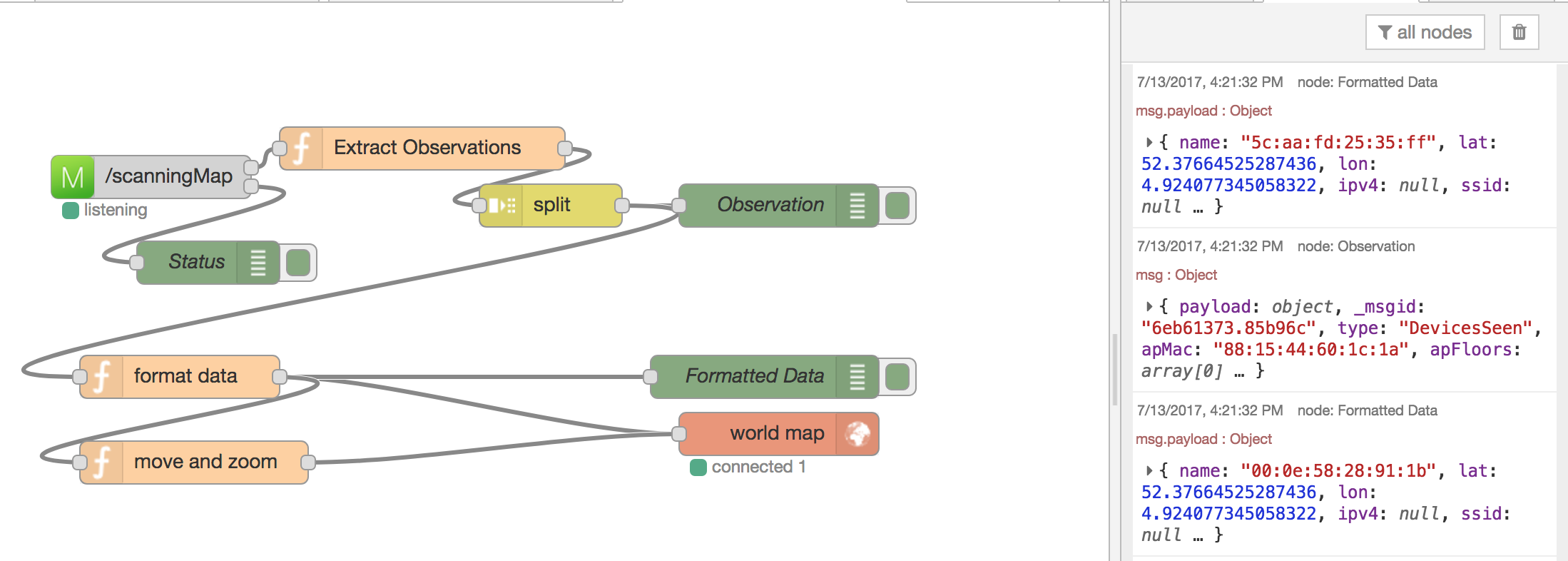
109 |
110 | ### Node Settings
111 | 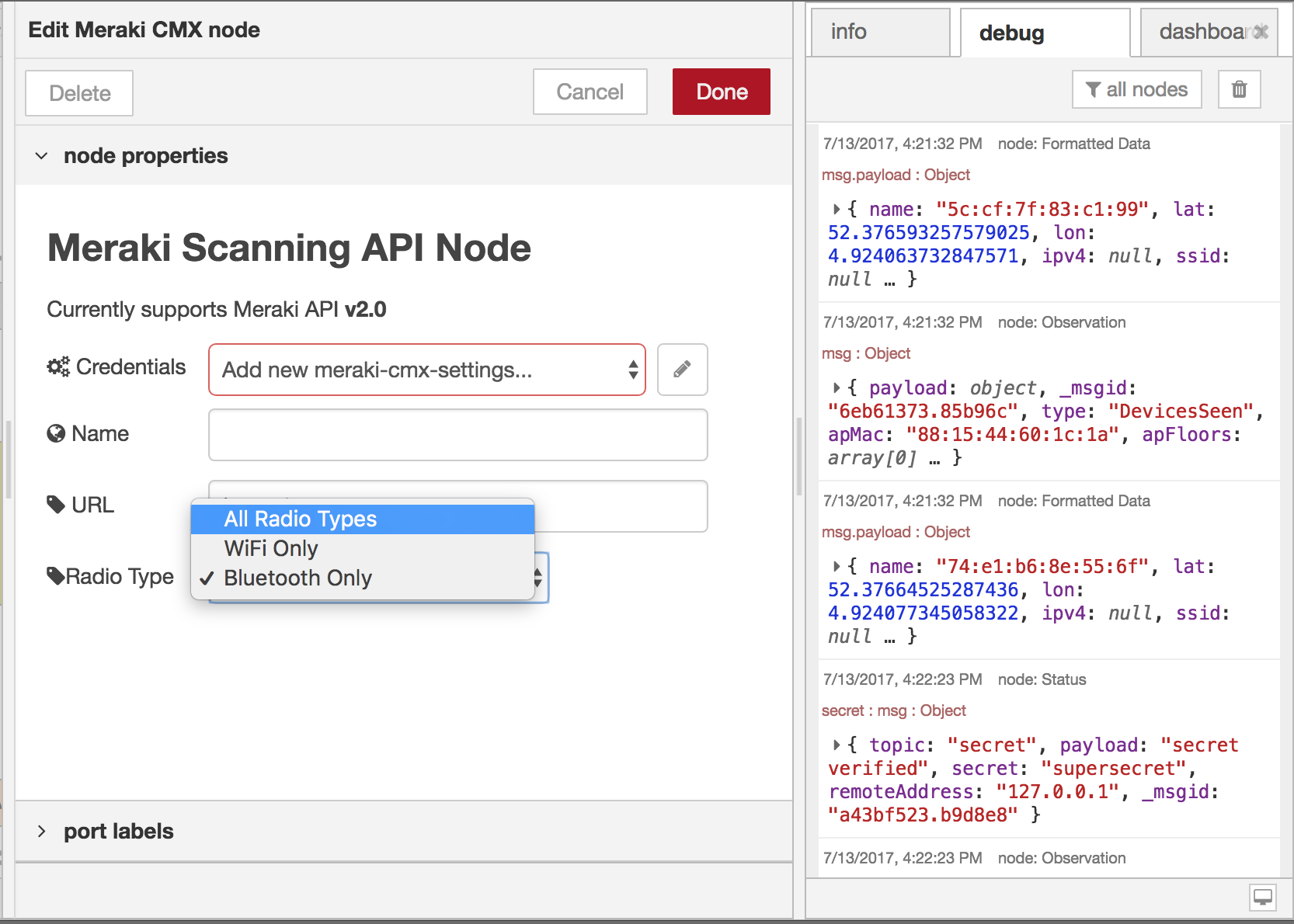
112 |
113 |
114 | ### Meraki Dashboard AP Map Placement
115 | 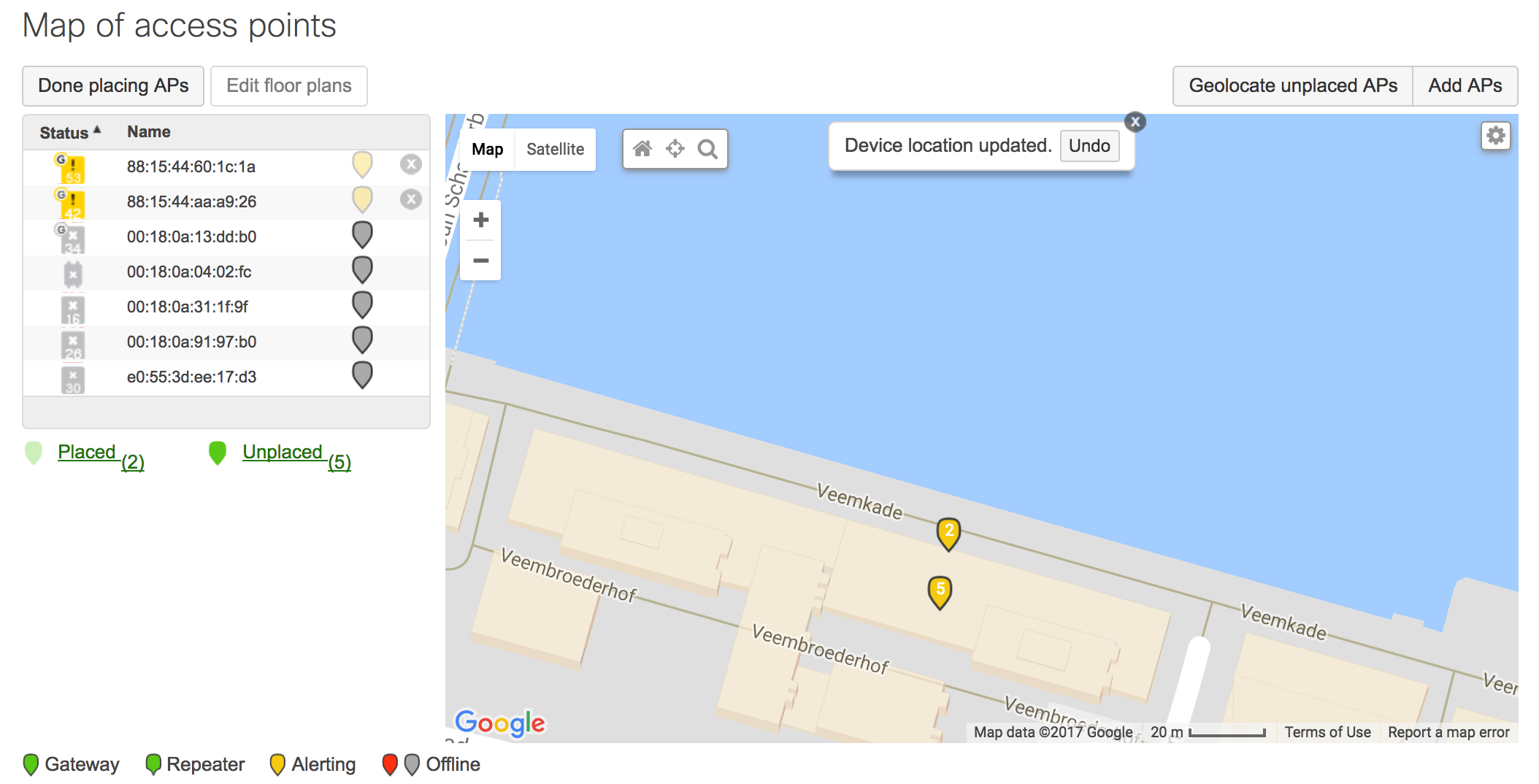
116 |
117 |
118 | ### Meraki Location Data on Worldmap
119 | 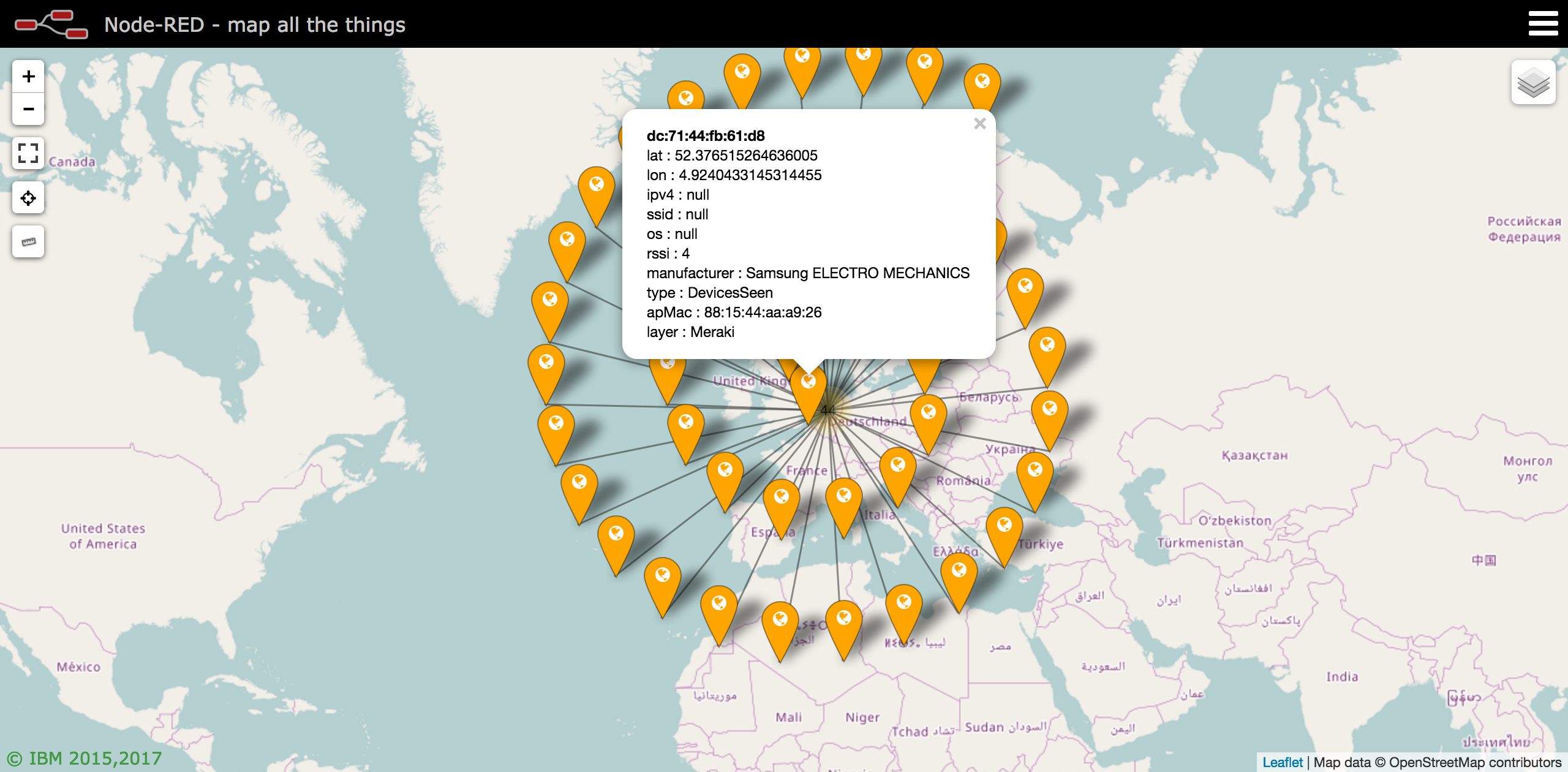
120 |
121 |
122 | ## Sample Flow
123 | ```
124 | [{"id":"8d0a63e4.7ff19","type":"debug","z":"9560177e.d80b58","name":"Data","active":true,"console":"false","complete":"payload","x":510,"y":120,"wires":[]},{"id":"e6a6b005.01677","type":"Meraki CMX","z":"9560177e.d80b58","name":"","url":"/scanning","settings":"","radioType":"BluetoothDevicesSeen","x":100,"y":140,"wires":[["8d0a63e4.7ff19","23f1e4d9.3149ec"],["a303ae76.9149d"]]},{"id":"6b254578.dfd17c","type":"debug","z":"9560177e.d80b58","name":"Status: Data","active":true,"console":"false","complete":"true","x":490,"y":200,"wires":[]},{"id":"aa97b7a4.7e4b18","type":"split","z":"9560177e.d80b58","name":"","splt":"\\n","spltType":"str","arraySplt":1,"arraySpltType":"len","stream":false,"addname":"topic","x":330,"y":520,"wires":[["5700cec1.0367b"]]},{"id":"cb89fe11.4c4b5","type":"function","z":"9560177e.d80b58","name":"Extract Observations","func":"// Flatten JSON\nmsg.type = msg.payload.type;\nmsg.apMac = msg.payload.data.apMac;\nmsg.apFloors = msg.payload.data.apFloors\nmsg.apTags = msg.payload.data.apTags;\nmsg.payload = msg.payload.data.observations;\n\nreturn msg;","outputs":1,"noerr":0,"x":240,"y":480,"wires":[["aa97b7a4.7e4b18"]]},{"id":"5700cec1.0367b","type":"debug","z":"9560177e.d80b58","name":"Observation","active":true,"console":"false","complete":"true","x":490,"y":520,"wires":[]},{"id":"a303ae76.9149d","type":"switch","z":"9560177e.d80b58","name":"","property":"topic","propertyType":"msg","rules":[{"t":"eq","v":"data","vt":"str"},{"t":"eq","v":"version","vt":"str"},{"t":"eq","v":"validator","vt":"str"},{"t":"eq","v":"secret","vt":"str"},{"t":"eq","v":"type","vt":"str"},{"t":"eq","v":"error","vt":"str"},{"t":"else"}],"checkall":"true","outputs":7,"x":290,"y":300,"wires":[["6b254578.dfd17c"],["53f245f.0b2c2bc"],["5287b886.c827f8"],["4668f0fa.353d8"],["7946f407.72013c"],["adce6018.ce8af"],["4c7a8875.a90598"]]},{"id":"5287b886.c827f8","type":"debug","z":"9560177e.d80b58","name":"Status: Validator","active":true,"console":"false","complete":"true","x":480,"y":280,"wires":[]},{"id":"4668f0fa.353d8","type":"debug","z":"9560177e.d80b58","name":"Status: Secret","active":true,"console":"false","complete":"true","x":480,"y":320,"wires":[]},{"id":"7946f407.72013c","type":"debug","z":"9560177e.d80b58","name":"Status: Type","active":true,"console":"false","complete":"true","x":490,"y":360,"wires":[]},{"id":"adce6018.ce8af","type":"debug","z":"9560177e.d80b58","name":"Status: Error","active":true,"console":"false","complete":"true","x":490,"y":400,"wires":[]},{"id":"4c7a8875.a90598","type":"debug","z":"9560177e.d80b58","name":"Status: Otherwise","active":true,"console":"false","complete":"true","x":470,"y":440,"wires":[]},{"id":"23f1e4d9.3149ec","type":"link out","z":"9560177e.d80b58","name":"Meraki Scanning","links":["21b70a5e.6a00c6"],"x":275,"y":160,"wires":[]},{"id":"21b70a5e.6a00c6","type":"link in","z":"9560177e.d80b58","name":"Split Observations","links":["23f1e4d9.3149ec"],"x":60,"y":480,"wires":[["cb89fe11.4c4b5"]]},{"id":"ae4f659c.475398","type":"comment","z":"9560177e.d80b58","name":"Workflow Examples","info":"","x":120,"y":440,"wires":[]},{"id":"53f245f.0b2c2bc","type":"debug","z":"9560177e.d80b58","name":"Status: Version","active":true,"console":"false","complete":"true","x":480,"y":240,"wires":[]},{"id":"e7a18191.9674a","type":"comment","z":"9560177e.d80b58","name":"Meraki Scanning Node - README","info":"Update the Meraki node with your Meraki Network's\nvalidator and secret","x":410,"y":60,"wires":[]}]
125 | ```
126 |
--------------------------------------------------------------------------------
/cmx/merakiCMX.js:
--------------------------------------------------------------------------------
1 |
2 | // Cisco Meraki CMX Listener
3 |
4 | /*
5 | This node will accept a JSON post from the Cisco Meraki CMX Presence API.
6 | It will first respond to a [GET] request and respond with a validator key (provided within the Meraki Dashboard)
7 | Meraki will then send a [POST] which includes the CMX JSON data, including a user defined secret
8 | If the secret matches, the data will be set to the msg.payload object.
9 |
10 | Written by: Cory Guynn
11 | www.Meraki.com
12 | www.InternetOfLEGO.com
13 | */
14 |
15 | module.exports = function (RED) {
16 | "use strict";
17 | var bodyParser = require("body-parser");
18 | var jsonParser = bodyParser.json();
19 |
20 | function merakiCMXsettings(config) {
21 | RED.nodes.createNode(this,config);
22 | //console.log('merakiCMXsettings config',config);
23 | }
24 |
25 | // Settings
26 | RED.nodes.registerType("meraki-cmx-settings",merakiCMXsettings,{
27 | credentials: {
28 | secret: {type:"text"},
29 | validator: {type:"text"}
30 | }
31 | });
32 |
33 |
34 | // output node
35 | function merakiCMX(config) {
36 |
37 | RED.nodes.createNode(this,config);
38 |
39 | //console.log('merakiCMX config '+JSON.stringify(config, null, 3));
40 |
41 | if (!config.url) {
42 | this.warn(RED._("merakiCMX.errors.missing-path"));
43 | return;
44 | }
45 | this.name = config.name;
46 |
47 | this.url = config.url;
48 | this.radioType = config.radioType;
49 | // Retrieve the config node
50 | this.settings = RED.nodes.getNode(config.settings);
51 |
52 | // copy "this" object in case we need it in context of callbacks of other functions.
53 | var node = this;
54 | //console.log("DEBUGGING this ",this);
55 |
56 |
57 | // Start CMX Listener using config settings
58 | cmxServer(node);
59 |
60 | // close open URL listeners
61 | this.on("close",function() {
62 | //var node = this;
63 | console.log("closing routes");
64 | console.log("node.url "+node.url);
65 | //console.log("RED.httpNode._router.stack "+ JSON.stringify(RED.httpNode._router.stack, null, 3));
66 | for (var i = RED.httpNode._router.stack.length - 1; i >= 0; i--) {
67 | if (RED.httpNode._router.stack[i].route){
68 | if (RED.httpNode._router.stack[i].route.path === node.url) {
69 | console.log("removing "+node.url);
70 |
71 | RED.httpNode._router.stack.splice(i, 1);
72 | }
73 | }
74 | }
75 |
76 | });
77 |
78 |
79 | };
80 | RED.nodes.registerType("Meraki CMX",merakiCMX);
81 |
82 | // CMX Server
83 | function cmxServer(node){
84 | //console.log("DEBUGGING node ",node);
85 | console.log('cmxServer url: '+node.url);
86 | console.log('cmxServer validator: '+node.settings.credentials.validator);
87 |
88 | node.status({fill:"yellow",shape:"dot",text:"waiting for first contact"});
89 |
90 | var data = {};
91 |
92 | RED.httpNode.get(node.url, function(req, res){
93 | //console.log("Get request DEBUGGING req: ",req);
94 | console.log("Get request DEBUGGING req.query: ",req.query);
95 | console.log("sending validator: "+node.settings.credentials.validator);
96 | node.status({fill:"blue",shape:"dot",text:"sent validator"});
97 | setTimeout(function(){
98 | node.status({fill:"green",shape:"dot",text:"listening"});
99 | }, 5000);
100 | data.payload = node.settings.credentials.validator;
101 | var status = {};
102 | status.topic = "validator";
103 | status.payload = "sending validator";
104 | status.validator = node.settings.credentials.validator;
105 | status.remoteAddress = req.connection.remoteAddress;
106 | node.send([null, status]);
107 | res.send(data.payload);
108 | });
109 |
110 | RED.httpNode.post(node.url, jsonParser, function(req, res){
111 | console.log(node.url+' Received Data, validating secret');
112 | //console.log("Post request DEBUGGING req.body: ",req.body);
113 |
114 | try{
115 | console.log("processing Meraki observation data");
116 | if(!req.body){
117 | console.log("invalid post data: ",req);
118 | throw "unrecognized data", req;
119 | }
120 |
121 |
122 | if(req.body.version != "2.0"){
123 | console.log("Meraki CMX: Invalid version. Expecting 2.0 but received ",req.body.version);
124 | node.status({fill:"red",shape:"dot",text:"invalid API version: "+req.body.version});
125 | setTimeout(function(){
126 | node.status({fill:"green",shape:"dot",text:"listening"});
127 | }, 5000);
128 | res.sendStatus(500);
129 | data.payload = node.settings.credentials.validator;
130 | var status = {};
131 | status.topic = "version";
132 | status.payload = "incorrect version";
133 | status.supportedVersion = "2.0";
134 | status.version = req.body.version;
135 | status.remoteAddress = req.connection.remoteAddress;
136 | status.statusCode = 500; // server error
137 | node.send([null, status]);
138 | res.end();
139 | return null;
140 | }
141 |
142 | // Check Secret
143 | if (req.body.secret != node.settings.credentials.secret) {
144 | // Secret invalid
145 | console.log('Error: Invalid Secret from: '+req.connection.remoteAddress);
146 | node.status({fill:"red",shape:"dot",text:"secret invalid"});
147 | res.sendStatus(401); // unauthorized
148 | node.error("Invalid Secret from "+req.connection.remoteAddress);
149 | var status = {};
150 | status.topic = "secret";
151 | status.payload = "invalid secret";
152 | status.secret = req.body.secret;
153 | status.version = req.body.version;
154 | status.remoteAddress = req.connection.remoteAddress;
155 | status.statusCode = 401;
156 | node.send([null, status]);
157 | res.end();
158 | return null
159 | }else{
160 | // Secret verified
161 | console.log(node.url+' secret verified');
162 | node.status({fill:"blue",shape:"dot",text:"data received"});
163 | setTimeout(function(){
164 | node.status({fill:"green",shape:"dot",text:"listening"});
165 | }, 5000);
166 | var status = {};
167 | status.topic = "secret";
168 | status.payload = "secret verified";
169 | status.secret = req.body.secret;
170 | status.remoteAddress = req.connection.remoteAddress;
171 | node.send([null, status]);
172 | }
173 |
174 | // Check Radio Observeration Type
175 | console.log("Radio type ",node.radioType);
176 | console.log("req.body.type ",req.body.type);
177 | if(node.radioType === req.body.type || node.radioType.toString() === "All"){
178 | console.log("sending data to flow");
179 | // Send Observations to Data flow
180 | var status = {};
181 | status.topic = "data";
182 | status.payload = "data received";
183 | status.supportedType = node.radioType;
184 | status.type = req.body.type;
185 | status.remoteAddress = req.connection.remoteAddress;
186 | status.statusCode = 200;
187 | data.payload = req.body;
188 | res.sendStatus(200);
189 | node.send([data, null]);
190 | }else{
191 | // discarding data as it does not match the expected radio type
192 | console.log("discarding radio type ",req.body.type);
193 | node.status({fill:"yellow",shape:"dot",text:"discarding radio type"});
194 | setTimeout(function(){
195 | node.status({fill:"green",shape:"dot",text:"listening"});
196 | }, 5000);
197 | var status = {};
198 | status.topic = "type";
199 | status.payload = "discarding radio type";
200 | status.supportedType = node.radioType;
201 | status.type = req.body.type;
202 | status.remoteAddress = req.connection.remoteAddress;
203 | status.statusCode = 200; // OK
204 | res.sendStatus(200); //respond to client with status code
205 | node.send([null, status]);
206 | res.end();
207 | return null
208 | }
209 |
210 | } catch (e) {
211 | // An error has occured
212 | console.log("Error. Invalid POST from " + req.connection.remoteAddress);
213 | console.log(e);
214 | node.status({fill:"red",shape:"dot",text:"invalid post"});
215 | res.sendStatus(500); // Server Error
216 | node.error("Invalid POST req data from " + req.connection.remoteAddress, req);
217 | var status = {};
218 | status.topic = "error";
219 | status.payload = "invalid post data";
220 | status.remoteAddress = req.connection.remoteAddress;
221 | status.error = e;
222 | status.data = req;
223 | status.statusCode = 500;
224 | node.send([null, status]);
225 | res.send(req);
226 | res.end();
227 | return null
228 | }
229 | });
230 |
231 | }
232 | }
233 |
--------------------------------------------------------------------------------