22 |
23 | AcionSheetController
24 |
25 | AcionSheetController is an iOS control for presenting a view in an iOS action sheet or alert style. You can add a custom view, representing your custom content, and add any number of buttons to represent actions related to that content. You can also forgo any custom view and simply present a number of actionable buttons.
26 |
27 | 
28 |
29 |
30 | Usage
31 |
32 | There is generally no need to subclass ActionSheetController, although you can if you want to.
33 |
34 |
35 | License (MIT License)
36 |
37 | Copyright (c) 2015 Roland Moers
38 |
39 | Permission is hereby granted, free of charge, to any person obtaining a copy
40 | of this software and associated documentation files (the "Software"), to deal
41 | in the Software without restriction, including without limitation the rights
42 | to use, copy, modify, merge, publish, distribute, sublicense, and/or sell
43 | copies of the Software, and to permit persons to whom the Software is
44 | furnished to do so, subject to the following conditions:
45 |
46 | The above copyright notice and this permission notice shall be included in
47 | all copies or substantial portions of the Software.
48 |
49 | THE SOFTWARE IS PROVIDED "AS IS", WITHOUT WARRANTY OF ANY KIND, EXPRESS OR
50 | IMPLIED, INCLUDING BUT NOT LIMITED TO THE WARRANTIES OF MERCHANTABILITY,
51 | FITNESS FOR A PARTICULAR PURPOSE AND NONINFRINGEMENT. IN NO EVENT SHALL THE
52 | AUTHORS OR COPYRIGHT HOLDERS BE LIABLE FOR ANY CLAIM, DAMAGES OR OTHER
53 | LIABILITY, WHETHER IN AN ACTION OF CONTRACT, TORT OR OTHERWISE, ARISING FROM,
54 | OUT OF OR IN CONNECTION WITH THE SOFTWARE OR THE USE OR OTHER DEALINGS IN
55 | THE SOFTWARE.
56 |
57 |
62 |
63 |
64 |
65 |
66 |
67 |
68 |
--------------------------------------------------------------------------------
/ReadMe.md:
--------------------------------------------------------------------------------
1 | AcionSheetController
2 | ====
3 |
4 | AcionSheetController is an iOS control for presenting a view in an iOS action sheet or alert style. You can add a custom view, representing your custom content, and add any number of buttons to represent actions related to that content. You can also forgo any custom view and simply present a number of actionable buttons.
5 |
6 | 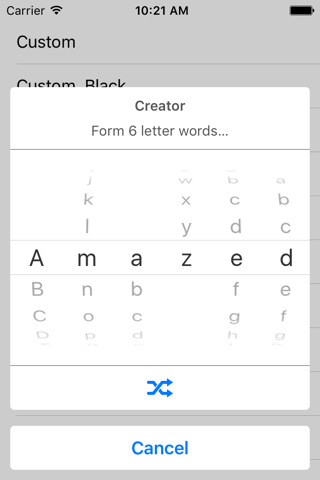
7 | 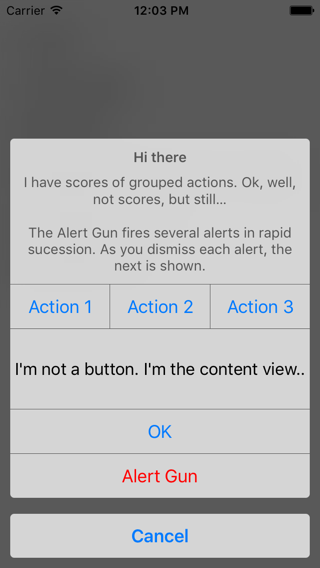
8 |
9 | 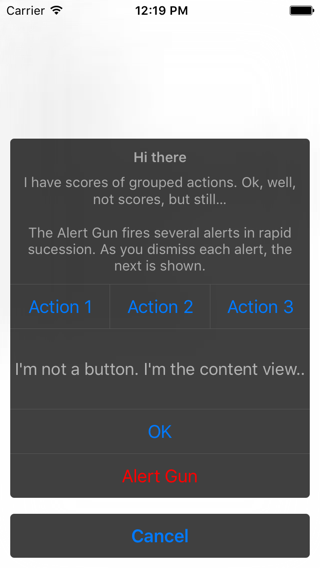
10 |
11 | AcionSheetController is written in **Swift** and was inspired by [RMActionController](https://github.com/CooperRS/RMActionController) by [Roland Moers](https://github.com/CooperRS). AcionSheetController differs in a number of aspects, firstly, of course, by being written in Swift, and also importantly by basing itself on **UIStackView**.
12 |
13 | Usage
14 | ====
15 | By default ActionSheetController doesn't contain a content view, and will only show buttons for any actions you add. To show a content view you simply set the contentView property to hold the desired view. There is generally no need to subclass ActionSheetController, although you can if you want to.
16 |
17 | ### Adding a view
18 | Lets say you want to add a date picker:
19 | - You instantiate a UIDatePicker
20 | - You instantiate an action and consult the date picker in its handler, to extract the selected date.
21 | - You set the picker as the content view of the ActionSheetController
22 |
23 | ```swift
24 | private func datePickerSheet() -> ActionSheetController {
25 | let pickerView = UIDatePicker(frame: CGRectZero)
26 |
27 | let okAction = ActionSheetControllerAction(style: .Done, title: "OK", dismissesActionController: true) { controller in
28 | let date = pickerView.date
29 | let action = AlertAction(title: "Hurray!", style: .Default, enabled: true, isPreferredAction: true) {
30 | print("Dismissed!")
31 | }
32 | let alertInfo = AlertInfo(title: "Success", message: "You picked date: \(date.description)", actions: [action])
33 | AlertPresenter.sharedAlertPresenter.addAlert(alertInfo)
34 | }
35 |
36 | let cancelAction = ActionSheetControllerAction(style: .Cancel, title: "Cancel", dismissesActionController: true, handler: nil)
37 | let sheetController = ActionSheetController(title: "Date Picker", message: "Pick a date for your enjoyment…", cancelAction: cancelAction, okAction: okAction)
38 |
39 | sheetController.contentView = pickerView
40 |
41 | return sheetController
42 | }
43 | ```
44 | ### Presenting
45 | Presenting the controller is pretty standard:
46 |
47 | ```swift
48 | var sheetController = self.datePickerSheet()
49 | self.controller.presentViewController(sheetController, animated: true, completion: nil)
50 | ```
51 |
52 | ### Presentation Style
53 | ActionSheetController can be presented as a popover on iPad, and it has a light and a dark theme, suitable for different context, and/or personal preference.
54 |
55 | ### Integration
56 | To use ActionSheetController simply drag the files ActionSheetController.swift and ActionSheetControllerAction.swift into your project.
57 |
58 | ### Requirements
59 |
60 | | Compile Time | Runtime |
61 | | :------------ | :------------ |
62 | | Xcode 7 | iOS 9 |
63 | | iOS 9 SDK |
64 |
65 | ## License (MIT License)
66 | Copyright (c) 2016 Antonio Nunes
67 |
68 | Permission is hereby granted, free of charge, to any person obtaining a copy
69 | of this software and associated documentation files (the "Software"), to deal
70 | in the Software without restriction, including without limitation the rights
71 | to use, copy, modify, merge, publish, distribute, sublicense, and/or sell
72 | copies of the Software, and to permit persons to whom the Software is
73 | furnished to do so, subject to the following conditions:
74 |
75 | The above copyright notice and this permission notice shall be included in
76 | all copies or substantial portions of the Software.
77 |
78 | THE SOFTWARE IS PROVIDED "AS IS", WITHOUT WARRANTY OF ANY KIND, EXPRESS OR
79 | IMPLIED, INCLUDING BUT NOT LIMITED TO THE WARRANTIES OF MERCHANTABILITY,
80 | FITNESS FOR A PARTICULAR PURPOSE AND NONINFRINGEMENT. IN NO EVENT SHALL THE
81 | AUTHORS OR COPYRIGHT HOLDERS BE LIABLE FOR ANY CLAIM, DAMAGES OR OTHER
82 | LIABILITY, WHETHER IN AN ACTION OF CONTRACT, TORT OR OTHERWISE, ARISING FROM,
83 | OUT OF OR IN CONNECTION WITH THE SOFTWARE OR THE USE OR OTHER DEALINGS IN
84 | THE SOFTWARE.
85 |
--------------------------------------------------------------------------------
/ActionSheetControllerDemo/Base.lproj/Main.storyboard:
--------------------------------------------------------------------------------
1 |
2 |
21 |
22 | Reference
23 |  24 | Typealiases Reference
25 |
24 | Typealiases Reference
25 |
26 |
21 |
22 | Reference
23 |
24 | Typealiases Reference
25 |
26 |
22 |
23 | Reference
24 |  25 | GroupedActionSheetControllerAction Class Reference
26 |
25 | GroupedActionSheetControllerAction Class Reference
26 |
27 |
22 |
23 | Reference
24 |
25 | GroupedActionSheetControllerAction Class Reference
26 |
27 |
22 |
23 | Reference
24 |
25 | ActionSheetControllerStyle Enum Reference
26 |
27 |
22 |
23 | Reference
24 |
25 | ActionSheetControllerStyle Enum Reference
26 |
27 |
21 |
22 | Reference
23 |
24 | Enums Reference
25 |
26 |
21 |
22 | Reference
23 |
24 | Enums Reference
25 |
26 |
22 |
23 | Reference
24 |
25 | ActionSheetControllerAction Class Reference
26 |
27 |
22 |
23 | Reference
24 |
25 | ActionSheetControllerAction Class Reference
26 |
27 |
21 |
22 | Reference
23 |
24 | Classes Reference
25 |
26 |
22 |
23 | Reference
24 |
25 | ActionSheetControllerActionStyle Enum Reference
26 |
27 |
 View on GitHub
 View on GitHub