├── flink-tabel-sql 1
├── flink-tabel-sql.iml
├── src
│ └── main
│ │ ├── resources
│ │ ├── list.txt
│ │ └── log4j.properties
│ │ └── java
│ │ └── robinwang
│ │ ├── SQLJob.java
│ │ └── TabelJob.java
├── Flink SQL实战 - 1.md
└── pom.xml
├── flink-tabel-sql 2&3
├── flink-tabel-sql.iml
├── src
│ └── main
│ │ ├── resources
│ │ ├── list.txt
│ │ └── log4j.properties
│ │ └── java
│ │ └── robinwang
│ │ ├── custom
│ │ ├── Tuple1Schema.java
│ │ ├── KafkaTabelSource.java
│ │ └── MyRetractStreamTableSink.java
│ │ ├── KafkaSource2.java
│ │ ├── CustomSinkJob.java
│ │ └── KafkaSource.java
├── Socket_server.py
├── kafka_tabelCount.py
├── Flink SQL实战 - 2.md
├── Flink SQL实战 - 3.md
└── pom.xml
├── flink-tabel-sql 4&5
├── flink-tabel-sql.iml
├── src
│ └── main
│ │ ├── resources
│ │ ├── list.txt
│ │ └── log4j.properties
│ │ └── java
│ │ └── robinwang
│ │ ├── udfs
│ │ ├── IsStatus.java
│ │ ├── KyeWordCount.java
│ │ └── MaxStatus.java
│ │ ├── custom
│ │ ├── POJOSchema.java
│ │ ├── KafkaTabelSource.java
│ │ └── MyRetractStreamTableSink.java
│ │ ├── entity
│ │ └── Response.java
│ │ ├── UdafJob.java
│ │ ├── UdtfJob.java
│ │ └── UdsfJob.java
├── kafka_JSON.py
├── kafka_keywordsJSON.py
├── Flink SQL 实战 (5):使用自定义函数实现关键字过滤统计.md
├── flink-table-sql.iml
├── pom.xml
└── Flink SQL 实战 (4):UDF-用户自定义函数.md
├── flink-tabel-sql 6
├── flink-json-1.9.1.jar
├── flink-sql-connector-kafka_2.11-1.9.1.jar
├── kafka_result.py
├── sql-client-defaults.yaml
└── Flink SQL 实战 (6):SQL Client.md
└── README.md
/flink-tabel-sql 1/flink-tabel-sql.iml:
--------------------------------------------------------------------------------
1 |
2 |
--------------------------------------------------------------------------------
/flink-tabel-sql 2&3/flink-tabel-sql.iml:
--------------------------------------------------------------------------------
1 |
2 |
--------------------------------------------------------------------------------
/flink-tabel-sql 4&5/flink-tabel-sql.iml:
--------------------------------------------------------------------------------
1 |
2 |
--------------------------------------------------------------------------------
/flink-tabel-sql 6/flink-json-1.9.1.jar:
--------------------------------------------------------------------------------
https://raw.githubusercontent.com/StarPlatinumStudio/Flink-SQL-Practice/HEAD/flink-tabel-sql 6/flink-json-1.9.1.jar
--------------------------------------------------------------------------------
/flink-tabel-sql 6/flink-sql-connector-kafka_2.11-1.9.1.jar:
--------------------------------------------------------------------------------
https://raw.githubusercontent.com/StarPlatinumStudio/Flink-SQL-Practice/HEAD/flink-tabel-sql 6/flink-sql-connector-kafka_2.11-1.9.1.jar
--------------------------------------------------------------------------------
/flink-tabel-sql 1/src/main/resources/list.txt:
--------------------------------------------------------------------------------
1 | Apple
2 | Xiaomi
3 | Huawei
4 | Oppo
5 | Vivo
6 | OnePlus
7 | Apple
8 | Xiaomi
9 | Huawei
10 | Oppo
11 | Vivo
12 | OnePlus
13 | Apple
14 | Xiaomi
15 |
--------------------------------------------------------------------------------
/flink-tabel-sql 2&3/src/main/resources/list.txt:
--------------------------------------------------------------------------------
1 | Apple
2 | Xiaomi
3 | Huawei
4 | Oppo
5 | Vivo
6 | OnePlus
7 | Apple
8 | Xiaomi
9 | Huawei
10 | Oppo
11 | Vivo
12 | OnePlus
13 | Apple
14 | Xiaomi
15 |
--------------------------------------------------------------------------------
/flink-tabel-sql 4&5/src/main/resources/list.txt:
--------------------------------------------------------------------------------
1 | Apple
2 | Xiaomi
3 | Huawei
4 | Oppo
5 | Vivo
6 | OnePlus
7 | Apple
8 | Xiaomi
9 | Huawei
10 | Oppo
11 | Vivo
12 | OnePlus
13 | Apple
14 | Xiaomi
15 |
--------------------------------------------------------------------------------
/flink-tabel-sql 4&5/src/main/java/robinwang/udfs/IsStatus.java:
--------------------------------------------------------------------------------
1 | package robinwang.udfs;
2 |
3 | import org.apache.flink.table.functions.ScalarFunction;
4 |
5 | public class IsStatus extends ScalarFunction {
6 | private int status = 0;
7 | public IsStatus(int status){
8 | this.status = status;
9 | }
10 |
11 | public boolean eval(int status){
12 | if (this.status == status){
13 | return true;
14 | } else {
15 | return false;
16 | }
17 | }
18 | }
19 |
--------------------------------------------------------------------------------
/flink-tabel-sql 2&3/src/main/java/robinwang/custom/Tuple1Schema.java:
--------------------------------------------------------------------------------
1 | package robinwang.custom;
2 | import org.apache.flink.api.common.serialization.AbstractDeserializationSchema;
3 | import org.apache.flink.api.java.tuple.Tuple1;
4 |
5 | import java.io.IOException;
6 |
7 | public final class Tuple1Schema extends AbstractDeserializationSchema> {
8 | @Override
9 | public Tuple1 deserialize(byte[] bytes) throws IOException {
10 | return new Tuple1<>(new String(bytes,"utf-8"));
11 | }
12 | }
13 |
--------------------------------------------------------------------------------
/flink-tabel-sql 4&5/src/main/java/robinwang/udfs/KyeWordCount.java:
--------------------------------------------------------------------------------
1 | package robinwang.udfs;
2 |
3 | import org.apache.flink.api.java.tuple.Tuple2;
4 | import org.apache.flink.table.functions.TableFunction;
5 |
6 | public class KyeWordCount extends TableFunction> {
7 | private String[] keys;
8 | public KyeWordCount(String[] keys){
9 | this.keys=keys;
10 | }
11 | public void eval(String in){
12 | for (String key:keys){
13 | if (in.contains(key)){
14 | collect(new Tuple2(key,1));
15 | }
16 | }
17 | }
18 | }
19 |
--------------------------------------------------------------------------------
/flink-tabel-sql 2&3/Socket_server.py:
--------------------------------------------------------------------------------
1 | import socket
2 | import time
3 |
4 | # 创建socket对象
5 | s = socket.socket()
6 | # 将socket绑定到本机IP和端口
7 | s.bind(('192.168.1.130', 9000))
8 | # 服务端开始监听来自客户端的连接
9 | s.listen()
10 | while True:
11 | c, addr = s.accept()
12 | count = 0
13 |
14 | while True:
15 | c.send('{"project":"mobile","protocol":"Dindex/","companycode":"05780","model":"Dprotocol","response":"SucceedHeSNNNllo","response_time":0.03257,"status":0}\n'.encode('utf-8'))
16 | time.sleep(0.005)
17 | count += 1
18 | if count > 100000:
19 | # 关闭连接
20 | c.close()
21 | break
22 | time.sleep(1)
23 |
--------------------------------------------------------------------------------
/flink-tabel-sql 4&5/src/main/java/robinwang/udfs/MaxStatus.java:
--------------------------------------------------------------------------------
1 | package robinwang.udfs;
2 |
3 | import org.apache.flink.table.functions.AggregateFunction;
4 |
5 | public class MaxStatus extends AggregateFunction {
6 | @Override
7 | public Integer getValue(StatusACC statusACC) {
8 | return statusACC.maxStatus;
9 | }
10 |
11 | @Override
12 | public StatusACC createAccumulator() {
13 | return new StatusACC();
14 | }
15 | public void accumulate(StatusACC statusACC,int status){
16 | if (status>statusACC.maxStatus){
17 | statusACC.maxStatus=status;
18 | }
19 | }
20 | public static class StatusACC{
21 | public int maxStatus=0;
22 | }
23 | }
24 |
--------------------------------------------------------------------------------
/flink-tabel-sql 4&5/src/main/java/robinwang/custom/POJOSchema.java:
--------------------------------------------------------------------------------
1 | package robinwang.custom;
2 |
3 | import com.alibaba.fastjson.JSON;
4 | import robinwang.entity.Response;
5 | import org.apache.flink.api.common.serialization.AbstractDeserializationSchema;
6 |
7 | import java.io.IOException;
8 |
9 | /**
10 | * JSON:
11 | * {
12 | * "response": "",
13 | * "status": 0,
14 | * "protocol": ""
15 | * "timestamp":0
16 | * }
17 | */
18 | public final class POJOSchema extends AbstractDeserializationSchema {
19 | @Override
20 | public Response deserialize(byte[] bytes) throws IOException {
21 | //byte[]转JavaBean
22 | try {
23 | return JSON.parseObject(bytes,Response.class);
24 | }
25 | catch (Exception ex){
26 | ex.printStackTrace();
27 | }
28 | return null;
29 | }
30 | }
31 |
--------------------------------------------------------------------------------
/flink-tabel-sql 2&3/kafka_tabelCount.py:
--------------------------------------------------------------------------------
1 | # https://pypi.org/project/kafka-python/
2 | import pickle
3 | import time
4 | import json
5 | from kafka import KafkaProducer
6 |
7 | producer = KafkaProducer(bootstrap_servers=['127.0.0.1:9092'],
8 | key_serializer=lambda k: pickle.dumps(k),
9 | value_serializer=lambda v: pickle.dumps(v))
10 | start_time = time.time()
11 | for i in range(0, 10000):
12 | print('------{}---------'.format(i))
13 | producer = KafkaProducer(value_serializer=lambda v: json.dumps(v).encode('utf-8'),compression_type='gzip')
14 | producer.send('test', [{"response":"testSucceed","status":0},{"response":"testSucceed","status":0},{"response":"testSucceed","status":0},{"response":"testSucceed","status":0},{"response":"testSucceed","status":0}])
15 | # future = producer.send('test', key='num', value=i, partition=0)
16 | # 将缓冲区的全部消息push到broker当中
17 | producer.flush()
18 | producer.close()
19 |
20 | end_time = time.time()
21 | time_counts = end_time - start_time
22 | print(time_counts)
--------------------------------------------------------------------------------
/README.md:
--------------------------------------------------------------------------------
1 | # Apache Flink® SQL Practice
2 |
3 | **This repository provides a practice for Flink's Tabel API & SQL API.**
4 |
5 | 请配合我的专栏:[Flink SQL原理和实战]( https://blog.csdn.net/qq_35815527/category_9634641.html ) 使用
6 |
7 | ### Apache Flink
8 |
9 | Apache Flink(以下简称Flink)是第三代流处理引擎,支持精确的流处理,能同时满足各种规模下对高吞吐和低延迟的需求等优势。
10 |
11 | ## 为什么要用 SQL
12 |
13 | 以下是本人基于[Apache Flink® SQL Training]( https://github.com/ververica/sql-training )翻译的Flink SQL介绍:
14 |
15 | SQL 是 Flink的强大抽象处理功能,位于 Flink 分层抽象的顶层。
16 |
17 | #### DataStream API非常棒
18 |
19 | 非常有表现力的流处理API转换、聚合和连接事件Java和Scala控制如何处理事件的时间戳、水印、窗口、计时器、触发器、允许延迟……维护和更新应用程序状态键控状态、操作符状态、状态后端、检查点
20 |
21 | #### 但并不是每个人都适合
22 |
23 | - 编写分布式程序并不总是那么容易理解新概念:时间,状态等
24 |
25 | - 需要知识和技能–连续应用程序有特殊要求–编程经验(Java / Scala)
26 | - 用户希望专注于他们的业务逻辑
27 |
28 | #### 而SQL API 就做的很好
29 |
30 | - 关系api是声明性的,用户说什么是需要的,
31 |
32 | - 系统决定如何计算it查询,可以有效地优化,让Flink处理状态和时间,
33 |
34 | - 每个人都知道和使用SQL
35 |
36 | #### 结论
37 |
38 | Flink SQL 简单、声明性和简洁的关系API表达能力强,
39 |
40 | 足以支持大量的用例,
41 |
42 | 用于批处理和流数据的统一语法和语义
43 |
44 | ------
45 |
46 | *Apache Flink, Flink®, Apache®, the squirrel logo, and the Apache feather logo are either registered trademarks or trademarks of The Apache Software Foundation.*
47 |
48 |
--------------------------------------------------------------------------------
/flink-tabel-sql 6/kafka_result.py:
--------------------------------------------------------------------------------
1 | # https://pypi.org/project/kafka-python/
2 | import pickle
3 | import time
4 | import json
5 | from kafka import KafkaProducer
6 |
7 | producer = KafkaProducer(bootstrap_servers=['127.0.0.1:9092'],
8 | key_serializer=lambda k: pickle.dumps(k),
9 | value_serializer=lambda v: pickle.dumps(v))
10 | start_time = time.time()
11 | for i in range(0, 10000):
12 | print('------{}---------'.format(i))
13 | producer = KafkaProducer(value_serializer=lambda v: json.dumps(v).encode('utf-8'),compression_type='gzip')
14 | producer.send('log',{"response":"res","status":0,"protocol":"protocol","timestamp":0})
15 | producer.send('log',{"response":"res","status":1,"protocol":"protocol","timestamp":0})
16 | producer.send('log',{"response":"resKEY","status":2,"protocol":"protocol","timestamp":0})
17 | producer.send('log',{"response":"res","status":3,"protocol":"protocol","timestamp":0})
18 | producer.send('log',{"response":"res","status":4,"protocol":"protocol","timestamp":0})
19 | producer.send('log',{"response":"res","status":5,"protocol":"protocol","timestamp":0})
20 | producer.flush()
21 | producer.close()
22 | #
23 | end_time = time.time()
24 | time_counts = end_time - start_time
25 | print(time_counts)
26 |
--------------------------------------------------------------------------------
/flink-tabel-sql 1/src/main/resources/log4j.properties:
--------------------------------------------------------------------------------
1 | ################################################################################
2 | # Licensed to the Apache Software Foundation (ASF) under one
3 | # or more contributor license agreements. See the NOTICE file
4 | # distributed with this work for additional information
5 | # regarding copyright ownership. The ASF licenses this file
6 | # to you under the Apache License, Version 2.0 (the
7 | # "License"); you may not use this file except in compliance
8 | # with the License. You may obtain a copy of the License at
9 | #
10 | # http://www.apache.org/licenses/LICENSE-2.0
11 | #
12 | # Unless required by applicable law or agreed to in writing, software
13 | # distributed under the License is distributed on an "AS IS" BASIS,
14 | # WITHOUT WARRANTIES OR CONDITIONS OF ANY KIND, either express or implied.
15 | # See the License for the specific language governing permissions and
16 | # limitations under the License.
17 | ################################################################################
18 |
19 | log4j.rootLogger=INFO, console
20 |
21 | log4j.appender.console=org.apache.log4j.ConsoleAppender
22 | log4j.appender.console.layout=org.apache.log4j.PatternLayout
23 | log4j.appender.console.layout.ConversionPattern=%d{HH:mm:ss,SSS} %-5p %-60c %x - %m%n
24 |
--------------------------------------------------------------------------------
/flink-tabel-sql 2&3/src/main/resources/log4j.properties:
--------------------------------------------------------------------------------
1 | ################################################################################
2 | # Licensed to the Apache Software Foundation (ASF) under one
3 | # or more contributor license agreements. See the NOTICE file
4 | # distributed with this work for additional information
5 | # regarding copyright ownership. The ASF licenses this file
6 | # to you under the Apache License, Version 2.0 (the
7 | # "License"); you may not use this file except in compliance
8 | # with the License. You may obtain a copy of the License at
9 | #
10 | # http://www.apache.org/licenses/LICENSE-2.0
11 | #
12 | # Unless required by applicable law or agreed to in writing, software
13 | # distributed under the License is distributed on an "AS IS" BASIS,
14 | # WITHOUT WARRANTIES OR CONDITIONS OF ANY KIND, either express or implied.
15 | # See the License for the specific language governing permissions and
16 | # limitations under the License.
17 | ################################################################################
18 |
19 | log4j.rootLogger=INFO, console
20 |
21 | log4j.appender.console=org.apache.log4j.ConsoleAppender
22 | log4j.appender.console.layout=org.apache.log4j.PatternLayout
23 | log4j.appender.console.layout.ConversionPattern=%d{HH:mm:ss,SSS} %-5p %-60c %x - %m%n
24 |
--------------------------------------------------------------------------------
/flink-tabel-sql 4&5/src/main/resources/log4j.properties:
--------------------------------------------------------------------------------
1 | ################################################################################
2 | # Licensed to the Apache Software Foundation (ASF) under one
3 | # or more contributor license agreements. See the NOTICE file
4 | # distributed with this work for additional information
5 | # regarding copyright ownership. The ASF licenses this file
6 | # to you under the Apache License, Version 2.0 (the
7 | # "License"); you may not use this file except in compliance
8 | # with the License. You may obtain a copy of the License at
9 | #
10 | # http://www.apache.org/licenses/LICENSE-2.0
11 | #
12 | # Unless required by applicable law or agreed to in writing, software
13 | # distributed under the License is distributed on an "AS IS" BASIS,
14 | # WITHOUT WARRANTIES OR CONDITIONS OF ANY KIND, either express or implied.
15 | # See the License for the specific language governing permissions and
16 | # limitations under the License.
17 | ################################################################################
18 |
19 | log4j.rootLogger=INFO, console
20 |
21 | log4j.appender.console=org.apache.log4j.ConsoleAppender
22 | log4j.appender.console.layout=org.apache.log4j.PatternLayout
23 | log4j.appender.console.layout.ConversionPattern=%d{HH:mm:ss,SSS} %-5p %-60c %x - %m%n
24 |
--------------------------------------------------------------------------------
/flink-tabel-sql 4&5/kafka_JSON.py:
--------------------------------------------------------------------------------
1 | # https://pypi.org/project/kafka-python/
2 | import pickle
3 | import time
4 | import json
5 | from kafka import KafkaProducer
6 |
7 | producer = KafkaProducer(bootstrap_servers=['127.0.0.1:9092'],
8 | key_serializer=lambda k: pickle.dumps(k),
9 | value_serializer=lambda v: pickle.dumps(v))
10 | start_time = time.time()
11 | for i in range(0, 10000):
12 | print('------{}---------'.format(i))
13 | producer = KafkaProducer(value_serializer=lambda v: json.dumps(v).encode('utf-8'),compression_type='gzip')
14 | producer.send('test',{"response":"res","status":0,"protocol":"protocol","timestamp":0})
15 | producer.send('test',{"response":"res","status":1,"protocol":"protocol","timestamp":0})
16 | producer.send('test',{"response":"res","status":2,"protocol":"protocol","timestamp":0})
17 | producer.send('test',{"response":"res","status":3,"protocol":"protocol","timestamp":0})
18 | producer.send('test',{"response":"res","status":4,"protocol":"protocol","timestamp":0})
19 | producer.send('test',{"response":"res","status":5,"protocol":"protocol","timestamp":0})
20 | # future = producer.send('test', key='num', value=i, partition=0)
21 | # 将缓冲区的全部消息push到broker当中
22 | producer.flush()
23 | producer.close()
24 |
25 | end_time = time.time()
26 | time_counts = end_time - start_time
27 | print(time_counts)
--------------------------------------------------------------------------------
/flink-tabel-sql 4&5/src/main/java/robinwang/entity/Response.java:
--------------------------------------------------------------------------------
1 | package robinwang.entity;
2 |
3 | /**
4 | * JavaBean类
5 | * JSON:
6 | * {
7 | * "response": "",
8 | * "status": 0,
9 | * "protocol": ""
10 | * "timestamp":0
11 | * }
12 | */
13 | public class Response {
14 | private String response;
15 | private int status;
16 | private String protocol;
17 | private long timestamp;
18 |
19 | public Response(String response, int status, String protocol, long timestamp) {
20 | this.response = response;
21 | this.status = status;
22 | this.protocol = protocol;
23 | this.timestamp = timestamp;
24 | }
25 | public Response(){}
26 |
27 | public String getResponse() {
28 | return response;
29 | }
30 |
31 | public void setResponse(String response) {
32 | this.response = response;
33 | }
34 |
35 | public int getStatus() {
36 | return status;
37 | }
38 |
39 | public void setStatus(int status) {
40 | this.status = status;
41 | }
42 |
43 | public String getProtocol() {
44 | return protocol;
45 | }
46 |
47 | public void setProtocol(String protocol) {
48 | this.protocol = protocol;
49 | }
50 |
51 | public long getTimestamp() {
52 | return timestamp;
53 | }
54 |
55 | public void setTimestamp(long timestamp) {
56 | this.timestamp = timestamp;
57 | }
58 | }
59 |
--------------------------------------------------------------------------------
/flink-tabel-sql 4&5/src/main/java/robinwang/UdafJob.java:
--------------------------------------------------------------------------------
1 | package robinwang;
2 |
3 | import org.apache.flink.streaming.api.environment.StreamExecutionEnvironment;
4 | import org.apache.flink.table.api.EnvironmentSettings;
5 | import org.apache.flink.table.api.Table;
6 | import org.apache.flink.table.api.java.StreamTableEnvironment;
7 | import org.apache.flink.types.Row;
8 | import robinwang.custom.KafkaTabelSource;
9 | import robinwang.udfs.MaxStatus;
10 |
11 | /**
12 | *聚合最大的status
13 | */
14 | public class UdafJob {
15 | public static void main(String[] args) throws Exception {
16 | StreamExecutionEnvironment streamEnv = StreamExecutionEnvironment.getExecutionEnvironment();
17 | EnvironmentSettings streamSettings = EnvironmentSettings.newInstance().useBlinkPlanner().inStreamingMode().build();
18 | StreamTableEnvironment streamTabelEnv = StreamTableEnvironment.create(streamEnv, streamSettings);
19 | KafkaTabelSource kafkaTabelSource = new KafkaTabelSource();
20 | streamTabelEnv.registerTableSource("kafkaDataStream", kafkaTabelSource);//使用自定义TableSource
21 | streamTabelEnv.registerFunction("maxStatus",new MaxStatus());
22 | Table wordWithCount = streamTabelEnv.sqlQuery("SELECT maxStatus(status) AS maxStatus FROM kafkaDataStream");
23 | streamTabelEnv.toRetractStream(wordWithCount, Row.class).print();
24 | streamTabelEnv.execute("BLINK STREAMING QUERY");
25 | }
26 | }
27 |
--------------------------------------------------------------------------------
/flink-tabel-sql 4&5/kafka_keywordsJSON.py:
--------------------------------------------------------------------------------
1 | # https://pypi.org/project/kafka-python/
2 | import pickle
3 | import time
4 | import json
5 | from kafka import KafkaProducer
6 |
7 | producer = KafkaProducer(bootstrap_servers=['127.0.0.1:9092'],
8 | key_serializer=lambda k: pickle.dumps(k),
9 | value_serializer=lambda v: pickle.dumps(v))
10 | start_time = time.time()
11 | for i in range(0, 10000):
12 | print('------{}---------'.format(i))
13 | producer = KafkaProducer(value_serializer=lambda v: json.dumps(v).encode('utf-8'),compression_type='gzip')
14 | producer.send('test',{"response":"resKeyWordWARNINGillegal","status":0,"protocol":"protocol","timestamp":0})
15 | producer.send('test',{"response":"resKeyWordWARNINGillegal","status":1,"protocol":"protocol","timestamp":0})
16 | producer.send('test',{"response":"resresKeyWordWARNING","status":2,"protocol":"protocol","timestamp":0})
17 | producer.send('test',{"response":"resKeyWord","status":3,"protocol":"protocol","timestamp":0})
18 | producer.send('test',{"response":"res","status":4,"protocol":"protocol","timestamp":0})
19 | producer.send('test',{"response":"res","status":5,"protocol":"protocol","timestamp":0})
20 | # future = producer.send('test', key='num', value=i, partition=0)
21 | # 将缓冲区的全部消息push到broker当中
22 | producer.flush()
23 | producer.close()
24 |
25 | end_time = time.time()
26 | time_counts = end_time - start_time
27 | print(time_counts)
--------------------------------------------------------------------------------
/flink-tabel-sql 2&3/src/main/java/robinwang/custom/KafkaTabelSource.java:
--------------------------------------------------------------------------------
1 | package robinwang.custom;
2 |
3 | import org.apache.flink.api.common.serialization.SimpleStringSchema;
4 | import org.apache.flink.streaming.api.datastream.DataStream;
5 | import org.apache.flink.streaming.api.environment.StreamExecutionEnvironment;
6 | import org.apache.flink.streaming.connectors.kafka.FlinkKafkaConsumer011;
7 | import org.apache.flink.table.api.DataTypes;
8 | import org.apache.flink.table.api.TableSchema;
9 | import org.apache.flink.table.sources.StreamTableSource;
10 | import org.apache.flink.table.types.DataType;
11 |
12 | import java.util.Properties;
13 |
14 | public class KafkaTabelSource implements StreamTableSource {
15 | @Override
16 | public DataType getProducedDataType() {
17 | return DataTypes.STRING();
18 | }
19 | @Override
20 | public TableSchema getTableSchema() {
21 | return TableSchema.builder().fields(new String[]{"word"},new DataType[]{DataTypes.STRING()}).build();
22 | }
23 | @Override
24 | public DataStream getDataStream(StreamExecutionEnvironment env) {
25 | Properties kafkaProperties=new Properties();
26 | kafkaProperties.setProperty("bootstrap.servers", "0.0.0.0:9092");
27 | kafkaProperties.setProperty("group.id", "test");
28 | DataStream kafkaStream=env.addSource(new FlinkKafkaConsumer011<>("test",new SimpleStringSchema(),kafkaProperties));
29 | return kafkaStream;
30 | }
31 | }
32 |
--------------------------------------------------------------------------------
/flink-tabel-sql 4&5/src/main/java/robinwang/UdtfJob.java:
--------------------------------------------------------------------------------
1 | package robinwang;
2 |
3 | import org.apache.flink.streaming.api.environment.StreamExecutionEnvironment;
4 | import org.apache.flink.table.api.EnvironmentSettings;
5 | import org.apache.flink.table.api.Table;
6 | import org.apache.flink.table.api.java.StreamTableEnvironment;
7 | import org.apache.flink.types.Row;
8 | import robinwang.custom.KafkaTabelSource;
9 | import robinwang.udfs.KyeWordCount;
10 | /**
11 | * 关键字过滤统计
12 | */
13 | public class UdtfJob {
14 | public static void main(String[] args) throws Exception {
15 | StreamExecutionEnvironment streamEnv = StreamExecutionEnvironment.getExecutionEnvironment();
16 | EnvironmentSettings streamSettings = EnvironmentSettings.newInstance().useBlinkPlanner().inStreamingMode().build();
17 | StreamTableEnvironment streamTabelEnv = StreamTableEnvironment.create(streamEnv, streamSettings);
18 | KafkaTabelSource kafkaTabelSource = new KafkaTabelSource();
19 | streamTabelEnv.registerTableSource("kafkaDataStream", kafkaTabelSource);//使用自定义TableSource
20 | streamTabelEnv.registerFunction("CountKEY", new KyeWordCount(new String[]{"KeyWord","WARNING","illegal"}));
21 | Table wordWithCount = streamTabelEnv.sqlQuery("SELECT key,COUNT(countv) AS countsum FROM kafkaDataStream LEFT JOIN LATERAL TABLE(CountKEY(response)) as T(key, countv) ON TRUE GROUP BY key");
22 | streamTabelEnv.toRetractStream(wordWithCount, Row.class).print();
23 | streamTabelEnv.execute("BLINK STREAMING QUERY");
24 | }
25 | }
26 |
--------------------------------------------------------------------------------
/flink-tabel-sql 1/src/main/java/robinwang/SQLJob.java:
--------------------------------------------------------------------------------
1 | package robinwang;
2 | import org.apache.flink.api.common.typeinfo.TypeInformation;
3 | import org.apache.flink.api.common.typeinfo.Types;
4 | import org.apache.flink.streaming.api.environment.StreamExecutionEnvironment;
5 | import org.apache.flink.table.api.EnvironmentSettings;
6 | import org.apache.flink.table.api.Table;
7 | import org.apache.flink.table.api.java.StreamTableEnvironment;
8 | import org.apache.flink.table.sources.CsvTableSource;
9 | import org.apache.flink.table.sources.TableSource;
10 | import org.apache.flink.types.Row;
11 |
12 | public class SQLJob {
13 | public static void main(String[] args) throws Exception {
14 | StreamExecutionEnvironment blinkStreamEnv=StreamExecutionEnvironment.getExecutionEnvironment();
15 | EnvironmentSettings blinkStreamSettings= EnvironmentSettings.newInstance().useBlinkPlanner().inStreamingMode().build();
16 | StreamTableEnvironment blinkStreamTabelEnv= StreamTableEnvironment.create(blinkStreamEnv,blinkStreamSettings);
17 | String path= SQLJob.class.getClassLoader().getResource("list.txt").getPath();
18 | String[] fieldNames={"word"};
19 | TypeInformation[] fieldTypes={Types.STRING};
20 | TableSource fileSource=new CsvTableSource(path,fieldNames,fieldTypes);
21 | blinkStreamTabelEnv.registerTableSource("FlieSourceTable",fileSource);
22 | Table wordWithCount = blinkStreamTabelEnv.sqlQuery("SELECT count(word) AS _count,word FROM FlieSourceTable GROUP BY word");
23 | blinkStreamTabelEnv.toRetractStream(wordWithCount, Row.class).print();
24 | blinkStreamTabelEnv.execute("BLINK STREAMING QUERY");
25 | }
26 | }
27 |
--------------------------------------------------------------------------------
/flink-tabel-sql 2&3/src/main/java/robinwang/KafkaSource2.java:
--------------------------------------------------------------------------------
1 | package robinwang;
2 | import robinwang.custom.KafkaTabelSource;
3 | import robinwang.custom.MyRetractStreamTableSink;
4 | import org.apache.flink.streaming.api.environment.StreamExecutionEnvironment;
5 | import org.apache.flink.table.api.DataTypes;
6 | import org.apache.flink.table.api.EnvironmentSettings;
7 | import org.apache.flink.table.api.Table;
8 | import org.apache.flink.table.api.java.StreamTableEnvironment;
9 | import org.apache.flink.table.sinks.RetractStreamTableSink;
10 | import org.apache.flink.table.types.DataType;
11 | import org.apache.flink.types.Row;
12 | public class KafkaSource2 {
13 | public static void main(String[] args) throws Exception {
14 | StreamExecutionEnvironment blinkStreamEnv=StreamExecutionEnvironment.getExecutionEnvironment();
15 | EnvironmentSettings blinkStreamSettings= EnvironmentSettings.newInstance().useBlinkPlanner().inStreamingMode().build();
16 | StreamTableEnvironment blinkStreamTabelEnv= StreamTableEnvironment.create(blinkStreamEnv,blinkStreamSettings);
17 | blinkStreamTabelEnv.registerTableSource("kafkaDataStream",new KafkaTabelSource());//使用自定义TableSource
18 | RetractStreamTableSink retractStreamTableSink=new MyRetractStreamTableSink(new String[]{"_count","word"},new DataType[]{DataTypes.BIGINT(), DataTypes.STRING()});
19 | blinkStreamTabelEnv.registerTableSink("sinkTable",retractStreamTableSink);
20 | Table wordWithCount = blinkStreamTabelEnv.sqlQuery("SELECT count(word) AS _count,word FROM kafkaDataStream GROUP BY word ");
21 | wordWithCount.insertInto("sinkTable");
22 | blinkStreamTabelEnv.execute("BLINK STREAMING QUERY");
23 | }
24 | }
25 |
--------------------------------------------------------------------------------
/flink-tabel-sql 1/src/main/java/robinwang/TabelJob.java:
--------------------------------------------------------------------------------
1 | package robinwang;
2 | import org.apache.flink.api.common.typeinfo.Types;
3 | import org.apache.flink.streaming.api.environment.StreamExecutionEnvironment;
4 | import org.apache.flink.table.api.EnvironmentSettings;
5 | import org.apache.flink.table.api.Table;
6 | import org.apache.flink.table.api.java.StreamTableEnvironment;
7 | import org.apache.flink.table.descriptors.FileSystem;
8 | import org.apache.flink.table.descriptors.OldCsv;
9 | import org.apache.flink.table.descriptors.Schema;
10 | import org.apache.flink.types.Row;
11 |
12 | public class TabelJob {
13 | public static void main(String[] args) throws Exception {
14 | StreamExecutionEnvironment blinkStreamEnv=StreamExecutionEnvironment.getExecutionEnvironment();
15 | EnvironmentSettings blinkStreamSettings= EnvironmentSettings.newInstance().useBlinkPlanner().inStreamingMode().build();
16 | StreamTableEnvironment blinkStreamTabelEnv= StreamTableEnvironment.create(blinkStreamEnv,blinkStreamSettings);
17 | String path=TabelJob.class.getClassLoader().getResource("list.txt").getPath();
18 | blinkStreamTabelEnv
19 | .connect(new FileSystem().path(path))
20 | .withFormat(new OldCsv().field("word", Types.STRING).lineDelimiter("\n"))
21 | .withSchema(new Schema().field("word",Types.STRING))
22 | .inAppendMode()
23 | .registerTableSource("FlieSourceTable");
24 |
25 | Table wordWithCount = blinkStreamTabelEnv.scan("FlieSourceTable")
26 | .groupBy("word")
27 | .select("word,count(word) as _count");
28 | blinkStreamTabelEnv.toRetractStream(wordWithCount, Row.class).print();
29 | blinkStreamTabelEnv.execute("BLINK STREAMING QUERY");
30 | }
31 | }
32 |
--------------------------------------------------------------------------------
/flink-tabel-sql 4&5/src/main/java/robinwang/custom/KafkaTabelSource.java:
--------------------------------------------------------------------------------
1 | package robinwang.custom;
2 |
3 | import robinwang.entity.Response;
4 | import org.apache.flink.api.common.typeinfo.TypeInformation;
5 | import org.apache.flink.streaming.api.datastream.DataStream;
6 | import org.apache.flink.streaming.api.environment.StreamExecutionEnvironment;
7 | import org.apache.flink.streaming.connectors.kafka.FlinkKafkaConsumer011;
8 | import org.apache.flink.table.api.DataTypes;
9 | import org.apache.flink.table.api.TableSchema;
10 | import org.apache.flink.table.sources.StreamTableSource;
11 | import org.apache.flink.table.factories.TableSourceFactory;
12 | import org.apache.flink.table.types.DataType;
13 |
14 | import java.util.Properties;
15 | /**
16 | * {
17 | * "response": "",
18 | * "status": 0,
19 | * "protocol": ""
20 | * "timestamp":0
21 | * }
22 | */
23 | public class KafkaTabelSource implements StreamTableSource {
24 | @Override
25 | public TypeInformation getReturnType() {
26 | // 对于非泛型类型,传递Class
27 | return TypeInformation.of(Response.class);
28 | }
29 |
30 | @Override
31 | public TableSchema getTableSchema() {
32 | return TableSchema.builder().fields(new String[]{"response","status","protocol","timestamp"},new DataType[]{DataTypes.STRING(),DataTypes.INT(),DataTypes.STRING(),DataTypes.BIGINT()}).build();
33 | }
34 |
35 | @Override
36 | public DataStream getDataStream(StreamExecutionEnvironment env) {
37 | Properties kafkaProperties=new Properties();
38 | kafkaProperties.setProperty("bootstrap.servers", "0.0.0.0:9092");
39 | kafkaProperties.setProperty("group.id", "test");
40 | DataStream kafkaStream=env.addSource(new FlinkKafkaConsumer011<>("test",new POJOSchema(),kafkaProperties));
41 | return kafkaStream;
42 | }
43 | }
44 |
--------------------------------------------------------------------------------
/flink-tabel-sql 4&5/src/main/java/robinwang/UdsfJob.java:
--------------------------------------------------------------------------------
1 | package robinwang;
2 | import robinwang.custom.KafkaTabelSource;
3 | import robinwang.custom.MyRetractStreamTableSink;
4 | import org.apache.flink.streaming.api.environment.StreamExecutionEnvironment;
5 | import org.apache.flink.table.api.EnvironmentSettings;
6 | import org.apache.flink.table.api.Table;
7 | import org.apache.flink.table.api.java.StreamTableEnvironment;
8 | import org.apache.flink.table.sinks.RetractStreamTableSink;
9 | import org.apache.flink.types.Row;
10 | import robinwang.udfs.IsStatus;
11 |
12 | /**
13 | * 查看kafkaDataStream中status=5的数据
14 | */
15 | public class UdsfJob {
16 | public static void main(String[] args) throws Exception {
17 | StreamExecutionEnvironment blinkStreamEnv=StreamExecutionEnvironment.getExecutionEnvironment();
18 | EnvironmentSettings blinkStreamSettings= EnvironmentSettings.newInstance().useBlinkPlanner().inStreamingMode().build();
19 | StreamTableEnvironment blinkStreamTabelEnv= StreamTableEnvironment.create(blinkStreamEnv,blinkStreamSettings);
20 | KafkaTabelSource kafkaTabelSource=new KafkaTabelSource();
21 | blinkStreamTabelEnv.registerTableSource("kafkaDataStream",kafkaTabelSource);//使用自定义TableSource
22 | // RetractStreamTableSink retractStreamTableSink=new MyRetractStreamTableSink(kafkaTabelSource.getTableSchema().getFieldNames(),kafkaTabelSource.getTableSchema().getFieldDataTypes());
23 | // blinkStreamTabelEnv.registerTableSink("sinkTable",retractStreamTableSink);
24 | blinkStreamTabelEnv.registerFunction("IsStatusFive",new IsStatus(5));
25 | Table wordWithCount = blinkStreamTabelEnv.sqlQuery("SELECT * FROM kafkaDataStream WHERE IsStatusFive(status)");
26 | blinkStreamTabelEnv.toAppendStream(wordWithCount,Row.class).print();
27 | // wordWithCount.insertInto("sinkTable");
28 | blinkStreamTabelEnv.execute("BLINK STREAMING QUERY");
29 | }
30 | }
31 |
--------------------------------------------------------------------------------
/flink-tabel-sql 2&3/src/main/java/robinwang/CustomSinkJob.java:
--------------------------------------------------------------------------------
1 | package robinwang;
2 | import robinwang.custom.MyRetractStreamTableSink;
3 | import org.apache.flink.api.common.typeinfo.TypeInformation;
4 | import org.apache.flink.api.common.typeinfo.Types;
5 | import org.apache.flink.streaming.api.environment.StreamExecutionEnvironment;
6 | import org.apache.flink.table.api.EnvironmentSettings;
7 | import org.apache.flink.table.api.Table;
8 | import org.apache.flink.table.api.java.StreamTableEnvironment;
9 | import org.apache.flink.table.sinks.RetractStreamTableSink;
10 | import org.apache.flink.table.sources.CsvTableSource;
11 | import org.apache.flink.table.sources.TableSource;
12 | import org.apache.flink.types.Row;
13 |
14 | public class CustomSinkJob {
15 | public static void main(String[] args) throws Exception {
16 | //初始化Flink执行环境
17 | StreamExecutionEnvironment blinkStreamEnv=StreamExecutionEnvironment.getExecutionEnvironment();
18 | EnvironmentSettings blinkStreamSettings= EnvironmentSettings.newInstance().useBlinkPlanner().inStreamingMode().build();
19 | StreamTableEnvironment blinkStreamTabelEnv= StreamTableEnvironment.create(blinkStreamEnv,blinkStreamSettings);
20 | //获取Resource路径
21 | String path= CustomSinkJob.class.getClassLoader().getResource("list.txt").getPath();
22 |
23 | //注册数据源
24 | TableSource fileSource=new CsvTableSource(path,new String[]{"word"},new TypeInformation[]{Types.STRING});
25 | blinkStreamTabelEnv.registerTableSource("flieSourceTable",fileSource);
26 |
27 | //注册数据汇(Sink)
28 | RetractStreamTableSink retractStreamTableSink=new MyRetractStreamTableSink(new String[]{"_count","word"},new TypeInformation[]{Types.LONG,Types.STRING});
29 | //或者
30 | //RetractStreamTableSink retractStreamTableSink=new MyRetractStreamTableSink(new String[]{"_count","word"},new DataType[]{DataTypes.BIGINT(),DataTypes.STRING()});
31 | blinkStreamTabelEnv.registerTableSink("sinkTable",retractStreamTableSink);
32 |
33 | //执行SQL
34 | Table wordWithCount = blinkStreamTabelEnv.sqlQuery("SELECT count(word) AS _count,word FROM flieSourceTable GROUP BY word ");
35 |
36 | //将SQL结果插入到Sink Table
37 | wordWithCount.insertInto("sinkTable");
38 | blinkStreamTabelEnv.execute("BLINK STREAMING QUERY");
39 | }
40 | }
41 |
--------------------------------------------------------------------------------
/flink-tabel-sql 2&3/src/main/java/robinwang/custom/MyRetractStreamTableSink.java:
--------------------------------------------------------------------------------
1 | package robinwang.custom;
2 |
3 | import org.apache.flink.api.common.typeinfo.TypeInformation;
4 | import org.apache.flink.api.java.tuple.Tuple2;
5 | import org.apache.flink.api.java.typeutils.RowTypeInfo;
6 | import org.apache.flink.streaming.api.datastream.DataStream;
7 | import org.apache.flink.streaming.api.datastream.DataStreamSink;
8 | import org.apache.flink.streaming.api.functions.sink.SinkFunction;
9 | import org.apache.flink.table.api.TableSchema;
10 | import org.apache.flink.table.sinks.RetractStreamTableSink;
11 | import org.apache.flink.table.sinks.TableSink;
12 | import org.apache.flink.table.types.DataType;
13 | import org.apache.flink.types.Row;
14 |
15 | public class MyRetractStreamTableSink implements RetractStreamTableSink {
16 | private TableSchema tableSchema;
17 | //构造函数,储存TableSchema
18 | public MyRetractStreamTableSink(String[] fieldNames,TypeInformation[] typeInformations){
19 | this.tableSchema=new TableSchema(fieldNames,typeInformations);
20 | }
21 | //重载
22 | public MyRetractStreamTableSink(String[] fieldNames,DataType[] dataTypes){
23 | this.tableSchema=TableSchema.builder().fields(fieldNames,dataTypes).build();
24 | }
25 | //Table sink must implement a table schema.
26 | @Override
27 | public TableSchema getTableSchema() {
28 | return tableSchema;
29 | }
30 | @Override
31 | public DataStreamSink consumeDataStream(DataStream> dataStream) {
32 | return dataStream.addSink(new SinkFunction>() {
33 | @Override
34 | public void invoke(Tuple2 value, Context context) throws Exception {
35 | //自定义Sink
36 | // f0==true :插入新数据
37 | // f0==false:删除旧数据
38 | if(value.f0){
39 | //可以写入MySQL、Kafka或者发HttpPost...根据具体情况开发
40 | System.out.println(value.f1);
41 | }
42 | }
43 | });
44 | }
45 |
46 | //接口定义的方法
47 | @Override
48 | public TypeInformation getRecordType() {
49 | return new RowTypeInfo(tableSchema.getFieldTypes(),tableSchema.getFieldNames());
50 | }
51 | //接口定义的方法
52 | @Override
53 | public TableSink> configure(String[] strings, TypeInformation[] typeInformations) {
54 | return null;
55 | }
56 | //接口定义的方法
57 | @Override
58 | public void emitDataStream(DataStream> dataStream) {
59 | }
60 |
61 | }
62 |
--------------------------------------------------------------------------------
/flink-tabel-sql 4&5/src/main/java/robinwang/custom/MyRetractStreamTableSink.java:
--------------------------------------------------------------------------------
1 | package robinwang.custom;
2 |
3 | import org.apache.flink.api.common.typeinfo.TypeInformation;
4 | import org.apache.flink.api.java.tuple.Tuple2;
5 | import org.apache.flink.api.java.typeutils.RowTypeInfo;
6 | import org.apache.flink.streaming.api.datastream.DataStream;
7 | import org.apache.flink.streaming.api.datastream.DataStreamSink;
8 | import org.apache.flink.streaming.api.functions.sink.SinkFunction;
9 | import org.apache.flink.table.api.TableSchema;
10 | import org.apache.flink.table.sinks.RetractStreamTableSink;
11 | import org.apache.flink.table.sinks.TableSink;
12 | import org.apache.flink.table.types.DataType;
13 | import org.apache.flink.types.Row;
14 |
15 | public class MyRetractStreamTableSink implements RetractStreamTableSink {
16 | private TableSchema tableSchema;
17 | //构造函数,储存TableSchema
18 | public MyRetractStreamTableSink(String[] fieldNames,TypeInformation[] typeInformations){
19 | this.tableSchema=new TableSchema(fieldNames,typeInformations);
20 | }
21 | //重载
22 | public MyRetractStreamTableSink(String[] fieldNames,DataType[] dataTypes){
23 | this.tableSchema=TableSchema.builder().fields(fieldNames,dataTypes).build();
24 | }
25 | //Table sink must implement a table schema.
26 | @Override
27 | public TableSchema getTableSchema() {
28 | return tableSchema;
29 | }
30 | @Override
31 | public DataStreamSink consumeDataStream(DataStream> dataStream) {
32 | return dataStream.addSink(new SinkFunction>() {
33 | @Override
34 | public void invoke(Tuple2 value, Context context) throws Exception {
35 | //自定义Sink
36 | // f0==true :插入新数据
37 | // f0==false:删除旧数据
38 | if(value.f0){
39 | //可以写入MySQL、Kafka或者发HttpPost...根据具体情况开发
40 | System.out.println(value.f1);
41 | }
42 | }
43 | });
44 | }
45 |
46 | //接口定义的方法
47 | @Override
48 | public TypeInformation getRecordType() {
49 | return new RowTypeInfo(tableSchema.getFieldTypes(),tableSchema.getFieldNames());
50 | }
51 | //接口定义的方法
52 | @Override
53 | public TableSink> configure(String[] strings, TypeInformation[] typeInformations) {
54 | return null;
55 | }
56 | //接口定义的方法
57 | @Override
58 | public void emitDataStream(DataStream> dataStream) {
59 | }
60 |
61 | }
62 |
--------------------------------------------------------------------------------
/flink-tabel-sql 2&3/src/main/java/robinwang/KafkaSource.java:
--------------------------------------------------------------------------------
1 | package robinwang;
2 | import robinwang.custom.MyRetractStreamTableSink;
3 | import robinwang.custom.Tuple1Schema;
4 | import org.apache.flink.api.java.tuple.Tuple1;
5 | import org.apache.flink.streaming.api.datastream.DataStream;
6 | import org.apache.flink.streaming.api.environment.StreamExecutionEnvironment;
7 | import org.apache.flink.streaming.connectors.kafka.FlinkKafkaConsumer011;
8 | import org.apache.flink.table.api.DataTypes;
9 | import org.apache.flink.table.api.EnvironmentSettings;
10 | import org.apache.flink.table.api.Table;
11 | import org.apache.flink.table.api.java.StreamTableEnvironment;
12 | import org.apache.flink.table.sinks.RetractStreamTableSink;
13 | import org.apache.flink.table.types.DataType;
14 | import org.apache.flink.types.Row;
15 |
16 | import java.util.Properties;
17 |
18 | public class KafkaSource {
19 | public static void main(String[] args) throws Exception {
20 | //初始化Flink执行环境
21 | StreamExecutionEnvironment blinkStreamEnv=StreamExecutionEnvironment.getExecutionEnvironment();
22 | EnvironmentSettings blinkStreamSettings= EnvironmentSettings.newInstance().useBlinkPlanner().inStreamingMode().build();
23 | StreamTableEnvironment blinkStreamTabelEnv= StreamTableEnvironment.create(blinkStreamEnv,blinkStreamSettings);
24 |
25 | Properties kafkaProperties=new Properties();
26 | kafkaProperties.setProperty("bootstrap.servers", "0.0.0.0:9092");
27 | kafkaProperties.setProperty("group.id", "test");
28 | DataStream> kafkaStream=blinkStreamEnv.addSource(new FlinkKafkaConsumer011<>("test",new Tuple1Schema(),kafkaProperties));
29 | // DataStream> kafkaStream=blinkStreamEnv.addSource(new FlinkKafkaConsumer011<>("test",new AbstractDeserializationSchema>(){
30 | // @Override
31 | // public Tuple1 deserialize(byte[] bytes) throws IOException {
32 | // return new Tuple1<>(new String(bytes,"utf-8"));
33 | // }
34 | // },kafkaProperties));
35 |
36 | //如果多列应为:fromDataStream(kafkaStream,"f0,f1,f2");
37 | Table source=blinkStreamTabelEnv.fromDataStream(kafkaStream,"word");
38 | blinkStreamTabelEnv.registerTable("kafkaDataStream",source);
39 |
40 | //注册数据汇(Sink)
41 | RetractStreamTableSink retractStreamTableSink=new MyRetractStreamTableSink(new String[]{"_count","word"},new DataType[]{DataTypes.BIGINT(), DataTypes.STRING()});
42 | blinkStreamTabelEnv.registerTableSink("sinkTable",retractStreamTableSink);
43 |
44 | //执行SQL
45 | Table wordWithCount = blinkStreamTabelEnv.sqlQuery("SELECT count(word) AS _count,word FROM kafkaDataStream GROUP BY word ");
46 |
47 | //将SQL结果插入到Sink Table
48 | wordWithCount.insertInto("sinkTable");
49 | blinkStreamTabelEnv.execute("BLINK STREAMING QUERY");
50 | }
51 | }
52 |
--------------------------------------------------------------------------------
/flink-tabel-sql 6/sql-client-defaults.yaml:
--------------------------------------------------------------------------------
1 | ################################################################################
2 | # Licensed to the Apache Software Foundation (ASF) under one
3 | # or more contributor license agreements. See the NOTICE file
4 | # distributed with this work for additional information
5 | # regarding copyright ownership. The ASF licenses this file
6 | # to you under the Apache License, Version 2.0 (the
7 | # "License"); you may not use this file except in compliance
8 | # with the License. You may obtain a copy of the License at
9 | #
10 | # http://www.apache.org/licenses/LICENSE-2.0
11 | #
12 | # Unless required by applicable law or agreed to in writing, software
13 | # distributed under the License is distributed on an "AS IS" BASIS,
14 | # WITHOUT WARRANTIES OR CONDITIONS OF ANY KIND, either express or implied.
15 | # See the License for the specific language governing permissions and
16 | # limitations under the License.
17 | ################################################################################
18 |
19 |
20 | # This file defines the default environment for Flink's SQL Client.
21 | # Defaults might be overwritten by a session specific environment.
22 |
23 |
24 | # See the Table API & SQL documentation for details about supported properties.
25 |
26 |
27 | #==============================================================================
28 | # Tables
29 | #==============================================================================
30 |
31 | # Define tables here such as sources, sinks, views, or temporal tables.
32 |
33 | tables:
34 | - name: Logs
35 | type: source
36 | update-mode: append
37 | schema:
38 | - name: response
39 | type: STRING
40 | - name: status
41 | type: INT
42 | - name: protocol
43 | type: STRING
44 | - name: timestamp
45 | type: BIGINT
46 | connector:
47 | property-version: 1
48 | type: kafka
49 | version: universal
50 | topic: log
51 | startup-mode: earliest-offset
52 | properties:
53 | - key: zookeeper.connect
54 | value: 0.0.0.0:2181
55 | - key: bootstrap.servers
56 | value: 0.0.0.0:9092
57 | - key: group.id
58 | value: test
59 | format:
60 | property-version: 1
61 | type: json
62 | schema: "ROW(response STRING,status INT,protocol STRING,timestamp BIGINT)"
63 | # A typical table source definition looks like:
64 | # - name: ...
65 | # type: source-table
66 | # connector: ...
67 | # format: ...
68 | # schema: ...
69 |
70 | # A typical view definition looks like:
71 | # - name: ...
72 | # type: view
73 | # query: "SELECT ..."
74 |
75 | # A typical temporal table definition looks like:
76 | # - name: ...
77 | # type: temporal-table
78 | # history-table: ...
79 | # time-attribute: ...
80 | # primary-key: ...
81 |
82 |
83 | #==============================================================================
84 | # User-defined functions
85 | #==============================================================================
86 |
87 | # Define scalar, aggregate, or table functions here.
88 |
89 | functions: [] # empty list
90 | # A typical function definition looks like:
91 | # - name: ...
92 | # from: class
93 | # class: ...
94 | # constructor: ...
95 |
96 |
97 | #==============================================================================
98 | # Catalogs
99 | #==============================================================================
100 |
101 | # Define catalogs here.
102 |
103 | catalogs: [] # empty list
104 | # A typical catalog definition looks like:
105 | # - name: myhive
106 | # type: hive
107 | # hive-conf-dir: /opt/hive_conf/
108 | # default-database: ...
109 |
110 |
111 | #==============================================================================
112 | # Execution properties
113 | #==============================================================================
114 |
115 | # Properties that change the fundamental execution behavior of a table program.
116 |
117 | execution:
118 | # select the implementation responsible for planning table programs
119 | # possible values are 'old' (used by default) or 'blink'
120 | planner: old
121 | # 'batch' or 'streaming' execution
122 | type: streaming
123 | # allow 'event-time' or only 'processing-time' in sources
124 | time-characteristic: event-time
125 | # interval in ms for emitting periodic watermarks
126 | periodic-watermarks-interval: 200
127 | # 'changelog' or 'table' presentation of results
128 | result-mode: table
129 | # maximum number of maintained rows in 'table' presentation of results
130 | max-table-result-rows: 1000000
131 | # parallelism of the program
132 | parallelism: 1
133 | # maximum parallelism
134 | max-parallelism: 128
135 | # minimum idle state retention in ms
136 | min-idle-state-retention: 0
137 | # maximum idle state retention in ms
138 | max-idle-state-retention: 0
139 | # current catalog ('default_catalog' by default)
140 | current-catalog: default_catalog
141 | # current database of the current catalog (default database of the catalog by default)
142 | current-database: default_database
143 | # controls how table programs are restarted in case of a failures
144 | restart-strategy:
145 | # strategy type
146 | # possible values are "fixed-delay", "failure-rate", "none", or "fallback" (default)
147 | type: fallback
148 |
149 | #==============================================================================
150 | # Configuration options
151 | #==============================================================================
152 |
153 | # Configuration options for adjusting and tuning table programs.
154 |
155 | # A full list of options and their default values can be found
156 | # on the dedicated "Configuration" web page.
157 |
158 | # A configuration can look like:
159 | # configuration:
160 | # table.exec.spill-compression.enabled: true
161 | # table.exec.spill-compression.block-size: 128kb
162 | # table.optimizer.join-reorder-enabled: true
163 |
164 | #==============================================================================
165 | # Deployment properties
166 | #==============================================================================
167 |
168 | # Properties that describe the cluster to which table programs are submitted to.
169 |
170 | deployment:
171 | # general cluster communication timeout in ms
172 | response-timeout: 5000
173 | # (optional) address from cluster to gateway
174 | gateway-address: ""
175 | # (optional) port from cluster to gateway
176 | gateway-port: 0
177 |
--------------------------------------------------------------------------------
/flink-tabel-sql 2&3/Flink SQL实战 - 2.md:
--------------------------------------------------------------------------------
1 | ## 实战篇-2:Tabel API & SQL 自定义 Sinks函数
2 |
3 | ### 引子:匪夷所思的Bool数据
4 |
5 | 在上一篇实战博客,我们使用Flink SQL API编写了一个基本的WordWithCount计算任务
6 |
7 | 我截取了一段控制台输出:
8 |
9 | ```
10 | 2> (true,1,Huawei)
11 | 5> (false,1,Vivo)
12 | 5> (true,2,Vivo)
13 | 2> (false,1,Huawei)
14 | 2> (true,2,Huawei)
15 | 3> (true,1,Xiaomi)
16 | 3> (false,1,Xiaomi)
17 | 3> (true,2,Xiaomi)
18 | ```
19 |
20 | 不难发现我们定义的表数据本应该是只有LONG和STRING两个字段,但是控制台直接输出Tabel的结果却多出一个BOOL类型的数据。而且同样计数值的数据会出现true和false各一次。
21 |
22 | 在官方文档关于[retractstreamtablesink]( https://ci.apache.org/projects/flink/flink-docs-release-1.9/dev/table/sourceSinks.html#retractstreamtablesink )的介绍中, 该表数据将被转换为一个累加和收回消息流,这些消息被编码为Java的 ```Tuple2``` 类型。第一个字段是一个布尔标志,用于指示消息类型(true表示插入,false表示删除)。第二个字段才是sink的数据类型。
23 |
24 | 所以在我们的WordWithCount计算中,执行的SQL语句对表的操作不是单纯insert插入,而是每执行一次sink都会在sink中执行 **删除旧数据** 和 **插入新数据** 两次操作。
25 |
26 | ----
27 |
28 | 用于Flink Tabel环境的自定义 Sources & Sinks函数和DataStream API思路是差不多的,如果有编写DataStream APISources & Sinks函数的经验,编写用于Flink Tabel环境的自定义函数是较容易理解和上手的。
29 |
30 | ### 定义TableSink
31 |
32 | 现在我们要给之前的WordWithCount计算任务添加一个自定义Sink
33 |
34 | 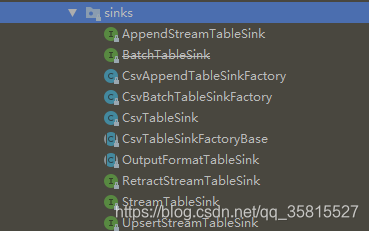
35 |
36 |
37 |
38 |
39 |
40 | flink.table.sinks提供了有三种继承 ```StreamTableSink``` 类的接口:
41 |
42 | - AppendStreamTableSink: 仅发出对表插入的更改
43 | - RetractStreamTableSink:发出对表具有插入,更新和删除的更改 ,消息被编码为 ```Tuple2```
44 | - UpsertStreamTableSink: 发出对表具有插入,更新和删除的更改 ,消息被编码为 ```Tuple2 ```,表必须要有类似主键的唯一键值( 使用setKeyFields(方法),不然会报错
45 |
46 | 因为在我们的WordWithCount计算中,执行的SQL语句对表的操作不是单纯insert插入,所以我们需要编写实现RetractStreamTableSink的用户自定义函数:
47 |
48 | ```
49 | public class MyRetractStreamTableSink implements RetractStreamTableSink {
50 | private TableSchema tableSchema;
51 | //构造函数,储存TableSchema
52 | public MyRetractStreamTableSink(String[] fieldNames,TypeInformation[] typeInformations){
53 | this.tableSchema=new TableSchema(fieldNames,typeInformations);
54 | }
55 | //重载
56 | public MyRetractStreamTableSink(String[] fieldNames,DataType[] dataTypes){
57 | this.tableSchema=TableSchema.builder().fields(fieldNames,dataTypes).build();
58 | }
59 | //Table sink must implement a table schema.
60 | @Override
61 | public TableSchema getTableSchema() {
62 | return tableSchema;
63 | }
64 | @Override
65 | public DataStreamSink consumeDataStream(DataStream> dataStream) {
66 | return dataStream.addSink(new SinkFunction>() {
67 | @Override
68 | public void invoke(Tuple2 value, Context context) throws Exception {
69 | //自定义Sink
70 | // f0==true :插入新数据
71 | // f0==false:删除旧数据
72 | if(value.f0){
73 | //可以写入MySQL、Kafka或者发HttpPost...根据具体情况开发
74 | System.out.println(value.f1);
75 | }
76 | }
77 | });
78 | }
79 |
80 | //接口定义的方法
81 | @Override
82 | public TypeInformation getRecordType() {
83 | return new RowTypeInfo(tableSchema.getFieldTypes(),tableSchema.getFieldNames());
84 | }
85 | //接口定义的方法
86 | @Override
87 | public TableSink> configure(String[] strings, TypeInformation[] typeInformations) {
88 | return null;
89 | }
90 | //接口定义的方法
91 | @Override
92 | public void emitDataStream(DataStream> dataStream) {
93 | }
94 |
95 | }
96 | ```
97 |
98 | 吐槽一下,目前使用1.9.0版本API,在注册source Tabel都用 ```TypeInformation[]``` 表示数据类型。
99 |
100 | 而在编写Sink时使用```TypeInformation[]```的方法都被@Deprecated,提供了Builder方法代替构造,使用```DataType[]``` 为 ```TableSchema.builder().fields``` 的参数表示数据类型,统一使用 ```TypeInformation[]``` 表示数据类型比较潇洒,当然使用 ```TableSchema.builder()``` 方法有对空值的检查,更加***可靠***。
101 |
102 | 所以写了重载函数:我全都要
103 |
104 | 使用自定义Sink,直接用new定义Tabel的结构简化了代码:
105 |
106 | ```
107 | import kmops.models.MyRetractStreamTableSink;
108 | import org.apache.flink.api.common.typeinfo.TypeInformation;
109 | import org.apache.flink.api.common.typeinfo.Types;
110 | import org.apache.flink.streaming.api.environment.StreamExecutionEnvironment;
111 | import org.apache.flink.table.api.EnvironmentSettings;
112 | import org.apache.flink.table.api.Table;
113 | import org.apache.flink.table.api.java.StreamTableEnvironment;
114 | import org.apache.flink.table.sinks.RetractStreamTableSink;
115 | import org.apache.flink.table.sources.CsvTableSource;
116 | import org.apache.flink.table.sources.TableSource;
117 | import org.apache.flink.types.Row;
118 |
119 | public class CustomSinkJob {
120 | public static void main(String[] args) throws Exception {
121 | //初始化Flink执行环境
122 | StreamExecutionEnvironment blinkStreamEnv=StreamExecutionEnvironment.getExecutionEnvironment();
123 | EnvironmentSettings blinkStreamSettings= EnvironmentSettings.newInstance().useBlinkPlanner().inStreamingMode().build();
124 | StreamTableEnvironment blinkStreamTabelEnv= StreamTableEnvironment.create(blinkStreamEnv,blinkStreamSettings);
125 | //获取Resource路径
126 | String path= CustomSinkJob.class.getClassLoader().getResource("list.txt").getPath();
127 |
128 | //注册数据源
129 | TableSource fileSource=new CsvTableSource(path,new String[]{"word"},new TypeInformation[]{Types.STRING});
130 | blinkStreamTabelEnv.registerTableSource("flieSourceTable",fileSource);
131 |
132 | //注册数据汇(Sink)
133 | RetractStreamTableSink retractStreamTableSink=new MyRetractStreamTableSink(new String[]{"_count","word"},new TypeInformation[]{Types.LONG,Types.STRING});
134 | //或者
135 | //RetractStreamTableSink retractStreamTableSink=new MyRetractStreamTableSink(new String[]{"_count","word"},new DataType[]{DataTypes.BIGINT(),DataTypes.STRING()});
136 | blinkStreamTabelEnv.registerTableSink("sinkTable",retractStreamTableSink);
137 |
138 | //执行SQL
139 | Table wordWithCount = blinkStreamTabelEnv.sqlQuery("SELECT count(word) AS _count,word FROM flieSourceTable GROUP BY word ");
140 |
141 | //将SQL结果插入到Sink Table
142 | wordWithCount.insertInto("sinkTable");
143 | blinkStreamTabelEnv.execute("BLINK STREAMING QUERY");
144 | }
145 | }
146 |
147 | ```
148 |
149 | 输出结果:
150 |
151 | ```
152 | 1,OnePlus
153 | 1,Oppo
154 | 2,Oppo
155 | 2,OnePlus
156 | ```
157 |
158 | ### GitHub
159 |
160 | 源码已上传至GitHub
161 |
162 | https://github.com/StarPlatinumStudio/Flink-SQL-Practice
163 |
164 | 下篇博客干货极多
165 |
166 | ### To Be Continue=>
--------------------------------------------------------------------------------
/flink-tabel-sql 4&5/Flink SQL 实战 (5):使用自定义函数实现关键字过滤统计.md:
--------------------------------------------------------------------------------
1 | ## Flink SQL 实战 (5):使用自定义函数实现关键字过滤统计
2 |
3 | 在上一篇实战博客中使用POJO Schema解析来自 Kafka 的 JSON 数据源并且使用自定义函数处理。
4 |
5 | 现在我们使用更强大自定义函数处理数据
6 |
7 | ## 使用自定义函数实现关键字过滤统计
8 |
9 | ### 自定义表函数(UDTF)
10 |
11 | 与自定义的标量函数相似,自定义表函数将零,一个或多个标量值作为输入参数。 但是,与标量函数相比,它可以返回任意数量的行作为输出,而不是单个值。
12 |
13 | 为了定义表函数,必须扩展基类TableFunction并实现**评估方法**。 表函数的行为由其评估方法确定。 必须将评估方法声明为公开并命名为eval。 通过实现多个名为eval的方法,可以重载TableFunction。 评估方法的参数类型确定表函数的所有有效参数。 返回表的类型由TableFunction的通用类型确定。 评估方法使用 collect(T)方法发出输出行。
14 |
15 | 定义一个过滤字符串 记下关键字 的自定义表函数
16 |
17 | KyeWordCount.java:
18 |
19 | ```
20 | import org.apache.flink.api.java.tuple.Tuple2;
21 | import org.apache.flink.table.functions.TableFunction;
22 |
23 | public class KyeWordCount extends TableFunction> {
24 | private String[] keys;
25 | public KyeWordCount(String[] keys){
26 | this.keys=keys;
27 | }
28 | public void eval(String in){
29 | for (String key:keys){
30 | if (in.contains(key)){
31 | collect(new Tuple2(key,1));
32 | }
33 | }
34 | }
35 | }
36 | ```
37 |
38 | 实现关键字过滤统计:
39 |
40 | ```
41 | public class UdtfJob {
42 | public static void main(String[] args) throws Exception {
43 | StreamExecutionEnvironment streamEnv = StreamExecutionEnvironment.getExecutionEnvironment();
44 | EnvironmentSettings streamSettings = EnvironmentSettings.newInstance().useBlinkPlanner().inStreamingMode().build();
45 | StreamTableEnvironment streamTabelEnv = StreamTableEnvironment.create(streamEnv, streamSettings);
46 | KafkaTabelSource kafkaTabelSource = new KafkaTabelSource();
47 | streamTabelEnv.registerTableSource("kafkaDataStream", kafkaTabelSource);//使用自定义TableSource
48 | //注册自定义函数定义三个关键字:"KeyWord","WARNING","illegal"
49 | streamTabelEnv.registerFunction("CountKEY", new KyeWordCount(new String[]{"KeyWord","WARNING","illegal"}));
50 | //编写SQL
51 | Table wordWithCount = streamTabelEnv.sqlQuery("SELECT key,COUNT(countv) AS countsum FROM kafkaDataStream LEFT JOIN LATERAL TABLE(CountKEY(response)) as T(key, countv) ON TRUE GROUP BY key");
52 | //直接输出Retract流
53 | streamTabelEnv.toRetractStream(wordWithCount, Row.class).print();
54 | streamTabelEnv.execute("BLINK STREAMING QUERY");
55 | }
56 | }
57 | ```
58 |
59 | 测试用Python脚本如下
60 |
61 | ```
62 | # https://pypi.org/project/kafka-python/
63 | import pickle
64 | import time
65 | import json
66 | from kafka import KafkaProducer
67 |
68 | producer = KafkaProducer(bootstrap_servers=['127.0.0.1:9092'],
69 | key_serializer=lambda k: pickle.dumps(k),
70 | value_serializer=lambda v: pickle.dumps(v))
71 | start_time = time.time()
72 | for i in range(0, 10000):
73 | print('------{}---------'.format(i))
74 | producer = KafkaProducer(value_serializer=lambda v: json.dumps(v).encode('utf-8'),compression_type='gzip')
75 | producer.send('test',{"response":"resKeyWordWARNINGillegal","status":0,"protocol":"protocol","timestamp":0})
76 | producer.send('test',{"response":"resKeyWordWARNINGillegal","status":1,"protocol":"protocol","timestamp":0})
77 | producer.send('test',{"response":"resresKeyWordWARNING","status":2,"protocol":"protocol","timestamp":0})
78 | producer.send('test',{"response":"resKeyWord","status":3,"protocol":"protocol","timestamp":0})
79 | producer.send('test',{"response":"res","status":4,"protocol":"protocol","timestamp":0})
80 | producer.send('test',{"response":"res","status":5,"protocol":"protocol","timestamp":0})
81 | # future = producer.send('test', key='num', value=i, partition=0)
82 | # 将缓冲区的全部消息push到broker当中
83 | producer.flush()
84 | producer.close()
85 |
86 | end_time = time.time()
87 | time_counts = end_time - start_time
88 | print(time_counts)
89 | ```
90 |
91 | 控制台输出:
92 |
93 | ```
94 | ...
95 | 6> (false,KeyWord,157)
96 | 3> (false,WARNING,119)
97 | 3> (true,WARNING,120)
98 | 6> (true,KeyWord,158)
99 | 7> (true,illegal,80)
100 | 6> (false,KeyWord,158)
101 | 6> (true,KeyWord,159)
102 | 6> (false,KeyWord,159)
103 | 6> (true,KeyWord,160)
104 | ...
105 | ```
106 |
107 | ### 自定义聚合函数
108 |
109 | 自定义聚合函数(UDAGGs)将一个表聚合为一个标量值。
110 |
111 | 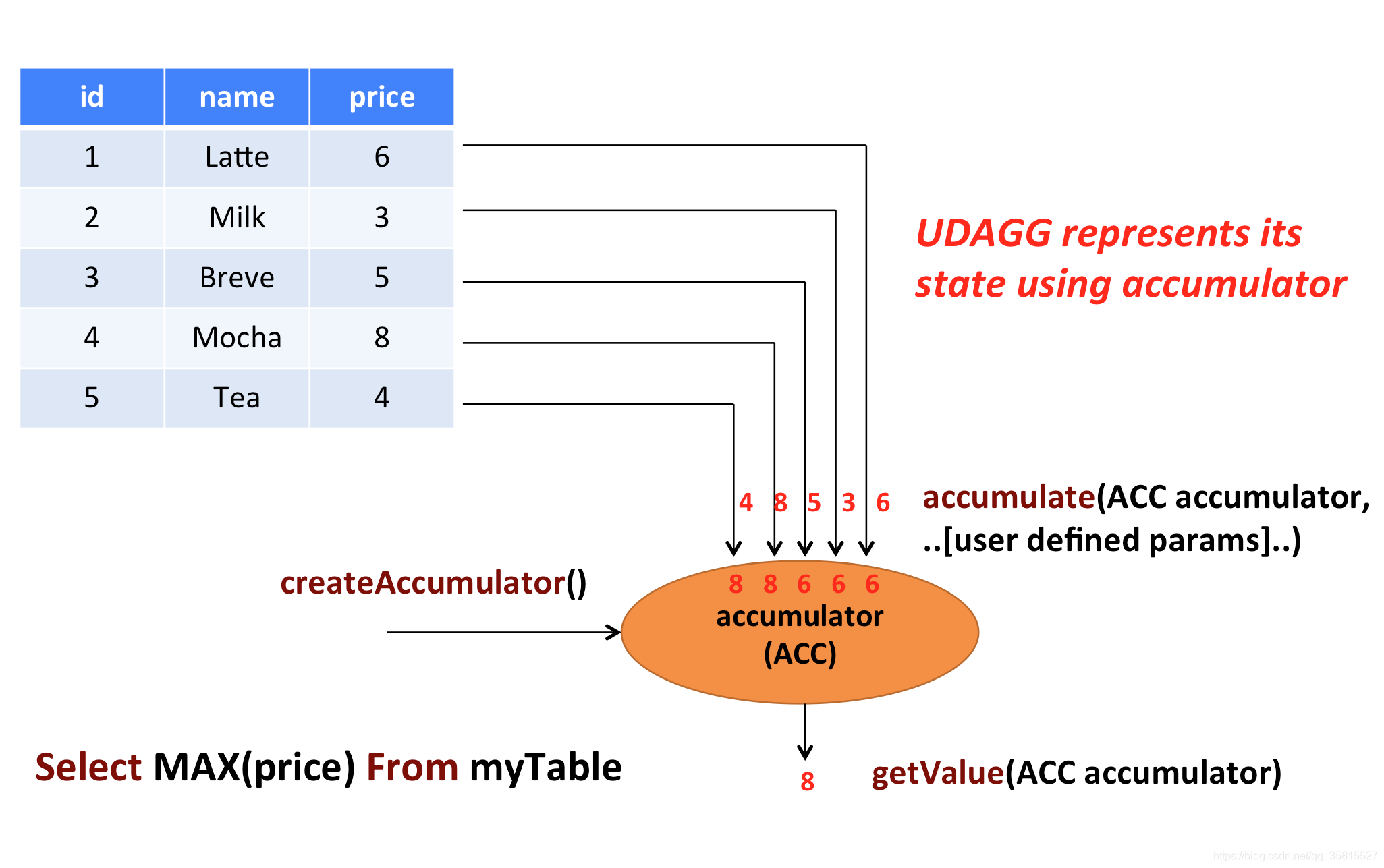
112 |
113 | 聚合函数适合用于累计的工作,上面的图显示了聚合的一个示例。假设您有一个包含饮料数据的表。该表由三列组成:id、name和price,共计5行。想象一下,你需要找到所有饮料的最高价格。执行max()聚合。您需要检查5行中的每一行,结果将是单个数值。
114 |
115 | 用户定义的聚合函数是通过扩展AggregateFunction类来实现的。AggregateFunction的工作原理如下。首先,它需要一个累加器,这个累加器是保存聚合中间结果的数据结构。通过调用AggregateFunction的createAccumulator()方法来创建一个空的累加器。随后,对每个输入行调用该函数的accumulator()方法来更新累加器。处理完所有行之后,将调用函数的getValue()方法来计算并返回最终结果。
116 |
117 | **每个AggregateFunction必须使用以下方法: **
118 |
119 | - `createAccumulator()`创建一个空的累加器
120 | - `accumulate()`更新累加器
121 | - `getValue()`计算并返回最终结果
122 |
123 | 除了上述方法之外,还有一些可选方法。虽然其中一些方法允许系统更有效地执行查询,但是对于某些用例是必需的。例如,如果应该在会话组窗口的上下文中应用聚合函数,那么merge()方法是必需的(当观察到连接它们的行时,需要连接两个会话窗口的累加器。
124 |
125 | **AggregateFunction可选方法**
126 |
127 | - `retract()` 定义restract:减少Accumulator ,对于在有界窗口上的聚合是必需的。
128 | - `merge()` merge多个Accumulator , 对于许多批处理聚合和会话窗口聚合都是必需的。
129 | - `resetAccumulator()` 重置Accumulator ,对于许多批处理聚合都是必需的。
130 |
131 | ##### 使用聚合函数聚合最大的status值
132 |
133 | 编写自定义聚合函数,用于聚合出最大的status
134 |
135 | ```
136 | public class MaxStatus extends AggregateFunction {
137 | @Override
138 | public Integer getValue(StatusACC statusACC) {
139 | return statusACC.maxStatus;
140 | }
141 |
142 | @Override
143 | public StatusACC createAccumulator() {
144 | return new StatusACC();
145 | }
146 | public void accumulate(StatusACC statusACC,int status){
147 | if (status>statusACC.maxStatus){
148 | statusACC.maxStatus=status;
149 | }
150 | }
151 | public static class StatusACC{
152 | public int maxStatus=0;
153 | }
154 | }
155 | ```
156 |
157 | mian函数修改注册和SQL就可以使用
158 |
159 | ```
160 | /**
161 | *聚合最大的status
162 | */
163 | streamTabelEnv.registerFunction("maxStatus",new MaxStatus());
164 | Table wordWithCount = streamTabelEnv.sqlQuery("SELECT maxStatus(status) AS maxStatus FROM kafkaDataStream");
165 | ```
166 |
167 | 使用之前的python脚本测试
168 |
169 | 控制台输出(全部):
170 |
171 | ```
172 | 5> (false,1)
173 | 8> (true,3)
174 | 3> (false,0)
175 | 4> (true,1)
176 | 6> (true,2)
177 | 2> (true,0)
178 | 2> (true,4)
179 | 1> (false,3)
180 | 7> (false,2)
181 | 3> (false,4)
182 | 4> (true,5)
183 | ```
184 |
185 | 除非输入更大的Status,否则控制台不会继续输出新结果
186 |
187 | ### 表聚合函数
188 |
189 | 用户定义的表聚合函数(UDTAGGs)将一个表(具有一个或多个属性的一个或多个行)聚合到具有多行和多列的结果表。
190 |
191 | 和聚合函数几乎一致,有需求的朋友可以参考官方文档
192 |
193 | [Table Aggregation Functions]( https://ci.apache.org/projects/flink/flink-docs-release-1.9/dev/table/udfs.html#table-aggregation-functions )
194 |
195 | ## GitHub
196 |
197 | 项目源码、python kafka moke小程序已上传至GitHub
198 |
199 | https://github.com/StarPlatinumStudio/Flink-SQL-Practice
200 |
201 | 我的专栏:[Flink SQL原理和实战]( https://blog.csdn.net/qq_35815527/category_9634641.html )
202 |
203 | ### To Be Continue=>
--------------------------------------------------------------------------------
/flink-tabel-sql 2&3/Flink SQL实战 - 3.md:
--------------------------------------------------------------------------------
1 | ## 实战篇-3:Tabel API & SQL 注册Tabel Source
2 |
3 | 在上一篇实战博客,我们给WordWithCount计算任务自定义了Sink函数
4 |
5 | 现在我们开始研究自定义Source:
6 |
7 | ### 前 方 干 货 极 多 ###
8 |
9 |
10 |
11 | ## 注册Tabel Source
12 |
13 | 我们以Kafka Source举例,讲2种注册Tabel Source的方法和一些技巧:
14 |
15 | ### 将DataStream转换为表
16 |
17 | 想要将DataStream转换为表,我们需要一个DataStream
18 |
19 | 以Kafka为外部数据源,需要在pom文件中添加依赖
20 |
21 | ```
22 |
23 | org.apache.flink
24 | flink-connector-kafka-0.11_2.11
25 | ${flink.version}
26 |
27 |
28 | org.apache.flink
29 | flink-connector-kafka_2.11
30 | ${flink.version}
31 |
32 | ```
33 |
34 | 添加Kafka DataStream:
35 |
36 | ```
37 | DataStream> kafkaStream=blinkStreamEnv.addSource(new FlinkKafkaConsumer011<>("test",new AbstractDeserializationSchema>(){
38 | @Override
39 | public Tuple1 deserialize(byte[] bytes) throws IOException {
40 | return new Tuple1<>(new String(bytes,"utf-8"));
41 | }
42 | },kafkaProperties));
43 | ```
44 |
45 | 注册表:
46 |
47 | ```
48 | //如果多列应为:fromDataStream(kafkaStream,"f0,f1,f2");
49 | Table source=blinkStreamTabelEnv.fromDataStream(kafkaStream,"word");
50 | blinkStreamTabelEnv.registerTable("kafkaDataStream",source);
51 | ```
52 |
53 | 虽然没有指定是Tabel Source,但是可以在后续流程使用注册好的 kafkaDataStream 表
54 |
55 | ### 数据类型到表架构的映射
56 |
57 | Flink的DataStream和DataSet API支持非常多种类型。元组,POJO,Scala案例类和Flink的Row类型等复合类型允许嵌套的数据结构具有多个字段,这些字段可在表表达式中访问。
58 |
59 | 上述符合数据类型可以通过自定义Schema来使用
60 |
61 | ### 自定义Schema
62 |
63 | 我喜欢将自定义函数封装成类,简洁可复用
64 |
65 | ```
66 | import org.apache.flink.api.common.serialization.AbstractDeserializationSchema;
67 | import org.apache.flink.types.Row;
68 | import java.io.IOException;
69 |
70 | public final class RowSchema extends AbstractDeserializationSchema {
71 | @Override
72 | public Row deserialize(byte[] bytes) throws IOException {
73 | //定义长度为1行的Row
74 | Row row=new Row(1);
75 | //设置字段,如果多行可以解析JSON循环
76 | row.setField(0,new String(bytes,"utf-8"));
77 | return row;
78 | }
79 | }
80 | ```
81 |
82 | 在main中使用:
83 |
84 | ```
85 | DataStream kafkaStream=blinkStreamEnv.addSource(new FlinkKafkaConsumer011<>("test",new RowSchema(),kafkaProperties));
86 | ```
87 |
88 | 到这里已经注册好可用的Datastream Source Tabel了
89 |
90 | 但是还可以进一步自定义:
91 |
92 | ### 自定义TableSource
93 |
94 | StreamTableSource接口继承自TableSource接口,可以在getDataStream方法中编写DataStream
95 |
96 | ```
97 | import org.apache.flink.api.common.serialization.SimpleStringSchema;
98 | import org.apache.flink.streaming.api.datastream.DataStream;
99 | import org.apache.flink.streaming.api.environment.StreamExecutionEnvironment;
100 | import org.apache.flink.streaming.connectors.kafka.FlinkKafkaConsumer011;
101 | import org.apache.flink.table.api.DataTypes;
102 | import org.apache.flink.table.api.TableSchema;
103 | import org.apache.flink.table.sources.StreamTableSource;
104 | import org.apache.flink.table.types.DataType;
105 |
106 | import java.util.Properties;
107 |
108 | public class KafkaTabelSource implements StreamTableSource {
109 | @Override
110 | public DataType getProducedDataType() {
111 | return DataTypes.STRING();
112 | }
113 | @Override
114 | public TableSchema getTableSchema() {
115 | return TableSchema.builder().fields(new String[]{"word"},new DataType[]{DataTypes.STRING()}).build();
116 | }
117 | @Override
118 | public DataStream getDataStream(StreamExecutionEnvironment env) {
119 | Properties kafkaProperties=new Properties();
120 | kafkaProperties.setProperty("bootstrap.servers", "0.0.0.0:9092");
121 | kafkaProperties.setProperty("group.id", "test");
122 | DataStream kafkaStream=env.addSource(new FlinkKafkaConsumer011<>("test",new SimpleStringSchema(),kafkaProperties));
123 | return kafkaStream;
124 | }
125 | }
126 | ```
127 |
128 | 使用:
129 |
130 | ```
131 | import kmops.Custom.KafkaTabelSource;
132 | import kmops.Custom.MyRetractStreamTableSink;
133 | import org.apache.flink.streaming.api.environment.StreamExecutionEnvironment;
134 | import org.apache.flink.table.api.DataTypes;
135 | import org.apache.flink.table.api.EnvironmentSettings;
136 | import org.apache.flink.table.api.Table;
137 | import org.apache.flink.table.api.java.StreamTableEnvironment;
138 | import org.apache.flink.table.sinks.RetractStreamTableSink;
139 | import org.apache.flink.table.types.DataType;
140 | import org.apache.flink.types.Row;
141 | public class KafkaSource2 {
142 | public static void main(String[] args) throws Exception {
143 | StreamExecutionEnvironment blinkStreamEnv=StreamExecutionEnvironment.getExecutionEnvironment();
144 | EnvironmentSettings blinkStreamSettings= EnvironmentSettings.newInstance().useBlinkPlanner().inStreamingMode().build();
145 | StreamTableEnvironment blinkStreamTabelEnv= StreamTableEnvironment.create(blinkStreamEnv,blinkStreamSettings);
146 | blinkStreamTabelEnv.registerTableSource("kafkaDataStream",new KafkaTabelSource());//使用自定义TableSource
147 | RetractStreamTableSink retractStreamTableSink=new MyRetractStreamTableSink(new String[]{"_count","word"},new DataType[]{DataTypes.BIGINT(), DataTypes.STRING()});
148 | blinkStreamTabelEnv.registerTableSink("sinkTable",retractStreamTableSink);
149 | Table wordWithCount = blinkStreamTabelEnv.sqlQuery("SELECT count(word) AS _count,word FROM kafkaDataStream GROUP BY word ");
150 | wordWithCount.insertInto("sinkTable");
151 | blinkStreamTabelEnv.execute("BLINK STREAMING QUERY");
152 | }
153 | }
154 | ```
155 |
156 | 相当简洁就完成了自定义的Source、Sink
157 |
158 | ### Moke Kafka数据
159 |
160 | 有必要分享一下开发环境下kafka的使用:
161 |
162 | 入门请移步官网
163 |
164 | http://kafka.apache.org/quickstart
165 |
166 | ### 使用Python Moke测试数据
167 |
168 | 安装Python环境,pip kafka-python依赖,可以编写如下程序发送大量消息给Kafka:
169 |
170 | ```
171 | # https://pypi.org/project/kafka-python/
172 | import pickle
173 | import time
174 | import json
175 | from kafka import KafkaProducer
176 |
177 | producer = KafkaProducer(bootstrap_servers=['127.0.0.1:9092'],
178 | key_serializer=lambda k: pickle.dumps(k),
179 | value_serializer=lambda v: pickle.dumps(v))
180 | start_time = time.time()
181 | for i in range(0, 10000):
182 | print('------{}---------'.format(i))
183 | producer = KafkaProducer()
184 | producer.send('test', b'Xiaomi')
185 | producer.send('test', b'Xiaomi')
186 | producer.send('test', b'Xiaomi')
187 | producer.send('test', b'Apple')
188 | producer.send('test', b'Apple')
189 | producer.send('test', b'Huawei')
190 | # future = producer.send('test', key='num', value=i, partition=0)
191 | # 将缓冲区的全部消息push到broker当中
192 | producer.flush()
193 | producer.close()
194 |
195 | end_time = time.time()
196 | time_counts = end_time -
197 | ```
198 |
199 | 输出结果:
200 |
201 | ```
202 | 26,Xiaomi
203 | 18,Apple
204 | 27,Xiaomi
205 | 28,Xiaomi
206 | 19,Apple
207 | 10,Huawei
208 | 29,Xiaomi
209 | 20,Apple
210 | 30,Xiaomi
211 | 21,Apple
212 | 11,Huawei
213 | 31,Xiaomi
214 | 22,Apple
215 | 32,Xiaomi
216 | 33,Xiaomi
217 | 12,Huawei
218 | 23,Apple
219 | 34,Xiaomi
220 | 35,Xiaomi
221 | 24,Apple
222 | 36,Xiaomi
223 | ```
224 |
225 |
226 |
227 | ### GitHub
228 |
229 | 源码、python kafka\socket moke小程序已上传至GitHub
230 |
231 | https://github.com/StarPlatinumStudio/Flink-SQL-Practice
232 |
233 |
234 |
235 | ### To Be Continue=>
--------------------------------------------------------------------------------
/flink-tabel-sql 1/Flink SQL实战 - 1.md:
--------------------------------------------------------------------------------
1 | ## 实战篇-0
2 |
3 | # Apache Flink® SQL Training
4 |
5 | ### 创建Blink流式查询项目
6 |
7 | #### 新建MAVEN Java模板
8 |
9 | 可以在命令行使用maven也可以通过IDEA快速创建flink job模板
10 |
11 | 这里使用的是1.9.0版本的flink
12 |
13 | ```
14 | $ mvn archetype:generate \
15 | -DarchetypeGroupId=org.apache.flink \
16 | -DarchetypeArtifactId=flink-quickstart-java \
17 | -DarchetypeVersion=1.9.0
18 | ```
19 |
20 | ```
21 | 工程cmd中的树结构
22 | D:\Flink\flink-tabel-sql>tree /f
23 | 卷 Document 的文件夹 PATH 列表
24 | 卷序列号为 B412-6CDC
25 | D:.
26 | │ flink-tabel-sql.iml
27 | │ pom.xml
28 | │
29 | ├─.idea
30 | │ compiler.xml
31 | │ encodings.xml
32 | │ misc.xml
33 | │ workspace.xml
34 | │
35 | ├─src
36 | │ └─main
37 | │ ├─java
38 | │ │ └─kmops
39 | │ │ BatchJob.java
40 | │ │ StreamingJob.java
41 | │ │
42 | │ └─resources
43 | │ log4j.properties
44 | │
45 | └─target
46 | ├─classes
47 | │ │ log4j.properties
48 | │ │
49 | │ └─kmops
50 | │ BatchJob.class
51 | │ StreamingJob.class
52 | │
53 | └─generated-sources
54 | └─annotations
55 | ```
56 |
57 | 在pom.xml中添加dependcy
58 |
59 | - 使用Java编程语言支持流/批的Table&SQL API。
60 |
61 | - 支持国产,这里选择阿里贡献的Blink planner,
62 |
63 | **注意**: Blink可能不适用1.9.0以前的flink
64 |
65 | ```
66 |
67 | org.apache.flink
68 | flink-table-api-java-bridge_2.11
69 | 1.9.0
70 |
71 |
72 | org.apache.flink
73 | flink-table-planner-blink_2.11
74 | 1.9.0
75 |
76 |
77 | org.apache.flink
78 | flink-streaming-scala_2.11
79 | 1.9.0
80 |
81 |
82 | org.apache.flink
83 | flink-table-common
84 | 1.9.0
85 |
86 | ```
87 |
88 | 创建一个Blink流式查询任务(BLINK STREAMING QUERY)
89 |
90 | ```
91 | public class TabelJob {
92 | public static void main(String[] args) throws Exception {
93 | StreamExecutionEnvironment blinkStreamEnv=StreamExecutionEnvironment.getExecutionEnvironment();
94 | EnvironmentSettings blinkStreamSettings= EnvironmentSettings.newInstance().useBlinkPlanner().inStreamingMode().build();
95 | StreamTableEnvironment blinkStreamTabelEnv= StreamTableEnvironment.create(blinkStreamEnv,blinkStreamSettings);
96 | //TODO
97 | blinkStreamTabelEnv.execute("BLINK STREAMING QUERY");
98 | }
99 | }
100 | ```
101 |
102 | 一个Blink流式查询任务的模板就写好啦
103 |
104 | 上述代码使用StreamTableEnvironment的create()方法,以StreamExecutionEnvironment、EnvironmentSettings为参数创建了一个StreamTableEnvironment,同样的,对EnvironmentSettings调用函数稍加修改我们就可以创建[blink批处理查询任务、兼容旧版的流/批任务]( https://ci.apache.org/projects/flink/flink-docs-release-1.9/dev/table/common.html )。
105 |
106 | 现在我们使用Tabel API/SQL编写一个WordWithCount程序,
107 |
108 | ## 在 Catalog 中注册表格
109 |
110 | #### 连接外部系统
111 |
112 | 自Flink1.6以来,连接外部系统的声明是和其实际实现隔离的。
113 |
114 | - 既可以用 Table API & SQL 以编程的方式实现
115 |
116 | - 也可以使用YAML配置文件在SQL Client上完成
117 |
118 | 这不仅可以更好地统一API和SQL Client,还可以在自定义实现的情况下更好地扩展而不更改实际声明。
119 |
120 | 每个声明都类似于SQL CREATE TABLE语句。 可以定义表的名称,表的架构,连接器以及用于连接到外部系统的数据格式。 连接器描述存储表数据的外部系统。
121 |
122 | 我们在这里以编程的方式注册表格:
123 |
124 | 这里列举2种注册表格的写法
125 |
126 | #### 1.定义TableSource注册表格
127 |
128 | ```
129 | String path=TabelJob.class.getClassLoader().getResource("list.txt").getPath();
130 | String[] fieldNames={"word"};
131 | TypeInformation[] fieldTypes={Types.STRING};
132 | TableSource fileSource=new CsvTableSource(path,fieldNames,fieldTypes);
133 | blinkStreamTabelEnv.registerTableSource("FlieSourceTable",fileSource);
134 | ```
135 |
136 | #### 2.使用connect方法注册表格
137 |
138 | 以下示例包含了编程链接外部系统的流程
139 |
140 | 这里参考了GitHub [hequn8128](https://github.com/hequn8128)的Tabel API DEMO
141 |
142 | https://github.com/hequn8128/TableApiDemo
143 |
144 | 
145 |
146 | - Connectors:连接器,连接数据源,读取文件使用FileSystem()
147 |
148 | - Formats:数据源数据格式,在官方的格式表中,读取文件属于 Old CSV (for files)
149 |
150 | - Table Schem:定义列的名称和类型,类似于SQL `CREATE TABLE`语句的列定义。
151 |
152 | - 更新模式 Update Modes
153 |
154 | .inAppendMode(): 在 Append 模式下,动态表和外部连接器只交换插入消息。
155 |
156 | 除此之外还有[Retract\Upsert Mode]( https://ci.apache.org/projects/flink/flink-docs-release-1.9/dev/table/connect.html#update-modes )
157 |
158 | **注意**:每个连接器的文档都说明了支持哪些更新模式
159 |
160 | ```
161 | String path=TabelJob.class.getClassLoader().getResource("list.txt").getPath();
162 | blinkStreamTabelEnv
163 | .connect(new FileSystem().path(path))
164 | .withFormat(new OldCsv().field("word", Types.STRING).lineDelimiter("\n"))
165 | .withSchema(new Schema().field("word",Types.STRING))
166 | .inAppendMode()
167 | .registerTableSource("FlieSourceTable");
168 | ```
169 |
170 | **注意:** 在Flink中,要获取数据源就需要连接外部系统,不同的数据格式请[参考]( https://ci.apache.org/projects/flink/flink-docs-release-1.9/dev/table/connect.html#file-system-connector )。
171 |
172 | ### 表
173 |
174 | 在 Resource 目录下创建名为"list.txt"的文件,写入几行文字
175 |
176 | ```
177 | Apple
178 | Xiaomi
179 | Huawei
180 | Oppo
181 | ...
182 | ```
183 |
184 | 现在我们注册好了一个名为“FlieSourceTable”的表,根据我们的定义和文件内容,结构如下:
185 |
186 | | word:String |
187 | | ---- |
188 | | Apple |
189 | | Xiaomi |
190 | |...... |
191 |
192 | ## 查询表
193 |
194 | 我们要计算 fileSource 表中的word字段中各个单词的数量
195 |
196 | 查询表也有2种方式: Table API 和 SQL
197 |
198 | ### Table API
199 |
200 | ```
201 | Table result = tEnv.scan("fileSource")
202 | .groupBy("word")
203 | .select("word, count(word) as _count");
204 | ```
205 |
206 | ### SQL
207 |
208 | Flink使用支持标准ANSI SQL的[Apache Calcite](https://calcite.apache.org/docs/reference.html)解析SQL。不支持DDL语句。
209 |
210 | **注意** Flink SQL解析有非常多保留关键字所有在给行命名时要留意命名,可以添加下划线解决尴尬。
211 |
212 | ```
213 | Table wordWithCount = blinkStreamTabelEnv
214 | .sqlQuery("SELECT count(word) AS _count,word FROM FlieSourceTable GROUP BY word");
215 | ```
216 |
217 | 查询完成生成的wordWithCount表,因为数据源时是无界的流数据,
218 |
219 | 所以最新的结果的 _count 字段是根据历史累计计数不断增加的:
220 |
221 | | word:String | _count:? |
222 | | ---- | ---- |
223 | | Apple |1|
224 | | Xiaomi |1|
225 | | Xiaomi |2|
226 | |Apple |2|
227 | |Apple |3|
228 | |... |...|
229 |
230 | ### 输出
231 |
232 | 如果只想简单调试程序可以直接在控制台打印table的内容
233 |
234 | ```
235 | blinkStreamTabelEnv.toRetractStream(wordWithCount, Row.class).print();
236 | blinkStreamEnv.execute("BLINK STREAMING QUERY");
237 | ```
238 |
239 | 查看控制台输出,可以发现 _count 字段在不断累加:
240 |
241 | ```
242 | 3> (false,Xiaomi,1)
243 | 5> (true,Apple,2)
244 | 15:48:27,773 INFO org.apache.flink.runtime.taskexecutor.TaskExecutor - Un-registering task and sending final execution state FINISHED to JobManager for task CsvTableSource(read fields: word) -> SourceConversion(table=[default_catalog.default_database.FlieSourceTable, source: [CsvTableSource(read fields: word)]], fields=[word]) 692f7d7611e92283f458ee0ef0cd4034.
245 | 3> (true,Xiaomi,2)
246 | 15:48:27,789 INFO org.apache.flink.runtime.executiongraph.ExecutionGraph - CsvTableSource(read fields: word) -> SourceConversion(table=[default_catalog.default_database.FlieSourceTable, source: [CsvTableSource(read fields: word)]], fields=[word]) (1/8) (692f7d7611e92283f458ee0ef0cd4034) switched from RUNNING to FINISHED.
247 | 3> (false,Xiaomi,2)
248 | 3> (true,Xiaomi,3)
249 | 5> (false,Apple,2)
250 | 5> (true,Apple,3)
251 | ```
252 |
253 | #### 项目源码:
254 |
255 | https://github.com/StarPlatinumStudio/Flink-SQL-Practice
256 |
257 | 不断更新中。。。
258 |
259 |
260 |
261 | 在2019的最后一天,祝大家新年快乐
262 |
263 | 下一章节:注册TableSink
264 |
265 | ### To Be Continue=>
--------------------------------------------------------------------------------
/flink-tabel-sql 4&5/flink-table-sql.iml:
--------------------------------------------------------------------------------
1 |
2 |
3 |
4 |
5 |
6 |
7 |
8 |
9 |
10 |
11 |
12 |
13 |
14 |
15 |
16 |
17 |
18 |
19 |
20 |
21 |
22 |
23 |
24 |
25 |
26 |
27 |
28 |
29 |
30 |
31 |
32 |
33 |
34 |
35 |
36 |
37 |
38 |
39 |
40 |
41 |
42 |
43 |
44 |
45 |
46 |
47 |
48 |
49 |
50 |
51 |
52 |
53 |
54 |
55 |
56 |
57 |
58 |
59 |
60 |
61 |
62 |
63 |
64 |
65 |
66 |
67 |
68 |
69 |
70 |
71 |
72 |
73 |
74 |
75 |
76 |
77 |
78 |
79 |
80 |
81 |
82 |
--------------------------------------------------------------------------------
/flink-tabel-sql 6/Flink SQL 实战 (6):SQL Client.md:
--------------------------------------------------------------------------------
1 | ## Flink SQL 实战 (5):SQL Client入门实践
2 |
3 | 本篇博客记录基于Flink 1.9.1发行版的SQL Client入门实践
4 |
5 | 在此入门实践中你可以学到:
6 |
7 | - 搭建Flink、Kafka生产环境
8 | - 使用Flink SQL查询Kafka Source Table
9 |
10 | SQL Client本身无需过多介绍,详情可以参考[官方文档]( https://ci.apache.org/projects/flink/flink-docs-release-1.9/dev/table/sqlClient.html )
11 |
12 | 我认为SQL Client入门的主要难点是搭建运行环境
13 |
14 | ## 搭建运行环境
15 |
16 | 因为SQL Client的启动脚本.sh文件只能在linux\Mac环境使用,windows系统用git bash也是不能运行的。
17 |
18 | 笔者使用一台 2核 4GB的云服务器,使用新安装的CentOS 7.6公共系统镜像进行操作:
19 |
20 | #### 配置Java环境
21 |
22 | 我使用的是传输压缩包手动配置/etc/profile的方式配置
23 |
24 | 验证:
25 |
26 | ```
27 | [root@Young ~]# java -version
28 | java version "1.8.0_231"
29 | Java(TM) SE Runtime Environment (build 1.8.0_231-b11)
30 | Java HotSpot(TM) 64-Bit Server VM (build 25.231-b11, mixed mode)
31 | ```
32 |
33 | #### 配置Kafka环境
34 |
35 | - [下载](https://www.apache.org/dyn/closer.cgi?path=/kafka/2.4.0/kafka_2.12-2.4.0.tgz) kafka 2.4.0 发行版 然后解压
36 |
37 | ```
38 | wget http://mirror.bit.edu.cn/apache/kafka/2.4.0/kafka_2.12-2.4.0.tgz
39 | ```
40 |
41 | ```
42 | tar -xzf kafka_2.12-2.4.0.tgz
43 | ```
44 |
45 | 如果机器内存不足可以通过配置server.properties的内存配置减少内存占用
46 |
47 | - 运行zookeeper和kafka,在后台运行:
48 |
49 | ```
50 | bin/zookeeper-server-start.sh config/zookeeper.properties &
51 | ```
52 |
53 | ```
54 | bin/kafka-server-start.sh config/server.properties &
55 | ```
56 |
57 | - 创建名为`log`的topic
58 |
59 | ```
60 | bin/kafka-console-producer.sh --broker-list localhost:9092 --topic log
61 | ```
62 |
63 | #### 配置Flink环境
64 |
65 | - 下载 [Apache Flink 1.9.1 for Scala 2.11](https://www.apache.org/dyn/closer.lua/flink/flink-1.9.1/flink-1.9.1-bin-scala_2.11.tgz)
66 |
67 | ```
68 | wget http://mirrors.tuna.tsinghua.edu.cn/apache/flink/flink-1.9.1/flink-1.9.1-bin-scala_2.11.tgz
69 | ```
70 |
71 | - 解压
72 |
73 | ```
74 | tar -xzf flink-1.9.1-bin-scala_2.11.tgz
75 | ```
76 |
77 | - 在lib文件夹下下载依赖`flink-json-1.9.1.jar`和`flink-sql-connector-kafka_2.11-1.9.1.jar`
78 |
79 | 在lib文件夹下放多余的jar包在运行SQL Client时也会引发错误
80 |
81 | ```
82 | wget http://central.maven.org/maven2/org/apache/flink/flink-json/1.9.1/flink-json-1.9.1.jar
83 | ```
84 |
85 | ```
86 | wget http://central.maven.org/maven2/org/apache/flink/flink-sql-connector-kafka_2.11/1.9.1/flink-sql-connector-kafka_2.11-1.9.1.jar
87 | ```
88 |
89 | 此时lib应该有如下依赖:
90 |
91 | ```
92 | flink-dist_2.11-1.9.1.jar flink-sql-connector-kafka_2.11-1.9.1.jar flink-table-blink_2.11-1.9.1.jar slf4j-log4j12-1.7.15.jar
93 | flink-json-1.9.1.jar flink-table_2.11-1.9.1.jar log4j-1.2.17.jar
94 | ```
95 |
96 | - (可选)配置TaskSlots数量
97 |
98 | 编辑`conf/flink-conf.yaml`
99 |
100 | 找到:taskmanager.numberOfTaskSlots,默认值为1,配置值为机器CPU实际核心数
101 |
102 | ```
103 | taskmanager.numberOfTaskSlots: 2
104 | ```
105 |
106 | - 配置SQL配置文件
107 |
108 | 在启动SQL Client时可以指定配置文件,如果不指定会默认读取 `conf/sql-client-defaults.yaml`
109 |
110 | 直接编辑 `conf/sql-client-defaults.yaml` **修改 tables: []** 为:
111 |
112 | ```
113 | tables:
114 | - name: Logs
115 | type: source
116 | update-mode: append
117 | schema:
118 | - name: response
119 | type: STRING
120 | - name: status
121 | type: INT
122 | - name: protocol
123 | type: STRING
124 | - name: timestamp
125 | type: BIGINT
126 | connector:
127 | property-version: 1
128 | type: kafka
129 | version: universal
130 | topic: log
131 | startup-mode: earliest-offset
132 | properties:
133 | - key: zookeeper.connect
134 | value: 0.0.0.0:2181
135 | - key: bootstrap.servers
136 | value: 0.0.0.0:9092
137 | - key: group.id
138 | value: test
139 | format:
140 | property-version: 1
141 | type: json
142 | schema: "ROW(response STRING,status INT,protocol STRING,timestamp BIGINT)"
143 | ```
144 |
145 | 以上配置描述了一个以JSON为数据源的Kafka tabele source,其格式同上篇博客使用的JSON格式
146 |
147 | - 启动单机的Flink引擎
148 |
149 | ```
150 | ./bin/start-cluster.sh
151 | ```
152 |
153 | 用浏览器访问8081端口: http://服务器地址:8081,查看Flink控制面板
154 |
155 | 主要看Available Task Slots的数量,如果为0说明没有计算资源无法正常执行计算任务,需要排查几种情况:
156 |
157 | - java版本是否为1.8.x ?(太新也不行)
158 | - 机器内存、CPU是否足够用?
159 |
160 | #### 运行Flink SQL Client
161 |
162 | - 以默认配置文件启动Flink SQL Client,会读取`conf/sql-client-defaults.yaml` 和`/lib`下的jar包,并进行验证、加载和构造类,完成后可以看到醒目的界面:
163 |
164 | ```bash
165 | ./bin/start-cluster.sh
166 | ```
167 |
168 | 
169 |
170 | #### CLI
171 |
172 | - Hello World
173 |
174 | ```
175 | Flink SQL> SELECT 'Hello World';
176 | ```
177 |
178 | 这个查询不需要表源,只产生一行结果。将会进入查询结果可视化界面。可以通过按下Q键来关闭结果视图。
179 |
180 | - 查看表
181 |
182 | ```
183 | Flink SQL> SHOW TABLES;
184 | Logs
185 | ```
186 |
187 | 可以使用`SHOW TABLES`命令列出所有可用的表。将列出Source表、Sink表和视图。
188 |
189 | - 查看表结构
190 |
191 | ```
192 | Flink SQL> DESCRIBE Logs;
193 | root
194 | |-- response: STRING
195 | |-- status: INT
196 | |-- protocol: STRING
197 | |-- timestamp: BIGINT
198 | ```
199 |
200 | 可以使用`DESCRIBE`命令查看表的结构 。
201 |
202 | - 查看表中的数据
203 |
204 | ```
205 | Flink SQL> SELECT * FROM Logs;
206 | ```
207 |
208 | 执行`SELECT`语句,CLI将进入结果可视化模式并显示`Logs`表中的数据。
209 |
210 | 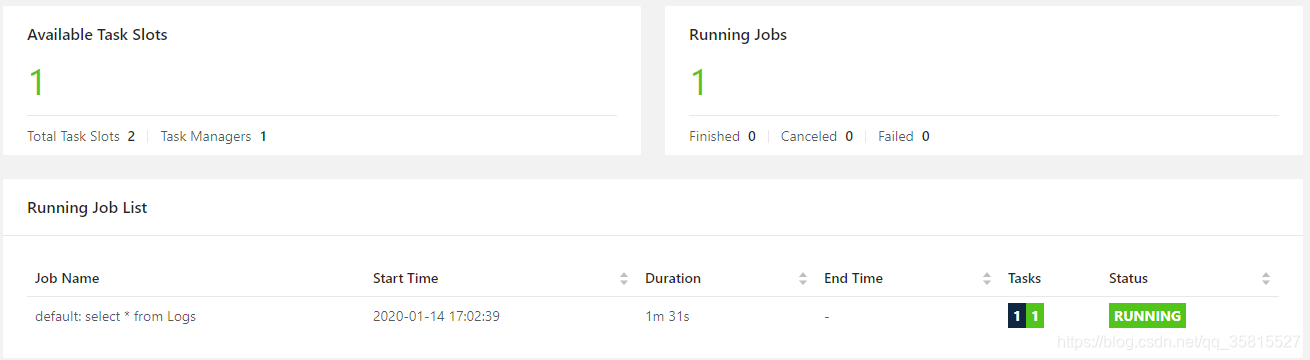
211 |
212 | 在可视化界面可以看到启动了一个计算任务并占用了一个Task Slot
213 |
214 | - 往Kafka打入数据
215 |
216 | 稍微使用之前的测试数据脚本
217 |
218 | ```
219 | import pickle
220 | import time
221 | import json
222 | from kafka import KafkaProducer
223 |
224 | producer = KafkaProducer(bootstrap_servers=['127.0.0.1:9092'],
225 | key_serializer=lambda k: pickle.dumps(k),
226 | value_serializer=lambda v: pickle.dumps(v))
227 | start_time = time.time()
228 | for i in range(0, 10000):
229 | print('------{}---------'.format(i))
230 | producer = KafkaProducer(value_serializer=lambda v: json.dumps(v).encode('utf-8'),compression_type='gzip')
231 | producer.send('log',{"response":"res","status":0,"protocol":"protocol","timestamp":0})
232 | producer.send('log',{"response":"res","status":1,"protocol":"protocol","timestamp":0})
233 | producer.send('log',{"response":"resKEY","status":2,"protocol":"protocol","timestamp":0})
234 | producer.send('log',{"response":"res","status":3,"protocol":"protocol","timestamp":0})
235 | producer.send('log',{"response":"res","status":4,"protocol":"protocol","timestamp":0})
236 | producer.send('log',{"response":"res","status":5,"protocol":"protocol","timestamp":0})
237 | producer.flush()
238 | producer.close()
239 | end_time = time.time()
240 | time_counts = end_time - start_time
241 | print(time_counts)
242 | ```
243 |
244 | CentOS自带Python2环境,但使用此脚本需要提前安装Python Kafka依赖:
245 |
246 | ```
247 | pip install kafka-python
248 | ```
249 |
250 | 执行脚本:
251 |
252 | ```
253 | python kafka_result.py
254 | ```
255 |
256 | 我们只需要一丁点数据进行验证,执行一会儿就可以用 Shift + C 停止了
257 |
258 | 查看CLI可视化查询结果界面:
259 |
260 | 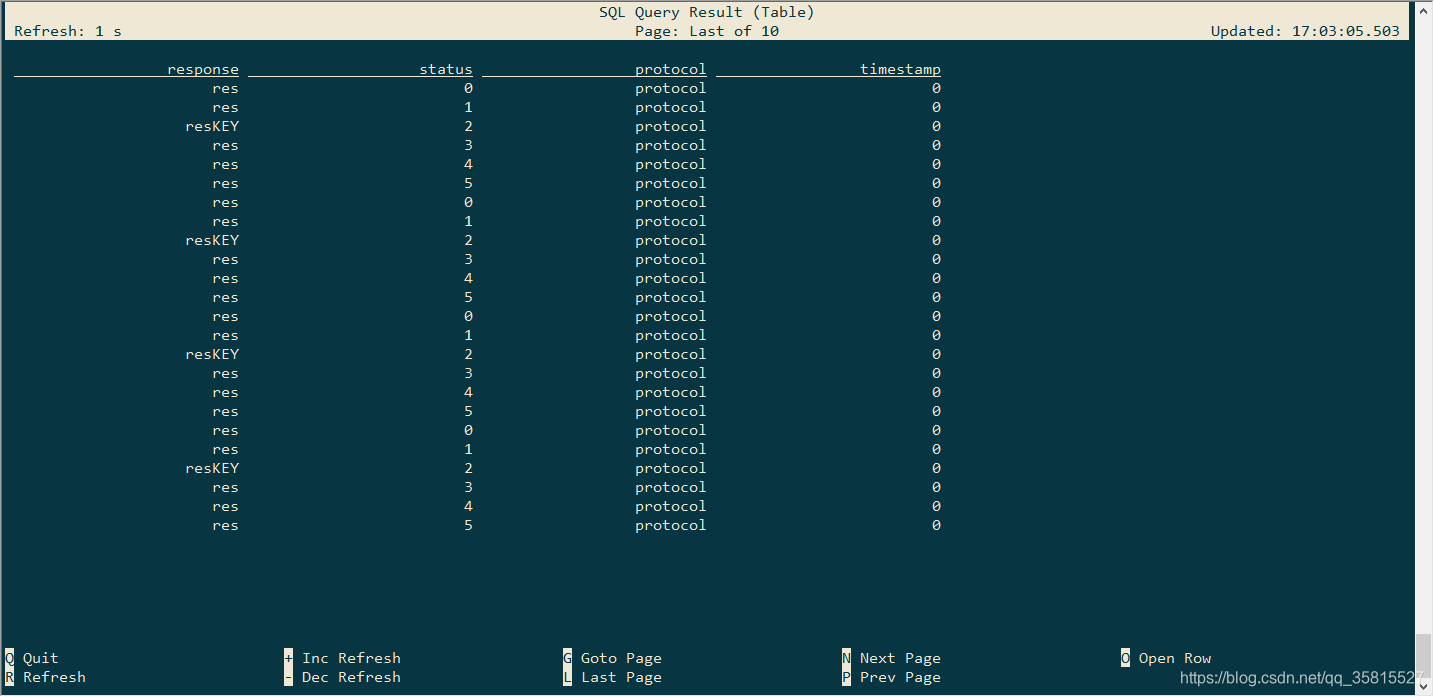
261 |
262 | 大功告成,可以看到打到Kafka中的数据原原本本的显示出来
263 |
264 | 根据下方提示,`+ -` 控制刷新速度 ,`N P` 上下翻页......都可以按一下熟悉操作
265 |
266 | - 取消任务
267 |
268 | 按`Q`取消任务,或者在可视化控制面板中点击该任务,点击`Cancel Job`来取消这个取消任务。
269 |
270 | - 退出SQL Client
271 |
272 | ```
273 | Flink SQL> quit;
274 | ```
275 |
276 | ####
277 |
278 | ## GitHub
279 |
280 | 项目源码、博客.md文件、python小程序、添加依赖的jar包已上传至GitHub
281 |
282 | https://github.com/StarPlatinumStudio/Flink-SQL-Practice
283 |
284 | 我的专栏:[Flink SQL原理和实战]( https://blog.csdn.net/qq_35815527/category_9634641.html )
285 |
286 | ### To Be Continue=>
--------------------------------------------------------------------------------
/flink-tabel-sql 1/pom.xml:
--------------------------------------------------------------------------------
1 |
19 |
21 | 4.0.0
22 |
23 | kmops
24 | flink-table-sql
25 | 1.0-SNAPSHOT
26 | jar
27 |
28 | Flink Quickstart Job
29 | http://www.myorganization.org
30 |
31 |
32 | UTF-8
33 | 1.9.0
34 | 1.8
35 | 2.11
36 | ${java.version}
37 | ${java.version}
38 |
39 |
40 |
41 |
42 | apache.snapshots
43 | Apache Development Snapshot Repository
44 | https://repository.apache.org/content/repositories/snapshots/
45 |
46 | false
47 |
48 |
49 | true
50 |
51 |
52 |
53 |
54 |
55 |
56 |
57 |
58 | org.apache.flink
59 | flink-table-api-java-bridge_2.11
60 | 1.9.0
61 |
62 |
63 | org.apache.flink
64 | flink-table-planner-blink_2.11
65 | 1.9.0
66 |
67 |
68 | org.apache.flink
69 | flink-streaming-scala_2.11
70 | 1.9.0
71 |
72 |
73 | org.apache.flink
74 | flink-table-common
75 | 1.9.0
76 |
77 |
78 |
79 |
87 |
88 |
89 |
90 |
91 | org.slf4j
92 | slf4j-log4j12
93 | 1.7.7
94 | runtime
95 |
96 |
97 | log4j
98 | log4j
99 | 1.2.17
100 | runtime
101 |
102 |
103 |
104 |
105 |
106 |
107 |
108 |
109 | org.apache.maven.plugins
110 | maven-compiler-plugin
111 | 3.1
112 |
113 | ${java.version}
114 | ${java.version}
115 |
116 |
117 |
118 |
119 |
120 |
121 | org.apache.maven.plugins
122 | maven-shade-plugin
123 | 3.0.0
124 |
125 |
126 |
127 | package
128 |
129 | shade
130 |
131 |
132 |
133 |
134 | org.apache.flink:force-shading
135 | com.google.code.findbugs:jsr305
136 | org.slf4j:*
137 | log4j:*
138 |
139 |
140 |
141 |
142 |
144 | *:*
145 |
146 | META-INF/*.SF
147 | META-INF/*.DSA
148 | META-INF/*.RSA
149 |
150 |
151 |
152 |
153 |
154 | robinwang.TabelJob
155 |
156 |
157 |
158 |
159 |
160 |
161 |
162 |
163 |
164 |
165 |
166 |
167 |
168 | org.eclipse.m2e
169 | lifecycle-mapping
170 | 1.0.0
171 |
172 |
173 |
174 |
175 |
176 | org.apache.maven.plugins
177 | maven-shade-plugin
178 | [3.0.0,)
179 |
180 | shade
181 |
182 |
183 |
184 |
185 |
186 |
187 |
188 |
189 | org.apache.maven.plugins
190 | maven-compiler-plugin
191 | [3.1,)
192 |
193 | testCompile
194 | compile
195 |
196 |
197 |
198 |
199 |
200 |
201 |
202 |
203 |
204 |
205 |
206 |
207 |
208 |
209 |
210 |
211 |
212 |
213 |
214 | add-dependencies-for-IDEA
215 |
216 |
217 |
218 | idea.version
219 |
220 |
221 |
222 |
223 |
224 | org.apache.flink
225 | flink-java
226 | ${flink.version}
227 | compile
228 |
229 |
230 | org.apache.flink
231 | flink-streaming-java_${scala.binary.version}
232 | ${flink.version}
233 | compile
234 |
235 |
236 |
237 |
238 |
239 |
240 |
--------------------------------------------------------------------------------
/flink-tabel-sql 2&3/pom.xml:
--------------------------------------------------------------------------------
1 |
19 |
21 | 4.0.0
22 |
23 | kmops
24 | flink-table-sql
25 | 1.0-SNAPSHOT
26 | jar
27 |
28 | Flink Quickstart Job
29 | http://www.myorganization.org
30 |
31 |
32 | UTF-8
33 | 1.9.0
34 | 1.8
35 | 2.11
36 | ${java.version}
37 | ${java.version}
38 |
39 |
40 |
41 |
42 | apache.snapshots
43 | Apache Development Snapshot Repository
44 | https://repository.apache.org/content/repositories/snapshots/
45 |
46 | false
47 |
48 |
49 | true
50 |
51 |
52 |
53 |
54 |
55 |
56 |
57 |
58 | org.apache.flink
59 | flink-table-api-java-bridge_2.11
60 | ${flink.version}
61 |
62 |
63 | org.apache.flink
64 | flink-table-planner-blink_2.11
65 | ${flink.version}
66 |
67 |
68 | org.apache.flink
69 | flink-streaming-scala_2.11
70 | ${flink.version}
71 |
72 |
73 | org.apache.flink
74 | flink-table-common
75 | ${flink.version}
76 |
77 |
78 | org.apache.flink
79 | flink-connector-kafka-0.11_2.11
80 | ${flink.version}
81 |
82 |
83 | org.apache.flink
84 | flink-connector-kafka_2.11
85 | ${flink.version}
86 |
87 |
88 |
89 |
97 |
98 |
99 |
100 |
101 | org.slf4j
102 | slf4j-log4j12
103 | 1.7.7
104 | runtime
105 |
106 |
107 | log4j
108 | log4j
109 | 1.2.17
110 | runtime
111 |
112 |
113 | org.apache.flink
114 | flink-connector-kafka-0.11_2.11
115 | 1.9.1
116 |
117 |
118 |
119 |
120 |
121 |
122 |
123 |
124 | org.apache.maven.plugins
125 | maven-compiler-plugin
126 | 3.1
127 |
128 | ${java.version}
129 | ${java.version}
130 |
131 |
132 |
133 |
134 |
135 |
136 | org.apache.maven.plugins
137 | maven-shade-plugin
138 | 3.0.0
139 |
140 |
141 |
142 | package
143 |
144 | shade
145 |
146 |
147 |
148 |
149 | org.apache.flink:force-shading
150 | com.google.code.findbugs:jsr305
151 | org.slf4j:*
152 | log4j:*
153 |
154 |
155 |
156 |
157 |
159 | *:*
160 |
161 | META-INF/*.SF
162 | META-INF/*.DSA
163 | META-INF/*.RSA
164 |
165 |
166 |
167 |
168 |
169 | robinwang.CustomSinkJob
170 |
171 |
172 |
173 |
174 |
175 |
176 |
177 |
178 |
179 |
180 |
181 |
182 |
183 | org.eclipse.m2e
184 | lifecycle-mapping
185 | 1.0.0
186 |
187 |
188 |
189 |
190 |
191 | org.apache.maven.plugins
192 | maven-shade-plugin
193 | [3.0.0,)
194 |
195 | shade
196 |
197 |
198 |
199 |
200 |
201 |
202 |
203 |
204 | org.apache.maven.plugins
205 | maven-compiler-plugin
206 | [3.1,)
207 |
208 | testCompile
209 | compile
210 |
211 |
212 |
213 |
214 |
215 |
216 |
217 |
218 |
219 |
220 |
221 |
222 |
223 |
224 |
225 |
226 |
227 |
228 |
229 | add-dependencies-for-IDEA
230 |
231 |
232 |
233 | idea.version
234 |
235 |
236 |
237 |
238 |
239 | org.apache.flink
240 | flink-java
241 | ${flink.version}
242 | compile
243 |
244 |
245 | org.apache.flink
246 | flink-streaming-java_${scala.binary.version}
247 | ${flink.version}
248 | compile
249 |
250 |
251 |
252 |
253 |
254 |
255 |
--------------------------------------------------------------------------------
/flink-tabel-sql 4&5/pom.xml:
--------------------------------------------------------------------------------
1 |
19 |
21 | 4.0.0
22 |
23 | kmops
24 | flink-table-sql
25 | 1.0-SNAPSHOT
26 | jar
27 |
28 | Flink Quickstart Job
29 | http://www.myorganization.org
30 |
31 |
32 | UTF-8
33 | 1.9.0
34 | 1.8
35 | 2.11
36 | ${java.version}
37 | ${java.version}
38 |
39 |
40 |
41 |
42 | apache.snapshots
43 | Apache Development Snapshot Repository
44 | https://repository.apache.org/content/repositories/snapshots/
45 |
46 | false
47 |
48 |
49 | true
50 |
51 |
52 |
53 |
54 |
55 |
56 |
57 |
58 | org.apache.flink
59 | flink-table-api-java-bridge_2.11
60 | ${flink.version}
61 |
62 |
63 | org.apache.flink
64 | flink-table-planner-blink_2.11
65 | ${flink.version}
66 |
67 |
68 | org.apache.flink
69 | flink-streaming-scala_2.11
70 | ${flink.version}
71 |
72 |
73 | org.apache.flink
74 | flink-table-common
75 | ${flink.version}
76 |
77 |
78 | org.apache.flink
79 | flink-connector-kafka-0.11_2.11
80 | ${flink.version}
81 |
82 |
83 | org.apache.flink
84 | flink-connector-kafka_2.11
85 | ${flink.version}
86 |
87 |
88 | com.alibaba
89 | fastjson
90 | 1.2.58
91 |
92 |
93 |
94 |
102 |
103 |
104 |
105 |
106 | org.slf4j
107 | slf4j-log4j12
108 | 1.7.7
109 | runtime
110 |
111 |
112 | log4j
113 | log4j
114 | 1.2.17
115 | runtime
116 |
117 |
118 | org.apache.flink
119 | flink-connector-kafka-0.11_2.11
120 | 1.9.1
121 |
122 |
123 |
124 |
125 |
126 |
127 |
128 |
129 | org.apache.maven.plugins
130 | maven-compiler-plugin
131 | 3.1
132 |
133 | ${java.version}
134 | ${java.version}
135 |
136 |
137 |
138 |
139 |
140 |
141 | org.apache.maven.plugins
142 | maven-shade-plugin
143 | 3.0.0
144 |
145 |
146 |
147 | package
148 |
149 | shade
150 |
151 |
152 |
153 |
154 | org.apache.flink:force-shading
155 | com.google.code.findbugs:jsr305
156 | org.slf4j:*
157 | log4j:*
158 |
159 |
160 |
161 |
162 |
164 | *:*
165 |
166 | META-INF/*.SF
167 | META-INF/*.DSA
168 | META-INF/*.RSA
169 |
170 |
171 |
172 |
173 |
174 | robinwang.CustomSinkJob
175 |
176 |
177 |
178 |
179 |
180 |
181 |
182 |
183 |
184 |
185 |
186 |
187 |
188 | org.eclipse.m2e
189 | lifecycle-mapping
190 | 1.0.0
191 |
192 |
193 |
194 |
195 |
196 | org.apache.maven.plugins
197 | maven-shade-plugin
198 | [3.0.0,)
199 |
200 | shade
201 |
202 |
203 |
204 |
205 |
206 |
207 |
208 |
209 | org.apache.maven.plugins
210 | maven-compiler-plugin
211 | [3.1,)
212 |
213 | testCompile
214 | compile
215 |
216 |
217 |
218 |
219 |
220 |
221 |
222 |
223 |
224 |
225 |
226 |
227 |
228 |
229 |
230 |
231 |
232 |
233 |
234 | add-dependencies-for-IDEA
235 |
236 |
237 |
238 | idea.version
239 |
240 |
241 |
242 |
243 |
244 | org.apache.flink
245 | flink-java
246 | ${flink.version}
247 | compile
248 |
249 |
250 | org.apache.flink
251 | flink-streaming-java_${scala.binary.version}
252 | ${flink.version}
253 | compile
254 |
255 |
256 |
257 |
258 |
259 |
260 |
--------------------------------------------------------------------------------
/flink-tabel-sql 4&5/Flink SQL 实战 (4):UDF-用户自定义函数.md:
--------------------------------------------------------------------------------
1 | ## Flink SQL 实战 (4):UDF-用户自定义函数
2 |
3 | 在上一篇实战博客中分享了如自定义Schema这样实战中常用的code,
4 |
5 | 之前示例的WordWithCount只有可怜的一个字段不能算作典型,理解起来容易困惑,所有我们升级一下使用多个字段的JSON作为数据源:
6 |
7 | ```
8 | {
9 | "response": "",
10 | "status": 0,
11 | "protocol": ""
12 | "timestamp":0
13 | }
14 | ```
15 |
16 | # 练习
17 |
18 | 根据之前实战篇的经验,创建一个 Tabel API/SQL 流处理项目
19 |
20 | 这次处理的数据源提高为来自Kafka的JSON数据
21 |
22 | 我使用转为 JavaBean 的方法处理数据源,首先写一个 JavaBean 类(构造函数、get()、set()可自动生成)
23 |
24 | ```
25 | /**
26 | * JavaBean类
27 | * JSON:
28 | * {
29 | * "response": "",
30 | * "status": 0,
31 | * "protocol": ""
32 | * "timestamp":0
33 | * }
34 | */
35 | public class Response {
36 | private String response;
37 | private int status;
38 | private String protocol;
39 | private long timestamp;
40 |
41 | public Response(String response, int status, String protocol, long timestamp) {
42 | this.response = response;
43 | this.status = status;
44 | this.protocol = protocol;
45 | this.timestamp = timestamp;
46 | }
47 | public Response(){}
48 |
49 | public String getResponse() {
50 | return response;
51 | }
52 |
53 | public void setResponse(String response) {
54 | this.response = response;
55 | }
56 |
57 | public int getStatus() {
58 | return status;
59 | }
60 |
61 | public void setStatus(int status) {
62 | this.status = status;
63 | }
64 |
65 | public String getProtocol() {
66 | return protocol;
67 | }
68 |
69 | public void setProtocol(String protocol) {
70 | this.protocol = protocol;
71 | }
72 |
73 | public long getTimestamp() {
74 | return timestamp;
75 | }
76 |
77 | public void setTimestamp(long timestamp) {
78 | this.timestamp = timestamp;
79 | }
80 | }
81 | ```
82 |
83 | 要将 String 转义为 JavaBean 可以用 fastJson 实现
84 |
85 | ```
86 |
87 | com.alibaba
88 | fastjson
89 | 1.2.58
90 |
91 | ```
92 |
93 | #### 自定义POJO Schema
94 |
95 | Flink在类型之间进行了以下区分:
96 |
97 | - 基本类型:所有的Java原语及其盒装形式,`void`,`String`,`Date`,`BigDecimal`,和`BigInteger`。
98 | - 基本数组和对象数组
99 | - 复合类型
100 | - Flink Java `Tuples` (Flink Java API的一部分):最多25个字段,不支持空字段
101 | - Scala *case* 类(包括Scala元组):不支持空字段
102 | - Row:具有任意多个字段并支持空字段的元组
103 | - POJO:遵循某种类似于bean的模式的类
104 | - 辅助类型( Option, Either, Lists, Maps,)
105 | - 泛型类型:这些不会由Flink本身进行序列化,而是由Kryo进行序列化。
106 |
107 | JSON转义为bean的模式属于POJO
108 |
109 | ```
110 | public final class POJOSchema extends AbstractDeserializationSchema {
111 | @Override
112 | public Response deserialize(byte[] bytes) throws IOException {
113 | //byte[]转JavaBean
114 | try {
115 | return JSON.parseObject(bytes,Response.class);
116 | }
117 | catch (Exception ex){
118 | ex.printStackTrace();
119 | }
120 | return null;
121 | }
122 | }
123 | ```
124 |
125 | #### 自定义TabelSource
126 |
127 | ```
128 | public class KafkaTabelSource implements StreamTableSource {
129 | @Override
130 | public TypeInformation getReturnType() {
131 | return TypeInformation.of(Response.class);
132 | }
133 |
134 | @Override
135 | public TableSchema getTableSchema() {
136 | return TableSchema.builder().fields(new String[]{"response","status","protocol","timestamp"},new DataType[]{DataTypes.STRING(),DataTypes.INT(),DataTypes.STRING(),DataTypes.BIGINT()}).build();
137 | }
138 |
139 | @Override
140 | public DataStream getDataStream(StreamExecutionEnvironment env) {
141 | Properties kafkaProperties=new Properties();
142 | kafkaProperties.setProperty("bootstrap.servers", "0.0.0.0:9092");
143 | kafkaProperties.setProperty("group.id", "test");
144 | DataStream kafkaStream=env.addSource(new FlinkKafkaConsumer011<>("test",new POJOSchema(),kafkaProperties));
145 | return kafkaStream;
146 | }
147 | }
148 | ```
149 |
150 | 到这里使用之前编写的Sink已经可以简单运行 SELECT * FROM kafkaDataStream 查看效果
151 |
152 | #### 试运行
153 |
154 | 编写Python脚本
155 |
156 | ```
157 | # https://pypi.org/project/kafka-python/
158 | import pickle
159 | import time
160 | import json
161 | from kafka import KafkaProducer
162 |
163 | producer = KafkaProducer(bootstrap_servers=['127.0.0.1:9092'],
164 | key_serializer=lambda k: pickle.dumps(k),
165 | value_serializer=lambda v: pickle.dumps(v))
166 | start_time = time.time()
167 | for i in range(0, 10000):
168 | print('------{}---------'.format(i))
169 | producer = KafkaProducer(value_serializer=lambda v: json.dumps(v).encode('utf-8'),compression_type='gzip')
170 | producer.send('test',{"response":"res","status":0,"protocol":"protocol","timestamp":0})
171 | producer.send('test',{"response":"res","status":1,"protocol":"protocol","timestamp":0})
172 | producer.send('test',{"response":"res","status":2,"protocol":"protocol","timestamp":0})
173 | producer.send('test',{"response":"res","status":3,"protocol":"protocol","timestamp":0})
174 | producer.send('test',{"response":"res","status":4,"protocol":"protocol","timestamp":0})
175 | producer.send('test',{"response":"res","status":5,"protocol":"protocol","timestamp":0})
176 | # future = producer.send('test', key='num', value=i, partition=0)
177 | # 将缓冲区的全部消息push到broker当中
178 | producer.flush()
179 | producer.close()
180 |
181 | end_time = time.time()
182 | time_counts = end_time - start_time
183 | print(time_counts)
184 | ```
185 |
186 | main函数
187 |
188 | ```
189 | public static void main(String[] args) throws Exception {
190 | StreamExecutionEnvironment blinkStreamEnv=StreamExecutionEnvironment.getExecutionEnvironment();
191 | EnvironmentSettings blinkStreamSettings= EnvironmentSettings.newInstance().useBlinkPlanner().inStreamingMode().build();
192 | StreamTableEnvironment blinkStreamTabelEnv= StreamTableEnvironment.create(blinkStreamEnv,blinkStreamSettings);
193 | KafkaTabelSource kafkaTabelSource=new KafkaTabelSource();
194 | blinkStreamTabelEnv.registerTableSource("kafkaDataStream",kafkaTabelSource);//使用自定义TableSource
195 | RetractStreamTableSink retractStreamTableSink=new MyRetractStreamTableSink(kafkaTabelSource.getTableSchema().getFieldNames(),kafkaTabelSource.getTableSchema().getFieldDataTypes());
196 | blinkStreamTabelEnv.registerTableSink("sinkTable",retractStreamTableSink);
197 | Table wordWithCount = blinkStreamTabelEnv.sqlQuery("SELECT * FROM kafkaDataStream");
198 | wordWithCount.insertInto("sinkTable");
199 | blinkStreamTabelEnv.execute("BLINK STREAMING QUERY");
200 | }
201 | ```
202 |
203 | 此时的运行结果是这样的:
204 |
205 | ```
206 | res,1,protocol,0
207 | res,2,protocol,0
208 | res,3,protocol,0
209 | res,4,protocol,0
210 | res,5,protocol,0
211 | res,0,protocol,0
212 | res,1,protocol,0
213 | res,2,protocol,0
214 | res,3,protocol,0
215 | res,4,protocol,0
216 | res,5,protocol,0
217 | res,0,protocol,0
218 | res,1,protocol,0
219 | ......
220 | ```
221 |
222 | ## 用户自定义函数
223 |
224 | 用户自定义函数是一项重要功能,因为它们显着扩展了查询的表达能力。
225 |
226 |
227 |
228 | 在大多数情况下,必须先注册用户自定义函数,然后才能在查询中使用该函数。无需注册Scala Table API的函数。
229 |
230 | `TableEnvironment`通过调用`registerFunction()`方法注册用户自定义函数。注册用户定义的函数后,会将其插入`TableEnvironment`的 catalog 中,以便Table API或SQL解析器可以识别并正确转义它。
231 |
232 | [^Catalogs]: Catalogs 提供 metadata(元数据),如databases, tables, partitions, views, 和 functions 还有访问存储在数据库或其他外部系统中的数据所需的信息。
233 |
234 | ### Scalar Functions(标量函数)
235 |
236 | 如果内置函数中未包含所需的 scalar function ,就需要自定义一个 scalar function,自定义 scalar function 是 Table API 和 SQL 通用的。 自定义的 scalar function 将零个,一个或多个 scalar 值映射到新的 scalar 值。
237 |
238 | 为了定义标量函数,必须扩展 ScalarFunction 并实现(一个或多个)评估方法。 标量函数的行为由评估方法确定。 评估方法必须公开声明并命名为 **eval** 。 评估方法的参数类型和返回类型也确定标量函数的参数和返回类型。 评估方法也可以通过实现多种名为eval的方法来重载。
239 |
240 | ### 过滤Status的函数
241 |
242 | 自定义一个 ScalarFunction (UDF),这个UDF的作用是简单判断参数 status 是否等于构造时指定的数字
243 |
244 | ```
245 | import org.apache.flink.table.functions.ScalarFunction;
246 |
247 | public class IsStatus extends ScalarFunction {
248 | private int status = 0;
249 | public IsStatus(int status){
250 | this.status = status;
251 | }
252 |
253 | public boolean eval(int status){
254 | if (this.status == status){
255 | return true;
256 | } else {
257 | return false;
258 | }
259 | }
260 | }
261 | ```
262 |
263 | #### 注册UDF
264 |
265 | 注册`IsStatusFive`函数:判断参数是否等于5
266 |
267 | ```
268 | blinkStreamTabelEnv.registerFunction("IsStatusFive",new IsStatus(5));
269 | ```
270 |
271 | #### 编写 SQL
272 |
273 | ```
274 | Table wordWithCount = blinkStreamTabelEnv.sqlQuery("SELECT * FROM kafkaDataStream WHERE IsStatusFive(status)");
275 | ```
276 |
277 | #### 运行程序
278 |
279 | 最终main函数如下:
280 |
281 | ```
282 | public static void main(String[] args) throws Exception {
283 | StreamExecutionEnvironment blinkStreamEnv=StreamExecutionEnvironment.getExecutionEnvironment();
284 | EnvironmentSettings blinkStreamSettings= EnvironmentSettings.newInstance().useBlinkPlanner().inStreamingMode().build();
285 | StreamTableEnvironment blinkStreamTabelEnv= StreamTableEnvironment.create(blinkStreamEnv,blinkStreamSettings);
286 | KafkaTabelSource kafkaTabelSource=new KafkaTabelSource();
287 | blinkStreamTabelEnv.registerTableSource("kafkaDataStream",kafkaTabelSource);//使用自定义TableSource
288 | RetractStreamTableSink retractStreamTableSink=new MyRetractStreamTableSink(kafkaTabelSource.getTableSchema().getFieldNames(),kafkaTabelSource.getTableSchema().getFieldDataTypes());
289 | blinkStreamTabelEnv.registerTableSink("sinkTable",retractStreamTableSink);
290 | blinkStreamTabelEnv.registerFunction("IsStatusFive",new IsStatus(5));
291 | Table wordWithCount = blinkStreamTabelEnv.sqlQuery("SELECT * FROM kafkaDataStream WHERE IsStatusFive(status)");
292 | wordWithCount.insertInto("sinkTable");
293 | blinkStreamTabelEnv.execute("BLINK STREAMING QUERY");
294 | }
295 | ```
296 |
297 | 输出结果
298 |
299 | ```
300 | res,5,protocol,0
301 | res,5,protocol,0
302 | res,5,protocol,0
303 | res,5,protocol,0
304 | res,5,protocol,0
305 | ```
306 |
307 | ## GitHub
308 |
309 | 项目源码、python kafka moke小程序已上传至GitHub
310 |
311 | https://github.com/StarPlatinumStudio/Flink-SQL-Practice
312 |
313 | 我的专栏:[Flink SQL原理和实战]( https://blog.csdn.net/qq_35815527/category_9634641.html )
314 |
315 | ### To Be Continue=>
--------------------------------------------------------------------------------