├── preview.jpg
├── demos
├── info.png
├── info-hover
├── index.html
├── climate-sim.html
├── temp-anomaly.json
├── temp-anomaly.js
├── climate-sim.css
└── climate-sim.js
├── .gitignore
├── parse.py
└── README.md
/preview.jpg:
--------------------------------------------------------------------------------
https://raw.githubusercontent.com/TedYav/HadCRUT3-Visualization/HEAD/preview.jpg
--------------------------------------------------------------------------------
/demos/info.png:
--------------------------------------------------------------------------------
https://raw.githubusercontent.com/TedYav/HadCRUT3-Visualization/HEAD/demos/info.png
--------------------------------------------------------------------------------
/demos/info-hover:
--------------------------------------------------------------------------------
https://raw.githubusercontent.com/TedYav/HadCRUT3-Visualization/HEAD/demos/info-hover
--------------------------------------------------------------------------------
/.gitignore:
--------------------------------------------------------------------------------
1 | # Compiled source #
2 | ###################
3 | *.com
4 | *.class
5 | *.dll
6 | *.exe
7 | *.o
8 | *.so
9 |
10 | # Packages #
11 | ############
12 | # it's better to unpack these files and commit the raw source
13 | # git has its own built in compression methods
14 | *.7z
15 | *.dmg
16 | *.gz
17 | *.iso
18 | *.jar
19 | *.rar
20 | *.tar
21 |
22 | # Logs and databases #
23 | ######################
24 | *.log
25 | *.sql
26 | *.sqlite
27 |
28 | # OS generated files #
29 | ######################
30 | .DS_Store
31 | .DS_Store?
32 | ._*
33 | .Spotlight-V100
34 | .Trashes
35 | ehthumbs.db
36 | Thumbs.db
37 |
38 | output/
39 | output-monthly/
40 | json/
41 | includes/
42 | climate-data/
43 | Anomaly
44 |
--------------------------------------------------------------------------------
/demos/index.html:
--------------------------------------------------------------------------------
1 |
2 |
12 |
13 |
14 |
15 | HadCRUT3 Climate Data
16 |
17 |
18 |
19 |
20 |
21 |
22 |
23 |
24 |
25 |
26 |
27 |
28 |
29 |
30 |
31 |
32 |
33 |
34 |
35 |
58 |
59 |
60 |
61 |
--------------------------------------------------------------------------------
/demos/climate-sim.html:
--------------------------------------------------------------------------------
1 |
2 |
12 |
13 |
14 |
15 | HadCRUT3 Climate Data
16 |
17 |
18 |
19 |
20 |
21 |
22 |
23 |
24 |
25 |
26 |
27 |
28 |
29 |
30 |
31 |
32 |
33 |
34 |
35 |
58 |
59 |
60 |
61 |
--------------------------------------------------------------------------------
/demos/temp-anomaly.json:
--------------------------------------------------------------------------------
1 | {
2 | "1850": -0.431,
3 | "1851": -0.020,
4 | "1852": -0.320,
5 | "1853": -0.388,
6 | "1854": 0.065,
7 | "1855": -0.188,
8 | "1856": -0.352,
9 | "1857": -0.289,
10 | "1858": -0.375,
11 | "1859": -0.363,
12 | "1860": -0.326,
13 | "1861": -0.266,
14 | "1862": -0.591,
15 | "1863": -0.307,
16 | "1864": -0.639,
17 | "1865": -0.306,
18 | "1866": -0.358,
19 | "1867": -0.371,
20 | "1868": -0.291,
21 | "1869": -0.260,
22 | "1870": -0.266,
23 | "1871": -0.413,
24 | "1872": -0.164,
25 | "1873": -0.204,
26 | "1874": -0.343,
27 | "1875": -0.584,
28 | "1876": -0.245,
29 | "1877": -0.040,
30 | "1878": 0.109,
31 | "1879": -0.409,
32 | "1880": -0.169,
33 | "1881": -0.303,
34 | "1882": -0.138,
35 | "1883": -0.412,
36 | "1884": -0.541,
37 | "1885": -0.500,
38 | "1886": -0.423,
39 | "1887": -0.522,
40 | "1888": -0.488,
41 | "1889": -0.228,
42 | "1890": -0.467,
43 | "1891": -0.599,
44 | "1892": -0.603,
45 | "1893": -0.689,
46 | "1894": -0.551,
47 | "1895": -0.551,
48 | "1896": -0.380,
49 | "1897": -0.301,
50 | "1898": -0.405,
51 | "1899": -0.330,
52 | "1900": -0.176,
53 | "1901": -0.187,
54 | "1902": -0.352,
55 | "1903": -0.435,
56 | "1904": -0.570,
57 | "1905": -0.434,
58 | "1906": -0.224,
59 | "1907": -0.619,
60 | "1908": -0.493,
61 | "1909": -0.471,
62 | "1910": -0.346,
63 | "1911": -0.469,
64 | "1912": -0.392,
65 | "1913": -0.326,
66 | "1914": -0.063,
67 | "1915": -0.082,
68 | "1916": -0.370,
69 | "1917": -0.694,
70 | "1918": -0.489,
71 | "1919": -0.277,
72 | "1920": -0.306,
73 | "1921": -0.168,
74 | "1922": -0.261,
75 | "1923": -0.295,
76 | "1924": -0.370,
77 | "1925": -0.280,
78 | "1926": -0.046,
79 | "1927": -0.231,
80 | "1928": -0.164,
81 | "1929": -0.444,
82 | "1930": -0.137,
83 | "1931": -0.125,
84 | "1932": -0.056,
85 | "1933": -0.296,
86 | "1934": -0.071,
87 | "1935": -0.167,
88 | "1936": -0.111,
89 | "1937": -0.071,
90 | "1938": 0.109,
91 | "1939": -0.059,
92 | "1940": -0.030,
93 | "1941": -0.013,
94 | "1942": -0.028,
95 | "1943": -0.064,
96 | "1944": 0.073,
97 | "1945": -0.100,
98 | "1946": -0.078,
99 | "1947": -0.009,
100 | "1948": -0.059,
101 | "1949": -0.150,
102 | "1950": -0.318,
103 | "1951": -0.125,
104 | "1952": -0.037,
105 | "1953": 0.058,
106 | "1954": -0.186,
107 | "1955": -0.204,
108 | "1956": -0.433,
109 | "1957": -0.052,
110 | "1958": 0.081,
111 | "1959": -0.011,
112 | "1960": -0.100,
113 | "1961": 0.040,
114 | "1962": -0.000,
115 | "1963": 0.007,
116 | "1964": -0.285,
117 | "1965": -0.185,
118 | "1966": -0.116,
119 | "1967": -0.120,
120 | "1968": -0.210,
121 | "1969": -0.059,
122 | "1970": -0.022,
123 | "1971": -0.205,
124 | "1972": -0.176,
125 | "1973": 0.156,
126 | "1974": -0.306,
127 | "1975": -0.114,
128 | "1976": -0.368,
129 | "1977": 0.072,
130 | "1978": -0.046,
131 | "1979": 0.062,
132 | "1980": 0.141,
133 | "1981": 0.248,
134 | "1982": 0.021,
135 | "1983": 0.320,
136 | "1984": -0.058,
137 | "1985": -0.010,
138 | "1986": 0.117,
139 | "1987": 0.290,
140 | "1988": 0.342,
141 | "1989": 0.195,
142 | "1990": 0.428,
143 | "1991": 0.339,
144 | "1992": 0.103,
145 | "1993": 0.183,
146 | "1994": 0.326,
147 | "1995": 0.477,
148 | "1996": 0.215,
149 | "1997": 0.464,
150 | "1998": 0.821,
151 | "1999": 0.493,
152 | "2000": 0.363,
153 | "2001": 0.559,
154 | "2002": 0.666,
155 | "2003": 0.645,
156 | "2004": 0.622,
157 | "2005": 0.760,
158 | "2006": 0.674,
159 | "2007": 0.680,
160 | "2008": 0.527,
161 | "2009": 0.672
162 | }
163 |
--------------------------------------------------------------------------------
/demos/temp-anomaly.js:
--------------------------------------------------------------------------------
1 | var tempAnomaly =
2 | {
3 | "1850": -0.431,
4 | "1851": -0.020,
5 | "1852": -0.320,
6 | "1853": -0.388,
7 | "1854": 0.065,
8 | "1855": -0.188,
9 | "1856": -0.352,
10 | "1857": -0.289,
11 | "1858": -0.375,
12 | "1859": -0.363,
13 | "1860": -0.326,
14 | "1861": -0.266,
15 | "1862": -0.591,
16 | "1863": -0.307,
17 | "1864": -0.639,
18 | "1865": -0.306,
19 | "1866": -0.358,
20 | "1867": -0.371,
21 | "1868": -0.291,
22 | "1869": -0.260,
23 | "1870": -0.266,
24 | "1871": -0.413,
25 | "1872": -0.164,
26 | "1873": -0.204,
27 | "1874": -0.343,
28 | "1875": -0.584,
29 | "1876": -0.245,
30 | "1877": -0.040,
31 | "1878": 0.109,
32 | "1879": -0.409,
33 | "1880": -0.169,
34 | "1881": -0.303,
35 | "1882": -0.138,
36 | "1883": -0.412,
37 | "1884": -0.541,
38 | "1885": -0.500,
39 | "1886": -0.423,
40 | "1887": -0.522,
41 | "1888": -0.488,
42 | "1889": -0.228,
43 | "1890": -0.467,
44 | "1891": -0.599,
45 | "1892": -0.603,
46 | "1893": -0.689,
47 | "1894": -0.551,
48 | "1895": -0.551,
49 | "1896": -0.380,
50 | "1897": -0.301,
51 | "1898": -0.405,
52 | "1899": -0.330,
53 | "1900": -0.176,
54 | "1901": -0.187,
55 | "1902": -0.352,
56 | "1903": -0.435,
57 | "1904": -0.570,
58 | "1905": -0.434,
59 | "1906": -0.224,
60 | "1907": -0.619,
61 | "1908": -0.493,
62 | "1909": -0.471,
63 | "1910": -0.346,
64 | "1911": -0.469,
65 | "1912": -0.392,
66 | "1913": -0.326,
67 | "1914": -0.063,
68 | "1915": -0.082,
69 | "1916": -0.370,
70 | "1917": -0.694,
71 | "1918": -0.489,
72 | "1919": -0.277,
73 | "1920": -0.306,
74 | "1921": -0.168,
75 | "1922": -0.261,
76 | "1923": -0.295,
77 | "1924": -0.370,
78 | "1925": -0.280,
79 | "1926": -0.046,
80 | "1927": -0.231,
81 | "1928": -0.164,
82 | "1929": -0.444,
83 | "1930": -0.137,
84 | "1931": -0.125,
85 | "1932": -0.056,
86 | "1933": -0.296,
87 | "1934": -0.071,
88 | "1935": -0.167,
89 | "1936": -0.111,
90 | "1937": -0.071,
91 | "1938": 0.109,
92 | "1939": -0.059,
93 | "1940": -0.030,
94 | "1941": -0.013,
95 | "1942": -0.028,
96 | "1943": -0.064,
97 | "1944": 0.073,
98 | "1945": -0.100,
99 | "1946": -0.078,
100 | "1947": -0.009,
101 | "1948": -0.059,
102 | "1949": -0.150,
103 | "1950": -0.318,
104 | "1951": -0.125,
105 | "1952": -0.037,
106 | "1953": 0.058,
107 | "1954": -0.186,
108 | "1955": -0.204,
109 | "1956": -0.433,
110 | "1957": -0.052,
111 | "1958": 0.081,
112 | "1959": -0.011,
113 | "1960": -0.100,
114 | "1961": 0.040,
115 | "1962": -0.000,
116 | "1963": 0.007,
117 | "1964": -0.285,
118 | "1965": -0.185,
119 | "1966": -0.116,
120 | "1967": -0.120,
121 | "1968": -0.210,
122 | "1969": -0.059,
123 | "1970": -0.022,
124 | "1971": -0.205,
125 | "1972": -0.176,
126 | "1973": 0.156,
127 | "1974": -0.306,
128 | "1975": -0.114,
129 | "1976": -0.368,
130 | "1977": 0.072,
131 | "1978": -0.046,
132 | "1979": 0.062,
133 | "1980": 0.141,
134 | "1981": 0.248,
135 | "1982": 0.021,
136 | "1983": 0.320,
137 | "1984": -0.058,
138 | "1985": -0.010,
139 | "1986": 0.117,
140 | "1987": 0.290,
141 | "1988": 0.342,
142 | "1989": 0.195,
143 | "1990": 0.428,
144 | "1991": 0.339,
145 | "1992": 0.103,
146 | "1993": 0.183,
147 | "1994": 0.326,
148 | "1995": 0.477,
149 | "1996": 0.215,
150 | "1997": 0.464,
151 | "1998": 0.821,
152 | "1999": 0.493,
153 | "2000": 0.363,
154 | "2001": 0.559,
155 | "2002": 0.666,
156 | "2003": 0.645,
157 | "2004": 0.622,
158 | "2005": 0.760,
159 | "2006": 0.674,
160 | "2007": 0.680,
161 | "2008": 0.527,
162 | "2009": 0.672
163 | }
164 |
--------------------------------------------------------------------------------
/demos/climate-sim.css:
--------------------------------------------------------------------------------
1 | /*
2 |
3 | climate-sim.css
4 | CSS styles for HADCrut3 Climate Data using MapboxGL.js
5 |
6 | AUTHOR: Teoman (Ted) Yavuzkurt
7 | www.github.com/teomandavid
8 | www.teomandavid.com
9 |
10 | */
11 |
12 | body {
13 | margin:0;
14 | padding:0;
15 | }
16 |
17 | #map {
18 | position:absolute;
19 | top:0;
20 | bottom: 80px;
21 | width:100%;
22 | }
23 |
24 | .m5{
25 | margin: 5px;
26 | }
27 |
28 | .m5-top{
29 | margin-top: 5px !important;
30 | }
31 |
32 | .m6-top{
33 | margin-top: 6px !important;
34 | }
35 |
36 | .m8-top{
37 | margin-top: 8px !important;
38 | }
39 |
40 | .m2{
41 | margin: 2px;
42 | }
43 |
44 |
45 | .mapboxgl-popup {
46 | max-width: 400px;
47 | font: 12px/20px 'Helvetica Neue', Arial, Helvetica, sans-serif;
48 | }
49 |
50 | .mapboxgl-popup-content {
51 | pointer-events: none !important;
52 | text-align: center;
53 | padding: 5px;
54 | background-color: #55a;
55 | opacity: .75;
56 | }
57 |
58 | .mapboxgl-popup-content h4 {
59 | font-size: 120%;
60 | font-weight: bold;
61 | margin: 0px;
62 | }
63 |
64 | footer{
65 | height: 50px;
66 | width: 100%;
67 | display: block;
68 | background-color: #555;
69 | position: fixed;
70 | bottom: 0px;
71 | padding: 10px;
72 | font: 12px/20px 'Helvetica Neue', Arial, Helvetica, sans-serif;
73 | border-top: 10px solid #080808;
74 | }
75 |
76 | footer div:first-child{
77 | min-width: 400px;
78 | max-width: 900px;
79 | margin: auto;
80 | padding-right: 35px;
81 | }
82 |
83 | .map-text{
84 | display: inline-block;
85 | width: 80px;
86 | font-size: 150%;
87 | margin: 2px;
88 | margin-top: 3px;
89 | }
90 |
91 | .map-text-title{
92 | display: inline-block;
93 | width: 80px;
94 | font-size: 150%;
95 | margin: 2px;
96 | font-weight: bold;
97 | text-align: right;
98 | }
99 |
100 | .mini{
101 | font-size: inherit;
102 | margin-left: 5px;
103 | margin-right: 0px;
104 | font-weight: bold;
105 | display: flex;
106 | }
107 |
108 | input[type="checkbox"]{
109 | margin-right: 10px;
110 | flex-shrink: 0;
111 | }
112 |
113 | select{
114 | margin-left: 5px;
115 | margin-right: 5px;
116 | display: inline-block;
117 | text-transform: capitalize;
118 | font-size: 120%;
119 | width: auto;
120 | min-width: 50px;
121 | }
122 |
123 | .map-controls{
124 | display: flex;
125 | flex-direction: row;
126 | }
127 |
128 | button{
129 | height: 20px;
130 | max-width: 75px;
131 | flex-basis: 1;
132 | overflow: hidden;
133 | }
134 |
135 | #map-slider{
136 | max-width: 600px;
137 | min-width: 100px;
138 | height: 15px;
139 | margin-left: 9px;
140 | flex-grow: 2.0;
141 | flex-basis: 0.2;
142 | }
143 |
144 | .gradient-container{
145 | max-width: 470px;
146 | min-width: 100px;
147 | display: inline-block;
148 | height: 22px;
149 | margin-left: 10px;
150 | margin-right: 10px;
151 | flex-grow: 0.5;
152 | display: flex;
153 | flex-direction: row;
154 | }
155 |
156 | .gradient-container span{
157 | display: flex;
158 | vertical-align: top;
159 | margin-top: 6px;
160 | flex-basis: 1;
161 | flex-shrink: 3;
162 | max-width: 30px;
163 | min-width: 10px;
164 | overflow: hidden;
165 | }
166 |
167 | .gradient{
168 | text-align: center;
169 | font-weight: bold;
170 | flex-grow: 1;
171 | overflow: hidden;
172 | }
173 |
174 | #toggle-anomaly{
175 | margin-right: 0px;
176 | }
177 |
178 | #author-info{
179 | position: fixed;
180 | right: 0px;
181 | bottom: 0px;
182 | width: 50;
183 | height: auto;
184 | }
185 |
186 | #temp-gradient{
187 | max-width: 350px;
188 | height: 20px;
189 | margin: 5px;
190 | margin-left: 10px;
191 | border: 1px solid black;
192 | display: inline-block;
193 | /* Permalink - use to edit and share this gradient: http://colorzilla.com/gradient-editor/#0000ff+0,ff0000+100 */
194 | background: #0000ff; /* Old browsers */
195 | background: -moz-linear-gradient(left, #0000ff 0%, #ff0000 100%); /* FF3.6-15 */
196 | background: -webkit-linear-gradient(left, #0000ff 0%,#ff0000 100%); /* Chrome10-25,Safari5.1-6 */
197 | background: linear-gradient(to right, #0000ff 0%,#ff0000 100%); /* W3C, IE10+, FF16+, Chrome26+, Opera12+, Safari7+ */
198 | filter: progid:DXImageTransform.Microsoft.gradient( startColorstr='#0000ff', endColorstr='#ff0000',GradientType=1 ); /* IE6-9 */
199 | }
200 |
201 | #anomaly-gradient{
202 | max-width: 350px;
203 | height: 20px;
204 | margin: 5px;
205 | margin-left: 10px;
206 | border: 1px solid black;
207 | display: inline-block;
208 | /* Permalink - use to edit and share this gradient: http://colorzilla.com/gradient-editor/#000077+0,ff6100+100 */
209 | background: #000077; /* Old browsers */
210 | background: -moz-linear-gradient(left, #000077 0%, #ff6100 100%); /* FF3.6-15 */
211 | background: -webkit-linear-gradient(left, #000077 0%,#ff6100 100%); /* Chrome10-25,Safari5.1-6 */
212 | background: linear-gradient(to right, #000077 0%,#ff6100 100%); /* W3C, IE10+, FF16+, Chrome26+, Opera12+, Safari7+ */
213 | filter: progid:DXImageTransform.Microsoft.gradient( startColorstr='#000077', endColorstr='#ff6100',GradientType=1 ); /* IE6-9 */
214 | }
--------------------------------------------------------------------------------
/parse.py:
--------------------------------------------------------------------------------
1 | ##### parse.py
2 | ##### Parsing Script converting HADCrut3 Climate Data to GEOJSON
3 |
4 | ##### AUTHOR: Teoman (Ted) Yavuzkurt
5 | ##### www.github.com/teomandavid
6 | ##### www.teomandavid.com
7 |
8 | ##### IMPORTS
9 | import os, re, sys, time, geojson, argparse, subprocess
10 |
11 | ##### CONSTANTS
12 |
13 | # NOTE: these can be set via command line arguments
14 | # But these are good defaults (so you can just run python3 parse.py)
15 |
16 | # NOTE: climate anomaly data is available from 1850 to 2009
17 | # So this is a good range.
18 | START_YEAR = 1850 # year to start outputting data
19 | END_YEAR = 2010 # year to end data output (non-inclusive)
20 | VERBOSE = False # print extra info to command line
21 | PRETTY_PRINT = True # make output pretty
22 | PATH = "./climate-data" # directory containing climate data set
23 | OUTPATH = "./output/" # directory to store output, will be created
24 | OUTPREFIX = "" # filename prefix. Will append .json if needed
25 | PRETTY_PRINT = True # pretty print JSON Output
26 | LIMIT = 25000 # maximum # of stations to parse (>6000 == all of them)
27 | AVERAGE_TEMPS = True # averages missing data points
28 | MONTHS = ['January', 'February', 'March', 'April', 'May', 'June', 'July', 'August', 'September', 'October', 'November', 'December']
29 |
30 | ##### REGEX -- precompiled for speed
31 | # Matches fields we want to capture
32 | reHeaders = re.compile("(Number|Name|Country|Lat|Long|Height|Start\syear|End\syear)=\s*(.*)")
33 | # Matches numbers
34 | reNum = re.compile("\-*\d+.*")
35 | # Matches years
36 | reYear = re.compile("(\d{4})\s+(.*)")
37 | # Matches temperature readings
38 | reTemp = re.compile("(\-*\d+.\d+)\s*(.*)")
39 | # Matches the word "Obs:" (placed before temp readings)
40 | reObs = re.compile("Obs:")
41 | # Matches positive numbers (i.e. names of files) -- prevents matching DS_STORE etc
42 | reInclude = re.compile("[0-9]+")
43 |
44 | ##### MAIN CODE
45 |
46 | ##### I've segmented these into functions
47 | ##### So it's clearer what each part is doing
48 |
49 | ##### Not adding a lot of comments in this file as it's pretty self explanatory
50 |
51 | ##### Could've done this with Pandas.
52 |
53 | # init():
54 | # Arguments: None
55 | # Description: Parses script arguments and starts parsing
56 | # Called on startup
57 | START_YEAR = 1850 # year to start outputting data
58 | END_YEAR = 2010 # year to end data output (non-inclusive)
59 | VERBOSE = False # print extra info to command line
60 | PRETTY_PRINT = True # make output pretty
61 | PATH = "./climate-data/" # directory containing climate data set
62 | OUTPATH = "./output/" # directory to store output, will be created
63 | OUTPREFIX = "" # filename prefix. Will append .json if needed
64 | PRETTY_PRINT = True # pretty print JSON Output
65 | LIMIT = 25000 # maximum # of stations to parse (>6000 == all of them)
66 | AVERAGE_TEMPS = True # averages missing data points
67 | MONTHS = ['January', 'February', 'March', 'April', 'May', 'June', 'July', 'August', 'September', 'October', 'November', 'December']
68 |
69 | def init():
70 | global LIMIT, VERBOSE, START_YEAR, END_YEAR, PRETTY_PRINT, OUTPATH, PATH, AVERAGE_TEMPS
71 | parser = argparse.ArgumentParser(description='Parse climate data set into GEOJson.')
72 | parser.add_argument('-l', help='Max # of stations to process. (>6000 == all) Default: ' + str(LIMIT), type=int, nargs=1, default=[LIMIT])
73 | parser.add_argument('-v', action="store_true", help='Print extra info during parsing. Default: ' + str(VERBOSE), default=VERBOSE)
74 | parser.add_argument('-p', help="Period for output. Default: " + str(START_YEAR) + ", " + str(END_YEAR), type=int, nargs=2, default=[START_YEAR, END_YEAR])
75 | parser.add_argument('-a', action="store_true", help="Average missing data points or not. Default: " + str(AVERAGE_TEMPS), default=AVERAGE_TEMPS)
76 | parser.add_argument('-f', action="store_true", help="Format JSON output nicely. Default: " + str(PRETTY_PRINT), default=PRETTY_PRINT)
77 | parser.add_argument('-o', help="Directory for output. Default: " + OUTPATH, type=str, default=[OUTPATH], nargs=1)
78 | parser.add_argument('-i', help="Directory containing climate data. Default: " + PATH, type=str, default=[PATH], nargs=1)
79 |
80 | args = parser.parse_args()
81 | LIMIT = vars(args)['l'][0]
82 | VERBOSE = vars(args)['v']
83 | START_YEAR = vars(args)['p'][0]
84 | END_YEAR = vars(args)['p'][1]
85 | AVERAGE_TEMPS = vars(args)['a']
86 | PRETTY_PRINT = vars(args)['f']
87 | OUTPATH = vars(args)['o'][0]
88 | PATH = vars(args)['i'][0]
89 |
90 |
91 |
92 | parseData()
93 |
94 |
95 | # parseData():
96 | # Arguments: None
97 | # Description: Calls other parsing functions
98 | def parseData():
99 | stations = parseFiles()
100 |
101 | for month in range(0, 12):
102 | print("Parsing month: " + MONTHS[month])
103 | features = stationsToFeatures(stations, month)
104 | outputJson(features, MONTHS[month])
105 |
106 | features = stationsToFeatures(stations, None, True)
107 | outputJson(features, "headers")
108 |
109 | def parseFiles():
110 | filenames = getAllFilenames()
111 | stations = []
112 | start = time.clock()
113 |
114 | for filename in filenames:
115 | station = parseFile(filename)
116 | if(station):
117 | stations.append(station)
118 | printv("PARSE COMPLETE, file: %s\t station %20s\t start %i\t end %i" % (filename[-6:], station['Name'], station['Start year'], station['End year']))
119 | print("%i files parsed in %i seconds" % (len(stations), time.clock()-start))
120 | return stations
121 |
122 | def getAllFilenames():
123 | filenames = []
124 | count = 1
125 | for root, dirs, files in os.walk(PATH, topdown = False):
126 | for name in files:
127 | if reInclude.match(name):
128 | filenames.append(os.path.join(root, name))
129 | if count > LIMIT:
130 | break
131 | count = count + 1
132 | if count > LIMIT:
133 | break
134 | return filenames
135 |
136 | def parseFile(filename):
137 | station = {}
138 | temperatures = []
139 | station['temperatures'] = temperatures
140 | file = open(filename)
141 | # are we capturing the actual data yet
142 | capturing = False
143 | for line in file:
144 | if reObs.match(line):
145 | capturing = True
146 | padTemperatures(station)
147 | continue
148 | if capturing:
149 | temperatures.extend(parseTemp(line))
150 | elif reHeaders.match(line):
151 | header = reHeaders.search(line)
152 | station[header.group(1)] = parseHeader(header.group(2))
153 | padTemperatures(station, True)
154 | return station if validStation(station) else []
155 |
156 | # filter out bad station data
157 | def validStation(station):
158 | return abs(station['Lat']) <= 90 and abs(station['Long']) <= 180
159 |
160 | def parseHeader(string):
161 | return num(string) if reNum.match(string) else string.title()
162 |
163 | def num(s):
164 | try:
165 | return int(s)
166 | except ValueError:
167 | return float(s)
168 |
169 | def padTemperatures(station, padEnd = False):
170 | if(padEnd):
171 | finishYear = END_YEAR
172 | startYear = station['End year']
173 | else:
174 | finishYear = station['Start year']
175 | startYear = START_YEAR
176 | if(finishYear > startYear):
177 | for i in range(startYear, finishYear):
178 | for j in range(0, 12):
179 | station['temperatures'].append(-99.0);
180 |
181 | def parseTemp(line):
182 | temps = []
183 | yearMatch = reYear.search(line)
184 | year = int(yearMatch.group(1))
185 | line = yearMatch.group(2)
186 | if year >= START_YEAR:
187 | for i in range(0, 12):
188 | temp = reTemp.search(line)
189 | temps.append(float(temp.group(1)))
190 | line = temp.group(2)
191 | return temps
192 |
193 | def ifelse(ddict, key, default):
194 | return ddict[key] if key in ddict.keys() else default
195 |
196 | def interpolate(temps, index):
197 | # verifies that the indices separated by rng are valid
198 | def valid(rng):
199 | return index - rng > 0 and \
200 | index + rng < len(temps) and \
201 | temps[index - rng] != -99 and \
202 | temps[index + rng] != -99
203 | def avg(rng):
204 | return round((temps[index - rng] + temps[index + rng]) / 2, 1)
205 |
206 | # average first by surrounding months
207 | # if not possible, average by last year's reading and next year's
208 | if(valid(1) or valid(12)):
209 | return avg(1) if valid(1) else avg(12)
210 | else:
211 | # data points missing for both surrounding months and same month in surrounding years
212 | return -99
213 |
214 | def stationToGeojson(station, month, headersOnly = False):
215 | # negative Longitude in data is East, in MapBox it's West
216 | point = geojson.Point((-1 * station['Long'],station['Lat']))
217 | stationProperties = generateProperties(station, month, headersOnly)
218 | feature = geojson.Feature(geometry = point, properties=stationProperties)
219 | printv("FEATURE ENCODING COMPLETE, id: %s\t station: %20s\t" % (station['Number'], station['Name']))
220 | return feature
221 |
222 | def generateProperties(station, month, headersOnly = False):
223 | if(headersOnly):
224 | return {
225 | "id" : ifelse(station, 'Number', time.clock()),
226 | "name" : ifelse(station, 'Name', ""),
227 | "country" : ifelse(station, 'Country', ""),
228 | "elevation" : ifelse(station, 'Height', 0.0),
229 | "start_year": ifelse(station, 'Start year', START_YEAR),
230 | "end_year" : ifelse(station, 'End year', END_YEAR)
231 | }
232 |
233 | properties = {}
234 |
235 | # month == offset
236 | for i in range(0, len(station['temperatures']), 12):
237 | tempIndex = i + month
238 | if(tempIndex > len(station['temperatures'])):
239 | break
240 | tempstr = str(i//12)
241 | if(station['temperatures'][tempIndex] == -99):
242 | if(AVERAGE_TEMPS):
243 | station['temperatures'][tempIndex] = interpolate(station['temperatures'], tempIndex)
244 |
245 | properties[tempstr] = station['temperatures'][tempIndex]
246 | return properties
247 |
248 | def stationsToFeatures(stations, month, headersOnly = False):
249 | features = []
250 | for station in stations:
251 | geoStation = stationToGeojson(station, month, headersOnly)
252 | features.append(geoStation)
253 | return features
254 |
255 | def outputJson(features, suffix = ""):
256 | print("OUTPUTING JSON DATA")
257 |
258 | geoData = geojson.FeatureCollection(features);
259 | printv("GeoJSON FeatureCollection Created")
260 |
261 | filename = OUTPATH + OUTPREFIX + str(suffix) + ".json"
262 | os.makedirs(os.path.dirname(filename), exist_ok = True)
263 | printv("Created Directory for " + filename)
264 |
265 | extraArgs = {"indent":4, "separators":(',', ': ')} if PRETTY_PRINT else {}
266 | rawJson = geojson.dumps(geoData, sort_keys = True, **extraArgs)
267 |
268 | printv("Raw JSON Generated. Writing to file " + filename)
269 |
270 | with open(filename, 'w') as outfile:
271 | outfile.write(rawJson)
272 | print("SUCCESSFULLY WROTE JSON FILE: " + filename)
273 |
274 | # printv():
275 | # Arguments: Any number of string parameters
276 | # Description: Prints the arguments if VERBOSE is enabled
277 | def printv(*args):
278 | if(VERBOSE):
279 | print(*args)
280 |
281 | init()
282 |
--------------------------------------------------------------------------------
/demos/climate-sim.js:
--------------------------------------------------------------------------------
1 | // climate-sim.js
2 | // Main Javascript to display HADCrut3 Climate Data using MapboxGL.js
3 |
4 | // AUTHOR: Teoman (Ted) Yavuzkurt
5 | // www.github.com/teomandavid
6 | // www.teomandavid.com
7 |
8 | // Note:
9 | // This code has been refactored SIGNIFICANTLY to cut down on the number of functions and closures.
10 | // This makes it easier to follow the flow of the code and to see the MapBoxGL API in use.
11 | // However, this is not a very robust way to code (just putting everything in one script)
12 | // Some "boring" functions (i.e. JQuery DOM, color etc stuff) are minified at the top. Use jsbeautifier.org
13 | // if you want to see their code nicely.
14 |
15 | // API access code to get the custom style for this project
16 | mapboxgl.accessToken = 'pk.eyJ1IjoidGVvbWFuZGF2aWQiLCJhIjoiY2lwaHBrNnp4MDE2Z3RsbmpxeWVkbXhxMSJ9.rhKrjQ0Eb8iH0inNPQ7W8Q';
17 |
18 | // Actual map style we're going to use. Change this if you want to use a custom style.
19 | // just ensure layers are named for months in lowercase, with headers in a separate layer called 'headers'
20 | const mapStyle = 'mapbox://styles/teomandavid/ciqhsdrro002qcfnn41ofo4f2';
21 |
22 | // need to declare this before using it, or JQuery will throw an error
23 | var map;
24 |
25 | // ###### CONSTANTS -- CONFIGURATION ######
26 |
27 | // months and Temperature Anomaly data.
28 | const months = ['january', 'february', 'march', 'april', 'may', 'june', 'july', 'august', 'september', 'october', 'november', 'december'];
29 | const tempAnomaly = {1850:-0.431,1851:-0.020,1852:-0.320,1853:-0.388,1854:0.065,1855:-0.188,1856:-0.352,1857:-0.289,1858:-0.375,1859:-0.363,1860:-0.326,1861:-0.266,1862:-0.591,1863:-0.307,1864:-0.639,1865:-0.306,1866:-0.358,1867:-0.371,1868:-0.291,1869:-0.260,1870:-0.266,1871:-0.413,1872:-0.164,1873:-0.204,1874:-0.343,1875:-0.584,1876:-0.245,1877:-0.040,1878:0.109,1879:-0.409,1880:-0.169,1881:-0.303,1882:-0.138,1883:-0.412,1884:-0.541,1885:-0.500,1886:-0.423,1887:-0.522,1888:-0.488,1889:-0.228,1890:-0.467,1891:-0.599,1892:-0.603,1893:-0.689,1894:-0.551,1895:-0.551,1896:-0.380,1897:-0.301,1898:-0.405,1899:-0.330,1900:-0.176,1901:-0.187,1902:-0.352,1903:-0.435,1904:-0.570,1905:-0.434,1906:-0.224,1907:-0.619,1908:-0.493,1909:-0.471,1910:-0.346,1911:-0.469,1912:-0.392,1913:-0.326,1914:-0.063,1915:-0.082,1916:-0.370,1917:-0.694,1918:-0.489,1919:-0.277,1920:-0.306,1921:-0.168,1922:-0.261,1923:-0.295,1924:-0.370,1925:-0.280,1926:-0.046,1927:-0.231,1928:-0.164,1929:-0.444,1930:-0.137,1931:-0.125,1932:-0.056,1933:-0.296,1934:-0.071,1935:-0.167,1936:-0.111,1937:-0.071,1938:0.109,1939:-0.059,1940:-0.030,1941:-0.013,1942:-0.028,1943:-0.064,1944:0.073,1945:-0.100,1946:-0.078,1947:-0.009,1948:-0.059,1949:-0.150,1950:-0.318,1951:-0.125,1952:-0.037,1953:0.058,1954:-0.186,1955:-0.204,1956:-0.433,1957:-0.052,1958:0.081,1959:-0.011,1960:-0.100,1961:0.040,1962:-0.000,1963:0.007,1964:-0.285,1965:-0.185,1966:-0.116,1967:-0.120,1968:-0.210,1969:-0.059,1970:-0.022,1971:-0.205,1972:-0.176,1973:0.156,1974:-0.306,1975:-0.114,1976:-0.368,1977:0.072,1978:-0.046,1979:0.062,1980:0.141,1981:0.248,1982:0.021,1983:0.320,1984:-0.058,1985:-0.010,1986:0.117,1987:0.290,1988:0.342,1989:0.195,1990:0.428,1991:0.339,1992:0.103,1993:0.183,1994:0.326,1995:0.477,1996:0.215,1997:0.464,1998:0.821,1999:0.493,2000:0.363,2001:0.559,2002:0.666,2003:0.645,2004:0.622,2005:0.760,2006:0.674,2007:0.680,2008:0.527,2009:0.672};
30 |
31 | const dataStartYear = 1850; // year the data set starts, inclusive
32 | const dataEndYear = 2010; // year the data set ends, not inclusive
33 | const defaultStyle = 'solid'; // default display mode for the map ('solid' or 'heatmap')
34 | const defaultStartYear = 2000; // year to start the display
35 | const defaultStartMonth = months[0]; // month to start the display
36 | const animationSpeed = 1000; // how fast to change years in milliseconds
37 | const tempRange = [-20, 40]; // temperature range for raw temperatures
38 | const tempColors = [[0,0,255], [255,0,0]]; // colors for Raw Temperature Gradient (color 1: [Red, Green, Blue] color2: [Red, Green, Blue])
39 | const anomalyRange = [-1, 1]; // temperature range for anomaly temperatures
40 | const anomalyColors = [[0,0,119], [255,97,0]]; // colors for Anomaly Temp Gradient (color 1: [Red, Green, Blue] color2: [Red, Green, Blue])
41 |
42 | const layerNames = months; // by default, our layers are just named after months
43 |
44 | // NOTE: if you change the gradient colors here, you'll need to update them in climate-sim.css as well!
45 |
46 | // ###### GLOBAL VARIABLES FOR SIMULATION #####
47 |
48 | // simulation state
49 | var currentYear = defaultStartYear; // current year for simulation
50 | var currentMonth = defaultStartMonth; // current month for simulation
51 | var currentIndex = currentYear - dataStartYear; // current position in temperatures array (i.e. year offset)
52 | var currentStyle = defaultStyle; // current simulation display style ('solid' or 'heatmap')
53 |
54 | // display variables
55 | var defaultWaterColor; // default color for water -- loaded dynamically from map on init
56 | var showAnomaly = false; // display anomaly data or not
57 |
58 | // animation variables
59 | var intervalID; // JavaScript intervalID for animation, so it can be cancelled
60 | var playing = false; // animation playing or not
61 | var loop = false; // loop animation
62 |
63 | // popup variables
64 | var popup = new mapboxgl.Popup({ // popup object
65 | closeButton: false,
66 | closeOnClick: false
67 | });
68 | var popupActive = false; // TRUE: popup is showing FALSE: popup hidden
69 | var currentFeature = null; // current feature loaded in popup
70 |
71 | // ###### HELPER FUNCTIONS #####
72 |
73 | // these functions are not terribly interesting as far as MapBoxGL goes, so I've minified their code here
74 | // if you're curious about some JQuery go to jsbeautifier.org and paste these in
75 | // converts color array [R,G,B] to string usable by MapBoxGL
76 | function convertColor(colorArray){ return "rgb(" + colorArray[0] + "," + colorArray[1] + "," + colorArray[2] + ")"; }
77 | // calculates color along a gradient, returns [R,G,B] array
78 | function colorFromGradient(percent, gradient){ return gradient[0].map(function(color, index){return Math.round((1-percent)*color + percent*gradient[1][index]);}); }
79 | // initializes select menus
80 | function initSelect(id, source, selected, handler){ source.forEach(function(item){ var option = $("").attr("value",item).text(item); if(item == selected) {option.attr("selected", "selected");} $(id).append(option); }); $(id).on('change', function(){ handler(this.value); }); }
81 | // loads temperature scales
82 | function loadTemperatureScales() {var elements = ['#raw-temp-start', '#raw-temp-end', '#anomaly-start', '#anomaly-end']; var temps = [tempRange[0], tempRange[1], anomalyRange[0], anomalyRange[1]]; elements.forEach(function(ele, index){ $(ele).html(temps[index] + "°C"); }); }
83 | // toggles animation when button is pushed
84 | function toggleAnimation(){ if(playing) { $('#toggle-loop').attr('disabled', true); $('#playpause').text("Play"); window.clearInterval(intervalID);}else { $('#toggle-loop').attr('disabled', false); $('#playpause').text("Stop"); intervalID = window.setInterval(function(){ if(currentYear < dataEndYear - 1){ currentYear++; }else if(loop){ currentYear = dataStartYear;}else{$('#playpause').click();} updateMap(); }, animationSpeed); } playing = !playing;}
85 | // shows an alert w/author information
86 | function showInfo(e){e.preventDefault(); alert("HADCrut3 Climate Simulation by Teoman (Ted) Yavuzkurt.\nhttp://www.github.com/TeomanDavid\nhttp://www.teomandavid.com\n\nSource available on GitHub under MIT license (my portions).\nRaw Data From: http://www.metoffice.gov.uk/research/climate/climate-monitoring/land-and-atmosphere/surface-station-records\n\nPOWERED BY MAPBOXGL: http://www.mapbox.com");}
87 |
88 | // ###### STYLES #####
89 |
90 | // simulation display styles
91 | // NOTE: each of these is a function
92 | // This way we can pass in an argument (prop) which is the name
93 | // of the property containing the values for the styling.
94 | // e.g. styles['heatmap'](20);
95 | var styles = {
96 | heatmap : function(prop){
97 | return{
98 | 'circle-radius' : {
99 | 'type': 'exponential',
100 | 'stops': [[2, 60], [6, 600]]
101 | },
102 | 'circle-color': {
103 | 'property' : "" + prop, // we have to do "" + prop to make it a string
104 | 'type' : 'exponential',
105 | 'stops' : [
106 | [tempRange[0], convertColor(tempColors[0])],
107 | [tempRange[1], convertColor(tempColors[1])]
108 | ]
109 | },
110 | 'circle-opacity': {
111 | 'property' : "" + prop,
112 | 'type': 'exponential',
113 | 'stops': [[-99, 0.0], [-50, 0.125]]
114 | },
115 | 'circle-blur': 1
116 | };
117 | },
118 | solid : function(prop){
119 | return{
120 | 'circle-radius': {
121 | 'type': 'exponential',
122 | 'stops': [[2, 5], [6, 35]]
123 | },
124 | 'circle-opacity': {
125 | 'property' : "" + prop,
126 | 'type': 'exponential',
127 | 'stops': [[-99, 0.0], [-50, 1.0]]
128 | },
129 | 'circle-color': {
130 | 'property' : "" + prop,
131 | 'type' : 'exponential',
132 | 'stops' : [
133 | [tempRange[0], convertColor(tempColors[0])],
134 | [tempRange[1], convertColor(tempColors[1])]
135 | ]
136 | },
137 | 'circle-blur': 0
138 | };
139 | }
140 | };
141 |
142 | // display style for the header layer
143 | // uses circle-radius style from solid display style
144 | // opacity set to 0 so we don't actually see it, but we can still
145 | // interact with it
146 | var headerStyle = {
147 | 'circle-radius' : styles['solid'](0)['circle-radius'],
148 | 'circle-opacity': 0
149 | };
150 |
151 | // ###### DISPLAY FUNCTIONS #####
152 |
153 | // updateMap()
154 | // recalculates currentIndex and updates circle-color and circle-opacity
155 | // properties on the map. Redraws temperature anomaly if it's displayed.
156 | function updateMap(){
157 | currentIndex = currentYear - dataStartYear;
158 | applyStyles([currentMonth],['circle-color', 'circle-opacity']);
159 | if(showAnomaly){
160 | updateAnomaly();
161 | }
162 | updateHTML();
163 | updatePopup();
164 | }
165 |
166 | // applyStyles(layers, props, style)
167 | // layers = layers to apply styles to
168 | // props = properties to apply ("all" === all properties)
169 | // style = style to apply to layers
170 | // applies styles to layers automatically to avoid lots of repeated API calls
171 | function applyStyles(layers, props, style){
172 | if(style == null){ style = styles[currentStyle](currentIndex); } // bug fix: safari and some browsers don't support default assignment in arguments
173 | if(props === "all"){ props = Object.keys(style);} // get all the properties from the style if we didn't specify which
174 | layers.forEach(function(layer){
175 | props.forEach(function(prop){
176 | // set the paint property on each layer
177 | map.setPaintProperty(layer, prop, style[prop]);
178 | });
179 | });
180 | }
181 |
182 | // updateAnomaly()
183 | // redraws temperature anomaly data
184 | // calculates what percentage along the temperature anomaly gradient
185 | // the current temperature anomaly is. Then converts it to a color
186 | // and finally renders on the map. If anomaly isn't showing, resets
187 | // water color to default.
188 | function updateAnomaly(){
189 | var color = defaultWaterColor;
190 | if(showAnomaly){
191 | var anomaly = tempAnomaly[currentYear];
192 | var percent = (anomaly - anomalyRange[0])/(anomalyRange[1] - anomalyRange[0]);
193 | percent = ((percent > 1)? 1 : ((percent < 0)?0 : percent));
194 | color = convertColor(colorFromGradient(percent, anomalyColors));
195 | }
196 | map.setPaintProperty('water', 'fill-color', color);
197 | }
198 |
199 |
200 | // updatePopup()
201 | // a quick function to update the text in our popup
202 | // it first checks that the popup is currently visible (popupActive == true)
203 | // and then renders the HTML
204 | // NOTE: you'd probably want to use a JQuery or other template here,
205 | // but that would complicate this example
206 | function updatePopup(){
207 | if(popupActive){
208 | popup.setHTML("
" + currentFeature['name'] + '
' + "Temperature: " + currentFeature['temperatures']["" + currentIndex] + "°C");
209 | }
210 | }
211 |
212 | // updateHTML()
213 | // updates HTML elements to keep pace with map updates
214 | function updateHTML(){
215 | $('#year').html(currentYear);
216 | $('#anomaly').html(tempAnomaly[currentYear] + "°C");
217 | $('#map-slider').slider("option", "value", currentYear);
218 | }
219 |
220 |
221 | // using $(document).ready() ensures we don't try to render the map
222 | // before the HTML page has completed loading. Otherwise we'll get errors.
223 | $(document).ready(function(){
224 |
225 | // instantiate the map with some basic parameters that work well for this data set
226 | map = new mapboxgl.Map({
227 | container: 'map',
228 | style: mapStyle,
229 | zoom: 2,
230 | minZoom: 2,
231 | maxZoom: 7,
232 | dragRotate: false, // don't allow rotation
233 | center: [5.425411010332567, 51.22556912180988]
234 | });
235 |
236 | // We let the map load, then configure it
237 | map.on('load', function () {
238 |
239 | // ###### LAYOUT AND DISPLAY ACTIONS ######
240 |
241 | // first we grab and store the current color of the water
242 | // using the getPaintProperty function
243 | // this will allow us to put it back later if we change it
244 | defaultWaterColor = map.getPaintProperty('water', 'fill-color');
245 |
246 | // once the map loads, we want to style all the layers
247 | // this will apply the current style to all temperature layers
248 | applyStyles(layerNames, "all");
249 |
250 | // we then apply our style to the header layer as well and make it "visible."
251 | // we could have done this in studio and programmatically changed it here
252 | // to match the 'solid' display style
253 | // NOTE: opacity for this is 0 because we don't want it to show -- just interact with mouse
254 | // if layer isn't visible it won't interact with mouse
255 | applyStyles(['headers'],['circle-radius', 'circle-opacity'], headerStyle)
256 | map.setLayoutProperty('headers', 'visibility', 'visible');
257 |
258 | // show the current month
259 | map.setLayoutProperty(currentMonth, 'visibility', 'visible');
260 |
261 | // now let's draw the slider
262 | // this JQuery code is uninteresting but I've left it here to show how we update the map
263 | // we only change the map on the 'stop' event so that it can scroll smoothly
264 | // we don't use the 'change' event because this leads to an infinite loop if the map
265 | // updates the slider position (i.e. during iteration)
266 | $('#map-slider').slider({
267 | animate: 'fast',
268 | max: dataEndYear - 1,
269 | min: dataStartYear,
270 | value: currentYear,
271 | slide: function(event, ui){
272 | $('#year').html(ui.value);
273 | $('#anomaly').html(tempAnomaly[ui.value] + "°C");
274 | },
275 | stop: function(event, ui){
276 | currentYear = ui.value;
277 | updateMap();
278 | }
279 | });
280 |
281 | // update HTML fields (including slider)
282 | // write year and such
283 | updateHTML();
284 |
285 | // initSelect function itself is not terribly interesting -- just populates select element
286 | // and registers a callback function (code at top if interested).
287 | // interesting part here is the callback -- we just swap layer visibility based
288 | // on what month is selected.
289 | // We call updateMap() because the new layer is probably out of sync with the current year.
290 | initSelect('#map-months', months, currentMonth, handler = function(month){
291 | var prevMonth = currentMonth;
292 | currentMonth = month;
293 | map.setLayoutProperty(prevMonth, 'visibility', 'none');
294 | map.setLayoutProperty(currentMonth, 'visibility', 'visible');
295 | updateMap();
296 | });
297 |
298 | // if we change the style from 'heatmap' to 'solid' or vice versa
299 | // we set the current style, then apply it to all layers using applyStyles()
300 | initSelect('#map-display', Object.keys(styles), currentStyle, handler = function(style){
301 | currentStyle = style;
302 | applyStyles(layerNames, "all");
303 | });
304 |
305 | // boring JQuery function to display temperature scales
306 | // reads tempRange and anomalyRange and outputs HTML
307 | loadTemperatureScales();
308 |
309 | // ###### POPUP EVENT HANDLING ######
310 |
311 | // this function is a little long because there are a lot of cases in which we don't
312 | // want to display the popup. If any of these conditions are met we immediately set
313 | // popupActive to false (so it won't be updated and we don't waste cycles) and we
314 | // remove the popup from the map.
315 |
316 | // any time the mouse moves over the map, we query features at that point
317 | // since the temperature layers do not contain header information, we have to grab
318 | // parts of our data from different layers. Thus we loop through all features at a point
319 | // and grab the respective information we need. The map SHOULD only trigger features at one
320 | // coordinate, thus we don't have to worry about getting the name for one climate station
321 | // and the temperature for another
322 |
323 | // finally, when we have the information, we display it
324 | map.on('mousemove', function(event) {
325 | // heatmap is too diffuse to display popups, so we return
326 | if(currentStyle == 'heatmap') { popupActive = false; return popup.remove(); }
327 |
328 | // query features at the mouse pointer location
329 | var features = map.queryRenderedFeatures(event.point, {
330 | layers: ['headers', currentMonth]
331 | });
332 |
333 | // if we didn't get any features or we only got 1 (i.e. not enough to get our data), return
334 | if(!features.length || features.length == 1) { popupActive = false; return popup.remove(); }
335 |
336 | // we loop through all the features we found and pull out the info we need
337 | var result = [];
338 | for(i in features){
339 | if('name' in features[i].properties){
340 | result['name'] = features[i].properties.name;
341 | result['coordinates'] = features[i].geometry.coordinates;
342 | }
343 | if(("" + currentIndex) in features[i].properties){
344 | result['temperatures'] = features[i].properties;
345 | }
346 | }
347 |
348 | // if the temperature is -99 at this point, it means the station has missing data
349 | // so we don't want to display a popup because there will not be a dot on the map. Return.
350 | // note again we have to use "" + currentIndex to access our temperature data because
351 | // the indices in GEOJSON features are all strings.
352 | if(result['temperatures']["" + currentIndex] == -99) { popupActive = false; return popup.remove(); }
353 |
354 | // if we've passed all of these checks, we are going to display the popup, so we set it active
355 | popupActive = true;
356 |
357 | // store the currentFeature so we can update temperature (if map is animated)
358 | // without querying again (slow)
359 | currentFeature = result;
360 |
361 | // change mouse cursor
362 | map.getCanvas().style.cursor = 'pointer';
363 |
364 | // display the popup
365 | popup.setLngLat(result['coordinates'])
366 | .addTo(map);
367 | updatePopup();
368 | });
369 |
370 | // ###### CONTROL EVENT HANDLING ######
371 |
372 | // most of this code is just JQuery code to update the display
373 | // we toggle the value of playing
374 | // and then set an animation interval and text accordingly
375 | // we call updateMap after each tick
376 | // code not terribly interesting so it's minified at above
377 | $('#playpause').on('click', toggleAnimation);
378 |
379 | // when we change the checkbox, toggle showAnomaly, and redraw
380 | $('#toggle-anomaly').on('change', function(){
381 | showAnomaly = !showAnomaly;
382 | updateAnomaly();
383 | });
384 |
385 | // when we change the checkbox, toggle loop
386 | // has no immediate effect unless animation is paused on last year
387 | $('#toggle-loop').on('change', function() { loop = !loop; });
388 |
389 | // show author information
390 | $('#info-button').on('click', showInfo);
391 |
392 | // and that's it! Not so bad :)
393 |
394 | });
395 | });
--------------------------------------------------------------------------------
/README.md:
--------------------------------------------------------------------------------
1 | 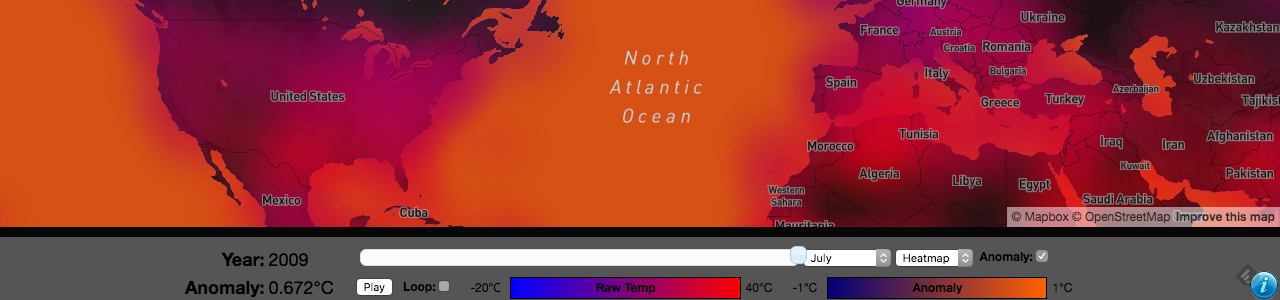
2 |
3 | # HadCRUT3 Climate Change Visualization
4 | ##### Ted Yavuzkurt ([TedY.io](http://www.tedy.io))
5 |
6 | This is a visualization of the [HadCRUT3 Global Temperature Record](http://www.metoffice.gov.uk/research/climate/climate-monitoring/land-and-atmosphere/surface-station-records) provided by the [World Meteorological Organization](http://www.wmo.int/pages/index_en.html). This visualization shows both monthly average temperatures and global temperature anomalies (differences from long term mean) from 1850-2010. More than 3000 land temperature stations are visualized.
7 |
8 | The visualization is powered by [Mapbox GL](https://www.mapbox.com/blog/mapbox-gl/)
9 |
10 | ## Motivation
11 | A friend of mine started working at Mapbox recently and has been singing their praises. When I saw the HadCRUT3 data posted on Reddit(?) I thought it would be a great opportunity to experiment with the API. This was pretty fun to make and the visualization code (```climate-sim.js```) is **heavily** commented to explain how it works.
12 |
13 | ## Live Demo
14 | [A live demo is available here.](https://tedyav.com/demos/climate-vis/)
15 |
16 | ## How it Works
17 | The raw temperature data is contained in ```climate-data.tar.gz``` and was downloaded from the [UK Met Office](http://www.metoffice.gov.uk/research/climate/climate-monitoring/land-and-atmosphere/surface-station-records). I wrote a simple python script to parse these files (```parse.py```), turning them into [GeoJSON](http://geojson.org/) Feature Collections that could be uploaded to [Mapbox Studio](https://www.mapbox.com/studio/).
18 |
19 | The parsing script generates 13 output files. Each output file contains all temperature data for a given month of the year, while one contains header information (name of station, elevation, country, etc).
20 |
21 | I divided the data like this because placing all temperature data in one feature collection was too large for Mapbox Studio (and browsers) to display comfortably. Since we're concerned with seeing data trends, segmenting the data by month makes sense as this shows change over time rather than seasonal variations.
22 |
23 | Within the GeoJSON collections, each station is represented by a point feature. It has properties numbered from ```0``` to ```160```, corresponding to obvserved temperature in 1850 until 2010. If a temperature observation is missing, the value is set to ```-99```, so that the visualization code knows to disregard it.
24 |
25 | Once the data was processed, I uploaded all files to [Mapbox Studio](https://www.mapbox.com/studio/) and added them to a new style. Each file went on a different layer, which were placed below country labels / boundaries to prevent the visualization from obscuring the underlying map.
26 |
27 | All layers were initially set to be invisible so that I could enable / disable them programmatically.
28 |
29 | I then exported this style and used it as the basis of the Visualization. The nice thing about this is that I don't have to add layers to the map manually--since they're in the style they will be automatically loaded, though they will be invisible at first.
30 |
31 | The actual visualization code is stored in ```demos/climate-sim.js```. It's fairly straightforward and **thoroughly commented**, but I'll go through it here to explain things I learned along the way.
32 |
33 | ###Breakdown of the code
34 |
35 | The main code for this is stored in `climate-sim.js`, but I'll go over the HTML first. Not going to go over the styles as I've never been strong with CSS.
36 |
37 | ####0. HTML File
38 | The HTML for this is pretty simple:
39 |
40 | ```HTML
41 |
42 |
43 |
44 |
45 | HadCRUT3 Climate Data
46 |
47 |
48 |
49 |
50 |
51 |
52 |
53 |
54 |
55 |
56 |
57 |
58 |
59 |
60 |
61 |
62 |
63 |
64 |
65 |
88 |
89 |
90 |
91 | ```
92 |
93 | We load a few scripts, create a div for our map, and then have some rows at the bottom for controls. That's it. The heavy lifting is in `climate-sim.js`.
94 |
95 | ####1. Constants
96 | These aren't terribly interesting and are commented in the file if you want to change them. They tell the script when the data set starts, the colors to use, overall map style to use, etc.
97 |
98 | ```javascript
99 | mapboxgl.accessToken = 'pk.eyJ1IjoidGVvbWFuZGF2aWQiLCJhIjoiY2lwaHBrNnp4MDE2Z3RsbmpxeWVkbXhxMSJ9.rhKrjQ0Eb8iH0inNPQ7W8Q';
100 | const mapStyle = 'mapbox://styles/teomandavid/ciqhsdrro002qcfnn41ofo4f2';
101 |
102 | // need to declare this before using it, or JQuery will throw an error
103 | var map;
104 |
105 | const months = ['january', 'february', 'march', 'april', 'may', 'june', 'july', 'august', 'september', 'october', 'november', 'december'];
106 | const tempAnomaly = // redacted
107 | const dataStartYear = 1850; // year the data set starts, inclusive
108 | const dataEndYear = 2010; // year the data set ends, not inclusive
109 | const defaultStyle = 'solid'; // default display mode for the map ('solid' or 'heatmap')
110 | const defaultStartYear = 2000; // year to start the display
111 | const defaultStartMonth = months[0]; // month to start the display
112 | const animationSpeed = 1000; // how fast to change years in milliseconds
113 | const tempRange = [-20, 40]; // temperature range for raw temperatures
114 | const tempColors = [[0,0,255], [255,0,0]]; // colors for Raw Temperature Gradient (color 1: [Red, Green, Blue] color2: [Red, Green, Blue])
115 | const anomalyRange = [-1, 1]; // temperature range for anomaly temperatures
116 | const anomalyColors = [[0,0,119], [255,97,0]]; // colors for Anomaly Temp Gradient (color 1: [Red, Green, Blue] color2: [Red, Green, Blue])
117 | const layerNames = months;
118 | ```
119 |
120 | ####2. Global State Variables
121 | Next I declare some globals to store values like the current year for the visualization, the current selected temperature display style, whether the animation is playing or not, etc.
122 |
123 | ```javascript
124 | var currentYear = defaultStartYear; // current year for simulation
125 | var currentMonth = defaultStartMonth; // current month for simulation
126 | var currentIndex = currentYear - dataStartYear; // current position in temperatures array (i.e. year offset)
127 | var currentStyle = defaultStyle; // current simulation display style ('solid' or 'heatmap')
128 |
129 | // display variables
130 | var defaultWaterColor; // default color for water -- loaded dynamically from map on init
131 | var showAnomaly = false; // display anomaly data or not
132 |
133 | // animation variables
134 | var intervalID; // JavaScript intervalID for animation, so it can be cancelled
135 | var playing = false; // animation playing or not
136 | var loop = false;
137 | ```
138 |
139 | Most of this is uninteresting and commented thoroughly, though one interesting tidbit is this:
140 |
141 | ```javascript
142 | var popup = new mapboxgl.Popup({ // popup object
143 | closeButton: false,
144 | closeOnClick: false
145 | });
146 | var popupActive = false; // TRUE: popup is showing FALSE: popup hidden
147 | var currentFeature = null; // current feature loaded in popup
148 | ```
149 |
150 | If you've played with the live demo for the map, you'll notice the little information pop-up when you hover over a point. This is actually **a single popup object** that I simply move around. This is a better way to work with popups than creating one for each point and showing/hiding them.
151 |
152 | ####3. Helper Functions
153 | I declare a few functions to calculate gradient colors and populate form fields with JQuery. Again, not terribly interesting.
154 |
155 | ```javascript
156 | function convertColor(colorArray){ return "rgb(" + colorArray[0] + "," + colorArray[1] + "," + colorArray[2] + ")"; }
157 | // calculates color along a gradient, returns [R,G,B] array
158 | function colorFromGradient(percent, gradient){ return gradient[0].map(function(color, index){return Math.round((1-percent)*color + percent*gradient[1][index]);}); }
159 | // initializes select menus
160 | function initSelect(id, source, selected, handler){ source.forEach(function(item){ var option = $("").attr("value",item).text(item); if(item == selected) {option.attr("selected", "selected");} $(id).append(option); }); $(id).on('change', function(){ handler(this.value); }); }
161 | // loads temperature scales
162 | function loadTemperatureScales() {var elements = ['#raw-temp-start', '#raw-temp-end', '#anomaly-start', '#anomaly-end']; var temps = [tempRange[0], tempRange[1], anomalyRange[0], anomalyRange[1]]; elements.forEach(function(ele, index){ $(ele).html(temps[index] + "°C"); }); }
163 | // toggles animation when button is pushed
164 | function toggleAnimation(){ if(playing) { $('#toggle-loop').attr('disabled', true); $('#playpause').text("Play"); window.clearInterval(intervalID);}else { $('#toggle-loop').attr('disabled', false); $('#playpause').text("Stop"); intervalID = window.setInterval(function(){ if(currentYear < dataEndYear - 1){ currentYear++; }else if(loop){ currentYear = dataStartYear;}else{$('#playpause').click();} updateMap(); }, animationSpeed); } playing = !playing;}
165 | // shows an alert w/author information
166 | function showInfo(e){e.preventDefault(); alert("HADCrut3 Climate Simulation by Teoman (Ted) Yavuzkurt.\nhttp://www.github.com/TeomanDavid\nhttp://www.teomandavid.com\n\nSource available on GitHub under MIT license (my portions).\nRaw Data From: http://www.metoffice.gov.uk/research/climate/climate-monitoring/land-and-atmosphere/surface-station-records\n\nPOWERED BY MAPBOXGL: http://www.mapbox.com");}
167 | ```
168 |
169 | ####4. Temperature/Header Display Styles
170 | This is where the code starts to get interesting. I searched for a long time about how to do a good temperature display using Mapbox GL, and I ultimately decided that trying to do a contour map would be too complicated. Instead, I opted to offer two distinct display methods: ```heatmap``` and ```solid```. These are stored in a global object called ```styles``` that contains two functions: ```heatmap``` and ```solid```.
171 |
172 | I use functions instead of static styles *because I need to choose which property contains temperature data dynamically*. Thus, I can call ```styles['heatmap'](150)``` to get a heatmap temperature style corresponding to the 150th year of the visualization.
173 |
174 | Here is the ```heatmap``` style
175 |
176 | ```javascript
177 | var styles = {
178 | heatmap : function(prop){
179 | return{
180 | 'circle-radius' : {
181 | 'type': 'exponential',
182 | 'stops': [[2, 60], [6, 600]]
183 | },
184 | 'circle-color': {
185 | 'property' : "" + prop, // we have to do "" + prop to make it a string
186 | 'type' : 'exponential',
187 | 'stops' : [
188 | [tempRange[0], convertColor(tempColors[0])],
189 | [tempRange[1], convertColor(tempColors[1])]
190 | ]
191 | },
192 | 'circle-opacity': {
193 | 'property' : "" + prop,
194 | 'type': 'exponential',
195 | 'stops': [[-99, 0.0], [-50, 0.125]]
196 | },
197 | 'circle-blur': 1
198 | };
199 | },
200 | ```
201 |
202 | All temperatures are displayed as circles with radii from 60 at base-zoom to 600 at max-zoom. This ensures they will be quite large and overlap. To create the heatmap effect, you'll notice ```circle-opacity``` is set to ```0.125```. This ensures that they will add and blend with each other (it is set to ```0.0``` at ```-99``` so that missing data points do not draw). Lastly, I set ```circle-blur``` to ```1``` so that they display in a very diffuse manner.
203 |
204 | Continuing on, the ```solid``` style is a little more straightforward:
205 |
206 | ```javascript
207 | solid : function(prop){
208 | return{
209 | 'circle-radius': {
210 | 'type': 'exponential',
211 | 'stops': [[2, 5], [6, 35]]
212 | },
213 | 'circle-opacity': {
214 | 'property' : "" + prop,
215 | 'type': 'exponential',
216 | 'stops': [[-99, 0.0], [-50, 1.0]]
217 | },
218 | 'circle-color': {
219 | 'property' : "" + prop,
220 | 'type' : 'exponential',
221 | 'stops' : [
222 | [tempRange[0], convertColor(tempColors[0])],
223 | [tempRange[1], convertColor(tempColors[1])]
224 | ]
225 | },
226 | 'circle-blur': 0
227 | };
228 | }
229 | };
230 | ```
231 |
232 | Here we have no blur, and 100% opacity. This makes each circle small and discrete--ideal for showing the precise location of temperature stations.
233 |
234 | Lastly, we have the style for our header layer:
235 |
236 | ```javascript
237 | var headerStyle = {
238 | 'circle-radius' : styles['solid'](0)['circle-radius'],
239 | 'circle-opacity': 0
240 | };
241 | ```
242 |
243 | Interesting points here. First, I use the ```circle-radius``` property from the ```solid``` style. This means that I don't have to keep the code in sync if I change the radius of the ```solid``` style. Also, `circle-opacity` is set to ```0``` so that the header dots will trigger the popups to display without drawing on the map.
244 |
245 | ####5. Map Update Functions
246 | I wrote a few functions to wrap map updates. **Note: the map has not been initialized at this point, but I'm writing this in terms of the layout of the file. We'll get to the creation of the map soon, I promise!**
247 |
248 | Every time the map changes I call ```updateMap``` which simply updates the current temperature index and then applies new styles to the map.
249 |
250 | ```javascript
251 | function updateMap(){
252 | currentIndex = currentYear - dataStartYear;
253 | applyStyles([currentMonth],['circle-color', 'circle-opacity']);
254 | if(showAnomaly){
255 | updateAnomaly();
256 | }
257 | updateHTML();
258 | updatePopup();
259 | }
260 | ```
261 |
262 | One thing to note is that it calls ```applyStyles```, which only updates the properties passed in. On a given map update, I only need to change the `circle-color` and `circle-opacity` properties, as blur and size do not change within a given display style. This speeds up redraws.
263 |
264 | Here is the `applyStyles` function:
265 |
266 | ```javascript
267 | function applyStyles(layers, props, style){
268 | if(style == null){ style = styles[currentStyle](currentIndex); } // bug fix: safari and some browsers don't support default assignment in arguments
269 | if(props === "all"){ props = Object.keys(style);} // get all the properties from the style if we didn't specify which
270 | layers.forEach(function(layer){
271 | props.forEach(function(prop){
272 | // set the paint property on each layer
273 | map.setPaintProperty(layer, prop, style[prop]);
274 | });
275 | });
276 | }
277 | ```
278 |
279 | This code would be simpler if ES6 default arguments were more commonly supported, but essentially I just iterate over the specified layers and apply the current style to all of them by calling ```map.setPaintProperty```. Writing this wrapper function allows me to change the style for all layers easily, by calling it with the global ```layerNames``` variable as the `layers` argument.
280 |
281 | Next, I have the `updateAnomaly` function. This changes the color of the water on the map if the user has checked the anomaly checkbox.
282 |
283 | ```javascript
284 | function updateAnomaly(){
285 | var color = defaultWaterColor;
286 | if(showAnomaly){
287 | var anomaly = tempAnomaly[currentYear];
288 | var percent = (anomaly - anomalyRange[0])/(anomalyRange[1] - anomalyRange[0]);
289 | percent = ((percent > 1)? 1 : ((percent < 0)?0 : percent));
290 | color = convertColor(colorFromGradient(percent, anomalyColors));
291 | }
292 | map.setPaintProperty('water', 'fill-color', color);
293 | }
294 | ```
295 |
296 | Pretty straightforward. I get the current temperature anomaly and calculate what percentage it is in the anomaly range I specified (in the constants). I then use some helper functions (`convertColor` and `colorFromGradient`) to calculate the color for this and draw it on the map.
297 |
298 | Next, I have `updatePopup`. This just changes the popup's HTML content if the map is animating (so that the temperature updates).
299 |
300 | ```javascript
301 | function updatePopup(){
302 | if(popupActive){
303 | popup.setHTML("
" + currentFeature['name'] + '
' + "Temperature: " + currentFeature['temperatures']["" + currentIndex] + "°C");
304 | }
305 | }
306 | ```
307 |
308 | And finally, a helper function to keep all the HTML fields in the UI up to date:
309 |
310 | ```javascript
311 | function updateHTML(){
312 | $('#year').html(currentYear);
313 | $('#anomaly').html(tempAnomaly[currentYear] + "°C");
314 | $('#map-slider').slider("option", "value", currentYear);
315 | }
316 | ```
317 |
318 | ####6. Drawing the Map
319 | I make sure the document is ready:
320 |
321 | `$(document).ready(function(){ ... }`
322 |
323 | Create the map:
324 |
325 | ```javascript
326 | map = new mapboxgl.Map({
327 | container: 'map',
328 | style: mapStyle,
329 | zoom: 2,
330 | minZoom: 2,
331 | maxZoom: 7,
332 | dragRotate: false, // don't allow rotation
333 | center: [5.425411010332567, 51.22556912180988]
334 | });
335 | ```
336 |
337 | Then wait for the map to load:
338 | ```
339 | map.on('load', function () { ... }
340 | ```
341 |
342 | Display our data and load some values:
343 |
344 | ```javascript
345 | defaultWaterColor = map.getPaintProperty('water', 'fill-color');
346 | applyStyles(layerNames, "all");
347 | applyStyles(['headers'],['circle-radius', 'circle-opacity'], headerStyle)
348 | map.setLayoutProperty('headers', 'visibility', 'visible');
349 | map.setLayoutProperty(currentMonth, 'visibility', 'visible');
350 | ```
351 | I store the water color so it can be restored (this decouples the code from the specified style). I apply the current style to all layers, and then set the current layers as visible so they can interact with the mouse.
352 |
353 | Next I create the slider using JQuery:
354 |
355 | ```javascript
356 | $('#map-slider').slider({
357 | animate: 'fast',
358 | max: dataEndYear - 1,
359 | min: dataStartYear,
360 | value: currentYear,
361 | slide: function(event, ui){
362 | $('#year').html(ui.value);
363 | $('#anomaly').html(tempAnomaly[ui.value] + "°C");
364 | },
365 | stop: function(event, ui){
366 | currentYear = ui.value;
367 | updateMap();
368 | }
369 | });
370 | updateHTML();
371 | ```
372 | Important thing to note here: I do not update the map as the slider is moving--only when it stops. This makes it faster.
373 |
374 | Next I initialize the months selection menu and set an event handler on change (using my `initSelect` helper function):
375 |
376 | ```javascript
377 | initSelect('#map-months', months, currentMonth, handler = function(month){
378 | var prevMonth = currentMonth;
379 | currentMonth = month;
380 | map.setLayoutProperty(prevMonth, 'visibility', 'none');
381 | map.setLayoutProperty(currentMonth, 'visibility', 'visible');
382 | updateMap();
383 | });
384 | ```
385 |
386 | Important point to note here is that to change months, I simply hide the current layer and show the layer corresponding to the month I want. This creates a break in continuity to change layers, but it ensures that animations within a layer (showing temperature trends) are smooth.
387 |
388 | Next, I initialize the styles selector similarly:
389 |
390 | ```javascript
391 | initSelect('#map-display', Object.keys(styles), currentStyle, handler = function(style){
392 | currentStyle = style;
393 | applyStyles(layerNames, "all");
394 | });
395 | ```
396 | Here I use the `applyStyles` helper to reapply the new style to all layers.
397 |
398 | Next major order of business is setting up event handling for the popups:
399 | ```javascript
400 | map.on('mousemove', function(event) {
401 | // heatmap is too diffuse to display popups, so we return
402 | if(currentStyle == 'heatmap') { popupActive = false; return popup.remove(); }
403 |
404 | // query features at the mouse pointer location
405 | var features = map.queryRenderedFeatures(event.point, {
406 | layers: ['headers', currentMonth]
407 | });
408 |
409 | // if we didn't get any features or we only got 1 (i.e. not enough to get our data), return
410 | if(!features.length || features.length == 1) { popupActive = false; return popup.remove(); }
411 |
412 | // we loop through all the features we found and pull out the info we need
413 | var result = [];
414 | for(i in features){
415 | if('name' in features[i].properties){
416 | result['name'] = features[i].properties.name;
417 | result['coordinates'] = features[i].geometry.coordinates;
418 | }
419 | if(("" + currentIndex) in features[i].properties){
420 | result['temperatures'] = features[i].properties;
421 | }
422 | }
423 |
424 | // if the temperature is -99 at this point, it means the station has missing data
425 | // so we don't want to display a popup because there will not be a dot on the map. Return.
426 | // note again we have to use "" + currentIndex to access our temperature data because
427 | // the indices in GEOJSON features are all strings.
428 | if(result['temperatures']["" + currentIndex] == -99) { popupActive = false; return popup.remove(); }
429 |
430 | // if we've passed all of these checks, we are going to display the popup, so we set it active
431 | popupActive = true;
432 |
433 | // store the currentFeature so we can update temperature (if map is animated)
434 | // without querying again (slow)
435 | currentFeature = result;
436 |
437 | // change mouse cursor
438 | map.getCanvas().style.cursor = 'pointer';
439 |
440 | // display the popup
441 | popup.setLngLat(result['coordinates'])
442 | .addTo(map);
443 | updatePopup();
444 | });
445 |
446 | ```
447 |
448 | I've left the comments in here to explain what it's doing. Main thing to note is that we don't display the popup if we're in heatmap mode (as this wouldn't make sense--how would you know which station you're over?) and that we only display the popup by calling `popup.setLngLat(result['coordinates'])` if we've passed all the checks. If we fail any check (ensuring that the station has data at this time, ensuring that we're in the right mode, etc) we remove the popup by calling `popup.remove()`.
449 |
450 | Also note that since the header layer and the temperature layer are different, we must query two layers as follows:
451 |
452 | ```javascript
453 | var features = map.queryRenderedFeatures(event.point, {
454 | layers: ['headers', currentMonth]
455 | });
456 | ```
457 |
458 | and then load the data out of them using a bit of clever logic:
459 |
460 | ```javascript
461 | var result = [];
462 | for(i in features){
463 | if('name' in features[i].properties){
464 | result['name'] = features[i].properties.name;
465 | result['coordinates'] = features[i].geometry.coordinates;
466 | }
467 | if(("" + currentIndex) in features[i].properties){
468 | result['temperatures'] = features[i].properties;
469 | }
470 | }
471 | ```
472 |
473 | This adds complexity, but keeps the map size smaller. Adding header data to every temperature layer would be wasteful.
474 |
475 | Lastly, I set up event handlers for the other controls:
476 |
477 | ```javascript
478 | $('#playpause').on('click', toggleAnimation);
479 | $('#toggle-anomaly').on('change', function(){
480 | showAnomaly = !showAnomaly;
481 | updateAnomaly();
482 | });
483 | $('#toggle-loop').on('change', function() { loop = !loop; });
484 | $('#info-button').on('click', showInfo);
485 | ```
486 |
487 | That's all there is to it! Seems like a lot going on, but it's basically pretty simple. Just a few wrapper functions to update the proper layers. We just translate a given year to a temperature index, and then tell Mapbox GL to render the map color based on that temperature index.
488 |
489 | ## Running/Modifying the Code
490 | If you're interested in tinkering around with the visualization, first clone the repo:
491 |
492 | ```git clone https://github.com/TedYav/HadCRUT3-Visualization && cd ./HadCRUT3-Visualization```
493 |
494 | There are a few things you can do:
495 |
496 | ###Parse the Data Differently
497 | The parsing script has a few options if you want to mess around on your own. If you just want to reparse the data using the parameters I did, then do the following (assuming you are in the repo directory):
498 |
499 | ```tar -zxvf ./climate-data.tar.gz && python3 parse.py```
500 |
501 | The GeoJSON files will then be in the ```output``` directory.
502 |
503 | I've written a few different options to output the data. If you want to see them run:
504 |
505 | ```python3 parse.py --help```
506 |
507 | ####Recalculate Temperature Anomalies####
508 | There is a script [available here that will calculate temperature anomalies](http://www.metoffice.gov.uk/media/zip/8/k/gridding_and_averaging_code.zip). If you want to run it yourself quickly, run the following command:
509 |
510 | ```
511 | mkdir anomaly && cd ./anomaly && curl http://www.metoffice.gov.uk/media/zip/e/0/station_files.20110720.zip > station_files.zip && unzip -x station_files.zip -d ./station_files && curl http://www.metoffice.gov.uk/media/zip/8/k/gridding_and_averaging_code.zip > grid.zip && unzip -x grid.zip && perl station_gridder.perl | perl make_global_average_ts_ascii.perl > anomaly.txt
512 | ```
513 |
514 | Anomaly data is currently stored directly in `climate-sim.js`.
515 |
516 | ###Change the Map Style
517 | If you want to fundamentally change the style of the map, the best way to do it will be in [Mapbox Studio](https://www.mapbox.com/studio/). You will have to run the parsing script again to reupload the data.
518 |
519 | [Here is the original style I made](https://api.mapbox.com/styles/v1/teomandavid/ciqhsdrro002qcfnn41ofo4f2.html?title=true&access_token=pk.eyJ1IjoidGVvbWFuZGF2aWQiLCJhIjoiY2lwaHBrNnp4MDE2Z3RsbmpxeWVkbXhxMSJ9.rhKrjQ0Eb8iH0inNPQ7W8Q#2.0001085731437036/36.39815027614806/-12.706191133281237/0) in case you want to see it by itself and edit it.
520 |
521 | Make sure you set your layer names to lowercase months (i.e. 'january'), or set the names accordingly in `layerNames` in `climate-sim.js`.
522 |
523 | ###Change Visualization Colors or Display###
524 | The best way to do this is to edit `climate-sim.js`. There are a set of constants at the top of the file that control most display options. If you want to dig in further, edit the code and have fun!
525 |
--------------------------------------------------------------------------------