├── img
└── screenshot.png
├── MySQLMonitor.iml
├── releases
└── MySQLMonitor.jar
├── README.md
├── pom.xml
└── src
└── main
└── java
└── net
└── thekingofduck
└── MySQLMonitor.java
/img/screenshot.png:
--------------------------------------------------------------------------------
https://raw.githubusercontent.com/TheKingOfDuck/MySQLMonitor/HEAD/img/screenshot.png
--------------------------------------------------------------------------------
/MySQLMonitor.iml:
--------------------------------------------------------------------------------
1 |
2 |
--------------------------------------------------------------------------------
/releases/MySQLMonitor.jar:
--------------------------------------------------------------------------------
https://raw.githubusercontent.com/TheKingOfDuck/MySQLMonitor/HEAD/releases/MySQLMonitor.jar
--------------------------------------------------------------------------------
/README.md:
--------------------------------------------------------------------------------
1 | []()
2 | []()
3 |
4 | # 404StarLink 2.0 - Galaxy
5 | 
6 |
7 | MySQLMonitor 是 404Team [星链计划2.0](https://github.com/knownsec/404StarLink2.0-Galaxy)中的一环,如果对MySQLMonitor有任何疑问又或是想要找小伙伴交流,可以参考星链计划的加群方式。
8 |
9 | - [https://github.com/knownsec/404StarLink2.0-Galaxy#community](https://github.com/knownsec/404StarLink2.0-Galaxy#community)
10 |
11 | # MySQLMonitor
12 | MySQL实时监控工具(灰盒测试辅助工具) 这三年前的玩意儿了 总体上都不推荐使用这种方式挖洞 建议看看IAST
13 |
14 | # 更新:
15 |
16 | 2020-10-18:
17 | 使用Java重构,打包好的版本可点击[Releases](https://github.com/TheKingOfDuck/MySQLMonitor/releases/tag/1.0)下载
18 |
19 | 2019-04-29:
20 | 修复windows系统下监控不成功的问题(其实就是语序有问题 调整一下就OK) 感谢[@Aoyanm](https://github.com/Aoyanm)的反馈
21 |
22 | 2019-03-26:
23 | 新增加对MySQL8.0.X(MacOS环境下)的支持 感谢[@ALEXI7](https://github.com/ALEXI7)的反馈
24 |
25 | 2019-03-23:
26 | 修改了写错的单词 修复端口非3306无法连接的情况
27 |
28 |
29 | 2019-01-25:
30 | 新增对windows系统 Python2.7的支持
31 | 修复编码问题
32 |
33 | 2019-01-15:
34 | 开源第一版
35 |
36 |
37 |
38 | # 使用:
39 |
40 | ```
41 | java -jar MySQLMonitor.jar -h 127.0.0.1 -user CoolCat -pass mysqlmonitor
42 | ```
43 |
44 | 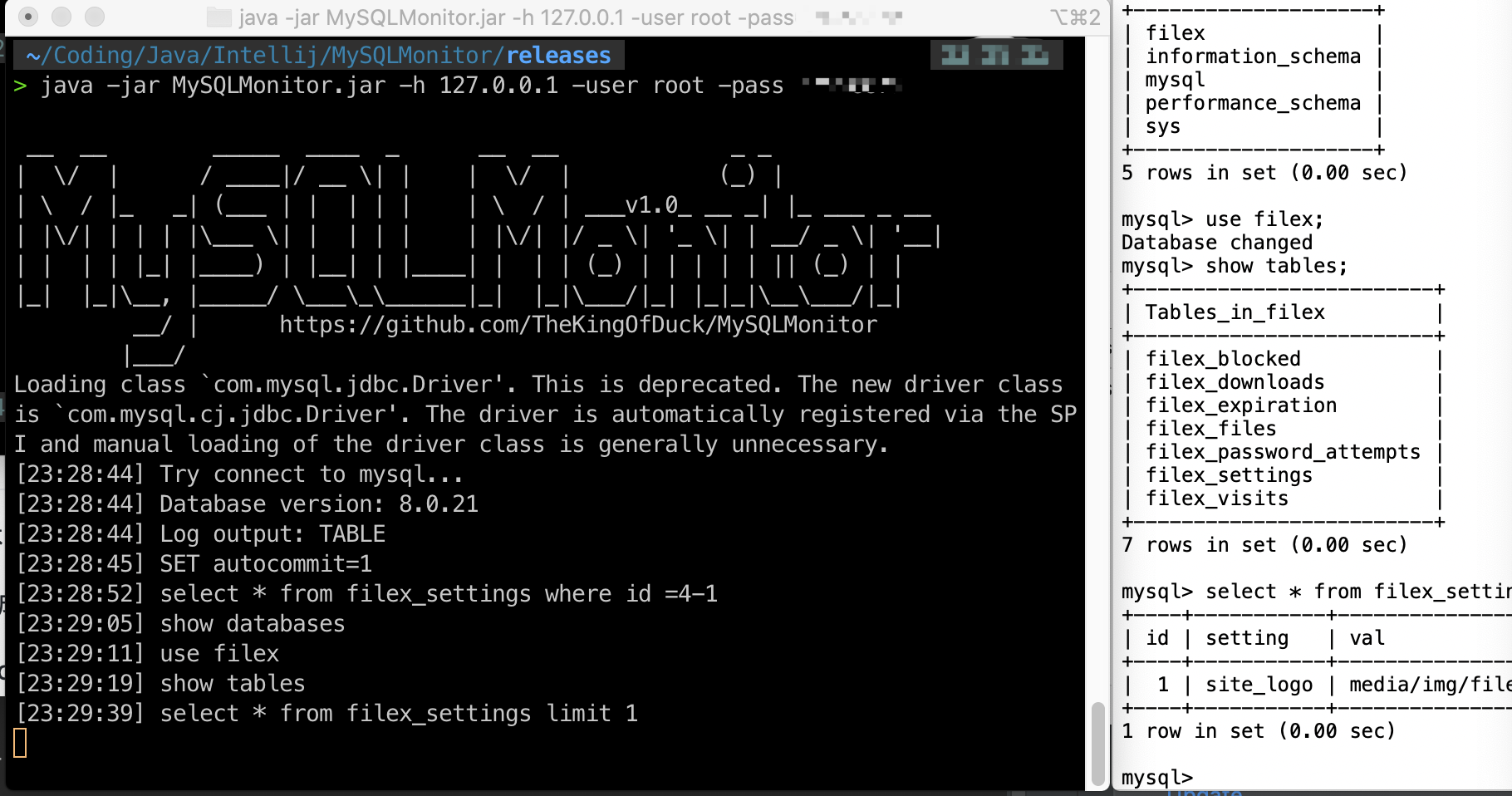
45 |
46 | ### 环境:
47 | 在以下环境中运行通过
48 |
49 | | OS | JAVA | MySQL | status |
50 | | --- | --- | --- | --- |
51 | | MacOS | 1.8 | 8.x | ok |
52 |
53 |
54 | 环境下运行通过
55 | 理论上均可运行 如有问题或修改意见 请点击===>[问题反馈](https://github.com/TheKingOfDuck/MySQLMonitor/issues)
56 |
57 |
58 | # 功能
59 |
60 | * 自动开启MySQL日志 实时显示程序执行过的语句
61 |
62 | * 自动安装依赖
63 |
64 | ### 应用场景:
65 |
66 | https://xz.aliyun.com/t/3875
67 |
68 |
69 |
70 |
--------------------------------------------------------------------------------
/pom.xml:
--------------------------------------------------------------------------------
1 |
2 |
5 | 4.0.0
6 |
7 | net.thekingofduck
8 | MySQLMonitor
9 | 1.0-SNAPSHOT
10 |
11 |
12 |
13 | mysql
14 | mysql-connector-java
15 | 8.0.21
16 |
17 |
18 | commons-cli
19 | commons-cli
20 | 1.4
21 |
22 |
23 |
24 |
25 |
26 |
27 |
28 | maven-assembly-plugin
29 |
30 |
31 |
32 | true
33 |
34 | net.thekingofduck.MySQLMonitor
35 |
36 |
37 |
38 |
39 | jar-with-dependencies
40 |
41 |
42 |
43 |
44 | make-my-jar-with-dependencies
45 | package
46 |
47 | single
48 |
49 |
50 |
51 |
52 |
53 |
54 |
55 |
56 | org.apache.maven.plugins
57 | maven-compiler-plugin
58 |
59 | 1.8
60 | 1.8
61 |
62 |
63 |
64 |
65 |
66 |
67 |
68 |
69 |
70 |
71 |
--------------------------------------------------------------------------------
/src/main/java/net/thekingofduck/MySQLMonitor.java:
--------------------------------------------------------------------------------
1 | package net.thekingofduck;
2 |
3 | import java.io.*;
4 | import java.sql.*;
5 | import java.text.SimpleDateFormat;
6 | import java.util.Date;
7 | import org.apache.commons.cli.*;
8 |
9 | /**
10 | * Project: MySQLMonitor
11 | * Date:2020/10/8 8:58 下午
12 | * Email:CoolCat@gzsec.org
13 | * Github:https://github.com/TheKingOfDuck
14 | *
15 | * @author CoolCat
16 | * @version 1.0.0
17 | */
18 | public class MySQLMonitor {
19 |
20 | public static String ftime() {
21 | SimpleDateFormat ftime = new SimpleDateFormat("HH:mm:ss");
22 | return ftime.format(new Date());
23 | }
24 |
25 | public static void banner() {
26 | String banner = "\n" +
27 | " __ __ _____ ____ _ __ __ _ _ \n" +
28 | "| \\/ | / ____|/ __ \\| | | \\/ | (_) | \n" +
29 | "| \\ / |_ _| (___ | | | | | | \\ / | ___v1.0_ __ _| |_ ___ _ __ \n" +
30 | "| |\\/| | | | |\\___ \\| | | | | | |\\/| |/ _ \\| '_ \\| | __/ _ \\| '__|\n" +
31 | "| | | | |_| |____) | |__| | |____| | | | (_) | | | | | || (_) | | \n" +
32 | "|_| |_|\\__, |_____/ \\___\\_\\______|_| |_|\\___/|_| |_|_|\\__\\___/|_| \n" +
33 | " __/ | https://github.com/TheKingOfDuck/MySQLMonitor \n" +
34 | " |___/ ";
35 | System.out.println(banner);
36 | }
37 |
38 | public static void main(String[] args) throws ClassNotFoundException, ParseException {
39 | banner();
40 |
41 | CommandLineParser parser = new BasicParser();
42 | Options options = new Options();
43 |
44 | options.addOption("h", "host", true, "mysql host");
45 |
46 | options.addOption("p", "port", true, "mysql port");
47 |
48 | options.addOption("user", "username", true, "mysql username");
49 |
50 | options.addOption("pass", "password", true, "mysql password");
51 |
52 | options.addOption("help", "help", false, "Help Info");
53 |
54 | CommandLine commandLine = parser.parse(options, args);
55 |
56 | String helpinfo = String.format("[?]CommandLine:\n" +
57 | "\t-h\t--host\t\tmysql host\n" +
58 | "\t-p\t--port\t\tmysql port\n" +
59 | "\t-user\t--username\tmysql username\n" +
60 | "\t-pass\t--password\tmysql password\n" +
61 | "\t-help\t--help\t\thelp info\n\n" +
62 | "eg:java -jar MySQLMonitor.jar -h 127.0.0.1 -user CoolCat -pass mysqlmonitor");
63 | if (commandLine.hasOption("help")) {
64 | System.out.println(helpinfo);
65 | System.exit(0);
66 | }
67 | if (args.length < 3){
68 | System.out.println(helpinfo);
69 | System.exit(0);
70 | }
71 |
72 | String dbhost = "127.0.0.1";
73 | String dbport = "3306";
74 | String dbuser = "root";
75 | String dbpass = "root";
76 |
77 | if (commandLine.hasOption("h")) {
78 | dbhost = commandLine.getOptionValue("h");
79 | }
80 | if (commandLine.hasOption("p")) {
81 | dbport = commandLine.getOptionValue("p");
82 | }
83 | if (commandLine.hasOption("user")) {
84 | dbuser = commandLine.getOptionValue("user");
85 | }
86 | if (commandLine.hasOption("pass")) {
87 | dbpass = commandLine.getOptionValue("pass");
88 | }
89 |
90 |
91 | String JDBC_DRIVER = null;
92 | String DB_URL = null;
93 |
94 | // 注册 JDBC 驱动
95 | try {
96 | // MySQL 8.0 以下版本 - JDBC 驱动名及数据库 URL
97 | JDBC_DRIVER = "com.mysql.jdbc.Driver";
98 | DB_URL = String.format("jdbc:mysql://%s:%s/mysql",dbhost,dbport);
99 | Class.forName(JDBC_DRIVER);
100 | }catch (Exception e){
101 | // MySQL 8.0 以上版本 - JDBC 驱动名及数据库 URL
102 | JDBC_DRIVER = "com.mysql.cj.jdbc.Driver";
103 | DB_URL = String.format("jdbc:mysql://%s:%s/mysql?useSSL=false&allowPublicKeyRetrieval=true&serverTimezone=UTC",dbhost,dbport);
104 | Class.forName(JDBC_DRIVER);
105 | }
106 |
107 | Connection conn = null;
108 | Statement stmt = null;
109 |
110 |
111 | try{
112 |
113 | // 打开链接
114 | System.out.println(String.format("[%s] %s",ftime(),"Try connect to mysql..."));
115 | conn = DriverManager.getConnection(DB_URL,dbuser,dbpass);
116 |
117 | // 执行查询
118 | stmt = conn.createStatement();
119 | DatabaseMetaData dbinfo = conn.getMetaData();
120 |
121 | System.out.println(String.format("[%s] Database version: %s",ftime(),dbinfo.getDatabaseProductVersion()));
122 | stmt.executeQuery("set global general_log='ON'");
123 |
124 |
125 | ResultSet r = stmt.executeQuery("show variables like 'log_output'");
126 |
127 | String log_output = null;
128 | while (r.next()){
129 | log_output = r.getString("Value");
130 | }
131 | System.out.println(String.format("[%s] Log output: %s",ftime(),log_output));
132 | if (!log_output.equals("TABLE")){
133 | System.out.println(String.format("[%s] Set global log_output='table'",ftime()));
134 | stmt.executeQuery("set global log_output='table'");
135 | }
136 | r.close();
137 | stmt.close();
138 |
139 | } catch(Exception se){
140 | // 处理 JDBC 错误
141 | se.printStackTrace();
142 | }// 处理 Class.forName 错误
143 | finally{
144 | // 关闭资源
145 | try{
146 | if(stmt!=null) stmt.close();
147 | }catch(SQLException se2){
148 | se2.printStackTrace();
149 | }
150 | try{
151 | if(conn!=null) conn.close();
152 | }catch(SQLException se){
153 | se.printStackTrace();
154 | }
155 | }
156 |
157 | try {
158 | Connection conn2 = null;
159 | Statement stmt2 = null;
160 |
161 | conn2 = DriverManager.getConnection(DB_URL,dbuser,dbpass);
162 |
163 | // 执行查询
164 | stmt2 = conn2.createStatement();
165 |
166 | while (true){
167 |
168 | String logsql = "select * from mysql.general_log where command_type =\"Query\" OR command_type =\"Execute\" order by event_time desc limit 2";
169 |
170 | ResultSet log = stmt2.executeQuery(logsql);
171 | while (log.next()){
172 | String logres = log.getString("argument");
173 | if (!logres.equals(logsql)){
174 | System.out.println(String.format("[%s] %s",ftime(),logres));
175 | }
176 | //不适当休眠一下会疯狂查询 占用cpu资源。
177 | Thread.sleep(100);
178 | }
179 | }
180 | }catch (Exception e){
181 | e.printStackTrace();
182 | }
183 |
184 | }
185 | }
186 |
--------------------------------------------------------------------------------