');
180 | marker = marker.insertBefore(elems.first()); // in jQuery marker would remain current
181 | elems.each(function(k, v) { // in Cheerio, we update with the output.
182 | section.append($(v));
183 | });
184 | section.insertBefore(marker);
185 | marker.remove();
186 | return section; // This is what jQuery would return, IIRC.
187 | },
188 | });
189 | };
190 |
191 | sanitize.path = function(from, to){
192 | return path.relative(from, path.join(__dirname, '../', to));
193 | };
194 |
195 | module.exports = sanitize;
196 |
--------------------------------------------------------------------------------
/test/config-file/test.css:
--------------------------------------------------------------------------------
1 |
2 | html {
3 | font-family: 'Roboto';
4 | }
5 |
6 | code, pre {
7 | font-family: 'Roboto Mono';
8 | font-size: .95em;
9 | }
10 |
11 | h1 {
12 | font-size: 1.75em;
13 | font-weight: normal;
14 | }
15 |
16 | h2 {
17 | font-size: 1.5em;
18 | }
19 |
20 | h1,
21 | h2,
22 | h3,
23 | h4,
24 | h5,
25 | h6,
26 | p,
27 | ul,
28 | ol {
29 | margin: 0 0 1.5rem;
30 | }
31 |
32 | p {
33 | line-height: 1.5rem;
34 | }
35 |
36 | /* SG
37 | # Sass:Config/Typography Settings
38 |
39 |
40 | ## `$$base-font-size` - Pixel
41 | Font size all other values will use for calculation. Will be converted to `rems`.
42 |
43 | ## `$$base-line-height` - Pixel
44 | Line-height for base font-size. Will be used to determine the vertical spacing values when `type-space()` is used.
45 |
46 | ## `$$font-looseness` - Percentage
47 | What to base the tightness/looseness of automatically-generated `line-heights`.
48 |
49 | ## `$$auto-scale-type` - Boolean
50 | Uses `$$scale-ratio` to create font sizes for headings starting from the `$$base-font-size`.
51 |
52 | ## `$$scale-ratio` - Number (float)
53 | Used for `$$auto-scale-type` and for `modular-scale()`.
54 |
55 | ## `$$rem-px-fallback` - Boolean
56 | Determines whether `rems()` conversion includes a pixel-value fallback for older browsers like IE8.
57 |
58 | */
59 |
60 | /* SG
61 | # Sass:Config/Grid Settings
62 |
63 | ## `$$max-site-width` - Pixel
64 | Maximum desktop width for the site wrapper.
65 |
66 | ## `$$grid-gutter` - Pixel
67 | Space between grid items. Also used in `type-space()` for horizontal spacing units.
68 | */
69 |
70 | /* SG
71 |
72 | ## `$$max-site-width` - Pixel
73 | Maximum desktop width for the site wrapper.
74 |
75 | ## `$$grid-columns` - Number
76 | Base number of grid columns to be generated. Note that any column number will include all fractions of the fewer columns. For instance, a 12-column grid would also include all fractions of 1-12 (including things like three-sevenths).
77 |
78 | ## `$$grid-gutter` - Pixel
79 | Space between grid items. Also used in `type-space()` for horizontal spacing units.
80 | */
81 |
82 |
83 | /* SG
84 | # Lists
85 |
86 | A list without a class is rendered normally. All lists can be given a class that will modify how its children will be styled.
87 |
88 | ```html_example
89 |
90 | - List Item
91 |
92 | - Nested List Item
93 |
94 |
95 | - List Item
96 | - List Item
97 |
98 | ```
99 |
100 | */
101 |
102 |
103 | /* SG
104 | # Lists/Bordered Lists
105 |
106 | @priority last
107 |
108 | Creates a list with borders above and below each list item.
109 |
110 | ```html_example
111 |
112 | - List Item
113 | - List Item
114 | - List Item
115 |
116 | ```
117 | */
118 |
119 | ul {
120 | margin: 0;
121 | }
122 |
123 | [class*="list_bordered"] {
124 | list-style: none;
125 | margin-left: 0;
126 | padding-left: 0;
127 | margin-bottom: .75rem;
128 | }
129 |
130 | .list_bordered {
131 | padding-top: 24px;
132 | padding-top: 1.5rem;
133 | padding-bottom: 24px;
134 | padding-bottom: 1.5rem;
135 | }
136 |
137 | [class*="list_bordered"] > li {
138 | list-style-image: none;
139 | list-style-type: none;
140 | margin-left: 0;
141 | }
142 |
143 | [class*="list_bordered"] > li {
144 | border-top: 1px solid #e4eaf3;
145 | padding-top: 24px;
146 | padding-top: 1.5rem;
147 | padding-bottom: 24px;
148 | padding-bottom: 1.5rem;
149 | margin-bottom: -1px;
150 | }
151 |
152 | [class*="list_bordered"] > li:first-child {
153 | border-top-color: transparent;
154 | }
155 |
156 | /* SG
157 |
158 | Appending `list_bordered` with `--short` will reduce the padding between each item.
159 |
160 | ```html_example
161 |
162 | - List Item
163 | - List Item
164 | - List Item
165 |
166 | ```
167 | */
168 |
169 | .list_bordered--short > li {
170 | padding-top: 12px;
171 | padding-top: 0.75rem;
172 | padding-bottom: 12px;
173 | padding-bottom: 0.75rem;
174 | }
175 |
176 | /* SG
177 | # Lists/Inline Lists
178 |
179 | @priority 1
180 |
181 | A list where each item is in a row, with spacing to the right of each item.
182 |
183 | ```html_example
184 |
185 | - List Item
186 | - List Item
187 | - List Item
188 |
189 | ```
190 | */
191 | .list_inline {
192 | list-style: none;
193 | margin-left: 0;
194 | padding-left: 0;
195 | }
196 |
197 | .list_inline > li {
198 | list-style-image: none;
199 | list-style-type: none;
200 | margin-left: 0;
201 | }
202 |
203 | .list_inline > li {
204 | display: inline-block;
205 | padding-left: 0;
206 | width: auto;
207 | vertical-align: middle;
208 | padding-right: 16px;
209 | padding-right: 1rem;
210 | }
211 |
212 | .list_inline > li:last-child {
213 | padding-right: 0;
214 | }
215 |
216 | /* SG
217 | # Lists/Breadcrumbs
218 |
219 | @priority 3
220 |
221 | A list where each item is in a row, with a ▸ between each item.
222 |
223 | ```html_example
224 |
225 | - List Item
226 | - List Item
227 | - List Item
228 |
229 | ```
230 | */
231 | .breadcrumbs {
232 | list-style: none;
233 | margin-left: 0;
234 | padding-left: 0;
235 | padding-right: 32px;
236 | padding-right: 2rem;
237 | }
238 |
239 | .breadcrumbs > li {
240 | list-style-image: none;
241 | list-style-type: none;
242 | margin-left: 0;
243 | }
244 |
245 | .breadcrumbs > li,
246 | .breadcrumb {
247 | display: inline-block;
248 | white-space: nowrap;
249 | margin-left: 0;
250 | }
251 |
252 | .breadcrumbs > li a,
253 | .breadcrumb a {
254 | display: block;
255 | }
256 |
257 | .breadcrumbs > li:after,
258 | .breadcrumb:after {
259 | content: "\25B8";
260 | display: inline-block;
261 | }
262 |
263 | /* SG
264 | # Lists/Navigation List
265 |
266 | @priority last
267 |
268 | List where anchor tags fill the space of their containers. Useful as a modifier class. Can be used on any item with multiple child anchors (doesn't have to be an `ol` or `ul`).
269 |
270 | ```html_example
271 |
282 | ```
283 | */
284 | .list_nav {
285 | list-style: none;
286 | margin-left: 0;
287 | padding-left: 0;
288 | }
289 |
290 | .list_nav > li {
291 | list-style-image: none;
292 | list-style-type: none;
293 | margin-left: 0;
294 | }
295 |
296 | .list_nav a {
297 | padding-top: 12px;
298 | padding-top: 0.75rem;
299 | padding-bottom: 12px;
300 | padding-bottom: 0.75rem;
301 | }
302 |
303 | /* SG
304 | @category Layout
305 | @title Media Object
306 |
307 | Isolates an image from text wrapping underneath. Useful for creating an association between an image and text. Often used with an icon or avatar. Adding other classes to the `isolate_body` can create a more stylized version.
308 |
309 | ```html_example
310 |
316 | ```
317 | */
318 |
319 | .media {
320 | overflow: hidden;
321 | margin-bottom: 1.5rem;
322 | }
323 |
324 | .media__media,
325 | .media__body {
326 | overflow: hidden;
327 | _overflow: visible;
328 | zoom: 1;
329 | }
330 |
331 | .media__body {
332 | padding-left: 1.5rem;
333 | }
334 |
335 | .media__media {
336 | float: left;
337 | }
338 |
339 | /* SG
340 | # Layout/Arrangement object
341 |
342 | Creates an image-content block that vertically aligns images and text (centered, bottom, or top).
343 |
344 | **Children of the `arrange` wrapper can be given four classes:**
345 | * `arrange__fit` or `arrange__media` will create a block that fits the width of its content (useful for images and media).
346 | * `arrange__fill` will fill the remaining space.
347 | * `arrange__body` is similar to `arrange__fill` but defaults to middle alignment.
348 |
349 | ```html_example
350 |
351 |
352 |
355 |
356 | Content that is vertically (middle) aligned with the image.
357 |
358 |
359 | ```
360 | */
361 |
362 |
363 | .arrange {
364 | display: table;
365 | table-layout: auto;
366 | min-width: 100%;
367 | margin-bottom: 1.5rem;
368 | }
369 |
370 | .arrange__media img,
371 | .arrange__fit img {
372 | display: block;
373 | max-width: none;
374 | margin: auto;
375 | }
376 |
377 | .arrange__body {
378 | padding-left: 1.5rem;
379 | }
380 |
381 | .arrange__body,
382 | .arrange__fill {
383 | width: 100%;
384 | }
385 |
386 | .arrange__body,
387 | .arrange__fill,
388 | .arrange__fit,
389 | .arrange__media {
390 | display: table-cell;
391 | }
392 |
393 | .arrange__media,
394 | .arrange__body,
395 | .arrange__fill,
396 | .arrange__fit {
397 | vertical-align: middle;
398 | }
399 |
400 | .arrange__top > .arrange__media,
401 | .arrange__top > .arrange__body,
402 | .arrange__top > .arrange__fill,
403 | .arrange__top > .arrange__fit {
404 | vertical-align: top;
405 | }
406 |
407 | /* SG
408 |
409 | ```html_example
410 |
411 |
412 |
413 |

414 |
415 |
416 | Content that is bottom aligned to the image.
417 |
418 |
419 | ```
420 | */
421 |
422 | .arrange--bottom > .arrange__media,
423 | .arrange--bottom > .arrange__body,
424 | .arrange--bottom > .arrange__fill,
425 | .arrange--bottom > .arrange__fit {
426 | vertical-align: bottom;
427 | }
428 |
429 | /* SG
430 |
431 | ```html_example
432 |
433 |
434 |
435 | Equal width columns.
436 |
437 |
440 |
441 | Can be as many columns as you want.
442 |
443 |
444 |
445 | ```
446 | */
447 |
448 |
449 | .arrange--equal {
450 | table-layout: fixed;
451 | }
452 |
453 | .arrange--equal > .arrange__fill,
454 | .arrange--equal > .arrange__fit {
455 | width: 1%;
456 | }
457 |
458 |
459 |
460 | /* SG
461 | # Sass:Colors
462 |
463 | Colors can be defined in the `$$base-colors` variable and referenced via the `colors()` function.
464 |
465 | */
466 |
467 | /* SG
468 | # Sass:Colors/Definition
469 |
470 | ## `$$base-colors`
471 | ### Map (key : color value)
472 | Sets up consistent color names to be used for color-palette. Dark and light values will be automatically generated. Key values should be accessed through `colors()`.
473 | `type`, `links`, and `bg` key values are required for some starter styles. If you choose not to use them, you need to replace their references.
474 |
475 | Supports a nested map style like the following:
476 | ```scss
477 | $base-colors: (
478 | 'type': (
479 | 'base': #020202,
480 | 'light': #232323,
481 | 'dark': #000
482 | ),
483 | 'links': (
484 | 'base': blue,
485 | 'light': sky,
486 | 'dark': navy
487 | ),
488 | 'bg': (
489 | 'base': #fff,
490 | 'dark': #ddd
491 | )
492 | );
493 | ```
494 | */
495 |
496 | /* SG
497 | # Colors/Lookup
498 |
499 | @section sass
500 | @file tools/_t-color-functions.scss
501 |
502 | ## `colors()`
503 | ### function( `$color-name, $tone: 'base', $opacity: 1` )
504 | Get a color value from the global `$$base-colors` map. Darker and lighter tones are available by passing a second string.
505 |
506 | ```scss
507 | .foo {
508 | background-color: colors(links, light));
509 | }
510 | ```
511 |
512 | Passing only a color name will default to the 'base' color.
513 |
514 | @alias color()
515 | @requires $$base-colors
516 | @returns color
517 |
518 | [Reference](http://blog.12spokes.com/web-design-development/simple-css-color-management-with-sass/)
519 | */
520 |
521 |
522 | /* SG
523 | # Sass:Colors/Manipulation
524 |
525 | @file tools/_t-color-functions.scss
526 |
527 | ## `generate-color-varations()`
528 | ### function( `$map, $functions, $increments, $variations, $blending-colors` )
529 |
530 | Takes base color values and generates a full color palette. Used by the `$$base-colors` map to create a project's palette, accessible via `colors()`.
531 |
532 | **Arguments:**
533 | * `$map`: Color map you want to create variations of. Defaults to `$$base-colors`.
534 | * `$functions`: color functions used to generate variations (e.g. lighten or darken). Can use any `blend` function, provided `$blending-colors` are provided.
535 | * `$increments`: percentage amount to apply `$function` to each `$variations`.
536 | * `$variations`: actual names for each color tone when `colors()` used.
537 | * `$blending-colors`: used when a function is a `blend`. Can be a list or a single color.
538 |
539 | @requires `combine-color-maps()`
540 |
541 | */
542 |
--------------------------------------------------------------------------------
/test/config-file/test.scss:
--------------------------------------------------------------------------------
1 |
2 | html {
3 | font-family: 'Roboto';
4 | }
5 |
6 | code, pre {
7 | font-family: 'Roboto Mono';
8 | font-size: .95em;
9 | }
10 |
11 | h1 {
12 | font-size: 1.75em;
13 | font-weight: normal;
14 | }
15 |
16 | h2 {
17 | font-size: 1.5em;
18 | }
19 |
20 | h1,
21 | h2,
22 | h3,
23 | h4,
24 | h5,
25 | h6,
26 | p,
27 | ul,
28 | ol {
29 | margin: 0 0 1.5rem;
30 | }
31 |
32 | p {
33 | line-height: 1.5rem;
34 | }
35 |
36 | /* SG
37 | # Sass:Config/Typography Settings
38 |
39 |
40 | ## `$$base-font-size` - Pixel
41 | Font size all other values will use for calculation. Will be converted to `rems`.
42 |
43 | ## `$$base-line-height` - Pixel
44 | Line-height for base font-size. Will be used to determine the vertical spacing values when `type-space()` is used.
45 |
46 | ## `$$font-looseness` - Percentage
47 | What to base the tightness/looseness of automatically-generated `line-heights`.
48 |
49 | ## `$$auto-scale-type` - Boolean
50 | Uses `$$scale-ratio` to create font sizes for headings starting from the `$$base-font-size`.
51 |
52 | ## `$$scale-ratio` - Number (float)
53 | Used for `$$auto-scale-type` and for `modular-scale()`.
54 |
55 | ## `$$rem-px-fallback` - Boolean
56 | Determines whether `rems()` conversion includes a pixel-value fallback for older browsers like IE8.
57 |
58 | */
59 |
60 | /* SG
61 | # Sass:Config/Grid Settings
62 |
63 | ## `$$max-site-width` - Pixel
64 | Maximum desktop width for the site wrapper.
65 |
66 | ## `$$grid-gutter` - Pixel
67 | Space between grid items. Also used in `type-space()` for horizontal spacing units.
68 | */
69 |
70 | /* SG
71 |
72 | ## `$$max-site-width` - Pixel
73 | Maximum desktop width for the site wrapper.
74 |
75 | ## `$$grid-columns` - Number
76 | Base number of grid columns to be generated. Note that any column number will include all fractions of the fewer columns. For instance, a 12-column grid would also include all fractions of 1-12 (including things like three-sevenths).
77 |
78 | ## `$$grid-gutter` - Pixel
79 | Space between grid items. Also used in `type-space()` for horizontal spacing units.
80 | */
81 |
82 |
83 | /* SG
84 | # Lists
85 |
86 | A list without a class is rendered normally. All lists can be given a class that will modify how its children will be styled.
87 |
88 | ```html_example
89 |
90 | - List Item
91 |
92 | - Nested List Item
93 |
94 |
95 | - List Item
96 | - List Item
97 |
98 | ```
99 |
100 | */
101 |
102 |
103 | /* SG
104 | # Lists/Bordered Lists
105 |
106 | @priority last
107 |
108 | Creates a list with borders above and below each list item.
109 |
110 | ```html_example
111 |
112 | - List Item
113 | - List Item
114 | - List Item
115 |
116 | ```
117 | */
118 |
119 | ul {
120 | margin: 0;
121 | }
122 |
123 | [class*="list_bordered"] {
124 | list-style: none;
125 | margin-left: 0;
126 | padding-left: 0;
127 | margin-bottom: .75rem;
128 | }
129 |
130 | .list_bordered {
131 | padding-top: 24px;
132 | padding-top: 1.5rem;
133 | padding-bottom: 24px;
134 | padding-bottom: 1.5rem;
135 | }
136 |
137 | [class*="list_bordered"] > li {
138 | list-style-image: none;
139 | list-style-type: none;
140 | margin-left: 0;
141 | }
142 |
143 | [class*="list_bordered"] > li {
144 | border-top: 1px solid #e4eaf3;
145 | padding-top: 24px;
146 | padding-top: 1.5rem;
147 | padding-bottom: 24px;
148 | padding-bottom: 1.5rem;
149 | margin-bottom: -1px;
150 | }
151 |
152 | [class*="list_bordered"] > li:first-child {
153 | border-top-color: transparent;
154 | }
155 |
156 | /* SG
157 |
158 | Appending `list_bordered` with `--short` will reduce the padding between each item.
159 |
160 | ```html_example
161 |
162 | - List Item
163 | - List Item
164 | - List Item
165 |
166 | ```
167 | */
168 |
169 | .list_bordered--short > li {
170 | padding-top: 12px;
171 | padding-top: 0.75rem;
172 | padding-bottom: 12px;
173 | padding-bottom: 0.75rem;
174 | }
175 |
176 | /* SG
177 | # Lists/Inline Lists
178 |
179 | @priority 1
180 |
181 | A list where each item is in a row, with spacing to the right of each item.
182 |
183 | ```html_example
184 |
185 | - List Item
186 | - List Item
187 | - List Item
188 |
189 | ```
190 | */
191 | .list_inline {
192 | list-style: none;
193 | margin-left: 0;
194 | padding-left: 0;
195 | }
196 |
197 | .list_inline > li {
198 | list-style-image: none;
199 | list-style-type: none;
200 | margin-left: 0;
201 | }
202 |
203 | .list_inline > li {
204 | display: inline-block;
205 | padding-left: 0;
206 | width: auto;
207 | vertical-align: middle;
208 | padding-right: 16px;
209 | padding-right: 1rem;
210 | }
211 |
212 | .list_inline > li:last-child {
213 | padding-right: 0;
214 | }
215 |
216 | /* SG
217 | # Lists/Breadcrumbs
218 |
219 | @priority 3
220 |
221 | A list where each item is in a row, with a ▸ between each item.
222 |
223 | ```html_example
224 |
225 | - List Item
226 | - List Item
227 | - List Item
228 |
229 | ```
230 | */
231 | .breadcrumbs {
232 | list-style: none;
233 | margin-left: 0;
234 | padding-left: 0;
235 | padding-right: 32px;
236 | padding-right: 2rem;
237 | }
238 |
239 | .breadcrumbs > li {
240 | list-style-image: none;
241 | list-style-type: none;
242 | margin-left: 0;
243 | }
244 |
245 | .breadcrumbs > li,
246 | .breadcrumb {
247 | display: inline-block;
248 | white-space: nowrap;
249 | margin-left: 0;
250 | }
251 |
252 | .breadcrumbs > li a,
253 | .breadcrumb a {
254 | display: block;
255 | }
256 |
257 | .breadcrumbs > li:after,
258 | .breadcrumb:after {
259 | content: "\25B8";
260 | display: inline-block;
261 | }
262 |
263 | /* SG
264 | # Lists/Navigation List
265 |
266 | @priority last
267 |
268 | List where anchor tags fill the space of their containers. Useful as a modifier class. Can be used on any item with multiple child anchors (doesn't have to be an `ol` or `ul`).
269 |
270 | ```html_example
271 |
282 | ```
283 | */
284 | .list_nav {
285 | list-style: none;
286 | margin-left: 0;
287 | padding-left: 0;
288 | }
289 |
290 | .list_nav > li {
291 | list-style-image: none;
292 | list-style-type: none;
293 | margin-left: 0;
294 | }
295 |
296 | .list_nav a {
297 | padding-top: 12px;
298 | padding-top: 0.75rem;
299 | padding-bottom: 12px;
300 | padding-bottom: 0.75rem;
301 | }
302 |
303 | /* SG
304 | @category Layout
305 | @title Media Object
306 |
307 | Isolates an image from text wrapping underneath. Useful for creating an association between an image and text. Often used with an icon or avatar. Adding other classes to the `isolate_body` can create a more stylized version.
308 |
309 | ```html_example
310 |
316 | ```
317 | */
318 |
319 | .media {
320 | overflow: hidden;
321 | margin-bottom: 1.5rem;
322 | }
323 |
324 | .media__media,
325 | .media__body {
326 | overflow: hidden;
327 | _overflow: visible;
328 | zoom: 1;
329 | }
330 |
331 | .media__body {
332 | padding-left: 1.5rem;
333 | }
334 |
335 | .media__media {
336 | float: left;
337 | }
338 |
339 | /* SG
340 | # Layout/Arrangement object
341 |
342 | Creates an image-content block that vertically aligns images and text (centered, bottom, or top).
343 |
344 | **Children of the `arrange` wrapper can be given four classes:**
345 | * `arrange__fit` or `arrange__media` will create a block that fits the width of its content (useful for images and media).
346 | * `arrange__fill` will fill the remaining space.
347 | * `arrange__body` is similar to `arrange__fill` but defaults to middle alignment.
348 |
349 | ```html_example
350 |
351 |
352 |
355 |
356 | Content that is vertically (middle) aligned with the image.
357 |
358 |
359 | ```
360 | */
361 |
362 |
363 | .arrange {
364 | display: table;
365 | table-layout: auto;
366 | min-width: 100%;
367 | margin-bottom: 1.5rem;
368 | }
369 |
370 | .arrange__media img,
371 | .arrange__fit img {
372 | display: block;
373 | max-width: none;
374 | margin: auto;
375 | }
376 |
377 | .arrange__body {
378 | padding-left: 1.5rem;
379 | }
380 |
381 | .arrange__body,
382 | .arrange__fill {
383 | width: 100%;
384 | }
385 |
386 | .arrange__body,
387 | .arrange__fill,
388 | .arrange__fit,
389 | .arrange__media {
390 | display: table-cell;
391 | }
392 |
393 | .arrange__media,
394 | .arrange__body,
395 | .arrange__fill,
396 | .arrange__fit {
397 | vertical-align: middle;
398 | }
399 |
400 | .arrange__top > .arrange__media,
401 | .arrange__top > .arrange__body,
402 | .arrange__top > .arrange__fill,
403 | .arrange__top > .arrange__fit {
404 | vertical-align: top;
405 | }
406 |
407 | /* SG
408 |
409 | ```html_example
410 |
411 |
412 |
413 |
414 |
415 |
416 | Content that is bottom aligned to the image.
417 |
418 |
419 | ```
420 | */
421 |
422 | .arrange--bottom > .arrange__media,
423 | .arrange--bottom > .arrange__body,
424 | .arrange--bottom > .arrange__fill,
425 | .arrange--bottom > .arrange__fit {
426 | vertical-align: bottom;
427 | }
428 |
429 | /* SG
430 |
431 | ```html_example
432 |
433 |
434 |
435 | Equal width columns.
436 |
437 |
440 |
441 | Can be as many columns as you want.
442 |
443 |
444 |
445 | ```
446 | */
447 |
448 |
449 | .arrange--equal {
450 | table-layout: fixed;
451 | }
452 |
453 | .arrange--equal > .arrange__fill,
454 | .arrange--equal > .arrange__fit {
455 | width: 1%;
456 | }
457 |
458 |
459 |
460 | /* SG
461 | # Sass:Colors
462 |
463 | Colors can be defined in the `$$base-colors` variable and referenced via the `colors()` function.
464 |
465 | */
466 |
467 | /* SG
468 | # Sass:Colors/Definition
469 |
470 | ## `$$base-colors`
471 | ### Map (key : color value)
472 | Sets up consistent color names to be used for color-palette. Dark and light values will be automatically generated. Key values should be accessed through `colors()`.
473 | `type`, `links`, and `bg` key values are required for some starter styles. If you choose not to use them, you need to replace their references.
474 |
475 | Supports a nested map style like the following:
476 | ```scss
477 | $base-colors: (
478 | 'type': (
479 | 'base': #020202,
480 | 'light': #232323,
481 | 'dark': #000
482 | ),
483 | 'links': (
484 | 'base': blue,
485 | 'light': sky,
486 | 'dark': navy
487 | ),
488 | 'bg': (
489 | 'base': #fff,
490 | 'dark': #ddd
491 | )
492 | );
493 | ```
494 | */
495 |
496 | /* SG
497 | # Colors/Lookup
498 |
499 | @section sass
500 | @file tools/_t-color-functions.scss
501 |
502 | ## `colors()`
503 | ### function( `$color-name, $tone: 'base', $opacity: 1` )
504 | Get a color value from the global `$$base-colors` map. Darker and lighter tones are available by passing a second string.
505 |
506 | ```scss
507 | .foo {
508 | background-color: colors(links, light));
509 | }
510 | ```
511 |
512 | Passing only a color name will default to the 'base' color.
513 |
514 | @alias color()
515 | @requires $$base-colors
516 | @returns color
517 |
518 | [Reference](http://blog.12spokes.com/web-design-development/simple-css-color-management-with-sass/)
519 | */
520 |
521 |
522 | /* SG
523 | # Sass:Colors/Manipulation
524 |
525 | @file tools/_t-color-functions.scss
526 |
527 | ## `generate-color-varations()`
528 | ### function( `$map, $functions, $increments, $variations, $blending-colors` )
529 |
530 | Takes base color values and generates a full color palette. Used by the `$$base-colors` map to create a project's palette, accessible via `colors()`.
531 |
532 | **Arguments:**
533 | * `$map`: Color map you want to create variations of. Defaults to `$$base-colors`.
534 | * `$functions`: color functions used to generate variations (e.g. lighten or darken). Can use any `blend` function, provided `$blending-colors` are provided.
535 | * `$increments`: percentage amount to apply `$function` to each `$variations`.
536 | * `$variations`: actual names for each color tone when `colors()` used.
537 | * `$blending-colors`: used when a function is a `blend`. Can be a list or a single color.
538 |
539 | @requires `combine-color-maps()`
540 |
541 | */
542 |
--------------------------------------------------------------------------------
/test/imported/test/test.scss:
--------------------------------------------------------------------------------
1 |
2 | html {
3 | font-family: 'Roboto';
4 | }
5 |
6 | code, pre {
7 | font-family: 'Roboto Mono';
8 | font-size: .95em;
9 | }
10 |
11 | h1 {
12 | font-size: 1.75em;
13 | font-weight: normal;
14 | }
15 |
16 | h2 {
17 | font-size: 1.5em;
18 | }
19 |
20 | h1,
21 | h2,
22 | h3,
23 | h4,
24 | h5,
25 | h6,
26 | p,
27 | ul,
28 | ol {
29 | margin: 0 0 1.5rem;
30 | }
31 |
32 | p {
33 | line-height: 1.5rem;
34 | }
35 |
36 | /* SG
37 | # Sass:Config/Typography Settings
38 |
39 |
40 | ## `$$base-font-size` - Pixel
41 | Font size all other values will use for calculation. Will be converted to `rems`.
42 |
43 | ## `$$base-line-height` - Pixel
44 | Line-height for base font-size. Will be used to determine the vertical spacing values when `type-space()` is used.
45 |
46 | ## `$$font-looseness` - Percentage
47 | What to base the tightness/looseness of automatically-generated `line-heights`.
48 |
49 | ## `$$auto-scale-type` - Boolean
50 | Uses `$$scale-ratio` to create font sizes for headings starting from the `$$base-font-size`.
51 |
52 | ## `$$scale-ratio` - Number (float)
53 | Used for `$$auto-scale-type` and for `modular-scale()`.
54 |
55 | ## `$$rem-px-fallback` - Boolean
56 | Determines whether `rems()` conversion includes a pixel-value fallback for older browsers like IE8.
57 |
58 | */
59 |
60 | /* SG
61 | # Sass:Config/Grid Settings
62 |
63 | ## `$$max-site-width` - Pixel
64 | Maximum desktop width for the site wrapper.
65 |
66 | ## `$$grid-gutter` - Pixel
67 | Space between grid items. Also used in `type-space()` for horizontal spacing units.
68 | */
69 |
70 | /* SG
71 |
72 | ## `$$max-site-width` - Pixel
73 | Maximum desktop width for the site wrapper.
74 |
75 | ## `$$grid-columns` - Number
76 | Base number of grid columns to be generated. Note that any column number will include all fractions of the fewer columns. For instance, a 12-column grid would also include all fractions of 1-12 (including things like three-sevenths).
77 |
78 | ## `$$grid-gutter` - Pixel
79 | Space between grid items. Also used in `type-space()` for horizontal spacing units.
80 | */
81 |
82 |
83 | /* SG
84 | # Lists
85 |
86 | A list without a class is rendered normally. All lists can be given a class that will modify how its children will be styled.
87 |
88 | ```html_example
89 |
90 | - List Item
91 |
92 | - Nested List Item
93 |
94 |
95 | - List Item
96 | - List Item
97 |
98 | ```
99 |
100 | */
101 |
102 |
103 | /* SG
104 | # Lists/Bordered Lists
105 |
106 | @priority last
107 |
108 | Creates a list with borders above and below each list item.
109 |
110 | ```html_example
111 |
112 | - List Item
113 | - List Item
114 | - List Item
115 |
116 | ```
117 | */
118 |
119 | ul {
120 | margin: 0;
121 | }
122 |
123 | [class*="list_bordered"] {
124 | list-style: none;
125 | margin-left: 0;
126 | padding-left: 0;
127 | margin-bottom: .75rem;
128 | }
129 |
130 | .list_bordered {
131 | padding-top: 24px;
132 | padding-top: 1.5rem;
133 | padding-bottom: 24px;
134 | padding-bottom: 1.5rem;
135 | }
136 |
137 | [class*="list_bordered"] > li {
138 | list-style-image: none;
139 | list-style-type: none;
140 | margin-left: 0;
141 | }
142 |
143 | [class*="list_bordered"] > li {
144 | border-top: 1px solid #e4eaf3;
145 | padding-top: 24px;
146 | padding-top: 1.5rem;
147 | padding-bottom: 24px;
148 | padding-bottom: 1.5rem;
149 | margin-bottom: -1px;
150 | }
151 |
152 | [class*="list_bordered"] > li:first-child {
153 | border-top-color: transparent;
154 | }
155 |
156 | /* SG
157 |
158 | Appending `list_bordered` with `--short` will reduce the padding between each item.
159 |
160 | ```html_example
161 |
162 | - List Item
163 | - List Item
164 | - List Item
165 |
166 | ```
167 | */
168 |
169 | .list_bordered--short > li {
170 | padding-top: 12px;
171 | padding-top: 0.75rem;
172 | padding-bottom: 12px;
173 | padding-bottom: 0.75rem;
174 | }
175 |
176 | /* SG
177 | # Lists/Inline Lists
178 |
179 | @priority 1
180 |
181 | A list where each item is in a row, with spacing to the right of each item.
182 |
183 | ```html_example
184 |
185 | - List Item
186 | - List Item
187 | - List Item
188 |
189 | ```
190 | */
191 | .list_inline {
192 | list-style: none;
193 | margin-left: 0;
194 | padding-left: 0;
195 | }
196 |
197 | .list_inline > li {
198 | list-style-image: none;
199 | list-style-type: none;
200 | margin-left: 0;
201 | }
202 |
203 | .list_inline > li {
204 | display: inline-block;
205 | padding-left: 0;
206 | width: auto;
207 | vertical-align: middle;
208 | padding-right: 16px;
209 | padding-right: 1rem;
210 | }
211 |
212 | .list_inline > li:last-child {
213 | padding-right: 0;
214 | }
215 |
216 | /* SG
217 | # Lists/Breadcrumbs
218 |
219 | @priority 3
220 |
221 | A list where each item is in a row, with a ▸ between each item.
222 |
223 | ```html_example
224 |
225 | - List Item
226 | - List Item
227 | - List Item
228 |
229 | ```
230 | */
231 | .breadcrumbs {
232 | list-style: none;
233 | margin-left: 0;
234 | padding-left: 0;
235 | padding-right: 32px;
236 | padding-right: 2rem;
237 | }
238 |
239 | .breadcrumbs > li {
240 | list-style-image: none;
241 | list-style-type: none;
242 | margin-left: 0;
243 | }
244 |
245 | .breadcrumbs > li,
246 | .breadcrumb {
247 | display: inline-block;
248 | white-space: nowrap;
249 | margin-left: 0;
250 | }
251 |
252 | .breadcrumbs > li a,
253 | .breadcrumb a {
254 | display: block;
255 | }
256 |
257 | .breadcrumbs > li:after,
258 | .breadcrumb:after {
259 | content: "\25B8";
260 | display: inline-block;
261 | }
262 |
263 | /* SG
264 | # Lists/Navigation List
265 |
266 | @priority last
267 |
268 | List where anchor tags fill the space of their containers. Useful as a modifier class. Can be used on any item with multiple child anchors (doesn't have to be an `ol` or `ul`).
269 |
270 | ```html_example
271 |
282 | ```
283 | */
284 | .list_nav {
285 | list-style: none;
286 | margin-left: 0;
287 | padding-left: 0;
288 | }
289 |
290 | .list_nav > li {
291 | list-style-image: none;
292 | list-style-type: none;
293 | margin-left: 0;
294 | }
295 |
296 | .list_nav a {
297 | padding-top: 12px;
298 | padding-top: 0.75rem;
299 | padding-bottom: 12px;
300 | padding-bottom: 0.75rem;
301 | }
302 |
303 | /* SG
304 | @category Layout
305 | @title Media Object
306 |
307 | Isolates an image from text wrapping underneath. Useful for creating an association between an image and text. Often used with an icon or avatar. Adding other classes to the `isolate_body` can create a more stylized version.
308 |
309 | ```html_example
310 |
316 | ```
317 | */
318 |
319 | .media {
320 | overflow: hidden;
321 | margin-bottom: 1.5rem;
322 | }
323 |
324 | .media__media,
325 | .media__body {
326 | overflow: hidden;
327 | _overflow: visible;
328 | zoom: 1;
329 | }
330 |
331 | .media__body {
332 | padding-left: 1.5rem;
333 | }
334 |
335 | .media__media {
336 | float: left;
337 | }
338 |
339 | /* SG
340 | # Layout/Arrangement object
341 |
342 | Creates an image-content block that vertically aligns images and text (centered, bottom, or top).
343 |
344 | **Children of the `arrange` wrapper can be given four classes:**
345 | * `arrange__fit` or `arrange__media` will create a block that fits the width of its content (useful for images and media).
346 | * `arrange__fill` will fill the remaining space.
347 | * `arrange__body` is similar to `arrange__fill` but defaults to middle alignment.
348 |
349 | ```html_example
350 |
351 |
352 |
355 |
356 | Content that is vertically (middle) aligned with the image.
357 |
358 |
359 | ```
360 | */
361 |
362 |
363 | .arrange {
364 | display: table;
365 | table-layout: auto;
366 | min-width: 100%;
367 | margin-bottom: 1.5rem;
368 | }
369 |
370 | .arrange__media img,
371 | .arrange__fit img {
372 | display: block;
373 | max-width: none;
374 | margin: auto;
375 | }
376 |
377 | .arrange__body {
378 | padding-left: 1.5rem;
379 | }
380 |
381 | .arrange__body,
382 | .arrange__fill {
383 | width: 100%;
384 | }
385 |
386 | .arrange__body,
387 | .arrange__fill,
388 | .arrange__fit,
389 | .arrange__media {
390 | display: table-cell;
391 | }
392 |
393 | .arrange__media,
394 | .arrange__body,
395 | .arrange__fill,
396 | .arrange__fit {
397 | vertical-align: middle;
398 | }
399 |
400 | .arrange__top > .arrange__media,
401 | .arrange__top > .arrange__body,
402 | .arrange__top > .arrange__fill,
403 | .arrange__top > .arrange__fit {
404 | vertical-align: top;
405 | }
406 |
407 | /* SG
408 |
409 | ```html_example
410 |
411 |
412 |
413 |
414 |
415 |
416 | Content that is bottom aligned to the image.
417 |
418 |
419 | ```
420 | */
421 |
422 | .arrange--bottom > .arrange__media,
423 | .arrange--bottom > .arrange__body,
424 | .arrange--bottom > .arrange__fill,
425 | .arrange--bottom > .arrange__fit {
426 | vertical-align: bottom;
427 | }
428 |
429 | /* SG
430 |
431 | ```html_example
432 |
433 |
434 |
435 | Equal width columns.
436 |
437 |
440 |
441 | Can be as many columns as you want.
442 |
443 |
444 |
445 | ```
446 | */
447 |
448 |
449 | .arrange--equal {
450 | table-layout: fixed;
451 | }
452 |
453 | .arrange--equal > .arrange__fill,
454 | .arrange--equal > .arrange__fit {
455 | width: 1%;
456 | }
457 |
458 |
459 |
460 | /* SG
461 | # Sass:Colors
462 |
463 | Colors can be defined in the `$$base-colors` variable and referenced via the `colors()` function.
464 |
465 | */
466 |
467 | /* SG
468 | # Sass:Colors/Definition
469 |
470 | ## `$$base-colors`
471 | ### Map (key : color value)
472 | Sets up consistent color names to be used for color-palette. Dark and light values will be automatically generated. Key values should be accessed through `colors()`.
473 | `type`, `links`, and `bg` key values are required for some starter styles. If you choose not to use them, you need to replace their references.
474 |
475 | Supports a nested map style like the following:
476 | ```scss
477 | $base-colors: (
478 | 'type': (
479 | 'base': #020202,
480 | 'light': #232323,
481 | 'dark': #000
482 | ),
483 | 'links': (
484 | 'base': blue,
485 | 'light': sky,
486 | 'dark': navy
487 | ),
488 | 'bg': (
489 | 'base': #fff,
490 | 'dark': #ddd
491 | )
492 | );
493 | ```
494 | */
495 |
496 | /* SG
497 | # Colors/Lookup
498 |
499 | @section sass
500 | @file tools/_t-color-functions.scss
501 |
502 | ## `colors()`
503 | ### function( `$color-name, $tone: 'base', $opacity: 1` )
504 | Get a color value from the global `$$base-colors` map. Darker and lighter tones are available by passing a second string.
505 |
506 | ```scss
507 | .foo {
508 | background-color: colors(links, light));
509 | }
510 | ```
511 |
512 | Passing only a color name will default to the 'base' color.
513 |
514 | @alias color()
515 | @requires $$base-colors
516 | @returns color
517 |
518 | [Reference](http://blog.12spokes.com/web-design-development/simple-css-color-management-with-sass/)
519 | */
520 |
521 |
522 | /* SG
523 | # Sass:Colors/Manipulation
524 |
525 | @file tools/_t-color-functions.scss
526 |
527 | ## `generate-color-varations()`
528 | ### function( `$map, $functions, $increments, $variations, $blending-colors` )
529 |
530 | Takes base color values and generates a full color palette. Used by the `$$base-colors` map to create a project's palette, accessible via `colors()`.
531 |
532 | **Arguments:**
533 | * `$map`: Color map you want to create variations of. Defaults to `$$base-colors`.
534 | * `$functions`: color functions used to generate variations (e.g. lighten or darken). Can use any `blend` function, provided `$blending-colors` are provided.
535 | * `$increments`: percentage amount to apply `$function` to each `$variations`.
536 | * `$variations`: actual names for each color tone when `colors()` used.
537 | * `$blending-colors`: used when a function is a `blend`. Can be a list or a single color.
538 |
539 | @requires `combine-color-maps()`
540 |
541 | */
542 |
--------------------------------------------------------------------------------
/README.md:
--------------------------------------------------------------------------------
1 | # markdown-documentation-generator
2 |
3 | [](https://www.codacy.com/app/cleecanth/markdown-documentation-generator?utm_source=github.com&utm_medium=referral&utm_content=UWHealth/markdown-documentation-generator&utm_campaign=Badge_Grade)
4 |
5 | ### Screenshot
6 | 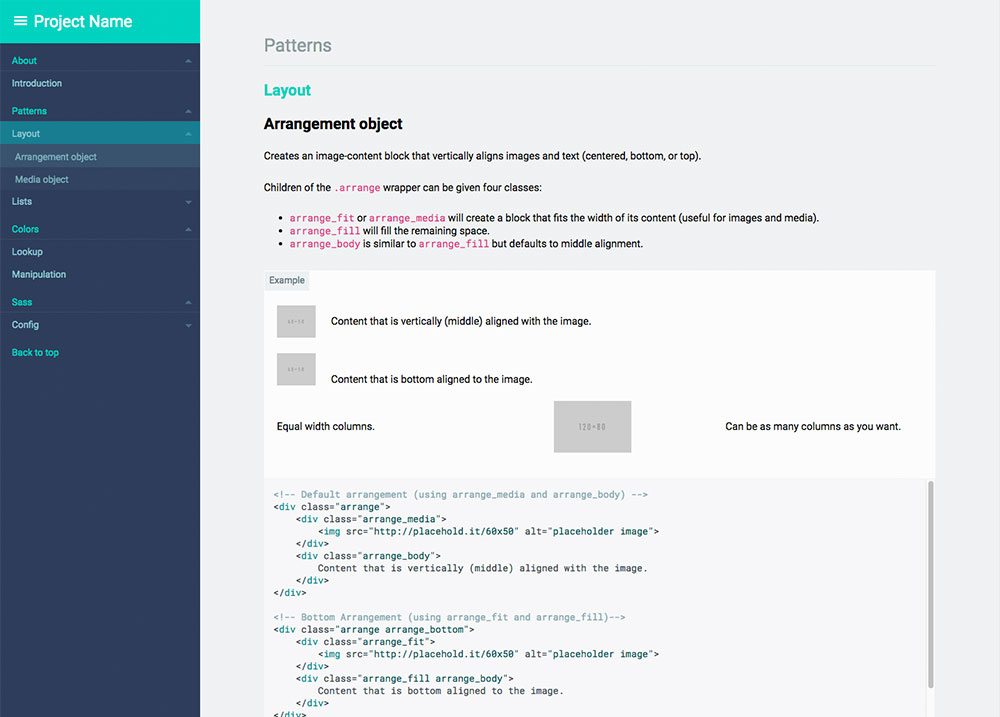
7 |
8 | ### What is a living style guide?
9 | > To me, a style guide is a living document of [style] code, which details all the various elements and coded modules of your site or application. Beyond its use in consolidating the front-end code, it also documents the visual language, such as header styles and color palettes, used to create the site. This way, it’s a one-stop place for the entire team—from product owners and producers to designers and developers—to reference when discussing site changes and iterations. [...] - [Susan Robertson/A list apart](http://alistapart.com/article/creating-style-guides)
10 |
11 | The _living_ part means that it uses your **live** css. If you change your css files, the style guide will change as well!
12 |
13 | ### What this tool does, short version:
14 | This tool will search all your style files (your `.css`, `.scss` `_partial.scss`, `.less`, `.whatever`) for comments and create an html file living style guide for your developers to use. It also has some additional hooks for creating sass/less documentation.
15 |
16 | ### What this tool does, longer version:
17 |
18 | By parsing your comments with **markdown**, the generator will convert that data to **json**, which is then run through a (customizable) **handlebars** template to create a **static html** file.
19 |
20 | What you end up with is an html file that contains comments, rendered examples, and highlighted code, ready to be copied and distributed to your team.
21 |
22 | Ultimately, the html file you end up with should inherit your site's css so your style guide is **always in sync with your codebase**. And since you are using markdown, your comment style is largely up to you and your team — they will be readable in and outside of your css.
23 |
24 | All of this can be done via CLI or as part of a larger Node project, since the json, templates, and html are all publicly exposed. It's your data, so you can do with it whatever you please.
25 |
26 | ## Install
27 |
28 | Requires [Node.js](http://nodejs.org/) (if you're unsure if you have node install, run `node -v` in a console.)
29 |
30 | Install with npm:
31 |
32 | ```
33 | npm install -g markdown-documentation-generator
34 | ```
35 |
36 |
37 | ## Usage
38 |
39 | ### CLI usage
40 |
41 | If you want to use the default settings, run:
42 | ```
43 | cd /your/web/project
44 | md_documentation
45 | ```
46 |
47 | Your html file will be created under /your/web/project/styleguide/styleguide.html
48 |
49 | To override default configuration and create a `.styleguide` config file in the current working directory, you may run:
50 | ```
51 | md_documentation --init
52 | ```
53 |
54 | ### Node module usage
55 |
56 | Using the default settings:
57 | ```js
58 | var styleguide = require('markdown-documentation-generator');
59 |
60 | styleguide.create();
61 | ```
62 |
63 | Custom options can be passed via an options object (or read from a `.styleguide` config file)
64 | ```js
65 | var styleguide = require('markdown-documentation-generator');
66 |
67 | var options = {...};
68 |
69 | styleguide.create(options);
70 | ```
71 |
72 | See the [configuration & customization](#configuration--customization") section below for more information about customization.
73 |
74 | ### Comment Style
75 |
76 | Comment your css/scss/less/whatever files. Use Markdown in the comments:
77 |
78 | Example:
79 |
80 |
81 | /* SG
82 | # Glyphs/Style
83 |
84 | You may resize and change the colors of the icons with the `glyph-`-classes. Available sizes and colors listed:
85 |
86 | ```html_example
87 |
88 |
89 |
90 |
91 |
92 |
93 | ```
94 | */
95 |
96 | a [class^="icon-"],
97 | a [class*=" icon-"] {
98 | text-decoration: none;
99 | }
100 |
101 | [class^="icon-"],
102 | [class*=" icon-"] {
103 | &.glyph-1x { font-size: 1em; }
104 | &.glyph-1_5x { font-size: 1.5em; }
105 | &.glyph-2x { font-size: 2em; }
106 | &.glyph-3x { font-size: 3em; }
107 | }
108 |
109 | /* SG
110 | ```html_example
111 |
112 |
113 |
114 | ```
115 | **/
116 |
117 | .glyph-red {
118 | color: $moh-red;
119 | }
120 |
121 |
122 | **This will be rendered as:**
123 |
124 | 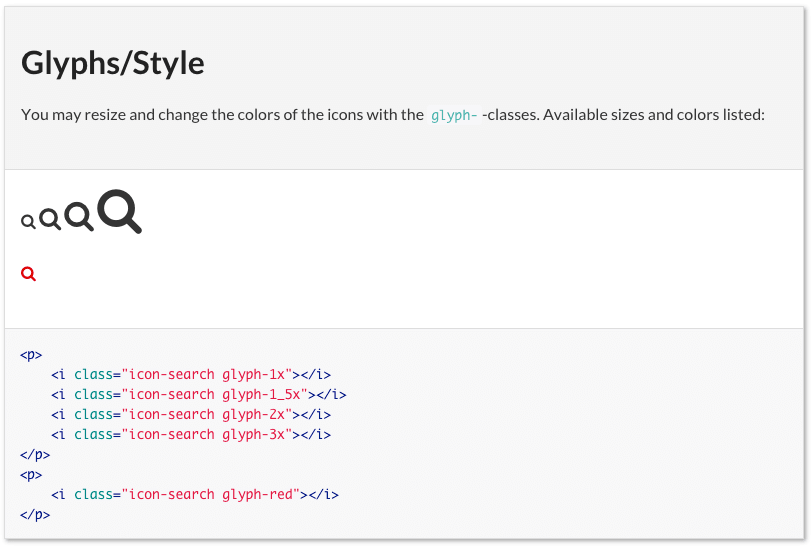
125 |
126 | * `cd` to the web project (any folder containing css/scss/less files. The tool will search nested folders).
127 | * run `md_documentation` to generate style guide.
128 | * wait a few seconds and a `styleguide.html` is generated in `styleguide/` (this is configurable, see _Configuration_).
129 |
130 | ### Syntax
131 | Best described by going through the example above line by line.
132 |
133 | ##### Line 1 (Demarcation)
134 |
135 | ```css
136 | /* SG
137 | ```
138 |
139 | `/*` is just an ordinary css comment. The `SG` means that this is a _style guide_ comment. Only comments beginning with `/* SG` will be included in the style guide, all other comments are ignored. This demarcation is configurable.
140 |
141 |
142 | ##### Line 2 (Heading)
143 |
144 | ```
145 | # Glyphs/Style
146 | ```
147 |
148 | Every style guide comment must have a heading. `# ` is the Markdown syntax for a heading (equivalent to h1). The name of this category will be _Glyphs_ (which will be shown in the menu). The article will be _Style_ (which will be shown in the menu when it's expanded). The heading (the part before the slash) is required, the slash and the article name are optional.
149 |
150 |
151 | ##### Line 4 (Comment)
152 |
153 | ```
154 | You may resize and change the colors of the icons with the `glyph-`-classes. Available sizes and colors listed:
155 | ```
156 |
157 | The comment will be shown in the style guide. Describe your css rules! Feel free to use [Markdown syntax](https://help.github.com/articles/markdown-basics/). The comment is optional but be nice to your developers!
158 |
159 |
160 | ##### Line 6-11 (Code example)
161 |
162 | ```html_example
163 |
164 |
165 |
166 |
167 |
168 |
169 |
170 |
171 |
172 | ```
173 |
174 | This is where you write some HTML code to describe how to use your css rules. The HTML will be a) Rendered and used as an example, and b) Output with syntax highlighting. The HTML part is optional but most of the time you'll use it. Notice that the code is fenced in triple back ticks (and given a language marker of `html_example`) as per Markdown syntax.
175 |
176 |
177 | ##### Line 12 (Comment close)
178 |
179 | ```
180 | */
181 | ```
182 |
183 | Closing the css comment.
184 |
185 |
186 | ##### Line 13-24
187 |
188 | ```
189 | a [class^="icon-"],
190 | a [class*=" icon-"] {
191 | text-decoration: none;
192 | }
193 | ...
194 | ```
195 |
196 | Ordinary css! You could stop here and understand all you need to, but let's continue.
197 |
198 | ##### Line 24+
199 |
200 | /* SG
201 | ```html_example
202 |
203 |
204 |
205 | ```
206 | */
207 |
208 | ...
209 |
210 | Additional comments about the previous article. This allows you to break your comments up whenever and they will always become a part of the previous comment (and added to the same article).
211 |
212 | ### Markdown files
213 |
214 | Sometimes it makes more sense to have some of your documentation in a markdown file. In order to get around the limitations of using `/* */` inside markdown, it is necessary to instead use `
` tags. Be sure to include `"md":true` in your `fileExtensions` setting if you intend on doing this.
215 |
216 | ## Sections, Categories and Articles
217 |
218 | All style guides are nested into three levels, with **sections** being the highest and **articles** being the lowest. Categories and articles are automatically generated based on the headings you create, but sections must be defined within your configuration.
219 |
220 | With this in mind, it's worth thinking of sections as deep divisions in content (almost like their own pages). For instance, the two sections defined in the default configuration are "styles" and "development". A third possible section might be "editorial". For many, sections will be completely unnecessary.
221 |
222 | ## Configuration & Customization
223 |
224 | If you want to override the default configuration you may create a `.styleguide` file in your project folder (the same folder you run `md_documentation` in). Alternatively, you can pass custom options if you're invoking the module from within another Node application.
225 |
226 | The easiest way to create a `.styleguide` file is to run `md_documentation --init` which will give you a boilerplate configuration file in the current working directory.
227 |
228 | ### Options
229 |
230 | **sgComment** `'SG'`
231 |
232 | The string you use to start your style guide comments. Can be anything, but it should be meaningful.
233 |
234 |
235 | **exampleIdentifier** `html_example`
236 |
237 | The language attribute you use to identify code examples that will be rendered in your style guide.
238 |
239 |
240 | **sortCategories** `true`
241 |
242 | Whether to automatically sort categories and articles alphabetically.
243 |
244 |
245 | **sections** `{'styles':'', 'development':'Dev:'}`
246 |
247 | The names of sections(keys) and their identifiers(values). The names will be output as-is, while the identifiers are searched for within the headings of articles and filtered out. For instance, using the settings listed above, a heading of `# Dev:Buttons/Small` would put this block into the "development" section(with the Article title being "Small", in the category of "Buttons").
248 |
249 | Using `''` as an identifier will make this the "default" section -- meaning all articles without an identifier will be put into that section (in this case, the "styles" section).
250 |
251 | _Section identifiers cannot contain a "/" character_.
252 |
253 |
254 | **rootFolder** `'./'`
255 |
256 | Directory to start looking for style guide commented files. All other paths will be relative to this (This path itself is relative to whatever directory the script is called from). Defaults to current working directory.
257 |
258 |
259 | **excludeDirs** `['target', 'node_modules', '.git']`
260 |
261 | Directory names you want excluded from being scanned. Passed directly to [Walk](https://www.npmjs.com/package/walk) as a filter.
262 |
263 |
264 | **fileExtensions** `{scss:true, sass:true, less:true, md:true, css:false}`
265 |
266 | File extensions to include in the scan for style guide comments.
267 |
268 |
269 | **templateFile** `'./node_modules/markdown-documentation-generator/template/template.hbs'`
270 |
271 | Path to a handlebars template to run your style guide data through.
272 |
273 |
274 | **themeFile** `'./node_modules/markdown-documentation-generator/template/theme.css'`
275 |
276 | Path to a CSS file to give your style guide some extra style. This is registered as a partial and can be referenced via `{{> theme}}`.
277 |
278 |
279 | **htmlOutput** `'./styleguide/styleguide.html'`
280 |
281 | Path to where you want to save your rendered style guide. Setting this to `true` will return the html as a String.
282 |
283 |
284 | **jsonOutput** `false`
285 |
286 | Path to where you want to save your style guide's json data. Setting this to any `true` will return the json as an Object.
287 |
288 |
289 | **handlebarsPartials** `{'jquery':'./node_modules/markdown-documentation-generator/template/jquery.js'}`
290 |
291 | Partial names(keys) and paths(values) to register to Handlebars before templating. jQuery is included as a default.
292 |
293 |
294 | **highlightStyle** `'arduino-light'`
295 |
296 | Syntax highlighting style. Syntax highlighting relies on highlight.js. See available [styles](https://highlightjs.org/static/demo/) and their [internal names](https://github.com/isagalaev/highlight.js/tree/master/src/styles).
297 |
298 |
299 | **highlightFolder** `'./node_modules/highlight.js/styles/'`
300 |
301 | Folder to look for highlight styles in. Default is highlight.js folder which is installed as a dependency to this package.
302 |
303 |
304 | **customVariables** `{'pageTitle': 'Style Guide'}`
305 |
306 | Additional variables to make available to your templates (appended to your json). For instance, the default value can be accessed with `{{customVariables/pageTitle}}`.
307 |
308 |
309 | **markedOptions** `{'gfm': true}`
310 |
311 | [Marked](https://github.com/chjj/marked) options to be passed when rendering your comments. _Some options, like "breaks" and "renderer" will be overridden since they are essential to the way this application works._
312 |
313 |
314 | ### Custom Themes
315 |
316 | The final look and feel of the style guide is based on three different files:
317 | * [template file](https://github.com/UWHealth/markdown-documentation-generator/blob/master/template/template.html) - Handlebars template which will produce the final html.
318 | * [theme file](https://github.com/UWHealth/markdown-documentation-generator/blob/master/template/theme.css) - css file which will be included in the template file.
319 | * highlight file - Syntax highlighting relies on [highlight.js](https://highlightjs.org/). To change the highlight style - set the `highlightStyle` to the name of the style (filename minus `.css`, [see the list of styles](https://github.com/isagalaev/highlight.js/tree/master/src/styles) ) in your `.styleguide`. See the [demos of available styles](https://highlightjs.org/static/demo/).
320 |
321 | To create your own template/theme, copy the [template.html and theme.css](https://github.com/UWHealth/markdown-documentation-generator/tree/master/template) to a folder of your choice. Then set the `templateFile` and `themeFile` in your `.styleguide` to the corresponding paths.
322 |
323 | The Javascript object which you may use in your template file looks like this:
324 |
325 | ```javascript
326 | {
327 | "sections": {
328 | "section Name": {
329 | "category": "Category Name",
330 | "id": "category-name (HTML safe)"
331 | "articles": [
332 | {
333 | "id": 'Article ID (HTML safe unique identifier)',
334 | "category": 'Parent Category (from the "# Category/Heading" Markdown)',
335 | "section": {
336 | "name": "Parent Section",
337 | "parentSection": true //Useful for template checks (always camel-cased)
338 | },
339 | "file": "File path where this article originated",
340 | "heading": 'Article Heading (from the "# Category/Heading" Markdown)',
341 | "code": ['HTML Code', ...],
342 | "markup": ['Highlighted HTML Code', ...],
343 | "comment": 'Markdown comment converted to HTML',
344 | "priority": 'Article sorting value' // Number
345 | },
346 | {...}
347 | ],
348 | },
349 | ...
350 | },
351 | "menus": [
352 | "section Name": [
353 | {
354 | "category": 'Category Name (one per unique "# Category")',
355 | "id": 'Category ID (HTML-safe unique identifier)',
356 | "headings": [
357 | {
358 | "id": 'Article ID (HTML-safe unique identifier)',
359 | "name": 'Heading Name'
360 | },
361 | {...}
362 | ]
363 | },
364 | {...}
365 | ]
366 | ],
367 | "customVariables":{...}
368 | }
369 | ```
370 |
371 | If you'd like to see your own JSON, set a path in the `"jsonOutput"` option in your `.styleguide` file.
372 |
373 |
374 | ## Run with gulp/grunt
375 |
376 | If you want to re-create the style guide automatically every time a stylesheet file is changed, you can run it with your favorite task runner. One way of running it with gulp would be using gulp-shell to execute the shell command `md_documentation` when a file is changed.
377 |
378 | Sample gulp script:
379 |
380 | ```javascript
381 | var gulp = require('gulp');
382 | var shell = require('gulp-shell');
383 | var watch = require('gulp-watch');
384 |
385 | gulp.task('watch', function() {
386 | gulp.watch('path/to/watch/for/changes/**/*.scss', ['makeStyleguide']);
387 | });
388 |
389 | gulp.task('makeStyleguide',
390 | shell.task(
391 | ['md_documentation']
392 | )
393 | );
394 |
395 | gulp.task('default', ['watch']);
396 | ```
397 |
--------------------------------------------------------------------------------
/template/hash.js:
--------------------------------------------------------------------------------
1 | window.JSON||(window.JSON={}),function(){function f(a){return a<10?"0"+a:a}function quote(a){return escapable.lastIndex=0,escapable.test(a)?'"'+a.replace(escapable,function(a){var b=meta[a];return typeof b=="string"?b:"\\u"+("0000"+a.charCodeAt(0).toString(16)).slice(-4)})+'"':'"'+a+'"'}function str(a,b){var c,d,e,f,g=gap,h,i=b[a];i&&typeof i=="object"&&typeof i.toJSON=="function"&&(i=i.toJSON(a)),typeof rep=="function"&&(i=rep.call(b,a,i));switch(typeof i){case"string":return quote(i);case"number":return isFinite(i)?String(i):"null";case"boolean":case"null":return String(i);case"object":if(!i)return"null";gap+=indent,h=[];if(Object.prototype.toString.apply(i)==="[object Array]"){f=i.length;for(c=0;c
")&&c[0]);return a>4?a:!1}();return a},m.isInternetExplorer=function(){var a=m.isInternetExplorer.cached=typeof m.isInternetExplorer.cached!="undefined"?m.isInternetExplorer.cached:Boolean(m.getInternetExplorerMajorVersion());return a},m.emulated={pushState:!Boolean(a.history&&a.history.pushState&&a.history.replaceState&&!/ Mobile\/([1-7][a-z]|(8([abcde]|f(1[0-8]))))/i.test(e.userAgent)&&!/AppleWebKit\/5([0-2]|3[0-2])/i.test(e.userAgent)),hashChange:Boolean(!("onhashchange"in a||"onhashchange"in d)||m.isInternetExplorer()&&m.getInternetExplorerMajorVersion()<8)},m.enabled=!m.emulated.pushState,m.bugs={setHash:Boolean(!m.emulated.pushState&&e.vendor==="Apple Computer, Inc."&&/AppleWebKit\/5([0-2]|3[0-3])/.test(e.userAgent)),safariPoll:Boolean(!m.emulated.pushState&&e.vendor==="Apple Computer, Inc."&&/AppleWebKit\/5([0-2]|3[0-3])/.test(e.userAgent)),ieDoubleCheck:Boolean(m.isInternetExplorer()&&m.getInternetExplorerMajorVersion()<8),hashEscape:Boolean(m.isInternetExplorer()&&m.getInternetExplorerMajorVersion()<7)},m.isEmptyObject=function(a){for(var b in a)return!1;return!0},m.cloneObject=function(a){var b,c;return a?(b=k.stringify(a),c=k.parse(b)):c={},c},m.getRootUrl=function(){var a=d.location.protocol+"//"+(d.location.hostname||d.location.host);if(d.location.port||!1)a+=":"+d.location.port;return a+="/",a},m.getBaseHref=function(){var a=d.getElementsByTagName("base"),b=null,c="";return a.length===1&&(b=a[0],c=b.href.replace(/[^\/]+$/,"")),c=c.replace(/\/+$/,""),c&&(c+="/"),c},m.getBaseUrl=function(){var a=m.getBaseHref()||m.getBasePageUrl()||m.getRootUrl();return a},m.getPageUrl=function(){var a=m.getState(!1,!1),b=(a||{}).url||d.location.href,c;return c=b.replace(/\/+$/,"").replace(/[^\/]+$/,function(a,b,c){return/\./.test(a)?a:a+"/"}),c},m.getBasePageUrl=function(){var a=d.location.href.replace(/[#\?].*/,"").replace(/[^\/]+$/,function(a,b,c){return/[^\/]$/.test(a)?"":a}).replace(/\/+$/,"")+"/";return a},m.getFullUrl=function(a,b){var c=a,d=a.substring(0,1);return b=typeof b=="undefined"?!0:b,/[a-z]+\:\/\//.test(a)||(d==="/"?c=m.getRootUrl()+a.replace(/^\/+/,""):d==="#"?c=m.getPageUrl().replace(/#.*/,"")+a:d==="?"?c=m.getPageUrl().replace(/[\?#].*/,"")+a:b?c=m.getBaseUrl()+a.replace(/^(\.\/)+/,""):c=m.getBasePageUrl()+a.replace(/^(\.\/)+/,"")),c.replace(/\#$/,"")},m.getShortUrl=function(a){var b=a,c=m.getBaseUrl(),d=m.getRootUrl();return m.emulated.pushState&&(b=b.replace(c,"")),b=b.replace(d,"/"),m.isTraditionalAnchor(b)&&(b="./"+b),b=b.replace(/^(\.\/)+/g,"./").replace(/\#$/,""),b},m.store={},m.idToState=m.idToState||{},m.stateToId=m.stateToId||{},m.urlToId=m.urlToId||{},m.storedStates=m.storedStates||[],m.savedStates=m.savedStates||[],m.normalizeStore=function(){m.store.idToState=m.store.idToState||{},m.store.urlToId=m.store.urlToId||{},m.store.stateToId=m.store.stateToId||{}},m.getState=function(a,b){typeof a=="undefined"&&(a=!0),typeof b=="undefined"&&(b=!0);var c=m.getLastSavedState();return!c&&b&&(c=m.createStateObject()),a&&(c=m.cloneObject(c),c.url=c.cleanUrl||c.url),c},m.getIdByState=function(a){var b=m.extractId(a.url),c;if(!b){c=m.getStateString(a);if(typeof m.stateToId[c]!="undefined")b=m.stateToId[c];else if(typeof m.store.stateToId[c]!="undefined")b=m.store.stateToId[c];else{for(;;){b=(new Date).getTime()+String(Math.random()).replace(/\D/g,"");if(typeof m.idToState[b]=="undefined"&&typeof m.store.idToState[b]=="undefined")break}m.stateToId[c]=b,m.idToState[b]=a}}return b},m.normalizeState=function(a){var b,c;if(!a||typeof a!="object")a={};if(typeof a.normalized!="undefined")return a;if(!a.data||typeof a.data!="object")a.data={};b={},b.normalized=!0,b.title=a.title||"",b.url=m.getFullUrl(m.unescapeString(a.url||d.location.href)),b.hash=m.getShortUrl(b.url),b.data=m.cloneObject(a.data),b.id=m.getIdByState(b),b.cleanUrl=b.url.replace(/\??\&_suid.*/,""),b.url=b.cleanUrl,c=!m.isEmptyObject(b.data);if(b.title||c)b.hash=m.getShortUrl(b.url).replace(/\??\&_suid.*/,""),/\?/.test(b.hash)||(b.hash+="?"),b.hash+="&_suid="+b.id;return b.hashedUrl=m.getFullUrl(b.hash),(m.emulated.pushState||m.bugs.safariPoll)&&m.hasUrlDuplicate(b)&&(b.url=b.hashedUrl),b},m.createStateObject=function(a,b,c){var d={data:a,title:b,url:c};return d=m.normalizeState(d),d},m.getStateById=function(a){a=String(a);var c=m.idToState[a]||m.store.idToState[a]||b;return c},m.getStateString=function(a){var b,c,d;return b=m.normalizeState(a),c={data:b.data,title:a.title,url:a.url},d=k.stringify(c),d},m.getStateId=function(a){var b,c;return b=m.normalizeState(a),c=b.id,c},m.getHashByState=function(a){var b,c;return b=m.normalizeState(a),c=b.hash,c},m.extractId=function(a){var b,c,d;return c=/(.*)\&_suid=([0-9]+)$/.exec(a),d=c?c[1]||a:a,b=c?String(c[2]||""):"",b||!1},m.isTraditionalAnchor=function(a){var b=!/[\/\?\.]/.test(a);return b},m.extractState=function(a,b){var c=null,d,e;return b=b||!1,d=m.extractId(a),d&&(c=m.getStateById(d)),c||(e=m.getFullUrl(a),d=m.getIdByUrl(e)||!1,d&&(c=m.getStateById(d)),!c&&b&&!m.isTraditionalAnchor(a)&&(c=m.createStateObject(null,null,e))),c},m.getIdByUrl=function(a){var c=m.urlToId[a]||m.store.urlToId[a]||b;return c},m.getLastSavedState=function(){return m.savedStates[m.savedStates.length-1]||b},m.getLastStoredState=function(){return m.storedStates[m.storedStates.length-1]||b},m.hasUrlDuplicate=function(a){var b=!1,c;return c=m.extractState(a.url),b=c&&c.id!==a.id,b},m.storeState=function(a){return m.urlToId[a.url]=a.id,m.storedStates.push(m.cloneObject(a)),a},m.isLastSavedState=function(a){var b=!1,c,d,e;return m.savedStates.length&&(c=a.id,d=m.getLastSavedState(),e=d.id,b=c===e),b},m.saveState=function(a){return m.isLastSavedState(a)?!1:(m.savedStates.push(m.cloneObject(a)),!0)},m.getStateByIndex=function(a){var b=null;return typeof a=="undefined"?b=m.savedStates[m.savedStates.length-1]:a<0?b=m.savedStates[m.savedStates.length+a]:b=m.savedStates[a],b},m.getHash=function(){var a=m.unescapeHash(d.location.hash);return a},m.unescapeString=function(b){var c=b,d;for(;;){d=a.unescape(c);if(d===c)break;c=d}return c},m.unescapeHash=function(a){var b=m.normalizeHash(a);return b=m.unescapeString(b),b},m.normalizeHash=function(a){var b=a.replace(/[^#]*#/,"").replace(/#.*/,"");return b},m.setHash=function(a,b){var c,e,f;return b!==!1&&m.busy()?(m.pushQueue({scope:m,callback:m.setHash,args:arguments,queue:b}),!1):(c=m.escapeHash(a),m.busy(!0),e=m.extractState(a,!0),e&&!m.emulated.pushState?m.pushState(e.data,e.title,e.url,!1):d.location.hash!==c&&(m.bugs.setHash?(f=m.getPageUrl(),m.pushState(null,null,f+"#"+c,!1)):d.location.hash=c),m)},m.escapeHash=function(b){var c=m.normalizeHash(b);return c=a.escape(c),m.bugs.hashEscape||(c=c.replace(/\%21/g,"!").replace(/\%26/g,"&").replace(/\%3D/g,"=").replace(/\%3F/g,"?")),c},m.getHashByUrl=function(a){var b=String(a).replace(/([^#]*)#?([^#]*)#?(.*)/,"$2");return b=m.unescapeHash(b),b},m.setTitle=function(a){var b=a.title,c;b||(c=m.getStateByIndex(0),c&&c.url===a.url&&(b=c.title||m.options.initialTitle));try{d.getElementsByTagName("title")[0].innerHTML=b.replace("<","<").replace(">",">").replace(" & "," & ")}catch(e){}return d.title=b,m},m.queues=[],m.busy=function(a){typeof a!="undefined"?m.busy.flag=a:typeof m.busy.flag=="undefined"&&(m.busy.flag=!1);if(!m.busy.flag){h(m.busy.timeout);var b=function(){var a,c,d;if(m.busy.flag)return;for(a=m.queues.length-1;a>=0;--a){c=m.queues[a];if(c.length===0)continue;d=c.shift(),m.fireQueueItem(d),m.busy.timeout=g(b,m.options.busyDelay)}};m.busy.timeout=g(b,m.options.busyDelay)}return m.busy.flag},m.busy.flag=!1,m.fireQueueItem=function(a){return a.callback.apply(a.scope||m,a.args||[])},m.pushQueue=function(a){return m.queues[a.queue||0]=m.queues[a.queue||0]||[],m.queues[a.queue||0].push(a),m},m.queue=function(a,b){return typeof a=="function"&&(a={callback:a}),typeof b!="undefined"&&(a.queue=b),m.busy()?m.pushQueue(a):m.fireQueueItem(a),m},m.clearQueue=function(){return m.busy.flag=!1,m.queues=[],m},m.stateChanged=!1,m.doubleChecker=!1,m.doubleCheckComplete=function(){return m.stateChanged=!0,m.doubleCheckClear(),m},m.doubleCheckClear=function(){return m.doubleChecker&&(h(m.doubleChecker),m.doubleChecker=!1),m},m.doubleCheck=function(a){return m.stateChanged=!1,m.doubleCheckClear(),m.bugs.ieDoubleCheck&&(m.doubleChecker=g(function(){return m.doubleCheckClear(),m.stateChanged||a(),!0},m.options.doubleCheckInterval)),m},m.safariStatePoll=function(){var b=m.extractState(d.location.href),c;if(!m.isLastSavedState(b))c=b;else return;return c||(c=m.createStateObject()),m.Adapter.trigger(a,"popstate"),m},m.back=function(a){return a!==!1&&m.busy()?(m.pushQueue({scope:m,callback:m.back,args:arguments,queue:a}),!1):(m.busy(!0),m.doubleCheck(function(){m.back(!1)}),n.go(-1),!0)},m.forward=function(a){return a!==!1&&m.busy()?(m.pushQueue({scope:m,callback:m.forward,args:arguments,queue:a}),!1):(m.busy(!0),m.doubleCheck(function(){m.forward(!1)}),n.go(1),!0)},m.go=function(a,b){var c;if(a>0)for(c=1;c<=a;++c)m.forward(b);else{if(!(a<0))throw new Error("History.go: History.go requires a positive or negative integer passed.");for(c=-1;c>=a;--c)m.back(b)}return m};if(m.emulated.pushState){var o=function(){};m.pushState=m.pushState||o,m.replaceState=m.replaceState||o}else m.onPopState=function(b,c){var e=!1,f=!1,g,h;return m.doubleCheckComplete(),g=m.getHash(),g?(h=m.extractState(g||d.location.href,!0),h?m.replaceState(h.data,h.title,h.url,!1):(m.Adapter.trigger(a,"anchorchange"),m.busy(!1)),m.expectedStateId=!1,!1):(e=m.Adapter.extractEventData("state",b,c)||!1,e?f=m.getStateById(e):m.expectedStateId?f=m.getStateById(m.expectedStateId):f=m.extractState(d.location.href),f||(f=m.createStateObject(null,null,d.location.href)),m.expectedStateId=!1,m.isLastSavedState(f)?(m.busy(!1),!1):(m.storeState(f),m.saveState(f),m.setTitle(f),m.Adapter.trigger(a,"statechange"),m.busy(!1),!0))},m.Adapter.bind(a,"popstate",m.onPopState),m.pushState=function(b,c,d,e){if(m.getHashByUrl(d)&&m.emulated.pushState)throw new Error("History.js does not support states with fragement-identifiers (hashes/anchors).");if(e!==!1&&m.busy())return m.pushQueue({scope:m,callback:m.pushState,args:arguments,queue:e}),!1;m.busy(!0);var f=m.createStateObject(b,c,d);return m.isLastSavedState(f)?m.busy(!1):(m.storeState(f),m.expectedStateId=f.id,n.pushState(f.id,f.title,f.url),m.Adapter.trigger(a,"popstate")),!0},m.replaceState=function(b,c,d,e){if(m.getHashByUrl(d)&&m.emulated.pushState)throw new Error("History.js does not support states with fragement-identifiers (hashes/anchors).");if(e!==!1&&m.busy())return m.pushQueue({scope:m,callback:m.replaceState,args:arguments,queue:e}),!1;m.busy(!0);var f=m.createStateObject(b,c,d);return m.isLastSavedState(f)?m.busy(!1):(m.storeState(f),m.expectedStateId=f.id,n.replaceState(f.id,f.title,f.url),m.Adapter.trigger(a,"popstate")),!0};if(f){try{m.store=k.parse(f.getItem("History.store"))||{}}catch(p){m.store={}}m.normalizeStore()}else m.store={},m.normalizeStore();m.Adapter.bind(a,"beforeunload",m.clearAllIntervals),m.Adapter.bind(a,"unload",m.clearAllIntervals),m.saveState(m.storeState(m.extractState(d.location.href,!0))),f&&(m.onUnload=function(){var a,b;try{a=k.parse(f.getItem("History.store"))||{}}catch(c){a={}}a.idToState=a.idToState||{},a.urlToId=a.urlToId||{},a.stateToId=a.stateToId||{};for(b in m.idToState){if(!m.idToState.hasOwnProperty(b))continue;a.idToState[b]=m.idToState[b]}for(b in m.urlToId){if(!m.urlToId.hasOwnProperty(b))continue;a.urlToId[b]=m.urlToId[b]}for(b in m.stateToId){if(!m.stateToId.hasOwnProperty(b))continue;a.stateToId[b]=m.stateToId[b]}m.store=a,m.normalizeStore(),f.setItem("History.store",k.stringify(a))},m.intervalList.push(i(m.onUnload,m.options.storeInterval)),m.Adapter.bind(a,"beforeunload",m.onUnload),m.Adapter.bind(a,"unload",m.onUnload));if(!m.emulated.pushState){m.bugs.safariPoll&&m.intervalList.push(i(m.safariStatePoll,m.options.safariPollInterval));if(e.vendor==="Apple Computer, Inc."||(e.appCodeName||"")==="Mozilla")m.Adapter.bind(a,"hashchange",function(){m.Adapter.trigger(a,"popstate")}),m.getHash()&&m.Adapter.onDomLoad(function(){m.Adapter.trigger(a,"hashchange")})}},m.init()}(window)
--------------------------------------------------------------------------------
/index.js:
--------------------------------------------------------------------------------
1 | #!/usr/bin/env node
2 | /* jshint node: true */
3 | /* jshint esnext: true*/
4 | "use strict";
5 |
6 | var _sg = require('./lib/globals'); //"Global" variables
7 | var formatters = require('./lib/md-formats');
8 | var logFiles = require('./lib/log');
9 | var log = require('./lib/log').generic;
10 | var sanitize = require('./lib/sanitize');
11 | var sorting = require('./lib/sorts');
12 | var tags = require('./lib/tags').tags;
13 | var template = require('./lib/templating');
14 |
15 | var chalk = require('chalk');
16 | var cheerio = require('cheerio');
17 | var fs = require('fs-extra');
18 | var hl = require('highlight.js');
19 | var _ = require('lodash');
20 | var markdown = require('marked');
21 | var path = require('path');
22 | var walk = require('walk');
23 | var argv = require('yargs').argv;
24 |
25 | //Default options
26 | let options = {
27 | sgComment: 'SG',
28 | exampleIdentifier: 'html_example',
29 | sortCategories: true,
30 | sections: {
31 | "styles": '',
32 | "development": 'Dev:'
33 | },
34 | rootFolder: './',
35 | excludeDirs: ['target', 'node_modules', '.git'],
36 | fileExtensions: {
37 | scss: true,
38 | sass: true,
39 | less: true,
40 | md: true,
41 | css: false
42 | },
43 | templateFile: sanitize.path('./', 'template/template.hbs'),
44 | themeFile: sanitize.path('./', 'template/theme.css'),
45 | htmlOutput: './styleguide/styleguide.html',
46 | jsonOutput: './styleguide/styleguide.json',
47 | handlebarsPartials: {
48 | "jquery": path.resolve(__dirname, 'template/jquery.js'),
49 | "sticky": sanitize.path('./', 'template/sticky.js')
50 | },
51 | highlightStyle: 'arduino-light',
52 | highlightFolder: path.relative('./', path.join(_sg.hljsDir, '../styles/')),
53 | customVariables: {
54 | "pageTitle": "Style Guide"
55 | },
56 | markedOptions: {
57 | gfm: true,
58 | breaks: true,
59 | smartypants: true
60 | },
61 | logging: {
62 | prefix: "[Style Guide]",
63 | level: "verbose"
64 | }
65 | };
66 |
67 | //Argument methods
68 | const arg = {
69 | init: function() {
70 |
71 | let configFilePath = path.join(process.cwd(), '.styleguide'),
72 | existingConfig;
73 |
74 | try {
75 | existingConfig = fs.readJSONSync(configFilePath, 'utf8');
76 | }
77 | catch(err) {
78 | fs.writeFileSync(configFilePath, JSON.stringify(options,null,'\t'));
79 | logFiles(configFilePath, 'create');
80 | }
81 |
82 | if (existingConfig !== undefined) {
83 | const configError = _sg.error(_sg.logPre +
84 | 'Configuration file ' +
85 | _sg.info('\'.styleguide\'') + ' already exists in this directory. \n' +
86 | _sg.logPre + 'Edit that file, or delete it and run ' +
87 | _sg.info('\'init\'') + ' again if you want to create a new configuration file.'
88 | );
89 | throw new Error(configError);
90 | }
91 | process.exit(0);
92 | },
93 | config: function() {
94 | _sg.configFile = argv.config || _sg.configFile;
95 | },
96 | lf: function() {
97 | _sg.fileList = true;
98 | },
99 | ls: function() {
100 | _sg.fileList = true;
101 | },
102 | help: function() {
103 | console.info('');
104 | console.info(_sg.brand(' _____ '));
105 | console.info(_sg.brand(' / ___/ _ / | ( ) / | '));
106 | console.info(_sg.brand(' | (___ | |_ _ _| | ___ __ _ _ _ _ __| | ___ '));
107 | console.info(_sg.brand(' \\___ \\| __| | | | |/ _ \\/ _` | | | | |/ _` |/ _ \\'));
108 | console.info(_sg.brand(' ____) | |_| |_| | | __/ (_| | |_| | | (_| | __/'));
109 | console.info(_sg.brand(' \\____/ \\___\\__, |_|\\___/\\__, |\\__,_|_|\\__,_|\\___/'));
110 | console.info(_sg.brand(' __/ | __/ | '));
111 | console.info(_sg.brand(' |___/ |___/ '));
112 | console.info('');
113 | console.info(' ' + _sg.brand('md_documentation') + ' Generate styleguide');
114 | console.info(' ' + _sg.brand('md_documentation --config=[filename]') + ' Generate styleguide using a custom config file');
115 | console.info(' ' + _sg.brand('md_documentation --init') + ' Create a new configuration file in the current directory');
116 | console.info(' ' + _sg.brand('md_documentation --lf') + ' Show "Reading [filename]" during file processing' );
117 | console.info(' ' + _sg.brand('md_documentation --help') + ' Show this');
118 | console.info('');
119 | console.info(' More help at');
120 | console.info(' https://github.com/UWHealth/markdown-documentation-generator');
121 | console.info('');
122 | process.exit(0);
123 | }
124 | };
125 |
126 | /**
127 | * Check arguments against arg object and run that method
128 | *
129 | * @param {Array} args - arguments
130 | */
131 | function readArgs(args) {
132 |
133 | if (args.length > 0) {
134 | let curArg = args[0].toLowerCase().replace(/-/g, '').split(/=/g)[0];
135 | if (_.isUndefined(arg[curArg])) {
136 | console.info( _sg.logPre + curArg + ' not recognized. Showing help instead.');
137 | arg.help();
138 | }
139 | else {
140 | arg[curArg]();
141 | }
142 | }
143 | }
144 |
145 | /**
146 | * Merge custom options with default options.
147 | * Resolves paths and makes sure they're output in a relative format.
148 | *
149 | * @param {Object} customOptions - user-provided options
150 | * @return {Object} - Merged options
151 | */
152 |
153 | function mergeOptions(defaults, customOptions) {
154 |
155 | //Resolve relative paths from what is here to what is passed in
156 | //Return a relative path for simpler display purposes
157 | function getPath(folder){
158 | const root = path.resolve(customOptions.rootFolder);
159 |
160 | return path.isAbsolute(folder)
161 | ? folder
162 | : path.relative(root, path.resolve(__dirname, folder));
163 | }
164 |
165 | //Resolve paths for only a custom rootFolder
166 | if (customOptions.rootFolder) {
167 | defaults.highlightFolder = getPath(defaults.highlightFolder);
168 | defaults.templateFile = getPath(defaults.templateFile);
169 | defaults.themeFile = getPath(defaults.themeFile);
170 | defaults.handlebarsPartials.jquery = getPath(defaults.handlebarsPartials.jquery);
171 | defaults.handlebarsPartials.sticky = getPath(defaults.handlebarsPartials.sticky);
172 | }
173 |
174 | let logging = Object.assign({}, defaults.logging, customOptions.logging || {});
175 |
176 | _sg.logLevel = logging.level;
177 | _sg.logPre = _sg.brand(logging.prefix);
178 |
179 | //Overwrite default sections with custom ones if they exist
180 | defaults.sections = customOptions.sections || defaults.sections;
181 | //Merge custom and defaults
182 | let newOptions = _.merge(defaults, customOptions);
183 |
184 | newOptions.rootFolder = path.resolve(process.cwd(), newOptions.rootFolder);
185 |
186 | // Add excluded directories to walker options (if set)
187 | if (Object.prototype.toString.call(newOptions.excludeDirs) === '[object Array]') {
188 | newOptions.walkerOptions = {
189 | "filters": newOptions.excludeDirs,
190 | "followLinks": false
191 | };
192 | }
193 |
194 | return newOptions;
195 | }
196 |
197 | /**
198 | * Read configuration
199 | *
200 | * @param {Object} customOptions - user-provided options
201 | * @return {Object} - Merged user and default options
202 | */
203 | function registerConfig(customOptions) {
204 |
205 | try {
206 | logFiles(_sg.brand('Configuration'));
207 | _sg.configFile = path.isAbsolute(_sg.configFile)
208 | ? _sg.configFile
209 | : path.join(process.cwd(), _sg.configFile);
210 | customOptions = customOptions
211 | || require(_sg.configFile);
212 | }
213 | catch(err) {
214 | if (err.code !== "ENOENT") {
215 | err.message = err.message + '.\n Check your configuration and try again.';
216 | throw new Error(_sg.error(err));
217 | }
218 | }
219 |
220 | if (_.isUndefined(customOptions)) {
221 | log(_sg.warn(
222 | `No configuration file (\'${_sg.configFile}\') or options found, using defaults.`
223 | ), 1);
224 |
225 | customOptions = {
226 | walkerOptions: {
227 | "filters": options.excludeDirs,
228 | "followLinks": false
229 | }
230 | };
231 | }
232 |
233 | return mergeOptions(options, customOptions);
234 |
235 | }
236 |
237 | /**
238 | * Read template/theme/highlight files
239 | *
240 | */
241 | function readTheme() {
242 |
243 | try {
244 | logFiles(_sg.brand('Template: ') + options.templateFile);
245 | _sg.templateSource = fs.readFileSync(path.resolve(_sg.root, options.templateFile), 'utf8');
246 |
247 | logFiles(_sg.brand('Theme: ') + options.themeFile);
248 | _sg.themeSource = fs.readFileSync(path.resolve(_sg.root, options.themeFile), 'utf8');
249 |
250 | logFiles(_sg.brand('Highlight Style: ') +
251 | path.relative(_sg.root, path.join(options.highlightFolder, options.highlightStyle + '.css')));
252 | _sg.highlightSource = fs.readFileSync(path.join(
253 | path.resolve(_sg.root, options.highlightFolder), options.highlightStyle + '.css'), 'utf8');
254 | }
255 | catch(err) {
256 | const pathError = _sg.logPre + ' ' + _sg.error('Could not read file: ' + path.resolve(err.path));
257 | throw new Error(pathError);
258 | }
259 | }
260 |
261 | /**
262 | * Search through tags for current section identifiers
263 | *
264 | * @param {Object} $article - article html loaded by cheerio
265 | * @return {Array} Section Name, Section identifier
266 | */
267 | function findSection($article) {
268 | let currentSection, sectionIdentifier;
269 | let headerText = $article(tags.category).slice(0, 1).text() + $article(tags.article).text();
270 |
271 | //Check headings for identifiers declared in "sections" option
272 | for (let sectionName in options.sections){
273 | if ({}.hasOwnProperty.call(options.sections, sectionName)) {
274 | sectionIdentifier = options.sections[sectionName];
275 |
276 | if (headerText.indexOf(sectionIdentifier) > -1 && sectionIdentifier !== ''){
277 | currentSection = sectionName;
278 | break;
279 | }
280 | }
281 | }
282 |
283 | if (_.isUndefined(currentSection)){
284 | //Use the "default" section (the section without a pattern match)
285 | currentSection = _.invert(options.sections)[''];
286 | sectionIdentifier = '';
287 | }
288 |
289 | return [currentSection, sectionIdentifier];
290 | }
291 |
292 | /**
293 | * Constructs a section object
294 | *
295 | * @param {Object} $article - article html loaded by cheerio
296 | * @return {Object} Section Name, Section identifier
297 | */
298 | function SectionStructure() {
299 | let structure = {};
300 | //Create section object for data structure, based on user's "sections" option
301 | for(let name in options.sections) {
302 | if ({}.hasOwnProperty.call(options.sections, name)) {
303 | structure[name] = [];
304 | }
305 | }
306 |
307 | return structure;
308 | }
309 |
310 | /**
311 | * Search through tags for current section identifiers
312 | *
313 | * @param {Object} $article - article html loaded by cheerio
314 | * @param {Object} articleData - structured data about the loaded article
315 | * @param {String} sectionIdentifier - string pattern that tells us the current section
316 | * @return {Object} articleData along with meta tags
317 | *
318 | */
319 | function getMetaData($article, articleData, sectionIdentifier) {
320 |
321 | //Grab the filelocation and store it
322 | $article(tags.file).each(function () {
323 | articleData.filelocation = $article(this).text().trim();
324 |
325 | }).remove();
326 |
327 | $article(tags.section).each(function () {
328 | articleData.currentSection = $article(this).text().trim();
329 | sectionIdentifier = options.sections[articleData.currentSection];
330 |
331 | //A @section tag is pointing to a non-existant section
332 | if (_.isUndefined(sectionIdentifier)) {
333 | log(_sg.warn("Warning: '" + chalk.bold(articleData.currentSection) +
334 | "' is not a registered section in your configuration. (" + articleData.filelocation + ")"), 1);
335 | sectionIdentifier = '';
336 | }
337 |
338 | }).remove();
339 |
340 | $article(tags.category).each(function() {
341 |
342 | if (articleData.category === '') {
343 | articleData.category = $article(this)
344 | .text()
345 | .replace(/^\s+|\s+$/g, '')
346 | .replace(sectionIdentifier, '')
347 | .trim();
348 |
349 | $article(this).remove();
350 | }
351 | else {
352 | $article(this).replaceWith(
353 | _sg.renderer.heading($article(this).text(), 1.1)
354 | );
355 | }
356 | });
357 |
358 | $article(tags.article).each(function () {
359 | //Remove dev identifier and extra spaces
360 | articleData.heading += $article(this).text().replace(/^\s+|\s+$/g, '').replace(sectionIdentifier, '').trim();
361 | }).remove();
362 |
363 | //Store code examples and markup
364 | $article(tags.example).each(function () {
365 | let categoryCode = $article(this).html().replace(/^\s+|\s+$/g, '');
366 | articleData.code.push(categoryCode);
367 |
368 | //Run example markup through highlight.js
369 | articleData.markup.push(hl.highlight("html", categoryCode).value);
370 |
371 | }).remove();
372 |
373 | //Grab priority tag data and convert them to meaningful values
374 | $article(tags.priority).each(function() {
375 | let priority = $article(this).text().trim();
376 | articleData.priority = (_.isNaN(Number(priority))) ? priority : Number(priority);
377 |
378 | }).remove();
379 |
380 | if (articleData.heading === '') {
381 | articleData.priority = -1000;
382 | }
383 |
384 | return articleData;
385 | }
386 |
387 |
388 | /**
389 | * Take HTML and create JSON object to be parsed by Handlebars
390 | *
391 | * @param {String} html
392 | * @returns {Array} json
393 | */
394 | function convertHTMLtoJSON(html) {
395 | let idCache = {};
396 | let sectionIdentifier = '';
397 | let previousArticle;
398 |
399 | let $ = cheerio.load(html);
400 | sanitize.cheerioWrapAll($); //Add wrapAll method to cheerio
401 |
402 | let masterData = {
403 | sections: new SectionStructure(),
404 | menus: {},
405 | colors: {},
406 | customVariables: options.customVariables
407 | };
408 |
409 | // Loop each section and turn into javascript object
410 | $('.sg-article-' + _sg.uniqueIdentifier).each(function() {
411 | let $article = cheerio.load($(this).html());
412 |
413 | let articleData = {
414 | id: '',
415 | currentSection: null,
416 | section: {
417 | name: ''
418 | },
419 | category: '',
420 | heading: '',
421 | code: [],
422 | markup: [],
423 | comment: '',
424 | priority: 50
425 | };
426 |
427 | //Check for category headings
428 | if ($article(tags.category)[0]) {
429 | const sectionInfo = findSection($article);
430 | articleData.currentSection = sectionInfo[0];
431 | sectionIdentifier = sectionInfo[1];
432 | }
433 | else if (previousArticle !== undefined) {
434 | //Without a heading, assume it should be concatenated with the previous category
435 | articleData.id = previousArticle.id;
436 | articleData.category = previousArticle.category;
437 | articleData.heading = previousArticle.heading;
438 | articleData.currentSection = previousArticle.section.name;
439 | }
440 |
441 | //Search through specific DOM elements for article meta data
442 | articleData = getMetaData($article, articleData, sectionIdentifier);
443 |
444 | //Give category an ID
445 | articleData.id = sanitize.makeUrlSafe(articleData.currentSection + '-' + articleData.category + '-' + articleData.heading);
446 |
447 | //Save sanitized comment html
448 | articleData.comment = $article.html().replace('', '').replace(/^\s+|\s+$/g, '');
449 |
450 | //Move and place article data into master
451 | articleData = checkData(articleData);
452 |
453 | return articleData;
454 | });
455 |
456 | /**
457 | * Combine repeat categories by checking with the ID cache
458 | * ID Cache format:
459 | * {1: ["development", 5]}
460 | * {ID:[section, category-index]}
461 | *
462 | * @param {object} articleData - data parsed by DOM objects
463 | *
464 | **/
465 |
466 | function checkData(articleData) {
467 | let currentSection = articleData.currentSection;
468 |
469 | //Bail out for un-categorized comments
470 | if (currentSection === null) {
471 | return;
472 | }
473 |
474 | //If the section's ID has already been cached,
475 | //append its data to the previous object
476 | if (idCache.hasOwnProperty(articleData.id)) {
477 |
478 | //Grab the index
479 | let currentIndex = idCache[articleData.id][1];
480 |
481 | //Select the matched section from the masterData
482 | let selectedSection = masterData.sections[currentSection][currentIndex];
483 |
484 | //Append the new data to the matched section
485 | selectedSection.comment += articleData.comment;
486 |
487 | if (articleData.markup.length > 0) {
488 | selectedSection.markup = _.union(selectedSection.markup, articleData.markup);
489 | }
490 | if (articleData.code.length > 0) {
491 | selectedSection.code = _.union(selectedSection.code, articleData.code);
492 | }
493 |
494 | //Set previous article so we can refer back if necessary
495 | previousArticle = selectedSection;
496 |
497 | return;
498 | }
499 |
500 | if (masterData.sections[currentSection]) {
501 |
502 | let catIndex = masterData.sections[currentSection].length;
503 |
504 | //Cache the ID and its index within its section
505 | idCache[articleData.id] = [currentSection, catIndex];
506 | articleData.section[_.camelCase(currentSection)] = true;
507 |
508 | articleData.section.name = articleData.currentSection;
509 |
510 | //Remove unnecessary data from final JSON
511 | delete articleData.currentSection;
512 |
513 | //Set previous article so we can refer back if necessary
514 | previousArticle = articleData;
515 |
516 | //Append new section to master data
517 | sanitize.objectPush(masterData.sections[currentSection], articleData);
518 |
519 | }
520 | }
521 |
522 | return formatData(masterData);
523 | }
524 |
525 | /**
526 | * Arranges and sorts data into a handlebars-friendly object.
527 | * Uses the structure:
528 | * {sections:[ {sectionName:{id:... , category:..., articles:[{...},...]} },...]}
529 | *
530 | * @param {Object} data - unformatted data
531 | * @returns {Object} formatted data
532 | */
533 | function formatData(data) {
534 | //Sort section data
535 | if (options.sortCategories){
536 | //Sort Sections
537 | Object.keys(data.sections).forEach(function(category) {
538 | data.sections[category] = sorting(data.sections[category]);
539 | });
540 | }
541 |
542 | function formatSections(sectionName, isMenu) {
543 |
544 | let menuObj = {};
545 | let sectionObj = {};
546 | let menuArr = [];
547 | let sectionArr = [];
548 |
549 |
550 | data.sections[sectionName].forEach(function(section) {
551 |
552 | //New categories: Create a new array to push objects into
553 | if (_.has(menuObj, section.category) === false) {
554 | menuObj[section.category] = [];
555 | sectionObj[section.category] = [];
556 | }
557 |
558 | menuObj[section.category].push({
559 | id: section.id,
560 | name: (section.heading) ? section.heading : section.category
561 | });
562 |
563 | sectionObj[section.category].push(section);
564 | });
565 |
566 | Object.keys(menuObj).forEach(function(key) {
567 | menuArr.push({
568 | category: key,
569 | id: menuObj[key][0].id,
570 | headings: menuObj[key]
571 | });
572 |
573 | sectionArr.push({
574 | category: key,
575 | id: menuObj[key][0].id,
576 | articles: sectionObj[key]
577 | });
578 | });
579 |
580 | //Wasteful but simple
581 | return isMenu ? menuArr : sectionArr;
582 | }
583 |
584 | //Create menu and section JSON
585 | Object.keys(options.sections).forEach(function(section) {
586 | data.menus[section] = formatSections(section, true);
587 | data.sections[section] = formatSections(section, false);
588 | });
589 |
590 | return data;
591 | }
592 |
593 | /**
594 | * Based on the fileExtension, return a regular expression based on the user-defined sgComment
595 | *
596 | * @param {String} fileExtension
597 | * @returns {RegExp} pattern for either /* or
598 | *
599 | */
600 | function regexType(fileExtension) {
601 |
602 | let sgComment = _.escapeRegExp(options.sgComment);
603 |
604 | if (["md", "markdown", "mdown"].indexOf(fileExtension) !== -1) {
605 | // Use ... for markdown files
606 | return new RegExp('\\<' + sgComment + '>([\\s\\S]*?)\\<\\/' + sgComment + '\\>', 'gi');
607 | }
608 | // Use /*SG ... */ for everything else
609 | return new RegExp('/\\* ?' + sgComment + '([\\s\\S]*?)\\*/', 'gi');
610 | }
611 |
612 |
613 | /**
614 | * Read valid files (default: scss/css), get the Styleguide comments and put into an array
615 | *
616 | * @param {string} root
617 | * @param {String} fileExtension
618 | * @param {Object} fileStats
619 | * @param {Array} fileContents
620 | *
621 | */
622 | function readSGFile(fileExtension, root, name, fileContents, callback) {
623 |
624 | fs.readFile(path.join(root, name), 'utf8', function (err, content) {
625 | let match,
626 | filePath = path.join(root, name),
627 | regex = regexType(fileExtension);
628 |
629 | logFiles(path.relative(_sg.root, filePath));
630 |
631 | if (err) {
632 | const fileError = _sg.logPre + _sg.error('File Error: ' + filePath) + err;
633 | throw new Error(fileError);
634 | }
635 |
636 | while ((match = regex.exec(content)) !== null) {
637 | //If reading anything other than css, create a file-location reference we'll use later
638 | let fileLocation = (fileExtension !== "css") ? '<'+tags.file+'>'+path.relative(_sg.root, filePath)+'': '';
639 | //Convert markdown to html
640 | fileContents.push(markdown(match[1]) + fileLocation);
641 | }
642 |
643 | callback();
644 | });
645 | }
646 |
647 |
648 | /**
649 | * Take JSON, template and write out files or return as templates as a string.
650 | *
651 | * @param {Object} json - styleguide json data
652 | *
653 | */
654 | function saveFiles(json){
655 |
656 | let output = {
657 | 'json': JSON.stringify(json, null, ' '),
658 | 'html': template(json, options)
659 | };
660 |
661 | let filePromises = [];
662 |
663 | Object.keys(output).forEach((fileType) => {
664 | let filePath = options[fileType+'Output'];
665 |
666 | if (filePath && _.isString(filePath)) {
667 | let fullFilePath = path.resolve(_sg.root, filePath);
668 | filePromises.push(
669 | fs.outputFile(fullFilePath, output[fileType])
670 | .then(() => {
671 | logFiles(filePath, 'create');
672 | })
673 | .catch((err) => {
674 | console.error(
675 | _sg.logPre +
676 | _sg.error(` Error saving ${fileType} file`)
677 | );
678 | console.error(err);
679 | })
680 | )
681 | }
682 | })
683 |
684 | return filePromises;
685 | }
686 |
687 |
688 | /**
689 | * Walk the file tree, and return templated html
690 | *
691 | * @param {Object} walker
692 | * @returns {Promise} the file contents wrapped in divs
693 | *
694 | */
695 | function walkFiles(walker, callback) {
696 |
697 | const extensions = _.reduce(options.fileExtensions, function(result, value, key){
698 | if(value){result.push(key);}
699 | return result;
700 | }, []).join(', ');
701 |
702 | log(_sg.info('Reading ' + extensions + ' files...'), 2);
703 |
704 | //Send back file contents once walker has reached its end
705 | var fileContents = [];
706 |
707 | walker.on("file", function (root, fileStats, next) {
708 | const fileExtension = fileStats.name.substr((~-fileStats.name.lastIndexOf(".") >>> 0) + 2).toLowerCase();
709 |
710 | if (options.fileExtensions[fileExtension]) {
711 | readSGFile(fileExtension, root, fileStats.name, fileContents, next);
712 | }
713 | else {
714 | next();
715 | }
716 | });
717 |
718 | walker.on("errors", function (root, nodeStatsArray) {
719 | const fileError = _sg.logPre + _sg.error('File reading Error ') + nodeStatsArray;
720 | throw new Error(fileError);
721 | });
722 |
723 | walker.on("end", function () {
724 | //If nothing is found after all files are read, give some info
725 | if (fileContents.length <= 0) {
726 | log('\n'+
727 | _sg.warn(
728 | 'Could not find anything to document.')+
729 | '\n Please check the following:'+
730 | '\n * You\'ve used /*'+options.sgComment+'*/ style comments.'+
731 | '\n * Your "rootFolder" setting is pointing to the root of your style guide files.'+
732 | '\n * If you\'re using the default settings, try using the "init" argument.'+
733 | '\n If you\'re still receiving this error, please check the documentation or file an issue at: \n'+
734 | chalk.blue.bold('github.com/UWHealth/markdown-documentation-generator/')
735 | , 1);
736 | }
737 |
738 | //Wrap all comments starting with SG in a section, send it back to the promise
739 | return callback(fileContents.join('