├── test
├── __init__.py
└── test_vevesta.py
├── vevestaX
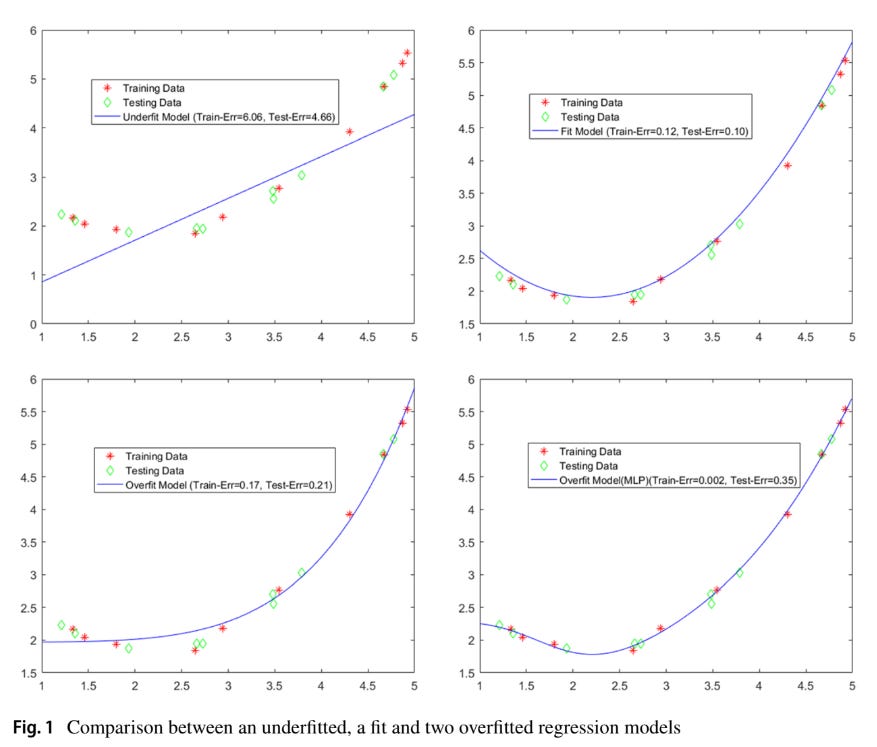
└── __init__.py
├── sampleCode
├── data.csv
├── pysparktest.py
├── sampleExperiment.py
└── sampleExperiment.ipynb
├── requirements.txt
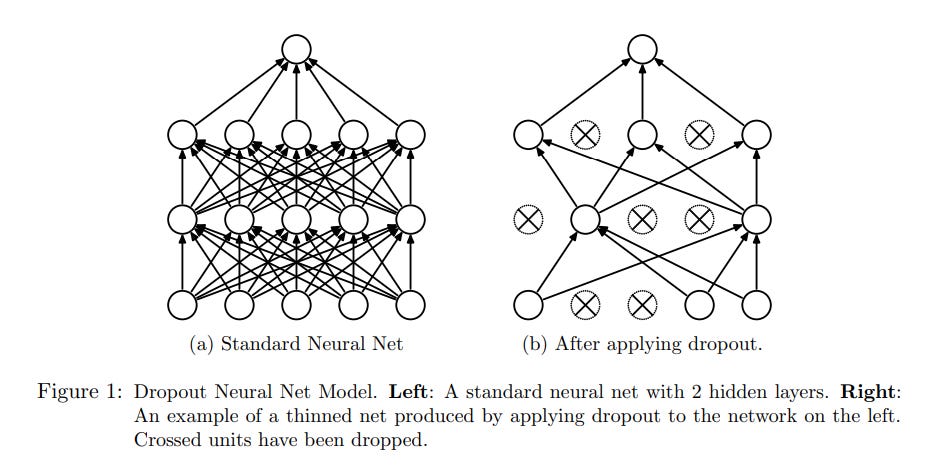
├── setup.py
├── tutorials
├── Overfitting in Shallow and Deep Neural Network.md
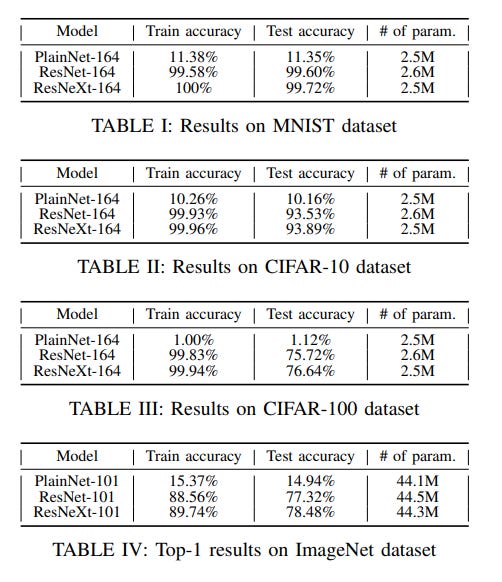
├── Do_you_really_need_a_feature_store.md
├── Deep Neural Network with Skip Connections.md
├── ImageAugmentation
│ └── imageAugmentation-tutorial.md
├── Dropout Layer.md
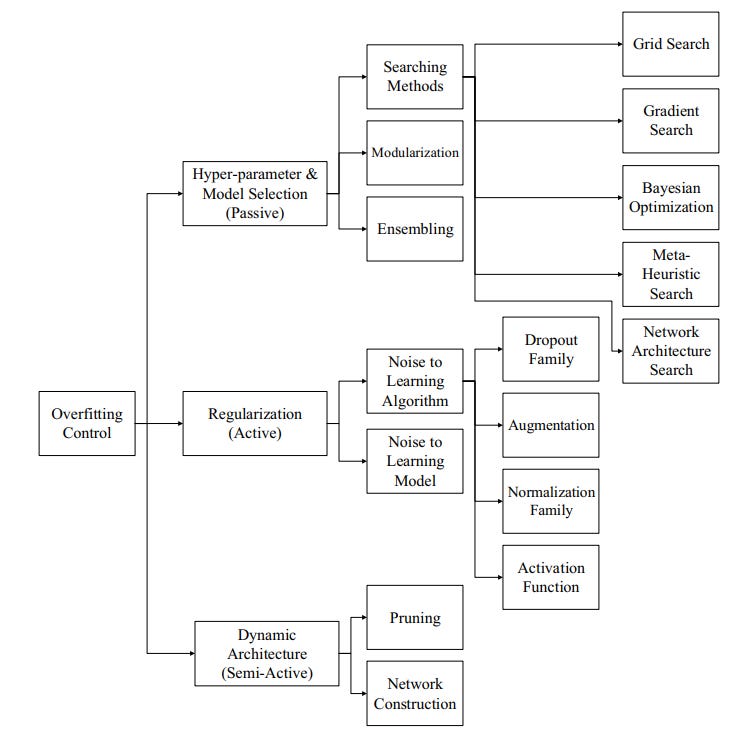
├── Plateau_Problem.md
├── Clustering
│ ├── Kmeans
│ │ └── tutorial_kmeans.md
│ ├── affinityPropagation
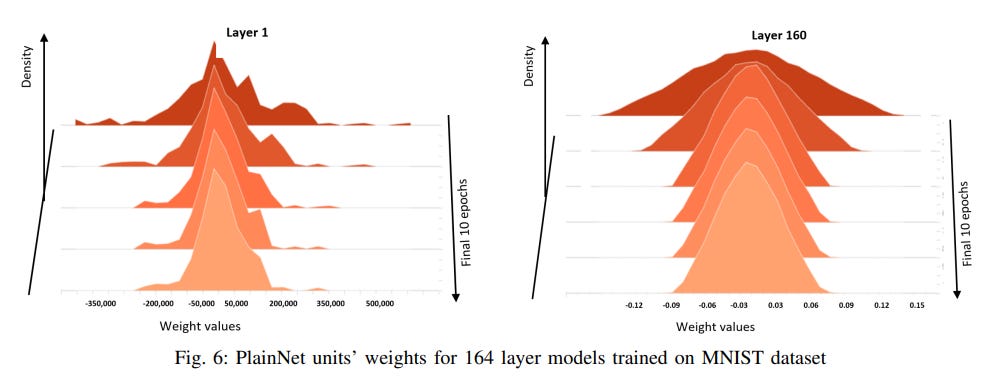
│ │ └── affinityPropagationTutorial.md
│ └── DBScan
│ │ └── DBScan tutorial.md
├── classification_featureSelectionByFRUPS
│ ├── FRUFS_tutorial.md.md
│ └── wine.csv
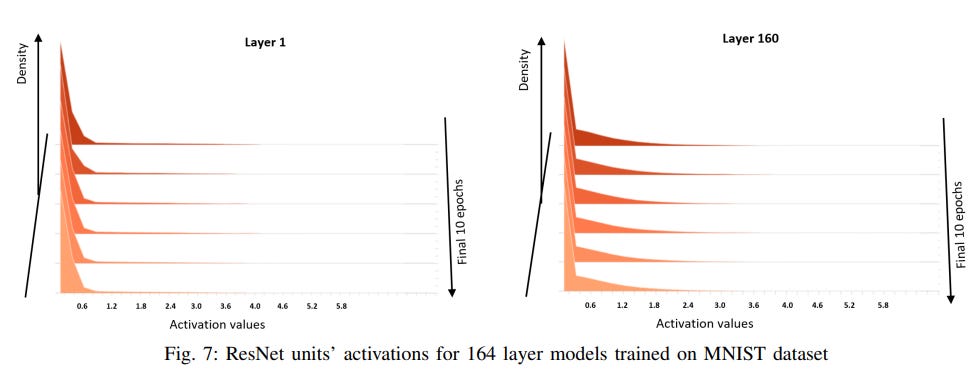
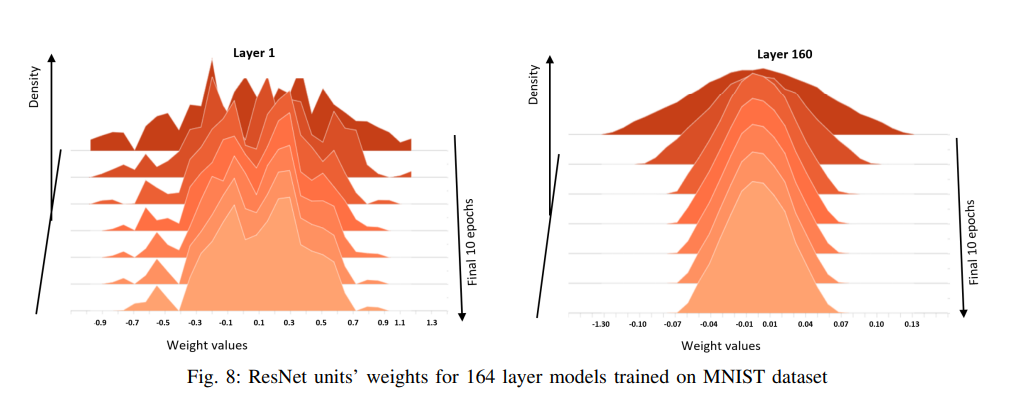
├── LIME
│ ├── Tabular
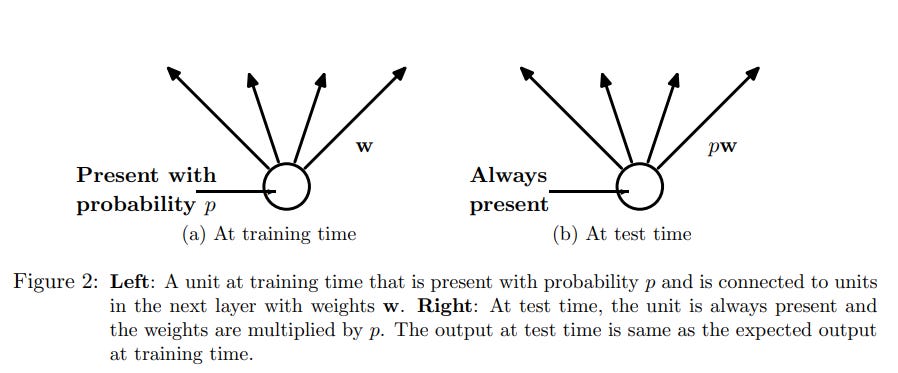
│ │ └── LIME_Tabular_Tutorial.md
│ └── NLP
│ │ └── Tutorial_LIME_NLP.md
├── FTRL.md
├── CLR_convergence.md
├── Attention Network.md
├── Predicting Future Weights of Neural Network.md
├── Lottery Ticket Hypothesis.md
├── Diffusion Models.md
├── Distributed Training.md
├── Noisy Labels with Deep Neural Networks.md
├── ZIP_models
│ └── ZIP_tutorial.md
└── AI-Fairness-Bias
│ └── AI Fairness Bias - tutorial.md
├── README.md
└── LICENSE
/test/__init__.py:
--------------------------------------------------------------------------------
1 |
--------------------------------------------------------------------------------
/vevestaX/__init__.py:
--------------------------------------------------------------------------------
1 | __version__ = '6.8.1'
2 |
--------------------------------------------------------------------------------
/test/test_vevesta.py:
--------------------------------------------------------------------------------
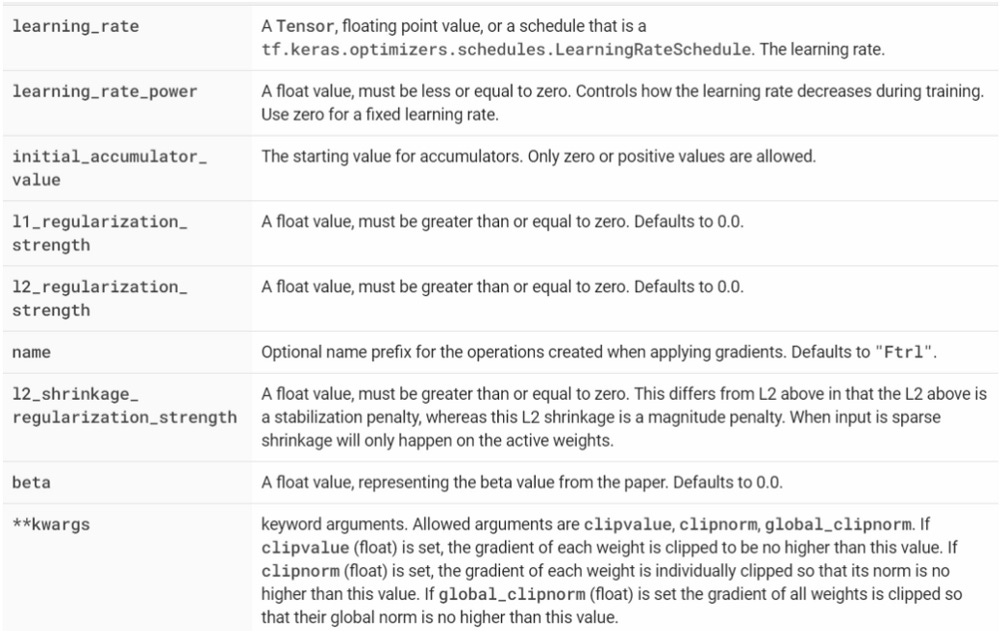
1 | from vevestaX import vevestaX
2 | def test_test():
3 | print(vevestaX.test())
4 | obj = vevestaX.V()
5 |
6 |
--------------------------------------------------------------------------------
/sampleCode/data.csv:
--------------------------------------------------------------------------------
1 | Gender,Age,Months_Count,Salary,Expenditure,House_Price
2 | 1,2,3,1,34,9884
3 | 1,2,34,0,56,2442
4 | 1,111,231,1,56,2421
5 | 0,49,65,0,156,6767
6 | 0,439,625,20,1256,452555
7 |
--------------------------------------------------------------------------------
/requirements.txt:
--------------------------------------------------------------------------------
1 | ipynbname==2021.3.2
2 | Jinja2==3.1.2
3 | matplotlib==3.5.2
4 | numpy==1.22.3
5 | openpyxl==3.0.9
6 | pandas==1.4.2
7 | pyspark==3.2.1
8 | requests==2.27.1
9 | scipy==1.8.0
10 |
11 | setuptools~=60.2.0
12 | PyGithub~=1.55
13 | img2pdf==0.4.4
--------------------------------------------------------------------------------
/setup.py:
--------------------------------------------------------------------------------
1 | from setuptools import find_packages, setup
2 | from vevestaX import __version__
3 |
4 | setup(
5 |
6 | name='vevestaX',
7 | packages=find_packages(include=['vevestaX']),
8 | version=__version__,
9 | description='Stupidly simple library to track machine learning experiments as well as features',
10 | author='Vevesta Labs',
11 | license='Apache 2.0',
12 | install_requires=['pandas','Jinja2','ipynbname','datetime','openpyxl','xlrd','requests','matplotlib','pyspark','numpy','scipy','statistics', 'PyGithub','img2pdf'],
13 | setup_requires=['pytest-runner'],
14 | tests_require=['pytest==4.4.1'],
15 | test_suite='tests',
16 |
17 | )
18 |
--------------------------------------------------------------------------------
/sampleCode/pysparktest.py:
--------------------------------------------------------------------------------
1 | from vevestaX import vevesta
2 | from pyspark.sql import SparkSession
3 | # import pandas as pd
4 |
5 | import os
6 | import sys
7 |
8 | os.environ['PYSPARK_PYTHON'] = sys.executable
9 | os.environ['PYSPARK_DRIVER_PYTHON'] = sys.executable
10 |
11 | V = vevesta.Experiment()
12 |
13 |
14 | spark = SparkSession.builder.appName("vevesta").getOrCreate()
15 | df_pyspark = spark.read.format("csv").option("header", "true").load("data.csv")
16 |
17 |
18 | sc = spark.sparkContext
19 | sc.setLogLevel("OFF")
20 |
21 | # df_pyspark = pd.read_csv("data.csv")
22 |
23 | V.dataSourcing = df_pyspark
24 | print(V.ds)
25 |
26 | # Do some feature engineering
27 | # df_pyspark["salary_feature"]= df_pyspark["Salary"] * 100/ df_pyspark["House_Price"]
28 | # df_pyspark['salary_ratio1']=df_pyspark["Salary"] * 100 / df_pyspark["Months_Count"] * 100
29 |
30 |
31 | # performing column operation on pyspark dataframe
32 | df_pyspark = df_pyspark.withColumn("salary_feature", df_pyspark.Salary*100 / df_pyspark.House_Price)
33 | df_pyspark = df_pyspark.withColumn("salary_ratio1", df_pyspark.Salary*100 / df_pyspark.Months_Count * 100)
34 |
35 | #Extract features engineered
36 | V.fe=df_pyspark
37 |
38 | #Print the features engineered
39 | print(V.fe)
40 |
41 | V.dump(techniqueUsed='XGBoost', filename="../vevestaX/vevestaDump.xlsx", message="precision is tracked", version=1)
42 | V.commit(techniqueUsed = "XGBoost", message="increased accuracy", version=1, projectId=122, attachmentFlag=True)
43 |
44 |
--------------------------------------------------------------------------------
/sampleCode/sampleExperiment.py:
--------------------------------------------------------------------------------
1 | #!/usr/bin/env python
2 | # coding: utf-8
3 |
4 | #import the vevesta Library
5 | from vevestaX import vevesta as v
6 |
7 | #create a vevestaX object
8 | V=v.Experiment()
9 |
10 | #read the dataset
11 | import pandas as pd
12 | df=pd.read_csv("data.csv")
13 |
14 | print(df.head(2))
15 |
16 | #Extract the columns names for features
17 | V.ds=df
18 | #you can also use:
19 | #V.dataSourcing = df
20 |
21 | #Print the feature being used
22 | print(V.ds)
23 |
24 | # Do some feature engineering
25 | df["salary_feature"]= df["Salary"] * 100/ df["House_Price"]
26 | df['salary_ratio1']=df["Salary"] * 100 / df["Months_Count"] * 100
27 |
28 | #Extract features engineered
29 | V.fe=df
30 |
31 | #you can also use:
32 | #V.featureEngineering = df
33 |
34 |
35 | #Print the features engineered
36 | print(V.fe)
37 |
38 | #Track variables which have been used for modelling
39 | V.start()
40 |
41 | #you can also use:
42 | #V.startModelling()
43 |
44 | #All the varibales mentioned here will be tracked
45 | epochs=1500
46 | seed=2000
47 | loss='rmse'
48 | accuracy= 91.2
49 |
50 | #end tracking of variables
51 | V.end()
52 | #you can also use V.endModelling()
53 |
54 |
55 | V.start()
56 | recall = 95
57 | precision = 87
58 | V.end()
59 |
60 | # Dump the datasourcing, features engineered and the variables tracked in a xlsx file
61 | V.dump(techniqueUsed='XGBoost',filename="vevestaDump.xlsx",message="precision is tracked",version=1)
62 |
63 | #if filename is not mentioned, then by default the data will be dumped to vevesta.xlsx file
64 | #V.dump(techniqueUsed='XGBoost')
65 |
66 |
--------------------------------------------------------------------------------
/tutorials/Overfitting in Shallow and Deep Neural Network.md:
--------------------------------------------------------------------------------
1 |
2 | # Quick overview of methods used to handle overfitting in Shallow and Deep Neural Network
3 |
4 | Overfitting is due to the fact that the model is complex, only memorizes the training data with limited generalizability and cannot correctly recognize different unseen data.
5 |
6 | 
7 |
8 | According to [authors](https://link.springer.com/article/10.1007/s10462-021-09975-1), reasons for overfitting are as follows:
9 |
10 | 1. Noise of the training samples,
11 | 2. Lack of training samples (under-sampled training data),
12 | 3. Biased or disproportionate training samples,
13 | 4. Non-negligible variance of the estimation errors,
14 | 5. Multiple patterns with different non-linearity levels that need different learning models,
15 | 6. Biased predictions using different selections of variables,
16 | 7. Stopping training procedure before convergence or dropping in a local minimum,
17 | 8. Different distributions for training and testing samples.
18 |
19 | ## Methods to handle overfitting:
20 |
21 | 1. Passive Schemes: Methods meant to search for suitable configuration of the model/network and are some times called as Model selection techniques or hyper-parameter optimization techniques.
22 | 2. Active Schemes: Also, referred as regularization techniques, this method introduces dynamic noise during model training time.
23 | 3. Semi - Active Schemes: In this methodology, the network is changed during the training time. The same is achieved either by network pruning during training or addition of hidden units during the training.
24 |
25 | 
26 |
27 | ## References:
28 |
29 | 1. [A systematic review on overftting control in shallow and deep neural networks](https://link.springer.com/article/10.1007/s10462-021-09975-1)
30 | 2. [Overfitting in Shallow and Deep Neural Network on Vevesta](https://www.vevesta.com/blog/25-Handling-overfitting-in-Shallow-and-Deep-Neural-Network)
31 | 3. [Overfitting in Shallow and Deep Neural Network on Substack](https://vevesta.substack.com/p/deep-dive-in-causes-of-overfitting)
32 |
33 | ## Credits
34 |
35 | The above article is sponsored by [vevesta](https://www.vevesta.com/).
36 |
37 | [Vevesta](https://www.vevesta.com/): Your Machine Learning Team’s Feature and Technique Dictionary: Accelerate your Machine learning project by using features, techniques and projects used by your peers. Explore [Vevesta](https://www.vevesta.com/) for free. For more such stories, follow us on twitter at [@vevesta_labs](https://twitter.com/vevesta_labs).
--------------------------------------------------------------------------------
/tutorials/Do_you_really_need_a_feature_store.md:
--------------------------------------------------------------------------------
1 | # Do you really need a Feature Store ?
2 |
3 | 
4 |
5 | Photo by [Compare Fibre](https://unsplash.com/@comparefibre?utm_source=medium&utm_medium=referral) on [Unsplash](https://unsplash.com/?utm_source=medium&utm_medium=referral)
6 |
7 | Feature store’s strength lies predominantly in the fact that it brings data from disparate sources especially, time-stamped clickstream data and provides them to data scientists as and when needed. But a deeper dive reveals a lot of use cases that are dominant in the data science community and are in fact overlooked by feature stores.
8 |
9 | ## When are Feature Stores useful :
10 | Feature stores are useful since they enable data scientists to compute features on the server, say number of clicks. The alternative to this is computing features in the model itself or/and compute in a transform function in SQL.
11 |
12 | ## Where Feature Stores fail ?
13 | 1. **Steep learning curve:** The code that is required to integrate features with the feature store is not simple for a data scientist from non-programming backgrounds. Data Scientists are in general exposed to Pandas and SQL type of syntax. The learning curve required to work feature stores is by no means small.
14 |
15 | 2. **Little overlap in features being used:** Feature stores enables you to reuse features. In data science, features require some pre-processing, so either values are imputed in the features or some aggregation of features is done, say value of feature in the last 24 hours or last week. For feature stores to be of real use, not only do these features need to be computationally expensive, they also require reuse of features by multiple data science teams. But, this is generally not the case, each project will use its own data imputation and aggregation, depending on the problem at hand.
16 |
17 | 3. **Risk of change is pipelines:** Feature stores enable extensive collaboration between data scientists. But the implicit requirement is that data scientists for a particular project might use, say, imputation of mode during pre-processing, but then they later decide to change it to, say, mean. This will require the data scientist to create a new feature in the feature store and change his complete pipeline or change the definition of feature in feature store which in turn would require other data scientists dependent on the feature to change their pipelines, neither is a comfortable option.
18 | In short, feature stores are clearly suited for the narrow use case of creation of features from time series data that are extensively computationally expensive features. Most organizations don’t have this use case in place.
19 |
20 | ## Credits:
21 | The above article is sponsored by [***Vevesta.***](http://www.vevesta.com/?utm_source=Github_VevestaX_FeatureStore)
22 |
23 | [***Vevesta:***](http://www.vevesta.com/?utm_source=Github_VevestaX_FeatureStore) Your Machine Learning Team’s Collective Wiki: Save and Share your features and techniques.
24 |
25 | For more such stories, follow us on twitter at [@vevesta1](http://twitter.com/vevesta1).
26 |
27 | ## Author
28 | Priyanka
29 |
--------------------------------------------------------------------------------
/tutorials/Deep Neural Network with Skip Connections.md:
--------------------------------------------------------------------------------
1 |
2 | # Why is Everyone Training Very Deep Neural Network with Skip Connections?
3 |
4 | Deep neural networks (DNNs) have are a powerful means to train models on various learning tasks, with the capability to automatically learn relevant features. According to empirical studies, there seem to be positive correlation between model depth and generalization performance.
5 |
6 | Generally, training PlainNets (Neural networks without Skip Connections) with few number of layers (i.e. typically one to ten layers) is not problematic. But when model depth is increased beyond 10 layers, training difficulty can experienced. Training difficulty typically worsens with increase in depth, and sometimes even the training set cannot be fitted. For example, when training from scratch there was optimization failure for the VGG-13 model with 13 layers and VGG-16 model with 16 layers. Hence, VGG-13 model was trained by initializing its first 11 layers with the weights of the already trained VGG-11 model. Similar was the case with VGG-16. Currently, there is proliferation of networks, such as Resnet, FractalNet, etc which use skip connections.
7 |
8 | ## What are skip connections?
9 |
10 | Skip connections are where the outputs of preceding layers are connected (e.g. via summation or concatenation) to later layers. Architectures with more than 15 layers have increasingly turned to skip connections. According to empirical studies, skip connections alleviate training problems and improve model generalization. Although multiple weights initialization schemes and batch normalization can alleviate the training problems, optimizing PlainNets becomes absolutely impossible beyond a certain depth.
11 |
12 | ## Experimental Results
13 |
14 | Experiments were done on MNIST, CIFAR-10 and CIFAR-100 datasets using PlainNet, ResNet and ResNeXt, each having 164 layers.
15 |
16 | 
17 |
18 | Tables 1, 2, 3 and 4 show the obtained accuracies on the different datasets. Clearly it can be seen, as in figure 3 and figure 4, that PlainNets perform worser than networks with skip connections and are essentially untrainable. PlainNets failure to learn, given the very poor accuracies on the training sets.
19 |
20 | 

21 |
22 | ## Discussion and Observations:
23 |
24 | The plot of PlainNets activations and weights given below in Figure 5 and Figure 6.
25 |
26 | 
27 |
28 |
29 | 
30 | The plot of ResNet unit’s activations and weights given below in Figure 7 and Figure 8.
31 |
32 | 
33 |
34 | 
35 |
36 | According to authors of the [paper](https://orbilu.uni.lu/bitstream/10993/48927/1/TNNLS-2020-P-13752.pdf), the PlainNet trained on CIFAR10 dataset, starting from the eightieth layer, have hidden representations with infinite condition numbers; on CIFAR100 dataset, starting from the hundredth layer, the PlainNet’s hidden representations have infinite condition numbers. This observation depicts the worst scenario of the singularity problem for optimization such that model generalization is impossible as given in Remark 8. In contrast, the hidden representations of the ResNet never have infinite condition numbers; the condition numbers, which are high in the early layers quickly reduce to reasonable values so that optimization converges successfully.
37 |
38 | ## Conclusion
39 |
40 | Skip connections are a powerful means to train Deep Neural Networks.
41 |
42 | ## Credits
43 |
44 | The above article is sponsored by [Vevesta](https://www.vevesta.com/).
45 |
46 | [Vevesta](https://www.vevesta.com/): Your Machine Learning Team’s Feature and Technique Dictionary: Accelerate your Machine learning project by using features, techniques and projects used by your peers. Explore [Vevesta](https://www.vevesta.com/) for free. For more such stories, follow us on twitter at [@vevesta_labs](https://twitter.com/vevesta_labs).
47 |
48 | 100 early birds who login into [Vevesta](https://www.vevesta.com/) will get free subscription for 3 months
49 |
50 | Subscribe to receive a copy of our newsletter directly delivered to your inbox.
--------------------------------------------------------------------------------
/tutorials/ImageAugmentation/imageAugmentation-tutorial.md:
--------------------------------------------------------------------------------
1 | # Image Augmentation
2 | ## Introduction
3 |
4 | A deep learning model generally works well when it has a huge amount of data. In general, the more data we have better will be the performance of the model.
5 |
6 | 
7 | *Img Source: [Cousins of Artificial Intelligence | Seema Singh](https://towardsdatascience.com/cousins-of-artificial-intelligence-dda4edc27b55)*
8 |
9 | From the graph above, we can notice that as the amount of data increases the performance of the deep learning model also improves. But acquiring a massive amount of data is itself a major challenge. Every time it is not possible to have a large amount of data to feed the deep learning network.
10 |
11 | The problem with the lack of a good amount of data is that the deep learning model might not learn the patterns or the functions from the data and hence it might not perform well.
12 |
13 | So in order to deal with this and spending days manually collecting the data, we make use of Image Augmentation techniques.
14 |
15 | ## Image Data Augmentation
16 |
17 | Image data augmentation is a method that can be used to increase the size of a training database by creating modified versions of images in the database.
18 |
19 | It is a process of taking the images that are already present in the training dataset and manipulating them to create many altered versions. This not only provides more images to train on, but also help our classifier to expose a wider variety of lighting and coloring situations thus making it a more skillful model.
20 |
21 | 
22 |
23 | In the above figure, since all these images are generated from training data itself we don’t have to collect them manually. This increases the training sample without going out and collecting this data. Note that, the label for all the images will be the same and that is of the original image which is used to generate them.
24 |
25 | Point to be noted is that Image data augmentation is typically only applied to the training dataset, and not to the validation or test dataset. This is different from data preparation such as image resizing and pixel scaling; they must be performed consistently across all datasets that interact with the model.
26 |
27 | ## Image Augmentation With ImageDataGenerator
28 |
29 | The Keras deep learning library provides the ability to use data augmentation automatically when training a model.
30 |
31 | A range of techniques are supported, as well as pixel scaling methods. Few of them are:
32 |
33 | * Image shifts via the width_shift_range and height_shift_range arguments.
34 | * Image flips via the horizontal_flip and vertical_flip arguments.
35 | * Image rotations via the rotation_range argument
36 | * Image brightness via the brightness_range argument.
37 | * Image zoom via the zoom_range argument.
38 | Here in this article we will be restricting ourselves to the image augmentation by shifting the width range only, further augmentation like flipping the images, brightness and contrast, rotation etc. can be done by slight modification in the Hyper Parameters.
39 |
40 | Let us take the following image for augmentation purpose.
41 |
42 | 
43 |
44 | * Importing Libraries
45 | ```
46 | from numpy import expand_dims
47 | from keras.preprocessing.image import load_img
48 | from keras.preprocessing.image import img_to_array
49 | from keras.preprocessing.image import ImageDataGenerator
50 | from matplotlib import pyplot
51 | ```
52 | * Loading the image and preprocessing it.
53 | ```
54 | # load the image
55 | img = load_img('bird.jpg')
56 | # convert to numpy array
57 | data = img_to_array(img)
58 | # it is a function of numpy which expand dimension to one sample in specified axis here 0 that is horizontal
59 | samples = expand_dims(data, 0)
60 | ```
61 | * Creating image data augmentation generator and preparing iterator.
62 | ```
63 | # create image data augmentation generator
64 | datagen = ImageDataGenerator(width_shift_range=[-200,200])
65 | #the width_shift_range and height_shift_range arguments to the ImageDataGenerator constructor control the amount of horizontal and vertical shift respectively.
66 | # prepare iterator
67 | it = datagen.flow(samples, batch_size=1)
68 | ```
69 | * Plotting the augmented images
70 | ```
71 | # generate samples and plot
72 | for i in range(9):
73 | # define subplot
74 | pyplot.subplot(330 + 1 + i)
75 |
76 | # generate batch of images
77 | batch = it.next()
78 |
79 | # convert to unsigned integers for viewing
80 | image = batch[0].astype('uint8')
81 |
82 | # plot raw pixel data
83 | pyplot.imshow(image)
84 | # show the figure
85 | pyplot.show()
86 | ```
87 | 
88 |
89 | ## End Notes
90 |
91 | To summarize, If we are aiming to develop a robust and generalized deep learning model but do not have a large dataset, In such cases, image augmentation techniques come as a savior, as they allow us to generate a wide range of new data without much effort.
92 |
93 | ## References
94 |
95 | * [Machine Learning Mastery](https://machinelearningmastery.com/how-to-configure-image-data-augmentation-when-training-deep-learning-neural-networks/)
96 | * [Analytics Vidhya](https://www.analyticsvidhya.com/blog/2021/03/image-augmentation-techniques-for-training-deep-learning-models/)
97 |
98 |
--------------------------------------------------------------------------------
/tutorials/Dropout Layer.md:
--------------------------------------------------------------------------------
1 |
2 | # Uncovering Hidden Insights into Dropout Layer
3 |
4 | Problem faced in training deep neural networks
5 |
6 | Deep neural networks with a large number of parameters suffer from overfitting and are also slow to use.
7 |
8 |
9 | ## What is Dropout, in short?
10 |
11 | According to the authors, the key idea of dropout is based on randomly droping units (along with their connections) from the neural network during training. This stops units from “co-adapting too much”. During training, exponential number of different “thinned” networks are sampled. “At test time, it is easy to approximate the effect of averaging the predictions of all these thinned networks by simply using a single unthinned network that has smaller weights. This significantly reduces overfitting and gives major improvements over other regularization methods”. Also, dropout layer avoids co-adaptation of neurons by making it impossible for two subsequent neurons to rely solely on each other.
12 |
13 | Using dropout can be viewed as training a huge number of neural networks with shared parameters and applying bagging at test time for better generalization.
14 |
15 | 
16 |
17 | ## Deep Dive into Dropout
18 |
19 | The term “dropout” refers to dropping out units, both hidden and visible, in a neural network. Dropping a neuron/unit out means temporarily removing it from the network along with all its incoming and outgoing connections. The choice of which units to drop is random. In the simplest case, each unit is retained with a fixed probability p independent of other units, where p can be chosen using a validation set.
20 |
21 | ### Things to keep in mind while using Dropout in experiments
22 |
23 | 1. For a wide variety of networks and tasks, dropout should be set to 0.5.
24 | 2. For input units, the optimal dropout is usually closer to 0 than 0.5, or alternatively, optimal probability of retention should be closer to 1.
25 | 3. Note that p is 1- (dropout probability) and dropout probability is what we set in neural network while coding in keras or Tensorflow.
26 | 4. While training network with SGD, dropout layer along with maxnorm regularization, large decaying learning rates and high momentum provides a significant boost over just using dropout.
27 |
28 | ### How does Dropout work?
29 |
30 | 
31 |
32 | As shown in Figure 2, during training, the unit/neuron is present with probability p and is connected with units in the next layer with weights, w. During testing phase, the unit is always present and its weights are multiplied by p.
33 |
34 | Dropout is applied to the neural network of n units and 2^n possible thinned neural networks are generated. A thinned neural network is a neural network which has dropped some units and their corresponding connections, as shown in figure 1b. The interesting part is that despite thinning, these networks all share weights so that the total number of parameters is still O(n^2), or less. During training phase for each data point, a certain permutation of units are switched off and a new thinned network is sampled and trained. Each thinned network gets trained very rarely, if at all.
35 |
36 | At test time, since it’s not feasible to explicitly average the predictions from exponentially many thinned models. The idea is that the full neural net is used at test time without dropout. Inorder to compensate for dropout being applied during training phase, if a neuron is retained with probability p during training, the outgoing weights of that neuron are multiplied by p at test time, as can be seen in Figure 2. By using this methodology, during the testing phase, 2^n networks with shared weights can be combined into a single neural network. According to [authors](http://cs.toronto.edu/~rsalakhu/papers/srivastava14a.pdf), it was noticed using this methodology leads to significantly lower generalization error on a wide variety of classification problems compared to training with other regularization methods.
37 |
38 | ## Applications of Dropout layer
39 |
40 | Few examples of domains where dropout is finding extensive use are as follows:
41 |
42 | 1. According to Merity et al., dropout is the norm for NLP problems as it is much more effective than methods such as L2 regularization
43 | 2. In vision, dropout is often used to train extremely large models such as EfficientNet-B7.
44 |
45 | ## References:
46 |
47 | 1. [Regularizing and Optimizing LSTM Language Models](https://arxiv.org/abs/1708.02182)
48 | 2. [EfficientNet: Rethinking Model Scaling for Convolutional Neural Networks](http://proceedings.mlr.press/v97/tan19a/tan19a.pdf)
49 | 3. [Dropout: A Simple Way to Prevent Neural Networks from Overfitting](https://www.cs.toronto.edu/~rsalakhu/papers/srivastava14a.pdf)
50 | 4. [Dropout as data augmentation](https://arxiv.org/pdf/1506.08700.pdf)
51 | 5. [Dropout Layer Article on Substack](https://vevesta.substack.com/p/uncovering-hidden-insights-into-dropout)
52 | 6. [Dropout Layer Article on Vevesta](https://www.vevesta.com/blog/21-Dropout-Layer)
53 |
54 | ## Credits:
55 |
56 | The above article is sponsored by [vevesta.](https://www.vevesta.com/)
57 |
58 | [Vevesta](https://www.vevesta.com/): Your Machine Learning Team’s Feature and Technique Dictionary: Accelerate your Machine learning project by using features, techniques and projects used by your peers. Explore [Vevesta](https://www.vevesta.com/) for free. For more such stories, follow us on twitter at [@vevesta_labs](https://twitter.com/vevesta_labs).
--------------------------------------------------------------------------------
/tutorials/Plateau_Problem.md:
--------------------------------------------------------------------------------
1 | # Pitfalls of early stopping neural network
2 | We've all noticed that after a certain number of training steps, the loss starts to slow significantly. After a long period of steady loss, the loss may abruptly resume dropping rapidly for no apparent reason, and this process will continue until we run out of steps.
3 |
4 | 
5 | [Image Credits](https://cdn-images-1.medium.com/max/900/0*rA05n6siCddLinjn.png).
6 |
7 | The loss falls rapidly for the first ten epochs, but thereafter tends to remain constant for a long time, as seen in Figure (a). Following that, the loss tends to reduce substantially, as illustrated in figure (b), before becoming practically constant.
8 |
9 | Many of us may base our decision on the curve depicted in fig (a), however the fact is that if we train our network for additional epochs, there is a probability that the model will converge at a better position.
10 |
11 | These plateaus complicate our judgement on when to stop the gradient drop and also slow down convergence because traversing a plateau in the expectation of minimising the loss demands more iterations.
12 |
13 | ## Cause of Plateau
14 | The formation of a plateau is caused primarily by two factors, which are as follows:
15 | * Saddle Point
16 | * Local Minima
17 |
18 | 
19 | [Image Credits](https://medium.com/r/?url=https%3A%2F%2Fwww.researchgate.net%2Ffigure%2FDefinition-of-grey-level-blobs-from-local-minima-and-saddle-points-2D-case_fig1_10651758).
20 |
21 | ## Saddle Point
22 |
23 | 
24 | [Image Credits](https://medium.com/r/?url=https%3A%2F%2Fen.wikipedia.org%2Fwiki%2FSaddle_point)
25 |
26 | The fundamental problem with saddle points is that the gradient of a function is zero at the saddle point, which does not reflect the greatest and minimum value. The gradient value optimises the machine learning and optimization algorithms in a neural network, and if the gradient is zero, the model becomes stalled.
27 |
28 | ## Local Minima
29 |
30 | 
31 | [Image Credits](https://www.researchgate.net/figure/1st-order-saddle-point-in-the-3-dimensional-surface-Surface-is-described-by-the_fig7_280804948)
32 |
33 | In this scenario, the point is an extremum, which is good, but the gradient is zero. We may not be able to escape the local minimum if our learning rate is too low. The loss value in our hypothetical training environment began balancing around some constant number, as shown in fig(a); one major explanation for this is the establishment of these types of local minimums.
34 |
35 | ## Effect of Learning Rate
36 | The learning rate hyperparameter determines how quickly the model learns. A higher learning rate allows the model to learn faster, but it may result in a less-than-ideal final set of weights. A slower learning rate, on the other hand, may allow the model to acquire a more optimal, or possibly a globally ideal, set of weights, but training will be much more time consuming. A sluggish learning rate has the disadvantage of never convergent or becoming stuck on a suboptimal solution.
37 |
38 | Thus, learning rate is important in overcoming the plateau problem; strategies such as scheduling the learning rate or cyclical learning rate are employed for this.
39 |
40 | ## Methods to Overcome a Plateau Problem
41 | Following are the approaches which might be used to tweak the learning rates in order to overcome the plateau problem:
42 |
43 | ## Scheduling the Learning Rate
44 | The most frequent method is to plan the learning rate, which suggests beginning with a reasonably high learning rate and gradually decreasing it over training. The concept is that we want to get from the initial parameters to a range of excellent parameter values as rapidly as possible, but we also want a low enough learning rate to explore the deeper, but narrower, regions of the loss function.
45 |
46 | 
47 | [Image Credits](https://medium.com/r/?url=https%3A%2F%2Fwww.researchgate.net%2Ffigure%2FStep-Decay-Learning-Rate_fig3_337159046)
48 |
49 | An example of this is Step decay in which the learning rate is lowered by a certain percentage after a certain number of training epochs.
50 |
51 | ## Cyclical Learning Rate
52 | Leslie Smith provided a cyclical learning rate scheduling approach with two bound values that fluctuate.
53 |
54 | Cyclical learning scheme displays a sublime balance between passing over local minima while still allowing us to look around in detail.
55 |
56 | 
57 |
58 | [Image Credits](https://medium.com/r/?url=https%3A%2F%2Farxiv.org%2Fpdf%2F1506.01186.pdf)
59 |
60 | Thus, scheduling the learning rate aids us in overcoming the plateau issues encountered while optimising neural networks
61 | ## References
62 | * [Analytics Vidhya](https://medium.com/r/?url=https%3A%2F%2Fanalyticsindiamag.com%2Fwhat-is-the-plateau-problem-in-neural-networks-and-how-to-fix-it%2F)
63 | * [Plateau Phenomenon by Mark Ainsworth](https://medium.com/r/?url=https%3A%2F%2Farxiv.org%2Fpdf%2F2007.07213.pdf)
64 | * [Cyclical Learning Rate](https://medium.com/r/?url=https%3A%2F%2Farxiv.org%2Fpdf%2F1506.01186.pdf)
65 | * [Find best learning rate on Plateau](https://medium.com/r/?url=https%3A%2F%2Fgithub.com%2FJonnoFTW%2Fkeras_find_lr_on_plateau)
66 | * [Original Article on Plateau](https://www.vevesta.com/blog/13-Early-stopping-of-neural-network-might-not-be-optimal-decision-Plateau-problem?utm_source=GitHub_VevestaX_plateauProblem)
67 |
68 | ## Credits
69 | [Vevesta](https://www.vevesta.com?utm_source=Github_VevestaX_Plateau) is Your Machine Learning Team's Collective Wiki: Save and Share your features and techniques. Explore [Vevesta](https://www.vevesta.com?utm_source=Github_VevestaX_Plateau) for free. For more such stories, follow us on twitter at [@vevesta1](http://twitter.com/vevesta1).
70 |
71 | ## Author
72 | Sarthak Kedia
73 |
--------------------------------------------------------------------------------
/tutorials/Clustering/Kmeans/tutorial_kmeans.md:
--------------------------------------------------------------------------------
1 |
2 | # Classification with K-Means and VevestaX library.
3 |
4 | In this article we will be focusing on a very well-known unsupervised machine learning technique 'K-Means' and will be using a very efficient python package known as 'VevestaX' in order to perform Exploratory Data Analysis and Experiment Tracking.
5 |
6 | ## Table of Contents
7 | 1. [K-Mean Clustering](https://github.com/Vevesta/VevestaX/blob/main/tutorials/Kmeans/tutorial_kmeans.md#k-mean-clustering)
8 | 2. [How the K-means algorithm works?](https://github.com/Vevesta/VevestaX/blob/main/tutorials/Kmeans/tutorial_kmeans.md#how-the-k-means-algorithm-works)
9 | 3. [VevestaX](https://github.com/Vevesta/VevestaX/blob/main/tutorials/Kmeans/tutorial_kmeans.md#vevestax)
10 | 4. [How To Use VevestaX?](https://github.com/Vevesta/VevestaX/blob/main/tutorials/Kmeans/tutorial_kmeans.md#how-to-use-vevestax)
11 | 5. [How to perform clustering using K Means and VevestaX?](https://github.com/Vevesta/VevestaX/blob/main/tutorials/Kmeans/tutorial_kmeans.md#how-to-perform-clustering-using-k-means-and-vevestax)
12 | 6. [References](https://github.com/Vevesta/VevestaX/blob/main/tutorials/Kmeans/tutorial_kmeans.md#references)
13 |
14 | ## K-Mean Clustering
15 | K-means clustering is one of the easiest and most popular unsupervised machine learning algorithms. Clustering algorithms are used to cluster similar data points, each based on their own definition of similarity. The K-means algorithm identifies the number of clusters, k and then assigns each data point to the nearest cluster.
16 |
17 | ## How the K-means algorithm works?
18 | While learning from the data, the K-means algorithm starts with a first group of randomly selected centroids. These centroids are used as the initial points assigned to every cluster. K-means performs iterative (repetitive) calculations to optimize the positions of the centroids. It does this by minimizing the distance of points from the centroid.
19 |
20 | It stops creating and optimizing the clusters when either:
21 |
22 | * There is no change in the values of the centroid because the clustering has been successful.
23 | * The defined number of iterations has been achieved.
24 |
25 | ## VevestaX
26 | VevestaX is an open source Python package which includes a variety of features that makes the work of a Data Scientist pretty much easier especially when it comes to analyses and getting the insights from the data.
27 |
28 | The package can be used to extract the features from the datasets and can track all the variables used in code.
29 |
30 | The best part of this package is about its output. The output file of the VevestaX provides us with numerous EDA tools like histograms, performance plots, correlation matrix and much more without writing the actual code for each of them separately.
31 |
32 | ## How To Use VevestaX?
33 | Install the package as follows:
34 |
35 | ```
36 | pip install vevestaX
37 | ```
38 |
39 | Import and create a vevesta object as follows:
40 |
41 | ```
42 | from vevestaX import vevesta as v
43 | V=v.Experiment()
44 | ```
45 |
46 | To track the feature used:
47 |
48 | ```
49 | V.ds = df
50 | ```
51 |
52 | where df is the pandas dataframe with the input features
53 |
54 | 
55 |
56 | To track features engineered
57 |
58 | ```
59 | V.fe = df
60 | ```
61 |
62 | Finally in order to dump the features and variables used into an excel file and to see the insights what the data carries use:
63 |
64 | ```
65 | V.dump(techniqueUsed="Model_Name",filename="vevestaDump.xlsx",message="precision is tracked",version=1)
66 | ```
67 |
68 |
69 | Following are the insights we received after dumping the features:
70 |
71 | 
72 |
73 | 
74 |
75 | 
76 |
77 | 
78 |
79 | 
80 |
81 | ## How to perform clustering using K Means and VevestaX?
82 |
83 | So what we have basically done is, firstly we have imported the necessary libraries and loaded the dataset.
84 |
85 | 
86 |
87 | Thereafter we had performed the train_test _split in order to get the train and test dataset.
88 |
89 | 
90 |
91 | Next, we cluster the data using K-Means. The number of clusters to be formed will be same as the classes in the data. The K-Means model is fitted on the train data and then the labels for test data are predicted. Finally, we calculate the baseline NMI score for the model.
92 |
93 | 
94 |
95 | Next in order to get the centroids of the clusters we used:
96 |
97 | ```
98 | model_kmeans.cluster_centers_
99 | ```
100 |
101 |
102 | 
103 |
104 | Finally we have dumped the data into Excel File using VevestaX.
105 |
106 | 
107 |
108 | [*For Source Code Click Here*](https://gist.github.com/sarthakkedia123/bd77515160a0b2d953266e0302268fd2)
109 |
110 | ## References
111 |
112 | 1. [VevestaX article](https://medium.com/@priyanka_60446/vevestax-open-source-library-to-track-failed-and-successful-machine-learning-experiments-and-data-8deb76254b9c)
113 | 2. [VevestaX GitHub Link](https://github.com/Vevesta/VevestaX)
114 | 3. [Article](https://www.vevesta.com/blog/4_Classification_with_K-Means_and_Vevestax_library?utm_source=Github_VevestaX_Kmeans)
115 |
116 | ## Credits
117 | [Vevesta](https://www.vevesta.com?utm_source=Github_VevestaX_Kmeans) is Your Machine Learning Team's Collective Wiki: Save and Share your features and techniques. Explore [Vevesta](https://www.vevesta.com?utm_source=Github_VevestaX_Kmeans) for free. For more such stories, follow us on twitter at [@vevesta1](http://twitter.com/vevesta1).
118 |
119 | ## Author
120 | Sarthak Kedia
121 |
--------------------------------------------------------------------------------
/tutorials/classification_featureSelectionByFRUPS/FRUFS_tutorial.md.md:
--------------------------------------------------------------------------------
1 |
2 | # Feature selection using FRUFS and VevestaX
3 |
4 | In machine learning problems, feature selection helps in reducing overfitting, removes noisy variables, reduces memory footprint, etc. In this article we present a new technique, namely FRUFS. The algorithm is based on the idea that the most important feature is the one that can largely represent all other features. Similarly, the second most important feature can approximate all other remaining features but not as well as the most important one and so on.
5 |
6 | FRUFS is model agnostic and is unsupervised, which means that Y does not have a role to play in identifying the features importance. Hence in the first step we remove Y from the data. We then take a single feature j as the target and try to predict it with any model f using the remaining features. In this technique, the target is X[j] and the features are X[~j], where X is the data. All the features (except feature j) are used to predict feature j. The technique is model agnostic, meaning that any model right from linear regression to XGBoost can be used to predict the target feature j. In each iteration of identifying the target j using model m, the feature importance is calculated for all the remaining features. This process is repeated for all the features i.e 1<= j <= n and finally, feature importance is averaged. Note, sampling of data is applied to increase the speed of convergence of the algorithm
7 |
8 | In summary, we can say that this algorithm depends on a feature’s ability to predict other features. If feature 1 can be predicted by feature 2, 3 and 4. We can easily drop features 2, 3 and 4. Based on this idea, FRUFS (Feature Relevance based Unsupervised Feature Selection) has been defined. The authors have described FRUFS as an unsupervised feature selection technique that uses supervised algorithms such as XGBoost to rank features based on their importance.
9 |
10 | ## How To Use VevestaX
11 | To track experiments — features, features engineered and parameters you can use VevestaX library. Install VevestaX as follows:
12 |
13 | * *pip install vevestaX*
14 |
15 | Import and create a vevesta object as follows
16 |
17 | * *from vevestaX import vevesta as v*
18 |
19 | * *V=v.Experiment()*
20 |
21 | To track feature used
22 |
23 | * *V.ds = data*
24 |
25 | where data is the pandas dataframe with the input features
26 |
27 | To track features engineered
28 |
29 | * *V.fe = data*
30 |
31 | Finally, if you want to track specific variables used in the code, enclose with V.start() at the start of the code block and V.end() at the end of the code block. By default, VevestaX tracks all the variables used in the code. Finally, use V.dump to dump features and variables used into an excel file. Example
32 |
33 | * *V.dump(techniqueUsed = “XGBoost”)*
34 |
35 | If you are working on kaggle or colab or don’t want to use V.start() and V.end(), by default, VevestaX will track all the variables (of primitive data types) used in the code for you.
36 |
37 | ## How to Use Frufs
38 | You can install this library with
39 |
40 | * *pip install FRUFS*
41 |
42 | Start by importing the library
43 |
44 | * *from FRUFS import FRUFS*
45 |
46 | Call the FRUFS object as follows:
47 |
48 | * *model = FRUFS(model_r, model_c, k, n_jobs, verbose, categorical_features, random_state)*
49 |
50 | Example:
51 |
52 | * *model = FRUFS(model_r=DecisionTreeRegressor(random_state=27),k=5, n_jobs=-1, verbose=0, random_state=1)*
53 |
54 | Now Train the FRUFS model and use it to downsize your data
55 |
56 | * *x = model.fit_transform(x)*
57 |
58 | Finally, to get a plot of the feature importance scores
59 |
60 | * *model.feature_importance()*
61 |
62 | ## Sample output of the VevestaX library:
63 | Data Sourcing tab details the features used in the experiment with 1 indicating feature present and 0 indicating its absence in the experiment.
64 |
65 | 
66 |
67 | Feature Engineering tab details the features created in the experiments such that 1 means feature was engineered in that experiment and 0 means it was not.
68 |
69 | 
70 |
71 | Modeling tab gives the details of features used in the experiment along with variables used in the code such as average Accuracy, shuffle Flag, etc.
72 |
73 | 
74 |
75 | Messages tab gives the details of file used to do the experiment along with version, technique used in the experiment and timestamp of the experiment.
76 |
77 | 
78 |
79 | EDA-correlation as the name suggests gives the correlation between the features.
80 |
81 | 
82 |
83 | EDA-scatterplot as the name suggests gives the scatterplot of the features.
84 |
85 | 
86 |
87 | EDA-performance plot plots the values of variables used in the code with the experiment timestamps
88 |
89 | 
90 |
91 |
92 | ## Credits
93 |
94 | [Vevesta](https://www.vevesta.com?utm_source=Github_VevestaX_FRUFS) is Your Machine Learning Team's Collective Wiki: Save and Share your features and techniques. Explore [Vevesta](https://www.vevesta.com?utm_source=Github_VevestaX_FRUFS) for free. For more such stories, follow us on twitter at [@vevesta1](http://twitter.com/vevesta1).
95 |
96 |
97 | ## References
98 |
99 | 1. [FRUFS’s Github](https://github.com/atif-hassan/FRUFS)
100 | 2. [FRUFS Author’s article](https://www.deepwizai.com/projects/how-to-perform-unsupervised-feature-selection-using-supervised-algorithms)
101 | 3. [FRUFS article](https://www.vevesta.com/blog/1-Feature-selection-FRUFS?utm_source=Github_VevestaX_FRUFS)
102 | 4. [VevestaX article](https://medium.com/@priyanka_60446/vevestax-open-source-library-to-track-failed-and-successful-machine-learning-experiments-and-data-8deb76254b9c)
103 | 5. [VevestaX GitHub Link](https://github.com/Vevesta/VevestaX)
104 | 6. [MachineLearningPlus Article](https://www.machinelearningplus.com/deployment/feature-selection-using-frufs-and-vevestax/)
105 |
--------------------------------------------------------------------------------
/tutorials/Clustering/affinityPropagation/affinityPropagationTutorial.md:
--------------------------------------------------------------------------------
1 | ## Affinity Propagation Clustering
2 | In statistics and data mining, Affinity Propagation is a clustering technique based on the concept of “message passing” between data points.
3 |
4 | The algorithm creates clusters by sending messages between data points until convergence. It takes as input the similarities between the data points and identifies exemplars based on certain criteria. Messages are exchanged between the data points until a high-quality set of exemplars are obtained.
5 |
6 | Unlike clustering algorithms such as k-means or k-medoids, affinity propagation does not require the number of clusters to be determined or estimated before running the algorithm.
7 |
8 | Lets have a deeper dig into the topic.
9 |
10 | ## Dataset
11 |
12 | Let us consider the following dataset in order to understand the working of the Algorithm.
13 |
14 | 
15 |
16 | ## Similarity Matrix
17 |
18 | Every cell in the similarity matrix is calculated by negating the sum of the squares of the differences between participants.
19 |
20 | For example, the similarity between Alice and Bob, the sum of the squares of the differences is (3–4)² + (4–3)² + (3–5)² + (2–1)² + (1–1)² = 7. Thus, the similarity value of Alice and Bob is -(7).
21 |
22 | 
23 |
24 | The algorithm will converge around a small number of clusters if a smaller value is chosen for the diagonal, and vice versa. Therefore, we fill in the diagonal elements of the similarity matrix with -22, the lowest number from among the different cells.
25 |
26 | 
27 |
28 | ## Responsibility Matrix
29 |
30 | We will start by constructing an availability matrix with all elements set to zero. Then, we will be calculating every cell in the responsibility matrix using the following formula:
31 |
32 | 
33 |
34 | Here i refers to the row and k refers to the column of the associated matrix.
35 |
36 | For example, the responsibility of Bob (column) to Alice (row) is -1, which is calculated by subtracting the maximum of the similarities of Alice’s row except similarity of Bob to Alice (-6) from similarity of Bob to Alice(-7).
37 |
38 | 
39 |
40 | After calculating the responsibilities for the rest of the pairs of participants, we end up with the following matrix.
41 |
42 | 
43 |
44 | ## Availability Matrix
45 |
46 | In order to construct an Availability Matrix we will be using two separate equations for on diagonal and off diagonal elements and will be applying them on our responsibility matrix.
47 |
48 | For the Diagonal elements the below mentioned formula will be used.
49 |
50 | 
51 |
52 | Here i refers to the row and k the column of the associated matrix.
53 |
54 | In essence, the equation is telling us to calculate the sum all the values above 0 along the column except for the row whose value is equal to the column in question. For example, the on diagonal elemental value of Alice will be the sum of the positive values of Alice’s column excluding Alice’s self-value which will be then equal to 21(10 + 11 + 0 + 0).
55 |
56 | 
57 |
58 | After Partial Modification our Availability Matrix would look like this:
59 |
60 | 
61 |
62 | Now for the off diagonal elements the following equation will be used to update their values.
63 |
64 | 
65 |
66 | Lets try to understand the above equation with a help of an example. Suppose we need to find the availability of Bob (column) to Alice (row) then it would be the summation of Bob’s self-responsibility(on diagonal values) and the sum of the remaining positive responsibilities of Bob’s column excluding the responsibility of Bob to Alice (-15 + 0 + 0 + 0 = -15).
67 |
68 | After calculating the rest, we wind up with the following availability matrix.
69 |
70 | 
71 |
72 | ## Criterion Matrix
73 |
74 | Each cell in the criterion matrix is simply the sum of the availability matrix and responsibility matrix at that location.
75 |
76 | 
77 |
78 | 
79 |
80 |
81 | The column that has the highest criterion value of each row is designated as the exemplar. Rows that share the same exemplar are in the same cluster. Thus, in our example. Alice, Bob, Cary Doug and Edna all belongs to the same cluster.
82 |
83 | If in case the situation might go somewhat like this:
84 |
85 | 
86 |
87 | then Alice, Bob, and Cary form one cluster whereas Doug and Edna constitute the second.
88 |
89 | ## Code
90 | * Import the libraries
91 | ```
92 | import numpy as np
93 | from matplotlib import pyplot as plt
94 | import seaborn as sns
95 | sns.set()
96 | from sklearn.datasets import make_blobs
97 | from sklearn.cluster import AffinityPropagation
98 | ```
99 | * Generating Clustered Data From Sklearn
100 | ```
101 | X, clusters = make_blobs(n_samples=1000, centers=5, cluster_std=0.8, random_state=0)
102 | plt.scatter(X[:,0], X[:,1], alpha=0.7, edgecolors='b')
103 | ```
104 | 
105 |
106 | * Initialization and Fitting the model.
107 | ```
108 | af = AffinityPropagation(preference=-50)
109 | clustering = af.fit(X)
110 | ```
111 | * Plotting the Data points
112 | ```
113 | plt.scatter(X[:,0], X[:,1], c=clustering.labels_, cmap='rainbow', alpha=0.7, edgecolors='b')
114 | ```
115 | 
116 |
117 | ## Conclusion
118 |
119 | Affinity Propagation is an unsupervised machine learning technique that is particularly used where we don’t know the optimal number of clusters.
120 |
121 | ## Credits
122 | [Vevesta](https://www.vevesta.com?utm_source=Github_VevestaX_AffinityPropogation) is Your Machine Learning Team's Collective Wiki: Save and Share your features and techniques. Explore [Vevesta](https://www.vevesta.com?utm_source=Github_VevestaX_AffinityPropogation) for free. For more such stories, follow us on twitter at [@vevesta1](http://twitter.com/vevesta1).
123 |
124 | ## References
125 |
126 | * [Precha Thavikulwat](http://citeseerx.ist.psu.edu/viewdoc/download?doi=10.1.1.490.7628&rep=rep1&type=pdf)
127 | * [Cory Maklin (Towards Data Science)](https://towardsdatascience.com/unsupervised-machine-learning-affinity-propagation-algorithm-explained-d1fef85f22c8)
128 | * [Original Article on Affinity Propogation](https://www.vevesta.com/blog/10_Affinity_Propagation_Clustering?utm_source=Github_VevestaX_AffinityPropogation)
129 |
130 | ## Author
131 | Sarthak Kedia
132 |
--------------------------------------------------------------------------------
/tutorials/Clustering/DBScan/DBScan tutorial.md:
--------------------------------------------------------------------------------
1 | ## DBSCAN Clustering
2 | Clustering is the technique of dividing the population or data points into a number of groups such that data points in the same groups are more similar to other data points in the same group than those in other groups. In simple words, the aim is to segregate groups with similar traits and assign them into clusters.
3 |
4 | It is an unsupervised learning method so there is no label associated with data points. The algorithm tries to find the underlying structure of the data. It comprises of many different methods, few of which are: K-Means (distance between points), Affinity propagation (graph distance), Mean-shift (distance between points), DBSCAN (distance between nearest points), Gaussian mixtures, etc.
5 |
6 | In this article we will be focusing on the detailed study of DB Scan Algorithm, so let’s begin.
7 |
8 | Partition-based or hierarchical clustering techniques are highly efficient with normal shaped clusters. However, when it comes to arbitrary shaped clusters or detecting outliers, density-based techniques are more efficient.
9 |
10 | Lets consider the following figures..
11 |
12 | 
13 | 
14 | 
15 | The above images are taken from the [article](https://towardsdatascience.com/dbscan-clustering-explained-97556a2ad556) published in Towards Data Science.
16 |
17 |
18 | The data points in these figures are grouped in arbitrary shapes or include outliers. Thus Density-based clustering algorithms are very efficient in finding high-density regions and outliers when compared with Normal K-Means or Hierarchical Clustering Algorithms.
19 |
20 | **DBSCAN**
21 |
22 | The DBSCAN algorithm stands for Density-Based Spatial Clustering of Applications with Noise. It is capable to find arbitrary shaped clusters and clusters with noise (i.e. outliers).
23 |
24 | The main idea behind the DBSCAN Algorithm is that a point belongs to a cluster if it is close to several points from that cluster.
25 |
26 | There are two key parameters of DBSCAN:
27 |
28 | * **eps(Epsilon)**: The distance that defines the neighborhoods. Two points are considered to be neighbors if the distance between them is less than or equal to eps.
29 | * **minPts(minPoints)**: Minimum number of data points that are required to define a cluster.
30 | Based on these two parameters, points are classified as core point, border point, or outlier:
31 |
32 | * **Core point:** A point is said to be a core point if there are at least minPts number of points (including the point itself) in its surrounding area with radius eps.
33 | * **Border point:** A point is a border point if it is reachable from a core point and there are less than minPts number of points within its surrounding area.
34 | * **Outlier:** A point is an outlier if it is not a core point and not reachable from any core points.
35 | The following figure has eps=1 and minPts=5 and is taken from [researchgate.net](https://www.researchgate.net/publication/334809161_ANOMALOUS_ACTIVITY_DETECTION_FROM_DAILY_SOCIAL_MEDIA_USER_MOBILITY_DATA).
36 |
37 | 
38 |
39 | **How does the DBSCAN Algorithm create Clusters?**
40 |
41 | The DBSCAN algorithm starts by picking a point(one record) x from the dataset at random and assign it to a cluster 1. Then it counts how many points are located within the ε (epsilon) distance from x. If this quantity is greater than or equal to minPoints (n), then considers it as core point, then it will pull out all these ε-neighbors to the same cluster 1. It will then examine each member of cluster 1 and find their respective ε -neighbors. If some member of cluster 1 has n or more ε-neighbors, it will expand cluster 1 by putting those ε-neighbors to the cluster. It will continue expanding cluster 1 until there are no more data points to put in it.
42 |
43 | In the latter case, it will pick another point from the dataset not belonging to any cluster and put it to cluster 2. It will continue like this until all data points either belong to some cluster or are marked as outliers.
44 |
45 | **DBSCAN Parameter Selection**
46 |
47 | DBSCAN is extremely sensitive to the values of epsilon and minPoints. A slight variation in these values can significantly change the results produced by the DBSCAN algorithm. Therefore, it is important to understand how to select the values of epsilon and minPoints.
48 |
49 | * **minPoints(n):**
50 | As a starting point, a minimum n can be derived from the number of dimensions D in the data set, as n ≥ D + 1. For data sets with noise, larger values are usually better and will yield more significant clusters. Hence, n = 2·D can be a suggested valued, however this is not a hard and fast rule and should be checked for multiple values of n.
51 |
52 | * **Epsilon(ε):**
53 | If a small epsilon is chosen, a large part of the data will not be clustered whereas, for a too high value of ε, clusters will merge and the majority of objects will be in the same cluster. Hence, the value for ε can then be chosen by using a [k-graph](https://en.wikipedia.org/wiki/Nearest_neighbor_graph). Good values of ε are where this plot shows an “elbow”.
54 |
55 | **Code**
56 |
57 | *Importing the Libraries*
58 | ```
59 | import numpy as np
60 | import pandas as pd
61 | from sklearn.datasets import make_blobs
62 | from sklearn.preprocessing import StandardScaler
63 | import matplotlib.pyplot as plt
64 | %matplotlib inline
65 | ```
66 | *Generating Clustered Data From Sklearn*
67 | ```
68 | X, y = make_blobs(n_samples=1000,cluster_std=0.5, random_state=0)
69 | plt.figure(figsize=(8,6))
70 | plt.scatter(X[:,0], X[:,1], c=y)
71 | plt.show()
72 | ```
73 | 
74 |
75 | *Initialization and Fitting the model.*
76 | ```
77 | from sklearn.cluster import DBSCAN
78 | db = DBSCAN(eps=0.4, min_samples=20)
79 | db.fit(X)
80 | y_pred = db.fit_predict(X)
81 | ```
82 |
83 | *Plotting the clustered data points*
84 | ```
85 | plt.figure(figsize=(8,6))
86 | plt.scatter(X[:,0], X[:,1],c=y_pred)
87 | plt.title("Clusters determined by DBSCAN")
88 | plt.show()
89 | ```
90 | 
91 |
92 | The clusters in this sample dataset do not have arbitrary shapes but here we see that DBSCAN performed really good at detecting outliers which would not be easy with partition-based (e.g. k-means) or hierarchical (e.g. agglomerative) clustering techniques. If we would have applied DBSCAN to a dataset with arbitrary shaped clusters, DBSCAN would still outperform the rest of the two clustering techniques mentioned above.
93 |
94 | **References**
95 |
96 | * [MyGreatLearning](https://www.mygreatlearning.com/blog/dbscan-algorithm/)
97 | * [Soner Yıldırım](https://towardsdatascience.com/dbscan-clustering-explained-97556a2ad556)
98 | * [DBscan Original article](https://www.vevesta.com/blog/11-DBSCAN-Clustering?utm_source=GitHub_VevestaX_DBScan)
99 |
100 | ## Credits
101 | [Vevesta](https://www.vevesta.com?utm_source=GitHub_VevestaX_DBScan) is Your Machine Learning Team's Collective Wiki: Save and Share your features and techniques. Explore [Vevesta](https://www.vevesta.com?utm_source=GitHub_VevestaX_DBScan) for free. For more such stories, follow us on twitter at [@vevesta1](http://twitter.com/vevesta1).
102 |
103 | **Author:** Sarthak Kedia
104 |
--------------------------------------------------------------------------------
/tutorials/LIME/Tabular/LIME_Tabular_Tutorial.md:
--------------------------------------------------------------------------------
1 | # LIME
2 | Data Science is a fast evolving field where most of the ML models are still treated as black boxes. Understanding the reason behind the predictions is one of the most important task one needs to perform in order to assess the trust if one plans to take action based on the predictions provided by the machine learning models.
3 |
4 | This article deals with a novel explanation technique known as LIME that explains the predictions of any classifier in an interpretable and faithful manner.
5 |
6 | ## What is LIME?
7 |
8 | LIME, or Local Interpretable Model-Agnostic Explanations, is an algorithm which explains the prediction of classifier or regressor by approximating it locally with an interpretable model. It modifies a single data sample by tweaking the feature values and observes the resulting impact on the output. It performs the role of an “explainer” to explain predictions from each data sample. The output of LIME is a set of explanations representing the contribution of each feature to a prediction for a single sample, which is a form of local interpretability.
9 |
10 | ## Why LIME?
11 |
12 | LIME explains a prediction so that even the non-experts could compare and improve on an untrustworthy model through feature engineering. An ideal model explainer should contain the following desirable properties:
13 |
14 | * Interpretable
15 | LIME provides a qualitative understanding between the input variables and the response which makes it easy to understand.
16 | * Local Fidelity
17 | It might not be possible for an explanation to be completely faithful unless it is the complete description of the model itself. Having said that it should be at least locally faithful i.e. it must replicate the model’s behavior in the vicinity of the instance being predicted and here too LIME doesn’t disappoints us.
18 | * Model Agnostic
19 | LIME can explain any model without making any prior assumptions about the model.
20 | * Global perspective
21 | The LIME explains a representative set to the user so that the user can have a global intuition of the model.
22 | Let’s have a quick look on a practical example of using LIME on a classification problem.
23 |
24 | ## Importing the libraries
25 | ```
26 | import numpy as np
27 | import matplotlib.pyplot as plt
28 | import pandas as pd
29 | from vevestaX import vevesta as v
30 | Loading the Dataset
31 | ```
32 |
33 | ## Importing the dataset
34 | ```
35 | dataset = pd.read_csv('Churn_Modelling.csv')
36 | dataset.head()
37 | ```
38 | 
39 | ## Data Preprocessing and Train-Test-Split
40 | ```
41 | x = dataset.iloc[:, 3:13]
42 | y = dataset.iloc[:, 13]
43 |
44 | #Create dummy variables
45 | geography=pd.get_dummies(x["Geography"],drop_first=True)
46 | gender=pd.get_dummies(x['Gender'],drop_first=True)
47 |
48 | ## Concatenate the Data Frames
49 | x=pd.concat([x,geography,gender],axis=1)
50 |
51 | ## Drop Unnecessary columns
52 | x=x.drop(['Geography','Gender'],axis=1)
53 |
54 | # Splitting the dataset into the Training set and Test set
55 | from sklearn.model_selection import train_test_split
56 | x_train, x_test, y_train, y_test = train_test_split(x, y, test_size = 0.2, random_state = 0)
57 | ```
58 | ## Model Training
59 | ```
60 | from sklearn.ensemble import RandomForestClassifier
61 | classifier=RandomForestClassifier()
62 | classifier.fit(x_train,y_train)
63 | ```
64 | ## Introducing LIME
65 | ```
66 | import lime
67 | from lime import lime_tabular
68 | interpretor = lime_tabular.LimeTabularExplainer(
69 | training_data=np.array(x_train),
70 | feature_names=x_train.columns,
71 | mode='classification'
72 | )
73 | exp = interpretor.explain_instance(
74 | data_row=x_test.iloc[5], ##new data
75 | predict_fn=classifier.predict_proba
76 | )
77 | exp.show_in_notebook(show_table=True)
78 | ```
79 | This is how the explanations look for the index 5 of test data.
80 |
81 | Note that LIME takes individual record as an input and then gives Explanation as the output.
82 |
83 | 
84 |
85 | There are three parts to the explanation :
86 |
87 | 1. The left most section displays prediction probabilities, here in our case probability of being 0 comes out to be 0.33 whereas 0.67 for 1.
88 | 2. The middle section returns the most important features. For the binary classification task, it would be in 2 colors orange/blue. Attributes in orange support class 1 and those in blue support class 0. Age >44.00 supports class 1. Float point numbers on the horizontal bars represent the relative importance of these features.
89 | 3. The color-coding is consistent across sections. It contains the actual values of the variables.
90 |
91 | ## Dumping the Experiment
92 | ```
93 | V.dump(techniqueUsed='LIME',filename="LIME.xlsx",message="LIME was used",version=1)
94 | ```
95 | ## Brief Intro about VevestaX
96 | VevestaX is an open source Python package which includes a variety of features that makes the work of a Data Scientist pretty much easier especially when it comes to analyses and getting the insights from the data.
97 |
98 | The package can be used to extract the features from the datasets and can track all the variables used in code.
99 |
100 | The best part of this package is about its output. The output file of the VevestaX provides us with numerous EDA tools like histograms, performance plots, correlation matrix and much more without writing the actual code for each of them separately.
101 |
102 | ## How to Use VevestaX?
103 |
104 | * Install the package using:
105 | ```
106 | pip install vevestaX
107 | ```
108 | * Import the library in your kernel as:
109 | ```
110 | from vevestaX import vevesta as v
111 | V=v.Experiment()
112 | ```
113 | * To track the feature used:
114 | ```
115 | V.ds = dataframe
116 | ```
117 | * To track features engineered
118 | ```
119 | V.fe = dataframe
120 | ```
121 | * Finally in order to dump the features and variables used into an excel file and to see the insights what the data carries use:
122 | ```
123 | V.dump(techniqueUsed='LIME',filename="LIME.xlsx",message="AIF 360 was used",version=1)
124 | ```
125 | Following are the insights we received after dumping the experiment:
126 |
127 | 
128 |
129 | 
130 |
131 | 
132 |
133 | 
134 |
135 | 
136 |
137 | 
138 |
139 | 
140 |
141 | 
142 |
143 | Here ends our look at using the LIME Package in Machine Learning Models.
144 |
145 | For Source Code [Click Here](https://gist.github.com/sarthakkedia123/7f305ade7478779838f844e3b787011d#file-lime-ipynb)
146 |
147 | ## References
148 |
149 | * [Towards DataScience](https://towardsdatascience.com/decrypting-your-machine-learning-model-using-lime-5adc035109b5)
150 | * [Papers with Code](https://paperswithcode.com/method/lime)
151 | * [VevestaX GitHub Link](https://github.com/Vevesta/VevestaX)
152 | * [Original LIME Tabular Tutorial](https://www.vevesta.com/blog/8_Using_LIME_to_understand_NLP_Models?utm_source=Github_VevestaX_LIME_Tabular)
153 |
154 | ## Credits
155 | [Vevesta](https://www.vevesta.com?utm_source=Github_VevestaX_LIME_Tabular) is Your Machine Learning Team's Collective Wiki: Save and Share your features and techniques. Explore [Vevesta](https://www.vevesta.com?utm_source=Github_VevestaX_LIME_Tabular) for free. For more such stories, follow us on twitter at [@vevesta1](http://twitter.com/vevesta1).
156 |
157 | ## Author
158 | Sarthak Kedia
159 |
--------------------------------------------------------------------------------
/tutorials/FTRL.md:
--------------------------------------------------------------------------------
1 |
2 | # A look into little known but powerful optimizer by Google, FTRL
3 |
4 | ### A look into little known but powerful optimizer by Google, FTRL
5 |
6 | When training a neural network, its weights are initially initialized randomly and then they are updated in each epoch in a manner such that they reduce the overall loss of the network. In each epoch, the output of the training data is compared to actual data with the help of the loss function to calculate the error and then the weight is updated accordingly. But how do we know how to update the weight such that it reduce the loss?
7 |
8 | This is essentially an optimization problem where the goal is to optimize the loss function and arrive at ideal weights. The method used for optimization is known as Optimizer.
9 |
10 | Optimizers are techniques or algorithms used to decrease loss (an error) by tuning various parameters and weights, hence minimizing the loss function, providing better accuracy of model faster.
11 |
12 | Follow The Regularized Leader (FTRL) is an optimization algorithm developed at Google for click-through rate prediction in the early 2010s. It is best suited for shallow models having sparse and large feature spaces. The algorithm is described by [McMahan et al., 2013.](https://research.google.com/pubs/archive/41159.pdf) This version supports both shrinkage-type L2 regularization (summation of L2 penalty and loss function) and online L2 regularization.
13 |
14 | The Ftrl-proximal algorithm, abbreviated for Follow-the-regularized-leader (FTRL) can give a good performance vs. sparsity tradeoff.
15 |
16 | Ftrl-proximal uses its own global base learning rate and can behave like Adagrad with learning_rate_power=-0.5, or like gradient descent with learning_rate_power=0.0.
17 |
18 | ```
19 | tf.keras.optimizers.Ftrl(
20 | learning_rate=0.001,
21 | learning_rate_power=-0.5,
22 | initial_accumulator_value=0.1,
23 | l1_regularization_strength=0.0,
24 | l2_regularization_strength=0.0,
25 | name="Ftrl",
26 | l2_shrinkage_regularization_strength=0.0,
27 | beta=0.0,
28 | **kwargs
29 | )
30 | ```
31 |
32 | ## Initialization
33 |
34 | ```
35 | n = 0
36 | sigma = 0
37 | z = 0
38 | ```
39 |
40 | #### Notation
41 |
42 | * lr is the learning rate
43 | * g is the gradient for the variable
44 | * lambda_1 is the L1 regularization strength
45 | * lambda_2 is the L2 regularization strength
46 |
47 | #### Update rule for one variable w
48 |
49 | ```
50 | prev_n = n
51 | n = n + g ** 2
52 | sigma = (sqrt(n) - sqrt(prev_n)) / lr
53 | z = z + g - sigma * w
54 | if abs(z) < lambda_1:
55 | w = 0
56 | else:
57 | w = (sgn(z) * lambda_1 - z) / ((beta + sqrt(n)) / alpha + lambda_2)
58 | ```
59 |
60 | #### Arguments
61 |
62 | 
63 |
64 | ## Uses of FTRL optimizer
65 |
66 | #### 1. Ranking Documents
67 | Ranking means sorting documents by relevance to find contents of interest with respect to a query. Ranking models typically work by predicting a relevance score s = f(x) for each input x = (q, d) where q is a query and d is a document. Once we have the relevance of each document, we can sort (i.e. rank) the documents according to those scores.
68 |
69 | #### 2. Multi-Armed Bandit (MAB) problem
70 | In this problem, as mentioned in [Towards an Optimization Perspective for Bandits Problem](https://cseweb.ucsd.edu/classes/wi22/cse203B-a/proj22/17.pdf), a decision-maker is faced with a fixed arm set and needs to design a strategy to pull an arm to minimize the cumulative loss, termed regret. At each round, the decision-maker adapts the pulling strategy by solving an optimization problem (OP), and the solution of OP is a probability distribution over all arms. FTRL-based algorithm is one of the methods achieve the best of both worlds, i.e., stochastic and adversarial setting, in bandit problem with graph feedback.
71 |
72 | #### 3. Document Retrieval, Recommendation Systems, and Disease Diagnosis
73 | [A mini-batch stochastic gradient method for sparse learning to rank](http://www.ijicic.org/ijicic-140403.pdf) states that the algorithm for rank learning begins with formulating sparse learning to rank as a mini-batch based convex optimization problem with L1 regularization. Then for the problem that simple adding L1 term does not necessarily induce the sparsity, FTRL method is adopted for inner optimization, which can obtain good solution with high sparsity.
74 |
75 | #### 4. Online Advertising
76 | The underlying driving technology for online advertising is Click-Through Rates (CTR) estimation, in which the task is to predict the click probability of the browsers for some commodities in certain scenarios. Accurate prediction of CTR will not only benefit advertisers’ promotion of products but also ensure users’ good experiences and interests. The FTRL model combined the power of forward backward splitting algorithm (FOBOS) and regularized dual averaging algorithm (RDA) and has been successfully be used for online optimization of logistic regression model. It uses both L1 and L2 regularization terms in the iterative process, which greatly improves the prediction of the model. This was deduced by [A New Click-Through Rates Prediction Model Based on Deep & Cross Network.](https://www.mdpi.com/1999-4893/13/12/342/htm)
77 |
78 | #### 5. High-Dimensional Sparse Streaming Data Analysis
79 | An algorithm based on FTRL, FTRL-AUC, as proposed by [Online AUC Optimization for Sparse High-Dimensional Datasets](https://arxiv.org/pdf/2009.10867.pdf). can process data in an online fashion with a much cheaper per-iteration cost O(k), making it amenable for high-dimensional sparse streaming data analysis. It significantly improves both run time and model sparsity while achieving competitive Area Under the ROC Curve (AUC) scores compared with the state-of-the-art methods. Comparison with the online learning method for logistic loss demonstrates that FTRL-AUC achieves higher AUC scores especially when datasets are imbalanced.
80 |
81 | ## Advantages
82 | 1. Can minimize loss function better.
83 |
84 | ## Disadvantages
85 | 1. Cannot achieve adequate stability if the range of the regulariser is insufficient.
86 | 2. If the range of the regulariser is huge, then it’s far away from the optimal decision.
87 |
88 | ## References:
89 |
90 | 1. [Ftrl (keras.io)](https://keras.io/api/optimizers/ftrl/)
91 | 2. [tf.keras.optimizers.Ftrl | TensorFlow v2.9.1](https://www.tensorflow.org/api_docs/python/tf/keras/optimizers/Ftrl)
92 | 3. [Optimizers in Tensorflow-GeeksforGeeks](https://www.geeksforgeeks.org/optimizers-in-tensorflow/)
93 | 4. [McMahan et al., 2013.](https://research.google.com/pubs/archive/41159.pdf)
94 | 5. [Towards an Optimization Perspective for Bandits Problem.](https://cseweb.ucsd.edu/classes/wi22/cse203B-a/proj22/17.pdf)
95 | 6. [A mini-batch stochastic gradient method for sparse learning to rank.](http://www.ijicic.org/ijicic-140403.pdf)
96 | 7. [A New Click-Through Rates Prediction Model Based on Deep & Cross Network.](https://www.mdpi.com/1999-4893/13/12/342/htm)
97 | 8. [Online AUC Optimization for Sparse High-Dimensional Datasets.](https://www.vevesta.com/blog/Online%20AUC%20Optimization%20for%20Sparse%20High-Dimensional%20Datasets.)
98 | 9. [FTRL article on Vevesta](https://www.vevesta.com/blog/23-FTRL)
99 | 10. [FTRL article on Substack](https://vevesta.substack.com/p/a-look-into-little-known-but-powerful)
100 | ## Credits
101 |
102 | The above article is sponsored by [vevesta](https://www.vevesta.com/).
103 |
104 | [Vevesta](https://www.vevesta.com/): Your Machine Learning Team’s Feature and Technique Dictionary: Accelerate your Machine learning project by using features, techniques and projects used by your peers. Explore [Vevesta](https://www.vevesta.com/) for free. For more such stories, follow us on twitter at [@vevesta_labs](https://twitter.com/vevesta_labs).
--------------------------------------------------------------------------------
/tutorials/CLR_convergence.md:
--------------------------------------------------------------------------------
1 |
2 | # How to use Cyclical Learning Rate to get quick convergence for your Neural Network?
3 |
4 | Achieve higher accuracy for your machine learning model in lesser iterations.
5 |
6 | 
7 |
8 | The learning rate is a hyper-parameter that determines the pace at which an algorithm updates or learns the values of a parameter estimate. It regulates the amount of allocated error with which the model’s weights are updated each time they are updated, such as at the end of each batch of training instances.
9 |
10 | If the learning rate used is low, the number of iterations/epochs required to minimize the cost function is high (takes longer time). If the learning rate is high, the cost function could saturate at a value higher than the minimum value. An optimal learning rate can cause our model to converge faster.
11 |
12 | 
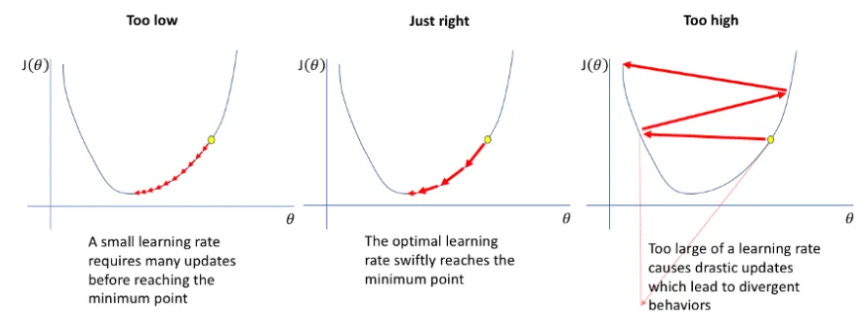
13 |
14 | 
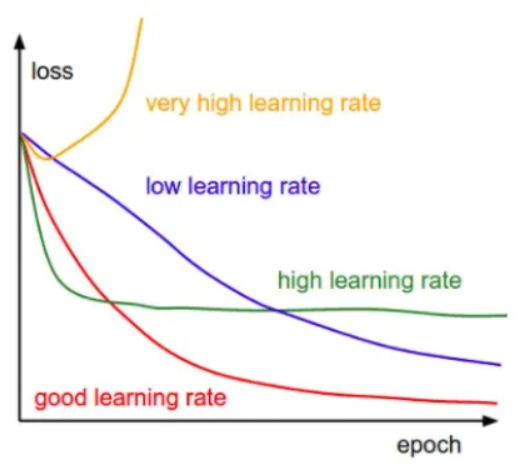
15 |
16 | There are various sorts of learning rate approaches but here we will talk about Cyclical Learning Rate.
17 |
18 | Cyclical Learning Rate is one of the approaches to achieve Optimal Learning Rates. The learning rate cyclically changes between a base minimum rate and a maximum rate in this methodology. The learning rate changes are cyclic, always returning to the learning rate's initial value.
19 |
20 | A very high learning rate causes the model to fluctuate more or to diverge from the minima, while a lower learning rate can cause the model to converge very slowly or to converge to the local minima. Cyclical learning rate (CLR) allows keeping the learning rate high and low, causing the model not to diverge along with jumping from the local minima.
21 |
22 | # How Cyclic Learning Rate improves speed of convergence?
23 |
24 | In CLR, we vary the Learning Rates between a lower and higher threshold. In other words, learning rate oscillates between base (minimum) learning rate and maximum learning rate. This helps as follows:
25 |
26 | 1. Periodic higher learning rates within each epoch helps to come out of any saddle points or local minima if it encounters into one. Saddle points have small gradients that slow the learning process.
27 |
28 | 2. According to [authors](https://arxiv.org/pdf/1506.01186.pdf), when using CLR it is likely the optimum learning rate will be between the bounds and near optimal learning rates will be used throughout training.
29 |
30 | In the figure below, Classification accuracy has been plotted with multiple learning rates while training on CIFAR-10. The red curve shows the result of training with one of the CLR (Cyclic Learning rate) policy. The implication is clear: The baseline (blue curve) reaches a final accuracy of 81.4 % after 70, 000 iterations. In contrast, with CLR, it is possible to fully train the network (red curve) within 25,000 iterations and attain the same accuracy.
31 |
32 | 
33 |
34 | # Types of Cyclic Learning Rates
35 |
36 | At a constant frequency, the learning rate varies in a triangular pattern between the maximum and base rates. The oscillation of learning rate can be based on various function-triangular (linear), Welch window (parabolic), or Hann window (sinusoidal).
37 |
38 | ## The Triangular Window
39 |
40 | The triangular window is a simpler way of changing the learning rate that is linearly increasing with some constant from min learning rate to max learning rate then linearly decreasing with the same constant from max learning rate to minimum learning rate.
41 |
42 | 
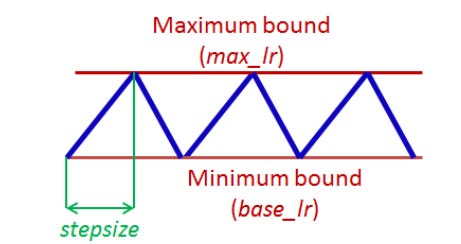
43 |
44 | The idea is to divide the training process into cycles determined by a stepsize parameter. This code varies the learning rate linearly between the minimum (base LR) and the maximum (max LR)
45 |
46 | 
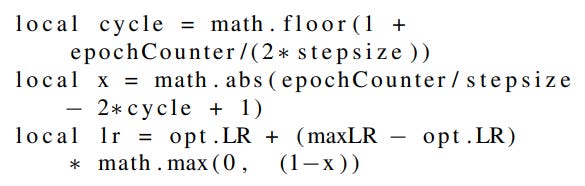
47 |
48 | - LR: the computed learning rate
49 | - opt.LR: the specified lower (base) learning rate
50 | - maxLR: Maximum learning rate boundary
51 | - epochCounter: the number of epochs of training
52 | - cycle length: Number of iterations until the learning rate returns to the initial value.
53 | - stepsize: the number of iterations in half a cycle
54 |
55 | # Implementation Nuggets
56 |
57 | According to [authors](https://arxiv.org/pdf/1506.01186.pdf), following needs to be kept in mind while training with CLR:
58 |
59 | 1. stepsize should be equal to 2-10 times the number of iterations in an epoch. We can calculate iterations present in an epoch using dataset size and batch size. If the dataset comprises 50,000 data entries and the batch size is 100, then the number of iterations in an epoch will be 500 (50,000/100).
60 | 2. Experiments show that replacing each step of a constant learning rate with at least 3 cycles trains the network weights most of the way and running for 4 or more cycles will achieve even better performance.
61 | 3. Also, it is best to stop training at the end of a cycle, which is when the learning rate is at the minimum value and the accuracy peaks.
62 | 4. Set base learning rate (or opt.LR) to 1/3 or 1/4 of maximum learning rate. Alternatively, run the model for few epochs when given a new architecture or dataset. Plot learning rate and accuracy as shown in the figure below. Note the learning rate value when the accuracy starts to increase, set this learning rate as base learning rate. And when the accuracy drops or slows or becomes ragged, set it to maximum learning rate. Example: from the plot, it can be seen that we can set base lr = 0.001 because the model starts converging right away. Furthermore, above a learning rate of 0.006 the accuracy rise gets rough and eventually begins to drop so it is reasonable to set max lr = 0.006.
63 |
64 | 
65 |
66 | # Conclusion:
67 |
68 | - Only a few epochs where the learning rate linearly increases is sufficient to estimate boundary learning rates for CLR.
69 | - Use of cyclic functions as a learning rate policy leads to substantial improvements in performance for a range of architectures.
70 | - The cyclic nature of CLR guides when to drop the learning rate values (after 3 - 5 cycles) a2d when to stop the training.
71 |
72 | # References:
73 |
74 | 1. [Cyclical Learning Rates](https://medium.com/analytics-vidhya/cyclical-learning-rates-a922a60e8c04#:~:text=Cyclical%20learning%20rate%20%28CLR%29%20allows%20keeping%20the%20learning,between%20base%20learning%20rate%20and%20max%20learning%20rate.)
75 | 2. [Cyclical Learning Rates for Training Neural Networks](https://arxiv.org/pdf/1506.01186.pdf)
76 |
77 | # Credits
78 |
79 | The above article is sponsored by [vevesta](https://www.vevesta.com/).
80 |
81 | [Vevesta](https://www.vevesta.com/): Your Machine Learning Team’s feature and Technique Dictionary: Accelerate your Machine learning project by using features, techniques and projects used by your peers. Explore Vevesta for free. For more such stories, follow us on twitter at [@vevesta_labs](https://twitter.com/vevesta_labs).
--------------------------------------------------------------------------------
/sampleCode/sampleExperiment.ipynb:
--------------------------------------------------------------------------------
1 | {
2 | "cells": [
3 | {
4 | "cell_type": "code",
5 | "execution_count": 1,
6 | "metadata": {},
7 | "outputs": [],
8 | "source": [
9 | "#import the vevesta Library\n",
10 | "from vevestaX import vevesta as v\n",
11 | "\n",
12 | "#create a vevestaX object\n",
13 | "V=v.Experiment()"
14 | ]
15 | },
16 | {
17 | "cell_type": "code",
18 | "execution_count": 2,
19 | "metadata": {
20 | "scrolled": true
21 | },
22 | "outputs": [
23 | {
24 | "data": {
25 | "text/html": [
26 | "
\n",
27 | "\n",
40 | "
\n",
41 | " \n",
42 | " \n",
43 | " | \n",
44 | " Gender | \n",
45 | " Age | \n",
46 | " Months_Count | \n",
47 | " Salary | \n",
48 | " Expenditure | \n",
49 | " House_Price | \n",
50 | "
\n",
51 | " \n",
52 | " \n",
53 | " \n",
54 | " | 0 | \n",
55 | " 1 | \n",
56 | " 2 | \n",
57 | " 3 | \n",
58 | " 1 | \n",
59 | " 34 | \n",
60 | " 9884 | \n",
61 | "
\n",
62 | " \n",
63 | " | 1 | \n",
64 | " 1 | \n",
65 | " 2 | \n",
66 | " 34 | \n",
67 | " 0 | \n",
68 | " 56 | \n",
69 | " 2442 | \n",
70 | "
\n",
71 | " \n",
72 | "
\n",
73 | "
"
74 | ],
75 | "text/plain": [
76 | " Gender Age Months_Count Salary Expenditure House_Price\n",
77 | "0 1 2 3 1 34 9884\n",
78 | "1 1 2 34 0 56 2442"
79 | ]
80 | },
81 | "execution_count": 2,
82 | "metadata": {},
83 | "output_type": "execute_result"
84 | }
85 | ],
86 | "source": [
87 | "#read the dataset\n",
88 | "import pandas as pd\n",
89 | "df=pd.read_csv(\"data.csv\")\n",
90 | "df.head(2)"
91 | ]
92 | },
93 | {
94 | "cell_type": "code",
95 | "execution_count": 3,
96 | "metadata": {},
97 | "outputs": [],
98 | "source": [
99 | "#Extract the columns names for features\n",
100 | "V.ds=df\n",
101 | "\n",
102 | "#you can also use:\n",
103 | "#V.dataSourcing = df"
104 | ]
105 | },
106 | {
107 | "cell_type": "code",
108 | "execution_count": 4,
109 | "metadata": {},
110 | "outputs": [
111 | {
112 | "data": {
113 | "text/plain": [
114 | "Index(['Gender', 'Age', 'Months_Count', 'Salary', 'Expenditure',\n",
115 | " 'House_Price'],\n",
116 | " dtype='object')"
117 | ]
118 | },
119 | "execution_count": 4,
120 | "metadata": {},
121 | "output_type": "execute_result"
122 | }
123 | ],
124 | "source": [
125 | "#Print the feature being used\n",
126 | "V.ds"
127 | ]
128 | },
129 | {
130 | "cell_type": "code",
131 | "execution_count": 5,
132 | "metadata": {},
133 | "outputs": [],
134 | "source": [
135 | "# Do some feature engineering\n",
136 | "df[\"salary_feature\"]= df[\"Salary\"] * 100/ df[\"House_Price\"]\n",
137 | "df['salary_ratio1']=df[\"Salary\"] * 100 / df[\"Months_Count\"] * 100"
138 | ]
139 | },
140 | {
141 | "cell_type": "code",
142 | "execution_count": 6,
143 | "metadata": {},
144 | "outputs": [],
145 | "source": [
146 | "#Extract features engineered\n",
147 | "V.fe=df\n",
148 | "\n",
149 | "#you can also use:\n",
150 | "#V.featureEngineering = df"
151 | ]
152 | },
153 | {
154 | "cell_type": "code",
155 | "execution_count": 7,
156 | "metadata": {},
157 | "outputs": [
158 | {
159 | "data": {
160 | "text/plain": [
161 | "Index(['salary_feature', 'salary_ratio1'], dtype='object')"
162 | ]
163 | },
164 | "execution_count": 7,
165 | "metadata": {},
166 | "output_type": "execute_result"
167 | }
168 | ],
169 | "source": [
170 | "#Print the features engineered\n",
171 | "V.fe"
172 | ]
173 | },
174 | {
175 | "cell_type": "code",
176 | "execution_count": 8,
177 | "metadata": {
178 | "scrolled": false
179 | },
180 | "outputs": [],
181 | "source": [
182 | "#Track variables which have been used for modelling\n",
183 | "V.start()\n",
184 | "\n",
185 | "#you can also use:\n",
186 | "#V.startModelling()"
187 | ]
188 | },
189 | {
190 | "cell_type": "code",
191 | "execution_count": 9,
192 | "metadata": {},
193 | "outputs": [],
194 | "source": [
195 | "#All the varibales mentioned here will be tracked\n",
196 | "epochs=1500\n",
197 | "seed=2000\n",
198 | "loss='rmse'\n",
199 | "accuracy= 91.2"
200 | ]
201 | },
202 | {
203 | "cell_type": "code",
204 | "execution_count": 10,
205 | "metadata": {},
206 | "outputs": [
207 | {
208 | "data": {
209 | "text/plain": [
210 | "{'epochs': 1500, 'seed': 2000, 'loss': 'rmse', 'accuracy': 91.2}"
211 | ]
212 | },
213 | "execution_count": 10,
214 | "metadata": {},
215 | "output_type": "execute_result"
216 | }
217 | ],
218 | "source": [
219 | "#end tracking of variables\n",
220 | "V.end()\n",
221 | "#you can also use V.endModelling()"
222 | ]
223 | },
224 | {
225 | "cell_type": "code",
226 | "execution_count": 11,
227 | "metadata": {},
228 | "outputs": [
229 | {
230 | "data": {
231 | "text/plain": [
232 | "{'epochs': 1500,\n",
233 | " 'seed': 2000,\n",
234 | " 'loss': 'rmse',\n",
235 | " 'accuracy': 91.2,\n",
236 | " 'recall': 95,\n",
237 | " 'precision': 87}"
238 | ]
239 | },
240 | "execution_count": 11,
241 | "metadata": {},
242 | "output_type": "execute_result"
243 | }
244 | ],
245 | "source": [
246 | "V.start()\n",
247 | "recall = 95\n",
248 | "precision = 87\n",
249 | "V.end()"
250 | ]
251 | },
252 | {
253 | "cell_type": "code",
254 | "execution_count": 12,
255 | "metadata": {
256 | "scrolled": true
257 | },
258 | "outputs": [
259 | {
260 | "name": "stdout",
261 | "output_type": "stream",
262 | "text": [
263 | "Dumped the experiment in the file vevestaDump.xlsx\n",
264 | "Manage notes, codes and models in one single place by using our tool at https://www.vevesta.com?utm_source=vevestaX\n"
265 | ]
266 | }
267 | ],
268 | "source": [
269 | "# Dump the datasourcing, features engineered and the variables tracked in a xlsx file\n",
270 | "V.dump(techniqueUsed='XGBoost',filename=\"vevestaDump.xlsx\",message=\"precision is tracked\",version=1)\n",
271 | "\n",
272 | "#if filename is not mentioned, then by default the data will be dumped to vevesta.xlsx file\n",
273 | "#V.dump(techniqueUsed='XGBoost')"
274 | ]
275 | }
276 | ],
277 | "metadata": {
278 | "kernelspec": {
279 | "display_name": "Python [conda env:vevesta] *",
280 | "language": "python",
281 | "name": "conda-env-vevesta-py"
282 | },
283 | "language_info": {
284 | "codemirror_mode": {
285 | "name": "ipython",
286 | "version": 3
287 | },
288 | "file_extension": ".py",
289 | "mimetype": "text/x-python",
290 | "name": "python",
291 | "nbconvert_exporter": "python",
292 | "pygments_lexer": "ipython3",
293 | "version": "3.8.8"
294 | }
295 | },
296 | "nbformat": 4,
297 | "nbformat_minor": 4
298 | }
299 |
--------------------------------------------------------------------------------
/tutorials/LIME/NLP/Tutorial_LIME_NLP.md:
--------------------------------------------------------------------------------
1 | # Using LIME to understand NLP Models
2 | Data Science is a fast evolving field where most of the ML models are still treated as black boxes. Understanding the reason behind the predictions is one of the most important task one needs to perform in order to assess the trust if one plans to take action based on the predictions provided by the machine learning models.
3 |
4 | This article deals with a novel explanation technique known as LIME that explains the predictions of any classifier in an interpretable and faithful manner.
5 |
6 | ## What is LIME?
7 |
8 | LIME, or Local Interpretable Model-Agnostic Explanations, is an algorithm which explains the prediction of classifier or regressor by approximating it locally with an interpretable model. It modifies a single data sample by tweaking the feature values and observes the resulting impact on the output. It performs the role of an “explainer” to explain predictions from each data sample. The output of LIME is a set of explanations representing the contribution of each feature to a prediction for a single sample, which is a form of local interpretability.
9 |
10 | ## Why LIME?
11 |
12 | LIME explains a prediction so that even the non-experts could compare and improve on an untrustworthy model through feature engineering. An ideal model explainer should contain the following desirable properties:
13 |
14 | * Interpretable
15 | LIME provides a qualitative understanding between the input variables and the response which makes it easy to understand.
16 | * Local Fidelity
17 | It might not be possible for an explanation to be completely faithful unless it is the complete description of the model itself. Having said that it should be at least locally faithful i.e. it must replicate the model’s behavior in the vicinity of the instance being predicted and here too LIME doesn’t disappoints us.
18 | * Model Agnostic
19 | LIME can explain any model without making any prior assumptions about the model.
20 | * Global perspective
21 | The LIME explains a representative set to the user so that the user can have a global intuition of the model.
22 | Let’s have a quick look on a practical example of using LIME on a classification problem.
23 |
24 | ## Importing the libraries
25 | ```
26 | import numpy as np
27 | import pandas as pd
28 | import sklearn
29 | from sklearn.feature_extraction.text import TfidfVectorizer
30 | from sklearn.model_selection import train_test_split
31 | from sklearn.ensemble import RandomForestClassifier
32 | from sklearn.pipeline import make_pipeline
33 | from lime.lime_text import LimeTextExplainer
34 | from vevestaX import vevesta as v
35 | ```
36 |
37 | ## Importing the dataset
38 | ```
39 | df=pd.read_csv('IMDB Dataset.csv')
40 | df.head()
41 | ```
42 | 
43 | ## Data Preprocessing and Train-Test-Split
44 | Here, we will be using the technique of Tf-Idf Vectorization in order to convert the words to numeric vectors so that it can be easy for the machine to understand it.
45 | ```
46 | x=df.review
47 | y=df.sentiment
48 | x_train, x_test, y_train, y_test = train_test_split(x, y, test_size=0.2, random_state=7, stratify=y)
49 |
50 | vectorizer = TfidfVectorizer(max_features=5000,stop_words='english')
51 | x_train_vec=vectorizer.fit_transform(x_train.values).toarray()
52 | x_test_vec=vectorizer.transform(x_test.values).toarray()
53 | ```
54 | ## Model Training
55 | ```
56 | model = RandomForestClassifier()
57 | model.fit(x_train_vec, y_train)
58 | ```
59 | ## Introducing LIME
60 | The initial step in this process is to make a pipeline which converts text data to vectorize format and then passes it to the model.
61 |
62 | The pipeline is required because explain instance from the LimeTextExplainer takes only string as an input therefore in order to make it compatible for the model to understand we make use of pipelines.
63 | ```
64 | pipeline = make_pipeline(vectorizer, model)
65 | ```
66 | Moving ahead in order to get the explanation of the records we would be using a record from x_test dataset having an index of 655. We can use any other index and can get the explanation for the same.
67 |
68 | Note that LIME takes individual record as an input and then provide its corresponding explanation as output.
69 |
70 | Original value corresponding to the index 655 of x_test is ‘negative’. Thus what we can expect from LIME is to provide the explanation for the negative probability of index 655.
71 | ```
72 | ind=655
73 | text=x_test[ind]
74 | y_test
75 | #negative
76 | ```
77 | This is how the explanations look for the index 655 of test data.
78 | ```
79 | class_names = [‘negative’,’positve’]
80 | explainer = LimeTextExplainer(class_names=class_names)
81 | exp = explainer.explain_instance(text,pipeline.predict_proba, num_features=10)
82 | exp.show_in_notebook(text=True)
83 | ```
84 |
85 | 
86 |
87 | There are three parts to the explanation :
88 |
89 | 1. The left most section displays prediction probabilities, here in our case probability of being a negative comment comes out to be 0.68 whereas 0.32 for the comment to be a positive one.
90 | 2. The middle section returns the most impactful words. For the binary classification task, it would be in 2 colors orange/blue. Attributes in orange support positive class and those in blue support negative. Float point numbers on the horizontal bars represent the relative importance of these words.
91 | 3. The right most section returns the text with the most impactful words highlighted.
92 |
93 | ## Dumping the Experiment
94 | ```
95 | V.dump(techniqueUsed='LIME',filename="nlp_LIME.xlsx",message="LIME was used",version=1)
96 | ```
97 | ## Brief Intro about VevestaX
98 | VevestaX is an open source Python package which includes a variety of features that makes the work of a Data Scientist pretty much easier especially when it comes to analyses and getting the insights from the data.
99 |
100 | The package can be used to extract the features from the datasets and can track all the variables used in code.
101 |
102 | The best part of this package is about its output. The output file of the VevestaX provides us with numerous EDA tools like histograms, performance plots, correlation matrix and much more without writing the actual code for each of them separately.
103 |
104 | ## How to Use VevestaX?
105 |
106 | * Install the package using:
107 | ```
108 | pip install vevestaX
109 | ```
110 | * Import the library in your kernel as:
111 | ```
112 | from vevestaX import vevesta as v
113 | V=v.Experiment()
114 | ```
115 | * To track the feature used:
116 | ```
117 | V.ds = dataframe
118 | ```
119 | * To track features engineered
120 | ```
121 | V.fe = dataframe
122 | ```
123 | * Finally in order to dump the features and variables used into an excel file and to see the insights what the data carries use:
124 | ```
125 | V.dump(techniqueUsed='LIME',filename="LIME.xlsx",message="AIF 360 was used",version=1)
126 | ```
127 | Following are the insights we received after dumping the experiment:
128 |
129 | 
130 |
131 | 
132 |
133 | 
134 |
135 | Here ends our look at using the LIME Package in Machine Learning Models.
136 |
137 | For Source Code [Click Here](https://gist.github.com/sarthakkedia123/a52759ab3bed20cd680b498fa0bea1bf)
138 |
139 | ## References
140 | * [Medium article by Fabio Chiusano](https://medium.com/nlplanet/two-minutes-nlp-explain-predictions-with-lime-aec46c7c25a2)
141 | * [Use LIME to understand your Machine Learning Models](https://medium.com/@sarthak_72854/lime-4b2b9b48be3a)
142 | * [VevestaX GitHub Link](https://github.com/Vevesta/VevestaX)
143 | * [Original Article](https://www.vevesta.com/blog/8_Using_LIME_to_understand_NLP_Models?utm_source=Github_VevestaX_LIME_NLP)
144 |
145 | ## Credits
146 | [Vevesta](https://www.vevesta.com?utm_source=Github_VevestaX_LIME_NLP) is Your Machine Learning Team's Collective Wiki: Save and Share your features and techniques. Explore [Vevesta](https://www.vevesta.com?utm_source=Github_VevestaX_LIME_NLP) for free. For more such stories, follow us on twitter at [@vevesta1](http://twitter.com/vevesta1).
147 |
148 | ## Author
149 | Sarthak Kedia
150 |
--------------------------------------------------------------------------------
/tutorials/Attention Network.md:
--------------------------------------------------------------------------------
1 |
2 | # Deep Dive into Attention Network
3 |
4 | If we are providing a huge dataset to the model to learn, it is possible that a few important parts of the data might be ignored by the models. Paying attention to important information is necessary and it can improve the performance of the model. This can be achieved by adding an additional attention feature to the models.
5 |
6 | Similar to in real-life, the Attention in neural networks also refers to the most important details one should focus on (or attend to) in order to solve a given task. The goal of introducing Attention in Deep learning is to teach the machine where to pay attention to, given its purpose and context.
7 |
8 | We can introduce an attention mechanism to create a shortcut between the entire input and the context vector where the weights of the shortcut connection can be changeable for every output. Because of the connection between input and context vector, the context vector can have access to the entire input, and the problem of forgetting long sequences can be resolved to an extent.
9 |
10 | In the influential paper [Show, Attend and Tell, Kelvin Xu et. al.](https://arxiv.org/pdf/1502.03044v2.pdf) introduce Attention to a Recurrent neural network to generate captions for images. The words of the caption are generated one-by-one, for each word, the model pays attention to a different part of the image.
11 |
12 | 
13 |
14 | The figure above illustrates their result. The underlined words are the words that the model generates at that step, the brighter regions show where the model attends to generate those words.
15 |
16 | For the sake of understanding Attention, let's generate a synthesis dataset and train a network to estimate its Attention function using PyTorch.
17 |
18 | ```
19 | import torch
20 | import torch.nn as nn
21 | import torch.nn.functional as F
22 | import torch.optim as optim
23 | import numpy as np
24 | import matplotlib.pyplot as plt
25 | from tqdm import tqdm
26 | ```
27 |
28 | First, let's generate a synthesis dataset, whose input data is of sequential type. There will be 10.000 data points, each is a sequence of 8 floats.
29 |
30 | ```
31 | input_size = 10000
32 | seq_len = 8
33 | inputs = torch.rand((input_size, seq_len))
34 | display(inputs)
35 | print(f'input shape: {inputs.shape}')
36 | ```
37 |
38 | Next, we need to define the contexts. Here, to make things clearer, we separate contexts from the inputs, that is to say, we define the contexts independently. There are 5 different contexts, indexed from 0 to 4. For each input, there is one corresponding context.
39 |
40 | ```
41 | n_contexts = 5
42 | context = torch.randint(
43 | low=0, high=n_contexts, size=(input_size, 1))
44 | display(context)
45 | print(f'context shape: {context.shape}')
46 | ```
47 |
48 | Now, we need to establish a connection between the contexts and the outputs. If there is no dependency between the contexts and the outputs, the whole point of attention is lost. Return to this dataset, we make it so that the output given an input sequence is equal to a value in that sequence, the corresponding context determines which value (in the sequence of 8 values) that is.
49 |
50 | ```
51 | true_attention = {
52 | 0:2,
53 | 1:7,
54 | 2:3,
55 | 3:5,
56 | 4:1
57 | }
58 | true_attention
59 | ```
60 |
61 | While the true_attention is a dictionary, mapping from a context value to the position in the input sequence that the output should mimic. Note that this is the ground truth that our Attention network does not know about and is trying to approximate. This means if the context equals 0, then the model should pay all attention to the 2nd value of the input, if the context is 1, then all attention should be on the 7th value of the input, and so on. We generate the outputs accordingly.
62 |
63 | ```
64 | outputs = torch.tensor([
65 | inputs[i, true_attention[context[i].item()]]
66 | for i in range(input_size)
67 | ])
68 | display(outputs)
69 | print(f'output shape: {outputs.shape}')
70 | ```
71 |
72 | The dataset is ready, we then build the network. The Attention network is very simple. It has an Embedding layer for the context (this is where the network will learn how contexts affect Attention) and a Linear layer that computes the output from the attention glimpse. For training, each time a pair of (input, context) is fed to the network, it embeds the context to get the Attention, multiplies the input with the Attention to get the attention glimpse, and then passes the attention glimpse through the Linear layer to produce the prediction. The loss is then computed and backpropagates through the network to update the weights, as usual.
73 |
74 | ```
75 | class AttentionNetwork(nn.Module):
76 | def __init__(self):
77 | super(AttentionNetwork, self).__init__()
78 | self.context_embed = nn.Embedding(n_contexts, seq_len)
79 | self.linear = nn.Linear(seq_len, 1)
80 |
81 | def forward(self, x, c): # x is input (feature), c is context
82 | a = self.context_embed(c)
83 | x = x * a # element-wise multiplication
84 | x = self.linear(x)
85 | return x
86 |
87 | def get_attention(self, c):
88 | a = self.context_embed(c)
89 | return a
90 | model = AttentionNetwork()
91 | criterion = nn.MSELoss()
92 | optimizer = optim.Adam(model.parameters())
93 | ```
94 |
95 | The function get_attention is there to provide us the network's computed Attention for a given context. We will call this function later, when all training is done.
96 |
97 | ```
98 | model.train()
99 | for epoch in range(4):
100 | losses = []
101 | for i in tqdm(range(input_size)):
102 | inp = inputs[i]
103 | c = context[i]
104 | optimizer.zero_grad()
105 | pred = model(inp, c).squeeze()
106 | loss = criterion(pred, outputs[i])
107 | loss.backward()
108 | optimizer.step()
109 | losses.append(loss.item())
110 |
111 | print(f'epoch {epoch}: MSE = {np.mean(losses):.7f}')
112 | ```
113 |
114 | After 4 epochs, the model seems to has converged. The mean squared error is quite small with four 0s after the floating-point. Let us see if the network has approximated the ground truth attention right. For this purpose, we draw a plot that consists of 5 subplots, each represents a context. In a subplot, there is a green bar with height 1 showing the ground truth attention of that context, while the normalized attention approximation of the network is shown using orange bars.
115 |
116 | ```
117 | model.eval()
118 | fig, ax = plt.subplots(n_contexts, figsize=(15, 10))
119 | for c in range(n_contexts):
120 | true_att_index = np.zeros(seq_len)
121 | true_att_index[true_attention[c]] = 1
122 | ax[c].bar(range(seq_len),true_att_index, color='green')
123 |
124 | computed_attention = model.get_attention(torch.tensor(c)).detach().abs()
125 | computed_attention /= computed_attention.sum()
126 | ax[c].bar(range(seq_len), computed_attention, color='orange')
127 | ```
128 |
129 | 
130 |
131 | We can see that the network has learned pretty well, most of the green bars are filled with orange. Actually, if we let the training continue for several more epochs, there would be hardly any green on the plot, since the network would have approximated the attention function almost perfectly.
132 |
133 | ## References:
134 | 1. [Attention in Deep Learning](https://github.com/Mothaiba/Attention-in-Deep-Learning-your-starting-point/blob/main/Attention-synthesis-example.ipynb)
135 | 2. [Attention Network article on Vevesta.com](https://www.vevesta.com/blog/19-Attention-Network)
136 | 3. [Attention Network article on Substack](https://vevesta.substack.com/p/attention-network-deeper-look-into)
137 |
138 | ## Credits
139 |
140 | The above article is sponsored by [Vevesta](https://www.vevesta.com/).
141 |
142 | [Vevesta](https://www.vevesta.com/): Your Machine Learning Team’s Feature and Technique Dictionary: Accelerate your Machine learning project by using features, techniques and projects used by your peers. Explore [Vevesta](https://www.vevesta.com/) for free. For more such stories, follow us on twitter at [@vevesta_labs](https://twitter.com/vevesta_labs).
143 |
144 | 100 early birds who login into [Vevesta](https://www.vevesta.com/) will get free subscription for 3 months
145 |
146 | Subscribe to receive a copy of our newsletter directly delivered to your inbox.
--------------------------------------------------------------------------------
/tutorials/Predicting Future Weights of Neural Network.md:
--------------------------------------------------------------------------------
1 |
2 | # Deep Dive into how Predicting Future Weights of Neural Network is used to mitigate Data Staleness while Distributed Training
3 |
4 | Introducing SpecTrain as means to predict future weights of neural network to alleviate data staleness and improve speed of training via distributed training
5 |
6 | 
7 |
8 | Distributed training of neural networks has seen quite a boom in the technological field today. Well-renowned software development companies have turned their attention towards distributed training, each day coming up with intriguing new research, exceeding the limitations and fine-tuning to make it easy for the masses to learn and develop more from a more economical standpoint.
9 |
10 | We are going to ponder, about one such limitation known as the Staleness issue which proves to be unfavorable while implementing Distributed Training using Model Parallelism.
11 |
12 | Before we go into detail it is suggested that you have a good hunch about distributed training. Feel free to read through - [Everything you need to know about Distributed training and its often untold nuances](https://vevesta.substack.com/p/2791ed5e-0679-4f28-ae61-62eac17d8f13) as it would help with a smoother progression through this article.
13 |
14 | # Staleness Issue
15 |
16 | In model parallelism, when the training proceeds in the pipelined manner, it is seen that the staleness issue is gradually induced which dampens the performance of the neural network. This staleness issue starts very subtly but in due time leads to unstable learning and decreases the model accuracy.
17 |
18 | 
19 |
20 | The figure shows the comparison of model accuracy, i.e, the percentage of correct classifications, between model and data parallelism.
21 |
22 | We observe that when compared with data parallelism the accuracy of model parallelism fluctuates more prominently. Since model parallelism is considered to be a more fitting choice for parallelizing Deep Neural Networks finding a way to resolve this issue is a huge priority.
23 |
24 | # Pipelining and The Cause of Staleness
25 |
26 | The Pipeline training is basically a rotation of sample data that was split into a mini-batch, which flows through the pipeline normally forward propagating generating gradients as they move along from one GPU to another. After done with forward propagation(forward pass) of a batch these batches are made to propagate backward (backward pass) to fetch the weight updates from the forward pass. So constructively it is a to and fro action as seen in the figure below.
27 |
28 | 
29 |
30 | As we can see in the figure, after the completion of one task the GPU asynchronously proceeds to the next task to be time efficient.
31 |
32 | # The cause of Staleness
33 |
34 | Simply put, Staleness occurs when multiple mini-batches are in progress in the pipeline, before earlier mini-batches update weights, the latter mini-batches adopt stale weights to derive gradients.
35 |
36 | In pipelined training, a mini-batch is processed by different GPUs are run coherently to finish the forward and backward passes. Since many mini-batches are stacked in the pipeline, weights are continuously updated at every GPU, which causes the mini-batch to adopt inconsistent versions of weights during an iteration.
37 |
38 |
39 | 
40 |
41 | For example, in Figure the figure above, the 4th mini-batch adopts various versions of weights, ranging from W4 to W6, during its full circle. From the 4th mini-batch’s perspective, W4 and W5 are stale and the only staleness-free version of weights is W6, as W6 is derived after the 3-rd mini-batch updates the weights.
42 |
43 | Before the weights could be optimized, another set of the data batch computes considering the same stale weights resulting in a faulty gradient. Such a weight update behavior is called the weight staleness issue and it leads to unstable and inferior convergence.
44 |
45 | # Staleness Mitigation via SpecTrain
46 |
47 | SpectTrain is used to completely rectify the weight staleness and consistency issue. It uses a weight prediction method, which is also easy to apply in the pipeline. In an ideal training procedure, each iteration of a mini-batch should be updated to the same weight version. To maintain weight consistency and avoid staleness, SpecTrain predicts future weights and adopts the predicted weights, rather than the staled version of weights, through a whole iteration of a mini-batch.
48 |
49 | 
50 |
51 | As we can see in this illustration, for the same 4th mini-batch instead of adopting different and stale values, by using SpecTrain the GPUs predict the future version of the weight, which is expected to be staleness-free. The staleness-free version originally would be W6. W6 would only be adopted after W4 and W5 but by using SpecTrain the processing of the 4-th mini-batch in its entire round trip is based on W6 rather than W4, giving us the correct gradients, thus improving the accuracy overall.
52 |
53 | # Weight Prediction
54 |
55 | SpecTrain predicts future weights based on the observation that smoothed gradients used in Momentum Stochastic Gradient Decent(SGD), which reflects the trend of weight updates. Momentum SGD is a well-known technique that helps to speed up and improve the stability of SGD by smoothing the weight updates. A smoothed gradient (vt) is the weighted average of recent gradients and is calculated by the following equation:
56 |
57 | 
58 |
59 | where γ is the decay factor with 0 < γ ≤ 1 and ‘gt’ is the newly generated gradient. Through averaging with recent gradients by the decay factor, smoothed gradient vt reflects the trend of weight updates. Thus, smoothed gradients can be used to predict future weights.
60 |
61 | # The Impact SpecTrain makes
62 |
63 | SpecTrain was studied and compared with Data Parallelism along with a regular Model Parallelism method with no staleness reducing agents and PipeDream which is an older alternative that was used to reduce staleness in Data Parallelism.
64 |
65 | 
66 | Each of the experiments is done by training each model for 5000 iterations and training loss, validation loss, and validation accuracy are recorded for every full circle or iteration to show the learning curve. As we see from the results in the study model parallelism with SpecTrain performs exceptionally better than the regular model parallelism.
67 |
68 | The Accuracy loss that model parallelism heavily suffered from, with the use of weight prediction is on par with data parallelism, likewise, it also alleviates the instability problem by weight prediction and the learning curve of SpecTrain is similar to data parallelism, indicating that using SpecTrain can achieve near robust training process. Although it doesn’t surpass data parallelism with the features of model parallelism and the results of data parallelism can train Deep neural networks with bulky datasets with ease.
69 |
70 | Hence by the research provided to us by [Efficient and Robust Parallel DNN training through model parallelism on multi-GPU platform](https://arxiv.org/pdf/1809.02839.pdf), we can say that SpecTrain resolves the staleness issue. Helping push model parallelism to its limits
71 |
72 | # References:
73 | [1. Distributed Training](https://www.vevesta.com/blog/32-Distributed-Training?utm_source=Substack-DistributedTraining-SpecTrain)
74 |
75 | [2. Robust Parallel DNN Training](https://arxiv.org/pdf/1809.02839.pdf)
76 |
77 | # Credits
78 |
79 | The above article is sponsored by [vevesta](https://www.vevesta.com/).
80 |
81 | [Vevesta](https://www.vevesta.com/): Your Machine Learning Team’s feature and Technique Dictionary: Accelerate your Machine learning project by using features, techniques and projects used by your peers. Explore Vevesta for free. For more such stories, follow us on twitter at [@vevesta_labs](https://twitter.com/vevesta_labs).
--------------------------------------------------------------------------------
/tutorials/Lottery Ticket Hypothesis.md:
--------------------------------------------------------------------------------
1 |
2 | # Layman’s Guide to Lottery Ticket Hypothesis In Neural Network
3 |
4 | Imagine we have a fully functioning car which only used by a single person but its too cost expensive and needs heavy maintenance so you trim and tinker it down and use the cores of the car to make a vehicle that carries the essence and materials of the car and by doing so is more lightweight, faster and therefore is more functionally efficient, which you couldn’t do before but by using a special technique you're able to accomplish this transformation that is the idea behind the lottery ticket hypothesis.
5 |
6 | ## Definition Of Lottery Ticket Hypothesis
7 |
8 | “A randomly initialized dense neural network contains a subnetwork that is initialized such that when trained in isolation it can match the test accuracy of the original network after training for at most the same number of iterations.”
9 |
10 | ## Introduction to Lottery Ticket Hypothesis
11 |
12 | The work by [Frankle and Carbin (2018)](https://arxiv.org/pdf/1803.03635v5.pdf) has presented a surprising phenomenon: pruned neural networks can be trained to achieve performance as compared with the unpruned neural network when resetting their weights to their initial values.
13 |
14 | It's found that after the application these pruning techniques automatically uncover trainable subnetworks from fully-connected feed-forward networks. We call these trainable subnetworks, “winning tickets” since those that we find have won the initialization lottery with a combination of weights and connections capable of learning. These winning tickets when trained in isolation can reach test accuracy comparable to the original network in a similar number of iterations. However, what is observed is that the sparse architectures produced by pruning are quite tough to train from the start. to understand fully Lottery Ticket Hypothesis we must first know what is pruning and their types.
15 |
16 | 
17 |
18 | ## Pruning
19 |
20 | In theory, the pruned subnetwork should perform similarly to the dense network, though this may not be the case if a large number of parameters or weights are removed. Thus, the goal of the pruning process is to find and remove parameters that do not significantly affect the performance of the network.
21 |
22 | In total there are four types of pruning namely 1. Structured and Unstructured, 2. Scoring, 3. Iterative and fine-tuning, 4. Scheduling. In the lottery ticket hypothesis, we’ll only be needing structured, unstructured, and iterative pruning so we must take a deeper look into them.
23 |
24 | ## Types of pruning
25 |
26 | ### Structured and Unstructured Pruning:
27 |
28 | 
29 |
30 | In the Unstructured pruning approach, there are no limitations to how one wants to prune the neural network. The liberty to alter each or all weights and can remove them completely, making the pruning process more experimental. Since only the weights are varied in the neural network this process is also called Weight Pruning. This results in a sparse neural network. On the contrary, in the structured pruning method entire group of weight, or as we call it neurons in a feed-forward network is removed altogether. This is also known as Unit/Neuron Pruning and the resultant is a dense neural network.
31 |
32 | Both the methods are widely applied in neural networks and each comes with a trade of its own but arguably unstructured pruning is considered to be preferable since it places no restrictions on the order of pruning.
33 |
34 | ### Iterative Pruning:
35 |
36 | 
37 |
38 | Some methods prune the desired amount all at once, which is often referred to as One-shot Pruning. The network is trained all at once and bulk p% of the weights are pruned off of the network. certain systems, known as Iterative Pruning, repeat the process of pruning the network to some extent and retraining it until the desired pruning rate is obtained so for each round it prunes p^1/n% of the parameters, trains, and reprunes repeating this n times. It's used for approaches that require fine-tuning, it is most typical to continue training the network with the weights that were trained before pruning. Another method could be re-initializing the network with the same resultant weights. Now that we have understood the basic idea about pruning let's look at the theory behind the Lottery ticket hypothesis.
39 |
40 | ## Limitations of Pruning and How Lottery Ticket Hypothesis Overcame The Barrier-
41 |
42 | Originally pruning is a common practice, it has been used to decrease the storage size of networks, and decrease the energy consumption and the inference time but the problem which arose was that these pruned weight networks couldn't be trained from scratch or with random parameters. Hence once pruned the network could only be fine-tuned with no chance of experimentation as the network couldn't be trained from scratch but that was the limitation that was overcome by the lucky ticket hypothesis.
43 |
44 | The initialization is the key to training these pruned networks from scratch. Once the winning ticket which is our subnetwork with peak required conditions is found the same initialization parameters are maintained. In this way, the winning ticket; both its structure and its weights; exists within the randomly-initialized dense network. Thus, this subnetwork is shown to have won the “initialization lottery”, as it can be trained from scratch to higher accuracy than that of a fully-trained dense network or randomly re-initialized subnetwork with the same structure. Their connections have initial weights that make training particularly effective.
45 |
46 | Let's suppose we have with us a neural network with its own initial parameters and after training all the way to convergence it will have a different set of weight and parameters. Now we prune the neural network to find the winning ticket. Once the winning ticket is found to retrain this subnetwork we'll have to reinitialize this pruned network with the same parameter the network had when it started out. By this we ensure that we have the same structure and initial weights helping us to retrain from scratch and reach better accuracy as the outcome. These lottery tickets tend to be 10% to 20% of the original size of the network.
47 |
48 | ## The Four steps to identify the Winning ticket:
49 |
50 | 1. Randomly initialize a neural network.
51 | 2. Train the network for a number of iterations, arriving at parameters at the respected number of iterations.
52 | 3. Prune the parameters currently attained, creating a mask.
53 | 4. Reset the remaining parameters to their original values, creating the winning ticket we require for retraining the pruned network.
54 |
55 | Conditions to be met: Randomly re-initializing winning tickets prior to training is damaging to performance. Hence rewinding parameters to their initial, random values is essential to matching or exceeding dense network performance.
56 |
57 | ## Summary:
58 |
59 | * Neural network pruning techniques can reduce the parameter counts of trained networks by over 90%, decreasing storage requirements and improving the computational performance of inference without compromising accuracy.
60 | * We consistently find winning tickets that are less than 10-20% of the size of several fully-connected and convolutional feed-forward architectures for MNIST and CIFAR10. Above this size, the winning tickets that we find learn faster than the original network and reach higher test accuracy.
61 | * Winning tickets are shown to have better generalization properties than the original dense network in many cases.
62 |
63 | ## Conclusion:
64 |
65 | * It improves training performance and LTH helps to train neural networks faster.
66 | * There is a massive speed storage improvement.
67 | * It helps to design better networks by getting more areas for experimentation.
68 | * Improve theoretical understanding of neural networks.
69 |
70 | ## References:
71 |
72 | 1. [The Lottery Ticket Hypothesis: Finding Sparse, Trainable Neural Networks.](https://arxiv.org/abs/1803.03635)
73 | 2. [A Beginners Guide to Neural Network Pruning.](https://analyticsindiamag.com/a-beginners-guide-to-neural-network-pruning/)
74 | 3. [Proving the Lottery Ticket Hypothesis: Pruning is All You Need.](http://proceedings.mlr.press/v119/malach20a/malach20a.pdf)
75 | 4. [Saga of the Lottery Ticket Hypothesis.](https://towardsdatascience.com/saga-of-the-lottery-ticket-hypothesis-af30091f5cb)
76 | 5. [Research Gate](https://www.researchgate.net/figure/Different-types-of-pruning-algorithm-Unstructured-pruning-removes-any-unimportant_fig3_342989407)
77 | 6. [Lottery Ticket Hypothesis Article on Vevesta.com](https://www.vevesta.com/blog/20-Lottery-Ticket-Hypothesis)
78 | 7. [Lottery Ticket Hypothesis Article on Substack](https://vevesta.substack.com/p/laymans-guide-to-lottery-ticket-hypothesis)
79 |
80 | ## Credits:
81 |
82 | The above article is sponsored by [vevesta.](https://www.vevesta.com/)
83 |
84 | [Vevesta](https://www.vevesta.com/): Your Machine Learning Team’s Feature and Technique Dictionary: Accelerate your Machine learning project by using features, techniques and projects used by your peers. Explore [Vevesta](https://www.vevesta.com/) for free. For more such stories, follow us on twitter at [@vevesta_labs](https://twitter.com/vevesta_labs).
85 |
--------------------------------------------------------------------------------
/tutorials/Diffusion Models.md:
--------------------------------------------------------------------------------
1 |
2 | # Why you should take a look at Diffusion Models for Machine learning Projects?
3 |
4 | Image generation problem is where the machine learning model generates an image by itself. The set of images given for training and the model-generated image are similar to each other but not the same.
5 |
6 | Here the issue is that we need a way to score the output image. If there are 2 output images, how can we say which one is better?
7 |
8 | GAN (Generative Adversarial Networks) proposes to use a neural network for this process. So in addition to the model, there is another neural network that scores the image output. The neural net that generates the image is called Generator and the one that scores the image is called the Discriminator.
9 |
10 | 
11 |
12 | GANs work great for multiple applications however, they are difficult to train, and their output lack diversity due to several challenges such as mode collapse and vanishing gradients to name a few.
13 |
14 | To overcome this disadvantage, Diffusion Models came into being.
15 |
16 | Diffusion Models are probabilistic likelihood estimation methods and take inspiration from physical phenomenon-thermodynamics of gas molecules whereby the molecules diffuse from high density to low density areas. In information theory, this equates to loss of information due to gradual intervention of noise.
17 |
18 | Fundamentally, Diffusion Models work by destroying i.e. synthetic decay of training data through the successive addition of Gaussian noise, and then learning to recover the data by reversing this noising process-denoising.
19 |
20 | More specifically, a Diffusion Model is a latent variable model which maps to the latent space using a fixed Markov chain. This chain gradually adds noise to the data in order to obtain the approximate posterior q(x1:T|x0), where x1,…,xT are the latent variables with the same dimensionality as x0. In the figure below, we see such a Markov chain manifested for image data.
21 |
22 | 
23 |
24 | Ultimately, the image is asymptotically transformed to pure Gaussian noise. The goal of training a diffusion model is to learn the reverse process (denoising)- i.e. training pθ(xt-1|xt). By traversing backwards along this chain, we can generate new data.
25 |
26 | 
27 |
28 | MODEL: The diffusion process consists in taking random noise of the size of the desired output and pass it through the model several times. The process ends after a given number of steps, and the output image should represent a sample according to the training data distribution of the model, for instance an image of a butterfly. During training we show many samples of a given distribution, such as images of butterfly. After training, the model will be able to process random noise to generate similar butterfly images.
29 |
30 | SCHEDULERS: It's a library of diffusers that is used for the denoising process, a specific noise scheduling algorithm is thus necessary and "wrap" the model to define how many diffusion steps are needed for inference as well as how to compute a less noisy image from the model's output.
31 |
32 | PIPELINE: It groups together a model and a scheduler and make it easy for an end-user to run a full denoising loop process.
33 |
34 | ## CODE:
35 |
36 | First step is to Install Diffusers
37 |
38 | ```
39 | !pip install diffusers==0.1.3
40 | ```
41 | Import (Denoising Diffusion Probabilistic Model) DDPM Pipeline.
42 |
43 | We'll use the google/ddpm-celebahq-256 model, built in collaboration by Google and U.C. Berkeley. It's a model following the [Denoising Diffusion Probabilistic Models (DDPM) algorithm](https://arxiv.org/abs/2006.11239) trained on a dataset of celebrities images.
44 |
45 | ```
46 | From diffusers import DDPMPipeline
47 | ```
48 | The from_pretrained() method allows downloading the model and its configuration from the Hugging Face Hub, a repository of over 60,000 models shared by the community.
49 |
50 | ```
51 | image_pipe = DDPMPipeline.from_pretrained("google/ddpm-celebahq-256")
52 | ```
53 | The pipeline returns as output a dictionary with a generated sample of interest.
54 |
55 | ```
56 | images = image_pipe()["sample"]
57 | ```
58 |
59 | The image will be visible as:
60 |
61 | ```
62 | images[0]
63 | ```
64 |
65 | 
66 |
67 | ## Models:
68 |
69 | ```
70 | from diffusers import UNet2DModel
71 |
72 | repo_id = "google/ddpm-church-256"
73 | model = UNet2DModel.from_pretrained(repo_id)
74 | ```
75 | The from_pretrained() method caches the model weights locally, so if you execute the cell above a second time, it will go much faster.
76 |
77 | ```
78 | import torch
79 |
80 | torch.manual_seed(0)
81 |
82 | noisy_sample = torch.randn(
83 | 1, model.config.in_channels, model.config.sample_size, model.config.sample_size
84 | )
85 | noisy_sample.shape
86 | ```
87 | The timestep is important to cue the model with "how noisy" the input image is (more noisy in the beginning of the process, less noisy at the end), so the model knows if it's closer to the start or the end of the diffusion process.
88 |
89 | ```
90 | with torch.no_grad():
91 | noisy_residual = model(sample=noisy_sample, timestep=2)["sample"]
92 | ```
93 | Now, we'll check the shape of this noise residual
94 |
95 | ```
96 | noisy_residual.shape
97 | ```
98 |
99 | The predicted noisy_residual has the exact same shape as the input and we use it to compute a slightly less noised image. Let's confirm the output shapes match.
100 |
101 | ## Schedulers:
102 |
103 | They define the noise schedule which is used to add noise to the model during training, and also define the algorithm to compute the slightly less noisy sample given the model output (here noisy_residual).
104 |
105 | ## 1. DDPM Scheduler:
106 |
107 | ```
108 | from diffusers import DDPMScheduler
109 |
110 | scheduler = DDPMScheduler.from_config(repo_id)
111 | ```
112 |
113 | Now that the DDPM Scheduler is imported,
114 |
115 | ```
116 | less_noisy_sample = scheduler.step(
117 | model_output=noisy_residual, timestep=2, sample=noisy_sample
118 | )["prev_sample"]
119 | less_noisy_sample.shape
120 |
121 | import PIL.Image
122 | import numpy as np
123 |
124 | def display_sample(sample, i):
125 | image_processed = sample.cpu().permute(0, 2, 3, 1)
126 | image_processed = (image_processed + 1.0) * 127.5
127 | image_processed = image_processed.numpy().astype(np.uint8)
128 |
129 | image_pil = PIL.Image.fromarray(image_processed[0])
130 | display(f"Image at step {i}")
131 | display(image_pil)
132 | ```
133 |
134 | Time to finally define the denoising loop
135 |
136 | ```
137 | import tqdm
138 |
139 | sample = noisy_sample
140 |
141 | for i, t in enumerate(tqdm.tqdm(scheduler.timesteps)):
142 | # 1. predict noise residual
143 | with torch.no_grad():
144 | residual = model(sample, t)["sample"]
145 |
146 | # 2. compute less noisy image and set x_t -> x_t-1
147 | sample = scheduler.step(residual, t, sample)["prev_sample"]
148 |
149 | # 3. optionally look at image
150 | if (i + 1) % 50 == 0:
151 | display_sample(sample, i + 1)
152 | ```
153 |
154 | While the quality of the image in DDPM is actually quite good-speed of image generation is slower.
155 |
156 | ## 2. DDIM Scheduler:
157 |
158 | ```
159 | from diffusers import DDIMScheduler
160 |
161 | scheduler = DDIMScheduler.from_config(repo_id)
162 | ```
163 |
164 | The DDIM scheduler allows the user to define how many denoising steps should be run at inference via the set_timesteps method. The DDPM scheduler runs by default 1000 denoising steps. Let's significantly reduce this number to just 50 inference steps for DDIM.
165 |
166 | ```
167 | scheduler.set_timesteps(num_inference_steps=50)
168 | ```
169 | And you can run the same loop as before - only that you are now making use of the much faster DDIM scheduler.
170 |
171 | ```
172 | import tqdm
173 |
174 | sample = noisy_sample
175 |
176 | for i, t in enumerate(tqdm.tqdm(scheduler.timesteps)):
177 | # 1. predict noise residual
178 | with torch.no_grad():
179 | residual = model(sample, t)["sample"]
180 |
181 | # 2. compute previous image and set x_t -> x_t-1
182 | sample = scheduler.step(residual, t, sample)["prev_sample"]
183 |
184 | # 3. optionally look at image
185 | if (i + 1) % 10 == 0:
186 | display_sample(sample, i + 1)
187 | ```
188 |
189 | In DDIM, though the speed of image generation is faster, the quality of image is hindered.
190 |
191 | So we can conclude schedulers as:
192 |
193 | 
194 |
195 | ## References:
196 | 1. [Hugging faces on github](https://github.com/huggingface/notebooks/blob/main/diffusers/diffusers_intro.ipynb)
197 | 2. [Introduction to Diffusion Models](https://www.assemblyai.com/blog/diffusion-models-for-machine-learning-introduction/#:~:text=Diffusion%20Models%20are%20generative%20models,%20meaning%20that%20they,recover%20the%20data%20by%20reversing%20this%20noising%20process.)
198 | 3. [Diffusion Models article on Vevesta.com](https://www.vevesta.com/blog/18-Diffusion-Models)
199 | 4. [Diffusion Models article on Substack](https://vevesta.substack.com/p/why-you-should-take-a-look-at-diffusion)
200 |
201 | ## Credits
202 |
203 | The above article is sponsored by [Vevesta](https://www.vevesta.com/).
204 |
205 | [Vevesta](https://www.vevesta.com/): Your Machine Learning Team’s Feature and Technique Dictionary: Accelerate your Machine learning project by using features, techniques and projects used by your peers. Explore [Vevesta](https://www.vevesta.com/) for free. For more such stories, follow us on twitter at [@vevesta_labs](https://twitter.com/vevesta_labs).
206 |
207 | 100 early birds who login into [Vevesta](https://www.vevesta.com/) will get free subscription for 3 months
208 |
209 | Subscribe to receive a copy of our newsletter directly delivered to your inbox.
--------------------------------------------------------------------------------
/tutorials/Distributed Training.md:
--------------------------------------------------------------------------------
1 |
2 | # Everything you need to know about Distributed training and its often untold nuances
3 |
4 | Understanding Data Parallelism vs Model Parallelism, Their Powers and Their Kryptonite (weakness)
5 |
6 | The idea of dividing portions of work to obtain exceptional results, in a short amount of time and thereby reducing the overall strain is exactly the gist of our topic called “Distributed Training”, which has led to some very interesting research in the field of machine learning pushing our technology another leap ahead.
7 |
8 | # Introduction To Distributed Training
9 |
10 | The number of parameters in modern deep learning models is growing exponentially, and the size of the data set is also increasing at a similar rate. Therefore dividing one huge task into a number of subtasks to run them parallelly makes the whole process much more time efficient and enables us to complete complex tasks with ginormous datasets. This is what we call as distributed training.
11 |
12 | To put it simply, by using multi-node training, we train massive deep learning models which would require ages to train otherwise. There are two main branches under distributed training, called:-
13 | 1. Data Parallelism
14 | 2. Model Parallelism
15 |
16 |
17 | 
18 |
19 | # Data Parallelism
20 |
21 | In data parallelism, the giant dataset is split up into parts. Each part has its own GPU. These GPUs are then connected to parallel computational machines. The gradients collected from different batches of data are then collected and the values are merged to get the final result.
22 |
23 | 
24 |
25 | For every GPU or node, the generic parameters are kept constant and the network ideally is a feed-forward network, where a small batch of data is sent to every node, and the gradient is computed normally and sent back to the main node. Data parallelism uses inter-GPU communication for talking with other nodes and GPUs to get gradients for proper weight synchronization.
26 |
27 | There are two approaches to data parallelism which are:-
28 |
29 |
30 | - ## Synchronous Training
31 |
32 | As a part of sync training, the model sends different parts of the data into each node. Each model is totally identical to the original model, the only difference between them being the different batch of data that is being trained. The network here works in forward propagation parallelly which gives distinct results and gradients.
33 |
34 | Synchronous training uses an all-reduce algorithm that collects all the trainable parameters from various nodes and accelerators. While synchronous training can be advantageous in many ways, it is harder to modify and scale to the growing need for computation resulting in unused nodes with zero work.
35 |
36 | - ## Asynchronous Training
37 |
38 | The specialty of asynchronous training is its property to scale with the amount of data available and speed up the rate at which the entire dataset contributes to the optimization.
39 |
40 | Unlike synchronous training, in asynchronous training, the nodes work independently in such a way that a worker node need not wait for any other worker node in the cluster. One way to achieve this is by using a parameter server, as it holds the parameters of the model which are responsible for updating the global state of our model and requires less communication between nodes, and also benefits from a high amount of computations per weight.
41 |
42 | # Model Parallelism
43 |
44 | 
45 |
46 | In model parallelism, instead of the data being split up into parts, the model is divided into separate parts and now these individual parts will have their own GPU. That is, each GPU takes as input the data flowing into a particular layer, processes data across several subsequent layers in the neural network, and then sends the data to the next GPU.
47 |
48 | The batch of GPUs is then calculated sequentially in this manner, starting with the first one onto the final GPU, making this into a forward propagation. Backward propagation on the other hand begins with the final and ends at the first GPU. Model parallelism also needs an acute amount of inter-GPU communication to transfer all intermediate data between sub-models.
49 |
50 | Model parallelism has some obvious benefits. It can be used to train a model such that it does not fit into just a single GPU. But when computation is moving sequentially, for example, when the first GPU is in computation, the others simply lie idle. This can be resolved by shifting to an asynchronous style of GPU functioning.
51 |
52 | A study titled ‘[Efficient and Robust Parallel DNN Training through Model Parallelism as Multi-GPU Platform](https://arxiv.org/pdf/1809.02839.pdf)’ tested model parallelism versus data parallelism. We shall take a deeper look into the results of the given theory.
53 |
54 | # Drawbacks of Data Parallelism and How Model Parallelism Overcomes it
55 |
56 | So far, we have seen how to distribute the data and train the model in multiple devices with different chunks of data and this approach works most of the time and is easy to implement as well. Following are the advantages of using Model Parallelism:
57 |
58 | - In some rare situations, the size of the model may be too large for any single worker, which is why we need model parallelism wherein we split the model itself to make computing faster.
59 |
60 | - As said earlier, it is harder to modify and scale to the growing need for computation resulting in unused nodes or workers with zero work. But in model parallelization, since all models are split up and work coherently there is much less loss in computation.
61 |
62 | - Both data parallelism and model parallelism need inter-GPU communications. The study shows that practically data parallelism requires more inter-GPU communication generally than model parallelism.
63 |
64 | - While some of the implemented data-parallelization required almost no communication between GPUs when model parallelism is applied since these models have fewer intermediate data between layers.
65 |
66 | - In the figure below, we see how different parallelizations use GPU cross-talking and the likely hood of time wasted while communicating.
67 |
68 | 
69 |
70 | - This dependency on inter-GPU communications of data parallelism leads up to a considerable slowdown. On average 26.7% of training time is spent on inter-GPU data transfer when data parallelism is applied.
71 |
72 | - In the figure below has the amount of time Data Parallelism uses for Inter-GPU communication vs the time it takes to process and compute the gradients.
73 |
74 | 
75 |
76 | # Advantages of Data Parallelism Over Model Parallelism
77 |
78 | - Studies showed that models using data parallelism increase in their accuracy as training proceeds, but the accuracy starts fluctuating with model parallelism.
79 |
80 | - For model parallelism, if training proceeds in the pipelined manner, it induces the staleness issue. This staleness issue leads to unstable learning and worse model accuracy.
81 |
82 | - In the figure below, the depicted graph we’re able to see how staleness causes a loss in training accuracy starting from the 2700 iteration leading to the drop ahead to the 5000s.
83 |
84 | 
85 |
86 | - Data parallelism partitions training data across a whole array of GPUs, therefore, the workload across the GPUs could be easily maintained.
87 |
88 | - While in, model parallelism, achieving this load balance is more grueling a task. Since the complexity of different Deep Neural Network(DNN) layers varies, it would require loads of time and hard work to partition model layers to GPUs in a balanced way.
89 |
90 | # Conclusion
91 |
92 | - Distributed training is used to train huge deep learning models which would require an extremely large amount of time to train generically.
93 |
94 | - Both, data and model parallelism have their own advantages which could be used following their availability and necessity.
95 |
96 | - The concept of distributed training has piqued the interest of scientists all around the world and the algorithms and methodologies are leading to more discoveries.
97 |
98 | - Distributed training implements GPUs for training, hence it is the groundwork for learning how GPUs are used to train models and push data.
99 |
100 | # References:
101 |
102 | [1. Lei mao-Distributed Training](https://leimao.github.io/blog/Data-Parallelism-vs-Model-Paralelism/)
103 |
104 | [2. Neptune.ai](https://neptune.ai/blog/distributed-training)
105 |
106 | [3. Towards Data Science](https://towardsdatascience.com/deep-learning-on-supercomputers-96319056c61f)
107 |
108 | [4. GPU Asynchronous Stochastic Gradient Descent to Speed Up Neural Network Training](https://arxiv.org/abs/1312.6186)
109 |
110 | [5. Analytics India Mag](https://analyticsindiamag.com/data-parallelism-vs-model-parallelism-how-do-they-differ-in-distributed-training/)
111 |
112 | [6. Robust Parallel DNN Training](https://arxiv.org/pdf/1809.02839.pdf)
113 |
114 | [7. Article on Vevesta](https://www.vevesta.com/blog/32-Distributed-Training)
115 |
116 | [8. Article on Substack](https://vevesta.substack.com/p/distributed-training-deep-learning)
117 |
118 | # Credits
119 |
120 | The above article is sponsored by [vevesta](https://www.vevesta.com/).
121 |
122 | [Vevesta](https://www.vevesta.com/): Your Machine Learning Team’s feature and Technique Dictionary: Accelerate your Machine learning project by using features, techniques and projects used by your peers. Explore Vevesta for free. For more such stories, follow us on twitter at [@vevesta_labs](https://twitter.com/vevesta_labs).
123 |
--------------------------------------------------------------------------------
/tutorials/Noisy Labels with Deep Neural Networks.md:
--------------------------------------------------------------------------------
1 |
2 | # Deep Dive into approaches for handling Noisy Labels with Deep Neural Networks
3 |
4 | ### Damaging effects of Noisy Labels on training and how best to manage them
5 |
6 | ## Why Noisy Labels are harmful to Neural Network ?
7 |
8 | In machine learning tasks, such as computer vision, information retrieval, language processing, etc, more and better data means better results. Unreliable labels are called noisy labels because they may be corrupted from ground-truth labels. According to [authors](https://arxiv.org/pdf/2007.08199.pdf), the ratio of corrupted labels in real-world datasets is reported to range from 8.0% to 38.5%. Deep Neural Network learn from noisy labels as well as correctly labelled data and this results in poor generalizability of the models. Deep learning is more susceptible to label noises than traditional machine learning owing to its high expressive power. Also, achieving a good generalization capability in the presence of noisy labels becomes a challenge since the accuracy drop with label noise is considered to be more harmful than with other noises, such as input noise.
9 |
10 | ## What are the Types of Noise ?
11 |
12 | According to the [authors](https://arxiv.org/pdf/2007.08199.pdf), noise present in the labels of the supervised data is of following types:
13 |
14 | 1. Instance-independent Label Noise: A typical approach for modeling label noise assumes that the label corruption process is conditionally independent of data features when the true label is given
15 | 2. Instance-dependent Label Noise: In more realistic settings, the label corruption probability is assumed to be dependent on both the data features and class labels.
16 |
17 | ## What Conventional Approaches can be used to manage Noisy Labels ?
18 |
19 | According to [authors](https://arxiv.org/pdf/2007.08199.pdf), following are the non-deep learning approaches that can be used to manage noisy labels:
20 |
21 | #### 1. Data Cleaning :
22 | Training data is cleaned by excluding exclude false labeled examples from noisy training data. Some techniques that are used are bagging, boosting, k-means neighbour, outlier detection and anomaly detection.
23 |
24 | #### 2. Use of Convex Surrogate Function :
25 | According to [authors](https://arxiv.org/pdf/2007.08199.pdf), “Convex surrogate loss functions, which approximate the 0-1 loss function, have been proposed to train a specified classifier under the binary classification setting. However, these loss functions cannot support the multi-class classification task.”
26 |
27 | #### 3. Probabilistic Method :
28 | In family of methods, the confidence of each label is estimated by clustering and then used for a weighted training scheme. This confidence is converts hard labels into soft labels which reflects the uncertainty of labels. However, this family of methods may exacerbate the overfitting issue owing to the increased number of model parameters.
29 |
30 | #### 4. Model-based Method:
31 | Model modfications have been proposed for techniques like SVM and decision tree to make them robust to noisy data.
32 |
33 | ## What Deep Learning Approaches can be used to manage Noisy Labels ?
34 |
35 | According to [authors](https://arxiv.org/pdf/2007.08199.pdf), following techniques can be used:
36 |
37 | #### 1. Noise Adaptation Layer:
38 | From the view of training data, the noise process is modeled by discovering the underlying label transition pattern. Example, Webly learning [2] first trains the base DNN only for easy examples and subsequently, the confusion matrix for all training examples is used as the initial weight W of the noise adaptation layer. According to authors [1], “a common drawback of this family is their inability to identify false-labeled examples, treating all the examples equally. Thus, the estimation error for the transition matrix is generally large when only noisy training data is used or when the noise rate is high”.
39 |
40 | #### 2. Probabilistic Noise Modeling :
41 | According to authors[1], this model manages two independent networks, each of which is specialized to predict the noise type and label transition probability. Both networks are trained with massive noisy labeled data after the pretraining step with a small amount of clean data.
42 |
43 | #### 3. Contrastive-Additive Noise Network
44 | This network introduced a new concept of quality embedding, which models the trustworthiness of noisy labels.
45 |
46 | #### 4. Regularization Techniques
47 | Regularization techniques such as data augmentation, weight decay, dropout, and batch normalization. These regularization methods operate well on moderately noisy data, but they alone do not sufficiently improve the test accuracy. Also, poor generalization could be obtained when the noise is heavy.
48 |
49 | #### 5. Pre-training
50 | According to authors [1, 3], empirically proves that fine-tuning on a pre-trained model provides a significant improvement in robustness compared with models trained from scratch. The universal representations of pre-training prevent the model parameters from being updated in the wrong direction by noisy labels.
51 |
52 | #### 6. PHuber
53 | According to authors [1,4], PHuber is a composite loss-based gradient clipping for label noise robustness.
54 |
55 | #### 7. Adversarial training
56 | This technique enhances the noise tolerance by encouraging the DNN to correctly classify both original inputs and hostilely perturbed ones.
57 |
58 | #### 8. Label smoothing
59 | This technique estimates the marginalized effect of label noise during training, thereby reducing overfitting by preventing the DNN from assigning a full probability to noisy training examples. Instead of the one-hot label, the noisy label is mixed with a uniform mixture over all possible labels.
60 |
61 | #### 9. Noise-Robust Loss Functions
62 | Inorder to define noise-robust loss functions modifications were made to known loss functions. Noise-robust loss functions are generalized cross entropy [18], symmetric cross entropy [19], curriculum loss [20], active passive loss [21], etc. According to authors[1,5], these loss functions perform well only in simple cases, when learning is easy or the number of classes is small. Moreover, the modification of the loss function increases the training time for convergence.
63 |
64 | #### 10. Loss Adjustment
65 | According to authors[1], by changing the loss of all training instances before updating the DNN, loss adjustment is useful for minimising the detrimental effects of noisy labels. Techniques such as Backward correction [14], Forward correction [14], Gold standard correction [17], Dynamic Bootstrapping [15], Self-adaptive training [16] falls under this category of solutions.
66 |
67 | ## Some Github repositories of Noise-Robust techniques
68 |
69 | List of some solutions on Github meant to handle noisy data are below:
70 |
71 | 1. Noise Model: Training convolution networks with Noisy labels by authors[5]. The Keras code is present in Github link [7] .
72 | 2. Pre-Training: Using pre-training can improve model robustness and uncertainty by authors[3]. The Pytorch code is present in Github link [8].
73 | 3. Probabilistic Noise Model: Learning from massive noisy labeled data for image classification by authors[9]. The Caffe implementation is present in Github [10].
74 | 4. PHuber: “Can gradient clipping mitigate label noise?” by authors [4]. The Pytorch implementation is present Github [11].
75 | 5. Adversarial Training: By authors[12] with Pytorch implementation present in Github [13].
76 |
77 | ## References:
78 |
79 | 1. [Survey on Learning from Noisy Labels](https://arxiv.org/pdf/2007.08199.pdf)
80 | 2. A. J. Bekker and J. Goldberger, “Training deep neural-networks based on unreliable labels,” in Proc. ICASSP, 2016, pp. 2682–2686.
81 | 3. D. Hendrycks, K. Lee, and M. Mazeika, “Using pre-training can improve model robustness and uncertainty,” in Proc. ICML, 2019.
82 | 4. A. K. Menon, A. S. Rawat, S. J. Reddi, and S. Kumar, “Can gradient clipping mitigate label noise?” in Proc. ICLR, 2020.
83 | 5. S. Sukhbaatar, J. Bruna, M. Paluri, L. Bourdev, and R. Fergus, “Training convolutional networks with noisy labels,” in Proc. ICLRW, 2015.
84 | 6. M. Ren, W. Zeng, B. Yang, and R. Urtasun, “Learning to reweight examples for robust deep learning,” in Proc. ICML, 2018.
85 | 7. [Github Link for Keras implemetation of Noise Model](https://github.com/delchiaro/training-cnn-noisy-labels-keras)
86 | 8. [Github Link for Pytorch implementation of pre-training](http://1github.com/hendrycks/pre-training)
87 | 9. T. Xiao, T. Xia, Y. Yang, C. Huang, and X. Wang, “Learning from massive noisy labeled data for image classification,” in Proc. CVPR, 2015, pp. 2691–2699.
88 | 10. [Github link for Caffe implementation of Probabilistic Noise Model](https://github.com/Cysu/noisy_label)
89 | 11. [Github link for Pytorch implementation of PHuber](http://2https//github.com/dmizr/phuber)
90 | 12. I. J. Goodfellow, J. Shlens, and C. Szegedy, “Explaining and harnessing adversarial examples,” in Proc. ICLR, 2014.
91 | 13. [Github Link for Pytorch implementation of Adversial training](http://5https//https://github.com/sarathknv/adversarial-examples-pytorch)
92 | 14. G. Patrini, A. Rozza, A. Krishna Menon, R. Nock, and L. Qu, “Making deep neural networks robust to label noise: A loss correction
93 | 15. D. Hendrycks, M. Mazeika, D. Wilson, and K. Gimpel, “Using trusted data to train deep networks on labels corrupted by severe noise,” in Proc. NeurIPS, 2018, pp. 10 456–10 465.
94 | 16. E. Arazo, D. Ortego, P. Albert, N. E. O’Connor, and K. McGuinness, “Unsupervised label noise modeling and loss correction,” in Proc. ICML, 2019
95 | 17. L. Huang, C. Zhang, and H. Zhang, “Self-adaptive training: beyond empirical risk minimization,” in Proc. NeurIPS, 2020.
96 | 18. Z. Zhang and M. Sabuncu, “Generalized cross entropy loss for training deep neural networks with noisy labels,” in Proc. NeurIPS, 2018, pp. 8778–8788.
97 | 19. Y. Wang, X. Ma, Z. Chen, Y. Luo, J. Yi, and J. Bailey, “Symmetric cross entropy for robust learning with noisy labels,” in Proc. ICCV, 2019, pp. 322–330.
98 | 20. Y. Lyu and I. W. Tsang, “Curriculum loss: Robust learning and generalization against label corruption,” in Proc. ICLR, 2020.
99 | 21. X. Ma, H. Huang, Y. Wang, S. Romano, S. Erfani, and J. Bailey, “Normalized loss functions for deep learning with noisy labels,” in Proc. ICML, 2020, pp. 6543–6553.
100 | 22. [Noisy Labels with Deep Neural Networks article on Vevesta](https://www.vevesta.com/blog/24-Handling-Noisy-Labels-Neural-Network)
101 | 23. [Noisy Labels with Deep Neural Networks article on Substack](https://vevesta.substack.com/p/deep-dive-into-approaches-for-handling)
102 | ## Credits
103 |
104 | The above article is sponsored by [vevesta](https://www.vevesta.com/).
105 |
106 | [Vevesta](https://www.vevesta.com/): Your Machine Learning Team’s Feature and Technique Dictionary: Accelerate your Machine learning project by using features, techniques and projects used by your peers. Explore [Vevesta](https://www.vevesta.com/) for free. For more such stories, follow us on twitter at [@vevesta_labs](https://twitter.com/vevesta_labs).
--------------------------------------------------------------------------------
/tutorials/ZIP_models/ZIP_tutorial.md:
--------------------------------------------------------------------------------
1 | # Zero Inflated Poisson Regression Model-How to model data with lot of zeroes?
2 |
3 | Zero-inflated Poisson regression is used to model count data that has an excess of zero counts. By this I mean that the dependent variable has large number zeros. The theory suggests that the excess zeros are generated by a 2 separate process that can be modeled independently. Thus the zip model has two parts, a Poisson count model and the logit model for predicting excess zeros.
4 |
5 | In this section, we’ll learn how to build a regression model for count based datasets in which the dependent variable contains an excess of zero-valued data. We will also learn how to track experiments and features, along with automatic EDA, using VevestaX.
6 |
7 |
8 | ## Table of Contents
9 | 1. [Mathematics behind ZIP models](https://github.com/Vevesta/VevestaX/blob/main/tutorials/ZIP_models/ZIP_tutorial.md#mathematics-behind-zip-model)
10 | 2. [How to train ZIP models using Python](https://github.com/Vevesta/VevestaX/blob/main/tutorials/ZIP_models/ZIP_tutorial.md#how-to-train-the-zip-model-using-python)
11 | 3. [Regression Goal](https://github.com/Vevesta/VevestaX/blob/main/tutorials/ZIP_models/ZIP_tutorial.md#regression-goal)
12 | 4. [Performing Train-Test Split](https://github.com/Vevesta/VevestaX/blob/main/tutorials/ZIP_models/ZIP_tutorial.md#performing-train-test-split)
13 | 5. [Fitting the ZIP model and Calculating RMSE](https://github.com/Vevesta/VevestaX/blob/main/tutorials/ZIP_models/ZIP_tutorial.md#fitting-the-zip-model-and-calculating-rmse)
14 | 6. [Plotting the Actual and Predicted Values](https://github.com/Vevesta/VevestaX/blob/main/tutorials/ZIP_models/ZIP_tutorial.md#plotting-the-actual-and-predicted-values)
15 | 7. [Comparing the results with Poisson Distribution](https://github.com/Vevesta/VevestaX/blob/main/tutorials/ZIP_models/ZIP_tutorial.md#comparing-the-results-with-poisson-distribution)
16 | 8. [Dumping the model results in Excel Sheet using VevestaX](https://github.com/Vevesta/VevestaX/blob/main/tutorials/ZIP_models/ZIP_tutorial.md#dumping-the-model-results-in-excel-sheet-using-vevestax)
17 | 9. [Brief Intro about VevestaX](https://github.com/Vevesta/VevestaX/blob/main/tutorials/ZIP_models/ZIP_tutorial.md#brief-intro-about-vevestax)
18 | 10. [References](https://github.com/Vevesta/VevestaX/blob/main/tutorials/ZIP_models/references)
19 |
20 | Count based regression models are used where the value of dependent variable is a whole number. Few of the use cases of this model are:
21 |
22 | * Number of hits on the website per hour.
23 | * Number of life insurance claims filed per year.
24 | * Number of children a couple has.
25 | * Number of doctor visits per year.
26 | In the real world scenario there are many cases that produce counts which are almost always zero. For example:
27 |
28 | * Number of planets discovered each year.
29 | * The number of millionaires living in every single city in the world.
30 |
31 | ## Mathematics behind Zip Model
32 |
33 | When the Poisson regression model is applied to the count outcome data in real world, it is not rare to see the poor model fit indicated by a deviance or Pearson’s chi-square.
34 |
35 | The zero-inflated Poisson (ZIP) is an alternative that can be considered here. This model allows for assuming that there are two different types of individuals in the data: (1) Those who have a zero count with a probability of 1 (Always-0 group), and (2) those who have counts predicted by the standard Poisson (Not always-0 group). Observed zero could be from either group, and if the zero is from the Always-0 group, it indicates that the observation is free from the probability of having a positive outcome.
36 |
37 | The overall model is a mixture of the probabilities from the two groups, which allows for both the over dispersion and excess zeros that cannot be predicted by the standard Poisson model. For those new to Poisson model, an assumption that must be fulfilled on Poisson distribution is the mean value of data equals to the variance value (or so- called equidispersion). If the variance value is greater than the mean value, it is called overdispersion.
38 |
39 | Having a membership of Always-0 group is a binary outcome that can be predicted by logit model.
40 |
41 | The probability (𝜓𝑖) that the observation 𝑖 is in Always-0 group is predicted by the characteristic of observation 𝑖, so that can be written as: 𝜓𝑖 = 𝐹(𝑧𝑖 ′𝛾) where 𝑧𝑖 is the vector of covariates and 𝛾 is the vector of coefficients of logit regression.
42 |
43 | Then the probability that the observation 𝑖 is in Not always-0 group becomes (1-𝜓𝑖) . For observations in Not always-0 group, their positive count outcome is predicted by the standard Poisson model, so that can be written as:
44 |
45 | 
46 |
47 | where 𝜇𝑖 is the conditional mean.
48 |
49 | Then, mixed probabilities for ZIP are expressed as follows:
50 |
51 | * Zero counts in Always-0 group
52 |
53 | 
54 |
55 | * Zero counts in Not Always-0 group
56 |
57 | 
58 |
59 | * Non zero counts in Not Always- group
60 |
61 | 
62 |
63 | * Overall
64 |
65 | 
66 |
67 | Here is the practical use case of the same where the state wildlife biologists want to model how many fishes are being caught by the visitors visiting the state park. Some visitors do not fish, but there is no data on whether a person fished or not. Some visitors who did fish did not catch any fish so there are excess zeros in the data because of the people that did not fish.
68 |
69 | ## How to train the ZIP model using Python?
70 |
71 | In our Python tutorial on the ZIP model, we’ll use a data set of camping trips taken by 250 groups of people, the data looks something like this:
72 |
73 | 
74 |
75 | Here is a frequency of Dependent Variable i.e. Fish Count in the dataset,
76 |
77 | 
78 |
79 | As we can see, there are excess zeroes in this data set. We’ll train a ZIP model on this data set to test this theory and hopefully achieve a better fit than the regular Poisson model.
80 |
81 | ## Regression Goal
82 |
83 | Predict the number of fish caught (FISH_COUNT) by a camping group based on the values of LIVE_BAIT, CAMPER, PERSONS and CHILDREN variables.
84 |
85 | ## Performing Train-Test Split
86 |
87 | 
88 |
89 | ## Fitting the ZIP model and Calculating RMSE
90 |
91 | 
92 |
93 | Here, *endog* is our dependent variable, *exog* is the dataset containing the features or the independent variables and *inflation* is the model for zero inflation which can be either *logit* or *probit*.
94 |
95 | ## Plotting the Actual and Predicted Values
96 | 
97 |
98 |
99 | ## Comparing the results with Poisson Distribution
100 |
101 | 
102 |
103 |
104 | 
105 |
106 | RMSE(ZIP Model) =7.937253933193772
107 |
108 | RMSE(Poisson Regression)=8.37973746605465
109 |
110 | It is clearly noticeable that the ZIP model has outperformed the Regular Poisson Model on these type of excess zero datasets.
111 |
112 | ## Dumping the model results in Excel Sheet using VevestaX
113 |
114 | 
115 |
116 | ## Brief Intro about VevestaX
117 |
118 | VevestaX is an open source Python package which includes a variety of features that makes the work of a Data Scientist pretty much easier especially when it comes to analyses and getting the insights from the data.
119 |
120 | The package can be used to extract the features from the datasets and can track all the variables used in code.
121 |
122 | The best part of this package is about its output. The output file of the VevestaX provides us with numerous EDA tools like histograms, performance plots, correlation matrix and much more without writing the actual code for each of them separately.
123 |
124 | ### How to Use VevestaX?
125 | * Install the package using:
126 | ```
127 | pip install vevestaX
128 | ```
129 |
130 | * Import the library in your kernel as:
131 | ```
132 | from vevestaX import vevesta as v
133 | V=v.Experiment( )
134 | ```
135 |
136 | * To track the feature used:
137 | ```
138 | V.ds = df
139 | ```
140 | where df is the pandas data frame containing the features.
141 |
142 | 
143 |
144 | * To track features engineered
145 |
146 | ```
147 | V.fe = df
148 | ```
149 |
150 | * Finally in order to dump the features and variables used into an excel file and to see the insights what the data carries use:
151 | ```
152 | V.dump(techniqueUsed=’ZIP Model’,filename=”ZIP.xlsx”,message=”Zero Inflated Poisson Model was used”,version=1)
153 | ```
154 | * In order to check in the experiment and features to [vevesta](https://www.vevesta.com), use the following function:
155 | ```
156 | V.commit(techniqueUsed = “Zip Model”, message=”increased accuracy”, version=1, projectId=128, attachmentFlag=True)
157 | ```
158 | Note that you need to download access_token.txt into the folder where this jupyter notebook/python script resides.
159 |
160 | * Following are the insights we received after dumping the features:
161 |
162 | 
163 |
164 | 
165 |
166 | 
167 |
168 | 
169 |
170 | 
171 |
172 | 
173 |
174 | [*For Source Code Click Here*](https://gist.github.com/sarthakkedia123/7237a61bd9a6697583b1f46b81e43e2c)
175 |
176 | This completes our look at the Zero-Inflated Poisson regression model.
177 |
178 | ## References
179 |
180 | 1. [Time Series Reasoning](https://timeseriesreasoning.com/contents/zero-inflated-poisson-regression-model/)
181 | 2. [alvindayu.com](https://alvindayu.com/yu-the-zero-inflated-poisson-regression-model-time-series-&url=https://alvindayu.com/al-the-zero-inflated-poisson-regression-model-time-series)
182 | 3. [usu.edu](https://www.usu.edu/math/jrstevens/biostat/projects2013/rep_ZIP.pdf)
183 | 4. [VevestaX GitHub Link](https://github.com/Vevesta/VevestaX)
184 | 5. [Original Article](https://www.vevesta.com/blog/6_The_Zero_Inflated_Poisson_Regression_Model_How_to_model_data_with_lot_of_zeroes?utm_source=Github_vevestaX_ZIP)
185 |
186 | ## Credits
187 | [Vevesta](https://www.vevesta.com?utm_source=Github_vevestaX_ZIP) is Your Machine Learning Team's Collective Wiki: Save and Share your features and techniques. Explore [Vevesta](https://www.vevesta.com?utm_source=Github_vevestaX_ZIP) for free. For more such stories, follow us on twitter at [@vevesta1](http://twitter.com/vevesta1).
188 |
189 | ## Author
190 | Sarthak Kedia
191 |
192 |
--------------------------------------------------------------------------------
/tutorials/classification_featureSelectionByFRUPS/wine.csv:
--------------------------------------------------------------------------------
1 | ID,Alcohol,Malic acid, Ash,Alcalinity of ash,Magnesium,Total phenols,Flavanoids,Nonflavanoid phenols,Proanthocyanins,Color intensity,Hue,OD280/OD315 of diluted wines,Proline
2 | 1,14.23,1.71,2.43,15.6,127,2.8,3.06,.28,2.29,5.64,1.04,3.92,1065
3 | 1,13.2,1.78,2.14,11.2,100,2.65,2.76,.26,1.28,4.38,1.05,3.4,1050
4 | 1,13.16,2.36,2.67,18.6,101,2.8,3.24,.3,2.81,5.68,1.03,3.17,1185
5 | 1,14.37,1.95,2.5,16.8,113,3.85,3.49,.24,2.18,7.8,.86,3.45,1480
6 | 1,13.24,2.59,2.87,21,118,2.8,2.69,.39,1.82,4.32,1.04,2.93,735
7 | 1,14.2,1.76,2.45,15.2,112,3.27,3.39,.34,1.97,6.75,1.05,2.85,1450
8 | 1,14.39,1.87,2.45,14.6,96,2.5,2.52,.3,1.98,5.25,1.02,3.58,1290
9 | 1,14.06,2.15,2.61,17.6,121,2.6,2.51,.31,1.25,5.05,1.06,3.58,1295
10 | 1,14.83,1.64,2.17,14,97,2.8,2.98,.29,1.98,5.2,1.08,2.85,1045
11 | 1,13.86,1.35,2.27,16,98,2.98,3.15,.22,1.85,7.22,1.01,3.55,1045
12 | 1,14.1,2.16,2.3,18,105,2.95,3.32,.22,2.38,5.75,1.25,3.17,1510
13 | 1,14.12,1.48,2.32,16.8,95,2.2,2.43,.26,1.57,5,1.17,2.82,1280
14 | 1,13.75,1.73,2.41,16,89,2.6,2.76,.29,1.81,5.6,1.15,2.9,1320
15 | 1,14.75,1.73,2.39,11.4,91,3.1,3.69,.43,2.81,5.4,1.25,2.73,1150
16 | 1,14.38,1.87,2.38,12,102,3.3,3.64,.29,2.96,7.5,1.2,3,1547
17 | 1,13.63,1.81,2.7,17.2,112,2.85,2.91,.3,1.46,7.3,1.28,2.88,1310
18 | 1,14.3,1.92,2.72,20,120,2.8,3.14,.33,1.97,6.2,1.07,2.65,1280
19 | 1,13.83,1.57,2.62,20,115,2.95,3.4,.4,1.72,6.6,1.13,2.57,1130
20 | 1,14.19,1.59,2.48,16.5,108,3.3,3.93,.32,1.86,8.7,1.23,2.82,1680
21 | 1,13.64,3.1,2.56,15.2,116,2.7,3.03,.17,1.66,5.1,.96,3.36,845
22 | 1,14.06,1.63,2.28,16,126,3,3.17,.24,2.1,5.65,1.09,3.71,780
23 | 1,12.93,3.8,2.65,18.6,102,2.41,2.41,.25,1.98,4.5,1.03,3.52,770
24 | 1,13.71,1.86,2.36,16.6,101,2.61,2.88,.27,1.69,3.8,1.11,4,1035
25 | 1,12.85,1.6,2.52,17.8,95,2.48,2.37,.26,1.46,3.93,1.09,3.63,1015
26 | 1,13.5,1.81,2.61,20,96,2.53,2.61,.28,1.66,3.52,1.12,3.82,845
27 | 1,13.05,2.05,3.22,25,124,2.63,2.68,.47,1.92,3.58,1.13,3.2,830
28 | 1,13.39,1.77,2.62,16.1,93,2.85,2.94,.34,1.45,4.8,.92,3.22,1195
29 | 1,13.3,1.72,2.14,17,94,2.4,2.19,.27,1.35,3.95,1.02,2.77,1285
30 | 1,13.87,1.9,2.8,19.4,107,2.95,2.97,.37,1.76,4.5,1.25,3.4,915
31 | 1,14.02,1.68,2.21,16,96,2.65,2.33,.26,1.98,4.7,1.04,3.59,1035
32 | 1,13.73,1.5,2.7,22.5,101,3,3.25,.29,2.38,5.7,1.19,2.71,1285
33 | 1,13.58,1.66,2.36,19.1,106,2.86,3.19,.22,1.95,6.9,1.09,2.88,1515
34 | 1,13.68,1.83,2.36,17.2,104,2.42,2.69,.42,1.97,3.84,1.23,2.87,990
35 | 1,13.76,1.53,2.7,19.5,132,2.95,2.74,.5,1.35,5.4,1.25,3,1235
36 | 1,13.51,1.8,2.65,19,110,2.35,2.53,.29,1.54,4.2,1.1,2.87,1095
37 | 1,13.48,1.81,2.41,20.5,100,2.7,2.98,.26,1.86,5.1,1.04,3.47,920
38 | 1,13.28,1.64,2.84,15.5,110,2.6,2.68,.34,1.36,4.6,1.09,2.78,880
39 | 1,13.05,1.65,2.55,18,98,2.45,2.43,.29,1.44,4.25,1.12,2.51,1105
40 | 1,13.07,1.5,2.1,15.5,98,2.4,2.64,.28,1.37,3.7,1.18,2.69,1020
41 | 1,14.22,3.99,2.51,13.2,128,3,3.04,.2,2.08,5.1,.89,3.53,760
42 | 1,13.56,1.71,2.31,16.2,117,3.15,3.29,.34,2.34,6.13,.95,3.38,795
43 | 1,13.41,3.84,2.12,18.8,90,2.45,2.68,.27,1.48,4.28,.91,3,1035
44 | 1,13.88,1.89,2.59,15,101,3.25,3.56,.17,1.7,5.43,.88,3.56,1095
45 | 1,13.24,3.98,2.29,17.5,103,2.64,2.63,.32,1.66,4.36,.82,3,680
46 | 1,13.05,1.77,2.1,17,107,3,3,.28,2.03,5.04,.88,3.35,885
47 | 1,14.21,4.04,2.44,18.9,111,2.85,2.65,.3,1.25,5.24,.87,3.33,1080
48 | 1,14.38,3.59,2.28,16,102,3.25,3.17,.27,2.19,4.9,1.04,3.44,1065
49 | 1,13.9,1.68,2.12,16,101,3.1,3.39,.21,2.14,6.1,.91,3.33,985
50 | 1,14.1,2.02,2.4,18.8,103,2.75,2.92,.32,2.38,6.2,1.07,2.75,1060
51 | 1,13.94,1.73,2.27,17.4,108,2.88,3.54,.32,2.08,8.90,1.12,3.1,1260
52 | 1,13.05,1.73,2.04,12.4,92,2.72,3.27,.17,2.91,7.2,1.12,2.91,1150
53 | 1,13.83,1.65,2.6,17.2,94,2.45,2.99,.22,2.29,5.6,1.24,3.37,1265
54 | 1,13.82,1.75,2.42,14,111,3.88,3.74,.32,1.87,7.05,1.01,3.26,1190
55 | 1,13.77,1.9,2.68,17.1,115,3,2.79,.39,1.68,6.3,1.13,2.93,1375
56 | 1,13.74,1.67,2.25,16.4,118,2.6,2.9,.21,1.62,5.85,.92,3.2,1060
57 | 1,13.56,1.73,2.46,20.5,116,2.96,2.78,.2,2.45,6.25,.98,3.03,1120
58 | 1,14.22,1.7,2.3,16.3,118,3.2,3,.26,2.03,6.38,.94,3.31,970
59 | 1,13.29,1.97,2.68,16.8,102,3,3.23,.31,1.66,6,1.07,2.84,1270
60 | 1,13.72,1.43,2.5,16.7,108,3.4,3.67,.19,2.04,6.8,.89,2.87,1285
61 | 2,12.37,.94,1.36,10.6,88,1.98,.57,.28,.42,1.95,1.05,1.82,520
62 | 2,12.33,1.1,2.28,16,101,2.05,1.09,.63,.41,3.27,1.25,1.67,680
63 | 2,12.64,1.36,2.02,16.8,100,2.02,1.41,.53,.62,5.75,.98,1.59,450
64 | 2,13.67,1.25,1.92,18,94,2.1,1.79,.32,.73,3.8,1.23,2.46,630
65 | 2,12.37,1.13,2.16,19,87,3.5,3.1,.19,1.87,4.45,1.22,2.87,420
66 | 2,12.17,1.45,2.53,19,104,1.89,1.75,.45,1.03,2.95,1.45,2.23,355
67 | 2,12.37,1.21,2.56,18.1,98,2.42,2.65,.37,2.08,4.6,1.19,2.3,678
68 | 2,13.11,1.01,1.7,15,78,2.98,3.18,.26,2.28,5.3,1.12,3.18,502
69 | 2,12.37,1.17,1.92,19.6,78,2.11,2,.27,1.04,4.68,1.12,3.48,510
70 | 2,13.34,.94,2.36,17,110,2.53,1.3,.55,.42,3.17,1.02,1.93,750
71 | 2,12.21,1.19,1.75,16.8,151,1.85,1.28,.14,2.5,2.85,1.28,3.07,718
72 | 2,12.29,1.61,2.21,20.4,103,1.1,1.02,.37,1.46,3.05,.906,1.82,870
73 | 2,13.86,1.51,2.67,25,86,2.95,2.86,.21,1.87,3.38,1.36,3.16,410
74 | 2,13.49,1.66,2.24,24,87,1.88,1.84,.27,1.03,3.74,.98,2.78,472
75 | 2,12.99,1.67,2.6,30,139,3.3,2.89,.21,1.96,3.35,1.31,3.5,985
76 | 2,11.96,1.09,2.3,21,101,3.38,2.14,.13,1.65,3.21,.99,3.13,886
77 | 2,11.66,1.88,1.92,16,97,1.61,1.57,.34,1.15,3.8,1.23,2.14,428
78 | 2,13.03,.9,1.71,16,86,1.95,2.03,.24,1.46,4.6,1.19,2.48,392
79 | 2,11.84,2.89,2.23,18,112,1.72,1.32,.43,.95,2.65,.96,2.52,500
80 | 2,12.33,.99,1.95,14.8,136,1.9,1.85,.35,2.76,3.4,1.06,2.31,750
81 | 2,12.7,3.87,2.4,23,101,2.83,2.55,.43,1.95,2.57,1.19,3.13,463
82 | 2,12,.92,2,19,86,2.42,2.26,.3,1.43,2.5,1.38,3.12,278
83 | 2,12.72,1.81,2.2,18.8,86,2.2,2.53,.26,1.77,3.9,1.16,3.14,714
84 | 2,12.08,1.13,2.51,24,78,2,1.58,.4,1.4,2.2,1.31,2.72,630
85 | 2,13.05,3.86,2.32,22.5,85,1.65,1.59,.61,1.62,4.8,.84,2.01,515
86 | 2,11.84,.89,2.58,18,94,2.2,2.21,.22,2.35,3.05,.79,3.08,520
87 | 2,12.67,.98,2.24,18,99,2.2,1.94,.3,1.46,2.62,1.23,3.16,450
88 | 2,12.16,1.61,2.31,22.8,90,1.78,1.69,.43,1.56,2.45,1.33,2.26,495
89 | 2,11.65,1.67,2.62,26,88,1.92,1.61,.4,1.34,2.6,1.36,3.21,562
90 | 2,11.64,2.06,2.46,21.6,84,1.95,1.69,.48,1.35,2.8,1,2.75,680
91 | 2,12.08,1.33,2.3,23.6,70,2.2,1.59,.42,1.38,1.74,1.07,3.21,625
92 | 2,12.08,1.83,2.32,18.5,81,1.6,1.5,.52,1.64,2.4,1.08,2.27,480
93 | 2,12,1.51,2.42,22,86,1.45,1.25,.5,1.63,3.6,1.05,2.65,450
94 | 2,12.69,1.53,2.26,20.7,80,1.38,1.46,.58,1.62,3.05,.96,2.06,495
95 | 2,12.29,2.83,2.22,18,88,2.45,2.25,.25,1.99,2.15,1.15,3.3,290
96 | 2,11.62,1.99,2.28,18,98,3.02,2.26,.17,1.35,3.25,1.16,2.96,345
97 | 2,12.47,1.52,2.2,19,162,2.5,2.27,.32,3.28,2.6,1.16,2.63,937
98 | 2,11.81,2.12,2.74,21.5,134,1.6,.99,.14,1.56,2.5,.95,2.26,625
99 | 2,12.29,1.41,1.98,16,85,2.55,2.5,.29,1.77,2.9,1.23,2.74,428
100 | 2,12.37,1.07,2.1,18.5,88,3.52,3.75,.24,1.95,4.5,1.04,2.77,660
101 | 2,12.29,3.17,2.21,18,88,2.85,2.99,.45,2.81,2.3,1.42,2.83,406
102 | 2,12.08,2.08,1.7,17.5,97,2.23,2.17,.26,1.4,3.3,1.27,2.96,710
103 | 2,12.6,1.34,1.9,18.5,88,1.45,1.36,.29,1.35,2.45,1.04,2.77,562
104 | 2,12.34,2.45,2.46,21,98,2.56,2.11,.34,1.31,2.8,.8,3.38,438
105 | 2,11.82,1.72,1.88,19.5,86,2.5,1.64,.37,1.42,2.06,.94,2.44,415
106 | 2,12.51,1.73,1.98,20.5,85,2.2,1.92,.32,1.48,2.94,1.04,3.57,672
107 | 2,12.42,2.55,2.27,22,90,1.68,1.84,.66,1.42,2.7,.86,3.3,315
108 | 2,12.25,1.73,2.12,19,80,1.65,2.03,.37,1.63,3.4,1,3.17,510
109 | 2,12.72,1.75,2.28,22.5,84,1.38,1.76,.48,1.63,3.3,.88,2.42,488
110 | 2,12.22,1.29,1.94,19,92,2.36,2.04,.39,2.08,2.7,.86,3.02,312
111 | 2,11.61,1.35,2.7,20,94,2.74,2.92,.29,2.49,2.65,.96,3.26,680
112 | 2,11.46,3.74,1.82,19.5,107,3.18,2.58,.24,3.58,2.9,.75,2.81,562
113 | 2,12.52,2.43,2.17,21,88,2.55,2.27,.26,1.22,2,.9,2.78,325
114 | 2,11.76,2.68,2.92,20,103,1.75,2.03,.6,1.05,3.8,1.23,2.5,607
115 | 2,11.41,.74,2.5,21,88,2.48,2.01,.42,1.44,3.08,1.1,2.31,434
116 | 2,12.08,1.39,2.5,22.5,84,2.56,2.29,.43,1.04,2.9,.93,3.19,385
117 | 2,11.03,1.51,2.2,21.5,85,2.46,2.17,.52,2.01,1.9,1.71,2.87,407
118 | 2,11.82,1.47,1.99,20.8,86,1.98,1.6,.3,1.53,1.95,.95,3.33,495
119 | 2,12.42,1.61,2.19,22.5,108,2,2.09,.34,1.61,2.06,1.06,2.96,345
120 | 2,12.77,3.43,1.98,16,80,1.63,1.25,.43,.83,3.4,.7,2.12,372
121 | 2,12,3.43,2,19,87,2,1.64,.37,1.87,1.28,.93,3.05,564
122 | 2,11.45,2.4,2.42,20,96,2.9,2.79,.32,1.83,3.25,.8,3.39,625
123 | 2,11.56,2.05,3.23,28.5,119,3.18,5.08,.47,1.87,6,.93,3.69,465
124 | 2,12.42,4.43,2.73,26.5,102,2.2,2.13,.43,1.71,2.08,.92,3.12,365
125 | 2,13.05,5.8,2.13,21.5,86,2.62,2.65,.3,2.01,2.6,.73,3.1,380
126 | 2,11.87,4.31,2.39,21,82,2.86,3.03,.21,2.91,2.8,.75,3.64,380
127 | 2,12.07,2.16,2.17,21,85,2.6,2.65,.37,1.35,2.76,.86,3.28,378
128 | 2,12.43,1.53,2.29,21.5,86,2.74,3.15,.39,1.77,3.94,.69,2.84,352
129 | 2,11.79,2.13,2.78,28.5,92,2.13,2.24,.58,1.76,3,.97,2.44,466
130 | 2,12.37,1.63,2.3,24.5,88,2.22,2.45,.4,1.9,2.12,.89,2.78,342
131 | 2,12.04,4.3,2.38,22,80,2.1,1.75,.42,1.35,2.6,.79,2.57,580
132 | 3,12.86,1.35,2.32,18,122,1.51,1.25,.21,.94,4.1,.76,1.29,630
133 | 3,12.88,2.99,2.4,20,104,1.3,1.22,.24,.83,5.4,.74,1.42,530
134 | 3,12.81,2.31,2.4,24,98,1.15,1.09,.27,.83,5.7,.66,1.36,560
135 | 3,12.7,3.55,2.36,21.5,106,1.7,1.2,.17,.84,5,.78,1.29,600
136 | 3,12.51,1.24,2.25,17.5,85,2,.58,.6,1.25,5.45,.75,1.51,650
137 | 3,12.6,2.46,2.2,18.5,94,1.62,.66,.63,.94,7.1,.73,1.58,695
138 | 3,12.25,4.72,2.54,21,89,1.38,.47,.53,.8,3.85,.75,1.27,720
139 | 3,12.53,5.51,2.64,25,96,1.79,.6,.63,1.1,5,.82,1.69,515
140 | 3,13.49,3.59,2.19,19.5,88,1.62,.48,.58,.88,5.7,.81,1.82,580
141 | 3,12.84,2.96,2.61,24,101,2.32,.6,.53,.81,4.92,.89,2.15,590
142 | 3,12.93,2.81,2.7,21,96,1.54,.5,.53,.75,4.6,.77,2.31,600
143 | 3,13.36,2.56,2.35,20,89,1.4,.5,.37,.64,5.6,.7,2.47,780
144 | 3,13.52,3.17,2.72,23.5,97,1.55,.52,.5,.55,4.35,.89,2.06,520
145 | 3,13.62,4.95,2.35,20,92,2,.8,.47,1.02,4.4,.91,2.05,550
146 | 3,12.25,3.88,2.2,18.5,112,1.38,.78,.29,1.14,8.21,.65,2,855
147 | 3,13.16,3.57,2.15,21,102,1.5,.55,.43,1.3,4,.6,1.68,830
148 | 3,13.88,5.04,2.23,20,80,.98,.34,.4,.68,4.9,.58,1.33,415
149 | 3,12.87,4.61,2.48,21.5,86,1.7,.65,.47,.86,7.65,.54,1.86,625
150 | 3,13.32,3.24,2.38,21.5,92,1.93,.76,.45,1.25,8.42,.55,1.62,650
151 | 3,13.08,3.9,2.36,21.5,113,1.41,1.39,.34,1.14,9.40,.57,1.33,550
152 | 3,13.5,3.12,2.62,24,123,1.4,1.57,.22,1.25,8.60,.59,1.3,500
153 | 3,12.79,2.67,2.48,22,112,1.48,1.36,.24,1.26,10.8,.48,1.47,480
154 | 3,13.11,1.9,2.75,25.5,116,2.2,1.28,.26,1.56,7.1,.61,1.33,425
155 | 3,13.23,3.3,2.28,18.5,98,1.8,.83,.61,1.87,10.52,.56,1.51,675
156 | 3,12.58,1.29,2.1,20,103,1.48,.58,.53,1.4,7.6,.58,1.55,640
157 | 3,13.17,5.19,2.32,22,93,1.74,.63,.61,1.55,7.9,.6,1.48,725
158 | 3,13.84,4.12,2.38,19.5,89,1.8,.83,.48,1.56,9.01,.57,1.64,480
159 | 3,12.45,3.03,2.64,27,97,1.9,.58,.63,1.14,7.5,.67,1.73,880
160 | 3,14.34,1.68,2.7,25,98,2.8,1.31,.53,2.7,13,.57,1.96,660
161 | 3,13.48,1.67,2.64,22.5,89,2.6,1.1,.52,2.29,11.75,.57,1.78,620
162 | 3,12.36,3.83,2.38,21,88,2.3,.92,.5,1.04,7.65,.56,1.58,520
163 | 3,13.69,3.26,2.54,20,107,1.83,.56,.5,.8,5.88,.96,1.82,680
164 | 3,12.85,3.27,2.58,22,106,1.65,.6,.6,.96,5.58,.87,2.11,570
165 | 3,12.96,3.45,2.35,18.5,106,1.39,.7,.4,.94,5.28,.68,1.75,675
166 | 3,13.78,2.76,2.3,22,90,1.35,.68,.41,1.03,9.58,.7,1.68,615
167 | 3,13.73,4.36,2.26,22.5,88,1.28,.47,.52,1.15,6.62,.78,1.75,520
168 | 3,13.45,3.7,2.6,23,111,1.7,.92,.43,1.46,10.68,.85,1.56,695
169 | 3,12.82,3.37,2.3,19.5,88,1.48,.66,.4,.97,10.26,.72,1.75,685
170 | 3,13.58,2.58,2.69,24.5,105,1.55,.84,.39,1.54,8.66,.74,1.8,750
171 | 3,13.4,4.6,2.86,25,112,1.98,.96,.27,1.11,8.5,.67,1.92,630
172 | 3,12.2,3.03,2.32,19,96,1.25,.49,.4,.73,5.5,.66,1.83,510
173 | 3,12.77,2.39,2.28,19.5,86,1.39,.51,.48,.64,9.899999,.57,1.63,470
174 | 3,14.16,2.51,2.48,20,91,1.68,.7,.44,1.24,9.7,.62,1.71,660
175 | 3,13.71,5.65,2.45,20.5,95,1.68,.61,.52,1.06,7.7,.64,1.74,740
176 | 3,13.4,3.91,2.48,23,102,1.8,.75,.43,1.41,7.3,.7,1.56,750
177 | 3,13.27,4.28,2.26,20,120,1.59,.69,.43,1.35,10.2,.59,1.56,835
178 | 3,13.17,2.59,2.37,20,120,1.65,.68,.53,1.46,9.3,.6,1.62,840
179 | 3,14.13,4.1,2.74,24.5,96,2.05,.76,.56,1.35,9.2,.61,1.6,560
180 |
--------------------------------------------------------------------------------
/README.md:
--------------------------------------------------------------------------------
1 | # VevestaX
2 |
3 | 
4 |
5 | [](https://pepy.tech/project/vevestax) [](https://pepy.tech/project/vevestax) [](https://pepy.tech/project/vevestax) [](https://opensource.org/licenses/Apache-2.0) [](https://twitter.com/vevesta1/status/1503747980188594178?s=20&t=3zXxSDS8WCddWcQHDxUrtg)
6 |
7 |
8 |
9 | # Library to track ML experiments, do extensive EDA as well as GitHub checkins all in 2 lines of code
10 | VevestaX is an open source Python package for ML Engineers and Data Scientists. It does the following:
11 |
12 | * Automatic EDA on the data
13 | * ML Experiment tracking: Tracking features sourced from data, feature engineered and variables used over multiple experiments
14 | * Checking the code into Github after every experiment runs.
15 |
16 | The output is an excel file. The library can be used with Jupyter notebook, IDEs like spyder, Colab, Kaggle notebook or while running the python script through command line. VevestaX is framework agnostic. You can use it with any machine learning or deep learning framework.
17 |
18 | ## Table of Contents
19 | 1. [How to Install VevestaX](https://github.com/Vevesta/VevestaX/blob/main/README.md#how-to-install-VevestaX)
20 | 2. [How to import VevestaX and create the experiment object](https://github.com/Vevesta/VevestaX/blob/main/README.md#How-to-import-VevestaX-and-create-the-experiment-object)
21 | 3. [How to extract features present in input pandas/pyspark dataframe](https://github.com/Vevesta/VevestaX/blob/main/README.md#How-to-extract-features-present-in-input-pandas-or-pyspark-dataframe)
22 | 4. [How to extract engineered features](https://github.com/Vevesta/VevestaX/blob/main/README.md#How-to-extract-engineered-features)
23 | 5. [How to track variables used](https://github.com/Vevesta/VevestaX/blob/main/README.md#How-to-track-variables-used)
24 | 6. [How to write the features and modelling variables in an given excel file](https://github.com/Vevesta/VevestaX/blob/main/README.md#How-to-write-the-features-and-modelling-variables-in-an-given-excel-file)
25 | 7. [How to commit file, features and parameters to Vevesta](https://github.com/Vevesta/VevestaX/blob/main/README.md#how-to-commit-file-features-and-parameters-to-vevesta)
26 | 8. [How to configure Github and Vevesta token](https://github.com/Vevesta/VevestaX/blob/main/README.md#how-to-configure-github-and-vevesta-token)
27 | 9. [Snapshots of output excel file](https://github.com/Vevesta/VevestaX/blob/main/README.md#Snapshots-of-output-excel-file)
28 |
29 | ## How to install VevestaX
30 | ```
31 | pip install vevestaX
32 | ```
33 | ## How to import VevestaX and create the experiment object
34 | ```
35 | #import the vevesta Library
36 | from vevestaX import vevesta as v
37 | V=v.Experiment()
38 | ```
39 |
40 |
41 | ## How to extract features present in input pandas or pyspark dataframe
42 | 
43 |
44 |
45 | ## How to extract engineered features
46 | 
47 |
48 |
49 | ## How to track variables used
50 | V.start() and V.end() form a code block and can be called multiple times in the code to track variables used within the code block. Any technique such as XGBoost, decision tree, etc can be used within this code block. All computed variables will be tracked between V.start() and V.end(). When using jupyter notebook or python script, if V.start() and V.end() is not used, all the variables used in the code will be tracked.
51 |
52 | Code snippet:
53 | ```
54 | #Track variables which have been used for modelling
55 | V.start()
56 | # you can also use: V.startModelling()
57 |
58 |
59 | # All the variables mentioned here will be tracked
60 | epochs=100
61 | seed=3
62 | accuracy = computeAccuracy() #this will be computed variable
63 | recall = computeRecall() #This will be computed variable
64 | loss='rmse'
65 |
66 |
67 | #end tracking of variables
68 | V.end()
69 | # or, you can also use : V.endModelling()
70 | ```
71 |
72 | ## How to write the features and modelling variables in an given excel file
73 | ```
74 | # Dump the datasourcing, features engineered and the variables tracked in a xlsx file
75 | V.dump(techniqueUsed='XGBoost',filename="vevestaDump1.xlsx",message="XGboost with data augmentation was used",version=1, repoName='My_Project')
76 | ```
77 |
78 | Alternatively, write the experiment into the default file, vevesta.xlsx
79 | ```
80 | V.dump(techniqueUsed='XGBoost')
81 | ```
82 |
83 | ## How to commit file, features and parameters to Vevesta
84 | Vevesta is Feature and Technique Dictionary. The tool is free to use. Please create a login on [vevesta](https://www.vevesta.com/demo) . Then go to Setting section, download the access token. Place this token in the same folder as the jupyter notebook or python script. If by chance you face difficulties, please do mail vevestaX@vevesta.com.
85 |
86 | You can commit the file(code),features and parameters to Vevesta by using the following command. You will find the project id for your project on the home page.
87 |
88 | ```
89 | V.commit(techniqueUsed = "XGBoost", message="increased accuracy", filename="experimentDump.xlsx", version=1, projectId=1, repoName='My_Project')
90 |
91 | #or you can just run the following function
92 | V.commit(techniqueUsed = "XGBoost", projectId=1)
93 |
94 | ```
95 | A sample output excel file has been uploaded on google sheets. Its url is [here](https://docs.google.com/spreadsheets/d/11dzgjSumlEYyknQ2HZowVh0R1xvotJTqJR6WSqY7v3k/edit?usp=sharing)
96 |
97 | ## How to do EDA
98 | The library does EDA automatically on the data.
99 | ```
100 | V.EDA(data = df,Y = df["target"])
101 | ```
102 |
103 | ## How to configure GitHub and Vevesta token
104 | In order to check-in the code to Git and Vevesta we would be requiring the two tokens mentioned below:
105 |
106 | * Git-Access Token
107 | * Vevesta Access Token
108 | ### How to Download the Git-Access Token ?
109 |
110 | * Navigate to your Git account settings, then to Developer Settings. Click the Personal access tokens menu, then click Generate new token.
111 |
112 | 
113 |
114 | * Select repo as the scope. The token will be applicable for all the specified actions in your repositories.
115 |
116 | 
117 |
118 | * Click Generate Token: GitHub will display the personal access token. Make sure to copy the token and store it as a txt file by renaming it to git_token.txt in the folder where the jupyter notebook or the python script is present.
119 |
120 | 
121 |
122 | We will use this token in the Integration function’s code, which will enable us to fetch the necessary information about the repositories from GitHub.
123 |
124 | ### How to Download the Vevesta Access Token ?
125 |
126 | * Create a login on [vevesta](https://www.vevesta.com/signin).
127 |
128 | * Then go to the Setting section, download the access token and place this token as it is without renaming in the same folder where the jupyter notebook or python script is present.
129 |
130 | 
131 |
132 | This is how our folder looks when we have downloaded the above two tokens. Along with the two tokens we have with us: the jupyter notebook named ZIP.ipynb and Dataset named fish.csv.
133 |
134 | 
135 |
136 |
137 | ## Snapshots of output excel file
138 | After running calling the dump or commit function for each run of the code. The features used, features engineered and the variables used in the experiments get logged into the excel file. In the below experiment, the commit/dump function is called 6 times and each time an experiment/code run is written into the excel sheet.
139 |
140 | For the above code snippet, each row in the excel sheet corresponds to an experiment/code run. The excel sheet will have the following:
141 | 1. Data Sourcing tab: Marks which Features (or columns) in wine.csv were read from the input file. Presence of the feature is marked as 1 and absence as 0.
142 | 2. Feature Engineering tab: Features engineered such as salary_Ratio1 exist as columns in the excel. Value 1 means that feature was engineered in that particular experiment and 0 means it was absent.
143 | 3. Modelling tab: This tab tracks all the variables used in the code. Say variable precision was computed in the experiment, then for the experiment ID i, precision will be a column whose value is computed precision variable. Note: V.start() and V.end() are code blocks that you might define. In that case, the code can have multiple code blocks. The variables in all these code blocks are tracked together. Let us define 3 code blocks in the code, first one with precision, 2nd one with recall and accuracy and 3rd one with epoch, seed and no of trees. Then for experiment Id , all the variables, namely precision, recall, accuracy, epoch, seed and no. of trees will be tracked as one experiment and dumped in a single row with experiment id . Note, if code blocks are not defined then it that case all the variables are logged in the excel file.
144 | 4. Messages tab: Data Scientists like to create new files when they change technique or approach to the problem. So everytime you run the code, it tracks the experiment ID with the name of the file which had the variables, features and features engineered.
145 | 5. EDA-correlation: correlation is calculated on the input data automatically.
146 | 6. EDA-box Plot tab: Box plots for numeric features
147 | 7. EDA-Numeric Feature Distribution: Scatter plot with x axis as index in the data and y axis as the value of the data point.
148 | 8. EDA-Feature Histogram: Histogram of numeric features
149 |
150 | ### Sourced Data tab
151 | 
152 |
153 | ### Feature Engineering tab
154 | 
155 |
156 | ### Modelling tab
157 | 
158 |
159 | ### Messages tab
160 | 
161 |
162 | ### Experiments performance plots
163 | 
164 | 
165 |
166 |
167 | If you liked the library, please give us a github star and [retweet](https://twitter.com/vevesta1/status/1503747980188594178?s=20&t=3zXxSDS8WCddWcQHDxUrtg) .
168 |
169 | For additional features, explore our tool at [Vevesta](https://vevesta.com) . For comments, suggestions and early access to the tool, reach out at vevestax@vevesta.com
170 |
171 | We at Vevesta Labs are maintaining this library and we welcome feature requests.
172 |
--------------------------------------------------------------------------------
/LICENSE:
--------------------------------------------------------------------------------
1 | Apache License
2 | Version 2.0, January 2004
3 | http://www.apache.org/licenses/
4 |
5 | TERMS AND CONDITIONS FOR USE, REPRODUCTION, AND DISTRIBUTION
6 |
7 | 1. Definitions.
8 |
9 | "License" shall mean the terms and conditions for use, reproduction,
10 | and distribution as defined by Sections 1 through 9 of this document.
11 |
12 | "Licensor" shall mean the copyright owner or entity authorized by
13 | the copyright owner that is granting the License.
14 |
15 | "Legal Entity" shall mean the union of the acting entity and all
16 | other entities that control, are controlled by, or are under common
17 | control with that entity. For the purposes of this definition,
18 | "control" means (i) the power, direct or indirect, to cause the
19 | direction or management of such entity, whether by contract or
20 | otherwise, or (ii) ownership of fifty percent (50%) or more of the
21 | outstanding shares, or (iii) beneficial ownership of such entity.
22 |
23 | "You" (or "Your") shall mean an individual or Legal Entity
24 | exercising permissions granted by this License.
25 |
26 | "Source" form shall mean the preferred form for making modifications,
27 | including but not limited to software source code, documentation
28 | source, and configuration files.
29 |
30 | "Object" form shall mean any form resulting from mechanical
31 | transformation or translation of a Source form, including but
32 | not limited to compiled object code, generated documentation,
33 | and conversions to other media types.
34 |
35 | "Work" shall mean the work of authorship, whether in Source or
36 | Object form, made available under the License, as indicated by a
37 | copyright notice that is included in or attached to the work
38 | (an example is provided in the Appendix below).
39 |
40 | "Derivative Works" shall mean any work, whether in Source or Object
41 | form, that is based on (or derived from) the Work and for which the
42 | editorial revisions, annotations, elaborations, or other modifications
43 | represent, as a whole, an original work of authorship. For the purposes
44 | of this License, Derivative Works shall not include works that remain
45 | separable from, or merely link (or bind by name) to the interfaces of,
46 | the Work and Derivative Works thereof.
47 |
48 | "Contribution" shall mean any work of authorship, including
49 | the original version of the Work and any modifications or additions
50 | to that Work or Derivative Works thereof, that is intentionally
51 | submitted to Licensor for inclusion in the Work by the copyright owner
52 | or by an individual or Legal Entity authorized to submit on behalf of
53 | the copyright owner. For the purposes of this definition, "submitted"
54 | means any form of electronic, verbal, or written communication sent
55 | to the Licensor or its representatives, including but not limited to
56 | communication on electronic mailing lists, source code control systems,
57 | and issue tracking systems that are managed by, or on behalf of, the
58 | Licensor for the purpose of discussing and improving the Work, but
59 | excluding communication that is conspicuously marked or otherwise
60 | designated in writing by the copyright owner as "Not a Contribution."
61 |
62 | "Contributor" shall mean Licensor and any individual or Legal Entity
63 | on behalf of whom a Contribution has been received by Licensor and
64 | subsequently incorporated within the Work.
65 |
66 | 2. Grant of Copyright License. Subject to the terms and conditions of
67 | this License, each Contributor hereby grants to You a perpetual,
68 | worldwide, non-exclusive, no-charge, royalty-free, irrevocable
69 | copyright license to reproduce, prepare Derivative Works of,
70 | publicly display, publicly perform, sublicense, and distribute the
71 | Work and such Derivative Works in Source or Object form.
72 |
73 | 3. Grant of Patent License. Subject to the terms and conditions of
74 | this License, each Contributor hereby grants to You a perpetual,
75 | worldwide, non-exclusive, no-charge, royalty-free, irrevocable
76 | (except as stated in this section) patent license to make, have made,
77 | use, offer to sell, sell, import, and otherwise transfer the Work,
78 | where such license applies only to those patent claims licensable
79 | by such Contributor that are necessarily infringed by their
80 | Contribution(s) alone or by combination of their Contribution(s)
81 | with the Work to which such Contribution(s) was submitted. If You
82 | institute patent litigation against any entity (including a
83 | cross-claim or counterclaim in a lawsuit) alleging that the Work
84 | or a Contribution incorporated within the Work constitutes direct
85 | or contributory patent infringement, then any patent licenses
86 | granted to You under this License for that Work shall terminate
87 | as of the date such litigation is filed.
88 |
89 | 4. Redistribution. You may reproduce and distribute copies of the
90 | Work or Derivative Works thereof in any medium, with or without
91 | modifications, and in Source or Object form, provided that You
92 | meet the following conditions:
93 |
94 | (a) You must give any other recipients of the Work or
95 | Derivative Works a copy of this License; and
96 |
97 | (b) You must cause any modified files to carry prominent notices
98 | stating that You changed the files; and
99 |
100 | (c) You must retain, in the Source form of any Derivative Works
101 | that You distribute, all copyright, patent, trademark, and
102 | attribution notices from the Source form of the Work,
103 | excluding those notices that do not pertain to any part of
104 | the Derivative Works; and
105 |
106 | (d) If the Work includes a "NOTICE" text file as part of its
107 | distribution, then any Derivative Works that You distribute must
108 | include a readable copy of the attribution notices contained
109 | within such NOTICE file, excluding those notices that do not
110 | pertain to any part of the Derivative Works, in at least one
111 | of the following places: within a NOTICE text file distributed
112 | as part of the Derivative Works; within the Source form or
113 | documentation, if provided along with the Derivative Works; or,
114 | within a display generated by the Derivative Works, if and
115 | wherever such third-party notices normally appear. The contents
116 | of the NOTICE file are for informational purposes only and
117 | do not modify the License. You may add Your own attribution
118 | notices within Derivative Works that You distribute, alongside
119 | or as an addendum to the NOTICE text from the Work, provided
120 | that such additional attribution notices cannot be construed
121 | as modifying the License.
122 |
123 | You may add Your own copyright statement to Your modifications and
124 | may provide additional or different license terms and conditions
125 | for use, reproduction, or distribution of Your modifications, or
126 | for any such Derivative Works as a whole, provided Your use,
127 | reproduction, and distribution of the Work otherwise complies with
128 | the conditions stated in this License.
129 |
130 | 5. Submission of Contributions. Unless You explicitly state otherwise,
131 | any Contribution intentionally submitted for inclusion in the Work
132 | by You to the Licensor shall be under the terms and conditions of
133 | this License, without any additional terms or conditions.
134 | Notwithstanding the above, nothing herein shall supersede or modify
135 | the terms of any separate license agreement you may have executed
136 | with Licensor regarding such Contributions.
137 |
138 | 6. Trademarks. This License does not grant permission to use the trade
139 | names, trademarks, service marks, or product names of the Licensor,
140 | except as required for reasonable and customary use in describing the
141 | origin of the Work and reproducing the content of the NOTICE file.
142 |
143 | 7. Disclaimer of Warranty. Unless required by applicable law or
144 | agreed to in writing, Licensor provides the Work (and each
145 | Contributor provides its Contributions) on an "AS IS" BASIS,
146 | WITHOUT WARRANTIES OR CONDITIONS OF ANY KIND, either express or
147 | implied, including, without limitation, any warranties or conditions
148 | of TITLE, NON-INFRINGEMENT, MERCHANTABILITY, or FITNESS FOR A
149 | PARTICULAR PURPOSE. You are solely responsible for determining the
150 | appropriateness of using or redistributing the Work and assume any
151 | risks associated with Your exercise of permissions under this License.
152 |
153 | 8. Limitation of Liability. In no event and under no legal theory,
154 | whether in tort (including negligence), contract, or otherwise,
155 | unless required by applicable law (such as deliberate and grossly
156 | negligent acts) or agreed to in writing, shall any Contributor be
157 | liable to You for damages, including any direct, indirect, special,
158 | incidental, or consequential damages of any character arising as a
159 | result of this License or out of the use or inability to use the
160 | Work (including but not limited to damages for loss of goodwill,
161 | work stoppage, computer failure or malfunction, or any and all
162 | other commercial damages or losses), even if such Contributor
163 | has been advised of the possibility of such damages.
164 |
165 | 9. Accepting Warranty or Additional Liability. While redistributing
166 | the Work or Derivative Works thereof, You may choose to offer,
167 | and charge a fee for, acceptance of support, warranty, indemnity,
168 | or other liability obligations and/or rights consistent with this
169 | License. However, in accepting such obligations, You may act only
170 | on Your own behalf and on Your sole responsibility, not on behalf
171 | of any other Contributor, and only if You agree to indemnify,
172 | defend, and hold each Contributor harmless for any liability
173 | incurred by, or claims asserted against, such Contributor by reason
174 | of your accepting any such warranty or additional liability.
175 |
176 | END OF TERMS AND CONDITIONS
177 |
178 | APPENDIX: How to apply the Apache License to your work.
179 |
180 | To apply the Apache License to your work, attach the following
181 | boilerplate notice, with the fields enclosed by brackets "[]"
182 | replaced with your own identifying information. (Don't include
183 | the brackets!) The text should be enclosed in the appropriate
184 | comment syntax for the file format. We also recommend that a
185 | file or class name and description of purpose be included on the
186 | same "printed page" as the copyright notice for easier
187 | identification within third-party archives.
188 |
189 | Copyright [yyyy] [name of copyright owner]
190 |
191 | Licensed under the Apache License, Version 2.0 (the "License");
192 | you may not use this file except in compliance with the License.
193 | You may obtain a copy of the License at
194 |
195 | http://www.apache.org/licenses/LICENSE-2.0
196 |
197 | Unless required by applicable law or agreed to in writing, software
198 | distributed under the License is distributed on an "AS IS" BASIS,
199 | WITHOUT WARRANTIES OR CONDITIONS OF ANY KIND, either express or implied.
200 | See the License for the specific language governing permissions and
201 | limitations under the License.
202 |
--------------------------------------------------------------------------------
/tutorials/AI-Fairness-Bias/AI Fairness Bias - tutorial.md:
--------------------------------------------------------------------------------
1 | # AI Fairness (Bias Handling)
2 | Although there is high demand in corporate world to leverage the power of artificial intelligence and machine learning, it is important to provide fairness and minimize the bias when implementing AI and ML algorithms.
3 |
4 | There are cases where the companies have to face severe penalties due to their unfair implementation of AI and ML practices. American Express is one such example that had to pay a settlement of $96 million for credit discrimination of more than 220,000 of its customers. A similar case has happened with American Honda Finance Corp. and Ally Bank/Ally Financial and together they need to pay a settlement of $104 million to African-American, Hispanic, Asian and Pacific Island borrowers for its discriminatory practices.
5 |
6 | Like this there are many examples where companies have to face the penalties due to partial or biased implementation of Machine Learning Models.
7 |
8 | ## Protected Attributes
9 |
10 | According to the discrimination law, Protected Attributes are the personal characteristics of a person that cannot be used as a reason to discriminate against him/her or treat him/her unfairly. Here is the list of Protected attributes:
11 |
12 | * Age
13 | * Color
14 | * Marital status (single or married)
15 | * National origin
16 | * Race
17 | * Recipient of public assistance
18 | * Religion
19 | * Sex
20 | These attributes are the features that should not be used as the basis for decisions in machine learning models. Even when these classes of attributes aren’t being used in machine learning models, discrimination may still exist due to some correlation. That discrimination can be unintentional (disparate impact) or intentional (disparate treatment).
21 |
22 | ## Disparate Treatment vs Disparate Impact
23 |
24 | Disparate Treatment is when we are disproportionately favoring a particular protected class by intentionally including variables tied to protected attributes whereas Disparate Impact is when we are disproportionately favoring a particular group unintentionally.
25 |
26 | ## How to Identify Disparate Impact?
27 |
28 | Disparate Impact is a metric to evaluate fairness. It compares the proportion of individuals that receive a positive output for two groups: an unprivileged or the minority group and a privileged or a majority group.
29 |
30 | The calculation is the ratio of the unprivileged group that received the positive outcome to the proportion of the privileged group that received the positive outcome.
31 |
32 | **P(Y=1|D=unprivileged)/P(Y=1|D=privileged)**
33 |
34 | To identify the existence of disparate impact the Pareto Principle or the 80% Rule is used.
35 |
36 | For example, if 650 is considered a prime score, and 80% of an ethnic majority group score above 650 and only 20% of ethnic minority score above 650, then there is discrimination at play according to the 80% rule. The 80% rule is one of the techniques regulators use for testing fairness.
37 |
38 | In this article we will be choosing a biased dataset to train a model and then will be using AI Fairness 360, an open-source toolkit by IBM Research in order to mitigate the bias.
39 |
40 | ## The Dataset
41 |
42 | The selected dataset contains information about the loan applicants, as well as whether the loan was approved or denied. The dataset was purposely chosen as it clearly contains legally protected groups/classes with it.
43 |
44 | In this dataset, there are three variables that are directly associated with protected classes that one should check for bias against: Gender, Married, and Dependents. However in this article we will be restraining ourselves to Gender only.
45 |
46 | ## Importing the libraries
47 |
48 | ```
49 | import numpy as np
50 | import pandas as pd
51 | import aif360
52 | from vevestaX import vevesta as v
53 | #Create an Experiment Object
54 | V=v.Experiment()
55 | from aif360.algorithms.preprocessing import DisparateImpactRemover
56 | from sklearn.model_selection import train_test_split
57 | from sklearn.linear_model import LogisticRegression
58 | from sklearn.preprocessing import StandardScaler
59 | from sklearn import metrics
60 | pd.options.mode.chained_assignment = None # default='warn', silencing Setting With Copy warning
61 | ```
62 | ## Loading the Dataset and Basic Data Preprocessing
63 |
64 | ```
65 | df=pd.read_csv('credits.csv')
66 | df.head()
67 | ```
68 | 
69 | ## Encoding Categorical Variables
70 | ```
71 | df.Gender=df.Gender.replace('Male',1)
72 | df.Gender=df.Gender.replace('Female',0)
73 | df.Loan_Status=df.Loan_Status.replace('Y',1)
74 | df.Loan_Status=df.Loan_Status.replace('N',0)
75 | # Replace the categorical values with the numeric equivalents that we have above
76 | categoricalFeatures = ['Property_Area', 'Married', 'Dependents', 'Education', 'Self_Employed']
77 | # Iterate through the list of categorical features and one hot encode them.
78 | for feature in categoricalFeatures:
79 | onehot = pd.get_dummies(df[feature], prefix=feature)
80 | df = df.drop(feature, axis=1)
81 | df = df.join(onehot)
82 | df
83 | ```
84 | 
85 | ## Feature Scaling and Train-Test-Split
86 | ```
87 | from sklearn.model_selection import train_test_split
88 | encoded_df = df.copy()
89 | x = df.drop(['Loan_Status'], axis = 1)
90 | y=df.Loan_Status
91 | y=y.astype(int)
92 | from sklearn.preprocessing import StandardScaler
93 | scaler = StandardScaler()
94 | data_std = scaler.fit_transform(x)
95 | x_train,x_test,y_train,y_test = train_test_split(x, y, test_size=0.2, random_state = 0)
96 | ```
97 | 
98 | ## Calculating actual disparate impact on testing values from original dataset
99 | ```
100 | actual_test = x_test.copy()
101 | actual_test['Loan_Status_Actual'] = y_test
102 | # Priviliged group: Males (1)
103 | # Unpriviliged group: Females (0)
104 | male_df = actual_test[actual_test['Gender'] == 1]
105 | num_of_priviliged = male_df.shape[0]
106 | female_df = actual_test[actual_test['Gender'] == 0]
107 | num_of_unpriviliged = female_df.shape[0]
108 | unpriviliged_outcomes = female_df[female_df['Loan_Status_Actual'] == 1].shape[0]
109 | unpriviliged_ratio = unpriviliged_outcomes/num_of_unpriviliged
110 | unpriviliged_ratio
111 | priviliged_outcomes = male_df[male_df['Loan_Status_Actual'] == 1].shape[0]
112 | priviliged_ratio = priviliged_outcomes/num_of_priviliged
113 | priviliged_ratio
114 | # Calculating disparate impact
115 | disparate_impact = unpriviliged_ratio / priviliged_ratio
116 | print("Disparate Impact, Sex vs. Predicted Loan Status: " + str(disparate_impact))
117 | ```
118 | 
119 | We can see here that our Disparate Impact on testing values from original dataset comes out to be around 0.83.
120 |
121 | This indicates that the actual test split favors the privileged group (males), as a disparate ratio of 1 indicates complete equality.
122 |
123 | More the disparate ratio is closer to 1,less the bias our features are.
124 |
125 | Now we are using Logistic Regression in order to train the dataset and then will perform Disparate Impact on on the predicted values of dataset.
126 |
127 | ## Training the model
128 | ```
129 | from sklearn.linear_model import LogisticRegression
130 | # Liblinear is a solver that is very fast for small datasets, like ours
131 | model = LogisticRegression(solver='liblinear', class_weight='balanced')
132 | model.fit(x_train, y_train)
133 | ```
134 | ## Evaluating Model Performance
135 | 
136 |
137 | ## Calculating disparate impact on predicted values by model trained on original dataset.
138 | 
139 |
140 | From here what we can notice is that our Impact Ratio has declined when compared with the actual test values that means the bias got amplified while training the model.
141 |
142 | Now from here how we will be proceeding further is like that we will be applying Disparate Impact Remover provided by AIF 360 toolkit on the original dataset which in turn will edit the feature values to increase group fairness.
143 |
144 | The algorithm requires the user to specify a repair_level, this indicates how much the user wish for the distributions of the groups to overlap. Let’s explore the impact of two different repair levels, 1.0 and 0.8.
145 |
146 | **Repair value = 1.0**
147 | 
148 | The diagram shows the repaired values for Feature for the unprivileged group Blue and privileged group Orange after using DisparateImpactRemover with a repair value of 1.0.
149 |
150 | Here we are no longer able to select a point and infer which group it belongs to. This would ensure no group bias is discovered by a machine learning model.
151 |
152 | **Repair value = 0.8**
153 | 
154 |
155 | The diagram shows the repaired values for Feature for the unprivileged group Blue and privileged group Orange after using DisparateImpactRemover with a repair value of 0.8.
156 |
157 | The distributions do not entirely overlap but we would still struggle to distinguish between membership, making it more difficult for a model to do so.
158 |
159 | ## Applying the Pre-Processing
160 |
161 | Now in order to apply disparate impact removal algorithm the AIF 360 requires user to convert the Pandas Data Frame to a datatype called as BinaryLabelDataset.
162 |
163 | Thus, we will be converting Pandas Data Frame to Binary Label Dataset and then we will be creating a DisparateImpactRemover object, which is used to run a repairer on the non-protected features of the dataset.
164 | ```
165 | import aif360
166 | from aif360.algorithms.preprocessing import DisparateImpactRemover
167 | # binaryLabelDataset = aif360.datasets.BinaryLabelDataset(
168 | # df=yourDataFrameHere,
169 | # label_names=['yourOutcomeLabelHere'],
170 | # protected_attribute_names=['yourProtectedClassHere'])
171 | # Must be a binaryLabelDataset
172 | binaryLabelDataset = aif360.datasets.BinaryLabelDataset(
173 | favorable_label=1,
174 | unfavorable_label=0,
175 | df=encoded_df,
176 | label_names=['Loan_Status'],
177 | protected_attribute_names=['Gender'])
178 | di = DisparateImpactRemover(repair_level = 1.0)
179 | dataset_transf_train = di.fit_transform(binaryLabelDataset)
180 | transformed = dataset_transf_train.convert_to_dataframe()[0]
181 | transformed
182 | ```
183 | 
184 | ## Training the Model (after pre-processing)
185 | The preprocessed data set was again subjected to the similar steps of model training like train_test_split, model fitting, performance evaluation and Disparate Impact Calculation.
186 |
187 | 
188 | ## Performance Evaluation
189 | 
190 |
191 | ## Calculating Disparate Impact
192 | 
193 | 
194 |
195 | We can notice here that the disparate impact ratio has been found to be around 0.711 which is relatively more when compared with the disparate impact ratio produced by the model trained on the original, unmodified data.
196 |
197 | ## Dumping the Experiment
198 | ```
199 | V.dump(techniqueUsed='AIF360',filename="AIF.xlsx",message="AIF 360 was used",version=1)
200 | ```
201 | 
202 | ## Conclusion
203 |
204 | The aim of the article was to explore how bias gets easily amplified in ML models as well to look for the potential approaches to mitigate bias. Before the model training , we had already observed bias in the original dataset’s testing values (with a disparate income ratio of .83). When we had trained the model and evaluated its predictive values for bias, the bias got significantly worsen than before (with a disparate income ratio of .66). We then applied a pre-processing technique known as disparate impact removal and trained the model using the transformed data. This resulted in predictive values with less bias (with a disparate income ratio of .71). This is still far from ideal but better when compared with the previous one.
205 |
206 | ## Brief Intro about VevestaX
207 |
208 | VevestaX is an open source Python package which includes a variety of features that makes the work of a Data Scientist pretty much easier especially when it comes to analyses and getting the insights from the data.
209 |
210 | The package can be used to extract the features from the datasets and can track all the variables used in code.
211 |
212 | The best part of this package is about its output. The output file of the VevestaX provides us with numerous EDA tools like histograms, performance plots, correlation matrix and much more without writing the actual code for each of them separately.
213 |
214 | ## How to Use VevestaX?
215 |
216 | * Install the package using:
217 | `pip install vevestaX`
218 | * Import the library in your kernel as:
219 | ```
220 | from vevestaX import vevesta as v
221 | V=v.Experiment()
222 | ```
223 | * To track the feature used:
224 | ```
225 | V.ds = df
226 | ```
227 | where df is the pandas data frame containing the features.
228 |
229 | * To track features engineered
230 | `V.fe = df`
231 |
232 | * Finally in order to dump the features and variables used into an excel file and to see the insights what the data carries use:
233 | ```
234 | V.dump(techniqueUsed='AIF360',filename="AIF.xlsx",message="AIF 360 was used",version=1)
235 | V.commit(techniqueUsed = "AIF360", message="AIF 360 was used", version=1, projectId=128, attachmentFlag=True)
236 | ```
237 | * Following are the insights we received after dumping the experiment:
238 | 
239 |
240 | 
241 |
242 | 
243 |
244 | 
245 |
246 | 
247 |
248 | 
249 |
250 | 
251 |
252 | 
253 |
254 | This completes our look at Bias Handling in Machine Learning Models.
255 |
256 | Click [here](https://gist.github.com/sarthakkedia123/13c215fc769a52ff03a786014bd4179d) for Source Code!!
257 |
258 | ## References
259 |
260 | * [Towards DataScience](https://towardsdatascience.com/mitigating-bias-in-ai-with-aif360-b4305d1f88a9)
261 | * [Trust Science](https://www.trustscience.com/blog/the-role-of-protected-attributes-in-ai-fairness)
262 | * [MIT Open Course Ware](https://ocw.mit.edu/courses/res-ec-001-exploring-fairness-in-machine-learning-for-international-development-spring-2020/pages/module-three-framework/protected-attributes/)
263 | * [Article](https://www.vevesta.com/blog/3_AI_Fairness_Bias_Handling?utm_source=Github_vevestaX_AI_Bias_Fairness)
264 | * [VevestaX GitHub Link](https://github.com/Vevesta/VevestaX)
265 |
266 | ## Credits
267 |
268 | [Vevesta](https://www.vevesta.com/?utm_source=Github_vevestaX_AI_Bias_Fairness) is Your Machine Learning Team's Collective Wiki: Save and Share your features and techniques. Explore [Vevesta](https://www.vevesta.com/?utm_source=Github_vevestaX_AI_Bias_Fairness) for free. For more such stories, follow us on twitter at [@vevesta1](http://twitter.com/vevesta1).
269 |
270 | ## Author:
271 | Sarthak Kedia
272 |
--------------------------------------------------------------------------------