├── update.log
├── .gitignore
├── src
├── assests
│ ├── 凉雨.jpg
│ ├── chat.png
│ ├── 1x1#FFFFFF.gif
│ ├── markdown
│ │ ├── funcBar.png
│ │ ├── chatWindow.png
│ │ ├── encryptedFile.png
│ │ ├── normalMessage.png
│ │ └── encryptedMessage.png
│ ├── downloadDone.svg
│ ├── chat.svg
│ ├── download.svg
│ ├── chat_blue.svg
│ ├── downloading.svg
│ ├── loading.svg
│ └── minJS
│ │ └── axios.min.js
├── utils
│ ├── frontLogUtils.js
│ ├── logUtils.js
│ ├── aesUtils.js
│ ├── fileUtils.js
│ ├── cryptoUtils.js
│ ├── imageUtils.js
│ ├── SettingListeners.js
│ ├── chatUtils.js
│ ├── ipcUtils.js
│ └── rendererUtils.js
├── Config.js
├── renderer.js
├── preload.js
├── main.js
└── pluginMenu.html
├── package.json
├── manifest.json
├── README.md
└── LICENSE
/update.log:
--------------------------------------------------------------------------------
1 |
--------------------------------------------------------------------------------
/.gitignore:
--------------------------------------------------------------------------------
1 | .idea
2 | src/assests/encrypted.gif
3 | src/test
4 | decryptedImgs/*.png
5 | config.json
--------------------------------------------------------------------------------
/src/assests/凉雨.jpg:
--------------------------------------------------------------------------------
https://raw.githubusercontent.com/WJZ-P/LiteLoaderQQNT-Encrypt-Chat/HEAD/src/assests/凉雨.jpg
--------------------------------------------------------------------------------
/src/assests/chat.png:
--------------------------------------------------------------------------------
https://raw.githubusercontent.com/WJZ-P/LiteLoaderQQNT-Encrypt-Chat/HEAD/src/assests/chat.png
--------------------------------------------------------------------------------
/src/assests/1x1#FFFFFF.gif:
--------------------------------------------------------------------------------
https://raw.githubusercontent.com/WJZ-P/LiteLoaderQQNT-Encrypt-Chat/HEAD/src/assests/1x1#FFFFFF.gif
--------------------------------------------------------------------------------
/src/assests/markdown/funcBar.png:
--------------------------------------------------------------------------------
https://raw.githubusercontent.com/WJZ-P/LiteLoaderQQNT-Encrypt-Chat/HEAD/src/assests/markdown/funcBar.png
--------------------------------------------------------------------------------
/src/assests/markdown/chatWindow.png:
--------------------------------------------------------------------------------
https://raw.githubusercontent.com/WJZ-P/LiteLoaderQQNT-Encrypt-Chat/HEAD/src/assests/markdown/chatWindow.png
--------------------------------------------------------------------------------
/src/assests/markdown/encryptedFile.png:
--------------------------------------------------------------------------------
https://raw.githubusercontent.com/WJZ-P/LiteLoaderQQNT-Encrypt-Chat/HEAD/src/assests/markdown/encryptedFile.png
--------------------------------------------------------------------------------
/src/assests/markdown/normalMessage.png:
--------------------------------------------------------------------------------
https://raw.githubusercontent.com/WJZ-P/LiteLoaderQQNT-Encrypt-Chat/HEAD/src/assests/markdown/normalMessage.png
--------------------------------------------------------------------------------
/src/assests/markdown/encryptedMessage.png:
--------------------------------------------------------------------------------
https://raw.githubusercontent.com/WJZ-P/LiteLoaderQQNT-Encrypt-Chat/HEAD/src/assests/markdown/encryptedMessage.png
--------------------------------------------------------------------------------
/package.json:
--------------------------------------------------------------------------------
1 | {
2 | "dependencies": {
3 | "axios": "^1.7.7",
4 | "basex-encoder": "^0.0.10",
5 | "form-data": "^4.0.0",
6 | "image-size": "^1.1.1"
7 | }
8 | }
9 |
--------------------------------------------------------------------------------
/src/assests/downloadDone.svg:
--------------------------------------------------------------------------------
1 | }
40 | */
41 | function getFileBuffer(filePath) {
42 | return new Promise((resolve, reject) => {
43 | fs.readFile(filePath, (err, data) => {
44 | if (err) reject(err)
45 | else resolve(data)
46 | })
47 | })
48 | }
49 |
50 | function ecFileHandler(filearrayBuffer, fileName, peerUid) {
51 | const fileBuffer = Buffer.from(filearrayBuffer, 'binary')
52 | pluginLog('获取到的文件buffer为')
53 | console.log(fileBuffer)
54 | const decryptedBufFile = decryptImg(fileBuffer.slice(68), peerUid)//可以用同样的办法解密文件,因为都是二进制
55 | if (!decryptedBufFile) {
56 | pluginLog('文件解密失败!')
57 | return false
58 | }// 解密失败就不需要继续了
59 | const savePath = path.join(config.downloadFilePath, fileName);
60 | // 判断是否存在文件夹,不存在则创建
61 | if (!fs.existsSync(config.downloadFilePath)) {
62 | fs.mkdirSync(config.downloadFilePath)
63 | }
64 | fs.writeFile(savePath, decryptedBufFile, (err) => {
65 | if (err) pluginLog(err)
66 | })
67 | }
68 |
69 |
70 | module.exports = {deleteFiles, getFileBuffer, ecFileHandler}
--------------------------------------------------------------------------------
/src/assests/loading.svg:
--------------------------------------------------------------------------------
1 |
2 |
3 |
5 |
6 |
7 |
9 |
10 |
11 |
13 |
14 |
15 |
17 |
18 |
19 |
21 |
22 |
23 |
25 |
26 |
27 |
29 |
30 |
31 |
33 |
34 |
35 |
37 |
38 |
39 |
41 |
42 |
43 |
45 |
46 |
47 |
49 |
8 |
9 | [![Contributors][contributors-shield]][contributors-url]
10 | [![Forks][forks-shield]][forks-url]
11 | [![Stargazers][stars-shield]][stars-url]
12 | [![Issues][issues-shield]][issues-url]
13 | [![MIT License][license-shield]][license-url]
14 | [![LinkedIn][linkedin-shield]][linkedin-url]
15 |
16 |
17 |
18 |
19 |
20 |
21 |
22 |
24 |
Encrypt Chat
25 |
26 | 查看Demo
27 | ·
28 | 报告Bug
29 | ·
30 | 提出新特性
31 |
32 |
33 |
34 |
35 |
36 |
38 |
39 | "将世界最后的空白刻印在斑驳心海
40 | 而我等蜉蝣只得抒发不足日的无奈"
41 |
42 | ## 目录
43 |
44 | - [Encrypt Chat](#projectname)
45 | - [目录](#目录)
46 | - [上手指南](#上手指南)
47 | - [开发前的配置要求](#开发前的配置要求)
48 | - [**插件安装步骤**](#安装步骤)
49 | - [**使用方法**](#使用方法)
50 | - [版权说明](#版权说明)
51 | - [鸣谢](#鸣谢)
52 | - [重要声明](#重要声明)
53 |
54 | ## 注意
55 |
56 | #### 当前插件最适配的QQ版本是9.9.15-26909,下方有对应QQ版本的下载链接。更高版本可能出现未知bug。
57 |
58 | ## 上手指南
59 |
60 | ###### 开发前的配置要求
61 |
62 | 1. 请安装LiteLoader,项目地址为 https://github.com/LiteLoaderQQNT/LiteLoaderQQNT
63 |
64 | 2. 下面是社区开发的LiteLoader快捷安装脚本项目,新手请直接下载下面的即可。
65 | https://github.com/Mzdyl/LiteLoaderQQNT_Install/
66 |
67 | #### 此处提供两个链接:
68 |
69 | - [LiteLoader QQNT 下载地址](https://github.com/LiteLoaderQQNT/LiteLoaderQQNT/releases)
70 | - [LiteLoader QQNT 安装脚本](https://github.com/Mzdyl/LiteLoaderQQNT_Install/releases)
71 |
72 | #### 对于网络不好的用户,可以使用以下直链进行下载:
73 | - [LiteLoader QQNT 安装器直链][LL-installer-link]
74 | - [QQ9.9.15.26909_x64 版本直链][oldQQ-download-link]
75 |
76 | ###### 安装步骤
77 |
78 |
79 | 1. 下载release中的最新版本
80 | 2. 解压后把整个解压出来的文件夹拖动到Plugins目录下即可。
81 | 3. 重启QQ,LiteLoader会自动加载Encrypt Chat插件。
82 |
83 | ### 注意,如果使用了上面的install脚本安装liteloader,QQ设置会自带插件商店,在插件商店里可以一键安装本插件。
84 |
85 | # 使用方法
86 |
87 | ## 1. 打开QQ,随便选择一个聊天对象。支持独立窗口加密
88 |
89 |
90 |
92 |
93 |
94 | ## 2. 在聊天界面的输入栏右上方会有插件图标,点击即可启用,可以按Ctrl+E快速开关加密功能
95 |
96 |
97 |
98 |
100 |
101 |
102 | ## 3. 加密类型:
103 | - ## 文字加密
104 | - ### 打字,点击发送即可看到效果。显示的明文共有**六种**加密语,具体请在设置中查看。
105 |
106 | - ## 图片加密
107 | - ### 跟打字类似,直接发送即可。
108 |
109 | - ## 文字加密
110 | - ### 跟普通QQ上传文件的方式一样。需要在开启加密功能后再上传。由于限制只支持**20M**以下文件的发送。
111 |
112 |
113 | ### 加密对比图如下:
114 |
125 |
126 | ## 4.更多内容请在QQ设置中查看
127 |
128 | ## 版权说明
129 |
130 | 该项目签署了EPL-2.0 license
131 | 授权许可,详情请参阅 [LICENSE](https://github.com/WJZ-P/LiteLoaderQQNT-Encrypt-Chat/blob/main/LICENSE)
132 |
133 | ## 鸣谢
134 |
135 | - [LiteLoader QQNT](https://github.com/LiteLoaderQQNT/LiteLoaderQQNT?tab=readme-ov-file)
136 | - [LiteLoader Euphony](https://github.com/LiteLoaderQQNT/LiteLoaderQQNT?tab=readme-ov-file)
137 | - [NapCat](https://github.com/NapNeko/NapCatQQ)
138 | - [LLOneBot](https://github.com/LLOneBot/LLOneBot)
139 |
140 |
141 | ## 重要声明
142 | ### 本项目仅供交流学习使用,**禁止**用于一切非法用途!任何问题概不负责。(。•́︿•̀。)
143 |
144 | ### **因项目特殊性,不接受任何形式的赞助、捐赠等基于本项目的利益输送行为。**
145 |
146 | ## 📝 To Do List
147 |
148 | - [x] **支持图片加密**
149 | - [x] 实现对图片文件的加密功能,保护用户隐私。
150 |
151 |
152 | - [x] **支持文件加密**
153 | - [x] 提供对文件格式的加密支持。
154 |
155 |
156 | - [x] **消息使用 MD5 校验**
157 | - [x] 使用aes-256-gcm算法,自带哈希校验。
158 |
159 |
160 | - [x] **支持修改主题色**
161 | - [x] 允许用户自定义应用的主题颜色,提升用户体验。
162 |
163 |
164 | - [x] **支持更多的语种**
165 | - [x] 当前仅为bangboo语,后续增加喵喵语等
166 |
167 |
168 | - [x] **增加开启快捷键** (已完成,Ctrl+E)
169 | - [x] ctrl+e比较合适
170 |
171 |
172 | - [x] **支持单独群,QQ 用户单独密钥** (部分实现,实现群密钥)
173 | - [x] 为不同的群组提供独立的加密密钥。
174 | - [x] 为不同的QQ用户提供单独加密密钥。
175 |
176 | - [ ] **支持时间轮转密钥**
177 | - [ ] 使得加密消息有时间限制,无法查看之前时间段的加密内容。
178 |
179 |
180 | ### 待修复bug
181 |
182 | - ~~右键复制解密消息时,复制到的文本依然是原文~~(现在支持默认密钥消息的复制)
183 | - ~~解密后如果是URL,URL不可点击~~
184 | - ~~多开独立窗口时,只有主窗口的加密会生效。~~
185 | - ~~发送较大图片时,因为QQ默认不下载原图,会导致解密失败,需要双击原图图片才可以正常渲染~~
186 | - 发表情包应该注意大小,不要以图片的格式发,太大了
187 | - ~~引用回复加密消息,引用中的还是密文~~
188 | ## 如果您喜欢本项目,请给我点个⭐吧(๑>◡<๑)!
189 |
190 | ## ⭐ Star 历史
191 |
192 | [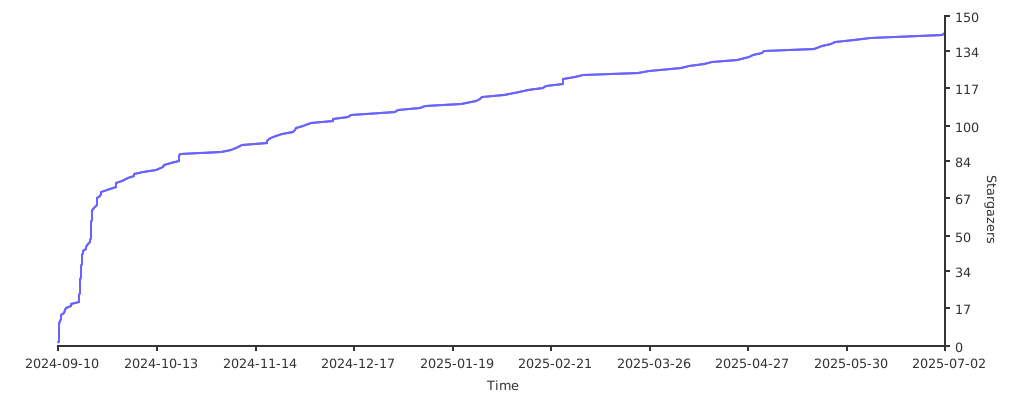](https://starchart.cc/WJZ-P/LiteLoaderQQNT-Encrypt-Chat)
193 |
194 |
195 | [your-project-path]:WJZ-P/LiteLoaderQQNT-Encrypt-Chat
196 |
197 | [contributors-shield]: https://img.shields.io/github/contributors/WJZ-P/LiteLoaderQQNT-Encrypt-Chat.svg?style=flat-square
198 |
199 | [contributors-url]: https://github.com/WJZ-P/LiteLoaderQQNT-Encrypt-Chat/graphs/contributors
200 |
201 | [forks-shield]: https://img.shields.io/github/forks/WJZ-P/LiteLoaderQQNT-Encrypt-Chat.svg?style=flat-square
202 |
203 | [forks-url]: https://github.com/WJZ-P/LiteLoaderQQNT-Encrypt-Chat/network/members
204 |
205 | [stars-shield]: https://img.shields.io/github/stars/WJZ-P/LiteLoaderQQNT-Encrypt-Chat.svg?style=flat-square
206 |
207 | [stars-url]: https://github.com/WJZ-P/LiteLoaderQQNT-Encrypt-Chat/stargazers
208 |
209 | [issues-shield]: https://img.shields.io/github/issues/WJZ-P/LiteLoaderQQNT-Encrypt-Chat.svg?style=flat-square
210 |
211 | [issues-url]: https://img.shields.io/github/issues/WJZ-P/LiteLoaderQQNT-Encrypt-Chat.svg
212 |
213 | [license-shield]: https://img.shields.io/github/license/WJZ-P/LiteLoaderQQNT-Encrypt-Chat.svg?style=flat-square
214 |
215 | [license-url]: https://github.com/WJZ-P/LiteLoaderQQNT-Encrypt-Chat/blob/main/LICENSE
216 |
217 | [linkedin-shield]: https://img.shields.io/badge/-LinkedIn-black.svg?style=flat-square&logo=linkedin&colorB=555
218 |
219 | [linkedin-url]: https://linkedin.com/in/shaojintian
220 |
221 | [oldQQ-download-link]:https://dldir1.qq.com/qqfile/qq/QQNT/448e164c/QQ9.9.15.26909_x64.exe
222 |
223 | [LL-installer-link]:https://ats-prod.oss-accelerate.aliyuncs.com/18734247705198dcb594916e8ba1facc
224 |
225 | [//]: # (不知道写点啥)
--------------------------------------------------------------------------------
/src/preload.js:
--------------------------------------------------------------------------------
1 | // Electron 主进程 与 渲染进程 交互的桥梁
2 | const {contextBridge, ipcRenderer} = require("electron");
3 |
4 | // 在window对象下导出只读对象
5 | contextBridge.exposeInMainWorld("encrypt_chat", {
6 | messageEncryptor: (message) => ipcRenderer.invoke("LiteLoader.encrypt_chat.messageEncryptor", message),
7 | messageDecryptor: (message, peerUid) => ipcRenderer.invoke("LiteLoader.encrypt_chat.messageDecryptor", message, peerUid),
8 | imgDecryptor: (imgPath, peerUid) => ipcRenderer.invoke("LiteLoader.encrypt_chat.imgDecryptor", imgPath, peerUid),
9 | imgChecker: (imgPath) => ipcRenderer.invoke("LiteLoader.encrypt_chat.imgChecker", imgPath),
10 | decodeHex: (message) => ipcRenderer.invoke("LiteLoader.encrypt_chat.decodeHex", message),
11 | getWindowID: () => ipcRenderer.invoke("LiteLoader.encrypt_chat.getWindowID"),
12 | getMenuHTML: () => ipcRenderer.invoke("LiteLoader.encrypt_chat.getMenuHTML"),
13 | ecFileHandler: (fileBuffer, fileName, peerUid) => ipcRenderer.send("LiteLoader.encrypt_chat.ecFileHandler", fileBuffer, fileName, peerUid),
14 | openPath: (filePath) => ipcRenderer.send("LiteLoader.encrypt_chat.openPath", filePath),
15 | isFileExist: (filePathArray) => ipcRenderer.invoke("LiteLoader.encrypt_chat.isFileExist", filePathArray),
16 | //设置相关,给renderer进程用
17 | getConfig: () => ipcRenderer.invoke("LiteLoader.encrypt_chat.getConfig"),
18 | setConfig: (newConfig) => ipcRenderer.invoke("LiteLoader.encrypt_chat.setConfig", newConfig),
19 | addEventListener: (channel, func) => ipcRenderer.on(channel, (event, ...args) => func(...args)),
20 | isChatWindow: () => ipcRenderer.invoke("LiteLoader.encrypt_chat.isChatWindow"),
21 | sendIPC: (channel, arg) => ipcRenderer.send(channel, arg),//渲染进程用来发送IPC消息,其实不需要,NTQQ的window对象有ipcRenderer
22 | showMainProcessInfo: (message) => ipcRenderer.send("LiteLoader.encrypt_chat.showMainProcessInfo", message),
23 | //发送消息到所有聊天窗口
24 | sendMsgToChatWindows: (message, arg) => {
25 | //console.log(message,arg)
26 | ipcRenderer.send("LiteLoader.encrypt_chat.sendMsgToChatWindows", message, arg)
27 | },
28 |
29 | invokeNative: (eventName, cmdName, registered, webContentId, ...args) => invokeNativeV2(eventName, cmdName, webContentId, ...args)
30 | });
31 |
32 |
33 | /**
34 | * 调用一个qq底层函数,并返回函数返回值。来自
35 | * https://github.com/xtaw/LiteLoaderQQNT-Euphony/blob/master/src/main/preload.js
36 | *
37 | * @param { String } eventName 函数事件名。
38 | * @param { String } cmdName 函数名。
39 | * @param { Boolean } registered 函数是否为一个注册事件函数。
40 | * @param {Number} webContentId 当前窗口的webContentsId,在window对象中有这个属性。
41 | * @param { ...Object } args 函数参数。
42 | * @returns { Promise } 函数返回值。
43 | */
44 | function invokeNative(eventName, cmdName, registered, webContentId, ...args) {
45 | console.log(`尝试发送IPC消息,webContentsId${webContentId},eventName${eventName},cmdName${cmdName},registered${registered},args${args}`)
46 | return new Promise(resolve => {
47 | const callbackId = crypto.randomUUID();
48 | const callback = (event, ...args) => {
49 | if (args?.[0]?.callbackId == callbackId) {
50 | ipcRenderer.off(`IPC_DOWN_${webContentId}`, callback);
51 | resolve(args[1]);
52 | }
53 | };
54 | ipcRenderer.on(`IPC_DOWN_${webContentId}`, callback);
55 | ipcRenderer.send(`IPC_UP_${webContentId}`, {
56 | type: 'request',
57 | callbackId,
58 | eventName: `${eventName}-${webContentId}${registered ? '-register' : ''}`
59 | }, [cmdName, ...args]);
60 | });
61 | }
62 |
63 | //过时了!我们需要一个新版的底层函数!
64 |
65 | /**
66 | * 【V2 版本】 - 调用 QQ 底层 NTAPI 函数
67 | * 该版本根据 QQ NT 9.9.9+ 的新版 IPC 格式进行了重构。
68 | *
69 | * @param {string} eventName - 基础事件名,例如 "ntApi"。函数会自动处理 peerId。
70 | * @param {string} cmdName - 具体要调用的方法名,例如 "nodeIKernelMsgService/forwardMsgWithComment"。
71 | * @param {number} peerId - 当前窗口的唯一标识,通常是 window.webContentId。
72 | * @param {...any} args - 要传递给目标方法的参数列表。
73 | * @returns {Promise} - 返回一个 Promise,解析为目标方法的返回值。
74 | */
75 | function invokeNativeV2(eventName, cmdName, peerId, ...args) {
76 | // 1. 定义新的 IPC 通道名称
77 | const ipc_up_channel = `RM_IPCFROM_RENDERER${peerId}`;
78 | const ipc_down_channel = `RM_IPCTO_RENDERER${peerId}`; // 这是基于发送通道的合理推测,如果收不到回调,可能需要抓包确认此名称
79 |
80 | // 2. 打印调试信息,方便排查
81 | console.log(`[invokeNativeV2] 准备发送 IPC 消息:
82 | - Channel: ${ipc_up_channel}
83 | - Event: ${eventName}
84 | - Command: ${cmdName}
85 | - PeerId: ${peerId}
86 | - Args:`, ...args);
87 |
88 | return new Promise((resolve, reject) => {
89 | const callbackId = crypto.randomUUID();
90 |
91 | // 3. 定义回调函数,用于接收返回数据
92 | const callback = (event, ...resultArgs) => {
93 | // 新版的回调结构也可能变了,这里我们假设它和以前类似,第一个参数是包含 callbackId 的对象
94 | // resultArgs[0] -> { "type": "response", "callbackId": "...", "eventName": "..." }
95 | // resultArgs[1] -> a.k.a the actual result
96 | if (resultArgs?.[0]?.callbackId === callbackId) {
97 | console.log('[invokeNativeV2] 收到回调:', resultArgs[1]);
98 | ipcRenderer.off(ipc_down_channel, callback);
99 | resolve(resultArgs[1]);
100 | }
101 | };
102 |
103 | // 4. 监听回调通道
104 | ipcRenderer.on(ipc_down_channel, callback);
105 |
106 | // 5. 构建全新的载荷 (Payload)
107 | const requestMetadata = {
108 | type: "request",
109 | callbackId: callbackId,
110 | eventName: eventName, // 使用简洁的 eventName
111 | peerId: peerId
112 | };
113 |
114 | const commandPayload = {
115 | cmdName: cmdName,
116 | cmdType: "invoke", // 从抓包结果看,这似乎是固定的
117 | payload: args // 将所有参数包裹在 payload 数组中
118 | };
119 |
120 | // 6. 发送 IPC 消息
121 | try {
122 | ipcRenderer.send(
123 | ipc_up_channel,
124 | requestMetadata,
125 | commandPayload
126 | );
127 | console.log('[invokeNativeV2] IPC 消息已发送。');
128 | } catch (error) {
129 | console.error('[invokeNativeV2] IPC 消息发送失败:', error);
130 | ipcRenderer.off(ipc_down_channel, callback);
131 | reject(error);
132 | }
133 | });
134 | }
135 |
136 |
137 | // contextBridge.exposeInMainWorld('euphonyNative', {
138 | // subscribeEvent,
139 | // unsubscribeEvent
140 | // })
141 |
142 | // /**
143 | // * 为qq底层事件 `cmdName` 添加 `handler` 处理器。
144 | // *
145 | // * @param { String } cmdName 事件名称。
146 | // * @param { Function } handler 事件处理器。
147 | // * @returns { Function } 新的处理器。
148 | // */
149 | // function subscribeEvent(cmdName, handler) {
150 | // const listener = (event, ...args) => {
151 | // if (args?.[1]?.[0]?.cmdName == cmdName) {
152 | // handler(args[1][0].payload);
153 | // }
154 | // };
155 | // ipcRenderer.on(`IPC_DOWN_${webContentsId}`, listener);
156 | // return listener;
157 | // }
158 | //
159 | //
160 | // /**
161 | // * 移除qq底层事件的 `handler` 处理器。
162 | // *
163 | // * 请注意,`handler` 并不是传入 `subscribeEvent` 的处理器,而是其返回的新处理器。
164 | // *
165 | // * @param { Function } handler 事件处理器。
166 | // */
167 | // function unsubscribeEvent(handler) {
168 | // ipcRenderer.off(`IPC_DOWN_${webContentsId}`, handler);
169 | // }
--------------------------------------------------------------------------------
/src/main.js:
--------------------------------------------------------------------------------
1 | const {ipcMain, shell} = require("electron");
2 | const fs = require("fs")
3 | const {messageDecryptor, messageEncryptor, decodeHex} = require("./utils/cryptoUtils");
4 | const path = require("path");
5 | const {ipcModifyer} = require("./utils/ipcUtils");
6 | const {pluginLog} = require("./utils/logUtils")
7 | const {Config} = require("./Config.js")
8 | const {imgDecryptor, imgChecker} = require("./utils/imageUtils");
9 | const {deleteFiles, ecFileHandler} = require("./utils/fileUtils");
10 |
11 | const pluginPath = path.join(LiteLoader.plugins.encrypt_chat.path.plugin);//插件目录
12 | const configPath = path.join(pluginPath, "config.json");
13 |
14 | const config = Config.config
15 |
16 | const chatWindows = []//单独聊天窗口和QQ主界面的聊天窗口
17 |
18 | // 运行在 Electron 主进程 下的插件入口
19 |
20 | onload()//妈的,启动!
21 |
22 | // 创建窗口时触发
23 | module.exports.onBrowserWindowCreated = async window => {
24 | //必须在窗口加载完成后再进行处理,否则getURL()为空
25 | window.webContents.on("did-stop-loading", async () => {
26 | if (window.webContents.getURL().indexOf("#/main/message") != -1 ||
27 | window.webContents.getURL().indexOf("#/chat") != -1 //确认是聊天窗口
28 | ) {
29 | chatWindows.push(window);
30 | pluginLog('当前窗口ID为' + window.id)
31 | }
32 |
33 | // pluginLog('当前窗口的title如下:')
34 | // console.dir(window, { showHidden: true }); //打印出窗口的所有信息
35 | // pluginLog(window.title) //恒为QQ
36 | // pluginLog(window.accessibleTitle) //空的
37 | // pluginLog(window.representedFilename) //空的
38 | // pluginLog('当前窗口的contentView如下:')
39 | // console.log(window.contentView) //一个空对象{}
40 |
41 | // pluginLog('当前窗口的webContents如下:')
42 | // console.log(window.webContents)
43 |
44 | //是聊天窗口才修改
45 | try {
46 | //window 为 Electron 的 BrowserWindow 实例
47 | if (window.ecIsLoaded) return pluginLog("[Main]已修改IPC,不需要重复加载")
48 | window.ecIsLoaded = true
49 |
50 | pluginLog('启动!')
51 | //替换掉官方的ipc监听器
52 | window.webContents._events["-ipc-message"] = ipcModifyer(window.webContents._events["-ipc-message"], window)
53 | //这里修改关闭窗口时候的函数,用来在关闭QQ时清空加密图片缓存
54 | window.webContents._events['-before-unload-fired'] = new Proxy(window.webContents._events['-before-unload-fired'], {
55 | apply(target, thisArg, args) {
56 | try {
57 | //下面删除掉加密图片缓存
58 | const cachePath = path.join(config.pluginPath, 'decryptedImgs')
59 | deleteFiles(cachePath)
60 | } catch (e) {
61 | console.log(e)
62 | }
63 | return target.apply(thisArg, args)
64 | }
65 | })
66 |
67 | pluginLog('ipc监听器修改成功')
68 |
69 | } catch (e) {
70 | pluginLog(e)
71 | }
72 | })
73 | }
74 |
75 | async function onload() {
76 | ipcMain.handle("LiteLoader.encrypt_chat.messageEncryptor", (_, message) => messageEncryptor(message))
77 | ipcMain.handle("LiteLoader.encrypt_chat.messageDecryptor", (_, message, uin) => messageDecryptor(message, uin))
78 | ipcMain.handle("LiteLoader.encrypt_chat.decodeHex", (_, message) => decodeHex(message))
79 | ipcMain.handle("LiteLoader.encrypt_chat.getWindowID", (event) => event.sender.getOwnerBrowserWindow().id)
80 | ipcMain.handle("LiteLoader.encrypt_chat.imgDecryptor", (_, imgPath, peerUid) => imgDecryptor(imgPath, peerUid))
81 | ipcMain.handle("LiteLoader.encrypt_chat.imgChecker", (_, imgPath) => imgChecker(imgPath))
82 | //进行下载文件的解密与保存。
83 | ipcMain.on("LiteLoader.encrypt_chat.ecFileHandler", (_, fileBuffer, fileName, peerUid) => ecFileHandler(fileBuffer, fileName, peerUid))
84 | //打开对应目录的文件夹
85 | ipcMain.on("LiteLoader.encrypt_chat.openPath", (_, filePath) => shell.openPath(filePath))
86 |
87 | ipcMain.on("LiteLoader.encrypt_chat.showMainProcessInfo", (_, message) => {
88 | const globalObject = global
89 |
90 | // 将变量名按点分割
91 | const keys = message.split('.');
92 | if (keys.length === 0) return console.log(globalObject)
93 |
94 | // 遍历获取深层属性
95 | let currentValue = globalObject;
96 | for (const key of keys) {
97 | if (currentValue && currentValue.hasOwnProperty(key)) {
98 | currentValue = currentValue[key];
99 | } else {
100 | console.log(`${message} is not defined in the global scope.`);
101 | return;
102 | }
103 | }
104 |
105 | // 打印最终的值
106 | console.log(`${message}:\n`, currentValue);
107 | })
108 |
109 | //检查对应文件是否存在
110 | ipcMain.handle("LiteLoader.encrypt_chat.isFileExist", (_, filePathArray) => fs.existsSync(path.join(...filePathArray)))
111 |
112 | //设置相关,给renderer进程用
113 | ipcMain.handle("LiteLoader.encrypt_chat.getConfig", () => Config.getConfig())
114 | //设置config,同时检查是否更改主题色,改了就发送rePatchCss请求。
115 | ipcMain.handle("LiteLoader.encrypt_chat.setConfig", async (event, newConfig) => {
116 | pluginLog('主进程收到setConfig消息,更新设置。')
117 | const oldMainColor = config.mainColor//先保存下当前的主题色
118 | const newestConfig = await Config.setConfig(newConfig)//更新配置,并且返回新的配置
119 | if (newestConfig?.mainColor !== oldMainColor) //说明改变了主题色
120 | sendMsgToChatWindows("LiteLoader.encrypt_chat.rePatchCss");//主进程给渲染进程发送重新渲染ECcss消息
121 | else pluginLog("主题色未改变,不需要rePatchCss")
122 | return newestConfig
123 | })
124 |
125 | ipcMain.handle("LiteLoader.encrypt_chat.getMenuHTML", () => fs.readFileSync(path.join(config.pluginPath, 'src/pluginMenu.html'), 'utf-8'))
126 | ipcMain.on("LiteLoader.encrypt_chat.sendMsgToChatWindows", (_, message, args) => {
127 | console.log('主进程准备处理sendMsgToChatWindows')
128 | pluginLog(_, message, args)
129 | sendMsgToChatWindows(message, args)
130 | })
131 |
132 | await Config.initConfig(pluginPath, configPath)
133 | }
134 |
135 | /**
136 | * 主进程发消息通知所有渲染进程中的聊天窗口
137 | * @param message
138 | * @param args
139 | */
140 | function sendMsgToChatWindows(message, args) {
141 | pluginLog('给渲染进程发送重新渲染ECcss消息')
142 | // pluginLog('所有聊天窗口如下')
143 | // console.log(chatWindows)
144 | pluginLog(args)
145 | for (const window of chatWindows) {
146 | if (window.isDestroyed()) continue;
147 | window.webContents.send(message, args);
148 | }
149 | }
150 |
151 |
152 | // const ipcInvokeProxy = window.webContents._events["-ipc-invoke"]
153 | // const proxyIpcInvoke = new Proxy(ipcInvokeProxy, {
154 | // apply(target, thisArg, args) {
155 | // pluginLog('proxyIpcInvoke收到的消息如下')
156 | // console.log(args)
157 | // return target.apply(thisArg, args)
158 | // }
159 | // })
160 | // window.webContents._events["-ipc-invoke"] = proxyIpcInvoke
161 | //
162 | // const ipcMsgSyncProxy = window.webContents._events['-ipc-message-sync']
163 | // const proxyIpcMsgSync = new Proxy(ipcMsgSyncProxy, {
164 | // apply(target, thisArg, args) {
165 | // pluginLog('proxyIpcMsgSync收到的消息如下')
166 | // console.log(args)
167 | // return target.apply(thisArg, args)
168 | // }
169 | // })
170 | // window.webContents._events['-ipc-message-sync'] = proxyIpcMsgSync
171 | //
172 | // const ipcPortsProxy = window.webContents._events['-ipc-ports']
173 | // const proxyIpcPorts = new Proxy(ipcPortsProxy, {
174 | // apply(target, thisArg, args) {
175 | // pluginLog('ipcPortsProxy收到的消息如下')
176 | // console.log(args)
177 | // return target.apply(thisArg, args)
178 | // }
179 | // })
180 | // window.webContents._events['-ipc-ports'] = proxyIpcPorts
181 | //
182 | // const ipcAddNewContentsProxy = window.webContents._events['-add-new-contents']
183 | // const proxyAddNewContents = new Proxy(ipcAddNewContentsProxy, {
184 | // apply(target, thisArg, args) {
185 | // pluginLog('proxyAddNewContents收到的消息如下')
186 | // console.log(args)
187 | // return target.apply(thisArg, args)
188 | // }
189 | // })
190 | // window.webContents._events['-add-new-contents'] = proxyAddNewContents
191 | //
192 | // const ipcBeforeUnloadFiredProxy = window.webContents._events['-before-unload-fired']
193 | // const proxyBeUnFired = new Proxy(ipcBeforeUnloadFiredProxy, {
194 | // apply(target, thisArg, args) {
195 | // pluginLog('ipcBeforeUnloadFiredProxy收到的消息如下')
196 | // console.log(args)
197 | // return target.apply(thisArg, args)
198 | // }
199 | // })
200 | // window.webContents._events['-add-new-contents'] = proxyBeUnFired
--------------------------------------------------------------------------------
/src/utils/SettingListeners.js:
--------------------------------------------------------------------------------
1 | const ecAPI = window.encrypt_chat
2 |
3 | export class SettingListeners {
4 | listNum = 0;
5 | keyList = [];//调用onLoad方法之后会改变
6 | constructor(doc) {//传入一个document对象
7 | this.document = doc
8 | }
9 |
10 | async keyInputListener() {
11 | let keyValue = undefined
12 | const keyInputEl = this.document.querySelector('#ec-key-input')
13 | keyInputEl.value = (await ecAPI.getConfig()).encryptionKey
14 |
15 | keyInputEl.addEventListener('change', async event => {
16 | keyValue = event.target.value
17 |
18 | // 发送设置密钥事件
19 | await ecAPI.setConfig({encryptionKey: keyValue})
20 | //console.log('修改密钥为' + keyValue)
21 | })
22 | }
23 |
24 | async colorSelectorListener() {
25 | let keyValue = undefined
26 | const colorSelEl = this.document.querySelector('#ec-color-selector')
27 | colorSelEl.value = (await ecAPI.getConfig()).mainColor
28 |
29 | colorSelEl.addEventListener('change', async event => {
30 | keyValue = event.target.value
31 |
32 | // 发送设置密钥事件
33 | await ecAPI.setConfig({mainColor: keyValue})
34 | //rePatchCss()
35 | //不应该在这里调用rePatchCss,因为窗口不对。在这里是对设置窗口本身修改,没用。
36 | //在setConfig里有设置。如果修改了主题色,主进程会对所有聊天窗口发送ipcMsg。
37 | //渲染进程收到后进行修改主题色。
38 | //console.log('[EC]修改主题色为' + keyValue)
39 | })
40 | }
41 |
42 | async styleSelectorListener() {
43 | let keyValue = undefined
44 | const styleSelEl = this.document.querySelector('#ec-style-selector')
45 | styleSelEl.value = (await ecAPI.getConfig()).currentStyleName
46 |
47 | styleSelEl.addEventListener('change', async event => {
48 | keyValue = event.target.value
49 |
50 | // 发送设置密钥事件
51 | await ecAPI.setConfig({currentStyleName: keyValue})
52 | console.log('[EC]语种设置为' + keyValue)
53 | })
54 | }
55 |
56 | async tagButtonListener() {
57 | const tagButton = this.document.querySelector('#ec-tag-button')
58 | // console.log(tagButton)
59 | // console.log((await ecAPI.getConfig()).isUseTag)
60 | if ((await ecAPI.getConfig()).isUseTag) tagButton.classList.toggle('is-active')
61 |
62 | tagButton.addEventListener('click', async () => {
63 | const isUseTag = (await ecAPI.getConfig()).isUseTag
64 | tagButton.classList.toggle('is-active')
65 | await ecAPI.setConfig({isUseTag: !isUseTag})
66 | })
67 | }
68 |
69 | async activeButtonListener() {
70 | const tagButton = this.document.querySelector('#ec-active-button')
71 | // console.log(tagButton)
72 | // console.log((await ecAPI.getConfig()).isUseTag)
73 | if ((await ecAPI.getConfig()).useEncrypt) tagButton.classList.toggle('is-active')
74 |
75 | tagButton.addEventListener('click', async () => {
76 | const useEncrypt = (await ecAPI.getConfig()).useEncrypt
77 | tagButton.classList.toggle('is-active')
78 | await ecAPI.setConfig({useEncrypt: !useEncrypt})
79 | })
80 | }
81 |
82 | async enhanceAreaButtonListener() {
83 | const button = this.document.querySelector('#ec-enhance-input-area-button')
84 | if ((await ecAPI.getConfig()).isUseEnhanceArea) button.classList.toggle('is-active')
85 |
86 | button.addEventListener('click', async () => {
87 | const isUseEnhanceArea = (await ecAPI.getConfig()).isUseEnhanceArea
88 | button.classList.toggle('is-active')
89 | await ecAPI.setConfig({isUseEnhanceArea: !isUseEnhanceArea})
90 | })
91 | }
92 |
93 | async addKeyRowButtonListener() {
94 | this.document.querySelector('.add-row-button').addEventListener('click', async () => {
95 | //点击按钮之后,应该多出一行设置栏,并且配置列表添加新的空行
96 | const container = this.document.querySelector('.key-list-container')
97 | const keyObj = {note: '', id: '', key: ''}
98 | this.keyList.push(keyObj)
99 | await ecAPI.setConfig({independentKeyList: this.keyList})//发送ipcMsg给主进程,更新配置文件
100 | this.addKeyRowHtml(container)
101 | })
102 | }
103 |
104 | //初始化独立key列表
105 | async initIndependentKeyList() {
106 |
107 | const container = this.document.querySelector('.key-list-container')
108 | this.keyList.forEach(item => {
109 | this.addKeyRowHtml(container, item.note, item.id, item.key)
110 | })
111 | }
112 |
113 | addKeyRowHtml(container, note = '', id = '', key = '') {
114 | const rowDiv = document.createElement('div')
115 | const noteDiv = document.createElement('div')
116 | const idDiv = document.createElement('div');
117 | const keyDiv = document.createElement('div');
118 | const deleteButton = document.createElement('button');
119 | rowDiv.className = "vertical-list-item singal-key-row";
120 | noteDiv.className = "independent-key-div";
121 | idDiv.className = "independent-key-div";
122 | keyDiv.className = "independent-key-div";
123 | deleteButton.className = 'q-button q-button--secondary q-button--large delete-row-button';
124 |
125 | noteDiv.innerHTML = `
126 | 备注
127 | 群号
132 | 密钥
137 |
75 | `,
76 | "开关加密聊天(备用)",
77 | async () => {
78 | try {
79 |
80 | } catch (e) {
81 |
82 | }
83 | }
84 | );
85 | }
86 | }).observe(document.querySelector("body"), {childList: true});
87 | }
88 |
89 | /**
90 | * 被用于在addFuncBar的MutationObserver中调用,用于新建图标
91 | * @param chatElement
92 | */
93 | function createFuncBarIcon(chatElement) {
94 | async function executor() {
95 | if (document.querySelector('#id-func-bar-EncryptChat')) return //已经有了就不添加了
96 | const funcBarElement = chatElement.getElementsByClassName("func-bar")[1]//第二个就是右边的
97 | // console.log('下面打印出右侧的funcbar')
98 | // console.log(funcBarElement)
99 | if (!funcBarElement) return//为空就返回,说明当前不是聊天窗口
100 |
101 | const hexColor = (rgbaToHex(window.getComputedStyle(chatElement.querySelector('#id-func-bar-MessageRecord > i > svg')).borderBlockColor))//获取QQ的自带svg颜色
102 |
103 | const barIconElement = funcBarElement.querySelector(`.bar-icon`).cloneNode(true)
104 | const iconItem = barIconElement.querySelector('.icon-item')//内部的元素,需要修改成自己的值
105 | const imageElement = barIconElement.querySelector('.q-svg-icon')//图片元素,innerHTML是一个svg元素,换成自己的
106 | const qToolTipsEl = barIconElement.querySelector('.q-tooltips')//提示元素,需要往里面加一个自己设置的子元素
107 |
108 | iconItem.id = "id-func-bar-EncryptChat"
109 | iconItem.ariaLabel = "加密聊天"
110 | imageElement.innerHTML = `
112 | `
113 |
114 | //下面把提示字添加到子元素内
115 |
116 | const tipElement = document.createElement('div')
117 | tipElement.className = 'q-tooltips__content q-tooltips__bottom q-tooltips-div';
118 | tipElement.style.cssText = 'bottom: -31px; transform: translateX(-50%); left: calc(50% + 0px);';
119 | // 创建内部内容,塞到这个新创建的子元素内
120 | const innerContent = document.createElement('div');
121 | innerContent.className = 'primary-content';
122 | innerContent.textContent = '开启/关闭消息加密';
123 | tipElement.appendChild(innerContent)
124 |
125 | // 将文字元素插入到提示元素内
126 | qToolTipsEl.appendChild(tipElement)
127 |
128 |
129 | //把自己的新图标元素添加进去,并且是添加成为第一个子元素,显示在最左边。
130 | funcBarElement.insertBefore(barIconElement, funcBarElement.firstChild);
131 |
132 | console.log("EC按钮添加成功")
133 |
134 | //检查一下目前的激活状态并对应修改
135 | if ((await ecAPI.getConfig()).activeEC) {
136 | imageElement.firstChild.classList.add('active')
137 | const sendBtnWrapEl = document.querySelector('.send-btn-wrap')
138 | sendBtnWrapEl.classList.toggle('active', true)
139 | const sendTextBtnEl = sendBtnWrapEl.querySelector('.send-msg')//带有“发送字样的按钮”
140 | sendTextBtnEl.innerText = "加密发送"
141 |
142 | if ((await ecAPI.getConfig()).isUseEnhanceArea)
143 | document.querySelector('.chat-input-area').classList.toggle('active', true)
144 | }
145 | }
146 |
147 | executor()
148 | //setTimeout(executor, 200) //延迟一段时间,等待元素加载完毕,然后再执行,防止报错。
149 |
150 | new MutationObserver(executor).observe(chatElement, {childList: true});//检测子元素的增删变化
151 | }
152 |
153 | /**
154 | * 为QQ添加一个EC的功能栏图标,位置在打字窗口的正上方
155 | */
156 | export function addFuncBarIcon() {
157 | console.log('[EC]addfuncbar启动辣!尝试寻找并添加加密图标')
158 |
159 | let chatElement = null
160 | //let findCnt=0
161 | const taskID = setInterval(() => {
162 | if (!document.querySelector(".chat-input-area")) {
163 | console.log("正在寻找chat-input-area")
164 | return
165 | }
166 | //已经找到对应元素
167 | chatElement = document.querySelector(".chat-input-area")
168 | console.log('[EC addFuncBarIcon]找到chat-input-area啦!' + chatElement)
169 |
170 | createFuncBarIcon(chatElement)
171 |
172 | clearInterval(taskID)//关闭任务
173 | }, 500)
174 | }
175 |
176 | /**
177 | * 启用/关闭加密聊天功能,同时修改svg元素样式和输入框的样式
178 | */
179 | export async function ECactivator() {
180 | const isActive = (await ecAPI.getConfig()).activeEC//获取当前EC状态,默认关闭加密
181 | console.log('更改active为' + !isActive)
182 |
183 | //点击按钮之后,应该通知所有渲染进程调用changeECStyle方法
184 | // await changeECStyle()
185 | await ecAPI.sendMsgToChatWindows("LiteLoader.encrypt_chat.changeECStyle", !isActive)//让主进程通知渲染进程改变开关状态
186 |
187 | await ecAPI.setConfig({activeEC: !isActive})//设置开关状态
188 |
189 | const input = document.querySelector("p[data-placeholder]").innerText
190 | ecAPI.showMainProcessInfo(input)
191 |
192 | //下面开始调用
193 | }
194 |
195 | export async function changeECStyle(isActive) {
196 | console.log("当前准备执行changeECStyle方法。状态修改为" + isActive)
197 | const svg = document.querySelector('.ec-svg')
198 | const sendBtnWrapEl = document.querySelector('.send-btn-wrap')
199 |
200 | sendBtnWrapEl.classList.toggle('active', isActive)
201 | const sendTextBtnEl = sendBtnWrapEl.querySelector('.send-msg')//带有“发送字样的按钮”
202 | sendTextBtnEl.innerText = isActive ? "加密发送" : "发送"
203 |
204 | svg.classList.toggle('active', isActive);
205 |
206 | //对输入框加点特效,使得开启加密更加明显
207 | if ((await ecAPI.getConfig()).isUseEnhanceArea) {
208 | const chatInputEl = document.querySelector('.chat-input-area')
209 | chatInputEl.classList.toggle('active', isActive)
210 | }
211 | }
212 |
213 | window.ECactivator = ECactivator
214 |
215 | function rgbaToHex(color) {
216 | // 使用正则表达式提取 RGB/A 值
217 | const rgbaMatch = color.match(/rgba?\((\d+),\s*(\d+),\s*(\d+)(?:,\s*(\d*(?:\.\d+)?))?\)/);
218 |
219 | if (!rgbaMatch) {
220 | return '#000000'
221 | }
222 |
223 | const r = parseInt(rgbaMatch[1]);
224 | const g = parseInt(rgbaMatch[2]);
225 | const b = parseInt(rgbaMatch[3]);
226 | const a = rgbaMatch[4] ? parseFloat(rgbaMatch[4]) : 1; // alpha 值,默认为 1
227 |
228 | // 将 RGB 转换为十六进制
229 | const toHex = (c) => {
230 | return c.toString(16).padStart(2, '0');
231 | };
232 |
233 | // 生成十六进制颜色
234 | const hexColor = `#${toHex(r)}${toHex(g)}${toHex(b)}`;
235 |
236 | // 如果有 alpha 值,转换为两位十六进制
237 | if (a < 1) {
238 | const alphaHex = Math.round(a * 255).toString(16).padStart(2, '0');
239 | return `${hexColor}${alphaHex}`;
240 | }
241 |
242 | return hexColor;
243 | }
244 |
245 | //ecAPI.addEventListener('LiteLoader.encrypt_chat.changeAllECactivator',ECactivator)
246 | //这样写会存在不同窗口的同步问题。
--------------------------------------------------------------------------------
/src/utils/ipcUtils.js:
--------------------------------------------------------------------------------
1 | const {Config} = require("../Config.js")
2 | const {imgEncryptor} = require("./imageUtils.js");
3 | const {pluginLog} = require("./logUtils");
4 | const config = Config.config
5 | const fs = require('fs')
6 | const {messageEncryptor} = require("./cryptoUtils.js");
7 | const {imgChecker, imgDecryptor, uploadImage, singlePixelPngBuffer} = require("./imageUtils");
8 | const {getFileBuffer} = require("./fileUtils");
9 | const {encryptImg, messageDecryptor, decodeHex} = require("./cryptoUtils");
10 |
11 |
12 | /**
13 | * 修改消息ipc
14 | * @param ipcProxy
15 | * @param window window对象,主要用于在上传文件时提供进度条回馈。
16 | * @returns {function}
17 | */
18 | function ipcModifyer(ipcProxy, window) {
19 | return new Proxy(ipcProxy, {
20 | async apply(target, thisArg, args) {
21 | let modifiedArgs = args;
22 | try {//thisArg是WebContent对象
23 | //设置ipc通道名
24 |
25 | //新版QQ的格式已修改。
26 | const ipcName = args?.[3]?.[1]?.cmdName
27 | const eventName = args?.[3]?.[0]?.eventName
28 | //测试
29 | //if(ipcName==='nodeIKernelMsgService/ForwardMsgWithComment') console.log(JSON.stringify(args))
30 | //if (eventName !== "ns-LoggerApi-2") console.log(JSON.stringify(args))//调试的时候用
31 | if (ipcName === 'nodeIKernelMsgService/sendMsg') console.log(JSON.stringify(args))
32 |
33 | if (ipcName === 'nodeIKernelMsgService/sendMsg') modifiedArgs = await ipcMsgModify(args, window);//修改发送消息
34 | if (ipcName === 'openMediaViewer') modifiedArgs = ipcOpenImgModify(args);//修改图片查看器
35 | if (ipcName === 'writeClipboard') modifiedArgs = ipcwriteClipboardModify(args);//修改复制功能
36 | if (ipcName === 'startDrag') modifiedArgs = ipcStartDrag(args);//修改拖动
37 |
38 | return target.apply(thisArg, modifiedArgs)
39 | } catch (err) {
40 | console.log(err);
41 | target.apply(thisArg, args)
42 | }
43 | }
44 | })
45 | }
46 |
47 |
48 |
49 | /**
50 | * 处理QQ消息,对符合条件的msgElement的content进行加密再返回
51 | * @param args
52 | * @param window 用来上传文件时向渲染进程发消息,显示进度条
53 | * @returns {args}
54 | */
55 | async function ipcMsgModify(args, window) {
56 | const ipcName = args?.[3]?.[1]?.cmdName
57 | if (ipcName !== 'nodeIKernelMsgService/sendMsg') return args;
58 | const payload=args[3][1].payload[0]//[1]是null.
59 | console.log('[EC ipcUtils ipcMsgModify]下面打印出nodeIKernelMsgService/sendMsg的内容')
60 | //新版QQ改动
61 | console.log(JSON.stringify(payload, null, 2))
62 | //console.log(args[3][1][1].msgElements?.[0].textElement)
63 |
64 | //下面判断加密是否启用,启用了就修改消息内容
65 |
66 | if (!config.activeEC) return args
67 |
68 | //————————————————————————————————————————————————————————————————————
69 | //修改原始消息
70 | const peerUid = payload.peer?.peerUid
71 | for (let item of payload.msgElements) {
72 |
73 | //说明消息内容是文字类
74 | if (item.elementType === 1) {
75 |
76 | //艾特别人的不需要解密
77 | if (item.textElement?.atUid !== '' || item.textElement?.atType === 1) {
78 | continue;//艾特消息无法修改content,NTQQ似乎有别的措施防止。
79 | }
80 | //修改解密消息
81 | pluginLog("准备进行加密!")
82 | item.textElement.content = messageEncryptor(item.textElement.content, peerUid)
83 | }
84 |
85 |
86 |
87 | //说明消息内容是图片类,md5HexStr这个属性一定要对,会做校验
88 | else if (item.elementType === 2) {
89 | if (imgChecker(item.picElement.sourcePath)) return//要发送的是加密图片,不进行二次加密
90 |
91 | const result = imgEncryptor(item.picElement.sourcePath, peerUid)
92 | console.log(result)
93 |
94 | //获取缓存路径
95 | const cachePath = item.picElement.sourcePath.substring(0,
96 | item.picElement.sourcePath.lastIndexOf('\\') + 1) + result.picMD5 + '.gif';
97 | //复制图片到QQ缓存的目录
98 | pluginLog('正在复制图片到QQ缓存目录,目录为' + cachePath)
99 | fs.copyFileSync(result.picPath, cachePath);
100 | fs.unlink(item.picElement.sourcePath, (err) => {
101 | if (err) console.log(err)
102 | })//把发送的源图片删除,避免泄露
103 | Object.assign(item.picElement, {
104 | md5HexStr: result.picMD5,
105 | sourcePath: cachePath,
106 | fileName: result.picMD5 + '.gif',
107 | picWidth: 1,
108 | picHeight: 1,
109 | //fileSize: '520', //没效果
110 | // thumbPath:cachePath, //这么写会报错
111 | //picType: 2000, //gif是2000,图片是1001,1000是表情包
112 | //picSubType: 0, //设置为0是图片类型,1是表情包类型,会影响渲染大小
113 |
114 | })
115 | }
116 |
117 |
118 | //下面处理加密文件
119 | else if (item.elementType === 3)//3是发送文件
120 | {
121 | const fileName = item.fileElement.fileName
122 | const filePath = item.fileElement.filePath
123 | const fileSize = item.fileElement.fileSize
124 | //获取文件的buffer后对buffer进行加密
125 | pluginLog('获取到文件buffer,加密中')
126 | const encryptedFileBuffer = encryptImg((await getFileBuffer(filePath)))//和图片加密的方法是一样的,都是二进制
127 |
128 |
129 | //把文件buffer插入1x1的png里面后发送文件请求
130 | pluginLog('发送上传请求中')
131 | let result = undefined
132 | try {
133 | result = await uploadImage(Buffer.concat([singlePixelPngBuffer, encryptedFileBuffer]), (progress) => {
134 | try {
135 | window.webContents.send('LiteLoader.encrypt_chat.uploadProgress', progress)
136 | pluginLog('发送进度条消息中,当前进度' + progress)
137 | } catch (e) {
138 | console.log(e)
139 | }
140 | })
141 | pluginLog('上传成功')
142 | } catch (e) {
143 | pluginLog('上传失败')
144 | pluginLog(e)
145 | }
146 |
147 | pluginLog(JSON.stringify(result))
148 | if (result) {
149 | const fileObj = {
150 | type: 'ec-encrypted-file',
151 | fileName: fileName,
152 | fileUrl: result.url,
153 | fileSize: fileSize,
154 | encryptionKey: config.encryptionKey //直接放上加密文件的key
155 | }
156 |
157 | //把加密文件插入到消息元素中
158 | textElement.textElement.content = messageEncryptor(JSON.stringify(fileObj), peerUid)
159 |
160 | } else textElement.textElement.content = messageEncryptor('[EC]文件发送失败,可能是文件过大', peerUid)
161 |
162 | payload.msgElements = [textElement]
163 | }
164 | }
165 |
166 | // console.log('修改后的,msgElements为')
167 | // for (let item of args[3][1][1].msgElements) {
168 | // console.log(item)
169 | // }
170 | return args
171 | }
172 |
173 |
174 | /**
175 | * 处理打开图片的ipc消息,如果打开的是密文图片,那么切换成自己的解密后的图片。
176 | * @param args
177 | * @returns {args}
178 | */
179 | function ipcOpenImgModify(args) {
180 | const mediaList = args[3][1][1].mediaList
181 | const imgPath = decodeURIComponent(mediaList[0].originPath).substring(9)//获取原始路径
182 | if (!imgChecker(imgPath)) {
183 | console.log('[EC]图片校验未通过!渲染原图')
184 | return args
185 | }
186 | //下面开始解密图片
187 | const decryptedObj = imgDecryptor(imgPath)
188 | if (!decryptedObj) return args; //解密失败直接返回
189 | console.log(decryptedObj)
190 | //decryptedImgPath: 'E:\\LiteloaderQQNT\\plugins\\Encrypt-Chat\\decryptedImgs\\54dcd5689b10debf8a718d30f6b0691a.png',
191 | mediaList[0].originPath = "appimg://" + encodeURI(decryptedObj.decryptedImgPath.replace("\\", "/"))
192 | mediaList[0].size = {width: decryptedObj.width, height: decryptedObj.height}
193 | pluginLog('修改后的图片路径:' + mediaList[0].originPath)
194 | return args
195 | }
196 |
197 | function ipcwriteClipboardModify(args) {
198 | for (const item of args[3][1][1]) {
199 |
200 | //说明消息内容是文字类
201 | if (item.elementType === 1) {
202 | //修改解密消息
203 | const decryptedMsg = messageDecryptor(decodeHex(item.textElement.content), null)
204 | if (decryptedMsg) item.textElement.content = decryptedMsg
205 | }
206 |
207 | //说明消息内容是图片类,md5HexStr这个属性一定要对,会做校验
208 | else if (item.elementType === 2) {
209 | const decryptedObj = imgDecryptor(item.picElement.sourcePath, null)
210 |
211 | if (decryptedObj.decryptedImgPath !== "") //解密成功才继续
212 | {
213 | item.picElement.sourcePath = decryptedObj.decryptedImgPath
214 | }
215 | }
216 | }
217 | pluginLog("修改后的剪切板元素为" + JSON.stringify(args[3][1][1], null, 2))
218 |
219 | return args
220 | }
221 |
222 | //拖拽图片时解密
223 | function ipcStartDrag(args) {
224 | const decryptedObj = imgDecryptor(args[3][1][1], null)
225 | if (decryptedObj.decryptedImgPath !== "") //解密成功才继续
226 | args[3][1][1] = decryptedObj.decryptedImgPath
227 | return args
228 | }
229 |
230 | const c = [{"frameId": 1, "processId": 5}, false, "IPC_UP_2", [{
231 | "type": "request",
232 | "callbackId": "30511689-ba3b-447e-add5-41df0d9f8a4a",
233 | "eventName": "ns-OsApi-2"
234 | }, ["startDrag", "F:\\QQ文件\\1369727119\\nt_qq\\nt_data\\Pic\\2024-10\\Ori\\db8eedfbb3aefe4a5a92ec35439fe076.png"]]]
235 |
236 | module.exports = {ipcModifyer}
237 |
238 | const textElement = {
239 | elementType: 1,
240 | elementId: '',
241 | textElement: {content: '测试', atType: 0, atUid: '', atTinyId: '', atNtUid: ''}
242 | }
243 |
244 | //插入一个卡片消息
245 | // args[3][1][1].msgElements.push({
246 | // elementType: 10,
247 | // elementId: '',
248 | // arkElement: {
249 | // bytesData: JSON.stringify({
250 | // "app": "com.tencent.tdoc.qqpush",
251 | // "desc": "",
252 | // "bizsrc": "",
253 | // "view": "pic",
254 | // "ver": "1.0.0.15",
255 | // "prompt": "[QQ红包]恭喜发财",
256 | // "meta": {
257 | // "pic": {
258 | // "jumpUrl": "",
259 | // "preview": "http:\/\/p.qlogo.cn\/homework\/0\/hw_h_4xknus6xi70gkck66c88b25f1298\/0\/25632286"
260 | // }
261 | // },
262 | // "config": {"ctime": 1714214660, "forward": 1, "token": "f1245530d59bccad2b1c695544e98efb"}
263 | // }),
264 | // linkInfo: null,
265 | // subElementType: null
266 | // }
267 | // })
--------------------------------------------------------------------------------
/src/pluginMenu.html:
--------------------------------------------------------------------------------
1 |
3 |
4 |
5 |
6 |
7 |
8 | 开启/关闭解密功能
9 | 开启实时生效,关闭后对新消息生效,或切换页面也会生效。
10 |
11 |
12 |
13 |
15 |
16 |
17 |
18 | 默认密钥
19 | 密钥用于加密和解密信息,必须双方密钥一致才可以正常通信。
20 |
21 |
22 |
23 |
26 |
27 |
28 |
29 | 选择语种
30 | 语种与加密内容无关,仅作为表面上的文本混淆视听。
31 |
32 |
33 |
34 |
35 |
36 |
37 | 喵喵语
38 | 邦布语
39 | 丘丘语
40 | 小鸟语
41 | 小狗语
42 | 尼尔语
43 |
44 |
45 |
46 |
47 |
48 |
49 |
50 | 当前Q号uid:
51 | I miss you so much.
52 |
53 | 点击复制
54 |
55 |
56 |
57 |
58 |
59 |
60 |
61 |
62 |
63 |
64 |
65 | EC消息主题色
66 | 修改EC消息被解密渲染时的边框颜色和解密tag颜色
67 |
68 |
69 |
72 |
73 |
74 |
75 | 是否启用解密Tag
76 | 消息解密后下方的"原消息:xxx"
77 |
78 |
79 |
81 |
82 |
83 |
84 | 是否启用更明显的开启加密提示
85 |
86 | 开启后聊天框会有主题背景色。原理是filter的drop-shadow,若高版本有bug请关闭
87 |
88 |
89 |
90 |
92 |
93 |
94 |
95 |
96 |
97 |
98 |
99 |
100 |
101 |
102 | 此处配置单独的群聊密钥(如需要私聊密钥需要手动填写Q号对应的uid)
103 |
104 |
106 |
107 |
108 |
109 |
110 |
111 |
112 |
113 |
114 |
115 |
116 |
117 |
118 |
119 |
120 |
121 |
122 |
123 |
124 |
125 |
126 |
127 |
128 |
130 | +
131 |
132 |
133 |
134 |
135 |
136 |
137 |
138 |
139 |
140 |
141 |
142 | 使用方法:打开聊天窗口,点击输入栏上方右侧的加密图标即可切换是否加密。
143 |
144 |
145 |
146 | 加密图片的缓存在插件目录/decryptedImgs内,每次退出QQ会自动删除缓存。
147 |
148 |
149 | 加密文件下载地址在插件目录/decryptedFiles内。
150 |
151 |
152 | 按Ctrl+E可快捷切换EC状态
153 |
154 |
155 |
156 |
157 |
158 |
159 |
256 |
--------------------------------------------------------------------------------
/LICENSE:
--------------------------------------------------------------------------------
1 | Eclipse Public License - v 2.0
2 |
3 | THE ACCOMPANYING PROGRAM IS PROVIDED UNDER THE TERMS OF THIS ECLIPSE
4 | PUBLIC LICENSE ("AGREEMENT"). ANY USE, REPRODUCTION OR DISTRIBUTION
5 | OF THE PROGRAM CONSTITUTES RECIPIENT'S ACCEPTANCE OF THIS AGREEMENT.
6 |
7 | 1. DEFINITIONS
8 |
9 | "Contribution" means:
10 |
11 | a) in the case of the initial Contributor, the initial content
12 | Distributed under this Agreement, and
13 |
14 | b) in the case of each subsequent Contributor:
15 | i) changes to the Program, and
16 | ii) additions to the Program;
17 | where such changes and/or additions to the Program originate from
18 | and are Distributed by that particular Contributor. A Contribution
19 | "originates" from a Contributor if it was added to the Program by
20 | such Contributor itself or anyone acting on such Contributor's behalf.
21 | Contributions do not include changes or additions to the Program that
22 | are not Modified Works.
23 |
24 | "Contributor" means any person or entity that Distributes the Program.
25 |
26 | "Licensed Patents" mean patent claims licensable by a Contributor which
27 | are necessarily infringed by the use or sale of its Contribution alone
28 | or when combined with the Program.
29 |
30 | "Program" means the Contributions Distributed in accordance with this
31 | Agreement.
32 |
33 | "Recipient" means anyone who receives the Program under this Agreement
34 | or any Secondary License (as applicable), including Contributors.
35 |
36 | "Derivative Works" shall mean any work, whether in Source Code or other
37 | form, that is based on (or derived from) the Program and for which the
38 | editorial revisions, annotations, elaborations, or other modifications
39 | represent, as a whole, an original work of authorship.
40 |
41 | "Modified Works" shall mean any work in Source Code or other form that
42 | results from an addition to, deletion from, or modification of the
43 | contents of the Program, including, for purposes of clarity any new file
44 | in Source Code form that contains any contents of the Program. Modified
45 | Works shall not include works that contain only declarations,
46 | interfaces, types, classes, structures, or files of the Program solely
47 | in each case in order to link to, bind by name, or subclass the Program
48 | or Modified Works thereof.
49 |
50 | "Distribute" means the acts of a) distributing or b) making available
51 | in any manner that enables the transfer of a copy.
52 |
53 | "Source Code" means the form of a Program preferred for making
54 | modifications, including but not limited to software source code,
55 | documentation source, and configuration files.
56 |
57 | "Secondary License" means either the GNU General Public License,
58 | Version 2.0, or any later versions of that license, including any
59 | exceptions or additional permissions as identified by the initial
60 | Contributor.
61 |
62 | 2. GRANT OF RIGHTS
63 |
64 | a) Subject to the terms of this Agreement, each Contributor hereby
65 | grants Recipient a non-exclusive, worldwide, royalty-free copyright
66 | license to reproduce, prepare Derivative Works of, publicly display,
67 | publicly perform, Distribute and sublicense the Contribution of such
68 | Contributor, if any, and such Derivative Works.
69 |
70 | b) Subject to the terms of this Agreement, each Contributor hereby
71 | grants Recipient a non-exclusive, worldwide, royalty-free patent
72 | license under Licensed Patents to make, use, sell, offer to sell,
73 | import and otherwise transfer the Contribution of such Contributor,
74 | if any, in Source Code or other form. This patent license shall
75 | apply to the combination of the Contribution and the Program if, at
76 | the time the Contribution is added by the Contributor, such addition
77 | of the Contribution causes such combination to be covered by the
78 | Licensed Patents. The patent license shall not apply to any other
79 | combinations which include the Contribution. No hardware per se is
80 | licensed hereunder.
81 |
82 | c) Recipient understands that although each Contributor grants the
83 | licenses to its Contributions set forth herein, no assurances are
84 | provided by any Contributor that the Program does not infringe the
85 | patent or other intellectual property rights of any other entity.
86 | Each Contributor disclaims any liability to Recipient for claims
87 | brought by any other entity based on infringement of intellectual
88 | property rights or otherwise. As a condition to exercising the
89 | rights and licenses granted hereunder, each Recipient hereby
90 | assumes sole responsibility to secure any other intellectual
91 | property rights needed, if any. For example, if a third party
92 | patent license is required to allow Recipient to Distribute the
93 | Program, it is Recipient's responsibility to acquire that license
94 | before distributing the Program.
95 |
96 | d) Each Contributor represents that to its knowledge it has
97 | sufficient copyright rights in its Contribution, if any, to grant
98 | the copyright license set forth in this Agreement.
99 |
100 | e) Notwithstanding the terms of any Secondary License, no
101 | Contributor makes additional grants to any Recipient (other than
102 | those set forth in this Agreement) as a result of such Recipient's
103 | receipt of the Program under the terms of a Secondary License
104 | (if permitted under the terms of Section 3).
105 |
106 | 3. REQUIREMENTS
107 |
108 | 3.1 If a Contributor Distributes the Program in any form, then:
109 |
110 | a) the Program must also be made available as Source Code, in
111 | accordance with section 3.2, and the Contributor must accompany
112 | the Program with a statement that the Source Code for the Program
113 | is available under this Agreement, and informs Recipients how to
114 | obtain it in a reasonable manner on or through a medium customarily
115 | used for software exchange; and
116 |
117 | b) the Contributor may Distribute the Program under a license
118 | different than this Agreement, provided that such license:
119 | i) effectively disclaims on behalf of all other Contributors all
120 | warranties and conditions, express and implied, including
121 | warranties or conditions of title and non-infringement, and
122 | implied warranties or conditions of merchantability and fitness
123 | for a particular purpose;
124 |
125 | ii) effectively excludes on behalf of all other Contributors all
126 | liability for damages, including direct, indirect, special,
127 | incidental and consequential damages, such as lost profits;
128 |
129 | iii) does not attempt to limit or alter the recipients' rights
130 | in the Source Code under section 3.2; and
131 |
132 | iv) requires any subsequent distribution of the Program by any
133 | party to be under a license that satisfies the requirements
134 | of this section 3.
135 |
136 | 3.2 When the Program is Distributed as Source Code:
137 |
138 | a) it must be made available under this Agreement, or if the
139 | Program (i) is combined with other material in a separate file or
140 | files made available under a Secondary License, and (ii) the initial
141 | Contributor attached to the Source Code the notice described in
142 | Exhibit A of this Agreement, then the Program may be made available
143 | under the terms of such Secondary Licenses, and
144 |
145 | b) a copy of this Agreement must be included with each copy of
146 | the Program.
147 |
148 | 3.3 Contributors may not remove or alter any copyright, patent,
149 | trademark, attribution notices, disclaimers of warranty, or limitations
150 | of liability ("notices") contained within the Program from any copy of
151 | the Program which they Distribute, provided that Contributors may add
152 | their own appropriate notices.
153 |
154 | 4. COMMERCIAL DISTRIBUTION
155 |
156 | Commercial distributors of software may accept certain responsibilities
157 | with respect to end users, business partners and the like. While this
158 | license is intended to facilitate the commercial use of the Program,
159 | the Contributor who includes the Program in a commercial product
160 | offering should do so in a manner which does not create potential
161 | liability for other Contributors. Therefore, if a Contributor includes
162 | the Program in a commercial product offering, such Contributor
163 | ("Commercial Contributor") hereby agrees to defend and indemnify every
164 | other Contributor ("Indemnified Contributor") against any losses,
165 | damages and costs (collectively "Losses") arising from claims, lawsuits
166 | and other legal actions brought by a third party against the Indemnified
167 | Contributor to the extent caused by the acts or omissions of such
168 | Commercial Contributor in connection with its distribution of the Program
169 | in a commercial product offering. The obligations in this section do not
170 | apply to any claims or Losses relating to any actual or alleged
171 | intellectual property infringement. In order to qualify, an Indemnified
172 | Contributor must: a) promptly notify the Commercial Contributor in
173 | writing of such claim, and b) allow the Commercial Contributor to control,
174 | and cooperate with the Commercial Contributor in, the defense and any
175 | related settlement negotiations. The Indemnified Contributor may
176 | participate in any such claim at its own expense.
177 |
178 | For example, a Contributor might include the Program in a commercial
179 | product offering, Product X. That Contributor is then a Commercial
180 | Contributor. If that Commercial Contributor then makes performance
181 | claims, or offers warranties related to Product X, those performance
182 | claims and warranties are such Commercial Contributor's responsibility
183 | alone. Under this section, the Commercial Contributor would have to
184 | defend claims against the other Contributors related to those performance
185 | claims and warranties, and if a court requires any other Contributor to
186 | pay any damages as a result, the Commercial Contributor must pay
187 | those damages.
188 |
189 | 5. NO WARRANTY
190 |
191 | EXCEPT AS EXPRESSLY SET FORTH IN THIS AGREEMENT, AND TO THE EXTENT
192 | PERMITTED BY APPLICABLE LAW, THE PROGRAM IS PROVIDED ON AN "AS IS"
193 | BASIS, WITHOUT WARRANTIES OR CONDITIONS OF ANY KIND, EITHER EXPRESS OR
194 | IMPLIED INCLUDING, WITHOUT LIMITATION, ANY WARRANTIES OR CONDITIONS OF
195 | TITLE, NON-INFRINGEMENT, MERCHANTABILITY OR FITNESS FOR A PARTICULAR
196 | PURPOSE. Each Recipient is solely responsible for determining the
197 | appropriateness of using and distributing the Program and assumes all
198 | risks associated with its exercise of rights under this Agreement,
199 | including but not limited to the risks and costs of program errors,
200 | compliance with applicable laws, damage to or loss of data, programs
201 | or equipment, and unavailability or interruption of operations.
202 |
203 | 6. DISCLAIMER OF LIABILITY
204 |
205 | EXCEPT AS EXPRESSLY SET FORTH IN THIS AGREEMENT, AND TO THE EXTENT
206 | PERMITTED BY APPLICABLE LAW, NEITHER RECIPIENT NOR ANY CONTRIBUTORS
207 | SHALL HAVE ANY LIABILITY FOR ANY DIRECT, INDIRECT, INCIDENTAL, SPECIAL,
208 | EXEMPLARY, OR CONSEQUENTIAL DAMAGES (INCLUDING WITHOUT LIMITATION LOST
209 | PROFITS), HOWEVER CAUSED AND ON ANY THEORY OF LIABILITY, WHETHER IN
210 | CONTRACT, STRICT LIABILITY, OR TORT (INCLUDING NEGLIGENCE OR OTHERWISE)
211 | ARISING IN ANY WAY OUT OF THE USE OR DISTRIBUTION OF THE PROGRAM OR THE
212 | EXERCISE OF ANY RIGHTS GRANTED HEREUNDER, EVEN IF ADVISED OF THE
213 | POSSIBILITY OF SUCH DAMAGES.
214 |
215 | 7. GENERAL
216 |
217 | If any provision of this Agreement is invalid or unenforceable under
218 | applicable law, it shall not affect the validity or enforceability of
219 | the remainder of the terms of this Agreement, and without further
220 | action by the parties hereto, such provision shall be reformed to the
221 | minimum extent necessary to make such provision valid and enforceable.
222 |
223 | If Recipient institutes patent litigation against any entity
224 | (including a cross-claim or counterclaim in a lawsuit) alleging that the
225 | Program itself (excluding combinations of the Program with other software
226 | or hardware) infringes such Recipient's patent(s), then such Recipient's
227 | rights granted under Section 2(b) shall terminate as of the date such
228 | litigation is filed.
229 |
230 | All Recipient's rights under this Agreement shall terminate if it
231 | fails to comply with any of the material terms or conditions of this
232 | Agreement and does not cure such failure in a reasonable period of
233 | time after becoming aware of such noncompliance. If all Recipient's
234 | rights under this Agreement terminate, Recipient agrees to cease use
235 | and distribution of the Program as soon as reasonably practicable.
236 | However, Recipient's obligations under this Agreement and any licenses
237 | granted by Recipient relating to the Program shall continue and survive.
238 |
239 | Everyone is permitted to copy and distribute copies of this Agreement,
240 | but in order to avoid inconsistency the Agreement is copyrighted and
241 | may only be modified in the following manner. The Agreement Steward
242 | reserves the right to publish new versions (including revisions) of
243 | this Agreement from time to time. No one other than the Agreement
244 | Steward has the right to modify this Agreement. The Eclipse Foundation
245 | is the initial Agreement Steward. The Eclipse Foundation may assign the
246 | responsibility to serve as the Agreement Steward to a suitable separate
247 | entity. Each new version of the Agreement will be given a distinguishing
248 | version number. The Program (including Contributions) may always be
249 | Distributed subject to the version of the Agreement under which it was
250 | received. In addition, after a new version of the Agreement is published,
251 | Contributor may elect to Distribute the Program (including its
252 | Contributions) under the new version.
253 |
254 | Except as expressly stated in Sections 2(a) and 2(b) above, Recipient
255 | receives no rights or licenses to the intellectual property of any
256 | Contributor under this Agreement, whether expressly, by implication,
257 | estoppel or otherwise. All rights in the Program not expressly granted
258 | under this Agreement are reserved. Nothing in this Agreement is intended
259 | to be enforceable by any entity that is not a Contributor or Recipient.
260 | No third-party beneficiary rights are created under this Agreement.
261 |
262 | Exhibit A - Form of Secondary Licenses Notice
263 |
264 | "This Source Code may also be made available under the following
265 | Secondary Licenses when the conditions for such availability set forth
266 | in the Eclipse Public License, v. 2.0 are satisfied: {name license(s),
267 | version(s), and exceptions or additional permissions here}."
268 |
269 | Simply including a copy of this Agreement, including this Exhibit A
270 | is not sufficient to license the Source Code under Secondary Licenses.
271 |
272 | If it is not possible or desirable to put the notice in a particular
273 | file, then You may include the notice in a location (such as a LICENSE
274 | file in a relevant directory) where a recipient would be likely to
275 | look for such a notice.
276 |
277 | You may add additional accurate notices of copyright ownership.
278 |
--------------------------------------------------------------------------------
/src/utils/rendererUtils.js:
--------------------------------------------------------------------------------
1 | import "../assests/minJS/axios.min.js"
2 |
3 | //添加css样式
4 | const ecAPI = window.encrypt_chat
5 | let currentConfig = await ecAPI.getConfig()
6 | const downloadFunc = (fileObj, msgContent, peerUid) => () => downloadFile(fileObj, msgContent, peerUid)
7 |
8 | //const curAioData = app.__vue_app__.config.globalProperties.$store.state.common_Aio.curAioData
9 | export function patchCss() {
10 | console.log('[Encrypt-Chat]' + 'css加载中')
11 |
12 | let style = document.createElement('style')
13 | style.type = "text/css";
14 | style.id = "encrypt-chat-css";
15 |
16 | let sHtml = `.message-content__wrapper {
17 | color: var(--bubble_guest_text);
18 | display: flex;
19 | grid-row-start: content;
20 | grid-column-start: content;
21 | grid-row-end: content;
22 | grid-column-end: content;
23 | max-width: -webkit-fill-available;
24 | min-height: 38px;
25 | overflow: visible !important;
26 | border-radius: 10px;
27 | }
28 |
29 | .message-encrypted-tip-left {
30 | position: absolute;
31 | top: calc(100% + 6px);
32 | left: 0;
33 | font-size: 12px;
34 | white-space: nowrap;
35 | color: var(--text-color);
36 | background-color: var(--background-color-05);
37 | backdrop-filter: blur(28px);
38 | padding: 4px 8px;
39 | margin-bottom: 2px;
40 | border-radius: 6px;
41 | box-shadow: var(--box-shadow);
42 | transition: 300ms;
43 | transform: translateX(-30%);
44 | opacity: 0;
45 | pointer-events: none;
46 | color:${currentConfig.mainColor};
47 | }
48 |
49 | .message-encrypted-tip-right {
50 | position: absolute;
51 | top: calc(100% + 6px);
52 | right: 0;
53 | font-size: 12px;
54 | white-space: nowrap;
55 | color: var(--text-color);
56 | background-color: var(--background-color-05);
57 | backdrop-filter: blur(28px);
58 | padding: 4px 8px;
59 | margin-bottom: 2px;
60 | border-radius: 6px;
61 | box-shadow: var(--box-shadow);
62 | transition: 300ms;
63 | transform: translateX(-30%);
64 | opacity: 0;
65 | pointer-events: none;
66 | color:${currentConfig.mainColor};
67 | }
68 |
69 | .message-encrypted-tip-parent {
70 | border-radius: 10px;
71 | position: relative;
72 | overflow: unset !important;
73 | margin-top:3px;
74 | margin-left:3px;
75 | margin-right:3px;
76 | margin-bottom: 15px;
77 | box-shadow: 0px 0px 8px 5px ${currentConfig.mainColor} !important;
78 | }
79 | .message-encrypted-tip-parent-notip {
80 | border-radius: 10px;
81 | position: relative;
82 | overflow: unset !important;
83 | margin-top:3px;
84 | margin-left:3px;
85 | margin-right:3px;
86 | box-shadow: 0px 0px 8px 5px ${currentConfig.mainColor} !important;
87 | }
88 |
89 | .q-svg{
90 | position: relative;
91 | display: inline-block;
92 | transition: 0.25s;
93 | &:hover{
94 | color: #2f2f2f;
95 | cursor: pointer;
96 | scale: 1.05;
97 | }
98 | }
99 |
100 | .q-svg.active {
101 | fill: #66ccff; /* 更深的颜色 */
102 | }
103 |
104 | .chat-input-area{
105 | transition: all 0.2s ease-in-out; /* 添加过渡效果 */
106 | }
107 |
108 | /*修改聊天栏背景样式,使得开启加密更加明显*/
109 | .chat-input-area.active {
110 | filter: drop-shadow(5px 5px 5px ${currentConfig.mainColor});
111 | pointer-events: auto; /* 确保可以接收鼠标事件 */
112 | }
113 |
114 | .q-tooltips-div{
115 | visibility: hidden;
116 | width: fit-content;
117 | background-color: #555;
118 | color: #fff;
119 | text-align: center;
120 | border-radius: 5px;
121 | padding: 5px;
122 | position: absolute;
123 | z-index: 1;
124 | left: 50%;
125 | /*margin-left: -60px; !* 居中 *!*/
126 | opacity: 0;
127 | transition: visibility 0s 0.5s, opacity 0.25s; /* 延迟显示 */
128 | }
129 |
130 | .q-tooltips:hover .q-tooltips-div{
131 | visibility: visible;
132 | opacity: 1;
133 | transition-delay: 0.25s;
134 | }
135 |
136 | .send-btn-wrap {
137 | transition: all 0.25s ease-in-out !important; /* 过渡效果 */
138 | box-sizing: border-box;
139 | }
140 |
141 | .send-btn-wrap.active {
142 | border: 1px solid #66ccff; /* 激活时边框颜色 */
143 | }
144 |
145 |
146 | /*下面是下载DIV相关的样式*/
147 |
148 | .ec-file-card {
149 | border: 1px solid #ddd;
150 | border-radius: 8px;
151 | box-shadow: 0 2px 5px rgba(0, 0, 0, 0.1);
152 | min-width: 300px;
153 | width: fit-content;
154 | margin: 3px;
155 | font-family: Arial, sans-serif;
156 | }
157 |
158 | .ec-file-info {
159 | display: flex;
160 | align-items: center;
161 | padding: 15px;
162 | background-color: #f9f9f9;
163 | flex-direction: column;
164 | justify-content: center;
165 | border-top-left-radius: 5px;
166 | border-top-right-radius: 5px;
167 | }
168 |
169 | .ec-file-icon {
170 | display: flex;
171 | justify-content: center;
172 | width: 75px;
173 | height: 75px;
174 | }
175 |
176 | .ec-file-name {
177 | margin: 0;
178 | font-size: 20px; /* 增大字体 */
179 | font-weight: bold; /* 加粗字体 */
180 | color: #2c3e50; /* 使用更深的颜色 */
181 | margin-bottom: 5px; /* 增加底部间距 */
182 | }
183 |
184 | .ec-file-size {
185 | font-size: 16px;
186 | color: #777;
187 | margin-top: 2px; /* 增加顶部间距 */
188 | }
189 |
190 | .ec-download-button {
191 | background-color: #66ccff;
192 | color: white;
193 | border: none;
194 | border-radius: 0 0 8px 8px;
195 | width: 100%;
196 | font-size: 20px;
197 | font-weight: bold; /* 加粗字体 */
198 | cursor: pointer;
199 | transition: 0.25s ease-in-out;
200 | padding: 10px;
201 | margin:0;
202 | }
203 |
204 | .ec-download-button:hover {
205 | background-color: #5bb8e5; /* 悬停时稍微加深背景色 */
206 | }
207 |
208 | .ec-loading-img {
209 | position: absolute;
210 | left: 100%;
211 | width: 35px;
212 | height: auto;
213 | color: ${currentConfig.mainColor};
214 | }
215 |
216 | }`
217 |
218 | style.innerHTML = sHtml
219 |
220 | document.getElementsByTagName('head')[0].appendChild(style)
221 | console.log('[Encrypt-Chat]' + 'css加载完成')
222 | }
223 |
224 | export async function rePatchCss() {
225 | console.log("[EC]调用rePatchCss")
226 |
227 | currentConfig = await ecAPI.getConfig()
228 | patchCss()//重新插入
229 | document.getElementById('encrypt-chat-css').remove()
230 | //原理:搜索元素只会搜索到第一个,而我们插入的是新的,第二个,没问题
231 | }
232 |
233 | /**
234 | * 检查消息元素是否需要修改,不能进程间通讯,因为只能传朴素值
235 | * @param msgElement
236 | * @returns {Promise}
237 | */
238 | export async function checkMsgElement(msgElement) {
239 | if (!msgElement?.classList) return false; //如果元素没有classList属性,直接返回,因为可能是图片元素
240 | if (!msgElement?.innerText.trim()) return false; //如果消息为空,则不修改
241 |
242 | let decodeRes = await ecAPI.decodeHex(msgElement.innerHTML)//解码消息
243 |
244 | return decodeRes === "" ? false : decodeRes //直接返回解密的结果,是十六进制的字符串,解码失败则不修改
245 | }
246 |
247 | /**
248 | * 消息渲染器,把密文渲染成明文
249 | * @param allChats
250 | * @returns {Promise}
251 | */
252 | export async function messageRenderer(allChats) {//下面对每条消息进行判断
253 | if (!(await ecAPI.getConfig()).useEncrypt) return//说明未开启加密,不做处理。
254 |
255 | const uid = app.__vue_app__?.config?.globalProperties?.$store?.state?.common_Aio?.curAioData?.header.uid // 当天聊天的对应信息
256 |
257 | for (const chatElement of allChats) {
258 | try {
259 | const msgContentContainer = chatElement.querySelector('.msg-content-container')
260 | if (!msgContentContainer || msgContentContainer?.classList.contains('decrypted-msg-container') ||
261 | msgContentContainer?.classList.contains('reply-msg-checked')) continue//说明这条消息已经被修改过
262 |
263 | const msgContent = chatElement.querySelector('.message-content')//包裹着所有消息的div
264 | let isECMsg = false//判断是否是加密消息
265 | let totalOriginalMsg = ""//总的原始消息
266 |
267 | if (!msgContent?.children) continue;
268 |
269 | //接下来对所有的消息进行处理
270 | for (const singalMsg of msgContent?.children) {
271 | let hexString = undefined
272 |
273 | const normalText = singalMsg.querySelector('.text-normal')
274 | const atText = singalMsg.querySelector('.text-element--at')
275 | const imgElement = singalMsg.querySelector('.image-content')
276 | const mixContent = singalMsg.querySelector('.mixed-container')
277 |
278 | //接下来先对引用消息进行解密处理。
279 | if (mixContent) {
280 | msgContentContainer.classList.add('reply-msg-checked')
281 | for (const child of mixContent.children) {
282 | hexString = await checkMsgElement(child)
283 | if (hexString) {
284 | //pluginLog('检测到加密回复消息')
285 | const decryptedMsg = await ecAPI.messageDecryptor(hexString, uid)
286 | if (!decryptedMsg) continue//解密后如果消息是空的,那就直接忽略,进入下次循环
287 | //直接修改内容
288 | child.innerText = decryptedMsg
289 | //添加已解密tag,防止对同一条引用消息多次解密
290 | }
291 | }
292 | }
293 |
294 | //是文本消息。需要具体判断是文件还是普通文本消息
295 | if (normalText) {
296 | hexString = await checkMsgElement(normalText)
297 |
298 |
299 | if (hexString) {
300 | let decryptedMsg = await ecAPI.messageDecryptor(hexString, uid)
301 | console.log("解密后的消息为" + decryptedMsg)
302 | if (!decryptedMsg) continue//解密后如果消息是空的,那就直接忽略,进入下次循环
303 |
304 | //这里开始判断是否是文件
305 | if (decryptedMsg.includes('ec-encrypted-file')) {
306 | totalOriginalMsg = '[EC文件]'//注意这里是直接=,因为如果是文件只可能有一个Msg。
307 | decryptedMsg=unescapeHTML(decryptedMsg)//做反转义处理
308 | //建立个函数进行fileDiv处理
309 | await fileDivCreater(msgContent, JSON.parse(decryptedMsg), uid)
310 |
311 | } else {
312 | totalOriginalMsg += normalText.innerText//获取原本的密文
313 | normalText.innerHTML = wrapLinks(decryptedMsg)
314 | }
315 | isECMsg = true
316 | }//文本内容修改为解密结果
317 |
318 | } else if (atText) {
319 | totalOriginalMsg += atText.innerText
320 |
321 | //下面检测是否为图片元素
322 | } else if (imgElement) {
323 |
324 | if (imgElement.getAttribute('src').includes('base64')) continue //图片是base64格式的,直接跳过
325 | if (msgContentContainer.classList.contains('message-encrypted-tip-parent')) {//说明有解密边框
326 | if (!imgElement.getAttribute('src').includes('local')) {
327 | //修复正常图片被带上解密边框的bug。
328 | msgContentContainer.classList.remove('message-encrypted-tip-parent')
329 | }
330 | }
331 |
332 | //查询图片的时候会append一个loadingtag,然后会存在这个类名。不要重复执行,可能会出错
333 | //if (msgContentContainer.classList.contains('message-encrypted-tip-parent')) continue
334 |
335 | let imgPath = decodeURIComponent(imgElement.getAttribute('src')).substring(9)//前面一般是appimg://
336 | if (imgPath.includes('Thumb') && imgPath.includes('.gif')) {
337 | //imgPath.includes('_720.gif')&& 好像有的图是_0也不会自动下载原图
338 | if (!imgElement.classList.contains('ec-transformed-img')) {//说明可能是加密的缩略图,可能需要请求原图
339 | const curAioData = app.__vue_app__.config.globalProperties.$store.state.common_Aio.curAioData
340 | const msgId = chatElement.id
341 | const elementId = imgElement.parentElement.getAttribute('element-id')
342 | const chatType = curAioData.chatType
343 | const peerUid = curAioData.header.uid
344 | const oriImgPath = imgPath.replace(/\/Thumb\//, '/Ori/').replace(/_\d+\.gif/, '.gif')
345 |
346 | //没有原图就尝试下载原图
347 | if (!(await ecAPI.isFileExist([oriImgPath])) && !msgContentContainer.classList.contains('message-encrypted-tip-parent')) {
348 | //添加一个加载中的动画
349 | appendLoadingImg(msgContentContainer)
350 | await downloadOriImg(msgId, elementId, chatType, peerUid, oriImgPath)//下载原图
351 |
352 | //下面就监听图片元素变化,变化了就删掉loading
353 | new MutationObserver(() => {
354 | //console.log('删除loading元素')
355 | msgContentContainer.removeChild(msgContentContainer.querySelector('.ec-loading-img'))
356 | //console.log('loading元素删除成功')
357 | }).observe(imgElement, {attributes: true, attributeFilter: ['src']})
358 | }
359 |
360 |
361 | }
362 |
363 | imgPath = imgPath.replace(/\/Thumb\//, '/Ori/').replace(/_\d+\.gif/, '.gif')//替换成原图地址
364 | //console.log('检测到缩略图!索引到原图地址为' + imgPath)
365 | }
366 | if (!(await ecAPI.imgChecker(imgPath))) {
367 | //console.log("[EC]图片检测未通过!"+imgPath)
368 | continue //图片检测未通过
369 | }
370 |
371 | //下面进行图片解密
372 | //console.log('[EC]图片校验通过!尝试进行解密')
373 | //解密图片
374 | const decryptedObj = await ecAPI.imgDecryptor(imgPath, uid)
375 |
376 | if (decryptedObj.decryptedImgPath !== "") //解密成功才继续
377 | {
378 | msgContentContainer.classList.add('message-encrypted-tip-parent')//调整父元素的style
379 |
380 | const decryptedImgPath = "local:///" + decryptedObj.decryptedImgPath.replaceAll("\\", "/")
381 | //拿到解密后的图片的本地地址,进行替换。
382 |
383 | //下面开始替换图片
384 | imgElement.setAttribute('src', decryptedImgPath)
385 | //console.log("替换成的图片地址为"+decryptedImgPath)
386 |
387 | //到这里已经确定是需要解密的图片
388 |
389 | imgElement.classList.add('ec-transformed-img')//添加标记,避免重复调用
390 |
391 | //更改父亲的宽高属性
392 | imgElement.parentElement.style.width = decryptedObj.width + 'px'
393 | imgElement.parentElement.style.height = 'auto'
394 |
395 | isECMsg = true
396 |
397 | //添加一个监听器。保持宽高不变
398 | new MutationObserver((imgEl) => {
399 | imgElement.parentElement.style.width = decryptedObj.width + 'px'
400 | imgElement.parentElement.style.height = 'auto'
401 | }).observe(imgElement.parentElement, {attributes: true, attributeFilter: ['style']})
402 |
403 | }
404 | totalOriginalMsg += isECMsg ? "[EC图片]" : '[图片]'
405 | }
406 |
407 |
408 | }
409 | if (isECMsg) {
410 | //包裹住消息内容的div msg-content-container
411 | await appendEncreptedTag(msgContentContainer, totalOriginalMsg)//全部处理完成添加已解密消息标记,同时修改样式
412 | }
413 | } catch
414 | (e) {
415 | console.log(e)
416 | }
417 |
418 | }
419 | }
420 |
421 | /**
422 | * 渲染file下载元素
423 | * @param {Element} msgContent
424 | * @param {Object} fileObj
425 | */
426 | async function fileDivCreater(msgContent, fileObj, peerUid) {
427 | msgContent.innerHTML = `
428 |
429 |
430 |
文件名.txt
431 |
432 |
433 |
434 |
435 |
大小: xx MB
436 |
437 |
438 |
441 |
下载
442 |
443 |
}
519 | * @param msgId 消息ID
520 | * @param elementId 元素ID
521 | * @param chatType 聊天类型
522 | * @param peerUid 当前的uid,群聊是群号,私聊是Q号对应的一个字符串
523 | * @param filePath 文件路径
524 | */
525 | export async function downloadOriImg(msgId, elementId, chatType, peerUid, filePath) {
526 | console.log('正在尝试下载原图')
527 | console.log(`具体参数为:msgId:${msgId},elementId:${elementId},chatType:${chatType},peerUid:${peerUid},filePath:${filePath}`)
528 | //先检查图片是否已经在本地存在
529 | const result = await ecAPI.invokeNative("ns-ntApi", "nodeIKernelMsgService/downloadRichMedia"
530 | , false, window.webContentId, {
531 | "getReq": {
532 | "fileModelId": "0",
533 | "downSourceType": 0,
534 | "triggerType": 1,
535 | "msgId": msgId,
536 | "chatType": chatType,//1是个人,2是群聊
537 | "peerUid": peerUid,//如果是群,这里会是群号
538 | "elementId": elementId,
539 | "thumbSize": 0,
540 | "downloadType": 1,
541 | "filePath": filePath
542 | }
543 | })
544 | console.log(JSON.stringify(result))
545 | }
546 |
547 |
548 | function formatFileSize(bytes) {
549 | const sizes = ['B', 'KB', 'MB', 'GB', 'TB'];
550 | if (bytes === 0) return '0 B';
551 | const i = parseInt(Math.floor(Math.log(bytes) / Math.log(1024)));
552 | return Math.round(bytes / Math.pow(1024, i)) + ' ' + sizes[i];
553 | }
554 |
555 | function downloadFile(fileObj, msgContent, peerUid) {
556 | const progressElement = msgContent.querySelector('.progress')
557 | const iconElement = msgContent.querySelector('.ec-file-icon') //下载的图标元素
558 | const downloadButton = msgContent.querySelector('.ec-download-button')
559 |
560 | //现在开始下载,修改图标为下载中状态,并且不能再被点击
561 | iconElement.innerHTML = ` 中
608 | return text.replace(urlPattern, '$1 ');
610 | }
611 |
612 | async function ecOpenURL(event) {
613 | // console.log("[EC链接]ecOpenURL的参数为")
614 | // console.log(event)
615 | let url = event.target.innerText
616 | if (!url.startsWith("http")) url = "https://" + url
617 | await ecAPI.invokeNative("ns-BusinessApi", "openUrl", false, window.webContentId, {"url": url})
618 | }
619 |
620 | //给window对象添加函数
621 | window.ecOpenURL = ecOpenURL
622 |
623 |
624 | export function listenMediaListChange() {
625 | const store = app.__vue_app__?.config?.globalProperties?.$store;
626 | if (!store) return;
627 |
628 | // 标记是否正在进行更新,防止由内部更新触发 watcher 循环
629 | let isUpdating = false;
630 |
631 | store.watch(
632 | // 监听 mediaList(深度监听)
633 | (state) => state.MediaViewer.mediaList,
634 | async (newMediaList, oldMediaList) => {
635 | try {
636 | if (isUpdating) return; // 如果正在更新,则不再处理
637 | console.log('mediaList 发生变化:', newMediaList);
638 |
639 | // 为了避免直接修改原数组,复制一份新的数组
640 | const updatedMediaList = JSON.parse(JSON.stringify(newMediaList));
641 | const currMediaIndex = store.state.MediaViewer.currMediaIndex;
642 | const mediaLength = updatedMediaList.length;
643 | const indexQueue = [currMediaIndex];
644 |
645 | // 根据距离的远近,将需要解密的图片放在前面
646 | const maxDistance = Math.max(currMediaIndex, mediaLength - 1 - currMediaIndex);
647 | for (let i = 1; i <= maxDistance; i++) {
648 | const left = currMediaIndex - i;
649 | const right = currMediaIndex + i;
650 | if (left >= 0) indexQueue.push(left);
651 | if (right < mediaLength) indexQueue.push(right);
652 | }
653 |
654 | // 遍历新列表,处理需要解密的图片
655 | for (const index of indexQueue) {
656 | const media = updatedMediaList[index];
657 | if (media.type !== 'image') continue;
658 | if (media.imageDecrypted) continue; // 如果已解密,则跳过
659 |
660 | // 标记为已尝试解密,防止后续重复处理
661 | media.imageDecrypted = true;
662 | const imgPath = decodeURIComponent(media.originPath).substring(9)//获取原始路径
663 | if (!await ecAPI.imgChecker(imgPath)) {
664 | // console.log('[EC]图片校验未通过!渲染原图: ' + imgPath)
665 | continue //图片检测未通过
666 | }
667 | const peerUid = media.context?.peerUid;
668 | try {
669 | const decryptedObj = await ecAPI.imgDecryptor(imgPath, peerUid);
670 | if (!decryptedObj) continue;
671 | // 更新媒体对象相关属性
672 | media.originPath = "appimg://" + encodeURI(decryptedObj.decryptedImgPath.replace("\\", "/"));
673 | if (media.context) {
674 | media.context.sourcePath = decryptedObj.decryptedImgPath;
675 | }
676 | media.size = {width: decryptedObj.width, height: decryptedObj.height};
677 | } catch (error) {
678 | console.error("解密错误:", error);
679 | }
680 | }
681 |
682 | if (JSON.stringify(newMediaList) === JSON.stringify(updatedMediaList)) return; // 如果没有变化,则不再更新
683 |
684 | // 使用防重入标志防止由此更新再次触发 watcher
685 | isUpdating = true;
686 | console.log('mediaList 更新中:', updatedMediaList);
687 | if (store._mutations && store._mutations["MediaViewer/updateMediaList"]) {
688 | store.commit("MediaViewer/updateMediaList", updatedMediaList);
689 | } else {
690 | store.state.MediaViewer.mediaList = updatedMediaList;
691 | }
692 | isUpdating = false;
693 | } catch (err) {
694 | console.error(err);
695 | }
696 | },
697 | {
698 | deep: true
699 | }
700 | );
701 | }
702 |
703 | /**
704 | * 反转义HTML实体
705 | * 将 HTML 实体(如 < &)转换回对应的特殊字符(如 < &)
706 | * @param {string} str 包含 HTML 实体的输入字符串
707 | * @return {string} 反转义后的字符串
708 | */
709 | function unescapeHTML(str) {
710 | // 确保输入是字符串类型
711 | if (typeof str !== 'string') {
712 | return str;
713 | }
714 | // 定义一个映射表,将 HTML 实体映射回特殊字符
715 | const htmlUnentities = {
716 | '&': '&',
717 | '<': '<',
718 | '>': '>',
719 | '"': '"',
720 | ''': "'",
721 | ''': "'"
722 | };
723 |
724 | // 创建一个正则表达式,用来匹配所有需要反转义的实体
725 | // 使用 | 符号表示“或”,全局匹配 (g)
726 | // 注意:如果实体之间有包含关系(例如 & 包含 &),需要注意顺序,但这里列出的标准实体没有这个问题
727 | const entityRegex = /&|<|>|"|'|'/g;
728 |
729 | // 使用字符串的 replace 方法进行替换
730 | // replace 方法找到匹配的实体后,会调用一个回调函数
731 | // 回调函数接收匹配到的实体字符串作为参数 (entity)
732 | // 回调函数从 htmlUnentities 映射表中查找对应的特殊字符并返回,进行替换
733 | return str.replace(entityRegex, entity => htmlUnentities[entity]);
734 | }
735 |
736 | // const fileObj={
737 | // type:'ec-encrypted-file',
738 | // fileName: fileName,
739 | // fileUrl:result.url,
740 | // fileSize: fileSize,
741 | // encryptionKey:config.encryptionKey //直接放上加密文件的key
742 | // }
--------------------------------------------------------------------------------
/src/assests/minJS/axios.min.js:
--------------------------------------------------------------------------------
1 | !function(e,t){"object"==typeof exports&&"undefined"!=typeof module?module.exports=t():"function"==typeof define&&define.amd?define(t):(e="undefined"!=typeof globalThis?globalThis:e||self).axios=t()}(this,(function(){"use strict";function e(e){var r,n;function o(r,n){try{var a=e[r](n),u=a.value,s=u instanceof t;Promise.resolve(s?u.v:u).then((function(t){if(s){var n="return"===r?"return":"next";if(!u.k||t.done)return o(n,t);t=e[n](t).value}i(a.done?"return":"normal",t)}),(function(e){o("throw",e)}))}catch(e){i("throw",e)}}function i(e,t){switch(e){case"return":r.resolve({value:t,done:!0});break;case"throw":r.reject(t);break;default:r.resolve({value:t,done:!1})}(r=r.next)?o(r.key,r.arg):n=null}this._invoke=function(e,t){return new Promise((function(i,a){var u={key:e,arg:t,resolve:i,reject:a,next:null};n?n=n.next=u:(r=n=u,o(e,t))}))},"function"!=typeof e.return&&(this.return=void 0)}function t(e,t){this.v=e,this.k=t}function r(e){var r={},n=!1;function o(r,o){return n=!0,o=new Promise((function(t){t(e[r](o))})),{done:!1,value:new t(o,1)}}return r["undefined"!=typeof Symbol&&Symbol.iterator||"@@iterator"]=function(){return this},r.next=function(e){return n?(n=!1,e):o("next",e)},"function"==typeof e.throw&&(r.throw=function(e){if(n)throw n=!1,e;return o("throw",e)}),"function"==typeof e.return&&(r.return=function(e){return n?(n=!1,e):o("return",e)}),r}function n(e){var t,r,n,i=2;for("undefined"!=typeof Symbol&&(r=Symbol.asyncIterator,n=Symbol.iterator);i--;){if(r&&null!=(t=e[r]))return t.call(e);if(n&&null!=(t=e[n]))return new o(t.call(e));r="@@asyncIterator",n="@@iterator"}throw new TypeError("Object is not async iterable")}function o(e){function t(e){if(Object(e)!==e)return Promise.reject(new TypeError(e+" is not an object."));var t=e.done;return Promise.resolve(e.value).then((function(e){return{value:e,done:t}}))}return o=function(e){this.s=e,this.n=e.next},o.prototype={s:null,n:null,next:function(){return t(this.n.apply(this.s,arguments))},return:function(e){var r=this.s.return;return void 0===r?Promise.resolve({value:e,done:!0}):t(r.apply(this.s,arguments))},throw:function(e){var r=this.s.return;return void 0===r?Promise.reject(e):t(r.apply(this.s,arguments))}},new o(e)}function i(e){return new t(e,0)}function a(e,t){var r=Object.keys(e);if(Object.getOwnPropertySymbols){var n=Object.getOwnPropertySymbols(e);t&&(n=n.filter((function(t){return Object.getOwnPropertyDescriptor(e,t).enumerable}))),r.push.apply(r,n)}return r}function u(e){for(var t=1;t=0;--i){var a=this.tryEntries[i],u=a.completion;if("root"===a.tryLoc)return o("end");if(a.tryLoc<=this.prev){var s=n.call(a,"catchLoc"),c=n.call(a,"finallyLoc");if(s&&c){if(this.prev=0;--r){var o=this.tryEntries[r];if(o.tryLoc<=this.prev&&n.call(o,"finallyLoc")&&this.prev=0;--t){var r=this.tryEntries[t];if(r.finallyLoc===e)return this.complete(r.completion,r.afterLoc),j(r),y}},catch:function(e){for(var t=this.tryEntries.length-1;t>=0;--t){var r=this.tryEntries[t];if(r.tryLoc===e){var n=r.completion;if("throw"===n.type){var o=n.arg;j(r)}return o}}throw new Error("illegal catch attempt")},delegateYield:function(t,r,n){return this.delegate={iterator:L(t),resultName:r,nextLoc:n},"next"===this.method&&(this.arg=e),y}},t}function c(e){var t=function(e,t){if("object"!=typeof e||!e)return e;var r=e[Symbol.toPrimitive];if(void 0!==r){var n=r.call(e,t||"default");if("object"!=typeof n)return n;throw new TypeError("@@toPrimitive must return a primitive value.")}return("string"===t?String:Number)(e)}(e,"string");return"symbol"==typeof t?t:String(t)}function f(e){return f="function"==typeof Symbol&&"symbol"==typeof Symbol.iterator?function(e){return typeof e}:function(e){return e&&"function"==typeof Symbol&&e.constructor===Symbol&&e!==Symbol.prototype?"symbol":typeof e},f(e)}function l(t){return function(){return new e(t.apply(this,arguments))}}function h(e,t,r,n,o,i,a){try{var u=e[i](a),s=u.value}catch(e){return void r(e)}u.done?t(s):Promise.resolve(s).then(n,o)}function p(e){return function(){var t=this,r=arguments;return new Promise((function(n,o){var i=e.apply(t,r);function a(e){h(i,n,o,a,u,"next",e)}function u(e){h(i,n,o,a,u,"throw",e)}a(void 0)}))}}function d(e,t){if(!(e instanceof t))throw new TypeError("Cannot call a class as a function")}function v(e,t){for(var r=0;re.length)&&(t=e.length);for(var r=0,n=new Array(t);r2&&void 0!==arguments[2]?arguments[2]:{},i=o.allOwnKeys,a=void 0!==i&&i;if(null!=e)if("object"!==f(e)&&(e=[e]),N(e))for(r=0,n=e.length;r0;)if(t===(r=n[o]).toLowerCase())return r;return null}var Q="undefined"!=typeof globalThis?globalThis:"undefined"!=typeof self?self:"undefined"!=typeof window?window:global,Z=function(e){return!_(e)&&e!==Q};var ee,te=(ee="undefined"!=typeof Uint8Array&&A(Uint8Array),function(e){return ee&&e instanceof ee}),re=P("HTMLFormElement"),ne=function(e){var t=Object.prototype.hasOwnProperty;return function(e,r){return t.call(e,r)}}(),oe=P("RegExp"),ie=function(e,t){var r=Object.getOwnPropertyDescriptors(e),n={};$(r,(function(r,o){var i;!1!==(i=t(r,o,e))&&(n[o]=i||r)})),Object.defineProperties(e,n)},ae="abcdefghijklmnopqrstuvwxyz",ue="0123456789",se={DIGIT:ue,ALPHA:ae,ALPHA_DIGIT:ae+ae.toUpperCase()+ue};var ce,fe,le,he,pe=P("AsyncFunction"),de=(ce="function"==typeof setImmediate,fe=U(Q.postMessage),ce?setImmediate:fe?(le="axios@".concat(Math.random()),he=[],Q.addEventListener("message",(function(e){var t=e.source,r=e.data;t===Q&&r===le&&he.length&&he.shift()()}),!1),function(e){he.push(e),Q.postMessage(le,"*")}):function(e){return setTimeout(e)}),ve="undefined"!=typeof queueMicrotask?queueMicrotask.bind(Q):"undefined"!=typeof process&&process.nextTick||de,ye={isArray:N,isArrayBuffer:C,isBuffer:function(e){return null!==e&&!_(e)&&null!==e.constructor&&!_(e.constructor)&&U(e.constructor.isBuffer)&&e.constructor.isBuffer(e)},isFormData:function(e){var t;return e&&("function"==typeof FormData&&e instanceof FormData||U(e.append)&&("formdata"===(t=j(e))||"object"===t&&U(e.toString)&&"[object FormData]"===e.toString()))},isArrayBufferView:function(e){return"undefined"!=typeof ArrayBuffer&&ArrayBuffer.isView?ArrayBuffer.isView(e):e&&e.buffer&&C(e.buffer)},isString:F,isNumber:B,isBoolean:function(e){return!0===e||!1===e},isObject:D,isPlainObject:I,isReadableStream:G,isRequest:K,isResponse:V,isHeaders:X,isUndefined:_,isDate:q,isFile:M,isBlob:z,isRegExp:oe,isFunction:U,isStream:function(e){return D(e)&&U(e.pipe)},isURLSearchParams:J,isTypedArray:te,isFileList:H,forEach:$,merge:function e(){for(var t=Z(this)&&this||{},r=t.caseless,n={},o=function(t,o){var i=r&&Y(n,o)||o;I(n[i])&&I(t)?n[i]=e(n[i],t):I(t)?n[i]=e({},t):N(t)?n[i]=t.slice():n[i]=t},i=0,a=arguments.length;i3&&void 0!==arguments[3]?arguments[3]:{},o=n.allOwnKeys;return $(t,(function(t,n){r&&U(t)?e[n]=R(t,r):e[n]=t}),{allOwnKeys:o}),e},trim:function(e){return e.trim?e.trim():e.replace(/^[\s\uFEFF\xA0]+|[\s\uFEFF\xA0]+$/g,"")},stripBOM:function(e){return 65279===e.charCodeAt(0)&&(e=e.slice(1)),e},inherits:function(e,t,r,n){e.prototype=Object.create(t.prototype,n),e.prototype.constructor=e,Object.defineProperty(e,"super",{value:t.prototype}),r&&Object.assign(e.prototype,r)},toFlatObject:function(e,t,r,n){var o,i,a,u={};if(t=t||{},null==e)return t;do{for(i=(o=Object.getOwnPropertyNames(e)).length;i-- >0;)a=o[i],n&&!n(a,e,t)||u[a]||(t[a]=e[a],u[a]=!0);e=!1!==r&&A(e)}while(e&&(!r||r(e,t))&&e!==Object.prototype);return t},kindOf:j,kindOfTest:P,endsWith:function(e,t,r){e=String(e),(void 0===r||r>e.length)&&(r=e.length),r-=t.length;var n=e.indexOf(t,r);return-1!==n&&n===r},toArray:function(e){if(!e)return null;if(N(e))return e;var t=e.length;if(!B(t))return null;for(var r=new Array(t);t-- >0;)r[t]=e[t];return r},forEachEntry:function(e,t){for(var r,n=(e&&e[Symbol.iterator]).call(e);(r=n.next())&&!r.done;){var o=r.value;t.call(e,o[0],o[1])}},matchAll:function(e,t){for(var r,n=[];null!==(r=e.exec(t));)n.push(r);return n},isHTMLForm:re,hasOwnProperty:ne,hasOwnProp:ne,reduceDescriptors:ie,freezeMethods:function(e){ie(e,(function(t,r){if(U(e)&&-1!==["arguments","caller","callee"].indexOf(r))return!1;var n=e[r];U(n)&&(t.enumerable=!1,"writable"in t?t.writable=!1:t.set||(t.set=function(){throw Error("Can not rewrite read-only method '"+r+"'")}))}))},toObjectSet:function(e,t){var r={},n=function(e){e.forEach((function(e){r[e]=!0}))};return N(e)?n(e):n(String(e).split(t)),r},toCamelCase:function(e){return e.toLowerCase().replace(/[-_\s]([a-z\d])(\w*)/g,(function(e,t,r){return t.toUpperCase()+r}))},noop:function(){},toFiniteNumber:function(e,t){return null!=e&&Number.isFinite(e=+e)?e:t},findKey:Y,global:Q,isContextDefined:Z,ALPHABET:se,generateString:function(){for(var e=arguments.length>0&&void 0!==arguments[0]?arguments[0]:16,t=arguments.length>1&&void 0!==arguments[1]?arguments[1]:se.ALPHA_DIGIT,r="",n=t.length;e--;)r+=t[Math.random()*n|0];return r},isSpecCompliantForm:function(e){return!!(e&&U(e.append)&&"FormData"===e[Symbol.toStringTag]&&e[Symbol.iterator])},toJSONObject:function(e){var t=new Array(10);return function e(r,n){if(D(r)){if(t.indexOf(r)>=0)return;if(!("toJSON"in r)){t[n]=r;var o=N(r)?[]:{};return $(r,(function(t,r){var i=e(t,n+1);!_(i)&&(o[r]=i)})),t[n]=void 0,o}}return r}(e,0)},isAsyncFn:pe,isThenable:function(e){return e&&(D(e)||U(e))&&U(e.then)&&U(e.catch)},setImmediate:de,asap:ve};function me(e,t,r,n,o){Error.call(this),Error.captureStackTrace?Error.captureStackTrace(this,this.constructor):this.stack=(new Error).stack,this.message=e,this.name="AxiosError",t&&(this.code=t),r&&(this.config=r),n&&(this.request=n),o&&(this.response=o,this.status=o.status?o.status:null)}ye.inherits(me,Error,{toJSON:function(){return{message:this.message,name:this.name,description:this.description,number:this.number,fileName:this.fileName,lineNumber:this.lineNumber,columnNumber:this.columnNumber,stack:this.stack,config:ye.toJSONObject(this.config),code:this.code,status:this.status}}});var be=me.prototype,ge={};["ERR_BAD_OPTION_VALUE","ERR_BAD_OPTION","ECONNABORTED","ETIMEDOUT","ERR_NETWORK","ERR_FR_TOO_MANY_REDIRECTS","ERR_DEPRECATED","ERR_BAD_RESPONSE","ERR_BAD_REQUEST","ERR_CANCELED","ERR_NOT_SUPPORT","ERR_INVALID_URL"].forEach((function(e){ge[e]={value:e}})),Object.defineProperties(me,ge),Object.defineProperty(be,"isAxiosError",{value:!0}),me.from=function(e,t,r,n,o,i){var a=Object.create(be);return ye.toFlatObject(e,a,(function(e){return e!==Error.prototype}),(function(e){return"isAxiosError"!==e})),me.call(a,e.message,t,r,n,o),a.cause=e,a.name=e.name,i&&Object.assign(a,i),a};function we(e){return ye.isPlainObject(e)||ye.isArray(e)}function Ee(e){return ye.endsWith(e,"[]")?e.slice(0,-2):e}function Oe(e,t,r){return e?e.concat(t).map((function(e,t){return e=Ee(e),!r&&t?"["+e+"]":e})).join(r?".":""):t}var Se=ye.toFlatObject(ye,{},null,(function(e){return/^is[A-Z]/.test(e)}));function xe(e,t,r){if(!ye.isObject(e))throw new TypeError("target must be an object");t=t||new FormData;var n=(r=ye.toFlatObject(r,{metaTokens:!0,dots:!1,indexes:!1},!1,(function(e,t){return!ye.isUndefined(t[e])}))).metaTokens,o=r.visitor||c,i=r.dots,a=r.indexes,u=(r.Blob||"undefined"!=typeof Blob&&Blob)&&ye.isSpecCompliantForm(t);if(!ye.isFunction(o))throw new TypeError("visitor must be a function");function s(e){if(null===e)return"";if(ye.isDate(e))return e.toISOString();if(!u&&ye.isBlob(e))throw new me("Blob is not supported. Use a Buffer instead.");return ye.isArrayBuffer(e)||ye.isTypedArray(e)?u&&"function"==typeof Blob?new Blob([e]):Buffer.from(e):e}function c(e,r,o){var u=e;if(e&&!o&&"object"===f(e))if(ye.endsWith(r,"{}"))r=n?r:r.slice(0,-2),e=JSON.stringify(e);else if(ye.isArray(e)&&function(e){return ye.isArray(e)&&!e.some(we)}(e)||(ye.isFileList(e)||ye.endsWith(r,"[]"))&&(u=ye.toArray(e)))return r=Ee(r),u.forEach((function(e,n){!ye.isUndefined(e)&&null!==e&&t.append(!0===a?Oe([r],n,i):null===a?r:r+"[]",s(e))})),!1;return!!we(e)||(t.append(Oe(o,r,i),s(e)),!1)}var l=[],h=Object.assign(Se,{defaultVisitor:c,convertValue:s,isVisitable:we});if(!ye.isObject(e))throw new TypeError("data must be an object");return function e(r,n){if(!ye.isUndefined(r)){if(-1!==l.indexOf(r))throw Error("Circular reference detected in "+n.join("."));l.push(r),ye.forEach(r,(function(r,i){!0===(!(ye.isUndefined(r)||null===r)&&o.call(t,r,ye.isString(i)?i.trim():i,n,h))&&e(r,n?n.concat(i):[i])})),l.pop()}}(e),t}function Re(e){var t={"!":"%21","'":"%27","(":"%28",")":"%29","~":"%7E","%20":"+","%00":"\0"};return encodeURIComponent(e).replace(/[!'()~]|%20|%00/g,(function(e){return t[e]}))}function Te(e,t){this._pairs=[],e&&xe(e,this,t)}var ke=Te.prototype;function Ae(e){return encodeURIComponent(e).replace(/%3A/gi,":").replace(/%24/g,"$").replace(/%2C/gi,",").replace(/%20/g,"+").replace(/%5B/gi,"[").replace(/%5D/gi,"]")}function je(e,t,r){if(!t)return e;var n,o=r&&r.encode||Ae,i=r&&r.serialize;if(n=i?i(t,r):ye.isURLSearchParams(t)?t.toString():new Te(t,r).toString(o)){var a=e.indexOf("#");-1!==a&&(e=e.slice(0,a)),e+=(-1===e.indexOf("?")?"?":"&")+n}return e}ke.append=function(e,t){this._pairs.push([e,t])},ke.toString=function(e){var t=e?function(t){return e.call(this,t,Re)}:Re;return this._pairs.map((function(e){return t(e[0])+"="+t(e[1])}),"").join("&")};var Pe=function(){function e(){d(this,e),this.handlers=[]}return y(e,[{key:"use",value:function(e,t,r){return this.handlers.push({fulfilled:e,rejected:t,synchronous:!!r&&r.synchronous,runWhen:r?r.runWhen:null}),this.handlers.length-1}},{key:"eject",value:function(e){this.handlers[e]&&(this.handlers[e]=null)}},{key:"clear",value:function(){this.handlers&&(this.handlers=[])}},{key:"forEach",value:function(e){ye.forEach(this.handlers,(function(t){null!==t&&e(t)}))}}]),e}(),Le={silentJSONParsing:!0,forcedJSONParsing:!0,clarifyTimeoutError:!1},Ne={isBrowser:!0,classes:{URLSearchParams:"undefined"!=typeof URLSearchParams?URLSearchParams:Te,FormData:"undefined"!=typeof FormData?FormData:null,Blob:"undefined"!=typeof Blob?Blob:null},protocols:["http","https","file","blob","url","data"]},_e="undefined"!=typeof window&&"undefined"!=typeof document,Ce="object"===("undefined"==typeof navigator?"undefined":f(navigator))&&navigator||void 0,Fe=_e&&(!Ce||["ReactNative","NativeScript","NS"].indexOf(Ce.product)<0),Ue="undefined"!=typeof WorkerGlobalScope&&self instanceof WorkerGlobalScope&&"function"==typeof self.importScripts,Be=_e&&window.location.href||"http://localhost",De=u(u({},Object.freeze({__proto__:null,hasBrowserEnv:_e,hasStandardBrowserWebWorkerEnv:Ue,hasStandardBrowserEnv:Fe,navigator:Ce,origin:Be})),Ne);function Ie(e){function t(e,r,n,o){var i=e[o++];if("__proto__"===i)return!0;var a=Number.isFinite(+i),u=o>=e.length;return i=!i&&ye.isArray(n)?n.length:i,u?(ye.hasOwnProp(n,i)?n[i]=[n[i],r]:n[i]=r,!a):(n[i]&&ye.isObject(n[i])||(n[i]=[]),t(e,r,n[i],o)&&ye.isArray(n[i])&&(n[i]=function(e){var t,r,n={},o=Object.keys(e),i=o.length;for(t=0;t-1,i=ye.isObject(e);if(i&&ye.isHTMLForm(e)&&(e=new FormData(e)),ye.isFormData(e))return o?JSON.stringify(Ie(e)):e;if(ye.isArrayBuffer(e)||ye.isBuffer(e)||ye.isStream(e)||ye.isFile(e)||ye.isBlob(e)||ye.isReadableStream(e))return e;if(ye.isArrayBufferView(e))return e.buffer;if(ye.isURLSearchParams(e))return t.setContentType("application/x-www-form-urlencoded;charset=utf-8",!1),e.toString();if(i){if(n.indexOf("application/x-www-form-urlencoded")>-1)return function(e,t){return xe(e,new De.classes.URLSearchParams,Object.assign({visitor:function(e,t,r,n){return De.isNode&&ye.isBuffer(e)?(this.append(t,e.toString("base64")),!1):n.defaultVisitor.apply(this,arguments)}},t))}(e,this.formSerializer).toString();if((r=ye.isFileList(e))||n.indexOf("multipart/form-data")>-1){var a=this.env&&this.env.FormData;return xe(r?{"files[]":e}:e,a&&new a,this.formSerializer)}}return i||o?(t.setContentType("application/json",!1),function(e,t,r){if(ye.isString(e))try{return(t||JSON.parse)(e),ye.trim(e)}catch(e){if("SyntaxError"!==e.name)throw e}return(r||JSON.stringify)(e)}(e)):e}],transformResponse:[function(e){var t=this.transitional||qe.transitional,r=t&&t.forcedJSONParsing,n="json"===this.responseType;if(ye.isResponse(e)||ye.isReadableStream(e))return e;if(e&&ye.isString(e)&&(r&&!this.responseType||n)){var o=!(t&&t.silentJSONParsing)&&n;try{return JSON.parse(e)}catch(e){if(o){if("SyntaxError"===e.name)throw me.from(e,me.ERR_BAD_RESPONSE,this,null,this.response);throw e}}}return e}],timeout:0,xsrfCookieName:"XSRF-TOKEN",xsrfHeaderName:"X-XSRF-TOKEN",maxContentLength:-1,maxBodyLength:-1,env:{FormData:De.classes.FormData,Blob:De.classes.Blob},validateStatus:function(e){return e>=200&&e<300},headers:{common:{Accept:"application/json, text/plain, */*","Content-Type":void 0}}};ye.forEach(["delete","get","head","post","put","patch"],(function(e){qe.headers[e]={}}));var Me=qe,ze=ye.toObjectSet(["age","authorization","content-length","content-type","etag","expires","from","host","if-modified-since","if-unmodified-since","last-modified","location","max-forwards","proxy-authorization","referer","retry-after","user-agent"]),He=Symbol("internals");function Je(e){return e&&String(e).trim().toLowerCase()}function We(e){return!1===e||null==e?e:ye.isArray(e)?e.map(We):String(e)}function Ge(e,t,r,n,o){return ye.isFunction(n)?n.call(this,t,r):(o&&(t=r),ye.isString(t)?ye.isString(n)?-1!==t.indexOf(n):ye.isRegExp(n)?n.test(t):void 0:void 0)}var Ke=function(e,t){function r(e){d(this,r),e&&this.set(e)}return y(r,[{key:"set",value:function(e,t,r){var n=this;function o(e,t,r){var o=Je(t);if(!o)throw new Error("header name must be a non-empty string");var i=ye.findKey(n,o);(!i||void 0===n[i]||!0===r||void 0===r&&!1!==n[i])&&(n[i||t]=We(e))}var i=function(e,t){return ye.forEach(e,(function(e,r){return o(e,r,t)}))};if(ye.isPlainObject(e)||e instanceof this.constructor)i(e,t);else if(ye.isString(e)&&(e=e.trim())&&!/^[-_a-zA-Z0-9^`|~,!#$%&'*+.]+$/.test(e.trim()))i(function(e){var t,r,n,o={};return e&&e.split("\n").forEach((function(e){n=e.indexOf(":"),t=e.substring(0,n).trim().toLowerCase(),r=e.substring(n+1).trim(),!t||o[t]&&ze[t]||("set-cookie"===t?o[t]?o[t].push(r):o[t]=[r]:o[t]=o[t]?o[t]+", "+r:r)})),o}(e),t);else if(ye.isHeaders(e)){var a,u=function(e,t){var r="undefined"!=typeof Symbol&&e[Symbol.iterator]||e["@@iterator"];if(!r){if(Array.isArray(e)||(r=O(e))||t&&e&&"number"==typeof e.length){r&&(e=r);var n=0,o=function(){};return{s:o,n:function(){return n>=e.length?{done:!0}:{done:!1,value:e[n++]}},e:function(e){throw e},f:o}}throw new TypeError("Invalid attempt to iterate non-iterable instance.\nIn order to be iterable, non-array objects must have a [Symbol.iterator]() method.")}var i,a=!0,u=!1;return{s:function(){r=r.call(e)},n:function(){var e=r.next();return a=e.done,e},e:function(e){u=!0,i=e},f:function(){try{a||null==r.return||r.return()}finally{if(u)throw i}}}}(e.entries());try{for(u.s();!(a=u.n()).done;){var s=b(a.value,2),c=s[0];o(s[1],c,r)}}catch(e){u.e(e)}finally{u.f()}}else null!=e&&o(t,e,r);return this}},{key:"get",value:function(e,t){if(e=Je(e)){var r=ye.findKey(this,e);if(r){var n=this[r];if(!t)return n;if(!0===t)return function(e){for(var t,r=Object.create(null),n=/([^\s,;=]+)\s*(?:=\s*([^,;]+))?/g;t=n.exec(e);)r[t[1]]=t[2];return r}(n);if(ye.isFunction(t))return t.call(this,n,r);if(ye.isRegExp(t))return t.exec(n);throw new TypeError("parser must be boolean|regexp|function")}}}},{key:"has",value:function(e,t){if(e=Je(e)){var r=ye.findKey(this,e);return!(!r||void 0===this[r]||t&&!Ge(0,this[r],r,t))}return!1}},{key:"delete",value:function(e,t){var r=this,n=!1;function o(e){if(e=Je(e)){var o=ye.findKey(r,e);!o||t&&!Ge(0,r[o],o,t)||(delete r[o],n=!0)}}return ye.isArray(e)?e.forEach(o):o(e),n}},{key:"clear",value:function(e){for(var t=Object.keys(this),r=t.length,n=!1;r--;){var o=t[r];e&&!Ge(0,this[o],o,e,!0)||(delete this[o],n=!0)}return n}},{key:"normalize",value:function(e){var t=this,r={};return ye.forEach(this,(function(n,o){var i=ye.findKey(r,o);if(i)return t[i]=We(n),void delete t[o];var a=e?function(e){return e.trim().toLowerCase().replace(/([a-z\d])(\w*)/g,(function(e,t,r){return t.toUpperCase()+r}))}(o):String(o).trim();a!==o&&delete t[o],t[a]=We(n),r[a]=!0})),this}},{key:"concat",value:function(){for(var e,t=arguments.length,r=new Array(t),n=0;n1?r-1:0),o=1;o1&&void 0!==arguments[1]?arguments[1]:Date.now();o=i,r=null,n&&(clearTimeout(n),n=null),e.apply(null,t)};return[function(){for(var e=Date.now(),t=e-o,u=arguments.length,s=new Array(u),c=0;c=i?a(s,e):(r=s,n||(n=setTimeout((function(){n=null,a(r)}),i-t)))},function(){return r&&a(r)}]}ye.inherits(Ye,me,{__CANCEL__:!0});var tt=function(e,t){var r=arguments.length>2&&void 0!==arguments[2]?arguments[2]:3,n=0,o=Ze(50,250);return et((function(r){var i=r.loaded,a=r.lengthComputable?r.total:void 0,u=i-n,s=o(u);n=i;var c=m({loaded:i,total:a,progress:a?i/a:void 0,bytes:u,rate:s||void 0,estimated:s&&a&&i<=a?(a-i)/s:void 0,event:r,lengthComputable:null!=a},t?"download":"upload",!0);e(c)}),r)},rt=function(e,t){var r=null!=e;return[function(n){return t[0]({lengthComputable:r,total:e,loaded:n})},t[1]]},nt=function(e){return function(){for(var t=arguments.length,r=new Array(t),n=0;n1?t-1:0),n=1;n1?"since :\n"+u.map(jt).join("\n"):" "+jt(u[0]):"as no adapter specified"),"ERR_NOT_SUPPORT")}return r};function Nt(e){if(e.cancelToken&&e.cancelToken.throwIfRequested(),e.signal&&e.signal.aborted)throw new Ye(null,e)}function _t(e){return Nt(e),e.headers=Ve.from(e.headers),e.data=Xe.call(e,e.transformRequest),-1!==["post","put","patch"].indexOf(e.method)&&e.headers.setContentType("application/x-www-form-urlencoded",!1),Lt(e.adapter||Me.adapter)(e).then((function(t){return Nt(e),t.data=Xe.call(e,e.transformResponse,t),t.headers=Ve.from(t.headers),t}),(function(t){return $e(t)||(Nt(e),t&&t.response&&(t.response.data=Xe.call(e,e.transformResponse,t.response),t.response.headers=Ve.from(t.response.headers))),Promise.reject(t)}))}var Ct="1.7.7",Ft={};["object","boolean","number","function","string","symbol"].forEach((function(e,t){Ft[e]=function(r){return f(r)===e||"a"+(t<1?"n ":" ")+e}}));var Ut={};Ft.transitional=function(e,t,r){function n(e,t){return"[Axios v1.7.7] Transitional option '"+e+"'"+t+(r?". "+r:"")}return function(r,o,i){if(!1===e)throw new me(n(o," has been removed"+(t?" in "+t:"")),me.ERR_DEPRECATED);return t&&!Ut[o]&&(Ut[o]=!0,console.warn(n(o," has been deprecated since v"+t+" and will be removed in the near future"))),!e||e(r,o,i)}};var Bt={assertOptions:function(e,t,r){if("object"!==f(e))throw new me("options must be an object",me.ERR_BAD_OPTION_VALUE);for(var n=Object.keys(e),o=n.length;o-- >0;){var i=n[o],a=t[i];if(a){var u=e[i],s=void 0===u||a(u,i,e);if(!0!==s)throw new me("option "+i+" must be "+s,me.ERR_BAD_OPTION_VALUE)}else if(!0!==r)throw new me("Unknown option "+i,me.ERR_BAD_OPTION)}},validators:Ft},Dt=Bt.validators,It=function(){function e(t){d(this,e),this.defaults=t,this.interceptors={request:new Pe,response:new Pe}}var t;return y(e,[{key:"request",value:(t=p(s().mark((function e(t,r){var n,o;return s().wrap((function(e){for(;;)switch(e.prev=e.next){case 0:return e.prev=0,e.next=3,this._request(t,r);case 3:return e.abrupt("return",e.sent);case 6:if(e.prev=6,e.t0=e.catch(0),e.t0 instanceof Error){Error.captureStackTrace?Error.captureStackTrace(n={}):n=new Error,o=n.stack?n.stack.replace(/^.+\n/,""):"";try{e.t0.stack?o&&!String(e.t0.stack).endsWith(o.replace(/^.+\n.+\n/,""))&&(e.t0.stack+="\n"+o):e.t0.stack=o}catch(e){}}throw e.t0;case 10:case"end":return e.stop()}}),e,this,[[0,6]])}))),function(e,r){return t.apply(this,arguments)})},{key:"_request",value:function(e,t){"string"==typeof e?(t=t||{}).url=e:t=e||{};var r=t=st(this.defaults,t),n=r.transitional,o=r.paramsSerializer,i=r.headers;void 0!==n&&Bt.assertOptions(n,{silentJSONParsing:Dt.transitional(Dt.boolean),forcedJSONParsing:Dt.transitional(Dt.boolean),clarifyTimeoutError:Dt.transitional(Dt.boolean)},!1),null!=o&&(ye.isFunction(o)?t.paramsSerializer={serialize:o}:Bt.assertOptions(o,{encode:Dt.function,serialize:Dt.function},!0)),t.method=(t.method||this.defaults.method||"get").toLowerCase();var a=i&&ye.merge(i.common,i[t.method]);i&&ye.forEach(["delete","get","head","post","put","patch","common"],(function(e){delete i[e]})),t.headers=Ve.concat(a,i);var u=[],s=!0;this.interceptors.request.forEach((function(e){"function"==typeof e.runWhen&&!1===e.runWhen(t)||(s=s&&e.synchronous,u.unshift(e.fulfilled,e.rejected))}));var c,f=[];this.interceptors.response.forEach((function(e){f.push(e.fulfilled,e.rejected)}));var l,h=0;if(!s){var p=[_t.bind(this),void 0];for(p.unshift.apply(p,u),p.push.apply(p,f),l=p.length,c=Promise.resolve(t);h0;)n._listeners[t](e);n._listeners=null}})),this.promise.then=function(e){var t,r=new Promise((function(e){n.subscribe(e),t=e})).then(e);return r.cancel=function(){n.unsubscribe(t)},r},t((function(e,t,o){n.reason||(n.reason=new Ye(e,t,o),r(n.reason))}))}return y(e,[{key:"throwIfRequested",value:function(){if(this.reason)throw this.reason}},{key:"subscribe",value:function(e){this.reason?e(this.reason):this._listeners?this._listeners.push(e):this._listeners=[e]}},{key:"unsubscribe",value:function(e){if(this._listeners){var t=this._listeners.indexOf(e);-1!==t&&this._listeners.splice(t,1)}}},{key:"toAbortSignal",value:function(){var e=this,t=new AbortController,r=function(e){t.abort(e)};return this.subscribe(r),t.signal.unsubscribe=function(){return e.unsubscribe(r)},t.signal}}],[{key:"source",value:function(){var t;return{token:new e((function(e){t=e})),cancel:t}}}]),e}(),zt=Mt;var Ht={Continue:100,SwitchingProtocols:101,Processing:102,EarlyHints:103,Ok:200,Created:201,Accepted:202,NonAuthoritativeInformation:203,NoContent:204,ResetContent:205,PartialContent:206,MultiStatus:207,AlreadyReported:208,ImUsed:226,MultipleChoices:300,MovedPermanently:301,Found:302,SeeOther:303,NotModified:304,UseProxy:305,Unused:306,TemporaryRedirect:307,PermanentRedirect:308,BadRequest:400,Unauthorized:401,PaymentRequired:402,Forbidden:403,NotFound:404,MethodNotAllowed:405,NotAcceptable:406,ProxyAuthenticationRequired:407,RequestTimeout:408,Conflict:409,Gone:410,LengthRequired:411,PreconditionFailed:412,PayloadTooLarge:413,UriTooLong:414,UnsupportedMediaType:415,RangeNotSatisfiable:416,ExpectationFailed:417,ImATeapot:418,MisdirectedRequest:421,UnprocessableEntity:422,Locked:423,FailedDependency:424,TooEarly:425,UpgradeRequired:426,PreconditionRequired:428,TooManyRequests:429,RequestHeaderFieldsTooLarge:431,UnavailableForLegalReasons:451,InternalServerError:500,NotImplemented:501,BadGateway:502,ServiceUnavailable:503,GatewayTimeout:504,HttpVersionNotSupported:505,VariantAlsoNegotiates:506,InsufficientStorage:507,LoopDetected:508,NotExtended:510,NetworkAuthenticationRequired:511};Object.entries(Ht).forEach((function(e){var t=b(e,2),r=t[0],n=t[1];Ht[n]=r}));var Jt=Ht;var Wt=function e(t){var r=new qt(t),n=R(qt.prototype.request,r);return ye.extend(n,qt.prototype,r,{allOwnKeys:!0}),ye.extend(n,r,null,{allOwnKeys:!0}),n.create=function(r){return e(st(t,r))},n}(Me);return Wt.Axios=qt,Wt.CanceledError=Ye,Wt.CancelToken=zt,Wt.isCancel=$e,Wt.VERSION=Ct,Wt.toFormData=xe,Wt.AxiosError=me,Wt.Cancel=Wt.CanceledError,Wt.all=function(e){return Promise.all(e)},Wt.spread=function(e){return function(t){return e.apply(null,t)}},Wt.isAxiosError=function(e){return ye.isObject(e)&&!0===e.isAxiosError},Wt.mergeConfig=st,Wt.AxiosHeaders=Ve,Wt.formToJSON=function(e){return Ie(ye.isHTMLForm(e)?new FormData(e):e)},Wt.getAdapter=Lt,Wt.HttpStatusCode=Jt,Wt.default=Wt,Wt}));
2 | //# sourceMappingURL=axios.min.js.map
3 |
--------------------------------------------------------------------------------
 23 |
24 |
23 |
24 |  37 |
38 |
37 |
38 |  91 |
92 |
91 |
92 |  99 |
100 |
99 |
100 |  117 |
117 |  120 |
120 |  123 |
123 |