9 |
10 | - :material-email-mark-as-unread: 给我发送[邮箱](mailto:wcowin@qq.com)
11 |
12 | - :material-github: [点击此处](https://github.com/Wcowin/Wcowin.github.io){target="\_blank" rel="noopener"}访问Github仓库
13 |
14 |
15 |
16 |
17 | 可以的话 请我喝一杯咖啡吧☕️
18 |
19 | ## **:simple-alipay:** **Alipay**
20 |
21 |
22 |
23 |
26 |
27 |
28 |  29 |
29 |
30 |
31 | ## **:simple-wechat:** **WeChat Pay**
32 |
33 |
36 |
37 |
38 |  39 |
39 |
40 |
41 |
42 | ***
43 | ## **:simple-kofi:ko-fi**
44 |
45 | [请作者喝杯咖啡](https://ko-fi.com/wcowin){ .md-button target=_blank}
46 |
47 |
63 |
64 | ## **赞助列表**
65 |
66 | 赞助人|赞助金额|赞助时间
67 | -|-|-
68 | *急|15¥|25/04/18
69 | 千平|100¥|25/04/16
70 |
--------------------------------------------------------------------------------
/docs/stylesheets/link.css:
--------------------------------------------------------------------------------
1 | /* 用于大屏幕和小屏幕的通用样式 */
2 | .card {
3 | width: 345px;
4 | height: 90px;
5 | font-size: 1rem;
6 | padding: 10px 20px;
7 | border-radius: 25px;
8 | transition: transform 0.3s cubic-bezier(0.165, 0.84, 0.44, 1),
9 | box-shadow 0.3s cubic-bezier(0.165, 0.84, 0.44, 1); /* 使用更高效的过渡 */
10 | margin-bottom: 1rem;
11 | display: flex;
12 | align-items: center;
13 | color: #333;
14 | contain: layout style; /* 性能优化:限制重绘范围 */
15 | will-change: transform; /* 提前告知浏览器变换意图 */
16 | backface-visibility: hidden; /* 减少复合层 */
17 | transform: translateZ(0); /* 强制GPU加速 */
18 | }
19 |
20 | .card:nth-child(odd) {
21 | float: left;
22 | }
23 |
24 | .card:nth-child(even) {
25 | float: right;
26 | }
27 |
28 | /* 在大屏幕上保留悬停效果 */
29 | .card:hover {
30 | transform: translateZ(0) scale(1.05);
31 | box-shadow: 0 4px 12px rgba(52, 152, 219, 0.15);
32 | background-color: rgba(68, 138, 255, 0.1);
33 | }
34 |
35 | .card a {
36 | border: none;
37 | }
38 |
39 | .card .ava {
40 | width: 3rem !important;
41 | height: 3rem !important;
42 | margin: 0 1em 0 0 !important;
43 | border-radius: 50%;
44 | object-fit: cover; /* 确保图像正确填充 */
45 | }
46 |
47 | .card .card-header {
48 | font-style: italic;
49 | overflow: hidden;
50 | width: auto;
51 | }
52 |
53 | .card .card-header a {
54 | font-style: normal;
55 | color: #608DBD;
56 | font-weight: bold;
57 | text-decoration: none;
58 | }
59 |
60 | /* 使用更高效的选择器 */
61 | .card-header a:hover {
62 | color: #d480aa;
63 | }
64 |
65 | .card .card-header .info {
66 | font-style: normal;
67 | color: #706f6f;
68 | font-size: 14px;
69 | overflow: hidden;
70 | text-overflow: ellipsis; /* 文本溢出时显示省略号 */
71 | display: -webkit-box;
72 | -webkit-line-clamp: 2; /* 限制最多显示两行 */
73 | line-clamp: 2; /* 标准属性以实现兼容性 */
74 | -webkit-box-orient: vertical;
75 | }
76 |
77 | /* 媒体查询:小屏幕 */
78 | @media (max-width: 768px) {
79 | .card {
80 | width: 100%;
81 | height: auto;
82 | float: none;
83 | contain: content; /* 小屏幕上使用更宽松的包含策略 */
84 | }
85 | }
86 |
87 | /* 使用更高效的清除浮动方法 */
88 | .markdown-content {
89 | display: flow-root; /* 现代清除浮动方法 */
90 | }
91 |
92 | .markdown-content h2 {
93 | font-size: 1.5rem;
94 | color: #333;
95 | }
96 |
--------------------------------------------------------------------------------
/site/stylesheets/link.css:
--------------------------------------------------------------------------------
1 | /* 用于大屏幕和小屏幕的通用样式 */
2 | .card {
3 | width: 345px;
4 | height: 90px;
5 | font-size: 1rem;
6 | padding: 10px 20px;
7 | border-radius: 25px;
8 | transition: transform 0.3s cubic-bezier(0.165, 0.84, 0.44, 1),
9 | box-shadow 0.3s cubic-bezier(0.165, 0.84, 0.44, 1); /* 使用更高效的过渡 */
10 | margin-bottom: 1rem;
11 | display: flex;
12 | align-items: center;
13 | color: #333;
14 | contain: layout style; /* 性能优化:限制重绘范围 */
15 | will-change: transform; /* 提前告知浏览器变换意图 */
16 | backface-visibility: hidden; /* 减少复合层 */
17 | transform: translateZ(0); /* 强制GPU加速 */
18 | }
19 |
20 | .card:nth-child(odd) {
21 | float: left;
22 | }
23 |
24 | .card:nth-child(even) {
25 | float: right;
26 | }
27 |
28 | /* 在大屏幕上保留悬停效果 */
29 | .card:hover {
30 | transform: translateZ(0) scale(1.05);
31 | box-shadow: 0 4px 12px rgba(52, 152, 219, 0.15);
32 | background-color: rgba(68, 138, 255, 0.1);
33 | }
34 |
35 | .card a {
36 | border: none;
37 | }
38 |
39 | .card .ava {
40 | width: 3rem !important;
41 | height: 3rem !important;
42 | margin: 0 1em 0 0 !important;
43 | border-radius: 50%;
44 | object-fit: cover; /* 确保图像正确填充 */
45 | }
46 |
47 | .card .card-header {
48 | font-style: italic;
49 | overflow: hidden;
50 | width: auto;
51 | }
52 |
53 | .card .card-header a {
54 | font-style: normal;
55 | color: #608DBD;
56 | font-weight: bold;
57 | text-decoration: none;
58 | }
59 |
60 | /* 使用更高效的选择器 */
61 | .card-header a:hover {
62 | color: #d480aa;
63 | }
64 |
65 | .card .card-header .info {
66 | font-style: normal;
67 | color: #706f6f;
68 | font-size: 14px;
69 | overflow: hidden;
70 | text-overflow: ellipsis; /* 文本溢出时显示省略号 */
71 | display: -webkit-box;
72 | -webkit-line-clamp: 2; /* 限制最多显示两行 */
73 | line-clamp: 2; /* 标准属性以实现兼容性 */
74 | -webkit-box-orient: vertical;
75 | }
76 |
77 | /* 媒体查询:小屏幕 */
78 | @media (max-width: 768px) {
79 | .card {
80 | width: 100%;
81 | height: auto;
82 | float: none;
83 | contain: content; /* 小屏幕上使用更宽松的包含策略 */
84 | }
85 | }
86 |
87 | /* 使用更高效的清除浮动方法 */
88 | .markdown-content {
89 | display: flow-root; /* 现代清除浮动方法 */
90 | }
91 |
92 | .markdown-content h2 {
93 | font-size: 1.5rem;
94 | color: #333;
95 | }
96 |
--------------------------------------------------------------------------------
/docs/assets/document_dates/user.config.css:
--------------------------------------------------------------------------------
1 | /* 1. Plug-in wrapper styles
2 | including divider line, margin, padding, and the hiding of this plugin, etc
3 | */
4 |
5 | /* Remove the divider line: */
6 | /*
7 | .document-dates-plugin-wrapper.document-dates-top,
8 | .document-dates-plugin-wrapper.document-dates-bottom {
9 | border-bottom: none;
10 | } */
11 |
12 |
13 |
14 | /* 2. Plug-in styles
15 | including icons, fonts, colors, etc
16 | */
17 | /*
18 | .md-main .document-dates-plugin {
19 | color: rgba(109, 157, 204, 0.7);
20 | font-size: 0.75rem;
21 | }
22 | .md-main .document-dates-plugin .material-icons {
23 | font-size: 0.9rem;
24 | } */
25 |
26 | /* Customized icons, just change the icon name.
27 | Google Fonts Icons (2500+): https://fonts.google.com/icons
28 |
29 | doc_created: add_circle, add_circle, note_add, more_time
30 | doc_updated: update, check_circle, task, refresh
31 | doc_author: person, account_circle
32 | doc_authors: group, groups */
33 |
34 | /*
35 | .document-dates-plugin .material-icons[data-icon="doc_created"]::before {
36 | content: "more_time";
37 | }
38 | .document-dates-plugin .material-icons[data-icon="doc_updated"]::before {
39 | content: "refresh";
40 | }
41 | .document-dates-plugin .material-icons[data-icon="doc_author"]::before {
42 | content: "person";
43 | }
44 | .document-dates-plugin .material-icons[data-icon="doc_authors"]::before {
45 | content: "group";
46 | } */
47 |
48 |
49 |
50 | /* 3. Author Avatar styles
51 | e.g. shape, hover scale, grayscale mode
52 | */
53 | /*
54 | .avatar-wrapper {
55 | border-radius: 4px;
56 | filter: grayscale(0%);
57 | }
58 | .avatar-wrapper:hover {
59 | transform: scale(1.08);
60 | } */
61 |
62 |
63 |
64 | /* 4. Tooltip styles
65 | including theme, arrow, font, color, background color, etc
66 | */
67 |
68 | /* .tippy-box {
69 | font-size: 12px;
70 | } */
71 |
72 | /* Demo of the custom theme 'sorrel' and 'sublime', you can configure it in user.config.js (optional) */
73 | /*
74 | .tippy-box[data-theme~='sorrel'] {
75 | background-color: #F7E6E2;
76 | color: #B1402A;
77 | }
78 | .tippy-box[data-theme~='sorrel'] > .tippy-arrow::before {
79 | color: #F7E6E2;
80 | }
81 |
82 | .tippy-box[data-theme~='sublime'] {
83 | background-color: #474747;
84 | color: #F19D38;
85 | }
86 | .tippy-box[data-theme~='sublime'] > .tippy-arrow::before {
87 | color: #474747;
88 | } */
89 |
--------------------------------------------------------------------------------
/docs/stylesheets/customize.css:
--------------------------------------------------------------------------------
1 | :root {
2 | --admonition-border-left-width: 0.2rem;
3 | --base-border-radius: 1rem;
4 | /* --card-hover-shadow: 0 0 0.2rem #ffffff40; */
5 | }
6 |
7 | /* 卡片圆角与悬浮阴影 */
8 | .md-typeset .grid.cards > ul > li,
9 | .md-typeset .md-button,
10 | .md-typeset table:not([class]) {
11 | border-radius: var(--base-border-radius);
12 | }
13 | .md-typeset .grid.cards > ul > li:hover {
14 | box-shadow: var(--card-hover-shadow);
15 | }
16 |
17 | /* 页脚社交图标高度 */
18 | .md-social__link svg {
19 | max-height: 1rem;
20 | }
21 |
22 | /* 搜索框及下拉结果圆角 */
23 | .md-search__form {
24 | border-radius: var(--base-border-radius);
25 | }
26 |
27 | [data-md-toggle="search"]:checked ~ .md-header .md-search__form {
28 | border-top-right-radius: var(--base-border-radius);
29 | border-top-left-radius: var(--base-border-radius);
30 | }
31 |
32 | [dir="ltr"] .md-search__output {
33 | border-bottom-right-radius: var(--base-border-radius);
34 | border-bottom-left-radius: var(--base-border-radius);
35 | }
36 |
37 | /* 可选:如需恢复代码块、警告框等样式,取消注释即可 */
38 | /*
39 | .highlight span.filename {
40 | border-bottom: none;
41 | border-radius: var(--base-border-radius);
42 | display: inline;
43 | font-family: var(--md-code-font-family);
44 | border-bottom-left-radius: 0;
45 | border-bottom-right-radius: 0;
46 | margin-bottom: 5px;
47 | text-align: center;
48 | }
49 | .highlight span.filename + pre > code,
50 | .md-typeset pre > code {
51 | border-radius: var(--base-border-radius);
52 | border-top-left-radius: 0;
53 | }
54 | .md-typeset .admonition {
55 | border-width: 0px;
56 | border-left-width: var(--admonition-border-left-width);
57 | }
58 | [dir="ltr"] .md-typeset blockquote {
59 | border-radius: 0.2rem;
60 | border-left-width: var(--admonition-border-left-width);
61 | }
62 | */
63 |
64 | /* 可选:博客相关样式,按需启用 */
65 |
66 | /* .md-post--excerpt {
67 | background-color: rgba(68,138,255,.1);
68 | box-shadow: 0 0 0 1rem rgba(68,138,255,.1);
69 | border-radius: var(--base-border-radius);
70 | }
71 | .md-post--excerpt .md-post__header {
72 | justify-content: left;
73 | }
74 | .md-post--excerpt .md-post__content > h2,
75 | .md-post__action {
76 | text-align: left;
77 | } */
78 |
79 |
80 | /* 让所有admonition(包括!!! tip)圆角化且更自然 */
81 | .md-typeset .admonition,
82 | .md-typeset details {
83 | border-radius: 1.5em;
84 | box-shadow: 0 2px 12px 0 rgba(60,60,60,0.07);
85 | transition: border-radius 0.4s cubic-bezier(.4,2,.6,1), box-shadow 0.3s;
86 | overflow: hidden;
87 | }
--------------------------------------------------------------------------------
/site/stylesheets/customize.css:
--------------------------------------------------------------------------------
1 | :root {
2 | --admonition-border-left-width: 0.2rem;
3 | --base-border-radius: 1rem;
4 | /* --card-hover-shadow: 0 0 0.2rem #ffffff40; */
5 | }
6 |
7 | /* 卡片圆角与悬浮阴影 */
8 | .md-typeset .grid.cards > ul > li,
9 | .md-typeset .md-button,
10 | .md-typeset table:not([class]) {
11 | border-radius: var(--base-border-radius);
12 | }
13 | .md-typeset .grid.cards > ul > li:hover {
14 | box-shadow: var(--card-hover-shadow);
15 | }
16 |
17 | /* 页脚社交图标高度 */
18 | .md-social__link svg {
19 | max-height: 1rem;
20 | }
21 |
22 | /* 搜索框及下拉结果圆角 */
23 | .md-search__form {
24 | border-radius: var(--base-border-radius);
25 | }
26 |
27 | [data-md-toggle="search"]:checked ~ .md-header .md-search__form {
28 | border-top-right-radius: var(--base-border-radius);
29 | border-top-left-radius: var(--base-border-radius);
30 | }
31 |
32 | [dir="ltr"] .md-search__output {
33 | border-bottom-right-radius: var(--base-border-radius);
34 | border-bottom-left-radius: var(--base-border-radius);
35 | }
36 |
37 | /* 可选:如需恢复代码块、警告框等样式,取消注释即可 */
38 | /*
39 | .highlight span.filename {
40 | border-bottom: none;
41 | border-radius: var(--base-border-radius);
42 | display: inline;
43 | font-family: var(--md-code-font-family);
44 | border-bottom-left-radius: 0;
45 | border-bottom-right-radius: 0;
46 | margin-bottom: 5px;
47 | text-align: center;
48 | }
49 | .highlight span.filename + pre > code,
50 | .md-typeset pre > code {
51 | border-radius: var(--base-border-radius);
52 | border-top-left-radius: 0;
53 | }
54 | .md-typeset .admonition {
55 | border-width: 0px;
56 | border-left-width: var(--admonition-border-left-width);
57 | }
58 | [dir="ltr"] .md-typeset blockquote {
59 | border-radius: 0.2rem;
60 | border-left-width: var(--admonition-border-left-width);
61 | }
62 | */
63 |
64 | /* 可选:博客相关样式,按需启用 */
65 |
66 | /* .md-post--excerpt {
67 | background-color: rgba(68,138,255,.1);
68 | box-shadow: 0 0 0 1rem rgba(68,138,255,.1);
69 | border-radius: var(--base-border-radius);
70 | }
71 | .md-post--excerpt .md-post__header {
72 | justify-content: left;
73 | }
74 | .md-post--excerpt .md-post__content > h2,
75 | .md-post__action {
76 | text-align: left;
77 | } */
78 |
79 |
80 | /* 让所有admonition(包括!!! tip)圆角化且更自然 */
81 | .md-typeset .admonition,
82 | .md-typeset details {
83 | border-radius: 1.5em;
84 | box-shadow: 0 2px 12px 0 rgba(60,60,60,0.07);
85 | transition: border-radius 0.4s cubic-bezier(.4,2,.6,1), box-shadow 0.3s;
86 | overflow: hidden;
87 | }
--------------------------------------------------------------------------------
/docs/blog/websitebeauty/time.md:
--------------------------------------------------------------------------------
1 | ---
2 | title: 为MKdocs添加文章修订时间戳
3 | tags:
4 | - Mkdocs
5 | comments: false #评论,默认不开启
6 | ---
7 |
8 | 
9 |
10 | 参考方法:[git 修订日期本地化](https://squidfunk.github.io/mkdocs-material/setup/adding-a-git-repository/#revisioning)
11 |
12 | 利用[git -revision-date-localized插件](https://github.com/timvink/mkdocs-git-revision-date-localized-plugin)添加了对添加上次更新日期和在每个页面底部创建文档的支持
13 |
14 | ## 安装
15 |
16 | ```bash
17 | pip install mkdocs-git-revision-date-localized-plugin
18 | ```
19 |
20 | .github/workflows/下的ci.yml增加高亮的几行:
21 |
22 | ```yaml hl_lines="14-15 26-28"
23 | name: ci
24 | on:
25 | push:
26 | branches:
27 | - master
28 | - main
29 | permissions:
30 | contents: write
31 | jobs:
32 | deploy:
33 | runs-on: ubuntu-latest
34 | steps:
35 | - uses: actions/checkout@v4
36 | with:
37 | fetch-depth: 0
38 | - uses: actions/setup-python@v4
39 | with:
40 | python-version: 3.x
41 | - run: echo "cache_id=$(date --utc '+%V')" >> $GITHUB_ENV
42 | - uses: actions/cache@v3
43 | with:
44 | key: mkdocs-material-${ env.cache_id }
45 | path: .cache
46 | restore-keys: |
47 | mkdocs-material-
48 | - run: pip install mkdocs-git-revision-date-localized-plugin
49 | - run: pip install mkdocs-git-authors-plugin
50 | # - run: pip install mkdocs-rss-plugin
51 | - run: pip install mkdocs-material
52 | - run: mkdocs gh-deploy --force
53 | ```
54 |
55 | ## 配置
56 |
57 | 然后将以下行添加到mkdocs.yml:
58 | ```yaml hl_lines="2 3"
59 | plugins:
60 | - git-revision-date-localized:
61 | enable_creation_date: true
62 | ```
63 |
64 | 详细的配置请看:[mkdocs-git-revision-date-localized-plugin](https://timvink.github.io/mkdocs-git-revision-date-localized-plugin/index.html)
65 |
66 | 可选的配置很多:
67 | ```yaml
68 | plugins:
69 | - git-revision-date-localized:
70 | type: timeago #时间类型
71 | custom_format: "%d. %B %Y" # 时间格式
72 | timezone: Europe/Amsterdam #时区
73 | locale: en #首选语言
74 | fallback_to_build_date: false #许回退到git 不可用时mkdocs build执行的时间
75 | enable_creation_date: true #是否启用创建时间
76 | exclude: #排除的页面
77 | - index.md
78 | enabled: true #是否启用
79 | strict: true
80 | ```
81 |
82 | ## 温馨提示
83 |
84 | 对于大型单一的文档库,执行`mkdocs serve`后的渲染速度明显变慢,这是因为每次渲染都会检查所有文件的git历史记录。如果您不需要这个功能,可以通过将`enabled`设置为`false`来禁用它。
85 |
86 | 比较推荐这种方法:
87 | ```yaml hl_lines="2"
88 | - git-committers:
89 | enabled: !ENV [CI, false]
90 | ```
91 | 修改enabled的策略,这样就不会每次本地渲染都检查所有文件的git历史记录,渲染速度会明显加快,发布网站时候会正常显示。
--------------------------------------------------------------------------------
/site/assets/javascripts/lunr/min/lunr.sa.min.js:
--------------------------------------------------------------------------------
1 | !function(e,r){"function"==typeof define&&define.amd?define(r):"object"==typeof exports?module.exports=r():r()(e.lunr)}(this,function(){return function(e){if(void 0===e)throw new Error("Lunr is not present. Please include / require Lunr before this script.");if(void 0===e.stemmerSupport)throw new Error("Lunr stemmer support is not present. Please include / require Lunr stemmer support before this script.");e.sa=function(){this.pipeline.reset(),this.pipeline.add(e.sa.trimmer,e.sa.stopWordFilter,e.sa.stemmer),this.searchPipeline&&(this.searchPipeline.reset(),this.searchPipeline.add(e.sa.stemmer))},e.sa.wordCharacters="ऀ-ःऄ-एऐ-टठ-यर-िी-ॏॐ-य़ॠ-९॰-ॿ꣠-꣱ꣲ-ꣷ꣸-ꣻ꣼-ꣽꣾ-ꣿᆰ0-ᆰ9",e.sa.trimmer=e.trimmerSupport.generateTrimmer(e.sa.wordCharacters),e.Pipeline.registerFunction(e.sa.trimmer,"trimmer-sa"),e.sa.stopWordFilter=e.generateStopWordFilter('तथा अयम् एकम् इत्यस्मिन् तथा तत् वा अयम् इत्यस्य ते आहूत उपरि तेषाम् किन्तु तेषाम् तदा इत्यनेन अधिकः इत्यस्य तत् केचन बहवः द्वि तथा महत्वपूर्णः अयम् अस्य विषये अयं अस्ति तत् प्रथमः विषये इत्युपरि इत्युपरि इतर अधिकतमः अधिकः अपि सामान्यतया ठ इतरेतर नूतनम् द न्यूनम् कश्चित् वा विशालः द सः अस्ति तदनुसारम् तत्र अस्ति केवलम् अपि अत्र सर्वे विविधाः तत् बहवः यतः इदानीम् द दक्षिण इत्यस्मै तस्य उपरि नथ अतीव कार्यम् सर्वे एकैकम् इत्यादि। एते सन्ति उत इत्थम् मध्ये एतदर्थं . स कस्य प्रथमः श्री. करोति अस्मिन् प्रकारः निर्मिता कालः तत्र कर्तुं समान अधुना ते सन्ति स एकः अस्ति सः अर्थात् तेषां कृते . स्थितम् विशेषः अग्रिम तेषाम् समान स्रोतः ख म समान इदानीमपि अधिकतया करोतु ते समान इत्यस्य वीथी सह यस्मिन् कृतवान् धृतः तदा पुनः पूर्वं सः आगतः किम् कुल इतर पुरा मात्रा स विषये उ अतएव अपि नगरस्य उपरि यतः प्रतिशतं कतरः कालः साधनानि भूत तथापि जात सम्बन्धि अन्यत् ग अतः अस्माकं स्वकीयाः अस्माकं इदानीं अन्तः इत्यादयः भवन्तः इत्यादयः एते एताः तस्य अस्य इदम् एते तेषां तेषां तेषां तान् तेषां तेषां तेषां समानः सः एकः च तादृशाः बहवः अन्ये च वदन्ति यत् कियत् कस्मै कस्मै यस्मै यस्मै यस्मै यस्मै न अतिनीचः किन्तु प्रथमं सम्पूर्णतया ततः चिरकालानन्तरं पुस्तकं सम्पूर्णतया अन्तः किन्तु अत्र वा इह इव श्रद्धाय अवशिष्यते परन्तु अन्ये वर्गाः सन्ति ते सन्ति शक्नुवन्ति सर्वे मिलित्वा सर्वे एकत्र"'.split(" ")),e.sa.stemmer=function(){return function(e){return"function"==typeof e.update?e.update(function(e){return e}):e}}();var r=e.wordcut;r.init(),e.sa.tokenizer=function(t){if(!arguments.length||null==t||void 0==t)return[];if(Array.isArray(t))return t.map(function(r){return isLunr2?new e.Token(r.toLowerCase()):r.toLowerCase()});var i=t.toString().toLowerCase().replace(/^\s+/,"");return r.cut(i).split("|")},e.Pipeline.registerFunction(e.sa.stemmer,"stemmer-sa"),e.Pipeline.registerFunction(e.sa.stopWordFilter,"stopWordFilter-sa")}});
--------------------------------------------------------------------------------
/docs/blog/posts/update2025.md:
--------------------------------------------------------------------------------
1 | ---
2 | title: 2025网站更新记录
3 | authors: [Wcowin]
4 | date: 2025-01-01
5 | categories:
6 | - 网站更新记录
7 | readtime: 2
8 | hide_reading_time: true
9 | ---
10 | ## 2025-12-16
11 | * 优化网站流畅度(玄学)
12 | * mkdocs for material已经停更。[materialX](https://github.com/jaywhj/mkdocs-materialx)作为延续被广泛使用,本站迁移至materialX主题
13 |
14 | ##
2025-07-08
15 | * 优化网站流畅度(玄学)
16 | * AI摘要全局更换为智谱清言GLM
17 |
18 | ##
2025-07-08
19 | * 优化网站流畅度(玄学)
20 | * 修复[友链教程](../Mkdocs/linktech.md)的一些显示问题(感谢[Arron](https://github.com/jaywhj))
21 | * 重新设计了页脚样式
22 |
23 | ##
2025-06-15
24 | * 优化网站流畅度(玄学)
25 | * 优化CDN配置
26 | * 引入全局圆角化设计,参考[Material Design](https://material.io/design)设计规范
27 |
28 | ##
2025-04-30
29 | * 优化网站流畅度(玄学)
30 | * 修复[关于](../../about/geren.md)页面的显示问题
31 |
32 | ##
2025-04-19
33 | * 优化网站流畅度(玄学)
34 | * 修改教程中的各种小错误
35 |
36 | ##
2025-04-13
37 | * 优化网站流畅度(玄学)
38 | * 修复在 Markdown 文件中,HTML 和 Markdown 混用可能导致解析器无法正确渲染。
39 |
40 | ##
2025-04-10
41 | * 优化网站流畅度(玄学)
42 | * 优化[友链](../../link.md)统计方式,更加准确计数
43 | * 修复评论区重定位的bug,防止他人网站测试评论区导致评论区覆盖到我的网站
44 |
45 | ##
2025-03-30
46 | * 优化网站流畅度(玄学)
47 | * 我回来了
48 | * 开启博客半月更模式
49 | * 一战考研失利
50 |
51 | ##
2025-03-14
52 | * 优化网站流畅度(玄学)
53 | * π日快乐!
54 |
55 | ##
2025-02-24
56 | * 优化网站流畅度(玄学)
57 | * 一切都是最好的安排
58 |
59 | ##
2025-02-19
60 | * 优化网站流畅度(玄学)
61 | * 更新了MKdocs教程,适应官方最新版本
62 |
63 | ##
2025-02-16
64 | * [首页](../../index.md)焕然一新
65 | * 优化网站流畅度(玄学)
66 |
67 | ##
2025-02-04
68 | * 优化网站流畅度(玄学)
69 | * 更新了部分教程,适应官方最新版本
70 |
71 | ##
2025-01-11
72 | * 优化网站流畅度(玄学)
73 | * 优化留言板,支持按钮切换,布局更简洁
74 | * 清理失效图片链接,修复部分图片无法显示问题
75 |
76 |
77 | ##
2025-01-09
78 | * 优化网站流畅度(玄学)
79 | * 引入[glightbox插件(已取消)](https://github.com/blueswen/mkdocs-glightbox){target=“_blank”},图片查看更方便
80 |
81 | ##
2025-01-07
82 | * 优化网站流畅度(玄学)
83 | * 重写部分代码
84 |
85 | ##
2025-01-05
86 | * 优化网站流畅度(玄学)
87 | * 大幅提升性能,加载速度更快
88 | 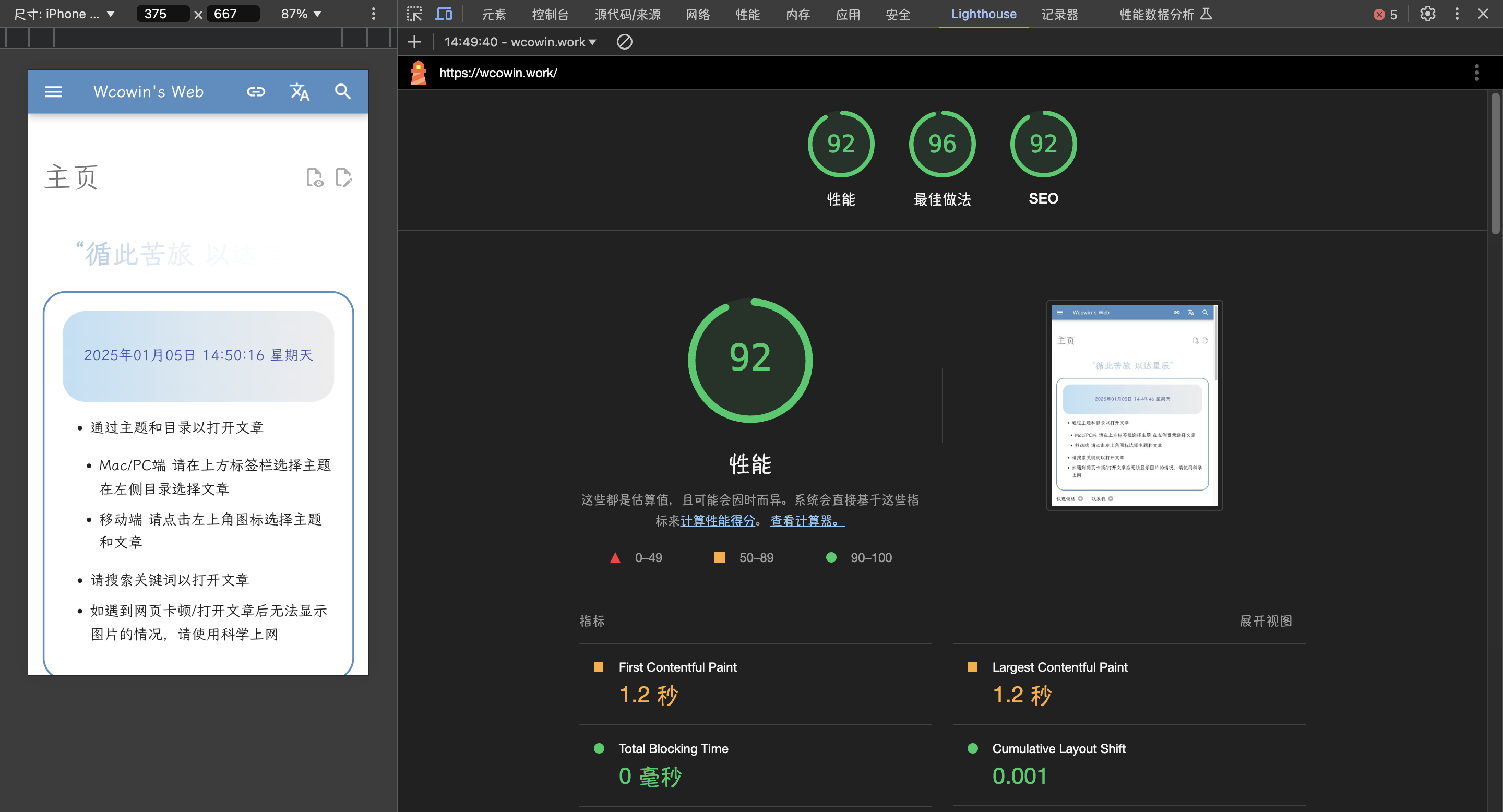
--------------------------------------------------------------------------------
/docs/develop/designbeauty/db1.md:
--------------------------------------------------------------------------------
1 | ---
2 | title: 唐·诺曼—情感设计的三个层次
3 | tags:
4 | - 设计美学
5 | ---
6 | 原文:[Norman's Three Levels of Design](https://www.interaction-design.org/literature/article/norman-s-three-levels-of-design)
7 | 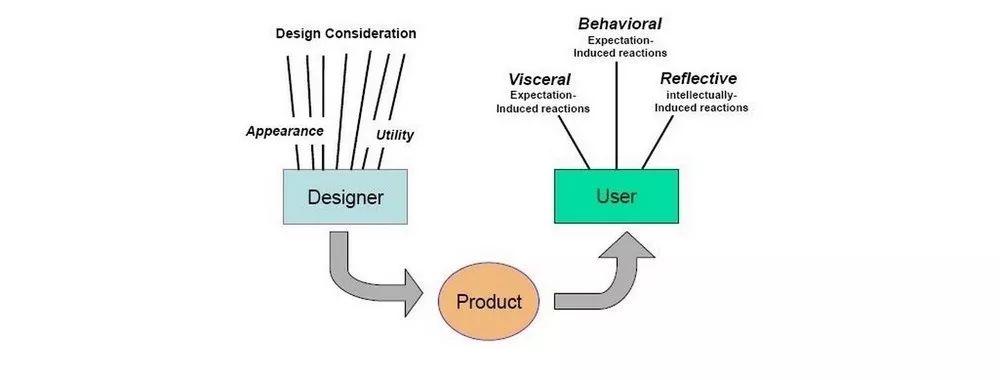
8 | # 唐·诺曼—情感设计的三个层次
9 |
10 | 在人类的内心世界,有许多部分负责我们所说的情感,总的来说,这些区域共同构成了情感系统。唐·诺曼(Don Norman)提出,情感系统由三个不同但相互联系的层次组成,每个层次都以一种特殊的方式影响着我们对世界的体验。这三个层次是本能层,行为层和反思层。本能层与人类情绪中固有的、自发的以及符合动物性的特性相关,这些基本上是不受人类本身控制的。行为层指的是人类行为中那些可控的方面,在这种情况下,我们下意识的分析所处情况并且制定以目标为导向的策略,从而能够在最短时间内或是以最少的行动达到效果。正如唐·诺曼所言,反思层是指“有意识的思考,对新概念进行学习,和对世界进行归纳。”这三个层次作为情感系统的不同维度独立存在,又相互关联,相互影响,从而创造了我们对世界的整体情感体验。
11 |
12 | 在唐·诺曼的《情感化设计:为什么我们喜欢(或讨厌)日常事物》(一本认知科学,设计学,可用性工程领域杰出的学术作品)一书中,他对情感化系统的这三个方面或层次做了区分(它们三者综合影响着人类的情感或心理),即:本能层,行为层及反思层。这三者在情感系统中紧密交织在一起,并以各自特定的方式影响设计。以下是三者对应的相应三种设计层次。
13 |
14 | ## 本能层设计
15 |
16 | 本能层设计-“关注外观本身”。这一层次的设计关注的是事物中可以被直接感知的那部分特征以及它们是如何让用户或观察者产生感受的。例如,祖父的怀表和一个小的壁挂式时钟一样都包含了最基本的计时功功能,除了外观,他们在内在特征上没有任何不同,但是本能层(深层次的,无意识的,主观的和自发的感受)特征使它在拥有者眼中产生了区别。
17 |
18 | 如今产品开发过程中的很大一部分时间被用在本能层设计中,因为属于同一族群的产品往往具有相同或相似的功能,(比如说手电,水壶,面包机,台灯),所以更具特征的外观是区分产品和竞争者的关键因素。这也就是我们所说的”品牌化设计”——不是通过产品提供给用户区别于其他产品的实际利益,而是通过契合用户的态度、信仰、情感以及用户想要的感受,来引出用户对产品的情感上的回应。这可以是通过使用儿童、动物或是卡通形象的图片来传达年轻的感觉,也可以是通过对色彩(比如说,红色对应着“性感“,黑色对应着”恐怖”),形状(比如硬边缘形状)的运用,甚至是运用风格(比如装饰艺术),让人联想起某些特定的时代。本能设计旨在深入了解用户/消费者/观察者的头脑,并且通过牵动用户情绪来提升用户体验(比如说改善整体视觉形象)或是服务商业利益(比如说为了公司或产品所有者的利益,从情感上劫持用户使他们进行购买)。
19 |
20 | ## 行为层设计
21 |
22 | 行为层设计-“与使用的愉悦感和效率有关。”行为层设计可能更更常被称为可用性,而两者指的都是产品中实用性和功能性方面,或是是我们在所处环境中所能使用的任何产品的可用性。行为层设计(从现在起我们用这个词汇来代替可用性)着眼于,诸如,用户如何进行活动;如何快速和准确地实现他们的目标和目的;用户在执行某些任务时犯了多少错误;以及产品如何很好地适应熟练和缺乏经验的用户等问题。
23 |
24 | 行为层设计可能是最容易测试的,因为一旦对象的物理(比如说手柄、按钮、把手、控制杆、开关以及键)或可用部分以某种方式被改变或操作,就可以在表现层对其进行衡量。比如说,负责独立操作的两个按钮被放置在不同的距离从而测量用户连续完成这两个操作的时间。或者,通过相同的操作来测试错误率。涉及行为层体验的例子还包括,当我们拿出手机时能够迅速找到联系人并拨打号码的愉悦感;在电脑键盘上能够轻松打字,而在小的触屏设备,比如说iPod Touch上打字就比较困难;以及我们在使用一个设计良好的电脑游戏手柄(就像我的N64控制板)时的享受。行为层面本质上是指我们因完成或未能完成目标而产生的情绪。当产品/物品能够帮助我们用一点点有意识的努力,并且整个过程中遇到最少的困难就能完成目标,这时我们的情绪很可能是积极的。相反,当产品限制我们,迫使我们根据产品的限制来解释或调整我们的目标,或者只是让我们在使用产品时密切关注这些目标时,我们更倾向于产生一些负面情绪。
25 |
26 |
27 | ## 反思层设计
28 |
29 | 反思层设计“考虑产品的合理化和智能化。关于该产品我能讲述一个故事吗?它符合我的自我形象,我的自尊心需要吗?”这就是情感设计的最高层次;代表我们有意识有思想地进行设计;权衡其优缺点;利用我们更细微和理性的一面进行判断,并提取信息以确定它对我们个人的意义。反思思维使我们能够合理化环境信息以影响行为层。比如说智能手表。”基于这一点,韩国大学的研究员Jaewon Choi和Songcheol Kim考察了用户使用智能手表的目的主要是基于两个主要因素,一种是用户将智能手表视为技术创新另一种是将其作为奢侈时尚产品。从用户视角来看,将智能手表视为一项技术创新,这与他们对设备的实用性和易用性(行为层)的看法有关。另一方面,用户将智能手表视为一种奢侈时尚产品,这既和他们将如何享受智能手表的认知,也和智能手表将为他们提供怎样的自我表现力有关(即表达自己和增强形象的能力)。享受和自我表达都受到本能层的影响(“手表看起来漂亮吗?”)但也很受到反思层的影响(“当我的朋友看到我戴着这只表时,他们会怎么想?”)。
30 |
31 | 反思层调节了行为层带来的影响——用户很可能会忍受智能手表易用性方面的困难和缺点,因为他们相信他们能从智能手表中获得其他非功能性的利益。苹果智能手表的第一个版本充满了功能问题和可用性问题,但这并没有阻止苹果在销售智能手表的第一年创造出全球手表产业的第二大收入!
32 |
33 | ## The Take Away
34 |
35 | 在这里,我们介绍了唐·诺曼的三个设计层次:设计的本能层、行为层和反思层。设计的本能层指的是设计的第一印象,无论是从用户如何看待产品,还是从用户对产品的感受。行为层是指产品在使用过程中的体验。当我们想到用户体验时,我们常常会想到这个层次。反思层是指用户在使用前、使用中和使用后对产品的思考。这三个层次都结合在一起形成了整个产品体验。
36 |
37 | ## 参考
38 |
39 | Choi, J., & Kim, S. (2016). “Is the smartwatch an IT product or a fashion product? A study on factors affecting the intention to use smartwatches”. Computers in Human Behavior, 63, 777-786.
40 |
41 | 作者:Andreas Komninos
42 |
43 | 译者:孔
44 |
45 | 审稿:Hoodie
--------------------------------------------------------------------------------
/docs/javascripts/shubiao.js:
--------------------------------------------------------------------------------
1 | var CURSOR;
2 |
3 | Math.lerp = (a, b, n) => (1 - n) * a + n * b;
4 |
5 | const getStyle = (el, attr) => {
6 | try {
7 | return window.getComputedStyle
8 | ? window.getComputedStyle(el)[attr]
9 | : el.currentStyle[attr];
10 | } catch (e) {}
11 | return "";
12 | };
13 |
14 | class Cursor {
15 | constructor() {
16 | this.pos = {curr: null, prev: null};
17 | this.pt = [];
18 | this.create();
19 | this.init();
20 | this.render();
21 | }
22 |
23 | move(left, top) {
24 | this.cursor.style["left"] = `${left}px`;
25 | this.cursor.style["top"] = `${top}px`;
26 | }
27 |
28 | create() {
29 | if (!this.cursor) {
30 | this.cursor = document.createElement("div");
31 | this.cursor.id = "cursor";
32 | this.cursor.classList.add("hidden");
33 | document.body.append(this.cursor);
34 | }
35 |
36 | var el = document.getElementsByTagName('*');
37 | for (let i = 0; i < el.length; i++)
38 | if (getStyle(el[i], "cursor") == "pointer")
39 | this.pt.push(el[i].outerHTML);
40 |
41 | document.body.appendChild((this.scr = document.createElement("style")));
42 | // 这里改变鼠标指针的颜色 由svg生成
43 | this.scr.innerHTML = `* {cursor: url("data:image/svg+xml,") 4 4, auto}`;
44 | }
45 |
46 | refresh() {
47 | this.scr.remove();
48 | this.cursor.classList.remove("hover");
49 | this.cursor.classList.remove("active");
50 | this.pos = {curr: null, prev: null};
51 | this.pt = [];
52 |
53 | this.create();
54 | this.init();
55 | this.render();
56 | }
57 |
58 | init() {
59 | document.onmouseover = e => this.pt.includes(e.target.outerHTML) && this.cursor.classList.add("hover");
60 | document.onmouseout = e => this.pt.includes(e.target.outerHTML) && this.cursor.classList.remove("hover");
61 | document.onmousemove = e => {(this.pos.curr == null) && this.move(e.clientX - 8, e.clientY - 8); this.pos.curr = {x: e.clientX - 8, y: e.clientY - 8}; this.cursor.classList.remove("hidden");};
62 | document.onmouseenter = e => this.cursor.classList.remove("hidden");
63 | document.onmouseleave = e => this.cursor.classList.add("hidden");
64 | document.onmousedown = e => this.cursor.classList.add("active");
65 | document.onmouseup = e => this.cursor.classList.remove("active");
66 | }
67 |
68 | render() {
69 | if (this.pos.prev) {
70 | this.pos.prev.x = Math.lerp(this.pos.prev.x, this.pos.curr.x, 0.15);
71 | this.pos.prev.y = Math.lerp(this.pos.prev.y, this.pos.curr.y, 0.15);
72 | this.move(this.pos.prev.x, this.pos.prev.y);
73 | } else {
74 | this.pos.prev = this.pos.curr;
75 | }
76 | requestAnimationFrame(() => this.render());
77 | }
78 | }
79 |
80 | (() => {
81 | CURSOR = new Cursor();
82 | // 需要重新获取列表时,使用 CURSOR.refresh()
83 | })();
--------------------------------------------------------------------------------
/site/javascripts/shubiao.js:
--------------------------------------------------------------------------------
1 | var CURSOR;
2 |
3 | Math.lerp = (a, b, n) => (1 - n) * a + n * b;
4 |
5 | const getStyle = (el, attr) => {
6 | try {
7 | return window.getComputedStyle
8 | ? window.getComputedStyle(el)[attr]
9 | : el.currentStyle[attr];
10 | } catch (e) {}
11 | return "";
12 | };
13 |
14 | class Cursor {
15 | constructor() {
16 | this.pos = {curr: null, prev: null};
17 | this.pt = [];
18 | this.create();
19 | this.init();
20 | this.render();
21 | }
22 |
23 | move(left, top) {
24 | this.cursor.style["left"] = `${left}px`;
25 | this.cursor.style["top"] = `${top}px`;
26 | }
27 |
28 | create() {
29 | if (!this.cursor) {
30 | this.cursor = document.createElement("div");
31 | this.cursor.id = "cursor";
32 | this.cursor.classList.add("hidden");
33 | document.body.append(this.cursor);
34 | }
35 |
36 | var el = document.getElementsByTagName('*');
37 | for (let i = 0; i < el.length; i++)
38 | if (getStyle(el[i], "cursor") == "pointer")
39 | this.pt.push(el[i].outerHTML);
40 |
41 | document.body.appendChild((this.scr = document.createElement("style")));
42 | // 这里改变鼠标指针的颜色 由svg生成
43 | this.scr.innerHTML = `* {cursor: url("data:image/svg+xml,") 4 4, auto}`;
44 | }
45 |
46 | refresh() {
47 | this.scr.remove();
48 | this.cursor.classList.remove("hover");
49 | this.cursor.classList.remove("active");
50 | this.pos = {curr: null, prev: null};
51 | this.pt = [];
52 |
53 | this.create();
54 | this.init();
55 | this.render();
56 | }
57 |
58 | init() {
59 | document.onmouseover = e => this.pt.includes(e.target.outerHTML) && this.cursor.classList.add("hover");
60 | document.onmouseout = e => this.pt.includes(e.target.outerHTML) && this.cursor.classList.remove("hover");
61 | document.onmousemove = e => {(this.pos.curr == null) && this.move(e.clientX - 8, e.clientY - 8); this.pos.curr = {x: e.clientX - 8, y: e.clientY - 8}; this.cursor.classList.remove("hidden");};
62 | document.onmouseenter = e => this.cursor.classList.remove("hidden");
63 | document.onmouseleave = e => this.cursor.classList.add("hidden");
64 | document.onmousedown = e => this.cursor.classList.add("active");
65 | document.onmouseup = e => this.cursor.classList.remove("active");
66 | }
67 |
68 | render() {
69 | if (this.pos.prev) {
70 | this.pos.prev.x = Math.lerp(this.pos.prev.x, this.pos.curr.x, 0.15);
71 | this.pos.prev.y = Math.lerp(this.pos.prev.y, this.pos.curr.y, 0.15);
72 | this.move(this.pos.prev.x, this.pos.prev.y);
73 | } else {
74 | this.pos.prev = this.pos.curr;
75 | }
76 | requestAnimationFrame(() => this.render());
77 | }
78 | }
79 |
80 | (() => {
81 | CURSOR = new Cursor();
82 | // 需要重新获取列表时,使用 CURSOR.refresh()
83 | })();
--------------------------------------------------------------------------------
/docs/overrides/partials/comments.html:
--------------------------------------------------------------------------------
1 |
22 |
23 |
24 |
25 |
26 |
27 |
28 | {% if page.meta.comments %}
29 |
30 |
31 |
46 |
47 |
81 | {% endif %}
82 |
--------------------------------------------------------------------------------
/site/overrides/partials/comments.html:
--------------------------------------------------------------------------------
1 |
22 |
23 |
24 |
25 |
26 |
27 |
28 | {% if page.meta.comments %}
29 |
30 |
31 |
46 |
47 |
81 | {% endif %}
82 |
--------------------------------------------------------------------------------
/docs/overrides/partials/feedback.html:
--------------------------------------------------------------------------------
1 |
22 |
23 |
24 | {% if config.extra.analytics %}
25 | {% set feedback = config.extra.analytics.feedback %}
26 | {% endif %}
27 |
28 |
29 | {% if page.meta and page.meta.hide %}
30 | {% if "feedback" in page.meta.hide %}
31 | {% set feedback = None %}
32 | {% endif %}
33 | {% endif %}
34 |
35 |
36 | {% if feedback %}
37 |
79 | {% endif %}
80 |
--------------------------------------------------------------------------------
/site/overrides/partials/feedback.html:
--------------------------------------------------------------------------------
1 |
22 |
23 |
24 | {% if config.extra.analytics %}
25 | {% set feedback = config.extra.analytics.feedback %}
26 | {% endif %}
27 |
28 |
29 | {% if page.meta and page.meta.hide %}
30 | {% if "feedback" in page.meta.hide %}
31 | {% set feedback = None %}
32 | {% endif %}
33 | {% endif %}
34 |
35 |
36 | {% if feedback %}
37 |
79 | {% endif %}
80 |
--------------------------------------------------------------------------------
/docs/blog/Mkdocs/mkfirst.md:
--------------------------------------------------------------------------------
1 | ---
2 | title: Mkdocs教程前言
3 | tags:
4 | - Mkdocs
5 | ---
6 |
7 | ## 文档教程
8 |
9 |
10 |
11 | - :material-notebook-edit-outline:{ .lg .middle } __文档资料__
12 |
13 | ---
14 | - 入门 MKdocs 请看[Mkdocs 官方教程](https://www.mkdocs.org/user-guide/writing-your-docs/){target=“_blank”}
15 | - [Material for MkDocs(只看这个也可以)](https://squidfunk.github.io/mkdocs-material/){target=“_blank”}教程
16 | - [令人惊叹的MkDocs项目和插件列表](https://github.com/mkdocs/catalog#-theming){target=“_blank”}
17 | ---
18 | 我写的中文教程(同步在其他平台):
19 |
20 | - [x] [Mkdocs中文教程(语雀)](https://www.yuque.com/wcowin/mkdocs-wcowin?# 《Mkdocs-Wcowin中文教程》){target=“_blank”}(推荐,展示效果好)
21 | - [x] [Mkdocs中文教程](https://blog.csdn.net/m0_63203517/category_12472184.html?spm=1001.2014.3001.5482){target=“_blank”} (CSDN | 观感更纯净)
22 | - [x] [MKdocs博客中文系列教程](https://www.zhihu.com/column/c_1754218140098387968){target=“_blank”}(知乎专栏)
23 |
24 |
25 |
26 |
27 |
28 |
37 |
38 | ## 快速开始
39 |
40 |
41 |
42 | - :material-notebook-edit-outline:{ .lg .middle } __三部曲__
43 |
44 | ---
45 | - [部署静态网页至GitHub pages](mkdocs1.md)
46 | - [Mkdocs部署配置说明(mkdocs.yml)](mkdocs2.md)
47 | - [网站添加Mkdocs博客](mkdocsblog.md)
48 |
49 |
50 |
51 | ## 视频教程
52 |
53 |
54 | 已经发布
55 |
56 |
57 |
58 |
59 | - :material-notebook-edit-outline:{ .lg .middle } __视频资料__
60 |
61 | ---
62 |
63 | - [Mkdocs中文教程视频](https://space.bilibili.com/1407028951/lists/4566631?type=series){target=“_blank”}
64 |
65 |
66 |
67 |
68 |
69 |
82 | ---
83 |
84 | ## 一点请求
85 |
86 | 创作不易。如果您参考了本教程/借鉴了网页设计,如果可以的话,烦请在您的网站注明教程来源!感谢!
87 |
88 |
89 | 示例:
90 |
91 |
92 | - :material-notebook-edit-outline:{ .lg .middle } __参考资料__
93 |
94 | ---
95 |
96 | - 在构建网站的过程中参考了[Wcowin同学的Mkdocs教程](https://wcowin.work/Mkdocs-Wcowin/)
97 |
98 |
99 |
100 | ```
101 |
102 |
103 | - :material-notebook-edit-outline:{ .lg .middle } __参考资料__
104 |
105 | ---
106 |
107 | - 在构建本网站的过程中参考了[Wcowin同学的Mkdocs教程](https://wcowin.work/Mkdocs-Wcowin/)
108 |
109 |
110 | ```
111 |
112 | ## 加入友链
113 |
114 | [友链申请 :palms_up_together_tone1:](https://wcowin.work/link/#_3){.md-button target=“_blank”}
--------------------------------------------------------------------------------
/docs/blog/posts/update2023.md:
--------------------------------------------------------------------------------
1 | ---
2 | title: 2023网站更新记录
3 | authors: [Wcowin]
4 | date: 2023-12-21
5 | categories:
6 | - 网站更新记录
7 | readtime: 2
8 | hide_reading_time: true
9 | ---
10 |
11 | ## 2023-12-21
12 | * 优化网站流畅度(玄学)
13 | * 脱单了;手执烟火以谋生,心怀诗意以谋爱
14 |
15 |
16 |
17 |
18 |
19 |
20 |
21 |
22 | 我们已经在一起
23 |
24 |
25 |
26 |
45 |
46 |
47 |
48 |
49 |
50 |
2023-12-14
53 | * 优化个别网页标签的显示问题
54 | * 优化网站图片加载流畅度(玄学)
55 | * 看了更多的猫咪
56 |
57 | ##
2023-12-09
58 | * 首次引入人工智能问答机器人:,缺点是每月25条消息限制,优点是可以智能回复本站所有信息,包括但不限于:个人信息,技术分享,博客,留言板,友链等等
59 | * 优化网站流畅度
60 | * 撸了更多的猫咪
61 |
62 | ##
2023-11-22
63 | * 更新了**王冰冰**的简历和美照;我的心是冰冰的
64 | * 修复翻译问题
65 | * 优化移动端效果
66 | * 提升网站流畅度(玄学)
67 |
68 | ##
2023-11-11
69 | * 新增多语言支持,特别新增中国台湾语言支持
70 | * 顺祝双11快乐
71 | * 新增国内镜像网址:[https://wcowin.gitee.io/](https://wcowin.gitee.io/wcowin.github.io/){target="_blank"}
72 |
73 | ##
2023-11-08
74 | * 紧急修复图片不显示的重大Bug
75 |
76 | ##
2023-10-14
77 |
78 | * 正式建立[Mkdocs-Wcowin主题](https://github.com/Wcowin/Mkdocs-Wcowin){target="_blank"}
79 | * 优化网页渲染速度
80 | ##
2023-10-12
81 |
82 | * 增加[友链版块](https://wcowin.work/about/link/)
83 | ##
2023-10-08
84 |
85 | * 修复Latex渲染不了的bug
86 | ##
2023-10-05
87 |
88 | * 新增Blog版块
89 | * **新增了Latex渲染不了的bug**
90 | * 新增留言板,集成了giscus评论系统
91 | * 新增首次访问网站的顶部通知栏功能
92 |
93 | ##
2023-08-11
94 | * 优化主页设计,圆比方好,宽比竖好
95 | * 引入图片懒加载
96 | * 新增页面底部 "下一页/上一页"
97 |
98 | ##
2023-07-19
99 |
100 | * 修改网页字体为[霞鹜文楷](https://github.com/lxgw/LxgwWenKai){target=_blank}
101 | * 修复鼠标上滑"回到页面顶部"不适配问题
102 |
103 | ##
2023-01-12
104 |
105 | * 重写[mkdocs.yml](https://wcowin.work/blog/Mkdocs/mkdocs2/),增加中文注释
106 | * 支持Latex
107 | * 引入个性化标签,[Markdown扩展](https://squidfunk.github.io/mkdocs-material/setup/extensions/python-markdown-extensions/#inlinehilite)
108 | * 新增网站搜索功能
109 |
110 |
--------------------------------------------------------------------------------
/site/assets/javascripts/lunr/min/lunr.stemmer.support.min.js:
--------------------------------------------------------------------------------
1 | !function(r,t){"function"==typeof define&&define.amd?define(t):"object"==typeof exports?module.exports=t():t()(r.lunr)}(this,function(){return function(r){r.stemmerSupport={Among:function(r,t,i,s){if(this.toCharArray=function(r){for(var t=r.length,i=new Array(t),s=0;s=i&&(e-=i,t[e>>3]&1<<(7&e)))return this.cursor++,!0}return!1},in_grouping_b:function(t,i,s){if(this.cursor>this.limit_backward){var e=r.charCodeAt(this.cursor-1);if(e<=s&&e>=i&&(e-=i,t[e>>3]&1<<(7&e)))return this.cursor--,!0}return!1},out_grouping:function(t,i,s){if(this.cursors||e>3]&1<<(7&e)))return this.cursor++,!0}return!1},out_grouping_b:function(t,i,s){if(this.cursor>this.limit_backward){var e=r.charCodeAt(this.cursor-1);if(e>s||e>3]&1<<(7&e)))return this.cursor--,!0}return!1},eq_s:function(t,i){if(this.limit-this.cursor>1),f=0,l=o0||e==s||c)break;c=!0}}for(;;){var _=t[s];if(o>=_.s_size){if(this.cursor=n+_.s_size,!_.method)return _.result;var b=_.method();if(this.cursor=n+_.s_size,b)return _.result}if((s=_.substring_i)<0)return 0}},find_among_b:function(t,i){for(var s=0,e=i,n=this.cursor,u=this.limit_backward,o=0,h=0,c=!1;;){for(var a=s+(e-s>>1),f=0,l=o=0;m--){if(n-l==u){f=-1;break}if(f=r.charCodeAt(n-1-l)-_.s[m])break;l++}if(f<0?(e=a,h=l):(s=a,o=l),e-s<=1){if(s>0||e==s||c)break;c=!0}}for(;;){var _=t[s];if(o>=_.s_size){if(this.cursor=n-_.s_size,!_.method)return _.result;var b=_.method();if(this.cursor=n-_.s_size,b)return _.result}if((s=_.substring_i)<0)return 0}},replace_s:function(t,i,s){var e=s.length-(i-t),n=r.substring(0,t),u=r.substring(i);return r=n+s+u,this.limit+=e,this.cursor>=i?this.cursor+=e:this.cursor>t&&(this.cursor=t),e},slice_check:function(){if(this.bra<0||this.bra>this.ket||this.ket>this.limit||this.limit>r.length)throw"faulty slice operation"},slice_from:function(r){this.slice_check(),this.replace_s(this.bra,this.ket,r)},slice_del:function(){this.slice_from("")},insert:function(r,t,i){var s=this.replace_s(r,t,i);r<=this.bra&&(this.bra+=s),r<=this.ket&&(this.ket+=s)},slice_to:function(){return this.slice_check(),r.substring(this.bra,this.ket)},eq_v_b:function(r){return this.eq_s_b(r.length,r)}}}},r.trimmerSupport={generateTrimmer:function(r){var t=new RegExp("^[^"+r+"]+"),i=new RegExp("[^"+r+"]+$");return function(r){return"function"==typeof r.update?r.update(function(r){return r.replace(t,"").replace(i,"")}):r.replace(t,"").replace(i,"")}}}}});
--------------------------------------------------------------------------------
/site/assets/javascripts/lunr/min/lunr.ko.min.js:
--------------------------------------------------------------------------------
1 | !function(e,r){"function"==typeof define&&define.amd?define(r):"object"==typeof exports?module.exports=r():r()(e.lunr)}(this,function(){return function(e){if(void 0===e)throw new Error("Lunr is not present. Please include / require Lunr before this script.");if(void 0===e.stemmerSupport)throw new Error("Lunr stemmer support is not present. Please include / require Lunr stemmer support before this script.");e.ko=function(){this.pipeline.reset(),this.pipeline.add(e.ko.trimmer,e.ko.stopWordFilter)},e.ko.wordCharacters="[A-Za-z가-힣]",e.ko.trimmer=e.trimmerSupport.generateTrimmer(e.ko.wordCharacters),e.Pipeline.registerFunction(e.ko.trimmer,"trimmer-ko"),e.ko.stopWordFilter=e.generateStopWordFilter("아 휴 아이구 아이쿠 아이고 어 나 우리 저희 따라 의해 을 를 에 의 가 으로 로 에게 뿐이다 의거하여 근거하여 입각하여 기준으로 예하면 예를 들면 예를 들자면 저 소인 소생 저희 지말고 하지마 하지마라 다른 물론 또한 그리고 비길수 없다 해서는 안된다 뿐만 아니라 만이 아니다 만은 아니다 막론하고 관계없이 그치지 않다 그러나 그런데 하지만 든간에 논하지 않다 따지지 않다 설사 비록 더라도 아니면 만 못하다 하는 편이 낫다 불문하고 향하여 향해서 향하다 쪽으로 틈타 이용하여 타다 오르다 제외하고 이 외에 이 밖에 하여야 비로소 한다면 몰라도 외에도 이곳 여기 부터 기점으로 따라서 할 생각이다 하려고하다 이리하여 그리하여 그렇게 함으로써 하지만 일때 할때 앞에서 중에서 보는데서 으로써 로써 까지 해야한다 일것이다 반드시 할줄알다 할수있다 할수있어 임에 틀림없다 한다면 등 등등 제 겨우 단지 다만 할뿐 딩동 댕그 대해서 대하여 대하면 훨씬 얼마나 얼마만큼 얼마큼 남짓 여 얼마간 약간 다소 좀 조금 다수 몇 얼마 지만 하물며 또한 그러나 그렇지만 하지만 이외에도 대해 말하자면 뿐이다 다음에 반대로 반대로 말하자면 이와 반대로 바꾸어서 말하면 바꾸어서 한다면 만약 그렇지않으면 까악 툭 딱 삐걱거리다 보드득 비걱거리다 꽈당 응당 해야한다 에 가서 각 각각 여러분 각종 각자 제각기 하도록하다 와 과 그러므로 그래서 고로 한 까닭에 하기 때문에 거니와 이지만 대하여 관하여 관한 과연 실로 아니나다를가 생각한대로 진짜로 한적이있다 하곤하였다 하 하하 허허 아하 거바 와 오 왜 어째서 무엇때문에 어찌 하겠는가 무슨 어디 어느곳 더군다나 하물며 더욱이는 어느때 언제 야 이봐 어이 여보시오 흐흐 흥 휴 헉헉 헐떡헐떡 영차 여차 어기여차 끙끙 아야 앗 아야 콸콸 졸졸 좍좍 뚝뚝 주룩주룩 솨 우르르 그래도 또 그리고 바꾸어말하면 바꾸어말하자면 혹은 혹시 답다 및 그에 따르는 때가 되어 즉 지든지 설령 가령 하더라도 할지라도 일지라도 지든지 몇 거의 하마터면 인젠 이젠 된바에야 된이상 만큼\t어찌됏든 그위에 게다가 점에서 보아 비추어 보아 고려하면 하게될것이다 일것이다 비교적 좀 보다더 비하면 시키다 하게하다 할만하다 의해서 연이서 이어서 잇따라 뒤따라 뒤이어 결국 의지하여 기대여 통하여 자마자 더욱더 불구하고 얼마든지 마음대로 주저하지 않고 곧 즉시 바로 당장 하자마자 밖에 안된다 하면된다 그래 그렇지 요컨대 다시 말하자면 바꿔 말하면 즉 구체적으로 말하자면 시작하여 시초에 이상 허 헉 허걱 바와같이 해도좋다 해도된다 게다가 더구나 하물며 와르르 팍 퍽 펄렁 동안 이래 하고있었다 이었다 에서 로부터 까지 예하면 했어요 해요 함께 같이 더불어 마저 마저도 양자 모두 습니다 가까스로 하려고하다 즈음하여 다른 다른 방면으로 해봐요 습니까 했어요 말할것도 없고 무릎쓰고 개의치않고 하는것만 못하다 하는것이 낫다 매 매번 들 모 어느것 어느 로써 갖고말하자면 어디 어느쪽 어느것 어느해 어느 년도 라 해도 언젠가 어떤것 어느것 저기 저쪽 저것 그때 그럼 그러면 요만한걸 그래 그때 저것만큼 그저 이르기까지 할 줄 안다 할 힘이 있다 너 너희 당신 어찌 설마 차라리 할지언정 할지라도 할망정 할지언정 구토하다 게우다 토하다 메쓰겁다 옆사람 퉤 쳇 의거하여 근거하여 의해 따라 힘입어 그 다음 버금 두번째로 기타 첫번째로 나머지는 그중에서 견지에서 형식으로 쓰여 입장에서 위해서 단지 의해되다 하도록시키다 뿐만아니라 반대로 전후 전자 앞의것 잠시 잠깐 하면서 그렇지만 다음에 그러한즉 그런즉 남들 아무거나 어찌하든지 같다 비슷하다 예컨대 이럴정도로 어떻게 만약 만일 위에서 서술한바와같이 인 듯하다 하지 않는다면 만약에 무엇 무슨 어느 어떤 아래윗 조차 한데 그럼에도 불구하고 여전히 심지어 까지도 조차도 하지 않도록 않기 위하여 때 시각 무렵 시간 동안 어때 어떠한 하여금 네 예 우선 누구 누가 알겠는가 아무도 줄은모른다 줄은 몰랏다 하는 김에 겸사겸사 하는바 그런 까닭에 한 이유는 그러니 그러니까 때문에 그 너희 그들 너희들 타인 것 것들 너 위하여 공동으로 동시에 하기 위하여 어찌하여 무엇때문에 붕붕 윙윙 나 우리 엉엉 휘익 윙윙 오호 아하 어쨋든 만 못하다\t하기보다는 차라리 하는 편이 낫다 흐흐 놀라다 상대적으로 말하자면 마치 아니라면 쉿 그렇지 않으면 그렇지 않다면 안 그러면 아니었다면 하든지 아니면 이라면 좋아 알았어 하는것도 그만이다 어쩔수 없다 하나 일 일반적으로 일단 한켠으로는 오자마자 이렇게되면 이와같다면 전부 한마디 한항목 근거로 하기에 아울러 하지 않도록 않기 위해서 이르기까지 이 되다 로 인하여 까닭으로 이유만으로 이로 인하여 그래서 이 때문에 그러므로 그런 까닭에 알 수 있다 결론을 낼 수 있다 으로 인하여 있다 어떤것 관계가 있다 관련이 있다 연관되다 어떤것들 에 대해 이리하여 그리하여 여부 하기보다는 하느니 하면 할수록 운운 이러이러하다 하구나 하도다 다시말하면 다음으로 에 있다 에 달려 있다 우리 우리들 오히려 하기는한데 어떻게 어떻해 어찌됏어 어때 어째서 본대로 자 이 이쪽 여기 이것 이번 이렇게말하자면 이런 이러한 이와 같은 요만큼 요만한 것 얼마 안 되는 것 이만큼 이 정도의 이렇게 많은 것 이와 같다 이때 이렇구나 것과 같이 끼익 삐걱 따위 와 같은 사람들 부류의 사람들 왜냐하면 중의하나 오직 오로지 에 한하다 하기만 하면 도착하다 까지 미치다 도달하다 정도에 이르다 할 지경이다 결과에 이르다 관해서는 여러분 하고 있다 한 후 혼자 자기 자기집 자신 우에 종합한것과같이 총적으로 보면 총적으로 말하면 총적으로 대로 하다 으로서 참 그만이다 할 따름이다 쿵 탕탕 쾅쾅 둥둥 봐 봐라 아이야 아니 와아 응 아이 참나 년 월 일 령 영 일 이 삼 사 오 육 륙 칠 팔 구 이천육 이천칠 이천팔 이천구 하나 둘 셋 넷 다섯 여섯 일곱 여덟 아홉 령 영".split(" ")),e.Pipeline.registerFunction(e.ko.stopWordFilter,"stopWordFilter-ko"),e.ko.stemmer=function(){return function(e){return"function"==typeof e.update?e.update(function(e){return e}):e}}(),e.Pipeline.registerFunction(e.ko.stemmer,"stemmer-ko")}});
--------------------------------------------------------------------------------
/temp/最简教程.md:
--------------------------------------------------------------------------------
1 | 安装依赖:
2 | ```bash
3 | pip install mkdocs-ai-summary-wcowin==1.1.2 -i https://pypi.org/simple
4 | ```
5 |
6 | ```mkdocs.yml
7 |
8 | - ai-summary:
9 | ai_service: "glm" # or "openai", "gemini", "glm"
10 | summary_language: "zh" # or "en"
11 | cache_enabled: true
12 | local_enabled: true
13 | cache_expire_days: 30
14 | debug: true # 是否显示调试信息(默认:false)
15 | enabled_folders:
16 | - blog/ # 添加blog文件夹
17 | - develop/ # 添加develop文件夹
18 | # - docs/ # 保留docs文件夹
19 | exclude_patterns:
20 | - "**/api/**"
21 | - "**/reference/**"
22 | - "**about/**"
23 | - "index.md"
24 | - "tag.md"
25 | - "blog/posts/update.md"
26 | ```
27 |
28 |
29 | ```yml
30 | name: ci
31 | on:
32 | push:
33 | branches:
34 | - master
35 | - main
36 | # 禁止从 fork 仓库访问 secrets
37 | pull_request:
38 | types: [closed]
39 | branches: [main, master]
40 | permissions:
41 | contents: write
42 | jobs:
43 | deploy:
44 | runs-on: ubuntu-latest
45 | steps:
46 | - uses: actions/checkout@v4
47 | with:
48 | fetch-depth: 0
49 | sparse-checkout: |
50 | docs
51 | includes
52 | requirements.txt
53 | .ai_cache
54 | - uses: actions/setup-python@v4
55 | with:
56 | python-version: 3.x
57 | - name: Set cache ID
58 | run: echo "cache_id=$(date --utc '+%V')" >> $GITHUB_ENV
59 | - uses: actions/cache@v3
60 | with:
61 | key: mkdocs-material-${{ github.run_number }}
62 | path: .cache
63 | restore-keys: |
64 | mkdocs-material-
65 |
66 | # 安装依赖
67 | - run: pip install mkdocs-git-revision-date-localized-plugin
68 | - run: pip install mkdocs-git-authors-plugin
69 | - run: pip install mkdocs-git-committers-plugin-2
70 | - run: pip install markdown-callouts
71 | - run: pip install mkdocs-rss-plugin
72 | - run: pip install requests>=2.25.0
73 | - run: pip install python-dateutil>=2.8.0
74 | - run: pip install cachetools>=4.2.0
75 | - run: pip install python-dotenv>=0.19.0
76 | - run: pip install Pillow
77 | - run: pip install pymdown-extensions
78 | - run: pip install mkdocs-material
79 | - run: pip install --upgrade --force-reinstall mkdocs-material
80 | - run: pip install mkdocs-ai-summary-wcowin==1.1.2 # 添加这一行
81 |
82 | # 部署(启用缓存系统)
83 | - name: Deploy with AI Summary (Cache Enabled)
84 | env:
85 | # AI摘要配置 - 启用缓存模式
86 | AI_SUMMARY_CI_ENABLED: 'true' # CI环境启用AI摘要
87 | AI_SUMMARY_CI_ONLY_CACHE: 'false' # 允许生成新摘要(如果没有缓存)
88 | AI_SUMMARY_CI_FALLBACK: 'false' # 启用备用摘要(API失败时)
89 | AI_SUMMARY_CACHE_ENABLED: 'true' # 明确启用缓存功能
90 | AI_SUMMARY_CACHE_EXPIRE_DAYS: '300' # 缓存300天过期
91 | AI_SUMMARY_CACHE_AUTO_CLEAN: 'true' # 自动清理过期缓存
92 |
93 | # API密钥配置
94 | DEEPSEEK_API_KEY: ${{ secrets.DEEPSEEK_API_KEY }}
95 | OPENAI_API_KEY: ${{ secrets.OPENAI_API_KEY }}
96 | run: mkdocs gh-deploy --force
97 |
98 | # 自动提交新生成的AI缓存文件
99 | - name: Auto-commit AI cache (if any new files)
100 | run: |
101 | if [ -d ".ai_cache" ] && [ "$(ls -A .ai_cache 2>/dev/null)" ]; then
102 | git config --local user.email "action@github.com"
103 | git config --local user.name "GitHub Action"
104 | git add .ai_cache/
105 | if ! git diff --cached --quiet; then
106 | git commit -m "🤖 Auto-update AI summary cache [skip ci]"
107 | git push
108 | echo "✅ 自动提交了新的 AI 缓存文件"
109 | else
110 | echo "ℹ️ 没有新的缓存文件需要提交"
111 | fi
112 | else
113 | echo "ℹ️ 没有找到缓存目录或缓存为空"
114 | fi
115 | ```
--------------------------------------------------------------------------------
/docs/develop/git.md:
--------------------------------------------------------------------------------
1 | ---
2 | title: Git 实用技巧
3 | tags:
4 | - 技术分享
5 | ---
6 | !!! info
7 | 原文地址:[Git 实用技巧](https://www.iszy.cc/posts/git/#more){target="_blank"}
8 |
9 | # Git 实用技巧
10 | ## 一、基本操作
11 | ### 1. 新建 git 仓库
12 | ```git
13 | git init
14 | ```
15 |
16 | 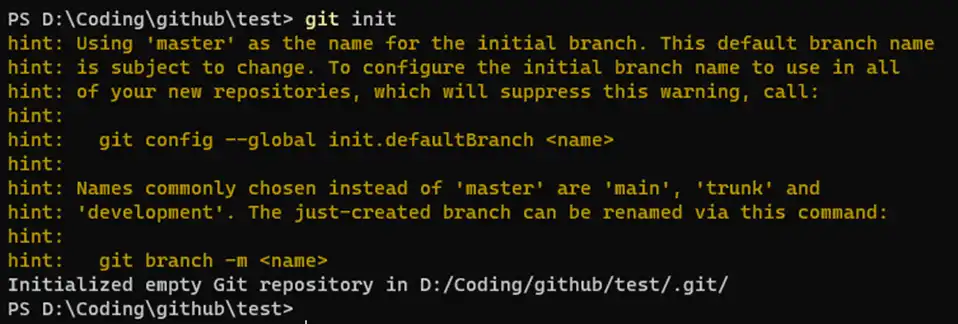
17 |
18 | ```git
19 | git init -b main
20 |
21 | git config --global init.defaultBranch main
22 |
23 | git branch -m main
24 | ```
25 |
26 |
27 | ### 2. 克隆远程仓库
28 | ```git
29 | git clone http://git.example.com/someone/test.git
30 |
31 | git clone http://git.example.com/someone/test.git test
32 |
33 | git clone http://git.example.com/someone/test.git --depth=1 -b main
34 | ```
35 |
36 | ### 3. 提交代码
37 | ```
38 | git add -a
39 |
40 | git add -u
41 |
42 | git add .
43 |
44 | git commit
45 |
46 | git commit -m "first commit"
47 |
48 | git commit -am "first commit"
49 | ```
50 |
51 |
52 | ### 4. 查看仓库状态
53 |
54 | ```git
55 | git status
56 | ```
57 |
58 | 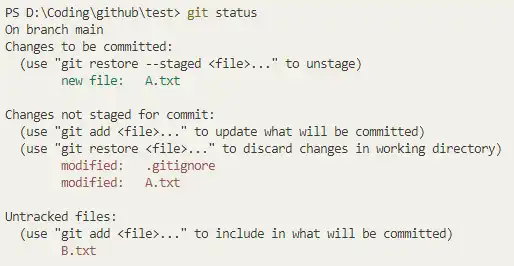
59 |
60 | ```
61 | git status -s
62 | ```
63 |
64 | 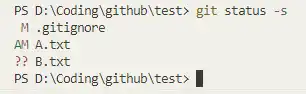
65 |
66 |
67 | ### 5. 查看提交历史
68 |
69 | {target="_blank"}
70 |
71 | ```git
72 | git log
73 | ```
74 |
75 | 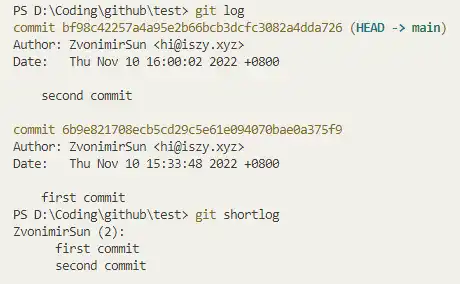
76 |
77 | ### 6. 新建分支
78 | ```git
79 | git branch test
80 |
81 | git checkout test
82 |
83 | git checkout -b test
84 | ```
85 |
86 | 
87 |
88 | ### 7. 合并分支
89 | ```git
90 | git checkout main
91 |
92 | git merge test
93 | ```
94 |
95 | 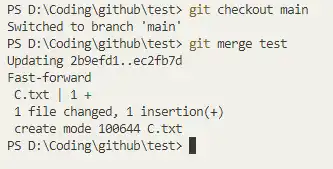
96 |
97 | ### 8. 删除分支
98 | ```git
99 | git branch -d test-not-need
100 | ```
101 |
102 | 
103 |
104 | ### 9. 合并冲突
105 |
106 | 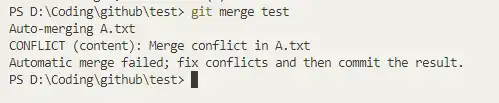
107 |
108 | 当两个分支都对同一行进行了修改,git 便会产生冲突,并标记为未合并
109 |
110 | 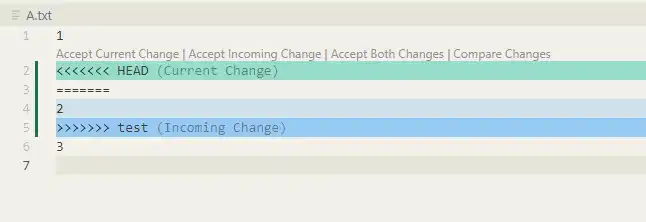
111 |
112 | 此时将每个文件进行修改,确认最后的内容,使用 git add 方法标记为冲突已解决
113 | ```git
114 | git add .\A.txt
115 | ```
116 | 在所有文件的冲突均已解决后,使用 commit 提交此次修改。
117 |
118 | 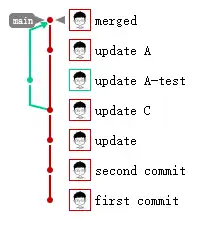
119 |
120 | ```git
121 | git merge --abort
122 | ```
123 |
124 | ### 10. 远程仓库
125 |
126 | ```git
127 | git remote
128 | ```
129 |
130 | 默认应该为空
131 |
132 | ```git
133 | git remote add origin http://git.example.com/someone/test.git
134 |
135 | git push origin main
136 |
137 | git fetch --all
138 |
139 | git fetch origin
140 |
141 | git branch --set-upstream-to=origin/main main
142 |
143 | git branch -u origin/main main
144 | ```
145 |
146 |
147 | 
148 |
149 | ```
150 | git push -u origin main
151 |
152 | git pull
153 |
154 | git pull origin main
155 | ```
156 |
157 | ## 二、常见技巧
158 |
159 | ### 1. 临时保存成果
160 |
161 | ```
162 | git stash
163 | ```
164 |
165 |
166 | 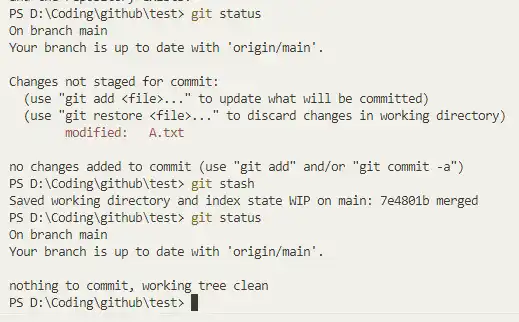
167 |
168 | ```git
169 | git stash pop
170 | ```
171 |
172 | 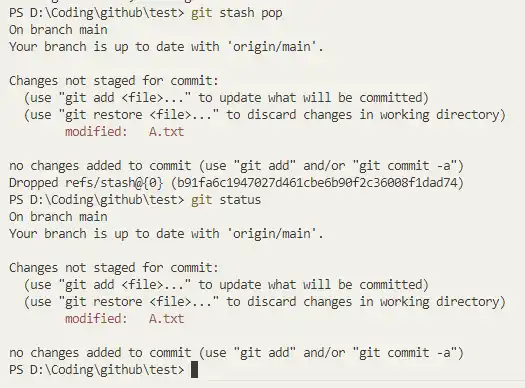
173 |
174 | ### 2. 合并分支灵活选择 rebase/merge
175 |
176 | ```git
177 | git merge test
178 |
179 | git rebase test
180 | ```
181 |
182 |
183 | 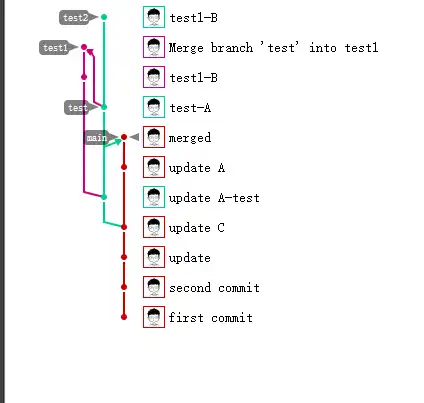
184 |
185 | ### 3. cherry-pick
186 | 适合 hotfix
187 |
188 | ```git
189 | git cherry-pick 12d654f1d701cbf7cd9abb98ce84eeef460a24a7
190 | ```
191 |
192 | 
193 | 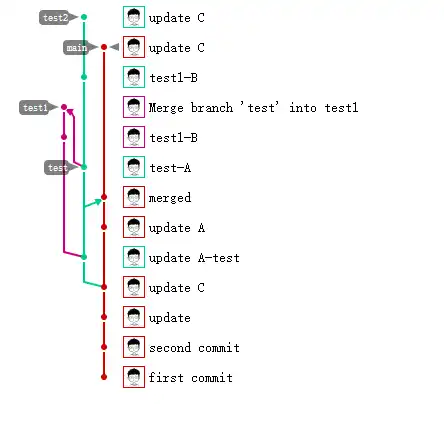
194 |
195 | ### 4. 修改上次提交
196 |
197 | ```
198 | git commit --amend
199 | ```
200 |
201 | 会同时提交暂存的文件
202 |
203 | ### 5. 取消文件修改
204 | ```git
205 | git checkout .\C.txt
206 | ```
207 |
208 |
209 | 
210 |
211 | ### 6. 弃用提交
212 |
213 | ```
214 | 保留文件
215 | git reset --soft 12d654f1d701cbf7cd9abb98ce84eeef460a24a7
216 |
217 | 丢弃修改
218 | git reset --hard 12d654f1d701cbf7cd9abb98ce84eeef460a24a7
219 | ```
220 |
221 | ### 7. 补丁文件
222 | ```git
223 | git
224 | git diff [file] > a.patch
225 | git apply a.patch
226 | ```
227 |
228 |
--------------------------------------------------------------------------------
/docs/blog/websitebeauty/footer.md:
--------------------------------------------------------------------------------
1 | ---
2 | title: 页脚设置
3 | hide:
4 | # - navigation # 显示右
5 | # - toc #显示左
6 | # - footer
7 | # - feedback
8 | tags:
9 | - Mkdocs
10 | comments: false
11 | ---
12 |
13 | ## 页脚设置
14 |
15 | MkDocs 支持自定义页脚。
16 |
17 | 
18 |
19 | 在docs/overrides/partials/footer.html中(没有该文件时,创建footer.html文件)添加以下代码:
20 |
21 | ```html hl_lines="71-86"
22 |
23 |
114 |
115 |
116 | ```
117 |
118 | 高亮部分自行修改即可
119 |
120 | ## 页脚版权设置
121 |
122 | mkdocs.yml中添加:
123 | ```yaml
124 |
125 | copyright: Copyright © 2022~2025 Wcowin # 左下角的版权声明
126 |
127 | ```
128 |
129 | 如果想删除页脚显示“Made with Material for MkDocs”(不建议)
130 |
131 | ```yaml
132 | extra:
133 | generator: false #删除页脚显示“使用 MkDocs 材料制造”
134 | ```
--------------------------------------------------------------------------------
/site/assets/javascripts/lunr/min/lunr.sv.min.js:
--------------------------------------------------------------------------------
1 | /*!
2 | * Lunr languages, `Swedish` language
3 | * https://github.com/MihaiValentin/lunr-languages
4 | *
5 | * Copyright 2014, Mihai Valentin
6 | * http://www.mozilla.org/MPL/
7 | */
8 | /*!
9 | * based on
10 | * Snowball JavaScript Library v0.3
11 | * http://code.google.com/p/urim/
12 | * http://snowball.tartarus.org/
13 | *
14 | * Copyright 2010, Oleg Mazko
15 | * http://www.mozilla.org/MPL/
16 | */
17 |
18 | !function(e,r){"function"==typeof define&&define.amd?define(r):"object"==typeof exports?module.exports=r():r()(e.lunr)}(this,function(){return function(e){if(void 0===e)throw new Error("Lunr is not present. Please include / require Lunr before this script.");if(void 0===e.stemmerSupport)throw new Error("Lunr stemmer support is not present. Please include / require Lunr stemmer support before this script.");e.sv=function(){this.pipeline.reset(),this.pipeline.add(e.sv.trimmer,e.sv.stopWordFilter,e.sv.stemmer),this.searchPipeline&&(this.searchPipeline.reset(),this.searchPipeline.add(e.sv.stemmer))},e.sv.wordCharacters="A-Za-zªºÀ-ÖØ-öø-ʸˠ-ˤᴀ-ᴥᴬ-ᵜᵢ-ᵥᵫ-ᵷᵹ-ᶾḀ-ỿⁱⁿₐ-ₜKÅℲⅎⅠ-ↈⱠ-ⱿꜢ-ꞇꞋ-ꞭꞰ-ꞷꟷ-ꟿꬰ-ꭚꭜ-ꭤff-stA-Za-z",e.sv.trimmer=e.trimmerSupport.generateTrimmer(e.sv.wordCharacters),e.Pipeline.registerFunction(e.sv.trimmer,"trimmer-sv"),e.sv.stemmer=function(){var r=e.stemmerSupport.Among,n=e.stemmerSupport.SnowballProgram,t=new function(){function e(){var e,r=w.cursor+3;if(o=w.limit,0<=r||r<=w.limit){for(a=r;;){if(e=w.cursor,w.in_grouping(l,97,246)){w.cursor=e;break}if(w.cursor=e,w.cursor>=w.limit)return;w.cursor++}for(;!w.out_grouping(l,97,246);){if(w.cursor>=w.limit)return;w.cursor++}o=w.cursor,o=o&&(w.limit_backward=o,w.cursor=w.limit,w.ket=w.cursor,e=w.find_among_b(u,37),w.limit_backward=r,e))switch(w.bra=w.cursor,e){case 1:w.slice_del();break;case 2:w.in_grouping_b(d,98,121)&&w.slice_del()}}function i(){var e=w.limit_backward;w.cursor>=o&&(w.limit_backward=o,w.cursor=w.limit,w.find_among_b(c,7)&&(w.cursor=w.limit,w.ket=w.cursor,w.cursor>w.limit_backward&&(w.bra=--w.cursor,w.slice_del())),w.limit_backward=e)}function s(){var e,r;if(w.cursor>=o){if(r=w.limit_backward,w.limit_backward=o,w.cursor=w.limit,w.ket=w.cursor,e=w.find_among_b(m,5))switch(w.bra=w.cursor,e){case 1:w.slice_del();break;case 2:w.slice_from("lös");break;case 3:w.slice_from("full")}w.limit_backward=r}}var a,o,u=[new r("a",-1,1),new r("arna",0,1),new r("erna",0,1),new r("heterna",2,1),new r("orna",0,1),new r("ad",-1,1),new r("e",-1,1),new r("ade",6,1),new r("ande",6,1),new r("arne",6,1),new r("are",6,1),new r("aste",6,1),new r("en",-1,1),new r("anden",12,1),new r("aren",12,1),new r("heten",12,1),new r("ern",-1,1),new r("ar",-1,1),new r("er",-1,1),new r("heter",18,1),new r("or",-1,1),new r("s",-1,2),new r("as",21,1),new r("arnas",22,1),new r("ernas",22,1),new r("ornas",22,1),new r("es",21,1),new r("ades",26,1),new r("andes",26,1),new r("ens",21,1),new r("arens",29,1),new r("hetens",29,1),new r("erns",21,1),new r("at",-1,1),new r("andet",-1,1),new r("het",-1,1),new r("ast",-1,1)],c=[new r("dd",-1,-1),new r("gd",-1,-1),new r("nn",-1,-1),new r("dt",-1,-1),new r("gt",-1,-1),new r("kt",-1,-1),new r("tt",-1,-1)],m=[new r("ig",-1,1),new r("lig",0,1),new r("els",-1,1),new r("fullt",-1,3),new r("löst",-1,2)],l=[17,65,16,1,0,0,0,0,0,0,0,0,0,0,0,0,24,0,32],d=[119,127,149],w=new n;this.setCurrent=function(e){w.setCurrent(e)},this.getCurrent=function(){return w.getCurrent()},this.stem=function(){var r=w.cursor;return e(),w.limit_backward=r,w.cursor=w.limit,t(),w.cursor=w.limit,i(),w.cursor=w.limit,s(),!0}};return function(e){return"function"==typeof e.update?e.update(function(e){return t.setCurrent(e),t.stem(),t.getCurrent()}):(t.setCurrent(e),t.stem(),t.getCurrent())}}(),e.Pipeline.registerFunction(e.sv.stemmer,"stemmer-sv"),e.sv.stopWordFilter=e.generateStopWordFilter("alla allt att av blev bli blir blivit de dem den denna deras dess dessa det detta dig din dina ditt du där då efter ej eller en er era ert ett från för ha hade han hans har henne hennes hon honom hur här i icke ingen inom inte jag ju kan kunde man med mellan men mig min mina mitt mot mycket ni nu när någon något några och om oss på samma sedan sig sin sina sitta själv skulle som så sådan sådana sådant till under upp ut utan vad var vara varför varit varje vars vart vem vi vid vilka vilkas vilken vilket vår våra vårt än är åt över".split(" ")),e.Pipeline.registerFunction(e.sv.stopWordFilter,"stopWordFilter-sv")}});
--------------------------------------------------------------------------------
/site/assets/javascripts/lunr/min/lunr.da.min.js:
--------------------------------------------------------------------------------
1 | /*!
2 | * Lunr languages, `Danish` language
3 | * https://github.com/MihaiValentin/lunr-languages
4 | *
5 | * Copyright 2014, Mihai Valentin
6 | * http://www.mozilla.org/MPL/
7 | */
8 | /*!
9 | * based on
10 | * Snowball JavaScript Library v0.3
11 | * http://code.google.com/p/urim/
12 | * http://snowball.tartarus.org/
13 | *
14 | * Copyright 2010, Oleg Mazko
15 | * http://www.mozilla.org/MPL/
16 | */
17 |
18 | !function(e,r){"function"==typeof define&&define.amd?define(r):"object"==typeof exports?module.exports=r():r()(e.lunr)}(this,function(){return function(e){if(void 0===e)throw new Error("Lunr is not present. Please include / require Lunr before this script.");if(void 0===e.stemmerSupport)throw new Error("Lunr stemmer support is not present. Please include / require Lunr stemmer support before this script.");e.da=function(){this.pipeline.reset(),this.pipeline.add(e.da.trimmer,e.da.stopWordFilter,e.da.stemmer),this.searchPipeline&&(this.searchPipeline.reset(),this.searchPipeline.add(e.da.stemmer))},e.da.wordCharacters="A-Za-zªºÀ-ÖØ-öø-ʸˠ-ˤᴀ-ᴥᴬ-ᵜᵢ-ᵥᵫ-ᵷᵹ-ᶾḀ-ỿⁱⁿₐ-ₜKÅℲⅎⅠ-ↈⱠ-ⱿꜢ-ꞇꞋ-ꞭꞰ-ꞷꟷ-ꟿꬰ-ꭚꭜ-ꭤff-stA-Za-z",e.da.trimmer=e.trimmerSupport.generateTrimmer(e.da.wordCharacters),e.Pipeline.registerFunction(e.da.trimmer,"trimmer-da"),e.da.stemmer=function(){var r=e.stemmerSupport.Among,i=e.stemmerSupport.SnowballProgram,n=new function(){function e(){var e,r=f.cursor+3;if(d=f.limit,0<=r&&r<=f.limit){for(a=r;;){if(e=f.cursor,f.in_grouping(w,97,248)){f.cursor=e;break}if(f.cursor=e,e>=f.limit)return;f.cursor++}for(;!f.out_grouping(w,97,248);){if(f.cursor>=f.limit)return;f.cursor++}d=f.cursor,d=d&&(r=f.limit_backward,f.limit_backward=d,f.ket=f.cursor,e=f.find_among_b(c,32),f.limit_backward=r,e))switch(f.bra=f.cursor,e){case 1:f.slice_del();break;case 2:f.in_grouping_b(p,97,229)&&f.slice_del()}}function t(){var e,r=f.limit-f.cursor;f.cursor>=d&&(e=f.limit_backward,f.limit_backward=d,f.ket=f.cursor,f.find_among_b(l,4)?(f.bra=f.cursor,f.limit_backward=e,f.cursor=f.limit-r,f.cursor>f.limit_backward&&(f.cursor--,f.bra=f.cursor,f.slice_del())):f.limit_backward=e)}function s(){var e,r,i,n=f.limit-f.cursor;if(f.ket=f.cursor,f.eq_s_b(2,"st")&&(f.bra=f.cursor,f.eq_s_b(2,"ig")&&f.slice_del()),f.cursor=f.limit-n,f.cursor>=d&&(r=f.limit_backward,f.limit_backward=d,f.ket=f.cursor,e=f.find_among_b(m,5),f.limit_backward=r,e))switch(f.bra=f.cursor,e){case 1:f.slice_del(),i=f.limit-f.cursor,t(),f.cursor=f.limit-i;break;case 2:f.slice_from("løs")}}function o(){var e;f.cursor>=d&&(e=f.limit_backward,f.limit_backward=d,f.ket=f.cursor,f.out_grouping_b(w,97,248)?(f.bra=f.cursor,u=f.slice_to(u),f.limit_backward=e,f.eq_v_b(u)&&f.slice_del()):f.limit_backward=e)}var a,d,u,c=[new r("hed",-1,1),new r("ethed",0,1),new r("ered",-1,1),new r("e",-1,1),new r("erede",3,1),new r("ende",3,1),new r("erende",5,1),new r("ene",3,1),new r("erne",3,1),new r("ere",3,1),new r("en",-1,1),new r("heden",10,1),new r("eren",10,1),new r("er",-1,1),new r("heder",13,1),new r("erer",13,1),new r("s",-1,2),new r("heds",16,1),new r("es",16,1),new r("endes",18,1),new r("erendes",19,1),new r("enes",18,1),new r("ernes",18,1),new r("eres",18,1),new r("ens",16,1),new r("hedens",24,1),new r("erens",24,1),new r("ers",16,1),new r("ets",16,1),new r("erets",28,1),new r("et",-1,1),new r("eret",30,1)],l=[new r("gd",-1,-1),new r("dt",-1,-1),new r("gt",-1,-1),new r("kt",-1,-1)],m=[new r("ig",-1,1),new r("lig",0,1),new r("elig",1,1),new r("els",-1,1),new r("løst",-1,2)],w=[17,65,16,1,0,0,0,0,0,0,0,0,0,0,0,0,48,0,128],p=[239,254,42,3,0,0,0,0,0,0,0,0,0,0,0,0,16],f=new i;this.setCurrent=function(e){f.setCurrent(e)},this.getCurrent=function(){return f.getCurrent()},this.stem=function(){var r=f.cursor;return e(),f.limit_backward=r,f.cursor=f.limit,n(),f.cursor=f.limit,t(),f.cursor=f.limit,s(),f.cursor=f.limit,o(),!0}};return function(e){return"function"==typeof e.update?e.update(function(e){return n.setCurrent(e),n.stem(),n.getCurrent()}):(n.setCurrent(e),n.stem(),n.getCurrent())}}(),e.Pipeline.registerFunction(e.da.stemmer,"stemmer-da"),e.da.stopWordFilter=e.generateStopWordFilter("ad af alle alt anden at blev blive bliver da de dem den denne der deres det dette dig din disse dog du efter eller en end er et for fra ham han hans har havde have hende hendes her hos hun hvad hvis hvor i ikke ind jeg jer jo kunne man mange med meget men mig min mine mit mod ned noget nogle nu når og også om op os over på selv sig sin sine sit skal skulle som sådan thi til ud under var vi vil ville vor være været".split(" ")),e.Pipeline.registerFunction(e.da.stopWordFilter,"stopWordFilter-da")}});
--------------------------------------------------------------------------------
/docs/assets/document_dates/user.config.js:
--------------------------------------------------------------------------------
1 | /*
2 | Part 0:
3 | 鼠标悬浮在头像区域时,上下滚轮转换为左右滚动
4 | 触控板原生左右滑动保持不变
5 | */
6 | document.addEventListener('DOMContentLoaded', function() {
7 | document.addEventListener('wheel', function(e) {
8 | const target = e.target.closest('.document-dates-plugin');
9 | if (!target) return;
10 |
11 | // 如果已经是水平滚动(触控板左右滑动),不做处理
12 | if (Math.abs(e.deltaX) > Math.abs(e.deltaY)) return;
13 |
14 | // 只处理垂直滚动(鼠标滚轮)
15 | if (e.deltaY === 0) return;
16 |
17 | const scrollContainer = target.querySelector('[style*="overflow"]') ||
18 | target.querySelector('.authors-container') ||
19 | target.querySelector('[class*="avatar"]')?.parentElement;
20 |
21 | if (scrollContainer && scrollContainer.scrollWidth > scrollContainer.clientWidth) {
22 | e.preventDefault();
23 | scrollContainer.scrollLeft += e.deltaY;
24 | }
25 | }, { passive: false });
26 | });
27 |
28 | /*
29 | Part 1:
30 | Configuration Overrides for Tooltip
31 | see: https://atomiks.github.io/tippyjs/
32 | */
33 |
34 | /* Configure one by one: */
35 | // tooltip_config.theme.light = 'tomato';
36 | // tooltip_config.placement = 'top';
37 | // tooltip_config.arrow = false;
38 | // tooltip_config.zIndex = 2;
39 |
40 | /* Or, override all configuration items: */
41 | /*
42 | TooltipConfig.setConfig({
43 | theme: {
44 | // configurable: light material, or custom theme in user.config.css, for example: sorrel sublime tomato
45 | light: 'light',
46 | dark: 'material'
47 | },
48 | placement: 'bottom', // placement: top bottom left right auto
49 | offset: [0, 12], // placement offset: [horizontal, vertical]
50 | allowHTML: true, // whether to allow HTML in the tooltip content
51 | interactive: true, // content in Tooltip is interactive
52 | animation: 'scale', // animation type: scale shift-away
53 | inertia: true, // animation inertia
54 | // zIndex: 2, // control the display layer(z-index) of the tooltip element
55 | // arrow: false, // whether to allow arrows
56 | // animateFill: true, // determines if the background fill color should be animated
57 | // delay: [400, null], // delay: [show, hide]: show is 400ms, and hide is null for the default value
58 | });
59 | */
60 |
61 |
62 |
63 | /*
64 | Part 2:
65 | Demonstrates how to register a local language for 'timeago.js',
66 | then you can configure the localeStr you just registered anywhere!
67 | */
68 | /*
69 | const localeFunc = (number, index) => {
70 | return [
71 | ['just now', 'right now'],
72 | ['%s seconds ago', 'in %s seconds'],
73 | ['1 minute ago', 'in 1 minute'],
74 | ['%s minutes ago', 'in %s minutes'],
75 | ['1 hour ago', 'in 1 hour'],
76 | ['%s hours ago', 'in %s hours'],
77 | ['1 day ago', 'in 1 day'],
78 | ['%s days ago', 'in %s days'],
79 | ['1 week ago', 'in 1 week'],
80 | ['%s weeks ago', 'in %s weeks'],
81 | ['1 month ago', 'in 1 month'],
82 | ['%s months ago', 'in %s months'],
83 | ['1 year ago', 'in 1 year'],
84 | ['%s years ago', 'in %s years']
85 | ][index];
86 | };
87 | const localeStr = 'any';
88 | timeago.register(localeStr, localeFunc);
89 | */
90 |
91 |
92 |
93 | /*
94 | Part 3:
95 | Demonstrates how to register the local language for the plugin's tooltip,
96 | when the local language is missing, or when the default language translation is inaccurate.
97 | */
98 | /*
99 | // Way 1: User-defined one language
100 | TooltipLanguage.register('en', {
101 | created_time: "Custom Created",
102 | updated_time: "Custom Last Update",
103 | author: "Custom Author",
104 | authors: "Custom Authors"
105 | });
106 |
107 | // Way 2: User-defined multiple languages
108 | const userLanguages = {
109 | en: {
110 | created_time: "Created",
111 | updated_time: "Last Update",
112 | author: "Author",
113 | authors: "Authors"
114 | },
115 | zh: {
116 | created_time: "创建时间",
117 | updated_time: "最后更新",
118 | author: "作者",
119 | authors: "作者"
120 | }
121 | };
122 | Object.entries(userLanguages).forEach(([locale, data]) => {
123 | TooltipLanguage.register(locale, data);
124 | });
125 | */
126 |
--------------------------------------------------------------------------------
/site/assets/javascripts/lunr/min/lunr.no.min.js:
--------------------------------------------------------------------------------
1 | /*!
2 | * Lunr languages, `Norwegian` language
3 | * https://github.com/MihaiValentin/lunr-languages
4 | *
5 | * Copyright 2014, Mihai Valentin
6 | * http://www.mozilla.org/MPL/
7 | */
8 | /*!
9 | * based on
10 | * Snowball JavaScript Library v0.3
11 | * http://code.google.com/p/urim/
12 | * http://snowball.tartarus.org/
13 | *
14 | * Copyright 2010, Oleg Mazko
15 | * http://www.mozilla.org/MPL/
16 | */
17 |
18 | !function(e,r){"function"==typeof define&&define.amd?define(r):"object"==typeof exports?module.exports=r():r()(e.lunr)}(this,function(){return function(e){if(void 0===e)throw new Error("Lunr is not present. Please include / require Lunr before this script.");if(void 0===e.stemmerSupport)throw new Error("Lunr stemmer support is not present. Please include / require Lunr stemmer support before this script.");e.no=function(){this.pipeline.reset(),this.pipeline.add(e.no.trimmer,e.no.stopWordFilter,e.no.stemmer),this.searchPipeline&&(this.searchPipeline.reset(),this.searchPipeline.add(e.no.stemmer))},e.no.wordCharacters="A-Za-zªºÀ-ÖØ-öø-ʸˠ-ˤᴀ-ᴥᴬ-ᵜᵢ-ᵥᵫ-ᵷᵹ-ᶾḀ-ỿⁱⁿₐ-ₜKÅℲⅎⅠ-ↈⱠ-ⱿꜢ-ꞇꞋ-ꞭꞰ-ꞷꟷ-ꟿꬰ-ꭚꭜ-ꭤff-stA-Za-z",e.no.trimmer=e.trimmerSupport.generateTrimmer(e.no.wordCharacters),e.Pipeline.registerFunction(e.no.trimmer,"trimmer-no"),e.no.stemmer=function(){var r=e.stemmerSupport.Among,n=e.stemmerSupport.SnowballProgram,i=new function(){function e(){var e,r=w.cursor+3;if(a=w.limit,0<=r||r<=w.limit){for(s=r;;){if(e=w.cursor,w.in_grouping(d,97,248)){w.cursor=e;break}if(e>=w.limit)return;w.cursor=e+1}for(;!w.out_grouping(d,97,248);){if(w.cursor>=w.limit)return;w.cursor++}a=w.cursor,a=a&&(r=w.limit_backward,w.limit_backward=a,w.ket=w.cursor,e=w.find_among_b(m,29),w.limit_backward=r,e))switch(w.bra=w.cursor,e){case 1:w.slice_del();break;case 2:n=w.limit-w.cursor,w.in_grouping_b(c,98,122)?w.slice_del():(w.cursor=w.limit-n,w.eq_s_b(1,"k")&&w.out_grouping_b(d,97,248)&&w.slice_del());break;case 3:w.slice_from("er")}}function t(){var e,r=w.limit-w.cursor;w.cursor>=a&&(e=w.limit_backward,w.limit_backward=a,w.ket=w.cursor,w.find_among_b(u,2)?(w.bra=w.cursor,w.limit_backward=e,w.cursor=w.limit-r,w.cursor>w.limit_backward&&(w.cursor--,w.bra=w.cursor,w.slice_del())):w.limit_backward=e)}function o(){var e,r;w.cursor>=a&&(r=w.limit_backward,w.limit_backward=a,w.ket=w.cursor,e=w.find_among_b(l,11),e?(w.bra=w.cursor,w.limit_backward=r,1==e&&w.slice_del()):w.limit_backward=r)}var s,a,m=[new r("a",-1,1),new r("e",-1,1),new r("ede",1,1),new r("ande",1,1),new r("ende",1,1),new r("ane",1,1),new r("ene",1,1),new r("hetene",6,1),new r("erte",1,3),new r("en",-1,1),new r("heten",9,1),new r("ar",-1,1),new r("er",-1,1),new r("heter",12,1),new r("s",-1,2),new r("as",14,1),new r("es",14,1),new r("edes",16,1),new r("endes",16,1),new r("enes",16,1),new r("hetenes",19,1),new r("ens",14,1),new r("hetens",21,1),new r("ers",14,1),new r("ets",14,1),new r("et",-1,1),new r("het",25,1),new r("ert",-1,3),new r("ast",-1,1)],u=[new r("dt",-1,-1),new r("vt",-1,-1)],l=[new r("leg",-1,1),new r("eleg",0,1),new r("ig",-1,1),new r("eig",2,1),new r("lig",2,1),new r("elig",4,1),new r("els",-1,1),new r("lov",-1,1),new r("elov",7,1),new r("slov",7,1),new r("hetslov",9,1)],d=[17,65,16,1,0,0,0,0,0,0,0,0,0,0,0,0,48,0,128],c=[119,125,149,1],w=new n;this.setCurrent=function(e){w.setCurrent(e)},this.getCurrent=function(){return w.getCurrent()},this.stem=function(){var r=w.cursor;return e(),w.limit_backward=r,w.cursor=w.limit,i(),w.cursor=w.limit,t(),w.cursor=w.limit,o(),!0}};return function(e){return"function"==typeof e.update?e.update(function(e){return i.setCurrent(e),i.stem(),i.getCurrent()}):(i.setCurrent(e),i.stem(),i.getCurrent())}}(),e.Pipeline.registerFunction(e.no.stemmer,"stemmer-no"),e.no.stopWordFilter=e.generateStopWordFilter("alle at av bare begge ble blei bli blir blitt både båe da de deg dei deim deira deires dem den denne der dere deres det dette di din disse ditt du dykk dykkar då eg ein eit eitt eller elles en enn er et ett etter for fordi fra før ha hadde han hans har hennar henne hennes her hjå ho hoe honom hoss hossen hun hva hvem hver hvilke hvilken hvis hvor hvordan hvorfor i ikke ikkje ikkje ingen ingi inkje inn inni ja jeg kan kom korleis korso kun kunne kva kvar kvarhelst kven kvi kvifor man mange me med medan meg meget mellom men mi min mine mitt mot mykje ned no noe noen noka noko nokon nokor nokre nå når og også om opp oss over på samme seg selv si si sia sidan siden sin sine sitt sjøl skal skulle slik so som som somme somt så sånn til um upp ut uten var vart varte ved vere verte vi vil ville vore vors vort vår være være vært å".split(" ")),e.Pipeline.registerFunction(e.no.stopWordFilter,"stopWordFilter-no")}});
--------------------------------------------------------------------------------
/docs/overrides/partials/footer.html:
--------------------------------------------------------------------------------
1 |
22 |
23 |
24 |
115 |
--------------------------------------------------------------------------------
/site/overrides/partials/footer.html:
--------------------------------------------------------------------------------
1 |
22 |
23 |
24 |
115 |
--------------------------------------------------------------------------------
/docs/blog/websitebeauty/linktech.md:
--------------------------------------------------------------------------------
1 | ---
2 | title: 如何给MKdocs添加友链
3 | tags:
4 | - Mkdocs
5 | hide:
6 | - feedback
7 | ---
8 |
9 | 复制后在需要添加友链的.md 文件页面粘贴即可
10 |
11 | ```html hl_lines="67-104"
12 |
13 |
14 |
76 |
77 |
78 |
79 |

83 |
91 |
92 |
93 |

97 |
103 |
104 |
105 |

109 |
115 |
116 |
117 |
118 |
119 |
120 |
127 |

128 |
134 |
141 |
142 |
143 |
144 |

145 |
153 |
154 |
155 | ```
156 |
157 | ## 效果
158 |
159 |
160 |
161 |
162 |
163 |
164 |
172 |
173 |
174 |
--------------------------------------------------------------------------------
/site/assets/javascripts/lunr/min/lunr.he.min.js:
--------------------------------------------------------------------------------
1 | !function(e,r){"function"==typeof define&&define.amd?define(r):"object"==typeof exports?module.exports=r():r()(e.lunr)}(this,function(){return function(e){if(void 0===e)throw new Error("Lunr is not present. Please include / require Lunr before this script.");if(void 0===e.stemmerSupport)throw new Error("Lunr stemmer support is not present. Please include / require Lunr stemmer support before this script.");e.he=function(){this.pipeline.reset(),this.pipeline.add(e.he.trimmer,e.he.stopWordFilter,e.he.stemmer),this.searchPipeline&&(this.searchPipeline.reset(),this.searchPipeline.add(e.he.stemmer))},e.he.wordCharacters="֑-״א-תa-zA-Za-zA-Z0-90-9",e.he.trimmer=e.trimmerSupport.generateTrimmer(e.he.wordCharacters),e.Pipeline.registerFunction(e.he.trimmer,"trimmer-he"),e.he.stemmer=function(){var e=this;return e.result=!1,e.preRemoved=!1,e.sufRemoved=!1,e.pre={pre1:"ה ו י ת",pre2:"ב כ ל מ ש כש",pre3:"הב הכ הל המ הש בש לכ",pre4:"וב וכ ול ומ וש",pre5:"מה שה כל",pre6:"מב מכ מל ממ מש",pre7:"בה בו בי בת כה כו כי כת לה לו לי לת",pre8:"ובה ובו ובי ובת וכה וכו וכי וכת ולה ולו ולי ולת"},e.suf={suf1:"ך כ ם ן נ",suf2:"ים ות וך וכ ום ון ונ הם הן יכ יך ינ ים",suf3:"תי תך תכ תם תן תנ",suf4:"ותי ותך ותכ ותם ותן ותנ",suf5:"נו כם כן הם הן",suf6:"ונו וכם וכן והם והן",suf7:"תכם תכן תנו תהם תהן",suf8:"הוא היא הם הן אני אתה את אנו אתם אתן",suf9:"ני נו כי כו כם כן תי תך תכ תם תן",suf10:"י ך כ ם ן נ ת"},e.patterns=JSON.parse('{"hebrewPatterns": [{"pt1": [{"c": "ה", "l": 0}]}, {"pt2": [{"c": "ו", "l": 0}]}, {"pt3": [{"c": "י", "l": 0}]}, {"pt4": [{"c": "ת", "l": 0}]}, {"pt5": [{"c": "מ", "l": 0}]}, {"pt6": [{"c": "ל", "l": 0}]}, {"pt7": [{"c": "ב", "l": 0}]}, {"pt8": [{"c": "כ", "l": 0}]}, {"pt9": [{"c": "ש", "l": 0}]}, {"pt10": [{"c": "כש", "l": 0}]}, {"pt11": [{"c": "בה", "l": 0}]}, {"pt12": [{"c": "וב", "l": 0}]}, {"pt13": [{"c": "וכ", "l": 0}]}, {"pt14": [{"c": "ול", "l": 0}]}, {"pt15": [{"c": "ומ", "l": 0}]}, {"pt16": [{"c": "וש", "l": 0}]}, {"pt17": [{"c": "הב", "l": 0}]}, {"pt18": [{"c": "הכ", "l": 0}]}, {"pt19": [{"c": "הל", "l": 0}]}, {"pt20": [{"c": "המ", "l": 0}]}, {"pt21": [{"c": "הש", "l": 0}]}, {"pt22": [{"c": "מה", "l": 0}]}, {"pt23": [{"c": "שה", "l": 0}]}, {"pt24": [{"c": "כל", "l": 0}]}]}'),e.execArray=["cleanWord","removeDiacritics","removeStopWords","normalizeHebrewCharacters"],e.stem=function(){var r=0;for(e.result=!1,e.preRemoved=!1,e.sufRemoved=!1;r
=0)return!0},e.normalizeHebrewCharacters=function(){return e.word=e.word.replace("ך","כ"),e.word=e.word.replace("ם","מ"),e.word=e.word.replace("ן","נ"),e.word=e.word.replace("ף","פ"),e.word=e.word.replace("ץ","צ"),!1},function(r){return"function"==typeof r.update?r.update(function(r){return e.setCurrent(r),e.stem(),e.getCurrent()}):(e.setCurrent(r),e.stem(),e.getCurrent())}}(),e.Pipeline.registerFunction(e.he.stemmer,"stemmer-he"),e.he.stopWordFilter=e.generateStopWordFilter("אבל או אולי אותו אותי אותך אותם אותן אותנו אז אחר אחרות אחרי אחריכן אחרים אחרת אי איזה איך אין איפה אל אלה אלו אם אנחנו אני אף אפשר את אתה אתכם אתכן אתם אתן באיזה באיזו בגלל בין בלבד בעבור בעזרת בכל בכן בלי במידה במקום שבו ברוב בשביל בשעה ש בתוך גם דרך הוא היא היה היי היכן היתה היתי הם הן הנה הסיבה שבגללה הרי ואילו ואת זאת זה זות יהיה יוכל יוכלו יותר מדי יכול יכולה יכולות יכולים יכל יכלה יכלו יש כאן כאשר כולם כולן כזה כי כיצד כך כל כלל כמו כן כפי כש לא לאו לאיזותך לאן לבין לה להיות להם להן לו לזה לזות לי לך לכם לכן למה למעלה למעלה מ למטה למטה מ למעט למקום שבו למרות לנו לעבר לעיכן לפיכך לפני מאד מאחורי מאיזו סיבה מאין מאיפה מבלי מבעד מדוע מה מהיכן מול מחוץ מי מידע מכאן מכל מכן מלבד מן מנין מסוגל מעט מעטים מעל מצד מקום בו מתחת מתי נגד נגר נו עד עז על עלי עליו עליה עליהם עליך עלינו עם עצמה עצמהם עצמהן עצמו עצמי עצמם עצמן עצמנו פה רק שוב של שלה שלהם שלהן שלו שלי שלך שלכה שלכם שלכן שלנו שם תהיה תחת".split(" ")),e.Pipeline.registerFunction(e.he.stopWordFilter,"stopWordFilter-he")}});
--------------------------------------------------------------------------------
/快速开始.md:
--------------------------------------------------------------------------------
1 | 推荐看下这个视频:
2 |
3 | __[How to set up Material for MkDocs]__ by @Wcowin –
4 | 10m – 用MKdocs构建一个博客网站.
5 |
6 | [How to set up Material for MkDocs]: https://space.bilibili.com/1407028951/lists/4566631?type=series
7 |
8 | ---
9 |
10 | ## 一、准备工作
11 |
12 | 1.下载[Github Desktop](https://github.com/desktop/desktop){target=“_blank”}
13 |
14 | 2.有一个GitHub账号(有手就行)
15 | ***
16 | ## 二、Creating your site
17 |
18 | 参考教程:
19 |
20 | [利用mkdocs部署静态网页至GitHubpages(更新版)](https://blog.csdn.net/m0_63203517/article/details/129755527?spm=1001.2014.3001.5501){target=“_blank”}
21 |
22 | 与其他教程不同,我首先建议先在Github创建一个名为你的名字+github.io的仓库
23 | 
24 |
25 | 
26 |
27 | 然后打开github Desktop 克隆到本地
28 | 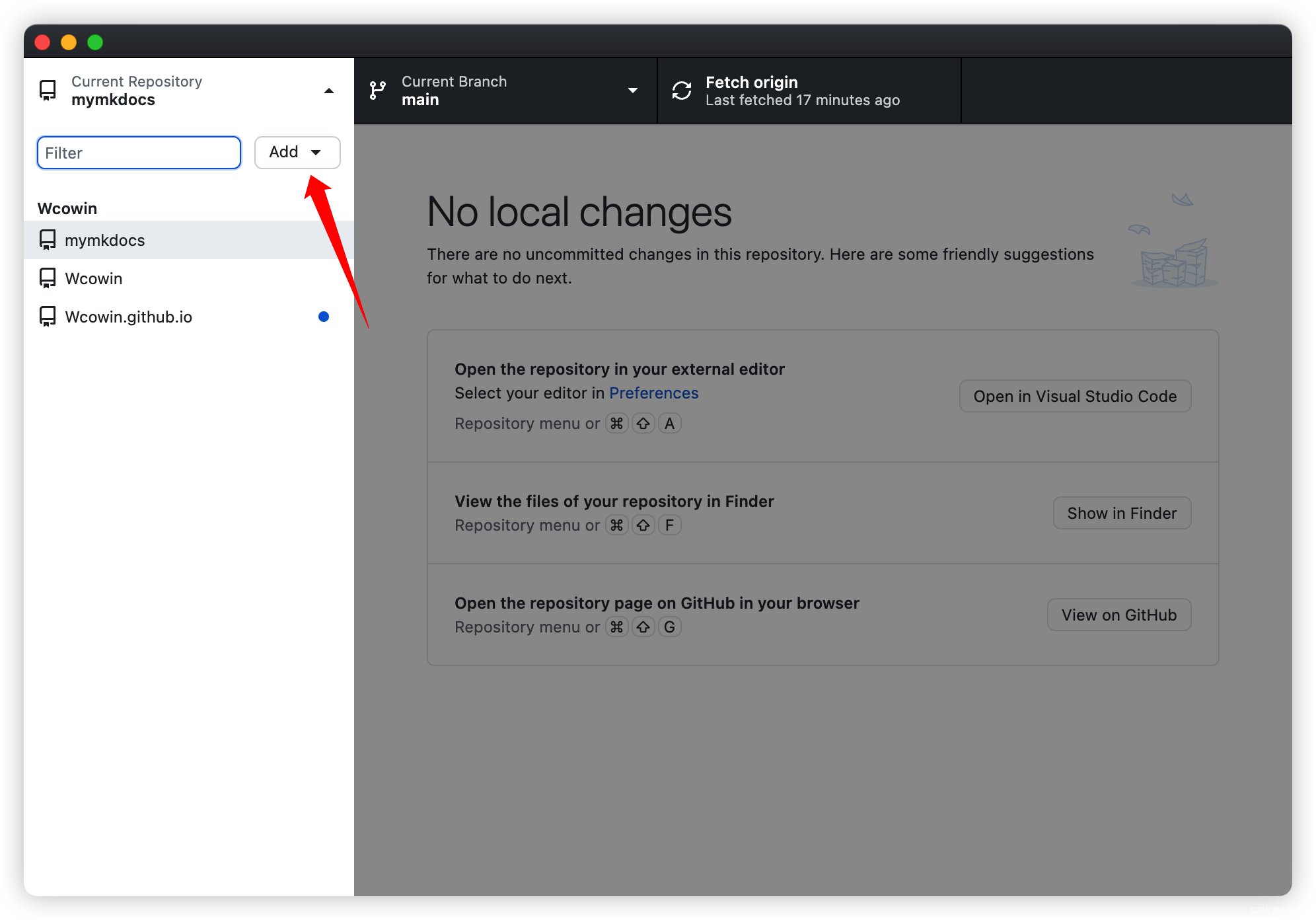
29 |
30 | 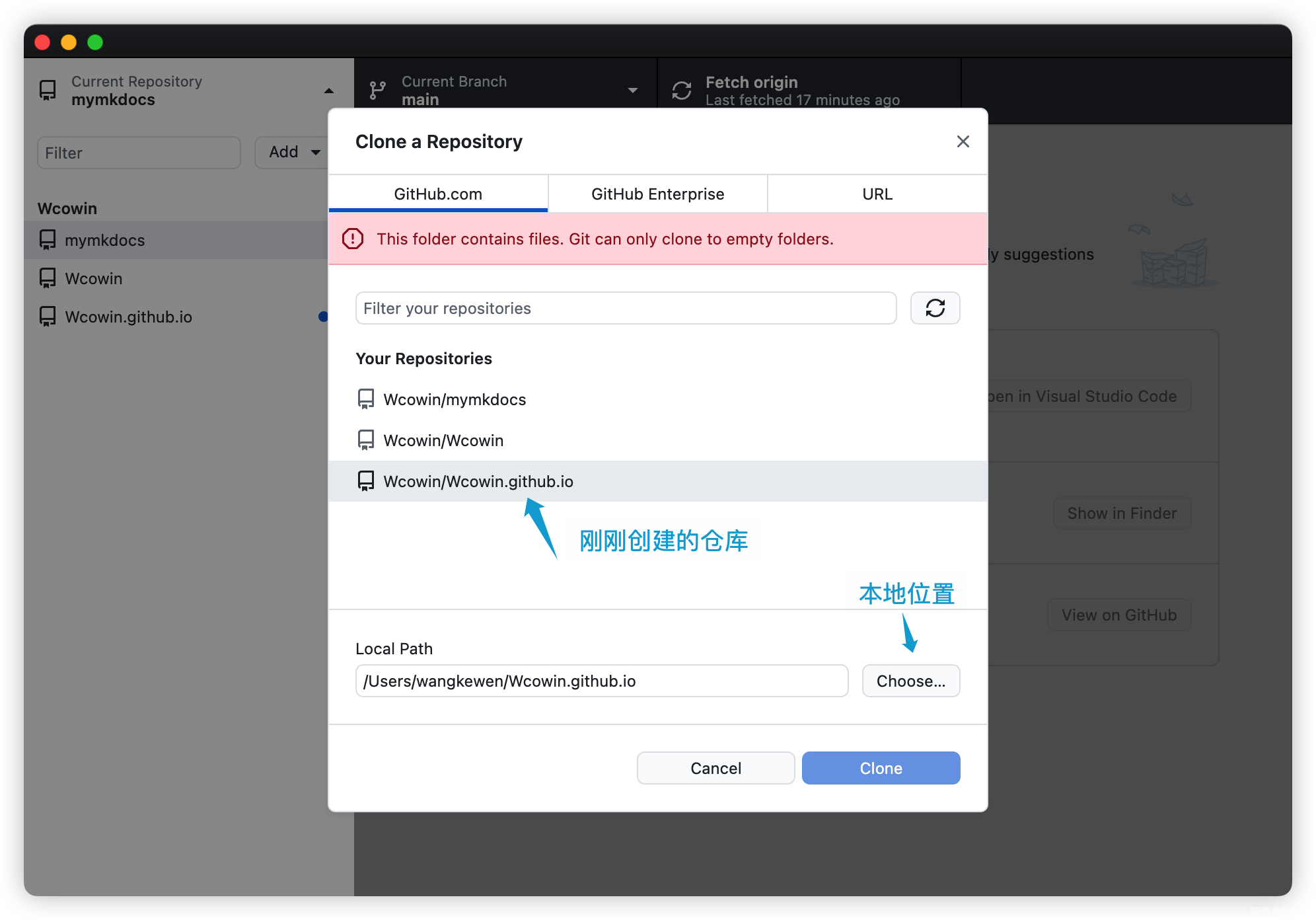
31 |
32 | 
33 |
34 |
35 | 打开Wcowin.github.io目录进入终端依次运行:
36 | ```
37 | pip install mkdocs-material
38 | mkdocs new mkdocs-site
39 | ```
40 | 出现下图的几个文件
41 | 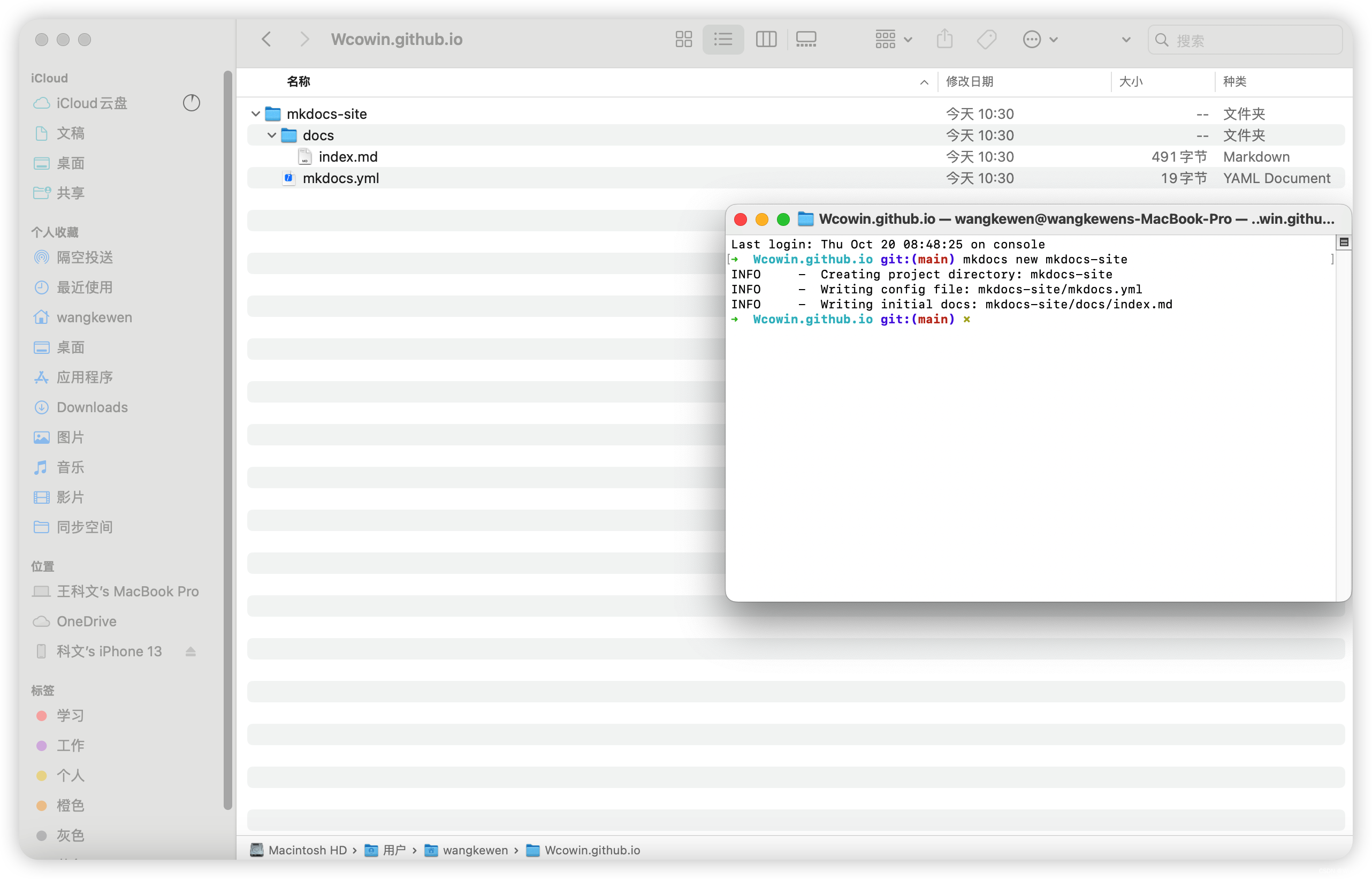
42 |
43 | !!! tip
44 |
45 | 这里建议把**mkdocs-site**文件里的东西全部剪切出来到**Wcowin.github.io**文件里
46 | 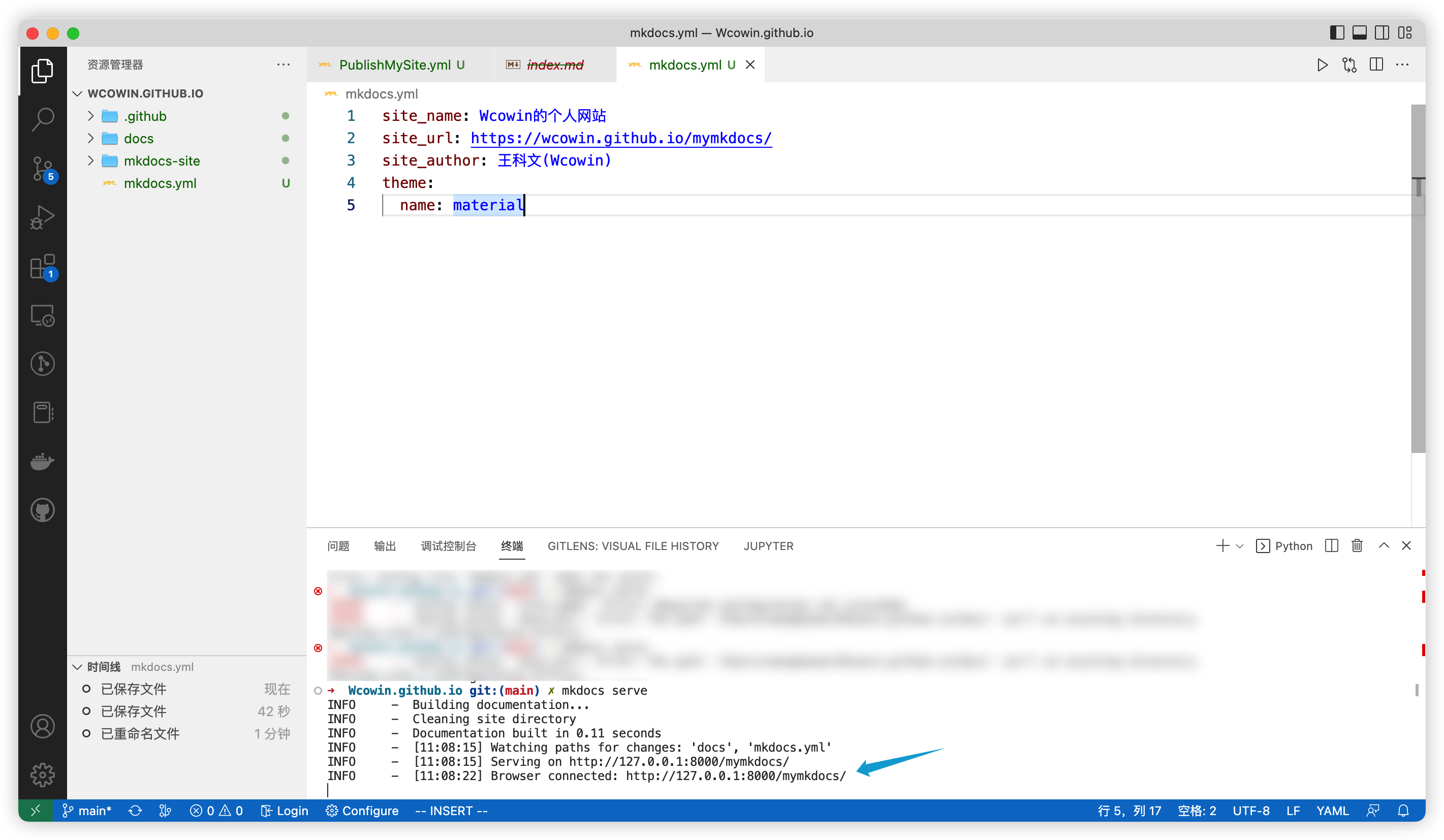
47 |
48 | **Wcowin.github.io**是克隆到本地的仓库(里面包含docs,yml文件等等),docs文件下是以后网站的内容,mkdocs.yml是配置文件(配置主题,目录,插件等)
49 |
50 | 你在这个目录下写的任何东西都可以通过Github Desktop 上传到github上
51 |
52 | 执行下面的代码添加一个GitHub Workflow
53 | ***
54 |
55 | ```
56 | mkdir .github
57 | cd .github
58 | mkdir workflows
59 | cd workflows
60 | vim ci.yml
61 | ```
62 |
63 | 进入.github/workflows/ci.yml,然后复制并粘贴以下内容:
64 |
65 | ```yaml
66 | name: ci
67 | on:
68 | push:
69 | branches:
70 | - master
71 | - main
72 | permissions:
73 | contents: write
74 | jobs:
75 | deploy:
76 | runs-on: ubuntu-latest
77 | steps:
78 | - uses: actions/checkout@v4
79 | - name: Configure Git Credentials
80 | run: |
81 | git config user.name github-actions[bot]
82 | git config user.email 41898282+github-actions[bot]@users.noreply.github.com
83 | - uses: actions/setup-python@v4
84 | with:
85 | python-version: 3.x
86 | - run: echo "cache_id=$(date --utc '+%V')" >> $GITHUB_ENV
87 | - uses: actions/cache@v3
88 | with:
89 | key: mkdocs-material-${{ env.cache_id }}
90 | path: .cache
91 | restore-keys: |
92 | mkdocs-material-
93 | - run: pip install mkdocs-material
94 | - run: mkdocs gh-deploy --force
95 | ```
96 |
97 |
98 | 到这里先检查一下你的目录结构
99 | 目录树状图:
100 | ```
101 | $ tree -a
102 | Wcowin.github.io
103 | ├── .github
104 | │ ├── .DS_Store
105 | │ └── workflows
106 | │ └── ci.yml
107 | ├── docs
108 | │ └── index.md
109 | └── mkdocs.yml
110 | ```
111 |
112 | **重点来了**
113 | Github仓库setings/Actions/General 勾选这两项
114 | 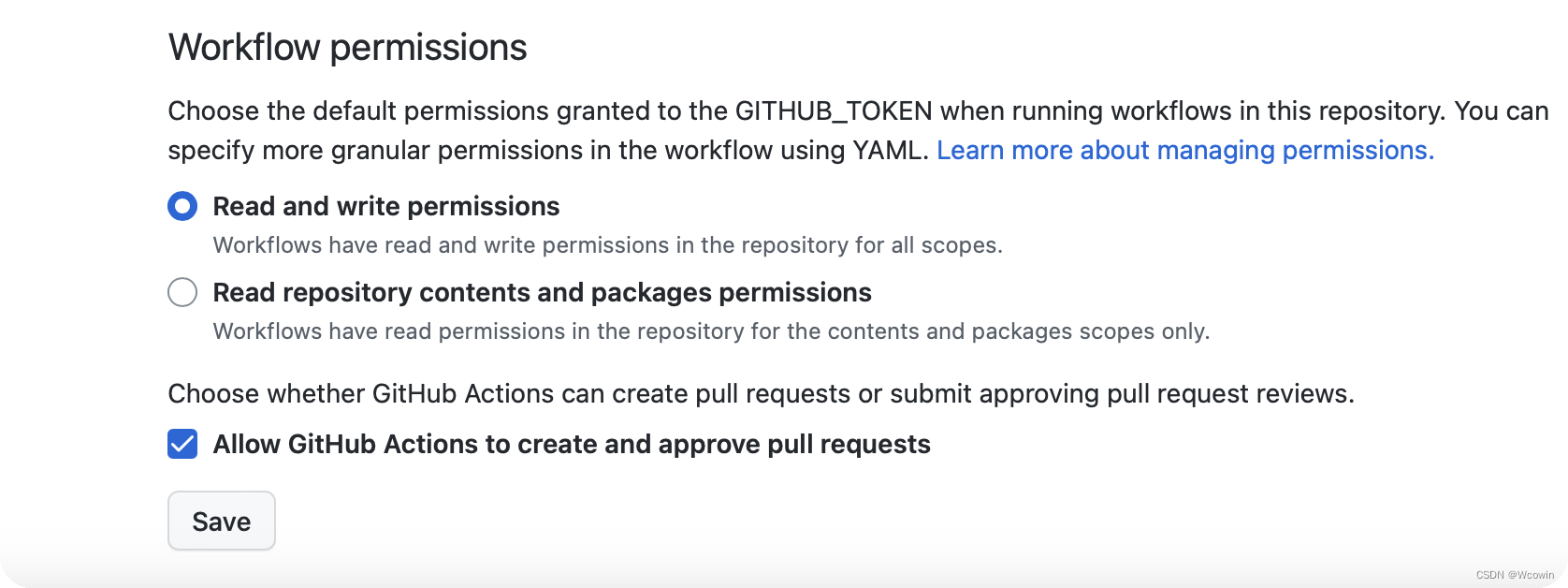
115 |
116 | ## 三、配置完善
117 |
118 | 打开**mkdocs.yml**
119 |
120 | 把以下的内容输入进去(最简单最基础的配置)
121 |
122 | ```yaml
123 | site_name: 网站名字
124 | site_url: 网站链接
125 | site_author: 你的名字
126 | theme:
127 | name: material #主题
128 | ```
129 |
130 |
131 | 详细mkdocs.yml配置见[Changing the colors - Material for MkDocs](https://squidfunk.github.io/mkdocs-material/setup/changing-the-colors/)
132 |
133 |
134 | ***
135 | 在下方终端运行可以在浏览器看到实时网站
136 | ```
137 | mkdocs serve
138 | ```
139 | 
140 | 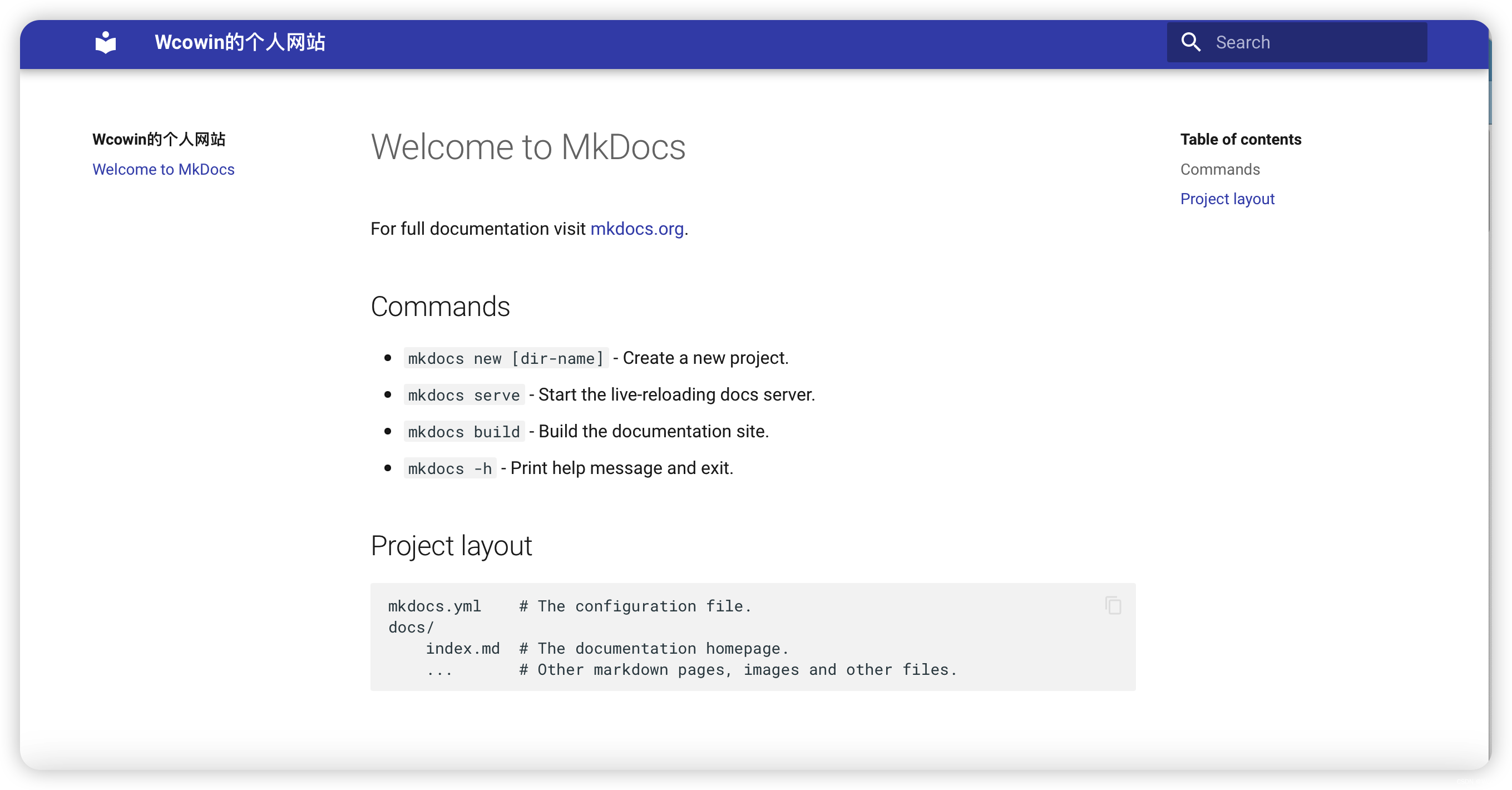
141 |
142 | 这个网站就算是初步建好了
143 |
144 | 最后去github Desktop上传到github
145 | 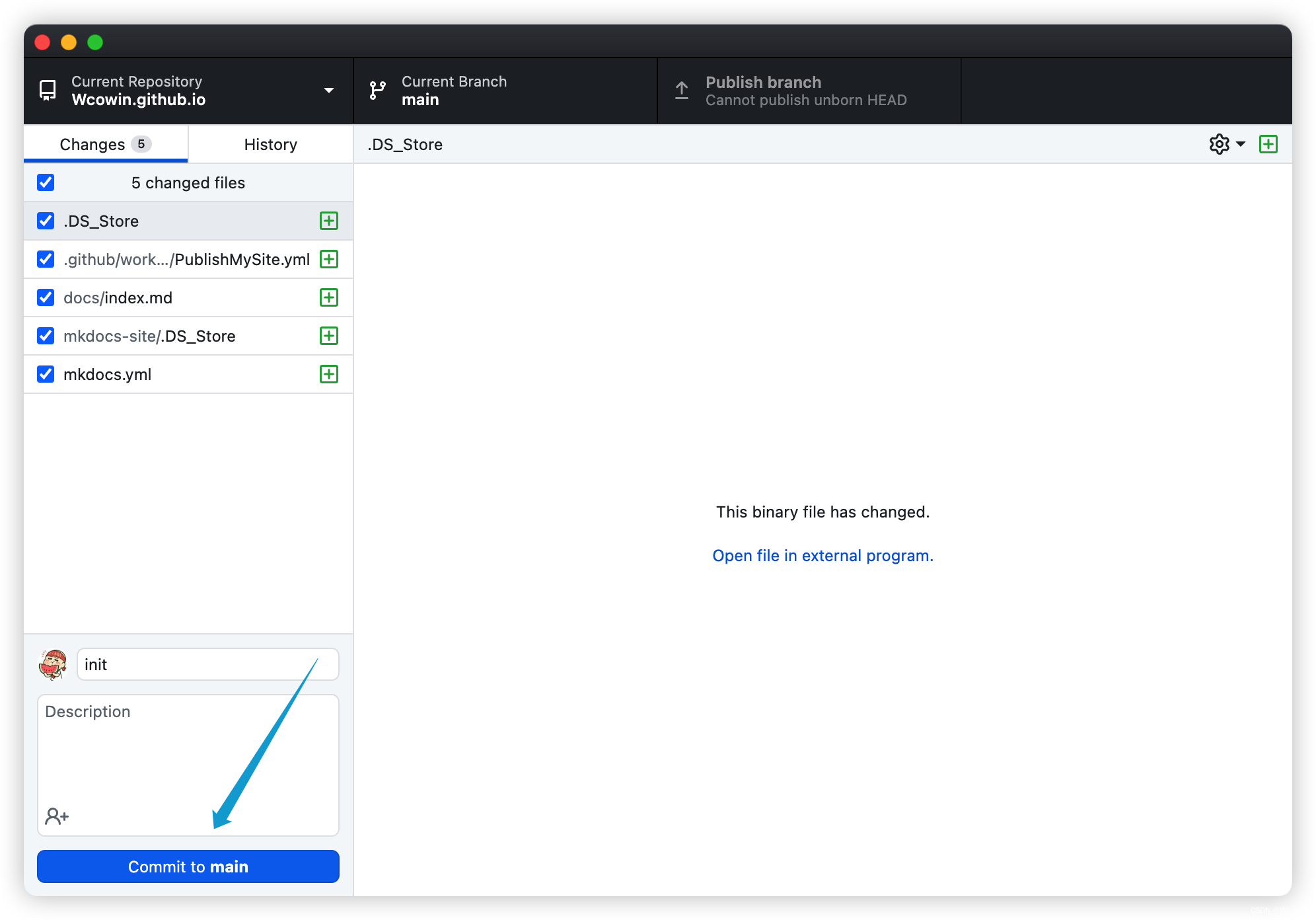
146 | 上图可以看到,我上传了Wcowin.github.io文件夹,这个文件夹里面包含了mkdocs.yml和docs文件夹(mkdocs-site文件夹现在没有东西,可以删除)
147 |
148 |
149 | **!!!重点**
150 | **去仓库的setings/pages选择下图示意的路径**
151 | 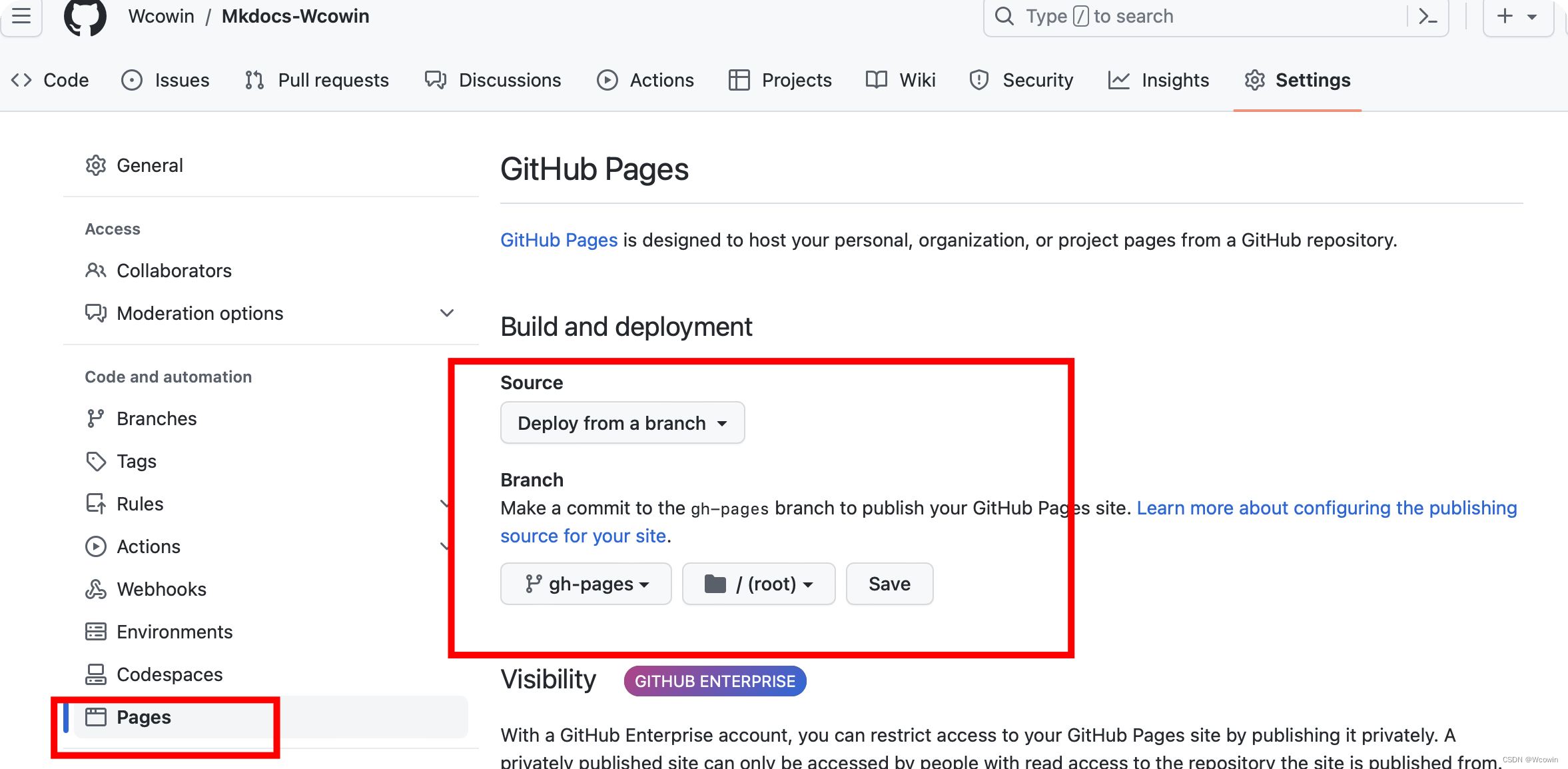
152 |
153 | 等待一会网址就出来了[^注]
154 |
155 | 你的网站网址就是:
156 |
157 | ```
158 | https://你github的名字.github.io/
159 | 因为我绑定了域名所以网址是:https://wcowin.work/
160 | ```
161 | 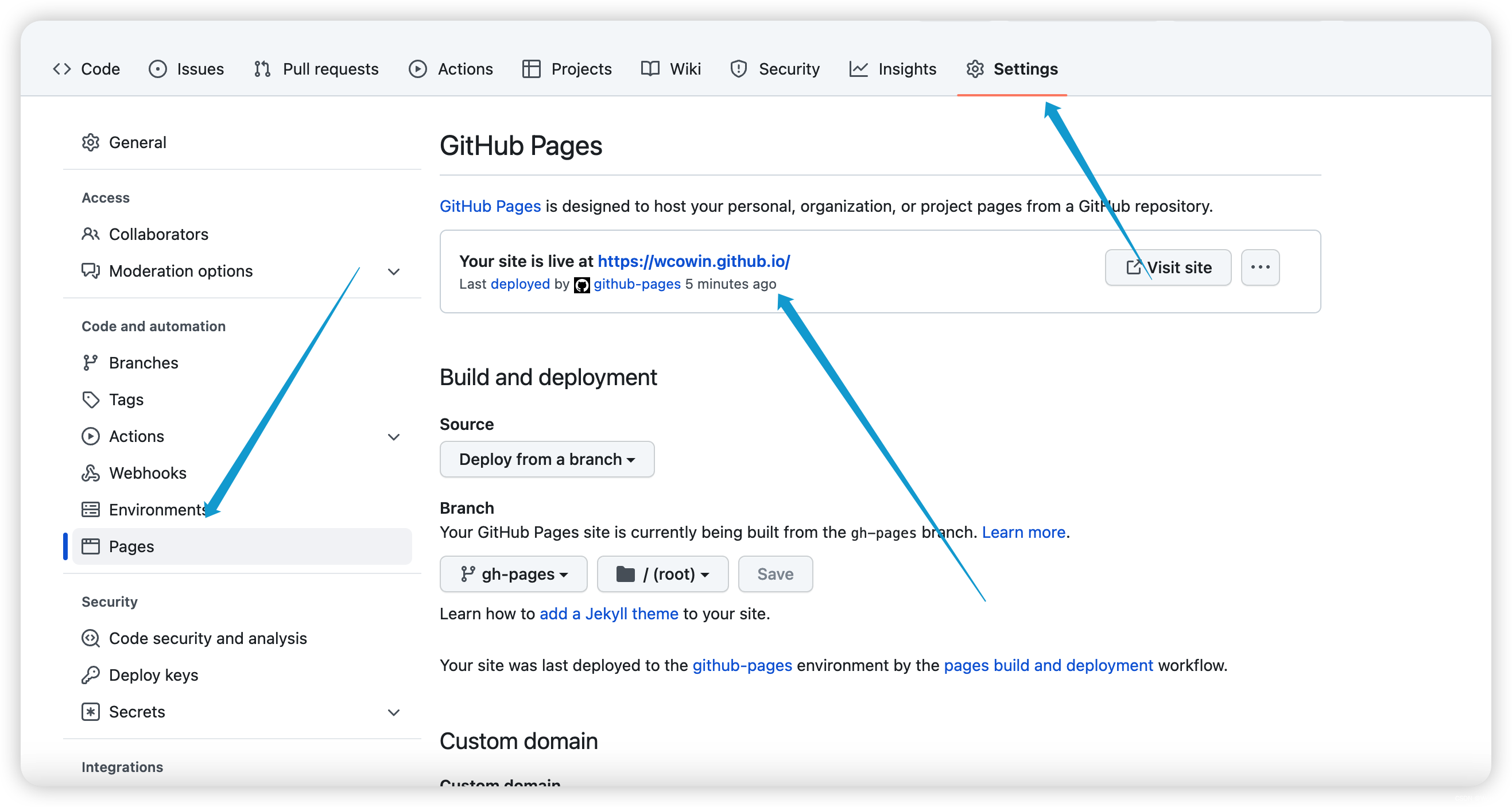
162 |
163 | 下次谈谈网站的[mkdocs.yml具体配置](mkdocs2.md)
164 |
165 | ## 四、参考资料
166 |
167 | 1. [MkDocs官网](https://www.mkdocs.org/)
168 | 2. [MkDocs中文文档](https://hellowac.github.io/mkdocs-docs-zh/)
169 | 3. [Material for MkDocs](https://squidfunk.github.io/mkdocs-material/)
170 | 4. [Mkdocs 配置和使用](https://zhuanlan.zhihu.com/p/383582472)
171 | 5. [Deploy MkDocs](https://github.com/marketplace/actions/deploy-mkdocs)
172 |
173 |
174 | [^注]:于2025.2.19重写此文
--------------------------------------------------------------------------------
/temp/ci.yml:
--------------------------------------------------------------------------------
1 | # name: ci
2 | # on:
3 | # push:
4 | # branches:
5 | # - master
6 | # - main
7 | # permissions:
8 | # contents: write
9 | # jobs:
10 | # deploy:
11 | # runs-on: ubuntu-latest
12 | # steps:
13 | # - uses: actions/checkout@v4
14 | # with:
15 | # fetch-depth: 0
16 | # sparse-checkout: |
17 | # docs
18 | # includes
19 | # - uses: actions/setup-python@v4
20 | # with:
21 | # python-version: 3.x
22 | # - run: echo "cache_id=$(date --utc '+%V')" >> $GITHUB_ENV
23 | # - uses: actions/cache@v3
24 | # with:
25 | # key: mkdocs-material-${ env.cache_id }
26 | # path: .cache
27 | # restore-keys: |
28 | # mkdocs-material-
29 | # - run: pip install mkdocs-git-revision-date-localized-plugin
30 | # - run: pip install mkdocs-git-authors-plugin
31 | # - run: pip install mkdocs-git-committers-plugin-2
32 | # - run: pip install markdown-callouts
33 | # # - run: pip install mkdocs-minify-plugin
34 | # - run: pip install mkdocs-rss-plugin
35 | # - run: pip install requests>=2.25.0
36 | # - run: pip install python-dateutil>=2.8.0
37 | # - run: pip install cachetools>=4.2.0
38 | # # - run: pip install mkdocs-open-in-new-tab
39 | # - run: pip install pymdown-extensions
40 | # # - run: pip install mkdocs-glightbox
41 | # # - run: pip install "mkdocs-material[imaging]"
42 | # # - run: pip install mkdocs-statistics-plugin
43 | # - run: pip install mkdocs-material
44 | # - run: pip install --upgrade --force-reinstall mkdocs-material
45 | # - run: mkdocs gh-deploy --force
46 |
47 | name: ci
48 | on:
49 | push:
50 | branches:
51 | - master
52 | - main
53 | # 禁止从 fork 仓库访问 secrets
54 | pull_request:
55 | types: [closed]
56 | branches: [main, master]
57 | permissions:
58 | contents: write
59 | jobs:
60 | deploy:
61 | runs-on: ubuntu-latest
62 | steps:
63 | - uses: actions/checkout@v4
64 | with:
65 | fetch-depth: 0
66 | sparse-checkout: |
67 | docs
68 | includes
69 | .ai_cache
70 | - uses: actions/setup-python@v4
71 | with:
72 | python-version: 3.x
73 | - name: Set cache ID
74 | run: echo "cache_id=$(date --utc '+%V')" >> $GITHUB_ENV
75 | - uses: actions/cache@v3
76 | with:
77 | key: mkdocs-material-${{ github.run_number }}
78 | path: .cache
79 | restore-keys: |
80 | mkdocs-material-
81 | - run: pip install mkdocs-git-revision-date-localized-plugin
82 | - run: pip install mkdocs-git-authors-plugin
83 | - run: pip install mkdocs-git-committers-plugin-2
84 | - run: pip install markdown-callouts
85 | - run: pip install mkdocs-rss-plugin
86 | - run: pip install requests>=2.25.0
87 | - run: pip install python-dateutil>=2.8.0
88 | - run: pip install cachetools>=4.2.0
89 | - run: pip install python-dotenv>=0.19.0
90 | - run: pip install Pillow
91 | - run: pip install neoteroi-mkdocs
92 |
93 | - run: pip install mkdocs-document-dates==3.3
94 | - run: pip install pymdown-extensions
95 | - run: pip install mkdocs-material
96 | - run: pip install --upgrade --force-reinstall mkdocs-material
97 |
98 | - run: pip install mkdocs-ai-summary-wcowin
99 | - name: Deploy with AI Summary
100 | env:
101 | # AI摘要开关控制
102 | AI_SUMMARY_CI_ENABLED: 'true' # CI部署环境启用AI摘要 (true=在CI中为文章生成AI摘要)
103 | AI_SUMMARY_CI_ONLY_CACHE: 'false' # CI部署不生成新摘要 (true=使用本地部署过的摘要缓存,不再重复调用API)
104 | AI_SUMMARY_CI_FALLBACK: 'true' # CI部署启用备用摘要 (true=API失败时生成离线基础摘要)
105 | AI_SUMMARY_CACHE_ENABLED: 'true' # 启用缓存功能
106 | AI_SUMMARY_CACHE_EXPIRE_DAYS: '3000' # 缓存7天过期
107 | AI_SUMMARY_CACHE_AUTO_CLEAN: 'true' # 自动清理过期缓存
108 | # AI_SUMMARY_LOCAL_ENABLED: 'false' # 本地部署环境禁用AI摘要 (true=本地开发时也生成摘要)(不需要管这条)
109 | # API密钥配置
110 | GLM_API_KEY: ${{ secrets.GLM_API_KEY }}
111 | OPENAI_API_KEY: ${{ secrets.OPENAI_API_KEY }}
112 | run: mkdocs gh-deploy --force
113 |
114 | # 自动提交新生成的AI缓存文件
115 | - name: Auto-commit AI cache (if any new files)
116 | run: |
117 | if [ -d ".ai_cache" ] && [ "$(ls -A .ai_cache 2>/dev/null)" ]; then
118 | git config --local user.email "action@github.com"
119 | git config --local user.name "GitHub Action"
120 | git add .ai_cache/
121 | if ! git diff --cached --quiet; then
122 | git commit -m "🤖 Auto-update AI summary cache [skip ci]"
123 | git push
124 | echo "✅ 自动提交了新的 AI 缓存文件"
125 | else
126 | echo "ℹ️ 没有新的缓存文件需要提交"
127 | fi
128 | else
129 | echo "ℹ️ 没有找到缓存目录或缓存为空"
130 | fi
131 |
--------------------------------------------------------------------------------
/docs/blog/websitebeauty/shubiao.md:
--------------------------------------------------------------------------------
1 | ---
2 | title: JS实现鼠标样式
3 | tags:
4 | - Mkdocs
5 | ---
6 |
7 | 不建议更改,因为默认就是最简洁
8 |
9 |
10 |
11 | 在`docs/javascripts/extra.js`下复制粘贴:
12 | ```java
13 | var CURSOR;
14 |
15 | Math.lerp = (a, b, n) => (1 - n) * a + n * b;
16 |
17 | const getStyle = (el, attr) => {
18 | try {
19 | return window.getComputedStyle
20 | ? window.getComputedStyle(el)[attr]
21 | : el.currentStyle[attr];
22 | } catch (e) {}
23 | return "";
24 | };
25 |
26 | class Cursor {
27 | constructor() {
28 | this.pos = {curr: null, prev: null};
29 | this.pt = [];
30 | this.create();
31 | this.init();
32 | this.render();
33 | }
34 |
35 | move(left, top) {
36 | this.cursor.style["left"] = `${left}px`;
37 | this.cursor.style["top"] = `${top}px`;
38 | }
39 |
40 | create() {
41 | if (!this.cursor) {
42 | this.cursor = document.createElement("div");
43 | this.cursor.id = "cursor";
44 | this.cursor.classList.add("hidden");
45 | document.body.append(this.cursor);
46 | }
47 |
48 | var el = document.getElementsByTagName('*');
49 | for (let i = 0; i < el.length; i++)
50 | if (getStyle(el[i], "cursor") == "pointer")
51 | this.pt.push(el[i].outerHTML);
52 |
53 | document.body.appendChild((this.scr = document.createElement("style")));
54 | // 这里改变鼠标指针的颜色 由svg生成
55 | this.scr.innerHTML = `* {cursor: url("data:image/svg+xml,") 4 4, auto}`;
56 | }
57 |
58 | refresh() {
59 | this.scr.remove();
60 | this.cursor.classList.remove("hover");
61 | this.cursor.classList.remove("active");
62 | this.pos = {curr: null, prev: null};
63 | this.pt = [];
64 |
65 | this.create();
66 | this.init();
67 | this.render();
68 | }
69 |
70 | init() {
71 | document.onmouseover = e => this.pt.includes(e.target.outerHTML) && this.cursor.classList.add("hover");
72 | document.onmouseout = e => this.pt.includes(e.target.outerHTML) && this.cursor.classList.remove("hover");
73 | document.onmousemove = e => {(this.pos.curr == null) && this.move(e.clientX - 8, e.clientY - 8); this.pos.curr = {x: e.clientX - 8, y: e.clientY - 8}; this.cursor.classList.remove("hidden");};
74 | document.onmouseenter = e => this.cursor.classList.remove("hidden");
75 | document.onmouseleave = e => this.cursor.classList.add("hidden");
76 | document.onmousedown = e => this.cursor.classList.add("active");
77 | document.onmouseup = e => this.cursor.classList.remove("active");
78 | }
79 |
80 | render() {
81 | if (this.pos.prev) {
82 | this.pos.prev.x = Math.lerp(this.pos.prev.x, this.pos.curr.x, 0.15);
83 | this.pos.prev.y = Math.lerp(this.pos.prev.y, this.pos.curr.y, 0.15);
84 | this.move(this.pos.prev.x, this.pos.prev.y);
85 | } else {
86 | this.pos.prev = this.pos.curr;
87 | }
88 | requestAnimationFrame(() => this.render());
89 | }
90 | }
91 |
92 | (() => {
93 | CURSOR = new Cursor();
94 | // 需要重新获取列表时,使用 CURSOR.refresh()
95 | })();
96 | ```
97 | 其中比较重要的参数就是鼠标的尺寸和颜色,已经在上图中标出,目前发现颜色只支持RGB写法和固有名称写法(例如red这种),其他参数也可以自行摸索:
98 |
99 | ```javascript
100 | * {cursor: url("data:image/svg+xml,") 4 4, auto}`
101 | ```
102 |
103 | 在docs/stylesheets/extra.css添加如下代码:
104 | ```css
105 | /* 鼠标样式 */
106 | #cursor {
107 | position: fixed;
108 | width: 16px;
109 | height: 16px;
110 | /* 这里改变跟随的底色 */
111 | background: var(--theme-color);
112 | border-radius: 8px;
113 | opacity: 0.25;
114 | z-index: 10086;
115 | pointer-events: none;
116 | transition: 0.2s ease-in-out;
117 | transition-property: background, opacity, transform;
118 | }
119 |
120 | #cursor.hidden {
121 | opacity: 0;
122 | }
123 |
124 | #cursor.hover {
125 | opacity: 0.1;
126 | transform: scale(2.5);
127 | -webkit-transform: scale(2.5);
128 | -moz-transform: scale(2.5);
129 | -ms-transform: scale(2.5);
130 | -o-transform: scale(2.5);
131 | }
132 |
133 | #cursor.active {
134 | opacity: 0.5;
135 | transform: scale(0.5);
136 | -webkit-transform: scale(0.5);
137 | -moz-transform: scale(0.5);
138 | -ms-transform: scale(0.5);
139 | -o-transform: scale(0.5);
140 | }
141 | ```
142 | 这里比较重要的参数就是鼠标跟随的圆形颜色,可以根据自己的喜好进行更改:
143 | ```css
144 | #cursor {
145 | /* 这里改变跟随的底色 */
146 | background: rgb(57, 197, 187);
147 | }
148 | ```
149 |
150 | !!! Note "注意⚠️"
151 | 需要在mkdocs.yml中引入js和css
152 | ```
153 | extra_javascript:
154 | - javascripts/extra.js
155 | - javascripts/mathjax.js
156 | extra_css:
157 | - stylesheets/extra.css
158 | ```
--------------------------------------------------------------------------------
/docs/liuyanban.md:
--------------------------------------------------------------------------------
1 | ---
2 | title: 留言板
3 | hide:
4 | # - navigation # 显示右
5 | # - toc #显示左
6 | - footer
7 | - feedback
8 | comments: false
9 | ---
10 |
11 |
12 |
13 | # 畅所欲言
14 |
15 |
16 |
17 |
留言板
18 |
月落乌啼霜满天 江枫渔火对愁眠
19 |
《枫桥夜泊》 【唐代】 张继
20 |
111 |
112 |
113 |
114 |
131 |
142 |
152 |
--------------------------------------------------------------------------------
/docs/javascripts/backgroud.js:
--------------------------------------------------------------------------------
1 | /*背景*/
2 | window.onload = function () {
3 | //定义body的margin由默认值8px->0px
4 | document.body.style.margin = "0";
5 | document.body.style.background = "255,255,255";
6 | //创建canvas画布
7 | document.body.appendChild(document.createElement('canvas'));
8 | var canvas = document.querySelector('canvas'),
9 | ctx = canvas.getContext('2d') //ctx返回一个在canvas上画图的api/dom
10 | canvas.width = window.innerWidth;
11 | canvas.height = window.innerHeight;
12 | canvas.style.position = 'fixed';
13 | ctx.lineWidth = .3;
14 | ctx.strokeStyle = (new Color(150)).style;
15 | //定义鼠标覆盖范围
16 | var mousePosition = {
17 | x: 30 * canvas.width / 100,
18 | y: 30 * canvas.height / 100
19 | };
20 | var dots = {
21 | nb: 1000,//Dot的总数
22 | distance: 50,
23 | d_radius: 100,
24 | array: []
25 | };
26 | //创建颜色类,Color类返回字符串型rgba(*,*,*,.8)
27 | function mixComponents(comp1, weight1, comp2, weight2) {
28 | return (comp1 * weight1 + comp2 * weight2) / (weight1 + weight2);
29 | }
30 | function averageColorStyles(dot1, dot2) {
31 | var color1 = dot1.color,
32 | color2 = dot2.color;
33 |
34 | var r = mixComponents(color1.r, dot1.radius, color2.r, dot2.radius),
35 | g = mixComponents(color1.g, dot1.radius, color2.g, dot2.radius),
36 | b = mixComponents(color1.b, dot1.radius, color2.b, dot2.radius);
37 | return createColorStyle(Math.floor(r), Math.floor(g), Math.floor(b));
38 | }
39 | function colorValue(min) {
40 | return Math.floor(Math.random() * 255 + min);
41 | }
42 | function createColorStyle(r, g, b) {
43 | return 'rgba(' + r + ',' + g + ',' + b + ', 0.8)';
44 | }
45 | function Color(min) {
46 | min = min || 0;
47 | this.r = colorValue(min);
48 | this.g = colorValue(min);
49 | this.b = colorValue(min);
50 | this.style = createColorStyle(this.r, this.g, this.b);
51 | }
52 | //创建Dot类以及一系列方法
53 | function Dot() {
54 | this.x = Math.random() * canvas.width;
55 | this.y = Math.random() * canvas.height;
56 |
57 | this.vx = -.5 + Math.random();
58 | this.vy = -.5 + Math.random();
59 |
60 | this.radius = Math.random() * 2;
61 |
62 | this.color = new Color();
63 | }
64 |
65 | Dot.prototype = {
66 | draw: function () {
67 | ctx.beginPath();
68 | ctx.fillStyle = this.color.style;
69 | ctx.arc(this.x, this.y, this.radius, 0, Math.PI * 2, false);
70 | ctx.fill();
71 | }
72 | };
73 | function moveDots() {//Dot对象的移动
74 | for (i = 0; i < dots.nb; i++) {
75 |
76 | var dot = dots.array[i];
77 |
78 | if (dot.y < 0 || dot.y > canvas.height) {
79 | dot.vx = dot.vx;
80 | dot.vy = - dot.vy;
81 | }
82 | else if (dot.x < 0 || dot.x > canvas.width) {
83 | dot.vx = - dot.vx;
84 | dot.vy = dot.vy;
85 | }
86 | dot.x += dot.vx;
87 | dot.y += dot.vy;
88 | }
89 | }
90 | function connectDots() {//DOt对象的连接
91 | for (i = 0; i < dots.nb; i++) {
92 | for (j = i; j < dots.nb; j++) {
93 | i_dot = dots.array[i];
94 | j_dot = dots.array[j];
95 |
96 | if ((i_dot.x - j_dot.x) < dots.distance && (i_dot.y - j_dot.y) < dots.distance && (i_dot.x - j_dot.x) > - dots.distance && (i_dot.y - j_dot.y) > - dots.distance) {
97 | if ((i_dot.x - mousePosition.x) < dots.d_radius && (i_dot.y - mousePosition.y) < dots.d_radius && (i_dot.x - mousePosition.x) > - dots.d_radius && (i_dot.y - mousePosition.y) > - dots.d_radius) {
98 | ctx.beginPath();
99 | ctx.strokeStyle = averageColorStyles(i_dot, j_dot);
100 | ctx.moveTo(i_dot.x, i_dot.y);
101 | ctx.lineTo(j_dot.x, j_dot.y);
102 | ctx.stroke();//绘制定义的路线
103 | ctx.closePath();//创建从当前点回到起始点的路径
104 | }
105 | }
106 | }
107 | }
108 | }
109 | function createDots() {//创建nb个Dot对象
110 | for (i = 0; i < dots.nb; i++) {
111 | dots.array.push(new Dot());
112 | }
113 | }
114 | function drawDots() {//引用Dot原型链,使用draw方法,在canvas上画出Dot对象
115 | for (i = 0; i < dots.nb; i++) {
116 | var dot = dots.array[i];
117 | dot.draw();
118 | }
119 | }
120 | function animateDots() {
121 | ctx.clearRect(0, 0, canvas.width, canvas.height);//清除画布,否则线条会连在一起
122 | moveDots();
123 | connectDots();
124 | drawDots();
125 | requestAnimationFrame(animateDots);
126 | }
127 | createDots();//使用创建Dot类函数
128 | requestAnimationFrame(animateDots);//使用canvas独有的60Hz刷新屏幕画布的方法
129 |
130 | document.querySelector('canvas').addEventListener('mousemove', function (e) {
131 | mousePosition.x = e.pageX;
132 | mousePosition.y = e.pageY;
133 | })
134 |
135 | document.querySelector('canvas').addEventListener('mouseleave', function (e) {//鼠标离开时,连接自动返回到画布中心
136 | mousePosition.x = canvas.width / 2;
137 | mousePosition.y = canvas.height / 2;
138 | })
139 |
140 | }
141 |
142 | /*背景end*/
--------------------------------------------------------------------------------
/site/javascripts/backgroud.js:
--------------------------------------------------------------------------------
1 | /*背景*/
2 | window.onload = function () {
3 | //定义body的margin由默认值8px->0px
4 | document.body.style.margin = "0";
5 | document.body.style.background = "255,255,255";
6 | //创建canvas画布
7 | document.body.appendChild(document.createElement('canvas'));
8 | var canvas = document.querySelector('canvas'),
9 | ctx = canvas.getContext('2d') //ctx返回一个在canvas上画图的api/dom
10 | canvas.width = window.innerWidth;
11 | canvas.height = window.innerHeight;
12 | canvas.style.position = 'fixed';
13 | ctx.lineWidth = .3;
14 | ctx.strokeStyle = (new Color(150)).style;
15 | //定义鼠标覆盖范围
16 | var mousePosition = {
17 | x: 30 * canvas.width / 100,
18 | y: 30 * canvas.height / 100
19 | };
20 | var dots = {
21 | nb: 1000,//Dot的总数
22 | distance: 50,
23 | d_radius: 100,
24 | array: []
25 | };
26 | //创建颜色类,Color类返回字符串型rgba(*,*,*,.8)
27 | function mixComponents(comp1, weight1, comp2, weight2) {
28 | return (comp1 * weight1 + comp2 * weight2) / (weight1 + weight2);
29 | }
30 | function averageColorStyles(dot1, dot2) {
31 | var color1 = dot1.color,
32 | color2 = dot2.color;
33 |
34 | var r = mixComponents(color1.r, dot1.radius, color2.r, dot2.radius),
35 | g = mixComponents(color1.g, dot1.radius, color2.g, dot2.radius),
36 | b = mixComponents(color1.b, dot1.radius, color2.b, dot2.radius);
37 | return createColorStyle(Math.floor(r), Math.floor(g), Math.floor(b));
38 | }
39 | function colorValue(min) {
40 | return Math.floor(Math.random() * 255 + min);
41 | }
42 | function createColorStyle(r, g, b) {
43 | return 'rgba(' + r + ',' + g + ',' + b + ', 0.8)';
44 | }
45 | function Color(min) {
46 | min = min || 0;
47 | this.r = colorValue(min);
48 | this.g = colorValue(min);
49 | this.b = colorValue(min);
50 | this.style = createColorStyle(this.r, this.g, this.b);
51 | }
52 | //创建Dot类以及一系列方法
53 | function Dot() {
54 | this.x = Math.random() * canvas.width;
55 | this.y = Math.random() * canvas.height;
56 |
57 | this.vx = -.5 + Math.random();
58 | this.vy = -.5 + Math.random();
59 |
60 | this.radius = Math.random() * 2;
61 |
62 | this.color = new Color();
63 | }
64 |
65 | Dot.prototype = {
66 | draw: function () {
67 | ctx.beginPath();
68 | ctx.fillStyle = this.color.style;
69 | ctx.arc(this.x, this.y, this.radius, 0, Math.PI * 2, false);
70 | ctx.fill();
71 | }
72 | };
73 | function moveDots() {//Dot对象的移动
74 | for (i = 0; i < dots.nb; i++) {
75 |
76 | var dot = dots.array[i];
77 |
78 | if (dot.y < 0 || dot.y > canvas.height) {
79 | dot.vx = dot.vx;
80 | dot.vy = - dot.vy;
81 | }
82 | else if (dot.x < 0 || dot.x > canvas.width) {
83 | dot.vx = - dot.vx;
84 | dot.vy = dot.vy;
85 | }
86 | dot.x += dot.vx;
87 | dot.y += dot.vy;
88 | }
89 | }
90 | function connectDots() {//DOt对象的连接
91 | for (i = 0; i < dots.nb; i++) {
92 | for (j = i; j < dots.nb; j++) {
93 | i_dot = dots.array[i];
94 | j_dot = dots.array[j];
95 |
96 | if ((i_dot.x - j_dot.x) < dots.distance && (i_dot.y - j_dot.y) < dots.distance && (i_dot.x - j_dot.x) > - dots.distance && (i_dot.y - j_dot.y) > - dots.distance) {
97 | if ((i_dot.x - mousePosition.x) < dots.d_radius && (i_dot.y - mousePosition.y) < dots.d_radius && (i_dot.x - mousePosition.x) > - dots.d_radius && (i_dot.y - mousePosition.y) > - dots.d_radius) {
98 | ctx.beginPath();
99 | ctx.strokeStyle = averageColorStyles(i_dot, j_dot);
100 | ctx.moveTo(i_dot.x, i_dot.y);
101 | ctx.lineTo(j_dot.x, j_dot.y);
102 | ctx.stroke();//绘制定义的路线
103 | ctx.closePath();//创建从当前点回到起始点的路径
104 | }
105 | }
106 | }
107 | }
108 | }
109 | function createDots() {//创建nb个Dot对象
110 | for (i = 0; i < dots.nb; i++) {
111 | dots.array.push(new Dot());
112 | }
113 | }
114 | function drawDots() {//引用Dot原型链,使用draw方法,在canvas上画出Dot对象
115 | for (i = 0; i < dots.nb; i++) {
116 | var dot = dots.array[i];
117 | dot.draw();
118 | }
119 | }
120 | function animateDots() {
121 | ctx.clearRect(0, 0, canvas.width, canvas.height);//清除画布,否则线条会连在一起
122 | moveDots();
123 | connectDots();
124 | drawDots();
125 | requestAnimationFrame(animateDots);
126 | }
127 | createDots();//使用创建Dot类函数
128 | requestAnimationFrame(animateDots);//使用canvas独有的60Hz刷新屏幕画布的方法
129 |
130 | document.querySelector('canvas').addEventListener('mousemove', function (e) {
131 | mousePosition.x = e.pageX;
132 | mousePosition.y = e.pageY;
133 | })
134 |
135 | document.querySelector('canvas').addEventListener('mouseleave', function (e) {//鼠标离开时,连接自动返回到画布中心
136 | mousePosition.x = canvas.width / 2;
137 | mousePosition.y = canvas.height / 2;
138 | })
139 |
140 | }
141 |
142 | /*背景end*/
--------------------------------------------------------------------------------
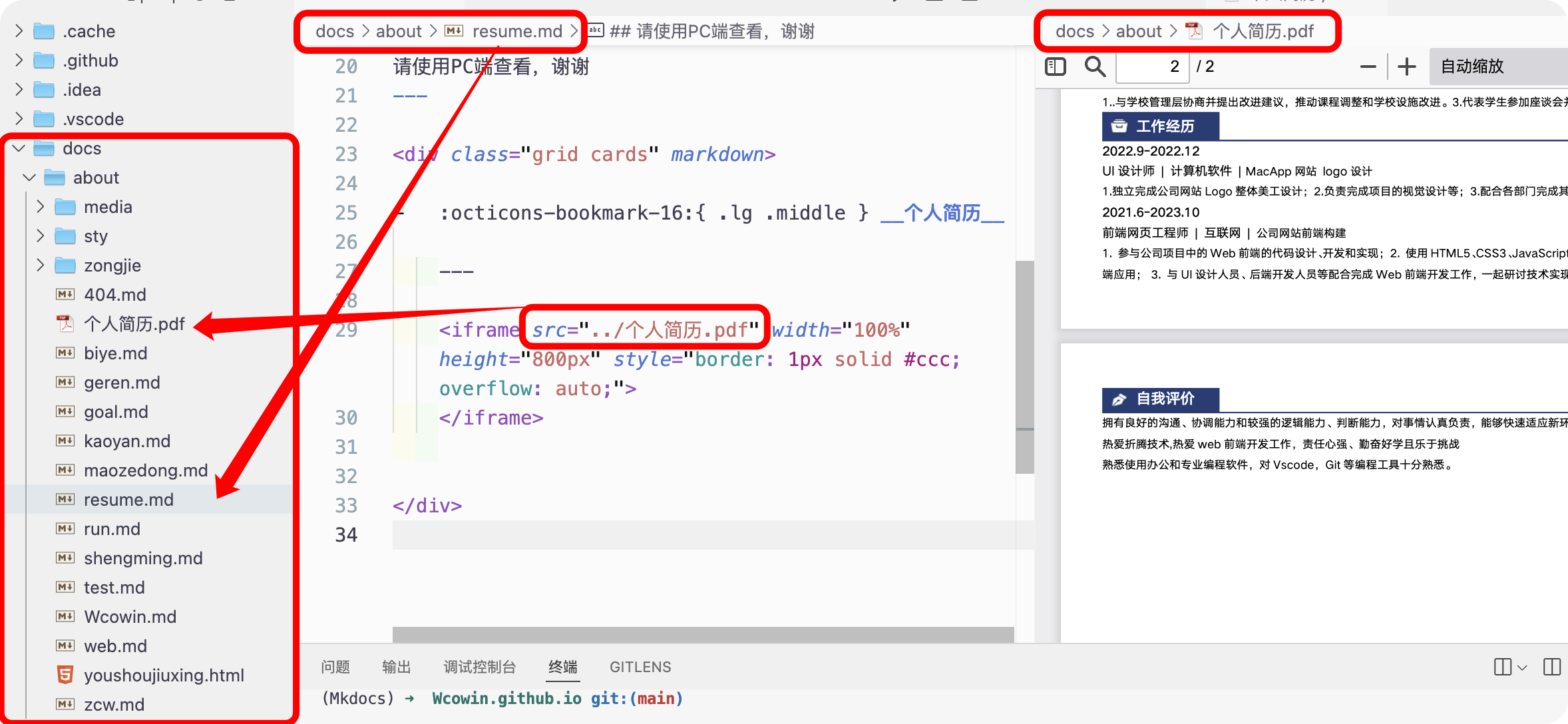 15 |
16 | 我的完整代码:
17 |
18 | ```html
19 |
20 |
15 |
16 | 我的完整代码:
17 |
18 | ```html
19 |
20 |