├── .gitignore
├── src
├── react-app-env.d.ts
├── assets
│ ├── fonts
│ │ └── DavidLibre-Regular.ttf
│ └── styles
│ │ └── App.css
├── constants.ts
├── setupTests.ts
├── tasks.ts
├── index.tsx
├── index.css
├── PreviewHolder.tsx
├── App.tsx
└── serviceWorker.ts
├── .gitattributes
├── public
├── favicon.ico
├── logo192.png
├── logo512.png
├── robots.txt
├── manifest.json
└── index.html
├── tsconfig.json
├── package.json
└── README.md
/.gitignore:
--------------------------------------------------------------------------------
1 | node_modules
--------------------------------------------------------------------------------
/src/react-app-env.d.ts:
--------------------------------------------------------------------------------
1 | ///
2 |
--------------------------------------------------------------------------------
/.gitattributes:
--------------------------------------------------------------------------------
1 | # Auto detect text files and perform LF normalization
2 | * text=auto
3 |
--------------------------------------------------------------------------------
/public/favicon.ico:
--------------------------------------------------------------------------------
https://raw.githubusercontent.com/Wscats/dnd-tutorial/main/public/favicon.ico
--------------------------------------------------------------------------------
/public/logo192.png:
--------------------------------------------------------------------------------
https://raw.githubusercontent.com/Wscats/dnd-tutorial/main/public/logo192.png
--------------------------------------------------------------------------------
/public/logo512.png:
--------------------------------------------------------------------------------
https://raw.githubusercontent.com/Wscats/dnd-tutorial/main/public/logo512.png
--------------------------------------------------------------------------------
/public/robots.txt:
--------------------------------------------------------------------------------
1 | # https://www.robotstxt.org/robotstxt.html
2 | User-agent: *
3 | Disallow:
4 |
--------------------------------------------------------------------------------
/src/assets/fonts/DavidLibre-Regular.ttf:
--------------------------------------------------------------------------------
https://raw.githubusercontent.com/Wscats/dnd-tutorial/main/src/assets/fonts/DavidLibre-Regular.ttf
--------------------------------------------------------------------------------
/src/constants.ts:
--------------------------------------------------------------------------------
1 | export const COLUMN_NAMES = {
2 | DO_IT: 'Do it',
3 | IN_PROGRESS: 'In Progress',
4 | AWAITING_REVIEW: 'Awaiting review',
5 | DONE: 'Done',
6 | }
7 |
--------------------------------------------------------------------------------
/src/setupTests.ts:
--------------------------------------------------------------------------------
1 | // jest-dom adds custom jest matchers for asserting on DOM nodes.
2 | // allows you to do things like:
3 | // expect(element).toHaveTextContent(/react/i)
4 | // learn more: https://github.com/testing-library/jest-dom
5 | import '@testing-library/jest-dom/extend-expect';
6 |
--------------------------------------------------------------------------------
/src/tasks.ts:
--------------------------------------------------------------------------------
1 | import { COLUMN_NAMES } from "./constants";
2 |
3 | const {DO_IT} = COLUMN_NAMES;
4 | export const tasks = [
5 | {id: 1, name: 'Item 1', column: DO_IT},
6 | {id: 2, name: 'Item 2', column: DO_IT},
7 | {id: 3, name: 'Item 3', column: DO_IT},
8 | {id: 4, name: 'Item 4', column: DO_IT},
9 | ];
10 |
--------------------------------------------------------------------------------
/src/index.tsx:
--------------------------------------------------------------------------------
1 | import React from 'react';
2 | import ReactDOM from 'react-dom';
3 | import { App } from './App';
4 | import * as serviceWorker from './serviceWorker';
5 |
6 | ReactDOM.render(
7 |
8 |
9 | ,
10 | document.getElementById('root')
11 | );
12 |
13 | // If you want your app to work offline and load faster, you can change
14 | // unregister() to register() below. Note this comes with some pitfalls.
15 | // Learn more about service workers: https://bit.ly/CRA-PWA
16 | serviceWorker.unregister();
17 |
--------------------------------------------------------------------------------
/tsconfig.json:
--------------------------------------------------------------------------------
1 | {
2 | "compilerOptions": {
3 | "target": "es5",
4 | "lib": [
5 | "dom",
6 | "dom.iterable",
7 | "esnext"
8 | ],
9 | "allowJs": true,
10 | "skipLibCheck": true,
11 | "esModuleInterop": true,
12 | "allowSyntheticDefaultImports": true,
13 | "strict": false,
14 | "forceConsistentCasingInFileNames": true,
15 | "module": "esnext",
16 | "moduleResolution": "node",
17 | "resolveJsonModule": true,
18 | "isolatedModules": true,
19 | "noEmit": true,
20 | "jsx": "react"
21 | },
22 | "include": [
23 | "src"
24 | ]
25 | }
26 |
--------------------------------------------------------------------------------
/public/manifest.json:
--------------------------------------------------------------------------------
1 | {
2 | "short_name": "React App",
3 | "name": "Create React App Sample",
4 | "icons": [
5 | {
6 | "src": "favicon.ico",
7 | "sizes": "64x64 32x32 24x24 16x16",
8 | "type": "image/x-icon"
9 | },
10 | {
11 | "src": "logo192.png",
12 | "type": "image/png",
13 | "sizes": "192x192"
14 | },
15 | {
16 | "src": "logo512.png",
17 | "type": "image/png",
18 | "sizes": "512x512"
19 | }
20 | ],
21 | "start_url": ".",
22 | "display": "standalone",
23 | "theme_color": "#000000",
24 | "background_color": "#ffffff"
25 | }
26 |
--------------------------------------------------------------------------------
/package.json:
--------------------------------------------------------------------------------
1 | {
2 | "name": "react-dnd-examples",
3 | "version": "0.1.0",
4 | "private": true,
5 | "dependencies": {
6 | "@testing-library/jest-dom": "^4.2.4",
7 | "@testing-library/react": "^9.3.2",
8 | "@testing-library/user-event": "^7.1.2",
9 | "@types/jest": "^24.0.0",
10 | "@types/node": "^12.0.0",
11 | "@types/react": "^16.9.0",
12 | "@types/react-dom": "^16.9.0",
13 | "react": "^16.13.1",
14 | "react-dnd": "^14.0.2",
15 | "react-dnd-html5-backend": "^11.1.3",
16 | "react-dnd-touch-backend": "^11.1.3",
17 | "react-dom": "^16.13.1",
18 | "react-scripts": "3.4.3",
19 | "typescript": "~3.7.2"
20 | },
21 | "scripts": {
22 | "start": "react-scripts start",
23 | "build": "react-scripts build",
24 | "test": "react-scripts test",
25 | "eject": "react-scripts eject"
26 | },
27 | "eslintConfig": {
28 | "extends": "react-app"
29 | },
30 | "browserslist": {
31 | "production": [
32 | ">0.2%",
33 | "not dead",
34 | "not op_mini all"
35 | ],
36 | "development": [
37 | "last 1 chrome version",
38 | "last 1 firefox version",
39 | "last 1 safari version"
40 | ]
41 | }
42 | }
43 |
--------------------------------------------------------------------------------
/src/assets/styles/App.css:
--------------------------------------------------------------------------------
1 | @font-face {
2 | font-family: 'DavidLibre';
3 | src: local('DavidLibre'), url(../fonts/DavidLibre-Regular.ttf) format('truetype');
4 | }
5 |
6 | p {
7 | font-family: DavidLibre, serif;
8 | font-weight: bold;
9 | }
10 |
11 | .container {
12 | display: flex;
13 | flex-direction: row;
14 | justify-content: space-around;
15 | }
16 |
17 | .column {
18 | height: max-content;
19 | min-height: 100px;
20 | width: 160px;
21 | margin: 10px;
22 | border-radius: 10px;
23 | box-shadow: 1px 1px 3px rgba(0,0,0,0.5);
24 | border: 2px solid #7d7d7d; /* Параметры границы */
25 | display: flex;
26 | justify-content: center;
27 | flex-wrap: wrap;
28 | }
29 |
30 | .do-it-column {
31 | background-color: #fff0f0;
32 | }
33 |
34 | .in-progress-column {
35 | background-color: #fef2e7;
36 | }
37 |
38 | .awaiting-review-column {
39 | background-color: #fffada;
40 | }
41 |
42 | .done-column {
43 | background-color: #f5ffe5;
44 | }
45 |
46 | .movable-item {
47 | border-radius: 5px;
48 | background-color: #fafdff;
49 | height: 100px;
50 | width: 140px;
51 | margin: 10px auto;
52 | display: flex;
53 | justify-content: center;
54 | align-items: center;
55 | box-shadow: 0px 0px 3px rgba(0,0,0,0.5);
56 | }
57 |
--------------------------------------------------------------------------------
/src/index.css:
--------------------------------------------------------------------------------
1 | .preview-holder {
2 | display: flex;
3 | position: fixed;
4 | pointer-events: none;
5 | z-index: 103;
6 | width: 268px;
7 | height: 56px;
8 | border-radius: 4px;
9 | box-shadow: 0 6px 24px rgba(0, 0, 0, 0.2);
10 | background-color: #fff;
11 | }
12 |
13 | .preview-holder-container {
14 | position: fixed;
15 | top: 0px;
16 | left: 0px;
17 | z-index: 103;
18 | pointer-events: none;
19 | display: flex;
20 | align-items: center;
21 | padding-left: 12px;
22 | padding-right: 12px;
23 | width: 268px;
24 | height: 56px;
25 | border-radius: 4px;
26 | background-color: #fff;
27 | }
28 |
29 | .preview-holder-universe {
30 | width: 28px;
31 | height: 28px;
32 | margin-right: 16px;
33 | position: relative;
34 | }
35 |
36 | .universe-icon {
37 | display: inline-block;
38 | font-style: normal;
39 | line-height: 0;
40 | text-align: center;
41 | text-transform: none;
42 | text-rendering: optimizeLegibility;
43 | }
44 |
45 | .universe-icon svg {
46 | display: inline-block;
47 | vertical-align: -0.14em;
48 | }
49 |
50 | .universe-icon > * {
51 | line-height: 1;
52 | }
53 |
54 | .ellipsis {
55 | overflow: hidden;
56 | text-overflow: ellipsis;
57 | white-space: nowrap;
58 | overflow: hidden;
59 | text-overflow: ellipsis;
60 | white-space: nowrap;
61 | font-size: 14px;
62 | font-weight: normal;
63 | font-style: normal;
64 | font-stretch: normal;
65 | line-height: normal;
66 | letter-spacing: normal;
67 | color: var(--text-title);
68 | overflow: hidden;
69 | white-space: nowrap;
70 | text-overflow: ellipsis;
71 | }
72 |
--------------------------------------------------------------------------------
/public/index.html:
--------------------------------------------------------------------------------
1 |
2 |
3 |
4 |
5 |
6 |
7 |
8 |
12 |
13 |
17 |
18 |
27 | React App
28 |
29 |
30 |
31 |
32 |
42 |
43 |
44 |
--------------------------------------------------------------------------------
/src/PreviewHolder.tsx:
--------------------------------------------------------------------------------
1 | /**
2 | * @Author: enoyao
3 | * @Date: 2021-07-29 14:45:32
4 | */
5 |
6 | import React from 'react';
7 | import './index.css';
8 |
9 | const PreviewHolder = (): JSX.Element => {
10 | return (
11 |
12 |
13 |
14 |
15 |
27 |
28 |
29 |
未命名文档
30 |
31 |
可拖拽组件 Box
31 | )
32 | }
33 |
34 | const layerStyles: CSSProperties = {
35 | position: "fixed",
36 | pointerEvents: "none",
37 | zIndex: 1000,
38 | left: 0,
39 | top: 0,
40 | width: "100%",
41 | height: "100%"
42 | };
43 |
44 | function getItemStyles(
45 | initialOffset: XYCoord | null,
46 | currentOffset: XYCoord | null,
47 | mouseOffset: XYCoord | null,
48 | ): CSSProperties {
49 | if (!initialOffset || !currentOffset || !mouseOffset) {
50 | return {
51 | display: "none"
52 | };
53 | }
54 |
55 | const { x, y } = mouseOffset;
56 |
57 | const transform = `translate(${x}px, ${y}px)`;
58 | return {
59 | transform,
60 | WebkitTransform: transform
61 | };
62 | }
63 |
64 | export const CustomDragLayer: FC = () => {
65 |
66 | const {
67 | isDragging,
68 | initialOffset,
69 | currentOffset,
70 | delta,
71 | mouseOffset,
72 | } = useDragLayer((monitor) => {
73 | return {
74 | item: monitor.getItem(),
75 | itemType: monitor.getItemType(),
76 | initialOffset: monitor.getInitialSourceClientOffset(),
77 | currentOffset: monitor.getSourceClientOffset(),
78 | mouseOffset: monitor.getClientOffset(),
79 | delta: monitor.getDifferenceFromInitialOffset(),
80 | isDragging: monitor.isDragging()
81 | };
82 | });
83 |
84 | return (
85 |
90 | );
91 | };
92 |
93 |
94 | const Dustbin = () => {
95 | const style: CSSProperties = {
96 | width: 400,
97 | height: 400,
98 | margin: '100px auto',
99 | lineHeight: '60px',
100 | border: '1px dashed black'
101 | }
102 | // 第一个参数是 collect 方法返回的对象,第二个参数是一个 ref 值,赋值给 drop 元素
103 | const [collectProps, droper] = useDrop({
104 | // accept 是一个标识,需要和对应的 drag 元素中 item 的 type 值一致,否则不能感应
105 | accept: 'Box',
106 | // collect 函数,返回的对象会成为 useDrop 的第一个参数,可以在组件中直接进行使用
107 | collect: (minoter) => ({
108 | isOver: minoter.isOver()
109 | }),
110 | drop(item, monitor) {
111 | console.log(item);
112 | return { name: 'AAA' }
113 | },
114 | })
115 | const bg = collectProps.isOver ? 'deeppink' : 'white';
116 | const content = collectProps.isOver ? '快松开,放到碗里来' : '将 Box 组件拖动到这里'
117 | return (
118 | // 将 droper 赋值给对应元素的 ref
119 | {content}
120 | )
121 | }
122 |
123 | export const App = () => {
124 | return (
125 |
126 |
127 |
128 |
129 |
130 |
131 |
132 | );
133 | }
134 |
--------------------------------------------------------------------------------
/src/serviceWorker.ts:
--------------------------------------------------------------------------------
1 | // This optional code is used to register a service worker.
2 | // register() is not called by default.
3 |
4 | // This lets the app load faster on subsequent visits in production, and gives
5 | // it offline capabilities. However, it also means that developers (and users)
6 | // will only see deployed updates on subsequent visits to a page, after all the
7 | // existing tabs open on the page have been closed, since previously cached
8 | // resources are updated in the background.
9 |
10 | // To learn more about the benefits of this model and instructions on how to
11 | // opt-in, read https://bit.ly/CRA-PWA
12 |
13 | const isLocalhost = Boolean(
14 | window.location.hostname === 'localhost' ||
15 | // [::1] is the IPv6 localhost address.
16 | window.location.hostname === '[::1]' ||
17 | // 127.0.0.0/8 are considered localhost for IPv4.
18 | window.location.hostname.match(
19 | /^127(?:\.(?:25[0-5]|2[0-4][0-9]|[01]?[0-9][0-9]?)){3}$/
20 | )
21 | );
22 |
23 | type Config = {
24 | onSuccess?: (registration: ServiceWorkerRegistration) => void;
25 | onUpdate?: (registration: ServiceWorkerRegistration) => void;
26 | };
27 |
28 | export function register(config?: Config) {
29 | if (process.env.NODE_ENV === 'production' && 'serviceWorker' in navigator) {
30 | // The URL constructor is available in all browsers that support SW.
31 | const publicUrl = new URL(
32 | process.env.PUBLIC_URL,
33 | window.location.href
34 | );
35 | if (publicUrl.origin !== window.location.origin) {
36 | // Our service worker won't work if PUBLIC_URL is on a different origin
37 | // from what our page is served on. This might happen if a CDN is used to
38 | // serve assets; see https://github.com/facebook/create-react-app/issues/2374
39 | return;
40 | }
41 |
42 | window.addEventListener('load', () => {
43 | const swUrl = `${process.env.PUBLIC_URL}/service-worker.js`;
44 |
45 | if (isLocalhost) {
46 | // This is running on localhost. Let's check if a service worker still exists or not.
47 | checkValidServiceWorker(swUrl, config);
48 |
49 | // Add some additional logging to localhost, pointing developers to the
50 | // service worker/PWA documentation.
51 | navigator.serviceWorker.ready.then(() => {
52 | console.log(
53 | 'This web app is being served cache-first by a service ' +
54 | 'worker. To learn more, visit https://bit.ly/CRA-PWA'
55 | );
56 | });
57 | } else {
58 | // Is not localhost. Just register service worker
59 | registerValidSW(swUrl, config);
60 | }
61 | });
62 | }
63 | }
64 |
65 | function registerValidSW(swUrl: string, config?: Config) {
66 | navigator.serviceWorker
67 | .register(swUrl)
68 | .then(registration => {
69 | registration.onupdatefound = () => {
70 | const installingWorker = registration.installing;
71 | if (installingWorker == null) {
72 | return;
73 | }
74 | installingWorker.onstatechange = () => {
75 | if (installingWorker.state === 'installed') {
76 | if (navigator.serviceWorker.controller) {
77 | // At this point, the updated precached content has been fetched,
78 | // but the previous service worker will still serve the older
79 | // content until all client tabs are closed.
80 | console.log(
81 | 'New content is available and will be used when all ' +
82 | 'tabs for this page are closed. See https://bit.ly/CRA-PWA.'
83 | );
84 |
85 | // Execute callback
86 | if (config && config.onUpdate) {
87 | config.onUpdate(registration);
88 | }
89 | } else {
90 | // At this point, everything has been precached.
91 | // It's the perfect time to display a
92 | // "Content is cached for offline use." message.
93 | console.log('Content is cached for offline use.');
94 |
95 | // Execute callback
96 | if (config && config.onSuccess) {
97 | config.onSuccess(registration);
98 | }
99 | }
100 | }
101 | };
102 | };
103 | })
104 | .catch(error => {
105 | console.error('Error during service worker registration:', error);
106 | });
107 | }
108 |
109 | function checkValidServiceWorker(swUrl: string, config?: Config) {
110 | // Check if the service worker can be found. If it can't reload the page.
111 | fetch(swUrl, {
112 | headers: { 'Service-Worker': 'script' }
113 | })
114 | .then(response => {
115 | // Ensure service worker exists, and that we really are getting a JS file.
116 | const contentType = response.headers.get('content-type');
117 | if (
118 | response.status === 404 ||
119 | (contentType != null && contentType.indexOf('javascript') === -1)
120 | ) {
121 | // No service worker found. Probably a different app. Reload the page.
122 | navigator.serviceWorker.ready.then(registration => {
123 | registration.unregister().then(() => {
124 | window.location.reload();
125 | });
126 | });
127 | } else {
128 | // Service worker found. Proceed as normal.
129 | registerValidSW(swUrl, config);
130 | }
131 | })
132 | .catch(() => {
133 | console.log(
134 | 'No internet connection found. App is running in offline mode.'
135 | );
136 | });
137 | }
138 |
139 | export function unregister() {
140 | if ('serviceWorker' in navigator) {
141 | navigator.serviceWorker.ready
142 | .then(registration => {
143 | registration.unregister();
144 | })
145 | .catch(error => {
146 | console.error(error.message);
147 | });
148 | }
149 | }
150 |
--------------------------------------------------------------------------------
/README.md:
--------------------------------------------------------------------------------
1 | # 拖拽实现方式
2 |
3 | 实现元素拖放的两种方式:
4 |
5 | - 传统方式 mouseEvent 实现:通过监听鼠标事件,获取元素移动的位置,计算并赋值到目标位置上,依赖 position 的定位样式
6 | - HTML5方式 dragEvent 实现:HTML5 中提供了直接拖放的 API,极大的方便我们实现拖放效果,只需要通过监听元素的拖放事件就能实现各种拖放功能。想要拖放某个元素,必须设置该元素的 draggable 属性为 true 目标
7 |
8 | 优劣势:
9 |
10 | - HTML5 拖放允许在浏览器外部拖动与其他应用程序交互。
11 | - 传统方式兼容性高
12 | - HTML5 拖放偏向数据传输,传统方式偏向元素移动
13 |
14 | `dragEvent` 兼容性
15 |
16 | https://developer.mozilla.org/en-US/docs/Web/API/DragEvent
17 |
18 | 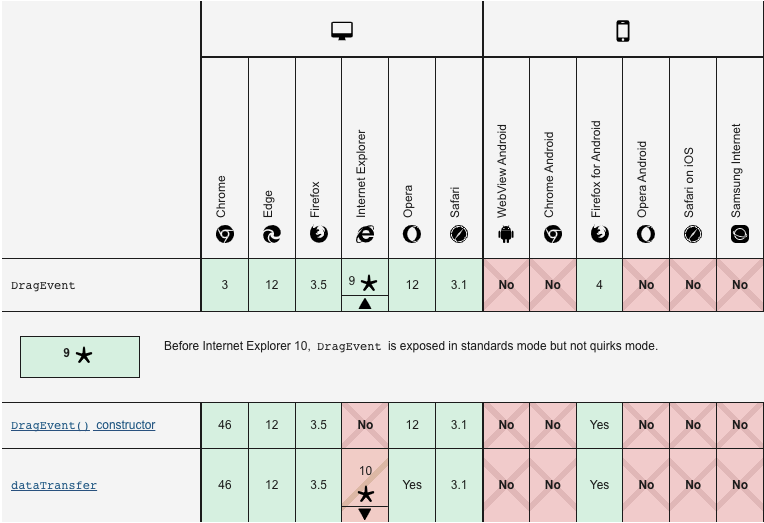
19 |
20 | `mouseEvent` 兼容性
21 |
22 | https://developer.mozilla.org/en-US/docs/Web/API/Element/mouseenter_event
23 |
24 | 
25 |
26 |
27 | # 飞书(基于HTML5方式实现)
28 |
29 | 代码搜索关键词 `dnd-preview__holder`
30 |
31 | 使用 `addEventListeners` 监听全局 `window`
32 |
33 | ```js
34 | e.prototype.setup = function () {
35 | if (void 0 !== this.window) {
36 | if (this.window.__isReactDndBackendSetUp) throw new Error('Cannot have two HTML5 backends at the same time.');
37 | (this.window.__isReactDndBackendSetUp = !0), this.addEventListeners(this.window);
38 | }
39 | };
40 | ```
41 |
42 | 
43 |
44 | 上面这段代码可以看出使用了 [`react-dnd`](https://github.com/react-dnd/react-dnd/blob/e8bd6436548d96f6d6594f763752f424c2e0834b/packages/backend-html5/src/HTML5BackendImpl.ts)
45 |
46 | 监听了很多方法,这里把被拖放的元素称为`源对象`,被经过的元素称为`过程对象`,到达的元素称为目标对象,不同的对象产生不同的拖放事件,在所有拖放事件中提供了一个数据传递对象 dataTransfer,用于在源对象和目标对象间传递数据,它包含了一些方法及属性。包括了 setData()、getData()、clearData()方法来操作拖拽过程中传递的数据,setDragImage()方法来设置拖拽时鼠标的下面的图片默认为被拖拽元素,effectAllowed 和 dropEffect 属性来设置拖放效果。
47 |
48 | ```js
49 | e.prototype.addEventListeners = function (e) {
50 | e.addEventListener &&
51 | (e.addEventListener('dragstart', this.handleTopDragStart),
52 | e.addEventListener('dragstart', this.handleTopDragStartCapture, !0),
53 | e.addEventListener('dragend', this.handleTopDragEndCapture, !0),
54 | e.addEventListener('dragenter', this.handleTopDragEnter),
55 | e.addEventListener('dragenter', this.handleTopDragEnterCapture, !0),
56 | e.addEventListener('dragleave', this.handleTopDragLeaveCapture, !0),
57 | e.addEventListener('dragover', this.handleTopDragOver),
58 | e.addEventListener('dragover', this.handleTopDragOverCapture, !0),
59 | e.addEventListener('drop', this.handleTopDrop),
60 | e.addEventListener('drop', this.handleTopDropCapture, !0));
61 | };
62 | e.prototype.removeEventListeners = function (e) {
63 | e.removeEventListener &&
64 | (e.removeEventListener('dragstart', this.handleTopDragStart),
65 | e.removeEventListener('dragstart', this.handleTopDragStartCapture, !0),
66 | e.removeEventListener('dragend', this.handleTopDragEndCapture, !0),
67 | e.removeEventListener('dragenter', this.handleTopDragEnter),
68 | e.removeEventListener('dragenter', this.handleTopDragEnterCapture, !0),
69 | e.removeEventListener('dragleave', this.handleTopDragLeaveCapture, !0),
70 | e.removeEventListener('dragover', this.handleTopDragOver),
71 | e.removeEventListener('dragover', this.handleTopDragOverCapture, !0),
72 | e.removeEventListener('drop', this.handleTopDrop),
73 | e.removeEventListener('drop', this.handleTopDropCapture, !0));
74 | };
75 | ```
76 |
77 | 当滑动的时候 `handleTopDragStart` 触发,然后使用 `getEventClientOffset ` 方法获取 `r` 里面包含 `x` 和 `y` 的坐标
78 |
79 | 
80 |
81 | ```js
82 | e.prototype.handleTopDragStart = function (e) {
83 | var t = this,
84 | n = this.dragStartSourceIds;
85 | this.dragStartSourceIds = null;
86 | var r = c.getEventClientOffset(e);
87 | this.monitor.isDragging() && this.actions.endDrag(),
88 | this.actions.beginDrag(n || [], {
89 | publishSource: !1,
90 | getSourceClientOffset: this.getSourceClientOffset,
91 | clientOffset: r,
92 | });
93 | };
94 | ```
95 |
96 | 当拿到坐标之后会使用 `this.actions.beginDrag` 方法通信三个参数,通过 `redux` 通信数据
97 |
98 | - publishSource
99 | - getSourceClientOffset
100 | - clientOffset
101 |
102 | 
103 |
104 | 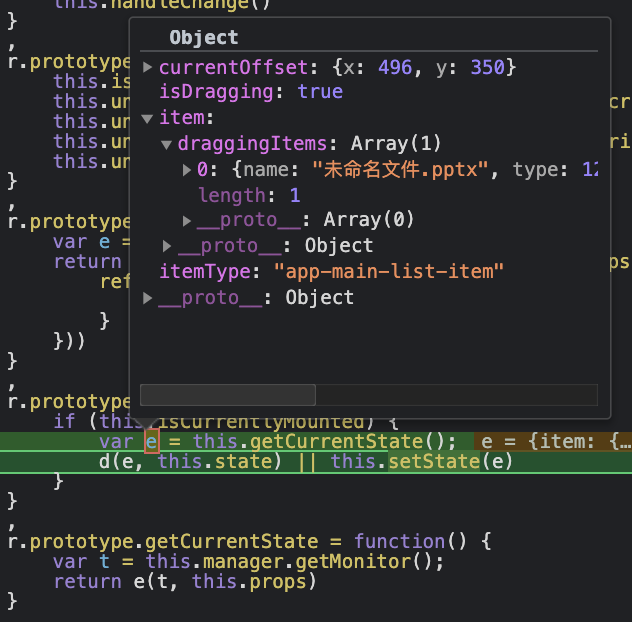
105 |
106 | ```js
107 | (r.prototype.handleChange = function () {
108 | if (this.isCurrentlyMounted) {
109 | var e = this.getCurrentState();
110 | d(e, this.state) || this.setState(e);
111 | }
112 | }),
113 | (r.prototype.getCurrentState = function () {
114 | var t = this.manager.getMonitor();
115 | return e(t, this.props);
116 | });
117 | ```
118 |
119 | 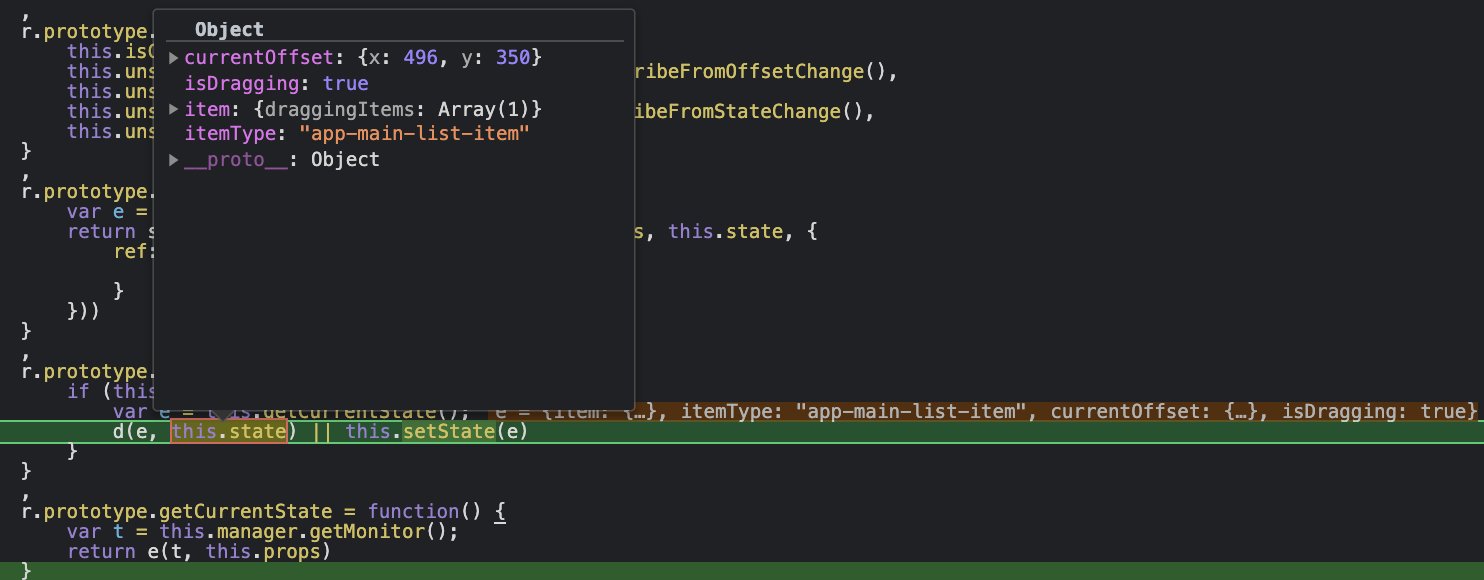
120 |
121 | 然后通过 `d(e, this.state) || this.setState(e)` 做对比判断是否发生了变化,然后执行 `setState` 来触发 `render` 更新,这里会根据 `isVisible` 来决定拖拽组件是否需要显示
122 |
123 | ```js
124 | {
125 | key: "render",
126 | value: function() {
127 | if (!this.isVisible)
128 | return null;
129 | var e = this.props.currentOffset || {
130 | x: 0,
131 | y: 0
132 | }
133 | , n = e.x
134 | , t = e.y
135 | , r = this.item;
136 | return _.a.createElement("div", {
137 | className: "dnd-preview__holder",
138 | style: {
139 | transform: "translate(".concat(n, "px, ").concat(t, "px)")
140 | }
141 | }, _.a.createElement(j, null, _.a.createElement(k, null, this.icon, r && r.is_shortcut && _.a.createElement(A.u, null)), _.a.createElement(R, {
142 | className: "ellipsis"
143 | }, this.name)), this.renderMultipleSelection())
144 | }
145 | }
146 | ```
147 |
148 | 
149 |
150 | # 金山(基于传统方式实现)
151 |
152 | 代码搜索关键词 `yun-list__dragicon`
153 |
154 | 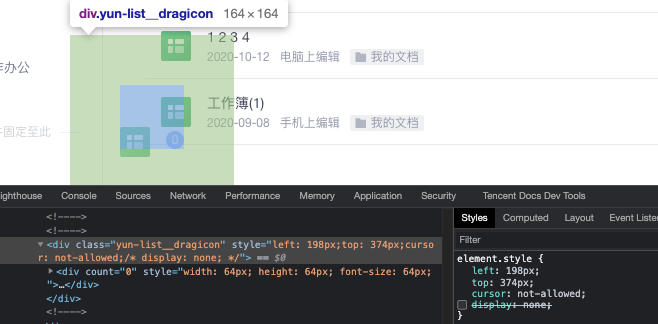
155 |
156 | 使用的是 `mousedown`,`mousemove` 和 `mouseup` 配合实现
157 |
158 | - onDocUp
159 | - onDocMove
160 | - onDown
161 |
162 | ```ts
163 | onDown: function(e, t) {
164 | this.sx = e.clientX,
165 | this.sy = e.clientY,
166 | this.curItem = t,
167 | this.setItemRectCache([].concat((0,
168 | i.default)(document.getElementsByClassName(this.dropClassName))), "dropCache"),
169 | document.addEventListener("mousemove", this.onDocMove),
170 | document.addEventListener("mouseup", this.onDocUp)
171 | },
172 | onDocMove: function(e) {
173 | var t = e.clientX
174 | , n = e.clientY;
175 | (Math.abs(t - this.sx) > 5 || Math.abs(n - this.sy) > 5) && (this.draging = !0,
176 | this.setDropItem(e, t, n),
177 | this.setIconPos(t, n))
178 | },
179 | onDocUp: function(e) {
180 | this.draging = !1,
181 | this.setOutDrop(e),
182 | document.removeEventListener("mousemove", this.onDocMove),
183 | document.removeEventListener("mouseup", this.onDocUp)
184 | },
185 | ```
186 |
187 | 
188 |
189 | `onDocMove` 阶段使用 `setIconPos` 去改变拖拽容器的位置
190 |
191 | 
192 |
193 | 分别有两个碰撞的检测,`setHoverItem` 检测跟自身的列表项,`setOutDrop` 检测左侧边栏的列表项
194 |
195 | ```ts
196 | setIconPos: function(e, t) {
197 | var n = this.$refs.icon;
198 | if (this.$refs.icon) {
199 | var i = this.iconSize
200 | , a = this.draging
201 | , r = this.curIndex
202 | , o = this.droping
203 | , c = (0,
204 | s.default)(i, 2)
205 | , u = c[0]
206 | , l = c[1];
207 | n.style.left = e - (u + 100) / 2 + "px",
208 | n.style.top = t - l - 50 + "px",
209 | n.style.cursor = !a || ~r || o ? "default" : "not-allowed"
210 | }
211 | },
212 | ```
213 |
214 | `onDocMove` 阶段使用 `setHoverItem` 去计算拖动到自身列表的那一行,循环列表的每一项,判断拖拽的滑块落在那一项中,所以这里也做了碰撞检测,拖拽到那一项用 `curIndex` 记录下来
215 |
216 | 
217 |
218 | ```ts
219 | setHoverItem: function(e, t) {
220 | for (var n = this.rectCache, i = !1, a = n.length - 1; a >= 0; a--) {
221 | var r = n[a]
222 | , s = r.x1
223 | , o = r.y1
224 | , c = r.x2
225 | , u = r.y2
226 | , l = r.index
227 | , d = r.canDrop;
228 | if (e < c && e > s && t < u && t > o && d) {
229 | this.curIndex = l,
230 | i = !0;
231 | break
232 | }
233 | }
234 | !i && (this.curIndex = -1)
235 | },
236 | ```
237 |
238 | 当松开手的时候触发 `onDocUp` 事件,再使用 `setOutDrop` 实现碰撞检测,查看拖动文件和目标位置的相对坐标,来判断是否成功拖入
239 |
240 | 
241 |
242 | ```ts
243 | setOutDrop: function(e) {
244 | var t = this
245 | , n = this.dropCache;
246 | if (n && n.length && 1 === this.checkedKeys.length) {
247 | var i = e.clientX
248 | , a = e.clientY;
249 | n.forEach(function(e) {
250 | var n = e.x1
251 | , r = e.y1
252 | , s = e.x2
253 | , o = e.y2
254 | , c = e.index
255 | , u = e.el
256 | , l = e.height
257 | , d = u.classList
258 | , p = r + l / 2;
259 | d.remove("dragover"),
260 | d.remove("dragover-top"),
261 | // ↓这里为碰撞检测
262 | i < s && a > n && a < o && a > r && t.$emit("itemdrop", c, t.checkedKeys, 0 === c && a < p)
263 | })
264 | }
265 | this.dropCache = null
266 | },
267 | ```
268 |
269 | 空跑了 for 了来定位
270 |
271 | 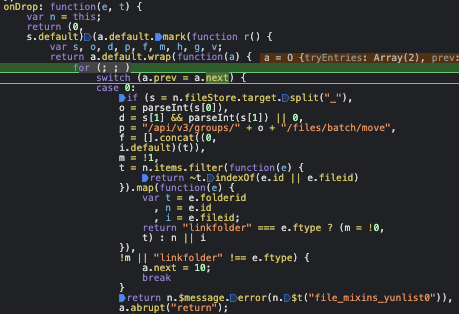
272 |
273 | # 微云(基于传统方式实现)
274 |
275 | 跟金山相似
276 |
277 | 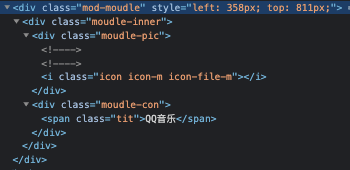
278 |
279 | https://git.woa.com/weiyun-web/wy/blob/master/vue-plugin/dragdrop.js
280 |
281 | 
282 |
283 | # 谷歌(暂无方式实现)
284 |
285 | 无拖拽功能
286 |
287 |
288 | # React DND(基于HTML5方式实现)
289 |
290 | React DnD 的英文是 `Drag and Drop for React`
291 |
292 | React DnD 是 React 和 Redux 的核心作者 Dan Abramov 创造的一组 React 高阶组件,可以在保持组件分离的前提下帮助构建复杂的拖放接口
293 |
294 | 两个 `react-dnd-html5-backend` 和 `react-dnd` 核心包的大小
295 |
296 | 
297 |
298 | 
299 |
300 |
301 |
302 | 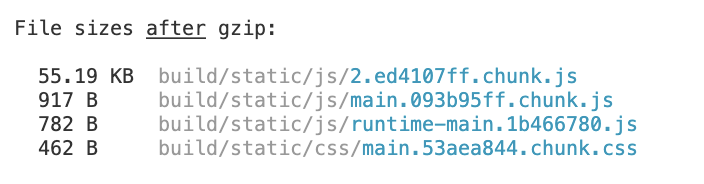
303 |
304 | 提供的接口
305 |
306 | - exports.DndContext = DndContext;
307 | - exports.DndProvider = DndProvider;
308 | - exports.DragLayer = DragLayer;
309 | - exports.DragPreviewImage = DragPreviewImage;
310 | - exports.DragSource = DragSource;
311 | - exports.DropTarget = DropTarget;
312 | - exports.useDrag = useDrag;
313 | - exports.useDragDropManager = useDragDropManager;
314 | - exports.useDragLayer = useDragLayer;
315 | - exports.useDrop = useDrop;
316 |
317 |
318 | # Dnd Core
319 |
320 | React-DnD 使用数据而不是视图作为事实来源,当在屏幕拖动某些东西的时候,并不是正在拖动组件或者 DOM 节点。而是通过数据模拟 preview 让拖动源正在被拖动。dnd-core正式围绕着数据为核心,并且React-DnD内部使用了 Redux
321 |
322 | ReactDnD 通过坐标形式的接口,来控制拖拽源的 preview 位置,如果判断可以落下再把拖拽源移动过去。
323 |
324 | 配合边界函数和多数逻辑判断,封装了 dnd-core 核心逻辑数据驱动
325 |
326 | ## 碰撞检测原理
327 |
328 | Dnd Core 的工具库里面封装了很多碰撞检测的工具函数
329 |
330 | 确定两个笛卡尔坐标偏移是否相等
331 |
332 | 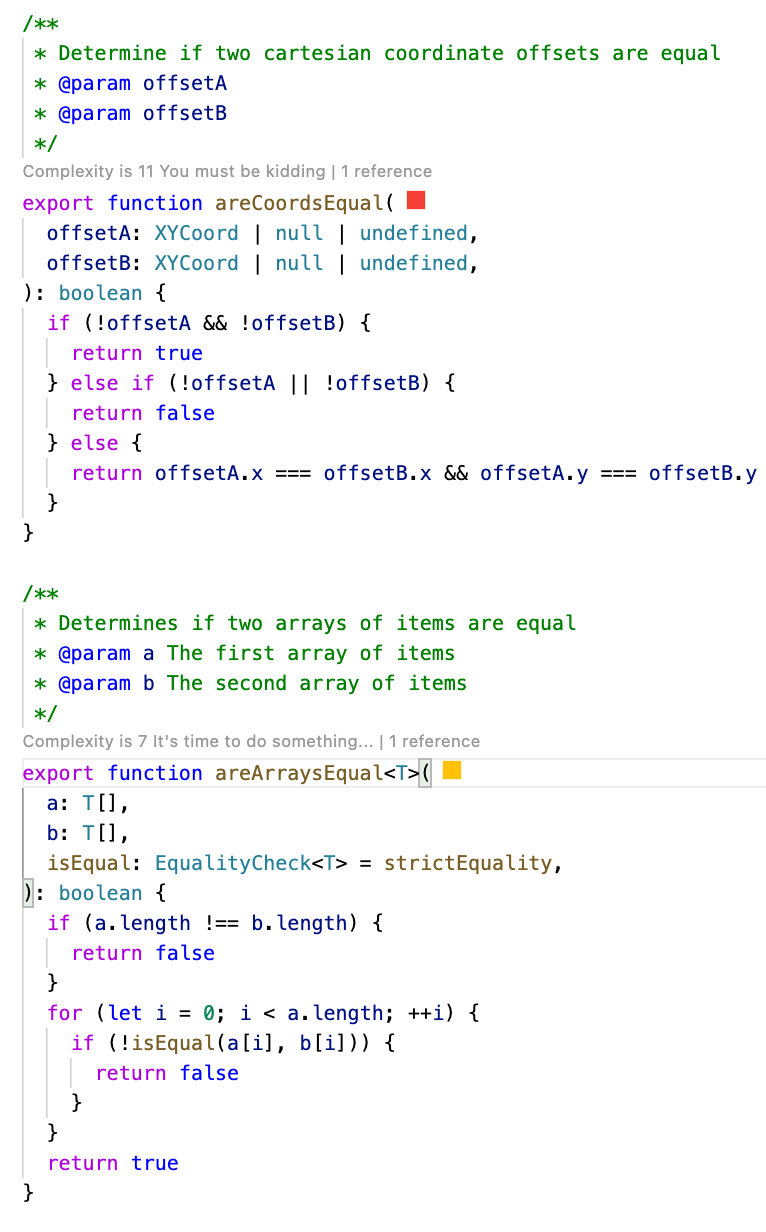
333 |
334 | 返回拖动源组件位置的笛卡尔距离,基于其位置,计算当前拖动操作开始的时间,以及移动差异,如果没有被拖动的项目,则返回 null
335 |
336 | 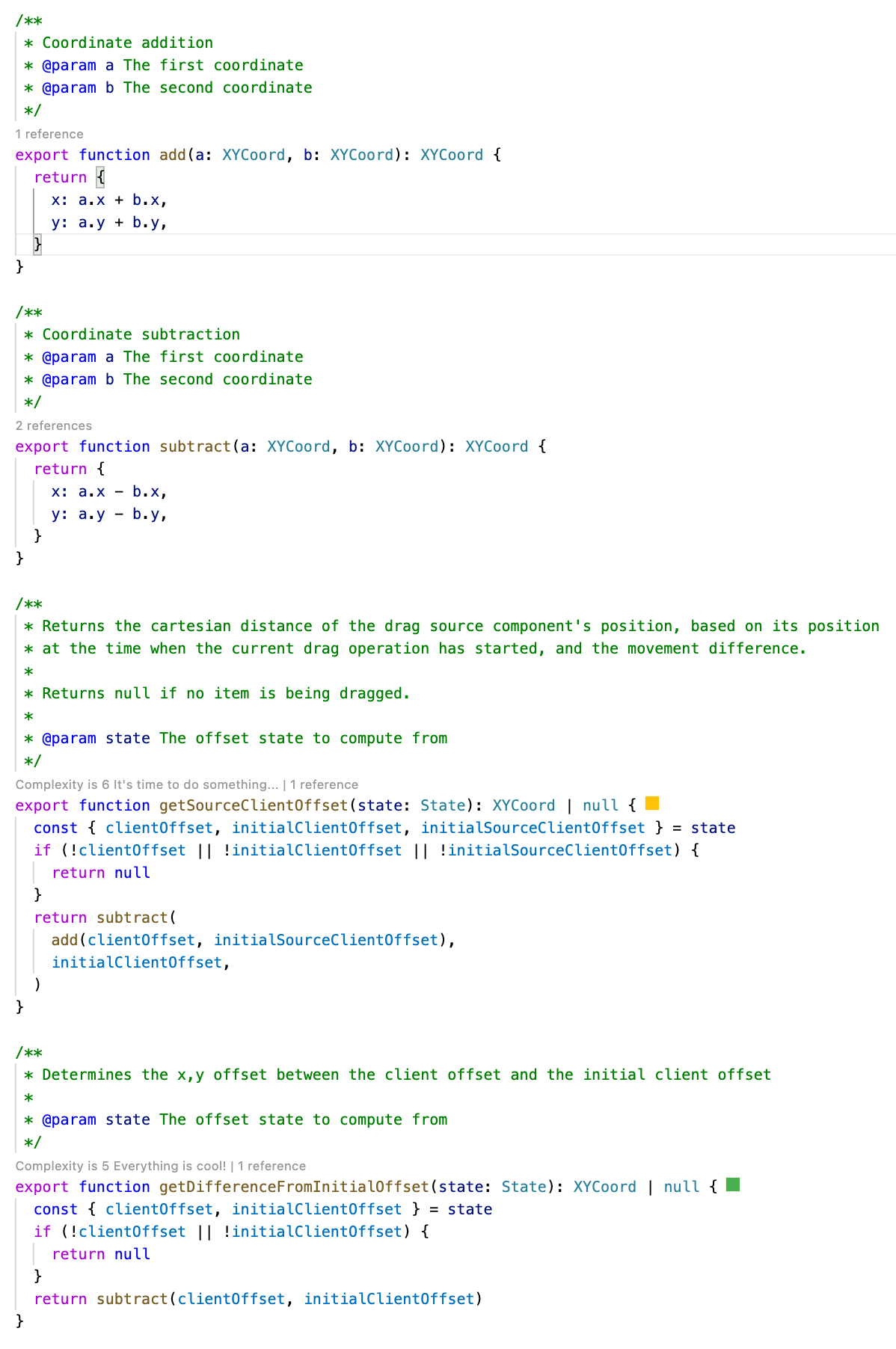
337 |
338 |
339 | # 基本概念
340 |
341 | ## Backends
342 |
343 | React DnD 抽象了后端的概念,我们可以使用 HTML5 拖拽后端,也可以自定义 touch、mouse 事件模拟的后端实现,后端主要用来抹平浏览器差异,处理 DOM 事件,同时把 DOM 事件转换为 React DnD 内部的 redux action
344 |
345 | 可以理解为具体拖拽的事件的实现方法
346 |
347 | - 移动端主要为 `dragstart`,`selectstart`,`dragenter`,`dragover` 和 `dragend` 的实现
348 |
349 | https://github.com/react-dnd/react-dnd/blob/main/packages/backend-html5/src/HTML5BackendImpl.ts
350 |
351 | - 移动端主要为 `move`,`start`,`end`,`contextmenu` 和 `keydown` 的实现
352 |
353 | https://github.com/react-dnd/react-dnd/blob/e8bd6436548d96f6d6594f763752f424c2e0834b/packages/backend-touch/src/TouchBackendImpl.ts
354 |
355 | dnd 后端可以使用官方的提供的两个 HTML5Backend or TouchBackend,或者也可以自己写backend后端
356 |
357 | ## Item
358 | React DnD 基于数据驱动,当拖放发生时,它用一个数据对象来描述当前的元素,比如 { cardId: 25 }
359 |
360 | ## Type
361 | 类型是唯一标识应用程序中整个项目类别的字符串(或符号),类似于 redux 里面的 actions types 枚举常量。
362 |
363 | ## Monitors
364 |
365 | 拖放操作都是有状态的,React DnD 通过 Monitor 来存储这些状态并且提供查询
366 |
367 | ## Connectors
368 |
369 | Backend 关注 DOM 事件,组件关注拖放状态,connector 可以连接组件和 Backend ,可以让 Backend 获取到 DOM。
370 |
371 | ## useDrag
372 |
373 | 用于将当前组件用作拖动源的钩子
374 |
375 | ## useDrop
376 | 使用当前组件作为放置目标的钩子
377 |
378 | ## useDragLayer
379 |
380 | 用于将当前组件用作拖动层的钩子
381 |
382 | inport style from './style.ts'
383 |
384 | div className={style.xxxx}
--------------------------------------------------------------------------------