2 | {{ site.text.share_buttons.text }}
3 |
4 |
5 | {% if site.share_facebook %}
6 |
7 | {% endif %}
8 |
9 | {% if site.share_twitter %}
10 |
11 | {% endif %}
12 |
13 | {% if site.share_googleplus %}
14 |
15 | {% endif %}
16 |
17 | {% if site.share_linkedin %}
18 |
19 | {% endif %}
20 |
21 | {% if site.share_digg %}
22 |
23 | {% endif %}
24 |
25 | {% if site.share_tumblr %}
26 |
27 | {% endif %}
28 |
29 | {% if site.share_reddit %}
30 |
31 | {% endif %}
32 |
33 | {% if site.share_stumbleupon %}
34 |
35 | {% endif %}
36 |
37 | {% if site.share_hackernews %}
38 |
39 | {% endif %}
40 |
41 |
 3 |
3 | 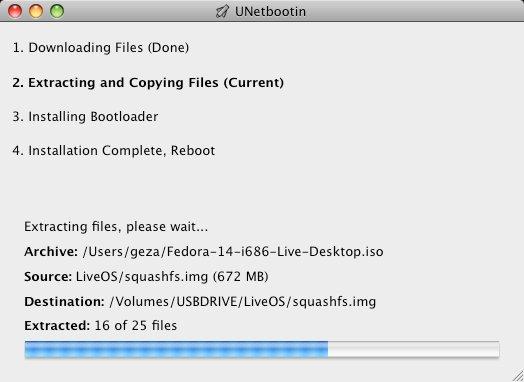 30 |
31 | For more details about this tool or download links please check [this](http://unetbootin.github.io/)
32 |
33 |
--------------------------------------------------------------------------------
/Rakefile:
--------------------------------------------------------------------------------
1 | drafts_dir = '_drafts'
2 | posts_dir = '_posts'
3 |
4 | # rake post['my new post']
5 | desc 'create a new post with "rake post[\'post title\']"'
6 | task :post, :title do |t, args|
7 | if args.title
8 | title = args.title
9 | else
10 | puts "Please try again. Remember to include the filename."
11 | end
12 | mkdir_p "#{posts_dir}"
13 | filename = "#{posts_dir}/#{Time.now.strftime('%Y-%m-%d')}-#{title.downcase.gsub(/[^\w]+/, '-')}.md"
14 | puts "Creating new post: #{filename}"
15 | File.open(filename, "w") do |f|
16 | f << <<-EOS.gsub(/^ /, '')
17 | ---
18 | layout: post
19 | title: #{title}
20 | date: #{Time.new.strftime('%Y-%m-%d %H:%M')}
21 | categories:
22 | ---
23 |
24 | EOS
25 | end
26 |
27 | # Uncomment the line below if you want the post to automatically open in your default text editor
28 | # system ("#{ENV['EDITOR']} #{filename}")
29 | end
30 |
31 | # usage: rake draft['my new draft']
32 | desc 'create a new draft post with "rake draft[\'draft title\']"'
33 | task :draft, :title do |t, args|
34 | if args.title
35 | title = args.title
36 | else
37 | puts "Please try again. Remember to include the filename."
38 | end
39 | mkdir_p "#{drafts_dir}"
40 | filename = "#{drafts_dir}/#{title.downcase.gsub(/[^\w]+/, '-')}.md"
41 | puts "Creating new draft: #{filename}"
42 | File.open(filename, "w") do |f|
43 | f << <<-EOS.gsub(/^ /, '')
44 | ---
45 | layout: post
46 | title: #{title}
47 | date: #{Time.new.strftime('%Y-%m-%d %H:%M')}
48 | categories:
49 | ---
50 |
51 | EOS
52 | end
53 |
54 | # Uncomment the line below if you want the draft to automatically open in your default text editor
55 | # system ("#{ENV['EDITOR']} #{filename}")
56 | end
57 |
58 | desc 'preview the site with drafts'
59 | task :preview do
60 | puts "## Generating site"
61 | puts "## Stop with ^C (
30 |
31 | For more details about this tool or download links please check [this](http://unetbootin.github.io/)
32 |
33 |
--------------------------------------------------------------------------------
/Rakefile:
--------------------------------------------------------------------------------
1 | drafts_dir = '_drafts'
2 | posts_dir = '_posts'
3 |
4 | # rake post['my new post']
5 | desc 'create a new post with "rake post[\'post title\']"'
6 | task :post, :title do |t, args|
7 | if args.title
8 | title = args.title
9 | else
10 | puts "Please try again. Remember to include the filename."
11 | end
12 | mkdir_p "#{posts_dir}"
13 | filename = "#{posts_dir}/#{Time.now.strftime('%Y-%m-%d')}-#{title.downcase.gsub(/[^\w]+/, '-')}.md"
14 | puts "Creating new post: #{filename}"
15 | File.open(filename, "w") do |f|
16 | f << <<-EOS.gsub(/^ /, '')
17 | ---
18 | layout: post
19 | title: #{title}
20 | date: #{Time.new.strftime('%Y-%m-%d %H:%M')}
21 | categories:
22 | ---
23 |
24 | EOS
25 | end
26 |
27 | # Uncomment the line below if you want the post to automatically open in your default text editor
28 | # system ("#{ENV['EDITOR']} #{filename}")
29 | end
30 |
31 | # usage: rake draft['my new draft']
32 | desc 'create a new draft post with "rake draft[\'draft title\']"'
33 | task :draft, :title do |t, args|
34 | if args.title
35 | title = args.title
36 | else
37 | puts "Please try again. Remember to include the filename."
38 | end
39 | mkdir_p "#{drafts_dir}"
40 | filename = "#{drafts_dir}/#{title.downcase.gsub(/[^\w]+/, '-')}.md"
41 | puts "Creating new draft: #{filename}"
42 | File.open(filename, "w") do |f|
43 | f << <<-EOS.gsub(/^ /, '')
44 | ---
45 | layout: post
46 | title: #{title}
47 | date: #{Time.new.strftime('%Y-%m-%d %H:%M')}
48 | categories:
49 | ---
50 |
51 | EOS
52 | end
53 |
54 | # Uncomment the line below if you want the draft to automatically open in your default text editor
55 | # system ("#{ENV['EDITOR']} #{filename}")
56 | end
57 |
58 | desc 'preview the site with drafts'
59 | task :preview do
60 | puts "## Generating site"
61 | puts "## Stop with ^C (  14 |
15 | ## 1. Alexa Skill, where to start from ?
16 |
17 | The idea of this article it's to help you to develop a skill from scratch or based on a starter pack, this is an example [alexa-skill-starter-pack-typescript](https://github.com/boobo94/alexa-skill-starter-pack-typescript) from my github account. I dont' want to discuss too much about this starter pack, because you can find more details how to use it or where to start from in the [README.md](https://github.com/boobo94/alexa-skill-starter-pack-typescript/blob/master/README.md). So if you want to learn more about how to build alexa skill, keep reading.
18 |
19 | Recently, I started a new project, for the Spanish market. At this moment the market it's in the beginning phase, I'll probably disclosure more details in the future posts, but for the moment it's not very important. . Don't
20 |
21 | When I recently started the research, I had few questions about we will learn below:
22 |
23 | ## 2. How to build Alexa Skill ?
24 |
25 | When I started it was very tough for me to understand where to start from, what to read first or how to know what I need to learn. If you are here, probably you started already to read some documents from Amazon and guess what ?! you already discovered that Amazon have a comprehensive documentation about [how to build a custom skill](https://developer.amazon.com/docs/custom-skills/understanding-custom-skills.html) and the documentation explains very well how to do it. You don't have to read all, just to understand basics, keep reading this for help.
26 |
27 | I started to read about what it's an [Invocation Name](https://developer.amazon.com/docs/custom-skills/choose-the-invocation-name-for-a-custom-skill.html), [Intents](https://developer.amazon.com/docs/custom-skills/create-the-interaction-model-for-your-skill.html#intents-and-slots), [Intent Slots](https://developer.amazon.com/docs/custom-skills/create-intents-utterances-and-slots.html#identify-slots), [Utterances](https://developer.amazon.com/docs/custom-skills/create-the-interaction-model-for-your-skill.html#sample-utterances), [Slot Types](https://developer.amazon.com/docs/custom-skills/create-intents-utterances-and-slots.html#identify-slots). So if you check the links, you'll find the official definitions on Amazon Alexa Developers Portal, but let's explain them more simple than that.
28 |
29 | ### Invocation Name
30 |
31 | The invocation name represents the name used to invoke your skill. So if for example you want to build a skill which presents news about technology, a good invocation name can be "technology news" or "technology facts", so this it's the name which will open your skill, like you enter the name of a website in the web browser to open that website.
32 |
33 | There are some requirements about choosing the invocation name and you can read them [here](https://developer.amazon.com/docs/custom-skills/choose-the-invocation-name-for-a-custom-skill.html#cert-invocation-name-req).
34 |
35 | ### Intents
36 |
37 | So for the moment you know how to open the skill, but now we have the skill, how you can ask Alexa to open a section? Referring to the example presented before, we have a skill about technology news, but this it's a generic subject. If you want that your skill to be able to present informations about Artificial Intelligence, Programming Languages, New Smartphones etc.., you can create an intent for each of these departments. So when users says 'Alexa, ask technology news', Alexa will start a new session for my skill, but after that let say that user wants news about Artificial Intelligence and he will say something like 'Give me news about Artificial Intelligence' (this sentence it's an utterance, we'll discuss in the next chapter about them), defined under Artificial Intelligence intent, so Alexa will know, that my intention it's to get information about Artificial Intelligence.
38 |
39 | Let's recap, **an intent** represent an action wanted by user, what he needs. [Here](https://developer.amazon.com/docs/custom-skills/create-intents-utterances-and-slots.html#intent-name) you can find some rules about how to choose the best name for your intents. As well, there are some built in intents which can be found [here](https://developer.amazon.com/docs/custom-skills/built-in-intent-library.html).
40 |
41 | ### Utterances
42 |
43 | As I already told you, an utterance represents a sentence which it's part from an Intent and define particularly that Intent. This it's a very important part, that you should focus on and think for all variations which point to the same idea or multiple ways that a user can ask the same thing. For example, if I want news about Artificial intelligence, you can say it as below:
44 |
45 | 1. Offer me news about Artificial Intelligence
46 | 2. Give me informations about Artificial Intelligence
47 | 3. I want news about AI
48 | 4. More information about AI
49 |
50 | Don't be lazy and please not overrate your user, because not all of them are smart or maybe they are not used with AI, so please have in mind that your user can be not so clever and in that way, you'll make it better. Add as much as possible utterances you can to cover all the variations that a user can ask for an intent.
51 |
52 | If you want to know best practices and recommendations please [visit this](https://developer.amazon.com/docs/custom-skills/best-practices-for-sample-utterances-and-custom-slot-type-values.html) or rules [check here](https://developer.amazon.com/docs/custom-skills/create-intents-utterances-and-slots.html#h3_intentref_rules).
53 |
54 | ### Intent Slots
55 |
56 | So now, you know what it's an intent and an utterance, but an **intent slot** it's like a variable. For example if we have an intent to get distance between two points, point a to point b, we will have utterances like:
57 |
58 | 1. Give me distance from Paris to New York
59 | 2. How long it's between Budapest to Bucharest
60 |
61 | So we can identify two variables, _pointA_ and _pointB_, now we can rewrite rules like:
62 |
63 | 1. Give me distance from {pointA} to {pointB}
64 | 2. How long it's between {pointA} to {pointB}
65 |
66 | Alexa will match the value in his slot. You can read more about how to identify slots inside utterances or best practices [here](https://developer.amazon.com/docs/custom-skills/create-intents-utterances-and-slots.html#identify-slots). A slot can have a type, so if you want to know how to assign a slot type to a slot [read here](https://developer.amazon.com/docs/custom-skills/create-intents-utterances-and-slots.html#assign-slot-types).
67 |
68 | ### Slot Types
69 |
70 | A slot type represents the type of slot, it's like a variable type. There are [default value](https://developer.amazon.com/docs/custom-skills/slot-type-reference.html) builds by Amazon. If you want to discover best practices you can find [here](https://developer.amazon.com/docs/custom-skills/best-practices-for-sample-utterances-and-custom-slot-type-values.html#h3_custom_slot_values)
71 |
72 | You can exercise more by doing on your own in the [Developer Console](https://developer.amazon.com/alexa/console/ask)
73 |
74 |
75 |
76 | ## 3. How to run a server locally ?
77 |
78 | You can do it simple, just by downloading \[ngrok\](https://ngrok.com/) and create a server with the following code
79 |
80 | ```js
81 | import * as express from "express";
82 | import * as bodyParser from "body-parser";
83 | import { LambdaHandler } from "ask-sdk-core/dist/skill/factory/BaseSkillFactory";
84 | import { RequestEnvelope } from "ask-sdk-model";
85 | import { AddressInfo } from "net";
86 |
87 | import { handler } from './lambda/custom/index'
88 |
89 | // Convert LambdaFunction to RequestHandler
90 |
91 | function ConvertHandler(handler: LambdaHandler): express.RequestHandler {
92 | return (req, res) => {
93 | handler(req.body as RequestEnvelope, null, (err, result) => {
94 | if (err) {
95 | return res.status(500).send(err);
96 | }
97 | return res.status(200).json(result);
98 | });
99 | };
100 | }
101 |
102 | // create server
103 | const server = express();
104 | const listener = server.listen(process.env.port || process.env.PORT || 3000, function () {
105 | const { address, port } = listener.address() as AddressInfo;
106 | console.log('%s listening to %s%s', server.name, address, port);
107 | });
108 |
109 | // parse json
110 | server.use(bodyParser.json());
111 |
112 | // connect the lambda functions to http
113 | server.post("/", ConvertHandler(handler));
114 | ```
115 |
116 | Take a look at [this](https://github.com/boobo94/alexa-skill-starter-pack-typescript) alexa open source project.
117 |
118 | Open Terminal and run
119 |
120 | `$ ./ngrok http -bind-tls=true -host-header=rewrite 3000`
121 |
122 | Copy the https link and go to [Alexa Console](https://developer.amazon.com/alexa/console/ask/test/amzn1.ask.skill.15bebd4e-4520-4a06-8fb7-57149258f4d0/development/en_US), under Endpoint section, select **TTPS** and paste the link in **Default Region** input field. From the below dropdown, choose **My development endpoint is a sub-domain of a domain that has a wildcard certificate from a certificate authority**.
123 |
124 | **Every time when you run the ngrok, you need to update the endpoint url.**
125 |
126 | ## 4. Should I choose Lambda Function or HTTPS server ?
127 |
128 | Depends by your skill, but probably the most of you can use Lambda Function.
129 |
130 | #### Why to choose Lambda:
131 |
132 | * you don't need to administrate any resource
133 | * don't need SSL certificate
134 | * don't need to verify where requests come from
135 | * AWS Lambda run only when a request comes
136 | * First 1M requests per month are free. [Read more about pricing](https://aws.amazon.com/lambda/pricing/)
137 |
138 | Read [here](https://developer.amazon.com/docs/custom-skills/host-a-custom-skill-as-an-aws-lambda-function.html#about-lambda-functions-and-custom-skills) more about connecting Alexa with AWS Lambda or [here](https://developer.amazon.com/docs/custom-skills/host-a-custom-skill-as-an-aws-lambda-function.html#create-a-lambda-function-for-an-alexa-skill) to create a Lambda for Alexa.
139 |
140 | #### Requirements for HTTPS Web Service:
141 |
142 | * The service must be Internet-accessible.
143 | * The service must adhere to the [Alexa Skills Kit interface](https://developer.amazon.com/docs/custom-skills/request-and-response-json-reference.html).
144 | * The service must support HTTP over SSL/TLS, leveraging an Amazon-trusted certificate.
145 | * The service must accept requests on port 443.
146 | * The service must validate that incoming requests are coming from Alexa.
147 |
148 | If you want to read more about configurations and requirements check [here](https://developer.amazon.com/docs/custom-skills/host-a-custom-skill-as-a-web-service.html).
149 |
150 | ## 5. Where to start coding from ?
151 |
152 | Before to start any code, I suggest you to choose an SDK, if you want to code in javascript, **SDK v2** it's a better option than v1 and after that, you can take a look throw other alexa open source projects. You can find basic examples on [Alexa's Github profile](https://github.com/alexa/alexa-skills-kit-sdk-for-nodejs), but can search for more: [alexa-typescript-hello-world](https://github.com/Xzya/alexa-typescript-hello-world), [alexa-romanian-radio](https://github.com/Xzya/alexa-romanian-radio), [alexa-lambda-typescript](https://github.com/Xzya/alexa-lambda-typescript). I really recommand you to choose an sdk because it's more easier to interact with Amazon Alexa API.
153 |
154 | ## Summary
155 |
156 | What you've learned here will offer you a better overview about how to create alexa skills. You've learned about alexa skill intents, alexa slot types, alexa skill utterances, how to run a server locally and why to choose a Lambda function.
157 |
158 | What alexa skill do you want to build ? Please leave me a comment and I can offer you more advices.
159 |
160 | ### Resources
161 |
162 | -
14 |
15 | ## 1. Alexa Skill, where to start from ?
16 |
17 | The idea of this article it's to help you to develop a skill from scratch or based on a starter pack, this is an example [alexa-skill-starter-pack-typescript](https://github.com/boobo94/alexa-skill-starter-pack-typescript) from my github account. I dont' want to discuss too much about this starter pack, because you can find more details how to use it or where to start from in the [README.md](https://github.com/boobo94/alexa-skill-starter-pack-typescript/blob/master/README.md). So if you want to learn more about how to build alexa skill, keep reading.
18 |
19 | Recently, I started a new project, for the Spanish market. At this moment the market it's in the beginning phase, I'll probably disclosure more details in the future posts, but for the moment it's not very important. . Don't
20 |
21 | When I recently started the research, I had few questions about we will learn below:
22 |
23 | ## 2. How to build Alexa Skill ?
24 |
25 | When I started it was very tough for me to understand where to start from, what to read first or how to know what I need to learn. If you are here, probably you started already to read some documents from Amazon and guess what ?! you already discovered that Amazon have a comprehensive documentation about [how to build a custom skill](https://developer.amazon.com/docs/custom-skills/understanding-custom-skills.html) and the documentation explains very well how to do it. You don't have to read all, just to understand basics, keep reading this for help.
26 |
27 | I started to read about what it's an [Invocation Name](https://developer.amazon.com/docs/custom-skills/choose-the-invocation-name-for-a-custom-skill.html), [Intents](https://developer.amazon.com/docs/custom-skills/create-the-interaction-model-for-your-skill.html#intents-and-slots), [Intent Slots](https://developer.amazon.com/docs/custom-skills/create-intents-utterances-and-slots.html#identify-slots), [Utterances](https://developer.amazon.com/docs/custom-skills/create-the-interaction-model-for-your-skill.html#sample-utterances), [Slot Types](https://developer.amazon.com/docs/custom-skills/create-intents-utterances-and-slots.html#identify-slots). So if you check the links, you'll find the official definitions on Amazon Alexa Developers Portal, but let's explain them more simple than that.
28 |
29 | ### Invocation Name
30 |
31 | The invocation name represents the name used to invoke your skill. So if for example you want to build a skill which presents news about technology, a good invocation name can be "technology news" or "technology facts", so this it's the name which will open your skill, like you enter the name of a website in the web browser to open that website.
32 |
33 | There are some requirements about choosing the invocation name and you can read them [here](https://developer.amazon.com/docs/custom-skills/choose-the-invocation-name-for-a-custom-skill.html#cert-invocation-name-req).
34 |
35 | ### Intents
36 |
37 | So for the moment you know how to open the skill, but now we have the skill, how you can ask Alexa to open a section? Referring to the example presented before, we have a skill about technology news, but this it's a generic subject. If you want that your skill to be able to present informations about Artificial Intelligence, Programming Languages, New Smartphones etc.., you can create an intent for each of these departments. So when users says 'Alexa, ask technology news', Alexa will start a new session for my skill, but after that let say that user wants news about Artificial Intelligence and he will say something like 'Give me news about Artificial Intelligence' (this sentence it's an utterance, we'll discuss in the next chapter about them), defined under Artificial Intelligence intent, so Alexa will know, that my intention it's to get information about Artificial Intelligence.
38 |
39 | Let's recap, **an intent** represent an action wanted by user, what he needs. [Here](https://developer.amazon.com/docs/custom-skills/create-intents-utterances-and-slots.html#intent-name) you can find some rules about how to choose the best name for your intents. As well, there are some built in intents which can be found [here](https://developer.amazon.com/docs/custom-skills/built-in-intent-library.html).
40 |
41 | ### Utterances
42 |
43 | As I already told you, an utterance represents a sentence which it's part from an Intent and define particularly that Intent. This it's a very important part, that you should focus on and think for all variations which point to the same idea or multiple ways that a user can ask the same thing. For example, if I want news about Artificial intelligence, you can say it as below:
44 |
45 | 1. Offer me news about Artificial Intelligence
46 | 2. Give me informations about Artificial Intelligence
47 | 3. I want news about AI
48 | 4. More information about AI
49 |
50 | Don't be lazy and please not overrate your user, because not all of them are smart or maybe they are not used with AI, so please have in mind that your user can be not so clever and in that way, you'll make it better. Add as much as possible utterances you can to cover all the variations that a user can ask for an intent.
51 |
52 | If you want to know best practices and recommendations please [visit this](https://developer.amazon.com/docs/custom-skills/best-practices-for-sample-utterances-and-custom-slot-type-values.html) or rules [check here](https://developer.amazon.com/docs/custom-skills/create-intents-utterances-and-slots.html#h3_intentref_rules).
53 |
54 | ### Intent Slots
55 |
56 | So now, you know what it's an intent and an utterance, but an **intent slot** it's like a variable. For example if we have an intent to get distance between two points, point a to point b, we will have utterances like:
57 |
58 | 1. Give me distance from Paris to New York
59 | 2. How long it's between Budapest to Bucharest
60 |
61 | So we can identify two variables, _pointA_ and _pointB_, now we can rewrite rules like:
62 |
63 | 1. Give me distance from {pointA} to {pointB}
64 | 2. How long it's between {pointA} to {pointB}
65 |
66 | Alexa will match the value in his slot. You can read more about how to identify slots inside utterances or best practices [here](https://developer.amazon.com/docs/custom-skills/create-intents-utterances-and-slots.html#identify-slots). A slot can have a type, so if you want to know how to assign a slot type to a slot [read here](https://developer.amazon.com/docs/custom-skills/create-intents-utterances-and-slots.html#assign-slot-types).
67 |
68 | ### Slot Types
69 |
70 | A slot type represents the type of slot, it's like a variable type. There are [default value](https://developer.amazon.com/docs/custom-skills/slot-type-reference.html) builds by Amazon. If you want to discover best practices you can find [here](https://developer.amazon.com/docs/custom-skills/best-practices-for-sample-utterances-and-custom-slot-type-values.html#h3_custom_slot_values)
71 |
72 | You can exercise more by doing on your own in the [Developer Console](https://developer.amazon.com/alexa/console/ask)
73 |
74 |
75 |
76 | ## 3. How to run a server locally ?
77 |
78 | You can do it simple, just by downloading \[ngrok\](https://ngrok.com/) and create a server with the following code
79 |
80 | ```js
81 | import * as express from "express";
82 | import * as bodyParser from "body-parser";
83 | import { LambdaHandler } from "ask-sdk-core/dist/skill/factory/BaseSkillFactory";
84 | import { RequestEnvelope } from "ask-sdk-model";
85 | import { AddressInfo } from "net";
86 |
87 | import { handler } from './lambda/custom/index'
88 |
89 | // Convert LambdaFunction to RequestHandler
90 |
91 | function ConvertHandler(handler: LambdaHandler): express.RequestHandler {
92 | return (req, res) => {
93 | handler(req.body as RequestEnvelope, null, (err, result) => {
94 | if (err) {
95 | return res.status(500).send(err);
96 | }
97 | return res.status(200).json(result);
98 | });
99 | };
100 | }
101 |
102 | // create server
103 | const server = express();
104 | const listener = server.listen(process.env.port || process.env.PORT || 3000, function () {
105 | const { address, port } = listener.address() as AddressInfo;
106 | console.log('%s listening to %s%s', server.name, address, port);
107 | });
108 |
109 | // parse json
110 | server.use(bodyParser.json());
111 |
112 | // connect the lambda functions to http
113 | server.post("/", ConvertHandler(handler));
114 | ```
115 |
116 | Take a look at [this](https://github.com/boobo94/alexa-skill-starter-pack-typescript) alexa open source project.
117 |
118 | Open Terminal and run
119 |
120 | `$ ./ngrok http -bind-tls=true -host-header=rewrite 3000`
121 |
122 | Copy the https link and go to [Alexa Console](https://developer.amazon.com/alexa/console/ask/test/amzn1.ask.skill.15bebd4e-4520-4a06-8fb7-57149258f4d0/development/en_US), under Endpoint section, select **TTPS** and paste the link in **Default Region** input field. From the below dropdown, choose **My development endpoint is a sub-domain of a domain that has a wildcard certificate from a certificate authority**.
123 |
124 | **Every time when you run the ngrok, you need to update the endpoint url.**
125 |
126 | ## 4. Should I choose Lambda Function or HTTPS server ?
127 |
128 | Depends by your skill, but probably the most of you can use Lambda Function.
129 |
130 | #### Why to choose Lambda:
131 |
132 | * you don't need to administrate any resource
133 | * don't need SSL certificate
134 | * don't need to verify where requests come from
135 | * AWS Lambda run only when a request comes
136 | * First 1M requests per month are free. [Read more about pricing](https://aws.amazon.com/lambda/pricing/)
137 |
138 | Read [here](https://developer.amazon.com/docs/custom-skills/host-a-custom-skill-as-an-aws-lambda-function.html#about-lambda-functions-and-custom-skills) more about connecting Alexa with AWS Lambda or [here](https://developer.amazon.com/docs/custom-skills/host-a-custom-skill-as-an-aws-lambda-function.html#create-a-lambda-function-for-an-alexa-skill) to create a Lambda for Alexa.
139 |
140 | #### Requirements for HTTPS Web Service:
141 |
142 | * The service must be Internet-accessible.
143 | * The service must adhere to the [Alexa Skills Kit interface](https://developer.amazon.com/docs/custom-skills/request-and-response-json-reference.html).
144 | * The service must support HTTP over SSL/TLS, leveraging an Amazon-trusted certificate.
145 | * The service must accept requests on port 443.
146 | * The service must validate that incoming requests are coming from Alexa.
147 |
148 | If you want to read more about configurations and requirements check [here](https://developer.amazon.com/docs/custom-skills/host-a-custom-skill-as-a-web-service.html).
149 |
150 | ## 5. Where to start coding from ?
151 |
152 | Before to start any code, I suggest you to choose an SDK, if you want to code in javascript, **SDK v2** it's a better option than v1 and after that, you can take a look throw other alexa open source projects. You can find basic examples on [Alexa's Github profile](https://github.com/alexa/alexa-skills-kit-sdk-for-nodejs), but can search for more: [alexa-typescript-hello-world](https://github.com/Xzya/alexa-typescript-hello-world), [alexa-romanian-radio](https://github.com/Xzya/alexa-romanian-radio), [alexa-lambda-typescript](https://github.com/Xzya/alexa-lambda-typescript). I really recommand you to choose an sdk because it's more easier to interact with Amazon Alexa API.
153 |
154 | ## Summary
155 |
156 | What you've learned here will offer you a better overview about how to create alexa skills. You've learned about alexa skill intents, alexa slot types, alexa skill utterances, how to run a server locally and why to choose a Lambda function.
157 |
158 | What alexa skill do you want to build ? Please leave me a comment and I can offer you more advices.
159 |
160 | ### Resources
161 |
162 | -