├── .gitattributes
├── .gitignore
├── README.md
└── 微博爬虫.py
/.gitattributes:
--------------------------------------------------------------------------------
1 | # Auto detect text files and perform LF normalization2
2 | * text=auto
3 |
--------------------------------------------------------------------------------
/.gitignore:
--------------------------------------------------------------------------------
1 | # Byte-compiled / optimized / DLL files
2 | __pycache__/
3 | *.py[cod]
4 | *$py.class
5 |
6 | # C extensions
7 | *.so
8 |
9 | # Distribution / packaging
10 | .Python
11 | build/
12 | develop-eggs/
13 | dist/
14 | downloads/
15 | eggs/
16 | .eggs/
17 | lib/
18 | lib64/
19 | parts/
20 | sdist/
21 | var/
22 | wheels/
23 | *.egg-info/
24 | .installed.cfg
25 | *.egg
26 | MANIFEST
27 |
28 | # PyInstaller
29 | # Usually these files are written by a python script from a template
30 | # before PyInstaller builds the exe, so as to inject date/other infos into it.
31 | *.manifest
32 | *.spec
33 |
34 | # Installer logs
35 | pip-log.txt
36 | pip-delete-this-directory.txt
37 |
38 | # Unit test / coverage reports
39 | htmlcov/
40 | .tox/
41 | .nox/
42 | .coverage
43 | .coverage.*
44 | .cache
45 | nosetests.xml
46 | coverage.xml
47 | *.cover
48 | .hypothesis/
49 | .pytest_cache/
50 |
51 | # Translations
52 | *.mo
53 | *.pot
54 |
55 | # Django stuff:
56 | *.log
57 | local_settings.py
58 | db.sqlite3
59 |
60 | # Flask stuff:
61 | instance/
62 | .webassets-cache
63 |
64 | # Scrapy stuff:
65 | .scrapy
66 |
67 | # Sphinx documentation
68 | docs/_build/
69 |
70 | # PyBuilder
71 | target/
72 |
73 | # Jupyter Notebook
74 | .ipynb_checkpoints
75 |
76 | # IPython
77 | profile_default/
78 | ipython_config.py
79 |
80 | # pyenv
81 | .python-version
82 |
83 | # celery beat schedule file
84 | celerybeat-schedule
85 |
86 | # SageMath parsed files
87 | *.sage.py
88 |
89 | # Environments
90 | .env
91 | .venv
92 | env/
93 | venv/
94 | ENV/
95 | env.bak/
96 | venv.bak/
97 |
98 | # Spyder project settings
99 | .spyderproject
100 | .spyproject
101 |
102 | # Rope project settings
103 | .ropeproject
104 |
105 | # mkdocs documentation
106 | /site
107 |
108 | # mypy
109 | .mypy_cache/
110 | .dmypy.json
111 | dmypy.json
112 |
113 | # Pyre type checker
114 | .pyre/
115 |
--------------------------------------------------------------------------------
/README.md:
--------------------------------------------------------------------------------
1 | # 前言
2 |
3 | 为什么写这个博客,主要是CSDN上有几个比较热的微博爬虫,基本在今年都挂掉了用不了。比如 《微博爬虫,每日百万级数据》,博主写的比较全,不过因为今年微博查的更严了,所以每日百万级的基本不太可能(除非有很多账号,然而淘宝上的微博账号也涨价了,要达到这么大的数据量都够买一块RTX2080了)。
4 |
5 | 所以基于一些爬虫框架,这篇博客给出的是更加简单易懂的轻量级微博爬虫,对于学校实验、数据测试、NLP模型训练是大概够用的,原文见
6 | 我的博客:https://blog.csdn.net/qq_39521554/article/details/87940001
7 |
8 |
9 | *说明:这个轻量级爬虫每次爬取内容大概在每个ID100条左右(可以设置的更大),只需要建立超过一个较大的微博ID列表(这个表可以自己爬或者网上找)然后随机选取一部分用户进行爬取即可。同一IP每日建议不超过10万条,以免被封。
10 |
11 | 此外有条件的可以用分布式爬虫扩展一下,如果对于数据量需求不高的则此版本即可。
12 |
13 |
14 |
15 | ## 安装环境
16 |
17 | -本项目Python版本为Python3.6
18 |
19 | -selenium
20 |
21 | -BeautifulSoup v4
22 |
23 | git clone git@github.com:Y1ran/Weibo_Light_Spyder_2019.git
24 | cd WeiboSpider
25 | pip install -r requirements.txt
26 |
27 |
28 | ## 步骤简介
29 |
30 | ### 1.选取爬取目标网址
31 |
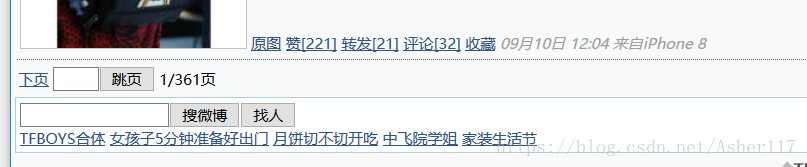
32 | 首先,在准备开始爬虫之前,得想好要爬取哪个网址。新浪微博的网址分为网页端和手机端两个,大部分爬取微博数据都会选择爬取手机端,因为对比起来,手机端基本上包括了所有你要的数据,并且手机端相对于PC端是轻量级的。
33 | 下面是GUCCI的手机端和PC端的网页展示。
34 |
35 |
36 |
37 |
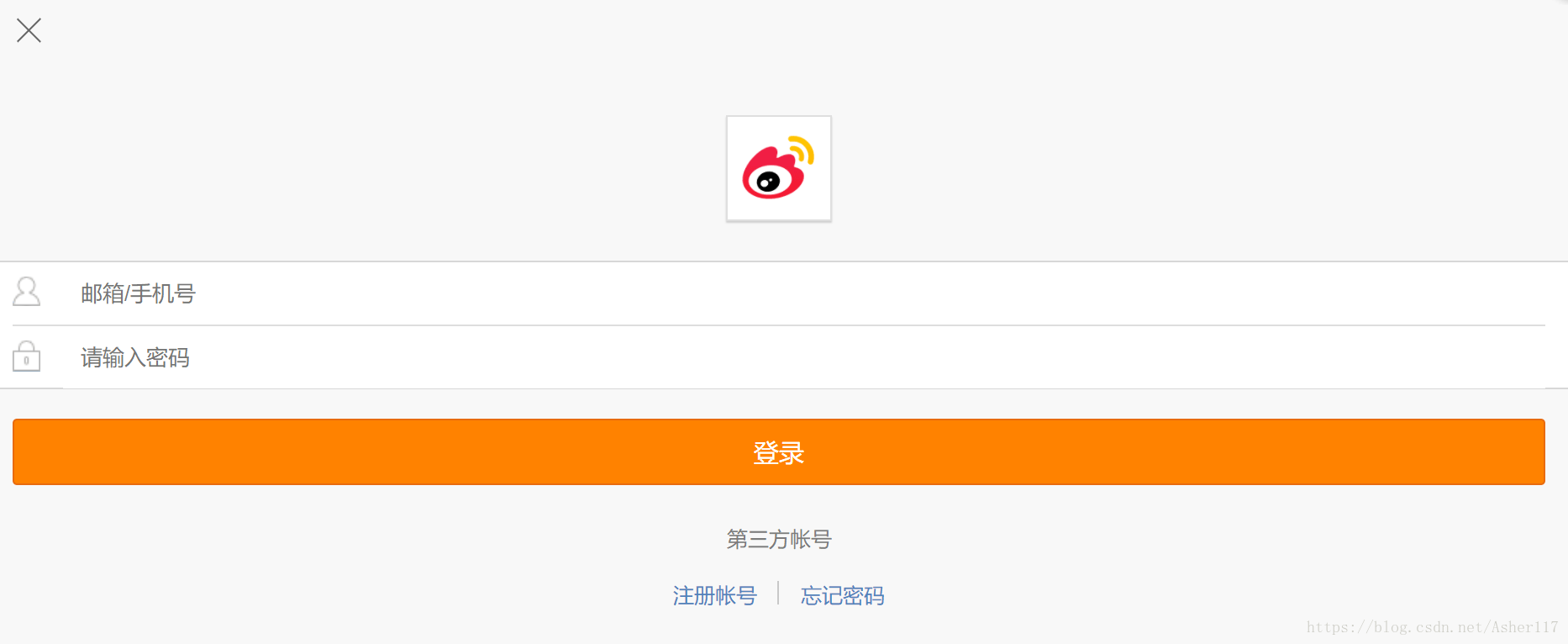
38 | ### 2.模拟登陆
39 |
40 | 定好爬取微博手机端数据之后,接下来就该模拟登陆了。
41 | 模拟登陆的网址和登陆的网页下面的样子
42 |
43 |
44 |
45 |
46 | ### 3.获取用户微博页码
47 |
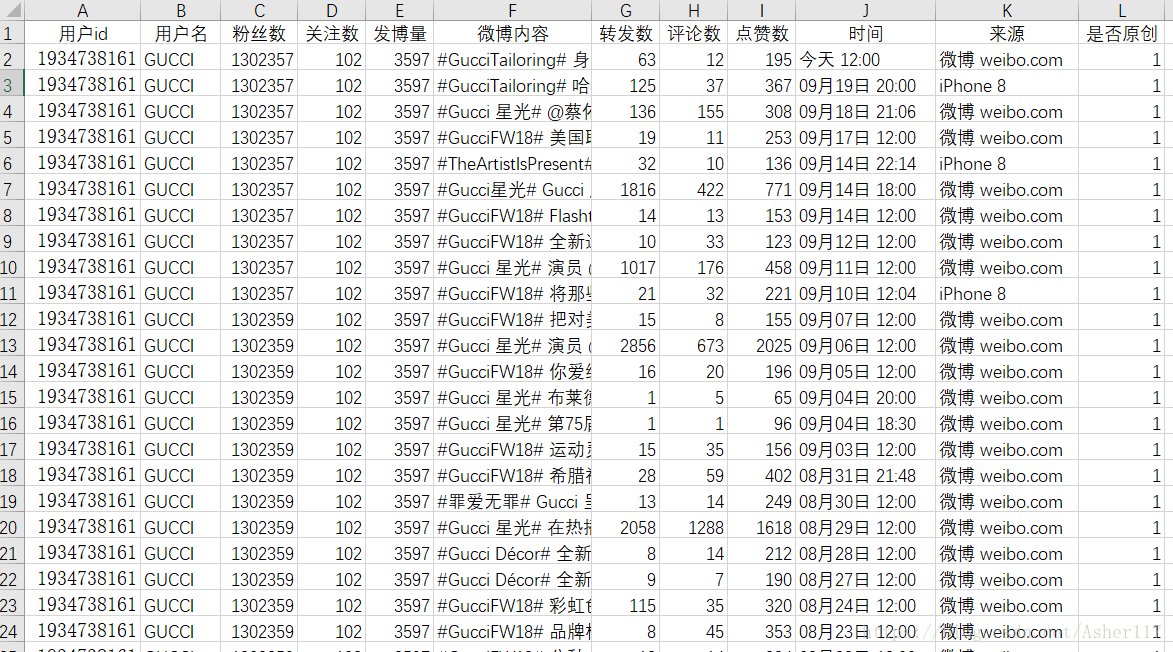
48 | 在登录之后可以进入想要爬取的商户信息,因为每个商户的微博量不一样,因此对应的微博页码也不一样,这里首先将商户的微博页码爬下来。与此同时,将那些公用信息爬取下来,比如用户uid,用户名称,微博数量,关注人数,粉丝数目
49 |
50 |
51 |
52 |
53 | ### 4.根据爬取的最大页码,循环爬取所有数据
54 | 在得到最大页码之后,直接通过循环来爬取每一页数据。抓取的数据包括,微博内容,转发数量,评论数量,点赞数量,发微博的时间,微博来源,以及是原创还是转发。
55 |
56 |
57 | 在得到所有数据之后,可以写到csv文件,或者excel
58 |
59 |
60 |
61 |
--------------------------------------------------------------------------------
/微博爬虫.py:
--------------------------------------------------------------------------------
1 | # -*- coding: utf-8 -*-
2 | """
3 | Created on Tue Feb 26 18:02:56 2019
4 |
5 | @author: Administrator
6 | """
7 |
8 | from selenium import webdriver
9 | from bs4 import BeautifulSoup
10 | import numpy as np
11 | from scipy import *
12 | import time
13 |
14 | browser = webdriver.Chrome()
15 | #browser = webdriver.Firefox()
16 |
17 | """test"""
18 | browser.get("http://www.baidu.com")
19 | print(browser.page_source)
20 | browser.close()
21 |
22 |
23 | def simulate_logging():
24 | try:
25 | print(u'登陆新浪微博手机端...')
26 | ##打开Firefox浏览器
27 | browser = webdriver.Firefox()
28 | ##给定登陆的网址
29 | url = 'https://passport.weibo.cn/signin/login'
30 | browser.get(url)
31 | time.sleep(3)
32 | #找到输入用户名的地方,并将用户名里面的内容清空,然后送入你的账号
33 | username = browser.find_element_by_css_selector('#loginName')
34 | time.sleep(2)
35 | username.clear()
36 | username.send_keys('****')#输入自己的账号
37 | #找到输入密码的地方,然后送入你的密码
38 | password = browser.find_element_by_css_selector('#loginPassword')
39 | time.sleep(2)
40 | password.send_keys('ll117117')
41 | #点击登录
42 | browser.find_element_by_css_selector('#loginAction').click()
43 | ##这里给个15秒非常重要,因为在点击登录之后,新浪微博会有个九宫格验证码,下图有,通过程序执行的话会有点麻烦(可以参考崔庆才的Python书里面有解决方法),这里就手动
44 | time.sleep(15)
45 | except:
46 | print('########出现Error########')
47 | finally:
48 | print('完成登陆!')
49 |
50 | def spyder_weibo():
51 | #本文是以GUCCI为例,GUCCI的用户id为‘GUCCI’
52 | id = 'GUCCI'
53 | niCheng = id
54 | #用户的url结构为 url = 'http://weibo.cn/' + id
55 | url = 'http://weibo.cn/' + id
56 | browser.get(url)
57 | time.sleep(3)
58 | #使用BeautifulSoup解析网页的HTML
59 | soup = BeautifulSoup(browser.page_source, 'lxml')
60 | #爬取商户的uid信息
61 | uid = soup.find('td',attrs={'valign':'top'})
62 | uid = uid.a['href']
63 | uid = uid.split('/')[1]
64 | #爬取最大页码数目
65 | pageSize = soup.find('div', attrs={'id': 'pagelist'})
66 | pageSize = pageSize.find('div').getText()
67 | pageSize = (pageSize.split('/')[1]).split('页')[0]
68 | #爬取微博数量
69 | divMessage = soup.find('div',attrs={'class':'tip2'})
70 | weiBoCount = divMessage.find('span').getText()
71 | weiBoCount = (weiBoCount.split('[')[1]).replace(']','')
72 | #爬取关注数量和粉丝数量
73 | a = divMessage.find_all('a')[:2]
74 | guanZhuCount = (a[0].getText().split('[')[1]).replace(']','')
75 | fenSiCount = (a[1].getText().split('[')[1]).replace(']', '')
76 |
77 | #通过循环来抓取每一页数据
78 | for i in range(1, pageSize+1): # pageSize+1
79 | #每一页数据的url结构为 url = 'http://weibo.cn/' + id + ‘?page=’ + i
80 | url = 'https://weibo.cn/GUCCI?page=' + str(i)
81 | browser.get(url)
82 | time.sleep(1)
83 | #使用BeautifulSoup解析网页的HTML
84 | soup = BeautifulSoup(browser.page_source, 'lxml')
85 | body = soup.find('body')
86 | divss = body.find_all('div', attrs={'class': 'c'})[1:-2]
87 | for divs in divss:
88 | # yuanChuang : 0表示转发,1表示原创
89 | yuanChuang = '1'#初始值为原创,当非原创时,更改此值
90 | div = divs.find_all('div')
91 | #这里有三种情况,两种为原创,一种为转发
92 | if (len(div) == 2):#原创,有图
93 | #爬取微博内容
94 | content = div[0].find('span', attrs={'class': 'ctt'}).getText()
95 | aa = div[1].find_all('a')
96 | for a in aa:
97 | text = a.getText()
98 | if (('赞' in text) or ('转发' in text) or ('评论' in text)):
99 | #爬取点赞数
100 | if ('赞' in text):
101 | dianZan = (text.split('[')[1]).replace(']', '')
102 | #爬取转发数
103 | elif ('转发' in text):
104 | zhuanFa = (text.split('[')[1]).replace(']', '')
105 | #爬取评论数目
106 | elif ('评论' in text):
107 | pinLun = (text.split('[')[1]).replace(']', '')
108 | #爬取微博来源和时间
109 | span = divs.find('span', attrs={'class': 'ct'}).getText()
110 | faBuTime = str(span.split('来自')[0])
111 | laiYuan = span.split('来自')[1]
112 |
113 | #和上面一样
114 | elif (len(div) == 1):#原创,无图
115 | content = div[0].find('span', attrs={'class': 'ctt'}).getText()
116 | aa = div[0].find_all('a')
117 | for a in aa:
118 | text = a.getText()
119 | if (('赞' in text) or ('转发' in text) or ('评论' in text)):
120 | if ('赞' in text):
121 | dianZan = (text.split('[')[1]).replace(']', '')
122 | elif ('转发' in text):
123 | zhuanFa = (text.split('[')[1]).replace(']', '')
124 | elif ('评论' in text):
125 | pinLun = (text.split('[')[1]).replace(']', '')
126 | span = divs.find('span', attrs={'class': 'ct'}).getText()
127 | faBuTime = str(span.split('来自')[0])
128 | laiYuan = span.split('来自')[1]
129 |
130 | #这里为转发,其他和上面一样
131 | elif (len(div) == 3):#转发的微博
132 | yuanChuang = '0'
133 | content = div[0].find('span', attrs={'class': 'ctt'}).getText()
134 | aa = div[2].find_all('a')
135 | for a in aa:
136 | text = a.getText()
137 | if (('赞' in text) or ('转发' in text) or ('评论' in text)):
138 | if ('赞' in text):
139 | dianZan = (text.split('[')[1]).replace(']', '')
140 | elif ('转发' in text):
141 | zhuanFa = (text.split('[')[1]).replace(']', '')
142 | elif ('评论' in text):
143 | pinLun = (text.split('[')[1]).replace(']', '')
144 | span = divs.find('span', attrs={'class': 'ct'}).getText()
145 | faBuTime = str(span.split('来自')[0])
146 | laiYuan = span.split('来自')[1]
147 | time.sleep(2)
148 | print(i)
149 |
150 | if __name__ == '__main__':
151 |
152 | simulate_logging()
153 | spyder_weibo()
154 |
155 | print("spyder finished!")
156 |
--------------------------------------------------------------------------------