├── mp2litchi
├── __init__.py
├── enums.py
├── global_mp_cmd.py
├── gui.py
└── mp2litchi.py
├── requirements.txt
├── .gitattributes
├── mp_to_litchi_icon.ico
├── docs
├── images
│ ├── polygon.JPG
│ ├── set_home.JPG
│ ├── survey_grid.JPG
│ ├── draw_polygon.JPG
│ ├── litchi_import.JPG
│ ├── mp2litchi_gui.JPG
│ ├── litchi_settings.JPG
│ ├── Litchi_Screenshot.jpg
│ ├── litchi_import_csv.JPG
│ ├── litchi_import_confirm.JPG
│ ├── litchi_mission_menu.JPG
│ ├── litchi_save_mission.JPG
│ ├── litchi_settings_menu.JPG
│ ├── mp2litchi_file_select.JPG
│ ├── MissionPlanner_Screenshot.jpg
│ ├── cam_ctrl
│ │ ├── survey_grid_simple.JPG
│ │ ├── litchi_import_success.JPG
│ │ ├── survey_grid_grid_options.JPG
│ │ └── survey_grid_camera_config.JPG
│ └── trig_dist
│ │ ├── survey_grid_simple.JPG
│ │ ├── litchi_import_success.JPG
│ │ ├── survey_grid_camera_config.JPG
│ │ └── survey_grid_grid_options.JPG
├── MP_trigger_dist.md
├── MP_cmd_list.md
└── MP_cam_ctrl.md
├── run.py
├── .gitignore
├── README.md
└── .github
└── workflows
└── build.yml
/mp2litchi/__init__.py:
--------------------------------------------------------------------------------
1 |
--------------------------------------------------------------------------------
/requirements.txt:
--------------------------------------------------------------------------------
1 | litchi_wp>=2.0.0,<3.0.0
--------------------------------------------------------------------------------
/.gitattributes:
--------------------------------------------------------------------------------
1 | # Auto detect text files and perform LF normalization
2 | * text=auto
3 |
--------------------------------------------------------------------------------
/mp_to_litchi_icon.ico:
--------------------------------------------------------------------------------
https://raw.githubusercontent.com/YarosMallorca/MissionPlanner-to-Litchi/HEAD/mp_to_litchi_icon.ico
--------------------------------------------------------------------------------
/docs/images/polygon.JPG:
--------------------------------------------------------------------------------
https://raw.githubusercontent.com/YarosMallorca/MissionPlanner-to-Litchi/HEAD/docs/images/polygon.JPG
--------------------------------------------------------------------------------
/docs/images/set_home.JPG:
--------------------------------------------------------------------------------
https://raw.githubusercontent.com/YarosMallorca/MissionPlanner-to-Litchi/HEAD/docs/images/set_home.JPG
--------------------------------------------------------------------------------
/docs/images/survey_grid.JPG:
--------------------------------------------------------------------------------
https://raw.githubusercontent.com/YarosMallorca/MissionPlanner-to-Litchi/HEAD/docs/images/survey_grid.JPG
--------------------------------------------------------------------------------
/docs/images/draw_polygon.JPG:
--------------------------------------------------------------------------------
https://raw.githubusercontent.com/YarosMallorca/MissionPlanner-to-Litchi/HEAD/docs/images/draw_polygon.JPG
--------------------------------------------------------------------------------
/docs/images/litchi_import.JPG:
--------------------------------------------------------------------------------
https://raw.githubusercontent.com/YarosMallorca/MissionPlanner-to-Litchi/HEAD/docs/images/litchi_import.JPG
--------------------------------------------------------------------------------
/docs/images/mp2litchi_gui.JPG:
--------------------------------------------------------------------------------
https://raw.githubusercontent.com/YarosMallorca/MissionPlanner-to-Litchi/HEAD/docs/images/mp2litchi_gui.JPG
--------------------------------------------------------------------------------
/docs/images/litchi_settings.JPG:
--------------------------------------------------------------------------------
https://raw.githubusercontent.com/YarosMallorca/MissionPlanner-to-Litchi/HEAD/docs/images/litchi_settings.JPG
--------------------------------------------------------------------------------
/docs/images/Litchi_Screenshot.jpg:
--------------------------------------------------------------------------------
https://raw.githubusercontent.com/YarosMallorca/MissionPlanner-to-Litchi/HEAD/docs/images/Litchi_Screenshot.jpg
--------------------------------------------------------------------------------
/docs/images/litchi_import_csv.JPG:
--------------------------------------------------------------------------------
https://raw.githubusercontent.com/YarosMallorca/MissionPlanner-to-Litchi/HEAD/docs/images/litchi_import_csv.JPG
--------------------------------------------------------------------------------
/docs/images/litchi_import_confirm.JPG:
--------------------------------------------------------------------------------
https://raw.githubusercontent.com/YarosMallorca/MissionPlanner-to-Litchi/HEAD/docs/images/litchi_import_confirm.JPG
--------------------------------------------------------------------------------
/docs/images/litchi_mission_menu.JPG:
--------------------------------------------------------------------------------
https://raw.githubusercontent.com/YarosMallorca/MissionPlanner-to-Litchi/HEAD/docs/images/litchi_mission_menu.JPG
--------------------------------------------------------------------------------
/docs/images/litchi_save_mission.JPG:
--------------------------------------------------------------------------------
https://raw.githubusercontent.com/YarosMallorca/MissionPlanner-to-Litchi/HEAD/docs/images/litchi_save_mission.JPG
--------------------------------------------------------------------------------
/docs/images/litchi_settings_menu.JPG:
--------------------------------------------------------------------------------
https://raw.githubusercontent.com/YarosMallorca/MissionPlanner-to-Litchi/HEAD/docs/images/litchi_settings_menu.JPG
--------------------------------------------------------------------------------
/docs/images/mp2litchi_file_select.JPG:
--------------------------------------------------------------------------------
https://raw.githubusercontent.com/YarosMallorca/MissionPlanner-to-Litchi/HEAD/docs/images/mp2litchi_file_select.JPG
--------------------------------------------------------------------------------
/docs/images/MissionPlanner_Screenshot.jpg:
--------------------------------------------------------------------------------
https://raw.githubusercontent.com/YarosMallorca/MissionPlanner-to-Litchi/HEAD/docs/images/MissionPlanner_Screenshot.jpg
--------------------------------------------------------------------------------
/docs/images/cam_ctrl/survey_grid_simple.JPG:
--------------------------------------------------------------------------------
https://raw.githubusercontent.com/YarosMallorca/MissionPlanner-to-Litchi/HEAD/docs/images/cam_ctrl/survey_grid_simple.JPG
--------------------------------------------------------------------------------
/docs/images/trig_dist/survey_grid_simple.JPG:
--------------------------------------------------------------------------------
https://raw.githubusercontent.com/YarosMallorca/MissionPlanner-to-Litchi/HEAD/docs/images/trig_dist/survey_grid_simple.JPG
--------------------------------------------------------------------------------
/docs/images/cam_ctrl/litchi_import_success.JPG:
--------------------------------------------------------------------------------
https://raw.githubusercontent.com/YarosMallorca/MissionPlanner-to-Litchi/HEAD/docs/images/cam_ctrl/litchi_import_success.JPG
--------------------------------------------------------------------------------
/docs/images/trig_dist/litchi_import_success.JPG:
--------------------------------------------------------------------------------
https://raw.githubusercontent.com/YarosMallorca/MissionPlanner-to-Litchi/HEAD/docs/images/trig_dist/litchi_import_success.JPG
--------------------------------------------------------------------------------
/docs/images/cam_ctrl/survey_grid_grid_options.JPG:
--------------------------------------------------------------------------------
https://raw.githubusercontent.com/YarosMallorca/MissionPlanner-to-Litchi/HEAD/docs/images/cam_ctrl/survey_grid_grid_options.JPG
--------------------------------------------------------------------------------
/docs/images/cam_ctrl/survey_grid_camera_config.JPG:
--------------------------------------------------------------------------------
https://raw.githubusercontent.com/YarosMallorca/MissionPlanner-to-Litchi/HEAD/docs/images/cam_ctrl/survey_grid_camera_config.JPG
--------------------------------------------------------------------------------
/docs/images/trig_dist/survey_grid_camera_config.JPG:
--------------------------------------------------------------------------------
https://raw.githubusercontent.com/YarosMallorca/MissionPlanner-to-Litchi/HEAD/docs/images/trig_dist/survey_grid_camera_config.JPG
--------------------------------------------------------------------------------
/docs/images/trig_dist/survey_grid_grid_options.JPG:
--------------------------------------------------------------------------------
https://raw.githubusercontent.com/YarosMallorca/MissionPlanner-to-Litchi/HEAD/docs/images/trig_dist/survey_grid_grid_options.JPG
--------------------------------------------------------------------------------
/run.py:
--------------------------------------------------------------------------------
1 | """
2 | Starts the Mission Planner to Litchi converter
3 | """
4 | # pylint: disable=import-error
5 | from mp2litchi.mp2litchi import welcome
6 | from mp2litchi.gui import Gui
7 |
8 | welcome()
9 | gui = Gui()
10 | gui.render()
11 |
--------------------------------------------------------------------------------
/.gitignore:
--------------------------------------------------------------------------------
1 | # Byte-compiled / optimized / DLL files
2 | __pycache__/
3 | *.py[cod]
4 | *$py.class
5 |
6 | # C extensions
7 | *.so
8 |
9 | # Distribution / packaging
10 | .Python
11 | build/
12 | develop-eggs/
13 | dist/
14 | downloads/
15 | eggs/
16 | .eggs/
17 | lib/
18 | lib64/
19 | parts/
20 | sdist/
21 | var/
22 | wheels/
23 | *.egg-info/
24 | .installed.cfg
25 | *.egg
26 | MANIFEST
27 |
28 | # PyInstaller
29 | # Usually these files are written by a python script from a template
30 | # before PyInstaller builds the exe, so as to inject date/other infos into it.
31 | *.manifest
32 | *.spec
33 |
34 | # Installer logs
35 | pip-log.txt
36 | pip-delete-this-directory.txt
37 |
38 | # Unit test / coverage reports
39 | htmlcov/
40 | .tox/
41 | .nox/
42 | .coverage
43 | .coverage.*
44 | .cache
45 | nosetests.xml
46 | coverage.xml
47 | *.cover
48 | .hypothesis/
49 | .pytest_cache/
50 |
51 | # Translations
52 | *.mo
53 | *.pot
54 |
55 | # Django stuff:
56 | *.log
57 | local_settings.py
58 | db.sqlite3
59 |
60 | # Flask stuff:
61 | instance/
62 | .webassets-cache
63 |
64 | # Scrapy stuff:
65 | .scrapy
66 |
67 | # Sphinx documentation
68 | docs/_build/
69 |
70 | # PyBuilder
71 | target/
72 |
73 | # Jupyter Notebook
74 | .ipynb_checkpoints
75 |
76 | # IPython
77 | profile_default/
78 | ipython_config.py
79 |
80 | # pyenv
81 | .python-version
82 |
83 | # celery beat schedule file
84 | celerybeat-schedule
85 |
86 | # SageMath parsed files
87 | *.sage.py
88 |
89 | # Environments
90 | .env
91 | .venv
92 | env/
93 | venv/
94 | ENV/
95 | env.bak/
96 | venv.bak/
97 |
98 | # Spyder project settings
99 | .spyderproject
100 | .spyproject
101 |
102 | # Rope project settings
103 | .ropeproject
104 |
105 | # mkdocs documentation
106 | /site
107 |
108 | # mypy
109 | .mypy_cache/
110 | .dmypy.json
111 | dmypy.json
112 |
113 | # Pyre type checker
114 | .pyre/
115 |
--------------------------------------------------------------------------------
/mp2litchi/enums.py:
--------------------------------------------------------------------------------
1 | """
2 | Module to bundle all enum classes
3 | """
4 | from enum import Enum
5 |
6 |
7 | class MPCommand(Enum):
8 | """
9 | Enum class for the command ids of mission planner waypoint export files
10 | """
11 |
12 | WAYPOINT = 16
13 | SPLINE_WAYPOINT = 82
14 | LOITER_TURNS = 18
15 | LOITER_TIME = 19
16 | LOITER_UNLIM = 17
17 | RTL = 20
18 | LAND = 21
19 | TAKEOFF = 22
20 | DELAY = 93
21 | GUIDED_ENABLE = 92
22 | PAYLOAD_PLACE = 94
23 | DO_GUIDED_LIMITS = 222
24 | DO_WINCH = 42600
25 | DO_SET_ROI = 201
26 | CONDITION_DELAY = 112
27 | CONDITION_CHANGE_ALT = 113
28 | CONDITION_DISTANCE = 114
29 | CONDITION_YAW = 115
30 | DO_JUMP = 177
31 | DO_CHANGE_SPEED = 178
32 | DO_GRIPPER = 211
33 | DO_PARACHUTE = 208
34 | DO_SET_CAM_TRIG_DISTANCE = 206
35 | DO_SET_RELAY = 181
36 | DO_REPEAT_RELAY = 182
37 | DO_SET_SERVO = 183
38 | DO_REPEAT_SERVO = 184
39 | DO_DIGICAM_CONFIGURE = 202
40 | DO_DIGICAM_CONTROL = 203
41 | DO_MOUNT_CONTROL = 205
42 | DO_SPRAYER = 216
43 |
44 |
45 | class InfoMessage(Enum):
46 | """
47 | Enum class for info messages to be shows in the gui or log
48 | """
49 | NO_SPEED_SET = 'No speed is set. Using Cruising Speed setting in litchi.'
50 |
51 |
52 | class WarningMessage(Enum):
53 | """
54 | Enum class for warning messages to be shows in the gui or log
55 | """
56 |
57 | SPEED_CAP = 'The speed has been set to 15m/s due to Litchi limitations.'
58 | SPEED_NEGATIVE = 'The speed has been set to cruise speed ' \
59 | '(see Litchi settings) because negative speed is not allowed.'
60 |
61 |
62 | class ErrorMessage(Enum):
63 | """
64 | Enum class for error messages to be shows in the gui or log
65 | """
66 |
67 | FILE_NOT_FOUND = 'The file was not found.'
68 | NO_FREE_ACTION_SLOTS = 'The waypoint has no more free action slots. ' \
69 | 'Maximum is 15 actions per Waypoint.'
70 |
--------------------------------------------------------------------------------
/README.md:
--------------------------------------------------------------------------------
1 | # Mission Planner to Litchi - Version 1.1.2
2 | ## What is this application for?
3 | Mission Planner to Litchi is a tool to convert
4 | [Mission Planner](https://ardupilot.org/planner/docs/mission-planner-installation.html) (ArduCopter)
5 | Waypoint files to [Litchi](https://flylitchi.com/) CSV Format to execute on Drones (e.g. DJI Drones).
6 |
7 | Mission Planner to Litchi was developed to be used to convert mapping survey missions from
8 | [Mission Planner](https://ardupilot.org/planner/docs/mission-planner-installation.html) to
9 | [Litchi](https://flylitchi.com/).
10 |
11 | ## Looking to do 3D Mapping with your Waypoint-capable Mavic?
12 | ### **Check out my new tool [DJI-Mapper](https://github.com/YarosMallorca/DJI-Mapper)**
13 |
14 |
15 |
16 | ### Survey missions in [Litchi](https://flylitchi.com/)
17 |
18 | Litchi doesn't support Survey mode yet, but here is a workaround!
19 | You will need [Mission Planner](https://ardupilot.org/planner/docs/mission-planner-installation.html) installed
20 | in order to plan your mission.
21 |
22 | Warning: This script was tested successfully many times, should work stably.
23 | I am not responsible for any damage caused by the use of this software.
24 |
25 | [Click here to Download for Windows](https://github.com/YarostheLaunchpadder/MissionPlanner-to-Litchi/releases/download/Alpha/Mission.Planner.to.Litchi.exe)
26 |
27 | Mac version not available yet
28 |
29 |
30 |  31 |
31 | 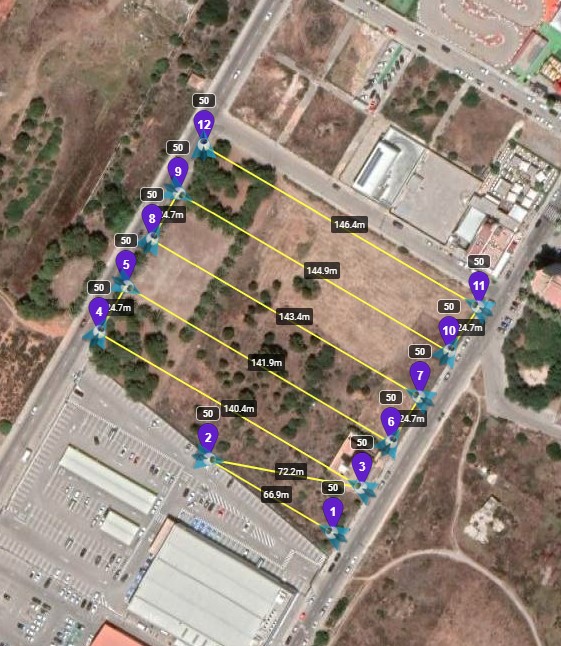 32 |
33 |
34 | ## Workflow from [Mission Planner](https://ardupilot.org/planner/docs/mission-planner-installation.html) to [Litchi](https://flylitchi.com/)
35 |
36 | There are two types of camera trigger methods supported.
37 |
38 | - Distance trigger
39 | - Waypoint trigger
40 |
41 | The two workflows are described in detail here:
42 |
43 | - [Distance trigger](https://github.com/YarostheLaunchpadder/MissionPlanner-to-Litchi/blob/main/docs/MP_trigger_dist.md)
44 | - [Waypoint trigger](https://github.com/YarostheLaunchpadder/MissionPlanner-to-Litchi/blob/main/docs/MP_cam_ctrl.md)
45 |
--------------------------------------------------------------------------------
/.github/workflows/build.yml:
--------------------------------------------------------------------------------
1 | name: Build and Release
2 |
3 | on:
4 | workflow_dispatch:
5 | pull_request:
6 | types: [closed]
7 | branches:
8 | - main
9 | jobs:
10 | create-release:
11 | runs-on: ubuntu-latest
12 | outputs:
13 | upload_url: ${{ steps.create_release.outputs.upload_url }}
14 | steps:
15 | - name: Checkout code
16 | uses: actions/checkout@v2
17 |
18 | - name: Get version number
19 | id: get_version
20 | run: |
21 | version=$(grep -oE -m 1 '[0-9]+\.[0-9]+\.[0-9]+' README.md)
22 | echo "version=$version" >> $GITHUB_OUTPUT
23 |
24 | - name: Create release
25 | id: create_release
26 | uses: actions/create-release@v1
27 | env:
28 | GITHUB_TOKEN: ${{ secrets.ACTIONS }}
29 | with:
30 | tag_name: v${{ steps.get_version.outputs.version }}
31 | release_name: v${{ steps.get_version.outputs.version }}
32 | body: "Version ${{ steps.get_version.outputs.version }}"
33 | draft: false
34 | prerelease: false
35 |
36 | build-and-upload:
37 | needs: create-release
38 | runs-on: ${{ matrix.os }}
39 | strategy:
40 | matrix:
41 | os: ['windows-latest', 'macos-latest', 'ubuntu-latest']
42 | python-version: ['3.10']
43 | steps:
44 | - name: Checkout code
45 | uses: actions/checkout@v2
46 |
47 | - name: Set up Python
48 | uses: actions/setup-python@v2
49 | with:
50 | python-version: ${{ matrix.python-version }}
51 |
52 | - name: Install PyInstaller
53 | run: pip install pyinstaller
54 |
55 | - name: Install dependencies
56 | run: pip install -r requirements.txt
57 |
58 | - name: Build executables
59 | run: |
60 | pyinstaller --onefile run.py -n mp2litchi-${{ matrix.os }}
61 |
62 | - name: Upload executables Windows
63 | if: matrix.os == 'windows-latest'
64 | uses: actions/upload-release-asset@v1
65 | env:
66 | GITHUB_TOKEN: ${{ secrets.ACTIONS }}
67 | with:
68 | upload_url: ${{ needs.create-release.outputs.upload_url }}
69 | asset_path: dist\mp2litchi-${{ matrix.os }}.exe
70 | asset_name: mp2litchi-${{ matrix.os }}.exe
71 | asset_content_type: application/octet-stream
72 |
73 | - name: Upload executables
74 | if: matrix.os != 'windows-latest'
75 | uses: actions/upload-release-asset@v1
76 | env:
77 | GITHUB_TOKEN: ${{ secrets.ACTIONS }}
78 | with:
79 | upload_url: ${{ needs.create-release.outputs.upload_url }}
80 | asset_path: dist/mp2litchi-${{ matrix.os }}
81 | asset_name: mp2litchi-${{ matrix.os }}
82 | asset_content_type: application/octet-stream
83 |
--------------------------------------------------------------------------------
/mp2litchi/global_mp_cmd.py:
--------------------------------------------------------------------------------
1 | """
2 | Module for global MP commands
3 | """
4 | from litchi_wp.waypoint import Waypoint
5 |
6 | from mp2litchi.enums import MPCommand
7 |
8 |
9 | # pylint: disable=too-few-public-methods
10 | class GlobalMPCmd:
11 | """
12 | Represents a single MP cmd
13 | """
14 |
15 | def __init__(self, cmd: MPCommand, param: int | float = 0, active: bool = False, loc: int = 0):
16 | """
17 | Constructor
18 |
19 | Args:
20 | cmd (MPCommand): The MP command
21 | param (int | float): The parameter of the command
22 | active (bool): True if global command is active
23 |
24 | """
25 |
26 | self.active: bool = active
27 | self.type: MPCommand = cmd
28 | self.param: int | float = param
29 | self.param_loc: int = loc
30 |
31 |
32 | class GlobalMPCmdManager:
33 | """
34 | Class for handling of global MP cmds
35 |
36 | Attributes:
37 | global_cmds (list[GlobalMPCmd]): List of commands that influence all following waypoints
38 |
39 | """
40 |
41 | global_cmds = [
42 | GlobalMPCmd(cmd=MPCommand.DO_CHANGE_SPEED, loc=5),
43 | GlobalMPCmd(cmd=MPCommand.DO_SET_CAM_TRIG_DISTANCE, loc=4)
44 | ]
45 |
46 | def get_active(self) -> list[GlobalMPCmd]:
47 | """
48 | Getter for all active global MP commands
49 |
50 | Returns:
51 | A list of GlobalMPCmd objects that are currently set to active
52 |
53 | """
54 |
55 | return [cmd for cmd in self.global_cmds if cmd.active]
56 |
57 | def apply_to_waypoint(self, cmd: GlobalMPCmd, waypoint: Waypoint):
58 | """
59 | Applies the global command to the waypoint
60 | Args:
61 | cmd: The command to be applied
62 | waypoint: The waypoint to be referenced
63 |
64 | """
65 |
66 | match cmd.type:
67 | case MPCommand.DO_SET_CAM_TRIG_DISTANCE:
68 | waypoint.set_photo_interval_distance(
69 | round(cmd.param, 1)
70 | )
71 | case MPCommand.DO_CHANGE_SPEED:
72 | waypoint.set_speed_ms(
73 | round(cmd.param, 2)
74 | )
75 |
76 | def apply_all_active_to_waypoint(self, waypoint: Waypoint):
77 | """
78 | Applies all active global commands to the Waypoint
79 | Args:
80 | waypoint: The waypoint to be referenced
81 |
82 | """
83 |
84 | cmds = self.get_active()
85 | for cmd in cmds:
86 | self.apply_to_waypoint(cmd, waypoint)
87 |
88 | def is_global(self, cmd: MPCommand) -> GlobalMPCmd | None:
89 | """
90 | Checks if a MP command has global effects
91 |
92 | Args:
93 | cmd: The MP command
94 |
95 | Returns:
96 | The command as GlobalMPCmd or None
97 |
98 | """
99 |
100 | for g_cmd in self.global_cmds:
101 | if g_cmd.type == cmd:
102 | return g_cmd
103 | return None
104 |
105 | def update(self, cmd: MPCommand, param: float | int) -> bool:
106 | """
107 | Checks if a given command has global effects.
108 | If that is the case the global command gets updated.
109 |
110 | Args:
111 | cmd: The MP command
112 | param: The Parameter of the command
113 |
114 | Returns:
115 | True if the command has global effects and was updated
116 |
117 | """
118 |
119 | for g_cmd in self.global_cmds:
120 | if g_cmd.type == cmd:
121 | g_cmd.param = param
122 | g_cmd.active = True
123 | return True
124 | return False
125 |
--------------------------------------------------------------------------------
/docs/MP_trigger_dist.md:
--------------------------------------------------------------------------------
1 | # [Mission Planner](https://ardupilot.org/planner/) survey flight plan using [trigger distance](https://ardupilot.org/copter/docs/mission-command-list.html#do-set-cam-trigg-dist)
2 |
3 | ## What is [trigger distance](https://ardupilot.org/copter/docs/mission-command-list.html#do-set-cam-trigg-dist)?
4 |
5 | [Trigger distance](https://ardupilot.org/copter/docs/mission-command-list.html#do-set-cam-trigg-dist)
6 | is the `Trigger Method` selected in [Mission Planner](https://ardupilot.org/planner/).
7 | This sets a distance that must be traveled before each shot.
8 | The [trigger distance](https://ardupilot.org/copter/docs/mission-command-list.html#do-set-cam-trigg-dist)
9 | is calculated based on the camera, the flight height and the overlap.
10 |
11 | ### Example
12 |
13 | The [trigger distance](https://ardupilot.org/copter/docs/mission-command-list.html#do-set-cam-trigg-dist)
14 | is calculated to be 22 meters.
15 | The aircraft will take a photo at intervals of 22 meters.
16 |
17 | ## What are the advantages and disadvantages?
18 |
19 | ### Pro
20 |
21 | - Short mission duration
22 | - Fewer waypoints
23 |
24 |
25 | ### Con
26 |
27 | - Image blur may occur due to movement while capturing
28 | - is aggravated by
29 | - low altitude
30 | - high fly speed
31 | - long exposure time / low light conditions
32 | - Altitude above ground can vary between images
33 |
34 | # Workflow
35 | To create a flight-plan in [Mission Planner](https://ardupilot.org/planner/) and import it
36 | into [Litchi Mission Hub](https://flylitchi.com/hub), follow these steps.
37 |
38 | ## [Mission Planner](https://ardupilot.org/planner/)
39 |
40 | Start [Mission Planner](https://ardupilot.org/planner/) and select `Plan` in the top left corner.
41 |
42 | ### Set Home Point
43 | Right-click on the location you want to set the home point and select `Set Home Here`.
44 |
45 |
32 |
33 |
34 | ## Workflow from [Mission Planner](https://ardupilot.org/planner/docs/mission-planner-installation.html) to [Litchi](https://flylitchi.com/)
35 |
36 | There are two types of camera trigger methods supported.
37 |
38 | - Distance trigger
39 | - Waypoint trigger
40 |
41 | The two workflows are described in detail here:
42 |
43 | - [Distance trigger](https://github.com/YarostheLaunchpadder/MissionPlanner-to-Litchi/blob/main/docs/MP_trigger_dist.md)
44 | - [Waypoint trigger](https://github.com/YarostheLaunchpadder/MissionPlanner-to-Litchi/blob/main/docs/MP_cam_ctrl.md)
45 |
--------------------------------------------------------------------------------
/.github/workflows/build.yml:
--------------------------------------------------------------------------------
1 | name: Build and Release
2 |
3 | on:
4 | workflow_dispatch:
5 | pull_request:
6 | types: [closed]
7 | branches:
8 | - main
9 | jobs:
10 | create-release:
11 | runs-on: ubuntu-latest
12 | outputs:
13 | upload_url: ${{ steps.create_release.outputs.upload_url }}
14 | steps:
15 | - name: Checkout code
16 | uses: actions/checkout@v2
17 |
18 | - name: Get version number
19 | id: get_version
20 | run: |
21 | version=$(grep -oE -m 1 '[0-9]+\.[0-9]+\.[0-9]+' README.md)
22 | echo "version=$version" >> $GITHUB_OUTPUT
23 |
24 | - name: Create release
25 | id: create_release
26 | uses: actions/create-release@v1
27 | env:
28 | GITHUB_TOKEN: ${{ secrets.ACTIONS }}
29 | with:
30 | tag_name: v${{ steps.get_version.outputs.version }}
31 | release_name: v${{ steps.get_version.outputs.version }}
32 | body: "Version ${{ steps.get_version.outputs.version }}"
33 | draft: false
34 | prerelease: false
35 |
36 | build-and-upload:
37 | needs: create-release
38 | runs-on: ${{ matrix.os }}
39 | strategy:
40 | matrix:
41 | os: ['windows-latest', 'macos-latest', 'ubuntu-latest']
42 | python-version: ['3.10']
43 | steps:
44 | - name: Checkout code
45 | uses: actions/checkout@v2
46 |
47 | - name: Set up Python
48 | uses: actions/setup-python@v2
49 | with:
50 | python-version: ${{ matrix.python-version }}
51 |
52 | - name: Install PyInstaller
53 | run: pip install pyinstaller
54 |
55 | - name: Install dependencies
56 | run: pip install -r requirements.txt
57 |
58 | - name: Build executables
59 | run: |
60 | pyinstaller --onefile run.py -n mp2litchi-${{ matrix.os }}
61 |
62 | - name: Upload executables Windows
63 | if: matrix.os == 'windows-latest'
64 | uses: actions/upload-release-asset@v1
65 | env:
66 | GITHUB_TOKEN: ${{ secrets.ACTIONS }}
67 | with:
68 | upload_url: ${{ needs.create-release.outputs.upload_url }}
69 | asset_path: dist\mp2litchi-${{ matrix.os }}.exe
70 | asset_name: mp2litchi-${{ matrix.os }}.exe
71 | asset_content_type: application/octet-stream
72 |
73 | - name: Upload executables
74 | if: matrix.os != 'windows-latest'
75 | uses: actions/upload-release-asset@v1
76 | env:
77 | GITHUB_TOKEN: ${{ secrets.ACTIONS }}
78 | with:
79 | upload_url: ${{ needs.create-release.outputs.upload_url }}
80 | asset_path: dist/mp2litchi-${{ matrix.os }}
81 | asset_name: mp2litchi-${{ matrix.os }}
82 | asset_content_type: application/octet-stream
83 |
--------------------------------------------------------------------------------
/mp2litchi/global_mp_cmd.py:
--------------------------------------------------------------------------------
1 | """
2 | Module for global MP commands
3 | """
4 | from litchi_wp.waypoint import Waypoint
5 |
6 | from mp2litchi.enums import MPCommand
7 |
8 |
9 | # pylint: disable=too-few-public-methods
10 | class GlobalMPCmd:
11 | """
12 | Represents a single MP cmd
13 | """
14 |
15 | def __init__(self, cmd: MPCommand, param: int | float = 0, active: bool = False, loc: int = 0):
16 | """
17 | Constructor
18 |
19 | Args:
20 | cmd (MPCommand): The MP command
21 | param (int | float): The parameter of the command
22 | active (bool): True if global command is active
23 |
24 | """
25 |
26 | self.active: bool = active
27 | self.type: MPCommand = cmd
28 | self.param: int | float = param
29 | self.param_loc: int = loc
30 |
31 |
32 | class GlobalMPCmdManager:
33 | """
34 | Class for handling of global MP cmds
35 |
36 | Attributes:
37 | global_cmds (list[GlobalMPCmd]): List of commands that influence all following waypoints
38 |
39 | """
40 |
41 | global_cmds = [
42 | GlobalMPCmd(cmd=MPCommand.DO_CHANGE_SPEED, loc=5),
43 | GlobalMPCmd(cmd=MPCommand.DO_SET_CAM_TRIG_DISTANCE, loc=4)
44 | ]
45 |
46 | def get_active(self) -> list[GlobalMPCmd]:
47 | """
48 | Getter for all active global MP commands
49 |
50 | Returns:
51 | A list of GlobalMPCmd objects that are currently set to active
52 |
53 | """
54 |
55 | return [cmd for cmd in self.global_cmds if cmd.active]
56 |
57 | def apply_to_waypoint(self, cmd: GlobalMPCmd, waypoint: Waypoint):
58 | """
59 | Applies the global command to the waypoint
60 | Args:
61 | cmd: The command to be applied
62 | waypoint: The waypoint to be referenced
63 |
64 | """
65 |
66 | match cmd.type:
67 | case MPCommand.DO_SET_CAM_TRIG_DISTANCE:
68 | waypoint.set_photo_interval_distance(
69 | round(cmd.param, 1)
70 | )
71 | case MPCommand.DO_CHANGE_SPEED:
72 | waypoint.set_speed_ms(
73 | round(cmd.param, 2)
74 | )
75 |
76 | def apply_all_active_to_waypoint(self, waypoint: Waypoint):
77 | """
78 | Applies all active global commands to the Waypoint
79 | Args:
80 | waypoint: The waypoint to be referenced
81 |
82 | """
83 |
84 | cmds = self.get_active()
85 | for cmd in cmds:
86 | self.apply_to_waypoint(cmd, waypoint)
87 |
88 | def is_global(self, cmd: MPCommand) -> GlobalMPCmd | None:
89 | """
90 | Checks if a MP command has global effects
91 |
92 | Args:
93 | cmd: The MP command
94 |
95 | Returns:
96 | The command as GlobalMPCmd or None
97 |
98 | """
99 |
100 | for g_cmd in self.global_cmds:
101 | if g_cmd.type == cmd:
102 | return g_cmd
103 | return None
104 |
105 | def update(self, cmd: MPCommand, param: float | int) -> bool:
106 | """
107 | Checks if a given command has global effects.
108 | If that is the case the global command gets updated.
109 |
110 | Args:
111 | cmd: The MP command
112 | param: The Parameter of the command
113 |
114 | Returns:
115 | True if the command has global effects and was updated
116 |
117 | """
118 |
119 | for g_cmd in self.global_cmds:
120 | if g_cmd.type == cmd:
121 | g_cmd.param = param
122 | g_cmd.active = True
123 | return True
124 | return False
125 |
--------------------------------------------------------------------------------
/docs/MP_trigger_dist.md:
--------------------------------------------------------------------------------
1 | # [Mission Planner](https://ardupilot.org/planner/) survey flight plan using [trigger distance](https://ardupilot.org/copter/docs/mission-command-list.html#do-set-cam-trigg-dist)
2 |
3 | ## What is [trigger distance](https://ardupilot.org/copter/docs/mission-command-list.html#do-set-cam-trigg-dist)?
4 |
5 | [Trigger distance](https://ardupilot.org/copter/docs/mission-command-list.html#do-set-cam-trigg-dist)
6 | is the `Trigger Method` selected in [Mission Planner](https://ardupilot.org/planner/).
7 | This sets a distance that must be traveled before each shot.
8 | The [trigger distance](https://ardupilot.org/copter/docs/mission-command-list.html#do-set-cam-trigg-dist)
9 | is calculated based on the camera, the flight height and the overlap.
10 |
11 | ### Example
12 |
13 | The [trigger distance](https://ardupilot.org/copter/docs/mission-command-list.html#do-set-cam-trigg-dist)
14 | is calculated to be 22 meters.
15 | The aircraft will take a photo at intervals of 22 meters.
16 |
17 | ## What are the advantages and disadvantages?
18 |
19 | ### Pro
20 |
21 | - Short mission duration
22 | - Fewer waypoints
23 |
24 |
25 | ### Con
26 |
27 | - Image blur may occur due to movement while capturing
28 | - is aggravated by
29 | - low altitude
30 | - high fly speed
31 | - long exposure time / low light conditions
32 | - Altitude above ground can vary between images
33 |
34 | # Workflow
35 | To create a flight-plan in [Mission Planner](https://ardupilot.org/planner/) and import it
36 | into [Litchi Mission Hub](https://flylitchi.com/hub), follow these steps.
37 |
38 | ## [Mission Planner](https://ardupilot.org/planner/)
39 |
40 | Start [Mission Planner](https://ardupilot.org/planner/) and select `Plan` in the top left corner.
41 |
42 | ### Set Home Point
43 | Right-click on the location you want to set the home point and select `Set Home Here`.
44 |
45 |  46 |
47 | ### Draw polygon
48 |
49 | Left-click on the polygon icon in the top left corner and select `Draw Polygon`. Then draw the polygon area
50 | by left-clicking on the map.
51 |
52 |
46 |
47 | ### Draw polygon
48 |
49 | Left-click on the polygon icon in the top left corner and select `Draw Polygon`. Then draw the polygon area
50 | by left-clicking on the map.
51 |
52 |  53 |
54 |
53 |
54 |  55 |
56 | ### Start survey tool
57 |
58 | Right-click on the map and select `Auto WP` -> `Survey (Grid)`.
59 |
60 |
55 |
56 | ### Start survey tool
57 |
58 | Right-click on the map and select `Auto WP` -> `Survey (Grid)`.
59 |
60 |  61 |
62 | ### Settings for `Simple` tab
63 |
64 | Select the `Camera`, set the `Altitude` and `Flying Speed`. Make sure to set `Use speed for this mission`
65 | and `Advanced Options`.
66 |
67 | If your camera is not in the list, then you can load an image in the `Camera Config` tab.
68 | The camera settings will be set automatically using the metadata in the image.
69 |
70 |
61 |
62 | ### Settings for `Simple` tab
63 |
64 | Select the `Camera`, set the `Altitude` and `Flying Speed`. Make sure to set `Use speed for this mission`
65 | and `Advanced Options`.
66 |
67 | If your camera is not in the list, then you can load an image in the `Camera Config` tab.
68 | The camera settings will be set automatically using the metadata in the image.
69 |
70 |  71 |
72 | ### Settings for `Grid Options` tab
73 |
74 | Set the `Overlap` (front-overlap) and the `Sidelap` (side-overlap) to your needs. Make sure to set `Delay at WP` to `0`.
75 |
76 | Also, if you need a cross-grid (e.g. 3D models or better DEMs), then set `Cross Grid` as well.
77 |
78 |
71 |
72 | ### Settings for `Grid Options` tab
73 |
74 | Set the `Overlap` (front-overlap) and the `Sidelap` (side-overlap) to your needs. Make sure to set `Delay at WP` to `0`.
75 |
76 | Also, if you need a cross-grid (e.g. 3D models or better DEMs), then set `Cross Grid` as well.
77 |
78 |  79 |
80 | ### Settings for `Camera Config` tab
81 |
82 | Make sure to select `CAM_TRIG_DIST` as the `Trigger Method`.
83 |
84 | Also, you can click `Load Sample Photo` if your camera was not listed. You can then click `Save` to add it to
85 | the list of cameras.
86 |
87 |
79 |
80 | ### Settings for `Camera Config` tab
81 |
82 | Make sure to select `CAM_TRIG_DIST` as the `Trigger Method`.
83 |
84 | Also, you can click `Load Sample Photo` if your camera was not listed. You can then click `Save` to add it to
85 | the list of cameras.
86 |
87 |  88 |
89 | ### Save Grid
90 |
91 | Navigate back to the `Simple` tab and click `Accept` in the bottom right corner.
92 |
93 | ### Export flight-plan as `.waypoints` file
94 |
95 | Press `ctrl + s` to export the flight-plan.
96 |
97 | ## MissionPlanner-to-Litchi
98 |
99 | Open `MissionPlanner-to-litchi` and click `Select files to convert`.
100 |
101 |
88 |
89 | ### Save Grid
90 |
91 | Navigate back to the `Simple` tab and click `Accept` in the bottom right corner.
92 |
93 | ### Export flight-plan as `.waypoints` file
94 |
95 | Press `ctrl + s` to export the flight-plan.
96 |
97 | ## MissionPlanner-to-Litchi
98 |
99 | Open `MissionPlanner-to-litchi` and click `Select files to convert`.
100 |
101 |  102 |
103 | ### Select File or Files
104 |
105 | Select the file you exported from [Mission Planner](https://ardupilot.org/planner/) and click `Open`.
106 | MissionPlanner-to-Litchi will create a `.csv` file in the same directory.
107 |
108 | In this example the file is named `diamonhead.waypoints` so the converted file will be `diamonhead.waypoints.csv`.
109 |
110 |
102 |
103 | ### Select File or Files
104 |
105 | Select the file you exported from [Mission Planner](https://ardupilot.org/planner/) and click `Open`.
106 | MissionPlanner-to-Litchi will create a `.csv` file in the same directory.
107 |
108 | In this example the file is named `diamonhead.waypoints` so the converted file will be `diamonhead.waypoints.csv`.
109 |
110 |  111 |
112 | ## [Litchi Mission Hub](https://flylitchi.com/hub)
113 |
114 | Go to the [Litchi Mission Hub](https://flylitchi.com/hub) and log in to your account (top right corner).
115 |
116 | ### Set global settings
117 |
118 | Click on `SETTINGS` in the bottom left corner. Make sure that the marked settings are set as shown in the image
119 | then click `Close`.
120 |
121 |
111 |
112 | ## [Litchi Mission Hub](https://flylitchi.com/hub)
113 |
114 | Go to the [Litchi Mission Hub](https://flylitchi.com/hub) and log in to your account (top right corner).
115 |
116 | ### Set global settings
117 |
118 | Click on `SETTINGS` in the bottom left corner. Make sure that the marked settings are set as shown in the image
119 | then click `Close`.
120 |
121 |  122 |
123 |
122 |
123 |  124 |
125 | ### Import file
126 |
127 | Click on `MISSIONS` in the bottom left corner.
128 |
129 | Then select `Import...`.
130 |
131 |
124 |
125 | ### Import file
126 |
127 | Click on `MISSIONS` in the bottom left corner.
128 |
129 | Then select `Import...`.
130 |
131 |  132 |
133 |
132 |
133 |  134 |
135 | Select the `.csv` file. In this example it is the `diamonhead.waypoints.csv`.
136 |
137 |
134 |
135 | Select the `.csv` file. In this example it is the `diamonhead.waypoints.csv`.
136 |
137 |  138 |
139 | Click `Import to new Mission` to import the flight-plan to the [Litchi Mission Hub](https://flylitchi.com/hub).
140 |
141 |
138 |
139 | Click `Import to new Mission` to import the flight-plan to the [Litchi Mission Hub](https://flylitchi.com/hub).
140 |
141 |  142 |
143 | ### Imported flight-plan
144 |
145 |
142 |
143 | ### Imported flight-plan
144 |
145 |  146 |
147 | ### Save the mission
148 |
149 | You need to save the mission to be able to sync it to your control device (mobile phone / tablet).
150 |
151 | To do this you click on `Missions` in the bottom left corner and select `Save...`.
152 |
153 |
146 |
147 | ### Save the mission
148 |
149 | You need to save the mission to be able to sync it to your control device (mobile phone / tablet).
150 |
151 | To do this you click on `Missions` in the bottom left corner and select `Save...`.
152 |
153 |  154 |
155 | Enter a name for your mission and click on `Save`.
--------------------------------------------------------------------------------
/mp2litchi/gui.py:
--------------------------------------------------------------------------------
1 | """
2 | GUI Module
3 | """
4 | # pylint: disable=import-error
5 | import tkinter as tk
6 | from os import getcwd
7 | from os.path import dirname
8 | from tkinter import filedialog as fd
9 | from tkinter import ttk
10 | from tkinter import messagebox
11 | from typing import Callable, Literal
12 |
13 | from mp2litchi import mp2litchi
14 |
15 |
16 | class FileMessages:
17 | """
18 | Class for inf, warning, error messages
19 | """
20 |
21 | def __init__(
22 | self,
23 | filename: str,
24 | info_messages: list[str],
25 | warning_messages: list[str],
26 | error_messages: list[str]):
27 | """
28 | Constructor
29 |
30 | Args:
31 | filename (str): The filename the messages refer to
32 | info_messages list(str): A list of info messages
33 | warning_messages list(str): A list of warning messages
34 | error_messages list(str): A list of error messages
35 |
36 | """
37 |
38 | self.filename = filename
39 | self.info_messages = info_messages.copy()
40 | self.warning_messages = warning_messages.copy()
41 | self.error_messages = error_messages.copy()
42 |
43 | def get_info(self) -> str | None:
44 | """
45 | Getter for info messages
46 | Returns:
47 | A string containing the filename and all info messages
48 | or None if no messages exist
49 |
50 | """
51 |
52 | if len(self.info_messages) == 0:
53 | return None
54 | ret = f"{self.filename}:\n"
55 | for info_message in self.info_messages:
56 | ret += f"{info_message}\n"
57 | return ret
58 |
59 | def get_warn(self) -> str | None:
60 | """
61 | Getter for warning messages
62 | Returns:
63 | A string containing the filename and all warning messages
64 | or None if no messages exist
65 |
66 | """
67 |
68 | if len(self.warning_messages) == 0:
69 | return None
70 | ret = f"{self.filename}:\n"
71 | for warning_message in self.warning_messages:
72 | ret += f"{warning_message}\n"
73 | return ret
74 |
75 | def get_error(self) -> str | None:
76 | """
77 | Getter for error messages
78 | Returns:
79 | A string containing the filename and all error messages
80 | or None if no messages exist
81 |
82 | """
83 |
84 | if len(self.error_messages) == 0:
85 | return None
86 | ret = f"{self.filename}:\n"
87 | for error_message in self.error_messages:
88 | ret += f"{error_message}\n"
89 | return ret
90 |
91 |
92 | class Gui:
93 | """
94 | Class for the GUI
95 |
96 | Attributes:
97 | current_dir (str): The directory the fileselector will start in
98 | root (Tk): The tkinter instance
99 |
100 | """
101 |
102 | def __init__(
103 | self,
104 | current_dir: str = getcwd(),
105 | title: str = 'MP2Litchi',
106 | width: int = 300,
107 | height: int = 150
108 | ):
109 | """
110 | Constructor
111 |
112 | Parameters:
113 | current_dir (str): The directory the fileselector will start in
114 | title (str): The test in the titlebar of the window
115 | width (int): The width of the window
116 | height (int): The height of the window
117 |
118 | """
119 |
120 | self.current_dir = current_dir
121 | self.root = tk.Tk()
122 | self.root.title(title)
123 | self.root.resizable(False, False)
124 | self.root.geometry(f"{width}x{height}")
125 | self.populate_gui()
126 |
127 | def populate_gui(self):
128 | """
129 | Method to bundle the setup of all the GUI elements
130 | """
131 |
132 | self.add_button(
133 | text='Select files to convert',
134 | callback=self.convert_files
135 | )
136 |
137 | def add_button(self, text: str, callback: Callable):
138 | """
139 | Adds a button to the GUI
140 |
141 | Parameters:
142 | text (str): The text to be displayed on the button
143 | callback (Callable): The callback function to be called when the button is clicked
144 |
145 | """
146 |
147 | button = ttk.Button(
148 | self.root,
149 | text=text,
150 | command=callback
151 | )
152 | button.pack(expand=True)
153 |
154 | def get_files(self) -> Literal[""] | tuple[str, ...]:
155 | """
156 | Opens the file select window
157 |
158 | Returns:
159 | List (Literal[""] | tuple[str, ...]): All selected filenames including their path
160 |
161 | """
162 |
163 | filetypes = (
164 | ('text files', ['*.txt', '*.waypoints']),
165 | ('All files', '*.*')
166 | )
167 |
168 | filenames = fd.askopenfilenames(
169 | title='Select files',
170 | initialdir=self.current_dir,
171 | filetypes=filetypes)
172 | if len(filenames) > 0:
173 | self.current_dir = dirname(filenames[0])
174 | return filenames
175 |
176 | def convert_files(self):
177 | """
178 | Convert all selected files
179 | """
180 |
181 | file_messages = []
182 | filenames = self.get_files()
183 | for filename in filenames:
184 | infos, warnings, errors = mp2litchi.convert(filename)
185 | file_messages.append(
186 | FileMessages(
187 | filename,
188 | infos,
189 | warnings,
190 | errors
191 | )
192 | )
193 | for file_message in file_messages:
194 | info = file_message.get_info()
195 | warn = file_message.get_warn()
196 | error = file_message.get_error()
197 | if info is not None:
198 | self.show_info(
199 | info=info
200 | )
201 | if warn is not None:
202 | self.show_warning(
203 | warnings=warn
204 | )
205 | if error is not None:
206 | self.show_error(
207 | error=error
208 | )
209 |
210 | def show_info(self, info: str):
211 | """
212 | Displays an Info window
213 | Args:
214 | info: The Info message to be shown
215 |
216 | """
217 |
218 | messagebox.showinfo(
219 | title='Info',
220 | message=info
221 | )
222 |
223 | def show_warning(self, warnings: str):
224 | """
225 | Displays a warning window
226 | Args:
227 | warnings: The warning message to be shown
228 |
229 | """
230 |
231 | messagebox.showwarning(
232 | title='Warning',
233 | message=warnings
234 | )
235 |
236 | def show_error(self, error: str):
237 | """
238 | Displays an error window
239 | Args:
240 | error: The error message to be shown
241 |
242 | """
243 |
244 | messagebox.showerror(
245 | title='Error',
246 | message=error
247 | )
248 |
249 | def render(self):
250 | """
251 | Renders the GUI
252 | """
253 |
254 | self.root.mainloop()
255 |
--------------------------------------------------------------------------------
/docs/MP_cmd_list.md:
--------------------------------------------------------------------------------
1 | # command codes in a waypointfile exported from MP
2 | ## QGC WPL 110
3 |
4 | | human readable command | command id |
5 | |:-------------------------------------------------------------------------------------------------------------------------------------------------------------------------------------------------------------------------|:------------|
6 | | [condition change alt]() | 113 |
7 | | [condition delay](https://ardupilot.org/copter/docs/mission-command-list.html#condition-delay) | 112 |
8 | | [condition distance](https://ardupilot.org/copter/docs/mission-command-list.html#condition-distance) | 114 |
9 | | [condition yaw](https://ardupilot.org/copter/docs/mission-command-list.html#condition-yaw) | 115 |
10 | | [delay](https://ardupilot.org/copter/docs/mission-command-list.html#delay) | 93 |
11 | | [do change speed](https://ardupilot.org/copter/docs/mission-command-list.html#do-change-speed) | 178 |
12 | | [do digicam configure](https://ardupilot.org/planner/docs/common-mavlink-mission-command-messages-mav_cmd.html?highlight=mission#mav-cmd-do-digicam-configure) | 202 |
13 | | [do digicam control](https://ardupilot.org/copter/docs/mission-command-list.html#do-digicam-control) | 203 |
14 | | [do gripper](https://ardupilot.org/copter/docs/mission-command-list.html#do-gripper) | 211 |
15 | | guided enable | 92 |
16 | | do guided limits | 222 |
17 | | [do jump](https://ardupilot.org/copter/docs/mission-command-list.html#do-jump) | 177 |
18 | | [do mount control](https://ardupilot.org/copter/docs/mission-command-list.html#do-mount-control) | 205 |
19 | | do parachute | 208 |
20 | | [do repeat relay](https://ardupilot.org/copter/docs/mission-command-list.html#do-repeat-relay) | 182 |
21 | | [do repeat servo](https://ardupilot.org/copter/docs/mission-command-list.html#do-repeat-servo) | 184 |
22 | | [do set cam trig distance](https://ardupilot.org/copter/docs/mission-command-list.html#do-set-cam-trigg-dist) | 206 |
23 | | [do set relay](https://ardupilot.org/copter/docs/mission-command-list.html#do-set-relay) | 181 |
24 | | [do set roi](https://ardupilot.org/copter/docs/mission-command-list.html#do-set-roi) | 201 |
25 | | [do set servo](https://ardupilot.org/copter/docs/mission-command-list.html#do-set-servo) | 183 |
26 | | do sprayer | 216 |
27 | | do winch | 42600 |
28 | | [land](https://ardupilot.org/copter/docs/mission-command-list.html#land) | 21 |
29 | | [loiter time](https://ardupilot.org/copter/docs/mission-command-list.html#loiter-time) | 19 |
30 | | [loiter turns](https://ardupilot.org/copter/docs/mission-command-list.html#loiter-turns) | 18 |
31 | | [loiter unlim](https://ardupilot.org/copter/docs/mission-command-list.html#loiter-unlimited) | 17 |
32 | | [payload place](https://ardupilot.org/copter/docs/mission-command-list.html#payload-place) | 94 |
33 | | [return to launch](https://ardupilot.org/copter/docs/mission-command-list.html#return-to-launch) | 20 |
34 | | [spline waypoint](https://ardupilot.org/copter/docs/mission-command-list.html#spline-waypoint) | 82 |
35 | | [takeoff](https://ardupilot.org/copter/docs/mission-command-list.html#takeoff) | 22 |
36 | | [waypoint](https://ardupilot.org/copter/docs/mission-command-list.html#waypoint) | 16 |
--------------------------------------------------------------------------------
/docs/MP_cam_ctrl.md:
--------------------------------------------------------------------------------
1 | # [Mission Planner](https://ardupilot.org/planner/) survey flight plan using [camera control](https://ardupilot.org/copter/docs/mission-command-list.html#do-digicam-control)
2 |
3 | ## What is [camera control](https://ardupilot.org/copter/docs/mission-command-list.html#do-digicam-control)?
4 |
5 | [Camera control](https://ardupilot.org/copter/docs/mission-command-list.html#do-digicam-control)
6 | is the `Trigger Method` selected in [Mission Planner](https://ardupilot.org/planner/).
7 | This creates a waypoint for each image to be taken.
8 | The [camera control](https://ardupilot.org/copter/docs/mission-command-list.html#do-digicam-control) waypoints
9 | are calculated based on the camera, the flight height and the overlap.
10 | The [camera control](https://ardupilot.org/copter/docs/mission-command-list.html#do-digicam-control) waypoints
11 | can be configured to have a delay. The delay stops the aircraft for the configured time, captures the image
12 | after that delay and continues with the flight-plan afterwards.
13 | The delay is meant to stabilize the aircraft and to capture the image without any blur due to movement. That way
14 | the flight speed can be much higher than in the
15 | [trigger distance](https://github.com/YarostheLaunchpadder/MissionPlanner-to-Litchi/blob/main/docs/MP_trigger_dist.md)
16 | mode.
17 |
18 | ### Example
19 |
20 | The [camera control](https://ardupilot.org/copter/docs/mission-command-list.html#do-digicam-control)
21 | waypoints are configured to have a delay time of 1 second.
22 | The aircraft will travel to the next
23 | [camera control](https://ardupilot.org/copter/docs/mission-command-list.html#do-digicam-control)
24 | waypoint, wait for 1 second, capture an image
25 | and continue to the next waypoint.
26 |
27 | ## What are the advantages and disadvantages?
28 |
29 | ### Pro
30 |
31 | - Avoids image blur
32 | - at low altitudes
33 | - during high exposure time / low light conditions
34 | - flight speed is 0 while capturing the image
35 | - Altitude above ground remains constant between images (each waypoint is set to AGL)
36 |
37 | ### Con
38 |
39 | - Lots of waypoints
40 | - Longer mission duration
41 |
42 | # Workflow
43 | To create a flight-plan in [Mission Planner](https://ardupilot.org/planner/) and import it
44 | into [Litchi Mission Hub](https://flylitchi.com/hub), follow these steps.
45 |
46 | ## [Mission Planner](https://ardupilot.org/planner/)
47 |
48 | Start [Mission Planner](https://ardupilot.org/planner/) and select `Plan` in the top left corner.
49 |
50 | ### Set Home Point
51 | Right-click on the location you want to set the home point and select `Set Home Here`.
52 |
53 |
54 |
55 | ### Draw polygon
56 |
57 | Left-click on the polygon icon in the top left corner and select `Draw Polygon`. Then draw the polygon area
58 | by left-clicking on the map.
59 |
60 |
61 |
62 |
63 |
64 | ### Start survey tool
65 |
66 | Right-click on the map and select `Auto WP` -> `Survey (Grid)`.
67 |
68 |
69 |
70 | ### Settings for `Simple` tab
71 |
72 | Select the `Camera`, set the `Altitude` and `Flying Speed`. Make sure to set `Use speed for this mission`
73 | and `Advanced Options`.
74 |
75 | If your camera is not in the list, then you can load an image in the `Camera Config` tab.
76 | The camera settings will be set automatically using the metadata in the image.
77 |
78 |
154 |
155 | Enter a name for your mission and click on `Save`.
--------------------------------------------------------------------------------
/mp2litchi/gui.py:
--------------------------------------------------------------------------------
1 | """
2 | GUI Module
3 | """
4 | # pylint: disable=import-error
5 | import tkinter as tk
6 | from os import getcwd
7 | from os.path import dirname
8 | from tkinter import filedialog as fd
9 | from tkinter import ttk
10 | from tkinter import messagebox
11 | from typing import Callable, Literal
12 |
13 | from mp2litchi import mp2litchi
14 |
15 |
16 | class FileMessages:
17 | """
18 | Class for inf, warning, error messages
19 | """
20 |
21 | def __init__(
22 | self,
23 | filename: str,
24 | info_messages: list[str],
25 | warning_messages: list[str],
26 | error_messages: list[str]):
27 | """
28 | Constructor
29 |
30 | Args:
31 | filename (str): The filename the messages refer to
32 | info_messages list(str): A list of info messages
33 | warning_messages list(str): A list of warning messages
34 | error_messages list(str): A list of error messages
35 |
36 | """
37 |
38 | self.filename = filename
39 | self.info_messages = info_messages.copy()
40 | self.warning_messages = warning_messages.copy()
41 | self.error_messages = error_messages.copy()
42 |
43 | def get_info(self) -> str | None:
44 | """
45 | Getter for info messages
46 | Returns:
47 | A string containing the filename and all info messages
48 | or None if no messages exist
49 |
50 | """
51 |
52 | if len(self.info_messages) == 0:
53 | return None
54 | ret = f"{self.filename}:\n"
55 | for info_message in self.info_messages:
56 | ret += f"{info_message}\n"
57 | return ret
58 |
59 | def get_warn(self) -> str | None:
60 | """
61 | Getter for warning messages
62 | Returns:
63 | A string containing the filename and all warning messages
64 | or None if no messages exist
65 |
66 | """
67 |
68 | if len(self.warning_messages) == 0:
69 | return None
70 | ret = f"{self.filename}:\n"
71 | for warning_message in self.warning_messages:
72 | ret += f"{warning_message}\n"
73 | return ret
74 |
75 | def get_error(self) -> str | None:
76 | """
77 | Getter for error messages
78 | Returns:
79 | A string containing the filename and all error messages
80 | or None if no messages exist
81 |
82 | """
83 |
84 | if len(self.error_messages) == 0:
85 | return None
86 | ret = f"{self.filename}:\n"
87 | for error_message in self.error_messages:
88 | ret += f"{error_message}\n"
89 | return ret
90 |
91 |
92 | class Gui:
93 | """
94 | Class for the GUI
95 |
96 | Attributes:
97 | current_dir (str): The directory the fileselector will start in
98 | root (Tk): The tkinter instance
99 |
100 | """
101 |
102 | def __init__(
103 | self,
104 | current_dir: str = getcwd(),
105 | title: str = 'MP2Litchi',
106 | width: int = 300,
107 | height: int = 150
108 | ):
109 | """
110 | Constructor
111 |
112 | Parameters:
113 | current_dir (str): The directory the fileselector will start in
114 | title (str): The test in the titlebar of the window
115 | width (int): The width of the window
116 | height (int): The height of the window
117 |
118 | """
119 |
120 | self.current_dir = current_dir
121 | self.root = tk.Tk()
122 | self.root.title(title)
123 | self.root.resizable(False, False)
124 | self.root.geometry(f"{width}x{height}")
125 | self.populate_gui()
126 |
127 | def populate_gui(self):
128 | """
129 | Method to bundle the setup of all the GUI elements
130 | """
131 |
132 | self.add_button(
133 | text='Select files to convert',
134 | callback=self.convert_files
135 | )
136 |
137 | def add_button(self, text: str, callback: Callable):
138 | """
139 | Adds a button to the GUI
140 |
141 | Parameters:
142 | text (str): The text to be displayed on the button
143 | callback (Callable): The callback function to be called when the button is clicked
144 |
145 | """
146 |
147 | button = ttk.Button(
148 | self.root,
149 | text=text,
150 | command=callback
151 | )
152 | button.pack(expand=True)
153 |
154 | def get_files(self) -> Literal[""] | tuple[str, ...]:
155 | """
156 | Opens the file select window
157 |
158 | Returns:
159 | List (Literal[""] | tuple[str, ...]): All selected filenames including their path
160 |
161 | """
162 |
163 | filetypes = (
164 | ('text files', ['*.txt', '*.waypoints']),
165 | ('All files', '*.*')
166 | )
167 |
168 | filenames = fd.askopenfilenames(
169 | title='Select files',
170 | initialdir=self.current_dir,
171 | filetypes=filetypes)
172 | if len(filenames) > 0:
173 | self.current_dir = dirname(filenames[0])
174 | return filenames
175 |
176 | def convert_files(self):
177 | """
178 | Convert all selected files
179 | """
180 |
181 | file_messages = []
182 | filenames = self.get_files()
183 | for filename in filenames:
184 | infos, warnings, errors = mp2litchi.convert(filename)
185 | file_messages.append(
186 | FileMessages(
187 | filename,
188 | infos,
189 | warnings,
190 | errors
191 | )
192 | )
193 | for file_message in file_messages:
194 | info = file_message.get_info()
195 | warn = file_message.get_warn()
196 | error = file_message.get_error()
197 | if info is not None:
198 | self.show_info(
199 | info=info
200 | )
201 | if warn is not None:
202 | self.show_warning(
203 | warnings=warn
204 | )
205 | if error is not None:
206 | self.show_error(
207 | error=error
208 | )
209 |
210 | def show_info(self, info: str):
211 | """
212 | Displays an Info window
213 | Args:
214 | info: The Info message to be shown
215 |
216 | """
217 |
218 | messagebox.showinfo(
219 | title='Info',
220 | message=info
221 | )
222 |
223 | def show_warning(self, warnings: str):
224 | """
225 | Displays a warning window
226 | Args:
227 | warnings: The warning message to be shown
228 |
229 | """
230 |
231 | messagebox.showwarning(
232 | title='Warning',
233 | message=warnings
234 | )
235 |
236 | def show_error(self, error: str):
237 | """
238 | Displays an error window
239 | Args:
240 | error: The error message to be shown
241 |
242 | """
243 |
244 | messagebox.showerror(
245 | title='Error',
246 | message=error
247 | )
248 |
249 | def render(self):
250 | """
251 | Renders the GUI
252 | """
253 |
254 | self.root.mainloop()
255 |
--------------------------------------------------------------------------------
/docs/MP_cmd_list.md:
--------------------------------------------------------------------------------
1 | # command codes in a waypointfile exported from MP
2 | ## QGC WPL 110
3 |
4 | | human readable command | command id |
5 | |:-------------------------------------------------------------------------------------------------------------------------------------------------------------------------------------------------------------------------|:------------|
6 | | [condition change alt]() | 113 |
7 | | [condition delay](https://ardupilot.org/copter/docs/mission-command-list.html#condition-delay) | 112 |
8 | | [condition distance](https://ardupilot.org/copter/docs/mission-command-list.html#condition-distance) | 114 |
9 | | [condition yaw](https://ardupilot.org/copter/docs/mission-command-list.html#condition-yaw) | 115 |
10 | | [delay](https://ardupilot.org/copter/docs/mission-command-list.html#delay) | 93 |
11 | | [do change speed](https://ardupilot.org/copter/docs/mission-command-list.html#do-change-speed) | 178 |
12 | | [do digicam configure](https://ardupilot.org/planner/docs/common-mavlink-mission-command-messages-mav_cmd.html?highlight=mission#mav-cmd-do-digicam-configure) | 202 |
13 | | [do digicam control](https://ardupilot.org/copter/docs/mission-command-list.html#do-digicam-control) | 203 |
14 | | [do gripper](https://ardupilot.org/copter/docs/mission-command-list.html#do-gripper) | 211 |
15 | | guided enable | 92 |
16 | | do guided limits | 222 |
17 | | [do jump](https://ardupilot.org/copter/docs/mission-command-list.html#do-jump) | 177 |
18 | | [do mount control](https://ardupilot.org/copter/docs/mission-command-list.html#do-mount-control) | 205 |
19 | | do parachute | 208 |
20 | | [do repeat relay](https://ardupilot.org/copter/docs/mission-command-list.html#do-repeat-relay) | 182 |
21 | | [do repeat servo](https://ardupilot.org/copter/docs/mission-command-list.html#do-repeat-servo) | 184 |
22 | | [do set cam trig distance](https://ardupilot.org/copter/docs/mission-command-list.html#do-set-cam-trigg-dist) | 206 |
23 | | [do set relay](https://ardupilot.org/copter/docs/mission-command-list.html#do-set-relay) | 181 |
24 | | [do set roi](https://ardupilot.org/copter/docs/mission-command-list.html#do-set-roi) | 201 |
25 | | [do set servo](https://ardupilot.org/copter/docs/mission-command-list.html#do-set-servo) | 183 |
26 | | do sprayer | 216 |
27 | | do winch | 42600 |
28 | | [land](https://ardupilot.org/copter/docs/mission-command-list.html#land) | 21 |
29 | | [loiter time](https://ardupilot.org/copter/docs/mission-command-list.html#loiter-time) | 19 |
30 | | [loiter turns](https://ardupilot.org/copter/docs/mission-command-list.html#loiter-turns) | 18 |
31 | | [loiter unlim](https://ardupilot.org/copter/docs/mission-command-list.html#loiter-unlimited) | 17 |
32 | | [payload place](https://ardupilot.org/copter/docs/mission-command-list.html#payload-place) | 94 |
33 | | [return to launch](https://ardupilot.org/copter/docs/mission-command-list.html#return-to-launch) | 20 |
34 | | [spline waypoint](https://ardupilot.org/copter/docs/mission-command-list.html#spline-waypoint) | 82 |
35 | | [takeoff](https://ardupilot.org/copter/docs/mission-command-list.html#takeoff) | 22 |
36 | | [waypoint](https://ardupilot.org/copter/docs/mission-command-list.html#waypoint) | 16 |
--------------------------------------------------------------------------------
/docs/MP_cam_ctrl.md:
--------------------------------------------------------------------------------
1 | # [Mission Planner](https://ardupilot.org/planner/) survey flight plan using [camera control](https://ardupilot.org/copter/docs/mission-command-list.html#do-digicam-control)
2 |
3 | ## What is [camera control](https://ardupilot.org/copter/docs/mission-command-list.html#do-digicam-control)?
4 |
5 | [Camera control](https://ardupilot.org/copter/docs/mission-command-list.html#do-digicam-control)
6 | is the `Trigger Method` selected in [Mission Planner](https://ardupilot.org/planner/).
7 | This creates a waypoint for each image to be taken.
8 | The [camera control](https://ardupilot.org/copter/docs/mission-command-list.html#do-digicam-control) waypoints
9 | are calculated based on the camera, the flight height and the overlap.
10 | The [camera control](https://ardupilot.org/copter/docs/mission-command-list.html#do-digicam-control) waypoints
11 | can be configured to have a delay. The delay stops the aircraft for the configured time, captures the image
12 | after that delay and continues with the flight-plan afterwards.
13 | The delay is meant to stabilize the aircraft and to capture the image without any blur due to movement. That way
14 | the flight speed can be much higher than in the
15 | [trigger distance](https://github.com/YarostheLaunchpadder/MissionPlanner-to-Litchi/blob/main/docs/MP_trigger_dist.md)
16 | mode.
17 |
18 | ### Example
19 |
20 | The [camera control](https://ardupilot.org/copter/docs/mission-command-list.html#do-digicam-control)
21 | waypoints are configured to have a delay time of 1 second.
22 | The aircraft will travel to the next
23 | [camera control](https://ardupilot.org/copter/docs/mission-command-list.html#do-digicam-control)
24 | waypoint, wait for 1 second, capture an image
25 | and continue to the next waypoint.
26 |
27 | ## What are the advantages and disadvantages?
28 |
29 | ### Pro
30 |
31 | - Avoids image blur
32 | - at low altitudes
33 | - during high exposure time / low light conditions
34 | - flight speed is 0 while capturing the image
35 | - Altitude above ground remains constant between images (each waypoint is set to AGL)
36 |
37 | ### Con
38 |
39 | - Lots of waypoints
40 | - Longer mission duration
41 |
42 | # Workflow
43 | To create a flight-plan in [Mission Planner](https://ardupilot.org/planner/) and import it
44 | into [Litchi Mission Hub](https://flylitchi.com/hub), follow these steps.
45 |
46 | ## [Mission Planner](https://ardupilot.org/planner/)
47 |
48 | Start [Mission Planner](https://ardupilot.org/planner/) and select `Plan` in the top left corner.
49 |
50 | ### Set Home Point
51 | Right-click on the location you want to set the home point and select `Set Home Here`.
52 |
53 |
54 |
55 | ### Draw polygon
56 |
57 | Left-click on the polygon icon in the top left corner and select `Draw Polygon`. Then draw the polygon area
58 | by left-clicking on the map.
59 |
60 |
61 |
62 |
63 |
64 | ### Start survey tool
65 |
66 | Right-click on the map and select `Auto WP` -> `Survey (Grid)`.
67 |
68 |
69 |
70 | ### Settings for `Simple` tab
71 |
72 | Select the `Camera`, set the `Altitude` and `Flying Speed`. Make sure to set `Use speed for this mission`
73 | and `Advanced Options`.
74 |
75 | If your camera is not in the list, then you can load an image in the `Camera Config` tab.
76 | The camera settings will be set automatically using the metadata in the image.
77 |
78 |  79 |
80 | ### Settings for `Grid Options` tab
81 |
82 | Set the `Overlap` (front-overlap) and the `Sidelap` (side-overlap) to your needs. Make sure to set `Delay at WP` to at
83 | least the time that the aircraft needs to stabilize. This depends on the aircraft, wind conditions and flight speed.
84 |
85 | Also, if you need a cross-grid (e.g. 3D models or better DEMs), then set `Cross Grid` as well.
86 |
87 |
79 |
80 | ### Settings for `Grid Options` tab
81 |
82 | Set the `Overlap` (front-overlap) and the `Sidelap` (side-overlap) to your needs. Make sure to set `Delay at WP` to at
83 | least the time that the aircraft needs to stabilize. This depends on the aircraft, wind conditions and flight speed.
84 |
85 | Also, if you need a cross-grid (e.g. 3D models or better DEMs), then set `Cross Grid` as well.
86 |
87 |  88 |
89 | ### Settings for `Camera Config` tab
90 |
91 | Make sure to select `DO_DIGICAM_CONTROL` as the `Trigger Method`.
92 |
93 | Also, you can click `Load Sample Photo` if your camera was not listed. You can then click `Save` to add it to
94 | the list of cameras.
95 |
96 |
88 |
89 | ### Settings for `Camera Config` tab
90 |
91 | Make sure to select `DO_DIGICAM_CONTROL` as the `Trigger Method`.
92 |
93 | Also, you can click `Load Sample Photo` if your camera was not listed. You can then click `Save` to add it to
94 | the list of cameras.
95 |
96 |  97 |
98 | ### Save Grid
99 |
100 | Navigate back to the `Simple` tab and click `Accept` in the bottom right corner.
101 |
102 | ### Export flight-plan as `.waypoints` file
103 |
104 | Press `ctrl + s` to export the flight-plan.
105 |
106 | ## MissionPlanner-to-Litchi
107 |
108 | Open `MissionPlanner-to-litchi` and click `Select files to convert`.
109 |
110 |
111 |
112 | ### Select File or Files
113 |
114 | Select the file you exported from [Mission Planner](https://ardupilot.org/planner/) and click `Open`.
115 | MissionPlanner-to-Litchi will create a `.csv` file in the same directory.
116 |
117 | In this example the file is named `diamonhead.waypoints` so the converted file will be `diamonhead.waypoints.csv`.
118 |
119 |
120 |
121 | ## [Litchi Mission Hub](https://flylitchi.com/hub)
122 |
123 | Go to the [Litchi Mission Hub](https://flylitchi.com/hub) and log in to your account (top right corner).
124 |
125 | ### Set global settings
126 |
127 | Click on `SETTINGS` in the bottom left corner. Make sure that the marked settings are set as shown in the image
128 | then click `Close`.
129 |
130 |
131 |
132 |
133 |
134 | ### Import file
135 |
136 | Click on `MISSIONS` in the bottom left corner.
137 |
138 | Then select `Import...`.
139 |
140 |
141 |
142 |
143 |
144 | Select the `.csv` file. In this example it is the `diamonhead.waypoints.csv`.
145 |
146 |
147 |
148 | Click `Import to new Mission` to import the flight-plan to the [Litchi Mission Hub](https://flylitchi.com/hub).
149 |
150 |
151 |
152 | ### Imported flight-plan
153 |
154 |
97 |
98 | ### Save Grid
99 |
100 | Navigate back to the `Simple` tab and click `Accept` in the bottom right corner.
101 |
102 | ### Export flight-plan as `.waypoints` file
103 |
104 | Press `ctrl + s` to export the flight-plan.
105 |
106 | ## MissionPlanner-to-Litchi
107 |
108 | Open `MissionPlanner-to-litchi` and click `Select files to convert`.
109 |
110 |
111 |
112 | ### Select File or Files
113 |
114 | Select the file you exported from [Mission Planner](https://ardupilot.org/planner/) and click `Open`.
115 | MissionPlanner-to-Litchi will create a `.csv` file in the same directory.
116 |
117 | In this example the file is named `diamonhead.waypoints` so the converted file will be `diamonhead.waypoints.csv`.
118 |
119 |
120 |
121 | ## [Litchi Mission Hub](https://flylitchi.com/hub)
122 |
123 | Go to the [Litchi Mission Hub](https://flylitchi.com/hub) and log in to your account (top right corner).
124 |
125 | ### Set global settings
126 |
127 | Click on `SETTINGS` in the bottom left corner. Make sure that the marked settings are set as shown in the image
128 | then click `Close`.
129 |
130 |
131 |
132 |
133 |
134 | ### Import file
135 |
136 | Click on `MISSIONS` in the bottom left corner.
137 |
138 | Then select `Import...`.
139 |
140 |
141 |
142 |
143 |
144 | Select the `.csv` file. In this example it is the `diamonhead.waypoints.csv`.
145 |
146 |
147 |
148 | Click `Import to new Mission` to import the flight-plan to the [Litchi Mission Hub](https://flylitchi.com/hub).
149 |
150 |
151 |
152 | ### Imported flight-plan
153 |
154 |  155 |
156 | ### Save the mission
157 |
158 | You need to save the mission to be able to sync it to your control device (mobile phone / tablet).
159 |
160 | To do this you click on `Missions` in the bottom left corner and select `Save...`.
161 |
162 |
163 |
164 | Enter a name for your mission and click on `Save`.
165 |
--------------------------------------------------------------------------------
/mp2litchi/mp2litchi.py:
--------------------------------------------------------------------------------
1 | """
2 | Mission Planner to Litchi Converter by https://github.com/YarostheLaunchpadder
3 | """
4 | import os
5 | from typing import Tuple
6 |
7 | from litchi_wp.enums import AltitudeMode, ActionType
8 | from litchi_wp.waypoint import Waypoint
9 |
10 | from mp2litchi.enums import MPCommand, WarningMessage, ErrorMessage, InfoMessage
11 | from mp2litchi.global_mp_cmd import GlobalMPCmdManager
12 |
13 |
14 | def welcome():
15 | """
16 | Welcome messages
17 | """
18 |
19 | print("WELCOME TO MISSION PLANNER TO LITCHI CONVERTER!\n")
20 | print("Converted files will be saved to the same directory the source file is in.\n")
21 |
22 |
23 | def parse_file(filename: str) -> list[list[str]]:
24 | """
25 |
26 | Args:
27 | filename (str): The path to the file. e.g.: /home/user/any/file.waypoints
28 |
29 | Returns:
30 | A List with sublists each containing the values of each line extracted from the file
31 |
32 | """
33 |
34 | if not filename.endswith(".waypoints"):
35 | filename += ".waypoints"
36 |
37 | # convert to list of single values
38 | with open(filename, "r", encoding='utf-8') as file_handle:
39 | file = file_handle.read()
40 | file = str(file.split("\t"))
41 | file = file.replace("\\n", "', '")
42 | file = file.replace("'", "")
43 | file_list = file.strip('][').split(', ')
44 | if 'WPL' in file_list[0]:
45 | del file_list[0] # remove header
46 | file_lists = [ # pack each line into a sublist
47 | file_list[x:x + 12] for x in range(0, len(file_list), 12)
48 | ]
49 | return file_lists
50 |
51 |
52 | def get_cmd(lst: list[str]) -> MPCommand | None:
53 | """
54 | Extracts the command from a mp waypoint line
55 | """
56 |
57 | try:
58 | return MPCommand(
59 | int(float(
60 | lst[3]
61 | ))
62 | )
63 | except (ValueError, IndexError):
64 | return None
65 |
66 |
67 | def get_delay(line: list[str]) -> float:
68 | """
69 | Extracts the delay from a waypoint
70 |
71 | Args:
72 | line (list[str]): The Line to be parsed
73 |
74 | Returns:
75 | The delay in seconds (float)
76 |
77 | """
78 |
79 | return float(line[4])
80 |
81 |
82 | def check_valid_line(line: list[str]) -> bool:
83 | """
84 | Checks if the line is valid
85 | (better use regexp https://www.w3schools.com/python/python_regex.asp))
86 |
87 | Args:
88 | line (list[str]): The line to be checked
89 |
90 | Returns:
91 | True if line passed the checks
92 |
93 | """
94 |
95 | if len(line) != 12: # invalid lines
96 | return False
97 | return True
98 |
99 |
100 | # pylint: disable=too-many-locals,too-many-branches,too-many-statements
101 | # (better split function so pylint is happy)
102 | def convert(filename: str, set_agl=True) -> Tuple[list[str], list[str], list[str]]:
103 | """
104 | Converts a single file
105 | Args:
106 | filename (str): The path to the file. e.g.: /home/user/any/file.waypoints
107 | set_agl (bool): Sets the AGL flag of the waypoints if True
108 |
109 | Returns:
110 | A tuple of (info, warning, error) messages
111 |
112 | """
113 |
114 | infos: list[str] = [] # List of info messages
115 | warnings: list[str] = [] # List of warning messages
116 | errors: list[str] = [] # List of error messages
117 | speed_not_set = True # Indicator if Mission Planner DO_CHANGE_SPEED is set
118 | if not os.path.exists(filename):
119 | errors.append(ErrorMessage.FILE_NOT_FOUND.value)
120 |
121 | receiver_cmds = [MPCommand.WAYPOINT] # mp commands that can be referenced by action commands
122 | file_list = parse_file(filename)
123 | global_cmd_manager = GlobalMPCmdManager()
124 | waypoint_list: list[Waypoint] = []
125 | temp_wp: Waypoint | None = None
126 |
127 | for row in file_list:
128 | if not check_valid_line(row): # skip invalid lines
129 | if file_list.index(row) == len(file_list) - 1: # is last row
130 | waypoint_list.append(temp_wp) # store waypoint
131 | temp_wp = None
132 | break # was last line and invalid
133 | continue
134 | if row[1] == '1': # skip home location
135 | continue
136 | if get_cmd(row) is MPCommand.TAKEOFF: # ignore any waypoints before takeoff
137 | waypoint_list.clear()
138 | continue
139 | if get_cmd(row) in receiver_cmds:
140 | if temp_wp is not None:
141 | waypoint_list.append(temp_wp) # store waypoint
142 | latitude = float(row[8]) # latitude is at location 8
143 | longitude = float(row[9]) # longitude is at location 9
144 | altitude = float(row[10]) # altitude is at location 10
145 | altitude_mode = AltitudeMode.AGL if set_agl else AltitudeMode.MSL
146 | temp_wp = Waypoint(lat=latitude, lon=longitude, alt=altitude) # create new waypoint
147 | temp_wp.set_altitude(value=altitude, mode=altitude_mode) # set the altitude mode
148 | stay_for = get_delay(row)
149 | if stay_for > 0: # is delay is set for waypoint
150 | if not temp_wp.set_action(
151 | action_type=ActionType.STAY_FOR,
152 | param=int(stay_for * 1000)
153 | ): # waypoint has no free action slot left
154 | errors.append(ErrorMessage.NO_FREE_ACTION_SLOTS.value)
155 | global_cmd_manager.apply_all_active_to_waypoint(
156 | waypoint=temp_wp
157 | ) # apply all active global commands to wp
158 | else: # not a command receiver. Be careful temp_wp might be None
159 | command = get_cmd(row)
160 | if command is None: # skip invalid commands
161 | continue
162 | global_cmd = global_cmd_manager.is_global(command)
163 | if global_cmd:
164 | param = float(row[global_cmd.param_loc])
165 | if command is MPCommand.DO_CHANGE_SPEED:
166 | speed_not_set = False
167 | if param > 15.0:
168 | param = 15.0 # Litchi limits speed to 15 m/s max
169 | warnings.append(
170 | f"Line {file_list.index(row)}: {WarningMessage.SPEED_CAP.value}"
171 | )
172 | elif param < 0.0:
173 | param = 0 # no negative speed in Litchi, replace with cruise speed
174 | warnings.append(
175 | f"Line {file_list.index(row)}: {WarningMessage.SPEED_NEGATIVE.value}"
176 | )
177 | global_cmd_manager.update(command, param)
178 | if temp_wp:
179 | global_cmd_manager.apply_to_waypoint(global_cmd, waypoint=temp_wp)
180 | else:
181 | # handle all non-global commands
182 | match command:
183 | case MPCommand.DO_DIGICAM_CONTROL:
184 | if temp_wp:
185 | if not temp_wp.set_action(
186 | action_type=ActionType.TAKE_PHOTO,
187 | ): # waypoint has no free action slot left
188 | errors.append(
189 | f"Line {file_list.index(row)}: "
190 | f"{ErrorMessage.NO_FREE_ACTION_SLOTS.value}"
191 | )
192 | if file_list.index(row) == len(file_list) - 1: # is last row
193 | waypoint_list.append(temp_wp) # store waypoint
194 | temp_wp = None
195 | output_string = Waypoint.get_header()
196 | for waypoint in waypoint_list:
197 | output_string += waypoint.to_line()
198 |
199 | with open(f"{filename}.csv", "w", encoding='utf-8') as output_file:
200 | output_file.write(output_string)
201 | output_file.close()
202 |
203 | print(f"\nFile saved: {filename}.csv")
204 | if speed_not_set:
205 | infos.append(str(InfoMessage.NO_SPEED_SET.value))
206 | return infos, warnings, errors
207 |
--------------------------------------------------------------------------------
155 |
156 | ### Save the mission
157 |
158 | You need to save the mission to be able to sync it to your control device (mobile phone / tablet).
159 |
160 | To do this you click on `Missions` in the bottom left corner and select `Save...`.
161 |
162 |
163 |
164 | Enter a name for your mission and click on `Save`.
165 |
--------------------------------------------------------------------------------
/mp2litchi/mp2litchi.py:
--------------------------------------------------------------------------------
1 | """
2 | Mission Planner to Litchi Converter by https://github.com/YarostheLaunchpadder
3 | """
4 | import os
5 | from typing import Tuple
6 |
7 | from litchi_wp.enums import AltitudeMode, ActionType
8 | from litchi_wp.waypoint import Waypoint
9 |
10 | from mp2litchi.enums import MPCommand, WarningMessage, ErrorMessage, InfoMessage
11 | from mp2litchi.global_mp_cmd import GlobalMPCmdManager
12 |
13 |
14 | def welcome():
15 | """
16 | Welcome messages
17 | """
18 |
19 | print("WELCOME TO MISSION PLANNER TO LITCHI CONVERTER!\n")
20 | print("Converted files will be saved to the same directory the source file is in.\n")
21 |
22 |
23 | def parse_file(filename: str) -> list[list[str]]:
24 | """
25 |
26 | Args:
27 | filename (str): The path to the file. e.g.: /home/user/any/file.waypoints
28 |
29 | Returns:
30 | A List with sublists each containing the values of each line extracted from the file
31 |
32 | """
33 |
34 | if not filename.endswith(".waypoints"):
35 | filename += ".waypoints"
36 |
37 | # convert to list of single values
38 | with open(filename, "r", encoding='utf-8') as file_handle:
39 | file = file_handle.read()
40 | file = str(file.split("\t"))
41 | file = file.replace("\\n", "', '")
42 | file = file.replace("'", "")
43 | file_list = file.strip('][').split(', ')
44 | if 'WPL' in file_list[0]:
45 | del file_list[0] # remove header
46 | file_lists = [ # pack each line into a sublist
47 | file_list[x:x + 12] for x in range(0, len(file_list), 12)
48 | ]
49 | return file_lists
50 |
51 |
52 | def get_cmd(lst: list[str]) -> MPCommand | None:
53 | """
54 | Extracts the command from a mp waypoint line
55 | """
56 |
57 | try:
58 | return MPCommand(
59 | int(float(
60 | lst[3]
61 | ))
62 | )
63 | except (ValueError, IndexError):
64 | return None
65 |
66 |
67 | def get_delay(line: list[str]) -> float:
68 | """
69 | Extracts the delay from a waypoint
70 |
71 | Args:
72 | line (list[str]): The Line to be parsed
73 |
74 | Returns:
75 | The delay in seconds (float)
76 |
77 | """
78 |
79 | return float(line[4])
80 |
81 |
82 | def check_valid_line(line: list[str]) -> bool:
83 | """
84 | Checks if the line is valid
85 | (better use regexp https://www.w3schools.com/python/python_regex.asp))
86 |
87 | Args:
88 | line (list[str]): The line to be checked
89 |
90 | Returns:
91 | True if line passed the checks
92 |
93 | """
94 |
95 | if len(line) != 12: # invalid lines
96 | return False
97 | return True
98 |
99 |
100 | # pylint: disable=too-many-locals,too-many-branches,too-many-statements
101 | # (better split function so pylint is happy)
102 | def convert(filename: str, set_agl=True) -> Tuple[list[str], list[str], list[str]]:
103 | """
104 | Converts a single file
105 | Args:
106 | filename (str): The path to the file. e.g.: /home/user/any/file.waypoints
107 | set_agl (bool): Sets the AGL flag of the waypoints if True
108 |
109 | Returns:
110 | A tuple of (info, warning, error) messages
111 |
112 | """
113 |
114 | infos: list[str] = [] # List of info messages
115 | warnings: list[str] = [] # List of warning messages
116 | errors: list[str] = [] # List of error messages
117 | speed_not_set = True # Indicator if Mission Planner DO_CHANGE_SPEED is set
118 | if not os.path.exists(filename):
119 | errors.append(ErrorMessage.FILE_NOT_FOUND.value)
120 |
121 | receiver_cmds = [MPCommand.WAYPOINT] # mp commands that can be referenced by action commands
122 | file_list = parse_file(filename)
123 | global_cmd_manager = GlobalMPCmdManager()
124 | waypoint_list: list[Waypoint] = []
125 | temp_wp: Waypoint | None = None
126 |
127 | for row in file_list:
128 | if not check_valid_line(row): # skip invalid lines
129 | if file_list.index(row) == len(file_list) - 1: # is last row
130 | waypoint_list.append(temp_wp) # store waypoint
131 | temp_wp = None
132 | break # was last line and invalid
133 | continue
134 | if row[1] == '1': # skip home location
135 | continue
136 | if get_cmd(row) is MPCommand.TAKEOFF: # ignore any waypoints before takeoff
137 | waypoint_list.clear()
138 | continue
139 | if get_cmd(row) in receiver_cmds:
140 | if temp_wp is not None:
141 | waypoint_list.append(temp_wp) # store waypoint
142 | latitude = float(row[8]) # latitude is at location 8
143 | longitude = float(row[9]) # longitude is at location 9
144 | altitude = float(row[10]) # altitude is at location 10
145 | altitude_mode = AltitudeMode.AGL if set_agl else AltitudeMode.MSL
146 | temp_wp = Waypoint(lat=latitude, lon=longitude, alt=altitude) # create new waypoint
147 | temp_wp.set_altitude(value=altitude, mode=altitude_mode) # set the altitude mode
148 | stay_for = get_delay(row)
149 | if stay_for > 0: # is delay is set for waypoint
150 | if not temp_wp.set_action(
151 | action_type=ActionType.STAY_FOR,
152 | param=int(stay_for * 1000)
153 | ): # waypoint has no free action slot left
154 | errors.append(ErrorMessage.NO_FREE_ACTION_SLOTS.value)
155 | global_cmd_manager.apply_all_active_to_waypoint(
156 | waypoint=temp_wp
157 | ) # apply all active global commands to wp
158 | else: # not a command receiver. Be careful temp_wp might be None
159 | command = get_cmd(row)
160 | if command is None: # skip invalid commands
161 | continue
162 | global_cmd = global_cmd_manager.is_global(command)
163 | if global_cmd:
164 | param = float(row[global_cmd.param_loc])
165 | if command is MPCommand.DO_CHANGE_SPEED:
166 | speed_not_set = False
167 | if param > 15.0:
168 | param = 15.0 # Litchi limits speed to 15 m/s max
169 | warnings.append(
170 | f"Line {file_list.index(row)}: {WarningMessage.SPEED_CAP.value}"
171 | )
172 | elif param < 0.0:
173 | param = 0 # no negative speed in Litchi, replace with cruise speed
174 | warnings.append(
175 | f"Line {file_list.index(row)}: {WarningMessage.SPEED_NEGATIVE.value}"
176 | )
177 | global_cmd_manager.update(command, param)
178 | if temp_wp:
179 | global_cmd_manager.apply_to_waypoint(global_cmd, waypoint=temp_wp)
180 | else:
181 | # handle all non-global commands
182 | match command:
183 | case MPCommand.DO_DIGICAM_CONTROL:
184 | if temp_wp:
185 | if not temp_wp.set_action(
186 | action_type=ActionType.TAKE_PHOTO,
187 | ): # waypoint has no free action slot left
188 | errors.append(
189 | f"Line {file_list.index(row)}: "
190 | f"{ErrorMessage.NO_FREE_ACTION_SLOTS.value}"
191 | )
192 | if file_list.index(row) == len(file_list) - 1: # is last row
193 | waypoint_list.append(temp_wp) # store waypoint
194 | temp_wp = None
195 | output_string = Waypoint.get_header()
196 | for waypoint in waypoint_list:
197 | output_string += waypoint.to_line()
198 |
199 | with open(f"{filename}.csv", "w", encoding='utf-8') as output_file:
200 | output_file.write(output_string)
201 | output_file.close()
202 |
203 | print(f"\nFile saved: {filename}.csv")
204 | if speed_not_set:
205 | infos.append(str(InfoMessage.NO_SPEED_SET.value))
206 | return infos, warnings, errors
207 |
--------------------------------------------------------------------------------