├── src
├── app
│ ├── app.component.scss
│ ├── app.component.html
│ ├── home
│ │ ├── home-routing.module.ts
│ │ ├── home.module.ts
│ │ ├── home.page.spec.ts
│ │ ├── home.page.scss
│ │ ├── home.page.html
│ │ └── home.page.ts
│ ├── app-routing.module.ts
│ ├── app.component.ts
│ ├── app.module.ts
│ ├── app.component.spec.ts
│ ├── services
│ │ └── events.ts
│ └── providers
│ │ └── barcode
│ │ └── barcode.ts
├── environments
│ ├── environment.prod.ts
│ └── environment.ts
├── assets
│ ├── icon
│ │ └── favicon.png
│ └── shapes.svg
├── zone-flags.ts
├── main.ts
├── test.ts
├── index.html
├── global.scss
├── polyfills.ts
└── theme
│ └── variables.scss
├── .vscode
└── settings.json
├── resources
├── icon.png
├── splash.png
├── ios
│ ├── icon
│ │ ├── icon.png
│ │ ├── icon-20.png
│ │ ├── icon-29.png
│ │ ├── icon-40.png
│ │ ├── icon-50.png
│ │ ├── icon-60.png
│ │ ├── icon-72.png
│ │ ├── icon-76.png
│ │ ├── icon@2x.png
│ │ ├── icon-1024.png
│ │ ├── icon-20@2x.png
│ │ ├── icon-20@3x.png
│ │ ├── icon-24@2x.png
│ │ ├── icon-29@2x.png
│ │ ├── icon-29@3x.png
│ │ ├── icon-40@2x.png
│ │ ├── icon-40@3x.png
│ │ ├── icon-44@2x.png
│ │ ├── icon-50@2x.png
│ │ ├── icon-60@2x.png
│ │ ├── icon-60@3x.png
│ │ ├── icon-72@2x.png
│ │ ├── icon-76@2x.png
│ │ ├── icon-86@2x.png
│ │ ├── icon-98@2x.png
│ │ ├── icon-small.png
│ │ ├── icon-27.5@2x.png
│ │ ├── icon-83.5@2x.png
│ │ ├── icon-small@2x.png
│ │ └── icon-small@3x.png
│ └── splash
│ │ ├── Default-2436h.png
│ │ ├── Default-667h.png
│ │ ├── Default-736h.png
│ │ ├── Default~iphone.png
│ │ ├── Default@2x~iphone.png
│ │ ├── Default-Portrait~ipad.png
│ │ ├── Default-568h@2x~iphone.png
│ │ ├── Default-Landscape-2436h.png
│ │ ├── Default-Landscape-736h.png
│ │ ├── Default-Landscape~ipad.png
│ │ ├── Default-Landscape@2x~ipad.png
│ │ ├── Default-Landscape@~ipadpro.png
│ │ ├── Default-Portrait@2x~ipad.png
│ │ ├── Default-Portrait@~ipadpro.png
│ │ └── Default@2x~universal~anyany.png
├── android
│ ├── icon
│ │ ├── drawable-hdpi-icon.png
│ │ ├── drawable-ldpi-icon.png
│ │ ├── drawable-mdpi-icon.png
│ │ ├── drawable-xhdpi-icon.png
│ │ ├── drawable-xxhdpi-icon.png
│ │ └── drawable-xxxhdpi-icon.png
│ ├── splash
│ │ ├── drawable-land-hdpi-screen.png
│ │ ├── drawable-land-ldpi-screen.png
│ │ ├── drawable-land-mdpi-screen.png
│ │ ├── drawable-land-xhdpi-screen.png
│ │ ├── drawable-land-xxhdpi-screen.png
│ │ ├── drawable-port-hdpi-screen.png
│ │ ├── drawable-port-ldpi-screen.png
│ │ ├── drawable-port-mdpi-screen.png
│ │ ├── drawable-port-xhdpi-screen.png
│ │ ├── drawable-port-xxhdpi-screen.png
│ │ ├── drawable-land-xxxhdpi-screen.png
│ │ └── drawable-port-xxxhdpi-screen.png
│ └── xml
│ │ └── network_security_config.xml
└── README.md
├── screenshots
├── 6.3.png
├── pre-6.3.png
├── consumer.png
├── 6.3_message.png
├── application01.png
├── application02.jpg
├── pre-6.3_message.png
├── profile_output.png
├── consumer_warning.png
└── profile_activities.png
├── ionic.config.json
├── .gitignore
├── tsconfig.spec.json
├── tsconfig.app.json
├── browserslist
├── tsconfig.json
├── karma.conf.js
├── package.json
├── tslint.json
├── README.md
├── angular.json
├── config.xml
├── License.md
└── .sourcemaps
└── main.js.map
/src/app/app.component.scss:
--------------------------------------------------------------------------------
1 |
--------------------------------------------------------------------------------
/.vscode/settings.json:
--------------------------------------------------------------------------------
1 | {
2 | "git.ignoreLimitWarning": true
3 | }
--------------------------------------------------------------------------------
/resources/icon.png:
--------------------------------------------------------------------------------
https://raw.githubusercontent.com/ZebraDevs/DataWedge-Ionic-Demo/HEAD/resources/icon.png
--------------------------------------------------------------------------------
/src/app/app.component.html:
--------------------------------------------------------------------------------
1 |
2 |
3 |
4 |
--------------------------------------------------------------------------------
/src/environments/environment.prod.ts:
--------------------------------------------------------------------------------
1 | export const environment = {
2 | production: true
3 | };
4 |
--------------------------------------------------------------------------------
/resources/splash.png:
--------------------------------------------------------------------------------
https://raw.githubusercontent.com/ZebraDevs/DataWedge-Ionic-Demo/HEAD/resources/splash.png
--------------------------------------------------------------------------------
/screenshots/6.3.png:
--------------------------------------------------------------------------------
https://raw.githubusercontent.com/ZebraDevs/DataWedge-Ionic-Demo/HEAD/screenshots/6.3.png
--------------------------------------------------------------------------------
/screenshots/pre-6.3.png:
--------------------------------------------------------------------------------
https://raw.githubusercontent.com/ZebraDevs/DataWedge-Ionic-Demo/HEAD/screenshots/pre-6.3.png
--------------------------------------------------------------------------------
/screenshots/consumer.png:
--------------------------------------------------------------------------------
https://raw.githubusercontent.com/ZebraDevs/DataWedge-Ionic-Demo/HEAD/screenshots/consumer.png
--------------------------------------------------------------------------------
/resources/ios/icon/icon.png:
--------------------------------------------------------------------------------
https://raw.githubusercontent.com/ZebraDevs/DataWedge-Ionic-Demo/HEAD/resources/ios/icon/icon.png
--------------------------------------------------------------------------------
/screenshots/6.3_message.png:
--------------------------------------------------------------------------------
https://raw.githubusercontent.com/ZebraDevs/DataWedge-Ionic-Demo/HEAD/screenshots/6.3_message.png
--------------------------------------------------------------------------------
/src/assets/icon/favicon.png:
--------------------------------------------------------------------------------
https://raw.githubusercontent.com/ZebraDevs/DataWedge-Ionic-Demo/HEAD/src/assets/icon/favicon.png
--------------------------------------------------------------------------------
/resources/ios/icon/icon-20.png:
--------------------------------------------------------------------------------
https://raw.githubusercontent.com/ZebraDevs/DataWedge-Ionic-Demo/HEAD/resources/ios/icon/icon-20.png
--------------------------------------------------------------------------------
/resources/ios/icon/icon-29.png:
--------------------------------------------------------------------------------
https://raw.githubusercontent.com/ZebraDevs/DataWedge-Ionic-Demo/HEAD/resources/ios/icon/icon-29.png
--------------------------------------------------------------------------------
/resources/ios/icon/icon-40.png:
--------------------------------------------------------------------------------
https://raw.githubusercontent.com/ZebraDevs/DataWedge-Ionic-Demo/HEAD/resources/ios/icon/icon-40.png
--------------------------------------------------------------------------------
/resources/ios/icon/icon-50.png:
--------------------------------------------------------------------------------
https://raw.githubusercontent.com/ZebraDevs/DataWedge-Ionic-Demo/HEAD/resources/ios/icon/icon-50.png
--------------------------------------------------------------------------------
/resources/ios/icon/icon-60.png:
--------------------------------------------------------------------------------
https://raw.githubusercontent.com/ZebraDevs/DataWedge-Ionic-Demo/HEAD/resources/ios/icon/icon-60.png
--------------------------------------------------------------------------------
/resources/ios/icon/icon-72.png:
--------------------------------------------------------------------------------
https://raw.githubusercontent.com/ZebraDevs/DataWedge-Ionic-Demo/HEAD/resources/ios/icon/icon-72.png
--------------------------------------------------------------------------------
/resources/ios/icon/icon-76.png:
--------------------------------------------------------------------------------
https://raw.githubusercontent.com/ZebraDevs/DataWedge-Ionic-Demo/HEAD/resources/ios/icon/icon-76.png
--------------------------------------------------------------------------------
/resources/ios/icon/icon@2x.png:
--------------------------------------------------------------------------------
https://raw.githubusercontent.com/ZebraDevs/DataWedge-Ionic-Demo/HEAD/resources/ios/icon/icon@2x.png
--------------------------------------------------------------------------------
/screenshots/application01.png:
--------------------------------------------------------------------------------
https://raw.githubusercontent.com/ZebraDevs/DataWedge-Ionic-Demo/HEAD/screenshots/application01.png
--------------------------------------------------------------------------------
/screenshots/application02.jpg:
--------------------------------------------------------------------------------
https://raw.githubusercontent.com/ZebraDevs/DataWedge-Ionic-Demo/HEAD/screenshots/application02.jpg
--------------------------------------------------------------------------------
/screenshots/pre-6.3_message.png:
--------------------------------------------------------------------------------
https://raw.githubusercontent.com/ZebraDevs/DataWedge-Ionic-Demo/HEAD/screenshots/pre-6.3_message.png
--------------------------------------------------------------------------------
/screenshots/profile_output.png:
--------------------------------------------------------------------------------
https://raw.githubusercontent.com/ZebraDevs/DataWedge-Ionic-Demo/HEAD/screenshots/profile_output.png
--------------------------------------------------------------------------------
/resources/ios/icon/icon-1024.png:
--------------------------------------------------------------------------------
https://raw.githubusercontent.com/ZebraDevs/DataWedge-Ionic-Demo/HEAD/resources/ios/icon/icon-1024.png
--------------------------------------------------------------------------------
/resources/ios/icon/icon-20@2x.png:
--------------------------------------------------------------------------------
https://raw.githubusercontent.com/ZebraDevs/DataWedge-Ionic-Demo/HEAD/resources/ios/icon/icon-20@2x.png
--------------------------------------------------------------------------------
/resources/ios/icon/icon-20@3x.png:
--------------------------------------------------------------------------------
https://raw.githubusercontent.com/ZebraDevs/DataWedge-Ionic-Demo/HEAD/resources/ios/icon/icon-20@3x.png
--------------------------------------------------------------------------------
/resources/ios/icon/icon-24@2x.png:
--------------------------------------------------------------------------------
https://raw.githubusercontent.com/ZebraDevs/DataWedge-Ionic-Demo/HEAD/resources/ios/icon/icon-24@2x.png
--------------------------------------------------------------------------------
/resources/ios/icon/icon-29@2x.png:
--------------------------------------------------------------------------------
https://raw.githubusercontent.com/ZebraDevs/DataWedge-Ionic-Demo/HEAD/resources/ios/icon/icon-29@2x.png
--------------------------------------------------------------------------------
/resources/ios/icon/icon-29@3x.png:
--------------------------------------------------------------------------------
https://raw.githubusercontent.com/ZebraDevs/DataWedge-Ionic-Demo/HEAD/resources/ios/icon/icon-29@3x.png
--------------------------------------------------------------------------------
/resources/ios/icon/icon-40@2x.png:
--------------------------------------------------------------------------------
https://raw.githubusercontent.com/ZebraDevs/DataWedge-Ionic-Demo/HEAD/resources/ios/icon/icon-40@2x.png
--------------------------------------------------------------------------------
/resources/ios/icon/icon-40@3x.png:
--------------------------------------------------------------------------------
https://raw.githubusercontent.com/ZebraDevs/DataWedge-Ionic-Demo/HEAD/resources/ios/icon/icon-40@3x.png
--------------------------------------------------------------------------------
/resources/ios/icon/icon-44@2x.png:
--------------------------------------------------------------------------------
https://raw.githubusercontent.com/ZebraDevs/DataWedge-Ionic-Demo/HEAD/resources/ios/icon/icon-44@2x.png
--------------------------------------------------------------------------------
/resources/ios/icon/icon-50@2x.png:
--------------------------------------------------------------------------------
https://raw.githubusercontent.com/ZebraDevs/DataWedge-Ionic-Demo/HEAD/resources/ios/icon/icon-50@2x.png
--------------------------------------------------------------------------------
/resources/ios/icon/icon-60@2x.png:
--------------------------------------------------------------------------------
https://raw.githubusercontent.com/ZebraDevs/DataWedge-Ionic-Demo/HEAD/resources/ios/icon/icon-60@2x.png
--------------------------------------------------------------------------------
/resources/ios/icon/icon-60@3x.png:
--------------------------------------------------------------------------------
https://raw.githubusercontent.com/ZebraDevs/DataWedge-Ionic-Demo/HEAD/resources/ios/icon/icon-60@3x.png
--------------------------------------------------------------------------------
/resources/ios/icon/icon-72@2x.png:
--------------------------------------------------------------------------------
https://raw.githubusercontent.com/ZebraDevs/DataWedge-Ionic-Demo/HEAD/resources/ios/icon/icon-72@2x.png
--------------------------------------------------------------------------------
/resources/ios/icon/icon-76@2x.png:
--------------------------------------------------------------------------------
https://raw.githubusercontent.com/ZebraDevs/DataWedge-Ionic-Demo/HEAD/resources/ios/icon/icon-76@2x.png
--------------------------------------------------------------------------------
/resources/ios/icon/icon-86@2x.png:
--------------------------------------------------------------------------------
https://raw.githubusercontent.com/ZebraDevs/DataWedge-Ionic-Demo/HEAD/resources/ios/icon/icon-86@2x.png
--------------------------------------------------------------------------------
/resources/ios/icon/icon-98@2x.png:
--------------------------------------------------------------------------------
https://raw.githubusercontent.com/ZebraDevs/DataWedge-Ionic-Demo/HEAD/resources/ios/icon/icon-98@2x.png
--------------------------------------------------------------------------------
/resources/ios/icon/icon-small.png:
--------------------------------------------------------------------------------
https://raw.githubusercontent.com/ZebraDevs/DataWedge-Ionic-Demo/HEAD/resources/ios/icon/icon-small.png
--------------------------------------------------------------------------------
/screenshots/consumer_warning.png:
--------------------------------------------------------------------------------
https://raw.githubusercontent.com/ZebraDevs/DataWedge-Ionic-Demo/HEAD/screenshots/consumer_warning.png
--------------------------------------------------------------------------------
/resources/ios/icon/icon-27.5@2x.png:
--------------------------------------------------------------------------------
https://raw.githubusercontent.com/ZebraDevs/DataWedge-Ionic-Demo/HEAD/resources/ios/icon/icon-27.5@2x.png
--------------------------------------------------------------------------------
/resources/ios/icon/icon-83.5@2x.png:
--------------------------------------------------------------------------------
https://raw.githubusercontent.com/ZebraDevs/DataWedge-Ionic-Demo/HEAD/resources/ios/icon/icon-83.5@2x.png
--------------------------------------------------------------------------------
/resources/ios/icon/icon-small@2x.png:
--------------------------------------------------------------------------------
https://raw.githubusercontent.com/ZebraDevs/DataWedge-Ionic-Demo/HEAD/resources/ios/icon/icon-small@2x.png
--------------------------------------------------------------------------------
/resources/ios/icon/icon-small@3x.png:
--------------------------------------------------------------------------------
https://raw.githubusercontent.com/ZebraDevs/DataWedge-Ionic-Demo/HEAD/resources/ios/icon/icon-small@3x.png
--------------------------------------------------------------------------------
/screenshots/profile_activities.png:
--------------------------------------------------------------------------------
https://raw.githubusercontent.com/ZebraDevs/DataWedge-Ionic-Demo/HEAD/screenshots/profile_activities.png
--------------------------------------------------------------------------------
/ionic.config.json:
--------------------------------------------------------------------------------
1 | {
2 | "name": "ZebraIonicDemo",
3 | "integrations": {
4 | "cordova": {}
5 | },
6 | "type": "angular"
7 | }
8 |
--------------------------------------------------------------------------------
/resources/ios/splash/Default-2436h.png:
--------------------------------------------------------------------------------
https://raw.githubusercontent.com/ZebraDevs/DataWedge-Ionic-Demo/HEAD/resources/ios/splash/Default-2436h.png
--------------------------------------------------------------------------------
/resources/ios/splash/Default-667h.png:
--------------------------------------------------------------------------------
https://raw.githubusercontent.com/ZebraDevs/DataWedge-Ionic-Demo/HEAD/resources/ios/splash/Default-667h.png
--------------------------------------------------------------------------------
/resources/ios/splash/Default-736h.png:
--------------------------------------------------------------------------------
https://raw.githubusercontent.com/ZebraDevs/DataWedge-Ionic-Demo/HEAD/resources/ios/splash/Default-736h.png
--------------------------------------------------------------------------------
/resources/ios/splash/Default~iphone.png:
--------------------------------------------------------------------------------
https://raw.githubusercontent.com/ZebraDevs/DataWedge-Ionic-Demo/HEAD/resources/ios/splash/Default~iphone.png
--------------------------------------------------------------------------------
/resources/ios/splash/Default@2x~iphone.png:
--------------------------------------------------------------------------------
https://raw.githubusercontent.com/ZebraDevs/DataWedge-Ionic-Demo/HEAD/resources/ios/splash/Default@2x~iphone.png
--------------------------------------------------------------------------------
/resources/android/icon/drawable-hdpi-icon.png:
--------------------------------------------------------------------------------
https://raw.githubusercontent.com/ZebraDevs/DataWedge-Ionic-Demo/HEAD/resources/android/icon/drawable-hdpi-icon.png
--------------------------------------------------------------------------------
/resources/android/icon/drawable-ldpi-icon.png:
--------------------------------------------------------------------------------
https://raw.githubusercontent.com/ZebraDevs/DataWedge-Ionic-Demo/HEAD/resources/android/icon/drawable-ldpi-icon.png
--------------------------------------------------------------------------------
/resources/android/icon/drawable-mdpi-icon.png:
--------------------------------------------------------------------------------
https://raw.githubusercontent.com/ZebraDevs/DataWedge-Ionic-Demo/HEAD/resources/android/icon/drawable-mdpi-icon.png
--------------------------------------------------------------------------------
/resources/android/icon/drawable-xhdpi-icon.png:
--------------------------------------------------------------------------------
https://raw.githubusercontent.com/ZebraDevs/DataWedge-Ionic-Demo/HEAD/resources/android/icon/drawable-xhdpi-icon.png
--------------------------------------------------------------------------------
/resources/ios/splash/Default-Portrait~ipad.png:
--------------------------------------------------------------------------------
https://raw.githubusercontent.com/ZebraDevs/DataWedge-Ionic-Demo/HEAD/resources/ios/splash/Default-Portrait~ipad.png
--------------------------------------------------------------------------------
/resources/android/icon/drawable-xxhdpi-icon.png:
--------------------------------------------------------------------------------
https://raw.githubusercontent.com/ZebraDevs/DataWedge-Ionic-Demo/HEAD/resources/android/icon/drawable-xxhdpi-icon.png
--------------------------------------------------------------------------------
/resources/android/icon/drawable-xxxhdpi-icon.png:
--------------------------------------------------------------------------------
https://raw.githubusercontent.com/ZebraDevs/DataWedge-Ionic-Demo/HEAD/resources/android/icon/drawable-xxxhdpi-icon.png
--------------------------------------------------------------------------------
/resources/ios/splash/Default-568h@2x~iphone.png:
--------------------------------------------------------------------------------
https://raw.githubusercontent.com/ZebraDevs/DataWedge-Ionic-Demo/HEAD/resources/ios/splash/Default-568h@2x~iphone.png
--------------------------------------------------------------------------------
/resources/ios/splash/Default-Landscape-2436h.png:
--------------------------------------------------------------------------------
https://raw.githubusercontent.com/ZebraDevs/DataWedge-Ionic-Demo/HEAD/resources/ios/splash/Default-Landscape-2436h.png
--------------------------------------------------------------------------------
/resources/ios/splash/Default-Landscape-736h.png:
--------------------------------------------------------------------------------
https://raw.githubusercontent.com/ZebraDevs/DataWedge-Ionic-Demo/HEAD/resources/ios/splash/Default-Landscape-736h.png
--------------------------------------------------------------------------------
/resources/ios/splash/Default-Landscape~ipad.png:
--------------------------------------------------------------------------------
https://raw.githubusercontent.com/ZebraDevs/DataWedge-Ionic-Demo/HEAD/resources/ios/splash/Default-Landscape~ipad.png
--------------------------------------------------------------------------------
/resources/ios/splash/Default-Landscape@2x~ipad.png:
--------------------------------------------------------------------------------
https://raw.githubusercontent.com/ZebraDevs/DataWedge-Ionic-Demo/HEAD/resources/ios/splash/Default-Landscape@2x~ipad.png
--------------------------------------------------------------------------------
/resources/ios/splash/Default-Landscape@~ipadpro.png:
--------------------------------------------------------------------------------
https://raw.githubusercontent.com/ZebraDevs/DataWedge-Ionic-Demo/HEAD/resources/ios/splash/Default-Landscape@~ipadpro.png
--------------------------------------------------------------------------------
/resources/ios/splash/Default-Portrait@2x~ipad.png:
--------------------------------------------------------------------------------
https://raw.githubusercontent.com/ZebraDevs/DataWedge-Ionic-Demo/HEAD/resources/ios/splash/Default-Portrait@2x~ipad.png
--------------------------------------------------------------------------------
/resources/ios/splash/Default-Portrait@~ipadpro.png:
--------------------------------------------------------------------------------
https://raw.githubusercontent.com/ZebraDevs/DataWedge-Ionic-Demo/HEAD/resources/ios/splash/Default-Portrait@~ipadpro.png
--------------------------------------------------------------------------------
/resources/ios/splash/Default@2x~universal~anyany.png:
--------------------------------------------------------------------------------
https://raw.githubusercontent.com/ZebraDevs/DataWedge-Ionic-Demo/HEAD/resources/ios/splash/Default@2x~universal~anyany.png
--------------------------------------------------------------------------------
/resources/android/splash/drawable-land-hdpi-screen.png:
--------------------------------------------------------------------------------
https://raw.githubusercontent.com/ZebraDevs/DataWedge-Ionic-Demo/HEAD/resources/android/splash/drawable-land-hdpi-screen.png
--------------------------------------------------------------------------------
/resources/android/splash/drawable-land-ldpi-screen.png:
--------------------------------------------------------------------------------
https://raw.githubusercontent.com/ZebraDevs/DataWedge-Ionic-Demo/HEAD/resources/android/splash/drawable-land-ldpi-screen.png
--------------------------------------------------------------------------------
/resources/android/splash/drawable-land-mdpi-screen.png:
--------------------------------------------------------------------------------
https://raw.githubusercontent.com/ZebraDevs/DataWedge-Ionic-Demo/HEAD/resources/android/splash/drawable-land-mdpi-screen.png
--------------------------------------------------------------------------------
/resources/android/splash/drawable-land-xhdpi-screen.png:
--------------------------------------------------------------------------------
https://raw.githubusercontent.com/ZebraDevs/DataWedge-Ionic-Demo/HEAD/resources/android/splash/drawable-land-xhdpi-screen.png
--------------------------------------------------------------------------------
/resources/android/splash/drawable-land-xxhdpi-screen.png:
--------------------------------------------------------------------------------
https://raw.githubusercontent.com/ZebraDevs/DataWedge-Ionic-Demo/HEAD/resources/android/splash/drawable-land-xxhdpi-screen.png
--------------------------------------------------------------------------------
/resources/android/splash/drawable-port-hdpi-screen.png:
--------------------------------------------------------------------------------
https://raw.githubusercontent.com/ZebraDevs/DataWedge-Ionic-Demo/HEAD/resources/android/splash/drawable-port-hdpi-screen.png
--------------------------------------------------------------------------------
/resources/android/splash/drawable-port-ldpi-screen.png:
--------------------------------------------------------------------------------
https://raw.githubusercontent.com/ZebraDevs/DataWedge-Ionic-Demo/HEAD/resources/android/splash/drawable-port-ldpi-screen.png
--------------------------------------------------------------------------------
/resources/android/splash/drawable-port-mdpi-screen.png:
--------------------------------------------------------------------------------
https://raw.githubusercontent.com/ZebraDevs/DataWedge-Ionic-Demo/HEAD/resources/android/splash/drawable-port-mdpi-screen.png
--------------------------------------------------------------------------------
/resources/android/splash/drawable-port-xhdpi-screen.png:
--------------------------------------------------------------------------------
https://raw.githubusercontent.com/ZebraDevs/DataWedge-Ionic-Demo/HEAD/resources/android/splash/drawable-port-xhdpi-screen.png
--------------------------------------------------------------------------------
/resources/android/splash/drawable-port-xxhdpi-screen.png:
--------------------------------------------------------------------------------
https://raw.githubusercontent.com/ZebraDevs/DataWedge-Ionic-Demo/HEAD/resources/android/splash/drawable-port-xxhdpi-screen.png
--------------------------------------------------------------------------------
/resources/android/splash/drawable-land-xxxhdpi-screen.png:
--------------------------------------------------------------------------------
https://raw.githubusercontent.com/ZebraDevs/DataWedge-Ionic-Demo/HEAD/resources/android/splash/drawable-land-xxxhdpi-screen.png
--------------------------------------------------------------------------------
/resources/android/splash/drawable-port-xxxhdpi-screen.png:
--------------------------------------------------------------------------------
https://raw.githubusercontent.com/ZebraDevs/DataWedge-Ionic-Demo/HEAD/resources/android/splash/drawable-port-xxxhdpi-screen.png
--------------------------------------------------------------------------------
/src/zone-flags.ts:
--------------------------------------------------------------------------------
1 | /**
2 | * Prevents Angular change detection from
3 | * running with certain Web Component callbacks
4 | */
5 | (window as any).__Zone_disable_customElements = true;
6 |
--------------------------------------------------------------------------------
/.gitignore:
--------------------------------------------------------------------------------
1 | *.iml
2 | .gradle
3 | /local.properties
4 | /.idea/workspace.xml
5 | /.idea/libraries
6 | .DS_Store
7 | /build
8 | /captures
9 | /node_modules
10 | /platforms
11 | /plugins
12 | /www
13 |
--------------------------------------------------------------------------------
/resources/android/xml/network_security_config.xml:
--------------------------------------------------------------------------------
1 |
2 |
3 |
4 | localhost
5 |
6 |
7 |
--------------------------------------------------------------------------------
/tsconfig.spec.json:
--------------------------------------------------------------------------------
1 | {
2 | "extends": "./tsconfig.json",
3 | "compilerOptions": {
4 | "outDir": "./out-tsc/spec",
5 | "types": [
6 | "jasmine",
7 | "node"
8 | ]
9 | },
10 | "files": [
11 | "src/test.ts",
12 | "src/polyfills.ts"
13 | ],
14 | "include": [
15 | "src/**/*.spec.ts",
16 | "src/**/*.d.ts"
17 | ]
18 | }
--------------------------------------------------------------------------------
/tsconfig.app.json:
--------------------------------------------------------------------------------
1 | {
2 | "extends": "./tsconfig.json",
3 | "compilerOptions": {
4 | "outDir": "./out-tsc/app",
5 | "types": []
6 | },
7 | "files": [
8 | "src/main.ts",
9 | "src/polyfills.ts"
10 | ],
11 | "include": [
12 | "src/**/*.ts",
13 | "src/**/*.d.ts"
14 | ],
15 | "exclude": [
16 | "src/**/*.spec.ts"
17 | ]
18 | }
19 |
--------------------------------------------------------------------------------
/src/main.ts:
--------------------------------------------------------------------------------
1 | import { enableProdMode } from '@angular/core';
2 | import { platformBrowserDynamic } from '@angular/platform-browser-dynamic';
3 |
4 | import { AppModule } from './app/app.module';
5 | import { environment } from './environments/environment';
6 |
7 | if (environment.production) {
8 | enableProdMode();
9 | }
10 |
11 | platformBrowserDynamic().bootstrapModule(AppModule)
12 | .catch(err => console.log(err));
13 |
--------------------------------------------------------------------------------
/src/app/home/home-routing.module.ts:
--------------------------------------------------------------------------------
1 | import { NgModule } from '@angular/core';
2 | import { RouterModule, Routes } from '@angular/router';
3 | import { HomePage } from './home.page';
4 |
5 | const routes: Routes = [
6 | {
7 | path: '',
8 | component: HomePage,
9 | }
10 | ];
11 |
12 | @NgModule({
13 | imports: [RouterModule.forChild(routes)],
14 | exports: [RouterModule]
15 | })
16 | export class HomePageRoutingModule {}
17 |
--------------------------------------------------------------------------------
/resources/README.md:
--------------------------------------------------------------------------------
1 | These are Cordova resources. You can replace icon.png and splash.png and run
2 | `ionic cordova resources` to generate custom icons and splash screens for your
3 | app. See `ionic cordova resources --help` for details.
4 |
5 | Cordova reference documentation:
6 |
7 | - Icons: https://cordova.apache.org/docs/en/latest/config_ref/images.html
8 | - Splash Screens: https://cordova.apache.org/docs/en/latest/reference/cordova-plugin-splashscreen/
9 |
--------------------------------------------------------------------------------
/browserslist:
--------------------------------------------------------------------------------
1 | # This file is used by the build system to adjust CSS and JS output to support the specified browsers below.
2 | # For additional information regarding the format and rule options, please see:
3 | # https://github.com/browserslist/browserslist#queries
4 |
5 | # You can see what browsers were selected by your queries by running:
6 | # npx browserslist
7 |
8 | > 0.5%
9 | last 2 versions
10 | Firefox ESR
11 | not dead
12 | not IE 9-11 # For IE 9-11 support, remove 'not'.
13 |
--------------------------------------------------------------------------------
/src/app/home/home.module.ts:
--------------------------------------------------------------------------------
1 | import { NgModule } from '@angular/core';
2 | import { CommonModule } from '@angular/common';
3 | import { IonicModule } from '@ionic/angular';
4 | import { FormsModule } from '@angular/forms';
5 | import { HomePage } from './home.page';
6 |
7 | import { HomePageRoutingModule } from './home-routing.module';
8 |
9 |
10 | @NgModule({
11 | imports: [
12 | CommonModule,
13 | FormsModule,
14 | IonicModule,
15 | HomePageRoutingModule
16 | ],
17 | declarations: [HomePage]
18 | })
19 | export class HomePageModule {}
20 |
--------------------------------------------------------------------------------
/tsconfig.json:
--------------------------------------------------------------------------------
1 | {
2 | "compileOnSave": false,
3 | "compilerOptions": {
4 | "baseUrl": "./",
5 | "outDir": "./dist/out-tsc",
6 | "sourceMap": true,
7 | "declaration": false,
8 | "downlevelIteration": true,
9 | "experimentalDecorators": true,
10 | "module": "esnext",
11 | "moduleResolution": "node",
12 | "importHelpers": true,
13 | "target": "es2015",
14 | "lib": [
15 | "es2018",
16 | "dom"
17 | ]
18 | },
19 | "angularCompilerOptions": {
20 | "fullTemplateTypeCheck": true,
21 | "strictInjectionParameters": true
22 | }
23 | }
--------------------------------------------------------------------------------
/src/app/app-routing.module.ts:
--------------------------------------------------------------------------------
1 | import { NgModule } from '@angular/core';
2 | import { PreloadAllModules, RouterModule, Routes } from '@angular/router';
3 |
4 | const routes: Routes = [
5 | {
6 | path: 'home',
7 | loadChildren: () => import('./home/home.module').then( m => m.HomePageModule)
8 | },
9 | {
10 | path: '',
11 | redirectTo: 'home',
12 | pathMatch: 'full'
13 | },
14 | ];
15 |
16 | @NgModule({
17 | imports: [
18 | RouterModule.forRoot(routes, { preloadingStrategy: PreloadAllModules })
19 | ],
20 | exports: [RouterModule]
21 | })
22 | export class AppRoutingModule { }
23 |
--------------------------------------------------------------------------------
/src/test.ts:
--------------------------------------------------------------------------------
1 | // This file is required by karma.conf.js and loads recursively all the .spec and framework files
2 |
3 | import 'zone.js/dist/zone-testing';
4 | import { getTestBed } from '@angular/core/testing';
5 | import {
6 | BrowserDynamicTestingModule,
7 | platformBrowserDynamicTesting
8 | } from '@angular/platform-browser-dynamic/testing';
9 |
10 | declare const require: any;
11 |
12 | // First, initialize the Angular testing environment.
13 | getTestBed().initTestEnvironment(
14 | BrowserDynamicTestingModule,
15 | platformBrowserDynamicTesting()
16 | );
17 | // Then we find all the tests.
18 | const context = require.context('./', true, /\.spec\.ts$/);
19 | // And load the modules.
20 | context.keys().map(context);
21 |
--------------------------------------------------------------------------------
/src/environments/environment.ts:
--------------------------------------------------------------------------------
1 | // This file can be replaced during build by using the `fileReplacements` array.
2 | // `ng build --prod` replaces `environment.ts` with `environment.prod.ts`.
3 | // The list of file replacements can be found in `angular.json`.
4 |
5 | export const environment = {
6 | production: false
7 | };
8 |
9 | /*
10 | * For easier debugging in development mode, you can import the following file
11 | * to ignore zone related error stack frames such as `zone.run`, `zoneDelegate.invokeTask`.
12 | *
13 | * This import should be commented out in production mode because it will have a negative impact
14 | * on performance if an error is thrown.
15 | */
16 | // import 'zone.js/dist/zone-error'; // Included with Angular CLI.
17 |
--------------------------------------------------------------------------------
/src/app/home/home.page.spec.ts:
--------------------------------------------------------------------------------
1 | import { async, ComponentFixture, TestBed } from '@angular/core/testing';
2 | import { IonicModule } from '@ionic/angular';
3 |
4 | import { HomePage } from './home.page';
5 |
6 | describe('HomePage', () => {
7 | let component: HomePage;
8 | let fixture: ComponentFixture;
9 |
10 | beforeEach(async(() => {
11 | TestBed.configureTestingModule({
12 | declarations: [ HomePage ],
13 | imports: [IonicModule.forRoot()]
14 | }).compileComponents();
15 |
16 | fixture = TestBed.createComponent(HomePage);
17 | component = fixture.componentInstance;
18 | fixture.detectChanges();
19 | }));
20 |
21 | it('should create', () => {
22 | expect(component).toBeTruthy();
23 | });
24 | });
25 |
--------------------------------------------------------------------------------
/src/app/app.component.ts:
--------------------------------------------------------------------------------
1 | import { Component } from '@angular/core';
2 |
3 | import { Platform } from '@ionic/angular';
4 | import { SplashScreen } from '@ionic-native/splash-screen/ngx';
5 | import { StatusBar } from '@ionic-native/status-bar/ngx';
6 |
7 | @Component({
8 | selector: 'app-root',
9 | templateUrl: 'app.component.html',
10 | styleUrls: ['app.component.scss']
11 | })
12 | export class AppComponent {
13 | constructor(
14 | private platform: Platform,
15 | private splashScreen: SplashScreen,
16 | private statusBar: StatusBar
17 | ) {
18 | this.initializeApp();
19 | }
20 |
21 | initializeApp() {
22 | this.platform.ready().then(() => {
23 | this.statusBar.styleDefault();
24 | this.splashScreen.hide();
25 | });
26 | }
27 | }
28 |
--------------------------------------------------------------------------------
/src/index.html:
--------------------------------------------------------------------------------
1 |
2 |
3 |
4 |
5 |
6 | Ionic App
7 |
8 |
9 |
10 |
11 |
12 |
13 |
14 |
15 |
16 |
17 |
18 |
19 |
20 |
21 |
22 |
23 |
24 |
25 |
26 |
27 |
--------------------------------------------------------------------------------
/src/app/app.module.ts:
--------------------------------------------------------------------------------
1 | import { NgModule, ChangeDetectorRef } from '@angular/core';
2 | import { BrowserModule } from '@angular/platform-browser';
3 | import { RouteReuseStrategy } from '@angular/router';
4 |
5 | import { IonicModule, IonicRouteStrategy } from '@ionic/angular';
6 | import { SplashScreen } from '@ionic-native/splash-screen/ngx';
7 | import { StatusBar } from '@ionic-native/status-bar/ngx';
8 |
9 | import { AppComponent } from './app.component';
10 | import { AppRoutingModule } from './app-routing.module';
11 |
12 |
13 | @NgModule({
14 | declarations: [AppComponent],
15 | entryComponents: [],
16 | imports: [BrowserModule, IonicModule.forRoot(), AppRoutingModule],
17 | providers: [
18 | StatusBar,
19 | SplashScreen,
20 | { provide: RouteReuseStrategy, useClass: IonicRouteStrategy }
21 | ],
22 | bootstrap: [AppComponent]
23 | })
24 | export class AppModule {}
25 |
--------------------------------------------------------------------------------
/src/app/home/home.page.scss:
--------------------------------------------------------------------------------
1 | /*
2 | * Copyright (C) 2018 Zebra Technologies Corp
3 | * All rights reserved.
4 | */
5 |
6 | page-home {
7 | .no-padding {
8 | padding: 0px !important;
9 | }
10 | .hide {
11 | visibility:hidden;
12 | }
13 | .show {
14 | visibility:visible;
15 | }
16 | .attention {
17 | background-color:#FFD200;
18 | color:#000000;
19 | }
20 |
21 | }
22 |
23 | .nonZebraAlert .alert-wrapper {
24 | background-color:#FFD200;
25 | button {
26 | background-color: #ffffff;
27 | }
28 | }
29 |
30 | /*
31 | #container {
32 | text-align: center;
33 |
34 | position: absolute;
35 | left: 0;
36 | right: 0;
37 | top: 50%;
38 | transform: translateY(-50%);
39 | }
40 |
41 | #container strong {
42 | font-size: 20px;
43 | line-height: 26px;
44 | }
45 |
46 | #container p {
47 | font-size: 16px;
48 | line-height: 22px;
49 |
50 | color: #8c8c8c;
51 |
52 | margin: 0;
53 | }
54 |
55 | #container a {
56 | text-decoration: none;
57 | }
58 | */
--------------------------------------------------------------------------------
/karma.conf.js:
--------------------------------------------------------------------------------
1 | // Karma configuration file, see link for more information
2 | // https://karma-runner.github.io/1.0/config/configuration-file.html
3 |
4 | module.exports = function (config) {
5 | config.set({
6 | basePath: '',
7 | frameworks: ['jasmine', '@angular-devkit/build-angular'],
8 | plugins: [
9 | require('karma-jasmine'),
10 | require('karma-chrome-launcher'),
11 | require('karma-jasmine-html-reporter'),
12 | require('karma-coverage-istanbul-reporter'),
13 | require('@angular-devkit/build-angular/plugins/karma')
14 | ],
15 | client: {
16 | clearContext: false // leave Jasmine Spec Runner output visible in browser
17 | },
18 | coverageIstanbulReporter: {
19 | dir: require('path').join(__dirname, '../coverage'),
20 | reports: ['html', 'lcovonly', 'text-summary'],
21 | fixWebpackSourcePaths: true
22 | },
23 | reporters: ['progress', 'kjhtml'],
24 | port: 9876,
25 | colors: true,
26 | logLevel: config.LOG_INFO,
27 | autoWatch: true,
28 | browsers: ['Chrome'],
29 | singleRun: false
30 | });
31 | };
32 |
--------------------------------------------------------------------------------
/src/assets/shapes.svg:
--------------------------------------------------------------------------------
1 |
2 |
--------------------------------------------------------------------------------
/src/global.scss:
--------------------------------------------------------------------------------
1 | /*
2 | * App Global CSS
3 | * ----------------------------------------------------------------------------
4 | * Put style rules here that you want to apply globally. These styles are for
5 | * the entire app and not just one component. Additionally, this file can be
6 | * used as an entry point to import other CSS/Sass files to be included in the
7 | * output CSS.
8 | * For more information on global stylesheets, visit the documentation:
9 | * https://ionicframework.com/docs/layout/global-stylesheets
10 | */
11 |
12 | /* Core CSS required for Ionic components to work properly */
13 | @import "~@ionic/angular/css/core.css";
14 |
15 | /* Basic CSS for apps built with Ionic */
16 | @import "~@ionic/angular/css/normalize.css";
17 | @import "~@ionic/angular/css/structure.css";
18 | @import "~@ionic/angular/css/typography.css";
19 | @import '~@ionic/angular/css/display.css';
20 |
21 | /* Optional CSS utils that can be commented out */
22 | @import "~@ionic/angular/css/padding.css";
23 | @import "~@ionic/angular/css/float-elements.css";
24 | @import "~@ionic/angular/css/text-alignment.css";
25 | @import "~@ionic/angular/css/text-transformation.css";
26 | @import "~@ionic/angular/css/flex-utils.css";
27 |
--------------------------------------------------------------------------------
/src/app/app.component.spec.ts:
--------------------------------------------------------------------------------
1 | import { CUSTOM_ELEMENTS_SCHEMA } from '@angular/core';
2 | import { TestBed, async } from '@angular/core/testing';
3 |
4 | import { Platform } from '@ionic/angular';
5 | import { SplashScreen } from '@ionic-native/splash-screen/ngx';
6 | import { StatusBar } from '@ionic-native/status-bar/ngx';
7 |
8 | import { AppComponent } from './app.component';
9 |
10 | describe('AppComponent', () => {
11 |
12 | let statusBarSpy, splashScreenSpy, platformReadySpy, platformSpy;
13 |
14 | beforeEach(async(() => {
15 | statusBarSpy = jasmine.createSpyObj('StatusBar', ['styleDefault']);
16 | splashScreenSpy = jasmine.createSpyObj('SplashScreen', ['hide']);
17 | platformReadySpy = Promise.resolve();
18 | platformSpy = jasmine.createSpyObj('Platform', { ready: platformReadySpy });
19 |
20 | TestBed.configureTestingModule({
21 | declarations: [AppComponent],
22 | schemas: [CUSTOM_ELEMENTS_SCHEMA],
23 | providers: [
24 | { provide: StatusBar, useValue: statusBarSpy },
25 | { provide: SplashScreen, useValue: splashScreenSpy },
26 | { provide: Platform, useValue: platformSpy },
27 | ],
28 | }).compileComponents();
29 | }));
30 |
31 | it('should create the app', () => {
32 | const fixture = TestBed.createComponent(AppComponent);
33 | const app = fixture.debugElement.componentInstance;
34 | expect(app).toBeTruthy();
35 | });
36 |
37 | it('should initialize the app', async () => {
38 | TestBed.createComponent(AppComponent);
39 | expect(platformSpy.ready).toHaveBeenCalled();
40 | await platformReadySpy;
41 | expect(statusBarSpy.styleDefault).toHaveBeenCalled();
42 | expect(splashScreenSpy.hide).toHaveBeenCalled();
43 | });
44 |
45 | // TODO: add more tests!
46 |
47 | });
48 |
--------------------------------------------------------------------------------
/src/app/services/events.ts:
--------------------------------------------------------------------------------
1 | import {Injectable} from '@angular/core';
2 | import {Subject, Subscription} from 'rxjs';
3 |
4 | /**
5 | * A custom Events service just like Ionic 3 Events https://ionicframework.com/docs/v3/api/util/Events/ which got removed in Ionic 5.
6 | *
7 | * @author Shashank Agrawal
8 | */
9 | @Injectable({
10 | providedIn: 'root'
11 | })
12 | export class Events {
13 |
14 | private channels: { [key: string]: Subject; } = {};
15 |
16 | /**
17 | * Subscribe to a topic and provide a single handler/observer.
18 | * @param topic The name of the topic to subscribe to.
19 | * @param observer The observer or callback function to listen when changes are published.
20 | *
21 | * @returns Subscription from which you can unsubscribe to release memory resources and to prevent memory leak.
22 | */
23 | subscribe(topic: string, observer: (_: any) => void): Subscription {
24 | if (!this.channels[topic]) {
25 | this.channels[topic] = new Subject();
26 | }
27 |
28 | return this.channels[topic].subscribe(observer);
29 | }
30 |
31 | /**
32 | * Publish some data to the subscribers of the given topic.
33 | * @param topic The name of the topic to emit data to.
34 | * @param data data in any format to pass on.
35 | */
36 | publish(topic: string, data: any): void {
37 | const subject = this.channels[topic];
38 | if (!subject) {
39 | // Or you can create a new subject for future subscribers
40 | return;
41 | }
42 |
43 | subject.next(data);
44 | }
45 |
46 | /**
47 | * When you are sure that you are done with the topic and the subscribers no longer needs to listen to a particular topic, you can
48 | * destroy the observable of the topic using this method.
49 | * @param topic The name of the topic to destroy.
50 | */
51 | destroy(topic: string): null {
52 | const subject = this.channels[topic];
53 | if (!subject) {
54 | return;
55 | }
56 |
57 | subject.complete();
58 | delete this.channels[topic];
59 | }
60 | }
--------------------------------------------------------------------------------
/package.json:
--------------------------------------------------------------------------------
1 | {
2 | "name": "ZebraIonicDemo",
3 | "version": "0.0.1",
4 | "author": "Ionic Framework",
5 | "homepage": "https://ionicframework.com/",
6 | "scripts": {
7 | "ng": "ng",
8 | "start": "ng serve",
9 | "build": "ng build",
10 | "test": "ng test",
11 | "lint": "ng lint",
12 | "e2e": "ng e2e"
13 | },
14 | "private": true,
15 | "dependencies": {
16 | "@angular/common": "~9.1.6",
17 | "@angular/core": "~9.1.6",
18 | "@angular/forms": "~9.1.6",
19 | "@angular/platform-browser": "~9.1.6",
20 | "@angular/platform-browser-dynamic": "~9.1.6",
21 | "@angular/router": "~9.1.6",
22 | "@ionic-native/core": "^5.0.7",
23 | "@ionic-native/device": "^5.26.0",
24 | "@ionic-native/splash-screen": "^5.0.0",
25 | "@ionic-native/status-bar": "^5.0.0",
26 | "@ionic/angular": "^5.0.0",
27 | "com-darryncampbell-cordova-plugin-intent": "^1.1.4",
28 | "cordova-android": "8.1.0",
29 | "rxjs": "~6.5.1",
30 | "tslib": "^1.10.0",
31 | "zone.js": "~0.10.2"
32 | },
33 | "devDependencies": {
34 | "@angular-devkit/build-angular": "~0.901.5",
35 | "@angular/cli": "~9.1.5",
36 | "@angular/compiler": "~9.1.6",
37 | "@angular/compiler-cli": "~9.1.6",
38 | "@angular/language-service": "~9.1.6",
39 | "@ionic/angular-toolkit": "^2.1.1",
40 | "@types/jasmine": "~3.5.0",
41 | "@types/jasminewd2": "~2.0.3",
42 | "@types/node": "^12.11.1",
43 | "codelyzer": "^5.1.2",
44 | "cordova-plugin-device": "^2.0.2",
45 | "cordova-plugin-ionic-keyboard": "^2.2.0",
46 | "cordova-plugin-ionic-webview": "^4.2.1",
47 | "cordova-plugin-splashscreen": "^5.0.2",
48 | "cordova-plugin-statusbar": "^2.4.2",
49 | "cordova-plugin-whitelist": "^1.3.3",
50 | "jasmine-core": "~3.5.0",
51 | "jasmine-spec-reporter": "~4.2.1",
52 | "karma": "~5.0.0",
53 | "karma-chrome-launcher": "~3.1.0",
54 | "karma-coverage-istanbul-reporter": "~2.1.0",
55 | "karma-jasmine": "~3.0.1",
56 | "karma-jasmine-html-reporter": "^1.4.2",
57 | "protractor": "~5.4.3",
58 | "ts-node": "~8.3.0",
59 | "tslint": "~6.1.0",
60 | "typescript": "~3.8.3"
61 | },
62 | "description": "An Ionic project",
63 | "cordova": {
64 | "plugins": {
65 | "cordova-plugin-whitelist": {},
66 | "cordova-plugin-statusbar": {},
67 | "cordova-plugin-device": {},
68 | "cordova-plugin-splashscreen": {},
69 | "cordova-plugin-ionic-webview": {
70 | "ANDROID_SUPPORT_ANNOTATIONS_VERSION": "27.+"
71 | },
72 | "cordova-plugin-ionic-keyboard": {},
73 | "com-darryncampbell-cordova-plugin-intent": {}
74 | },
75 | "platforms": [
76 | "android"
77 | ]
78 | }
79 | }
--------------------------------------------------------------------------------
/src/polyfills.ts:
--------------------------------------------------------------------------------
1 | /**
2 | * This file includes polyfills needed by Angular and is loaded before the app.
3 | * You can add your own extra polyfills to this file.
4 | *
5 | * This file is divided into 2 sections:
6 | * 1. Browser polyfills. These are applied before loading ZoneJS and are sorted by browsers.
7 | * 2. Application imports. Files imported after ZoneJS that should be loaded before your main
8 | * file.
9 | *
10 | * The current setup is for so-called "evergreen" browsers; the last versions of browsers that
11 | * automatically update themselves. This includes Safari >= 10, Chrome >= 55 (including Opera),
12 | * Edge >= 13 on the desktop, and iOS 10 and Chrome on mobile.
13 | *
14 | * Learn more in https://angular.io/guide/browser-support
15 | */
16 |
17 | /***************************************************************************************************
18 | * BROWSER POLYFILLS
19 | */
20 |
21 | /** IE10 and IE11 requires the following for NgClass support on SVG elements */
22 | // import 'classlist.js'; // Run `npm install --save classlist.js`.
23 |
24 | /**
25 | * Web Animations `@angular/platform-browser/animations`
26 | * Only required if AnimationBuilder is used within the application and using IE/Edge or Safari.
27 | * Standard animation support in Angular DOES NOT require any polyfills (as of Angular 6.0).
28 | */
29 | // import 'web-animations-js'; // Run `npm install --save web-animations-js`.
30 |
31 | /**
32 | * By default, zone.js will patch all possible macroTask and DomEvents
33 | * user can disable parts of macroTask/DomEvents patch by setting following flags
34 | * because those flags need to be set before `zone.js` being loaded, and webpack
35 | * will put import in the top of bundle, so user need to create a separate file
36 | * in this directory (for example: zone-flags.ts), and put the following flags
37 | * into that file, and then add the following code before importing zone.js.
38 | * import './zone-flags.ts';
39 | *
40 | * The flags allowed in zone-flags.ts are listed here.
41 | *
42 | * The following flags will work for all browsers.
43 | *
44 | * (window as any).__Zone_disable_requestAnimationFrame = true; // disable patch requestAnimationFrame
45 | * (window as any).__Zone_disable_on_property = true; // disable patch onProperty such as onclick
46 | * (window as any).__zone_symbol__BLACK_LISTED_EVENTS = ['scroll', 'mousemove']; // disable patch specified eventNames
47 | *
48 | * in IE/Edge developer tools, the addEventListener will also be wrapped by zone.js
49 | * with the following flag, it will bypass `zone.js` patch for IE/Edge
50 | *
51 | * (window as any).__Zone_enable_cross_context_check = true;
52 | *
53 | */
54 |
55 | import './zone-flags';
56 |
57 | /***************************************************************************************************
58 | * Zone JS is required by default for Angular itself.
59 | */
60 |
61 | import 'zone.js/dist/zone'; // Included with Angular CLI.
62 |
63 |
64 | /***************************************************************************************************
65 | * APPLICATION IMPORTS
66 | */
67 |
--------------------------------------------------------------------------------
/src/app/home/home.page.html:
--------------------------------------------------------------------------------
1 |
5 |
6 |
7 |
8 |
9 | Zebra Ionic Datawedge Demo
10 |
11 |
12 |
13 |
14 |
15 |
16 |
17 |
18 | Information / Configuration
19 |
20 |
21 | DataWedge version:
22 |
23 |
24 |
25 | Active Profile:
26 |
27 |
28 |
29 | Last API message:
30 |
31 |
32 |
33 | Available scanners:
34 |
35 |
36 |
37 | Selected Scanner
38 |
39 | {{scanner.SCANNER_NAME}}
40 |
41 |
42 |
43 |
44 | Decoders:
45 |
46 |
47 |
48 | EAN 8
49 |
50 |
51 |
52 |
53 |
54 | EAN 13
55 |
56 |
57 |
58 |
59 |
60 |
61 |
62 | Code 39
63 |
64 |
65 |
66 |
67 |
68 | Code 128
69 |
70 |
71 |
72 |
73 |
74 |
75 |
76 | Scanned Barcodes
77 |
78 |
79 | {{ scan.timeAtDecode }} / {{ scan.type }}
80 |
{{ scan.data }}
81 |
82 |
83 |
84 |
85 |
86 |
87 |
88 |
89 |
90 |
91 |
92 |
93 |
--------------------------------------------------------------------------------
/tslint.json:
--------------------------------------------------------------------------------
1 | {
2 | "extends": "tslint:recommended",
3 | "rules": {
4 | "align": {
5 | "options": [
6 | "parameters",
7 | "statements"
8 | ]
9 | },
10 | "array-type": false,
11 | "arrow-return-shorthand": true,
12 | "curly": true,
13 | "deprecation": {
14 | "severity": "warning"
15 | },
16 | "component-class-suffix": [true, "Page", "Component"],
17 | "contextual-lifecycle": true,
18 | "directive-class-suffix": true,
19 | "directive-selector": [
20 | true,
21 | "attribute",
22 | "app",
23 | "camelCase"
24 | ],
25 | "component-selector": [
26 | true,
27 | "element",
28 | "app",
29 | "kebab-case"
30 | ],
31 | "eofline": true,
32 | "import-blacklist": [
33 | true,
34 | "rxjs/Rx"
35 | ],
36 | "import-spacing": true,
37 | "indent": {
38 | "options": [
39 | "spaces"
40 | ]
41 | },
42 | "max-classes-per-file": false,
43 | "max-line-length": [
44 | true,
45 | 140
46 | ],
47 | "member-ordering": [
48 | true,
49 | {
50 | "order": [
51 | "static-field",
52 | "instance-field",
53 | "static-method",
54 | "instance-method"
55 | ]
56 | }
57 | ],
58 | "no-console": [
59 | true,
60 | "debug",
61 | "info",
62 | "time",
63 | "timeEnd",
64 | "trace"
65 | ],
66 | "no-empty": false,
67 | "no-inferrable-types": [
68 | true,
69 | "ignore-params"
70 | ],
71 | "no-non-null-assertion": true,
72 | "no-redundant-jsdoc": true,
73 | "no-switch-case-fall-through": true,
74 | "no-var-requires": false,
75 | "object-literal-key-quotes": [
76 | true,
77 | "as-needed"
78 | ],
79 | "quotemark": [
80 | true,
81 | "single"
82 | ],
83 | "semicolon": {
84 | "options": [
85 | "always"
86 | ]
87 | },
88 | "space-before-function-paren": {
89 | "options": {
90 | "anonymous": "never",
91 | "asyncArrow": "always",
92 | "constructor": "never",
93 | "method": "never",
94 | "named": "never"
95 | }
96 | },
97 | "typedef-whitespace": {
98 | "options": [
99 | {
100 | "call-signature": "nospace",
101 | "index-signature": "nospace",
102 | "parameter": "nospace",
103 | "property-declaration": "nospace",
104 | "variable-declaration": "nospace"
105 | },
106 | {
107 | "call-signature": "onespace",
108 | "index-signature": "onespace",
109 | "parameter": "onespace",
110 | "property-declaration": "onespace",
111 | "variable-declaration": "onespace"
112 | }
113 | ]
114 | },
115 | "variable-name": {
116 | "options": [
117 | "ban-keywords",
118 | "check-format",
119 | "allow-pascal-case"
120 | ]
121 | },
122 | "whitespace": {
123 | "options": [
124 | "check-branch",
125 | "check-decl",
126 | "check-operator",
127 | "check-separator",
128 | "check-type",
129 | "check-typecast"
130 | ]
131 | },
132 | "no-conflicting-lifecycle": true,
133 | "no-host-metadata-property": true,
134 | "no-input-rename": true,
135 | "no-inputs-metadata-property": true,
136 | "no-output-native": true,
137 | "no-output-on-prefix": true,
138 | "no-output-rename": true,
139 | "no-outputs-metadata-property": true,
140 | "template-banana-in-box": true,
141 | "template-no-negated-async": true,
142 | "use-lifecycle-interface": true,
143 | "use-pipe-transform-interface": true,
144 | "object-literal-sort-keys": false
145 | },
146 | "rulesDirectory": [
147 | "codelyzer"
148 | ]
149 | }
--------------------------------------------------------------------------------
/README.md:
--------------------------------------------------------------------------------
1 | *Please be aware that this application / sample is provided as-is for demonstration purposes without any guarantee of support*
2 | =========================================================
3 |
4 | # DataWedge Ionic Demo (Formally ZebraIonicDemo)
5 | This project shows a sample Ionic 6 application which uses DataWedge to capture barcode data on Zebra mobile devices
6 |
7 | 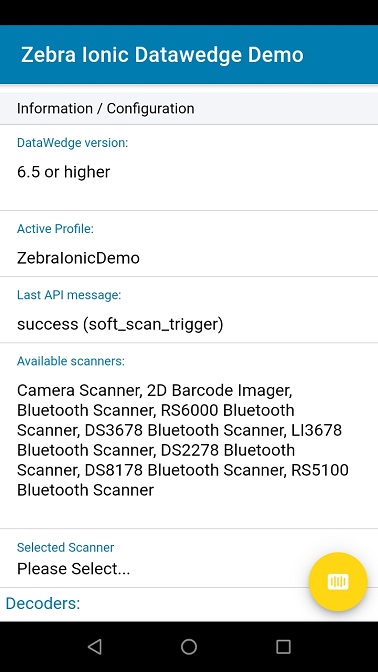
8 |
9 | ## Ionic v4 / v5 / v6
10 | The original ZebraIonicDemo was written to target Ionic v3 & users still wishing to target v3 should use the source code tagged v3.0, https://github.com/ZebraDevs/DataWedge-Ionic-Demo/tree/v3.0.
11 |
12 | The master branch of this application has been designed to target Ionic v6, including updated dependencies and addressing the breaking changes detailed at https://github.com/ionic-team/ionic/blob/master/angular/BREAKING.md
13 |
14 | ## WebIntent
15 | The master branch of this project uses the [Cordova plugin](https://github.com/darryncampbell/darryncampbell-cordova-plugin-intent) directly to interface with Intents. An example using [WebIntent](https://ionicframework.com/docs/native/web-intent) can be found under the [Transition_To_WebIntent_Ionic_6](https://github.com/ZebraDevs/DataWedge-Ionic-Demo/tree/Transition_To_WebIntent_Ionic_6) branch.
16 |
17 | ## License
18 | This project is protected by Zebra's EULA, as detailed in the [License.md](./License.md) file
19 |
20 | ## Restrictions
21 |
22 | Note that this application will only work on Zebra mobile computers, running on non-Zebra devices will give you the following warning:
23 |
24 | 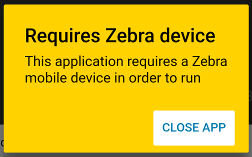
25 |
26 |
27 | ## Building
28 | To build this application:
29 | - [Install Ionic](https://ionicframework.com/docs/v1/guide/installation.html)
30 | - `git clone https://github.com/Zebra/ZebraIonicDemo.git`
31 | - `cd ZebraIonicDemo`
32 | - `npm install`
33 | - Connect Zebra device to adb
34 | - `ionic cordova run android --device`
35 |
36 | ## DataWedge
37 | This application is designed to use DataWedge. DataWedge is only available on Zebra mobile computing devices and provides access to the device hardware scanner(s) including the laser imager, attached Bluetooth scanners and camera imager; **it is not a software scanning library**.
38 |
39 | ## Setup
40 | Any Zebra mobile computer running Android which supports Datawedge should work with this sample but the complexity of setup will depend
41 |
42 | ---
43 | If your device is running Datawedge 6.4 or higher you will see no warning messages and can safely skip this step
44 | ---
45 | You will see this message if you are running a version of Datawedge prior to 6.3:
46 |
47 | 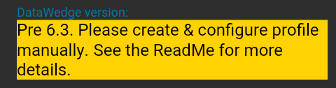
48 |
49 | And this message if you are running Datawedge 6.3:
50 |
51 | 
52 |
53 | In either case, ensure you have a Datawedge profile on the device. You can do this by:
54 | - Launching the Datawedge application
55 | - (Prior to 6.3 only) Select Menu --> New Profile and name the profile `ZebraIonicDemo`
56 | - Configure the ZebraIonicDemo profile to
57 | - Associate the profile with com.zebra.zebraionicdemo, with * Activities
58 | - Configure the intent output plugin to send broadcast intents to `com.zebra.ionicdemo.ACTION`
59 |
60 | 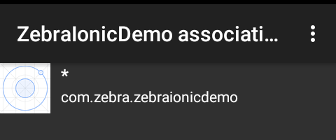
61 |
62 | 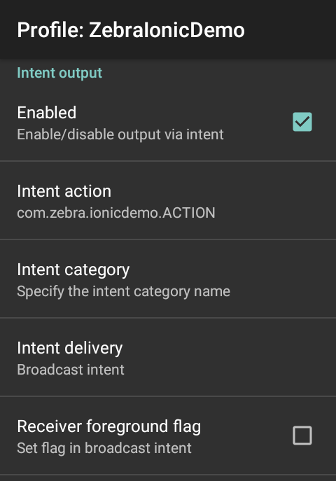
63 |
64 | ### Older Devices
65 | - Devices branded as 'Motorola Solutions' (identifyable by the Motorola logo) will need to use a recent version of this demo app as earlier versions did not detect this manufacturer. Motorola Solutions is one of the ancestor companies which now make up Zebra Technologies.
66 | - Jellybean devices will not run with the latest version of Ionic. Some users have reported success by using the crosswalk rendering engine but since crosswalk is no longer maintained and recent forum posts report incompatibility with the Android 28 support libraries, users targeting Jellybean devices may wish to seek an alternative solution.
67 |
68 | ## Use
69 |
70 | There are two sections to the UI, at the top you can configure scanning attributes such as choosing the supported decoders. Note that some configuration features will require a minimum version of Datawedge. You can initiate a soft trigger scan using the floating action button.
71 |
72 | **ALL** versions of Datawedge support scanning barcodes.
73 |
74 | ## Dependencies
75 |
76 | In order to interact with the Datawedge service on Zebra devices this application relies on a 3rd party component to provide the Android Intent interface. Please be sure to add the [Cordova plugin intent](https://www.npmjs.com/package/com-darryncampbell-cordova-plugin-intent) package to your application if you are using this code as a template for your own application:
77 |
78 | `ionic cordova plugin add com-darryncampbell-cordova-plugin-intent`
79 |
--------------------------------------------------------------------------------
/src/app/providers/barcode/barcode.ts:
--------------------------------------------------------------------------------
1 | /*
2 | * Copyright (C) 2018 Zebra Technologies Corp
3 | * All rights reserved.
4 | */
5 |
6 | import { Injectable } from '@angular/core';
7 | import { Events } from '../../services/events';
8 | import { Platform } from '@ionic/angular';
9 |
10 | @Injectable()
11 | export class BarcodeProvider {
12 |
13 | private requestResultCodes = "false";
14 |
15 | constructor(public events: Events, private platform: Platform) {
16 | this.platform.ready().then((readySource) => {
17 |
18 | let constructorInstance = this;
19 |
20 | // The Datawedge service will respond via implicit broadcasts intents.
21 | // Responses may be the result of calling the Datawedge API or may be because a barcode was scanned
22 | // Set up a broadcast receiver to listen for incoming scans
23 | (window).plugins.intentShim.registerBroadcastReceiver({
24 | filterActions: [
25 | 'com.zebra.ionicdemo.ACTION', // Response from scan (needs to match value in output plugin)
26 | 'com.symbol.datawedge.api.RESULT_ACTION'// Response from DataWedge service (as defined by API)
27 | ],
28 | filterCategories: [
29 | 'android.intent.category.DEFAULT'
30 | ]
31 | },
32 | function (intent) {
33 | // Broadcast received
34 | console.log('Received Intent: ' + JSON.stringify(intent.extras));
35 |
36 | // Emit a separate event for the result associated with this scan. This will only be present in response to
37 | // API calls which included a SEND_RESULT extra
38 | if (intent.extras.hasOwnProperty('RESULT_INFO')) {
39 | let commandResult = intent.extras.RESULT + " (" +
40 | intent.extras.COMMAND.substring(intent.extras.COMMAND.lastIndexOf('.') + 1, intent.extras.COMMAND.length) + ")"; // + JSON.stringify(intent.extras.RESULT_INFO);
41 | constructorInstance.events.publish('data:commandResult', commandResult.toLowerCase());
42 | }
43 |
44 | if (intent.extras.hasOwnProperty('com.symbol.datawedge.api.RESULT_GET_VERSION_INFO')) {
45 | // The version has been returned (DW 6.3 or higher). Includes the DW version along with other subsystem versions e.g MX
46 | var versionInfo = intent.extras['com.symbol.datawedge.api.RESULT_GET_VERSION_INFO'];
47 | console.log('Version Info: ' + JSON.stringify(versionInfo));
48 | let datawedgeVersion = versionInfo['DATAWEDGE'];
49 | console.log("Datawedge version: " + datawedgeVersion);
50 |
51 | // Fire events sequentially so the application can gracefully degrade the functionality available on earlier DW versions
52 | if (datawedgeVersion >= "6.3")
53 | constructorInstance.events.publish('status:dw63ApisAvailable', true);
54 | if (datawedgeVersion >= "6.4")
55 | constructorInstance.events.publish('status:dw64ApisAvailable', true);
56 | if (datawedgeVersion >= "6.5")
57 | constructorInstance.events.publish('status:dw65ApisAvailable', true);
58 | }
59 | else if (intent.extras.hasOwnProperty('com.symbol.datawedge.api.RESULT_ENUMERATE_SCANNERS')) {
60 | // Return from our request to enumerate the available scanners
61 | let enumeratedScanners = intent.extras['com.symbol.datawedge.api.RESULT_ENUMERATE_SCANNERS'];
62 | constructorInstance.events.publish('data:enumeratedScanners', enumeratedScanners);
63 | }
64 | else if (intent.extras.hasOwnProperty('com.symbol.datawedge.api.RESULT_GET_ACTIVE_PROFILE')) {
65 | // Return from our request to obtain the active profile
66 | let activeProfile = intent.extras['com.symbol.datawedge.api.RESULT_GET_ACTIVE_PROFILE'];
67 | constructorInstance.events.publish('data:activeProfile', activeProfile);
68 | }
69 | else if (!intent.extras.hasOwnProperty('RESULT_INFO')) {
70 | // A barcode has been scanned
71 | constructorInstance.events.publish('data:scan', {scanData: intent, time: new Date().toLocaleTimeString()});
72 | }
73 | }
74 | );
75 |
76 | });
77 |
78 | }
79 |
80 | // Control whether or not to include the SEND_RESULT extra in our commands to request DW send the
81 | // result back to us. Only available in DW6.5+
82 | requestResult(requestCodes: boolean) {
83 | this.requestResultCodes = "" + requestCodes;
84 | }
85 |
86 | // Send a broadcast intent to the DW service which is present on all Zebra devcies.
87 | // This functionality requires DW6.3+ as that is the version where the com.symbol.datawedge.api.ACTION
88 | // was introduced.
89 | // extraValue may be a String or a Bundle
90 | sendCommand(extraName: string, extraValue) {
91 | console.log("Sending Command: " + extraName + ", " + JSON.stringify(extraValue));
92 | (window).plugins.intentShim.sendBroadcast({
93 | action: 'com.symbol.datawedge.api.ACTION',
94 | extras: {
95 | [extraName]: extraValue,
96 | "SEND_RESULT": this.requestResultCodes
97 | }
98 | },
99 | function () { }, // Success in sending the intent, not success of DW to process the intent.
100 | function () { } // Failure in sending the intent, not failure of DW to process the intent.
101 | );
102 | }
103 |
104 | }
105 |
106 |
--------------------------------------------------------------------------------
/angular.json:
--------------------------------------------------------------------------------
1 | {
2 | "$schema": "./node_modules/@angular/cli/lib/config/schema.json",
3 | "version": 1,
4 | "defaultProject": "app",
5 | "newProjectRoot": "projects",
6 | "projects": {
7 | "app": {
8 | "root": "",
9 | "sourceRoot": "src",
10 | "projectType": "application",
11 | "prefix": "app",
12 | "schematics": {},
13 | "architect": {
14 | "build": {
15 | "builder": "@angular-devkit/build-angular:browser",
16 | "options": {
17 | "outputPath": "www",
18 | "index": "src/index.html",
19 | "main": "src/main.ts",
20 | "polyfills": "src/polyfills.ts",
21 | "tsConfig": "tsconfig.app.json",
22 | "assets": [
23 | {
24 | "glob": "**/*",
25 | "input": "src/assets",
26 | "output": "assets"
27 | },
28 | {
29 | "glob": "**/*.svg",
30 | "input": "node_modules/ionicons/dist/ionicons/svg",
31 | "output": "./svg"
32 | }
33 | ],
34 | "styles": [
35 | {
36 | "input": "src/theme/variables.scss"
37 | },
38 | {
39 | "input": "src/global.scss"
40 | }
41 | ],
42 | "scripts": []
43 | },
44 | "configurations": {
45 | "production": {
46 | "fileReplacements": [
47 | {
48 | "replace": "src/environments/environment.ts",
49 | "with": "src/environments/environment.prod.ts"
50 | }
51 | ],
52 | "optimization": true,
53 | "outputHashing": "all",
54 | "sourceMap": false,
55 | "extractCss": true,
56 | "namedChunks": false,
57 | "aot": true,
58 | "extractLicenses": true,
59 | "vendorChunk": false,
60 | "buildOptimizer": true,
61 | "budgets": [
62 | {
63 | "type": "initial",
64 | "maximumWarning": "2mb",
65 | "maximumError": "5mb"
66 | }
67 | ]
68 | },
69 | "ci": {
70 | "progress": false
71 | }
72 | }
73 | },
74 | "serve": {
75 | "builder": "@angular-devkit/build-angular:dev-server",
76 | "options": {
77 | "browserTarget": "app:build"
78 | },
79 | "configurations": {
80 | "production": {
81 | "browserTarget": "app:build:production"
82 | },
83 | "ci": {
84 | "progress": false
85 | }
86 | }
87 | },
88 | "extract-i18n": {
89 | "builder": "@angular-devkit/build-angular:extract-i18n",
90 | "options": {
91 | "browserTarget": "app:build"
92 | }
93 | },
94 | "test": {
95 | "builder": "@angular-devkit/build-angular:karma",
96 | "options": {
97 | "main": "src/test.ts",
98 | "polyfills": "src/polyfills.ts",
99 | "tsConfig": "tsconfig.spec.json",
100 | "karmaConfig": "karma.conf.js",
101 | "styles": [],
102 | "scripts": [],
103 | "assets": [
104 | {
105 | "glob": "favicon.ico",
106 | "input": "src/",
107 | "output": "/"
108 | },
109 | {
110 | "glob": "**/*",
111 | "input": "src/assets",
112 | "output": "/assets"
113 | }
114 | ]
115 | },
116 | "configurations": {
117 | "ci": {
118 | "progress": false,
119 | "watch": false
120 | }
121 | }
122 | },
123 | "lint": {
124 | "builder": "@angular-devkit/build-angular:tslint",
125 | "options": {
126 | "tsConfig": [
127 | "tsconfig.app.json",
128 | "tsconfig.spec.json",
129 | "e2e/tsconfig.json"
130 | ],
131 | "exclude": ["**/node_modules/**"]
132 | }
133 | },
134 | "e2e": {
135 | "builder": "@angular-devkit/build-angular:protractor",
136 | "options": {
137 | "protractorConfig": "e2e/protractor.conf.js",
138 | "devServerTarget": "app:serve"
139 | },
140 | "configurations": {
141 | "production": {
142 | "devServerTarget": "app:serve:production"
143 | },
144 | "ci": {
145 | "devServerTarget": "app:serve:ci"
146 | }
147 | }
148 | },
149 | "ionic-cordova-build": {
150 | "builder": "@ionic/angular-toolkit:cordova-build",
151 | "options": {
152 | "browserTarget": "app:build"
153 | },
154 | "configurations": {
155 | "production": {
156 | "browserTarget": "app:build:production"
157 | }
158 | }
159 | },
160 | "ionic-cordova-serve": {
161 | "builder": "@ionic/angular-toolkit:cordova-serve",
162 | "options": {
163 | "cordovaBuildTarget": "app:ionic-cordova-build",
164 | "devServerTarget": "app:serve"
165 | },
166 | "configurations": {
167 | "production": {
168 | "cordovaBuildTarget": "app:ionic-cordova-build:production",
169 | "devServerTarget": "app:serve:production"
170 | }
171 | }
172 | }
173 | }
174 | }
175 | },
176 | "cli": {
177 | "defaultCollection": "@ionic/angular-toolkit"
178 | },
179 | "schematics": {
180 | "@ionic/angular-toolkit:component": {
181 | "styleext": "scss"
182 | },
183 | "@ionic/angular-toolkit:page": {
184 | "styleext": "scss"
185 | }
186 | }
187 | }
188 |
--------------------------------------------------------------------------------
/src/theme/variables.scss:
--------------------------------------------------------------------------------
1 | // Ionic Variables and Theming. For more info, please see:
2 | // http://ionicframework.com/docs/theming/
3 |
4 | /** Ionic CSS Variables **/
5 | :root {
6 | /** primary **/
7 | // --ion-color-primary: #3880ff;
8 | --ion-color-primary: #007CB0;
9 | --ion-color-primary-rgb: 56, 128, 255;
10 | --ion-color-primary-contrast: #ffffff;
11 | --ion-color-primary-contrast-rgb: 255, 255, 255;
12 | --ion-color-primary-shade: #3171e0;
13 | --ion-color-primary-tint: #4c8dff;
14 |
15 | /** secondary **/
16 | // --ion-color-secondary: #3dc2ff;
17 | --ion-color-secondary: #FFD200;
18 | --ion-color-secondary-rgb: 61, 194, 255;
19 | --ion-color-secondary-contrast: #ffffff;
20 | --ion-color-secondary-contrast-rgb: 255, 255, 255;
21 | --ion-color-secondary-shade: #36abe0;
22 | --ion-color-secondary-tint: #50c8ff;
23 |
24 | /** tertiary **/
25 | --ion-color-tertiary: #5260ff;
26 | --ion-color-tertiary-rgb: 82, 96, 255;
27 | --ion-color-tertiary-contrast: #ffffff;
28 | --ion-color-tertiary-contrast-rgb: 255, 255, 255;
29 | --ion-color-tertiary-shade: #4854e0;
30 | --ion-color-tertiary-tint: #6370ff;
31 |
32 | /** success **/
33 | --ion-color-success: #2dd36f;
34 | --ion-color-success-rgb: 45, 211, 111;
35 | --ion-color-success-contrast: #ffffff;
36 | --ion-color-success-contrast-rgb: 255, 255, 255;
37 | --ion-color-success-shade: #28ba62;
38 | --ion-color-success-tint: #42d77d;
39 |
40 | /** warning **/
41 | --ion-color-warning: #ffc409;
42 | --ion-color-warning-rgb: 255, 196, 9;
43 | --ion-color-warning-contrast: #000000;
44 | --ion-color-warning-contrast-rgb: 0, 0, 0;
45 | --ion-color-warning-shade: #e0ac08;
46 | --ion-color-warning-tint: #ffca22;
47 |
48 | /** danger **/
49 | --ion-color-danger: #eb445a;
50 | --ion-color-danger-rgb: 235, 68, 90;
51 | --ion-color-danger-contrast: #ffffff;
52 | --ion-color-danger-contrast-rgb: 255, 255, 255;
53 | --ion-color-danger-shade: #cf3c4f;
54 | --ion-color-danger-tint: #ed576b;
55 |
56 | /** dark **/
57 | --ion-color-dark: #222428;
58 | --ion-color-dark-rgb: 34, 36, 40;
59 | --ion-color-dark-contrast: #ffffff;
60 | --ion-color-dark-contrast-rgb: 255, 255, 255;
61 | --ion-color-dark-shade: #1e2023;
62 | --ion-color-dark-tint: #383a3e;
63 |
64 | /** medium **/
65 | --ion-color-medium: #92949c;
66 | --ion-color-medium-rgb: 146, 148, 156;
67 | --ion-color-medium-contrast: #ffffff;
68 | --ion-color-medium-contrast-rgb: 255, 255, 255;
69 | --ion-color-medium-shade: #808289;
70 | --ion-color-medium-tint: #9d9fa6;
71 |
72 | /** light **/
73 | --ion-color-light: #f4f5f8;
74 | --ion-color-light-rgb: 244, 245, 248;
75 | --ion-color-light-contrast: #000000;
76 | --ion-color-light-contrast-rgb: 0, 0, 0;
77 | --ion-color-light-shade: #d7d8da;
78 | --ion-color-light-tint: #f5f6f9;
79 | }
80 |
81 | @media (prefers-color-scheme: dark) {
82 | /*
83 | * Dark Colors
84 | * -------------------------------------------
85 | */
86 |
87 | body {
88 | --ion-color-primary: #428cff;
89 | --ion-color-primary-rgb: 66,140,255;
90 | --ion-color-primary-contrast: #ffffff;
91 | --ion-color-primary-contrast-rgb: 255,255,255;
92 | --ion-color-primary-shade: #3a7be0;
93 | --ion-color-primary-tint: #5598ff;
94 |
95 | --ion-color-secondary: #50c8ff;
96 | --ion-color-secondary-rgb: 80,200,255;
97 | --ion-color-secondary-contrast: #ffffff;
98 | --ion-color-secondary-contrast-rgb: 255,255,255;
99 | --ion-color-secondary-shade: #46b0e0;
100 | --ion-color-secondary-tint: #62ceff;
101 |
102 | --ion-color-tertiary: #6a64ff;
103 | --ion-color-tertiary-rgb: 106,100,255;
104 | --ion-color-tertiary-contrast: #ffffff;
105 | --ion-color-tertiary-contrast-rgb: 255,255,255;
106 | --ion-color-tertiary-shade: #5d58e0;
107 | --ion-color-tertiary-tint: #7974ff;
108 |
109 | --ion-color-success: #2fdf75;
110 | --ion-color-success-rgb: 47,223,117;
111 | --ion-color-success-contrast: #000000;
112 | --ion-color-success-contrast-rgb: 0,0,0;
113 | --ion-color-success-shade: #29c467;
114 | --ion-color-success-tint: #44e283;
115 |
116 | --ion-color-warning: #ffd534;
117 | --ion-color-warning-rgb: 255,213,52;
118 | --ion-color-warning-contrast: #000000;
119 | --ion-color-warning-contrast-rgb: 0,0,0;
120 | --ion-color-warning-shade: #e0bb2e;
121 | --ion-color-warning-tint: #ffd948;
122 |
123 | --ion-color-danger: #ff4961;
124 | --ion-color-danger-rgb: 255,73,97;
125 | --ion-color-danger-contrast: #ffffff;
126 | --ion-color-danger-contrast-rgb: 255,255,255;
127 | --ion-color-danger-shade: #e04055;
128 | --ion-color-danger-tint: #ff5b71;
129 |
130 | --ion-color-dark: #f4f5f8;
131 | --ion-color-dark-rgb: 244,245,248;
132 | --ion-color-dark-contrast: #000000;
133 | --ion-color-dark-contrast-rgb: 0,0,0;
134 | --ion-color-dark-shade: #d7d8da;
135 | --ion-color-dark-tint: #f5f6f9;
136 |
137 | --ion-color-medium: #989aa2;
138 | --ion-color-medium-rgb: 152,154,162;
139 | --ion-color-medium-contrast: #000000;
140 | --ion-color-medium-contrast-rgb: 0,0,0;
141 | --ion-color-medium-shade: #86888f;
142 | --ion-color-medium-tint: #a2a4ab;
143 |
144 | --ion-color-light: #222428;
145 | --ion-color-light-rgb: 34,36,40;
146 | --ion-color-light-contrast: #ffffff;
147 | --ion-color-light-contrast-rgb: 255,255,255;
148 | --ion-color-light-shade: #1e2023;
149 | --ion-color-light-tint: #383a3e;
150 | }
151 |
152 | /*
153 | * iOS Dark Theme
154 | * -------------------------------------------
155 | */
156 |
157 | .ios body {
158 | --ion-background-color: #000000;
159 | --ion-background-color-rgb: 0,0,0;
160 |
161 | --ion-text-color: #ffffff;
162 | --ion-text-color-rgb: 255,255,255;
163 |
164 | --ion-color-step-50: #0d0d0d;
165 | --ion-color-step-100: #1a1a1a;
166 | --ion-color-step-150: #262626;
167 | --ion-color-step-200: #333333;
168 | --ion-color-step-250: #404040;
169 | --ion-color-step-300: #4d4d4d;
170 | --ion-color-step-350: #595959;
171 | --ion-color-step-400: #666666;
172 | --ion-color-step-450: #737373;
173 | --ion-color-step-500: #808080;
174 | --ion-color-step-550: #8c8c8c;
175 | --ion-color-step-600: #999999;
176 | --ion-color-step-650: #a6a6a6;
177 | --ion-color-step-700: #b3b3b3;
178 | --ion-color-step-750: #bfbfbf;
179 | --ion-color-step-800: #cccccc;
180 | --ion-color-step-850: #d9d9d9;
181 | --ion-color-step-900: #e6e6e6;
182 | --ion-color-step-950: #f2f2f2;
183 |
184 | --ion-toolbar-background: #0d0d0d;
185 |
186 | --ion-item-background: #000000;
187 | }
188 |
189 |
190 | /*
191 | * Material Design Dark Theme
192 | * -------------------------------------------
193 | */
194 |
195 | .md body {
196 | --ion-background-color: #121212;
197 | --ion-background-color-rgb: 18,18,18;
198 |
199 | --ion-text-color: #ffffff;
200 | --ion-text-color-rgb: 255,255,255;
201 |
202 | --ion-border-color: #222222;
203 |
204 | --ion-color-step-50: #1e1e1e;
205 | --ion-color-step-100: #2a2a2a;
206 | --ion-color-step-150: #363636;
207 | --ion-color-step-200: #414141;
208 | --ion-color-step-250: #4d4d4d;
209 | --ion-color-step-300: #595959;
210 | --ion-color-step-350: #656565;
211 | --ion-color-step-400: #717171;
212 | --ion-color-step-450: #7d7d7d;
213 | --ion-color-step-500: #898989;
214 | --ion-color-step-550: #949494;
215 | --ion-color-step-600: #a0a0a0;
216 | --ion-color-step-650: #acacac;
217 | --ion-color-step-700: #b8b8b8;
218 | --ion-color-step-750: #c4c4c4;
219 | --ion-color-step-800: #d0d0d0;
220 | --ion-color-step-850: #dbdbdb;
221 | --ion-color-step-900: #e7e7e7;
222 | --ion-color-step-950: #f3f3f3;
223 |
224 | --ion-item-background: #1e1e1e;
225 |
226 | --ion-toolbar-background: #1f1f1f;
227 |
228 | --ion-tab-bar-background: #1f1f1f;
229 | }
230 | }
--------------------------------------------------------------------------------
/config.xml:
--------------------------------------------------------------------------------
1 |
2 |
3 | Zebra Ionic Demo
4 | Example application to show integration of Ionic on Zebra devices.
5 | Zebra Technologies
6 |
7 |
8 |
9 |
10 |
11 |
12 |
13 |
14 |
15 |
16 |
17 |
18 |
19 |
20 |
21 |
22 |
23 |
24 |
25 |
26 |
27 |
28 |
29 |
30 |
31 |
32 |
33 |
34 |
35 |
36 |
37 |
38 |
39 |
40 |
41 |
42 |
43 |
44 |
45 |
46 |
47 |
48 |
49 |
50 |
51 |
52 |
53 |
54 |
55 |
56 |
57 |
58 |
59 |
60 |
61 |
62 |
63 |
64 |
65 |
66 |
67 |
68 |
69 |
70 |
71 |
72 |
73 |
74 |
75 |
76 |
77 |
78 |
79 |
80 |
81 |
82 |
83 |
84 |
85 |
86 |
87 |
88 |
89 |
90 |
91 |
92 |
93 |
94 |
95 |
96 |
97 |
98 |
99 |
100 |
101 |
102 |
103 |
--------------------------------------------------------------------------------
/License.md:
--------------------------------------------------------------------------------
1 | # END USER LICENSE AGREEMENT (UNRESTRICTED SOFTWARE)
2 |
3 |
4 | IMPORTANT PLEASE READ CAREFULLY: This End User License Agreement ("EULA") is a legal agreement between you (either an individual or a single entity) and Zebra International Holdings Corporation ("Zebra") for software, owned by Zebra and its affiliated companies and its third party suppliers and licensors, that accompanies this EULA. ("Software"). BY USING THE SOFTWARE, YOU ACKNOWLEDGE ACCEPTANCE OF THE TERMS OF THIS EULA. IF YOU DO NOT ACCEPT THESE TERMS, DO NOT USE THE SOFTWARE.
5 |
6 | 1. GRANT OF LICENSE. Zebra grants you, End-User Customer, the following rights provided that you comply with all terms and conditions of this EULA: For Software associated with Zebra hardware, Zebra hereby grants you ("Licensee" or "you") a personal, nonexclusive, nontransferable, nonassignable, nonsublicenseable license to use the Software subject to the terms and conditions of this Agreement. Only your employees or subcontractors may use the Software. You shall take all necessary steps to insure that your employees and subcontractors abide by the terms of this Agreement. You shall use the Software only for your internal business purposes, exclusively to support the Zebra hardware, including the right to (i) use, modify, and incorporate all or portions of the sample source code (the "Sample Code"), runtime library files, and/or documentation files that may be included in the unmodified Software into Licensee's own programs (the "User Programs") to support the Zebra hardware exclusively, provided that no license is granted herein under any patents that may be infringed by Licensee's modifications, derivative works or by other works in which any portion of the Software may be incorporated; (ii) distribute the Sample Code in object code format only as substantially modified or only as part of the User Programs to support the Zebra hardware exclusively; and (iii) distribute the runtime library files in their original form to support the Zebra hardware exclusively. For a standalone Software application, you may install, use, modify, and incorporate all or portions of any object code, available source code ("Source Code"), runtime library files, and/or documentation files that may be included with the unmodified Software into your own programs (the "User Programs") and distribute the User Programs to third parties. Any use of the Software outside of the conditions set forth herein is strictly prohibited and will be deemed a breach of this Agreement resulting in immediate termination of your License. Zebra will be entitled to all available remedies at law or in equity (including immediate injunctive relief and repossession of all Software unless Licensee is a Federal agency of the United States Government).
7 |
8 | Certain items of the Software may be subject to open source licenses. The open source license provisions may override some of the terms of this EULA. Zebra makes the applicable open source licenses available to you on a Legal Notices readme file available on your device and/or in System Reference guides or in Command Line Interface (CLI) Reference guides associated with certain Zebra products.
9 |
10 | 2. RESERVATION OF RIGHTS AND OWNERSHIP. Zebra reserves all rights not expressly granted to you in this EULA. The Software is protected by copyright and other intellectual property laws and treaties. Zebra or its suppliers own the title, copyright and other intellectual property rights in the Software. The Software is licensed, not sold.
11 |
12 | 3. LIMITATIONS ON END USER RIGHTS. You shall not distribute, sublicense, rent, loan, lease, export, re-export, resell, ship or divert or cause to be exported, re-exported, resold, shipped or diverted, directly or indirectly, the unmodified Software under this Agreement. You shall not, and shall not permit others to: (i) combine the Software including any Sample or Source Code, in whole or in part, with any Open Source Software having license terms and obligations that include copyleft obligations and/or intellectual property encumbrances; (ii) remove any proprietary notices, marks, labels, or logos from the Software; (iii) rent or transfer all or some of the Software to any other party without Zebra's prior written consent; or (iv) utilize any computer software or hardware which is designed to defeat any copy protection device, should the Software be equipped with such a protection device.
13 |
14 | 4. MACHINE DATA. 'Machine Data' means anonymized usage data collected by devices sold (or licensed) under this Agreement such as battery management (time to empty, standby current, average current), device system time, CPU processing load, free RAM, number of running processes, network information (name, identifier), device identifier, firmware version, hardware version device type, audio volume, LED state, beeper volume, backlight level, key light, odometer count, reboot, reboot cause, total storage and physical memory availability, power cycle count, and device up time. Notwithstanding anything else in this Agreement, all title and ownership rights in and to Machine Data are held by Zebra. In the event, and to the extent you are deemed to have any ownership rights in Machine Data, you hereby grant Zebra a limited, revocable, non-exclusive right and license to use Machine Data.
15 |
16 | 5. LOCATION INFORMATION. The Software may enable you to collect location-based data from one or more client devices which may allow you to track the actual location of those client devices. Zebra specifically disclaims any liability for your use or misuse of the location-based data. You agree to pay all reasonable costs and expenses of Zebra arising from or related to third party claims resulting from your use of the location-based data.
17 |
18 | 6. SOFTWARE RELEASES. Zebra may periodically release new versions of the Software which will be made available to you.
19 |
20 | 7. EXPORT RESTRICTIONS. You acknowledge that the Software is subject to export restrictions of various countries. You agree to comply with all applicable international and national laws that apply to the Software, including all the applicable export restriction laws and regulations.
21 |
22 | 8. ASSIGNMENT. You may not assign this Agreement or any of your rights or obligations hereunder (by operation of law or otherwise) without the prior written consent of Zebra. Zebra may assign this Agreement and its rights and obligations without your consent. Subject to the foregoing, this Agreement shall be binding upon and inure to the benefit of the parties to it and their respective legal representatives, successors and permitted assigns.
23 |
24 | 9. TERMINATION. This EULA is effective until terminated. Your rights under this License will terminate automatically without notice from Zebra if you fail to comply with any of the terms and conditions of this EULA. Zebra may terminate this Agreement by offering you a superseding Agreement for the Software or for any new release of the Software and conditioning your continued use of the Software or such new release on your acceptance of such superseding Agreement. Upon termination of this EULA, you must cease all use of the Software and destroy all copies, full or partial, of the Software.
25 |
26 | 10. DISCLAIMER OF WARRANTY. UNLESS SEPARATELY STATED IN A WRITTEN EXPRESS LIMITED WARRANTY, ALL SOFTWARE PROVIDED BY ZEBRA IS PROVIDED "AS IS" AND ON AN "AS AVAILABLE" BASIS, WITHOUT WARRANTIES OF ANY KIND FROM ZEBRA, EITHER EXPRESS OR IMPLIED. TO THE FULLEST EXTENT POSSIBLE PURSUANT TO APPLICABLE LAW, ZEBRA DISCLAIMS ALL WARRANTIES EXPRESS, IMPLIED, OR STATUTORY, INCLUDING, BUT NOT LIMITED TO, IMPLIED WARRANTIES OF MERCHANTABILITY, SATISFACTORY QUALITY OR WORKMANLIKE EFFORT, FITNESS FOR A PARTICULAR PURPOSE, RELIABILITY OR AVAILABILITY, ACCURACY, LACK OF VIRUSES, NON INFRINGEMENT OF THIRD PARTY RIGHTS OR OTHER VIOLATION OF RIGHTS. ZEBRA DOES NOT WARRANT THAT THE OPERATION OF THE SOFTWARE WILL BE UNINTERRUPTED OR ERROR FREE. TO THE EXTENT THAT THE SOFTWARE COVERED BY THIS EULA INCLUDES EMULATION LIBRARIES, SUCH EMULATION LIBRARIES DO NOT WORK 100% CORRECTLY OR COVER 100% OF THE FUNCTIONALITY BEING EMULATED, ARE OFFERED "AS IS" AND WITH ALL FAULTS, AND ALL THE DISCLAIMERS AND LIMITATIONS CONTAINED IN THIS PARAGRAPH AND THIS AGREEMENT APPLY TO SUCH EMULATION LIBRARIES. SOME JURISDICTIONS DO NOT ALLOW EXCLUSIONS OR LIMITATIONS OF IMPLIED WARRANTIES, SO THE ABOVE EXCLUSIONS OR LIMITATIONS MAY NOT APPLY TO YOU. NO ADVICE OR INFORMATION, WHETHER ORAL OR WRITTEN, OBTAINED BY YOU FROM ZEBRA OR ITS AFFILIATES SHALL BE DEEMED TO ALTER THIS DISCLAIMER BY ZEBRA OF WARRANTY REGARDING THE SOFTWARE, OR TO CREATE ANY WARRANTY OF ANY SORT FROM ZEBRA.
27 |
28 | 11. THIRD-PARTY APPLICATIONS. Certain third party applications may be included with, or downloaded with this Software. Zebra makes no representations whatsoever about any of these applications. Since Zebra has no control over such applications, you acknowledge and agree that Zebra is not responsible for such applications. You expressly acknowledge and agree that use of third party applications is at your sole risk and that the entire risk of unsatisfactory quality, performance, accuracy and effort is with you. You agree that Zebra shall not be responsible or liable, directly or indirectly, for any damage or loss, including but not limited to any damage to or loss of data, caused or alleged to be caused by, or in connection with, use of or reliance on any such third party content, products, or services available on or through any such application. You acknowledge and agree that the use of any third-party application is governed by such third party application provider's Terms of Use, License Agreement, Privacy Policy, or other such agreement and that any information or personal data you provide, whether knowingly or unknowingly, to such third-party application provider, will be subject to such third party application provider's privacy policy, if such a policy exists. ZEBRA DISCLAIMS ANY RESPONSIBILITY FOR ANY DISCLOSURE OF INFORMATION OR ANY OTHER PRACTICES OF ANY THIRD PARTY APPLICATION PROVIDER. ZEBRA EXPRESSLY DISCLAIMS ANY WARRANTY REGARDING WHETHER YOUR PERSONAL INFORMATION IS CAPTURED BY ANY THIRD PARTY APPLICATION PROVIDER OR THE USE TO WHICH SUCH PERSONAL INFORMATION MAY BE PUT BY SUCH THIRD PARTY APPLICATION PROVIDER.
29 |
30 | 12. LIMITATION OF LIABILITY. ZEBRA WILL NOT BE LIABLE FOR ANY DAMAGES OF ANY KIND ARISING OUT OF OR RELATING TO THE USE OR THE INABILITY TO USE THE SOFTWARE OR ANY THIRD PARTY APPLICATION, ITS CONTENT OR FUNCTIONALITY, INCLUDING BUT NOT LIMITED TO DAMAGES CAUSED BY OR RELATED TO ERRORS, OMISSIONS, INTERRUPTIONS, DEFECTS, DELAY IN OPERATION OR TRANSMISSION, COMPUTER VIRUS, FAILURE TO CONNECT, NETWORK CHARGES, IN-APP PURCHASES, AND ALL OTHER DIRECT, INDIRECT, SPECIAL, INCIDENTAL, EXEMPLARY, OR CONSEQUENTIAL DAMAGES EVEN IF ZEBRA HAS BEEN ADVISED OF THE POSSIBILITY OF SUCH DAMAGES. SOME JURISDICTIONS DO NOT ALLOW THE EXCLUSION OR LIMITATION OF INCIDENTAL OR CONSEQUENTIAL DAMAGES, SO THE ABOVE EXCLUSIONS OR LIMITATIONS MAY NOT APPLY TO YOU. NOTWITHSTANDING THE FOREGOING, ZEBRA'S TOTAL LIABILITY TO YOU FOR ALL LOSSES, DAMAGES, CAUSES OF ACTION, INCLUDING BUT NOT LIMITED TO THOSE BASED ON CONTRACT, TORT, OR OTHERWISE, ARISING OUT OF YOUR USE OF THE SOFTWARE OR THIRD PARTY APPLICATIONS, OR ANY OTHER PROVISION OF THIS EULA, SHALL NOT EXCEED THE FAIR MARKET VALUE OF THE SOFTWARE OR AMOUNT PURCHASER PAID SPECIFICALLY FOR THE SOFTWARE. THE FOREGOING LIMITATIONS, EXCLUSIONS, AND DISCLAIMERS (INCLUDING SECTIONS 10, 11, 12, AND 15) SHALL APPLY TO THE MAXIMUM EXTENT PERMITTED BY APPLICABLE LAW, EVEN IF ANY REMEDY FAILS ITS ESSENTIAL PURPOSE.
31 |
32 | 13. INJUNCTIVE RELIEF. You acknowledge that, in the event you breach any provision of this Agreement, Zebra will not have an adequate remedy in money or damages. Zebra shall therefore be entitled to obtain an injunction against such breach from any court of competent jurisdiction immediately upon request without posting bond. Zebra's right to obtain injunctive relief shall not limit its right to seek further remedies.
33 |
34 | 14. MODIFICATION. No modification of this Agreement shall be binding unless it is in writing and is signed by an authorized representative of the party against whom enforcement of the modification is sought.
35 |
36 | 15. U.S. GOVERNMENT END USERS RESTRICTED RIGHTS. This provision only applies to U.S. Government end users. The Software is a 'commercial item' as that term is defined at 48 C.F.R. Part 2.101, consisting of commercial computer software and computer software documentation as such terms are defined in 48 C.F.R. Part 252.227-7014(a)(1) and 48 C.F.R. Part 252.227-7014(a)(5), and used in 48 C.F.R. Part 12.212 and 48 C.F.R. Part 227.7202, as applicable. Consistent with 48 C.F.R. Part 12.212, 48 C.F.R. Part 252.227-7015, 48 C.F.R. Part 227.7202-1 through 227.7202-4, 48 C.F.R. Part 52.227-19, and other relevant sections of the Code of Federal Regulations, as applicable, the Software is distributed and licensed to U.S. Government end users (a) only as a commercial item, and (b) with only those rights as are granted to all other end users pursuant to the terms and conditions contained herein.
37 |
38 | 16. APPLICABLE LAW. This EULA is governed by the laws of the state of Illinois, without regard to its conflict of law provisions. This EULA shall not be governed by the UN Convention on Contracts for the International Sale of Goods, the application of which is expressly excluded.
--------------------------------------------------------------------------------
/src/app/home/home.page.ts:
--------------------------------------------------------------------------------
1 | /*
2 | * Copyright (C) 2018 Zebra Technologies Corp
3 | * All rights reserved.
4 | */
5 | import { Component, ChangeDetectorRef } from '@angular/core';
6 | import { BarcodeProvider } from '../providers/barcode/barcode';
7 |
8 | import { Events } from '../services/events';
9 | import { AlertController } from '@ionic/angular';
10 | import { Platform } from '@ionic/angular';
11 | import { Device } from '@ionic-native/device/ngx';
12 | import { ToastController } from '@ionic/angular';
13 |
14 | @Component({
15 | selector: 'app-home',
16 | templateUrl: 'home.page.html',
17 | styleUrls: ['home.page.scss'],
18 | providers: [BarcodeProvider, Device],
19 | })
20 | export class HomePage {
21 | private scans = [];
22 | private scanners = [{ "SCANNER_NAME": "Please Wait...", "SCANNER_INDEX": 0, "SCANNER_CONNECTION_STATE": true }];
23 | private selectedScanner = "Please Select...";
24 | private selectedScannerId = -1;
25 | private ean8Decoder = true; // Model for decoder
26 | private ean13Decoder = true; // Model for decoder
27 | private code39Decoder = true; // Model for decoder
28 | private code128Decoder = true;// Model for decoder
29 | private dataWedgeVersion = "Pre 6.3. Please create & configure profile manually. See the ReadMe for more details.";
30 | private availableScannersText = "Requires Datawedge 6.3+"
31 | private activeProfileText = "Requires Datawedge 6.3+";
32 | private commandResultText = "Messages from DataWedge will go here";
33 | private uiHideDecoders = true;
34 | private uiDatawedgeVersionAttention = true;
35 | private uiHideSelectScanner = true;
36 | private uiHideShowAvailableScanners = false;
37 | private uiHideCommandMessages = true;
38 | private uiHideFloatingActionButton = true;
39 |
40 | public constructor(private barcodeProvider: BarcodeProvider,
41 | public events: Events, private changeDetectorRef: ChangeDetectorRef, private device: Device,
42 | private alertController: AlertController, private platform: Platform, private toastController: ToastController) {
43 |
44 | this.platform.ready().then((readySource) => {
45 |
46 | // Check manufacturer. Exit if this app is not running on a Zebra device
47 | console.log("Device manufacturer is: " + this.device.manufacturer);
48 | if (!(this.device.manufacturer.toLowerCase().includes("zebra") || this.device.manufacturer.toLowerCase().includes("motorola solutions"))) {
49 | this.presentAlert();
50 | }
51 |
52 | // Determine the version. We can add additional functionality if a more recent version of the DW API is present
53 | this.barcodeProvider.sendCommand("com.symbol.datawedge.api.GET_VERSION_INFO", "");
54 |
55 | ////////////////////////////
56 | // EVENT HANDLING
57 | ////////////////////////////
58 |
59 | // 6.3 DataWedge APIs are available
60 | events.subscribe('status:dw63ApisAvailable', (isAvailable) => {
61 | console.log("DataWedge 6.3 APIs are available");
62 | // We are able to create the profile under 6.3. If no further version events are received, notify the user
63 | // they will need to create the profile manually
64 | this.barcodeProvider.sendCommand("com.symbol.datawedge.api.CREATE_PROFILE", "ZebraIonicDemo");
65 | this.dataWedgeVersion = "6.3. Please configure profile manually. See the ReadMe for more details.";
66 |
67 | // Although we created the profile we can only configure it with DW 6.4.
68 | this.barcodeProvider.sendCommand("com.symbol.datawedge.api.GET_ACTIVE_PROFILE", "");
69 |
70 | // Enumerate the available scanners on the device
71 | this.barcodeProvider.sendCommand("com.symbol.datawedge.api.ENUMERATE_SCANNERS", "");
72 |
73 | // Functionality of the FAB is available so display the button
74 | this.uiHideFloatingActionButton = false;
75 |
76 | this.changeDetectorRef.detectChanges();
77 | });
78 |
79 | // 6.4 Datawedge APIs are available
80 | events.subscribe('status:dw64ApisAvailable', (isAvailable) => {
81 | console.log("DataWedge 6.4 APIs are available");
82 |
83 | // Documentation states the ability to set a profile config is only available from DW 6.4.
84 | // For our purposes, this includes setting the decoders and configuring the associated app / output params of the profile.
85 | this.dataWedgeVersion = "6.4";
86 | this.uiDatawedgeVersionAttention = false;
87 | this.uiHideDecoders = !isAvailable;
88 |
89 | // Configure the created profile (associated app and keyboard plugin)
90 | let profileConfig = {
91 | "PROFILE_NAME": "ZebraIonicDemo",
92 | "PROFILE_ENABLED": "true",
93 | "CONFIG_MODE": "UPDATE",
94 | "PLUGIN_CONFIG": {
95 | "PLUGIN_NAME": "BARCODE",
96 | "RESET_CONFIG": "true",
97 | "PARAM_LIST": {}
98 | },
99 | "APP_LIST": [{
100 | "PACKAGE_NAME": "com.zebra.zebraionicdemo",
101 | "ACTIVITY_LIST": ["*"]
102 | }]
103 | };
104 | this.barcodeProvider.sendCommand("com.symbol.datawedge.api.SET_CONFIG", profileConfig);
105 |
106 | // Configure the created profile (intent plugin)
107 | let profileConfig2 = {
108 | "PROFILE_NAME": "ZebraIonicDemo",
109 | "PROFILE_ENABLED": "true",
110 | "CONFIG_MODE": "UPDATE",
111 | "PLUGIN_CONFIG": {
112 | "PLUGIN_NAME": "INTENT",
113 | "RESET_CONFIG": "true",
114 | "PARAM_LIST": {
115 | "intent_output_enabled": "true",
116 | "intent_action": "com.zebra.ionicdemo.ACTION",
117 | "intent_delivery": "2"
118 | }
119 | }
120 | };
121 | this.barcodeProvider.sendCommand("com.symbol.datawedge.api.SET_CONFIG", profileConfig2);
122 |
123 | // Give some time for the profile to settle then query its value
124 | setTimeout(function () {
125 | barcodeProvider.sendCommand("com.symbol.datawedge.api.GET_ACTIVE_PROFILE", "");
126 | }, 1000);
127 |
128 | this.changeDetectorRef.detectChanges();
129 | });
130 |
131 | // 6.5 Datawedge APIs are available
132 | events.subscribe('status:dw65ApisAvailable', (isAvailable) => {
133 | console.log("DataWedge 6.5 APIs are available");
134 |
135 | // The ability to switch to a new scanner is only available from DW 6.5 onwards
136 | // Reconfigure UI so the user can choose the desired scanner
137 | this.uiHideSelectScanner = false;
138 | this.uiHideShowAvailableScanners = true;
139 |
140 | // 6.5 also introduced messages which are received from the API to indicate success / failure
141 | this.uiHideCommandMessages = false;
142 | this.barcodeProvider.requestResult(true);
143 | this.dataWedgeVersion = "6.5 or higher";
144 | this.changeDetectorRef.detectChanges();
145 | });
146 |
147 | // Response to our request to find out the active DW profile
148 | events.subscribe('data:activeProfile', (activeProfile) => {
149 | console.log("Active profile: " + activeProfile);
150 |
151 | // Update the UI
152 | this.activeProfileText = activeProfile;
153 |
154 | this.changeDetectorRef.detectChanges();
155 | });
156 |
157 | // The result (success / failure) of our last API call along with additional information
158 | events.subscribe('data:commandResult', (commandResult) => {
159 | this.commandResultText = commandResult;
160 | this.changeDetectorRef.detectChanges();
161 | });
162 |
163 | // Response to our requet to enumerte the scanners
164 | events.subscribe('data:enumeratedScanners', (enumeratedScanners) => {
165 | // Maintain two lists, the first for devices which support DW 6.5+ and shows a combo box to select
166 | // the scanner to use. The second will just display the available scanners in a list and be available
167 | // for 6.4 and below
168 | this.scanners = enumeratedScanners;
169 | let humanReadableScannerList = "";
170 | enumeratedScanners.forEach((scanner, index) => {
171 | console.log("Scanner found: name= " + scanner.SCANNER_NAME + ", id=" + scanner.SCANNER_INDEX + ", connected=" + scanner.SCANNER_CONNECTION_STATE);
172 | humanReadableScannerList += scanner.SCANNER_NAME;
173 | if (index < enumeratedScanners.length - 1)
174 | humanReadableScannerList += ", ";
175 | });
176 | this.availableScannersText = humanReadableScannerList;
177 | this.scanners.unshift({"SCANNER_NAME": "Please Select...", "SCANNER_INDEX":-1, "SCANNER_CONNECTION_STATE":false});
178 | this.changeDetectorRef.detectChanges();
179 | });
180 |
181 | // A scan has been received
182 | events.subscribe('data:scan', (data: any) => {
183 | // Update the list of scanned barcodes
184 | let scannedData = data.scanData.extras["com.symbol.datawedge.data_string"];
185 | let scannedType = data.scanData.extras["com.symbol.datawedge.label_type"];
186 | this.scans.unshift({ "data": scannedData, "type": scannedType, "timeAtDecode": data.time });
187 |
188 | // On older devices, if a scan is received we can assume the profile was correctly configured manually
189 | // so remove the yellow highlight.
190 | this.uiDatawedgeVersionAttention = false;
191 |
192 | this.changeDetectorRef.detectChanges();
193 | });
194 |
195 | });
196 |
197 | }
198 |
199 | // Function to handle changes in the decoder checkboxes.
200 | // Note: SET_CONFIG only available on DW 6.4+ per the docs
201 | public setDecoders() {
202 | var paramList = {
203 | "scanner_selection": "auto",
204 | "decoder_ean8": "" + this.ean8Decoder,
205 | "decoder_ean13": "" + this.ean13Decoder,
206 | "decoder_code128": "" + this.code128Decoder,
207 | "decoder_code39": "" + this.code39Decoder
208 | }
209 | // The "scanner_selection" parameter supports "auto" to apply to the default scanner.
210 | // If we have selected a different scanner we need to ensure the settings are applied
211 | // to the correct scanner by specifying "current-device-id". See http://techdocs.zebra.com/datawedge/6-7/guide/api/setconfig/
212 | // for more information. selectedScannerId will be >-1 if the user has chosen a specific scanner.
213 | if (this.selectedScannerId > -1)
214 | {
215 | paramList["current-device-id"] = "" + this.selectedScannerId;
216 | delete paramList["scanner_selection"];
217 | }
218 | // Set the new configuration
219 | let profileConfig = {
220 | "PROFILE_NAME": "ZebraIonicDemo",
221 | "PROFILE_ENABLED": "true",
222 | "CONFIG_MODE": "UPDATE",
223 | "PLUGIN_CONFIG": {
224 | "PLUGIN_NAME": "BARCODE",
225 | "PARAM_LIST": paramList
226 | }
227 | };
228 | this.barcodeProvider.sendCommand("com.symbol.datawedge.api.SET_CONFIG", profileConfig);
229 | }
230 |
231 | private async presentAlert() {
232 | let alert = await this.alertController.create({
233 | subHeader: 'Requires Zebra device',
234 | message: 'This application requires a Zebra mobile device in order to run',
235 | cssClass: 'nonZebraAlert',
236 | buttons: [{
237 | text: 'Close app',
238 | handler: data => {
239 | console.log('Closing application since we are not running on a Zebra device');
240 | navigator['app'].exitApp();
241 | }
242 | }]
243 | });
244 | await alert.present();
245 | }
246 |
247 | // Function to handle the user selecting a new scanner
248 | // Note: SWITCH_SCANNER only available on DW 6.5+
249 | public async scannerSelected() {
250 | console.log("Requested scanner is: " + this.selectedScanner);
251 | let localScannerIndex = 0;
252 | let localScannerName = "";
253 | for (let scanner of this.scanners) {
254 | // The current scanner will be returned as SCANNER_CONNECTION_STATE
255 | if (scanner.SCANNER_NAME == this.selectedScanner) {
256 | localScannerIndex = scanner.SCANNER_INDEX;
257 | localScannerName = scanner.SCANNER_NAME;
258 | }
259 | }
260 | if (this.selectedScannerId == localScannerIndex || localScannerIndex < 0) {
261 | console.log("Not switching scanner, new scanner ID == old scanner ID");
262 | let toast = await this.toastController.create({
263 | message: 'Invalid scanner selection',
264 | position: 'bottom',
265 | duration:3000
266 | });
267 | await toast.present();
268 | return;
269 | }
270 | this.selectedScanner = localScannerName;
271 | this.selectedScannerId = localScannerIndex;
272 | this.barcodeProvider.sendCommand("com.symbol.datawedge.api.SWITCH_SCANNER", localScannerIndex + "");
273 | // Enumerate the scanner - this will update the actual scanner in use so we do not have to worry about whether SWITCH_SCANNER succeeded
274 | this.barcodeProvider.sendCommand("com.symbol.datawedge.api.ENUMERATE_SCANNERS", "");
275 | }
276 |
277 | // Function to handle the floating action button onDown. Start a soft scan.
278 | public fabDown() {
279 | this.barcodeProvider.sendCommand("com.symbol.datawedge.api.SOFT_SCAN_TRIGGER", "START_SCANNING");
280 | }
281 |
282 | // Function to handle the floating action button onUp. Cancel any soft scan in progress.
283 | public fabUp() {
284 | this.barcodeProvider.sendCommand("com.symbol.datawedge.api.SOFT_SCAN_TRIGGER", "STOP_SCANNING");
285 | }
286 |
287 | }
288 |
--------------------------------------------------------------------------------
/.sourcemaps/main.js.map:
--------------------------------------------------------------------------------
1 | {"version":3,"sources":["../../node_modules/@angular/core/esm5 lazy","../../src lazy","../../src/pages/home/home.ts","../../src/providers/barcode/barcode.ts","../../src/app/main.ts","../../src/app/app.module.ts","../../src/app/app.component.ts"],"names":[],"mappings":";;;;;AAAA;AACA;AACA;AACA;AACA;AACA,EAAE;AACF;AACA,4CAA4C,WAAW;AACvD;AACA;AACA,kC;;;;;;;ACVA;AACA;AACA;AACA;AACA;AACA,EAAE;AACF;AACA,4CAA4C,WAAW;AACvD;AACA;AACA,kC;;;;;;;;;;;;;;;;;;;;;;ACVA;;;EAGE;AACwC;AACI;AACI;AACgB;AAC3B;AACS;AACP;AACK;AACE;AAOhD;IAqBE,kBAA0B,OAAsB,EAAU,eAAgC,EACjF,MAAc,EAAU,iBAAoC,EAAU,MAAc,EACnF,eAAgC,EAAU,QAAkB,EAAU,eAAgC;QAFhH,iBAyKC;QAzKyB,YAAO,GAAP,OAAO,CAAe;QAAU,oBAAe,GAAf,eAAe,CAAiB;QACjF,WAAM,GAAN,MAAM,CAAQ;QAAU,sBAAiB,GAAjB,iBAAiB,CAAmB;QAAU,WAAM,GAAN,MAAM,CAAQ;QACnF,oBAAe,GAAf,eAAe,CAAiB;QAAU,aAAQ,GAAR,QAAQ,CAAU;QAAU,oBAAe,GAAf,eAAe,CAAiB;QArBxG,UAAK,GAAG,EAAE,CAAC;QACX,aAAQ,GAAG,CAAC,EAAE,cAAc,EAAE,gBAAgB,EAAE,eAAe,EAAE,CAAC,EAAE,0BAA0B,EAAE,IAAI,EAAE,CAAC,CAAC;QACxG,oBAAe,GAAG,kBAAkB,CAAC;QACrC,sBAAiB,GAAG,CAAC,CAAC,CAAC;QACvB,gBAAW,GAAG,IAAI,CAAC,CAAG,qBAAqB;QAC3C,iBAAY,GAAG,IAAI,CAAC,CAAE,qBAAqB;QAC3C,kBAAa,GAAG,IAAI,CAAC,CAAC,qBAAqB;QAC3C,mBAAc,GAAG,IAAI,CAAC,sBAAqB;QAC3C,qBAAgB,GAAG,wFAAwF,CAAC;QAC5G,0BAAqB,GAAG,yBAAyB;QACjD,sBAAiB,GAAG,yBAAyB,CAAC;QAC9C,sBAAiB,GAAG,sCAAsC,CAAC;QAC3D,mBAAc,GAAG,IAAI,CAAC;QACtB,gCAA2B,GAAG,IAAI,CAAC;QACnC,wBAAmB,GAAG,IAAI,CAAC;QAC3B,gCAA2B,GAAG,KAAK,CAAC;QACpC,0BAAqB,GAAG,IAAI,CAAC;QAC7B,+BAA0B,GAAG,IAAI,CAAC;QAMxC,IAAI,CAAC,QAAQ,CAAC,KAAK,EAAE,CAAC,IAAI,CAAC,UAAC,WAAW;YAErC,0EAA0E;YAC1E,OAAO,CAAC,GAAG,CAAC,0BAA0B,GAAG,KAAI,CAAC,MAAM,CAAC,YAAY,CAAC,CAAC;YACnE,EAAE,CAAC,CAAC,CAAC,CAAC,KAAI,CAAC,MAAM,CAAC,YAAY,CAAC,WAAW,EAAE,CAAC,QAAQ,CAAC,OAAO,CAAC,IAAI,KAAI,CAAC,MAAM,CAAC,YAAY,CAAC,WAAW,EAAE,CAAC,QAAQ,CAAC,oBAAoB,CAAC,CAAC,CAAC,CAAC,CAAC;gBACzI,IAAI,OAAK,GAAG,KAAI,CAAC,eAAe,CAAC,MAAM,CAAC;oBACtC,KAAK,EAAE,uBAAuB;oBAC9B,QAAQ,EAAE,iEAAiE;oBAC3E,QAAQ,EAAE,eAAe;oBACzB,OAAO,EAAE,CAAC;4BACR,IAAI,EAAE,WAAW;4BACjB,OAAO,EAAE,cAAI;gCACX,OAAO,CAAC,GAAG,CAAC,gEAAgE,CAAC,CAAC;gCAC9E,QAAQ,CAAC,OAAO,EAAE,CAAC;4BACrB,CAAC;yBACF,CAAC;iBACH,CAAC,CAAC;gBACH,OAAK,CAAC,OAAO,EAAE,CAAC;YAClB,CAAC;YAED,iHAAiH;YACjH,KAAI,CAAC,eAAe,CAAC,WAAW,CAAC,2CAA2C,EAAE,EAAE,CAAC,CAAC;YAElF,4BAA4B;YAC5B,kBAAkB;YAClB,4BAA4B;YAE5B,oCAAoC;YACpC,MAAM,CAAC,SAAS,CAAC,0BAA0B,EAAE,UAAC,WAAW;gBACvD,OAAO,CAAC,GAAG,CAAC,kCAAkC,CAAC,CAAC;gBAChD,4GAA4G;gBAC5G,iDAAiD;gBACjD,KAAI,CAAC,eAAe,CAAC,WAAW,CAAC,yCAAyC,EAAE,gBAAgB,CAAC,CAAC;gBAC9F,KAAI,CAAC,gBAAgB,GAAG,4EAA4E,CAAC;gBAErG,yEAAyE;gBACzE,KAAI,CAAC,eAAe,CAAC,WAAW,CAAC,6CAA6C,EAAE,EAAE,CAAC,CAAC;gBAEpF,kDAAkD;gBAClD,KAAI,CAAC,eAAe,CAAC,WAAW,CAAC,6CAA6C,EAAE,EAAE,CAAC,CAAC;gBAEpF,+DAA+D;gBAC/D,KAAI,CAAC,0BAA0B,GAAG,KAAK,CAAC;gBAExC,KAAI,CAAC,iBAAiB,CAAC,aAAa,EAAE,CAAC;YACzC,CAAC,CAAC,CAAC;YAEH,oCAAoC;YACpC,MAAM,CAAC,SAAS,CAAC,0BAA0B,EAAE,UAAC,WAAW;gBACvD,OAAO,CAAC,GAAG,CAAC,kCAAkC,CAAC,CAAC;gBAEhD,2FAA2F;gBAC3F,2HAA2H;gBAC3H,KAAI,CAAC,gBAAgB,GAAG,KAAK,CAAC;gBAC9B,KAAI,CAAC,2BAA2B,GAAG,KAAK,CAAC;gBACzC,KAAI,CAAC,cAAc,GAAG,CAAC,WAAW,CAAC;gBAEnC,sEAAsE;gBACtE,IAAI,aAAa,GAAG;oBAClB,cAAc,EAAE,gBAAgB;oBAChC,iBAAiB,EAAE,MAAM;oBACzB,aAAa,EAAE,QAAQ;oBACvB,eAAe,EAAE;wBACf,aAAa,EAAE,SAAS;wBACxB,cAAc,EAAE,MAAM;wBACtB,YAAY,EAAE,EAAE;qBACjB;oBACD,UAAU,EAAE,CAAC;4BACX,cAAc,EAAE,0BAA0B;4BAC1C,eAAe,EAAE,CAAC,GAAG,CAAC;yBACvB,CAAC;iBACH,CAAC;gBACF,KAAI,CAAC,eAAe,CAAC,WAAW,CAAC,qCAAqC,EAAE,aAAa,CAAC,CAAC;gBAEvF,iDAAiD;gBACjD,IAAI,cAAc,GAAG;oBACnB,cAAc,EAAE,gBAAgB;oBAChC,iBAAiB,EAAE,MAAM;oBACzB,aAAa,EAAE,QAAQ;oBACvB,eAAe,EAAE;wBACf,aAAa,EAAE,QAAQ;wBACvB,cAAc,EAAE,MAAM;wBACtB,YAAY,EAAE;4BACZ,uBAAuB,EAAE,MAAM;4BAC/B,eAAe,EAAE,4BAA4B;4BAC7C,iBAAiB,EAAE,GAAG;yBACvB;qBACF;iBACF,CAAC;gBACF,KAAI,CAAC,eAAe,CAAC,WAAW,CAAC,qCAAqC,EAAE,cAAc,CAAC,CAAC;gBAExF,iEAAiE;gBACjE,UAAU,CAAC;oBACT,eAAe,CAAC,WAAW,CAAC,6CAA6C,EAAE,EAAE,CAAC,CAAC;gBACjF,CAAC,EAAE,IAAI,CAAC,CAAC;gBAET,KAAI,CAAC,iBAAiB,CAAC,aAAa,EAAE,CAAC;YACzC,CAAC,CAAC,CAAC;YAEH,oCAAoC;YACpC,MAAM,CAAC,SAAS,CAAC,0BAA0B,EAAE,UAAC,WAAW;gBACvD,OAAO,CAAC,GAAG,CAAC,kCAAkC,CAAC,CAAC;gBAEhD,gFAAgF;gBAChF,6DAA6D;gBAC7D,KAAI,CAAC,mBAAmB,GAAG,KAAK,CAAC;gBACjC,KAAI,CAAC,2BAA2B,GAAG,IAAI,CAAC;gBAExC,8FAA8F;gBAC9F,KAAI,CAAC,qBAAqB,GAAG,KAAK,CAAC;gBACnC,KAAI,CAAC,eAAe,CAAC,aAAa,CAAC,IAAI,CAAC,CAAC;gBACzC,KAAI,CAAC,gBAAgB,GAAG,eAAe,CAAC;gBACxC,KAAI,CAAC,iBAAiB,CAAC,aAAa,EAAE,CAAC;YACzC,CAAC,CAAC,CAAC;YAEH,6DAA6D;YAC7D,MAAM,CAAC,SAAS,CAAC,oBAAoB,EAAE,UAAC,aAAa;gBACnD,OAAO,CAAC,GAAG,CAAC,kBAAkB,GAAG,aAAa,CAAC,CAAC;gBAEhD,iBAAiB;gBACjB,KAAI,CAAC,iBAAiB,GAAG,aAAa,CAAC;gBAEvC,KAAI,CAAC,iBAAiB,CAAC,aAAa,EAAE,CAAC;YACzC,CAAC,CAAC,CAAC;YAEH,yFAAyF;YACzF,MAAM,CAAC,SAAS,CAAC,oBAAoB,EAAE,UAAC,aAAa;gBACnD,KAAI,CAAC,iBAAiB,GAAG,aAAa,CAAC;gBACvC,KAAI,CAAC,iBAAiB,CAAC,aAAa,EAAE,CAAC;YACzC,CAAC,CAAC,CAAC;YAEH,mDAAmD;YACnD,MAAM,CAAC,SAAS,CAAC,yBAAyB,EAAE,UAAC,kBAAkB;gBAC7D,mGAAmG;gBACnG,uGAAuG;gBACvG,qBAAqB;gBACrB,KAAI,CAAC,QAAQ,GAAG,kBAAkB,CAAC;gBACnC,KAAI,CAAC,QAAQ,CAAC,OAAO,CAAC,EAAC,cAAc,EAAE,kBAAkB,EAAE,eAAe,EAAC,CAAC,CAAC,EAAE,0BAA0B,EAAC,KAAK,EAAC,CAAC,CAAC;gBAClH,IAAI,wBAAwB,GAAG,EAAE,CAAC;gBAClC,kBAAkB,CAAC,OAAO,CAAC,UAAC,OAAO,EAAE,KAAK;oBACxC,OAAO,CAAC,GAAG,CAAC,uBAAuB,GAAG,OAAO,CAAC,YAAY,GAAG,OAAO,GAAG,OAAO,CAAC,aAAa,GAAG,cAAc,GAAG,OAAO,CAAC,wBAAwB,CAAC,CAAC;oBAClJ,wBAAwB,IAAI,OAAO,CAAC,YAAY,CAAC;oBACjD,EAAE,CAAC,CAAC,KAAK,GAAG,kBAAkB,CAAC,MAAM,GAAG,CAAC,CAAC;wBACxC,wBAAwB,IAAI,IAAI,CAAC;gBACrC,CAAC,CAAC,CAAC;gBACH,KAAI,CAAC,qBAAqB,GAAG,wBAAwB,CAAC;gBACtD,KAAI,CAAC,iBAAiB,CAAC,aAAa,EAAE,CAAC;YACzC,CAAC,CAAC,CAAC;YAEH,4BAA4B;YAC5B,MAAM,CAAC,SAAS,CAAC,WAAW,EAAE,UAAC,QAAQ,EAAE,IAAI;gBAC3C,uCAAuC;gBACvC,IAAI,WAAW,GAAG,QAAQ,CAAC,MAAM,CAAC,kCAAkC,CAAC,CAAC;gBACtE,IAAI,WAAW,GAAG,QAAQ,CAAC,MAAM,CAAC,iCAAiC,CAAC,CAAC;gBACrE,KAAI,CAAC,KAAK,CAAC,OAAO,CAAC,EAAE,MAAM,EAAE,WAAW,EAAE,MAAM,EAAE,WAAW,EAAE,cAAc,EAAE,IAAI,EAAE,CAAC,CAAC;gBAEvF,uGAAuG;gBACvG,mCAAmC;gBACnC,KAAI,CAAC,2BAA2B,GAAG,KAAK,CAAC;gBAEzC,KAAI,CAAC,iBAAiB,CAAC,aAAa,EAAE,CAAC;YACzC,CAAC,CAAC,CAAC;QAEL,CAAC,CAAC,CAAC;IAEL,CAAC;IAED,2DAA2D;IAC3D,2DAA2D;IACpD,8BAAW,GAAlB;QACE,IAAI,SAAS,GAAG;YACd,mBAAmB,EAAE,MAAM;YAC3B,cAAc,EAAE,EAAE,GAAG,IAAI,CAAC,WAAW;YACrC,eAAe,EAAE,EAAE,GAAG,IAAI,CAAC,YAAY;YACvC,iBAAiB,EAAE,EAAE,GAAG,IAAI,CAAC,cAAc;YAC3C,gBAAgB,EAAE,EAAE,GAAG,IAAI,CAAC,aAAa;SAC1C;QACD,sFAAsF;QACtF,sFAAsF;QACtF,+HAA+H;QAC/H,mGAAmG;QACnG,EAAE,CAAC,CAAC,IAAI,CAAC,iBAAiB,GAAG,CAAC,CAAC,CAAC,CAChC,CAAC;YACC,SAAS,CAAC,mBAAmB,CAAC,GAAG,EAAE,GAAG,IAAI,CAAC,iBAAiB,CAAC;YAC7D,OAAO,SAAS,CAAC,mBAAmB,CAAC,CAAC;QACxC,CAAC;QACD,6BAA6B;QAC7B,IAAI,aAAa,GAAG;YAClB,cAAc,EAAE,gBAAgB;YAChC,iBAAiB,EAAE,MAAM;YACzB,aAAa,EAAE,QAAQ;YACvB,eAAe,EAAE;gBACf,aAAa,EAAE,SAAS;gBACxB,YAAY,EAAE,SAAS;aACxB;SACF,CAAC;QACF,IAAI,CAAC,eAAe,CAAC,WAAW,CAAC,qCAAqC,EAAE,aAAa,CAAC,CAAC;IACzF,CAAC;IAED,uDAAuD;IACvD,kDAAkD;IAC3C,kCAAe,GAAtB;QACE,OAAO,CAAC,GAAG,CAAC,wBAAwB,GAAG,IAAI,CAAC,eAAe,CAAC,CAAC;QAC7D,IAAI,iBAAiB,GAAG,CAAC,CAAC;QAC1B,IAAI,gBAAgB,GAAG,EAAE,CAAC;QAC1B,GAAG,CAAC,CAAgB,UAAa,EAAb,SAAI,CAAC,QAAQ,EAAb,cAAa,EAAb,IAAa;YAA5B,IAAI,OAAO;YACd,oEAAoE;YACpE,EAAE,CAAC,CAAC,OAAO,CAAC,YAAY,IAAI,IAAI,CAAC,eAAe,CAAC,CAAC,CAAC;gBACjD,iBAAiB,GAAG,OAAO,CAAC,aAAa,CAAC;gBAC1C,gBAAgB,GAAG,OAAO,CAAC,YAAY,CAAC;YAC1C,CAAC;SACF;QACD,EAAE,CAAC,CAAC,IAAI,CAAC,iBAAiB,IAAI,iBAAiB,IAAI,iBAAiB,GAAG,CAAC,CAAC,CAAC,CAAC;YACzE,OAAO,CAAC,GAAG,CAAC,yDAAyD,CAAC,CAAC;YACvE,IAAI,KAAK,GAAG,IAAI,CAAC,eAAe,CAAC,MAAM,CAAC;gBACtC,OAAO,EAAE,2BAA2B;gBACpC,QAAQ,EAAE,QAAQ;gBAClB,QAAQ,EAAC,IAAI;aACd,CAAC,CAAC;YACH,KAAK,CAAC,OAAO,EAAE,CAAC;YAChB,MAAM,CAAC;QACT,CAAC;QACD,IAAI,CAAC,eAAe,GAAG,gBAAgB,CAAC;QACxC,IAAI,CAAC,iBAAiB,GAAG,iBAAiB,CAAC;QAC3C,IAAI,CAAC,eAAe,CAAC,WAAW,CAAC,yCAAyC,EAAE,iBAAiB,GAAG,EAAE,CAAC,CAAC;QACpG,wIAAwI;QACxI,IAAI,CAAC,eAAe,CAAC,WAAW,CAAC,6CAA6C,EAAE,EAAE,CAAC,CAAC;IACtF,CAAC;IAED,6EAA6E;IACtE,0BAAO,GAAd;QACE,IAAI,CAAC,eAAe,CAAC,WAAW,CAAC,4CAA4C,EAAE,gBAAgB,CAAC,CAAC;IACnG,CAAC;IAED,0FAA0F;IACnF,wBAAK,GAAZ;QACE,IAAI,CAAC,eAAe,CAAC,WAAW,CAAC,4CAA4C,EAAE,eAAe,CAAC,CAAC;IAClG,CAAC;IAtQU,QAAQ;QALpB,wEAAS,CAAC;YACT,QAAQ,EAAE,WAAW;YACrB,WAAW,oFAAa;WACY;SACrC,CAAC;yNAsBmC,CAAuD;YACzE,sEAAmC,iEAAiB,EAAkB,sEAAM;YAClE,KAAqF;OAvBrG,QAAQ,CAwQpB;IAAD,CAAC;AAAA;SAxQY,QAAQ,e;;;;;;;;;;;ACnBrB;;;EAGE;;;;;;;;;;AAEyC;AACJ;AACE;AAGzC;IAIE,yBAAmB,MAAc,EAAU,QAAkB;QAA7D,iBA+DC;QA/DkB,WAAM,GAAN,MAAM,CAAQ;QAAU,aAAQ,GAAR,QAAQ,CAAU;QAFrD,uBAAkB,GAAG,OAAO,CAAC;QAGnC,IAAI,CAAC,QAAQ,CAAC,KAAK,EAAE,CAAC,IAAI,CAAC,UAAC,WAAW;YAErC,IAAI,mBAAmB,GAAG,KAAI,CAAC;YAE/B,yEAAyE;YACzE,oGAAoG;YACpG,4DAA4D;YACtD,MAAO,CAAC,OAAO,CAAC,UAAU,CAAC,yBAAyB,CAAC;gBACzD,aAAa,EAAE;oBACb,4BAA4B;oBAC5B,wCAAwC,wDAAuD;iBAChG;gBACD,gBAAgB,EAAE;oBAChB,iCAAiC;iBAClC;aACF,EACC,UAAU,MAAM;gBACd,sBAAsB;gBACtB,OAAO,CAAC,GAAG,CAAC,mBAAmB,GAAG,IAAI,CAAC,SAAS,CAAC,MAAM,CAAC,MAAM,CAAC,CAAC,CAAC;gBAEjE,6GAA6G;gBAC7G,gDAAgD;gBAChD,EAAE,CAAC,CAAC,MAAM,CAAC,MAAM,CAAC,cAAc,CAAC,aAAa,CAAC,CAAC,CAAC,CAAC;oBAChD,IAAI,aAAa,GAAG,MAAM,CAAC,MAAM,CAAC,MAAM,GAAG,IAAI;wBAC7C,MAAM,CAAC,MAAM,CAAC,OAAO,CAAC,SAAS,CAAC,MAAM,CAAC,MAAM,CAAC,OAAO,CAAC,WAAW,CAAC,GAAG,CAAC,GAAG,CAAC,EAAE,MAAM,CAAC,MAAM,CAAC,OAAO,CAAC,MAAM,CAAC,GAAG,GAAG,CAAC,CAAE,+CAA+C;oBACnK,mBAAmB,CAAC,MAAM,CAAC,OAAO,CAAC,oBAAoB,EAAE,aAAa,CAAC,WAAW,EAAE,CAAC,CAAC;gBACxF,CAAC;gBAED,EAAE,CAAC,CAAC,MAAM,CAAC,MAAM,CAAC,cAAc,CAAC,kDAAkD,CAAC,CAAC,CAAC,CAAC;oBACrF,2HAA2H;oBAC3H,IAAI,WAAW,GAAG,MAAM,CAAC,MAAM,CAAC,kDAAkD,CAAC,CAAC;oBACpF,OAAO,CAAC,GAAG,CAAC,gBAAgB,GAAG,IAAI,CAAC,SAAS,CAAC,WAAW,CAAC,CAAC,CAAC;oBAC5D,IAAI,gBAAgB,GAAG,WAAW,CAAC,WAAW,CAAC,CAAC;oBAChD,OAAO,CAAC,GAAG,CAAC,qBAAqB,GAAG,gBAAgB,CAAC,CAAC;oBAEtD,yHAAyH;oBACzH,EAAE,CAAC,CAAC,gBAAgB,IAAI,KAAK,CAAC;wBAC5B,mBAAmB,CAAC,MAAM,CAAC,OAAO,CAAC,0BAA0B,EAAE,IAAI,CAAC,CAAC;oBACvE,EAAE,CAAC,CAAC,gBAAgB,IAAI,KAAK,CAAC;wBAC5B,mBAAmB,CAAC,MAAM,CAAC,OAAO,CAAC,0BAA0B,EAAE,IAAI,CAAC,CAAC;oBACvE,EAAE,CAAC,CAAC,gBAAgB,IAAI,KAAK,CAAC;wBAC5B,mBAAmB,CAAC,MAAM,CAAC,OAAO,CAAC,0BAA0B,EAAE,IAAI,CAAC,CAAC;gBACzE,CAAC;gBACD,IAAI,CAAC,EAAE,CAAC,CAAC,MAAM,CAAC,MAAM,CAAC,cAAc,CAAC,oDAAoD,CAAC,CAAC,CAAC,CAAC;oBAC5F,+DAA+D;oBAC/D,IAAI,kBAAkB,GAAG,MAAM,CAAC,MAAM,CAAC,oDAAoD,CAAC,CAAC;oBAC7F,mBAAmB,CAAC,MAAM,CAAC,OAAO,CAAC,yBAAyB,EAAE,kBAAkB,CAAC,CAAC;gBACpF,CAAC;gBACD,IAAI,CAAC,EAAE,CAAC,CAAC,MAAM,CAAC,MAAM,CAAC,cAAc,CAAC,oDAAoD,CAAC,CAAC,CAAC,CAAC;oBAC5F,wDAAwD;oBACxD,IAAI,aAAa,GAAG,MAAM,CAAC,MAAM,CAAC,oDAAoD,CAAC,CAAC;oBACxF,mBAAmB,CAAC,MAAM,CAAC,OAAO,CAAC,oBAAoB,EAAE,aAAa,CAAC,CAAC;gBAC1E,CAAC;gBACD,IAAI,CAAC,EAAE,CAAC,CAAC,CAAC,MAAM,CAAC,MAAM,CAAC,cAAc,CAAC,aAAa,CAAC,CAAC,CAAC,CAAC;oBACtD,8BAA8B;oBAC9B,mBAAmB,CAAC,MAAM,CAAC,OAAO,CAAC,WAAW,EAAE,MAAM,EAAE,IAAI,IAAI,EAAE,CAAC,kBAAkB,EAAE,CAAC,CAAC;gBAC3F,CAAC;YACH,CAAC,CACF,CAAC;QAEJ,CAAC,CAAC,CAAC;IAEL,CAAC;IAED,kGAAkG;IAClG,gDAAgD;IAChD,uCAAa,GAAb,UAAc,YAAqB;QACjC,IAAI,CAAC,kBAAkB,GAAG,EAAE,GAAG,YAAY,CAAC;IAC9C,CAAC;IAED,oFAAoF;IACpF,uGAAuG;IACvG,mBAAmB;IACnB,0CAA0C;IAC1C,qCAAW,GAAX,UAAY,SAAiB,EAAE,UAAU;QACvC,OAAO,CAAC,GAAG,CAAC,mBAAmB,GAAG,SAAS,GAAG,IAAI,GAAG,IAAI,CAAC,SAAS,CAAC,UAAU,CAAC,CAAC,CAAC;QAC3E,MAAO,CAAC,OAAO,CAAC,UAAU,CAAC,aAAa,CAAC;YAC7C,MAAM,EAAE,iCAAiC;YACzC,MAAM;gBACJ,GAAC,SAAS,IAAG,UAAU;gBACvB,iBAAa,GAAE,IAAI,CAAC,kBAAkB;mBACvC;SACF,EACC,cAAc,CAAC,EAAG,2EAA2E;QAC7F,cAAc,CAAC,CAAG,2EAA2E;SAC9F,CAAC;;IACJ,CAAC;IA3FU,eAAe;QAD3B,yEAAU,EAAE;yCAKgB,6DAAM,EAAoB,+DAAQ;OAJlD,eAAe,CA6F3B;IAAD,sBAAC;CAAA;AA7F2B;;;;;;;;;;;;ACV+C;AAElC;AAEzC,yGAAsB,EAAE,CAAC,eAAe,CAAC,8DAAS,CAAC,CAAC;;;;;;;;;;;;;;;;;;;;;;;;ACJM;AACH;AACkB;AACd;AACN;AAEb;AACM;AACiB;AA4B/D;IAAA;IAAwB,CAAC;IAAZ,SAAS;QA1BrB,uEAAQ,CAAC;YACR,YAAY,EAAE;gBACZ,6DAAK;gBACL,kEAAQ;aACT;YACD,OAAO,EAAE;gBACP,gFAAa;gBACb,kEAAW,CAAC,OAAO,CAAC,6DAAK,EAAE,EAAE,EACjC;oBACE,KAAK,EAAE,EAEN;iBACF,CAAC;aACC;YACD,SAAS,EAAE,CAAC,+DAAQ,CAAC;YACrB,eAAe,EAAE;gBACf,6DAAK;gBACL,kEAAQ;aACT;YACD,SAAS,EAAE;gBACT,2EAAS;gBACT,iFAAY;gBACZ,EAAC,OAAO,EAAE,mEAAY,EAAE,QAAQ,EAAE,wEAAiB,EAAC;gBACpD,mFAAe;aAChB;SACF,CAAC;OACW,SAAS,CAAG;IAAD,gBAAC;CAAA;AAAH;;;;;;;;;;;;;;;;;;;;;;;;ACpCoB;AACD;AACY;AACM;AAEb;AAI9C;IAGE,eAAY,QAAkB,EAAE,SAAoB,EAAE,YAA0B;QAFhF,aAAQ,GAAO,kEAAQ,CAAC;QAGtB,QAAQ,CAAC,KAAK,EAAE,CAAC,IAAI,CAAC;YACpB,gEAAgE;YAChE,iEAAiE;YACjE,SAAS,CAAC,YAAY,EAAE,CAAC;YACzB,YAAY,CAAC,IAAI,EAAE,CAAC;QACtB,CAAC,CAAC,CAAC;IACL,CAAC;IAVU,KAAK;QAHjB,wEAAS,CAAC;WACc;SACxB,CAAC;cAIgF;OAHrE,KAAK,CAWjB;IAAD,CAAC;AAAA;SAXY,KAAK,2B","file":"main.js","sourcesContent":["function webpackEmptyAsyncContext(req) {\n\t// Here Promise.resolve().then() is used instead of new Promise() to prevent\n\t// uncatched exception popping up in devtools\n\treturn Promise.resolve().then(function() {\n\t\tthrow new Error(\"Cannot find module '\" + req + \"'.\");\n\t});\n}\nwebpackEmptyAsyncContext.keys = function() { return []; };\nwebpackEmptyAsyncContext.resolve = webpackEmptyAsyncContext;\nmodule.exports = webpackEmptyAsyncContext;\nwebpackEmptyAsyncContext.id = 110;\n\n\n//////////////////\n// WEBPACK FOOTER\n// ./node_modules/@angular/core/esm5 lazy\n// module id = 110\n// module chunks = 0","function webpackEmptyAsyncContext(req) {\n\t// Here Promise.resolve().then() is used instead of new Promise() to prevent\n\t// uncatched exception popping up in devtools\n\treturn Promise.resolve().then(function() {\n\t\tthrow new Error(\"Cannot find module '\" + req + \"'.\");\n\t});\n}\nwebpackEmptyAsyncContext.keys = function() { return []; };\nwebpackEmptyAsyncContext.resolve = webpackEmptyAsyncContext;\nmodule.exports = webpackEmptyAsyncContext;\nwebpackEmptyAsyncContext.id = 151;\n\n\n//////////////////\n// WEBPACK FOOTER\n// ./src lazy\n// module id = 151\n// module chunks = 0","/*\r\n* Copyright (C) 2018 Zebra Technologies Corp\r\n* All rights reserved.\r\n*/\r\nimport { Component } from '@angular/core';\r\nimport { NavController } from 'ionic-angular';\r\nimport { ChangeDetectorRef } from '@angular/core';\r\nimport { BarcodeProvider } from '../../providers/barcode/barcode';\r\nimport { Events } from 'ionic-angular';\r\nimport { AlertController } from 'ionic-angular';\r\nimport { Platform } from 'ionic-angular';\r\nimport { Device } from '@ionic-native/device';\r\nimport { ToastController } from 'ionic-angular';\r\n\r\n@Component({\r\n selector: 'page-home',\r\n templateUrl: 'home.html',\r\n providers: [BarcodeProvider, Device]\r\n})\r\nexport class HomePage {\r\n\r\n private scans = [];\r\n private scanners = [{ \"SCANNER_NAME\": \"Please Wait...\", \"SCANNER_INDEX\": 0, \"SCANNER_CONNECTION_STATE\": true }];\r\n private selectedScanner = \"Please Select...\";\r\n private selectedScannerId = -1;\r\n private ean8Decoder = true; // Model for decoder\r\n private ean13Decoder = true; // Model for decoder\r\n private code39Decoder = true; // Model for decoder\r\n private code128Decoder = true;// Model for decoder\r\n private dataWedgeVersion = \"Pre 6.3. Please create & configure profile manually. See the ReadMe for more details.\";\r\n private availableScannersText = \"Requires Datawedge 6.3+\"\r\n private activeProfileText = \"Requires Datawedge 6.3+\";\r\n private commandResultText = \"Messages from DataWedge will go here\";\r\n private uiHideDecoders = true;\r\n private uiDatawedgeVersionAttention = true;\r\n private uiHideSelectScanner = true;\r\n private uiHideShowAvailableScanners = false;\r\n private uiHideCommandMessages = true;\r\n private uiHideFloatingActionButton = true;\r\n\r\n public constructor(public navCtrl: NavController, private barcodeProvider: BarcodeProvider,\r\n public events: Events, private changeDetectorRef: ChangeDetectorRef, private device: Device,\r\n private alertController: AlertController, private platform: Platform, private toastController: ToastController) {\r\n\r\n this.platform.ready().then((readySource) => {\r\n\r\n // Check manufacturer. Exit if this app is not running on a Zebra device\r\n console.log(\"Device manufacturer is: \" + this.device.manufacturer);\r\n if (!(this.device.manufacturer.toLowerCase().includes(\"zebra\") || this.device.manufacturer.toLowerCase().includes(\"motorola solutions\"))) {\r\n let alert = this.alertController.create({\r\n title: 'Requires Zebra device',\r\n subTitle: 'This application requires a Zebra mobile device in order to run',\r\n cssClass: 'nonZebraAlert',\r\n buttons: [{\r\n text: 'Close app',\r\n handler: data => {\r\n console.log('Closing application since we are not running on a Zebra device');\r\n platform.exitApp();\r\n }\r\n }]\r\n });\r\n alert.present();\r\n }\r\n\r\n // Determine the version. We can add additional functionality if a more recent version of the DW API is present\r\n this.barcodeProvider.sendCommand(\"com.symbol.datawedge.api.GET_VERSION_INFO\", \"\");\r\n\r\n ////////////////////////////\r\n // EVENT HANDLING\r\n ////////////////////////////\r\n\r\n // 6.3 DataWedge APIs are available\r\n events.subscribe('status:dw63ApisAvailable', (isAvailable) => {\r\n console.log(\"DataWedge 6.3 APIs are available\");\r\n // We are able to create the profile under 6.3. If no further version events are received, notify the user\r\n // they will need to create the profile manually\r\n this.barcodeProvider.sendCommand(\"com.symbol.datawedge.api.CREATE_PROFILE\", \"ZebraIonicDemo\");\r\n this.dataWedgeVersion = \"6.3. Please configure profile manually. See the ReadMe for more details.\";\r\n\r\n // Although we created the profile we can only configure it with DW 6.4.\r\n this.barcodeProvider.sendCommand(\"com.symbol.datawedge.api.GET_ACTIVE_PROFILE\", \"\");\r\n\r\n // Enumerate the available scanners on the device\r\n this.barcodeProvider.sendCommand(\"com.symbol.datawedge.api.ENUMERATE_SCANNERS\", \"\");\r\n\r\n // Functionality of the FAB is available so display the button\r\n this.uiHideFloatingActionButton = false;\r\n\r\n this.changeDetectorRef.detectChanges();\r\n });\r\n\r\n // 6.4 Datawedge APIs are available\r\n events.subscribe('status:dw64ApisAvailable', (isAvailable) => {\r\n console.log(\"DataWedge 6.4 APIs are available\");\r\n\r\n // Documentation states the ability to set a profile config is only available from DW 6.4.\r\n // For our purposes, this includes setting the decoders and configuring the associated app / output params of the profile.\r\n this.dataWedgeVersion = \"6.4\";\r\n this.uiDatawedgeVersionAttention = false;\r\n this.uiHideDecoders = !isAvailable;\r\n\r\n // Configure the created profile (associated app and keyboard plugin)\r\n let profileConfig = {\r\n \"PROFILE_NAME\": \"ZebraIonicDemo\",\r\n \"PROFILE_ENABLED\": \"true\",\r\n \"CONFIG_MODE\": \"UPDATE\",\r\n \"PLUGIN_CONFIG\": {\r\n \"PLUGIN_NAME\": \"BARCODE\",\r\n \"RESET_CONFIG\": \"true\",\r\n \"PARAM_LIST\": {}\r\n },\r\n \"APP_LIST\": [{\r\n \"PACKAGE_NAME\": \"com.zebra.zebraionicdemo\",\r\n \"ACTIVITY_LIST\": [\"*\"]\r\n }]\r\n };\r\n this.barcodeProvider.sendCommand(\"com.symbol.datawedge.api.SET_CONFIG\", profileConfig);\r\n\r\n // Configure the created profile (intent plugin)\r\n let profileConfig2 = {\r\n \"PROFILE_NAME\": \"ZebraIonicDemo\",\r\n \"PROFILE_ENABLED\": \"true\",\r\n \"CONFIG_MODE\": \"UPDATE\",\r\n \"PLUGIN_CONFIG\": {\r\n \"PLUGIN_NAME\": \"INTENT\",\r\n \"RESET_CONFIG\": \"true\",\r\n \"PARAM_LIST\": {\r\n \"intent_output_enabled\": \"true\",\r\n \"intent_action\": \"com.zebra.ionicdemo.ACTION\",\r\n \"intent_delivery\": \"2\"\r\n }\r\n }\r\n };\r\n this.barcodeProvider.sendCommand(\"com.symbol.datawedge.api.SET_CONFIG\", profileConfig2);\r\n\r\n // Give some time for the profile to settle then query its value\r\n setTimeout(function () {\r\n barcodeProvider.sendCommand(\"com.symbol.datawedge.api.GET_ACTIVE_PROFILE\", \"\");\r\n }, 1000);\r\n\r\n this.changeDetectorRef.detectChanges();\r\n });\r\n\r\n // 6.5 Datawedge APIs are available\r\n events.subscribe('status:dw65ApisAvailable', (isAvailable) => {\r\n console.log(\"DataWedge 6.5 APIs are available\");\r\n\r\n // The ability to switch to a new scanner is only available from DW 6.5 onwards\r\n // Reconfigure UI so the user can choose the desired scanner\r\n this.uiHideSelectScanner = false;\r\n this.uiHideShowAvailableScanners = true;\r\n\r\n // 6.5 also introduced messages which are received from the API to indicate success / failure\r\n this.uiHideCommandMessages = false;\r\n this.barcodeProvider.requestResult(true);\r\n this.dataWedgeVersion = \"6.5 or higher\";\r\n this.changeDetectorRef.detectChanges();\r\n });\r\n\r\n // Response to our request to find out the active DW profile\r\n events.subscribe('data:activeProfile', (activeProfile) => {\r\n console.log(\"Active profile: \" + activeProfile);\r\n\r\n // Update the UI\r\n this.activeProfileText = activeProfile;\r\n\r\n this.changeDetectorRef.detectChanges();\r\n });\r\n\r\n // The result (success / failure) of our last API call along with additional information\r\n events.subscribe('data:commandResult', (commandResult) => {\r\n this.commandResultText = commandResult;\r\n this.changeDetectorRef.detectChanges();\r\n });\r\n\r\n // Response to our requet to enumerte the scanners\r\n events.subscribe('data:enumeratedScanners', (enumeratedScanners) => {\r\n // Maintain two lists, the first for devices which support DW 6.5+ and shows a combo box to select\r\n // the scanner to use. The second will just display the available scanners in a list and be available\r\n // for 6.4 and below\r\n this.scanners = enumeratedScanners;\r\n this.scanners.unshift({\"SCANNER_NAME\": \"Please Select...\", \"SCANNER_INDEX\":-1, \"SCANNER_CONNECTION_STATE\":false});\r\n let humanReadableScannerList = \"\";\r\n enumeratedScanners.forEach((scanner, index) => {\r\n console.log(\"Scanner found: name= \" + scanner.SCANNER_NAME + \", id=\" + scanner.SCANNER_INDEX + \", connected=\" + scanner.SCANNER_CONNECTION_STATE);\r\n humanReadableScannerList += scanner.SCANNER_NAME;\r\n if (index < enumeratedScanners.length - 1)\r\n humanReadableScannerList += \", \";\r\n });\r\n this.availableScannersText = humanReadableScannerList;\r\n this.changeDetectorRef.detectChanges();\r\n });\r\n\r\n // A scan has been received\r\n events.subscribe('data:scan', (scanData, time) => {\r\n // Update the list of scanned barcodes\r\n let scannedData = scanData.extras[\"com.symbol.datawedge.data_string\"];\r\n let scannedType = scanData.extras[\"com.symbol.datawedge.label_type\"];\r\n this.scans.unshift({ \"data\": scannedData, \"type\": scannedType, \"timeAtDecode\": time });\r\n\r\n // On older devices, if a scan is received we can assume the profile was correctly configured manually\r\n // so remove the yellow highlight.\r\n this.uiDatawedgeVersionAttention = false;\r\n\r\n this.changeDetectorRef.detectChanges();\r\n });\r\n\r\n });\r\n\r\n }\r\n\r\n // Function to handle changes in the decoder checkboxes. \r\n // Note: SET_CONFIG only available on DW 6.4+ per the docs\r\n public setDecoders() {\r\n var paramList = {\r\n \"scanner_selection\": \"auto\",\r\n \"decoder_ean8\": \"\" + this.ean8Decoder,\r\n \"decoder_ean13\": \"\" + this.ean13Decoder,\r\n \"decoder_code128\": \"\" + this.code128Decoder,\r\n \"decoder_code39\": \"\" + this.code39Decoder\r\n }\r\n // The \"scanner_selection\" parameter supports \"auto\" to apply to the default scanner.\r\n // If we have selected a different scanner we need to ensure the settings are applied\r\n // to the correct scanner by specifying \"current-device-id\". See http://techdocs.zebra.com/datawedge/6-7/guide/api/setconfig/\r\n // for more information. selectedScannerId will be >-1 if the user has chosen a specific scanner.\r\n if (this.selectedScannerId > -1)\r\n {\r\n paramList[\"current-device-id\"] = \"\" + this.selectedScannerId;\r\n delete paramList[\"scanner_selection\"];\r\n }\r\n // Set the new configuration\r\n let profileConfig = {\r\n \"PROFILE_NAME\": \"ZebraIonicDemo\",\r\n \"PROFILE_ENABLED\": \"true\",\r\n \"CONFIG_MODE\": \"UPDATE\",\r\n \"PLUGIN_CONFIG\": {\r\n \"PLUGIN_NAME\": \"BARCODE\",\r\n \"PARAM_LIST\": paramList\r\n }\r\n };\r\n this.barcodeProvider.sendCommand(\"com.symbol.datawedge.api.SET_CONFIG\", profileConfig);\r\n }\r\n\r\n // Function to handle the user selecting a new scanner\r\n // Note: SWITCH_SCANNER only available on DW 6.5+\r\n public scannerSelected() {\r\n console.log(\"Requested scanner is: \" + this.selectedScanner);\r\n let localScannerIndex = 0;\r\n let localScannerName = \"\";\r\n for (let scanner of this.scanners) {\r\n // The current scanner will be returned as SCANNER_CONNECTION_STATE\r\n if (scanner.SCANNER_NAME == this.selectedScanner) {\r\n localScannerIndex = scanner.SCANNER_INDEX;\r\n localScannerName = scanner.SCANNER_NAME;\r\n }\r\n }\r\n if (this.selectedScannerId == localScannerIndex || localScannerIndex < 0) {\r\n console.log(\"Not switching scanner, new scanner ID == old scanner ID\");\r\n let toast = this.toastController.create({\r\n message: 'Invalid scanner selection',\r\n position: 'bottom',\r\n duration:3000\r\n });\r\n toast.present();\r\n return;\r\n }\r\n this.selectedScanner = localScannerName;\r\n this.selectedScannerId = localScannerIndex;\r\n this.barcodeProvider.sendCommand(\"com.symbol.datawedge.api.SWITCH_SCANNER\", localScannerIndex + \"\");\r\n // Enumerate the scanner - this will update the actual scanner in use so we do not have to worry about whether SWITCH_SCANNER succeeded\r\n this.barcodeProvider.sendCommand(\"com.symbol.datawedge.api.ENUMERATE_SCANNERS\", \"\");\r\n }\r\n\r\n // Function to handle the floating action button onDown. Start a soft scan.\r\n public fabDown() {\r\n this.barcodeProvider.sendCommand(\"com.symbol.datawedge.api.SOFT_SCAN_TRIGGER\", \"START_SCANNING\");\r\n }\r\n\r\n // Function to handle the floating action button onUp. Cancel any soft scan in progress.\r\n public fabUp() {\r\n this.barcodeProvider.sendCommand(\"com.symbol.datawedge.api.SOFT_SCAN_TRIGGER\", \"STOP_SCANNING\");\r\n }\r\n\r\n}\r\n\n\n\n// WEBPACK FOOTER //\n// ./src/pages/home/home.ts","/*\r\n* Copyright (C) 2018 Zebra Technologies Corp\r\n* All rights reserved.\r\n*/\r\n\r\nimport { Injectable } from '@angular/core';\r\nimport { Events } from 'ionic-angular';\r\nimport { Platform } from 'ionic-angular';\r\n\r\n@Injectable()\r\nexport class BarcodeProvider {\r\n\r\n private requestResultCodes = \"false\";\r\n\r\n constructor(public events: Events, private platform: Platform) {\r\n this.platform.ready().then((readySource) => {\r\n\r\n let constructorInstance = this;\r\n\r\n // The Datawedge service will respond via implicit broadcasts intents. \r\n // Responses may be the result of calling the Datawedge API or may be because a barcode was scanned\r\n // Set up a broadcast receiver to listen for incoming scans\r\n (window).plugins.intentShim.registerBroadcastReceiver({\r\n filterActions: [\r\n 'com.zebra.ionicdemo.ACTION', // Response from scan (needs to match value in output plugin)\r\n 'com.symbol.datawedge.api.RESULT_ACTION'// Response from DataWedge service (as defined by API)\r\n ],\r\n filterCategories: [\r\n 'android.intent.category.DEFAULT'\r\n ]\r\n },\r\n function (intent) {\r\n // Broadcast received\r\n console.log('Received Intent: ' + JSON.stringify(intent.extras));\r\n \r\n // Emit a separate event for the result associated with this scan. This will only be present in response to\r\n // API calls which included a SEND_RESULT extra\r\n if (intent.extras.hasOwnProperty('RESULT_INFO')) {\r\n let commandResult = intent.extras.RESULT + \" (\" +\r\n intent.extras.COMMAND.substring(intent.extras.COMMAND.lastIndexOf('.') + 1, intent.extras.COMMAND.length) + \")\"; // + JSON.stringify(intent.extras.RESULT_INFO);\r\n constructorInstance.events.publish('data:commandResult', commandResult.toLowerCase());\r\n }\r\n \r\n if (intent.extras.hasOwnProperty('com.symbol.datawedge.api.RESULT_GET_VERSION_INFO')) {\r\n // The version has been returned (DW 6.3 or higher). Includes the DW version along with other subsystem versions e.g MX \r\n var versionInfo = intent.extras['com.symbol.datawedge.api.RESULT_GET_VERSION_INFO'];\r\n console.log('Version Info: ' + JSON.stringify(versionInfo));\r\n let datawedgeVersion = versionInfo['DATAWEDGE'];\r\n console.log(\"Datawedge version: \" + datawedgeVersion);\r\n \r\n // Fire events sequentially so the application can gracefully degrade the functionality available on earlier DW versions\r\n if (datawedgeVersion >= \"6.3\")\r\n constructorInstance.events.publish('status:dw63ApisAvailable', true);\r\n if (datawedgeVersion >= \"6.4\")\r\n constructorInstance.events.publish('status:dw64ApisAvailable', true);\r\n if (datawedgeVersion >= \"6.5\")\r\n constructorInstance.events.publish('status:dw65ApisAvailable', true);\r\n }\r\n else if (intent.extras.hasOwnProperty('com.symbol.datawedge.api.RESULT_ENUMERATE_SCANNERS')) {\r\n // Return from our request to enumerate the available scanners\r\n let enumeratedScanners = intent.extras['com.symbol.datawedge.api.RESULT_ENUMERATE_SCANNERS'];\r\n constructorInstance.events.publish('data:enumeratedScanners', enumeratedScanners);\r\n }\r\n else if (intent.extras.hasOwnProperty('com.symbol.datawedge.api.RESULT_GET_ACTIVE_PROFILE')) {\r\n // Return from our request to obtain the active profile\r\n let activeProfile = intent.extras['com.symbol.datawedge.api.RESULT_GET_ACTIVE_PROFILE'];\r\n constructorInstance.events.publish('data:activeProfile', activeProfile);\r\n }\r\n else if (!intent.extras.hasOwnProperty('RESULT_INFO')) {\r\n // A barcode has been scanned\r\n constructorInstance.events.publish('data:scan', intent, new Date().toLocaleTimeString());\r\n }\r\n }\r\n );\r\n\r\n });\r\n\r\n }\r\n\r\n // Control whether or not to include the SEND_RESULT extra in our commands to request DW send the\r\n // result back to us. Only available in DW6.5+\r\n requestResult(requestCodes: boolean) {\r\n this.requestResultCodes = \"\" + requestCodes;\r\n }\r\n\r\n // Send a broadcast intent to the DW service which is present on all Zebra devcies.\r\n // This functionality requires DW6.3+ as that is the version where the com.symbol.datawedge.api.ACTION\r\n // was introduced.\r\n // extraValue may be a String or a Bundle\r\n sendCommand(extraName: string, extraValue) {\r\n console.log(\"Sending Command: \" + extraName + \", \" + JSON.stringify(extraValue));\r\n (window).plugins.intentShim.sendBroadcast({\r\n action: 'com.symbol.datawedge.api.ACTION',\r\n extras: {\r\n [extraName]: extraValue,\r\n \"SEND_RESULT\": this.requestResultCodes\r\n }\r\n },\r\n function () { }, // Success in sending the intent, not success of DW to process the intent.\r\n function () { } // Failure in sending the intent, not failure of DW to process the intent.\r\n );\r\n }\r\n\r\n}\r\n\r\n\n\n\n// WEBPACK FOOTER //\n// ./src/providers/barcode/barcode.ts","import { platformBrowserDynamic } from '@angular/platform-browser-dynamic';\n\nimport { AppModule } from './app.module';\n\nplatformBrowserDynamic().bootstrapModule(AppModule);\n\n\n\n// WEBPACK FOOTER //\n// ./src/app/main.ts","import { BrowserModule } from '@angular/platform-browser';\r\nimport { ErrorHandler, NgModule } from '@angular/core';\r\nimport { IonicApp, IonicErrorHandler, IonicModule } from 'ionic-angular';\r\nimport { SplashScreen } from '@ionic-native/splash-screen';\r\nimport { StatusBar } from '@ionic-native/status-bar';\r\n\r\nimport { MyApp } from './app.component';\r\nimport { HomePage } from '../pages/home/home';\r\nimport { BarcodeProvider } from '../providers/barcode/barcode';\r\n\r\n@NgModule({\r\n declarations: [\r\n MyApp,\r\n HomePage\r\n ],\r\n imports: [\r\n BrowserModule,\r\n IonicModule.forRoot(MyApp)\r\n ],\r\n bootstrap: [IonicApp],\r\n entryComponents: [\r\n MyApp,\r\n HomePage\r\n ],\r\n providers: [\r\n StatusBar,\r\n SplashScreen,\r\n {provide: ErrorHandler, useClass: IonicErrorHandler},\r\n BarcodeProvider\r\n ]\r\n})\r\nexport class AppModule {}\r\n\n\n\n// WEBPACK FOOTER //\n// ./src/app/app.module.ts","import { Component } from '@angular/core';\r\nimport { Platform } from 'ionic-angular';\r\nimport { StatusBar } from '@ionic-native/status-bar';\r\nimport { SplashScreen } from '@ionic-native/splash-screen';\r\n\r\nimport { HomePage } from '../pages/home/home';\r\n@Component({\r\n templateUrl: 'app.html'\r\n})\r\nexport class MyApp {\r\n rootPage:any = HomePage;\r\n\r\n constructor(platform: Platform, statusBar: StatusBar, splashScreen: SplashScreen) {\r\n platform.ready().then(() => {\r\n // Okay, so the platform is ready and our plugins are available.\r\n // Here you can do any higher level native things you might need.\r\n statusBar.styleDefault();\r\n splashScreen.hide();\r\n });\r\n }\r\n}\r\n\r\n\n\n\n// WEBPACK FOOTER //\n// ./src/app/app.component.ts"],"sourceRoot":""}
--------------------------------------------------------------------------------