├── .npmignore
├── preview.gif
├── public
├── favicon.ico
└── index.html
├── src
├── assets
│ └── logo.png
├── main.js
├── index.js
├── App.vue
└── components
│ └── Parallax.vue
├── babel.config.js
├── stages
└── parallax_stage1.zip
├── .gitignore
├── LICENSE
├── package.json
└── README.md
/.npmignore:
--------------------------------------------------------------------------------
1 | node_modules
2 | preview.gif
--------------------------------------------------------------------------------
/preview.gif:
--------------------------------------------------------------------------------
https://raw.githubusercontent.com/aarcoraci/vue-parallax-view/HEAD/preview.gif
--------------------------------------------------------------------------------
/public/favicon.ico:
--------------------------------------------------------------------------------
https://raw.githubusercontent.com/aarcoraci/vue-parallax-view/HEAD/public/favicon.ico
--------------------------------------------------------------------------------
/src/assets/logo.png:
--------------------------------------------------------------------------------
https://raw.githubusercontent.com/aarcoraci/vue-parallax-view/HEAD/src/assets/logo.png
--------------------------------------------------------------------------------
/babel.config.js:
--------------------------------------------------------------------------------
1 | module.exports = {
2 | presets: [
3 | '@vue/cli-plugin-babel/preset'
4 | ]
5 | }
6 |
--------------------------------------------------------------------------------
/stages/parallax_stage1.zip:
--------------------------------------------------------------------------------
https://raw.githubusercontent.com/aarcoraci/vue-parallax-view/HEAD/stages/parallax_stage1.zip
--------------------------------------------------------------------------------
/src/main.js:
--------------------------------------------------------------------------------
1 | import Vue from 'vue'
2 | import App from './App.vue'
3 |
4 | Vue.config.productionTip = false
5 |
6 | new Vue({
7 | render: h => h(App),
8 | }).$mount('#app')
9 |
--------------------------------------------------------------------------------
/src/index.js:
--------------------------------------------------------------------------------
1 | import Parallax from "./components/Parallax";
2 |
3 | const VueParallaxView = {
4 | install(Vue) {
5 | Vue.component('vue-parallax-view', Parallax);
6 | }
7 | }
8 |
9 | export default VueParallaxView;
--------------------------------------------------------------------------------
/.gitignore:
--------------------------------------------------------------------------------
1 | .DS_Store
2 | node_modules
3 | /dist
4 |
5 | # local env files
6 | .env.local
7 | .env.*.local
8 |
9 | # Log files
10 | npm-debug.log*
11 | yarn-debug.log*
12 | yarn-error.log*
13 |
14 | # Editor directories and files
15 | .idea
16 | .vscode
17 | *.suo
18 | *.ntvs*
19 | *.njsproj
20 | *.sln
21 | *.sw?
22 |
--------------------------------------------------------------------------------
/src/App.vue:
--------------------------------------------------------------------------------
1 |
2 |
3 |
4 |
5 |
10 |
11 |
20 |
--------------------------------------------------------------------------------
/public/index.html:
--------------------------------------------------------------------------------
1 |
2 |
3 |
4 |
5 |
6 |
7 |
8 | parallax
9 |
10 |
11 |
14 |
15 |
16 |
17 |
18 |
--------------------------------------------------------------------------------
/LICENSE:
--------------------------------------------------------------------------------
1 | Copyright 2019 Angel Arcoraci
2 |
3 | Permission is hereby granted, free of charge, to any person obtaining a copy of this software and associated documentation files (the "Software"), to deal in the Software without restriction, including without limitation the rights to use, copy, modify, merge, publish, distribute, sublicense, and/or sell copies of the Software, and to permit persons to whom the Software is furnished to do so, subject to the following conditions:
4 |
5 | The above copyright notice and this permission notice shall be included in all copies or substantial portions of the Software.
6 |
7 | THE SOFTWARE IS PROVIDED "AS IS", WITHOUT WARRANTY OF ANY KIND, EXPRESS OR IMPLIED, INCLUDING BUT NOT LIMITED TO THE WARRANTIES OF MERCHANTABILITY, FITNESS FOR A PARTICULAR PURPOSE AND NONINFRINGEMENT. IN NO EVENT SHALL THE AUTHORS OR COPYRIGHT HOLDERS BE LIABLE FOR ANY CLAIM, DAMAGES OR OTHER LIABILITY, WHETHER IN AN ACTION OF CONTRACT, TORT OR OTHERWISE, ARISING FROM, OUT OF OR IN CONNECTION WITH THE SOFTWARE OR THE USE OR OTHER DEALINGS IN THE SOFTWARE.
--------------------------------------------------------------------------------
/package.json:
--------------------------------------------------------------------------------
1 | {
2 | "name": "vue-parallax-view",
3 | "version": "0.2.2",
4 | "private": false,
5 | "author": "Angel Arcoraci",
6 | "main": "./dist/vue-parallax-view.common.js",
7 | "license": "MIT",
8 | "homepage": "https://github.com/aarcoraci/vue-parallax-view#readme",
9 | "repository": {
10 | "type": "git",
11 | "url": "git+https://github.com/aarcoraci/vue-parallax-view.git"
12 | },
13 | "keywords": [
14 | "parallax",
15 | "vue"
16 | ],
17 | "files": [
18 | "dist/*",
19 | "src/*",
20 | "public/*",
21 | "*.json",
22 | "*.js"
23 | ],
24 | "scripts": {
25 | "serve": "vue-cli-service serve",
26 | "build": "vue-cli-service build",
27 | "build-bundle": "vue-cli-service build --target lib --name vue-parallax-view ./src/index.js",
28 | "lint": "vue-cli-service lint"
29 | },
30 | "dependencies": {
31 | "core-js": "^3.4.3",
32 | "vue": "^2.6.10"
33 | },
34 | "devDependencies": {
35 | "@vue/cli-plugin-babel": "^4.1.0",
36 | "@vue/cli-plugin-eslint": "^4.1.0",
37 | "@vue/cli-service": "^4.1.0",
38 | "babel-eslint": "^10.0.3",
39 | "eslint": "^5.16.0",
40 | "eslint-plugin-vue": "^5.0.0",
41 | "node-sass": "^4.13.0",
42 | "sass-loader": "^8.0.0",
43 | "vue-template-compiler": "^2.6.10"
44 | },
45 | "eslintConfig": {
46 | "root": true,
47 | "env": {
48 | "node": true
49 | },
50 | "extends": [
51 | "plugin:vue/essential",
52 | "eslint:recommended"
53 | ],
54 | "rules": {
55 | "no-console": "off"
56 | },
57 | "parserOptions": {
58 | "parser": "babel-eslint"
59 | }
60 | },
61 | "browserslist": [
62 | "> 1%",
63 | "last 2 versions"
64 | ]
65 | }
66 |
--------------------------------------------------------------------------------
/src/components/Parallax.vue:
--------------------------------------------------------------------------------
1 |
2 |
3 |
18 |
19 |
20 |
21 |
115 |
116 |
--------------------------------------------------------------------------------
/README.md:
--------------------------------------------------------------------------------
1 | # Vue Parallax View
2 | Create a composite control that displays different images that react to the mouse movement to create a depth effect
3 |
4 | 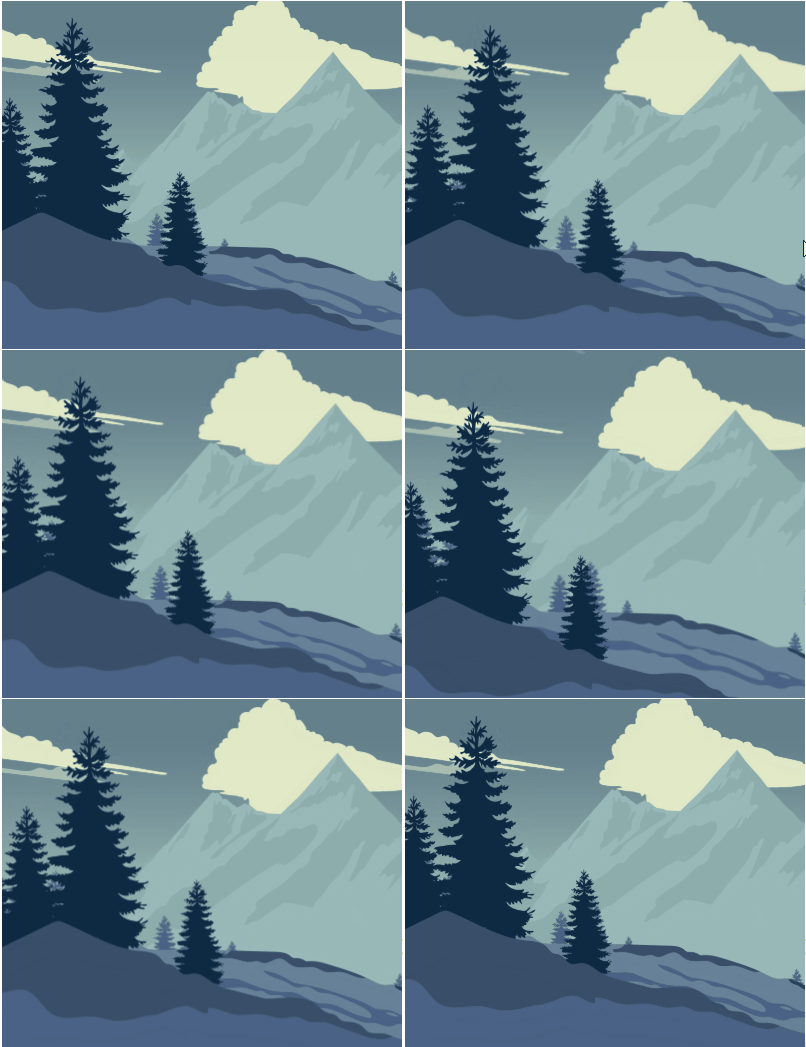
5 |
6 | ### Demo
7 | [the thompsons demo](https://aarcoraci.github.io/vueparallaxviewdemo/)
8 |
9 | ### Installation
10 | Install the library and css into your project
11 |
12 | ```sh
13 | $ yarn add vue-parallax-view
14 | ```
15 | or
16 | ```sh
17 | $ npm i vue-parallax-view
18 | ```
19 |
20 | ### Usage
21 |
22 | Configure your main.js
23 |
24 | ```js
25 | import VueParallaxView from "vue-parallax-view"
26 | Vue.use(VueParallaxView)
27 | import "vue-parallax-view/dist/vue-parallax-view.css";
28 | ```
29 |
30 | All left to do is configure the layers array and passe it to the component. In this example I'm using images from the assets directory, if this is your case use the **require(...)** function.
31 |
32 | #### parameters
33 | - **name:** *unique* name for the layer. Make sure this is **unique**
34 | - **horizontalDisplacement:** the amount of horizontal displacement for this layer. See [displacement](#displacement) for more information
35 | - **verticalDisplacement:** the amount of vertical displacement for this layer. See [displacement](#displacement) for more information
36 | - **image:** image resource to be use for this layer. Can be from the assets folder (use **require()** function), an absolute url or a relative url for your public/static folder.
37 | - **class:** add a custom class to control how this specific layer looks
38 | ```js
39 | data() {
40 | return {
41 | layers: [
42 | {
43 | name: "bg_sky",
44 | horizontalDisplacement: 0,
45 | verticalDisplacement: 0,
46 | image: require('@/assets/bg/layer_sky.png')
47 | },
48 | {
49 | name: "bg_clouds",
50 | horizontalDisplacement: 0.1,
51 | verticalDisplacement: 0.1,
52 | image: require('@/assets/bg/layer_clouds.png')
53 | },
54 | {
55 | name: "bg_mountain",
56 | horizontalDisplacement: 0.075,
57 | verticalDisplacement: 0.075,
58 | image: require('@/assets/bg/layer_bg_mountains.png')
59 | },
60 | {
61 | name: "bg_pines",
62 | horizontalDisplacement: 0.11,
63 | verticalDisplacement: 0.11,
64 | image: require('@/assets/bg/layer_bg_pines.png')
65 | },
66 | {
67 | name: "ground",
68 | horizontalDisplacement: 0.15,
69 | verticalDisplacement: 0.15,
70 | image: require('@/assets/bg/layer_ground.png')
71 | },
72 | {
73 | name: "pines",
74 | horizontalDisplacement: 0.3,
75 | verticalDisplacement: 0.3,
76 | image: require('@/assets/bg/layer_pines.png')
77 | }
78 | ]
79 | }
80 | }
81 | ```
82 | And in your template add the markup. Although width and height are optional feel free to configure them to match your UI. You can use **300px, 100%, 50vw, etc.**
83 | ```html
84 |
85 | ```
86 |
87 | ### Displacement
88 | A brief explanation on how displacement works:
89 |
90 | Images are scaled in order to allow the parallax effect. If the images where the same size as the portrait containing them the translation wouldn't work. To solve this the displacement parameter is created. It can be interpreted as a *scaling* factor.
91 |
92 | For example a horizontalDisplacement of 0.2 means there is a 20% of the image being hidden. This is distributed equally on the axis, for this case 10% is hidden for the right and left sides of the image.
93 |
94 | The way this react to the movement of the mouse is: if the mouse is centered horizontally on the screen the image is considered **centered** and there is a 10% of the image not being shown for each side. As the mouse gets further away from the horizontal center of the screen the opposite hidden area of the image stars to appear. This also applies for vertical displacement.
95 |
96 | The greater the value the more noticeable the movement will be.
97 |
98 | ### My images look bad !
99 | There is a base style for each layer:
100 |
101 | ```css
102 | position: absolute;
103 | transform-origin: left bottom;
104 | will-change: transform;
105 | transition: 300ms transform linear;
106 | background-repeat: no-repeat;
107 | background-size: cover;
108 | ```
109 | You can override these in any way you like with the **class** parameter:
110 | ```js
111 | {
112 | name: "pines",
113 | horizontalDisplacement: 0.3,
114 | verticalDisplacement: 0.3,
115 | image: require('@/assets/bg/layer_pines.png'),
116 | class:"my-custom-layer-class"
117 | }
118 | ```
119 |
120 |
121 | If you still don't see the changes try to give more specificity:
122 | ```html
123 |
124 | ```
125 |
126 | ```css
127 | .my-parallax .my-custom-layer-class {
128 | position: absolute;
129 | transform-origin: left bottom;
130 | will-change: transform;
131 | transition: 300ms transform linear;
132 | background-repeat: no-repeat;
133 | background-size: cover;
134 | }
135 | ```
136 |
137 | #### :warning: WARNING
138 | Be careful when playing with the transition rule. Using anything but linear will result on a choppy animation. The same occurs if you decrease the time.
139 |
140 | ### Enjoying this component ? buy me a beer :beer:
141 |
142 | qqwhpypxxwc6w5pms8s4d3zz8w37t6rfa5hq89u5pg
143 |
144 | ### Licence
145 |
146 | Vue Parallax View is open source and released under the MIT Licence.
147 |
148 | Copyright (c) 2019 Angel Arcoraci
--------------------------------------------------------------------------------