213 |
214 | {children}
215 |
216 |
217 |
218 |
219 | );
220 | }
221 |
222 | export const WithDefaultLayout = (page: React.ReactElement) => {page};
223 |
--------------------------------------------------------------------------------
/README.md:
--------------------------------------------------------------------------------
1 | # Accelist Next.js Starter
2 |
3 | > Next.js project starter template for PT. Accelist Lentera Indonesia
4 |
5 | ## Features
6 |
7 | - Pure Next.js: Zero framework customization
8 |
9 | - TypeScript + ESLint configured: type-check and lint as you type!
10 |
11 | - Visual Studio Code breakpoint and debugging configured
12 |
13 | - Responsive dashboard with sidebar template
14 |
15 | - `Page` Component Type: Supports variable layout
16 |
17 | - The Twelve-Factor App principled: Multi-Stage Docker build
18 |
19 | - `AppSettings` API: Supports Runtime Environment Variables for Kubernetes deployment
20 |
21 | - Plug-and-play OpenID Connect integrations to standard providers (Such as Keycloak, IdentityServer, OpenIddict, FusionAuth, etc.)
22 |
23 | - API Gateway for proxying HTTP requests to back-end web API bypassing CORS
24 |
25 | - Automatic progress bar during page navigation
26 |
27 | - Convenient Fetch API wrapper and SWR Fetcher implementation
28 |
29 | - Enabled container builds on GitHub Action
30 |
31 | - Batteries included:
32 |
33 | - Enterprise-level React components by [Ant Design](https://ant.design/components/overview/)
34 |
35 | - Thousands of [utility classes](https://tailwind.build/classes) powered by Tailwind CSS with `className` IntelliSense in React components
36 |
37 | - Simple atomic React state management using [Jotai](https://jotai.org/)
38 |
39 | - Thousands of icons by [FontAwesome 6](https://fontawesome.com/search?o=r&m=free)
40 |
41 | - TypeScript object schema validation with [Zod](https://zod.dev/)
42 |
43 | - Simple form validation with [React Hook Form](https://react-hook-form.com/get-started), designed to be [integrated with Ant Design](https://react-hook-form.com/get-started#IntegratingControlledInputs) and [Zod](https://react-hook-form.com/get-started#SchemaValidation)
44 |
45 | - Provide sane defaults for the most common security headers
46 |
47 | ## Getting Started
48 |
49 | [Download The Template as Zip File](https://github.com/accelist/nextjs-starter/archive/refs/heads/master.zip)
50 |
51 | Unzip and rename the folder to your actual project name.
52 |
53 | Run `npm ci` in the project root folder, then `npm run dev`
54 |
55 | The web app should be accessible at http://localhost:3000
56 |
57 | To display ESLint errors in Visual Studio Code, install [the official ESLint extension by Microsoft](https://marketplace.visualstudio.com/items?itemName=dbaeumer.vscode-eslint).
58 |
59 | To display Tailwind CSS IntelliSense in Visual Studio Code, install [the official Tailwind CSS IntelliSense extension](https://marketplace.visualstudio.com/items?itemName=bradlc.vscode-tailwindcss).
60 |
61 | ## Project Structure
62 |
63 | ### `components` Folder
64 |
65 | Place reusable React components in this folder.
66 |
67 | It is recommended to develop using [function components](https://reactjs.org/docs/components-and-props.html) with [hooks](https://reactjs.org/docs/hooks-intro.html) instead of class components.
68 |
69 | ### Styling a Component
70 |
71 | Components should be styled with one of these techniques, sorted from the most recommended to the least recommended:
72 |
73 | - [Tailwind CSS](https://flowbite.com/tools/tailwind-cheat-sheet/) utility classes in `className` prop for best website performance.
74 |
75 | ```tsx
76 | // These websites provide Tailwind CSS components:
77 | // https://tailwindui.com/all-access
78 | // https://tailwind-elements.com
79 | // https://flowbite.com
80 |
81 |
82 | ```
83 |
84 | > :bulb: Tailwind CSS should be used to make reusable components. Projects should always strive to have many reusable React components, each using many Tailwind CSS base classes (easier to maintain), rather than having many global CSS classes which are used everywhere (harder to maintain). This concept is called Utility-First: https://tailwindcss.com/docs/utility-first
85 |
86 | - [Local CSS Modules](https://nextjs.org/docs/basic-features/built-in-css-support#adding-component-level-css) specific to certain components or pages should be placed next to the corresponding `.tsx` files instead (e.g. `components/Button.module.css` next to `components/Button.tsx`). Tailwind CSS features such as [`theme()`](https://tailwindcss.com/docs/functions-and-directives#theme), [`screen()`](https://tailwindcss.com/docs/functions-and-directives#screen), and [`@apply`](https://tailwindcss.com/docs/functions-and-directives#apply) can be used here.
87 |
88 | > CSS Modules should only be used to develop very small, reusable components ONLY when Tailwind CSS base classes cannot do the job. **Avoid using CSS Modules to style most of the application components!!** https://tailwindcss.com/docs/reusing-styles#avoiding-premature-abstraction
89 |
90 | - Global Stylesheets: place plain `.css` files in `styles` folder and import them from `globals.css` to apply them to all pages and components.
91 |
92 | > :warning: Due to the global nature of stylesheets, and to avoid conflicts, they may not be imported from pages / components.
93 |
94 | ### `functions` Folder
95 |
96 | Place reusable plain JS functions in this folder.
97 |
98 | ### `pages` Folder
99 |
100 | In Next.js, a page is a default-exported React Component from a `.js`, `.jsx`, `.ts`, or `.tsx` file in the `pages` directory. Each page is associated with a route based on its file name.
101 |
102 | > **Example:** If `pages/about.tsx` is created, it will be accessible at `/about`.
103 |
104 | Next.js supports pages with dynamic routes. For example, if a file is called `pages/posts/[id].tsx`, then it will be accessible at `posts/1`, `posts/2`, etc.
105 |
106 | > Read more about pages: https://nextjs.org/docs/basic-features/pages
107 |
108 | > Read more about dynamic routes: https://nextjs.org/docs/routing/dynamic-routes
109 |
110 | ### `pages/_app.tsx` File
111 |
112 | Next.js uses the `App` component to initialize pages which can be overridden to allow:
113 |
114 | - Persisting layout between page changes
115 |
116 | - Keeping state when navigating pages
117 |
118 | - [Custom error handling using `componentDidCatch`](https://reactjs.org/docs/error-boundaries.html)
119 |
120 | - Inject additional data into pages
121 |
122 | - [Add global CSS](https://nextjs.org/docs/basic-features/built-in-css-support#adding-a-global-stylesheet)
123 |
124 | This template ships with `_app.tsx` file which implements some of the above-mentioned behaviors, including additional features:
125 |
126 | - Progress bar on navigation
127 |
128 | - OpenID Connect provider configuration
129 |
130 | > Read more about custom `App`: https://nextjs.org/docs/advanced-features/custom-app
131 |
132 | ### `public` Folder
133 |
134 | Next.js can serve static files, like images, under a folder called `public` in the root directory. Files inside `public` can then be referenced by your code starting from the base URL (`/`).
135 |
136 | > Read more about static files: https://nextjs.org/docs/basic-features/static-file-serving
137 |
138 | ### `types` Folder
139 |
140 | Place type declarations in this folder. For example: `interface` or `type` or [`.d.ts`](https://www.typescriptlang.org/docs/handbook/declaration-files/by-example.html) files.
141 |
142 | ### `.eslintrc.json` File
143 |
144 | ESLint configuration file for TypeScript and Next.js (`next/core-web-vitals` including `react` and `react-hooks` ESLint plugins).
145 |
146 | > Read more about ESLint configuration: https://eslint.org/docs/user-guide/configuring/
147 |
148 | | Rules | Documentation |
149 | | ------------- | ----------------------------------------------------------------- |
150 | | TypeScript | https://www.npmjs.com/package/@typescript-eslint/eslint-plugin |
151 | | React | https://www.npmjs.com/package/eslint-plugin-react |
152 | | React Hooks | https://www.npmjs.com/package/eslint-plugin-react-hooks |
153 | | Next.js | https://nextjs.org/docs/basic-features/eslint#eslint-plugin |
154 |
155 | ### `package.json` & `package.lock.json` Files
156 |
157 | The `package.json` file is a manifest for the project. It is where `npm` store the names and versions for all the installed packages. The `package.json` shipped with the template describes the following (but not limited to) metadata:
158 |
159 | - `private` if set to `true` prevents the app to be accidentally published on `npm`
160 |
161 | - `scripts` defines a set of scripts runnable via [`npm run`](https://docs.npmjs.com/cli/v8/commands/npm-run-script)
162 |
163 | - `dependencies` sets a list of npm packages installed as runtime dependencies
164 |
165 | - `devDependencies` sets a list of npm packages installed as development dependencies, which are not installed in Production environments.
166 |
167 | > Read more about `package.json`: https://docs.npmjs.com/cli/v8/configuring-npm/package-json https://nodejs.dev/learn/the-package-json-guide
168 |
169 | `package-lock.json` is automatically generated for any operations where npm modifies either the `node_modules` tree, or `package.json`. It describes the exact tree that was generated, such that subsequent installs can generate identical trees, regardless of intermediate dependency updates. This file is intended to be committed into source repositories.
170 |
171 | > Read more about `package.lock.json`: https://docs.npmjs.com/cli/v8/configuring-npm/package-lock-json https://nodejs.dev/learn/the-package-lock-json-file
172 |
173 | **Restoring packages should be done using `npm ci` NOT `npm install` command to prevent accidentally modifying the `package.json` and `package.lock.json`**
174 |
175 | ### `tsconfig.json` File
176 |
177 | The presence of a `tsconfig.json` file in a directory indicates that the directory is the root of a TypeScript project. The `tsconfig.json` file specifies the root files and the compiler options required to compile the project.
178 |
179 | The `tsconfig.json` shipped with the template has been fine-tuned for strict Next.js project type-checking.
180 |
181 | > List of all supported TypeScript compiler options: https://www.typescriptlang.org/tsconfig https://www.typescriptlang.org/docs/handbook/compiler-options.html
182 |
183 | ### `next.config.js` File
184 |
185 | For custom advanced configuration of Next.js (such as webpack), `next.config.js` in the root of the project directory (next to package.json) can be modified.
186 |
187 | `next.config.js` is a regular Node.js module and gets used by the Next.js server and build phases. It is not included in the browser build.
188 |
189 | > Read more: https://nextjs.org/docs/api-reference/next.config.js/introduction
190 |
191 | > Read more about custom webpack configuration: https://nextjs.org/docs/api-reference/next.config.js/custom-webpack-config
192 |
193 | ## Building and Running Production Build
194 |
195 | ```sh
196 | npm run build
197 | ```
198 |
199 | ```sh
200 | npx cross-env \
201 | NODE_ENV='production' \
202 | NEXTAUTH_URL='https://www.my-website.com' \
203 | NEXTAUTH_SECRET='e01b7895a403fa7364061b2f01a650fc' \
204 | BACKEND_API_HOST='https://demo.duendesoftware.com' \
205 | OIDC_ISSUER='https://demo.duendesoftware.com' \
206 | OIDC_CLIENT_ID='interactive.public.short' \
207 | OIDC_SCOPE='openid profile email api offline_access' \
208 | npm run start
209 | ```
210 |
211 | > **DO NOT FORGET** to randomize `NEXTAUTH_SECRET` value for Production Environment with https://generate-secret.vercel.app/32 or `openssl rand -base64 32`
212 |
213 | To use SSL Certificates, simply use reverse proxy such as [NGINX](https://www.nginx.com/resources/wiki/start/topics/tutorials/install/) or [Traefik](https://doc.traefik.io/traefik/getting-started/install-traefik/).
214 |
215 | ## Building and Running as Container
216 |
217 | This template ships with `Dockerfile` and `.dockerignore` for building the app as a standard container image. To proceed, please [install Docker](https://docs.docker.com/get-docker/) or any OCI container CLI such as [`podman`](https://podman.io/) in your machine. (The examples given will use Docker)
218 |
219 | To build the container image, use this command:
220 |
221 | ```sh
222 | docker build -t my-app .
223 | ```
224 |
225 | > Run this command on the same directory level as `Dockerfile` file.
226 |
227 | > Note that all `.env` and `.env.*` files are listed as ignored files in `.dockerignore` to prevent unwanted Environment Variables leaking to Production environment.
228 |
229 | When running container locally, it is recommended to create a dedicated network for containers inside to connect to each other:
230 |
231 | ```sh
232 | docker network create my-network
233 | ```
234 |
235 | ```sh
236 | docker run \
237 | -e NEXTAUTH_URL="https://www.my-website.com" \
238 | -e NEXTAUTH_SECRET="e01b7895a403fa7364061b2f01a650fc" \
239 | -e BACKEND_API_HOST="https://demo.duendesoftware.com" \
240 | -e OIDC_ISSUER="https://demo.duendesoftware.com" \
241 | -e OIDC_CLIENT_ID="interactive.public.short" \
242 | -e OIDC_SCOPE="openid profile email api offline_access" \
243 | -p 80:80 \
244 | --network my-network \
245 | --restart always \
246 | --name my-container \
247 | -d my-app
248 | ```
249 |
250 | > **DO NOT FORGET** to randomize `NEXTAUTH_SECRET` value for Production Environment with https://generate-secret.vercel.app/32 or `openssl rand -base64 32`
251 |
252 | ## `AppSettings` API
253 |
254 | [Next.js allows using `process.env` to read Environment Variables](https://nextjs.org/docs/basic-features/environment-variables), but it is not suitable for container-based deployment because the Environment Variables are burned during build-time (non-changeable).
255 |
256 | This technique does not adhere to [The Twelve-Factor App](https://12factor.net/build-release-run) methodology: a release is defined as a combination of a build (i.e. Container) + a config (i.e. Environment Variables).
257 |
258 | 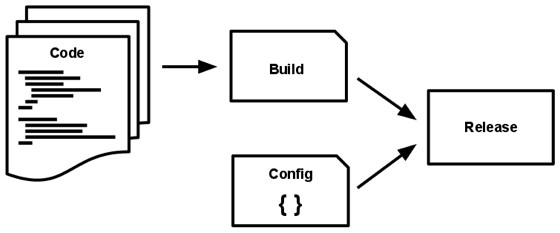
259 |
260 | For this reason, [Runtime Configuration](https://nextjs.org/docs/api-reference/next.config.js/runtime-configuration) is recommended to be used instead.
261 |
262 | This project template ships [`AppSettings`](https://github.com/accelist/nextjs-starter/blob/master/functions/AppSettings.ts) API as a high-level abstraction of the runtime Environment Variables:
263 |
264 | ```
265 | Environment Variables --> appsettings.js --> next.config.js --> AppSettings
266 | ```
267 |
268 | ### Environment Variables
269 |
270 | The values of Environment Variables are sourced differently depending on how the app is being run:
271 |
272 | * Development environment using `npm run dev`: values will be obtained from `.env` files such as `.env.development` or `.env.local`
273 |
274 | > Read more about Environment Variables Load Order: https://nextjs.org/docs/basic-features/environment-variables#environment-variable-load-order
275 |
276 | * Production environment using container (build with `Dockerfile` and `.dockerignore` in this template): values will be obtained from Machine Environment Variables supplied via `-e` or `--env` flag.
277 |
278 | > Read more about Environment Variables in Docker: https://docs.docker.com/engine/reference/commandline/run/#set-environment-variables--e---env---env-file
279 |
280 | ### Add Environment Variables to `appsettings.js`
281 |
282 | ```js
283 | module.exports = {
284 | backendApiHost: process.env['BACKEND_API_HOST'] ?? '',
285 | oidcIssuer: process.env['OIDC_ISSUER'] ?? '',
286 | oidcClientId: process.env['OIDC_CLIENT_ID'] ?? '',
287 | oidcScope: process.env['OIDC_SCOPE'] ?? '',
288 | };
289 | ```
290 |
291 | The Environment Variables added in `appsettings.js` will be added to the `serverRuntimeConfig` field in `next.config.js` file and are only available on the server-side code. (in `getServerSideProps` or in API routes)
292 |
293 | > Read more for explanation about this behavior: https://www.saltycrane.com/blog/2021/04/buildtime-vs-runtime-environment-variables-nextjs-docker/
294 |
295 | ### Using `AppSettings`
296 |
297 | Import the `AppSettings` object from `getServerSideProps` to read registered Environment Variables and pass it down to the page as props. For example:
298 |
299 | ```tsx
300 | import { AppSettings } from '../functions/AppSettings';
301 |
302 | const MyPage: Page<{
303 | myEnv: string
304 | }> = ({ myEnv }) => {
305 | return (
306 |
307 |
308 | {myEnv}
309 |
310 |
311 | );
312 | }
313 |
314 | export default MyPage;
315 |
316 | export async function getServerSideProps() {
317 | return {
318 | props: {
319 | myEnv: AppSettings.current.myEnv
320 | },
321 | }
322 | }
323 |
324 | ```
325 |
326 | > :warning: Doing this will expose the environment variable to the browser / end-user. Exercise caution.
327 |
328 | > :bulb: Sensitive environment variables should only be used as part of a Web API, either in the back-end project (e.g. ASP.NET Core) or in the Next.js API Routes.
329 |
330 | ## `Page` & Layout
331 |
332 | The `Page` interface shipped with this project template extends the standard `React.FunctionComponent` interface, with an additional static property named `layout`. The `layout` property allows attaching a render function which returns the layout for a specific page.
333 |
334 | The below example illustrates how to develop a layout function and attach it to a page:
335 |
336 | ```tsx
337 | // components/MyLayout.tsx
338 |
339 | import React from "react";
340 |
341 | const MyLayout: React.FC = ({ children }) => {
342 | return (
343 |
344 |
345 | {children}
346 |
347 |
348 | );
349 | }
350 |
351 | // This layout pattern enables state persistence because the React component tree is maintained between page transitions.
352 | // With the component tree, React can understand which elements have changed to preserve state.
353 | export const WithMyLayout = (page: React.ReactElement) => {page};
354 | ```
355 |
356 | ```tsx
357 | // pages/MyPage.tsx
358 |
359 | import { Page } from '../types/Page';
360 | import { WithMyLayout } from '../components/MyLayout';
361 |
362 | const MyPage: Page = () => {
363 | return (
364 |
365 |
Hello World!
366 |
367 | );
368 | }
369 |
370 | MyPage.layout = WithMyLayout;
371 | export default MyPage;
372 | ```
373 |
374 | > Read more about Per-Page Layouts: https://nextjs.org/docs/basic-features/layouts#per-page-layouts
375 |
376 | ## Fetch API Wrapper
377 |
378 | This template ships with a lightweight, sane-but-opinionated wrapper around [Fetch API](https://developer.mozilla.org/en-US/docs/Web/API/Fetch_API) which integrates with [RFC 7807 Problem Details](https://www.rfc-editor.org/rfc/rfc7807).
379 |
380 | ```ts
381 | const {
382 | fetchGET,
383 | fetchPOST,
384 | fetchPUT,
385 | fetchPATCH,
386 | fetchDELETE
387 | } = useFetchWithAccessToken();
388 |
389 | const { data, error, problem } = await fetchGET('http://my-app.test/api/v1/products');
390 |
391 | const { data, error, problem } = await fetchPOST('http://my-app.test/api/v1/products', {
392 | name: 'Software X'
393 | });
394 |
395 | // tryFetchJson is a lower-level fetch wrapper used by above functions
396 | const { data, error, problem } = await tryFetchJson('http://my-app.test/api/v1/cities', {
397 | method: 'GET',
398 | headers: {
399 | ...DefaultApiRequestHeader,
400 | },
401 | });
402 | ```
403 |
404 | > :warning: `useFetchWithAccessToken` is a hook and it can ONLY be called from the top-level code block of React function components. https://reactjs.org/docs/hooks-rules.html#only-call-hooks-at-the-top-level
405 |
406 | The wrapper serializes HTTP request body (second parameter of POST / PUT / PATCH methods) as JSON and expects strictly JSON response from the Web API.
407 |
408 | When `response.ok` (status in the range 200–299), `data` will have the data type passed to the generic of the Fetch API.
409 |
410 | When not `response.ok`,
411 |
412 | - `problem` may contain an object describing a RFC 7807 Problem Details based on [ASP.NET Core `ValidationProblemDetails` class](https://learn.microsoft.com/en-us/dotnet/api/microsoft.aspnetcore.mvc.validationproblemdetails?view=aspnetcore-6.0).
413 |
414 | - When that is not the case, `problem` can be a generic JSON object (values accessible via index syntax: `problem['someData']`) or simply a `string` if the response body is not JSON (use `if (typeof problem === 'object')` to check).
415 |
416 | Unlike Fetch API, these wrappers will not throw. If an unhandled exception has occurred when performing the HTTP request, `error` will contain the caught exception.
417 |
418 | The functions returned from `useFetchWithAccessToken` use these default HTTP request headers:
419 |
420 | ```ts
421 | {
422 | 'Content-Type': 'application/json',
423 | 'Cache-Control': 'no-cache',
424 | 'Pragma': 'no-cache',
425 | 'Expires': '0',
426 | }
427 | ```
428 |
429 | When the function is called inside the `` component context, it will automatically append `Authorization: Bearer ACCESS_TOKEN` header into the HTTP request.
430 |
431 | > :bulb: Contrary to the function name, **it is safe to use `useFetchWithAccessToken` outside `` component context.**
432 |
433 | ## Sending Files and Form Data
434 |
435 | If advanced solution is required, such as sending non-JSON or [`FormData`](https://developer.mozilla.org/en-US/docs/Web/API/FormData) request bodies [or accepting non-JSON responses](https://developer.mozilla.org/en-US/docs/Web/API/Streams_API/Using_readable_streams#consuming_a_fetch_as_a_stream), the above Fetch API wrappers cannot be used. (Use [the base Fetch API](https://developer.mozilla.org/en-US/docs/Web/API/fetch) or [`XMLHttpRequest`](https://developer.mozilla.org/en-US/docs/Web/API/XMLHttpRequest) instead)
436 |
437 | ```ts
438 | // Example: PUT File to AWS S3 presigned URL
439 | var xhr = new XMLHttpRequest();
440 | xhr.open('PUT', presignedUrl, true);
441 | xhr.setRequestHeader('Content-Type', file.type);
442 | xhr.onload = () => {
443 | if (xhr.status === 200) {
444 | // success
445 | } else {
446 | // problem
447 | }
448 | };
449 | xhr.onerror = () => {
450 | // error
451 | };
452 | xhr.upload.onprogress = (e) => {
453 | if (e.lengthComputable) {
454 | var percent = Math.round((e.loaded / e.total) * 100)
455 | // Update UI progress bar here
456 | // Use lodash.throttle to control state change frequency
457 | // https://lodash.com/docs/4.17.15#throttle
458 | // For example: const updateProgressBar = useCallback(throttle(setProgressBar, 300), []);
459 | }
460 | };
461 | // `file` is a File object
462 | // https://developer.mozilla.org/en-US/docs/Web/API/File
463 | xhr.send(file);
464 | ```
465 |
466 | ## Default SWR Fetcher
467 |
468 | This template ships with a default [SWR Fetcher](https://swr.vercel.app/docs/data-fetching#fetch) implementation based on above Fetch API wrapper.
469 |
470 | ```ts
471 | const swrFetcher = useSwrFetcherWithAccessToken();
472 | const { data, error } = useSWR('/api/be/api/Values', swrFetcher);
473 | ```
474 |
475 | > :warning: `useSwrFetcherWithAccessToken` and `useSWR` are hooks and they can ONLY be called from the top-level code block of function components. https://reactjs.org/docs/hooks-rules.html#only-call-hooks-at-the-top-level
476 |
477 | > :bulb: Contrary to the function name, **it is safe to use `useSwrFetcherWithAccessToken` outside `` component context.**
478 |
479 | ## API Gateway
480 |
481 | HTTP requests initiated from a browser are restricted to the same domain ([Same-Origin Policy](https://developer.mozilla.org/en-US/docs/Web/Security/Same-origin_policy)) and the same protocol (HTTPS requests must be performed from web pages with HTTPS URL).
482 |
483 | > For example, `https://front-end.app` accessing `http://back-end.app/api/data` will fail by default.
484 |
485 | To ease development against microservices, this template ships an implementation of API Gateway which allows bypassing Same-Origin Policy by proxying HTTP requests through the Next.js server. The API Gateway is implemented using [API Routes for Next.js](https://nextjs.org/docs/api-routes/introduction).
486 |
487 | > The content `/pages/api/be/[...apiGateway].ts` file:
488 |
489 | ```ts
490 | import Proxy from 'http-proxy';
491 | import type { NextApiRequest, NextApiResponse } from 'next';
492 | import { AppSettings } from '../../../functions/AppSettings';
493 |
494 | // Great way to avoid using CORS and making API calls from HTTPS pages to back-end HTTP servers
495 | // Recommendation for projects in Kubernetes cluster: set target to Service DNS name instead of public DNS name
496 | const server = Proxy.createProxyServer({
497 | target: AppSettings.current.backendApiHost,
498 | // changeOrigin to support name-based virtual hosting
499 | changeOrigin: true,
500 | xfwd: true,
501 | // https://github.com/http-party/node-http-proxy#proxying-websockets
502 | ws: false,
503 | });
504 |
505 | server.on('proxyReq', (proxyReq, req) => {
506 | // Proxy requests from /api/be/... to http://my-web-api.com/...
507 | const urlRewrite = req.url?.replace(new RegExp('^/api/be'), '');
508 | if (urlRewrite) {
509 | proxyReq.path = urlRewrite;
510 | } else {
511 | proxyReq.path = '/';
512 | }
513 | proxyReq.removeHeader('cookie');
514 | // console.log(JSON.stringify(proxyReq.getHeaders(), null, 4));
515 | console.log('HTTP Proxy:', req.url, '-->', AppSettings.current.backendApiHost + urlRewrite);
516 | });
517 |
518 | const apiGateway = async (req: NextApiRequest, res: NextApiResponse) => {
519 | const startTime = new Date().getTime();
520 |
521 | server.web(req, res, {}, (err) => {
522 | if (err instanceof Error) {
523 | throw err;
524 | }
525 |
526 | throw new Error(`Failed to proxy request: '${req.url}'`);
527 | });
528 |
529 | res.on('finish', () => {
530 | const endTime = new Date().getTime();
531 | console.log(`HTTP Proxy: Finished ${res.req.url} in ${endTime - startTime}ms `);
532 | })
533 | }
534 |
535 | export default apiGateway;
536 |
537 | export const config = {
538 | api: {
539 | externalResolver: true,
540 | bodyParser: false
541 | },
542 | }
543 | ```
544 |
545 | The above implementation allows forwarding from the Next.js API Route to the actual back-end API URL. For example: `/api/be/api/Values` is forwarded to the `http://back-end/api/Values`
546 |
547 | ```tsx
548 | // Fetch data from http://back-end/api/Values
549 | const { data, error } = useSWR('/api/be/api/Values', swrFetcher);
550 | ```
551 |
552 | For clarity, it is recommended to create separate API Routes for different back-end microservices. (e.g. `/api/employees`, `/api/products`, etc.)
553 |
554 | When deployed in Kubernetes, the target host can be declared as a valid [RFC 1035 label name](https://kubernetes.io/docs/concepts/overview/working-with-objects/names/#rfc-1035-label-names) instead of a public DNS to enable managing microservices using Kubernetes CoreDNS.
555 |
556 | For example, if the target host name is `my-service`, then the back-end web API can be [declared as a ClusterIP or LoadBalancer Service](https://kubernetes.io/docs/concepts/services-networking/service/#defining-a-service) with the same name and is reachable from the Next.js API Gateway via `http://my-service`:
557 |
558 | ```yaml
559 | apiVersion: v1
560 | kind: Service
561 | metadata:
562 | name: my-service
563 | spec:
564 | selector:
565 | app: DemoBackEndWebApi
566 | ports:
567 | - protocol: TCP
568 | port: 80
569 | ```
570 |
571 | ## OpenID Connect Integrations
572 |
573 | > TODO
574 |
575 | ## Authorize Component and AuthorizationContext
576 |
577 | > TODO
578 |
579 | ## Sidebar Menu Programming
580 |
581 | > TODO
582 |
583 | ## Security Headers
584 |
585 | > TODO
586 |
587 | ## Step Debugging with Visual Studio Code
588 |
589 | This template ships with Visual Studio Code step debugging support. Simply press F5 to start debugging.
590 |
591 | When only client-side debugging is required, **ensure `npm run dev` is already running** and choose the `Next.js: Debug Client-Side` launch configuration. Breakpoint can now be placed in source code lines which run in the browser-side.
592 |
593 | When server-side debugging is required, **ensure `npm run dev` is NOT running** and choose the `Next.js: Debug Full-Stack` launch configuration. Breakpoint can now be placed in source code lines which runs in the server-side, in addition to the browser-side.
594 |
595 | > The debug configuration can be selected from the Run & Debug Sidebar (CTRL + SHIFT + D)
596 |
597 | The debugging experience is set to use the new Chromium-based Microsoft Edge by default (which should be installed by default in newer Windows 10 and Windows 11). If this is not desirable, feel free to modify the `.vscode/launch.json` file.
598 |
599 | To enrich the React development experience, install the official [React Developer Tools extension](https://chrome.google.com/webstore/detail/react-developer-tools/fmkadmapgofadopljbjfkapdkoienihi?hl=en) in the browser used for debugging.
600 |
601 | ## GitHub CI Integration
602 |
603 | This project template ships with GitHub Action workflow for Docker Images enabled. Example: https://github.com/accelist/nextjs-starter/actions
604 |
605 | When a commit is pushed or a merge request is performed against the `master` or `main` branch, a container image will be built. If a commit is pushed, then the container image will also be pushed into the GitHub Container Registry of the project as `master` or `main` tag.
606 |
607 | Upon tagging a commit (if using GitHub web, go to [Releases](https://github.com/accelist/nextjs-starter/releases) page then [draft a new release](https://github.com/accelist/nextjs-starter/releases/new)) with version number string such as `v1.0.0` (notice the mandatory `v` prefix), a new container image will be built and tagged as the version number (in this example, resulting in `1.0.0` image tag, notice the lack of `v` prefix) and `latest`.
608 |
609 | The container images are available via the project [GitHub Container Registry](https://github.com/accelist/nextjs-starter/pkgs/container/nextjs-starter). For example:
610 |
611 | ```sh
612 | docker pull ghcr.io/accelist/nextjs-starter:master
613 | ```
614 |
615 | If working with private repository (hence private container registry), [create a new GitHub personal access token](https://github.com/settings/tokens) with `read:packages` scope to allow downloading container images from Kubernetes cluster.
616 |
617 | > Read more: https://docs.github.com/en/packages/working-with-a-github-packages-registry/working-with-the-container-registry
618 |
619 | ## Deploying Container to Kubernetes
620 |
621 | > TODO add guide for adding GitHub access token to Kubernetes for pulling from private registry: https://kubernetes.io/docs/tasks/configure-pod-container/pull-image-private-registry/
622 |
623 | > TODO add Deployment and Services `yaml` here with Environment Variables
624 |
625 | ## Git Pre-Commit Compile Check
626 |
627 | Upon launching development server via `npm run dev`, git pre-commit hook will be installed into the local repository.
628 |
629 | This hook will perform TypeScript and ESLint checks when a developer attempts to commit into the git repository and fail the commit if any errors are detected.
630 |
--------------------------------------------------------------------------------