├── docs
├── _config.yml
├── images
│ ├── location-triggers-list.png
│ ├── location-trigger-detail.png
│ ├── location-triggers-screens.png
│ ├── location-trigger-example-1.png
│ ├── location-trigger-example-2.png
│ ├── location-trigger-example-3.png
│ ├── location-trigger-example-4.png
│ ├── location-triggers-autocut-1.png
│ ├── location-triggers-autocut-2.png
│ ├── location-triggers-autocut-3.png
│ ├── location-triggers-limitkit.png
│ ├── new-location-trigger-from-input.png
│ └── new-location-trigger-from-share.png
└── index.md
├── README.md
├── LICENSE
└── localization
└── en-US.json
/docs/_config.yml:
--------------------------------------------------------------------------------
1 | theme: jekyll-theme-cayman
--------------------------------------------------------------------------------
/README.md:
--------------------------------------------------------------------------------
1 | # autocuts-location-trigger
2 | Run shortcuts automatically as you enter and leave locations while you use your iOS device.
3 |
--------------------------------------------------------------------------------
/docs/images/location-triggers-list.png:
--------------------------------------------------------------------------------
https://raw.githubusercontent.com/adamtow/location-triggers/HEAD/docs/images/location-triggers-list.png
--------------------------------------------------------------------------------
/docs/images/location-trigger-detail.png:
--------------------------------------------------------------------------------
https://raw.githubusercontent.com/adamtow/location-triggers/HEAD/docs/images/location-trigger-detail.png
--------------------------------------------------------------------------------
/docs/images/location-triggers-screens.png:
--------------------------------------------------------------------------------
https://raw.githubusercontent.com/adamtow/location-triggers/HEAD/docs/images/location-triggers-screens.png
--------------------------------------------------------------------------------
/docs/images/location-trigger-example-1.png:
--------------------------------------------------------------------------------
https://raw.githubusercontent.com/adamtow/location-triggers/HEAD/docs/images/location-trigger-example-1.png
--------------------------------------------------------------------------------
/docs/images/location-trigger-example-2.png:
--------------------------------------------------------------------------------
https://raw.githubusercontent.com/adamtow/location-triggers/HEAD/docs/images/location-trigger-example-2.png
--------------------------------------------------------------------------------
/docs/images/location-trigger-example-3.png:
--------------------------------------------------------------------------------
https://raw.githubusercontent.com/adamtow/location-triggers/HEAD/docs/images/location-trigger-example-3.png
--------------------------------------------------------------------------------
/docs/images/location-trigger-example-4.png:
--------------------------------------------------------------------------------
https://raw.githubusercontent.com/adamtow/location-triggers/HEAD/docs/images/location-trigger-example-4.png
--------------------------------------------------------------------------------
/docs/images/location-triggers-autocut-1.png:
--------------------------------------------------------------------------------
https://raw.githubusercontent.com/adamtow/location-triggers/HEAD/docs/images/location-triggers-autocut-1.png
--------------------------------------------------------------------------------
/docs/images/location-triggers-autocut-2.png:
--------------------------------------------------------------------------------
https://raw.githubusercontent.com/adamtow/location-triggers/HEAD/docs/images/location-triggers-autocut-2.png
--------------------------------------------------------------------------------
/docs/images/location-triggers-autocut-3.png:
--------------------------------------------------------------------------------
https://raw.githubusercontent.com/adamtow/location-triggers/HEAD/docs/images/location-triggers-autocut-3.png
--------------------------------------------------------------------------------
/docs/images/location-triggers-limitkit.png:
--------------------------------------------------------------------------------
https://raw.githubusercontent.com/adamtow/location-triggers/HEAD/docs/images/location-triggers-limitkit.png
--------------------------------------------------------------------------------
/docs/images/new-location-trigger-from-input.png:
--------------------------------------------------------------------------------
https://raw.githubusercontent.com/adamtow/location-triggers/HEAD/docs/images/new-location-trigger-from-input.png
--------------------------------------------------------------------------------
/docs/images/new-location-trigger-from-share.png:
--------------------------------------------------------------------------------
https://raw.githubusercontent.com/adamtow/location-triggers/HEAD/docs/images/new-location-trigger-from-share.png
--------------------------------------------------------------------------------
/LICENSE:
--------------------------------------------------------------------------------
1 | MIT License
2 |
3 | Copyright (c) 2019 Adam Tow
4 |
5 | Permission is hereby granted, free of charge, to any person obtaining a copy
6 | of this software and associated documentation files (the "Software"), to deal
7 | in the Software without restriction, including without limitation the rights
8 | to use, copy, modify, merge, publish, distribute, sublicense, and/or sell
9 | copies of the Software, and to permit persons to whom the Software is
10 | furnished to do so, subject to the following conditions:
11 |
12 | The above copyright notice and this permission notice shall be included in all
13 | copies or substantial portions of the Software.
14 |
15 | THE SOFTWARE IS PROVIDED "AS IS", WITHOUT WARRANTY OF ANY KIND, EXPRESS OR
16 | IMPLIED, INCLUDING BUT NOT LIMITED TO THE WARRANTIES OF MERCHANTABILITY,
17 | FITNESS FOR A PARTICULAR PURPOSE AND NONINFRINGEMENT. IN NO EVENT SHALL THE
18 | AUTHORS OR COPYRIGHT HOLDERS BE LIABLE FOR ANY CLAIM, DAMAGES OR OTHER
19 | LIABILITY, WHETHER IN AN ACTION OF CONTRACT, TORT OR OTHERWISE, ARISING FROM,
20 | OUT OF OR IN CONNECTION WITH THE SOFTWARE OR THE USE OR OTHER DEALINGS IN THE
21 | SOFTWARE.
22 |
--------------------------------------------------------------------------------
/localization/en-US.json:
--------------------------------------------------------------------------------
1 | {
2 | "en-US": {
3 | "alert_about": "Location Triggers works with Autocuts to automatically run shortcuts in the background based on your location while you use your iOS device.",
4 | "alert_donate": "Thank you for donating and supporting my Shortcuts development!",
5 | "alert_get_location": "Retrieving your current location. This may take a few moments.",
6 | "alert_localization": "Want to see Location Triggers localized for your native language?\n\nVisit Location Triggers' localization page on GitHub and submit a pull request.",
7 | "alert_new_shortcut": "You must select a shortcut to continue.",
8 | "alert_update_none": "You are running the latest version of Location Triggers.",
9 | "alert_update_none_title": "No Update Avaiable",
10 | "alert_welcome": "Location Triggers runs shortcuts as you arrive and leave locations.\n\nPair it with Autocuts, and your shortcuts can run automatically in the background while you use your iOS device.",
11 | "alert_welcome_title": "Welcome to Location Triggers!",
12 | "error_location_invalid": "The location entered is invalid",
13 | "error_location_none": "No locations could be found in the input sent to Location Triggers.",
14 | "error_timeRange": "The end date is before the start date.",
15 | "label_actions": "Actions",
16 | "label_disabled": "Location Trigger is Disabled",
17 | "label_enabled": "Location Trigger is Enabled",
18 | "label_feet": "Feet",
19 | "label_filter": "",
20 | "label_filter_all": "Showing All",
21 | "label_gps": "GPS",
22 | "label_kilometers": "Kilometers",
23 | "label_limitkit": "LimitKit Run Interval…",
24 | "label_limitkit_days": "Days",
25 | "label_limitkit_disabled": "LimitKit support disabled in Settings",
26 | "label_limitkit_everytime": "Everytime",
27 | "label_limitkit_hours": "Hours",
28 | "label_limitkit_minutes": "Minutes",
29 | "label_limitkit_months": "Months",
30 | "label_limitkit_off": "Off",
31 | "label_limitkit_seconds": "Seconds",
32 | "label_limitkit_weeks": "Weeks",
33 | "label_limitkit_years": "Years",
34 | "label_location": "Location",
35 | "label_meters": "Meters",
36 | "label_miles": "Miles",
37 | "label_minutes": "minutes",
38 | "label_off": "Off",
39 | "label_schedule": "Schedule",
40 | "label_shortcut": "Shortcut",
41 | "label_tools": "Tools",
42 | "label_weather": "Weather",
43 | "language_key": "en-US",
44 | "language_name": "English",
45 | "menu_about": "About…",
46 | "menu_actions": "Actions",
47 | "menu_back_home": "Back to Home",
48 | "menu_back_list": "Back to Location Trigger List…",
49 | "menu_bulk_edit": "Bulk Edit…",
50 | "menu_bulk_editAll": "Bulk Edit All…",
51 | "menu_current_location": "Get Current Location",
52 | "menu_delete_cancel": "Don't Delete",
53 | "menu_delete_confirm": "Delete",
54 | "menu_device_all": "Any Device",
55 | "menu_device_custom": "A Specific Device…",
56 | "menu_device_this": "This Device",
57 | "menu_donate": "Donate…",
58 | "menu_donate_already": "I Already Donated",
59 | "menu_donate_confirm": "Donate Now…",
60 | "menu_donate_later": "Donate Later",
61 | "menu_erase_cancel": "Don't Erase",
62 | "menu_erase_content": "Erase Content and Settings...",
63 | "menu_filter": "Filter…",
64 | "menu_help": "Help…",
65 | "menu_home": "Back to Home",
66 | "menu_input_askShortcut": "Custom From Shortcut…",
67 | "menu_input_currentLocation": "Current Location",
68 | "menu_input_none": "No Input",
69 | "menu_input_text": "Text…",
70 | "menu_list": "View Location Triggers…",
71 | "menu_new": "New Location Trigger…",
72 | "menu_new_arrive": "When I Arrive",
73 | "menu_new_input_askShortcut_cancel": "Cancel",
74 | "menu_new_input_askShortcut_confirm": "Ask Shortcut for Input…",
75 | "menu_new_leave": "When I Leave",
76 | "menu_new_time_any": "Any Time",
77 | "menu_new_time_range": "Time Range…",
78 | "menu_onSuccess_delete": "Delete",
79 | "menu_onSuccess_disable": "Disable",
80 | "menu_onSuccess_nothing": "Nothing",
81 | "menu_onSuccess_reset": "Reset",
82 | "menu_quit": "Quit",
83 | "menu_reset": "Reset…",
84 | "menu_reset_locationTrigger": "Reset",
85 | "menu_reset_bulk": "Reset",
86 | "menu_reset_cancel": "Don't Reset",
87 | "menu_reset_settings": "Reset Settings...",
88 | "menu_run": "Run…",
89 | "menu_settings": "Settings…",
90 | "menu_settings_language": "Change Language…",
91 | "menu_settings_limitkit": "Enable LimitKit Support",
92 | "menu_settings_limitkit_description": "Customized location check intervals",
93 | "menu_settings_limitkit_description_off": "Locations are evaluated every time",
94 | "menu_settings_locationMethod": "Get Location Using",
95 | "menu_settings_locationMethod_description": "🔘 Weather ⚪️ GPS",
96 | "menu_settings_locationMethod_description_off": "⚪️ Weather 🔘 GPS",
97 | "menu_settings_log": "Save Location Logs",
98 | "menu_settings_radius": "Default Trigger Radius…",
99 | "menu_settings_reset": "Reset…",
100 | "menu_settings_tools": "Tools",
101 | "menu_settings_unit": "Calculate Distances Using",
102 | "menu_settings_unit_description": "🔘 Miles ⚪️ Kilometers",
103 | "menu_settings_unit_description_off": "⚪️ Miles 🔘 Kilometers",
104 | "menu_settings_update": "Check for Updates…",
105 | "menu_settings_viewLogs": "View Logs…",
106 | "menu_update_later": "Update Later",
107 | "menu_update_now": "Update Now…",
108 | "menu_view_delete": "Delete…",
109 | "menu_view_disable": "Disable",
110 | "menu_view_enable": "Enable",
111 | "menu_view_input": "Shortcut Input…",
112 | "menu_view_location": "Location…",
113 | "menu_view_name": "Name…",
114 | "menu_view_onSuccess": "On Success…",
115 | "menu_view_radius": "Trigger Radius…",
116 | "menu_view_shortcut": "Shortcut…",
117 | "menu_view_show": "Show in Maps…",
118 | "menu_view_tags": "Tags…",
119 | "menu_view_time": "Active Time…",
120 | "prompt_bulkEdit": "With selected location triggers:",
121 | "prompt_delete": "Delete this location trigger? This operation cannot be undone.",
122 | "prompt_delete_multiple": "Delete selected location triggers? This operation cannot be undone.",
123 | "prompt_donate": "Have you found Location Triggers to be helpful in running your shortcuts automatically in the background when you arrive and leave a location?\n\nSend me a tip to help fund future development of Location Triggers and other shortcuts.",
124 | "prompt_erase_content": "Are you sure you want to delete all Location Triggers content and settings for this device?\n\nAll of your existing location triggers will be deleted.\n\nThis operation cannot be undone.",
125 | "prompt_erase_content2": "Are you ABSOLUTELY SURE you want to delete all Location Triggers content and settings for this device?\n\nAll of your existing location triggers will be deleted.\n\nThis operation cannot be undone.",
126 | "prompt_filter": "Separate keywords with newlines to filter the list of location triggers.",
127 | "prompt_language": "Choose Language:",
128 | "prompt_limitkit_locationTrigger": "Enter the LimitKit Interval (whole numbers only) for this location trigger. The location trigger will not be re-evaluated until this time period has elapsed.\n\nYou will choose the unit of measurement (seconds, minutes, hours, etc.) in the next screen.\n\nEnter 0 to disable LimitKit with this location trigger.",
129 | "prompt_limitkit_locationTrigger_unit": "Select the unit of measurement that the location trigger must wait before its shortcut can run again.",
130 | "prompt_location_multiple": "Select Location:",
131 | "prompt_new_input": "Select an input type for this shortcut:",
132 | "prompt_new_inputText": "Enter input for shortcut",
133 | "prompt_new_input_askShortcut": "Location Triggers will call the shortcut with \"Autocuts Custom Input\". The shortcut must be able to display custom UI for providing input for this operation to work.",
134 | "prompt_new_location": "Enter location.\n\nLeave blank to use your current location.",
135 | "prompt_new_name": "Name this location trigger:",
136 | "prompt_new_onSuccess": "What should happen to the location trigger after a successful match?",
137 | "prompt_new_radius": "Enter location trigger radius in {{unit}}:",
138 | "prompt_new_tags": "Enter tags to organize your location triggers. Separate each tag with a new line.",
139 | "prompt_new_time": "Select the time your location trigger will be evaluated:",
140 | "prompt_new_time_rangeEnd": "Select the end time:",
141 | "prompt_new_time_rangeStart": "Select the start time:",
142 | "prompt_new_type": "Create a new location trigger that will run a shortcut when you arrive or leave a location.\n\nIf you want your shortcuts to run automatically while you use your iOS device, use Location Triggers with Autocuts.",
143 | "prompt_reset": "Reset Location Triggers settings or erase all content and settings for Location Triggers?",
144 | "prompt_reset_settings": "Are you sure you want to reset Location Triggers settings on this device?\n\nNone of your content will be affected.",
145 | "prompt_settings": "Location Trigger Settings",
146 | "prompt_settings_radius": "Enter the default trigger radius in {{unit}}:",
147 | "prompt_update": "{{app}} {{version}} is available. Would you like to download it now?\n\nRelease Notes\n{{notes}}",
148 | "prompt_view": "Location Trigger Detail"
149 | }
150 | }
--------------------------------------------------------------------------------
/docs/index.md:
--------------------------------------------------------------------------------
1 | # Location Triggers
2 | Location Triggers is part of Autocuts Suite, a collection of shortcuts that greatly enhance the automation abilities on iOS 13. It works with [Autocuts](https://adamtow.github.io/autocuts-admin) to automatically run shortcuts in the background based on your location while you use your iOS device — no need to tap on a button in a notification!
3 |
4 | 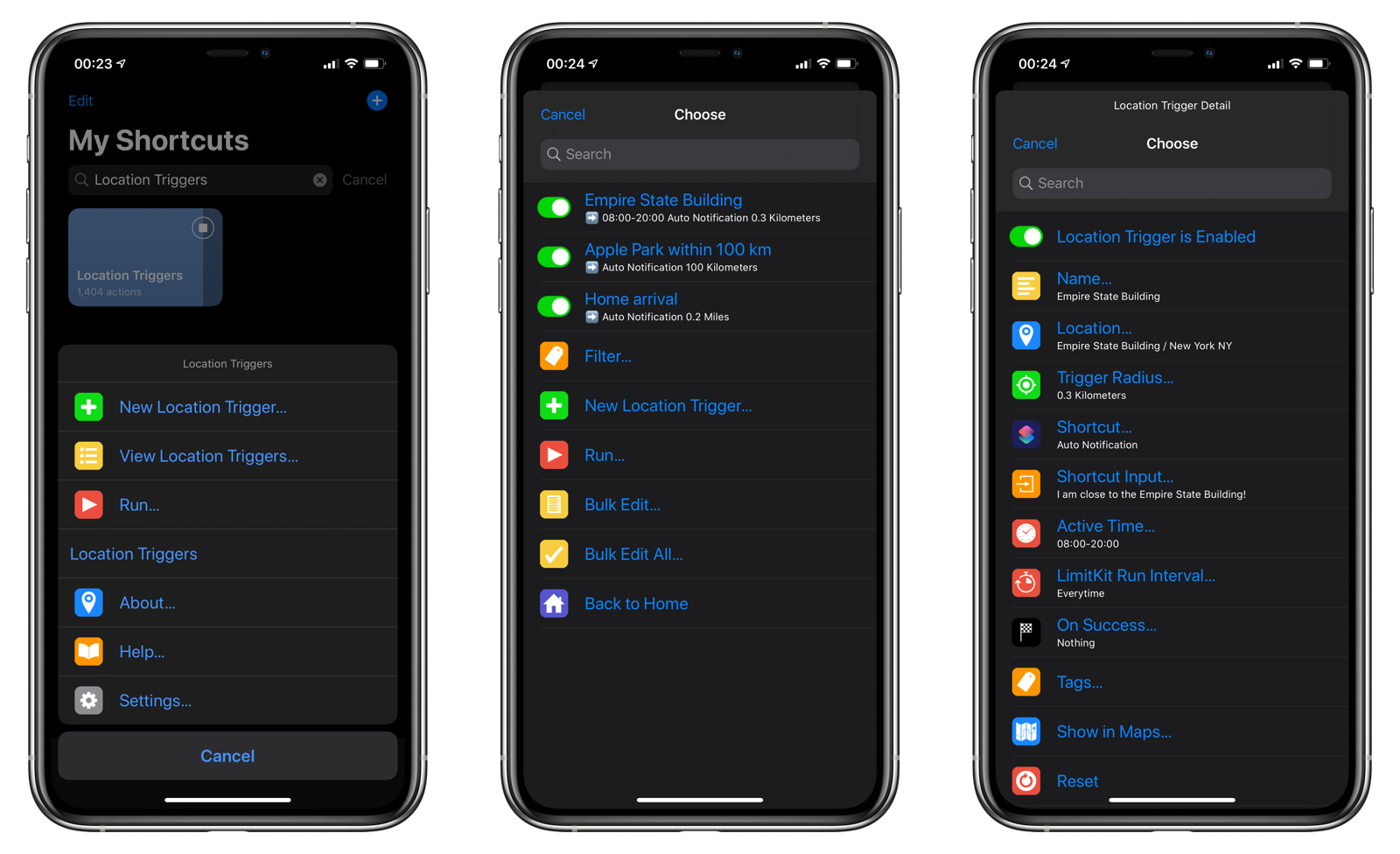
5 |
6 | ## Why Location Triggers
7 | iOS 13.1 brought about personal automations to Shortcuts, allowing users to create shortcuts that can run at certain times and locations. Unfortunately, these triggers require the user to tap on a confirmation button in order for shortcuts to run. Location Triggers was developed to remove this restriction until Apple decides to make the confirmation an optional requirement in iOS.
8 |
9 | ****
10 |
11 |
12 | ## Download Location Triggers
13 | You can get Location Triggers as part of Autocuts Suite or download it individually from RoutineHub:
14 |
15 | - [Download Autocuts Suite Installer](https://routinehub.co/shortcut/3661)
16 | - [Download Location Triggers](https://routinehub.co/shortcut/3620)
17 |
18 | Autocuts Suite contains the following shortcuts:
19 |
20 | - [Autocuts](https://routinehub.co/shortcut/3606)
21 | - [Autocuts Admin](https://routinehub.co/shortcut/3607): Create, manage, and view your Autocuts.
22 | - [LimitKit](https://routinehub.co/shortcut/3603): Event logging and rate limiting so that Location Triggers is not constantly pinging your current location.
23 |
24 | > **NOTE**: In order to use Location Triggers in an automatic fashion, you must install Autocuts and Autocuts Admin.
25 |
26 | ### What is Autocuts and What are Autocuts?
27 | Autocuts is a background shortcut manager that works on top of Open App personal automation feature of Shortcuts in iOS 13. Choosing your most commonly used applications to launch Autocuts in the background ensures that your automated shortcuts are constantly working behind the scenes to do things like:
28 |
29 | - Set Do Not Disturb for specific calendar events.
30 | - Turn on Low Power Mode when your battery falls below a certain percentage.
31 | - Send text messages, emails, or web requests at certain times of the day or when you arrive or leave locations.
32 |
33 | ****
34 |
35 |
36 | ## Interface
37 | Here is a brief overview of Location Triggers' interface. There are three primary screens:
38 |
39 | ### Home
40 | This is the screen that you see when you first open the shortcut.
41 |
42 | - **New Location Trigger**: Create a new location trigger.
43 | - **View Location Triggers**: Tap to go to the list view.
44 | - **Run**: Evaluate your location triggers and run any shortcuts whose location triggers match your current location.
45 | - **About**: Includes the current version and build number.
46 | - **Help**: Opens up to the document you are reading now.
47 | - **Settings**: Adjust the settings of Location Triggers.
48 |
49 | 
50 |
51 | ### List
52 | Tapping on the View Location Triggers menu item retrieve any location triggers that you have saved.
53 |
54 | - **List of location triggers**
55 | - **Filter**: You can add tags to your location triggers for easy search later on.
56 | - **New Location Trigger**
57 | - **Run**: Evaluate your location triggers. Running it from the Home screen will always work, even if you have turned on LimitKit support.
58 | - **Bulk Edit and Bulk Edit All**: Enable, disable, or delete multiple location triggers at once.
59 |
60 | 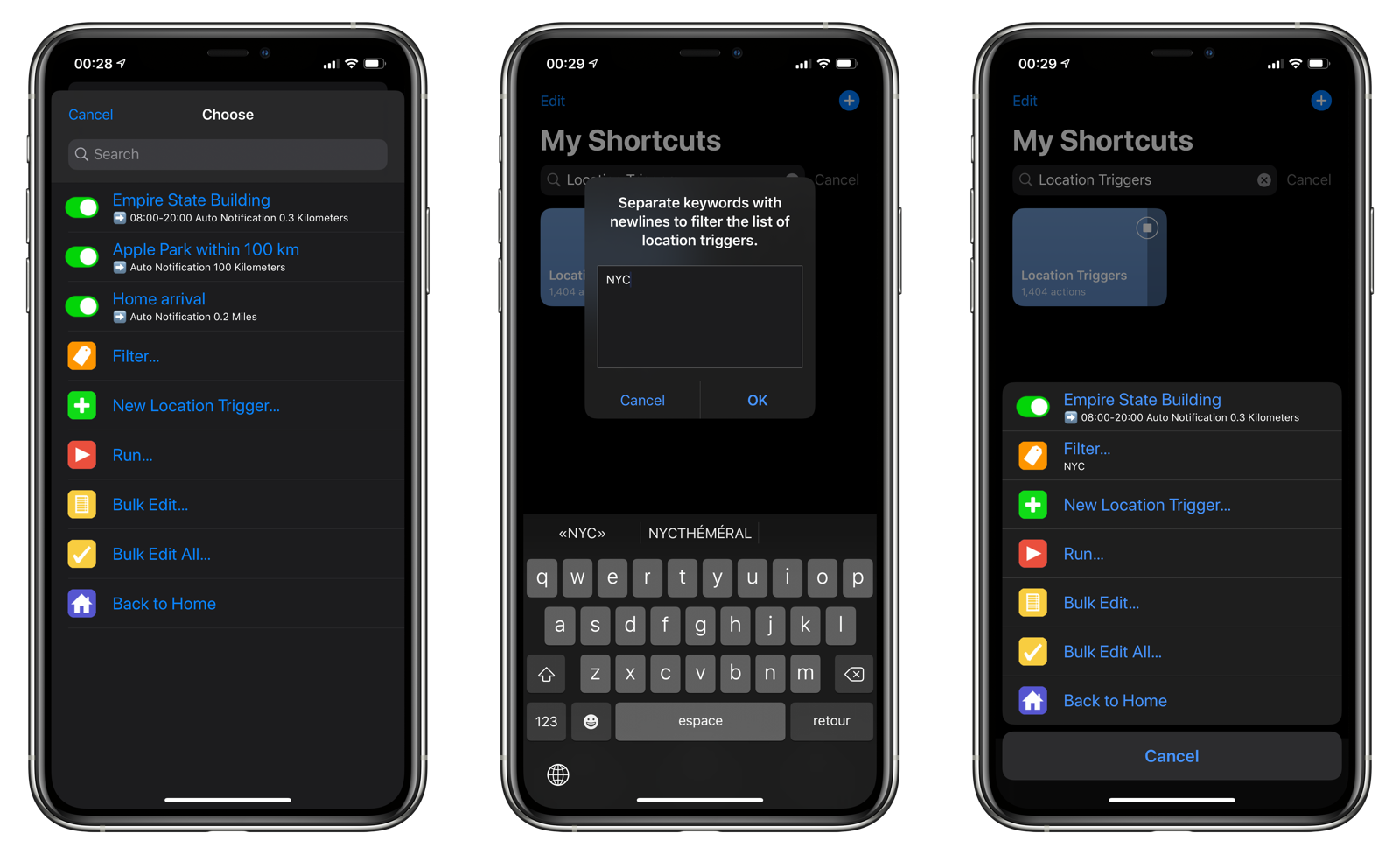
61 |
62 | > Note: Location triggers are stored in `iCloud Drive/Shortcuts/Location Triggers`
63 |
64 | ### Location Trigger Detail
65 | This view is displaying when you tap on a location triggers. Each location trigger can modify the following things:
66 |
67 | - **Location Trigger Toggle**: The on/off switch for this location trigger.
68 | - **Name**: The name of a location trigger.
69 | - **Location**: The location to be monitored.
70 | - **Trigger Radius**: The distance in miles or kilometers from the center of the location. If you fall within the radius, the shortcut specified in the location trigger will run.
71 | - **Shortcut**: The shortcut that will run when you arrive or leave a location.
72 | - **Shortcut Input**: The text input to send to the shortcut.
73 | - **Active Time**: Restrict this location trigger between a start and finish time during the day.
74 | - **LimitKit Run Interval**: When LimitKit support is enabled, you can set how long a location trigger must wait to be re-evaluated after a successful run. By default, location triggers are evaluated every time Location Triggers runs. Setting a run interval can save time if you are evaluating many location triggers or if you only need to run a shortcut once a day.
75 | - **On Success**: What happens after a successful evaluation. Options include:
76 | - **Nothing**: Location Triggers will wait until you leave (for arrival triggers) or arrive (for leaving triggers) before it can re-evaluate the trigger.
77 | - **Disable**: The location trigger will be disabled after running the shortcut. You will have to manually re-enable it for it to work again.
78 | - **Reset**: Removes the previous location check, allowing the location trigger to run again at the next evaluation period. This is useful when debugging and troubleshooting an arrival location trigger since the shortcut will fire every time you are within the trigger radius.
79 | - **Delete**: Deletes the location trigger after running its shortcut. This operation cannot be undone.
80 | - **Tags**: Add tags to your location triggers so you can filter them from the List screen.
81 |
82 | 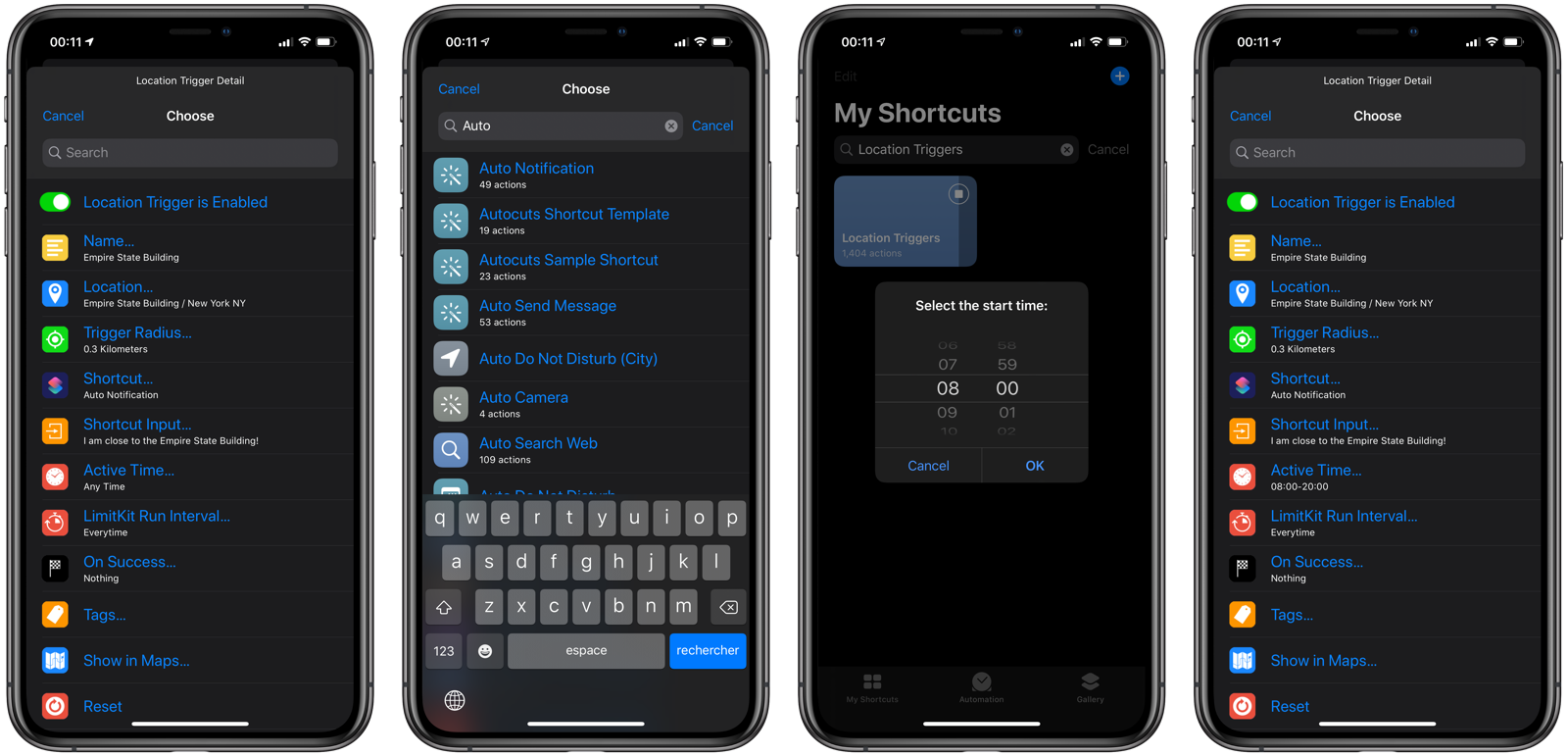
83 |
84 | ****
85 |
86 |
87 | ## Creating a Location Trigger
88 | There are a number of ways to create a location trigger:
89 |
90 | 1. Use the Location Trigger Assistant.
91 | 2. Use the [New Location Trigger From Input shortcut](https://routinehub.co/shortcut/3658) from the iOS Share Sheet to identify locations in text, web pages, contacts, maps, and more.
92 |
93 | ### Location Trigger Assistant
94 | In this example, we're going to create a location trigger centered around Apple's new campus.
95 |
96 | 1. Tap **Location Triggers** from the Shortcuts Home screen.
97 | 2. Tap **New Location Trigger**.
98 | 3. Tap **When I Arrive** to create an arrival trigger.
99 | 4. Enter the address to center the trigger. Here we are choosing Apple Park, located at One Apple Park Way in Cupertino, CA.
100 | 5. Enter the trigger radius. For this example, we'll choose a very generous 100 kilometer radius around Apple Park.
101 | 6. Choose the shortcut that will run you are within 100 kilometers of Apple Park.
102 | 7. Select any input to send to the shortcut. In this case, Auto Notification takes text input.
103 | 8. Enter the text, `"I am within 100 kilometers of Apple Park!"` that will be sent to the Auto Notification shortcut.
104 | 9. Choose when this location trigger should be active.
105 | 10. If you have [LimitKit support enabled](#limitkit), an option will appear to set a custom run cadence for the location trigger.
106 | 11. Select what should happen after the location trigger successfully fires.
107 | 12. Name your location trigger.
108 | 13. Finally, switch to another application and watch your shortcut run successfully in the background based on your location. No tapping of a confirmation button required!
109 |
110 | 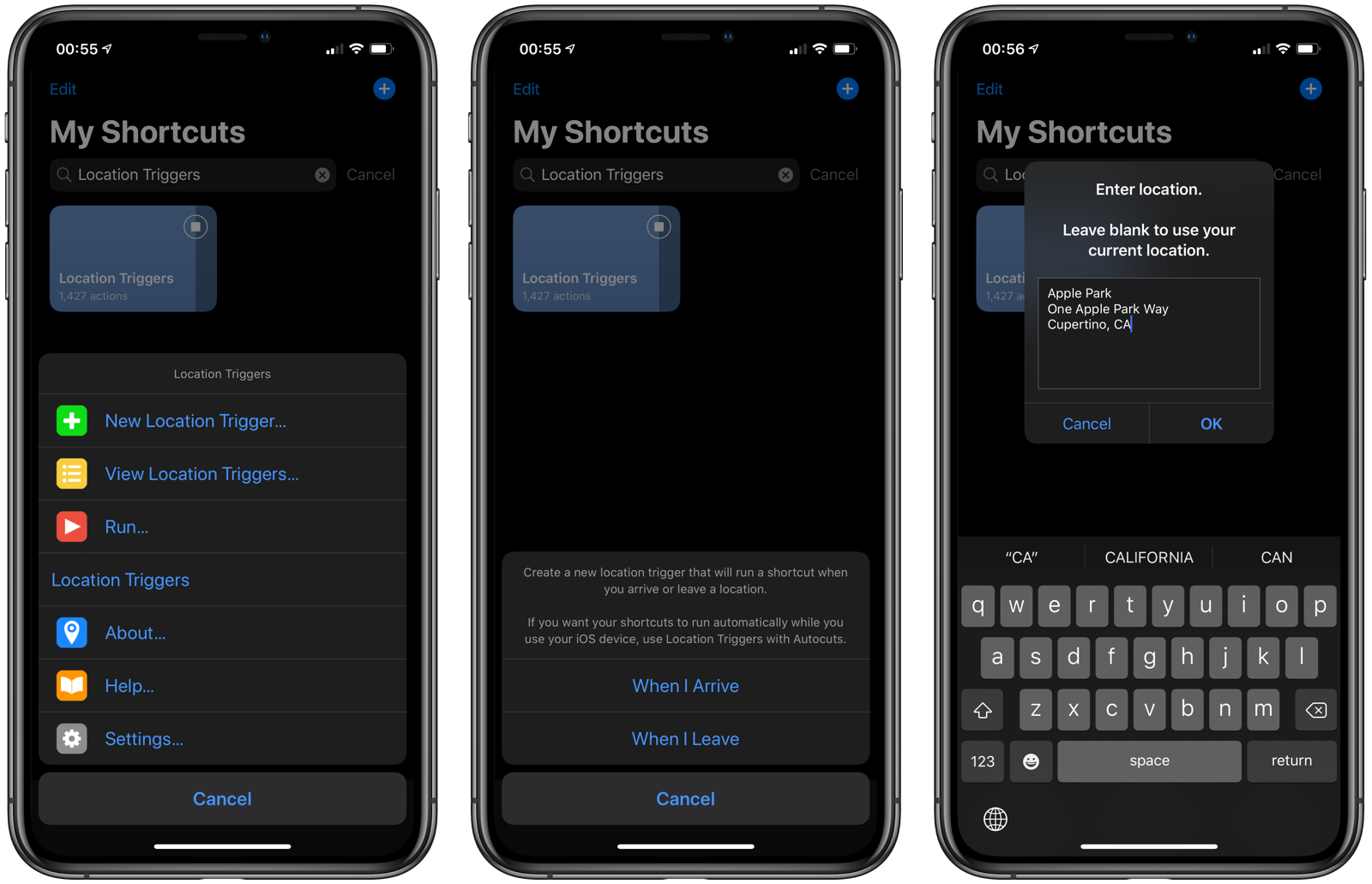
111 |
112 | 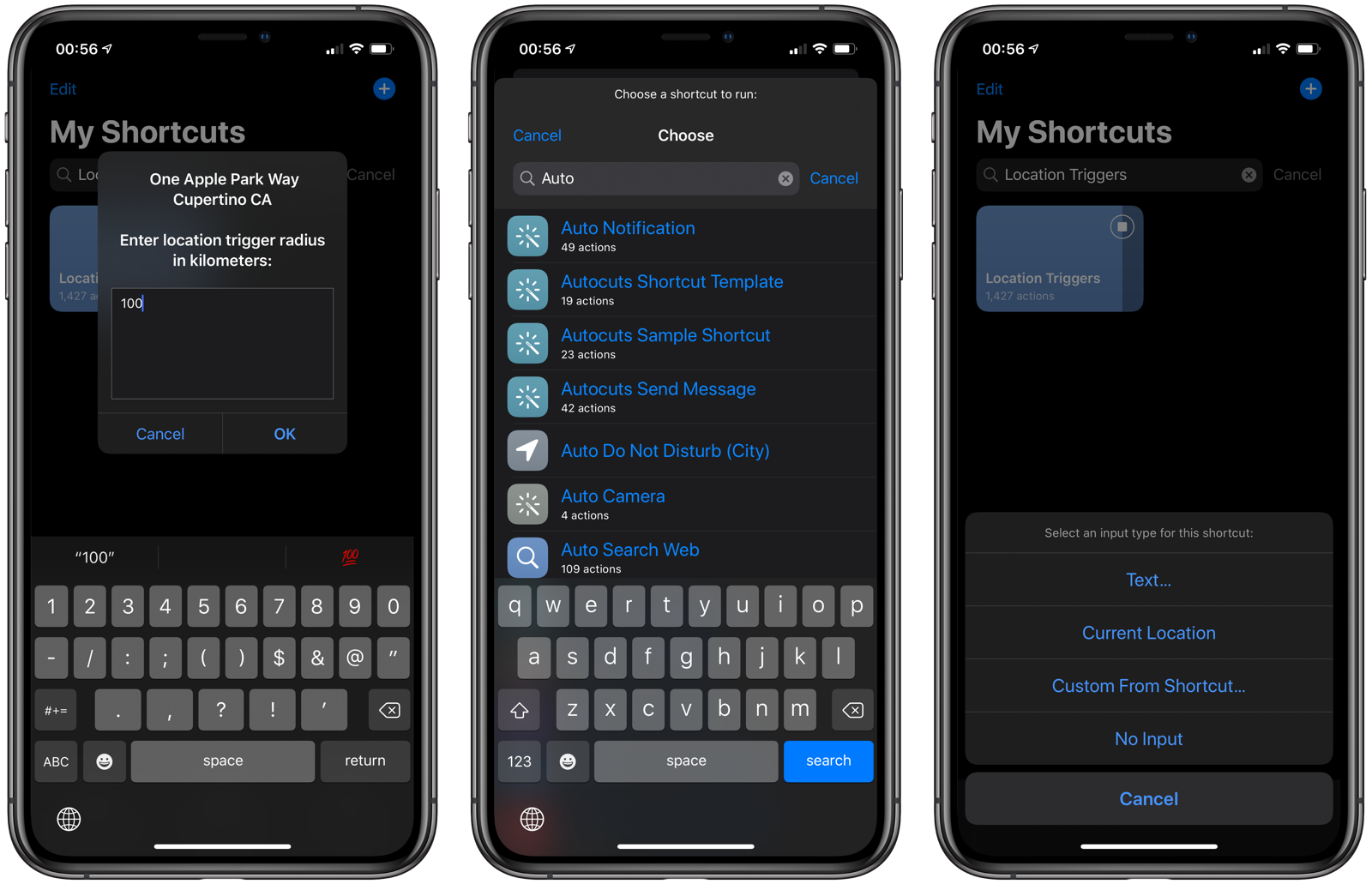
113 |
114 | 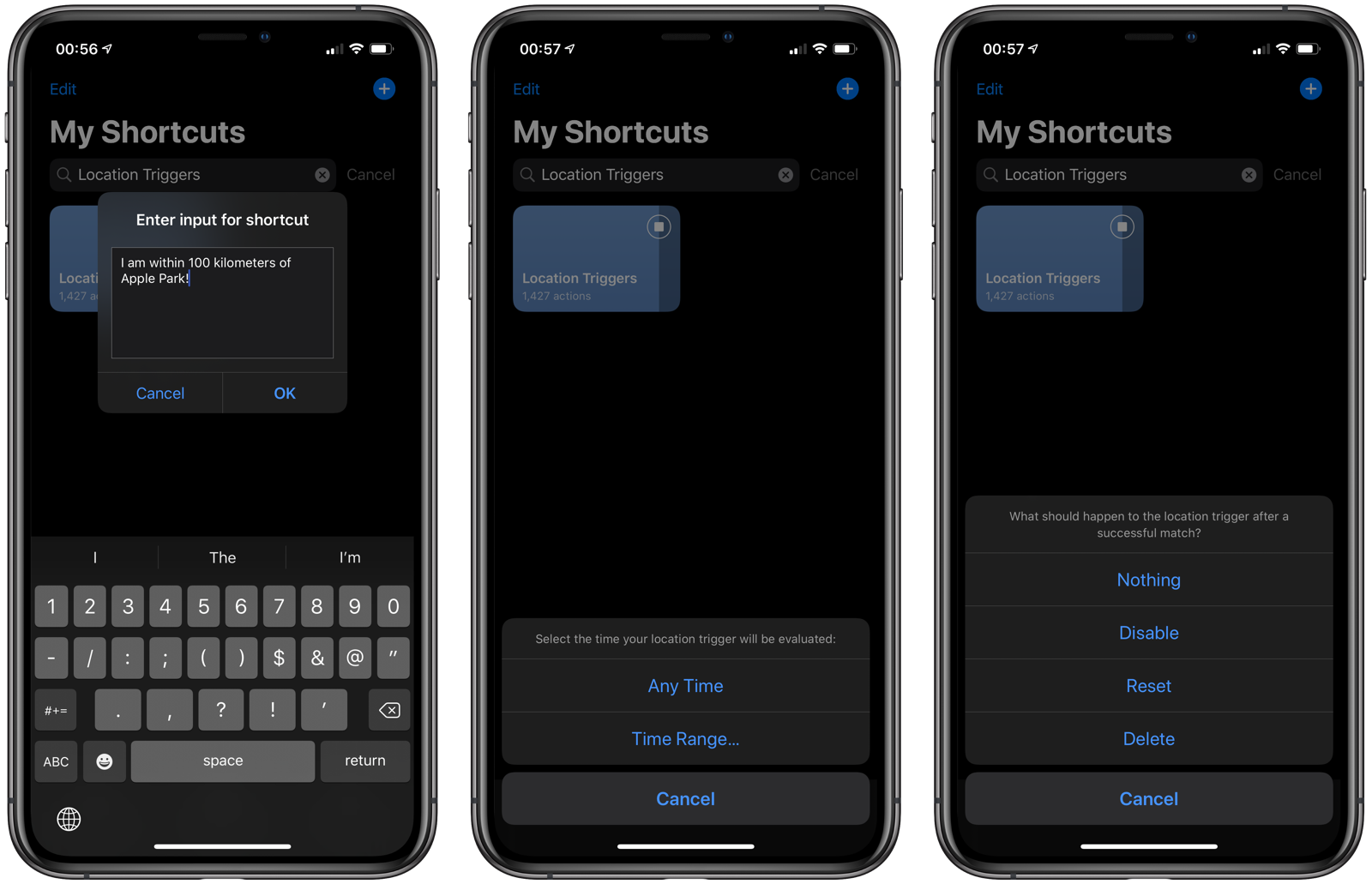
115 |
116 | 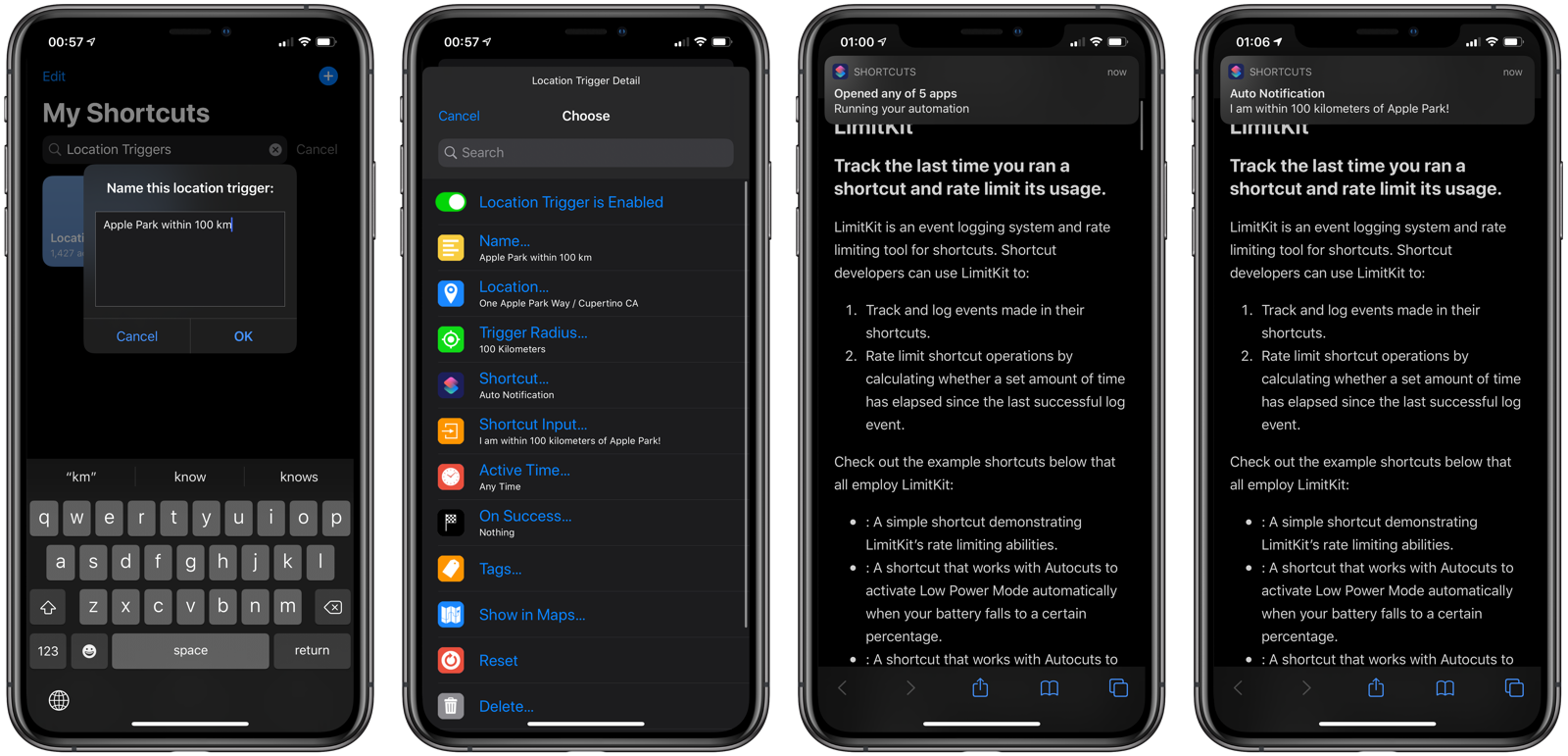
117 |
118 | ### Share Sheet
119 | Use the [New Location Trigger From Input shortcut](https://routinehub.co/shortcut/3658) from the iOS Share Sheet to import new locations as location triggers. The shortcut can extract locations from contacts, text, Safari Web Pages, and Maps links.
120 |
121 | 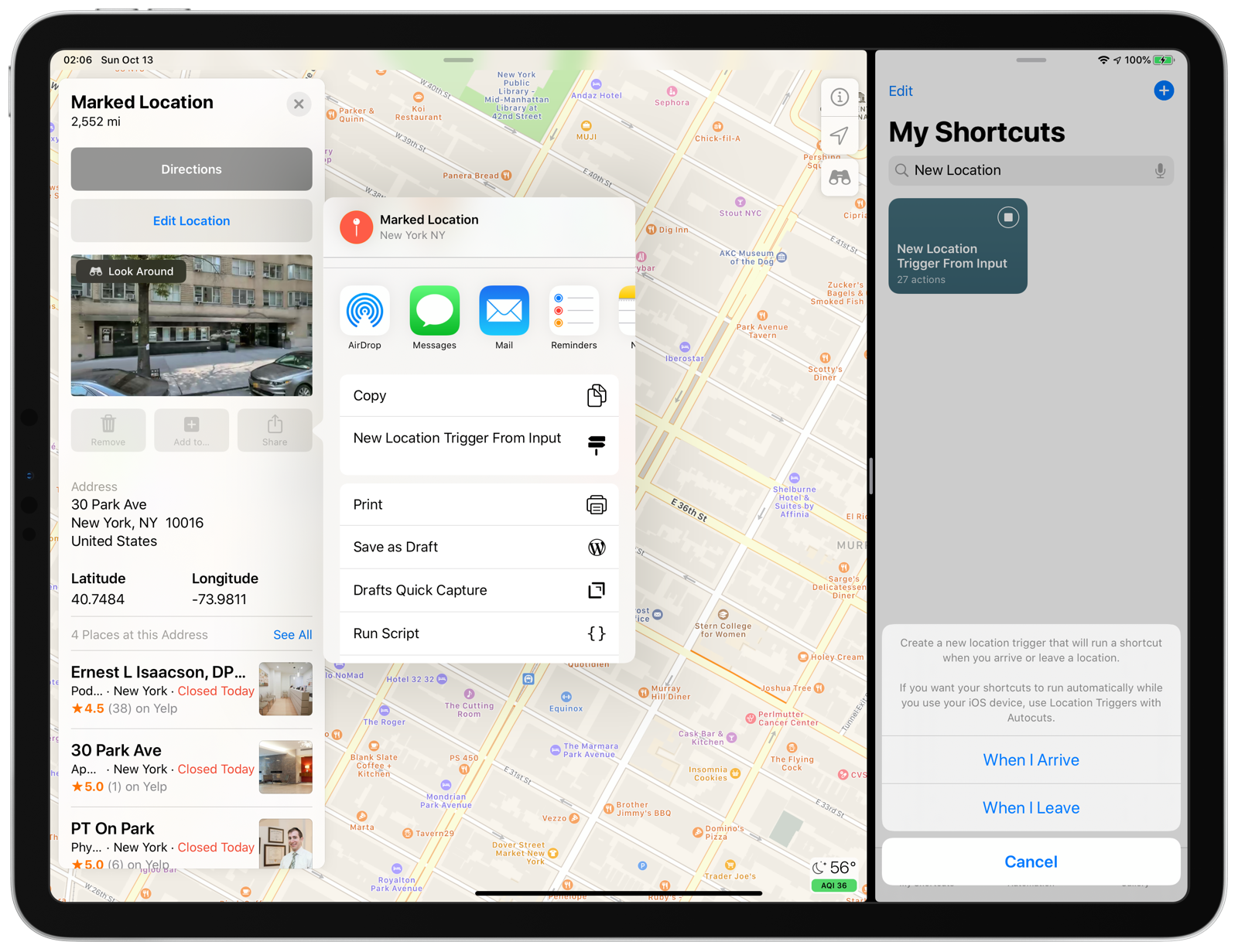
122 |
123 | ****
124 |
125 |
126 | ## Adding Location Triggers to Autocuts
127 | To realize the full potential of Location Triggers, it must be added as an Autocut using Autocuts Admin. Follow these steps to accomplish this:
128 |
129 | 1. Open **Autocuts Admin** from the Shortcuts Home screen.
130 | 2. Tap **New Autocut**.
131 | 3. Choose **Location Triggers** from the list of shortcuts.
132 | 4. Tap **No Input**.
133 | 5. Tap **Run in Background**.
134 | 6. Tap **OK** since we want Location Triggers to start running immediately.
135 | 7. Tap **Never Expire**.
136 | 8. If [LimitKit](#limitkit) is enabled, you can adjust the run cadence for Location Triggers here.
137 | 8. Tap **Nothing**.
138 | 9. Tap **This Device**.
139 | 10. Enter a descriptive name for your Autocut and tap OK.
140 | 11. Tap the the iCloud (Your Device Name) destination service.
141 |
142 | 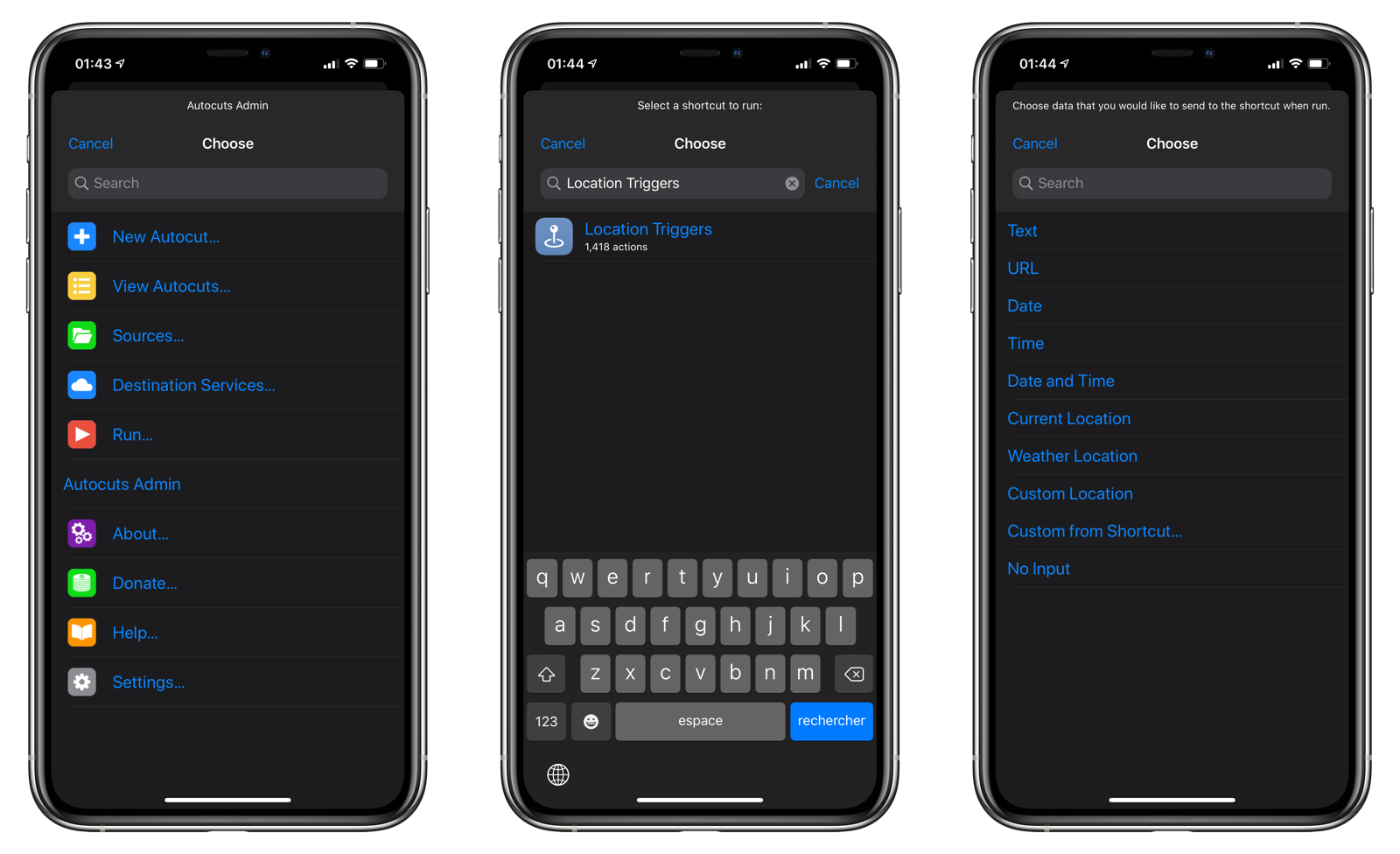
143 |
144 | 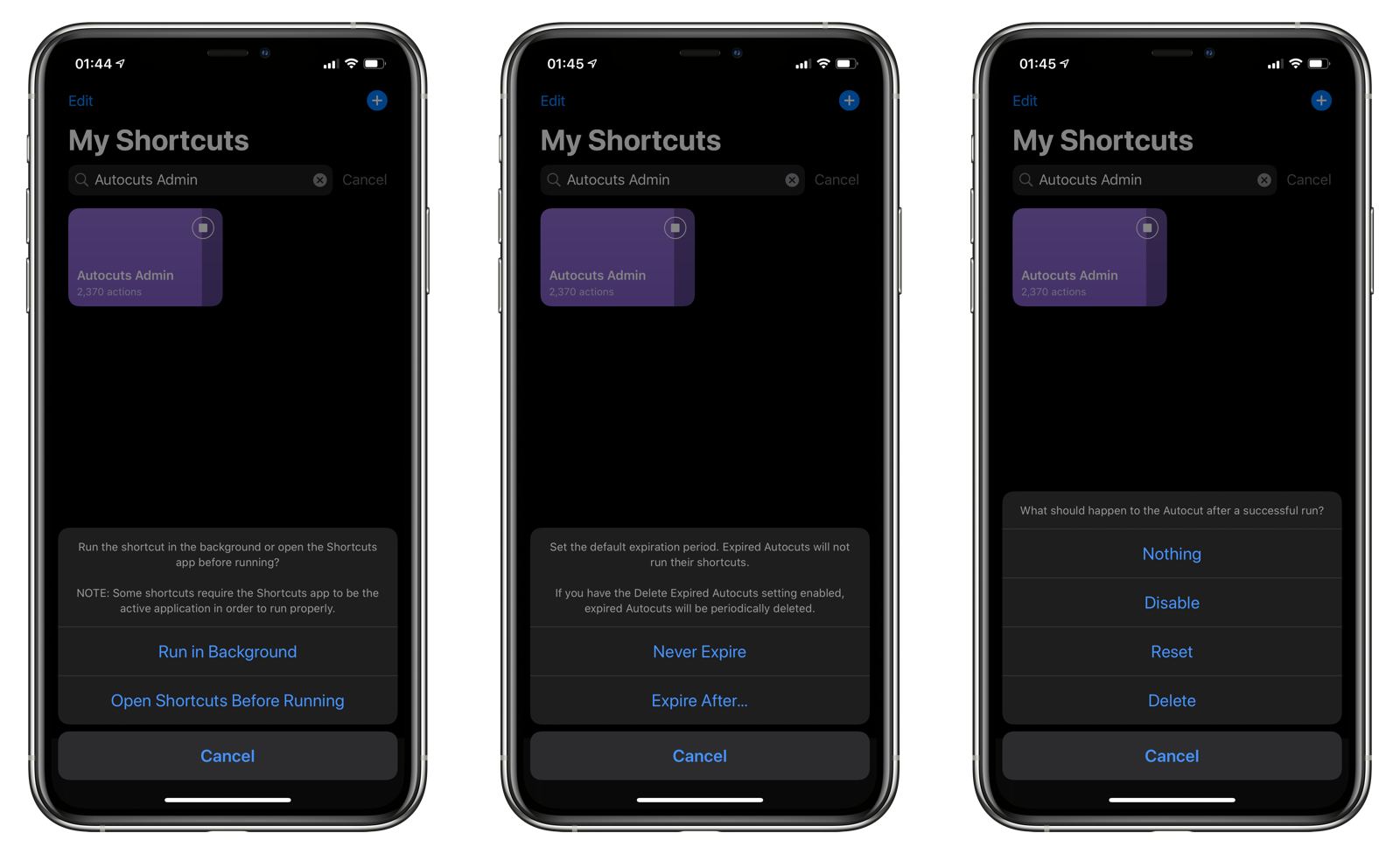
145 |
146 | 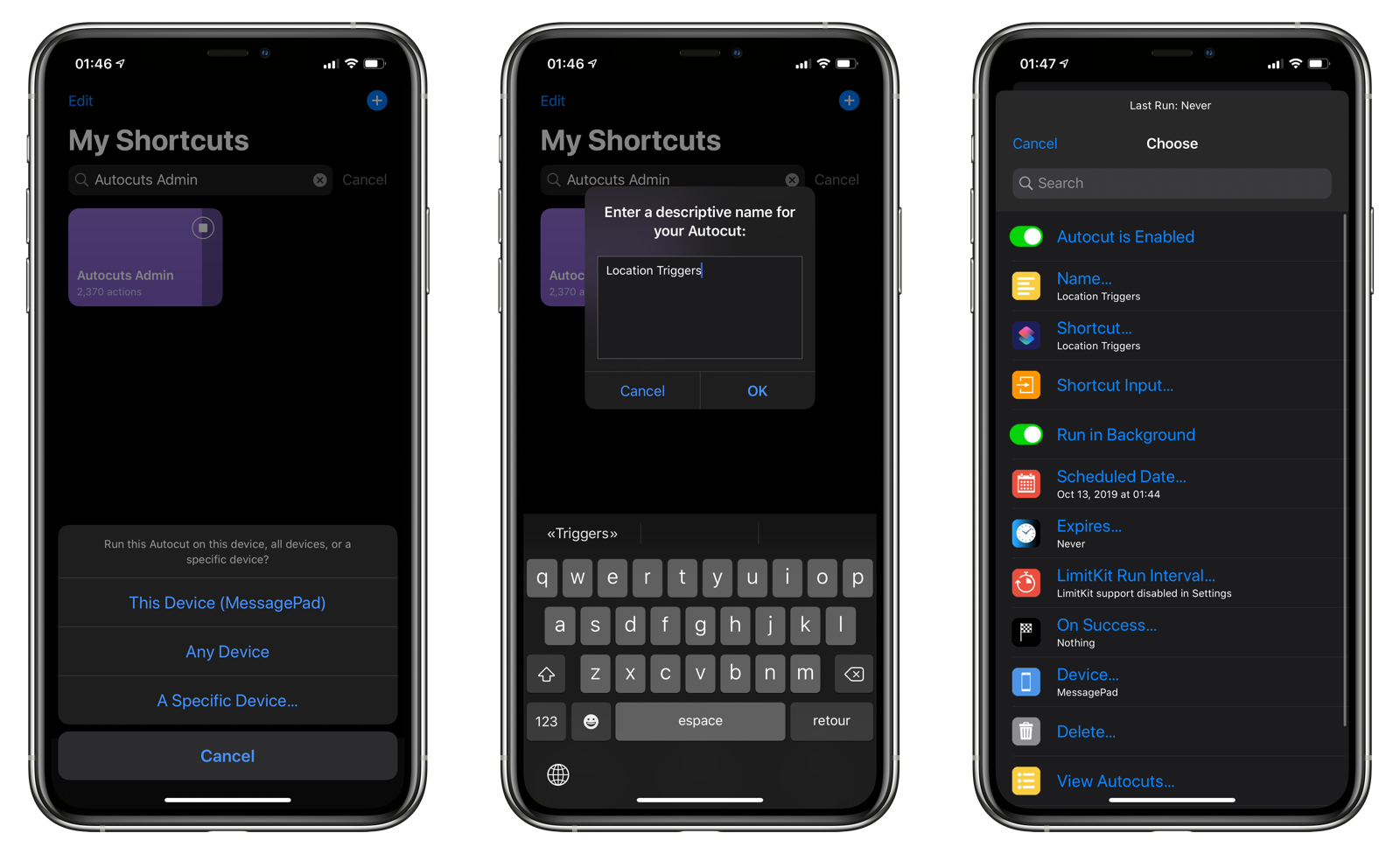
147 |
148 | ****
149 |
150 |
151 | ## LimitKit
152 | LimitKit is an event logging system and rating limiting tool for shortcuts. Location Triggers takes advantage of LimitKit to control how often your location triggers can run their shortcuts.
153 |
154 | Location Triggers works with LimitKit and allows you to run the shortcut in a location trigger at intervals of seconds, minutes, hours, days, weeks, months, or even years. For instance, you can create a daily location trigger that marks your location in the world once a day. This is useful if you travel frequently and want to keep track of where you've wake up on a daily basis.
155 |
156 | LimitKit support is enabled in the Settings page of Location Triggers.
157 |
158 | 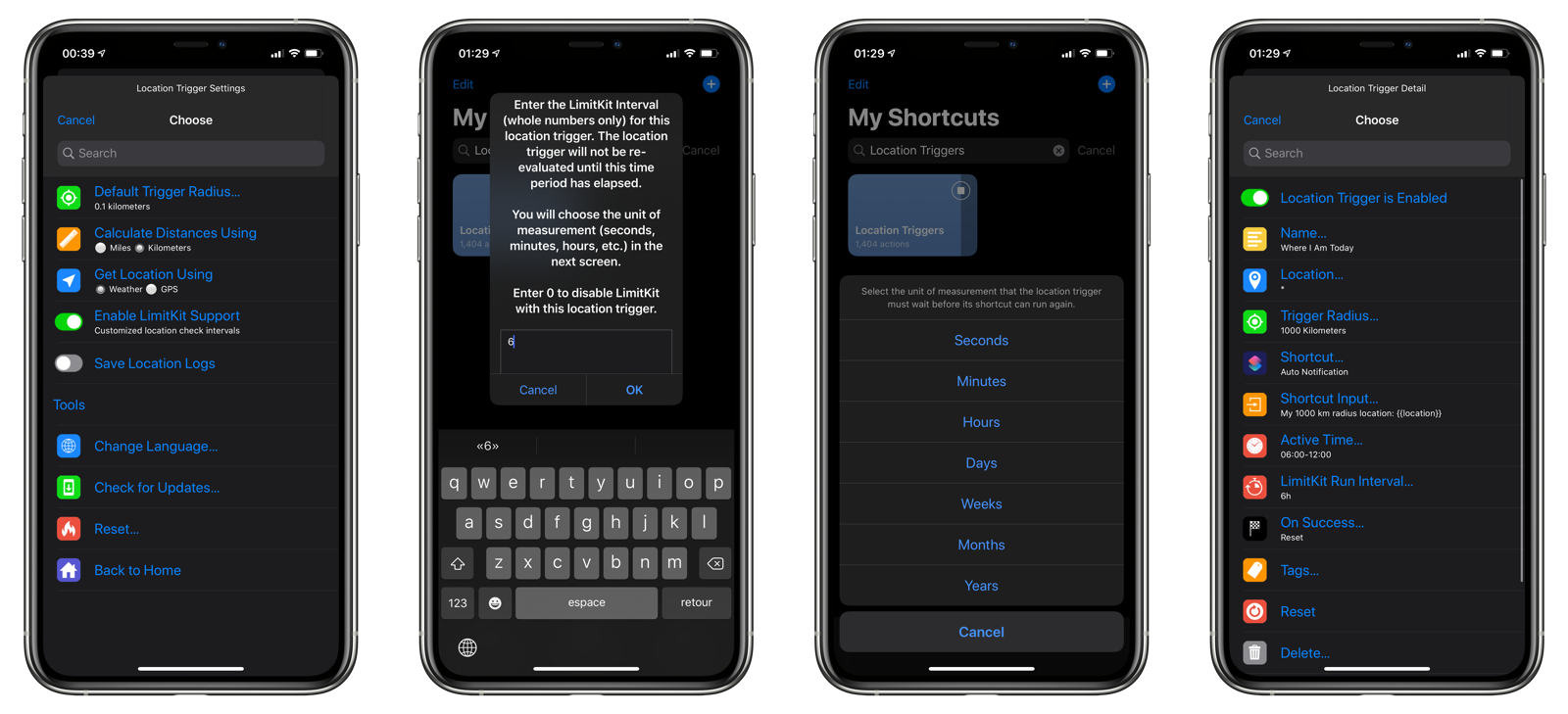
159 |
160 | ****
161 |
162 |
163 | ## Advanced
164 |
165 | ### Location Wildcard
166 | When entering the location for a location trigger, you can specify `*` to represent your current location. This will cause the trigger to be successfully matched as long as you move outside of the trigger radius that you specify. This allows for intriguing shortcut possibilities such as calculating how often you leave your home area or logging where you wake up each day.
167 |
168 | ### Order of Precedence
169 | When evaluating a location trigger, these checks are made in the following order:
170 |
171 | 1. Autocuts - Scheduled Date for Location Triggers
172 | 2. Autocuts - Expiration for Location Triggers
173 | 3. Autocuts - LimitKit for Location Triggers
174 | 4. Active Status
175 | 5. Time Range
176 | 6. LimitKit
177 | 7. Location Validity
178 | 8. Arrive or Leave
179 | 9. Location Wildcard
180 | 10. Distance from Current Location and Trigger Location
181 |
182 | Keep this in mind as you develop location triggers with Autocuts Suites.
183 |
184 | ### API
185 | You can send a Location object to Location Triggers in order to programatically open the Location Trigger Assitant and start creating a new location trigger.
186 |
187 | ****
188 |
189 |
190 | ## Localization
191 | Today, Auto DND is localized for the English language, but it's ready to be localized in any supported language by iOS. Please visit [Auto DND's GitHub page](https://github.com/adamtow/auto-dnd/tree/master/localization) and submit a pull request with a new localization file.
192 |
193 | ****
194 |
195 |
196 | ## Frequently Asked Questions
197 |
198 | ### The Shortcuts notification that it is running an automation is very distracting. Is there any way to get rid of it?
199 | Yes, it is annoying. Unfortunately, there's no way to disable the notification, as it is controlled by iOS. File feedback with Apple using their [Feedback Assistant system](https://feedbackassistant.apple.com).
200 |
201 | ### What's the difference between Get Current Location and Get Current Weather?
202 | Get Current Location is slower but more accurate. Get Current Weather is faster, but potentially less accurate. Get Current Location will also have a more negative impact on battery life, as it forces your iOS device to power up the GPS radios to pinpoint your location.
203 |
204 |
--------------------------------------------------------------------------------