├── .gitignore
├── img1.jpg
├── .github
└── workflows
│ └── greetings.yml
├── README.md
├── requirements.txt
├── Object_Detection_Youtube.py
└── Drone_Human_Detection_Model.py
/.gitignore:
--------------------------------------------------------------------------------
1 | .idea/
2 |
--------------------------------------------------------------------------------
/img1.jpg:
--------------------------------------------------------------------------------
https://raw.githubusercontent.com/akash-agni/Real-Time-Object-Detection/HEAD/img1.jpg
--------------------------------------------------------------------------------
/.github/workflows/greetings.yml:
--------------------------------------------------------------------------------
1 | name: Greetings
2 |
3 | on: [pull_request, issues]
4 |
5 | jobs:
6 | greeting:
7 | runs-on: ubuntu-latest
8 | permissions:
9 | issues: write
10 | pull-requests: write
11 | steps:
12 | - uses: actions/first-interaction@v1
13 | with:
14 | repo-token: ${{ secrets.GITHUB_TOKEN }}
15 | issue-message: 'Hi, Thank you for submitting the issue, I will look into it and get back to at the earliest'
16 | pr-message: 'Hi, Thank you for submitting the PR, please make sure to provide details of the changes being made.'
17 |
--------------------------------------------------------------------------------
/README.md:
--------------------------------------------------------------------------------
1 | # Real Time Object Detection
2 | TL;DR: Python application for read time object detection on video feed.
3 |
4 | 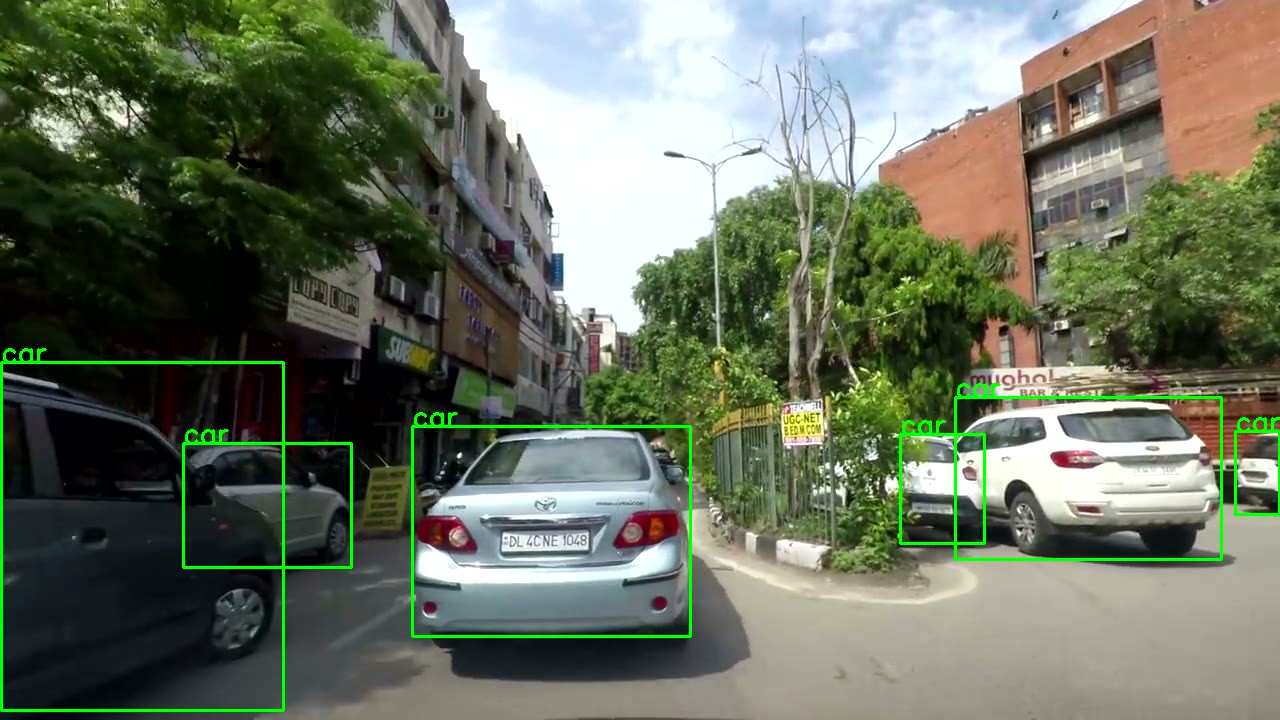 5 |
6 | ## Usage
7 | You can install all the used packages using.
8 |
9 | ```pip install -r requirements.txt```
10 |
11 | To parse an URL.
12 |
13 | ```python Object_Detection_Youtube.py ```
14 |
15 | To parse a drone video for humans only.
16 |
17 | ```python Drone_Human_Detection_Model.py ```
18 |
19 | ## Upcoming Features.
20 |
5 |
6 | ## Usage
7 | You can install all the used packages using.
8 |
9 | ```pip install -r requirements.txt```
10 |
11 | To parse an URL.
12 |
13 | ```python Object_Detection_Youtube.py ```
14 |
15 | To parse a drone video for humans only.
16 |
17 | ```python Drone_Human_Detection_Model.py ```
18 |
19 | ## Upcoming Features.
20 |
21 | - Real Time Object Detection using Webcam.
22 | - Flask based REST API to stream parsed video live on web browser
23 |
24 |
25 | :blue_heart:
26 |
--------------------------------------------------------------------------------
/requirements.txt:
--------------------------------------------------------------------------------
1 | absl-py==0.12.0
2 | cachetools==4.2.1
3 | certifi==2020.12.5
4 | chardet==4.0.0
5 | cycler==0.10.0
6 | google-auth==1.30.0
7 | google-auth-oauthlib==0.4.4
8 | grpcio==1.37.0
9 | idna==2.10
10 | kiwisolver==1.3.1
11 | Markdown==3.3.4
12 | matplotlib==3.4.1
13 | numpy==1.20.2
14 | oauthlib==3.1.0
15 | opencv-python==4.5.1.48
16 | pandas==1.2.4
17 | Pillow==8.2.0
18 | protobuf==3.15.8
19 | pyasn1==0.4.8
20 | pyasn1-modules==0.2.8
21 | pyparsing==2.4.7
22 | python-dateutil==2.8.1
23 | pytz==2021.1
24 | PyYAML==5.4.1
25 | requests==2.25.1
26 | requests-oauthlib==1.3.0
27 | rsa==4.7.2
28 | scipy==1.6.3
29 | seaborn==0.11.1
30 | six==1.15.0
31 | tensorboard==2.5.0
32 | tensorboard-data-server==0.6.0
33 | tensorboard-plugin-wit==1.8.0
34 | torch==1.8.1
35 | torchvision==0.9.1
36 | tqdm==4.60.0
37 | typing-extensions==3.7.4.3
38 | urllib3==1.26.4
39 | Werkzeug==1.0.1
40 |
--------------------------------------------------------------------------------
/Object_Detection_Youtube.py:
--------------------------------------------------------------------------------
1 | import torch
2 | import numpy as np
3 | import cv2
4 | import pafy
5 | from time import time
6 |
7 |
8 | class ObjectDetection:
9 | """
10 | Class implements Yolo5 model to make inferences on a youtube video using Opencv2.
11 | """
12 |
13 | def __init__(self, url, out_file="Labeled_Video.avi"):
14 | """
15 | Initializes the class with youtube url and output file.
16 | :param url: Has to be as youtube URL,on which prediction is made.
17 | :param out_file: A valid output file name.
18 | """
19 | self._URL = url
20 | self.model = self.load_model()
21 | self.classes = self.model.names
22 | self.out_file = out_file
23 | self.device = 'cuda' if torch.cuda.is_available() else 'cpu'
24 |
25 | def get_video_from_url(self):
26 | """
27 | Creates a new video streaming object to extract video frame by frame to make prediction on.
28 | :return: opencv2 video capture object, with lowest quality frame available for video.
29 | """
30 | play = pafy.new(self._URL).streams[-1]
31 | assert play is not None
32 | return cv2.VideoCapture(play.url)
33 |
34 | def load_model(self):
35 | """
36 | Loads Yolo5 model from pytorch hub.
37 | :return: Trained Pytorch model.
38 | """
39 | model = torch.hub.load('ultralytics/yolov5', 'yolov5s', pretrained=True)
40 | return model
41 |
42 | def score_frame(self, frame):
43 | """
44 | Takes a single frame as input, and scores the frame using yolo5 model.
45 | :param frame: input frame in numpy/list/tuple format.
46 | :return: Labels and Coordinates of objects detected by model in the frame.
47 | """
48 | self.model.to(self.device)
49 | frame = [frame]
50 | results = self.model(frame)
51 | labels, cord = results.xyxyn[0][:, -1].numpy(), results.xyxyn[0][:, :-1].numpy()
52 | return labels, cord
53 |
54 | def class_to_label(self, x):
55 | """
56 | For a given label value, return corresponding string label.
57 | :param x: numeric label
58 | :return: corresponding string label
59 | """
60 | return self.classes[int(x)]
61 |
62 | def plot_boxes(self, results, frame):
63 | """
64 | Takes a frame and its results as input, and plots the bounding boxes and label on to the frame.
65 | :param results: contains labels and coordinates predicted by model on the given frame.
66 | :param frame: Frame which has been scored.
67 | :return: Frame with bounding boxes and labels ploted on it.
68 | """
69 | labels, cord = results
70 | n = len(labels)
71 | x_shape, y_shape = frame.shape[1], frame.shape[0]
72 | for i in range(n):
73 | row = cord[i]
74 | if row[4] >= 0.2:
75 | x1, y1, x2, y2 = int(row[0]*x_shape), int(row[1]*y_shape), int(row[2]*x_shape), int(row[3]*y_shape)
76 | bgr = (0, 255, 0)
77 | cv2.rectangle(frame, (x1, y1), (x2, y2), bgr, 2)
78 | cv2.putText(frame, self.class_to_label(labels[i]), (x1, y1), cv2.FONT_HERSHEY_SIMPLEX, 0.9, bgr, 2)
79 |
80 | return frame
81 |
82 | def __call__(self):
83 | """
84 | This function is called when class is executed, it runs the loop to read the video frame by frame,
85 | and write the output into a new file.
86 | :return: void
87 | """
88 | player = self.get_video_from_url()
89 | assert player.isOpened()
90 | x_shape = int(player.get(cv2.CAP_PROP_FRAME_WIDTH))
91 | y_shape = int(player.get(cv2.CAP_PROP_FRAME_HEIGHT))
92 | four_cc = cv2.VideoWriter_fourcc(*"MJPG")
93 | out = cv2.VideoWriter(self.out_file, four_cc, 20, (x_shape, y_shape))
94 | while True:
95 | start_time = time()
96 | ret, frame = player.read()
97 | assert ret
98 | results = self.score_frame(frame)
99 | frame = self.plot_boxes(results, frame)
100 | end_time = time()
101 | fps = 1/np.round(end_time - start_time, 3)
102 | print(f"Frames Per Second : {fps}")
103 | out.write(frame)
104 |
105 | # Create a new object and execute.
106 | a = ObjectDetection("https://www.youtube.com/watch?v=dwD1n7N7EAg")
107 | a()
108 |
--------------------------------------------------------------------------------
/Drone_Human_Detection_Model.py:
--------------------------------------------------------------------------------
1 | import torch
2 | import numpy as np
3 | import cv2
4 | from time import time
5 | import sys
6 |
7 |
8 | class ObjectDetection:
9 | """
10 | The class performs generic object detection on a video file.
11 | It uses yolo5 pretrained model to make inferences and opencv2 to manage frames.
12 | Included Features:
13 | 1. Reading and writing of video file using Opencv2
14 | 2. Using pretrained model to make inferences on frames.
15 | 3. Use the inferences to plot boxes on objects along with labels.
16 | Upcoming Features:
17 | """
18 | def __init__(self, input_file, out_file="Labeled_Video.avi"):
19 | """
20 | :param input_file: provide youtube url which will act as input for the model.
21 | :param out_file: name of a existing file, or a new file in which to write the output.
22 | :return: void
23 | """
24 | self.input_file = input_file
25 | self.model = self.load_model()
26 | self.model.conf = 0.4 # set inference threshold at 0.3
27 | self.model.iou = 0.3 # set inference IOU threshold at 0.3
28 | self.model.classes = [0] # set model to only detect "Person" class
29 | self.out_file = out_file
30 | self.device = 'cuda' if torch.cuda.is_available() else 'cpu'
31 |
32 | def get_video_from_file(self):
33 | """
34 | Function creates a streaming object to read the video from the file frame by frame.
35 | :param self: class object
36 | :return: OpenCV object to stream video frame by frame.
37 | """
38 | cap = cv2.VideoCapture(self.input_file)
39 | assert cap is not None
40 | return cap
41 |
42 | def load_model(self):
43 | """
44 | Function loads the yolo5 model from PyTorch Hub.
45 | """
46 | model = torch.hub.load('ultralytics/yolov5', 'yolov5s', pretrained=True)
47 | return model
48 |
49 | def score_frame(self, frame):
50 | """
51 | function scores each frame of the video and returns results.
52 | :param frame: frame to be infered.
53 | :return: labels and coordinates of objects found.
54 | """
55 | self.model.to(self.device)
56 | results = self.model([frame])
57 | labels, cord = results.xyxyn[0][:, -1].to('cpu').numpy(), results.xyxyn[0][:, :-1].to('cpu').numpy()
58 | return labels, cord
59 |
60 | def plot_boxes(self, results, frame):
61 | """
62 | plots boxes and labels on frame.
63 | :param results: inferences made by model
64 | :param frame: frame on which to make the plots
65 | :return: new frame with boxes and labels plotted.
66 | """
67 | labels, cord = results
68 | n = len(labels)
69 | x_shape, y_shape = frame.shape[1], frame.shape[0]
70 | for i in range(n):
71 | row = cord[i]
72 | x1, y1, x2, y2 = int(row[0]*x_shape), int(row[1]*y_shape), int(row[2]*x_shape), int(row[3]*y_shape)
73 | bgr = (0, 0, 255)
74 | cv2.rectangle(frame, (x1, y1), (x2, y2), bgr, 1)
75 | label = f"{int(row[4]*100)}"
76 | cv2.putText(frame, label, (x1, y1), cv2.FONT_HERSHEY_SIMPLEX, 0.6, (0, 255, 0), 1)
77 | cv2.putText(frame, f"Total Targets: {n}", (30, 30), cv2.FONT_HERSHEY_SIMPLEX, 1, (0, 255, 0), 2)
78 |
79 | return frame
80 |
81 | def __call__(self):
82 | player = self.get_video_from_file() # create streaming service for application
83 | assert player.isOpened()
84 | x_shape = int(player.get(cv2.CAP_PROP_FRAME_WIDTH))
85 | y_shape = int(player.get(cv2.CAP_PROP_FRAME_HEIGHT))
86 | four_cc = cv2.VideoWriter_fourcc(*"MJPG")
87 | out = cv2.VideoWriter(self.out_file, four_cc, 20, (x_shape, y_shape))
88 | fc = 0
89 | fps = 0
90 | tfc = int(player.get(cv2.CAP_PROP_FRAME_COUNT))
91 | tfcc = 0
92 | while True:
93 | fc += 1
94 | start_time = time()
95 | ret, frame = player.read()
96 | if not ret:
97 | break
98 | results = self.score_frame(frame)
99 | frame = self.plot_boxes(results, frame)
100 | end_time = time()
101 | fps += 1/np.round(end_time - start_time, 3)
102 | if fc == 10:
103 | fps = int(fps / 10)
104 | tfcc += fc
105 | fc = 0
106 | per_com = int(tfcc / tfc * 100)
107 | print(f"Frames Per Second : {fps} || Percentage Parsed : {per_com}")
108 | out.write(frame)
109 | player.release()
110 |
111 |
112 | link = sys.argv[1]
113 | output_file = sys.argv[2]
114 | a = ObjectDetection(link, output_file)
115 | a()
--------------------------------------------------------------------------------