21 | 22 |
 23 |
24 |
25 |
23 |
24 |
25 |  3 |
4 | [  ](./1-ad-app-registration.md)[  ](./2-secrets-manager.md)[  ](./3-iam-role.md)[  ](./4-lambda-function.md)[  ](./5-cloudwatch-event.md)[  ](./6-testing.md)
5 |
6 | ## Setting Up A AWS CloudWatch Event Using Amazon Web Services
7 |
8 | At this point, you should have a working copy of our A4B import of AD Users and Groups function. In order to make it automated, you will need to create an AWS CloudWatch event to kick off the AWS Lambda function on a daily basis. Here are the things you will need to do:
9 |
10 | 1. **Go to http://aws.amazon.com and sign in to the console.**
11 |
12 | [](https://console.aws.amazon.com/console/home)
13 |
14 | 2. **Click "Services" at the top of the screen, and type "CloudWatch" in the search box.** You can also find CloudWatch in the list of services. It is in the "Management & Governance" section.
15 |
16 | [](https://console.aws.amazon.com/cloudwatch/home)
17 |
18 | 3. **Click "Events" link on the left side of the screen.** Then click the **Get started** button.
19 |
20 | 
21 |
22 | 4. Click the **Get started** button.
23 |
24 | 
25 |
26 | 5. In the **Step 1: Create rule** screen, select "Schedule" under the **Event Source** section.
27 | Set the **Fixed rate of** to 1 for duration and type to Days.
28 |
29 | 6. Under the **Targets** section, click on the **Add target** button.
30 |
31 | 7. Ensure the drop down shows **Lambda function** for the target.
32 |
33 | 8. Search for the **Function** named "A4BUserGroupImport" in the drop down.
34 |
35 | 
36 |
37 | 9. Click on the **Configure details** button.
38 |
39 | 10. In the **Step 2: Configure rule details** screen, enter a Name and Description for the timed event. Click on the **Create rule** button to complete the rule.
40 |
41 | 
42 |
43 | **Note** at this point the rule will be active and start running the import process!
44 |
45 |
46 | [](6-testing.md)
47 |
--------------------------------------------------------------------------------
/a4b-sample-device-maker-service/views/index.pug:
--------------------------------------------------------------------------------
1 | extends layout
2 |
3 | block content
4 | h1(align='center') Devices
5 | if devices.length > 0
6 | table.table.table-bordered
7 | tr
8 | th Device Serial Number
9 | th Product ID
10 | th Amazon ID
11 | th Client ID
12 | th Is Enabled for A4B?
13 | th Actions
14 | each device in devices
15 | tr
16 | td #{device.dsn}
17 | td #{device.productId}
18 | td #{device.amazonId}
19 | td #{device.clientId}
20 | td #{device.isEnabledForA4B ? "Yes" : "No"}
21 | td
22 | if !device.isEnabledForA4B
23 | form#btn-linkToA4B(method='POST' action='/device/enableA4B')
24 | input.form-control(type='hidden', name='dsn', required='true', value=device.dsn )
25 | button.btn-linkToA4B.btn.btn-primary.btn-sm.m-0(type='submit') Enable A4B
26 | else
27 | form#btn-linkToA4B(method='POST' action='/device/disableA4B')
28 | input.form-control(type='hidden', name='dsn', required='true', value=device.dsn )
29 | button.btn-linkToA4B.btn.btn-primary.btn-sm.m-0(type='submit') Disable A4B
30 | form#btn-delete(method='POST' action='/device/delete')
31 | input.form-control(type='hidden', name='dsn', required='true', value=device.dsn )
32 | button.btn.btn-primary.btn-sm.m-0(type='submit') Delete
33 | else
34 | div(class="alert alert-info")
35 | //a(href='/device/create' class='pull-right btn btn-primary btn-xs' role='button') Setup New Device
36 | p #[strong Info:] You have not setup any devices yet.
37 |
38 | h1(align='center') IAM Information
39 | div(class="alert alert-info")
40 | if iam.externalId && iam.arn
41 | button(type='button' class='btn btn-xs btn-primary pull-right' data-toggle='modal' data-target='#linkToAWSModal') Update
42 | p #[strong IAM Role ARN:] #{iam.arn}
43 | p #[strong IAM External ID:] #{iam.externalId}
44 | else
45 | button(type='button' class='btn btn-xs btn-primary pull-right' data-toggle='modal' data-target='#linkToAWSModal') Add
46 | p #[strong Info:] You have not added your AWS IAM information yet.
47 |
48 | #linkToAWSModal(class="modal fade")
49 | div(class="modal-dialog")
50 | div(class="modal-content")
51 | div(class="modal-header")
52 | button(type="button" class="close" data-dismiss="modal" aria-hidden="true") ×
53 | h4(class="modal-title") Link your Device to AWS
54 | div(class="modal-body")
55 | form(method='POST' action='/iam/create')
56 | div.form-group
57 | label(for='role_arn') Role ARN:
58 | input#dsn.form-control(type='text' placeholder='Role ARN' name='role_arn' required='true' value='')
59 | div.form-group
60 | label(for='external_id') External ID:
61 | input#dsn.form-control(type='text' placeholder='External ID' name='external_id' required='true' value='')
62 | button.btn.btn-primary(type='submit') Submit
63 |
--------------------------------------------------------------------------------
/a4b-active-directory-import/instructions/3-iam-role.md:
--------------------------------------------------------------------------------
1 | # Build An Alexa for Business Active Directory import function
2 |
3 |
4 | [  ](./1-ad-app-registration.md)[  ](./2-secrets-manager.md)[  ](./3-iam-role.md)[  ](./4-lambda-function.md)[  ](./5-cloudwatch-event.md)[  ](./6-testing.md)
5 |
6 | ## Setting Up An IAM Role Using Amazon Web Services
7 |
8 | In the [first step of this guide](./1-ad-app-registration.md), we created the App registration with applicationId and client secret. We then created the secret store(./2-secrets-manager.md) to securely store our applicationId and client secret On this page, we will be creating an IAM Role for our Lambda function.
9 |
10 | 1. **Go to http://aws.amazon.com and sign in to the console.**
11 |
12 | [](https://console.aws.amazon.com/console/home)
13 |
14 | 2. **Click "Services" at the top of the screen, and type "IAM" in the search box.** You can also find IAM in the list of services. It is in the "Security, Identity, & Compliance" section.
15 |
16 | [](https://console.aws.amazon.com/iam/home)
17 |
18 | 3. Click on **Roles** in the left hand side. Then click on the **Create role** button to start creating a new role that we will use with our Lambda function.
19 |
20 | 4. Under **Select type of trusted entity**, select **AWS service**.
21 |
22 | 5. Under the **Choose a use case**, select **Lambda**. Click on the **Next: Permissions** button at the bottom of the page.
23 |
24 | 
25 |
26 | 6. For permissions, select the folloing **Policy name** entities by placing a check mark in the box next to the name:
27 | * **AlexaForBusinessFullAccess**,
28 | * **SecretsManagerReadWrite**,
29 | * **CloudWatchLogsFullAccess**
30 |
31 | 7. Click on the **Next: Tags** button at the bottom of the page.
32 |
33 | 8. On the **Add tags (optional)** page, click on the **Next: Review** button at the bottom of the page.
34 |
35 | 9. In the **Review** page, **enter a Role name and Role description**. Note the Role name, as you will need this for yourt lambda function.
36 | Ensure that the follwoing is shown:
37 | Trusted entities: **AWS service: lambda.amazonaws.com**
38 | Policies: **AlexaForBusinessFullAccess, SecretsManagerReadWrite, CloudWatchLogsFullAccess**
39 |
40 | 
41 |
42 | 10. Click the **Create role** button to create the role.
43 |
44 | [](./4-lambda-function.md)
45 |
--------------------------------------------------------------------------------
/a4b-active-directory-import/README.md:
--------------------------------------------------------------------------------
1 | # Build An Active Directory to Alexa for Business import function using AWS Lambda (US)
2 |
3 |
4 | ## Overview
5 |
6 | In this workshop you will create a function called A4BUserGroupImport that imports
7 | Azure Active Directory users and groups into Alexa for Business Directory.
8 | When launched, this AWS Lambda function will authenticate with Active Directory,
9 | retrieve Users and Groups based on a filter you enter. Once all of the required information
10 | is collected, it will then create contacts from the users and Address Books from the group names.
11 |
12 | Through this workshop, you'll learn how to use advanced Alexa for Business and
13 | AWS Secrets Manager features to create and configure an AWS Lambda function. The features you'll
14 | learn to use are using OAuth2 authentication and Active Directory api calls to retrieve users and groups.
15 | You will also learn how to leverage the AWS Secrets Manager to securely store the applicationId and
16 | clientSecret used for OAuth2 authentication. Finally you will use the Alexa for Business API calls to create
17 | or update contact and address books. All this done through automation via CloudWatch events.
18 |
19 | If you are familiar with AWS Serverless Application Model, the repository comes with a **template.yaml** to run the creation of the IAM role with specific permissions, Lambda function, and CloudWatch Event Schedule for you. So all you have to do is configure the first two sections dealing with Azure Active Directory and AWS Secrets Manager, then test!
20 |
21 |
22 | To **Get Started** click the button below:
23 |
24 | [](./instructions/1-ad-app-registration.md)
25 |
26 | ## Additional Resources
27 |
28 | ### Community
29 | * [Amazon Developer Forums](https://forums.developer.amazon.com/spaces/165/index.html) - Join the conversation!
30 | * [Hackster.io](https://www.hackster.io/amazon-alexa) - See what others are building with Alexa.
31 |
32 | ### Tutorials & Guides
33 | * [Understand Alexa for Business](https://developer.amazon.com/en-US/docs/alexa/alexa-for-business/understand-alexa-for-business.html) - A great resource for learning Alexa for Business.
34 |
35 | ### Documentation
36 | * [Official Alexa for Business kit Node.js SDK](https://docs.aws.amazon.com/AWSJavaScriptSDK/latest/AWS/AlexaForBusiness.html) - The Official Node.js SDK Documentation
37 | * [Azure App Identity](https://docs.microsoft.com/en-us/azure-stack/operator/azure-stack-create-service-principals?view=azs-1910) - How to create an app identity in Azure
38 | * [Microsoft Graph Filter parameters](https://docs.microsoft.com/en-us/graph/query-parameters#filter-parameter) - Offical documentation on Microsoft Graph filter parameters
39 | * [Alexa for Business service limits](https://docs.aws.amazon.com/general/latest/gr/alexaforbusiness.html) - Official Alexa for Business service limits
40 |
--------------------------------------------------------------------------------
/a4b-active-directory-import/instructions/2-secrets-manager.md:
--------------------------------------------------------------------------------
1 | # Build An Alexa for Business Active Directory import function
2 |
3 |
4 | [  ](./1-ad-app-registration.md)[  ](./2-secrets-manager.md)[  ](./3-iam-role.md)[  ](./4-lambda-function.md)[  ](./5-cloudwatch-event.md)[  ](./6-testing.md)
5 |
6 | ## Setting Up A AWS Secrets Manager secret store Using Amazon Web Services
7 |
8 | On [first step of this guide](./1-ad-app-registration.md) of this guide, we registered an application in Active Directory and were provided an ApplicationId and Client Secret that had specific permissions. On this page, we will be creating an AWS Secrets Manager secret store using [Amazon Web Services](http://aws.amazon.com). You can [read more about what a secret store is](https://aws.amazon.com/secrets-manager/), but for the purpose of this guide, we will step you through creating a secret store to store the ApplicationId and Client Secret securely and allow AWS Lambda to be able to collect that information securely.
9 |
10 | 1. **Go to http://aws.amazon.com and sign in to the console.** If you don't already have an account, you will need to create one. [If you don't have an AWS account, check out this quick walkthrough for setting it up](https://github.com/alexa/alexa-cookbook/tree/master/aws/set-up-aws.md).
11 |
12 | [](https://console.aws.amazon.com/console/home)
13 |
14 | 2. **Select Secrets Manager service from under the Security, Identity, & Compliance section.**.
15 |
16 | [](https://console.aws.amazon.com/secretsmanager/home)
17 |
18 | 3. Click on the **Store a new secret** button.
19 |
20 | 
21 |
22 | 4. In the **Select secret type**, select **Other type of secrets**.
23 |
24 | 5. In the **Specify the key/value pairs to be stored in this secret**, enter the following:
25 | * key: applicationId, value: **Application Id** from your App Registration in the first section
26 | * key: clientSecret, value: the **client secret** from your App Registration in the first section
27 |
28 | 6. Ensure that **DefaultEncryptionKey** is selected in the **Select the encryption key**.
29 |
30 | 
31 |
32 | 7. Click **Next**.
33 |
34 | 8. In the **Secret name and description** screen, enter the **Secret name** and a **Description**
35 | Take note of the **Secret name**, you will need this for the AWS Lambda function environment variable later.
36 |
37 | 
38 |
39 | 9. Click **Next**.
40 |
41 | 10. Select **Disable automatic rotation** in the **Configure automatic rotation**.
42 |
43 | 
44 |
45 | 11. Select **Next**.
46 |
47 | 12. In the **Store a new secret** screen, scroll down to the bottom of the screen and click on the **Store** button.
48 |
49 | [](./3-iam-role.md)
50 |
--------------------------------------------------------------------------------
/CONTRIBUTING.md:
--------------------------------------------------------------------------------
1 | # Contributing Guidelines
2 |
3 | Thank you for your interest in contributing to our project. Whether it's a bug report, new feature, correction, or additional
4 | documentation, we greatly value feedback and contributions from our community.
5 |
6 | Please read through this document before submitting any issues or pull requests to ensure we have all the necessary
7 | information to effectively respond to your bug report or contribution.
8 |
9 |
10 | ## Reporting Bugs/Feature Requests
11 |
12 | We welcome you to use the GitHub issue tracker to report bugs or suggest features.
13 |
14 | When filing an issue, please check [existing open](https://github.com/alexa/alexa-for-business/issues), or [recently closed](https://github.com/alexa/alexa-for-business/issues?utf8=%E2%9C%93&q=is%3Aissue%20is%3Aclosed%20), issues to make sure somebody else hasn't already
15 | reported the issue. Please try to include as much information as you can. Details like these are incredibly useful:
16 |
17 | * A reproducible test case or series of steps
18 | * The version of our code being used
19 | * Any modifications you've made relevant to the bug
20 | * Anything unusual about your environment or deployment
21 |
22 |
23 | ## Contributing via Pull Requests
24 | Contributions via pull requests are much appreciated. Before sending us a pull request, please ensure that:
25 |
26 | 1. You are working against the latest source on the *master* branch.
27 | 2. You check existing open, and recently merged, pull requests to make sure someone else hasn't addressed the problem already.
28 | 3. You open an issue to discuss any significant work - we would hate for your time to be wasted.
29 |
30 | To send us a pull request, please:
31 |
32 | 1. Fork the repository.
33 | 2. Modify the source; please focus on the specific change you are contributing. If you also reformat all the code, it will be hard for us to focus on your change.
34 | 3. Ensure local tests pass.
35 | 4. Commit to your fork using clear commit messages.
36 | 5. Send us a pull request, answering any default questions in the pull request interface.
37 | 6. Pay attention to any automated CI failures reported in the pull request, and stay involved in the conversation.
38 |
39 | GitHub provides additional document on [forking a repository](https://help.github.com/articles/fork-a-repo/) and
40 | [creating a pull request](https://help.github.com/articles/creating-a-pull-request/).
41 |
42 |
43 | ## Finding contributions to work on
44 | Looking at the existing issues is a great way to find something to contribute on. As our projects, by default, use the default GitHub issue labels ((enhancement/bug/duplicate/help wanted/invalid/question/wontfix), looking at any ['help wanted'](https://github.com/alexa/alexa-for-business/labels/help%20wanted) issues is a great place to start.
45 |
46 |
47 | ## Code of Conduct
48 | This project has adopted the [Amazon Open Source Code of Conduct](https://aws.github.io/code-of-conduct).
49 | For more information see the [Code of Conduct FAQ](https://aws.github.io/code-of-conduct-faq) or contact
50 | opensource-codeofconduct@amazon.com with any additional questions or comments.
51 |
52 |
53 | ## Security issue notifications
54 | If you discover a potential security issue in this project we ask that you notify AWS/Amazon Security via our [vulnerability reporting page](http://aws.amazon.com/security/vulnerability-reporting/). Please do **not** create a public github issue.
55 |
56 |
57 | ## Licensing
58 |
59 | See the [LICENSE](https://github.com/alexa/alexa-for-business/blob/master/LICENSE) file for our project's licensing. We will ask you to confirm the licensing of your contribution.
60 |
61 | We may ask you to sign a [Contributor License Agreement (CLA)](http://en.wikipedia.org/wiki/Contributor_License_Agreement) for larger changes.
62 |
--------------------------------------------------------------------------------
/location-aware/HelpDesk/instructions/1-voice-user-interface.md:
--------------------------------------------------------------------------------
1 | # Build An Alexa for Business Help Desk Skill
2 |
3 | [](./1-voice-user-interface.md)[](./2-lambda-function.md)[](./3-connect-vui-to-code.md)[](./4-testing.md)[](./5-customization.md)[](./6-publication.md)
4 |
5 | ## Setting up Your Alexa Skill in the Developer Portal
6 | 1. **Go to the [Amazon Developer Portal](https://developer.amazon.com/alexa/console/ask). You'll be prompted to sign in. (If you don't already have an account, you will be able to create a new one for free.)
7 |
8 | 2. From the **Alexa Skills Console (New Console)** select the **Create Skill** button near the top of the screen.
9 |
10 | 3. Give your new skill a **Name**. This is the name that will be shown in the Alexa for Business private skills list, and the name your users will refer to. Push Next.
11 |
12 | 4. Select the **Custom** model at the top of the page to add to your skill and select the **Create Skill** button at the top right.
13 |
14 | 5. **Build the Interaction Model for your skill**
15 | 1. On the left hand navigation panel, select the **Invocation** tab, and enter a **Skill Invocation Name**. This is the name that your users will need to say to start your skill.
16 | 2. Next, select the **JSON Editor** tab. In the textfield provided, replace any existing code with the code provided in the [Interaction Model](../interactionModel.json), then click "Build Model".
17 |
18 | **Note:** You should notice that **Intents** and **Slot Types** will auto populate based on the JSON Interaction Model that you have now applied to your skill. Feel free to explore the changes here, to learn about **Intents**, **Slots**, and **Utterances** open our [technical documentation in a new tab](https://developer.amazon.com/docs/custom-skills/define-the-interaction-model-in-json-and-text.html).
19 |
20 | 7. **Optional:** Select an intent by expanding the **Intents** from the left side navigation panel. Add some more sample utterances for your newly generated intents. Think of all the different ways that a user could request to make a specific intent happen. A few examples are provided. Be sure to click **Save Model** and **Build Model** after you're done making changes here.
21 |
22 | 8. If your interaction model builds successfully, proceed to the next step. If not, you should see an error. Try to resolve the errors. In our next step of this guide, we will be creating our Lambda function in the AWS developer console, but keep this browser tab open, because we will be returning here on [Page #3: Connect VUI to Code](./3-connect-vui-to-code.md).
23 |
24 |
25 | If you get an error from your interaction model, check through this list:
26 |
27 | * **Did you copy & paste the provided code correctly?**
28 | * **Did you accidentally add any characters to the Interaction Model or Sample Utterances?**
29 |
30 |
3 |
4 | [  ](./1-ad-app-registration.md)[  ](./2-secrets-manager.md)[  ](./3-iam-role.md)[  ](./4-lambda-function.md)[  ](./5-cloudwatch-event.md)[  ](./6-testing.md)
5 |
6 | ## Setting Up A AWS CloudWatch Event Using Amazon Web Services
7 |
8 | At this point, you should have a working copy of our A4B import of AD Users and Groups function. In order to make it automated, you will need to create an AWS CloudWatch event to kick off the AWS Lambda function on a daily basis. Here are the things you will need to do:
9 |
10 | 1. **Go to http://aws.amazon.com and sign in to the console.**
11 |
12 | [](https://console.aws.amazon.com/console/home)
13 |
14 | 2. **Click "Services" at the top of the screen, and type "CloudWatch" in the search box.** You can also find CloudWatch in the list of services. It is in the "Management & Governance" section.
15 |
16 | [](https://console.aws.amazon.com/cloudwatch/home)
17 |
18 | 3. **Click "Events" link on the left side of the screen.** Then click the **Get started** button.
19 |
20 | 
21 |
22 | 4. Click the **Get started** button.
23 |
24 | 
25 |
26 | 5. In the **Step 1: Create rule** screen, select "Schedule" under the **Event Source** section.
27 | Set the **Fixed rate of** to 1 for duration and type to Days.
28 |
29 | 6. Under the **Targets** section, click on the **Add target** button.
30 |
31 | 7. Ensure the drop down shows **Lambda function** for the target.
32 |
33 | 8. Search for the **Function** named "A4BUserGroupImport" in the drop down.
34 |
35 | 
36 |
37 | 9. Click on the **Configure details** button.
38 |
39 | 10. In the **Step 2: Configure rule details** screen, enter a Name and Description for the timed event. Click on the **Create rule** button to complete the rule.
40 |
41 | 
42 |
43 | **Note** at this point the rule will be active and start running the import process!
44 |
45 |
46 | [](6-testing.md)
47 |
--------------------------------------------------------------------------------
/a4b-sample-device-maker-service/views/index.pug:
--------------------------------------------------------------------------------
1 | extends layout
2 |
3 | block content
4 | h1(align='center') Devices
5 | if devices.length > 0
6 | table.table.table-bordered
7 | tr
8 | th Device Serial Number
9 | th Product ID
10 | th Amazon ID
11 | th Client ID
12 | th Is Enabled for A4B?
13 | th Actions
14 | each device in devices
15 | tr
16 | td #{device.dsn}
17 | td #{device.productId}
18 | td #{device.amazonId}
19 | td #{device.clientId}
20 | td #{device.isEnabledForA4B ? "Yes" : "No"}
21 | td
22 | if !device.isEnabledForA4B
23 | form#btn-linkToA4B(method='POST' action='/device/enableA4B')
24 | input.form-control(type='hidden', name='dsn', required='true', value=device.dsn )
25 | button.btn-linkToA4B.btn.btn-primary.btn-sm.m-0(type='submit') Enable A4B
26 | else
27 | form#btn-linkToA4B(method='POST' action='/device/disableA4B')
28 | input.form-control(type='hidden', name='dsn', required='true', value=device.dsn )
29 | button.btn-linkToA4B.btn.btn-primary.btn-sm.m-0(type='submit') Disable A4B
30 | form#btn-delete(method='POST' action='/device/delete')
31 | input.form-control(type='hidden', name='dsn', required='true', value=device.dsn )
32 | button.btn.btn-primary.btn-sm.m-0(type='submit') Delete
33 | else
34 | div(class="alert alert-info")
35 | //a(href='/device/create' class='pull-right btn btn-primary btn-xs' role='button') Setup New Device
36 | p #[strong Info:] You have not setup any devices yet.
37 |
38 | h1(align='center') IAM Information
39 | div(class="alert alert-info")
40 | if iam.externalId && iam.arn
41 | button(type='button' class='btn btn-xs btn-primary pull-right' data-toggle='modal' data-target='#linkToAWSModal') Update
42 | p #[strong IAM Role ARN:] #{iam.arn}
43 | p #[strong IAM External ID:] #{iam.externalId}
44 | else
45 | button(type='button' class='btn btn-xs btn-primary pull-right' data-toggle='modal' data-target='#linkToAWSModal') Add
46 | p #[strong Info:] You have not added your AWS IAM information yet.
47 |
48 | #linkToAWSModal(class="modal fade")
49 | div(class="modal-dialog")
50 | div(class="modal-content")
51 | div(class="modal-header")
52 | button(type="button" class="close" data-dismiss="modal" aria-hidden="true") ×
53 | h4(class="modal-title") Link your Device to AWS
54 | div(class="modal-body")
55 | form(method='POST' action='/iam/create')
56 | div.form-group
57 | label(for='role_arn') Role ARN:
58 | input#dsn.form-control(type='text' placeholder='Role ARN' name='role_arn' required='true' value='')
59 | div.form-group
60 | label(for='external_id') External ID:
61 | input#dsn.form-control(type='text' placeholder='External ID' name='external_id' required='true' value='')
62 | button.btn.btn-primary(type='submit') Submit
63 |
--------------------------------------------------------------------------------
/a4b-active-directory-import/instructions/3-iam-role.md:
--------------------------------------------------------------------------------
1 | # Build An Alexa for Business Active Directory import function
2 |
3 |
4 | [  ](./1-ad-app-registration.md)[  ](./2-secrets-manager.md)[  ](./3-iam-role.md)[  ](./4-lambda-function.md)[  ](./5-cloudwatch-event.md)[  ](./6-testing.md)
5 |
6 | ## Setting Up An IAM Role Using Amazon Web Services
7 |
8 | In the [first step of this guide](./1-ad-app-registration.md), we created the App registration with applicationId and client secret. We then created the secret store(./2-secrets-manager.md) to securely store our applicationId and client secret On this page, we will be creating an IAM Role for our Lambda function.
9 |
10 | 1. **Go to http://aws.amazon.com and sign in to the console.**
11 |
12 | [](https://console.aws.amazon.com/console/home)
13 |
14 | 2. **Click "Services" at the top of the screen, and type "IAM" in the search box.** You can also find IAM in the list of services. It is in the "Security, Identity, & Compliance" section.
15 |
16 | [](https://console.aws.amazon.com/iam/home)
17 |
18 | 3. Click on **Roles** in the left hand side. Then click on the **Create role** button to start creating a new role that we will use with our Lambda function.
19 |
20 | 4. Under **Select type of trusted entity**, select **AWS service**.
21 |
22 | 5. Under the **Choose a use case**, select **Lambda**. Click on the **Next: Permissions** button at the bottom of the page.
23 |
24 | 
25 |
26 | 6. For permissions, select the folloing **Policy name** entities by placing a check mark in the box next to the name:
27 | * **AlexaForBusinessFullAccess**,
28 | * **SecretsManagerReadWrite**,
29 | * **CloudWatchLogsFullAccess**
30 |
31 | 7. Click on the **Next: Tags** button at the bottom of the page.
32 |
33 | 8. On the **Add tags (optional)** page, click on the **Next: Review** button at the bottom of the page.
34 |
35 | 9. In the **Review** page, **enter a Role name and Role description**. Note the Role name, as you will need this for yourt lambda function.
36 | Ensure that the follwoing is shown:
37 | Trusted entities: **AWS service: lambda.amazonaws.com**
38 | Policies: **AlexaForBusinessFullAccess, SecretsManagerReadWrite, CloudWatchLogsFullAccess**
39 |
40 | 
41 |
42 | 10. Click the **Create role** button to create the role.
43 |
44 | [](./4-lambda-function.md)
45 |
--------------------------------------------------------------------------------
/a4b-active-directory-import/README.md:
--------------------------------------------------------------------------------
1 | # Build An Active Directory to Alexa for Business import function using AWS Lambda (US)
2 |
3 |
4 | ## Overview
5 |
6 | In this workshop you will create a function called A4BUserGroupImport that imports
7 | Azure Active Directory users and groups into Alexa for Business Directory.
8 | When launched, this AWS Lambda function will authenticate with Active Directory,
9 | retrieve Users and Groups based on a filter you enter. Once all of the required information
10 | is collected, it will then create contacts from the users and Address Books from the group names.
11 |
12 | Through this workshop, you'll learn how to use advanced Alexa for Business and
13 | AWS Secrets Manager features to create and configure an AWS Lambda function. The features you'll
14 | learn to use are using OAuth2 authentication and Active Directory api calls to retrieve users and groups.
15 | You will also learn how to leverage the AWS Secrets Manager to securely store the applicationId and
16 | clientSecret used for OAuth2 authentication. Finally you will use the Alexa for Business API calls to create
17 | or update contact and address books. All this done through automation via CloudWatch events.
18 |
19 | If you are familiar with AWS Serverless Application Model, the repository comes with a **template.yaml** to run the creation of the IAM role with specific permissions, Lambda function, and CloudWatch Event Schedule for you. So all you have to do is configure the first two sections dealing with Azure Active Directory and AWS Secrets Manager, then test!
20 |
21 |
22 | To **Get Started** click the button below:
23 |
24 | [](./instructions/1-ad-app-registration.md)
25 |
26 | ## Additional Resources
27 |
28 | ### Community
29 | * [Amazon Developer Forums](https://forums.developer.amazon.com/spaces/165/index.html) - Join the conversation!
30 | * [Hackster.io](https://www.hackster.io/amazon-alexa) - See what others are building with Alexa.
31 |
32 | ### Tutorials & Guides
33 | * [Understand Alexa for Business](https://developer.amazon.com/en-US/docs/alexa/alexa-for-business/understand-alexa-for-business.html) - A great resource for learning Alexa for Business.
34 |
35 | ### Documentation
36 | * [Official Alexa for Business kit Node.js SDK](https://docs.aws.amazon.com/AWSJavaScriptSDK/latest/AWS/AlexaForBusiness.html) - The Official Node.js SDK Documentation
37 | * [Azure App Identity](https://docs.microsoft.com/en-us/azure-stack/operator/azure-stack-create-service-principals?view=azs-1910) - How to create an app identity in Azure
38 | * [Microsoft Graph Filter parameters](https://docs.microsoft.com/en-us/graph/query-parameters#filter-parameter) - Offical documentation on Microsoft Graph filter parameters
39 | * [Alexa for Business service limits](https://docs.aws.amazon.com/general/latest/gr/alexaforbusiness.html) - Official Alexa for Business service limits
40 |
--------------------------------------------------------------------------------
/a4b-active-directory-import/instructions/2-secrets-manager.md:
--------------------------------------------------------------------------------
1 | # Build An Alexa for Business Active Directory import function
2 |
3 |
4 | [  ](./1-ad-app-registration.md)[  ](./2-secrets-manager.md)[  ](./3-iam-role.md)[  ](./4-lambda-function.md)[  ](./5-cloudwatch-event.md)[  ](./6-testing.md)
5 |
6 | ## Setting Up A AWS Secrets Manager secret store Using Amazon Web Services
7 |
8 | On [first step of this guide](./1-ad-app-registration.md) of this guide, we registered an application in Active Directory and were provided an ApplicationId and Client Secret that had specific permissions. On this page, we will be creating an AWS Secrets Manager secret store using [Amazon Web Services](http://aws.amazon.com). You can [read more about what a secret store is](https://aws.amazon.com/secrets-manager/), but for the purpose of this guide, we will step you through creating a secret store to store the ApplicationId and Client Secret securely and allow AWS Lambda to be able to collect that information securely.
9 |
10 | 1. **Go to http://aws.amazon.com and sign in to the console.** If you don't already have an account, you will need to create one. [If you don't have an AWS account, check out this quick walkthrough for setting it up](https://github.com/alexa/alexa-cookbook/tree/master/aws/set-up-aws.md).
11 |
12 | [](https://console.aws.amazon.com/console/home)
13 |
14 | 2. **Select Secrets Manager service from under the Security, Identity, & Compliance section.**.
15 |
16 | [](https://console.aws.amazon.com/secretsmanager/home)
17 |
18 | 3. Click on the **Store a new secret** button.
19 |
20 | 
21 |
22 | 4. In the **Select secret type**, select **Other type of secrets**.
23 |
24 | 5. In the **Specify the key/value pairs to be stored in this secret**, enter the following:
25 | * key: applicationId, value: **Application Id** from your App Registration in the first section
26 | * key: clientSecret, value: the **client secret** from your App Registration in the first section
27 |
28 | 6. Ensure that **DefaultEncryptionKey** is selected in the **Select the encryption key**.
29 |
30 | 
31 |
32 | 7. Click **Next**.
33 |
34 | 8. In the **Secret name and description** screen, enter the **Secret name** and a **Description**
35 | Take note of the **Secret name**, you will need this for the AWS Lambda function environment variable later.
36 |
37 | 
38 |
39 | 9. Click **Next**.
40 |
41 | 10. Select **Disable automatic rotation** in the **Configure automatic rotation**.
42 |
43 | 
44 |
45 | 11. Select **Next**.
46 |
47 | 12. In the **Store a new secret** screen, scroll down to the bottom of the screen and click on the **Store** button.
48 |
49 | [](./3-iam-role.md)
50 |
--------------------------------------------------------------------------------
/CONTRIBUTING.md:
--------------------------------------------------------------------------------
1 | # Contributing Guidelines
2 |
3 | Thank you for your interest in contributing to our project. Whether it's a bug report, new feature, correction, or additional
4 | documentation, we greatly value feedback and contributions from our community.
5 |
6 | Please read through this document before submitting any issues or pull requests to ensure we have all the necessary
7 | information to effectively respond to your bug report or contribution.
8 |
9 |
10 | ## Reporting Bugs/Feature Requests
11 |
12 | We welcome you to use the GitHub issue tracker to report bugs or suggest features.
13 |
14 | When filing an issue, please check [existing open](https://github.com/alexa/alexa-for-business/issues), or [recently closed](https://github.com/alexa/alexa-for-business/issues?utf8=%E2%9C%93&q=is%3Aissue%20is%3Aclosed%20), issues to make sure somebody else hasn't already
15 | reported the issue. Please try to include as much information as you can. Details like these are incredibly useful:
16 |
17 | * A reproducible test case or series of steps
18 | * The version of our code being used
19 | * Any modifications you've made relevant to the bug
20 | * Anything unusual about your environment or deployment
21 |
22 |
23 | ## Contributing via Pull Requests
24 | Contributions via pull requests are much appreciated. Before sending us a pull request, please ensure that:
25 |
26 | 1. You are working against the latest source on the *master* branch.
27 | 2. You check existing open, and recently merged, pull requests to make sure someone else hasn't addressed the problem already.
28 | 3. You open an issue to discuss any significant work - we would hate for your time to be wasted.
29 |
30 | To send us a pull request, please:
31 |
32 | 1. Fork the repository.
33 | 2. Modify the source; please focus on the specific change you are contributing. If you also reformat all the code, it will be hard for us to focus on your change.
34 | 3. Ensure local tests pass.
35 | 4. Commit to your fork using clear commit messages.
36 | 5. Send us a pull request, answering any default questions in the pull request interface.
37 | 6. Pay attention to any automated CI failures reported in the pull request, and stay involved in the conversation.
38 |
39 | GitHub provides additional document on [forking a repository](https://help.github.com/articles/fork-a-repo/) and
40 | [creating a pull request](https://help.github.com/articles/creating-a-pull-request/).
41 |
42 |
43 | ## Finding contributions to work on
44 | Looking at the existing issues is a great way to find something to contribute on. As our projects, by default, use the default GitHub issue labels ((enhancement/bug/duplicate/help wanted/invalid/question/wontfix), looking at any ['help wanted'](https://github.com/alexa/alexa-for-business/labels/help%20wanted) issues is a great place to start.
45 |
46 |
47 | ## Code of Conduct
48 | This project has adopted the [Amazon Open Source Code of Conduct](https://aws.github.io/code-of-conduct).
49 | For more information see the [Code of Conduct FAQ](https://aws.github.io/code-of-conduct-faq) or contact
50 | opensource-codeofconduct@amazon.com with any additional questions or comments.
51 |
52 |
53 | ## Security issue notifications
54 | If you discover a potential security issue in this project we ask that you notify AWS/Amazon Security via our [vulnerability reporting page](http://aws.amazon.com/security/vulnerability-reporting/). Please do **not** create a public github issue.
55 |
56 |
57 | ## Licensing
58 |
59 | See the [LICENSE](https://github.com/alexa/alexa-for-business/blob/master/LICENSE) file for our project's licensing. We will ask you to confirm the licensing of your contribution.
60 |
61 | We may ask you to sign a [Contributor License Agreement (CLA)](http://en.wikipedia.org/wiki/Contributor_License_Agreement) for larger changes.
62 |
--------------------------------------------------------------------------------
/location-aware/HelpDesk/instructions/1-voice-user-interface.md:
--------------------------------------------------------------------------------
1 | # Build An Alexa for Business Help Desk Skill
2 |
3 | [](./1-voice-user-interface.md)[](./2-lambda-function.md)[](./3-connect-vui-to-code.md)[](./4-testing.md)[](./5-customization.md)[](./6-publication.md)
4 |
5 | ## Setting up Your Alexa Skill in the Developer Portal
6 | 1. **Go to the [Amazon Developer Portal](https://developer.amazon.com/alexa/console/ask). You'll be prompted to sign in. (If you don't already have an account, you will be able to create a new one for free.)
7 |
8 | 2. From the **Alexa Skills Console (New Console)** select the **Create Skill** button near the top of the screen.
9 |
10 | 3. Give your new skill a **Name**. This is the name that will be shown in the Alexa for Business private skills list, and the name your users will refer to. Push Next.
11 |
12 | 4. Select the **Custom** model at the top of the page to add to your skill and select the **Create Skill** button at the top right.
13 |
14 | 5. **Build the Interaction Model for your skill**
15 | 1. On the left hand navigation panel, select the **Invocation** tab, and enter a **Skill Invocation Name**. This is the name that your users will need to say to start your skill.
16 | 2. Next, select the **JSON Editor** tab. In the textfield provided, replace any existing code with the code provided in the [Interaction Model](../interactionModel.json), then click "Build Model".
17 |
18 | **Note:** You should notice that **Intents** and **Slot Types** will auto populate based on the JSON Interaction Model that you have now applied to your skill. Feel free to explore the changes here, to learn about **Intents**, **Slots**, and **Utterances** open our [technical documentation in a new tab](https://developer.amazon.com/docs/custom-skills/define-the-interaction-model-in-json-and-text.html).
19 |
20 | 7. **Optional:** Select an intent by expanding the **Intents** from the left side navigation panel. Add some more sample utterances for your newly generated intents. Think of all the different ways that a user could request to make a specific intent happen. A few examples are provided. Be sure to click **Save Model** and **Build Model** after you're done making changes here.
21 |
22 | 8. If your interaction model builds successfully, proceed to the next step. If not, you should see an error. Try to resolve the errors. In our next step of this guide, we will be creating our Lambda function in the AWS developer console, but keep this browser tab open, because we will be returning here on [Page #3: Connect VUI to Code](./3-connect-vui-to-code.md).
23 |
24 |
25 | If you get an error from your interaction model, check through this list:
26 |
27 | * **Did you copy & paste the provided code correctly?**
28 | * **Did you accidentally add any characters to the Interaction Model or Sample Utterances?**
29 |
30 | 31 |
 32 |
--------------------------------------------------------------------------------
/a4b-active-directory-import/instructions/1-ad-app-registration.md:
--------------------------------------------------------------------------------
1 | # Build An Alexa for Business Active Directory import function
2 |
3 |
4 | [  ](./1-ad-app-registration.md)[  ](./2-secrets-manager.md)[  ](./3-iam-role.md)[  ](./4-lambda-function.md)[  ](./5-cloudwatch-event.md)[  ](./6-testing.md)
5 |
6 | 1. **Go to the [Azure Active Directory Portal](https://portal.azure.com). In the top-right corner of the screen, click the "Sign In" button.**
7 | (If you don't already have an account, you will be able to create a new one for free.)
8 |
9 | 2. Once you have signed in, move your mouse over the **Azure Active Directory** text located under the Azure services section and click to enter.
10 |
11 | 
12 |
13 | 3. From the **Microsoft Azure Active Directory console** select the **App registrations** link at the left center side of the screen.
14 |
15 | 
16 |
17 | 4. Click on the **+ New registration** button.
18 |
19 | 
20 |
21 | 5. In the **Register an application** screen, enter a name for the app. Example: **A4B User and Group Import Application**.
22 |
23 | 6. Select **Accounts in this organizational directory only (Single tenant)** for the Supported account types.
24 |
25 | 
26 |
27 | 7. Click on the **Register** button near the bottom left side of the screen. The app registration is created and the **Overview** page displays.
28 |
29 | 8. Copy the **Application ID** for use in your AWS Lambda function. This value is also referred to as the Client ID.
30 |
31 | 
32 |
33 | 9. Next to generate a client secret, select the **Certificates & secrets** page. Select **New client secret**.
34 |
35 | 10. Provide a **description** for the secret, and an **expires** duration.
36 |
37 | 11. When done, select **Add**. The value of the secret displays. **Copy and save this value in another location**, becuase you can't retrieve it later.
38 | You will provide the secret with the Application ID in your AWS Secrets Manager for the AWS Lambda function to use later.
39 |
40 | 12. Next to add permissions, select the **API permissions** page.
41 |
42 | 
43 |
44 | 13. By default the **User.Read** permission from **Microsoft Graph** is listed. Select the **...** to the far right of the **User.Read** entry and select **Remove permission**.
45 | Select **Yes, remove** in the Remove permission popup.
46 |
47 | 14. Click on the **Add a permission** button, select the **Microsoft Graph** API.
48 |
49 | 
50 |
51 | 15. In the Microsoft Graph Request API permission screen, select the **Application permissions** box.
52 |
53 | 16. In the Application API listing, select the following permissions: **Directory.Read.All, Group.Read.All, GroupMember.Read.All, User.Read.All**.
54 |
55 | 
56 |
57 | 17. Once you have selected the approrpiate permissions, click on the **Add permissions** button.
58 |
59 | 18. Next, we need to grant admin consent for the permission added. Select **Grant admin consent for tenant**. Where tenant is the name of your tenant.
60 | Select **Yes** on the grant admin consent popup page.
61 |
62 | 
63 |
64 | [](./2-secrets-manager.md)
65 |
--------------------------------------------------------------------------------
/code-snippets/ssml-spelling-out-words/index.js:
--------------------------------------------------------------------------------
1 | /* eslint-disable func-names */
2 | /* eslint quote-props: ["error", "consistent"]*/
3 | /**
4 | * This AWS Lambda code sample demonstrates how to use SSML
32 |
--------------------------------------------------------------------------------
/a4b-active-directory-import/instructions/1-ad-app-registration.md:
--------------------------------------------------------------------------------
1 | # Build An Alexa for Business Active Directory import function
2 |
3 |
4 | [  ](./1-ad-app-registration.md)[  ](./2-secrets-manager.md)[  ](./3-iam-role.md)[  ](./4-lambda-function.md)[  ](./5-cloudwatch-event.md)[  ](./6-testing.md)
5 |
6 | 1. **Go to the [Azure Active Directory Portal](https://portal.azure.com). In the top-right corner of the screen, click the "Sign In" button.**
7 | (If you don't already have an account, you will be able to create a new one for free.)
8 |
9 | 2. Once you have signed in, move your mouse over the **Azure Active Directory** text located under the Azure services section and click to enter.
10 |
11 | 
12 |
13 | 3. From the **Microsoft Azure Active Directory console** select the **App registrations** link at the left center side of the screen.
14 |
15 | 
16 |
17 | 4. Click on the **+ New registration** button.
18 |
19 | 
20 |
21 | 5. In the **Register an application** screen, enter a name for the app. Example: **A4B User and Group Import Application**.
22 |
23 | 6. Select **Accounts in this organizational directory only (Single tenant)** for the Supported account types.
24 |
25 | 
26 |
27 | 7. Click on the **Register** button near the bottom left side of the screen. The app registration is created and the **Overview** page displays.
28 |
29 | 8. Copy the **Application ID** for use in your AWS Lambda function. This value is also referred to as the Client ID.
30 |
31 | 
32 |
33 | 9. Next to generate a client secret, select the **Certificates & secrets** page. Select **New client secret**.
34 |
35 | 10. Provide a **description** for the secret, and an **expires** duration.
36 |
37 | 11. When done, select **Add**. The value of the secret displays. **Copy and save this value in another location**, becuase you can't retrieve it later.
38 | You will provide the secret with the Application ID in your AWS Secrets Manager for the AWS Lambda function to use later.
39 |
40 | 12. Next to add permissions, select the **API permissions** page.
41 |
42 | 
43 |
44 | 13. By default the **User.Read** permission from **Microsoft Graph** is listed. Select the **...** to the far right of the **User.Read** entry and select **Remove permission**.
45 | Select **Yes, remove** in the Remove permission popup.
46 |
47 | 14. Click on the **Add a permission** button, select the **Microsoft Graph** API.
48 |
49 | 
50 |
51 | 15. In the Microsoft Graph Request API permission screen, select the **Application permissions** box.
52 |
53 | 16. In the Application API listing, select the following permissions: **Directory.Read.All, Group.Read.All, GroupMember.Read.All, User.Read.All**.
54 |
55 | 
56 |
57 | 17. Once you have selected the approrpiate permissions, click on the **Add permissions** button.
58 |
59 | 18. Next, we need to grant admin consent for the permission added. Select **Grant admin consent for tenant**. Where tenant is the name of your tenant.
60 | Select **Yes** on the grant admin consent popup page.
61 |
62 | 
63 |
64 | [](./2-secrets-manager.md)
65 |
--------------------------------------------------------------------------------
/code-snippets/ssml-spelling-out-words/index.js:
--------------------------------------------------------------------------------
1 | /* eslint-disable func-names */
2 | /* eslint quote-props: ["error", "consistent"]*/
3 | /**
4 | * This AWS Lambda code sample demonstrates how to use SSML  3 |
4 | [](1-voice-user-interface.md)[](2-lambda-function.md)[](3-connect-vui-to-code.md)[](4-testing.md)[](5-customization.md)[](6-publication.md)
5 |
6 | # How to Build An Alexa for Business Help Desk Skill
7 |
8 |
9 | ## What You Will Learn
10 | * [AWS Lambda](http://aws.amazon.com/lambda)
11 | * [Alexa Skills Kit (ASK)](https://developer.amazon.com/alexa-skills-kit)
12 | * Voice User Interface (VUI) Design
13 | * Submitting an Alexa for Business private skill
14 | * Distributing a private skill to an Alexa for Business organization
15 | * Creating a room in Alexa for Business
16 | * Adding a device to a room
17 | * Adding a skill to a skill group
18 | * Adding a skill group to a room
19 | * AMAZON.Literal Slot usage
20 | * Making a webhook POST call from AWS Lambda to Amazon Chime, Slack, or Microsoft Teams
21 |
22 | ## What You Will Need
23 | * [Amazon Developer Portal Account](http://developer.amazon.com)
24 | * [Amazon Web Services Account](http://aws.amazon.com/)
25 | * The sample code provided in this repository.
26 | * An Echo Plus, Echo, or Echo Dot (2nd generation)
27 | * A Chime room or Slack channel with webhook integration
28 |
29 | ## What Your Skill Will Do
30 | This is a sample Help Desk skill where a user in a conference room can simply tell Alexa about an in-room issue, saying for example, 'Alexa, tell Help Desk the projector is broken,' and the issue is reported to to a Help Desk team via a webhook call to Chime, Slack, or Teams.
31 |
32 | ## Location aware skills using resolveRoom API
33 | This Help Desk skill demonstrates the ability for a private skill deployed on a [shared device](https://docs.aws.amazon.com/a4b/latest/ag/getting-started.html) to use the resolveRoom API, to determine the location of the user.
34 |
35 | ### Not GPS / address
36 | Note that this is not GPS / address awareness. If a user grants the appropriate permissions, an Alexa skill can discover the configured address of the user's device which is useful for purposes of fulfilling their request. "Order a pizza," for example, might discover the user's address to check pricing or delivery range.
37 |
38 | ### Deployment location use cases
39 | However, for enterprise skills, oftentimes the address isn't enough- for example, knowing which conference room the request is coming from may be important for a Help Desk skill. With Alexa for Business, a device can be assigned to a specific conference room, so that when someone in that room says, "Tell Help Desk the projector lamp needs to be replaced", the skill can determine the room name without the user having to provide that information.
40 |
41 | Location awareness provided by Alexa for Business' resolveRoom API may also be useful for scenarios involving print/copy stations, kitchen equipment, utility meters, and so on.
42 |
43 |
3 |
4 | [](1-voice-user-interface.md)[](2-lambda-function.md)[](3-connect-vui-to-code.md)[](4-testing.md)[](5-customization.md)[](6-publication.md)
5 |
6 | # How to Build An Alexa for Business Help Desk Skill
7 |
8 |
9 | ## What You Will Learn
10 | * [AWS Lambda](http://aws.amazon.com/lambda)
11 | * [Alexa Skills Kit (ASK)](https://developer.amazon.com/alexa-skills-kit)
12 | * Voice User Interface (VUI) Design
13 | * Submitting an Alexa for Business private skill
14 | * Distributing a private skill to an Alexa for Business organization
15 | * Creating a room in Alexa for Business
16 | * Adding a device to a room
17 | * Adding a skill to a skill group
18 | * Adding a skill group to a room
19 | * AMAZON.Literal Slot usage
20 | * Making a webhook POST call from AWS Lambda to Amazon Chime, Slack, or Microsoft Teams
21 |
22 | ## What You Will Need
23 | * [Amazon Developer Portal Account](http://developer.amazon.com)
24 | * [Amazon Web Services Account](http://aws.amazon.com/)
25 | * The sample code provided in this repository.
26 | * An Echo Plus, Echo, or Echo Dot (2nd generation)
27 | * A Chime room or Slack channel with webhook integration
28 |
29 | ## What Your Skill Will Do
30 | This is a sample Help Desk skill where a user in a conference room can simply tell Alexa about an in-room issue, saying for example, 'Alexa, tell Help Desk the projector is broken,' and the issue is reported to to a Help Desk team via a webhook call to Chime, Slack, or Teams.
31 |
32 | ## Location aware skills using resolveRoom API
33 | This Help Desk skill demonstrates the ability for a private skill deployed on a [shared device](https://docs.aws.amazon.com/a4b/latest/ag/getting-started.html) to use the resolveRoom API, to determine the location of the user.
34 |
35 | ### Not GPS / address
36 | Note that this is not GPS / address awareness. If a user grants the appropriate permissions, an Alexa skill can discover the configured address of the user's device which is useful for purposes of fulfilling their request. "Order a pizza," for example, might discover the user's address to check pricing or delivery range.
37 |
38 | ### Deployment location use cases
39 | However, for enterprise skills, oftentimes the address isn't enough- for example, knowing which conference room the request is coming from may be important for a Help Desk skill. With Alexa for Business, a device can be assigned to a specific conference room, so that when someone in that room says, "Tell Help Desk the projector lamp needs to be replaced", the skill can determine the room name without the user having to provide that information.
40 |
41 | Location awareness provided by Alexa for Business' resolveRoom API may also be useful for scenarios involving print/copy stations, kitchen equipment, utility meters, and so on.
42 |
43 |  44 |
45 |
3 |
4 | [  ](./1-ad-app-registration.md)[  ](./2-secrets-manager.md)[  ](./3-iam-role.md)[  ](./4-lambda-function.md)[  ](./5-cloudwatch-event.md)[  ](./6-testing.md)
5 |
6 | ## Verifying your AWS Lambda function with Alexa for Business
7 |
8 | So far, we have [created an App Registration](./1-ad-app-registration.md), [a secrest store](./2-secrets-manager.md), [a iam role](./3-iam-role.md), [a lambda function](./4-lambda-function.md) and [connected them together with a cloudwatch event](./5-cloudwatch-event.md). Your Lambda function is now running, so lets check the log.
9 |
10 | 1. **Go to http://aws.amazon.com and sign in to the console.**
11 |
12 | [](https://console.aws.amazon.com/console/home)
13 |
14 | 2. **Click "Services" at the top of the screen, and type "Lambda" in the search box.** You can also find Lambda in the list of services. It is in the "Compute" section.
15 |
16 | [](https://console.aws.amazon.com/lambda/home)
17 |
18 | 3. **Check your AWS region.** AWS Lambda only works with the Alexa For Business in these regions: US East (N. Virginia). Make sure you choose the region closest to your customers.
19 |
20 | 
21 |
22 | 4. Select **Functions** on the top left hand side, then scroll down your Functions to find the one you named "A4BUserGroupImport".
23 |
24 | 5. Click on the function named: **A4BUserGroupImport**.
25 |
26 | 6. To ensure your Trigger is enabled, select the Trigger named **CloudWatch Events/EventBridge**, then navigate down to the **CloudWatch Events/EventBridge** section and select **Enabled** for the trigger to be active.
27 |
28 | 7. Once in the A4BUserGroupImport function, select the **Monitoring** link located near the top right hand side just under the name "A4BUserGroupImport".
29 |
30 | 
31 |
32 | 8. In the Montoring section, click on the **View logs in CloudWatch** button.
33 |
34 | 
35 |
36 | 9. In the **CloudWatch > Log Groups > Streams for /aws/lambda/A4BUserGroupImport**, you should see at least on entry. Click on the one entry to see the log output.
37 |
38 | 10. Look over the log entries. You may see some warnings that indicate a contact was not imported due to missing contraints. Pay attention to errors as they are specific to failed attempts to authenticate,
39 | collect users and groups, or assign to Alexa for Business Directory.
40 |
41 | 11. An example might look like this:
42 |
43 | START RequestId: 570b7b9e-9f29-4671-9a94-96d897884a68 Version: $LATEST
44 | 2020-02-12T20:33:00.919Z 570b7b9e-9f29-4671-9a94-96d897884a68 WARN Failed contact, Missing the following field: FirstName for contact: DanDemoRoom
45 | 2020-02-12T20:33:02.221Z 570b7b9e-9f29-4671-9a94-96d897884a68 INFO Updated existing contact: Test User
46 | 2020-02-12T20:33:02.789Z 570b7b9e-9f29-4671-9a94-96d897884a68 INFO Contact: Test User associated with Address Book: Tester
47 | 2020-02-12T20:33:04.085Z 570b7b9e-9f29-4671-9a94-96d897884a68 INFO Updated existing contact: Marcello Giant
48 | 2020-02-12T20:33:04.699Z 570b7b9e-9f29-4671-9a94-96d897884a68 INFO Contact: Marcello Giant associated with Address Book: Giant
49 | 2020-02-12T20:33:05.914Z 570b7b9e-9f29-4671-9a94-96d897884a68 INFO Updated existing contact: Dan Man
50 | 2020-02-12T20:33:06.182Z 570b7b9e-9f29-4671-9a94-96d897884a68 INFO Contact: Dan Man associated with Address Book: Giant
51 | 2020-02-12T20:33:07.539Z 570b7b9e-9f29-4671-9a94-96d897884a68 WARN Failed contact, No PhoneNumber or SipAddress defined, you must have at least one for contact: Andy Joy
52 | 2020-02-12T20:33:08.636Z 570b7b9e-9f29-4671-9a94-96d897884a68 WARN Failed contact, No PhoneNumber or SipAddress defined, you must have at least one for contact: Sean Manson
53 | 2020-02-12T20:33:09.636Z 570b7b9e-9f29-4671-9a94-96d897884a68 INFO Completed import of users and groups
--------------------------------------------------------------------------------
/voice-recording-deletion/lambda_function/index.js:
--------------------------------------------------------------------------------
1 | /*
2 | * Copyright 2019 Amazon.com, Inc. or its affiliates. All Rights Reserved.
3 | * SPDX-License-Identifier: MIT-0
4 | *
5 | * Permission is hereby granted, free of charge, to any person obtaining a copy of this
6 | * software and associated documentation files (the "Software"), to deal in the Software
7 | * without restriction, including without limitation the rights to use, copy, modify,
8 | * merge, publish, distribute, sublicense, and/or sell copies of the Software, and to
9 | * permit persons to whom the Software is furnished to do so.
10 | *
11 | * THE SOFTWARE IS PROVIDED "AS IS", WITHOUT WARRANTY OF ANY KIND, EXPRESS OR IMPLIED,
12 | * INCLUDING BUT NOT LIMITED TO THE WARRANTIES OF MERCHANTABILITY, FITNESS FOR A
13 | * PARTICULAR PURPOSE AND NONINFRINGEMENT. IN NO EVENT SHALL THE AUTHORS OR COPYRIGHT
14 | * HOLDERS BE LIABLE FOR ANY CLAIM, DAMAGES OR OTHER LIABILITY, WHETHER IN AN ACTION
15 | * OF CONTRACT, TORT OR OTHERWISE, ARISING FROM, OUT OF OR IN CONNECTION WITH THE
16 | * SOFTWARE OR THE USE OR OTHER DEALINGS IN THE SOFTWARE.
17 | */
18 | var AWS = require("aws-sdk");
19 | var alexaforbusiness = new AWS.AlexaForBusiness({region: 'us-east-1'});
20 |
21 | var MODE = 'VOICE';
22 |
23 | Object.prototype.isEmpty = function() {
24 | for(var key in this) {
25 | if(this.hasOwnProperty(key))
26 | return false;
27 | }
28 | return true;
29 | };
30 |
31 | function get_devices()
32 | {
33 | var params = {
34 | Filters: [
35 | {
36 | Key: 'DeviceStatus',
37 | Values: ['READY','PENDING','WAS_OFFLINE','DEREGISTERED']
38 | }
39 | ]
40 | };
41 |
42 | return new Promise((resolve) => {
43 | let devicesPromise = alexaforbusiness.searchDevices(params).promise();
44 |
45 | devicesPromise.then(
46 | function(data, err) {
47 | if (err) {
48 | console.log(err, err.stack);
49 | resolve({'ok': false, 'error': err});
50 | } else {
51 | resolve({'ok': true, 'result': data});
52 | }
53 | }
54 | ).catch(
55 | function(err) {
56 | console.log(err, err.stack);
57 | resolve({'ok': false, 'error': err});
58 | }
59 | );
60 | });
61 | }
62 |
63 | function delete_device_usage(device)
64 | {
65 | var params = {
66 | DeviceArn: device.DeviceArn,
67 | DeviceUsageType: MODE
68 | };
69 |
70 | return new Promise((resolve) => {
71 | let deletePromise = alexaforbusiness.deleteDeviceUsageData(params).promise();
72 |
73 | deletePromise.then(
74 | function(data, err) {
75 | if (!device.RoomName){
76 | device.RoomName = 'Not Defined';
77 | }
78 | if ((data.TotalCount > 0) || (data.isEmpty())) {
79 | resolve({'ok': true, 'result': data});
80 | } else if (err) {
81 | console.log(err, err.stack);
82 | resolve({'ok': false, 'error': err});
83 | }
84 | }
85 | ).catch(
86 | function(err) {
87 | console.log(err, err.stack);
88 | resolve({'ok': false, 'error': err});
89 | }
90 | );
91 | });
92 | }
93 |
94 | exports.handler = async (event, context, callback) => {
95 |
96 | console.log('Received event:', JSON.stringify(event, null, 2));
97 |
98 | let devicesRequest = get_devices();
99 | await devicesRequest.then(
100 | function(deviceResults) {
101 | if (deviceResults.ok) {
102 | deviceResults.result.Devices.forEach(function(device) {
103 | let deleteRequest = delete_device_usage(device);
104 | deleteRequest.then(
105 | function(deleteResult) {
106 | if ((deleteResult.ok) && ((deleteResult.result.statusCode == 200) || (deleteResult.result.isEmpty()))) {
107 | console.log('Data for device serial number: ' + device.DeviceSerialNumber + ' in room ' + device.RoomName + ' has been removed.');
108 | } else {
109 | console.log('Data for device serial number: ' + device.DeviceSerialNumber + ' in room ' + device.RoomName + ' has not been removed at this time because it has already been called today.');
110 | }
111 | }
112 | );
113 | });
114 | } else {
115 | console.log('ERROR, Failed to retrieve Alexa for Business devices with error: ', deviceResults.error);
116 | }
117 | }
118 | );
119 |
120 | callback(null, 'Data Removal Request complete');
121 | };
--------------------------------------------------------------------------------
/a4b-sample-device-maker-service/README.md:
--------------------------------------------------------------------------------
1 | # Alexa for Business-Sample device maker service
2 |
3 | This is a Node.js application that serves as an example of how an Alexa Voice Service (AVS) device maker can
4 | manage their customer's devices built with AVS in Alexa for Business.
5 |
6 | ## Overview
7 |
8 | The app has two major components.
9 |
10 | - **Console (Client)**
11 |
12 | This allows the user to:
13 | - Store AWS IAM Credentials needed to call Alexa for Business.
14 | - Set up devices by providing a Device Serial Number (DSN) and a Product ID.
15 | - Enable devices to be registered to Alexa for Business when they are turned on.
16 | - Disable devices to be registered to Alexa for Business which also deregisters them.
17 | - Delete devices that were setup.
18 |
19 | - **Service (Server)**
20 |
21 | - Demonstrates how to talk to AWS IAM and Alexa for Business using the AWS SDK.
22 | - Provides a `/device/register` API that can be called from an AVS device, which will in turn call
23 | Alexa for Business to register it there.
24 | - Provides API's for the operations that can be performed on the console, which can also be called
25 | using HTTP requests.
26 |
27 | ## Prerequisites
28 |
29 | To build and run these examples, you'll need to:
30 |
31 | - Install Node.js. For more information, see the [Node.js
32 | website](https://nodejs.org/en/). You can find downloads of the
33 | current and LTS versions of Node.js for a variety of operating
34 | systems at
3 |
4 | [  ](./1-ad-app-registration.md)[  ](./2-secrets-manager.md)[  ](./3-iam-role.md)[  ](./4-lambda-function.md)[  ](./5-cloudwatch-event.md)[  ](./6-testing.md)
5 |
6 | ## Setting Up A Lambda Function Using Amazon Web Services
7 |
8 | In the [first step of this guide](./1-ad-app-registration.md), we created the App registration with applicationId and client secret. We then created the secret store(./2-secrets-manager.md) to securely store our applicationId and client secret On this page, we will be creating an AWS Lambda function using [Amazon Web Services](http://aws.amazon.com). You can [read more about what a Lambda function is](http://aws.amazon.com/lambda), but for the purposes of this guide, what you need to know is that AWS Lambda is where our code lives. When AWS CloudWatch events kick off, it is our AWS Lambda function that runs the request, and provides the data to Alexa for Business Directory.
9 |
10 | 1. **Download or Clone the repository to yout local drive.** If you downloaded the zip file, unzip the file.
11 |
12 | 2. **Ensure you have node.js installed on your pc.**
13 |
14 | 3. **Open a node command prompt, navigate to the directory named active-directory-import that you cloned are downloaded and unzipped.**
15 |
16 | 4. **Run the command 'node' in the command prompt. Next, run the command 'npm update'**
17 |
18 | 5. **Zip the contents of the active-directory-import folder.**
19 |
20 | 6. **Go to http://aws.amazon.com and sign in to the console.**
21 |
22 | [](https://console.aws.amazon.com/console/home)
23 |
24 | 7. **Click "Services" at the top of the screen, and type "Lambda" in the search box.** You can also find Lambda in the list of services. It is in the "Compute" section.
25 |
26 | [](https://console.aws.amazon.com/lambda/home)
27 |
28 | 8. **Check your AWS region.** AWS Lambda only works with the Alexa For Business in these regions: US East (N. Virginia). Make sure you choose the region closest to your customers.
29 |
30 | 
31 |
32 | 9. **Click the orange "Create function" button.** It should be near the top of your screen. If you don't see this button, it is because you haven't created a Lambda function before. Click the blue "Get Started" button near the center of your screen.
33 |
34 | 
35 |
36 | 10. There are three boxes labeled "Author from scratch", "Use a blueprint" and "Browse serverless app repository". **Click the radio button in the box titled "Author from scratch"**.
37 |
38 | 
39 |
40 | 11. Enter the following **Basic information** to start creating the Lambda function:
41 | **Function name**: A4BUserGroupImport
42 | **Runtime**: Node.js 12.x
43 | **Permissions**: Use an existing role
44 | **Existing role**: The name you gave for the IAM role you created earlier
45 |
46 | 
47 |
48 | 12. **Click on the Create function button** at the bottom of the page.
49 |
50 | 
51 |
52 | 13. In your function page, navigate down to the **Function code** section, select the **Code entry type** to be Upload a .zip file.
53 | Click on the **Upload button** and select the Lambda function zip file you downloaded from this github location, on your local pc.
54 |
55 | 
56 |
57 | 14. Click the **Save button** at the top of the screen to peform the upload.
58 |
59 | 
60 |
61 | **Note**: The file is larger than 10 Megs , so you will see a message displayed as: The deployment package of your Lambda function "A4BUserGroupImport" is too large to enable inline code editing. However, you can still invoke your function. This is normal and the function has been loaded.
62 |
63 |
64 | 15. Navigate further down to the **Environment variables** section. Enter the following variable keys and values for importing user and group information by groups:
65 | * Key: **default_addressbook_name**, Value: **Default**
66 | * Key: **secretsname**, Value: the name of the secret store you created easrier in your AWS Secrets Manager.
67 | * Key: **tenant**, Value: the tenant name of your Active Directory service.
68 | * Key: **filter_string**, Value: this is a filter you create to define what to collect from Groups.
69 |
70 | Example: **startswith(displayName, 'DeveloperGroup') or startswith(displayName, 'SalesGroup')**
44 |
45 |
3 |
4 | [  ](./1-ad-app-registration.md)[  ](./2-secrets-manager.md)[  ](./3-iam-role.md)[  ](./4-lambda-function.md)[  ](./5-cloudwatch-event.md)[  ](./6-testing.md)
5 |
6 | ## Verifying your AWS Lambda function with Alexa for Business
7 |
8 | So far, we have [created an App Registration](./1-ad-app-registration.md), [a secrest store](./2-secrets-manager.md), [a iam role](./3-iam-role.md), [a lambda function](./4-lambda-function.md) and [connected them together with a cloudwatch event](./5-cloudwatch-event.md). Your Lambda function is now running, so lets check the log.
9 |
10 | 1. **Go to http://aws.amazon.com and sign in to the console.**
11 |
12 | [](https://console.aws.amazon.com/console/home)
13 |
14 | 2. **Click "Services" at the top of the screen, and type "Lambda" in the search box.** You can also find Lambda in the list of services. It is in the "Compute" section.
15 |
16 | [](https://console.aws.amazon.com/lambda/home)
17 |
18 | 3. **Check your AWS region.** AWS Lambda only works with the Alexa For Business in these regions: US East (N. Virginia). Make sure you choose the region closest to your customers.
19 |
20 | 
21 |
22 | 4. Select **Functions** on the top left hand side, then scroll down your Functions to find the one you named "A4BUserGroupImport".
23 |
24 | 5. Click on the function named: **A4BUserGroupImport**.
25 |
26 | 6. To ensure your Trigger is enabled, select the Trigger named **CloudWatch Events/EventBridge**, then navigate down to the **CloudWatch Events/EventBridge** section and select **Enabled** for the trigger to be active.
27 |
28 | 7. Once in the A4BUserGroupImport function, select the **Monitoring** link located near the top right hand side just under the name "A4BUserGroupImport".
29 |
30 | 
31 |
32 | 8. In the Montoring section, click on the **View logs in CloudWatch** button.
33 |
34 | 
35 |
36 | 9. In the **CloudWatch > Log Groups > Streams for /aws/lambda/A4BUserGroupImport**, you should see at least on entry. Click on the one entry to see the log output.
37 |
38 | 10. Look over the log entries. You may see some warnings that indicate a contact was not imported due to missing contraints. Pay attention to errors as they are specific to failed attempts to authenticate,
39 | collect users and groups, or assign to Alexa for Business Directory.
40 |
41 | 11. An example might look like this:
42 |
43 | START RequestId: 570b7b9e-9f29-4671-9a94-96d897884a68 Version: $LATEST
44 | 2020-02-12T20:33:00.919Z 570b7b9e-9f29-4671-9a94-96d897884a68 WARN Failed contact, Missing the following field: FirstName for contact: DanDemoRoom
45 | 2020-02-12T20:33:02.221Z 570b7b9e-9f29-4671-9a94-96d897884a68 INFO Updated existing contact: Test User
46 | 2020-02-12T20:33:02.789Z 570b7b9e-9f29-4671-9a94-96d897884a68 INFO Contact: Test User associated with Address Book: Tester
47 | 2020-02-12T20:33:04.085Z 570b7b9e-9f29-4671-9a94-96d897884a68 INFO Updated existing contact: Marcello Giant
48 | 2020-02-12T20:33:04.699Z 570b7b9e-9f29-4671-9a94-96d897884a68 INFO Contact: Marcello Giant associated with Address Book: Giant
49 | 2020-02-12T20:33:05.914Z 570b7b9e-9f29-4671-9a94-96d897884a68 INFO Updated existing contact: Dan Man
50 | 2020-02-12T20:33:06.182Z 570b7b9e-9f29-4671-9a94-96d897884a68 INFO Contact: Dan Man associated with Address Book: Giant
51 | 2020-02-12T20:33:07.539Z 570b7b9e-9f29-4671-9a94-96d897884a68 WARN Failed contact, No PhoneNumber or SipAddress defined, you must have at least one for contact: Andy Joy
52 | 2020-02-12T20:33:08.636Z 570b7b9e-9f29-4671-9a94-96d897884a68 WARN Failed contact, No PhoneNumber or SipAddress defined, you must have at least one for contact: Sean Manson
53 | 2020-02-12T20:33:09.636Z 570b7b9e-9f29-4671-9a94-96d897884a68 INFO Completed import of users and groups
--------------------------------------------------------------------------------
/voice-recording-deletion/lambda_function/index.js:
--------------------------------------------------------------------------------
1 | /*
2 | * Copyright 2019 Amazon.com, Inc. or its affiliates. All Rights Reserved.
3 | * SPDX-License-Identifier: MIT-0
4 | *
5 | * Permission is hereby granted, free of charge, to any person obtaining a copy of this
6 | * software and associated documentation files (the "Software"), to deal in the Software
7 | * without restriction, including without limitation the rights to use, copy, modify,
8 | * merge, publish, distribute, sublicense, and/or sell copies of the Software, and to
9 | * permit persons to whom the Software is furnished to do so.
10 | *
11 | * THE SOFTWARE IS PROVIDED "AS IS", WITHOUT WARRANTY OF ANY KIND, EXPRESS OR IMPLIED,
12 | * INCLUDING BUT NOT LIMITED TO THE WARRANTIES OF MERCHANTABILITY, FITNESS FOR A
13 | * PARTICULAR PURPOSE AND NONINFRINGEMENT. IN NO EVENT SHALL THE AUTHORS OR COPYRIGHT
14 | * HOLDERS BE LIABLE FOR ANY CLAIM, DAMAGES OR OTHER LIABILITY, WHETHER IN AN ACTION
15 | * OF CONTRACT, TORT OR OTHERWISE, ARISING FROM, OUT OF OR IN CONNECTION WITH THE
16 | * SOFTWARE OR THE USE OR OTHER DEALINGS IN THE SOFTWARE.
17 | */
18 | var AWS = require("aws-sdk");
19 | var alexaforbusiness = new AWS.AlexaForBusiness({region: 'us-east-1'});
20 |
21 | var MODE = 'VOICE';
22 |
23 | Object.prototype.isEmpty = function() {
24 | for(var key in this) {
25 | if(this.hasOwnProperty(key))
26 | return false;
27 | }
28 | return true;
29 | };
30 |
31 | function get_devices()
32 | {
33 | var params = {
34 | Filters: [
35 | {
36 | Key: 'DeviceStatus',
37 | Values: ['READY','PENDING','WAS_OFFLINE','DEREGISTERED']
38 | }
39 | ]
40 | };
41 |
42 | return new Promise((resolve) => {
43 | let devicesPromise = alexaforbusiness.searchDevices(params).promise();
44 |
45 | devicesPromise.then(
46 | function(data, err) {
47 | if (err) {
48 | console.log(err, err.stack);
49 | resolve({'ok': false, 'error': err});
50 | } else {
51 | resolve({'ok': true, 'result': data});
52 | }
53 | }
54 | ).catch(
55 | function(err) {
56 | console.log(err, err.stack);
57 | resolve({'ok': false, 'error': err});
58 | }
59 | );
60 | });
61 | }
62 |
63 | function delete_device_usage(device)
64 | {
65 | var params = {
66 | DeviceArn: device.DeviceArn,
67 | DeviceUsageType: MODE
68 | };
69 |
70 | return new Promise((resolve) => {
71 | let deletePromise = alexaforbusiness.deleteDeviceUsageData(params).promise();
72 |
73 | deletePromise.then(
74 | function(data, err) {
75 | if (!device.RoomName){
76 | device.RoomName = 'Not Defined';
77 | }
78 | if ((data.TotalCount > 0) || (data.isEmpty())) {
79 | resolve({'ok': true, 'result': data});
80 | } else if (err) {
81 | console.log(err, err.stack);
82 | resolve({'ok': false, 'error': err});
83 | }
84 | }
85 | ).catch(
86 | function(err) {
87 | console.log(err, err.stack);
88 | resolve({'ok': false, 'error': err});
89 | }
90 | );
91 | });
92 | }
93 |
94 | exports.handler = async (event, context, callback) => {
95 |
96 | console.log('Received event:', JSON.stringify(event, null, 2));
97 |
98 | let devicesRequest = get_devices();
99 | await devicesRequest.then(
100 | function(deviceResults) {
101 | if (deviceResults.ok) {
102 | deviceResults.result.Devices.forEach(function(device) {
103 | let deleteRequest = delete_device_usage(device);
104 | deleteRequest.then(
105 | function(deleteResult) {
106 | if ((deleteResult.ok) && ((deleteResult.result.statusCode == 200) || (deleteResult.result.isEmpty()))) {
107 | console.log('Data for device serial number: ' + device.DeviceSerialNumber + ' in room ' + device.RoomName + ' has been removed.');
108 | } else {
109 | console.log('Data for device serial number: ' + device.DeviceSerialNumber + ' in room ' + device.RoomName + ' has not been removed at this time because it has already been called today.');
110 | }
111 | }
112 | );
113 | });
114 | } else {
115 | console.log('ERROR, Failed to retrieve Alexa for Business devices with error: ', deviceResults.error);
116 | }
117 | }
118 | );
119 |
120 | callback(null, 'Data Removal Request complete');
121 | };
--------------------------------------------------------------------------------
/a4b-sample-device-maker-service/README.md:
--------------------------------------------------------------------------------
1 | # Alexa for Business-Sample device maker service
2 |
3 | This is a Node.js application that serves as an example of how an Alexa Voice Service (AVS) device maker can
4 | manage their customer's devices built with AVS in Alexa for Business.
5 |
6 | ## Overview
7 |
8 | The app has two major components.
9 |
10 | - **Console (Client)**
11 |
12 | This allows the user to:
13 | - Store AWS IAM Credentials needed to call Alexa for Business.
14 | - Set up devices by providing a Device Serial Number (DSN) and a Product ID.
15 | - Enable devices to be registered to Alexa for Business when they are turned on.
16 | - Disable devices to be registered to Alexa for Business which also deregisters them.
17 | - Delete devices that were setup.
18 |
19 | - **Service (Server)**
20 |
21 | - Demonstrates how to talk to AWS IAM and Alexa for Business using the AWS SDK.
22 | - Provides a `/device/register` API that can be called from an AVS device, which will in turn call
23 | Alexa for Business to register it there.
24 | - Provides API's for the operations that can be performed on the console, which can also be called
25 | using HTTP requests.
26 |
27 | ## Prerequisites
28 |
29 | To build and run these examples, you'll need to:
30 |
31 | - Install Node.js. For more information, see the [Node.js
32 | website](https://nodejs.org/en/). You can find downloads of the
33 | current and LTS versions of Node.js for a variety of operating
34 | systems at
3 |
4 | [  ](./1-ad-app-registration.md)[  ](./2-secrets-manager.md)[  ](./3-iam-role.md)[  ](./4-lambda-function.md)[  ](./5-cloudwatch-event.md)[  ](./6-testing.md)
5 |
6 | ## Setting Up A Lambda Function Using Amazon Web Services
7 |
8 | In the [first step of this guide](./1-ad-app-registration.md), we created the App registration with applicationId and client secret. We then created the secret store(./2-secrets-manager.md) to securely store our applicationId and client secret On this page, we will be creating an AWS Lambda function using [Amazon Web Services](http://aws.amazon.com). You can [read more about what a Lambda function is](http://aws.amazon.com/lambda), but for the purposes of this guide, what you need to know is that AWS Lambda is where our code lives. When AWS CloudWatch events kick off, it is our AWS Lambda function that runs the request, and provides the data to Alexa for Business Directory.
9 |
10 | 1. **Download or Clone the repository to yout local drive.** If you downloaded the zip file, unzip the file.
11 |
12 | 2. **Ensure you have node.js installed on your pc.**
13 |
14 | 3. **Open a node command prompt, navigate to the directory named active-directory-import that you cloned are downloaded and unzipped.**
15 |
16 | 4. **Run the command 'node' in the command prompt. Next, run the command 'npm update'**
17 |
18 | 5. **Zip the contents of the active-directory-import folder.**
19 |
20 | 6. **Go to http://aws.amazon.com and sign in to the console.**
21 |
22 | [](https://console.aws.amazon.com/console/home)
23 |
24 | 7. **Click "Services" at the top of the screen, and type "Lambda" in the search box.** You can also find Lambda in the list of services. It is in the "Compute" section.
25 |
26 | [](https://console.aws.amazon.com/lambda/home)
27 |
28 | 8. **Check your AWS region.** AWS Lambda only works with the Alexa For Business in these regions: US East (N. Virginia). Make sure you choose the region closest to your customers.
29 |
30 | 
31 |
32 | 9. **Click the orange "Create function" button.** It should be near the top of your screen. If you don't see this button, it is because you haven't created a Lambda function before. Click the blue "Get Started" button near the center of your screen.
33 |
34 | 
35 |
36 | 10. There are three boxes labeled "Author from scratch", "Use a blueprint" and "Browse serverless app repository". **Click the radio button in the box titled "Author from scratch"**.
37 |
38 | 
39 |
40 | 11. Enter the following **Basic information** to start creating the Lambda function:
41 | **Function name**: A4BUserGroupImport
42 | **Runtime**: Node.js 12.x
43 | **Permissions**: Use an existing role
44 | **Existing role**: The name you gave for the IAM role you created earlier
45 |
46 | 
47 |
48 | 12. **Click on the Create function button** at the bottom of the page.
49 |
50 | 
51 |
52 | 13. In your function page, navigate down to the **Function code** section, select the **Code entry type** to be Upload a .zip file.
53 | Click on the **Upload button** and select the Lambda function zip file you downloaded from this github location, on your local pc.
54 |
55 | 
56 |
57 | 14. Click the **Save button** at the top of the screen to peform the upload.
58 |
59 | 
60 |
61 | **Note**: The file is larger than 10 Megs , so you will see a message displayed as: The deployment package of your Lambda function "A4BUserGroupImport" is too large to enable inline code editing. However, you can still invoke your function. This is normal and the function has been loaded.
62 |
63 |
64 | 15. Navigate further down to the **Environment variables** section. Enter the following variable keys and values for importing user and group information by groups:
65 | * Key: **default_addressbook_name**, Value: **Default**
66 | * Key: **secretsname**, Value: the name of the secret store you created easrier in your AWS Secrets Manager.
67 | * Key: **tenant**, Value: the tenant name of your Active Directory service.
68 | * Key: **filter_string**, Value: this is a filter you create to define what to collect from Groups.
69 |
70 | Example: **startswith(displayName, 'DeveloperGroup') or startswith(displayName, 'SalesGroup')**71 | For more information on using filters with [Microsoft Graph](https://docs.microsoft.com/en-us/graph/query-parameters#filter-parameter).
72 | 73 | **NOTE:** There are more optional settings on how you wish to import. Below are the other settings that you can use: 74 | 75 | * Key: **authorityHostUrl**, Value: Url to perform authentication, **Default**: https://login.microsoftonline.com 76 | * Key: **create_address_book**, Value: Allow lambda function to create address books (0/1), **Default**: 1 77 | * Key: **create_address_book_by_field**, Value: use value from specific field to create address book name from user or group data, **Default**: displayName 78 | * Key: **use_groupname_for_addressbook**, Value: if importing by groups, use the group name as the address book name, otherwise query by user (0/1), **Default**: 1 79 | * Key: **use_groups**, Value: query by group instead of user (0/1), **Default**: 1 80 | * Key: **debug**, Value: enable/disable debugging (0/1), **Default**: 0 81 | 82 |  83 | 84 | 16. Click the **Save button** at the top of the screen. 85 | 86 |  87 | 88 | 17. Navigate to the **Basic settings** section, click on the **Edit button**. 89 | * Enter a **description** for your AWS Lambda function and set the **Timeout to 30 seconds**. 90 | 91 | 18. Click on the **Save button**. 92 | 93 |  94 | 95 | 96 | [](./5-cloudwatch-event.md) 97 | -------------------------------------------------------------------------------- /a4b-sample-device-maker-service/controllers/controller.js: -------------------------------------------------------------------------------- 1 | // Prepare the database. 2 | const low = require('lowdb') 3 | const FileSync = require('lowdb/adapters/FileSync') 4 | const adapter = new FileSync('db.json') 5 | const db = low(adapter) 6 | db.defaults({ devices: [], awsCredentials: {} }).write(); 7 | 8 | // Prepare the input validators. 9 | const { body,validationResult } = require('express-validator/check'); 10 | const { sanitizeBody } = require('express-validator/filter'); 11 | 12 | // Set the known product information. 13 | var productMap = require('../products') 14 | 15 | // Use default AWS Credentials stored in ~/.aws/credentials. 16 | var AWS = require('aws-sdk'); 17 | var credentials = new AWS.SharedIniFileCredentials({profile: 'default'}); 18 | AWS.config.credentials = credentials; 19 | const sts = new AWS.STS({ apiVersion: '2012-08-10' }); 20 | 21 | // Prepare other libraries 22 | const uuid = require('uuid'); 23 | 24 | // Display list of all Devices. 25 | exports.device_list = function(req, res) { 26 | var devices = db.get('devices').value(); 27 | var awsCredentials = db.get('awsCredentials').value(); 28 | res.render('index', { title: 'Devices', devices: devices, iam: awsCredentials}); 29 | }; 30 | 31 | // Display Device create form on GET. 32 | exports.device_create_get = function(req, res) { 33 | res.render('device_form', { title: 'Setup New Device', products: Object.keys(productMap)}); 34 | }; 35 | // Handle Device create on POST. 36 | exports.device_create_post = [ 37 | body('dsn').isLength({ min: 1 }).trim().withMessage('DeviceSerialNumber (DSN) must be specified.'), 38 | body('productId').isLength({ min: 1 }).trim().withMessage('Product ID must be specified.'), 39 | sanitizeBody('dsn').trim().escape(), 40 | sanitizeBody('productId').trim().escape(), 41 | (req, res, next) => { 42 | const errors = validationResult(req); 43 | if (!errors.isEmpty()) { 44 | res.render('device_form', { title: 'Create Device', products: Object.keys(productMap), device: req.body, errors: errors.array() }); 45 | return; 46 | } 47 | else { 48 | var productId = req.body.productId; 49 | var device = productMap[productId]; 50 | db.get('devices') 51 | .push({ 52 | dsn: req.body.dsn, 53 | clientId: device.clientId, 54 | amazonId: device.amazonId, 55 | productId: req.body.productId, 56 | isEnabledForA4B: true 57 | }).write() 58 | res.redirect('/devices'); 59 | } 60 | } 61 | ]; 62 | 63 | // Handle Device delete on POST. 64 | exports.device_delete_post = function(req, res) { 65 | db.get('devices').remove({ dsn: req.body.dsn }).write(); 66 | res.redirect('/devices'); 67 | }; 68 | 69 | // Handle Device update on POST. 70 | exports.device_enableA4B_post = function(req, res) { 71 | db.get('devices').find({ dsn: req.body.dsn }).assign({ isEnabledForA4B: true}).write(); 72 | res.redirect('/devices'); 73 | }; 74 | 75 | // Handle Device disable on POST. Deregisters device from A4B if found. 76 | exports.device_disableA4B_post = function(req, res) { 77 | get_assume_role_credentials(function (err, data) { 78 | if (err) handleFailure(err); 79 | else { 80 | var device = db.get('devices').find({ dsn: req.body.dsn }).value(); 81 | const a4b = new AWS.AlexaForBusiness({credentials: data, region: 'us-east-1'}); 82 | const searchDevicesParam = { 83 | Filters : [ 84 | { 85 | Key : "DeviceType", 86 | Values: [device.productId + ":" + device.amazonId] 87 | }, 88 | { 89 | Key: "DeviceSerialNumber", 90 | Values: [device.dsn] 91 | } 92 | ] 93 | }; 94 | a4b.searchDevices(searchDevicesParam, function (err, searchDevicesResult) { 95 | if (err) handleFailure(err); 96 | else { 97 | if(searchDevicesResult.Devices.length == 1) { 98 | const deleteDeviceParams = { 99 | DeviceArn: searchDevicesResult.Devices[0].DeviceArn 100 | }; 101 | a4b.deleteDevice(deleteDeviceParams, function (err, data) { 102 | if (err) handleFailure(err); 103 | else { 104 | db.get('devices').find({ dsn: req.body.dsn }).assign({ isEnabledForA4B: false}).write(); 105 | res.redirect('/devices'); 106 | } 107 | }); 108 | } else { 109 | console.log("Device is not registered with A4B yet."); 110 | db.get('devices').find({ dsn: req.body.dsn }).assign({ isEnabledForA4B: false}).write(); 111 | res.redirect('/devices'); 112 | } 113 | } 114 | }); 115 | } 116 | }); 117 | }; 118 | 119 | exports.store_iam_post = function(req, res) { 120 | db.set('awsCredentials.externalId', req.body.external_id).write() 121 | db.set('awsCredentials.arn', req.body.role_arn).write() 122 | res.redirect('/devices'); 123 | }; 124 | 125 | // Handle Device register on POST. 126 | exports.device_register_post = function(req, res) { 127 | var reqParams = JSON.parse(Object.keys(req.body)[0]); 128 | var iam = db.get('awsCredentials').value(); 129 | var device = db.get('devices').find({ dsn: reqParams.DSN }).value(); 130 | 131 | if(device == null) { 132 | handleFailure(new Error("Couldn't retrieve device from the database.")); 133 | } 134 | if (device.isEnabledForA4B) { 135 | get_assume_role_credentials(function (err, data) { 136 | if (err) handleFailure(err); 137 | else { 138 | const a4b = new AWS.AlexaForBusiness({credentials: data, region: 'us-east-1'}); 139 | const registerAVSDeviceParams = { 140 | ClientId: device.clientId, 141 | UserCode: reqParams.Code, 142 | ProductId: device.productId, 143 | DeviceSerialNumber: device.dsn, 144 | AmazonId: device.amazonId 145 | } 146 | a4b.registerAVSDevice(registerAVSDeviceParams, function (err, data) { 147 | if (err) handleFailure(err); 148 | else res.end("Registered device to A4B successfully!") 149 | }); 150 | } 151 | }); 152 | } else { 153 | handleFailure(new Error("Device is not enabled to be registered to A4B.")); 154 | } 155 | }; 156 | 157 | get_assume_role_credentials = function(callback) { 158 | var iam = db.get('awsCredentials').value(); 159 | let params = { 160 | RoleArn: iam.arn, 161 | ExternalId: iam.externalId, 162 | RoleSessionName: 'roleSessionName-' + uuid.v4() 163 | }; 164 | sts.assumeRole(params, function (err, data) { 165 | if (err) callback(err, null); 166 | else { 167 | const accessparams = { 168 | accessKeyId: data.Credentials.AccessKeyId, 169 | secretAccessKey: data.Credentials.SecretAccessKey, 170 | sessionToken: data.Credentials.SessionToken, 171 | }; 172 | callback(null, accessparams); 173 | } 174 | }); 175 | } 176 | 177 | handleFailure = function(failure) { 178 | console.log(failure); 179 | // throw exception; // if needed. 180 | } 181 | -------------------------------------------------------------------------------- /location-aware/HelpDesk/instructions/4-testing.md: -------------------------------------------------------------------------------- 1 | # Build An Alexa for Business Help Desk Skill 2 | [](./1-voice-user-interface.md)[](./2-lambda-function.md)[](./3-connect-vui-to-code.md)[](./4-testing.md)[](./5-customization.md)[](./6-publication.md) 3 | 4 | ## Testing Your Alexa Skill 5 | 6 | So far, you have [created a Voice User Interface](./1-voice-user-interface.md) and [a Lambda function](./2-lambda-function.md), and [connected the two together](./3-connect-vui-to-code.md). You've also published your skill privately, enabled it, and assigned it to a skill group associated to a room that your Echo device is provisioned to. Your skill is now ready to test. 7 | 8 | 1. **Test the Help Desk skill with your Echo device.** Because your skill uses the resolveRoom API, the device association is needed in order to determine the room location from the calling user. Therefore you'll need to use the actual Echo (shared device) in order to succesfully retrieve the room location. 9 | 10 | 2. **If you've forgotten the invocation name** for your skill, revisit the **Build** panel on the top navigation menu in the ASK Developer Console, and select Invocation from the sidebar to review it. 11 | 12 | 3. **Ensure your skill works the way that you designed it to.** 13 | * If it's not working as expected, you can look at the logs for your Lambda function, found in the Monitoring section of your function, and clicking on "Jump to Logs." Adding debug console.log statements is one way of narrowing down any issues. 14 | 15 | 4. **If you still are having issues, consider hard coding a response for resolveRoom.** It may be beneficial if you're having issues, to isolate the cause of any issues, by replacing the call to resolveRoom with a hard coded result, and checking the rest of the skill. Note that you can change the Lambda code any way you like, without having to re-publish the skill. 16 | 17 | You can follow the steps below to troubleshoot your skill once the resolveRoom call is removed. 18 | 19 | 5. **Go back to the [Amazon Developer Portal](https://developer.amazon.com/edw/home.html#/skills/list) and select your skill from the list.** You may still have a browser tab open if you started at the beginning of this tutorial. 20 | 21 | 6. Open the **Test** Pane, by selecting the **Test** link from the top navigation menu. 22 | 23 | 7. Enable Testing by activating the **Test is enabled for this skill** slider. It should be underneath the top navigation menu. 24 | 25 | 8. To validate that your skill is working as expected, invoke your skill from the **Alexa Simulator**. You can either type or click and hold the mic from the input box to use your voice. 26 | 1. **Type** "Open" followed by the invocation name you gave your skill in [Step 1](./1-voice-user-interface.md). For example, "Open Decision Tree". 27 | 2. **Use your voice** by clicking and holding the mic on the side panel and saying "Open" followed by the invocation name you gave your skill. 28 | 29 | 9. After you interact with the Alexa Simulator, you should see the Skill I/O **JSON Input** and **JSON Output** boxes get populated with JSON data. You can also view the **Device Log** to trace your steps. 30 | * If it's not working as expected, you can dig into the JSON to see exactly what Alexa is sending and receiving from the endpoint. If something is broken, AWS Lambda offers an additional testing tool to help you troubleshoot your skill. 31 | 32 | 10. **Configure a test event in AWS Lambda.** Now that you are familiar with the **request** and **response** boxes in the Service Simulator, it's important for you to know that you can use your **requests** to directly test your Lambda function every time you update it. To do this: 33 | 1. Enter an utterance in the service simulator, and copy the generated Lambda Request for the next step. 34 | 35 | 2. **Open your Lambda function in AWS, open the Actions menu, and select "Configure test events."** 36 | 37 |
 38 |
39 | 3. **Select "Create New Test Event". Choose "Alexa Start Session" as the Event Template from the dropdown list.** You can choose any test event in the list, as they are just templated event requests, but using "Alexa Start Session" is an easy one to remember.
40 |
41 |
38 |
39 | 3. **Select "Create New Test Event". Choose "Alexa Start Session" as the Event Template from the dropdown list.** You can choose any test event in the list, as they are just templated event requests, but using "Alexa Start Session" is an easy one to remember.
40 |
41 |  42 |
43 | 4. **Type in an Event Name into the Event Name Dialog box. Delete the contents of the code editor, and paste the Lambda request you copied above into the code editor.** The Event Name is only visible to you. Name your test event something descriptive and memorable. For our example, we entered an event name as "startSession". Additionally, by copying and pasting your Lambda Request from the service simulator, you can test different utterances and skill events beyond the pre-populated templates in Lambda.
44 |
45 |
42 |
43 | 4. **Type in an Event Name into the Event Name Dialog box. Delete the contents of the code editor, and paste the Lambda request you copied above into the code editor.** The Event Name is only visible to you. Name your test event something descriptive and memorable. For our example, we entered an event name as "startSession". Additionally, by copying and pasting your Lambda Request from the service simulator, you can test different utterances and skill events beyond the pre-populated templates in Lambda.
44 |
45 | 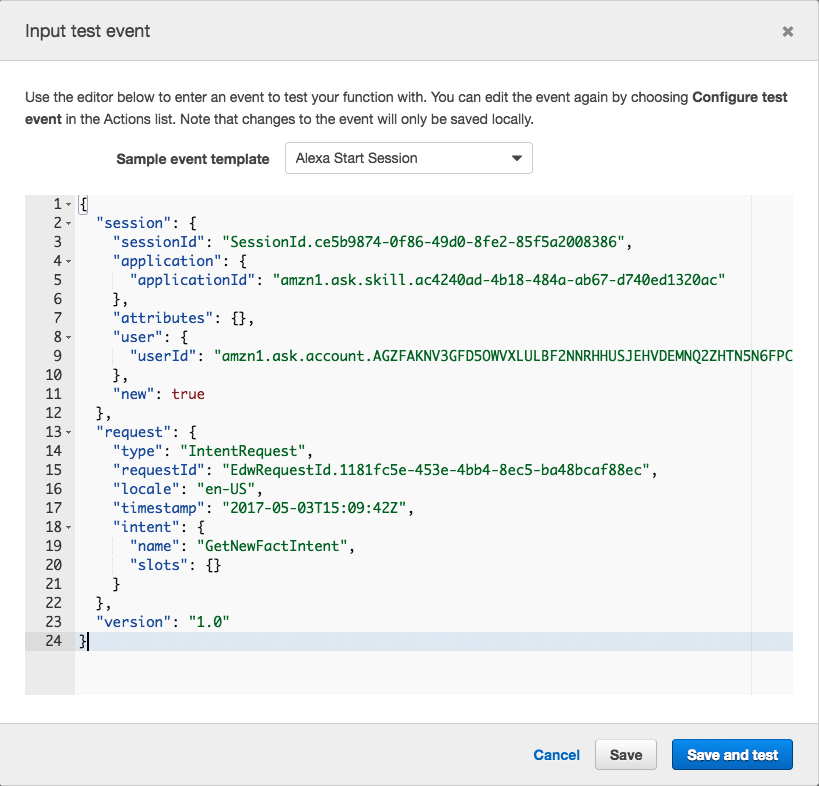 46 |
47 | 5. **Click the "Create" button.** This will save your test event and bring you back to the main configuration for your lambda function.
48 |
49 | 6. **Click the "Test" button to execute the "startSession" test event.**
50 |
51 |
46 |
47 | 5. **Click the "Create" button.** This will save your test event and bring you back to the main configuration for your lambda function.
48 |
49 | 6. **Click the "Test" button to execute the "startSession" test event.**
50 |
51 |  52 |
53 | This gives you visibility into four things:
54 |
55 | * **Your response, listed in the "Execution Result."**
56 |
57 |
52 |
53 | This gives you visibility into four things:
54 |
55 | * **Your response, listed in the "Execution Result."**
56 |
57 |  58 |
59 | * **A Summary of the statistics for your request.** This includes things like duration, resources, and memory used.
60 |
61 |
58 |
59 | * **A Summary of the statistics for your request.** This includes things like duration, resources, and memory used.
60 |
61 |  62 |
63 | * **Log output.** By effectively using console.log() statements in your Lambda code, you can track what is happening inside your function, and help to figure out what is happening when something goes wrong. You will find the log to be incredibly valuable as you move into more advanced skills.
64 |
65 |
62 |
63 | * **Log output.** By effectively using console.log() statements in your Lambda code, you can track what is happening inside your function, and help to figure out what is happening when something goes wrong. You will find the log to be incredibly valuable as you move into more advanced skills.
64 |
65 |  66 |
67 | * **A link to your [CloudWatch](https://console.aws.amazon.com/cloudwatch/home?region=us-east-1#logs:) logs for this function.** This will show you **all** of the responses and log statements from every user interaction. This is very useful, especially when you are testing your skill from a device with your voice. (It is the "[Click here](https://console.aws.amazon.com/cloudwatch/home?region=us-east-1#logs:)" link in the Log Output description.)
68 |
69 | 11. **Other testing methods to consider:**
70 |
71 | * [Echosim.io](https://echosim.io) - a browser-based Alexa skill testing tool that makes it easy to test your skills without carrying a physical device everywhere you go.
72 | * [Unit Testing with Alexa](https://github.com/alexa/alexa-cookbook/tree/master/testing/postman/README.md) - a modern approach to unit testing your Alexa skills with [Postman](http://getpostman.com) and [Amazon API Gateway](http://aws.amazon.com/apigateway).
73 |
74 | 12. **If your sample skill is working properly, you can now customize your skill.**
75 |
76 |
66 |
67 | * **A link to your [CloudWatch](https://console.aws.amazon.com/cloudwatch/home?region=us-east-1#logs:) logs for this function.** This will show you **all** of the responses and log statements from every user interaction. This is very useful, especially when you are testing your skill from a device with your voice. (It is the "[Click here](https://console.aws.amazon.com/cloudwatch/home?region=us-east-1#logs:)" link in the Log Output description.)
68 |
69 | 11. **Other testing methods to consider:**
70 |
71 | * [Echosim.io](https://echosim.io) - a browser-based Alexa skill testing tool that makes it easy to test your skills without carrying a physical device everywhere you go.
72 | * [Unit Testing with Alexa](https://github.com/alexa/alexa-cookbook/tree/master/testing/postman/README.md) - a modern approach to unit testing your Alexa skills with [Postman](http://getpostman.com) and [Amazon API Gateway](http://aws.amazon.com/apigateway).
73 |
74 | 12. **If your sample skill is working properly, you can now customize your skill.**
75 |
76 | 77 |
 78 |
--------------------------------------------------------------------------------
/location-aware/HelpDesk/README.md:
--------------------------------------------------------------------------------
1 | # Build An Alexa Help Desk Skill
2 |
3 |
4 | [](./instructions/1-voice-user-interface.md)[](./instructions/2-lambda-function.md)[](./instructions/3-connect-vui-to-code.md)[](./instructions/4-testing.md)[](./instructions/5-customization.md)[](./instructions/6-publication.md)
5 |
6 | This Alexa sample skill is a template for a basic Help Desk skill that will use the Alexa for Business resolveRoom API to post an issue from a user to Amazon Chime, Slack, or Microsoft Teams using a simple web-hook https POST.
7 |
8 | # Let's Get Started
9 | If this is your first time here, you're new to Alexa Skills Development, or you're looking for more detailed instructions, click the **Get Started** button below:
10 |
11 |
78 |
--------------------------------------------------------------------------------
/location-aware/HelpDesk/README.md:
--------------------------------------------------------------------------------
1 | # Build An Alexa Help Desk Skill
2 |
3 |
4 | [](./instructions/1-voice-user-interface.md)[](./instructions/2-lambda-function.md)[](./instructions/3-connect-vui-to-code.md)[](./instructions/4-testing.md)[](./instructions/5-customization.md)[](./instructions/6-publication.md)
5 |
6 | This Alexa sample skill is a template for a basic Help Desk skill that will use the Alexa for Business resolveRoom API to post an issue from a user to Amazon Chime, Slack, or Microsoft Teams using a simple web-hook https POST.
7 |
8 | # Let's Get Started
9 | If this is your first time here, you're new to Alexa Skills Development, or you're looking for more detailed instructions, click the **Get Started** button below:
10 |
11 |
12 |
13 |
 102 |
103 | ### Submit your skill
104 | Now that the skill and Lambda function are deployed you'll want to submit the skill as a private skill. (Note the skill.json is already set to PRIVATE distribution.)
105 |
106 | $ ask api submit -s
102 |
103 | ### Submit your skill
104 | Now that the skill and Lambda function are deployed you'll want to submit the skill as a private skill. (Note the skill.json is already set to PRIVATE distribution.)
105 |
106 | $ ask api submit -s  12 |
13 | 2. **Click "Services" at the top of the screen, and type "Lambda" in the search box.** You can also find Lambda in the list of services. It is in the "Compute" section.
14 |
15 |
12 |
13 | 2. **Click "Services" at the top of the screen, and type "Lambda" in the search box.** You can also find Lambda in the list of services. It is in the "Compute" section.
14 |
15 | 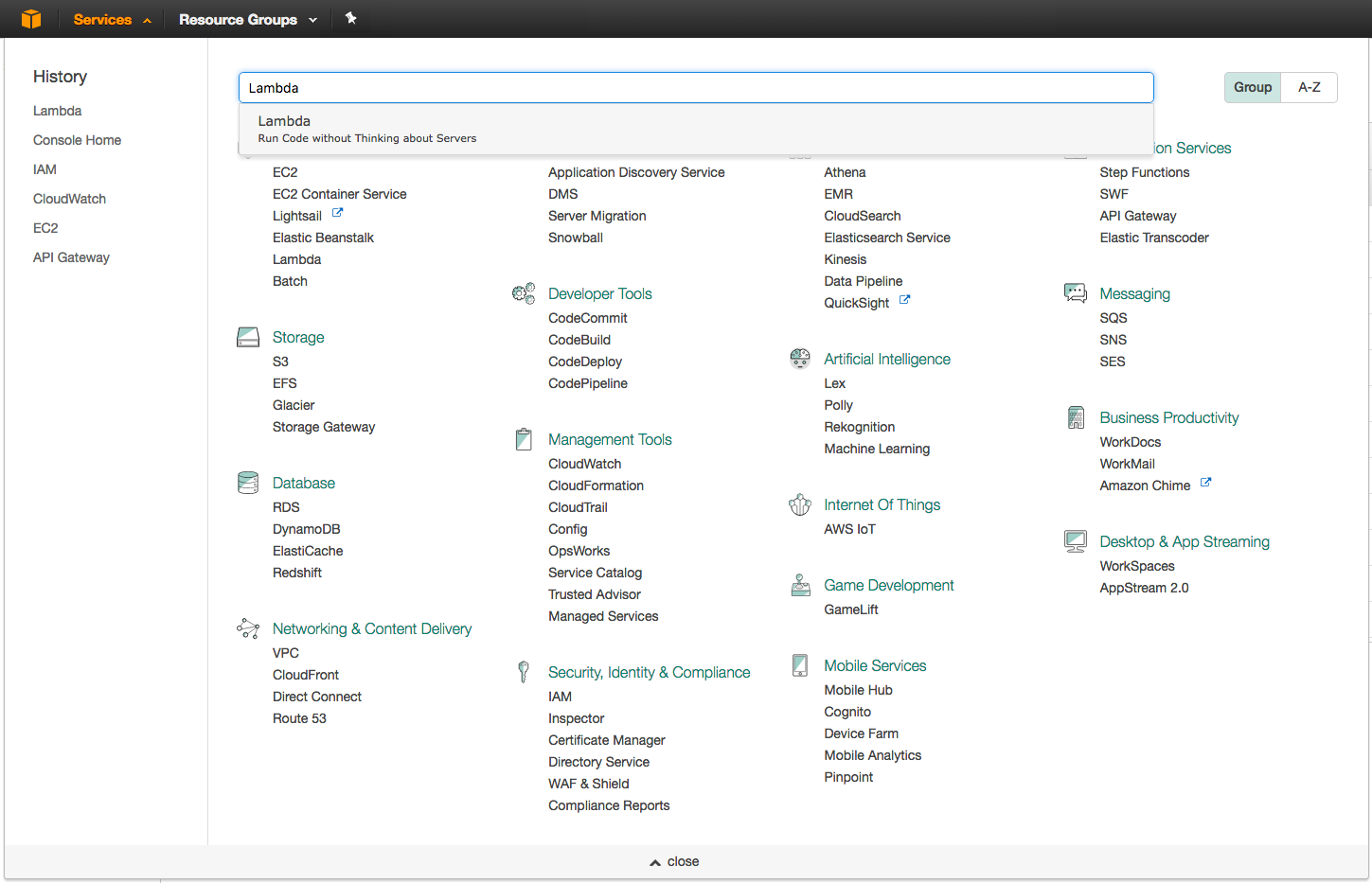 16 |
17 | 3. **Check your AWS region.** Make sure you create a Lambda in the US East (N. Virginia) region.
18 |
19 |
16 |
17 | 3. **Check your AWS region.** Make sure you create a Lambda in the US East (N. Virginia) region.
18 |
19 |  20 |
21 | 4. **Click the "Create a Lambda function" button.** It should be near the top of your screen. (If you don't see this button, it is because you haven't created a Lambda function before. Click the blue "Get Started" button near the center of your screen.)
22 |
23 |
20 |
21 | 4. **Click the "Create a Lambda function" button.** It should be near the top of your screen. (If you don't see this button, it is because you haven't created a Lambda function before. Click the blue "Get Started" button near the center of your screen.)
22 |
23 |  24 |
25 | 5. **There are two boxes labeled "Author from scratch" and "Blueprints". Click the radio button in the box titled "Blueprints" then choose the blueprint named "alexa-skill-kit-sdk-factskill".** We have created a blueprint as a shortcut to getting everything set up for your skill. You can search for a blueprint using the provided search box. This blueprint adds the alexa-sdk to your Lambda function so that you don't have to upload it yourself.
26 |
27 |
28 |
29 | 6. **Configure your function.** This screen is where we will enter the important parts of our Lambda function. These values will only ever be visible to you, but make sure that you name your function something meaningful.
30 |
31 |
24 |
25 | 5. **There are two boxes labeled "Author from scratch" and "Blueprints". Click the radio button in the box titled "Blueprints" then choose the blueprint named "alexa-skill-kit-sdk-factskill".** We have created a blueprint as a shortcut to getting everything set up for your skill. You can search for a blueprint using the provided search box. This blueprint adds the alexa-sdk to your Lambda function so that you don't have to upload it yourself.
26 |
27 |
28 |
29 | 6. **Configure your function.** This screen is where we will enter the important parts of our Lambda function. These values will only ever be visible to you, but make sure that you name your function something meaningful.
30 |
31 | 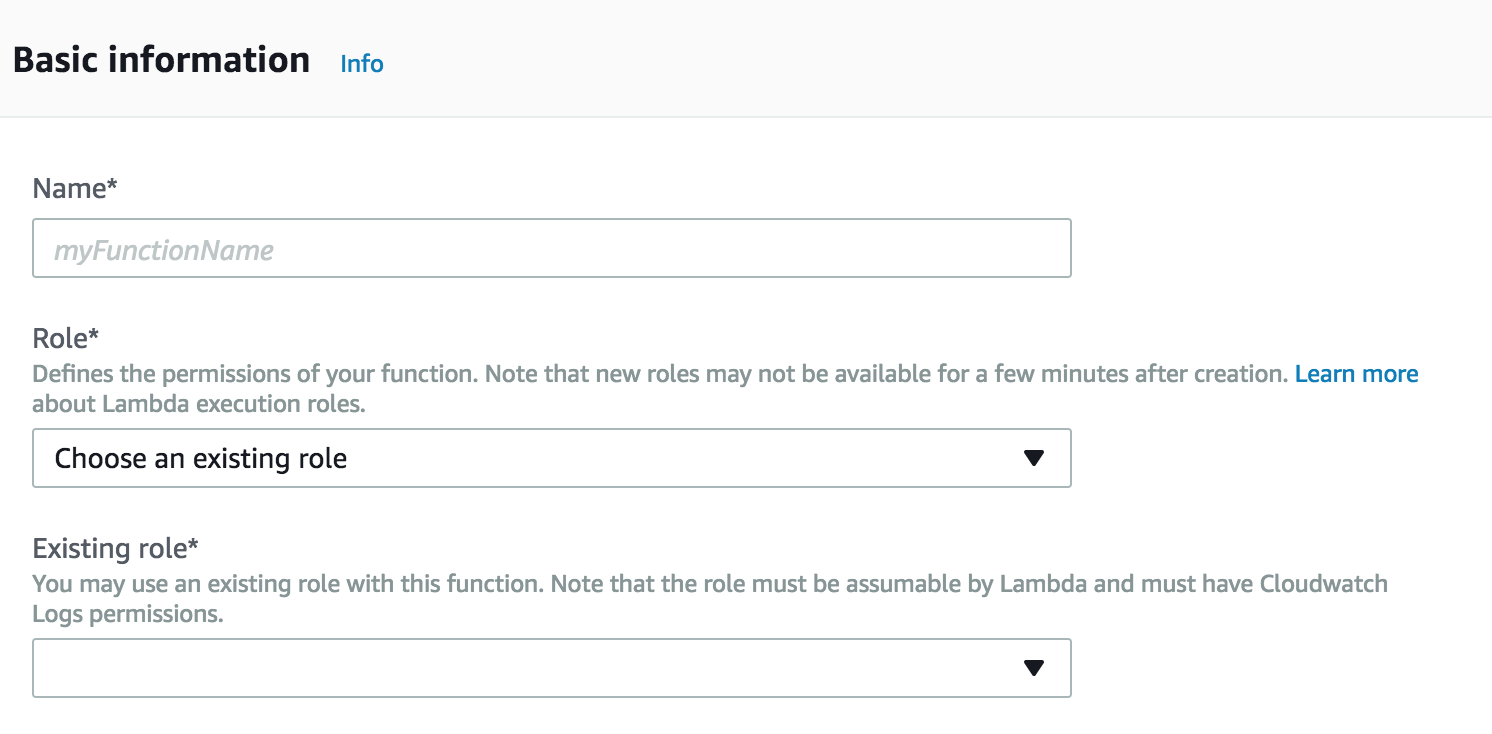 32 |
33 | 7. **Set up your Lambda function role.** To create an associated role for your Lambda function to use, follow this [detailed walkthrough for setting up your first role for Lambda](https://github.com/alexa/alexa-cookbook/tree/master/aws/lambda-role.md). Follow the instructions there with the exception of the role name- we'll call this "lambda\_basic\_execution\_plus\_a4bResolveRoom."
34 |
35 | Note that we'll need to edit the newly IAM role after creating the function since at this point we haven't added any Alexa for Business permissions.
36 |
37 | 8. **Click Create Function in the bottom right corner.** You will need to scroll down to find **Create Function.**
38 |
39 |
32 |
33 | 7. **Set up your Lambda function role.** To create an associated role for your Lambda function to use, follow this [detailed walkthrough for setting up your first role for Lambda](https://github.com/alexa/alexa-cookbook/tree/master/aws/lambda-role.md). Follow the instructions there with the exception of the role name- we'll call this "lambda\_basic\_execution\_plus\_a4bResolveRoom."
34 |
35 | Note that we'll need to edit the newly IAM role after creating the function since at this point we haven't added any Alexa for Business permissions.
36 |
37 | 8. **Click Create Function in the bottom right corner.** You will need to scroll down to find **Create Function.**
38 |
39 |  40 |
41 |
42 | 9. **Configure your trigger.** Look at the column on the left called "Add triggers", and select Alexa Skills Kit from the list. If you don't see Alexa Skills Kit in the list, jump back to step #3 on this page.
43 |
44 |
45 |
46 | 10. Once you have selected Alexa Skills Kit, scroll down. Under Configure triggers, select Enable for Skill ID verification. A skill ID Edit box should appear. We will now retrieve your Skill ID from the developer portal.
47 |
48 | 11. Now lets secure this lambda function, so that it can only be invoked by your skill. Open up the [developer portal](https://developer.amazon.com/alexa/console/ask)
49 |
50 | 12. Underneath your skill name you should see a link called "View Skill ID." Click that link and a popup should appear.
51 |
52 | 13. Copy the **Application ID** provided in the popup window. This is also known as a skill ID, and is unique to your skill.
53 |
54 | 14. Return back to your lambda function in the AWS console. You may already have this browser tab open from **Step 11**. Otherwise, open the lambda console by clicking here: [AWS Console](https://console.aws.amazon.com/lambda/home?region=us-east-1#/functions) and selecting the appropriate function. Scroll down to **Configure triggers**, paste the Skill ID in the Skill ID edit box.
55 |
56 | 15. Click the **Add** button. Then click the **Save** button in the top right. You should see a green success message at the top of your screen. Now, click the box that has the Lambda icon followed by the name of your function and scroll down to the field called "Function code".
57 |
58 | 16. Delete the contents of the code box, and **copy and paste the [provided code](../lambda/custom/index.js) into the Lambda function code box.**
59 |
60 | Click "Save".
61 |
62 | 17. **Scroll to the top of the page. The ARN value for this Lambda function should be in the top right corner. Copy this value for use in the next section of the guide.**
63 |
64 |
40 |
41 |
42 | 9. **Configure your trigger.** Look at the column on the left called "Add triggers", and select Alexa Skills Kit from the list. If you don't see Alexa Skills Kit in the list, jump back to step #3 on this page.
43 |
44 |
45 |
46 | 10. Once you have selected Alexa Skills Kit, scroll down. Under Configure triggers, select Enable for Skill ID verification. A skill ID Edit box should appear. We will now retrieve your Skill ID from the developer portal.
47 |
48 | 11. Now lets secure this lambda function, so that it can only be invoked by your skill. Open up the [developer portal](https://developer.amazon.com/alexa/console/ask)
49 |
50 | 12. Underneath your skill name you should see a link called "View Skill ID." Click that link and a popup should appear.
51 |
52 | 13. Copy the **Application ID** provided in the popup window. This is also known as a skill ID, and is unique to your skill.
53 |
54 | 14. Return back to your lambda function in the AWS console. You may already have this browser tab open from **Step 11**. Otherwise, open the lambda console by clicking here: [AWS Console](https://console.aws.amazon.com/lambda/home?region=us-east-1#/functions) and selecting the appropriate function. Scroll down to **Configure triggers**, paste the Skill ID in the Skill ID edit box.
55 |
56 | 15. Click the **Add** button. Then click the **Save** button in the top right. You should see a green success message at the top of your screen. Now, click the box that has the Lambda icon followed by the name of your function and scroll down to the field called "Function code".
57 |
58 | 16. Delete the contents of the code box, and **copy and paste the [provided code](../lambda/custom/index.js) into the Lambda function code box.**
59 |
60 | Click "Save".
61 |
62 | 17. **Scroll to the top of the page. The ARN value for this Lambda function should be in the top right corner. Copy this value for use in the next section of the guide.**
63 |
64 |  65 |
66 | 18. **Edit the IAM role for your Lambda function.** Now we'll add the IAM permissions for the Lambda function to call Alexa for Business' resolveRoom API.
67 |
68 | In the AWS console, click on "Services", then type in "IAM" into the search box and select IAM. Click on "Roles" in the left nav pane, enter 'lambda\_basic\_execution\_plus\_a4bResolveRoom' into the search box and click the link to view the role.
69 |
70 | Click **Add inline policy** at the bottom right of the screen, then select the JSON tab, **delete the contents** of the text box, then **copy and paste** the included [IAM policy](../a4bIAMpolicy.json) into the box. Click **Review Policy** on the bottom right of the screen, and enter "a4bResolveRead" as the policy name, then click **Create Policy** on the bottom right.
71 |
72 | Your Lambda function now has the ability to call the Alexa for Business resolveRoom API.
73 |
74 | 19. **Set up the chat and webhook that your Lambda function will call**
75 |
76 | If your Help Desk skill will call Chime, create a chat room for your Help Desk and a webhook for that room, following these [Chime instructions](https://docs.aws.amazon.com/chime/latest/ug/webhooks.html).
77 |
78 | For Slack, create a webhook integration for your Help Desk channel using these [Slack instructions](https://api.slack.com/incoming-webhooks).
79 |
80 | For Teams, create a webhook integration for your Help Desk channel using these [Microsoft Teams instructions](https://docs.microsoft.com/en-us/microsoftteams/platform/concepts/connectors#setting-up-a-custom-incoming-webhook).
81 |
82 | 20. **Edit your lambda function to function with Chime, Slack, or Teams, and provide the webhook uri.**
83 | In the Lambda console, create two environment variables named CHAT_PROVIDER and WEBHOOK_URI.
84 | Set the CHAT_PROVIDER environment variable with the vendor you created a webhook for in **Step 19** valid options are chime, slack, or teams.
85 |
86 | Next, update the WEBHOOK_URI environment variable and add the URI path of the webhook you created in **Step 19**.
87 | Examples: "/services/long-string" or "/webhook/long-string"
88 |
89 | Sample of the values set in a case using Teams:
90 |
91 |
65 |
66 | 18. **Edit the IAM role for your Lambda function.** Now we'll add the IAM permissions for the Lambda function to call Alexa for Business' resolveRoom API.
67 |
68 | In the AWS console, click on "Services", then type in "IAM" into the search box and select IAM. Click on "Roles" in the left nav pane, enter 'lambda\_basic\_execution\_plus\_a4bResolveRoom' into the search box and click the link to view the role.
69 |
70 | Click **Add inline policy** at the bottom right of the screen, then select the JSON tab, **delete the contents** of the text box, then **copy and paste** the included [IAM policy](../a4bIAMpolicy.json) into the box. Click **Review Policy** on the bottom right of the screen, and enter "a4bResolveRead" as the policy name, then click **Create Policy** on the bottom right.
71 |
72 | Your Lambda function now has the ability to call the Alexa for Business resolveRoom API.
73 |
74 | 19. **Set up the chat and webhook that your Lambda function will call**
75 |
76 | If your Help Desk skill will call Chime, create a chat room for your Help Desk and a webhook for that room, following these [Chime instructions](https://docs.aws.amazon.com/chime/latest/ug/webhooks.html).
77 |
78 | For Slack, create a webhook integration for your Help Desk channel using these [Slack instructions](https://api.slack.com/incoming-webhooks).
79 |
80 | For Teams, create a webhook integration for your Help Desk channel using these [Microsoft Teams instructions](https://docs.microsoft.com/en-us/microsoftteams/platform/concepts/connectors#setting-up-a-custom-incoming-webhook).
81 |
82 | 20. **Edit your lambda function to function with Chime, Slack, or Teams, and provide the webhook uri.**
83 | In the Lambda console, create two environment variables named CHAT_PROVIDER and WEBHOOK_URI.
84 | Set the CHAT_PROVIDER environment variable with the vendor you created a webhook for in **Step 19** valid options are chime, slack, or teams.
85 |
86 | Next, update the WEBHOOK_URI environment variable and add the URI path of the webhook you created in **Step 19**.
87 | Examples: "/services/long-string" or "/webhook/long-string"
88 |
89 | Sample of the values set in a case using Teams:
90 |
91 |  92 |
93 |
99 |
100 |
92 |
93 |
99 |
100 | 101 |
 102 |
--------------------------------------------------------------------------------
/voice-recording-deletion/THIRD-PARTY-LICENSES.md:
--------------------------------------------------------------------------------
1 | ** aws-sdk-js; version 2.451.0 -- https://github.com/aws/aws-sdk-js
2 | AWS SDK for JavaScript
3 | Copyright 2012-2017 Amazon.com, Inc. or its affiliates. All Rights Reserved.
4 |
5 | This product includes software developed at
6 | Amazon Web Services, Inc. (http://aws.amazon.com/).
7 |
8 | Apache License
9 |
10 | Version 2.0, January 2004
11 |
12 | http://www.apache.org/licenses/ TERMS AND CONDITIONS FOR USE, REPRODUCTION, AND
13 | DISTRIBUTION
14 |
15 | 1. Definitions.
16 |
17 | "License" shall mean the terms and conditions for use, reproduction, and
18 | distribution as defined by Sections 1 through 9 of this document.
19 |
20 | "Licensor" shall mean the copyright owner or entity authorized by the
21 | copyright owner that is granting the License.
22 |
23 | "Legal Entity" shall mean the union of the acting entity and all other
24 | entities that control, are controlled by, or are under common control
25 | with that entity. For the purposes of this definition, "control" means
26 | (i) the power, direct or indirect, to cause the direction or management
27 | of such entity, whether by contract or otherwise, or (ii) ownership of
28 | fifty percent (50%) or more of the outstanding shares, or (iii)
29 | beneficial ownership of such entity.
30 |
31 | "You" (or "Your") shall mean an individual or Legal Entity exercising
32 | permissions granted by this License.
33 |
34 | "Source" form shall mean the preferred form for making modifications,
35 | including but not limited to software source code, documentation source,
36 | and configuration files.
37 |
38 | "Object" form shall mean any form resulting from mechanical
39 | transformation or translation of a Source form, including but not limited
40 | to compiled object code, generated documentation, and conversions to
41 | other media types.
42 |
43 | "Work" shall mean the work of authorship, whether in Source or Object
44 | form, made available under the License, as indicated by a copyright
45 | notice that is included in or attached to the work (an example is
46 | provided in the Appendix below).
47 |
48 | "Derivative Works" shall mean any work, whether in Source or Object form,
49 | that is based on (or derived from) the Work and for which the editorial
50 | revisions, annotations, elaborations, or other modifications represent,
51 | as a whole, an original work of authorship. For the purposes of this
52 | License, Derivative Works shall not include works that remain separable
53 | from, or merely link (or bind by name) to the interfaces of, the Work and
54 | Derivative Works thereof.
55 |
56 | "Contribution" shall mean any work of authorship, including the original
57 | version of the Work and any modifications or additions to that Work or
58 | Derivative Works thereof, that is intentionally submitted to Licensor for
59 | inclusion in the Work by the copyright owner or by an individual or Legal
60 | Entity authorized to submit on behalf of the copyright owner. For the
61 | purposes of this definition, "submitted" means any form of electronic,
62 | verbal, or written communication sent to the Licensor or its
63 | representatives, including but not limited to communication on electronic
64 | mailing lists, source code control systems, and issue tracking systems
65 | that are managed by, or on behalf of, the Licensor for the purpose of
66 | discussing and improving the Work, but excluding communication that is
67 | conspicuously marked or otherwise designated in writing by the copyright
68 | owner as "Not a Contribution."
69 |
70 | "Contributor" shall mean Licensor and any individual or Legal Entity on
71 | behalf of whom a Contribution has been received by Licensor and
72 | subsequently incorporated within the Work.
73 |
74 | 2. Grant of Copyright License. Subject to the terms and conditions of this
75 | License, each Contributor hereby grants to You a perpetual, worldwide,
76 | non-exclusive, no-charge, royalty-free, irrevocable copyright license to
77 | reproduce, prepare Derivative Works of, publicly display, publicly perform,
78 | sublicense, and distribute the Work and such Derivative Works in Source or
79 | Object form.
80 |
81 | 3. Grant of Patent License. Subject to the terms and conditions of this
82 | License, each Contributor hereby grants to You a perpetual, worldwide,
83 | non-exclusive, no-charge, royalty-free, irrevocable (except as stated in
84 | this section) patent license to make, have made, use, offer to sell, sell,
85 | import, and otherwise transfer the Work, where such license applies only to
86 | those patent claims licensable by such Contributor that are necessarily
87 | infringed by their Contribution(s) alone or by combination of their
88 | Contribution(s) with the Work to which such Contribution(s) was submitted.
89 | If You institute patent litigation against any entity (including a
90 | cross-claim or counterclaim in a lawsuit) alleging that the Work or a
91 | Contribution incorporated within the Work constitutes direct or contributory
92 | patent infringement, then any patent licenses granted to You under this
93 | License for that Work shall terminate as of the date such litigation is
94 | filed.
95 |
96 | 4. Redistribution. You may reproduce and distribute copies of the Work or
97 | Derivative Works thereof in any medium, with or without modifications, and
98 | in Source or Object form, provided that You meet the following conditions:
99 |
100 | (a) You must give any other recipients of the Work or Derivative Works a
101 | copy of this License; and
102 |
103 | (b) You must cause any modified files to carry prominent notices stating
104 | that You changed the files; and
105 |
106 | (c) You must retain, in the Source form of any Derivative Works that You
107 | distribute, all copyright, patent, trademark, and attribution notices
108 | from the Source form of the Work, excluding those notices that do not
109 | pertain to any part of the Derivative Works; and
110 |
111 | (d) If the Work includes a "NOTICE" text file as part of its
112 | distribution, then any Derivative Works that You distribute must include
113 | a readable copy of the attribution notices contained within such NOTICE
114 | file, excluding those notices that do not pertain to any part of the
115 | Derivative Works, in at least one of the following places: within a
116 | NOTICE text file distributed as part of the Derivative Works; within the
117 | Source form or documentation, if provided along with the Derivative
118 | Works; or, within a display generated by the Derivative Works, if and
119 | wherever such third-party notices normally appear. The contents of the
120 | NOTICE file are for informational purposes only and do not modify the
121 | License. You may add Your own attribution notices within Derivative Works
122 | that You distribute, alongside or as an addendum to the NOTICE text from
123 | the Work, provided that such additional attribution notices cannot be
124 | construed as modifying the License.
125 |
126 | You may add Your own copyright statement to Your modifications and may
127 | provide additional or different license terms and conditions for use,
128 | reproduction, or distribution of Your modifications, or for any such
129 | Derivative Works as a whole, provided Your use, reproduction, and
130 | distribution of the Work otherwise complies with the conditions stated in
131 | this License.
132 |
133 | 5. Submission of Contributions. Unless You explicitly state otherwise, any
134 | Contribution intentionally submitted for inclusion in the Work by You to the
135 | Licensor shall be under the terms and conditions of this License, without
136 | any additional terms or conditions. Notwithstanding the above, nothing
137 | herein shall supersede or modify the terms of any separate license agreement
138 | you may have executed with Licensor regarding such Contributions.
139 |
140 | 6. Trademarks. This License does not grant permission to use the trade
141 | names, trademarks, service marks, or product names of the Licensor, except
142 | as required for reasonable and customary use in describing the origin of the
143 | Work and reproducing the content of the NOTICE file.
144 |
145 | 7. Disclaimer of Warranty. Unless required by applicable law or agreed to in
146 | writing, Licensor provides the Work (and each Contributor provides its
147 | Contributions) on an "AS IS" BASIS, WITHOUT WARRANTIES OR CONDITIONS OF ANY
148 | KIND, either express or implied, including, without limitation, any
149 | warranties or conditions of TITLE, NON-INFRINGEMENT, MERCHANTABILITY, or
150 | FITNESS FOR A PARTICULAR PURPOSE. You are solely responsible for determining
151 | the appropriateness of using or redistributing the Work and assume any risks
152 | associated with Your exercise of permissions under this License.
153 |
154 | 8. Limitation of Liability. In no event and under no legal theory, whether
155 | in tort (including negligence), contract, or otherwise, unless required by
156 | applicable law (such as deliberate and grossly negligent acts) or agreed to
157 | in writing, shall any Contributor be liable to You for damages, including
158 | any direct, indirect, special, incidental, or consequential damages of any
159 | character arising as a result of this License or out of the use or inability
160 | to use the Work (including but not limited to damages for loss of goodwill,
161 | work stoppage, computer failure or malfunction, or any and all other
162 | commercial damages or losses), even if such Contributor has been advised of
163 | the possibility of such damages.
164 |
165 | 9. Accepting Warranty or Additional Liability. While redistributing the Work
166 | or Derivative Works thereof, You may choose to offer, and charge a fee for,
167 | acceptance of support, warranty, indemnity, or other liability obligations
168 | and/or rights consistent with this License. However, in accepting such
169 | obligations, You may act only on Your own behalf and on Your sole
170 | responsibility, not on behalf of any other Contributor, and only if You
171 | agree to indemnify, defend, and hold each Contributor harmless for any
172 | liability incurred by, or claims asserted against, such Contributor by
173 | reason of your accepting any such warranty or additional liability. END OF
174 | TERMS AND CONDITIONS
175 |
176 | APPENDIX: How to apply the Apache License to your work.
177 |
178 | To apply the Apache License to your work, attach the following boilerplate
179 | notice, with the fields enclosed by brackets "[]" replaced with your own
180 | identifying information. (Don't include the brackets!) The text should be
181 | enclosed in the appropriate comment syntax for the file format. We also
182 | recommend that a file or class name and description of purpose be included on
183 | the same "printed page" as the copyright notice for easier identification
184 | within third-party archives.
185 |
186 | Copyright [yyyy] [name of copyright owner]
187 |
188 | Licensed under the Apache License, Version 2.0 (the "License");
189 |
190 | you may not use this file except in compliance with the License.
191 |
192 | You may obtain a copy of the License at
193 |
194 | http://www.apache.org/licenses/LICENSE-2.0
195 |
196 | Unless required by applicable law or agreed to in writing, software
197 |
198 | distributed under the License is distributed on an "AS IS" BASIS,
199 |
200 | WITHOUT WARRANTIES OR CONDITIONS OF ANY KIND, either express or implied.
201 |
202 | See the License for the specific language governing permissions and
203 |
204 | limitations under the License.
205 |
206 | * For aws-sdk-js see also this required NOTICE:
207 | AWS SDK for JavaScript
208 | Copyright 2012-2017 Amazon.com, Inc. or its affiliates. All Rights
209 | Reserved.
210 |
211 | This product includes software developed at
212 | Amazon Web Services, Inc. (http://aws.amazon.com/).
--------------------------------------------------------------------------------
/location-aware/HelpDesk/instructions/3-connect-vui-to-code.md:
--------------------------------------------------------------------------------
1 | # Build An Alexa for Business Help Desk Skill
2 | [](./1-voice-user-interface.md)[](./2-lambda-function.md)[](./3-connect-vui-to-code.md)[](./4-testing.md)[](./5-customization.md)[](./6-publication.md)
3 |
4 | ## Connecting Your Voice User Interface To Your Lambda Function
5 |
6 | On [page #1](./1-voice-user-interface.md) of this guide, we created a voice user interface for the intents and utterances we expect from our users. On [page #2](./2-lambda-function.md), we created a Lambda function that contains all of our logic for the skill. On this page, we need to connect those two pieces together.
7 |
8 | 1. **Go back to the [Amazon Developer Portal](https://developer.amazon.com/edw/home.html#/skills/list) and select your skill from the list.** You may still have a browser tab open if you started at the beginning of this tutorial.
9 |
10 | 2. Select the **Endpoint** tab on the left side navigation panel.
11 |
12 | 3. **Select the "AWS Lambda ARN" option for your endpoint.** You have the ability to host your code anywhere that you would like, but for the purposes of simplicity and frugality, we are using AWS Lambda. ([Read more about Hosting Your Own Custom Skill Web Service](https://developer.amazon.com/public/solutions/alexa/alexa-skills-kit/docs/developing-an-alexa-skill-as-a-web-service).) With the AWS Free Tier, you get 1,000,000 free requests per month, up to 3.2 million seconds of compute time per month. Learn more at https://aws.amazon.com/free/. In addition, Amazon now offers [AWS Promotional Credits for developers who have live Alexa skills that incur costs on AWS related to those skills](https://developer.amazon.com/alexa-skills-kit/alexa-aws-credits).
13 |
14 | 4. Paste your Lambda's ARN (Amazon Resource Name) into the textbox provided for **Default Region**.
15 |
16 | 5. Click the **Save Endpoints** button at the top of the main panel.
17 |
18 | ## Setting up Alexa for Business
19 | Because our skill calls Alexa for Business' resolveRoom API, and we want to keep the skill private to our company, we'll need to setup an Alexa for Business organization and privately publish our Help Desk skill.
20 |
21 | 1. **Setup a device and room in Alexa for Business.** Follow the instructions for the Alexa for Business [Getting Started with Shared Devices,](https://docs.aws.amazon.com/a4b/latest/ag/getting-started.html) to provision an Echo device, create a room and assign the device to that room, and create an empty skill group, and assign it to that same room. We'll add our new private skill to that group once it's enabled, so that room can access the skill.
22 |
23 | *N.B.: After assigning the device to a room, make sure to unplug and re-plug in the device. This is necessary any time you change the room assignment for a device.*
24 |
25 | ## Publish your skill privately
26 | 1. **Publish and distribute the skill privately.** Our Lambda function will be able to access the resolveRoom API once our private skill reaches the "LIVE" stage. Therefore in order to test the skill properly, we'll need to first privately publish it. Follow the steps in the Alexa documentation to [Publish and Distribute a Private Skill](https://developer.amazon.com/docs/alexa-for-business/create-and-publish-private-skills-devconsole.html). The distribution account id should match the AWS account id of your Alexa for Business organization.
27 |
28 | ### After you've marked your skill private per the above instructions:
29 | Below are some general tips for filling out the rest of the information:
30 |
31 | We need to add the metadata that your skill will use in the [Alexa app](http://alexa.amazon.com/spa/index.html#skills).
32 |
33 | 1. Select the **Launch** link from the top navigation menu.
34 |
35 | 2. Fill out the form fields per the guidance on the screen. Hover over the question mark icons for details regarding each respective field. **Fields marked with an asterisk are required!**
36 |
37 | 3. **Write your skill descriptions.**
38 |
39 | * **Spend some time coming up with an clear description of how your skill can be used.** These descriptions show up in the list of skills available in the [Alexa app](http://alexa.amazon.com/spa/index.html#skills) for enrolled users, and in the Alexa for Business console for IT admins to assign to shared device locations.
40 |
41 | 4. **For your example phrases, come up with the three most exciting ways a user can talk to your skill.**
42 |
43 | * **Make sure that each of your example phrases are a perfect match with one of your Sample Utterances.** We have provided a short list of things to consider as you write your example phrases:
44 |
45 | | Tips for Example Phrases |
46 | | ----------------------------------------- |
47 | | Example phrases **must** adhere to the [supported phrases](https://developer.amazon.com/public/solutions/alexa/alexa-skills-kit/docs/supported-phrases-to-begin-a-conversation). |
48 | | Example phrases **must** be based on sample utterances specified in your Intent Schema. |
49 | | Your first example phrase **must** include a wake word and your invocation name. |
50 | | Example phrases **must** provide a contextual response. |
51 |
52 | * **Choose three example phrases that are likely to be the most common ways that users will attempt to interact with your skill.** Make sure that each of them works well, and provides an excellent user experience.
53 |
54 | 5. **Create your skill's icons.** You need two sizes of your icon: 108x108px and 512x512px.
55 |
56 |
57 | * **Make sure you have the rights to the icons you create.** Please don't violate any trademarks or copyrights.
58 | * **If you don't have software to make icons, try one of these free options:**
59 |
60 | * [GIMP](https://www.gimp.org/) (Windows/Mac/Linux)
61 | * [Paint.NET](http://www.getpaint.net/index.html) (Windows)
62 | * [Inkscape](http://inkscape.org) (Windows/Mac/Linux)
63 | * [Iconion](http://iconion.com/) (Windows/Mac)
64 |
65 | * To make it easier to get started, we've created blank versions of these icons in both sizes for many formats:
66 |
67 | * [PSD](https://m.media-amazon.com/images/G/01/mobile-apps/dex/alexa/alexa-skills-kit/tutorials/general/icon-templates/psd._TTH_.zip)
68 | * [PNG](https://m.media-amazon.com/images/G/01/mobile-apps/dex/alexa/alexa-skills-kit/tutorials/general/icon-templates/png._TTH_.zip)
69 | * [GIF](https://m.media-amazon.com/images/G/01/mobile-apps/dex/alexa/alexa-skills-kit/tutorials/general/icon-templates/gif._TTH_.zip)
70 | * [PDF](https://m.media-amazon.com/images/G/01/mobile-apps/dex/alexa/alexa-skills-kit/tutorials/general/icon-templates/pdf._TTH_.zip)
71 | * [JPG](https://m.media-amazon.com/images/G/01/mobile-apps/dex/alexa/alexa-skills-kit/tutorials/general/icon-templates/jpg._TTH_.zip)
72 | * [SVG](https://m.media-amazon.com/images/G/01/mobile-apps/dex/alexa/alexa-skills-kit/tutorials/general/icon-templates/svg._TTH_.zip)
73 | * [PDN](https://m.media-amazon.com/images/G/01/mobile-apps/dex/alexa/alexa-skills-kit/tutorials/general/icon-templates/pdn._TTH_.zip) - for [Paint.NET](http://www.getpaint.net/index.html)
74 | * [XCF](https://m.media-amazon.com/images/G/01/mobile-apps/dex/alexa/alexa-skills-kit/tutorials/general/icon-templates/xcf._TTH_.zip) - for [GIMP](https://www.gimp.org/)
75 |
76 | 6. Choose the most appropriate category for your skill.
77 |
78 | 7. **Provide a list of keywords for users that are searching for new skills.** This is an optional field, you can leave it blank for this Help Desk skill.
79 |
80 | 8. **Privacy Policy URL.** This is an optional field, and should not be required for this Help Desk skill sample. You can leave it blank.
81 |
82 | 9. **Terms of Use URL.** This is also optional, and you can leave it blank.
83 |
84 | 10. When you're ready, click **Save and Continue** at the bottom of the screen to move onto **Privacy & Compliance**
85 |
86 | 11. * **Does this skill allow users to make purchases or spend real money?**
87 |
88 | For this Help Desk skill, the answer is no. For future skills, make sure you answer this appropriately.
89 |
90 | * **Does this Alexa skill collect users' personal information?**
91 |
92 | Again, for this Help Desk skill, the answer is no. If you do collect information about a user, such as names, email addresses, phone numbers, and so forth, ensure that you answer Yes to this question.
93 | * Answering "yes" to this question will also require you to provide a link to your Privacy Policy at the bottom of the page.
94 |
95 | * **Is your skill directed to children under the age of 13?**
96 |
97 | Because you customized this skill with data you provided, it is possible that you created a skill that targets children under the age of 13. For this Help Desk skill, the answer is **no** because it doesn't target a specific age group.
98 | * Factors to consider in determining if this skill is directed to children under 13 include:
99 | * Subject matter of the skill
100 | * Presence of child-oriented activities and incentives
101 | * Type of language used in the skill
102 | * Music and other audio content in the skill
103 | * How the skill is described and marketed
104 | * Intended audience for the skill
105 |
106 | If you're not sure, please see the [FTC's COPPA Guidance and FAQ](https://www.ftc.gov/tips-advice/business-center/guidance/complying-coppa-frequently-asked-questions) for more information.
107 |
108 | 12. **Export Compliance.** Be certain that you agree with all of the conditions. If you do, check this box.
109 |
110 | 13. **Provide testing instructions.** A value is required in this box but this is related to certification and is not required- simply put some text in here that advises that this is a private skill and does not require certification.
111 |
112 | 14. Click the **Save and Continue** button at the bottom of the page.
113 |
114 | 15. **You're done with your private skill submission!** Here are a few things you might need to know:
115 |
116 | * **Although private skills don't need certification, it may take up to 2 hours to reach LIVE stage.** You can check the list of skills from the Developer Console to see when your skill reaches LIVE stage. Until that time you cannot distribute your skill to any Alexa for Business organizations.
117 |
118 | * **Did something go wrong?** A team of Alexa evangelists run [online office hours every Tuesday from 1-2pm Pacific Time](https://attendee.gotowebinar.com/rt/8389200425172113931). They can help answer any questions you might have on Alexa skills in general.
119 |
120 | ## Once your private skill is LIVE
121 |
122 | 1. **Enable the skill and add it to your skill group.** Once your private skill has reached the **LIVE** stage, navigate to the Alexa for Business AWS console, and click on "**Skills**" in the left nav pane. Click on the "Private Skills" tab, find the Help Desk skill you created, then click on **Review** and **Enable**.
123 |
124 | 2. **Add your Help Desk skill to the room's skill group.** Next, add the skill you enabled to the skill group you created in **Step 1 of Setting up Alexa for Business,** by following the instructions under ["To add or remove skills for an existing skill group."](https://docs.aws.amazon.com/a4b/latest/ag/manage-skill-groups.html)
125 |
126 | At this point, your Help Desk skill is enabled, and assigned to your Alexa for Business room, because it's a member of the skill group assigned to that room. Furthermore, the device you have provisioned is also assigned to that same room, meaning that requests invoked from that device will be able to access the Help Desk skill.
127 |
128 | 3. **Click the "Next" button to continue to page #4 of this guide.**
129 |
130 |
102 |
--------------------------------------------------------------------------------
/voice-recording-deletion/THIRD-PARTY-LICENSES.md:
--------------------------------------------------------------------------------
1 | ** aws-sdk-js; version 2.451.0 -- https://github.com/aws/aws-sdk-js
2 | AWS SDK for JavaScript
3 | Copyright 2012-2017 Amazon.com, Inc. or its affiliates. All Rights Reserved.
4 |
5 | This product includes software developed at
6 | Amazon Web Services, Inc. (http://aws.amazon.com/).
7 |
8 | Apache License
9 |
10 | Version 2.0, January 2004
11 |
12 | http://www.apache.org/licenses/ TERMS AND CONDITIONS FOR USE, REPRODUCTION, AND
13 | DISTRIBUTION
14 |
15 | 1. Definitions.
16 |
17 | "License" shall mean the terms and conditions for use, reproduction, and
18 | distribution as defined by Sections 1 through 9 of this document.
19 |
20 | "Licensor" shall mean the copyright owner or entity authorized by the
21 | copyright owner that is granting the License.
22 |
23 | "Legal Entity" shall mean the union of the acting entity and all other
24 | entities that control, are controlled by, or are under common control
25 | with that entity. For the purposes of this definition, "control" means
26 | (i) the power, direct or indirect, to cause the direction or management
27 | of such entity, whether by contract or otherwise, or (ii) ownership of
28 | fifty percent (50%) or more of the outstanding shares, or (iii)
29 | beneficial ownership of such entity.
30 |
31 | "You" (or "Your") shall mean an individual or Legal Entity exercising
32 | permissions granted by this License.
33 |
34 | "Source" form shall mean the preferred form for making modifications,
35 | including but not limited to software source code, documentation source,
36 | and configuration files.
37 |
38 | "Object" form shall mean any form resulting from mechanical
39 | transformation or translation of a Source form, including but not limited
40 | to compiled object code, generated documentation, and conversions to
41 | other media types.
42 |
43 | "Work" shall mean the work of authorship, whether in Source or Object
44 | form, made available under the License, as indicated by a copyright
45 | notice that is included in or attached to the work (an example is
46 | provided in the Appendix below).
47 |
48 | "Derivative Works" shall mean any work, whether in Source or Object form,
49 | that is based on (or derived from) the Work and for which the editorial
50 | revisions, annotations, elaborations, or other modifications represent,
51 | as a whole, an original work of authorship. For the purposes of this
52 | License, Derivative Works shall not include works that remain separable
53 | from, or merely link (or bind by name) to the interfaces of, the Work and
54 | Derivative Works thereof.
55 |
56 | "Contribution" shall mean any work of authorship, including the original
57 | version of the Work and any modifications or additions to that Work or
58 | Derivative Works thereof, that is intentionally submitted to Licensor for
59 | inclusion in the Work by the copyright owner or by an individual or Legal
60 | Entity authorized to submit on behalf of the copyright owner. For the
61 | purposes of this definition, "submitted" means any form of electronic,
62 | verbal, or written communication sent to the Licensor or its
63 | representatives, including but not limited to communication on electronic
64 | mailing lists, source code control systems, and issue tracking systems
65 | that are managed by, or on behalf of, the Licensor for the purpose of
66 | discussing and improving the Work, but excluding communication that is
67 | conspicuously marked or otherwise designated in writing by the copyright
68 | owner as "Not a Contribution."
69 |
70 | "Contributor" shall mean Licensor and any individual or Legal Entity on
71 | behalf of whom a Contribution has been received by Licensor and
72 | subsequently incorporated within the Work.
73 |
74 | 2. Grant of Copyright License. Subject to the terms and conditions of this
75 | License, each Contributor hereby grants to You a perpetual, worldwide,
76 | non-exclusive, no-charge, royalty-free, irrevocable copyright license to
77 | reproduce, prepare Derivative Works of, publicly display, publicly perform,
78 | sublicense, and distribute the Work and such Derivative Works in Source or
79 | Object form.
80 |
81 | 3. Grant of Patent License. Subject to the terms and conditions of this
82 | License, each Contributor hereby grants to You a perpetual, worldwide,
83 | non-exclusive, no-charge, royalty-free, irrevocable (except as stated in
84 | this section) patent license to make, have made, use, offer to sell, sell,
85 | import, and otherwise transfer the Work, where such license applies only to
86 | those patent claims licensable by such Contributor that are necessarily
87 | infringed by their Contribution(s) alone or by combination of their
88 | Contribution(s) with the Work to which such Contribution(s) was submitted.
89 | If You institute patent litigation against any entity (including a
90 | cross-claim or counterclaim in a lawsuit) alleging that the Work or a
91 | Contribution incorporated within the Work constitutes direct or contributory
92 | patent infringement, then any patent licenses granted to You under this
93 | License for that Work shall terminate as of the date such litigation is
94 | filed.
95 |
96 | 4. Redistribution. You may reproduce and distribute copies of the Work or
97 | Derivative Works thereof in any medium, with or without modifications, and
98 | in Source or Object form, provided that You meet the following conditions:
99 |
100 | (a) You must give any other recipients of the Work or Derivative Works a
101 | copy of this License; and
102 |
103 | (b) You must cause any modified files to carry prominent notices stating
104 | that You changed the files; and
105 |
106 | (c) You must retain, in the Source form of any Derivative Works that You
107 | distribute, all copyright, patent, trademark, and attribution notices
108 | from the Source form of the Work, excluding those notices that do not
109 | pertain to any part of the Derivative Works; and
110 |
111 | (d) If the Work includes a "NOTICE" text file as part of its
112 | distribution, then any Derivative Works that You distribute must include
113 | a readable copy of the attribution notices contained within such NOTICE
114 | file, excluding those notices that do not pertain to any part of the
115 | Derivative Works, in at least one of the following places: within a
116 | NOTICE text file distributed as part of the Derivative Works; within the
117 | Source form or documentation, if provided along with the Derivative
118 | Works; or, within a display generated by the Derivative Works, if and
119 | wherever such third-party notices normally appear. The contents of the
120 | NOTICE file are for informational purposes only and do not modify the
121 | License. You may add Your own attribution notices within Derivative Works
122 | that You distribute, alongside or as an addendum to the NOTICE text from
123 | the Work, provided that such additional attribution notices cannot be
124 | construed as modifying the License.
125 |
126 | You may add Your own copyright statement to Your modifications and may
127 | provide additional or different license terms and conditions for use,
128 | reproduction, or distribution of Your modifications, or for any such
129 | Derivative Works as a whole, provided Your use, reproduction, and
130 | distribution of the Work otherwise complies with the conditions stated in
131 | this License.
132 |
133 | 5. Submission of Contributions. Unless You explicitly state otherwise, any
134 | Contribution intentionally submitted for inclusion in the Work by You to the
135 | Licensor shall be under the terms and conditions of this License, without
136 | any additional terms or conditions. Notwithstanding the above, nothing
137 | herein shall supersede or modify the terms of any separate license agreement
138 | you may have executed with Licensor regarding such Contributions.
139 |
140 | 6. Trademarks. This License does not grant permission to use the trade
141 | names, trademarks, service marks, or product names of the Licensor, except
142 | as required for reasonable and customary use in describing the origin of the
143 | Work and reproducing the content of the NOTICE file.
144 |
145 | 7. Disclaimer of Warranty. Unless required by applicable law or agreed to in
146 | writing, Licensor provides the Work (and each Contributor provides its
147 | Contributions) on an "AS IS" BASIS, WITHOUT WARRANTIES OR CONDITIONS OF ANY
148 | KIND, either express or implied, including, without limitation, any
149 | warranties or conditions of TITLE, NON-INFRINGEMENT, MERCHANTABILITY, or
150 | FITNESS FOR A PARTICULAR PURPOSE. You are solely responsible for determining
151 | the appropriateness of using or redistributing the Work and assume any risks
152 | associated with Your exercise of permissions under this License.
153 |
154 | 8. Limitation of Liability. In no event and under no legal theory, whether
155 | in tort (including negligence), contract, or otherwise, unless required by
156 | applicable law (such as deliberate and grossly negligent acts) or agreed to
157 | in writing, shall any Contributor be liable to You for damages, including
158 | any direct, indirect, special, incidental, or consequential damages of any
159 | character arising as a result of this License or out of the use or inability
160 | to use the Work (including but not limited to damages for loss of goodwill,
161 | work stoppage, computer failure or malfunction, or any and all other
162 | commercial damages or losses), even if such Contributor has been advised of
163 | the possibility of such damages.
164 |
165 | 9. Accepting Warranty or Additional Liability. While redistributing the Work
166 | or Derivative Works thereof, You may choose to offer, and charge a fee for,
167 | acceptance of support, warranty, indemnity, or other liability obligations
168 | and/or rights consistent with this License. However, in accepting such
169 | obligations, You may act only on Your own behalf and on Your sole
170 | responsibility, not on behalf of any other Contributor, and only if You
171 | agree to indemnify, defend, and hold each Contributor harmless for any
172 | liability incurred by, or claims asserted against, such Contributor by
173 | reason of your accepting any such warranty or additional liability. END OF
174 | TERMS AND CONDITIONS
175 |
176 | APPENDIX: How to apply the Apache License to your work.
177 |
178 | To apply the Apache License to your work, attach the following boilerplate
179 | notice, with the fields enclosed by brackets "[]" replaced with your own
180 | identifying information. (Don't include the brackets!) The text should be
181 | enclosed in the appropriate comment syntax for the file format. We also
182 | recommend that a file or class name and description of purpose be included on
183 | the same "printed page" as the copyright notice for easier identification
184 | within third-party archives.
185 |
186 | Copyright [yyyy] [name of copyright owner]
187 |
188 | Licensed under the Apache License, Version 2.0 (the "License");
189 |
190 | you may not use this file except in compliance with the License.
191 |
192 | You may obtain a copy of the License at
193 |
194 | http://www.apache.org/licenses/LICENSE-2.0
195 |
196 | Unless required by applicable law or agreed to in writing, software
197 |
198 | distributed under the License is distributed on an "AS IS" BASIS,
199 |
200 | WITHOUT WARRANTIES OR CONDITIONS OF ANY KIND, either express or implied.
201 |
202 | See the License for the specific language governing permissions and
203 |
204 | limitations under the License.
205 |
206 | * For aws-sdk-js see also this required NOTICE:
207 | AWS SDK for JavaScript
208 | Copyright 2012-2017 Amazon.com, Inc. or its affiliates. All Rights
209 | Reserved.
210 |
211 | This product includes software developed at
212 | Amazon Web Services, Inc. (http://aws.amazon.com/).
--------------------------------------------------------------------------------
/location-aware/HelpDesk/instructions/3-connect-vui-to-code.md:
--------------------------------------------------------------------------------
1 | # Build An Alexa for Business Help Desk Skill
2 | [](./1-voice-user-interface.md)[](./2-lambda-function.md)[](./3-connect-vui-to-code.md)[](./4-testing.md)[](./5-customization.md)[](./6-publication.md)
3 |
4 | ## Connecting Your Voice User Interface To Your Lambda Function
5 |
6 | On [page #1](./1-voice-user-interface.md) of this guide, we created a voice user interface for the intents and utterances we expect from our users. On [page #2](./2-lambda-function.md), we created a Lambda function that contains all of our logic for the skill. On this page, we need to connect those two pieces together.
7 |
8 | 1. **Go back to the [Amazon Developer Portal](https://developer.amazon.com/edw/home.html#/skills/list) and select your skill from the list.** You may still have a browser tab open if you started at the beginning of this tutorial.
9 |
10 | 2. Select the **Endpoint** tab on the left side navigation panel.
11 |
12 | 3. **Select the "AWS Lambda ARN" option for your endpoint.** You have the ability to host your code anywhere that you would like, but for the purposes of simplicity and frugality, we are using AWS Lambda. ([Read more about Hosting Your Own Custom Skill Web Service](https://developer.amazon.com/public/solutions/alexa/alexa-skills-kit/docs/developing-an-alexa-skill-as-a-web-service).) With the AWS Free Tier, you get 1,000,000 free requests per month, up to 3.2 million seconds of compute time per month. Learn more at https://aws.amazon.com/free/. In addition, Amazon now offers [AWS Promotional Credits for developers who have live Alexa skills that incur costs on AWS related to those skills](https://developer.amazon.com/alexa-skills-kit/alexa-aws-credits).
13 |
14 | 4. Paste your Lambda's ARN (Amazon Resource Name) into the textbox provided for **Default Region**.
15 |
16 | 5. Click the **Save Endpoints** button at the top of the main panel.
17 |
18 | ## Setting up Alexa for Business
19 | Because our skill calls Alexa for Business' resolveRoom API, and we want to keep the skill private to our company, we'll need to setup an Alexa for Business organization and privately publish our Help Desk skill.
20 |
21 | 1. **Setup a device and room in Alexa for Business.** Follow the instructions for the Alexa for Business [Getting Started with Shared Devices,](https://docs.aws.amazon.com/a4b/latest/ag/getting-started.html) to provision an Echo device, create a room and assign the device to that room, and create an empty skill group, and assign it to that same room. We'll add our new private skill to that group once it's enabled, so that room can access the skill.
22 |
23 | *N.B.: After assigning the device to a room, make sure to unplug and re-plug in the device. This is necessary any time you change the room assignment for a device.*
24 |
25 | ## Publish your skill privately
26 | 1. **Publish and distribute the skill privately.** Our Lambda function will be able to access the resolveRoom API once our private skill reaches the "LIVE" stage. Therefore in order to test the skill properly, we'll need to first privately publish it. Follow the steps in the Alexa documentation to [Publish and Distribute a Private Skill](https://developer.amazon.com/docs/alexa-for-business/create-and-publish-private-skills-devconsole.html). The distribution account id should match the AWS account id of your Alexa for Business organization.
27 |
28 | ### After you've marked your skill private per the above instructions:
29 | Below are some general tips for filling out the rest of the information:
30 |
31 | We need to add the metadata that your skill will use in the [Alexa app](http://alexa.amazon.com/spa/index.html#skills).
32 |
33 | 1. Select the **Launch** link from the top navigation menu.
34 |
35 | 2. Fill out the form fields per the guidance on the screen. Hover over the question mark icons for details regarding each respective field. **Fields marked with an asterisk are required!**
36 |
37 | 3. **Write your skill descriptions.**
38 |
39 | * **Spend some time coming up with an clear description of how your skill can be used.** These descriptions show up in the list of skills available in the [Alexa app](http://alexa.amazon.com/spa/index.html#skills) for enrolled users, and in the Alexa for Business console for IT admins to assign to shared device locations.
40 |
41 | 4. **For your example phrases, come up with the three most exciting ways a user can talk to your skill.**
42 |
43 | * **Make sure that each of your example phrases are a perfect match with one of your Sample Utterances.** We have provided a short list of things to consider as you write your example phrases:
44 |
45 | | Tips for Example Phrases |
46 | | ----------------------------------------- |
47 | | Example phrases **must** adhere to the [supported phrases](https://developer.amazon.com/public/solutions/alexa/alexa-skills-kit/docs/supported-phrases-to-begin-a-conversation). |
48 | | Example phrases **must** be based on sample utterances specified in your Intent Schema. |
49 | | Your first example phrase **must** include a wake word and your invocation name. |
50 | | Example phrases **must** provide a contextual response. |
51 |
52 | * **Choose three example phrases that are likely to be the most common ways that users will attempt to interact with your skill.** Make sure that each of them works well, and provides an excellent user experience.
53 |
54 | 5. **Create your skill's icons.** You need two sizes of your icon: 108x108px and 512x512px.
55 |
56 |
57 | * **Make sure you have the rights to the icons you create.** Please don't violate any trademarks or copyrights.
58 | * **If you don't have software to make icons, try one of these free options:**
59 |
60 | * [GIMP](https://www.gimp.org/) (Windows/Mac/Linux)
61 | * [Paint.NET](http://www.getpaint.net/index.html) (Windows)
62 | * [Inkscape](http://inkscape.org) (Windows/Mac/Linux)
63 | * [Iconion](http://iconion.com/) (Windows/Mac)
64 |
65 | * To make it easier to get started, we've created blank versions of these icons in both sizes for many formats:
66 |
67 | * [PSD](https://m.media-amazon.com/images/G/01/mobile-apps/dex/alexa/alexa-skills-kit/tutorials/general/icon-templates/psd._TTH_.zip)
68 | * [PNG](https://m.media-amazon.com/images/G/01/mobile-apps/dex/alexa/alexa-skills-kit/tutorials/general/icon-templates/png._TTH_.zip)
69 | * [GIF](https://m.media-amazon.com/images/G/01/mobile-apps/dex/alexa/alexa-skills-kit/tutorials/general/icon-templates/gif._TTH_.zip)
70 | * [PDF](https://m.media-amazon.com/images/G/01/mobile-apps/dex/alexa/alexa-skills-kit/tutorials/general/icon-templates/pdf._TTH_.zip)
71 | * [JPG](https://m.media-amazon.com/images/G/01/mobile-apps/dex/alexa/alexa-skills-kit/tutorials/general/icon-templates/jpg._TTH_.zip)
72 | * [SVG](https://m.media-amazon.com/images/G/01/mobile-apps/dex/alexa/alexa-skills-kit/tutorials/general/icon-templates/svg._TTH_.zip)
73 | * [PDN](https://m.media-amazon.com/images/G/01/mobile-apps/dex/alexa/alexa-skills-kit/tutorials/general/icon-templates/pdn._TTH_.zip) - for [Paint.NET](http://www.getpaint.net/index.html)
74 | * [XCF](https://m.media-amazon.com/images/G/01/mobile-apps/dex/alexa/alexa-skills-kit/tutorials/general/icon-templates/xcf._TTH_.zip) - for [GIMP](https://www.gimp.org/)
75 |
76 | 6. Choose the most appropriate category for your skill.
77 |
78 | 7. **Provide a list of keywords for users that are searching for new skills.** This is an optional field, you can leave it blank for this Help Desk skill.
79 |
80 | 8. **Privacy Policy URL.** This is an optional field, and should not be required for this Help Desk skill sample. You can leave it blank.
81 |
82 | 9. **Terms of Use URL.** This is also optional, and you can leave it blank.
83 |
84 | 10. When you're ready, click **Save and Continue** at the bottom of the screen to move onto **Privacy & Compliance**
85 |
86 | 11. * **Does this skill allow users to make purchases or spend real money?**
87 |
88 | For this Help Desk skill, the answer is no. For future skills, make sure you answer this appropriately.
89 |
90 | * **Does this Alexa skill collect users' personal information?**
91 |
92 | Again, for this Help Desk skill, the answer is no. If you do collect information about a user, such as names, email addresses, phone numbers, and so forth, ensure that you answer Yes to this question.
93 | * Answering "yes" to this question will also require you to provide a link to your Privacy Policy at the bottom of the page.
94 |
95 | * **Is your skill directed to children under the age of 13?**
96 |
97 | Because you customized this skill with data you provided, it is possible that you created a skill that targets children under the age of 13. For this Help Desk skill, the answer is **no** because it doesn't target a specific age group.
98 | * Factors to consider in determining if this skill is directed to children under 13 include:
99 | * Subject matter of the skill
100 | * Presence of child-oriented activities and incentives
101 | * Type of language used in the skill
102 | * Music and other audio content in the skill
103 | * How the skill is described and marketed
104 | * Intended audience for the skill
105 |
106 | If you're not sure, please see the [FTC's COPPA Guidance and FAQ](https://www.ftc.gov/tips-advice/business-center/guidance/complying-coppa-frequently-asked-questions) for more information.
107 |
108 | 12. **Export Compliance.** Be certain that you agree with all of the conditions. If you do, check this box.
109 |
110 | 13. **Provide testing instructions.** A value is required in this box but this is related to certification and is not required- simply put some text in here that advises that this is a private skill and does not require certification.
111 |
112 | 14. Click the **Save and Continue** button at the bottom of the page.
113 |
114 | 15. **You're done with your private skill submission!** Here are a few things you might need to know:
115 |
116 | * **Although private skills don't need certification, it may take up to 2 hours to reach LIVE stage.** You can check the list of skills from the Developer Console to see when your skill reaches LIVE stage. Until that time you cannot distribute your skill to any Alexa for Business organizations.
117 |
118 | * **Did something go wrong?** A team of Alexa evangelists run [online office hours every Tuesday from 1-2pm Pacific Time](https://attendee.gotowebinar.com/rt/8389200425172113931). They can help answer any questions you might have on Alexa skills in general.
119 |
120 | ## Once your private skill is LIVE
121 |
122 | 1. **Enable the skill and add it to your skill group.** Once your private skill has reached the **LIVE** stage, navigate to the Alexa for Business AWS console, and click on "**Skills**" in the left nav pane. Click on the "Private Skills" tab, find the Help Desk skill you created, then click on **Review** and **Enable**.
123 |
124 | 2. **Add your Help Desk skill to the room's skill group.** Next, add the skill you enabled to the skill group you created in **Step 1 of Setting up Alexa for Business,** by following the instructions under ["To add or remove skills for an existing skill group."](https://docs.aws.amazon.com/a4b/latest/ag/manage-skill-groups.html)
125 |
126 | At this point, your Help Desk skill is enabled, and assigned to your Alexa for Business room, because it's a member of the skill group assigned to that room. Furthermore, the device you have provisioned is also assigned to that same room, meaning that requests invoked from that device will be able to access the Help Desk skill.
127 |
128 | 3. **Click the "Next" button to continue to page #4 of this guide.**
129 |
130 | 131 |
 132 |
--------------------------------------------------------------------------------
/a4b-sample-device-maker-service/avs-device-sdk-override/Integration/AlexaClientSDKConfig.json:
--------------------------------------------------------------------------------
1 | {
2 | "cblAuthDelegate":{
3 | // Path to CBLAuthDelegate's database file. e.g. /home/ubuntu/Build/cblAuthDelegate.db
4 | // Note: The directory specified must be valid.
5 | // The database file (cblAuthDelegate.db) will be created by SampleApp, do not create it yourself.
6 | // The database file should only be used for CBLAuthDelegate (don't use it for other components of SDK)
7 | "databaseFilePath":"${SDK_CBL_AUTH_DELEGATE_DATABASE_FILE_PATH}"
8 | },
9 | "deviceInfo":{
10 | // Unique device serial number. e.g. 123456
11 | "deviceSerialNumber":"${SDK_CONFIG_DEVICE_SERIAL_NUMBER}",
12 | // The Client ID of the Product from developer.amazon.com
13 | "clientId":"${SDK_CONFIG_CLIENT_ID}",
14 | // Product ID from developer.amazon.com
15 | "productId":"${SDK_CONFIG_PRODUCT_ID}",
16 | // The name of the device manufacturer.
17 | "manufacturerName": "${SDK_CONFIG_MANUFACTURER_NAME}",
18 | // The description of the device which should contain the manufacturer name or how the device is connected.
19 | "description": "${SDK_CONFIG_DEVICE_DESCRIPTION}"
20 | },
21 | "avsGatewayManager": {
22 | // Allows configuring the AVS Gateway the device should connect to.
23 | // Important Note: The AVSGatewayManager stores a previously verified gateway in the MiscDB and uses it
24 | // to establish a connection with AVS. In order to override the gateway configured here, you may have to
25 | // delete the AVSGatewayManager table under the MiscDB.
26 | // "avsGateway":"https://alexa.na.gateway.devices.a2z.com"
27 | },
28 | "capabilitiesDelegate":{
29 | // Path to misc database file. e.g. /home/ubuntu/Build/capabilitiesDelegate.db
30 | // Note: The directory specified must be valid.
31 | // The database file (capabilitiesDelegate.db) will be created by SampleApp, do not create it yourself.
32 | "databaseFilePath":"${SDK_CAPABILITIES_DELEGATE_DATABASE_FILE_PATH}"
33 | },
34 | "miscDatabase":{
35 | // Path to misc database file. e.g. /home/ubuntu/Build/miscDatabase.db
36 | // Note: The directory specified must be valid.
37 | // The database file (miscDatabase.db) will be created by SampleApp, do not create it yourself.
38 | "databaseFilePath":"${SDK_MISC_DATABASE_FILE_PATH}"
39 | },
40 | "alertsCapabilityAgent":{
41 | // Path to Alerts database file. e.g. /home/ubuntu/Build/alerts.db
42 | // Note: The directory specified must be valid.
43 | // The database file (alerts.db) will be created by SampleApp, do not create it yourself.
44 | // The database file should only be used for alerts (don't use it for other components of SDK)
45 | "databaseFilePath":"${SDK_SQLITE_DATABASE_FILE_PATH}"
46 | },
47 | "deviceSettings":{
48 | // Path to Device Settings database file. e.g. /home/ubuntu/Build/deviceSettings.db
49 | // Note: The directory specified must be valid.
50 | // The database file (deviceSettings.db) will be created by SampleApp, do not create it yourself.
51 | // The database file should only be used for device settings (don't use it for other components of SDK)
52 | "databaseFilePath":"${SDK_SQLITE_DEVICE_SETTINGS_DATABASE_FILE_PATH}",
53 | // The list of supported locales on this device.
54 | "locales":["en-US","en-GB","de-DE","en-IN","en-CA","ja-JP","en-AU","fr-FR","it-IT","es-ES","es-MX","fr-CA",
55 | "es-US", "hi-IN", "pt-BR"],
56 | // The default locale of this device.
57 | "defaultLocale":"en-US",
58 | // The list of locale combinations supported on this device.
59 | "localeCombinations":[
60 | ["en-CA", "fr-CA"],
61 | ["fr-CA", "en-CA"]
62 | ],
63 | // The default timezone of this device. This is an optional parameter; if it isn't specified, Etc/GMT is set as
64 | // the default timezone.
65 | "defaultTimezone":"America/Vancouver"
66 | },
67 | "bluetooth" : {
68 | // Path to Bluetooth database file. e.g. /home/ubuntu/Build/bluetooth.db
69 | // Note: The directory specified must be valid.
70 | // The database file (bluetooth.db) will be created by SampleApp, do not create it yourself.
71 | // The database file should only be used for bluetooth (don't use it for other components of SDK)
72 | "databaseFilePath":"${SDK_BLUETOOTH_DATABASE_FILE_PATH}"
73 | },
74 | "certifiedSender":{
75 | // Path to Certified Sender database file. e.g. /home/ubuntu/Build/certifiedsender.db
76 | // Note: The directory specified must be valid.
77 | // The database file (certifiedsender.db) will be created by SampleApp, do not create it yourself.
78 | // The database file should only be used for certifiedSender (don't use it for other components of SDK)
79 | "databaseFilePath":"${SDK_CERTIFIED_SENDER_DATABASE_FILE_PATH}"
80 | },
81 | "notifications":{
82 | // Path to Notifications database file. e.g. /home/ubuntu/Build/notifications.db
83 | // Note: The directory specified must be valid.
84 | // The database file (notifications.db) will be created by SampleApp, do not create it yourself.
85 | // The database file should only be used for notifications (don't use it for other components of SDK)
86 | "databaseFilePath":"${SDK_NOTIFICATIONS_DATABASE_FILE_PATH}"
87 | },
88 | "sampleApp": {
89 | // To specify if the SampleApp supports display cards.
90 | "displayCardsSupported":true
91 | // The firmware version of the device to send in SoftwareInfo event.
92 | // Note: The firmware version should be a positive 32-bit integer in the range [1-2147483647].
93 | // e.g. "firmwareVersion": 123
94 | // The default endpoint to connect to.
95 | // See https://developer.amazon.com/docs/alexa-voice-service/api-overview.html#endpoints for regions and values
96 | // e.g. "endpoint": "https://alexa.na.gateway.devices.a2z.com"
97 |
98 | // Example of specifying suggested latency in seconds when openning PortAudio stream. By default,
99 | // when this paramater isn't specified, SampleApp calls Pa_OpenDefaultStream to use the default value.
100 | // See http://portaudio.com/docs/v19-doxydocs/structPaStreamParameters.html for further explanation
101 | // on this parameter.
102 | //"portAudio":{
103 | // "suggestedLatency": 0.150
104 | //}
105 |
106 | // To specify the number of MediaPlayer instances for AudioPlayer to use,
107 | // a value of '1' will result in limited pre-buffering: It will buffer during introductory TTS, but not
108 | // the next track.
109 | // A value of '2' will allow next track buffering as well. If multiple Play directives are expected to be enqueued,
110 | // at the same time, and the memory is available, a value of 3 or more will allow additional buffering.
111 | // The default is '2'.
112 | // "audioMediaPlayerPoolSize": 1
113 | }
114 |
115 | // Example of specifying output format and the audioSink for the gstreamer-based MediaPlayer bundled with the SDK.
116 | // Many platforms will automatically set the output format correctly, but in some cases where the hardware requires
117 | // a specific format and the software stack is not automatically setting it correctly, these parameters can be used
118 | // to manually specify the output format. Supported rate/format/channels values are documented in detail here:
119 | // https://gstreamer.freedesktop.org/documentation/design/mediatype-audio-raw.html
120 | //
121 | // By default the "autoaudiosink" element is used in the pipeline. This element automatically selects the best sink
122 | // to use based on the configuration in the system. But sometimes the wrong sink is selected and that prevented sound
123 | // from being played. A new configuration is added where the audio sink can be specified for their system.
124 | // "gstreamerMediaPlayer":{
125 | // "outputConversion":{
126 | // "rate":16000,
127 | // "format":"S16LE",
128 | // "channels":1
129 | // },
130 | // "audioSink":"autoaudiosink"
131 | // },
132 |
133 | // Example of specifiying curl options that is different from the default values used by libcurl.
134 | // "libcurlUtils":{
135 | //
136 | // By default libcurl is built with paths to a CA bundle and a directory containing CA certificates. You can
137 | // direct the AVS Device SDK to configure libcurl to use an additional path to directories containing CA
138 | // certificates via the CURLOPT_CAPATH setting. Additional details of this curl option can be found in:
139 | // https://curl.haxx.se/libcurl/c/CURLOPT_CAPATH.html
140 | // "CURLOPT_CAPATH":"INSERT_YOUR_CA_CERTIFICATE_PATH_HERE",
141 | //
142 | // You can specify the AVS Device SDK to use a specific outgoing network interface. More information of
143 | // this curl option can be found here:
144 | // https://curl.haxx.se/libcurl/c/CURLOPT_INTERFACE.html
145 | // "CURLOPT_INTERFACE":"INSERT_YOUR_INTERFACE_HERE"
146 | // },
147 |
148 | // Example of specifying a default log level for all ModuleLoggers. If not specified, ModuleLoggers get
149 | // their log level from the sink logger.
150 | // "logging":{
151 | // "logLevel":"INFO"
152 | // },
153 |
154 | // Example of overriding a specific ModuleLogger's log level whether it was specified by the default value
155 | // provided by the logging.logLevel value (as in the above example) or the log level of the sink logger.
156 | // "acl":{
157 | // "logLevel":"DEBUG9"
158 | // },
159 |
160 | // // Example for specifiying the Template Runtime display card timeout values.
161 | // "templateRuntimeCapabilityAgent": {
162 | // // If present, shall override the default timeout for clearing the RenderTemplate display card when SpeechSynthesizer is in FINISHED state.
163 | // "displayCardTTSFinishedTimeout": 2000,
164 | // // If present, shall override the default timeout in ms for clearing the RenderPlayerInfo display card when AudioPlayer is in FINISHED state.
165 | // "displayCardAudioPlaybackFinishedTimeout": 2000,
166 | // // If present, shall override the default timeout in ms for clearing the RenderPlayerInfo display card when AudioPlayer is in STOPPED or PAUSED state.
167 | // "displayCardAudioPlaybackStoppedPausedTimeout": 60000
168 | // }
169 |
170 | // // The equalizer function allows you to adjust equalizer settings, such as decibel (dB) levels and modes.
171 | // // By default, the equalizer is enabled. The default settings are:
172 | // // * `"enabled":true`. By default, the equalizer is active.
173 | // // * All `"bands"` are active: `BASS`, `MIDRANGE`, `TREBLE`.
174 | // // * "modes" are disabled. See below for more information.
175 | // // * Minimum band level (`"minLevel"`): -6 dB
176 | // // * Maximum band level (`"maxLevel"`): +6 dB
177 | // // * Default state (defaultState): All "bands" are set to 0dB, and no "mode" is active.
178 |
179 | // "equalizer": {
180 | // // Enables or disables the equalizer. Setting this value to `false` will disable the equalizer locally, and report to AVS that it is disabled.
181 | // "enabled": true,
182 | // // The equalizer bands supported by the device. Currently, there are only three available options: `BASS`, `MIDRANGE` and `TREBLE`.
183 | // // By default, all bands are enabled. However, if you specify a band or bands, then only those will be supported.
184 | // // bands will be supported.
185 | // "bands": {
186 | // "BASS": true,
187 | // "MIDRANGE": true,
188 | // "TREBLE": true
189 | // },
190 | // // The equalizer modes supported by the device. AVS doesn't define specific behavior for modes,
191 | // // the `EqualizerModeControllerInterface` defines this behavior. AVS provides the following options for modes: "MOVIE", "MUSIC", "NIGHT",
192 | // // "SPORT", "TV". By default, all modes are disabled (`false`), unless specifically marked as enabled (`true`).
193 | // "modes": {
194 | // "NIGHT": false,
195 | // "MOVIE": false,
196 | // "MUSIC": false,
197 | // "SPORT": false,
198 | // "TV": false
199 | // },
200 | // // The equalizer factory settings. These default values are used for a newly registered device, or when a user requests that Alexa reset a band.
201 | // "defaultState": {
202 | // // The default mode to be applied. When no default mode is desired, set the `"mode"` value to `"NONE"`, which is a custom value.
203 | // "mode": "NONE",
204 | // // Defines band level defaults (integer dB)
205 | // "bands": {
206 | // "BASS": 0,
207 | // "MIDRANGE": 0,
208 | // "TREBLE": 0
209 | // }
210 | // },
211 | // // Minimum value an equalizer band could have (integer dB).
212 | // "minLevel": -6,
213 | // // Maximum value an equalizer band could have (integer dB).
214 | // "maxLevel": 6,
215 | // // Default delta value to adjust the equalizer band (integer dB).
216 | // "defaultDelta": 1
217 | // }
218 |
219 | // Example of setting the minUnmuteVolume level in SpeakerManager
220 | // "speakerManagerCapabilityAgent": {
221 | // // If present, shall override the default minUnmuteVolume value that the device restores to when unmuting
222 | // // at volume level 0.
223 | // // "minUnmuteVolume": 10
224 | // }
225 |
226 | }
227 |
228 |
229 | // Notes for logging
230 | // The log levels are supported to debug when SampleApp is not working as expected.
231 | // There are 14 levels of logging with DEBUG9 providing the highest level of logging and CRITICAL providing
232 | // the lowest level of logging i.e. if DEBUG9 is specified while running the SampleApp, all the logs at DEBUG9 and
233 | // below are displayed, whereas if CRITICAL is specified, only logs of CRITICAL are displayed.
234 | // The 14 levels are:
235 | // DEBUG9, DEBUG8, DEBUG7, DEBUG6, DEBUG5, DEBUG4, DEBUG3, DEBUG2, DEBUG1, DEBUG0, INFO, WARN, ERROR, CRITICAL.
236 |
237 | // To selectively see the logging for a particular module, you can specify logging level in this json file.
238 | // Some examples are:
239 | // To only see logs of level INFO and below for ACL and MediaPlayer modules,
240 | // - grep for ACSDK_LOG_MODULE in source folder. Find the log module for ACL and MediaPlayer.
241 | // - Put the following in json:
242 |
243 | // "acl":{
244 | // "logLevel":"INFO"
245 | // },
246 | // "mediaPlayer":{
247 | // "logLevel":"INFO"
248 | // }
249 |
250 | // To enable DEBUG, build with cmake option -DCMAKE_BUILD_TYPE=DEBUG. By default it is built with RELEASE build.
251 | // And run the SampleApp similar to the following command.
252 | // e.g. ./SampleApp /home/ubuntu/.../AlexaClientSDKConfig.json /home/ubuntu/KittAiModels/ DEBUG9"
253 |
--------------------------------------------------------------------------------
132 |
--------------------------------------------------------------------------------
/a4b-sample-device-maker-service/avs-device-sdk-override/Integration/AlexaClientSDKConfig.json:
--------------------------------------------------------------------------------
1 | {
2 | "cblAuthDelegate":{
3 | // Path to CBLAuthDelegate's database file. e.g. /home/ubuntu/Build/cblAuthDelegate.db
4 | // Note: The directory specified must be valid.
5 | // The database file (cblAuthDelegate.db) will be created by SampleApp, do not create it yourself.
6 | // The database file should only be used for CBLAuthDelegate (don't use it for other components of SDK)
7 | "databaseFilePath":"${SDK_CBL_AUTH_DELEGATE_DATABASE_FILE_PATH}"
8 | },
9 | "deviceInfo":{
10 | // Unique device serial number. e.g. 123456
11 | "deviceSerialNumber":"${SDK_CONFIG_DEVICE_SERIAL_NUMBER}",
12 | // The Client ID of the Product from developer.amazon.com
13 | "clientId":"${SDK_CONFIG_CLIENT_ID}",
14 | // Product ID from developer.amazon.com
15 | "productId":"${SDK_CONFIG_PRODUCT_ID}",
16 | // The name of the device manufacturer.
17 | "manufacturerName": "${SDK_CONFIG_MANUFACTURER_NAME}",
18 | // The description of the device which should contain the manufacturer name or how the device is connected.
19 | "description": "${SDK_CONFIG_DEVICE_DESCRIPTION}"
20 | },
21 | "avsGatewayManager": {
22 | // Allows configuring the AVS Gateway the device should connect to.
23 | // Important Note: The AVSGatewayManager stores a previously verified gateway in the MiscDB and uses it
24 | // to establish a connection with AVS. In order to override the gateway configured here, you may have to
25 | // delete the AVSGatewayManager table under the MiscDB.
26 | // "avsGateway":"https://alexa.na.gateway.devices.a2z.com"
27 | },
28 | "capabilitiesDelegate":{
29 | // Path to misc database file. e.g. /home/ubuntu/Build/capabilitiesDelegate.db
30 | // Note: The directory specified must be valid.
31 | // The database file (capabilitiesDelegate.db) will be created by SampleApp, do not create it yourself.
32 | "databaseFilePath":"${SDK_CAPABILITIES_DELEGATE_DATABASE_FILE_PATH}"
33 | },
34 | "miscDatabase":{
35 | // Path to misc database file. e.g. /home/ubuntu/Build/miscDatabase.db
36 | // Note: The directory specified must be valid.
37 | // The database file (miscDatabase.db) will be created by SampleApp, do not create it yourself.
38 | "databaseFilePath":"${SDK_MISC_DATABASE_FILE_PATH}"
39 | },
40 | "alertsCapabilityAgent":{
41 | // Path to Alerts database file. e.g. /home/ubuntu/Build/alerts.db
42 | // Note: The directory specified must be valid.
43 | // The database file (alerts.db) will be created by SampleApp, do not create it yourself.
44 | // The database file should only be used for alerts (don't use it for other components of SDK)
45 | "databaseFilePath":"${SDK_SQLITE_DATABASE_FILE_PATH}"
46 | },
47 | "deviceSettings":{
48 | // Path to Device Settings database file. e.g. /home/ubuntu/Build/deviceSettings.db
49 | // Note: The directory specified must be valid.
50 | // The database file (deviceSettings.db) will be created by SampleApp, do not create it yourself.
51 | // The database file should only be used for device settings (don't use it for other components of SDK)
52 | "databaseFilePath":"${SDK_SQLITE_DEVICE_SETTINGS_DATABASE_FILE_PATH}",
53 | // The list of supported locales on this device.
54 | "locales":["en-US","en-GB","de-DE","en-IN","en-CA","ja-JP","en-AU","fr-FR","it-IT","es-ES","es-MX","fr-CA",
55 | "es-US", "hi-IN", "pt-BR"],
56 | // The default locale of this device.
57 | "defaultLocale":"en-US",
58 | // The list of locale combinations supported on this device.
59 | "localeCombinations":[
60 | ["en-CA", "fr-CA"],
61 | ["fr-CA", "en-CA"]
62 | ],
63 | // The default timezone of this device. This is an optional parameter; if it isn't specified, Etc/GMT is set as
64 | // the default timezone.
65 | "defaultTimezone":"America/Vancouver"
66 | },
67 | "bluetooth" : {
68 | // Path to Bluetooth database file. e.g. /home/ubuntu/Build/bluetooth.db
69 | // Note: The directory specified must be valid.
70 | // The database file (bluetooth.db) will be created by SampleApp, do not create it yourself.
71 | // The database file should only be used for bluetooth (don't use it for other components of SDK)
72 | "databaseFilePath":"${SDK_BLUETOOTH_DATABASE_FILE_PATH}"
73 | },
74 | "certifiedSender":{
75 | // Path to Certified Sender database file. e.g. /home/ubuntu/Build/certifiedsender.db
76 | // Note: The directory specified must be valid.
77 | // The database file (certifiedsender.db) will be created by SampleApp, do not create it yourself.
78 | // The database file should only be used for certifiedSender (don't use it for other components of SDK)
79 | "databaseFilePath":"${SDK_CERTIFIED_SENDER_DATABASE_FILE_PATH}"
80 | },
81 | "notifications":{
82 | // Path to Notifications database file. e.g. /home/ubuntu/Build/notifications.db
83 | // Note: The directory specified must be valid.
84 | // The database file (notifications.db) will be created by SampleApp, do not create it yourself.
85 | // The database file should only be used for notifications (don't use it for other components of SDK)
86 | "databaseFilePath":"${SDK_NOTIFICATIONS_DATABASE_FILE_PATH}"
87 | },
88 | "sampleApp": {
89 | // To specify if the SampleApp supports display cards.
90 | "displayCardsSupported":true
91 | // The firmware version of the device to send in SoftwareInfo event.
92 | // Note: The firmware version should be a positive 32-bit integer in the range [1-2147483647].
93 | // e.g. "firmwareVersion": 123
94 | // The default endpoint to connect to.
95 | // See https://developer.amazon.com/docs/alexa-voice-service/api-overview.html#endpoints for regions and values
96 | // e.g. "endpoint": "https://alexa.na.gateway.devices.a2z.com"
97 |
98 | // Example of specifying suggested latency in seconds when openning PortAudio stream. By default,
99 | // when this paramater isn't specified, SampleApp calls Pa_OpenDefaultStream to use the default value.
100 | // See http://portaudio.com/docs/v19-doxydocs/structPaStreamParameters.html for further explanation
101 | // on this parameter.
102 | //"portAudio":{
103 | // "suggestedLatency": 0.150
104 | //}
105 |
106 | // To specify the number of MediaPlayer instances for AudioPlayer to use,
107 | // a value of '1' will result in limited pre-buffering: It will buffer during introductory TTS, but not
108 | // the next track.
109 | // A value of '2' will allow next track buffering as well. If multiple Play directives are expected to be enqueued,
110 | // at the same time, and the memory is available, a value of 3 or more will allow additional buffering.
111 | // The default is '2'.
112 | // "audioMediaPlayerPoolSize": 1
113 | }
114 |
115 | // Example of specifying output format and the audioSink for the gstreamer-based MediaPlayer bundled with the SDK.
116 | // Many platforms will automatically set the output format correctly, but in some cases where the hardware requires
117 | // a specific format and the software stack is not automatically setting it correctly, these parameters can be used
118 | // to manually specify the output format. Supported rate/format/channels values are documented in detail here:
119 | // https://gstreamer.freedesktop.org/documentation/design/mediatype-audio-raw.html
120 | //
121 | // By default the "autoaudiosink" element is used in the pipeline. This element automatically selects the best sink
122 | // to use based on the configuration in the system. But sometimes the wrong sink is selected and that prevented sound
123 | // from being played. A new configuration is added where the audio sink can be specified for their system.
124 | // "gstreamerMediaPlayer":{
125 | // "outputConversion":{
126 | // "rate":16000,
127 | // "format":"S16LE",
128 | // "channels":1
129 | // },
130 | // "audioSink":"autoaudiosink"
131 | // },
132 |
133 | // Example of specifiying curl options that is different from the default values used by libcurl.
134 | // "libcurlUtils":{
135 | //
136 | // By default libcurl is built with paths to a CA bundle and a directory containing CA certificates. You can
137 | // direct the AVS Device SDK to configure libcurl to use an additional path to directories containing CA
138 | // certificates via the CURLOPT_CAPATH setting. Additional details of this curl option can be found in:
139 | // https://curl.haxx.se/libcurl/c/CURLOPT_CAPATH.html
140 | // "CURLOPT_CAPATH":"INSERT_YOUR_CA_CERTIFICATE_PATH_HERE",
141 | //
142 | // You can specify the AVS Device SDK to use a specific outgoing network interface. More information of
143 | // this curl option can be found here:
144 | // https://curl.haxx.se/libcurl/c/CURLOPT_INTERFACE.html
145 | // "CURLOPT_INTERFACE":"INSERT_YOUR_INTERFACE_HERE"
146 | // },
147 |
148 | // Example of specifying a default log level for all ModuleLoggers. If not specified, ModuleLoggers get
149 | // their log level from the sink logger.
150 | // "logging":{
151 | // "logLevel":"INFO"
152 | // },
153 |
154 | // Example of overriding a specific ModuleLogger's log level whether it was specified by the default value
155 | // provided by the logging.logLevel value (as in the above example) or the log level of the sink logger.
156 | // "acl":{
157 | // "logLevel":"DEBUG9"
158 | // },
159 |
160 | // // Example for specifiying the Template Runtime display card timeout values.
161 | // "templateRuntimeCapabilityAgent": {
162 | // // If present, shall override the default timeout for clearing the RenderTemplate display card when SpeechSynthesizer is in FINISHED state.
163 | // "displayCardTTSFinishedTimeout": 2000,
164 | // // If present, shall override the default timeout in ms for clearing the RenderPlayerInfo display card when AudioPlayer is in FINISHED state.
165 | // "displayCardAudioPlaybackFinishedTimeout": 2000,
166 | // // If present, shall override the default timeout in ms for clearing the RenderPlayerInfo display card when AudioPlayer is in STOPPED or PAUSED state.
167 | // "displayCardAudioPlaybackStoppedPausedTimeout": 60000
168 | // }
169 |
170 | // // The equalizer function allows you to adjust equalizer settings, such as decibel (dB) levels and modes.
171 | // // By default, the equalizer is enabled. The default settings are:
172 | // // * `"enabled":true`. By default, the equalizer is active.
173 | // // * All `"bands"` are active: `BASS`, `MIDRANGE`, `TREBLE`.
174 | // // * "modes" are disabled. See below for more information.
175 | // // * Minimum band level (`"minLevel"`): -6 dB
176 | // // * Maximum band level (`"maxLevel"`): +6 dB
177 | // // * Default state (defaultState): All "bands" are set to 0dB, and no "mode" is active.
178 |
179 | // "equalizer": {
180 | // // Enables or disables the equalizer. Setting this value to `false` will disable the equalizer locally, and report to AVS that it is disabled.
181 | // "enabled": true,
182 | // // The equalizer bands supported by the device. Currently, there are only three available options: `BASS`, `MIDRANGE` and `TREBLE`.
183 | // // By default, all bands are enabled. However, if you specify a band or bands, then only those will be supported.
184 | // // bands will be supported.
185 | // "bands": {
186 | // "BASS": true,
187 | // "MIDRANGE": true,
188 | // "TREBLE": true
189 | // },
190 | // // The equalizer modes supported by the device. AVS doesn't define specific behavior for modes,
191 | // // the `EqualizerModeControllerInterface` defines this behavior. AVS provides the following options for modes: "MOVIE", "MUSIC", "NIGHT",
192 | // // "SPORT", "TV". By default, all modes are disabled (`false`), unless specifically marked as enabled (`true`).
193 | // "modes": {
194 | // "NIGHT": false,
195 | // "MOVIE": false,
196 | // "MUSIC": false,
197 | // "SPORT": false,
198 | // "TV": false
199 | // },
200 | // // The equalizer factory settings. These default values are used for a newly registered device, or when a user requests that Alexa reset a band.
201 | // "defaultState": {
202 | // // The default mode to be applied. When no default mode is desired, set the `"mode"` value to `"NONE"`, which is a custom value.
203 | // "mode": "NONE",
204 | // // Defines band level defaults (integer dB)
205 | // "bands": {
206 | // "BASS": 0,
207 | // "MIDRANGE": 0,
208 | // "TREBLE": 0
209 | // }
210 | // },
211 | // // Minimum value an equalizer band could have (integer dB).
212 | // "minLevel": -6,
213 | // // Maximum value an equalizer band could have (integer dB).
214 | // "maxLevel": 6,
215 | // // Default delta value to adjust the equalizer band (integer dB).
216 | // "defaultDelta": 1
217 | // }
218 |
219 | // Example of setting the minUnmuteVolume level in SpeakerManager
220 | // "speakerManagerCapabilityAgent": {
221 | // // If present, shall override the default minUnmuteVolume value that the device restores to when unmuting
222 | // // at volume level 0.
223 | // // "minUnmuteVolume": 10
224 | // }
225 |
226 | }
227 |
228 |
229 | // Notes for logging
230 | // The log levels are supported to debug when SampleApp is not working as expected.
231 | // There are 14 levels of logging with DEBUG9 providing the highest level of logging and CRITICAL providing
232 | // the lowest level of logging i.e. if DEBUG9 is specified while running the SampleApp, all the logs at DEBUG9 and
233 | // below are displayed, whereas if CRITICAL is specified, only logs of CRITICAL are displayed.
234 | // The 14 levels are:
235 | // DEBUG9, DEBUG8, DEBUG7, DEBUG6, DEBUG5, DEBUG4, DEBUG3, DEBUG2, DEBUG1, DEBUG0, INFO, WARN, ERROR, CRITICAL.
236 |
237 | // To selectively see the logging for a particular module, you can specify logging level in this json file.
238 | // Some examples are:
239 | // To only see logs of level INFO and below for ACL and MediaPlayer modules,
240 | // - grep for ACSDK_LOG_MODULE in source folder. Find the log module for ACL and MediaPlayer.
241 | // - Put the following in json:
242 |
243 | // "acl":{
244 | // "logLevel":"INFO"
245 | // },
246 | // "mediaPlayer":{
247 | // "logLevel":"INFO"
248 | // }
249 |
250 | // To enable DEBUG, build with cmake option -DCMAKE_BUILD_TYPE=DEBUG. By default it is built with RELEASE build.
251 | // And run the SampleApp similar to the following command.
252 | // e.g. ./SampleApp /home/ubuntu/.../AlexaClientSDKConfig.json /home/ubuntu/KittAiModels/ DEBUG9"
253 |
--------------------------------------------------------------------------------