├── screenshots
├── postman_query_auth.png
├── keycloak_client_conf.png
├── postman_collection_auth.png
├── keycloak_client_credentials.png
└── postman_collection_pre-request-script.png
├── LICENSE
├── keycloak-fetch-token-postman-pre-request.js
└── README.md
/screenshots/postman_query_auth.png:
--------------------------------------------------------------------------------
https://raw.githubusercontent.com/alexatiks/keycloak-postman-pre-request/HEAD/screenshots/postman_query_auth.png
--------------------------------------------------------------------------------
/screenshots/keycloak_client_conf.png:
--------------------------------------------------------------------------------
https://raw.githubusercontent.com/alexatiks/keycloak-postman-pre-request/HEAD/screenshots/keycloak_client_conf.png
--------------------------------------------------------------------------------
/screenshots/postman_collection_auth.png:
--------------------------------------------------------------------------------
https://raw.githubusercontent.com/alexatiks/keycloak-postman-pre-request/HEAD/screenshots/postman_collection_auth.png
--------------------------------------------------------------------------------
/screenshots/keycloak_client_credentials.png:
--------------------------------------------------------------------------------
https://raw.githubusercontent.com/alexatiks/keycloak-postman-pre-request/HEAD/screenshots/keycloak_client_credentials.png
--------------------------------------------------------------------------------
/screenshots/postman_collection_pre-request-script.png:
--------------------------------------------------------------------------------
https://raw.githubusercontent.com/alexatiks/keycloak-postman-pre-request/HEAD/screenshots/postman_collection_pre-request-script.png
--------------------------------------------------------------------------------
/LICENSE:
--------------------------------------------------------------------------------
1 | MIT License
2 |
3 | Copyright (c) 2018 Alexey Ponomaruev
4 |
5 | Permission is hereby granted, free of charge, to any person obtaining a copy
6 | of this software and associated documentation files (the "Software"), to deal
7 | in the Software without restriction, including without limitation the rights
8 | to use, copy, modify, merge, publish, distribute, sublicense, and/or sell
9 | copies of the Software, and to permit persons to whom the Software is
10 | furnished to do so, subject to the following conditions:
11 |
12 | The above copyright notice and this permission notice shall be included in all
13 | copies or substantial portions of the Software.
14 |
15 | THE SOFTWARE IS PROVIDED "AS IS", WITHOUT WARRANTY OF ANY KIND, EXPRESS OR
16 | IMPLIED, INCLUDING BUT NOT LIMITED TO THE WARRANTIES OF MERCHANTABILITY,
17 | FITNESS FOR A PARTICULAR PURPOSE AND NONINFRINGEMENT. IN NO EVENT SHALL THE
18 | AUTHORS OR COPYRIGHT HOLDERS BE LIABLE FOR ANY CLAIM, DAMAGES OR OTHER
19 | LIABILITY, WHETHER IN AN ACTION OF CONTRACT, TORT OR OTHERWISE, ARISING FROM,
20 | OUT OF OR IN CONNECTION WITH THE SOFTWARE OR THE USE OR OTHER DEALINGS IN THE
21 | SOFTWARE.
22 |
--------------------------------------------------------------------------------
/keycloak-fetch-token-postman-pre-request.js:
--------------------------------------------------------------------------------
1 | var server = ""; // add your Keycloak-URL here (without /auth)
2 | var realm = ""; // the name of the realm
3 | var grantType = "password"; // the granttype, with password you can login as a normal user
4 | var clientId = ""; // the name of the client you created in Keycloak
5 | var clientSecret = ""; // the secret you copied earlier
6 | var username = ""; // the username of the user you want to test with
7 | var password = ""; // the password of the user you want to test with
8 |
9 | // creating the request URL
10 | var url = `${server}/auth/realms/${realm}/protocol/openid-connect/token`;
11 | // creating the body of the request
12 | var data = `grant_type=${grantType}&client_id=${clientId}&username=${username}&password=${password}&client_secret=${clientSecret}`;
13 |
14 | // request to Keycloak
15 | // read more about this here: https://www.keycloak.org/docs/latest/authorization_services/#_service_overview
16 | pm.sendRequest({
17 | url: url,
18 | method: 'POST',
19 | header: { 'Content-Type': 'application/x-www-form-urlencoded'},
20 | body: {
21 | mode: 'raw',
22 | raw: data
23 | }
24 | }, function(err, response) {
25 | // Set the environment variable for token
26 | var response_json = response.json();
27 | var token = response_json.access_token;
28 | pm.environment.set('token', token);
29 | // You can open up the console in Postman with Alt + Ctrl + C
30 | console.log(token);
31 | });
--------------------------------------------------------------------------------
/README.md:
--------------------------------------------------------------------------------
1 | # Postman pre-request script for authentication with Keycloak
2 |
3 | This is a javascript-Script for use with [Postman](https://www.getpostman.com/)'s pre-request script feature.
4 | It makes POST request to [Keycloak Token Endpoint](https://www.keycloak.org/docs/latest/authorization_services/#_service_overview) to
5 | get a valid token and automatically set the token for all requests in Postman collection.
6 | This will enable to make request as if a logged in user would make them to an API.
7 |
8 | ## Usage
9 |
10 | 1. Create a new client in Keycloak. This client is mostly default. Important are just these few:
11 |
12 | * Client ID: _Choose a name_
13 | * Client Protocol: openid-connect
14 | * Access Type: confidential
15 | * Valid Redirect URIs: http://localhost:8080/*
16 |
17 | This client will only be used for Postman then. Btw. don´t forget to hit "save".
18 |
19 |
20 | 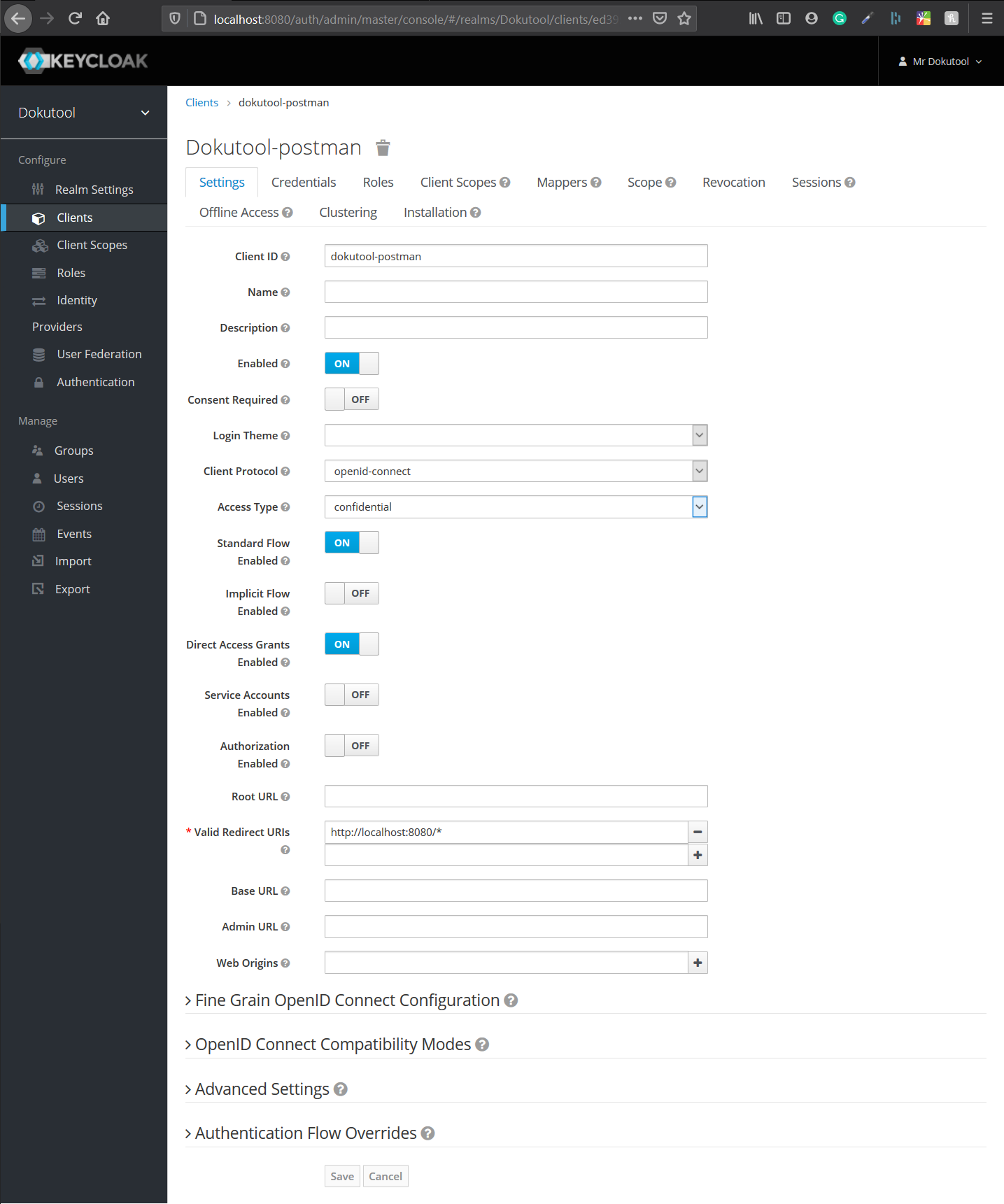 21 |
21 |
22 |
23 | 2. Go now into the second tab "Credentials" of your new created Client. Here you can find the Clientsecret in the field *Secret*. Copy that to you clipboard.
24 |
25 |
26 | 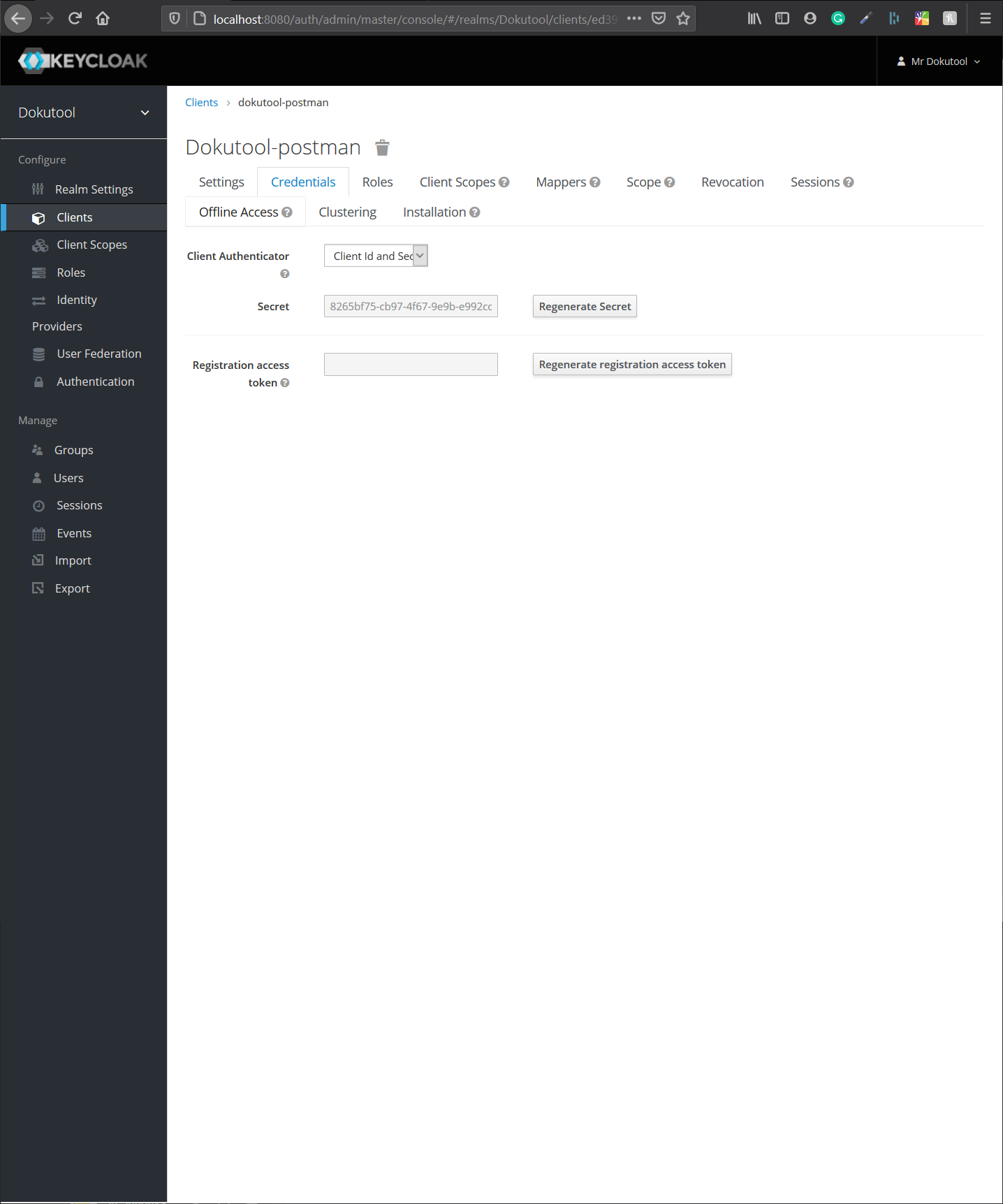 27 |
27 |
28 |
29 | 3. Now head on to Postman. Create a new collection. Every query you want to make to the API which is protected by Keycloak, has to be in this collection then. On a already existing collection click edit (behind the 3 vertical dots). In the new appearing window choose a name and copy the content of [keycloak-fetch-token-postman-pre-request.js](keycloak-fetch-token-postman-pre-request.js) into the "Pre-request Script" tab in Postman. No fill in all the variables in the beginning of the script. Remember you already copied the Clientsecret. If you dont know a variable, some of them can be found in Keycloak under the previously created Client and then in the tab *Installation*. In the screenshot below you can see an example. These are my development values. *Never post production clientsecrets or something!* With username and password you can choose a user. This is good for testing roles. Leave the rest as is.
30 |
31 |
32 | 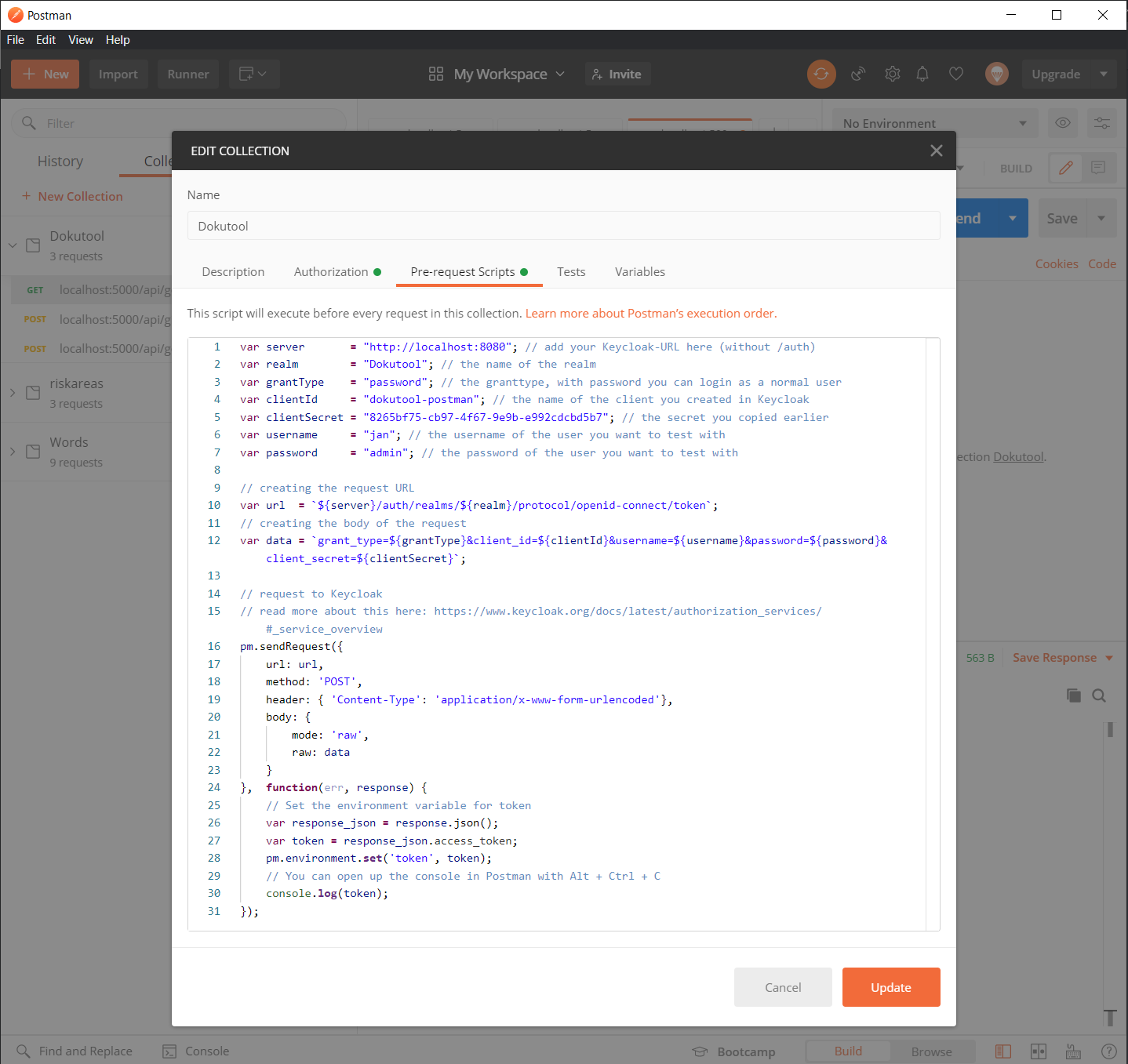 33 |
33 |
34 |
35 | 4. In the Authorization tab set the Type to Bearer Token and Token to *{{token}}*. This is the token that get send back from Keycloak via the pre-request script.
36 |
37 |
38 | 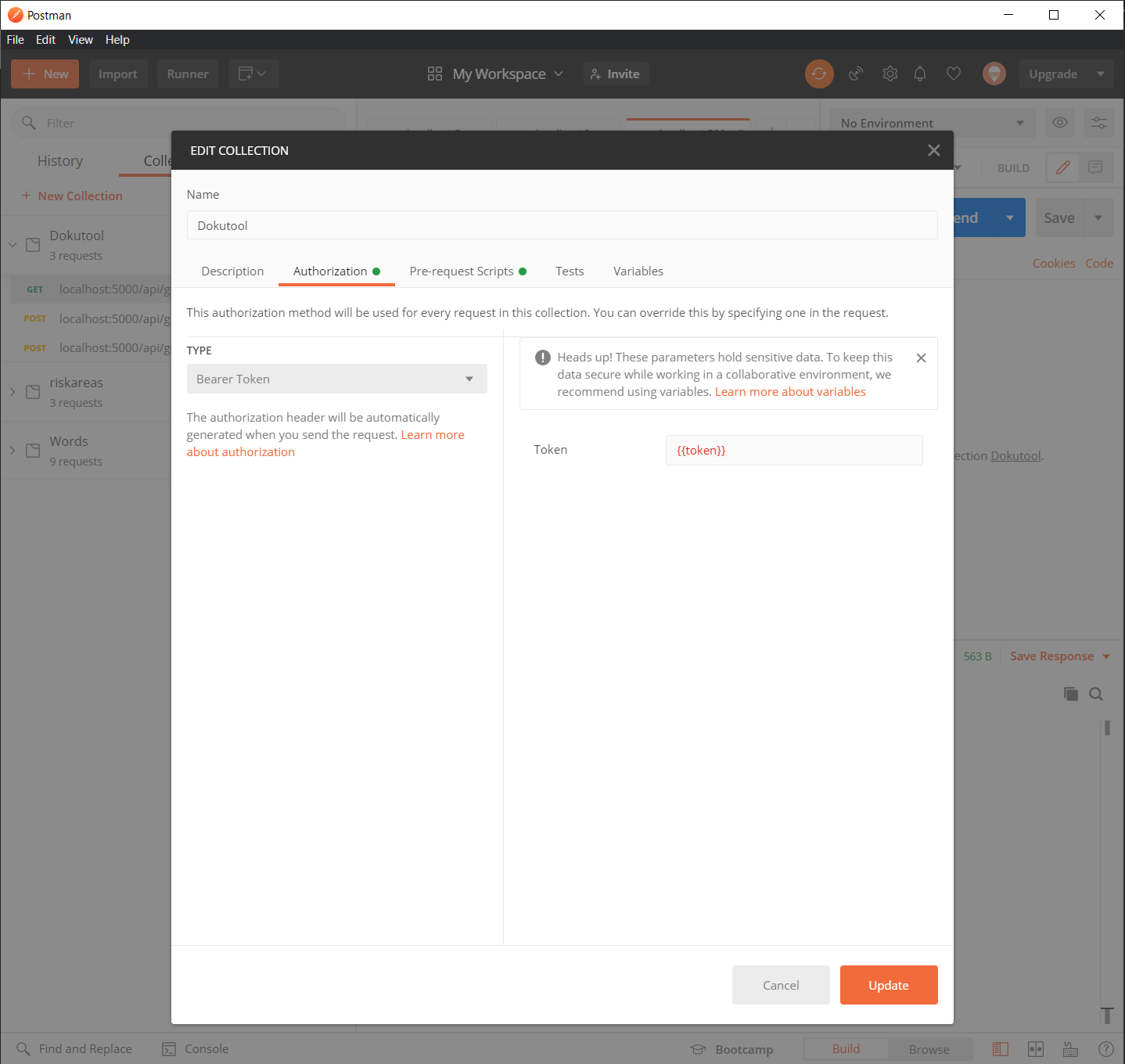 39 |
39 |
40 |
41 | 5. For all API requests: In the Authorization tab select Type - Inherit auth from parent. You can see an example below. Keep in mind that the queries you want to execute has to be saved into the configured collection
42 |
43 |
44 | 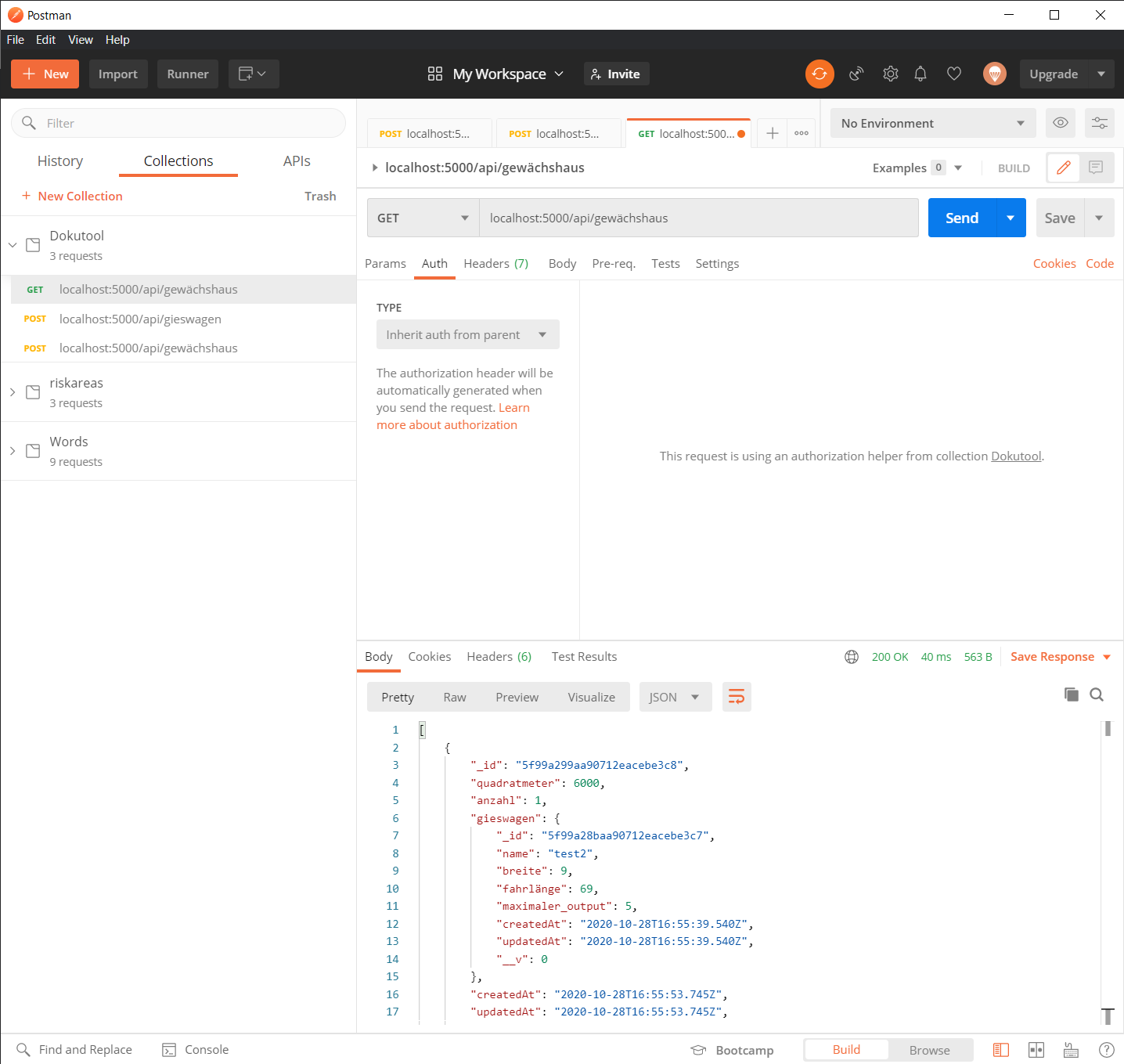 45 |
45 |
46 |
47 | 6. ENJOY
48 |
--------------------------------------------------------------------------------