├── 06-testing-react-apps.md
├── 11-future-references.md
├── README.md
├── 01-state-of-javascript-2018.md
├── 10-backend-integration-in-react.md
├── 02-modern-web-development.md
├── 07-state-management-and-data-flows.md
├── 04-react-router.md
├── 05-composition-and-reusability-in-react.md
├── 08-redux.md
├── 09-react-redux-integration.md
├── 03-introduction-to-react.md
└── LICENSE
/06-testing-react-apps.md:
--------------------------------------------------------------------------------
1 | # Testing React Components (work-in-progress)
2 | An important benefit of decoupling from the actual DOM implementation and working at a higher level of abstraction in JavaScript is that we can easily test React components. If you think about it, a component is not radically different than an object or a function, gets some inputs, performs some actions and returns a value (JSX in this case).
3 |
4 | ## Jest
5 |
6 | **References**
7 | * [Jest tutorial]
8 | * [Official docs]
9 |
10 | ## Enzyme
11 |
12 | ## shallow vs mount
13 |
--------------------------------------------------------------------------------
/11-future-references.md:
--------------------------------------------------------------------------------
1 | # Future References
2 | Here are a bunch of references and ideas to continue your training in the React/Redux world.
3 | * Integrate a REST API in your e-commerce application
4 | * Do local setup with [create-react-app](https://github.com/facebook/create-react-app) or try an [alternative starter](https://github.com/FortechRomania/react-starter-kit).
5 | * Learn more about **[Server Side Rendering](https://medium.freecodecamp.org/demystifying-reacts-server-side-render-de335d408fe4)** (SSR) with React.
6 | * Study some approaches with **[CSS-in-JS](https://medium.com/seek-blog/a-unified-styling-language-d0c208de2660)**. Try working with plain css/scss, css-modules, styled-components.
7 | * Check out the fundamentals of **GraphQL** and learn how you can [integrate that](https://blog.apollographql.com/full-stack-react-graphql-tutorial-582ac8d24e3b) into your React application.
8 | * Learn how to use Flow/TypeScript in your React application.
9 | * Read more about the future of React and [Async Rendering](https://reactjs.org/blog/2018/03/27/update-on-async-rendering.html).
10 |
--------------------------------------------------------------------------------
/README.md:
--------------------------------------------------------------------------------
1 | # React Training
2 |
3 | Reference materials for the introduction to React/Redux classroom training. Each chapter tries to cover a specific topic, sum up the key points, while adding a bunch of references from different sources.
4 |
5 | **Chapters**
6 | * [The State of JavaScript in 2018](https://github.com/alexnm/react-training/blob/master/01-state-of-javascript-2018.md)
7 | * [Modern Web Development](https://github.com/alexnm/react-training/blob/master/02-modern-web-development.md)
8 | * [Introduction to React](https://github.com/alexnm/react-training/blob/master/03-introduction-to-react.md)
9 | * [React Router](https://github.com/alexnm/react-training/blob/master/04-react-router.md)
10 | * [Composition and Reusability in React](https://github.com/alexnm/react-training/blob/master/05-composition-and-reusability-in-react.md)
11 | * [Testing React Apps](https://github.com/alexnm/react-training/blob/master/06-testing-react-apps.md)
12 | * [State Management & Data Flows](https://github.com/alexnm/react-training/blob/master/07-state-management-and-data-flows.md)
13 | * [Redux](https://github.com/alexnm/react-training/blob/master/08-redux.md)
14 | * [React-Redux Integration](https://github.com/alexnm/react-training/blob/master/09-react-redux-integration.md)
15 | * [Backend Integration](https://github.com/alexnm/react-training/blob/master/10-backend-integration-in-react.md)
16 | * [Future References](https://github.com/alexnm/react-training/blob/master/11-future-references.md)
17 |
18 | **General References**
19 | * [React Docs](https://reactjs.org/docs/getting-started.html) - official documentation
20 | * [Create React App](https://github.com/facebook/create-react-app) - standard skeleton for a React app
21 | * [CodeSandbox](https://codesandbox.io/) - online editor for modern frontend development
22 | * [Prettier](https://github.com/prettier/prettier) - modern (and opinionated) JS formatter
23 | * [Redux](https://redux.js.org/) - official documentation
24 |
--------------------------------------------------------------------------------
/01-state-of-javascript-2018.md:
--------------------------------------------------------------------------------
1 | # The State of JavaScript
2 |
3 | ## ES2015 and beyond
4 | JavaScript is no longer the scripting language used to add some minimal interractivity to static websites. It's a rich syntax language with vast capabilities and a lot of new features that were standardized in 2015 and beyond. The **TC-39** committee is working on the language standardization on an yearly basis, so each year we get new features into the standard language. Furthermore, current tooling (webpack, babel) allows us to work with proposals/experimental features and ensure that we have full browser support while using the latest syntax into our source code. In other words, the code that we write does not end up in the same form on the browser, but rather goes through a **transpile/compile** step which ensures the browser support we need.
5 |
6 | **References**
7 | * [ECMAScript2015/ES6 features](http://es6-features.org/#Constants)
8 | * [Egghead course on ES2015](https://egghead.io/courses/learn-es6-ecmascript-2015)
9 | * [ES Classes](https://developer.mozilla.org/en-US/docs/Web/JavaScript/Reference/Classes)
10 | * [TC-39's github org](https://github.com/tc39/ecma262) - Proposals are actively developed here
11 |
12 | ## Async JavaScript
13 | The JS execution model is fundamental to understand how the language works. The main difference to other programming languages is the non-blocking / asynchrounous nature of the function calls. This is done via the powerful **event loop** mechanism which is explained in the talk below. Adding on top of the event loop, modern JS is finding ways of avoiding callback hells and callbacks in general with the **Promise** model/pattern and with the newer syntax of **async/await**.
14 |
15 | **References**
16 | * [Understand the event loop](https://www.youtube.com/watch?v=8aGhZQkoFbQ)
17 | * [Promises](https://scotch.io/tutorials/javascript-promises-for-dummies)
18 | * [Fetch API](https://developer.mozilla.org/en-US/docs/Web/API/Fetch_API)
19 | * [Async/Await full tutorial](https://egghead.io/courses/asynchronous-javascript-with-async-await)
20 |
21 | ## Modules
22 | Finally, JavaScript is no longer a single file program, nor does it require you to work with global variables to ensure communication between multiple files. Starting from the **require.js** syntax which is behind node's file system, ES2015 also brought us **ESModules**, a very powerful and flexible **import/export** sytax which allows us to work with external dependencies (npm modules) or with other files in our setup.
23 |
24 | **References**
25 | * [Modern JS for Dinosaurs](https://medium.com/@peterxjang/modern-javascript-explained-for-dinosaurs-f695e9747b70)
26 | * [Understanding ES Modules](https://www.sitepoint.com/understanding-es6-modules/)
27 | * [ES Modules Deep Dive](https://hacks.mozilla.org/2018/03/es-modules-a-cartoon-deep-dive/)
28 |
--------------------------------------------------------------------------------
/10-backend-integration-in-react.md:
--------------------------------------------------------------------------------
1 | # Backend Integration
2 | One missing piece from the entire React/Redux flow is related to server data and how we integrate APIs into our frontend application. Neither React nor Redux have any standard way of introducing API calls into the workflow. Practices evolved in the community and opinions are still divided today.
3 |
4 | ## Native fetch
5 | Before we start, let's a quick glimpse at the new `fetch API` which is implemented in modern day browsers. You can also use a [polyfill](https://github.com/github/fetch) to have support virtually everywhere.
6 |
7 | There are several widely used libraries for making API calls: [superagent](https://github.com/visionmedia/superagent), [axios](https://github.com/axios/axios) or good old [jquery](https://jquery.com/), but **fetch** is good enough for most of your use cases and doesn't require any additional code (except for the polyfill which at some point would be removed)
8 |
9 | Fetch is promise based and integrates nicely with newer syntax, including async/await.
10 |
11 | A few examples of usage:
12 | ```javascript
13 | // a GET request, response is serialized as JSON in the last then()
14 | fetch(url).then(res => res.json()).then( /* ... */ )
15 |
16 | // a POST is done also via the same function, just by setting the right headers/method
17 | fetch(url, { method: "POST", headers: [...]}).then(res => res.json()).then( /* ... */ )
18 | ```
19 |
20 | The simplest way of working with backend services may be simply to call the endpoints from the React components, for example from `componentDidMount`.
21 |
22 | ## Async Redux Actions
23 | If we want to integrate async data into the Redux store, one option is to imagine the entire flow with **actions**. let's consider that we want to fetch a book from an endpoint. The action could be called `FETCH_BOOK`. But when is this action dispatched? We have three moments in an async call: when the call is sent, when the response is back and is successful, or when we have a failure. The common practice is to define the three moments as Redux actions: `FETCH_BOOK`, `FETCH_BOOK_COMPLETED`, `FETCH_BOOK_FAILED`. They would look like this:
24 | ```javascript
25 | export const fetchBook = () => ({
26 | type: "FETCH_BOOK",
27 | });
28 |
29 | export const fetchBookCompleted = book => ({
30 | type: "FETCH_BOOK_COMPLETED",
31 | payload: {
32 | book: book,
33 | },
34 | });
35 |
36 | export const fetchBookFailed = err => ({
37 | type: "FETCH_BOOK_FAILED",
38 | payload: {
39 | err: err,
40 | },
41 | });
42 | ```
43 |
44 | Here's the [codesandbox example](https://codesandbox.io/s/ppkmw39yz7)
45 |
46 | ## redux-thunk
47 | Fetching the data inside the component is fine, but in this case we are also managing the dispatches from the component and this tends to become repetitive. It would be nice if we could just dispatch a single action and let redux do its magic.
48 |
49 | **redux-thunk** can help with that! This is a very simple middleware, but a very powerful one. It allows you to dispatch a function instead of an object. That function will always receive the `dispatch` reference as the first parameter. So when writing a `thunk`, we actually write an **action creator** which dispatches one or more simple actions.
50 |
51 | Here's a quick example:
52 | ```javascript
53 | const fetchBook = url => dispatch => {
54 | dispatch(fetchBookStarted());
55 | fetch(url)
56 | .then(res => res.json())
57 | .then(
58 | res => dispatch(fetchBookCompleted(res)),
59 | err => dispatch(fetchBookFailed(err))
60 | );
61 | };
62 | ```
63 |
64 | and the full [sandbox example](https://codesandbox.io/s/739x3z0w20).
65 |
66 | Other alternatives for handling multiple dispatches for a single action are: redux-saga, redux-observables.
67 |
68 | **References**
69 | * [fetch API](https://developer.mozilla.org/en-US/docs/Web/API/Fetch_API)
70 | * [redux-thunk](https://github.com/reduxjs/redux-thunk)
71 |
--------------------------------------------------------------------------------
/02-modern-web-development.md:
--------------------------------------------------------------------------------
1 | # Modern Web Development
2 | Before we dive deep into the React ecosystem, let's take a closer look at the current state of web development.
3 |
4 | ## Breaking the monolith
5 | The traditional monolith is being replaced with a more specialized architecture. There are multiple approaches here and it's not the aim of this training to cover them, but the frontend ecosystem is being heavily impacted by this architectural shift
6 | * The frontend code is no longer embedded into the backend web application framework (ex: RubyOnRails, ASP.NET MVC, Django)
7 | * The backend has a clear interface through which it provides only data access (ex: REST API, GraphQL)
8 | * The frontend code is not just a collection of modules that provide interactivity, but now has complex responsibility like: routing, templating, data management, etc.
9 | * The frontend ecosystem is rich with build tools and libraries that compile the code to standard html, css and javascript (ex: Webpack, Babel, Gulp, TypeScript/Flowtype, CSS-in-JS)
10 |
11 | **References**
12 | * [Breaking the monolith](https://martinfowler.com/articles/break-monolith-into-microservices.html)
13 | * [Again, this is a great article!](https://medium.com/@peterxjang/modern-javascript-explained-for-dinosaurs-f695e9747b70)
14 |
15 | ## Component Based UI
16 | As a result of the FE ecosystem getting more and more complex, new ways of architecting the new idea of a "frontend application" had to be developed. While the initial push was towards the **MVC** approach ported on the FE as a **MVVM**-style architecture, later, framework developers realized that the UI interaction needs a different architecture. Slowly, each framework moved towards the component based architecture, where each individual UI component works as an MVC system inside, but encapsulates all that behavior and UI into a reusable piece of code.
17 |
18 | 
19 | 
20 |
21 | Source: https://reactjs.org/docs/thinking-in-react.html
22 |
23 | **References**
24 | * [Is MVC dead for the frontend?](https://medium.freecodecamp.org/is-mvc-dead-for-the-frontend-35b4d1fe39ec)
25 | * [Thinking in React](https://reactjs.org/docs/thinking-in-react.html)
26 |
27 | ## Declarative vs Imperative UI
28 | Together with these major shifts in web architecture, we have new ways of writing code. The jquery era favored the imperative approach of changing the DOM based on data flows and events. React and the new wave of frameworks favor a more declarative way of building UIs. We no longer have to deal with DOM selectors and direct DOM manipulation. This also makes way for faster and more reliable libraries that are handling the direct DOM changes for us.
29 |
30 | Imperative DOM manipulation
31 | ```javascript
32 | $("#button").click(function(event) {
33 | var value = $("#item").val();
34 | todos.push(value);
35 | $("ul").html("");
36 | render();
37 | $("#item").val("");
38 | });
39 |
40 | function render() {
41 | for (let index = 0; index < todos.length; index++) {
42 | $("ul").append(`
65 | );
66 | }
67 | ```
68 |
69 | The fully working examples can be found [here](https://codesandbox.io/s/43np9vp839) and [here](https://codesandbox.io/s/oo0980nk99).
70 |
71 | **References**
72 | * [Declarative vs Imperative Programming](https://tylermcginnis.com/imperative-vs-declarative-programming/)
73 | * [Making the DOM Declarative](https://www.youtube.com/watch?v=vyO5wKHlWZg)
74 |
--------------------------------------------------------------------------------
/07-state-management-and-data-flows.md:
--------------------------------------------------------------------------------
1 | # State Management and Data Flows
2 | Since frontend code became a separate project/application, complexity grew and architectural patterns evolved. We looked in depth at the UI side of the frontend stack, but now we'll have a look at how **state management** is done in modern web applications. The following two chapters are not necesarily related to the React ecosystem. All the ideas here are easily implemented with other frontend frameworks.
3 |
4 | ## UI vs App State
5 | Before we dive deep into a couple of ideas, let's try to separate state. A frontend application mainly handle two types of state objects/values:
6 | * **UI State** (ex: activeTab, showButton, loginFormValues)
7 | * **App State** (ex: session, products, images)
8 |
9 | Unfortunately it's almost impossible to draw an exact line and define a strict rule of what is app state and what is UI state. It will always be a thing of judgement and preference, of architecture and design. One good example is the form state, the object behind a form. You could argue that it is UI state, because it is mapped 1:1 to the inputs, but you could also argue that it represents a business object so it belongs in the app state.
10 |
11 | For the UI state, we've seen how React can handle the state at the component level. There's no ground rule on this, but in general, the UI state should be encapsulated in the components that you are building. Remember that components should work in any context, with as few external dependencies as possible.
12 |
13 | Application state can be regarded as easily accessible information (ex: objects, values) that is kept in memory and has it's own encapsulated management system (changes, transforms). Application state should not (if possible) leak as a global object. A very naïve approach is to consider the application state as the "immediate backend" for the frontend.
14 |
15 | ## Immutability and Pure Functions
16 | Coming from the world of functional programming, the concepts of immutability and pure functions gradually were introduced into frameworks and libraries in JavaScript. The language itself does not have immutable data structures, so any operation on arrays and objects are just modifying the existing data structure. One of the disadvantages of mutating objects is that the state becomes less predictive and harder to share between multiple subsystems.
17 |
18 | While not being a mandatory rule, immutability is prefered when dealing with state management in modern frontend. Immutability means that we can easily compare different state objects and subtrees of the same state object in different points in time. The shift towards a declarative UI and libraries which always re-render the entire virtual DOM is also welcoming immutable data structures because of the speed of the comparisons (checking if the state changed becomes an O(1) operation).
19 |
20 | ## Unidirectional Flows
21 | One of the major drawbacks of the early frontend frameworks (backbone, angular.js, knockout) was the use of two-directional flows. Any part of the application could directly change any object in the state part (ex: angular services, backbone models). This often lead to unwanted side-effects, with object references passed by accident between the two layers.
22 |
23 | Most of the modern frontend framework recognized these early issues, so the community came up with a lot of libraries that are doing state mangement in a simple unidirectional way.
24 |
25 | 
26 | Source: https://facebook.github.io
27 |
28 | Flux is an architecture developed by facebook in the early days of React and is aimed at offering a predictable and easily reproduceable state. It is unidirectional because the UI cannot directly modify the state (store), but can only dispatch actions that will **eventually** update the state. So all the **data flows** in a **unidirectional** way through the architecture.
29 |
30 | ## Actions/Events
31 | Most of the flux libraries, including Redux, which we will take a look at in the coming chapter, are heavily relying on actions/events to communicate between the two layers (UI, state).
32 |
33 | **Actions** are simple **objects** which have a `type` and a `payload`. They describe the change that needs to be applied to the state. Example:
34 | ```javascript
35 | {
36 | type: "ADD_TO_CART",
37 | payload: {
38 | productId: 123
39 | }
40 | }
41 | ```
42 |
43 | The **UI** will usually **listen** for **events** coming from the state (ex: state updated) and will trigger its mechanism for updating the DOM.
44 |
45 | The way state is managed in uni-directional architectures has some similarities with the [event sourcing](https://martinfowler.com/eaaDev/EventSourcing.html) architecture model.
46 |
47 | **References**
48 | * [What is a pure function](https://medium.com/javascript-scene/master-the-javascript-interview-what-is-a-pure-function-d1c076bec976)
49 | * [Immutable data structures in JS](https://www.youtube.com/watch?v=noBDly9LuSs)
50 | * [Flux Architecture](https://facebook.github.io/flux/)
51 |
--------------------------------------------------------------------------------
/04-react-router.md:
--------------------------------------------------------------------------------
1 | # Client side routing
2 |
3 | In order to start building relevant web applications with React, we must have a way of showing different components based on the url visited by the user, otherwise known as **routing**.
4 |
5 | Traditionally routing has been handled by the backend, so each route change meant a full page reload, a new HTML basically taking the place of the old one. With client side routing we can work our way around this, changing the components (pages) on the fly and changing the url (based on the strategy used) while keeping the same root HTML in place.
6 |
7 | There are multiple libraries that are handling routing functionalities in React and there's no official library built by the core team, as there is the case of Vue.js. However, [react-router](https://reacttraining.com/react-router/) is pretty much the standard approach today. Other notable libraries are: [reach-router](https://github.com/reach/router) - accessible first routing library and [router5](https://router5.js.org/)(https://router5.js.org/).
8 |
9 | ## Browser History vs Hash Routing
10 |
11 | There are two main options for configuring a router, `BrowserRouter` and `HashRouter`.
12 |
13 | **BrowserRouter** relies on the HistoryAPI capabilities introduced in HTML5, on pushState, popState and replaceState. This is very convenient because the user doesn't see any difference compared to traditionally server rendered applications. For them, the url changes, the page changes. The only perceivable difference is in speed, because they don't get a new page load.
14 |
15 | **HashRouter** relies on the hash part (ex: example.com/#about) of the url and can be convenient when you have a client application mounted inside a more complex server rendered application and you don't want to change the base url for that application.
16 |
17 | ## Router Setup
18 |
19 | Here is the most basic setup for react-router involving 3 pages and using the browser history:
20 |
21 | ```javascript
22 |
23 |
33 |
34 | ```
35 |
36 | `BrowserRouter` can easily we swapped with `HashRouter` to enable **hash** navigation instead. the `Link` component simply renders an anchor tag which changes the url when clicked. However, this does not behave as a regular anchor tag and does not trigger a full page reload.
37 |
38 | Complete solution [in codesandbox](https://codesandbox.io/s/jz8x6l30qv)
39 |
40 | ## Matching Routes
41 |
42 | The `Route` component works on a very simple principle: If the url **matches**, the component is rendered in place. There are multiple props that you can use on a `Route`, but most importantly you would want to use `exact: true` or simply `exact` as an attribute. When `exact` is true, the url match is done using the string equality operation. When `exact` is false, which is the default value, the match is done using `indexOf`. This means that if you have two Routes defined next to each other, one with the path `/java` and one with `/java/script`, both components will be rendered one after another when the user ends on `/java`.
43 |
44 | There's also a `` tag which can be used, also part of `react-router` which forces a single component to be rendered at a time. This is useful when building a complex page routing, but you must be careful with the order of the routes, or you risk having a general route take precedence over a more specific one.
45 |
46 | ## Dynamic Routes
47 |
48 | There are cases where you want the url to have a dynamic part (ex: an id, a permalink, a category). For those situations, the paths can be matched against dynamic routes:
49 | ```javascript
50 |
51 | ```
52 |
53 | At this point, any url starting with `/food` will match with this route: /food/pizza, /food/icecream.
54 |
55 | Subsequently, when the `` component will mount, it will receive the following props:
56 | * `this.props.location` -> reference to the browser location object
57 | * `this.props.history` -> reference to the browser history object
58 | * `this.props.match` -> an object with the result of the route match, that among others has the params from the dynamic url
59 |
60 | Hence, if you want to access the dynamic `:foodType` param, you would use: `this.props.match.params.foodType`. You can check out this full **example** on [codesandbox](https://codesandbox.io/s/84yk989mw2).
61 |
62 | ## Redirects
63 |
64 | Another useful scenario is when you want a certain url to be redirected to another one, or you want to redirect somewhere based on a user action (ex: login). In those cases, you can use the `` component. When a `` is rendered, it immediately uses the history API to change the url to the specified location. When `` is specified in a list of routes, you need to send the `from` prop, for react-router to know when the redirect should happen.
65 |
66 | Check [this example](https://codesandbox.io/s/l53kl1mp2z) of using a Redirect component.
67 |
68 | **References**
69 | * [react-router official docs](https://reacttraining.com/react-router/)
70 | * [react-router tutorial](https://medium.com/@pshrmn/a-simple-react-router-v4-tutorial-7f23ff27adf)
71 |
--------------------------------------------------------------------------------
/05-composition-and-reusability-in-react.md:
--------------------------------------------------------------------------------
1 | # Patterns in React
2 | Before we dive deeper into the React ecosystem, let's look at a set of common patterns and practices used by the community.
3 |
4 | ## Component Design
5 | The purpose of these patterns is to improve the readability, simplicity or the performance of your React components.
6 |
7 | ### Conditional Rendering
8 | When people think of React and JSX, they still think in terms of HTML and JavaScript. But remember! JSX is just JavaScript! So when we need to render something based on some condition, the first idea is to compute that output with a ternary operator:
9 | ```const content = show ?
Hello {name}!
: null;```
10 |
11 | But we can also leverage the power of boolean expressions in JavaScript. If the left-hand operator is `true`, the `JSX` will be rendered!
12 | ```javascript
13 | render() {
14 | const { name, show } = this.props;
15 | return (
16 |
17 |
Before text
18 | {show &&
Hello {name}!
}
19 |
After text
20 |
21 | );
22 | }
23 | ```
24 |
25 | **[Full Example](https://codesandbox.io/s/l4v80652ol)**
26 |
27 | ### Stateless functional components
28 | When `render` is the only function needed and the component does not rely on internal state, a simpler form of writing can be used. The component does not rely on state, so we call it a **stateless** component. When we have such a situation, the component pretty much acts as a **pure function**: it takes some input parameters (showName, showMessage, name) and returns some output (the JSX code). If we render this component with the same props, it will **always** return the same output.
29 |
30 | So React allows you to write components as simple functions:
31 |
32 | ```javascript
33 | const Message = ({ name, showName, showMessage }) => (
34 |
35 | {showName &&
Hello {name}!
}
36 | {showMessage &&
How are you today?
}
37 |
38 | );
39 | ```
40 |
41 | Functional stateless components have the following characteristics:
42 | * They don’t create an actual `React` component object in memory
43 | * They don’t have `this` as a reference
44 | * They have no **lifecycle hooks** and re-render **everytime** the parent component re-renders
45 | * They receive the `props` object as the first parameter
46 |
47 | **[Full Example](https://codesandbox.io/s/18o6z78nm3)**
48 |
49 | ### State Lifting
50 | When building complex structures with `React`, there's always the question: where should this state be placed? It will often be a matter of taste, of mixing stateless and stateful component. But in one particular situation you need to resolve to a pattern known as **state lifting**. This pattern usually involves handling the `state` value in a parent component and sending an `onChange/onUpdate` function `prop` to the child component.
51 |
52 | **[Full Example](https://codesandbox.io/s/qvz0qr29l6)**
53 |
54 | The React documentation covers this use case with a more [complex scenario](https://reactjs.org/docs/lifting-state-up.html).
55 |
56 | ### Children Props
57 | React provides a `children` prop that represents the content rendered inside the component. In other words, you can write something like that to render the inner content of a component:
58 |
59 | ```javascript
60 | const WithBorder = ({ children }) => (
61 |
79 |
80 |
81 | );
82 | ```
83 |
84 | **[Full Example](https://codesandbox.io/s/8xj528p53j)**
85 |
86 | ## Reusability and Composition
87 | Below are a couple of well known patterns that are widely used in the React community. However, getting in depth into them is beyond the scope of this introductory course. These are, however, good references for continuing the learning path with React. They also require a bit of hands-on experience with React to be properly understood and for them to make sense.
88 |
89 | ### Higher Order Components
90 | Starting from the concept of [higher-order functions](https://eloquentjavascript.net/05_higher_order.html), the community developed the concept of higher order component (or HOC) that is nothing more than a function which accepts a component as a parameter and returns a modified version of that component. They are also called *decorators* or *enhancers* because of the similarities with the decorator pattern.
91 |
92 | A few examples can be found in [this sandbox](https://codesandbox.io/s/vv198n1y00).
93 |
94 | HOCs are providing **static composition** and are useful when implementing [cross-cutting concerns](https://en.wikipedia.org/wiki/Cross-cutting_concern) (logging, authorization, 3rd party integration, etc.). HOCs are used by a lot of libraries in the React ecosystem, most notably react-redux, recompose, redux-forms, etc.
95 |
96 | ### Render Props
97 | Another pattern for reusing bits of functionality, the idea behind the render prop pattern is to send a **function prop** to a child component and to expect that component to call the function and place the resulting JSX (the render prop should return some JSX) inside its own **render** function.
98 |
99 | A few examples can be found [here](https://codesandbox.io/s/nk9jvnp3wp).
100 |
101 | Render props are providing **dynamic composition** allowing you to share small pieces of logic between components. The pattern is also used in libraries in the React ecosystem: react-motion, react-router, formik, etc.
102 |
103 | ### React Context
104 | React has a 3rd way of handling data and an additional way of passing data between components (other than props). It is called the **context** and has not been a widely used functionality because it was mostly considered experimental and aimed at helping library creators. However, since **React 16.3**, a nice syntax was standardized and the **Context API** can be used today following [the documentation](https://reactjs.org/docs/context.html).
105 |
106 | **References**
107 | * [React Patterns](https://reactpatterns.com/)
108 | * [Evolving patterns in React](https://medium.freecodecamp.org/evolving-patterns-in-react-116140e5fe8f)
109 | * [Never use another HOC](https://www.youtube.com/watch?v=BcVAq3YFiuc) - advocating for using the render props pattern
110 | * [React ContextAPI](https://medium.com/dailyjs/reacts-%EF%B8%8F-new-context-api-70c9fe01596b)
111 |
--------------------------------------------------------------------------------
/08-redux.md:
--------------------------------------------------------------------------------
1 | # Redux
2 | By far the most popular state management library in the React ecosystem, Redux offers a simple and efficient pattern through which you do state management. Learning Redux is pretty easy, as the library itself can be written in several lines of code. But there's a huge ecosystem around Redux which tends to get rather complex and has a very steep learning curve. Today the community is debating a lot on using Redux and the Redux ecosystem, but all in all it is a widely used solution and it is definitely a good learning step before moving to something else.
3 |
4 | One word of advice, before we begin: Redux (or any state management library) does not need to be there from the beginning. Maybe an early stage project doesn't need a separate state management library. Make sure you take that into account when deciding on the tech stack for a new project.
5 |
6 | ## Single state object
7 | Redux has a single state object, called **store**. The object is created/initialized with the `createStore` function provided by Redux.
8 |
9 | The only condition for the store object is to be a serializable object, so it can contain anything from arrays, sub-objects, booleans, numbers and strings. Shaping the state object is entirely in the hands of the developer.
10 |
11 | Let's consider a simple store object keeping info about the session
12 | ```javascript
13 | {
14 | isAuthenticated: false
15 | username: null
16 | }
17 | ```
18 |
19 | The ground rule of redux is that you treat the store as an **immutable** object and its state is **readonly** for the UI layer.
20 |
21 | ## Actions and Reducers
22 | In order to be able to change the state, we need to introduce the undirectional flow we've been discussing in the previous chapter. Redux has two fundamental constructs: **actions** and **reducers**.
23 |
24 | Actions are simple objects with a fixed format. They all must have a `type` property, which is an unique string literal identifying the action, an action name if you want. The common practice is to use UPPER_SNAKE_CASE to define the actions, but in larger applications you can also prefix the action with the business object is refers to, ex: "product/ADD_TO_CART". Another practice is to put the rest of the action values into a `payload` property, but this is absolutely optional and depends on the design and architecture decisions of the system.
25 |
26 | Example action:
27 | ```javascript
28 | {
29 | type: "LOGIN",
30 | payload: {
31 | username: "alice"
32 | }
33 | }
34 | ```
35 |
36 | An action is triggered with the `store.dispatch` function (see below).
37 |
38 | Reducers are **pure functions** that take the **current state** and the **action** being dispatched, and return the **new state** based on that action. In the simplest form, the reducer is a switch statement that acts according to the action type. Keep in mind that the state should not be directly mutated inside the reducers, but a new state should be created with each pass.
39 |
40 | The function looks like this: `const reducer = (state, action) => state`.
41 |
42 | You can think of the Redux store as a state machine, with an infinite number of possible states, but with a very easy way to visualize both the current state **N** and all the previous **N-1** states, because of the predictibility of the actions/reducers system.
43 |
44 | When you need to pass dynamic values as payloads on actions, the practice is to wrap each each into a function, called **action creator**:
45 | ```javascript
46 | const login = (username) => ({
47 | type: "LOGIN",
48 | payload: {
49 | username
50 | }
51 | }
52 | ```
53 |
54 | ## Redux API
55 | As mentioned before, Redux is a very simple library
56 |
57 | Here's an example of a Redux store in action
58 | ```javascript
59 | const initialState = 0;
60 |
61 | const increment = {
62 | type: "INCREMENT",
63 | };
64 |
65 | const decrement = {
66 | type: "DECREMENT",
67 | };
68 |
69 | const reducer = (state, action) => {
70 | switch (action.type) {
71 | case "INCREMENT":
72 | return state + 1;
73 | case "DECREMENT":
74 | return state - 1;
75 | default:
76 | return state;
77 | }
78 | };
79 |
80 | const store = createStore(reducer, initialState);
81 | store.dispatch(increment);
82 | store.dispatch(decrement);
83 | ```
84 |
85 | ### createStore
86 | This is called once when Redux is initialized and is creating a store instance object. It requires a reducer to function and can optionally take the initialState as a second param.
87 |
88 | ### getState
89 | The store object has a function `getState` which retrieves the entire state shape. It can be called anywhere you have access to the store object.
90 |
91 | ### dispatch
92 | The store object also has a function `dispatch` which is used to send each individual action to the reducer(s). Dispatch always has a single parameter, the action object which it dispatches. Inside the dispatch function, Redux calls the reducer function with the existing state and the action it receives as a param.
93 |
94 | Check out [this example](https://codesandbox.io/s/1qq39yk0n4) which implements the code we discussed so far.
95 |
96 | ### combineReducers
97 | Having a single reducer for the entire application is not really scalable, because you end up with a monster switch with tens/hundreds of cases. So Redux also offers a handy function, `combineReducers`, with which you can break down the reducers into multiple smaller functions that handle a certain part of the entire state shape.
98 |
99 | You can check the official docs for a very good example of this (slighly adapted):
100 | ```javascript
101 | function visibilityFilterReducer(state, action) {
102 | /* ... */
103 | }
104 |
105 | function todosReducer(state, action) {
106 | /* ... */
107 | }
108 |
109 | const reducer = combineReducers({
110 | visibilityFilter: visibilityFilterReducer,
111 | todos: todosReducer
112 | })
113 | ```
114 |
115 | ## Middlewares
116 | The Redux ecosystem is built on top of the middleware pattern, which allows you basically to override the dispatch function and add intermediate steps to the whole flow.
117 |
118 | A middleware is a [curried function](https://hackernoon.com/currying-in-js-d9ddc64f162e) of the form:
119 | ```javascript
120 | const middleware = store => next => action => {
121 | /* perform operations before the dispatch */
122 | next( action ); // this will actually call the original dispatch
123 | /* perform operations after the dispatch */
124 | }
125 | ```
126 |
127 | Check out a simple [custom logger example here](https://codesandbox.io/s/zxv1lv5xx).
128 |
129 | A few examples of widely used middlewares:
130 | * [redux-thunk](https://github.com/reduxjs/redux-thunk)
131 | * [redux-saga](https://github.com/redux-saga/redux-saga)
132 | * [redux-logger](https://github.com/evgenyrodionov/redux-logger)
133 | * [redux-persist](https://github.com/rt2zz/redux-persist)
134 |
135 | **References**
136 | * [Redux tutorial by Dan Abramov](https://egghead.io/courses/getting-started-with-redux)
137 |
--------------------------------------------------------------------------------
/09-react-redux-integration.md:
--------------------------------------------------------------------------------
1 | # React/Redux integration
2 | The integration between the React components and the Redux state management part is done via the official bindings from Redux: [react-redux](https://react-redux.js.org/). This package has two main components that we will use in our regular React/Redux applications.
3 |
4 | ## Provider
5 | The Provider is a top-level component that is added around your entire React app.
6 |
7 | ```javascript
8 | const store = createStore(reducer, initialState);
9 | const app = (
10 |
11 |
12 |
13 |
14 |
15 | );
16 | ```
17 |
18 | Just as a reference, the `Provider` is implemented on top of React Context
19 |
20 | This component gets the redux store as a parameter and then exposes the store to all the React components through the second abstraction we will be talking about next.
21 |
22 | ## Connect
23 | In order to access the state of the store or to dispatch actions you need access at component level. This is done through the `connect` HOC provided by `react-redux`. Remember that HOCs are taking your input component and are returning a slightly modifed version of that component. In our case, `connect` is added props to the original component.
24 |
25 | This is how you define a connect HOC around your component. Notice that this is a two-stage function, first you send the connect parameters and you get back another function where you send the component.
26 | ```javascript
27 | const Counter = () => ( /* ... */ )
28 |
29 | export default connect(mapStateToProps, mapDispatchToProps)(Counter);
30 | ```
31 |
32 | So what are `mapStateToProps` and `mapDispatchToProps`?
33 |
34 | ### mapStateToProps
35 | This is a function that takes the entire state of the Redux store, obtained by `store.getState()`, and computes props or simply passes parts of that state as props for the components that is "connected". `mapStateToProps` should return an object, each key of the object will be a top level prop in the component. In case the function is not needed, `null` can be used.
36 |
37 | Example:
38 | ```javascript
39 | const mapStateToProps = (state) => ({
40 | todos: state.todos,
41 | filter: state.visibilityFilter
42 | });
43 | ```
44 |
45 | You can also map functions inside, so a function prop will be passed to your component:
46 | ```javascript
47 | const mapStateToProps = (state) => ({
48 | userExists: (username) => state.users.contains(username) // function will be called inside the component
49 | });
50 | ```
51 |
52 | ### mapDispatchToProps
53 | This is another function, which now maps the actions that we want to dispatch from inside the component. Since the `dispatch` function is called on the Redux store and component don't have a direct reference to the store, we need to map the actions in advance and send the functions are props.
54 |
55 | Example:
56 | ```javascript
57 | const mapDispatchToProps = (dispatch) => ({
58 | increment: dispatch(actions.increment),
59 | decrement: dispatch(actions.decrement),
60 | })
61 | ```
62 |
63 | We're assuming here that actions are collected into an object (`actions`) because they are defined in different files. When we use action creators we have a simpler form for defining `mapDispatchToProps`, starting from the assumption that the params match the action creator params:
64 | ```javascript
65 | const mapDispatchToProps = {
66 | increment: actions.increment,
67 | decrement: actions.decrement,
68 | }
69 | ```
70 | There are a bunch of patterns for mapDispatchToProps, trying to abstract and avoid code duplication or this kind of boilerplate code. However, I think that this offers more clarity into which actions are mapped and which are not. Feel free to document yourself more on how to use action creators directly as mapDispatchToProps or how to use `bindActionCreators`.
71 |
72 | **[Full CodeSandbox example](https://codesandbox.io/s/ppnz28165x)** - check this full counter example.
73 |
74 | **connect** is the critical glue between the React components and Redux, make sure you spend enough time understanding what is happening here.
75 |
76 | Each dispatch to Redux will trigger the reducers to calculate the new state of the application, so each new state means that the two functions are called, so new props *might* be passed to the components, triggering a re-render. To get more in depth into the re-render mechanisms, check the documentation and look at the *pure* configuration option.
77 |
78 | ## Container vs Presentational Components
79 | A common pattern is to separate components which are connected to Redux as **container components**. These components have the connect around them, maybe have some state and do data processing / event handling if needed. But they don't render too much JSX, only child components at most. The child components then become what is known as **presentational components**, they are heavy on the JSX side, but are not directly connected to Redux and they get all their props from the parent components.
80 |
81 | ## Small Project
82 | With everything we learned so far, try implementing a shopping cart functionality on top of this [existing sandbox](https://codesandbox.io/s/n697w23oj). You can add the following:
83 | * A separate page for displaying an individual product (route, react component, link to page)
84 | * Button for adding a product to cart
85 | * State management for cart (add to cart, remove from cart, increase quantity)
86 | * Page for the shopping cart (with buttons/links for the above functionality)
87 |
88 | ## Redux Selectors
89 | Sometimes the raw state needs some sort of transformation in order to represent relevant data for the UI. One such example might be the cart total, in a shopping cart store. The total may not be kept as an exact value inside the store, but can be computed out of each new state based on the line items. A **selector** is a function that does that computation for you. When you define selectors on top of the Redux store, you eliminate the need to duplicate this logic inside each component where the computed data is needed. Selectors are simple functions that can be used inside `mapStateToProps`:
90 | ```javascript
91 | const mapStateToProps = (state) => ({
92 | cartItems: state.items,
93 | cartTotal: computeCartTotal(state.items)
94 | });
95 | ```
96 |
97 | The Redux ecosystem has libraries that abstract some of the things we discussed about and [reselect](https://github.com/reduxjs/reselect) is one of them, handling the Redux selectors.
98 |
99 | ## Scaling Redux
100 | Scaling Redux and structuring a React/Redux app has been a hot topic for quite some time. It's an opinionated environment with a lot of pros and cons for various approaches.
101 |
102 | In [this article](https://medium.freecodecamp.org/scaling-your-redux-app-with-ducks-6115955638be) that I wrote some time ago, I'm trying to paint a better picture for everyone who is new to React/Redux architectures.
103 |
104 | **References**
105 | * [Official binding docs](https://react-redux.js.org/docs/api)
106 | * [Reselect](https://github.com/reduxjs/reselect)
107 | * [The Re-ducks proposal](https://github.com/alexnm/re-ducks)
108 |
--------------------------------------------------------------------------------
/03-introduction-to-react.md:
--------------------------------------------------------------------------------
1 | # Introduction to React
2 | Let's go through the basic elements of React
3 |
4 | ## JSX
5 | `JSX is a syntax extension to JavaScript. It is similar to a template language, but it has full power of JavaScript. JSX gets compiled to React.createElement() calls which return plain JavaScript objects called “React elements”. To get a basic introduction to JSX see the docs here and find a more in-depth tutorial on JSX here. React DOM uses camelCase property naming convention instead of HTML attribute names. For example, tabindex becomes tabIndex in JSX. The attribute class is also written as className since class is a reserved word in JavaScript.`
6 |
7 | Source: https://reactjs.org/docs/glossary.html#jsx
8 |
9 | So JSX is nothing more than sugar syntax on top of JavaScript, allowing you to write what seems to be HTML-in-JS, but translating it into function calls, as you can see in this [babel live transpiler](https://babeljs.io/repl/#?babili=false&browsers=safari%20%3E%207&build=&builtIns=false&spec=false&loose=false&code_lz=MYewdgzgLgBAggBwTAvDAFASlQPgwKBhgB4ATASwDcZoBPAGwFMUBvOpiAXx0KJIAlG9eiBhgAhgFtmAIgDCIUowDK4sKQBGIAB4yYAeh58SACwBMOZVHEAnWIwpRyYAOYwooiI0Y0Q0mJLiLuTAMCbiSIxgMCwA5AA6AK5mAOxmAByxnMT65kYk-hSUPJgA3EA&debug=false&forceAllTransforms=false&shippedProposals=false&circleciRepo=&evaluate=true&fileSize=false&timeTravel=false&sourceType=module&lineWrap=false&presets=react%2Cenv&prettier=false&targets=&version=6.26.0&envVersion=1.6.2).
10 |
11 | React can also run directly in the browser when added as a dependency, but you also have to add a jsx parser lib. In most of the cases, you will have a `webpack/babel` setup in your project that will automatically transpile **JavaScript** and **JSX** to standard JavaScript that can run in any browser.
12 |
13 | JSX does not break separation of concerns, components are simply a new way of separating concerns based on function, not on technology!
14 | 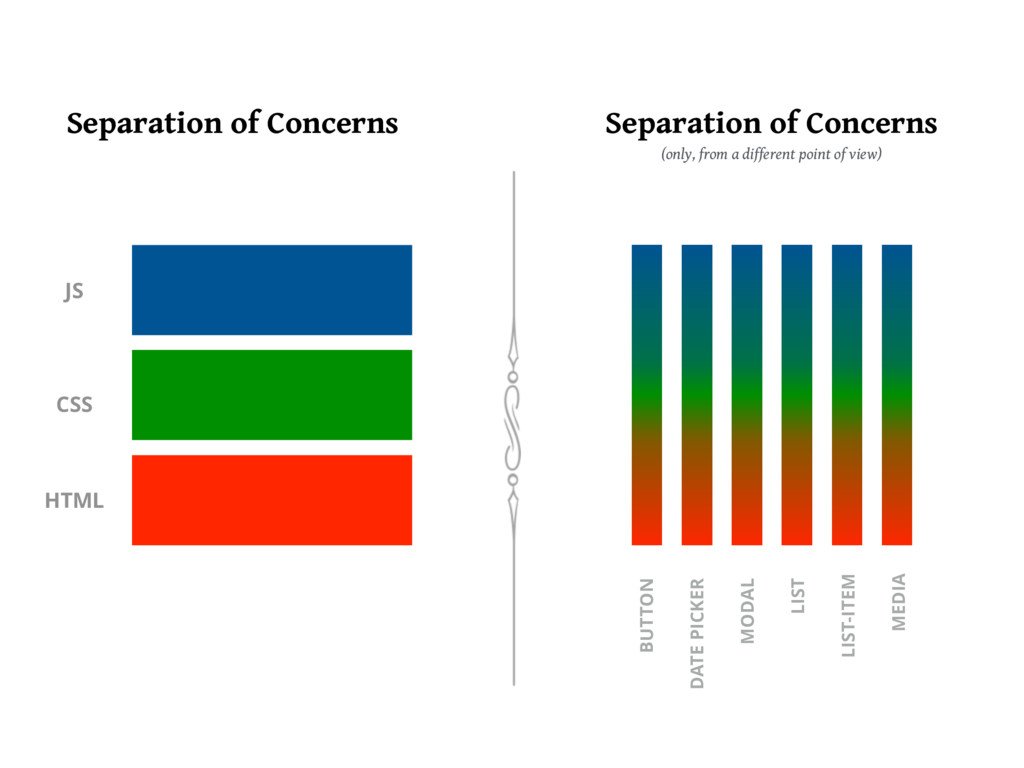
15 |
16 | ## Custom Components
17 | React components are created by extending the `React.Component` class. There are some alternatives to this, but we will check them out when we go a bit more in depth into React. For now, we create a class with a single function called `render`.
18 |
19 | ```javascript
20 | class App extends React.Component {
21 | render() {
22 | return (
23 |
24 |
Hello React!
25 |
This is a paragraph!
26 |
This is another paragraph!
27 |
28 | );
29 | }
30 | }
31 | ```
32 |
33 | Working example [here](https://codesandbox.io/s/y0pz7jr901)
34 |
35 | Each component creates a new which is available in your JSX code. Custom components should always start with a capital letter! The component behaves exactly like a regular tag. Feel free to inspect the DOM and install React Dev Tools to see the components in action!
36 |
37 | ```javascript
38 | class App extends React.Component {
39 | render() {
40 | return (
41 |
42 |
Hello React!
43 |
This is a paragraph!
44 |
This is another paragraph!
45 |
46 |
47 | );
48 | }
49 | }
50 |
51 | class Greeting extends React.Component {
52 | render() {
53 | return Hello Stranger!;
54 | }
55 | }
56 | ```
57 |
58 | ## Component Elements
59 | Let's have a look at some of the basic elements that make up a React Component.
60 |
61 | ### Render function
62 | The `render` function is the only mandatory element of a React Component. The function is always invoked on the component instance by React, so any call to `this` is accessing the component instance (ex: `this.props`, `this.state`). More on `this` later ;)
63 |
64 | `render` must always return something: JSX tags or false/null/undefined in cases where the component should not output any content. JSX syntax must always be enclosed in a single root node. In order to avoid the unnecessary creation of divs or other elements, React introduced a special component called `Fragment` that can wrap multiple nodes without creating an actual DOM element around them.
65 |
66 | ### Intermission - React's execution model and the vDOM
67 | Because of the declarative nature of React we don't invoke the render function manually. The function is invoked by the library **everytime** there's a new value for a `prop` passed or after `setState` is invoked.
68 |
69 | Although it sounds counter-intuitive, React is actually extremely fast because of this blind re-render mechanism! The secret here is the **virtual DOM**. React doesn't immediately apply changes from one component to the DOM, but it constructs an in-memory structure which is a 1-1 mapping of the DOM. After each **change** a new tree is constructed and compared to the old tree. If two nodes are identical, no DOM operation is performed. This means that only the changes are applied to the DOM after each vDOM comparison is done. This comparison algorithm is called **reconcilation** and it is extremely fast!
70 |
71 | **References**
72 | * [Virtual DOM](https://reactjs.org/docs/faq-internals.html)
73 | * [DOM vs vDOM](http://reactkungfu.com/2015/10/the-difference-between-virtual-dom-and-dom/)
74 |
75 | ### Props
76 | Props represent the input values of a component. They are passed as **attributes** on JSX and are accessed through `this.props`:
77 |
78 | ```javascript
79 |
80 | ```
81 | ```javascript
82 | class Greeting extends React.Component {
83 | render() {
84 | return Hello {this.props.name}!;
85 | }
86 | }
87 | ```
88 |
89 | Props can be virtually anything: primitive values, functions, objects, arrays, etc.
90 |
91 | Props offer a way of passing down data/values from a top level component to its descendants. Props cannot be modifed! Which means that the data flow is **unidirectional**, from the parent to the child. child-to-parent communication is done through function props, which, when passed from the parent, act as a callback for the child components.
92 |
93 | It is a good practice to validate props with the separate `prop-types` package. You can specify the **type** of a prop, its **default** value and whether it is **required** or not.
94 |
95 | ```javascript
96 | class Greeting extends React.Component {
97 | render() {
98 | return Hello {this.props.name}!;
99 | }
100 | }
101 |
102 | Greeting.propTypes = {
103 | name: PropTypes.string.isRequired
104 | }
105 | ```
106 |
107 | **References**
108 | * [PropTypes](https://www.geeksforgeeks.org/reactjs-proptypes/)
109 |
110 | ### State
111 | If props represent outside data for a component, its state represents the internal data. Each component can encapsulate a state object which is accessible in all the functions, but which is not exposed to the outside world. Similarly to `props`, you can add primitives as well as complex structures to a state object.
112 |
113 | The state object is not modified directly, but through a special function: `this.setState`. React does the state changes behind the scene in an **asynchrounous** way. Furthermore, a call to `setState` is also triggering the **reconciliation** algorithm for the current node and all its children.
114 |
115 | There are two ways of calling `setState`:
116 | * By passing a new state object. In this case the state object is updated with the new values.
117 | * By providing a function which gets the current state object as a parameter.
118 |
119 | The second option is usually prefered, especially when the new state value is dependent on the old state value. If you don't specify an existing state `key` in the new state object, that key/value will be preserved in the state.
120 |
121 | Check out a [complete example](https://codesandbox.io/s/ojzomokp3q) of using `setState`.
122 |
123 | ### Lifecycle Hooks
124 | 
125 | Source: https://twitter.com/dan_abramov/status/981712092611989509
126 |
127 | For each stage in the life of a component we have specific functions that we can optionally implement in our components. We will go through a few just to get the feeling, but don't worry, you don't need to learn complex logic to understand how the hooks are called. Usually, you will find that each specific use-case falls into a specific pattern. When you need to use the lifecycle hooks in an "unnatural" way, you immediately can feel that something is not right.
128 |
129 | Some of the hooks explained:
130 | * `constructor` - called just once when the component is instantiated.
131 | * `componentDidMount` - called just once, after the component is added for the first time to the DOM, used for adding event handlers or making async data calls.
132 | * `componentWillUnmount` - called just once, when the component is due to be removed from the DOM, used for cleanup.
133 | * `shouldComponentUpdate` - method used for component-level performance optimization
134 | * `componentWillReceiveProps` (deprecated) - replaced by `getDerivedStateFromProps`, called before the mount and also after each component re-render.
135 |
136 | Check out [an example](https://codesandbox.io/s/y26zrw0z9) with a couple of hooks added to a component.
137 |
138 | ### BONUS: Constructor (or not)
139 | You may have noticed some strange syntax when defining the React components as `classes`. `key = value` inside the definition of a class is what we call a **class property**. This is an almost standardized syntax for JS classes that just needs a [babel transform](https://babeljs.io/docs/en/babel-plugin-transform-class-properties) to work in your `webpack/babel` setup.
140 |
141 | In the past, in order for event handlers to properly have acces to the component instance (`this.props`, `this.state`) you would have had to manually **bind** them inside the constructor, like this:
142 | ```javascript
143 | class Message extends React.Component {
144 | constructor() {
145 | super();
146 | this.state = {
147 | showMessage: true,
148 | };
149 |
150 | this.toggle = this.toggle.bind(this);
151 | }
152 |
153 | toggle() {
154 | this.setState(state => ({
155 | showMessage: !state.showMessage,
156 | }));
157 | }
158 |
159 | render() {
160 | return (
161 |
189 | );
190 | }
191 | }
192 | ```
193 |
194 | **References**
195 | * [React Official Tutorial](https://reactjs.org/tutorial/tutorial.html)
196 | * [Rethinking Best Practices](https://www.youtube.com/watch?v=x7cQ3mrcKaY)
197 | * [Egghead Course](https://blog.kentcdodds.com/learn-react-fundamentals-and-advanced-patterns-eac90341c9db)
198 | * [I wish I new these before diving into React](https://engineering.opsgenie.com/i-wish-i-knew-these-before-diving-into-react-301e0ee2e488)
199 | * [React Dev Tools](https://chrome.google.com/webstore/detail/react-developer-tools/fmkadmapgofadopljbjfkapdkoienihi?hl=en)
200 | * [Class Properties in React](https://codeburst.io/use-class-properties-to-clean-up-your-classes-and-react-components-93185879f688)
201 |
--------------------------------------------------------------------------------
/LICENSE:
--------------------------------------------------------------------------------
1 | Attribution-NonCommercial 4.0 International
2 |
3 | =======================================================================
4 |
5 | Creative Commons Corporation ("Creative Commons") is not a law firm and
6 | does not provide legal services or legal advice. Distribution of
7 | Creative Commons public licenses does not create a lawyer-client or
8 | other relationship. Creative Commons makes its licenses and related
9 | information available on an "as-is" basis. Creative Commons gives no
10 | warranties regarding its licenses, any material licensed under their
11 | terms and conditions, or any related information. Creative Commons
12 | disclaims all liability for damages resulting from their use to the
13 | fullest extent possible.
14 |
15 | Using Creative Commons Public Licenses
16 |
17 | Creative Commons public licenses provide a standard set of terms and
18 | conditions that creators and other rights holders may use to share
19 | original works of authorship and other material subject to copyright
20 | and certain other rights specified in the public license below. The
21 | following considerations are for informational purposes only, are not
22 | exhaustive, and do not form part of our licenses.
23 |
24 | Considerations for licensors: Our public licenses are
25 | intended for use by those authorized to give the public
26 | permission to use material in ways otherwise restricted by
27 | copyright and certain other rights. Our licenses are
28 | irrevocable. Licensors should read and understand the terms
29 | and conditions of the license they choose before applying it.
30 | Licensors should also secure all rights necessary before
31 | applying our licenses so that the public can reuse the
32 | material as expected. Licensors should clearly mark any
33 | material not subject to the license. This includes other CC-
34 | licensed material, or material used under an exception or
35 | limitation to copyright. More considerations for licensors:
36 | wiki.creativecommons.org/Considerations_for_licensors
37 |
38 | Considerations for the public: By using one of our public
39 | licenses, a licensor grants the public permission to use the
40 | licensed material under specified terms and conditions. If
41 | the licensor's permission is not necessary for any reason--for
42 | example, because of any applicable exception or limitation to
43 | copyright--then that use is not regulated by the license. Our
44 | licenses grant only permissions under copyright and certain
45 | other rights that a licensor has authority to grant. Use of
46 | the licensed material may still be restricted for other
47 | reasons, including because others have copyright or other
48 | rights in the material. A licensor may make special requests,
49 | such as asking that all changes be marked or described.
50 | Although not required by our licenses, you are encouraged to
51 | respect those requests where reasonable. More considerations
52 | for the public:
53 | wiki.creativecommons.org/Considerations_for_licensees
54 |
55 | =======================================================================
56 |
57 | Creative Commons Attribution-NonCommercial 4.0 International Public
58 | License
59 |
60 | By exercising the Licensed Rights (defined below), You accept and agree
61 | to be bound by the terms and conditions of this Creative Commons
62 | Attribution-NonCommercial 4.0 International Public License ("Public
63 | License"). To the extent this Public License may be interpreted as a
64 | contract, You are granted the Licensed Rights in consideration of Your
65 | acceptance of these terms and conditions, and the Licensor grants You
66 | such rights in consideration of benefits the Licensor receives from
67 | making the Licensed Material available under these terms and
68 | conditions.
69 |
70 |
71 | Section 1 -- Definitions.
72 |
73 | a. Adapted Material means material subject to Copyright and Similar
74 | Rights that is derived from or based upon the Licensed Material
75 | and in which the Licensed Material is translated, altered,
76 | arranged, transformed, or otherwise modified in a manner requiring
77 | permission under the Copyright and Similar Rights held by the
78 | Licensor. For purposes of this Public License, where the Licensed
79 | Material is a musical work, performance, or sound recording,
80 | Adapted Material is always produced where the Licensed Material is
81 | synched in timed relation with a moving image.
82 |
83 | b. Adapter's License means the license You apply to Your Copyright
84 | and Similar Rights in Your contributions to Adapted Material in
85 | accordance with the terms and conditions of this Public License.
86 |
87 | c. Copyright and Similar Rights means copyright and/or similar rights
88 | closely related to copyright including, without limitation,
89 | performance, broadcast, sound recording, and Sui Generis Database
90 | Rights, without regard to how the rights are labeled or
91 | categorized. For purposes of this Public License, the rights
92 | specified in Section 2(b)(1)-(2) are not Copyright and Similar
93 | Rights.
94 | d. Effective Technological Measures means those measures that, in the
95 | absence of proper authority, may not be circumvented under laws
96 | fulfilling obligations under Article 11 of the WIPO Copyright
97 | Treaty adopted on December 20, 1996, and/or similar international
98 | agreements.
99 |
100 | e. Exceptions and Limitations means fair use, fair dealing, and/or
101 | any other exception or limitation to Copyright and Similar Rights
102 | that applies to Your use of the Licensed Material.
103 |
104 | f. Licensed Material means the artistic or literary work, database,
105 | or other material to which the Licensor applied this Public
106 | License.
107 |
108 | g. Licensed Rights means the rights granted to You subject to the
109 | terms and conditions of this Public License, which are limited to
110 | all Copyright and Similar Rights that apply to Your use of the
111 | Licensed Material and that the Licensor has authority to license.
112 |
113 | h. Licensor means the individual(s) or entity(ies) granting rights
114 | under this Public License.
115 |
116 | i. NonCommercial means not primarily intended for or directed towards
117 | commercial advantage or monetary compensation. For purposes of
118 | this Public License, the exchange of the Licensed Material for
119 | other material subject to Copyright and Similar Rights by digital
120 | file-sharing or similar means is NonCommercial provided there is
121 | no payment of monetary compensation in connection with the
122 | exchange.
123 |
124 | j. Share means to provide material to the public by any means or
125 | process that requires permission under the Licensed Rights, such
126 | as reproduction, public display, public performance, distribution,
127 | dissemination, communication, or importation, and to make material
128 | available to the public including in ways that members of the
129 | public may access the material from a place and at a time
130 | individually chosen by them.
131 |
132 | k. Sui Generis Database Rights means rights other than copyright
133 | resulting from Directive 96/9/EC of the European Parliament and of
134 | the Council of 11 March 1996 on the legal protection of databases,
135 | as amended and/or succeeded, as well as other essentially
136 | equivalent rights anywhere in the world.
137 |
138 | l. You means the individual or entity exercising the Licensed Rights
139 | under this Public License. Your has a corresponding meaning.
140 |
141 |
142 | Section 2 -- Scope.
143 |
144 | a. License grant.
145 |
146 | 1. Subject to the terms and conditions of this Public License,
147 | the Licensor hereby grants You a worldwide, royalty-free,
148 | non-sublicensable, non-exclusive, irrevocable license to
149 | exercise the Licensed Rights in the Licensed Material to:
150 |
151 | a. reproduce and Share the Licensed Material, in whole or
152 | in part, for NonCommercial purposes only; and
153 |
154 | b. produce, reproduce, and Share Adapted Material for
155 | NonCommercial purposes only.
156 |
157 | 2. Exceptions and Limitations. For the avoidance of doubt, where
158 | Exceptions and Limitations apply to Your use, this Public
159 | License does not apply, and You do not need to comply with
160 | its terms and conditions.
161 |
162 | 3. Term. The term of this Public License is specified in Section
163 | 6(a).
164 |
165 | 4. Media and formats; technical modifications allowed. The
166 | Licensor authorizes You to exercise the Licensed Rights in
167 | all media and formats whether now known or hereafter created,
168 | and to make technical modifications necessary to do so. The
169 | Licensor waives and/or agrees not to assert any right or
170 | authority to forbid You from making technical modifications
171 | necessary to exercise the Licensed Rights, including
172 | technical modifications necessary to circumvent Effective
173 | Technological Measures. For purposes of this Public License,
174 | simply making modifications authorized by this Section 2(a)
175 | (4) never produces Adapted Material.
176 |
177 | 5. Downstream recipients.
178 |
179 | a. Offer from the Licensor -- Licensed Material. Every
180 | recipient of the Licensed Material automatically
181 | receives an offer from the Licensor to exercise the
182 | Licensed Rights under the terms and conditions of this
183 | Public License.
184 |
185 | b. No downstream restrictions. You may not offer or impose
186 | any additional or different terms or conditions on, or
187 | apply any Effective Technological Measures to, the
188 | Licensed Material if doing so restricts exercise of the
189 | Licensed Rights by any recipient of the Licensed
190 | Material.
191 |
192 | 6. No endorsement. Nothing in this Public License constitutes or
193 | may be construed as permission to assert or imply that You
194 | are, or that Your use of the Licensed Material is, connected
195 | with, or sponsored, endorsed, or granted official status by,
196 | the Licensor or others designated to receive attribution as
197 | provided in Section 3(a)(1)(A)(i).
198 |
199 | b. Other rights.
200 |
201 | 1. Moral rights, such as the right of integrity, are not
202 | licensed under this Public License, nor are publicity,
203 | privacy, and/or other similar personality rights; however, to
204 | the extent possible, the Licensor waives and/or agrees not to
205 | assert any such rights held by the Licensor to the limited
206 | extent necessary to allow You to exercise the Licensed
207 | Rights, but not otherwise.
208 |
209 | 2. Patent and trademark rights are not licensed under this
210 | Public License.
211 |
212 | 3. To the extent possible, the Licensor waives any right to
213 | collect royalties from You for the exercise of the Licensed
214 | Rights, whether directly or through a collecting society
215 | under any voluntary or waivable statutory or compulsory
216 | licensing scheme. In all other cases the Licensor expressly
217 | reserves any right to collect such royalties, including when
218 | the Licensed Material is used other than for NonCommercial
219 | purposes.
220 |
221 |
222 | Section 3 -- License Conditions.
223 |
224 | Your exercise of the Licensed Rights is expressly made subject to the
225 | following conditions.
226 |
227 | a. Attribution.
228 |
229 | 1. If You Share the Licensed Material (including in modified
230 | form), You must:
231 |
232 | a. retain the following if it is supplied by the Licensor
233 | with the Licensed Material:
234 |
235 | i. identification of the creator(s) of the Licensed
236 | Material and any others designated to receive
237 | attribution, in any reasonable manner requested by
238 | the Licensor (including by pseudonym if
239 | designated);
240 |
241 | ii. a copyright notice;
242 |
243 | iii. a notice that refers to this Public License;
244 |
245 | iv. a notice that refers to the disclaimer of
246 | warranties;
247 |
248 | v. a URI or hyperlink to the Licensed Material to the
249 | extent reasonably practicable;
250 |
251 | b. indicate if You modified the Licensed Material and
252 | retain an indication of any previous modifications; and
253 |
254 | c. indicate the Licensed Material is licensed under this
255 | Public License, and include the text of, or the URI or
256 | hyperlink to, this Public License.
257 |
258 | 2. You may satisfy the conditions in Section 3(a)(1) in any
259 | reasonable manner based on the medium, means, and context in
260 | which You Share the Licensed Material. For example, it may be
261 | reasonable to satisfy the conditions by providing a URI or
262 | hyperlink to a resource that includes the required
263 | information.
264 |
265 | 3. If requested by the Licensor, You must remove any of the
266 | information required by Section 3(a)(1)(A) to the extent
267 | reasonably practicable.
268 |
269 | 4. If You Share Adapted Material You produce, the Adapter's
270 | License You apply must not prevent recipients of the Adapted
271 | Material from complying with this Public License.
272 |
273 |
274 | Section 4 -- Sui Generis Database Rights.
275 |
276 | Where the Licensed Rights include Sui Generis Database Rights that
277 | apply to Your use of the Licensed Material:
278 |
279 | a. for the avoidance of doubt, Section 2(a)(1) grants You the right
280 | to extract, reuse, reproduce, and Share all or a substantial
281 | portion of the contents of the database for NonCommercial purposes
282 | only;
283 |
284 | b. if You include all or a substantial portion of the database
285 | contents in a database in which You have Sui Generis Database
286 | Rights, then the database in which You have Sui Generis Database
287 | Rights (but not its individual contents) is Adapted Material; and
288 |
289 | c. You must comply with the conditions in Section 3(a) if You Share
290 | all or a substantial portion of the contents of the database.
291 |
292 | For the avoidance of doubt, this Section 4 supplements and does not
293 | replace Your obligations under this Public License where the Licensed
294 | Rights include other Copyright and Similar Rights.
295 |
296 |
297 | Section 5 -- Disclaimer of Warranties and Limitation of Liability.
298 |
299 | a. UNLESS OTHERWISE SEPARATELY UNDERTAKEN BY THE LICENSOR, TO THE
300 | EXTENT POSSIBLE, THE LICENSOR OFFERS THE LICENSED MATERIAL AS-IS
301 | AND AS-AVAILABLE, AND MAKES NO REPRESENTATIONS OR WARRANTIES OF
302 | ANY KIND CONCERNING THE LICENSED MATERIAL, WHETHER EXPRESS,
303 | IMPLIED, STATUTORY, OR OTHER. THIS INCLUDES, WITHOUT LIMITATION,
304 | WARRANTIES OF TITLE, MERCHANTABILITY, FITNESS FOR A PARTICULAR
305 | PURPOSE, NON-INFRINGEMENT, ABSENCE OF LATENT OR OTHER DEFECTS,
306 | ACCURACY, OR THE PRESENCE OR ABSENCE OF ERRORS, WHETHER OR NOT
307 | KNOWN OR DISCOVERABLE. WHERE DISCLAIMERS OF WARRANTIES ARE NOT
308 | ALLOWED IN FULL OR IN PART, THIS DISCLAIMER MAY NOT APPLY TO YOU.
309 |
310 | b. TO THE EXTENT POSSIBLE, IN NO EVENT WILL THE LICENSOR BE LIABLE
311 | TO YOU ON ANY LEGAL THEORY (INCLUDING, WITHOUT LIMITATION,
312 | NEGLIGENCE) OR OTHERWISE FOR ANY DIRECT, SPECIAL, INDIRECT,
313 | INCIDENTAL, CONSEQUENTIAL, PUNITIVE, EXEMPLARY, OR OTHER LOSSES,
314 | COSTS, EXPENSES, OR DAMAGES ARISING OUT OF THIS PUBLIC LICENSE OR
315 | USE OF THE LICENSED MATERIAL, EVEN IF THE LICENSOR HAS BEEN
316 | ADVISED OF THE POSSIBILITY OF SUCH LOSSES, COSTS, EXPENSES, OR
317 | DAMAGES. WHERE A LIMITATION OF LIABILITY IS NOT ALLOWED IN FULL OR
318 | IN PART, THIS LIMITATION MAY NOT APPLY TO YOU.
319 |
320 | c. The disclaimer of warranties and limitation of liability provided
321 | above shall be interpreted in a manner that, to the extent
322 | possible, most closely approximates an absolute disclaimer and
323 | waiver of all liability.
324 |
325 |
326 | Section 6 -- Term and Termination.
327 |
328 | a. This Public License applies for the term of the Copyright and
329 | Similar Rights licensed here. However, if You fail to comply with
330 | this Public License, then Your rights under this Public License
331 | terminate automatically.
332 |
333 | b. Where Your right to use the Licensed Material has terminated under
334 | Section 6(a), it reinstates:
335 |
336 | 1. automatically as of the date the violation is cured, provided
337 | it is cured within 30 days of Your discovery of the
338 | violation; or
339 |
340 | 2. upon express reinstatement by the Licensor.
341 |
342 | For the avoidance of doubt, this Section 6(b) does not affect any
343 | right the Licensor may have to seek remedies for Your violations
344 | of this Public License.
345 |
346 | c. For the avoidance of doubt, the Licensor may also offer the
347 | Licensed Material under separate terms or conditions or stop
348 | distributing the Licensed Material at any time; however, doing so
349 | will not terminate this Public License.
350 |
351 | d. Sections 1, 5, 6, 7, and 8 survive termination of this Public
352 | License.
353 |
354 |
355 | Section 7 -- Other Terms and Conditions.
356 |
357 | a. The Licensor shall not be bound by any additional or different
358 | terms or conditions communicated by You unless expressly agreed.
359 |
360 | b. Any arrangements, understandings, or agreements regarding the
361 | Licensed Material not stated herein are separate from and
362 | independent of the terms and conditions of this Public License.
363 |
364 |
365 | Section 8 -- Interpretation.
366 |
367 | a. For the avoidance of doubt, this Public License does not, and
368 | shall not be interpreted to, reduce, limit, restrict, or impose
369 | conditions on any use of the Licensed Material that could lawfully
370 | be made without permission under this Public License.
371 |
372 | b. To the extent possible, if any provision of this Public License is
373 | deemed unenforceable, it shall be automatically reformed to the
374 | minimum extent necessary to make it enforceable. If the provision
375 | cannot be reformed, it shall be severed from this Public License
376 | without affecting the enforceability of the remaining terms and
377 | conditions.
378 |
379 | c. No term or condition of this Public License will be waived and no
380 | failure to comply consented to unless expressly agreed to by the
381 | Licensor.
382 |
383 | d. Nothing in this Public License constitutes or may be interpreted
384 | as a limitation upon, or waiver of, any privileges and immunities
385 | that apply to the Licensor or You, including from the legal
386 | processes of any jurisdiction or authority.
387 |
388 | =======================================================================
389 |
390 | Creative Commons is not a party to its public
391 | licenses. Notwithstanding, Creative Commons may elect to apply one of
392 | its public licenses to material it publishes and in those instances
393 | will be considered the “Licensor.” The text of the Creative Commons
394 | public licenses is dedicated to the public domain under the CC0 Public
395 | Domain Dedication. Except for the limited purpose of indicating that
396 | material is shared under a Creative Commons public license or as
397 | otherwise permitted by the Creative Commons policies published at
398 | creativecommons.org/policies, Creative Commons does not authorize the
399 | use of the trademark "Creative Commons" or any other trademark or logo
400 | of Creative Commons without its prior written consent including,
401 | without limitation, in connection with any unauthorized modifications
402 | to any of its public licenses or any other arrangements,
403 | understandings, or agreements concerning use of licensed material. For
404 | the avoidance of doubt, this paragraph does not form part of the
405 | public licenses.
406 |
407 | Creative Commons may be contacted at creativecommons.org.
408 |
409 |
--------------------------------------------------------------------------------