├── web-service
├── .gitignore
├── favicon.ico
├── index.yaml
├── app.yaml
├── static
│ └── index.html
├── main.py
└── LICENSE
├── android
├── PhysicalWeb
│ ├── app
│ │ ├── .gitignore
│ │ ├── version.properties
│ │ ├── src
│ │ │ ├── main
│ │ │ │ ├── res
│ │ │ │ │ ├── values
│ │ │ │ │ │ ├── themes.xml
│ │ │ │ │ │ ├── dimens.xml
│ │ │ │ │ │ ├── colors.xml
│ │ │ │ │ │ ├── strings.xml
│ │ │ │ │ │ └── styles.xml
│ │ │ │ │ ├── drawable-hdpi
│ │ │ │ │ │ └── ic_launcher.png
│ │ │ │ │ ├── drawable-mdpi
│ │ │ │ │ │ └── ic_launcher.png
│ │ │ │ │ ├── drawable-xhdpi
│ │ │ │ │ │ └── ic_launcher.png
│ │ │ │ │ ├── drawable-xxhdpi
│ │ │ │ │ │ ├── ic_launcher.png
│ │ │ │ │ │ ├── ic_notification.png
│ │ │ │ │ │ ├── settings_xxhdpi.png
│ │ │ │ │ │ ├── menu_item_background.9.png
│ │ │ │ │ │ └── found_beacon_card.xml
│ │ │ │ │ ├── values-w820dp
│ │ │ │ │ │ └── dimens.xml
│ │ │ │ │ ├── anim
│ │ │ │ │ │ ├── fade_in_activity.xml
│ │ │ │ │ │ ├── fade_out_fragment.xml
│ │ │ │ │ │ ├── fade_in_and_slide_up.xml
│ │ │ │ │ │ └── fade_in_and_slide_up_fragment.xml
│ │ │ │ │ ├── layout
│ │ │ │ │ │ ├── activity_main.xml
│ │ │ │ │ │ ├── fragment_nearby_devices.xml
│ │ │ │ │ │ ├── fragment_about.xml
│ │ │ │ │ │ ├── fragment_beacon_config.xml
│ │ │ │ │ │ └── list_item_nearby_device.xml
│ │ │ │ │ └── menu
│ │ │ │ │ │ └── main.xml
│ │ │ │ ├── AndroidManifest.xml
│ │ │ │ └── java
│ │ │ │ │ └── physical_web
│ │ │ │ │ └── org
│ │ │ │ │ └── physicalweb
│ │ │ │ │ ├── AboutFragment.java
│ │ │ │ │ ├── Device.java
│ │ │ │ │ ├── UrlShortener.java
│ │ │ │ │ ├── BeaconHelper.java
│ │ │ │ │ ├── MainActivity.java
│ │ │ │ │ ├── NearbyDevicesAdapter.java
│ │ │ │ │ ├── NearbyDevicesFragment.java
│ │ │ │ │ ├── DeviceDiscoveryService.java
│ │ │ │ │ ├── MetadataResolver.java
│ │ │ │ │ ├── BeaconConfigFragment.java
│ │ │ │ │ └── BeaconConfigHelper.java
│ │ │ └── androidTest
│ │ │ │ └── java
│ │ │ │ └── physical_web
│ │ │ │ └── org
│ │ │ │ └── physicalweb
│ │ │ │ └── ApplicationTest.java
│ │ ├── libs
│ │ │ ├── volley.aar
│ │ │ ├── uribeacon-library.aar
│ │ │ ├── google-api-client-1.19.0.jar
│ │ │ ├── google-http-client-1.19.0.jar
│ │ │ ├── google-http-client-android-1.19.0.jar
│ │ │ └── google-api-services-urlshortener-v1-rev33-1.19.0.jar
│ │ ├── proguard-rules.pro
│ │ ├── build.gradle
│ │ └── app.iml
│ ├── settings.gradle
│ ├── .gitignore
│ ├── gradle
│ │ └── wrapper
│ │ │ ├── gradle-wrapper.jar
│ │ │ └── gradle-wrapper.properties
│ ├── build.gradle
│ ├── PhysicalWeb.iml
│ ├── gradle.properties
│ ├── gradlew.bat
│ └── gradlew
└── LICENSE
├── documentation
├── images
│ ├── example.png
│ ├── uribeacon1.png
│ ├── android_walkthrough_1.png
│ ├── android_walkthrough_2.png
│ ├── android_walkthrough_3.png
│ ├── android_walkthrough_4.png
│ ├── android_walkthrough_5.png
│ └── physical_web_icon_white.png
├── getting_started.md
├── android_client_walkthrough.md
├── technical_overview.md
└── introduction.md
├── README.md
└── LICENSE
/web-service/.gitignore:
--------------------------------------------------------------------------------
1 | .pyc
2 | .DS_Store
3 |
--------------------------------------------------------------------------------
/android/PhysicalWeb/app/.gitignore:
--------------------------------------------------------------------------------
1 | /build
2 | .idea
--------------------------------------------------------------------------------
/android/PhysicalWeb/settings.gradle:
--------------------------------------------------------------------------------
1 | include ':app'
2 |
--------------------------------------------------------------------------------
/web-service/favicon.ico:
--------------------------------------------------------------------------------
https://raw.githubusercontent.com/alexyoung/physical-web/master/web-service/favicon.ico
--------------------------------------------------------------------------------
/android/PhysicalWeb/app/version.properties:
--------------------------------------------------------------------------------
1 | #Tue Sep 30 16:18:55 PDT 2014
2 | MAJOR=0
3 | MINOR=1
4 | BUILD=422
5 | PATCH=0
6 |
--------------------------------------------------------------------------------
/documentation/images/example.png:
--------------------------------------------------------------------------------
https://raw.githubusercontent.com/alexyoung/physical-web/master/documentation/images/example.png
--------------------------------------------------------------------------------
/android/PhysicalWeb/app/src/main/res/values/themes.xml:
--------------------------------------------------------------------------------
1 |
2 |
3 |
4 |
--------------------------------------------------------------------------------
/documentation/images/uribeacon1.png:
--------------------------------------------------------------------------------
https://raw.githubusercontent.com/alexyoung/physical-web/master/documentation/images/uribeacon1.png
--------------------------------------------------------------------------------
/android/PhysicalWeb/.gitignore:
--------------------------------------------------------------------------------
1 | .gradle
2 | /local.properties
3 | /.idea/workspace.xml
4 | /.idea/libraries
5 | .DS_Store
6 | /build
7 |
--------------------------------------------------------------------------------
/android/PhysicalWeb/app/libs/volley.aar:
--------------------------------------------------------------------------------
https://raw.githubusercontent.com/alexyoung/physical-web/master/android/PhysicalWeb/app/libs/volley.aar
--------------------------------------------------------------------------------
/documentation/images/android_walkthrough_1.png:
--------------------------------------------------------------------------------
https://raw.githubusercontent.com/alexyoung/physical-web/master/documentation/images/android_walkthrough_1.png
--------------------------------------------------------------------------------
/documentation/images/android_walkthrough_2.png:
--------------------------------------------------------------------------------
https://raw.githubusercontent.com/alexyoung/physical-web/master/documentation/images/android_walkthrough_2.png
--------------------------------------------------------------------------------
/documentation/images/android_walkthrough_3.png:
--------------------------------------------------------------------------------
https://raw.githubusercontent.com/alexyoung/physical-web/master/documentation/images/android_walkthrough_3.png
--------------------------------------------------------------------------------
/documentation/images/android_walkthrough_4.png:
--------------------------------------------------------------------------------
https://raw.githubusercontent.com/alexyoung/physical-web/master/documentation/images/android_walkthrough_4.png
--------------------------------------------------------------------------------
/documentation/images/android_walkthrough_5.png:
--------------------------------------------------------------------------------
https://raw.githubusercontent.com/alexyoung/physical-web/master/documentation/images/android_walkthrough_5.png
--------------------------------------------------------------------------------
/documentation/images/physical_web_icon_white.png:
--------------------------------------------------------------------------------
https://raw.githubusercontent.com/alexyoung/physical-web/master/documentation/images/physical_web_icon_white.png
--------------------------------------------------------------------------------
/android/PhysicalWeb/app/libs/uribeacon-library.aar:
--------------------------------------------------------------------------------
https://raw.githubusercontent.com/alexyoung/physical-web/master/android/PhysicalWeb/app/libs/uribeacon-library.aar
--------------------------------------------------------------------------------
/android/PhysicalWeb/gradle/wrapper/gradle-wrapper.jar:
--------------------------------------------------------------------------------
https://raw.githubusercontent.com/alexyoung/physical-web/master/android/PhysicalWeb/gradle/wrapper/gradle-wrapper.jar
--------------------------------------------------------------------------------
/android/PhysicalWeb/app/libs/google-api-client-1.19.0.jar:
--------------------------------------------------------------------------------
https://raw.githubusercontent.com/alexyoung/physical-web/master/android/PhysicalWeb/app/libs/google-api-client-1.19.0.jar
--------------------------------------------------------------------------------
/android/PhysicalWeb/app/libs/google-http-client-1.19.0.jar:
--------------------------------------------------------------------------------
https://raw.githubusercontent.com/alexyoung/physical-web/master/android/PhysicalWeb/app/libs/google-http-client-1.19.0.jar
--------------------------------------------------------------------------------
/android/PhysicalWeb/app/libs/google-http-client-android-1.19.0.jar:
--------------------------------------------------------------------------------
https://raw.githubusercontent.com/alexyoung/physical-web/master/android/PhysicalWeb/app/libs/google-http-client-android-1.19.0.jar
--------------------------------------------------------------------------------
/android/PhysicalWeb/app/src/main/res/drawable-hdpi/ic_launcher.png:
--------------------------------------------------------------------------------
https://raw.githubusercontent.com/alexyoung/physical-web/master/android/PhysicalWeb/app/src/main/res/drawable-hdpi/ic_launcher.png
--------------------------------------------------------------------------------
/android/PhysicalWeb/app/src/main/res/drawable-mdpi/ic_launcher.png:
--------------------------------------------------------------------------------
https://raw.githubusercontent.com/alexyoung/physical-web/master/android/PhysicalWeb/app/src/main/res/drawable-mdpi/ic_launcher.png
--------------------------------------------------------------------------------
/android/PhysicalWeb/app/src/main/res/drawable-xhdpi/ic_launcher.png:
--------------------------------------------------------------------------------
https://raw.githubusercontent.com/alexyoung/physical-web/master/android/PhysicalWeb/app/src/main/res/drawable-xhdpi/ic_launcher.png
--------------------------------------------------------------------------------
/android/PhysicalWeb/app/src/main/res/drawable-xxhdpi/ic_launcher.png:
--------------------------------------------------------------------------------
https://raw.githubusercontent.com/alexyoung/physical-web/master/android/PhysicalWeb/app/src/main/res/drawable-xxhdpi/ic_launcher.png
--------------------------------------------------------------------------------
/android/PhysicalWeb/app/src/main/res/drawable-xxhdpi/ic_notification.png:
--------------------------------------------------------------------------------
https://raw.githubusercontent.com/alexyoung/physical-web/master/android/PhysicalWeb/app/src/main/res/drawable-xxhdpi/ic_notification.png
--------------------------------------------------------------------------------
/android/PhysicalWeb/app/src/main/res/drawable-xxhdpi/settings_xxhdpi.png:
--------------------------------------------------------------------------------
https://raw.githubusercontent.com/alexyoung/physical-web/master/android/PhysicalWeb/app/src/main/res/drawable-xxhdpi/settings_xxhdpi.png
--------------------------------------------------------------------------------
/android/PhysicalWeb/app/src/main/res/drawable-xxhdpi/menu_item_background.9.png:
--------------------------------------------------------------------------------
https://raw.githubusercontent.com/alexyoung/physical-web/master/android/PhysicalWeb/app/src/main/res/drawable-xxhdpi/menu_item_background.9.png
--------------------------------------------------------------------------------
/android/PhysicalWeb/app/libs/google-api-services-urlshortener-v1-rev33-1.19.0.jar:
--------------------------------------------------------------------------------
https://raw.githubusercontent.com/alexyoung/physical-web/master/android/PhysicalWeb/app/libs/google-api-services-urlshortener-v1-rev33-1.19.0.jar
--------------------------------------------------------------------------------
/android/PhysicalWeb/app/src/main/res/values/dimens.xml:
--------------------------------------------------------------------------------
1 |
2 |
3 | 16dp
4 | 16dp
5 |
6 |
--------------------------------------------------------------------------------
/android/PhysicalWeb/gradle/wrapper/gradle-wrapper.properties:
--------------------------------------------------------------------------------
1 | #Wed Apr 10 15:27:10 PDT 2013
2 | distributionBase=GRADLE_USER_HOME
3 | distributionPath=wrapper/dists
4 | zipStoreBase=GRADLE_USER_HOME
5 | zipStorePath=wrapper/dists
6 | distributionUrl=http\://services.gradle.org/distributions/gradle-1.12-all.zip
7 |
--------------------------------------------------------------------------------
/android/PhysicalWeb/app/src/main/res/values/colors.xml:
--------------------------------------------------------------------------------
1 |
2 |
3 | #1C47C1
4 | #099F39
5 | #545454
6 | #CCCCCC
7 | #4285f4
8 |
--------------------------------------------------------------------------------
/android/PhysicalWeb/app/src/main/res/drawable-xxhdpi/found_beacon_card.xml:
--------------------------------------------------------------------------------
1 |
2 |
3 |
6 |
7 |
9 |
10 |
11 |
13 |
14 |
15 |
--------------------------------------------------------------------------------
/android/PhysicalWeb/app/src/main/res/values-w820dp/dimens.xml:
--------------------------------------------------------------------------------
1 |
2 |
5 | 64dp
6 |
7 |
--------------------------------------------------------------------------------
/android/PhysicalWeb/app/src/androidTest/java/physical_web/org/physicalweb/ApplicationTest.java:
--------------------------------------------------------------------------------
1 | package physical_web.org.physicalweb;
2 |
3 | import android.app.Application;
4 | import android.test.ApplicationTestCase;
5 |
6 | /**
7 | * Testing Fundamentals
8 | */
9 | public class ApplicationTest extends ApplicationTestCase {
10 | public ApplicationTest() {
11 | super(Application.class);
12 | }
13 | }
--------------------------------------------------------------------------------
/web-service/index.yaml:
--------------------------------------------------------------------------------
1 | indexes:
2 |
3 | # AUTOGENERATED
4 |
5 | # This index.yaml is automatically updated whenever the dev_appserver
6 | # detects that a new type of query is run. If you want to manage the
7 | # index.yaml file manually, remove the above marker line (the line
8 | # saying "# AUTOGENERATED"). If you want to manage some indexes
9 | # manually, move them above the marker line. The index.yaml file is
10 | # automatically uploaded to the admin console when you next deploy
11 | # your application using appcfg.py.
12 |
--------------------------------------------------------------------------------
/android/PhysicalWeb/app/src/main/res/anim/fade_in_activity.xml:
--------------------------------------------------------------------------------
1 |
2 |
3 |
4 |
10 |
--------------------------------------------------------------------------------
/android/PhysicalWeb/app/src/main/res/anim/fade_out_fragment.xml:
--------------------------------------------------------------------------------
1 |
2 |
3 |
4 |
10 |
--------------------------------------------------------------------------------
/android/PhysicalWeb/build.gradle:
--------------------------------------------------------------------------------
1 | // Top-level build file where you can add configuration options common to all sub-projects/modules.
2 |
3 | buildscript {
4 | repositories {
5 | jcenter()
6 | }
7 | dependencies {
8 | classpath 'com.android.tools.build:gradle:0.12.2'
9 |
10 | // NOTE: Do not place your application dependencies here; they belong
11 | // in the individual module build.gradle files
12 | }
13 | }
14 |
15 | allprojects {
16 | repositories {
17 | jcenter()
18 | }
19 | }
20 |
--------------------------------------------------------------------------------
/android/PhysicalWeb/app/src/main/res/anim/fade_in_and_slide_up.xml:
--------------------------------------------------------------------------------
1 |
2 |
3 |
4 |
5 |
10 |
11 |
16 |
--------------------------------------------------------------------------------
/android/PhysicalWeb/app/src/main/res/layout/activity_main.xml:
--------------------------------------------------------------------------------
1 |
7 |
8 |
13 |
14 |
15 |
16 |
--------------------------------------------------------------------------------
/android/PhysicalWeb/app/src/main/res/menu/main.xml:
--------------------------------------------------------------------------------
1 |
17 |
--------------------------------------------------------------------------------
/android/PhysicalWeb/app/src/main/res/layout/fragment_nearby_devices.xml:
--------------------------------------------------------------------------------
1 |
7 |
8 |
13 |
14 |
15 |
16 |
--------------------------------------------------------------------------------
/android/PhysicalWeb/app/proguard-rules.pro:
--------------------------------------------------------------------------------
1 | # Add project specific ProGuard rules here.
2 | # By default, the flags in this file are appended to flags specified
3 | # in /Applications/Android Studio.app/sdk/tools/proguard/proguard-android.txt
4 | # You can edit the include path and order by changing the proguardFiles
5 | # directive in build.gradle.
6 | #
7 | # For more details, see
8 | # http://developer.android.com/guide/developing/tools/proguard.html
9 |
10 | # Add any project specific keep options here:
11 |
12 | # If your project uses WebView with JS, uncomment the following
13 | # and specify the fully qualified class name to the JavaScript interface
14 | # class:
15 | #-keepclassmembers class fqcn.of.javascript.interface.for.webview {
16 | # public *;
17 | #}
18 |
--------------------------------------------------------------------------------
/android/PhysicalWeb/app/src/main/res/anim/fade_in_and_slide_up_fragment.xml:
--------------------------------------------------------------------------------
1 |
2 |
3 |
4 |
10 |
16 |
--------------------------------------------------------------------------------
/android/PhysicalWeb/PhysicalWeb.iml:
--------------------------------------------------------------------------------
1 |
2 |
3 |
4 |
5 |
6 |
7 |
8 |
9 |
10 |
11 |
12 |
13 |
14 |
15 |
16 |
17 |
18 |
19 |
20 |
--------------------------------------------------------------------------------
/android/PhysicalWeb/gradle.properties:
--------------------------------------------------------------------------------
1 | # Project-wide Gradle settings.
2 |
3 | # IDE (e.g. Android Studio) users:
4 | # Settings specified in this file will override any Gradle settings
5 | # configured through the IDE.
6 |
7 | # For more details on how to configure your build environment visit
8 | # http://www.gradle.org/docs/current/userguide/build_environment.html
9 |
10 | # Specifies the JVM arguments used for the daemon process.
11 | # The setting is particularly useful for tweaking memory settings.
12 | # Default value: -Xmx10248m -XX:MaxPermSize=256m
13 | # org.gradle.jvmargs=-Xmx2048m -XX:MaxPermSize=512m -XX:+HeapDumpOnOutOfMemoryError -Dfile.encoding=UTF-8
14 |
15 | # When configured, Gradle will run in incubating parallel mode.
16 | # This option should only be used with decoupled projects. More details, visit
17 | # http://www.gradle.org/docs/current/userguide/multi_project_builds.html#sec:decoupled_projects
18 | # org.gradle.parallel=true
--------------------------------------------------------------------------------
/web-service/app.yaml:
--------------------------------------------------------------------------------
1 | #
2 | # Copyright 2014 Google Inc. All rights reserved.
3 | #
4 | # Licensed under the Apache License, Version 2.0 (the "License");
5 | # you may not use this file except in compliance with the License.
6 | # You may obtain a copy of the License at
7 | #
8 | # http://www.apache.org/licenses/LICENSE-2.0
9 | #
10 | # Unless required by applicable law or agreed to in writing, software
11 | # distributed under the License is distributed on an "AS IS" BASIS,
12 | # WITHOUT WARRANTIES OR CONDITIONS OF ANY KIND, either express or implied.
13 | # See the License for the specific language governing permissions and
14 | # limitations under the License.
15 | #
16 |
17 | application: url-caster
18 | version: 1
19 | runtime: python27
20 | api_version: 1
21 | threadsafe: yes
22 |
23 | handlers:
24 | - url: /favicon\.ico
25 | static_files: favicon.ico
26 | upload: favicon\.ico
27 |
28 | - url: /index\.html
29 | static_files: static/index.html
30 | upload: static/index\.html
31 |
32 | - url: .*
33 | script: main.app
34 |
35 | libraries:
36 | - name: webapp2
37 | version: "2.5.2"
38 |
39 | - name: lxml
40 | version: "2.3.5"
41 |
--------------------------------------------------------------------------------
/android/PhysicalWeb/app/src/main/res/values/strings.xml:
--------------------------------------------------------------------------------
1 |
2 |
3 |
4 | Physical Web
5 | Edit Urls
6 | About
7 | Address
8 | Url
9 | SAVE URL
10 | Version
11 | favicon for the given url for this entry
12 | Searching
13 | Beacon Found!
14 | Saving to Beacon
15 | Url Saved!
16 | Edit Urls
17 | Nearby Beacons
18 |
19 |
20 | Beacon Nearby
21 | Beacons Nearby
22 |
23 |
24 |
25 |
--------------------------------------------------------------------------------
/android/PhysicalWeb/app/src/main/res/layout/fragment_about.xml:
--------------------------------------------------------------------------------
1 |
10 |
11 |
17 |
18 |
26 |
27 |
35 |
36 |
37 |
38 |
39 |
--------------------------------------------------------------------------------
/android/PhysicalWeb/app/build.gradle:
--------------------------------------------------------------------------------
1 | apply plugin: 'com.android.application'
2 |
3 | android {
4 | compileSdkVersion 21
5 | buildToolsVersion "20.0.0"
6 |
7 | //auto versioning logic
8 | def versionPropertiesFile = file('version.properties')
9 | if (versionPropertiesFile.canRead()) {
10 | def Properties properties = new Properties()
11 | properties.load(new FileInputStream(versionPropertiesFile))
12 | def build = properties['BUILD'].toInteger() + 1
13 | properties['BUILD'] = build.toString()
14 | properties.store(versionPropertiesFile.newWriter(), null)
15 |
16 | defaultConfig {
17 | applicationId "physical_web.org.physicalweb"
18 | minSdkVersion 18
19 | targetSdkVersion 21
20 | versionCode 1
21 | versionName "0.1.${build}"
22 | }
23 | }
24 |
25 | buildTypes {
26 | release {
27 | runProguard false
28 | proguardFiles getDefaultProguardFile('proguard-android.txt'), 'proguard-rules.pro'
29 | }
30 | }
31 | compileOptions {
32 | sourceCompatibility JavaVersion.VERSION_1_7
33 | targetCompatibility JavaVersion.VERSION_1_7
34 | }
35 | }
36 |
37 | repositories{
38 | flatDir {
39 | dirs 'libs'
40 | }
41 | }
42 |
43 | dependencies {
44 | compile 'com.android.volley:volley@aar'
45 | compile 'org.uribeacon:uribeacon-library@aar'
46 | compile 'com.android.support:appcompat-v7:20.0.+'
47 | compile files('libs/google-api-client-1.19.0.jar')
48 | compile files('libs/google-http-client-1.19.0.jar')
49 | compile files('libs/google-api-services-urlshortener-v1-rev33-1.19.0.jar')
50 | compile files('libs/google-http-client-android-1.19.0.jar')
51 | }
52 |
--------------------------------------------------------------------------------
/android/PhysicalWeb/app/src/main/res/values/styles.xml:
--------------------------------------------------------------------------------
1 |
2 |
3 |
6 |
7 |
15 |
16 |
21 |
22 |
26 |
27 |
30 |
31 |
35 |
36 |
39 |
40 |
--------------------------------------------------------------------------------
/README.md:
--------------------------------------------------------------------------------
1 | ##The Physical Web
2 | The Physical Web is an approach to unleash the core super power of the web: interaction on demand. People should be able to walk up to any smart device: e.g. a vending machine, a poster, a toy, a bus stop, a rental car, and not have to download an app first in order to use it. The user experience of using smart devices should be much like we use links on web, just tap and use.
3 |
4 | The Physical Web is, at it's base, a discovery service where URLs are broadcast and any nearby device can receive them. This takes the web we know and love and unlocks exciting new ways to interact.
5 |
6 | The URL is the fundamental building block of the web, giving remarkable flexibility of expression. It can be:
7 |
8 | * a web page with just a tiny paragraph of info
9 | * a fully interactive web page
10 | * a deep link into a native application.
11 |
12 | ##Why We're Doing This
13 | The number of smart devices is going to explode in number, both in our homes and in public spaces. Much like the web, there is going to be a 'long tail' of interactivity for smart devices. But the overhead of installing an app for each one just doesn't scale. We need a system that lets someone walk up and use a device with just a tap. The Physical web isn't about replacing native apps, it's about allowing interaction for the times when native apps just aren't practical.
14 |
15 | ##Open Design
16 | The Physical Web must be an open standard that everyone can use. This can't be a product that is locked down by a single company. Like many web specifications, this is an open source design that is being released early so everyone can experiment and comment on it. There is much to discuss and add to this specification.
17 |
18 | ##Start Here
19 | The best place to start is with the [Introduction](http://github.com/google/physical-web/blob/master/documentation/introduction.md) document
20 |
21 | If you'd like to jump right in, check out the [Getting started guide](http://github.com/google/physical-web/blob/master/documentation/getting_started.md)
22 |
--------------------------------------------------------------------------------
/android/PhysicalWeb/app/src/main/AndroidManifest.xml:
--------------------------------------------------------------------------------
1 |
2 |
4 |
5 |
8 |
9 |
10 |
11 |
12 |
13 |
14 |
15 |
20 |
26 |
27 |
28 |
29 |
30 |
31 |
32 |
33 |
37 |
38 |
39 |
40 |
43 |
44 |
45 |
46 |
47 |
48 |
49 |
50 |
51 |
52 |
--------------------------------------------------------------------------------
/documentation/getting_started.md:
--------------------------------------------------------------------------------
1 | # Getting started testing the Physical Web
2 |
3 | In order to get up and running you need two things:
4 |
5 | 1. A hardware beacon
6 | 2. Software on your phone/tablet to see that beacon.
7 |
8 | The software is the easiest thing to take care of. The source code is located in this repo. However, you can get the latest list of [Android releases.](https://github.com/google/physical-web/releases) Just make sure you go to Settings>Security>Unknown Sources and flip the checkbox on before you do. A walkthrough of the app [is here](http://github.com/google/physical-web/blob/master/documentation/android_client_walkthrough.md)
9 |
10 | The trickier thing is to get a beacon broadcasting a URL. For most BLE beacons on the market today, this is not very easy to do. We're working on getting a much simpler, maker-friendly device released through an online vendor. This beacon will allow you to set the URL easily through the app and should be available in November 2014.
11 |
12 | The simplest way, if you're in a hurry, is to get an [RFDuino](http://www.rfduino.com/) as it is available right now and can be programmed to broadcast a URL. Once you have the RFduino installed with it's libraries, this sketch will create a sample beacon, that broadcasts "ABC.com":
13 |
14 | #include
15 |
16 | uint8_t advdata[] =
17 | {
18 | 0x03, // length
19 | 0x03, // Param: Service List
20 | 0xD8, 0xFE, // URI Beacon ID
21 | 0x0A, // length
22 | 0x16, // Service Data
23 | 0xD8, 0xFE, // URI Beacon ID
24 | 0x00, // flags
25 | 0x20, // power
26 | 0x00, // http://www.
27 | 0x41, // 'A'
28 | 0x42, // 'B'
29 | 0x43, // 'C'
30 | 0x07, // .".com"
31 | };
32 |
33 | void setup() {
34 | RFduinoBLE_advdata = advdata;
35 | RFduinoBLE_advdata_len = sizeof(advdata);
36 | RFduinoBLE.advertisementInterval = 1000; // advertise every 1000ms
37 | RFduinoBLE.begin();
38 | }
39 |
40 | void loop() {
41 | RFduino_ULPDelay(INFINITE); // switch to lower power mode
42 | }
43 |
44 | Once this is up and running, the Physical Web app will be able to see it.
45 |
46 | If there are other maker-ish devices out there that can setup easily, please let us know so we can add them to this list.
47 |
--------------------------------------------------------------------------------
/android/PhysicalWeb/app/src/main/java/physical_web/org/physicalweb/AboutFragment.java:
--------------------------------------------------------------------------------
1 | package physical_web.org.physicalweb;
2 |
3 |
4 | import android.content.pm.PackageInfo;
5 | import android.content.pm.PackageManager;
6 | import android.os.Bundle;
7 | import android.app.Fragment;
8 | import android.util.Log;
9 | import android.view.LayoutInflater;
10 | import android.view.Menu;
11 | import android.view.View;
12 | import android.view.ViewGroup;
13 | import android.widget.TextView;
14 |
15 | public class AboutFragment extends Fragment {
16 |
17 | private static String TAG = "AboutFragment";
18 | private static String TITLE_ABOUT = "About";
19 |
20 | public AboutFragment() {
21 | }
22 |
23 | public static AboutFragment newInstance() {
24 | AboutFragment aboutFragment = new AboutFragment();
25 | return aboutFragment;
26 | }
27 |
28 | private void initialize() {
29 | getActivity().getActionBar().setTitle(TITLE_ABOUT);
30 | initializeApplicationVersionText();
31 | }
32 |
33 | private void initializeApplicationVersionText() {
34 | String versionName = "";
35 | try {
36 | PackageInfo pInfo;
37 | pInfo = getActivity().getPackageManager().getPackageInfo(getActivity().getPackageName(), 0);
38 | versionName = pInfo.versionName;
39 | } catch (PackageManager.NameNotFoundException e) {
40 | e.printStackTrace();
41 | }
42 |
43 | TextView textView_applicationVersion = (TextView) getView().findViewById(R.id.textView_applicationVersion);
44 | textView_applicationVersion.setText(versionName);
45 | }
46 |
47 |
48 | /////////////////////////////////
49 | // callbacks
50 | /////////////////////////////////
51 |
52 | @Override
53 | public View onCreateView(LayoutInflater inflater, ViewGroup container, Bundle savedInstanceState) {
54 | setHasOptionsMenu(true);
55 | return inflater.inflate(R.layout.fragment_about, container, false);
56 | }
57 |
58 | @Override
59 | public void onResume() {
60 | super.onResume();
61 | initialize();
62 | }
63 |
64 | @Override
65 | public void onDetach() {
66 | super.onDestroy();
67 | getActivity().getActionBar().setTitle(getString(R.string.title_nearby_beacons));
68 | }
69 |
70 | @Override
71 | public void onPrepareOptionsMenu(Menu menu) {
72 | super.onPrepareOptionsMenu(menu);
73 | menu.findItem(R.id.action_config).setVisible(false);
74 | menu.findItem(R.id.action_about).setVisible(false);
75 | }
76 |
77 | }
78 |
--------------------------------------------------------------------------------
/android/PhysicalWeb/app/src/main/java/physical_web/org/physicalweb/Device.java:
--------------------------------------------------------------------------------
1 | package physical_web.org.physicalweb;
2 |
3 | import android.bluetooth.BluetoothDevice;
4 | import android.graphics.Bitmap;
5 |
6 | import org.uribeacon.beacon.UriBeacon;
7 | import java.util.ArrayList;
8 |
9 | public class Device {
10 |
11 | private BluetoothDevice mBluetoothDevice;
12 | private UriBeacon mUriBeacon;
13 | private MetadataResolver.DeviceMetadata mDeviceMetadata;
14 | public ArrayList mRssiHistory;
15 | private int MAX_LENGTH_RSSI_HISTORY = 6;
16 | private String mLongUrl;
17 | private String mShortUrl;
18 |
19 | public Device(UriBeacon uriBeacon, BluetoothDevice bluetoothDevice, int rssi) {
20 | mUriBeacon = uriBeacon;
21 | mBluetoothDevice = bluetoothDevice;
22 | mRssiHistory = new ArrayList<>();
23 | initializeUrl();
24 | }
25 |
26 | private void initializeUrl() {
27 | if (mUriBeacon == null) {
28 | return;
29 | }
30 |
31 | String longUrl = null;
32 | String shortUrl = null;
33 | String url = mUriBeacon.getUriString();
34 | // If this is a shortened url
35 | if (UrlShortener.isShortUrl(url)) {
36 | shortUrl = url;
37 | // Expand the url to it's original url
38 | longUrl = UrlShortener.lengthenShortUrl(url);
39 | }
40 | else {
41 | longUrl = url;
42 | }
43 | mShortUrl = shortUrl;
44 | mLongUrl = longUrl;
45 | }
46 |
47 | public BluetoothDevice getBluetoothDevice() { return mBluetoothDevice; }
48 | public UriBeacon getUriBeacon() { return mUriBeacon; }
49 | public MetadataResolver.DeviceMetadata getMetadata() { return mDeviceMetadata; }
50 | public String getShortUrl() { return mShortUrl; }
51 | public String getLongUrl() { return mLongUrl; }
52 | public void setMetadata(MetadataResolver.DeviceMetadata deviceMetadata) { mDeviceMetadata = deviceMetadata; }
53 | private ArrayList getRssiHistory() { return mRssiHistory; }
54 |
55 | public void updateRssiHistory(int rssi) {
56 | getRssiHistory().add(rssi);
57 | if (getRssiHistory().size() > MAX_LENGTH_RSSI_HISTORY) {
58 | getRssiHistory().remove(0);
59 | }
60 | }
61 |
62 | public int calculateAverageRssi() {
63 | if (getRssiHistory().size() == 0) {
64 | return 0;
65 | }
66 | int rssiSum = 0;
67 | for (int rssi : getRssiHistory()) {
68 | rssiSum += rssi;
69 | }
70 | return (rssiSum / getRssiHistory().size());
71 | }
72 | }
73 |
--------------------------------------------------------------------------------
/android/PhysicalWeb/gradlew.bat:
--------------------------------------------------------------------------------
1 | @if "%DEBUG%" == "" @echo off
2 | @rem ##########################################################################
3 | @rem
4 | @rem Gradle startup script for Windows
5 | @rem
6 | @rem ##########################################################################
7 |
8 | @rem Set local scope for the variables with windows NT shell
9 | if "%OS%"=="Windows_NT" setlocal
10 |
11 | @rem Add default JVM options here. You can also use JAVA_OPTS and GRADLE_OPTS to pass JVM options to this script.
12 | set DEFAULT_JVM_OPTS=
13 |
14 | set DIRNAME=%~dp0
15 | if "%DIRNAME%" == "" set DIRNAME=.
16 | set APP_BASE_NAME=%~n0
17 | set APP_HOME=%DIRNAME%
18 |
19 | @rem Find java.exe
20 | if defined JAVA_HOME goto findJavaFromJavaHome
21 |
22 | set JAVA_EXE=java.exe
23 | %JAVA_EXE% -version >NUL 2>&1
24 | if "%ERRORLEVEL%" == "0" goto init
25 |
26 | echo.
27 | echo ERROR: JAVA_HOME is not set and no 'java' command could be found in your PATH.
28 | echo.
29 | echo Please set the JAVA_HOME variable in your environment to match the
30 | echo location of your Java installation.
31 |
32 | goto fail
33 |
34 | :findJavaFromJavaHome
35 | set JAVA_HOME=%JAVA_HOME:"=%
36 | set JAVA_EXE=%JAVA_HOME%/bin/java.exe
37 |
38 | if exist "%JAVA_EXE%" goto init
39 |
40 | echo.
41 | echo ERROR: JAVA_HOME is set to an invalid directory: %JAVA_HOME%
42 | echo.
43 | echo Please set the JAVA_HOME variable in your environment to match the
44 | echo location of your Java installation.
45 |
46 | goto fail
47 |
48 | :init
49 | @rem Get command-line arguments, handling Windowz variants
50 |
51 | if not "%OS%" == "Windows_NT" goto win9xME_args
52 | if "%@eval[2+2]" == "4" goto 4NT_args
53 |
54 | :win9xME_args
55 | @rem Slurp the command line arguments.
56 | set CMD_LINE_ARGS=
57 | set _SKIP=2
58 |
59 | :win9xME_args_slurp
60 | if "x%~1" == "x" goto execute
61 |
62 | set CMD_LINE_ARGS=%*
63 | goto execute
64 |
65 | :4NT_args
66 | @rem Get arguments from the 4NT Shell from JP Software
67 | set CMD_LINE_ARGS=%$
68 |
69 | :execute
70 | @rem Setup the command line
71 |
72 | set CLASSPATH=%APP_HOME%\gradle\wrapper\gradle-wrapper.jar
73 |
74 | @rem Execute Gradle
75 | "%JAVA_EXE%" %DEFAULT_JVM_OPTS% %JAVA_OPTS% %GRADLE_OPTS% "-Dorg.gradle.appname=%APP_BASE_NAME%" -classpath "%CLASSPATH%" org.gradle.wrapper.GradleWrapperMain %CMD_LINE_ARGS%
76 |
77 | :end
78 | @rem End local scope for the variables with windows NT shell
79 | if "%ERRORLEVEL%"=="0" goto mainEnd
80 |
81 | :fail
82 | rem Set variable GRADLE_EXIT_CONSOLE if you need the _script_ return code instead of
83 | rem the _cmd.exe /c_ return code!
84 | if not "" == "%GRADLE_EXIT_CONSOLE%" exit 1
85 | exit /b 1
86 |
87 | :mainEnd
88 | if "%OS%"=="Windows_NT" endlocal
89 |
90 | :omega
91 |
--------------------------------------------------------------------------------
/documentation/android_client_walkthrough.md:
--------------------------------------------------------------------------------
1 | ##Physical Web Android Client Walkthrough
2 | An Introduction to the Physical Web Android Client
3 |
4 | We start with a high level-description of the user flows and then dive into and detail the specifics of each screen.
5 |
6 | The overall user flow of the app is fairly simple:
7 |
8 | * The app listens for nearby beacons.
9 | * The app then shows the user a notification about any found beacons.
10 | * The user can then tap the notification, which brings up a list of the found beacons.
11 | * The user can then tap one of the items in the list, which then opens the web page for that beacon.
12 |
13 | But let’s view an example with screenshots. When you first run the app, you'll be greeted with a screen like this, which is a list of nearby found beacons.
14 |
15 | 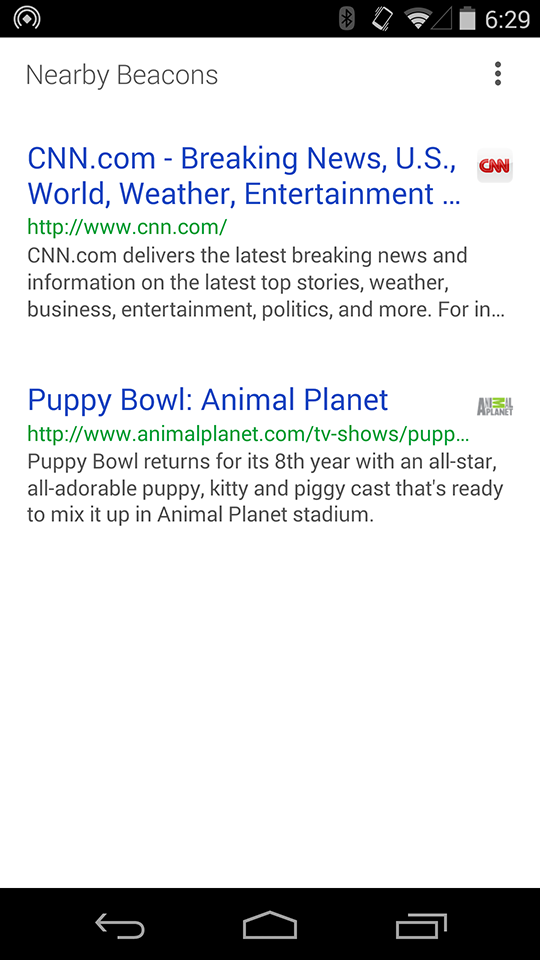
16 |
17 | It’s probable that you don't have any beacons configured at the moment, so you'll likely see an empty list in the above screen. So that brings us to the next flow which is configuration.
18 |
19 | Tap the over flow menu button in the top right corner (the vertical ellipsis thing). This brings up the menu. Tap "Edit Urls".
20 |
21 | 
22 |
23 | This opens the configuration screen that will start searching for beacons nearby that are ready to be configured.
24 |
25 | 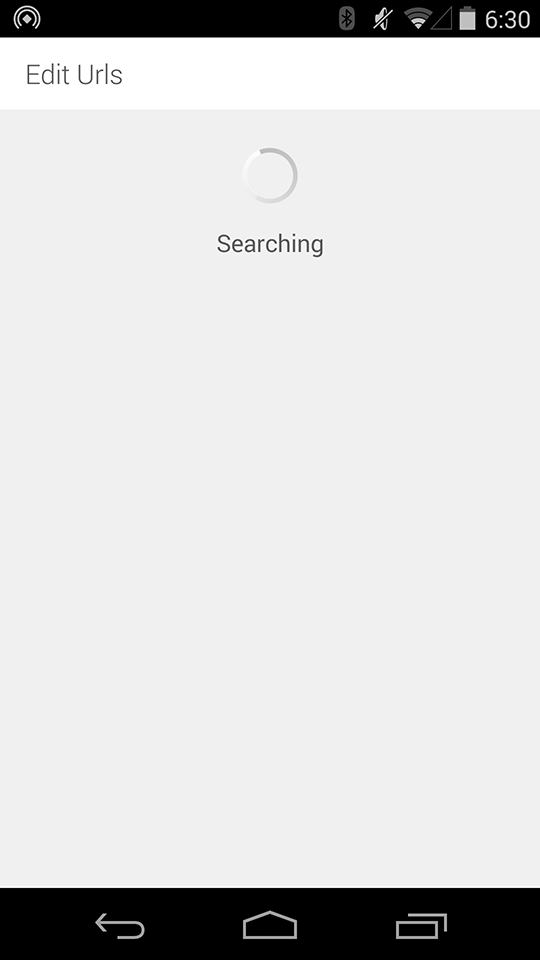
26 |
27 | To make a beacon configurable, press its button. It should beep. If all goes well, the app will have found the configurable beacon and tell you so. Sometimes this can be a little slow (but any longer than 3 seconds or so, just press the back button and then re-tap the "Edit Urls" menu button).
28 |
29 | 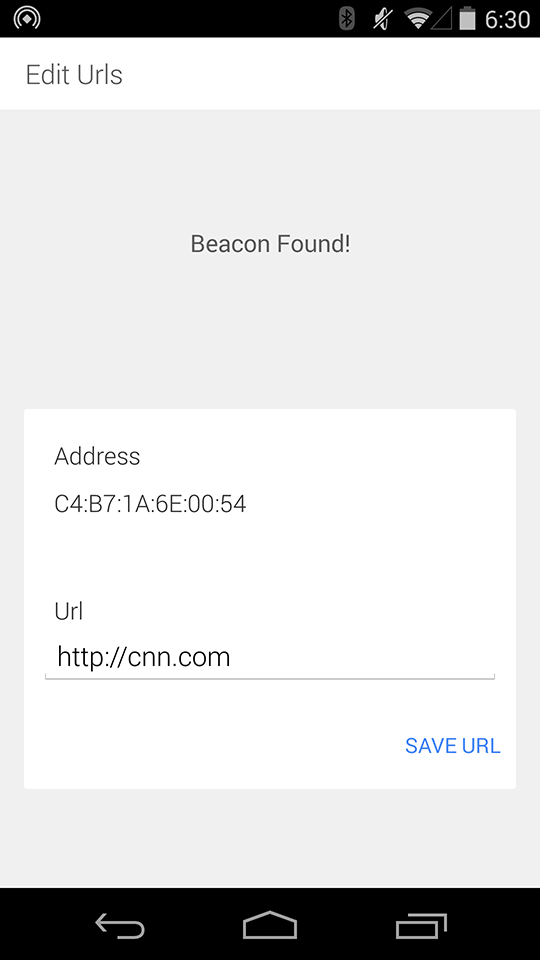
30 |
31 | Now you can enter a new url into the text field and press either the keyboard "DONE" button or exit the keyboard and tap "SAVE URL" to write that new url to the beacon. You should hear a confirmation beep from the beacon and also see a toast onscreen telling you that the url was saved to the beacon. You'll then be taken back to the list of nearby beacons that should update shortly with your newly programmed beacon.
32 |
33 | We started the first flow with the list of beacons, but really once the app is loaded it runs a background scanner (that turns off when your screen is off). This scanner creates a notification that indicates how many beacons have been found nearby, and hides the notification if that number is zero.
34 |
35 | 
36 |
37 | If you tap the notification, it will bring you back to the list of the nearby beacons, which you can then use to launch the various beacon urls or configure beacons as mentioned above.
38 |
39 | So that’s it! Happy Physical Webbing!
40 |
41 | Please note that this app has been targeting Android L release (21) and has been tested primarily on the Nexus 5.
42 |
--------------------------------------------------------------------------------
/web-service/static/index.html:
--------------------------------------------------------------------------------
1 |
2 |
3 |
17 |
18 |
19 |
20 |
21 |
49 |
50 |
51 |
52 |
Device List
53 |
54 |
/resolve-scan
55 |
Request Data
56 |
96 |
Request Data
97 |
98 |
99 |
100 |
Add Device
101 |
106 |
107 |
--------------------------------------------------------------------------------
/android/PhysicalWeb/app/src/main/res/layout/fragment_beacon_config.xml:
--------------------------------------------------------------------------------
1 |
8 |
9 |
18 |
19 |
25 |
26 |
35 |
36 |
46 |
47 |
56 |
57 |
66 |
67 |
77 |
78 |
86 |
87 |
98 |
99 |
100 |
101 |
102 |
103 |
--------------------------------------------------------------------------------
/android/PhysicalWeb/app/src/main/java/physical_web/org/physicalweb/UrlShortener.java:
--------------------------------------------------------------------------------
1 | /*
2 | * Copyright 2014 Google Inc. All rights reserved.
3 | *
4 | * Licensed under the Apache License, Version 2.0 (the "License");
5 | * you may not use this file except in compliance with the License.
6 | * You may obtain a copy of the License at
7 | *
8 | * http://www.apache.org/licenses/LICENSE-2.0
9 | *
10 | * Unless required by applicable law or agreed to in writing, software
11 | * distributed under the License is distributed on an "AS IS" BASIS,
12 | * WITHOUT WARRANTIES OR CONDITIONS OF ANY KIND, either express or implied.
13 | * See the License for the specific language governing permissions and
14 | * limitations under the License.
15 | */
16 |
17 | package physical_web.org.physicalweb;
18 |
19 | import android.os.AsyncTask;
20 | import android.util.Log;
21 | import com.google.api.client.extensions.android.http.AndroidHttp;
22 | import com.google.api.client.extensions.android.json.AndroidJsonFactory;
23 | import com.google.api.client.http.HttpTransport;
24 | import com.google.api.client.json.JsonFactory;
25 | import com.google.api.services.urlshortener.Urlshortener;
26 | import com.google.api.services.urlshortener.UrlshortenerRequestInitializer;
27 | import com.google.api.services.urlshortener.model.Url;
28 | import java.io.IOException;
29 | import java.util.concurrent.ExecutionException;
30 |
31 | /**
32 | * This class shortens urls
33 | * and aslo expands those short urls
34 | * to their original url.
35 | * Currently this class only supports google url shortener
36 | * TODO: support other url shorteners
37 | */
38 |
39 | public class UrlShortener {
40 |
41 | private static String TAG = "UrlShortener";
42 |
43 | /**
44 | * Create the shortened form
45 | * of the given url.
46 | *
47 | * @param longUrl
48 | * @return
49 | */
50 | public static String shortenUrl(String longUrl) {
51 | String shortUrl = null;
52 | try {
53 | shortUrl = (String) new ShortenUrlTask().execute(longUrl).get();
54 | } catch (InterruptedException e) {
55 | e.printStackTrace();
56 | } catch (ExecutionException e) {
57 | e.printStackTrace();
58 | }
59 | return shortUrl;
60 | }
61 |
62 | /**
63 | * Create a google url shortener interface object
64 | * and make a request to shorten the given url
65 | */
66 | private static class ShortenUrlTask extends AsyncTask {
67 | @Override
68 | protected String doInBackground(Object[] params) {
69 | String longUrl = (String) params[0];
70 | Urlshortener urlshortener = createGoogleUrlShortener();
71 | Url url = new Url();
72 | url.setLongUrl(longUrl);
73 | try {
74 | Url response = urlshortener.url().insert(url).execute();
75 | return response.getId();
76 | } catch (IOException e) {
77 | e.printStackTrace();
78 | }
79 | return null;
80 | }
81 | }
82 |
83 | /**
84 | * Create the shortened form
85 | * of the given url.
86 | * Currently uses google url shortener
87 | *
88 | * @param shortUrl
89 | * @return
90 | */
91 | public static String lengthenShortUrl(String shortUrl) {
92 | String longUrl = null;
93 | try {
94 | longUrl = (String) new LengthenShortUrlTask().execute(shortUrl).get();
95 | } catch (InterruptedException e) {
96 | e.printStackTrace();
97 | } catch (ExecutionException e) {
98 | e.printStackTrace();
99 | }
100 | return longUrl;
101 | }
102 |
103 | /**
104 | * Create a google url shortener interface object
105 | * and make a request to expand the given url
106 | */
107 |
108 | private static class LengthenShortUrlTask extends AsyncTask {
109 | @Override
110 | protected String doInBackground(Object[] params) {
111 | String shortUrl = (String) params[0];
112 | Urlshortener urlshortener = createGoogleUrlShortener();
113 | try {
114 | Url response = urlshortener.url().get(shortUrl).execute();
115 | return response.getLongUrl();
116 | } catch (IOException e) {
117 | e.printStackTrace();
118 | }
119 | return null;
120 | }
121 | }
122 |
123 | /**
124 | * Create an instance of the google url shortener object
125 | * and return it.
126 | *
127 | * @return
128 | */
129 | private static Urlshortener createGoogleUrlShortener() {
130 | HttpTransport httpTransport = AndroidHttp.newCompatibleTransport();
131 | JsonFactory jsonFactory = AndroidJsonFactory.getDefaultInstance();
132 | UrlshortenerRequestInitializer urlshortenerRequestInitializer = new UrlshortenerRequestInitializer();
133 | Urlshortener.Builder builder = new Urlshortener.Builder(httpTransport, jsonFactory, null);
134 | builder.setApplicationName("PhysicalWeb");
135 | builder.setUrlshortenerRequestInitializer(urlshortenerRequestInitializer).build();
136 | Urlshortener urlshortener = builder.build();
137 |
138 | return urlshortener;
139 | }
140 |
141 | /**
142 | * Check if the given url is a short url.
143 | *
144 | * @param url
145 | * @return
146 | */
147 | public static boolean isShortUrl(String url) {
148 | if (url.startsWith("http://goo.gl/") || url.startsWith("https://goo.gl/")) {
149 | return true;
150 | }
151 | return false;
152 | }
153 |
154 | }
155 |
--------------------------------------------------------------------------------
/android/PhysicalWeb/gradlew:
--------------------------------------------------------------------------------
1 | #!/usr/bin/env bash
2 |
3 | ##############################################################################
4 | ##
5 | ## Gradle start up script for UN*X
6 | ##
7 | ##############################################################################
8 |
9 | # Add default JVM options here. You can also use JAVA_OPTS and GRADLE_OPTS to pass JVM options to this script.
10 | DEFAULT_JVM_OPTS=""
11 |
12 | APP_NAME="Gradle"
13 | APP_BASE_NAME=`basename "$0"`
14 |
15 | # Use the maximum available, or set MAX_FD != -1 to use that value.
16 | MAX_FD="maximum"
17 |
18 | warn ( ) {
19 | echo "$*"
20 | }
21 |
22 | die ( ) {
23 | echo
24 | echo "$*"
25 | echo
26 | exit 1
27 | }
28 |
29 | # OS specific support (must be 'true' or 'false').
30 | cygwin=false
31 | msys=false
32 | darwin=false
33 | case "`uname`" in
34 | CYGWIN* )
35 | cygwin=true
36 | ;;
37 | Darwin* )
38 | darwin=true
39 | ;;
40 | MINGW* )
41 | msys=true
42 | ;;
43 | esac
44 |
45 | # For Cygwin, ensure paths are in UNIX format before anything is touched.
46 | if $cygwin ; then
47 | [ -n "$JAVA_HOME" ] && JAVA_HOME=`cygpath --unix "$JAVA_HOME"`
48 | fi
49 |
50 | # Attempt to set APP_HOME
51 | # Resolve links: $0 may be a link
52 | PRG="$0"
53 | # Need this for relative symlinks.
54 | while [ -h "$PRG" ] ; do
55 | ls=`ls -ld "$PRG"`
56 | link=`expr "$ls" : '.*-> \(.*\)$'`
57 | if expr "$link" : '/.*' > /dev/null; then
58 | PRG="$link"
59 | else
60 | PRG=`dirname "$PRG"`"/$link"
61 | fi
62 | done
63 | SAVED="`pwd`"
64 | cd "`dirname \"$PRG\"`/" >&-
65 | APP_HOME="`pwd -P`"
66 | cd "$SAVED" >&-
67 |
68 | CLASSPATH=$APP_HOME/gradle/wrapper/gradle-wrapper.jar
69 |
70 | # Determine the Java command to use to start the JVM.
71 | if [ -n "$JAVA_HOME" ] ; then
72 | if [ -x "$JAVA_HOME/jre/sh/java" ] ; then
73 | # IBM's JDK on AIX uses strange locations for the executables
74 | JAVACMD="$JAVA_HOME/jre/sh/java"
75 | else
76 | JAVACMD="$JAVA_HOME/bin/java"
77 | fi
78 | if [ ! -x "$JAVACMD" ] ; then
79 | die "ERROR: JAVA_HOME is set to an invalid directory: $JAVA_HOME
80 |
81 | Please set the JAVA_HOME variable in your environment to match the
82 | location of your Java installation."
83 | fi
84 | else
85 | JAVACMD="java"
86 | which java >/dev/null 2>&1 || die "ERROR: JAVA_HOME is not set and no 'java' command could be found in your PATH.
87 |
88 | Please set the JAVA_HOME variable in your environment to match the
89 | location of your Java installation."
90 | fi
91 |
92 | # Increase the maximum file descriptors if we can.
93 | if [ "$cygwin" = "false" -a "$darwin" = "false" ] ; then
94 | MAX_FD_LIMIT=`ulimit -H -n`
95 | if [ $? -eq 0 ] ; then
96 | if [ "$MAX_FD" = "maximum" -o "$MAX_FD" = "max" ] ; then
97 | MAX_FD="$MAX_FD_LIMIT"
98 | fi
99 | ulimit -n $MAX_FD
100 | if [ $? -ne 0 ] ; then
101 | warn "Could not set maximum file descriptor limit: $MAX_FD"
102 | fi
103 | else
104 | warn "Could not query maximum file descriptor limit: $MAX_FD_LIMIT"
105 | fi
106 | fi
107 |
108 | # For Darwin, add options to specify how the application appears in the dock
109 | if $darwin; then
110 | GRADLE_OPTS="$GRADLE_OPTS \"-Xdock:name=$APP_NAME\" \"-Xdock:icon=$APP_HOME/media/gradle.icns\""
111 | fi
112 |
113 | # For Cygwin, switch paths to Windows format before running java
114 | if $cygwin ; then
115 | APP_HOME=`cygpath --path --mixed "$APP_HOME"`
116 | CLASSPATH=`cygpath --path --mixed "$CLASSPATH"`
117 |
118 | # We build the pattern for arguments to be converted via cygpath
119 | ROOTDIRSRAW=`find -L / -maxdepth 1 -mindepth 1 -type d 2>/dev/null`
120 | SEP=""
121 | for dir in $ROOTDIRSRAW ; do
122 | ROOTDIRS="$ROOTDIRS$SEP$dir"
123 | SEP="|"
124 | done
125 | OURCYGPATTERN="(^($ROOTDIRS))"
126 | # Add a user-defined pattern to the cygpath arguments
127 | if [ "$GRADLE_CYGPATTERN" != "" ] ; then
128 | OURCYGPATTERN="$OURCYGPATTERN|($GRADLE_CYGPATTERN)"
129 | fi
130 | # Now convert the arguments - kludge to limit ourselves to /bin/sh
131 | i=0
132 | for arg in "$@" ; do
133 | CHECK=`echo "$arg"|egrep -c "$OURCYGPATTERN" -`
134 | CHECK2=`echo "$arg"|egrep -c "^-"` ### Determine if an option
135 |
136 | if [ $CHECK -ne 0 ] && [ $CHECK2 -eq 0 ] ; then ### Added a condition
137 | eval `echo args$i`=`cygpath --path --ignore --mixed "$arg"`
138 | else
139 | eval `echo args$i`="\"$arg\""
140 | fi
141 | i=$((i+1))
142 | done
143 | case $i in
144 | (0) set -- ;;
145 | (1) set -- "$args0" ;;
146 | (2) set -- "$args0" "$args1" ;;
147 | (3) set -- "$args0" "$args1" "$args2" ;;
148 | (4) set -- "$args0" "$args1" "$args2" "$args3" ;;
149 | (5) set -- "$args0" "$args1" "$args2" "$args3" "$args4" ;;
150 | (6) set -- "$args0" "$args1" "$args2" "$args3" "$args4" "$args5" ;;
151 | (7) set -- "$args0" "$args1" "$args2" "$args3" "$args4" "$args5" "$args6" ;;
152 | (8) set -- "$args0" "$args1" "$args2" "$args3" "$args4" "$args5" "$args6" "$args7" ;;
153 | (9) set -- "$args0" "$args1" "$args2" "$args3" "$args4" "$args5" "$args6" "$args7" "$args8" ;;
154 | esac
155 | fi
156 |
157 | # Split up the JVM_OPTS And GRADLE_OPTS values into an array, following the shell quoting and substitution rules
158 | function splitJvmOpts() {
159 | JVM_OPTS=("$@")
160 | }
161 | eval splitJvmOpts $DEFAULT_JVM_OPTS $JAVA_OPTS $GRADLE_OPTS
162 | JVM_OPTS[${#JVM_OPTS[*]}]="-Dorg.gradle.appname=$APP_BASE_NAME"
163 |
164 | exec "$JAVACMD" "${JVM_OPTS[@]}" -classpath "$CLASSPATH" org.gradle.wrapper.GradleWrapperMain "$@"
165 |
--------------------------------------------------------------------------------
/documentation/technical_overview.md:
--------------------------------------------------------------------------------
1 | ##Technical Overview
2 | This is a prototype system being used to understand and explore the issues involved in building the Physical Web.
3 |
4 | ###Broadcast
5 | The current design uses Bluetooth Low Energy (BLE) devices that broadcast the URL in the advertising packet. In this broadcast mode, it doesn't do anything else such as respond to requests. The sole job of the device is to broadcast the URL to the surrounding area.
6 |
7 | The reason is to accommodate potentially the worst case scenario of a large numbers of devices in an area with a large amount of people. A broadcast only approach avoids an n-squared problem of every user connecting to every device. By making each device constantly broadcast, any number of devices can just pick up the information passively with little conflict.
8 |
9 | This has another advantage in that it means that a user can walk through a space and leave no trace: the broadcasting devices have no idea who is listening.
10 |
11 | The current prototype broadcasts once every second, striking a balance between user response time and battery life. There is nothing stopping a device from broadcasting faster if they wish.
12 |
13 | ###BLE Format
14 | The URL is stored in the advertising packet of a BLE device. The packet identifies itself with a 16 bit Service UUID of 0xFED8 which indicates the beacon is a "URI Device". The exact layout of the packet is:
15 |
16 | 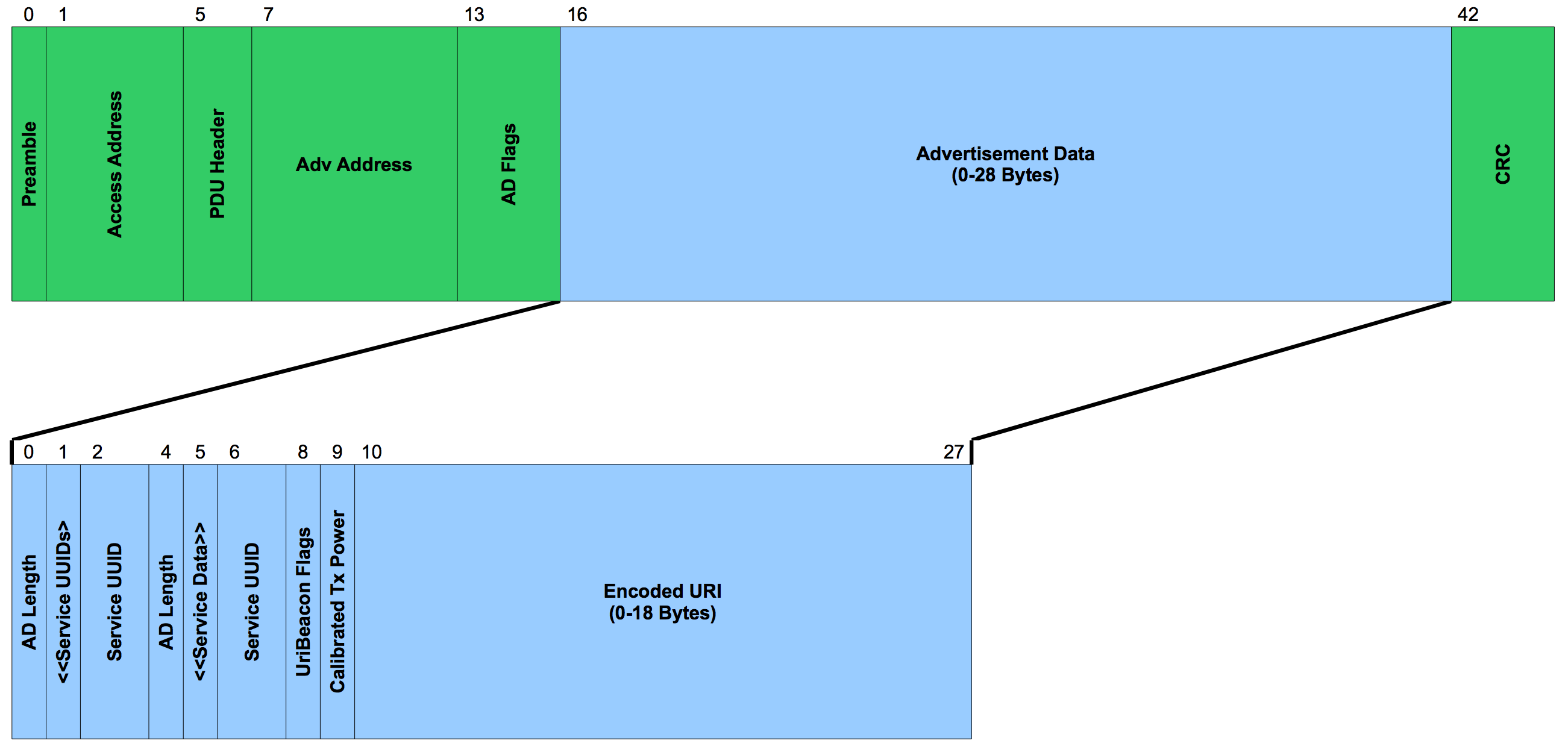
17 |
18 | The specific fields for this packet are as follows:
19 |
20 | | FieldName | Offset | Size | Format | Description |
21 | |--------------|----------|--------|-------------|-----------------------------------------------------------------|
22 | | **AD Length** | 0 | 1 | 8-bit value | 5..23 |
23 | | **AD Type** | 1 | 1 | 8-bit value | Service Data = 0x16 |
24 | | **Service ID** | 2 | 2 | 16-bit UUID | URI = 0xFED8 |
25 | | **Flags** | 4 | 1 | 8-bit value | See spec |
26 | | **TX Power** | 5 | 1 | 8-bit value | See spec |
27 | | **URI field** | 6 | 1..18 | octets | The US-ASCII text of the URI with embedded Text Expansion Codes |
28 |
29 | This does not, however, leave a lot of room for the text of the URL. This is one of tradeoffs that comes from avoiding any connections to the beacon (to ensure no user tracking can occur) URLs are encoded so common patterns like 'htttp://www.' and '.com' can be compressed into a single character. This is very similar to what QRCodes use to encode their URLs. In addition, we expect initial testers will either use short domains or a URL shortener. Both the android and iOS apps do this automatically when a URL is typed in that is too long to fit.
30 |
31 | A GATT service that would allow the URL to be of any arbitrary length, is under consideration. This will be posted shortly for further community discussion.
32 |
33 | This is just a quick description to show the structure of the ad packet. It is documented in a related GitHub project, the URIBecon specification. This repo will go live shortly.
34 |
35 | ###Client
36 | The current client is an application to prove out the technology. If you open the app, it lists the nearby beacons that it can see, sorted by signal strength. Note the signal strength is a very iffy metric as it there many reasons why it can vary. However, if you are standing in front of device and the next device is >5 feet away, it tends to work out well in practice. This is the primary reason we include a TX_POWER byte in the ad packet so it's possible to calculate signal loss and rank different strength beacons.
37 |
38 | The client lists the meta information from the URL: TITLE, DESCRIPTION, URL, and FAVICON. These could be pulled at run time but there is a simple proxy server that acts as a cache to speed up this process.
39 |
40 | ###Server
41 | The server receives a request from the client with all of the URLs found and returns a JSON data structure listing all of the meta information listed about. The current prototype collects no user data, only returning the casched info. However alternative implementations could keep track of user choice and use that to help change the ranking within the client. The server isn't required but greatly simplifies the work on the client side.
42 |
43 | ###Meta Data
44 | In order to use URLs, the system expects those URLs to point to a web page, which offers up the meta information described above. This somewhat limits the URLs as they much then always point to a valid HTML page. This is likely a big limitation to URLs that want to link to native applications. This is an imporant use case and needs to be discussed. Is there an alternative way to offer this meta data but not point to a web page?
45 |
46 | ###Ranking
47 | As more devices are found, the importance of ranking the devices becomes more valuable. Sorting only be signal strength is a good start but the server could do a much better job in two ways. The first would be to track which URLs are clicked as that implies value, so higher used URLs could be ranked higher. In addition, the server could track personal use so if you tend to pick the same device at work, it would be sure to rank the device higher as well.
48 |
49 | ### Security
50 | At this point, the URL is broadcast as plain text so it is not really viable for personal use (as neighbors could know what devices you have in your home) However, the advantage of URLs is that there several potential solutions that would help this. There is nothing stopping a beacon from delivering an obfuscated URL or even a URL that requires login in order to see the information.
51 |
--------------------------------------------------------------------------------
/android/PhysicalWeb/app/src/main/java/physical_web/org/physicalweb/BeaconHelper.java:
--------------------------------------------------------------------------------
1 | /*
2 | * Copyright 2014 Google Inc. All rights reserved.
3 | *
4 | * Licensed under the Apache License, Version 2.0 (the "License");
5 | * you may not use this file except in compliance with the License.
6 | * You may obtain a copy of the License at
7 | *
8 | * http://www.apache.org/licenses/LICENSE-2.0
9 | *
10 | * Unless required by applicable law or agreed to in writing, software
11 | * distributed under the License is distributed on an "AS IS" BASIS,
12 | * WITHOUT WARRANTIES OR CONDITIONS OF ANY KIND, either express or implied.
13 | * See the License for the specific language governing permissions and
14 | * limitations under the License.
15 | */
16 |
17 | package physical_web.org.physicalweb;
18 |
19 | import java.io.ByteArrayOutputStream;
20 | import java.io.IOException;
21 |
22 | /**
23 | * This class contains a variety of methods
24 | * that are used to parse ble advertising packets,
25 | * detect beacon existence from that parsing,
26 | * afford url expansion codes when creating url byte arrays,
27 | * and create instances of beacons.
28 | */
29 | public class BeaconHelper {
30 |
31 | private static String TAG = "BeaconHelper";
32 | private static String[] EXPANSION_CODES_TO_TEXT_MAP = new String[]{"http://www.", "https://www.", "http://", "https://", "tel:", "mailto:", "geo:", ".com", ".org", ".edu"};
33 | private static int MAX_NUM_BYTES_URL = 18;
34 | private static byte[] ADVERTISING_PACKET_HEADER = new byte[]{(byte) 0x03, (byte) 0x03, (byte) 0xD8, (byte) 0xFE};
35 | private static byte[] URI_SERVICE_DATA_HEADER = new byte[]{(byte) 0x16, (byte) 0xD8, (byte) 0xFE, (byte) 0x00, (byte) 0x20};
36 |
37 | /**
38 | * Create a beacon advertising packet
39 | * that will contain the given url.
40 | *
41 | * @param url
42 | * @return
43 | * @throws IOException
44 | */
45 | public static byte[] createAdvertisingPacket(String url) throws IOException {
46 | ByteArrayOutputStream outputStream = new ByteArrayOutputStream();
47 | byte[] url_bytes = createUrlBytes(url);
48 | byte length = (byte) (URI_SERVICE_DATA_HEADER.length + url_bytes.length);
49 | outputStream.write(ADVERTISING_PACKET_HEADER);
50 | outputStream.write(length);
51 | outputStream.write(URI_SERVICE_DATA_HEADER);
52 | outputStream.write(url_bytes);
53 | return outputStream.toByteArray();
54 | }
55 |
56 | /**
57 | * Create the byte array that represents the given url.
58 | * This process first compresses the url using the expansion codes.
59 | * Then if the url is still too long, we shorten it
60 | * with a url shortener.
61 | * Then we compress that url using the expansion codes again.
62 | *
63 | * @param url
64 | * @return
65 | * @throws IOException
66 | */
67 | public static byte[] createUrlBytes(String url) throws IOException {
68 | byte[] url_bytes;
69 | url_bytes = compressUrlUsingExpansionCodes(url);
70 | if (url_bytes.length > MAX_NUM_BYTES_URL) {
71 | String url_shortened = UrlShortener.shortenUrl(url);
72 | url_bytes = compressUrlUsingExpansionCodes(url_shortened);
73 | }
74 | return url_bytes;
75 | }
76 |
77 | /**
78 | * Compress the given url by looking for
79 | * a hardcoded set of substrings (e.g. http://, .edu, etc.)
80 | * and replacing them with an associated integer.
81 | *
82 | * @param url
83 | * @return
84 | * @throws IOException
85 | */
86 | private static byte[] compressUrlUsingExpansionCodes(String url) throws IOException {
87 | // Specify the characters that will be used
88 | // to tag where expansion codes are needed and inserted
89 | String splitChar = ":";
90 | String codeIndicatorChar = "#";
91 | // Loop through the expansion substrings
92 | // to search for in the url
93 | for (int i = 0; i < EXPANSION_CODES_TO_TEXT_MAP.length; i++) {
94 | String text = EXPANSION_CODES_TO_TEXT_MAP[i];
95 | // If the url contains this substring
96 | if (url.contains(text)) {
97 | // Replace the substring in the url with the associated integer code,
98 | // place a code indicator character directly preceding the code,
99 | // and flank the code indicator and code by split characters
100 | // so we know which integers are expansion codes
101 | String replacementText = splitChar + codeIndicatorChar + String.valueOf(i) + splitChar;
102 | url = url.replace(text, replacementText);
103 | }
104 | }
105 |
106 | ByteArrayOutputStream outputStream = new ByteArrayOutputStream();
107 | // Split the url up by the split character
108 | String[] url_split = url.split(splitChar);
109 | // Loop through the substring in the split array
110 | for (int j = 0; j < url_split.length; j++) {
111 | String subString = url_split[j];
112 | // If the given substring contains the
113 | // code indicator character
114 | // (i.e. if there is an expansion code)
115 | if (subString.contains(codeIndicatorChar)) {
116 | // Remove the indicator and get the integer value of that code
117 | int code = Integer.valueOf(subString.replace(codeIndicatorChar, ""));
118 | // Write the code to the output stream
119 | outputStream.write((byte) code);
120 | // If the given substring does not contain the
121 | // code indicator character
122 | // (i.e. if there is no expansion code)
123 | } else {
124 | // Write the substring to the output stream
125 | outputStream.write(subString.getBytes());
126 | }
127 | }
128 | //get the byte array for the output stream
129 | byte[] url_bytes = outputStream.toByteArray();
130 |
131 | return url_bytes;
132 | }
133 |
134 | public static boolean urlRequiresShortening(String url) throws IOException {
135 | byte[] url_bytes = createUrlBytes(url);
136 | if (url_bytes.length > MAX_NUM_BYTES_URL) {
137 | return true;
138 | }
139 | return false;
140 | }
141 |
142 | }
143 |
144 |
145 |
--------------------------------------------------------------------------------
/documentation/introduction.md:
--------------------------------------------------------------------------------
1 | ##The Big Idea
2 | The Physical Web extends the web we know into the physical world around us. This involves creating an open ecosystem where smart devices can broadcast URLs into the area around them. Any nearby display such as a phone or tablet can then see these URLs and offer them up to the user. It mirrors the basic behavior we have today with a search engine:
3 |
4 | * The user requests a list of what's nearby.
5 | * A ranked list of URLs is shown.
6 | * The user picks one.
7 | * The URL is opened in a full screen browser window.
8 |
9 | 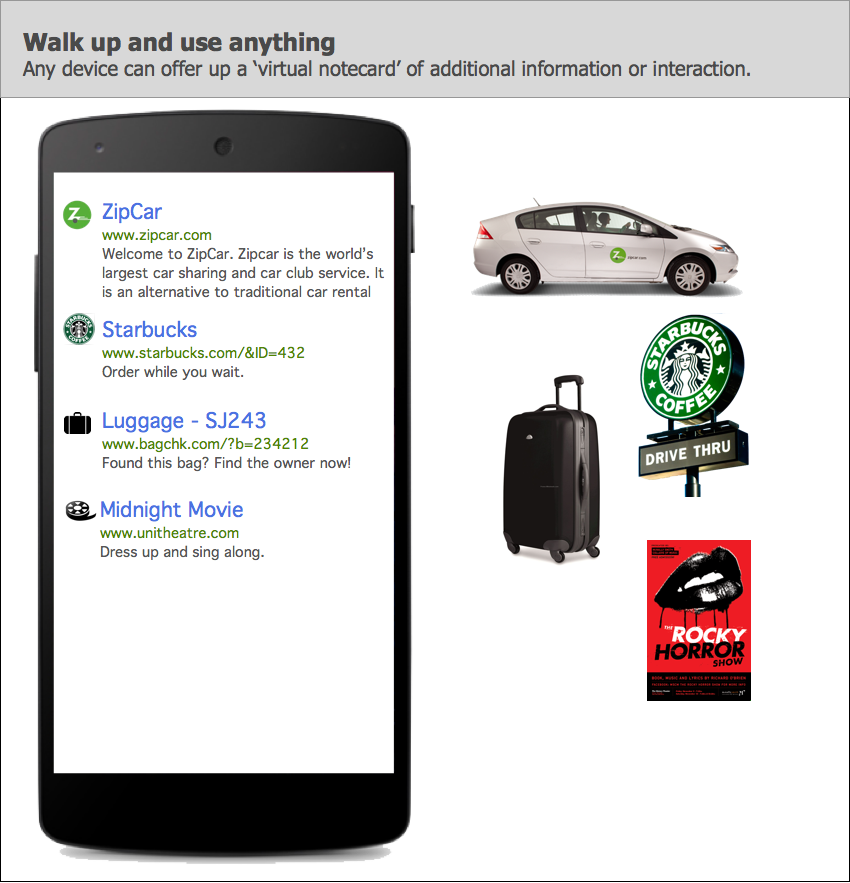
10 |
11 | Even though this is a fairly simple idea, it immediately generates lots of questions:
12 |
13 | ##0. Wait, why are you an app?
14 | This is an early prototype. We are trying get people to experiment with this at an early stage. Of course, this should be built into the operating system of all smartphones (and tablets and anything with a screen really). We are building an app for now that tries to not feel like an app. It works in the background so you don't need to use it actively. It just silently monitors beacons that you can browse when you're intererested.
15 |
16 | ##1. Will you be pestering people with alarms?
17 | A core principle of this system is **no proactive notifications**. The user will only see a list of nearby devices when they ask. If your phone were to be buzzing constantly as you walked through the mall, it would be very frustrating. Push notifications in general are too easily abused. Of course, the user can opt-in to notifications, we are just saying that by default, the user must ask to see anything nearby.
18 |
19 | ##2. Isn't there going to be a big list to choose from?
20 | At first, the nearby smart devices will be small but if we're successful, there will be many to choose from and that raises an important UX issue. This is where ranking comes in. Today, we are perfectly happy typing "tennis" into a search engine and getting millions of results back, we trust that the first 10 are the best ones. The same applies here. The phone agent can sort by both signal strength as well as personal preference and history, among many other possible factors. Clearly there is lots of work to be done here. We don't want to minimize this task, but we feel that this simple signal strength ranking can get us very far for the first few versions of this project.
21 |
22 | ##3. Is this secure/private?
23 | URLs broadcast in the clear so anyone can see them. This is by design. That is why we're initially suggesting this to be used in public spaces. This does raise issues for home use where it would be possible for neighbors to intercept beacons. However, one the big advatages of URLs is that there are so many ways they can be used to increase their security:
24 |
25 | * The URL could be obfuscated (e.g. using a non-branded doman)
26 | * The web page could require a login
27 | * A rotating token on the beacon would constantly change the URL
28 |
29 | One of the big values of URLs is that they are so flexible and encourage this further evolution.
30 |
31 | ##4. What about SPAM?
32 | With any system, there will be people that try to exploit it. There will likely be many solutions around this problem but again, we can start with the web. Search engines today have this issue and are fairly effective and displaying the correct web sites in your search results. That same approach would apply here. Combine that with historical results of who clicks on what and it's possible to build a fairly robust ranking model and only show the proper devices. However, there is likely much more we can do here and we hope to encourage other ideas on how to solve this problem in a more robust way.
33 |
34 | ##5. Why URLs?
35 | The value of a URL is that it is a known part of the web, very flexible, and most importantly, decentralized. URLs allow anyone to play and no central server to be the bottleneck. This is one of the core principles of the web and critical to keep alive.
36 |
37 | That being said, we completely expect others to experiment with a url+ID model that goes through their server (e.g. safeurls.com/?id=12345). That is perfectly acceptable and to be encouraged. Systems like that are likely to provide much better security and vetting of sites. But that is the beauty of URLs, there can be as many of these as you'd like and the system still works seamlessly.
38 |
39 | ##6. Which platforms will you support?
40 | This is meant to be an extension of the web so it should work on every platform. We expect that each platform will experiment with a different UX to show the nearby devices. For example, the current Android app uses notifications while the iOS app will use lock screen notifications. We hope to see lots of experimentation here on how various platforms choose to show and rank this information.
41 |
42 | At this point, we have both an Android and iOS app that is open source. We hope this will be used and ported to other platforms.
43 |
44 | ##7. Can't the user be tracked?
45 | Our current URL broadcast method involves a bluetooth broadcast from each beacon. The user's phone gathers this info without connecting to the beacon. This ensures the user is invisible to all beacons, meaning a user can't be tracked simply by walking past a broadcasting beacon. This was very much by design to keep users silent passage untrackable. However, once the user does click on a URL, they are then known to that website.
46 |
47 | The search agent on the phone may keep track of which devices the user taps on so they can improve the ranking in the future. Of course, this too needs to be discussed and then possibly offered to the user as an option so they are in control of how this information is stored.
48 |
49 | ##8. Why Bluetooth Low Energy?
50 | There are many possible ways to broadcast a URL. This initial version uses Bluetooth Low Energy (BLE) as it is so ubiquitous on mobile phones and tablets today. This should not be the only wireless solution but it is the easiest to use at the moment so we can experiment and prototype this system.
51 |
52 | ##Next
53 | The next suggested document to read would be the technical [overview](http://github.com/google/physical-web/blob/master/documentation/technical_overview.md) document
54 |
--------------------------------------------------------------------------------
/android/PhysicalWeb/app/src/main/res/layout/list_item_nearby_device.xml:
--------------------------------------------------------------------------------
1 |
2 |
3 |
12 |
13 |
14 |
18 |
19 |
24 |
34 |
35 |
45 |
46 |
47 |
48 |
54 |
60 |
61 |
62 |
63 |
64 |
65 |
68 |
80 |
81 |
82 |
83 |
84 |
85 |
86 |
--------------------------------------------------------------------------------
/android/PhysicalWeb/app/src/main/java/physical_web/org/physicalweb/MainActivity.java:
--------------------------------------------------------------------------------
1 | /*
2 | * Copyright 2014 Google Inc. All rights reserved.
3 | *
4 | * Licensed under the Apache License, Version 2.0 (the "License");
5 | * you may not use this file except in compliance with the License.
6 | * You may obtain a copy of the License at
7 | *
8 | * http://www.apache.org/licenses/LICENSE-2.0
9 | *
10 | * Unless required by applicable law or agreed to in writing, software
11 | * distributed under the License is distributed on an "AS IS" BASIS,
12 | * WITHOUT WARRANTIES OR CONDITIONS OF ANY KIND, either express or implied.
13 | * See the License for the specific language governing permissions and
14 | * limitations under the License.
15 | */
16 |
17 | package physical_web.org.physicalweb;
18 |
19 | import android.app.Activity;
20 | import android.app.ActivityManager;
21 | import android.bluetooth.BluetoothAdapter;
22 | import android.bluetooth.BluetoothManager;
23 | import android.content.Context;
24 | import android.content.Intent;
25 | import android.os.Bundle;
26 | import android.util.Log;
27 | import android.view.*;
28 | import java.util.List;
29 |
30 | /**
31 | * The main entry point for the app.
32 | */
33 |
34 | public class MainActivity extends Activity {
35 |
36 | private static String TAG = "MainActivity";
37 | private static String SERVICE_NAME_DEVICE_DISCOVERY = "BeaconDiscoveryService";
38 | private int REQUEST_ENABLE_BT = 0;
39 |
40 | @Override
41 | protected void onCreate(Bundle savedInstanceState) {
42 | super.onCreate(savedInstanceState);
43 | setContentView(R.layout.activity_main);
44 |
45 | if (savedInstanceState == null) {
46 | showNearbyBeaconsFragment();
47 | }
48 |
49 | initialize();
50 |
51 | String shortUrl = "http://goo.gl/3fs9";
52 | String longUrl = UrlShortener.lengthenShortUrl(shortUrl);
53 | Log.d(TAG, "zzzzzzzzzzzzzzzzzzzzzzzzzz" + longUrl);
54 | }
55 |
56 | private void showNearbyBeaconsFragment() {
57 | getFragmentManager().beginTransaction()
58 | .add(R.id.homeScreen_container, NearbyDevicesFragment.newInstance())
59 | .commit();
60 | }
61 |
62 | private void initialize() {
63 | Log.d(TAG, "<<<<<<<<<<<< MainActivity initialize >>>>>>>>>>>>");
64 |
65 | initializeActionBar();
66 | ensureBluetoothIsEnabled();
67 | stopDeviceDiscoveryService();
68 | startBeaconDiscoveryService();
69 | }
70 |
71 | /**
72 | * Setup the action bar at the top of the screen.
73 | */
74 | private void initializeActionBar() {
75 | getActionBar().setTitle(getString(R.string.title_nearby_beacons));
76 | }
77 |
78 | /**
79 | * Ensures Bluetooth is available on the beacon and it is enabled. If not,
80 | * displays a dialog requesting user permission to enable Bluetooth.
81 | */
82 | private void ensureBluetoothIsEnabled() {
83 | BluetoothManager bluetoothManager = (BluetoothManager) getSystemService(Context.BLUETOOTH_SERVICE);
84 | BluetoothAdapter bluetoothAdapter = bluetoothManager.getAdapter();
85 | if (bluetoothAdapter == null || !bluetoothAdapter.isEnabled()) {
86 | Intent enableBtIntent = new Intent(BluetoothAdapter.ACTION_REQUEST_ENABLE);
87 | startActivityForResult(enableBtIntent, REQUEST_ENABLE_BT);
88 | }
89 | }
90 |
91 | /**
92 | * Check if the service that tracks
93 | * currently available beacons is running.
94 | */
95 | private boolean checkIfBeaconDiscoveryServiceIsRunning() {
96 | ActivityManager activityManager = (ActivityManager) getSystemService(ACTIVITY_SERVICE);
97 | List RunningServiceInfos = activityManager.getRunningServices(Integer.MAX_VALUE);
98 | for (ActivityManager.RunningServiceInfo runningServiceInfo : RunningServiceInfos) {
99 | if (runningServiceInfo.service.getClassName().equals(SERVICE_NAME_DEVICE_DISCOVERY)) {
100 | return true;
101 | }
102 | }
103 | return false;
104 | }
105 |
106 |
107 | /////////////////////////////////
108 | // accessors
109 | /////////////////////////////////
110 |
111 |
112 | /////////////////////////////////
113 | // callbacks
114 | /////////////////////////////////
115 |
116 | @Override
117 | public boolean onCreateOptionsMenu(Menu menu) {
118 | // Inflate the menu; this adds items to the action bar if it is present.
119 | getMenuInflater().inflate(R.menu.main, menu);
120 | return true;
121 | }
122 |
123 | @Override
124 | public boolean onPrepareOptionsMenu(Menu menu) {
125 | super.onPrepareOptionsMenu(menu);
126 | menu.findItem(R.id.action_config).setVisible(true);
127 | menu.findItem(R.id.action_about).setVisible(true);
128 | return true;
129 | }
130 |
131 | /**
132 | * Called when a menu item is tapped.
133 | */
134 | @Override
135 | public boolean onOptionsItemSelected(MenuItem item) {
136 | switch (item.getItemId()) {
137 | // If the configuration menu item was selected
138 | case R.id.action_config:
139 | handleActionConfigMenuItemSelected();
140 | return true;
141 | // If the about menu item was selected
142 | case R.id.action_about:
143 | handleActionAboutMenuItemSelected();
144 | }
145 | return super.onOptionsItemSelected(item);
146 | }
147 |
148 |
149 | /////////////////////////////////
150 | // utilities
151 | /////////////////////////////////
152 |
153 | /**
154 | * Stop the beacon discovery service from running.
155 | */
156 | private void stopDeviceDiscoveryService() {
157 | Intent intent = new Intent(this, DeviceDiscoveryService.class);
158 | stopService(intent);
159 | }
160 |
161 | /**
162 | * Start up the BeaconDiscoveryService
163 | */
164 | private void startBeaconDiscoveryService() {
165 | if (!checkIfBeaconDiscoveryServiceIsRunning()) {
166 | Intent intent = new Intent(this, DeviceDiscoveryService.class);
167 | startService(intent);
168 | }
169 | }
170 |
171 | /**
172 | * Do a list of actions, given that
173 | * the config menu item was tapped.
174 | */
175 | private void handleActionConfigMenuItemSelected() {
176 | // Show the config ui
177 | showBeaconConfigFramgent();
178 | }
179 |
180 | /**
181 | * Show the ui for configuring a beacon,
182 | * which is a fragment.
183 | */
184 | private void showBeaconConfigFramgent() {
185 | BeaconConfigFragment beaconConfigFragment = BeaconConfigFragment.newInstance();
186 | getFragmentManager().beginTransaction()
187 | .setCustomAnimations(R.anim.fade_in_and_slide_up_fragment, R.anim.fade_out_fragment, R.anim.fade_in_activity, R.anim.fade_out_fragment)
188 | .replace(R.id.main_activity_container, beaconConfigFragment)
189 | .addToBackStack(null)
190 | .commit();
191 | }
192 |
193 | private void handleActionAboutMenuItemSelected() {
194 | // Show the about ui
195 | showAboutFragment();
196 | }
197 |
198 | private void showAboutFragment() {
199 | AboutFragment aboutFragment = AboutFragment.newInstance();
200 | getFragmentManager().beginTransaction()
201 | .setCustomAnimations(R.anim.fade_in_and_slide_up_fragment, R.anim.fade_out_fragment, R.anim.fade_in_activity, R.anim.fade_out_fragment)
202 | .replace(R.id.main_activity_container, aboutFragment)
203 | .addToBackStack(null)
204 | .commit();
205 | }
206 |
207 | }
208 |
--------------------------------------------------------------------------------
/android/PhysicalWeb/app/src/main/java/physical_web/org/physicalweb/NearbyDevicesAdapter.java:
--------------------------------------------------------------------------------
1 | /*
2 | * Copyright 2014 Google Inc. All rights reserved.
3 | *
4 | * Licensed under the Apache License, Version 2.0 (the "License");
5 | * you may not use this file except in compliance with the License.
6 | * You may obtain a copy of the License at
7 | *
8 | * http://www.apache.org/licenses/LICENSE-2.0
9 | *
10 | * Unless required by applicable law or agreed to in writing, software
11 | * distributed under the License is distributed on an "AS IS" BASIS,
12 | * WITHOUT WARRANTIES OR CONDITIONS OF ANY KIND, either express or implied.
13 | * See the License for the specific language governing permissions and
14 | * limitations under the License.
15 | */
16 |
17 | package physical_web.org.physicalweb;
18 |
19 | import android.app.Activity;
20 | import android.util.Log;
21 | import android.view.View;
22 | import android.view.ViewGroup;
23 | import android.widget.BaseAdapter;
24 | import android.widget.ImageView;
25 | import android.widget.TextView;
26 | import org.uribeacon.beacon.UriBeacon;
27 | import org.uribeacon.scan.compat.ScanResult;
28 | import java.util.ArrayList;
29 | import java.util.Collections;
30 | import java.util.Comparator;
31 | import java.util.HashMap;
32 | import java.util.List;
33 |
34 |
35 | /**
36 | * This class is responsible for
37 | * displaying the list of nearby devices.
38 | */
39 |
40 | public class NearbyDevicesAdapter extends BaseAdapter {
41 | private static String TAG = "NearbyDevicesAdapter";
42 | private HashMap mDeviceAddressToDeviceMap;
43 | private List mSortedDevices;
44 | private Activity mActivity;
45 |
46 | NearbyDevicesAdapter(Activity activity) {
47 | mActivity = activity;
48 | mDeviceAddressToDeviceMap = new HashMap<>();
49 | mSortedDevices = null;
50 | }
51 |
52 |
53 | /////////////////////////////////
54 | // accessors
55 | /////////////////////////////////
56 |
57 | @Override
58 | public int getCount() {
59 | return mDeviceAddressToDeviceMap.size();
60 | }
61 |
62 | @Override
63 | public Device getItem(int position) {
64 | sortDevices();
65 | return mSortedDevices.get(position);
66 | }
67 |
68 | @Override
69 | public long getItemId(int position) {
70 | return position;
71 | }
72 |
73 | /**
74 | * Build out the given view for the given position.
75 | * The view content is taken from the metadata
76 | * for the device at the given position in the list.
77 | *
78 | * @param position
79 | * @param view
80 | * @param viewGroup
81 | * @return
82 | */
83 | @Override
84 | public View getView(int position, View view, ViewGroup viewGroup) {
85 | // Get the list view item for the given position
86 | if (view == null) {
87 | view = mActivity.getLayoutInflater().inflate(R.layout.list_item_nearby_device, viewGroup, false);
88 | }
89 | // Get the device for the given position
90 | Device device = getItem(position);
91 |
92 | // Get the metadata for this device
93 | MetadataResolver.DeviceMetadata deviceMetadata = device.getMetadata();
94 |
95 | // If the metadata exists
96 | if (deviceMetadata != null) {
97 | // Set the title text
98 | TextView infoView = (TextView) view.findViewById(R.id.title);
99 | infoView.setText(deviceMetadata.title);
100 |
101 | // Set the site url text
102 | infoView = (TextView) view.findViewById(R.id.url);
103 | infoView.setText(deviceMetadata.siteUrl);
104 |
105 | // Set the description text
106 | infoView = (TextView) view.findViewById(R.id.description);
107 | infoView.setText(deviceMetadata.description);
108 |
109 | // Set the favicon image
110 | ImageView iconView = (ImageView) view.findViewById(R.id.icon);
111 | iconView.setImageBitmap(deviceMetadata.icon);
112 |
113 | // If the metadata does not exist
114 | } else {
115 | Log.i(TAG, String.format("Beacon with URL %s has no metadata.", device.getUriBeacon().getUriString()));
116 | }
117 | return view;
118 | }
119 |
120 |
121 | /////////////////////////////////
122 | // utilities
123 | /////////////////////////////////
124 |
125 | public Device handleFoundDevice(ScanResult scanResult) {
126 | Device newDevice = null;
127 | // Try to create a UriBeacon object using the scan record
128 | UriBeacon uriBeacon = UriBeacon.parseFromBytes(scanResult.getScanRecord().getBytes());
129 | // If this device is a beacon
130 | if (uriBeacon != null) {
131 | //Log.i(TAG, String.format("onLeScan: %s, RSSI: %d", scanResult.getDevice().getAddress(), scanResult.getRssi));
132 |
133 | // Try to get a stored nearby device that matches this device
134 | Device existingDevice = mDeviceAddressToDeviceMap.get(scanResult.getDevice().getAddress());
135 |
136 | // If no match was found (i.e. if this a newly discovered device)
137 | if (existingDevice == null) {
138 | // Create a new device sighting
139 | newDevice = new Device(uriBeacon, scanResult.getDevice(), scanResult.getRssi());
140 | // Add it to the stored map
141 | addDevice(newDevice);
142 | }
143 | else {
144 | // Update the time this device was last seen
145 | updateDevice(existingDevice, scanResult.getRssi());
146 | }
147 | }
148 | return newDevice;
149 | }
150 |
151 | private void addDevice(final Device device) {
152 | mActivity.runOnUiThread(new Runnable() {
153 | @Override
154 | public void run() {
155 | mDeviceAddressToDeviceMap.put(device.getBluetoothDevice().getAddress(), device);
156 | notifyDataSetChanged();
157 | }
158 | });
159 | }
160 |
161 | private void updateDevice(final Device device, final int rssi) {
162 | mActivity.runOnUiThread(new Runnable() {
163 | @Override
164 | public void run() {
165 | device.updateRssiHistory(rssi);
166 | notifyDataSetChanged();
167 | }
168 | });
169 | }
170 |
171 | public void handleLostDevice(ScanResult scanResult) {
172 | // Try to get a stored nearby device that matches this device
173 | Device existingDevice = mDeviceAddressToDeviceMap.get(scanResult.getDevice().getAddress());
174 | if (existingDevice != null) {
175 | removeDevice(existingDevice);
176 | }
177 | }
178 |
179 | public void removeDevice(final Device device) {
180 | mActivity.runOnUiThread(new Runnable() {
181 | @Override
182 | public void run() {
183 | String bluetoothDeviceAddress = device.getBluetoothDevice().getAddress();
184 | mDeviceAddressToDeviceMap.remove(bluetoothDeviceAddress);
185 | notifyDataSetChanged();
186 | }
187 | });
188 | }
189 |
190 | @Override
191 | public void notifyDataSetChanged() {
192 | mSortedDevices = null;
193 | super.notifyDataSetChanged();
194 | }
195 |
196 | private void sortDevices() {
197 | if (mSortedDevices == null) {
198 | mSortedDevices = new ArrayList<>(mDeviceAddressToDeviceMap.values());
199 | Collections.sort(mSortedDevices, mRssiComparator);
200 | }
201 | }
202 |
203 | private Comparator mRssiComparator = new Comparator() {
204 | @Override
205 | public int compare(Device lhs, Device rhs) {
206 | return rhs.calculateAverageRssi() - lhs.calculateAverageRssi();
207 | }
208 | };
209 | }
--------------------------------------------------------------------------------
/android/PhysicalWeb/app/app.iml:
--------------------------------------------------------------------------------
1 |
2 |
3 |
4 |
5 |
6 |
7 |
8 |
9 |
10 |
11 |
12 |
13 |
14 |
15 |
16 |
17 |
18 |
19 |
20 |
21 |
22 |
23 |
24 |
25 |
26 |
27 |
28 |
29 |
30 |
31 |
32 |
33 |
34 |
35 |
36 |
37 |
38 |
39 |
40 |
41 |
42 |
43 |
44 |
45 |
46 |
47 |
48 |
49 |
50 |
51 |
52 |
53 |
54 |
55 |
56 |
57 |
58 |
59 |
60 |
61 |
62 |
63 |
64 |
65 |
66 |
67 |
68 |
69 |
70 |
71 |
72 |
73 |
74 |
75 |
76 |
77 |
78 |
79 |
80 |
81 |
82 |
83 |
84 |
85 |
86 |
87 |
88 |
89 |
90 |
91 |
92 |
93 |
94 |
95 |
--------------------------------------------------------------------------------
/android/PhysicalWeb/app/src/main/java/physical_web/org/physicalweb/NearbyDevicesFragment.java:
--------------------------------------------------------------------------------
1 | package physical_web.org.physicalweb;
2 |
3 | /*
4 | * Copyright 2014 Google Inc. All rights reserved.
5 | *
6 | * Licensed under the Apache License, Version 2.0 (the "License");
7 | * you may not use this file except in compliance with the License.
8 | * You may obtain a copy of the License at
9 | *
10 | * http://www.apache.org/licenses/LICENSE-2.0
11 | *
12 | * Unless required by applicable law or agreed to in writing, software
13 | * distributed under the License is distributed on an "AS IS" BASIS,
14 | * WITHOUT WARRANTIES OR CONDITIONS OF ANY KIND, either express or implied.
15 | * See the License for the specific language governing permissions and
16 | * limitations under the License.
17 | */
18 |
19 | import android.content.Intent;
20 | import android.net.Uri;
21 | import android.os.Bundle;
22 | import android.app.Fragment;
23 | import android.util.Log;
24 | import android.view.LayoutInflater;
25 | import android.view.View;
26 | import android.view.ViewGroup;
27 | import android.widget.AdapterView;
28 | import android.widget.ListView;
29 | import android.widget.Toast;
30 | import org.uribeacon.beacon.UriBeacon;
31 | import org.uribeacon.scan.compat.BluetoothLeScannerCompat;
32 | import org.uribeacon.scan.compat.BluetoothLeScannerCompatProvider;
33 | import org.uribeacon.scan.compat.ScanCallback;
34 | import org.uribeacon.scan.compat.ScanFilter;
35 | import org.uribeacon.scan.compat.ScanResult;
36 | import org.uribeacon.scan.compat.ScanSettings;
37 | import java.util.ArrayList;
38 | import java.util.List;
39 |
40 | /**
41 | * This class show the ui list for all
42 | * detected nearby devices that are beacons.
43 | * It also listens for tap events
44 | * on items within the list.
45 | * Tapped list items then launch
46 | * the browser and point that browser
47 | * to the given list items url.
48 | */
49 |
50 | public class NearbyDevicesFragment extends Fragment implements MetadataResolver.MetadataResolverCallback {
51 |
52 | private static String TAG = "NearbyDevicesFragment";
53 | private NearbyDevicesAdapter mNearbyDevicesAdapter;
54 | private ListView mNearbyDevicesListView;
55 |
56 | public static NearbyDevicesFragment newInstance() {
57 | return new NearbyDevicesFragment();
58 | }
59 |
60 | public NearbyDevicesFragment() {
61 | }
62 |
63 | private void initialize(View rootView) {
64 | initializeNearbyDevicesListView(rootView);
65 | createNearbyDevicesAdapter();
66 | }
67 |
68 | private void initializeNearbyDevicesListView(View rootView) {
69 | mNearbyDevicesListView = (ListView) rootView.findViewById(R.id.list_view_nearby_devices);
70 | mNearbyDevicesListView.setOnItemClickListener(onItemClick_nearbyDevicesListViewItem);
71 | }
72 |
73 | private void createNearbyDevicesAdapter() {
74 | mNearbyDevicesAdapter = new NearbyDevicesAdapter(getActivity());
75 | mNearbyDevicesListView.setAdapter(mNearbyDevicesAdapter);
76 | }
77 |
78 |
79 | /////////////////////////////////
80 | // accessors
81 | /////////////////////////////////
82 |
83 | private BluetoothLeScannerCompat getLeScanner() {
84 | return BluetoothLeScannerCompatProvider.getBluetoothLeScannerCompat(getActivity());
85 | }
86 |
87 |
88 | /////////////////////////////////
89 | // callbacks
90 | /////////////////////////////////
91 |
92 | @Override
93 | public void onCreate(Bundle savedInstanceState) {
94 | super.onCreate(savedInstanceState);
95 | }
96 |
97 | public View onCreateView(LayoutInflater inflater, ViewGroup container, Bundle savedInstanceState) {
98 | View rootView = inflater.inflate(R.layout.fragment_nearby_devices, container, false);
99 | initialize(rootView);
100 | return rootView;
101 | }
102 |
103 | @Override
104 | public void onResume() {
105 | super.onResume();
106 | startSearchingForDevices();
107 | }
108 |
109 | @Override
110 | public void onPause() {
111 | super.onPause();
112 | stopSearchingForDevices();
113 | }
114 |
115 | private final ScanCallback mScanCallback = new ScanCallback() {
116 | @Override
117 | public void onScanResult(int callbackType, ScanResult scanResult) {
118 | switch (callbackType) {
119 | case ScanSettings.CALLBACK_TYPE_ALL_MATCHES:
120 | handleFoundDevice(scanResult);
121 | break;
122 | case ScanSettings.CALLBACK_TYPE_FIRST_MATCH:
123 | handleFoundDevice(scanResult);
124 | break;
125 | case ScanSettings.CALLBACK_TYPE_MATCH_LOST:
126 | handleLostDevice(scanResult);
127 | break;
128 | default:
129 | Log.e(TAG, "Unrecognized callback type constant received: " + callbackType);
130 | }
131 | }
132 |
133 | @Override
134 | public void onScanFailed(int errorCode) {
135 | Log.d(TAG, "onScanFailed " + "errorCode: " + errorCode);
136 | }
137 | };
138 |
139 | /**
140 | * Called when an item in the list view is clicked.
141 | */
142 | private AdapterView.OnItemClickListener onItemClick_nearbyDevicesListViewItem = new AdapterView.OnItemClickListener() {
143 | @Override
144 | public void onItemClick(AdapterView parent, View view, int position, long id) {
145 | // Get the device for the given item
146 | Device device = mNearbyDevicesAdapter.getItem(position);
147 | // Get the url for this device
148 | String url = device.getLongUrl();
149 | if (url != null) {
150 | // Open the url in the browser
151 | openUrlInBrowser(url);
152 | } else {
153 | Toast.makeText(getActivity(), "No URL found.", Toast.LENGTH_SHORT).show();
154 | }
155 | }
156 | };
157 |
158 | @Override
159 | public void onDeviceMetadataReceived(Device device, MetadataResolver.DeviceMetadata deviceMetadata) {
160 | mNearbyDevicesAdapter.notifyDataSetChanged();
161 | }
162 |
163 |
164 | /////////////////////////////////
165 | // utilities
166 | /////////////////////////////////
167 |
168 | private void startSearchingForDevices() {
169 | Log.v(TAG, "startSearchingForDevices");
170 |
171 | int scanMode = ScanSettings.SCAN_MODE_LOW_LATENCY;
172 |
173 | ScanSettings settings = new ScanSettings.Builder()
174 | .setCallbackType(ScanSettings.CALLBACK_TYPE_ALL_MATCHES)
175 | .setScanMode(scanMode)
176 | .build();
177 |
178 | List filters = new ArrayList<>();
179 |
180 | ScanFilter.Builder builder = new ScanFilter.Builder()
181 | .setServiceData(UriBeacon.URI_SERVICE_UUID,
182 | new byte[] {},
183 | new byte[] {});
184 | filters.add(builder.build());
185 |
186 | boolean started = getLeScanner().startScan(filters, settings, mScanCallback);
187 | Log.v(TAG, started ? "... scan started" : "... scan NOT started");
188 | }
189 |
190 | private void stopSearchingForDevices() {
191 | Log.v(TAG, "stopSearchingForDevices");
192 | getLeScanner().stopScan(mScanCallback);
193 | }
194 |
195 | private void handleFoundDevice(ScanResult scanResult) {
196 | Device device = mNearbyDevicesAdapter.handleFoundDevice(scanResult);
197 | if (device != null) {
198 | findMetadataForDevice(device);
199 | }
200 | }
201 |
202 | private void handleLostDevice(ScanResult scanResult) {
203 | mNearbyDevicesAdapter.handleLostDevice(scanResult);
204 | }
205 |
206 | private void findMetadataForDevice(Device device) {
207 | MetadataResolver.findDeviceMetadata(getActivity(), this, device);
208 | }
209 |
210 | private void openUrlInBrowser(String url) {
211 | Intent intent = new Intent(Intent.ACTION_VIEW);
212 | intent.setData(Uri.parse(url));
213 | startActivity(intent);
214 | }
215 |
216 | }
217 |
218 |
219 |
--------------------------------------------------------------------------------
/android/PhysicalWeb/app/src/main/java/physical_web/org/physicalweb/DeviceDiscoveryService.java:
--------------------------------------------------------------------------------
1 | /*
2 | * Copyright 2014 Google Inc. All rights reserved.
3 | *
4 | * Licensed under the Apache License, Version 2.0 (the "License");
5 | * you may not use this file except in compliance with the License.
6 | * You may obtain a copy of the License at
7 | *
8 | * http://www.apache.org/licenses/LICENSE-2.0
9 | *
10 | * Unless required by applicable law or agreed to in writing, software
11 | * distributed under the License is distributed on an "AS IS" BASIS,
12 | * WITHOUT WARRANTIES OR CONDITIONS OF ANY KIND, either express or implied.
13 | * See the License for the specific language governing permissions and
14 | * limitations under the License.
15 | */
16 |
17 | package physical_web.org.physicalweb;
18 |
19 | import android.app.NotificationManager;
20 | import android.app.PendingIntent;
21 | import android.app.Service;
22 | import android.content.BroadcastReceiver;
23 | import android.content.Context;
24 | import android.content.Intent;
25 | import android.content.IntentFilter;
26 | import android.content.res.Resources;
27 | import android.os.IBinder;
28 | import android.support.v4.app.NotificationCompat;
29 | import android.util.Log;
30 | import org.uribeacon.beacon.UriBeacon;
31 | import org.uribeacon.scan.compat.BluetoothLeScannerCompat;
32 | import org.uribeacon.scan.compat.BluetoothLeScannerCompatProvider;
33 | import org.uribeacon.scan.compat.ScanCallback;
34 | import org.uribeacon.scan.compat.ScanFilter;
35 | import org.uribeacon.scan.compat.ScanResult;
36 | import org.uribeacon.scan.compat.ScanSettings;
37 | import java.util.ArrayList;
38 | import java.util.HashSet;
39 | import java.util.List;
40 |
41 | /**
42 | * This is the services that scans for devices.
43 | * When the application loads, it checks
44 | * if the service is running and if it is not,
45 | * the applications creates the service (from MainActivity).
46 | * The service finds nearby ble devices,
47 | * and stores a count of them.
48 | * Also, the service listens for screen on/off events
49 | * and start/stops the scanning accordingly.
50 | * Also, this service issues a notification
51 | * informing the user of nearby devices.
52 | * As devices are found and lost,
53 | * the notification is updated to reflect
54 | * the current number of nearby devices.
55 | */
56 |
57 | public class DeviceDiscoveryService extends Service {
58 |
59 | private static String TAG = "DeviceDiscoveryService";
60 | private static int ID_NOTIFICATION = 23;
61 | private ScreenBroadcastReceiver mScreenStateBroadcastReceiver;
62 | private HashSet mDeviceAddressesFound;
63 |
64 | public DeviceDiscoveryService() {
65 | }
66 |
67 | private void initialize() {
68 | mDeviceAddressesFound = new HashSet<>();
69 | initializeScreenStateBroadcastReceiver();
70 | startSearchingForDevices();
71 | }
72 |
73 | /**
74 | * Create the broadcast receiver that will listen
75 | * for screen on/off events
76 | */
77 | private void initializeScreenStateBroadcastReceiver() {
78 | mScreenStateBroadcastReceiver = new ScreenBroadcastReceiver();
79 | IntentFilter intentFilter = new IntentFilter();
80 | intentFilter.addAction(Intent.ACTION_SCREEN_ON);
81 | intentFilter.addAction(Intent.ACTION_SCREEN_OFF);
82 | registerReceiver(mScreenStateBroadcastReceiver, intentFilter);
83 | }
84 |
85 |
86 | /////////////////////////////////
87 | // accessors
88 | /////////////////////////////////
89 |
90 | private BluetoothLeScannerCompat getLeScanner() {
91 | return BluetoothLeScannerCompatProvider.getBluetoothLeScannerCompat(getApplicationContext());
92 | }
93 |
94 |
95 | /////////////////////////////////
96 | // callbacks
97 | /////////////////////////////////
98 |
99 | @Override
100 | public int onStartCommand(Intent intent, int flags, int startId) {
101 | initialize();
102 | //make sure the service keeps running
103 | return START_STICKY;
104 | }
105 |
106 | @Override
107 | public IBinder onBind(Intent intent) {
108 | // TODO: Return the communication channel to the service.
109 | throw new UnsupportedOperationException("Not yet implemented");
110 | }
111 |
112 | @Override
113 | public void onDestroy() {
114 | stopSearchingForDevices();
115 | }
116 |
117 | private final ScanCallback mScanCallback = new ScanCallback() {
118 | @Override
119 | public void onScanResult(int callbackType, ScanResult scanResult) {
120 | String address = scanResult.getDevice().getAddress();
121 | switch (callbackType) {
122 | case ScanSettings.CALLBACK_TYPE_FIRST_MATCH:
123 | if (mDeviceAddressesFound.add(address)) {
124 | updateNearbyDevicesNotification();
125 | }
126 | break;
127 | case ScanSettings.CALLBACK_TYPE_MATCH_LOST:
128 | if (mDeviceAddressesFound.remove(address)) {
129 | updateNearbyDevicesNotification();
130 | }
131 | break;
132 | default:
133 | Log.e(TAG, "Unrecognized callback type constant received: " + callbackType);
134 | }
135 | }
136 |
137 | @Override
138 | public void onScanFailed(int errorCode) {
139 | Log.d(TAG, "onScanFailed " + "errorCode: " + errorCode);
140 | }
141 | };
142 |
143 | /**
144 | * This is the class that listens for screen on/off events
145 | */
146 | private class ScreenBroadcastReceiver extends BroadcastReceiver {
147 | @Override
148 | public void onReceive(Context context, Intent intent) {
149 | boolean isScreenOn = Intent.ACTION_SCREEN_ON.equals(intent.getAction());
150 | if (isScreenOn) {
151 | startSearchingForDevices();
152 | } else {
153 | stopSearchingForDevices();
154 | }
155 | }
156 | }
157 |
158 | /////////////////////////////////
159 | // utilities
160 | /////////////////////////////////
161 |
162 | private void startSearchingForDevices() {
163 | Log.v(TAG, "startSearchingForDevices");
164 |
165 | int scanMode = ScanSettings.SCAN_MODE_LOW_POWER;
166 |
167 | ScanSettings settings = new ScanSettings.Builder()
168 | .setCallbackType(ScanSettings.CALLBACK_TYPE_FIRST_MATCH | ScanSettings.CALLBACK_TYPE_MATCH_LOST)
169 | .setScanMode(scanMode)
170 | .build();
171 |
172 | List filters = new ArrayList<>();
173 |
174 | ScanFilter.Builder builder = new ScanFilter.Builder()
175 | .setServiceData(UriBeacon.URI_SERVICE_UUID,
176 | new byte[] {},
177 | new byte[] {});
178 | filters.add(builder.build());
179 |
180 | boolean started = getLeScanner().startScan(filters, settings, mScanCallback);
181 | Log.v(TAG, started ? "... scan started" : "... scan NOT started");
182 | }
183 |
184 | private void stopSearchingForDevices() {
185 | Log.v(TAG, "stopSearchingForDevices");
186 | getLeScanner().stopScan(mScanCallback);
187 | }
188 |
189 | /**
190 | * Update the notification that displays
191 | * the number of nearby devices.
192 | * If there are no devices the notification
193 | * is removed.
194 | */
195 | private void updateNearbyDevicesNotification() {
196 | // Create the notification builder
197 | NotificationCompat.Builder builder = new NotificationCompat.Builder(this);
198 | // Set the notification icon
199 | builder.setSmallIcon(R.drawable.ic_notification);
200 |
201 | // Set the title
202 | String contentTitle = "";
203 | // Get the number of current nearby devices
204 | int numNearbyDevices = mDeviceAddressesFound.size();
205 |
206 | // If there are no nearby devices
207 | if (numNearbyDevices == 0) {
208 | // Remove the notification
209 | NotificationManager mNotificationManager = (NotificationManager) getSystemService(Context.NOTIFICATION_SERVICE);
210 | mNotificationManager.cancel(ID_NOTIFICATION);
211 | return;
212 | }
213 |
214 | // Add the ending part of the title
215 | // which is either singular or plural
216 | // based on the number of devices
217 | contentTitle += String.valueOf(numNearbyDevices) + " ";
218 | Resources resources = getResources();
219 | contentTitle += resources.getQuantityString(R.plurals.numFoundBeacons, numNearbyDevices, numNearbyDevices);
220 | builder.setContentTitle(contentTitle);
221 |
222 | // Have the app launch when the user taps the notification
223 | Intent resultIntent = new Intent(this, MainActivity.class);
224 | int requestID = (int) System.currentTimeMillis();
225 | PendingIntent resultPendingIntent = PendingIntent.getActivity(this, requestID, resultIntent, 0);
226 |
227 | // Build the notification
228 | builder.setContentIntent(resultPendingIntent);
229 | NotificationManager mNotificationManager = (NotificationManager) getSystemService(Context.NOTIFICATION_SERVICE);
230 | mNotificationManager.notify(ID_NOTIFICATION, builder.build());
231 | }
232 | }
233 |
234 |
--------------------------------------------------------------------------------
/web-service/main.py:
--------------------------------------------------------------------------------
1 | #!/usr/bin/env python
2 | #
3 | # Copyright 2014 Google Inc.
4 | #
5 | # Licensed under the Apache License, Version 2.0 (the "License");
6 | # you may not use this file except in compliance with the License.
7 | # You may obtain a copy of the License at
8 | #
9 | # http://www.apache.org/licenses/LICENSE-2.0
10 | #
11 | # Unless required by applicable law or agreed to in writing, software
12 | # distributed under the License is distributed on an "AS IS" BASIS,
13 | # WITHOUT WARRANTIES OR CONDITIONS OF ANY KIND, either express or implied.
14 | # See the License for the specific language governing permissions and
15 | # limitations under the License.
16 | #
17 | import webapp2
18 | import json
19 | import logging
20 | from datetime import datetime, timedelta
21 | from google.appengine.ext import ndb
22 | from google.appengine.api import urlfetch
23 | from urlparse import urljoin
24 | import os
25 | import re
26 | from lxml import etree
27 | import cgi
28 |
29 | class BaseModel(ndb.Model):
30 | added_on = ndb.DateTimeProperty(auto_now_add = True)
31 | updated_on = ndb.DateTimeProperty(auto_now = True)
32 |
33 | class Device(BaseModel):
34 | name = ndb.StringProperty()
35 | url = ndb.StringProperty()
36 |
37 | class SiteInformation(BaseModel):
38 | url = ndb.StringProperty()
39 | favicon_url = ndb.StringProperty()
40 | title = ndb.StringProperty()
41 | description = ndb.StringProperty()
42 |
43 | class ResolveScan(webapp2.RequestHandler):
44 | def post(self):
45 | input_data = self.request.body
46 | input_object = json.loads(input_data) # Data is not sanitised.
47 |
48 | metadata_output = []
49 | output = {
50 | "metadata": metadata_output
51 | }
52 |
53 | devices = []
54 | if "objects" in input_object:
55 | objects = input_object["objects"]
56 | else:
57 | objects = []
58 |
59 | # Resolve the devices
60 |
61 | for obj in objects:
62 | key_id = None
63 | url = None
64 | force = False
65 |
66 | if "id" in obj:
67 | key_id = obj["id"]
68 | elif "url" in obj:
69 | key_id = obj["url"]
70 | url = obj["url"]
71 |
72 | if "force" in obj:
73 | force = True
74 |
75 | # We need to go and fetch. We probably want to asyncly fetch.
76 |
77 | # We don't need RSSI yet.
78 | #rssi = obj["rssi"]
79 |
80 | # In this model we can only deal with one device with a given ID.
81 | device = Device.get_or_insert(key_id, name = key_id, url = url)
82 |
83 | device_data = {
84 | "id": device.name
85 | }
86 |
87 | if force or device.url is not None:
88 | # Really if we don't have the data we should not return it.
89 | siteInfo = SiteInformation.get_by_id(device.url)
90 |
91 | if force or siteInfo is None or siteInfo.updated_on < datetime.now() - timedelta(minutes=5):
92 | # If we don't have the data or it is older than 5 minutes, fetch.
93 | siteInfo = FetchAndStoreUrl(siteInfo, device.url)
94 |
95 | if siteInfo is not None:
96 | device_data["url"] = siteInfo.url
97 | device_data["title"] = siteInfo.title
98 | device_data["description"] = siteInfo.description
99 | device_data["icon"] = siteInfo.favicon_url
100 | device_data["favicon_url"] = siteInfo.favicon_url
101 | else:
102 | device_data["url"] = device.url
103 |
104 | metadata_output.append(device_data)
105 |
106 | logging.info(output);
107 | # Resolve from DB based off key.
108 | self.response.headers['Content-Type'] = 'application/json'
109 | json_data = json.dumps(output);
110 | self.response.write(json_data)
111 |
112 | class SaveUrl(webapp2.RequestHandler):
113 | def post(self):
114 | name = self.request.get("name")
115 | url = self.request.get("url")
116 |
117 | title = ""
118 | icon = "/favicon.ico"
119 |
120 | device = Device.get_or_insert(name, name = name, url = url)
121 | device.url = url
122 | device.put()
123 |
124 | # Index the page
125 | FetchAndStoreUrl(device.url)
126 | self.redirect("/index.html")
127 |
128 | def FetchAndStoreUrl(siteInfo, url):
129 | # Index the page
130 | result = urlfetch.fetch(url)
131 | if result.status_code == 200:
132 | encoding = GetContentEncoding(result.content)
133 | final_url = result.final_url or url
134 | return StoreUrl(siteInfo, url, final_url, result.content, encoding)
135 |
136 | def GetContentEncoding(content):
137 | encoding = None
138 | parser = etree.HTMLParser(encoding='iso-8859-1')
139 | htmltree = etree.fromstring(content, parser)
140 | value = htmltree.xpath("//head//meta[@http-equiv='Content-Type']/attribute::content")
141 | if encoding is None:
142 | if (len(value) > 0):
143 | content_type = value[0]
144 | _, params = cgi.parse_header(content_type)
145 | if 'charset' in params:
146 | encoding = params['charset']
147 |
148 | if encoding is None:
149 | value = htmltree.xpath("//head//meta/attribute::charset")
150 | if (len(value) > 0):
151 | encoding = value[0]
152 |
153 | if encoding is None:
154 | try:
155 | encoding = 'utf-8'
156 | u_value = unicode(content, 'utf-8')
157 | except UnicodeDecodeError:
158 | encoding = 'iso-8859-1'
159 | u_value = unicode(content, 'iso-8859-1')
160 |
161 | return encoding
162 |
163 | def StoreUrl(siteInfo, url, final_url, content, encoding):
164 | title = None
165 | description = None
166 | icon = None
167 |
168 | # parse the content
169 |
170 | parser = etree.HTMLParser(encoding=encoding)
171 | htmltree = etree.fromstring(content, parser)
172 | value = htmltree.xpath("//head//title/text()");
173 | if (len(value) > 0):
174 | title = value[0]
175 |
176 | # Try to use .
177 | value = htmltree.xpath("//head//meta[@name='description']/attribute::content")
178 | if (len(value) > 0):
179 | description = value[0]
180 | if description is not None and len(description) == 0:
181 | description = None
182 | if description == title:
183 | description = None
184 |
185 | # Try to use
...
.
186 | if description is None:
187 | value = htmltree.xpath("//body//*[@class='content']//*[not(*|self::script|self::style)]/text()")
188 | description = ' '.join(value)
189 | if len(description) == 0:
190 | description = None
191 |
192 | # Try to use
...
.
193 | if description is None:
194 | value = htmltree.xpath("//body//*[@id='content']//*[not(*|self::script|self::style)]/text()")
195 | description = ' '.join(value)
196 | if len(description) == 0:
197 | description = None
198 |
199 | # Fallback on ....
200 | if description is None:
201 | value = htmltree.xpath("//body//*[not(*|self::script|self::style)]/text()")
202 | description = ' '.join(value)
203 | if len(description) == 0:
204 | description = None
205 |
206 | # Cleanup.
207 | if description is not None:
208 | description = description.strip()
209 | description = description.replace("\r", " ");
210 | description = description.replace("\n", " ");
211 | description = description.replace("\t", " ");
212 | description = description.replace("\v", " ");
213 | description = description.replace("\f", " ");
214 | while " " in description:
215 | description = description.replace(" ", " ");
216 | if description is not None and len(description) > 500:
217 | description = description[:500]
218 |
219 | if icon is None:
220 | value = htmltree.xpath("//head//link[@rel='shortcut icon']/attribute::href");
221 | if (len(value) > 0):
222 | icon = value[0]
223 | if icon is None:
224 | value = htmltree.xpath("//head//link[@rel='icon']/attribute::href");
225 | if (len(value) > 0):
226 | icon = value[0]
227 | if icon is None:
228 | value = htmltree.xpath("//head//link[@rel='apple-touch-icon']/attribute::href");
229 | if (len(value) > 0):
230 | icon = value[0]
231 |
232 | if icon is not None:
233 | icon = urljoin(final_url, icon)
234 | if icon is None:
235 | icon = urljoin(final_url, "/favicon.ico")
236 |
237 | if siteInfo is None:
238 | siteInfo = SiteInformation.get_or_insert(url,
239 | url = final_url,
240 | title = title,
241 | favicon_url = icon,
242 | description = description)
243 | else:
244 | # update the data because it already exists
245 | siteInfo.url = final_url
246 | siteInfo.title = title
247 | siteInfo.favicon_url = icon
248 | siteInfo.description = description
249 | siteInfo.put()
250 |
251 | return siteInfo
252 |
253 | class Index(webapp2.RequestHandler):
254 | def get(self):
255 | self.response.out.write("")
256 |
257 | app = webapp2.WSGIApplication([
258 | ('/', Index),
259 | ('/resolve-scan', ResolveScan),
260 | ('/add-device', SaveUrl)
261 | ], debug=True)
262 |
--------------------------------------------------------------------------------
/LICENSE:
--------------------------------------------------------------------------------
1 |
2 | Apache License
3 | Version 2.0, January 2004
4 | http://www.apache.org/licenses/
5 |
6 | TERMS AND CONDITIONS FOR USE, REPRODUCTION, AND DISTRIBUTION
7 |
8 | 1. Definitions.
9 |
10 | "License" shall mean the terms and conditions for use, reproduction,
11 | and distribution as defined by Sections 1 through 9 of this document.
12 |
13 | "Licensor" shall mean the copyright owner or entity authorized by
14 | the copyright owner that is granting the License.
15 |
16 | "Legal Entity" shall mean the union of the acting entity and all
17 | other entities that control, are controlled by, or are under common
18 | control with that entity. For the purposes of this definition,
19 | "control" means (i) the power, direct or indirect, to cause the
20 | direction or management of such entity, whether by contract or
21 | otherwise, or (ii) ownership of fifty percent (50%) or more of the
22 | outstanding shares, or (iii) beneficial ownership of such entity.
23 |
24 | "You" (or "Your") shall mean an individual or Legal Entity
25 | exercising permissions granted by this License.
26 |
27 | "Source" form shall mean the preferred form for making modifications,
28 | including but not limited to software source code, documentation
29 | source, and configuration files.
30 |
31 | "Object" form shall mean any form resulting from mechanical
32 | transformation or translation of a Source form, including but
33 | not limited to compiled object code, generated documentation,
34 | and conversions to other media types.
35 |
36 | "Work" shall mean the work of authorship, whether in Source or
37 | Object form, made available under the License, as indicated by a
38 | copyright notice that is included in or attached to the work
39 | (an example is provided in the Appendix below).
40 |
41 | "Derivative Works" shall mean any work, whether in Source or Object
42 | form, that is based on (or derived from) the Work and for which the
43 | editorial revisions, annotations, elaborations, or other modifications
44 | represent, as a whole, an original work of authorship. For the purposes
45 | of this License, Derivative Works shall not include works that remain
46 | separable from, or merely link (or bind by name) to the interfaces of,
47 | the Work and Derivative Works thereof.
48 |
49 | "Contribution" shall mean any work of authorship, including
50 | the original version of the Work and any modifications or additions
51 | to that Work or Derivative Works thereof, that is intentionally
52 | submitted to Licensor for inclusion in the Work by the copyright owner
53 | or by an individual or Legal Entity authorized to submit on behalf of
54 | the copyright owner. For the purposes of this definition, "submitted"
55 | means any form of electronic, verbal, or written communication sent
56 | to the Licensor or its representatives, including but not limited to
57 | communication on electronic mailing lists, source code control systems,
58 | and issue tracking systems that are managed by, or on behalf of, the
59 | Licensor for the purpose of discussing and improving the Work, but
60 | excluding communication that is conspicuously marked or otherwise
61 | designated in writing by the copyright owner as "Not a Contribution."
62 |
63 | "Contributor" shall mean Licensor and any individual or Legal Entity
64 | on behalf of whom a Contribution has been received by Licensor and
65 | subsequently incorporated within the Work.
66 |
67 | 2. Grant of Copyright License. Subject to the terms and conditions of
68 | this License, each Contributor hereby grants to You a perpetual,
69 | worldwide, non-exclusive, no-charge, royalty-free, irrevocable
70 | copyright license to reproduce, prepare Derivative Works of,
71 | publicly display, publicly perform, sublicense, and distribute the
72 | Work and such Derivative Works in Source or Object form.
73 |
74 | 3. Grant of Patent License. Subject to the terms and conditions of
75 | this License, each Contributor hereby grants to You a perpetual,
76 | worldwide, non-exclusive, no-charge, royalty-free, irrevocable
77 | (except as stated in this section) patent license to make, have made,
78 | use, offer to sell, sell, import, and otherwise transfer the Work,
79 | where such license applies only to those patent claims licensable
80 | by such Contributor that are necessarily infringed by their
81 | Contribution(s) alone or by combination of their Contribution(s)
82 | with the Work to which such Contribution(s) was submitted. If You
83 | institute patent litigation against any entity (including a
84 | cross-claim or counterclaim in a lawsuit) alleging that the Work
85 | or a Contribution incorporated within the Work constitutes direct
86 | or contributory patent infringement, then any patent licenses
87 | granted to You under this License for that Work shall terminate
88 | as of the date such litigation is filed.
89 |
90 | 4. Redistribution. You may reproduce and distribute copies of the
91 | Work or Derivative Works thereof in any medium, with or without
92 | modifications, and in Source or Object form, provided that You
93 | meet the following conditions:
94 |
95 | (a) You must give any other recipients of the Work or
96 | Derivative Works a copy of this License; and
97 |
98 | (b) You must cause any modified files to carry prominent notices
99 | stating that You changed the files; and
100 |
101 | (c) You must retain, in the Source form of any Derivative Works
102 | that You distribute, all copyright, patent, trademark, and
103 | attribution notices from the Source form of the Work,
104 | excluding those notices that do not pertain to any part of
105 | the Derivative Works; and
106 |
107 | (d) If the Work includes a "NOTICE" text file as part of its
108 | distribution, then any Derivative Works that You distribute must
109 | include a readable copy of the attribution notices contained
110 | within such NOTICE file, excluding those notices that do not
111 | pertain to any part of the Derivative Works, in at least one
112 | of the following places: within a NOTICE text file distributed
113 | as part of the Derivative Works; within the Source form or
114 | documentation, if provided along with the Derivative Works; or,
115 | within a display generated by the Derivative Works, if and
116 | wherever such third-party notices normally appear. The contents
117 | of the NOTICE file are for informational purposes only and
118 | do not modify the License. You may add Your own attribution
119 | notices within Derivative Works that You distribute, alongside
120 | or as an addendum to the NOTICE text from the Work, provided
121 | that such additional attribution notices cannot be construed
122 | as modifying the License.
123 |
124 | You may add Your own copyright statement to Your modifications and
125 | may provide additional or different license terms and conditions
126 | for use, reproduction, or distribution of Your modifications, or
127 | for any such Derivative Works as a whole, provided Your use,
128 | reproduction, and distribution of the Work otherwise complies with
129 | the conditions stated in this License.
130 |
131 | 5. Submission of Contributions. Unless You explicitly state otherwise,
132 | any Contribution intentionally submitted for inclusion in the Work
133 | by You to the Licensor shall be under the terms and conditions of
134 | this License, without any additional terms or conditions.
135 | Notwithstanding the above, nothing herein shall supersede or modify
136 | the terms of any separate license agreement you may have executed
137 | with Licensor regarding such Contributions.
138 |
139 | 6. Trademarks. This License does not grant permission to use the trade
140 | names, trademarks, service marks, or product names of the Licensor,
141 | except as required for reasonable and customary use in describing the
142 | origin of the Work and reproducing the content of the NOTICE file.
143 |
144 | 7. Disclaimer of Warranty. Unless required by applicable law or
145 | agreed to in writing, Licensor provides the Work (and each
146 | Contributor provides its Contributions) on an "AS IS" BASIS,
147 | WITHOUT WARRANTIES OR CONDITIONS OF ANY KIND, either express or
148 | implied, including, without limitation, any warranties or conditions
149 | of TITLE, NON-INFRINGEMENT, MERCHANTABILITY, or FITNESS FOR A
150 | PARTICULAR PURPOSE. You are solely responsible for determining the
151 | appropriateness of using or redistributing the Work and assume any
152 | risks associated with Your exercise of permissions under this License.
153 |
154 | 8. Limitation of Liability. In no event and under no legal theory,
155 | whether in tort (including negligence), contract, or otherwise,
156 | unless required by applicable law (such as deliberate and grossly
157 | negligent acts) or agreed to in writing, shall any Contributor be
158 | liable to You for damages, including any direct, indirect, special,
159 | incidental, or consequential damages of any character arising as a
160 | result of this License or out of the use or inability to use the
161 | Work (including but not limited to damages for loss of goodwill,
162 | work stoppage, computer failure or malfunction, or any and all
163 | other commercial damages or losses), even if such Contributor
164 | has been advised of the possibility of such damages.
165 |
166 | 9. Accepting Warranty or Additional Liability. While redistributing
167 | the Work or Derivative Works thereof, You may choose to offer,
168 | and charge a fee for, acceptance of support, warranty, indemnity,
169 | or other liability obligations and/or rights consistent with this
170 | License. However, in accepting such obligations, You may act only
171 | on Your own behalf and on Your sole responsibility, not on behalf
172 | of any other Contributor, and only if You agree to indemnify,
173 | defend, and hold each Contributor harmless for any liability
174 | incurred by, or claims asserted against, such Contributor by reason
175 | of your accepting any such warranty or additional liability.
176 |
177 | END OF TERMS AND CONDITIONS
178 |
179 | APPENDIX: How to apply the Apache License to your work.
180 |
181 | To apply the Apache License to your work, attach the following
182 | boilerplate notice, with the fields enclosed by brackets "[]"
183 | replaced with your own identifying information. (Don't include
184 | the brackets!) The text should be enclosed in the appropriate
185 | comment syntax for the file format. We also recommend that a
186 | file or class name and description of purpose be included on the
187 | same "printed page" as the copyright notice for easier
188 | identification within third-party archives.
189 |
190 | Copyright [yyyy] [name of copyright owner]
191 |
192 | Licensed under the Apache License, Version 2.0 (the "License");
193 | you may not use this file except in compliance with the License.
194 | You may obtain a copy of the License at
195 |
196 | http://www.apache.org/licenses/LICENSE-2.0
197 |
198 | Unless required by applicable law or agreed to in writing, software
199 | distributed under the License is distributed on an "AS IS" BASIS,
200 | WITHOUT WARRANTIES OR CONDITIONS OF ANY KIND, either express or implied.
201 | See the License for the specific language governing permissions and
202 | limitations under the License.
203 |
--------------------------------------------------------------------------------
/android/LICENSE:
--------------------------------------------------------------------------------
1 |
2 | Apache License
3 | Version 2.0, January 2004
4 | http://www.apache.org/licenses/
5 |
6 | TERMS AND CONDITIONS FOR USE, REPRODUCTION, AND DISTRIBUTION
7 |
8 | 1. Definitions.
9 |
10 | "License" shall mean the terms and conditions for use, reproduction,
11 | and distribution as defined by Sections 1 through 9 of this document.
12 |
13 | "Licensor" shall mean the copyright owner or entity authorized by
14 | the copyright owner that is granting the License.
15 |
16 | "Legal Entity" shall mean the union of the acting entity and all
17 | other entities that control, are controlled by, or are under common
18 | control with that entity. For the purposes of this definition,
19 | "control" means (i) the power, direct or indirect, to cause the
20 | direction or management of such entity, whether by contract or
21 | otherwise, or (ii) ownership of fifty percent (50%) or more of the
22 | outstanding shares, or (iii) beneficial ownership of such entity.
23 |
24 | "You" (or "Your") shall mean an individual or Legal Entity
25 | exercising permissions granted by this License.
26 |
27 | "Source" form shall mean the preferred form for making modifications,
28 | including but not limited to software source code, documentation
29 | source, and configuration files.
30 |
31 | "Object" form shall mean any form resulting from mechanical
32 | transformation or translation of a Source form, including but
33 | not limited to compiled object code, generated documentation,
34 | and conversions to other media types.
35 |
36 | "Work" shall mean the work of authorship, whether in Source or
37 | Object form, made available under the License, as indicated by a
38 | copyright notice that is included in or attached to the work
39 | (an example is provided in the Appendix below).
40 |
41 | "Derivative Works" shall mean any work, whether in Source or Object
42 | form, that is based on (or derived from) the Work and for which the
43 | editorial revisions, annotations, elaborations, or other modifications
44 | represent, as a whole, an original work of authorship. For the purposes
45 | of this License, Derivative Works shall not include works that remain
46 | separable from, or merely link (or bind by name) to the interfaces of,
47 | the Work and Derivative Works thereof.
48 |
49 | "Contribution" shall mean any work of authorship, including
50 | the original version of the Work and any modifications or additions
51 | to that Work or Derivative Works thereof, that is intentionally
52 | submitted to Licensor for inclusion in the Work by the copyright owner
53 | or by an individual or Legal Entity authorized to submit on behalf of
54 | the copyright owner. For the purposes of this definition, "submitted"
55 | means any form of electronic, verbal, or written communication sent
56 | to the Licensor or its representatives, including but not limited to
57 | communication on electronic mailing lists, source code control systems,
58 | and issue tracking systems that are managed by, or on behalf of, the
59 | Licensor for the purpose of discussing and improving the Work, but
60 | excluding communication that is conspicuously marked or otherwise
61 | designated in writing by the copyright owner as "Not a Contribution."
62 |
63 | "Contributor" shall mean Licensor and any individual or Legal Entity
64 | on behalf of whom a Contribution has been received by Licensor and
65 | subsequently incorporated within the Work.
66 |
67 | 2. Grant of Copyright License. Subject to the terms and conditions of
68 | this License, each Contributor hereby grants to You a perpetual,
69 | worldwide, non-exclusive, no-charge, royalty-free, irrevocable
70 | copyright license to reproduce, prepare Derivative Works of,
71 | publicly display, publicly perform, sublicense, and distribute the
72 | Work and such Derivative Works in Source or Object form.
73 |
74 | 3. Grant of Patent License. Subject to the terms and conditions of
75 | this License, each Contributor hereby grants to You a perpetual,
76 | worldwide, non-exclusive, no-charge, royalty-free, irrevocable
77 | (except as stated in this section) patent license to make, have made,
78 | use, offer to sell, sell, import, and otherwise transfer the Work,
79 | where such license applies only to those patent claims licensable
80 | by such Contributor that are necessarily infringed by their
81 | Contribution(s) alone or by combination of their Contribution(s)
82 | with the Work to which such Contribution(s) was submitted. If You
83 | institute patent litigation against any entity (including a
84 | cross-claim or counterclaim in a lawsuit) alleging that the Work
85 | or a Contribution incorporated within the Work constitutes direct
86 | or contributory patent infringement, then any patent licenses
87 | granted to You under this License for that Work shall terminate
88 | as of the date such litigation is filed.
89 |
90 | 4. Redistribution. You may reproduce and distribute copies of the
91 | Work or Derivative Works thereof in any medium, with or without
92 | modifications, and in Source or Object form, provided that You
93 | meet the following conditions:
94 |
95 | (a) You must give any other recipients of the Work or
96 | Derivative Works a copy of this License; and
97 |
98 | (b) You must cause any modified files to carry prominent notices
99 | stating that You changed the files; and
100 |
101 | (c) You must retain, in the Source form of any Derivative Works
102 | that You distribute, all copyright, patent, trademark, and
103 | attribution notices from the Source form of the Work,
104 | excluding those notices that do not pertain to any part of
105 | the Derivative Works; and
106 |
107 | (d) If the Work includes a "NOTICE" text file as part of its
108 | distribution, then any Derivative Works that You distribute must
109 | include a readable copy of the attribution notices contained
110 | within such NOTICE file, excluding those notices that do not
111 | pertain to any part of the Derivative Works, in at least one
112 | of the following places: within a NOTICE text file distributed
113 | as part of the Derivative Works; within the Source form or
114 | documentation, if provided along with the Derivative Works; or,
115 | within a display generated by the Derivative Works, if and
116 | wherever such third-party notices normally appear. The contents
117 | of the NOTICE file are for informational purposes only and
118 | do not modify the License. You may add Your own attribution
119 | notices within Derivative Works that You distribute, alongside
120 | or as an addendum to the NOTICE text from the Work, provided
121 | that such additional attribution notices cannot be construed
122 | as modifying the License.
123 |
124 | You may add Your own copyright statement to Your modifications and
125 | may provide additional or different license terms and conditions
126 | for use, reproduction, or distribution of Your modifications, or
127 | for any such Derivative Works as a whole, provided Your use,
128 | reproduction, and distribution of the Work otherwise complies with
129 | the conditions stated in this License.
130 |
131 | 5. Submission of Contributions. Unless You explicitly state otherwise,
132 | any Contribution intentionally submitted for inclusion in the Work
133 | by You to the Licensor shall be under the terms and conditions of
134 | this License, without any additional terms or conditions.
135 | Notwithstanding the above, nothing herein shall supersede or modify
136 | the terms of any separate license agreement you may have executed
137 | with Licensor regarding such Contributions.
138 |
139 | 6. Trademarks. This License does not grant permission to use the trade
140 | names, trademarks, service marks, or product names of the Licensor,
141 | except as required for reasonable and customary use in describing the
142 | origin of the Work and reproducing the content of the NOTICE file.
143 |
144 | 7. Disclaimer of Warranty. Unless required by applicable law or
145 | agreed to in writing, Licensor provides the Work (and each
146 | Contributor provides its Contributions) on an "AS IS" BASIS,
147 | WITHOUT WARRANTIES OR CONDITIONS OF ANY KIND, either express or
148 | implied, including, without limitation, any warranties or conditions
149 | of TITLE, NON-INFRINGEMENT, MERCHANTABILITY, or FITNESS FOR A
150 | PARTICULAR PURPOSE. You are solely responsible for determining the
151 | appropriateness of using or redistributing the Work and assume any
152 | risks associated with Your exercise of permissions under this License.
153 |
154 | 8. Limitation of Liability. In no event and under no legal theory,
155 | whether in tort (including negligence), contract, or otherwise,
156 | unless required by applicable law (such as deliberate and grossly
157 | negligent acts) or agreed to in writing, shall any Contributor be
158 | liable to You for damages, including any direct, indirect, special,
159 | incidental, or consequential damages of any character arising as a
160 | result of this License or out of the use or inability to use the
161 | Work (including but not limited to damages for loss of goodwill,
162 | work stoppage, computer failure or malfunction, or any and all
163 | other commercial damages or losses), even if such Contributor
164 | has been advised of the possibility of such damages.
165 |
166 | 9. Accepting Warranty or Additional Liability. While redistributing
167 | the Work or Derivative Works thereof, You may choose to offer,
168 | and charge a fee for, acceptance of support, warranty, indemnity,
169 | or other liability obligations and/or rights consistent with this
170 | License. However, in accepting such obligations, You may act only
171 | on Your own behalf and on Your sole responsibility, not on behalf
172 | of any other Contributor, and only if You agree to indemnify,
173 | defend, and hold each Contributor harmless for any liability
174 | incurred by, or claims asserted against, such Contributor by reason
175 | of your accepting any such warranty or additional liability.
176 |
177 | END OF TERMS AND CONDITIONS
178 |
179 | APPENDIX: How to apply the Apache License to your work.
180 |
181 | To apply the Apache License to your work, attach the following
182 | boilerplate notice, with the fields enclosed by brackets "[]"
183 | replaced with your own identifying information. (Don't include
184 | the brackets!) The text should be enclosed in the appropriate
185 | comment syntax for the file format. We also recommend that a
186 | file or class name and description of purpose be included on the
187 | same "printed page" as the copyright notice for easier
188 | identification within third-party archives.
189 |
190 | Copyright [yyyy] [name of copyright owner]
191 |
192 | Licensed under the Apache License, Version 2.0 (the "License");
193 | you may not use this file except in compliance with the License.
194 | You may obtain a copy of the License at
195 |
196 | http://www.apache.org/licenses/LICENSE-2.0
197 |
198 | Unless required by applicable law or agreed to in writing, software
199 | distributed under the License is distributed on an "AS IS" BASIS,
200 | WITHOUT WARRANTIES OR CONDITIONS OF ANY KIND, either express or implied.
201 | See the License for the specific language governing permissions and
202 | limitations under the License.
203 |
--------------------------------------------------------------------------------
/web-service/LICENSE:
--------------------------------------------------------------------------------
1 |
2 | Apache License
3 | Version 2.0, January 2004
4 | http://www.apache.org/licenses/
5 |
6 | TERMS AND CONDITIONS FOR USE, REPRODUCTION, AND DISTRIBUTION
7 |
8 | 1. Definitions.
9 |
10 | "License" shall mean the terms and conditions for use, reproduction,
11 | and distribution as defined by Sections 1 through 9 of this document.
12 |
13 | "Licensor" shall mean the copyright owner or entity authorized by
14 | the copyright owner that is granting the License.
15 |
16 | "Legal Entity" shall mean the union of the acting entity and all
17 | other entities that control, are controlled by, or are under common
18 | control with that entity. For the purposes of this definition,
19 | "control" means (i) the power, direct or indirect, to cause the
20 | direction or management of such entity, whether by contract or
21 | otherwise, or (ii) ownership of fifty percent (50%) or more of the
22 | outstanding shares, or (iii) beneficial ownership of such entity.
23 |
24 | "You" (or "Your") shall mean an individual or Legal Entity
25 | exercising permissions granted by this License.
26 |
27 | "Source" form shall mean the preferred form for making modifications,
28 | including but not limited to software source code, documentation
29 | source, and configuration files.
30 |
31 | "Object" form shall mean any form resulting from mechanical
32 | transformation or translation of a Source form, including but
33 | not limited to compiled object code, generated documentation,
34 | and conversions to other media types.
35 |
36 | "Work" shall mean the work of authorship, whether in Source or
37 | Object form, made available under the License, as indicated by a
38 | copyright notice that is included in or attached to the work
39 | (an example is provided in the Appendix below).
40 |
41 | "Derivative Works" shall mean any work, whether in Source or Object
42 | form, that is based on (or derived from) the Work and for which the
43 | editorial revisions, annotations, elaborations, or other modifications
44 | represent, as a whole, an original work of authorship. For the purposes
45 | of this License, Derivative Works shall not include works that remain
46 | separable from, or merely link (or bind by name) to the interfaces of,
47 | the Work and Derivative Works thereof.
48 |
49 | "Contribution" shall mean any work of authorship, including
50 | the original version of the Work and any modifications or additions
51 | to that Work or Derivative Works thereof, that is intentionally
52 | submitted to Licensor for inclusion in the Work by the copyright owner
53 | or by an individual or Legal Entity authorized to submit on behalf of
54 | the copyright owner. For the purposes of this definition, "submitted"
55 | means any form of electronic, verbal, or written communication sent
56 | to the Licensor or its representatives, including but not limited to
57 | communication on electronic mailing lists, source code control systems,
58 | and issue tracking systems that are managed by, or on behalf of, the
59 | Licensor for the purpose of discussing and improving the Work, but
60 | excluding communication that is conspicuously marked or otherwise
61 | designated in writing by the copyright owner as "Not a Contribution."
62 |
63 | "Contributor" shall mean Licensor and any individual or Legal Entity
64 | on behalf of whom a Contribution has been received by Licensor and
65 | subsequently incorporated within the Work.
66 |
67 | 2. Grant of Copyright License. Subject to the terms and conditions of
68 | this License, each Contributor hereby grants to You a perpetual,
69 | worldwide, non-exclusive, no-charge, royalty-free, irrevocable
70 | copyright license to reproduce, prepare Derivative Works of,
71 | publicly display, publicly perform, sublicense, and distribute the
72 | Work and such Derivative Works in Source or Object form.
73 |
74 | 3. Grant of Patent License. Subject to the terms and conditions of
75 | this License, each Contributor hereby grants to You a perpetual,
76 | worldwide, non-exclusive, no-charge, royalty-free, irrevocable
77 | (except as stated in this section) patent license to make, have made,
78 | use, offer to sell, sell, import, and otherwise transfer the Work,
79 | where such license applies only to those patent claims licensable
80 | by such Contributor that are necessarily infringed by their
81 | Contribution(s) alone or by combination of their Contribution(s)
82 | with the Work to which such Contribution(s) was submitted. If You
83 | institute patent litigation against any entity (including a
84 | cross-claim or counterclaim in a lawsuit) alleging that the Work
85 | or a Contribution incorporated within the Work constitutes direct
86 | or contributory patent infringement, then any patent licenses
87 | granted to You under this License for that Work shall terminate
88 | as of the date such litigation is filed.
89 |
90 | 4. Redistribution. You may reproduce and distribute copies of the
91 | Work or Derivative Works thereof in any medium, with or without
92 | modifications, and in Source or Object form, provided that You
93 | meet the following conditions:
94 |
95 | (a) You must give any other recipients of the Work or
96 | Derivative Works a copy of this License; and
97 |
98 | (b) You must cause any modified files to carry prominent notices
99 | stating that You changed the files; and
100 |
101 | (c) You must retain, in the Source form of any Derivative Works
102 | that You distribute, all copyright, patent, trademark, and
103 | attribution notices from the Source form of the Work,
104 | excluding those notices that do not pertain to any part of
105 | the Derivative Works; and
106 |
107 | (d) If the Work includes a "NOTICE" text file as part of its
108 | distribution, then any Derivative Works that You distribute must
109 | include a readable copy of the attribution notices contained
110 | within such NOTICE file, excluding those notices that do not
111 | pertain to any part of the Derivative Works, in at least one
112 | of the following places: within a NOTICE text file distributed
113 | as part of the Derivative Works; within the Source form or
114 | documentation, if provided along with the Derivative Works; or,
115 | within a display generated by the Derivative Works, if and
116 | wherever such third-party notices normally appear. The contents
117 | of the NOTICE file are for informational purposes only and
118 | do not modify the License. You may add Your own attribution
119 | notices within Derivative Works that You distribute, alongside
120 | or as an addendum to the NOTICE text from the Work, provided
121 | that such additional attribution notices cannot be construed
122 | as modifying the License.
123 |
124 | You may add Your own copyright statement to Your modifications and
125 | may provide additional or different license terms and conditions
126 | for use, reproduction, or distribution of Your modifications, or
127 | for any such Derivative Works as a whole, provided Your use,
128 | reproduction, and distribution of the Work otherwise complies with
129 | the conditions stated in this License.
130 |
131 | 5. Submission of Contributions. Unless You explicitly state otherwise,
132 | any Contribution intentionally submitted for inclusion in the Work
133 | by You to the Licensor shall be under the terms and conditions of
134 | this License, without any additional terms or conditions.
135 | Notwithstanding the above, nothing herein shall supersede or modify
136 | the terms of any separate license agreement you may have executed
137 | with Licensor regarding such Contributions.
138 |
139 | 6. Trademarks. This License does not grant permission to use the trade
140 | names, trademarks, service marks, or product names of the Licensor,
141 | except as required for reasonable and customary use in describing the
142 | origin of the Work and reproducing the content of the NOTICE file.
143 |
144 | 7. Disclaimer of Warranty. Unless required by applicable law or
145 | agreed to in writing, Licensor provides the Work (and each
146 | Contributor provides its Contributions) on an "AS IS" BASIS,
147 | WITHOUT WARRANTIES OR CONDITIONS OF ANY KIND, either express or
148 | implied, including, without limitation, any warranties or conditions
149 | of TITLE, NON-INFRINGEMENT, MERCHANTABILITY, or FITNESS FOR A
150 | PARTICULAR PURPOSE. You are solely responsible for determining the
151 | appropriateness of using or redistributing the Work and assume any
152 | risks associated with Your exercise of permissions under this License.
153 |
154 | 8. Limitation of Liability. In no event and under no legal theory,
155 | whether in tort (including negligence), contract, or otherwise,
156 | unless required by applicable law (such as deliberate and grossly
157 | negligent acts) or agreed to in writing, shall any Contributor be
158 | liable to You for damages, including any direct, indirect, special,
159 | incidental, or consequential damages of any character arising as a
160 | result of this License or out of the use or inability to use the
161 | Work (including but not limited to damages for loss of goodwill,
162 | work stoppage, computer failure or malfunction, or any and all
163 | other commercial damages or losses), even if such Contributor
164 | has been advised of the possibility of such damages.
165 |
166 | 9. Accepting Warranty or Additional Liability. While redistributing
167 | the Work or Derivative Works thereof, You may choose to offer,
168 | and charge a fee for, acceptance of support, warranty, indemnity,
169 | or other liability obligations and/or rights consistent with this
170 | License. However, in accepting such obligations, You may act only
171 | on Your own behalf and on Your sole responsibility, not on behalf
172 | of any other Contributor, and only if You agree to indemnify,
173 | defend, and hold each Contributor harmless for any liability
174 | incurred by, or claims asserted against, such Contributor by reason
175 | of your accepting any such warranty or additional liability.
176 |
177 | END OF TERMS AND CONDITIONS
178 |
179 | APPENDIX: How to apply the Apache License to your work.
180 |
181 | To apply the Apache License to your work, attach the following
182 | boilerplate notice, with the fields enclosed by brackets "[]"
183 | replaced with your own identifying information. (Don't include
184 | the brackets!) The text should be enclosed in the appropriate
185 | comment syntax for the file format. We also recommend that a
186 | file or class name and description of purpose be included on the
187 | same "printed page" as the copyright notice for easier
188 | identification within third-party archives.
189 |
190 | Copyright [yyyy] [name of copyright owner]
191 |
192 | Licensed under the Apache License, Version 2.0 (the "License");
193 | you may not use this file except in compliance with the License.
194 | You may obtain a copy of the License at
195 |
196 | http://www.apache.org/licenses/LICENSE-2.0
197 |
198 | Unless required by applicable law or agreed to in writing, software
199 | distributed under the License is distributed on an "AS IS" BASIS,
200 | WITHOUT WARRANTIES OR CONDITIONS OF ANY KIND, either express or implied.
201 | See the License for the specific language governing permissions and
202 | limitations under the License.
203 |
--------------------------------------------------------------------------------
/android/PhysicalWeb/app/src/main/java/physical_web/org/physicalweb/MetadataResolver.java:
--------------------------------------------------------------------------------
1 | /*
2 | * Copyright 2014 Google Inc. All rights reserved.
3 | *
4 | * Licensed under the Apache License, Version 2.0 (the "License");
5 | * you may not use this file except in compliance with the License.
6 | * You may obtain a copy of the License at
7 | *
8 | * http://www.apache.org/licenses/LICENSE-2.0
9 | *
10 | * Unless required by applicable law or agreed to in writing, software
11 | * distributed under the License is distributed on an "AS IS" BASIS,
12 | * WITHOUT WARRANTIES OR CONDITIONS OF ANY KIND, either express or implied.
13 | * See the License for the specific language governing permissions and
14 | * limitations under the License.
15 | */
16 |
17 | package physical_web.org.physicalweb;
18 |
19 | import android.app.Activity;
20 | import android.content.Context;
21 | import android.graphics.Bitmap;
22 | import android.net.Uri;
23 | import android.os.Handler;
24 | import android.util.Log;
25 | import com.android.volley.RequestQueue;
26 | import com.android.volley.Response;
27 | import com.android.volley.VolleyError;
28 | import com.android.volley.toolbox.ImageRequest;
29 | import com.android.volley.toolbox.JsonObjectRequest;
30 | import com.android.volley.toolbox.Volley;
31 | import org.json.JSONArray;
32 | import org.json.JSONException;
33 | import org.json.JSONObject;
34 | import java.util.ArrayList;
35 | import java.util.HashMap;
36 |
37 | /**
38 | * Class for resolving metadata.
39 | * Batches up found device urls,
40 | * and sends them to the metadata server
41 | * which then scrapes the given pages
42 | * at the give nurls for the metadata.
43 | */
44 |
45 | public class MetadataResolver {
46 | private static String TAG = "MetadataResolver";
47 | private static Activity mActivity;
48 | private static String METADATA_URL = "http://url-caster.appspot.com/resolve-scan";
49 | private static RequestQueue mRequestQueue;
50 | private static boolean mIsInitialized = false;
51 | private static boolean mIsQueuing = false;
52 | private static Handler mQueryHandler;
53 | private static ArrayList mDeviceBatchList;
54 | private static int QUERY_PERIOD = 500;
55 | private static MetadataResolverCallback mMetadataResolverCallback;
56 |
57 | public MetadataResolver(Activity activity) {
58 | initialize(activity);
59 | }
60 |
61 | public static void initialize(Context context) {
62 | if (mRequestQueue == null) {
63 | mRequestQueue = Volley.newRequestQueue(context);
64 | }
65 | mIsInitialized = true;
66 | if (mQueryHandler == null) {
67 | mQueryHandler = new Handler();
68 | }
69 | if (mDeviceBatchList == null) {
70 | mDeviceBatchList = new ArrayList();
71 | }
72 | }
73 |
74 |
75 | /////////////////////////////////
76 | // accessors
77 | /////////////////////////////////
78 |
79 |
80 | /////////////////////////////////
81 | // callbacks
82 | /////////////////////////////////
83 |
84 | public interface MetadataResolverCallback {
85 | public void onDeviceMetadataReceived(Device device, DeviceMetadata deviceMetadata);
86 | }
87 |
88 | /**
89 | * Called when a device's metadata has been fetched and returned.
90 | *
91 | * @param device
92 | * @param deviceMetadata
93 | */
94 | private static void onDeviceMetadataReceived(Device device, DeviceMetadata deviceMetadata) {
95 | // Set the metadata for the given device
96 | device.setMetadata(deviceMetadata);
97 | // Callback to the context that made the request
98 | mMetadataResolverCallback.onDeviceMetadataReceived(device, deviceMetadata);
99 | }
100 |
101 |
102 | /////////////////////////////////
103 | // utilities
104 | /////////////////////////////////
105 |
106 | public static void findDeviceMetadata(final Context context, final MetadataResolverCallback metadataResolverCallback, final Device device) {
107 | // Store the context
108 | mActivity = (Activity) context;
109 | // Store the callback so we can call it back later
110 | mMetadataResolverCallback = metadataResolverCallback;
111 | mActivity.runOnUiThread(new Runnable() {
112 | @Override
113 | public void run() {
114 | initialize(context);
115 | // If we're not currently queuing up
116 | // urls to fetch metadata for
117 | if (!mIsQueuing) {
118 | mIsQueuing = true;
119 | // We wait QUERY_PERIOD ms to see if any other devices are discovered so we can batch.
120 | mQueryHandler.postAtTime(mBatchMetadataRunnable, QUERY_PERIOD);
121 | }
122 | // Add the device to the queue of devices to look for.
123 | mDeviceBatchList.add(device);
124 | }
125 | });
126 | }
127 |
128 | /**
129 | * Create placeholder metadata to load immediately
130 | * while the actual metadata is being fetched.
131 | * This will trigger a ui update and the user
132 | * will be able to see the device url in the list view.
133 | *
134 | * @param mDeviceBatchList
135 | */
136 | private static void loadInitialMetadata(ArrayList mDeviceBatchList) {
137 | if (!mIsInitialized) {
138 | Log.e(TAG, "Not initialized.");
139 | return;
140 | }
141 |
142 | for (int i = 0; i < mDeviceBatchList.size(); i++) {
143 | Device device = mDeviceBatchList.get(i);
144 | DeviceMetadata deviceMetadata = new DeviceMetadata();
145 | deviceMetadata.title = "";
146 | deviceMetadata.description = "";
147 | deviceMetadata.siteUrl = device.getUriBeacon().getUriString();
148 | deviceMetadata.iconUrl = "";
149 | onDeviceMetadataReceived(device, deviceMetadata);
150 | }
151 | }
152 |
153 | /**
154 | * Start the process that will ask
155 | * the metadata server for metadata
156 | * for each of the urls in the request.
157 | * This method creates the request object
158 | * and adds it to a queue for subsequent processing
159 | * some time later.
160 | *
161 | * @param mDeviceBatchList
162 | */
163 | public static void getBatchMetadata(ArrayList mDeviceBatchList) {
164 | if (!mIsInitialized) {
165 | Log.e(TAG, "Not initialized.");
166 | return;
167 | }
168 |
169 | // Create the json request object
170 | JSONObject jsonObj = createRequestObject(mDeviceBatchList);
171 | // Create a map between the device url and the device object
172 | HashMap deviceMap = new HashMap();
173 | // Loop through the list of devices to get metadata for
174 | for (int i = 0; i < mDeviceBatchList.size(); i++) {
175 | // Add the given url and device to the map
176 | Device device = mDeviceBatchList.get(i);
177 | deviceMap.put(device.getUriBeacon().getUriString(), device);
178 | }
179 | // create the metadata request
180 | // for the given json request object and device map
181 | JsonObjectRequest jsObjRequest = createMetadataRequest(jsonObj, deviceMap);
182 |
183 | // Queue the request
184 | mRequestQueue.add(jsObjRequest);
185 | }
186 |
187 | /**
188 | * Create the metadata request, given
189 | * the json request object and device map
190 | *
191 | * @param jsonObj
192 | * @param deviceMap
193 | * @return
194 | */
195 | private static JsonObjectRequest createMetadataRequest(JSONObject jsonObj, final HashMap deviceMap) {
196 | return new JsonObjectRequest(
197 | METADATA_URL,
198 | jsonObj,
199 | new Response.Listener() {
200 | // called when the server returns a response
201 | @Override
202 | public void onResponse(JSONObject jsonResponse) {
203 |
204 | // build the metadata from the response
205 | try {
206 | JSONArray foundMetaData = jsonResponse.getJSONArray("metadata");
207 |
208 | int deviceCount = foundMetaData.length();
209 | for (int i = 0; i < deviceCount; i++) {
210 |
211 | JSONObject deviceData = foundMetaData.getJSONObject(i);
212 |
213 | String title = "Unknown name";
214 | String url = "Unknown url";
215 | String description = "Unknown description";
216 | String iconUrl = "/favicon.ico";
217 | String id = deviceData.getString("id");
218 |
219 | if (deviceData.has("title")) {
220 | title = deviceData.getString("title");
221 | }
222 | if (deviceData.has("url")) {
223 | url = deviceData.getString("url");
224 | }
225 | if (deviceData.has("description")) {
226 | description = deviceData.getString("description");
227 | }
228 | if (deviceData.has("icon")) {
229 | // We might need to do some magic here.
230 | iconUrl = deviceData.getString("icon");
231 | }
232 |
233 | // TODO(smus): Eliminate this fallback since we expect the server to always return an icon.
234 | // Provisions for a favicon specified as a relative URL.
235 | if (!iconUrl.startsWith("http")) {
236 | // Lets just assume we are dealing with a relative path.
237 | Uri fullUri = Uri.parse(url);
238 | Uri.Builder builder = fullUri.buildUpon();
239 | // Append the default favicon path to the URL.
240 | builder.path(iconUrl);
241 | iconUrl = builder.toString();
242 | }
243 |
244 | DeviceMetadata deviceMetadata = new DeviceMetadata();
245 | deviceMetadata.title = title;
246 | deviceMetadata.description = description;
247 | deviceMetadata.siteUrl = url;
248 | deviceMetadata.iconUrl = iconUrl;
249 | downloadIcon(deviceMetadata, deviceMap.get(id));
250 |
251 | onDeviceMetadataReceived(deviceMap.get(id), deviceMetadata);
252 | }
253 | } catch (JSONException e) {
254 | e.printStackTrace();
255 | }
256 | }
257 | },
258 | new Response.ErrorListener() {
259 |
260 | @Override
261 | public void onErrorResponse(VolleyError volleyError) {
262 | Log.i(TAG, "VolleyError: " + volleyError.toString());
263 | }
264 | }
265 | );
266 | }
267 |
268 | /**
269 | * Create the json request object
270 | * that will be sent to the metadata server
271 | * asking for metadata for each device's url.
272 | *
273 | * @param devices
274 | * @return
275 | */
276 | private static JSONObject createRequestObject(ArrayList devices) {
277 | JSONObject jsonObj = new JSONObject();
278 |
279 | try {
280 | JSONArray urlArray = new JSONArray();
281 |
282 | for (int i = 0; i < devices.size(); i++) {
283 | Device device = devices.get(i);
284 | JSONObject urlObject = new JSONObject();
285 | urlObject.put("url", device.getUriBeacon().getUriString());
286 | //urlObject.put("rssi", -50);
287 | urlArray.put(urlObject);
288 | }
289 |
290 | jsonObj.put("objects", urlArray);
291 |
292 | } catch (JSONException ex) {
293 |
294 | }
295 | return jsonObj;
296 | }
297 |
298 | /**
299 | * Asynchronously download the image for the device.
300 | *
301 | * @param deviceMetadata
302 | * @param device
303 | */
304 | private static void downloadIcon(final DeviceMetadata deviceMetadata, final Device device) {
305 | ImageRequest imageRequest = new ImageRequest(deviceMetadata.iconUrl, new Response.Listener() {
306 | @Override
307 | public void onResponse(Bitmap response) {
308 | deviceMetadata.icon = response;
309 | onDeviceMetadataReceived(device, deviceMetadata);
310 | }
311 | }, 0, 0, null, null);
312 | mRequestQueue.add(imageRequest);
313 | }
314 |
315 | private static Runnable mBatchMetadataRunnable = new Runnable() {
316 | @Override
317 | public void run() {
318 | batchLoadInitialMetadata();
319 | batchFetchMetaData();
320 | mIsQueuing = false;
321 | }
322 | };
323 |
324 | private static void batchLoadInitialMetadata() {
325 | if (mDeviceBatchList.size() > 0) {
326 | loadInitialMetadata(mDeviceBatchList);
327 | }
328 | }
329 |
330 | private static void batchFetchMetaData() {
331 | if (mDeviceBatchList.size() > 0) {
332 | getBatchMetadata(mDeviceBatchList);
333 | // Clear out the list
334 | mDeviceBatchList = new ArrayList<>();
335 | }
336 | }
337 |
338 |
339 | /**
340 | * A container class for a url's
341 | * fetched metadata.
342 | * The metadata consists of
343 | * the title, site url, description,
344 | * iconUrl and the icon (or favicon).
345 | * This data is scraped via a
346 | * server that receives a url
347 | * and returns a json blob.
348 | */
349 |
350 | public static class DeviceMetadata {
351 | public String title;
352 | public String siteUrl;
353 | public String description;
354 | public String iconUrl;
355 | public Bitmap icon;
356 |
357 | public DeviceMetadata() {
358 | }
359 |
360 | }
361 | }
362 |
--------------------------------------------------------------------------------
/android/PhysicalWeb/app/src/main/java/physical_web/org/physicalweb/BeaconConfigFragment.java:
--------------------------------------------------------------------------------
1 | /*
2 | * Copyright 2014 Google Inc. All rights reserved.
3 | *
4 | * Licensed under the Apache License, Version 2.0 (the "License");
5 | * you may not use this file except in compliance with the License.
6 | * You may obtain a copy of the License at
7 | *
8 | * http://www.apache.org/licenses/LICENSE-2.0
9 | *
10 | * Unless required by applicable law or agreed to in writing, software
11 | * distributed under the License is distributed on an "AS IS" BASIS,
12 | * WITHOUT WARRANTIES OR CONDITIONS OF ANY KIND, either express or implied.
13 | * See the License for the specific language governing permissions and
14 | * limitations under the License.
15 | */
16 |
17 | package physical_web.org.physicalweb;
18 |
19 | import android.app.Activity;
20 | import android.bluetooth.BluetoothDevice;
21 | import android.content.Context;
22 | import android.os.Bundle;
23 | import android.app.Fragment;
24 | import android.os.ParcelUuid;
25 | import android.util.Log;
26 | import android.view.KeyEvent;
27 | import android.view.LayoutInflater;
28 | import android.view.Menu;
29 | import android.view.View;
30 | import android.view.ViewGroup;
31 | import android.view.animation.Animation;
32 | import android.view.animation.AnimationUtils;
33 | import android.view.inputmethod.EditorInfo;
34 | import android.view.inputmethod.InputMethodManager;
35 | import android.widget.Button;
36 | import android.widget.EditText;
37 | import android.widget.LinearLayout;
38 | import android.widget.ProgressBar;
39 | import android.widget.TextView;
40 | import android.widget.Toast;
41 | import org.uribeacon.scan.compat.BluetoothLeScannerCompat;
42 | import org.uribeacon.scan.compat.BluetoothLeScannerCompatProvider;
43 | import org.uribeacon.scan.compat.ScanCallback;
44 | import org.uribeacon.scan.compat.ScanFilter;
45 | import org.uribeacon.scan.compat.ScanResult;
46 | import org.uribeacon.scan.compat.ScanSettings;
47 | import java.io.IOException;
48 | import java.util.ArrayList;
49 | import java.util.Collections;
50 | import java.util.Comparator;
51 | import java.util.HashMap;
52 | import java.util.List;
53 | import java.util.Timer;
54 | import java.util.TimerTask;
55 |
56 | /**
57 | * This fragment is the ui that the user sees when
58 | * they have entered the app's beacon configuration mode.
59 | * This ui is where the user can view the current configuration
60 | * of a beacon (including it's address and url)
61 | * and also allows the user to enter a new url for that beacon.
62 | */
63 |
64 | public class BeaconConfigFragment extends Fragment implements BeaconConfigHelper.BeaconConfigCallback{
65 |
66 | private static String TAG = "BeaconConfigFragment";
67 | private boolean mShowingConfigurableCard = false;
68 | private BluetoothDevice mFoundConfigurableBeaconBluetoothDevice;
69 | private BeaconConfigFragment mSelf;
70 | private Timer mCheckForFoundConfigurableDevicesTimer;
71 | private static final int CHECK_FOR_FOUND_CONFIGURABLE_DEVICES_PERIOD = 2000;
72 | private HashMap mDeviceAddressToDeviceMap;
73 | public static final ParcelUuid CHANGE_URL_SERVICE_UUID = ParcelUuid.fromString("B35D7DA6-EED4-4D59-8F89-F6573EDEA967");
74 | private EditText mConfigurableBeaconUrlEditText;
75 | private TextView mStatusTextView;
76 | private TextView mConfigurableBeaconAddressTextView;
77 | private LinearLayout mConfigurableBeaconLinearLayout;
78 | private ProgressBar msearchingForBeaconsProgressBar;
79 |
80 | public static BeaconConfigFragment newInstance() {
81 | BeaconConfigFragment beaconConfigFragment = new BeaconConfigFragment();
82 | return beaconConfigFragment;
83 | }
84 |
85 | public BeaconConfigFragment() {
86 | }
87 |
88 | private void initialize() {
89 | mFoundConfigurableBeaconBluetoothDevice = null;
90 | mShowingConfigurableCard = false;
91 | mDeviceAddressToDeviceMap = new HashMap<>();
92 | getActivity().getActionBar().setTitle(getString(R.string.title_edit_urls));
93 | inititalizeSearchingForBeaconsProgressBar();
94 | initializeTextViews();
95 | initializeConfigurableBeaconCard();
96 | startSearchingForDevices();
97 | }
98 |
99 | private void inititalizeSearchingForBeaconsProgressBar() {
100 | msearchingForBeaconsProgressBar = (ProgressBar) getView().findViewById(R.id.progressBar_searchingForBeacons);
101 | showSearchingForBeaconsProgressBar();
102 | }
103 |
104 | /**
105 | * Setup the card that will display
106 | * the information about the to-be-configured beacon
107 | */
108 | private void initializeConfigurableBeaconCard() {
109 | mConfigurableBeaconLinearLayout = (LinearLayout) getView().findViewById(R.id.linearLayout_configurableBeaconCard);
110 | mConfigurableBeaconAddressTextView.setText("");
111 | mConfigurableBeaconUrlEditText.setText("");
112 | Button button_writeToBeacon = (Button) getView().findViewById(R.id.button_writeToBeacon);
113 | button_writeToBeacon.setOnClickListener(writeToBeaconButtonOnClickListener);
114 | hideConfigurableBeaconCard();
115 | }
116 |
117 | private void initializeTextViews() {
118 | mStatusTextView = (TextView) getView().findViewById(R.id.textView_status);
119 | mStatusTextView.setText(getString(R.string.config_searching_for_beacons_text));
120 | mConfigurableBeaconAddressTextView = (TextView) getView().findViewById(R.id.textView_configurableBeaconAddress);
121 | mConfigurableBeaconUrlEditText = (EditText) getView().findViewById(R.id.editText_configurableBeaconUrl);
122 | mConfigurableBeaconUrlEditText.setOnEditorActionListener(onEditorActionListener_configurableBeaconUrlEditText);
123 | }
124 |
125 |
126 | /////////////////////////////////
127 | // accessors
128 | /////////////////////////////////
129 |
130 | private BluetoothLeScannerCompat getLeScanner() {
131 | return BluetoothLeScannerCompatProvider.getBluetoothLeScannerCompat(getActivity());
132 | }
133 |
134 | /////////////////////////////////
135 | // callbacks
136 | /////////////////////////////////
137 |
138 | @Override
139 | public void onCreate(Bundle savedInstanceState) {
140 | super.onCreate(savedInstanceState);
141 | setHasOptionsMenu(true);
142 | }
143 |
144 | @Override
145 | public View onCreateView(LayoutInflater inflater, ViewGroup container, Bundle savedInstanceState) {
146 | // Inflate the layout for this fragment
147 | View view = inflater.inflate(R.layout.fragment_beacon_config, container, false);
148 | return view;
149 | }
150 |
151 | @Override
152 | public void onResume() {
153 | super.onResume();
154 | initialize();
155 | }
156 |
157 | @Override
158 | public void onPause() {
159 | super.onPause();
160 | stopSearchingForDevices();
161 | }
162 |
163 | @Override
164 | public void onDetach() {
165 | super.onDestroy();
166 | BeaconConfigHelper.shutDownConfigGatt();
167 | getActivity().getActionBar().setTitle(getString(R.string.title_nearby_beacons));
168 | }
169 |
170 | @Override
171 | public void onPrepareOptionsMenu(Menu menu) {
172 | super.onPrepareOptionsMenu(menu);
173 | menu.findItem(R.id.action_config).setVisible(false);
174 | menu.findItem(R.id.action_about).setVisible(false);
175 | }
176 |
177 | private final ScanCallback mScanCallback = new ScanCallback() {
178 | @Override
179 | public void onScanResult(int callbackType, ScanResult scanResult) {
180 | switch (callbackType) {
181 | case ScanSettings.CALLBACK_TYPE_ALL_MATCHES:
182 | handleFoundDevice(scanResult);
183 | break;
184 | case ScanSettings.CALLBACK_TYPE_FIRST_MATCH:
185 | handleFoundDevice(scanResult);
186 | break;
187 | case ScanSettings.CALLBACK_TYPE_MATCH_LOST:
188 | handleLostDevice(scanResult);
189 | break;
190 | default:
191 | Log.e(TAG, "Unrecognized callback type constant received: " + callbackType);
192 | }
193 | }
194 |
195 | @Override
196 | public void onScanFailed(int errorCode) {
197 | Log.d(TAG, "onScanFailed " + "errorCode: " + errorCode);
198 | }
199 | };
200 |
201 | /**
202 | * This is the class that listens
203 | * for when the user taps the write-to-beacon button.
204 | */
205 | private View.OnClickListener writeToBeaconButtonOnClickListener = new View.OnClickListener() {
206 | @Override
207 | public void onClick(View view) {
208 | // Update the status text
209 | mStatusTextView.setText(getString(R.string.config_writing_to_beacon_text));
210 | // Remove the focus from the url edit text field
211 | mConfigurableBeaconLinearLayout.clearFocus();
212 | // Get the current text in the url edit text field.
213 | String url = mConfigurableBeaconUrlEditText.getText().toString();
214 | // Write the url to the device
215 | BeaconConfigHelper.writeBeaconUrl(getActivity(), BeaconConfigFragment.this, mFoundConfigurableBeaconBluetoothDevice, url);
216 | }
217 | };
218 |
219 | /**
220 | * This is the class that listens for specific text entry events
221 | * (e.g. the DONE key)
222 | * on the edit text field that the user uses
223 | * to enter a new url for the configurable beacon
224 | */
225 | private TextView.OnEditorActionListener onEditorActionListener_configurableBeaconUrlEditText = new TextView.OnEditorActionListener() {
226 | @Override
227 | public boolean onEditorAction(TextView v, int actionId, KeyEvent event) {
228 | // If the keyboard "DONE" button was pressed
229 | if (actionId == EditorInfo.IME_ACTION_DONE) {
230 | onEditorAction_nearestConfigurableBeaconUrlEditTextDoneKeyPressed();
231 | return true;
232 | }
233 | return false;
234 | }
235 | };
236 |
237 | /**
238 | * Called when the user presses the keyboard "DONE" key
239 | *
240 | * @throws IOException
241 | */
242 | private void onEditorAction_nearestConfigurableBeaconUrlEditTextDoneKeyPressed() {
243 | // Hide the software keyboard
244 | hideSoftKeyboard();
245 | // Get the currently entered url in the url edit text field
246 | String url = mConfigurableBeaconUrlEditText.getText().toString();
247 | // Write the url to the device
248 | BeaconConfigHelper.writeBeaconUrl(getActivity(), this, mFoundConfigurableBeaconBluetoothDevice, url);
249 | }
250 |
251 | @Override
252 | public void onBeaconConfigReadUrlComplete(final String url) {
253 | Log.d(TAG, "onReadUrlComplete" + " url: " + url);
254 | getActivity().runOnUiThread(new Runnable() {
255 | @Override
256 | public void run() {
257 | // Update the url edit text field with the given url
258 | mConfigurableBeaconUrlEditText.setText(url);
259 | // Show the beacon configuration card
260 | if (!mShowingConfigurableCard) {
261 | showConfigurableBeaconCard();
262 | }
263 | }
264 | });
265 | }
266 |
267 | @Override
268 | public void onBeaconConfigWriteUrlComplete() {
269 | getActivity().runOnUiThread(new Runnable() {
270 | @Override
271 | public void run() {
272 | // Detach this fragment from its activity
273 | getFragmentManager().popBackStack();
274 | // Show a toast to the user to let them know the url was written to the beacon
275 | Toast.makeText(getActivity(), getString(R.string.config_url_saved_text), Toast.LENGTH_SHORT).show();
276 | }
277 | });
278 | }
279 |
280 |
281 | /////////////////////////////////
282 | // utilities
283 | /////////////////////////////////
284 |
285 | private void startSearchingForDevices() {
286 | Log.v(TAG, "startSearchingForDevices");
287 |
288 | int scanMode = ScanSettings.SCAN_MODE_LOW_LATENCY;
289 |
290 | ScanSettings settings = new ScanSettings.Builder()
291 | .setCallbackType(ScanSettings.CALLBACK_TYPE_ALL_MATCHES)
292 | .setScanMode(scanMode)
293 | .build();
294 |
295 | List filters = new ArrayList<>();
296 |
297 | ScanFilter.Builder builder = new ScanFilter.Builder()
298 | .setServiceUuid(CHANGE_URL_SERVICE_UUID);
299 | filters.add(builder.build());
300 |
301 | boolean started = getLeScanner().startScan(filters, settings, mScanCallback);
302 | Log.v(TAG, started ? "... scan started" : "... scan NOT started");
303 |
304 | //every so often look to see if we found any configurable devices
305 | startCheckForConfigurableDevicesTimer();
306 | }
307 |
308 | private void stopSearchingForDevices() {
309 | Log.v(TAG, "stopSearchingForDevices");
310 | getLeScanner().stopScan(mScanCallback);
311 | stopCheckForConfigurableDevicesTimer();
312 | }
313 |
314 | private void startCheckForConfigurableDevicesTimer() {
315 | mCheckForFoundConfigurableDevicesTimer = new Timer();
316 | CheckForFoundConfigurableDevicesTask checkForFoundConfigurableDevicesTask = new CheckForFoundConfigurableDevicesTask();
317 | mCheckForFoundConfigurableDevicesTimer.scheduleAtFixedRate(checkForFoundConfigurableDevicesTask, 0, CHECK_FOR_FOUND_CONFIGURABLE_DEVICES_PERIOD);
318 | }
319 |
320 | private void stopCheckForConfigurableDevicesTimer() {
321 | if (mCheckForFoundConfigurableDevicesTimer != null) {
322 | mCheckForFoundConfigurableDevicesTimer.cancel();
323 | mCheckForFoundConfigurableDevicesTimer = null;
324 | }
325 | }
326 |
327 | private void handleFoundDevice(ScanResult scanResult) {
328 | Log.i(TAG, String.format("onLeScan: %s, RSSI: %d", scanResult.getDevice().getAddress(), scanResult.getRssi()));
329 |
330 | // Try to get a stored nearby device that matches this device
331 | Device device = mDeviceAddressToDeviceMap.get(scanResult.getDevice().getAddress());
332 |
333 | // If no match was found (i.e. if this a newly discovered device)
334 | if (device == null) {
335 | device = new Device(null, scanResult.getDevice(), scanResult.getRssi());
336 | addConfigurableDevice(device);
337 | }
338 | // If a match was found
339 | else {
340 | updateConfigurableDevice(device, scanResult.getRssi());
341 | }
342 | }
343 |
344 | private void handleLostDevice(ScanResult scanResult) {
345 | String address = scanResult.getDevice().getAddress();
346 | mDeviceAddressToDeviceMap.remove(address);
347 | }
348 |
349 | private void addConfigurableDevice(Device device) {
350 | mDeviceAddressToDeviceMap.put(device.getBluetoothDevice().getAddress(), device);
351 | }
352 |
353 | private void updateConfigurableDevice(Device device, int rssi) {
354 | device.updateRssiHistory(rssi);
355 | }
356 |
357 | private class CheckForFoundConfigurableDevicesTask extends TimerTask {
358 | @Override
359 | public void run() {
360 | Device device = findNearestConfigurableDevice();
361 | if (device != null) {
362 | handleFoundNearestConfigurableDevice(device);
363 | }
364 | }
365 | }
366 |
367 | private Device findNearestConfigurableDevice() {
368 | Device nearestConfigurableDevice = null;
369 | if (mDeviceAddressToDeviceMap.size() > 0) {
370 | ArrayList sortedDevices = new ArrayList<>(mDeviceAddressToDeviceMap.values());
371 | Collections.sort(sortedDevices, mRssiComparator);
372 | for (Device device : sortedDevices) {
373 | Log.d(TAG, "device: " + device.getBluetoothDevice().getAddress() + " rssi: " + device.calculateAverageRssi());
374 | }
375 | nearestConfigurableDevice = sortedDevices.get(0);
376 | }
377 | return nearestConfigurableDevice;
378 | }
379 |
380 | private Comparator mRssiComparator = new Comparator() {
381 | @Override
382 | public int compare(Device lhs, Device rhs) {
383 | return rhs.calculateAverageRssi() - lhs.calculateAverageRssi();
384 | }
385 | };
386 |
387 | private void handleFoundNearestConfigurableDevice(final Device device) {
388 | mFoundConfigurableBeaconBluetoothDevice = device.getBluetoothDevice();
389 | stopSearchingForDevices();
390 | getActivity().runOnUiThread(new Runnable() {
391 | @Override
392 | public void run() {
393 | hideSearchingForBeaconsProgressBar();
394 | mStatusTextView.setText(getString(R.string.config_found_beacon_text));
395 | mConfigurableBeaconAddressTextView.setText(device.getBluetoothDevice().getAddress());
396 | }
397 | });
398 | BeaconConfigHelper.readBeaconUrl(getActivity(), this, mFoundConfigurableBeaconBluetoothDevice);
399 | }
400 |
401 | /**
402 | * Hide the software keyboard
403 | */
404 | private void hideSoftKeyboard() {
405 | InputMethodManager imm = (InputMethodManager) getActivity().getSystemService(Context.INPUT_METHOD_SERVICE);
406 | imm.hideSoftInputFromWindow(mConfigurableBeaconUrlEditText.getWindowToken(), 0);
407 | }
408 |
409 | /**
410 | * Hide the card that displays the address and url
411 | * of the currently-being-configured beacon
412 | */
413 | private void hideConfigurableBeaconCard() {
414 | mConfigurableBeaconLinearLayout.setVisibility(View.INVISIBLE);
415 | }
416 |
417 | /**
418 | * Show the card that displays the address and url
419 | * of the currently-being-configured beacon
420 | */
421 | private void showConfigurableBeaconCard() {
422 | mShowingConfigurableCard = true;
423 | mConfigurableBeaconLinearLayout.setVisibility(View.VISIBLE);
424 | Animation animation = AnimationUtils.loadAnimation(getActivity(), R.anim.fade_in_and_slide_up);
425 | mConfigurableBeaconLinearLayout.startAnimation(animation);
426 | }
427 |
428 | /**
429 | * Show the progress bar that indicates
430 | * a search for nearby configurable beacons
431 | * is being performed.
432 | */
433 | private void showSearchingForBeaconsProgressBar() {
434 | msearchingForBeaconsProgressBar.setVisibility(View.VISIBLE);
435 | }
436 |
437 | /**
438 | * Hide the progress bar that indicates
439 | * a search for nearby configurable beacons
440 | * is being performed.
441 | */
442 | private void hideSearchingForBeaconsProgressBar() {
443 | msearchingForBeaconsProgressBar.setVisibility(View.INVISIBLE);
444 | }
445 |
446 | }
447 |
448 |
449 |
450 |
--------------------------------------------------------------------------------
/android/PhysicalWeb/app/src/main/java/physical_web/org/physicalweb/BeaconConfigHelper.java:
--------------------------------------------------------------------------------
1 | /*
2 | * Copyright 2014 Google Inc. All rights reserved.
3 | *
4 | * Licensed under the Apache License, Version 2.0 (the "License");
5 | * you may not use this file except in compliance with the License.
6 | * You may obtain a copy of the License at
7 | *
8 | * http://www.apache.org/licenses/LICENSE-2.0
9 | *
10 | * Unless required by applicable law or agreed to in writing, software
11 | * distributed under the License is distributed on an "AS IS" BASIS,
12 | * WITHOUT WARRANTIES OR CONDITIONS OF ANY KIND, either express or implied.
13 | * See the License for the specific language governing permissions and
14 | * limitations under the License.
15 | */
16 |
17 | package physical_web.org.physicalweb;
18 |
19 | import android.bluetooth.BluetoothDevice;
20 | import android.bluetooth.BluetoothGatt;
21 | import android.bluetooth.BluetoothGattCallback;
22 | import android.bluetooth.BluetoothGattCharacteristic;
23 | import android.bluetooth.BluetoothGattService;
24 | import android.bluetooth.BluetoothProfile;
25 | import android.content.Context;
26 | import android.util.Log;
27 | import org.uribeacon.beacon.UriBeacon;
28 | import java.io.ByteArrayOutputStream;
29 | import java.io.IOException;
30 | import java.util.Arrays;
31 | import java.util.UUID;
32 |
33 | /**
34 | * This is the class that manages the low-level
35 | * reading from and writing to beacon
36 | * advertising packets via GATT services.
37 | */
38 |
39 | public class BeaconConfigHelper {
40 |
41 | private static String TAG = "BeaconConfigHelper";
42 | private static BluetoothGatt mBluetoothGatt;
43 | private static byte[] mAdvertisingPacketData_read = null;
44 | private static byte[] mAdvertisingPacketData_write = null;
45 | private static BluetoothGattService mBeaconBluetoothGattService = null;
46 | private static BeaconConfigCallback mBeaconConfigCallback = null;
47 | private static final UUID UUID_BEACON_READ_WRITE_SERVICE = UUID.fromString("b35d7da6-eed4-4d59-8f89-f6573edea967");
48 | private static final UUID UUID_BEACON_DATA_PART_1 = UUID.fromString("b35d7da7-eed4-4d59-8f89-f6573edea967");
49 | private static final UUID UUID_BEACON_DATA_PART_2 = UUID.fromString("b35d7da8-eed4-4d59-8f89-f6573edea967");
50 | private static final UUID UUID_BEACON_DATA_LENGTH = UUID.fromString("b35d7da9-eed4-4d59-8f89-f6573edea967");
51 | private static final int MAX_NUM_BYTES_DATA_PART_1 = 20;
52 |
53 | public BeaconConfigHelper() {
54 |
55 | }
56 |
57 |
58 | /////////////////////////////////
59 | // accessors
60 | /////////////////////////////////
61 |
62 |
63 | /////////////////////////////////
64 | // callbacks
65 | /////////////////////////////////
66 |
67 | public interface BeaconConfigCallback {
68 |
69 | public void onBeaconConfigReadUrlComplete(String url);
70 |
71 | public void onBeaconConfigWriteUrlComplete();
72 | }
73 |
74 | /**
75 | * This is the class that listens for GATT changes.
76 | */
77 | private static final BluetoothGattCallback mBluetoothGattCallback = new BluetoothGattCallback() {
78 | // Called when GATT connection state changes
79 | @Override
80 | public void onConnectionStateChange(BluetoothGatt gatt, int status, int newState) {
81 | Log.d(TAG, "onConnectionStateChange: " + "status: " + status + " newState: " + newState);
82 | // If a connection has been established to the GATT server
83 | if (newState == BluetoothProfile.STATE_CONNECTED) {
84 | Log.d(TAG, "onConnectionStateChange: connected!");
85 | onConnectedToNearbyBeaconGattServer();
86 | // if the connection to the GATT server has stopped
87 | } else if (newState == BluetoothProfile.STATE_DISCONNECTED) {
88 | Log.d(TAG, "onConnectionStateChange: disconnected!");
89 | onDisconnectedFromNearbyBeaconGattServer();
90 | }
91 | }
92 |
93 | /**
94 | * Called when the available services have been discovered
95 | */
96 | @Override
97 | public void onServicesDiscovered(BluetoothGatt gatt, int status) {
98 | // if the service discovery was successful
99 | if (status == BluetoothGatt.GATT_SUCCESS) {
100 | try {
101 | onNearbyBeaconGattServicesDiscovered();
102 | } catch (IOException e) {
103 | e.printStackTrace();
104 | }
105 | }
106 | }
107 |
108 | /**
109 | * Called when a characteristic read operation has occurred
110 | */
111 | @Override
112 | public void onCharacteristicRead(BluetoothGatt gatt, BluetoothGattCharacteristic characteristic, int status) {
113 | // If the operation was successful
114 | if (status == BluetoothGatt.GATT_SUCCESS) {
115 | onNearbyBeaconsGattCharacteristicRead(characteristic);
116 | }
117 | }
118 |
119 | /**
120 | * Called when a characteristic write operation has occurred
121 | *
122 | * @param gatt
123 | * @param characteristic
124 | * @param status
125 | */
126 | @Override
127 | public void onCharacteristicWrite(BluetoothGatt gatt, BluetoothGattCharacteristic characteristic, int status) {
128 | // If the operation was successful
129 | if (status == BluetoothGatt.GATT_SUCCESS) {
130 | onNearbyBeaconsGattCharacteristicWrite(characteristic);
131 | }
132 | }
133 | };
134 |
135 | /**
136 | * Called when a connection to the beacon GATT server has been established.
137 | */
138 | private static void onConnectedToNearbyBeaconGattServer() {
139 | Log.i(TAG, "Connected to GATT server.");
140 | mBluetoothGatt.discoverServices();
141 | }
142 |
143 | /**
144 | * Called when a connection to the beacon GATT server has been severed.
145 | */
146 | private static void onDisconnectedFromNearbyBeaconGattServer() {
147 | Log.i(TAG, "Disconnected from GATT server.");
148 | }
149 |
150 | /**
151 | * Called when the beacon's GATT services have been discovered.
152 | *
153 | * @throws IOException
154 | */
155 | private static void onNearbyBeaconGattServicesDiscovered() throws IOException {
156 | // Store a reference to the GATT service
157 | mBeaconBluetoothGattService = mBluetoothGatt.getService(UUID_BEACON_READ_WRITE_SERVICE);
158 | // Start the operation that will read the beacon's advertising packet
159 | beginReadingBeaconAdvertisingPacket();
160 | }
161 |
162 | /**
163 | * Called when the operation to read a beacon's GATT service has completed.
164 | *
165 | * @param bluetoothGattCharacteristic
166 | */
167 | private static void onNearbyBeaconsGattCharacteristicRead(BluetoothGattCharacteristic bluetoothGattCharacteristic) {
168 | // If the read was for retrieving part 1 of the beacon advertising packet.
169 | if (bluetoothGattCharacteristic.getUuid().equals(UUID_BEACON_DATA_PART_1)) {
170 | handleGattCharacteristicRead_beaconDataPart1(bluetoothGattCharacteristic);
171 | // If the read was for retrieving the length of the beacon advertising packet.
172 | } else if (bluetoothGattCharacteristic.getUuid().equals(UUID_BEACON_DATA_LENGTH)) {
173 | handleGattCharacteristicRead_beaconDataLength(bluetoothGattCharacteristic);
174 | // If the read was for retrieving part 2 of the beacon advertising packet.
175 | } else if (bluetoothGattCharacteristic.getUuid().equals(UUID_BEACON_DATA_PART_2)) {
176 | handleGattCharacteristicRead_beaconDataPart2(bluetoothGattCharacteristic);
177 | }
178 | }
179 |
180 | /**
181 | * Called when the operation to write to a beacon's GATT service has completed.
182 | *
183 | * @param bluetoothGattCharacteristic
184 | */
185 | private static void onNearbyBeaconsGattCharacteristicWrite(BluetoothGattCharacteristic bluetoothGattCharacteristic) {
186 | // If the write was for writing part 1 of the beacon advertising packet.
187 | if (bluetoothGattCharacteristic.getUuid().equals(UUID_BEACON_DATA_PART_1)) {
188 | handleGattCharacteristicWrite_beaconDataPart1(bluetoothGattCharacteristic);
189 | // If the write was for writing part 2 of the beacon advertising packet.
190 | } else if (bluetoothGattCharacteristic.getUuid().equals(UUID_BEACON_DATA_PART_2)) {
191 | handleGattCharacteristicWrite_beaconDataPart2(bluetoothGattCharacteristic);
192 | }
193 | }
194 |
195 | /**
196 | * Called when the read advertising packet operation
197 | * from the beacon has completed
198 | */
199 | private static void onReadComplete_beaconData() {
200 | String url = createUrlFromScanRecord(mAdvertisingPacketData_read);
201 | if (url == null) {
202 | url = "No url found";
203 | }
204 | mBeaconConfigCallback.onBeaconConfigReadUrlComplete(url);
205 | }
206 |
207 | /**
208 | * Find the url that is encoded into the scan record,
209 | * but also expand a short url
210 | * and ensure an http prefix exists.
211 | *
212 | * @param scanRecord
213 | * @return
214 | */
215 | public static String createUrlFromScanRecord(byte[] scanRecord) {
216 | String url = null;
217 |
218 | // Get the raw url that is in the advertising packet
219 | UriBeacon uriBeacon = UriBeacon.parseFromBytes(scanRecord);
220 | if (uriBeacon != null) {
221 | url = uriBeacon.getUriString();
222 | }
223 |
224 | // If a url was found
225 | if (url != null) {
226 |
227 | // If this is a shortened url
228 | if (UrlShortener.isShortUrl(url)) {
229 | // Expand the url to it's original url
230 | url = UrlShortener.lengthenShortUrl(url);
231 | }
232 |
233 | // Make sure the url has an http:// or https:// prefix
234 | // so the metadata server will accept it
235 | if (!url.startsWith("http://") && !url.startsWith("https://")) {
236 | url = "http://" + url;
237 | }
238 | }
239 | return url;
240 | }
241 |
242 | /**
243 | * Called when the write advertising packet operation
244 | * to the beacon has completed
245 | */
246 | private static void onWriteComplete_beaconData() {
247 | mBeaconConfigCallback.onBeaconConfigWriteUrlComplete();
248 | }
249 |
250 |
251 | /////////////////////////////////
252 | // utilities
253 | /////////////////////////////////
254 |
255 | public static void readBeaconUrl(Context context, BeaconConfigCallback beaconConfigCallback, BluetoothDevice beaconBluetoothDevice) {
256 | Log.d(TAG, "readBeaconUrl");
257 | // Clear out the read data
258 | mAdvertisingPacketData_read = null;
259 | // Start with a fresh gatt service
260 | mBeaconBluetoothGattService = null;
261 | // Store the context so we can call back later
262 | mBeaconConfigCallback = beaconConfigCallback;
263 | // Connect to the nearby beacon's GATT service.
264 | connectToNearbyBeacon(context, beaconBluetoothDevice);
265 | }
266 |
267 | /**
268 | * Connect to the nearby beacon's GATT service.
269 | *
270 | * @param context
271 | * @param beaconBluetoothDevice
272 | */
273 | private static void connectToNearbyBeacon(Context context, BluetoothDevice beaconBluetoothDevice) {
274 | mBluetoothGatt = beaconBluetoothDevice.connectGatt(context, true, mBluetoothGattCallback);
275 | }
276 |
277 | /**
278 | * Start reading the beacon's advertising packet.
279 | */
280 | private static void beginReadingBeaconAdvertisingPacket() {
281 | readCharacteristic_beaconDataPart1();
282 | }
283 |
284 | /**
285 | * Read part 1 of the beacon's advertising packet
286 | */
287 | private static void readCharacteristic_beaconDataPart1() {
288 | BluetoothGattCharacteristic characteristic_beaconDataPart1 = mBeaconBluetoothGattService.getCharacteristic(UUID_BEACON_DATA_PART_1);
289 | mBluetoothGatt.readCharacteristic(characteristic_beaconDataPart1);
290 | }
291 |
292 | /**
293 | * Read the length the of the beacon's advertising packet
294 | */
295 | private static void readCharacteristic_beaconDataLength() {
296 | BluetoothGattCharacteristic characteristic_beaconDataLength = mBeaconBluetoothGattService.getCharacteristic(UUID_BEACON_DATA_LENGTH);
297 | mBluetoothGatt.readCharacteristic(characteristic_beaconDataLength);
298 | }
299 |
300 | /**
301 | * Read part 2 of the beacon's advertising packet.
302 | */
303 | private static void readCharacteristic_beaconDataPart2() {
304 | BluetoothGattCharacteristic characteristic_beaconDataPart2 = mBeaconBluetoothGattService.getCharacteristic(UUID_BEACON_DATA_PART_2);
305 | mBluetoothGatt.readCharacteristic(characteristic_beaconDataPart2);
306 | }
307 |
308 | /**
309 | * Run actions given that the read operation
310 | * of part 1 of the beacon's advertising packet
311 | * has completed.
312 | *
313 | * @param bluetoothGattCharacteristic
314 | */
315 | private static void handleGattCharacteristicRead_beaconDataPart1(BluetoothGattCharacteristic bluetoothGattCharacteristic) {
316 | // Store the read value byte array
317 | mAdvertisingPacketData_read = bluetoothGattCharacteristic.getValue();
318 | // Read the beacon's advertising packet length
319 | readCharacteristic_beaconDataLength();
320 | }
321 |
322 | /**
323 | * Run actions given that the read operation
324 | * of the length of the beacon's advertising packet
325 | * has completed.
326 | *
327 | * @param bluetoothGattCharacteristic
328 | */
329 | private static void handleGattCharacteristicRead_beaconDataLength(BluetoothGattCharacteristic bluetoothGattCharacteristic) {
330 | // Get the read value data length
331 | int dataLength = (int) bluetoothGattCharacteristic.getValue()[0];
332 | // If the length is greater than the threshold length for part 1
333 | if (dataLength > MAX_NUM_BYTES_DATA_PART_1) {
334 | // Read part 2 of the beacon data's advertising packet.
335 | readCharacteristic_beaconDataPart2();
336 | // If the length is not greater than the threshold length for part 1
337 | } else {
338 | onReadComplete_beaconData();
339 | }
340 | }
341 |
342 | /**
343 | * Run actions given that the read operation
344 | * of part 1 of the beacon's advertising packet
345 | * has completed.
346 | *
347 | * @param bluetoothGattCharacteristic
348 | */
349 | private static void handleGattCharacteristicRead_beaconDataPart2(BluetoothGattCharacteristic bluetoothGattCharacteristic) {
350 | // Get the read value byte array
351 | byte[] data_part2 = bluetoothGattCharacteristic.getValue();
352 | // Combine this byte array with that received from the part 1 read
353 | ByteArrayOutputStream outputStream = new ByteArrayOutputStream();
354 | try {
355 | outputStream.write(mAdvertisingPacketData_read);
356 | outputStream.write(data_part2);
357 | // Store the combined byte array
358 | mAdvertisingPacketData_read = outputStream.toByteArray();
359 | onReadComplete_beaconData();
360 | } catch (IOException e) {
361 | e.printStackTrace();
362 | }
363 | }
364 |
365 | /**
366 | * Write the given url to the
367 | * currently-being-configured beacon.
368 | * This involves constructing the adverstising packet
369 | * that contains the url and then pushing that packet
370 | * to the beacon via GATT.
371 | *
372 | * @param url
373 | */
374 | public static void writeBeaconUrl(Context context, BeaconConfigCallback beaconConfigCallback, BluetoothDevice beaconBluetoothDevice, String url) {
375 | Log.d(TAG, "writeBeaconUrl" + " url: " + url);
376 | Log.d(TAG, "gatt service object: " + mBeaconBluetoothGattService);
377 | //TODO: need to check for existence of gatt connection and create one if needed
378 | beginWritingBeaconAdvertisingPacket(url);
379 | }
380 |
381 | /**
382 | * Start the process of writing an advertising packet
383 | * that contains the given url to the
384 | * currently-being-configured beacon.
385 | *
386 | * @param url
387 | */
388 | private static void beginWritingBeaconAdvertisingPacket(String url) {
389 | try {
390 | // Create the advertising packet that contains
391 | // the given url.
392 | mAdvertisingPacketData_write = BeaconHelper.createAdvertisingPacket(url);
393 | } catch (IOException e) {
394 | e.printStackTrace();
395 | }
396 | byte[] data_toWrite;
397 | // If the packet data byte array is less than or equal to the
398 | // part 1 threshold length
399 | if (mAdvertisingPacketData_write.length <= MAX_NUM_BYTES_DATA_PART_1) {
400 | // Store the data to write as the entire byte array
401 | data_toWrite = mAdvertisingPacketData_write;
402 | // If the packet data byte array is greater than the
403 | // part 1 threshold length
404 | } else {
405 | // Store the data to write as the first part of the byte array
406 | // up to the threshold
407 | data_toWrite = Arrays.copyOfRange(mAdvertisingPacketData_write, 0, MAX_NUM_BYTES_DATA_PART_1);
408 | }
409 | // Write part 1 of the advertising packet to the beacon
410 | writeCharacteristic_beaconDataPart1(data_toWrite);
411 | }
412 |
413 | /**
414 | * Write the given data to the beacon's advertising packet.
415 | * This only writes part 1 which is up to 20 bytes
416 | * of the packet data.
417 | *
418 | * @param data
419 | */
420 | private static void writeCharacteristic_beaconDataPart1(byte[] data) {
421 | // Get the characteristic for part 1 of the beacon data
422 | BluetoothGattCharacteristic characteristic_beaconDataPart1 = mBeaconBluetoothGattService.getCharacteristic(UUID_BEACON_DATA_PART_1);
423 | // Write the given byte array data to that characteristic
424 | characteristic_beaconDataPart1.setValue(data);
425 | // Write the updated characteristic via GATT
426 | mBluetoothGatt.writeCharacteristic(characteristic_beaconDataPart1);
427 | }
428 |
429 | /**
430 | * Write the given data to the beacon's advertising packet.
431 | * This only writes part 2 which is up to 8 bytes
432 | * of the packet data and is appended to the data from part 1.
433 | *
434 | * @param data
435 | */
436 | private static void writeCharacteristic_beaconDataPart2(byte[] data) {
437 | // Get the characteristic for part 2 of the beacon data
438 | BluetoothGattCharacteristic characteristic_beaconDataPart2 = mBeaconBluetoothGattService.getCharacteristic(UUID_BEACON_DATA_PART_2);
439 | // Write the given byte array data to that characteristic
440 | characteristic_beaconDataPart2.setValue(data);
441 | // Write the updated characteristic via GATT
442 | mBluetoothGatt.writeCharacteristic(characteristic_beaconDataPart2);
443 | }
444 |
445 | /**
446 | * Run actions given that the data was successfully written
447 | * to part 1 of the beacon advertising packet.
448 | *
449 | * @param bluetoothGattCharacteristic
450 | */
451 | private static void handleGattCharacteristicWrite_beaconDataPart1(BluetoothGattCharacteristic bluetoothGattCharacteristic) {
452 | // If the length of the advertising packet is less than or equal to the part 1 threshold length
453 | if (mAdvertisingPacketData_write.length <= MAX_NUM_BYTES_DATA_PART_1) {
454 | onWriteComplete_beaconData();
455 | // If the length of the advertising packet is greater than the part 1 threshold length
456 | } else {
457 | // Get the second part of the data to write from the threhold length index
458 | // to the total length index of the advertising packet
459 | byte[] data_toWrite = Arrays.copyOfRange(mAdvertisingPacketData_write, MAX_NUM_BYTES_DATA_PART_1, mAdvertisingPacketData_write.length);
460 | // Write the given data to part 2 of the beacon advertising packet
461 | writeCharacteristic_beaconDataPart2(data_toWrite);
462 | }
463 | }
464 |
465 | /**
466 | * Run actions given that the data was successfully written
467 | * to part 2 of the beacon advertising packet.
468 | *
469 | * @param bluetoothGattCharacteristic
470 | */
471 | private static void handleGattCharacteristicWrite_beaconDataPart2(BluetoothGattCharacteristic bluetoothGattCharacteristic) {
472 | onWriteComplete_beaconData();
473 | }
474 |
475 | /**
476 | * Close out any running bluetooth services
477 | * being used by this fragment (notably the GATT service).
478 | */
479 | public static void shutDownConfigGatt() {
480 | if (mBluetoothGatt == null) {
481 | return;
482 | }
483 | mBluetoothGatt.close();
484 | mBluetoothGatt = null;
485 | }
486 | }
487 |
--------------------------------------------------------------------------------