AIMedia 🤖
3 | 4 |
5 |  6 |
6 |  7 |
7 |  8 |
8 |  9 |
9 |
11 |
简体中文 | English
12 |
13 |  14 |
14 |
15 |
14 | 16 | 自动抓取热点,自动生成新闻,自动发布各大平台。 全自动托管AI媒体软件 17 |
18 |
5 |
6 |
7 |
8 |
9 |
14 |  45 |
46 | ## 视频演示 📺
47 |
48 | B站视频链接:https://www.bilibili.com/video/BV1HABgYKE6H
49 |
50 | ## 配置要求 📦
51 |
52 | - 建议最低 CPU 4核或以上,内存 8G 或以上,显卡非必须
53 | - Windows 10 或以上
54 |
55 | ## 快速开始 🚀
56 |
57 | 下载一键启动包,解压直接使用(路径不要有 **中文**、**特殊字符**、**空格**)
58 |
59 | ### Windows
60 | - 百度网盘: https://pan.baidu.com/s/1YIV2avc_i5V8IcltWoFh1g 提取码:99k1
61 |
62 |
63 | 下载后,首先解压 venv.tar.gz 到当前目录venv下,结构如下
64 |
65 | ```
66 | AIMedia
67 | ├─venv
68 | ├─main.py
69 | ├─chrome
70 | ├─...
71 | ```
72 |
73 | 建议先**双击执行** update.bat 更新到**最新代码**(需要安装git),然后右键点击 **以管理员权限运行** webui.bat 启动
74 |
75 | 启动后,会自动打开浏览器(如果打开是空白,建议换成 **Chrome** 或者 **Edge** 打开)
76 |
77 | ### 其他系统
78 |
79 | 不支持,仅支持window
80 |
81 | ## 安装部署 📥
82 |
83 | ### 前提条件
84 |
85 | - 尽量不要使用 **中文路径**,避免出现一些无法预料的问题
86 | - 请确保你的 **网络** 是正常的,VPN需要打开全局流量模式
87 |
88 | #### ① 克隆代码
89 |
90 | ```shell
91 | git clone https://github.com/Anning01/AIMedia.git
92 | ```
93 |
94 | #### ② 修改配置文件
95 |
96 | - 将 config.py 文件复制一份,命名为 local_config.py
97 | - 按照 config.py 文件中的说明,配置好 zhipu_aip_key,如需要AI配图,打开enable 配置相关的 stable diffusion api
98 |
99 |
100 | ### 手动部署 📦
101 |
102 | > 视频教程
103 |
104 | - 完整的使用演示:B站视频链接:hhttps://www.bilibili.com/video/BV1HABgYKE6H
105 | - 如何在Windows上部署:抓紧制作中 (*>﹏<*)′~
106 |
107 | #### ① 创建虚拟环境 (Conda)
108 |
109 | 建议使用 [conda](https://www.anaconda.com/download/success) 创建 python 虚拟环境
110 |
111 | ```shell
112 | git clone https://github.com/Anning01/AIMedia.git
113 | cd AIMedia
114 | conda create -n AIMedia python=3.12.4
115 | conda activate AIMedia
116 | pip install -r requirements.txt
117 | ```
118 |
119 | #### ② 启动Web界面 🌐
120 |
121 | 注意需要到 AIMedia 项目 根目录 下执行以下命令
122 |
123 | ###### Windows
124 |
125 | ```bat
126 | conda activate AIMedia
127 | streamlit run main.py
128 | ```
129 |
130 | #### ① 使用venv (请确定 python 版本 3.12.4)
131 |
132 | ```shell
133 | git clone https://github.com/Anning01/AIMedia.git
134 | cd AIMedia
135 | python -m venv venv
136 | .\venv\Scripts\activate
137 | pip install -r requirements.txt
138 | ```
139 |
140 | #### ② 启动Web界面 🌐
141 |
142 | 注意需要到 AIMedia 项目 根目录 下执行以下命令
143 |
144 | ###### Windows
145 |
146 | ```bat
147 | streamlit run main.py
148 | 或者
149 | .\webui.bat(conda不可以这样执行)
150 | ```
151 |
152 | > 注意:我们自动发布依赖chrome测试版,需要手动下载
153 |
154 | 下载地址:
155 |
156 | - 百度网盘: 链接:https://pan.baidu.com/s/1x6J3K4KdWrI9vOG8yvSSBw 提取码:7jyw
157 |
158 |
159 | 模型下载后解压,整个目录放到 .\AIMedia 里面,
160 | 最终的文件路径应该是这样: .\AIMedia\chrome
161 |
162 | ## 反馈建议 📢
163 |
164 | - 可以提交 [issue](https://github.com/Anning01/AIMedia/issues)
165 | 或者 [pull request](https://github.com/Anning01/AIMedia/pulls)。
166 |
167 |
168 | ## 许可证 📝
169 |
170 | 点击查看 [LICENSE](LICENSE) 文件
171 |
172 | ## Star History
173 |
174 | [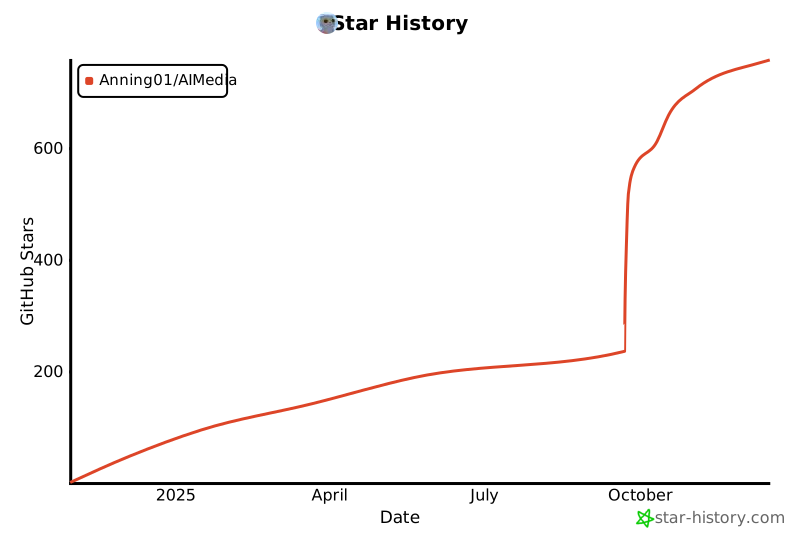](https://star-history.com/#Anning01/AIMedia&Date)
--------------------------------------------------------------------------------
/utils/text_to_image.py:
--------------------------------------------------------------------------------
1 | #!/usr/bin/python
2 | # -*- coding: UTF-8 -*-
3 | # @author:anning
4 | # @email:anningforchina@gmail.com
5 | # @time:2024/10/13 16:29
6 | # @file:text_to_image.py
7 | import base64
8 | import io
9 | import re
10 |
11 | import requests
12 | from PIL import Image
13 |
14 | from utils.translation import Sample
15 | from config import firstphase_width, firstphase_height, sd_url, negative_prompt
16 |
17 |
18 | def print_tip(tip, blank_line=0):
19 | """打印提示文字和空行"""
20 | blank = "\n" * blank_line if blank_line else ""
21 |
22 |
23 | class Main:
24 | def handle(self, text, quantity, save_path):
25 | """
26 | 通过文本生成图片
27 | :param text: 生成图片的文本
28 | :param quantity: 需要配图的数量
29 | :return:
30 | """
31 | # 首先将接收到的文本进行分段
32 | text_list = self.split_text_by_quantity(text, quantity)
33 | translates_list = []
34 |
35 |
36 | # 将分段内容进行翻译
37 | for index_i, i in enumerate(text_list):
38 | translates_list.append(Sample.main(i))
39 |
40 | # base64_image_list = []
41 | # 将翻译内容传到Stable Diffusion生成图片
42 | for index_j, j in enumerate(translates_list):
43 | # base64_image_list.append(get_images(j))
44 | image_bytes = base64.b64decode(get_images(j))
45 | image = Image.open(io.BytesIO(image_bytes))
46 | image.save(rf"{save_path}/{index_j}.jpg")
47 |
48 | # 最后返回图片
49 | # return base64_image_list
50 |
51 | def split_text_by_quantity(self, text, quantity):
52 | # 使用正则表达式按中文标点符号分句
53 | sentences = re.split(r"(。|!|?|;|,|、)", text)
54 | sentences = [s for s in sentences if s] # 移除空句子
55 |
56 | # 计算每个段落大致的句子数¬
57 | sentences_per_part = len(sentences) // quantity
58 | remainder = len(sentences) % quantity
59 |
60 | result = []
61 | part = []
62 | count = 0
63 |
64 | for i, sentence in enumerate(sentences):
65 | part.append(sentence)
66 | count += 1
67 | # 如果达到分配的句子数,或者这是剩余句子之一,就进行分段
68 | if count >= sentences_per_part + (1 if remainder > 0 else 0):
69 | result.append("".join(part))
70 | part = []
71 | count = 0
72 | remainder -= 1 # 减少剩余句子的数量
73 |
74 | # 如果最后有剩余的部分也加入到结果中
75 | if part:
76 | result.append("".join(part))
77 |
78 | return result
79 |
80 |
81 | base_data = {
82 | "seed": -1,
83 | "sampler_name": "Euler",
84 | "batch_size": 1,
85 | "steps": 8,
86 | "cfg_scale": 2,
87 | "restore_faces": True,
88 | }
89 |
90 |
91 | def get_images(text):
92 | prompt = text
93 | novel_dict = {
94 | "width": firstphase_width,
95 | "height": firstphase_height,
96 | "negative_prompt": negative_prompt,
97 | "prompt": prompt + "
45 |
46 | ## 视频演示 📺
47 |
48 | B站视频链接:https://www.bilibili.com/video/BV1HABgYKE6H
49 |
50 | ## 配置要求 📦
51 |
52 | - 建议最低 CPU 4核或以上,内存 8G 或以上,显卡非必须
53 | - Windows 10 或以上
54 |
55 | ## 快速开始 🚀
56 |
57 | 下载一键启动包,解压直接使用(路径不要有 **中文**、**特殊字符**、**空格**)
58 |
59 | ### Windows
60 | - 百度网盘: https://pan.baidu.com/s/1YIV2avc_i5V8IcltWoFh1g 提取码:99k1
61 |
62 |
63 | 下载后,首先解压 venv.tar.gz 到当前目录venv下,结构如下
64 |
65 | ```
66 | AIMedia
67 | ├─venv
68 | ├─main.py
69 | ├─chrome
70 | ├─...
71 | ```
72 |
73 | 建议先**双击执行** update.bat 更新到**最新代码**(需要安装git),然后右键点击 **以管理员权限运行** webui.bat 启动
74 |
75 | 启动后,会自动打开浏览器(如果打开是空白,建议换成 **Chrome** 或者 **Edge** 打开)
76 |
77 | ### 其他系统
78 |
79 | 不支持,仅支持window
80 |
81 | ## 安装部署 📥
82 |
83 | ### 前提条件
84 |
85 | - 尽量不要使用 **中文路径**,避免出现一些无法预料的问题
86 | - 请确保你的 **网络** 是正常的,VPN需要打开全局流量模式
87 |
88 | #### ① 克隆代码
89 |
90 | ```shell
91 | git clone https://github.com/Anning01/AIMedia.git
92 | ```
93 |
94 | #### ② 修改配置文件
95 |
96 | - 将 config.py 文件复制一份,命名为 local_config.py
97 | - 按照 config.py 文件中的说明,配置好 zhipu_aip_key,如需要AI配图,打开enable 配置相关的 stable diffusion api
98 |
99 |
100 | ### 手动部署 📦
101 |
102 | > 视频教程
103 |
104 | - 完整的使用演示:B站视频链接:hhttps://www.bilibili.com/video/BV1HABgYKE6H
105 | - 如何在Windows上部署:抓紧制作中 (*>﹏<*)′~
106 |
107 | #### ① 创建虚拟环境 (Conda)
108 |
109 | 建议使用 [conda](https://www.anaconda.com/download/success) 创建 python 虚拟环境
110 |
111 | ```shell
112 | git clone https://github.com/Anning01/AIMedia.git
113 | cd AIMedia
114 | conda create -n AIMedia python=3.12.4
115 | conda activate AIMedia
116 | pip install -r requirements.txt
117 | ```
118 |
119 | #### ② 启动Web界面 🌐
120 |
121 | 注意需要到 AIMedia 项目 根目录 下执行以下命令
122 |
123 | ###### Windows
124 |
125 | ```bat
126 | conda activate AIMedia
127 | streamlit run main.py
128 | ```
129 |
130 | #### ① 使用venv (请确定 python 版本 3.12.4)
131 |
132 | ```shell
133 | git clone https://github.com/Anning01/AIMedia.git
134 | cd AIMedia
135 | python -m venv venv
136 | .\venv\Scripts\activate
137 | pip install -r requirements.txt
138 | ```
139 |
140 | #### ② 启动Web界面 🌐
141 |
142 | 注意需要到 AIMedia 项目 根目录 下执行以下命令
143 |
144 | ###### Windows
145 |
146 | ```bat
147 | streamlit run main.py
148 | 或者
149 | .\webui.bat(conda不可以这样执行)
150 | ```
151 |
152 | > 注意:我们自动发布依赖chrome测试版,需要手动下载
153 |
154 | 下载地址:
155 |
156 | - 百度网盘: 链接:https://pan.baidu.com/s/1x6J3K4KdWrI9vOG8yvSSBw 提取码:7jyw
157 |
158 |
159 | 模型下载后解压,整个目录放到 .\AIMedia 里面,
160 | 最终的文件路径应该是这样: .\AIMedia\chrome
161 |
162 | ## 反馈建议 📢
163 |
164 | - 可以提交 [issue](https://github.com/Anning01/AIMedia/issues)
165 | 或者 [pull request](https://github.com/Anning01/AIMedia/pulls)。
166 |
167 |
168 | ## 许可证 📝
169 |
170 | 点击查看 [LICENSE](LICENSE) 文件
171 |
172 | ## Star History
173 |
174 | [](https://star-history.com/#Anning01/AIMedia&Date)
--------------------------------------------------------------------------------
/utils/text_to_image.py:
--------------------------------------------------------------------------------
1 | #!/usr/bin/python
2 | # -*- coding: UTF-8 -*-
3 | # @author:anning
4 | # @email:anningforchina@gmail.com
5 | # @time:2024/10/13 16:29
6 | # @file:text_to_image.py
7 | import base64
8 | import io
9 | import re
10 |
11 | import requests
12 | from PIL import Image
13 |
14 | from utils.translation import Sample
15 | from config import firstphase_width, firstphase_height, sd_url, negative_prompt
16 |
17 |
18 | def print_tip(tip, blank_line=0):
19 | """打印提示文字和空行"""
20 | blank = "\n" * blank_line if blank_line else ""
21 |
22 |
23 | class Main:
24 | def handle(self, text, quantity, save_path):
25 | """
26 | 通过文本生成图片
27 | :param text: 生成图片的文本
28 | :param quantity: 需要配图的数量
29 | :return:
30 | """
31 | # 首先将接收到的文本进行分段
32 | text_list = self.split_text_by_quantity(text, quantity)
33 | translates_list = []
34 |
35 |
36 | # 将分段内容进行翻译
37 | for index_i, i in enumerate(text_list):
38 | translates_list.append(Sample.main(i))
39 |
40 | # base64_image_list = []
41 | # 将翻译内容传到Stable Diffusion生成图片
42 | for index_j, j in enumerate(translates_list):
43 | # base64_image_list.append(get_images(j))
44 | image_bytes = base64.b64decode(get_images(j))
45 | image = Image.open(io.BytesIO(image_bytes))
46 | image.save(rf"{save_path}/{index_j}.jpg")
47 |
48 | # 最后返回图片
49 | # return base64_image_list
50 |
51 | def split_text_by_quantity(self, text, quantity):
52 | # 使用正则表达式按中文标点符号分句
53 | sentences = re.split(r"(。|!|?|;|,|、)", text)
54 | sentences = [s for s in sentences if s] # 移除空句子
55 |
56 | # 计算每个段落大致的句子数¬
57 | sentences_per_part = len(sentences) // quantity
58 | remainder = len(sentences) % quantity
59 |
60 | result = []
61 | part = []
62 | count = 0
63 |
64 | for i, sentence in enumerate(sentences):
65 | part.append(sentence)
66 | count += 1
67 | # 如果达到分配的句子数,或者这是剩余句子之一,就进行分段
68 | if count >= sentences_per_part + (1 if remainder > 0 else 0):
69 | result.append("".join(part))
70 | part = []
71 | count = 0
72 | remainder -= 1 # 减少剩余句子的数量
73 |
74 | # 如果最后有剩余的部分也加入到结果中
75 | if part:
76 | result.append("".join(part))
77 |
78 | return result
79 |
80 |
81 | base_data = {
82 | "seed": -1,
83 | "sampler_name": "Euler",
84 | "batch_size": 1,
85 | "steps": 8,
86 | "cfg_scale": 2,
87 | "restore_faces": True,
88 | }
89 |
90 |
91 | def get_images(text):
92 | prompt = text
93 | novel_dict = {
94 | "width": firstphase_width,
95 | "height": firstphase_height,
96 | "negative_prompt": negative_prompt,
97 | "prompt": prompt + "
5 |
6 |
7 |
8 |
9 |
14 |
40 |
41 | ## Video Demonstration 📺
42 |
43 | Bilibili video link:https://www.bilibili.com/video/BV1oYSVYaEaa/?share_source=copy_web&vd_source=998582dcaa6c1a862619086e9dda59cb
44 |
45 | ## Requirements 📦
46 |
47 | - Minimum recommended: CPU with 4 cores or more, 8GB of RAM or more, GPU is not required
48 | - Windows 10 or above
49 |
50 | ## Quick Start 🚀
51 |
52 | Download the one-click startup package, extract, and use directly (avoid paths with **Chinese characters**, **special characters**, or **spaces**).
53 |
54 | ### Windows
55 | - Baidu Drive: https://pan.baidu.com/s/1YIV2avc_i5V8IcltWoFh1g Code: 99k1
56 |
57 | After downloading, first extract `venv.tar.gz` to the `venv` folder in the current directory. The structure should look like this:
58 |
59 |
60 | ```
61 | AIMedia
62 | ├─venv
63 | ├─main.py
64 | ├─chrome
65 | ├─...
66 | ```
67 |
68 | It is recommended to **double-click** `update.bat` first to update to the **latest code** (requires Git). Then right-click to **run as administrator** `webui.bat` to start.
69 |
70 | After startup, the browser will open automatically (if a blank page opens, try using **Chrome** or **Edge**).
71 |
72 | ### Other Systems
73 |
74 | Not supported; only Windows is supported.
75 |
76 | ## Installation & Deployment 📥
77 |
78 | ### Prerequisites
79 |
80 | - Avoid using **paths with Chinese characters** to prevent unforeseen issues.
81 | - Make sure your **network** is stable; VPN should be in "global traffic" mode.
82 |
83 | #### ① Clone the Code
84 |
85 | ```shell
86 | git clone https://github.com/Anning01/AIMedia.git
87 | ```
88 | #### ② Edit the Configuration File
89 |
90 | - Copy the `config.py` file and name it `local_config.py`.
91 | - Configure `zhipu_aip_key` as specified in `config.py`. Enable the Stable Diffusion API if you need AI-generated images.
92 |
93 | ### Manual Deployment 📦
94 |
95 | > Video Tutorial
96 |
97 | - Full usage demonstration: Bilibili video link:https://www.bilibili.com/video/BV1oYSVYaEaa/?share_source=copy_web&vd_source=998582dcaa6c1a862619086e9dda59cb
98 | - How to deploy on Windows: In progress `(*>﹏<*)′~
99 |
100 | #### ① Create a Virtual Environment (Conda)
101 |
102 | It is recommended to use [conda](https://www.anaconda.com/download/success) to create a Python virtual environment.
103 |
104 | ```shell
105 | git clone https://github.com/Anning01/AIMedia.git
106 | cd AIMedia
107 | conda create -n AIMedia python=3.12.4
108 | conda activate AIMedia
109 | pip install -r requirements.txt
110 | ```
111 |
112 | #### ② Start the Web Interface 🌐
113 |
114 | Be sure to execute the following command in the AIMedia project `root directory`.
115 |
116 | ###### Windows
117 |
118 | ```bat
119 | conda activate AIMedia
120 | streamlit run main.py
121 | ```
122 | #### ① Using venv (Ensure Python version 3.12.4)
123 |
124 | ```shell
125 | git clone https://github.com/Anning01/AIMedia.git
126 | cd AIMedia
127 | python -m venv venv
128 | .\venv\Scripts\activate
129 | pip install -r requirements.txt
130 | ```
131 |
132 | #### ② Start the Web Interface 🌐
133 |
134 | Be sure to execute the following command in the AIMedia project `root directory`.
135 |
136 | ###### Windows
137 |
138 | ```bat
139 | streamlit run main.py
140 | Or
141 | .\webui.bat(not supported with Conda)
142 | ```
143 |
144 | > Note:Our auto-publish feature depends on the Chrome beta version, which must be downloaded manually.
145 |
146 | Download link::
147 |
148 | - Baidu Drive: Link::https://pan.baidu.com/s/1x6J3K4KdWrI9vOG8yvSSBw Code:7jyw
149 |
150 | After downloading and extracting the model, place the entire directory in `.\AIMedia`,
151 | so the final file path should look like this: `.\AIMedia\chrome`.
152 |
153 | ## Feedback & Suggestions 📢
154 |
155 | - You can submit an [issue](https://github.com/Anning01/AIMedia/issues)
156 | or a [pull request](https://github.com/Anning01/AIMedia/pulls).
157 |
158 | ## License 📝
159 |
160 | Click to view the [`LICENSE`](LICENSE) file.
161 |
162 | ## Star History
163 |
164 | [](https://star-history.com/#Anning01/AIMedia&Date)
165 |
--------------------------------------------------------------------------------
/utils/client.py:
--------------------------------------------------------------------------------
1 | # coding: utf-8
2 | # -*- coding:utf-8 -*-
3 | import os
4 | import socket
5 | import time
6 | import json
7 | import subprocess
8 | import random
9 | import string
10 | import sys
11 | import shutil
12 | import requests
13 | import importlib
14 | importlib.reload(sys)
15 |
16 | # 以下依赖不能删除,哪怕当前页面没有使用
17 | nas_path = os.path.dirname(__file__)
18 | helper_dir = os.path.dirname(os.path.abspath('__file__'))
19 | sys.path.insert(0, nas_path)
20 | parent_path = os.path.dirname(nas_path)
21 | sys.path.insert(0, parent_path)
22 | from sqlit_manage import *
23 | from get_hot_data import *
24 | from config import *
25 | from ai_tools import *
26 | from config import enable
27 | from utils.text_to_image import Main as StableDiffusion
28 | from auto_tools import AutoTools
29 | from sql_data import get_account_info
30 |
31 |
32 | class Client(object):
33 | token = os.environ.get('token')
34 |
35 | # 获取资源
36 | def get_task(self):
37 | pass
38 |
39 | # 图片处理
40 | def save_image_from_url(self,img_list, ids, content):
41 | root = f"temp/img_temp/{ids}"
42 | if not os.path.exists(root):
43 | os.makedirs(root)
44 | root = os.path.abspath(root)
45 | if len(img_list) > 0:
46 | if len(img_list) > 3:
47 | img_random = random.sample(img_list, 3)
48 | else:
49 | img_random = img_list
50 | for image_url in img_random:
51 | # 去水印
52 | image_url_new = del_watermark(image_url)
53 | save_path = rf"{root}/{img_list.index(image_url)}.jpg"
54 | num = 0
55 | while True:
56 | if not os.path.exists(save_path):
57 | print(f"图片{img_list.index(image_url)}正在处理中...")
58 | headers = {
59 | "user-agent": "Mozilla/5.0 (Windows NT 10.0; Win64; x64) AppleWebKit/537.36 (KHTML, like Gecko) Chrome/129.0.0.0 Safari/537.36",
60 | }
61 | try:
62 | response = requests.get(image_url_new, headers=headers)
63 | if response.status_code == 200:
64 | with open(save_path, "wb") as file:
65 | file.write(response.content)
66 | except:
67 | pass
68 | else:
69 | break
70 | num += 1
71 | if num > 99:
72 | break
73 | else:
74 | if enable:
75 | print("图片生成...")
76 | StableDiffusion().handle(content, 3, root)
77 |
78 | return root
79 |
80 | def task(self,task_opt):
81 | # 获取当前日期和时间
82 | current_time = datetime.now()
83 | # 计算1小时前的时间
84 | task_opt['publish_time'] = datetime.strptime(task_opt['publish_time'], '%Y-%m-%d %H:%M:%S')
85 | time_difference = current_time - task_opt['publish_time']
86 | if time_difference >= timedelta(hours=1):
87 | print("当前发布相隔大于1小时,可以发布")
88 | # # 生生文章
89 | print('---'*20)
90 | print('当前任务信息:')
91 | print(f'任务id:{task_opt["task_id"]}')
92 | print(f'发布平台:{task_opt["platform"]}')
93 | print('---' * 20)
94 | print("Ai正在生成文章...")
95 | article = hot2article(task_opt['content'],'')
96 | print(f'生成成功!!!')
97 | print("检查文章是否合格")
98 | if len(article) >500:
99 | print("文章符合条件")
100 | # 处理图片
101 | img_url_list = json.loads(task_opt['img_url_list'])
102 | imgs_path = self.save_image_from_url(img_url_list, task_opt["task_id"], article)
103 | # 获取登录权限
104 | base_url = "http://127.0.0.1:8000"
105 | headers = {"Content-Type": "application/json"}
106 | headers["Authorization"] = f"Bearer {self.token}"
107 | cookie = requests.get(f"{base_url}/user/account/", params=task_opt['uid'],headers=headers)
108 | cookie = cookie.json()[0]['cookie']
109 | print('已获取登录权限')
110 | print('开始发布,请勿干预浏览器...')
111 | publish_tool = AutoTools()
112 | print(cookie, article, task_opt['platform'], imgs_path)
113 | result = publish_tool.publish(cookie, article, task_opt['platform'], imgs_path)
114 | if result["status"]:
115 | print('发布成功!!!')
116 | client_update(task_opt["task_id"], "已发布")
117 | print('跟新状态!!!')
118 | shutil.rmtree(imgs_path)
119 | print('清楚缓存!!!')
120 | else:
121 | print('处理失败,等待下一轮')
122 | else:
123 | print('文章不符合,等待重新配置')
124 | # 当前任务ai无法生成内容,删除该配置
125 | del_task_info_about_task_id(task_opt["task_id"])
126 | else:
127 | print("当前账号发布时间未超过1小时")
128 | def run(self):
129 | host = '127.0.0.1'
130 | port = 1288
131 | client = socket.socket()
132 | try:
133 | client.connect((host, port))
134 | except:
135 | print('请求异常....')
136 | time.sleep(5)
137 | return
138 |
139 | data = client.recv(10240).decode()
140 | data = json.loads(data)
141 | if not data['status']:
142 | print('当前暂无任务...')
143 | time.sleep(5)
144 | return
145 |
146 | task_opt = data['data']
147 | # print(f'当前任务: {task}')
148 | self.task(task_opt)
149 | time.sleep(0.1)
150 |
151 | print('======================== 任务完成 ========================')
152 |
153 |
154 | if __name__ == '__main__':
155 | random_number = ''.join(random.choices(string.digits, k=4))
156 | result = f"Ai机器人:{random_number}"
157 | os.system(f'title={result}')
158 | dw = Client()
159 | while (True):
160 | try:
161 | dw.run()
162 | except:
163 | pass
164 |
--------------------------------------------------------------------------------
/pages/auto.py:
--------------------------------------------------------------------------------
1 | import streamlit as st
2 |
3 | from utils.local_storage import get_data
4 | from utils.sqlit_manage import *
5 | from utils.sql_data import get_login_account
6 | from st_pages import Page, Section, add_page_title
7 | from utils.auth import is_login
8 |
9 | from utils.client import Client
10 | from utils.server import Service
11 | import threading
12 | from utils.sqlit_manage import *
13 | import locale
14 | import subprocess
15 |
16 |
17 | # 初始化本地数据数据库
18 |
19 | create_database(create_conn())
20 | set_beijin_time(create_conn())
21 |
22 |
23 |
24 | # 保存配置--保存数据到本地sqlite
25 | @st.dialog('保存配置')
26 | def opt_vot(nickname,uid,classify,posting_cycle,platform):
27 | conn = create_conn()
28 | flag = create_task(nickname,uid,classify,posting_cycle,platform,conn)
29 | if flag:
30 | st.write('保存成功')
31 | else:
32 | st.write('保存失败')
33 |
34 |
35 | # 判断是否登录
36 | token = is_login()
37 | if not token:
38 | st.switch_page("main.py")
39 | else:
40 | st.session_state.token = token
41 |
42 | @st.cache_resource
43 | def start_server():
44 | # 使用一个标志来确保任务只启动一次
45 | started = False
46 | def run_server():
47 | nonlocal started
48 | if not started:
49 | started = True
50 | # s = Service()
51 | # s.start()
52 | current_path = os.path.dirname(__file__)
53 | parent_path = os.path.dirname(current_path)
54 | script_path = os.path.join(parent_path, "utils", "server.py")
55 | # 构建命令
56 | command = ['cmd', '/c', 'start', 'cmd', '/k', 'python', script_path]
57 | # 运行命令并捕获输出
58 | subprocess.run(command, stdout=subprocess.PIPE, stderr=subprocess.STDOUT, text=True,
59 | creationflags=subprocess.CREATE_NEW_CONSOLE)
60 | threading.Thread(target=run_server).start()
61 |
62 | # 开始托管按钮
63 | st.write('AI托管中控服务,仅可开启一次')
64 | cols = st.columns([0.8, 0.1])
65 | with cols[1]:
66 | if st.button("开启服务"):
67 | start_server()
68 |
69 |
70 |
71 | @st.cache_resource
72 | def start_client():
73 | # 使用一个标志来确保任务只启动一次
74 | started = False
75 |
76 | token = get_data()
77 | def run_client():
78 | nonlocal started
79 | if not started:
80 | started = True
81 | # 获取 token
82 |
83 | current_path = os.path.dirname(__file__)
84 | parent_path = os.path.dirname(current_path)
85 | script_path = os.path.join(parent_path, "utils", "client.py")
86 |
87 | # 构建命令行,将 token 作为环境变量传递
88 | # command = ['cmd', '/c', 'start', 'cmd', '/k', 'python', script_path]
89 | command = ['cmd', '/c', 'start', 'cmd', '/k', f'set token={token} && python {script_path}']
90 |
91 | subprocess.run(command, stdout=subprocess.PIPE, stderr=subprocess.STDOUT, text=True,
92 | creationflags=subprocess.CREATE_NEW_CONSOLE)
93 | started = False
94 | # 运行命令并捕获输出
95 | # try:
96 | # subprocess.run(command, stdout=subprocess.PIPE, stderr=subprocess.STDOUT, text=True,
97 | # creationflags=subprocess.CREATE_NEW_CONSOLE,
98 | # encoding=locale.getpreferredencoding())
99 | #
100 | # except UnicodeDecodeError as e:
101 | # subprocess.run(command, stdout=subprocess.PIPE, stderr=subprocess.STDOUT, text=True,
102 | # creationflags=subprocess.CREATE_NEW_CONSOLE, errors='ignore')
103 | threading.Thread(target=run_client).start()
104 |
105 | st.write('托管机器人,可开启多个,建议开启绑定账号的数量,支持局域网多台机器自动联机,根据电脑cpu和自己的任务量')
106 | cols = st.columns([0.8, 0.1])
107 | with cols[1]:
108 | if st.button("启动托管"):
109 | start_client()
110 | start_client.clear()
111 |
112 |
113 |
114 |
115 | start_server.clear()
116 |
117 | # 获取用户信息
118 | user_data = get_login_account()
119 | account_configs = []
120 | for item in user_data:
121 | conn = create_conn()
122 | task_num,classify = select_task_num(item['uid'],conn)
123 | dict_ = {
124 | "nickname": item['nickname'],
125 | "uid": item['uid'],
126 | "classify": classify,
127 | "posting_cycle":task_num,
128 | "platform": item['platform'],
129 | }
130 | account_configs.append(dict_)
131 |
132 | # 页面布局
133 | st.title("AI 托管配置")
134 | # 根据搜索条件过滤账号配置
135 | search_query = st.text_input("搜索账号 (UID 或 昵称 或发布量)")
136 | posting_cycle_query = st.text_input("搜索发文周期")
137 |
138 | if search_query or posting_cycle_query:
139 | filtered_configs = [
140 | config for config in account_configs
141 | if (search_query.lower() in config["uid"].lower() or search_query.lower() in config["nickname"].lower()) and
142 | (not posting_cycle_query or config["posting_cycle"] == posting_cycle_query)
143 | ]
144 | else:
145 | filtered_configs = account_configs
146 |
147 |
148 | # 账号分类选项
149 | account_categories = [
150 | "全部",
151 | "美食",
152 | "旅行",
153 | "站内玩法",
154 | "话题互动",
155 | "娱乐",
156 | "社会",
157 | "二次元",
158 | "交通",
159 | "亲子",
160 | "体育",
161 | "军事",
162 | "剧情",
163 | "动物萌宠",
164 | "天气",
165 | "才艺",
166 | "文化教育",
167 | "时尚",
168 | "时政",
169 | "校园",
170 | "汽车",
171 | "游戏",
172 | "科技",
173 | "财经",
174 | ]
175 | # 发文数量选项
176 | posting_cycles = ["0", "3", "5", "7", "10"]
177 |
178 |
179 | # 展示账号配置列表
180 | if filtered_configs:
181 | cols = st.columns(6)
182 | cols[0].write("昵称")
183 | cols[1].write("UID")
184 | cols[2].write("账号分类")
185 | cols[3].write("发文周期")
186 | cols[4].write("发布平台")
187 | cols[5].write("保存配置")
188 | for i, config in enumerate(filtered_configs):
189 | cols = st.columns(6)
190 | cols[0].write(config["nickname"])
191 | cols[1].write(config["uid"])
192 | config["classify"] = cols[2].selectbox(
193 | f"选择分类",
194 | account_categories,
195 | index=account_categories.index(config["classify"]),
196 | key=f"classify_{i}"
197 | )
198 | config["posting_cycle"] = cols[3].selectbox(
199 | f"每日发布",
200 | posting_cycles,
201 | index=posting_cycles.index(config["posting_cycle"]),
202 | key=f"posting_cycle_{i}"
203 | )
204 | cols[4].write(config["platform"])
205 | if cols[5].button("确认", key=f"get_{i}_{config['uid']}"):
206 | # 这里可以添加实际的删除账号逻辑
207 | opt_vot(config["nickname"],config["uid"],config["classify"],config["posting_cycle"],config["platform"])
208 | # st.session_state.filtered_configs = filtered_configs
209 | else:
210 | st.warning("没有账号配置。")
211 |
212 |
213 |
--------------------------------------------------------------------------------
/utils/sqlit_manage.py:
--------------------------------------------------------------------------------
1 | import os
2 | import sqlite3
3 | from datetime import datetime,timedelta
4 |
5 |
6 | # 连接到SQLite数据库(如果数据库不存在,会自动创建)
7 | def create_conn():
8 | # 获取当前文件的绝对路径
9 | current_file_path = os.path.abspath(__file__)
10 | # 获取当前文件所在的目录
11 | current_directory = os.path.dirname(current_file_path)
12 | # 获取上级目录
13 | parent_directory = os.path.dirname(current_directory)
14 | db_path = os.path.join(parent_directory, 'article_task.db')
15 | conn = sqlite3.connect(db_path)
16 | return conn
17 |
18 |
19 | def create_database(conn):
20 | # 创建一个游标对象(
21 | cursor = conn.cursor()
22 | # 创建一个名为'task'的表,用于
23 | cursor.execute('''
24 | CREATE TABLE IF NOT EXISTS tasks (
25 | nickname TEXT,
26 | uid TEXT PRIMARY KEY,
27 | classify TEXT NOT NULL,
28 | platform TEXT NOT NULL,
29 | task_num INTEGER NOT NULL,
30 | status BOOLEAN DEFAULT FALSE,
31 | create_date DATETIME DEFAULT CURRENT_TIMESTAMP
32 | )
33 | ''')
34 | # 创建 task_info 表
35 | cursor.execute('''
36 | CREATE TABLE IF NOT EXISTS task_info (
37 | uid TEXT NOT NULL,
38 | platform TEXT NOT NULL,
39 | task_id TEXT PRIMARY KEY,
40 | content TEXT NOT NULL,
41 | img_url_list TEXT NOT NULL,
42 | status TEXT NOT NULL,
43 | publish_time DATETIME DEFAULT '2024-01-01 00:00:00',
44 | create_date DATETIME DEFAULT CURRENT_TIMESTAMP,
45 | FOREIGN KEY (uid) REFERENCES tasks(uid)
46 | )
47 | ''')
48 | # 提交事务
49 | conn.commit()
50 | cursor.close()
51 |
52 |
53 | # 创建触发器
54 | def set_beijin_time(conn):
55 | cursor = conn.cursor()
56 | # 创建触发器,将 create_date 列设置为北京时间
57 | cursor.execute('''
58 | CREATE TRIGGER IF NOT EXISTS set_beijing_time
59 | AFTER INSERT ON task_info
60 | BEGIN
61 | UPDATE task_info
62 | SET create_date = DATETIME(create_date, '+8 hours')
63 | WHERE task_id = NEW.task_id;
64 | END;
65 | ''')
66 | conn.commit()
67 | cursor.close()
68 | conn.close()
69 |
70 |
71 | # 保持配置
72 | def create_task(nickname, uid, classify, posting_cycle, platform, conn):
73 | cursor = conn.cursor()
74 | # 跟新或者创建配置
75 | try:
76 | sql1 = f'''
77 | INSERT OR REPLACE INTO tasks (`nickname`, `uid`, `classify`, `platform`, `platform`,`task_num`)
78 | VALUES ('{nickname}','{uid}', '{classify}', '{platform}', '{platform}','{posting_cycle}')
79 | '''
80 | print(sql1)
81 | cursor.execute(sql1)
82 |
83 | # 提交事务
84 | flag = True
85 | except sqlite3.Error as e:
86 | print(f"数据插入或更新失败: {e}")
87 | conn.rollback()
88 | flag = False
89 | # 删除原有已经配置的任务
90 | try:
91 | sql2 = f'''DELETE FROM task_info WHERE uid = '{uid}' '''
92 | cursor.execute(sql2)
93 | except:
94 | print(f"删除失败: ")
95 |
96 | conn.commit()
97 | # 关闭连接
98 | conn.close()
99 | return flag
100 |
101 |
102 | # 查询发布量
103 | def select_task_num(uid, conn):
104 | cursor = conn.cursor()
105 | cursor.execute('''
106 | SELECT task_num,classify FROM tasks WHERE uid = ?
107 | ''', (uid,))
108 | result = cursor.fetchone()
109 | if result:
110 | task_num = f'{result[0]}'
111 | classify = f'{result[1]}'
112 | else:
113 | task_num = '0'
114 | classify = '全部'
115 | conn.close()
116 | return task_num, classify
117 |
118 |
119 | # 获取所有账号
120 | def get_all_data():
121 | conn = create_conn()
122 | cursor = conn.cursor()
123 | cursor.execute("SELECT * FROM tasks")
124 | rows = cursor.fetchall()
125 | result_list = list(rows)
126 | return result_list
127 |
128 |
129 | # 获取当天账号已经配置任务数量
130 | def get_publish_num_today(uid):
131 | conn = create_conn()
132 | cursor = conn.cursor()
133 | # 获取当前日期
134 | current_date = datetime.now().strftime('%Y-%m-%d')
135 |
136 | # 查询指定 uid 的当天数据数量
137 | query = f"""
138 | SELECT COUNT(*) FROM task_info
139 | WHERE uid = {uid} AND DATE(create_date) = '{current_date}'
140 | """
141 | cursor.execute(query)
142 |
143 | # 获取查询结果
144 | result = cursor.fetchone()
145 |
146 | # 打印查询结果
147 | count = result[0]
148 | # 关闭数据库连接
149 | conn.close()
150 | return count
151 |
152 |
153 | # 判断内容是否重复
154 | def is_repeat(content):
155 | conn = create_conn()
156 | cursor = conn.cursor()
157 | # 查询指定 content 的数据
158 | query = f"""
159 | SELECT EXISTS(SELECT 1 FROM task_info WHERE content = ?)
160 | """
161 | cursor.execute(query, (content,))
162 |
163 | # 获取查询结果
164 | result = cursor.fetchone()
165 |
166 | # 关闭数据库连接
167 | conn.close()
168 |
169 | # 检查查询结果是否为空
170 | if result is None:
171 | exists = False
172 | else:
173 | exists = bool(result[0])
174 | return exists
175 |
176 |
177 | # 插入任务详情
178 | def create_task_info(uid, task_id, content, img_url_list, platform):
179 | conn = create_conn()
180 | cursor = conn.cursor()
181 | sql = f'''INSERT INTO task_info (uid, task_id, content, img_url_list, status, publish_time,platform) VALUES ('{uid}', '{task_id}', '{content}', '{img_url_list}', '已配置', '2023-01-01 00:00:00','{platform}')'''
182 | cursor.execute(sql)
183 | conn.commit()
184 | cursor.close()
185 | conn.close()
186 |
187 |
188 | def load_tasks_to_queue():
189 | # 获取当前日期和时间
190 | current_date = datetime.now().strftime('%Y-%m-%d')
191 | current_time = datetime.now()
192 |
193 | # 计算1小时前的时间
194 | one_hour_ago = current_time - timedelta(hours=1)
195 |
196 | # 获取 task_info 表中的所有任务
197 | conn = create_conn()
198 | cursor = conn.cursor()
199 |
200 | # 执行查询,添加条件:publish_time 离当前时间大于1小时
201 | cursor.execute('''
202 | SELECT * FROM task_info
203 | WHERE status != '已发布'
204 | AND DATE(create_date) = ?
205 | AND publish_time < ?
206 | ''', (current_date, one_hour_ago))
207 |
208 | tasks = cursor.fetchall()
209 | cursor.close()
210 | conn.close()
211 |
212 | return tasks
213 |
214 |
215 | # 客户端跟新任务状态
216 | def client_update(task_id,status):
217 | conn = create_conn()
218 | # 创建游标对象
219 | cursor = conn.cursor()
220 | publish_time = datetime.now()
221 | # 执行更新操作
222 |
223 | cursor.execute(f'''UPDATE task_info SET status = '{status}',publish_time = '{publish_time}' WHERE task_id = '{task_id}' ''')
224 |
225 | conn.commit()
226 | cursor.close()
227 |
228 |
229 | # 根据task_id 删除任务
230 | def del_task_info_about_task_id(task_id):
231 | conn = create_conn()
232 | cursor = conn.cursor()
233 | # 删除原有已经配置的任务
234 | try:
235 | sql2 = f'''DELETE FROM task_info WHERE task_id = '{task_id}' '''
236 | cursor.execute(sql2)
237 | except:
238 | print(f"删除失败: ")
239 | conn.commit()
240 | # 关闭连接
241 | conn.close()
242 |
--------------------------------------------------------------------------------
/LICENSE:
--------------------------------------------------------------------------------
1 | 木兰宽松许可证,第2版
2 |
3 | 木兰宽松许可证,第2版
4 |
5 | 2020年1月 http://license.coscl.org.cn/MulanPSL2
6 |
7 | 您对“软件”的复制、使用、修改及分发受木兰宽松许可证,第2版(“本许可证”)的如下条款的约束:
8 |
9 | 0. 定义
10 |
11 | “软件” 是指由“贡献”构成的许可在“本许可证”下的程序和相关文档的集合。
12 |
13 | “贡献” 是指由任一“贡献者”许可在“本许可证”下的受版权法保护的作品。
14 |
15 | “贡献者” 是指将受版权法保护的作品许可在“本许可证”下的自然人或“法人实体”。
16 |
17 | “法人实体” 是指提交贡献的机构及其“关联实体”。
18 |
19 | “关联实体” 是指,对“本许可证”下的行为方而言,控制、受控制或与其共同受控制的机构,此处的控制是
20 | 指有受控方或共同受控方至少50%直接或间接的投票权、资金或其他有价证券。
21 |
22 | 1. 授予版权许可
23 |
24 | 每个“贡献者”根据“本许可证”授予您永久性的、全球性的、免费的、非独占的、不可撤销的版权许可,您可
25 | 以复制、使用、修改、分发其“贡献”,不论修改与否。
26 |
27 | 2. 授予专利许可
28 |
29 | 每个“贡献者”根据“本许可证”授予您永久性的、全球性的、免费的、非独占的、不可撤销的(根据本条规定
30 | 撤销除外)专利许可,供您制造、委托制造、使用、许诺销售、销售、进口其“贡献”或以其他方式转移其“贡
31 | 献”。前述专利许可仅限于“贡献者”现在或将来拥有或控制的其“贡献”本身或其“贡献”与许可“贡献”时的“软
32 | 件”结合而将必然会侵犯的专利权利要求,不包括对“贡献”的修改或包含“贡献”的其他结合。如果您或您的“
33 | 关联实体”直接或间接地,就“软件”或其中的“贡献”对任何人发起专利侵权诉讼(包括反诉或交叉诉讼)或
34 | 其他专利维权行动,指控其侵犯专利权,则“本许可证”授予您对“软件”的专利许可自您提起诉讼或发起维权
35 | 行动之日终止。
36 |
37 | 3. 无商标许可
38 |
39 | “本许可证”不提供对“贡献者”的商品名称、商标、服务标志或产品名称的商标许可,但您为满足第4条规定
40 | 的声明义务而必须使用除外。
41 |
42 | 4. 分发限制
43 |
44 | 您可以在任何媒介中将“软件”以源程序形式或可执行形式重新分发,不论修改与否,但您必须向接收者提供“
45 | 本许可证”的副本,并保留“软件”中的版权、商标、专利及免责声明。
46 |
47 | 5. 免责声明与责任限制
48 |
49 | “软件”及其中的“贡献”在提供时不带任何明示或默示的担保。在任何情况下,“贡献者”或版权所有者不对
50 | 任何人因使用“软件”或其中的“贡献”而引发的任何直接或间接损失承担责任,不论因何种原因导致或者基于
51 | 何种法律理论,即使其曾被建议有此种损失的可能性。
52 |
53 | 6. 语言
54 |
55 | “本许可证”以中英文双语表述,中英文版本具有同等法律效力。如果中英文版本存在任何冲突不一致,以中文
56 | 版为准。
57 |
58 | 条款结束
59 |
60 | 如何将木兰宽松许可证,第2版,应用到您的软件
61 |
62 | 如果您希望将木兰宽松许可证,第2版,应用到您的新软件,为了方便接收者查阅,建议您完成如下三步:
63 |
64 | 1, 请您补充如下声明中的空白,包括软件名、软件的首次发表年份以及您作为版权人的名字;
65 |
66 | 2, 请您在软件包的一级目录下创建以“LICENSE”为名的文件,将整个许可证文本放入该文件中;
67 |
68 | 3, 请将如下声明文本放入每个源文件的头部注释中。
69 |
70 | Copyright (c) [Year] [name of copyright holder]
71 | [Software Name] is licensed under Mulan PSL v2.
72 | You can use this software according to the terms and conditions of the Mulan
73 | PSL v2.
74 | You may obtain a copy of Mulan PSL v2 at:
75 | http://license.coscl.org.cn/MulanPSL2
76 | THIS SOFTWARE IS PROVIDED ON AN "AS IS" BASIS, WITHOUT WARRANTIES OF ANY
77 | KIND, EITHER EXPRESS OR IMPLIED, INCLUDING BUT NOT LIMITED TO
78 | NON-INFRINGEMENT, MERCHANTABILITY OR FIT FOR A PARTICULAR PURPOSE.
79 | See the Mulan PSL v2 for more details.
80 |
81 | Mulan Permissive Software License,Version 2
82 |
83 | Mulan Permissive Software License,Version 2 (Mulan PSL v2)
84 |
85 | January 2020 http://license.coscl.org.cn/MulanPSL2
86 |
87 | Your reproduction, use, modification and distribution of the Software shall
88 | be subject to Mulan PSL v2 (this License) with the following terms and
89 | conditions:
90 |
91 | 0. Definition
92 |
93 | Software means the program and related documents which are licensed under
94 | this License and comprise all Contribution(s).
95 |
96 | Contribution means the copyrightable work licensed by a particular
97 | Contributor under this License.
98 |
99 | Contributor means the Individual or Legal Entity who licenses its
100 | copyrightable work under this License.
101 |
102 | Legal Entity means the entity making a Contribution and all its
103 | Affiliates.
104 |
105 | Affiliates means entities that control, are controlled by, or are under
106 | common control with the acting entity under this License, ‘control’ means
107 | direct or indirect ownership of at least fifty percent (50%) of the voting
108 | power, capital or other securities of controlled or commonly controlled
109 | entity.
110 |
111 | 1. Grant of Copyright License
112 |
113 | Subject to the terms and conditions of this License, each Contributor hereby
114 | grants to you a perpetual, worldwide, royalty-free, non-exclusive,
115 | irrevocable copyright license to reproduce, use, modify, or distribute its
116 | Contribution, with modification or not.
117 |
118 | 2. Grant of Patent License
119 |
120 | Subject to the terms and conditions of this License, each Contributor hereby
121 | grants to you a perpetual, worldwide, royalty-free, non-exclusive,
122 | irrevocable (except for revocation under this Section) patent license to
123 | make, have made, use, offer for sale, sell, import or otherwise transfer its
124 | Contribution, where such patent license is only limited to the patent claims
125 | owned or controlled by such Contributor now or in future which will be
126 | necessarily infringed by its Contribution alone, or by combination of the
127 | Contribution with the Software to which the Contribution was contributed.
128 | The patent license shall not apply to any modification of the Contribution,
129 | and any other combination which includes the Contribution. If you or your
130 | Affiliates directly or indirectly institute patent litigation (including a
131 | cross claim or counterclaim in a litigation) or other patent enforcement
132 | activities against any individual or entity by alleging that the Software or
133 | any Contribution in it infringes patents, then any patent license granted to
134 | you under this License for the Software shall terminate as of the date such
135 | litigation or activity is filed or taken.
136 |
137 | 3. No Trademark License
138 |
139 | No trademark license is granted to use the trade names, trademarks, service
140 | marks, or product names of Contributor, except as required to fulfill notice
141 | requirements in section 4.
142 |
143 | 4. Distribution Restriction
144 |
145 | You may distribute the Software in any medium with or without modification,
146 | whether in source or executable forms, provided that you provide recipients
147 | with a copy of this License and retain copyright, patent, trademark and
148 | disclaimer statements in the Software.
149 |
150 | 5. Disclaimer of Warranty and Limitation of Liability
151 |
152 | THE SOFTWARE AND CONTRIBUTION IN IT ARE PROVIDED WITHOUT WARRANTIES OF ANY
153 | KIND, EITHER EXPRESS OR IMPLIED. IN NO EVENT SHALL ANY CONTRIBUTOR OR
154 | COPYRIGHT HOLDER BE LIABLE TO YOU FOR ANY DAMAGES, INCLUDING, BUT NOT
155 | LIMITED TO ANY DIRECT, OR INDIRECT, SPECIAL OR CONSEQUENTIAL DAMAGES ARISING
156 | FROM YOUR USE OR INABILITY TO USE THE SOFTWARE OR THE CONTRIBUTION IN IT, NO
157 | MATTER HOW IT’S CAUSED OR BASED ON WHICH LEGAL THEORY, EVEN IF ADVISED OF
158 | THE POSSIBILITY OF SUCH DAMAGES.
159 |
160 | 6. Language
161 |
162 | THIS LICENSE IS WRITTEN IN BOTH CHINESE AND ENGLISH, AND THE CHINESE VERSION
163 | AND ENGLISH VERSION SHALL HAVE THE SAME LEGAL EFFECT. IN THE CASE OF
164 | DIVERGENCE BETWEEN THE CHINESE AND ENGLISH VERSIONS, THE CHINESE VERSION
165 | SHALL PREVAIL.
166 |
167 | END OF THE TERMS AND CONDITIONS
168 |
169 | How to Apply the Mulan Permissive Software License,Version 2
170 | (Mulan PSL v2) to Your Software
171 |
172 | To apply the Mulan PSL v2 to your work, for easy identification by
173 | recipients, you are suggested to complete following three steps:
174 |
175 | i. Fill in the blanks in following statement, including insert your software
176 | name, the year of the first publication of your software, and your name
177 | identified as the copyright owner;
178 |
179 | ii. Create a file named "LICENSE" which contains the whole context of this
180 | License in the first directory of your software package;
181 |
182 | iii. Attach the statement to the appropriate annotated syntax at the
183 | beginning of each source file.
184 |
185 | Copyright (c) [Year] [name of copyright holder]
186 | [Software Name] is licensed under Mulan PSL v2.
187 | You can use this software according to the terms and conditions of the Mulan
188 | PSL v2.
189 | You may obtain a copy of Mulan PSL v2 at:
190 | http://license.coscl.org.cn/MulanPSL2
191 | THIS SOFTWARE IS PROVIDED ON AN "AS IS" BASIS, WITHOUT WARRANTIES OF ANY
192 | KIND, EITHER EXPRESS OR IMPLIED, INCLUDING BUT NOT LIMITED TO
193 | NON-INFRINGEMENT, MERCHANTABILITY OR FIT FOR A PARTICULAR PURPOSE.
194 | See the Mulan PSL v2 for more details.
195 |
--------------------------------------------------------------------------------
/pages/tasks.py:
--------------------------------------------------------------------------------
1 | import json
2 | import os, shutil
3 | import time
4 |
5 | import requests
6 | import streamlit as st
7 |
8 | from config import enable
9 | from utils.auth import is_login
10 | from utils.sql_data import *
11 | from utils.ai_tools import hot2article, del_watermark
12 | from utils.auto_tools import AutoTools
13 | import random
14 | from datetime import datetime, timedelta
15 | from utils.text_to_image import Main as StableDiffusion
16 |
17 | # 判断是否登录
18 | token = is_login()
19 | if not token:
20 | st.switch_page("main.py")
21 | else:
22 | st.session_state.token = token
23 |
24 |
25 | def log_info(output_lines):
26 | # 初始化一个空的容器来显示打印台
27 | output_container = st.empty()
28 | # 清空容器内容
29 | output_container = output_container.empty()
30 | # 反转列表,使最新的内容在上方
31 | # reversed_lines = reversed(output_lines[-1:])
32 | # output_lines = output_lines[-2:]
33 | # 将内容格式化为 HTML
34 | st.write(output_lines[-2:])
35 | # output_html = "