 19 |
20 | ### Case Changing
21 |
22 | |Key/Commands|Function|
23 | |:----------:|:-------|
24 | |CapsLock+9|Upper Case|
25 | |CapsLock+0|Lower Case|
26 | |CapsLock+-|Title Case|
27 |
--------------------------------------------------------------------------------
/site/static-hands-docs/sidebars.js:
--------------------------------------------------------------------------------
1 | /**
2 | * Creating a sidebar enables you to:
3 | - create an ordered group of docs
4 | - render a sidebar for each doc of that group
5 | - provide next/previous navigation
6 |
7 | The sidebars can be generated from the filesystem, or explicitly defined here.
8 |
9 | Create as many sidebars as you want.
10 | */
11 |
12 | module.exports = {
13 | // By default, Docusaurus generates a sidebar from the docs folder structure
14 | tutorialSidebar: [{type: 'autogenerated', dirName: '.'}],
15 |
16 | // But you can create a sidebar manually
17 | /*
18 | tutorialSidebar: [
19 | {
20 | type: 'category',
21 | label: 'Tutorial',
22 | items: ['hello'],
23 | },
24 | ],
25 | */
26 | };
27 |
--------------------------------------------------------------------------------
/site/static-hands-docs/docs/tutorial-basics/static-hands-vs-vim.md:
--------------------------------------------------------------------------------
1 | ---
2 | sidebar_position: 3
3 | ---
4 |
5 | # Static Hands vs Vim
6 |
7 | Vim shortcuts are great, but they have a learning curve. And not a short one. Static Hands' shortcuts are super simple and quick. If you are already a vim user, you do not need this repo. And for us non-Vim users.
8 |
9 |
19 |
20 | ### Case Changing
21 |
22 | |Key/Commands|Function|
23 | |:----------:|:-------|
24 | |CapsLock+9|Upper Case|
25 | |CapsLock+0|Lower Case|
26 | |CapsLock+-|Title Case|
27 |
--------------------------------------------------------------------------------
/site/static-hands-docs/sidebars.js:
--------------------------------------------------------------------------------
1 | /**
2 | * Creating a sidebar enables you to:
3 | - create an ordered group of docs
4 | - render a sidebar for each doc of that group
5 | - provide next/previous navigation
6 |
7 | The sidebars can be generated from the filesystem, or explicitly defined here.
8 |
9 | Create as many sidebars as you want.
10 | */
11 |
12 | module.exports = {
13 | // By default, Docusaurus generates a sidebar from the docs folder structure
14 | tutorialSidebar: [{type: 'autogenerated', dirName: '.'}],
15 |
16 | // But you can create a sidebar manually
17 | /*
18 | tutorialSidebar: [
19 | {
20 | type: 'category',
21 | label: 'Tutorial',
22 | items: ['hello'],
23 | },
24 | ],
25 | */
26 | };
27 |
--------------------------------------------------------------------------------
/site/static-hands-docs/docs/tutorial-basics/static-hands-vs-vim.md:
--------------------------------------------------------------------------------
1 | ---
2 | sidebar_position: 3
3 | ---
4 |
5 | # Static Hands vs Vim
6 |
7 | Vim shortcuts are great, but they have a learning curve. And not a short one. Static Hands' shortcuts are super simple and quick. If you are already a vim user, you do not need this repo. And for us non-Vim users.
8 |
9 | 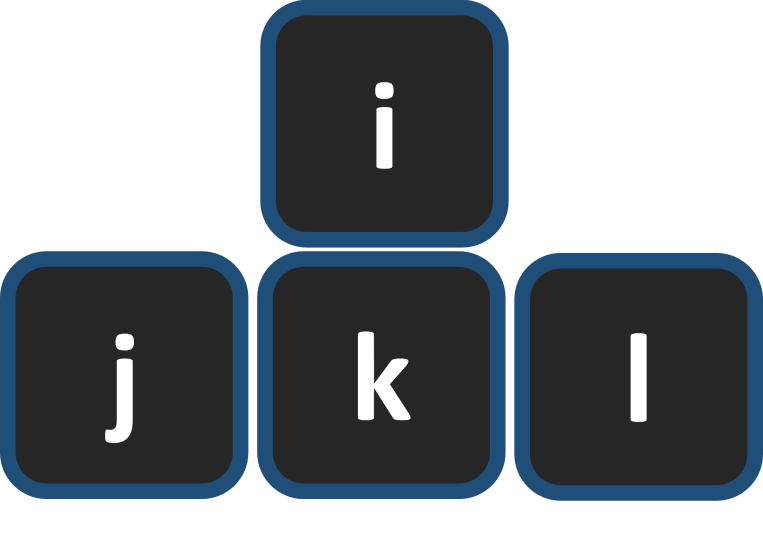 10 |
11 | The feature Vim users praise the most is the ability to move the cursor without changing hand position (HJKL keys). They actually like it so much they write plugins for every other program in the world to support the same shortcuts via “Vim modes”. The thing is that Vim mode is less intuitive (HJKL for arrows is much inconvenient than IJKL), and it forces more adaptation time.
--------------------------------------------------------------------------------
/site/static-hands-docs/README.md:
--------------------------------------------------------------------------------
1 | # Website
2 |
3 | This website is built using [Docusaurus 2](https://docusaurus.io/), a modern static website generator.
4 |
5 | ## Installation
6 |
7 | ```console
8 | yarn install
9 | ```
10 |
11 | ## Local Development
12 |
13 | ```console
14 | yarn start
15 | ```
16 |
17 | This command starts a local development server and opens up a browser window. Most changes are reflected live without having to restart the server.
18 |
19 | ## Build
20 |
21 | ```console
22 | yarn build
23 | ```
24 |
25 | This command generates static content into the `build` directory and can be served using any static contents hosting service.
26 |
27 | ## Deployment
28 |
29 | ```console
30 | GIT_USER=
10 |
11 | The feature Vim users praise the most is the ability to move the cursor without changing hand position (HJKL keys). They actually like it so much they write plugins for every other program in the world to support the same shortcuts via “Vim modes”. The thing is that Vim mode is less intuitive (HJKL for arrows is much inconvenient than IJKL), and it forces more adaptation time.
--------------------------------------------------------------------------------
/site/static-hands-docs/README.md:
--------------------------------------------------------------------------------
1 | # Website
2 |
3 | This website is built using [Docusaurus 2](https://docusaurus.io/), a modern static website generator.
4 |
5 | ## Installation
6 |
7 | ```console
8 | yarn install
9 | ```
10 |
11 | ## Local Development
12 |
13 | ```console
14 | yarn start
15 | ```
16 |
17 | This command starts a local development server and opens up a browser window. Most changes are reflected live without having to restart the server.
18 |
19 | ## Build
20 |
21 | ```console
22 | yarn build
23 | ```
24 |
25 | This command generates static content into the `build` directory and can be served using any static contents hosting service.
26 |
27 | ## Deployment
28 |
29 | ```console
30 | GIT_USER=
14 |
25 | {siteConfig.title}
15 |{siteConfig.tagline}
16 |
17 |
21 | Static Hands Tutorial - 3min ⏱️
22 |
23 |
24 | 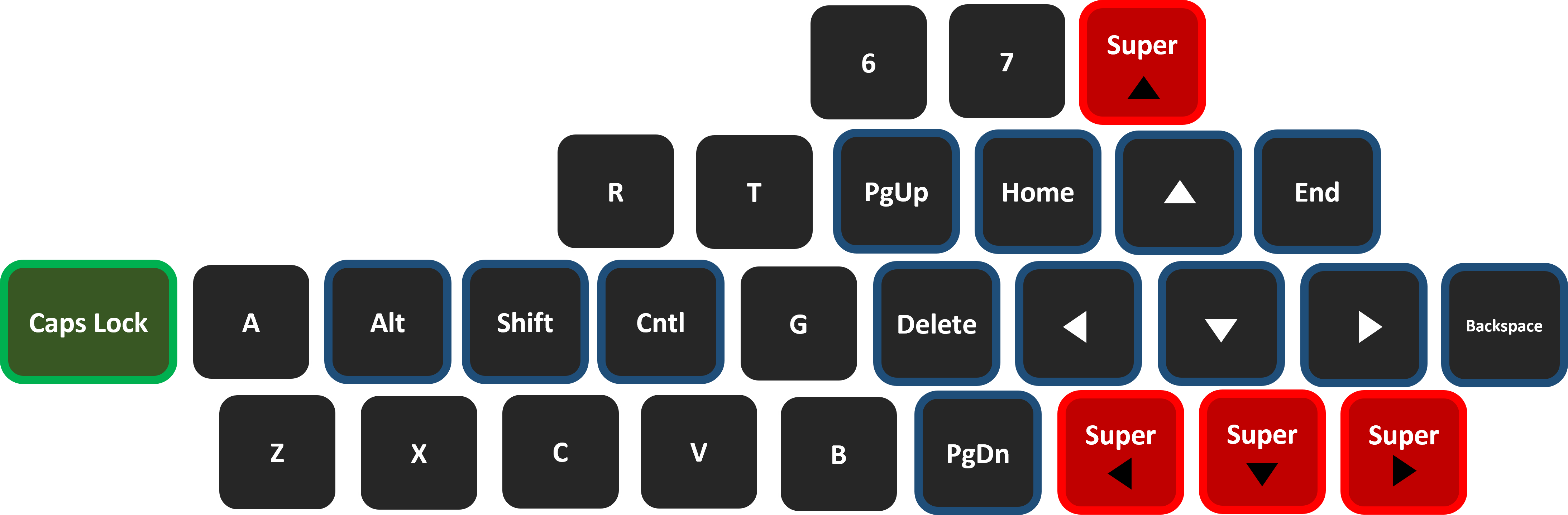 38 |
39 | #### Left Hand Key Bindings
40 | |Key/Commands|Function|
41 | |:----------:|:-------|
42 | |CapsLock+f|Ctrl|
43 | |CapsLock+d|Shift|
44 | |CapsLock+s|Alt|
45 | |CapsLock+w|Win Key|
46 |
47 | * Notice one-click CapsLock still functions the same
--------------------------------------------------------------------------------
/windows/run_v2.ahk:
--------------------------------------------------------------------------------
1 | #Requires AutoHotkey v2.0
2 | SendMode "Input" ; Superior speed and reliability
3 | SetWorkingDir A_ScriptDir ; Ensures a consistent starting directory
4 | SetCapsLockState "AlwaysOff"
5 |
6 | ; Remap keys using CapsLock as a modifier
7 | CapsLock & i::Send "{Blind}{Up}"
8 | CapsLock & j::Send "{Blind}{Left}"
9 | CapsLock & l::Send "{Blind}{Right}"
10 | CapsLock & k::Send "{Blind}{Down}"
11 | CapsLock & u::Send "{Blind}{Home}"
12 | CapsLock & o::Send "{Blind}{End}"
13 | CapsLock & h::Send "{Blind}{Delete}"
14 | CapsLock & y::Send "{Blind}{PgUp}"
15 | CapsLock & n::Send "{Blind}{PgDn}"
16 | CapsLock & `;::Send "{Blind}{Backspace}"
17 | CapsLock & p::Send "{Blind}{Insert}"
18 | CapsLock & 4::Send "{Blind}{$ 2}" ; LaTeX conversion
19 |
20 | ; Modifier keys
21 | ; Modifier keys with CapsLock
22 | CapsLock & f::Send "{Ctrl down}" ; Press and hold Ctrl
23 | CapsLock & f up::Send "{Ctrl up}" ; Release Ctrl
24 |
25 | CapsLock & d::Send "{Shift down}" ; Press and hold Shift
26 | CapsLock & d up::Send "{Shift up}" ; Release Shift
27 |
28 | CapsLock & s::Send "{Alt down}" ; Press and hold Alt
29 | CapsLock & s up::Send "{Alt up}" ; Release Alt
30 |
31 | CapsLock & w::Send "{LWin down}" ; Press and hold Windows
32 | CapsLock & w up::Send "{LWin up}" ; Release Windows
33 |
34 |
35 | ; Speed up navigation
36 | CapsLock & 8::Send "{Blind}{Up 5}"
37 | CapsLock & m::Send "{Blind}{Left 6}"
38 | CapsLock & .::Send "{Blind}{Right 6}"
39 | CapsLock & ,::Send "{Blind}{Down 5}"
40 |
41 | ; Keep window always on top
42 | CapsLock & +::WinSetAlwaysOnTop "A"
43 |
--------------------------------------------------------------------------------
/windows/run_v1.ahk:
--------------------------------------------------------------------------------
1 | #NoEnv ; Recommended for performance and compatibility with future AutoHotkey releases.
2 | ; #Warn ; Enable warnings to assist with detecting common errors.
3 | SendMode Input ; Recommended for new scripts due to its superior speed and reliability.
4 | SetWorkingDir %A_ScriptDir% ; Ensures a consistent starting directory.
5 |
6 | ; SetCapsLockState, AlwaysOff
7 |
8 | CapsLock & i::Send, {blind}{Up}
9 | CapsLock & j::Send, {blind}{Left}
10 | CapsLock & l::Send, {blind}{Right}
11 | CapsLock & k::Send, {blind}{Down}
12 | CapsLock & u::Send, {blind}{home}
13 | CapsLock & o::Send, {blind}{end}
14 | CapsLock & h::Send, {blind}{delete}
15 | CapsLock & y::Send, {blind}{PgUp}
16 | CapsLock & n::Send, {blind}{PgDn}
17 | CapsLock & `;::Send, {blind}{Backspace}
18 | CapsLock & p::Send, {blind}{Insert}
19 |
20 | CapsLock & f::Ctrl
21 | CapsLock & d::Shift
22 | CapsLock & s::Alt
23 | CAPSLOCK & w::LWin
24 |
25 | ; Speed
26 | CapsLock & 8::Send, {Up 5}
27 | CapsLock & m::Send, {blind}^{Left 6}
28 | CapsLock & .::Send, {blind}^{Right 6}
29 | CapsLock & ,::Send, {Down 5}
30 |
31 | ; Keep window open
32 | CapsLock & +::Winset, Alwaysontop, , A
33 |
34 | ; Change Case
35 | CapsLock & 9::goSub, set_upper_case
36 | CapsLock & 0::goSub, set_lower_case
37 | CapsLock & -::goSub, set_title_case
38 |
39 | set_upper_case:
40 | set_lower_case:
41 | set_title_case:
42 | revert_clipboard := clipboardAll
43 | clipboard =
44 | send ^{c}
45 | clipWait, 0.3
46 |
47 | if (a_thisLabel = "set_upper_case")
48 | stringUpper, clipboard, clipboard
49 | else if (a_thisLabel = "set_lower_case")
50 | stringLower, clipboard, clipboard
51 | else if (a_thisLabel = "set_title_case")
52 | stringLower, clipboard, clipboard, T
53 |
54 | send ^{v}
55 | sleep 50
56 | clipboard := revert_clipboard
57 | return
58 |
--------------------------------------------------------------------------------
/site/static-hands-docs/docs/intro.mdx:
--------------------------------------------------------------------------------
1 | ---
2 | sidebar_position: 1
3 | ---
4 |
5 | # Installation
6 |
7 | Let's discover **Static Hands in less than 5 minutes**.
8 |
9 | export const Highlight = ({ children, color }) => (
10 | {
19 | window.location.assign(
20 | "https://github.com/almogtavor/static-hands/releases/download/1.2.0/install.exe"
21 | );
22 | }}
23 | >
24 | {children}
25 |
26 | );
27 |
28 | ## Download Static Hands
29 |
30 | - **Option one**: Click the following button and install the "install.exe" file.
31 |
32 | **
38 |
39 | #### Left Hand Key Bindings
40 | |Key/Commands|Function|
41 | |:----------:|:-------|
42 | |CapsLock+f|Ctrl|
43 | |CapsLock+d|Shift|
44 | |CapsLock+s|Alt|
45 | |CapsLock+w|Win Key|
46 |
47 | * Notice one-click CapsLock still functions the same
--------------------------------------------------------------------------------
/windows/run_v2.ahk:
--------------------------------------------------------------------------------
1 | #Requires AutoHotkey v2.0
2 | SendMode "Input" ; Superior speed and reliability
3 | SetWorkingDir A_ScriptDir ; Ensures a consistent starting directory
4 | SetCapsLockState "AlwaysOff"
5 |
6 | ; Remap keys using CapsLock as a modifier
7 | CapsLock & i::Send "{Blind}{Up}"
8 | CapsLock & j::Send "{Blind}{Left}"
9 | CapsLock & l::Send "{Blind}{Right}"
10 | CapsLock & k::Send "{Blind}{Down}"
11 | CapsLock & u::Send "{Blind}{Home}"
12 | CapsLock & o::Send "{Blind}{End}"
13 | CapsLock & h::Send "{Blind}{Delete}"
14 | CapsLock & y::Send "{Blind}{PgUp}"
15 | CapsLock & n::Send "{Blind}{PgDn}"
16 | CapsLock & `;::Send "{Blind}{Backspace}"
17 | CapsLock & p::Send "{Blind}{Insert}"
18 | CapsLock & 4::Send "{Blind}{$ 2}" ; LaTeX conversion
19 |
20 | ; Modifier keys
21 | ; Modifier keys with CapsLock
22 | CapsLock & f::Send "{Ctrl down}" ; Press and hold Ctrl
23 | CapsLock & f up::Send "{Ctrl up}" ; Release Ctrl
24 |
25 | CapsLock & d::Send "{Shift down}" ; Press and hold Shift
26 | CapsLock & d up::Send "{Shift up}" ; Release Shift
27 |
28 | CapsLock & s::Send "{Alt down}" ; Press and hold Alt
29 | CapsLock & s up::Send "{Alt up}" ; Release Alt
30 |
31 | CapsLock & w::Send "{LWin down}" ; Press and hold Windows
32 | CapsLock & w up::Send "{LWin up}" ; Release Windows
33 |
34 |
35 | ; Speed up navigation
36 | CapsLock & 8::Send "{Blind}{Up 5}"
37 | CapsLock & m::Send "{Blind}{Left 6}"
38 | CapsLock & .::Send "{Blind}{Right 6}"
39 | CapsLock & ,::Send "{Blind}{Down 5}"
40 |
41 | ; Keep window always on top
42 | CapsLock & +::WinSetAlwaysOnTop "A"
43 |
--------------------------------------------------------------------------------
/windows/run_v1.ahk:
--------------------------------------------------------------------------------
1 | #NoEnv ; Recommended for performance and compatibility with future AutoHotkey releases.
2 | ; #Warn ; Enable warnings to assist with detecting common errors.
3 | SendMode Input ; Recommended for new scripts due to its superior speed and reliability.
4 | SetWorkingDir %A_ScriptDir% ; Ensures a consistent starting directory.
5 |
6 | ; SetCapsLockState, AlwaysOff
7 |
8 | CapsLock & i::Send, {blind}{Up}
9 | CapsLock & j::Send, {blind}{Left}
10 | CapsLock & l::Send, {blind}{Right}
11 | CapsLock & k::Send, {blind}{Down}
12 | CapsLock & u::Send, {blind}{home}
13 | CapsLock & o::Send, {blind}{end}
14 | CapsLock & h::Send, {blind}{delete}
15 | CapsLock & y::Send, {blind}{PgUp}
16 | CapsLock & n::Send, {blind}{PgDn}
17 | CapsLock & `;::Send, {blind}{Backspace}
18 | CapsLock & p::Send, {blind}{Insert}
19 |
20 | CapsLock & f::Ctrl
21 | CapsLock & d::Shift
22 | CapsLock & s::Alt
23 | CAPSLOCK & w::LWin
24 |
25 | ; Speed
26 | CapsLock & 8::Send, {Up 5}
27 | CapsLock & m::Send, {blind}^{Left 6}
28 | CapsLock & .::Send, {blind}^{Right 6}
29 | CapsLock & ,::Send, {Down 5}
30 |
31 | ; Keep window open
32 | CapsLock & +::Winset, Alwaysontop, , A
33 |
34 | ; Change Case
35 | CapsLock & 9::goSub, set_upper_case
36 | CapsLock & 0::goSub, set_lower_case
37 | CapsLock & -::goSub, set_title_case
38 |
39 | set_upper_case:
40 | set_lower_case:
41 | set_title_case:
42 | revert_clipboard := clipboardAll
43 | clipboard =
44 | send ^{c}
45 | clipWait, 0.3
46 |
47 | if (a_thisLabel = "set_upper_case")
48 | stringUpper, clipboard, clipboard
49 | else if (a_thisLabel = "set_lower_case")
50 | stringLower, clipboard, clipboard
51 | else if (a_thisLabel = "set_title_case")
52 | stringLower, clipboard, clipboard, T
53 |
54 | send ^{v}
55 | sleep 50
56 | clipboard := revert_clipboard
57 | return
58 |
--------------------------------------------------------------------------------
/site/static-hands-docs/docs/intro.mdx:
--------------------------------------------------------------------------------
1 | ---
2 | sidebar_position: 1
3 | ---
4 |
5 | # Installation
6 |
7 | Let's discover **Static Hands in less than 5 minutes**.
8 |
9 | export const Highlight = ({ children, color }) => (
10 | {
19 | window.location.assign(
20 | "https://github.com/almogtavor/static-hands/releases/download/1.2.0/install.exe"
21 | );
22 | }}
23 | >
24 | {children}
25 |
26 | );
27 |
28 | ## Download Static Hands
29 |
30 | - **Option one**: Click the following button and install the "install.exe" file.
31 |
32 | **35 | 36 | :::caution 37 | Notice that the exe has been compiled without certificates. 38 | Anti-Virus softwares might warn about it and you should ignore. 39 | If you prefer not to install an exe, you can go with **option two**. 40 | 41 | ::: 42 | 43 | - **Option two**: Download [**AutoHotKey**](https://www.autohotkey.com/). 44 | Clone project 45 | 46 | $ git clone https://github.com/almogtavor/static-hands.git 47 | 48 | go to static-hands --> Windows --> `run_v2.ahk` with AutoHotkey. 49 | 50 | $ cd static-hands\windows 51 | $ run_v2.ahk 52 | 53 | To put `ahk` into effect automatically every time PC start: 54 | 55 | - Select `run_v2.ahk`, and press `Ctrl+C`. 56 | - Press `Win+R` to open the Run dialog, then enter `shell:startup` and click OK or Enter. 57 | 58 | This will open the Startup folder for the current user. 59 | 60 | - Right-click inside the window, and click "Paste Shortcut". The shortcut to the script should now be in the Startup folder. 61 | -------------------------------------------------------------------------------- /site/static-hands-docs/src/components/HomepageFeatures.js: -------------------------------------------------------------------------------- 1 | import React from "react"; 2 | import clsx from "clsx"; 3 | import styles from "./HomepageFeatures.module.css"; 4 | 5 | const FeatureList = [ 6 | { 7 | title: "Easy to Use", 8 | Svg: require("../../static/img/undraw_docusaurus_mountain.svg").default, 9 | description: ( 10 | <> 11 | Static Hands was designed from the ground up to be easily installed and 12 | used to let you speed up your developing time. 13 | 14 | ), 15 | }, 16 | { 17 | title: "Speed Yourself Up", 18 | Svg: require("../../static/img/undraw_docusaurus_tree.svg").default, 19 | description: ( 20 | <> 21 | Minimal shortcuts using the CapsLock key that doesn't require moving 22 | hands. Lets you get to every key in your keyboard, like it in the middle 23 | of it. 24 | 25 | ), 26 | }, 27 | { 28 | title: "New Typing Features", 29 | Svg: require("../../static/img/undraw_docusaurus_react.svg").default, 30 | description: ( 31 | <> 32 | Keep windows on top, move 6 words on each tap, turn a string upper or 33 | lower and more. 34 | 35 | ), 36 | }, 37 | ]; 38 | 39 | function Feature({ Svg, title, description }) { 40 | return ( 41 |
42 |
50 | );
51 | }
52 |
53 | export default function HomepageFeatures() {
54 | return (
55 |
43 |
44 |
45 |
46 |
49 | {title}
47 |{description}
48 |
57 |
63 |
58 | {FeatureList.map((props, idx) => (
59 |
62 |  5 |
5 |  25 |
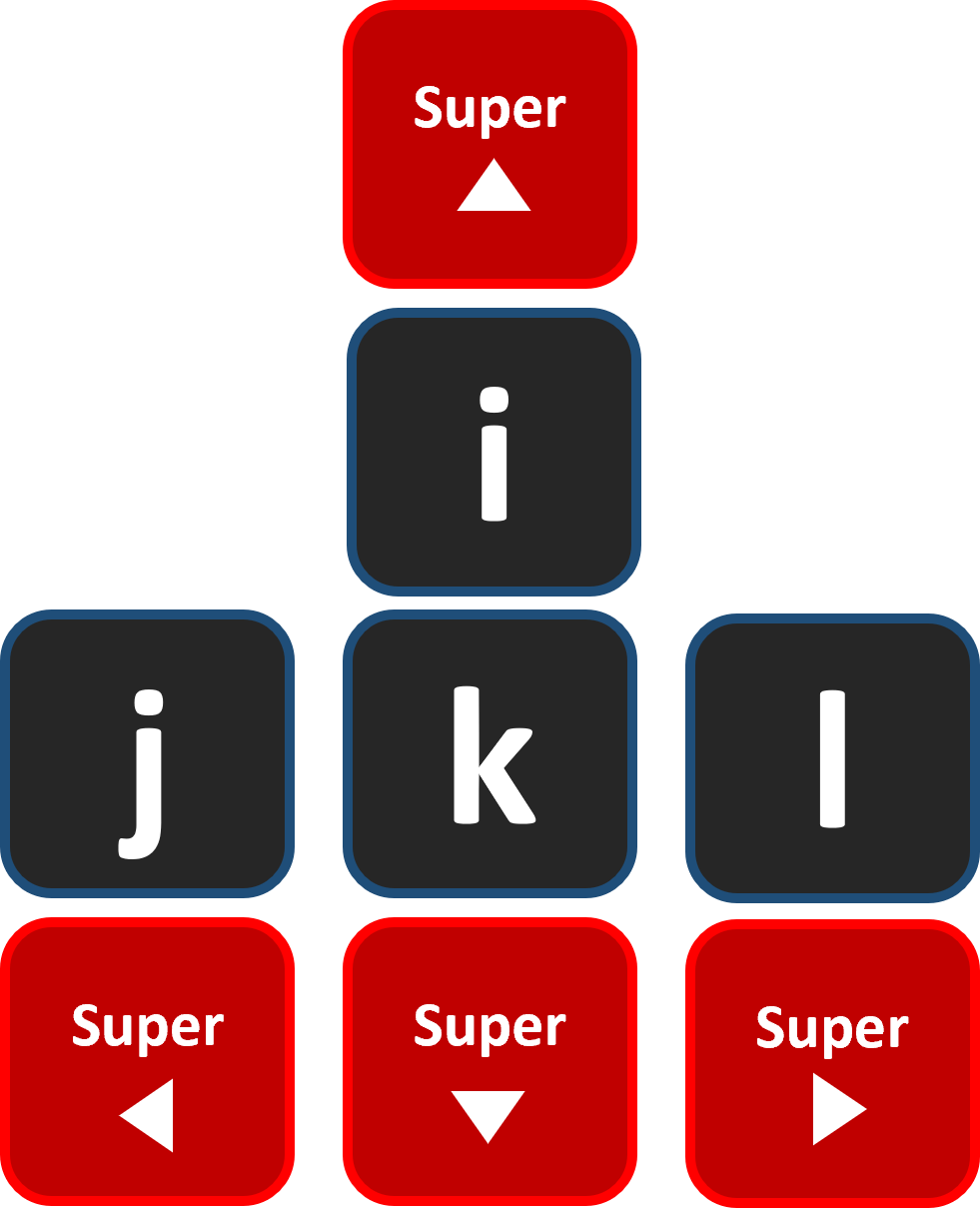
26 | Where "Super" means that each press is translated to 5/6 actual presses.
27 | In a more detailed manner, the main key-bindings of `static-hands` are:
28 |
29 |
25 |
26 | Where "Super" means that each press is translated to 5/6 actual presses.
27 | In a more detailed manner, the main key-bindings of `static-hands` are:
28 |
29 |  30 |
31 |
32 | ## Installation
33 |
34 | First of all, install [AutoHotKey](https://www.autohotkey.com/). Then:
35 | * **Option one**: Simply install the file by running the install.bat as an administrator (makes Static Hands load on the computer's startup).
36 | * **Option two**: Install the file by clicking the install.exe (won't move Static Hands to startup folder).
37 | * **Option three**: Clone project, run static-hands --> Windows --> run.ahk with AutoHotkey. To put ahk into effect automatically every time PC start
38 |
39 | * Select `run.ahk`, and press Ctrl+C.
40 | * Press Win+R to open the Run dialog, then enter `shell:startup` and click OK or Enter. This will open the Startup folder for the current user. To instead open the folder for all users, enter shell: common startup (however, in that case, you must be an administrator to proceed).
41 | * Right-click inside the window, and click "Paste Shortcut". The shortcut to the script should now be in the Startup folder.
42 |
43 | ## Static Hands vs Vim
44 |
45 | Vim shortcuts are great, but they have a learning curve. And not a short one. Static Hands' shortcuts are super simple and quick. If you are already a vim user, you do not need this repo. And for us non-Vim users. The feature Vim users praise the most is the ability to move the cursor without changing hand position (HJKL keys). They actually like it so much they write plugins for every other program in the world to support the same shortcuts via “Vim modes”. The thing is that Vim mode is less intuitive (HJKL for arrows is much inconvenient than IJKL), and it forces more adaptation time.
46 |
47 | ## Basic Features
48 |
49 | The Strength of these key bindings is in the shortcuts.
50 | For example, the shortcut Ctrl+Left Arrow is a great shortcut, but in reality that forces us, developers, to move our hands to the sides. We can now use CapsLock+f+j and get the same results without any effort. It'll take some time to fully get used to it, but it will pay off.
51 |
52 | ### Available commands ⏱️
53 |
54 | #### Left and Right Hand Key Bindings
55 | |Key/Commands|Function 💥|
56 | |:----------:|:-------|
57 | |CapsLock+j|Left|
58 | |CapsLock+k|Down|
59 | |CapsLock+i|Up|
60 | |CapsLock+l|Right|
61 | |CapsLock+u| To the start of the line (Home)|
62 | |CapsLock+o| To the end of the line (End)|
63 | |CapsLock+h| Delete|
64 | |CapsLock+;| Backspace|
65 | |CapsLock+'| Enter|
66 | |CapsLock+p| Insert|
67 | |CapsLock+y| PageUp|
68 | |CapsLock+n| PageDown|
69 | |CapsLock++| Window always on top (toggle to turn off)|
70 |
71 | #### Left Hand Key Bindings
72 | |Key/Commands|Function|
73 | |:----------:|:-------|
74 | |CapsLock+f|Ctrl|
75 | |CapsLock+d|Shift|
76 | |CapsLock+s|Alt|
77 | |CapsLock+w|Win Key|
78 |
79 |
80 | * Notice one-click CapsLock still functions the same
81 |
82 | ### Speed ⚡️
83 |
84 | |Key/Commands|Function|
85 | |:----------:|:-------|
86 | |CapsLock+m| Left X 6|
87 | |CapsLock+,| Down X 5 |
88 | |CapsLock+8| Up X 5 |
89 | |CapsLock+.| Right X 6|
90 |
91 |
92 | ### Case Changing
93 |
94 | |Key/Commands|Function|
95 | |:----------:|:-------|
96 | |CapsLock+9|Upper Case|
97 | |CapsLock+0|Lower Case|
98 | |CapsLock+-|Title Case|
99 |
--------------------------------------------------------------------------------
/site/static-hands-docs/static/img/logo.svg:
--------------------------------------------------------------------------------
1 |
--------------------------------------------------------------------------------
/site/static-hands-docs/static/img/undraw_docusaurus_mountain.svg:
--------------------------------------------------------------------------------
1 |
54 |
--------------------------------------------------------------------------------
/site/static-hands-docs/static/img/icon.svg:
--------------------------------------------------------------------------------
1 |
10 |
--------------------------------------------------------------------------------
/icon.svg:
--------------------------------------------------------------------------------
1 |
10 |
--------------------------------------------------------------------------------
30 |
31 |
32 | ## Installation
33 |
34 | First of all, install [AutoHotKey](https://www.autohotkey.com/). Then:
35 | * **Option one**: Simply install the file by running the install.bat as an administrator (makes Static Hands load on the computer's startup).
36 | * **Option two**: Install the file by clicking the install.exe (won't move Static Hands to startup folder).
37 | * **Option three**: Clone project, run static-hands --> Windows --> run.ahk with AutoHotkey. To put ahk into effect automatically every time PC start
38 |
39 | * Select `run.ahk`, and press Ctrl+C.
40 | * Press Win+R to open the Run dialog, then enter `shell:startup` and click OK or Enter. This will open the Startup folder for the current user. To instead open the folder for all users, enter shell: common startup (however, in that case, you must be an administrator to proceed).
41 | * Right-click inside the window, and click "Paste Shortcut". The shortcut to the script should now be in the Startup folder.
42 |
43 | ## Static Hands vs Vim
44 |
45 | Vim shortcuts are great, but they have a learning curve. And not a short one. Static Hands' shortcuts are super simple and quick. If you are already a vim user, you do not need this repo. And for us non-Vim users. The feature Vim users praise the most is the ability to move the cursor without changing hand position (HJKL keys). They actually like it so much they write plugins for every other program in the world to support the same shortcuts via “Vim modes”. The thing is that Vim mode is less intuitive (HJKL for arrows is much inconvenient than IJKL), and it forces more adaptation time.
46 |
47 | ## Basic Features
48 |
49 | The Strength of these key bindings is in the shortcuts.
50 | For example, the shortcut Ctrl+Left Arrow is a great shortcut, but in reality that forces us, developers, to move our hands to the sides. We can now use CapsLock+f+j and get the same results without any effort. It'll take some time to fully get used to it, but it will pay off.
51 |
52 | ### Available commands ⏱️
53 |
54 | #### Left and Right Hand Key Bindings
55 | |Key/Commands|Function 💥|
56 | |:----------:|:-------|
57 | |CapsLock+j|Left|
58 | |CapsLock+k|Down|
59 | |CapsLock+i|Up|
60 | |CapsLock+l|Right|
61 | |CapsLock+u| To the start of the line (Home)|
62 | |CapsLock+o| To the end of the line (End)|
63 | |CapsLock+h| Delete|
64 | |CapsLock+;| Backspace|
65 | |CapsLock+'| Enter|
66 | |CapsLock+p| Insert|
67 | |CapsLock+y| PageUp|
68 | |CapsLock+n| PageDown|
69 | |CapsLock++| Window always on top (toggle to turn off)|
70 |
71 | #### Left Hand Key Bindings
72 | |Key/Commands|Function|
73 | |:----------:|:-------|
74 | |CapsLock+f|Ctrl|
75 | |CapsLock+d|Shift|
76 | |CapsLock+s|Alt|
77 | |CapsLock+w|Win Key|
78 |
79 |
80 | * Notice one-click CapsLock still functions the same
81 |
82 | ### Speed ⚡️
83 |
84 | |Key/Commands|Function|
85 | |:----------:|:-------|
86 | |CapsLock+m| Left X 6|
87 | |CapsLock+,| Down X 5 |
88 | |CapsLock+8| Up X 5 |
89 | |CapsLock+.| Right X 6|
90 |
91 |
92 | ### Case Changing
93 |
94 | |Key/Commands|Function|
95 | |:----------:|:-------|
96 | |CapsLock+9|Upper Case|
97 | |CapsLock+0|Lower Case|
98 | |CapsLock+-|Title Case|
99 |
--------------------------------------------------------------------------------
/site/static-hands-docs/static/img/logo.svg:
--------------------------------------------------------------------------------
1 |
--------------------------------------------------------------------------------
/site/static-hands-docs/static/img/undraw_docusaurus_mountain.svg:
--------------------------------------------------------------------------------
1 |
54 |
--------------------------------------------------------------------------------
/site/static-hands-docs/static/img/icon.svg:
--------------------------------------------------------------------------------
1 |
10 |
--------------------------------------------------------------------------------
/icon.svg:
--------------------------------------------------------------------------------
1 |
10 |
--------------------------------------------------------------------------------