├── Diagrams.playground
├── Pages
│ ├── Tree.xcplaygroundpage
│ │ ├── timeline.xctimeline
│ │ └── Contents.swift
│ ├── StarRing.xcplaygroundpage
│ │ ├── timeline.xctimeline
│ │ └── Contents.swift
│ ├── Tree - The Larch.xcplaygroundpage
│ │ ├── timeline.xctimeline
│ │ └── Contents.swift
│ └── OffsetTriangleRing.xcplaygroundpage
│ │ ├── timeline.xctimeline
│ │ └── Contents.swift
├── playground.xcworkspace
│ └── contents.xcworkspacedata
├── contents.xcplayground
└── Sources
│ ├── CGContextExtension.swift
│ ├── CoreGraphicsDiagramView.swift
│ └── Diagram.swift
├── Crustacean.playground
├── Pages
│ ├── License.xcplaygroundpage
│ │ ├── timeline.xctimeline
│ │ └── Contents.swift
│ ├── Page 2.xcplaygroundpage
│ │ ├── timeline.xctimeline
│ │ └── Contents.swift
│ └── Page 1.xcplaygroundpage
│ │ ├── timeline.xctimeline
│ │ └── Contents.swift
├── playground.xcworkspace
│ └── contents.xcworkspacedata
├── contents.xcplayground
└── Sources
│ └── CoreGraphicsDiagramView.swift
├── CrustaceanEnumOriented.playground
├── Pages
│ ├── License.xcplaygroundpage
│ │ ├── timeline.xctimeline
│ │ └── Contents.swift
│ ├── Page 2.xcplaygroundpage
│ │ ├── timeline.xctimeline
│ │ └── Contents.swift
│ └── Page 1.xcplaygroundpage
│ │ ├── timeline.xctimeline
│ │ └── Contents.swift
├── playground.xcworkspace
│ └── contents.xcworkspacedata
├── contents.xcplayground
└── Sources
│ └── CoreGraphicsDiagramView.swift
├── .gitignore
└── README.md
/Diagrams.playground/Pages/Tree.xcplaygroundpage/timeline.xctimeline:
--------------------------------------------------------------------------------
1 |
2 |
4 |
5 |
6 |
7 |
--------------------------------------------------------------------------------
/Crustacean.playground/Pages/License.xcplaygroundpage/timeline.xctimeline:
--------------------------------------------------------------------------------
1 |
2 |
4 |
5 |
6 |
7 |
--------------------------------------------------------------------------------
/Crustacean.playground/Pages/Page 2.xcplaygroundpage/timeline.xctimeline:
--------------------------------------------------------------------------------
1 |
2 |
4 |
5 |
6 |
7 |
--------------------------------------------------------------------------------
/Diagrams.playground/Pages/StarRing.xcplaygroundpage/timeline.xctimeline:
--------------------------------------------------------------------------------
1 |
2 |
4 |
5 |
6 |
7 |
--------------------------------------------------------------------------------
/Diagrams.playground/Pages/Tree - The Larch.xcplaygroundpage/timeline.xctimeline:
--------------------------------------------------------------------------------
1 |
2 |
4 |
5 |
6 |
7 |
--------------------------------------------------------------------------------
/CrustaceanEnumOriented.playground/Pages/License.xcplaygroundpage/timeline.xctimeline:
--------------------------------------------------------------------------------
1 |
2 |
4 |
5 |
6 |
7 |
--------------------------------------------------------------------------------
/CrustaceanEnumOriented.playground/Pages/Page 2.xcplaygroundpage/timeline.xctimeline:
--------------------------------------------------------------------------------
1 |
2 |
4 |
5 |
6 |
7 |
--------------------------------------------------------------------------------
/Diagrams.playground/Pages/OffsetTriangleRing.xcplaygroundpage/timeline.xctimeline:
--------------------------------------------------------------------------------
1 |
2 |
4 |
5 |
6 |
7 |
--------------------------------------------------------------------------------
/Crustacean.playground/playground.xcworkspace/contents.xcworkspacedata:
--------------------------------------------------------------------------------
1 |
2 |
4 |
6 |
7 |
8 |
--------------------------------------------------------------------------------
/Diagrams.playground/playground.xcworkspace/contents.xcworkspacedata:
--------------------------------------------------------------------------------
1 |
2 |
4 |
6 |
7 |
8 |
--------------------------------------------------------------------------------
/CrustaceanEnumOriented.playground/playground.xcworkspace/contents.xcworkspacedata:
--------------------------------------------------------------------------------
1 |
2 |
4 |
6 |
7 |
8 |
--------------------------------------------------------------------------------
/.gitignore:
--------------------------------------------------------------------------------
1 | # Xcode
2 | #
3 | build/
4 | *.pbxuser
5 | !default.pbxuser
6 | *.mode1v3
7 | !default.mode1v3
8 | *.mode2v3
9 | !default.mode2v3
10 | *.perspectivev3
11 | !default.perspectivev3
12 | xcuserdata
13 | *.xccheckout
14 | *.moved-aside
15 | DerivedData
16 | *.hmap
17 | *.ipa
18 | *.xcuserstate
--------------------------------------------------------------------------------
/Crustacean.playground/contents.xcplayground:
--------------------------------------------------------------------------------
1 |
2 |
3 |
4 |
5 |
6 |
7 |
8 |
--------------------------------------------------------------------------------
/CrustaceanEnumOriented.playground/contents.xcplayground:
--------------------------------------------------------------------------------
1 |
2 |
3 |
4 |
5 |
6 |
7 |
8 |
--------------------------------------------------------------------------------
/Diagrams.playground/contents.xcplayground:
--------------------------------------------------------------------------------
1 |
2 |
3 |
4 |
5 |
6 |
7 |
8 |
9 |
--------------------------------------------------------------------------------
/Crustacean.playground/Pages/Page 1.xcplaygroundpage/timeline.xctimeline:
--------------------------------------------------------------------------------
1 |
2 |
4 |
5 |
9 |
10 |
11 |
12 |
--------------------------------------------------------------------------------
/CrustaceanEnumOriented.playground/Pages/Page 1.xcplaygroundpage/timeline.xctimeline:
--------------------------------------------------------------------------------
1 |
2 |
4 |
5 |
9 |
10 |
11 |
12 |
--------------------------------------------------------------------------------
/Diagrams.playground/Pages/Tree - The Larch.xcplaygroundpage/Contents.swift:
--------------------------------------------------------------------------------
1 | /*:
2 | [**<- Previous**](@previous)
3 |
4 | ## The Larch
5 | */
6 | extension Diagram {
7 | func tree(_ n: Int) -> Diagram {
8 | if n == 0 { return self }
9 |
10 | let smallTree = tree(n - 1).scale(x: 0.33, y: 0.45)
11 |
12 | return diagrams([
13 | stump,
14 | smallTree.translate(x: 0, y: 300),
15 | smallTree.rotate(45).translate(x: -8, y: 250),
16 | smallTree.rotate(-45).translate(x: 12, y: 200),
17 | smallTree.rotate(70).translate(x: -18, y: 150),
18 | smallTree.rotate(-70).translate(x: 22, y: 100)
19 | ])
20 | }
21 | }
22 |
23 | let stump = polygon([(30, 0), (10, 300), (-10, 300), (-30, 0)])
24 | let larchTree = stump.tree(5).translate(x: 0, y: -260)
25 |
26 | displayDiagram(larchTree)
27 | /*:
28 | To see the result, View>Assistant Editor>Show Assistant Editor (opt-cmd-Return).
29 |
30 | * * *
31 |
32 | */
33 |
--------------------------------------------------------------------------------
/Diagrams.playground/Pages/Tree.xcplaygroundpage/Contents.swift:
--------------------------------------------------------------------------------
1 | /*:
2 | [**<- Previous**](@previous)
3 |
4 | ## I want to be a tree
5 | */
6 | extension Diagram {
7 | func tree(_ n: Int) -> Diagram {
8 | if n == 0 { return self }
9 |
10 | let smallTree = tree(n - 1).scale(x: 0.6, y: 0.67)
11 |
12 | return diagrams([
13 | stump,
14 | smallTree.translate(x: 0, y: 190),
15 | smallTree.rotate(35).translate(x: 0, y: 200),
16 | smallTree.rotate(-35).translate(x: 0, y: 180)
17 | ])
18 | }
19 | }
20 |
21 | let stump = polygon([(30, 0), (10, 300), (-10, 300), (-30, 0)])
22 | let aTree = stump.tree(5).translate(x: 0, y: -260)
23 |
24 | displayDiagram(aTree)
25 | /*:
26 | To see the result, View>Assistant Editor>Show Assistant Editor (opt-cmd-Return).
27 |
28 | * * *
29 |
30 | Inspired by the *tree* example in the Haskell library [**Gloss**](https://github.com/benl23x5/gloss)
31 |
32 | * * *
33 |
34 | With a few tweeks we can create a different looking tree: [**Next ->**](@next)
35 | */
36 |
--------------------------------------------------------------------------------
/Diagrams.playground/Pages/OffsetTriangleRing.xcplaygroundpage/Contents.swift:
--------------------------------------------------------------------------------
1 | /*:
2 | [**<- Previous**](@previous)
3 | */
4 | import CoreGraphics
5 |
6 | extension Diagram {
7 | func ring(radius: CGFloat, number: Int) -> Diagram {
8 | let angles = stride(from: 0.0, to: 360.0, by: 360.0/Double(number))
9 | return diagrams(angles.map {
10 | translate(x: 0, y: radius).rotate(CGFloat($0))
11 | }
12 | )
13 | }
14 |
15 | func iterateScale(_ s: CGFloat, offset: Point = (0,0), iterate: Int) -> Diagram {
16 | if iterate == 0 { return self }
17 | return self + scale(s)
18 | .translate(x: offset.x, y: offset.y)
19 | .iterateScale(s, offset: offset, iterate: iterate - 1)
20 | }
21 | }
22 |
23 | let triangle = polygon([(0, -50), (25, 0), (-25, 0)])
24 |
25 | let triangleRing = triangle.ring(radius: 220, number: 27)
26 | let diagram = triangleRing.iterateScale(0.618, offset: (15, 30), iterate: 7)
27 |
28 | showCoreGraphicsDiagram(size: CGSize(width: 600, height: 500)) {
29 | drawDiagram(diagram, context: $0)
30 | }
31 | /*:
32 | To see the result, View>Assistant Editor>Show Assistant Editor (opt-cmd-Return).
33 |
34 | * * *
35 |
36 | [**Next ->**](@next)
37 | */
38 |
--------------------------------------------------------------------------------
/Diagrams.playground/Pages/StarRing.xcplaygroundpage/Contents.swift:
--------------------------------------------------------------------------------
1 | //: Take a look in the `Sources` folder to see the implementation of **Diagram** and the **CGContext** extension.
2 |
3 | import CoreGraphics
4 |
5 | extension Diagram {
6 | func ring(radius: CGFloat, number: Int) -> Diagram {
7 | let angles = stride(from: 0.0, to: 360.0, by: 360.0/Double(number))
8 | return diagrams(angles.map {
9 | translate(x: 0, y: radius).rotate(CGFloat($0))
10 | }
11 | )
12 | }
13 |
14 | func iterateScale(_ s: CGFloat, iterate: Int) -> Diagram {
15 | if iterate == 0 { return self }
16 | return self + scale(s).iterateScale(s, iterate: iterate - 1)
17 | }
18 | }
19 |
20 | let star = polygon(
21 | [(0, 50), (10, 20), (40, 20), (20, 0),(30, -30), (0, -10),
22 | (-30, -30), (-20, 0), (-40, 20), (-10, 20), (0, 50)]
23 | )
24 |
25 | let starRing = star.ring(radius: 185, number: 16)
26 | let diagram = starRing.iterateScale(0.74, iterate: 6)
27 |
28 | showCoreGraphicsDiagram(size: CGSize(width: 600, height: 500)) {
29 | drawDiagram(diagram, context: $0)
30 | }
31 | /*:
32 | To see the result, View>Assistant Editor>Show Assistant Editor (opt-cmd-Return).
33 |
34 | * * *
35 |
36 | [**Next ->**](@next)
37 | */
38 |
--------------------------------------------------------------------------------
/CrustaceanEnumOriented.playground/Sources/CoreGraphicsDiagramView.swift:
--------------------------------------------------------------------------------
1 | import UIKit
2 | import PlaygroundSupport
3 |
4 | let drawingArea = CGRect(x: 0.0, y: 0.0, width: 375.0, height: 667.0)
5 |
6 | /// `CoreGraphicsDiagramView` is a `UIView` that draws itself by calling a
7 | /// user-supplied function to generate paths in a `CGContext`, then strokes
8 | /// the context's current path, creating lines in a pleasing shade of blue.
9 | class CoreGraphicsDiagramView : UIView {
10 | override func draw(_ rect: CGRect) {
11 | if let context = UIGraphicsGetCurrentContext(){
12 | context.saveGState()
13 | draw(context)
14 |
15 | let lightBlue = UIColor(red: 0.222, green: 0.617, blue: 0.976, alpha: 1.0).cgColor
16 | context.setStrokeColor(lightBlue)
17 | context.setLineWidth(3)
18 | context.strokePath()
19 | context.restoreGState()
20 | }
21 | }
22 |
23 | var draw: (CGContext)->() = { _ in () }
24 | }
25 |
26 | /// Shows a `UIView` in the current playground that draws itself by invoking
27 | /// `draw` on a `CGContext`, then stroking the context's current path in a
28 | /// pleasing light blue.
29 | public func showCoreGraphicsDiagram(draw: @escaping (CGContext)->()) {
30 | let diagramView = CoreGraphicsDiagramView(frame: drawingArea)
31 | diagramView.draw = draw
32 | diagramView.setNeedsDisplay()
33 | PlaygroundPage.current.liveView = diagramView
34 | }
35 |
--------------------------------------------------------------------------------
/Diagrams.playground/Sources/CGContextExtension.swift:
--------------------------------------------------------------------------------
1 | import CoreGraphics
2 |
3 | public extension CGContext {
4 | func drawPath(_ points: [CGPoint]) {
5 | if let p = points.first {
6 | move(to: p)
7 | points.forEach { addLine(to: $0) }
8 | }
9 | }
10 | func drawPolygon(_ points: [CGPoint]) {
11 | if let p = points.last {
12 | move(to: p)
13 | points.forEach { addLine(to: $0) }
14 | }
15 | }
16 | func arc(radius: CGFloat, startAngle: CGFloat, endAngle: CGFloat) {
17 | let arc = CGMutablePath()
18 | arc.addArc(center: .zero, radius: radius, startAngle: startAngle, endAngle: endAngle, clockwise: true)
19 | addPath(arc)
20 | }
21 | func circle(radius: CGFloat) {
22 | arc(radius: radius, startAngle: 0.0, endAngle: twoPi)
23 | }
24 | func saveContext(operation: () -> ()) {
25 | saveGState()
26 | operation()
27 | restoreGState()
28 | }
29 | func scale(x: CGFloat, y: CGFloat, operation: (CGContext) -> ()) {
30 | saveContext {
31 | scaleBy(x: x, y: y)
32 | operation(self)
33 | }
34 | }
35 | func translate(x: CGFloat, y: CGFloat, operation: (CGContext) -> ()) {
36 | saveContext {
37 | translateBy(x: x, y: y)
38 | operation(self)
39 | }
40 | }
41 | func rotate(angle: CGFloat, operation: (CGContext) -> ()) {
42 | saveContext {
43 | rotate(by: angle)
44 | operation(self)
45 | }
46 | }
47 | }
48 |
--------------------------------------------------------------------------------
/Crustacean.playground/Sources/CoreGraphicsDiagramView.swift:
--------------------------------------------------------------------------------
1 | import UIKit
2 | import PlaygroundSupport
3 |
4 | let drawingArea = CGRect(x: 0.0, y: 0.0, width: 375.0, height: 667.0)
5 |
6 | /// `CoreGraphicsDiagramView` is a `UIView` that draws itself by calling a
7 | /// user-supplied function to generate paths in a `CGContext`, then strokes
8 | /// the context's current path, creating lines in a pleasing shade of blue.
9 | class CoreGraphicsDiagramView : UIView {
10 | override func draw(_ rect: CGRect) {
11 | if let context = UIGraphicsGetCurrentContext(){
12 | context.saveGState()
13 | draw(context)
14 |
15 | let lightBlue = UIColor(red: 0.222, green: 0.617, blue: 0.976, alpha: 1.0).cgColor
16 | context.setStrokeColor(lightBlue)
17 | context.setLineWidth(3)
18 | context.strokePath()
19 | context.restoreGState()
20 | }
21 | }
22 |
23 | var draw: (CGContext)->() = { _ in () }
24 | }
25 |
26 | /// Shows a `UIView` in the current playground that draws itself by invoking
27 | /// `draw` on a `CGContext`, then stroking the context's current path in a
28 | /// pleasing light blue.
29 | public func showCoreGraphicsDiagram(title: String, draw: @escaping (CGContext)->()) {
30 | let diagramView = CoreGraphicsDiagramView(frame: drawingArea)
31 | diagramView.draw = draw
32 | diagramView.setNeedsDisplay()
33 | PlaygroundPage.current.liveView = diagramView
34 | }
35 |
--------------------------------------------------------------------------------
/Diagrams.playground/Sources/CoreGraphicsDiagramView.swift:
--------------------------------------------------------------------------------
1 | import UIKit
2 | import PlaygroundSupport
3 |
4 | /// `CoreGraphicsDiagramView` is a `UIView` that draws itself by calling a
5 | /// user-supplied function to generate paths in a `CGContext`, then strokes
6 | /// the context's current path, creating lines in a pleasing shade of blue.
7 | class CoreGraphicsDiagramView : UIView {
8 | override func draw(_ rect: CGRect) {
9 | if let context = UIGraphicsGetCurrentContext() {
10 | context.saveGState()
11 | let flipVertical = CGAffineTransform(a: 1, b: 0, c: 0, d: -1, tx: 0, ty: frame.height)
12 | context.concatenate(flipVertical)
13 | context.translateBy(x: frame.width/2, y: frame.height/2)
14 |
15 | draw(context)
16 |
17 | let lightBlue = UIColor(red: 0.222, green: 0.617, blue: 0.976, alpha: 1.0).cgColor
18 | context.setStrokeColor(lightBlue)
19 | context.setLineWidth(2)
20 | context.strokePath()
21 | context.restoreGState()
22 | }
23 | }
24 |
25 | var draw: (CGContext)->() = { _ in () }
26 | }
27 |
28 | /// Shows a `UIView` in the current playground that draws itself by invoking
29 | /// `draw` on a `CGContext`, then stroking the context's current path in a
30 | /// pleasing light blue.
31 | public func showCoreGraphicsDiagram(size: CGSize, draw: @escaping (CGContext)->()) {
32 | let diagramView = CoreGraphicsDiagramView(frame: CGRect(origin: .zero, size: size))
33 | diagramView.draw = draw
34 | diagramView.setNeedsDisplay()
35 | PlaygroundPage.current.liveView = diagramView
36 | }
37 |
38 | public func displayDiagram(_ diagram: Diagram) {
39 | showCoreGraphicsDiagram(size: CGSize(width: 600, height: 600)) {
40 | drawDiagram(diagram, context: $0)
41 | }
42 | }
43 |
--------------------------------------------------------------------------------
/CrustaceanEnumOriented.playground/Pages/Page 1.xcplaygroundpage/Contents.swift:
--------------------------------------------------------------------------------
1 | //: # Crustacean
2 | //:
3 | //: Enum-Oriented Programming with Value Types
4 | import CoreGraphics
5 | let twoPi = CGFloat(M_PI * 2)
6 | //: A `Diagram` as a recursive enum
7 | enum Diagram {
8 | case polygon(corners: [CGPoint])
9 | case circle(center: CGPoint, radius: CGFloat)
10 | indirect case scale(x: CGFloat, y: CGFloat, diagram: Diagram)
11 | case diagrams([Diagram])
12 | }
13 | //: ## Extend CGContext
14 | //:
15 | //: A few simple wrapper functions for `CGContext`
16 | extension CGContext {
17 | func drawPath(_ points: [CGPoint]) {
18 | if let p = points.last {
19 | move(to: p)
20 | for p in points { addLine(to: p) }
21 | }
22 | }
23 | func addArc(center: CGPoint, radius: CGFloat, startAngle: CGFloat, endAngle: CGFloat) {
24 | let arc = CGMutablePath()
25 | arc.addArc(center: center, radius: radius, startAngle: startAngle, endAngle: endAngle, clockwise: true)
26 | addPath(arc)
27 | }
28 | func scale(x: CGFloat, y: CGFloat, operation: (CGContext) -> ()) {
29 | saveGState()
30 | scaleBy(x: x, y: y)
31 | operation(self)
32 | restoreGState()
33 | }
34 | }
35 | //: ## Do some drawing!
36 | //:
37 | //: A recursive function responsible for drawing a diagram into a CGContext
38 | func drawDiagram(_ diagram: Diagram, context: CGContext) -> () {
39 | switch diagram {
40 | case let .polygon(corners):
41 | context.drawPath(corners)
42 |
43 | case let .circle(center, radius):
44 | context.addArc(center: center, radius: radius, startAngle: 0.0, endAngle: twoPi)
45 |
46 | case let .scale(x, y, diagram):
47 | context.scale(x: x, y: y) {
48 | drawDiagram(diagram, context: $0)
49 | }
50 |
51 | case let .diagrams(diagrams):
52 | for d in diagrams { drawDiagram(d, context: context) }
53 | }
54 | }
55 | //: Infix operator for combining `Diagrams`
56 | func + (d1: Diagram, d2: Diagram) -> Diagram {
57 | return .diagrams([d1, d2])
58 | }
59 | //: ## Make some shapes
60 | let circle = Diagram.circle(center: CGPoint(x: 187.5, y: 333.5), radius: 93.75)
61 |
62 | let triangle = Diagram.polygon(corners: [
63 | CGPoint(x: 187.5, y: 427.25),
64 | CGPoint(x: 268.69, y: 286.625),
65 | CGPoint(x: 106.31, y: 286.625)])
66 |
67 | let shape = circle + triangle
68 | let diagram = shape + .scale(x: 0.3, y: 0.3, diagram: shape)
69 |
70 | // Show the diagram in the view. To see the result, View>Assistant
71 | // Editor>Show Assistant Editor (opt-cmd-Return).
72 | showCoreGraphicsDiagram { drawDiagram(diagram, context: $0) }
73 |
74 | //: ## [Next](@next)
75 |
--------------------------------------------------------------------------------
/Crustacean.playground/Pages/License.xcplaygroundpage/Contents.swift:
--------------------------------------------------------------------------------
1 | /*:
2 | [Previous](@previous)
3 | ****
4 | # License
5 | IMPORTANT: This Apple software is supplied to you by Apple
6 | Inc. ("Apple") in consideration of your agreement to the following
7 | terms, and your use, installation, modification or redistribution of
8 | this Apple software constitutes acceptance of these terms. If you do
9 | not agree with these terms, please do not use, install, modify or
10 | redistribute this Apple software.
11 |
12 | In consideration of your agreement to abide by the following terms, and
13 | subject to these terms, Apple grants you a personal, non-exclusive
14 | license, under Apple's copyrights in this original Apple software (the
15 | "Apple Software"), to use, reproduce, modify and redistribute the Apple
16 | Software, with or without modifications, in source and/or binary forms;
17 | provided that if you redistribute the Apple Software in its entirety and
18 | without modifications, you must retain this notice and the following
19 | text and disclaimers in all such redistributions of the Apple Software.
20 | Neither the name, trademarks, service marks or logos of Apple Inc. may
21 | be used to endorse or promote products derived from the Apple Software
22 | without specific prior written permission from Apple. Except as
23 | expressly stated in this notice, no other rights or licenses, express or
24 | implied, are granted by Apple herein, including but not limited to any
25 | patent rights that may be infringed by your derivative works or by other
26 | works in which the Apple Software may be incorporated.
27 |
28 | The Apple Software is provided by Apple on an "AS IS" basis. APPLE
29 | MAKES NO WARRANTIES, EXPRESS OR IMPLIED, INCLUDING WITHOUT LIMITATION
30 | THE IMPLIED WARRANTIES OF NON-INFRINGEMENT, MERCHANTABILITY AND FITNESS
31 | FOR A PARTICULAR PURPOSE, REGARDING THE APPLE SOFTWARE OR ITS USE AND
32 | OPERATION ALONE OR IN COMBINATION WITH YOUR PRODUCTS.
33 |
34 | IN NO EVENT SHALL APPLE BE LIABLE FOR ANY SPECIAL, INDIRECT, INCIDENTAL
35 | OR CONSEQUENTIAL DAMAGES (INCLUDING, BUT NOT LIMITED TO, PROCUREMENT OF
36 | SUBSTITUTE GOODS OR SERVICES; LOSS OF USE, DATA, OR PROFITS; OR BUSINESS
37 | INTERRUPTION) ARISING IN ANY WAY OUT OF THE USE, REPRODUCTION,
38 | MODIFICATION AND/OR DISTRIBUTION OF THE APPLE SOFTWARE, HOWEVER CAUSED
39 | AND WHETHER UNDER THEORY OF CONTRACT, TORT (INCLUDING NEGLIGENCE),
40 | STRICT LIABILITY OR OTHERWISE, EVEN IF APPLE HAS BEEN ADVISED OF THE
41 | POSSIBILITY OF SUCH DAMAGE.
42 |
43 | Copyright (C) 2015 Apple Inc. All Rights Reserved.
44 | ****
45 | [Previous](@previous)
46 | */
47 |
--------------------------------------------------------------------------------
/CrustaceanEnumOriented.playground/Pages/License.xcplaygroundpage/Contents.swift:
--------------------------------------------------------------------------------
1 | /*:
2 | [Previous](@previous)
3 | ****
4 | # License
5 | IMPORTANT: This Apple software is supplied to you by Apple
6 | Inc. ("Apple") in consideration of your agreement to the following
7 | terms, and your use, installation, modification or redistribution of
8 | this Apple software constitutes acceptance of these terms. If you do
9 | not agree with these terms, please do not use, install, modify or
10 | redistribute this Apple software.
11 |
12 | In consideration of your agreement to abide by the following terms, and
13 | subject to these terms, Apple grants you a personal, non-exclusive
14 | license, under Apple's copyrights in this original Apple software (the
15 | "Apple Software"), to use, reproduce, modify and redistribute the Apple
16 | Software, with or without modifications, in source and/or binary forms;
17 | provided that if you redistribute the Apple Software in its entirety and
18 | without modifications, you must retain this notice and the following
19 | text and disclaimers in all such redistributions of the Apple Software.
20 | Neither the name, trademarks, service marks or logos of Apple Inc. may
21 | be used to endorse or promote products derived from the Apple Software
22 | without specific prior written permission from Apple. Except as
23 | expressly stated in this notice, no other rights or licenses, express or
24 | implied, are granted by Apple herein, including but not limited to any
25 | patent rights that may be infringed by your derivative works or by other
26 | works in which the Apple Software may be incorporated.
27 |
28 | The Apple Software is provided by Apple on an "AS IS" basis. APPLE
29 | MAKES NO WARRANTIES, EXPRESS OR IMPLIED, INCLUDING WITHOUT LIMITATION
30 | THE IMPLIED WARRANTIES OF NON-INFRINGEMENT, MERCHANTABILITY AND FITNESS
31 | FOR A PARTICULAR PURPOSE, REGARDING THE APPLE SOFTWARE OR ITS USE AND
32 | OPERATION ALONE OR IN COMBINATION WITH YOUR PRODUCTS.
33 |
34 | IN NO EVENT SHALL APPLE BE LIABLE FOR ANY SPECIAL, INDIRECT, INCIDENTAL
35 | OR CONSEQUENTIAL DAMAGES (INCLUDING, BUT NOT LIMITED TO, PROCUREMENT OF
36 | SUBSTITUTE GOODS OR SERVICES; LOSS OF USE, DATA, OR PROFITS; OR BUSINESS
37 | INTERRUPTION) ARISING IN ANY WAY OUT OF THE USE, REPRODUCTION,
38 | MODIFICATION AND/OR DISTRIBUTION OF THE APPLE SOFTWARE, HOWEVER CAUSED
39 | AND WHETHER UNDER THEORY OF CONTRACT, TORT (INCLUDING NEGLIGENCE),
40 | STRICT LIABILITY OR OTHERWISE, EVEN IF APPLE HAS BEEN ADVISED OF THE
41 | POSSIBILITY OF SUCH DAMAGE.
42 |
43 | Copyright (C) 2015 Apple Inc. All Rights Reserved.
44 | ****
45 | [Previous](@previous)
46 | */
47 |
--------------------------------------------------------------------------------
/README.md:
--------------------------------------------------------------------------------
1 | Swift-Diagram-Playgrounds
2 | ========
3 |
4 | [](https://developer.apple.com/swift/)
5 |
6 | This is an adaption of Apple’s sample code for the [Protocol-Oriented Programming in Swift](https://developer.apple.com/videos/wwdc/2015/?id=408) talk given during WWDC 2015.
7 |
8 | Included is Apple’s original example playground file `Crustacean.playground` that uses a `Protocol-oriented` design (updated for Swift 3). In addition there's an alternative version `CrustaceanEnumOriented.playground` that uses a recursive enum as the data structure.
9 |
10 | Finally there's the `Diagrams.playground` which adds a bit more functionality and includes several pages of example diagrams.
11 |
12 | The playgrounds demonstrate two different approaches to creating `Diagram`s as value types and show how to draw them into a CGContext.
13 |
14 | * * *
15 |
16 | 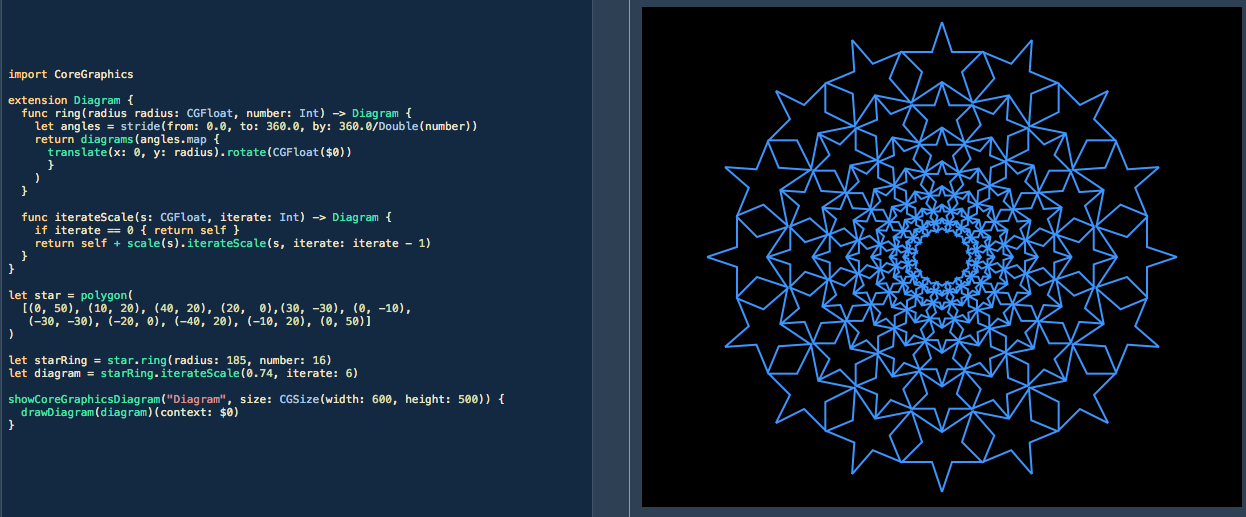
17 |
18 | * * *
19 |
20 | Apple’s version uses a variety of structs that conform to the `Drawable` protocol to represent different shapes. The alternative approach uses a recursive enum to achieve the same result. It looks like this:
21 |
22 | ```swift
23 | public enum Diagram {
24 | case Polygon([CGPoint])
25 | case Line([CGPoint])
26 | case Arc(radius: CGFloat, startAngle: CGFloat, endAngle: CGFloat)
27 | case Circle(radius: CGFloat)
28 | indirect case Scale(x: CGFloat, y: CGFloat, diagram: Diagram)
29 | indirect case Translate(x: CGFloat, y: CGFloat, diagram: Diagram)
30 | indirect case Rotate(angle: CGFloat, diagram: Diagram)
31 | case Diagrams([Diagram])
32 | }
33 | ```
34 |
35 | * * *
36 | **Note:** `livePreview` will merrily consume processing power to continuously redraw still images, therefore it's recommended to manually stop execution of the Playground after the images have rendered.
37 | * * *
38 |
39 | ### Protocol-Oriented or Enum-Oriented – which is better?
40 |
41 | The two approaches are a good demonstration of the [expression problem](https://en.wikipedia.org/wiki/Expression_problem). Which approach is easier to extend? Using a protocol-oriented technique allows you to add new types without too much hassle. In Apple’s example code a `Bubble` struct is added by implementing the `Drawable` protocol and `Equatable` (no pre-existing code needs to be adjusted). If a `Bubble` case were added to the `enum` version it would necessitate the altering of pre-existing functions (`Equatable` for `Diagram` and the `drawDiagram` function) this is more hassle and more error prone. However, we don't need to add a new case to the enum to draw `Bubble`s, we can simply add a function that constructs a bubble and returns a `Diagram`, in that case no code needs to be altered.
42 |
43 | The use of a `Renderer` protocol makes it much easier to add a `TestRenderer` to log drawing. But using the `Renderer` protocol to add diagram transformation functionality is potentially very cumbersome. It is easy to add a `ScaledRenderer` type, but it would be more complicated to add a `TranslateRenderer`, or a `RotateRenderer` and duplicates functionality that is already provided by `CGContext`. The enum approach doesn't attempt to provide the logic for `Diagram` transformation, it simply stores the information needed and uses `CGContext` functions to do the hard work.
44 |
45 | Which approach is better? I dunno ¯\\\_(ツ)_/¯
--------------------------------------------------------------------------------
/Diagrams.playground/Sources/Diagram.swift:
--------------------------------------------------------------------------------
1 | import CoreGraphics
2 | let twoPi = CGFloat(M_PI * 2)
3 | let toRadians = { $0 * CGFloat(M_PI / 180) }
4 |
5 | public typealias Point = (x: CGFloat, y: CGFloat)
6 |
7 | //: A `Diagram` as a recursive enum
8 | public enum Diagram {
9 | case Polygon([CGPoint])
10 | case Line([CGPoint])
11 | case Arc(radius: CGFloat, startAngle: CGFloat, endAngle: CGFloat)
12 | case Circle(radius: CGFloat)
13 | indirect case Scale(x: CGFloat, y: CGFloat, diagram: Diagram)
14 | indirect case Translate(x: CGFloat, y: CGFloat, diagram: Diagram)
15 | indirect case Rotate(angle: CGFloat, diagram: Diagram)
16 | case Diagrams([Diagram])
17 | }
18 |
19 | // convenience methods to allow chaining of transformations
20 | public extension Diagram {
21 | func scale(_ s: CGFloat) -> Diagram {
22 | return .Scale(x: s, y: s, diagram: self)
23 | }
24 |
25 | func scale(x: CGFloat, y: CGFloat) -> Diagram {
26 | return .Scale(x: x, y: y, diagram: self)
27 | }
28 |
29 | func translate(x: CGFloat, y: CGFloat) -> Diagram {
30 | return .Translate(x: x, y: y, diagram: self)
31 | }
32 |
33 | func rotate(_ x: CGFloat) -> Diagram {
34 | return .Rotate(angle: x, diagram: self)
35 | }
36 | }
37 |
38 | // convenience functions to handle conversion from `Point` to `CGPoint`
39 | // (defining an Array of `CGpoint`s is really verbose – hence the use of the `tuple` typealias `Point`)
40 | public func line(ps: [Point]) -> Diagram {
41 | return .Line(ps.map { x, y in CGPoint(x: x, y: y) })
42 | }
43 |
44 | public func polygon(_ ps: [Point]) -> Diagram {
45 | return .Polygon(ps.map { x, y in CGPoint(x: x, y: y) })
46 | }
47 |
48 | public func rectanglePath(width: CGFloat, height: CGFloat) -> [Point] {
49 | let sx = width / 2
50 | let sy = height / 2
51 | return [(-sx, -sy), (-sx, sy), (sx, sy), (sx, -sy)]
52 | }
53 |
54 | public func rectangle(x: CGFloat, _ y: CGFloat) -> Diagram {
55 | return polygon(rectanglePath(width: x, height: y))
56 | }
57 |
58 | public func circle(_ radius: CGFloat) -> Diagram {
59 | return .Circle(radius: radius)
60 | }
61 |
62 | public func diagrams(_ diagrams: [Diagram]) -> Diagram {
63 | return .Diagrams(diagrams)
64 | }
65 |
66 |
67 | extension Diagram: Equatable { }
68 | public func == (lhs: Diagram, rhs: Diagram) -> Bool {
69 | switch (lhs, rhs) {
70 | case let (.Polygon(l), .Polygon(r)):
71 | return l.count == r.count && !zip(l, r).contains { $0 != $1 }
72 |
73 | case let (.Line(l), .Line(r)):
74 | return l.count == r.count && !zip(l, r).contains { $0 != $1 }
75 |
76 | case let (.Arc(lRadius, la1, la2), .Arc(rRadius, ra1, ra2)):
77 | return lRadius == rRadius && la1 == ra1 && la2 == ra2
78 |
79 | case let (.Circle(lRadius), .Circle(rRadius)):
80 | return lRadius == rRadius
81 |
82 | case let (.Scale(lx, ly, lDiagram), .Scale(rx, ry, rDiagram)):
83 | return lx == rx && ly == ry && lDiagram == rDiagram
84 |
85 | case let (.Translate(lx, ly, lDiagram), .Translate(rx, ry, rDiagram)):
86 | return lx == rx && ly == ry && lDiagram == rDiagram
87 |
88 | case let (.Rotate(la, lDiagram), .Rotate(ra, rDiagram)):
89 | return la == ra && lDiagram == rDiagram
90 |
91 | case let (.Diagrams(lDiagrams), .Diagrams(rDiagrams)):
92 | let (l, r) = (lDiagrams, rDiagrams)
93 | return l.count == r.count && !zip(l, r).contains { $0 != $1 }
94 |
95 | default: return false
96 | }
97 | }
98 |
99 | //: Infix operator for combining Diagrams
100 | public func + (d1: Diagram, d2: Diagram) -> Diagram {
101 | return diagrams([d1, d2])
102 | }
103 |
104 | //: ## Do some drawing!
105 | //:
106 | //: A recursive function responsible for drawing a diagram into a CGContext
107 | public func drawDiagram(_ diagram: Diagram, context: CGContext) -> () {
108 | switch diagram {
109 | case let .Polygon(corners):
110 | context.drawPolygon(corners)
111 |
112 | case let .Line(points):
113 | context.drawPath(points)
114 |
115 | case let .Arc(r, a1, a2):
116 | context.arc(radius: r, startAngle: toRadians(a1), endAngle: toRadians(a2))
117 |
118 | case let .Circle(radius):
119 | context.circle(radius: radius)
120 |
121 | case let .Scale(x, y, diagram):
122 | context.scale(x: x, y: y) {
123 | drawDiagram(diagram, context: $0)
124 | }
125 |
126 | case let .Translate(x, y, diagram):
127 | context.translate(x: x, y: y) {
128 | drawDiagram(diagram, context: $0)
129 | }
130 |
131 | case let .Rotate(angle, diagram):
132 | context.rotate(angle: toRadians(angle)) {
133 | drawDiagram(diagram, context: $0)
134 | }
135 |
136 | case let .Diagrams(diagrams):
137 | diagrams.forEach { d in drawDiagram(d, context: context) }
138 | }
139 | }
140 |
--------------------------------------------------------------------------------
/CrustaceanEnumOriented.playground/Pages/Page 2.xcplaygroundpage/Contents.swift:
--------------------------------------------------------------------------------
1 | //: # Crustacean II
2 | //:
3 | //: Enum-Oriented Programming with Value Types
4 | import CoreGraphics
5 | let twoPi = CGFloat(M_PI * 2)
6 | //: A `Diagram` as a recursive enum
7 | enum Diagram {
8 | case polygon(corners: [CGPoint])
9 | case circle(center: CGPoint, radius: CGFloat)
10 | case rectangle(CGRect)
11 | indirect case scale(x: CGFloat, y: CGFloat, diagram: Diagram)
12 | indirect case translate(x: CGFloat, y: CGFloat, diagram: Diagram)
13 | case diagrams([Diagram])
14 | }
15 |
16 | extension Diagram: Equatable { }
17 | func == (lhs: Diagram, rhs: Diagram) -> Bool {
18 | switch (lhs, rhs) {
19 | case let (.polygon(l), .polygon(r)):
20 | return l.count == r.count && !zip(l, r).contains { $0 != $1 }
21 |
22 | case let (.circle(lCenter, lRadius), .circle(rCenter, rRadius)):
23 | return lCenter == rCenter && lRadius == rRadius
24 |
25 | case let (.rectangle(lBounds), .rectangle(rBounds)):
26 | return lBounds == rBounds
27 |
28 | case let (.scale(lx, ly, lDiagram), .scale(rx, ry, rDiagram)):
29 | return lx == rx && ly == ry && lDiagram == rDiagram
30 |
31 | case let (.translate(lx, ly, lDiagram), .translate(rx, ry, rDiagram)):
32 | return lx == rx && ly == ry && lDiagram == rDiagram
33 |
34 | case let (.diagrams(lDiagrams), .diagrams(rDiagrams)):
35 | let (l, r) = (lDiagrams, rDiagrams)
36 | return l.count == r.count && !zip(l, r).contains { $0 != $1 }
37 |
38 | default: return false
39 | }
40 | }
41 | //: ## Extend CGContext
42 | //:
43 | //: A few simple wrapper functions for `CGContext`
44 | extension CGContext {
45 | func drawPath(_ points: [CGPoint]) {
46 | if let p = points.last {
47 | move(to: p)
48 | for p in points { addLine(to: p) }
49 | }
50 | }
51 | func addArc(center: CGPoint, radius: CGFloat, startAngle: CGFloat, endAngle: CGFloat) {
52 | let arc = CGMutablePath()
53 | arc.addArc(center: center, radius: radius, startAngle: startAngle, endAngle: endAngle, clockwise: true)
54 | addPath(arc)
55 | }
56 | func scale(x: CGFloat, y: CGFloat, operation: (CGContext) -> ()) {
57 | saveGState()
58 | scaleBy(x: x, y: y)
59 | operation(self)
60 | restoreGState()
61 | }
62 | func circleAt(center: CGPoint, radius: CGFloat) {
63 | addArc(center: center, radius: radius, startAngle: 0.0, endAngle: twoPi)
64 | }
65 | func translate(x: CGFloat, y: CGFloat, operation: (CGContext) -> ()) {
66 | saveGState()
67 | translateBy(x: x, y: y)
68 | operation(self)
69 | restoreGState()
70 | }
71 | }
72 | //: ## Do some drawing!
73 | //:
74 | //: A recursive function responsible for drawing a diagram into a CGContext
75 | func drawDiagram(_ diagram: Diagram, context: CGContext) -> () {
76 | switch diagram {
77 | case let .polygon(corners):
78 | context.drawPath(corners)
79 |
80 | case let .circle(center, radius):
81 | context.circleAt(center: center, radius: radius)
82 |
83 | case let .rectangle(bounds):
84 | context.addRect(bounds)
85 |
86 | case let .scale(x, y, diagram):
87 | context.scale(x: x, y: y) {
88 | drawDiagram(diagram, context: $0)
89 | }
90 |
91 | case let .translate(x, y, diagram):
92 | context.translate(x: x, y: y) {
93 | drawDiagram(diagram, context: $0)
94 | }
95 |
96 | case let .diagrams(diagrams):
97 | for d in diagrams { drawDiagram(d, context: context) }
98 | }
99 | }
100 | //: Infix operator for combining Diagrams
101 | func + (d1: Diagram, d2: Diagram) -> Diagram {
102 | return .diagrams([d1, d2])
103 | }
104 | //: A bubble is made of an outer circle and an inner highlight
105 | func bubble(center: CGPoint, radius: CGFloat) -> Diagram {
106 | let circle = Diagram.circle(center: center, radius: radius)
107 | let pos = CGPoint(x: center.x + 0.2 * radius, y: center.y - 0.4 * radius)
108 | let highlight = Diagram.circle(center: pos, radius: radius * 0.33)
109 | return .diagrams([circle, highlight])
110 | }
111 | //: Return a regular `n`-sided polygon with corners on a circle
112 | //: having the given `center` and `radius`
113 | func regularPolygon(sides n: Int, center: CGPoint, radius r: CGFloat) -> Diagram {
114 | let angles = (0.. Diagram {
122 | let r = min(frame.width, frame.height) / 4
123 | let center = CGPoint(x: frame.midX, y: frame.midY)
124 |
125 | let circle = Diagram.circle(center: center, radius: r)
126 | let poly = regularPolygon(sides: 3, center: center, radius: r)
127 |
128 | let sq = CGRect(x: center.x - r/3, y: center.y, width: r/6, height: r/6)
129 | let rect = Diagram.rectangle(sq)
130 |
131 | let offsetCirc = Diagram.translate(x: 0, y: r * 2.5, diagram: circle)
132 |
133 | return .diagrams([circle, poly, rect, offsetCirc])
134 | }
135 |
136 | let drawingArea = CGRect(x: 0.0, y: 0.0, width: 375.0, height: 667.0)
137 |
138 | // A closure that returns a Bubble
139 | let makeBubble: () -> Diagram = {
140 | let radius = drawingArea.width / 10
141 | let margin = radius * 1.2
142 | let center = CGPoint(x: drawingArea.maxX - margin, y: drawingArea.minY + margin)
143 | return bubble(center: center, radius: radius)
144 | }
145 | //: Create a simple diagram
146 | let sample = sampleDiagram(frame: drawingArea)
147 | let diagram = sample + .scale(x: 0.3, y: 0.3, diagram: sample) + makeBubble()
148 |
149 | // Show the diagram in the view. To see the result, View>Assistant
150 | // Editor>Show Assistant Editor (opt-cmd-Return).
151 | showCoreGraphicsDiagram { drawDiagram(diagram, context: $0) }
152 |
--------------------------------------------------------------------------------
/Crustacean.playground/Pages/Page 1.xcplaygroundpage/Contents.swift:
--------------------------------------------------------------------------------
1 | //: # Crustacean
2 | //:
3 | //: Protocol-Oriented Programming with Value Types
4 | //: > **Important:**
5 | //: > This is a preliminary document for an API or technology in development. Apple is supplying this information to help you plan for the adoption of the technologies and programming interfaces described herein for use on Apple-branded products. This information is subject to change, and software implemented according to this document should be tested with final operating system software and final documentation. Newer versions of this document may be provided with future betas of the API or technology. The license for this document is available [here](License).
6 |
7 | import CoreGraphics
8 | let twoPi = CGFloat(M_PI * 2)
9 |
10 | //: A protocol for types that respond to primitive graphics commands. We
11 | //: start with the basics:
12 | protocol Renderer {
13 | /// Moves the pen to `position` without drawing anything.
14 | func move(to position: CGPoint)
15 |
16 | /// Draws a line from the pen's current position to `position`, updating
17 | /// the pen position.
18 | func addLine(to point: CGPoint)
19 |
20 | /// Draws the fragment of the circle centered at `c` having the given
21 | /// `radius`, that lies between `startAngle` and `endAngle`, measured in
22 | /// radians.
23 | func addArc(center: CGPoint, radius: CGFloat, startAngle: CGFloat, endAngle: CGFloat)
24 | }
25 |
26 | //: A `Renderer` that prints to the console.
27 | //:
28 | //: Printing the drawing commands comes in handy for debugging; you
29 | //: can't always see everything by looking at graphics. For an
30 | //: example, see the "nested diagram" section below.
31 | struct TestRenderer : Renderer {
32 | func move(to p: CGPoint) { print("moveTo(\(p.x), \(p.y))") }
33 |
34 | func addLine(to p: CGPoint) { print("lineTo(\(p.x), \(p.y))") }
35 |
36 | func addArc(center: CGPoint, radius: CGFloat, startAngle: CGFloat, endAngle: CGFloat) {
37 | print("arcAt(\(center), radius: \(radius)," + " startAngle: \(startAngle), endAngle: \(endAngle))")
38 | }
39 | }
40 |
41 | //: An element of a `Diagram`. Concrete examples follow.
42 | protocol Drawable {
43 | /// Issues drawing commands to `renderer` to represent `self`.
44 | func draw(_ renderer: Renderer)
45 | }
46 |
47 | //: Basic `Drawable`s
48 | struct Polygon : Drawable {
49 | func draw(_ renderer: Renderer) {
50 | renderer.move(to: corners.last!)
51 | for p in corners { renderer.addLine(to: p) }
52 | }
53 | var corners: [CGPoint] = []
54 | }
55 |
56 | struct Circle : Drawable {
57 | func draw(_ renderer: Renderer) {
58 | renderer.addArc(center: center, radius: radius, startAngle: 0.0, endAngle: twoPi)
59 | }
60 | var center: CGPoint
61 | var radius: CGFloat
62 | }
63 |
64 | //: Now a `Diagram`, which contains a heterogeneous array of `Drawable`s
65 | /// A group of `Drawable`s
66 | struct Diagram : Drawable {
67 | func draw(_ renderer: Renderer) {
68 | for f in elements {
69 | f.draw(renderer)
70 | }
71 | }
72 | mutating func add(other: Drawable) {
73 | elements.append(other)
74 | }
75 | var elements: [Drawable] = []
76 | }
77 |
78 | //: ## Retroactive Modeling
79 | //:
80 | //: Here we extend `CGContext` to make it a `Renderer`. This would
81 | //: not be possible if `Renderer` were a base class rather than a
82 | //: protocol.
83 | extension CGContext : Renderer {
84 | func addArc(center: CGPoint, radius: CGFloat, startAngle: CGFloat, endAngle: CGFloat) {
85 | let arc = CGMutablePath()
86 | arc.addArc(center: center, radius: radius, startAngle: startAngle, endAngle: endAngle, clockwise: true)
87 | addPath(arc)
88 | }
89 | }
90 |
91 | var circle = Circle(center: CGPoint(x: 187.5, y: 333.5), radius: 93.75)
92 |
93 | var triangle = Polygon(corners: [
94 | CGPoint(x: 187.5, y: 427.25),
95 | CGPoint(x: 268.69, y: 286.625),
96 | CGPoint(x: 106.31, y: 286.625)])
97 |
98 | var diagram = Diagram(elements: [circle, triangle])
99 |
100 | //: ## Putting a `Diagram` inside itself
101 | //:
102 | //: If `Diagram`s had reference semantics, we could easily cause an infinite
103 | //: recursion in drawing just by inserting a `Diagram` into its own array of
104 | //: `Drawable`s. However, value semantics make this operation entirely
105 | //: benign.
106 | //:
107 | //: To ensure that the result can be observed visually, we need to
108 | //: alter the inserted diagram somehow; otherwise, all the elements
109 | //: would line up exactly with existing ones. This is a nice
110 | //: demonstration of generic adapters in action.
111 | //:
112 | //: We start by creating a `Drawable` wrapper that applies scaling to
113 | //: some underlying `Drawable` instance; then we can wrap it around
114 | //: the diagram.
115 |
116 | /// A `Renderer` that passes drawing commands through to some `base`
117 | /// renderer, after applying uniform scaling to all distances.
118 | struct ScaledRenderer : Renderer {
119 | let base: Renderer
120 | let scale: CGFloat
121 |
122 | func move(to p: CGPoint) {
123 | base.move(to: CGPoint(x: p.x * scale, y: p.y * scale))
124 | }
125 |
126 | func addLine(to p: CGPoint) {
127 | base.addLine(to: CGPoint(x: p.x * scale, y: p.y * scale))
128 | }
129 |
130 | func addArc(center: CGPoint, radius: CGFloat, startAngle: CGFloat, endAngle: CGFloat) {
131 | let scaledCenter = CGPoint(x: center.x * scale, y: center.y * scale)
132 | base.addArc(center: scaledCenter, radius: radius * scale, startAngle: startAngle, endAngle: endAngle)
133 | }
134 | }
135 |
136 | /// A `Drawable` that scales an instance of `Base`
137 | struct Scaled : Drawable {
138 | var scale: CGFloat
139 | var subject: Base
140 |
141 | func draw(_ renderer: Renderer) {
142 | subject.draw(ScaledRenderer(base: renderer, scale: scale))
143 | }
144 | }
145 |
146 | // Now insert it.
147 | diagram.elements.append(Scaled(scale: 0.3, subject: diagram))
148 |
149 | // Dump the diagram to the console. Use View>Debug Area>Show Debug
150 | // Area (shift-cmd-Y) to observe the output.
151 | diagram.draw(TestRenderer())
152 |
153 | // Also show it in the view. To see the result, View>Assistant
154 | // Editor>Show Assistant Editor (opt-cmd-Return).
155 | showCoreGraphicsDiagram(title: "Diagram") { diagram.draw($0) }
156 |
157 | //: ## [Next](@next)
158 |
--------------------------------------------------------------------------------
/Crustacean.playground/Pages/Page 2.xcplaygroundpage/Contents.swift:
--------------------------------------------------------------------------------
1 | //: # Crustacean II
2 | //:
3 | //: Protocol-Oriented Programming with Value Types
4 | //:
5 | //: This page does everything the [previous one](@previous) does, but also
6 | //: demonstrates some more sophisticated techniques that would make the first
7 | //: page harder to grasp.
8 |
9 | import CoreGraphics
10 | let twoPi = CGFloat(M_PI * 2)
11 |
12 | //: A protocol for types that respond to primitive graphics commands. We
13 | //: start with the basics:
14 | protocol Renderer {
15 | /// Moves the pen to `position` without drawing anything.
16 | func move(to position: CGPoint)
17 |
18 | /// Draws a line from the pen's current position to `position`, updating
19 | /// the pen position.
20 | func addLine(to point: CGPoint)
21 |
22 | /// Draws the fragment of the circle centered at `c` having the given
23 | /// `radius`, that lies between `startAngle` and `endAngle`, measured in
24 | /// radians.
25 | func addArc(center: CGPoint, radius: CGFloat, startAngle: CGFloat, endAngle: CGFloat)
26 | }
27 |
28 | //: A `Renderer` that prints to the console.
29 | //:
30 | //: Printing the drawing commands comes in handy for debugging; you
31 | //: can't always see everything by looking at graphics. For an
32 | //: example, see the "nested diagram" section below.
33 | struct TestRenderer : Renderer {
34 | func move(to position: CGPoint) {
35 | print("move to \(position)")
36 | }
37 |
38 | func addLine(to position: CGPoint) {
39 | print("line to (\(position)")
40 | }
41 |
42 | func addArc(center: CGPoint, radius: CGFloat, startAngle: CGFloat, endAngle: CGFloat) {
43 | print("arcAt(\(center), radius: \(radius)," + " startAngle: \(startAngle), endAngle: \(endAngle))")
44 | }
45 | }
46 |
47 | //: An element of a `Diagram`. Concrete examples follow.
48 | protocol Drawable {
49 | /// Issues drawing commands to `renderer` to represent `self`.
50 | func draw(_ renderer: Renderer)
51 | func isEqualTo(_ other: Drawable) -> Bool
52 | }
53 |
54 | //: Basic `Drawable`s
55 | struct Polygon : Drawable {
56 | func draw(_ renderer: Renderer) {
57 | renderer.move(to: corners.last!)
58 | for p in corners { renderer.addLine(to: p) }
59 | }
60 | var corners: [CGPoint] = []
61 | }
62 |
63 | struct Circle : Drawable {
64 | func draw(_ renderer: Renderer) {
65 | renderer.addArc(center: center, radius: radius, startAngle: 0.0, endAngle: twoPi)
66 | }
67 | var center: CGPoint
68 | var radius: CGFloat
69 | }
70 |
71 | //: Now a `Diagram`, which contains a heterogeneous array of `Drawable`s
72 | /// A group of `Drawable`s
73 | struct Diagram : Drawable {
74 | func draw(_ renderer: Renderer) {
75 | for f in elements {
76 | f.draw(renderer)
77 | }
78 | }
79 | mutating func add(_ other: Drawable) {
80 | elements.append(other)
81 | }
82 | var elements: [Drawable] = []
83 | }
84 |
85 | //: Extend `CGContext` to make it a `RendererType`. This kind of “post-hoc
86 | //: conformance” would not be possible if `RendererType` were a base class
87 | //: rather than a protocol.
88 | extension CGContext : Renderer {
89 | func addArc(center: CGPoint, radius: CGFloat, startAngle: CGFloat, endAngle: CGFloat) {
90 | let arc = CGMutablePath()
91 | arc.addArc(center: center, radius: radius, startAngle: startAngle, endAngle: endAngle, clockwise: true)
92 | addPath(arc)
93 | }
94 | }
95 |
96 | // A bubble is made of an outer circle and an inner highlight
97 | struct Bubble : Drawable {
98 | func draw(_ r: Renderer) {
99 | r.circleAt(center: center, radius: radius)
100 | r.circleAt(center: highlightCenter, radius: highlightRadius)
101 | }
102 |
103 | var center: CGPoint
104 | var radius: CGFloat
105 | var highlightCenter: CGPoint {
106 | return CGPoint(x: center.x + 0.2 * radius, y: center.y - 0.4 * radius)
107 | }
108 | var highlightRadius: CGFloat {
109 | return radius * 0.33
110 | }
111 | }
112 |
113 | //: ## Putting a `Diagram` inside itself
114 | //:
115 | //: If `Diagram`s had reference semantics, we could easily cause an infinite
116 | //: recursion in drawing just by inserting a `Diagram` into its own array of
117 | //: `Drawable`s. However, value semantics make this operation entirely
118 | //: benign.
119 | //:
120 | //: To ensure that the result can be observed visually, we need to alter the
121 | //: inserted diagram somehow; otherwise, all the elements would line up
122 | //: exactly with existing ones. This is a nice demonstration of generic
123 | //: adapters in action.
124 | //:
125 | //:
126 | //: We start by creating a `Drawable` wrapper that applies scaling to
127 | //: some underlying `Drawable` instance; then we can wrap it around
128 | //: the diagram.
129 |
130 | /// A `Renderer` that passes drawing commands through to some `base`
131 | /// renderer, after applying uniform scaling to all distances.
132 | struct ScaledRenderer : Renderer {
133 | let base: Renderer
134 | let scale: CGFloat
135 |
136 | func move(to p: CGPoint) {
137 | base.move(to: CGPoint(x: p.x * scale, y: p.y * scale))
138 | }
139 |
140 | func addLine(to p: CGPoint) {
141 | base.addLine(to: CGPoint(x: p.x * scale, y: p.y * scale))
142 | }
143 |
144 | func addArc(center: CGPoint, radius: CGFloat, startAngle: CGFloat, endAngle: CGFloat) {
145 | let scaledCenter = CGPoint(x: center.x * scale, y: center.y * scale)
146 | base.addArc(center: scaledCenter, radius: radius * scale, startAngle: startAngle, endAngle: endAngle
147 | )
148 | }
149 | }
150 |
151 | /// A `Drawable` that scales an instance of `Base`
152 | struct Scaled : Drawable {
153 | var scale: CGFloat
154 | var subject: Base
155 |
156 | func draw(_ renderer: Renderer) {
157 | subject.draw(ScaledRenderer(base: renderer, scale: scale))
158 | }
159 | }
160 |
161 |
162 | //: Methods provided for all types conforming to `RendererType`. Of
163 | //: `circleAround` and `rectangleAt`, only the first is a protocol
164 | //: requirement, which allows us to demonstrate the difference in
165 | //: dispatching.
166 | extension Renderer {
167 | // types conforming to `Renderer` can provide a more-specific
168 | // `circleAround` that will always be used in lieu of this one.
169 | func circleAt(center: CGPoint, radius: CGFloat) {
170 | addArc(center: center, radius: radius, startAngle: 0.0, endAngle: twoPi)
171 | }
172 |
173 | // `rectangleAt` is not a protocol requirement, so it is
174 | // dispatched statically. In a context where the concrete type
175 | // conforming to `Renderer` is not known at compile-time, this
176 | // `rectangleAt` will be used in lieu of any implementation
177 | // provided by the conforming type.
178 | func rectangleAt(_ r: CGRect) {
179 | move(to: CGPoint(x: r.minX, y: r.minY))
180 | addLine(to: CGPoint(x: r.minX, y: r.maxY))
181 | addLine(to: CGPoint(x: r.maxX, y: r.maxY))
182 | addLine(to: CGPoint(x: r.maxX, y: r.minY))
183 | addLine(to: CGPoint(x: r.minX, y: r.minY))
184 | }
185 | }
186 |
187 | extension TestRenderer {
188 | func circleAt(center: CGPoint, radius: CGFloat) {
189 | print("circleAt(\(center), \(radius))")
190 | }
191 |
192 | func rectangleAt(_ r: CGRect) {
193 | print("rectangleAt(\(r))")
194 | }
195 | }
196 |
197 | extension CGContext {
198 | func rectangleAt(_ r: CGRect) {
199 | addRect(r)
200 | }
201 | }
202 |
203 | struct Rectangle : Drawable {
204 | func draw(_ r: Renderer) {
205 | r.rectangleAt(bounds)
206 | }
207 | var bounds: CGRect
208 | }
209 |
210 | //: ## `Equatable` support
211 | //:
212 | //: Value types should always be `Equatable`. Mostly this is just rote
213 | //: comparison of the corresponding sub-parts of the left-and right-hand
214 | //: arguments, but things get interesting below where handle heterogeneous
215 | //: comparison.
216 | extension Polygon : Equatable {}
217 | func == (lhs: Polygon, rhs: Polygon) -> Bool {
218 | return lhs.corners == rhs.corners
219 | }
220 |
221 | extension Circle : Equatable {}
222 | func == (lhs: Circle, rhs: Circle) -> Bool {
223 | return lhs.center == rhs.center && lhs.radius == rhs.radius
224 | }
225 |
226 | extension Rectangle : Equatable {}
227 | func == (lhs: Rectangle, rhs: Rectangle) -> Bool {
228 | return lhs.bounds == rhs.bounds
229 | }
230 |
231 | extension Bubble : Equatable {}
232 | func == (lhs: Bubble, rhs: Bubble) -> Bool {
233 | return lhs.center == rhs.center && lhs.radius == rhs.radius
234 | }
235 |
236 | //: ### Heterogeneous Equality
237 | //:
238 | //: Both `Scaled` and `Diagram` contain other `Drawable`s whose concrete
239 | //: type can vary dynamically, so we need some way to compare two
240 | //: `Drawable` instances whose dynamic types do not match. That explains
241 | //: the presence of the `isEqualTo` requirement in `Drawable`.
242 | //:
243 | //: Asking every `Drawable` to support a heterogeneous binary operation
244 | //: imposes quite a burden—one that is usually solved by adding a `Self`
245 | //: requirement to the protocol. However, equality is a special case,
246 | //: because there's usually a meaningful result when the types don't match:
247 | //: the instances can be assumed to be not-equal. We extend `Equatable`
248 | //: (which supports *homogeneous* equality comparison) to provide an
249 | //: `isEqualTo` for `Drawable` that returns `false` when the types don't
250 | //: match.
251 | extension Equatable where Self : Drawable {
252 | func isEqualTo(_ other: Drawable) -> Bool {
253 | guard let o = other as? Self else { return false }
254 | return self == o
255 | }
256 | }
257 |
258 | //: With that, we use `isEqualTo()` to implement `Equatable` conformance for
259 | //: `Scale` and `Diagram`.
260 | extension Scaled : Equatable {}
261 | func == (lhs: Scaled, rhs: Scaled) -> Bool {
262 | return lhs.scale == rhs.scale && lhs.subject.isEqualTo(rhs.subject)
263 | }
264 |
265 | extension Diagram : Equatable {}
266 | func == (lhs: Diagram, rhs: Diagram) -> Bool {
267 | return lhs.elements.count == rhs.elements.count
268 | && !zip(lhs.elements, rhs.elements).contains { !$0.isEqualTo($1) }
269 | }
270 |
271 | //: Building a diagram out of other `Drawable`s
272 | /// Returns a regular `n`-sided polygon with corners on a circle
273 | /// having the given `center` and `radius`
274 | func regularPolygon(sides n: Int, center: CGPoint, radius r: CGFloat) -> Polygon {
275 | let angles = (0.. Diagram {
284 | var sample = Diagram()
285 | let r = min(frame.width, frame.height) / 4
286 | let center = CGPoint(x: frame.midX, y: frame.midY)
287 |
288 | var circle = Circle(center: center, radius: r)
289 | sample.add(circle)
290 | sample.add(regularPolygon(sides: 3, center: center, radius: r))
291 |
292 | let s = CGRect(x: center.x - r/3, y: center.y, width: r/6, height: r/6)
293 | sample.add(Rectangle(bounds: s))
294 |
295 | // adjust the circle
296 | circle.center.y += circle.radius * 2.5
297 |
298 | // append the circle again
299 | sample.add(circle)
300 | return sample
301 | }
302 |
303 | let drawingArea = CGRect(x: 0.0, y: 0.0, width: 375.0, height: 667.0)
304 |
305 | // Create a simple diagram
306 | var sample = sampleDiagram(frame: drawingArea)
307 |
308 | // Nest the diagram inside itself, demonstrating that each diagram
309 | // variable is a logically independent value. If they weren't, we'd
310 | // end up in an infinite drawing recursion.
311 | let nestDiagram = true
312 | if nestDiagram {
313 | sample.add(Scaled(scale: 0.3, subject: sample))
314 | // do it twice if you want to get fancy
315 | // sample.add(Scaled(scale: 0.5, subject: sample))
316 | }
317 |
318 | // Also add a Bubble
319 | let addBubble = true
320 | if addBubble {
321 | let radius = drawingArea.width / 10
322 | let margin = radius * 1.2
323 | let center = CGPoint(x: drawingArea.maxX - margin, y: drawingArea.minY + margin)
324 | sample.add(Bubble(center: center, radius: radius))
325 | }
326 |
327 | // Dump the diagram to the console. Use View>Debug Area>Show Debug
328 | // Area (shift-cmd-Y) to observe the output.
329 |
330 | TestRenderer().rectangleAt(drawingArea)
331 | print("--- \"rectangleAt\" appears above this line but not below ---")
332 | // Note: the fact that "rectangleAt" doesn't appear below, but
333 | // "circleAround" does, serves as a demonstration of how dispatching through
334 | // protocols works: methods in protocol extensions that don't match a
335 | // requirement (such as rectangleAt) are dispatched statically.
336 | sample.draw(TestRenderer())
337 |
338 | // Also show it in the view. To see the result, View>Assistant
339 | // Editor>Show Assistant Editor (opt-cmd-Return).
340 | showCoreGraphicsDiagram(title: "Diagram") { sample.draw($0) }
341 |
--------------------------------------------------------------------------------