├── .gitignore
├── package.json
├── lib_YPDxAnubLfzlHjLq
├── puhlr5lcr4i9v8pw.png
├── s7s8bq18h16zdwfn.png
└── z2bolquggvj8yxic.png
├── lib_pTNsKLAHHUZrxQKE
├── 24t5it4ipnsg1fot.png
├── 28zgy7072233tmf3.jpg
├── 56usbi9sdq6zeq8h.png
├── 60d0w0wlgu8d8ag1.png
├── 6f41t8ps3kln3ds6.png
├── 6p2sog6vug7eeb3r.jpg
├── 7rku450cey72fl0k.png
├── 9h55bdqybw0l5xs3.gif
├── 9vlxp9d8u78gzgju.png
├── c0qbxxbu4p2f7pb8.jpg
├── c1vp33nrzoicfvj3.png
├── cd34bas2fe09u8rw.gif
├── ct4v6crkagc53w9r.png
├── dnnoot0tgmeaaaol.png
├── g8zk6fui4jfzdtxq.png
├── hwft786zt04cw1ta.jpg
├── k1r29qzdnbrubbrd.png
├── knk95ywtjkm8xbs6.jpg
├── o9gkwlsx96ak24zk.gif
├── rp73fxauu52qhvoy.png
├── sdyqp5498vxk0ne4.gif
├── ujbyvmvifcjqdbv7.png
├── v21k64jzcxzryrpt.png
├── vn4zp42snjlpt1wa.png
├── vz0s0afjnr3ibfoy.png
├── wy29ed4os4oclrfp.jpg
├── x9lrokssh540jrec.png
├── xwb20trbbhmhskes.png
└── yfhjxd9r55eyn0lc.png
├── lib_LhuefaHhCaLhDedO
├── bwszo0nj98ul52rj.svg
└── 33maj6q1ugqj25ua.svg
└── dist
├── ghost
├── 2021-07-16-privacy.md
├── 2021-07-16-contact.md
├── 2021-07-16-about.md
├── 2021-07-16-contribute.md
├── 2021-11-23-version-2.md
├── 2024-07-08-gmail-api-support-in-emailengine.md
├── 2022-06-22-tailing-webhooks.md
├── 2023-05-19-shared-ms365-mailboxes-with-emailengine.md
├── 2024-02-27-sending-multiple-emails-in-the-same-thread.md
├── 2022-08-02-using-emailengine-to-manage-oauth2-tokens.md
├── 2022-05-06-install-emailengine-on-render-com.md
├── 2023-09-14-generating-summaries-of-new-emails-using-chatgpt.md
├── 2024-07-02-ids-explained.md
├── 2025-02-07-sending-reply-and-forward-emails.md
├── 2022-10-19-low-code-integrations.md
├── 2025-03-27-data-compliance.md
├── 2022-09-11-interpreting-queue-types.md
├── 2021-07-19-mailbox-locking-in-imapflow.md
├── 2023-09-21-enabling-secret-encryption.md
├── 2023-06-06-improved-chatgpt-integration-with-emailengine.md
├── 2023-02-27-measuging-inbox-spam-placement.md
├── 2021-12-31-using-emailengine-with-php-and-composer.md
├── 2025-01-29-using-emailengine-to-continuously-feed-emails-for-analysis.md
├── 2023-04-10-threading-with-emailengine.md
├── 2025-05-19-emailengine-vs-nylas.md
├── 2023-12-19-proxying-oauth2-imap-connections-for-outlook-and-gmail.md
├── 2025-01-19-mail-merge-with-emailengine.md
├── 2022-09-11-using-an-authentication-server.md
├── 2024-02-27-how-to-parse-emails-with-cloudflare-email-workers.md
├── 2023-04-04-about-mailbox.md
├── 2024-05-09-tuning-performance.md
├── 2023-03-14-making-email-html-webpage-compatible-with-emailengine.md
├── 2025-05-05-debugging-webhooks-in-emailengine.md
├── 2025-01-08-sending-an-email-from-emailengine.md
├── 2022-05-28-mining-email-data-for-fun-and-profit.md
├── 2024-02-27-how-i-turned-my-open-source-project-into.md
├── 2023-10-03-chat-with-emails-using-emailengine.md
├── 2025-04-01-tracking-email-replies-with-imap-api.md
├── 2022-10-12-tracking-bounces.md
├── 2021-07-16-tracking-deleted-messages-on-an-imap-account.md
└── 2024-08-15-setting-up-oauth2-with-outlook.md
├── support.html.md
├── oauth2-configuration.html.md
├── prepared-settings.html.md
├── about.html.md
├── prepared-license.html.md
├── reset-password.html.md
├── docker.html.md
└── troubleshooting.html.md
/.gitignore:
--------------------------------------------------------------------------------
1 | .DS_Store
2 | node_modules
3 |
4 |
--------------------------------------------------------------------------------
/package.json:
--------------------------------------------------------------------------------
1 | {
2 | "dependencies": {
3 | "@wcj/html-to-markdown": "^2.1.1"
4 | }
5 | }
6 |
--------------------------------------------------------------------------------
/lib_YPDxAnubLfzlHjLq/puhlr5lcr4i9v8pw.png:
--------------------------------------------------------------------------------
https://raw.githubusercontent.com/andris9/emailengine-homepage-files/master/lib_YPDxAnubLfzlHjLq/puhlr5lcr4i9v8pw.png
--------------------------------------------------------------------------------
/lib_YPDxAnubLfzlHjLq/s7s8bq18h16zdwfn.png:
--------------------------------------------------------------------------------
https://raw.githubusercontent.com/andris9/emailengine-homepage-files/master/lib_YPDxAnubLfzlHjLq/s7s8bq18h16zdwfn.png
--------------------------------------------------------------------------------
/lib_YPDxAnubLfzlHjLq/z2bolquggvj8yxic.png:
--------------------------------------------------------------------------------
https://raw.githubusercontent.com/andris9/emailengine-homepage-files/master/lib_YPDxAnubLfzlHjLq/z2bolquggvj8yxic.png
--------------------------------------------------------------------------------
/lib_pTNsKLAHHUZrxQKE/24t5it4ipnsg1fot.png:
--------------------------------------------------------------------------------
https://raw.githubusercontent.com/andris9/emailengine-homepage-files/master/lib_pTNsKLAHHUZrxQKE/24t5it4ipnsg1fot.png
--------------------------------------------------------------------------------
/lib_pTNsKLAHHUZrxQKE/28zgy7072233tmf3.jpg:
--------------------------------------------------------------------------------
https://raw.githubusercontent.com/andris9/emailengine-homepage-files/master/lib_pTNsKLAHHUZrxQKE/28zgy7072233tmf3.jpg
--------------------------------------------------------------------------------
/lib_pTNsKLAHHUZrxQKE/56usbi9sdq6zeq8h.png:
--------------------------------------------------------------------------------
https://raw.githubusercontent.com/andris9/emailengine-homepage-files/master/lib_pTNsKLAHHUZrxQKE/56usbi9sdq6zeq8h.png
--------------------------------------------------------------------------------
/lib_pTNsKLAHHUZrxQKE/60d0w0wlgu8d8ag1.png:
--------------------------------------------------------------------------------
https://raw.githubusercontent.com/andris9/emailengine-homepage-files/master/lib_pTNsKLAHHUZrxQKE/60d0w0wlgu8d8ag1.png
--------------------------------------------------------------------------------
/lib_pTNsKLAHHUZrxQKE/6f41t8ps3kln3ds6.png:
--------------------------------------------------------------------------------
https://raw.githubusercontent.com/andris9/emailengine-homepage-files/master/lib_pTNsKLAHHUZrxQKE/6f41t8ps3kln3ds6.png
--------------------------------------------------------------------------------
/lib_pTNsKLAHHUZrxQKE/6p2sog6vug7eeb3r.jpg:
--------------------------------------------------------------------------------
https://raw.githubusercontent.com/andris9/emailengine-homepage-files/master/lib_pTNsKLAHHUZrxQKE/6p2sog6vug7eeb3r.jpg
--------------------------------------------------------------------------------
/lib_pTNsKLAHHUZrxQKE/7rku450cey72fl0k.png:
--------------------------------------------------------------------------------
https://raw.githubusercontent.com/andris9/emailengine-homepage-files/master/lib_pTNsKLAHHUZrxQKE/7rku450cey72fl0k.png
--------------------------------------------------------------------------------
/lib_pTNsKLAHHUZrxQKE/9h55bdqybw0l5xs3.gif:
--------------------------------------------------------------------------------
https://raw.githubusercontent.com/andris9/emailengine-homepage-files/master/lib_pTNsKLAHHUZrxQKE/9h55bdqybw0l5xs3.gif
--------------------------------------------------------------------------------
/lib_pTNsKLAHHUZrxQKE/9vlxp9d8u78gzgju.png:
--------------------------------------------------------------------------------
https://raw.githubusercontent.com/andris9/emailengine-homepage-files/master/lib_pTNsKLAHHUZrxQKE/9vlxp9d8u78gzgju.png
--------------------------------------------------------------------------------
/lib_pTNsKLAHHUZrxQKE/c0qbxxbu4p2f7pb8.jpg:
--------------------------------------------------------------------------------
https://raw.githubusercontent.com/andris9/emailengine-homepage-files/master/lib_pTNsKLAHHUZrxQKE/c0qbxxbu4p2f7pb8.jpg
--------------------------------------------------------------------------------
/lib_pTNsKLAHHUZrxQKE/c1vp33nrzoicfvj3.png:
--------------------------------------------------------------------------------
https://raw.githubusercontent.com/andris9/emailengine-homepage-files/master/lib_pTNsKLAHHUZrxQKE/c1vp33nrzoicfvj3.png
--------------------------------------------------------------------------------
/lib_pTNsKLAHHUZrxQKE/cd34bas2fe09u8rw.gif:
--------------------------------------------------------------------------------
https://raw.githubusercontent.com/andris9/emailengine-homepage-files/master/lib_pTNsKLAHHUZrxQKE/cd34bas2fe09u8rw.gif
--------------------------------------------------------------------------------
/lib_pTNsKLAHHUZrxQKE/ct4v6crkagc53w9r.png:
--------------------------------------------------------------------------------
https://raw.githubusercontent.com/andris9/emailengine-homepage-files/master/lib_pTNsKLAHHUZrxQKE/ct4v6crkagc53w9r.png
--------------------------------------------------------------------------------
/lib_pTNsKLAHHUZrxQKE/dnnoot0tgmeaaaol.png:
--------------------------------------------------------------------------------
https://raw.githubusercontent.com/andris9/emailengine-homepage-files/master/lib_pTNsKLAHHUZrxQKE/dnnoot0tgmeaaaol.png
--------------------------------------------------------------------------------
/lib_pTNsKLAHHUZrxQKE/g8zk6fui4jfzdtxq.png:
--------------------------------------------------------------------------------
https://raw.githubusercontent.com/andris9/emailengine-homepage-files/master/lib_pTNsKLAHHUZrxQKE/g8zk6fui4jfzdtxq.png
--------------------------------------------------------------------------------
/lib_pTNsKLAHHUZrxQKE/hwft786zt04cw1ta.jpg:
--------------------------------------------------------------------------------
https://raw.githubusercontent.com/andris9/emailengine-homepage-files/master/lib_pTNsKLAHHUZrxQKE/hwft786zt04cw1ta.jpg
--------------------------------------------------------------------------------
/lib_pTNsKLAHHUZrxQKE/k1r29qzdnbrubbrd.png:
--------------------------------------------------------------------------------
https://raw.githubusercontent.com/andris9/emailengine-homepage-files/master/lib_pTNsKLAHHUZrxQKE/k1r29qzdnbrubbrd.png
--------------------------------------------------------------------------------
/lib_pTNsKLAHHUZrxQKE/knk95ywtjkm8xbs6.jpg:
--------------------------------------------------------------------------------
https://raw.githubusercontent.com/andris9/emailengine-homepage-files/master/lib_pTNsKLAHHUZrxQKE/knk95ywtjkm8xbs6.jpg
--------------------------------------------------------------------------------
/lib_pTNsKLAHHUZrxQKE/o9gkwlsx96ak24zk.gif:
--------------------------------------------------------------------------------
https://raw.githubusercontent.com/andris9/emailengine-homepage-files/master/lib_pTNsKLAHHUZrxQKE/o9gkwlsx96ak24zk.gif
--------------------------------------------------------------------------------
/lib_pTNsKLAHHUZrxQKE/rp73fxauu52qhvoy.png:
--------------------------------------------------------------------------------
https://raw.githubusercontent.com/andris9/emailengine-homepage-files/master/lib_pTNsKLAHHUZrxQKE/rp73fxauu52qhvoy.png
--------------------------------------------------------------------------------
/lib_pTNsKLAHHUZrxQKE/sdyqp5498vxk0ne4.gif:
--------------------------------------------------------------------------------
https://raw.githubusercontent.com/andris9/emailengine-homepage-files/master/lib_pTNsKLAHHUZrxQKE/sdyqp5498vxk0ne4.gif
--------------------------------------------------------------------------------
/lib_pTNsKLAHHUZrxQKE/ujbyvmvifcjqdbv7.png:
--------------------------------------------------------------------------------
https://raw.githubusercontent.com/andris9/emailengine-homepage-files/master/lib_pTNsKLAHHUZrxQKE/ujbyvmvifcjqdbv7.png
--------------------------------------------------------------------------------
/lib_pTNsKLAHHUZrxQKE/v21k64jzcxzryrpt.png:
--------------------------------------------------------------------------------
https://raw.githubusercontent.com/andris9/emailengine-homepage-files/master/lib_pTNsKLAHHUZrxQKE/v21k64jzcxzryrpt.png
--------------------------------------------------------------------------------
/lib_pTNsKLAHHUZrxQKE/vn4zp42snjlpt1wa.png:
--------------------------------------------------------------------------------
https://raw.githubusercontent.com/andris9/emailengine-homepage-files/master/lib_pTNsKLAHHUZrxQKE/vn4zp42snjlpt1wa.png
--------------------------------------------------------------------------------
/lib_pTNsKLAHHUZrxQKE/vz0s0afjnr3ibfoy.png:
--------------------------------------------------------------------------------
https://raw.githubusercontent.com/andris9/emailengine-homepage-files/master/lib_pTNsKLAHHUZrxQKE/vz0s0afjnr3ibfoy.png
--------------------------------------------------------------------------------
/lib_pTNsKLAHHUZrxQKE/wy29ed4os4oclrfp.jpg:
--------------------------------------------------------------------------------
https://raw.githubusercontent.com/andris9/emailengine-homepage-files/master/lib_pTNsKLAHHUZrxQKE/wy29ed4os4oclrfp.jpg
--------------------------------------------------------------------------------
/lib_pTNsKLAHHUZrxQKE/x9lrokssh540jrec.png:
--------------------------------------------------------------------------------
https://raw.githubusercontent.com/andris9/emailengine-homepage-files/master/lib_pTNsKLAHHUZrxQKE/x9lrokssh540jrec.png
--------------------------------------------------------------------------------
/lib_pTNsKLAHHUZrxQKE/xwb20trbbhmhskes.png:
--------------------------------------------------------------------------------
https://raw.githubusercontent.com/andris9/emailengine-homepage-files/master/lib_pTNsKLAHHUZrxQKE/xwb20trbbhmhskes.png
--------------------------------------------------------------------------------
/lib_pTNsKLAHHUZrxQKE/yfhjxd9r55eyn0lc.png:
--------------------------------------------------------------------------------
https://raw.githubusercontent.com/andris9/emailengine-homepage-files/master/lib_pTNsKLAHHUZrxQKE/yfhjxd9r55eyn0lc.png
--------------------------------------------------------------------------------
/lib_LhuefaHhCaLhDedO/bwszo0nj98ul52rj.svg:
--------------------------------------------------------------------------------
1 |
--------------------------------------------------------------------------------
/dist/ghost/2021-07-16-privacy.md:
--------------------------------------------------------------------------------
1 | ---
2 | title: Privacy
3 | slug: privacy
4 | date_published: 2021-07-16T10:47:24.000Z
5 | date_updated: 2021-07-16T11:25:05.000Z
6 | draft: true
7 | ---
8 |
9 | Wondering how Ghost fares when it comes to privacy and GDPR rules? Good news: Ghost does not use any tracking cookies of any kind.
10 |
11 | You can integrate any products, services, ads or integrations with Ghost yourself if you want to, but it's always a good idea to disclose how subscriber data will be used by putting together a privacy page.
12 |
--------------------------------------------------------------------------------
/lib_LhuefaHhCaLhDedO/33maj6q1ugqj25ua.svg:
--------------------------------------------------------------------------------
1 |
--------------------------------------------------------------------------------
/dist/ghost/2021-07-16-contact.md:
--------------------------------------------------------------------------------
1 | ---
2 | title: Contact
3 | slug: contact
4 | date_published: 2021-07-16T10:47:23.000Z
5 | date_updated: 2021-07-16T11:24:54.000Z
6 | draft: true
7 | ---
8 |
9 | If you want to set up a contact page for people to be able to reach out to you, the simplest way is to set up a simple page like this and list the different ways people can reach out to you.
10 |
11 | ### For example, here's how to reach us!
12 |
13 | - [@Ghost](https://twitter.com/ghost) on Twitter
14 | - [@Ghost](https://www.facebook.com/ghost) on Facebook
15 | - [@Ghost](https://instagram.com/ghost) on Instagram
16 |
17 | If you prefer to use a contact form, almost all of the great embedded form services work great with Ghost and are easy to set up:
18 | [](https://ghost.org/integrations/?tag=forms)
19 |
--------------------------------------------------------------------------------
/dist/ghost/2021-07-16-about.md:
--------------------------------------------------------------------------------
1 | ---
2 | title: About this site
3 | slug: about
4 | date_published: 2021-07-16T10:47:22.000Z
5 | date_updated: 2021-07-16T11:25:14.000Z
6 | draft: true
7 | ---
8 |
9 | Unlike posts, pages in Ghost don't appear the main feed. They're separate, individual pages which only show up when you link to them. Great for content which is important, but separate from your usual posts.
10 |
11 | An about page is a great example of one you might want to set up early on so people can find out more about you, and what you do. Why should people subscribe to your site and become a member? Details help!
12 |
13 | > **Tip: **If you're reading any post or page on your site and you notice something you want to edit, you can add `/edit` to the end of the URL – and you'll be taken directly to the Ghost editor.
14 |
15 | Now tell the world what your site is all about.
16 |
--------------------------------------------------------------------------------
/dist/ghost/2021-07-16-contribute.md:
--------------------------------------------------------------------------------
1 | ---
2 | title: Contribute
3 | slug: contribute
4 | date_published: 2021-07-16T10:47:25.000Z
5 | date_updated: 2021-07-16T11:24:46.000Z
6 | draft: true
7 | ---
8 |
9 | Oh hey, you clicked every link of our starter content and even clicked this small link in the footer! If you like Ghost and you're enjoying the product so far, we'd hugely appreciate your support in any way you care to show it.
10 |
11 | Ghost is a non-profit organization, and we give away all our intellectual property as open source software. If you believe in what we do, there are a number of ways you can give us a hand, and we hugely appreciate all of them:
12 |
13 | - Contribute code via [GitHub](https://github.com/tryghost)
14 | - Contribute financially via [GitHub Sponsors](https://github.com/sponsors/TryGhost)
15 | - Contribute financially via [Open Collective](https://opencollective.com/ghost)
16 | - Contribute reviews via **writing a blog post**
17 | - Contribute good vibes via **telling your friends** about us
18 |
19 | Thanks for checking us out!
20 |
--------------------------------------------------------------------------------
/dist/ghost/2021-11-23-version-2.md:
--------------------------------------------------------------------------------
1 | ---
2 | title: Version 2
3 | slug: version-2
4 | date_published: 2021-11-22T22:08:30.000Z
5 | date_updated: 2022-08-07T09:44:14.000Z
6 | ---
7 |
8 | > **Tl;dr **EmailEngine version 2 is now available.
9 |
10 | > EmailEngine is an email syncing application that allows to access your user's email accounts via an easy to use REST API instead of IMAP.
11 |
12 | Some big news this time. For the past months, I’ve been secretly working on a new version of [EmailEngine](https://emailengine.app/). This includes a lot of bug fixes but also some major changes.
13 |
14 | ### Distribution changes
15 |
16 | So far EmailEngine was distributed either as the [source code](https://github.com/postalsys/emailengine) or through *npm* registries (both the public npmjs.org and the private Postal Systems registry). From now on there are going to be executable binary files you can download and run. Source code is also available.
17 |
18 | ### License changes
19 |
20 | EmailEngine v1 was licensed under the AGPL version 3, or if downloaded from Postal Systems private *npm* registry, then under the MIT license. EmailEngine v2 is licensed under a commercial EmailEngine license. Using the EmailEngine license requires you to provision a license key from [Postal Systems homepage](https://postalsys.com/licenses).
21 |
22 | ### Authentication
23 |
24 | EmailEngine v1 was internal use only and thus did not offer any authentication or authorization. EmailEngine v2 is built for public access and has 3 distinct authorization zones:
25 |
26 | - *Admin area.* Uses a regular web/cookie-based authentication. Accessible for the admin user only.
27 | - *API access.* All API endpoints require an access token to operate
28 | - *Public area.*[Hosted authentication](https://emailengine.app/hosted-authentication) form that you can integrate with your application. This allows easy OAuth2 (both Gmail and Outlook) setup and also more convenient IMAP/SMTP setup
29 |
30 | ### Improved OAuth2 support
31 |
32 | EmailEngine v2 speaks OAuth2 fluently with the Gmail and Outlook servers. There are also a lot of bug fixes related to OAuth2.
33 |
34 | ### Better account management
35 |
36 | So far you could either add or delete accounts and that's about it. The new EmailEngine includes better account management tools.
37 |
--------------------------------------------------------------------------------
/dist/ghost/2024-07-08-gmail-api-support-in-emailengine.md:
--------------------------------------------------------------------------------
1 | ---
2 | title: Gmail API support in EmailEngine
3 | slug: gmail-api-support-in-emailengine
4 | date_published: 2024-07-08T12:16:04.000Z
5 | date_updated: 2025-05-19T10:55:33.000Z
6 | excerpt: EmailEngine lets you register Gmail accounts that talk to the Gmail API instead of IMAP/SMTP—faster sync and cleaner label handling out of the box.
7 | ---
8 |
9 | > **TL;DR**
10 | > Starting with v2.43.0, EmailEngine can operate a Gmail mailbox through the Gmail API. No IMAP sockets, no SMTP hand‑off—just direct, OAuth‑secured REST calls backed by Google Cloud Pub/Sub webhooks.
11 |
12 | Since day one, EmailEngine has relied on **IMAP** for reading and **SMTP** for sending. That choice covers most mailboxes, and both Gmail and Outlook continue to expose IMAP/SMTP endpoints that you can lock down with OAuth 2.0. For many teams that setup feels “good enough,” but Gmail’s architecture has always been an awkward fit for a forty‑year‑old protocol.
13 |
14 | IMAP, for example, models mailboxes as hierarchical folders, yet Gmail treats every message as an object that can wear multiple labels at the same time. Bridging those two worlds means every move or rename has to be translated, and that translation layer leaks into corner cases. On top of that, the **IDLE** command—IMAP’s closest thing to push—drops the connection after a few minutes, forcing EmailEngine to reconnect and burn extra CPU just to stay in sync. Finally, pulling large messages over IMAP requires several sequential fetches, while the Gmail API can grab the entire payload in a single batch request. Put together, these gaps translate into higher latency, more sockets, and wasted resources inside your containers.
15 |
16 | To smooth out those rough edges, EmailEngine 2.43.0 introduces a **Gmail API backend**. When you add an account in this mode, EmailEngine abandons IMAP and SMTP entirely for that mailbox. Every internal operation—synchronizing folders, sending messages, updating flags—travels straight through Google’s REST interface and is fanned out in real time through Cloud Pub/Sub webhooks.
17 |
18 | ### When to stick with IMAP
19 |
20 | There are still scenarios where classic IMAP/SMTP is the safer choice. If your organization cannot grant Cloud Pub/Sub permissions—perhaps due to strict GCP policies—or if you rely on features that the Gmail API has not yet exposed, such as raw SMTP *send‑as* with a forged envelope‑from, then staying on IMAP remains entirely viable. EmailEngine’s original backend is not going anywhere and continues to receive the same bug fixes and performance tweaks.
21 |
--------------------------------------------------------------------------------
/dist/ghost/2022-06-22-tailing-webhooks.md:
--------------------------------------------------------------------------------
1 | ---
2 | title: Tailing webhooks
3 | slug: tailing-webhooks
4 | date_published: 2022-06-22T06:25:51.000Z
5 | date_updated: 2022-06-22T06:25:51.000Z
6 | tags: EmailEngine, PHP
7 | ---
8 |
9 | If you run an application that produces a lot of webhooks like [EmailEngine](https://emailengine.app/), you might want to observe what kind of data is even sent before you try to start consuming it. This post shows an easy way to do this with PHP.
10 |
11 | The concept is simple. Your webhooks producer posts all webhooks to a PHP script. That script then appends all incoming JSON requests with some metadata to a log file. You would tail that log file and pipe it to the *jq* command, resulting in a real-time pretty printed log output. As the content is stored in a log file, you can stop tailing any time you want and return to it later.
12 |
13 | First, if you do not have *jq* yet installed, you can add it using your package manager. For example, in Ubuntu, you can run the following:
14 |
15 | $ sudo apt update
16 | $ sudo apt install -y jq
17 |
18 |
19 | Next, create a log file. I'll be running PHP scripts under the `www-data` user, so I need to make sure PHP can write to that file.
20 |
21 | $ sudo touch /var/log/whlog
22 | $ sudo chown www-data /var/log/whlog
23 |
24 | > Make sure that this file is empty. Otherwise, jq will fail to process it if it contains non-JSON data.
25 |
26 | Next, get the example PHP script from [here](https://gist.github.com/andris9/e1ad312ef25c46dd9397d2726995581a) and, if needed, change the log file path at the beginning of the script. Store this script somewhere in your web server so that you would be able to run requests against it.
27 |
28 | Now, add the PHP script as the webhook destination in your app, in this case, for EmailEngine.
29 | 
30 | In the server where the log file resides, run the following command to tail the log output.
31 |
32 | $ tail -f /var/log/whlog | jq
33 |
34 |
35 | And finally, to test if everything works, send a test webhook payload from EmailEngine.
36 | 
37 | If you get a "Test payload sent" response, then EmailEngine managed to send out the webhook.
38 | 
39 | Check the terminal window where you are tailing the log file. You should see the example webhook payload. Anything the server sent is inside the "request" property.
40 | 
41 | That's it! You can now tail any kind of webhooks in real-time, as long as these are JSON formatted.
42 |
--------------------------------------------------------------------------------
/dist/ghost/2023-05-19-shared-ms365-mailboxes-with-emailengine.md:
--------------------------------------------------------------------------------
1 | ---
2 | title: Shared MS365 mailboxes with EmailEngine
3 | slug: shared-ms365-mailboxes-with-emailengine
4 | date_published: 2023-05-19T13:14:34.000Z
5 | date_updated: 2024-11-11T07:31:57.000Z
6 | tags: EmailEngine, Outlook
7 | ---
8 |
9 | EmailEngine is capable of using MS365 shared mailboxes via OAuth2. This involves adding the shared mailbox to EmailEngine, while the OAuth2 authentication process is handled by a user who already has access to the mentioned mailbox.
10 |
11 | However, there is a disadvantage to this. At present, EmailEngine anticipates that each OAuth2 account corresponds to a single email account within the system. Therefore, if an MS365 user has granted access to a shared mailbox for EmailEngine, they cannot use the same account to authorize a different shared mailbox, or their own primary account.
12 |
13 | Below are the instructions to integrate a shared mailbox with EmailEngine.
14 |
15 | Begin by requesting an [authentication form URL](https://emailengine.app/hosted-authentication) from EmailEngine.
16 |
17 | curl -XPOST \
18 | "https://emailengine.example.com/v1/authentication/form" \
19 | -H "Authorization: Bearer 990db3b95f8b04ab…678bff3b98462a" \
20 | -H 'Content-Type: application/json' \
21 | -d '{
22 | "account": "shared",
23 | "name": "Shared Account",
24 | "email": "shared@example.com",
25 | "delegated": true,
26 | "redirectUrl": "https://myapp/account/settings.php",
27 | "type": "AAABiCtT7XUAAAAF"
28 | }'
29 |
30 |
31 | Fields:
32 |
33 | - **account**: The account ID you intend to use
34 | - **name**: The displayed name of the shared mailbox
35 | - **email**: The email address of the shared mailbox, such as *"[info@example.com](info@example.com)"* or *"[sales@example.com](sales@example.com)"*
36 | - **delegated**: Must be set to `true`. This indicates to EmailEngine that the authorizing user is not the email account being used to sign in
37 | - **redirectUrl**: The URL where the user will be redirected once authentication is complete
38 | - **type**: The ID of the OAuth application in EmailEngine
39 |
40 | 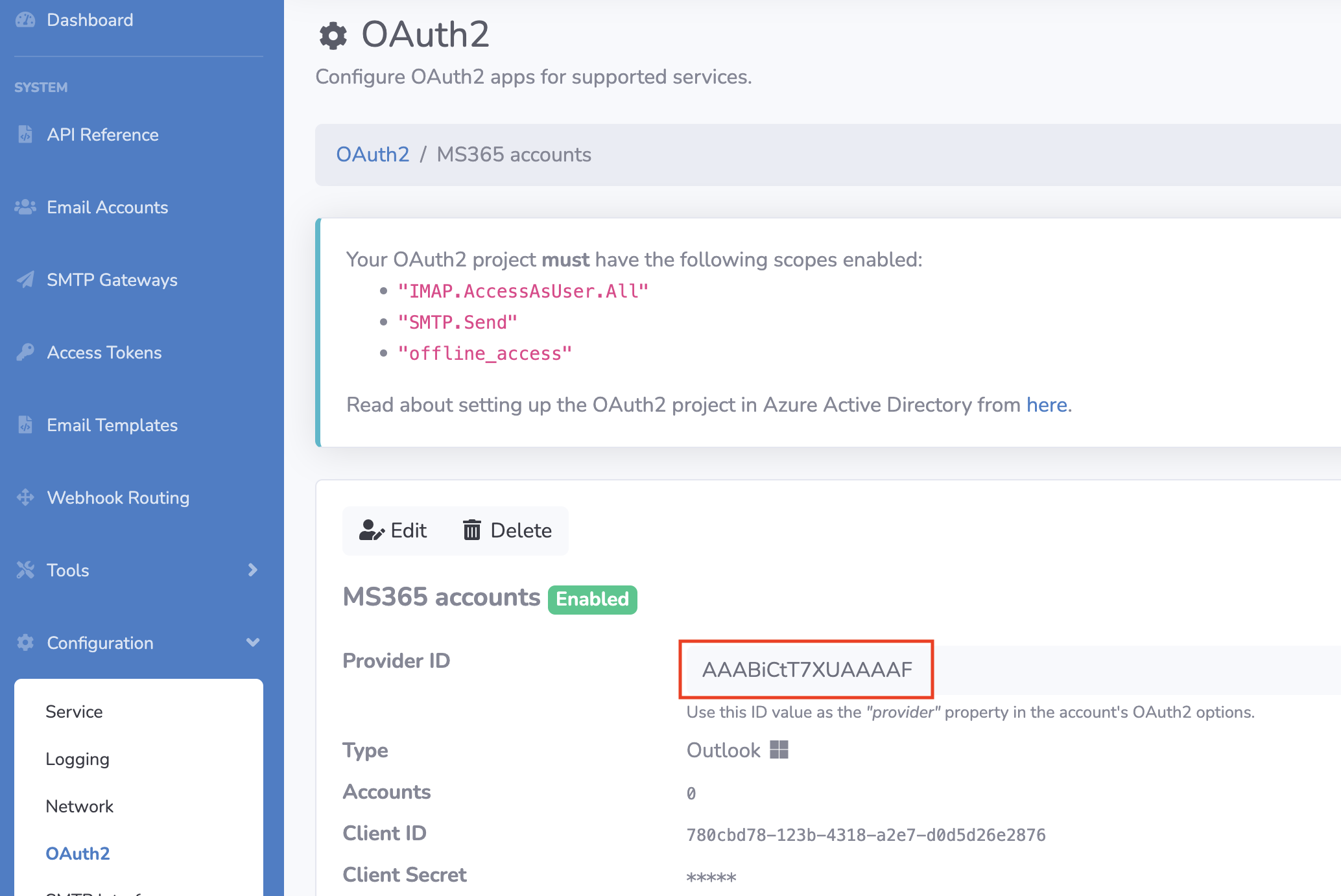The value for the "type" field is the ID of the OAuth2 app in EmailEngine
41 | The above API call will return the URL that the user should be directed to.
42 |
43 | {"url":"https://emailengine.example.com/accounts/new?data=eyJhY2NvdW50Ijoic2hhcmVkIiwibmFtZSI…T_0AAAAE"}
44 |
45 |
46 | The user in charge of authentication should visit this URL and sign in using their actual MS365 email account. It is crucial that this account has access to the shared mailbox, otherwise, the process will not be successful.
47 |
48 | > **NB!** at this point EmailEngine does not support account credential re-use. If you authenticate shared@host using user@host, then you can't use user@host to authenticate any other accounts, including the main account for user@host.
49 |
--------------------------------------------------------------------------------
/dist/ghost/2024-02-27-sending-multiple-emails-in-the-same-thread.md:
--------------------------------------------------------------------------------
1 | ---
2 | title: Sending multiple emails in the same thread with EmailEngine
3 | slug: sending-multiple-emails-in-the-same-thread
4 | date_published: 2024-02-27T10:04:00.000Z
5 | date_updated: 2025-05-14T11:30:46.000Z
6 | tags: EmailEngine, SMTP
7 | excerpt: Keep your follow‑up emails in the same conversation by generating your own Message‑ID values and building the References header.
8 | ---
9 |
10 | > **TL;DR**
11 | > Call `**POST /v1/account/:id/submit**` with your own `messageId` and a growing `references` header to force every follow‑up into the same email thread.
12 |
13 | ## Why it matters
14 |
15 | Email clients rely on the RFC 5322 `Message‑ID` and `References` headers—never on SMTP commands—to decide which messages belong together. If you let EmailEngine autogenerate those values, your perfectly timed sequence may scatter across the inbox. By controlling them yourself, every follow‑up lands exactly where the user expects.
16 |
17 | ## Step‑by‑step
18 |
19 | ### 1. **Send the initial message**
20 |
21 | $ curl -XPOST "http://127.0.0.1:3000/v1/account/demo/submit" \
22 | -H "Authorization: Bearer $EE_TOKEN" \
23 | -H "Content-Type: application/json" \
24 | -d '{
25 | "from": { "address": "sender@example.com" },
26 | "to": { "address": "recipient@example.com" },
27 | "subject": "Test message thread",
28 | "html": "
",
45 | "messageId": "<77a7c383-cc1a-44c6-9866-96b2873e3322@example.com>",
46 | "headers": {
47 | "references": "<56b3c6d2-f7c0-4272-8beb-e25fdb7c19f1@example.com>"
48 | }
49 | }'
50 |
51 |
52 | ### 3. **Keep extending `references`**
53 |
54 | Each subsequent call appends the current message’s ID:
55 |
56 | "headers": {
57 | "references": "<56b3c6d2-f7c0-4272-8beb-e25fdb7c19f1@example.com> <77a7c383-cc1a-44c6-9866-96b2873e3322@example.com>"
58 | }
59 |
60 |
61 | ## Common pitfalls
62 |
63 | > ⚠️ **Missing angle brackets** – Wrap every ID in `< >` or some clients ignore the header.
64 |
65 | > 💡 **Subject drift** – Changing the subject (beyond adding *Re:*) breaks the thread despite perfect headers.
66 |
67 | > 🚧 **Gmail limit** – Gmail reads only the last 20 `References` entries. If your sequence is longer, drop the oldest IDs.
68 |
69 | > 🗄️ **ID storage** – Persist every generated `messageId` so you can rebuild the `references` header later; EmailEngine doesn’t store that list for you.
70 |
--------------------------------------------------------------------------------
/dist/ghost/2022-08-02-using-emailengine-to-manage-oauth2-tokens.md:
--------------------------------------------------------------------------------
1 | ---
2 | title: Using EmailEngine to manage OAuth2 tokens
3 | slug: using-emailengine-to-manage-oauth2-tokens
4 | date_published: 2022-08-02T08:50:21.000Z
5 | date_updated: 2022-08-02T08:50:21.000Z
6 | tags: EmailEngine, OAuth2
7 | ---
8 |
9 | If you want to use the OAuth2 accounts registered in EmailEngine for other activities, for example, you want to run API requests against MS or Google APIs directly, you do so by asking EmailEngine for the tokens.
10 |
11 | 1. When setting up the Azure app or Google Cloud app, select all the OAuth2 scopes you need in addition to the ones that EmailEngine requires
12 | 2. When configuring OAuth2 settings in EmailEngine, add all these extra scopes to the "Additional scopes" text box
13 | 3. in EmailEngine's Service configuration page, in the Security section, enable the Allow the API endpoint for fetching OAuth2 access tokens checkbox
14 | 4. Add the OAuth2 accounts (if you add accounts before configuring scopes, these accounts will be missing required permissions, so add accounts after you have configured everything)
15 | 5. When making an API request against MS API or Google API, ask for the currently valid access token for that user from the EmailEngine [oauth-token endpoint](https://api.emailengine.app/#operation/getV1AccountAccountOauthtoken). EmailEngine ensures that the token is renewed and up to date.
16 |
17 | Without enabling the OAuth2 API endpoint, you can not use it as it's disabled by default.
18 | Enable OAuth2 API endpoint in the service settings
19 | **Example for Google**
20 |
21 | Before adding any accounts, ensure the requested scopes are added to the application settings.
22 | 
23 | Also, make sure that the APIs you are going to use (in this case, the Postmaster API) are enabled for this app.
24 | 
25 | Then add the scopes to the "Additional scopes" section on EmailEngine's OAuth settings page.
26 | 
27 | Once everything is set up, add some accounts and try to generate some tokens.
28 |
29 | First, ask for the access token from EmailEngine.
30 |
31 | curl "https://ee.example.com/v1/account/example/oauth-token" \
32 | -H "Authorization: Bearer f027c1e9485e....46b10be8862137"
33 | {
34 | "account": "example",
35 | "user": "user@example.com",
36 | "accessToken": "ya29.a0AVA9y1sXQ....CP1A",
37 | "registeredScopes": [
38 | "https://www.googleapis.com/auth/postmaster.readonly",
39 | "https://mail.google.com/"
40 | ],
41 | "expires": "2022-07-08T14:25:27.780Z"
42 | }
43 |
44 |
45 | Next, use this token for a Google API request.
46 |
47 | curl https://gmailpostmastertools.googleapis.com/v1/domains \
48 | -H "Authorization: Bearer ya29.a0AVA9y1sXQ....CP1A"
49 | {...domains response...}
50 |
51 |
52 | If everything was properly set up, then you should see a non-error response.
53 |
--------------------------------------------------------------------------------
/dist/ghost/2022-05-06-install-emailengine-on-render-com.md:
--------------------------------------------------------------------------------
1 | ---
2 | title: Install EmailEngine on Render.com
3 | slug: install-emailengine-on-render-com
4 | date_published: 2022-05-06T08:40:24.000Z
5 | date_updated: 2022-05-27T20:11:36.000Z
6 | tags: EmailEngine, Render
7 | ---
8 |
9 | [Render](https://render.com/) is one of the newest popular web infrastructure services. It makes managing applications very easy – deploying [EmailEngine](https://emailengine.app/) on Render can be done from the web UI without accessing the SSH.
10 |
11 | > For the fastest way to set up EmailEngine on [Render.com](https://render.com/) use the "Deploy to Render" button below. This would automatically configure a web service to run EmailEngine and a Redis database for storage. For manual setup, or if you want to use any custom options, the automated blueprint does not allow, follow the blog post.
12 |
13 | [](https://render.com/deploy?repo=https://github.com/postalsys/emailengine)
14 | ### Step 1. Install Redis
15 |
16 | Render has built-in support for Redis. To create a new instance, click on the New+ button on top of your dashboard and select "Redis."
17 | 
18 | On the setup screen, select the options you like. In general, you should not choose the smallest instance option. For `Maxmemory Policy` select `noeviction`.
19 | 
20 | Create the instance and wait until it is started. From the information screen, the only important part is the Redis URL. We will provide this for EmailEngine in a later step.
21 | 
22 | Now that Redis is up and running, we can continue with setting up EmailEngine.
23 |
24 | ### Step 2. Install EmailEngine
25 |
26 | Click on the New+ button on top of your dashboard, and this time select "Web Service."
27 | 
28 | You need to provide a repository URL for the web service. Use [`https://github.com/postalsys/emailengine`](https://github.com/postalsys/emailengine) as a public repository.
29 | 
30 | Click on the *postalsys / emailengine* button to continue.
31 |
32 | Next, an application details form is shown. Fill the form with the following values:
33 |
34 | - Select whatever you want for the **name**. In this example, we use "EmailEngine."
35 | - For the **environment**, select "Node."
36 | - For the **build command** use `npm install --production`
37 | - For the **start command** use `npm start`
38 |
39 | Also, open the Advanced section and add an environment variable `EENGINE_REDIS` Use the Redis URL that we copied in the previous step as its value.
40 |
41 | Yet again, do not select the smallest size. You need at least 1GB of RAM for EmailEngine to function correctly.
42 | 
43 | Next, you have to wait a bit until Render deploys EmailEngine. If everything succeeds, you should get the application URL from the top of the application details page.
44 | 
45 | That's it. You can now use EmailEngine.
46 |
--------------------------------------------------------------------------------
/dist/ghost/2023-09-14-generating-summaries-of-new-emails-using-chatgpt.md:
--------------------------------------------------------------------------------
1 | ---
2 | title: Integrating AI with EmailEngine
3 | slug: generating-summaries-of-new-emails-using-chatgpt
4 | date_published: 2023-09-14T08:21:00.000Z
5 | date_updated: 2023-09-14T10:53:04.000Z
6 | tags: EmailEngine, AI
7 | ---
8 |
9 | As we all know, integrating artificial intelligence with software is all the rage these days. That's why EmailEngine has decided to follow the trend and integrate with the OpenAI API to explore the usage of AI technology. The integration is not super in-depth, but it's a step forward in incorporating AI into the process.
10 |
11 | So, what can this integration do for you? Well, with the help of OpenAI API, EmailEngine can now generate summaries of incoming emails and even provide a sentiment estimation for the email. This can help you quickly assess the tone and importance of these emails for whatever reason you would need it.
12 |
13 | It's important to note, however, that these summaries and sentiment estimations are only provided for webhooks about new emails, not for API requests.
14 |
15 | > PII alert! If OpenAI integration is enabled then EmailEngine uploads the text content of incoming emails to the servers of OpenAI. OpenAI does not use this content for training, but you need to verify if this behavior is in accordance with your data processing agreements with your users.
16 |
17 | To enable the integration, navigate to the LLM Integration configuration page. Provide the OpenAI API key, and check the "Enable email processing with AI" checkbox.
18 | 
19 | > If possible, use an API key of a paid OpenAI account. The API key for a free account has very strict rate limits, and if you are processing several emails at a time, then ChatGPT API requests will fail.
20 |
21 | If everything is set up correctly and the integration works, then whenever you get a webhook for a new incoming email, it should include a sections called `summary` and `riskAssessment`. Also, consider that if you have configured webhooks not to contain any email message content, the summarization might fail, as there would be nothing to summarize.
22 | 
23 | EmailEngine will skip summary processing if requests to ChatGPT API fail for any reason. In that case, the summary section would be missing from the webhook payload. If you need to know why summaries are not included with the webhooks, check the logs of EmailEngine.
24 |
25 | ### Custom prompts
26 |
27 | You can modify the prompt EmailEngine uses for OpenAI API requests if you want it to return different data than EmailEngine asks for by default. For example, you can use this to return summaries in some other language than the default English. Or you can ask for values that are not described at all in the default prompt.
28 | 
29 | For example, if you want EmailEngine to include the language of the email in the message structure, you can add the following line to the prompt:
30 |
31 | - Return the ISO language code of the primary language used in the email as the "language" property
32 |
33 |
34 | This additional value should end up as the `"data.summary.language"` property in `messageNew` webhooks.
35 | 
36 |
--------------------------------------------------------------------------------
/dist/ghost/2024-07-02-ids-explained.md:
--------------------------------------------------------------------------------
1 | ---
2 | title: IDs explained
3 | slug: ids-explained
4 | date_published: 2024-07-02T18:17:00.000Z
5 | date_updated: 2025-05-19T10:43:10.000Z
6 | tags: EmailEngine, IMAP
7 | excerpt: Unpack EmailEngine’s various message identifiers—id, uid, emailId, and messageId—and learn when and why to use each one.
8 | ---
9 |
10 | If you’ve used [EmailEngine](https://emailengine.app/) for a while, you’ve probably noticed an abundance of different message identifiers: `id`, `emailId`, `uid`, `messageId`, and—under the hood—a sequence number. They all seem to identify the same thing: an email on an IMAP account. Why so many identifiers? The answer lies in 40 years of IMAP evolution and backward compatibility.
11 |
12 | Each identifier serves a distinct role:
13 |
14 | - `**id**` – This is the value you use in EmailEngine’s API requests (for example, `"AAAADAAAB40"`). It identifies a specific message entry within a particular folder and never changes *while that message remains in the same folder*. It does **not** identify the email entity itself. If you move an email to another folder, its `id` changes. An old `id` then points to a non-existent entry, even though the message still exists in your account. Internally, EmailEngine encodes the folder path, `UIDValidity`, and the `uid` into this `id`, allowing it to locate the message on the IMAP server.
15 | - **`uid`** – The IMAP **Unique Identifier**. Within each folder (think of it as a database table), `uid` is an auto‑incrementing integer primary key. When you move a message between folders, its original `uid` is deleted and cannot be reused, so the message receives a new `uid`. Because `id` embeds the `uid`, it behaves similarly. Use `uid` when searching message ranges—e.g., a search for `"123:456"` matches all messages with `uid` values from 123 to 456.
16 | - `**emailId**` – A stable identifier for the email entity itself. Unlike `id` and `uid`, this value never changes, even if you move or copy a message. All instances of the same email share the same `emailId`. However, this requires special IMAP extensions supported only by some providers (Gmail, Yahoo, Fastmail, etc.), so it isn’t universally available.
17 | - `**messageId**` – Taken from the email’s `Message-ID` header, this value is *intended* to be globally unique. In practice, uniqueness isn’t enforced—senders can reuse IDs or omit them entirely. Still, a proper `Message-ID` is a reliable indicator: missing or duplicated values often signal spam or suspicious duplicates. Some users rely on `messageId` as their primary identifier and discard emails without one.
18 |
19 | > If you want to search by `messageId`, use a header search. For example, to find `Message-ID: <123@abc>`, send this request body to the [Search For Messages](https://api.emailengine.app/#operation/postV1AccountAccountSearch) endpoint:
20 |
21 | {
22 | "search": {
23 | "header": { "Message-ID": "<123@abc>" }
24 | }
25 | }
26 |
27 |
28 | - **Sequence numbers** – Core to IMAP’s protocol, sequence numbers represent a message’s position within a folder. EmailEngine uses sequence numbers internally but does not expose them through the public API.
29 |
30 | In summary, use **`id`** for most API interactions because it’s stable within a folder and simplifies IMAP lookups. When you need server‑level control (like ranged searches), opt for **`uid`**. If your workflow demands a folder‑agnostic identifier, try **`emailId`** (where supported). And for global uniqueness—especially when integrating with third‑party systems—consider **`messageId`**, keeping in mind its caveats.
31 |
--------------------------------------------------------------------------------
/dist/ghost/2025-02-07-sending-reply-and-forward-emails.md:
--------------------------------------------------------------------------------
1 | ---
2 | title: Sending Replies and Forwarding Emails with EmailEngine
3 | slug: sending-reply-and-forward-emails
4 | date_published: 2025-02-07T13:05:00.000Z
5 | date_updated: 2025-05-14T11:20:46.000Z
6 | tags: EmailEngine, SMTP
7 | excerpt: Learn how to use EmailEngine’s reply and forward modes to respond to—or relay—any message in your customer’s mailbox with just one API call.
8 | ---
9 |
10 | > **TL;DR**
11 | > Add a `reference` object to your `**/v1/account/:id/submit**` payload, set `action` to `"reply"` , `"replyAll"` or `"forward"`, and EmailEngine fills in every header so the message threads exactly like in a desktop email client.
12 |
13 | ## Why it matters
14 |
15 | Writing a raw RFC 822 email that threads correctly is deceptively hard—`In‑Reply‑To`, `References`, prefixes like **Re:**/**Fwd:**, attachment handling, the IMAP `\Answered` flag… and that’s *before* you juggle every provider’s SMTP quirks. EmailEngine eliminates that boilerplate so you can reply or forward with one POST request.
16 |
17 | ## Step‑by‑step
18 |
19 | ### 1. Choose the message
20 |
21 | You’ll need the opaque `message` identifier (`AAAADQAABl0` in the examples). Fetch it via the messages list or use the value included in any webhook EmailEngine sends when syncing mail.
22 |
23 | ### 2. Build the **reply** payload
24 |
25 | $ curl -XPOST "https://emailengine.example.com/v1/account/example/submit" \
26 | -H "Authorization: Bearer " \
27 | -H "Content-Type: application/json" \
28 | -d '{
29 | "reference": {
30 | "message": "AAAADQAABl0",
31 | "action": "reply",
32 | "inline": true
33 | },
34 | "html": "
"
67 | }'
68 |
69 |
70 | > ✅ EmailEngine adds **Fwd:** to the subject, prepends the original message with a header block, copies attachments when `forwardAttachments` is `true`, and still marks the source message as `\Answered`.
71 |
72 | ## Common pitfalls
73 |
74 | > ⚠️ **Missing `to` on forward** – Unlike replies, forwards require you to set the `to` field. Omit it and EmailEngine returns **400 Bad Request**.
75 | >
76 | > 💡 **Huge attachments** – EmailEngine streams attachments from IMAP to SMTP. If the total size breaches the mailbox’s send limit, the SMTP server will bounce the message. Use `forwardAttachments:false` or filter the attachments you copy.
77 | >
78 | > ⏳ **Timeouts on slow SMTP hosts** – Some PaaS providers kill idle sockets. Increase `smtpTimeout`, scale your dynos, or move EmailEngine off the constrained host.
79 |
--------------------------------------------------------------------------------
/dist/ghost/2022-10-19-low-code-integrations.md:
--------------------------------------------------------------------------------
1 | ---
2 | title: Low-code integrations with EmailEngine
3 | slug: low-code-integrations
4 | date_published: 2022-10-19T10:27:19.000Z
5 | date_updated: 2023-06-30T11:44:56.000Z
6 | tags: EmailEngine, Low-code, Webhooks
7 | excerpt: EmailEngine is an email automation platform that makes it possible to access email accounts, both for sending and reading emails, with an HTTP REST API. EmailEngine continuously monitors those email accounts and sends a webhook notification whenever something happens.
8 | ---
9 |
10 | [EmailEngine](https://emailengine.app/) makes it possible to integrate with any service that accepts webhooks. By default, the webhooks EmailEngine sends out use an EmailEngine-specific structure, a great option when you add support for EmailEngine to your app, as it includes all the available information about an event. For existing external services, you might need to use a specific payload structure, or maybe you only want to send some very specific webhooks to that service. In these cases, you can use the Webhook Routing feature.
11 |
12 | Webhook Routing allows you to set up custom webhook handling in addition to the default webhook handler. While the default webhook handler always sends a single webhook for each event, with custom routing, every matching route is triggered. A single event, like a new incoming email, can trigger multiple webhooks with custom routes.
13 |
14 | A webhook route consists of three components.
15 |
16 | ### Filtering function
17 |
18 | First is the filtering function. This is a tiny program written in Javascript – and also the reason why the custom webhook route feature is called low-code instead of no-code. The function takes the webhook payload as an argument and returns if the route should be processed or not based on that input.
19 |
20 | > All functions can utilize top-level `await...async` and the [Fetch API](https://developer.mozilla.org/en-US/docs/Web/API/Fetch_API) for external HTTP requests. However, during development, be aware that the demo function runner on EmailEngine's dashboard operates in the browser context and hence executing `fetch` is limited by CORS. This limitation does not apply to the actual functions that operate in the server context.
21 |
22 | The following example filter function accepts all bounce notifications.
23 |
24 | if(payload.event === "messageBounce"){
25 | return true;
26 | }
27 |
28 |
29 | ### Mapping function
30 |
31 | Second, is the mapping function. It takes the webhook payload and morphs it into the required output structure for the target service. This is also a JavaScript code, just like the filtering function. Whatever the function returns will be sent to the target service.
32 |
33 | The following example takes the bounce notification payload and converts it to a Discord chat message structure.
34 |
35 | return {
36 | username: 'EmailEngine',
37 | content: `Email from [${payload.account}](${payload.serviceUrl}/admin/accounts/${payload.account}) to *${payload.data.recipient}* with Message ID _${payload.data.messageId}_ bounced!`
38 | };
39 |
40 |
41 | ### Target URL
42 |
43 | Finally, the third component is the webhook target URL. As the payload was for the Discord chat channel, I'll be creating a webhook URL in Discord.
44 | 
45 | Once the webhook route has been set up, and an email bounces on one of the monitored email accounts, EmailEngine should detect it and send a chat message to the selected Discord channel.
46 | 
47 |
--------------------------------------------------------------------------------
/dist/ghost/2025-03-27-data-compliance.md:
--------------------------------------------------------------------------------
1 | ---
2 | title: Data and security compliance in EmailEngine
3 | slug: data-compliance
4 | date_published: 2025-03-27T13:22:00.000Z
5 | date_updated: 2025-05-14T11:01:24.000Z
6 | tags: Compliance, EmailEngine, IMAP API
7 | excerpt: Understand exactly what EmailEngine stores, how it encrypts secrets, and how to wipe data when a customer asks for it.
8 | ---
9 |
10 | > **TL;DR**
11 | > EmailEngine only keeps the minimum metadata it needs to sync mail—nothing leaves **your** infrastructure, and you can wipe everything with a single Redis command.
12 |
13 | ## Why it matters
14 |
15 | Moving email through your SaaS means you’re touching PII and potentially regulated content (GDPR, HIPAA, etc.). Storing less data—and encrypting what you must keep—shrinks your compliance surface and calms security auditors.
16 |
17 | > 🛠️ **Self‑hosted reassurance** – EmailEngine processes email entirely inside **your** infrastructure; no data leaves your network.
18 |
19 | ---
20 |
21 | ## What EmailEngine stores (and when)
22 |
23 | EmailEngine tracks state in Redis so it can answer questions like “Has message *123* changed since the last webhook?” The exact data set depends on the backend.
24 |
25 | > 🗒️ **Note** – EmailEngine stores message metadata **only for IMAP accounts**. Gmail API and Microsoft Graph accounts rely on provider‑side change tracking, so EmailEngine keeps **no local index** for them. Likewise, if you enable the *fast* indexer for IMAP (see [**Supported account types**](https://emailengine.app/supported-account-types)), EmailEngine skips the per‑message index altogether.
26 |
27 | ### 1. Account data
28 |
29 | - **Name** – free‑form label you provide.
30 | - **Username** – often the mailbox address.
31 | - **Secrets** – IMAP/SMTP password or OAuth2 tokens, encrypted at rest.
32 |
33 | ### 2. Folder‑level data
34 | FieldPurposePath namePrimary identifier in IMAP`UIDVALIDITY`, `HIGHESTMODSEQ`, `UIDNEXT`Detect additions, deletions and flag changes
35 | ### 3. Message‑level data (IMAP only)
36 | FieldExampleWhy it’s stored`UID``4521`Stable per‑folder identifier`MODSEQ``1245567`Incremented on flag/body changeGlobal ID`X‑GM‑MSGID` / `EMAILID`Cross‑folder dedupingFlags`\Seen`, `\Flagged`Webhook diffingLabels (Gmail over IMAP)`Inbox`, `Important`Multi‑folder storageBounce info`550 5.1.1 No such user`Deliverability analytics
37 | If a field never changes—or reveals sensitive content (e.g. *Subject*)—EmailEngine fetches it live from the mail server instead of caching it.
38 |
39 | ---
40 |
41 | ## Encryption
42 |
43 | ### Field‑level (secrets)
44 |
45 | EmailEngine encrypts every value marked as *secret* with **AES‑256‑GCM**. Provide the key via [`EENGINE_SECRET`](__GHOST_URL__/enabling-secret-encryption/).
46 |
47 | ### Disk‑level
48 |
49 | EmailEngine never touches disk directly; Redis does. Use encrypted volumes (LUKS, EBS‑encrypted, etc.) for your Redis data dir if regulatory rules require it.
50 |
51 | ### In transit
52 |
53 | 1. **REST API** – bind EmailEngine to `localhost` and terminate TLS at your reverse proxy.
54 | 2. **Redis** – use `rediss://` or an SSH tunnel for clusters.
55 | 3. **IMAP/SMTP** – EmailEngine always attempts `STARTTLS` or TLS. Most modern providers refuse plaintext logins anyway.
56 |
57 | ---
58 |
59 | ## Deleting data
60 |
61 | Removing an account via **`DELETE /v1/accounts/:id`** wipes every related key in Redis. Legacy instances (< 2.0) may leave a pathname list behind—you can purge it manually:
62 |
63 | $ redis-cli DEL iah:
64 |
65 |
66 | ### Backups
67 |
68 | Because all state is Redis, your backups are Redis RDB/AOF snapshots. Decide—together with your Data Protection Officer—whether a GDPR “right to be forgotten” request affects historical RDB/AOF files.
69 |
--------------------------------------------------------------------------------
/dist/ghost/2022-09-11-interpreting-queue-types.md:
--------------------------------------------------------------------------------
1 | ---
2 | title: Interpreting job queue types
3 | slug: interpreting-queue-types
4 | date_published: 2022-09-11T20:09:31.000Z
5 | date_updated: 2022-11-18T15:21:18.000Z
6 | tags: EmailEngine
7 | ---
8 |
9 | [EmailEngine](https://emailengine.app/) uses queues to process background tasks, and there is a lot of these. The exact queue library used is [BullMQ](https://docs.bullmq.io/). EmailEngine includes a UI for BullMQ called [Arena](https://github.com/bee-queue/arena) to give a better overview and allow managing these queues. You can access the tool from the *Tools*->*Arena* menu.
10 |
11 | ### Queues
12 |
13 | From Arena, you can see three queue types:
14 |
15 | 1. **submit**. This queue includes all email sending jobs.
16 | 2. **notify**. This queue includes all webhook sending jobs.
17 | 3. **documents**. This queue includes indexing information for ElasticSearch.
18 |
19 | ### Job types
20 |
21 | Each queue is split into different job types that define the lifecycle of a job. The following applies to the *submit* queue, but it is mostly the same for other queues as well.
22 |
23 | 1. **Waiting**. This section includes all jobs that need to be processed right away. These are jobs that were inserted into the queue without the `sendAt` property, or the `sendAt` time has been reached, and thus, the job was moved here from the *Delayed* section.
24 | 2. **Active**. These are jobs that are the ones currently being processed. Jobs from *Waiting* move here one by one. If one job gets processed, another one gets moved here from *Waiting*. Depending on the result, processed jobs move to *Completed* (successful deliveries), *Failed* (too many retries reached), or *Delayed* (job failed, but `deliveryAttempts` has not been reached yet).
25 | 3. **Completed**. This includes jobs that were successfully completed. All successful deliveries end up here. It is informational only as these jobs are not used anymore for anything. When a sending job is moved here, a `messageSent` webhook is emitted.
26 | 4. **Failed**. These are jobs that failed too many times. EmailEngine tried to process these `deliveryAttempts` times in the *Active* section and always failed. Failure, in this case, means that the SMTP server did not accept the email for delivery. It does not matter what the exact reason was (network error, wrong password, spam filter triggering, etc.). Once a job ends up here, it is not retried anymore. So it is primarily informational only. You can check the error messages and so on for debugging, but these jobs are not used anymore. When a sending job is moved here, a `messageFailed` webhook is emitted.
27 | 5. **Delayed**. This type includes jobs that will be processed in the future. This means two types of jobs – these jobs with the `sendAt` value set to a future date and jobs that failed in the *Active* queue, but the `deliveryAttempts` counter has not been reached yet, so a new attempt time was calculated, and the job was moved here. Once the delay time has been reached, these jobs are moved to *Waiting*. If a job fails in *Active* section and is moved here, a `messageDeliveryError` webhook is emitted.
28 | 6. **Paused**. You can pause a queue from the Arena UI. If a queue is paused, all jobs that should go to *Waiting* end up in the *Paused* section. Once you hit the "unpause" button, these jobs are moved to *Waiting*.
29 | 7. **Waiting-Children**. This type applies to ElasticSearch indexing. It is not used for sending.
30 |
31 | > **NB!** By default, *Completed* and *Failed* sections are always empty. To enable these sections, you need to navigate to Configuration -> Service, and set a number for the *"How many completed/failed queue entries to keep"* input field. Changing this value does not apply to existing jobs, only to new ones.
32 |
--------------------------------------------------------------------------------
/dist/ghost/2021-07-19-mailbox-locking-in-imapflow.md:
--------------------------------------------------------------------------------
1 | ---
2 | title: Mailbox locking in ImapFlow
3 | slug: mailbox-locking-in-imapflow
4 | date_published: 2021-07-19T07:57:17.000Z
5 | date_updated: 2021-11-29T09:43:41.000Z
6 | tags: ImapFlow, IMAP
7 | excerpt: ImapFlow library allows to open folders in an IMAP account via two different methods, that are mailboxOpen(path) and getMailboxLock(path). What is the actual difference and why would you need something like that?
8 | ---
9 |
10 | > [ImapFlow](https://imapflow.com/) is an IMAP access module for Node.js. It is used by IMAP API under the hood to make connections to IMAP servers and to run commands.
11 |
12 | ImapFlow library allows opening folders in an IMAP account via two different methods, which are [*mailboxOpen(path)*](https://imapflow.com/module-imapflow-ImapFlow.html#mailboxOpen) and [*getMailboxLock(path)*](https://imapflow.com/module-imapflow-ImapFlow.html#getMailboxLock). What is the actual difference and why would you need something like that?
13 |
14 | Think of the following. More or less at the same time, maybe due to user actions, our application tries to list all unseen emails in Inbox and delete all emails in Trash. These are the functions we run at the same time using the same IMAP connection:
15 |
16 | async function listUnseen(path){
17 | await imap.openBox(path);
18 | let list = await imap.search('1:*', 'UNSEEN');
19 | return list;
20 | }
21 |
22 | async function deleteAll(path){
23 | await imap.openBox(path);
24 | await imap.addFlags('1:*', '\\Deleted');
25 | await imap.expunge();
26 | }
27 |
28 |
29 | IMAP connection does not run commands in parallel, you always have to wait until the previous command finishes until you can run the next one. So it is easy to see that we are running into conflicts if we queue a bunch of commands at the same time and then try to run these:
30 | List all unseenDelete all from Trash*idle*`SELECT Trash`*waiting*`OK selected Trash``SELECT INBOX`*waiting*`OK selected INBOX`*waiting**waiting*`STORE 1:* (\Deleted)`*waiting*`OK store completed``SEARCH UNSEEN`*waiting*`* SEARCH 1,2,…`*waiting*`OK search completed`*waiting**idle*`EXPUNGE`*idle*`* 1 EXPUNGE…`*idle*`OK expunge completed`
31 | So what happened here was that we actually deleted all the emails in the INBOX and not from the Trash. Not exactly what we wanted, isn't it?
32 |
33 | ImapFlow tries to address this issue by using mailbox locking. You lock the mailbox, run your commands and release the lock. All other actions must wait until the lock is released. So it is kind of like a soft transaction, except that it does not roll back if exceptions occur.
34 |
35 | After small modifications our code now looks like this:
36 |
37 | async function listUnseen(path){
38 | let lock = await client.getMailboxLock(path);
39 | try {
40 | return await client.await client.search({unseen: true});
41 | } finally {
42 | lock.release();
43 | }
44 | }
45 |
46 | async function deleteAll(path){
47 | let lock = await client.getMailboxLock(path);
48 | try {
49 | await client.messageDelete('1:*');
50 | } finally {
51 | lock.release();
52 | }
53 | }
54 |
55 |
56 | This time commands can not be queued at the same time and the resulting action seems different:
57 | List all unseenDelete all from Trash*idle*`SELECT Trash`*waiting*`OK selected Trash`*waiting*`STORE 1:* (\Deleted)`*waiting*`OK store completed`*waiting*`EXPUNGE`*waiting*`* 1 EXPUNGE…`*waiting*`OK expunge completed``SELECT INBOX`*idle*`OK selected INBOX`*idle*`SEARCH UNSEEN`*idle*`* SEARCH 1,2,…`*idle*`OK search completed`*idle*
58 | So what happens is that operations become slightly slower as they need to wait until all other actions are finished but there aren't any more conflicts and we do not end up deleting messages from the wrong folder.
59 |
--------------------------------------------------------------------------------
/dist/ghost/2023-09-21-enabling-secret-encryption.md:
--------------------------------------------------------------------------------
1 | ---
2 | title: Enabling secrets encryption
3 | slug: enabling-secret-encryption
4 | date_published: 2023-09-21T10:56:00.000Z
5 | date_updated: 2023-09-21T11:00:30.000Z
6 | tags: EmailEngine, Compliance
7 | excerpt: By default EmailEngine stores all data in cleartext which is fine for testing but maybe not so much for production. This is why EmailEngine offers a field level encryption option that encrypts all sensitive fields like account passwords, access and refresh tokens.
8 | ---
9 |
10 | By default, EmailEngine stores all data in cleartext, which is fine for testing but maybe not so much for production. This is why EmailEngine offers a field-level encryption option that encrypts all sensitive fields like account passwords, access and refresh tokens, settings value for Google OAuth client secret, etc., using the *aes-256-gcm* cipher.
11 |
12 | Encryption settings can not be changed during runtime. To start using encryption (or disabling it), you have to stop EmailEngine, perform encryption migration and then start EmailEngine with new encryption options.
13 |
14 | ### Enabling encryption on a new instance
15 |
16 | If you do not have any email accounts set up, then this is the easiest solution. Set up an encryption secret and start EmailEngine. That's it. You can provide the encryption secret using the `EENGINE_SECRET` environment variable.
17 |
18 | $ export EENGINE_SECRET="secret-password"
19 | $ emailengine
20 |
21 |
22 | > In general you probably do not want to provide environment variables by using the `export` command from cli. Instead see the best option for your deployment solution. For example when running as a SystemD service, you could add `Environment="EENGINE_SECRET=secret-password"` to the `[Service]` section in the unit file. EmailEngine is also able to pick up the dotenv (`/.env`) file from current working directory.
23 |
24 | ### Enabling encryption on an existing instance
25 |
26 | Even though you could use the same approach as with a new instance, you probably should not. This would mean that while new email accounts would have encrypted secrets, all existing email accounts would still be in cleartext. So, the setup path requires an additional step.
27 |
28 | 1. Stop EmailEngine
29 | 2. Run the EmailEngine encryption migration tool to encrypt existing secrets
30 | 3. Start EmailEngine with encryption options
31 |
32 | The encryption tool is actually the same command you would normally use to start EmailEngine, except it takes an additional argument `encrypt`.
33 |
34 | $ export EENGINE_SECRET="secret password"
35 | $ emailengine encrypt --any.command.line.options
36 |
37 |
38 | Running `emailengine encrypt` instead of just `emailengine` encrypts all existing secrets and then exits the application.
39 |
40 | ### Changing encryption secret
41 |
42 | If you have any reason to believe that your encryption secret has been leaked or you want to do regular secrets rollover you can use the `emailengine encrypt` command. In this case, you would also have to provide the previous secret for the command. EmailEngine would then decrypt the secret value, encrypt it with the new secret, and store it.
43 |
44 | $ export EENGINE_SECRET="secret password"
45 | $ emailengine encrypt --decrypt="old-secret" --any.command.line.options
46 |
47 |
48 | If you have messed up your installation and have accounts encrypted with different secrets, then you can provide these secrets separately.
49 |
50 | $ export EENGINE_SECRET="secret password"
51 | $ emailengine encrypt --decrypt="old-secret-1" --decrypt="old-secret-2" ...
52 |
53 |
54 | ### Disabling encryption
55 |
56 | This is similar to changing the secret, except that you'd provide the old secrets but not a new one.
57 |
58 | $ emailengine encrypt --decrypt="old-secret" --any.command.line.options
59 |
60 |
61 | ---
62 |
63 | In any case, once you have decided on encryption settings, you have to keep using these, otherwise, strange things will start to happen.
64 |
--------------------------------------------------------------------------------
/dist/ghost/2023-06-06-improved-chatgpt-integration-with-emailengine.md:
--------------------------------------------------------------------------------
1 | ---
2 | title: Improved ChatGPT integration with EmailEngine
3 | slug: improved-chatgpt-integration-with-emailengine
4 | date_published: 2023-06-06T10:39:57.000Z
5 | date_updated: 2023-06-06T10:41:13.000Z
6 | tags: AI, EmailEngine
7 | ---
8 |
9 | EmailEngine, a serious tool from the get-go, had an unexpected twist. As a playful experiment, I [integrated](__GHOST_URL__/generating-summaries-of-new-emails-using-chatgpt/) it with ChatGPT AI. Surprisingly, over time, this integration turned out to be more than just a joke; it became a valuable feature.
10 |
11 | Once the ChatGPT integration is activated in EmailEngine, it processes every new email that lands in the INBOX folder of a monitored email account. The result? A wealth of processed information about each email is added to your "new email" webhooks.
12 |
13 | > If you've set up EmailEngine to sync with ElasticSearch, this analyzed data is also stored as part of the message details. But remember, moving an email from your Inbox to another folder will cause ElasticSearch to lose all the custom metadata for that email, including the analyzed data.
14 |
15 | EmailEngine is compatible with both GPT3 and GPT4 models. If you're aiming for precision and top-tier results, GPT4 is your best bet. It has a larger context window, so it can handle longer emails. However, it's slower and more expensive than GPT3. So, if you just need a summary, GPT3 should suffice. For more advanced features, you might need to opt for GPT4.
16 |
17 | > GPT4 API access isn't automatically enabled; you'll need to [apply](https://openai.com/waitlist/gpt-4-api) for it.
18 |
19 | Enabling ChatGPT integration in the Service configuration page
20 | Here's what EmailEngine extracts from incoming emails:
21 |
22 | - ***Content Summary:*** It condenses the email content into a sentence or a short paragraph.
23 | - ***Fraudulent Email Risk:*** It assigns a risk score from 1 to 5 (5 being riskier) and provides a brief explanation. It's adept at detecting scam emails, but not so much with spam.
24 | - ***Reply Expectation:*** A boolean flag indicating whether the sender is expecting a reply.
25 | - ***Reply or Forwarding Text:*** It removes threaded content from a reply email, leaving only the sender's original text.
26 | - ***Event List:*** Any events with dates mentioned in the email.
27 | - ***Activity List:*** Actions the recipient is expected to take, along with due dates if they're mentioned.
28 | - ***Sentiment Assessment:*** A one-word evaluation of the email's sentiment - *positive*, *neutral*, or *negative*.
29 |
30 | {
31 | "summary": {
32 | "id": "chatcmpl-7IzVIEp5UL3hdQ3aZJ8AHyrJrt3R0",
33 | "tokens": 2060,
34 | "model": "gpt-4",
35 | "sentiment": "positive",
36 | "summary": "Request to contribute 2 to 5 euros for flowers for choir teachers and concertmaster, with excess funds used for a bouquet for the class teacher at end of the year.",
37 | "shouldReply": true,
38 | "events": [
39 | {
40 | "description": "Flower bouquets for choir teachers and concertmaster",
41 | "startTime": "2023-05-22"
42 | }
43 | ],
44 | "actions": [
45 | {
46 | "description": "Contribute 2 to 5 euros for flower bouquets",
47 | "dueDate": "2023-05-22"
48 | }
49 | ]
50 | },
51 | "riskAssessment": {
52 | "risk": 1,
53 | "assessment": "Sender information matches and authentication checks have passed."
54 | }
55 | }
56 |
57 |
58 | Example processing results section in a "messageNew" webhook
59 | This structured information can feed into your email processing pipeline. For instance, if an email mentions events but lacks a calendar attachment, you could create one using the extracted data.
60 |
61 | I believe we're just at the beginning of what AI can do for email processing. The most innovative ideas are yet to be discovered. The future of email processing using AI is promising.
62 |
--------------------------------------------------------------------------------
/dist/ghost/2023-02-27-measuging-inbox-spam-placement.md:
--------------------------------------------------------------------------------
1 | ---
2 | title: Measuring Inbox/Spam placement
3 | slug: measuging-inbox-spam-placement
4 | date_published: 2023-02-27T08:10:00.000Z
5 | date_updated: 2023-02-27T10:05:51.000Z
6 | tags: IMAP, IMAP API, EmailEngine
7 | ---
8 |
9 | One common use case for syncing an IMAP mailbox with EmailEngine is to measure if emails are going to INBOX (in Gmail's case, to the primary or promotions tab) or to the Spam folder. This way, we can send test emails to that account and see what the email service provider thinks of us. Does the email end up in the INBOX or the Spam folder?
10 |
11 | Such an analysis differs slightly from normal syncing as we want to get the results immediately. It is simpler with INBOX placement as EmailEngine is already following that folder to get live updates. With the Spam folder, EmailEngine has to perform periodic polling checks to detect new messages, which always happens with a noticeable delay and is far from immediate.
12 |
13 | This is because an IMAP client can only subscribe to a single folder at a time. So EmailEngine subscribes to Inbox, or in the case of Gmail, to the "All Mail" folder and regularly polls the rest of the folders. Spam messages are not part of the "All Mail" in Gmail, so polling applies to these messages as well.
14 |
15 | The solution is to use the sub-connections feature of EmailEngine. You can specify additional path names for EmailEngine to subscribe to. It means that EmailEngine would set up additional IMAP sessions for these folders. This way, IMAP servers can notify EmailEngine about changes for each folder separately, and there would be no need for polling anymore.
16 |
17 | > Parallel IMAP connections for an email account are usually heavily limited by email hosting providers (Gmail allows just 15 IMAP connections at a time), so use these sub-connections sparingly. EmailEngine prioritizes the primary connection and only tries to set up sub-connections if the primary session has been established.
18 |
19 | The `subconnections` array is an account property. It takes a list of folder paths or special-use flags, so if you know you are interested in the spam folder, you can use the `\Junk` flag instead of the actual folder path to the spam messages. EmailEngine would resolve that path itself.
20 |
21 | curl -XPOST "http://127.0.0.1:7003/v1/account" \
22 | -H "content-type: application/json" \
23 | -d '{
24 | "account": "jeremie.bahringer80",
25 | "name": "Jeremie Bahringer",
26 | "email": "jeremie.bahringer80@ethereal.email",
27 | "imap": {
28 | "host": "imap.ethereal.email",
29 | "port": 993,
30 | "secure": true,
31 | "auth": {
32 | "user": "jeremie.bahringer80@ethereal.email",
33 | "pass": "v5x5PH2vhs8bbwY6qD"
34 | }
35 | },
36 | "subconnections": ["\\Junk"]
37 | }'
38 |
39 |
40 | You can see all connected sub-connections in the web UI under the IMAP section of an account. EmailEngine skips unneeded connections, so if you ask for an INBOX as a sub-connection and EmailEngine has already subscribed to it, then INBOX does not appear in the sub-connections list.
41 | 
42 | ### Gmail category tabs
43 |
44 | Gmail sorts all emails in the INBOX into different categories that are shown as category tabs in the Gmail webmail.
45 | 
46 | EmailEngine can also resolve the category for all INBOX emails, but it is not done by default as it requires running additional IMAP commands for every incoming email, which makes email processing slightly slower. Not an issue with low-activity mailboxes, but it could have a noticeable effect on email accounts that process many emails.
47 |
48 | To use category detection, enable this feature in *Configuration* → *Service* → *Labs* section. Once it is enabled, all `messageNew` webhooks for Inbox emails will include a new property `category` with the category ID (`social`, `promotions`, `updates`, `forums`, or `primary`).
49 | 
50 |
--------------------------------------------------------------------------------
/dist/ghost/2021-12-31-using-emailengine-with-php-and-composer.md:
--------------------------------------------------------------------------------
1 | ---
2 | title: Using EmailEngine with PHP and Composer
3 | slug: using-emailengine-with-php-and-composer
4 | date_published: 2021-12-31T12:06:36.000Z
5 | date_updated: 2021-12-31T12:14:20.000Z
6 | tags: EmailEngine, PHP
7 | ---
8 |
9 | [EmailEngine](https://emailengine.app/) is an application that allows access to any email account to send and receive emails. It has a small helper library for Composer that you can find [here](https://packagist.org/packages/postalsys/emailengine-php). So, in this post, I'll show how to register an email account and send out emails from that account using EmailEngine.
10 |
11 | First, we need to add the emailengine-php library as a dependency.
12 |
13 | $ composer require postalsys/emailengine-php
14 |
15 |
16 | Next, we can import EmailEngine class into our application.
17 |
18 | use EmailEnginePhp\EmailEngine;
19 |
20 |
21 | And also set it up with minimal setup. We set the access token required to make API requests (generate the token on the Access Tokens page in EmailEngine's web interface) and the base URL for our EmailEngine installation.
22 |
23 | $ee = new EmailEngine(array(
24 | "access_token" => "3eb50ef80efb67885af...",
25 | "ee_base_url" => "http://127.0.0.1:3000/",
26 | ));
27 |
28 |
29 | At this point, we are ready to make some API calls.
30 |
31 | ### Register an account
32 |
33 | We can use the request helper method to perform API requests against our EmailEngine installation. We will be POSTing against the [/v1/account](https://api.emailengine.app/#operation/postV1Account) endpoint to register a new account with the ID of "example":
34 |
35 | $account_response = $ee->request('post', '/v1/account', array(
36 | 'account' => 'example',
37 | 'name' => 'Andris Reinman',
38 | 'email' => 'andris@ekiri.ee',
39 | 'imap' => array(
40 | 'auth' => array(
41 | 'user' => 'andris',
42 | 'pass' => 'secretvalue',
43 | ),
44 | 'host' => 'turvaline.ekiri.ee',
45 | 'port' => 993,
46 | 'secure' => true,
47 | ),
48 | 'smtp' => array(
49 | 'auth' => array(
50 | 'user' => 'andris',
51 | 'pass' => 'secretvalue',
52 | ),
53 | 'host' => 'turvaline.ekiri.ee',
54 | 'port' => 465,
55 | 'secure' => true,
56 | ),
57 | ));
58 |
59 |
60 | If everything succeeds, then the account gets registered with EmailEngine. We can't do much as EmailEngine starts indexing the account, and until it has not been completed, we can not run any API requests against that account.
61 |
62 | Here's a simple helper code that waits until the account becomes active by polling [/v1/account/{account}](https://api.emailengine.app/#operation/getV1AccountAccount) and checking account state:
63 |
64 | $account_connected = false;
65 | while (!$account_connected) {
66 | sleep(1);
67 | $account_info = $ee->request('get', "/v1/account/example");
68 | if ($account_info["state"] == "connected") {
69 | $account_connected = true;
70 | echo "Account is connected\n";
71 | } else {
72 | echo "Account status is: ${account_info['state']}...\n";
73 | }
74 | }
75 |
76 |
77 | Be aware that you might end up in an infinite loop if the account is not able to connect.
78 | At this point, everything is ready to call the [message submission endpoint](https://api.emailengine.app/#operation/postV1AccountAccountSubmit).
79 |
80 | $submit_response = $ee->request('post', "/v1/account/example/submit", array(
81 | "from" => array(
82 | "name" => "Andris Reinman",
83 | "address" => "andris@ekiri.ee",
84 | ),
85 | "to" => array(
86 | array(
87 | "name" => "Ethereal",
88 | "address" => "andris@ethereal.email",
89 | ))
90 | ,
91 | "subject" => "Test message",
92 | "text" => "Hello from myself!",
93 | "html" => "
",
69 | "mailMerge": [
70 | {
71 | "to": { "name": "Ada Lovelace", "address": "ada@example.com" },
72 | "params": { "nickname": "ada" }
73 | },
74 | {
75 | "to": { "name": "Grace Hopper", "address": "grace@example.com" },
76 | "params": { "nickname": "grace" }
77 | }
78 | ]
79 | }'
80 |
81 |
82 | > ⚠️ **Heads‑up** – For plaintext fields (`subject`, `text`) use triple braces `{{{…}}}` so Handlebars doesn’t HTML‑escape characters.
83 |
84 | You can also reference `{{account.email}}`, `{{account.name}}`, and `{{service.url}}` inside your templates.
85 |
86 | ### 3. Combine mail merge with [stored templates](https://emailengine.app/email-templates)
87 |
88 | First store a [template](https://emailengine.app/email-templates) via `**/v1/templates**` or the web UI. Assume the ID is `AAABgggrm00AAAABZWtpcmk`.
89 |
90 | $ curl -XPOST "https://ee.example.com/v1/account/example/submit" \
91 | -H "Content-Type: application/json" \
92 | -H "Authorization: Bearer " \
93 | -d '{
94 | "template": "AAABgggrm00AAAABZWtpcmk",
95 | "mailMerge": [
96 | {
97 | "to": { "name": "Ada Lovelace", "address": "ada@example.com" },
98 | "params": { "nickname": "ada" }
99 | },
100 | {
101 | "to": { "name": "Grace Hopper", "address": "grace@example.com" },
102 | "params": { "nickname": "grace" }
103 | }
104 | ]
105 | }'
106 |
107 |
108 | EmailEngine swaps in the stored `subject`/`html`/`text` and still personalises via the `params` object.
109 |
110 | ## Common pitfalls
111 |
112 | > 💡 **Template escaping** – Forgetting triple braces leads to subjects like `<Welcome>`.
113 |
114 | > 💡 **Queue timeouts** – Each generated message gets its own queue entry; if your merge size is huge, watch **`/v1/queue`** for items that exceed EmailEngine’s 10 s processing window.
115 |
116 | > 💡 **Unwanted sent copies** – Remember to set `"copy": false` if the mailbox shouldn’t store thousands of merge messages.
117 |
--------------------------------------------------------------------------------
/dist/ghost/2022-09-11-using-an-authentication-server.md:
--------------------------------------------------------------------------------
1 | ---
2 | title: Using an authentication server
3 | slug: using-an-authentication-server
4 | date_published: 2022-09-11T13:00:49.000Z
5 | date_updated: 2025-02-17T16:28:18.000Z
6 | tags: EmailEngine
7 | ---
8 |
9 | The easiest way to use OAuth2 with [EmailEngine](https://emailengine.app/) would be to use the [hosted authentication form](https://emailengine.app/hosted-authentication) feature. EmailEngine would take care of getting user permissions and renewing access tokens. However, having EmailEngine manage everything is not always desirable. For example, you already use OAuth2 integration in other parts of your app and do not want to ask the user for permission twice.
10 |
11 | If you do not want to use EmailEngine's OAuth2 flow but want to manage everything yourself, then there are some options. Perhaps the most obvious one would be to use the "authentication server." With the authentication server, you provide a web interface from which EmailEngine would ask for access tokens whenever it needs to authenticate an account. This process is completely transparent for users who never need to access the EmailEngine's UI.
12 |
13 | The following uses Outlook as the example OAuth2 provider. Gmail follows a similar pattern.
14 |
15 | 1. Ensure that your Azure app includes the following scopes: `IMAP.AccessAsUser.All` and `SMTP.Send` or `Mail.ReadWrite` and `Mail.Send` depending on the base scopes of your OAuth2 app. You can not use both pairs as IMAP/SMTP scopes are from Outlook API, and `Mail.*` scopes are from MS Graph API, and you can not mix scopes from different API backends.
16 | 2. Make sure that when redirecting the user to Microsoft's sign-in page, you include the following `scope` values: `https://outlook.office.com/IMAP.AccessAsUser.All`, `https://outlook.office.com/SMTP.Send` or `Mail.ReadWrite` and `Mail.Send` depending on the base scopes of your OAuth2 app
17 | 3. Create a web interface that takes the account ID as the input and returns a currently valid access token as the response. This web interface would be the so-called "authentication server". See [this example](https://github.com/postalsys/emailengine/blob/master/examples/auth-server.js) for the test implementation.
18 | 4. Update EmailEngine's settings, set `authServer` value to the URL of your authentication server:
19 |
20 | curl -XPOST "https://ee.example.com/v1/settings' \
21 | -H 'Content-Type: application/json' \
22 | -d '{
23 | "authServer": "https://myservice.com/authentication"
24 | }'
25 |
26 |
27 | 1. When registering accounts via the API, do not set any authentication information. Instead, set `useAuthServer:true`
28 |
29 | curl -XPOST "https://ee.example.com/v1/account' \
30 | -H 'Content-Type: application/json' \
31 | -d '{
32 | "account": "example",
33 | "name": "My Email Account",
34 | "email": "user@example.com",
35 | "imap": {
36 | "useAuthServer": true,
37 | "host": "outlook.office365.com",
38 | "port": 993,
39 | "secure": true
40 | },
41 | "smtp": {
42 | "useAuthServer": true,
43 | "host": "smtp-mail.outlook.com",
44 | "port": 587,
45 | "secure": false
46 | }
47 | }'
48 |
49 |
50 | 1. If you want to use API-based scopes (Gmail API or MS Graph API as the mail backend), then you would still have to create the OAuth2 application but EmailEngine would only use the application information for reference, but would not use it to manage tokens.
51 |
52 | ```js
53 | curl -XPOST "https://ee.example.com/v1/account' \
54 | -H 'Content-Type: application/json' \
55 | -d '{
56 | "account": "example",
57 | "name": "My Email Account",
58 | "email": "user@example.com",
59 | "oauth2": {
60 | "useAuthServer": true,
61 | "provider": "",
62 | "auth": {
63 | "user": ""
64 | }
65 | }
66 | }'
67 | ```
68 |
69 | 1. Whenever EmailEngine needs to authenticate that user, it makes an HTTP request to your "authentication server" and provides the account ID as the query argument. Whatever your server returns for the authentication info (which should include the access token) will then be used to authenticate that connection.
70 |
71 | In general, the protocol for the authentication server is the following:
72 |
73 | **Request:**
74 |
75 | curl "https://myservice.com/authentication?account=example"
76 |
77 |
78 | **Response:**
79 |
80 | Content-type: application/json
81 | {
82 | "user": "example@hotmail.com",
83 | "accessToken": "tfhsgdfbsdjmfndsg......."
84 | }
85 |
86 |
87 | > The provided `accessToken` must be currently valid and not expired. It is up to your app to ensure that the token is renewed if it is expired.
88 |
89 | This way, your users do not need to know anything about EmailEngine, as it would work completely in the background.
90 |
91 | **NB!** Make sure that the "authentication server" interface is not publicly accessible. For example, set your firewall to allow requests only from specific IP addresses (the EmailEngine server) or include basic authentication information in the authentication server's URL.
92 |
--------------------------------------------------------------------------------
/dist/ghost/2024-02-27-how-to-parse-emails-with-cloudflare-email-workers.md:
--------------------------------------------------------------------------------
1 | ---
2 | title: How to parse emails with Cloudflare Email Workers?
3 | slug: how-to-parse-emails-with-cloudflare-email-workers
4 | date_published: 2024-02-27T10:11:00.000Z
5 | date_updated: 2025-04-15T16:38:56.000Z
6 | tags: Cloudflare
7 | ---
8 |
9 | > This blog post is about general email processing with Cloudflare Email Workers and is not specific to EmailEngine. If you want to process incoming emails with EmailEngine instead, see the other posts [here](__GHOST_URL__/tag/email-engine/).
10 |
11 | Cloudflare [Email Workers](https://developers.cloudflare.com/email-routing/email-workers/) are a nifty way to process incoming emails. The built-in API of Cloudflare Workers allows you to route these emails, and it also provides some email metadata information. For example, you can reject an incoming email with a bounce response, you can forward it, or you can generate and send a new email. Your worker is also provided with the SMTP envelope information, like the envelope-*from *and envelope-*to* addresses used for routing.
12 |
13 | export default {
14 | async email(message, env, ctx) {
15 | message.setReject("I don't like your email :(");
16 | }
17 | }
18 |
19 |
20 | All emails to such an email route will bounce with the provided message.
21 | 
22 | But what about the content? Email routing information is mainly relevant for routing but not so much for processing. For example, it is probably not useful at all to detect the sender address as something like *bounce-mc.us20_123456789.17649072-1234567899@mail30.atl18.mcdlv.net*. It only tells us that this email was sent through a Mailchimp mailing list, but it does not reveal the actual sender. And what about the subject of the email or HTML body?
23 |
24 | It turns out Cloudflare provides *some* information about the email contents. The message object includes a `headers` object which you can use to read email headers. It makes it really easy to read stuff like email subject line:
25 |
26 | let subject = message.headers.get('subject');
27 |
28 |
29 | The `headers.get()` method is good for reading single-line values like the subject line but kind of falls through when processing headers that might have multiple values like the `To:` or` Cc:` address lines. Additionally, there is no information at all about the text contents of the email or attachments.
30 |
31 | Luckily, the message object includes an additional property called `raw`, which is a readable stream. From that stream, we can read the source code of the email, which in itself, yet again, is not very useful, but we can parse it to get any information we need about the email. Email parsing is quite complex and difficult, but luckily, there is a solution: the [postal-mime](https://www.npmjs.com/package/postal-mime) package.
32 |
33 | All you need to do is to install [postal-mime](https://www.npmjs.com/package/postal-mime) dependency from NPM.
34 |
35 | npm install postal-mime
36 |
37 |
38 | And import it into your worker code.
39 |
40 | import PostalMime from 'postal-mime';
41 |
42 |
43 | This allows you to easily parse incoming emails.
44 |
45 | const email = await PostalMime.parse(message.raw);
46 |
47 |
48 | The resulting parsed `email` object includes a bunch of stuff like the subject line (`email.subject`) or the HTML content of the email (`email.html`). You can find the full list of available properties from the [docs](https://www.npmjs.com/package/postal-mime#parserparse).
49 |
50 | ### Attachment support.
51 |
52 | PostalMime parses all attachments into `ArrayBuffer` objects. If you want to process the contents of an attachment as a regular string (which makes sense for textual attachments but not for binary files like images) or as a base64 encoded string, you can use the `attachmentEncoding` configuration option.
53 |
54 | const email = await PostalMime.parse(message.raw, {
55 | // Using "utf8" makes only sense with text files like .txt or .md
56 | // For binary files likes images or PDF, use "base64" instead
57 | attachmentEncoding: 'utf8'
58 | });
59 | console.log(email.attachments[0].content);
60 |
61 | If you need to process binary attachments as strings, converting the ArrayBuffer value into a base64 encoded string is probably best. Set the `attachmentEncoding` configuration option to "base64," and that's it; you can now process binary attachments safely as strings.
62 |
63 | ### Full example
64 |
65 | The following Email Worker parses an incoming email and logs some information about the parsed email to the worker's log output.
66 |
67 | import PostalMime from 'postal-mime';
68 |
69 | export default {
70 | async email(message, env, ctx) {
71 | const email = await PostalMime.parse(message.raw, {
72 | attachmentEncoding: 'base64'
73 | });
74 |
75 | console.log('Subject', email.subject);
76 | console.log('HTML', email.html);
77 |
78 | email.attachments.forEach((attachment) => {
79 | console.log('Attachment', attachment.filename, attachment.content);
80 | });
81 | },
82 | };
83 |
84 |
--------------------------------------------------------------------------------
/dist/ghost/2023-04-04-about-mailbox.md:
--------------------------------------------------------------------------------
1 | ---
2 | title: Special use mailbox folders
3 | slug: about-mailbox
4 | date_published: 2023-04-04T13:06:45.000Z
5 | date_updated: 2025-01-15T11:12:42.000Z
6 | ---
7 |
8 | A common area of confusion in IMAP involves mailbox folders, such as the requirements and standards for them. In this post, I aim to provide some clarity on this topic.
9 |
10 | Although many of us are familiar with a standard set of folders like *Inbox*, *Sent Mail*, *Drafts*, etc., only one folder is actually guaranteed to be present on an email account: *INBOX*. It is entirely valid for an account to have just one INBOX and no other folders. Additionally, the INBOX folder is unique in that its name is case-insensitive, while all other folder names are case-sensitive.
11 |
12 | When dealing with a more extensive set of folders beyond just INBOX, it can be challenging to determine the purpose of each folder. For example, if we see a folder named "Sent emails," we may assume it's meant for storing sent emails. However, what if the account uses a different language? Would you recognize that "Saadetud kirjad" serves the same purpose?
13 |
14 | In the past, it was up to the email client to determine each folder's function. Different clients might have their own naming preferences for specific folders. This is why older email accounts often have multiple folders with similar names like *"Sent messages,"**"Sent mail,"* and *"Sent emails."* Each email client the user had previously used would create a folder based on its preferred naming convention.
15 |
16 | Modern and updated email servers can provide hints to clients about the purpose of each folder. EmailEngine makes these hints available through the `specialUse` mailbox flag. For example, if the server specifies a folder's special use flag as `\Sent`, it indicates that the folder should be used for sent emails, regardless of its actual name. Similarly, a folder with the `\Trash` special use flag should be used for storing deleted emails, and so forth.
17 |
18 | In cases where email servers do not provide hints about the purpose of folders, clients must continue to make educated guesses. EmailEngine utilizes a list of common names for each function type in various languages to identify the intended use of folders. However, unlike many traditional email clients, EmailEngine does not attempt to create a specific folder if it fails to detect one for a particular function.
19 |
20 | To convey information about folder functions, EmailEngine relies on the `specialUse` flag property that you can find in the [mailbox listing response](https://api.emailengine.app/#operation/getV1AccountAccountMailboxes). Additionally, EmailEngine indicates the source of this information using the `specialUseSource` property.
21 |
22 | {
23 | "path": "[Gmail]/Sent Mail",
24 | "delimiter": "/",
25 | "listed": true,
26 | "name": "Sent Mail",
27 | "subscribed": true,
28 | "specialUse": "\\Sent",
29 | "specialUseSource": "extension",
30 | "parentPath": "[Gmail]",
31 | "messages": 1901,
32 | "uidNext": 2485
33 | }
34 |
35 |
36 | This folder entry is intended for storing sent emails. The mail server provided the folder's function, EmailEngine did not determine it through guessing.
37 |
38 | The possible `specialUse` values include:
39 |
40 | 1. `\Inbox`: This is a non-standard special-use flag assigned to the INBOX folder by EmailEngine.
41 | 2. `\Sent`: Represents sent mail.
42 | 3. `\Trash`: Designates folders for deleted emails.
43 | 4. `\Junk`: Indicates folders for spam emails.
44 | 5. `\Drafts`: Used for draft emails.
45 | 6. `\Archive`: Represents an archive, but the actual meaning of "Archive" depends on the specific mail server implementation.
46 | 7. `\All`: A virtual folder containing all emails, typically excluding those from Trash and Junk folders.
47 |
48 | The `specialUseSource` property can have one of the following values:
49 |
50 | 1. `user`: Indicates that you defined the default path for a specific action yourself using the account create/update API call (e.g., `"imap.sentMailPath":"Some/Path"`). Custom definitions take precedence over all other sources.
51 | 2. `extension`: Represents that the email server provided a hint about the folder's function.
52 | 3. `name`: Signifies that the server did not provide a hint, and EmailEngine determined the folder's function based on its name.
53 |
54 | It is important to note that EmailEngine does not automatically create any folders on its own. If the server fails to provide a hint regarding a sent emails folder, and no folder exists with a name similar to *"Sent mail,"* the mailbox listing will not include any folder bearing the `\Sent` special use flag.
55 |
56 | If you want to override special use folders for an account, you can use the following account update payload:
57 |
58 | {
59 | "imap": {
60 | "partial": true,
61 | "sentMailPath": "path/to/sent mail",
62 | "draftsMailPath": "path/to/drafts",
63 | "junkMailPath": "path/to/spam folder",
64 | "trashMailPath": "path/to/deleted emails"
65 | }
66 | }
67 |
68 | When updating IMAP or SMTP settings, make sure to set the `partial` option to `true`. Otherwise, the configuration block will override the entire IMAP or SMTP configuration instead of merging the updated values with the existing ones.
69 |
--------------------------------------------------------------------------------
/dist/ghost/2024-05-09-tuning-performance.md:
--------------------------------------------------------------------------------
1 | ---
2 | title: Performance tuning
3 | slug: tuning-performance
4 | date_published: 2024-05-09T07:06:00.000Z
5 | date_updated: 2025-05-13T12:01:42.000Z
6 | tags: EmailEngine, Threads, Webhooks
7 | ---
8 |
9 | When you start with **EmailEngine** and only have a handful of test accounts, a modest server with the default configuration is usually enough. As your usage grows, however, you’ll want to review both your hardware and your EmailEngine configuration.
10 |
11 | **Rule‑of‑thumb**
12 |
13 | - **Waiting mainly for webhooks?** A smaller server is fine.
14 | - **Issuing many API calls?** Provision more CPU/RAM *and* tune the settings below.
15 |
16 | This post walks through the main knobs that affect performance and how to pick sensible values.
17 |
18 | ## IMAP
19 |
20 | EmailEngine spawns a fixed pool of worker threads to keep IMAP sessions alive.
21 | SettingDefaultWhat it does`EENGINE_WORKERS``4`Number of IMAP worker threads
22 | If you have 100 accounts and `EENGINE_WORKERS=4`, each thread handles ~25 accounts. On a machine with many CPU cores (or on a VPS with several vCPUs), you can safely raise the value so that each core has fewer accounts to juggle.
23 |
24 | ### Smoother start‑up
25 |
26 | Opening a TCP connection and running the IMAP handshake is CPU‑intensive. Doing that for hundreds or thousands of accounts at once can spike the CPU and even trigger the host’s OOM‑killer.
27 |
28 | Use an artificial delay so that EmailEngine brings the accounts online one‑by‑one:
29 |
30 | EENGINE_CONNECTION_SETUP_DELAY=3s # e.g. 3 seconds
31 |
32 |
33 | With a 3 s delay and 1 000 accounts, the full warm‑up takes ~50 minutes. This is perfectly fine if you are **only** waiting for webhooks; API requests for an account will fail until that account is connected.
34 |
35 | ### Faster notifications for selected folders
36 |
37 | If you need near‑real‑time updates for a small set of folders (for example `Inbox` and `Sent`), enable **sub‑connections** when you add or update an account:
38 |
39 | {
40 | "subconnections": ["\\Sent"]
41 | }
42 |
43 |
44 | EmailEngine then opens a second TCP connection dedicated to that folder. The main connection still polls the rest of the mailbox, but the sub‑connection can fire webhooks for the selected folder instantly—saving both CPU and network traffic.
45 |
46 | If you never care about the rest of the mailbox, limit indexing completely:
47 |
48 | {
49 | "path": ["Inbox", "\\Sent"],
50 | "subconnections": ["\\Sent"]
51 | }
52 |
53 |
54 | With this configuration EmailEngine ignores every other folder.
55 |
56 | ## Webhooks
57 |
58 | EmailEngine enqueues every event, even if webhooks are disabled. By default the queue is processed **serially** by one worker.
59 | SettingDefaultMeaning`EENGINE_WORKERS_WEBHOOKS``1`Number of webhook worker threads`EENGINE_NOTIFY_QC``1`Concurrency per worker
60 | The maximum number of in‑flight webhooks is therefore:
61 |
62 | ACTIVE_WH = EENGINE_WORKERS_WEBHOOKS × EENGINE_NOTIFY_QC
63 |
64 |
65 | Make sure your webhook handler can cope with events arriving out‑of‑order if you raise either value.
66 |
67 | > **Tip:** Keep the handler tiny. Ideally it writes the payload to an internal queue (Kafka, SQS, Postgres, …) in a few milliseconds and returns `2xx`, leaving the heavy lifting to downstream workers. This keeps EmailEngine’s own Redis memory usage predictable.
68 |
69 | ## Email sending
70 |
71 | Queued messages live in Redis, so RAM usage scales with the size and number of messages. Like webhooks, email submissions are handled by a worker pool:
72 | SettingDefaultMeaning`EENGINE_WORKERS_SUBMIT``1`Number of submission worker threads`EENGINE_SUBMIT_QC``1`Concurrency per worker
73 | Be conservative when increasing `EENGINE_SUBMIT_QC`: each active submission loads the full RFC 822 message into the worker’s heap.
74 |
75 | ## Redis
76 |
77 | 1. **Minimize latency** – keep Redis and EmailEngine in the same AZ or at least the same LAN.
78 | 2. **Provision enough RAM** – aim for < 80 % usage in normal operation and 2× head‑room for snapshots.
79 | 3. **Persistence** – enable RDB snapshots. Turn on AOF only if you have very fast disks.
80 | 4. **Storage budget** – plan for **1–2 MB per account** (more for very large mailboxes).
81 | 5. **Eviction policy** – set `maxmemory-policy noeviction` (or a `volatile-*` policy). Never use `allkeys-*`.
82 |
83 | ### `tcp-keepalive`
84 |
85 | Leave the default value (`300`). Setting it to `0` (disabling keep‑alive) may lead to half‑open TCP connections.
86 |
87 | tcp-keepalive 300
88 |
89 |
90 | ### Redis‑compatible servers
91 | Provider / ProjectWorks with EmailEngineCaveats**Upstash Redis**✅1 MB command size limit – large attachments cannot be queued. Locate EmailEngine in the same GCP/AWS region.**AWS ElastiCache**✅ (technically)Treats itself as a cache; data loss on restarts. Not recommended.**Memurai**✅Tested only in staging.**Dragonfly**✅Start with `--default_lua_flags=allow-undeclared-keys`.**KeyDB**✅Tested only in staging.
92 | ## Horizontal scaling
93 |
94 | EmailEngine does not coordinate across nodes. If multiple instances connect to the same Redis, each one will attempt to sync every account on its own. For now the solution is **manual sharding**:
95 |
96 | > Divide your accounts across independent EmailEngine instances.
97 | > Example: accounts 0–999 → instance A, 1000–1999 → instance B, etc.
98 |
--------------------------------------------------------------------------------
/dist/ghost/2023-03-14-making-email-html-webpage-compatible-with-emailengine.md:
--------------------------------------------------------------------------------
1 | ---
2 | title: Making email HTML web compatible
3 | slug: making-email-html-webpage-compatible-with-emailengine
4 | date_published: 2023-03-14T08:58:33.000Z
5 | date_updated: 2023-03-14T09:12:27.000Z
6 | ---
7 |
8 | Designing HTML emails can be a daunting task. With various email clients and devices that users might access their emails on, it is important to ensure that your email looks good and functions properly on all of them. However, what is even more challenging is parsing and displaying these emails on an email client website.
9 |
10 | Emails aren't usually displayed as separate web pages but are embedded into the email client's user interface. This means that if the HTML in an email is broken, it can cause some serious problems. For example, if a sender forgets to include a closing `` tag, it could completely mess up the entire webmail interface. And it's not just about broken code - if a sender uses `