├── .gitignore
├── .gitbook
└── assets
│ ├── screenshot-chatkitty-demo-app.png
│ ├── screenshot-chatkitty-demo-app (1).png
│ ├── screenshot-chatkitty-settings-api-key.png
│ ├── screenshot-chatkitty-create-application.png
│ ├── screenshot-chatkitty-side-menu-settings.png
│ ├── screenshot-chatkitty-settings-api-key (1).png
│ ├── screenshot-chatkitty-create-application (1).png
│ └── screenshot-chatkitty-side-menu-settings (1).png
├── platform-api
├── authentication.md
├── overview.md
├── files.md
└── pagination.md
├── getting-started
├── starting-a-user-session.md
├── getting-started.md
├── setting-up-project.md
├── javascript-real-time-messaging-quick-start.md
└── react-native-video-voice-calls-quick-start.md
├── SUMMARY.md
├── concepts
├── users.md
├── mentions.md
├── notifications.md
├── user-sessions.md
├── chat-sessions.md
├── channels.md
└── messages.md
├── README.md
└── chat-functions
└── overview.md
/.gitignore:
--------------------------------------------------------------------------------
1 | /.idea/
2 |
--------------------------------------------------------------------------------
/.gitbook/assets/screenshot-chatkitty-demo-app.png:
--------------------------------------------------------------------------------
https://raw.githubusercontent.com/angebagui/chatkitty-docs-archived/main/.gitbook/assets/screenshot-chatkitty-demo-app.png
--------------------------------------------------------------------------------
/.gitbook/assets/screenshot-chatkitty-demo-app (1).png:
--------------------------------------------------------------------------------
https://raw.githubusercontent.com/angebagui/chatkitty-docs-archived/main/.gitbook/assets/screenshot-chatkitty-demo-app (1).png
--------------------------------------------------------------------------------
/.gitbook/assets/screenshot-chatkitty-settings-api-key.png:
--------------------------------------------------------------------------------
https://raw.githubusercontent.com/angebagui/chatkitty-docs-archived/main/.gitbook/assets/screenshot-chatkitty-settings-api-key.png
--------------------------------------------------------------------------------
/.gitbook/assets/screenshot-chatkitty-create-application.png:
--------------------------------------------------------------------------------
https://raw.githubusercontent.com/angebagui/chatkitty-docs-archived/main/.gitbook/assets/screenshot-chatkitty-create-application.png
--------------------------------------------------------------------------------
/.gitbook/assets/screenshot-chatkitty-side-menu-settings.png:
--------------------------------------------------------------------------------
https://raw.githubusercontent.com/angebagui/chatkitty-docs-archived/main/.gitbook/assets/screenshot-chatkitty-side-menu-settings.png
--------------------------------------------------------------------------------
/.gitbook/assets/screenshot-chatkitty-settings-api-key (1).png:
--------------------------------------------------------------------------------
https://raw.githubusercontent.com/angebagui/chatkitty-docs-archived/main/.gitbook/assets/screenshot-chatkitty-settings-api-key (1).png
--------------------------------------------------------------------------------
/.gitbook/assets/screenshot-chatkitty-create-application (1).png:
--------------------------------------------------------------------------------
https://raw.githubusercontent.com/angebagui/chatkitty-docs-archived/main/.gitbook/assets/screenshot-chatkitty-create-application (1).png
--------------------------------------------------------------------------------
/.gitbook/assets/screenshot-chatkitty-side-menu-settings (1).png:
--------------------------------------------------------------------------------
https://raw.githubusercontent.com/angebagui/chatkitty-docs-archived/main/.gitbook/assets/screenshot-chatkitty-side-menu-settings (1).png
--------------------------------------------------------------------------------
/platform-api/authentication.md:
--------------------------------------------------------------------------------
1 | ---
2 | description: Learn how to authenticate requests to the ChatKitty Platform API.
3 | ---
4 |
5 | # Authentication
6 |
7 | Retrieve an **OAuth 2.0 Bearer access token** with the client credentials OAuth flow.
8 |
9 | Retrieving a Bearer access token requires a ChatKitty application client ID and client secret.
10 |
11 | You can create a ChatKitty application and receive client credentials using [the ChatKitty dashboard](https://dashboard.chatkitty.com/).
12 |
13 | ChatKitty expects a valid Bearer access token to be included in all API requests like this:
14 |
15 | `Authorization: Bearer {{access_token}}`
16 |
17 | You must replace `{{access_token}}` with an access token gotten using your client credentials.
18 |
19 | To authorize use this replacing `acme` with your client ID and `acmesecret` with your client secret:
20 |
21 | ```bash
22 | curl --location --request POST 'https://authorization.chatkitty.com/oauth/token' \
23 | --user 'acme:acmesecret' \
24 | --form 'grant_type=client_credentials' \
25 | --form 'username=acme' \
26 | --form 'password=acmesecret'
27 | ```
28 |
29 | Returns a JSON response with the Bearer access token.
30 |
31 | ```javascript
32 | {
33 | "access_token": "d4327889-26a8-49ac-997c-56d8b1bcb09c",
34 | "token_type": "bearer",
35 | "expires_in": 42892,
36 | "scope": "org:1:app"
37 | }
38 | ```
39 |
40 | `access_token` is the bearer access token. `expires_in` represents the access token's validity in seconds.
41 |
42 |
--------------------------------------------------------------------------------
/getting-started/starting-a-user-session.md:
--------------------------------------------------------------------------------
1 | # Starting a user session
2 |
3 | ##
4 |
5 | Before a user can begin chatting with other users using ChatKitty, you must create a **user session**. A user session represents a secure bi-directional connection with ChatKitty servers allowing your users to send and receiving messages in real-time.
6 |
7 | ChatKitty lets you integrate your application authentication logic to secure user sessions with no hassle. If you are in development mode or don't plan on implementing user authentication, you can also create user sessions without authenticating in **guest mode**.
8 |
9 | You can start a user session using the unique **username** of a user and optional authentication parameters to secure the user session.
10 |
11 | ## Authenticating a user session
12 |
13 | You can start an authenticated user session by passing a unique **username** and **auth params** to your `ChatKitty` client `startSession()` method. A username is a string that uniquely identifies a user within your application. You define a username when **creating a user** as its `name` property.
14 |
15 | {% hint style="info" %}
16 | We recommend you use uniquely hashed email addresses or phone numbers as usernames.
17 | {% endhint %}
18 |
19 | ```javascript
20 | const result = await kitty.startSession({
21 | username: email,
22 | authParams: { // parameters to pass to authentication chat function
23 | password: password,
24 | },
25 | });
26 |
27 | if (result.succeeded) {
28 | const session = result.session; // Handle session
29 | }
30 |
31 | if (result.failed) {
32 | const error = result.error; // Handle error
33 | }
34 | ```
35 |
36 |
37 |
38 |
--------------------------------------------------------------------------------
/SUMMARY.md:
--------------------------------------------------------------------------------
1 | # Table of contents
2 |
3 | * [Introduction](README.md)
4 |
5 | ## Getting Started
6 |
7 | * [Setting up a ChatKitty project](getting-started/setting-up-project.md)
8 | * [JavaScript Real-Time Messaging Quick Start](getting-started/javascript-real-time-messaging-quick-start.md)
9 | * [React Native Video/Voice Calls Quick Start](getting-started/react-native-video-voice-calls-quick-start.md)
10 | * [ChatKitty Community Forum](https://community.chatkitty.com)
11 |
12 | ## Concepts
13 |
14 | * [Channels](concepts/channels.md)
15 | * [Chat Sessions](concepts/chat-sessions.md)
16 | * [Mentions](concepts/mentions.md)
17 | * [Messages](concepts/messages.md)
18 | * [Notifications](concepts/notifications.md)
19 | * [User Sessions](concepts/user-sessions.md)
20 | * [Users](concepts/users.md)
21 |
22 | ## JavaScript SDK
23 |
24 | * [Reference Documentation](https://chatkitty.github.io/chatkitty-js/classes/chatkitty.chatkitty-1.html)
25 |
26 | ## Platform API
27 |
28 | * [Overview](platform-api/overview.md)
29 | * [Authentication](platform-api/authentication.md)
30 | * [Pagination](platform-api/pagination.md)
31 | * [Files](platform-api/files.md)
32 | * [OpenAPI Specification (OAS)](https://swagger.chatkitty.com)
33 |
34 | ## Chat Functions
35 |
36 | * [Overview](chat-functions/overview.md)
37 |
38 | ## Guides
39 |
40 | * [Building an Expo React Native Chat App (Part 1)](https://www.chatkitty.com/blog/posts/building-a-chat-app-with-react-native-and-firebase-part-1/)
41 | * [Building an Expo React Native Chat App (Part 2)](https://www.chatkitty.com/blog/posts/building-a-chat-app-with-react-native-and-gifted-chat-part-2/)
42 | * [Building an Expo React Native Chat App (Part 3)](https://www.chatkitty.com/blog/posts/building-a-chat-app-with-react-native-and-expo-part-3/)
43 | * [Building an Expo React Native Chat App (Part 4)](https://www.chatkitty.com/blog/posts/building-a-chat-app-with-react-native-and-gifted-chat-part-4/)
44 |
--------------------------------------------------------------------------------
/platform-api/overview.md:
--------------------------------------------------------------------------------
1 | ---
2 | description: Manage your ChatKitty application using the Platform API.
3 | ---
4 |
5 | # Overview
6 |
7 | The Platform API provides a RESTful Application Programming Interface for administrators and server-side back-ends to configure and manage their ChatKitty applications. This API lets you create [users](../concepts/users.md) and [channels](../concepts/channels.md), send [system messages](../concepts/messages.md) and even delete your application. Everything you see on your ChatKitty dashboard can be controlled with the Platform API.
8 |
9 | There are a couple of things you need to start using the Platform API:
10 |
11 | 1. Your application's OAuth 2.0 client credentials from your dashboard to authenticate your requests
12 | 2. An HTTP client of your choice to make API calls
13 |
14 | ## Headers
15 |
16 | In addition to the `Authorization` header for **authentication**, you should also include the following headers in all your requests:
17 |
18 | * `Accept: application/hal+json`
19 | * `Content-Type: application/json`
20 |
21 | ## Errors
22 |
23 | The Platform API may return any of these HTTP error codes:
24 |
25 | | Error Code | Meaning |
26 | | :--- | :--- |
27 | | 400 | Bad Request -- Your request is invalid. |
28 | | 401 | Unauthorized -- Your API key is wrong. |
29 | | 403 | Forbidden -- The resource requested is hidden for administrators only. |
30 | | 404 | Not Found -- The specified resource could not be found. |
31 | | 405 | Method Not Allowed -- You tried to access a resource with an invalid method. |
32 | | 406 | Not Acceptable -- You requested a format that isn't json. |
33 | | 410 | Gone -- The resource requested has been removed from our servers. |
34 | | 429 | Too Many Requests -- You're making too many requests. |
35 | | 500 | Internal Server Error -- We had a problem with our server. Try again later. |
36 | | 503 | Service Unavailable -- We're temporarily offline for maintenance. Please try again later. |
37 |
38 |
--------------------------------------------------------------------------------
/getting-started/getting-started.md:
--------------------------------------------------------------------------------
1 | ---
2 | description: >-
3 | The basics. Create a ChatKitty project, then install and configure the
4 | ChatKitty client.
5 | ---
6 |
7 | # Setting up a ChatKitty project
8 |
9 | ## Creating a ChatKitty project
10 |
11 | You'll need a **ChatKitty account** before you can begin building chat with ChatKitty.
12 |
13 | You can [create a free ChatKitty account here](https://dashboard.chatkitty.com/authorization/register).
14 |
15 | Once you've created a ChatKitty account, create an application for your project:
16 |
17 |
18 | 
19 |
20 | ## Installing the ChatKitty JS SDK
21 |
22 | To use the ChatKitty JavaScript Chat SDK, you'll need to add the [ChatKitty JavaScript SDK](https://www.npmjs.com/package/chatkitty) NPM package to your JavaScript front-end project:
23 |
24 | {% tabs %}
25 | {% tab title="NPM" %}
26 | ```bash
27 | npm install chatkitty
28 | ```
29 | {% endtab %}
30 |
31 | {% tab title="Yarn" %}
32 | ```bash
33 | yarn add chatkitty
34 | ```
35 | {% endtab %}
36 | {% endtabs %}
37 |
38 | Next, you'll need to configure the ChatKitty SDK with your ChatKitty API key. You can find your API key on the **ChatKitty dashboard**, in the "**Settings**" page.
39 |
40 | 
41 |
42 | Copy the string value under "**API Key**", you'll need it to initialize a ChatKitty client instance:
43 |
44 | 
45 |
46 | ## Initializing the ChatKitty SDK with your API key
47 |
48 | With your API key from the ChatKitty dashboard, you can initialize a new instance of the **ChatKitty client:**
49 |
50 | ```javascript
51 | import ChatKitty from 'chatkitty';
52 |
53 | export const kitty = ChatKitty.getInstance('YOUR CHATKITTY API KEY HERE');
54 | ```
55 |
56 | With that, you can now use the ChatKitty SDK to begin building real-time chat features into your application.
57 |
58 |
--------------------------------------------------------------------------------
/getting-started/setting-up-project.md:
--------------------------------------------------------------------------------
1 | ---
2 | description: >-
3 | The basics. Create a ChatKitty project, then install and configure the
4 | ChatKitty client.
5 | ---
6 |
7 | # Setting up a ChatKitty project
8 |
9 | ## Creating a ChatKitty project
10 |
11 | You'll need a **ChatKitty account** before you can begin building chat with ChatKitty.
12 |
13 | You can [create a free ChatKitty account here](https://dashboard.chatkitty.com/authorization/register).
14 |
15 | Once you've created a ChatKitty account, create an application for your project:
16 |
17 | .png>)
18 |
19 | ## Installing the ChatKitty JS SDK
20 |
21 | To use the ChatKitty JavaScript Chat SDK, you'll need to add the [ChatKitty JavaScript SDK](https://www.npmjs.com/package/chatkitty) NPM package to your JavaScript front-end project:
22 |
23 | {% tabs %}
24 | {% tab title="NPM" %}
25 | ```bash
26 | npm install chatkitty
27 | ```
28 | {% endtab %}
29 |
30 | {% tab title="Yarn" %}
31 | ```bash
32 | yarn add chatkitty
33 | ```
34 | {% endtab %}
35 | {% endtabs %}
36 |
37 | Next, you'll need to configure the ChatKitty SDK with your ChatKitty API key. You can find your API key on the **ChatKitty dashboard**, in the "**Settings**" page.
38 |
39 | .png>)
40 |
41 | Copy the string value under "**API Key**", you'll need it to initialize a ChatKitty client instance:
42 |
43 | .png>)
44 |
45 | ## Initializing the ChatKitty SDK with your API key
46 |
47 | With your API key from the ChatKitty dashboard, you can initialize a new instance of the **ChatKitty client:**
48 |
49 | ```javascript
50 | import ChatKitty from 'chatkitty';
51 |
52 | export const kitty = ChatKitty.getInstance('YOUR CHATKITTY API KEY HERE');
53 | ```
54 |
55 | With that, you can now use the ChatKitty SDK to begin building real-time chat features into your application.
56 |
--------------------------------------------------------------------------------
/concepts/users.md:
--------------------------------------------------------------------------------
1 | ---
2 | description: These are your end-users.
3 | ---
4 |
5 | # Users
6 |
7 | A user represents an end-user using your application. Users can join channels, chat with other users, receive notifications and perform other actions. Users are identified by a unique **name**.
8 |
9 | ## Properties
10 |
11 | | Name | Type | Description | Required |
12 | | :--- | :--- | :--- | :--- |
13 | | id | number | 64-bit integer identifier associated with this user | ✔ |
14 | | name | string | The unique name of the user | ✔ |
15 | | displayName | string | Human readable name of this user. Shown to other users | ✔ |
16 | | displayPictureUrl | string | URI for this user's display picture | ✔ |
17 | | isGuest | boolean | True if this user was created by a guest user session | - |
18 | | properties | object | Custom data associated with this user | ✔ |
19 |
20 | ## Current User
21 |
22 | After starting a ChatKitty [user session](user-sessions.md), you can request the current user anytime.
23 |
24 | ```javascript
25 | const result = await kitty.getCurrentUser();
26 |
27 | const user = result.user; // Handle user
28 | ```
29 |
30 | ### Observing the current user
31 |
32 | Get updates when the current user changes by registering an observer function.
33 |
34 | ```javascript
35 | const unsubscribe = kitty.onCurrentUserChanged((user) => {
36 | // handle new current user or current user changes
37 | });
38 |
39 | // call when you're no longer interested in updates
40 | unsubscribe();
41 | ```
42 |
43 | {% hint style="info" %}
44 | The observer function passed to onCurrentUserChanged is called with the current user value when first registered.
45 | {% endhint %}
46 |
47 | ### Updating the current user
48 |
49 | Update the current user by passing a function taking the current user and returning a user with the changes to be applied to your ChatKitty client instance.
50 |
51 | ```javascript
52 | await kitty.updateCurrentUser((user) => {
53 | // Perform updates
54 | user.properties = {
55 | ...user.properties,
56 | 'favorite-number': 42,
57 | };
58 |
59 | return user; // Return updated user
60 | });
61 | ```
62 |
63 | ### See also
64 |
65 | * [JavaScript SDK Reference Documentation](https://chatkitty.github.io/chatkitty-js/modules/current_user.html)
66 |
67 | ## See also
68 |
69 | * [JavaScript SDK Reference Documentation](https://chatkitty.github.io/chatkitty-js/modules/user.html)
70 | * [Platform API OpenAPI Specification](https://swagger.chatkitty.com/#/user)
71 |
72 |
--------------------------------------------------------------------------------
/concepts/mentions.md:
--------------------------------------------------------------------------------
1 | ---
2 | description: Notify users of messages that need their attention directly.
3 | ---
4 |
5 | # Mentions
6 |
7 | Mentions are a direct way to notify users of things that need their attention in a [message](messages.md). Mentions can trigger [notifications](notifications.md) and are embedded inside a message.
8 |
9 | ## Properties
10 |
11 | | Name | Type | Description | Required |
12 | | :--- | :--- | :--- | :--- |
13 | | type | string | The type of this message mention. `CHANNEL`, or `USER` | ✔ |
14 | | tag | string | The literal text referencing the mentioned entity inside the message | ✔ |
15 | | startPosition | number | The starting position of this mention reference inside the message | ✔ |
16 | | endPosition | number | The ending position of this mention reference inside the message | ✔ |
17 |
18 | ## Mention types
19 |
20 | There are two types of message mentions:
21 |
22 | ### Channel mention
23 |
24 | This [notifies all members](notifications.md#user-mentioned-channel) of a [public](channels.md#public-channels) or [private](channels.md#private-channels) channel.
25 |
26 | #### Additional Properties
27 |
28 | | Name | Type | Description | Required |
29 | | :--- | :--- | :--- | :--- |
30 | | channel | Channel | The channel that was mentioned | ✔ |
31 |
32 | ### User mention
33 |
34 | This [notifies a user](notifications.md#user-mentioned-user).
35 |
36 | #### Additional Properties
37 |
38 | | Name | Type | Description | Required |
39 | | :--- | :--- | :--- | :--- |
40 | | user | User | The user that was mentioned | ✔ |
41 |
42 | ## Mentioning entities
43 |
44 | Users can mention channels and users inside their messages using ChatKitty's mention syntax.
45 |
46 | ### Mentioning a channel
47 |
48 | You can mention a channel using the ChatKitty channel mention syntax inside a text message: `<#channelName>` where `channelName` is the name of the channel being mentioned.
49 |
50 | ```javascript
51 | const result = await kitty.sendMessage({
52 | channel: channel,
53 | body: 'Hello, <#my-public-channel>!',
54 | });
55 |
56 | if (result.succeeded) {
57 | const message = result.message; // Handle message
58 | }
59 |
60 | if (result.failed) {
61 | const error = result.error; // Handle error
62 | }
63 | ```
64 |
65 | ### Mentioning a user
66 |
67 | You can mention a user using the ChatKitty user mention syntax inside a text message: `<@username>` where `username` is the username of the user being mentioned.
68 |
69 | ```javascript
70 | const result = await kitty.sendMessage({
71 | channel: channel,
72 | body: 'Hello, <@jane@chatkitty.com>!',
73 | });
74 |
75 | if (result.succeeded) {
76 | const message = result.message; // Handle message
77 | }
78 |
79 | if (result.failed) {
80 | const error = result.error; // Handle error
81 | }
82 | ```
83 |
84 |
--------------------------------------------------------------------------------
/platform-api/files.md:
--------------------------------------------------------------------------------
1 | ---
2 | description: Upload files to ChatKitty or integrate your existing file hosting solution.
3 | ---
4 |
5 | # Files
6 |
7 | Files like pictures, videos, documents, etc. can be uploaded to ChatKitty. If you prefer hosting your own files, you can also create external file references pointing to your file servers.
8 |
9 | ## Properties
10 |
11 | | Name | Type | Description |
12 | | :--- | :--- | :--- |
13 | | type | Enum | The type of this file. **Possible values** are [HOSTED](https://chatkitty.github.io/chatkitty-api-docs/platform/#files-file-uploads) and [EXTERNAL](https://chatkitty.github.io/chatkitty-api-docs/platform/#files-external-files) |
14 | | url | String | URL pointing to this file's content |
15 | | name | String | The name of this file |
16 | | contentType | String | MIME type of this file |
17 | | size | Long | 64 bit integer size of this file in bytes |
18 |
19 | ## File Uploads
20 |
21 | To upload a file to ChatKitty, make a [multipart form data](https://tools.ietf.org/html/rfc2388) `POST` request to a file upload endpoint:
22 |
23 | * Your HTTP request content type header must be set to `multipart/form-data`.
24 | * The content-disposition header for the part containing the file content must have a "name" parameter with the value `file`.
25 | * The form data must be the content of the file.
26 |
27 | #### Additional file upload properties
28 |
29 | * Additional properties specific to the file upload endpoint can be sent using additional content parts
30 | * The content-disposition header for the part containing the property must have a "name" parameter with the property name.
31 | * The form data must be the value of the property.
32 |
33 | The HTTP request for a file upload looks like this:
34 |
35 | ```bash
36 | curl --location --request POST 'https://api.chatkitty.com/v1/file-upload-path' \
37 | --header 'Content-Type: multipart/form-data' \
38 | --header 'Authorization: Bearer {{access_token}}' \
39 | --form 'file=@./file-path/file_name.png' \
40 | --form 'extraPropertyName=extraPropertyValue'
41 | ```
42 |
43 | ## External Files
44 |
45 | If you'd rather host your own files, you can create an external file reference.
46 |
47 | To create an external file reference, set the external file's parameters on the file property of an endpoint expecting an external file reference:
48 |
49 | #### External File Parameters
50 |
51 | | Parameter | Type | Description |
52 | | :--- | :--- | :--- |
53 | | url | String | External URL pointing to this file's content |
54 | | name | String | The name of this file |
55 | | contentType | String | MIME type of this file |
56 | | size | Long | 64 bit integer size of this file in bytes |
57 |
58 |
--------------------------------------------------------------------------------
/concepts/notifications.md:
--------------------------------------------------------------------------------
1 | ---
2 | description: Notifications inform your users when events occur across your application.
3 | ---
4 |
5 | # Notifications
6 |
7 | Notifications inform users of actions that occurred in a context different from their current context. ChatKitty sends notifications to your app through the ChatKitty JavaScript SDK when an action outside of an active chat session occurs. You can observe these notifications and use them to build in-app notification views. ChatKitty also sends notifications to [chat functions](../chat-functions/overview.md) that can be used to trigger push notifications.
8 |
9 | ## Properties
10 |
11 | | Name | Type | Description | Required |
12 | | :--- | :--- | :--- | :--- |
13 | | id | number | 64-bit integer identifier associated with this notification | ✔ |
14 | | title | string | Title of this notification briefly informing the user what occurred | ✔ |
15 | | body | string | Detailed message informing the user what occurred triggering this notification | ✔ |
16 | | data | NotificationData | Additional data related to this notification, including its type | ✔ |
17 | | muted | boolean | True if this notification is muted and should not actively notify the recipient user of its related event | - |
18 | | createdTime | datetime | ISO 8601 date-time when this notification was created | ✔ |
19 | | readTime | datetime | ISO 8601 date-time when this notification was read | - |
20 |
21 | ## Notification types
22 |
23 | ### User sent message
24 |
25 | Sent when another user [sends a message](messages.md#sending-a-user-text-message) in a channel the recipient is a member of but currently has no active chat sessions.
26 |
27 | #### Notification data
28 |
29 | | Name | Type | Description | Required |
30 | | :--- | :--- | :--- | :--- |
31 | | type | string | Always `USER:SENT:MESSAGE` | ✔ |
32 | | message | Message | The message that was sent | ✔ |
33 | | channelId | number | 64-bit integer identifier of the channel this notification is related to | ✔ |
34 |
35 | ### System sent message
36 |
37 | Sent when a [system message is sent](messages.md#sending-a-system-text-message) using the Platform API in a channel the recipient is a member of but currently has no active chat sessions.
38 |
39 | #### Notification data
40 |
41 | | Name | Type | Description | Required |
42 | | :--- | :--- | :--- | :--- |
43 | | type | string | Always `SYSTEM:SENT:MESSAGE` | ✔ |
44 | | message | Message | The message that was sent | ✔ |
45 | | channelId | number | 64-bit integer identifier of the channel this notification is related to | ✔ |
46 |
47 | ### User mentioned channel
48 |
49 | Sent when another user [mentions a channel](mentions.md#mentioning-a-channel) the recipient is a member of, in a channel accessible to the recipient.
50 |
51 | #### Notification data
52 |
53 | | Name | Type | Description | Required |
54 | | :--- | :--- | :--- | :--- |
55 | | type | string | Always `USER:MENTIONED:CHANNEL` | ✔ |
56 | | message | Message | The mentioning message | ✔ |
57 | | channelId | number | 64-bit integer identifier of the channel with the mentioning message | ✔ |
58 | | mentionedChannel | Channel | The channel that was mentioned | ✔ |
59 |
60 | ### User mentioned user
61 |
62 | Sent when another user [mentions the recipient](mentions.md#mentioning-a-user) in a channel accessible to the recipient.
63 |
64 | #### Notification data
65 |
66 | | Name | Type | Description | Required |
67 | | :--- | :--- | :--- | :--- |
68 | | type | string | Always `USER:MENTIONED:USER` | ✔ |
69 | | message | Message | The mentioning message | ✔ |
70 | | channelId | number | 64-bit integer identifier of the channel with the mentioning message | ✔ |
71 | | mentionedUser | Channel | The user that was mentioned | ✔ |
72 |
73 |
--------------------------------------------------------------------------------
/README.md:
--------------------------------------------------------------------------------
1 | # Introduction
2 |
3 | ## Simple and convenient Chat API and real-time messaging SDK
4 |
5 | ```javascript
6 | const kitty = ChatKitty.getInstance(CHATKITTY_API_KEY);
7 |
8 | useEffect(() => {
9 | // start real-time chat session
10 | let result = kitty.startChatSession({
11 | channel: channel,
12 | onReceivedMessage: (message) => {
13 | showMessage(message); // update your UI as new chat events occur
14 | },
15 | });
16 |
17 | return result.session.end;
18 | }, []);
19 | ```
20 |
21 | ChatKitty is the first complete chat platform; bringing together everything that's required to build real-time chat into Web and mobile apps. ChatKitty provides all the features you need to build modern chat out of the box including:
22 |
23 | * **Direct messaging:** Provide secure and encrypted direct messaging to your users.
24 | * **Public and private group chat:** Your users can request to join or be invited to group chats.
25 | * **Message threads:** Keep conversations organized with message threads.
26 | * **Push notifications:** Make sure your users always see their messages.
27 | * **File attachments:** Attach images, videos, or any other type of files.
28 | * **Typing indicators:** Let your users know when others are typing.
29 | * **Reactions:** Users can react to messages with emojis and GIFs.
30 | * **Presence indicators:** Let your users know who's online.
31 | * **Delivery and read receipts:** See when messages get delivered and read.
32 | * **Link preview generation:** Messages with links get rich media previews.
33 |
34 | .png>)
35 |
36 | With ChatKitty you can build real-time chat with or without a back-end. Getting started with ChatKitty is easy and you get:
37 |
38 | **Reliability**
39 |
40 | Your user chat sessions remain stable even in the presence of proxies, load balancers and personal firewalls. ChatKitty provides auto reconnection support and offline notifications so your users stay in the loop.
41 |
42 | **Low Latency**
43 |
44 | With response times below 150ms, ChatKitty makes sure your users have a smooth and immersive chat experience.
45 |
46 | **Cross-platform support**
47 |
48 | You can use ChatKitty across every major browser and device platform. ChatKitty also works great with multi-platform frameworks like React-Native and Ionic.
49 |
50 | ChatKitty provides a client JavaScript SDK and Platform API for you to interact with your ChatKitty application.
51 |
52 | [The JavaScript client library](getting-started/javascript-real-time-messaging-quick-start.md) provides an asynchronous real-time messaging interface to ChatKitty's user-side functionality. [The Platform API](https://swagger.chatkitty.com) provides a RESTful HTTP interface for you to manage and control your application server-side.
53 |
54 | ## Client SDK
55 |
56 | ChatKitty provides a JavaScript client SDK to integrate chat into your front-end application.
57 |
58 | We've provided the following resources to help you implement chat with the ChatKitty JavaScript SDK.
59 |
60 | * [Getting Started with the ChatKitty JavaScript SDK](getting-started/javascript-real-time-messaging-quick-start.md)
61 | * [SDK Reference Documentation](https://chatkitty.github.io/chatkitty-js/classes/chatkitty.chatkitty-1.html)
62 | * [Guides And Tutorials](https://www.chatkitty.com/guides/)
63 |
64 | ## Platform API
65 |
66 | The Platform API provides a RESTful interface for administrators and server-side back-ends to manage their ChatKitty applications.
67 |
68 | We've provided the following resources to help you manage your application with the ChatKitty Platform API.
69 |
70 | * [Platform API Overview](platform-api/overview.md)
71 | * [Open API Reference Documentation And API Explorer](https://swagger.chatkitty.com)
72 |
--------------------------------------------------------------------------------
/concepts/user-sessions.md:
--------------------------------------------------------------------------------
1 | ---
2 | description: >-
3 | A user session represents a bi-directional connection between your client
4 | application and ChatKitty.
5 | ---
6 |
7 | # User Sessions
8 |
9 | Before you can use the ChatKitty SDK, a user session must be **started**. Starting a user session creates a **concurrent connection** to ChatKitty belonging to a **user** throughout the duration of the user's usage of your application until the user session is **ended**. A user session is **active** from when it was started until it is ended by the user, or the session's underlying network connection is lost. Only one user session can be active at a time for a ChatKitty client instance.
10 |
11 | ChatKitty lets you integrate your application authentication logic to secure user sessions with no hassle. If you are in development mode or don't plan on implementing user authentication, you can also create user sessions without authenticating in **guest mode**.
12 |
13 | ## Properties
14 |
15 | | Name | Type | Description | Required |
16 | | :--- | :--- | :--- | :--- |
17 | | user | CurrentUser | The user this session was started for | ✔ |
18 |
19 | ## Starting a user session
20 |
21 | You start a user session using the unique **username** of a user and optionally authentication parameters to secure the user session.
22 |
23 | {% hint style="info" %}
24 | We recommend you use hashed email addresses or phone numbers for usernames.
25 | {% endhint %}
26 |
27 | ### Starting a guest user session
28 |
29 | By default, your application has the **guest user** feature enabled, allowing you to start a user session with only your users' unique username. Starting a guest user session creates a new guest user if a user with the requested username does not exist.
30 |
31 | #### Parameters
32 |
33 | | Name | Type | Description | Required |
34 | | :--- | :--- | :--- | :--- |
35 | | username | string | The unique name of the user starting this guest session | ✔ |
36 |
37 | ```javascript
38 | const result = await kitty.startSession({
39 | username: 'jane@chatkitty.com'
40 | });
41 |
42 | if (result.succeeded) {
43 | const session = result.session; // Handle session
44 | }
45 |
46 | if (result.failed) {
47 | const error = result.error; // Handle error
48 | }
49 | ```
50 |
51 | {% hint style="warning" %}
52 | Guest user sessions are **only** appropriate when your application in development, if your application supports anonymous chat, or if you don't need back-end authentication.
53 | {% endhint %}
54 |
55 | ### Starting an authenticated user session
56 |
57 | You can start an authenticated user session using a unique **username** and **auth params**. A username is a string that uniquely identifies a user within your application. You define a username when **creating a user** as its name property. Auth params are arbitrary properties passed to an **authentication chat function** used to check if a user is allowed to start a user session with their credentials.
58 |
59 | #### Parameters
60 |
61 | | Name | Type | Description | Required |
62 | | :--- | :--- | :--- | :--- |
63 | | username | string | The unique name of the user starting this authenticated session | ✔ |
64 | | authParams | object | Application-defined parameters containing user credentials | ✔ |
65 |
66 | ```javascript
67 | const result = await kitty.startSession({
68 | username: 'jane@chatkitty.com',
69 | authParams: {
70 | // parameters you defined to securely pass to authentication chat function
71 | password: password,
72 | },
73 | });
74 |
75 | if (result.succeeded) {
76 | const session = result.session; // Handle session
77 | }
78 |
79 | if (result.failed) {
80 | const error = result.error; // Handle error
81 | }
82 | ```
83 |
84 | The auth params you pass to ChatKitty are entirely under your control. Typically, these will be relevant authentication credentials your authentication chat function uses to determine if to let a user start a session like a password, access token, session cookie, etc.
85 |
86 | ## Ending a user session
87 |
88 | End a user session to close its concurrent connection and free up resources used by your ChatKitty client.
89 |
90 | ```javascript
91 | kitty.endSession();
92 | ```
93 |
94 | ## See also
95 |
96 | * [JavaScript SDK Reference Documentation](https://chatkitty.github.io/chatkitty-js/modules/user_session.html)
97 | * [Platform API OpenAPI Specification](https://swagger.chatkitty.com/#/user_session)
98 |
99 |
100 |
101 |
--------------------------------------------------------------------------------
/concepts/chat-sessions.md:
--------------------------------------------------------------------------------
1 | ---
2 | description: Chat sessions let users actively chat inside a channel
3 | ---
4 |
5 | # Chat Sessions
6 |
7 | Before a user can begin sending and receiving real-time messages and use in-app chat features like typing indicators, delivery and read receipts, live reactions, etc, their device needs to **start** a chat session. You can think of starting a chat session like _entering a chat room_. After a user starts a chat session, the chat session is **active** until the user **ends** the chat session. Ending a chat session corresponds to _leaving a chat room_.
8 |
9 | ## Chat session event handlers
10 |
11 | When starting a chat session, you can define **event handlers** to respond to chat events that occur while the chat session is active, as such when a new **message** is received, a user starts/stop typing, a user has entered or left the chat room, a user went offline, etc.
12 |
13 | {% hint style="info" %}
14 | All chat session event handlers are optional, so you only needed to register handlers for chat events your application cares about.
15 | {% endhint %}
16 |
17 | | Name | Parameters | Trigger condition (when called) |
18 | | ---------------------------- | -------------------- | ------------------------------------------------------------------------------- |
19 | | onReceivedMessage | Message | A message is sent to this channel |
20 | | onReceivedKeystrokes | Keystrokes | Typing keystrokes are made by users in this channel |
21 | | onTypingStarted | User | A user starts typing in this channel |
22 | | onTypingStopped | User | A user stops typing in this channel |
23 | | onParticipantEnteredChat | User | A user starts a chat session in this channel |
24 | | onParticipantLeftChat | User | A user ends their active chat session in this channel |
25 | | onParticipantPresenceChanged | User | A member of this channel changes their presence status (goes online or offline) |
26 | | onMessageUpdated | Message | A message sent in this channel has been updated |
27 | | onChannelUpdated | Channel | The channel associated with this chat session has been updated |
28 | | onMessageRead | Message, ReadReceipt | A message sent in this channel has been read |
29 |
30 | ## Properties
31 |
32 | | Name | Type | Description | Required |
33 | | ------- | -------- | ---------------------------------------- | -------- |
34 | | channel | Channel | The channel this session was started for | ✔ |
35 | | end | function | Ends this chat session when invoked | ✔ |
36 |
37 | ## Starting a chat session
38 |
39 | You start a chat session using a channel object and optionally chat session event handler methods to handle chat events.
40 |
41 | #### Parameters
42 |
43 | | Name | Type | Description | Required |
44 | | ---------------------------- | -------- | ----------------------------------------------------------------------------------- | -------- |
45 | | channel | Channel | The channel this session is associated with | ✔ |
46 | | onReceivedMessage | function | [Chat session event handler](chat-sessions.md#chat-session-event-handlers) function | - |
47 | | onReceivedKeystrokes | function | [Chat session event handler](chat-sessions.md#chat-session-event-handlers) function | - |
48 | | onTypingStarted | function | [Chat session event handler](chat-sessions.md#chat-session-event-handlers) function | - |
49 | | onTypingStopped | function | [Chat session event handler](chat-sessions.md#chat-session-event-handlers) function | - |
50 | | onParticipantEnteredChat | function | [Chat session event handler](chat-sessions.md#chat-session-event-handlers) function | - |
51 | | onParticipantLeftChat | function | [Chat session event handler](chat-sessions.md#chat-session-event-handlers) function | - |
52 | | onParticipantPresenceChanged | function | [Chat session event handler](chat-sessions.md#chat-session-event-handlers) function | - |
53 | | onMessageUpdated | function | [Chat session event handler](chat-sessions.md#chat-session-event-handlers) function | - |
54 | | onChannelUpdated | function | [Chat session event handler](chat-sessions.md#chat-session-event-handlers) function | - |
55 | | onMessageRead | function | [Chat session event handler](chat-sessions.md#chat-session-event-handlers) function | - |
56 |
57 | ```javascript
58 | const result = kitty.startChatSession({
59 | channel: channel, // Optional event handlers below...
60 | onReceivedMessage: (message) => {
61 | // handle received messages
62 | },
63 | onTypingStarted: (user) => {
64 | // handle user starts typing
65 | },
66 | onTypingStopped: (user) => {
67 | // handle user stops typing
68 | }, //... and so on.
69 | });
70 |
71 | if (result.succeeded) {
72 | const session = result.session; // Handle session
73 | }
74 |
75 | if (result.failed) {
76 | const error = result.error; // Handle error
77 | }
78 | ```
79 |
80 | ## Ending a chat session
81 |
82 | If you no longer wish to participate in a channel's live chat and receive its events, you must end your chat session with the channel. After the last active chat session for a user in a channel is closed, certain chat events like new messages trigger **notifications**.
83 |
84 | ```javascript
85 | session.end();
86 | ```
87 |
88 | {% hint style="warning" %}
89 | A [user session](user-sessions.md) must be active for the current user before starting a chat session
90 | {% endhint %}
91 |
--------------------------------------------------------------------------------
/platform-api/pagination.md:
--------------------------------------------------------------------------------
1 | ---
2 | description: Traverse through ChatKitty collections efficiently with pagination.
3 | ---
4 |
5 | # Pagination
6 |
7 | ChatKitty **paginates** all collection resources. Requesting a resource collection returns the first page of the collection optionally with HAL hypermedia links to subsequent pages if more pages are available.
8 |
9 | Traverse the page links to iterate through a collection.
10 |
11 | ```javascript
12 | {
13 | "_embedded": {
14 | "users": [
15 | {
16 | "id": 1,
17 | "name": "jane@chatkitty.com",
18 | "displayName": "Jane Doe",
19 | "_links": {
20 | "self": {
21 | "href": "https://api.chatkitty.com/v1/applications/1/users/1"
22 | },
23 | "channels": {
24 | "href": "https://api.chatkitty.com/v1/applications/1/users/1/channels"
25 | },
26 | "application": {
27 | "href": "https://api.chatkitty.com/v1/applications/1"
28 | }
29 | }
30 | },
31 | {
32 | "id": 2,
33 | "name": "john@chatkitty.com",
34 | "displayName": "John Doe",
35 | "_links": {
36 | "self": {
37 | "href": "https://api.chatkitty.com/v1/applications/1/users/2"
38 | },
39 | "channels": {
40 | "href": "https://api.chatkitty.com/v1/applications/1/users/2/channels"
41 | },
42 | "application": {
43 | "href": "https://api.chatkitty.com/v1/applications/1"
44 | }
45 | }
46 | }, // Other items in this slice ...
47 | ]
48 | },
49 | "_links": {
50 | "first": {
51 | "href": "https://api.chatkitty.com/v1/applications/1/users?page=0&size=25"
52 | },
53 | "prev": {
54 | "href": "https://api.chatkitty.com/v1/applications/1/users?page=0&size=25"
55 | },
56 | "self": {
57 | "href": "https://api.chatkitty.com/v1/applications/1/users?page=1&size=25"
58 | },
59 | "next": {
60 | "href": "https://api.chatkitty.com/v1/applications/1/users?page=2&size=25"
61 | },
62 | "last": {
63 | "href": "https://api.chatkitty.com/v1/applications/1/users?page=2&size=25"
64 | }
65 | },
66 | "page": {
67 | "size": 25,
68 | "totalElements": 50,
69 | "totalPages": 2,
70 | "number": 0
71 | }
72 | }
73 | ```
74 |
75 | ## Properties
76 |
77 | ### Embedded properties
78 |
79 | A page resource embeds a slice of a resource collection in a JSON array property with the same name as the resource collection. For example, with a collection of users resources, the resource collection name would be `users`, and the page would include a JSON array in its `_embedded` property named `users`, as per the [HAL](http://stateless.co/hal_specification.html) specification.
80 |
81 | ```javascript
82 | {
83 | "_embedded": {
84 | "users": [
85 | {
86 | "id": 1,
87 | "name": "jane@chatkitty.com",
88 | "displayName": "Jane Doe",
89 | "_links": {
90 | "self": {
91 | "href": "https://api.chatkitty.com/v1/applications/1/users/1"
92 | },
93 | "channels": {
94 | "href": "https://api.chatkitty.com/v1/applications/1/users/1/channels"
95 | },
96 | "application": {
97 | "href": "https://api.chatkitty.com/v1/applications/1"
98 | }
99 | }
100 | },
101 | {
102 | "id": 2,
103 | "name": "john@chatkitty.com",
104 | "displayName": "John Doe",
105 | "_links": {
106 | "self": {
107 | "href": "https://api.chatkitty.com/v1/applications/1/users/2"
108 | },
109 | "channels": {
110 | "href": "https://api.chatkitty.com/v1/applications/1/users/2/channels"
111 | },
112 | "application": {
113 | "href": "https://api.chatkitty.com/v1/applications/1"
114 | }
115 | }
116 | }, // Other items in this slice ...
117 | ]
118 | }, // Page links and metadata
119 | }
120 | ```
121 |
122 | ### HAL links
123 |
124 | | Link | Methods | Description |
125 | | :--- | :--- | :--- |
126 | | self | GET | Self link to this page. |
127 | | first | GET | **Optional:** Link to the first page of this collection. **Present if** known. |
128 | | prev | GET | **Optional:** Link to the previous page of this collection. **Present if** there are more items before the first item in this page. |
129 | | next | GET | **Optional:** Link to the next page of this collection. **Present if** there are more items after the last item in this page. |
130 | | last | GET | **Optional:** Link to the last page of this collection. **Present if** known. |
131 |
132 | ```javascript
133 | {
134 | // ... Embedded properties,
135 | "_links": {
136 | "first": {
137 | "href": "https://api.chatkitty.com/v1/applications/1/users?page=0&size=25"
138 | },
139 | "prev": {
140 | "href": "https://api.chatkitty.com/v1/applications/1/users?page=0&size=25"
141 | },
142 | "self": {
143 | "href": "https://api.chatkitty.com/v1/applications/1/users?page=1&size=25"
144 | },
145 | "next": {
146 | "href": "https://api.chatkitty.com/v1/applications/1/users?page=2&size=25"
147 | },
148 | "last": {
149 | "href": "https://api.chatkitty.com/v1/applications/1/users?page=2&size=25"
150 | }
151 | }, // Page metadata ...
152 | }
153 | ```
154 |
155 | ### Page Metadata
156 |
157 | Metadata about a page containing its size, total number of elements in the collection, the total number of pages in the collection, and the page number.
158 |
159 | | Name | Type | Description |
160 | | :--- | :--- | :--- |
161 | | size | Int | The number of elements in this page. |
162 | | number | Int | **Optional:** The zero-based index of this page. **Present if** known. |
163 | | totalElements | Long | **Optional:** The total number of elements in the collection. **Present if** known. |
164 | | totalPages | Int | **Optional:** The total number of pages in the collection. **Present if** known. |
165 |
166 | ```javascript
167 | {
168 | // ... Embedded properties and page links,
169 | "page": {
170 | "size": 25,
171 | "totalElements": 50,
172 | "totalPages": 2,
173 | "number": 0
174 | }
175 | }
176 | ```
177 |
178 |
--------------------------------------------------------------------------------
/chat-functions/overview.md:
--------------------------------------------------------------------------------
1 | ---
2 | description: >-
3 | Define serverless functions to extend to your application with complex
4 | workflows.
5 | ---
6 |
7 | # Chat Functions
8 |
9 | ChatKitty provides Chat Functions, serverless cloud functions that allow you to define custom logic for complex tasks like user authentication, and respond to chat events that happen within your application.
10 |
11 | Chat Functions let you write arbitrary code that runs any time a relevant event or action happens inside your app. You can send push notifications, create emails or make HTTP calls to your backend, as well as use a pre-initialized server-side ChatKitty SDK to make changes to your application in response to user actions.
12 |
13 | You can create, edit, test, and deploy chat functions from the [ChatKitty dashboard](https://dashboard.chatkitty.com/functions).
14 |
15 | {% hint style="info" %}
16 | To define ChatKitty Chat Functions, you'll need to be familiar with basic TypeScript or JavaScript.
17 | {% endhint %}
18 |
19 | ## Blocking vs non-blocking chat functions
20 |
21 | A chat function can be blocking or non-blocking, depending on its trigger type.
22 |
23 | Blocking chat functions run synchronously before an action related to your ChatKitty application and can be used to _modify the behavior_ of your application.
24 |
25 | Non-blocking chat functions run after an action related to your ChatKitty application happens and can be used to include additional functionality or integrate an external system with your ChatKitty application.
26 |
27 | ### Blocking chat functions
28 |
29 | #### User attempted start session
30 |
31 | This function is triggered when a user attempts to connect to ChatKitty, starting a new _user chat session_. Inside this function you can define custom logic to authenticate the user, check their credentials, create the user's ChatKitty profile or hook into your own backend. This function get passed in the username of the user attempting to start a session, and any authentication parameters you include client-side using the `authParams` property.
32 |
33 | ### Non-blocking chat functions
34 |
35 | #### User received notification
36 |
37 | This function is triggered after a chat event a user should be notified about, \(like a message sent in a channel they belong into, or a reaction on their message\) occurs. Inside this function you can define custom logic to notify the user of the event that occurred \(for example using an email sender or push notification service\). This function get passed in the user that received the notification, the notification received, and a boolean true if the user is currently online.
38 |
39 | ## Defining a chat function
40 |
41 | You can define chat functions from the "Functions" page of your ChatKitty application dashboard.
42 |
43 | 
44 |
45 | Every chat function has two input parameters, an **event** that triggered the chat function call with event data, and a **context** containing chat function and application-specific data and helper objects, including pre-initialized [ChatKitty Platform API](https://chatkitty.github.io/chatkitty-server-side-sdk-js/) clients.
46 |
47 | Only events of a specific corresponding type can trigger a chat function. These types are referenced as **trigger types**. For example, whenever a user receives a ChatKitty notification, a `UserReceivedNotificationEvent` event is created. If you've defined a chat function with its corresponding trigger type, "User Received Notification", then the chat functions get called with the created `UserReceivedNotificationEvent`.
48 |
49 | Chat functions automatically run when an event of their trigger type occurs.
50 |
51 | {% hint style="info" %}
52 | After saving a new chat function version using the code editor, your chat function gets deployed.
53 | {% endhint %}
54 |
55 | ## Your Chat Runtime
56 |
57 | Your chat runtime provides the environment your chat functions run. This includes a pre-initialized [ChatKitty Server-side SDK](https://chatkitty.github.io/chatkitty-server-side-sdk-js/), dependency NPM modules, environment variables and custom code that executes before each function.
58 |
59 | You can use any [NPM](https://www.npmjs.com/) package inside your Chat Functions as a Chat Runtime dependency.
60 |
61 | ### Adding a chat runtime dependency
62 |
63 | To add a chat runtime dependency, from your ChatKitty application dashboard, go to the "Functions" page:
64 |
65 | 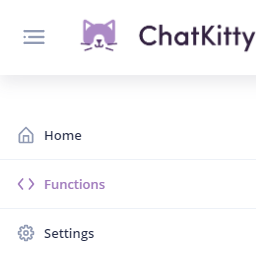
66 |
67 | Then from the "Functions" page, go to the "Runtime" tab:
68 |
69 | From the "Runtime" tab you can add a new dependency using the name of the NPM package you want to install and the version of the package you want to install.
70 |
71 | For example, installing version `7.24.0` of [the Firebase NPM package](https://www.npmjs.com/package/firebase) looks like this:
72 |
73 | 
74 |
75 | Using the package name `firebase` and the package version `7.24.0`.
76 |
77 | An equivalent `npm` command for this would be `npm install firebase@7.24.0`.
78 |
79 | Aftering installing a chat runtime dependency, you can import it into your chat functions and initialization script using the CommonJS require function.
80 |
81 | {% hint style="warning" %}
82 | Remember to click the "Save" icon to confirm your chat runtime dependencies changes.
83 | {% endhint %}
84 |
85 | ### Adding a chat runtime initialization script
86 |
87 | If you need to run initialization logic before running your chat function, you can add arbitrary code using a chat runtime initialization script.
88 |
89 | To add an initialization script, from the "Runtime" tab of the "Functions" page, click the dropdown and select "Initialization Script".
90 |
91 | 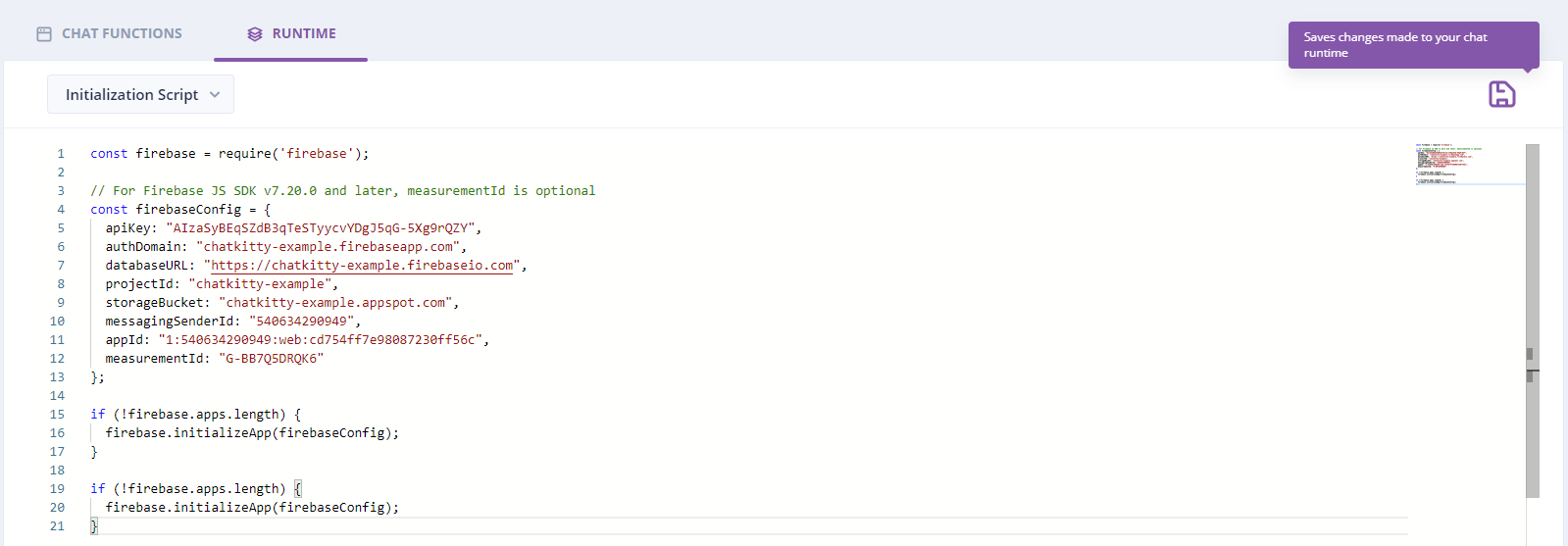
92 |
93 | {% hint style="warning" %}
94 | Remember to click the "Save" icon to confirm your chat runtime initialization script changes.
95 | {% endhint %}
96 |
97 |
--------------------------------------------------------------------------------
/getting-started/javascript-real-time-messaging-quick-start.md:
--------------------------------------------------------------------------------
1 | ---
2 | description: >-
3 | Integrate real-time chat into your React Native or Web application with the
4 | ChatKitty JavaScript SDK.
5 | ---
6 |
7 | # JavaScript Real-Time Messaging Quick Start
8 |
9 | ## Installing the ChatKitty JS SDK
10 |
11 | To use the ChatKitty JavaScript Chat SDK, you'll need to add the [ChatKitty JavaScript SDK](https://www.npmjs.com/package/chatkitty) NPM package to your JavaScript front-end project:
12 |
13 | {% tabs %}
14 | {% tab title="NPM" %}
15 | ```bash
16 | npm install chatkitty
17 | ```
18 | {% endtab %}
19 |
20 | {% tab title="Yarn" %}
21 | ```
22 | yarn add chatkitty
23 | ```
24 | {% endtab %}
25 | {% endtabs %}
26 |
27 | ## Initializing the ChatKitty SDK with your API key
28 |
29 | With your API key from the[ ChatKitty dashboard](https://dashboard.chatkitty.com/authorization/register), you can initialize a new instance of the **ChatKitty client:**
30 |
31 | ```javascript
32 | import ChatKitty from 'chatkitty';
33 |
34 | export const kitty = ChatKitty.getInstance('YOUR CHATKITTY API KEY HERE');
35 | ```
36 |
37 | With that, you can now use the ChatKitty SDK to begin building real-time chat features into your application.
38 |
39 | ## Starting a guest user session
40 |
41 | You must create a [**user session**](../concepts/user-sessions.md) before a user can begin chatting with other users using ChatKitty. A user session represents a secure bi-directional connection with ChatKitty servers allowing users to send and receive messages in real-time.
42 |
43 | Before you learn about **authenticating users** with ChatKitty, you can create a guest user session. You can start a user session by passing a unique **username** to your `ChatKitty` client `startSession()` method. A username is a string that uniquely identifies a user within your application.
44 |
45 | ```javascript
46 | const result = await kitty.startSession({
47 | username: 'jane@chatkitty.com'
48 | });
49 |
50 | if (result.succeeded) {
51 | const session = result.session; // Handle session
52 | }
53 |
54 | if (result.failed) {
55 | const error = result.error; // Handle error
56 | }
57 | ```
58 |
59 | {% hint style="info" %}
60 | We recommend you use uniquely hashed email addresses or phone numbers as usernames.
61 | {% endhint %}
62 |
63 | ## Creating a direct channel
64 |
65 | With a ChatKitty connection established, you can create a **direct channel** to direct message (DM) another user.
66 |
67 | ```javascript
68 | const result = await kitty.createChannel({
69 | type: 'DIRECT',
70 | members: [{ username: 'john@chatkitty.com' }],
71 | });
72 |
73 | if (result.succeeded) {
74 | const channel = result.channel; // Handle channel
75 | }
76 |
77 | if (result.failed) {
78 | const error = result.error; // Handle error
79 | }
80 | ```
81 |
82 | ## Starting a chat session
83 |
84 | Next, start a **chat session** using `startChatSession()` to listen to channel events.
85 |
86 | ```javascript
87 | const result = kitty.startChatSession({
88 | channel: channel,
89 | onReceivedMessage: (message) => {
90 | // handle received messages
91 | },
92 | onReceivedKeystrokes: (keystrokes) => {
93 | // handle received typing keystrokes
94 | },
95 | onTypingStarted: (user) => {
96 | // handle user starts typing
97 | },
98 | onTypingStopped: (user) => {
99 | // handle user stops typing
100 | },
101 | onParticipantEnteredChat: (user) => {
102 | // handle user who just entered the chat
103 | },
104 | onParticipantLeftChat: (user) => {
105 | // handle user who just left the chat
106 | },
107 | onParticipantPresenceChanged: (user) => {
108 | // handle user who became online, offline, do not disturb, invisible
109 | },
110 | onMessageRead: (message, receipt) => {
111 | // handle read receipt for message
112 | },
113 | onMessageUpdated: (message) => {
114 | // handle message changes
115 | },
116 | onChannelUpdated: (channel) => {
117 | // handle channel changes
118 | },
119 | });
120 |
121 | if (result.succeeded) {
122 | const session = result.session; // Handle session
123 | }
124 |
125 | if (result.failed) {
126 | const error = result.error; // Handle error
127 | }
128 | ```
129 |
130 | ### Receiving channel messages
131 |
132 | ChatKitty lets you register a number of handler methods when starting a chat session. Perhaps most important is the `onReceivedMessage()` handler method. This method is called in real-time whenever a new message is sent by a channel member. Typically, this is where you included code to update your UI with the new message.
133 |
134 | {% hint style="info" %}
135 | All handler methods are optional. You only needed to register handlers for chat events your application cares about.
136 | {% endhint %}
137 |
138 | ## Sending messages
139 |
140 | To send a message to a channel with an **active chat session**, use [`sendMessage()`](https://chatkitty.github.io/chatkitty-js/classes/chatkitty.chatkitty-1.html#sendmessage).
141 |
142 | ### Sending a text message
143 |
144 | To send a **text message** pass a string `body` to `sendMessage()`.
145 |
146 | ```javascript
147 | const result = await kitty.sendMessage({
148 | channel: channel,
149 | body: 'Hello, world!',
150 | });
151 |
152 | if (result.succeeded) {
153 | const message = result.message; // Handle message
154 | }
155 |
156 | if (result.failed) {
157 | const error = result.error; // Handle error
158 | }
159 | ```
160 |
161 | ### Sending a file message
162 |
163 | To send a **file message** pass a [JavaScript file](https://developer.mozilla.org/en-US/docs/Web/API/File) or `CreateChatKittyFileProperties` as `file` to `sendMessage()`. Optionally, you can pass a `ChatKittyUploadProgressListener` to track file upload progress.
164 |
165 | ```javascript
166 | const result = await kitty.sendMessage({
167 | channel: channel,
168 | file: file,
169 | progressListener: {
170 | onStarted: () => {
171 | // Handle file upload started
172 | },
173 |
174 | onProgress: (progress) => {
175 | // Handle file upload process
176 | },
177 |
178 | onCompleted: (result) => {
179 | // Handle file upload completed
180 | },
181 | },
182 | });
183 |
184 | if (result.succeeded) {
185 | const message = result.message; // Handle message
186 | }
187 |
188 | if (result.failed) {
189 | const error = result.error; // Handle error
190 | }
191 | ```
192 |
193 | ## Getting channel message history
194 |
195 | To fetch previous messages sent in a channel, use the `getMessages()` method.
196 |
197 | ```javascript
198 | const result = await kitty.getMessages({
199 | channel: channel,
200 | });
201 |
202 | if (result.succeeded) {
203 | const messages = result.paginator.items; // Handle messages
204 | }
205 |
206 | if (result.failed) {
207 | const error = result.error; // Handle error
208 | }
209 | ```
210 |
--------------------------------------------------------------------------------
/concepts/channels.md:
--------------------------------------------------------------------------------
1 | ---
2 | description: >-
3 | Channels are the backbone of the ChatKitty chat experience. Users join
4 | channels to receive or send messages.
5 | ---
6 |
7 | # Channels
8 |
9 | ChatKitty organizes conversations into dedicated contexts called channels. Channels structure and order your application's chat experience. You can create a channel for any topic, project, or team.
10 |
11 | After a user **joins** a channel, the user becomes a **channel member**. ChatKitty broadcasts messages created in channels to channel members with active **chat sessions** and sends **push notifications** to offline members. ChatKitty persists messages sent in a channel by default but this behaviour can be configured.
12 |
13 | ## Properties
14 |
15 | | Name | Type | Description | Required |
16 | | :--- | :--- | :--- | :--- |
17 | | id | number | 64-bit integer identifier associated with this channel | ✔ |
18 | | type | string | The type of this channel. `DIRECT`, `PUBLIC`, or `PRIVATE` | ✔ |
19 | | name | string | The unique name of this channel | ✔ |
20 | | creator | User | The user who created this channel. Absent if the channel was created with the Platform API | - |
21 | | lastReceivedMessage | Message | The message that was last received in this channel | - |
22 | | properties | object | Custom data associated with this channel | ✔ |
23 |
24 | ## Channel types
25 |
26 | There are three types of channels:
27 |
28 | ### Direct Channels
29 |
30 | Direct channels let users have private conversations with **up to 9** other users. New users cannot be added to a direct channel and there can only exist one direct channel between a set of users.
31 |
32 | ### Public Channels
33 |
34 | Public channels let users discuss topics openly. By default, any user can view and join a public channel. Users can join public channels by themselves or via invites from an existing channel member.
35 |
36 | ### Private Channels
37 |
38 | Private channels are for topics that should not be open to all members. Users must be **added** to a private channel by someone who's already a member of the channel.
39 |
40 | #### Additional Properties
41 |
42 | | Name | Type | Description | Required |
43 | | :--- | :--- | :--- | :--- |
44 | | members | User \[ \] | An array of member users of this channel | ✔ |
45 |
46 | ## Creating a channel
47 |
48 | Create a new channel of channel type \(`DIRECT`, `PUBLIC`, or `PRIVATE`\) with a unique name for public and private channels and member references for direct channels. A user is automatically a member of a channel they created.
49 |
50 | ### Creating a direct channel
51 |
52 | ```javascript
53 | const result = await kitty.createChannel({
54 | type: 'DIRECT',
55 | members: [
56 | { username: 'jane@chatkitty.com' },
57 | { username: 'john@chatkitty.com' },
58 | ],
59 | });
60 |
61 | if (result.succeeded) {
62 | const channel = result.channel; // Handle channel
63 | }
64 |
65 | if (result.failed) {
66 | const error = result.error; // Handle error
67 | }
68 | ```
69 |
70 | ### Creating a public channel
71 |
72 | ```javascript
73 | const result = await kitty.createChannel({
74 | type: 'PUBLIC',
75 | name: 'my-first-public-channel',
76 | });
77 |
78 | if (result.succeeded) {
79 | const channel = result.channel; // Handle channel
80 | }
81 |
82 | if (result.failed) {
83 | const error = result.error; // Handle error
84 | }
85 | ```
86 |
87 | ### Creating a private channel
88 |
89 | ```javascript
90 | const result = await kitty.createChannel({
91 | type: 'PRIVATE',
92 | name: 'my-first-private-channel',
93 | });
94 |
95 | if (result.succeeded) {
96 | const channel = result.channel; // Handle channel
97 | }
98 |
99 | if (result.failed) {
100 | const error = result.error; // Handle error
101 | }
102 | ```
103 |
104 | ## Getting channels
105 |
106 | Get all channels accessible to the current user regardless of current membership status.
107 |
108 | ```javascript
109 | const result = await kitty.getChannels();
110 |
111 | if (result.succeeded) {
112 | const channels = result.paginator.items; // Handle channels
113 | }
114 |
115 | if (result.failed) {
116 | const error = result.error; // Handle error
117 | }
118 | ```
119 |
120 | ### Getting joined channels
121 |
122 | Get channels the current user has joined \(is already a member\) and can start **chat sessions** in.
123 |
124 | ```javascript
125 | const result = await kitty.getChannels({ filter: { joined: true } });
126 |
127 | if (result.succeeded) {
128 | const channels = result.paginator.items; // Handle channels
129 | }
130 |
131 | if (result.failed) {
132 | const error = result.error; // Handle error
133 | }
134 | ```
135 |
136 | ### Getting joinable channels
137 |
138 | Get channels the current user can join, becoming a member.
139 |
140 | ```javascript
141 | const result = await kitty.getChannels({ filter: { joined: false } });
142 |
143 | if (result.succeeded) {
144 | const channels = result.paginator.items; // Handle channels
145 | }
146 |
147 | if (result.failed) {
148 | const error = result.error; // Handle error
149 | }
150 | ```
151 |
152 | ### Getting a channel
153 |
154 | Get a channel by searchable properties like channel ID
155 |
156 | ```javascript
157 | const result = await kitty.getChannel(channelId);
158 |
159 | if (result.succeeded) {
160 | const channel = result.channel; // Handle channel
161 | }
162 |
163 | if (result.failed) {
164 | const error = result.error; // Handle error
165 | }
166 | ```
167 |
168 | ## Joining a public channel
169 |
170 | ```javascript
171 | const result = await kitty.joinChannel({ channel });
172 |
173 | if (result.succeeded) {
174 | const channel = result.channel; // Handle channel
175 | }
176 |
177 | if (result.failed) {
178 | const error = result.error; // Handle error
179 | }
180 | ```
181 |
182 | ### Observing user joined channel
183 |
184 | When the current user joins a channel or is added to a channel by another user or through the Platform API, registered channel observers are notified.
185 |
186 | ```javascript
187 | const unsubscribe = kitty.onJoinedChannel((channel) => {
188 | // handle channel
189 | });
190 |
191 | // call when you're no longer interested in updates
192 | unsubscribe();
193 | ```
194 |
195 | ## Reading a channel
196 |
197 | Read a channel to automatically **read** all channel messages.
198 |
199 | ```javascript
200 | const result = await kitty.readChannel({ channel });
201 |
202 | if (result.succeeded) {
203 | const channel = result.channel; // Handle channel
204 | }
205 |
206 | if (result.failed) {
207 | const error = result.error; // Handle error
208 | }
209 | ```
210 |
211 | ### Checking if a channel is unread
212 |
213 | A channel is unread if it has any unread messages by the current user.
214 |
215 | ```javascript
216 | const result = await kitty.getChannelUnread({
217 | channel: channel,
218 | });
219 |
220 | if (result.succeeded) {
221 | const unread = result.unread; // Handle if unread
222 | }
223 | ```
224 |
225 |
--------------------------------------------------------------------------------
/concepts/messages.md:
--------------------------------------------------------------------------------
1 | ---
2 | description: Users, bots, and system administrators can send messages
3 | ---
4 |
5 | # Messages
6 |
7 | Messages are the core building blocks of ChatKitty applications. Users send messages using the client SDK, while bots and system administrators can send messages using the Platform API. **Text messages** have a Unicode text body, while **file messages** have a file attached to them. **User messages** are messages sent by end-users of your application through the client SDK. **System messages** are messages sent via the [Platform API](../platform-api/overview.md) on behalf of the application.
8 |
9 | ## Properties
10 |
11 | | Name | Type | Description | Required |
12 | | ----------- | ---------------- | ------------------------------------------------------------------------------------------------ | -------- |
13 | | id | number | 64-bit integer identifier associated with this message | ✔ |
14 | | type | string | The type of this message. `TEXT`, or `FILE` | ✔ |
15 | | body | string | The text body of this message. Present if this is a text message | - |
16 | | file | ChatKittyFile | The file attached to this message. Present if this is a file message | - |
17 | | links | MessageLink \[ ] | **Message links** found in this message. Present if this is a text message | - |
18 | | mentions | Mention \[ ] | [Mentions](mentions.md) of channels and users in this message. Present if this is a text message | - |
19 | | user | User | The user who sent this message. Absent if this is a system message | - |
20 | | createdTime | datetime | ISO 8601 date-time when this message was created | ✔ |
21 | | properties | object | Custom data associated with this message | ✔ |
22 |
23 | ## Message types
24 |
25 | There are four types of messages:
26 |
27 | ### User Text Message
28 |
29 | Users can send text messages containing a Unicode text body. These messages can contain emojis and other Unicode characters.
30 |
31 | ### User File Message
32 |
33 | Users can send files messages with a file attachment.
34 |
35 | ### System Text Message
36 |
37 | You can send text messages containing a Unicode text body on behalf of your application.
38 |
39 | ### System File Message
40 |
41 | You can send file messages with a file attachment on behalf of your application.
42 |
43 | ## Sending a message
44 |
45 | You can send messages in a [channel](channels.md).
46 |
47 | ### Sending a user text message
48 |
49 | Using a client SDK as a channel member, send a user text message.
50 |
51 | #### Parameters
52 |
53 | | Name | Type | Description | Required |
54 | | ---------- | ------- | ---------------------------------------------- | -------- |
55 | | channel | Channel | [Channel](channels.md) this message belongs to | ✔ |
56 | | body | string | The Unicode text body of this message | ✔ |
57 | | properties | object | Custom data associated with this message | - |
58 |
59 | ```javascript
60 | const result = await kitty.sendMessage({
61 | channel: channel,
62 | body: 'Hello, world!',
63 | });
64 |
65 | if (result.succeeded) {
66 | const message = result.message; // Handle message
67 | }
68 |
69 | if (result.failed) {
70 | const error = result.error; // Handle error
71 | }
72 | ```
73 |
74 | ### Sending a user file message
75 |
76 | Using a client SDK, send a user file message.
77 |
78 | #### Parameters
79 |
80 | | Name | Type | Description | Required |
81 | | ---------------- | ---------------------- | --------------------------------------------------------------------- | -------- |
82 | | channel | Channel | [Channel](channels.md) this message belongs to | ✔ |
83 | | file | File | File to upload as an attachment or ChatKitty external file properties | ✔ |
84 | | properties | object | Custom data associated with this message | - |
85 | | progressListener | UploadProgressListener | Listener to be notified as the file upload progresses. | - |
86 |
87 | ```javascript
88 | const result = await kitty.sendMessage({
89 | channel: channel,
90 | file: file,
91 | progressListener: {
92 | onStarted: () => {
93 | // Handle file upload started
94 | },
95 |
96 | onProgress: (progress) => {
97 | // Handle file upload process
98 | },
99 |
100 | onCompleted: (result) => {
101 | // Handle file upload completed
102 | },
103 | },
104 | });
105 |
106 | if (result.succeeded) {
107 | const message = result.message; // Handle message
108 | }
109 |
110 | if (result.failed) {
111 | const error = result.error; // Handle error
112 | }
113 | ```
114 |
115 | {% swagger path="/channels/:id/messages" method="post" summary="Sending a system text message" %}
116 | {% swagger-description %}
117 | Using the Platform API, send a new system text message.
118 | {% endswagger-description %}
119 |
120 | {% swagger-parameter name="id" type="number" in="path" %}
121 | The ID for the channel this message belongs to
122 | {% endswagger-parameter %}
123 |
124 | {% swagger-parameter name="type" type="string" in="body" %}
125 | Type of this message. Always
126 |
127 | `TEXT`
128 | {% endswagger-parameter %}
129 |
130 | {% swagger-parameter name="body" type="string" in="body" %}
131 | The Unicode text body of this message
132 | {% endswagger-parameter %}
133 |
134 | {% swagger-parameter name="properties" type="object" in="body" %}
135 | Custom data associated with this message
136 | {% endswagger-parameter %}
137 |
138 | {% swagger-response status="200" description="" %}
139 | ```javascript
140 | {
141 | "id": 26858,
142 | "type": "SYSTEM_TEXT",
143 | "body": "Hello, world!",
144 | "links": [],
145 | "properties": {},
146 | "createdTime": "2021-06-01T17:34:30.276Z",
147 | "_links": {
148 | "self": {
149 | "href": "https://api.chatkitty.com/v1/applications/6902/messages/26858"
150 | },
151 | "channel": {
152 | "href": "https://api.chatkitty.com/v1/applications/6902/channels/35204"
153 | },
154 | "application": {
155 | "href": "https://api.chatkitty.com/v1/applications/6902"
156 | }
157 | }
158 | }
159 | ```
160 | {% endswagger-response %}
161 | {% endswagger %}
162 |
163 | ## Getting messages
164 |
165 | You can retrieve previous messages and observe new messages.
166 |
167 | ### Retrieving channel messages
168 |
169 | A user can retrieve previous messages in a [channel](channels.md) he or she is a member of.
170 |
171 | ```javascript
172 | const result = await kitty.getMessages({
173 | channel: channel,
174 | });
175 |
176 | if (result.succeeded) {
177 | const messages = result.paginator.items; // Handle messages
178 | }
179 |
180 | if (result.failed) {
181 | const error = result.error; // Handle error
182 | }
183 | ```
184 |
185 | ### Observing channel messages
186 |
187 | A user can observe new messages in a [channel](channels.md) he or she is a member of.
188 |
189 | ```javascript
190 | kitty.startChatSession({
191 | channel: channel,
192 | onReceivedMessage: (message) => {
193 | // Handle recevied message
194 | },
195 | });
196 | ```
197 |
--------------------------------------------------------------------------------
/getting-started/react-native-video-voice-calls-quick-start.md:
--------------------------------------------------------------------------------
1 | ---
2 | description: >-
3 | Build text chat and video/audio calls into your React Native application with
4 | ChatKitty
5 | ---
6 |
7 | # React Native Video/Voice Calls Quick Start
8 |
9 | ## Installing the ChatKitty React Native SDK
10 |
11 | To use the ChatKitty React Native Calls SDK, you'll need to add the [ChatKitty React Native SDK](https://www.npmjs.com/package/react-native-chatkitty) NPM package to your React Native project. You'll also need the [react-native-webrtc](https://www.npmjs.com/package/react-native-webrtc) package installed to access the WebRTC APIs:
12 |
13 | {% tabs %}
14 | {% tab title="Yarn" %}
15 | ```
16 | yarn add react-native-chatkitty react-native-webrtc
17 | ```
18 | {% endtab %}
19 |
20 | {% tab title="NPM" %}
21 | ```bash
22 | npm install react-native-chatkitty react-native-webrtc
23 | ```
24 | {% endtab %}
25 | {% endtabs %}
26 |
27 | ## Initializing the ChatKitty React Native SDK with your API key
28 |
29 | With your API key from the[ ChatKitty dashboard](https://dashboard.chatkitty.com/authorization/register), you can initialize a new instance of the ChatKitty client:
30 |
31 | ```javascript
32 | import ChatKitty from 'react-native-chatkitty';
33 |
34 | const kitty = ChatKitty.getInstance('YOUR CHATKITTY API KEY HERE');
35 | ```
36 |
37 | ## Starting a guest user session
38 |
39 | You must create a [**user session**](../concepts/user-sessions.md) before a user can begin chatting with other users using ChatKitty. A user session represents a secure bi-directional connection with ChatKitty servers allowing users to send and receive messages in real-time.
40 |
41 | Before you learn about authenticating users with ChatKitty, you can create a guest user session. You can start a user session by passing a unique **username** to your `ChatKitty` client `startSession()` method. A username is a string that uniquely identifies a user within your application.
42 |
43 | {% tabs %}
44 | {% tab title="JavaScript" %}
45 | ```java
46 | const result = await kitty.startSession({
47 | username: 'jane@chatkitty.com'
48 | });
49 |
50 | if (result.succeeded) {
51 | const session = result.session; // Handle session
52 | }
53 |
54 | if (result.failed) {
55 | const error = result.error; // Handle error
56 | }
57 | ```
58 | {% endtab %}
59 |
60 | {% tab title="TypeScript" %}
61 | ```typescript
62 | import {
63 | failed,
64 | StartedSessionResult,
65 | succeeded,
66 | } from 'react-native-chatkitty';
67 |
68 | const result = await kitty.startSession({
69 | username: 'jane@chatkitty.com',
70 | });
71 |
72 | if (succeeded(result)) {
73 | const session = result.session; // Handle session
74 | }
75 |
76 | if (failed(result)) {
77 | const error = result.error; // Handle error
78 | }
79 | ```
80 | {% endtab %}
81 | {% endtabs %}
82 |
83 | ## Initializing the Camera and Audio
84 |
85 | Before you can begin a call, you'll need to initialize your device's camera in the `ChatKitty.Calls` context object.
86 |
87 | ```javascript
88 | await kitty.Calls.initialize({
89 | media: { audio: true, video: true },
90 | });
91 | ```
92 |
93 | After calling `initialize(...)`, the `ChatKitty.Calls` object creates a WebRTC MediaSteam for your device's camera and is ready to start and answer calls.
94 |
95 | ## Retrieving the local Media Stream
96 |
97 | `kitty.Calls.localStream` exposes the React Native WebRTC MediaStream capturing video/audio from your device.
98 |
99 | {% tabs %}
100 | {% tab title="JavaScript" %}
101 | ```javascript
102 | import React from 'react';
103 | import { RTCView } from 'react-native-webrtc';
104 |
105 | const Snippet = () => {
106 | const localStream = kitty.Calls.localStream;
107 |
108 | return (
109 | localStream && (
110 |
111 | )
112 | );
113 | };
114 | ```
115 | {% endtab %}
116 |
117 | {% tab title="TypeScript" %}
118 | ```typescript
119 | import React from 'react';
120 | import { MediaStream, RTCView } from 'react-native-webrtc';
121 |
122 | const Snippet = () => {
123 | const localStream: MediaStream | null = kitty.Calls.localStream;
124 |
125 | return (
126 | localStream && (
127 |
128 | )
129 | );
130 | };
131 | ```
132 | {% endtab %}
133 | {% endtabs %}
134 |
135 | ## Displaying Media Streams
136 |
137 | To display a `MediaStream` (local or remote), use the React Native WebRTC `RTCView` component.
138 |
139 | ```jsx
140 | ;
146 | ```
147 |
148 | ## Retrieving online users
149 |
150 | You can fetch a list of other users that are online.
151 |
152 | {% tabs %}
153 | {% tab title="JavaScript" %}
154 | ```javascript
155 | const result = await kitty.getUsers({ filter: { online: true } });
156 |
157 | if (result.succeeded) {
158 | const users = result.paginator.items;
159 | }
160 | ```
161 | {% endtab %}
162 |
163 | {% tab title="TypeScript" %}
164 | ```typescript
165 | import {
166 | GetUsersSucceededResult,
167 | succeeded,
168 | User,
169 | } from 'react-native-chatkitty';
170 |
171 | const result = await kitty.getUsers({ filter: { online: true } });
172 |
173 | if (succeeded(result)) {
174 | const users: User[] = result.paginator.items;
175 | }
176 | ```
177 | {% endtab %}
178 | {% endtabs %}
179 |
180 | ## Observing user online/presence changes
181 |
182 | You can listen to changes to user presence changes across your application - when users come online or go offline.
183 |
184 | {% tabs %}
185 | {% tab title="JavaScript" %}
186 | ```javascript
187 | kitty.onUserPresenceChanged(async (user) => {
188 | const presence = user.presence;
189 |
190 | // Update online users list
191 | });
192 | ```
193 | {% endtab %}
194 |
195 | {% tab title="TypeScript" %}
196 | ```typescript
197 | import { User, UserPresence } from 'react-native-chatkitty';
198 |
199 | kitty.onUserPresenceChanged(async (user: User) => {
200 | const presence: UserPresence = user.presence;
201 |
202 | // Update online users list
203 | });
204 | ```
205 | {% endtab %}
206 | {% endtabs %}
207 |
208 | ## Observing call events
209 |
210 | You can observe events related to calls by registering event listeners on the `ChatKitty.Calls` object.
211 |
212 | ### On call invite
213 |
214 | Called when another user invites the current user to a call.
215 |
216 | {% tabs %}
217 | {% tab title="JavaScript" %}
218 | ```javascript
219 | kitty.Calls.onCallInvite((call) => {
220 | // Inform the current user about the call then accept or reject the call
221 | });
222 | ```
223 | {% endtab %}
224 |
225 | {% tab title="TypeScript" %}
226 | ```typescript
227 | import { Call } from 'react-native-chatkitty';
228 |
229 | kitty.Calls.onCallInvite((call: Call) => {
230 | // Inform the current user about the call then accept or reject the call
231 | });
232 | ```
233 | {% endtab %}
234 | {% endtabs %}
235 |
236 | ### On call active
237 |
238 | Called when the current user starts a call or accepts an incoming call and their is device ready.
239 |
240 | {% tabs %}
241 | {% tab title="JavaScript" %}
242 | ```javascript
243 | kitty.Calls.onCallActive((call) => {
244 | // Update in-call state and navigate to in-call UI
245 | });
246 | ```
247 | {% endtab %}
248 |
249 | {% tab title="TypeScript" %}
250 | ```typescript
251 | import { Call } from 'react-native-chatkitty';
252 |
253 | kitty.Calls.onCallActive((call: Call) => {
254 | // Update in-call state and navigate to in-call UI
255 | });
256 | ```
257 | {% endtab %}
258 | {% endtabs %}
259 |
260 | ### On participant accepted call
261 |
262 | Called when another user accepts the call the current user is currently active in.
263 |
264 | {% tabs %}
265 | {% tab title="JavaScript" %}
266 | ```javascript
267 | kitty.Calls.onParticipantAcceptedCall((participant) => {
268 | // Update in-call state and UI
269 | });
270 | ```
271 | {% endtab %}
272 |
273 | {% tab title="TypeScript" %}
274 | ```typescript
275 | import { User } from 'react-native-chatkitty';
276 |
277 | kitty.Calls.onParticipantAcceptedCall((participant: User) => {
278 | // Update in-call state and UI
279 | });
280 | ```
281 | {% endtab %}
282 | {% endtabs %}
283 |
284 | ### On participant rejected call
285 |
286 | Called when another user rejects the call the current user is currently active in.
287 |
288 | {% tabs %}
289 | {% tab title="JavaScript" %}
290 | ```javascript
291 | kitty.Calls.onParticipantRejectedCall((participant) => {
292 | // Update in-call state and UI
293 | });
294 | ```
295 | {% endtab %}
296 |
297 | {% tab title="TypeScript" %}
298 | ```typescript
299 | import { User } from 'react-native-chatkitty';
300 |
301 | kitty.Calls.onParticipantRejectedCall((participant: User) => {
302 | // Update in-call state and UI
303 | });
304 | ```
305 | {% endtab %}
306 | {% endtabs %}
307 |
308 | ### On participant active
309 |
310 | Called when another user's device is ready to send their video/audio stream and interact with the call.
311 |
312 | {% tabs %}
313 | {% tab title="JavaScript" %}
314 | ```javascript
315 | kitty.Calls.onParticipantActive((participant, stream) => {
316 | // Update in-call state and UI
317 | });
318 | ```
319 | {% endtab %}
320 |
321 | {% tab title="TypeScript" %}
322 | ```typescript
323 | import { User } from 'react-native-chatkitty';
324 | import { MediaStream } from 'react-native-webrtc';
325 |
326 | kitty.Calls.onParticipantActive((participant: User, stream: MediaStream) => {
327 | // Update in-call state and UI
328 | });
329 | ```
330 | {% endtab %}
331 | {% endtabs %}
332 |
333 | ### On participant left call
334 |
335 | Called when another user leaves the call.
336 |
337 | {% tabs %}
338 | {% tab title="JavaScript" %}
339 | ```javascript
340 | kitty.Calls.onParticipantLeftCall((participant) => {
341 | // Update in-call state and UI
342 | });
343 | ```
344 | {% endtab %}
345 |
346 | {% tab title="TypeScript" %}
347 | ```typescript
348 | import { User } from 'react-native-chatkitty';
349 | import { MediaStream } from 'react-native-webrtc';
350 |
351 | kitty.Calls.onParticipantLeftCall((participant: User) => {
352 | // Update in-call state and UI
353 | });
354 | ```
355 | {% endtab %}
356 | {% endtabs %}
357 |
358 | ### On call ended
359 |
360 | Called when this call has ended.
361 |
362 | {% tabs %}
363 | {% tab title="JavaScript" %}
364 | ```javascript
365 | kitty.Calls.onCallEnded((call) => {
366 | // Update state and exit in-call UI
367 | });
368 | ```
369 | {% endtab %}
370 |
371 | {% tab title="TypeScript" %}
372 | ```typescript
373 | import { Call } from 'react-native-chatkitty';
374 |
375 | kitty.Calls.onCallEnded((call: Call) => {
376 | // Update state and exit in-call UI
377 | });
378 | ```
379 | {% endtab %}
380 | {% endtabs %}
381 |
382 | ## Starting a call
383 |
384 | Start a direct call with another user.
385 |
386 | ```javascript
387 | await kitty.Calls.startCall({ members: [{ username: 'john@chatkitty.com' }] });
388 | ```
389 |
390 | ## Accepting a call
391 |
392 | Accept a call invite.
393 |
394 | ```javascript
395 | await kitty.Calls.acceptCall({ call });
396 | ```
397 |
398 | ## Rejecting a call
399 |
400 | Reject a call invite.
401 |
402 | ```javascript
403 | await kitty.Calls.rejectCall({ call });
404 | ```
405 |
406 | ## Leaving an active call
407 |
408 | Leave the currently active call. Ends a one-to-one direct call.
409 |
410 | ```javascript
411 | kitty.Calls.leaveCall();
412 | ```
413 |
414 | ## Switching camera
415 |
416 | Switches the current user's camera if their device has multiple cameras (front and back).
417 |
418 | ```javascript
419 | kitty.Calls.switchCamera();
420 | ```
421 |
422 | ## Toggling mute
423 |
424 | Mutes/unmutes the current user's audio stream
425 |
426 | ```javascript
427 | kitty.Calls.toggleMute();
428 | ```
429 |
430 | ## Retrieving active call mute state
431 |
432 | Retrieve the active call's mute state using `ChatKitty.Calls.isMuted`.
433 |
434 | {% tabs %}
435 | {% tab title="JavaScript" %}
436 | ```javascript
437 | const muted = kitty.Calls.isMuted;
438 | ```
439 | {% endtab %}
440 |
441 | {% tab title="TypeScript" %}
442 | ```typescript
443 | const muted: boolean = kitty.Calls.isMuted;
444 | ```
445 | {% endtab %}
446 | {% endtabs %}
447 |
448 | ## Retrieving calls
449 |
450 | Retrieve past calls.
451 |
452 | {% tabs %}
453 | {% tab title="JavaScript" %}
454 | ```javascript
455 | const result = await kitty.Calls.getCalls({
456 | channel,
457 | filter: { active: false },
458 | });
459 |
460 | if (result.succeeded) {
461 | const calls = result.paginator.items;
462 | }
463 | ```
464 | {% endtab %}
465 |
466 | {% tab title="TypeScript" %}
467 | ```typescript
468 | import {
469 | Call,
470 | GetCallsSucceededResult,
471 | succeeded,
472 | } from 'react-native-chatkitty';
473 |
474 | const result = await kitty.Calls.getCalls({
475 | channel,
476 | filter: { active: false },
477 | });
478 |
479 | if (succeeded(result)) {
480 | const calls: Call[] = result.paginator.items;
481 | }
482 | ```
483 | {% endtab %}
484 | {% endtabs %}
485 |
486 | ## Retrieving a call
487 |
488 | ### Retrieving active call
489 |
490 | Retrieve an active call if the currrent user has started or accepted the call using `ChatKitty.Calls.activeCall`
491 |
492 | {% tabs %}
493 | {% tab title="JavaScript" %}
494 | ```javascript
495 | const call = kitty.Calls.activeCall;
496 | ```
497 | {% endtab %}
498 |
499 | {% tab title="TypeScript" %}
500 | ```typescript
501 | import { Call } from 'react-native-chatkitty';
502 |
503 | const call: Call | null = kitty.Calls.activeCall;
504 | ```
505 | {% endtab %}
506 | {% endtabs %}
507 |
508 | ### Retrieving a call by ID
509 |
510 | Retrieve a call with its ID.
511 |
512 | {% tabs %}
513 | {% tab title="JavaScript" %}
514 | ```javascript
515 | const result = await kitty.Calls.getCall(id);
516 |
517 | if (result.succeeded) {
518 | const call = result.call;
519 | }
520 | ```
521 | {% endtab %}
522 |
523 | {% tab title="TypeScript" %}
524 | ```typescript
525 | import {
526 | Call,
527 | GetCallSucceededResult,
528 | succeeded,
529 | } from 'react-native-chatkitty';
530 |
531 | const result = await kitty.Calls.getCall(id);
532 |
533 | if (succeeded(result)) {
534 | const call: Call = result.call;
535 | }
536 | ```
537 | {% endtab %}
538 | {% endtabs %}
539 |
540 | ## Closing the React Native Calls SDK context
541 |
542 | Close the ChatKitty React Native Calls SDK and clean up associated system resources
543 |
544 | ```javascript
545 | kitty.Calls.close();
546 | ```
547 |
548 | ## Ending the user session
549 |
550 | [End the user session](../concepts/user-sessions.md#ending-a-user-session) to log the user out, close their device's concurrent connection to ChatKitty and free up resources used by the ChatKitty SDK.
551 |
552 | ```javascript
553 | kitty.endSession();
554 | ```
555 |
--------------------------------------------------------------------------------