├── .babelrc
├── .eslintignore
├── .gitignore
├── example
├── public
│ ├── favicon.ico
│ └── index.html
├── src
│ ├── assets
│ │ └── logo.png
│ ├── charts
│ │ ├── RadialBarExample.vue
│ │ ├── DonutExample.vue
│ │ ├── AreaExample.vue
│ │ ├── BarExample.vue
│ │ ├── ColumnExample.vue
│ │ ├── LineExample.vue
│ │ ├── BubbleExample.vue
│ │ ├── MixedExample.vue
│ │ ├── HeatmapExample.vue
│ │ └── ScatterExample.vue
│ ├── App.vue
│ └── main.js
├── .gitignore
└── package.json
├── .vscode
└── settings.json
├── .travis.yml
├── .editorconfig
├── .eslintrc.js
├── src
├── index.js
└── ApexCharts.component.js
├── rollup.config.js
├── .github
└── workflows
│ └── stale.yml
├── package.json
├── dist
├── vue-apexcharts.d.ts
└── vue-apexcharts.js
├── typings
└── vue-apexcharts.d.ts
├── LICENSE
└── README.md
/.babelrc:
--------------------------------------------------------------------------------
1 | {
2 | "presets": [ "@babel/env" ]
3 | }
--------------------------------------------------------------------------------
/.eslintignore:
--------------------------------------------------------------------------------
1 | node_modules/
2 | example/node_modules/
--------------------------------------------------------------------------------
/.gitignore:
--------------------------------------------------------------------------------
1 | .DS_Store
2 | node_modules/
3 | npm-debug.log*
4 | coverage
5 | issues
--------------------------------------------------------------------------------
/example/public/favicon.ico:
--------------------------------------------------------------------------------
https://raw.githubusercontent.com/apexcharts/vue-apexcharts/HEAD/example/public/favicon.ico
--------------------------------------------------------------------------------
/example/src/assets/logo.png:
--------------------------------------------------------------------------------
https://raw.githubusercontent.com/apexcharts/vue-apexcharts/HEAD/example/src/assets/logo.png
--------------------------------------------------------------------------------
/.vscode/settings.json:
--------------------------------------------------------------------------------
1 | {
2 | // Temporary until prettier and eslint are correctly setup
3 | "editor.formatOnSave": false
4 | }
--------------------------------------------------------------------------------
/.travis.yml:
--------------------------------------------------------------------------------
1 | language: node_js
2 | node_js:
3 | - "stable"
4 | cache:
5 | directories:
6 | - node_modules
7 | script:
8 | - npm run build
--------------------------------------------------------------------------------
/.editorconfig:
--------------------------------------------------------------------------------
1 | root = true
2 |
3 | [*]
4 | charset = utf-8
5 | indent_style = space
6 | indent_size = 2
7 | end_of_line = lf
8 | insert_final_newline = true
9 | trim_trailing_whitespace = true
10 |
--------------------------------------------------------------------------------
/example/.gitignore:
--------------------------------------------------------------------------------
1 | .DS_Store
2 | node_modules
3 | /dist
4 |
5 | # local env files
6 | .env.local
7 | .env.*.local
8 |
9 | # Log files
10 | npm-debug.log*
11 | yarn-debug.log*
12 | yarn-error.log*
13 |
14 | # Editor directories and files
15 | .idea
16 | .vscode
17 | *.suo
18 | *.ntvs*
19 | *.njsproj
20 | *.sln
21 | *.sw*
22 |
--------------------------------------------------------------------------------
/example/src/charts/RadialBarExample.vue:
--------------------------------------------------------------------------------
1 |
2 |
5 |
6 |
7 |
20 |
--------------------------------------------------------------------------------
/.eslintrc.js:
--------------------------------------------------------------------------------
1 | module.exports = {
2 | root: true,
3 | parserOptions: {
4 | ecmaVersion: 2018,
5 | parser: 'babel-eslint',
6 | sourceType: 'module'
7 | },
8 | env: {
9 | browser: true,
10 | es6: true,
11 | node: true
12 | },
13 | // extends: ['plugin:prettier/recommended'],
14 | globals: {
15 | "ApexCharts": true
16 | },
17 | rules: {
18 | // Remove this when prettier 2.0 is out
19 | 'space-before-function-paren': 0 // Do not clash with Prettier
20 | }
21 | };
--------------------------------------------------------------------------------
/src/index.js:
--------------------------------------------------------------------------------
1 | import ApexCharts from "apexcharts/dist/apexcharts.min";
2 | import ApexChartsComponent from './ApexCharts.component';
3 |
4 | const VueApexCharts = ApexChartsComponent;
5 | window.ApexCharts = ApexCharts;
6 |
7 | VueApexCharts.install = function (Vue) {
8 | //adding a global method or property
9 | Vue.ApexCharts = ApexCharts;
10 | window.ApexCharts = ApexCharts;
11 |
12 | // add the instance method
13 | Object.defineProperty(Vue.prototype, '$apexcharts', {
14 | get: function get() {
15 | return ApexCharts
16 | }
17 | });
18 | };
19 |
20 | export default VueApexCharts
--------------------------------------------------------------------------------
/example/public/index.html:
--------------------------------------------------------------------------------
1 |
2 |
3 |
4 |
5 |
6 |
7 |
8 | example
9 |
10 |
11 |
12 | We're sorry but example doesn't work properly without JavaScript enabled. Please enable it to continue.
13 |
14 |
15 |
16 |
17 |
18 |
--------------------------------------------------------------------------------
/rollup.config.js:
--------------------------------------------------------------------------------
1 | import babel from 'rollup-plugin-babel';
2 | import resolve from 'rollup-plugin-node-resolve';
3 | import commonjs from 'rollup-plugin-commonjs';
4 | import copy from 'rollup-plugin-copy';
5 |
6 | let pluginOptions = [
7 | resolve({
8 | browser: true
9 | }),
10 | commonjs(),
11 | babel({
12 | exclude: 'node_modules/**'
13 | }),
14 | copy({
15 | 'typings': 'dist',
16 | verbose: true
17 | })
18 | ];
19 |
20 | module.exports = {
21 | input: './src/index.js',
22 | output: {
23 | name: 'VueApexCharts',
24 | file: 'dist/vue-apexcharts.js',
25 | format: 'umd',
26 | globals: {
27 | "apexcharts": "ApexCharts"
28 | }
29 | },
30 | external: [ 'apexcharts' ],
31 | plugins: pluginOptions
32 | }
--------------------------------------------------------------------------------
/example/src/charts/DonutExample.vue:
--------------------------------------------------------------------------------
1 |
2 |
3 |
4 |
5 | Update!
6 |
7 |
8 |
9 |
10 |
34 |
--------------------------------------------------------------------------------
/.github/workflows/stale.yml:
--------------------------------------------------------------------------------
1 | name: Mark stale issues and pull requests
2 | on:
3 | schedule:
4 | - cron: '21 14 * * *'
5 | jobs:
6 | stale:
7 | runs-on: ubuntu-latest
8 | permissions:
9 | issues: write
10 | pull-requests: write
11 | steps:
12 | - uses: actions/stale@v9
13 | with:
14 | repo-token: ${{ secrets.GITHUB_TOKEN }}
15 | stale-issue-message: 'This issue has been automatically marked as stale because it has not had recent activity. It will be closed if no further activity occurs. Thank you for your contributions.'
16 | stale-pr-message: 'This pull request has been automatically marked as stale because it has not had recent activity. It will be closed if no further activity occurs. Thank you for your contributions.'
17 | stale-issue-label: 'no-issue-activity'
18 | stale-pr-label: 'no-pr-activity'
19 | exempt-issue-labels: 'bug,high-priority'
20 | operations-per-run: 100
21 |
--------------------------------------------------------------------------------
/example/src/charts/AreaExample.vue:
--------------------------------------------------------------------------------
1 |
2 |
5 |
6 |
7 |
42 |
--------------------------------------------------------------------------------
/example/package.json:
--------------------------------------------------------------------------------
1 | {
2 | "name": "example",
3 | "version": "0.1.0",
4 | "private": true,
5 | "scripts": {
6 | "serve": "vue-cli-service serve",
7 | "build": "vue-cli-service build",
8 | "lint": "vue-cli-service lint"
9 | },
10 | "dependencies": {
11 | "apexcharts": "^3.24.0",
12 | "vue": "^2.5.17",
13 | "vue-apexcharts": "^1.5.3",
14 | "vue-router": "^3.0.1"
15 | },
16 | "devDependencies": {
17 | "@vue/cli-plugin-babel": "^5.0.8",
18 | "@vue/cli-plugin-eslint": "^5.0.8",
19 | "@vue/cli-service": "^5.0.8",
20 | "vue-template-compiler": "^2.5.17"
21 | },
22 | "babel": {
23 | "presets": [
24 | "@vue/app"
25 | ]
26 | },
27 | "eslintConfig": {
28 | "root": true,
29 | "env": {
30 | "node": true
31 | },
32 | "extends": [
33 | "plugin:vue/essential",
34 | "eslint:recommended"
35 | ],
36 | "rules": {},
37 | "parserOptions": {
38 | "parser": "babel-eslint"
39 | }
40 | },
41 | "postcss": {
42 | "plugins": {
43 | "autoprefixer": {}
44 | }
45 | },
46 | "browserslist": [
47 | "> 1%",
48 | "last 2 versions",
49 | "not ie <= 8"
50 | ]
51 | }
52 |
--------------------------------------------------------------------------------
/example/src/App.vue:
--------------------------------------------------------------------------------
1 |
2 |
3 |
4 |
5 | Area Chart
6 | Line Chart
7 | Bar Chart
8 | Column Chart
9 | Mixed Chart
10 | Donut Chart
11 | RadialBar Chart
12 | Bubble Chart
13 | Scatter Chart
14 | Heatmap Chart
15 |
16 |
17 |
18 |
19 |
20 |
21 |
22 |
29 |
30 |
57 |
58 |
--------------------------------------------------------------------------------
/package.json:
--------------------------------------------------------------------------------
1 | {
2 | "name": "vue-apexcharts",
3 | "version": "1.7.0",
4 | "description": "Vue.js wrapper for ApexCharts",
5 | "main": "dist/vue-apexcharts.js",
6 | "scripts": {
7 | "bundle": "rollup -c",
8 | "build": "npm run bundle"
9 | },
10 | "repository": {
11 | "type": "git",
12 | "url": "https://github.com/apexcharts/vue-apexcharts.git"
13 | },
14 | "keywords": [
15 | "Vue.js",
16 | "apexcharts",
17 | "vue",
18 | "charts",
19 | "visualizations"
20 | ],
21 | "author": {
22 | "name": "Juned Chhipa",
23 | "email": "juned.chhipa@gmail.com"
24 | },
25 | "bugs": {
26 | "url": "https://github.com/apexcharts/vue-apexcharts/issues"
27 | },
28 | "license": "SEE LICENSE IN LICENSE",
29 | "peerDependencies": {
30 | "apexcharts": ">=4.0.0",
31 | "vue": "^2.5.17"
32 | },
33 | "devDependencies": {
34 | "@babel/core": "^7.4.0",
35 | "@babel/plugin-external-helpers": "^7.0.0",
36 | "@babel/plugin-proposal-decorators": "^7.4.0",
37 | "@babel/plugin-transform-runtime": "^7.0.0",
38 | "@babel/preset-env": "^7.4.2",
39 | "rollup": "^2.79.2",
40 | "rollup-plugin-babel": "^4.3.2",
41 | "rollup-plugin-commonjs": "^9.1.8",
42 | "rollup-plugin-copy": "^0.2.3",
43 | "rollup-plugin-eslint": "^5.1.0",
44 | "rollup-plugin-istanbul": "^2.0.1",
45 | "rollup-plugin-node-resolve": "^3.4.0",
46 | "uglify-js": "^3.4.9",
47 | "vue": "^2.5.17"
48 | }
49 | }
50 |
--------------------------------------------------------------------------------
/example/src/charts/BarExample.vue:
--------------------------------------------------------------------------------
1 |
2 |
3 |
4 |
5 | Update!
6 |
7 |
8 |
9 |
10 |
54 |
--------------------------------------------------------------------------------
/example/src/main.js:
--------------------------------------------------------------------------------
1 | import Vue from 'vue'
2 | import App from './App.vue'
3 | import VueRouter from 'vue-router'
4 |
5 | import AreaExample from './charts/AreaExample'
6 | import BarExample from './charts/BarExample'
7 | import ColumnExample from './charts/ColumnExample'
8 | import ScatterExample from './charts/ScatterExample'
9 | import MixedExample from './charts/MixedExample'
10 | import DonutExample from './charts/DonutExample'
11 | import RadialBarExample from './charts/RadialBarExample'
12 | import BubbleExample from './charts/BubbleExample'
13 | import HeatmapExample from './charts/HeatmapExample'
14 | import LineExample from './charts/LineExample'
15 | import VueApexCharts from '../../dist/vue-apexcharts';
16 |
17 | Vue.component('apexchart', VueApexCharts)
18 |
19 | Vue.use(VueRouter)
20 |
21 | // 1. Define route components.
22 | // These can be imported from other files
23 | const routes = [
24 | { path: '/area', component: AreaExample },
25 | { path: '/bar', component: BarExample },
26 | { path: '/column', component: ColumnExample },
27 | { path: '/mixed', component: MixedExample },
28 | { path: '/scatter', component: ScatterExample },
29 | { path: '/donut', component: DonutExample },
30 | { path: '/radialbar', component: RadialBarExample },
31 | { path: '/bubble', component: BubbleExample },
32 | { path: '/heatmap', component: HeatmapExample },
33 | { path: '/line', component: LineExample }
34 | ]
35 |
36 | const router = new VueRouter({
37 | routes: routes
38 | })
39 | router.replace('/line')
40 |
41 |
42 | Vue.config.productionTip = false
43 |
44 | new Vue({
45 | router,
46 | render: h => h(App)
47 | }).$mount('#app')
48 |
--------------------------------------------------------------------------------
/example/src/charts/ColumnExample.vue:
--------------------------------------------------------------------------------
1 |
2 |
3 |
4 |
5 | Update!
6 |
7 |
8 |
9 |
10 |
81 |
--------------------------------------------------------------------------------
/example/src/charts/LineExample.vue:
--------------------------------------------------------------------------------
1 |
2 |
3 |
4 |
5 | Update!
6 |
7 |
8 |
9 |
10 |
75 |
--------------------------------------------------------------------------------
/example/src/charts/BubbleExample.vue:
--------------------------------------------------------------------------------
1 |
2 |
5 |
6 |
7 |
82 |
--------------------------------------------------------------------------------
/example/src/charts/MixedExample.vue:
--------------------------------------------------------------------------------
1 |
2 |
5 |
6 |
7 |
81 |
--------------------------------------------------------------------------------
/dist/vue-apexcharts.d.ts:
--------------------------------------------------------------------------------
1 | import Vue, { Component, ComponentOptions } from 'vue';
2 | import { PluginObject } from 'vue/types/plugin';
3 | import ApexCharts, { ApexOptions } from 'apexcharts';
4 |
5 | // this interface matches the exposed properties to enable straightforward
6 | // and strongly typed binding to the component properties
7 | // (see: https://apexcharts.com/docs/vue-charts/#props)
8 | export interface VueApexChartConfig {
9 | type?: 'line' | 'area' | 'bar' | 'histogram' | 'pie' | 'donut' | 'radialBar' | 'rangeBar' | 'scatter' | 'bubble' | 'heatmap' | 'candlestick' | 'radar' | 'polarArea' | 'treemap' | 'boxPlot';
10 | series: any;
11 | height?: string | number;
12 | width?: string | number;
13 | options?: ApexOptions;
14 | }
15 |
16 | export interface VueApexChartsComponent extends VueApexChartConfig, Vue {
17 | // data
18 | readonly chart?: ApexCharts;
19 |
20 | // props (see: VueApexChartConfig)
21 |
22 | // methods
23 | init(): Promise;
24 | refresh(): Promise;
25 | destroy(): void;
26 | updateOptions(options: any, redrawPaths?: boolean, animate?: boolean, updateSyncedCharts?: boolean): Promise;
27 | updateSeries(newSeries: any, animate?: boolean): Promise;
28 | toggleSeries(seriesName: string): any;
29 | showSeries(seriesName: string): void;
30 | hideSeries(seriesName: string): void;
31 | resetSeries(): void;
32 | zoomX(min: number, max: number): void;
33 | toggleDataPointSelection(seriesIndex: number, dataPointIndex?: number): any;
34 | appendData(newData: any): Promise;
35 | appendSeries(newSeries: any, animate?: boolean): Promise;
36 | addXaxisAnnotation(options: any, pushToMemory?: boolean, context?: any): void;
37 | addYaxisAnnotation(options: any, pushToMemory?: boolean, context?: any): void;
38 | addPointAnnotation(options: any, pushToMemory?: boolean, context?: any): void;
39 | removeAnnotation(id: string, options?: any): void;
40 | clearAnnotations(): void;
41 | dataURI(options?: { scale?: number, width?: number }): Promise
42 | }
43 |
44 | declare const VueApexCharts: Component & ComponentOptions & PluginObject;
45 |
46 | export default VueApexCharts;
47 |
48 | declare module 'vue/types/vue' {
49 | interface Vue {
50 | $apexcharts: typeof ApexCharts;
51 | }
52 | }
53 |
--------------------------------------------------------------------------------
/typings/vue-apexcharts.d.ts:
--------------------------------------------------------------------------------
1 | import Vue, { Component, ComponentOptions } from 'vue';
2 | import { PluginObject } from 'vue/types/plugin';
3 | import ApexCharts, { ApexOptions } from 'apexcharts';
4 |
5 | // this interface matches the exposed properties to enable straightforward
6 | // and strongly typed binding to the component properties
7 | // (see: https://apexcharts.com/docs/vue-charts/#props)
8 | export interface VueApexChartConfig {
9 | type?: 'line' | 'area' | 'bar' | 'histogram' | 'pie' | 'donut' | 'radialBar' | 'rangeBar' | 'scatter' | 'bubble' | 'heatmap' | 'candlestick' | 'radar' | 'polarArea' | 'treemap' | 'boxPlot';
10 | series: any;
11 | height?: string | number;
12 | width?: string | number;
13 | options?: ApexOptions;
14 | }
15 |
16 | export interface VueApexChartsComponent extends VueApexChartConfig, Vue {
17 | // data
18 | readonly chart?: ApexCharts;
19 |
20 | // props (see: VueApexChartConfig)
21 |
22 | // methods
23 | init(): Promise;
24 | refresh(): Promise;
25 | destroy(): void;
26 | updateOptions(options: any, redrawPaths?: boolean, animate?: boolean, updateSyncedCharts?: boolean): Promise;
27 | updateSeries(newSeries: any, animate?: boolean): Promise;
28 | toggleSeries(seriesName: string): any;
29 | showSeries(seriesName: string): void;
30 | hideSeries(seriesName: string): void;
31 | resetSeries(): void;
32 | zoomX(min: number, max: number): void;
33 | toggleDataPointSelection(seriesIndex: number, dataPointIndex?: number): any;
34 | appendData(newData: any): Promise;
35 | appendSeries(newSeries: any, animate?: boolean): Promise;
36 | addXaxisAnnotation(options: any, pushToMemory?: boolean, context?: any): void;
37 | addYaxisAnnotation(options: any, pushToMemory?: boolean, context?: any): void;
38 | addPointAnnotation(options: any, pushToMemory?: boolean, context?: any): void;
39 | removeAnnotation(id: string, options?: any): void;
40 | clearAnnotations(): void;
41 | dataURI(options?: { scale?: number, width?: number }): Promise
42 | }
43 |
44 | declare const VueApexCharts: Component & ComponentOptions & PluginObject;
45 |
46 | export default VueApexCharts;
47 |
48 | declare module 'vue/types/vue' {
49 | interface Vue {
50 | $apexcharts: typeof ApexCharts;
51 | }
52 | }
53 |
--------------------------------------------------------------------------------
/LICENSE:
--------------------------------------------------------------------------------
1 | ## 📄 License Options for ApexCharts
2 |
3 | ApexCharts is offered under a **dual-license model** to support individuals, startups, and commercial products of all sizes.
4 |
5 | ---
6 |
7 | ### 🔓 Community License (Free)
8 |
9 | For individuals, non-profits, educators, and small businesses with **less than $2 million USD in annual revenue**.
10 |
11 | ✅ What’s allowed:
12 |
13 | - Personal, educational, or non-profit use
14 | - Commercial use by small orgs (< $2M annual revenue)
15 | - Modifications and redistribution (with attribution)
16 |
17 | 🚫 Not allowed:
18 |
19 | - Use by companies or entities over $2M/year revenue
20 | - Use in competing charting products
21 | - Sublicensing under different terms
22 |
23 | ➡ By using ApexCharts under this license, you confirm that **you qualify as a Small Organization**.
24 |
25 | ---
26 |
27 | ### 💼 Commercial License (Paid)
28 |
29 | Required if **you or your affiliated organization earns $2 million USD or more per year**.
30 |
31 | ✅ What's included:
32 |
33 | - Use in internal tools and commercial applications
34 | - Modifications and app-level distribution
35 | - 12-month subscription with updates & support
36 |
37 | 🚫 Not allowed:
38 |
39 | - Redistribution in toolkits, SDKs, or platforms
40 | - Use by unlicensed developers
41 | - Competing charting products
42 |
43 | ---
44 |
45 | ### 🔄 OEM / Redistribution License (Paid)
46 |
47 | Required if you are **embedding ApexCharts into a product or platform used by other people**, such as:
48 |
49 | - No-code dashboards
50 | - Developer platforms
51 | - Embedded BI tools
52 | - White-labeled apps or SDKs
53 |
54 | ✅ What's included:
55 |
56 | - Redistribution rights for 1 application or product
57 | - 12-month subscription with updates & support
58 |
59 | ✅ OEM **not required** if your app simply renders static charts and users **cannot** configure or interact with them.
60 |
61 | ---
62 |
63 | ### ⚠️ License Acceptance
64 |
65 | By installing ApexCharts (e.g., via `npm install apexcharts`), you are agreeing to the applicable license based on your usage:
66 |
67 | - Community License (if under $2M revenue)
68 | - Commercial License (if over $2M revenue)
69 | - OEM License (if redistributing to third-party users)
70 |
71 | ---
72 |
73 | ### 🛠 Need a License or Have Questions?
74 |
75 | 📧 Contact us at [sales@apexcharts.com](mailto:sales@apexcharts.com)
76 | 📚 Read full license agreements here: [https://apexcharts.com/license](https://apexcharts.com/license)
77 |
78 | ---
79 |
80 | Thank you for supporting ApexCharts! Your licensing helps keep it free and open for individuals and small teams.
81 |
--------------------------------------------------------------------------------
/example/src/charts/HeatmapExample.vue:
--------------------------------------------------------------------------------
1 |
2 |
5 |
6 |
7 |
111 |
--------------------------------------------------------------------------------
/example/src/charts/ScatterExample.vue:
--------------------------------------------------------------------------------
1 |
2 |
5 |
6 |
7 |
135 |
--------------------------------------------------------------------------------
/src/ApexCharts.component.js:
--------------------------------------------------------------------------------
1 | import ApexCharts from "apexcharts/dist/apexcharts.min";
2 |
3 | export default {
4 | props: {
5 | options: {
6 | type: Object
7 | },
8 | type: {
9 | type: String
10 | },
11 | series: {
12 | type: Array,
13 | required: true,
14 | default: () => []
15 | },
16 | width: {
17 | default: "100%"
18 | },
19 | height: {
20 | default: "auto"
21 | }
22 | },
23 | data() {
24 | return {
25 | chart: null
26 | };
27 | },
28 | beforeMount() {
29 | window.ApexCharts = ApexCharts;
30 | },
31 | mounted() {
32 | this.init();
33 | },
34 | created() {
35 | let watched = ["type", "width", "height"];
36 | watched.forEach(prop => {
37 | this.$watch(prop, () => {
38 | this.refresh();
39 | });
40 | });
41 |
42 | this.$watch("options", options => {
43 | if (!this.chart && options) {
44 | this.init();
45 | } else {
46 | this.chart.updateOptions(this.options);
47 | }
48 | });
49 |
50 | this.$watch("series", series => {
51 | if (!this.chart && series) {
52 | this.init();
53 | } else {
54 | this.chart.updateSeries(this.series);
55 | }
56 | });
57 | },
58 | beforeUnmount() {
59 | if (!this.chart) {
60 | return;
61 | }
62 | this.destroy();
63 | },
64 | render(createElement) {
65 | return createElement("div");
66 | },
67 | methods: {
68 | init() {
69 | const newOptions = {
70 | chart: {
71 | type: this.type || this.options.chart.type || "line",
72 | height: this.height,
73 | width: this.width,
74 | events: {}
75 | },
76 | series: this.series
77 | };
78 |
79 | Object.keys(this.$listeners).forEach(evt => {
80 | newOptions.chart.events[evt] = this.$listeners[evt];
81 | });
82 |
83 | const config = this.extend(this.options, newOptions);
84 | this.chart = new ApexCharts(this.$el, config);
85 | return this.chart.render();
86 | },
87 | isObject(item) {
88 | return (
89 | item && typeof item === "object" && !Array.isArray(item) && item != null
90 | );
91 | },
92 | extend(target, source) {
93 | if (typeof Object.assign !== "function") {
94 | (function() {
95 | Object.assign = function(target) {
96 | // We must check against these specific cases.
97 | if (target === undefined || target === null) {
98 | throw new TypeError("Cannot convert undefined or null to object");
99 | }
100 |
101 | let output = Object(target);
102 | for (let index = 1; index < arguments.length; index++) {
103 | let source = arguments[index];
104 | if (source !== undefined && source !== null) {
105 | for (let nextKey in source) {
106 | if (source.hasOwnProperty(nextKey)) {
107 | output[nextKey] = source[nextKey];
108 | }
109 | }
110 | }
111 | }
112 | return output;
113 | };
114 | })();
115 | }
116 |
117 | let output = Object.assign({}, target);
118 | if (this.isObject(target) && this.isObject(source)) {
119 | Object.keys(source).forEach(key => {
120 | if (this.isObject(source[key])) {
121 | if (!(key in target)) {
122 | Object.assign(output, {
123 | [key]: source[key]
124 | });
125 | } else {
126 | output[key] = this.extend(target[key], source[key]);
127 | }
128 | } else {
129 | Object.assign(output, {
130 | [key]: source[key]
131 | });
132 | }
133 | });
134 | }
135 | return output;
136 | },
137 | refresh() {
138 | this.destroy();
139 | return this.init();
140 | },
141 | destroy() {
142 | this.chart.destroy();
143 | },
144 | updateSeries(newSeries, animate) {
145 | return this.chart.updateSeries(newSeries, animate);
146 | },
147 | updateOptions(newOptions, redrawPaths, animate, updateSyncedCharts) {
148 | return this.chart.updateOptions(
149 | newOptions,
150 | redrawPaths,
151 | animate,
152 | updateSyncedCharts
153 | );
154 | },
155 | toggleSeries(seriesName) {
156 | return this.chart.toggleSeries(seriesName);
157 | },
158 | showSeries(seriesName) {
159 | this.chart.showSeries(seriesName);
160 | },
161 | hideSeries(seriesName) {
162 | this.chart.hideSeries(seriesName);
163 | },
164 | appendSeries(newSeries, animate) {
165 | return this.chart.appendSeries(newSeries, animate);
166 | },
167 | resetSeries() {
168 | this.chart.resetSeries();
169 | },
170 | zoomX(min, max) {
171 | this.chart.zoomX(min, max)
172 | },
173 | toggleDataPointSelection(seriesIndex, dataPointIndex) {
174 | this.chart.toggleDataPointSelection(seriesIndex, dataPointIndex);
175 | },
176 | appendData(newData) {
177 | return this.chart.appendData(newData);
178 | },
179 | addText(options) {
180 | this.chart.addText(options);
181 | },
182 | addImage(options) {
183 | this.chart.addImage(options);
184 | },
185 | addShape(options) {
186 | this.chart.addShape(options);
187 | },
188 | dataURI(options) {
189 | return this.chart.dataURI(options);
190 | },
191 | setLocale(localeName) {
192 | return this.chart.setLocale(localeName);
193 | },
194 | addXaxisAnnotation(options, pushToMemory) {
195 | this.chart.addXaxisAnnotation(options, pushToMemory);
196 | },
197 | addYaxisAnnotation(options, pushToMemory) {
198 | this.chart.addYaxisAnnotation(options, pushToMemory);
199 | },
200 | addPointAnnotation(options, pushToMemory) {
201 | this.chart.addPointAnnotation(options, pushToMemory);
202 | },
203 | removeAnnotation(id, options) {
204 | this.chart.removeAnnotation(id, options);
205 | },
206 | clearAnnotations() {
207 | this.chart.clearAnnotations();
208 | }
209 | }
210 | };
211 |
--------------------------------------------------------------------------------
/dist/vue-apexcharts.js:
--------------------------------------------------------------------------------
1 | (function (global, factory) {
2 | typeof exports === 'object' && typeof module !== 'undefined' ? module.exports = factory(require('apexcharts/dist/apexcharts.min')) :
3 | typeof define === 'function' && define.amd ? define(['apexcharts/dist/apexcharts.min'], factory) :
4 | (global.VueApexCharts = factory(global.ApexCharts));
5 | }(this, (function (ApexCharts) { 'use strict';
6 |
7 | ApexCharts = ApexCharts && ApexCharts.hasOwnProperty('default') ? ApexCharts['default'] : ApexCharts;
8 |
9 | function _typeof(obj) {
10 | if (typeof Symbol === "function" && typeof Symbol.iterator === "symbol") {
11 | _typeof = function (obj) {
12 | return typeof obj;
13 | };
14 | } else {
15 | _typeof = function (obj) {
16 | return obj && typeof Symbol === "function" && obj.constructor === Symbol && obj !== Symbol.prototype ? "symbol" : typeof obj;
17 | };
18 | }
19 |
20 | return _typeof(obj);
21 | }
22 |
23 | function _defineProperty(obj, key, value) {
24 | if (key in obj) {
25 | Object.defineProperty(obj, key, {
26 | value: value,
27 | enumerable: true,
28 | configurable: true,
29 | writable: true
30 | });
31 | } else {
32 | obj[key] = value;
33 | }
34 |
35 | return obj;
36 | }
37 |
38 | var ApexChartsComponent = {
39 | props: {
40 | options: {
41 | type: Object
42 | },
43 | type: {
44 | type: String
45 | },
46 | series: {
47 | type: Array,
48 | required: true,
49 | default: function _default() {
50 | return [];
51 | }
52 | },
53 | width: {
54 | default: "100%"
55 | },
56 | height: {
57 | default: "auto"
58 | }
59 | },
60 | data: function data() {
61 | return {
62 | chart: null
63 | };
64 | },
65 | beforeMount: function beforeMount() {
66 | window.ApexCharts = ApexCharts;
67 | },
68 | mounted: function mounted() {
69 | this.init();
70 | },
71 | created: function created() {
72 | var _this = this;
73 |
74 | this.$watch("options", function (options) {
75 | if (!_this.chart && options) {
76 | _this.init();
77 | } else {
78 | _this.chart.updateOptions(_this.options);
79 | }
80 | });
81 | this.$watch("series", function (series) {
82 | if (!_this.chart && series) {
83 | _this.init();
84 | } else {
85 | _this.chart.updateSeries(_this.series);
86 | }
87 | });
88 | var watched = ["type", "width", "height"];
89 | watched.forEach(function (prop) {
90 | _this.$watch(prop, function () {
91 | _this.refresh();
92 | });
93 | });
94 | },
95 | beforeDestroy: function beforeDestroy() {
96 | if (!this.chart) {
97 | return;
98 | }
99 |
100 | this.destroy();
101 | },
102 | render: function render(createElement) {
103 | return createElement("div");
104 | },
105 | methods: {
106 | init: function init() {
107 | var _this2 = this;
108 |
109 | var newOptions = {
110 | chart: {
111 | type: this.type || this.options.chart.type || "line",
112 | height: this.height,
113 | width: this.width,
114 | events: {}
115 | },
116 | series: this.series
117 | };
118 | Object.keys(this.$listeners).forEach(function (evt) {
119 | newOptions.chart.events[evt] = _this2.$listeners[evt];
120 | });
121 | var config = this.extend(this.options, newOptions);
122 | this.chart = new ApexCharts(this.$el, config);
123 | return this.chart.render();
124 | },
125 | isObject: function isObject(item) {
126 | return item && _typeof(item) === "object" && !Array.isArray(item) && item != null;
127 | },
128 | extend: function extend(target, source) {
129 | var _this3 = this;
130 |
131 | if (typeof Object.assign !== "function") {
132 | (function () {
133 | Object.assign = function (target) {
134 | // We must check against these specific cases.
135 | if (target === undefined || target === null) {
136 | throw new TypeError("Cannot convert undefined or null to object");
137 | }
138 |
139 | var output = Object(target);
140 |
141 | for (var index = 1; index < arguments.length; index++) {
142 | var _source = arguments[index];
143 |
144 | if (_source !== undefined && _source !== null) {
145 | for (var nextKey in _source) {
146 | if (_source.hasOwnProperty(nextKey)) {
147 | output[nextKey] = _source[nextKey];
148 | }
149 | }
150 | }
151 | }
152 |
153 | return output;
154 | };
155 | })();
156 | }
157 |
158 | var output = Object.assign({}, target);
159 |
160 | if (this.isObject(target) && this.isObject(source)) {
161 | Object.keys(source).forEach(function (key) {
162 | if (_this3.isObject(source[key])) {
163 | if (!(key in target)) {
164 | Object.assign(output, _defineProperty({}, key, source[key]));
165 | } else {
166 | output[key] = _this3.extend(target[key], source[key]);
167 | }
168 | } else {
169 | Object.assign(output, _defineProperty({}, key, source[key]));
170 | }
171 | });
172 | }
173 |
174 | return output;
175 | },
176 | refresh: function refresh() {
177 | this.destroy();
178 | return this.init();
179 | },
180 | destroy: function destroy() {
181 | this.chart.destroy();
182 | },
183 | updateSeries: function updateSeries(newSeries, animate) {
184 | return this.chart.updateSeries(newSeries, animate);
185 | },
186 | updateOptions: function updateOptions(newOptions, redrawPaths, animate, updateSyncedCharts) {
187 | return this.chart.updateOptions(newOptions, redrawPaths, animate, updateSyncedCharts);
188 | },
189 | toggleSeries: function toggleSeries(seriesName) {
190 | return this.chart.toggleSeries(seriesName);
191 | },
192 | showSeries: function showSeries(seriesName) {
193 | this.chart.showSeries(seriesName);
194 | },
195 | hideSeries: function hideSeries(seriesName) {
196 | this.chart.hideSeries(seriesName);
197 | },
198 | appendSeries: function appendSeries(newSeries, animate) {
199 | return this.chart.appendSeries(newSeries, animate);
200 | },
201 | resetSeries: function resetSeries() {
202 | this.chart.resetSeries();
203 | },
204 | zoomX: function zoomX(min, max) {
205 | this.chart.zoomX(min, max);
206 | },
207 | toggleDataPointSelection: function toggleDataPointSelection(seriesIndex, dataPointIndex) {
208 | this.chart.toggleDataPointSelection(seriesIndex, dataPointIndex);
209 | },
210 | appendData: function appendData(newData) {
211 | return this.chart.appendData(newData);
212 | },
213 | addText: function addText(options) {
214 | this.chart.addText(options);
215 | },
216 | addImage: function addImage(options) {
217 | this.chart.addImage(options);
218 | },
219 | addShape: function addShape(options) {
220 | this.chart.addShape(options);
221 | },
222 | dataURI: function dataURI(options) {
223 | return this.chart.dataURI(options);
224 | },
225 | setLocale: function setLocale(localeName) {
226 | return this.chart.setLocale(localeName);
227 | },
228 | addXaxisAnnotation: function addXaxisAnnotation(options, pushToMemory) {
229 | this.chart.addXaxisAnnotation(options, pushToMemory);
230 | },
231 | addYaxisAnnotation: function addYaxisAnnotation(options, pushToMemory) {
232 | this.chart.addYaxisAnnotation(options, pushToMemory);
233 | },
234 | addPointAnnotation: function addPointAnnotation(options, pushToMemory) {
235 | this.chart.addPointAnnotation(options, pushToMemory);
236 | },
237 | removeAnnotation: function removeAnnotation(id, options) {
238 | this.chart.removeAnnotation(id, options);
239 | },
240 | clearAnnotations: function clearAnnotations() {
241 | this.chart.clearAnnotations();
242 | }
243 | }
244 | };
245 |
246 | var VueApexCharts = ApexChartsComponent;
247 | window.ApexCharts = ApexCharts;
248 |
249 | VueApexCharts.install = function (Vue) {
250 | //adding a global method or property
251 | Vue.ApexCharts = ApexCharts;
252 | window.ApexCharts = ApexCharts; // add the instance method
253 |
254 | Object.defineProperty(Vue.prototype, '$apexcharts', {
255 | get: function get() {
256 | return ApexCharts;
257 | }
258 | });
259 | };
260 |
261 | return VueApexCharts;
262 |
263 | })));
264 |
--------------------------------------------------------------------------------
/README.md:
--------------------------------------------------------------------------------
1 |

2 |
3 |
4 |
5 |
6 |
7 |
8 |
9 |
10 |
11 |
12 |
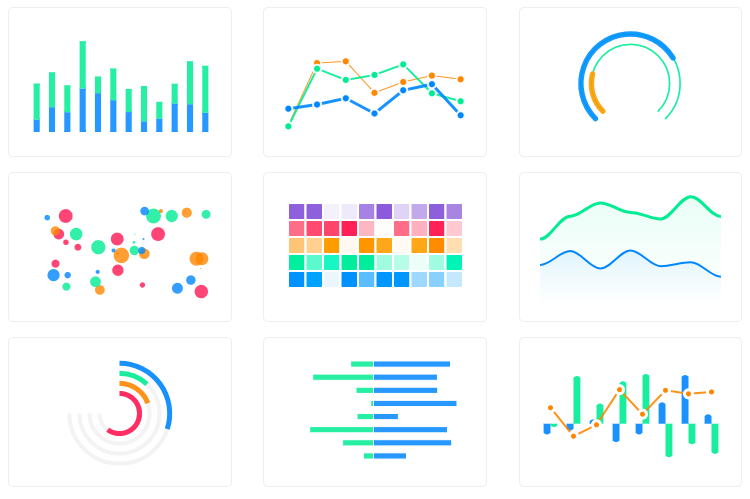
13 | Vue.js wrapper for ApexCharts to build interactive visualizations in vue.
14 |
15 |
16 |
17 |
18 | ## Download and Installation
19 |
20 | ##### Installing via npm
21 |
22 | ```bash
23 | npm install --save apexcharts
24 | npm install --save vue-apexcharts
25 | ```
26 | If you're looking for Vue 3.x.x compatibile component, check-out vue3-apexcharts
27 |
28 | ## Usage
29 | ```js
30 | import VueApexCharts from 'vue-apexcharts'
31 | Vue.use(VueApexCharts)
32 |
33 | Vue.component('apexchart', VueApexCharts)
34 | ```
35 |
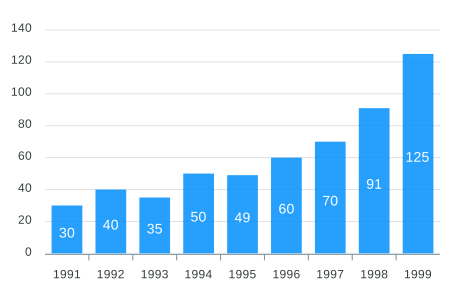
36 | To create a basic bar chart with minimal configuration, write as follows:
37 | ```vue
38 |
39 |
42 |
43 | ```
44 |
45 | ```js
46 |
47 | export default {
48 | data: function() {
49 | return {
50 | chartOptions: {
51 | chart: {
52 | id: 'vuechart-example'
53 | },
54 | xaxis: {
55 | categories: [1991, 1992, 1993, 1994, 1995, 1996, 1997, 1998]
56 | }
57 | },
58 | series: [{
59 | name: 'series-1',
60 | data: [30, 40, 35, 50, 49, 60, 70, 91]
61 | }]
62 | }
63 | },
64 | };
65 | ```
66 |
67 | This will render the following chart
68 |
69 |
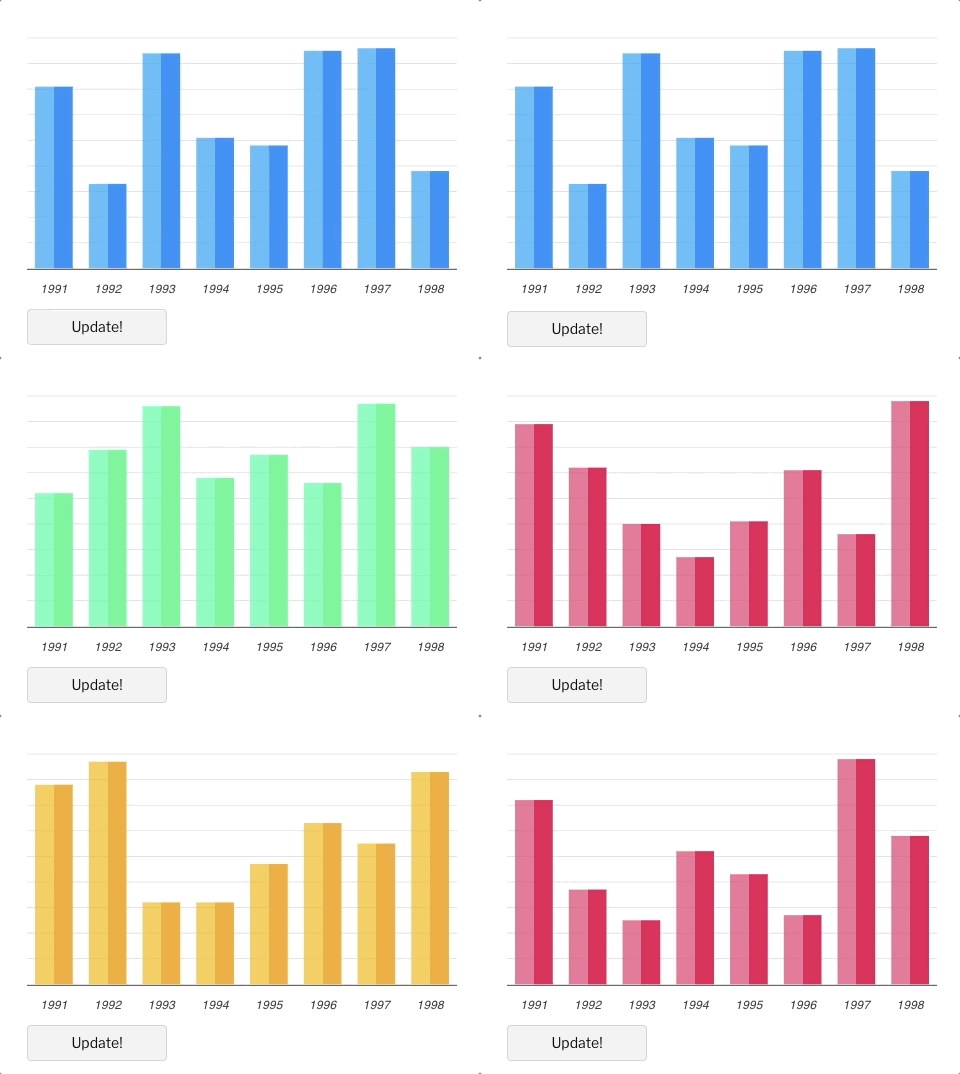
70 | ### How do I update the chart?
71 |
72 | Simple! Just change the `series` or any `option` and it will automatically re-render the chart. Click on the below example to see this in action
73 |
74 |
75 | ```vue
76 |
77 |
78 |
79 |
80 | Update!
81 |
82 |
83 |
84 |
85 | ```
86 |
87 | ```js
88 | export default {
89 | data: function() {
90 | return {
91 | chartOptions: {
92 | chart: {
93 | id: 'vuechart-example',
94 | },
95 | xaxis: {
96 | categories: [1991, 1992, 1993, 1994, 1995, 1996, 1997, 1998],
97 | },
98 | },
99 | series: [{
100 | name: 'series-1',
101 | data: [30, 40, 45, 50, 49, 60, 70, 81]
102 | }]
103 | }
104 | },
105 | methods: {
106 | updateChart() {
107 | const max = 90;
108 | const min = 20;
109 | const newData = this.series[0].data.map(() => {
110 | return Math.floor(Math.random() * (max - min + 1)) + min
111 | })
112 |
113 | const colors = ['#008FFB', '#00E396', '#FEB019', '#FF4560', '#775DD0']
114 |
115 | // Make sure to update the whole options config and not just a single property to allow the Vue watch catch the change.
116 | this.chartOptions = {
117 | colors: [colors[Math.floor(Math.random()*colors.length)]]
118 | };
119 | // In the same way, update the series option
120 | this.series = [{
121 | data: newData
122 | }]
123 | }
124 | }
125 | };
126 | ```
127 |
128 |
129 | **Important:** While updating the options, make sure to update the outermost property even when you need to update the nested property.
130 |
131 | ✅ Do this
132 | ```javascript
133 | this.chartOptions = {...this.chartOptions, ...{
134 | xaxis: {
135 | labels: {
136 | style: {
137 | colors: ['red']
138 | }
139 | }
140 | }
141 | }}
142 | ```
143 |
144 | ❌ Not this
145 | ```javascript
146 | this.chartOptions.xaxis = {
147 | labels: {
148 | style: {
149 | colors: ['red']
150 | }
151 | }
152 | }}
153 | ```
154 |
155 | ## Props
156 |
157 | | Prop | Type | Description |
158 | | ------------- |-------------| -----|
159 | | **series***| Array | The series is an array which accepts an object in the following format. To know more about the format of dataSeries, checkout [Series](https://apexcharts.com/docs/series/) docs on the website. |
160 | | **type*** | String | `line`, `area`, `bar`, `pie`, `donut`, `scatter`, `bubble`, `heatmap`, `radialBar`, `candlestick` |
161 | | **width** | Number/String | Possible values for width can be `100%` or `400px` or `400` |
162 | | **height** | Number/String | Possible values for height can be `100%` or `300px` or `300` |
163 | | **options** | Object | The configuration object, see options on [API (Reference)](https://apexcharts.com/docs/options/chart/type/) |
164 |
165 |
166 | ## Methods
167 |
168 | You don't actually need to call updateSeries() or updateOptions() manually. Changing the props will automatically update the chart. You only need to call these methods to update the chart forcefully.
169 |
170 | | Method | Description |
171 | | ------------- | -----|
172 | | updateSeries | Allows you to update the series array overriding the existing one |
173 | | updateOptions | Allows you to update the configuration object |
174 | | toggleSeries | Allows you to toggle the visibility of series programatically. Useful when you have custom legend. |
175 | | appendData | Allows you to append new data to the series array. |
176 | | addText | The addText() method can be used to draw text after chart is rendered. |
177 | | addXaxisAnnotation | Draw x-axis annotations after chart is rendered. |
178 | | addYaxisAnnotation | Draw y-axis annotations after chart is rendered. |
179 | | addPointAnnotation | Draw point (xy) annotations after chart is rendered. |
180 |
181 | How to call the methods mentioned above?
182 |
183 | ```html
184 |
185 |
188 |
189 |
190 |
195 | ```
196 |
197 | ## How to call methods of ApexCharts without referencing the chart element?
198 |
199 | Sometimes, you may want to call methods of the core ApexCharts library from some other place, and you can do so on `this.$apexcharts` global variable directly. You need to target the chart by chart.id while calling this method
200 |
201 | Example
202 | ```js
203 | this.$apexcharts.exec('vuechart-example', 'updateSeries', [{
204 | data: [40, 55, 65, 11, 23, 44, 54, 33]
205 | }])
206 | ```
207 | In the above method, `vuechart-example` is the ID of chart, `updateSeries` is the name of the method you want to call and the third parameter is the new Series you want to update.
208 |
209 | More info on the `.exec()` method can be found here
210 |
211 | All other methods of ApexCharts can be called the same way.
212 |
213 | ## What's included
214 |
215 | The repository includes the following files and directories.
216 |
217 | ```
218 | vue-apexcharts/
219 | ├── dist/
220 | │ └── vue-apexcharts.js
221 | └── src/
222 | ├── ApexCharts.component.js
223 | ├── Utils.js
224 | └── index.js
225 | ```
226 |
227 | ## Running the examples
228 |
229 | Basic Examples are included to show how to get started using ApexCharts with Vue easily.
230 |
231 | To run the examples,
232 | ```bash
233 | cd example
234 | npm install
235 | npm run serve
236 | ```
237 |
238 | ## Development
239 |
240 | #### Install dependencies
241 |
242 | ```bash
243 | npm install
244 | ```
245 |
246 | #### Bundling
247 |
248 | ```bash
249 | npm run build
250 | ```
251 |
252 |
253 | ## Supporting ApexCharts
254 | ApexCharts is an open source project. You can help by becoming a sponsor on Patreon or doing a one time donation on PayPal
255 |
256 |

257 |
258 | ## License
259 |
260 | Vue-ApexCharts is released under MIT license. You are free to use, modify and distribute this software, as long as the copyright header is left intact.
261 |
--------------------------------------------------------------------------------