├── docs
├── test.jpg
├── test_ocv.jpg
├── email_node.png
├── flow_email.png
├── flow_mqtt.png
├── raspberry_scheme.png
├── screenshot_email_ocv.png
├── screenshot_flow_ocv.png
└── arduino_pushbutton_servo.png
├── fifth_iteration
├── test.jpg
└── face_detection.py
├── arduino
├── getting_started_1.png
├── getting_started_2.png
├── getting_started_3.png
├── getting_started_4.png
├── getting_started_5.png
├── web_editor_import.png
└── add_to_my_sketchbook.PNG
├── sixth_iteration
├── start_docker_opencv.ino
├── docker_image_files
│ ├── Dockerfile
│ └── camera.py
└── flows.json
├── first_iteration
├── pushbutton.py
└── pushbutton_event.py
├── second_iteration
└── flows.json
├── fourth_iteration
└── test.py
├── third_iteration
├── pushbutton_http_post.ino
└── flows.json
├── seventh_iteration
├── flows.json
└── arduino_button_servo_mqtt.ino
├── README.md
└── LICENSE
/docs/test.jpg:
--------------------------------------------------------------------------------
https://raw.githubusercontent.com/arduino/arduino-edge-container-demo/master/docs/test.jpg
--------------------------------------------------------------------------------
/docs/test_ocv.jpg:
--------------------------------------------------------------------------------
https://raw.githubusercontent.com/arduino/arduino-edge-container-demo/master/docs/test_ocv.jpg
--------------------------------------------------------------------------------
/docs/email_node.png:
--------------------------------------------------------------------------------
https://raw.githubusercontent.com/arduino/arduino-edge-container-demo/master/docs/email_node.png
--------------------------------------------------------------------------------
/docs/flow_email.png:
--------------------------------------------------------------------------------
https://raw.githubusercontent.com/arduino/arduino-edge-container-demo/master/docs/flow_email.png
--------------------------------------------------------------------------------
/docs/flow_mqtt.png:
--------------------------------------------------------------------------------
https://raw.githubusercontent.com/arduino/arduino-edge-container-demo/master/docs/flow_mqtt.png
--------------------------------------------------------------------------------
/docs/raspberry_scheme.png:
--------------------------------------------------------------------------------
https://raw.githubusercontent.com/arduino/arduino-edge-container-demo/master/docs/raspberry_scheme.png
--------------------------------------------------------------------------------
/fifth_iteration/test.jpg:
--------------------------------------------------------------------------------
https://raw.githubusercontent.com/arduino/arduino-edge-container-demo/master/fifth_iteration/test.jpg
--------------------------------------------------------------------------------
/arduino/getting_started_1.png:
--------------------------------------------------------------------------------
https://raw.githubusercontent.com/arduino/arduino-edge-container-demo/master/arduino/getting_started_1.png
--------------------------------------------------------------------------------
/arduino/getting_started_2.png:
--------------------------------------------------------------------------------
https://raw.githubusercontent.com/arduino/arduino-edge-container-demo/master/arduino/getting_started_2.png
--------------------------------------------------------------------------------
/arduino/getting_started_3.png:
--------------------------------------------------------------------------------
https://raw.githubusercontent.com/arduino/arduino-edge-container-demo/master/arduino/getting_started_3.png
--------------------------------------------------------------------------------
/arduino/getting_started_4.png:
--------------------------------------------------------------------------------
https://raw.githubusercontent.com/arduino/arduino-edge-container-demo/master/arduino/getting_started_4.png
--------------------------------------------------------------------------------
/arduino/getting_started_5.png:
--------------------------------------------------------------------------------
https://raw.githubusercontent.com/arduino/arduino-edge-container-demo/master/arduino/getting_started_5.png
--------------------------------------------------------------------------------
/arduino/web_editor_import.png:
--------------------------------------------------------------------------------
https://raw.githubusercontent.com/arduino/arduino-edge-container-demo/master/arduino/web_editor_import.png
--------------------------------------------------------------------------------
/docs/screenshot_email_ocv.png:
--------------------------------------------------------------------------------
https://raw.githubusercontent.com/arduino/arduino-edge-container-demo/master/docs/screenshot_email_ocv.png
--------------------------------------------------------------------------------
/docs/screenshot_flow_ocv.png:
--------------------------------------------------------------------------------
https://raw.githubusercontent.com/arduino/arduino-edge-container-demo/master/docs/screenshot_flow_ocv.png
--------------------------------------------------------------------------------
/arduino/add_to_my_sketchbook.PNG:
--------------------------------------------------------------------------------
https://raw.githubusercontent.com/arduino/arduino-edge-container-demo/master/arduino/add_to_my_sketchbook.PNG
--------------------------------------------------------------------------------
/docs/arduino_pushbutton_servo.png:
--------------------------------------------------------------------------------
https://raw.githubusercontent.com/arduino/arduino-edge-container-demo/master/docs/arduino_pushbutton_servo.png
--------------------------------------------------------------------------------
/sixth_iteration/start_docker_opencv.ino:
--------------------------------------------------------------------------------
1 | int interval = 15000;
void setup() {
CloudSerial.begin(9600); // initialize the monitor of the Arduino Web Editor
}
void loop() {
System.runShellCommand("docker start face_detection"); //start the docker container with opencv
CloudSerial.println("docker started"); // print on the monitor
delay(interval);
}
--------------------------------------------------------------------------------
/sixth_iteration/docker_image_files/Dockerfile:
--------------------------------------------------------------------------------
1 | FROM sgtwilko/rpi-raspbian-opencv:stretch-latest
2 |
3 | Run mkdir -p /usr/scr/ocv_face_detection
4 | RUN mkdir /data
5 |
6 | WORKDIR /usr/src/ocv_face_detection
7 |
8 | COPY camera.py /usr/src/ocv_face_detection
9 | COPY haarcascade_frontalface_alt.xml /usr/src/ocv_face_detection
10 |
11 | CMD [ "python", "camera.py" ]
12 |
--------------------------------------------------------------------------------
/first_iteration/pushbutton.py:
--------------------------------------------------------------------------------
1 | import RPi.GPIO as GPIO
2 |
3 | GPIO.setwarnings(False)
4 | GPIO.setmode(GPIO.BOARD) # Imposta la numerazione fisica dei pin
5 | GPIO.setup(8, GPIO.IN, pull_up_down=GPIO.PUD_DOWN) # Imposta il pin 8 come input e lo imposta inizialmente ad off
6 |
7 | while True:
8 | if GPIO.input(8) == GPIO.HIGH: # Quando viene premuto il tasto
9 | print("Bottone premuto")
10 |
--------------------------------------------------------------------------------
/second_iteration/flows.json:
--------------------------------------------------------------------------------
1 | [{"id":"51091760.f0e6c8","type":"tab","label":"Flow 1"},{"id":"1d8ec7b9.5652b","type":"rpi-gpio in","z":"51091760.f0e6c8","name":"button","pin":"8","intype":"tri","debounce":"25","read":false,"x":135.5,"y":83,"wires":[["d5e15015.36d69"]]},{"id":"d5e15015.36d69","type":"debug","z":"51091760.f0e6c8","name":"","active":true,"console":"false","complete":"false","x":294.5,"y":81,"wires":[]}]
--------------------------------------------------------------------------------
/first_iteration/pushbutton_event.py:
--------------------------------------------------------------------------------
1 | import RPi.GPIO as GPIO
2 |
3 | def button_callback(channel): # Funzione che verrà chiamata al verificarsi di un evento
4 | print("Bottone Premuto")
5 |
6 | GPIO.setwarnings(False)
7 | GPIO.setmode(GPIO.BOARD) # Imposta la numerazione fisica dei pin
8 | GPIO.setup(8, GPIO.IN, pull_up_down=GPIO.PUD_DOWN) # Imposta il pin 8 come input e lo imposta inizialmente ad off
9 |
10 | GPIO.add_event_detect(8, GPIO.RISING, callback=button_callback) # Aggiunge la funzione button_callback all'evento legato al pin 8
11 |
12 | message = input("Press enter to quit\n\n")
13 | GPIO.cleanup()
14 |
--------------------------------------------------------------------------------
/fourth_iteration/test.py:
--------------------------------------------------------------------------------
1 | import cv2
2 |
3 | camera_port = 0 # number of your camera port
4 | ramp_frames = 15 # number of frames to skip (to take a better photo)
5 | camera = cv2.VideoCapture(camera_port) # initialize the camera
6 |
7 |
8 | def get_image():
9 | return_value, image = camera.read() # take the photo
10 | return image # return the photo
11 |
12 |
13 | for i in range(ramp_frames): # skips some frames to take a better photo
14 | temp = get_image()
15 | print("Taking image...")
16 | camera_capture = get_image() # take the photo
17 | print("Done!")
18 | file = "/data/opencv.png" # path to save the photo
19 | cv2.imwrite(file, camera_capture) # save the photo
20 | del(camera)
21 |
--------------------------------------------------------------------------------
/third_iteration/pushbutton_http_post.ino:
--------------------------------------------------------------------------------
1 | int buttonPin = 8; // the number of the pushbutton pin
int buttonState = 0; // variable for reading the pushbutton status
void setup() {
pinMode(buttonPin, INPUT); // initialize the pushbutton pin as an input:
CloudSerial.begin(9600); // initialize the monitor of the Arduino Web Editor
}
void loop() {
buttonState = digitalRead(buttonPin); // read the state of the pushbutton value:
if (buttonState == HIGH) { // if the button is pressed
// run a shell command to make an HTTP POST
System.runShellCommand("curl -s -X POST -d 'button=pressed' http://127.0.0.1:1880/button");
CloudSerial.println("button pressed"); // print on the monitor
}
delay(1); // delay in between reads for stability
}
--------------------------------------------------------------------------------
/seventh_iteration/flows.json:
--------------------------------------------------------------------------------
1 | [{"id":"95d4dd1.4ee76a","type":"mqtt in","z":"920b2d0.c740c5","name":"","topic":"/arduino/button","qos":"0","broker":"81c0449e.57cd1","x":120,"y":60,"wires":[["f3c267bb.a62aa8","4c3ebb3f.5e03e4"]]},{"id":"f3c267bb.a62aa8","type":"debug","z":"920b2d0.c740c5","name":"","active":true,"tosidebar":true,"console":false,"tostatus":false,"complete":"payload","x":470,"y":60,"wires":[]},{"id":"4c3ebb3f.5e03e4","type":"mqtt out","z":"920b2d0.c740c5","name":"","topic":"/arduino/servo","qos":"0","retain":"","broker":"81c0449e.57cd1","x":480,"y":140,"wires":[]},{"id":"81c0449e.57cd1","type":"mqtt-broker","z":"","name":"Mosquitto","broker":"10.130.22.201","port":"1883","clientid":"raspi","usetls":false,"compatmode":true,"keepalive":"60","cleansession":true,"birthTopic":"","birthQos":"0","birthPayload":"","closeTopic":"","closeQos":"0","closePayload":"","willTopic":"","willQos":"0","willPayload":""}]
2 |
--------------------------------------------------------------------------------
/third_iteration/flows.json:
--------------------------------------------------------------------------------
1 | [{"id":"ed318932.b4fb9","type":"tab","label":"Flow 1","disabled":false,"info":""},{"id":"a1bfb361.3362","type":"http in","z":"ed318932.b4fb9","name":"","url":"/button","method":"post","upload":false,"swaggerDoc":"","x":110,"y":60,"wires":[["3ea5556f.777ea2"]]},{"id":"70c38949.b803a8","type":"debug","z":"ed318932.b4fb9","name":"","active":true,"tosidebar":true,"console":false,"tostatus":false,"complete":"true","x":530,"y":180,"wires":[]},{"id":"3e3a9eb0.53514a","type":"http response","z":"ed318932.b4fb9","name":"","statusCode":"","headers":{},"x":530,"y":60,"wires":[]},{"id":"262f06a2.f6f29a","type":"e-mail","z":"ed318932.b4fb9","server":"smtp.gmail.com","port":"465","secure":true,"name":"","dname":"","x":530,"y":120,"wires":[]},{"id":"3ea5556f.777ea2","type":"function","z":"ed318932.b4fb9","name":"Compose e-mail","func":"msg.topic = \"Pushbutton\";\nmsg.payload = \"Someone pressed my button!\\n\";\nreturn msg;","outputs":1,"noerr":0,"x":330,"y":60,"wires":[["70c38949.b803a8","262f06a2.f6f29a","3e3a9eb0.53514a"]]}]
--------------------------------------------------------------------------------
/fifth_iteration/face_detection.py:
--------------------------------------------------------------------------------
1 | import cv2
2 | import sys
3 | import os
4 |
5 |
6 | def detect_faces(f_cascade, colored_img, scaleFactor=1.1):
7 | img_copy = colored_img.copy() # create a copy of the image
8 | gray = cv2.cvtColor(img_copy, cv2.COLOR_BGR2GRAY) # convert image to grey scale for opencv
9 | faces = f_cascade.detectMultiScale(gray, scaleFactor=scaleFactor, minNeighbors=5) # detect multiscale: some faces can be closer
10 | print('Faces found: ', len(faces)) # print faces found
11 | for (x, y, w, h) in faces:
12 | cv2.rectangle(img_copy, (x, y), (x + w, y + h), (0, 255, 0), 2) # draw rectangles on original coloured img
13 | return img_copy
14 |
15 |
16 | def main():
17 | input_file = sys.argv[1] # input file passed ad argument
18 | name, ext = os.path.splitext(input_file)
19 | output_file = name + '_ocv' + ext # create the name of the output file
20 | test = cv2.imread(input_file) # open the input file
21 | print('img loaded')
22 | haar_face_cascade = cv2.CascadeClassifier('haarcascade_frontalface_alt.xml') # load the cascade classifier trainig file
23 | print('classifier loaded')
24 | faces_detected_img = detect_faces(haar_face_cascade, test)
25 | cv2.imwrite(output_file, faces_detected_img) # save the image
26 | print('file saved')
27 |
28 |
29 | if __name__ == '__main__':
30 | main()
31 |
--------------------------------------------------------------------------------
/sixth_iteration/flows.json:
--------------------------------------------------------------------------------
1 | [{"id":"3b11e2bf.fab086","type":"tab","label":"Flow 1","disabled":false,"info":""},{"id":"2821ab75.3650dc","type":"watch","z":"3b11e2bf.fab086","name":"Watch for file changes","files":"/data/opencv.png","recursive":"","x":120,"y":100,"wires":[["9d69d017.36d768"]]},{"id":"fc5afb61.24ba48","type":"debug","z":"3b11e2bf.fab086","name":"","active":true,"tosidebar":true,"console":false,"tostatus":false,"complete":"true","x":710,"y":140,"wires":[]},{"id":"9d69d017.36d768","type":"delay","z":"3b11e2bf.fab086","name":"","pauseType":"queue","timeout":"5","timeoutUnits":"seconds","rate":"1","nbRateUnits":"3","rateUnits":"second","randomFirst":"1","randomLast":"5","randomUnits":"seconds","drop":true,"x":330,"y":100,"wires":[["ce722854.ee6eb8"]]},{"id":"ce722854.ee6eb8","type":"function","z":"3b11e2bf.fab086","name":"Compose e-mail","func":"msg.topic = \"Node-Red\";\n\nmsg.payload = \"Hello,
Someone is waiting at the door and forgot the badge..
In attachment you can find a camera snapshot.
Kind regards,
Your Node-Red flow\";\n\nmsg.attachments = [{\n filename: 'opencv.png',\n path: '/data/opencv.png',\n content: msg.payload\n}];\n \nreturn msg;","outputs":1,"noerr":0,"x":530,"y":100,"wires":[["fc5afb61.24ba48","fdbafbc2.2d5f7"]]},{"id":"fdbafbc2.2d5f7","type":"e-mail","z":"3b11e2bf.fab086","server":"smtp.gmail.com","port":"465","secure":true,"name":"","dname":"","x":710,"y":100,"wires":[]}]
--------------------------------------------------------------------------------
/sixth_iteration/docker_image_files/camera.py:
--------------------------------------------------------------------------------
1 | import cv2
2 | import sys
3 | import os
4 |
5 | camera_port = 0 # number of your camera port
6 | ramp_frames = 15 # number of frames to skip (to take a better photo)
7 | camera = cv2.VideoCapture(camera_port) # initialize the camera
8 | output_file = "/data/opencv.png" # path to save the photo
9 |
10 | def get_image():
11 | return_value, image = camera.read() # take the photo
12 | return image # return the photo
13 |
14 |
15 | def detect_faces(f_cascade, colored_img, scaleFactor=1.1):
16 | img_copy = colored_img.copy() # create a copy of the image
17 | gray = cv2.cvtColor(img_copy, cv2.COLOR_BGR2GRAY) # convert image to grey scale for opencv
18 | faces = f_cascade.detectMultiScale(gray, scaleFactor=scaleFactor, minNeighbors=5) # detect multiscale: some faces can be closer
19 | print("Faces found: " + str(len(faces))) # print faces found
20 | for (x, y, w, h) in faces:
21 | cv2.rectangle(img_copy, (x, y), (x + w, y + h), (0, 255, 0), 2) # draw rectangles on original coloured img
22 | return img_copy, len(faces)
23 |
24 |
25 | def main():
26 | for i in range(ramp_frames): # skips some frames to take a better photo
27 | temp = get_image()
28 | print("Taking image...")
29 | camera_capture = get_image() # take the photo
30 | print("Done!")
31 | haar_face_cascade = cv2.CascadeClassifier('haarcascade_frontalface_alt.xml') # load the cascade classifier trainig file
32 | print('Classifier loaded')
33 | faces_detected_img, n_faces = detect_faces(haar_face_cascade, camera_capture)
34 | if(n_faces>0): # check if at least a face is detected
35 | cv2.imwrite(output_file, faces_detected_img) # save the image
36 | print('File saved')
37 | else:
38 | print('File NOT saved, no faces detected')
39 | camera.release()
40 |
41 | if __name__ == '__main__':
42 | main()
43 |
--------------------------------------------------------------------------------
/seventh_iteration/arduino_button_servo_mqtt.ino:
--------------------------------------------------------------------------------
1 | #include "arduino_secrets.h"
2 |
3 | #include
4 | #include
5 | #include
6 | #include
7 | #include
8 | #include
9 | #include
10 | #include
11 |
12 | ///////please enter your sensitive data in the Secret tab/arduino_secrets.h
13 | char ssid[] = SECRET_SSID; // your network SSID (name)
14 | char pass[] = SECRET_PASS; // your network password (use for WPA, or use as key for WEP)
15 | int status = WL_IDLE_STATUS; // the Wifi radio's status
16 | char ip_server[] = "192.168.12.1"; //ip of the Mqtt Broker
17 | int port_server = 1883; //port of the Mqtt Broker
18 | int led_pin = LED_BUILTIN;
19 | int servo_pin = 9;
20 | int button_pin = 2;
21 | int button_state = LOW;// the current reading from the input pin
22 | int old_button_state = LOW; // the previous reading from the input pin
23 | Servo servo;
24 | WiFiClient net; // needed for connection with Mqtt
25 | MQTTClient client;
26 | char p_topic[] = "/arduino/button"; //topic where to publish messages
27 | char s_topic[] = "/arduino/servo"; //topic where to subscribe
28 |
29 | void setup() {
30 | pinMode(led_pin, OUTPUT);
31 | pinMode(button_pin, INPUT);
32 | servo.attach(servo_pin);
33 | servo.write(10); //bring servo in starting position
34 | //Initialize serial and wait for port to open:
35 | Serial.begin(9600);
36 | while (!Serial) {
37 | ; // wait for serial port to connect. Needed for native USB port only
38 | }
39 |
40 | delay(1000); // wait for serial inizialization
41 | connectToWifi();
42 | connectToMqtt();
43 |
44 | //begin dovrebbe andare qui
45 | client.onMessage(messageReceived);
46 | }
47 |
48 | void loop() {
49 | status = WiFi.status(); // check if the wi-fi is still connected
50 | if(status == WL_DISCONNECTED) { // Access Point is down
51 | Serial.println("Communication with AP failed!");
52 | digitalWrite(led_pin, LOW); // turn the led off to let you know the connection is not working
53 | connectToWifi();
54 | connectToMqtt();
55 | }
56 | if(!client.connected()) { // check the connection between the client and Mqtt Broker
57 | Serial.println("Communication with Mqtt Broker failed!");
58 | connectToMqtt();
59 | }
60 |
61 | client.loop();
62 |
63 | button_state = digitalRead(button_pin); // check the state of the button
64 |
65 | if (!button_state && old_button_state) {
66 | client.publish(p_topic, "on"); // publish a message via Mqtt
67 | Serial.println("Button Pressed");
68 | // blink the led
69 | digitalWrite(led_pin, LOW);
70 | delay(30);
71 | digitalWrite(led_pin, HIGH);
72 |
73 |
74 | }
75 | old_button_state = button_state;
76 | delay(50);
77 | }
78 |
79 | void messageReceived(String &topic, String &payload) { //function called when a message is published
80 | Serial.println("incoming: " + topic + " - " + payload);
81 | if(topic==s_topic && payload == "on"){
82 | servo.write(170); // opens the door
83 | delay(1000);
84 | servo.write(10); // bring servo in the starting position
85 | }
86 | }
87 |
88 | void printWifiData() {
89 | // print your WiFi shield's IP address:
90 | Serial.print("IP Address: ");
91 | Serial.println(WiFi.localIP());
92 | // print the received signal strength:
93 | Serial.print("Signal strength (RSSI): ");
94 | Serial.println(WiFi.RSSI());
95 | }
96 |
97 | void connectToWifi(){ //connects/reconnects to wifi
98 | Serial.print("Attempting to connect to WPA SSID: ");
99 | Serial.print(ssid);
100 | while (status != WL_CONNECTED) {
101 | Serial.print(".");
102 | WiFi.end(); //useful when the Access Point is not reachable
103 | status = WiFi.begin(ssid, pass);
104 | delay(10000); // wait 10 seconds for connection
105 | }
106 | Serial.println("\nYou're connected to the network");
107 | printWifiData();
108 | digitalWrite(led_pin, HIGH); // Light up the LED to let you know that is connected
109 | }
110 |
111 | void connectToMqtt(){
112 | Serial.print("Attempting to connect to Mqtt Broker");
113 | client.begin(ip_server, port_server, net);
114 | while (!client.connect("button")) {
115 | Serial.print(".");
116 | delay(1000);
117 | }
118 | Serial.println("\nYou're connected to Mqtt Broker");
119 | client.subscribe(s_topic);
120 | }
--------------------------------------------------------------------------------
/README.md:
--------------------------------------------------------------------------------
1 | In this tutorial we'll show you how you can use a **Raspberry Pi** in conjunction with the **Arduino Create** platform to create some cool projects involving face detection, Node-RED flows and Mqtt messages!
2 | The tutorial will be divided into seven iterations. In each iteration we will add a new ingredient to the project in order to achieve our final goals at Iterations 6 and 7.
3 |
4 | # 1st Iteration: Raspberry Pi setup
5 |
6 | In the first iteration we'll setup our Raspberry Pi and test that the GPIOs are working. We'll be using [Raspbian Stretch Lite](https://www.raspberrypi.org/downloads/raspbian/), which is the newest version of Raspbian at the current time, installed on a *Raspberry Pi 3b+*. We'll use the Lite version because we don't need the GUI. It's easier to work on it if you have SSH enabled. To achieve that goal you have to create an empty file named **ssh** (with no extension) and put it in the boot partition of the microSD card.
7 |
8 | After powering up the Raspberry, we need to get its **IP address** in order to **ssh** into it. We have two option for this:
9 | - We can connect the Raspberry Pi to our pc using an **Ethernet cable** (here are some guides for [Windows 10](http://www.circuitbasics.com/how-to-connect-to-a-raspberry-pi-directly-with-an-ethernet-cable/) and [Ubuntu 16.04](https://raspberrypi.stackexchange.com/questions/30144/connect-raspberry-pi-to-pc-ubuntu-with-ethernet/61004#61004));
10 | - Or we can connect via **WiFi** (but we will need keyboard and display). Once logged in, just run `sudo ifconfig` and read the IP address next to the `wlan0` entry.
11 | Now that we now the Raspberry IP, we can control it (in a bash window) using SSH with the command:
12 | ``` bash
13 | $ ssh pi@
14 | ```
15 |
16 | The default log-in informations are: user: `pi`, password `raspberry`.
17 |
18 | ### GPIO Libraries
19 |
20 | At this point we need to check if the **GPIO libraries for Python** are already installed/updated.
21 | ``` bash
22 | $ sudo apt-get update
23 | $ sudo apt-get install python-rpi.gpio python3-rpi.gpio
24 | ```
25 |
26 | Then, we can write two simple Python scripts to check the status of a pushbutton (connected to Pin 8 - i.e. GPIO 14, see the Raspberry pinout below) and to write a message on the terminal (`pushbutton.py` and `pushbutton_event.py` in the repo linked at the end of the tutorial). The second script uses the events related to GPIO pins to call a function which prints the button status on the terminal. This is a more complex way, but the most efficient one.
27 |
28 | Let's create a new folder to **save the scripts**:
29 | ```bash
30 | $ cd ~
31 | mkdir python-data
32 | ```
33 |
34 | Now transfer the two script files to the Raspberry Pi:
35 | - On Linux, we can use the `scp` command from our local machine (if you copy bash command from here, remember to first clone the github repository in `~/Documents/`):
36 | ``` bash
37 | $ scp ~/Documents/first_iteration/pushbutton.py ~/Documents/first_iteration/pushbutton_event.py pi@:~/python-data/
38 | ```
39 | - On Windows, we can use an ssh client like [PuTTY](https://www.putty.org/) or [WinScp](https://winscp.net/eng/index.php). For a more complete guide on file transfer have a look at [this tutorial](https://it.cornell.edu/managed-servers/transfer-files-using-putty).
40 |
41 | If `scp` is not working (e.g. we get Permission Denied), we need to change ownership of the destination folder in the Raspberry using the command `chown pi python-data`.
42 |
43 | For all the connections to the Pi, we used the following scheme:
44 | 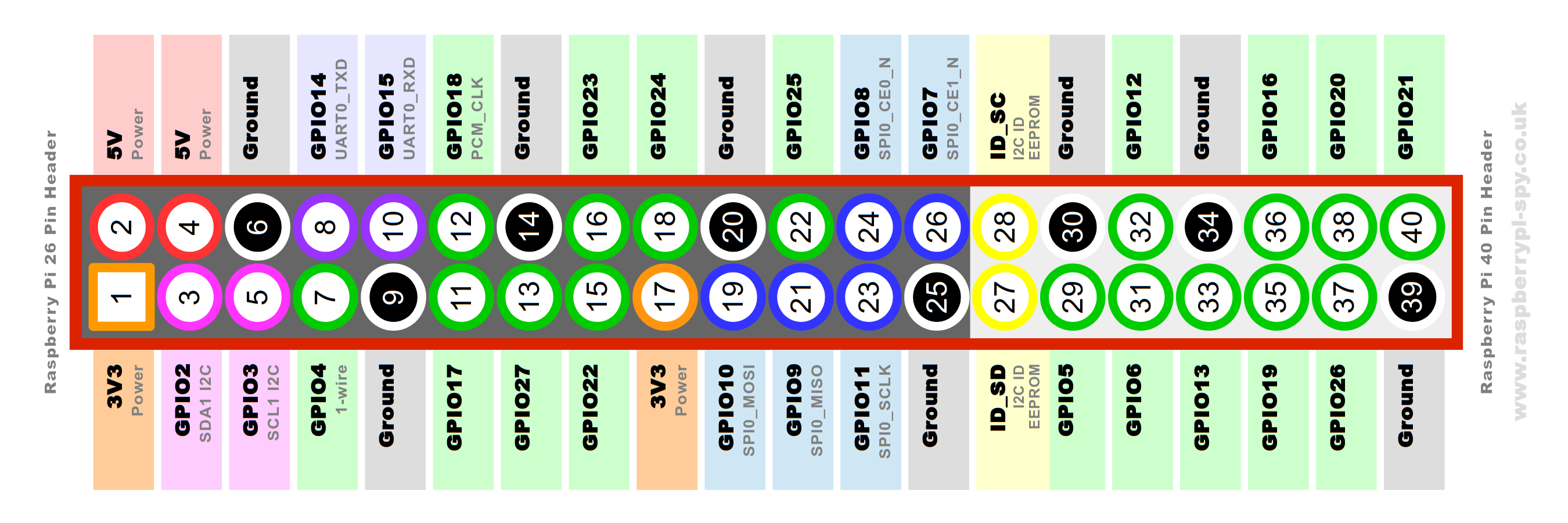
45 | If you want further information on the GPIO pins you can read something useful [here](https://www.raspberrypi.org/documentation/usage/gpio/, "GPIO documentation")
46 |
47 | To **run the scripts** simply run this command:
48 | ```bash
49 | $ python3 ~/Documents/first_iteration/pushbutton.py
50 | ```
51 | or
52 | ```bash
53 | $ python3 ~/Documents/first_iteration/pushbutton_event.py
54 | ```
55 |
56 | ---
57 | # 2nd Iteration: adding Docker
58 |
59 | After installing Raspbian and testing the GPIO pins, let's add **Docker**!
60 |
61 | First of all, we need to bind the Raspberry Pi to our Arduino account by following the [Getting Started flow](https://create.arduino.cc/getting-started). Create a new account, if you don't have one yet.
62 |
63 | 
64 |
65 | Select Raspberry Pi in the device lists, then follow the instructions...
66 |
67 | 
68 | 
69 |
70 | Select option A and enter the IP addres of the Raspberry (which we know from the 1st Iteration).
71 |
72 | 
73 |
74 | Now we will be prompted with a modal asking for the Raspberry Pi credentials (if you did not changed them, default are `pi` and `raspberry`).
75 |
76 | 
77 |
78 | Doing this will install some software on the Raspberry Pi, including the [Arduino Connector](https://github.com/arduino/arduino-connector) and Docker.
79 |
80 | If we don't want to use `sudo` each time we use docker, we need to create a group named `docker` and add our user to it:
81 | ```bash
82 | $ sudo groupadd docker
83 | $ sudo usermod -aG docker $USER
84 | ```
85 |
86 | For our project we need [Node-RED](https://nodered.org/), which is a **flow-based development tool** for wiring together hardware devices, APIs and online services as part of the Internet of Things.
87 |
88 | We can use this [Node-RED Docker container](https://hub.docker.com/r/nieleyde/rpi-nodered-gpio/) which is already configured for GPIO use. To install and run the container we can execute the following command:
89 |
90 | ```bash
91 | $ docker run -d -p 1880:1880 -v ~/node-red-data:/data --privileged --name mynodered nieleyde/rpi-nodered-gpio:latest
92 | ```
93 |
94 | Here's a brief explanation of it:
95 | - `run -d nieleyde/rpi-nodered-gpio:latest` This command will download the container from DockerHub (if it's not already been downloaded) and run it in background;
96 | - `-p 1880:1880` This option exposes 1880 port outside the container;
97 | - `-v ~/node-red-data:/data` This option mounts the host’s *~/node-red-data* directory as the user configuration directory inside the container. It's useful to backup *flows.json* file. This file contains the configuration of all flows created in Node-RED browser editor;
98 | - `--privileged` This option allows the container to access to all devices, in particular to Raspberry's GPIO pins;
99 | - `-- name mynodered` This option gives a human readable name to the container;
100 |
101 | Now we can check the status of the container with `docker ps`: it should be *up*. Furthermore we can stop the container with `docker stop mynodered` and start it again with `docker start mynodered`.
102 |
103 | It's also possible to **modify the flow and nodes** through Node-RED's browser web interface, connecting to this URL: `http://:1880/`.
104 |
105 | Finally it's also possible to **restore** the backup of Node-RED's **nodes and flows** using scp to copy `flows.json` in the folder node-red-data created before.
106 | ```bash
107 | $ scp ~/Documents/second_iteration/flows.json pi@:~/node-red-data/
108 |
109 | ```
110 | The example `flows.json` in this iteration simply reads the value of a GPIO input pin (Pin 8) and prints its values in the debug tab.
111 |
112 | ### Second Iteration alternative
113 |
114 | For the 2nd Iteration we could have used the [official container of Node-RED](https://hub.docker.com/r/nodered/node-red-docker/). To make it work, we need to use this command:
115 | ```bash
116 | docker run -d -p 1880:1880 -v ~/node-red-data:/data --user=root --privileged --name nodered nodered/node-red-docker:0.18.7-rpi-v8
117 |
118 | ```
119 | It is better to use this container because it is the official one, so it's better mantained and more updated in comparison to the one we used previously. We need to run this container with `--user=root` beacuse in its [Dockerfile](https://github.com/node-red/node-red-docker/blob/master/rpi/Dockerfile) the developers created the user `node-red` which cannot access `/dev/mem` (to control the GPIO pins). Further information about users [here](https://docs.docker.com/engine/reference/run/#user,).
120 |
121 | ---
122 | # 3rd Iteration: using Arduino Web Editor
123 |
124 | Our goal in this iteration is to write an **Arduino sketch** which reads the value of a pushbutton and notifies Node-RED inside the Docker container. The flow in Node-RED has to rework the value received from the sketch and **send an email** to a speicifed email address.
125 |
126 | For this step there's no need of configuring anything. We simply have to import and flash the arduino sketch on the Raspberry Pi using the [Arduino Web Editor](https://create.arduino.cc/editor/) and import the flow in Node-RED.
127 |
128 | We can upload the sketch in two different ways:
129 | - By downloading the sketch `pushbutton_http_post.ino` and importing it into the editor;
130 |
131 | 
132 |
133 | - By opening [this sketch](https://create.arduino.cc/editor/Arduino_Genuino/4ade6370-e98e-4dbf-bf3a-88767deb00cd/preview) directly in the web editor.
134 |
135 | 
136 |
137 | The sketch reads the status of the pushbutton (connected to Pin 8) and, if it's pressed, performs an **HTTP POST request** using the bash command curl. The request is directed to Node-RED's ip and port.
138 |
139 | On the Node-RED side we have to **import the flow** located in the third_iteration folder (in the github repo):
140 | - We can do that as described in the 2nd Iteration, but copying this new flow:
141 | ```bash
142 | $ scp ~/Documents/third_iteration/flows.json pi@:~/node-red-data/
143 |
144 | ```
145 | - Or you can use a simpler solution: open the `flows.json` file and copy all its content to the clipboard, then use Node-RED import function (*toast menu > import > clipboard*).
146 |
147 | The flow for this iteration should look like this:
148 |
149 |
150 |  151 |
152 |
153 | To make it work we need to add the properties inside the e-mail node (recipient, e-mail address and password).
154 |
155 |
156 |
151 |
152 |
153 | To make it work we need to add the properties inside the e-mail node (recipient, e-mail address and password).
154 |
155 |
156 |  157 |
158 |
159 | If using a gmail account it may be necessary to disable **less secure** apps [here](https://myaccount.google.com/lesssecureapps).
160 |
161 | Now it's time to deploy the flow and test it!
162 |
163 | ---
164 | # 4th Iteration: the OpenCV library
165 |
166 | In this iteration we are going to test [OpenCV](https://opencv.org/), which is a **computer vision library** written in C/C++ supporting Python. Our goal for now is to install OpenCV, take a photo and save it using this library. Since it's not an easy task to install it, we can use a docker container already built! We can use this one which comes already compiled for Raspberry Pi and Raspbian Stretch.
167 |
168 | To install it use this command:
169 | ```bash
170 | $ docker run -it --privileged -v ~/opencv-data:/data --name opencv sgtwilko/rpi-raspbian-opencv:stretch-latest
171 | ```
172 | The options used in this command were already described in the 2nd Iteration. By the way, the option `--priviliged` let the container access all the peripherals connected to our Raspberry, even the webcam (or Raspberry Pi Cam).
173 |
174 | As usual we can stop the container with `docker stop opencv` and start it again with `docker start -i opencv` (option `-i` attaches container's STDIN).
175 |
176 | Now we should be in the container's bash! First of all let's check if **OpenCV is installed** by running **Python interpeter**:
177 | ``` bash
178 | $ python
179 | Python 2.7.13 (default, Nov 24 2017, 17:33:09)
180 | [GCC 6.3.0 20170516] on linux2
181 | Type "help", "copyright", "credits" or "license" for more information.
182 | >>>
183 | ```
184 | And then try to import OpenCV library:
185 | ```
186 | >>> import cv2
187 | >>>
188 | ```
189 | If there isn't any error, we can move on to the next part. To exit the interpreter use `exit()`.
190 | ```
191 | >>> exit()
192 | ```
193 |
194 | The python script in the github repo (`test.py`) simply takes a photo using the webcam and saves it in `/opencv-data/opencv.png`.
195 |
196 | As previously described, we can copy the script into the Raspberry using `scp`:
197 | ```bash
198 | scp ~/Documents/fourth_iteration/test.py pi@:~/opencv-data/
199 | ```
200 | To run the script, let's start the docker container (`docker start -i opencv`), move to the correct directory (`cd opencv-data/`) and finally run the script with `python test.py`.
201 |
202 | We can open and see the photo if we copy it back to our pc:
203 | ```bash
204 | scp pi@:~/opencv-data/opencv.png ~/Documents/
205 | ```
206 | ___
207 |
208 | # 5th Iteration: doing some face detection
209 |
210 | In this iteration we are going to do some **face detection**! This step clearly requires to have OpenCV installed on the Raspberry Pi, as shown in the 4th Iteration.
211 |
212 | Basically, face detection will detect if a photo contains a face and will find the position of the face, highlighting it with a green rectangle (see figure below).
213 |
214 | Before OpenCV | After OpenCV
215 | :--------------------------------:|:----------------------------------:
216 |  | 
217 |
218 | OpenCV uses a **cascade file** (an **.xml** file) which contains data to detect objects, in our case faces. We only have to initialize it in our code. OpenCV comes with different built-in cascades for detecting several things such as eyes, hands, legs, animals and so on... In this tutorial we are going to use **Haar Cascade Classifier**. It is a machine learning based approach where a cascade function is trained from a lot of positive (images with faces) and negative (images without faces) images.
219 |
220 | So, we need to copy the cascade file (`haarcascade_frontalface_alt.xml`) to the Raspberry:
221 | ```bash
222 | scp ~/Documents/fifth_iteration/haarcascade_frontalface_alt.xml pi@:~/opencv-data/
223 | ```
224 | The we can copy some test images to the Raspberry:
225 | ```bash
226 | scp ~/Documents/fifth_iteration/test.jpg pi@:~/opencv-data/
227 | ```
228 | The python script in the github repo (`face_detection.py`) opens a photo passed as argument, tries to find faces and saves the image with detected faces in the same folder. We can copy the script to the Raspberry with:
229 | ```bash
230 | scp ~/Documents/fifth_iteration/face_detection.py pi@:~/opencv-data/
231 | ```
232 |
233 | Now that everything is configured, let's start the script! Similarly to the previous iteration, we have to start the docker container first (`docker start -i opencv`), then we move to the correct directory (`cd opencv-data/`) and finally we run the script (`python face_detection.py test.jpg`).
234 |
235 | We can open and see the modified photo by copying it to our pc:
236 | ```bash
237 | scp pi@:~/opencv-data/test_ocv.jpg ~/Documents/
238 | ```
239 |
240 | ---
241 |
242 | # 6th Iteration: putting it all together
243 |
244 | In this iteration we are going to put together all the previous iterations.
245 |
246 | 
247 |
248 | This is the idea:
249 | - An **Arduino sketch** will run every 15 seconds a shell command to start a docker container;
250 | - The **docker container** which contains **OpenCV** will run a **python script** on startup. This script will take a photo using a webcam, will detect faces in that photo and will save the image (with detected faces) in a **docker shared volume** with the name `opencv.png` if at least one face is found. After all that, the container will stop;
251 | - In another docker container, a flow in **Node-RED** will watch the shared volume, waiting for changes in the file `opencv.jpg`. If the file has changed (i.e. the photo has been overwritten), the flow composes an e-mail (attaching the photo) and sends it to a specified e-mail address.
252 |
253 |
254 |
157 |
158 |
159 | If using a gmail account it may be necessary to disable **less secure** apps [here](https://myaccount.google.com/lesssecureapps).
160 |
161 | Now it's time to deploy the flow and test it!
162 |
163 | ---
164 | # 4th Iteration: the OpenCV library
165 |
166 | In this iteration we are going to test [OpenCV](https://opencv.org/), which is a **computer vision library** written in C/C++ supporting Python. Our goal for now is to install OpenCV, take a photo and save it using this library. Since it's not an easy task to install it, we can use a docker container already built! We can use this one which comes already compiled for Raspberry Pi and Raspbian Stretch.
167 |
168 | To install it use this command:
169 | ```bash
170 | $ docker run -it --privileged -v ~/opencv-data:/data --name opencv sgtwilko/rpi-raspbian-opencv:stretch-latest
171 | ```
172 | The options used in this command were already described in the 2nd Iteration. By the way, the option `--priviliged` let the container access all the peripherals connected to our Raspberry, even the webcam (or Raspberry Pi Cam).
173 |
174 | As usual we can stop the container with `docker stop opencv` and start it again with `docker start -i opencv` (option `-i` attaches container's STDIN).
175 |
176 | Now we should be in the container's bash! First of all let's check if **OpenCV is installed** by running **Python interpeter**:
177 | ``` bash
178 | $ python
179 | Python 2.7.13 (default, Nov 24 2017, 17:33:09)
180 | [GCC 6.3.0 20170516] on linux2
181 | Type "help", "copyright", "credits" or "license" for more information.
182 | >>>
183 | ```
184 | And then try to import OpenCV library:
185 | ```
186 | >>> import cv2
187 | >>>
188 | ```
189 | If there isn't any error, we can move on to the next part. To exit the interpreter use `exit()`.
190 | ```
191 | >>> exit()
192 | ```
193 |
194 | The python script in the github repo (`test.py`) simply takes a photo using the webcam and saves it in `/opencv-data/opencv.png`.
195 |
196 | As previously described, we can copy the script into the Raspberry using `scp`:
197 | ```bash
198 | scp ~/Documents/fourth_iteration/test.py pi@:~/opencv-data/
199 | ```
200 | To run the script, let's start the docker container (`docker start -i opencv`), move to the correct directory (`cd opencv-data/`) and finally run the script with `python test.py`.
201 |
202 | We can open and see the photo if we copy it back to our pc:
203 | ```bash
204 | scp pi@:~/opencv-data/opencv.png ~/Documents/
205 | ```
206 | ___
207 |
208 | # 5th Iteration: doing some face detection
209 |
210 | In this iteration we are going to do some **face detection**! This step clearly requires to have OpenCV installed on the Raspberry Pi, as shown in the 4th Iteration.
211 |
212 | Basically, face detection will detect if a photo contains a face and will find the position of the face, highlighting it with a green rectangle (see figure below).
213 |
214 | Before OpenCV | After OpenCV
215 | :--------------------------------:|:----------------------------------:
216 |  | 
217 |
218 | OpenCV uses a **cascade file** (an **.xml** file) which contains data to detect objects, in our case faces. We only have to initialize it in our code. OpenCV comes with different built-in cascades for detecting several things such as eyes, hands, legs, animals and so on... In this tutorial we are going to use **Haar Cascade Classifier**. It is a machine learning based approach where a cascade function is trained from a lot of positive (images with faces) and negative (images without faces) images.
219 |
220 | So, we need to copy the cascade file (`haarcascade_frontalface_alt.xml`) to the Raspberry:
221 | ```bash
222 | scp ~/Documents/fifth_iteration/haarcascade_frontalface_alt.xml pi@:~/opencv-data/
223 | ```
224 | The we can copy some test images to the Raspberry:
225 | ```bash
226 | scp ~/Documents/fifth_iteration/test.jpg pi@:~/opencv-data/
227 | ```
228 | The python script in the github repo (`face_detection.py`) opens a photo passed as argument, tries to find faces and saves the image with detected faces in the same folder. We can copy the script to the Raspberry with:
229 | ```bash
230 | scp ~/Documents/fifth_iteration/face_detection.py pi@:~/opencv-data/
231 | ```
232 |
233 | Now that everything is configured, let's start the script! Similarly to the previous iteration, we have to start the docker container first (`docker start -i opencv`), then we move to the correct directory (`cd opencv-data/`) and finally we run the script (`python face_detection.py test.jpg`).
234 |
235 | We can open and see the modified photo by copying it to our pc:
236 | ```bash
237 | scp pi@:~/opencv-data/test_ocv.jpg ~/Documents/
238 | ```
239 |
240 | ---
241 |
242 | # 6th Iteration: putting it all together
243 |
244 | In this iteration we are going to put together all the previous iterations.
245 |
246 | 
247 |
248 | This is the idea:
249 | - An **Arduino sketch** will run every 15 seconds a shell command to start a docker container;
250 | - The **docker container** which contains **OpenCV** will run a **python script** on startup. This script will take a photo using a webcam, will detect faces in that photo and will save the image (with detected faces) in a **docker shared volume** with the name `opencv.png` if at least one face is found. After all that, the container will stop;
251 | - In another docker container, a flow in **Node-RED** will watch the shared volume, waiting for changes in the file `opencv.jpg`. If the file has changed (i.e. the photo has been overwritten), the flow composes an e-mail (attaching the photo) and sends it to a specified e-mail address.
252 |
253 |
254 |  255 |
256 |
257 | ### Arduino sketch
258 |
259 | Let's start with the Arduino code. The upload procedure to the Raspberry has already been explained in the 3rd Iteration. The code can be found at the end of the tutorial, or directly [here](https://create.arduino.cc/editor/Arduino_Genuino/ee18d8d1-f67c-4c12-ba5b-5239d5421338/preview).
260 |
261 | ### Docker container for OpenCV
262 |
263 | The OpenCV docker container part is a bit more complex. First of all we have to create a docker volume to **share data between the two containers**:
264 | ``` bash
265 | docker volume create share
266 | ```
267 | To check if everything is ok we can check the list of volumes: we should see the volume we just created with `docker volume ls`.
268 |
269 | We can create a docker image to simplify the procedure, but we could also build the image by ourselves as explained in the section **Docker build OpenCV** below. With Docker already installed on the Raspberry, just download [this image](https://hub.docker.com/r/umbobaldi/opencv_face_detection/) by running the command:
270 |
271 | ``` bash
272 | docker run -it --privileged -v share:/data --name face_detection umbobaldi/opencv_face_detection:1.0
273 | ```
274 | Some notes:
275 | - `-it` let us see a short log and check if everything is ok;
276 | - `-v share:/data` mounts the docker volume share and binds it with */opencv-data* folder inside the container.
277 |
278 | The downloaded image is already configured to run on startup a python script which uses OpenCV. This script does the following:
279 | - It takes a photo using the webcam;
280 | - It does some face detection, as described in the 5th Iteration;
281 | - It saves the photo (`opencv.png`) in the opencv-data folder, which is connected to the shared volume, if at least one face is found. Otherwise nothing is saved.
282 | - When the script finish the execution, the docker container is stopped.
283 |
284 | ### Docker container for Node-Red
285 |
286 | In the end we can import `flows.json` as described in the 3rd Iteration. Let's open the file and copy all its content to the clipboard, then use Node-RED import function (*toast menu > import > clipboard*). To make it work we need to add the properties inside the e-mail node (recipient, e-mail address and password).
287 |
288 | Here's the resulting flow:
289 |
290 |
291 |
255 |
256 |
257 | ### Arduino sketch
258 |
259 | Let's start with the Arduino code. The upload procedure to the Raspberry has already been explained in the 3rd Iteration. The code can be found at the end of the tutorial, or directly [here](https://create.arduino.cc/editor/Arduino_Genuino/ee18d8d1-f67c-4c12-ba5b-5239d5421338/preview).
260 |
261 | ### Docker container for OpenCV
262 |
263 | The OpenCV docker container part is a bit more complex. First of all we have to create a docker volume to **share data between the two containers**:
264 | ``` bash
265 | docker volume create share
266 | ```
267 | To check if everything is ok we can check the list of volumes: we should see the volume we just created with `docker volume ls`.
268 |
269 | We can create a docker image to simplify the procedure, but we could also build the image by ourselves as explained in the section **Docker build OpenCV** below. With Docker already installed on the Raspberry, just download [this image](https://hub.docker.com/r/umbobaldi/opencv_face_detection/) by running the command:
270 |
271 | ``` bash
272 | docker run -it --privileged -v share:/data --name face_detection umbobaldi/opencv_face_detection:1.0
273 | ```
274 | Some notes:
275 | - `-it` let us see a short log and check if everything is ok;
276 | - `-v share:/data` mounts the docker volume share and binds it with */opencv-data* folder inside the container.
277 |
278 | The downloaded image is already configured to run on startup a python script which uses OpenCV. This script does the following:
279 | - It takes a photo using the webcam;
280 | - It does some face detection, as described in the 5th Iteration;
281 | - It saves the photo (`opencv.png`) in the opencv-data folder, which is connected to the shared volume, if at least one face is found. Otherwise nothing is saved.
282 | - When the script finish the execution, the docker container is stopped.
283 |
284 | ### Docker container for Node-Red
285 |
286 | In the end we can import `flows.json` as described in the 3rd Iteration. Let's open the file and copy all its content to the clipboard, then use Node-RED import function (*toast menu > import > clipboard*). To make it work we need to add the properties inside the e-mail node (recipient, e-mail address and password).
287 |
288 | Here's the resulting flow:
289 |
290 |
291 |  292 |
293 |
294 | This flow does the following:
295 | - The **first node** waits for changes in the file `opencv.png` located in the shared volume. When there is a change it means the old file has been overwritten by a newer file, so it's time to send the e-mail;
296 | - The **delay node** has to filter the input: when the OpenCV container overwrites the file the process is not immediate, so the messages have to be limited to one;
297 | - The **function node** composes the e-mail attaching the photo and writing a proper message;
298 | - Finally, the e-mail is sent by the **e-mail node**.
299 |
300 | #### Docker build for OpenCV
301 |
302 | In case we want to build the docker image by ourselves, we have to move to the folder where the **Dockerfile** is located, and run the command:
303 | ```bash
304 | docker build -t myopencv: .
305 | ```
306 | This command will build our image. To check if everything is ok we can list all docker images with `docker images -a`. If the new image is listed, we can run it the first time using:
307 | $ docker run -it --priviliged -v share:/
308 | ``` bash
309 | docker run -it --privileged -v share:/data --name face_detection myopencv:
310 | ```
311 | If it is not the first time, just run it using
312 | ``` bash
313 | $ docker start -i face_detection`
314 | ```
315 |
316 | The image is modeled after [this one](https://hub.docker.com/r/sgtwilko/rpi-raspbian-opencv/) which has already OpenCV installed. The Dockerfile creates two folders: one for the code and the other one for sharing the photo. Then it moves `camera.py` and `haarcascade_frontalface_alt.xml` inside the newly created folder inside the container (`/usr/scr/ocv_face_detection`). In the end it starts the python script.
317 |
318 | # 7th Iteration: Mqtt meassages from an Arduino MKR WiFi 1010
319 | The goal in this last iteration is to **send and receive Mqtt messages** from an **Arduino MKR WiFi 1010**. The Arduino has to publish Mqtt messages on a topic when a pushbutton connected to it is pressed. Another Arduino (or the same, in this case) is subscribed to another topic and moves the shaft of a servomotor.
320 |
321 | The Arduino is connected via WiFi to our Raspberry which is now configured as an access point. The Raspberry has to run an **Mqtt Broker** ([Mosquitto](https://mosquitto.org/) in our case). We can install and run this broker using a docker. In the end, a **Node-RED flow** is responsible for the logic.
322 |
323 | ### Arduino sketch
324 |
325 | The Arduino sketch simply connects to the Raspberry via WiFi, then connects to the Mqtt Broker in the docker container running on the Raspberry and finally publishes a message on */arduino/button* topic when the pushbutton is pressed.
326 |
327 | The same Arduino is subscribed to */arduino/servo* topic: when a message is published on this topic, the arduino activates a servomotor. If the WiFi connection is working the built-in LED is turned on.
328 |
329 | To program and flash the code, use the [Arduino Web Editor](https://create.arduino.cc/editor). For uploading the sketch to the Arduino, we need to connect the board to our pc, install the [Arduino Create plugin](https://create.arduino.cc/getting-started/plugin) and follow the 3rd Iteration to import the sketch `arduino_button_servo_mqtt.ino` (direct link to the sketch [here](https://create.arduino.cc/editor/Arduino_Genuino/9b81cad5-af45-49be-8035-041a2c4857d7/preview)).
330 |
331 | The circuit chematics is shown below:
332 |
333 | 
334 |
335 | ### Raspberry Pi configuration
336 |
337 | In this iteration we need to configure the Raspberry in such a way that the Arduino board can connect to it via WiFi. The idea is to make the onboard wireless card act like an access point and not as a client. To achieve that we can follow [this guide](https://www.raspberrypi.org/documentation/configuration/wireless/access-point.md) or, better, use [this tool](https://github.com/oblique/create_ap) which simplifies the process a lot. First of all we need to install all its dependencies. Then we can clone the repo and install the script. To set up the access point, we use this command:
338 | ``` bash
339 | $ sudo create_ap -n --no-virt wlan0 RaspberryPi3b+_Net RaspberryPi
340 | ```
341 | Here's a brief explanation of the above command:
342 | - `-n` is for disabling Internet sharing;
343 | - `--no-virt` is for not creating virtual interface;
344 | - `wlan0` is the name of the interface;
345 | - `RaspberryPi3b+_Net` is the SSID of the wireless network;
346 | - `RaspberryPi` is the passphrase.
347 |
348 | ### Node-RED flow
349 |
350 | Node-RED is responsible for the logic behind this iteration. The idea is to make a flow which is able to publish on */arduino/servo* when it receives a message on another topic (*/arduino/button*). The flow must be subscribed to this second topic to achieve that. We can import `flows.json` as described in the 3rd Iteration in order to define the Node-RED flow. It should look like this:
351 |
352 |
292 |
293 |
294 | This flow does the following:
295 | - The **first node** waits for changes in the file `opencv.png` located in the shared volume. When there is a change it means the old file has been overwritten by a newer file, so it's time to send the e-mail;
296 | - The **delay node** has to filter the input: when the OpenCV container overwrites the file the process is not immediate, so the messages have to be limited to one;
297 | - The **function node** composes the e-mail attaching the photo and writing a proper message;
298 | - Finally, the e-mail is sent by the **e-mail node**.
299 |
300 | #### Docker build for OpenCV
301 |
302 | In case we want to build the docker image by ourselves, we have to move to the folder where the **Dockerfile** is located, and run the command:
303 | ```bash
304 | docker build -t myopencv: .
305 | ```
306 | This command will build our image. To check if everything is ok we can list all docker images with `docker images -a`. If the new image is listed, we can run it the first time using:
307 | $ docker run -it --priviliged -v share:/
308 | ``` bash
309 | docker run -it --privileged -v share:/data --name face_detection myopencv:
310 | ```
311 | If it is not the first time, just run it using
312 | ``` bash
313 | $ docker start -i face_detection`
314 | ```
315 |
316 | The image is modeled after [this one](https://hub.docker.com/r/sgtwilko/rpi-raspbian-opencv/) which has already OpenCV installed. The Dockerfile creates two folders: one for the code and the other one for sharing the photo. Then it moves `camera.py` and `haarcascade_frontalface_alt.xml` inside the newly created folder inside the container (`/usr/scr/ocv_face_detection`). In the end it starts the python script.
317 |
318 | # 7th Iteration: Mqtt meassages from an Arduino MKR WiFi 1010
319 | The goal in this last iteration is to **send and receive Mqtt messages** from an **Arduino MKR WiFi 1010**. The Arduino has to publish Mqtt messages on a topic when a pushbutton connected to it is pressed. Another Arduino (or the same, in this case) is subscribed to another topic and moves the shaft of a servomotor.
320 |
321 | The Arduino is connected via WiFi to our Raspberry which is now configured as an access point. The Raspberry has to run an **Mqtt Broker** ([Mosquitto](https://mosquitto.org/) in our case). We can install and run this broker using a docker. In the end, a **Node-RED flow** is responsible for the logic.
322 |
323 | ### Arduino sketch
324 |
325 | The Arduino sketch simply connects to the Raspberry via WiFi, then connects to the Mqtt Broker in the docker container running on the Raspberry and finally publishes a message on */arduino/button* topic when the pushbutton is pressed.
326 |
327 | The same Arduino is subscribed to */arduino/servo* topic: when a message is published on this topic, the arduino activates a servomotor. If the WiFi connection is working the built-in LED is turned on.
328 |
329 | To program and flash the code, use the [Arduino Web Editor](https://create.arduino.cc/editor). For uploading the sketch to the Arduino, we need to connect the board to our pc, install the [Arduino Create plugin](https://create.arduino.cc/getting-started/plugin) and follow the 3rd Iteration to import the sketch `arduino_button_servo_mqtt.ino` (direct link to the sketch [here](https://create.arduino.cc/editor/Arduino_Genuino/9b81cad5-af45-49be-8035-041a2c4857d7/preview)).
330 |
331 | The circuit chematics is shown below:
332 |
333 | 
334 |
335 | ### Raspberry Pi configuration
336 |
337 | In this iteration we need to configure the Raspberry in such a way that the Arduino board can connect to it via WiFi. The idea is to make the onboard wireless card act like an access point and not as a client. To achieve that we can follow [this guide](https://www.raspberrypi.org/documentation/configuration/wireless/access-point.md) or, better, use [this tool](https://github.com/oblique/create_ap) which simplifies the process a lot. First of all we need to install all its dependencies. Then we can clone the repo and install the script. To set up the access point, we use this command:
338 | ``` bash
339 | $ sudo create_ap -n --no-virt wlan0 RaspberryPi3b+_Net RaspberryPi
340 | ```
341 | Here's a brief explanation of the above command:
342 | - `-n` is for disabling Internet sharing;
343 | - `--no-virt` is for not creating virtual interface;
344 | - `wlan0` is the name of the interface;
345 | - `RaspberryPi3b+_Net` is the SSID of the wireless network;
346 | - `RaspberryPi` is the passphrase.
347 |
348 | ### Node-RED flow
349 |
350 | Node-RED is responsible for the logic behind this iteration. The idea is to make a flow which is able to publish on */arduino/servo* when it receives a message on another topic (*/arduino/button*). The flow must be subscribed to this second topic to achieve that. We can import `flows.json` as described in the 3rd Iteration in order to define the Node-RED flow. It should look like this:
351 |
352 |  353 |
354 |
355 | ### Mosquitto docker
356 |
357 | Finally we can install our Mqtt Broker. We used Mosquitto beacuse it is opensource, easy to setup and simple. We can install it through a docker container since it's easier this way, using [this image](https://hub.docker.com/r/mjenz/rpi-mosquitto/) which comes preconfigured. The installation is similar to the one described in the 1st Iteration. To run it the first time, use:
358 | ``` bash
359 | $ docker run -d -p 1883:1883 --name mqtt mjenz/rp-mosquitto
360 | ```
361 | while the other times, use:
362 | ```bash
363 | $ docker start mqtt
364 | ```
365 | At this point, all that remains to do is to deploy the flow and test the project!
366 |
--------------------------------------------------------------------------------
/LICENSE:
--------------------------------------------------------------------------------
1 | This file includes licensing information for [insert application name].
2 |
3 | Copyright (c) [insert year]
4 | Authors: [insert authors]
5 |
6 | The software is released under the GNU General Public License, which covers the main body
7 | of the [insert app name] code. The terms of this license can be found at:
8 | https://www.gnu.org/licenses/gpl-3.0.en.html
9 |
10 | You can be released from the requirements of the above licenses by purchasing
11 | a commercial license. Buying such a license is mandatory if you want to modify or
12 | otherwise use the software for commercial activities involving the Arduino
13 | software without disclosing the source code of your own applications. To purchase
14 | a commercial license, send an email to license@arduino.cc
15 |
16 | GNU GENERAL PUBLIC LICENSE
17 | Version 3, 29 June 2007
18 |
19 | Copyright (C) 2007 Free Software Foundation, Inc.
20 | Everyone is permitted to copy and distribute verbatim copies
21 | of this license document, but changing it is not allowed.
22 |
23 | Preamble
24 |
25 | The GNU General Public License is a free, copyleft license for
26 | software and other kinds of works.
27 |
28 | The licenses for most software and other practical works are designed
29 | to take away your freedom to share and change the works. By contrast,
30 | the GNU General Public License is intended to guarantee your freedom to
31 | share and change all versions of a program--to make sure it remains free
32 | software for all its users. We, the Free Software Foundation, use the
33 | GNU General Public License for most of our software; it applies also to
34 | any other work released this way by its authors. You can apply it to
35 | your programs, too.
36 |
37 | When we speak of free software, we are referring to freedom, not
38 | price. Our General Public Licenses are designed to make sure that you
39 | have the freedom to distribute copies of free software (and charge for
40 | them if you wish), that you receive source code or can get it if you
41 | want it, that you can change the software or use pieces of it in new
42 | free programs, and that you know you can do these things.
43 |
44 | To protect your rights, we need to prevent others from denying you
45 | these rights or asking you to surrender the rights. Therefore, you have
46 | certain responsibilities if you distribute copies of the software, or if
47 | you modify it: responsibilities to respect the freedom of others.
48 |
49 | For example, if you distribute copies of such a program, whether
50 | gratis or for a fee, you must pass on to the recipients the same
51 | freedoms that you received. You must make sure that they, too, receive
52 | or can get the source code. And you must show them these terms so they
53 | know their rights.
54 |
55 | Developers that use the GNU GPL protect your rights with two steps:
56 | (1) assert copyright on the software, and (2) offer you this License
57 | giving you legal permission to copy, distribute and/or modify it.
58 |
59 | For the developers' and authors' protection, the GPL clearly explains
60 | that there is no warranty for this free software. For both users' and
61 | authors' sake, the GPL requires that modified versions be marked as
62 | changed, so that their problems will not be attributed erroneously to
63 | authors of previous versions.
64 |
65 | Some devices are designed to deny users access to install or run
66 | modified versions of the software inside them, although the manufacturer
67 | can do so. This is fundamentally incompatible with the aim of
68 | protecting users' freedom to change the software. The systematic
69 | pattern of such abuse occurs in the area of products for individuals to
70 | use, which is precisely where it is most unacceptable. Therefore, we
71 | have designed this version of the GPL to prohibit the practice for those
72 | products. If such problems arise substantially in other domains, we
73 | stand ready to extend this provision to those domains in future versions
74 | of the GPL, as needed to protect the freedom of users.
75 |
76 | Finally, every program is threatened constantly by software patents.
77 | States should not allow patents to restrict development and use of
78 | software on general-purpose computers, but in those that do, we wish to
79 | avoid the special danger that patents applied to a free program could
80 | make it effectively proprietary. To prevent this, the GPL assures that
81 | patents cannot be used to render the program non-free.
82 |
83 | The precise terms and conditions for copying, distribution and
84 | modification follow.
85 |
86 | TERMS AND CONDITIONS
87 |
88 | 0. Definitions.
89 |
90 | "This License" refers to version 3 of the GNU General Public License.
91 |
92 | "Copyright" also means copyright-like laws that apply to other kinds of
93 | works, such as semiconductor masks.
94 |
95 | "The Program" refers to any copyrightable work licensed under this
96 | License. Each licensee is addressed as "you". "Licensees" and
97 | "recipients" may be individuals or organizations.
98 |
99 | To "modify" a work means to copy from or adapt all or part of the work
100 | in a fashion requiring copyright permission, other than the making of an
101 | exact copy. The resulting work is called a "modified version" of the
102 | earlier work or a work "based on" the earlier work.
103 |
104 | A "covered work" means either the unmodified Program or a work based
105 | on the Program.
106 |
107 | To "propagate" a work means to do anything with it that, without
108 | permission, would make you directly or secondarily liable for
109 | infringement under applicable copyright law, except executing it on a
110 | computer or modifying a private copy. Propagation includes copying,
111 | distribution (with or without modification), making available to the
112 | public, and in some countries other activities as well.
113 |
114 | To "convey" a work means any kind of propagation that enables other
115 | parties to make or receive copies. Mere interaction with a user through
116 | a computer network, with no transfer of a copy, is not conveying.
117 |
118 | An interactive user interface displays "Appropriate Legal Notices"
119 | to the extent that it includes a convenient and prominently visible
120 | feature that (1) displays an appropriate copyright notice, and (2)
121 | tells the user that there is no warranty for the work (except to the
122 | extent that warranties are provided), that licensees may convey the
123 | work under this License, and how to view a copy of this License. If
124 | the interface presents a list of user commands or options, such as a
125 | menu, a prominent item in the list meets this criterion.
126 |
127 | 1. Source Code.
128 |
129 | The "source code" for a work means the preferred form of the work
130 | for making modifications to it. "Object code" means any non-source
131 | form of a work.
132 |
133 | A "Standard Interface" means an interface that either is an official
134 | standard defined by a recognized standards body, or, in the case of
135 | interfaces specified for a particular programming language, one that
136 | is widely used among developers working in that language.
137 |
138 | The "System Libraries" of an executable work include anything, other
139 | than the work as a whole, that (a) is included in the normal form of
140 | packaging a Major Component, but which is not part of that Major
141 | Component, and (b) serves only to enable use of the work with that
142 | Major Component, or to implement a Standard Interface for which an
143 | implementation is available to the public in source code form. A
144 | "Major Component", in this context, means a major essential component
145 | (kernel, window system, and so on) of the specific operating system
146 | (if any) on which the executable work runs, or a compiler used to
147 | produce the work, or an object code interpreter used to run it.
148 |
149 | The "Corresponding Source" for a work in object code form means all
150 | the source code needed to generate, install, and (for an executable
151 | work) run the object code and to modify the work, including scripts to
152 | control those activities. However, it does not include the work's
153 | System Libraries, or general-purpose tools or generally available free
154 | programs which are used unmodified in performing those activities but
155 | which are not part of the work. For example, Corresponding Source
156 | includes interface definition files associated with source files for
157 | the work, and the source code for shared libraries and dynamically
158 | linked subprograms that the work is specifically designed to require,
159 | such as by intimate data communication or control flow between those
160 | subprograms and other parts of the work.
161 |
162 | The Corresponding Source need not include anything that users
163 | can regenerate automatically from other parts of the Corresponding
164 | Source.
165 |
166 | The Corresponding Source for a work in source code form is that
167 | same work.
168 |
169 | 2. Basic Permissions.
170 |
171 | All rights granted under this License are granted for the term of
172 | copyright on the Program, and are irrevocable provided the stated
173 | conditions are met. This License explicitly affirms your unlimited
174 | permission to run the unmodified Program. The output from running a
175 | covered work is covered by this License only if the output, given its
176 | content, constitutes a covered work. This License acknowledges your
177 | rights of fair use or other equivalent, as provided by copyright law.
178 |
179 | You may make, run and propagate covered works that you do not
180 | convey, without conditions so long as your license otherwise remains
181 | in force. You may convey covered works to others for the sole purpose
182 | of having them make modifications exclusively for you, or provide you
183 | with facilities for running those works, provided that you comply with
184 | the terms of this License in conveying all material for which you do
185 | not control copyright. Those thus making or running the covered works
186 | for you must do so exclusively on your behalf, under your direction
187 | and control, on terms that prohibit them from making any copies of
188 | your copyrighted material outside their relationship with you.
189 |
190 | Conveying under any other circumstances is permitted solely under
191 | the conditions stated below. Sublicensing is not allowed; section 10
192 | makes it unnecessary.
193 |
194 | 3. Protecting Users' Legal Rights From Anti-Circumvention Law.
195 |
196 | No covered work shall be deemed part of an effective technological
197 | measure under any applicable law fulfilling obligations under article
198 | 11 of the WIPO copyright treaty adopted on 20 December 1996, or
199 | similar laws prohibiting or restricting circumvention of such
200 | measures.
201 |
202 | When you convey a covered work, you waive any legal power to forbid
203 | circumvention of technological measures to the extent such circumvention
204 | is effected by exercising rights under this License with respect to
205 | the covered work, and you disclaim any intention to limit operation or
206 | modification of the work as a means of enforcing, against the work's
207 | users, your or third parties' legal rights to forbid circumvention of
208 | technological measures.
209 |
210 | 4. Conveying Verbatim Copies.
211 |
212 | You may convey verbatim copies of the Program's source code as you
213 | receive it, in any medium, provided that you conspicuously and
214 | appropriately publish on each copy an appropriate copyright notice;
215 | keep intact all notices stating that this License and any
216 | non-permissive terms added in accord with section 7 apply to the code;
217 | keep intact all notices of the absence of any warranty; and give all
218 | recipients a copy of this License along with the Program.
219 |
220 | You may charge any price or no price for each copy that you convey,
221 | and you may offer support or warranty protection for a fee.
222 |
223 | 5. Conveying Modified Source Versions.
224 |
225 | You may convey a work based on the Program, or the modifications to
226 | produce it from the Program, in the form of source code under the
227 | terms of section 4, provided that you also meet all of these conditions:
228 |
229 | a) The work must carry prominent notices stating that you modified
230 | it, and giving a relevant date.
231 |
232 | b) The work must carry prominent notices stating that it is
233 | released under this License and any conditions added under section
234 | 7. This requirement modifies the requirement in section 4 to
235 | "keep intact all notices".
236 |
237 | c) You must license the entire work, as a whole, under this
238 | License to anyone who comes into possession of a copy. This
239 | License will therefore apply, along with any applicable section 7
240 | additional terms, to the whole of the work, and all its parts,
241 | regardless of how they are packaged. This License gives no
242 | permission to license the work in any other way, but it does not
243 | invalidate such permission if you have separately received it.
244 |
245 | d) If the work has interactive user interfaces, each must display
246 | Appropriate Legal Notices; however, if the Program has interactive
247 | interfaces that do not display Appropriate Legal Notices, your
248 | work need not make them do so.
249 |
250 | A compilation of a covered work with other separate and independent
251 | works, which are not by their nature extensions of the covered work,
252 | and which are not combined with it such as to form a larger program,
253 | in or on a volume of a storage or distribution medium, is called an
254 | "aggregate" if the compilation and its resulting copyright are not
255 | used to limit the access or legal rights of the compilation's users
256 | beyond what the individual works permit. Inclusion of a covered work
257 | in an aggregate does not cause this License to apply to the other
258 | parts of the aggregate.
259 |
260 | 6. Conveying Non-Source Forms.
261 |
262 | You may convey a covered work in object code form under the terms
263 | of sections 4 and 5, provided that you also convey the
264 | machine-readable Corresponding Source under the terms of this License,
265 | in one of these ways:
266 |
267 | a) Convey the object code in, or embodied in, a physical product
268 | (including a physical distribution medium), accompanied by the
269 | Corresponding Source fixed on a durable physical medium
270 | customarily used for software interchange.
271 |
272 | b) Convey the object code in, or embodied in, a physical product
273 | (including a physical distribution medium), accompanied by a
274 | written offer, valid for at least three years and valid for as
275 | long as you offer spare parts or customer support for that product
276 | model, to give anyone who possesses the object code either (1) a
277 | copy of the Corresponding Source for all the software in the
278 | product that is covered by this License, on a durable physical
279 | medium customarily used for software interchange, for a price no
280 | more than your reasonable cost of physically performing this
281 | conveying of source, or (2) access to copy the
282 | Corresponding Source from a network server at no charge.
283 |
284 | c) Convey individual copies of the object code with a copy of the
285 | written offer to provide the Corresponding Source. This
286 | alternative is allowed only occasionally and noncommercially, and
287 | only if you received the object code with such an offer, in accord
288 | with subsection 6b.
289 |
290 | d) Convey the object code by offering access from a designated
291 | place (gratis or for a charge), and offer equivalent access to the
292 | Corresponding Source in the same way through the same place at no
293 | further charge. You need not require recipients to copy the
294 | Corresponding Source along with the object code. If the place to
295 | copy the object code is a network server, the Corresponding Source
296 | may be on a different server (operated by you or a third party)
297 | that supports equivalent copying facilities, provided you maintain
298 | clear directions next to the object code saying where to find the
299 | Corresponding Source. Regardless of what server hosts the
300 | Corresponding Source, you remain obligated to ensure that it is
301 | available for as long as needed to satisfy these requirements.
302 |
303 | e) Convey the object code using peer-to-peer transmission, provided
304 | you inform other peers where the object code and Corresponding
305 | Source of the work are being offered to the general public at no
306 | charge under subsection 6d.
307 |
308 | A separable portion of the object code, whose source code is excluded
309 | from the Corresponding Source as a System Library, need not be
310 | included in conveying the object code work.
311 |
312 | A "User Product" is either (1) a "consumer product", which means any
313 | tangible personal property which is normally used for personal, family,
314 | or household purposes, or (2) anything designed or sold for incorporation
315 | into a dwelling. In determining whether a product is a consumer product,
316 | doubtful cases shall be resolved in favor of coverage. For a particular
317 | product received by a particular user, "normally used" refers to a
318 | typical or common use of that class of product, regardless of the status
319 | of the particular user or of the way in which the particular user
320 | actually uses, or expects or is expected to use, the product. A product
321 | is a consumer product regardless of whether the product has substantial
322 | commercial, industrial or non-consumer uses, unless such uses represent
323 | the only significant mode of use of the product.
324 |
325 | "Installation Information" for a User Product means any methods,
326 | procedures, authorization keys, or other information required to install
327 | and execute modified versions of a covered work in that User Product from
328 | a modified version of its Corresponding Source. The information must
329 | suffice to ensure that the continued functioning of the modified object
330 | code is in no case prevented or interfered with solely because
331 | modification has been made.
332 |
333 | If you convey an object code work under this section in, or with, or
334 | specifically for use in, a User Product, and the conveying occurs as
335 | part of a transaction in which the right of possession and use of the
336 | User Product is transferred to the recipient in perpetuity or for a
337 | fixed term (regardless of how the transaction is characterized), the
338 | Corresponding Source conveyed under this section must be accompanied
339 | by the Installation Information. But this requirement does not apply
340 | if neither you nor any third party retains the ability to install
341 | modified object code on the User Product (for example, the work has
342 | been installed in ROM).
343 |
344 | The requirement to provide Installation Information does not include a
345 | requirement to continue to provide support service, warranty, or updates
346 | for a work that has been modified or installed by the recipient, or for
347 | the User Product in which it has been modified or installed. Access to a
348 | network may be denied when the modification itself materially and
349 | adversely affects the operation of the network or violates the rules and
350 | protocols for communication across the network.
351 |
352 | Corresponding Source conveyed, and Installation Information provided,
353 | in accord with this section must be in a format that is publicly
354 | documented (and with an implementation available to the public in
355 | source code form), and must require no special password or key for
356 | unpacking, reading or copying.
357 |
358 | 7. Additional Terms.
359 |
360 | "Additional permissions" are terms that supplement the terms of this
361 | License by making exceptions from one or more of its conditions.
362 | Additional permissions that are applicable to the entire Program shall
363 | be treated as though they were included in this License, to the extent
364 | that they are valid under applicable law. If additional permissions
365 | apply only to part of the Program, that part may be used separately
366 | under those permissions, but the entire Program remains governed by
367 | this License without regard to the additional permissions.
368 |
369 | When you convey a copy of a covered work, you may at your option
370 | remove any additional permissions from that copy, or from any part of
371 | it. (Additional permissions may be written to require their own
372 | removal in certain cases when you modify the work.) You may place
373 | additional permissions on material, added by you to a covered work,
374 | for which you have or can give appropriate copyright permission.
375 |
376 | Notwithstanding any other provision of this License, for material you
377 | add to a covered work, you may (if authorized by the copyright holders of
378 | that material) supplement the terms of this License with terms:
379 |
380 | a) Disclaiming warranty or limiting liability differently from the
381 | terms of sections 15 and 16 of this License; or
382 |
383 | b) Requiring preservation of specified reasonable legal notices or
384 | author attributions in that material or in the Appropriate Legal
385 | Notices displayed by works containing it; or
386 |
387 | c) Prohibiting misrepresentation of the origin of that material, or
388 | requiring that modified versions of such material be marked in
389 | reasonable ways as different from the original version; or
390 |
391 | d) Limiting the use for publicity purposes of names of licensors or
392 | authors of the material; or
393 |
394 | e) Declining to grant rights under trademark law for use of some
395 | trade names, trademarks, or service marks; or
396 |
397 | f) Requiring indemnification of licensors and authors of that
398 | material by anyone who conveys the material (or modified versions of
399 | it) with contractual assumptions of liability to the recipient, for
400 | any liability that these contractual assumptions directly impose on
401 | those licensors and authors.
402 |
403 | All other non-permissive additional terms are considered "further
404 | restrictions" within the meaning of section 10. If the Program as you
405 | received it, or any part of it, contains a notice stating that it is
406 | governed by this License along with a term that is a further
407 | restriction, you may remove that term. If a license document contains
408 | a further restriction but permits relicensing or conveying under this
409 | License, you may add to a covered work material governed by the terms
410 | of that license document, provided that the further restriction does
411 | not survive such relicensing or conveying.
412 |
413 | If you add terms to a covered work in accord with this section, you
414 | must place, in the relevant source files, a statement of the
415 | additional terms that apply to those files, or a notice indicating
416 | where to find the applicable terms.
417 |
418 | Additional terms, permissive or non-permissive, may be stated in the
419 | form of a separately written license, or stated as exceptions;
420 | the above requirements apply either way.
421 |
422 | 8. Termination.
423 |
424 | You may not propagate or modify a covered work except as expressly
425 | provided under this License. Any attempt otherwise to propagate or
426 | modify it is void, and will automatically terminate your rights under
427 | this License (including any patent licenses granted under the third
428 | paragraph of section 11).
429 |
430 | However, if you cease all violation of this License, then your
431 | license from a particular copyright holder is reinstated (a)
432 | provisionally, unless and until the copyright holder explicitly and
433 | finally terminates your license, and (b) permanently, if the copyright
434 | holder fails to notify you of the violation by some reasonable means
435 | prior to 60 days after the cessation.
436 |
437 | Moreover, your license from a particular copyright holder is
438 | reinstated permanently if the copyright holder notifies you of the
439 | violation by some reasonable means, this is the first time you have
440 | received notice of violation of this License (for any work) from that
441 | copyright holder, and you cure the violation prior to 30 days after
442 | your receipt of the notice.
443 |
444 | Termination of your rights under this section does not terminate the
445 | licenses of parties who have received copies or rights from you under
446 | this License. If your rights have been terminated and not permanently
447 | reinstated, you do not qualify to receive new licenses for the same
448 | material under section 10.
449 |
450 | 9. Acceptance Not Required for Having Copies.
451 |
452 | You are not required to accept this License in order to receive or
453 | run a copy of the Program. Ancillary propagation of a covered work
454 | occurring solely as a consequence of using peer-to-peer transmission
455 | to receive a copy likewise does not require acceptance. However,
456 | nothing other than this License grants you permission to propagate or
457 | modify any covered work. These actions infringe copyright if you do
458 | not accept this License. Therefore, by modifying or propagating a
459 | covered work, you indicate your acceptance of this License to do so.
460 |
461 | 10. Automatic Licensing of Downstream Recipients.
462 |
463 | Each time you convey a covered work, the recipient automatically
464 | receives a license from the original licensors, to run, modify and
465 | propagate that work, subject to this License. You are not responsible
466 | for enforcing compliance by third parties with this License.
467 |
468 | An "entity transaction" is a transaction transferring control of an
469 | organization, or substantially all assets of one, or subdividing an
470 | organization, or merging organizations. If propagation of a covered
471 | work results from an entity transaction, each party to that
472 | transaction who receives a copy of the work also receives whatever
473 | licenses to the work the party's predecessor in interest had or could
474 | give under the previous paragraph, plus a right to possession of the
475 | Corresponding Source of the work from the predecessor in interest, if
476 | the predecessor has it or can get it with reasonable efforts.
477 |
478 | You may not impose any further restrictions on the exercise of the
479 | rights granted or affirmed under this License. For example, you may
480 | not impose a license fee, royalty, or other charge for exercise of
481 | rights granted under this License, and you may not initiate litigation
482 | (including a cross-claim or counterclaim in a lawsuit) alleging that
483 | any patent claim is infringed by making, using, selling, offering for
484 | sale, or importing the Program or any portion of it.
485 |
486 | 11. Patents.
487 |
488 | A "contributor" is a copyright holder who authorizes use under this
489 | License of the Program or a work on which the Program is based. The
490 | work thus licensed is called the contributor's "contributor version".
491 |
492 | A contributor's "essential patent claims" are all patent claims
493 | owned or controlled by the contributor, whether already acquired or
494 | hereafter acquired, that would be infringed by some manner, permitted
495 | by this License, of making, using, or selling its contributor version,
496 | but do not include claims that would be infringed only as a
497 | consequence of further modification of the contributor version. For
498 | purposes of this definition, "control" includes the right to grant
499 | patent sublicenses in a manner consistent with the requirements of
500 | this License.
501 |
502 | Each contributor grants you a non-exclusive, worldwide, royalty-free
503 | patent license under the contributor's essential patent claims, to
504 | make, use, sell, offer for sale, import and otherwise run, modify and
505 | propagate the contents of its contributor version.
506 |
507 | In the following three paragraphs, a "patent license" is any express
508 | agreement or commitment, however denominated, not to enforce a patent
509 | (such as an express permission to practice a patent or covenant not to
510 | sue for patent infringement). To "grant" such a patent license to a
511 | party means to make such an agreement or commitment not to enforce a
512 | patent against the party.
513 |
514 | If you convey a covered work, knowingly relying on a patent license,
515 | and the Corresponding Source of the work is not available for anyone
516 | to copy, free of charge and under the terms of this License, through a
517 | publicly available network server or other readily accessible means,
518 | then you must either (1) cause the Corresponding Source to be so
519 | available, or (2) arrange to deprive yourself of the benefit of the
520 | patent license for this particular work, or (3) arrange, in a manner
521 | consistent with the requirements of this License, to extend the patent
522 | license to downstream recipients. "Knowingly relying" means you have
523 | actual knowledge that, but for the patent license, your conveying the
524 | covered work in a country, or your recipient's use of the covered work
525 | in a country, would infringe one or more identifiable patents in that
526 | country that you have reason to believe are valid.
527 |
528 | If, pursuant to or in connection with a single transaction or
529 | arrangement, you convey, or propagate by procuring conveyance of, a
530 | covered work, and grant a patent license to some of the parties
531 | receiving the covered work authorizing them to use, propagate, modify
532 | or convey a specific copy of the covered work, then the patent license
533 | you grant is automatically extended to all recipients of the covered
534 | work and works based on it.
535 |
536 | A patent license is "discriminatory" if it does not include within
537 | the scope of its coverage, prohibits the exercise of, or is
538 | conditioned on the non-exercise of one or more of the rights that are
539 | specifically granted under this License. You may not convey a covered
540 | work if you are a party to an arrangement with a third party that is
541 | in the business of distributing software, under which you make payment
542 | to the third party based on the extent of your activity of conveying
543 | the work, and under which the third party grants, to any of the
544 | parties who would receive the covered work from you, a discriminatory
545 | patent license (a) in connection with copies of the covered work
546 | conveyed by you (or copies made from those copies), or (b) primarily
547 | for and in connection with specific products or compilations that
548 | contain the covered work, unless you entered into that arrangement,
549 | or that patent license was granted, prior to 28 March 2007.
550 |
551 | Nothing in this License shall be construed as excluding or limiting
552 | any implied license or other defenses to infringement that may
553 | otherwise be available to you under applicable patent law.
554 |
555 | 12. No Surrender of Others' Freedom.
556 |
557 | If conditions are imposed on you (whether by court order, agreement or
558 | otherwise) that contradict the conditions of this License, they do not
559 | excuse you from the conditions of this License. If you cannot convey a
560 | covered work so as to satisfy simultaneously your obligations under this
561 | License and any other pertinent obligations, then as a consequence you may
562 | not convey it at all. For example, if you agree to terms that obligate you
563 | to collect a royalty for further conveying from those to whom you convey
564 | the Program, the only way you could satisfy both those terms and this
565 | License would be to refrain entirely from conveying the Program.
566 |
567 | 13. Use with the GNU Affero General Public License.
568 |
569 | Notwithstanding any other provision of this License, you have
570 | permission to link or combine any covered work with a work licensed
571 | under version 3 of the GNU Affero General Public License into a single
572 | combined work, and to convey the resulting work. The terms of this
573 | License will continue to apply to the part which is the covered work,
574 | but the special requirements of the GNU Affero General Public License,
575 | section 13, concerning interaction through a network will apply to the
576 | combination as such.
577 |
578 | 14. Revised Versions of this License.
579 |
580 | The Free Software Foundation may publish revised and/or new versions of
581 | the GNU General Public License from time to time. Such new versions will
582 | be similar in spirit to the present version, but may differ in detail to
583 | address new problems or concerns.
584 |
585 | Each version is given a distinguishing version number. If the
586 | Program specifies that a certain numbered version of the GNU General
587 | Public License "or any later version" applies to it, you have the
588 | option of following the terms and conditions either of that numbered
589 | version or of any later version published by the Free Software
590 | Foundation. If the Program does not specify a version number of the
591 | GNU General Public License, you may choose any version ever published
592 | by the Free Software Foundation.
593 |
594 | If the Program specifies that a proxy can decide which future
595 | versions of the GNU General Public License can be used, that proxy's
596 | public statement of acceptance of a version permanently authorizes you
597 | to choose that version for the Program.
598 |
599 | Later license versions may give you additional or different
600 | permissions. However, no additional obligations are imposed on any
601 | author or copyright holder as a result of your choosing to follow a
602 | later version.
603 |
604 | 15. Disclaimer of Warranty.
605 |
606 | THERE IS NO WARRANTY FOR THE PROGRAM, TO THE EXTENT PERMITTED BY
607 | APPLICABLE LAW. EXCEPT WHEN OTHERWISE STATED IN WRITING THE COPYRIGHT
608 | HOLDERS AND/OR OTHER PARTIES PROVIDE THE PROGRAM "AS IS" WITHOUT WARRANTY
609 | OF ANY KIND, EITHER EXPRESSED OR IMPLIED, INCLUDING, BUT NOT LIMITED TO,
610 | THE IMPLIED WARRANTIES OF MERCHANTABILITY AND FITNESS FOR A PARTICULAR
611 | PURPOSE. THE ENTIRE RISK AS TO THE QUALITY AND PERFORMANCE OF THE PROGRAM
612 | IS WITH YOU. SHOULD THE PROGRAM PROVE DEFECTIVE, YOU ASSUME THE COST OF
613 | ALL NECESSARY SERVICING, REPAIR OR CORRECTION.
614 |
615 | 16. Limitation of Liability.
616 |
617 | IN NO EVENT UNLESS REQUIRED BY APPLICABLE LAW OR AGREED TO IN WRITING
618 | WILL ANY COPYRIGHT HOLDER, OR ANY OTHER PARTY WHO MODIFIES AND/OR CONVEYS
619 | THE PROGRAM AS PERMITTED ABOVE, BE LIABLE TO YOU FOR DAMAGES, INCLUDING ANY
620 | GENERAL, SPECIAL, INCIDENTAL OR CONSEQUENTIAL DAMAGES ARISING OUT OF THE
621 | USE OR INABILITY TO USE THE PROGRAM (INCLUDING BUT NOT LIMITED TO LOSS OF
622 | DATA OR DATA BEING RENDERED INACCURATE OR LOSSES SUSTAINED BY YOU OR THIRD
623 | PARTIES OR A FAILURE OF THE PROGRAM TO OPERATE WITH ANY OTHER PROGRAMS),
624 | EVEN IF SUCH HOLDER OR OTHER PARTY HAS BEEN ADVISED OF THE POSSIBILITY OF
625 | SUCH DAMAGES.
626 |
627 | 17. Interpretation of Sections 15 and 16.
628 |
629 | If the disclaimer of warranty and limitation of liability provided
630 | above cannot be given local legal effect according to their terms,
631 | reviewing courts shall apply local law that most closely approximates
632 | an absolute waiver of all civil liability in connection with the
633 | Program, unless a warranty or assumption of liability accompanies a
634 | copy of the Program in return for a fee.
635 |
636 | END OF TERMS AND CONDITIONS
637 |
638 | How to Apply These Terms to Your New Programs
639 |
640 | If you develop a new program, and you want it to be of the greatest
641 | possible use to the public, the best way to achieve this is to make it
642 | free software which everyone can redistribute and change under these terms.
643 |
644 | To do so, attach the following notices to the program. It is safest
645 | to attach them to the start of each source file to most effectively
646 | state the exclusion of warranty; and each file should have at least
647 | the "copyright" line and a pointer to where the full notice is found.
648 |
649 |
650 | Copyright (C)
651 |
652 | This program is free software: you can redistribute it and/or modify
653 | it under the terms of the GNU General Public License as published by
654 | the Free Software Foundation, either version 3 of the License, or
655 | (at your option) any later version.
656 |
657 | This program is distributed in the hope that it will be useful,
658 | but WITHOUT ANY WARRANTY; without even the implied warranty of
659 | MERCHANTABILITY or FITNESS FOR A PARTICULAR PURPOSE. See the
660 | GNU General Public License for more details.
661 |
662 | You should have received a copy of the GNU General Public License
663 | along with this program. If not, see .
664 |
665 | Also add information on how to contact you by electronic and paper mail.
666 |
667 | If the program does terminal interaction, make it output a short
668 | notice like this when it starts in an interactive mode:
669 |
670 | Copyright (C)
671 | This program comes with ABSOLUTELY NO WARRANTY; for details type `show w'.
672 | This is free software, and you are welcome to redistribute it
673 | under certain conditions; type `show c' for details.
674 |
675 | The hypothetical commands `show w' and `show c' should show the appropriate
676 | parts of the General Public License. Of course, your program's commands
677 | might be different; for a GUI interface, you would use an "about box".
678 |
679 | You should also get your employer (if you work as a programmer) or school,
680 | if any, to sign a "copyright disclaimer" for the program, if necessary.
681 | For more information on this, and how to apply and follow the GNU GPL, see
682 | .
683 |
684 | The GNU General Public License does not permit incorporating your program
685 | into proprietary programs. If your program is a subroutine library, you
686 | may consider it more useful to permit linking proprietary applications with
687 | the library. If this is what you want to do, use the GNU Lesser General
688 | Public License instead of this License. But first, please read
689 | .
690 |
--------------------------------------------------------------------------------
353 |
354 |
355 | ### Mosquitto docker
356 |
357 | Finally we can install our Mqtt Broker. We used Mosquitto beacuse it is opensource, easy to setup and simple. We can install it through a docker container since it's easier this way, using [this image](https://hub.docker.com/r/mjenz/rpi-mosquitto/) which comes preconfigured. The installation is similar to the one described in the 1st Iteration. To run it the first time, use:
358 | ``` bash
359 | $ docker run -d -p 1883:1883 --name mqtt mjenz/rp-mosquitto
360 | ```
361 | while the other times, use:
362 | ```bash
363 | $ docker start mqtt
364 | ```
365 | At this point, all that remains to do is to deploy the flow and test the project!
366 |
--------------------------------------------------------------------------------
/LICENSE:
--------------------------------------------------------------------------------
1 | This file includes licensing information for [insert application name].
2 |
3 | Copyright (c) [insert year]
4 | Authors: [insert authors]
5 |
6 | The software is released under the GNU General Public License, which covers the main body
7 | of the [insert app name] code. The terms of this license can be found at:
8 | https://www.gnu.org/licenses/gpl-3.0.en.html
9 |
10 | You can be released from the requirements of the above licenses by purchasing
11 | a commercial license. Buying such a license is mandatory if you want to modify or
12 | otherwise use the software for commercial activities involving the Arduino
13 | software without disclosing the source code of your own applications. To purchase
14 | a commercial license, send an email to license@arduino.cc
15 |
16 | GNU GENERAL PUBLIC LICENSE
17 | Version 3, 29 June 2007
18 |
19 | Copyright (C) 2007 Free Software Foundation, Inc.
20 | Everyone is permitted to copy and distribute verbatim copies
21 | of this license document, but changing it is not allowed.
22 |
23 | Preamble
24 |
25 | The GNU General Public License is a free, copyleft license for
26 | software and other kinds of works.
27 |
28 | The licenses for most software and other practical works are designed
29 | to take away your freedom to share and change the works. By contrast,
30 | the GNU General Public License is intended to guarantee your freedom to
31 | share and change all versions of a program--to make sure it remains free
32 | software for all its users. We, the Free Software Foundation, use the
33 | GNU General Public License for most of our software; it applies also to
34 | any other work released this way by its authors. You can apply it to
35 | your programs, too.
36 |
37 | When we speak of free software, we are referring to freedom, not
38 | price. Our General Public Licenses are designed to make sure that you
39 | have the freedom to distribute copies of free software (and charge for
40 | them if you wish), that you receive source code or can get it if you
41 | want it, that you can change the software or use pieces of it in new
42 | free programs, and that you know you can do these things.
43 |
44 | To protect your rights, we need to prevent others from denying you
45 | these rights or asking you to surrender the rights. Therefore, you have
46 | certain responsibilities if you distribute copies of the software, or if
47 | you modify it: responsibilities to respect the freedom of others.
48 |
49 | For example, if you distribute copies of such a program, whether
50 | gratis or for a fee, you must pass on to the recipients the same
51 | freedoms that you received. You must make sure that they, too, receive
52 | or can get the source code. And you must show them these terms so they
53 | know their rights.
54 |
55 | Developers that use the GNU GPL protect your rights with two steps:
56 | (1) assert copyright on the software, and (2) offer you this License
57 | giving you legal permission to copy, distribute and/or modify it.
58 |
59 | For the developers' and authors' protection, the GPL clearly explains
60 | that there is no warranty for this free software. For both users' and
61 | authors' sake, the GPL requires that modified versions be marked as
62 | changed, so that their problems will not be attributed erroneously to
63 | authors of previous versions.
64 |
65 | Some devices are designed to deny users access to install or run
66 | modified versions of the software inside them, although the manufacturer
67 | can do so. This is fundamentally incompatible with the aim of
68 | protecting users' freedom to change the software. The systematic
69 | pattern of such abuse occurs in the area of products for individuals to
70 | use, which is precisely where it is most unacceptable. Therefore, we
71 | have designed this version of the GPL to prohibit the practice for those
72 | products. If such problems arise substantially in other domains, we
73 | stand ready to extend this provision to those domains in future versions
74 | of the GPL, as needed to protect the freedom of users.
75 |
76 | Finally, every program is threatened constantly by software patents.
77 | States should not allow patents to restrict development and use of
78 | software on general-purpose computers, but in those that do, we wish to
79 | avoid the special danger that patents applied to a free program could
80 | make it effectively proprietary. To prevent this, the GPL assures that
81 | patents cannot be used to render the program non-free.
82 |
83 | The precise terms and conditions for copying, distribution and
84 | modification follow.
85 |
86 | TERMS AND CONDITIONS
87 |
88 | 0. Definitions.
89 |
90 | "This License" refers to version 3 of the GNU General Public License.
91 |
92 | "Copyright" also means copyright-like laws that apply to other kinds of
93 | works, such as semiconductor masks.
94 |
95 | "The Program" refers to any copyrightable work licensed under this
96 | License. Each licensee is addressed as "you". "Licensees" and
97 | "recipients" may be individuals or organizations.
98 |
99 | To "modify" a work means to copy from or adapt all or part of the work
100 | in a fashion requiring copyright permission, other than the making of an
101 | exact copy. The resulting work is called a "modified version" of the
102 | earlier work or a work "based on" the earlier work.
103 |
104 | A "covered work" means either the unmodified Program or a work based
105 | on the Program.
106 |
107 | To "propagate" a work means to do anything with it that, without
108 | permission, would make you directly or secondarily liable for
109 | infringement under applicable copyright law, except executing it on a
110 | computer or modifying a private copy. Propagation includes copying,
111 | distribution (with or without modification), making available to the
112 | public, and in some countries other activities as well.
113 |
114 | To "convey" a work means any kind of propagation that enables other
115 | parties to make or receive copies. Mere interaction with a user through
116 | a computer network, with no transfer of a copy, is not conveying.
117 |
118 | An interactive user interface displays "Appropriate Legal Notices"
119 | to the extent that it includes a convenient and prominently visible
120 | feature that (1) displays an appropriate copyright notice, and (2)
121 | tells the user that there is no warranty for the work (except to the
122 | extent that warranties are provided), that licensees may convey the
123 | work under this License, and how to view a copy of this License. If
124 | the interface presents a list of user commands or options, such as a
125 | menu, a prominent item in the list meets this criterion.
126 |
127 | 1. Source Code.
128 |
129 | The "source code" for a work means the preferred form of the work
130 | for making modifications to it. "Object code" means any non-source
131 | form of a work.
132 |
133 | A "Standard Interface" means an interface that either is an official
134 | standard defined by a recognized standards body, or, in the case of
135 | interfaces specified for a particular programming language, one that
136 | is widely used among developers working in that language.
137 |
138 | The "System Libraries" of an executable work include anything, other
139 | than the work as a whole, that (a) is included in the normal form of
140 | packaging a Major Component, but which is not part of that Major
141 | Component, and (b) serves only to enable use of the work with that
142 | Major Component, or to implement a Standard Interface for which an
143 | implementation is available to the public in source code form. A
144 | "Major Component", in this context, means a major essential component
145 | (kernel, window system, and so on) of the specific operating system
146 | (if any) on which the executable work runs, or a compiler used to
147 | produce the work, or an object code interpreter used to run it.
148 |
149 | The "Corresponding Source" for a work in object code form means all
150 | the source code needed to generate, install, and (for an executable
151 | work) run the object code and to modify the work, including scripts to
152 | control those activities. However, it does not include the work's
153 | System Libraries, or general-purpose tools or generally available free
154 | programs which are used unmodified in performing those activities but
155 | which are not part of the work. For example, Corresponding Source
156 | includes interface definition files associated with source files for
157 | the work, and the source code for shared libraries and dynamically
158 | linked subprograms that the work is specifically designed to require,
159 | such as by intimate data communication or control flow between those
160 | subprograms and other parts of the work.
161 |
162 | The Corresponding Source need not include anything that users
163 | can regenerate automatically from other parts of the Corresponding
164 | Source.
165 |
166 | The Corresponding Source for a work in source code form is that
167 | same work.
168 |
169 | 2. Basic Permissions.
170 |
171 | All rights granted under this License are granted for the term of
172 | copyright on the Program, and are irrevocable provided the stated
173 | conditions are met. This License explicitly affirms your unlimited
174 | permission to run the unmodified Program. The output from running a
175 | covered work is covered by this License only if the output, given its
176 | content, constitutes a covered work. This License acknowledges your
177 | rights of fair use or other equivalent, as provided by copyright law.
178 |
179 | You may make, run and propagate covered works that you do not
180 | convey, without conditions so long as your license otherwise remains
181 | in force. You may convey covered works to others for the sole purpose
182 | of having them make modifications exclusively for you, or provide you
183 | with facilities for running those works, provided that you comply with
184 | the terms of this License in conveying all material for which you do
185 | not control copyright. Those thus making or running the covered works
186 | for you must do so exclusively on your behalf, under your direction
187 | and control, on terms that prohibit them from making any copies of
188 | your copyrighted material outside their relationship with you.
189 |
190 | Conveying under any other circumstances is permitted solely under
191 | the conditions stated below. Sublicensing is not allowed; section 10
192 | makes it unnecessary.
193 |
194 | 3. Protecting Users' Legal Rights From Anti-Circumvention Law.
195 |
196 | No covered work shall be deemed part of an effective technological
197 | measure under any applicable law fulfilling obligations under article
198 | 11 of the WIPO copyright treaty adopted on 20 December 1996, or
199 | similar laws prohibiting or restricting circumvention of such
200 | measures.
201 |
202 | When you convey a covered work, you waive any legal power to forbid
203 | circumvention of technological measures to the extent such circumvention
204 | is effected by exercising rights under this License with respect to
205 | the covered work, and you disclaim any intention to limit operation or
206 | modification of the work as a means of enforcing, against the work's
207 | users, your or third parties' legal rights to forbid circumvention of
208 | technological measures.
209 |
210 | 4. Conveying Verbatim Copies.
211 |
212 | You may convey verbatim copies of the Program's source code as you
213 | receive it, in any medium, provided that you conspicuously and
214 | appropriately publish on each copy an appropriate copyright notice;
215 | keep intact all notices stating that this License and any
216 | non-permissive terms added in accord with section 7 apply to the code;
217 | keep intact all notices of the absence of any warranty; and give all
218 | recipients a copy of this License along with the Program.
219 |
220 | You may charge any price or no price for each copy that you convey,
221 | and you may offer support or warranty protection for a fee.
222 |
223 | 5. Conveying Modified Source Versions.
224 |
225 | You may convey a work based on the Program, or the modifications to
226 | produce it from the Program, in the form of source code under the
227 | terms of section 4, provided that you also meet all of these conditions:
228 |
229 | a) The work must carry prominent notices stating that you modified
230 | it, and giving a relevant date.
231 |
232 | b) The work must carry prominent notices stating that it is
233 | released under this License and any conditions added under section
234 | 7. This requirement modifies the requirement in section 4 to
235 | "keep intact all notices".
236 |
237 | c) You must license the entire work, as a whole, under this
238 | License to anyone who comes into possession of a copy. This
239 | License will therefore apply, along with any applicable section 7
240 | additional terms, to the whole of the work, and all its parts,
241 | regardless of how they are packaged. This License gives no
242 | permission to license the work in any other way, but it does not
243 | invalidate such permission if you have separately received it.
244 |
245 | d) If the work has interactive user interfaces, each must display
246 | Appropriate Legal Notices; however, if the Program has interactive
247 | interfaces that do not display Appropriate Legal Notices, your
248 | work need not make them do so.
249 |
250 | A compilation of a covered work with other separate and independent
251 | works, which are not by their nature extensions of the covered work,
252 | and which are not combined with it such as to form a larger program,
253 | in or on a volume of a storage or distribution medium, is called an
254 | "aggregate" if the compilation and its resulting copyright are not
255 | used to limit the access or legal rights of the compilation's users
256 | beyond what the individual works permit. Inclusion of a covered work
257 | in an aggregate does not cause this License to apply to the other
258 | parts of the aggregate.
259 |
260 | 6. Conveying Non-Source Forms.
261 |
262 | You may convey a covered work in object code form under the terms
263 | of sections 4 and 5, provided that you also convey the
264 | machine-readable Corresponding Source under the terms of this License,
265 | in one of these ways:
266 |
267 | a) Convey the object code in, or embodied in, a physical product
268 | (including a physical distribution medium), accompanied by the
269 | Corresponding Source fixed on a durable physical medium
270 | customarily used for software interchange.
271 |
272 | b) Convey the object code in, or embodied in, a physical product
273 | (including a physical distribution medium), accompanied by a
274 | written offer, valid for at least three years and valid for as
275 | long as you offer spare parts or customer support for that product
276 | model, to give anyone who possesses the object code either (1) a
277 | copy of the Corresponding Source for all the software in the
278 | product that is covered by this License, on a durable physical
279 | medium customarily used for software interchange, for a price no
280 | more than your reasonable cost of physically performing this
281 | conveying of source, or (2) access to copy the
282 | Corresponding Source from a network server at no charge.
283 |
284 | c) Convey individual copies of the object code with a copy of the
285 | written offer to provide the Corresponding Source. This
286 | alternative is allowed only occasionally and noncommercially, and
287 | only if you received the object code with such an offer, in accord
288 | with subsection 6b.
289 |
290 | d) Convey the object code by offering access from a designated
291 | place (gratis or for a charge), and offer equivalent access to the
292 | Corresponding Source in the same way through the same place at no
293 | further charge. You need not require recipients to copy the
294 | Corresponding Source along with the object code. If the place to
295 | copy the object code is a network server, the Corresponding Source
296 | may be on a different server (operated by you or a third party)
297 | that supports equivalent copying facilities, provided you maintain
298 | clear directions next to the object code saying where to find the
299 | Corresponding Source. Regardless of what server hosts the
300 | Corresponding Source, you remain obligated to ensure that it is
301 | available for as long as needed to satisfy these requirements.
302 |
303 | e) Convey the object code using peer-to-peer transmission, provided
304 | you inform other peers where the object code and Corresponding
305 | Source of the work are being offered to the general public at no
306 | charge under subsection 6d.
307 |
308 | A separable portion of the object code, whose source code is excluded
309 | from the Corresponding Source as a System Library, need not be
310 | included in conveying the object code work.
311 |
312 | A "User Product" is either (1) a "consumer product", which means any
313 | tangible personal property which is normally used for personal, family,
314 | or household purposes, or (2) anything designed or sold for incorporation
315 | into a dwelling. In determining whether a product is a consumer product,
316 | doubtful cases shall be resolved in favor of coverage. For a particular
317 | product received by a particular user, "normally used" refers to a
318 | typical or common use of that class of product, regardless of the status
319 | of the particular user or of the way in which the particular user
320 | actually uses, or expects or is expected to use, the product. A product
321 | is a consumer product regardless of whether the product has substantial
322 | commercial, industrial or non-consumer uses, unless such uses represent
323 | the only significant mode of use of the product.
324 |
325 | "Installation Information" for a User Product means any methods,
326 | procedures, authorization keys, or other information required to install
327 | and execute modified versions of a covered work in that User Product from
328 | a modified version of its Corresponding Source. The information must
329 | suffice to ensure that the continued functioning of the modified object
330 | code is in no case prevented or interfered with solely because
331 | modification has been made.
332 |
333 | If you convey an object code work under this section in, or with, or
334 | specifically for use in, a User Product, and the conveying occurs as
335 | part of a transaction in which the right of possession and use of the
336 | User Product is transferred to the recipient in perpetuity or for a
337 | fixed term (regardless of how the transaction is characterized), the
338 | Corresponding Source conveyed under this section must be accompanied
339 | by the Installation Information. But this requirement does not apply
340 | if neither you nor any third party retains the ability to install
341 | modified object code on the User Product (for example, the work has
342 | been installed in ROM).
343 |
344 | The requirement to provide Installation Information does not include a
345 | requirement to continue to provide support service, warranty, or updates
346 | for a work that has been modified or installed by the recipient, or for
347 | the User Product in which it has been modified or installed. Access to a
348 | network may be denied when the modification itself materially and
349 | adversely affects the operation of the network or violates the rules and
350 | protocols for communication across the network.
351 |
352 | Corresponding Source conveyed, and Installation Information provided,
353 | in accord with this section must be in a format that is publicly
354 | documented (and with an implementation available to the public in
355 | source code form), and must require no special password or key for
356 | unpacking, reading or copying.
357 |
358 | 7. Additional Terms.
359 |
360 | "Additional permissions" are terms that supplement the terms of this
361 | License by making exceptions from one or more of its conditions.
362 | Additional permissions that are applicable to the entire Program shall
363 | be treated as though they were included in this License, to the extent
364 | that they are valid under applicable law. If additional permissions
365 | apply only to part of the Program, that part may be used separately
366 | under those permissions, but the entire Program remains governed by
367 | this License without regard to the additional permissions.
368 |
369 | When you convey a copy of a covered work, you may at your option
370 | remove any additional permissions from that copy, or from any part of
371 | it. (Additional permissions may be written to require their own
372 | removal in certain cases when you modify the work.) You may place
373 | additional permissions on material, added by you to a covered work,
374 | for which you have or can give appropriate copyright permission.
375 |
376 | Notwithstanding any other provision of this License, for material you
377 | add to a covered work, you may (if authorized by the copyright holders of
378 | that material) supplement the terms of this License with terms:
379 |
380 | a) Disclaiming warranty or limiting liability differently from the
381 | terms of sections 15 and 16 of this License; or
382 |
383 | b) Requiring preservation of specified reasonable legal notices or
384 | author attributions in that material or in the Appropriate Legal
385 | Notices displayed by works containing it; or
386 |
387 | c) Prohibiting misrepresentation of the origin of that material, or
388 | requiring that modified versions of such material be marked in
389 | reasonable ways as different from the original version; or
390 |
391 | d) Limiting the use for publicity purposes of names of licensors or
392 | authors of the material; or
393 |
394 | e) Declining to grant rights under trademark law for use of some
395 | trade names, trademarks, or service marks; or
396 |
397 | f) Requiring indemnification of licensors and authors of that
398 | material by anyone who conveys the material (or modified versions of
399 | it) with contractual assumptions of liability to the recipient, for
400 | any liability that these contractual assumptions directly impose on
401 | those licensors and authors.
402 |
403 | All other non-permissive additional terms are considered "further
404 | restrictions" within the meaning of section 10. If the Program as you
405 | received it, or any part of it, contains a notice stating that it is
406 | governed by this License along with a term that is a further
407 | restriction, you may remove that term. If a license document contains
408 | a further restriction but permits relicensing or conveying under this
409 | License, you may add to a covered work material governed by the terms
410 | of that license document, provided that the further restriction does
411 | not survive such relicensing or conveying.
412 |
413 | If you add terms to a covered work in accord with this section, you
414 | must place, in the relevant source files, a statement of the
415 | additional terms that apply to those files, or a notice indicating
416 | where to find the applicable terms.
417 |
418 | Additional terms, permissive or non-permissive, may be stated in the
419 | form of a separately written license, or stated as exceptions;
420 | the above requirements apply either way.
421 |
422 | 8. Termination.
423 |
424 | You may not propagate or modify a covered work except as expressly
425 | provided under this License. Any attempt otherwise to propagate or
426 | modify it is void, and will automatically terminate your rights under
427 | this License (including any patent licenses granted under the third
428 | paragraph of section 11).
429 |
430 | However, if you cease all violation of this License, then your
431 | license from a particular copyright holder is reinstated (a)
432 | provisionally, unless and until the copyright holder explicitly and
433 | finally terminates your license, and (b) permanently, if the copyright
434 | holder fails to notify you of the violation by some reasonable means
435 | prior to 60 days after the cessation.
436 |
437 | Moreover, your license from a particular copyright holder is
438 | reinstated permanently if the copyright holder notifies you of the
439 | violation by some reasonable means, this is the first time you have
440 | received notice of violation of this License (for any work) from that
441 | copyright holder, and you cure the violation prior to 30 days after
442 | your receipt of the notice.
443 |
444 | Termination of your rights under this section does not terminate the
445 | licenses of parties who have received copies or rights from you under
446 | this License. If your rights have been terminated and not permanently
447 | reinstated, you do not qualify to receive new licenses for the same
448 | material under section 10.
449 |
450 | 9. Acceptance Not Required for Having Copies.
451 |
452 | You are not required to accept this License in order to receive or
453 | run a copy of the Program. Ancillary propagation of a covered work
454 | occurring solely as a consequence of using peer-to-peer transmission
455 | to receive a copy likewise does not require acceptance. However,
456 | nothing other than this License grants you permission to propagate or
457 | modify any covered work. These actions infringe copyright if you do
458 | not accept this License. Therefore, by modifying or propagating a
459 | covered work, you indicate your acceptance of this License to do so.
460 |
461 | 10. Automatic Licensing of Downstream Recipients.
462 |
463 | Each time you convey a covered work, the recipient automatically
464 | receives a license from the original licensors, to run, modify and
465 | propagate that work, subject to this License. You are not responsible
466 | for enforcing compliance by third parties with this License.
467 |
468 | An "entity transaction" is a transaction transferring control of an
469 | organization, or substantially all assets of one, or subdividing an
470 | organization, or merging organizations. If propagation of a covered
471 | work results from an entity transaction, each party to that
472 | transaction who receives a copy of the work also receives whatever
473 | licenses to the work the party's predecessor in interest had or could
474 | give under the previous paragraph, plus a right to possession of the
475 | Corresponding Source of the work from the predecessor in interest, if
476 | the predecessor has it or can get it with reasonable efforts.
477 |
478 | You may not impose any further restrictions on the exercise of the
479 | rights granted or affirmed under this License. For example, you may
480 | not impose a license fee, royalty, or other charge for exercise of
481 | rights granted under this License, and you may not initiate litigation
482 | (including a cross-claim or counterclaim in a lawsuit) alleging that
483 | any patent claim is infringed by making, using, selling, offering for
484 | sale, or importing the Program or any portion of it.
485 |
486 | 11. Patents.
487 |
488 | A "contributor" is a copyright holder who authorizes use under this
489 | License of the Program or a work on which the Program is based. The
490 | work thus licensed is called the contributor's "contributor version".
491 |
492 | A contributor's "essential patent claims" are all patent claims
493 | owned or controlled by the contributor, whether already acquired or
494 | hereafter acquired, that would be infringed by some manner, permitted
495 | by this License, of making, using, or selling its contributor version,
496 | but do not include claims that would be infringed only as a
497 | consequence of further modification of the contributor version. For
498 | purposes of this definition, "control" includes the right to grant
499 | patent sublicenses in a manner consistent with the requirements of
500 | this License.
501 |
502 | Each contributor grants you a non-exclusive, worldwide, royalty-free
503 | patent license under the contributor's essential patent claims, to
504 | make, use, sell, offer for sale, import and otherwise run, modify and
505 | propagate the contents of its contributor version.
506 |
507 | In the following three paragraphs, a "patent license" is any express
508 | agreement or commitment, however denominated, not to enforce a patent
509 | (such as an express permission to practice a patent or covenant not to
510 | sue for patent infringement). To "grant" such a patent license to a
511 | party means to make such an agreement or commitment not to enforce a
512 | patent against the party.
513 |
514 | If you convey a covered work, knowingly relying on a patent license,
515 | and the Corresponding Source of the work is not available for anyone
516 | to copy, free of charge and under the terms of this License, through a
517 | publicly available network server or other readily accessible means,
518 | then you must either (1) cause the Corresponding Source to be so
519 | available, or (2) arrange to deprive yourself of the benefit of the
520 | patent license for this particular work, or (3) arrange, in a manner
521 | consistent with the requirements of this License, to extend the patent
522 | license to downstream recipients. "Knowingly relying" means you have
523 | actual knowledge that, but for the patent license, your conveying the
524 | covered work in a country, or your recipient's use of the covered work
525 | in a country, would infringe one or more identifiable patents in that
526 | country that you have reason to believe are valid.
527 |
528 | If, pursuant to or in connection with a single transaction or
529 | arrangement, you convey, or propagate by procuring conveyance of, a
530 | covered work, and grant a patent license to some of the parties
531 | receiving the covered work authorizing them to use, propagate, modify
532 | or convey a specific copy of the covered work, then the patent license
533 | you grant is automatically extended to all recipients of the covered
534 | work and works based on it.
535 |
536 | A patent license is "discriminatory" if it does not include within
537 | the scope of its coverage, prohibits the exercise of, or is
538 | conditioned on the non-exercise of one or more of the rights that are
539 | specifically granted under this License. You may not convey a covered
540 | work if you are a party to an arrangement with a third party that is
541 | in the business of distributing software, under which you make payment
542 | to the third party based on the extent of your activity of conveying
543 | the work, and under which the third party grants, to any of the
544 | parties who would receive the covered work from you, a discriminatory
545 | patent license (a) in connection with copies of the covered work
546 | conveyed by you (or copies made from those copies), or (b) primarily
547 | for and in connection with specific products or compilations that
548 | contain the covered work, unless you entered into that arrangement,
549 | or that patent license was granted, prior to 28 March 2007.
550 |
551 | Nothing in this License shall be construed as excluding or limiting
552 | any implied license or other defenses to infringement that may
553 | otherwise be available to you under applicable patent law.
554 |
555 | 12. No Surrender of Others' Freedom.
556 |
557 | If conditions are imposed on you (whether by court order, agreement or
558 | otherwise) that contradict the conditions of this License, they do not
559 | excuse you from the conditions of this License. If you cannot convey a
560 | covered work so as to satisfy simultaneously your obligations under this
561 | License and any other pertinent obligations, then as a consequence you may
562 | not convey it at all. For example, if you agree to terms that obligate you
563 | to collect a royalty for further conveying from those to whom you convey
564 | the Program, the only way you could satisfy both those terms and this
565 | License would be to refrain entirely from conveying the Program.
566 |
567 | 13. Use with the GNU Affero General Public License.
568 |
569 | Notwithstanding any other provision of this License, you have
570 | permission to link or combine any covered work with a work licensed
571 | under version 3 of the GNU Affero General Public License into a single
572 | combined work, and to convey the resulting work. The terms of this
573 | License will continue to apply to the part which is the covered work,
574 | but the special requirements of the GNU Affero General Public License,
575 | section 13, concerning interaction through a network will apply to the
576 | combination as such.
577 |
578 | 14. Revised Versions of this License.
579 |
580 | The Free Software Foundation may publish revised and/or new versions of
581 | the GNU General Public License from time to time. Such new versions will
582 | be similar in spirit to the present version, but may differ in detail to
583 | address new problems or concerns.
584 |
585 | Each version is given a distinguishing version number. If the
586 | Program specifies that a certain numbered version of the GNU General
587 | Public License "or any later version" applies to it, you have the
588 | option of following the terms and conditions either of that numbered
589 | version or of any later version published by the Free Software
590 | Foundation. If the Program does not specify a version number of the
591 | GNU General Public License, you may choose any version ever published
592 | by the Free Software Foundation.
593 |
594 | If the Program specifies that a proxy can decide which future
595 | versions of the GNU General Public License can be used, that proxy's
596 | public statement of acceptance of a version permanently authorizes you
597 | to choose that version for the Program.
598 |
599 | Later license versions may give you additional or different
600 | permissions. However, no additional obligations are imposed on any
601 | author or copyright holder as a result of your choosing to follow a
602 | later version.
603 |
604 | 15. Disclaimer of Warranty.
605 |
606 | THERE IS NO WARRANTY FOR THE PROGRAM, TO THE EXTENT PERMITTED BY
607 | APPLICABLE LAW. EXCEPT WHEN OTHERWISE STATED IN WRITING THE COPYRIGHT
608 | HOLDERS AND/OR OTHER PARTIES PROVIDE THE PROGRAM "AS IS" WITHOUT WARRANTY
609 | OF ANY KIND, EITHER EXPRESSED OR IMPLIED, INCLUDING, BUT NOT LIMITED TO,
610 | THE IMPLIED WARRANTIES OF MERCHANTABILITY AND FITNESS FOR A PARTICULAR
611 | PURPOSE. THE ENTIRE RISK AS TO THE QUALITY AND PERFORMANCE OF THE PROGRAM
612 | IS WITH YOU. SHOULD THE PROGRAM PROVE DEFECTIVE, YOU ASSUME THE COST OF
613 | ALL NECESSARY SERVICING, REPAIR OR CORRECTION.
614 |
615 | 16. Limitation of Liability.
616 |
617 | IN NO EVENT UNLESS REQUIRED BY APPLICABLE LAW OR AGREED TO IN WRITING
618 | WILL ANY COPYRIGHT HOLDER, OR ANY OTHER PARTY WHO MODIFIES AND/OR CONVEYS
619 | THE PROGRAM AS PERMITTED ABOVE, BE LIABLE TO YOU FOR DAMAGES, INCLUDING ANY
620 | GENERAL, SPECIAL, INCIDENTAL OR CONSEQUENTIAL DAMAGES ARISING OUT OF THE
621 | USE OR INABILITY TO USE THE PROGRAM (INCLUDING BUT NOT LIMITED TO LOSS OF
622 | DATA OR DATA BEING RENDERED INACCURATE OR LOSSES SUSTAINED BY YOU OR THIRD
623 | PARTIES OR A FAILURE OF THE PROGRAM TO OPERATE WITH ANY OTHER PROGRAMS),
624 | EVEN IF SUCH HOLDER OR OTHER PARTY HAS BEEN ADVISED OF THE POSSIBILITY OF
625 | SUCH DAMAGES.
626 |
627 | 17. Interpretation of Sections 15 and 16.
628 |
629 | If the disclaimer of warranty and limitation of liability provided
630 | above cannot be given local legal effect according to their terms,
631 | reviewing courts shall apply local law that most closely approximates
632 | an absolute waiver of all civil liability in connection with the
633 | Program, unless a warranty or assumption of liability accompanies a
634 | copy of the Program in return for a fee.
635 |
636 | END OF TERMS AND CONDITIONS
637 |
638 | How to Apply These Terms to Your New Programs
639 |
640 | If you develop a new program, and you want it to be of the greatest
641 | possible use to the public, the best way to achieve this is to make it
642 | free software which everyone can redistribute and change under these terms.
643 |
644 | To do so, attach the following notices to the program. It is safest
645 | to attach them to the start of each source file to most effectively
646 | state the exclusion of warranty; and each file should have at least
647 | the "copyright" line and a pointer to where the full notice is found.
648 |
649 |
650 | Copyright (C)
651 |
652 | This program is free software: you can redistribute it and/or modify
653 | it under the terms of the GNU General Public License as published by
654 | the Free Software Foundation, either version 3 of the License, or
655 | (at your option) any later version.
656 |
657 | This program is distributed in the hope that it will be useful,
658 | but WITHOUT ANY WARRANTY; without even the implied warranty of
659 | MERCHANTABILITY or FITNESS FOR A PARTICULAR PURPOSE. See the
660 | GNU General Public License for more details.
661 |
662 | You should have received a copy of the GNU General Public License
663 | along with this program. If not, see .
664 |
665 | Also add information on how to contact you by electronic and paper mail.
666 |
667 | If the program does terminal interaction, make it output a short
668 | notice like this when it starts in an interactive mode:
669 |
670 | Copyright (C)
671 | This program comes with ABSOLUTELY NO WARRANTY; for details type `show w'.
672 | This is free software, and you are welcome to redistribute it
673 | under certain conditions; type `show c' for details.
674 |
675 | The hypothetical commands `show w' and `show c' should show the appropriate
676 | parts of the General Public License. Of course, your program's commands
677 | might be different; for a GUI interface, you would use an "about box".
678 |
679 | You should also get your employer (if you work as a programmer) or school,
680 | if any, to sign a "copyright disclaimer" for the program, if necessary.
681 | For more information on this, and how to apply and follow the GNU GPL, see
682 | .
683 |
684 | The GNU General Public License does not permit incorporating your program
685 | into proprietary programs. If your program is a subroutine library, you
686 | may consider it more useful to permit linking proprietary applications with
687 | the library. If this is what you want to do, use the GNU Lesser General
688 | Public License instead of this License. But first, please read
689 | .
690 |
--------------------------------------------------------------------------------