120 | this.setState({ renderData: renderEvent.detail })
121 | }
122 |
123 | public render = (): ReactNode => {
124 | // If our wrapped component threw an error, display it.
125 | if (this.state.componentError != null) {
126 | return (
127 |
128 |
Component Error
129 | {this.state.componentError.message}
130 |
131 | )
132 | }
133 |
134 | // Don't render until we've gotten our first RENDER_EVENT from Streamlit.
135 | if (this.state.renderData == null) {
136 | return null
137 | }
138 |
139 | return (
140 |
145 | )
146 | }
147 | }
148 |
149 | return hoistNonReactStatics(ComponentWrapper, WrappedComponent)
150 | }
151 |
--------------------------------------------------------------------------------
/streamlit_observable/frontend/src/streamlit/ArrowTable.ts:
--------------------------------------------------------------------------------
1 | /**
2 | * @license
3 | * Copyright 2018-2019 Streamlit Inc.
4 | *
5 | * Licensed under the Apache License, Version 2.0 (the "License");
6 | * you may not use this file except in compliance with the License.
7 | * You may obtain a copy of the License at
8 | *
9 | * http://www.apache.org/licenses/LICENSE-2.0
10 | *
11 | * Unless required by applicable law or agreed to in writing, software
12 | * distributed under the License is distributed on an "AS IS" BASIS,
13 | * WITHOUT WARRANTIES OR CONDITIONS OF ANY KIND, either express or implied.
14 | * See the License for the specific language governing permissions and
15 | * limitations under the License.
16 | */
17 |
18 | import { Table, Type } from "apache-arrow"
19 |
20 | type CellType = "blank" | "index" | "columns" | "data"
21 |
22 | export interface ArrowDataframeProto {
23 | data: ArrowTableProto
24 | height: string
25 | width: string
26 | }
27 |
28 | export interface ArrowTableProto {
29 | data: Uint8Array
30 | index: Uint8Array
31 | columns: Uint8Array
32 | styler: Styler
33 | }
34 |
35 | interface Cell {
36 | classNames: string
37 | content: string
38 | id?: string
39 | type: CellType
40 | }
41 |
42 | interface Styler {
43 | caption?: string
44 | displayValuesTable: Table
45 | styles?: string
46 | uuid: string
47 | }
48 |
49 | export class ArrowTable {
50 | private readonly dataTable: Table
51 | private readonly indexTable: Table
52 | private readonly columnsTable: Table
53 | private readonly styler?: Styler
54 |
55 | constructor(
56 | dataBuffer: Uint8Array,
57 | indexBuffer: Uint8Array,
58 | columnsBuffer: Uint8Array,
59 | styler?: any
60 | ) {
61 | this.dataTable = Table.from(dataBuffer)
62 | this.indexTable = Table.from(indexBuffer)
63 | this.columnsTable = Table.from(columnsBuffer)
64 | this.styler = styler
65 | ? {
66 | caption: styler.get("caption"),
67 | displayValuesTable: Table.from(styler.get("displayValues")),
68 | styles: styler.get("styles"),
69 | uuid: styler.get("uuid"),
70 | }
71 | : undefined
72 | }
73 |
74 | get rows(): number {
75 | return this.indexTable.length + this.columnsTable.numCols
76 | }
77 |
78 | get columns(): number {
79 | return this.indexTable.numCols + this.columnsTable.length
80 | }
81 |
82 | get headerRows(): number {
83 | return this.rows - this.dataRows
84 | }
85 |
86 | get headerColumns(): number {
87 | return this.columns - this.dataColumns
88 | }
89 |
90 | get dataRows(): number {
91 | return this.dataTable.length
92 | }
93 |
94 | get dataColumns(): number {
95 | return this.dataTable.numCols
96 | }
97 |
98 | get uuid(): string | undefined {
99 | return this.styler && this.styler.uuid
100 | }
101 |
102 | get caption(): string | undefined {
103 | return this.styler && this.styler.caption
104 | }
105 |
106 | get styles(): string | undefined {
107 | return this.styler && this.styler.styles
108 | }
109 |
110 | get table(): Table {
111 | return this.dataTable
112 | }
113 |
114 | get index(): Table {
115 | return this.indexTable
116 | }
117 |
118 | get columnTable(): Table {
119 | return this.columnsTable
120 | }
121 |
122 | public getCell = (rowIndex: number, columnIndex: number): Cell => {
123 | const isBlankCell =
124 | rowIndex < this.headerRows && columnIndex < this.headerColumns
125 | const isIndexCell =
126 | rowIndex >= this.headerRows && columnIndex < this.headerColumns
127 | const isColumnsCell =
128 | rowIndex < this.headerRows && columnIndex >= this.headerColumns
129 |
130 | if (isBlankCell) {
131 | const classNames = ["blank"]
132 | if (columnIndex > 0) {
133 | classNames.push("level" + rowIndex)
134 | }
135 |
136 | return {
137 | type: "blank",
138 | classNames: classNames.join(" "),
139 | content: "",
140 | }
141 | } else if (isColumnsCell) {
142 | const dataColumnIndex = columnIndex - this.headerColumns
143 | const classNames = [
144 | "col_heading",
145 | "level" + rowIndex,
146 | "col" + dataColumnIndex,
147 | ]
148 |
149 | return {
150 | type: "columns",
151 | classNames: classNames.join(" "),
152 | content: this.getContent(this.columnsTable, dataColumnIndex, rowIndex),
153 | }
154 | } else if (isIndexCell) {
155 | const dataRowIndex = rowIndex - this.headerRows
156 | const classNames = [
157 | "row_heading",
158 | "level" + columnIndex,
159 | "row" + dataRowIndex,
160 | ]
161 |
162 | return {
163 | type: "index",
164 | id: `T_${this.uuid}level${columnIndex}_row${dataRowIndex}`,
165 | classNames: classNames.join(" "),
166 | content: this.getContent(this.indexTable, dataRowIndex, columnIndex),
167 | }
168 | } else {
169 | const dataRowIndex = rowIndex - this.headerRows
170 | const dataColumnIndex = columnIndex - this.headerColumns
171 | const classNames = [
172 | "data",
173 | "row" + dataRowIndex,
174 | "col" + dataColumnIndex,
175 | ]
176 | const content = this.styler
177 | ? this.getContent(
178 | this.styler.displayValuesTable,
179 | dataRowIndex,
180 | dataColumnIndex
181 | )
182 | : this.getContent(this.dataTable, dataRowIndex, dataColumnIndex)
183 |
184 | return {
185 | type: "data",
186 | id: `T_${this.uuid}row${dataRowIndex}_col${dataColumnIndex}`,
187 | classNames: classNames.join(" "),
188 | content,
189 | }
190 | }
191 | }
192 |
193 | public getContent = (
194 | table: Table,
195 | rowIndex: number,
196 | columnIndex: number
197 | ): any => {
198 | const column = table.getColumnAt(columnIndex)
199 | if (column === null) {
200 | return ""
201 | }
202 |
203 | const columnTypeId = this.getColumnTypeId(table, columnIndex)
204 | switch (columnTypeId) {
205 | case Type.Timestamp: {
206 | return this.nanosToDate(column.get(rowIndex))
207 | }
208 | default: {
209 | return column.get(rowIndex)
210 | }
211 | }
212 | }
213 |
214 | /**
215 | * Returns apache-arrow specific typeId of column.
216 | */
217 | private getColumnTypeId(table: Table, columnIndex: number): Type {
218 | return table.schema.fields[columnIndex].type.typeId
219 | }
220 |
221 | private nanosToDate(nanos: number): Date {
222 | return new Date(nanos / 1e6)
223 | }
224 | }
225 |
--------------------------------------------------------------------------------
/streamlit_observable/frontend/src/streamlit/streamlit.ts:
--------------------------------------------------------------------------------
1 | /**
2 | * @license
3 | * Copyright 2018-2020 Streamlit Inc.
4 | *
5 | * Licensed under the Apache License, Version 2.0 (the "License");
6 | * you may not use this file except in compliance with the License.
7 | * You may obtain a copy of the License at
8 | *
9 | * http://www.apache.org/licenses/LICENSE-2.0
10 | *
11 | * Unless required by applicable law or agreed to in writing, software
12 | * distributed under the License is distributed on an "AS IS" BASIS,
13 | * WITHOUT WARRANTIES OR CONDITIONS OF ANY KIND, either express or implied.
14 | * See the License for the specific language governing permissions and
15 | * limitations under the License.
16 | */
17 |
18 | // Safari doesn't support the EventTarget class, so we use a shim.
19 | import { EventTarget } from "event-target-shim"
20 | import { ArrowDataframeProto, ArrowTable } from "./ArrowTable"
21 |
22 | /** Data sent in the custom Streamlit render event. */
23 | export interface RenderData {
24 | args: any
25 | disabled: boolean
26 | }
27 |
28 | /** Messages from Component -> Streamlit */
29 | enum ComponentMessageType {
30 | // A component sends this message when it's ready to receive messages
31 | // from Streamlit. Streamlit won't send any messages until it gets this.
32 | // Data: { apiVersion: number }
33 | COMPONENT_READY = "streamlit:componentReady",
34 |
35 | // The component has a new widget value. Send it back to Streamlit, which
36 | // will then re-run the app.
37 | // Data: { value: any }
38 | SET_COMPONENT_VALUE = "streamlit:setComponentValue",
39 |
40 | // The component has a new height for its iframe.
41 | // Data: { height: number }
42 | SET_FRAME_HEIGHT = "streamlit:setFrameHeight",
43 | }
44 |
45 | /**
46 | * Streamlit communication API.
47 | *
48 | * Components can send data to Streamlit via the functions defined here,
49 | * and receive data from Streamlit via the `events` property.
50 | */
51 | export class Streamlit {
52 | /**
53 | * The Streamlit component API version we're targetting.
54 | * There's currently only 1!
55 | */
56 | public static readonly API_VERSION = 1
57 |
58 | public static readonly RENDER_EVENT = "streamlit:render"
59 |
60 | /** Dispatches events received from Streamlit. */
61 | public static readonly events = new EventTarget()
62 |
63 | private static registeredMessageListener = false
64 | private static lastFrameHeight?: number
65 |
66 | /**
67 | * Tell Streamlit that the component is ready to start receiving data.
68 | * Streamlit will defer emitting RENDER events until it receives the
69 | * COMPONENT_READY message.
70 | */
71 | public static setComponentReady = (): void => {
72 | if (!Streamlit.registeredMessageListener) {
73 | // Register for message events if we haven't already
74 | window.addEventListener("message", Streamlit.onMessageEvent)
75 | Streamlit.registeredMessageListener = true
76 | }
77 |
78 | Streamlit.sendBackMsg(ComponentMessageType.COMPONENT_READY, {
79 | apiVersion: Streamlit.API_VERSION,
80 | })
81 | }
82 |
83 | /**
84 | * Report the component's height to Streamlit.
85 | * This should be called every time the component changes its DOM - that is,
86 | * when it's first loaded, and any time it updates.
87 | */
88 | public static setFrameHeight = (height?: number): void => {
89 | if (height === undefined) {
90 | // `height` is optional. If undefined, it defaults to scrollHeight,
91 | // which is the entire height of the element minus its border,
92 | // scrollbar, and margin.
93 | height = document.body.scrollHeight + 10;
94 | }
95 |
96 | if (height === Streamlit.lastFrameHeight) {
97 | // Don't bother updating if our height hasn't changed.
98 | return
99 | }
100 |
101 | Streamlit.lastFrameHeight = height
102 | Streamlit.sendBackMsg(ComponentMessageType.SET_FRAME_HEIGHT, { height })
103 | }
104 |
105 | /**
106 | * Set the component's value. This value will be returned to the Python
107 | * script, and the script will be re-run.
108 | *
109 | * For example:
110 | *
111 | * JavaScript:
112 | * Streamlit.setComponentValue("ahoy!")
113 | *
114 | * Python:
115 | * value = st.my_component(...)
116 | * st.write(value) # -> "ahoy!"
117 | *
118 | * The value must be serializable into JSON.
119 | */
120 | public static setComponentValue = (value: any): void => {
121 | Streamlit.sendBackMsg(ComponentMessageType.SET_COMPONENT_VALUE, { value })
122 | }
123 |
124 | /** Receive a ForwardMsg from the Streamlit app */
125 | private static onMessageEvent = (event: MessageEvent): void => {
126 | const type = event.data["type"]
127 | switch (type) {
128 | case Streamlit.RENDER_EVENT:
129 | Streamlit.onRenderMessage(event.data)
130 | break
131 | }
132 | }
133 |
134 | /**
135 | * Handle an untyped Streamlit render event and redispatch it as a
136 | * StreamlitRenderEvent.
137 | */
138 | private static onRenderMessage = (data: any): void => {
139 | let args = data["args"]
140 | if (args == null) {
141 | console.error(
142 | `Got null args in onRenderMessage. This should never happen`
143 | )
144 | args = {}
145 | }
146 |
147 | // Parse our dataframe arguments with arrow, and merge them into our args dict
148 | const dataframeArgs =
149 | data["dfs"] && data["dfs"].length > 0
150 | ? Streamlit.argsDataframeToObject(data["dfs"])
151 | : {}
152 |
153 | args = {
154 | ...args,
155 | ...dataframeArgs,
156 | }
157 |
158 | const disabled = Boolean(data["disabled"])
159 |
160 | // Dispatch a render event!
161 | const eventData = { disabled, args }
162 | const event = new CustomEvent(Streamlit.RENDER_EVENT, {
163 | detail: eventData,
164 | })
165 | Streamlit.events.dispatchEvent(event)
166 | }
167 |
168 | private static argsDataframeToObject = (
169 | argsDataframe: ArgsDataframe[]
170 | ): object => {
171 | const argsDataframeArrow = argsDataframe.map(
172 | ({ key, value }: ArgsDataframe) => [key, Streamlit.toArrowTable(value)]
173 | )
174 | return Object.fromEntries(argsDataframeArrow)
175 | }
176 |
177 | private static toArrowTable = (df: ArrowDataframeProto): ArrowTable => {
178 | const { data, index, columns } = df.data
179 | return new ArrowTable(data, index, columns)
180 | }
181 |
182 | /** Post a message to the Streamlit app. */
183 | private static sendBackMsg = (type: string, data?: any): void => {
184 | window.parent.postMessage(
185 | {
186 | isStreamlitMessage: true,
187 | type: type,
188 | ...data,
189 | },
190 | "*"
191 | )
192 | }
193 | }
194 |
195 | interface ArgsDataframe {
196 | key: string
197 | value: ArrowDataframeProto
198 | }
199 |
--------------------------------------------------------------------------------
/README.md:
--------------------------------------------------------------------------------
1 | # streamlit-observable
2 |
3 | Embed Observable notebooks into Streamlit apps!
4 |
5 | ## Why tho
6 |
7 | There are hundreds of Observable notebooks at observablehq.com that create beautiful data visualizations, graphs, charts, maps, and animations. With `streamlit-observable`, you can inject your own data, configuration, and styling into these notebooks, and listen to cell value updates for passing data back into Streamlit!
8 |
9 | ## Install
10 |
11 | ```bash
12 | pip install streamlit-observable
13 | ```
14 |
15 | ## Usage
16 |
17 | Check out [the example Streamlit app](https://streamlit-observable.herokuapp.com/) to see a ton of in-depth examples! Below are some rough code examples to get a rough idea of how to use `streamlit-observable`.
18 |
19 | ### [Embed Bar Chart](https://streamlit-observable.herokuapp.com/?section=Static+Embed%3A+Bar+Chart)
20 |
21 | ```python
22 | import streamlit as st
23 | from streamlit_observable import observable
24 |
25 | a = st.slider("Alex", value=30)
26 | b = st.slider("Brian", value=20)
27 | c = st.slider("Craig", value=50)
28 |
29 | observable("Example Updatable Bar Chart",
30 | notebook="@juba/updatable-bar-chart",
31 | targets=["chart", "draw"],
32 | redefine={
33 | "data": [
34 | {"name": "Alex", "value": a},
35 | {"name": "Brian", "value": b},
36 | {"name": "Craig", "value": c}
37 | ],
38 | },
39 | hide=["draw"]
40 | )
41 | ```
42 | 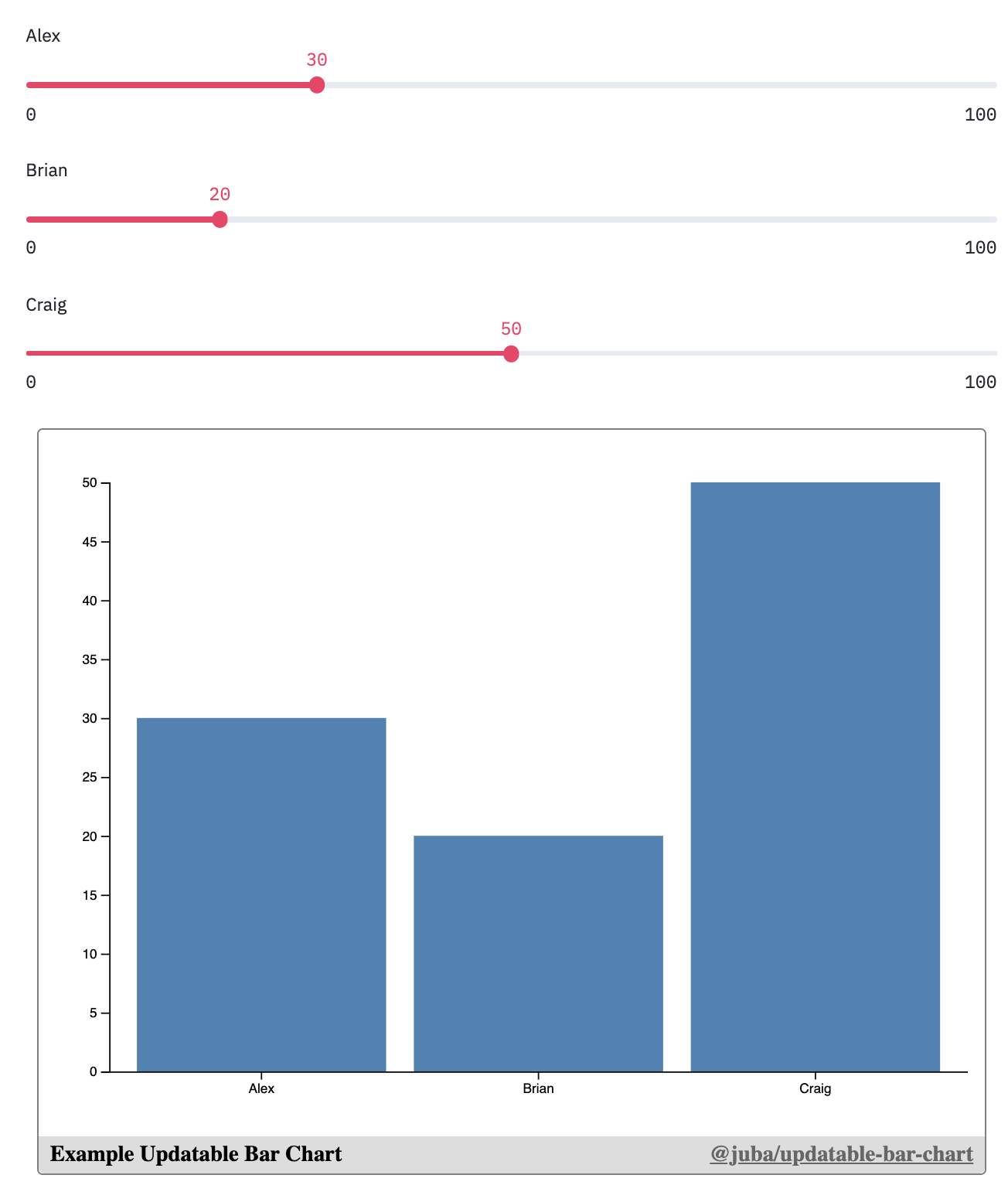 43 |
44 | ### [Trader Joes Voronoi Map](https://streamlit-observable.herokuapp.com/?section=Static+Embed%3A+Trader+Joes+Voronoi+Map)
45 | ```python
46 | import streamlit as st
47 | from streamlit_observable import observable
48 |
49 | @st.cache
50 | def get_trader_joes():
51 | # a lot of code...
52 | return df
53 |
54 | df = get_trader_joes()
55 |
56 | observable("Trader Joes Voronoi Map",
57 | notebook="@mbostock/u-s-voronoi-map-o-matic",
58 | targets=["map"],
59 | redefine={
60 | "data": df[["longitude", "latitude", "name"]].to_dict(orient="records")
61 | }
62 | )
63 | ```
64 |
65 |
43 |
44 | ### [Trader Joes Voronoi Map](https://streamlit-observable.herokuapp.com/?section=Static+Embed%3A+Trader+Joes+Voronoi+Map)
45 | ```python
46 | import streamlit as st
47 | from streamlit_observable import observable
48 |
49 | @st.cache
50 | def get_trader_joes():
51 | # a lot of code...
52 | return df
53 |
54 | df = get_trader_joes()
55 |
56 | observable("Trader Joes Voronoi Map",
57 | notebook="@mbostock/u-s-voronoi-map-o-matic",
58 | targets=["map"],
59 | redefine={
60 | "data": df[["longitude", "latitude", "name"]].to_dict(orient="records")
61 | }
62 | )
63 | ```
64 |
65 |  66 |
67 |
68 | ### [Form Input Example](https://streamlit-observable.herokuapp.com/?section=Bi-Directional+Embed%3A+HTML+Form)
69 | ```python
70 | import streamlit as st
71 | from streamlit_observable import observable
72 |
73 | observers = observable("Example form",
74 | notebook="@mbostock/form-input",
75 | targets=["viewof object"],
76 | observe=["object"]
77 | )
78 |
79 | o = observers.get("object")
80 |
81 | if o is not None:
82 | st.write("message: **'{message}'**, hue: '{hue}', size: '{size}', emojis: '{emojis}'".format(
83 | message=o.get("message"),
84 | hue=o.get("hue"),
85 | size=o.get("size"),
86 | emojis=str(o.get("emojis"))
87 | ))
88 | ```
89 |
90 |
66 |
67 |
68 | ### [Form Input Example](https://streamlit-observable.herokuapp.com/?section=Bi-Directional+Embed%3A+HTML+Form)
69 | ```python
70 | import streamlit as st
71 | from streamlit_observable import observable
72 |
73 | observers = observable("Example form",
74 | notebook="@mbostock/form-input",
75 | targets=["viewof object"],
76 | observe=["object"]
77 | )
78 |
79 | o = observers.get("object")
80 |
81 | if o is not None:
82 | st.write("message: **'{message}'**, hue: '{hue}', size: '{size}', emojis: '{emojis}'".format(
83 | message=o.get("message"),
84 | hue=o.get("hue"),
85 | size=o.get("size"),
86 | emojis=str(o.get("emojis"))
87 | ))
88 | ```
89 |
90 | 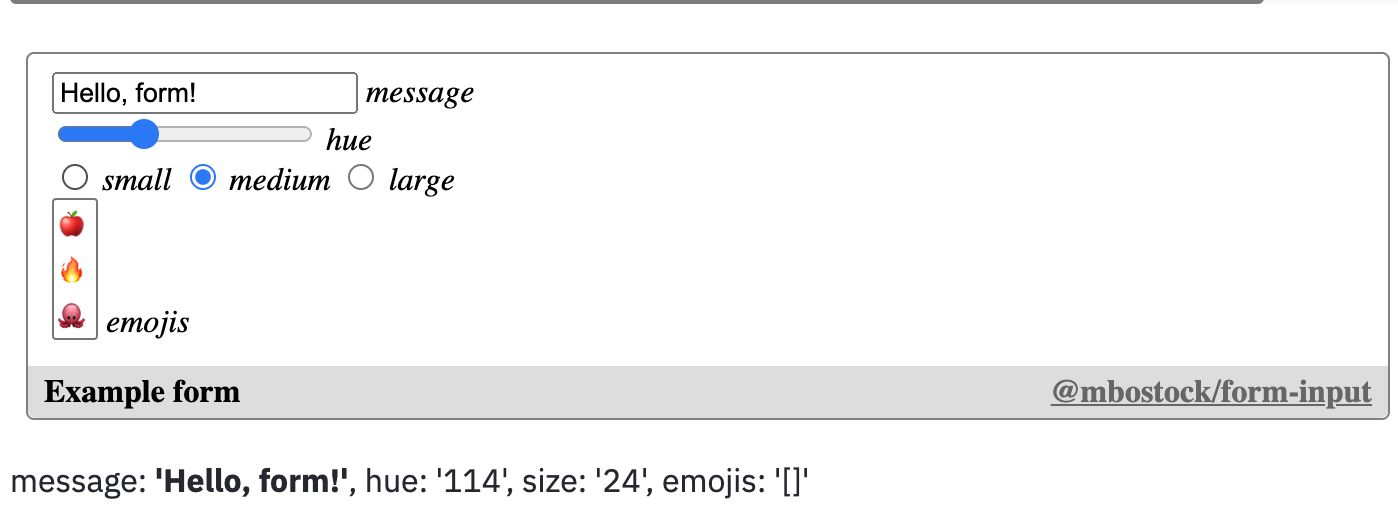 91 |
92 | ### [Selecting U.S. Counties](https://streamlit-observable.herokuapp.com/?section=Bi-Directional+Embed%3A+Selecting+Counties)
93 | ```python
94 | import streamlit as st
95 | from streamlit_observable import observable
96 |
97 | observers = observable("County Brush",
98 | notebook="d/4f9aa5feff9761c9",
99 | targets=["viewof countyCodes"],
100 | observe=["selectedCounties"]
101 | )
102 |
103 | selectedCounties = observers.get("selectedCounties")
104 | ```
105 |
106 |
91 |
92 | ### [Selecting U.S. Counties](https://streamlit-observable.herokuapp.com/?section=Bi-Directional+Embed%3A+Selecting+Counties)
93 | ```python
94 | import streamlit as st
95 | from streamlit_observable import observable
96 |
97 | observers = observable("County Brush",
98 | notebook="d/4f9aa5feff9761c9",
99 | targets=["viewof countyCodes"],
100 | observe=["selectedCounties"]
101 | )
102 |
103 | selectedCounties = observers.get("selectedCounties")
104 | ```
105 |
106 |  107 |
108 |
109 |
110 | ## API Reference
111 |
112 | ### observable(key, notebook, _targets_=None, _observe_=[], _redefine_={}, _hide_=[])
113 |
114 | Embed an Observable notebook into the Streamlit app. If any cells are passed into `observe`, then this will return a dict, where the keys are the name of the cells that are being observed, and the values are the values of those cells.
115 |
116 | - `key`: A unique string used to avoid re-renders of the iframe. This label will appear at the bottom of the embed.
117 | - `notebook`: The observablehq.com notebook id to embed. Ex. "@"d3/bar-chart" or "d/1f434ef3b0569a00"
118 | - `targets`: An optional list of cell names to render in the embeded notebook. By default, all cells, including unnamed cells, will be embeded.
119 | - `observe`: An optional list of cell names to observe. When those cells are updated in the Observable notebook, the new values will be sent back to Streamlit as part of the return value. Keep in mind, there is a serialization process from going from Observable notebook JavaScript -> Streamlit Python (JSON serializing).
120 | - `redefine`: An optional dict of cell names and values used to redefine in the embeded notebook. Keep in mind, there is a serialization process from going from Streamlit Python -> Observable notebook JavaScript (JSON serializing).
121 | - `hide`: An optional list of cell names that will not be rendered in the DOM of the embed. Useful for side-effect logic cells, like `mouse` in https://observablehq.com/@mbostock/eyes.
122 |
123 | ## Caveats
124 |
125 | ### Redefining or Observing Cells need to be JSON-serializable
126 |
127 | In order to pass data from Python into an Observable notebook (with `redefine`), it needs to be JSON serializable, usually a `list`, `dict`, string or number. So if you're working with a pandas DataFrame or numpy array, you may need to wrangle it before redefining (usually with something like panda's [`.to_dict()`](https://pandas.pydata.org/pandas-docs/stable/reference/api/pandas.DataFrame.to_dict.html) or numpy's [`.tolist()`](https://numpy.org/doc/stable/reference/generated/numpy.ndarray.tolist.html)).
128 |
129 | Similarly, when passing data from an Observable notebook back into Streamlit/Python (with `observe`), that data also needs to be JSON serializable. So when passing back [Date objects](https://developer.mozilla.org/en-US/docs/Web/JavaScript/Reference/Global_Objects/Date), [Sets](https://developer.mozilla.org/en-US/docs/Web/JavaScript/Reference/Global_Objects/Set), or other custon objects, you'll first need to represent it in some JSON serializable way, then wrangle it in Python-land to match what you expect. For example, with a Date object, you could convert to to the JSON-friendly Unix Epoch (number) with [.getTime()](https://developer.mozilla.org/en-US/docs/Web/JavaScript/Reference/Global_Objects/Date/getTime), then read it as a datetime object in Python with [`datetime.fromtimestamp(time / 1000)`](https://docs.python.org/3/library/datetime.html).
130 |
131 | ### Accessing webcam and microphone doesn't work
132 |
133 | Not entirely sure why this is the case, but if someone figures it out, I'd love to see a PR!
134 |
135 | ### Large Data is Hard
136 |
137 | I haven't tried this, but I expect that if you try loading 1GB+ of data into a bar chart, something will break. All the data that you `redefine` will be read in memory in your browser when embeding into the chart, so something might break along the way. If you ever come across this, feel free to open an issue about it!
138 |
139 | ### You'll need to fork a lot
140 |
141 | Most Observable notebooks are built with only other Observable users in mind. Meaning, a lot of cells are exposed as custom Objects, Dates, functions, or classes, all of which you can't control very well in Python land. So, you may need to fork the notebook you want in Observable, make changes to make it a little friendlier, then publish/enable link-sharing to access in Streamlit. Thankfully, this is pretty quick to do on Observable once you get the hang of it, but it does take extra time.
--------------------------------------------------------------------------------
107 |
108 |
109 |
110 | ## API Reference
111 |
112 | ### observable(key, notebook, _targets_=None, _observe_=[], _redefine_={}, _hide_=[])
113 |
114 | Embed an Observable notebook into the Streamlit app. If any cells are passed into `observe`, then this will return a dict, where the keys are the name of the cells that are being observed, and the values are the values of those cells.
115 |
116 | - `key`: A unique string used to avoid re-renders of the iframe. This label will appear at the bottom of the embed.
117 | - `notebook`: The observablehq.com notebook id to embed. Ex. "@"d3/bar-chart" or "d/1f434ef3b0569a00"
118 | - `targets`: An optional list of cell names to render in the embeded notebook. By default, all cells, including unnamed cells, will be embeded.
119 | - `observe`: An optional list of cell names to observe. When those cells are updated in the Observable notebook, the new values will be sent back to Streamlit as part of the return value. Keep in mind, there is a serialization process from going from Observable notebook JavaScript -> Streamlit Python (JSON serializing).
120 | - `redefine`: An optional dict of cell names and values used to redefine in the embeded notebook. Keep in mind, there is a serialization process from going from Streamlit Python -> Observable notebook JavaScript (JSON serializing).
121 | - `hide`: An optional list of cell names that will not be rendered in the DOM of the embed. Useful for side-effect logic cells, like `mouse` in https://observablehq.com/@mbostock/eyes.
122 |
123 | ## Caveats
124 |
125 | ### Redefining or Observing Cells need to be JSON-serializable
126 |
127 | In order to pass data from Python into an Observable notebook (with `redefine`), it needs to be JSON serializable, usually a `list`, `dict`, string or number. So if you're working with a pandas DataFrame or numpy array, you may need to wrangle it before redefining (usually with something like panda's [`.to_dict()`](https://pandas.pydata.org/pandas-docs/stable/reference/api/pandas.DataFrame.to_dict.html) or numpy's [`.tolist()`](https://numpy.org/doc/stable/reference/generated/numpy.ndarray.tolist.html)).
128 |
129 | Similarly, when passing data from an Observable notebook back into Streamlit/Python (with `observe`), that data also needs to be JSON serializable. So when passing back [Date objects](https://developer.mozilla.org/en-US/docs/Web/JavaScript/Reference/Global_Objects/Date), [Sets](https://developer.mozilla.org/en-US/docs/Web/JavaScript/Reference/Global_Objects/Set), or other custon objects, you'll first need to represent it in some JSON serializable way, then wrangle it in Python-land to match what you expect. For example, with a Date object, you could convert to to the JSON-friendly Unix Epoch (number) with [.getTime()](https://developer.mozilla.org/en-US/docs/Web/JavaScript/Reference/Global_Objects/Date/getTime), then read it as a datetime object in Python with [`datetime.fromtimestamp(time / 1000)`](https://docs.python.org/3/library/datetime.html).
130 |
131 | ### Accessing webcam and microphone doesn't work
132 |
133 | Not entirely sure why this is the case, but if someone figures it out, I'd love to see a PR!
134 |
135 | ### Large Data is Hard
136 |
137 | I haven't tried this, but I expect that if you try loading 1GB+ of data into a bar chart, something will break. All the data that you `redefine` will be read in memory in your browser when embeding into the chart, so something might break along the way. If you ever come across this, feel free to open an issue about it!
138 |
139 | ### You'll need to fork a lot
140 |
141 | Most Observable notebooks are built with only other Observable users in mind. Meaning, a lot of cells are exposed as custom Objects, Dates, functions, or classes, all of which you can't control very well in Python land. So, you may need to fork the notebook you want in Observable, make changes to make it a little friendlier, then publish/enable link-sharing to access in Streamlit. Thankfully, this is pretty quick to do on Observable once you get the hang of it, but it does take extra time.
--------------------------------------------------------------------------------