├── img
├── button.png
├── radio.png
├── checkbox.png
├── dropdown.png
└── preview.png
├── senseFieldUI
├── wbfolder.wbl
├── senseFieldUI.qext
├── css
│ └── awesome-bootstrap-checkbox.css
└── senseFieldUI.js
├── .gitattributes
├── .gitignore
└── README.md
/img/button.png:
--------------------------------------------------------------------------------
https://raw.githubusercontent.com/balexbyrd/sense-FieldUI/HEAD/img/button.png
--------------------------------------------------------------------------------
/img/radio.png:
--------------------------------------------------------------------------------
https://raw.githubusercontent.com/balexbyrd/sense-FieldUI/HEAD/img/radio.png
--------------------------------------------------------------------------------
/img/checkbox.png:
--------------------------------------------------------------------------------
https://raw.githubusercontent.com/balexbyrd/sense-FieldUI/HEAD/img/checkbox.png
--------------------------------------------------------------------------------
/img/dropdown.png:
--------------------------------------------------------------------------------
https://raw.githubusercontent.com/balexbyrd/sense-FieldUI/HEAD/img/dropdown.png
--------------------------------------------------------------------------------
/img/preview.png:
--------------------------------------------------------------------------------
https://raw.githubusercontent.com/balexbyrd/sense-FieldUI/HEAD/img/preview.png
--------------------------------------------------------------------------------
/senseFieldUI/wbfolder.wbl:
--------------------------------------------------------------------------------
1 | senseFieldUI.qext;
2 | senseFieldUI.js;
3 | preview.png;
4 | ./css/scoped-bootstrap.css;
5 | ./css/awesome-bootstrap-checkbox.css;
6 |
--------------------------------------------------------------------------------
/.gitattributes:
--------------------------------------------------------------------------------
1 | # Auto detect text files and perform LF normalization
2 | * text=auto
3 |
4 | # Custom for Visual Studio
5 | *.cs diff=csharp
6 |
7 | # Standard to msysgit
8 | *.doc diff=astextplain
9 | *.DOC diff=astextplain
10 | *.docx diff=astextplain
11 | *.DOCX diff=astextplain
12 | *.dot diff=astextplain
13 | *.DOT diff=astextplain
14 | *.pdf diff=astextplain
15 | *.PDF diff=astextplain
16 | *.rtf diff=astextplain
17 | *.RTF diff=astextplain
18 |
--------------------------------------------------------------------------------
/senseFieldUI/senseFieldUI.qext:
--------------------------------------------------------------------------------
1 | {
2 | "name": "Field UI",
3 | "description": "Manage how fields are viewed in the UI",
4 | "icon": "list",
5 | "type": "visualization",
6 | "version": "1.0.0",
7 | "preview": "preview.png",
8 | "author": "Alex Byrd",
9 | "keywords": "qlik-sense, extension, bootstrap, font-awesome, dropdown, checkbox, button, radio",
10 | "license": "MIT",
11 | "repository": "",
12 | "dependencies": {
13 | "qlik-sense": ">=1.0.x"
14 | }
15 | }
--------------------------------------------------------------------------------
/.gitignore:
--------------------------------------------------------------------------------
1 | # Windows image file caches
2 | Thumbs.db
3 | ehthumbs.db
4 |
5 | # Folder config file
6 | Desktop.ini
7 |
8 | # Recycle Bin used on file shares
9 | $RECYCLE.BIN/
10 |
11 | # Windows Installer files
12 | *.cab
13 | *.msi
14 | *.msm
15 | *.msp
16 |
17 | # Windows shortcuts
18 | *.lnk
19 |
20 | # =========================
21 | # Operating System Files
22 | # =========================
23 |
24 | # OSX
25 | # =========================
26 |
27 | .DS_Store
28 | .AppleDouble
29 | .LSOverride
30 |
31 | # Thumbnails
32 | ._*
33 |
34 | # Files that might appear in the root of a volume
35 | .DocumentRevisions-V100
36 | .fseventsd
37 | .Spotlight-V100
38 | .TemporaryItems
39 | .Trashes
40 | .VolumeIcon.icns
41 | .vscode
42 | .gitignore
43 | .gitattributes
44 |
45 | # Directories potentially created on remote AFP share
46 | .AppleDB
47 | .AppleDesktop
48 | Network Trash Folder
49 | Temporary Items
50 | .apdisk
51 | senseFieldUI.js.zip
52 |
--------------------------------------------------------------------------------
/README.md:
--------------------------------------------------------------------------------
1 | # sense-FieldUI
2 | Bootstrap Radio, Checkbox, Dropdown, or Buttons for a Dimension. Use icons for dimension values (buttons only) and use hidden variables (for changing chart dimensions dynamically)
3 |
4 | 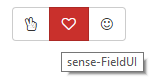
5 | 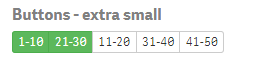
6 | 
7 | 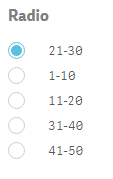
8 | 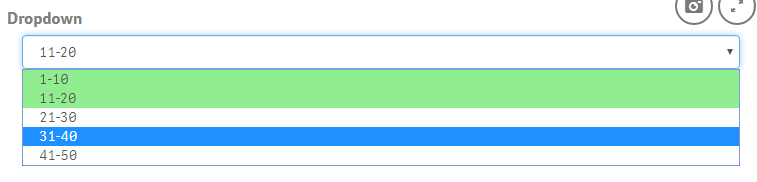
9 |
10 | Uses Bootstrap, Lodash, Awesome-bootstrap-checkbox and Font Awesome. In other words, you could say it's full of awesome.
11 |
12 | ## Installation
13 |
14 | 1. Move sense-FieldUI to the default extension folder in Qlik Sense
15 | 2. Open Qlik Sense and add the 'Field UI' extension to a sheet
16 | 3. Configure properties
17 |
18 | ## Usage
19 |
20 | This extension takes the dimension and renders values in the dimension as either Radio buttons, Checkbox, Buttons (w/ icons!), or a dropdown/multiselect form. Use bootstrap for formatting, coloring, and rendering. Font awesome for the icons and lodash for the dirty data work.
21 |
22 | If the field is disabled, it's because that field value is not in the data model for the current selection (similar to the gray color in Qlik's default coloring).
23 |
24 |
25 | ## Limitations
26 |
27 | 1. This extension "only" pulls 10K dimension values. I don't know what the use case for even that is, but can be considered a limitation.
28 | 2. When making configuration changes, if you notice the extension not acting according to selection, refresh the webpage.
29 | 3. Radio buttons only select one value (this is the normal intended use), use a checkbox if you need to select multiple values.
30 | 4. Rending vertically and horizonally can be a challenge given the space of the window (especially buttons).
31 |
32 | ## License
33 |
34 | MIT
35 |
36 | ## Credits
37 |
38 | > **Bootstrap**
39 |
40 | > **Lodash**
41 |
42 | > **Font Awesome Icons**
43 |
44 | > **Awesome-bootstrap-checkbox**
--------------------------------------------------------------------------------
/senseFieldUI/css/awesome-bootstrap-checkbox.css:
--------------------------------------------------------------------------------
1 | .checkbox {
2 | padding-left: 20px;
3 | }
4 | .checkbox label {
5 | display: inline-block;
6 | vertical-align: middle;
7 | position: relative;
8 | padding-left: 5px;
9 | }
10 | .checkbox label::before {
11 | content: "";
12 | display: inline-block;
13 | position: absolute;
14 | width: 17px;
15 | height: 17px;
16 | left: 0;
17 | margin-left: -20px;
18 | border: 1px solid #cccccc;
19 | border-radius: 3px;
20 | background-color: #fff;
21 | -webkit-transition: border 0.15s ease-in-out, color 0.15s ease-in-out;
22 | -o-transition: border 0.15s ease-in-out, color 0.15s ease-in-out;
23 | transition: border 0.15s ease-in-out, color 0.15s ease-in-out;
24 | }
25 | .checkbox label::after {
26 | display: inline-block;
27 | position: absolute;
28 | width: 16px;
29 | height: 16px;
30 | left: 0;
31 | top: 0;
32 | margin-left: -20px;
33 | padding-left: 3px;
34 | padding-top: 1px;
35 | font-size: 11px;
36 | color: #555555;
37 | }
38 | .checkbox input[type="checkbox"],
39 | .checkbox input[type="radio"] {
40 | opacity: 0;
41 | z-index: 1;
42 | }
43 | .checkbox input[type="checkbox"]:focus + label::before,
44 | .checkbox input[type="radio"]:focus + label::before {
45 | outline: thin dotted;
46 | outline: 5px auto -webkit-focus-ring-color;
47 | outline-offset: -2px;
48 | }
49 | .checkbox input[type="checkbox"]:checked + label::after,
50 | .checkbox input[type="radio"]:checked + label::after {
51 | font-family: "FontAwesome";
52 | content: "\f00c";
53 | }
54 | .checkbox input[type="checkbox"]:indeterminate + label::after,
55 | .checkbox input[type="radio"]:indeterminate + label::after {
56 | display: block;
57 | content: "";
58 | width: 10px;
59 | height: 3px;
60 | background-color: #555555;
61 | border-radius: 2px;
62 | margin-left: -16.5px;
63 | margin-top: 7px;
64 | }
65 | .checkbox input[type="checkbox"]:disabled + label,
66 | .checkbox input[type="radio"]:disabled + label {
67 | opacity: 0.65;
68 | }
69 | .checkbox input[type="checkbox"]:disabled + label::before,
70 | .checkbox input[type="radio"]:disabled + label::before {
71 | background-color: #eeeeee;
72 | cursor: not-allowed;
73 | }
74 | .checkbox.checkbox-circle label::before {
75 | border-radius: 50%;
76 | }
77 | .checkbox.checkbox-inline {
78 | margin-top: 0;
79 | }
80 |
81 | .checkbox-primary input[type="checkbox"]:checked + label::before,
82 | .checkbox-primary input[type="radio"]:checked + label::before {
83 | background-color: #337ab7;
84 | border-color: #337ab7;
85 | }
86 | .checkbox-primary input[type="checkbox"]:checked + label::after,
87 | .checkbox-primary input[type="radio"]:checked + label::after {
88 | color: #fff;
89 | }
90 |
91 | .checkbox-danger input[type="checkbox"]:checked + label::before,
92 | .checkbox-danger input[type="radio"]:checked + label::before {
93 | background-color: #d9534f;
94 | border-color: #d9534f;
95 | }
96 | .checkbox-danger input[type="checkbox"]:checked + label::after,
97 | .checkbox-danger input[type="radio"]:checked + label::after {
98 | color: #fff;
99 | }
100 |
101 | .checkbox-info input[type="checkbox"]:checked + label::before,
102 | .checkbox-info input[type="radio"]:checked + label::before {
103 | background-color: #5bc0de;
104 | border-color: #5bc0de;
105 | }
106 | .checkbox-info input[type="checkbox"]:checked + label::after,
107 | .checkbox-info input[type="radio"]:checked + label::after {
108 | color: #fff;
109 | }
110 |
111 | .checkbox-warning input[type="checkbox"]:checked + label::before,
112 | .checkbox-warning input[type="radio"]:checked + label::before {
113 | background-color: #f0ad4e;
114 | border-color: #f0ad4e;
115 | }
116 | .checkbox-warning input[type="checkbox"]:checked + label::after,
117 | .checkbox-warning input[type="radio"]:checked + label::after {
118 | color: #fff;
119 | }
120 |
121 | .checkbox-success input[type="checkbox"]:checked + label::before,
122 | .checkbox-success input[type="radio"]:checked + label::before {
123 | background-color: #5cb85c;
124 | border-color: #5cb85c;
125 | }
126 | .checkbox-success input[type="checkbox"]:checked + label::after,
127 | .checkbox-success input[type="radio"]:checked + label::after {
128 | color: #fff;
129 | }
130 |
131 | .checkbox-primary input[type="checkbox"]:indeterminate + label::before,
132 | .checkbox-primary input[type="radio"]:indeterminate + label::before {
133 | background-color: #337ab7;
134 | border-color: #337ab7;
135 | }
136 |
137 | .checkbox-primary input[type="checkbox"]:indeterminate + label::after,
138 | .checkbox-primary input[type="radio"]:indeterminate + label::after {
139 | background-color: #fff;
140 | }
141 |
142 | .checkbox-danger input[type="checkbox"]:indeterminate + label::before,
143 | .checkbox-danger input[type="radio"]:indeterminate + label::before {
144 | background-color: #d9534f;
145 | border-color: #d9534f;
146 | }
147 |
148 | .checkbox-danger input[type="checkbox"]:indeterminate + label::after,
149 | .checkbox-danger input[type="radio"]:indeterminate + label::after {
150 | background-color: #fff;
151 | }
152 |
153 | .checkbox-info input[type="checkbox"]:indeterminate + label::before,
154 | .checkbox-info input[type="radio"]:indeterminate + label::before {
155 | background-color: #5bc0de;
156 | border-color: #5bc0de;
157 | }
158 |
159 | .checkbox-info input[type="checkbox"]:indeterminate + label::after,
160 | .checkbox-info input[type="radio"]:indeterminate + label::after {
161 | background-color: #fff;
162 | }
163 |
164 | .checkbox-warning input[type="checkbox"]:indeterminate + label::before,
165 | .checkbox-warning input[type="radio"]:indeterminate + label::before {
166 | background-color: #f0ad4e;
167 | border-color: #f0ad4e;
168 | }
169 |
170 | .checkbox-warning input[type="checkbox"]:indeterminate + label::after,
171 | .checkbox-warning input[type="radio"]:indeterminate + label::after {
172 | background-color: #fff;
173 | }
174 |
175 | .checkbox-success input[type="checkbox"]:indeterminate + label::before,
176 | .checkbox-success input[type="radio"]:indeterminate + label::before {
177 | background-color: #5cb85c;
178 | border-color: #5cb85c;
179 | }
180 |
181 | .checkbox-success input[type="checkbox"]:indeterminate + label::after,
182 | .checkbox-success input[type="radio"]:indeterminate + label::after {
183 | background-color: #fff;
184 | }
185 |
186 | .radio {
187 | padding-left: 20px;
188 | }
189 | .radio label {
190 | display: inline-block;
191 | vertical-align: middle;
192 | position: relative;
193 | padding-left: 5px;
194 | }
195 | .radio label::before {
196 | content: "";
197 | display: inline-block;
198 | position: absolute;
199 | width: 17px;
200 | height: 17px;
201 | left: 0;
202 | margin-left: -20px;
203 | border: 1px solid #cccccc;
204 | border-radius: 50%;
205 | background-color: #fff;
206 | -webkit-transition: border 0.15s ease-in-out;
207 | -o-transition: border 0.15s ease-in-out;
208 | transition: border 0.15s ease-in-out;
209 | }
210 | .radio label::after {
211 | display: inline-block;
212 | position: absolute;
213 | content: " ";
214 | width: 11px;
215 | height: 11px;
216 | left: 3px;
217 | top: 3px;
218 | margin-left: -20px;
219 | border-radius: 50%;
220 | background-color: #555555;
221 | -webkit-transform: scale(0, 0);
222 | -ms-transform: scale(0, 0);
223 | -o-transform: scale(0, 0);
224 | transform: scale(0, 0);
225 | -webkit-transition: -webkit-transform 0.1s cubic-bezier(0.8, -0.33, 0.2, 1.33);
226 | -moz-transition: -moz-transform 0.1s cubic-bezier(0.8, -0.33, 0.2, 1.33);
227 | -o-transition: -o-transform 0.1s cubic-bezier(0.8, -0.33, 0.2, 1.33);
228 | transition: transform 0.1s cubic-bezier(0.8, -0.33, 0.2, 1.33);
229 | }
230 | .radio input[type="radio"] {
231 | opacity: 0;
232 | z-index: 1;
233 | }
234 | .radio input[type="radio"]:focus + label::before {
235 | outline: thin dotted;
236 | outline: 5px auto -webkit-focus-ring-color;
237 | outline-offset: -2px;
238 | }
239 | .radio input[type="radio"]:checked + label::after {
240 | -webkit-transform: scale(1, 1);
241 | -ms-transform: scale(1, 1);
242 | -o-transform: scale(1, 1);
243 | transform: scale(1, 1);
244 | }
245 | .radio input[type="radio"]:disabled + label {
246 | opacity: 0.65;
247 | }
248 | .radio input[type="radio"]:disabled + label::before {
249 | cursor: not-allowed;
250 | }
251 | .radio.radio-inline {
252 | margin-top: 0;
253 | }
254 |
255 | .radio-primary input[type="radio"] + label::after {
256 | background-color: #337ab7;
257 | }
258 | .radio-primary input[type="radio"]:checked + label::before {
259 | border-color: #337ab7;
260 | }
261 | .radio-primary input[type="radio"]:checked + label::after {
262 | background-color: #337ab7;
263 | }
264 |
265 | .radio-danger input[type="radio"] + label::after {
266 | background-color: #d9534f;
267 | }
268 | .radio-danger input[type="radio"]:checked + label::before {
269 | border-color: #d9534f;
270 | }
271 | .radio-danger input[type="radio"]:checked + label::after {
272 | background-color: #d9534f;
273 | }
274 |
275 | .radio-info input[type="radio"] + label::after {
276 | background-color: #5bc0de;
277 | }
278 | .radio-info input[type="radio"]:checked + label::before {
279 | border-color: #5bc0de;
280 | }
281 | .radio-info input[type="radio"]:checked + label::after {
282 | background-color: #5bc0de;
283 | }
284 |
285 | .radio-warning input[type="radio"] + label::after {
286 | background-color: #f0ad4e;
287 | }
288 | .radio-warning input[type="radio"]:checked + label::before {
289 | border-color: #f0ad4e;
290 | }
291 | .radio-warning input[type="radio"]:checked + label::after {
292 | background-color: #f0ad4e;
293 | }
294 |
295 | .radio-success input[type="radio"] + label::after {
296 | background-color: #5cb85c;
297 | }
298 | .radio-success input[type="radio"]:checked + label::before {
299 | border-color: #5cb85c;
300 | }
301 | .radio-success input[type="radio"]:checked + label::after {
302 | background-color: #5cb85c;
303 | }
304 |
305 | input[type="checkbox"].styled:checked + label:after,
306 | input[type="radio"].styled:checked + label:after {
307 | font-family: 'FontAwesome';
308 | content: "\f00c";
309 | }
310 | input[type="checkbox"] .styled:checked + label::before,
311 | input[type="radio"] .styled:checked + label::before {
312 | color: #fff;
313 | }
314 | input[type="checkbox"] .styled:checked + label::after,
315 | input[type="radio"] .styled:checked + label::after {
316 | color: #fff;
317 | }
318 |
--------------------------------------------------------------------------------
/senseFieldUI/senseFieldUI.js:
--------------------------------------------------------------------------------
1 | var tempId = [];
2 |
3 | define([
4 | "jquery",
5 | "qlik",
6 | "text!./css/scoped-bootstrap.css",
7 | "text!./css/awesome-bootstrap-checkbox.css",
8 | "https://cdnjs.cloudflare.com/ajax/libs/lodash.js/4.15.0/lodash.js"
9 | ],
10 |
11 | function($, qlik, cssBoot, csscheckBox) {
12 | 'use strict';
13 | var control = {};
14 |
15 | if (!$("style[id='bootstrap']").length > 0) {
16 | if (!$("link[id='bootstrap']").length > 0) {
17 | $('').appendTo("head");
634 | }
635 | }
636 | }
637 | };
638 | });
--------------------------------------------------------------------------------