├── Lists
├── README.md
└── dialog-installomator.sh
├── JamfSelfService
├── README.md
└── jss-progress.sh
├── MultiDialog
├── README.md
└── multi_dialog_workflow_demo.sh
├── JSON
├── json_example.py
└── get_json_value.sh
├── LICENSE
├── README.md
├── check_frontmost_app_and_exit.sh
├── Progress
└── dowload_file.sh
├── Installomator
├── README.md
└── reportVersionForLabel.sh
├── Update Notifications
├── appupdate_with_deferral.sh
├── README.md
└── updatePrompt.sh
├── Uptime
└── check-uptime.sh
├── Checkbox
└── select_and_install.py
└── SelfUpdate
└── dialogSelfUpdate.sh
/Lists/README.md:
--------------------------------------------------------------------------------
1 | # Examples using Lists
2 |
3 | ## [Installomator](https://github.com/Installomator/Installomator)
4 |
5 | The `dialog-installomator.sh` script will display a dialog with a list of labels matching installomator labels and install them one at a time providing progress.
6 |
7 | ### Use
8 |
9 | Update the `labels` array with the desired software labels
10 |
11 | ```bash
12 | labels=(
13 | "googlechrome"
14 | "audacity"
15 | "firefox"
16 | "inkscape"
17 | )
18 | ```
19 |
20 | update the installomator script path
21 |
22 | `installomator="/path/to/Installomator.sh"`
23 |
24 | 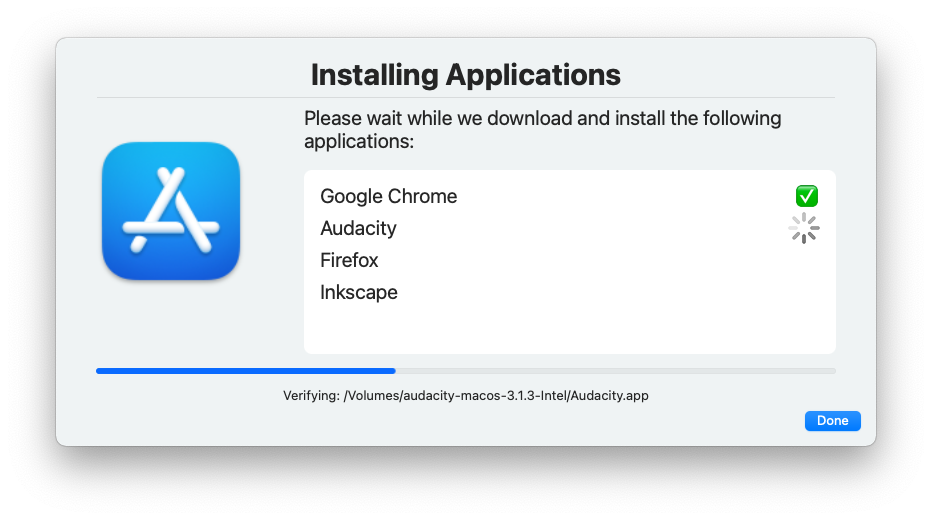
25 |
--------------------------------------------------------------------------------
/JamfSelfService/README.md:
--------------------------------------------------------------------------------
1 | ## A Jamf Pro script to provide install feedback from Self Service
2 |
3 | This script will run a jamf policy while providing some user feedback as to the progress which it gets from reading `/var/log/jamf.log`
4 |
5 | It requires two policies. One is the self service policy and contains this script. The other is the policy that will be performing the install or other task
6 |
7 | The script takes three parameters:
8 |
9 | - (4) policy name - A human readable description
10 | - (5) policy Trigger - The custom trigger to call
11 | - (6) icon - an icon resource to display (recommended, the http source of the self service policy icon)
12 |
13 | 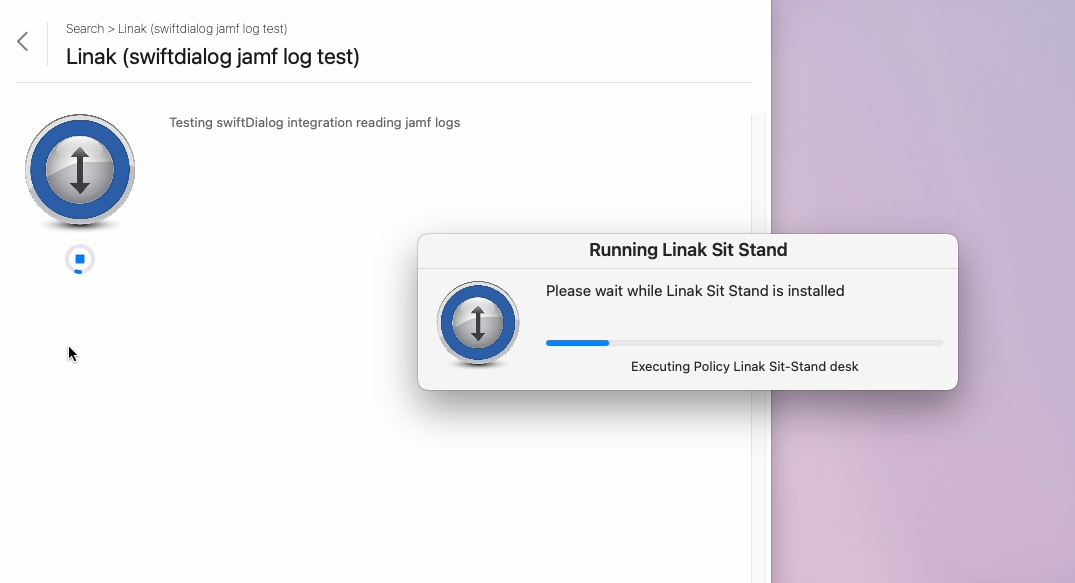
14 |
--------------------------------------------------------------------------------
/MultiDialog/README.md:
--------------------------------------------------------------------------------
1 | # swiftDialog Multi Dialog Demo
2 |
3 | One of the more common requests for swiftDialog is the ability to have multiple screens or steps in the one process
4 |
5 | With swiftDialog 2.3 there are some provisions for ensuring you can run multiple dialogs over the top of each other including over a `--blurscreen`
6 |
7 | The multi-dialog demo script is meant to serve as a demonstration of a possible workflow that acheives this by calling multiple dialog instances over the top of a background dialog. The background dialog consists of a `--blurscreen` element and a dialog window with all visual elements remove except for a progress bar and progress text
8 |
9 |  10 |
11 | Feel free to use this script as a basis for your own workflow in whole or in part
12 |
13 | This script comes with no warranty or support and in not intended for production use in its current state
14 |
--------------------------------------------------------------------------------
/JSON/json_example.py:
--------------------------------------------------------------------------------
1 | #!/usr/bin/python3
2 |
3 | import json
4 | import os
5 |
6 | dialog_app = "/Library/Application Support/Dialog/Dialog.app/Contents/MacOS/Dialog"
7 |
8 | contentDict = {"title" : "An Important Message",
9 | "titlefont" : "name=Chalkboard,colour=#3FD0a2,size=40",
10 | "message" : "This is a **very important** messsage and you _should_ read it carefully\n\nThis is on a new line",
11 | "icon" : "/Applications/Safari.app",
12 | "hideicon" : 0,
13 | "infobutton" : 1,
14 | "quitoninfo" : 1
15 | }
16 |
17 | jsonString = json.dumps(contentDict)
18 |
19 | # passing json in directly as a string
20 |
21 | print("Using string Input")
22 | os.system("'{}' --jsonstring '{}'".format(dialog_app, jsonString))
23 |
24 |
25 | # creating a temporary file
26 |
27 | print("Using file Input")
28 |
29 | # create a temporary file
30 | jsonTMPFile = "/tmp/dialog.json"
31 | f = open(jsonTMPFile, "w")
32 | f.write(jsonString)
33 | f.close()
34 |
35 | os.system("'{}' --jsonfile {}".format(dialog_app, jsonTMPFile))
36 |
37 | # clean up
38 | os.remove(jsonTMPFile)
39 |
--------------------------------------------------------------------------------
/LICENSE:
--------------------------------------------------------------------------------
1 | MIT License
2 |
3 | Copyright (c) 2024 Bart Reardon
4 |
5 | Permission is hereby granted, free of charge, to any person obtaining a copy
6 | of this software and associated documentation files (the "Software"), to deal
7 | in the Software without restriction, including without limitation the rights
8 | to use, copy, modify, merge, publish, distribute, sublicense, and/or sell
9 | copies of the Software, and to permit persons to whom the Software is
10 | furnished to do so, subject to the following conditions:
11 |
12 | The above copyright notice and this permission notice shall be included in all
13 | copies or substantial portions of the Software.
14 |
15 | THE SOFTWARE IS PROVIDED "AS IS", WITHOUT WARRANTY OF ANY KIND, EXPRESS OR
16 | IMPLIED, INCLUDING BUT NOT LIMITED TO THE WARRANTIES OF MERCHANTABILITY,
17 | FITNESS FOR A PARTICULAR PURPOSE AND NONINFRINGEMENT. IN NO EVENT SHALL THE
18 | AUTHORS OR COPYRIGHT HOLDERS BE LIABLE FOR ANY CLAIM, DAMAGES OR OTHER
19 | LIABILITY, WHETHER IN AN ACTION OF CONTRACT, TORT OR OTHERWISE, ARISING FROM,
20 | OUT OF OR IN CONNECTION WITH THE SOFTWARE OR THE USE OR OTHER DEALINGS IN THE
21 | SOFTWARE.
22 |
--------------------------------------------------------------------------------
/README.md:
--------------------------------------------------------------------------------
1 | # swiftDialog-scripts
2 | This repo contains a selection of short scripts that utilise [swiftDialog](https://github.com/bartreardon/swiftDialog) for various tasks as a means of demonstrating a particular feature.
3 |
4 | Most of these will be of **demo quality** and are not intended to be used directly in a production setting. By all means though, feel free to use and expand on the ideas presented here.
5 |
6 | ## What is swiftDialog?
7 |
8 | swiftDialog is an [open source](https://github.com/bartreardon/Dialog/blob/main/LICENSE.md) admin utility app for macOS 11+ written in SwiftUI that displays a popup dialog, displaying the content to your users that you want to display.
9 |
10 | swiftDialog's purpose is as a tool for Mac Admins to show informative messages via scripts, and relay back the users actions.
11 |
12 | The latest version can be found on the [Releases](https://github.com/bartreardon/Dialog/releases) page
13 |
14 | Detailed documentation and information can be found in the [Wiki](https://github.com/bartreardon/Dialog/wiki)
15 |
16 | 
17 |
--------------------------------------------------------------------------------
/check_frontmost_app_and_exit.sh:
--------------------------------------------------------------------------------
1 | #!/bin/zsh
2 | # Short script that will take a list of defined app bundle ID's and if detected will cause the script to exit
3 | # Useful if you want to perform some action that will have user impact (e.g. display a message or force some interaction)
4 | # but not take that action if a user is using a particular application, e.g. on an active video conference.
5 |
6 | # array of bundleID's that will cause this script to exit if they are detected as being the frontmost app.
7 | DNDApps=(
8 | "com.webex.meetingmanager"
9 | "com.microsoft.teams"
10 | "com.microsoft.VSCode"
11 | "us.zoom.xos"
12 | )
13 |
14 | # when testing, enter in a number of seconds to sleep. this allows you to trigger the script, bring an app
15 | # to be in focus and verify it's being detected correctly.
16 | if [[ $1 =~ '^[0-9]+$' ]] ; then
17 | sleep $1
18 | fi
19 |
20 | # get the frontmost app and isolate the bundle id
21 | appInFront=$(lsappinfo info $(lsappinfo front) | grep "bundleID" | awk -F "=" '{print $NF}' | tr -d "\"")
22 |
23 | echo "$appInFront is in front"
24 | echo "Checking against $DNDApps"
25 |
26 | if (($DNDApps[(I)$appInFront])); then
27 | echo "$appInFront is in front and was detected - exiting"
28 | exit 0
29 | fi
30 |
--------------------------------------------------------------------------------
/Progress/dowload_file.sh:
--------------------------------------------------------------------------------
1 | #!/bin/bash
2 |
3 | # Downloads a file and shows progress as a mini dialog
4 |
5 | downloadFile() {
6 | # curl outputs progress - we look for % sign and capture the progress
7 | APPName="${1}"
8 | APPURL="${2}"
9 | PKGURL=$(curl -sIL "${APPURL}" | grep -i location)
10 | PKGURL=$(echo "${PKGURL##*$'\n'}" | awk '{print $NF}' | tr -d '\r')
11 | PKGName=$(echo ${PKGURL} | awk -F "/" '{print $NF}' | tr -d '\r')
12 | TMPDir="/var/tmp/"
13 |
14 | # swiftDialog Options
15 | dialogcmd="/Library/Application Support/Dialog/Dialog.app"
16 | commandFile="/var/tmp/dialog.log"
17 | ICON="SF=arrow.down.app.fill,colour1=teal,colour2=blue"
18 |
19 | # launch swiftDialog in mini mode
20 | open -a "${dialogcmd}" --args --title "Downloading ${APPName}" --icon "${ICON}" --mini --progress 100 --message "Please wait..."
21 |
22 | echo "progress: 1" >> ${commandFile}
23 | sleep 2
24 |
25 | echo "message: Downloading ${PKGName}" >> ${commandFile}
26 |
27 | /usr/bin/curl -L -# -O --output-dir "${TMPDir}" "${PKGURL}" 2>&1 | while IFS= read -r -n1 char; do
28 | [[ $char =~ [0-9] ]] && keep=1 ;
29 | [[ $char == % ]] && echo "progresstext: ${progress}%" >> ${commandFile} && echo "progress: ${progress}" >> ${commandFile} && progress="" && keep=0 ;
30 | [[ $keep == 1 ]] && progress="$progress$char" ;
31 | done
32 |
33 | echo "progress: complete" >> ${commandFile}
34 | echo "message: Download Complete" >> ${commandFile}
35 | sleep 2
36 | echo "quit:" >> ${commandFile}
37 |
38 | echo "${TMPDir}${PKGName}"
39 | }
40 |
41 | # example usage
42 | downloadedfile=$(downloadFile "Microsoft OneDrive" "https://go.microsoft.com/fwlink/?linkid=823060")
43 |
44 | # do something with the file we just downloaded
45 | echo "Downloaded ${downloadedfile}"
46 |
--------------------------------------------------------------------------------
/Installomator/README.md:
--------------------------------------------------------------------------------
1 | ## reportVersionForLabel.sh
2 |
3 | This script was written to take an array of labels, and generate a (really) basic report on the app name and version available. It's intended use is a weekly report that details a list of which Installomator labels have received an application update. It can certainly be run more frequently than that if required.
4 |
5 | It will download and import the Installomator [functions.sh](https://github.com/Installomator/Installomator/blob/main/fragments/functions.sh) as well as the label fragments from the Installomator repo.
6 |
7 | Labels are assumed to have the same file name as the label name. When downloaded they are stripped of case pattern and `;;` and `eval`-ed. The package name and `appNewVersion` is then used.
8 |
9 | Results are also saved to a simple text file and re-used on the next run. The final report only includes labels that are new or updated since the last run.
10 |
11 | There is no swiftDialog integration at this point but an interactive option may be something that gets planned.
12 |
13 | Raw output will look something like:
14 |
15 | ```bash
16 | $ ./reportVersionForLabel.sh
17 | Processing label microsoftedge ...
18 | 📡 Updating Microsoft Edge from 117.0.2045.35 -> 117.0.2045.40
19 | Processing label alfred ...
20 | 📡 Updating Alfred from 5.1.2 -> 5.1.3
21 | Processing label caffeine ...
22 | ✅ No Update for Caffeine -> 1.1.3
23 | Processing label citrixworkspace ...
24 | ✅ No Update for Citrix Workspace -> 23.08.0.57
25 | Processing label coconutbattery ...
26 | 📡 Updating coconutBattery from 3.9.13 -> 3.9.14
27 | Processing label adobecreativeclouddesktop ...
28 | ✅ No Update for Adobe Creative Cloud -> 6.0.0.571
29 | Processing label cyberduck ...
30 | ✅ No Update for Cyberduck -> 8.6.3
31 | Processing label firefoxpkg ...
32 | 📡 Updating Firefox from 117.0.1 -> 118.0
33 | Processing label gimp ...
34 | ✅ No Update for GIMP -> 2.10.34
35 | Processing label googlechromepkg ...
36 | 📡 Updating Google Chrome from 117.0.5938.88 -> 117.0.5938.92
37 | **** text for report
38 |
39 | Microsoft Edge 117.0.2045.40, Alfred 5.1.3, coconutBattery 3.9.14, Firefox 118.0, Google Chrome 117.0.5938.92
40 |
41 | ****
42 | ```
43 |
--------------------------------------------------------------------------------
/JSON/get_json_value.sh:
--------------------------------------------------------------------------------
1 | #!/bin/bash
2 |
3 | # This function can be used to parse JSON results from a dialog command
4 |
5 | function get_json_value () {
6 | # usage: get_json_value "$JSON" "key 1" "key 2" "key 3"
7 | for var in "${@:2}"; do jsonkey="${jsonkey}['${var}']"; done
8 | JSON="$1" osascript -l 'JavaScript' \
9 | -e 'const env = $.NSProcessInfo.processInfo.environment.objectForKey("JSON").js' \
10 | -e "JSON.parse(env)$jsonkey"
11 | }
12 |
13 | # example usage
14 |
15 | UserPromptJSON='{
16 | "title" : "Device Setup",
17 | "message" : "Please set a computer name and choose the appropriate State and Department for where you normally work.\n\nFeel free to also leave a comment",
18 | "textfield" : [
19 | {"title" : "Computer Name", "required" : false, "prompt" : "Computer Name"},
20 | {"title" : "Comment", "required" : false, "prompt" : "Enter a comment", "editor" : true}
21 | ],
22 | "selectitems" : [
23 | {"title" : "Select State", "values" : ["ACT","NSW","VIC","QLD","TAS","SA","WA","NT"]},
24 | {"title" : "Department",
25 | "values" : [
26 | "Business Development",
27 | "Chief of Staff",
28 | "Commercial",
29 | "Corporate Affairs",
30 | "Executive",
31 | "Finance",
32 | "Governance",
33 | "Human Resources",
34 | "Information Technology",
35 | "Services"
36 | ]
37 | }],
38 | "icon" : "SF=info.circle",
39 | "centreicon" : true,
40 | "alignment" : "centre",
41 | "button1text" : "Next",
42 | "height" : "450"
43 | }'
44 |
45 | # make a temp file for storing our JSON
46 | tempfile=$(mktemp)
47 | echo $UserPromptJSON > $tempfile
48 |
49 | dialogcmd="/usr/local/bin/dialog"
50 |
51 | # run dialog and store the JSON results in a variable
52 | #${dialogcmd} --jsonfile $tempfile --json
53 | #exit
54 | results=$(${dialogcmd} --jsonfile $tempfile --json)
55 | # clean up
56 | rm $tempfile
57 |
58 | # extract the various values from the results JSON
59 | state=$(get_json_value "$results" "Select State" "selectedValue")
60 | department=$(get_json_value "$results" "Department" "selectedValue")
61 | compname=$(get_json_value "$results" "Computer Name")
62 | comment=$(get_json_value "$results" "Comment")
63 |
64 | echo "Computer name is $compname"
65 | echo "Department is $department"
66 | echo "State is $state"
67 | echo "Comment is $comment"
68 |
69 | # continue processing from here ...
70 |
--------------------------------------------------------------------------------
/Installomator/reportVersionForLabel.sh:
--------------------------------------------------------------------------------
1 | #!/bin/zsh
2 |
3 | #
4 | # Process the list of labels, download directly from the Installomator git repo
5 | # process the labels and report the version number
6 | # Will also record the last run in a file and compare against the last known version
7 | # If there is a new version, a report is generated with the updated labels and what version is the latest
8 | #
9 |
10 |
11 | # labels we want to process
12 | labels=(
13 | "microsoftedge"
14 | "firefoxpkg"
15 | "macadminspython"
16 | "microsoftvisualstudiocode"
17 | )
18 |
19 | RAWInstallomatorURL="https://raw.githubusercontent.com/Installomator/Installomator/main"
20 | appListFile="applist.txt"
21 |
22 | # backup existing file
23 | if [[ -e ${appListFile} ]]; then
24 | cp "${appListFile}" "${appListFile}-$(date '+%Y-%d-%m')"
25 | else
26 | touch "${appListFile}"
27 | fi
28 |
29 | # load functions from Installomator
30 | functionsPath="/var/tmp/functions.sh"
31 | curl -sL ${RAWInstallomatorURL}/fragments/functions.sh -o "${functionsPath}"
32 | source "${functionsPath}"
33 |
34 | # additional functions
35 | labelFromInstallomator() {
36 | echo "${RAWInstallomatorURL}/fragments/labels/$1.sh"
37 | }
38 |
39 | # process each label
40 | for label in $labels; do
41 | echo "Processing label $label ..."
42 |
43 | # get label fragment from Installomator repo
44 | fragment=$(curl -sL $(labelFromInstallomator $label))
45 | if [[ "$fragment" == *"404"* ]]; then
46 | echo "🚨 no fragment for label $label 🚨"
47 | continue
48 | fi
49 |
50 | # Process the fragment in a case block which should match the label
51 | caseStatement="
52 | case $label in
53 | $fragment
54 | *)
55 | echo \"$label didn't match anything in the case block - weird.\"
56 | ;;
57 | esac
58 | "
59 | eval $caseStatement
60 |
61 | if [[ -n $name ]]; then
62 | previousVersion=$(grep -e "^${name} " ${appListFile} | awk '{print $NF}')
63 | if [[ "$previousVersion" != "$appNewVersion" ]]; then
64 | if [[ -z $previousVersion ]]; then
65 | echo "⭐️ New App $name -> $appNewVersion"
66 | # app not found - add to the appListFile
67 | echo "$name $appNewVersion" >> ${appListFile}
68 | else
69 | echo "📡 Updating $name from $previousVersion -> $appNewVersion"
70 | # update the appListFile
71 | sed -i "" "s/^$name .*/$name $appNewVersion/g" ${appListFile}
72 | fi
73 | formattedOutput+="$name $appNewVersion, "
74 | else
75 | echo "✅ No Update for $name -> $appNewVersion"
76 | fi
77 | fi
78 | unset appNewVersion
79 | unset name
80 | unset previousVersion
81 | done
82 |
83 | echo "**** text for report"
84 | echo ""
85 | echo $formattedOutput
86 | echo ""
87 | echo "****"
88 |
89 | # clean up
90 | rm "$functionsPath"
91 |
--------------------------------------------------------------------------------
/Update Notifications/appupdate_with_deferral.sh:
--------------------------------------------------------------------------------
1 | #!/bin/zsh
2 |
3 | autoload is-at-least
4 | dialogapp="/usr/local/bin/dialog"
5 | dialoglog="/var/tmp/dialog.log"
6 |
7 | org="Org Name Here"
8 | softwareportal="Self Service"
9 | dialogheight="430"
10 | iconsize="120"
11 | waittime=60
12 |
13 | if [[ $1 == "test" ]]; then
14 | title="GlobalProtect VPN"
15 | apptoupdate="/Applications/GlobalProtect.app"
16 | appversionrequired="5.2.11"
17 | maxdeferrals="5"
18 | additionalinfo="Your VPN will disconnect during the update. Estimated installation time: 1 minute\n\n"
19 | policytrigger="INSTALLPANGP"
20 | else
21 | title=$4
22 | apptoupdate=$5
23 | appversionrequired=$6
24 | maxdeferrals=$7
25 | additionalinfo=$8 # optional
26 | policytrigger=$9
27 |
28 | if [[ -z $4 ]] || [[ -z $5 ]] || [[ -z $6 ]] || [[ -z $7 ]] || [[ -z $9 ]]; then
29 | echo "Incorrect parameters entered"
30 | exit 1
31 | fi
32 | fi
33 |
34 | if [[ ! -e "$apptoupdate" ]]; then
35 | echo "App $apptoupdate does not exist on this device"
36 | exit 0
37 | fi
38 |
39 | # work out the current installed version and exit if we are already up to date
40 | installedappversion=$(defaults read ${apptoupdate}/Contents/Info.plist CFBundleShortVersionString)
41 | is-at-least $appversionrequired $installedappversion
42 | result=$?
43 |
44 | if [[ $result -eq 0 ]]; then
45 | echo "Already up to date"
46 | exit 0
47 | fi
48 |
49 |
50 | # work out remaining deferrals"
51 | appdomain="${org// /_}.$(echo $apptoupdate | awk -F '/' '{print $NF}')"
52 | deferrals=$(defaults read ${appdomain} deferrals || echo ${maxdeferrals})
53 |
54 | if [[ $deferrals -gt 0 ]]; then
55 | infobuttontext="Defer"
56 | else
57 | infobuttontext="Max Deferrals Reached"
58 | fi
59 |
60 | # construct the dialog
61 | message="${org} requires **${title}** to be updated to version **${appversionrequired}**:\n\n \
62 | ${additionalinfo} \
63 | _Remaining Deferrals: **${deferrals}**_\n\n \
64 | You can also update at any time from ${softwareportal}. Search for **${title}**."
65 |
66 | $dialogapp --title "$title Update" \
67 | --titlefont colour=#00a4c7 \
68 | --icon "${apptoupdate}" \
69 | --message "${message}" \
70 | --infobuttontext "${infobuttontext}" \
71 | --button1text "Continue" \
72 | --height ${dialogheight} \
73 | --iconsize ${iconsize} \
74 | --quitoninfo \
75 | --alignment centre \
76 | --centreicon
77 |
78 | if [[ $? == 3 ]] && [[ $deferrals -gt 0 ]]; then
79 | deferrals=$(( $deferrals - 1 ))
80 | defaults write ${appdomain} deferrals -int ${deferrals}
81 | else
82 | echo "Continuing with install"
83 | # cleanup deferral count
84 | defaults delete ${appdomain} deferrals
85 |
86 | # popup wait dialog for 60 seconds to give the user something to look at
87 | $dialogapp --title "${title} Install" \
88 | --icon "${apptoupdate}" \
89 | --height 230 \
90 | --progress ${waittime} \
91 | --progresstext "" \
92 | --message "Please wait while ${title} is installed" \
93 | --commandfile "$dialoglog" &
94 |
95 | # background for loop to display the dialog
96 | for ((i=1; i<=${waittime}; i++)); do
97 | echo "progress: increment" >> $dialoglog
98 | sleep 1
99 | if [[ $i -eq ${waittime} ]]; then
100 | echo "progress: complete" >> $dialoglog
101 | sleep 1
102 | echo "quit:" >> $dialoglog
103 | fi
104 | done &
105 |
106 | # run the install policy in the background
107 | echo "Launching policy ${policytrigger}"
108 | /usr/local/bin/jamf policy -event ${policytrigger}
109 |
110 | fi
111 |
--------------------------------------------------------------------------------
/Update Notifications/README.md:
--------------------------------------------------------------------------------
1 | # Update Notifications
2 |
3 | ## updatePrompt.sh
4 |
5 | This script uses swiftDialog to present a minimal update prompt with deferral that looks for the required OS version and presents an update notification if the requirements are not met.
6 |
7 | It uses the [SOFA](https://sofa.macadmins.io) feed for OS and patch information
8 |
9 | It has very few options and is designed to be set and forget in order to automatically notify users of software updates for their OS. It determines the latest availavle version of the installed OS so it's easy to keep running as an ongoing task and users will receive the update automatically when required. Sane update policies are encouraged.
10 |
11 | Supports macOS 12+
12 |
13 | ### Behaviour
14 |
15 | By default when it detects an update is available it will wait the specified time period before activating. If the user dismisses the dialog, a record of the deferral is kept. If the maximum number of deferrals is reached the dialog becomes increasingly obtrusive. If the installed OS is too old then the ability to defer is limited. If the hardware is too old to run the latest version of macOS, the user will be notified.
16 |
17 | This script doesn't perform any actual installing and will simply re-direct the user to System Preferences/Settings -> Software Update panel. For a more full featured and customisable experience, I'd encourage the use of [Nudge](https://github.com/macadmins/nudge).
18 |
19 | If the device is enrolled to Jamf Pro, the Self Service banner and icon are used for the banner and icon.
20 |
21 | ### Arguments
22 |
23 | _(all are optional and will use defaults if not set. Matches the Jamf Pro schema for script arguments but Jamf is not required to use this script)_
24 |
25 | ```
26 | 1 - unused
27 | 2 - computer name
28 | 3 - logged in user
29 | 4 - max deferrals - default 5
30 | number of deferrals a user has. Set to 0 to disable
31 | 5 - nag after days - default 7
32 | number of days to wait until the notification is shows
33 | 6 - Required after days - default 14
34 | Days to notify the user that the update is manditory
35 | 7 - support Text
36 | additional text you want inserted into the message (e.g. "For any questions please contact the [Help Desk](https://help.desk/link)"
37 | This will be displayed below system and patch info in the help area when displayed
38 | 8 - Preference domain - default com.orgname.macosupdates
39 | Preferences and feed cache will be stored in /Library/Applciation Support/$domain/
40 | ```
41 |
42 |
10 |
11 | Feel free to use this script as a basis for your own workflow in whole or in part
12 |
13 | This script comes with no warranty or support and in not intended for production use in its current state
14 |
--------------------------------------------------------------------------------
/JSON/json_example.py:
--------------------------------------------------------------------------------
1 | #!/usr/bin/python3
2 |
3 | import json
4 | import os
5 |
6 | dialog_app = "/Library/Application Support/Dialog/Dialog.app/Contents/MacOS/Dialog"
7 |
8 | contentDict = {"title" : "An Important Message",
9 | "titlefont" : "name=Chalkboard,colour=#3FD0a2,size=40",
10 | "message" : "This is a **very important** messsage and you _should_ read it carefully\n\nThis is on a new line",
11 | "icon" : "/Applications/Safari.app",
12 | "hideicon" : 0,
13 | "infobutton" : 1,
14 | "quitoninfo" : 1
15 | }
16 |
17 | jsonString = json.dumps(contentDict)
18 |
19 | # passing json in directly as a string
20 |
21 | print("Using string Input")
22 | os.system("'{}' --jsonstring '{}'".format(dialog_app, jsonString))
23 |
24 |
25 | # creating a temporary file
26 |
27 | print("Using file Input")
28 |
29 | # create a temporary file
30 | jsonTMPFile = "/tmp/dialog.json"
31 | f = open(jsonTMPFile, "w")
32 | f.write(jsonString)
33 | f.close()
34 |
35 | os.system("'{}' --jsonfile {}".format(dialog_app, jsonTMPFile))
36 |
37 | # clean up
38 | os.remove(jsonTMPFile)
39 |
--------------------------------------------------------------------------------
/LICENSE:
--------------------------------------------------------------------------------
1 | MIT License
2 |
3 | Copyright (c) 2024 Bart Reardon
4 |
5 | Permission is hereby granted, free of charge, to any person obtaining a copy
6 | of this software and associated documentation files (the "Software"), to deal
7 | in the Software without restriction, including without limitation the rights
8 | to use, copy, modify, merge, publish, distribute, sublicense, and/or sell
9 | copies of the Software, and to permit persons to whom the Software is
10 | furnished to do so, subject to the following conditions:
11 |
12 | The above copyright notice and this permission notice shall be included in all
13 | copies or substantial portions of the Software.
14 |
15 | THE SOFTWARE IS PROVIDED "AS IS", WITHOUT WARRANTY OF ANY KIND, EXPRESS OR
16 | IMPLIED, INCLUDING BUT NOT LIMITED TO THE WARRANTIES OF MERCHANTABILITY,
17 | FITNESS FOR A PARTICULAR PURPOSE AND NONINFRINGEMENT. IN NO EVENT SHALL THE
18 | AUTHORS OR COPYRIGHT HOLDERS BE LIABLE FOR ANY CLAIM, DAMAGES OR OTHER
19 | LIABILITY, WHETHER IN AN ACTION OF CONTRACT, TORT OR OTHERWISE, ARISING FROM,
20 | OUT OF OR IN CONNECTION WITH THE SOFTWARE OR THE USE OR OTHER DEALINGS IN THE
21 | SOFTWARE.
22 |
--------------------------------------------------------------------------------
/README.md:
--------------------------------------------------------------------------------
1 | # swiftDialog-scripts
2 | This repo contains a selection of short scripts that utilise [swiftDialog](https://github.com/bartreardon/swiftDialog) for various tasks as a means of demonstrating a particular feature.
3 |
4 | Most of these will be of **demo quality** and are not intended to be used directly in a production setting. By all means though, feel free to use and expand on the ideas presented here.
5 |
6 | ## What is swiftDialog?
7 |
8 | swiftDialog is an [open source](https://github.com/bartreardon/Dialog/blob/main/LICENSE.md) admin utility app for macOS 11+ written in SwiftUI that displays a popup dialog, displaying the content to your users that you want to display.
9 |
10 | swiftDialog's purpose is as a tool for Mac Admins to show informative messages via scripts, and relay back the users actions.
11 |
12 | The latest version can be found on the [Releases](https://github.com/bartreardon/Dialog/releases) page
13 |
14 | Detailed documentation and information can be found in the [Wiki](https://github.com/bartreardon/Dialog/wiki)
15 |
16 | 
17 |
--------------------------------------------------------------------------------
/check_frontmost_app_and_exit.sh:
--------------------------------------------------------------------------------
1 | #!/bin/zsh
2 | # Short script that will take a list of defined app bundle ID's and if detected will cause the script to exit
3 | # Useful if you want to perform some action that will have user impact (e.g. display a message or force some interaction)
4 | # but not take that action if a user is using a particular application, e.g. on an active video conference.
5 |
6 | # array of bundleID's that will cause this script to exit if they are detected as being the frontmost app.
7 | DNDApps=(
8 | "com.webex.meetingmanager"
9 | "com.microsoft.teams"
10 | "com.microsoft.VSCode"
11 | "us.zoom.xos"
12 | )
13 |
14 | # when testing, enter in a number of seconds to sleep. this allows you to trigger the script, bring an app
15 | # to be in focus and verify it's being detected correctly.
16 | if [[ $1 =~ '^[0-9]+$' ]] ; then
17 | sleep $1
18 | fi
19 |
20 | # get the frontmost app and isolate the bundle id
21 | appInFront=$(lsappinfo info $(lsappinfo front) | grep "bundleID" | awk -F "=" '{print $NF}' | tr -d "\"")
22 |
23 | echo "$appInFront is in front"
24 | echo "Checking against $DNDApps"
25 |
26 | if (($DNDApps[(I)$appInFront])); then
27 | echo "$appInFront is in front and was detected - exiting"
28 | exit 0
29 | fi
30 |
--------------------------------------------------------------------------------
/Progress/dowload_file.sh:
--------------------------------------------------------------------------------
1 | #!/bin/bash
2 |
3 | # Downloads a file and shows progress as a mini dialog
4 |
5 | downloadFile() {
6 | # curl outputs progress - we look for % sign and capture the progress
7 | APPName="${1}"
8 | APPURL="${2}"
9 | PKGURL=$(curl -sIL "${APPURL}" | grep -i location)
10 | PKGURL=$(echo "${PKGURL##*$'\n'}" | awk '{print $NF}' | tr -d '\r')
11 | PKGName=$(echo ${PKGURL} | awk -F "/" '{print $NF}' | tr -d '\r')
12 | TMPDir="/var/tmp/"
13 |
14 | # swiftDialog Options
15 | dialogcmd="/Library/Application Support/Dialog/Dialog.app"
16 | commandFile="/var/tmp/dialog.log"
17 | ICON="SF=arrow.down.app.fill,colour1=teal,colour2=blue"
18 |
19 | # launch swiftDialog in mini mode
20 | open -a "${dialogcmd}" --args --title "Downloading ${APPName}" --icon "${ICON}" --mini --progress 100 --message "Please wait..."
21 |
22 | echo "progress: 1" >> ${commandFile}
23 | sleep 2
24 |
25 | echo "message: Downloading ${PKGName}" >> ${commandFile}
26 |
27 | /usr/bin/curl -L -# -O --output-dir "${TMPDir}" "${PKGURL}" 2>&1 | while IFS= read -r -n1 char; do
28 | [[ $char =~ [0-9] ]] && keep=1 ;
29 | [[ $char == % ]] && echo "progresstext: ${progress}%" >> ${commandFile} && echo "progress: ${progress}" >> ${commandFile} && progress="" && keep=0 ;
30 | [[ $keep == 1 ]] && progress="$progress$char" ;
31 | done
32 |
33 | echo "progress: complete" >> ${commandFile}
34 | echo "message: Download Complete" >> ${commandFile}
35 | sleep 2
36 | echo "quit:" >> ${commandFile}
37 |
38 | echo "${TMPDir}${PKGName}"
39 | }
40 |
41 | # example usage
42 | downloadedfile=$(downloadFile "Microsoft OneDrive" "https://go.microsoft.com/fwlink/?linkid=823060")
43 |
44 | # do something with the file we just downloaded
45 | echo "Downloaded ${downloadedfile}"
46 |
--------------------------------------------------------------------------------
/Installomator/README.md:
--------------------------------------------------------------------------------
1 | ## reportVersionForLabel.sh
2 |
3 | This script was written to take an array of labels, and generate a (really) basic report on the app name and version available. It's intended use is a weekly report that details a list of which Installomator labels have received an application update. It can certainly be run more frequently than that if required.
4 |
5 | It will download and import the Installomator [functions.sh](https://github.com/Installomator/Installomator/blob/main/fragments/functions.sh) as well as the label fragments from the Installomator repo.
6 |
7 | Labels are assumed to have the same file name as the label name. When downloaded they are stripped of case pattern and `;;` and `eval`-ed. The package name and `appNewVersion` is then used.
8 |
9 | Results are also saved to a simple text file and re-used on the next run. The final report only includes labels that are new or updated since the last run.
10 |
11 | There is no swiftDialog integration at this point but an interactive option may be something that gets planned.
12 |
13 | Raw output will look something like:
14 |
15 | ```bash
16 | $ ./reportVersionForLabel.sh
17 | Processing label microsoftedge ...
18 | 📡 Updating Microsoft Edge from 117.0.2045.35 -> 117.0.2045.40
19 | Processing label alfred ...
20 | 📡 Updating Alfred from 5.1.2 -> 5.1.3
21 | Processing label caffeine ...
22 | ✅ No Update for Caffeine -> 1.1.3
23 | Processing label citrixworkspace ...
24 | ✅ No Update for Citrix Workspace -> 23.08.0.57
25 | Processing label coconutbattery ...
26 | 📡 Updating coconutBattery from 3.9.13 -> 3.9.14
27 | Processing label adobecreativeclouddesktop ...
28 | ✅ No Update for Adobe Creative Cloud -> 6.0.0.571
29 | Processing label cyberduck ...
30 | ✅ No Update for Cyberduck -> 8.6.3
31 | Processing label firefoxpkg ...
32 | 📡 Updating Firefox from 117.0.1 -> 118.0
33 | Processing label gimp ...
34 | ✅ No Update for GIMP -> 2.10.34
35 | Processing label googlechromepkg ...
36 | 📡 Updating Google Chrome from 117.0.5938.88 -> 117.0.5938.92
37 | **** text for report
38 |
39 | Microsoft Edge 117.0.2045.40, Alfred 5.1.3, coconutBattery 3.9.14, Firefox 118.0, Google Chrome 117.0.5938.92
40 |
41 | ****
42 | ```
43 |
--------------------------------------------------------------------------------
/JSON/get_json_value.sh:
--------------------------------------------------------------------------------
1 | #!/bin/bash
2 |
3 | # This function can be used to parse JSON results from a dialog command
4 |
5 | function get_json_value () {
6 | # usage: get_json_value "$JSON" "key 1" "key 2" "key 3"
7 | for var in "${@:2}"; do jsonkey="${jsonkey}['${var}']"; done
8 | JSON="$1" osascript -l 'JavaScript' \
9 | -e 'const env = $.NSProcessInfo.processInfo.environment.objectForKey("JSON").js' \
10 | -e "JSON.parse(env)$jsonkey"
11 | }
12 |
13 | # example usage
14 |
15 | UserPromptJSON='{
16 | "title" : "Device Setup",
17 | "message" : "Please set a computer name and choose the appropriate State and Department for where you normally work.\n\nFeel free to also leave a comment",
18 | "textfield" : [
19 | {"title" : "Computer Name", "required" : false, "prompt" : "Computer Name"},
20 | {"title" : "Comment", "required" : false, "prompt" : "Enter a comment", "editor" : true}
21 | ],
22 | "selectitems" : [
23 | {"title" : "Select State", "values" : ["ACT","NSW","VIC","QLD","TAS","SA","WA","NT"]},
24 | {"title" : "Department",
25 | "values" : [
26 | "Business Development",
27 | "Chief of Staff",
28 | "Commercial",
29 | "Corporate Affairs",
30 | "Executive",
31 | "Finance",
32 | "Governance",
33 | "Human Resources",
34 | "Information Technology",
35 | "Services"
36 | ]
37 | }],
38 | "icon" : "SF=info.circle",
39 | "centreicon" : true,
40 | "alignment" : "centre",
41 | "button1text" : "Next",
42 | "height" : "450"
43 | }'
44 |
45 | # make a temp file for storing our JSON
46 | tempfile=$(mktemp)
47 | echo $UserPromptJSON > $tempfile
48 |
49 | dialogcmd="/usr/local/bin/dialog"
50 |
51 | # run dialog and store the JSON results in a variable
52 | #${dialogcmd} --jsonfile $tempfile --json
53 | #exit
54 | results=$(${dialogcmd} --jsonfile $tempfile --json)
55 | # clean up
56 | rm $tempfile
57 |
58 | # extract the various values from the results JSON
59 | state=$(get_json_value "$results" "Select State" "selectedValue")
60 | department=$(get_json_value "$results" "Department" "selectedValue")
61 | compname=$(get_json_value "$results" "Computer Name")
62 | comment=$(get_json_value "$results" "Comment")
63 |
64 | echo "Computer name is $compname"
65 | echo "Department is $department"
66 | echo "State is $state"
67 | echo "Comment is $comment"
68 |
69 | # continue processing from here ...
70 |
--------------------------------------------------------------------------------
/Installomator/reportVersionForLabel.sh:
--------------------------------------------------------------------------------
1 | #!/bin/zsh
2 |
3 | #
4 | # Process the list of labels, download directly from the Installomator git repo
5 | # process the labels and report the version number
6 | # Will also record the last run in a file and compare against the last known version
7 | # If there is a new version, a report is generated with the updated labels and what version is the latest
8 | #
9 |
10 |
11 | # labels we want to process
12 | labels=(
13 | "microsoftedge"
14 | "firefoxpkg"
15 | "macadminspython"
16 | "microsoftvisualstudiocode"
17 | )
18 |
19 | RAWInstallomatorURL="https://raw.githubusercontent.com/Installomator/Installomator/main"
20 | appListFile="applist.txt"
21 |
22 | # backup existing file
23 | if [[ -e ${appListFile} ]]; then
24 | cp "${appListFile}" "${appListFile}-$(date '+%Y-%d-%m')"
25 | else
26 | touch "${appListFile}"
27 | fi
28 |
29 | # load functions from Installomator
30 | functionsPath="/var/tmp/functions.sh"
31 | curl -sL ${RAWInstallomatorURL}/fragments/functions.sh -o "${functionsPath}"
32 | source "${functionsPath}"
33 |
34 | # additional functions
35 | labelFromInstallomator() {
36 | echo "${RAWInstallomatorURL}/fragments/labels/$1.sh"
37 | }
38 |
39 | # process each label
40 | for label in $labels; do
41 | echo "Processing label $label ..."
42 |
43 | # get label fragment from Installomator repo
44 | fragment=$(curl -sL $(labelFromInstallomator $label))
45 | if [[ "$fragment" == *"404"* ]]; then
46 | echo "🚨 no fragment for label $label 🚨"
47 | continue
48 | fi
49 |
50 | # Process the fragment in a case block which should match the label
51 | caseStatement="
52 | case $label in
53 | $fragment
54 | *)
55 | echo \"$label didn't match anything in the case block - weird.\"
56 | ;;
57 | esac
58 | "
59 | eval $caseStatement
60 |
61 | if [[ -n $name ]]; then
62 | previousVersion=$(grep -e "^${name} " ${appListFile} | awk '{print $NF}')
63 | if [[ "$previousVersion" != "$appNewVersion" ]]; then
64 | if [[ -z $previousVersion ]]; then
65 | echo "⭐️ New App $name -> $appNewVersion"
66 | # app not found - add to the appListFile
67 | echo "$name $appNewVersion" >> ${appListFile}
68 | else
69 | echo "📡 Updating $name from $previousVersion -> $appNewVersion"
70 | # update the appListFile
71 | sed -i "" "s/^$name .*/$name $appNewVersion/g" ${appListFile}
72 | fi
73 | formattedOutput+="$name $appNewVersion, "
74 | else
75 | echo "✅ No Update for $name -> $appNewVersion"
76 | fi
77 | fi
78 | unset appNewVersion
79 | unset name
80 | unset previousVersion
81 | done
82 |
83 | echo "**** text for report"
84 | echo ""
85 | echo $formattedOutput
86 | echo ""
87 | echo "****"
88 |
89 | # clean up
90 | rm "$functionsPath"
91 |
--------------------------------------------------------------------------------
/Update Notifications/appupdate_with_deferral.sh:
--------------------------------------------------------------------------------
1 | #!/bin/zsh
2 |
3 | autoload is-at-least
4 | dialogapp="/usr/local/bin/dialog"
5 | dialoglog="/var/tmp/dialog.log"
6 |
7 | org="Org Name Here"
8 | softwareportal="Self Service"
9 | dialogheight="430"
10 | iconsize="120"
11 | waittime=60
12 |
13 | if [[ $1 == "test" ]]; then
14 | title="GlobalProtect VPN"
15 | apptoupdate="/Applications/GlobalProtect.app"
16 | appversionrequired="5.2.11"
17 | maxdeferrals="5"
18 | additionalinfo="Your VPN will disconnect during the update. Estimated installation time: 1 minute\n\n"
19 | policytrigger="INSTALLPANGP"
20 | else
21 | title=$4
22 | apptoupdate=$5
23 | appversionrequired=$6
24 | maxdeferrals=$7
25 | additionalinfo=$8 # optional
26 | policytrigger=$9
27 |
28 | if [[ -z $4 ]] || [[ -z $5 ]] || [[ -z $6 ]] || [[ -z $7 ]] || [[ -z $9 ]]; then
29 | echo "Incorrect parameters entered"
30 | exit 1
31 | fi
32 | fi
33 |
34 | if [[ ! -e "$apptoupdate" ]]; then
35 | echo "App $apptoupdate does not exist on this device"
36 | exit 0
37 | fi
38 |
39 | # work out the current installed version and exit if we are already up to date
40 | installedappversion=$(defaults read ${apptoupdate}/Contents/Info.plist CFBundleShortVersionString)
41 | is-at-least $appversionrequired $installedappversion
42 | result=$?
43 |
44 | if [[ $result -eq 0 ]]; then
45 | echo "Already up to date"
46 | exit 0
47 | fi
48 |
49 |
50 | # work out remaining deferrals"
51 | appdomain="${org// /_}.$(echo $apptoupdate | awk -F '/' '{print $NF}')"
52 | deferrals=$(defaults read ${appdomain} deferrals || echo ${maxdeferrals})
53 |
54 | if [[ $deferrals -gt 0 ]]; then
55 | infobuttontext="Defer"
56 | else
57 | infobuttontext="Max Deferrals Reached"
58 | fi
59 |
60 | # construct the dialog
61 | message="${org} requires **${title}** to be updated to version **${appversionrequired}**:\n\n \
62 | ${additionalinfo} \
63 | _Remaining Deferrals: **${deferrals}**_\n\n \
64 | You can also update at any time from ${softwareportal}. Search for **${title}**."
65 |
66 | $dialogapp --title "$title Update" \
67 | --titlefont colour=#00a4c7 \
68 | --icon "${apptoupdate}" \
69 | --message "${message}" \
70 | --infobuttontext "${infobuttontext}" \
71 | --button1text "Continue" \
72 | --height ${dialogheight} \
73 | --iconsize ${iconsize} \
74 | --quitoninfo \
75 | --alignment centre \
76 | --centreicon
77 |
78 | if [[ $? == 3 ]] && [[ $deferrals -gt 0 ]]; then
79 | deferrals=$(( $deferrals - 1 ))
80 | defaults write ${appdomain} deferrals -int ${deferrals}
81 | else
82 | echo "Continuing with install"
83 | # cleanup deferral count
84 | defaults delete ${appdomain} deferrals
85 |
86 | # popup wait dialog for 60 seconds to give the user something to look at
87 | $dialogapp --title "${title} Install" \
88 | --icon "${apptoupdate}" \
89 | --height 230 \
90 | --progress ${waittime} \
91 | --progresstext "" \
92 | --message "Please wait while ${title} is installed" \
93 | --commandfile "$dialoglog" &
94 |
95 | # background for loop to display the dialog
96 | for ((i=1; i<=${waittime}; i++)); do
97 | echo "progress: increment" >> $dialoglog
98 | sleep 1
99 | if [[ $i -eq ${waittime} ]]; then
100 | echo "progress: complete" >> $dialoglog
101 | sleep 1
102 | echo "quit:" >> $dialoglog
103 | fi
104 | done &
105 |
106 | # run the install policy in the background
107 | echo "Launching policy ${policytrigger}"
108 | /usr/local/bin/jamf policy -event ${policytrigger}
109 |
110 | fi
111 |
--------------------------------------------------------------------------------
/Update Notifications/README.md:
--------------------------------------------------------------------------------
1 | # Update Notifications
2 |
3 | ## updatePrompt.sh
4 |
5 | This script uses swiftDialog to present a minimal update prompt with deferral that looks for the required OS version and presents an update notification if the requirements are not met.
6 |
7 | It uses the [SOFA](https://sofa.macadmins.io) feed for OS and patch information
8 |
9 | It has very few options and is designed to be set and forget in order to automatically notify users of software updates for their OS. It determines the latest availavle version of the installed OS so it's easy to keep running as an ongoing task and users will receive the update automatically when required. Sane update policies are encouraged.
10 |
11 | Supports macOS 12+
12 |
13 | ### Behaviour
14 |
15 | By default when it detects an update is available it will wait the specified time period before activating. If the user dismisses the dialog, a record of the deferral is kept. If the maximum number of deferrals is reached the dialog becomes increasingly obtrusive. If the installed OS is too old then the ability to defer is limited. If the hardware is too old to run the latest version of macOS, the user will be notified.
16 |
17 | This script doesn't perform any actual installing and will simply re-direct the user to System Preferences/Settings -> Software Update panel. For a more full featured and customisable experience, I'd encourage the use of [Nudge](https://github.com/macadmins/nudge).
18 |
19 | If the device is enrolled to Jamf Pro, the Self Service banner and icon are used for the banner and icon.
20 |
21 | ### Arguments
22 |
23 | _(all are optional and will use defaults if not set. Matches the Jamf Pro schema for script arguments but Jamf is not required to use this script)_
24 |
25 | ```
26 | 1 - unused
27 | 2 - computer name
28 | 3 - logged in user
29 | 4 - max deferrals - default 5
30 | number of deferrals a user has. Set to 0 to disable
31 | 5 - nag after days - default 7
32 | number of days to wait until the notification is shows
33 | 6 - Required after days - default 14
34 | Days to notify the user that the update is manditory
35 | 7 - support Text
36 | additional text you want inserted into the message (e.g. "For any questions please contact the [Help Desk](https://help.desk/link)"
37 | This will be displayed below system and patch info in the help area when displayed
38 | 8 - Preference domain - default com.orgname.macosupdates
39 | Preferences and feed cache will be stored in /Library/Applciation Support/$domain/
40 | ```
41 |
42 |  43 |
44 |
43 |
44 |  45 |
46 |
47 | ## appupdate_with_deferral.sh
48 |
49 | A general pop up dialog to allow the user to defer the install of some application. Will require two policies, one to present the dialog, and another to perform the actual application install.
50 |
51 | This script is written to be used as a jamf pro policy. The parameters accepted are:
52 |
53 | - Title - sets the title of the dialog
54 | - App to update - path of the application (e.g. /Applications/Firefox.app)
55 | - App version required - version you want to be installed (e.g. 10.2.3)
56 | - Max deferrals - number of deferrals to allow
57 | - Additional info (optional) - any additional text you want to appear in the dialog
58 | - Policy trigger - the jamf policy trigger to run
59 |
60 | When "Max deferrals" is met, the defer button will also trigger the install
61 |
62 |
--------------------------------------------------------------------------------
/Uptime/check-uptime.sh:
--------------------------------------------------------------------------------
1 | #!/bin/sh
2 |
3 | # Name: checkUpTime.sh
4 | # Source: https://github.com/stevewood-tx/CasperScripts-Public/blob/master/checkUpTime/checkUpTime.sh
5 | # Date: 19 Aug 2014
6 | # Author: Steve Wood (swood@integer.com)
7 | # Updated by: Bart Reardon (https://github.com/bartreardon)
8 | # Purpose: look for machines that have not been restarted in X number of days.
9 | # Requirements: swiftDialog on the local machine
10 | #
11 | # How To Use: create a policy in your JSS with this script set to run once every day.
12 |
13 | ## Global Variables and Stuff
14 | logPath='/path/to/store/log/files' ### <--- enter a path to where you store log files locally
15 | if [[ ! -d "$logPath" ]]; then
16 | mkdir $logPath
17 | fi
18 | set -xv; exec 1> $logPath/checkUpTime.txt 2>&1
19 | version=2.0
20 | dialog="/usr/local/bin/dialog" ### <--- path to where you store swiftDialog on local machine
21 | NC='/Library/Application Support/JAMF/bin/Management Action.app/Contents/MacOS/Management Action'
22 | jssURL='https://YOUR.JSSSERVER.COM:8443' ### <--- enter your JSS URL
23 | apiUser=$4 ### <--- enter as $4 variable in your script settings
24 | apiPass=$5 ### <--- enter as $5 variable in your script settings
25 | serNum=$(ioreg -l | grep IOPlatformSerialNumber | awk '{print $4}'| sed 's/"//g')
26 | dialogTitle="Machine Needs A Restart"
27 | loggedInUser=`/bin/ls -l /dev/console | /usr/bin/awk '{ print $3 }'`
28 |
29 | ## set minDays - we start bugging users at this level with just a dialog box
30 | minDays=7
31 |
32 | ## set maxDays - after we reach maxDays we bug with dialog box AND email
33 | maxDays=15
34 |
35 | ## Grab user info ##
36 | ### Thanks to Bryson Tyrrell (@bryson3Gps) for the code to parse
37 | info=$(curl -s -k -u $apiUser:$apiPass $jssURL/JSSResource/computers/match/$serNum)
38 | email=$(echo $info | /usr/bin/awk -F'|' '{print $2}')
39 | realName=$(echo $info | /usr/bin/awk -F'|' '{print $2}')
40 |
41 | #### MAIN CODE ####
42 | days=`uptime | awk '{ print $4 }' | sed 's/,//g'` # grabs the word "days" if it is there
43 | num=`uptime | awk '{ print $3 }'` # grabs the number of hours or days in the uptime command
44 |
45 | ## set the body of the email message
46 | message1="Dear $realName"
47 | message1b="Your computer has now been up for $num days. It is important for you to restart your machine on a regular"
48 | message2="basis to help it run more efficiently and to apply updates and patches that are deployed during the login or logout"
49 | message3="process."
50 | message3a="Please restart your machine ASAP. If you do not restart, you will continue to get this email and the pop-up"
51 | message4="dialog box daily until you do."
52 | message5="FROM THE IT STAFF" ### <--- change this to whomever you want
53 |
54 | ## now the logic
55 |
56 | if [ $loggedInUser != "root" ]; then
57 | if [ $days = "days" ]; then
58 |
59 | if [ $num -gt $minDays ]; then
60 |
61 | if [ $num -gt $maxDays ]; then
62 |
63 | message="Your computer has not been restarted in more than **$maxDays** days. Please restart ASAP. Thank you."
64 |
65 | $dialog --small --height 200 --position topright --title "$dialogTitle" --titlefont size=20 --message "$message" --icon SF=exclamationmark.octagon.fill,colour=auto --iconsize 70
66 |
67 | if [ $email ]; then
68 |
69 | echo "$message1\n\n$message1b\n$message2\n$message3\n\n$message3a\n$message4\n\n\n$message5" | mail -s "URGENT: Restart Your Machine" $email
70 |
71 | fi
72 | else
73 | message="Your computer has not been restarted in $num days. Please restart ASAP. Thank you."
74 | $dialog --small --height 200 --position topright --title "$dialogTitle"--titlefont size=20 --message "$message" --icon caution --iconsize 70
75 |
76 | fi
77 | fi
78 | fi
79 | fi
80 |
81 |
82 | exit 0
--------------------------------------------------------------------------------
/Checkbox/select_and_install.py:
--------------------------------------------------------------------------------
1 | #!/usr/bin/python3
2 |
3 | import time
4 | import os
5 | import subprocess
6 | import json
7 |
8 | # [appname, install_trigger]
9 | app_array = [
10 | ["Firefox","jamf policy -event FIREFOX"],
11 | ["Microsoft Edge", "installomator.sh microsoftedge"],
12 | ["Google Chrome", "installomator.sh googlechrome"],
13 | ["Adobe Photoshop", "jamf policy -event PHOTOSHOP"],
14 | ["Some Other Stuff", "jamf policy -event OTHERSTUFF"],
15 | ["Some More Stuff", "jamf policy -event MORESTUFF"]
16 | ]
17 |
18 | dialogApp = "/usr/local/bin/dialog"
19 |
20 | progress = 0
21 | progress_steps = 100
22 | progress_per_step = 1
23 |
24 | # build string array for dialog to display
25 | app_list = []
26 | for app_name in app_array:
27 | app_list.append(["⬜️",app_name[0],app_name[1]])
28 |
29 |
30 | def writeDialogCommands(command):
31 | file = open("/var/tmp/dialog.log", "a")
32 | file.writelines("{}\n".format(command))
33 | file.close()
34 |
35 |
36 | def updateDialogCommands(array, steps):
37 | string = "__Installing Software__\\n\\n"
38 |
39 | for item in array:
40 | string = string + "{} - {} \\n".format(item[0],item[1])
41 |
42 | writeDialogCommands("message: {}".format(string))
43 | if steps > 0:
44 | writeDialogCommands("progress: {}".format(steps))
45 |
46 |
47 | # app string
48 | app_string = ""
49 | for app_name in app_array:
50 | app_string = "{} --checkbox '{}'".format(app_string, app_name[0])
51 |
52 |
53 | # Run dialogApp and return the results as json
54 | dialog_cmd = "{} --title 'Software Installation' \
55 | --message 'Select Software to install:' \
56 | --icon SF=desktopcomputer.and.arrow.down,colour1=#3596f2,colour2=#11589b \
57 | --button1text Install \
58 | -2 -s --height 420 --json {} ".format(dialogApp, app_string)
59 |
60 | result = subprocess.Popen(dialog_cmd, shell=True, stdout=subprocess.PIPE)
61 | text = result.communicate()[0] # contents of stdout
62 | #print(text)
63 |
64 | result_json = json.loads(text)
65 |
66 | print(result_json)
67 |
68 | for key in result_json:
69 | print(key, ":", result_json[key])
70 | for i, app_name in enumerate(app_list):
71 | #print(i)
72 | if key == app_name[1] and result_json[key] == False:
73 | print("deleting {} at index {}".format(key, i))
74 | app_list.pop(i)
75 |
76 | print(app_list)
77 |
78 | # re-calc steps per item
79 | progress_per_step = progress_steps/len(app_list)
80 |
81 | os.system("{} --title 'Software Installation' \
82 | --message 'Software Install is about to start' \
83 | --button1text 'Please Wait' \
84 | --icon SF=desktopcomputer.and.arrow.down,colour1=#3596f2,colour2=#11589b \
85 | --blurscreen \
86 | --progress {} \
87 | -s --height 420 \
88 | &".format(dialogApp, progress_steps))
89 |
90 | # give time for Dialog to launch
91 | time.sleep(0.5)
92 | writeDialogCommands("button1: disable")
93 |
94 | time.sleep(2)
95 | writeDialogCommands("title: Software Installation")
96 | writeDialogCommands("button1text: Please Wait")
97 | writeDialogCommands("progress: 0")
98 |
99 | #Process the list
100 | for app in app_list:
101 | progress = progress + progress_per_step
102 | writeDialogCommands("progressText: Installing {}...".format(app[1]))
103 | app[0] = "⏳"
104 |
105 | updateDialogCommands(app_list, 0)
106 |
107 | ##### This is where you'd perform the install
108 |
109 | # Pretend install happening
110 | print("Right now we would be running this command\n : {}".format(app[2]))
111 | time.sleep(1)
112 | writeDialogCommands("progress: increment")
113 | time.sleep(1)
114 | writeDialogCommands("progress: increment")
115 | time.sleep(1)
116 | writeDialogCommands("progress: increment")
117 | time.sleep(1)
118 | writeDialogCommands("progress: increment")
119 |
120 | app[0] = "✅"
121 |
122 | updateDialogCommands(app_list, progress)
123 | writeDialogCommands("progressText: Installing {}...".format(app[1]))
124 | time.sleep(1)
125 |
126 | writeDialogCommands("icon: SF=checkmark.shield.fill,colour1=#27db2d,colour2=#1b911f")
127 | writeDialogCommands("progressText: Complete")
128 | writeDialogCommands("button1text: Done")
129 | writeDialogCommands("button1: enable")
--------------------------------------------------------------------------------
/Lists/dialog-installomator.sh:
--------------------------------------------------------------------------------
1 | #!/bin/bash
2 |
3 | # bash script that will take a list of installomator labels and run through each
4 | # displays's a dialog with the list of applications and their progress
5 | #
6 | # Requires Dialog v1.9.1 or later https://github.com/bartreardon/Dialog/releases
7 | #
8 | # ©2022 Bart Reardon
9 |
10 | # List of Installomator labels to process
11 | labels=(
12 | "googlechrome"
13 | "audacity"
14 | "firefox"
15 | "inkscape"
16 | )
17 |
18 |
19 | # -------------------------------------
20 |
21 | # *** script variables
22 |
23 | # location of dialog and installomator scripts
24 | dialogApp="/usr/local/bin/dialog"
25 | dialog_command_file="/var/tmp/dialog.log"
26 | installomator="/path/to/Installomator.sh"
27 |
28 |
29 | # check we are running as root
30 | if [[ $(id -u) -ne 0 ]]; then
31 | echo "This script should be run as root"
32 | exit 1
33 | fi
34 |
35 | # check Installomator exists and the specified path
36 | if [[ ! -e $installomator ]]; then
37 | echo "Installomator not found at path $installomator"
38 | exit 1
39 | fi
40 |
41 | # *** functions
42 |
43 | # take an installomator label and output the full app name
44 | function label_to_name(){
45 | #name=$(grep -A2 "${1})" "$installomator" | grep "name=" | head -1 | cut -d '"' -f2) # pre Installomator 9.0
46 | name=$(${installomator} ${1} RETURN_LABEL_NAME=1 LOGGING=REQ | tail -1)
47 | if [[ "$name" != "#" ]]; then
48 | echo $name
49 | else
50 | echo $1
51 | fi
52 | }
53 |
54 | # execute a dialog command
55 | function dialog_command(){
56 | echo $1
57 | echo $1 >> $dialog_command_file
58 | }
59 |
60 | function finalise(){
61 | dialog_command "progresstext: Install of Applications complete"
62 | dialog_command "progress: complete"
63 | dialog_command "button1text: Done"
64 | dialog_command "button1: enable"
65 | exit 0
66 | }
67 |
68 | # work out the number of increment steps based on the number of items
69 | # and the average # of steps per item (rounded up to the nearest 10)
70 |
71 | output_steps_per_app=30
72 | number_of_apps=${#labels[@]}
73 | progress_total=$(( $output_steps_per_app \* $number_of_apps ))
74 |
75 |
76 | # initial dialog starting arguments
77 | title="Installing Applications"
78 | message="Please wait while we download and install the following applications:"
79 |
80 | # set icon based on whether computer is a desktop or laptop
81 | if system_profiler SPPowerDataType | grep -q "Battery Power"; then
82 | icon="SF=laptopcomputer.and.arrow.down,weight=thin,colour1=#51a3ef,colour2=#5154ef"
83 | else
84 | icon="SF=desktopcomputer.and.arrow.down,weight=thin,colour1=#51a3ef,colour2=#5154ef"
85 | fi
86 |
87 | dialogCMD="$dialogApp -p --title \"$title\" \
88 | --message \"$message\" \
89 | --icon \"$icon\"
90 | --progress $progress_total \
91 | --button1text \"Please Wait\" \
92 | --button1disabled"
93 |
94 | # create the list of labels
95 | listitems=""
96 | for label in "${labels[@]}"; do
97 | #echo "apps label is $label"
98 | appname=$(label_to_name $label)
99 | listitems="$listitems --listitem ${appname} "
100 | done
101 |
102 | # final command to execute
103 | dialogCMD="$dialogCMD $listitems"
104 |
105 | echo $dialogCMD
106 | # Launch dialog and run it in the background sleep for a second to let thing initialise
107 | eval $dialogCMD &
108 | sleep 2
109 |
110 |
111 | # now start executing installomator labels
112 |
113 | progress_index=0
114 |
115 | for label in "${labels[@]}"; do
116 | step_progress=$(( $output_steps_per_app * $progress_index ))
117 | dialog_command "progress: $step_progress"
118 | appname=$(label_to_name $label | tr -d "\"")
119 | dialog_command "listitem: $appname: wait"
120 | dialog_command "progresstext: Installing $label"
121 | installomator_error=0
122 | installomator_error_message=""
123 | while IFS= read -r line; do
124 | case $line in
125 | *"DEBUG"*)
126 | ;;
127 | *"BLOCKING_PROCESS_ACTION"*)
128 | ;;
129 | *"NOTIFY"*)
130 | ;;
131 | *"LOGO"*)
132 | logofile=$(echo $line | awk -F "=" '{print $NF}')
133 | dialog_command "icon: $logofile"
134 | ;;
135 | *"ERROR"*)
136 | installomator_error=1
137 | installomator_error_message=$(echo $line | awk -F "ERROR: " '{print $NF}')
138 | ;;
139 | *"##################"*)
140 | ;;
141 | *)
142 | # Installomator v8
143 | #progress_text=$(echo $line | awk '{for(i=4;i<=NF;i++){printf "%s ", $i}; printf "\n"}')
144 |
145 | # Installomator v9
146 | progress_text=$(echo $line | awk -F " : " '{print $NF}')
147 |
148 | if [[ ! -z $progress_text ]]; then
149 | dialog_command "progresstext: $progress_text"
150 | dialog_command "progress: increment"
151 | fi
152 | ;;
153 | esac
154 |
155 | done < <($installomator $label)
156 |
157 | if [[ $installomator_error -eq 1 ]]; then
158 | dialog_command "progresstext: Install Failed for $appname"
159 | dialog_command "listitem: $appname: error"
160 | else
161 | dialog_command "progresstext: Install of $appname complete"
162 | dialog_command "listitem: $appname: success"
163 | fi
164 | progress_index=$(( $progress_index + 1 ))
165 | echo "at item number $progress_index"
166 |
167 | done
168 |
169 |
170 | # all done. close off processing and enable the "Done" button
171 | finalise
172 |
173 |
174 |
--------------------------------------------------------------------------------
/SelfUpdate/dialogSelfUpdate.sh:
--------------------------------------------------------------------------------
1 | #!/bin/zsh
2 |
3 | # This script will check for the presence of swiftDialog and install it if it is not found or if
4 | # the version is below a specified minimum version.
5 | # If swiftDialog is not found, it will download the latest version from the swiftDialog GitHub repo
6 | # and install it.
7 | # If swiftDialog is found, it will check the version and if it is below the specified minimum
8 | # version, it will download the latest version from the swiftDialog GitHub repo and install it.
9 | # If swiftDialog is found and the version is at or above the specified minimum version, it will
10 | # do nothing and exit.
11 |
12 | # No warranty expressed or implied. Use at your own risk.
13 | # Feel free to modify for your own environment.
14 |
15 | autoload is-at-least
16 | debugmode=false
17 |
18 | # Check for debug mode
19 | if [[ $1 == "debug" ]]; then
20 | debugmode=true
21 | fi
22 |
23 | function versionFromGit() {
24 | local dialogVersion=$(curl --silent --fail "https://api.github.com/repos/swiftDialog/swiftDialog/releases/latest" | awk -F '"' "/tag_name/ { print \$4; exit }")
25 | # tag is usually v1.2.3 so we need to extract the version number
26 | local numeric_version=$(echo "$dialogVersion" | sed 's/[^0-9.]*//g')
27 | if [[ ! "$numeric_version" =~ ^[0-9]+\.[0-9]+\.[0-9]+$ ]]; then
28 | echo "Unexpected version format: $dialogVersion"
29 | exit 1
30 | fi
31 | echo $numeric_version
32 | }
33 |
34 | function localVersion() {
35 | local dialogApp="/Library/Application Support/Dialog/Dialog.app"
36 | local installedappversion=$(defaults read "${dialogApp}/Contents/Info.plist" CFBundleShortVersionString || echo 0)
37 | echo $installedappversion
38 | }
39 |
40 | function dialogCheck() {
41 | local installedappversion=$(localVersion)
42 | local requiredVersion=0
43 | if [[ -n $1 ]]; then
44 | requiredVersion=$1
45 | fi
46 | if [[ $requiredVersion == "latest" ]]; then
47 | requiredVersion=$(versionFromGit)
48 | echo "Latest available version of swiftDialog is $requiredVersion"
49 | fi
50 |
51 | # Check for swiftDialog and install if not found
52 | echo "Checking required version $requiredVersion against installed version $installedappversion"
53 | if is-at-least $requiredVersion $installedappversion; then
54 | echo "swiftDialog found or already up to date. Installed version: $installedappversion Required version: $requiredVersion"
55 | else
56 | if $debugmode; then
57 | echo "Debug mode enabled. Not downloading or installing swiftDialog."
58 | echo "Installed version: $installedappversion"
59 | echo "Required version: $requiredVersion"
60 | else
61 | echo "swiftDialog not found or below required version. Installed version: $installedappversion Required version: $requiredVersion"
62 | dialogInstall
63 | fi
64 | fi
65 | }
66 |
67 | function dialogInstall() {
68 | # Get the URL of the latest PKG From the Dialog GitHub repo
69 | local dialogURL=$(curl --silent --fail "https://api.github.com/repos/swiftDialog/swiftDialog/releases/latest" | awk -F '"' "/browser_download_url/ && /pkg\"/ { print \$4; exit }")
70 | # Expected Team ID of the downloaded PKG
71 | local expectedDialogTeamID="PWA5E9TQ59"
72 |
73 | # Create temporary working directory
74 | local workDirectory=$( /usr/bin/basename "$0" )
75 | local tempDirectory=$( /usr/bin/mktemp -d "/private/tmp/$workDirectory.XXXXXX" )
76 | # Download the installer package
77 | echo "Downloading swiftDialog from $dialogURL ..."
78 | /usr/bin/curl --location --silent "$dialogURL" -o "$tempDirectory/Dialog.pkg"
79 | echo "Download complete."
80 | # Verify the download
81 | echo "Verifying..."
82 | local teamID=$(/usr/sbin/spctl -a -vv -t install "$tempDirectory/Dialog.pkg" 2>&1 | awk '/origin=/ {print $NF }' | tr -d '()')
83 | # Install the package if Team ID validates
84 | if [[ "$expectedDialogTeamID" == "$teamID" ]] || [[ "$expectedDialogTeamID" == "" ]]; then
85 | echo "Validated package Team ID: $teamID"
86 | echo "Installing swiftDialog..."
87 | /usr/sbin/installer -pkg "$tempDirectory/Dialog.pkg" -target /
88 | echo "Installation complete."
89 | echo "Local version: $(localVersion)"
90 | else
91 | echo "Downloaded package does not have expected Team ID. Exiting."
92 | exit 1
93 | fi
94 | # Remove the temporary working directory when done
95 | /bin/rm -Rf "$tempDirectory"
96 | }
97 |
98 | ## Usage:
99 | # dialogCheck [version|latest]
100 | # version: Optional. The minimum version of swiftDialog that should be installed. If not provided, the latest version will be installed.
101 |
102 | ## Examples (uncomment to run):
103 |
104 | ## this will just check to see if swiftDialog is installed and if not, install the latest version
105 | # echo "checking with no version"
106 | # dialogCheck
107 |
108 | ## this will check to see if swiftDialog is at a mimimum version of 1.9
109 | #echo "checking with version 1.9"
110 | #dialogCheck 1.9
111 |
112 | ## this will check for a version that does not (yet) exist. until this version is released it will always run the download and install.
113 | #echo "checking with version 10.0"
114 | #dialogCheck 10.0
115 |
116 | ## this will check for the latest version of swiftDialog and print the version number
117 | #echo "checking for latest version"
118 | #latest=$(versionFromGit)
119 |
120 | ## Default in case anyone runs the script without any arguments
121 | dialogCheck latest
--------------------------------------------------------------------------------
/JamfSelfService/jss-progress.sh:
--------------------------------------------------------------------------------
1 | #!/bin/zsh
2 | #set -x
3 |
4 | # This script will pop up a mini dialog with progress of a jamf pro policy
5 |
6 | jamfPID=""
7 | jamf_log="/var/log/jamf.log"
8 | dialogBinary="/usr/local/bin/dialog"
9 | dialog_log=$(mktemp -u /var/tmp/dialog.XXX)
10 | count=0
11 |
12 | if [[ -z $4 ]] || [[ -z $5 ]]; then
13 | echo "Usage: $0 []"
14 | quitScript
15 | fi
16 |
17 | policyname="${4}" # jamf parameter $4
18 | policyTrigger="${5}" # jamf parameter $5
19 | icon="${6}" # jamf parameter $6
20 | scriptLog="${7:-"/var/tmp/jamfprogress.log"}" # jamf parameter $7: Script Log Location [ /var/tmp/jamfprogress.log] (i.e., Your organization's default location for client-side logs)
21 |
22 | if [[ -z $6 ]]; then
23 | icon=$( defaults read /Library/Preferences/com.jamfsoftware.jamf.plist self_service_app_path )
24 | fi
25 |
26 | # In case we want the start of the log format including the hour, e.g. "Mon Aug 08 11"
27 | # datepart=$(date +"%a %b %d %H")
28 |
29 | function updatelog() {
30 | echo "$(date) ${1}" >> $scriptlog
31 | }
32 |
33 | function dialogcmd() {
34 | echo "${1}" >> "${dialog_log}"
35 | sleep 0.1
36 | }
37 |
38 | function launchDialog() {
39 | updatelog "launching main dialog"
40 | $dialogBinary \
41 | --mini \
42 | --title "${policyname}" \
43 | --icon "${icon}" \
44 | --message "Please wait while ${policyname} is installed …" \
45 | --progress \
46 | --moveable \
47 | --position bottomright \
48 | --commandfile "${dialog_log}" \
49 | &
50 | updatelog "main dialog running in the background with PID $PID"
51 | }
52 |
53 | function runPolicy() {
54 | updatelog "Running policy ${policyTrigger}"
55 | jamf policy -event ${policyTrigger} &
56 | }
57 |
58 | function dialogError() {
59 | updatelog "launching error dialog"
60 | errormsg="### Error\n\nSomething went wrong. Please contact IT support and report the following error message:\n\n${1}"
61 | $dialogBinary \
62 | --ontop \
63 | --title "Jamf Policy Error" \
64 | --icon "${icon}" \
65 | --overlayicon caution \
66 | --message "${errormsg}" \
67 | &
68 | updatelog "error dialog running in the background with PID $PID"
69 | }
70 |
71 | function quitScript() {
72 | updatelog "quitscript was called"
73 | dialogcmd "quit: "
74 | sleep 1
75 | updatelog "Exiting"
76 | # brutal hack - need to find a better way
77 | killall tail
78 | if [[ -e ${dialog_log} ]]; then
79 | updatelog "removing ${dialog_log}"
80 | # rm "${dialog_log}"
81 | fi
82 | exit 0
83 | }
84 |
85 | function getPolicyPID() {
86 | datestamp=$(date "+%a %b %d %H:%M")
87 | while [[ ${jamfPID} == "" ]]; do
88 | jamfPID=$(grep "${datestamp}" "${jamf_log}" | grep "Checking for policies triggered by \"${policyTrigger}\"" | tail -n1 | awk -F"[][]" '{print $2}')
89 | sleep 0.1
90 | done
91 | updatelog "JAMF PID for this policy run is ${jamfPID}"
92 | }
93 |
94 | function readJAMFLog() {
95 | updatelog "Starting jamf log read"
96 | if [[ ! -z "${jamfPID}" ]]; then
97 | updatelog "Processing jamf pro log for PID ${jamfPID}"
98 | while read -r line; do
99 | statusline=$(echo "${line}" | grep "${jamfPID}")
100 | case "${statusline}" in
101 | *Success*)
102 | updatelog "Success"
103 | dialogcmd "progresstext: Complete"
104 | dialogcmd "progress: complete"
105 | sleep 1
106 | dialogcmd "quit:"
107 | updatelog "Success Break"
108 | #break
109 | quitScript
110 | ;;
111 | *failed*)
112 | updatelog "Failed"
113 | dialogcmd "progresstext: Policy Failed"
114 | dialogcmd "progress: complete"
115 | sleep 1
116 | dialogcmd "quit:"
117 | dialogError "${statusline}"
118 | updatelog "Error Break"
119 | #break
120 | quitScript
121 | ;;
122 | *)
123 | progresstext=$(echo "${statusline}" | awk -F "]: " '{print $NF}')
124 | updatelog "Reading policy entry : ${progresstext}"
125 | dialogcmd "progresstext: ${progresstext}"
126 | dialogcmd "progress: increment"
127 | ;;
128 | esac
129 | ((count++))
130 | if [[ ${count} -gt 10 ]]; then
131 | updatelog "Hit maxcount"
132 | dialogcmd "progress: complete"
133 | sleep 0.5
134 | #break
135 | quitscript
136 | fi
137 | done < <(tail -f -n1 $jamf_log)
138 | else
139 | updatelog "Something went wrong"
140 | echo "ok, something weird happened. We should have a PID but we don't."
141 | fi
142 | updatelog "End while loop"
143 | }
144 |
145 | function main() {
146 | updatelog "***** Start *****"
147 | updatelog "Running launchDialog function"
148 | launchDialog
149 | updatelog "Launching Policy in the background"
150 | runPolicy
151 | sleep 1
152 | updatelog "Getting Policy ID"
153 | getPolicyPID
154 | updatelog "Policy ID is ${jamfPID}"
155 | updatelog "Processing Jamf Log"
156 | readJAMFLog
157 | updatelog "All Done we think"
158 | updatelog "***** End *****"
159 | quitScript
160 | }
161 |
162 | main
163 | exit 0
164 |
--------------------------------------------------------------------------------
/MultiDialog/multi_dialog_workflow_demo.sh:
--------------------------------------------------------------------------------
1 | #!/bin/bash
2 |
3 | ##########################################################################################################
4 | #
5 | # © Bart Reardon 2023
6 | #
7 | # This script is an example of running multiple instances of swiftDialog on top of each other
8 | # in order to display multiple "screens" or steps required to gather information
9 | #
10 | # The purpose of this script is not to be a complete solution but to serve as an example process that
11 | # could be used in a workflow where you want to present information that is dependant on prior user input
12 | #
13 | # This script can be run to demonstrate how such a process would work but should not be used
14 | # as-is as a basis for a production workflow without a lot of additional work
15 | #
16 | # All origional content in this demonstration script is free to use with no warranty or support
17 | #
18 | ##########################################################################################################
19 |
20 | ## Dialog defenition
21 | ## standard branding stuff to modify the experience
22 | dialog_title="Welcome to Multi Dialog workflow demo"
23 | dialog_icon="/Library/Application Support/Dialog/Dialog.app"
24 | dialog_banner="" # not used yet
25 | # ... etc
26 |
27 | ## JSON Processing stuff
28 | # Sourced from https://github.com/RandomApplications/JSON-Shell-Tools-for-macOS
29 |
30 | json_value() { # Version 2023.7.24-1 - Copyright (c) 2023 Pico Mitchell - MIT License - Full license and help info at https://randomapplications.com/json_value
31 | { set -- "$(/usr/bin/osascript -l 'JavaScript' -e 'ObjC.import("unistd"); function run(argv) { const stdin = $.NSFileHandle.fileHandleWithStandardInput; let out; for (let i = 0;' \
32 | -e 'i < 3; i ++) { let json = (i === 0 ? argv[0] : (i === 1 ? argv[argv.length - 1] : ($.isatty(0) ? "" : $.NSString.alloc.initWithDataEncoding((stdin.respondsToSelector("re"' \
33 | -e '+ "adDataToEndOfFileAndReturnError:") ? stdin.readDataToEndOfFileAndReturnError(ObjC.wrap()) : stdin.readDataToEndOfFile), $.NSUTF8StringEncoding).js.replace(/\n$/, "")))' \
34 | -e '); if ($.NSFileManager.defaultManager.fileExistsAtPath(json)) json = $.NSString.stringWithContentsOfFileEncodingError(json, $.NSUTF8StringEncoding, ObjC.wrap()).js; if (' \
35 | -e '/^\s*[{[]/.test(json)) try { out = JSON.parse(json); (i === 0 ? argv.shift() : (i === 1 && argv.pop())); break } catch (e) {} } if (out === undefined) throw "Failed to" +' \
36 | -e '" parse JSON."; argv.forEach(key => { out = (Array.isArray(out) ? (/^-?\d+$/.test(key) ? (key = +key, out[key < 0 ? (out.length + key) : key]) : (key === "=" ? out.length' \
37 | -e ': undefined)) : (out instanceof Object ? out[key] : undefined)); if (out === undefined) throw "Failed to retrieve key/index: " + key }); return (out instanceof Object ?' \
38 | -e 'JSON.stringify(out, null, 2) : out) }' -- "$@" 2>&1 >&3)"; } 3>&1; [ "${1##* }" != '(-2700)' ] || { set -- "json_value ERROR${1#*Error}"; >&2 printf '%s\n' "${1% *}"; false; }
39 | }
40 |
41 | json_extract() { # Version 2023.7.24-1 - Copyright (c) 2023 Pico Mitchell - MIT License - Full license and help info at https://randomapplications.com/json_extract
42 | { set -- "$(/usr/bin/osascript -l JavaScript -e 'ObjC.import("unistd");var run=argv=>{const args=[];let p;argv.forEach(a=>{if(!p&&/^-[^-]/.test(a)){a=a.split("").slice(1);for(const i in a){args.push("-"+a[i' \
43 | -e ']);if(/[ieE]/.test(a[i])){a.length>+i+1?args.push(a.splice(+i+(a[+i+1]==="="?2:1)).join("")):p=1;break}}}else{args.push(a);p=0}});let o,lA;for(const i in args){if(args[i]==="-i"&&!/^-[eE]$/.test(lA)){o=' \
44 | -e 'args.splice(+i,2)[1];break}lA=args[i]}const fH=$.NSFileHandle,hWS="fileHandleWithStandard",rtS="respondsToSelector";if(!o||o==="-"){const rdEOF="readDataToEndOfFile",aRE="AndReturnError";const h=fH[hWS+' \
45 | -e '"Input"];o=$.isatty(0)?"":$.NSString.alloc.initWithDataEncoding(h[rtS](rdEOF+aRE+":")?h[rdEOF+aRE](ObjC.wrap()):h[rdEOF],4).js.replace(/\n$/,"")}if($.NSFileManager.defaultManager.fileExistsAtPath(o))o=$' \
46 | -e '.NSString.stringWithContentsOfFileEncodingError(o,4,ObjC.wrap()).js;if(/^\s*[{[]/.test(o))o=JSON.parse(o);let e,eE,oL,o0,oT,oTS;const strOf=(O,N)=>typeof O==="object"?JSON.stringify(O,null,N):(O=O["to"+' \
47 | -e '"String"](),oT&&(O=O.trim()),oTS&&(O=O.replace(/\s+/g," ")),O),ext=(O,K)=>Array.isArray(O)?/^-?\d+$/.test(K)?(K=+K,O[K<0?O.length+K:K]):void 0:O instanceof Object?O[K]:void 0,ar="array",dc="dictionary"' \
48 | -e ',iv="Invalid option",naV="non-"+ar+" value";if(o||args.length){args.forEach(a=>{const isA=Array.isArray(o);if(e){o=ext(o,a);if(o===void 0)throw(isA?"Index":"Key")+" not found in "+(isA?ar:dc)+": "+a;e=' \
49 | -e '0}else if(eE){o=o.map(E=>(E=ext(E,a),E===void 0?null:E));eE=0}else if(a==="-l")oL=1;else if(a==="-0")o0=1;else if(a==="-t")oT=1;else if(a==="-T")oT=oTS=1;else{const isO=o instanceof Object;if(isO&&a===' \
50 | -e '"-e")e=1;else if(isA&&a==="-E")eE=1;else if(isA&&a==="-N")o=o.filter(E=>E!==null);else if(isO&&a==="-S")while(o instanceof Object&&Object.keys(o).length===1)o=o[Object.keys(o)[0]];else if(isA&&a==="-f"' \
51 | -e '&&typeof o.flat==="function")o=o.flat(Infinity);else if(isA&&a==="-s")o.sort((X,Y)=>strOf(X).localeCompare(strOf(Y)));else if(isA&&a==="-u")o=o.filter((E,I,A)=>A.indexOf(E)===I);else if(isO&&/^-[ckv]$/.' \
52 | -e 'test(a))o=a==="-c"?Object.keys(o).length:a==="-k"?Object.keys(o):Object.values(o);else if(/^-[eSckv]$/.test(a))throw iv+" for non-"+dc+" or "+naV+": "+a;else if(/^-[ENfsu]$/.test(a))throw iv+" for "+naV' \
53 | -e '+": "+a;else throw iv+": "+a}});const d=o0?"\0":"\n";o=((oL||o0)&&Array.isArray(o)?o.map(E=>strOf(E)).join(d):strOf(o,2))+d}o=ObjC.wrap(o).dataUsingEncoding(4);const h=fH[hWS+"Output"],wD="writeData";h[' \
54 | -e 'rtS](wD+":error:")?h[wD+"Error"](o,ObjC.wrap()):h[wD](o)}' -- "$@" 2>&1 >&3)"; } 3>&1; [ "${1##* }" != '(-2700)' ] || { set -- "json_extract ERROR${1#*Error}"; >&2 printf '%s\n' "${1% *}"; false; }
55 | }
56 |
57 | json_create() { # Version 2023.7.24-1 - Copyright (c) 2023 Pico Mitchell - MIT License - Full license and help info at https://randomapplications.com/json_create
58 | /usr/bin/osascript -l 'JavaScript' -e 'ObjC.import("unistd"); function run(argv) { let stdin = $.NSFileHandle.fileHandleWithStandardInput, out = [], dictOut = false, stdinJson' \
59 | -e '= false, isValue = true, keyArg; if (!$.isatty(0)) { stdin = $.NSString.alloc.initWithDataEncoding((stdin.respondsToSelector("readDataToEndOfFileAndReturnError:") ? stdin.' \
60 | -e 'readDataToEndOfFileAndReturnError(ObjC.wrap()) : stdin.readDataToEndOfFile), $.NSUTF8StringEncoding).js; if (/^\s*[{[]/.test(stdin)) try { out = JSON.parse(stdin); dictOut' \
61 | -e '= !Array.isArray(out); stdinJson = true } catch (e) {} } if (argv[0] === "-d") { if (!stdinJson) { out = {}; dictOut = true } if (dictOut) argv.shift() } argv.forEach((arg' \
62 | -e ', index) => { if (dictOut) isValue = ((index % 2) !== 0); if (isValue) if (/^\s*[{[]/.test(arg)) try { arg = JSON.parse(arg) } catch (e) {} else ((/\d/.test(arg) && !isNaN' \
63 | -e '(arg)) ? arg = +arg : ((arg === "true") ? arg = true : ((arg === "false") ? arg = false : ((arg === "null") && (arg = null))))); (dictOut ? (isValue ? out[keyArg] = arg :' \
64 | -e 'keyArg = arg) : out.push(arg)) }); if (dictOut && !isValue && (keyArg !== void 0)) out[keyArg] = null; return JSON.stringify(out, null, 2) }' -- "$@"
65 | }
66 |
67 | ## END Json processing stuff
68 |
69 | ## Setup stuff
70 | commandFileRoot="/var/tmp"
71 | backgroundCommandFile="${commandFileRoot}/background.log"
72 | stepCommandFileTemplate="step.log"
73 |
74 | # make sure the specified command file has the correct permissions
75 | initalise_command_file() {
76 | touch $1
77 | chmod 666 $1
78 | }
79 |
80 | # launch the background dialog
81 | background_dialog() {
82 | dialog --jsonstring "$@"
83 | result=$?
84 | echo "Exit code of background was $result"
85 | }
86 |
87 | # launch forground dialogs
88 | foreground_dialog() {
89 | dialog --jsonstring "$@" --ontop --json
90 | result=$?
91 | echo "Exit code of foreground was $result"
92 | }
93 |
94 | # Cleans up json output from swiftDialog, or at least tries to
95 | clean_json() {
96 | local input="$1"
97 |
98 | # Remove lines starting with "ERROR"
99 | cleaned_input=$(echo "$input" | grep -v '^ERROR')
100 |
101 | local open_bracket_index
102 | local close_bracket_index
103 |
104 | open_bracket_index=$(echo "$cleaned_input" | grep -b -o '{' | head -n 1 | cut -d ':' -f 1)
105 | close_bracket_index=$(echo "$cleaned_input" | grep -b -o '}' | tail -n 1 | cut -d ':' -f 1)
106 |
107 | if [[ -n $open_bracket_index && -n $close_bracket_index ]]; then
108 | local json_blob="${cleaned_input:$open_bracket_index:$((close_bracket_index - open_bracket_index + 1))}"
109 | echo "$json_blob"
110 | else
111 | echo "No valid JSON blob found."
112 | fi
113 | }
114 |
115 | # removes newlines so we can pass it in as one long json string (lets see you to that YAML)
116 | flatten_json() {
117 | echo "${1//$'\n'}"
118 | }
119 |
120 | # the main dialog json template
121 | dialog_json_template() {
122 | inputblob=$1
123 | buttonvalue=$2
124 | if [[ -z $buttonvalue ]]; then
125 | buttonvalue="Next"
126 | fi
127 | read -r -d '' jsonblob << EOM
128 | {
129 | "title" : "${dialog_title}",
130 | "icon" : "${dialog_icon}",
131 | ${inputblob},
132 | "height" : "450",
133 | "button1text" : "${buttonvalue}"
134 | }
135 | EOM
136 | echo $(flatten_json "${jsonblob}")
137 | }
138 |
139 | # take the json output from a dialog and turn options into a
140 | listitems_from_options() {
141 | step2resultsjson=$1
142 |
143 | # load the results of an options screen and generate a list of items
144 | # for options that are set to "true"
145 | IFS=$'\n'
146 | keys=$(json_extract -k -i "${step2resultsjson}" -l)
147 | for key in $keys; do
148 | option_selected=$(json_extract -e "$key" -i "${step2resultsjson}")
149 | if [[ "$option_selected" == "true" ]]; then
150 | listitemjson+="{\"title\" : \"${key}\", \"status\" : \"pending\"},"
151 | fi
152 | done
153 | # remove the last ","
154 | listitemjson=${listitemjson%?}
155 |
156 | read -r -d '' listitemsjson << EOM
157 | "listitem" : [
158 | ${listitemjson}
159 | ]
160 | EOM
161 | # return completed json
162 | echo "${listitemsjson}"
163 | }
164 |
165 | textfield_from_array() {
166 | textfield_array=("$@")
167 |
168 | for textfield in "${textfield_array[@]}"; do
169 | textfileds+="{\"title\" : \"${textfield}\"},"
170 | done
171 | # remove the last ","
172 | textfileds=${textfileds%?}
173 |
174 | read -r -d '' textfieldjson << EOM
175 | "textfield" : [
176 | ${textfileds}
177 | ]
178 | EOM
179 |
180 | # return completed json
181 | echo "${textfieldjson}"
182 | }
183 |
184 | ## END setup stuff
185 |
186 |
187 | ## set this to the number of steps you have plus 1
188 | number_of_steps=4
189 |
190 | ## Step 1
191 | # One option is to define the textfields json
192 | read -r -d '' step1extras << EOM
193 | "textfield" : [
194 | {"title" : "Text Field 1", "prompt" : "Field 1 Prompt"},
195 | {"title" : "Text Field 2", "prompt" : "Field 2 Prompt" },
196 | {"title" : "Text Field 3", "prompt" : "Field 3 Prompt" },
197 | {"title" : "Text Field 4", "prompt" : "Field 4 Prompt" }
198 | ]
199 | EOM
200 |
201 | # or generate the textfields from an array of items
202 | text_input_fields=("First Name" "Favourite Colour" "Some Random Thing")
203 | step1extras=$(textfield_from_array "${text_input_fields[@]}")
204 |
205 | ## Step 2
206 | read -r -d '' step2extras << EOM
207 | "checkbox" : [
208 | {"label" : "Option 1", "icon" : "sf=sun.max.circle,colour=yellow", "checked" : true, "disabled" : true },
209 | {"label" : "Option 2", "icon" : "sf=cloud.circle,colour=grey", "checked" : true },
210 | {"label" : "Option 3", "icon" : "sf=car.rear,colour=red", "checked" : false },
211 | {"label" : "Option 4", "icon" : "sf=moon,colour=yellow", "checked" : true, "disabled" : true },
212 | {"label" : "Option 5", "icon" : "sf=gamecontroller,colour=teal", "checked" : false },
213 | {"label" : "Option 6", "icon" : "sf=person.badge.clock.fill,colour=blue", "checked" : true }
214 | ],
215 | "checkboxstyle" : {
216 | "style" : "switch",
217 | "size" : "regular"
218 | }
219 | EOM
220 |
221 | ## Step 3
222 | # auto generated from the output of step 2
223 |
224 | ## Background dialog (the one people won't interact with)
225 |
226 | read -r -d '' background << EOM
227 | {
228 | "title" : "none",
229 | "icon" : "none",
230 | "message" : "none",
231 | "button1text" : "none",
232 | "width" : "800",
233 | "height" : "60",
234 | "progress" : "${number_of_steps}",
235 | "progresstext" : "Please Wait",
236 | "position" : "bottom",
237 | "blurscreen" : true,
238 | "commandfile" : "${backgroundCommandFile}"
239 | }
240 | EOM
241 |
242 |
243 | # initiate command files
244 | initalise_command_file "$backgroundCommandFile"
245 |
246 | # kick off the background dialog
247 | backgroundjson=$(flatten_json "${background}")
248 | background_dialog "${backgroundjson}" &
249 | background_dialog_pid=$!
250 | # echo "background pid is $background_dialog_pid"
251 |
252 | ## this is the main loop
253 | # As long as the background dialog is running, this loop will process items.
254 | while kill -0 $background_dialog_pid 2> /dev/null; do
255 | # little sleep to get things started
256 | sleep 1
257 |
258 | # step 1
259 | message="Please enter a bunch of details
45 |
46 |
47 | ## appupdate_with_deferral.sh
48 |
49 | A general pop up dialog to allow the user to defer the install of some application. Will require two policies, one to present the dialog, and another to perform the actual application install.
50 |
51 | This script is written to be used as a jamf pro policy. The parameters accepted are:
52 |
53 | - Title - sets the title of the dialog
54 | - App to update - path of the application (e.g. /Applications/Firefox.app)
55 | - App version required - version you want to be installed (e.g. 10.2.3)
56 | - Max deferrals - number of deferrals to allow
57 | - Additional info (optional) - any additional text you want to appear in the dialog
58 | - Policy trigger - the jamf policy trigger to run
59 |
60 | When "Max deferrals" is met, the defer button will also trigger the install
61 |
62 |
--------------------------------------------------------------------------------
/Uptime/check-uptime.sh:
--------------------------------------------------------------------------------
1 | #!/bin/sh
2 |
3 | # Name: checkUpTime.sh
4 | # Source: https://github.com/stevewood-tx/CasperScripts-Public/blob/master/checkUpTime/checkUpTime.sh
5 | # Date: 19 Aug 2014
6 | # Author: Steve Wood (swood@integer.com)
7 | # Updated by: Bart Reardon (https://github.com/bartreardon)
8 | # Purpose: look for machines that have not been restarted in X number of days.
9 | # Requirements: swiftDialog on the local machine
10 | #
11 | # How To Use: create a policy in your JSS with this script set to run once every day.
12 |
13 | ## Global Variables and Stuff
14 | logPath='/path/to/store/log/files' ### <--- enter a path to where you store log files locally
15 | if [[ ! -d "$logPath" ]]; then
16 | mkdir $logPath
17 | fi
18 | set -xv; exec 1> $logPath/checkUpTime.txt 2>&1
19 | version=2.0
20 | dialog="/usr/local/bin/dialog" ### <--- path to where you store swiftDialog on local machine
21 | NC='/Library/Application Support/JAMF/bin/Management Action.app/Contents/MacOS/Management Action'
22 | jssURL='https://YOUR.JSSSERVER.COM:8443' ### <--- enter your JSS URL
23 | apiUser=$4 ### <--- enter as $4 variable in your script settings
24 | apiPass=$5 ### <--- enter as $5 variable in your script settings
25 | serNum=$(ioreg -l | grep IOPlatformSerialNumber | awk '{print $4}'| sed 's/"//g')
26 | dialogTitle="Machine Needs A Restart"
27 | loggedInUser=`/bin/ls -l /dev/console | /usr/bin/awk '{ print $3 }'`
28 |
29 | ## set minDays - we start bugging users at this level with just a dialog box
30 | minDays=7
31 |
32 | ## set maxDays - after we reach maxDays we bug with dialog box AND email
33 | maxDays=15
34 |
35 | ## Grab user info ##
36 | ### Thanks to Bryson Tyrrell (@bryson3Gps) for the code to parse
37 | info=$(curl -s -k -u $apiUser:$apiPass $jssURL/JSSResource/computers/match/$serNum)
38 | email=$(echo $info | /usr/bin/awk -F'|' '{print $2}')
39 | realName=$(echo $info | /usr/bin/awk -F'|' '{print $2}')
40 |
41 | #### MAIN CODE ####
42 | days=`uptime | awk '{ print $4 }' | sed 's/,//g'` # grabs the word "days" if it is there
43 | num=`uptime | awk '{ print $3 }'` # grabs the number of hours or days in the uptime command
44 |
45 | ## set the body of the email message
46 | message1="Dear $realName"
47 | message1b="Your computer has now been up for $num days. It is important for you to restart your machine on a regular"
48 | message2="basis to help it run more efficiently and to apply updates and patches that are deployed during the login or logout"
49 | message3="process."
50 | message3a="Please restart your machine ASAP. If you do not restart, you will continue to get this email and the pop-up"
51 | message4="dialog box daily until you do."
52 | message5="FROM THE IT STAFF" ### <--- change this to whomever you want
53 |
54 | ## now the logic
55 |
56 | if [ $loggedInUser != "root" ]; then
57 | if [ $days = "days" ]; then
58 |
59 | if [ $num -gt $minDays ]; then
60 |
61 | if [ $num -gt $maxDays ]; then
62 |
63 | message="Your computer has not been restarted in more than **$maxDays** days. Please restart ASAP. Thank you."
64 |
65 | $dialog --small --height 200 --position topright --title "$dialogTitle" --titlefont size=20 --message "$message" --icon SF=exclamationmark.octagon.fill,colour=auto --iconsize 70
66 |
67 | if [ $email ]; then
68 |
69 | echo "$message1\n\n$message1b\n$message2\n$message3\n\n$message3a\n$message4\n\n\n$message5" | mail -s "URGENT: Restart Your Machine" $email
70 |
71 | fi
72 | else
73 | message="Your computer has not been restarted in $num days. Please restart ASAP. Thank you."
74 | $dialog --small --height 200 --position topright --title "$dialogTitle"--titlefont size=20 --message "$message" --icon caution --iconsize 70
75 |
76 | fi
77 | fi
78 | fi
79 | fi
80 |
81 |
82 | exit 0
--------------------------------------------------------------------------------
/Checkbox/select_and_install.py:
--------------------------------------------------------------------------------
1 | #!/usr/bin/python3
2 |
3 | import time
4 | import os
5 | import subprocess
6 | import json
7 |
8 | # [appname, install_trigger]
9 | app_array = [
10 | ["Firefox","jamf policy -event FIREFOX"],
11 | ["Microsoft Edge", "installomator.sh microsoftedge"],
12 | ["Google Chrome", "installomator.sh googlechrome"],
13 | ["Adobe Photoshop", "jamf policy -event PHOTOSHOP"],
14 | ["Some Other Stuff", "jamf policy -event OTHERSTUFF"],
15 | ["Some More Stuff", "jamf policy -event MORESTUFF"]
16 | ]
17 |
18 | dialogApp = "/usr/local/bin/dialog"
19 |
20 | progress = 0
21 | progress_steps = 100
22 | progress_per_step = 1
23 |
24 | # build string array for dialog to display
25 | app_list = []
26 | for app_name in app_array:
27 | app_list.append(["⬜️",app_name[0],app_name[1]])
28 |
29 |
30 | def writeDialogCommands(command):
31 | file = open("/var/tmp/dialog.log", "a")
32 | file.writelines("{}\n".format(command))
33 | file.close()
34 |
35 |
36 | def updateDialogCommands(array, steps):
37 | string = "__Installing Software__\\n\\n"
38 |
39 | for item in array:
40 | string = string + "{} - {} \\n".format(item[0],item[1])
41 |
42 | writeDialogCommands("message: {}".format(string))
43 | if steps > 0:
44 | writeDialogCommands("progress: {}".format(steps))
45 |
46 |
47 | # app string
48 | app_string = ""
49 | for app_name in app_array:
50 | app_string = "{} --checkbox '{}'".format(app_string, app_name[0])
51 |
52 |
53 | # Run dialogApp and return the results as json
54 | dialog_cmd = "{} --title 'Software Installation' \
55 | --message 'Select Software to install:' \
56 | --icon SF=desktopcomputer.and.arrow.down,colour1=#3596f2,colour2=#11589b \
57 | --button1text Install \
58 | -2 -s --height 420 --json {} ".format(dialogApp, app_string)
59 |
60 | result = subprocess.Popen(dialog_cmd, shell=True, stdout=subprocess.PIPE)
61 | text = result.communicate()[0] # contents of stdout
62 | #print(text)
63 |
64 | result_json = json.loads(text)
65 |
66 | print(result_json)
67 |
68 | for key in result_json:
69 | print(key, ":", result_json[key])
70 | for i, app_name in enumerate(app_list):
71 | #print(i)
72 | if key == app_name[1] and result_json[key] == False:
73 | print("deleting {} at index {}".format(key, i))
74 | app_list.pop(i)
75 |
76 | print(app_list)
77 |
78 | # re-calc steps per item
79 | progress_per_step = progress_steps/len(app_list)
80 |
81 | os.system("{} --title 'Software Installation' \
82 | --message 'Software Install is about to start' \
83 | --button1text 'Please Wait' \
84 | --icon SF=desktopcomputer.and.arrow.down,colour1=#3596f2,colour2=#11589b \
85 | --blurscreen \
86 | --progress {} \
87 | -s --height 420 \
88 | &".format(dialogApp, progress_steps))
89 |
90 | # give time for Dialog to launch
91 | time.sleep(0.5)
92 | writeDialogCommands("button1: disable")
93 |
94 | time.sleep(2)
95 | writeDialogCommands("title: Software Installation")
96 | writeDialogCommands("button1text: Please Wait")
97 | writeDialogCommands("progress: 0")
98 |
99 | #Process the list
100 | for app in app_list:
101 | progress = progress + progress_per_step
102 | writeDialogCommands("progressText: Installing {}...".format(app[1]))
103 | app[0] = "⏳"
104 |
105 | updateDialogCommands(app_list, 0)
106 |
107 | ##### This is where you'd perform the install
108 |
109 | # Pretend install happening
110 | print("Right now we would be running this command\n : {}".format(app[2]))
111 | time.sleep(1)
112 | writeDialogCommands("progress: increment")
113 | time.sleep(1)
114 | writeDialogCommands("progress: increment")
115 | time.sleep(1)
116 | writeDialogCommands("progress: increment")
117 | time.sleep(1)
118 | writeDialogCommands("progress: increment")
119 |
120 | app[0] = "✅"
121 |
122 | updateDialogCommands(app_list, progress)
123 | writeDialogCommands("progressText: Installing {}...".format(app[1]))
124 | time.sleep(1)
125 |
126 | writeDialogCommands("icon: SF=checkmark.shield.fill,colour1=#27db2d,colour2=#1b911f")
127 | writeDialogCommands("progressText: Complete")
128 | writeDialogCommands("button1text: Done")
129 | writeDialogCommands("button1: enable")
--------------------------------------------------------------------------------
/Lists/dialog-installomator.sh:
--------------------------------------------------------------------------------
1 | #!/bin/bash
2 |
3 | # bash script that will take a list of installomator labels and run through each
4 | # displays's a dialog with the list of applications and their progress
5 | #
6 | # Requires Dialog v1.9.1 or later https://github.com/bartreardon/Dialog/releases
7 | #
8 | # ©2022 Bart Reardon
9 |
10 | # List of Installomator labels to process
11 | labels=(
12 | "googlechrome"
13 | "audacity"
14 | "firefox"
15 | "inkscape"
16 | )
17 |
18 |
19 | # -------------------------------------
20 |
21 | # *** script variables
22 |
23 | # location of dialog and installomator scripts
24 | dialogApp="/usr/local/bin/dialog"
25 | dialog_command_file="/var/tmp/dialog.log"
26 | installomator="/path/to/Installomator.sh"
27 |
28 |
29 | # check we are running as root
30 | if [[ $(id -u) -ne 0 ]]; then
31 | echo "This script should be run as root"
32 | exit 1
33 | fi
34 |
35 | # check Installomator exists and the specified path
36 | if [[ ! -e $installomator ]]; then
37 | echo "Installomator not found at path $installomator"
38 | exit 1
39 | fi
40 |
41 | # *** functions
42 |
43 | # take an installomator label and output the full app name
44 | function label_to_name(){
45 | #name=$(grep -A2 "${1})" "$installomator" | grep "name=" | head -1 | cut -d '"' -f2) # pre Installomator 9.0
46 | name=$(${installomator} ${1} RETURN_LABEL_NAME=1 LOGGING=REQ | tail -1)
47 | if [[ "$name" != "#" ]]; then
48 | echo $name
49 | else
50 | echo $1
51 | fi
52 | }
53 |
54 | # execute a dialog command
55 | function dialog_command(){
56 | echo $1
57 | echo $1 >> $dialog_command_file
58 | }
59 |
60 | function finalise(){
61 | dialog_command "progresstext: Install of Applications complete"
62 | dialog_command "progress: complete"
63 | dialog_command "button1text: Done"
64 | dialog_command "button1: enable"
65 | exit 0
66 | }
67 |
68 | # work out the number of increment steps based on the number of items
69 | # and the average # of steps per item (rounded up to the nearest 10)
70 |
71 | output_steps_per_app=30
72 | number_of_apps=${#labels[@]}
73 | progress_total=$(( $output_steps_per_app \* $number_of_apps ))
74 |
75 |
76 | # initial dialog starting arguments
77 | title="Installing Applications"
78 | message="Please wait while we download and install the following applications:"
79 |
80 | # set icon based on whether computer is a desktop or laptop
81 | if system_profiler SPPowerDataType | grep -q "Battery Power"; then
82 | icon="SF=laptopcomputer.and.arrow.down,weight=thin,colour1=#51a3ef,colour2=#5154ef"
83 | else
84 | icon="SF=desktopcomputer.and.arrow.down,weight=thin,colour1=#51a3ef,colour2=#5154ef"
85 | fi
86 |
87 | dialogCMD="$dialogApp -p --title \"$title\" \
88 | --message \"$message\" \
89 | --icon \"$icon\"
90 | --progress $progress_total \
91 | --button1text \"Please Wait\" \
92 | --button1disabled"
93 |
94 | # create the list of labels
95 | listitems=""
96 | for label in "${labels[@]}"; do
97 | #echo "apps label is $label"
98 | appname=$(label_to_name $label)
99 | listitems="$listitems --listitem ${appname} "
100 | done
101 |
102 | # final command to execute
103 | dialogCMD="$dialogCMD $listitems"
104 |
105 | echo $dialogCMD
106 | # Launch dialog and run it in the background sleep for a second to let thing initialise
107 | eval $dialogCMD &
108 | sleep 2
109 |
110 |
111 | # now start executing installomator labels
112 |
113 | progress_index=0
114 |
115 | for label in "${labels[@]}"; do
116 | step_progress=$(( $output_steps_per_app * $progress_index ))
117 | dialog_command "progress: $step_progress"
118 | appname=$(label_to_name $label | tr -d "\"")
119 | dialog_command "listitem: $appname: wait"
120 | dialog_command "progresstext: Installing $label"
121 | installomator_error=0
122 | installomator_error_message=""
123 | while IFS= read -r line; do
124 | case $line in
125 | *"DEBUG"*)
126 | ;;
127 | *"BLOCKING_PROCESS_ACTION"*)
128 | ;;
129 | *"NOTIFY"*)
130 | ;;
131 | *"LOGO"*)
132 | logofile=$(echo $line | awk -F "=" '{print $NF}')
133 | dialog_command "icon: $logofile"
134 | ;;
135 | *"ERROR"*)
136 | installomator_error=1
137 | installomator_error_message=$(echo $line | awk -F "ERROR: " '{print $NF}')
138 | ;;
139 | *"##################"*)
140 | ;;
141 | *)
142 | # Installomator v8
143 | #progress_text=$(echo $line | awk '{for(i=4;i<=NF;i++){printf "%s ", $i}; printf "\n"}')
144 |
145 | # Installomator v9
146 | progress_text=$(echo $line | awk -F " : " '{print $NF}')
147 |
148 | if [[ ! -z $progress_text ]]; then
149 | dialog_command "progresstext: $progress_text"
150 | dialog_command "progress: increment"
151 | fi
152 | ;;
153 | esac
154 |
155 | done < <($installomator $label)
156 |
157 | if [[ $installomator_error -eq 1 ]]; then
158 | dialog_command "progresstext: Install Failed for $appname"
159 | dialog_command "listitem: $appname: error"
160 | else
161 | dialog_command "progresstext: Install of $appname complete"
162 | dialog_command "listitem: $appname: success"
163 | fi
164 | progress_index=$(( $progress_index + 1 ))
165 | echo "at item number $progress_index"
166 |
167 | done
168 |
169 |
170 | # all done. close off processing and enable the "Done" button
171 | finalise
172 |
173 |
174 |
--------------------------------------------------------------------------------
/SelfUpdate/dialogSelfUpdate.sh:
--------------------------------------------------------------------------------
1 | #!/bin/zsh
2 |
3 | # This script will check for the presence of swiftDialog and install it if it is not found or if
4 | # the version is below a specified minimum version.
5 | # If swiftDialog is not found, it will download the latest version from the swiftDialog GitHub repo
6 | # and install it.
7 | # If swiftDialog is found, it will check the version and if it is below the specified minimum
8 | # version, it will download the latest version from the swiftDialog GitHub repo and install it.
9 | # If swiftDialog is found and the version is at or above the specified minimum version, it will
10 | # do nothing and exit.
11 |
12 | # No warranty expressed or implied. Use at your own risk.
13 | # Feel free to modify for your own environment.
14 |
15 | autoload is-at-least
16 | debugmode=false
17 |
18 | # Check for debug mode
19 | if [[ $1 == "debug" ]]; then
20 | debugmode=true
21 | fi
22 |
23 | function versionFromGit() {
24 | local dialogVersion=$(curl --silent --fail "https://api.github.com/repos/swiftDialog/swiftDialog/releases/latest" | awk -F '"' "/tag_name/ { print \$4; exit }")
25 | # tag is usually v1.2.3 so we need to extract the version number
26 | local numeric_version=$(echo "$dialogVersion" | sed 's/[^0-9.]*//g')
27 | if [[ ! "$numeric_version" =~ ^[0-9]+\.[0-9]+\.[0-9]+$ ]]; then
28 | echo "Unexpected version format: $dialogVersion"
29 | exit 1
30 | fi
31 | echo $numeric_version
32 | }
33 |
34 | function localVersion() {
35 | local dialogApp="/Library/Application Support/Dialog/Dialog.app"
36 | local installedappversion=$(defaults read "${dialogApp}/Contents/Info.plist" CFBundleShortVersionString || echo 0)
37 | echo $installedappversion
38 | }
39 |
40 | function dialogCheck() {
41 | local installedappversion=$(localVersion)
42 | local requiredVersion=0
43 | if [[ -n $1 ]]; then
44 | requiredVersion=$1
45 | fi
46 | if [[ $requiredVersion == "latest" ]]; then
47 | requiredVersion=$(versionFromGit)
48 | echo "Latest available version of swiftDialog is $requiredVersion"
49 | fi
50 |
51 | # Check for swiftDialog and install if not found
52 | echo "Checking required version $requiredVersion against installed version $installedappversion"
53 | if is-at-least $requiredVersion $installedappversion; then
54 | echo "swiftDialog found or already up to date. Installed version: $installedappversion Required version: $requiredVersion"
55 | else
56 | if $debugmode; then
57 | echo "Debug mode enabled. Not downloading or installing swiftDialog."
58 | echo "Installed version: $installedappversion"
59 | echo "Required version: $requiredVersion"
60 | else
61 | echo "swiftDialog not found or below required version. Installed version: $installedappversion Required version: $requiredVersion"
62 | dialogInstall
63 | fi
64 | fi
65 | }
66 |
67 | function dialogInstall() {
68 | # Get the URL of the latest PKG From the Dialog GitHub repo
69 | local dialogURL=$(curl --silent --fail "https://api.github.com/repos/swiftDialog/swiftDialog/releases/latest" | awk -F '"' "/browser_download_url/ && /pkg\"/ { print \$4; exit }")
70 | # Expected Team ID of the downloaded PKG
71 | local expectedDialogTeamID="PWA5E9TQ59"
72 |
73 | # Create temporary working directory
74 | local workDirectory=$( /usr/bin/basename "$0" )
75 | local tempDirectory=$( /usr/bin/mktemp -d "/private/tmp/$workDirectory.XXXXXX" )
76 | # Download the installer package
77 | echo "Downloading swiftDialog from $dialogURL ..."
78 | /usr/bin/curl --location --silent "$dialogURL" -o "$tempDirectory/Dialog.pkg"
79 | echo "Download complete."
80 | # Verify the download
81 | echo "Verifying..."
82 | local teamID=$(/usr/sbin/spctl -a -vv -t install "$tempDirectory/Dialog.pkg" 2>&1 | awk '/origin=/ {print $NF }' | tr -d '()')
83 | # Install the package if Team ID validates
84 | if [[ "$expectedDialogTeamID" == "$teamID" ]] || [[ "$expectedDialogTeamID" == "" ]]; then
85 | echo "Validated package Team ID: $teamID"
86 | echo "Installing swiftDialog..."
87 | /usr/sbin/installer -pkg "$tempDirectory/Dialog.pkg" -target /
88 | echo "Installation complete."
89 | echo "Local version: $(localVersion)"
90 | else
91 | echo "Downloaded package does not have expected Team ID. Exiting."
92 | exit 1
93 | fi
94 | # Remove the temporary working directory when done
95 | /bin/rm -Rf "$tempDirectory"
96 | }
97 |
98 | ## Usage:
99 | # dialogCheck [version|latest]
100 | # version: Optional. The minimum version of swiftDialog that should be installed. If not provided, the latest version will be installed.
101 |
102 | ## Examples (uncomment to run):
103 |
104 | ## this will just check to see if swiftDialog is installed and if not, install the latest version
105 | # echo "checking with no version"
106 | # dialogCheck
107 |
108 | ## this will check to see if swiftDialog is at a mimimum version of 1.9
109 | #echo "checking with version 1.9"
110 | #dialogCheck 1.9
111 |
112 | ## this will check for a version that does not (yet) exist. until this version is released it will always run the download and install.
113 | #echo "checking with version 10.0"
114 | #dialogCheck 10.0
115 |
116 | ## this will check for the latest version of swiftDialog and print the version number
117 | #echo "checking for latest version"
118 | #latest=$(versionFromGit)
119 |
120 | ## Default in case anyone runs the script without any arguments
121 | dialogCheck latest
--------------------------------------------------------------------------------
/JamfSelfService/jss-progress.sh:
--------------------------------------------------------------------------------
1 | #!/bin/zsh
2 | #set -x
3 |
4 | # This script will pop up a mini dialog with progress of a jamf pro policy
5 |
6 | jamfPID=""
7 | jamf_log="/var/log/jamf.log"
8 | dialogBinary="/usr/local/bin/dialog"
9 | dialog_log=$(mktemp -u /var/tmp/dialog.XXX)
10 | count=0
11 |
12 | if [[ -z $4 ]] || [[ -z $5 ]]; then
13 | echo "Usage: $0 []"
14 | quitScript
15 | fi
16 |
17 | policyname="${4}" # jamf parameter $4
18 | policyTrigger="${5}" # jamf parameter $5
19 | icon="${6}" # jamf parameter $6
20 | scriptLog="${7:-"/var/tmp/jamfprogress.log"}" # jamf parameter $7: Script Log Location [ /var/tmp/jamfprogress.log] (i.e., Your organization's default location for client-side logs)
21 |
22 | if [[ -z $6 ]]; then
23 | icon=$( defaults read /Library/Preferences/com.jamfsoftware.jamf.plist self_service_app_path )
24 | fi
25 |
26 | # In case we want the start of the log format including the hour, e.g. "Mon Aug 08 11"
27 | # datepart=$(date +"%a %b %d %H")
28 |
29 | function updatelog() {
30 | echo "$(date) ${1}" >> $scriptlog
31 | }
32 |
33 | function dialogcmd() {
34 | echo "${1}" >> "${dialog_log}"
35 | sleep 0.1
36 | }
37 |
38 | function launchDialog() {
39 | updatelog "launching main dialog"
40 | $dialogBinary \
41 | --mini \
42 | --title "${policyname}" \
43 | --icon "${icon}" \
44 | --message "Please wait while ${policyname} is installed …" \
45 | --progress \
46 | --moveable \
47 | --position bottomright \
48 | --commandfile "${dialog_log}" \
49 | &
50 | updatelog "main dialog running in the background with PID $PID"
51 | }
52 |
53 | function runPolicy() {
54 | updatelog "Running policy ${policyTrigger}"
55 | jamf policy -event ${policyTrigger} &
56 | }
57 |
58 | function dialogError() {
59 | updatelog "launching error dialog"
60 | errormsg="### Error\n\nSomething went wrong. Please contact IT support and report the following error message:\n\n${1}"
61 | $dialogBinary \
62 | --ontop \
63 | --title "Jamf Policy Error" \
64 | --icon "${icon}" \
65 | --overlayicon caution \
66 | --message "${errormsg}" \
67 | &
68 | updatelog "error dialog running in the background with PID $PID"
69 | }
70 |
71 | function quitScript() {
72 | updatelog "quitscript was called"
73 | dialogcmd "quit: "
74 | sleep 1
75 | updatelog "Exiting"
76 | # brutal hack - need to find a better way
77 | killall tail
78 | if [[ -e ${dialog_log} ]]; then
79 | updatelog "removing ${dialog_log}"
80 | # rm "${dialog_log}"
81 | fi
82 | exit 0
83 | }
84 |
85 | function getPolicyPID() {
86 | datestamp=$(date "+%a %b %d %H:%M")
87 | while [[ ${jamfPID} == "" ]]; do
88 | jamfPID=$(grep "${datestamp}" "${jamf_log}" | grep "Checking for policies triggered by \"${policyTrigger}\"" | tail -n1 | awk -F"[][]" '{print $2}')
89 | sleep 0.1
90 | done
91 | updatelog "JAMF PID for this policy run is ${jamfPID}"
92 | }
93 |
94 | function readJAMFLog() {
95 | updatelog "Starting jamf log read"
96 | if [[ ! -z "${jamfPID}" ]]; then
97 | updatelog "Processing jamf pro log for PID ${jamfPID}"
98 | while read -r line; do
99 | statusline=$(echo "${line}" | grep "${jamfPID}")
100 | case "${statusline}" in
101 | *Success*)
102 | updatelog "Success"
103 | dialogcmd "progresstext: Complete"
104 | dialogcmd "progress: complete"
105 | sleep 1
106 | dialogcmd "quit:"
107 | updatelog "Success Break"
108 | #break
109 | quitScript
110 | ;;
111 | *failed*)
112 | updatelog "Failed"
113 | dialogcmd "progresstext: Policy Failed"
114 | dialogcmd "progress: complete"
115 | sleep 1
116 | dialogcmd "quit:"
117 | dialogError "${statusline}"
118 | updatelog "Error Break"
119 | #break
120 | quitScript
121 | ;;
122 | *)
123 | progresstext=$(echo "${statusline}" | awk -F "]: " '{print $NF}')
124 | updatelog "Reading policy entry : ${progresstext}"
125 | dialogcmd "progresstext: ${progresstext}"
126 | dialogcmd "progress: increment"
127 | ;;
128 | esac
129 | ((count++))
130 | if [[ ${count} -gt 10 ]]; then
131 | updatelog "Hit maxcount"
132 | dialogcmd "progress: complete"
133 | sleep 0.5
134 | #break
135 | quitscript
136 | fi
137 | done < <(tail -f -n1 $jamf_log)
138 | else
139 | updatelog "Something went wrong"
140 | echo "ok, something weird happened. We should have a PID but we don't."
141 | fi
142 | updatelog "End while loop"
143 | }
144 |
145 | function main() {
146 | updatelog "***** Start *****"
147 | updatelog "Running launchDialog function"
148 | launchDialog
149 | updatelog "Launching Policy in the background"
150 | runPolicy
151 | sleep 1
152 | updatelog "Getting Policy ID"
153 | getPolicyPID
154 | updatelog "Policy ID is ${jamfPID}"
155 | updatelog "Processing Jamf Log"
156 | readJAMFLog
157 | updatelog "All Done we think"
158 | updatelog "***** End *****"
159 | quitScript
160 | }
161 |
162 | main
163 | exit 0
164 |
--------------------------------------------------------------------------------
/MultiDialog/multi_dialog_workflow_demo.sh:
--------------------------------------------------------------------------------
1 | #!/bin/bash
2 |
3 | ##########################################################################################################
4 | #
5 | # © Bart Reardon 2023
6 | #
7 | # This script is an example of running multiple instances of swiftDialog on top of each other
8 | # in order to display multiple "screens" or steps required to gather information
9 | #
10 | # The purpose of this script is not to be a complete solution but to serve as an example process that
11 | # could be used in a workflow where you want to present information that is dependant on prior user input
12 | #
13 | # This script can be run to demonstrate how such a process would work but should not be used
14 | # as-is as a basis for a production workflow without a lot of additional work
15 | #
16 | # All origional content in this demonstration script is free to use with no warranty or support
17 | #
18 | ##########################################################################################################
19 |
20 | ## Dialog defenition
21 | ## standard branding stuff to modify the experience
22 | dialog_title="Welcome to Multi Dialog workflow demo"
23 | dialog_icon="/Library/Application Support/Dialog/Dialog.app"
24 | dialog_banner="" # not used yet
25 | # ... etc
26 |
27 | ## JSON Processing stuff
28 | # Sourced from https://github.com/RandomApplications/JSON-Shell-Tools-for-macOS
29 |
30 | json_value() { # Version 2023.7.24-1 - Copyright (c) 2023 Pico Mitchell - MIT License - Full license and help info at https://randomapplications.com/json_value
31 | { set -- "$(/usr/bin/osascript -l 'JavaScript' -e 'ObjC.import("unistd"); function run(argv) { const stdin = $.NSFileHandle.fileHandleWithStandardInput; let out; for (let i = 0;' \
32 | -e 'i < 3; i ++) { let json = (i === 0 ? argv[0] : (i === 1 ? argv[argv.length - 1] : ($.isatty(0) ? "" : $.NSString.alloc.initWithDataEncoding((stdin.respondsToSelector("re"' \
33 | -e '+ "adDataToEndOfFileAndReturnError:") ? stdin.readDataToEndOfFileAndReturnError(ObjC.wrap()) : stdin.readDataToEndOfFile), $.NSUTF8StringEncoding).js.replace(/\n$/, "")))' \
34 | -e '); if ($.NSFileManager.defaultManager.fileExistsAtPath(json)) json = $.NSString.stringWithContentsOfFileEncodingError(json, $.NSUTF8StringEncoding, ObjC.wrap()).js; if (' \
35 | -e '/^\s*[{[]/.test(json)) try { out = JSON.parse(json); (i === 0 ? argv.shift() : (i === 1 && argv.pop())); break } catch (e) {} } if (out === undefined) throw "Failed to" +' \
36 | -e '" parse JSON."; argv.forEach(key => { out = (Array.isArray(out) ? (/^-?\d+$/.test(key) ? (key = +key, out[key < 0 ? (out.length + key) : key]) : (key === "=" ? out.length' \
37 | -e ': undefined)) : (out instanceof Object ? out[key] : undefined)); if (out === undefined) throw "Failed to retrieve key/index: " + key }); return (out instanceof Object ?' \
38 | -e 'JSON.stringify(out, null, 2) : out) }' -- "$@" 2>&1 >&3)"; } 3>&1; [ "${1##* }" != '(-2700)' ] || { set -- "json_value ERROR${1#*Error}"; >&2 printf '%s\n' "${1% *}"; false; }
39 | }
40 |
41 | json_extract() { # Version 2023.7.24-1 - Copyright (c) 2023 Pico Mitchell - MIT License - Full license and help info at https://randomapplications.com/json_extract
42 | { set -- "$(/usr/bin/osascript -l JavaScript -e 'ObjC.import("unistd");var run=argv=>{const args=[];let p;argv.forEach(a=>{if(!p&&/^-[^-]/.test(a)){a=a.split("").slice(1);for(const i in a){args.push("-"+a[i' \
43 | -e ']);if(/[ieE]/.test(a[i])){a.length>+i+1?args.push(a.splice(+i+(a[+i+1]==="="?2:1)).join("")):p=1;break}}}else{args.push(a);p=0}});let o,lA;for(const i in args){if(args[i]==="-i"&&!/^-[eE]$/.test(lA)){o=' \
44 | -e 'args.splice(+i,2)[1];break}lA=args[i]}const fH=$.NSFileHandle,hWS="fileHandleWithStandard",rtS="respondsToSelector";if(!o||o==="-"){const rdEOF="readDataToEndOfFile",aRE="AndReturnError";const h=fH[hWS+' \
45 | -e '"Input"];o=$.isatty(0)?"":$.NSString.alloc.initWithDataEncoding(h[rtS](rdEOF+aRE+":")?h[rdEOF+aRE](ObjC.wrap()):h[rdEOF],4).js.replace(/\n$/,"")}if($.NSFileManager.defaultManager.fileExistsAtPath(o))o=$' \
46 | -e '.NSString.stringWithContentsOfFileEncodingError(o,4,ObjC.wrap()).js;if(/^\s*[{[]/.test(o))o=JSON.parse(o);let e,eE,oL,o0,oT,oTS;const strOf=(O,N)=>typeof O==="object"?JSON.stringify(O,null,N):(O=O["to"+' \
47 | -e '"String"](),oT&&(O=O.trim()),oTS&&(O=O.replace(/\s+/g," ")),O),ext=(O,K)=>Array.isArray(O)?/^-?\d+$/.test(K)?(K=+K,O[K<0?O.length+K:K]):void 0:O instanceof Object?O[K]:void 0,ar="array",dc="dictionary"' \
48 | -e ',iv="Invalid option",naV="non-"+ar+" value";if(o||args.length){args.forEach(a=>{const isA=Array.isArray(o);if(e){o=ext(o,a);if(o===void 0)throw(isA?"Index":"Key")+" not found in "+(isA?ar:dc)+": "+a;e=' \
49 | -e '0}else if(eE){o=o.map(E=>(E=ext(E,a),E===void 0?null:E));eE=0}else if(a==="-l")oL=1;else if(a==="-0")o0=1;else if(a==="-t")oT=1;else if(a==="-T")oT=oTS=1;else{const isO=o instanceof Object;if(isO&&a===' \
50 | -e '"-e")e=1;else if(isA&&a==="-E")eE=1;else if(isA&&a==="-N")o=o.filter(E=>E!==null);else if(isO&&a==="-S")while(o instanceof Object&&Object.keys(o).length===1)o=o[Object.keys(o)[0]];else if(isA&&a==="-f"' \
51 | -e '&&typeof o.flat==="function")o=o.flat(Infinity);else if(isA&&a==="-s")o.sort((X,Y)=>strOf(X).localeCompare(strOf(Y)));else if(isA&&a==="-u")o=o.filter((E,I,A)=>A.indexOf(E)===I);else if(isO&&/^-[ckv]$/.' \
52 | -e 'test(a))o=a==="-c"?Object.keys(o).length:a==="-k"?Object.keys(o):Object.values(o);else if(/^-[eSckv]$/.test(a))throw iv+" for non-"+dc+" or "+naV+": "+a;else if(/^-[ENfsu]$/.test(a))throw iv+" for "+naV' \
53 | -e '+": "+a;else throw iv+": "+a}});const d=o0?"\0":"\n";o=((oL||o0)&&Array.isArray(o)?o.map(E=>strOf(E)).join(d):strOf(o,2))+d}o=ObjC.wrap(o).dataUsingEncoding(4);const h=fH[hWS+"Output"],wD="writeData";h[' \
54 | -e 'rtS](wD+":error:")?h[wD+"Error"](o,ObjC.wrap()):h[wD](o)}' -- "$@" 2>&1 >&3)"; } 3>&1; [ "${1##* }" != '(-2700)' ] || { set -- "json_extract ERROR${1#*Error}"; >&2 printf '%s\n' "${1% *}"; false; }
55 | }
56 |
57 | json_create() { # Version 2023.7.24-1 - Copyright (c) 2023 Pico Mitchell - MIT License - Full license and help info at https://randomapplications.com/json_create
58 | /usr/bin/osascript -l 'JavaScript' -e 'ObjC.import("unistd"); function run(argv) { let stdin = $.NSFileHandle.fileHandleWithStandardInput, out = [], dictOut = false, stdinJson' \
59 | -e '= false, isValue = true, keyArg; if (!$.isatty(0)) { stdin = $.NSString.alloc.initWithDataEncoding((stdin.respondsToSelector("readDataToEndOfFileAndReturnError:") ? stdin.' \
60 | -e 'readDataToEndOfFileAndReturnError(ObjC.wrap()) : stdin.readDataToEndOfFile), $.NSUTF8StringEncoding).js; if (/^\s*[{[]/.test(stdin)) try { out = JSON.parse(stdin); dictOut' \
61 | -e '= !Array.isArray(out); stdinJson = true } catch (e) {} } if (argv[0] === "-d") { if (!stdinJson) { out = {}; dictOut = true } if (dictOut) argv.shift() } argv.forEach((arg' \
62 | -e ', index) => { if (dictOut) isValue = ((index % 2) !== 0); if (isValue) if (/^\s*[{[]/.test(arg)) try { arg = JSON.parse(arg) } catch (e) {} else ((/\d/.test(arg) && !isNaN' \
63 | -e '(arg)) ? arg = +arg : ((arg === "true") ? arg = true : ((arg === "false") ? arg = false : ((arg === "null") && (arg = null))))); (dictOut ? (isValue ? out[keyArg] = arg :' \
64 | -e 'keyArg = arg) : out.push(arg)) }); if (dictOut && !isValue && (keyArg !== void 0)) out[keyArg] = null; return JSON.stringify(out, null, 2) }' -- "$@"
65 | }
66 |
67 | ## END Json processing stuff
68 |
69 | ## Setup stuff
70 | commandFileRoot="/var/tmp"
71 | backgroundCommandFile="${commandFileRoot}/background.log"
72 | stepCommandFileTemplate="step.log"
73 |
74 | # make sure the specified command file has the correct permissions
75 | initalise_command_file() {
76 | touch $1
77 | chmod 666 $1
78 | }
79 |
80 | # launch the background dialog
81 | background_dialog() {
82 | dialog --jsonstring "$@"
83 | result=$?
84 | echo "Exit code of background was $result"
85 | }
86 |
87 | # launch forground dialogs
88 | foreground_dialog() {
89 | dialog --jsonstring "$@" --ontop --json
90 | result=$?
91 | echo "Exit code of foreground was $result"
92 | }
93 |
94 | # Cleans up json output from swiftDialog, or at least tries to
95 | clean_json() {
96 | local input="$1"
97 |
98 | # Remove lines starting with "ERROR"
99 | cleaned_input=$(echo "$input" | grep -v '^ERROR')
100 |
101 | local open_bracket_index
102 | local close_bracket_index
103 |
104 | open_bracket_index=$(echo "$cleaned_input" | grep -b -o '{' | head -n 1 | cut -d ':' -f 1)
105 | close_bracket_index=$(echo "$cleaned_input" | grep -b -o '}' | tail -n 1 | cut -d ':' -f 1)
106 |
107 | if [[ -n $open_bracket_index && -n $close_bracket_index ]]; then
108 | local json_blob="${cleaned_input:$open_bracket_index:$((close_bracket_index - open_bracket_index + 1))}"
109 | echo "$json_blob"
110 | else
111 | echo "No valid JSON blob found."
112 | fi
113 | }
114 |
115 | # removes newlines so we can pass it in as one long json string (lets see you to that YAML)
116 | flatten_json() {
117 | echo "${1//$'\n'}"
118 | }
119 |
120 | # the main dialog json template
121 | dialog_json_template() {
122 | inputblob=$1
123 | buttonvalue=$2
124 | if [[ -z $buttonvalue ]]; then
125 | buttonvalue="Next"
126 | fi
127 | read -r -d '' jsonblob << EOM
128 | {
129 | "title" : "${dialog_title}",
130 | "icon" : "${dialog_icon}",
131 | ${inputblob},
132 | "height" : "450",
133 | "button1text" : "${buttonvalue}"
134 | }
135 | EOM
136 | echo $(flatten_json "${jsonblob}")
137 | }
138 |
139 | # take the json output from a dialog and turn options into a
140 | listitems_from_options() {
141 | step2resultsjson=$1
142 |
143 | # load the results of an options screen and generate a list of items
144 | # for options that are set to "true"
145 | IFS=$'\n'
146 | keys=$(json_extract -k -i "${step2resultsjson}" -l)
147 | for key in $keys; do
148 | option_selected=$(json_extract -e "$key" -i "${step2resultsjson}")
149 | if [[ "$option_selected" == "true" ]]; then
150 | listitemjson+="{\"title\" : \"${key}\", \"status\" : \"pending\"},"
151 | fi
152 | done
153 | # remove the last ","
154 | listitemjson=${listitemjson%?}
155 |
156 | read -r -d '' listitemsjson << EOM
157 | "listitem" : [
158 | ${listitemjson}
159 | ]
160 | EOM
161 | # return completed json
162 | echo "${listitemsjson}"
163 | }
164 |
165 | textfield_from_array() {
166 | textfield_array=("$@")
167 |
168 | for textfield in "${textfield_array[@]}"; do
169 | textfileds+="{\"title\" : \"${textfield}\"},"
170 | done
171 | # remove the last ","
172 | textfileds=${textfileds%?}
173 |
174 | read -r -d '' textfieldjson << EOM
175 | "textfield" : [
176 | ${textfileds}
177 | ]
178 | EOM
179 |
180 | # return completed json
181 | echo "${textfieldjson}"
182 | }
183 |
184 | ## END setup stuff
185 |
186 |
187 | ## set this to the number of steps you have plus 1
188 | number_of_steps=4
189 |
190 | ## Step 1
191 | # One option is to define the textfields json
192 | read -r -d '' step1extras << EOM
193 | "textfield" : [
194 | {"title" : "Text Field 1", "prompt" : "Field 1 Prompt"},
195 | {"title" : "Text Field 2", "prompt" : "Field 2 Prompt" },
196 | {"title" : "Text Field 3", "prompt" : "Field 3 Prompt" },
197 | {"title" : "Text Field 4", "prompt" : "Field 4 Prompt" }
198 | ]
199 | EOM
200 |
201 | # or generate the textfields from an array of items
202 | text_input_fields=("First Name" "Favourite Colour" "Some Random Thing")
203 | step1extras=$(textfield_from_array "${text_input_fields[@]}")
204 |
205 | ## Step 2
206 | read -r -d '' step2extras << EOM
207 | "checkbox" : [
208 | {"label" : "Option 1", "icon" : "sf=sun.max.circle,colour=yellow", "checked" : true, "disabled" : true },
209 | {"label" : "Option 2", "icon" : "sf=cloud.circle,colour=grey", "checked" : true },
210 | {"label" : "Option 3", "icon" : "sf=car.rear,colour=red", "checked" : false },
211 | {"label" : "Option 4", "icon" : "sf=moon,colour=yellow", "checked" : true, "disabled" : true },
212 | {"label" : "Option 5", "icon" : "sf=gamecontroller,colour=teal", "checked" : false },
213 | {"label" : "Option 6", "icon" : "sf=person.badge.clock.fill,colour=blue", "checked" : true }
214 | ],
215 | "checkboxstyle" : {
216 | "style" : "switch",
217 | "size" : "regular"
218 | }
219 | EOM
220 |
221 | ## Step 3
222 | # auto generated from the output of step 2
223 |
224 | ## Background dialog (the one people won't interact with)
225 |
226 | read -r -d '' background << EOM
227 | {
228 | "title" : "none",
229 | "icon" : "none",
230 | "message" : "none",
231 | "button1text" : "none",
232 | "width" : "800",
233 | "height" : "60",
234 | "progress" : "${number_of_steps}",
235 | "progresstext" : "Please Wait",
236 | "position" : "bottom",
237 | "blurscreen" : true,
238 | "commandfile" : "${backgroundCommandFile}"
239 | }
240 | EOM
241 |
242 |
243 | # initiate command files
244 | initalise_command_file "$backgroundCommandFile"
245 |
246 | # kick off the background dialog
247 | backgroundjson=$(flatten_json "${background}")
248 | background_dialog "${backgroundjson}" &
249 | background_dialog_pid=$!
250 | # echo "background pid is $background_dialog_pid"
251 |
252 | ## this is the main loop
253 | # As long as the background dialog is running, this loop will process items.
254 | while kill -0 $background_dialog_pid 2> /dev/null; do
255 | # little sleep to get things started
256 | sleep 1
257 |
258 | # step 1
259 | message="Please enter a bunch of details
Click **Next** to continue"
260 | step1json=$(dialog_json_template "${step1extras}" "Next")
261 | echo "progresstext: Doing step 1" >> "${backgroundCommandFile}"
262 | echo "progress: increment" >> "${backgroundCommandFile}"
263 | step1resultsjson=$(clean_json "$(foreground_dialog "${step1json}" --message "${message}")")
264 | sleep 0.1
265 |
266 | # you could loop through the array for step 1 to collect values. for this demo we only collect the first
267 | first_name=$(json_value "First Name" "${step1resultsjson}")
268 | if [[ -z $first_name ]]; then
269 | first_name="Bob"
270 | fi
271 |
272 | # step 2
273 | message="### Thanks ${first_name}
The following Items will be installed
Adjust your selection as needed.
_Some items are required and cannot be skipped_"
274 | step2json=$(dialog_json_template "${step2extras}" "Continue")
275 | echo "progresstext: Doing step 2" >> "${backgroundCommandFile}"
276 | echo "progress: increment" >> "${backgroundCommandFile}"
277 | step2resultsjson=$(clean_json "$(foreground_dialog "${step2json}" --message "${message}")")
278 | sleep 0.1
279 |
280 | # step 3
281 | message="The following Items Were selected"
282 | step3json=$(dialog_json_template "$(listitems_from_options "${step2resultsjson}")" "Finish")
283 | echo "progresstext: Doing step 3" >> "${backgroundCommandFile}"
284 | echo "progress: increment" >> "${backgroundCommandFile}"
285 |
286 | # For list processing we want a background process for updating the step3 dialog window
287 | ## not yet written
288 |
289 | # do_some_background_processing $step2resultsjson &
290 |
291 | # with that kicked off, display the step 3 dialog. The background process will take
292 | # care of updating and quitting or whatever
293 |
294 | step3resultsjson=$(clean_json "$(foreground_dialog "${step3json}" --message "${message}")")
295 | sleep 0.1
296 |
297 | # ... other steps here
298 |
299 | # Finished
300 | echo "progress: complete" >> "${backgroundCommandFile}"
301 | echo "progresstext: All Done" >> "${backgroundCommandFile}"
302 | sleep 1
303 | echo "quit:" >> "${backgroundCommandFile}"
304 | sleep 0.5
305 | done
306 |
307 | # Completed the visual component, now to process any other remaining returned values
308 | # check out https://github.com/RandomApplications/JSON-Shell-Tools-for-macOS for
309 | # how to use the json functions listed above
310 | # just echoing the results for now
311 |
312 | echo "${step1resultsjson}"
313 | echo "${step2resultsjson}"
314 |
315 |
--------------------------------------------------------------------------------
/Update Notifications/updatePrompt.sh:
--------------------------------------------------------------------------------
1 | #!/bin/zsh
2 |
3 | # This is a script to nudge users to update their macOS to the latest version
4 | # it uses the SOFA feed to get the latest macOS version and compares it to the local version
5 | # if the local version is less than the latest version then a dialog is displayed to the user
6 | # if the local version has been out for more than the required_after_days then the dialog is displayed
7 |
8 | ## update these as required with org specific text
9 | # app domain to store deferral history
10 |
11 | autoload is-at-least
12 |
13 | # needs to run as root
14 | if [[ $EUID -ne 0 ]]; then
15 | echo "This script must be run as root"
16 | exit 1
17 | fi
18 |
19 | computerName=${2:-$(hostname)}
20 | loggedInUser=${3:-$(stat -f%Su /dev/console)}
21 | maxdeferrals=${4:-5}
22 | nag_after_days=${5:-7}
23 | required_after_days=${6:-14}
24 | helpDeskText=${7:-"If you require assistance with this update, please contact the IT Help Desk"}
25 | appdomain=${8:-"com.orgname.macosupdate"}
26 |
27 | # get mac hardware info
28 | spData=$(system_profiler SPHardwareDataType)
29 | serialNumber=$(echo $spData | grep "Serial Number" | awk -F': ' '{print $NF}')
30 | modelName=$(echo $spData | grep "Model Name" | awk -F': ' '{print $NF}')
31 |
32 | # array of macos major version to friendly name
33 | declare -A macos_major_version
34 | macos_major_version[12]="Monterey 12"
35 | macos_major_version[13]="Ventura 13"
36 | macos_major_version[14]="Sonoma 14"
37 | macos_major_version[15]="Sequioa 15"
38 |
39 | # defaults
40 | width="950"
41 | height="570"
42 | days_since_security_release=0
43 | days_since_release=0
44 | local_store="/Library/Application Support/${appdomain}"
45 | update_required=false
46 |
47 |
48 | if [[ ! -d "${local_store}" ]]; then
49 | mkdir -p "${local_store}"
50 | fi
51 |
52 | ### Functions and whatnot
53 |
54 | # json function for parsing the SOFA feed
55 | json_value() {
56 | local jsonpath="${1}"
57 | local jsonstring="${2}"
58 | local count=0
59 | if [[ $jsonpath == *.count ]]; then
60 | count=1
61 | jsonpath=${jsonpath%.count}
62 | fi
63 |
64 | local type=$(echo "${jsonstring}" | /usr/bin/plutil -type "$jsonpath" -)
65 | local results=$(echo "${jsonstring}" | /usr/bin/plutil -extract "$jsonpath" raw -)
66 |
67 | if [[ $type == "array" ]]; then
68 | if [[ $count == 0 ]]; then
69 | for ((i=0; i<$results; i++)); do
70 | echo "${jsonstring}" | /usr/bin/plutil -extract "$jsonpath.$i" raw -
71 | done
72 | return
73 | fi
74 | else
75 | if [[ $count == 1 ]]; then
76 | echo $results | /usr/bin/wc -l | /usr/bin/tr -d " "
77 | return
78 | fi
79 | fi
80 | echo "${results}"
81 | }
82 |
83 | function echoToErr() {
84 | echo "$@" 1>&2
85 | }
86 |
87 | function getSOFAJson() {
88 | # get the latest data from SOFA feed - if this fails there's no point continuing
89 | # SOFA feed URL
90 | local SOFAURL="https://sofafeed.macadmins.io/v1/macos_data_feed.json"
91 |
92 | # check the last update date on the url and convert to epoch time
93 | local SOFAFeedLastUpdate=$(curl -s --compressed -I "${SOFAURL}" | grep "last-modified" | awk -F': ' '{print $NF}')
94 | local SOFAFeedLastUpdateEpoch=$(date -j -f "%a, %d %b %Y %T %Z" "${SOFAFeedLastUpdate}" "+%s" 2>/dev/null)
95 | local SOFAJSON=""
96 | local lastupdate="${local_store}/lastupdate"
97 | local datafeed="${local_store}/macos_data_feed.json"
98 | local lastupdatetime=0
99 |
100 | # check /Library/Application Support/$appdomain/lastupdate
101 | # if the last update is greater than the last update on the SOFA feed then use the local feed
102 | # else get the feed from the URL
103 | if [[ -e "${lastupdate}" ]]; then
104 | lastupdatetime=$(cat "${lastupdate}")
105 | if [[ $lastupdatetime -ge $SOFAFeedLastUpdateEpoch ]]; then
106 | echoToErr "Using local SOFA feed"
107 | SOFAJSON=$(cat "${datafeed}")
108 | else
109 | echoToErr "Getting SOFA feed from URL"
110 | SOFAJSON=$(curl -s --compressed "${SOFAURL}")
111 | echo $SOFAJSON > "${datafeed}"
112 | echo $SOFAFeedLastUpdateEpoch > "${lastupdate}"
113 | fi
114 | else
115 | echoToErr "Getting SOFA feed from URL"
116 | SOFAJSON=$(curl -s --compressed "${SOFAURL}")
117 | echo $SOFAJSON > "${datafeed}"
118 | echo $SOFAFeedLastUpdateEpoch > "${lastupdate}"
119 | fi
120 |
121 | if [[ -z $SOFAJSON ]]; then
122 | echoToErr "Failed to get SOFA feed"
123 | exit 1
124 | fi
125 |
126 | echo $SOFAJSON
127 | }
128 |
129 | dialogCheck() {
130 | local dialogApp="/Library/Application Support/Dialog/Dialog.app"
131 | local installedappversion=$(defaults read "${dialogApp}/Contents/Info.plist" CFBundleShortVersionString || echo 0)
132 | local requiredVersion=0
133 | if [ ! -z $1 ]; then
134 | requiredVersion=$1
135 | fi
136 |
137 | # Check for Dialog and install if not found
138 | is-at-least $requiredVersion $installedappversion
139 | local result=$?
140 | if [ ! -e "${dialogApp}" ] || [ $result -ne 0 ]; then
141 | echo "swiftDialog not found or out of date. Installing ..."
142 | dialogInstall
143 | fi
144 | }
145 |
146 | dialogInstall() {
147 | # Get the URL of the latest PKG From the Dialog GitHub repo
148 | local dialogURL=""
149 | if [[ $majorVersion -ge 13 ]]; then
150 | # latest version of Dialog for macOS 13 and above
151 | dialogURL=$(curl --silent --fail -L "https://api.github.com/repos/swiftDialog/swiftDialog/releases/latest" | awk -F '"' "/browser_download_url/ && /pkg\"/ { print \$4; exit }")
152 | elif [[ $majorVersion -eq 12 ]]; then
153 | # last version of Dialog for macOS 12
154 | dialogURL="https://github.com/swiftDialog/swiftDialog/releases/download/v2.4.2/dialog-2.4.2-4755.pkg"
155 | else
156 | # last version of Dialog for macOS 11
157 | dialogURL="https://github.com/swiftDialog/swiftDialog/releases/download/v2.2.1/dialog-2.2.1-4591.pkg"
158 | fi
159 |
160 | # Expected Team ID of the downloaded PKG
161 | local expectedDialogTeamID="PWA5E9TQ59"
162 |
163 | # Create temporary working directory
164 | local workDirectory=$( /usr/bin/basename "$0" )
165 | local tempDirectory=$( /usr/bin/mktemp -d "/private/tmp/$workDirectory.XXXXXX" )
166 | # Download the installer package
167 | /usr/bin/curl --location --silent "$dialogURL" -o "$tempDirectory/Dialog.pkg"
168 | # Verify the download
169 | local teamID=$(/usr/sbin/spctl -a -vv -t install "$tempDirectory/Dialog.pkg" 2>&1 | awk '/origin=/ {print $NF }' | tr -d '()')
170 | # Install the package if Team ID validates
171 | if [ "$expectedDialogTeamID" = "$teamID" ] || [ "$expectedDialogTeamID" = "" ]; then
172 | /usr/sbin/installer -pkg "$tempDirectory/Dialog.pkg" -target /
173 | else
174 | # displayAppleScript # uncomment this if you're using my displayAppleScript function
175 | # echo "Dialog Team ID verification failed."
176 | # exit 1 # uncomment this if want script to bail if Dialog install fails
177 | fi
178 | # Remove the temporary working directory when done
179 | /bin/rm -Rf "$tempDirectory"
180 | }
181 |
182 | # function to get the icon for the major version
183 | iconForMajorVer() {
184 | # OS icons gethered from the App Store
185 | majorversion=$1
186 |
187 | declare -A macosIcon=(
188 | [15]="https://is1-ssl.mzstatic.com/image/thumb/Purple211/v4/c3/f6/3e/c3f63ed7-eb04-a348-2413-e895a7fb6b2d/ProductPageIcon.png/460x0w.webp"
189 | [14]="https://is1-ssl.mzstatic.com/image/thumb/Purple116/v4/53/7b/21/537b2109-d127-ba55-95da-552ec54b1d7e/ProductPageIcon.png/460x0w.webp"
190 | [13]="https://is1-ssl.mzstatic.com/image/thumb/Purple126/v4/01/11/29/01112962-0b21-4351-3e51-28dc1d7fe0a7/ProductPageIcon.png/460x0w.webp"
191 | [12]="https://is1-ssl.mzstatic.com/image/thumb/Purple116/v4/fc/5f/46/fc5f4610-1647-e0bb-197d-a5a447ec3965/ProductPageIcon.png/460x0w.webp"
192 | [11]="https://is1-ssl.mzstatic.com/image/thumb/Purple116/v4/48/4b/eb/484beb20-2c97-1f72-cc11-081b82b1f920/ProductPageIcon.png/460x0w.webp"
193 | )
194 | iconURL=${macosIcon[$majorversion]}
195 |
196 | if [[ -n $iconURL ]]; then
197 | echo ${iconURL}
198 | else
199 | echo "sf=applelogo"
200 | fi
201 | }
202 |
203 | # function to get the release notes URL
204 | appleReleaseNotesURL() {
205 | releaseVer=$1
206 | securityReleaseURL="https://support.apple.com/en-au/HT201222"
207 | HT201222=$(curl -sL ${securityReleaseURL})
208 | releaseNotesURL=$(echo $HT201222 | grep "${releaseVer}" | grep "macOS" | sed -r 's/.*href="([^"]+).*/\1/g')
209 | if [[ -n $releaseNotesURL ]]; then
210 | echo $releaseNotesURL
211 | else
212 | echo $securityReleaseURL
213 | fi
214 | }
215 |
216 | latestMacOSVersion() {
217 | # get the latest version of macOS
218 | json_value "OSVersions.0.Latest.ProductVersion" "$SOFAFeed"
219 | }
220 |
221 | supportsLatestMacOS() {
222 | # check if the current hardware supports the latest macOS
223 | if [[ -z $model_id ]]; then
224 | model_id="$(system_profiler SPHardwareDataType | grep "Model Identifier" | awk -F': ' '{print $NF}')"
225 | fi
226 | # if we are runniing on a model of type that starts with "VirtualMac" then return true
227 | if [[ $model_id == "VirtualMac"* ]]; then
228 | return 0
229 | fi
230 | # get latest fersion supported for this model from the feed
231 | local latest_supported_os="$(json_value "Models.${model_id}.OSVersions.0" "$SOFAFeed")"
232 | if [[ $latest_supported_os -ge $(latestMacOSVersion | cut -d. -f1) ]]; then
233 | return 0
234 | fi
235 | return 1
236 | }
237 |
238 | getDeferralCount() {
239 | # get the deferrals count
240 | local key=$1
241 | if [[ ! -e "${local_store}/deferrals.plist" ]]; then
242 | defaults write "${local_store}/deferrals.plist" ${key} -int 0
243 | fi
244 | defaults read "${local_store}/deferrals.plist" ${key} || echo 0
245 | }
246 |
247 | updateDefferalCount() {
248 | # update the deferrals count
249 | local key=$1
250 | defaults write "${local_store}/deferrals.plist" ${key} -int $(( $(getDeferralCount $key) + 1 ))
251 | }
252 |
253 | openSoftwareUpdate() {
254 | # open software update
255 | if [[ $majorVersion -ge 14 ]]; then
256 | /usr/bin/open "x-apple.systempreferences:com.apple.preferences.softwareupdate"
257 | else
258 | /usr/bin/open -b com.apple.systempreferences /System/Library/PreferencePanes/SoftwareUpdate.prefPane
259 | fi
260 | }
261 |
262 | dialogNotification() {
263 | local macOSVersion="$1"
264 | local macOSLocalVersion="${2:-$local_version}"
265 | local majorVersion=$(echo $macOSVersion | cut -d. -f1)
266 | local openSU="/usr/bin/open -b com.apple.systempreferences /System/Library/PreferencePanes/SoftwareUpdate.prefPane"
267 | if [[ $majorVersion -ge 14 ]]; then
268 | openSU="/usr/bin/open 'x-apple.systempreferences:com.apple.preferences.softwareupdate'"
269 | fi
270 | local title="OS Update Available"
271 | local subtitle="macOS ${macOSVersion} is available for install"
272 | local message="Your ${modelName} ${computerName} is running macOS version ${macOSLocalVersion}"
273 | local button1text="Update"
274 | local button1action="${openSU}"
275 | local button2text="Not Now"
276 | local button2action="$(defaults write "${local_store}/deferrals.plist" ${defarralskey} -int $(( $(getDeferralCount ${defarralskey}) + 1 )))"
277 | /usr/local/bin/dialog --notification \
278 | --title "${title}" \
279 | --subtitle "${subtitle}" \
280 | --message "${message}" \
281 | --button1text "${button1text}" \
282 | --button1action "${button1action}" \
283 | --button2text "${button2text}" \
284 | --button2action "${button2action}"
285 | }
286 |
287 | # function to display the dialog
288 | runDialog () {
289 | updateRequired=0
290 | local deferrals=$(getDeferralCount ${defarralskey})
291 | if [[ $deferrals -gt $maxdeferrals ]] || [[ $days_since_security_release -gt $required_after_days ]]; then
292 | updateRequired=1
293 | fi
294 | macOSVersion="$1"
295 | majorVersion=$(echo $macOSVersion | cut -d. -f1)
296 | message="$2"
297 | helpText="$3"
298 | jamfbanner="/Users/${loggedInUser}/Library/Application Support/com.jamfsoftware.selfservice.mac/Documents/Images/brandingheader.png"
299 | if [[ -e "$jamfbanner" ]]; then
300 | bannerimage=$jamfbanner
301 | else
302 | bannerimage="colour=red"
303 | fi
304 | title="macOS Update Available"
305 | titlefont="shadow=1"
306 | macosIcon=$(iconForMajorVer $majorVersion)
307 | infotext="Apple Security Release Info"
308 | infolink=$(appleReleaseNotesURL $macOSVersion)
309 | icon=${$(defaults read /Library/Preferences/com.jamfsoftware.jamf self_service_app_path 2>/dev/null):-"sf=applelogo"}
310 | button1text="Open Software Update"
311 | button2text="Remind Me Later"
312 | blurscreen=""
313 |
314 | if [[ $updateRequired -eq 1 ]]; then
315 | button2text="Update Now"
316 | if [[ $deferrals -gt $(( $maxdeferrals )) ]]; then
317 | blurscreen="--blurscreen"
318 | fi
319 | fi
320 |
321 | /usr/local/bin/dialog -p -o -d \
322 | --height ${height} \
323 | --width ${width} \
324 | --title "${title}" \
325 | --titlefont ${titlefont} \
326 | --bannerimage "${bannerimage}" \
327 | --bannertitle \
328 | --bannerheight 100 \
329 | --overlayicon "${macosIcon}" \
330 | --iconsize 160 \
331 | --icon "${icon}" \
332 | --message "${message}" \
333 | --infobuttontext "${infotext}" \
334 | --infobuttonaction "${infolink}" \
335 | --button1text "${button1text}" \
336 | --button2text "${button2text}" \
337 | --helpmessage "${helpText}" \
338 | ${blurscreen}
339 | exitcode=$?
340 |
341 | if [[ $exitcode == 0 ]]; then
342 | updateselected=1
343 | elif [[ $exitcode == 2 ]] && [[ $updateRequired == 1 ]]; then
344 | updateselected=1
345 | elif [[ $exitcode == 3 ]]; then
346 | updateselected=1
347 | fi
348 |
349 | # update the deferrals count
350 | if [[ $exitcode -lt 11 ]]; then
351 | updateDefferalCount ${defarralskey}
352 | fi
353 |
354 | # open software update
355 | if [[ $updateselected -eq 1 ]]; then
356 | openSoftwareUpdate
357 | fi
358 | }
359 |
360 | function incrementHeightByLines() {
361 | local lineHeight=28
362 | local lines=${1:-1}
363 | local newHeight=$(( $height + $lines * $lineHeight ))
364 | echo $newHeight
365 | }
366 |
367 | # check dialog is installed and up to date
368 | dialogCheck
369 |
370 | # get the SOFA feed
371 | SOFAFeed=$(getSOFAJson)
372 |
373 | # get the locally installed version of macOS
374 | local_version=$(sw_vers -productVersion)
375 |
376 | ### if $1 is set to TEST then we want to initiate a test dialog with dummy data
377 | if [[ $1 == "TEST" ]]; then
378 | echo "Running in test mode"
379 | echo "forcing an older local version"
380 | local_version=${2:-"12.6.1"}
381 | computerName="Test Mac"
382 | serialNumber="C02C12345678"
383 | model_id="MacBookPro14,1"
384 | fi
385 |
386 | local_version_major=$(echo $local_version | cut -d. -f1)
387 | local_version_name=${macos_major_version[$local_version_major]}
388 | update_required=false
389 |
390 | # loop through feed count and match on local version
391 | feed_count=$(json_value "OSVersions.count" "$SOFAFeed")
392 | feed_index=0
393 | for ((i=0; i<${feed_count}; i++)); do
394 | feed_version_name=$(json_value "OSVersions.${i}.OSVersion" "$SOFAFeed")
395 | if [[ $feed_version_name == $local_version_name ]]; then
396 | feed_index=$i
397 | break
398 | fi
399 | done
400 |
401 | # get the count of security releases for the locally installed release of macOS
402 | security_release_count=$(json_value "OSVersions.${feed_index}.SecurityReleases.count" "$SOFAFeed")
403 |
404 | # get the latest version of macOS for the installed release which will be the first item in the security releases array
405 | latest_version=$(json_value "OSVersions.${feed_index}.SecurityReleases.0.ProductVersion" "$SOFAFeed")
406 | latest_version_release_date=$(json_value "OSVersions.${feed_index}.SecurityReleases.0.ReleaseDate" "$SOFAFeed")
407 |
408 | # get the number of days since the release date
409 | release_date=$(date -j -f "%Y-%m-%dT%H:%M:%SZ" "$latest_version_release_date " "+%s" 2>/dev/null)
410 | current_date=$(date "+%s")
411 |
412 | # get the required by date and the number of days since release
413 | requiredby=$(date -j -v+${required_after_days}d -f "%s" "$release_date" "+%B %d, %Y" 2>/dev/null)
414 | days_since_release=$(( (current_date - release_date) / 86400 ))
415 |
416 | # get the deferrals count
417 | defarralskey="deferrals_${latest_version}"
418 | #deferrals=$(defaults read ${appdomain} ${defarralskey} || echo 0)
419 | deferrals=$(getDeferralCount ${defarralskey})
420 |
421 | # loop through security releases to find the one that matches the locally installed version of macOS
422 | security_index=0
423 | for ((i=0; i<${security_release_count}; i++)); do
424 | security_version=$(json_value "OSVersions.${feed_index}.SecurityReleases.${i}.ProductVersion" "$SOFAFeed")
425 | if [[ $security_version == $local_version ]]; then
426 | security_index=$i
427 | break
428 | fi
429 | done
430 | # get the security release date
431 | security_release_date=$(json_value "OSVersions.${feed_index}.SecurityReleases.${security_index}.ReleaseDate" "$SOFAFeed")
432 | days_since_security_release=$(( (current_date - $(date -j -f "%Y-%m-%dT%H:%M:%SZ" "$security_release_date" "+%s" 2>/dev/null)) / 86400 ))
433 |
434 | # get the number of CVEs and actively exploited CVEs
435 | security_CVEs=$(json_value "OSVersions.${feed_index}.SecurityReleases.${security_index}.CVEs.count" "$SOFAFeed")
436 | security_ActivelyExploitedCVEs=$(json_value "OSVersions.${feed_index}.SecurityReleases.$security_index.ActivelyExploitedCVEs" "$SOFAFeed")
437 | security_ActivelyExploitedCVEs_count=$(json_value "OSVersions.${feed_index}.SecurityReleases.$security_index.ActivelyExploitedCVEs.count" "$SOFAFeed")
438 |
439 | #testing
440 |
441 |
442 | # Perform checks to see if an update is required
443 | if ! is-at-least $latest_version $local_version; then
444 | echo "Update is required: $latest_version is available for $local_version_name"
445 | # if the number of days since release is greater than the nag_after_days then we need to nag
446 | # else just send a notification
447 | if [[ $days_since_release -ge $nag_after_days ]]; then
448 | echo "Nag after period has passed. Obtrusive dialog will be displayed"
449 | update_required=true
450 | else
451 | echo "Still in the update notification period. Sending notification only"
452 | dialogNotification $latest_version
453 | exit 0
454 | fi
455 |
456 | # if the cve count is greater than 0 then we need to update regardless of the days since release
457 | if [[ $security_ActivelyExploitedCVEs_count -gt 0 ]]; then
458 | echo "Actively exploited CVEs found. Update required"
459 | update_required=true
460 | fi
461 |
462 | # if the number of days since the instaled version was released is greater than the required after days then we need to update
463 | if [[ $days_since_security_release -ge $required_after_days ]]; then
464 | echo "Days since security release is greater than required after days. Update required"
465 | update_required=true
466 | fi
467 | fi
468 |
469 | echo "After checks: update_required = $update_required"
470 |
471 | ### END OF CHECKS
472 |
473 |
474 | ### Build dialog message
475 |
476 | # Make any additions to the support text
477 | if [[ $security_ActivelyExploitedCVEs_count -gt 0 ]]; then
478 | supportText="**_There are currently $security_ActivelyExploitedCVEs_count actively exploited CVEs for macOS ${local_version}_**
**You must update to the latest version**"
479 | height=$(incrementHeightByLines 2)
480 | else
481 | if [[ $days_since_security_release -ge $required_after_days ]]; then
482 | supportText="This update is required to be applied immediately"
483 | else
484 | supportText="This update is required to be applied before ${requiredby}"
485 | fi
486 | height=$(incrementHeightByLines 1)
487 | fi
488 |
489 | # check if the latest version from latestMacOSVersion is supported on the current hardware
490 | current_macos_version_major=$(latestMacOSVersion | cut -d. -f1)
491 | if [[ $local_version_major -lt $current_macos_version_major ]] && supportsLatestMacOS; then
492 | additionalText="macOS ${current_macos_version_major} is available for install and supported on this device. Please update to the latest OS release at your earliest convenience"
493 | height=$(incrementHeightByLines 2)
494 | elif ! supportsLatestMacOS; then
495 | additionalText="**Your device does not support macOS ${current_macos_version_major}**
Support for this device has ended"
496 | height=$(incrementHeightByLines 2)
497 | fi
498 |
499 |
500 | # build the full message text
501 | message="## **macOS ${latest_version}** is available for install
502 |
503 | Your ${modelName} ${computerName} is running macOS version ${local_version}.
It has been **${days_since_security_release}** days since this update was released.
504 |
505 | It is important that you update to **${latest_version}** at your earliest convenience.
506 | - Click the Security Release button for more details or the help button for device info.
507 |
508 | **Your swift attention to applying this update is appreciated**
509 |
510 | ### **Security Information**
511 |
512 | ${supportText}
513 |
514 | ${additionalText}
515 |
516 | You have deferred this update request **${deferrals}** times."
517 |
518 | # build help message with device info and service desk contact details
519 | helpText="### Device Information
\
520 | - Computer Name: ${computerName}
\
521 | - Model: ${modelName}
\
522 | - Serial Number: ${serialNumber}
\
523 | - Installed macOS Version: ${local_version}
\
524 | - Latest macOS Version: ${latest_version}
\
525 | - Release Date: $(date -j -f "%Y-%m-%dT%H:%M:%SZ" "$latest_version_release_date " "+%B %d, %Y" 2>/dev/null)
\
526 | - Days Since Release: ${days_since_release}
\
527 | - Required By: ${requiredby}
\
528 | - Deferrals: ${deferrals} of ${maxdeferrals}
\
529 | - Security CVEs: ${security_CVEs}
\
530 | - Actively Exploited CVEs: ${security_ActivelyExploitedCVEs_count}
\
531 | - ${security_ActivelyExploitedCVEs}
\
532 | - Update Required: ${update_required}
\
533 |
\
534 | ### Service Desk Contact
\
535 | ${helpDeskText}"
536 |
537 | # if the update is required then display the dialog
538 | # also echo to stdout so info is captured by jamf
539 | if [[ $update_required == true ]]; then
540 | echo "** Update is required **:"
541 | echo "Latest version: $latest_version"
542 | echo "Local version: $local_version"
543 | echo "Release date: $latest_version_release_date "
544 | echo "Days since release of $latest_version: $days_since_release"
545 | echo "Days since release of $local_version : $days_since_security_release"
546 | echo "There are $security_ActivelyExploitedCVEs_count actively exploited CVEs for $local_version"
547 |
548 | runDialog $latest_version "$message" "$helpText"
549 | else
550 | echo "No update required:"
551 | echo "Latest version: $latest_version"
552 | echo "Local version: $local_version"
553 | echo "Release date: $latest_version_release_date "
554 | if [[ $days_since_release -lt $nag_after_days ]]; then
555 | echo "Days since release: $days_since_release"
556 | echo "Nag starts after: $nag_after_days days"
557 | fi
558 | fi
559 |
--------------------------------------------------------------------------------