├── .gitignore
├── screenshot_1.png
├── examples
├── just-crop
│ ├── README.md
│ ├── elm.json
│ ├── Main.elm
│ └── src
│ │ └── Main.elm
├── crop-and-get-cropped-image
│ ├── Makefile
│ ├── pinnacles.jpg
│ ├── README.md
│ ├── index.html
│ ├── elm.json
│ └── src
│ │ └── Main.elm
└── README.md
├── elm.json
├── .travis.yml
├── src
├── ImageCrop
│ ├── extract_cropped_image.js
│ └── Export.elm
└── ImageCrop.elm
├── LICENSE
└── README.md
/.gitignore:
--------------------------------------------------------------------------------
1 | elm-stuff
2 |
--------------------------------------------------------------------------------
/screenshot_1.png:
--------------------------------------------------------------------------------
https://raw.githubusercontent.com/berenddeboer/elm-image-crop/HEAD/screenshot_1.png
--------------------------------------------------------------------------------
/examples/just-crop/README.md:
--------------------------------------------------------------------------------
1 | # How to run
2 |
3 | Simply type `elm reactor` in this directory, then follow the link.
4 |
--------------------------------------------------------------------------------
/examples/crop-and-get-cropped-image/Makefile:
--------------------------------------------------------------------------------
1 | all: elm.js
2 |
3 | elm.js: src/Main.elm ../../src/ImageCrop.elm
4 | elm make src/Main.elm --output elm.js
5 |
--------------------------------------------------------------------------------
/examples/crop-and-get-cropped-image/pinnacles.jpg:
--------------------------------------------------------------------------------
https://raw.githubusercontent.com/berenddeboer/elm-image-crop/HEAD/examples/crop-and-get-cropped-image/pinnacles.jpg
--------------------------------------------------------------------------------
/examples/crop-and-get-cropped-image/README.md:
--------------------------------------------------------------------------------
1 | # How to run
2 |
3 | Run `elm reactor` in the root of the project, not in this directory.
4 |
5 | That way we don't have CORS issues, and you can load the
6 | [index.html](http://localhost:8000/examples/crop-and-get-cropped-image/index.html).
7 |
--------------------------------------------------------------------------------
/examples/README.md:
--------------------------------------------------------------------------------
1 | # About
2 |
3 | You'll find two examples here:
4 |
5 | 1. [Just crop](just-crop) will show the basics, but does not allow you to use the crop.
6 |
7 | 2. [Crop and retieve](crop-and-retrieve-cropped-image) adds the code
8 | to extract that image and show just the cropped image below.
9 |
--------------------------------------------------------------------------------
/elm.json:
--------------------------------------------------------------------------------
1 | {
2 | "type": "package",
3 | "name": "berend/elm-image-crop",
4 | "summary": "A pack of monoids in the category of endofunctors",
5 | "license": "BSD-3-Clause",
6 | "version": "1.0.0",
7 | "exposed-modules": [
8 | "ImageCrop",
9 | "ImageCrop.Export"
10 | ],
11 | "elm-version": "0.19.0 <= v < 0.20.0",
12 | "dependencies": {
13 | "elm/core": "1.0.2 <= v < 2.0.0",
14 | "elm/html": "1.0.0 <= v < 2.0.0",
15 | "elm/json": "1.1.3 <= v < 2.0.0",
16 | "elm/svg": "1.0.1 <= v < 2.0.0",
17 | "mpizenberg/elm-pointer-events": "4.0.1 <= v < 5.0.0"
18 | },
19 | "test-dependencies": {}
20 | }
21 |
--------------------------------------------------------------------------------
/examples/crop-and-get-cropped-image/index.html:
--------------------------------------------------------------------------------
1 |
2 |
3 |
4 |
5 | Image Crop Example
6 |
7 |
8 |
9 |
10 |
11 |
12 |
13 |
14 |
23 |
24 |
25 |
--------------------------------------------------------------------------------
/examples/just-crop/elm.json:
--------------------------------------------------------------------------------
1 | {
2 | "type": "application",
3 | "source-directories": [
4 | "src",
5 | "../../src"
6 | ],
7 | "elm-version": "0.19.1",
8 | "dependencies": {
9 | "direct": {
10 | "elm/browser": "1.0.2",
11 | "elm/core": "1.0.2",
12 | "elm/html": "1.0.0",
13 | "elm/json": "1.1.3",
14 | "elm/svg": "1.0.1",
15 | "mpizenberg/elm-pointer-events": "4.0.1"
16 | },
17 | "indirect": {
18 | "elm/bytes": "1.0.8",
19 | "elm/file": "1.0.5",
20 | "elm/time": "1.0.0",
21 | "elm/url": "1.0.0",
22 | "elm/virtual-dom": "1.0.2"
23 | }
24 | },
25 | "test-dependencies": {
26 | "direct": {},
27 | "indirect": {}
28 | }
29 | }
30 |
--------------------------------------------------------------------------------
/.travis.yml:
--------------------------------------------------------------------------------
1 | language: node_js
2 | node_js:
3 | - "10.15.3"
4 | dist: xenial
5 | cache:
6 | directories:
7 | - sysconfcpus
8 | before_install:
9 | - | # https://github.com/elm-lang/elm-compiler/issues/1473
10 | if [ ! -d sysconfcpus/bin ];
11 | then
12 | git clone https://github.com/obmarg/libsysconfcpus.git;
13 | cd libsysconfcpus;
14 | ./configure --prefix=$TRAVIS_BUILD_DIR/sysconfcpus;
15 | make && make install;
16 | cd ..;
17 | fi
18 | - npm install -g elm@latest
19 | - elm --version
20 | script:
21 | - export PATH=$(npm bin):$PATH
22 | - cd examples/just-crop
23 | - ../../sysconfcpus/bin/sysconfcpus -n 2 elm make --optimize Main.elm
24 | - cd ../crop-and-get-cropped-image
25 | - ../../sysconfcpus/bin/sysconfcpus -n 2 elm make --optimize src/Main.elm --output main.js
26 | - cd ../..
27 |
--------------------------------------------------------------------------------
/examples/crop-and-get-cropped-image/elm.json:
--------------------------------------------------------------------------------
1 | {
2 | "type": "application",
3 | "source-directories": [
4 | "src",
5 | "../../src"
6 | ],
7 | "elm-version": "0.19.1",
8 | "dependencies": {
9 | "direct": {
10 | "elm/browser": "1.0.2",
11 | "elm/core": "1.0.2",
12 | "elm/html": "1.0.0",
13 | "elm/json": "1.1.3",
14 | "elm/svg": "1.0.1",
15 | "mpizenberg/elm-pointer-events": "4.0.1"
16 | },
17 | "indirect": {
18 | "elm/bytes": "1.0.8",
19 | "elm/file": "1.0.5",
20 | "elm/time": "1.0.0",
21 | "elm/url": "1.0.0",
22 | "elm/virtual-dom": "1.0.2"
23 | }
24 | },
25 | "test-dependencies": {
26 | "direct": {},
27 | "indirect": {}
28 | }
29 | }
30 |
--------------------------------------------------------------------------------
/src/ImageCrop/extract_cropped_image.js:
--------------------------------------------------------------------------------
1 | "use strict";
2 |
3 | /**
4 | * Return data url of cropped image.
5 | *
6 | * Thanks: https://yellowpencil.com/blog/cropping-images-with-javascript/
7 | */
8 | function image_crop_cropped_image (data) {
9 | var tnCanvas = document.createElement('canvas')
10 | var tnCanvasContext = tnCanvas.getContext('2d')
11 | tnCanvas.width = data.destination_width
12 | tnCanvas.height = data.destination_height
13 | var bufferCanvas = document.createElement('canvas')
14 | var bufferContext = bufferCanvas.getContext('2d')
15 | var imgObj = document.getElementById(data.image_id)
16 | bufferCanvas.width = data.image_width
17 | bufferCanvas.height = data.image_height
18 | bufferContext.drawImage(imgObj, 0, 0)
19 | tnCanvasContext.drawImage(bufferCanvas, data.left, data.top, data.width, data.height, 0, 0, data.destination_width, data.destination_height)
20 | var url = tnCanvas.toDataURL(data.mime_type, data.quality)
21 | return url
22 | }
23 |
24 | export { image_crop_cropped_image }
25 |
--------------------------------------------------------------------------------
/LICENSE:
--------------------------------------------------------------------------------
1 | MIT License
2 |
3 | Copyright (c) 2019 Berend de Boer
4 |
5 | Permission is hereby granted, free of charge, to any person obtaining a copy
6 | of this software and associated documentation files (the "Software"), to deal
7 | in the Software without restriction, including without limitation the rights
8 | to use, copy, modify, merge, publish, distribute, sublicense, and/or sell
9 | copies of the Software, and to permit persons to whom the Software is
10 | furnished to do so, subject to the following conditions:
11 |
12 | The above copyright notice and this permission notice shall be included in all
13 | copies or substantial portions of the Software.
14 |
15 | THE SOFTWARE IS PROVIDED "AS IS", WITHOUT WARRANTY OF ANY KIND, EXPRESS OR
16 | IMPLIED, INCLUDING BUT NOT LIMITED TO THE WARRANTIES OF MERCHANTABILITY,
17 | FITNESS FOR A PARTICULAR PURPOSE AND NONINFRINGEMENT. IN NO EVENT SHALL THE
18 | AUTHORS OR COPYRIGHT HOLDERS BE LIABLE FOR ANY CLAIM, DAMAGES OR OTHER
19 | LIABILITY, WHETHER IN AN ACTION OF CONTRACT, TORT OR OTHERWISE, ARISING FROM,
20 | OUT OF OR IN CONNECTION WITH THE SOFTWARE OR THE USE OR OTHER DEALINGS IN THE
21 | SOFTWARE.
22 |
--------------------------------------------------------------------------------
/examples/just-crop/Main.elm:
--------------------------------------------------------------------------------
1 | module Main exposing (..)
2 |
3 | -- Basic example of how to use the ImageCrop module.
4 |
5 | import Browser
6 | import Html exposing (Html, div)
7 | import Html.Attributes exposing (class, style)
8 | import ImageCrop
9 |
10 |
11 |
12 | -- MAIN
13 |
14 |
15 | main =
16 | Browser.sandbox { init = init, update = update, view = view }
17 |
18 |
19 |
20 | -- MODEL
21 |
22 |
23 | type alias Model =
24 | { url : String
25 | , cropSettings : Maybe ImageCrop.Model
26 | }
27 |
28 |
29 | init : Model
30 | init =
31 | { url = "https://github.com/Foliotek/Croppie/raw/master/demo/demo-1.jpg"
32 | , cropSettings = Nothing
33 | }
34 |
35 |
36 |
37 | -- UPDATE
38 |
39 |
40 | type Msg
41 | = GotImageCropMsg ImageCrop.Msg
42 |
43 |
44 | update : Msg -> Model -> Model
45 | update msg model =
46 | case msg of
47 | GotImageCropMsg subMsg ->
48 | let
49 | ( cropSettings, cmd ) =
50 | ImageCrop.update subMsg model.cropSettings
51 | in
52 | { model | cropSettings = cropSettings }
53 |
54 |
55 |
56 | -- VIEW
57 |
58 |
59 | view : Model -> Html Msg
60 | view model =
61 | div
62 | [ class "image-crop-picture"
63 | , style "max-width" "100%"
64 | ]
65 | [ Html.map GotImageCropMsg (ImageCrop.view model.url model.cropSettings) ]
66 |
--------------------------------------------------------------------------------
/examples/just-crop/src/Main.elm:
--------------------------------------------------------------------------------
1 | module Main exposing (..)
2 |
3 | -- Basic example of how to use the ImageCrop module.
4 |
5 |
6 | import Browser
7 | import Html exposing (Html, div)
8 | import Html.Attributes exposing (class, style)
9 | import Html.Events exposing (onClick)
10 | import ImageCrop
11 |
12 |
13 |
14 | -- MAIN
15 |
16 |
17 | main =
18 | Browser.sandbox { init = init, update = update, view = view }
19 |
20 |
21 |
22 | -- MODEL
23 |
24 |
25 | type alias Model =
26 | { url : String
27 | , cropSettings : Maybe ImageCrop.Model
28 | }
29 |
30 |
31 | init : Model
32 | init =
33 | { url = "https://github.com/Foliotek/Croppie/raw/master/demo/demo-1.jpg"
34 | , cropSettings = Nothing
35 | }
36 |
37 |
38 |
39 |
40 | -- UPDATE
41 |
42 |
43 | type Msg
44 | = GotImageCropMsg ImageCrop.Msg
45 |
46 |
47 | update : Msg -> Model -> Model
48 | update msg model =
49 | case msg of
50 | GotImageCropMsg subMsg ->
51 | let
52 | ( cropSettings, cmd ) = ImageCrop.update subMsg model.cropSettings
53 | in
54 | ( { model | cropSettings = cropSettings } )
55 |
56 |
57 |
58 | -- VIEW
59 |
60 |
61 | view : Model -> Html Msg
62 | view model =
63 | div
64 | [ class "image-crop-picture"
65 | , style "max-width" "100%"
66 | ]
67 | [ Html.map GotImageCropMsg ( ImageCrop.view model.url model.cropSettings) ]
68 |
--------------------------------------------------------------------------------
/src/ImageCrop/Export.elm:
--------------------------------------------------------------------------------
1 | port module ImageCrop.Export exposing
2 | ( cropImage
3 | , cropImageDefault
4 | , croppedImage
5 | )
6 |
7 |
8 | import Json.Encode as Encode exposing (float, int, object, string)
9 |
10 |
11 | {-| `cropImageDefault` can just be given a `CropSettings` and assumes
12 | some sensible defaults to call `cropImage`.
13 | -}
14 | cropImageDefault :
15 | { a | natural_width : Int
16 | , natural_height : Int
17 | , image_width : Int
18 | , image_height : Int
19 | , left : Int
20 | , top : Int
21 | , length : Int }
22 | -> Cmd msg
23 | cropImageDefault { natural_width, natural_height, image_width, image_height, left, top, length } =
24 | let
25 | x_scale =
26 | if natural_width > image_width then
27 | toFloat natural_width / toFloat image_width
28 | else
29 | 1
30 | y_scale =
31 | if natural_height > image_height then
32 | toFloat natural_height / toFloat image_height
33 | else
34 | 1
35 | rounded_left = round ( toFloat left * x_scale )
36 | rounded_top = round ( toFloat top * y_scale )
37 | width = round ( toFloat length * x_scale )
38 | height = round ( toFloat length * y_scale )
39 | in
40 | cropImage "elm-image-crop--img" rounded_left rounded_top width height natural_width natural_height length length "image/jpeg" 0.9
41 |
42 |
43 |
44 | {-| Perform the actual crop. This is done using JavaScript as Elm does
45 | not support canvas.
46 |
47 | left, top, width and height is the part of the image to be cropped. It
48 | is expressed in the natural dimensions of the image, not in the units
49 | as scaled down or up by the browser.
50 |
51 | `image_width' and `image_height' are the natural dimensions of the image.
52 |
53 | `destination_width' and `destination_height' are the dimensions of the
54 | cropped image and allow for scaling.
55 |
56 | If the mime type is unsupported, the image will be returned as image/png.
57 | -}
58 | cropImage : String -> Int -> Int -> Int -> Int -> Int -> Int -> Int -> Int -> String -> Float -> Cmd msg
59 | cropImage image_id left top width height image_width image_height destination_width destination_height mime_type quality =
60 | doCropImage
61 | ( object
62 | [ ("image_id", string image_id)
63 | , ("left", int left)
64 | , ("top", int top)
65 | , ("width", int width)
66 | , ("height", int height)
67 | , ("image_width", int image_width)
68 | , ("image_height", int image_height)
69 | , ("destination_width", int destination_width)
70 | , ("destination_height", int destination_height)
71 | , ("mime_type", string mime_type)
72 | , ("quality", float quality)
73 | ]
74 | )
75 |
76 |
77 | port doCropImage : Encode.Value -> Cmd msg
78 |
79 | port croppedImage : (Encode.Value -> msg) -> Sub msg
80 |
--------------------------------------------------------------------------------
/examples/crop-and-get-cropped-image/src/Main.elm:
--------------------------------------------------------------------------------
1 | module Main exposing (..)
2 |
3 | -- Basic example of how to use the ImageCrop module.
4 |
5 | import Browser
6 | import Html exposing (Html, button, div, img, pre, text)
7 | import Html.Attributes exposing (class, src, style)
8 | import Html.Events exposing (onClick)
9 | import ImageCrop
10 | import ImageCrop.Export exposing (cropImageDefault)
11 | import Json.Decode as Decode
12 |
13 |
14 |
15 | -- MAIN
16 |
17 |
18 | main =
19 | Browser.element
20 | { init = init
21 | , subscriptions = subscriptions
22 | , update = update
23 | , view = view
24 | }
25 |
26 |
27 |
28 | -- MODEL
29 |
30 |
31 | type alias Model =
32 | { url : String
33 | , cropSettings : Maybe ImageCrop.Model
34 | , extractedImageUrl : Maybe String
35 | , error : Maybe String
36 | }
37 |
38 |
39 | type alias Flags =
40 | {}
41 |
42 |
43 | init : Flags -> ( Model, Cmd Msg )
44 | init flags =
45 | ( { url = "pinnacles.jpg"
46 | , cropSettings = Nothing
47 | , extractedImageUrl = Nothing
48 | , error = Nothing
49 | }
50 | , Cmd.none
51 | )
52 |
53 |
54 |
55 | -- UPDATE
56 |
57 |
58 | type Msg
59 | = GotImageCropMsg ImageCrop.Msg
60 | | SaveProfilePicture
61 | | GotCroppedImage (Result Decode.Error String)
62 |
63 |
64 | update : Msg -> Model -> ( Model, Cmd Msg )
65 | update msg model =
66 | case msg of
67 | GotImageCropMsg subMsg ->
68 | let
69 | ( cropSettings, cmd ) =
70 | ImageCrop.update subMsg model.cropSettings
71 | in
72 | ( { model | cropSettings = cropSettings }, Cmd.none )
73 |
74 | SaveProfilePicture ->
75 | case model.cropSettings of
76 | Just crop_settings ->
77 | ( model, cropImageDefault crop_settings )
78 | Nothing ->
79 | ( model, Cmd.none )
80 |
81 | GotCroppedImage result ->
82 | case result of
83 | Ok url ->
84 | ( { model | extractedImageUrl = Just url }, Cmd.none )
85 |
86 | Err _ ->
87 | ( { model | error = Just "Could not extract image." }, Cmd.none )
88 |
89 |
90 |
91 | -- VIEW
92 |
93 |
94 | view : Model -> Html Msg
95 | view model =
96 | div
97 | []
98 | [ div
99 | [ class "image-crop-picture"
100 | , style "max-width" "100%"
101 | ]
102 | [ Html.map GotImageCropMsg (ImageCrop.view model.url model.cropSettings) ]
103 | , button
104 | [ onClick SaveProfilePicture
105 | , style "display" "block"
106 | ]
107 | [ text "Save" ]
108 | , case model.extractedImageUrl of
109 | Just url ->
110 | img [ src url ] []
111 |
112 | Nothing ->
113 | text ""
114 | , case model.error of
115 | Just s ->
116 | pre [] [ text s ]
117 |
118 | Nothing ->
119 | text ""
120 | ]
121 |
122 |
123 |
124 | -- SUBSCRIPTIONS
125 |
126 |
127 | subscriptions model =
128 | ImageCrop.Export.croppedImage (decodeUrl >> GotCroppedImage)
129 |
130 |
131 | decodeUrl : Decode.Value -> Result Decode.Error String
132 | decodeUrl =
133 | Decode.decodeValue Decode.string
134 |
--------------------------------------------------------------------------------
/README.md:
--------------------------------------------------------------------------------
1 | # Elm image cropper
2 |
3 | Allow a user to crop the given image. Mobile first design, so simply
4 | use one fingers to move, and two fingers to resize. Also supports
5 | desktop and mouse.
6 |
7 |
8 | ## Screenshots
9 |
10 | 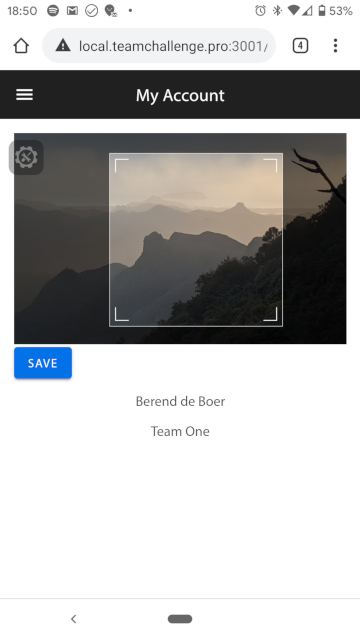 11 |
12 |
13 | # Installation
14 |
15 | This image crop cannot be installed with `elm` as it has to use a port
16 | module, because Elm does not support Canvas. So you'll have to install it manually.
17 |
18 | 1. In your Elm application root directory:
19 |
20 | git clone git@github.com:berenddeboer/elm-image-crop.git
21 |
22 | 2. Then add `elm.json` so to list the directory under your "source directories", something like this:
23 |
24 | "source-directories": [
25 | "src",
26 | "elm-image-scrop"
27 | ],
28 |
29 | 3. Add the following dependencies to your project:
30 |
31 | elm install elm/json
32 | elm install elm/svg
33 | elm install mpizenberg/elm-pointer-events
34 |
35 |
36 | # Just cropping
37 |
38 | See the `examples` directory.
39 |
40 |
41 | Basic steps:
42 |
43 | 1. Import the CropImage module to your module.
44 |
45 | 2. Add an `ImageCrop.Model` type to your model.
46 |
47 | 3. Add `GotImageCropMsg` to your `Msg` type.
48 |
49 | 4. Add a div to your view:
50 |
51 | div
52 | [ class "image-crop-picture"
53 | , style "max-width" "100%"
54 | ]
55 | [ Html.map GotImageCropMsg ( ImageCrop.view model.url model.cropSettings) ]
56 |
57 | 5. Handle this new msg in your `update` function:
58 |
59 | case msg of
60 | GotImageCropMsg subMsg ->
61 | let
62 | ( cropSettings, cmd ) = ImageCrop.update subMsg model.cropSettings
63 | in
64 | ( { model | cropSettings = cropSettings } )
65 |
66 |
67 | # Retrieving the cropped image
68 |
69 | Letting a user crop the image is just step one. You want to retrieve
70 | the cropped image as well. That will require you to include a piece of
71 | javascript. You may also run into CORS issues: you cannot extract part
72 | of an image that does not belong to your website unless that third
73 | party website has told you this is OK.
74 |
75 | 6. Add two more message: one for the click which initiates
76 | the action to extract the image, the other to handle the callback
77 | from JavaScript where the actual extraction process takes place.
78 |
79 | So your Msg looks like this:
80 |
81 | type Msg
82 | = GotImageCropMsg ImageCrop.Msg
83 | | SaveProfilePicture
84 | | GotCroppedImage (Result Decode.Error String)
85 |
86 |
87 | 7. Update your `update` function to handle these, see
88 | [Main.elm](examples/crop-and-get-cropped-image/src/Main.elm) for an
89 | example.
90 |
91 | 8. Add a subscription to handle the callback from JavaScript:
92 |
93 | subscriptions model =
94 | ImageCrop.Export.croppedImage (decodeUrl >> GotCroppedImage)
95 |
96 | decodeUrl : Decode.Value -> Result Decode.Error String
97 | decodeUrl =
98 | Decode.decodeValue Decode.string
99 |
100 | As you can see the callback just returns a url, a data url, of the
101 | extracted image. You can store this in your model, or use it as
102 | part of an HTTP request which store the extracted image in a
103 | backend or so.
104 |
--------------------------------------------------------------------------------
/src/ImageCrop.elm:
--------------------------------------------------------------------------------
1 | module ImageCrop exposing
2 | ( Model
3 | , Msg
4 | , update
5 | , view
6 | )
7 |
8 |
9 | {-| Make an ImageCrop component available.
10 |
11 | @docs Model
12 | @docs Msg
13 | @docs update
14 | @docs view
15 | -}
16 |
17 | import Html exposing (Attribute, Html, div, img, text)
18 | import Html.Attributes as Html exposing (class, src, style)
19 | import Html.Events exposing (on)
20 | import Html.Events.Extra.Touch as Touch
21 | import Html.Lazy exposing (lazy)
22 | import Json.Decode as Json
23 | import Svg exposing (g, path, polyline, svg)
24 | import Svg.Attributes exposing (d, fill, id, opacity, pointerEvents, points, preserveAspectRatio, stroke, strokeWidth, transform, viewBox)
25 | import Svg.Events exposing (onMouseDown, onMouseUp)
26 |
27 |
28 | -- MODEL
29 |
30 | {-| The model to track the internal state of this component.
31 | -}
32 |
33 | type alias Model =
34 | { left : Int
35 | , top : Int
36 | , length : Int
37 | , minimum_length : Int
38 | , maximum_length : Int
39 | , image_width : Int
40 | , image_height : Int
41 | , natural_width : Int
42 | , natural_height : Int
43 | , rectangle_state : RectangleState
44 | }
45 |
46 |
47 | type RectangleState
48 | = AtRest
49 | | Moving Int Int Int Int
50 | | Resizing MoveEdge Int Int Int Int Int
51 | | Pinching Int Int Int ( Float, Float ) ( Float, Float )
52 |
53 |
54 | type MoveEdge
55 | = MoveTopLeft
56 | | MoveTopRight
57 | | MoveBottomLeft
58 | | MoveBottomRight
59 |
60 | type WindDirection
61 | = NorthWest
62 | | NorthEast
63 | | SouthWest
64 | | SouthEast
65 |
66 |
67 | {-| Create an initial model.
68 |
69 | `width' and `height' are the dimensions of the image as scaled in the
70 | browser. `natural_width' and `natural_height' are the original dimension
71 | of the image.
72 | -}
73 | initialModel : Float -> Float -> Float -> Float -> Model
74 | initialModel width height natural_width natural_height =
75 | let
76 | proposed_length = round (width / 2)
77 | int_width = round width
78 | int_height = round height
79 | int_natural_width = round natural_width
80 | int_natural_height = round natural_height
81 | minimum_length = 100 -- Pretty arbitrary number
82 | maximum_length = min int_width int_height
83 | length =
84 | if proposed_length >= minimum_length then
85 | if proposed_length <= maximum_length then
86 | proposed_length
87 | else
88 | maximum_length
89 | else
90 | minimum_length
91 | in
92 | { left = ( int_width - length ) // 2
93 | , top = ( int_height - length ) // 2
94 | , length = length
95 | , minimum_length = minimum_length
96 | , maximum_length = maximum_length
97 | , image_width = int_width
98 | , image_height = int_height
99 | , natural_width = int_natural_width
100 | , natural_height = int_natural_height
101 | , rectangle_state = AtRest
102 | }
103 |
104 |
105 |
106 | -- VIEW
107 |
108 |
109 | {-| The view of an image that can be cropped.
110 | -}
111 | view : String -> Maybe Model -> Html Msg
112 | view url maybe_settings =
113 | div
114 | [ class "elm-crop-image"
115 | , style "position" "relative"
116 | ]
117 | [ img
118 | [ src url
119 | , style "max-width" "100%"
120 | , onLoad GotImageSize
121 | , Html.id "elm-image-crop--img"
122 | ]
123 | []
124 | , case maybe_settings of
125 | Just settings -> viewCropRectangle settings
126 | Nothing -> text ""
127 | ]
128 |
129 |
130 | viewCropRectangle : Model -> Html Msg
131 | viewCropRectangle settings =
132 | let
133 | width = settings.image_width
134 |
135 | height = settings.image_height
136 |
137 | length = settings.length
138 |
139 | widthStr = (String.fromInt width)
140 |
141 | heightStr = (String.fromInt height)
142 |
143 | cut_out =
144 | [ ( 0, settings.image_height )
145 | , ( width, 0)
146 | , ( 0, -height)
147 | , ( -width, 0) -- we should now be at 0, 0)
148 | , ( settings.left, settings.top )
149 | , ( length, 0 )
150 | , ( 0, length )
151 | , ( -length, 0 )
152 | , ( 0, -length )
153 | , ( -settings.left, -settings.top )
154 | ]
155 |
156 | rectangle =
157 | [ ( 0, 0 )
158 | , ( length, 0 )
159 | , ( 0, length )
160 | , ( -length, 0 )
161 | ]
162 |
163 | offset = 7
164 |
165 | resize_marker_length = 15
166 |
167 | corner_length = offset + resize_marker_length + 10
168 |
169 | -- Make corner a bit bigger than the marker, makes it easier to grab
170 | corner =
171 | [ ( 0, 0 )
172 | , ( corner_length, 0 )
173 | , ( 0, corner_length )
174 | , ( -corner_length, 0 )
175 | ]
176 |
177 | topLeftCorner =
178 | [ ( offset, offset + resize_marker_length )
179 | , ( offset, offset )
180 | , ( offset + resize_marker_length, offset )
181 | ]
182 |
183 | border_color = "#eee"
184 |
185 | wind_direction move_direction =
186 | case move_direction of
187 | MoveTopLeft -> "nw"
188 | MoveTopRight -> "ne"
189 | MoveBottomLeft -> "sw"
190 | MoveBottomRight -> "se"
191 |
192 | draggable_corner move_direction =
193 | svg
194 | [ Svg.Attributes.class "corner"
195 | , Svg.Attributes.x "0"
196 | , Svg.Attributes.y "0"
197 | , Svg.Attributes.width ( String.fromInt corner_length )
198 | , Svg.Attributes.height ( String.fromInt corner_length )
199 | , Svg.Attributes.style ( "cursor: " ++ (wind_direction move_direction) ++ "-resize" )
200 | , onMouseDown ( StartResize move_direction )
201 | , Touch.onStart ( StartResizeByTouch move_direction )
202 | , onMouseMove RectangleResized
203 | --, Touch.onMove RectangleResizedByTouch
204 | , Touch.onMove ( uncurry RectangleResized << touchCoordinates )
205 | ]
206 | [ path
207 | [ d (pathToString corner )
208 | , stroke "transparent"
209 | ]
210 | []
211 | , polyline
212 | [ points ( pointsToString topLeftCorner )
213 | ]
214 | []
215 | ]
216 |
217 | corner_translation move_direction =
218 | case move_direction of
219 | MoveTopLeft -> (0, 0)
220 | MoveTopRight -> (settings.length, 0)
221 | MoveBottomLeft -> (0, settings.length)
222 | MoveBottomRight -> (settings.length, settings.length)
223 |
224 | rotation move_direction =
225 | case move_direction of
226 | MoveTopLeft -> 0
227 | MoveTopRight -> 90
228 | MoveBottomLeft -> 270
229 | MoveBottomRight -> 180
230 |
231 | transform_corner move_direction =
232 | let
233 | translation =
234 | corner_translation move_direction
235 | |> (\(x, y) -> (String.fromInt x) ++ ", " ++ (String.fromInt y) )
236 | in
237 | transform ( String.concat ["translate(", translation, "), rotate(", String.fromInt (rotation move_direction), ")" ] )
238 |
239 | positioned_corner move_direction =
240 | g
241 | [ transform_corner move_direction ]
242 | [ draggable_corner move_direction ]
243 |
244 | in
245 | Svg.svg
246 | [ Svg.Attributes.id "elm-image-crop--svg-overlay"
247 | , Svg.Attributes.width (widthStr ++ "px")
248 | , Svg.Attributes.height (heightStr ++ "px")
249 | , viewBox ( "0 0 " ++ widthStr ++ " " ++ heightStr )
250 | , Svg.Attributes.style "position: absolute; z-index: 1; top: 0; left: 0;"
251 |
252 | -- We'll capture the mouse move here too in case the mouse moves
253 | -- outside the rectange, which can easily happen and it's annoying
254 | -- to have the move and resize stop then
255 | , case settings.rectangle_state of
256 | AtRest -> nothing
257 | Moving _ _ _ _ -> onMouseMove RectangleMoved
258 | Resizing _ _ _ _ _ _ -> onMouseMove RectangleResized
259 | Pinching _ _ _ _ _ -> nothing
260 |
261 | , case settings.rectangle_state of
262 | AtRest -> nothing
263 | Moving _ _ _ _ -> Touch.onMove RectangleMovedByTouch
264 | Resizing _ _ _ _ _ _ -> nothing
265 | Pinching _ _ _ _ _ -> Touch.onMove RectangleResizedByPinch
266 | , onMouseUp BeAtRest
267 | , on "touchend" ( Json.succeed BeAtRest )
268 | , on "touchend" ( Json.succeed BeAtRest )
269 | -- TODO: should only stop move when there's a mouseout of this element,
270 | -- not any bubbled element
271 | , on "mouseleave" (Json.map PossiblyStopMove targetId)
272 | ]
273 | [ path
274 | [ d ( pathToString cut_out )
275 | , fill "black"
276 | , opacity "0.55"
277 | ]
278 | []
279 | , svg
280 | [ Svg.Attributes.x (String.fromInt settings.left)
281 | , Svg.Attributes.y (String.fromInt settings.top)
282 | , Svg.Attributes.width (String.fromInt settings.length)
283 | , Svg.Attributes.height (String.fromInt settings.length)
284 | , stroke border_color
285 | , fill "transparent"
286 | --, Svg.Attributes.class "no-text-select"
287 | ]
288 | [ path
289 | [ d ( pathToString rectangle )
290 | , Svg.Attributes.style "cursor: grab"
291 | , onMouseDown StartMove
292 | , Touch.onStart StartMoveOrResize
293 | , id "elm-imagecrop-cropped-image"
294 | ]
295 | []
296 | , lazy positioned_corner MoveTopLeft
297 | , lazy positioned_corner MoveTopRight
298 | , lazy positioned_corner MoveBottomLeft
299 | , lazy positioned_corner MoveBottomRight
300 | ]
301 | ]
302 |
303 |
304 | nothing : Svg.Attribute Msg
305 | nothing =
306 | Svg.Attributes.attributeName ""
307 |
308 |
309 | {-| path to string using relative coordinates.
310 | -}
311 | pathToString : List ( Int, Int ) -> String
312 | pathToString coordinates =
313 | let
314 | pathCommand index item =
315 | let
316 | ( x, y ) = item
317 |
318 | command =
319 | if index == 0 then
320 | "M"
321 | else
322 | " l"
323 | in
324 | command ++ String.fromInt x ++ " " ++ String.fromInt y
325 |
326 | strings =
327 | coordinates
328 | |> List.indexedMap pathCommand
329 | in
330 | String.concat strings ++ " Z"
331 |
332 |
333 | pointsToString : List ( Int, Int ) -> String
334 | pointsToString points =
335 | points
336 | |> List.map (\(x, y) -> (String.fromInt x) ++ "," ++ (String.fromInt y))
337 | |> String.join ","
338 |
339 |
340 | -- EVENT HANDLERS
341 |
342 | {-| Image dimensions are only available after browser has loaded the
343 | image.
344 | -}
345 | onLoad : (Float -> Float -> Float -> Float -> msg) -> Attribute msg
346 | onLoad tagger =
347 | on "load" (Json.map4 tagger imageWidth imageHeight naturalWidth naturalHeight)
348 |
349 |
350 | targetId : Json.Decoder String
351 | targetId =
352 | Json.at ["target", "id"] Json.string
353 |
354 |
355 | imageWidth : Json.Decoder Float
356 | imageWidth =
357 | Json.at ["target", "width" ] Json.float
358 |
359 |
360 | imageHeight : Json.Decoder Float
361 | imageHeight =
362 | Json.at ["target", "height" ] Json.float
363 |
364 |
365 | naturalWidth : Json.Decoder Float
366 | naturalWidth =
367 | Json.at ["target", "naturalWidth" ] Json.float
368 |
369 |
370 | naturalHeight : Json.Decoder Float
371 | naturalHeight =
372 | Json.at ["target", "naturalHeight" ] Json.float
373 |
374 |
375 | onMouseDown : ( Int -> Int -> msg) -> Attribute msg
376 | onMouseDown tagger =
377 | Svg.Events.on "mousedown" (Json.map2 tagger clientX clientY )
378 |
379 |
380 | onMouseMove : ( Int -> Int -> msg) -> Attribute msg
381 | onMouseMove tagger =
382 | Svg.Events.on "mousemove" (Json.map2 tagger clientX clientY )
383 |
384 |
385 | clientX : Json.Decoder Int
386 | clientX =
387 | Json.field "clientX" Json.int
388 |
389 |
390 | clientY : Json.Decoder Int
391 | clientY =
392 | Json.field "clientY" Json.int
393 |
394 |
395 | touchCoordinates : Touch.Event -> ( Int, Int )
396 | touchCoordinates touchEvent =
397 | let
398 | ( x, y ) =
399 | List.head touchEvent.changedTouches
400 | |> Maybe.map .clientPos
401 | |> Maybe.withDefault ( 0, 0 )
402 | in
403 | ( round x, round y )
404 |
405 | {- Copied from Elm.Basics 0.18
406 | -}
407 | uncurry : (a -> b -> c) -> (a,b) -> c
408 | uncurry f (a,b) =
409 | f a b
410 |
411 |
412 | -- UPDATE
413 |
414 | {-| Opaque type for the messages this component uses.
415 | -}
416 | type Msg
417 | = GotImageSize Float Float Float Float
418 | | StartMove Int Int
419 | | PossiblyStopMove String
420 | | BeAtRest
421 | | RectangleMoved Int Int
422 | | StartResize MoveEdge Int Int
423 | | RectangleResized Int Int
424 | | StartMoveOrResize Touch.Event
425 | | StartResizeByTouch MoveEdge Touch.Event
426 | | RectangleMovedByTouch Touch.Event
427 | | RectangleResizedByTouch Touch.Event
428 | | RectangleResizedByPinch Touch.Event
429 |
430 |
431 | {-| Handle the commands.
432 | -}
433 | update : Msg -> Maybe Model -> ( Maybe Model, Cmd Msg )
434 | update msg maybe_model =
435 | case maybe_model of
436 | Nothing ->
437 | case msg of
438 | GotImageSize width height natural_width natural_height ->
439 | ( Just ( initialModel width height natural_width natural_height ), Cmd.none )
440 | _ ->
441 | ( Nothing, Cmd.none )
442 | Just model ->
443 | case msg of
444 | GotImageSize _ _ _ _ ->
445 | ( maybe_model, Cmd.none )
446 |
447 | StartMove clientx clienty ->
448 | ( Just { model | rectangle_state = Moving model.left model.top clientx clienty }, Cmd.none )
449 |
450 | BeAtRest ->
451 | ( Just { model | rectangle_state = AtRest }, Cmd.none )
452 |
453 | PossiblyStopMove id ->
454 | if id == "elm-image-crop--svg-overlay" then
455 | ( Just { model | rectangle_state = AtRest }, Cmd.none )
456 | else
457 | ( maybe_model, Cmd.none )
458 |
459 | RectangleMoved clientx clienty ->
460 | case model.rectangle_state of
461 | Moving originalx originaly startx starty ->
462 | let
463 | proposed_left = originalx + clientx - startx
464 | proposed_top = originaly + clienty - starty
465 | left =
466 | if proposed_left < 0 then
467 | 0
468 | else
469 | if proposed_left + model.length >= model.image_width then
470 | model.image_width - model.length
471 | else
472 | proposed_left
473 | top =
474 | if proposed_top < 0 then
475 | 0
476 | else
477 | if proposed_top + model.length >= model.image_height then
478 | model.image_height - model.length
479 | else
480 | proposed_top
481 | in
482 | ( Just { model | left = left, top = top }, Cmd.none )
483 | _ ->
484 | ( maybe_model, Cmd.none )
485 |
486 | StartResize edge clientx clienty ->
487 | ( Just { model | rectangle_state = Resizing edge model.left model.top model.length clientx clienty }, Cmd.none )
488 |
489 | RectangleResized clientx clienty ->
490 | case model.rectangle_state of
491 | Resizing corner original_left original_top original_length startx starty ->
492 | updateRectangleResizedByCorners maybe_model model corner original_left original_top original_length startx starty clientx clienty
493 | _ ->
494 | ( maybe_model, Cmd.none )
495 |
496 | StartMoveOrResize event ->
497 | let
498 | rest = ( Just { model | rectangle_state = AtRest }, Cmd.none )
499 | in
500 | case event.targetTouches of
501 | [] -> rest
502 | [ single_touch ] ->
503 | let
504 | ( clientx, clienty ) = single_touch.clientPos
505 | in
506 | update (StartMove (round clientx) (round clienty) ) maybe_model
507 | first_touch :: more_touches ->
508 | case more_touches of
509 | [] -> rest -- impossible case
510 | [ second_touch ] ->
511 | ( Just { model | rectangle_state = Pinching model.left model.top model.length first_touch.clientPos second_touch.clientPos }, Cmd.none )
512 | --( Just { model | rectangle_state = AtRest }, Cmd.none )
513 | _ :: _ -> rest -- multitouch, reset what we're doing
514 |
515 | RectangleMovedByTouch event ->
516 | let
517 | rest = ( Just { model | rectangle_state = AtRest }, Cmd.none )
518 | in
519 | case event.touches of
520 | [] -> rest
521 | [ single_touch ] ->
522 | let
523 | ( clientx, clienty ) = single_touch.clientPos
524 | in
525 | update (RectangleMoved (round clientx) (round clienty) ) maybe_model
526 | _ :: _ -> rest
527 |
528 | StartResizeByTouch edge event ->
529 | let
530 | rest = ( Just { model | rectangle_state = AtRest }, Cmd.none )
531 | in
532 | case event.targetTouches of
533 | [] -> rest
534 | [ single_touch ] ->
535 | let
536 | ( clientx, clienty ) = single_touch.clientPos
537 | in
538 | update (StartResize edge (round clientx) (round clienty) ) maybe_model
539 | _ :: _ -> rest
540 |
541 | RectangleResizedByTouch event ->
542 | case List.head event.changedTouches of
543 | Just touch ->
544 | let
545 | ( clientx, clienty ) = touch.clientPos
546 | in
547 | update (RectangleResized (round clientx) (round clienty) ) maybe_model
548 | Nothing ->
549 | ( maybe_model, Cmd.none )
550 |
551 | RectangleResizedByPinch event ->
552 | let
553 | impossible_case = ( maybe_model, Cmd.none )
554 | in
555 | case model.rectangle_state of
556 | Pinching original_left original_top original_length original_first_touch original_second_touch ->
557 | case event.targetTouches of
558 | [] -> impossible_case
559 | [ _ ] -> impossible_case
560 | first_touch :: more_touches ->
561 | case more_touches of
562 | [] -> impossible_case
563 | [ second_touch ] ->
564 | updateRectangleResizedByPinch model original_left original_top original_length original_first_touch original_second_touch first_touch second_touch
565 | _ :: _ -> impossible_case
566 | _ ->
567 | impossible_case
568 |
569 |
570 |
571 | {- Handle update when user resizes rectangle by dragging corners.
572 |
573 | We pass in `maybe_model` only for efficiency sake so Elm doesn't think
574 | model has changed, and therefore redraws.
575 | -}
576 | updateRectangleResizedByCorners maybe_model model corner original_left original_top original_length startx starty clientx clienty =
577 | let
578 | delta_x = clientx - startx
579 | delta_y = clienty - starty
580 |
581 | direction =
582 | if delta_x <= 0 then
583 | if delta_y <= 0 then
584 | NorthWest
585 | else
586 | SouthWest
587 | else
588 | if delta_y <= 0 then
589 | NorthEast
590 | else
591 | SouthEast
592 |
593 | -- We use 0 to cancel out forbidden directions
594 | sign =
595 | case ( corner, direction ) of
596 | ( MoveTopLeft, NorthWest ) -> 1
597 | ( MoveTopLeft, SouthEast ) -> -1
598 | ( MoveTopRight, NorthEast ) -> 1
599 | ( MoveTopRight, SouthWest ) -> -1
600 | ( MoveBottomLeft, SouthWest ) -> 1
601 | ( MoveBottomLeft, NorthEast ) -> -1
602 | ( MoveBottomRight, SouthEast ) -> 1
603 | ( MoveBottomRight, NorthWest ) -> -1
604 | ( _, _ ) -> 0
605 |
606 | allowed_move = sign /= 0
607 |
608 | -- Using the actual distance doesn't work, as it grows faster then the drag
609 | d = sign * (min (abs delta_x) (abs delta_y))
610 |
611 | proposed_delta =
612 | if original_length + d >= model.minimum_length then
613 | d
614 | else
615 | model.minimum_length - original_length
616 |
617 | -- Cap delta so we don't move outside image
618 | delta =
619 | case corner of
620 | MoveTopLeft ->
621 | if original_left - proposed_delta < 0 || original_top - proposed_delta < 0 then
622 | min original_left original_top
623 | else
624 | proposed_delta
625 | MoveTopRight ->
626 | if original_top - proposed_delta < 0 || original_left + original_length + proposed_delta > model.image_width then
627 | min original_top (model.image_width - original_left - original_length)
628 | else
629 | proposed_delta
630 | MoveBottomLeft ->
631 | if original_left - proposed_delta < 0 || original_top + proposed_delta > model.image_height then
632 | min original_left (model.image_height - original_top)
633 | else
634 | proposed_delta
635 | MoveBottomRight ->
636 | if original_left + original_length + proposed_delta > model.image_width || original_top + original_length + proposed_delta > model.image_height then
637 | min (model.image_width - original_left - original_length) (model.image_height - original_top - original_length)
638 | else
639 | proposed_delta
640 |
641 | new_length = original_length + delta
642 |
643 | ( new_left, new_top ) =
644 | case corner of
645 | MoveTopLeft ->
646 | ( original_left - delta, original_top - delta )
647 | MoveTopRight ->
648 | ( original_left, original_top - delta )
649 | MoveBottomLeft ->
650 | ( original_left - delta, original_top )
651 | MoveBottomRight ->
652 | ( original_left, original_top )
653 |
654 | in
655 | if allowed_move && delta /= 0 then
656 | ( Just { model | left = new_left, top = new_top, length = new_length }, Cmd.none )
657 | else
658 | ( maybe_model, Cmd.none )
659 |
660 |
661 | {- Handle update for when user resizes the rectangle by pinching.
662 | -}
663 | updateRectangleResizedByPinch model original_left original_top original_length original_first_touch original_second_touch first_touch second_touch =
664 | let
665 |
666 | original_distance = distance original_first_touch original_second_touch
667 |
668 | pinch_distance = distance first_touch.clientPos second_touch.clientPos
669 | proposed_delta = pinch_distance - original_distance
670 |
671 | delta =
672 | if original_length + proposed_delta >= model.minimum_length then
673 | proposed_delta
674 | else
675 | model.minimum_length
676 |
677 | -- Calculate by how much the left edge should move if the user had moved the rectangle.
678 | -- Note that this number is negative when the rectangle gets bigger.
679 | proposed_left_delta = round (min (Tuple.first first_touch.clientPos - Tuple.first original_first_touch) (Tuple.first second_touch.clientPos - Tuple.first original_second_touch))
680 |
681 | proposed_top_delta = round (min (Tuple.second first_touch.clientPos - Tuple.second original_first_touch) (Tuple.second second_touch.clientPos - Tuple.second original_second_touch))
682 |
683 | -- How much should the left edge move if the user didn't move the triangle?
684 | -- Note that this number is positive when the rectangle gets bigger.
685 | position_delta_without_move = round (toFloat delta / 2)
686 |
687 | -- Move the left and top edges out by only that bit which the user didn't move
688 | left_delta =
689 | -position_delta_without_move + proposed_left_delta
690 |
691 | top_delta =
692 | -position_delta_without_move + proposed_top_delta
693 |
694 | -- Make sure new_length never exceeds the maximum
695 | new_length =
696 | clamp model.minimum_length model.maximum_length (original_length + delta)
697 |
698 | -- If left bumps into left edge, don't go past it, but grow to the right, and vice versa
699 | new_left =
700 | if original_left + left_delta >= 0 then
701 | if original_left + left_delta + new_length <= model.image_width then
702 | original_left + left_delta
703 | else
704 | model.image_width - new_length
705 | else
706 | 0
707 |
708 | -- Same for top, make sure rectangle stays inside image.
709 | -- If image has reached max width we get a bit of a weird
710 | -- effect that the top moves upward, without the user giving a
711 | -- clear pinch move upward.
712 | new_top =
713 | if original_top + top_delta >= 0 then
714 | if original_top + top_delta + new_length <= model.image_height then
715 | original_top + top_delta
716 | else
717 | model.image_height - new_length
718 | else
719 | 0
720 |
721 | in
722 | ( Just { model | length = new_length, left = new_left, top = new_top }, Cmd.none )
723 |
724 |
725 |
726 | {- Calculate distance between two points.
727 |
728 | See: https://www.wikihow.com/Find-the-Distance-Between-Two-Points
729 | -}
730 | distance : ( Float, Float ) -> ( Float, Float ) -> Int
731 | distance ( x1, y1 ) ( x2, y2 ) =
732 | round ( sqrt ( (x2 - x1)^2 + (y2 - y1)^2 ) )
733 |
734 |
735 | distance_int : Int -> Int -> Int -> Int -> Int
736 | distance_int x1 y1 x2 y2 =
737 | round ( sqrt (toFloat ( (x2 - x1)^2 + (y2 - y1)^2 ) ) )
738 |
--------------------------------------------------------------------------------
11 |
12 |
13 | # Installation
14 |
15 | This image crop cannot be installed with `elm` as it has to use a port
16 | module, because Elm does not support Canvas. So you'll have to install it manually.
17 |
18 | 1. In your Elm application root directory:
19 |
20 | git clone git@github.com:berenddeboer/elm-image-crop.git
21 |
22 | 2. Then add `elm.json` so to list the directory under your "source directories", something like this:
23 |
24 | "source-directories": [
25 | "src",
26 | "elm-image-scrop"
27 | ],
28 |
29 | 3. Add the following dependencies to your project:
30 |
31 | elm install elm/json
32 | elm install elm/svg
33 | elm install mpizenberg/elm-pointer-events
34 |
35 |
36 | # Just cropping
37 |
38 | See the `examples` directory.
39 |
40 |
41 | Basic steps:
42 |
43 | 1. Import the CropImage module to your module.
44 |
45 | 2. Add an `ImageCrop.Model` type to your model.
46 |
47 | 3. Add `GotImageCropMsg` to your `Msg` type.
48 |
49 | 4. Add a div to your view:
50 |
51 | div
52 | [ class "image-crop-picture"
53 | , style "max-width" "100%"
54 | ]
55 | [ Html.map GotImageCropMsg ( ImageCrop.view model.url model.cropSettings) ]
56 |
57 | 5. Handle this new msg in your `update` function:
58 |
59 | case msg of
60 | GotImageCropMsg subMsg ->
61 | let
62 | ( cropSettings, cmd ) = ImageCrop.update subMsg model.cropSettings
63 | in
64 | ( { model | cropSettings = cropSettings } )
65 |
66 |
67 | # Retrieving the cropped image
68 |
69 | Letting a user crop the image is just step one. You want to retrieve
70 | the cropped image as well. That will require you to include a piece of
71 | javascript. You may also run into CORS issues: you cannot extract part
72 | of an image that does not belong to your website unless that third
73 | party website has told you this is OK.
74 |
75 | 6. Add two more message: one for the click which initiates
76 | the action to extract the image, the other to handle the callback
77 | from JavaScript where the actual extraction process takes place.
78 |
79 | So your Msg looks like this:
80 |
81 | type Msg
82 | = GotImageCropMsg ImageCrop.Msg
83 | | SaveProfilePicture
84 | | GotCroppedImage (Result Decode.Error String)
85 |
86 |
87 | 7. Update your `update` function to handle these, see
88 | [Main.elm](examples/crop-and-get-cropped-image/src/Main.elm) for an
89 | example.
90 |
91 | 8. Add a subscription to handle the callback from JavaScript:
92 |
93 | subscriptions model =
94 | ImageCrop.Export.croppedImage (decodeUrl >> GotCroppedImage)
95 |
96 | decodeUrl : Decode.Value -> Result Decode.Error String
97 | decodeUrl =
98 | Decode.decodeValue Decode.string
99 |
100 | As you can see the callback just returns a url, a data url, of the
101 | extracted image. You can store this in your model, or use it as
102 | part of an HTTP request which store the extracted image in a
103 | backend or so.
104 |
--------------------------------------------------------------------------------
/src/ImageCrop.elm:
--------------------------------------------------------------------------------
1 | module ImageCrop exposing
2 | ( Model
3 | , Msg
4 | , update
5 | , view
6 | )
7 |
8 |
9 | {-| Make an ImageCrop component available.
10 |
11 | @docs Model
12 | @docs Msg
13 | @docs update
14 | @docs view
15 | -}
16 |
17 | import Html exposing (Attribute, Html, div, img, text)
18 | import Html.Attributes as Html exposing (class, src, style)
19 | import Html.Events exposing (on)
20 | import Html.Events.Extra.Touch as Touch
21 | import Html.Lazy exposing (lazy)
22 | import Json.Decode as Json
23 | import Svg exposing (g, path, polyline, svg)
24 | import Svg.Attributes exposing (d, fill, id, opacity, pointerEvents, points, preserveAspectRatio, stroke, strokeWidth, transform, viewBox)
25 | import Svg.Events exposing (onMouseDown, onMouseUp)
26 |
27 |
28 | -- MODEL
29 |
30 | {-| The model to track the internal state of this component.
31 | -}
32 |
33 | type alias Model =
34 | { left : Int
35 | , top : Int
36 | , length : Int
37 | , minimum_length : Int
38 | , maximum_length : Int
39 | , image_width : Int
40 | , image_height : Int
41 | , natural_width : Int
42 | , natural_height : Int
43 | , rectangle_state : RectangleState
44 | }
45 |
46 |
47 | type RectangleState
48 | = AtRest
49 | | Moving Int Int Int Int
50 | | Resizing MoveEdge Int Int Int Int Int
51 | | Pinching Int Int Int ( Float, Float ) ( Float, Float )
52 |
53 |
54 | type MoveEdge
55 | = MoveTopLeft
56 | | MoveTopRight
57 | | MoveBottomLeft
58 | | MoveBottomRight
59 |
60 | type WindDirection
61 | = NorthWest
62 | | NorthEast
63 | | SouthWest
64 | | SouthEast
65 |
66 |
67 | {-| Create an initial model.
68 |
69 | `width' and `height' are the dimensions of the image as scaled in the
70 | browser. `natural_width' and `natural_height' are the original dimension
71 | of the image.
72 | -}
73 | initialModel : Float -> Float -> Float -> Float -> Model
74 | initialModel width height natural_width natural_height =
75 | let
76 | proposed_length = round (width / 2)
77 | int_width = round width
78 | int_height = round height
79 | int_natural_width = round natural_width
80 | int_natural_height = round natural_height
81 | minimum_length = 100 -- Pretty arbitrary number
82 | maximum_length = min int_width int_height
83 | length =
84 | if proposed_length >= minimum_length then
85 | if proposed_length <= maximum_length then
86 | proposed_length
87 | else
88 | maximum_length
89 | else
90 | minimum_length
91 | in
92 | { left = ( int_width - length ) // 2
93 | , top = ( int_height - length ) // 2
94 | , length = length
95 | , minimum_length = minimum_length
96 | , maximum_length = maximum_length
97 | , image_width = int_width
98 | , image_height = int_height
99 | , natural_width = int_natural_width
100 | , natural_height = int_natural_height
101 | , rectangle_state = AtRest
102 | }
103 |
104 |
105 |
106 | -- VIEW
107 |
108 |
109 | {-| The view of an image that can be cropped.
110 | -}
111 | view : String -> Maybe Model -> Html Msg
112 | view url maybe_settings =
113 | div
114 | [ class "elm-crop-image"
115 | , style "position" "relative"
116 | ]
117 | [ img
118 | [ src url
119 | , style "max-width" "100%"
120 | , onLoad GotImageSize
121 | , Html.id "elm-image-crop--img"
122 | ]
123 | []
124 | , case maybe_settings of
125 | Just settings -> viewCropRectangle settings
126 | Nothing -> text ""
127 | ]
128 |
129 |
130 | viewCropRectangle : Model -> Html Msg
131 | viewCropRectangle settings =
132 | let
133 | width = settings.image_width
134 |
135 | height = settings.image_height
136 |
137 | length = settings.length
138 |
139 | widthStr = (String.fromInt width)
140 |
141 | heightStr = (String.fromInt height)
142 |
143 | cut_out =
144 | [ ( 0, settings.image_height )
145 | , ( width, 0)
146 | , ( 0, -height)
147 | , ( -width, 0) -- we should now be at 0, 0)
148 | , ( settings.left, settings.top )
149 | , ( length, 0 )
150 | , ( 0, length )
151 | , ( -length, 0 )
152 | , ( 0, -length )
153 | , ( -settings.left, -settings.top )
154 | ]
155 |
156 | rectangle =
157 | [ ( 0, 0 )
158 | , ( length, 0 )
159 | , ( 0, length )
160 | , ( -length, 0 )
161 | ]
162 |
163 | offset = 7
164 |
165 | resize_marker_length = 15
166 |
167 | corner_length = offset + resize_marker_length + 10
168 |
169 | -- Make corner a bit bigger than the marker, makes it easier to grab
170 | corner =
171 | [ ( 0, 0 )
172 | , ( corner_length, 0 )
173 | , ( 0, corner_length )
174 | , ( -corner_length, 0 )
175 | ]
176 |
177 | topLeftCorner =
178 | [ ( offset, offset + resize_marker_length )
179 | , ( offset, offset )
180 | , ( offset + resize_marker_length, offset )
181 | ]
182 |
183 | border_color = "#eee"
184 |
185 | wind_direction move_direction =
186 | case move_direction of
187 | MoveTopLeft -> "nw"
188 | MoveTopRight -> "ne"
189 | MoveBottomLeft -> "sw"
190 | MoveBottomRight -> "se"
191 |
192 | draggable_corner move_direction =
193 | svg
194 | [ Svg.Attributes.class "corner"
195 | , Svg.Attributes.x "0"
196 | , Svg.Attributes.y "0"
197 | , Svg.Attributes.width ( String.fromInt corner_length )
198 | , Svg.Attributes.height ( String.fromInt corner_length )
199 | , Svg.Attributes.style ( "cursor: " ++ (wind_direction move_direction) ++ "-resize" )
200 | , onMouseDown ( StartResize move_direction )
201 | , Touch.onStart ( StartResizeByTouch move_direction )
202 | , onMouseMove RectangleResized
203 | --, Touch.onMove RectangleResizedByTouch
204 | , Touch.onMove ( uncurry RectangleResized << touchCoordinates )
205 | ]
206 | [ path
207 | [ d (pathToString corner )
208 | , stroke "transparent"
209 | ]
210 | []
211 | , polyline
212 | [ points ( pointsToString topLeftCorner )
213 | ]
214 | []
215 | ]
216 |
217 | corner_translation move_direction =
218 | case move_direction of
219 | MoveTopLeft -> (0, 0)
220 | MoveTopRight -> (settings.length, 0)
221 | MoveBottomLeft -> (0, settings.length)
222 | MoveBottomRight -> (settings.length, settings.length)
223 |
224 | rotation move_direction =
225 | case move_direction of
226 | MoveTopLeft -> 0
227 | MoveTopRight -> 90
228 | MoveBottomLeft -> 270
229 | MoveBottomRight -> 180
230 |
231 | transform_corner move_direction =
232 | let
233 | translation =
234 | corner_translation move_direction
235 | |> (\(x, y) -> (String.fromInt x) ++ ", " ++ (String.fromInt y) )
236 | in
237 | transform ( String.concat ["translate(", translation, "), rotate(", String.fromInt (rotation move_direction), ")" ] )
238 |
239 | positioned_corner move_direction =
240 | g
241 | [ transform_corner move_direction ]
242 | [ draggable_corner move_direction ]
243 |
244 | in
245 | Svg.svg
246 | [ Svg.Attributes.id "elm-image-crop--svg-overlay"
247 | , Svg.Attributes.width (widthStr ++ "px")
248 | , Svg.Attributes.height (heightStr ++ "px")
249 | , viewBox ( "0 0 " ++ widthStr ++ " " ++ heightStr )
250 | , Svg.Attributes.style "position: absolute; z-index: 1; top: 0; left: 0;"
251 |
252 | -- We'll capture the mouse move here too in case the mouse moves
253 | -- outside the rectange, which can easily happen and it's annoying
254 | -- to have the move and resize stop then
255 | , case settings.rectangle_state of
256 | AtRest -> nothing
257 | Moving _ _ _ _ -> onMouseMove RectangleMoved
258 | Resizing _ _ _ _ _ _ -> onMouseMove RectangleResized
259 | Pinching _ _ _ _ _ -> nothing
260 |
261 | , case settings.rectangle_state of
262 | AtRest -> nothing
263 | Moving _ _ _ _ -> Touch.onMove RectangleMovedByTouch
264 | Resizing _ _ _ _ _ _ -> nothing
265 | Pinching _ _ _ _ _ -> Touch.onMove RectangleResizedByPinch
266 | , onMouseUp BeAtRest
267 | , on "touchend" ( Json.succeed BeAtRest )
268 | , on "touchend" ( Json.succeed BeAtRest )
269 | -- TODO: should only stop move when there's a mouseout of this element,
270 | -- not any bubbled element
271 | , on "mouseleave" (Json.map PossiblyStopMove targetId)
272 | ]
273 | [ path
274 | [ d ( pathToString cut_out )
275 | , fill "black"
276 | , opacity "0.55"
277 | ]
278 | []
279 | , svg
280 | [ Svg.Attributes.x (String.fromInt settings.left)
281 | , Svg.Attributes.y (String.fromInt settings.top)
282 | , Svg.Attributes.width (String.fromInt settings.length)
283 | , Svg.Attributes.height (String.fromInt settings.length)
284 | , stroke border_color
285 | , fill "transparent"
286 | --, Svg.Attributes.class "no-text-select"
287 | ]
288 | [ path
289 | [ d ( pathToString rectangle )
290 | , Svg.Attributes.style "cursor: grab"
291 | , onMouseDown StartMove
292 | , Touch.onStart StartMoveOrResize
293 | , id "elm-imagecrop-cropped-image"
294 | ]
295 | []
296 | , lazy positioned_corner MoveTopLeft
297 | , lazy positioned_corner MoveTopRight
298 | , lazy positioned_corner MoveBottomLeft
299 | , lazy positioned_corner MoveBottomRight
300 | ]
301 | ]
302 |
303 |
304 | nothing : Svg.Attribute Msg
305 | nothing =
306 | Svg.Attributes.attributeName ""
307 |
308 |
309 | {-| path to string using relative coordinates.
310 | -}
311 | pathToString : List ( Int, Int ) -> String
312 | pathToString coordinates =
313 | let
314 | pathCommand index item =
315 | let
316 | ( x, y ) = item
317 |
318 | command =
319 | if index == 0 then
320 | "M"
321 | else
322 | " l"
323 | in
324 | command ++ String.fromInt x ++ " " ++ String.fromInt y
325 |
326 | strings =
327 | coordinates
328 | |> List.indexedMap pathCommand
329 | in
330 | String.concat strings ++ " Z"
331 |
332 |
333 | pointsToString : List ( Int, Int ) -> String
334 | pointsToString points =
335 | points
336 | |> List.map (\(x, y) -> (String.fromInt x) ++ "," ++ (String.fromInt y))
337 | |> String.join ","
338 |
339 |
340 | -- EVENT HANDLERS
341 |
342 | {-| Image dimensions are only available after browser has loaded the
343 | image.
344 | -}
345 | onLoad : (Float -> Float -> Float -> Float -> msg) -> Attribute msg
346 | onLoad tagger =
347 | on "load" (Json.map4 tagger imageWidth imageHeight naturalWidth naturalHeight)
348 |
349 |
350 | targetId : Json.Decoder String
351 | targetId =
352 | Json.at ["target", "id"] Json.string
353 |
354 |
355 | imageWidth : Json.Decoder Float
356 | imageWidth =
357 | Json.at ["target", "width" ] Json.float
358 |
359 |
360 | imageHeight : Json.Decoder Float
361 | imageHeight =
362 | Json.at ["target", "height" ] Json.float
363 |
364 |
365 | naturalWidth : Json.Decoder Float
366 | naturalWidth =
367 | Json.at ["target", "naturalWidth" ] Json.float
368 |
369 |
370 | naturalHeight : Json.Decoder Float
371 | naturalHeight =
372 | Json.at ["target", "naturalHeight" ] Json.float
373 |
374 |
375 | onMouseDown : ( Int -> Int -> msg) -> Attribute msg
376 | onMouseDown tagger =
377 | Svg.Events.on "mousedown" (Json.map2 tagger clientX clientY )
378 |
379 |
380 | onMouseMove : ( Int -> Int -> msg) -> Attribute msg
381 | onMouseMove tagger =
382 | Svg.Events.on "mousemove" (Json.map2 tagger clientX clientY )
383 |
384 |
385 | clientX : Json.Decoder Int
386 | clientX =
387 | Json.field "clientX" Json.int
388 |
389 |
390 | clientY : Json.Decoder Int
391 | clientY =
392 | Json.field "clientY" Json.int
393 |
394 |
395 | touchCoordinates : Touch.Event -> ( Int, Int )
396 | touchCoordinates touchEvent =
397 | let
398 | ( x, y ) =
399 | List.head touchEvent.changedTouches
400 | |> Maybe.map .clientPos
401 | |> Maybe.withDefault ( 0, 0 )
402 | in
403 | ( round x, round y )
404 |
405 | {- Copied from Elm.Basics 0.18
406 | -}
407 | uncurry : (a -> b -> c) -> (a,b) -> c
408 | uncurry f (a,b) =
409 | f a b
410 |
411 |
412 | -- UPDATE
413 |
414 | {-| Opaque type for the messages this component uses.
415 | -}
416 | type Msg
417 | = GotImageSize Float Float Float Float
418 | | StartMove Int Int
419 | | PossiblyStopMove String
420 | | BeAtRest
421 | | RectangleMoved Int Int
422 | | StartResize MoveEdge Int Int
423 | | RectangleResized Int Int
424 | | StartMoveOrResize Touch.Event
425 | | StartResizeByTouch MoveEdge Touch.Event
426 | | RectangleMovedByTouch Touch.Event
427 | | RectangleResizedByTouch Touch.Event
428 | | RectangleResizedByPinch Touch.Event
429 |
430 |
431 | {-| Handle the commands.
432 | -}
433 | update : Msg -> Maybe Model -> ( Maybe Model, Cmd Msg )
434 | update msg maybe_model =
435 | case maybe_model of
436 | Nothing ->
437 | case msg of
438 | GotImageSize width height natural_width natural_height ->
439 | ( Just ( initialModel width height natural_width natural_height ), Cmd.none )
440 | _ ->
441 | ( Nothing, Cmd.none )
442 | Just model ->
443 | case msg of
444 | GotImageSize _ _ _ _ ->
445 | ( maybe_model, Cmd.none )
446 |
447 | StartMove clientx clienty ->
448 | ( Just { model | rectangle_state = Moving model.left model.top clientx clienty }, Cmd.none )
449 |
450 | BeAtRest ->
451 | ( Just { model | rectangle_state = AtRest }, Cmd.none )
452 |
453 | PossiblyStopMove id ->
454 | if id == "elm-image-crop--svg-overlay" then
455 | ( Just { model | rectangle_state = AtRest }, Cmd.none )
456 | else
457 | ( maybe_model, Cmd.none )
458 |
459 | RectangleMoved clientx clienty ->
460 | case model.rectangle_state of
461 | Moving originalx originaly startx starty ->
462 | let
463 | proposed_left = originalx + clientx - startx
464 | proposed_top = originaly + clienty - starty
465 | left =
466 | if proposed_left < 0 then
467 | 0
468 | else
469 | if proposed_left + model.length >= model.image_width then
470 | model.image_width - model.length
471 | else
472 | proposed_left
473 | top =
474 | if proposed_top < 0 then
475 | 0
476 | else
477 | if proposed_top + model.length >= model.image_height then
478 | model.image_height - model.length
479 | else
480 | proposed_top
481 | in
482 | ( Just { model | left = left, top = top }, Cmd.none )
483 | _ ->
484 | ( maybe_model, Cmd.none )
485 |
486 | StartResize edge clientx clienty ->
487 | ( Just { model | rectangle_state = Resizing edge model.left model.top model.length clientx clienty }, Cmd.none )
488 |
489 | RectangleResized clientx clienty ->
490 | case model.rectangle_state of
491 | Resizing corner original_left original_top original_length startx starty ->
492 | updateRectangleResizedByCorners maybe_model model corner original_left original_top original_length startx starty clientx clienty
493 | _ ->
494 | ( maybe_model, Cmd.none )
495 |
496 | StartMoveOrResize event ->
497 | let
498 | rest = ( Just { model | rectangle_state = AtRest }, Cmd.none )
499 | in
500 | case event.targetTouches of
501 | [] -> rest
502 | [ single_touch ] ->
503 | let
504 | ( clientx, clienty ) = single_touch.clientPos
505 | in
506 | update (StartMove (round clientx) (round clienty) ) maybe_model
507 | first_touch :: more_touches ->
508 | case more_touches of
509 | [] -> rest -- impossible case
510 | [ second_touch ] ->
511 | ( Just { model | rectangle_state = Pinching model.left model.top model.length first_touch.clientPos second_touch.clientPos }, Cmd.none )
512 | --( Just { model | rectangle_state = AtRest }, Cmd.none )
513 | _ :: _ -> rest -- multitouch, reset what we're doing
514 |
515 | RectangleMovedByTouch event ->
516 | let
517 | rest = ( Just { model | rectangle_state = AtRest }, Cmd.none )
518 | in
519 | case event.touches of
520 | [] -> rest
521 | [ single_touch ] ->
522 | let
523 | ( clientx, clienty ) = single_touch.clientPos
524 | in
525 | update (RectangleMoved (round clientx) (round clienty) ) maybe_model
526 | _ :: _ -> rest
527 |
528 | StartResizeByTouch edge event ->
529 | let
530 | rest = ( Just { model | rectangle_state = AtRest }, Cmd.none )
531 | in
532 | case event.targetTouches of
533 | [] -> rest
534 | [ single_touch ] ->
535 | let
536 | ( clientx, clienty ) = single_touch.clientPos
537 | in
538 | update (StartResize edge (round clientx) (round clienty) ) maybe_model
539 | _ :: _ -> rest
540 |
541 | RectangleResizedByTouch event ->
542 | case List.head event.changedTouches of
543 | Just touch ->
544 | let
545 | ( clientx, clienty ) = touch.clientPos
546 | in
547 | update (RectangleResized (round clientx) (round clienty) ) maybe_model
548 | Nothing ->
549 | ( maybe_model, Cmd.none )
550 |
551 | RectangleResizedByPinch event ->
552 | let
553 | impossible_case = ( maybe_model, Cmd.none )
554 | in
555 | case model.rectangle_state of
556 | Pinching original_left original_top original_length original_first_touch original_second_touch ->
557 | case event.targetTouches of
558 | [] -> impossible_case
559 | [ _ ] -> impossible_case
560 | first_touch :: more_touches ->
561 | case more_touches of
562 | [] -> impossible_case
563 | [ second_touch ] ->
564 | updateRectangleResizedByPinch model original_left original_top original_length original_first_touch original_second_touch first_touch second_touch
565 | _ :: _ -> impossible_case
566 | _ ->
567 | impossible_case
568 |
569 |
570 |
571 | {- Handle update when user resizes rectangle by dragging corners.
572 |
573 | We pass in `maybe_model` only for efficiency sake so Elm doesn't think
574 | model has changed, and therefore redraws.
575 | -}
576 | updateRectangleResizedByCorners maybe_model model corner original_left original_top original_length startx starty clientx clienty =
577 | let
578 | delta_x = clientx - startx
579 | delta_y = clienty - starty
580 |
581 | direction =
582 | if delta_x <= 0 then
583 | if delta_y <= 0 then
584 | NorthWest
585 | else
586 | SouthWest
587 | else
588 | if delta_y <= 0 then
589 | NorthEast
590 | else
591 | SouthEast
592 |
593 | -- We use 0 to cancel out forbidden directions
594 | sign =
595 | case ( corner, direction ) of
596 | ( MoveTopLeft, NorthWest ) -> 1
597 | ( MoveTopLeft, SouthEast ) -> -1
598 | ( MoveTopRight, NorthEast ) -> 1
599 | ( MoveTopRight, SouthWest ) -> -1
600 | ( MoveBottomLeft, SouthWest ) -> 1
601 | ( MoveBottomLeft, NorthEast ) -> -1
602 | ( MoveBottomRight, SouthEast ) -> 1
603 | ( MoveBottomRight, NorthWest ) -> -1
604 | ( _, _ ) -> 0
605 |
606 | allowed_move = sign /= 0
607 |
608 | -- Using the actual distance doesn't work, as it grows faster then the drag
609 | d = sign * (min (abs delta_x) (abs delta_y))
610 |
611 | proposed_delta =
612 | if original_length + d >= model.minimum_length then
613 | d
614 | else
615 | model.minimum_length - original_length
616 |
617 | -- Cap delta so we don't move outside image
618 | delta =
619 | case corner of
620 | MoveTopLeft ->
621 | if original_left - proposed_delta < 0 || original_top - proposed_delta < 0 then
622 | min original_left original_top
623 | else
624 | proposed_delta
625 | MoveTopRight ->
626 | if original_top - proposed_delta < 0 || original_left + original_length + proposed_delta > model.image_width then
627 | min original_top (model.image_width - original_left - original_length)
628 | else
629 | proposed_delta
630 | MoveBottomLeft ->
631 | if original_left - proposed_delta < 0 || original_top + proposed_delta > model.image_height then
632 | min original_left (model.image_height - original_top)
633 | else
634 | proposed_delta
635 | MoveBottomRight ->
636 | if original_left + original_length + proposed_delta > model.image_width || original_top + original_length + proposed_delta > model.image_height then
637 | min (model.image_width - original_left - original_length) (model.image_height - original_top - original_length)
638 | else
639 | proposed_delta
640 |
641 | new_length = original_length + delta
642 |
643 | ( new_left, new_top ) =
644 | case corner of
645 | MoveTopLeft ->
646 | ( original_left - delta, original_top - delta )
647 | MoveTopRight ->
648 | ( original_left, original_top - delta )
649 | MoveBottomLeft ->
650 | ( original_left - delta, original_top )
651 | MoveBottomRight ->
652 | ( original_left, original_top )
653 |
654 | in
655 | if allowed_move && delta /= 0 then
656 | ( Just { model | left = new_left, top = new_top, length = new_length }, Cmd.none )
657 | else
658 | ( maybe_model, Cmd.none )
659 |
660 |
661 | {- Handle update for when user resizes the rectangle by pinching.
662 | -}
663 | updateRectangleResizedByPinch model original_left original_top original_length original_first_touch original_second_touch first_touch second_touch =
664 | let
665 |
666 | original_distance = distance original_first_touch original_second_touch
667 |
668 | pinch_distance = distance first_touch.clientPos second_touch.clientPos
669 | proposed_delta = pinch_distance - original_distance
670 |
671 | delta =
672 | if original_length + proposed_delta >= model.minimum_length then
673 | proposed_delta
674 | else
675 | model.minimum_length
676 |
677 | -- Calculate by how much the left edge should move if the user had moved the rectangle.
678 | -- Note that this number is negative when the rectangle gets bigger.
679 | proposed_left_delta = round (min (Tuple.first first_touch.clientPos - Tuple.first original_first_touch) (Tuple.first second_touch.clientPos - Tuple.first original_second_touch))
680 |
681 | proposed_top_delta = round (min (Tuple.second first_touch.clientPos - Tuple.second original_first_touch) (Tuple.second second_touch.clientPos - Tuple.second original_second_touch))
682 |
683 | -- How much should the left edge move if the user didn't move the triangle?
684 | -- Note that this number is positive when the rectangle gets bigger.
685 | position_delta_without_move = round (toFloat delta / 2)
686 |
687 | -- Move the left and top edges out by only that bit which the user didn't move
688 | left_delta =
689 | -position_delta_without_move + proposed_left_delta
690 |
691 | top_delta =
692 | -position_delta_without_move + proposed_top_delta
693 |
694 | -- Make sure new_length never exceeds the maximum
695 | new_length =
696 | clamp model.minimum_length model.maximum_length (original_length + delta)
697 |
698 | -- If left bumps into left edge, don't go past it, but grow to the right, and vice versa
699 | new_left =
700 | if original_left + left_delta >= 0 then
701 | if original_left + left_delta + new_length <= model.image_width then
702 | original_left + left_delta
703 | else
704 | model.image_width - new_length
705 | else
706 | 0
707 |
708 | -- Same for top, make sure rectangle stays inside image.
709 | -- If image has reached max width we get a bit of a weird
710 | -- effect that the top moves upward, without the user giving a
711 | -- clear pinch move upward.
712 | new_top =
713 | if original_top + top_delta >= 0 then
714 | if original_top + top_delta + new_length <= model.image_height then
715 | original_top + top_delta
716 | else
717 | model.image_height - new_length
718 | else
719 | 0
720 |
721 | in
722 | ( Just { model | length = new_length, left = new_left, top = new_top }, Cmd.none )
723 |
724 |
725 |
726 | {- Calculate distance between two points.
727 |
728 | See: https://www.wikihow.com/Find-the-Distance-Between-Two-Points
729 | -}
730 | distance : ( Float, Float ) -> ( Float, Float ) -> Int
731 | distance ( x1, y1 ) ( x2, y2 ) =
732 | round ( sqrt ( (x2 - x1)^2 + (y2 - y1)^2 ) )
733 |
734 |
735 | distance_int : Int -> Int -> Int -> Int -> Int
736 | distance_int x1 y1 x2 y2 =
737 | round ( sqrt (toFloat ( (x2 - x1)^2 + (y2 - y1)^2 ) ) )
738 |
--------------------------------------------------------------------------------