├── LPD
├── pyqtgraph_13
│ └── text.txt
├── .DS_Store
├── lpd_v09_raw_ex0.py
└── lpd_v09_kv_3dbar.py
├── PCT_FDS
├── mmWave_PCT_FDS_Document
│ ├── README.MD
│ ├── mmWave_PCT_FDS_Document_20240422 english.pdf
│ └── mmWave_PCT_FDS_Document_20240422_Chinese.pdf
├── jb_FDS_client_Windows_v01.py
├── mmWave_pc3OVH_fds.json
├── PCT_ex0.py
├── PCT_ex2_record.py
└── README_FDS.md
├── PC3_v3
├── ReadMe.md
├── PC3_ex2_record.py
├── PC3_ex4_plot.py
├── jb_tools.py
├── PC3_ex3_xyz_playback.py
└── PC3_ex1.py
├── .DS_Store
├── DRN
├── .DS_Store
├── DRN_ex0.py
└── README.md
├── FDS
├── .DS_Store
├── lpdFDS_raw_ex0.py
└── lpdFDS_raw_v7_recorder.py
├── HAM
├── .DS_Store
├── Arduino
│ └── README.md
└── python
│ ├── HAM_ex0.py
│ ├── HAM_ex1_Thread.py
│ ├── README.md
│ └── HAM_ex3_rangeProfile.py
├── PC3
├── .DS_Store
├── PC3_ex1_pandas.py
├── PC3_ex2_record.py
└── PC3_ex0.py
├── PCR
├── .DS_Store
└── pc3_raw_ex0_record.py
├── PMB
├── .DS_Store
├── PMB_ex0.py
├── PMB_ex1_Thread.py
├── PMB_ex2_intr18.py
└── README.md
├── POS
├── .DS_Store
├── POS_pc3OVH_ex0.py
└── POS_pc3OVH_record.py
├── SRR
├── .DS_Store
├── SrrKeyDataProtocol_v04_03_pdf.pdf
└── README.md
├── SVD
├── .DS_Store
└── README.md
├── TMD
├── .DS_Store
├── TMD_ex0.py
└── TMD_ex2_pointCloud.py
├── TRS
├── .DS_Store
├── TRS_kv_ex0.py
└── TRS_kv_ex1.py
├── VED
├── .DS_Store
├── README.md
└── pyqtgraph 0.13 version
│ └── README.md
├── VOD
├── .DS_Store
└── README.md
├── VSD
├── .DS_Store
├── vitalSign_ex0_kv.py
├── vitalSign_ex0.py
├── UI_vsd.ui
├── vitalSign_ex1_Thread_kv.py
├── UI_vsd.py
├── vitalSign_ex1_Thread.py
├── vitalSign_ex2_intr18.py
└── README.md
├── ZOD
├── .DS_Store
├── Arduino
│ ├── .DS_Store
│ └── README.md
├── README.md
└── Python
│ ├── zod_ex0.py
│ ├── zod_ex1_heatMap.py
│ └── README.md
├── PC3D-ES2
├── .DS_Store
├── pc3d_v12_raw_ex0.py
├── pc3d_v12_raw_pointCloud.py
└── pc3d_v12_kv_FDS.py
├── TMD_kv
├── Arduino
│ └── README.md
└── Python
│ ├── TMD_kv_ex0.py
│ ├── README.md
│ └── TMD_kv_pyqtgraph_xy.py
├── PC3_v2
├── 3d_pplcount_user_guide_I470.pdf
├── PC3_ex1_pandas.py
├── PC3_ex2_record.py
└── PC3_ex0.py
├── PC3_v1884R
└── mmWave_pc3_1884r_ex0.py
└── PC3D-ES0
├── pc3d_ex1.py
└── README.md
/LPD/pyqtgraph_13/text.txt:
--------------------------------------------------------------------------------
1 |
2 |
--------------------------------------------------------------------------------
/PCT_FDS/mmWave_PCT_FDS_Document/README.MD:
--------------------------------------------------------------------------------
1 |
2 |
--------------------------------------------------------------------------------
/PC3_v3/ReadMe.md:
--------------------------------------------------------------------------------
1 | # update pc3 python code for lib version
2 |
--------------------------------------------------------------------------------
/.DS_Store:
--------------------------------------------------------------------------------
https://raw.githubusercontent.com/bigheadG/mmWave/HEAD/.DS_Store
--------------------------------------------------------------------------------
/DRN/.DS_Store:
--------------------------------------------------------------------------------
https://raw.githubusercontent.com/bigheadG/mmWave/HEAD/DRN/.DS_Store
--------------------------------------------------------------------------------
/FDS/.DS_Store:
--------------------------------------------------------------------------------
https://raw.githubusercontent.com/bigheadG/mmWave/HEAD/FDS/.DS_Store
--------------------------------------------------------------------------------
/HAM/.DS_Store:
--------------------------------------------------------------------------------
https://raw.githubusercontent.com/bigheadG/mmWave/HEAD/HAM/.DS_Store
--------------------------------------------------------------------------------
/LPD/.DS_Store:
--------------------------------------------------------------------------------
https://raw.githubusercontent.com/bigheadG/mmWave/HEAD/LPD/.DS_Store
--------------------------------------------------------------------------------
/PC3/.DS_Store:
--------------------------------------------------------------------------------
https://raw.githubusercontent.com/bigheadG/mmWave/HEAD/PC3/.DS_Store
--------------------------------------------------------------------------------
/PCR/.DS_Store:
--------------------------------------------------------------------------------
https://raw.githubusercontent.com/bigheadG/mmWave/HEAD/PCR/.DS_Store
--------------------------------------------------------------------------------
/PMB/.DS_Store:
--------------------------------------------------------------------------------
https://raw.githubusercontent.com/bigheadG/mmWave/HEAD/PMB/.DS_Store
--------------------------------------------------------------------------------
/POS/.DS_Store:
--------------------------------------------------------------------------------
https://raw.githubusercontent.com/bigheadG/mmWave/HEAD/POS/.DS_Store
--------------------------------------------------------------------------------
/SRR/.DS_Store:
--------------------------------------------------------------------------------
https://raw.githubusercontent.com/bigheadG/mmWave/HEAD/SRR/.DS_Store
--------------------------------------------------------------------------------
/SVD/.DS_Store:
--------------------------------------------------------------------------------
https://raw.githubusercontent.com/bigheadG/mmWave/HEAD/SVD/.DS_Store
--------------------------------------------------------------------------------
/TMD/.DS_Store:
--------------------------------------------------------------------------------
https://raw.githubusercontent.com/bigheadG/mmWave/HEAD/TMD/.DS_Store
--------------------------------------------------------------------------------
/TRS/.DS_Store:
--------------------------------------------------------------------------------
https://raw.githubusercontent.com/bigheadG/mmWave/HEAD/TRS/.DS_Store
--------------------------------------------------------------------------------
/VED/.DS_Store:
--------------------------------------------------------------------------------
https://raw.githubusercontent.com/bigheadG/mmWave/HEAD/VED/.DS_Store
--------------------------------------------------------------------------------
/VOD/.DS_Store:
--------------------------------------------------------------------------------
https://raw.githubusercontent.com/bigheadG/mmWave/HEAD/VOD/.DS_Store
--------------------------------------------------------------------------------
/VSD/.DS_Store:
--------------------------------------------------------------------------------
https://raw.githubusercontent.com/bigheadG/mmWave/HEAD/VSD/.DS_Store
--------------------------------------------------------------------------------
/ZOD/.DS_Store:
--------------------------------------------------------------------------------
https://raw.githubusercontent.com/bigheadG/mmWave/HEAD/ZOD/.DS_Store
--------------------------------------------------------------------------------
/PC3D-ES2/.DS_Store:
--------------------------------------------------------------------------------
https://raw.githubusercontent.com/bigheadG/mmWave/HEAD/PC3D-ES2/.DS_Store
--------------------------------------------------------------------------------
/TMD_kv/Arduino/README.md:
--------------------------------------------------------------------------------
1 | ## mmWave TMD Arduino (Under Construction...)
2 |
3 |
4 |
--------------------------------------------------------------------------------
/ZOD/Arduino/.DS_Store:
--------------------------------------------------------------------------------
https://raw.githubusercontent.com/bigheadG/mmWave/HEAD/ZOD/Arduino/.DS_Store
--------------------------------------------------------------------------------
/PC3_v2/3d_pplcount_user_guide_I470.pdf:
--------------------------------------------------------------------------------
https://raw.githubusercontent.com/bigheadG/mmWave/HEAD/PC3_v2/3d_pplcount_user_guide_I470.pdf
--------------------------------------------------------------------------------
/SRR/SrrKeyDataProtocol_v04_03_pdf.pdf:
--------------------------------------------------------------------------------
https://raw.githubusercontent.com/bigheadG/mmWave/HEAD/SRR/SrrKeyDataProtocol_v04_03_pdf.pdf
--------------------------------------------------------------------------------
/PCT_FDS/mmWave_PCT_FDS_Document/mmWave_PCT_FDS_Document_20240422 english.pdf:
--------------------------------------------------------------------------------
https://raw.githubusercontent.com/bigheadG/mmWave/HEAD/PCT_FDS/mmWave_PCT_FDS_Document/mmWave_PCT_FDS_Document_20240422 english.pdf
--------------------------------------------------------------------------------
/PCT_FDS/mmWave_PCT_FDS_Document/mmWave_PCT_FDS_Document_20240422_Chinese.pdf:
--------------------------------------------------------------------------------
https://raw.githubusercontent.com/bigheadG/mmWave/HEAD/PCT_FDS/mmWave_PCT_FDS_Document/mmWave_PCT_FDS_Document_20240422_Chinese.pdf
--------------------------------------------------------------------------------
/ZOD/README.md:
--------------------------------------------------------------------------------
1 | # Zone Occupancy Detection and Vital Sign Detection
2 |
3 | Zone Occupancy Detection and Vital Sign Detection Based on BM201-ZOD
4 |
5 | ## Reference:
6 |
7 | 1. LabGuide: https://github.com/bigheadG/mmWaveDocs/blob/master/V22_ZOD_Occupancy_VitalSigns_Detection_User_Guide.pdf
8 | 2. KeyDataProtocol: https://github.com/bigheadG/mmWaveDocs/blob/master/V22_ZOD_Protocol_KEY_Data_v01_pdf.pdf
9 |
--------------------------------------------------------------------------------
/TMD_kv/Python/TMD_kv_ex0.py:
--------------------------------------------------------------------------------
1 | '''
2 | Target Monitor Detect (ISK) for BM-201" : 2020/03/09
3 | ex0:
4 | Hardware: Batman-201 ISK
5 |
6 |
7 | (1)Download lib:
8 | install:
9 | ~#sudo pip intall mmWave
10 | update:
11 | ~#sudo pip install mmWave -U
12 | '''
13 |
14 | import serial
15 | import numpy as np
16 | from mmWave import trafficMD_kv
17 | #import trafficMD as TrafficMD
18 |
19 | port = serial.Serial("COM189",baudrate = 921600, timeout = 0.5)
20 | pm = trafficMD_kv.tmdISK_kv(port)
21 |
22 | def uartGetdata(name):
23 | print("mmWave: {:} example:".format(name))
24 | port.flushInput()
25 | while True:
26 | (dck,v0,v1)=pm.tmdRead(False)
27 | if dck:
28 | print("=====v0 info.=====")
29 | print(v0)
30 | print("=======v1=====")
31 | print(v1)
32 |
33 |
34 | uartGetdata("Traffic Monitor Detect (TMD) for BM-201")
35 |
--------------------------------------------------------------------------------
/TRS/TRS_kv_ex0.py:
--------------------------------------------------------------------------------
1 | '''
2 | Traffic Monitoring Detection Roadway Sensing (ISK) for BM-201" : 2021/04/17
3 | ex0:
4 | Hardware: BM201-TRS kit
5 |
6 |
7 | (1)Download lib:
8 | install:
9 | ~#sudo pip3 intall mmWave
10 | update:
11 | ~#sudo pip3 install mmWave -U
12 |
13 | install numpy
14 | ~#sudo pip3 install numpy
15 |
16 | '''
17 |
18 | import serial
19 | import numpy as np
20 | from mmWave import roadwayTMD_kv
21 |
22 | #port = serial.Serial("COM189",baudrate = 921600, timeout = 0.5)
23 | port = serial.Serial("/dev/tty.usbmodemGY0052534",baudrate = 921600 , timeout = 0.5)
24 |
25 | trs = roadwayTMD_kv.roadwayTmdISK_kv(port)
26 |
27 | def uartGetdata(name):
28 | print("mmWave: {:} example:".format(name))
29 | port.flushInput()
30 | while True:
31 | (dck,v21)=trs.trsRead(False)
32 | if dck:
33 | print(v21)
34 |
35 | uartGetdata("Traffic Monitoring Detection Roadway Sensing (TRS) for BM-201")
36 |
--------------------------------------------------------------------------------
/ZOD/Arduino/README.md:
--------------------------------------------------------------------------------
1 |
2 | mmWave SDK examples based on Batman Kit mmWave Sensor module (V22_ZOD)
3 |
4 | # mmWave Module Linked to Arduino DUE Board by UART Baud Rate 115200 / 8 / n / 1
5 |
6 | This repository contains Batman mmWave-ZOD Zone Occupancy Detection mmWave Sensor SDK. The sample code below consists of instruction for using the mmWave lib. This mmWave-ZOD C Program will work with Zone Occupancy Detection (ZOD) based Batman BM201-ZOD mmWave Kit solution. This sample program works with an Arduino Dual + LED Matrix Boards along with Batman BM201-ZOD Kit, for detecting a Target moving from Zone-1 to/from Zone-2; where Zone-1 is located approx. 1meter to 1.3meter distance from the center of the mmWave Module, and with +/- 7.5dgree Azimuth from the center of the mmWave Module; and where Zone-2 is located approx. 2meter to 2.3meter distance from the center of the mmWave Module, and with +/- 7.5dgree Azimuth from the center of the mmWave Module. In addition, this program provide a Counter for Zone-1 to Zone-2 movement, and another Counter for Zone-2 to Zone-1 movement, for differentiating direction movement.
7 |
8 |
--------------------------------------------------------------------------------
/HAM/Arduino/README.md:
--------------------------------------------------------------------------------
1 | ## mmWave TMD Arduino (Released on 2020.10.16)
2 |
3 | This repository contains the Batman Kit- HAM mmWave Sensor SDK.
4 | The High Accuracy Measurement (HAM) based Batman Kit is for measuring object distance
5 | from the mmWave Sensor Module with the range of 0.3 ~ 3.0 meters(about 1 ~ 10 feet) with millimeter accuracy.
6 |
7 | # Installing:
8 | (1) Hardware:
9 |
10 | - Connect mmWave Batman-BT101 to Arduino DUE Board
11 |
12 | - Connect to WS2812B LED STRIP
13 |
14 | - Connection chain as following,
15 | mmWave module => Arduino DUE board => WS2812B LED Strip
16 |
17 | (2) Firmware:
18 |
19 | - Download program codes of "jb_VI809_highAccuracy_onDue_released.ino"
20 |
21 | - One library of "FastLED V3.3.2" should be installed before compilation
22 |
23 | - Based on Arduino IDE V1.8.10 (or later version)
24 |
25 | # Notes:
26 | 1. The mmWave jumper should be selected for "KEY Data Mode" with baud rate 115200/8/n/1
27 |
28 |
29 | # Reference:
30 |
31 | 1. LabGuide: https://github.com/bigheadG/mmWaveDocs/blob/master/high_accuracy_16xx_lab_user_guide.pdf
32 |
33 | (Alert: if DATA STARUCTURE could not be found in PDF please see above Data Structure of README.md instead)
34 |
35 | 2. KeyDataProtocol: https://github.com/bigheadG/mmWaveDocs/blob/master/V2_highAccuracyBLEProtocol_v02_02_pdf.pdf
36 |
37 |
--------------------------------------------------------------------------------
/PC3_v1884R/mmWave_pc3_1884r_ex0.py:
--------------------------------------------------------------------------------
1 | ############################################################
2 | # mmWave_pc3_1884r_ex0.py 2022.12.23
3 | #
4 | # v1010 (Target List)
5 | # v1011 (Target Index)
6 | # v1012 (Target Height)
7 | # v1020 (V1020 Point Cloud)
8 | # v1021 (Prescence Indication)
9 | #
10 | # library install:
11 | # (1)pySerial Library
12 | # $sudo pip3 install pySerial
13 | # (2)numpy install
14 | # $sudo pip3 install numpy
15 | #
16 |
17 | import serial
18 | import numpy as np
19 | from mmWave import pc3_v1884R
20 |
21 | #UART initial
22 | port = serial.Serial("/dev/tty.usbmodemGY0050694",baudrate = 921600, timeout = 0.5)
23 |
24 | radar = pc3_v1884R.pc3_v1884R(port)
25 |
26 | def uartGetdata(name):
27 | print("mmWave: {:} example:".format(name))
28 | port.flushInput()
29 |
30 | while True:
31 | (dck,v1010,v1011,v1012,v1020,v1021) = radar.tlvRead(False)
32 | #hdr = radar.getHeader()
33 | fn = radar.frameNumber
34 |
35 | print(f"\n============= frame Number:{fn} ================")
36 | if len(v1010) != 0:
37 | print(f"v1010 (Target List): {v1010}\n")
38 | if len(v1011) != 0:
39 | print(f"v1011 (Target Index): {v1011}\n")
40 | if len(v1012) != 0:
41 | print(f"v1012 (Target Height): {v1012}\n")
42 | if len(v1020) != 0:
43 | print(f"v1020:(Point Cloud) {v1020}\n")
44 | if len(v1021) != 0:
45 | print(f"v1021 (Prescence Indication): {v1021}\n")
46 |
47 | uartGetdata("mmWave-PC3 BM-201 for 1884R")
48 |
49 |
50 |
51 |
52 |
53 |
54 |
--------------------------------------------------------------------------------
/PCT_FDS/jb_FDS_client_Windows_v01.py:
--------------------------------------------------------------------------------
1 | import mmap
2 | import json
3 | import os
4 | import numpy as np
5 |
6 | # Function:
7 | def jb_handle_init():
8 | N1000 = 40000 # allocated buffer size
9 | fd = os.open('/tmp/mmWave_FDS', os.O_RDONLY)
10 | return mmap.mmap(fd, N1000, mmap.MAP_SHARED, mmap.PROT_READ)
11 |
12 | fn = 1
13 | fn_prev = 0
14 |
15 | def jb_client_read(mm):
16 | global fn, fn_prev
17 | dObj = []
18 | mm.seek(0)
19 | data_len = 40
20 | data = mm.read(data_len)
21 | a = str(data).split("|")
22 | fn = int(a[1])
23 | dlen = int(a[2])
24 | chk = False
25 | if fn != fn_prev:
26 | mm.seek(0)
27 | read_len = 40 + dlen
28 | data = mm.read(read_len)
29 | a = str(data).split("|")
30 | fn = int(a[1])
31 | dlen = int(a[2])
32 | dObj = a[3]
33 | if len(dObj) > 20:
34 | chk = True
35 | fn_prev = fn
36 | return (chk,fn, dObj)
37 |
38 |
39 | mm = jb_handle_init()
40 |
41 | while True:
42 |
43 | (chk, fn, json_data) = jb_client_read(mm)
44 | if chk:
45 | data = json.loads(json_data)
46 | for key in data.keys():
47 | print(f"\n\n\n################### {key} ################")
48 | print(data[key])
49 | print("\n======== fdsdata ==========")
50 | print(data[key]['fdsdata'])
51 | print("\n======== object center ==========")
52 | print(f"object center:{np.round(data[key]['center'],2)} state:{data[key]['state']} cells: {data[key]['fdsdata']['cells']}")
53 |
54 |
55 | mm.close()
56 | exit()
57 |
58 |
--------------------------------------------------------------------------------
/ZOD/Python/zod_ex0.py:
--------------------------------------------------------------------------------
1 | '''
2 | Vehicle Occupant Detection and Driver Vital Sign
3 | ex0:
4 | Display Object TLV data
5 |
6 | (1)Download lib:
7 |
8 | install:
9 | ~#sudo pip3 intall mmWave
10 | update:
11 | ~#sudo pip3 install mmWave -U
12 | '''
13 | import serial
14 |
15 | from mmWave import vehicleOD
16 | #import vehicleOD as vehicleOD
17 |
18 | #UART initial
19 | #ALERT: if permission not ALLOWED, please run > sudo chmod 777 /dev/ttyT*
20 | #Jetson nano
21 | port = serial.Serial("/dev/ttyTHS1",baudrate = 921600, timeout = 0.5)
22 | #raspberry pi 4
23 | #port = serial.Serial("/dev/ttyS0",baudrate = 921600, timeout = 0.5)
24 |
25 | pm = vehicleOD.VehicleOD(port)
26 |
27 | def uartGetTLVdata(name):
28 | print("===================================================================")
29 | print("mmWave:Vehicle Occupant Detection and Driver Vital Sign {:} example:".format(name))
30 | print("===================================================================")
31 |
32 | port.flushInput()
33 | #pm.useDebug(False)
34 | #pm.stateMachine(True)
35 | pm.checkTLV(True)
36 |
37 | while True:
38 | (dck,v8,v9,v10,v11) = pm.tlvRead(False)
39 | if dck:
40 | #print("v8:len={:d} v9={:d} v10={:d} v11={:d}".format(len(v8),len(v9),len(v10),len(v11)))
41 | print("V8:len={:d}, value={}".format(len(v8), v8[0:5]))
42 | #print(v8[0:5])
43 | #print(v11)
44 | #print(v10)
45 | #print(v9)
46 | #vs = pm.getVitalSign()
47 | #print(v11)
48 | #pm.headerShow()
49 |
50 |
51 | uartGetTLVdata("VOD")
52 |
53 |
54 |
55 |
56 |
57 |
58 |
--------------------------------------------------------------------------------
/PC3D-ES0/pc3d_ex1.py:
--------------------------------------------------------------------------------
1 | '''
2 | ODS People Overhead Counting 3D : 2019/10/15 15:47
3 | ex1:
4 | Hardware: Batman-301 OSD
5 |
6 | Scene Parameter: x:[-1.18,2.12] y:[1.00,2.0] z:[-0.05,2.0]
7 | Z
8 | |
9 | / \
10 | X Y
11 |
12 | (1)Download lib:
13 | version: over mmWave V.0.1.23
14 | install:
15 | ~#sudo pip intall mmWave
16 | update:
17 | ~#sudo pip install mmWave -U
18 | '''
19 | import serial
20 | import struct
21 | import datetime
22 |
23 | import numpy as np
24 | from mmWave import people3D
25 | #import people3D as people3D
26 |
27 |
28 | #UART initial
29 | '''
30 | try: #pi 3
31 | port = serial.Serial("/dev/ttyS0",baudrate = 921600, timeout = 0.5)
32 | except: #pi 2
33 | port = serial.Serial("/dev/ttyAMA0",baudrate = 921600, timeout = 0.5)
34 | '''
35 | #
36 | #initial global value
37 | #
38 |
39 | #for Jetson nano UART port
40 | port = serial.Serial("/dev/ttyTHS1",baudrate = 921600, timeout = 0.5)
41 |
42 | pm = people3D.People3D(port)
43 |
44 | # UART : 100 ms
45 | def uartGetPC3Ddata(name):
46 | print("mmWave: {:} example:".format(name))
47 | pt = datetime.datetime.now()
48 | ct = datetime.datetime.now()
49 | port.flushInput()
50 |
51 | while True:
52 | ct = datetime.datetime.now()
53 | (dck,p3) = pm.pc3dRead(False)
54 |
55 | if dck:
56 | print("{} {}".format(ct-pt,p3))
57 | #print("flow#({:d}) numObj:{:d} objIdx:{:d} tid:{:d} [{:f}:{:f}:{:f}] {}".format(p3.flow,p3.numObj,p3.oidx,p3.tid,p3.x,p3.y,p3.z,ct-pt))
58 |
59 | uartGetPC3Ddata("PC3D: People Overhead Counting (OSD) 3D")
60 |
61 |
62 |
63 |
64 |
65 |
66 |
--------------------------------------------------------------------------------
/VSD/vitalSign_ex0_kv.py:
--------------------------------------------------------------------------------
1 | '''
2 | Vital Signs : 2020/10/20 15:47
3 | ex0:
4 | Display heart rate & breathing rate data
5 |
6 | (1)Download lib:
7 |
8 | install:
9 | ~#sudo pip intall mmWave
10 | update:
11 | ~#sudo pip install mmWave -U
12 |
13 |
14 | '''
15 | import serial
16 | import struct
17 | import datetime
18 |
19 | import numpy as np
20 | #import vitalsign_kv
21 | from mmWave import vitalsign_kv
22 |
23 | #UART initial
24 | '''
25 | try: #pi 3
26 | port = serial.Serial("/dev/ttyS0",baudrate = 115200, timeout = 0.5)
27 | except: #pi 2
28 | port = serial.Serial("/dev/ttyAMA0",baudrate = 115200, timeout = 0.5)
29 | '''
30 | #for Mac
31 | #port = serial.Serial("/dev/cu.usbmodemGY0043914",baudrate = 115200, timeout = 0.5)
32 |
33 | #for Jetson Nano
34 | #port = serial.Serial("/dev/ttyTHS1",baudrate = 115200, timeout = 0.5)
35 |
36 | #for Ubuntu
37 | #port = serial.Serial("/dev/ttyACM1",baudrate = 115200, timeout = 0.5)
38 |
39 | #for Windows 10
40 | #port = serial.Serial("COM5",baudrate = 115200, timeout = 0.5)
41 |
42 | vts = vitalsign_kv.VitalSign_kv(port)
43 |
44 | def labelString(idx):
45 | if idx == 0:
46 | return "TargetNone"
47 | elif idx == 1:
48 | return "TargetStable"
49 | elif idx == 2:
50 | return "TargetMovement"
51 | elif idx == 3:
52 | return "TargetAlert"
53 | else:
54 | return "TargetNone"
55 |
56 |
57 | def uartGetTLVdata(name):
58 | print("mmWave: {:} example:".format(name))
59 | port.flushInput()
60 | while True:
61 | #mmWave/VitalSign tlvRead & Vital Sign
62 | (dck , vd) = vts.tlvRead(False)
63 | if dck:
64 | #idx = vd[6] #int(vd[6])
65 | print("Status:{} {}".format(vd[6],labelString(vd[6])))
66 | print("Breath Rate:{:} Heart Rate:{:} Breath Phase:{:} Heart Phase:{:}".format(vd[2],vd[3],vd[4],vd[5]))
67 |
68 | uartGetTLVdata("VitalSign")
69 |
70 |
71 |
72 |
73 |
74 |
75 |
--------------------------------------------------------------------------------
/ZOD/Python/zod_ex1_heatMap.py:
--------------------------------------------------------------------------------
1 | #
2 | # ZOD: Zone Occupant Detection
3 | # ZOD: Y: Range 0~3m [0..64]
4 | # X: Range: (-60deg ~ +60deg) [0..48]
5 | #
6 | # UART Baud Rate: 921600
7 | #
8 | import numpy as np
9 | import matplotlib.pyplot as plt
10 | import matplotlib.animation as animation
11 | import time
12 |
13 | import serial
14 | from mmWave import vehicleOD
15 | import sys
16 | from threading import Thread
17 | #UART initial
18 | #Jetson nano
19 | port = serial.Serial("/dev/ttyTHS1",baudrate = 921600, timeout = 0.5)
20 | #raspberry pi 4
21 | #port = serial.Serial("/dev/ttyS0",baudrate = 921600, timeout = 0.5)
22 |
23 | pm = vehicleOD.VehicleOD(port)
24 |
25 | heatA = np.zeros((64,48))
26 |
27 | def animate(xdata, im):
28 | global heatA
29 | im.set_data(heatA)
30 |
31 |
32 | def uartThread(name):
33 | global heatA
34 | cnt = 0
35 | port.flushInput()
36 | #pm.useDebug(False)
37 | #pm.stateMachine(True)
38 | #pm.checkTLV(True)
39 | while True:
40 | (dck,v8,v9,v10,v11) = pm.tlvRead(False)
41 | if dck:
42 | cnt += 1
43 | xa = np.amax(v8)
44 | maxa = 1.0 if xa == 0 else xa
45 | heatA = np.array(v8).reshape((64,48)) / maxa
46 |
47 | NUM = sum(sum(heatA))
48 | print('\nJB> sum={}\n'.format( NUM ))
49 |
50 | #print(heatA.shape)
51 | #print("v8:len={:d} v9={:d} v10={:d} v11={:d}".format(len(v8),len(v9),len(v10),len(v11)))
52 | #print(v11)
53 | #print(v9)
54 | #print(v11)
55 | #pm.headerShow()
56 | port.flushInput()
57 |
58 |
59 | fig, ax = plt.subplots()
60 | im = ax.imshow(np.random.rand(64, 48), interpolation= 'nearest' ) #'bilinear') #interpolation='nearest')
61 |
62 | thread1 = Thread(target = uartThread, args =("UART",))
63 | thread1.setDaemon(True)
64 | thread1.start()
65 |
66 | ani = animation.FuncAnimation(
67 | fig, animate, interval=200, repeat=True, fargs=(im, ))
68 | plt.show()
69 |
70 |
--------------------------------------------------------------------------------
/PMB/PMB_ex0.py:
--------------------------------------------------------------------------------
1 | '''
2 | People Movement Behavior : 2019/2/21 15:47
3 | ex0:
4 | Display Object TLV data
5 |
6 | (1)Download lib:
7 |
8 | install:
9 | ~#sudo pip intall mmWave
10 | update:
11 | ~#sudo pip install mmWave -U
12 | '''
13 | import serial
14 | import struct
15 | import datetime
16 |
17 | import numpy as np
18 | from mmWave import peopleMB
19 |
20 | class globalV:
21 | count = 0
22 | def __init__(self, count):
23 | self.count = count
24 |
25 |
26 | #UART initial
27 | try: #pi 3
28 | port = serial.Serial("/dev/ttyS0",baudrate = 921600, timeout = 0.5)
29 | except: #pi 2
30 | port = serial.Serial("/dev/ttyAMA0",baudrate = 921600, timeout = 0.5)
31 | #
32 | #initial global value
33 | #
34 | gv = globalV(0)
35 | pm = peopleMB.PeopleMB(port)
36 |
37 | def v6Unpack(v6Data):
38 | print("---v6 unpack---")
39 |
40 | def v7UnpackXY(v7Data):
41 | print("---v7 unpack---")
42 | v7xy = []
43 | for k in v7Data:
44 | v7xy.append([k[1], k[2]])
45 | return v7xy
46 |
47 | def v7UnpackVelocityXY(v7Data): # velocity x,y
48 | velxy = []
49 | for k in v7Data:
50 | velxy.append([k[3], k[4]])
51 | return velxy
52 |
53 | # UART : 50 ms
54 | def uartGetTLVdata(name):
55 | print("mmWave:People Movement Behavior {:} example:".format(name))
56 | pt = datetime.datetime.now()
57 | ct = datetime.datetime.now()
58 | port.flushInput()
59 | pm.useDebug(True)
60 | #pm.stateMachine(True)
61 | while True:
62 | #mmWave/PMB tlvRead
63 | ct = datetime.datetime.now()
64 | (dck,v6,v7,v8) = pm.tlvRead(False)
65 | #pm.headerShow()
66 | hdr = pm.getHeader()
67 | if dck:
68 | print("ID#({:d}) TLVs:{:d} [v6({:d}),v7({:d}),v8({:d})] {}\n".format(hdr.frameNumber,hdr.numTLVs,len(v6),len(v7),len(v8),ct-pt))
69 | pt = ct
70 | xy = v7UnpackXY(v7)
71 | print("Position[x,y]:",xy)
72 | vxy = v7UnpackVelocityXY(v7)
73 | print("Velocity[X,Y]:",vxy)
74 |
75 | uartGetTLVdata("PMB")
76 |
77 |
78 |
79 |
80 |
81 |
82 |
--------------------------------------------------------------------------------
/PC3D-ES2/pc3d_v12_raw_ex0.py:
--------------------------------------------------------------------------------
1 | #=============================================
2 | # File Name: pc3d_v12_ex0.py
3 | #
4 | # Requirement:
5 | # Hardware: BM301-ODS
6 | # Firmware: FDS
7 | # lib: pc3d
8 | # show V6,V7,V8
9 | # type: raw
10 | # Application: output RAW data
11 | #
12 | #=============================================
13 | import serial
14 | import struct
15 | import datetime
16 |
17 | import numpy as np
18 | from mmWave import pc3d
19 |
20 | class globalV:
21 | count = 0
22 | def __init__(self, count):
23 | self.count = count
24 |
25 | #pi 3 or pi 4
26 | #port = serial.Serial("/dev/ttyS0",baudrate = 921600, timeout = 0.5)
27 | #for Jetson nano UART port
28 | port = serial.Serial("/dev/ttyTHS1",baudrate = 921600, timeout = 0.5)
29 |
30 | #
31 | #initial global value
32 | #
33 | gv = globalV(0)
34 | pm = pc3d.Pc3d(port)
35 | pcNum = 0
36 | def v6Unpack(v6Data):
37 | print("---v6 unpack---")
38 |
39 | def v7UnpackXY(v7Data):
40 | #print("---v7 unpack---")
41 | v7xy = []
42 | for k in v7Data:
43 | v7xy.append([k[1], k[2]])
44 | return v7xy
45 |
46 | def v7UnpackVelocityXY(v7Data): # velocity x,y
47 | velxy = []
48 | for k in v7Data:
49 | velxy.append([k[3], k[4]])
50 | return velxy
51 |
52 | # UART : 50 ms
53 | def uartGetTLVdata(name):
54 | global pcNum
55 | port.flushInput()
56 | #Display
57 | #pm.useDebug(True)
58 | #pm.stateMachine(True)
59 | while True:
60 | (dck,v6,v7,v8) = pm.tlvRead(False)
61 | pcNum = len(v6)
62 |
63 | #Show header information
64 | #pm.headerShow()
65 | hdr = pm.getHeader()
66 | if dck:
67 | print("ID#({:d}) TLVs:{:d} [v6({:d}),v7({:d}),v8({:d})]\n".format(hdr.frameNumber,hdr.numTLVs,len(v6),len(v7),len(v8)))
68 | print("----X,Y Position:-------")
69 | xy = v7UnpackXY(v7)
70 | print("Position[x,y]:",xy)
71 |
72 | print("----Velocity:-------")
73 | vxy = v7UnpackVelocityXY(v7)
74 | print("Velocity[X,Y]:",vxy)
75 |
76 | uartGetTLVdata("pc3d")
77 |
78 |
79 |
80 |
81 |
82 |
83 |
--------------------------------------------------------------------------------
/HAM/python/HAM_ex0.py:
--------------------------------------------------------------------------------
1 | '''
2 | High Accuracy Measurement(HAM) : 2019/2/13 15:47
3 | ex0:
4 | Display object distance
5 |
6 | (1)Download lib:
7 |
8 | install:
9 | ~#sudo pip intall mmWave
10 | update:
11 | ~#sudo pip install mmWave -U
12 |
13 | '''
14 | import serial
15 | import struct
16 | import datetime
17 | import numpy as np
18 | from mmWave import highAccuracy
19 |
20 | class globalV:
21 | count = 0
22 | rangeValue = 0.0
23 | br = 0.0
24 | def __init__(self, count):
25 | self.count = count
26 |
27 | #UART initial
28 | try: #pi 3
29 | port = serial.Serial("/dev/ttyS0",baudrate = 921600, timeout = 0.5)
30 | except: #pi 2
31 | port = serial.Serial("/dev/ttyAMA0",baudrate = 921600, timeout = 0.5)
32 |
33 | #
34 | #initial global value
35 | #
36 | gv = globalV(0)
37 | ham = highAccuracy.HighAccuracy(port)
38 |
39 | # UART : 50 ms
40 | def uartGetTLVdata(name):
41 | print("mmWave:High Accuracy Measuremnet {:} example:".format(name))
42 | pt = datetime.datetime.now()
43 | ct = datetime.datetime.now()
44 | port.flushInput()
45 | while True:
46 | #print(datetime.datetime.now().time())
47 | (dck , hd, rangeBuf) = ham.tlvRead(False)
48 |
49 | '''
50 | h = ham.getHeader()
51 | d = ham.getDetectedObject()
52 | s = ham.getStatsInfo()
53 | print("Version:{:}".format(h.version))
54 | print("Q Value:{:d}".format(d.descriptor_q))
55 | print("Structure Tag:{:d}".format(s.stt))
56 | '''
57 |
58 | if dck:
59 | ct = datetime.datetime.now()
60 | gv.rangeValue = hd.rangeValue
61 | print("Range:{:.4f} m".format(gv.rangeValue))
62 | pt = ct
63 | rp = ham.getRangeProfileInfo()
64 | print("Struct Tag Type:{:d} Length Of Structure:{:d} (Real for 4bytes + Image for 4Bytes) 512 * 8 bytes".format(rp.structureTag, rp.lengthOfStruct))
65 | print("Rangebuf length [r0,i0...r511,i511]:" + str(len(rangeBuf)))
66 | print("*********** end ***************")
67 | port.flushInput()
68 |
69 | uartGetTLVdata("HAM")
70 |
71 |
72 |
73 |
74 |
75 |
76 |
--------------------------------------------------------------------------------
/TMD/TMD_ex0.py:
--------------------------------------------------------------------------------
1 | '''
2 | Traffic Monitor Detector (ISK) for BM-201" : 2020/04/30
3 | ex0:
4 | Hardware: Batman-201 ISK
5 |
6 | V6: Point Cloud Spherical
7 | v6 structure: [(range,azimuth,elevation,doppler),......]
8 |
9 | V7: Target Object List
10 | V7 structure: [(tid,posX,posY,velX,velY,accX,accY,posZ,velZ,accZ),....]
11 |
12 | V8: Target Index
13 | V8 structure: [id1,id2....]
14 |
15 | V9:Point Cloud Side Info
16 | v9 structure: [(snr,noise'),....]
17 |
18 | (1)Download lib:
19 | install:
20 | ~#sudo pip intall mmWave
21 | update:
22 | ~#sudo pip install mmWave -U
23 | '''
24 |
25 | import serial
26 | import numpy as np
27 | from mmWave import trafficMD
28 |
29 | #UART initial
30 | #
31 | #Mac OS: please use /dev/tty.usbmodemxxxxx to check
32 | #port = serial.Serial("/dev/tty.usbmodemGY0052854",baudrate = 921600 , timeout = 0.5)
33 | #pi 3/4
34 | #port = serial.Serial("/dev/ttyS0",baudrate = 921600, timeout = 0.5)
35 | #Jetson Nano
36 | port = serial.Serial("/dev/ttyTHS1",baudrate = 921600, timeout = 0.5)
37 |
38 | tmd = trafficMD.TrafficMD(port)
39 |
40 | def uartGetdata(name):
41 | print("mmWave: {:} example:".format(name))
42 | port.flushInput()
43 | while True:
44 | #hdr = tmd.headerShow()
45 | (dck,v6,v7,v8,v9)=tmd.tlvRead(False)
46 | if dck:
47 | print("V6:V7:V8:V9 = length([{:d},{:d},{:d},{:d}])".format(len(v6),len(v7),len(v8),len(v9)))
48 | if len(v6) != 0:
49 | print("V6: Point Cloud Spherical v6:len({:d})-----------------".format(len(v6)))
50 | #[(range,azimuth,elevation,doppler),......]
51 | print(v6)
52 | if len(v7) != 0:
53 | print("V7: Target Object List----v7:len({:d})-----------------".format(len(v7)))
54 | #[(tid,posX,posY,velX,velY,accX,accY,posZ,velZ,accZ),....]
55 | print(v7)
56 | if len(v8) != 0:
57 | print("V8: Target Index----------v8:len({:d})-----------------".format(len(v8)))
58 | #[id1,id2....]
59 | print(v8)
60 | if len(v9) != 0:
61 | print("V9:Point Cloud Side Info--v9:len({:d})-----------------".format(len(v9)))
62 | #[(snr,noise'),....]
63 | print(v9)
64 |
65 | uartGetdata("Traffic Monitor Detector (TMD) for BM-201 ISK")
66 |
67 |
68 |
69 |
70 |
71 |
72 |
--------------------------------------------------------------------------------
/VSD/vitalSign_ex0.py:
--------------------------------------------------------------------------------
1 | '''
2 | Vital Signs : 2019/2/13 15:47
3 | ex0:
4 | Display heart rate & breathing rate data
5 |
6 | (1)Download lib:
7 |
8 | install:
9 | ~#sudo pip intall mmWave
10 | update:
11 | ~#sudo pip install mmWave -U
12 |
13 |
14 | '''
15 | import serial
16 | import struct
17 | import datetime
18 |
19 | import numpy as np
20 | from mmWave import vitalsign
21 |
22 |
23 | class globalV:
24 | count = 0
25 | hr = 0.0
26 | br = 0.0
27 | def __init__(self, count):
28 | self.count = count
29 |
30 |
31 | #UART initial
32 | try: #pi 3
33 | port = serial.Serial("/dev/ttyS0",baudrate = 921600, timeout = 0.5)
34 | except: #pi 2
35 | port = serial.Serial("/dev/ttyAMA0",baudrate = 921600, timeout = 0.5)
36 |
37 | #
38 | #initial global value
39 | #
40 | gv = globalV(0)
41 |
42 | vts = vitalsign.VitalSign(port)
43 |
44 |
45 | # UART : 50 ms
46 | def uartGetTLVdata(name):
47 | print("mmWave: {:} example:".format(name))
48 | pt = datetime.datetime.now()
49 | ct = datetime.datetime.now()
50 | port.flushInput()
51 | while True:
52 | #mmWave/VitalSign tlvRead & Vital Sign
53 | #print(datetime.datetime.now().time())
54 | pt = datetime.datetime.now()
55 | (dck , vd, rangeBuf) = vts.tlvRead(False)
56 | vs = vts.getHeader()
57 | #vts.showHeader()
58 |
59 | if dck:
60 | ct = datetime.datetime.now()
61 | gv.br = vd.breathingRateEst_FFT
62 | gv.hr = vd.heartRateEst_FFT
63 |
64 | print("Heart Rate:{:.4f} Breath Rate:{:.4f} #:{:d} {}".format(gv.hr,gv.br,vs.frameNumber, ct-pt))
65 |
66 | #print("Filter OUT:{0:.4f}".format(vd.outputFilterHeartOut))
67 | '''
68 | print("EST FFT:{0:.4f}".format(vd.heartRateEst_FFT))
69 | print("EST FFT 4Hz:{0:.4f}".format(vd.heartRateEst_FFT_4Hz))
70 | print("EST FFT xCorr:{0:.4f}".format(vd.heartRateEst_FFT_4Hz))
71 | print("Confi Heart Out:{0:.4f}".format(vd.confidenceMetricHeartOut))
72 | print("Confi Heart O 4Hz:{0:.4f}".format(vd.confidenceMetricHeartOut_4Hz))
73 | print("Confi Heart O xCorr:{0:.4f}".format(vd.confidenceMetricHeartOut_xCorr))
74 | '''
75 | print("RangeBuf Length:{:d}".format(len(rangeBuf)))
76 | print(rangeBuf)
77 |
78 |
79 | uartGetTLVdata("VitalSign")
80 |
81 |
82 |
83 |
84 |
85 |
86 |
--------------------------------------------------------------------------------
/PCT_FDS/mmWave_pc3OVH_fds.json:
--------------------------------------------------------------------------------
1 | {
2 | "mmWave": {
3 | "working_mode": {
4 | "select": 1,
5 | "comments": "[0]:playback, [1]:real time, [2]: recording",
6 | "diagramInvert": 2,
7 | "clusterSize": 0.03,
8 | "static_CNT": 120,
9 | "version": "01"
10 | },
11 | "file": {
12 | "recordFilePrefix": "pc3_360",
13 | "config": "mmWave_PC3_fusion.json",
14 | "playbackFile": "pc3_360_2022-12-28-15-55-14_rise_down.csv",
15 | "staticCell": "static_cell.txt"
16 | },
17 | "uart": {
18 | "port": "/dev/ttyUSB0",
19 | "port1": "/dev/tty.SLAB_USBtoUART",
20 | "port2": "/dev/tty.usbserial-0001",
21 | "portpb": "/dev/tty.usbmodem14303"
22 | },
23 | "MQTT": {
24 | "IP": "xx.xx.xx.xx",
25 | "enable": 0,
26 | "topic": "fds",
27 | "v6_enable": 1,
28 | "topic_v6" : "v6",
29 | "notes": "MQTT_Server IP, 0:disable 1:enable"
30 | },
31 | "radar_install": {
32 | "tiltAngle": 45.0,
33 | "height": 2.41
34 | },
35 | "queueLen": {
36 | "len": 15,
37 | "notes_ori": 9
38 | },
39 | "v6": {
40 | "flag": 1,
41 | "range_x_lo": -10,
42 | "range_x_hi": 10,
43 | "range_y_lo": -10,
44 | "range_y_hi": 10,
45 | "tile_width": 20,
46 | "tile_height": 20,
47 | "unit": "meter, tile_width/tile_height: number of Grid"
48 | },
49 | "FDS_turningPoint": {
50 | "x0": 1.0,
51 | "y0": 1.0,
52 | "gain1": 12.0,
53 | "gain2": 6.0,
54 | "notes": "turningPoint = [1.0,1.0,12.0,6.0] #[x0,y0,gain1,gain2 ]"
55 | },
56 | "FDS": {
57 | "single_display": 1,
58 | "lineNotify": 0,
59 | "notifyMessage": "(Dev)JB_Falling Detected_test ",
60 | "dataLabel": "/tmp/mmWave_FDS",
61 | "notes": "For FDS function: 1 enable, 0: disable"
62 | },
63 | "FDS_stateMachine": {
64 | "obj_live": 60,
65 | "vanishObj_live": 120,
66 | "FDS_trig": -6,
67 | "y_trig": 1.3,
68 | "sq_rising_cnt": 20,
69 | "fds_rising_cnt": 30,
70 | "notes": "stateMachine use"
71 | },
72 | "threshold_filter": {
73 | "doppler": 0.0,
74 | "snr": 0.0,
75 | "dbscan_enable": 0
76 | }
77 | }
78 | }
79 |
--------------------------------------------------------------------------------
/LPD/lpd_v09_raw_ex0.py:
--------------------------------------------------------------------------------
1 | '''
2 | Long range People Detect (ISK) for BM-201" : 2019/12/04
3 | ex0:
4 | Hardware: Batman-201 ISK
5 |
6 | V6: Point Cloud Spherical
7 | v6 structure: [(range,azimuth,elevation,doppler),......]
8 |
9 | V7: Target Object List
10 | V7 structure: [(tid,posX,posY,velX,velY,accX,accY,posZ,velZ,accZ),....]
11 |
12 | V8: Target Index
13 | V8 structure: [id1,id2....]
14 |
15 | V9:Point Cloud Side Info
16 | v9 structure: [(snr,noise'),....]
17 |
18 | (1)Download lib:
19 | install:
20 | ~#sudo pip intall mmWave
21 | update:
22 | ~#sudo pip install mmWave -U
23 | '''
24 |
25 | import serial
26 | import numpy as np
27 | from mmWave import lpdISK
28 |
29 | #UART initial
30 |
31 |
32 | port = serial.Serial("/dev/tty.usbmodemGY0043864",baudrate = 921600, timeout = 0.5)
33 |
34 |
35 | #Firmware verion before v0910 use:
36 | #radar = lpdISK.LpdISK(port)
37 |
38 | #Firmware v0910 and v0985 use:
39 | radar = lpdISK.LpdISK(port,seq = "xyz")
40 |
41 | prev_fn = 0
42 | fn = 0
43 | def uartGetdata(name):
44 | global prev_fn,fn
45 | print("mmWave: {:} example:".format(name))
46 | port.flushInput()
47 | while True:
48 |
49 | (dck,v6,v7,v8,v9)=radar.tlvRead(False)
50 | hdr = radar.getHeader()
51 | fn = hdr.frameNumber
52 |
53 | if fn != prev_fn:
54 | prev_fn = fn
55 | print(f"\n\n ================== frameNumber:{fn} ==========================")
56 | #if dck:
57 | print("V6:V7:V8:V9 = length([{:d},{:d},{:d},{:d}])".format(len(v6),len(v7),len(v8),len(v9)))
58 | if len(v6) != 0:
59 | print("\nV6: Point Cloud Spherical v6:len({:d})-----------------".format(len(v6)))
60 | #[(range,azimuth,elevation,doppler),......]
61 | print(v6)
62 | if len(v7) != 0:
63 | print("\nV7: Target Object List----v7:len({:d})-----------------".format(len(v7)))
64 | #[(tid,posX,posY,velX,velY,accX,accY,posZ,velZ,accZ),....]
65 | print(v7)
66 | if len(v8) != 0:
67 | print("\nV8: Target Index----------v8:len({:d})-----------------".format(len(v8)))
68 | #[id1,id2....]
69 | print(v8)
70 | if len(v9) != 0:
71 | print("\nV9:Point Cloud Side Info--v9:len({:d})-----------------".format(len(v9)))
72 | #[(snr,noise'),....]
73 | print(v9)
74 |
75 | uartGetdata("Long range People Detect (LPD) for BM-201")
76 |
77 |
78 |
79 |
80 |
81 |
82 |
--------------------------------------------------------------------------------
/PCT_FDS/PCT_ex0.py:
--------------------------------------------------------------------------------
1 | #=============================================
2 | # File Name: PCT_ex0.py
3 | #
4 | # Requirement:
5 | # Hardware: AOP
6 | # Firmware:
7 | # lib: pct : People Counting with Tilt
8 | # show V6,V7,V8
9 | # type: raw
10 | # Application: output RAW data
11 | #
12 | #=============================================
13 | import serial
14 | import struct
15 | import datetime
16 |
17 | import numpy as np
18 | from mmWave import pct
19 |
20 |
21 |
22 | #pi 3 or pi 4
23 | #port = serial.Serial("/dev/ttyS0",baudrate = 921600, timeout = 0.5)
24 | #for Jetson nano UART port
25 | #port = serial.Serial("/dev/ttyTHS1",baudrate = 921600, timeout = 0.5)
26 | #port = serial.Serial("/dev/tty.usbmodemGY0052534",baudrate = 921600 , timeout = 0.5)
27 | #port = serial.Serial("/dev/ttyACM1",baudrate = 921600 , timeout = 0.5)
28 | port = serial.Serial("/dev/tty.SLAB_USBtoUART5",baudrate = 921600, timeout = 0.5)
29 |
30 |
31 | #
32 | # dataType : false is list output more fast
33 | # : true is Easy to observe but low performance
34 | #
35 | dataType = False
36 |
37 | if dataType:
38 | radar = pct.Pct(port,tiltAngle=45,height = 2.41,df = "DataFrame")
39 | else:
40 | radar = pct.Pct(port,tiltAngle=45,height = 2.41)
41 |
42 |
43 | fn = 0
44 | prev_fn = 0
45 | def uartGetTLVdata(name):
46 | global fn,prev_fn
47 | port.flushInput()
48 | while True:
49 |
50 | (dck,v6,v7,v8) = radar.tlvRead(False )
51 | #Show header information
52 | #pm.headerShow()
53 | hdr = radar.getHeader()
54 | fn = radar.frameNumber
55 | if dck and fn != prev_fn:
56 | prev_fn = fn
57 | print(f"\n\n\n====================== {fn} ===============================")
58 | print(f"fn={fn} lenth of:[v6:{len(v6)} :v7:{len(v7)}:v8:{len(v8)}]")
59 |
60 | if len(v6) != 0:
61 |
62 | print("\n-------------------- V6 -------------------------")
63 | #[(sx,sy,sz,range,elv,azimuth,doppler,snr).....(...)]
64 | print("V6: Point Cloud Spherical v6:len({:d})".format(len(v6)))
65 | print(v6)
66 |
67 | if len(v7) != 0:
68 | print("\n-------------------- V7 -------------------------")
69 | print("V7: Target List :len({:d})".format(len(v7)))
70 | print(v7)
71 |
72 | if len(v8) != 0:
73 | print("\n-------------------- V8 -------------------------")
74 | print("V8: TargetID :len({:d})".format(len(v8)))
75 | print(v8)
76 |
77 | port.flushInput()
78 |
79 | uartGetTLVdata("po3VOH-POS")
80 |
81 |
--------------------------------------------------------------------------------
/POS/POS_pc3OVH_ex0.py:
--------------------------------------------------------------------------------
1 | #=============================================
2 | # File Name: POS_pc3OVH_ex0.py
3 | #
4 | # Requirement:
5 | # Hardware: AOP
6 | # Firmware:
7 | # lib: pc3OVH
8 | # show V6,V7,V8
9 | # type: raw
10 | # Application: output RAW data
11 | #
12 | #=============================================
13 | import serial
14 | import struct
15 | import datetime
16 |
17 | import numpy as np
18 | from mmWave import pc3OVH
19 | from datetime import date,datetime,time
20 | import pandas as pd
21 |
22 |
23 | #pi 3 or pi 4
24 | #port = serial.Serial("/dev/ttyS0",baudrate = 921600, timeout = 0.5)
25 | #for Jetson nano UART port
26 | #port = serial.Serial("/dev/ttyTHS1",baudrate = 921600, timeout = 0.5)
27 | #port = serial.Serial("/dev/tty.usbmodemGY0052534",baudrate = 921600 , timeout = 0.5)
28 | #port = serial.Serial("/dev/ttyACM1",baudrate = 921600 , timeout = 0.5)
29 | port = serial.Serial("/dev/tty.SLAB_USBtoUART5",baudrate = 921600, timeout = 0.5)
30 |
31 | #
32 | #initial global value
33 | #
34 |
35 | radar = pc3OVH.Pc3OVH(port)
36 |
37 | tt = datetime.now()
38 | dt = tt.strftime("%Y-%m-%d-%H-%M-%S") # Date Format
39 |
40 | v6_col_names = ['time','fN','type','elv','azimuth','range','doppler','snr','sx', 'sy', 'sz']
41 | v7_col_names = ['time','fN','type','posX','posY','posZ','velX','velY','velZ','accX','accY','accZ','ec0','ec1','ec2','ec3','ec4','ec5','ec6','ec7','ec8','ec9','ec10','ec11','ec12','ec13','ec14','ec15','g','confi','tid']
42 | v8_col_names = ['time','fN','type','targetID']
43 |
44 |
45 | def uartGetTLVdata(name):
46 | port.flushInput()
47 | while True:
48 | (dck,v6,v7,v8) = radar.tlvRead(False,df = 'DataFrame' )
49 | #Show header information
50 | #pm.headerShow()
51 | hdr = radar.getHeader()
52 |
53 | if dck:
54 | ts = datetime.now()
55 | if len(v6) != 0:
56 | print("\n-------------------- V6 -------------------------")
57 | #[(elv,azimuth,range,doppler,snr,sx,sy,sz).....(...)]
58 | print("V6: Point Cloud Spherical v6:len({:d})".format(len(v6)))
59 | print(v6)
60 |
61 | if len(v7) != 0:
62 | print("\n-------------------- V7 -------------------------")
63 | print("V7: Target List :len({:d})".format(len(v7)))
64 | print(v7)
65 |
66 | if len(v8) > 2:
67 | print("\n-------------------- V8 -------------------------")
68 | print("V8: TargetID :len({:d})".format(len(v8)-2))
69 | print(v8)
70 |
71 |
72 |
73 | uartGetTLVdata("po3VOH-POS")
74 |
75 |
76 |
77 |
78 |
79 |
80 |
--------------------------------------------------------------------------------
/PC3/PC3_ex1_pandas.py:
--------------------------------------------------------------------------------
1 | '''
2 | PC3_ex1: People Counting 3d-People Occupancy (ISK) for BM-201" : 2020/07/15
3 | ex1:
4 | Hardware: Batman-201 ISK
5 |
6 | V6: Point Cloud Spherical
7 | v6 structure: [(range,azimuth,elevation,doppler),......]
8 |
9 | V7: Target Object List
10 | V7 structure: [(tid,posX,posY,velX,velY,accX,accY,posZ,velZ,accZ),....]
11 |
12 | V8: Target Index
13 | V8 structure: [id1,id2....]
14 |
15 | V9:Point Cloud Side Info
16 | v9 structure: [(snr,noise'),....]
17 |
18 | (1)Download lib:
19 | install:
20 | ~#sudo pip intall mmWave
21 | update:
22 | ~#sudo pip install mmWave -U
23 | '''
24 |
25 | import serial
26 | import numpy as np
27 | from mmWave import pc3
28 | import serial
29 | from sklearn.cluster import DBSCAN
30 | import pandas as pd
31 | #UART initial
32 |
33 | ############################# UART ##################################
34 | #
35 | #use USB-UART
36 | #port = serial.Serial("/dev/ttyUSB0",baudrate = 921600, timeout = 0.5)
37 | #
38 | #for Jetson nano UART port
39 | #port = serial.Serial("/dev/ttyTHS1",baudrate = 921600, timeout = 0.5)
40 | #
41 | #for pi 4 UART port
42 | #port = serial.Serial("/dev/ttyS0",baudrate = 921600, timeout = 0.5)
43 | #
44 | #Drone Object Detect Radar initial
45 | #port = serial.Serial("/dev/tty.usbmodemGY0052854",baudrate = 921600, timeout = 0.5)
46 | port = serial.Serial("/dev/tty.usbmodemGY0043914",baudrate = 921600, timeout = 0.5)
47 | #for NUC ubuntu
48 | #port = serial.Serial("/dev/ttyACM1",baudrate = 921600, timeout = 0.5)
49 | #
50 | ############################################################################
51 |
52 |
53 | radar = pc3.Pc3(port)
54 |
55 | def radarExec(name):
56 | print("mmWave: {:} example:".format(name))
57 | port.flushInput()
58 | while(True):
59 | flag = True
60 | (dck,v6,v7,v8) = radar.tlvRead(False,df = 'DataFrame') #radar.tlvRead(False)
61 |
62 | #(0) show v6, v7 data as dataframe type
63 |
64 | if len(v6) != 0:
65 | print("-------------- v6 ---------------")
66 | print(v6)
67 | if len(v7) != 0:
68 | print("-------------- v7 ---------------")
69 | print(v7)
70 |
71 | #(1) show sensor information
72 | #hdr = radar.getHeader()
73 | #radar.headerShow() # check sensor information
74 |
75 | v6op = v6
76 | if len(v6op) !=0:
77 | d = v6op.loc[:,['sx','sy','sz']]
78 | dd = v6op.loc[:,['sx','sy','sz','doppler']]
79 | print(dd)
80 |
81 | port.flushInput()
82 |
83 | radarExec("PC3 DataFrame Example")
84 |
85 |
86 |
87 |
88 |
89 |
--------------------------------------------------------------------------------
/PC3_v2/PC3_ex1_pandas.py:
--------------------------------------------------------------------------------
1 | '''
2 | PC3_ex1: People Counting 3d-People Occupancy (ISK) for BM-201" : 2020/07/15
3 | ex1:
4 | Hardware: Batman-201 ISK
5 |
6 | V6: Point Cloud Spherical
7 | v6 structure: [(range,azimuth,elevation,doppler),......]
8 |
9 | V7: Target Object List
10 | V7 structure: [(tid,posX,posY,velX,velY,accX,accY,posZ,velZ,accZ),....]
11 |
12 | V8: Target Index
13 | V8 structure: [id1,id2....]
14 |
15 | V9:Point Cloud Side Info
16 | v9 structure: [(snr,noise'),....]
17 |
18 | (1)Download lib:
19 | install:
20 | ~#sudo pip intall mmWave
21 | update:
22 | ~#sudo pip install mmWave -U
23 | '''
24 |
25 | import serial
26 | import numpy as np
27 | from mmWave import pc3_v2
28 |
29 | import serial
30 | from sklearn.cluster import DBSCAN
31 | import pandas as pd
32 | #UART initial
33 |
34 | ############################# UART ##################################
35 | #
36 | #use USB-UART
37 | #port = serial.Serial("/dev/ttyUSB0",baudrate = 921600, timeout = 0.5)
38 | #
39 | #for Jetson nano UART port
40 | #port = serial.Serial("/dev/ttyTHS1",baudrate = 921600, timeout = 0.5)
41 | #
42 | #for pi 4 UART port
43 | #port = serial.Serial("/dev/ttyS0",baudrate = 921600, timeout = 0.5)
44 | #
45 | #Drone Object Detect Radar initial
46 | #port = serial.Serial("/dev/tty.usbmodemGY0052854",baudrate = 921600, timeout = 0.5)
47 | port = serial.Serial("/dev/tty.SLAB_USBtoUART5",baudrate = 921600, timeout = 0.5)
48 | #for NUC ubuntu
49 | #port = serial.Serial("/dev/ttyACM1",baudrate = 921600, timeout = 0.5)
50 | #
51 | ############################################################################
52 |
53 |
54 | radar = pc3_v2.Pc3_v2(port)
55 |
56 | def radarExec(name):
57 | print("mmWave: {:} example:".format(name))
58 | port.flushInput()
59 | while(True):
60 | flag = True
61 | (dck,v6,v7,v8) = radar.tlvRead(False,df = 'DataFrame') #radar.tlvRead(False)
62 |
63 | #(0) show v6, v7 data as dataframe type
64 | if len(v6) != 0:
65 | print("-------------- v6 ---------------")
66 | print(v6)
67 | if len(v7) != 0:
68 | print("-------------- v7 ---------------")
69 | print(v7)
70 |
71 | #(1) show sensor information
72 | #hdr = radar.getHeader()
73 | #radar.headerShow() # check sensor information
74 |
75 | v6op = v6
76 | if len(v6op) !=0:
77 | d = v6op.loc[:,['sx','sy','sz']]
78 | dd = v6op.loc[:,['sx','sy','sz','doppler']]
79 | print(dd)
80 |
81 | port.flushInput()
82 |
83 | radarExec("PC3 V2 DataFrame Example")
84 |
85 |
86 |
87 |
88 |
89 |
--------------------------------------------------------------------------------
/FDS/lpdFDS_raw_ex0.py:
--------------------------------------------------------------------------------
1 | '''
2 | Falling Detection Sensing (ISK) for BM-201" : 2021/05/26
3 | ex0:
4 | Hardware: Batman-201 ISK
5 |
6 | V6: Point Cloud Spherical
7 | v6 structure: #[(fN,type,range,azimuth,elv,doppler,sx,sy,sz),......]
8 |
9 | V7: Target Object List
10 | V7 structure: #[( fN,typ,posX,posY ...ec15,g,confi,tid),....]
11 |
12 | V8: Target Index
13 | V8 structure: #[id1,id2....]
14 |
15 | V9:Point Cloud Side Info
16 | v9 structure: #[(snr,noise'),....]
17 |
18 | (1)Download lib:
19 | install:
20 | ~#sudo pip intall mmWave
21 | update:
22 | ~#sudo pip install mmWave -U
23 | '''
24 |
25 | import serial
26 | import numpy as np
27 | from mmWave import lpdFDS
28 |
29 |
30 | #UART initial
31 | ###################################################################
32 | #
33 | #use USB-UART
34 | #port = serial.Serial("/dev/ttyUSB0",baudrate = 921600, timeout = 0.5)
35 | #
36 | #for Jetson nano UART port
37 | #port = serial.Serial("/dev/ttyTHS1",baudrate = 921600, timeout = 0.5)
38 | #
39 | #for pi 4 UART port
40 | #port = serial.Serial("/dev/ttyS0",baudrate = 921600, timeout = 0.5)
41 | #
42 | #Drone Object Detect Radar initial
43 | #port = serial.Serial("/dev/tty.usbmodemGY0052534",baudrate = 921600, timeout = 0.5)
44 | #port = serial.Serial("/dev/tty.usbmodem14103",baudrate = 115200 , timeout = 0.5)
45 | port = serial.Serial("/dev/tty.usbmodemGY0043864",baudrate = 921600, timeout = 0.5)
46 | #port = serial.Serial("/dev/tty.SLAB_USBtoUART3",baudrate = 921600, timeout = 0.5)
47 |
48 | #for NUC ubuntu
49 | #port = serial.Serial("/dev/ttyACM1",baudrate = 921600, timeout = 0.5
50 |
51 | radar = lpdFDS.LpdFDS(port)
52 |
53 | def uartGetdata(name):
54 | print("mmWave: {:} example:".format(name))
55 | port.flushInput()
56 | while True:
57 | hdr = radar.getHeader()
58 | (dck,v6,v7,v8,v9) = radar.tlvRead(False,df = 'DataFrame')
59 |
60 | hdr = radar.getHeader()
61 | fn = hdr.frameNumber
62 |
63 | if dck:
64 | print("V6:V7:V8:V9 = length([{:d},{:d},{:d},{:d}])".format(len(v6),len(v7),len(v8),len(v9)))
65 | if len(v6) != 0:
66 | print("V6: Point Cloud Spherical v6:len({:d})-----------------".format(len(v6)))
67 | #[(fN,type,range,azimuth,elv,doppler,sx,sy,sz),......]
68 | print(v6)
69 | if len(v7) != 0:
70 | print("V7: Target Object List----v7:len({:d})-----------------".format(len(v7)))
71 | #[( fN,typ,posX,posY ...ec15,g,confi,tid),....]
72 | print(v7)
73 | if len(v8) != 0:
74 | print("V8: Target Index----------v8:len({:d})-----------------".format(len(v8)))
75 | #[id1,id2....]
76 | print(v8)
77 | if len(v9) != 0:
78 | print("V9:Point Cloud Side Info--v9:len({:d})-----------------".format(len(v9)))
79 | #[(snr,noise'),....]
80 | print(v9)
81 |
82 | uartGetdata("Falling Detect Sensing (FDS) for BM-201")
83 |
84 |
85 |
86 |
87 |
88 |
89 |
--------------------------------------------------------------------------------
/VSD/UI_vsd.ui:
--------------------------------------------------------------------------------
1 |
2 |
3 | MainWindow
4 |
5 |
6 |
7 | 0
8 | 0
9 | 705
10 | 203
11 |
12 |
13 |
14 | MainWindow
15 |
16 |
17 |
18 |
19 |
20 | 90
21 | 10
22 | 231
23 | 31
24 |
25 |
26 |
27 |
28 | 30
29 |
30 |
31 |
32 | Breathing(bpm)
33 |
34 |
35 |
36 |
37 |
38 | 390
39 | 10
40 | 221
41 | 31
42 |
43 |
44 |
45 |
46 | 30
47 |
48 |
49 |
50 | Heart Rate(bpm)
51 |
52 |
53 |
54 |
55 |
56 | 50
57 | 50
58 | 621
59 | 80
60 |
61 |
62 |
63 | -
64 |
65 |
66 |
67 | 60
68 |
69 |
70 |
71 | Breathing
72 |
73 |
74 |
75 | -
76 |
77 |
78 |
79 | 60
80 |
81 |
82 |
83 | Heart Rate
84 |
85 |
86 |
87 |
88 |
89 |
90 |
100 |
101 |
102 |
103 |
104 |
105 |
--------------------------------------------------------------------------------
/PC3/PC3_ex2_record.py:
--------------------------------------------------------------------------------
1 | #=============================================
2 | # File Name: PC3_ex2_record.py
3 | #
4 | # Requirement:
5 | # Hardware: BM201-PC3
6 | # Firmware:
7 | # lib: pc3
8 | # Get V6,V7 and V8
9 | # type: raw data (DataFrame)
10 | # Application: Record RAW data
11 | # Save v6,v7 and v8 data in csv file.
12 | #=============================================
13 | import serial
14 | import struct
15 | import datetime
16 |
17 | import numpy as np
18 | from mmWave import pc3
19 | from datetime import date,datetime,time
20 | import csv
21 | import pandas as pd
22 |
23 |
24 | #pi 3 or pi 4
25 | #port = serial.Serial("/dev/ttyS0",baudrate = 921600, timeout = 0.5)
26 | #for Jetson nano UART port
27 | #port = serial.Serial("/dev/ttyTHS1",baudrate = 921600, timeout = 0.5)
28 | #port = serial.Serial("/dev/tty.usbmodemGY0052534",baudrate = 921600 , timeout = 0.5)
29 | #port = serial.Serial("/dev/ttyACM1",baudrate = 921600 , timeout = 0.5)
30 | port = serial.Serial("/dev/tty.usbmodemGY0043914",baudrate = 921600, timeout = 0.5)
31 |
32 | radar = pc3.Pc3(port)
33 |
34 | tt = datetime.now()
35 | dt = tt.strftime("%Y-%m-%d-%H-%M-%S") # Date Format
36 | fileName = "pc3_{:}.csv".format(dt)
37 |
38 |
39 | v6_col_names = ['time','fN','type','elv','azimuth','doppler','range','snr','sx', 'sy', 'sz']
40 | v7_col_names = ['time','fN','type','posX','posY','velX','velY','accX','accY','posZ','velZ','accZ','tid']
41 | v8_col_names = ['time','fN','type','targetID']
42 |
43 | # UART : 50 ms
44 | def uartGetTLVdata(name):
45 | port.flushInput()
46 | #Display
47 | #pm.useDebug(True)
48 | #pm.stateMachine(True)
49 | with open(fileName, 'w', newline='') as csvfile:
50 | fieldNames = v7_col_names
51 | writer = csv.writer(csvfile)
52 | writer.writerow(fieldNames)
53 |
54 | while True:
55 | (dck,v6,v7,v8) = radar.tlvRead(False,df = 'DataFrame' )
56 | #Show header information
57 | #pm.headerShow()
58 | hdr = radar.getHeader()
59 |
60 | ts = datetime.now()
61 | if len(v6) != 0:
62 | print("\n-------------------- V6 -------------------------")
63 | #[(elv,azimuth,range,doppler,snr,sx,sy,sz).....(...)]
64 | print("V6: Point Cloud Spherical v6:len({:d})".format(len(v6)))
65 | print(v6)
66 | for i in range(len(v6)):
67 | v6i = [ts]
68 | v6i.extend(v6.iloc[i])
69 | writer.writerow(v6i)
70 |
71 | if len(v7) != 0:
72 | print("\n-------------------- V7 -------------------------")
73 | print("V7: Target List :len({:d})".format(len(v7)))
74 | print(v7)
75 | for i in range(len(v7)):
76 | v7i = [ts]
77 | v7i.extend(v7.iloc[i])
78 | writer.writerow(v7i)
79 |
80 | if len(v8) > 0:
81 | print("\n-------------------- V8 -------------------------")
82 | print("V8: TargetID :len({:d})".format(len(v8)))
83 | print(v8)
84 | writer.writerow([ts,v8[0],'v8',v8[2:]])
85 |
86 |
87 | uartGetTLVdata("pc3")
88 |
89 |
90 |
91 |
92 |
93 |
94 |
--------------------------------------------------------------------------------
/DRN/DRN_ex0.py:
--------------------------------------------------------------------------------
1 | """
2 | ****************************************
3 | version: v1.0 2020/05/13 release
4 | Drone Radar Navigtion API ex0
5 | ****************************************
6 | This example will show the DRN radar detected object information.
7 | the information will be V1,V2,V3,V6,V7. Such as object point cloud...
8 |
9 | Hardware requirements:
10 | Batman Kit- 201 DRN mmWave Sensor SDK
11 | Jetson nano or pi 4
12 |
13 | **************
14 | Install Jetson nano: Please reference
15 |
16 | https://makerpro.cc/2019/05/the-installation-and-test-of-nvida-jetson-nano/
17 | it will teach you how to install
18 |
19 | (1)install Jetson nano GPIO
20 | $sudo pip3 install Jetson.GPIO
21 | $sudo groupadd -f -r gpio
22 |
23 | #please change pi to your account
24 | $cd practice sudo usermod -a -G gpio pi
25 |
26 | $sudo cp /opt/nvidia/jetson-gpio/etc/99-gpio.rules /etc/udev/rules.d/
27 |
28 | reboot system and run
29 |
30 | $sudo udevadm control --reload-rules && sudo udevadm trigger
31 | (2)install mmWave lib
32 | $sudo pip3 install mmWave
33 | (3) upgarde mmWave lib
34 | $sudo pip3 install mmWave -U
35 |
36 | ************************************************
37 | raspberry pi 4 UART setting issues reference:
38 | https://www.raspberrypi.org/documentation/configuration/uart.md
39 |
40 | ************************************************
41 |
42 | """
43 | import serial
44 | import struct
45 | import datetime
46 |
47 | import numpy as np
48 | from mmWave import droneRN
49 |
50 | class globalV:
51 | count = 0
52 | def __init__(self, count):
53 | self.count = count
54 |
55 |
56 | #use USB-UART
57 | #port = serial.Serial("/dev/ttyUSB0",baudrate = 921600*2, timeout = 0.5)
58 | #
59 | #for Jetson nano UART port
60 | port = serial.Serial("/dev/ttyTHS1",baudrate = 921600*2, timeout = 0.5)
61 |
62 | #for pi 4 UART port
63 | #port = serial.Serial("/dev/ttyS0",baudrate = 921600*2, timeout = 0.5)
64 |
65 | v1len = 0
66 | v2len = 0
67 | v3len = 0
68 | v6len = 0
69 | v7len = 0
70 | #
71 | #initial global value
72 | #
73 | gv = globalV(0)
74 | #Drone Object Detect Radar initial
75 | drn = droneRN.DroneRN(port)
76 | drn.sm = False
77 | # UART : 50 ms
78 | def uartGetTLVdata(name):
79 | print("mmWave:Drone Radar Navigation: {:} example:".format(name))
80 | global v1len,v2len,v3len,v6len,v7len
81 |
82 | port.flushInput()
83 | #drn.stateMachine(True)
84 | while True:
85 | (dck,v1,v2,v3,v6,v7) = drn.tlvRead(False)
86 | #hdr = drn.getHeader()
87 | #drn.headerShow()
88 | if dck == 1:
89 | v1len = len(v1)
90 | v2len = len(v2)
91 | v3len = len(v3)
92 | v6len = len(v6)
93 | v7len = len(v7)
94 | #
95 | #you can use print to print all information
96 | #
97 | print("Sensor Data(Len): [v1,v2,v3,v6,v7]:[{:d},{:d},{:d},{:d},{:d}]".format(v1len,v2len,v3len,v6len,v7len))
98 | print(v1)
99 |
100 | uartGetTLVdata("DRN")
101 |
102 |
103 |
104 |
105 |
106 |
107 |
--------------------------------------------------------------------------------
/VSD/vitalSign_ex1_Thread_kv.py:
--------------------------------------------------------------------------------
1 | '''
2 | vital: Vital Signs : 2020/10/20
3 |
4 | '''
5 | import serial
6 | import time
7 | import struct
8 | import sys
9 | from collections import deque
10 | import numpy as np
11 | from threading import Thread
12 | import numpy as np
13 | from mmWave import vitalsign_kv
14 | #import vitalsign_kv
15 |
16 | from tkinter import *
17 |
18 | #**************** GUI part ********************
19 | window = Tk()
20 | window.title("Welcome to Vital Sign Demo")
21 | hrString = StringVar()
22 | hrString.set("Heart Rate")
23 | brString = StringVar()
24 | brString.set("Breath Rate")
25 | statusString = StringVar()
26 | statusString.set("0")
27 |
28 | hl = Label(window, textvariable= hrString , font=("Arial Bold", 50) ).grid(column = 0 ,row = 0)
29 | bl = Label(window, textvariable= brString ,font=("Arial Bold", 50)).grid(column=0, row=1)
30 | cl = Label(window, textvariable= statusString ,font=("Arial Bold", 35)).grid(column=0, row=2)
31 |
32 | #**********************************************
33 |
34 |
35 | #UART initial
36 | '''
37 | try: #pi 3
38 | port = serial.Serial("/dev/ttyS0",baudrate = 115200, timeout = 0.5)
39 | except: #pi 2
40 | port = serial.Serial("/dev/ttyAMA0",baudrate = 115200, timeout = 0.5)
41 | '''
42 | #for MAC
43 | #port = serial.Serial("/dev/cu.usbmodemGY0043914",baudrate = 115200, timeout = 0.5)
44 | #
45 |
46 | #for Jetson Nano
47 | #port = serial.Serial("/dev/ttyTHS1",baudrate = 115200, timeout = 0.5)
48 |
49 | #for Ubuntu
50 | #port = serial.Serial("/dev/ttyACM1",baudrate = 115200, timeout = 0.5)
51 |
52 | #for Windows 10
53 | #port = serial.Serial("COM5",baudrate = 115200, timeout = 0.5)
54 |
55 | #
56 | #Object initail
57 | #
58 |
59 | def labelString(idx):
60 | if idx == 0:
61 | return "None"
62 | elif idx == 1:
63 | return "Stable"
64 | elif idx == 2:
65 | return "Movement"
66 | elif idx == 3:
67 | return "Alert"
68 | else:
69 | return "None"
70 |
71 |
72 | vts = vitalsign_kv.VitalSign_kv(port)
73 |
74 | # UART : 50 ms
75 | def uartThread(name):
76 | port.flushInput()
77 | while True:
78 | #mmWave/VitalSign tlvRead & Vital Sign
79 |
80 | (dck , vd) = vts.tlvRead(False)
81 |
82 | if dck:
83 | print("Status:{} {}".format(vd[6],labelString(vd[6])))
84 | print("Breath Rate:{:} Heart Rate:{:} Breath Phase:{:} Heart Phase:{:}".format(vd[2],vd[3],vd[4],vd[5]))
85 | if vd[6] == 0:
86 | brString.set("Empty")
87 | hrString.set("")
88 | elif vd[6] == 3:
89 | brString.set("Breath:0")
90 | hrString.set("Heart: 0")
91 | else:
92 | brString.set("Breath:{0:.2f}".format(vd[2]))
93 | hrString.set("Heart:{0:.2f}".format(vd[3]))
94 |
95 | statusString.set("{} : {}".format(vd[6],labelString(vd[6])))
96 | port.flushInput()
97 |
98 |
99 | thread1 = Thread(target = uartThread, args =("UART",))
100 | thread1.setDaemon(True)
101 | thread1.start()
102 |
103 | window.mainloop()
104 |
105 |
106 |
107 |
108 |
109 |
110 |
111 |
112 |
--------------------------------------------------------------------------------
/PC3D-ES2/pc3d_v12_raw_pointCloud.py:
--------------------------------------------------------------------------------
1 | #=============================================
2 | # File Name: pc3d_v12_pointCloud.py
3 | #
4 | # Requirement:
5 | # Hardware: BM301-
6 | # Firmware: FDS
7 | # lib: pc3d
8 | # Plot point cloud(V6) in 3D figure
9 | # type: Raw data
10 | #
11 | # *****Notes*****
12 | # This program is use matplotlib animation to develop
13 | # the frame update is slow. program waiting for
14 | # improvement
15 | #=============================================
16 | import numpy as np
17 | import matplotlib.pyplot as plt
18 | from mpl_toolkits.mplot3d import Axes3D
19 | import mpl_toolkits.mplot3d.axes3d as p3
20 | import matplotlib.animation as animation
21 | from numpy.random import random
22 | import sys
23 | from threading import Thread
24 | from mmWave import pc3d
25 | import serial
26 | import struct
27 | import datetime
28 |
29 | #pi 3 or pi 4
30 | #port = serial.Serial("/dev/ttyS0",baudrate = 921600, timeout = 0.5)
31 | #for Jetson nano UART port
32 | port = serial.Serial("/dev/ttyTHS1",baudrate = 921600, timeout = 0.5)
33 |
34 |
35 | pc3d = pc3d.Pc3d(port)
36 | bars = []
37 | pc3 = []
38 | # Attaching 3D axis to the figure
39 | fig = plt.figure()
40 | ax = p3.Axes3D(fig)
41 |
42 | # Setting the axes properties
43 | border = 1
44 |
45 | #set axes limit
46 | ax.set_xlim3d(left=-1, right=2 ,auto = False)
47 | ax.set_xlabel('Z',fontsize = 16)
48 | ax.set_ylim3d(top =-1, bottom= 2,auto = False)
49 | ax.set_ylabel('X',fontsize = 16)
50 | ax.set_zlim3d(bottom=0, top=2.4 ,auto = False)
51 | ax.set_zlabel('Y',fontsize = 16)
52 |
53 | v6 = []
54 | dflag = False
55 | pcNum = 0
56 |
57 | def uartThread(name):
58 | global pc3, dck , dflag,pcNum
59 | #print("Thread::" + name)
60 | while True:
61 | (dck,v6,v7,v8) = pc3d.tlvRead(False)
62 | if dck and (len(v6) != 0) :
63 | pc3 = v6
64 | #print(v6)
65 | pcNum = len(pc3)
66 | #print("point cloud:{:d}".format(pcNum))
67 | dflag = True
68 |
69 | color_values = ['b', 'g', 'y', 'c', 'm', 'r', 'k', 'w']
70 |
71 | def animate(i,bars):
72 | global pc3,dflag,color_values,pcNum
73 |
74 | if dflag == False:
75 | return
76 |
77 | if len(pc3) != 0:
78 |
79 | ax.cla() #clear plot
80 | ax.set_xlim3d(-4,4)
81 | ax.set_xlabel('X',fontsize = 16)
82 | ax.set_ylim3d(-4,4)
83 | ax.set_ylabel('Y',fontsize = 16)
84 | ax.set_zlim3d(-4,4)
85 | ax.set_zlabel('Z',fontsize = 16)
86 |
87 | cnt = len(pc3)
88 |
89 | spotsz = [(pc3[i][3] * np.sin(pc3[i][0])) for i in range(cnt)]
90 | spotsx = [(pc3[i][3] * np.cos(pc3[i][0]) * np.sin(pc3[i][1])) for i in range(cnt)]
91 | spotsy = [(pc3[i][3] * np.cos(pc3[i][0]) * np.cos(pc3[i][1])) for i in range(cnt)]
92 |
93 | ax.scatter(spotsx, spotsy, spotsz, c='b', marker='o')
94 | plt.draw
95 | return bars
96 |
97 | thread1 = Thread(target = uartThread, args =("UART",))
98 | thread1.setDaemon(True)
99 | thread1.start()
100 |
101 | ani = animation.FuncAnimation(fig, animate,fargs=[bars], interval=120)
102 | plt.show()
103 |
--------------------------------------------------------------------------------
/TRS/TRS_kv_ex1.py:
--------------------------------------------------------------------------------
1 | '''
2 | Traffic Monitoring Detection Roadway Sensing (ISK) for BM-201" : 2021/04/17
3 | ex1:
4 | Hardware: BM201-TRS kit
5 |
6 |
7 | (1)Download lib:
8 | install:
9 | ~#sudo pip3 intall mmWave
10 | update:
11 | ~#sudo pip3 install mmWave -U
12 |
13 | install numpy
14 | ~#sudo pip3 install numpy
15 |
16 | '''
17 |
18 | import serial
19 | import numpy as np
20 | from mmWave import roadwayTMD_kv
21 |
22 | def objectReport(distance,doppler,area,nop):
23 | obj = "CAR"
24 | speed = -doppler*3600.0/1000.0
25 | #############################
26 | # JUDGE OBJECT BY RULE BASED
27 | #############################
28 |
29 | #from last test
30 | if speed > 82.8: # frameOffset 349..367
31 | obj = "NotObject"
32 | elif distance < 40 and distance >= 10 and nop <= 15 and nop >= 1: # and -doppler <= 3.0: #doppler
33 | obj = "MAN"
34 | elif distance < 40 and distance >= 10 and nop <= 2:
35 | obj = "NotObject"
36 | elif distance < 60 and distance >= 50 and nop <= 2:
37 | obj = "NotObject"
38 | elif distance < 20 and distance >= 10 and nop <= 3 and area >= 10:
39 | obj = "NotObject"
40 | #elif area > 7.0:
41 | # obj = "TRUCK"
42 | elif distance < 60 and distance >= 50 and nop >= 2: # added for TRUCK
43 | obj = "CAR"
44 | elif distance < 50 and distance >= 40 and nop >= 3: # added for TRUCK
45 | obj = "CAR"
46 | elif distance < 40 and distance >= 30 and nop >= 10: # added for TRUCK
47 | obj = "CAR"
48 | elif distance < 30 and distance >= 20 and nop >= 20: # added for TRUCK
49 | obj = "CAR"
50 | elif distance < 20 and distance >= 10 and nop >= 22: # added for TRUCK
51 | obj = "CAR"
52 | elif distance < 40 and distance >= 10 and nop >= 2 and area < 4.00 and speed >= 70:
53 | obj = "NotObject"
54 | elif distance < 40 and distance >= 30 and nop >= 2 and area < 1.50:
55 | obj = "MotorCycle"
56 | elif distance < 30 and distance >= 20 and nop >= 3 and area < 2.00:
57 | obj = "MotorCycle"
58 | elif distance < 20 and distance >= 10 and nop >= 3 and area < 4.00:
59 | obj = "MotorCycle"
60 |
61 | return (obj,distance,speed)
62 |
63 | #port = serial.Serial("COM189",baudrate = 921600, timeout = 0.5)
64 | port = serial.Serial("/dev/tty.usbmodemGY0052534",baudrate = 921600 , timeout = 0.5)
65 |
66 | tmd = roadwayTMD_kv.roadwayTmdISK_kv(port)
67 |
68 | def uartGetdata(name):
69 | print("mmWave: {:} example:".format(name))
70 | port.flushInput()
71 | while True:
72 | (dck,v21)=tmd.trsRead(False)
73 | if dck and len(v21) > 0:
74 | print(v21)
75 | if v21.indexMax[0] != 0:
76 | opA = v21.loc[:,['range','doppler','area','ptsNum']]
77 | #(1.2) Show Text
78 | objA = []
79 | opAn = opA.to_numpy()
80 |
81 | for i in range(len(opAn)):
82 | (obj,rng,speed) = objectReport(opAn[i][0],opAn[i][1],opAn[i][2],opAn[i][3])
83 | print("================= result ===========================")
84 | print("object({:}) speed:{:} range:{:}".format(obj,rng,speed))
85 | print("====================================================")
86 |
87 |
88 |
89 | uartGetdata("Traffic Monitoring Detection Roadway Sensing (TRS) for BM-201")
90 |
--------------------------------------------------------------------------------
/POS/POS_pc3OVH_record.py:
--------------------------------------------------------------------------------
1 | #=============================================
2 | # File Name: pc3AOP_record.py
3 | #
4 | # Requirement:
5 | # Hardware: AOP
6 | # Firmware:
7 | # lib: pc3AOP
8 | # show V6,V7,V8
9 | # type: raw
10 | # Application: output RAW dataj
11 | #
12 | #=============================================
13 | import serial
14 | import struct
15 | import datetime
16 |
17 | import numpy as np
18 | #from mmWave import pc3AOP
19 |
20 | from mmWave import pc3OVH
21 | from datetime import date,datetime,time
22 | import csv
23 | import pandas as pd
24 |
25 |
26 | #pi 3 or pi 4
27 | #port = serial.Serial("/dev/ttyS0",baudrate = 921600, timeout = 0.5)
28 | #for Jetson nano UART port
29 | #port = serial.Serial("/dev/ttyTHS1",baudrate = 921600, timeout = 0.5)
30 | #port = serial.Serial("/dev/tty.usbmodemGY0052534",baudrate = 921600 , timeout = 0.5)
31 | #port = serial.Serial("/dev/ttyACM1",baudrate = 921600 , timeout = 0.5)
32 | port = serial.Serial("/dev/tty.SLAB_USBtoUART5",baudrate = 921600, timeout = 0.5)
33 |
34 | #
35 | #initial global value
36 | #
37 |
38 | radar = pc3OVH.Pc3OVH(port)
39 |
40 |
41 |
42 | tt = datetime.now()
43 | dt = tt.strftime("%Y-%m-%d-%H-%M-%S") # Date Format
44 | fileName = "pc3Aop{:}.csv".format(dt)
45 |
46 |
47 | v6_col_names = ['time','fN','type','elv','azimuth','range','doppler','snr','sx', 'sy', 'sz']
48 | v7_col_names = ['time','fN','type','posX','posY','posZ','velX','velY','velZ','accX','accY','accZ','ec0','ec1','ec2','ec3','ec4','ec5','ec6','ec7','ec8','ec9','ec10','ec11','ec12','ec13','ec14','ec15','g','confi','tid']
49 | v8_col_names = ['time','fN','type','targetID']
50 |
51 | # UART : 50 ms
52 | def uartGetTLVdata(name):
53 | port.flushInput()
54 | #Display
55 | #pm.useDebug(True)
56 | #pm.stateMachine(True)
57 | with open(fileName, 'w', newline='') as csvfile:
58 | fieldNames = v7_col_names
59 | writer = csv.writer(csvfile)
60 | writer.writerow(fieldNames)
61 |
62 | while True:
63 | (dck,v6,v7,v8) = radar.tlvRead(False,df = 'DataFrame' )
64 | #Show header information
65 | #pm.headerShow()
66 | hdr = radar.getHeader()
67 |
68 | if dck:
69 | ts = datetime.now()
70 | if len(v6) != 0:
71 | print("\n-------------------- V6 -------------------------")
72 | #[(elv,azimuth,range,doppler,snr,sx,sy,sz).....(...)]
73 | print("V6: Point Cloud Spherical v6:len({:d})".format(len(v6)))
74 | print(v6)
75 | for i in range(len(v6)):
76 | v6i = [ts]
77 | v6i.extend(v6.iloc[i])
78 | writer.writerow(v6i)
79 |
80 | if len(v7) != 0:
81 | print("\n-------------------- V7 -------------------------")
82 | print("V7: Target List :len({:d})".format(len(v7)))
83 | print(v7)
84 | for i in range(len(v7)):
85 | v7i = [ts]
86 | v7i.extend(v7.iloc[i])
87 | writer.writerow(v7i)
88 |
89 | if len(v8) > 2:
90 | print("\n-------------------- V8 -------------------------")
91 | print("V8: TargetID :len({:d})".format(len(v8)-2))
92 | print(v8)
93 | writer.writerow([ts,v8[0],'v8',v8[2:]])
94 |
95 |
96 | uartGetTLVdata("pc3")
97 |
98 |
99 |
100 |
101 |
102 |
103 |
--------------------------------------------------------------------------------
/PC3D-ES0/README.md:
--------------------------------------------------------------------------------
1 | # mmWave-PC3D (People Overhead Counting 3D)-ES1
2 | # Notes: mmWave Library supports: python Version >= 3.6
3 | ## ES0 only runs on old version IWR8643 will be obsolete
4 |
5 | Current PI's OS is supports python 3.7.0
6 |
7 | https://projects.raspberrypi.org/en/projects/raspberry-pi-setting-up/3
8 |
9 | This repository contains the Batman Kit- 301(ODS) Overhead Detection Sensing mmWave Sensor SDK.
10 | The sample code below consists of instruction for using the mmWave lib.
11 | This mmWave-PC3D Python Program will work with People Overhead Counting(POC) based mmWave Batman BM301 Kit solution.
12 | This App works with Raspberry Pi 3 / Pi 2 /pi 4 and NVIDIA Jetson Nano
13 | Batman Kit-301-ODS-POC (or the Batman BM301 Kit) is an easy-to-use mmWave sensor evaluation kit with miniaturized short-range antenna,
14 | and with wide horizontal and vertical Field of View (FoV), that connects directly to a Raspberry Pi or NVIDIA Jetson Nano computer via Kit's HAT Board,
15 | for decting people movement behavior in a 3-Dimentional Area with ID tagged x,y,z,Vx,Vy,Vz (Doppler),dimX,dimY,dimZ parameters.
16 |
17 |
18 | # Installing
19 |
20 | Library install for Python
21 |
22 | $sudo pip install mmWave
23 | $sudo pip3 install mmWave
24 |
25 | Library update:
26 |
27 | $sudo pip install mmWave -U
28 | $sudo pip3 install mmWave -U
29 |
30 | Examples:
31 |
32 | pc3d_ex1.py is a basic example for reading data from Batman EVK
33 |
34 | # Data Structure:
35 |
36 | Detected Object Data Format:
37 | frameNum: Frame Number
38 | numObjs: number of Detected Object
39 | [op]: an Array of Detected Objects Point , the point includes position and object moving speed data
40 | op: objPoint class
41 |
42 |
43 |
44 | ## Header:
45 | @dataclass
46 | class objPoint:
47 | tid: int
48 | x: float
49 | y: float
50 | z: float = 0.0
51 | vx: float = 0.0
52 | vy: float = 0.0
53 | vz : float = 0.0
54 | dimX : float = 0.0
55 | dimY : float = 0.0
56 | dimZ : float = 0.0
57 | state : int = 0
58 |
59 | @dataclass
60 | class objSets:
61 | frameNum: int
62 | numObjs: int
63 | op: [objPoint]
64 |
65 | function call: pc3dRead(self)
66 | return objSets
67 |
68 | # import lib
69 |
70 | from mmWave import people3D
71 |
72 | ### raspberry pi 3 use ttyS0
73 | port = serial.Serial("/dev/ttyS0",baudrate = 921600, timeout = 0.5)
74 |
75 | ### raspberry pi 2 use ttyAMA0
76 | port = serial.Serial("/dev/ttyAMA0",baudrate = 921600, timeout = 0.5)
77 |
78 | ### Jetson Nano use ttyTHS1
79 | port = serial.Serial("/dev/ttyTHS1",baudrate = 921600, timeout = 0.5)
80 | and please modify:
81 |
82 | #import RPi.GPIO as GPIO
83 | import Jetson.GPIO as GPIO
84 |
85 | ## define
86 | pc3d = people3D.People3D(port)
87 |
88 | ## get ODS Sensor Data
89 | (dck ,pc3) = pc3d.Read(False)
90 | if dck:
91 | print(pc3) #you will see the data
92 |
93 | ## Reference:
94 |
95 |
--------------------------------------------------------------------------------
/VSD/UI_vsd.py:
--------------------------------------------------------------------------------
1 | # -*- coding: utf-8 -*-
2 |
3 | # Form implementation generated from reading ui file 'UI_vsd.ui'
4 | #
5 | # Created by: PyQt5 UI code generator 5.15.4
6 | #
7 | # WARNING: Any manual changes made to this file will be lost when pyuic5 is
8 | # run again. Do not edit this file unless you know what you are doing.
9 |
10 |
11 | from PyQt5 import QtCore, QtGui, QtWidgets
12 |
13 |
14 | class Ui_MainWindow(object):
15 | def setupUi(self, MainWindow):
16 | MainWindow.setObjectName("MainWindow")
17 | MainWindow.resize(705, 203)
18 | self.centralwidget = QtWidgets.QWidget(MainWindow)
19 | self.centralwidget.setObjectName("centralwidget")
20 | self.label = QtWidgets.QLabel(self.centralwidget)
21 | self.label.setGeometry(QtCore.QRect(90, 10, 231, 31))
22 | font = QtGui.QFont()
23 | font.setPointSize(30)
24 | self.label.setFont(font)
25 | self.label.setObjectName("label")
26 | self.label_2 = QtWidgets.QLabel(self.centralwidget)
27 | self.label_2.setGeometry(QtCore.QRect(390, 10, 221, 31))
28 | font = QtGui.QFont()
29 | font.setPointSize(30)
30 | self.label_2.setFont(font)
31 | self.label_2.setObjectName("label_2")
32 | self.horizontalLayoutWidget = QtWidgets.QWidget(self.centralwidget)
33 | self.horizontalLayoutWidget.setGeometry(QtCore.QRect(50, 50, 621, 80))
34 | self.horizontalLayoutWidget.setObjectName("horizontalLayoutWidget")
35 | self.horizontalLayout = QtWidgets.QHBoxLayout(self.horizontalLayoutWidget)
36 | self.horizontalLayout.setContentsMargins(0, 0, 0, 0)
37 | self.horizontalLayout.setObjectName("horizontalLayout")
38 | self.lbr = QtWidgets.QLabel(self.horizontalLayoutWidget)
39 | font = QtGui.QFont()
40 | font.setPointSize(60)
41 | self.lbr.setFont(font)
42 | self.lbr.setObjectName("lbr")
43 | self.horizontalLayout.addWidget(self.lbr)
44 | self.lhr = QtWidgets.QLabel(self.horizontalLayoutWidget)
45 | font = QtGui.QFont()
46 | font.setPointSize(60)
47 | self.lhr.setFont(font)
48 | self.lhr.setObjectName("lhr")
49 | self.horizontalLayout.addWidget(self.lhr)
50 | MainWindow.setCentralWidget(self.centralwidget)
51 | self.menubar = QtWidgets.QMenuBar(MainWindow)
52 | self.menubar.setGeometry(QtCore.QRect(0, 0, 705, 24))
53 | self.menubar.setObjectName("menubar")
54 | MainWindow.setMenuBar(self.menubar)
55 | self.statusbar = QtWidgets.QStatusBar(MainWindow)
56 | self.statusbar.setObjectName("statusbar")
57 | MainWindow.setStatusBar(self.statusbar)
58 |
59 | self.retranslateUi(MainWindow)
60 | QtCore.QMetaObject.connectSlotsByName(MainWindow)
61 |
62 | def retranslateUi(self, MainWindow):
63 | _translate = QtCore.QCoreApplication.translate
64 | MainWindow.setWindowTitle(_translate("MainWindow", "MainWindow"))
65 | self.label.setText(_translate("MainWindow", "Breathing(bpm)"))
66 | self.label_2.setText(_translate("MainWindow", "Heart Rate(bpm)"))
67 | self.lbr.setText(_translate("MainWindow", "Breathing"))
68 | self.lhr.setText(_translate("MainWindow", "Heart Rate"))
69 |
--------------------------------------------------------------------------------
/PC3_v2/PC3_ex2_record.py:
--------------------------------------------------------------------------------
1 | #=============================================
2 | # File Name: pc3_record.py
3 | #
4 | # Requirement:
5 | # Hardware: BM201-PC3
6 | # Firmware:
7 | # lib: pc3
8 | # Get V6,V7 and V8
9 | # type: raw data (DataFrame)
10 | # Application: Get RAW data from radar sensor
11 | # Save v6,v7 and v8 data in csv file.
12 | #=============================================
13 | import serial
14 | import struct
15 | import datetime
16 |
17 | import numpy as np
18 | from mmWave import pc3_v2
19 |
20 | from datetime import date,datetime,time
21 | import csv
22 | import pandas as pd
23 |
24 |
25 | #pi 3 or pi 4
26 | #port = serial.Serial("/dev/ttyS0",baudrate = 921600, timeout = 0.5)
27 | #for Jetson nano UART port
28 | #port = serial.Serial("/dev/ttyTHS1",baudrate = 921600, timeout = 0.5)
29 | #port = serial.Serial("/dev/tty.usbmodemGY0052534",baudrate = 921600 , timeout = 0.5)
30 | #port = serial.Serial("/dev/ttyACM1",baudrate = 921600 , timeout = 0.5)
31 | port = serial.Serial("/dev/tty.SLAB_USBtoUART5",baudrate = 921600, timeout = 0.5)
32 |
33 | #
34 | #initial global value
35 | #
36 |
37 |
38 | radar = pc3_v2.Pc3_v2(port)
39 |
40 | tt = datetime.now()
41 | dt = tt.strftime("%Y-%m-%d-%H-%M-%S") # Date Format
42 | fileName = "pc3_{:}.csv".format(dt)
43 |
44 | v6_col_names = ['time','fN','type','elv','azimuth','range','doppler','snr','sx', 'sy', 'sz']
45 | v7_col_names = ['time','fN','type','posX','posY','posZ','velX','velY','velZ','accX','accY','accZ','ec0','ec1','ec2','ec3','ec4','ec5','ec6','ec7','ec8','ec9','ec10','ec11','ec12','ec13','ec14','ec15','g','confi','tid']
46 | v8_col_names = ['time','fN','type','targetID']
47 |
48 |
49 | # UART : 50 ms
50 | def uartGetTLVdata(name):
51 | port.flushInput()
52 | #Display
53 | #radar.useDebug(True)
54 | #radar.stateMachine(True)
55 | with open(fileName, 'w', newline='') as csvfile:
56 | fieldNames = v7_col_names
57 | writer = csv.writer(csvfile)
58 | writer.writerow(fieldNames)
59 |
60 | while True:
61 | (dck,v6,v7,v8) = radar.tlvRead(False,df = 'DataFrame' )
62 | #(dck,v6,v7,v8) = radar.tlvRead(False)
63 | #Show header information
64 | #pm.headerShow()
65 | hdr = radar.getHeader()
66 | print(v6)
67 | ts = datetime.now()
68 |
69 | if len(v6) != 0:
70 | print("\n-------------------- V6 -------------------------")
71 | #[(elv,azimuth,range,doppler,snr,sx,sy,sz).....(...)]
72 | print("V6: Point Cloud Spherical v6:len({:d})".format(len(v6)))
73 | print(v6)
74 |
75 | for i in range(len(v6)):
76 | v6i = [ts]
77 | v6i.extend(v6.iloc[i])
78 | writer.writerow(v6i)
79 |
80 |
81 | if len(v7) != 0:
82 | print("\n-------------------- V7 -------------------------")
83 | print("V7: Target List :len({:d})".format(len(v7)))
84 | print(v7)
85 |
86 | for i in range(len(v7)):
87 | v7i = [ts]
88 | v7i.extend(v7.iloc[i])
89 | writer.writerow(v7i)
90 |
91 | if len(v8) > 2:
92 | print("\n-------------------- V8 -------------------------")
93 | print("V8: TargetID :len({:d})".format(len(v8)-2))
94 | print(v8)
95 | writer.writerow([ts,v8[0],'v8',v8[2:]])
96 |
97 | port.flushInput()
98 |
99 | uartGetTLVdata("pc3")
100 |
101 |
102 |
103 |
104 |
105 |
106 |
--------------------------------------------------------------------------------
/PC3_v3/PC3_ex2_record.py:
--------------------------------------------------------------------------------
1 | #=============================================
2 | # File Name: pc3_ex2_record.py
3 | #
4 | # Requirement:
5 | # Hardware: BM201-PC3
6 | # Firmware:
7 | # lib: pc3
8 | # Get V6,V7 and V8
9 | # type: raw data (DataFrame)
10 | # Application: Get RAW data from radar sensor
11 | # Save v6,v7 and v8 data in csv file.
12 | #=============================================
13 | import serial
14 | import struct
15 | import datetime
16 |
17 | import numpy as np
18 | from mmWave import pc3_v2
19 |
20 | from datetime import date,datetime,time
21 | import csv
22 | import pandas as pd
23 |
24 |
25 | #pi 3 or pi 4
26 | #port = serial.Serial("/dev/ttyS0",baudrate = 921600, timeout = 0.5)
27 | #for Jetson nano UART port
28 | #port = serial.Serial("/dev/ttyTHS1",baudrate = 921600, timeout = 0.5)
29 | #port = serial.Serial("/dev/tty.usbmodemGY0052534",baudrate = 921600 , timeout = 0.5)
30 | #port = serial.Serial("/dev/ttyACM1",baudrate = 921600 , timeout = 0.5)
31 | #port = serial.Serial("/dev/tty.SLAB_USBtoUART5",baudrate = 921600, timeout = 0.5)
32 | port = serial.Serial("/dev/ttyUSB0",baudrate = 921600, timeout = 0.5)
33 |
34 | #
35 | #initial global value
36 | #
37 |
38 | radar = pc3_v2.Pc3_v2(port)
39 |
40 | tt = datetime.now()
41 | dt = tt.strftime("%Y-%m-%d-%H-%M-%S") # Date Format
42 | fileName = "pc3_{:}.csv".format(dt)
43 |
44 | v6_col_names = ['time','fN','type','elv','azimuth','range','doppler','snr','sx', 'sy', 'sz']
45 | v7_col_names = ['time','fN','type','posX','posY','posZ','velX','velY','velZ','accX','accY','accZ','ec0','ec1','ec2','ec3','ec4','ec5','ec6','ec7','ec8','ec9','ec10','ec11','ec12','ec13','ec14','ec15','g','confi','tid']
46 | v8_col_names = ['time','fN','type','targetID']
47 |
48 |
49 | # UART : 50 ms
50 | def uartGetTLVdata(name):
51 | port.flushInput()
52 | #Display
53 | #radar.useDebug(True)
54 | #radar.stateMachine(True)
55 | with open(fileName, 'w', newline='') as csvfile:
56 | fieldNames = v7_col_names
57 | writer = csv.writer(csvfile)
58 | writer.writerow(fieldNames)
59 |
60 | while True:
61 | (dck,v6,v7,v8) = radar.tlvRead(False,df = 'DataFrame' )
62 | #(dck,v6,v7,v8) = radar.tlvRead(False)
63 | #Show header information
64 | #pm.headerShow()
65 | hdr = radar.getHeader()
66 | print(v6)
67 | ts = datetime.now()
68 |
69 | if len(v6) != 0:
70 | print("\n-------------------- V6 -------------------------")
71 | #[(elv,azimuth,range,doppler,snr,sx,sy,sz).....(...)]
72 | print("V6: Point Cloud Spherical v6:len({:d})".format(len(v6)))
73 | print(v6)
74 |
75 | for i in range(len(v6)):
76 | v6i = [ts]
77 | v6i.extend(v6.iloc[i])
78 | writer.writerow(v6i)
79 |
80 | if len(v7) != 0:
81 | print("\n-------------------- V7 -------------------------")
82 | print("V7: Target List :len({:d})".format(len(v7)))
83 | print(v7)
84 |
85 | for i in range(len(v7)):
86 | v7i = [ts]
87 | v7i.extend(v7.iloc[i])
88 | writer.writerow(v7i)
89 |
90 | if len(v8) > 2:
91 | print("\n-------------------- V8 -------------------------")
92 | print("V8: TargetID :len({:d})".format(len(v8)-2))
93 | print(v8)
94 | writer.writerow([ts,v8[0],'v8',v8[2:]])
95 |
96 | port.flushInput()
97 |
98 | uartGetTLVdata("pc3")
99 |
100 |
101 |
102 |
103 |
104 |
105 |
--------------------------------------------------------------------------------
/TMD_kv/Python/README.md:
--------------------------------------------------------------------------------
1 | # mmWave-TMD (Traffic Monitor Detection)
2 | This repository contains the Batman Kit- Traffic Monitor Detection mmWave Sensor SDK.
3 | The sample code below consists of instruction for using the mmWave lib.
4 | This mmWave-TMD Python Program will work with Traffic Monitor Detection (TMD) based mmWave Batman Kit solution.
5 | This App works with Raspberry Pi 3/4, Jetson Nano, windows or Mac
6 | The Traffic Monitor Detection (TMD) based on BM201-TMD-ISK for a contactless detect object moving in specify zone.
7 | The detect vehicle range from 5m to 50m
8 |
9 | # Installing
10 |
11 | Library install for Python
12 |
13 | $sudo pip install mmWave
14 | $sudo pip3 install mmWave
15 |
16 | Library update:
17 |
18 | $sudo pip install mmWave -U
19 | $sudo pip3 install mmWave -U
20 |
21 | Examples:
22 | TMD_kv_ex0.py is a basic example for reading data from BM201-TMD-ISK
23 | TMD_kv_pyqtgraph_xy.py is example for reading data and plot data
24 |
25 | If Run demo program can not find any Raw data output:
26 | Please set UART to R/W mode:
27 |
28 | pi 3
29 | $ls -l /dev/ttyS0
30 | $sudo chmod 666 /dev/ttyS0
31 | pi 2
32 | $ls -l /dev/ttyS0
33 | $sudo chmod 666 /dev/ttyAMA0
34 |
35 | **** If the following Error is found ******
36 |
37 | Traceback (most recent call last):
38 | File "vitalSign_ex2_intr18.py", line 74, in
39 | GPIO.add_event_detect(18, GPIO.RISING,my_callback)
40 | RuntimeError: Failed to add edge detection
41 |
42 | *** Please use the following command to clear this Error ****
43 | ~#gpio unexport 18
44 |
45 |
46 | # Data Structure:
47 |
48 |
49 |
50 | # import lib
51 |
52 | from mmWave import trafficMD_kv
53 |
54 | ### raspberry pi 3 use ttyS0
55 | port = serial.Serial("/dev/ttyS0",baudrate = 921600, timeout = 0.5)
56 |
57 | ### raspberry pi 2 use ttyAMA0
58 | port = serial.Serial("/dev/ttyAMA0",baudrate = 921600, timeout = 0.5)
59 |
60 | ### Jetson Nano use ttyTHS1
61 | port = serial.Serial("/dev/ttyTHS1",baudrate = 921600, timeout = 0.5)
62 |
63 | ### windows use COMxxx
64 | port = serial.Serial("COMxxx",baudrate = 921600, timeout = 0.5)
65 | COMxxx : please modify COM
66 |
67 | ### MacOS use tty.usbmodemxxx
68 | port = serial.Serial("/dev/tty.usbmodemGY0052534",baudrate = 921600, timeout = 0.5)
69 | please use $ls /dev/tty* to check file for example "/dev/tty.usbmodemGY0052534"
70 |
71 | ## data structure
72 | TMD Data Format: [subHeader][objPoint],[objPoint]...]
73 |
74 | ## Header:
75 | class subHeader:
76 | frame: int = 0 #unsign Long
77 | target: int = 0 #unsign Int
78 | pcNum : int = 0 #unsign Int Point Cloud Number
79 | ## data:
80 | class objPoint:
81 | idx: int = 0
82 | x: float = 0.0
83 | y: float = 0.0
84 | vx: float = 0.0
85 | vy: float = 0.0
86 | iten : int = 0 # intensity
87 | tid : int = 0
88 | ## define
89 | pm = trafficMD_kv.tmdISK_kv(port)
90 |
91 | ## get kv Data
92 | (dck,v0,v1)=pm.tmdRead(False)
93 | dck: data check true: Data is avaliable, false: Data invalid
94 | v0: subHeader
95 | v1: objPoint
96 |
97 | ## Reference:
98 |
99 | 1. LabGuide: https://github.com/bigheadG/mmWaveDocs/blob/master/V20_TMD_18xx_68xx_traffic_monitoring_users_guide.pdf
100 | 2. KeyDataProtocol: https://github.com/bigheadG/mmWaveDocs/blob/master/V20_TMD_Protocol_v20_10_pdf.pdf
101 |
102 |
--------------------------------------------------------------------------------
/PCT_FDS/PCT_ex2_record.py:
--------------------------------------------------------------------------------
1 | #=============================================
2 | # File Name: PCT_ex2_record.py
3 | #
4 | # Requirement:
5 | # Hardware: BM201-PCT
6 | # Firmware:
7 | # lib: pct
8 | # Get V6,V7 and V8
9 | # type: raw data (DataFrame)
10 | # Application: Record RAW data
11 | # Save v6,v7 and v8 data in csv file.
12 | #=============================================
13 | import serial
14 | import struct
15 | import datetime
16 |
17 | import numpy as np
18 | from mmWave import pct
19 | from datetime import date,datetime,time
20 | import csv
21 | import pandas as pd
22 |
23 |
24 | ###################################################################################
25 | # Parameters:
26 | PORT = '/dev/tty.SLAB_USBtoUART5'
27 | JB_TILT_DEGREE = 45
28 | JB_RADAR_INSTALL_HEIGHT = 2.41
29 |
30 | #pi 3 or pi 4
31 | #port = serial.Serial("/dev/ttyS0",baudrate = 921600, timeout = 0.5)
32 | #for Jetson nano UART port
33 | #port = serial.Serial("/dev/ttyTHS1",baudrate = 921600, timeout = 0.5)
34 | #port = serial.Serial("/dev/tty.usbmodemGY0052534",baudrate = 921600 , timeout = 0.5)
35 | #port = serial.Serial("/dev/ttyACM1",baudrate = 921600 , timeout = 0.5)
36 |
37 |
38 | port = serial.Serial(PORT,baudrate = 921600, timeout = 0.5)
39 | radar = pct.Pct(port,tiltAngle=JB_TILT_DEGREE,height = JB_RADAR_INSTALL_HEIGHT,df = "DataFrame")
40 |
41 | tt = datetime.now()
42 | dt = tt.strftime("%Y-%m-%d-%H-%M-%S") # Date Format
43 | fileName = "pct_{:}.csv".format(dt)
44 |
45 |
46 |
47 | v6_col_names = ['time','fN','type','sx', 'sy', 'sz','range','elv','azimuth','doppler','snr']
48 | v7_col_names = ['time','fN','type','tid','posX','posY','posZ','velX','velY','velZ','accX','accY','accZ','ec0','ec1','ec2','ec3','ec4','ec5','ec6','ec7','ec8','ec9','ec10','ec11','ec12','ec13','ec14','ec15','g','confi'] #v0.1.2
49 | v8_col_names = ['time','fN','type','targetID']
50 |
51 |
52 | # UART : 50 ms
53 | fn = 0
54 | prev_fn = 0
55 |
56 | def uartGetTLVdata(name):
57 | global fn, prev_fn
58 | port.flushInput()
59 | #Display
60 | #pm.useDebug(True)
61 | #pm.stateMachine(True)
62 | with open(fileName, 'w', newline='') as csvfile:
63 | fieldNames = v7_col_names
64 | writer = csv.writer(csvfile)
65 | writer.writerow(fieldNames)
66 |
67 | while True:
68 | (dck,v6,v7,v8) = radar.tlvRead(False)
69 | #Show header information
70 | #pm.headerShow()
71 | hdr = radar.getHeader()
72 | fn = radar.frameNumber
73 |
74 | if dck == True and fn != prev_fn:
75 | prev_fn = fn
76 | ts = datetime.now()
77 | if len(v6) != 0:
78 | print("\n-------------------- V6 -------------------------")
79 | print("V6: Point Cloud Spherical v6:len({:d})".format(len(v6)))
80 | print(v6)
81 | for i in range(len(v6)):
82 | v6i = [ts]
83 | v6i.extend(v6.iloc[i])
84 | writer.writerow(v6i)
85 |
86 | if len(v7) != 0:
87 | print("\n-------------------- V7 -------------------------")
88 | print("V7: Target List :len({:d})".format(len(v7)))
89 | print(v7)
90 | for i in range(len(v7)):
91 | v7i = [ts]
92 | v7i.extend(v7.iloc[i])
93 | writer.writerow(v7i)
94 |
95 | if len(v8) > 2:
96 | print("\n-------------------- V8 -------------------------")
97 | print("V8: TargetID :len({:d})".format(len(v8)))
98 | print(v8)
99 | writer.writerow([ts,v8[0],'v8',v8[2:]])
100 |
101 |
102 | uartGetTLVdata("pct")
103 |
104 |
105 |
106 |
107 |
108 |
109 |
--------------------------------------------------------------------------------
/TMD/TMD_ex2_pointCloud.py:
--------------------------------------------------------------------------------
1 | #=============================================
2 | # File Name: TMD_ex2_pointCloud.py
3 | #
4 | # Requirement:
5 | # Hardware: BM201-ISK
6 | # Firmware: TMD
7 | # lib: trafficMD
8 | # Plot point cloud(V6) in 3D figure
9 | # type: Raw data
10 | #
11 | # *****Notes*****
12 | # This program is use matplotlib animation to develop
13 | # the frame update is slow. program waiting for
14 | # improvement
15 | #=============================================
16 | import numpy as np
17 | import matplotlib.pyplot as plt
18 | from mpl_toolkits.mplot3d import Axes3D
19 | import mpl_toolkits.mplot3d.axes3d as p3
20 | import matplotlib.animation as animation
21 | from numpy.random import random
22 | import sys
23 | from threading import Thread
24 |
25 | from mmWave import trafficMD
26 | import serial
27 | import struct
28 | import datetime
29 |
30 | #pi 3 or pi 4
31 | #port = serial.Serial("/dev/ttyS0",baudrate = 921600, timeout = 0.5)
32 | #for Jetson nano UART port
33 | #port = serial.Serial("/dev/ttyTHS1",baudrate = 921600, timeout = 0.5)
34 |
35 | port = serial.Serial("/dev/tty.usbmodemGY0052854",baudrate = 921600, timeout = 0.5)
36 |
37 |
38 | pc3d = trafficMD.TrafficMD(port)
39 |
40 | bars = []
41 | pc3 = []
42 | pc3_ti = []
43 | # Attaching 3D axis to the figure
44 | fig = plt.figure()
45 | ax = p3.Axes3D(fig)
46 |
47 | # Setting the axes properties
48 | border = 1
49 |
50 | #set axes limit
51 | ax.set_xlim3d(left=-1, right=2 ,auto = False)
52 | ax.set_xlabel('Z',fontsize = 16)
53 | ax.set_ylim3d(top =-1, bottom= 2,auto = False)
54 | ax.set_ylabel('X',fontsize = 16)
55 | ax.set_zlim3d(bottom=0, top=2.4 ,auto = False)
56 | ax.set_zlabel('Y',fontsize = 16)
57 |
58 | v6 = []
59 | dflag = False
60 | pcNum = 0
61 |
62 | def uartThread(name):
63 | global pc3,dck,dflag,pcNum,pc3_ti
64 | #print("Thread::" + name)
65 | while True:
66 | (dck,v6,v7,v8,v9) = pc3d.tlvRead(False)
67 | if dck and (len(v6) != 0) :
68 | pc3 = v6
69 | pc3_ti = v8
70 | #print("v6={:d} v7={:d} v8={:d} v9={:d}".format(len(v6),len(v7),len(v8),len(v9)))
71 | #pcNum = len(pc3)
72 | #print("point cloud:{:d}".format(pcNum))
73 | dflag = True
74 |
75 | color_values = ['g', 'b', 'r', 'c', 'm', 'o', 'k', 'b']
76 |
77 | def color_map(val):
78 | if val == 253:
79 | return 'gray'
80 | elif val == 254:
81 | return 'gray'
82 | elif val == 255:
83 | return 'gray'
84 | else:
85 | return 'r'
86 |
87 |
88 | def animate(i,bars):
89 | global pc3,pc3_ti,pc3_tg, dflag,color_values,pcNum
90 |
91 | if dflag == False:
92 | return
93 |
94 | if len(pc3) != 0 and len(pc3_ti) == len(pc3):
95 | ax.cla() #clear plot
96 | ax.set_xlim3d(-50,50)
97 | ax.set_xlabel('X',fontsize = 16)
98 | ax.set_ylim3d(-50,50)
99 | ax.set_ylabel('Y',fontsize = 16)
100 | ax.set_zlim3d(-50,50)
101 | ax.set_zlabel('Z',fontsize = 16)
102 |
103 | cnt = len(pc3)
104 | spotsz = [(pc3[i][0] * np.sin(pc3[i][2])) for i in range(cnt)]
105 | spotsx = [(pc3[i][0] * np.cos(pc3[i][2]) * np.sin(pc3[i][1])) for i in range(cnt)]
106 | spotsy = [(pc3[i][0] * np.cos(pc3[i][2]) * np.cos(pc3[i][1])) for i in range(cnt)]
107 | color_s = [color_map(pc3_ti[i]) for i in range(cnt)]
108 | #print(pc3_ti)
109 |
110 | ax.scatter(spotsx, spotsy, spotsz, c = color_s, marker='+')
111 | plt.draw
112 | return bars
113 |
114 | thread1 = Thread(target = uartThread, args =("UART",))
115 | thread1.setDaemon(True)
116 | thread1.start()
117 |
118 | ani = animation.FuncAnimation(fig, animate,fargs=[bars], interval=120)
119 | plt.show()
120 |
--------------------------------------------------------------------------------
/PC3D-ES2/pc3d_v12_kv_FDS.py:
--------------------------------------------------------------------------------
1 | #================================================
2 | # File Name: pc3d_v12_kv_FDS.py v0.0.2
3 | #
4 | # Requirement:
5 | # Hardware: BM301-ODS
6 | # Firmware: FDS
7 | # lib: pc3d_kv
8 | # Plot point cloud(V6) in 3D figure
9 | # type: key/value
10 | # Application: Use in Fall Detect Sensing(FDS)
11 | #
12 | # input data: 50ms per Frame
13 | #
14 | # *****Notes*****
15 | # This program is use matplotlib animation to develop
16 | # the frame update is too slow. program waiting for
17 | # improvement
18 | #==================================================
19 | import numpy as np
20 | import matplotlib.pyplot as plt
21 | from mpl_toolkits.mplot3d import Axes3D
22 | import mpl_toolkits.mplot3d.axes3d as p3
23 | import matplotlib.animation as animation
24 | from numpy.random import random
25 |
26 | import sys
27 | from threading import Thread
28 | from mmWave import pc3d_kv
29 | import serial
30 | import struct
31 | import datetime
32 |
33 | #for Jetson nano UART port
34 | port = serial.Serial("/dev/ttyTHS1",baudrate = 921600, timeout = 0.5)
35 |
36 | pc3d = pc3d_kv.Pc3d_kv(port)
37 |
38 | bars = []
39 | pc3 = []
40 |
41 | # Attaching 3D axis to the figure
42 | fig = plt.figure()
43 | ax = p3.Axes3D(fig)
44 |
45 | # Setting the axes properties
46 | border = 1
47 |
48 | #set axes limit
49 | ax.set_xlim3d(left=-1, right=2 ,auto = False)
50 | ax.set_xlabel('Z',fontsize = 16)
51 | ax.set_ylim3d(top =-1, bottom= 2,auto = False)
52 | ax.set_ylabel('X',fontsize = 16)
53 | ax.set_zlim3d(bottom=0, top=2.4 ,auto = False)
54 | ax.set_zlabel('Y',fontsize = 16)
55 |
56 | dflag = False
57 | def uartThread(name):
58 | global pc3, dck , dflag
59 | #print("Thread::" + name)
60 | while True:
61 | (dck,pc3x) = pc3d.pc3dRead(False)
62 | #print(pc3x)
63 | if dck:
64 | pc3 = pc3x
65 | dflag = True
66 | '''
67 | for i in range(pc3.numObjs):
68 | print("frame:{:d} id:{:d} state:{:d} ({:.4f}:{:.4f}:{:.4f}) dx:{:.4f} dy:{:.4f} dz:{:.4f}".format(pc3.frameNum,pc3.op[i].tid,pc3.op[i].state,pc3.op[i].x,pc3.op[i].y,pc3.op[i].z,pc3.op[i].aX,pc3.op[i].aY,pc3.op[i].aZ))
69 | '''
70 |
71 | color_values = ['b', 'g', 'y', 'c', 'm', 'r', 'k', 'w']
72 | def animate(i,bars):
73 | global pc3,dflag,color_values
74 |
75 | if dflag == False:
76 | return
77 |
78 | if pc3.numObjs >= 0:
79 |
80 | pc3b = pc3 # to avoid pc3 data unsync with display
81 | bars = []
82 | ax.cla() #clear plot
83 |
84 | ax.set_xlim3d(2,-2)
85 | ax.set_xlabel('X',fontsize = 16)
86 | ax.set_ylim3d(2.4,0)
87 | ax.set_ylabel('Y',fontsize = 16)
88 | ax.set_zlim3d(-2,2)
89 | ax.set_zlabel('Z',fontsize = 16)
90 |
91 | try:
92 | spotsx = [pc3b.op[i].x for i in range(pc3b.numObjs)]
93 | spotsy = [pc3b.op[i].y for i in range(pc3b.numObjs)]
94 | spotsz = [pc3b.op[i].z for i in range(pc3b.numObjs)]
95 |
96 | dx = [ 0.3 for i in range(pc3b.numObjs)]
97 | dy = [ 0.3 for i in range(pc3b.numObjs)]
98 | dz = [ 0.3 for i in range(pc3b.numObjs)]
99 | stateA = [pc3b.op[i].state for i in range(pc3b.numObjs)]
100 |
101 | for i in range(pc3b.numObjs):
102 | bars.append(ax.bar3d( spotsx[i],spotsy[i],spotsz[i], dx[i], dy[i],dz[i], color = color_values[stateA[i]]))
103 |
104 | plt.draw
105 | except:
106 | print("Except: animation")
107 |
108 | return bars
109 |
110 | thread1 = Thread(target = uartThread, args =("UART",))
111 | thread1.setDaemon(True)
112 | thread1.start()
113 |
114 | ani = animation.FuncAnimation(fig, animate,fargs=[bars], interval= 200)
115 | plt.show()
116 |
117 |
--------------------------------------------------------------------------------
/PCR/pc3_raw_ex0_record.py:
--------------------------------------------------------------------------------
1 | #=============================================
2 | # File Name: pc3_raw_ex0_record.py
3 | #
4 | # Requirement:
5 | # Hardware: BM501-AOP
6 | # Firmware: pc3
7 | # lib: pc3
8 | # show V6,V7,V8
9 | # type: raw
10 | # Application: output RAW data
11 | #
12 | #=============================================
13 | import serial
14 | import struct
15 | import datetime
16 |
17 | import numpy as np
18 | from mmWave import pc3
19 | #import pc3 as pc3
20 |
21 | from datetime import date,datetime,time
22 | import csv
23 | import pandas as pd
24 |
25 | class globalV:
26 | count = 0
27 | def __init__(self, count):
28 | self.count = count
29 |
30 | #pi 3 or pi 4
31 | #port = serial.Serial("/dev/ttyS0",baudrate = 921600, timeout = 0.5)
32 | #for Jetson nano UART port
33 | #port = serial.Serial("/dev/ttyTHS1",baudrate = 921600, timeout = 0.5)
34 | #port = serial.Serial("/dev/tty.usbmodemGY0052534",baudrate = 921600 , timeout = 0.5)
35 |
36 | #port = serial.Serial("/dev/ttyACM1",baudrate = 921600 , timeout = 0.5)
37 | port = serial.Serial("/dev/tty.SLAB_USBtoUART3",baudrate = 921600 , timeout = 0.5)
38 |
39 | #
40 | #initial global value
41 | #
42 | gv = globalV(0)
43 | radar = pc3.Pc3(port)
44 | pcNum = 0
45 |
46 |
47 | record_time_mins = 10 * 60
48 |
49 |
50 | tt = datetime.now()
51 | dt = tt.strftime("%Y-%m-%d-%H-%M-%S") # 格式化日期
52 | fileName = "pc3az{:}.csv".format(dt)
53 |
54 |
55 | # UART : 50 ms
56 | def uartGetTLVdata(name):
57 | global pcNum
58 | port.flushInput()
59 | #Display
60 | #pm.useDebug(True)
61 | #pm.stateMachine(True)
62 | with open(fileName, 'w', newline='') as csvfile:
63 | fieldNames = ['time','frameNum','type','elv/px','azimuth/py','doppler/pz','range/vx','snr/vy','sx/vz','sy/ax','sz/ay','na/az','na/ID']
64 | writer = csv.writer(csvfile)
65 | writer.writerow(fieldNames)
66 |
67 | while True:
68 | (dck,v6,v7,v8) = radar.tlvRead(False)
69 | pcNum = len(v6)
70 |
71 | #Show header information
72 | #pm.headerShow()
73 | hdr = radar.getHeader()
74 |
75 | if dck:
76 | print("----v6:--------------")
77 | print(v6)
78 | ts = datetime.now() #-st
79 | if len(v6) != 0:
80 | posTemp = v6
81 | #[(elv,azimuth,doppler,range,snr).....(...)]
82 | for i in range(len(posTemp)):
83 | sz = posTemp[i][3] * np.sin(posTemp[i][0])
84 | sx = posTemp[i][3] * np.cos(posTemp[i][0]) * np.sin(posTemp[i][1])
85 | sy = posTemp[i][3] * np.cos(posTemp[i][0]) * np.cos(posTemp[i][1])
86 | elvation = posTemp[i][0]
87 | azimuth = posTemp[i][1]
88 | doppler = posTemp[i][2]
89 | r = posTemp[i][3]
90 | snr = posTemp[i][4]
91 |
92 | writer.writerow([ts,hdr.frameNumber,'v6',elvation,azimuth,doppler,r,snr,sx,sy,sz])
93 |
94 | print("V6: Point Cloud Spherical v6:len({:d})-----------------".format(len(v6)))
95 |
96 |
97 | print("ID#({:d}) TLVs:{:d} [v6({:d}),v7({:d}),v8({:d})]\n".format(hdr.frameNumber,hdr.numTLVs,len(v6),len(v7),len(v8)))
98 | print("----X,Y Position:-------")
99 |
100 | if len(v7) != 0:
101 | v7t = v7
102 | print("----v7 data:-------")
103 | for i in range(len(v7t)):
104 | writer.writerow([ts,hdr.frameNumber,'v7',v7t[i][1],v7t[i][2],v7t[i][7],v7t[i][3],v7t[i][4],v7t[i][8],v7t[i][5],v7t[i][6],v7t[i][9],v7t[i][0]])
105 |
106 |
107 | if len(v8) != 0:
108 | v8t = v8
109 | writer.writerow([ts,hdr.frameNumber,'v8',v8])
110 |
111 |
112 |
113 | uartGetTLVdata("pc3")
114 |
115 |
116 |
117 |
118 |
119 |
120 |
--------------------------------------------------------------------------------
/VSD/vitalSign_ex1_Thread.py:
--------------------------------------------------------------------------------
1 | '''
2 | vital: Vital Signs : 2018/3/10 15:47
3 |
4 | '''
5 | import serial
6 | import time
7 | import struct
8 | import sys
9 | from collections import deque
10 | import numpy as np
11 | from threading import Thread
12 | #import RPi.GPIO as GPIO
13 | #from matplotlib.figure import Figure
14 | import numpy as np
15 | from mmWave import vitalsign
16 |
17 | import datetime
18 | from tkinter import *
19 |
20 | #**************** GUI part ********************
21 | window = Tk()
22 | window.title("Welcome to Vital Sign Demo")
23 | hrString = StringVar()
24 | hrString.set("Heart Rate")
25 | brString = StringVar()
26 | brString.set("Breath Rate")
27 | countString = StringVar()
28 | countString.set("0")
29 |
30 | hl = Label(window, textvariable= hrString , font=("Arial Bold", 50) ).grid(column = 0 ,row = 0)
31 | bl = Label(window, textvariable= brString ,font=("Arial Bold", 50)).grid(column=0, row=1)
32 | cl = Label(window, textvariable= countString ,font=("Arial Bold", 25)).grid(column=0, row=2)
33 |
34 | #**********************************************
35 |
36 | class globalV:
37 | count = 0
38 | hr = 0.0
39 | br = 0.0
40 | def __init__(self, count):
41 | self.count = count
42 |
43 | #UART initial
44 | #pi 3
45 | port = serial.Serial("/dev/ttyS0",baudrate = 921600, timeout = 0.5)
46 | #pi 2
47 | #port = serial.Serial("/dev/ttyAMA0",baudrate = 921600, timeout = 0.5)
48 | # For MacOS
49 | # port = serial.Serial("/dev/cu.usbmodemGY0043914",baudrate = 921600, timeout = 0.5)
50 | #
51 | #
52 | #Object initail
53 | #
54 | gv = globalV(0)
55 |
56 | vts = vitalsign.VitalSign(port)
57 |
58 | # UART : 50 ms
59 | def uartThread(name):
60 | pt = datetime.datetime.now()
61 | ct = datetime.datetime.now()
62 | port.flushInput()
63 | while True:
64 | #mmWave/VitalSign tlvRead & Vital Sign
65 | #print(datetime.datetime.now().time())
66 | pt = datetime.datetime.now()
67 | (dck , vd, rangeBuf) = vts.tlvRead(False)
68 |
69 | vs = vts.getHeader()
70 | #print("MotionDet:{0:.4f}".format(vs.numDetectedObj))
71 | if dck:
72 | ct = datetime.datetime.now()
73 | brf = vd.outputFilterBreathOut if vd.outputFilterBreathOut < np.pi else np.pi
74 | hrf = vd.outputFilterHeartOut if vd.outputFilterHeartOut < np.pi else np.pi
75 | #add((brf,hrf))
76 |
77 | gv.br = vd.breathingRateEst_FFT
78 | gv.br = gv.br if gv.br < 500 else 500
79 |
80 |
81 | gv.hr = vd.heartRateEst_FFT
82 | gv.hr = gv.hr if gv.hr < 500 else 500
83 | gv.count = vs.frameNumber
84 |
85 | brString.set("Breath:{0:.4f}".format(gv.br))
86 | hrString.set("Heart:{0:.4f}".format(gv.hr))
87 | countString.set("#{:d} {}".format(gv.count,ct - pt)) # about: 13 times
88 | #print("Heart Rate:{:.4f} Breath Rate:{:.4f} #:{:d} {}".format(gv.hr,gv.br,vs.frameNumber, ct-pt))
89 |
90 | port.flushInput()
91 | #print("Filter OUT:{0:.4f}".format(vd.outputFilterHeartOut))
92 | '''
93 | print("EST FFT:{0:.4f}".format(vd.heartRateEst_FFT))
94 | print("EST FFT 4Hz:{0:.4f}".format(vd.heartRateEst_FFT_4Hz))
95 | print("EST FFT xCorr:{0:.4f}".format(vd.heartRateEst_FFT_4Hz))
96 | print("Confi Heart Out:{0:.4f}".format(vd.confidenceMetricHeartOut))
97 | print("Confi Heart O 4Hz:{0:.4f}".format(vd.confidenceMetricHeartOut_4Hz))
98 | print("Confi Heart O xCorr:{0:.4f}".format(vd.confidenceMetricHeartOut_xCorr))
99 | '''
100 |
101 |
102 |
103 | thread1 = Thread(target = uartThread, args =("UART",))
104 | thread1.setDaemon(True)
105 | thread1.start()
106 |
107 | window.mainloop()
108 |
109 |
110 |
111 |
112 |
113 |
114 |
115 |
116 |
--------------------------------------------------------------------------------
/LPD/lpd_v09_kv_3dbar.py:
--------------------------------------------------------------------------------
1 | #=======================================================================
2 | # File Name: lpd_v09_kv_3dbar.py
3 | #
4 | # Requirement:
5 | # Hardware: BM201-ISK
6 | # Firmware: V0905_LPD
7 | # Lib: lpdISK
8 | # Type: Key data
9 | # Baud Rate: 921600 /8 /n /1
10 | # ALERT: Dedicated for V0905_LPD Firmware Only
11 | # Not supported for V0910_LPD Firmware
12 | #=======================================================================
13 |
14 | import numpy as np
15 | import matplotlib.pyplot as plt
16 | from mpl_toolkits.mplot3d import Axes3D
17 | import mpl_toolkits.mplot3d.axes3d as p3
18 | import matplotlib.animation as animation
19 | from numpy.random import random
20 |
21 | import sys
22 | from threading import Thread
23 | from mmWave import lpdISK_kv
24 | import serial
25 | import struct
26 | import datetime
27 |
28 | #for Jetson nano UART port
29 | port = serial.Serial("/dev/ttyTHS1",baudrate = 921600, timeout = 0.5)
30 | # for pi 3/ pi 4
31 | #port = serial.Serial("/dev/ttyS0",baudrate = 921600, timeout = 0.5)
32 |
33 | pc3d = lpdISK_kv.LpdISK_kv(port)
34 |
35 | bars = []
36 | pc3 = []
37 |
38 | # Attaching 3D axis to the figure
39 | fig = plt.figure()
40 | ax = p3.Axes3D(fig)
41 |
42 | # Setting the axes properties
43 | border = 1
44 |
45 | #set axes limit
46 | ax.set_xlim3d(left=-1, right=1 ,auto = False)
47 | ax.set_xlabel('Z',fontsize = 16)
48 | ax.set_ylim3d(top =-2, bottom= 2,auto = False)
49 | ax.set_ylabel('X',fontsize = 16)
50 | ax.set_zlim3d(bottom=0, top=50 ,auto = False)
51 | ax.set_zlabel('Y',fontsize = 16)
52 |
53 | dflag = False
54 | def uartThread(name):
55 | global pc3, dck , dflag
56 | #print("Thread::" + name)
57 | while True:
58 | (dck,pc3x) = pc3d.lpdRead(False)
59 |
60 | if dck:
61 | pc3 = pc3x
62 | #print(pc3)
63 | dflag = True
64 | #for i in range(pc3.numObjs):
65 | # print("frame:{:d} id:{:d} state:{:d} ({:.4f}:{:.4f}:{:.4f}) dx:{:.4f} dy:{:.4f} dz:{:.4f}".format(pc3.frameNum,pc3.op[i].tid,pc3.op[i].state,pc3.op[i].x,pc3.op[i].y,pc3.op[i].z,pc3.op[i].dimX,pc3.op[i].dimY,pc3.op[i].dimZ))
66 |
67 | color_values = ['b', 'g', 'y', 'c', 'm', 'r', 'k', 'w']
68 | def animate(i,bars):
69 | global pc3,dflag,color_values
70 | '''
71 | if dflag == False:
72 | return
73 | '''
74 | if pc3.numObjs != 0:
75 | bars = []
76 | ax.cla() #clear plot
77 |
78 | ax.set_xlim3d(-10, 10)
79 | ax.set_xlabel('X',fontsize = 16)
80 | ax.set_ylim3d(0, 50)
81 | ax.set_ylabel('Y',fontsize = 16)
82 | ax.set_zlim3d(-5, 5)
83 | ax.set_zlabel('Z',fontsize = 16)
84 | '''
85 | ax.set_xlim3d(left=-20, right=20,auto = False)
86 | ax.set_xlabel('Z',fontsize = 16)
87 | ax.set_ylim3d(top =-2, bottom= 2,auto = False)
88 | ax.set_ylabel('X',fontsize = 16)
89 | ax.set_zlim3d(bottom=0, top= 50 ,auto = False)
90 | ax.set_zlabel('Y',fontsize = 16)
91 | '''
92 | spotsx = [pc3.op[i].x for i in range(pc3.numObjs)]
93 | spotsy = [pc3.op[i].y for i in range(pc3.numObjs)]
94 | spotsz = [pc3.op[i].z for i in range(pc3.numObjs)]
95 |
96 | dx = [ 0.3 for i in range(pc3.numObjs)]
97 | dy = [ 0.6 for i in range(pc3.numObjs)]
98 | dz = [ 0.3 for i in range(pc3.numObjs)]
99 | stateA = [pc3.op[i].state for i in range(pc3.numObjs)]
100 |
101 | for i in range(pc3.numObjs):
102 | bars.append(ax.bar3d( spotsz[i],spotsx[i],spotsy[i], dz[i], dx[i],dy[i], color = color_values[stateA[i]]))
103 |
104 | plt.draw
105 | return bars
106 |
107 | thread1 = Thread(target = uartThread, args =("UART",))
108 | thread1.setDaemon(True)
109 | thread1.start()
110 |
111 | ani = animation.FuncAnimation(fig, animate,fargs=[bars], interval=120)
112 | plt.show()
113 |
114 |
--------------------------------------------------------------------------------
/PC3_v3/PC3_ex4_plot.py:
--------------------------------------------------------------------------------
1 | #=============================================
2 | # File Name: pc3_v6_plot.py
3 | #
4 | # Requirement:
5 | # Hardware: BM201-ISK or BM501-AOP
6 | #
7 | # lib: pc3_360
8 | #
9 | # plot tools: pyqtgraph
10 | # Plot point cloud(V6) in 2D/3D figure
11 | # type: Raw data
12 | #
13 | # Baud Rate: 921600
14 | #
15 | ''' 3D plot tools version
16 | PyOpenGL 3.1.5
17 | PyQt5 5.14.1
18 | PyQt5-Qt5 5.15.2
19 | PyQt5-sip 12.9.0
20 | PyQt6 6.5.0
21 | PyQt6-Qt6 6.5.0
22 | PyQt6-sip 13.5.1
23 | pyqtgraph 0.13.3
24 | '''
25 | #=============================================
26 | #import pyqtgraph as pg
27 | #import pyqtgraph.opengl as gl
28 | from pyqtgraph.Qt import QtGui, QtCore, QtWidgets
29 | import numpy as np
30 | import sys
31 | import serial
32 | import threading
33 |
34 | # lib file
35 | from mmWave import pc3_360 # mmWave lib
36 | from jb_tools import Plot2D, Plot3D
37 | #
38 |
39 | class RadarReader:
40 | def __init__(self, port, baud_rate=921600,zOffset = None):
41 | """Initialize radar connection."""
42 | self.zOffset = 0.0 if zOffset == None else zOffset
43 | self.port = serial.Serial(port, baudrate=baud_rate, timeout=0.5)
44 | self.radar = pc3_360.Pc3_360(self.port, zOffset = self.zOffset)
45 |
46 | self.data_2d = np.empty((0, 2)) # Placeholder for 2D data
47 | self.data_3d = np.empty((0, 3)) # Placeholder for 3D data
48 |
49 | self.running = True # Control flag for the reading loop
50 | self.data_ready = threading.Event() # Event to signal new data
51 |
52 | self.thread = threading.Thread(target=self.read_radar_data, daemon=True)
53 | self.thread.start()
54 | self.fn = 0
55 | self.fn_prev = 0
56 |
57 | def read_radar_data(self):
58 | """Continuously reads data from the radar in a separate thread without sleep."""
59 | while self.running:
60 | dck, v6, v7, v8 = self.radar.tlvRead(False)
61 | #hdr = radar.getHeader()
62 | self.fn = self.radar.frameNumber
63 | if self.fn != self.fn_prev :
64 | print(f'fn = {self.fn}')
65 | if v6 and len(v6) > 0:
66 | self.data_2d = np.array([[p[5], p[6]] for p in v6]) # Extract x, y
67 | self.data_3d = np.array([[p[5], p[6], p[7]] for p in v6]) # Extract x, y, z
68 | else:
69 | self.data_2d = np.empty((0, 2))
70 | self.data_3d = np.empty((0, 3))
71 | self.fn_prev = self.fn
72 |
73 | self.port.flushInput() # Clear input buffer
74 | self.data_ready.set() # Signal that new data is available
75 |
76 | def get_data(self):
77 | """Return the latest radar data."""
78 | self.data_ready.wait() # Wait until new data is available
79 | self.data_ready.clear() # Reset event flag
80 | return self.data_2d, self.data_3d
81 |
82 | def stop(self):
83 | """Stop the radar reading thread."""
84 | self.running = False
85 | self.thread.join()
86 |
87 |
88 | JB_RADAR_INSTALL_HEIGHT = 1.0
89 | UART_PORT = '/dev/ttyUSB0'
90 |
91 | if __name__ == '__main__':
92 | app = QtWidgets.QApplication(sys.argv)
93 |
94 | # initialize the 2D and 3D plot
95 | plot2d = Plot2D()
96 | plot3d = Plot3D(zOffset = JB_RADAR_INSTALL_HEIGHT)
97 |
98 | # Initialize radar reader
99 | radar_reader = RadarReader(UART_PORT, baud_rate=921600,zOffset = JB_RADAR_INSTALL_HEIGHT)
100 |
101 | def update():
102 | """Fetch latest radar data and update the plots."""
103 | data_2d, data_3d = radar_reader.get_data()
104 | plot2d.update_plot(data_2d)
105 | plot3d.update_plot(data_3d)
106 |
107 | timer = QtCore.QTimer()
108 | timer.timeout.connect(update)
109 | timer.start(100) # Update every 100ms
110 |
111 | try:
112 | sys.exit(app.exec())
113 | except KeyboardInterrupt:
114 | print("Stopping radar...")
115 | radar_reader.stop()
116 |
117 |
--------------------------------------------------------------------------------
/HAM/python/HAM_ex1_Thread.py:
--------------------------------------------------------------------------------
1 | '''
2 | High Accuracy Measurement(HAM) : 2018/12/10 15:47
3 |
4 |
5 | System requirement:
6 | (1)Hardware BM101 kit mmWave Sensor
7 | (2)Firmware: High Accuracy Measurement
8 |
9 | '''
10 | import serial
11 | import time
12 | import struct
13 | import sys
14 | from collections import deque
15 | #import matplotlib.pyplot as plt
16 | #import matplotlib.animation as animation
17 | import numpy as np
18 | from threading import Thread
19 | #import RPi.GPIO as GPIO
20 | #from matplotlib.figure import Figure
21 | import numpy as np
22 | from mmWave import highAccuracy
23 |
24 | import datetime
25 | from tkinter import *
26 |
27 | #**************** GUI part ********************
28 | window = Tk()
29 | window.title("Welcome to High Accuracy Measurement Demo")
30 | hrString = StringVar()
31 | hrString.set("Range")
32 | brString = StringVar()
33 | brString.set("")
34 | countString = StringVar()
35 | countString.set("0")
36 |
37 | hl = Label(window, textvariable= hrString , font=("Arial Bold", 50) ).grid(column = 0 ,row = 0)
38 | bl = Label(window, textvariable= brString ,font=("Arial Bold", 50)).grid(column=0, row=1)
39 | cl = Label(window, textvariable= countString ,font=("Arial Bold", 50)).grid(column=0, row=2)
40 |
41 | lRateString = StringVar()
42 | lRateString.set("0")
43 | ll = Label(window, textvariable= lRateString ,font=("Arial Bold", 30)).grid(column=0, row=3)
44 |
45 | #**********************************************
46 |
47 | class globalV:
48 | count = 0
49 | lostCount = 0
50 | startFrame = 0
51 | inCount = 0
52 | frame = 0
53 | rangeValue = 0.0
54 | ct = datetime.datetime.now()
55 | def __init__(self, count):
56 | self.count = count
57 |
58 |
59 | # UART initial
60 | #pi 3
61 | #port = serial.Serial("/dev/ttyS0",baudrate = 921600, timeout = 0.5)
62 | #pi 2
63 | #port = serial.Serial("/dev/ttyAMA0",baudrate = 921600, timeout = 0.5)
64 | #Mac
65 | #port = serial.Serial("/dev/tty.usbmodemGY0052524",baudrate = 921600, timeout = 0.5)
66 | #
67 | port = serial.Serial("/dev/tty.SLAB_USBtoUART",baudrate = 921600, timeout = 0.5)
68 | #Object initail
69 | #
70 | gv = globalV(0)
71 |
72 |
73 | ham = highAccuracy.HighAccuracy(port)
74 |
75 | # UART : 50 ms
76 | def uartThread(name):
77 | pt = datetime.datetime.now()
78 | ct = datetime.datetime.now()
79 | port.flushInput()
80 | while True:
81 | pt = datetime.datetime.now()
82 | #mmWave/High Accuracy Measurement tlvRead
83 | #print(datetime.datetime.now().time())
84 | (dck , hd, rangeBuf) = ham.tlvRead(False)
85 |
86 | if gv.count > 3: #do the usrt flush
87 | #print("Delay:{:d}".format(gv.count))
88 | gv.lostCount = gv.lostCount + 1
89 | print(gv.lostCount)
90 | time.sleep(0.097)
91 | port.flushInput()
92 | gv.count = 0
93 | else:
94 | port.flushInput()
95 |
96 | if dck:
97 | gv.count = 0
98 | gv.inCount += 1
99 | ct = datetime.datetime.now()
100 | #print("data in:{}".format(ct))
101 | gv.rangeValue = hd.rangeValue
102 | hdr = ham.getHeader()
103 | print("Range:{:.4f}m #:{:d} {}".format(gv.rangeValue,hdr.frameNumber, ct-pt))
104 |
105 | gv.frame = hdr.frameNumber
106 |
107 | if gv.startFrame == 0:
108 | gv.startFrame = gv.frame
109 |
110 | hrString.set("Range:{0:.3f} m".format(gv.rangeValue))
111 | countString.set("#{:d}".format(gv.frame)) # about: 13 times
112 |
113 |
114 | d = (gv.frame - gv.startFrame)
115 | #print("frame:{:d} startFrame:{:d} diff:{:d} inCount:{:d}".format(gv.frame,gv.startFrame,d,gv.inCount))
116 | if d != 0:
117 | s = "Hit rate:{:.4f}".format((float(gv.inCount)/float(d)) * 100.0)
118 | lRateString.set(s)
119 |
120 | pt = ct
121 |
122 |
123 | thread1 = Thread(target = uartThread, args =("UART",))
124 | thread1.setDaemon(True)
125 | thread1.start()
126 | window.mainloop()
127 |
128 |
129 |
130 |
131 |
132 |
133 |
134 |
135 |
--------------------------------------------------------------------------------
/PMB/PMB_ex1_Thread.py:
--------------------------------------------------------------------------------
1 | '''
2 | People Movement Behavior(PMB) : 2019/3/5 15:47
3 |
4 |
5 | **** if error founded ******
6 | Traceback (most recent call last):
7 | File "PMB_ex2_intr18.py", line 74, in
8 | GPIO.add_event_detect(18, GPIO.RISING,my_callback)
9 | RuntimeError: Failed to add edge detection
10 |
11 |
12 | *** plesae use the following command to clear this error ****
13 |
14 | ~#gpio unexport 18
15 |
16 | '''
17 | import os
18 | import serial
19 | import time
20 | import struct
21 | from collections import deque
22 | #import matplotlib.pyplot as plt
23 | #import matplotlib.animation as animation
24 | import numpy as np
25 | from threading import Thread
26 | import RPi.GPIO as GPIO
27 | #from matplotlib.figure import Figure
28 | import numpy as np
29 |
30 | import datetime
31 | from mmWave import peopleMB
32 |
33 | from tkinter import *
34 |
35 | #**************** GUI part ********************
36 | window = Tk()
37 | window.title("Welcome to People Movement Behavior Demo")
38 | v6String = StringVar()
39 | v6String.set("v6:")
40 | v7String = StringVar()
41 | v7String.set("v7:")
42 | v8String = StringVar()
43 | v8String.set("v8:")
44 | countString = StringVar()
45 | countString.set("0")
46 |
47 |
48 | hl = Label(window, textvariable= v6String , font=("Arial Bold", 50) ).grid(sticky="W",column = 0 ,row = 0)
49 | bl = Label(window, textvariable= v7String ,font=("Arial Bold", 50)).grid(sticky="W",column=0, row=1)
50 | cl = Label(window, textvariable= v8String ,font=("Arial Bold", 50)).grid(sticky="W",column=0, row=2)
51 | ll = Label(window, textvariable= countString ,font=("Arial Bold", 20)).grid(sticky="W",column=0, row=3)
52 |
53 |
54 | class globalV:
55 | count = 0
56 | lostCount = 0
57 | startFrame = 0
58 | frame = 0
59 | rangeValue = 0.0
60 | ct = datetime.datetime.now()
61 | gt = datetime.datetime.now()
62 | def __init__(self, count):
63 | self.count = count
64 |
65 | class v7S:
66 | tid = 0
67 | posX = 0.0
68 | posY = 0.0
69 | velX = 0.0
70 | velY = 0.0
71 | accX = 0.0
72 | accY = 0.0
73 | EC = [0.0,0.0,0.0,0.0]
74 | G = 0.0
75 |
76 | v7A = [v7S]
77 |
78 | #UART initial
79 | try: #pi 3
80 | port = serial.Serial("/dev/ttyS0",baudrate = 921600, timeout = 0.5)
81 | except: #pi 2
82 | port = serial.Serial("/dev/ttyAMA0",baudrate = 921600, timeout = 0.5)
83 |
84 |
85 | gv = globalV(0)
86 |
87 |
88 | #
89 | #Object initail
90 | #
91 |
92 | pm = peopleMB.PeopleMB(port)
93 |
94 | def v7UnpackXY(v7Data):
95 | print("---v7 unpack---")
96 | v7xy = []
97 | for k in v7Data:
98 | v7xy.append([k[1], k[2]])
99 | return v7xy
100 |
101 | def v7UnpackVelocityXY(v7Data): # velocity x,y
102 | velxy = []
103 | for k in v7Data:
104 | velxy.append([k[3], k[4]])
105 | return velxy
106 |
107 |
108 | def uartThread(name):
109 | pt = datetime.datetime.now()
110 | ct = datetime.datetime.now()
111 | port.flushInput()
112 | while True:
113 | pt = datetime.datetime.now()
114 | #mmWave/People Movement Behavior tlvRead
115 | #print(datetime.datetime.now().time())
116 | (dck,v6,v7,v8) = pm.tlvRead(False)
117 | hdr = pm.getHeader()
118 | gv.gt = pt
119 | ct = datetime.datetime.now()
120 |
121 | if dck:
122 | gv.count = 0
123 | diff = ct - pt
124 | print("ID#({:d}) TLVs:{:d} [v6({:d}),v7({:d}),v8({:d})] {}".format(hdr.frameNumber,hdr.numTLVs,len(v6),len(v7),len(v8),diff))
125 | xy = v7UnpackXY(v7)
126 | #print("Position[x,y]:",xy)
127 | vxy = v7UnpackVelocityXY(v7)
128 | #print("Velocity[X,Y]:",vxy)
129 |
130 | v6String.set("V6 points:{:d}".format(len(v6)))
131 | v7String.set("V7 Objects:{:d}".format(len(v7)))
132 | v8String.set("V8 Indexs:{:d}".format(len(v8)))
133 |
134 | countString.set("#{:d} ex:{}".format(hdr.frameNumber, diff))
135 | pt = ct
136 |
137 |
138 | port.flushInput()
139 | thread1 = Thread(target = uartThread, args =("UART",))
140 | thread1.setDaemon(True)
141 | thread1.start()
142 | window.mainloop()
143 |
144 |
145 |
146 |
147 |
148 |
--------------------------------------------------------------------------------
/PMB/PMB_ex2_intr18.py:
--------------------------------------------------------------------------------
1 | '''
2 | People Movement Behavior(PMB) : 2019/3/3 13:47
3 |
4 |
5 | **** if error founded ******
6 | Traceback (most recent call last):
7 | File "PMB_ex2_intr18.py", line 74, in
8 | GPIO.add_event_detect(18, GPIO.RISING,my_callback)
9 | RuntimeError: Failed to add edge detection
10 |
11 |
12 | *** plesae use the following command to clear this error ****
13 |
14 | ~#gpio unexport 18
15 |
16 | '''
17 | import os
18 | import serial
19 | import time
20 | import struct
21 | from collections import deque
22 | #import matplotlib.pyplot as plt
23 | #import matplotlib.animation as animation
24 | import numpy as np
25 | from threading import Thread
26 | import RPi.GPIO as GPIO
27 | #from matplotlib.figure import Figure
28 | import numpy as np
29 |
30 | import datetime
31 | from mmWave import peopleMB
32 |
33 | from tkinter import *
34 |
35 | #**************** GUI part ********************
36 | window = Tk()
37 | window.title("Welcome to People Movement Behavior Demo")
38 | v6String = StringVar()
39 | v6String.set("v6:")
40 | v7String = StringVar()
41 | v7String.set("v7:")
42 | v8String = StringVar()
43 | v8String.set("v8:")
44 | countString = StringVar()
45 | countString.set("0")
46 |
47 | hl = Label(window, textvariable= v6String , font=("Arial Bold", 50) ).grid(sticky="W",column = 0 ,row = 0)
48 | bl = Label(window, textvariable= v7String ,font=("Arial Bold", 50)).grid(sticky="W",column=0, row=1)
49 | cl = Label(window, textvariable= v8String ,font=("Arial Bold", 50)).grid(sticky="W",column=0, row=2)
50 | ll = Label(window, textvariable= countString ,font=("Arial Bold", 20)).grid(sticky="W",column=0, row=3)
51 |
52 | class globalV:
53 | count = 0
54 | lostCount = 0
55 | startFrame = 0
56 | frame = 0
57 | rangeValue = 0.0
58 | ct = datetime.datetime.now()
59 | gt = datetime.datetime.now()
60 | def __init__(self, count):
61 | self.count = count
62 |
63 | class v7S:
64 | tid = 0
65 | posX = 0.0
66 | posY = 0.0
67 | velX = 0.0
68 | velY = 0.0
69 | accX = 0.0
70 | accY = 0.0
71 | EC = [0.0,0.0,0.0,0.0]
72 | G = 0.0
73 |
74 | v7A = [v7S]
75 |
76 | #UART initial
77 | try: #pi 3
78 | port = serial.Serial("/dev/ttyS0",baudrate = 921600, timeout = 0.5)
79 | except: #pi 2
80 | port = serial.Serial("/dev/ttyAMA0",baudrate = 921600, timeout = 0.5)
81 |
82 |
83 | gv = globalV(0)
84 |
85 | #*****************GPIO Setting*****************************
86 | def my_callback(channel):
87 | #ct = datetime.datetime.now()
88 | #print("intr:{}".format(ct - gv.ct))
89 | uartIntr("TEST")
90 | gv.count = gv.count + 1
91 |
92 | #****** GPIO 18 for rising edge to catch data from UART ****
93 | GPIO.setmode(GPIO.BCM)
94 | GPIO.setup(18, GPIO.IN)
95 | GPIO.add_event_detect(18, GPIO.RISING,my_callback)
96 |
97 |
98 | #
99 | #Object initail
100 | #
101 |
102 | pm = peopleMB.PeopleMB(port)
103 |
104 | def v7UnpackXY(v7Data):
105 | print("---v7 unpack---")
106 | v7xy = []
107 | for k in v7Data:
108 | v7xy.append([k[1], k[2]])
109 | return v7xy
110 |
111 | def v7UnpackVelocityXY(v7Data): # velocity x,y
112 | velxy = []
113 | for k in v7Data:
114 | velxy.append([k[3], k[4]])
115 | return velxy
116 |
117 |
118 | def uartIntr(name):
119 | pt = datetime.datetime.now()
120 | #mmWave/People Movement Behavior tlvRead
121 | #print(datetime.datetime.now().time())
122 | (dck , v6,v7,v8) = pm.tlvRead(False)
123 | hdr = pm.getHeader()
124 | gv.gt = pt
125 | ct = datetime.datetime.now()
126 |
127 | if dck:
128 | gv.count = 0
129 | diff = ct-pt
130 | print("ID#({:d}) TLVs:{:d} [v6({:d}),v7({:d}),v8({:d})] {}".format(hdr.frameNumber,hdr.numTLVs,len(v6),len(v7),len(v8),diff))
131 | xy = v7UnpackXY(v7)
132 | #print("Position[x,y]:",xy)
133 | vxy = v7UnpackVelocityXY(v7)
134 | #print("Velocity[X,Y]:",vxy)
135 |
136 | v6String.set("V6 points:{:d}".format(len(v6)))
137 | v7String.set("V7 Objects:{:d}".format(len(v7)))
138 | v8String.set("V8 Indexs:{:d}".format(len(v8)))
139 | countString.set("#{:d} ex:{}".format(hdr.frameNumber, diff))
140 | pt = ct
141 |
142 |
143 | port.flushInput()
144 | window.mainloop()
145 | GPIO.cleanup()
146 |
147 |
148 |
149 |
150 |
151 |
152 |
153 |
154 |
--------------------------------------------------------------------------------
/PC3_v3/jb_tools.py:
--------------------------------------------------------------------------------
1 | import pyqtgraph as pg
2 | import pyqtgraph.opengl as gl
3 | from pyqtgraph.Qt import QtGui, QtCore, QtWidgets
4 | import numpy as np
5 |
6 |
7 | class Plot2D:
8 | def __init__(self):
9 | self.win = pg.GraphicsLayoutWidget(show=True)
10 | self.win.resize(900, 900)
11 | pg.setConfigOption('foreground', 'y')
12 | self.win.setWindowTitle('2D Scatter Plot')
13 |
14 | self.plot = self.win.addPlot()
15 | self.plot.setLabel('bottom', 'X Axis', 'meter')
16 | self.plot.setLabel('left', 'Y Axis', 'meter')
17 | self.plot.showGrid(x=True, y=True, alpha=0.7)
18 | self.plot.setAspectLocked()
19 | self.plot.addLine(x=0, pen=1.0)
20 | self.plot.addLine(y=0, pen=1.0)
21 |
22 | for r in range(1, 10, 1):
23 | circle = pg.QtWidgets.QGraphicsEllipseItem(-r, -r, r * 2, r * 2)
24 | circle.setPen(pg.mkPen(1.0))
25 | self.plot.addItem(circle)
26 |
27 | self.scatter = pg.ScatterPlotItem(size=2, pen=pg.mkPen('w'), pxMode=True)
28 | self.plot.addItem(self.scatter)
29 |
30 | def update_plot(self, data):
31 | """Update 2D scatter plot with new data."""
32 | if data is not None and len(data) > 0:
33 | self.scatter.setData(pos=data[:, (0, 1)], pen='g', symbol='o')
34 | else:
35 | self.scatter.setData(pos=np.empty((0, 2))) # Clear the plot if no data
36 |
37 | class Plot3D:
38 | def __init__(self, zOffset = None):
39 | self.win = gl.GLViewWidget()
40 | self.win.show()
41 | self.zOffset = zOffset if zOffset != None else 0.0
42 | self.create_axes()
43 | self.create_radar_box()
44 |
45 | self.scatter = gl.GLScatterPlotItem()
46 | self.win.addItem(self.scatter)
47 |
48 | def create_axes(self):
49 | """Create coordinate grid and labeled axes."""
50 | axis_length = 5
51 |
52 | # Grid Item
53 | griditem = gl.GLGridItem()
54 | griditem.setSize(10, 10)
55 | griditem.setSpacing(1, 1)
56 | self.win.addItem(griditem)
57 |
58 | # Coordinate Labels
59 | self.coordText(self.win, x=axis_length, y=axis_length, z=axis_length, fontSize=12)
60 |
61 | def create_radar_box(self):
62 | """Create a box representation for the radar device."""
63 |
64 | verX = 0.0625
65 | verY = 0.05
66 | verZ = 0.125
67 | zOffSet = self.zOffset
68 |
69 | # Define vertices for the rectangle (2 triangles forming a square)
70 | verts = np.array([
71 | [-verX, 0, verZ + zOffSet], # Bottom-left
72 | [verX, 0, verZ + zOffSet], # Bottom-right
73 | [verX, 0, -verZ + zOffSet], # Top-right
74 | [-verX, 0, -verZ + zOffSet] # Top-left
75 | ])
76 |
77 | # Define two triangles using indices
78 | faces = np.array([
79 | [0, 1, 2], # First triangle
80 | [0, 2, 3] # Second triangle
81 | ])
82 |
83 | # Create mesh item
84 | evmBox = gl.GLMeshItem(vertexes=verts, faces=faces, smooth=False, drawEdges=True, edgeColor=pg.glColor('r'), drawFaces=False)
85 | self.win.addItem(evmBox)
86 |
87 | def coordText(self, gview, x=None, y=None, z=None, fontSize=None):
88 | """Add labeled axes to the 3D plot."""
89 | axisitem = gl.GLAxisItem()
90 | axisitem.setSize(x=x, y=y, z=z)
91 | gview.addItem(axisitem)
92 |
93 | size = 5 if fontSize is None else fontSize
94 | font = QtGui.QFont('Helvetica', size)
95 |
96 | # Generate axis labels
97 | xo = np.linspace(-x, x, x * 2 + 1)
98 | yo = np.linspace(-y, y, y * 2 + 1)
99 | zo = np.linspace(0, z, z * 2 + 1) # Updated zo range
100 |
101 | for i in range(len(xo)):
102 | axisX = gl.GLTextItem(pos=(xo[i], 0.0, 0.0), text=f'{xo[i]:.1f}', color=(255, 127, 127, 255), font=font)
103 | gview.addItem(axisX)
104 |
105 | for i in range(len(yo)):
106 | axisY = gl.GLTextItem(pos=(0.0, yo[i], 0.0), text=f'{yo[i]:.1f}', color=(127, 255, 127, 255), font=font)
107 | gview.addItem(axisY)
108 |
109 | for i in range(len(zo)):
110 | axisZ = gl.GLTextItem(pos=(0.0, 0.0, zo[i]), text=f'{zo[i]:.1f}', color=(127, 127, 255, 255), font=font)
111 | gview.addItem(axisZ)
112 |
113 | def update_plot(self, data):
114 | """Update 3D scatter plot with new data."""
115 | if data is not None and len(data) > 0:
116 | colors = np.array([[0.0, 1.0, 0.0, 1.0]] * len(data))
117 | self.scatter.setData(pos=data, color=colors, size=3.0)
118 | else:
119 | self.scatter.setData(pos=np.empty((0, 3))) # Clear the plot if no data
120 |
--------------------------------------------------------------------------------
/SRR/README.md:
--------------------------------------------------------------------------------
1 | # mmWave-SRR (Short Range Radar)
2 | This repository contains the Batman Kit- 101 SRR mmWave Sensor SDK.
3 | The sample code below consists of instruction for using the mmWave lib.
4 | This mmWave-SRR Python Program will work with Short Range Radar(SRR) based mmWave Batman Kit solution.
5 | This App works with Raspberry pi 4 , Jetson Nano , linux/windows PC or Mac
6 | The Short Range Radar (SRR) based Batman Kit-101 is capable of detecting obstacles' location, distance, approaching or moving-away
7 | (via Doppler Data) from the Radar in 20 meter or even 50 meter range pending object's size in terms of Radar Cross Section (RCS);
8 | programmer may then plot an obstacle-free zone to guide an Unmanned Ground Vehicle (UGV), a Blind Person, or a Drone to a safe zone.
9 |
10 |
11 | # Installing
12 |
13 | Library install for Python
14 |
15 | $sudo pip install mmWave
16 | $sudo pip3 install mmWave
17 |
18 | Library update:
19 |
20 | $sudo pip install mmWave -U
21 | $sudo pip3 install mmWave -U
22 |
23 | Examples:
24 |
25 | pyqtgraph_srr_xy.py # show detected object, doppler and Parking Bins
26 |
27 | If Run demo program can not find any Raw data output:
28 | Please set UART to R/W mode:
29 |
30 | pi 3
31 | $ls -l /dev/ttyS0
32 | $sudo chmod +777 /dev/ttyS0
33 |
34 | pi 2
35 | $ls -l /dev/ttyS0
36 | $sudo chmod +777 /dev/ttyAMA0
37 |
38 | jetson
39 | $ls -l /dev/ttyTHS1
40 | $sudo chmod +777 /dev/ttyTHS1
41 |
42 | https://user-images.githubusercontent.com/2010446/118252784-b7d59f00-b4db-11eb-8442-2214cd5fcfd3.mov
43 |
44 | ## Header:
45 |
46 | class header:
47 | version = "0.0"
48 | totalPackLen =0
49 | platform = ""
50 | frameNumber = 0
51 | timeCpuCycles = 0
52 | numDetectedObj = 0
53 | numTLVs = 0
54 | tvlHeaderLen = 8
55 | subFrameNumber = 0
56 |
57 | ## Data Structure
58 |
59 | #V1 Detected Object: Contains range, angle, (X,Y) coordinate and Doppler information of objects seen by the mmWave device
60 |
61 | V1 : (tlvNDOCnt,float(x),float(y),float(doppler_v1),float(range_v1),float(peakValue))
62 | tlvNDOCnt : Number of Detected Object Count
63 | x : X coordinate
64 | y : Y coordinate
65 | doppler_v1 : v1 Doppler
66 | range_v1 : v1 Range
67 | peakValue :
68 |
69 | #V2 Cluster Object:
70 |
71 | V2: (tlvNDOCnt,float(xc),float(yc),float(xcSize),float(ycSize))
72 | tlvNDOCnt : Number of Detected Object Count
73 | xc : X coordinate
74 | yc : Y coordinate
75 | xcSize : X size
76 | ycSize : Y size
77 |
78 | #V3 TRACK Data
79 |
80 | V3: (tlvNDOCnt,float(xt),float(yt),float(xtSize),float(ytSize),float(vxt),float(vyt),float(tRange),float(tDoppler))
81 | tlvNDOCnt : Number of Detected Object Count
82 | xt : X coordinate
83 | yt : Y coordinate
84 | vxt : X Velocity for Doppler
85 | vyt : Y Velocity for Doppler
86 | xtSize : X size
87 | ytSize : Y size
88 | tRange : Range #sqrt(xt^2+yt^2)
89 | tDoppler = Doppler
90 |
91 | #V4 Parking AssistBin Array
92 |
93 | [jb_val,...] : float
94 |
95 | # function call:
96 |
97 | getHeader()
98 | tlvRead()
99 | usage: (dck,v1,v2,v3,v4) = srr.tlvRead(False)
100 |
101 |
102 | # import lib
103 |
104 | from mmWave import srradar
105 |
106 | ### raspberry pi 4 use ttyS0
107 | port = serial.Serial("/dev/ttyS0",baudrate = 921600, timeout = 0.5)
108 |
109 |
110 | ### Jetson Nano use ttyTHS1
111 | port = serial.Serial("/dev/ttyTHS1",baudrate = 921600, timeout = 0.5)
112 | and please modify:
113 |
114 | #import RPi.GPIO as GPIO
115 | import Jetson.GPIO as GPIO
116 |
117 | ## define
118 |
119 | srr = srradar.SRR(port)
120 |
121 | ## get tlv Data
122 |
123 | (dck,v1,v2,v3,v4) = srr.tlvRead(False)
124 | dck: data check 1: available 0: data not ready
125 |
126 | v1 :objectDet
127 | v2 :ClusterData
128 | v3 :TRACK Data
129 | v4 :PARKing Assist Data
130 |
131 | ## Reference
132 |
133 | 1. LabGuide: https://github.com/bigheadG/mmWaveDocs/blob/master/AutoSrr_usersguide.pdf
134 |
135 | (Alert: if DATA STARUCTURE could not be found in PDF please see above Data Structure of README.md instead)
136 |
137 | 2. KeyDataProtocol: https://github.com/bigheadG/mmWaveDocs/blob/master/V4_SrrKeyDataProtocol_v04_03_pdf.pdf
138 |
139 |
--------------------------------------------------------------------------------
/VSD/vitalSign_ex2_intr18.py:
--------------------------------------------------------------------------------
1 | '''
2 | vital: Vital Signs : 2018/12/10 15:47
3 |
4 |
5 | **** if error founded ******
6 | Traceback (most recent call last):
7 | File "vitalSign_BH_ex2_Thread_intr18.py", line 74, in
8 | GPIO.add_event_detect(18, GPIO.RISING,my_callback)
9 | RuntimeError: Failed to add edge detection
10 |
11 | *** plesae use the following command to clear this error ****
12 |
13 | ~#gpio unexport 18
14 |
15 | '''
16 | import os
17 | import serial
18 | import time
19 | import struct
20 | from collections import deque
21 | import numpy as np
22 | from threading import Thread
23 | import RPi.GPIO as GPIO
24 | import numpy as np
25 | from mmWave import vitalsign
26 | import datetime
27 |
28 | from tkinter import *
29 |
30 | #**************** GUI part ********************
31 | window = Tk()
32 | window.title("Welcome to Vital Sign Demo")
33 | hrString = StringVar()
34 | hrString.set("Heart Rate")
35 | brString = StringVar()
36 | brString.set("Breath Rate")
37 | countString = StringVar()
38 | countString.set("0")
39 | lRateString = StringVar()
40 | lRateString.set("0")
41 |
42 | hl = Label(window, textvariable= hrString , font=("Arial Bold", 50) ).grid(column = 0 ,row = 0)
43 | bl = Label(window, textvariable= brString ,font=("Arial Bold", 50)).grid(column=0, row=1)
44 | cl = Label(window, textvariable= countString ,font=("Arial Bold", 30)).grid(column=0, row=2)
45 | ll = Label(window, textvariable= lRateString ,font=("Arial Bold", 30)).grid(column=0, row=3)
46 |
47 |
48 | class globalV:
49 | count = 0
50 | lostCount = 0
51 | startFrame = 0
52 | inCount = 0
53 | hr = 0.0
54 | br = 0.0
55 | ct = datetime.datetime.now()
56 | def __init__(self, count):
57 | self.count = count
58 |
59 |
60 | #UART initial
61 | try: #pi 3
62 | port = serial.Serial("/dev/ttyS0",baudrate = 921600, timeout = 0.5)
63 | except: #pi 2
64 | port = serial.Serial("/dev/ttyAMA0",baudrate = 921600, timeout = 0.5)
65 |
66 | gv = globalV(0)
67 |
68 | #*****************GPIO Setting*****************************
69 | def my_callback(channel):
70 | #ct = datetime.datetime.now()
71 | #print("intr:{}".format(ct - gv.ct))
72 | uartIntr("VitalSign")
73 | gv.count = gv.count + 1
74 |
75 | #****** GPIO 18 for rising edge to catch data from UART ****
76 | GPIO.setmode(GPIO.BCM)
77 | GPIO.setup(18, GPIO.IN, pull_up_down=GPIO.PUD_DOWN)
78 | GPIO.add_event_detect(18, GPIO.RISING,my_callback)
79 |
80 |
81 | #
82 | #Object initail
83 | #
84 | vts = vitalsign.VitalSign(port)
85 |
86 | def uartIntr(name):
87 | pt = datetime.datetime.now()
88 | #mmWave/VitalSign tlvRead & Vital Sign
89 | #print(datetime.datetime.now().time())
90 | (dck , vd, rangeBuf) = vts.tlvRead(False)
91 | vt = vts.getHeader()
92 | #print("MotionDet:{0:.4f}".format(vts.numDetectedObj))
93 |
94 | if gv.count > 3:
95 | #print("Delay:{:d}".format(gv.count))
96 | gv.lostCount = gv.lostCount + 1
97 | print(gv.lostCount)
98 | time.sleep(0.097)
99 | port.flushInput()
100 | gv.count = 0
101 | else:
102 | port.flushInput()
103 |
104 |
105 | if dck:
106 | gv.count = 0
107 | gv.inCount += 1
108 | ct = datetime.datetime.now()
109 | #print("data in:{}".format(ct))
110 | #print(":")
111 | brf = vd.outputFilterBreathOut if vd.outputFilterBreathOut < np.pi else np.pi
112 | hrf = vd.outputFilterHeartOut if vd.outputFilterHeartOut < np.pi else np.pi
113 | #add((brf,hrf))
114 |
115 | gv.br = vd.breathingRateEst_FFT
116 | gv.br = gv.br if gv.br < 500 else 500
117 |
118 | gv.hr = vd.heartRateEst_FFT
119 | gv.hr = gv.hr if gv.hr < 500 else 500
120 |
121 |
122 | if gv.startFrame == 0:
123 | gv.startFrame = vt.frameNumber
124 |
125 | brString.set("Breath:{0:.3f}".format(gv.br))
126 | hrString.set("Heart:{0:.3f}".format(gv.hr))
127 | countString.set("#{:d} {}".format(vt.frameNumber, ct - pt)) # about: 13 times
128 |
129 | d = (vt.frameNumber - gv.startFrame)
130 | if d != 0:
131 | s = "Hit rate:{:.4f}".format((float(gv.inCount)/float(d)) * 100.0)
132 | lRateString.set(s)
133 | #print("Data P {}".format(gv.hr,gv.br,vt.frameNumber, ct-pt))
134 | #print("Heart Rate:{:.4f} Breath Rate:{:.4f} #:{:d} {}".format(gv.hr,gv.br,vt.frameNumber, ct-pt))
135 |
136 |
137 | port.flushInput()
138 | window.mainloop()
139 | GPIO.cleanup()
140 |
141 |
142 |
143 |
144 |
145 |
146 |
147 |
148 |
--------------------------------------------------------------------------------
/SVD/README.md:
--------------------------------------------------------------------------------
1 | # mmWave-SVD (Surface Velocity Detection Radar)
2 | This repository contains the Batman Kit- 201 SVD Surface Velocity Detection mmWave Sensor SDK. The sample code below consists of instruction for using the mmWave lib. This mmWave-SVD Python Program will work with Surface Velocity Detection (SVD) based Batman BM201-SVD mmWave EVM Kit solution. This App works with Raspberry Pi 4 or Jetson Nano along with Batman BM201-SVD EVM Kit, and will report SVD data that include Doppler-Range Data, Point Cloud Data, Range Profile, and mmWave CPU Loading info; for application such as Water Stream Velocity Detection with range of 18.22 meters, and capable to distinguish water flow direction based on Doppler Data.
3 |
4 | # Hardware:
5 | Batman kit-201 (ISK)
6 | Measure Range: 18.22 meters
7 |
8 | # Installing
9 |
10 | Library install for Python
11 |
12 | $sudo pip install mmWave
13 | $sudo pip3 install mmWave
14 |
15 | Library update:
16 |
17 | $sudo pip install mmWave -U
18 | $sudo pip3 install mmWave -U
19 |
20 | Examples:
21 |
22 | pyqtgraph_svd.py # show detected object, doppler
23 |
24 | If Run demo program can not find any Raw data output:
25 | Please set UART to R/W mode:
26 |
27 | pi 3
28 | $ls -l /dev/ttyS0
29 | $sudo chmod +777 /dev/ttyS0
30 |
31 | pi 2
32 | $ls -l /dev/ttyS0
33 | $sudo chmod +777 /dev/ttyAMA0
34 |
35 | jetson
36 | $ls -l /dev/ttyTHS1
37 | $sudo chmod +777 /dev/ttyTHS1
38 |
39 | 
40 |
41 | ## Header:
42 |
43 | class header:
44 | version = 0
45 | totalPackLen = 0
46 | platform = 0
47 | frameNumber = 0
48 | timeCpuCycles = 0
49 | numDetectedObj = 0
50 | numTLVs = 0
51 | subFrameIndex = 0
52 |
53 |
54 | ## Data Structure
55 |
56 | ### V1 Point Cloud Detected Object: Contains (X,Y,Z) coordinate and Doppler information of objects seen by the mmWave device
57 |
58 | V1 : [((float(x),float(y),float(z),float(Velocity)).....]
59 | tlvNDOCnt : Number of Detected Object Count
60 | x : X coordinate in meters
61 | y : Y coordinate in meters
62 | Z : Z coordinate in meters
63 | Velocity : Doppler velocity estimate in m/s. Positive velocity means target
64 | is moving away from the sensor and Negative velocity means target
65 | is moving towards the sensor.
66 |
67 |
68 | ### V2 Range Profile: Array of profile points at 0th Doppler (stationary objects). the points represent the sum of log2 magnitudes of received antennas.
69 |
70 | V2: (Range FFT) * 128
71 | size: 128 points
72 |
73 |
74 | ### V6 Stats Information:
75 |
76 | V6: (interFrameProcessingTime , #interFrame processing time in usec
77 | transmitOutputTime , #Transmission time of output detection information in usec
78 | interFrameProcessingMargin, #interFrame processing margin in usec
79 | interChirpProcessingMargin, #interChirp processing margin in usec
80 | activerFrameCPULoad, #CPU Load (%) during active frame duration
81 | interFrameCPULoad) #CPU Load (%) during inter frame duration
82 |
83 |
84 | ### V7 Point Cloud Side Infomation:
85 |
86 | V7: [(snr,noise).....]
87 |
88 | snr: CFAR cell to side noise in dB expressed in 0.1 steps of dB
89 | noise: CFAR noise level of the side of the detected cell in dB expressed in 0.1 steps of dB
90 |
91 | # function call:
92 |
93 | getHeader()
94 | tlvRead()
95 | usage: (dck,v1,v2,v6,v7) = svd.tlvRead(False)
96 |
97 |
98 | # import lib
99 |
100 | from mmWave import surfaceVD
101 |
102 | ### raspberry pi 4 use ttyS0
103 | port = serial.Serial("/dev/ttyS0",baudrate = 921600, timeout = 0.5)
104 |
105 |
106 | ### Jetson Nano use ttyTHS1
107 | port = serial.Serial("/dev/ttyTHS1",baudrate = 921600, timeout = 0.5)
108 | and please modify:
109 |
110 |
111 | ## define
112 |
113 | svd = surfaceVD.SurfaceVD(port)
114 |
115 | ## get tlv Data
116 |
117 | (dck,v1,v2,v6,v7) = svd.tlvRead(False)
118 | dck: data check 1: available 0: data not ready
119 |
120 | v1 :Point Cloud
121 | v2 :Range Profile
122 | v6 :Stats Information
123 | v7 :Side Information of Detected Object
124 |
125 | ## Reference
126 |
127 |
128 |
129 |
--------------------------------------------------------------------------------
/PC3_v3/PC3_ex3_xyz_playback.py:
--------------------------------------------------------------------------------
1 | #=============================================
2 | # File Name: pc3_ex3_xyz_playback.py
3 | #
4 | # Requirement:
5 | # Hardware: BM201-ISK or BM501-AOP
6 | #
7 | # lib: pc3
8 | # plot tools: pyqtgraph
9 | # Plot point cloud(V6) in 2D/3D figure
10 | # type: Raw data
11 | #
12 | # Baud Rate: 115200 for playback
13 | #
14 | ''' 3D plot tools version
15 | PyOpenGL 3.1.5
16 | PyQt5 5.14.1
17 | PyQt5-Qt5 5.15.2
18 | PyQt5-sip 12.9.0
19 | PyQt6 6.5.0
20 | PyQt6-Qt6 6.5.0
21 | PyQt6-sip 13.5.1
22 | pyqtgraph 0.13.3
23 | '''
24 | #=============================================
25 | #import pyqtgraph as pg
26 | #import pyqtgraph.opengl as gl
27 | from pyqtgraph.Qt import QtGui, QtCore, QtWidgets
28 | import numpy as np
29 | import sys
30 | import serial
31 | import threading
32 |
33 | # lib file
34 | from mmWave import pc3_v2 # mmWave lib
35 | from jb_tools import Plot2D, Plot3D
36 | #
37 |
38 | class RadarReader:
39 | def __init__(self, port, baud_rate=115200,zOffset = None):
40 | """Initialize radar connection."""
41 | self.zOffset = 0.0 if zOffset == None else zOffset
42 | self.port = serial.Serial(port, baudrate=baud_rate, timeout=0.5)
43 |
44 | self.radar = pc3_v2.Pc3_v2(self.port)
45 |
46 | self.data_2d = np.empty((0, 2)) # Placeholder for 2D data
47 | self.data_3d = np.empty((0, 3)) # Placeholder for 3D data
48 |
49 | self.running = True # Control flag for the reading loop
50 | self.data_ready = threading.Event() # Event to signal new data
51 |
52 | self.thread = threading.Thread(target=self.read_radar_data, daemon=True)
53 | self.thread.start()
54 | self.fn = 0
55 | self.fn_prev = 0
56 | (v6smu,v7smu,v8smu) = self.radar.readFile("pc3_2025-02-12-16-03-27.csv")
57 |
58 | def read_radar_data(self):
59 | """Continuously reads data from the radar in a separate thread without sleep."""
60 | while self.running:
61 | dck, v6, v7, v8 = self.radar.tlvRead(False)
62 | #hdr = radar.getHeader()
63 | self.fn = self.radar.frameNumber
64 | print("JB> fn:{:} start:{:} stop:{:}".format(self.fn,self.radar.sim_startFN,self.radar.sim_stopFN))
65 | hdr = self.radar.getHeader()
66 | fn = hdr.frameNumber
67 | (dck,v6,v7,v8) = self.radar.getRecordData(fn)
68 |
69 | if self.fn != self.fn_prev :
70 | print(f'fn = {self.fn} v6: {v6}')
71 | v6op = v6 #v6Temp[(v6Temp.sx > -0.5) & (v6Temp.sx < 0.5) & (v6Temp.sy < 1.0) & (v6Temp.doppler != 0) ]
72 | d3 = v6op.loc[:,['sx','sy','sz']] .copy()
73 | d3['sz'] += self.zOffset
74 | d2 = v6op.loc[:,['sx','sy']]
75 | #dd = v6op.loc[:,['sx','sy','sz','doppler']]
76 | print(f'fn = {self.fn} \n{d2} \n{d3}')
77 |
78 |
79 | # Data for plot
80 | if not v6.empty:
81 | self.data_2d = d2.to_numpy()
82 | self.data_3d = d3.to_numpy()
83 | else:
84 | self.data_2d = np.empty((0, 2))
85 | self.data_3d = np.empty((0, 3))
86 |
87 | self.fn_prev = self.fn
88 |
89 | self.port.flushInput() # Clear input buffer
90 | self.data_ready.set() # Signal that new data is available
91 |
92 |
93 | def get_data(self):
94 | """Return the latest radar data."""
95 | self.data_ready.wait() # Wait until new data is available
96 | self.data_ready.clear() # Reset event flag
97 | return self.data_2d, self.data_3d
98 |
99 | def stop(self):
100 | """Stop the radar reading thread."""
101 | self.running = False
102 | self.thread.join()
103 |
104 |
105 | JB_RADAR_INSTALL_HEIGHT = 1.0
106 | UART_PORT = '/dev/ttyACM1'
107 |
108 | if __name__ == '__main__':
109 | app = QtWidgets.QApplication(sys.argv)
110 |
111 | # initialize the 2D and 3D plot
112 | plot2d = Plot2D()
113 | plot3d = Plot3D(zOffset = JB_RADAR_INSTALL_HEIGHT)
114 |
115 | # Initialize radar reader
116 | radar = RadarReader(UART_PORT, baud_rate=115200, zOffset = JB_RADAR_INSTALL_HEIGHT)
117 |
118 | def update():
119 | """Fetch latest radar data and update the plots."""
120 | data_2d, data_3d = radar.get_data()
121 | plot2d.update_plot(data_2d)
122 | plot3d.update_plot(data_3d)
123 |
124 | timer = QtCore.QTimer()
125 | timer.timeout.connect(update)
126 | timer.start(100) # Update every 100ms
127 |
128 | try:
129 | sys.exit(app.exec())
130 | except KeyboardInterrupt:
131 | print("Stopping radar...")
132 | radar_reader.stop()
133 |
134 |
--------------------------------------------------------------------------------
/ZOD/Python/README.md:
--------------------------------------------------------------------------------
1 | # Zone Occupancy Detection Based on BM201-ZOD
2 |
3 | This repository contains Batman mmWave-ZOD Zone Occupancy Detection mmWave Sensor SDK. The sample code below consists of instruction for using the mmWave lib. This mmWave-ZOD Python Program will work with Zone Occupancy Detection (ZOD) based Batman BM201-ZOD mmWave Kit solution. This App works with Raspberry pi 4 or Jetson Nano along with Batman BM201-ZOD Kit, and is capable of plotting a Range-Azimuth-Heatmap with a 64 x48 Grid Matrix covering: Range of 3meter/64row (approx. 0.047meter per row) x Azimuth of 120degree/48column (approx. 2.5degree/column). Subsequently a programmer may write a program to group the Grid(s) into Zone(s) for detecting whether the particular Zone(s) is occupied by Target(s).
4 |
5 | # System
6 | Raspberry pi 4.0
7 | Jetson Nano
8 | Windows + USB to UART Bridge
9 | Mac + USB to UART Bridge
10 |
11 | # Installing
12 |
13 | Library install for Python
14 |
15 | $sudo pip install mmWave
16 | $sudo pip3 install mmWave
17 |
18 | Library update:
19 |
20 | $sudo pip install mmWave -U
21 | $sudo pip3 install mmWave -U
22 |
23 | pySerial Library:
24 |
25 | $sudo pip3 install pySerial
26 |
27 | Examples:
28 |
29 | zod_ex0.py
30 | zod_ex1_heatMap.py
31 |
32 | 
33 |
34 | ## Header:
35 |
36 | class header:
37 | version = 0
38 | totalPackLen = 0
39 | platform = 0
40 | frameNumber = 0
41 | timeCpuCycles = 0
42 | numDetectedObj = 0
43 | numTLVs = 0
44 | subFrameIndex = 0
45 |
46 | ## Get mmWave Sensor data:
47 |
48 | pm = vehicleOD.VehicleOD(port)
49 | (dck,v8,v9,v10,v11) = pm.tlvRead(False)
50 | (pass_fail, v8, v9, v10,v11)
51 | pass_fail: True: Data available False: Data not available
52 |
53 | Output: V8,V9,V10,V11 data:(RAW)")
54 | V8 :Range Azimuth Heatmap TLV
55 | V9 :Feature Vector TLV
56 | V10:Decision Vector TLV
57 | V11:Vital Sign Vector TLV
58 |
59 | ## V8: Range Azimuth HeatMap
60 |
61 | Size: 64 x 48 sizeOf(Int)
62 |
63 | The occupancy Detection Range Azimuth Heatmap is a 2D array of short int, currently defined
64 | as 64 range rows with 48 azimuth angles per row. the total range is defined at 3 meters, so
65 | the range resolution of each row is 3m/64 = 4.69mm. In terms of azimuth, zero degrees is
66 | perpendicular to the antennas, with 60 degrees of view on each side. With 48 total angles,
67 | there are 24 angles per 60 defress on each side, or 2.55 degress per angle.
68 |
69 | ## V9: Feature Vector
70 |
71 | Size: 5 x sizeOf(float)
72 |
73 | All values in the feature Vector are normalized by the Mean Vector and Standard Deviation Vectors.
74 |
75 | V9: Struct {
76 | avgPower1, #float
77 | avgPower2, #float
78 | powerRatio1, #float
79 | powerRatio2, #float
80 | crossCorr #float
81 | }
82 |
83 | ## V10 Decision Vector:
84 |
85 | The Decision Vector is an array of bytes; one byte per zone. Each byte contains the value 1
86 | if a positive (occupied) decision has been calculated. It is zero otherwise.
87 |
88 | ## V11: Vital Signs Vector
89 |
90 | V11: Struct {
91 | unwrapped_waveform[2], #float unwrapped phase values(plotted)
92 | heart_waveform[2], #float Heart waveform values(plotted)
93 | breathing_waveform[2], #float Breathing waveform values(plotted)
94 | heart_rate[2], #float Heart rate calculated value(displayed)
95 | breathing_rate[2] #float Breathing Rate calculated value(displayed)
96 | }
97 |
98 |
99 | ## import Library
100 |
101 | import serial
102 | from mmWave import vehicleOD
103 |
104 | ## UART setting:
105 |
106 | #Jetson nano
107 | port = serial.Serial("/dev/ttyTHS1",baudrate = 921600, timeout = 0.5)
108 |
109 | #raspberry pi 4
110 | port = serial.Serial("/dev/ttyS0",baudrate = 921600, timeout = 0.5)
111 |
112 | #windows
113 | port = serial.Serial("COMXXX",baudrate = 921600, timeout = 0.5)
114 | notes: COMXXX please check UART Port then change XXX
115 |
116 | # MacOS use tty.usbmodem....
117 | port = serial.Serial("/dev/tty.usbmodemGY0052534",baudrate = 921600, timeout = 0.5)
118 | please use $ls /dev/tty* to check device and use "/dev/tty.usbmodemGY0052534"
119 |
120 |
121 |
122 | ## Reference:
123 |
124 | 1. LabGuide: https://github.com/bigheadG/mmWaveDocs/blob/master/V22_ZOD_Occupancy_VitalSigns_Detection_User_Guide.pdf
125 |
126 |
--------------------------------------------------------------------------------
/HAM/python/README.md:
--------------------------------------------------------------------------------
1 | # mmWave-HAM (High Accuracy Measurement)
2 | This repository contains the Batman Kit- HAM mmWave Sensor SDK.
3 | The sample code below consists of instruction for using the mmWave lib.
4 | This mmWave-HAM Python Program will work with High Accuracy Measurement (HAM) based mmWave Batman Kit solution.
5 | This App works with Raspberry Pi 3 , Pi 2, Jetson Nano, windows/linux PC or MAC
6 | The High Accuracy Measurement (HAM) based Batman Kit is for measuring object distance
7 | from the mmWave Sensor Module with the range of 30cm ~ 3meters(about 1~10 feet)
8 | with millimeter resolution.
9 |
10 | ## Installing
11 |
12 | Library install for python
13 |
14 | $sudo pip install mmWave
15 | $sudo pip3 install mmWave
16 |
17 | Library update:
18 |
19 | $sudo pip install mmWave -U
20 | $sudo pip3 install mmWave -U
21 |
22 | Examples:
23 |
24 | HAM_ex0.py is a basic example for reading data from Batman EVK
25 | HAM_ex1_Thread.py is an example of using thread to read data from Batman EVK
26 | HAM_ex2_intr18.py is an example of using GPIO Pin18 rise-edge to trigger function
27 | to read data from Batman EVK
28 | HAM_ex3_rangeProfile.py ia an example for plot range profile data
29 |
30 | # HAM Range Profile Demo (based on HAM_ex3_rangeProfile.py):
31 |
32 | https://user-images.githubusercontent.com/2010446/132655676-7ef3f09a-c3d0-4cf3-8e79-3f463b552cc7.mov
33 |
34 |
35 | If Run demo program can not find any Raw data output:
36 | Please set UART to R/W mode:
37 |
38 | pi 3
39 | $ls -l /dev/ttyS0
40 | $sudo chmod +777 /dev/ttyS0
41 |
42 | pi 2
43 | $ls -l /dev/ttyAMA0
44 | $sudo chmod +777 /dev/ttyAMA0
45 |
46 | jetson nano
47 | $ls -l /dev/ttyTHS1
48 | $sudo chmod +777 /dev/ttyTHS1
49 |
50 | # Data Structure:
51 |
52 | Header:
53 |
54 | class header:
55 | version = ""
56 | totalPackLen =0
57 | tvlHeaderLen = 8
58 | platform = ""
59 | frameNumber = 0
60 | timeCpuCycles = 0
61 | numDetectedObj = 0
62 | numTLVs = 0
63 |
64 | function call:
65 | getHeader(self)
66 | return header type data
67 |
68 | Detected Objects:
69 |
70 | class dos: #Detected Object
71 | structureTag = 0
72 | lengthOfStruct = 0
73 | descriptor_val = 0
74 | descriptor_q = 0
75 | rangeEst_low = 0
76 | padding0_low = 0
77 | padding1_low = 0
78 | rangeEst_high = 0
79 | padding0_high = 0
80 | padding1_high = 0
81 | rangeValue = 0.0
82 |
83 | function call:
84 | getDetectedObject(self)
85 | return dos type data
86 |
87 | Stats Information:
88 |
89 | class stats: #Stats Info
90 | stt = 0 #Structure Tag
91 | los = 0 #Length of Struct
92 | ifpt = 0.0 #Inter-frame Processing Time
93 | tot = 0.0 #Transmit Output Time
94 | ifpm = 0.0 #Inter-frame Processing Margin
95 | icpm = 0.0 #Inter-chirp Processing Margin
96 | afcl = 0.0 #Active Frame CPU Load
97 | icl = .0 #Interframe CPU Load
98 |
99 | function call:
100 | getStatsInfo(self)
101 | return stats type data
102 |
103 | # tlv Data:
104 | function call:
105 |
106 | (chk,hd,rangeBuf) = tlvRead(dbg)
107 |
108 | dbg := True, enable debug message
109 | False, disable debug message
110 |
111 | chk := True: Data valid
112 | False: Data invalid
113 |
114 | hd := Detected Objects Data (dos type)
115 |
116 | rangeBuf := Range Profile data. Contains the magnitude of Range(time domain)
117 | Size: 1024 float value
118 |
119 | Detail please reference HAM_ex3_rangeProfile.py
120 |
121 |
122 | # import lib
123 |
124 | from mmWave import highAccuracy
125 |
126 | # raspberry pi 3 use ttyS0
127 | port = serial.Serial("/dev/ttyS0",baudrate = 921600, timeout = 0.5)
128 |
129 | # raspberry pi 2 use ttyAMA0
130 | port = serial.Serial("/dev/ttyAMA0",baudrate = 921600, timeout = 0.5)
131 |
132 | # Jetson Nano use ttyTHS1
133 | port = serial.Serial("/dev/ttyTHS1",baudrate = 921600, timeout = 0.5)
134 | and please modify:
135 |
136 | #import RPi.GPIO as GPIO
137 | import Jetson.GPIO as GPIO
138 |
139 | # define
140 | ham = highAccuracy.HighAccuracy(port)
141 |
142 | # get tlv Data
143 | get tlv data tlv:table-length-value
144 |
145 | (dck , hd, rangeBuf) = ham.tlvRead(False)
146 |
147 | # reference:
148 |
149 | 1. LabGuide: https://github.com/bigheadG/mmWaveDocs/blob/master/high_accuracy_16xx_lab_user_guide.pdf
150 |
151 | (Alert: if DATA STARUCTURE could not be found in PDF please see above Data Structure of README.md instead)
152 |
153 | 2. KeyDataProtocol: https://github.com/bigheadG/mmWaveDocs/blob/master/V2_highAccuracyBLEProtocol_v02_02_pdf.pdf
154 |
--------------------------------------------------------------------------------
/PMB/README.md:
--------------------------------------------------------------------------------
1 | # mmWave-PMB (People Movement Behavior)
2 | This repository contains the Batman Kit- PMB mmWave Sensor SDK.
3 | The sample code below consists of instruction for using the mmWave lib.
4 | This mmWave-PMB Python Program will work with People Movement Behavior (PMB) based mmWave Batman Kit solution.
5 | This App works with Raspberry Pi 3, Pi 2 ,Jetson Nano , linux/windows pc or Mac
6 | The People Movement Behavior (PMB) based Batman Kit is for detecting People movement in a 4 x 4 meter or 16 meter square area (or about 172 square feet).
7 |
8 |
9 | # Installing
10 |
11 | Library install for Python:
12 |
13 | $sudo pip install mmWave
14 | $sudo pip3 install mmWave
15 |
16 | Library update:
17 |
18 | $sudo pip install mmWave -U
19 | $sudo pip3 install mmWave -U
20 |
21 | Examples:
22 |
23 | PMB_ex0.py is a basic example for reading data from Batman EVK
24 | PMB_ex1_Thread.py is an example of using thread to read data from Batman EVK
25 | PMB_ex2_intr18.py is an example of using GPIO Pin18 rise-edge to trigger function to read data from Batman EVK
26 |
27 | If Run demo program can not find any Raw data output:
28 | Please set UART to R/W mode:
29 |
30 | pi 3
31 | $ls -l /dev/ttyS0
32 | $sudo chmod 666 /dev/ttyS0
33 | pi 2
34 | $ls -l /dev/ttyS0
35 | $sudo chmod 666 /dev/ttyAMA0
36 |
37 | **** If the following Error is found ******
38 |
39 | Traceback (most recent call last):
40 | File "PMB_ex2_intr18.py", line 74, in
41 | GPIO.add_event_detect(18, GPIO.RISING,my_callback)
42 | RuntimeError: Failed to add edge detection
43 |
44 | *** Plesae use the following command to clear this Error ****
45 |
46 | ~#gpio unexport 18
47 |
48 |
49 | # Data Structure:
50 |
51 | class header:
52 | version = 0
53 | platform = 0
54 | timestamp = ""
55 | totalPackLen = 0
56 | frameNumber = 0
57 | subframeNumber = 0
58 | chirpMargin = 0
59 | frameMargin = 0
60 | uartSendTime = 0
61 | trackProcessTime = 0
62 | numTLVs = 0
63 | checksum = 0
64 |
65 | function call: getHeader(self)
66 | return header type data
67 |
68 |
69 | ### TLV Data: Type-Length-Value
70 | function call: (chk,v6,v7,v8) = tlvRead(dbg)
71 | dbg := True, enable debug message
72 | False, disable debug message
73 |
74 | chk := True: Data valid
75 | False: Data invalid
76 |
77 | v6: point cloud 2d infomation
78 | v7: Target Object information
79 | v8: Target Index information
80 |
81 |
82 | ### PMB Data Formats:
83 | PMB Data Format: [Frame Header][V6s][V7s][V8s]
84 |
85 | [V6s]:= [TL][P1][P2]...[Pn pts]
86 | [V7s]:= [TL][T1][T2]...[Tn tgs]
87 | [V8s]:= [TL][ID1][ID2]...[IDn pts]
88 | [TL]:= Table-Length
89 | [V6] = [P1]..
90 | [V7] = [T1]..
91 | [V8] = [ID1]..
92 |
93 | #### [V6] data Struct:
94 |
95 | range:float #Range, in m
96 | azimuth:float #Angle, in rad
97 | doppler:float #Doppler, in m/s
98 | snr:float #SNR, ratio
99 |
100 | #### [V7] data Struct:
101 |
102 | tid: unit32 #TrackID
103 | posX:float #Target position in X dimension,m
104 | posY:float #Target position in y dimension,m
105 | velX:float #Target velocity in X dimension,m/s
106 | velY:float #Target velocity in y dimension,m/s
107 | accX:float #Target acceleration in X dimension,m/s2
108 | accY:float #Target acceleration in Y dimension,m/s2
109 | EC[9]:float #Error covariance matrix, [3x3], in range/angle/doppler coordinates
110 | G:float #Gating function gain
111 |
112 |
113 | #### [V8] data Struct:
114 |
115 | TargetID:uint8
116 |
117 |
118 | # import lib
119 |
120 | from mmWave import peopleMB
121 |
122 | #### raspberry pi 3 use ttyS0
123 | port = serial.Serial("/dev/ttyS0",baudrate = 921600, timeout = 0.5)
124 |
125 | #### raspberry pi 2 use ttyAMA0
126 | port = serial.Serial("/dev/ttyAMA0",baudrate = 921600, timeout = 0.5)
127 |
128 | #### Jetson Nano use ttyTHS1
129 | port = serial.Serial("/dev/ttyTHS1",baudrate = 921600, timeout = 0.5)
130 | and please modify:
131 |
132 | #import RPi.GPIO as GPIO
133 | import Jetson.GPIO as GPIO
134 |
135 | # define
136 | pm = peopleMB.PeopleMB(port)
137 |
138 | # get tlv Data
139 | (dck,v6,v7,v8) = pm.tlvRead(False)
140 |
141 | ## Reference:
142 |
143 | 1. LabGuide: https://github.com/bigheadG/mmWaveDocs/blob/master/pplcount_user_guide.pdf
144 |
145 | 2. KeyDataProtocol: https://github.com/bigheadG/mmWaveDocs/blob/master/V3_peopleBLEProtocol_v03_05_pdf.pdf
146 |
147 |
--------------------------------------------------------------------------------
/VOD/README.md:
--------------------------------------------------------------------------------
1 | # Vehicle Occupancy Detection Based on BM201-VOD
2 |
3 | This repository contains Batman mmWave-VOD Vehicle Occupancy Detection and Child Presence Detection mmWave Sensor SDK. The sample code below consists of instruction for using the mmWave lib. This mmWave-VOD Python Program will work with Vehicle Occupancy Detection (VOD) based Batman BM201-VOD mmWave Kit solution. This App works with Raspberry pi 4, Jetson Nano, Intel NUC PC and Mac etc. along with the Batman BM201-VOD EVM Kit hardware; and it is capable of plotting a Range-Azimuth-Heatmap with a 64 x 48 Grid Matrix covering: Range of 3meter/64row (approx. 0.05meter per row) x Azimuth of 108degree/48column (approx. 2.25degree/column). Subsequently a programmer may write a program to group the Grid(s) into Zone(s) for detecting whether a particular Zone(s) is occupied by a Target(s) for Vehicle Seat/Zone Occupancy Detection in approx. 3meter x 3meter area.
4 |
5 | # System
6 | Raspberry pi 4.0
7 | Jetson Nano
8 | Windows PC + USB to UART Bridge
9 | Mac + USB to UART Bridge
10 | Intel NUC + USB to UART Bridge
11 |
12 | # Installing
13 |
14 | Library install for Python:
15 |
16 | $sudo pip install mmWave
17 | $sudo pip3 install mmWave
18 |
19 | Library update:
20 |
21 | $sudo pip install mmWave -U
22 | $sudo pip3 install mmWave -U
23 |
24 | pySerial Library:
25 |
26 | $sudo pip3 install pySerial
27 |
28 | Examples:
29 |
30 | BM201_V5205_VOD_ex1_heatMap_V5205_02R.py
31 |
32 | 
33 |
34 | above screen shot based on running BM201_V5205_VOD_ex1_heatMap_V5205_02R.py
35 |
36 | 
37 |
38 | above screen shot based on running BM201_V5205_VOD_ex1_heatMap_V5205_02R.py
39 |
40 | ## Header:
41 |
42 | class header:
43 | totalPackLen = 0
44 | platform = 0
45 | frameNumber = 0
46 | timeCpuCycles = 0
47 | numDetectedObj = 0
48 | numTLVs = 0
49 |
50 |
51 | ## Get mmWave Sensor data:
52 |
53 | from mmWave import vehicleODR
54 | pm = vehicleODR.VehicleODR(port)
55 | (dck,v8,v9,v10) = pm.tlvRead(False)
56 | (pass_fail, v8, v9, v10)
57 | pass_fail: True: Data available False: Data not available
58 |
59 | Output: V8,V9,V10 data:(RAW)
60 | V8 :Range Azimuth Heatmap TLV
61 | V9 :Feature Vector TLV
62 | V10:Decision Vector TLV
63 |
64 |
65 | ## V8: Range Azimuth HeatMap
66 |
67 | Size: 64 x 48 sizeOf(Int)
68 |
69 | The occupancy Detection Range Azimuth Heatmap is a 2D array of short int, currently defined
70 | as 64 range rows with 48 azimuth angles per row. the total range is defined at 3 meters, so
71 | the range resolution of each row is 3m/64 = 46.9mm. In terms of azimuth, zero degrees is
72 | perpendicular to the antennas, with 60 degrees of view on each side. With 48 total angles,
73 | there are 24 angles per 60 degrees on each side, or 2.55 degrees per angle.
74 |
75 | ## V9: Feature Vector (ALERT: not used in this lab)
76 |
77 | Size: 5 x sizeOf(float)
78 |
79 | All values in the feature Vector are normalized by the Mean Vector and Standard Deviation Vectors.
80 |
81 | V9: Struct {
82 | avgPower1, #float
83 | avgPower2, #float
84 | powerRatio1, #float
85 | powerRatio2, #float
86 | crossCorr #float
87 | }
88 |
89 | ## V10 Decision Vector:
90 |
91 | V10: Struct {
92 | percent, #float
93 | power, #float
94 | rangeIdx, #uint16
95 | azimuthIdx #uint16
96 | }
97 |
98 | The Decision Vector is an array of bytes; one byte per zone. Each byte contains the value 1
99 | if a positive (occupied) decision has been calculated. It is zero otherwise.
100 |
101 |
102 | ## Import Library
103 |
104 | import serial
105 | from mmWave import vehicleODR
106 |
107 | ## UART setting: (ALERT: serial port name based on platform)
108 |
109 | # (1) Raspberry pi 4
110 | port = serial.Serial("/dev/ttyS0",baudrate = 921600, timeout = 0.5)
111 |
112 | # (2) Jetson nano
113 | port = serial.Serial("/dev/ttyTHS1",baudrate = 921600, timeout = 0.5)
114 |
115 | # (3) Windows PC
116 | port = serial.Serial("COMXXX",baudrate = 921600, timeout = 0.5)
117 | notes: COMXXX please check UART Port then change XXX
118 |
119 | # (4) MacOS use tty.usbmodem....
120 | port = serial.Serial("/dev/tty.usbmodemGY0052534",baudrate = 921600, timeout = 0.5)
121 | please use $ls /dev/tty* to check device and use "/dev/tty.usbmodemGY0052534"
122 |
123 | # (5) Intel NUC on ubuntu
124 | port = serial.Serial("/dev/ttyACM1",baudrate = 921600, timeout = 0.5)
125 |
126 |
127 | ## Reference:
128 |
129 | 1. LabGuide: https://github.com/bigheadG/mmWaveDocs/blob/master/(V52_VOD_A320)ODdemo_usersguide.pdf
130 |
131 |
--------------------------------------------------------------------------------
/FDS/lpdFDS_raw_v7_recorder.py:
--------------------------------------------------------------------------------
1 | '''
2 | Falling Detection Sensing (ISK) for BM-201" : 2021/06/01
3 |
4 | Hardware: Batman-201 ISK
5 |
6 | V6: Point Cloud Spherical
7 | v6 structure: #[(fN,type,range,azimuth,elv,doppler,sx,sy,sz),......]
8 |
9 | V7: Target Object List
10 | V7 structure: #[( fN,typ,posX,posY ...ec15,g,confi,tid),....]
11 |
12 | V8: Target Index
13 | V8 structure: #[id1,id2....]
14 |
15 | V9:Point Cloud Side Info
16 | v9 structure: #[(snr,noise'),....]
17 |
18 | (1)Download lib:
19 | install:
20 | ~#sudo pip intall mmWave
21 | update:
22 | ~#sudo pip install mmWave -U
23 | '''
24 |
25 | import serial
26 | import numpy as np
27 | from mmWave import lpdFDS
28 | import csv
29 | from datetime import date,datetime,time
30 |
31 | v6_col_names_rt = ['fN','type','range','azimuth','elv','doppler','sx', 'sy', 'sz']
32 | v7_col_names_rt = ['fN','type','posX','posY','posZ','velX','velY','velZ','accX','accY','accZ','ec0','ec1','ec2','ec3','ec4','ec5','ec6','ec7','ec8','ec9','ec10','ec11','ec12','ec13','ec14','ec15','g','confi','tid']
33 | v8_col_names_rt = ['fN','type','targetID']
34 | v9_col_names_rt = ['fN','type','snr','noise']
35 |
36 |
37 | def getFileName():
38 | tt = datetime.now()
39 | dt = tt.strftime("%Y-%m-%d-%H-%M-%S")
40 | return "lpdFDS_{:}.csv".format(dt)
41 |
42 |
43 | #UART initial
44 | ###################################################################
45 | #
46 | #use USB-UART
47 | #port = serial.Serial("/dev/ttyUSB0",baudrate = 921600, timeout = 0.5)
48 | #
49 | #for Jetson nano UART port
50 | #port = serial.Serial("/dev/ttyTHS1",baudrate = 921600, timeout = 0.5)
51 | #
52 | #for pi 4 UART port
53 | #port = serial.Serial("/dev/ttyS0",baudrate = 921600, timeout = 0.5)
54 | #
55 | #Drone Object Detect Radar initial
56 | #port = serial.Serial("/dev/tty.usbmodemGY0052534",baudrate = 921600, timeout = 0.5)
57 | #port = serial.Serial("/dev/tty.usbmodem14103",baudrate = 115200 , timeout = 0.5)
58 | port = serial.Serial("/dev/tty.usbmodemGY0043914",baudrate = 921600, timeout = 0.5)
59 | #port = serial.Serial("/dev/tty.SLAB_USBtoUART3",baudrate = 921600, timeout = 0.5)
60 |
61 | #for NUC ubuntu
62 | #port = serial.Serial("/dev/ttyACM1",baudrate = 921600, timeout = 0.5
63 |
64 | radar = lpdFDS.LpdFDS(port)
65 |
66 | def uartGetdata(name):
67 | print("mmWave: {:} example:".format(name))
68 | port.flushInput()
69 | with open(getFileName(), 'w', newline='') as csvfile:
70 | writer = csv.writer(csvfile)
71 | writer.writerow(v7_col_names_rt)
72 |
73 | while True:
74 | hdr = radar.getHeader()
75 | (dck,v6,v7,v8,v9) = radar.tlvRead(False,df = 'DataFrame')
76 |
77 | hdr = radar.getHeader()
78 | fn = hdr.frameNumber
79 |
80 | if dck:
81 | print("V6:V7:V8:V9 = length([{:d},{:d},{:d},{:d}])".format(len(v6),len(v7),len(v8),len(v9)))
82 | '''
83 | if len(v6) != 0:
84 | print("V6: Point Cloud Spherical v6:len({:d})-----------------".format(len(v6)))
85 | #[(fN,type,range,azimuth,elv,doppler,sx,sy,sz),......]
86 | print(v6)
87 | '''
88 | if len(v7) != 0:
89 | print("V7: Target Object List----v7:len({:d})-----------------".format(len(v7)))
90 | #[( fN,typ,posX,posY ...ec15,g,confi,tid),....]
91 | opA = v7.loc[:,v7_col_names_rt]
92 | print("-----v7 count:{:}".format(len(opA)))
93 | objA = []
94 | opAn = opA.to_numpy()
95 | #v7_col_names_rt = ['fN','type','posX','posY','posZ','velX','velY','velZ','accX','accY','accZ','ec0'
96 | #,'ec1','ec2','ec3','ec4','ec5','ec6','ec7','ec8','ec9','ec10','ec11','ec12','ec13','ec14','ec15','g','confi','tid']
97 | for i in range(len(opAn)):
98 | fn = opAn[i][0]
99 | ty = opAn[i][1]
100 | posX = opAn[i][2]
101 | posY = opAn[i][3]
102 | posZ = opAn[i][4]
103 | velX = opAn[i][5]
104 | velY = opAn[i][6]
105 | velZ = opAn[i][7]
106 | accX = opAn[i][8]
107 | accY = opAn[i][9]
108 | accZ = opAn[i][10]
109 | ec0 = opAn[i][11]
110 | ec1 = opAn[i][12]
111 | ec2 = opAn[i][13]
112 | ec3 = opAn[i][14]
113 | ec4 = opAn[i][15]
114 | ec5 = opAn[i][16]
115 | ec6 = opAn[i][17]
116 | ec7 = opAn[i][18]
117 | ec8 = opAn[i][19]
118 | ec9 = opAn[i][20]
119 | ec10 = opAn[i][21]
120 | ec11 = opAn[i][22]
121 | ec12 = opAn[i][23]
122 | ec13 = opAn[i][24]
123 | ec14 = opAn[i][25]
124 | ec15 = opAn[i][26]
125 | g = opAn[i][27]
126 | confi = opAn[i][28]
127 | tid = opAn[i][29]
128 | writer.writerow([fn,ty,posX,posY,posZ,velX,velY,velZ,accX,accY,accZ,ec0,ec1,ec2,ec3,ec4,ec5,ec6,ec7,ec8,ec9,ec10,ec11,ec12,ec13,ec14,ec15,g,confi,tid])
129 | csvfile.flush()
130 |
131 |
132 | #print(v7)
133 | '''
134 | if len(v8) != 0:
135 | print("V8: Target Index----------v8:len({:d})-----------------".format(len(v8)))
136 | #[id1,id2....]
137 | print(v8)
138 | if len(v9) != 0:
139 | print("V9:Point Cloud Side Info--v9:len({:d})-----------------".format(len(v9)))
140 | #[(snr,noise'),....]
141 | print(v9)
142 | '''
143 | uartGetdata("Falling Detect Sensing (FDS) for BM-201")
144 |
145 |
146 |
147 |
148 |
149 |
150 |
--------------------------------------------------------------------------------
/PC3/PC3_ex0.py:
--------------------------------------------------------------------------------
1 | '''
2 | PC3_ex0: People Counting 3d-People Occupancy (ISK) for BM-201" : 2020/07/15
3 | ex0:
4 | Hardware: Batman-201 ISK
5 |
6 | V6: Point Cloud Spherical
7 | v6 structure: [(range,azimuth,elevation,doppler),......]
8 |
9 | V7: Target Object List
10 | V7 structure: [(tid,posX,posY,velX,velY,accX,accY,posZ,velZ,accZ),....]
11 |
12 | V8: Target Index
13 | V8 structure: [id1,id2....]
14 |
15 | V9:Point Cloud Side Info
16 | v9 structure: [(snr,noise'),....]
17 |
18 | (1)Download lib:
19 | install:
20 | ~#sudo pip intall mmWave
21 | update:
22 | ~#sudo pip install mmWave -U
23 | '''
24 |
25 | import serial
26 | import numpy as np
27 | from mmWave import pc3
28 | import serial
29 | from sklearn.cluster import DBSCAN
30 |
31 | #UART initial
32 |
33 | ############################# UART ##################################
34 | #
35 | #use USB-UART
36 | #port = serial.Serial("/dev/ttyUSB0",baudrate = 921600, timeout = 0.5)
37 | #
38 | #for Jetson nano UART port
39 | #port = serial.Serial("/dev/ttyTHS1",baudrate = 921600, timeout = 0.5)
40 | #
41 | #for pi 4 UART port
42 | #port = serial.Serial("/dev/ttyS0",baudrate = 921600, timeout = 0.5)
43 | #
44 | #Drone Object Detect Radar initial
45 | #port = serial.Serial("/dev/tty.usbmodemGY0052854",baudrate = 921600, timeout = 0.5)
46 | port = serial.Serial("/dev/tty.usbmodemGY0052534",baudrate = 921600, timeout = 0.5)
47 | #for NUC ubuntu
48 | #port = serial.Serial("/dev/ttyACM1",baudrate = 921600, timeout = 0.5)
49 | #
50 | ############################################################################
51 |
52 |
53 |
54 | ########################################################################
55 | #
56 | # [cloudPoint] -> DBSCAN -> [cluster] -> dispatch Cluster points
57 | # to Map Array
58 | # -> [Show Sum of map Array]
59 | #
60 | ########################################################################
61 | mapSizeX = 10
62 | mapSizeY = 10
63 | offSetX = 5.0
64 | zOffSet = 1.0
65 |
66 | sensorA = np.empty((100,6))
67 | mapSum = np.zeros((mapSizeX,mapSizeY))
68 | mapA = np.zeros((3,mapSizeX,mapSizeY))
69 |
70 | #serialData: ([[x,y,z,range,Doppler,noise,labels]....])
71 | def sensorA2Map(serialData):
72 | map_10x10 = np.zeros((mapSizeX,mapSizeY))
73 | for item in serialData:
74 | #print( "x:{:} y:{:} z:{:}".format(item[0],item[1],item[2]))
75 | if item[0] < 10 and item[1] < 10:
76 | map_10x10[int(item[0] + offSetX),int(item[1])] += 1
77 | return map_10x10
78 |
79 | radar = pc3.Pc3(port)
80 |
81 | def radarExec(name):
82 | global v6len,v7len,v8len,pos1,gcolorA,zOffSet,sensorA,mapA,mapSum
83 | print("mmWave: {:} example:".format(name))
84 | port.flushInput()
85 | while(True):
86 | flag = True
87 | (dck,v6,v7,v8) = radar.tlvRead(False)
88 |
89 | #hdr = radar.getHeader()
90 | #radar.headerShow() # check sensor information
91 | if dck:
92 | v8len = len(v8)
93 | v6len = len(v6)
94 | v7len = len(v7)
95 |
96 | #print("Sensor Data: [v6,v7,v8]:[{:d},{:d},{:d}]".format(v6len,v7len,v8len))
97 | if v6len != 0 and flag == True:
98 | flag = False
99 | pct = v6
100 | #For x,y,z test
101 | #pos1[2] = (0,2,0) #y
102 | #pos1[1] = (3,0,0) #x
103 | #pos1[0] = (0,0,1) #z
104 |
105 | # v6 struct = [(e,a,d,r,sn),(e,a,d,r,sn),(e,a,d,r,sn)..]
106 | pos1X = np.empty((len(pct),6))
107 | gcolorA = np.empty((len(pct),4), dtype=np.float32)
108 |
109 | #(1.1) Extract x,y,z,doppler,noise from V6
110 | for i in range(len(pct)):
111 | zt = pct[i][3] * np.sin(pct[i][0]) + zOffSet
112 | xt = pct[i][3] * np.cos(pct[i][0]) * np.sin(pct[i][1])
113 | yt = pct[i][3] * np.cos(pct[i][0]) * np.cos(pct[i][1])
114 | pos1X[i] = (xt,yt,zt,pct[i][3],pct[i][2],pct[i][4]) #[x,y,z,range,Doppler,noise]
115 |
116 | #(1.2)DBSCAN
117 | db = DBSCAN(eps=0.5, min_samples=8).fit(pos1X[:,[0,1,2]])
118 | labels = db.labels_
119 | '''
120 | # Number of clusters in labels, ignoring noise if present.
121 | n_clusters_ = len(set(labels)) - (1 if -1 in labels else 0)
122 | print('Estimated number of clusters: %d' % n_clusters_)
123 | n_noise_ = list(labels).count(-1)
124 | print('Estimated number of noise points: %d' % n_noise_)
125 | labelSet = set(labels)
126 | print("Label Set:{:}".format(labelSet))
127 | '''
128 |
129 | #(1.3)insert labels to sensor temp Array(stA) stA = [pos1[X],labels]
130 | stA = np.insert(pos1X,6,values=labels,axis= 1) #[x,y,z,range,Doppler,noise,labels]
131 |
132 | #(1.4)remove non-cluster point
133 | mask = (labels == -1)
134 | sensorA = stA[~mask]
135 | lbs = labels[~mask]
136 | #print("stA.shape:{:} sensorA.shape:{:}".format(stA.shape, sensorA.shape))
137 |
138 | #(2)get Target Box:
139 | #get same label id
140 | '''
141 | for k in set(lbs):
142 | gpMask = (lbs == k)
143 | print("Get 3D Box: k:{:} box={:}".format(k,get3dBox(sensorA[gpMask])))
144 | '''
145 |
146 | #(3.0)sensorA data mapping to 10x10 map and insert to mapA(map Array)
147 | # mapA : 10x10x6
148 | mapA[:-1] = mapA[1:]
149 | mapA[-1] = sensorA2Map(sensorA)
150 |
151 | #(3.1) Sum map array
152 | # mapsum is data for Plot
153 | mapSum = np.sum(mapA,axis=0)
154 | print("------------------------------------")
155 | print(mapSum.transpose())
156 |
157 | #print("labels.count= {:} pos1X= {:} len={:}".format(len(labels),len(pos1X),len(gcolor)))
158 | #pos1 = sensorA[:,[0,1,2]]
159 | flag = True
160 |
161 | port.flushInput()
162 |
163 | radarExec("PC3 Position Occupancy Detector")
164 |
165 |
166 |
167 |
168 |
169 |
--------------------------------------------------------------------------------
/PC3_v2/PC3_ex0.py:
--------------------------------------------------------------------------------
1 | '''
2 | PC3_ex0: People Counting 3d-People Occupancy (ISK) for BM-201" : 2020/07/15
3 | ex0:
4 | Hardware: Batman-201 ISK
5 |
6 | V6: Point Cloud Spherical
7 | v6 structure: [(range,azimuth,elevation,doppler),......]
8 |
9 | V7: Target Object List
10 | V7 structure: [(tid,posX,posY,velX,velY,accX,accY,posZ,velZ,accZ),....]
11 |
12 | V8: Target Index
13 | V8 structure: [id1,id2....]
14 |
15 | V9:Point Cloud Side Info
16 | v9 structure: [(snr,noise'),....]
17 |
18 | (1)Download lib:
19 | install:
20 | ~#sudo pip intall mmWave
21 | update:
22 | ~#sudo pip install mmWave -U
23 | '''
24 |
25 | import serial
26 | import numpy as np
27 | from mmWave import pc3_v2
28 | import serial
29 | from sklearn.cluster import DBSCAN
30 |
31 | #UART initial
32 |
33 | ############################# UART ##################################
34 | #
35 | #use USB-UART
36 | #port = serial.Serial("/dev/ttyUSB0",baudrate = 921600, timeout = 0.5)
37 | #
38 | #for Jetson nano UART port
39 | #port = serial.Serial("/dev/ttyTHS1",baudrate = 921600, timeout = 0.5)
40 | #
41 | #for pi 4 UART port
42 | #port = serial.Serial("/dev/ttyS0",baudrate = 921600, timeout = 0.5)
43 | #
44 | #Drone Object Detect Radar initial
45 | #port = serial.Serial("/dev/tty.usbmodemGY0052854",baudrate = 921600, timeout = 0.5)
46 | port = serial.Serial("/dev/tty.SLAB_USBtoUART5",baudrate = 921600, timeout = 0.5)
47 | #for NUC ubuntu
48 | #port = serial.Serial("/dev/ttyACM1",baudrate = 921600, timeout = 0.5)
49 | #
50 | ############################################################################
51 |
52 |
53 |
54 | ########################################################################
55 | #
56 | # [cloudPoint] -> DBSCAN -> [cluster] -> dispatch Cluster points
57 | # to Map Array
58 | # -> [Show Sum of map Array]
59 | #
60 | ########################################################################
61 | mapSizeX = 10
62 | mapSizeY = 10
63 | offSetX = 5.0
64 | zOffSet = 1.0
65 |
66 | sensorA = np.empty((100,6))
67 | mapSum = np.zeros((mapSizeX,mapSizeY))
68 | mapA = np.zeros((3,mapSizeX,mapSizeY))
69 |
70 | #serialData: ([[x,y,z,range,Doppler,noise,labels]....])
71 | def sensorA2Map(serialData):
72 | map_10x10 = np.zeros((mapSizeX,mapSizeY))
73 | for item in serialData:
74 | #print( "x:{:} y:{:} z:{:}".format(item[0],item[1],item[2]))
75 | if item[0] < 10 and item[1] < 10:
76 | map_10x10[int(item[0] + offSetX),int(item[1])] += 1
77 | return map_10x10
78 |
79 | radar = pc3_v2.Pc3_v2(port)
80 |
81 | def radarExec(name):
82 | global v6len,v7len,v8len,pos1,gcolorA,zOffSet,sensorA,mapA,mapSum
83 | print("mmWave: {:} example:".format(name))
84 | port.flushInput()
85 | while(True):
86 | flag = True
87 | (dck,v6,v7,v8) = radar.tlvRead(False)
88 |
89 | #hdr = radar.getHeader()
90 | #radar.headerShow() # check sensor information
91 | if dck:
92 | v8len = len(v8)
93 | v6len = len(v6)
94 | v7len = len(v7)
95 |
96 | #print("Sensor Data: [v6,v7,v8]:[{:d},{:d},{:d}]".format(v6len,v7len,v8len))
97 | if v6len != 0 and flag == True:
98 | flag = False
99 | pct = v6
100 | #For x,y,z test
101 | #pos1[2] = (0,2,0) #y
102 | #pos1[1] = (3,0,0) #x
103 | #pos1[0] = (0,0,1) #z
104 |
105 | # v6 struct = [(e,a,d,r,sn),(e,a,d,r,sn),(e,a,d,r,sn)..]
106 | pos1X = np.empty((len(pct),6))
107 | gcolorA = np.empty((len(pct),4), dtype=np.float32)
108 |
109 | #(1.1) Extract x,y,z,doppler,noise from V6
110 | for i in range(len(pct)):
111 | zt = pct[i][3] * np.sin(pct[i][0]) + zOffSet
112 | xt = pct[i][3] * np.cos(pct[i][0]) * np.sin(pct[i][1])
113 | yt = pct[i][3] * np.cos(pct[i][0]) * np.cos(pct[i][1])
114 | pos1X[i] = (xt,yt,zt,pct[i][3],pct[i][2],pct[i][4]) #[x,y,z,range,Doppler,noise]
115 |
116 | #(1.2)DBSCAN
117 | db = DBSCAN(eps=0.5, min_samples=8).fit(pos1X[:,[0,1,2]])
118 | labels = db.labels_
119 | '''
120 | # Number of clusters in labels, ignoring noise if present.
121 | n_clusters_ = len(set(labels)) - (1 if -1 in labels else 0)
122 | print('Estimated number of clusters: %d' % n_clusters_)
123 | n_noise_ = list(labels).count(-1)
124 | print('Estimated number of noise points: %d' % n_noise_)
125 | labelSet = set(labels)
126 | print("Label Set:{:}".format(labelSet))
127 | '''
128 |
129 | #(1.3)insert labels to sensor temp Array(stA) stA = [pos1[X],labels]
130 | stA = np.insert(pos1X,6,values=labels,axis= 1) #[x,y,z,range,Doppler,noise,labels]
131 |
132 | #(1.4)remove non-cluster point
133 | mask = (labels == -1)
134 | sensorA = stA[~mask]
135 | lbs = labels[~mask]
136 | #print("stA.shape:{:} sensorA.shape:{:}".format(stA.shape, sensorA.shape))
137 |
138 | #(2)get Target Box:
139 | #get same label id
140 | '''
141 | for k in set(lbs):
142 | gpMask = (lbs == k)
143 | print("Get 3D Box: k:{:} box={:}".format(k,get3dBox(sensorA[gpMask])))
144 | '''
145 |
146 | #(3.0)sensorA data mapping to 10x10 map and insert to mapA(map Array)
147 | # mapA : 10x10x6
148 | mapA[:-1] = mapA[1:]
149 | mapA[-1] = sensorA2Map(sensorA)
150 |
151 | #(3.1) Sum map array
152 | # mapsum is data for Plot
153 | mapSum = np.sum(mapA,axis=0)
154 | print("------------------------------------")
155 | print(mapSum.transpose())
156 |
157 | #print("labels.count= {:} pos1X= {:} len={:}".format(len(labels),len(pos1X),len(gcolor)))
158 | #pos1 = sensorA[:,[0,1,2]]
159 | flag = True
160 |
161 | port.flushInput()
162 |
163 | radarExec("PC3 Position Occupancy Detector")
164 |
165 |
166 |
167 |
168 |
169 |
--------------------------------------------------------------------------------
/HAM/python/HAM_ex3_rangeProfile.py:
--------------------------------------------------------------------------------
1 | ##################################################################
2 | # please find 'try' for adjust parameters 2021.09.08
3 | ##################################################################
4 |
5 |
6 | # -*- coding: utf-8 -*-
7 | '''
8 | Various methods of drawing scrolling plots.
9 | '''
10 | #https://github.com/pyqtgraph/pyqtgraph/tree/develop/examples
11 | #https://github.com/pyqtgraph/pyqtgraph/blob/develop/examples/scrollingPlots.py
12 | #import initExample ## Add path to library (just for examples; you do not need this)
13 |
14 | import pyqtgraph as pg
15 | #from pyqtgraph.Qt import QtCore, QtGui
16 | from PyQt5 import QtGui, QtWidgets, QtCore
17 | from pyqtgraph.Qt import mkQApp, QtGui
18 |
19 | import numpy as np
20 | import numpy.matlib
21 |
22 | import serial
23 | #import Jetson.GPIO as GPIO
24 | import time
25 | import struct
26 | import sys
27 |
28 | from threading import Thread
29 | import datetime
30 | from scipy.fftpack import fft
31 | from scipy import signal
32 | from mmWave import highAccuracy
33 |
34 | # new
35 | from PyQt5.QtGui import QPalette,QFont
36 | from PyQt5.QtWidgets import QLabel,QMainWindow
37 | from PyQt5.QtCore import Qt
38 |
39 |
40 | class MainWindow(QMainWindow):
41 | def __init__(self, parent=None):
42 | QMainWindow.__init__(self, parent)
43 |
44 | self.setFixedSize(300,180)
45 | self.l0 = QLabel(self)
46 | self.l0.setFixedWidth(300)
47 | self.l0.setFixedHeight(40)
48 | self.l0.setAlignment(Qt.AlignCenter)
49 | self.l0.setText("HAM(meter)")
50 | self.l0.move(0,0)
51 |
52 | pe = QPalette()
53 | pe.setColor(QPalette.WindowText,Qt.yellow)
54 | pe.setColor(QPalette.Background,Qt.gray)
55 | self.l0.setAutoFillBackground(True)
56 | self.l0.setPalette(pe)
57 |
58 | self.l0.setFont(QFont("Roman times",20,QFont.Bold))
59 |
60 | self.lbr = QLabel(self)
61 | self.lbr.setFixedWidth(300)
62 | self.lbr.setFixedHeight(60)
63 | self.lbr.setAlignment(Qt.AlignCenter)
64 | self.lbr.setFont(QFont("Roman times",55,QFont.Bold))
65 | self.lbr.setText("HAM")
66 | self.lbr.move(0,75)
67 |
68 |
69 | class globalV:
70 | count = 0
71 | br = 0.0
72 | objDistance = 0.0
73 |
74 | def __init__(self, count):
75 | self.count = count
76 |
77 | #win = pg.GraphicsWindow()
78 | win = pg.GraphicsLayoutWidget(show=True)
79 |
80 | pg.setConfigOption('foreground', 'y')
81 | win.setWindowTitle('High Accuracy Measurement')
82 |
83 | rp7 = np.zeros(256)
84 |
85 | #######################################
86 | # range profile: Points= 64 points
87 | #######################################
88 | p7 = win.addPlot(colspan=3)
89 | p7.setLabel('bottom', 'Range Profile(rp7)', 'y:A.U. x:m')
90 |
91 | ##############################################################################
92 | # try01, adjust parameters
93 | p7t = np.linspace(0.0, 10.0, 256) # 0 m to 10 m per 256
94 | p7.setRange(xRange=[0.0, 3.0]) # show range from 0 m to 1 m
95 | ##################################################################
96 |
97 | curve_rp = p7.plot(rp7)
98 |
99 | def update_indata():
100 | global rp7 ,p7t
101 | curve_rp.setData(p7t,rp7)
102 |
103 | #####################################
104 | # windowing function
105 | #####################################
106 | tukwd = signal.tukey(200,alpha=0.5)
107 |
108 | #####################################
109 | # update all plots
110 | #####################################
111 | def update():
112 | update_indata()
113 | mainwindow.lbr.setText("{:.3f}".format(gv.distance))
114 |
115 |
116 | timer = pg.QtCore.QTimer()
117 | timer.timeout.connect(update)
118 | timer.start(250) # 80: got(20 Times) *50ms from uart:
119 |
120 | #use USB-UART
121 | #for rpi
122 | #port = serial.Serial("/dev/ttyUSB0",baudrate = 921600, timeout = 0.5)
123 | #for jetson nano
124 | #port = serial.Serial("/dev/ttyTHS1",baudrate = 921600, timeout = 0.5)
125 | #for MAC os
126 | port = serial.Serial("COM14",baudrate = 921600, timeout = 0.5)
127 | #for windows
128 | #port = serial.Serial("COM20", baudrate = 921600, timeout = 0.5)
129 |
130 |
131 | #ham setup
132 | gv = globalV(0)
133 | ham = highAccuracy.HighAccuracy(port)
134 |
135 | def hamExec():
136 | global rp7,tukwd
137 | (dck , hd, rangeBuf) = ham.tlvRead(False)
138 | vs = ham.getHeader()
139 |
140 | if dck:
141 | #print(len(rangeBuf))
142 |
143 | ##############################################################################################
144 | # try02, run fft
145 | w_1024 = signal.tukey(1024, alpha=0.5)
146 | rp7_1024 = rangeBuf * w_1024 # windowing
147 | rp7_512_fft = np.abs(np.fft.fft(rp7_1024))[0:512] # fft
148 | rp7 = rp7_512_fft[0:256] # half
149 | ##############################################################################################
150 |
151 | gv.distance = hd.rangeValue
152 | print("distance:{:.3f}m".format(gv.distance))
153 |
154 |
155 | def uartThread(name):
156 | pt = datetime.datetime.now()
157 | ct = datetime.datetime.now()
158 | port.flushInput()
159 | while True:
160 | hamExec()
161 |
162 | thread1 = Thread(target = uartThread, args =("UART",))
163 | thread1.setDaemon(True)
164 | thread1.start()
165 |
166 |
167 | ## Start Qt event loop unless running in interactive mode or using pyside.
168 | if __name__ == '__main__':
169 | import sys
170 | if (sys.flags.interactive != 1) or not hasattr(QtCore, 'PYQT_VERSION'):
171 | mainwindow=MainWindow()
172 | mainwindow.show()
173 | #QtGui.QApplication.instance().exec_()
174 | QtWidgets.QApplication.instance().exec_() # for Pyqtgraph_V0.13
175 |
--------------------------------------------------------------------------------
/VED/README.md:
--------------------------------------------------------------------------------
1 | # Vital Energy Detection Based on BM201-VED
2 |
3 | This repository contains Batman mmWave-VED Vital Energy Detection SDK. The sample code below consists of instruction for using the mmWave lib. This mmWave-VED Python Program will work with Vital Energy Detection (VED) based Batman BM201-VED mmWave Kit solution. This Python Program works with Raspberry Pi 4, NVIDIA Jetson Nano, Windows/Linux Computer (such as Intel NUC PC), or a Mac Computer with Batman BM201-VED EVM Kit hardware; and it is capable of plotting a Range-Azimuth-Heatmap with a 64 x 48 Grid Matrix covering: Range of 3meter/64row (approx. 0.05meter per row) x Azimuth of 108degree/48column (approx. 2.25degree/column); and also capable of plotting a 3-Dimensional WaterFall Plot, and where the Z-axis will indicate the Vital Energy Level in range. Subsequently a programmer may write a program for detecting whether a particular region(s) is occupied by a Vital Target(s) in approx. 3meter x 3meter area.
4 |
5 |
6 | Hardware: BM-201
7 | Firmware: v5205R
8 | pypi lib: vehicleODR
9 | range: 3m x 3m
10 |
11 |
12 | # example
13 | pyqtgraph_VED_2d_zone_ex1.py # 2D-graph display (zone)
14 | pyqtgraph_VED_waterfall.py # Represented v8 heatmap data by waterfall
15 | pyqtgraph_VED_waterfall_2d.py # Represented v8 data by waterfall and 2d(x,y)
16 | pyqtgraph_VED_waterfall_2d_zone.py # get defined zone data
17 | pyqtgraph_VED_waterfall_record.py # record v8 data
18 |
19 | ### other example
20 | matplotlib example you can reference: https://github.com/bigheadG/mmWave/blob/master/VOD/BM201_V5205_VOD_ex1_heatMap_V5205_02R.py
21 |
22 | ## Demo Video & Screen shot
23 |
24 | pyqtgraph_VED_waterfall_2d.py
25 |
26 |
27 | https://user-images.githubusercontent.com/2010446/127278655-d739df53-fba4-4493-b6ea-2e337c102837.mp4
28 |
29 | pyqtgraph_VED_waterfall.py
30 |
31 | https://user-images.githubusercontent.com/2010446/122055863-a3a6f980-ce1b-11eb-8fca-ad65fbbfb6db.mov
32 |
33 |
34 | pyqtgraph_VED_waterfall_2d_zone.py
35 |
36 |
37 | https://user-images.githubusercontent.com/2010446/127453793-ebb38389-24a7-4cd8-8262-3bce170c1ca7.mov
38 |
39 |
40 |
41 | ## Header:
42 |
43 | class header:
44 | totalPackLen = 0
45 | platform = 0
46 | frameNumber = 0
47 | timeCpuCycles = 0
48 | numDetectedObj = 0
49 | numTLVs = 0
50 |
51 |
52 | ## Get mmWave Sensor data:
53 |
54 | from mmWave import vehicleODR
55 | pm = vehicleODR.VehicleODR(port)
56 | (dck,v8,v9,v10) = pm.tlvRead(False)
57 | (pass_fail, v8, v9, v10)
58 | pass_fail: True: Data available False: Data not available
59 |
60 | Output: V8,V9,V10 data:(RAW)
61 | V8 :Range Azimuth Heatmap TLV
62 | V9 :Feature Vector TLV
63 | V10:Decision Vector TLV
64 |
65 |
66 | ## V8: Range Azimuth HeatMap
67 |
68 | Size: 64 x 48 sizeOf(Int)
69 |
70 | The occupancy Detection Range Azimuth Heatmap is a 2D array of short int, currently defined
71 | as 64 range rows with 48 azimuth angles per row. the total range is defined at 3 meters, so
72 | the range resolution of each row is 3m/64 = 46.9mm. In terms of azimuth, zero degrees is
73 | perpendicular to the antennas, with 60 degrees of view on each side. With 48 total angles,
74 | there are 24 angles per 60 degrees on each side, or 2.55 degrees per angle.
75 |
76 | ## V9: Feature Vector (ALERT: not used in this lab)
77 |
78 | Size: 5 x sizeOf(float)
79 |
80 | All values in the feature Vector are normalized by the Mean Vector and Standard Deviation Vectors.
81 |
82 | V9: Struct {
83 | avgPower1, #float
84 | avgPower2, #float
85 | powerRatio1, #float
86 | powerRatio2, #float
87 | crossCorr #float
88 | }
89 |
90 | ## V10 Decision Vector:
91 |
92 | V10: Struct {
93 | percent, #float
94 | power, #float
95 | rangeIdx, #uint16
96 | azimuthIdx #uint16
97 | }
98 |
99 | The Decision Vector is an array of bytes; one byte per zone. Each byte contains the value 1
100 | if a positive (occupied) decision has been calculated. It is zero otherwise.
101 | **
102 |
103 |
104 | ## Import Library
105 |
106 | import serial
107 | from mmWave import vehicleODR
108 |
109 | # Define:
110 | radar = vehicleODR.VehicleODR(port)
111 |
112 | # Port:
113 | port = serial.Serial("/dev/tty.usbmodemGY0043914",baudrate = 921600, timeout = 0.5)
114 |
115 | #for Jetson nano UART port
116 | #port = serial.Serial("/dev/ttyTHS1",baudrate = 921600, timeout = 0.5)
117 | #
118 | #for pi 4 UART port
119 | #port = serial.Serial("/dev/ttyS0",baudrate = 921600, timeout = 0.5)
120 | #
121 | port = serial.Serial("/dev/tty.usbmodemGY0052534",baudrate = 921600, timeout = 0.5)
122 | port = serial.Serial("/dev/tty.usbmodem14103",baudrate = 115200 , timeout = 0.5)
123 | port = serial.Serial("/dev/tty.usbmodemGY0050674",baudrate = 921600, timeout = 0.5)
124 |
125 | port = serial.Serial("/dev/tty.SLAB_USBtoUART3",baudrate = 921600, timeout = 0.5)
126 |
127 | #for NUC ubuntu
128 | port = serial.Serial("/dev/ttyACM1",baudrate = 921600, timeout = 0.5)
129 |
130 | # get data function
131 |
132 | (dck,v8,v9,v10) = radar.tlvRead(False)
133 | dck : True : data avaliable
134 | False : data invalid
135 | v8: Range Azimuth HeatMap
136 | v9: Feature Vector (ALERT: not used in this lab)
137 | v10: Decision Vector
138 |
139 |
140 | # record cvs data file
141 | ved_yyyy-mm-dd-hh-MM-ss.csv
142 |
143 | ex:
144 | ved_2021-06-15-22-39-47.csv
145 |
146 | ## Reference:
147 |
148 | 1. LabGuide: https://github.com/bigheadG/mmWaveDocs/blob/master/(V52_VOD_A320)ODdemo_usersguide.pdf
149 |
--------------------------------------------------------------------------------
/VED/pyqtgraph 0.13 version/README.md:
--------------------------------------------------------------------------------
1 | # Vital Energy Detection Based on BM201-VED
2 |
3 | This repository contains Batman mmWave-VED Vital Energy Detection SDK. The sample code below consists of instruction for using the mmWave lib. This mmWave-VED Python Program will work with Vital Energy Detection (VED) based Batman BM201-VED mmWave Kit solution. This Python Program works with Raspberry Pi 4, NVIDIA Jetson Nano, Windows/Linux Computer (such as Intel NUC PC), or a Mac Computer with Batman BM201-VED EVM Kit hardware; and it is capable of plotting a Range-Azimuth-Heatmap with a 64 x 48 Grid Matrix covering: Range of 3meter/64row (approx. 0.05meter per row) x Azimuth of 108degree/48column (approx. 2.25degree/column); and also capable of plotting a 3-Dimensional WaterFall Plot, and where the Z-axis will indicate the Vital Energy Level in range. Subsequently a programmer may write a program for detecting whether a particular region(s) is occupied by a Vital Target(s) in approx. 3meter x 3meter area.
4 |
5 |
6 | Hardware: BM-201
7 | Firmware: v5205R
8 | pypi lib: vehicleODR
9 | range: 3m x 3m
10 |
11 |
12 | # example
13 | pyqtgraph_VED_2d_zone_ex1.py # 2D-graph display (zone)
14 | pyqtgraph_VED_waterfall.py # Represented v8 heatmap data by waterfall
15 | pyqtgraph_VED_waterfall_2d.py # Represented v8 data by waterfall and 2d(x,y)
16 | pyqtgraph_VED_waterfall_2d_zone.py # get defined zone data
17 | pyqtgraph_VED_waterfall_record.py # record v8 data
18 |
19 | ### other example
20 | matplotlib example you can reference: https://github.com/bigheadG/mmWave/blob/master/VOD/BM201_V5205_VOD_ex1_heatMap_V5205_02R.py
21 |
22 | ## Demo Video & Screen shot
23 |
24 | pyqtgraph_VED_waterfall_2d.py
25 |
26 |
27 | https://user-images.githubusercontent.com/2010446/127278655-d739df53-fba4-4493-b6ea-2e337c102837.mp4
28 |
29 | pyqtgraph_VED_waterfall.py
30 |
31 | https://user-images.githubusercontent.com/2010446/122055863-a3a6f980-ce1b-11eb-8fca-ad65fbbfb6db.mov
32 |
33 |
34 | pyqtgraph_VED_waterfall_2d_zone.py
35 |
36 |
37 | https://user-images.githubusercontent.com/2010446/127453793-ebb38389-24a7-4cd8-8262-3bce170c1ca7.mov
38 |
39 |
40 |
41 | ## Header:
42 |
43 | class header:
44 | totalPackLen = 0
45 | platform = 0
46 | frameNumber = 0
47 | timeCpuCycles = 0
48 | numDetectedObj = 0
49 | numTLVs = 0
50 |
51 |
52 | ## Get mmWave Sensor data:
53 |
54 | from mmWave import vehicleODR
55 | pm = vehicleODR.VehicleODR(port)
56 | (dck,v8,v9,v10) = pm.tlvRead(False)
57 | (pass_fail, v8, v9, v10)
58 | pass_fail: True: Data available False: Data not available
59 |
60 | Output: V8,V9,V10 data:(RAW)
61 | V8 :Range Azimuth Heatmap TLV
62 | V9 :Feature Vector TLV
63 | V10:Decision Vector TLV
64 |
65 |
66 | ## V8: Range Azimuth HeatMap
67 |
68 | Size: 64 x 48 sizeOf(Int)
69 |
70 | The occupancy Detection Range Azimuth Heatmap is a 2D array of short int, currently defined
71 | as 64 range rows with 48 azimuth angles per row. the total range is defined at 3 meters, so
72 | the range resolution of each row is 3m/64 = 46.9mm. In terms of azimuth, zero degrees is
73 | perpendicular to the antennas, with 60 degrees of view on each side. With 48 total angles,
74 | there are 24 angles per 60 degrees on each side, or 2.55 degrees per angle.
75 |
76 | ## V9: Feature Vector (ALERT: not used in this lab)
77 |
78 | Size: 5 x sizeOf(float)
79 |
80 | All values in the feature Vector are normalized by the Mean Vector and Standard Deviation Vectors.
81 |
82 | V9: Struct {
83 | avgPower1, #float
84 | avgPower2, #float
85 | powerRatio1, #float
86 | powerRatio2, #float
87 | crossCorr #float
88 | }
89 |
90 | ## V10 Decision Vector:
91 |
92 | V10: Struct {
93 | percent, #float
94 | power, #float
95 | rangeIdx, #uint16
96 | azimuthIdx #uint16
97 | }
98 |
99 | The Decision Vector is an array of bytes; one byte per zone. Each byte contains the value 1
100 | if a positive (occupied) decision has been calculated. It is zero otherwise.
101 | **
102 |
103 |
104 | ## Import Library
105 |
106 | import serial
107 | from mmWave import vehicleODR
108 |
109 | # Define:
110 | radar = vehicleODR.VehicleODR(port)
111 |
112 | # Port:
113 | port = serial.Serial("/dev/tty.usbmodemGY0043914",baudrate = 921600, timeout = 0.5)
114 |
115 | #for Jetson nano UART port
116 | #port = serial.Serial("/dev/ttyTHS1",baudrate = 921600, timeout = 0.5)
117 | #
118 | #for pi 4 UART port
119 | #port = serial.Serial("/dev/ttyS0",baudrate = 921600, timeout = 0.5)
120 | #
121 | port = serial.Serial("/dev/tty.usbmodemGY0052534",baudrate = 921600, timeout = 0.5)
122 | port = serial.Serial("/dev/tty.usbmodem14103",baudrate = 115200 , timeout = 0.5)
123 | port = serial.Serial("/dev/tty.usbmodemGY0050674",baudrate = 921600, timeout = 0.5)
124 |
125 | port = serial.Serial("/dev/tty.SLAB_USBtoUART3",baudrate = 921600, timeout = 0.5)
126 |
127 | #for NUC ubuntu
128 | port = serial.Serial("/dev/ttyACM1",baudrate = 921600, timeout = 0.5)
129 |
130 | # get data function
131 |
132 | (dck,v8,v9,v10) = radar.tlvRead(False)
133 | dck : True : data avaliable
134 | False : data invalid
135 | v8: Range Azimuth HeatMap
136 | v9: Feature Vector (ALERT: not used in this lab)
137 | v10: Decision Vector
138 |
139 |
140 | # record cvs data file
141 | ved_yyyy-mm-dd-hh-MM-ss.csv
142 |
143 | ex:
144 | ved_2021-06-15-22-39-47.csv
145 |
146 | ## Reference:
147 |
148 | 1. LabGuide: https://github.com/bigheadG/mmWaveDocs/blob/master/(V52_VOD_A320)ODdemo_usersguide.pdf
149 |
--------------------------------------------------------------------------------
/TMD_kv/Python/TMD_kv_pyqtgraph_xy.py:
--------------------------------------------------------------------------------
1 | # -*- coding: utf-8 -*-
2 | """
3 | ****************************************
4 | version: v1.0 2020/3/19 release
5 | Traffic Monitor Detect API
6 | ****************************************
7 | Use: pyqtgraph to plot
8 |
9 | Hardware requirements:
10 | Batman Kit- 201 TMD mmWave Sensor SDK-ISK
11 | Jetson nano , pi 4
12 |
13 | **************
14 | Install Jetson nano: Please reference
15 |
16 | https://makerpro.cc/2019/05/the-installation-and-test-of-nvida-jetson-nano/
17 | it will teach you how to install
18 |
19 | (1)install Jetson nano GPIO
20 | $sudo pip3 install Jetson.GPIO
21 | $sudo groupadd -f -r gpio
22 |
23 | #please change pi to your account
24 | $cd practice sudo usermod -a -G gpio pi
25 |
26 | $sudo cp /opt/nvidia/jetson-gpio/etc/99-gpio.rules /etc/udev/rules.d/
27 |
28 | reboot system and run
29 |
30 | $sudo udevadm control --reload-rules && sudo udevadm trigger
31 | (2)install mmWave lib
32 | $sudo pip3 install mmWave
33 | (3) upgarde mmWave lib
34 | $sudo pip3 install mmWave -U
35 |
36 | $pip3 install pyqtgraph
37 |
38 | $pip3 install pyqt5
39 |
40 | $because pyqtgraph not support python 3.8
41 | needs modifed ptime.py
42 |
43 | ************************************************
44 | raspberry pi 4 UART setting issues reference:
45 | https://www.raspberrypi.org/documentation/configuration/uart.md
46 |
47 | ************************************************
48 |
49 | """
50 | #https://github.com/pyqtgraph/pyqtgraph/tree/develop/examples
51 | #https://github.com/pyqtgraph/pyqtgraph/blob/develop/examples/scrollingPlots.py
52 | #import initExample ## Add path to library (just for examples; you do not need this)
53 |
54 | import pyqtgraph as pg
55 | from pyqtgraph.Qt import QtCore, QtGui
56 |
57 | import numpy as np
58 | import serial
59 |
60 | #import trafficMD as TrafficMD
61 | from mmWave import trafficMD_kv
62 |
63 | import struct
64 | import sys
65 |
66 | from threading import Thread
67 | import datetime
68 | from scipy.fftpack import fft
69 | import numpy as np
70 | from scipy import signal
71 |
72 | #from PyQt5.QtCore import Qt
73 |
74 | class globalV:
75 | count = 0
76 | lostCount = 0
77 | startFrame = 0
78 | inCount = 0
79 | frame = 0
80 | rangeValue = 0.0
81 | ratioValue = 0.0
82 | diffValue = 0.0
83 | subFrameN = 0
84 | def __init__(self, count):
85 | self.count = count
86 |
87 | gv = globalV(0)
88 | #pg win
89 | win = pg.GraphicsWindow()
90 | win.resize(1200,1200)
91 | #pg.setConfigOption('background', 'w')
92 | pg.setConfigOption('foreground', 'y')
93 |
94 | win.setWindowTitle('Traffic Monitor Detect')
95 |
96 | maxlen = 200
97 | v4 =[]
98 |
99 | # 1) for detected object scatterPlot
100 | #win.nextRow()
101 | w0 = win.addPlot()
102 | w0.setRange(xRange=[-10,10],yRange= [0,20])
103 | w0.setLabel('bottom', 'V1 Object Location', '(x,y)')
104 | w0.setLabel('left', 'Distance', 'm')
105 | spots0 = []
106 | curveS0 = pg.ScatterPlotItem(size = 30, pen=pg.mkPen('w'), pxMode=True) #pg.ScatterPlotItem(pxMode=True) ## Set pxMode=False to allow spots to transform with the view
107 | w0.addItem(curveS0)
108 |
109 | # 2) for detected object Doppler scatterPlot
110 | w1 = win.addPlot()
111 | w1.setRange(xRange=[0,40],yRange= [-40,40])
112 | w1.setLabel('bottom', 'V1 Doppler/Range', '')
113 | w1.setLabel('left', 'V1 Doppler', '')
114 | spots1 = []
115 | curveS1 = pg.ScatterPlotItem(size=30, pen=pg.mkPen('g'), pxMode=True)
116 | w1.addItem(curveS1)
117 |
118 | # 3)plot parking Bins window setting
119 |
120 | xa = []
121 | ya = []
122 | sx = []
123 | sy = []
124 |
125 | #
126 | # plot data update
127 | #
128 | def updatePlot():
129 | global v1len,spots0,spots1
130 |
131 | if v1len !=0:
132 | #if gv.subFrameN == 1:
133 | curveS0.setData(spots0)
134 | curveS1.setData(spots1)
135 |
136 | # update all plots
137 | def update():
138 | updatePlot()
139 |
140 | #
141 | #----------timer Update--------------------
142 | timer = pg.QtCore.QTimer()
143 | timer.timeout.connect(update)
144 | timer.start(50) #150 80: got(20 Times) *50ms from uart:
145 | #------------------------------------------
146 |
147 | #use USB-UART
148 | #port = serial.Serial("/dev/ttyUSB0",baudrate = 921600, timeout = 0.5)
149 | #
150 | #for Jetson nano UART port
151 | #port = serial.Serial("/dev/ttyTHS1",baudrate = 921600, timeout = 0.5)
152 | #
153 | #for Mac example: please check: $ls /dev/tty* to get uart name
154 | #port = serial.Serial(""/dev/tty.usbmodemGY0052534"",baudrate = 921600, timeout = 0.5)
155 | #
156 | #for windows UART port
157 | #please check windows UART port
158 | port = serial.Serial("COM189",baudrate = 921600, timeout = 0.5)
159 |
160 | pm =trafficMD_kv.tmdISK_kv(port)
161 |
162 | v1len = 0
163 | v2len = 0
164 | rangeXY = 100.0
165 | keepMin = 100.0
166 | clearCnt = 0
167 |
168 | def sizeTrans(iten):
169 | x = iten * 6
170 | return 10 if x < 10 else x
171 |
172 | def tmdExec():
173 | global spots0,spots1,v1len,v4,xa,ya,sx,sy,keepMin,clearCnt
174 |
175 | (dck,v0,v1)=pm.tmdRead(False)
176 | v1len = len(v1)
177 | if dck == True:
178 | print("framre= {:d} target={:d} pointCloud#:{:d}".format(v0.frame,v0.target,v0.pcNum))
179 |
180 | if v1len != 0:
181 | spots1 = [{'pos': [v1[i].vx,v1[i].vy], 'data': 1, 'brush':pg.intColor(i, v1len), 'symbol': 'o', 'size': sizeTrans(v1[i].iten) } for i in range(v1len)]
182 | spots0 = [{'pos': [v1[i].x,v1[i].y], 'data': 1, 'brush':pg.intColor(i, v1len), 'symbol': 'o', 'size': sizeTrans(v1[i].iten) } for i in range(v1len)]
183 |
184 | port.flushInput()
185 |
186 | def uartThread(name):
187 | port.flushInput()
188 | while True:
189 | tmdExec()
190 |
191 | thread1 = Thread(target = uartThread, args =("UART",))
192 | thread1.setDaemon(True)
193 | thread1.start()
194 |
195 | ## Start Qt event loop unless running in interactive mode or using pyside.
196 | if __name__ == '__main__':
197 | import sys
198 | if (sys.flags.interactive != 1) or not hasattr(QtCore, 'PYQT_VERSION'):
199 | QtGui.QApplication.instance().exec_()
200 |
--------------------------------------------------------------------------------
/DRN/README.md:
--------------------------------------------------------------------------------
1 | 
2 | 
3 | 
4 | 
5 | 
6 | 
7 | 
8 | 
9 |
10 | # mmWave-DRN (Drone Radar Navigation SDK)
11 | This repository contains the Batman Kit-201 DRN Drone Radar Navigation SDK. The sample code below consists of instruction for using the mmWave lib. This mmWave-DRN Python Program will work with Drone Radar Navigation (DRN) based Batman BM201-DRN mmWave EVM Kit solution. This App works with Raspberry Pi 4 or Jetson Nano along with Batman BM201-DRN EVM Kit, and will report DRN data that include Doppler-Range Data, Point Cloud Data, and Range Profile; for application such as drone navigation with range of approx. 20 meters.
12 |
13 | # Hardware:
14 |
15 | Batman kit-201 (ISK)
16 | Measure Range: 20 meters
17 |
18 | # Installing
19 |
20 | Library install for Python
21 |
22 | $sudo pip install mmWave
23 | $sudo pip3 install mmWave
24 |
25 | Library update:
26 |
27 | $sudo pip install mmWave -U
28 | $sudo pip3 install mmWave -U
29 |
30 | Examples:
31 |
32 | DRN_ex0.py #Show the Radar detected object(Point Cloud...)
33 | pyqtgraph_drn.py # show detected object, doppler and range profile
34 | pyqtgraph_3d_drn.py #show object detect in 3d
35 |
36 | If Run demo program can not find any Raw data output:
37 | Please set UART to R/W mode:
38 |
39 | pi 3
40 | $ls -l /dev/ttyS0
41 | $sudo chmod +777 /dev/ttyS0
42 |
43 | pi 2
44 | $ls -l /dev/ttyS0
45 | $sudo chmod +777 /dev/ttyAMA0
46 |
47 | jetson
48 | $ls -l /dev/ttyTHS1
49 | $sudo chmod +777 /dev/ttyTHS1
50 |
51 | 
52 | 
53 |
54 | ## Header:
55 |
56 | class header:
57 | version = 0
58 | totalPackLen = 0
59 | platform = 0
60 | frameNumber = 0
61 | timeCpuCycles = 0
62 | numDetectedObj = 0
63 | numTLVs = 0
64 | subFrameIndex = 0
65 |
66 |
67 | ## Data Structure
68 |
69 | ### V1 Point Cloud Detected Object: Contains (X,Y,Z) coordinate and Doppler information of objects seen by the mmWave device
70 |
71 | V1 : [((float(x),float(y),float(z),float(Velocity)).....]
72 | tlvNDOCnt : Number of Detected Object Count
73 | x : X coordinate in meters
74 | y : Y coordinate in meters
75 | z : Z coordinate in meters
76 | Velocity : Doppler velocity estimate in m/s. Positive velocity means target
77 | is moving away from the sensor and Negative velocity means target
78 | is moving towards the sensor.
79 |
80 |
81 | ### V2 Range Profile: Array of range profile points at 0th Doppler (stationary objects). the points represent the sum of log2 magnitudes of received antennas.
82 |
83 | V2: (Range FFT) * 512
84 | size: 512 points
85 |
86 | ### V3 Noise Profile: this is the same format as range porfilebut the profile is at the maximum Doppler bin(maximum speed objects). In general for stationary scene, there would be no objects or clutter at maximum speed so the range profile at such speed represents the receiver noise floor.
87 |
88 | V3: (Range FFT) * 512
89 | size: 512 points
90 |
91 | ### V6 Stats Information:
92 |
93 | V6: (interFrameProcessingTime , #interFrame processing time in usec
94 | transmitOutputTime , #Transmission time of output detection information in usec
95 | interFrameProcessingMargin, #interFrame processing margin in usec
96 | interChirpProcessingMargin, #interChirp processing margin in usec
97 | activerFrameCPULoad, #CPU Load (%) during active frame duration
98 | interFrameCPULoad) #CPU Load (%) during inter frame duration
99 |
100 |
101 | ### V7 Point Cloud Side Infomation:
102 |
103 | V7: [(snr,noise).....]
104 |
105 | snr: CFAR cell to side noise in dB expressed in 0.1 steps of dB
106 | noise: CFAR noise level of the side of the detected cell in dB expressed in 0.1 steps of dB
107 |
108 | # function call:
109 |
110 | getHeader()
111 | headerShow()
112 |
113 | tlvRead()
114 | usage: (dck,v1,v2,v3,v6,v7) = drn.tlvRead(False)
115 |
116 |
117 | # import lib
118 |
119 | from mmWave import droneRN
120 |
121 | ### raspberry pi 4 use ttyS0
122 | port = serial.Serial("/dev/ttyS0",baudrate = 921600*2, timeout = 0.5)
123 |
124 |
125 | ### Jetson Nano use ttyTHS1
126 | port = serial.Serial("/dev/ttyTHS1",baudrate = 921600*2, timeout = 0.5)
127 | and please modify:
128 |
129 | ### use USB-UART
130 | port = serial.Serial("/dev/ttyUSB0",baudrate = 921600*2, timeout = 0.5)
131 |
132 | ### Mac OS use tty.usbmodemxxxx
133 | port = serial.Serial("/dev/tty.usbmodemGY0052854",baudrate = 921600*2, timeout = 0.5)
134 |
135 | ### ubuntu NUC
136 | port = serial.Serial("/dev/ttyACM1",baudrate = 921600*2, timeout = 0.5)
137 |
138 | ## define
139 |
140 | drn = droneRN.DroneRN(port)
141 |
142 | ## get tlv Data
143 |
144 | (dck,v1,v2,v3,v6,v7) = drn.tlvRead(False)
145 | dck: data check 1: available 0: data not ready
146 |
147 | v1 :Point Cloud
148 | v2 :Range Profile
149 | v3 :Noise Profile
150 | v6 :Stats Information
151 | v7 :Side Information of Detected Object
152 |
153 | ## Reference
154 |
155 | LabGuide: reference from TI IWR6843ISK ES2.0, https://github.com/bigheadG/mmWaveDocs/blob/master/V29_DRN_mmWave_sdk_68xx_dsp_user_guide.pdf
156 |
157 |
158 |
159 |
160 |
--------------------------------------------------------------------------------
/PC3_v3/PC3_ex1.py:
--------------------------------------------------------------------------------
1 | '''
2 | PC3_ex0: People Counting 3d-People Occupancy (ISK) for BM-201" : 2020/07/15
3 | ex0:
4 | Hardware: Batman-201 ISK
5 |
6 | V6: Point Cloud Spherical
7 | v6 structure: [(range,azimuth,elevation,doppler),......]
8 |
9 | V7: Target Object List
10 | V7 structure: [(tid,posX,posY,velX,velY,accX,accY,posZ,velZ,accZ),....]
11 |
12 | V8: Target Index
13 | V8 structure: [id1,id2....]
14 |
15 | V9:Point Cloud Side Info
16 | v9 structure: [(snr,noise'),....]
17 |
18 | (1)Download lib:
19 | install:
20 | ~#sudo pip intall mmWave
21 | update:
22 | ~#sudo pip install mmWave -U
23 | '''
24 |
25 | import serial
26 | import numpy as np
27 | from mmWave import pc3_v2
28 | import serial
29 | from sklearn.cluster import DBSCAN
30 |
31 |
32 | #########################################
33 | if 0:
34 | port = serial.Serial("/dev/ttyUSB",baudrate = 921600, timeout = 0.5)
35 | i = 0
36 | while 1:
37 | ch = port.read()
38 | print('i= {}, ch= {}'.format(i, ch))
39 | i += 1
40 | #########################################
41 |
42 | #UART initial
43 |
44 | ############################# UART ##################################
45 | #
46 | #use USB-UART
47 | #port = serial.Serial("/dev/ttyUSB0",baudrate = 921600, timeout = 0.5)
48 | #
49 | #for Jetson nano UART port
50 | #port = serial.Serial("/dev/ttyTHS1",baudrate = 921600, timeout = 0.5)
51 | #
52 | #for pi 4 UART port
53 | #port = serial.Serial("/dev/ttyS0",baudrate = 921600, timeout = 0.5)
54 | #
55 | #Drone Object Detect Radar initial
56 | #port = serial.Serial("/dev/tty.usbmodemGY0052854",baudrate = 921600, timeout = 0.5)
57 | port = serial.Serial("/dev/ttyUSB0",baudrate = 921600, timeout = 0.5)
58 | #for NUC ubuntu
59 | #port = serial.Serial("/dev/ttyACM1",baudrate = 921600, timeout = 0.5)
60 | #
61 | ############################################################################
62 |
63 |
64 |
65 | ########################################################################
66 | #
67 | # [cloudPoint] -> DBSCAN -> [cluster] -> dispatch Cluster points
68 | # to Map Array
69 | # -> [Show Sum of map Array]
70 | #
71 | ########################################################################
72 | mapSizeX = 10
73 | mapSizeY = 10
74 | offSetX = 5.0
75 | zOffSet = 1.0
76 |
77 | sensorA = np.empty((100,6))
78 | mapSum = np.zeros((mapSizeX,mapSizeY))
79 | mapA = np.zeros((3,mapSizeX,mapSizeY))
80 |
81 | #serialData: ([[x,y,z,range,Doppler,noise,labels]....])
82 | def sensorA2Map(serialData):
83 | map_10x10 = np.zeros((mapSizeX,mapSizeY))
84 | for item in serialData:
85 | #print( "x:{:} y:{:} z:{:}".format(item[0],item[1],item[2]))
86 | if item[0] < 10 and item[1] < 10:
87 | map_10x10[int(item[0] + offSetX),int(item[1])] += 1
88 | return map_10x10
89 |
90 | radar = pc3_v2.Pc3_v2(port)
91 |
92 | def radarExec(name):
93 | global v6len,v7len,v8len,pos1,gcolorA,zOffSet,sensorA,mapA,mapSum
94 | print("mmWave: {:} example:".format(name))
95 | port.flushInput()
96 |
97 | #i = 0
98 | while(True):
99 | flag = True
100 | (dck,v6,v7,v8) = radar.tlvRead(False)
101 | #(dck,v6,v7,v8) = radar.tlvRead(True)
102 |
103 | fn = radar.hdr.frameNumber
104 | print(f'fn = {fn} dck= {dck}')
105 | #hdr = radar.getHeader()
106 | #radar.headerShow() # check sensor information
107 | if dck:
108 | v8len = len(v8)
109 | v6len = len(v6)
110 | v7len = len(v7)
111 |
112 |
113 | #print("Sensor Data: [v6,v7,v8]:[{:d},{:d},{:d}]".format(v6len,v7len,v8len))
114 | if v6len != 0 and flag == True:
115 | flag = False
116 | pct = v6
117 | #For x,y,z test
118 | #pos1[2] = (0,2,0) #y
119 | #pos1[1] = (3,0,0) #x
120 | #pos1[0] = (0,0,1) #z
121 |
122 | # v6 struct = [(e,a,d,r,sn),(e,a,d,r,sn),(e,a,d,r,sn)..]
123 | pos1X = np.empty((len(pct),6))
124 | gcolorA = np.empty((len(pct),4), dtype=np.float32)
125 |
126 | #(1.1) Extract x,y,z,doppler,noise from V6
127 | for i in range(len(pct)):
128 | zt = pct[i][3] * np.sin(pct[i][0]) + zOffSet
129 | xt = pct[i][3] * np.cos(pct[i][0]) * np.sin(pct[i][1])
130 | yt = pct[i][3] * np.cos(pct[i][0]) * np.cos(pct[i][1])
131 | pos1X[i] = (xt,yt,zt,pct[i][3],pct[i][2],pct[i][4]) #[x,y,z,range,Doppler,noise]
132 |
133 | if 1:
134 | print(pos1X)
135 |
136 | #(1.2)DBSCAN
137 | db = DBSCAN(eps=0.5, min_samples=8).fit(pos1X[:,[0,1,2]])
138 | labels = db.labels_
139 | '''
140 | # Number of clusters in labels, ignoring noise if present.
141 | n_clusters_ = len(set(labels)) - (1 if -1 in labels else 0)
142 | print('Estimated number of clusters: %d' % n_clusters_)
143 | n_noise_ = list(labels).count(-1)
144 | print('Estimated number of noise points: %d' % n_noise_)
145 | labelSet = set(labels)
146 | print("Label Set:{:}".format(labelSet))
147 | '''
148 |
149 | #(1.3)insert labels to sensor temp Array(stA) stA = [pos1[X],labels]
150 | stA = np.insert(pos1X,6,values=labels,axis= 1) #[x,y,z,range,Doppler,noise,labels]
151 |
152 | #(1.4)remove non-cluster point
153 | mask = (labels == -1)
154 | sensorA = stA[~mask]
155 | lbs = labels[~mask]
156 | #print("stA.shape:{:} sensorA.shape:{:}".format(stA.shape, sensorA.shape))
157 |
158 | #(2)get Target Box:
159 | #get same label id
160 | '''
161 | for k in set(lbs):
162 | gpMask = (lbs == k)
163 | print("Get 3D Box: k:{:} box={:}".format(k,get3dBox(sensorA[gpMask])))
164 | '''
165 |
166 | #(3.0)sensorA data mapping to 10x10 map and insert to mapA(map Array)
167 | # mapA : 10x10x6
168 | mapA[:-1] = mapA[1:]
169 | mapA[-1] = sensorA2Map(sensorA)
170 |
171 | #(3.1) Sum map array
172 | # mapsum is data for Plot
173 | mapSum = np.sum(mapA,axis=0)
174 | print("------------------------------------")
175 | print(mapSum.transpose())
176 |
177 | #print("labels.count= {:} pos1X= {:} len={:}".format(len(labels),len(pos1X),len(gcolor)))
178 | #pos1 = sensorA[:,[0,1,2]]
179 | flag = True
180 |
181 | port.flushInput()
182 |
183 | radarExec("PC3 Position Occupancy Detector")
184 |
185 |
186 |
187 |
188 |
189 |
--------------------------------------------------------------------------------
/VSD/README.md:
--------------------------------------------------------------------------------
1 | # mmWave-VSD (Vital Signs Detection)
2 | This repository contains the Batman Kit- VSD mmWave Sensor SDK.
3 | The sample code below consists of instruction for using the mmWave lib.
4 | This mmWave-VSD Python Program will work with Vital Signs Detection (VSD) based mmWave Batman Kit solution.
5 | This App works with Raspberry Pi 3 / Pi 2 , Jetson Nano , windows/linux PC and Mac
6 | The Vital Signs Detection (VSD) based Batman Kit is for a contactless and wearableless and 30cm ~ 90cm (about 1~3 feet) distance detection of Vital Signs (Heartbeat Rate & Respiration Rate) of a person, a pet, or an animal.
7 |
8 |
9 | # Installing
10 |
11 | Library install for Python
12 |
13 | $sudo pip install mmWave
14 | $sudo pip3 install mmWave
15 |
16 | Library update:
17 |
18 | $sudo pip install mmWave -U
19 | $sudo pip3 install mmWave -U
20 |
21 | Examples:
22 |
23 | vitalSign_ex0.py is a basic example for reading data from Batman EVK
24 | vitalSign_ex1_Thread.py is an example of using thread to read data from Batman EVK
25 | vitalSign_ex2_intr18.py is an example of using GPIO Pin18 rise-edge to trigger function to read data from Batman EVK
26 | pyqtgraph_vsd_ex3.py is an example of use [chest displacement waveform] -> [filter] ->
27 | [windowing] -> fft to get Breathing & heart rate
28 | //
29 | // _kv means key/value the protocaol based on
30 | // Reference: https://github.com/bigheadG/mmWaveDocs/blob/master/V01_VSD_vitalSignsBLEProtocol_v01_03_pdf.pdf
31 | //
32 | vitalSign_ex0_kv.py is a basic example for reading data from Batman EVK after set jumper in key/value mode.
33 | vitalSign_ex1_Thread_kv.py is an example of using thread to read data from Batman EVK after set jumper in key/value mode.
34 |
35 |
36 | 
37 | pyqtgraph_vsd_ex3.py screen shot
38 |
39 | If Run demo program can not find any Raw data output:
40 | Please set UART to R/W mode:
41 |
42 | pi 3
43 | $ls -l /dev/ttyS0
44 | $sudo chmod 666 /dev/ttyS0
45 | pi 2
46 | $ls -l /dev/ttyS0
47 | $sudo chmod 666 /dev/ttyAMA0
48 |
49 | **** If the following Error is found ******
50 |
51 | Traceback (most recent call last):
52 | File "vitalSign_ex2_intr18.py", line 74, in
53 | GPIO.add_event_detect(18, GPIO.RISING,my_callback)
54 | RuntimeError: Failed to add edge detection
55 |
56 | *** Please use the following command to clear this Error ****
57 | ~#gpio unexport 18
58 |
59 |
60 | # Data Structure:
61 |
62 | VS Data Format: [Frame Header][VSOS][Range Profile]
63 |
64 | ## Header:
65 | class header:
66 | version = ""
67 | totalPackLen =0
68 | tvlHeaderLen = 8
69 | platform = ""
70 | frameNumber = 0
71 | timeCpuCycles = 0
72 | numDetectedObj = 0
73 | numTLVs = 0
74 | rsv = 0
75 |
76 | function call: getHeader(self)
77 | return header type data
78 |
79 | Show header infomation:
80 | function call: headerShow(self)
81 |
82 |
83 | ## Vital Signs Output Stats:
84 |
85 | class vsos:
86 | rangeBinIndexMax = 0
87 | rangeBinIndexPhase = 0
88 | maxVal = float(0.0)
89 | processingCyclesOut = 0
90 | processingCyclesOut1 = 0
91 | rangeBinStartIndex = 0
92 | rangeBinEndIndex = 0
93 | unwrapPhasePeak_mm = float(0.0)
94 | outputFilterBreathOut = float(0.0)
95 | outputFilterHeartOut = float(0.0)
96 | heartRateEst_FFT = float(0.0)
97 | heartRateEst_FFT_4Hz = float(0.0)
98 | heartRateEst_xCorr = float(0.0)
99 | heartRateEst_peakCount = float(0.0)
100 | breathingRateEst_FFT = float(0.0)
101 | breathingEst_xCorr = float(0.0)
102 | breathingEst_peakCount = float(0.0)
103 | confidenceMetricBreathOut = float(0.0)
104 | confidenceMetricBreathOut_xCorr = float(0.0)
105 | confidenceMetricHeartOut = float(0.0)
106 | confidenceMetricHeartOut_4Hz = float(0.0)
107 | confidenceMetricHeartOut_xCorr = float(0.0)
108 | sumEnergyBreathWfm = float(0.0)
109 | sumEnergyHeartWfm = float(0.0)
110 | motionDetectedFlag = float(0.0)
111 | rsv = [0.0,0.0,0.0,0.0,0.0,0.0,0.0,0.0,0.0,0.0]
112 |
113 |
114 | # TLV Data: Type-Length-Value
115 | function call: (chk,vd,rangeBuf) = tlvRead(dbg)
116 | dbg := True, enable debug message
117 | False, disable debug message
118 |
119 | chk := True: Data valid
120 | False: Data invalid
121 |
122 | vd := Vital Signs Output Stats
123 |
124 | rangeBuf := [Complex(r0,i0),Complex(r1,i1)...Complex(r18,i18)]
125 | Length of rangeBuf is 38 equal to 19 sets complex data
126 | rangeBuf is range profile data
127 |
128 |
129 |
130 | # import lib
131 |
132 | from mmWave import vitalsign
133 |
134 | ### raspberry pi 3 use ttyS0
135 | port = serial.Serial("/dev/ttyS0",baudrate = 921600, timeout = 0.5)
136 |
137 | ### raspberry pi 2 use ttyAMA0
138 | port = serial.Serial("/dev/ttyAMA0",baudrate = 921600, timeout = 0.5)
139 |
140 | ### Jetson Nano use ttyTHS1
141 | port = serial.Serial("/dev/ttyTHS1",baudrate = 921600, timeout = 0.5)
142 | and please modify:
143 |
144 | #import RPi.GPIO as GPIO
145 | import Jetson.GPIO as GPIO
146 |
147 | ## define
148 | vts = vitalsign.VitalSign(port)
149 |
150 | ## get tlv Data
151 | (dck , vd, rangeBuf) = vts.tlvRead(False)
152 |
153 | ## Reference:
154 |
155 | 1. LabGuide: https://github.com/bigheadG/mmWaveDocs/blob/master/DriverVitalSigns_DevelopersGuide.pdf
156 | 2. KeyDataProtocol: https://github.com/bigheadG/mmWaveDocs/blob/master/V1_vitalSignsBLEProtocol_v01_02_pdf.pdf
157 | 3. KeyDataProtocol_withStatus: https://github.com/bigheadG/mmWaveDocs/blob/master/V01_VSD_vitalSignsBLEProtocol_v01_03_pdf.pdf
158 | 4. Perform VSD sensing with KeyDataProtocol with Status using VSD EVM Kit and VSD Key Value Python Code(s) : https://github.com/bigheadG/mmWaveDocs/blob/81f64fa427e6d3a29502a64798b102fc61344ec3/BM201%20VSD%20Python%20Demo%20using%20Key%20Value%2020201027.pdf
159 |
160 | ALERT: above Status feature is supported on version V01.54 or V30.02 or later
161 |
--------------------------------------------------------------------------------
/PCT_FDS/README_FDS.md:
--------------------------------------------------------------------------------
1 | # PCT_FDS
2 |
3 | 
4 | 
5 | 
6 | 
7 | 
8 | 
9 | 
10 |
11 | **PCT_FDS: People Fall Detection demo application based on mmWave-PCT
**
12 | **For People Fall Detection demo application, you may proceed the following steps :
**
13 |
14 | # Please download the following file from DROPBOX link
15 | [https://www.dropbox.com/s/41nivrxk9px14gy/main.exe?dl=0](https://www.dropbox.com/scl/fi/z18ain7xgiauer827iwep/main.exe?rlkey=16fclfrau57qao4ehe27g9rby&dl=0)
16 | ## Download FDS 'main' file: Please download by Dropbox linking as following, (150 MB)
17 |
18 | ## Running procedures in brief:
19 |
20 | ## (Step 1) Run main program (process_1) on your working directory
21 |
22 | (your_working_directory) $ ./main
23 |
24 | ## (Step 2) Edit json file for Radar installation parameters before running next program (process_2)
25 |
26 | edit mmWave_pc3OVH_fds.json
27 |
28 | ## (Step 3) Run process_2 on IDE environment
29 |
30 | run jb_FDS_Client_WINDOWS_v01.py
31 |
32 | ## (Step 4) got process_1 output data
33 |
34 | the process_1 output data is function of point cloud v6 based on our dedicated Algorithm
35 |
36 | objData = f(v6)
37 |
38 | ## (Step 5) write your stateMachine() function
39 |
40 | Please write your own stateMachine() which is the function of above objData
41 |
42 | for judging falling State,
43 |
44 | State = stateMachine(objData)
45 |
46 | ## Appendix I:
47 |
48 | for example:
49 |
50 | the following Algo_y and State waveform are shown as following,
51 |
52 | Algo_y := Green Line
53 |
54 | State := Yellow Line
55 |
56 | State is function of Algo_y
57 |
58 | State = f(Algo_y)
59 |
60 |
61 | 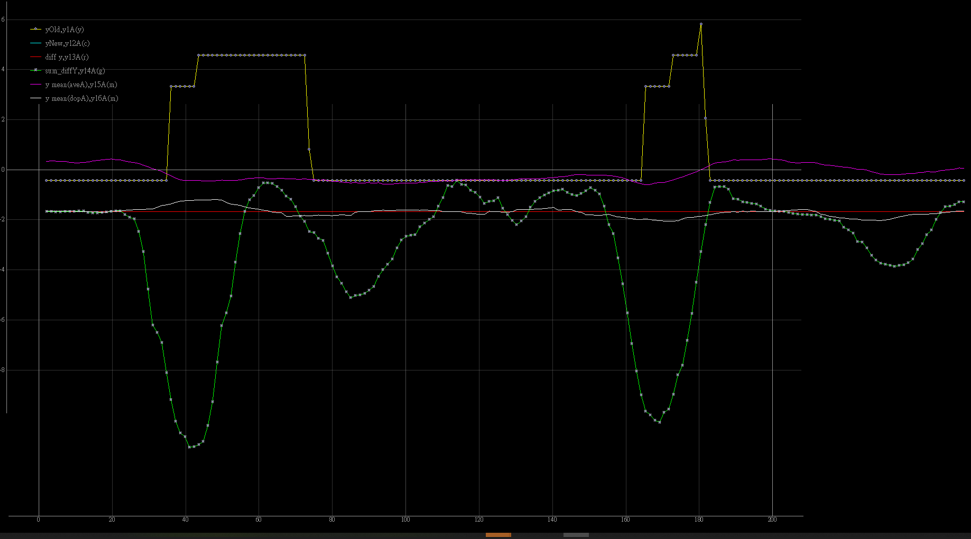
62 |
63 |
64 | for example(v4958):
65 |
66 | picture left: process_1 output
67 |
68 | picture right: process_2 output
69 |
70 | 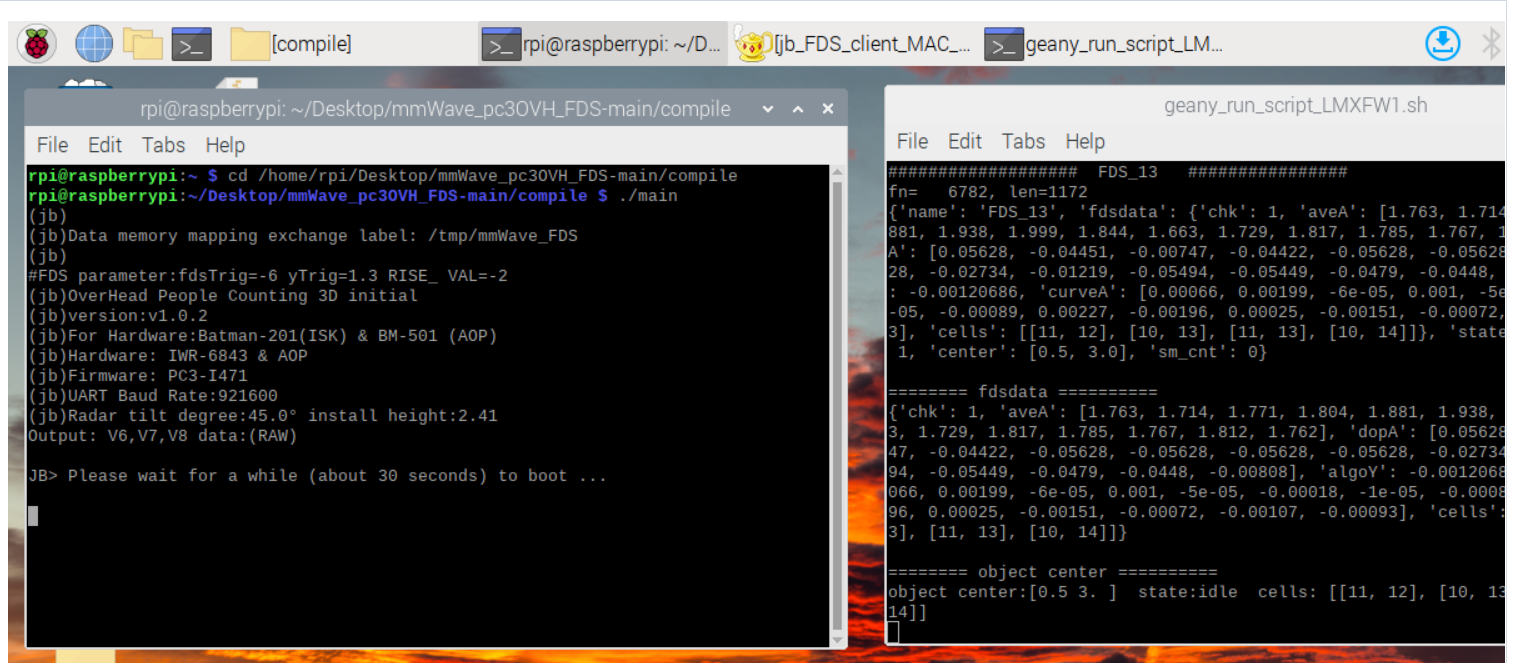
71 |
72 |
73 |
74 | ## Object data Struct:
75 | class objSM:
76 | def __init__(self,name = None,fdsData = None, state = None,live = None,sm_cnt = None):
77 | self.name = name #string, object Name
78 | self.data = fdsData #dictionary, fds data
79 | self.state = state #string , stateS = ['','idle','wait','wait_s','active','rising','squat','notify']
80 | self.live = live #int
81 | self.max_inVal_keep = -10.0 #float, for check squat/falling
82 | self.min_inVal_keep = 0.0 #float
83 | self.sm_cnt = sm_cnt #int, start count when state entry to [Active] state
84 | self.sm_ykeep = 0.0 #float, keep yMean data for judget state when object signal lose
85 | self.center = (0,0) #float, object location, unit: m
86 |
87 |
88 | ## fdsData Struct: (Data type: dictionary)
89 |
90 | fdsDic: {'chk' : chk, 'aveA': aveA, 'dopA': dopA,'algoY': algoY,'curveA': d_A ,'cells': v_cells}
91 | chk : check data aviliable
92 | aveA: y average array of object height
93 | dopA: average array of object doppler
94 | algoY: algorithm of algoY data
95 | curveA: a series of algoY data
96 | cells: The position occupied by the cell group represents the object
97 |
98 |
99 | example:
100 |
101 | for obj in objA: #(where the objA is objSM type)
102 | print(f'JB>fn={fn} objName: {obj.name} state: {obj.state} obj.center= {np.round(obj.center,2)}m cells: {obj.data["cells"]}' )
103 | print(f'JB>fn={fn} objData:\n {obj.data} ' )
104 |
105 |
106 | print(f'JB>fn={fn} objData: {obj.data}')
107 | JB>fn=19757 objData:
108 | {'chk':True,'aveA':[2.332,1.906, 1.86, 2.1464, 2.720, 2.206, 1.775, 1.880, 1.138,1.371,2.008,1.658,1.137,0.803,0.8154],
109 | 'dopA': [0.0173, 0.286, 0.1772, -0.0884, 0.032, 0.120, -0.049, -0.594, -0.2099, 0.040, 0.162, 0.132, 0.0203, 0.0255, 0.2394],
110 | 'algoY': -4.0327, 'curveA': [0.0,0.0,0.007,0.0014,0.0021,0.00043,0.0012,0.0009,-0.004,-0.051,-0.003,-0.032,-0.556,-1.769,-1.625],
111 | 'cells': [(11, 11), (11, 12), (9, 10), (9, 12), (12, 11), (10, 12), (10, 11), (9, 11), (10, 13)]}
112 |
113 | ## State Machine state: [0:'',1:'idle',2:'wait',3:'wait_s',4:'active',5:'rising',6:'squat',7:'notify']
114 |
115 | ## falling:
116 |
117 | 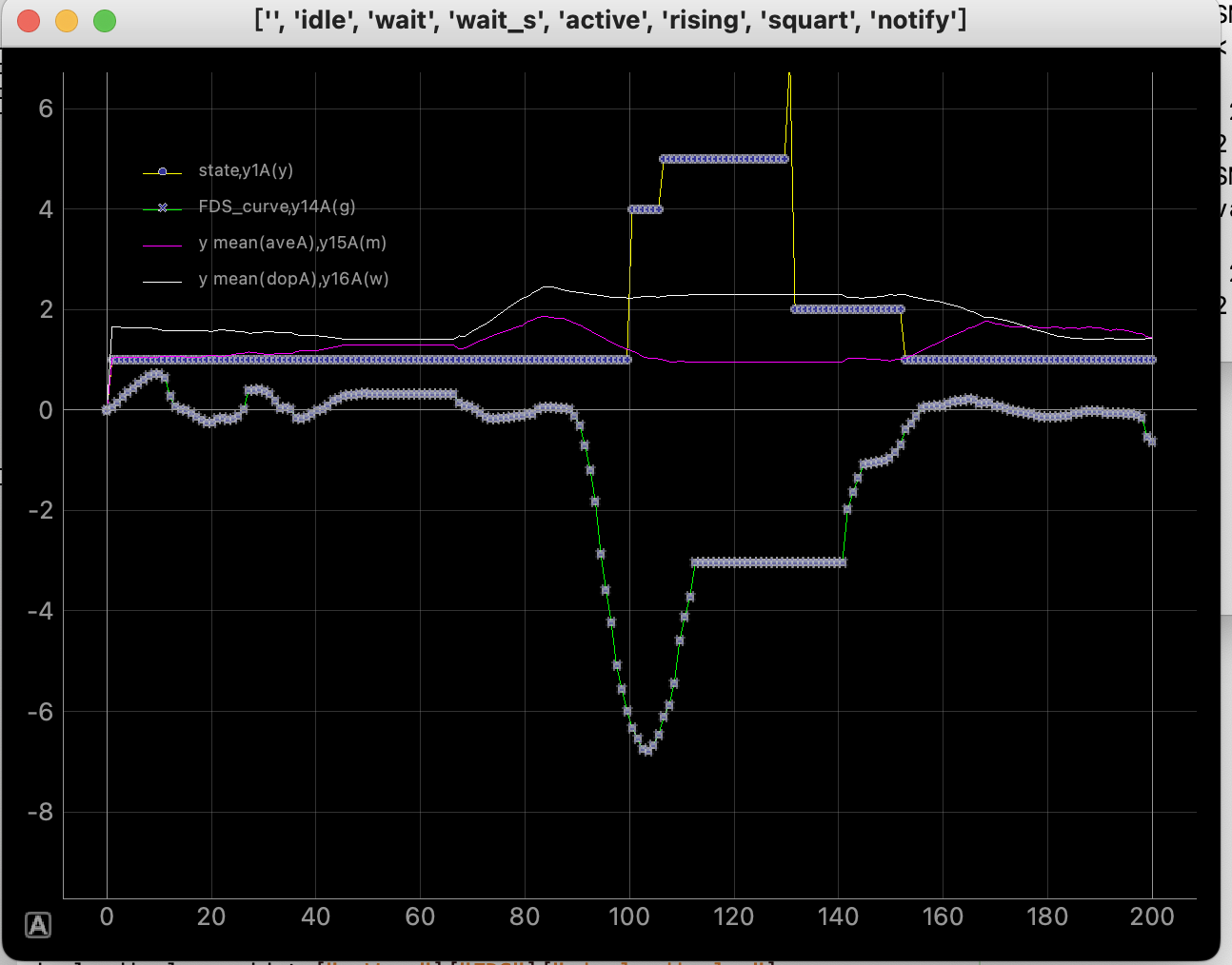 118 |
119 | ## leave detection area:
120 |
121 |
118 |
119 | ## leave detection area:
120 |
121 | 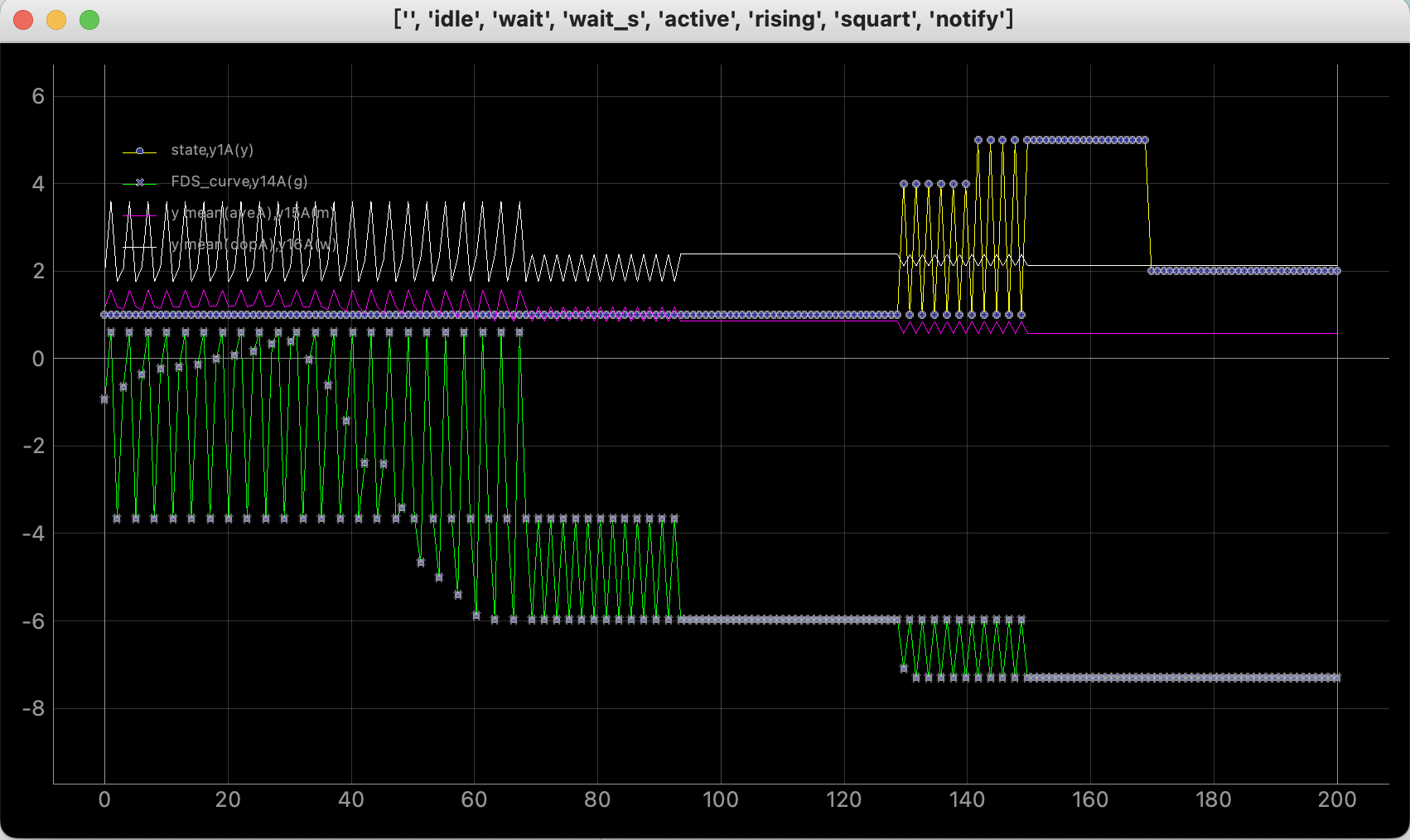 122 |
123 |
124 | ## squat:
125 |
126 |
122 |
123 |
124 | ## squat:
125 |
126 | 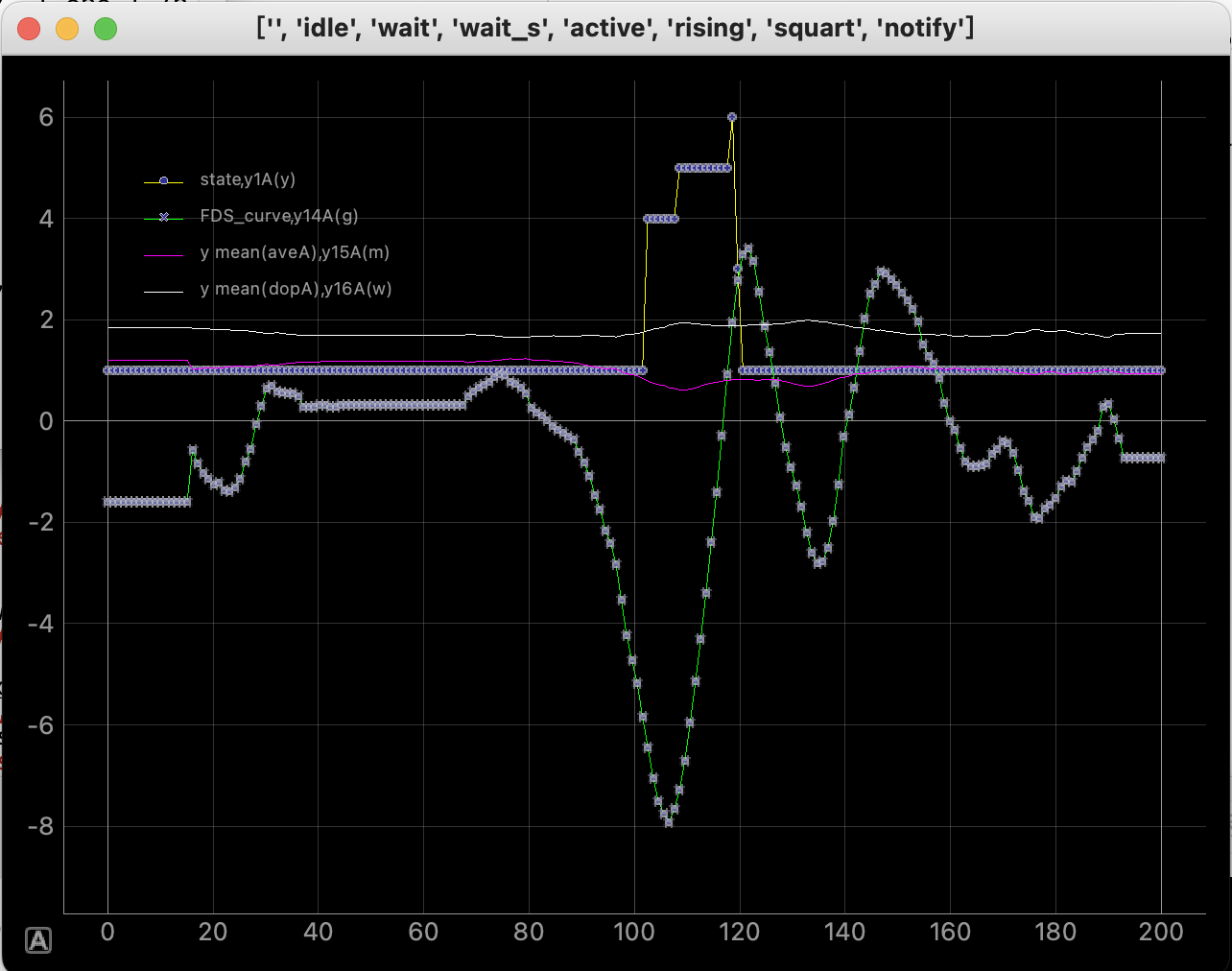 127 |
128 | ## Parameter for Statemachine:
129 |
130 | 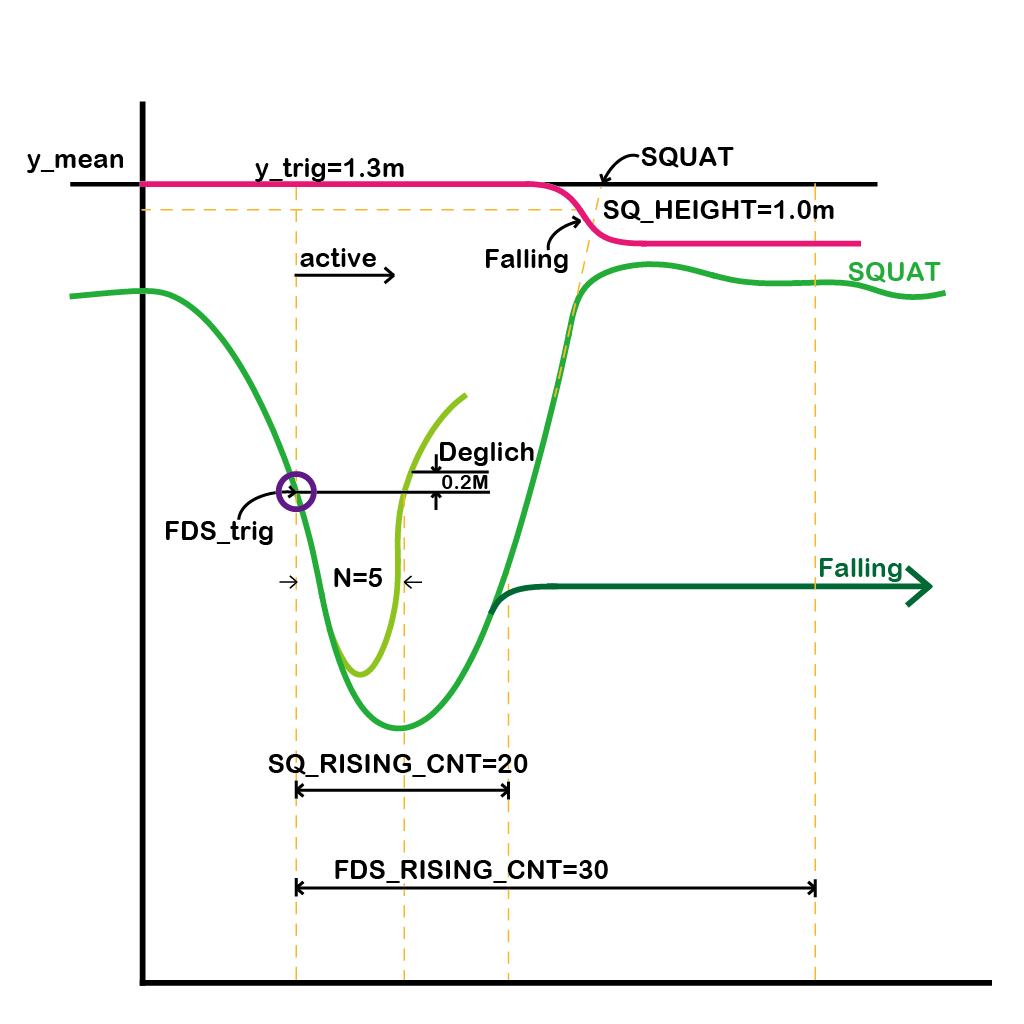
131 |
132 | ## FDS falling Green
133 | 
134 |
135 | ## FDS falling Red
136 | 
137 |
138 | ## Reference
139 |
140 |
141 | 1. LabGuide: [People counting Overhead reference guide](https://dev.ti.com/tirex/explore/node?node=AGn5r.xojDrrAKHxSfvzFg__VLyFKFf__LATEST)
142 |
143 | 2. TuningGuide_01:
144 | [3D_people_counting_tracker_layer_tuning_guide.pdf](https://github.com/bigheadG/mmWave_elink/files/7465690/3D_people_counting_tracker_layer_tuning_guide.pdf)
145 |
146 | 3. TuningGuide_02:
147 | [3D_people_counting_detection_layer_tuning_guide.pdf](https://github.com/bigheadG/mmWave_elink/files/7502420/3D_people_counting_detection_layer_tuning_guide.pdf)
148 |
--------------------------------------------------------------------------------
127 |
128 | ## Parameter for Statemachine:
129 |
130 | 
131 |
132 | ## FDS falling Green
133 | 
134 |
135 | ## FDS falling Red
136 | 
137 |
138 | ## Reference
139 |
140 |
141 | 1. LabGuide: [People counting Overhead reference guide](https://dev.ti.com/tirex/explore/node?node=AGn5r.xojDrrAKHxSfvzFg__VLyFKFf__LATEST)
142 |
143 | 2. TuningGuide_01:
144 | [3D_people_counting_tracker_layer_tuning_guide.pdf](https://github.com/bigheadG/mmWave_elink/files/7465690/3D_people_counting_tracker_layer_tuning_guide.pdf)
145 |
146 | 3. TuningGuide_02:
147 | [3D_people_counting_detection_layer_tuning_guide.pdf](https://github.com/bigheadG/mmWave_elink/files/7502420/3D_people_counting_detection_layer_tuning_guide.pdf)
148 |
--------------------------------------------------------------------------------