├── appcast.xml
├── Sketch2AE.sketchplugin
└── Contents
│ ├── Resources
│ ├── Localization_zh_Hans.js
│ ├── manifest_zh_Hans.json
│ ├── manifest_en.json
│ ├── Localization.js
│ └── Localization_en.js
│ └── Sketch
│ ├── manifest.json
│ ├── Change_Languages.cocoascript
│ ├── script.cocoascript
│ └── shapeExporer.js
├── README_zh.md
└── README.md
/appcast.xml:
--------------------------------------------------------------------------------
1 |
2 |
3 |
4 | Sketch2AE
5 | https://raw.githubusercontent.com/bigxixi/Sketch2AE/master/appcast.xml
6 | A Sketch plugin to export sketch file to Adobe After Effect
7 | en
8 | -
9 | Version 2.04
10 |
11 |
13 | support Sketch v50
14 |
15 | ]]>
16 |
17 |
18 |
19 |
20 |
--------------------------------------------------------------------------------
/Sketch2AE.sketchplugin/Contents/Resources/Localization_zh_Hans.js:
--------------------------------------------------------------------------------
1 | var local_saveDoc = '请先保存文件!';
2 | var local_warning = '警告';
3 | var local_tooMuchArtboards = '本文件中画板太多,建议减少一点或者分批导出.';
4 | var local_pickArtboardDsp = '选择画板导出(当前页面:';
5 | var local_exportDsp = '如要没设置导出切片,将导出整张画板快照。';
6 | var local_inputLength = '输入合成时长(秒)';
7 | var local_inputFPS = '输入合成帧率(FPS)';
8 | var local_noArtboards = '当前页面没有画板:(';
9 | var local_done = "导出完成,是否清理'导出标记'?";
10 | var local_clsBtn = "清理";
11 | var local_notNowBtn = "暂不";
12 | var local_noArtboardExpoted = '未选择任何画板,什么都没导出。';
13 | var local_chooseTips = "请至少选择1个图层(组)。";
14 | var local_groupTips = "请检查所选的是否图层组。如果不是,请先将它们打组。";
15 | var local_helpText = '使用步骤:\n' +
16 | '1、在图层列表选中要导出的图层组(不是图层组请先打组),执行 Plugins -> Sketch2AE -> 生成‘导出切片’。\n' +
17 | '2、执行 Plugins -> Sketch2AE -> 导出文件,在弹出的面板设置合成时长和帧率并选择要导出的画板,点击OK然后选择导出地址。执行后会在该地址创建一个.jsx脚本和slice文件夹。\n' +
18 | '3、打开After Effect,执行 文件 -> 脚本 -> 运行脚本文件,选择刚才导出的.jsx文件,这样就好自动导入图片并创建合成了。\n' +
19 | '**注意,如需移动该jsx文件请带上slice文件夹并保持他们在同一父文件夹下。\n' +
20 | '4、在sketch中,如有需要,可以执行 Plugins -> Sketch2AE -> 清除‘导出切片’来清理导出标记。\n' +
21 | '\n' +
22 | '本插件局限性&下一阶段目标:\n' +
23 | '1、不支持路径、字体、图层样式等的导出。\n' +
24 | '2、目前只能自动导出1x图,如需导出多倍图请单独处理。\n' +
25 | '3、如果对图层组进行旋转、缩放后,导出的切片是变换后的矩形。\n' +
26 | '4、如果字体丢失,则导出的字体层切片可能会不全\n(硬广:请使用FontPacker插件打包字体)。\n' +
27 | '\n快捷键列表:\n' +
28 | '**如果与其他插件冲突,快捷键也许会失效,慎用\n' +
29 | 'Control + Alt + S : 生成‘导出切片’\n' +
30 | 'Control + Alt + E : 导出画板\n' +
31 | 'Control + Alt + C : 清除‘导出切片’\n' +
32 | 'Control + Alt + H : 帮助\n' +
33 | '\n\n' +
34 | '任何问题或建议欢迎联系 xixi@bigxixi.com\n';
35 | var local_updateText1 = "您正在使用的是最新版,版本 v";
36 | var local_updateText2 = "这是最新版哦";
37 | var local_updateText3 = "有新版本!(v";
38 | var local_updateText4 = "您正在使用旧版本 (v";
39 | var local_updateText5 = "点击 OK 下载最新版.";
40 | var local_updateText6 = "无法查询最新版,请联系 xixi@bigxixi.com 需求帮助!\n";
41 | var local_updateText7 = "更新查询失败";
42 | //20170807更新
43 | var local_exportDsp2 = '把想要导出的矢量图层放到单独的画板中。';
44 | var local_shapeExported = '导出成功! 打开 AE 点击 文件 -> 脚本 -> 运行脚本文件. 选择刚才导出的.jsx文件,这样就导入AE了。';
45 | var local_endMSG1 = '完成!';
46 | var local_endMSG2 = '有些效果无法从sketch转到AE,请检查导入的资源并手动调整!';
47 | var local_endMSG3 = '矢量图已被导入为AE形状图层。';
48 | var local_shapeHelp = '帮助还没空写。。。';
49 |
--------------------------------------------------------------------------------
/Sketch2AE.sketchplugin/Contents/Resources/manifest_zh_Hans.json:
--------------------------------------------------------------------------------
1 | {
2 | "author" : "BigXiXI",
3 | "commands" : [
4 | {
5 | "script" : "shapeExporer.js",
6 | "name" : "🆕 导出矢量形状",
7 | "handler" : "shapeExport",
8 | "shortcut": "control alt a",
9 | "identifier" : "Sketch2AE.shapeExport"
10 | },{
11 | "script" : "script.cocoascript",
12 | "name" : "生成‘导出切片’",
13 | "handler" : "sliceGroups",
14 | "shortcut": "control alt s",
15 | "identifier" : "Sketch2AE.slice"
16 | },{
17 | "script" : "script.cocoascript",
18 | "name" : "导出画板",
19 | "handler" : "exportArtboards",
20 | "shortcut": "control alt e",
21 | "identifier" : "Sketch2AE.export"
22 | },{
23 | "script" : "script.cocoascript",
24 | "name" : "清除‘导出切片’",
25 | "shortcut": "control alt c",
26 | "handler" : "clearSlices",
27 | "identifier" : "Sketch2AE.clear"
28 | },{
29 | "script" : "script.cocoascript",
30 | "name" : "帮助",
31 | "shortcut": "control alt h",
32 | "handler" : "help",
33 | "identifier" : "Sketch2AE.help"
34 | },{
35 | "script" : "script.cocoascript",
36 | "name" : "❤️ 赏点零花钱吧~",
37 | "handler" : "donate",
38 | "identifier" : "Sketch2AE.donate"
39 | },{
40 | "script" : "Change_Languages.cocoascript",
41 | "name" : "语言 Language",
42 | "handler" : "languageSetting",
43 | "identifier" : "Sketch2AE.language"
44 | },{
45 | "script" : "script.cocoascript",
46 | "name" : "检查更新",
47 | "handler" : "checkUpdate",
48 | "identifier" : "Sketch2AE.update"
49 | },{
50 | "script" : "script.cocoascript",
51 | "name" : "问题反馈",
52 | "handler" : "issues",
53 | "identifier" : "Sketch2AE.issues"
54 | }
55 | ],
56 | "menu" : {
57 | "items" : [
58 | "Sketch2AE.shapeExport",
59 | "Sketch2AE.slice",
60 | "Sketch2AE.export",
61 | "Sketch2AE.clear",
62 | "Sketch2AE.language",
63 | {
64 | "title": "HELP",
65 | "items": [
66 | "Sketch2AE.help",
67 | "Sketch2AE.issues",
68 | "Sketch2AE.update"
69 | ]
70 | },
71 | "-",
72 | "Sketch2AE.donate"
73 | ],
74 | "title" : "🔮 Sketch2AE - Sketch导出到AE"
75 | },
76 | "identifier" : "com.sketch.bigxixi.Sketch2AE",
77 | "version" : "2.04",
78 | "appcast": "https://raw.githubusercontent.com/bigxixi/Sketch2AE/master/appcast.xml",
79 | "description" : "将Sketch画板导出为After Effect合成。",
80 | "authorEmail" : "xixi@bigxixi.com",
81 | "name" : "🔮 Sketch2AE"
82 | }
83 |
--------------------------------------------------------------------------------
/Sketch2AE.sketchplugin/Contents/Sketch/manifest.json:
--------------------------------------------------------------------------------
1 | {
2 | "author" : "BigXiXI",
3 | "commands" : [
4 | {
5 | "script" : "shapeExporer.js",
6 | "name" : "🆕 Export Shapes",
7 | "handler" : "shapeExport",
8 | "shortcut": "control alt a",
9 | "identifier" : "Sketch2AE.shapeExport"
10 | },{
11 | "script" : "script.cocoascript",
12 | "name" : "Generate ExportSlices",
13 | "handler" : "sliceGroups",
14 | "shortcut": "control alt s",
15 | "identifier" : "Sketch2AE.slice"
16 | },{
17 | "script" : "script.cocoascript",
18 | "name" : "Export Artboards",
19 | "handler" : "exportArtboards",
20 | "shortcut": "control alt e",
21 | "identifier" : "Sketch2AE.export"
22 | },{
23 | "script" : "script.cocoascript",
24 | "name" : "Clear ExportSlices",
25 | "shortcut": "control alt c",
26 | "handler" : "clearSlices",
27 | "identifier" : "Sketch2AE.clear"
28 | },{
29 | "script" : "script.cocoascript",
30 | "name" : "How to...",
31 | "shortcut": "control alt h",
32 | "handler" : "help",
33 | "identifier" : "Sketch2AE.help"
34 | },{
35 | "script" : "script.cocoascript",
36 | "name" : "❤️ Buy me a coffee~",
37 | "handler" : "donate",
38 | "identifier" : "Sketch2AE.donate"
39 | },{
40 | "script" : "Change_Languages.cocoascript",
41 | "name" : "语言 Language",
42 | "handler" : "languageSetting",
43 | "identifier" : "Sketch2AE.language"
44 | },{
45 | "script" : "script.cocoascript",
46 | "name" : "Check For Update",
47 | "handler" : "checkUpdate",
48 | "identifier" : "Sketch2AE.update"
49 | },{
50 | "script" : "script.cocoascript",
51 | "name" : "Report Issues",
52 | "handler" : "issues",
53 | "identifier" : "Sketch2AE.issues"
54 | }
55 | ],
56 | "menu" : {
57 | "items" : [
58 | "Sketch2AE.shapeExport",
59 | "Sketch2AE.slice",
60 | "Sketch2AE.export",
61 | "Sketch2AE.clear",
62 | "Sketch2AE.language",
63 | {
64 | "title": "HELP",
65 | "items": [
66 | "Sketch2AE.help",
67 | "Sketch2AE.issues",
68 | "Sketch2AE.update"
69 | ]
70 | },
71 | "-",
72 | "Sketch2AE.donate"
73 | ],
74 | "title" : "🔮 Sketch2AE"
75 | },
76 | "identifier" : "com.sketch.bigxixi.Sketch2AE",
77 | "version" : "2.04",
78 | "appcast": "https://raw.githubusercontent.com/bigxixi/Sketch2AE/master/appcast.xml",
79 | "description" : "Export Sketch Artboards to After Effect Comps.",
80 | "authorEmail" : "xixi@bigxixi.com",
81 | "name" : "🔮 Sketch2AE"
82 | }
83 |
--------------------------------------------------------------------------------
/Sketch2AE.sketchplugin/Contents/Resources/manifest_en.json:
--------------------------------------------------------------------------------
1 | {
2 | "author" : "BigXiXI",
3 | "commands" : [
4 | {
5 | "script" : "shapeExporer.js",
6 | "name" : "🆕 Export Shapes",
7 | "handler" : "shapeExport",
8 | "shortcut": "control alt a",
9 | "identifier" : "Sketch2AE.shapeExport"
10 | },{
11 | "script" : "script.cocoascript",
12 | "name" : "Generate ExportSlices",
13 | "handler" : "sliceGroups",
14 | "shortcut": "control alt s",
15 | "identifier" : "Sketch2AE.slice"
16 | },{
17 | "script" : "script.cocoascript",
18 | "name" : "Export Artboards",
19 | "handler" : "exportArtboards",
20 | "shortcut": "control alt e",
21 | "identifier" : "Sketch2AE.export"
22 | },{
23 | "script" : "script.cocoascript",
24 | "name" : "Clear ExportSlices",
25 | "shortcut": "control alt c",
26 | "handler" : "clearSlices",
27 | "identifier" : "Sketch2AE.clear"
28 | },{
29 | "script" : "script.cocoascript",
30 | "name" : "How to...",
31 | "shortcut": "control alt h",
32 | "handler" : "help",
33 | "identifier" : "Sketch2AE.help"
34 | },{
35 | "script" : "script.cocoascript",
36 | "name" : "❤️ Buy me a coffee~",
37 | "handler" : "donate",
38 | "identifier" : "Sketch2AE.donate"
39 | },{
40 | "script" : "Change_Languages.cocoascript",
41 | "name" : "语言 Language",
42 | "handler" : "languageSetting",
43 | "identifier" : "Sketch2AE.language"
44 | },{
45 | "script" : "script.cocoascript",
46 | "name" : "Check For Update",
47 | "handler" : "checkUpdate",
48 | "identifier" : "Sketch2AE.update"
49 | },{
50 | "script" : "script.cocoascript",
51 | "name" : "Report Issues",
52 | "handler" : "issues",
53 | "identifier" : "Sketch2AE.issues"
54 | }
55 | ],
56 | "menu" : {
57 | "items" : [
58 | "Sketch2AE.shapeExport",
59 | "Sketch2AE.slice",
60 | "Sketch2AE.export",
61 | "Sketch2AE.clear",
62 | "Sketch2AE.language",
63 | {
64 | "title": "HELP",
65 | "items": [
66 | "Sketch2AE.help",
67 | "Sketch2AE.issues",
68 | "Sketch2AE.update"
69 | ]
70 | },
71 | "-",
72 | "Sketch2AE.donate"
73 | ],
74 | "title" : "🔮 Sketch2AE"
75 | },
76 | "identifier" : "com.sketch.bigxixi.Sketch2AE",
77 | "version" : "2.04",
78 | "appcast": "https://raw.githubusercontent.com/bigxixi/Sketch2AE/master/appcast.xml",
79 | "description" : "Export Sketch Artboards to After Effect Comps.",
80 | "authorEmail" : "xixi@bigxixi.com",
81 | "name" : "🔮 Sketch2AE"
82 | }
83 |
--------------------------------------------------------------------------------
/Sketch2AE.sketchplugin/Contents/Sketch/Change_Languages.cocoascript:
--------------------------------------------------------------------------------
1 | /*----------------------------------------------------------
2 |
3 | author: Ashung Hung
4 | modified by Bigxixi
5 | Homepage: https://github.com/Ashung/Automate-Sketch
6 | license: CC-BY 4.0
7 |
8 | ----------------------------------------------------------*/
9 |
10 | var languageSetting = function(context) {
11 | var doc = context.document;
12 |
13 | var manifestFilePath = context.plugin.url().path() + "/Contents/Sketch/manifest.json";
14 | var localizationFilePath = context.plugin.url().path() + "/Contents/Resources/Localization.js";
15 |
16 | var supportLanguages = {
17 | "en": "English",
18 | "zh_Hans": "简体中文"
19 | };
20 | var supportLanguagesKeys = Object.keys(supportLanguages);
21 | var supportLanguagesValues = [];
22 | for (var key in supportLanguages) {
23 | supportLanguagesValues.push(supportLanguages[""+key+""]);
24 | }
25 |
26 | // Dialog
27 | var accessory = NSComboBox.alloc().initWithFrame(NSMakeRect(0, 0, 240, 28));
28 | accessory.addItemsWithObjectValues(supportLanguagesValues);
29 | accessory.selectItemAtIndex(1);
30 | var alert = NSAlert.alloc().init();
31 | alert.setMessageText("语言 Language");
32 | alert.addButtonWithTitle("OK");
33 | alert.addButtonWithTitle("Cancel");
34 | alert.setAccessoryView(accessory);
35 |
36 | // Click OK button
37 | var responseCode = alert.runModal();
38 | var languageIndex = accessory.indexOfSelectedItem();
39 | var MenuLanguageFileURL = context.plugin.urlForResourceNamed("manifest_" + supportLanguagesKeys[languageIndex] + ".json");
40 | var languageFileURL = context.plugin.urlForResourceNamed("Localization_" + supportLanguagesKeys[languageIndex] + ".js");
41 | if (responseCode == 1000) {
42 | if (MenuLanguageFileURL && languageFileURL) {
43 | var MenuLanguageFilePath = MenuLanguageFileURL.path();
44 | var languageFilePath = languageFileURL.path();
45 | // Remove manifest.json
46 | NSFileManager.defaultManager().removeItemAtPath_error_(
47 | manifestFilePath, nil
48 | );
49 | NSFileManager.defaultManager().removeItemAtPath_error_(
50 | localizationFilePath, nil
51 | );
52 | // Replace manifest.json
53 | NSFileManager.defaultManager().copyItemAtPath_toPath_error_(
54 | MenuLanguageFilePath, manifestFilePath, nil
55 | );
56 | NSFileManager.defaultManager().copyItemAtPath_toPath_error_(
57 | languageFilePath, localizationFilePath, nil
58 | );
59 | // Reload Plugin
60 | AppController.sharedInstance().pluginManager().reloadPlugins();
61 | } else {
62 | var app = NSApplication.sharedApplication();
63 | app.displayDialog_withTitle_(
64 | "Language file not found, please re-install the plugin.\n语言文件缺失,请重新下载安装插件。",
65 | "❌ Error - 错误"
66 | );
67 | NSWorkspace.sharedWorkspace().openURL(NSURL.URLWithString("https://github.com/bigxixi/Sketch2AE"));
68 | }
69 | }
70 |
71 | }
72 |
--------------------------------------------------------------------------------
/Sketch2AE.sketchplugin/Contents/Resources/Localization.js:
--------------------------------------------------------------------------------
1 | var local_saveDoc = 'Please save your sketch file first!';
2 | var local_warning = 'Warning!';
3 | var local_tooMuchArtboards = 'You have to many artboards in this file, which might lead to UI crash.';
4 | var local_pickArtboardDsp = 'Pick Artboards(current page:';
5 | var local_exportDsp = 'Picked Artboards will get a snapshot for reference.';
6 | var local_inputLength = 'The length of the composition(in seconds):';
7 | var local_inputFPS = 'The FPS of the composition:';
8 | var local_noArtboards = 'There are no Artboards in this page:(';
9 | var local_done = "Done, would you like to clean the 'ExportSlice's?";
10 | var local_clsBtn = "Clean";
11 | var local_notNowBtn = "Not Now";
12 | var local_noArtboardExpoted = 'Nothing selected.Nothing exported.';
13 | var local_chooseTips = "Please select at least 1 layer(group).";
14 | var local_groupTips = "Group them first if you want to export a non-group layer.";
15 | var local_helpText = 'How to use:\n' +
16 | '1.Select the layergroups your want to export on the layer list'+
17 | '(group it if the layer is not a layergroup)\n'+
18 | 'Run Plugins -> Sketch2AE -> Generate ExportSlices。\n' +
19 | '2.Run Plugins -> Sketch2AE -> Export Artboards, then on the popup panel set the composition length and FPS, pick artboards you want to export. \n'+
20 | 'Hit OK and choose a location to save the generated ".jsx" script file and "slice" folder.\n' +
21 | '3.In After Effect,run File -> Script -> Run Script File, choose the ".jsx" file, it will generate compositions automaticly.\n' +
22 | '**NOTE: Keep the ".jsx" file and "slice" folder under a same parent folder if you want to move it.\n' +
23 | '4.Back to Sketch,you can run Plugins -> Sketch2AE -> Clear ExportSlices to clear exsiting ExportSlices.\n' +
24 | '\n' +
25 | 'Known Issues:\n' +
26 | '1.Can not export vactor shapes, editable texts, layer styles.All flatten.\n' +
27 | '2.By default it generate 1x slices.If you need 2x or other you have to export by hand.\n' +
28 | '3.Rotating or scaling of a layer will result in a big rectangle of slice\n' +
29 | '4.If there are missed fonts in the file, the ExportSlices might be clipping.\n(Try my Plungin:Font Packer to pack and achive your sketch files:) )。\n' +
30 | '\nShortcut list:\n' +
31 | '**Becareful of shortcut conflicting with other plugins\n' +
32 | 'Control + Alt + S : Generate ExportSlices\n' +
33 | 'Control + Alt + E : Export Artboards\n' +
34 | 'Control + Alt + C : Clear ExportSlices\n' +
35 | 'Control + Alt + H : Help\n' +
36 | '\n\n' +
37 | 'Any questions -> xixi@bigxixi.com\n';
38 | var local_updateText1 = "You are using the latest version v";
39 | var local_updateText2 = "You are up to date!";
40 | var local_updateText3 = "New verision available (v";
41 | var local_updateText4 = "You are using old version (v";
42 | var local_updateText5 = "Click OK to download the latest version.";
43 | var local_updateText6 = "Failed to check for new version,contact xixi@bigxixi.com for help!\n";
44 | var local_updateText7 = "Can not check for updates.";
45 | //20170807new
46 | var local_exportDsp2 = 'Put your shapes in an artboard then export.';
47 | var local_shapeExported = 'Shape exported! Open AE and run File -> Scripts -> Run Script File. to run the file you\'ve exported.';
48 | var local_endMSG1 = 'Done !';
49 | var local_endMSG2 = 'Some effects in you shape havent cannot be transimit to AE.Check your shape in AE and adjust them by hand.';
50 | var local_endMSG3 = 'Shape imported.';
51 | var local_shapeHelp = 'not finish yet...';
52 |
--------------------------------------------------------------------------------
/Sketch2AE.sketchplugin/Contents/Resources/Localization_en.js:
--------------------------------------------------------------------------------
1 | var local_saveDoc = 'Please save your sketch file first!';
2 | var local_warning = 'Warning!';
3 | var local_tooMuchArtboards = 'You have to many artboards in this file, which might lead to UI crash.';
4 | var local_pickArtboardDsp = 'Pick Artboards(current page:';
5 | var local_exportDsp = 'Picked Artboards will get a snapshot for reference.';
6 | var local_inputLength = 'The length of the composition(in seconds):';
7 | var local_inputFPS = 'The FPS of the composition:';
8 | var local_noArtboards = 'There are no Artboards in this page:(';
9 | var local_done = "Done, would you like to clean the 'ExportSlice's?";
10 | var local_clsBtn = "Clean";
11 | var local_notNowBtn = "Not Now";
12 | var local_noArtboardExpoted = 'Nothing selected.Nothing exported.';
13 | var local_chooseTips = "Please select at least 1 layer(group).";
14 | var local_groupTips = "Group them first if you want to export a non-group layer.";
15 | var local_helpText = 'How to use:\n' +
16 | '1.Select the layergroups your want to export on the layer list'+
17 | '(group it if the layer is not a layergroup)\n'+
18 | 'Run Plugins -> Sketch2AE -> Generate ExportSlices。\n' +
19 | '2.Run Plugins -> Sketch2AE -> Export Artboards, then on the popup panel set the composition length and FPS, pick artboards you want to export. \n'+
20 | 'Hit OK and choose a location to save the generated ".jsx" script file and "slice" folder.\n' +
21 | '3.In After Effect,run File -> Script -> Run Script File, choose the ".jsx" file, it will generate compositions automaticly.\n' +
22 | '**NOTE: Keep the ".jsx" file and "slice" folder under a same parent folder if you want to move it.\n' +
23 | '4.Back to Sketch,you can run Plugins -> Sketch2AE -> Clear ExportSlices to clear exsiting ExportSlices.\n' +
24 | '\n' +
25 | 'Known Issues:\n' +
26 | '1.Can not export vactor shapes, editable texts, layer styles.All flatten.\n' +
27 | '2.By default it generate 1x slices.If you need 2x or other you have to export by hand.\n' +
28 | '3.Rotating or scaling of a layer will result in a big rectangle of slice\n' +
29 | '4.If there are missed fonts in the file, the ExportSlices might be clipping.\n(Try my Plungin:Font Packer to pack and achive your sketch files:) )。\n' +
30 | '\nShortcut list:\n' +
31 | '**Becareful of shortcut conflicting with other plugins\n' +
32 | 'Control + Alt + S : Generate ExportSlices\n' +
33 | 'Control + Alt + E : Export Artboards\n' +
34 | 'Control + Alt + C : Clear ExportSlices\n' +
35 | 'Control + Alt + H : Help\n' +
36 | '\n\n' +
37 | 'Any questions -> xixi@bigxixi.com\n';
38 | var local_updateText1 = "You are using the latest version v";
39 | var local_updateText2 = "You are up to date!";
40 | var local_updateText3 = "New verision available (v";
41 | var local_updateText4 = "You are using old version (v";
42 | var local_updateText5 = "Click OK to download the latest version.";
43 | var local_updateText6 = "Failed to check for new version,contact xixi@bigxixi.com for help!\n";
44 | var local_updateText7 = "Can not check for updates.";
45 | //20170807new
46 | var local_exportDsp2 = 'Put your shapes in an artboard then export.';
47 | var local_shapeExported = 'Shape exported! Open AE and run File -> Scripts -> Run Script File. to run the file you\'ve exported.';
48 | var local_endMSG1 = 'Done !';
49 | var local_endMSG2 = 'Some effects in you shape havent cannot be transimit to AE.Check your shape in AE and adjust them by hand.';
50 | var local_endMSG3 = 'Shape imported.';
51 | var local_shapeHelp = 'not finish yet...';
52 |
--------------------------------------------------------------------------------
/README_zh.md:
--------------------------------------------------------------------------------
1 | 2.04 update - 支持 Sketch v50
2 | --------
3 | 2.03 update - 支持 Sketch v49
4 | --------
5 | Google 也搞了个叫Sketch2AE的插件,和我这个版本的区别见:https://zhuanlan.zhihu.com/p/28828769
6 | ----------------------
7 |  8 |
9 | # Sketch2AE v2.0 - 支持矢量图层导出!
10 | 将sketch中的矢量图层导入为AE形状图层,然后就可以接入bodymovin或者Lottie了!
11 |
12 | ## 使用方法:
13 | 0. (可选)切换语言为中文版,点击`Plugins` -> `Sketch2AE` -> `语言 language`.
14 | 1. 把需要导出的形状放到一个画板里, 然后执行 `Plugins` -> `Sketch2AE` -> `导出矢量形状`.
15 | 2. 在弹出的面板设置合成`时长`和`帧率`并选择要导出的画板,点击`OK` K然后选择导出地址。执行后会在该地址创建一个 `.jsx` 脚本文件.
16 | 3. 打开After Effect,执行 `文件` -> `脚本` -> `运行脚本文件`, 选择刚才导出的 `.jsx` 文件, 这样会以画板为尺寸新建一个合成,你将看到图像被一点点的画出来.
17 |
18 |
8 |
9 | # Sketch2AE v2.0 - 支持矢量图层导出!
10 | 将sketch中的矢量图层导入为AE形状图层,然后就可以接入bodymovin或者Lottie了!
11 |
12 | ## 使用方法:
13 | 0. (可选)切换语言为中文版,点击`Plugins` -> `Sketch2AE` -> `语言 language`.
14 | 1. 把需要导出的形状放到一个画板里, 然后执行 `Plugins` -> `Sketch2AE` -> `导出矢量形状`.
15 | 2. 在弹出的面板设置合成`时长`和`帧率`并选择要导出的画板,点击`OK` K然后选择导出地址。执行后会在该地址创建一个 `.jsx` 脚本文件.
16 | 3. 打开After Effect,执行 `文件` -> `脚本` -> `运行脚本文件`, 选择刚才导出的 `.jsx` 文件, 这样会以画板为尺寸新建一个合成,你将看到图像被一点点的画出来.
17 |
18 |  19 |
20 |
19 |
20 |  21 |
22 |
21 |
22 | 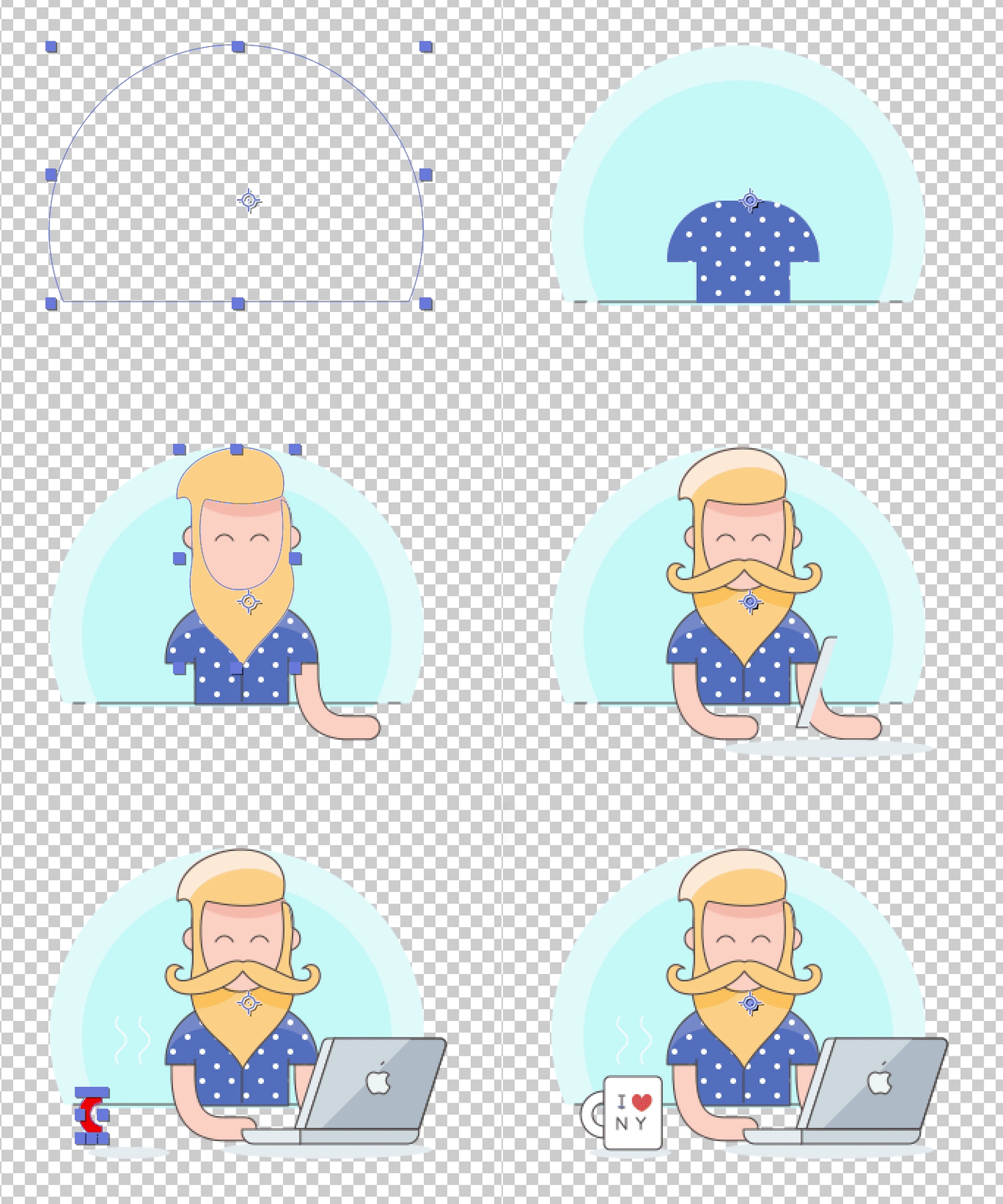 23 |
24 | 有没有很带感:-D
25 | (插画来自https://dribbble.com/shots/3038928-Free-Download-Color-Vector-Characters)
26 |
27 | ## 局限性
28 | 这个插件现在功能还有限,以下这些特性还不支持
29 | - 不支持渐变描边/渐变填充。 从SK读取没问题,AE用脚本无法自动建立渐变,只能手动。也发现了一些奇技淫巧但是不确定能不能跑通。
30 | - 不支持蒙版(Uderlying Masks)。主要是没时间弄,以后会解决。
31 | - 文字暂不支持。 主要是没时间弄,以后会加入。
32 | - 不支持图层的翻转。
33 | - 不支持图层样式,以后应该会解决。
34 | - 还有一些SK有而AE没有的特性比如描边居中/靠外/靠内,还有箭头这些。
35 |
36 | 其他的一些细节比如叠加模式、布尔运算、虚线是支持的,好好利用也是能出效果的。
37 | 这个插件适合导出那种扁平纯色、线条风格的图,也是bodymovin和Lottie支持较好的风格。
38 |
39 | ## How to install:
40 |
41 | 1.下载压缩包 [`点我`](https://github.com/bigxixi/Sketch2AE/archive/master.zip) 并解压.
42 | 2.双击 `Sketch2AE.sketchplugin.`安装。
43 |
44 | --------------
45 |
46 | ````
47 | ## 旧版SK2AE v1.0 介绍
48 | ````
49 |
50 |
51 | # Sketch2AE
52 |
53 | 轻松导出skech文件中的切片到Adobe After Effect并自动定位。
54 | 利用帧另存为Photoshop图层功能,还可以实现Sketch导出到Photoshop哦。
55 |
56 | ## 如何使用:
57 | 0. (可选)切换语言为中文版,点击`Plugins` -> `Sketch2AE` -> `语言 language`.
58 | 1. 保存sketch文件.
59 | 2. 在图层列表选中要导出的图层组(不是图层组请先打组), 执行 `Plugins` -> `Sketch2AE` -> `生成‘导出切片’`.
60 | 3. 执行 `Plugins` -> `Sketch2AE` -> `导出画板`, 在弹出的面板设置合成`时长`和`帧率`并选择要导出的画板,点击`OK` K然后选择导出地址。执行后会在该地址创建一个 `.jsx` 脚本文件和 `slice` 文件夹.
61 | 4. 打开After Effect,执行 `文件` -> `脚本` -> `运行脚本文件`, 选择刚才导出的 `.jsx` 文件, 这样就好自动导入图片并创建合成了.
62 | ````
63 | **注意,如需移动该jsx文件请带上slice文件夹并保持他们在同一父文件夹下。
64 | ````
65 | 在sketch中,如有需要,可以执行 Plugins -> Sketch2AE -> 清除‘导出切片’ 来清理导出标记。
66 |
67 |
23 |
24 | 有没有很带感:-D
25 | (插画来自https://dribbble.com/shots/3038928-Free-Download-Color-Vector-Characters)
26 |
27 | ## 局限性
28 | 这个插件现在功能还有限,以下这些特性还不支持
29 | - 不支持渐变描边/渐变填充。 从SK读取没问题,AE用脚本无法自动建立渐变,只能手动。也发现了一些奇技淫巧但是不确定能不能跑通。
30 | - 不支持蒙版(Uderlying Masks)。主要是没时间弄,以后会解决。
31 | - 文字暂不支持。 主要是没时间弄,以后会加入。
32 | - 不支持图层的翻转。
33 | - 不支持图层样式,以后应该会解决。
34 | - 还有一些SK有而AE没有的特性比如描边居中/靠外/靠内,还有箭头这些。
35 |
36 | 其他的一些细节比如叠加模式、布尔运算、虚线是支持的,好好利用也是能出效果的。
37 | 这个插件适合导出那种扁平纯色、线条风格的图,也是bodymovin和Lottie支持较好的风格。
38 |
39 | ## How to install:
40 |
41 | 1.下载压缩包 [`点我`](https://github.com/bigxixi/Sketch2AE/archive/master.zip) 并解压.
42 | 2.双击 `Sketch2AE.sketchplugin.`安装。
43 |
44 | --------------
45 |
46 | ````
47 | ## 旧版SK2AE v1.0 介绍
48 | ````
49 |
50 |
51 | # Sketch2AE
52 |
53 | 轻松导出skech文件中的切片到Adobe After Effect并自动定位。
54 | 利用帧另存为Photoshop图层功能,还可以实现Sketch导出到Photoshop哦。
55 |
56 | ## 如何使用:
57 | 0. (可选)切换语言为中文版,点击`Plugins` -> `Sketch2AE` -> `语言 language`.
58 | 1. 保存sketch文件.
59 | 2. 在图层列表选中要导出的图层组(不是图层组请先打组), 执行 `Plugins` -> `Sketch2AE` -> `生成‘导出切片’`.
60 | 3. 执行 `Plugins` -> `Sketch2AE` -> `导出画板`, 在弹出的面板设置合成`时长`和`帧率`并选择要导出的画板,点击`OK` K然后选择导出地址。执行后会在该地址创建一个 `.jsx` 脚本文件和 `slice` 文件夹.
61 | 4. 打开After Effect,执行 `文件` -> `脚本` -> `运行脚本文件`, 选择刚才导出的 `.jsx` 文件, 这样就好自动导入图片并创建合成了.
62 | ````
63 | **注意,如需移动该jsx文件请带上slice文件夹并保持他们在同一父文件夹下。
64 | ````
65 | 在sketch中,如有需要,可以执行 Plugins -> Sketch2AE -> 清除‘导出切片’ 来清理导出标记。
66 |
67 | 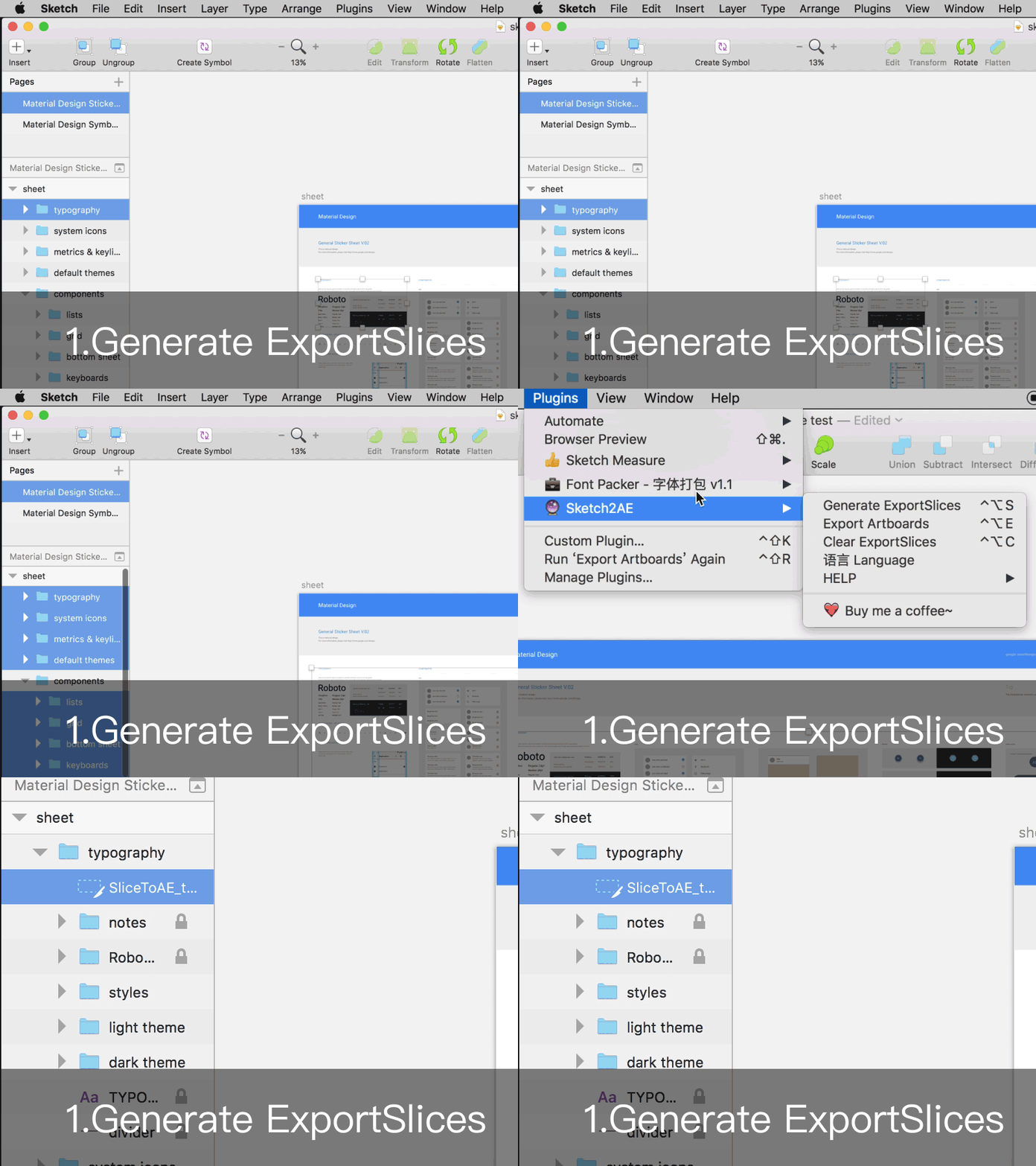 68 |
69 |
68 |
69 | 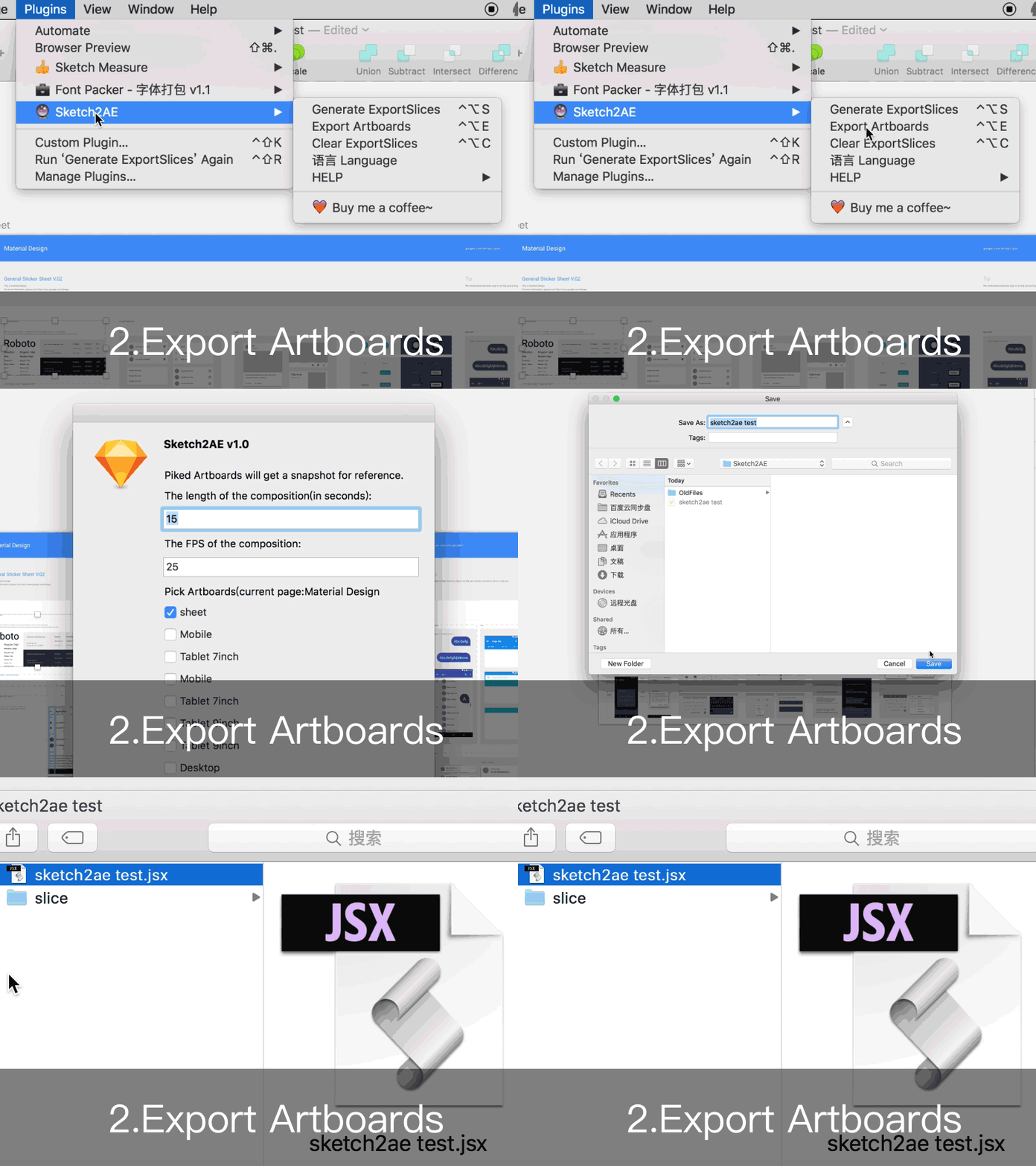 70 |
71 |
70 |
71 | 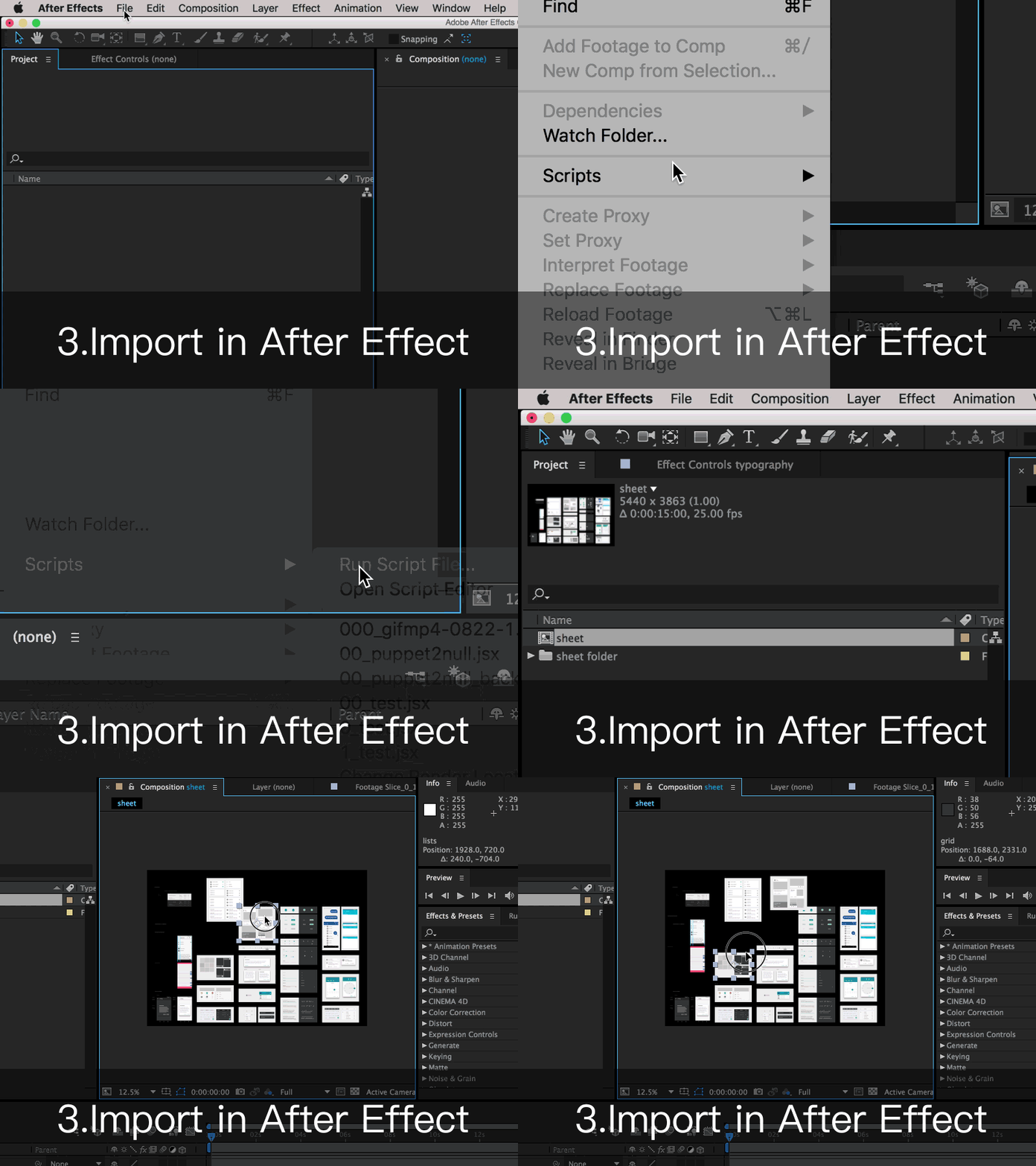 72 |
73 | ## 本插件局限性&下一阶段目标:
74 | * 不支持路径、字体、图层样式等的导出。
75 | * 目前只能自动导出1x图,如需导出多倍图请单独处理。
76 | * 如果对图层组进行旋转、缩放后,导出的切片是变换后的矩形。
77 | * 如果字体丢失,则导出的字体层切片可能会不全(硬广:请使用[`Font Packer`](https://github.com/bigxixi/Font-Packer)插件打包字体)
78 |
79 | ## 快捷键列表:
80 | ```
81 | **要注意和其他插件的快捷键冲突
82 | ```
83 | * `Control` + `Alt` + `S` : 生成‘导出切片’
84 | * `Control` + `Alt` + `E` : 导出画板
85 | * `Control` + `Alt` + `C` : 清除‘导出切片’
86 | * `Control` + `Alt` + `H` : 帮助
87 |
88 | ## License
89 | [CC-BY-SA 4.0](https://creativecommons.org/licenses/by-sa/4.0/)
90 | 部分代码来自 [Ashung](https://github.com/Ashung/Automate-Sketch).
91 |
92 | ## 求打赏:
93 | 如果您觉得本插件好用,欢迎打赏,感谢您的支持!
94 |
95 | [
72 |
73 | ## 本插件局限性&下一阶段目标:
74 | * 不支持路径、字体、图层样式等的导出。
75 | * 目前只能自动导出1x图,如需导出多倍图请单独处理。
76 | * 如果对图层组进行旋转、缩放后,导出的切片是变换后的矩形。
77 | * 如果字体丢失,则导出的字体层切片可能会不全(硬广:请使用[`Font Packer`](https://github.com/bigxixi/Font-Packer)插件打包字体)
78 |
79 | ## 快捷键列表:
80 | ```
81 | **要注意和其他插件的快捷键冲突
82 | ```
83 | * `Control` + `Alt` + `S` : 生成‘导出切片’
84 | * `Control` + `Alt` + `E` : 导出画板
85 | * `Control` + `Alt` + `C` : 清除‘导出切片’
86 | * `Control` + `Alt` + `H` : 帮助
87 |
88 | ## License
89 | [CC-BY-SA 4.0](https://creativecommons.org/licenses/by-sa/4.0/)
90 | 部分代码来自 [Ashung](https://github.com/Ashung/Automate-Sketch).
91 |
92 | ## 求打赏:
93 | 如果您觉得本插件好用,欢迎打赏,感谢您的支持!
94 |
95 | [ ](http://bigxixi.com/donate/index.html)
96 | [
](http://bigxixi.com/donate/index.html)
96 | [ ](http://bigxixi.com/donate/index.html)
97 |
98 | 也欢迎使用PayPal:
99 |
100 | [
](http://bigxixi.com/donate/index.html)
97 |
98 | 也欢迎使用PayPal:
99 |
100 | [ ](https://www.paypal.me/bigxixi/index.html)
101 |
--------------------------------------------------------------------------------
/README.md:
--------------------------------------------------------------------------------
1 | 2.04 update - support Sketch v50
2 | --------
3 | 2.03 update - support Sketch v49
4 | --------
5 | Google release another 'Sketch2AE' plugin, if you are looking for that one, visit .
6 | https://google.github.io/sketch2ae/
7 | ---------------
8 |
9 |
10 | # Sketch2AE v2.0 - Shape Export support!
11 | Now you can export shapes! To AE Shape layer! Then to Bodymovin or Lottie!
12 | 将sketch中的矢量图层导入为AE形状图层,然后就可以接入bodymovin或者Lottie了!
13 | [中文版介绍点这里](https://github.com/bigxixi/SKetch2AE/blob/master/README_zh.md)
14 |
15 | ## How to use:
16 | In Sketch, put the shape you want to eport in an artboard, go to Plungin -> Sketch2AE -> Export Shapes
17 |
18 |
](https://www.paypal.me/bigxixi/index.html)
101 |
--------------------------------------------------------------------------------
/README.md:
--------------------------------------------------------------------------------
1 | 2.04 update - support Sketch v50
2 | --------
3 | 2.03 update - support Sketch v49
4 | --------
5 | Google release another 'Sketch2AE' plugin, if you are looking for that one, visit .
6 | https://google.github.io/sketch2ae/
7 | ---------------
8 |
9 |
10 | # Sketch2AE v2.0 - Shape Export support!
11 | Now you can export shapes! To AE Shape layer! Then to Bodymovin or Lottie!
12 | 将sketch中的矢量图层导入为AE形状图层,然后就可以接入bodymovin或者Lottie了!
13 | [中文版介绍点这里](https://github.com/bigxixi/SKetch2AE/blob/master/README_zh.md)
14 |
15 | ## How to use:
16 | In Sketch, put the shape you want to eport in an artboard, go to Plungin -> Sketch2AE -> Export Shapes
17 |
18 | 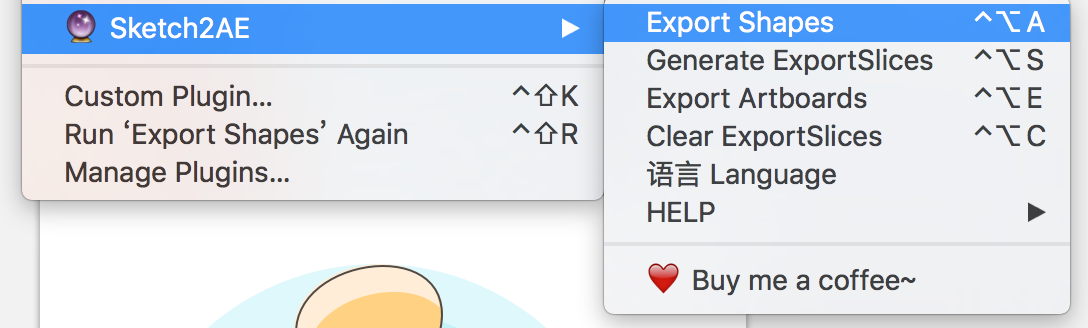 19 |
20 | in the pop-up panel, choose the artboard, set the length and fps, then hit OK.
21 |
22 |
19 |
20 | in the pop-up panel, choose the artboard, set the length and fps, then hit OK.
21 |
22 | 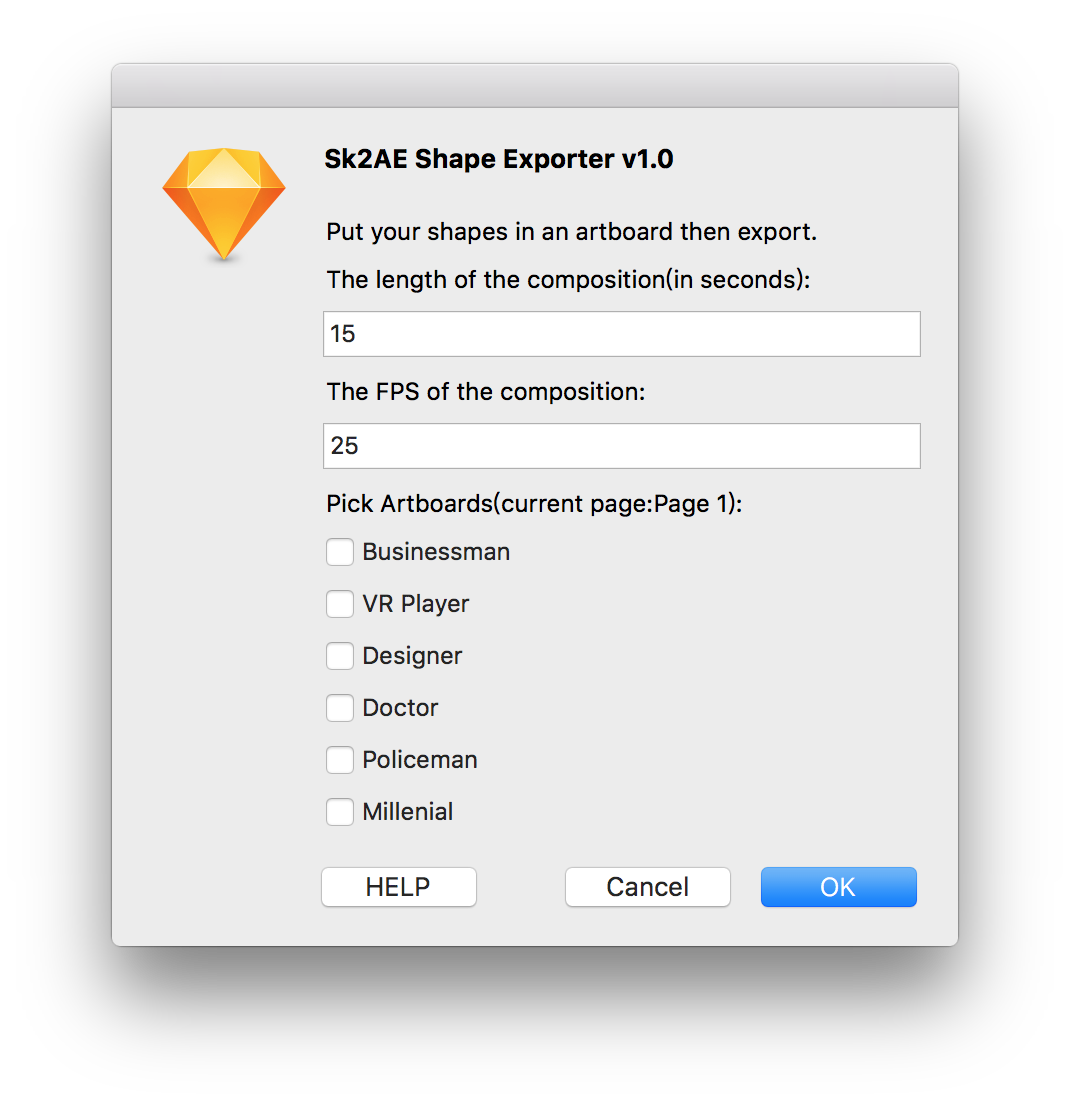 23 |
24 | Open AE and run File -> Scripts -> Run Script File, select the ".jsx" file you exported.
25 | Then you will see the magic :)
26 |
27 |
28 |
29 | (image from https://dribbble.com/shots/3038928-Free-Download-Color-Vector-Characters)
30 |
31 | ## Limitations
32 | Unfortunately, this plugin has some limitations:
33 | - Gradient Fill and Stroke are not supported. AE dosent allow script to generate gradients automaticly.
34 | - Uderlying Masks. I will do it in the future.
35 | - Texts not supported. I will do it in the future.
36 | - Flip layer not supported.
37 | - Layer styles not supported.
38 | - Features that Sketch has but AE not. Stroke position, Arrow, etc.
39 |
40 |
41 | ## How to install:
42 |
43 | 1.Download the [`Plugin File(hit me)`](https://github.com/bigxixi/Sketch2AE/archive/master.zip) and unzip.
44 | 2.Double click `Sketch2AE.sketchplugin.`
45 |
46 |
47 | --------------
48 |
49 | ````
50 | ## SK2AE v1.0 introduction.
51 | ````
52 | A Sketch plugin to export sketch slice to Adobe After Effect and potisition them automatically.
53 | Whats more, you can use the `Save Frame As Photoshop Layers` inside AE to export contents to Photoshop!
54 |
55 |
56 | ## How to use:
57 | 1. Save your work on Sketch.
58 | 2. Select the LAYERGROUPs your want to export on the layer list(group it if the layer is not a layergroup), Run `Plugins` -> `Sketch2AE` -> `Generate ExportSlices`.
59 | 3. Run `Plugins` -> `Sketch2AE` -> `Export Artboards`, then on the popup panel set the composition length and `FPS`, pick artboards you want to export. Hit `OK` and choose a location to save the generated `.jsx` script file and `slice` folder.
60 | 4. In After Effect,run `File` -> `Script` -> `Run Script File`, choose the `.jsx` file, it will generate compositions automaticly.
61 | ````
62 | **NOTE: Keep the ".jsx" file and "slice" folder under a same parent folder if you want to move it.
63 | ````
64 | Back to Sketch, you can run Plugins -> Sketch2AE -> Clear ExportSlices to clear exsiting ExportSlices.
65 |
66 |
67 |
68 |
69 |
70 |
71 | ## Known Issues:
72 | * Can not export vactor shapes, editable texts, layer styles.All flatten.
73 | * By default it generate 1x slices. If you need 2x or other you have to export by hand.
74 | * Rotating or scaling of a layer will result in a big rectangle of slice
75 | * If there are missed fonts in the file, the ExportSlices might be clipping.(Try my Plungin:[`Font Packer`](https://github.com/bigxixi/Font-Packer) to pack and achive your sketch files:) )
76 |
77 | ## Shortcut list:
78 | ```
79 | **Becareful of shortcut conflicting with other plugins
80 | ```
81 | * `Control` + `Alt` + `S` : Generate ExportSlices
82 | * `Control` + `Alt` + `E` : Export Artboards
83 | * `Control` + `Alt` + `C` : Clear ExportSlices
84 | * `Control` + `Alt` + `H` : Help
85 |
86 | ## License
87 | [CC-BY-SA 4.0](https://creativecommons.org/licenses/by-sa/4.0/)
88 | Special thanks to [Ashung's code](https://github.com/Ashung/Automate-Sketch).
89 |
90 | ## Donation:
91 |
92 | Thank you very much!
93 |
94 | [](https://www.paypal.me/bigxixi/)
95 |
96 |
--------------------------------------------------------------------------------
/Sketch2AE.sketchplugin/Contents/Sketch/script.cocoascript:
--------------------------------------------------------------------------------
1 | @import "../Resources/Localization.js"
2 |
3 | var exportArtboards = function(context) {
4 | var doc = context.document;
5 | var version = context.plugin.version();
6 | var artboards = doc.currentPage().artboards();
7 | if(!doc.fileName()){
8 | NSApplication.sharedApplication().displayDialog_withTitle(local_saveDoc, local_warning);
9 | }
10 | var docName = doc.fileName().substring(doc.fileName().lastIndexOf("."),doc.fileName().lastIndexOf("/")+1);
11 | function createFolderAtPath(pathString) {
12 | var fileManager = [NSFileManager defaultManager];
13 | if([fileManager fileExistsAtPath:pathString]) return true;
14 | return [fileManager createDirectoryAtPath:pathString withIntermediateDirectories:true attributes:nil error:nil];
15 | }
16 |
17 | function writeTextToFile(text, filePath) {
18 | var t = [NSString stringWithFormat:@"%@", text],
19 | f = [NSString stringWithFormat:@"%@", filePath];
20 | return [t writeToFile:f atomically:true encoding:NSUTF8StringEncoding error:nil];
21 | }
22 |
23 | function checkLabel(layer){
24 | return (layer.className() == "MSSliceLayer") && (layer.name().substring(0,10) == "SliceToAE_");
25 | }
26 |
27 | //check artboard number
28 | if(artboards.length > 35){
29 | NSApplication.sharedApplication().displayDialog_withTitle(local_tooMuchArtboards, local_warning);
30 | }
31 |
32 | function createUI() {
33 | var pickArtboardDsp = local_pickArtboardDsp + doc.currentPage().name()+ "):";
34 | var UI = COSAlertWindow.new();
35 | UI.setMessageText('Sketch2AE v' + version);
36 | UI.addTextLabelWithValue( local_exportDsp );
37 | UI.addTextLabelWithValue( local_inputLength );
38 | UI.addTextFieldWithValue( '15' );
39 | UI.addTextLabelWithValue( local_inputFPS );
40 | UI.addTextFieldWithValue( '25' );
41 | UI.addTextLabelWithValue( pickArtboardDsp );
42 | if ( artboards.length > 0 ) {
43 | for(var i = artboards.length-1;i>=0;i--){
44 | var subLayer = artboards[i].children();
45 | var checkbox = NSButton.alloc().initWithFrame(NSMakeRect( 0, i * 24, 300, 18 ));
46 | checkbox.setButtonType(NSSwitchButton);
47 | checkbox.setTitle(artboards[i].name());
48 | checkbox.setState(false);
49 | for(var j=0;j 0){
74 | var compLength = UIresp.viewAtIndex(2).stringValue();
75 | var compFPS = UIresp.viewAtIndex(4).stringValue();
76 | //check the input ?
77 | var save = NSSavePanel.savePanel();
78 | save.setNameFieldStringValue(docName);
79 | save.setExtensionHidden(false);
80 | if (save.runModal() == NSFileHandlingPanelOKButton){
81 | var collectPath = save.URL().path();
82 | createFolderAtPath(collectPath);
83 | var sliceDirPath = collectPath +"/slice";
84 | var script =
85 | '//This Script is Generated by Sketch2AE\n' +
86 | '//\n' +
87 | '//contact: xixi@bigxixi.com\n' +
88 | '{\n' +
89 | ' app.beginUndoGroup("CreateComp");\n' +
90 | ' var osSlash = $.os.toLowerCase().indexOf("mac") >= 0 ? "/" : "\\\\" ;\n' +
91 | ' var thisFile = new File($.fileName);\n ' +
92 | ' var dirPath = thisFile.fsName.substring(0,thisFile.fsName.lastIndexOf(osSlash)+1);\n';
93 | for(var n=0;n0){
109 | for(var i=0;i0){
138 | for(var i=0;i0){
162 | for(var i=0;i0){
182 | for(var i=0;i=50){
241 | var tempPath = curLayer.pathInFrame();
242 | Path.fillRule = NSBezierPath.bezierPathWithPath(tempPath).windingRule();
243 | }else{
244 | Path.fillRule = curLayer.bezierPath().windingRule();
245 | }
246 | }else if(curLayer.children().length == 1){//shape in the shape group
247 | var Path = {
248 | "isClosed":false,
249 | "isVisible":curLayer.isVisible(),
250 | "isLocked":curLayer.isLocked(),
251 | "points":[],
252 | "isMasked":curLayer.isMasked(),
253 | "rotation":curLayer.rotation(),
254 | "isFlippedHorizontal":curLayer.isFlippedHorizontal(),
255 | "isFlippedVertical":curLayer.isFlippedVertical(),
256 | "translate":[translateX,translateY]
257 | };
258 | }else if(curLayer.children().length > 2){//shape group
259 | var Path = {
260 | "isClosed":false,
261 | "isVisible":curLayer.isVisible(),
262 | "isLocked":curLayer.isLocked(),
263 | "points":[],
264 | "isMasked":curLayer.isMasked(),
265 | "rotation":curLayer.rotation(),
266 | "isFlippedHorizontal":curLayer.isFlippedHorizontal(),
267 | "isFlippedVertical":curLayer.isFlippedVertical(),
268 | "translate":[translateX,translateY],//______//
269 | "opacity":curLayer.style().contextSettings().opacity()*100,
270 | "strokes":getBorderInfo(curLayer.style()),
271 | "fills":getFillInfo(curLayer.style()),
272 | //"fillRule":curLayer.bezierPath().windingRule(),
273 | "shadows":getShadowInfo(curLayer.style()),
274 | "innerShadows":getInnerShadowInfo(curLayer.style()),
275 | "blurEnable":curLayer.style().blur().isEnabled(),
276 | "blurType":curLayer.style().blur().type(),
277 | // blur types:
278 | // 0 - Gaussian Blur,
279 | // 1 - Motion Blur,
280 | // 2 - Zoom Blur,
281 | // 3 - Background Blur.
282 | "blurAmount":curLayer.style().blur().radius(),
283 | "blurAngle":curLayer.style().blur().motionAngle(),
284 | "blurOrigin":[curLayer.style().blur().center().x,curLayer.style().blur().center().y]
285 | };
286 | if(Number(SKver)>=50){
287 | var tempPath = curLayer.pathInFrame();
288 | Path.fillRule = NSBezierPath.bezierPathWithPath(tempPath).windingRule();
289 | }else{
290 | Path.fillRule = curLayer.bezierPath().windingRule();
291 | }
292 | return Path;
293 | }else{
294 | log("shape layer type error");
295 | }
296 | if(Number(SKver)>=50){
297 | var tempPath = curLayer.pathInFrame();
298 | var tempStringGroup = NSBezierPath.bezierPathWithPath(tempPath).toString().split("\n");
299 | }else{
300 | var tempStringGroup = curLayer.bezierPath().toString().split("\n");
301 | }
302 |
303 | var checkClose = tempStringGroup[tempStringGroup.length-2].split(" ");
304 | if(checkClose[checkClose.length-1] == "closepath"){
305 | Path.isClosed = true;
306 | for(var i=3;i 35){
391 | NSApplication.sharedApplication().displayDialog_withTitle(local_tooMuchArtboards, local_warning);
392 | }
393 |
394 | function createUI() {
395 | var pickArtboardDsp = local_pickArtboardDsp + doc.currentPage().name()+ "):";
396 | var UI = COSAlertWindow.new();
397 | UI.setMessageText('Sk2AE Shape Exporter v1.1');
398 | UI.addTextLabelWithValue( local_exportDsp2 );
399 | UI.addTextLabelWithValue( local_inputLength );
400 | UI.addTextFieldWithValue( '15' );
401 | UI.addTextLabelWithValue( local_inputFPS );
402 | UI.addTextFieldWithValue( '25' );
403 | UI.addTextLabelWithValue( pickArtboardDsp );
404 | if( artboards.length > 0 ) {
405 | for(var i = artboards.length-1;i>=0;i--){
406 | var subLayer = artboards[i].children();
407 | var checkbox = NSButton.alloc().initWithFrame(NSMakeRect( 0, i * 24, 300, 18 ));
408 | checkbox.setButtonType(NSSwitchButton);
409 | checkbox.setTitle(artboards[i].name());
410 | checkbox.setState(false);
411 | for(var j=0;j 0){
438 | var compLength = UIresp.viewAtIndex(2).stringValue();
439 | var compFPS = UIresp.viewAtIndex(4).stringValue();
440 | //check the input ?
441 | var save = NSSavePanel.savePanel();
442 | save.setNameFieldStringValue(docName);
443 | save.setExtensionHidden(false);
444 | if (save.runModal() == NSFileHandlingPanelOKButton){
445 |
446 | //________________export shape begin________________//
447 | var notSurportFlag = 0;
448 | var script =
449 | '//This Script is Generated by Sketch2AE\n' +
450 | '//\n' +
451 | '//contact: xixi@bigxixi.com\n' +
452 | '{\n' +
453 | 'app.beginUndoGroup("DrawShape");\n';
454 |
455 | for(var m=0;m 0){
471 | for(var i=0;i 0){
487 | script +='var shapeStrokeDash'+n+'_'+i+' = shapeStroke'+n+'_'+i+'.property("ADBE Vector Stroke Dashes");\n';
488 | switch(thePathInfo.strokes[i].strokeDashPattern.length){
489 | case 1:
490 | {
491 | script += ' shapeStrokeDash'+n+'_'+i+'.addProperty("ADBE Vector Stroke Dash 1");\n' +
492 | ' shapeStrokeDash'+n+'_'+i+'.property("ADBE Vector Stroke Dash 1").setValue(' + thePathInfo.strokes[i].strokeDashPattern[0] + ');\n';
493 |
494 | }
495 | break;
496 | case 2:
497 | {
498 | script += ' shapeStrokeDash'+n+'_'+i+'.addProperty("ADBE Vector Stroke Dash 1");\n' +
499 | ' shapeStrokeDash'+n+'_'+i+'.property("ADBE Vector Stroke Dash 1").setValue(' + thePathInfo.strokes[i].strokeDashPattern[0] + ');\n' +
500 | ' shapeStrokeDash'+n+'_'+i+'.addProperty("ADBE Vector Stroke Gap 1");\n' +
501 | ' shapeStrokeDash'+n+'_'+i+'.property("ADBE Vector Stroke Gap 1").setValue(' + thePathInfo.strokes[i].strokeDashPattern[1] + ');\n';
502 | }
503 | break;
504 | case 3:
505 | {
506 | script += ' shapeStrokeDash'+n+'_'+i+'.addProperty("ADBE Vector Stroke Dash 1");\n' +
507 | ' shapeStrokeDash'+n+'_'+i+'.property("ADBE Vector Stroke Dash 1").setValue(' + thePathInfo.strokes[i].strokeDashPattern[0] + ');\n' +
508 | ' shapeStrokeDash'+n+'_'+i+'.addProperty("ADBE Vector Stroke Gap 1");\n' +
509 | ' shapeStrokeDash'+n+'_'+i+'.property("ADBE Vector Stroke Gap 1").setValue(' + thePathInfo.strokes[i].strokeDashPattern[1] + ');\n' +
510 | ' shapeStrokeDash'+n+'_'+i+'.addProperty("ADBE Vector Stroke Dash 2");\n' +
511 | ' shapeStrokeDash'+n+'_'+i+'.property("ADBE Vector Stroke Dash 2").setValue(' + thePathInfo.strokes[i].strokeDashPattern[2] + ');\n';
512 | }
513 | break;
514 | case 4:
515 | {
516 | script += ' shapeStrokeDash'+n+'_'+i+'.addProperty("ADBE Vector Stroke Dash 1");\n' +
517 | ' shapeStrokeDash'+n+'_'+i+'.property("ADBE Vector Stroke Dash 1").setValue(' + thePathInfo.strokes[i].strokeDashPattern[0] + ');\n' +
518 | ' shapeStrokeDash'+n+'_'+i+'.addProperty("ADBE Vector Stroke Gap 1");\n' +
519 | ' shapeStrokeDash'+n+'_'+i+'.property("ADBE Vector Stroke Gap 1").setValue(' + thePathInfo.strokes[i].strokeDashPattern[1] + ');\n' +
520 | ' shapeStrokeDash'+n+'_'+i+'.addProperty("ADBE Vector Stroke Dash 2");\n' +
521 | ' shapeStrokeDash'+n+'_'+i+'.property("ADBE Vector Stroke Dash 2").setValue(' + thePathInfo.strokes[i].strokeDashPattern[2] + ');\n' +
522 | ' shapeStrokeDash'+n+'_'+i+'.addProperty("ADBE Vector Stroke Gap 2");\n' +
523 | ' shapeStrokeDash'+n+'_'+i+'.property("ADBE Vector Stroke Gap 2").setValue(' + thePathInfo.strokes[i].strokeDashPattern[3] + ');\n';
524 | }
525 | break;
526 | default:
527 | break;
528 | }
529 | }
530 |
531 | }
532 | // }else if(thePathInfo.strokes[i].strokeType == 1){
533 | // if(thePathInfo.strokes[i].strokeGradient.gradientType == 0 ){
534 | // //linear gradient set
535 | // script += 'var gradientStroke'+n+'_'+i+' = shapeGroup'+n+'.property("ADBE Vectors Group").addProperty("ADBE Vector Graphic - G-Stroke");\n' +
536 | // //' gradientStroke'+n+'_'+i+'.enabled = ' + thePathInfo.strokes[i].strokeEnabled + ';\n' +
537 | // ' gradientStroke'+n+'_'+i+'.enabled = 0;\n' +
538 | // ' gradientStroke'+n+'_'+i+'.blendMode.setValue(' + thePathInfo.strokes[i].strokeBlending + ');\n' +
539 | // ' gradientStroke'+n+'_'+i+'.property("ADBE Vector Stroke Width").setValue(' + thePathInfo.strokes[i].strokeWith + ');\n' +
540 | // ' gradientStroke'+n+'_'+i+'.property("ADBE Vector Grad Type").setValue(1);\n' +
541 | // ' gradientStroke'+n+'_'+i+'.property("ADBE Vector Stroke Line Cap").setValue(' + (thePathInfo.strokes[i].strokeEndType + 1) +');\n' +
542 | // ' gradientStroke'+n+'_'+i+'.property("ADBE Vector Stroke Line Join").setValue(' + (thePathInfo.strokes[i].strokeJointType + 1) + ');\n';//+
543 | // //not surppoted gradient color
544 | // script += 'endMSG +="Linear gradient color is not surpported now.\\n"\n';
545 | // }else if(thePathInfo.strokes[i].strokeGradient.gradientType == 1 ){
546 | // //radial gradient set
547 | // script += 'var gradientStroke'+n+'_'+i+' = shapeGroup'+n+'.property("ADBE Vectors Group").addProperty("ADBE Vector Graphic - G-Stroke");\n' +
548 | // ' gradientStroke'+n+'_'+i+'.enabled = 0;\n' +
549 | // //' gradientStroke'+n+'_'+i+'.enabled = ' + thePathInfo.strokes[i].strokeEnabled + ';\n' +
550 | // ' gradientStroke'+n+'_'+i+'.blendMode.setValue(' + thePathInfo.strokes[i].strokeBlending + ');\n' +
551 | // ' gradientStroke'+n+'_'+i+'.property("ADBE Vector Stroke Width").setValue(' + thePathInfo.strokes[i].strokeWith + ');\n' +
552 | // ' gradientStroke'+n+'_'+i+'.property("ADBE Vector Grad Type").setValue(2);\n' +
553 | // ' gradientStroke'+n+'_'+i+'.property("ADBE Vector Stroke Line Cap").setValue(' + (thePathInfo.strokes[i].strokeEndType + 1) +');\n' +
554 | // ' gradientStroke'+n+'_'+i+'.property("ADBE Vector Stroke Line Join").setValue(' + (thePathInfo.strokes[i].strokeJointType + 1) + ');\n';//+
555 | // //not surppoted gradient color
556 | // script += 'endMSG +="Radient gradient color is not surpported now.\\n"\n';
557 | // }else if(thePathInfo.strokes[i].strokeGradient.gradientType == 2 ){
558 | // script += 'endMSG +="Angular gradient is not surppoted by AE Shape.\\n"\n';
559 | // }else if(thePathInfo.strokes[i].strokeGradient.gradientType == 3){
560 | // script += 'endMSG +="Pattern fill is not surppoted by AE Shape.\\n"\n';
561 | // }else if(thePathInfo.strokes[i].strokeGradient.gradientType == 4 ){
562 | // script += 'endMSG +="Noise fill is not surppoted by AE Shape.\\n"\n';
563 | // }else{
564 | // //not surppoted gradient type
565 | // script += 'endMSG +="Some stroke fill types are not surppoted by AE Shape.\\n"\n';
566 | // }
567 |
568 | }
569 | }else{
570 | log("no strokes");
571 | }
572 | //set fills
573 | if(thePathInfo.fills.length > 0){
574 | for(var i=0;i 2){//形状图层组 shape group
649 | script += 'var newShape'+n+' = comp_'+m+'.layers.addShape();\n' +
650 | ' newShape'+n+'.name = "' + sLayers[n].name() + '";\n' +
651 | 'var shapeGroup'+n+' = newShape'+n+'.property("ADBE Root Vectors Group").addProperty("ADBE Vector Group");\n';
652 | var subShape = sLayers[n].children();
653 | //for(var k=subShape.length-2;k》=0;k--){
654 | if(subShape[0].class() == "MSShapeGroup"){
655 | var kMin = 0;
656 | var kBegin = subShape.length-1;
657 | }else{
658 | var kMin = -1;
659 | var kBegin = subShape.length-2;
660 | }
661 |
662 | for(var k=kBegin;k>kMin;k--){
663 | thePath = getPathInfo(subShape[k]);
664 | var pPos=inTang=outTang="";
665 | var pointCount;
666 | if(thePath.isClosed == true){
667 | pointCount=thePath.points.length-1;
668 | }else{
669 | pointCount=thePath.points.length;
670 | }
671 | for(var i=0;i
23 |
24 | Open AE and run File -> Scripts -> Run Script File, select the ".jsx" file you exported.
25 | Then you will see the magic :)
26 |
27 |
28 |
29 | (image from https://dribbble.com/shots/3038928-Free-Download-Color-Vector-Characters)
30 |
31 | ## Limitations
32 | Unfortunately, this plugin has some limitations:
33 | - Gradient Fill and Stroke are not supported. AE dosent allow script to generate gradients automaticly.
34 | - Uderlying Masks. I will do it in the future.
35 | - Texts not supported. I will do it in the future.
36 | - Flip layer not supported.
37 | - Layer styles not supported.
38 | - Features that Sketch has but AE not. Stroke position, Arrow, etc.
39 |
40 |
41 | ## How to install:
42 |
43 | 1.Download the [`Plugin File(hit me)`](https://github.com/bigxixi/Sketch2AE/archive/master.zip) and unzip.
44 | 2.Double click `Sketch2AE.sketchplugin.`
45 |
46 |
47 | --------------
48 |
49 | ````
50 | ## SK2AE v1.0 introduction.
51 | ````
52 | A Sketch plugin to export sketch slice to Adobe After Effect and potisition them automatically.
53 | Whats more, you can use the `Save Frame As Photoshop Layers` inside AE to export contents to Photoshop!
54 |
55 |
56 | ## How to use:
57 | 1. Save your work on Sketch.
58 | 2. Select the LAYERGROUPs your want to export on the layer list(group it if the layer is not a layergroup), Run `Plugins` -> `Sketch2AE` -> `Generate ExportSlices`.
59 | 3. Run `Plugins` -> `Sketch2AE` -> `Export Artboards`, then on the popup panel set the composition length and `FPS`, pick artboards you want to export. Hit `OK` and choose a location to save the generated `.jsx` script file and `slice` folder.
60 | 4. In After Effect,run `File` -> `Script` -> `Run Script File`, choose the `.jsx` file, it will generate compositions automaticly.
61 | ````
62 | **NOTE: Keep the ".jsx" file and "slice" folder under a same parent folder if you want to move it.
63 | ````
64 | Back to Sketch, you can run Plugins -> Sketch2AE -> Clear ExportSlices to clear exsiting ExportSlices.
65 |
66 |
67 |
68 |
69 |
70 |
71 | ## Known Issues:
72 | * Can not export vactor shapes, editable texts, layer styles.All flatten.
73 | * By default it generate 1x slices. If you need 2x or other you have to export by hand.
74 | * Rotating or scaling of a layer will result in a big rectangle of slice
75 | * If there are missed fonts in the file, the ExportSlices might be clipping.(Try my Plungin:[`Font Packer`](https://github.com/bigxixi/Font-Packer) to pack and achive your sketch files:) )
76 |
77 | ## Shortcut list:
78 | ```
79 | **Becareful of shortcut conflicting with other plugins
80 | ```
81 | * `Control` + `Alt` + `S` : Generate ExportSlices
82 | * `Control` + `Alt` + `E` : Export Artboards
83 | * `Control` + `Alt` + `C` : Clear ExportSlices
84 | * `Control` + `Alt` + `H` : Help
85 |
86 | ## License
87 | [CC-BY-SA 4.0](https://creativecommons.org/licenses/by-sa/4.0/)
88 | Special thanks to [Ashung's code](https://github.com/Ashung/Automate-Sketch).
89 |
90 | ## Donation:
91 |
92 | Thank you very much!
93 |
94 | [](https://www.paypal.me/bigxixi/)
95 |
96 |
--------------------------------------------------------------------------------
/Sketch2AE.sketchplugin/Contents/Sketch/script.cocoascript:
--------------------------------------------------------------------------------
1 | @import "../Resources/Localization.js"
2 |
3 | var exportArtboards = function(context) {
4 | var doc = context.document;
5 | var version = context.plugin.version();
6 | var artboards = doc.currentPage().artboards();
7 | if(!doc.fileName()){
8 | NSApplication.sharedApplication().displayDialog_withTitle(local_saveDoc, local_warning);
9 | }
10 | var docName = doc.fileName().substring(doc.fileName().lastIndexOf("."),doc.fileName().lastIndexOf("/")+1);
11 | function createFolderAtPath(pathString) {
12 | var fileManager = [NSFileManager defaultManager];
13 | if([fileManager fileExistsAtPath:pathString]) return true;
14 | return [fileManager createDirectoryAtPath:pathString withIntermediateDirectories:true attributes:nil error:nil];
15 | }
16 |
17 | function writeTextToFile(text, filePath) {
18 | var t = [NSString stringWithFormat:@"%@", text],
19 | f = [NSString stringWithFormat:@"%@", filePath];
20 | return [t writeToFile:f atomically:true encoding:NSUTF8StringEncoding error:nil];
21 | }
22 |
23 | function checkLabel(layer){
24 | return (layer.className() == "MSSliceLayer") && (layer.name().substring(0,10) == "SliceToAE_");
25 | }
26 |
27 | //check artboard number
28 | if(artboards.length > 35){
29 | NSApplication.sharedApplication().displayDialog_withTitle(local_tooMuchArtboards, local_warning);
30 | }
31 |
32 | function createUI() {
33 | var pickArtboardDsp = local_pickArtboardDsp + doc.currentPage().name()+ "):";
34 | var UI = COSAlertWindow.new();
35 | UI.setMessageText('Sketch2AE v' + version);
36 | UI.addTextLabelWithValue( local_exportDsp );
37 | UI.addTextLabelWithValue( local_inputLength );
38 | UI.addTextFieldWithValue( '15' );
39 | UI.addTextLabelWithValue( local_inputFPS );
40 | UI.addTextFieldWithValue( '25' );
41 | UI.addTextLabelWithValue( pickArtboardDsp );
42 | if ( artboards.length > 0 ) {
43 | for(var i = artboards.length-1;i>=0;i--){
44 | var subLayer = artboards[i].children();
45 | var checkbox = NSButton.alloc().initWithFrame(NSMakeRect( 0, i * 24, 300, 18 ));
46 | checkbox.setButtonType(NSSwitchButton);
47 | checkbox.setTitle(artboards[i].name());
48 | checkbox.setState(false);
49 | for(var j=0;j 0){
74 | var compLength = UIresp.viewAtIndex(2).stringValue();
75 | var compFPS = UIresp.viewAtIndex(4).stringValue();
76 | //check the input ?
77 | var save = NSSavePanel.savePanel();
78 | save.setNameFieldStringValue(docName);
79 | save.setExtensionHidden(false);
80 | if (save.runModal() == NSFileHandlingPanelOKButton){
81 | var collectPath = save.URL().path();
82 | createFolderAtPath(collectPath);
83 | var sliceDirPath = collectPath +"/slice";
84 | var script =
85 | '//This Script is Generated by Sketch2AE\n' +
86 | '//\n' +
87 | '//contact: xixi@bigxixi.com\n' +
88 | '{\n' +
89 | ' app.beginUndoGroup("CreateComp");\n' +
90 | ' var osSlash = $.os.toLowerCase().indexOf("mac") >= 0 ? "/" : "\\\\" ;\n' +
91 | ' var thisFile = new File($.fileName);\n ' +
92 | ' var dirPath = thisFile.fsName.substring(0,thisFile.fsName.lastIndexOf(osSlash)+1);\n';
93 | for(var n=0;n0){
109 | for(var i=0;i0){
138 | for(var i=0;i0){
162 | for(var i=0;i0){
182 | for(var i=0;i=50){
241 | var tempPath = curLayer.pathInFrame();
242 | Path.fillRule = NSBezierPath.bezierPathWithPath(tempPath).windingRule();
243 | }else{
244 | Path.fillRule = curLayer.bezierPath().windingRule();
245 | }
246 | }else if(curLayer.children().length == 1){//shape in the shape group
247 | var Path = {
248 | "isClosed":false,
249 | "isVisible":curLayer.isVisible(),
250 | "isLocked":curLayer.isLocked(),
251 | "points":[],
252 | "isMasked":curLayer.isMasked(),
253 | "rotation":curLayer.rotation(),
254 | "isFlippedHorizontal":curLayer.isFlippedHorizontal(),
255 | "isFlippedVertical":curLayer.isFlippedVertical(),
256 | "translate":[translateX,translateY]
257 | };
258 | }else if(curLayer.children().length > 2){//shape group
259 | var Path = {
260 | "isClosed":false,
261 | "isVisible":curLayer.isVisible(),
262 | "isLocked":curLayer.isLocked(),
263 | "points":[],
264 | "isMasked":curLayer.isMasked(),
265 | "rotation":curLayer.rotation(),
266 | "isFlippedHorizontal":curLayer.isFlippedHorizontal(),
267 | "isFlippedVertical":curLayer.isFlippedVertical(),
268 | "translate":[translateX,translateY],//______//
269 | "opacity":curLayer.style().contextSettings().opacity()*100,
270 | "strokes":getBorderInfo(curLayer.style()),
271 | "fills":getFillInfo(curLayer.style()),
272 | //"fillRule":curLayer.bezierPath().windingRule(),
273 | "shadows":getShadowInfo(curLayer.style()),
274 | "innerShadows":getInnerShadowInfo(curLayer.style()),
275 | "blurEnable":curLayer.style().blur().isEnabled(),
276 | "blurType":curLayer.style().blur().type(),
277 | // blur types:
278 | // 0 - Gaussian Blur,
279 | // 1 - Motion Blur,
280 | // 2 - Zoom Blur,
281 | // 3 - Background Blur.
282 | "blurAmount":curLayer.style().blur().radius(),
283 | "blurAngle":curLayer.style().blur().motionAngle(),
284 | "blurOrigin":[curLayer.style().blur().center().x,curLayer.style().blur().center().y]
285 | };
286 | if(Number(SKver)>=50){
287 | var tempPath = curLayer.pathInFrame();
288 | Path.fillRule = NSBezierPath.bezierPathWithPath(tempPath).windingRule();
289 | }else{
290 | Path.fillRule = curLayer.bezierPath().windingRule();
291 | }
292 | return Path;
293 | }else{
294 | log("shape layer type error");
295 | }
296 | if(Number(SKver)>=50){
297 | var tempPath = curLayer.pathInFrame();
298 | var tempStringGroup = NSBezierPath.bezierPathWithPath(tempPath).toString().split("\n");
299 | }else{
300 | var tempStringGroup = curLayer.bezierPath().toString().split("\n");
301 | }
302 |
303 | var checkClose = tempStringGroup[tempStringGroup.length-2].split(" ");
304 | if(checkClose[checkClose.length-1] == "closepath"){
305 | Path.isClosed = true;
306 | for(var i=3;i 35){
391 | NSApplication.sharedApplication().displayDialog_withTitle(local_tooMuchArtboards, local_warning);
392 | }
393 |
394 | function createUI() {
395 | var pickArtboardDsp = local_pickArtboardDsp + doc.currentPage().name()+ "):";
396 | var UI = COSAlertWindow.new();
397 | UI.setMessageText('Sk2AE Shape Exporter v1.1');
398 | UI.addTextLabelWithValue( local_exportDsp2 );
399 | UI.addTextLabelWithValue( local_inputLength );
400 | UI.addTextFieldWithValue( '15' );
401 | UI.addTextLabelWithValue( local_inputFPS );
402 | UI.addTextFieldWithValue( '25' );
403 | UI.addTextLabelWithValue( pickArtboardDsp );
404 | if( artboards.length > 0 ) {
405 | for(var i = artboards.length-1;i>=0;i--){
406 | var subLayer = artboards[i].children();
407 | var checkbox = NSButton.alloc().initWithFrame(NSMakeRect( 0, i * 24, 300, 18 ));
408 | checkbox.setButtonType(NSSwitchButton);
409 | checkbox.setTitle(artboards[i].name());
410 | checkbox.setState(false);
411 | for(var j=0;j 0){
438 | var compLength = UIresp.viewAtIndex(2).stringValue();
439 | var compFPS = UIresp.viewAtIndex(4).stringValue();
440 | //check the input ?
441 | var save = NSSavePanel.savePanel();
442 | save.setNameFieldStringValue(docName);
443 | save.setExtensionHidden(false);
444 | if (save.runModal() == NSFileHandlingPanelOKButton){
445 |
446 | //________________export shape begin________________//
447 | var notSurportFlag = 0;
448 | var script =
449 | '//This Script is Generated by Sketch2AE\n' +
450 | '//\n' +
451 | '//contact: xixi@bigxixi.com\n' +
452 | '{\n' +
453 | 'app.beginUndoGroup("DrawShape");\n';
454 |
455 | for(var m=0;m 0){
471 | for(var i=0;i 0){
487 | script +='var shapeStrokeDash'+n+'_'+i+' = shapeStroke'+n+'_'+i+'.property("ADBE Vector Stroke Dashes");\n';
488 | switch(thePathInfo.strokes[i].strokeDashPattern.length){
489 | case 1:
490 | {
491 | script += ' shapeStrokeDash'+n+'_'+i+'.addProperty("ADBE Vector Stroke Dash 1");\n' +
492 | ' shapeStrokeDash'+n+'_'+i+'.property("ADBE Vector Stroke Dash 1").setValue(' + thePathInfo.strokes[i].strokeDashPattern[0] + ');\n';
493 |
494 | }
495 | break;
496 | case 2:
497 | {
498 | script += ' shapeStrokeDash'+n+'_'+i+'.addProperty("ADBE Vector Stroke Dash 1");\n' +
499 | ' shapeStrokeDash'+n+'_'+i+'.property("ADBE Vector Stroke Dash 1").setValue(' + thePathInfo.strokes[i].strokeDashPattern[0] + ');\n' +
500 | ' shapeStrokeDash'+n+'_'+i+'.addProperty("ADBE Vector Stroke Gap 1");\n' +
501 | ' shapeStrokeDash'+n+'_'+i+'.property("ADBE Vector Stroke Gap 1").setValue(' + thePathInfo.strokes[i].strokeDashPattern[1] + ');\n';
502 | }
503 | break;
504 | case 3:
505 | {
506 | script += ' shapeStrokeDash'+n+'_'+i+'.addProperty("ADBE Vector Stroke Dash 1");\n' +
507 | ' shapeStrokeDash'+n+'_'+i+'.property("ADBE Vector Stroke Dash 1").setValue(' + thePathInfo.strokes[i].strokeDashPattern[0] + ');\n' +
508 | ' shapeStrokeDash'+n+'_'+i+'.addProperty("ADBE Vector Stroke Gap 1");\n' +
509 | ' shapeStrokeDash'+n+'_'+i+'.property("ADBE Vector Stroke Gap 1").setValue(' + thePathInfo.strokes[i].strokeDashPattern[1] + ');\n' +
510 | ' shapeStrokeDash'+n+'_'+i+'.addProperty("ADBE Vector Stroke Dash 2");\n' +
511 | ' shapeStrokeDash'+n+'_'+i+'.property("ADBE Vector Stroke Dash 2").setValue(' + thePathInfo.strokes[i].strokeDashPattern[2] + ');\n';
512 | }
513 | break;
514 | case 4:
515 | {
516 | script += ' shapeStrokeDash'+n+'_'+i+'.addProperty("ADBE Vector Stroke Dash 1");\n' +
517 | ' shapeStrokeDash'+n+'_'+i+'.property("ADBE Vector Stroke Dash 1").setValue(' + thePathInfo.strokes[i].strokeDashPattern[0] + ');\n' +
518 | ' shapeStrokeDash'+n+'_'+i+'.addProperty("ADBE Vector Stroke Gap 1");\n' +
519 | ' shapeStrokeDash'+n+'_'+i+'.property("ADBE Vector Stroke Gap 1").setValue(' + thePathInfo.strokes[i].strokeDashPattern[1] + ');\n' +
520 | ' shapeStrokeDash'+n+'_'+i+'.addProperty("ADBE Vector Stroke Dash 2");\n' +
521 | ' shapeStrokeDash'+n+'_'+i+'.property("ADBE Vector Stroke Dash 2").setValue(' + thePathInfo.strokes[i].strokeDashPattern[2] + ');\n' +
522 | ' shapeStrokeDash'+n+'_'+i+'.addProperty("ADBE Vector Stroke Gap 2");\n' +
523 | ' shapeStrokeDash'+n+'_'+i+'.property("ADBE Vector Stroke Gap 2").setValue(' + thePathInfo.strokes[i].strokeDashPattern[3] + ');\n';
524 | }
525 | break;
526 | default:
527 | break;
528 | }
529 | }
530 |
531 | }
532 | // }else if(thePathInfo.strokes[i].strokeType == 1){
533 | // if(thePathInfo.strokes[i].strokeGradient.gradientType == 0 ){
534 | // //linear gradient set
535 | // script += 'var gradientStroke'+n+'_'+i+' = shapeGroup'+n+'.property("ADBE Vectors Group").addProperty("ADBE Vector Graphic - G-Stroke");\n' +
536 | // //' gradientStroke'+n+'_'+i+'.enabled = ' + thePathInfo.strokes[i].strokeEnabled + ';\n' +
537 | // ' gradientStroke'+n+'_'+i+'.enabled = 0;\n' +
538 | // ' gradientStroke'+n+'_'+i+'.blendMode.setValue(' + thePathInfo.strokes[i].strokeBlending + ');\n' +
539 | // ' gradientStroke'+n+'_'+i+'.property("ADBE Vector Stroke Width").setValue(' + thePathInfo.strokes[i].strokeWith + ');\n' +
540 | // ' gradientStroke'+n+'_'+i+'.property("ADBE Vector Grad Type").setValue(1);\n' +
541 | // ' gradientStroke'+n+'_'+i+'.property("ADBE Vector Stroke Line Cap").setValue(' + (thePathInfo.strokes[i].strokeEndType + 1) +');\n' +
542 | // ' gradientStroke'+n+'_'+i+'.property("ADBE Vector Stroke Line Join").setValue(' + (thePathInfo.strokes[i].strokeJointType + 1) + ');\n';//+
543 | // //not surppoted gradient color
544 | // script += 'endMSG +="Linear gradient color is not surpported now.\\n"\n';
545 | // }else if(thePathInfo.strokes[i].strokeGradient.gradientType == 1 ){
546 | // //radial gradient set
547 | // script += 'var gradientStroke'+n+'_'+i+' = shapeGroup'+n+'.property("ADBE Vectors Group").addProperty("ADBE Vector Graphic - G-Stroke");\n' +
548 | // ' gradientStroke'+n+'_'+i+'.enabled = 0;\n' +
549 | // //' gradientStroke'+n+'_'+i+'.enabled = ' + thePathInfo.strokes[i].strokeEnabled + ';\n' +
550 | // ' gradientStroke'+n+'_'+i+'.blendMode.setValue(' + thePathInfo.strokes[i].strokeBlending + ');\n' +
551 | // ' gradientStroke'+n+'_'+i+'.property("ADBE Vector Stroke Width").setValue(' + thePathInfo.strokes[i].strokeWith + ');\n' +
552 | // ' gradientStroke'+n+'_'+i+'.property("ADBE Vector Grad Type").setValue(2);\n' +
553 | // ' gradientStroke'+n+'_'+i+'.property("ADBE Vector Stroke Line Cap").setValue(' + (thePathInfo.strokes[i].strokeEndType + 1) +');\n' +
554 | // ' gradientStroke'+n+'_'+i+'.property("ADBE Vector Stroke Line Join").setValue(' + (thePathInfo.strokes[i].strokeJointType + 1) + ');\n';//+
555 | // //not surppoted gradient color
556 | // script += 'endMSG +="Radient gradient color is not surpported now.\\n"\n';
557 | // }else if(thePathInfo.strokes[i].strokeGradient.gradientType == 2 ){
558 | // script += 'endMSG +="Angular gradient is not surppoted by AE Shape.\\n"\n';
559 | // }else if(thePathInfo.strokes[i].strokeGradient.gradientType == 3){
560 | // script += 'endMSG +="Pattern fill is not surppoted by AE Shape.\\n"\n';
561 | // }else if(thePathInfo.strokes[i].strokeGradient.gradientType == 4 ){
562 | // script += 'endMSG +="Noise fill is not surppoted by AE Shape.\\n"\n';
563 | // }else{
564 | // //not surppoted gradient type
565 | // script += 'endMSG +="Some stroke fill types are not surppoted by AE Shape.\\n"\n';
566 | // }
567 |
568 | }
569 | }else{
570 | log("no strokes");
571 | }
572 | //set fills
573 | if(thePathInfo.fills.length > 0){
574 | for(var i=0;i 2){//形状图层组 shape group
649 | script += 'var newShape'+n+' = comp_'+m+'.layers.addShape();\n' +
650 | ' newShape'+n+'.name = "' + sLayers[n].name() + '";\n' +
651 | 'var shapeGroup'+n+' = newShape'+n+'.property("ADBE Root Vectors Group").addProperty("ADBE Vector Group");\n';
652 | var subShape = sLayers[n].children();
653 | //for(var k=subShape.length-2;k》=0;k--){
654 | if(subShape[0].class() == "MSShapeGroup"){
655 | var kMin = 0;
656 | var kBegin = subShape.length-1;
657 | }else{
658 | var kMin = -1;
659 | var kBegin = subShape.length-2;
660 | }
661 |
662 | for(var k=kBegin;k>kMin;k--){
663 | thePath = getPathInfo(subShape[k]);
664 | var pPos=inTang=outTang="";
665 | var pointCount;
666 | if(thePath.isClosed == true){
667 | pointCount=thePath.points.length-1;
668 | }else{
669 | pointCount=thePath.points.length;
670 | }
671 | for(var i=0;i