├── README.md
└── Animated_Sand.ino
/README.md:
--------------------------------------------------------------------------------
1 | Animated Sand demo
2 | Project started 2/2/2019
3 | Written by Larry Bank
4 | bitbank@pobox.com
5 | Based on Phil Burgess' Animated Sand code
6 |
7 | [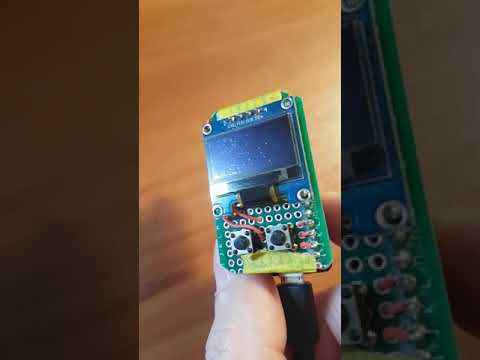](https://www.youtube.com/watch?v=ktr4Itf9JtU)
8 |
9 |
10 | The purpose of this code is simulate grains of sand on a 2 dimensional
11 | surface. An accelerometer provides the tilt sensing to give motion to the
12 | grains. My purpose in writing this was to understand the logic of such
13 | a physics demo and to optimize it. Starting from Phil's code, I made the
14 | following changes:
15 | - Switched to a different accelerometer (MPU-6050 - what I had on hand)
16 | - Upgraded display from a 15x7 LED matrix to a 128x64 monochrome OLED (SSD1306)
17 | - Increased the number of grains from 20 to 250
18 | - Image matrix from 1 byte per pixel to 1 bit per pixel to match the display
19 | - Image memory mapping to match the memory layout of the display for easy updating
20 | - Simplified the pixel 'bounce' loop by removing some calls to abs() and simplifying other code
21 | - Removed the floating point math in the 2D vector limiting code
22 | - Added oledDumpBuffer() function to my oled_96 library which only transmits blocks of 16x8 pixels which have changed since the last call (aka dirty rectangle - for speed)
23 | - Fixed bug in collision logic which allowed grains to overlap
24 |
25 | This code depends on my oled_96 library. You can download it here:
26 | https://github.com/bitbank2/oled_96
27 |
28 | If you find this code useful, please consider buying me a cup of coffee
29 |
30 | [](https://www.paypal.com/cgi-bin/webscr?cmd=_s-xclick&hosted_button_id=SR4F44J2UR8S4)
31 |
32 |
--------------------------------------------------------------------------------
/Animated_Sand.ino:
--------------------------------------------------------------------------------
1 | //
2 | // Animated sand demo
3 | // Written by Larry Bank (bitbank@pobox.com), https://github.com/bitbank2
4 | // Project started 2/2/2019
5 | // original code by Phil Burgess of Adafruit:
6 | // https://github.com/adafruit/Adafruit_Learning_System_Guides/tree/master/LED_Sand
7 | //
8 | // I built an Adafruit Feather "wing" for another project which consists of a SSD1306 I2C OLED
9 | // two push buttons and an MPU-6050 accelerometer/gyroscope. I changed the project design and
10 | // was no longer going to use the hat. I then saw the animated sand demo and thought it
11 | // would be a fun exercise to port the code to the SSD1306 and optimize it.
12 | // The original code animated 20 grains on a small 15x7 LED matrix.
13 | //
14 | // Tested on the Adafruit nRF52832 Feather and the Arduino MKR Zero
15 | //
16 | // What did I change?
17 | // 1) Switched to a different accelerometer (MPU-6050 - what I had on hand)
18 | // 2) Upgraded display from a 15x7 LED matrix to a 128x64 monochrome OLED (SSD1306)
19 | // 3) Increased the number of grains from 20 to 250
20 | // 4) Image matrix from 1 byte per pixel to 1 bit per pixel to match the display
21 | // 5) Image memory mapping to match the memory layout of the display for easy updating
22 | // 6) Simplified the pixel 'bounce' loop by removing some calls to abs() and simplifying other code
23 | // 7) Removed the floating point math in the 2D vector limiting code
24 | // 8) Added oledDumpBuffer() function to my oled_96 library which only transmits blocks of 16x8
25 | // pixels which have changed since the last call (aka dirty rectangle - for speed)
26 | // 9) Fixed bug in collision logic which allowed grains to overlap
27 | //
28 | // Dependencies - oled_96 library: https://github.com/bitbank2/oled_96
29 | //
30 | #include
31 | #include
32 |
33 | static byte imu_addr;
34 | // frame counter for updating display every other pixel update
35 | static int iFrame;
36 |
37 | // Number of grains of sand
38 | #define N_GRAINS 250
39 | // Display width in pixels
40 | #define WIDTH 128
41 | // Display height in pixels
42 | #define HEIGHT 64
43 | // Maximum redraw rate, frames/second
44 | #define MAX_FPS 120
45 |
46 | // The 'sand' grains exist in an integer coordinate space that's 256X
47 | // the scale of the pixel grid, allowing them to move and interact at
48 | // less than whole-pixel increments.
49 | #define MAX_X (WIDTH * 256 - 1) // Maximum X coordinate in grain space
50 | #define MAX_Y (HEIGHT * 256 - 1) // Maximum Y coordinate
51 | struct Grain {
52 | int16_t x, y; // Position
53 | int16_t vx, vy; // Velocity
54 | } grain[N_GRAINS];
55 | uint32_t prevTime = 0; // Used for frames-per-second throttle
56 | uint8_t img[WIDTH * (HEIGHT/8)]; // Copy of pixel map laid out the same way as the SSD1306
57 |
58 | // Wrapper function to write I2C data on Arduino
59 | static void I2CWrite(int iAddr, unsigned char *pData, int iLen)
60 | {
61 | Wire.beginTransmission(iAddr);
62 | Wire.write(pData, iLen);
63 | Wire.endTransmission();
64 | } /* I2CWrite() */
65 |
66 | static byte I2CReadRegister(byte bAddr, byte bRegister, byte *pData, byte iLen)
67 | {
68 | byte ucTemp[2];
69 | byte x;
70 |
71 | ucTemp[0] = bRegister;
72 | I2CWrite(bAddr, ucTemp, 1); // write address of register to read
73 | Wire.requestFrom(bAddr, iLen); // request N bytes
74 | x = 0;
75 | while (x < iLen && Wire.available())
76 | {
77 | pData[x] = Wire.read();
78 | x++;
79 | }
80 | return x;
81 | } /* I2CReadRegister() */
82 |
83 | void mpu6050Init(byte bAddr)
84 | {
85 | uint8_t ucTemp[4];
86 | byte i;
87 |
88 | imu_addr = bAddr;
89 | i = I2CReadRegister(imu_addr, 0x75, ucTemp, 1); // Get ID
90 | if (i != 1 || ucTemp[0] != 0x68)
91 | {
92 | // printf("Error, ID doesn't match 0x68; wrong device?\n");
93 | // printf("Value read = %02x\n", ucTemp[0]);
94 | return;
95 | }
96 | // pwr mgmt 1 register
97 | // bits: 7=reset, 6=sleep, 5=cycle, 4=n/a, 3=temp_disable, 2-0=clock select
98 | ucTemp[0] = 0x6b; // power management 1 register
99 | ucTemp[1] = 0x00; // disable sleep mode
100 | I2CWrite(imu_addr, ucTemp, 2);
101 | } /* mpu6050Init() */
102 |
103 | void mpu6050ReadAccel(int16_t *X, int16_t *Y, int16_t *Z)
104 | {
105 | uint8_t ucTemp[8];
106 | byte i;
107 |
108 | i = I2CReadRegister(imu_addr, 0x3b, ucTemp, 6);
109 | if (i == 6)
110 | {
111 | *X = (ucTemp[0] << 8) + ucTemp[1]; // reverse endian order
112 | *Y = (ucTemp[2] << 8) + ucTemp[3];
113 | *Z = (ucTemp[4] << 8) + ucTemp[5];
114 | }
115 | } /* mpu6050ReadAccel() */
116 |
117 | void setup() {
118 | int i, j, x, y;
119 | // initialize SSD1306 display
120 | // 1Mhz is wishful thinking, but worst case, the I2C driver will settle for 400Khz
121 | oledInit(0x3c, OLED_128x64, 0, 0, -1, -1, 1000000);
122 | oledFill(0); // fill display with black
123 | mpu6050Init(0x68); // Initialize the accelerometer
124 |
125 | memset(img, 0, sizeof(img)); // Clear our copy of the image array
126 | for(i=0; i= 3) ? 1 : 4 - az; // Clip & invert
169 | ax -= az; // Subtract motion factor from X, Y
170 | ay -= az;
171 |
172 | // Apply 2D accelerometer vector to grain velocities...
173 | //
174 | // Theory of operation:
175 | // if the 2D vector of the new velocity is too big (sqrt is > 256), this means it might jump
176 | // over pixels. We want to limit the velocity to 1 pixel as a maximum.
177 | // To avoid using floating point math (sqrt + 2 multiplies + 2 divides)
178 | // Instead of normalizing the velocity to keep the same direction, we can trim the new
179 | // velocity to 5/8 of it's value. This is a reasonable approximation since the maximum
180 | // velocity impulse from the accelerometer is +/-64 (16384 / 256) and it gets added every frame
181 | //
182 | for(i=0; i 65536) // too big, trim it
187 | {
188 | grain[i].vx = (grain[i].vx * 5)/8; // quick and dirty way to avoid doing a 'real' divide
189 | grain[i].vy = (grain[i].vy * 5)/8;
190 | }
191 | } // for i
192 |
193 | // Update the position of each grain, one at a time, checking for
194 | // collisions and having them react. This really seems like it shouldn't
195 | // work, as only one grain is considered at a time while the rest are
196 | // regarded as stationary. Yet this naive algorithm, taking many not-
197 | // technically-quite-correct steps, and repeated quickly enough,
198 | // visually integrates into something that somewhat resembles physics.
199 | // (I'd initially tried implementing this as a bunch of concurrent and
200 | // "realistic" elastic collisions among circular grains, but the
201 | // calculations and volument of code quickly got out of hand for both
202 | // the tiny 8-bit AVR microcontroller and my tiny dinosaur brain.)
203 | //
204 | // (x,y) to bytes mapping:
205 | // The SSD1306 has 8 rows of 128 bytes with the LSB of each byte at the top
206 | // In other words, bytes are oriented vertically with bit 0 as the top pixel
207 | // Part of my optimizations were writing the pixels into memory the same way they'll be
208 | // written to the display. This means calculating an offset and bit to test/set each pixel
209 | //
210 | for(i=0; i MAX_X) { // If grain would go out of bounds
214 | newx = MAX_X; // keep it inside, and
215 | grain[i].vx /= -2; // give a slight bounce off the wall
216 | } else if(newx < 0) {
217 | newx = 0;
218 | grain[i].vx /= -2;
219 | }
220 | if(newy > MAX_Y) {
221 | newy = MAX_Y;
222 | grain[i].vy /= -2;
223 | } else if(newy < 0) {
224 | newy = 0;
225 | grain[i].vy /= -2;
226 | }
227 |
228 | x1 = grain[i].x / 256; y1 = grain[i].y / 256;
229 | oldidx = ((y1/8) * WIDTH + x1); // Prior pixel #
230 | oldbit = 1 << (y1 & 7);
231 | x2 = newx / 256; y2 = newy / 256;
232 | newidx = ((y2/8) * WIDTH + x2); // New pixel #
233 | newbit = 1 << (y2 & 7);
234 | if((oldidx != newidx || oldbit != newbit) && // If grain is moving to a new pixel...
235 | (img[newidx] & newbit) != 0) { // but if that pixel is already occupied...
236 | // Try skidding along just one axis of motion if possible (start w/faster axis)
237 | if(abs(grain[i].vx) > abs(grain[i].vy)) { // X axis is faster
238 | x1 = newx / 256; y1 = grain[i].y / 256;
239 | newidx = ((y1 / 8) * WIDTH + x1);
240 | newbit = 1 << (y1 & 7);
241 | if((img[newidx] & newbit) == 0) { // That pixel's free! Take it! But...
242 | newy = grain[i].y; // Cancel Y motion
243 | grain[i].vy /= -2; // and bounce Y velocity
244 | } else { // X pixel is taken, so try Y...
245 | y1 = newy / 256; x1 = grain[i].x / 256;
246 | newidx = ((y1 / 8) * WIDTH + x1);
247 | newbit = 1 << (y1 & 7);
248 | if((img[newidx] & newbit) == 0) { // Pixel is free, take it, but first...
249 | newx = grain[i].x; // Cancel X motion
250 | grain[i].vx /= -2; // and bounce X velocity
251 | } else { // Both spots are occupied
252 | newx = grain[i].x; // Cancel X & Y motion
253 | newy = grain[i].y;
254 | grain[i].vx /= -2; // Bounce X & Y velocity
255 | grain[i].vy /= -2;
256 | }
257 | }
258 | } else { // Y axis is faster
259 | y1 = newy / 256; x1 = grain[i].x / 256;
260 | newidx = ((y1 / 8) * WIDTH + x1);
261 | newbit = 1 << (y1 & 7);
262 | if((img[newidx] & newbit) == 0) { // Pixel's free! Take it! But...
263 | newx = grain[i].x; // Cancel X motion
264 | grain[i].vx /= -2; // and bounce X velocity
265 | } else { // Y pixel is taken, so try X...
266 | y1 = grain[i].y / 256; x1 = newx / 256;
267 | newidx = ((y1 / 8) * WIDTH + x1);
268 | newbit = 1 << (y1 & 7);
269 | if((img[newidx] & newbit) == 0) { // Pixel is free, take it, but first...
270 | newy = grain[i].y; // Cancel Y motion
271 | grain[i].vy /= -2; // and bounce Y velocity
272 | } else { // Both spots are occupied
273 | newx = grain[i].x; // Cancel X & Y motion
274 | newy = grain[i].y;
275 | grain[i].vx /= -2; // Bounce X & Y velocity
276 | grain[i].vy /= -2;
277 | }
278 | }
279 | }
280 | }
281 | if (grain[i].x != newx || grain[i].y != newy)
282 | {
283 | y1 = newy / 256; x1 = newx / 256;
284 | newidx = ((y1 / 8) * WIDTH + x1);
285 | newbit = 1 << (y1 & 7);
286 | grain[i].x = newx; // Update grain position
287 | grain[i].y = newy;
288 | img[oldidx] &= ~oldbit; // erase old pixel
289 | img[newidx] |= newbit; // Set new pixel
290 | }
291 | }
292 | } // loop
293 |
--------------------------------------------------------------------------------