├── .gitignore
├── example
├── tiles
│ ├── place_your_tiles_here
│ └── empty.jpg
└── index.html
├── screenshots
├── tilecutter-main.png
└── tilecutter-progress.png
├── README.md
└── PS_Bramus.GoogleMapsTileCutter.jsx
/.gitignore:
--------------------------------------------------------------------------------
1 | .DS_Store
--------------------------------------------------------------------------------
/example/tiles/place_your_tiles_here:
--------------------------------------------------------------------------------
1 |
--------------------------------------------------------------------------------
/example/tiles/empty.jpg:
--------------------------------------------------------------------------------
https://raw.githubusercontent.com/bramus/photoshop-google-maps-tile-cutter/HEAD/example/tiles/empty.jpg
--------------------------------------------------------------------------------
/screenshots/tilecutter-main.png:
--------------------------------------------------------------------------------
https://raw.githubusercontent.com/bramus/photoshop-google-maps-tile-cutter/HEAD/screenshots/tilecutter-main.png
--------------------------------------------------------------------------------
/screenshots/tilecutter-progress.png:
--------------------------------------------------------------------------------
https://raw.githubusercontent.com/bramus/photoshop-google-maps-tile-cutter/HEAD/screenshots/tilecutter-progress.png
--------------------------------------------------------------------------------
/example/index.html:
--------------------------------------------------------------------------------
1 |
2 |
3 |
4 | PS_Bramus.GoogleMapsTileCutter — Photoshop Google Maps Tile Cutter Example
5 |
6 |
24 |
25 |
26 | loading tiles...
27 |
28 |
117 |
118 |
119 |
--------------------------------------------------------------------------------
/README.md:
--------------------------------------------------------------------------------
1 | # PS_Bramus.GoogleMapsTileCutter
2 |
3 | Photoshop Google Maps Tile Cutter
4 | Built by Bramus! - [http://www.bram.us/](http://www.bram.us/)
5 |
6 |
7 | ## About
8 |
9 | `PS_Bramus.GoogleMapsTileCutter` is a Photoshop script that cuts image tiles from any image for direct use with Google Maps. Works with Photoshop CS2 and up.
10 |
11 |
12 | 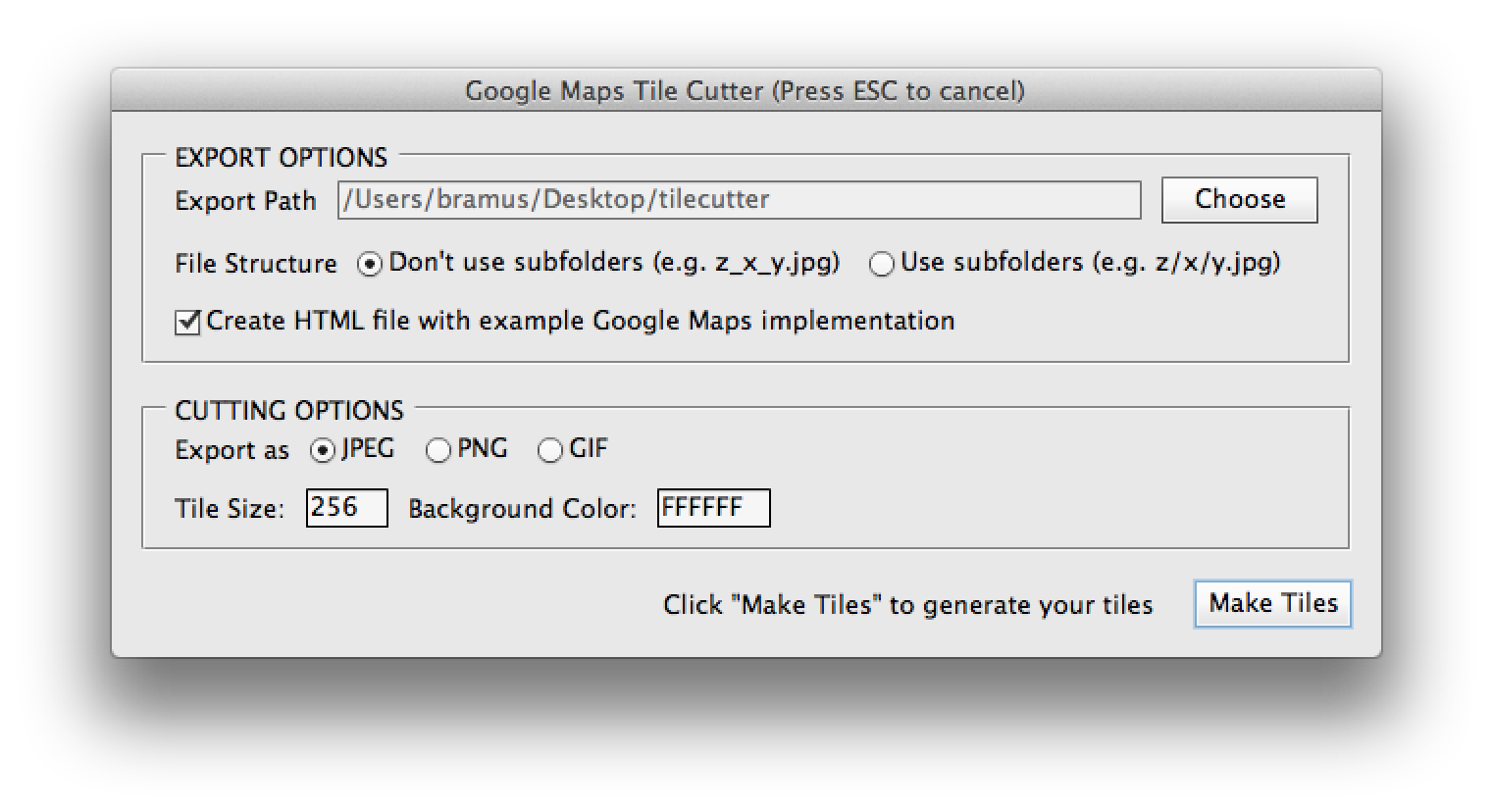
13 |
14 | ## Installation
15 |
16 | * Download and extract `PS_Bramus.GoogleMapsTileCutter`
17 | * Move `PS_Bramus.GoogleMapsTileCutter.jsx` to your Photoshop scripts directory
18 | * For Photoshop CS6 on Mac OS X this is `/Applications/Adobe Photoshop CS6/Presets/Scripts`
19 | * For Photoshop CS6 on Windows this is `C:\Program Files\Adobe\Adobe Photoshop CS6\Presets\Scripts`
20 | * Restart Photoshop if it was already running
21 |
22 |
23 | ## How to use
24 |
25 | ### Cutting tiles
26 |
27 | An example of the script in action can be viewed at [https://www.youtube.com/watch?v=ZC-4bNHfuPo](https://www.youtube.com/watch?v=ZC-4bNHfuPo)
28 |
29 | * Open Photoshop and open the image you want to process.
30 | * Access the script from the scripts menu in Photoshop: `File` > `Scripts` > `PS_Bramus.GoogleMapsTileCutter`.
31 | * Set the export path and cutter settings, and press `Make tiles` to start the cutting process.
32 | * Optionally define the export structure (file based (`z_x_y.jpg`) or folder based (`z/x/y.jpg`)), tile size (`256` by default), and export format (`.jpg` by default)
33 | * The script will start carving the tiles for as many zoom levels as possible.
34 | * During this phase it will look like Photoshop is going berzerk, this is normal, as it is.
35 | * Depending on the size of the image it might be a good idea to take that coffee break. Carving 21000 tiles takes about 20 minutes on a recent MacBook Pro.
36 | * When the script has finished carving, you will find the tiles in the folder you've selected before.
37 |
38 | ### Implementing the tiles
39 |
40 | The resulting tiles can be used directly in Google Maps by setting up [a custom map type](https://developers.google.com/maps/documentation/javascript/maptypes#CustomMapTypes), using [a `google.maps.ImageMapType` instance](https://developers.google.com/maps/documentation/javascript/maptypes#ImageMapTypes).
41 |
42 | If you've checked the option, `PS_Bramus.GoogleMapsTileCutter` will create an HTML file with such an implementation. A fully working example is also included in the `examples` directory that came with the download of `PS_Bramus.GoogleMapsTileCutter` _(the tiles are only included in the `gh-pages` branch)_
43 |
44 | A live example is available at [http://bramus.github.io/photoshop-google-maps-tile-cutter/example/](http://bramus.github.io/photoshop-google-maps-tile-cutter/example/)
45 |
46 |
47 | ## Notes
48 |
49 | * The included example and Google Maps documentation referenced is for Google Maps Version 3.
50 | * `PS_Bramus.GoogleMapsTileCutter` will resize the canvas to being a square one, as this is easier to process and implement
51 | * A result is that extra (empty) tiles will be generated.
52 | * `PS_Bramus.GoogleMapsTileCutter` will create one extra empty tile (`empty.jpg`) which is used to prevent the image from showing up repeatedly on the X-axis when used within Google Maps.
53 |
54 |
55 | ## Credits
56 |
57 | `PS_Bramus.GoogleMapsTileCutter` is based upon the [Automatic Tile Cutter](http://mapki.com/mediawiki/index.php?title=Automatic_Tile_Cutter#Updated_Script) by [Will James](http://onNYTurf.com), [Curtis Wyatt](http://gocalipso.com/), and [Nate Bundy](http://www.lemonrage.com/). The UI Additions were initially provided by [Nick Springer](http://www.springercartographics.com/).
58 |
59 | Basically `PS_Bramus.GoogleMapsTileCutter` is an improved, cleaned up version of their work.
--------------------------------------------------------------------------------
/PS_Bramus.GoogleMapsTileCutter.jsx:
--------------------------------------------------------------------------------
1 | /*
2 | * Photoshop Google Maps Tile Cutter
3 | * By Bramus Van Damme - http://www.bram.us/
4 | *
5 | * Based upon work by Will James (http://onNYTurf.com), Curtis Wyatt (http://gocalipso.com/), and Nate Bundy (http://www.lemonrage.com/)
6 | * UI Additions intially provided by Nick Springer (http://www.springercartographics.com/)
7 | *
8 | */
9 |
10 | // **** HELPER FUNCTIONS
11 |
12 | // Take a snapshot
13 | function takeSnapshot() {
14 | var desc153 = new ActionDescriptor();
15 | var ref119 = new ActionReference();
16 | ref119.putClass(charIDToTypeID("SnpS")); // Snapshot
17 | desc153.putReference(charIDToTypeID("null"), ref119 );
18 | var ref120 = new ActionReference();
19 | ref120.putProperty(charIDToTypeID("HstS"), charIDToTypeID("CrnH") ); // Historystate, CurrentHistorystate
20 | desc153.putReference(charIDToTypeID("From"), ref120 ); // From Current Historystate
21 | executeAction(charIDToTypeID("Mk "), desc153, DialogModes.NO );
22 | }
23 |
24 | // Delete the current active snapshot
25 | function deleteCurrentSnapshot() {
26 | var ref = new ActionReference();
27 | ref.putProperty(charIDToTypeID("HstS"), charIDToTypeID("CrnH"));
28 | var desc = new ActionDescriptor();
29 | desc.putReference(charIDToTypeID("null"), ref );
30 | executeAction(charIDToTypeID("Dlt "), desc, DialogModes.NO );
31 | }
32 |
33 | // Revert to a given snapshot
34 | function revertToSnapshot(doc, snapshotID) {
35 | doc.activeHistoryState = doc.historyStates[snapshotID];
36 | }
37 |
38 | // Get id of the last snapshot
39 | function getLastSnapshotID(doc) {
40 | var hsObj = doc.historyStates;
41 | var hsLength = hsObj.length;
42 | for (var i = hsLength-1; i > -1; i--) {
43 | if(hsObj[i].snapshot) {
44 | return i;
45 | }
46 | }
47 | }
48 |
49 | // Check if a layer is empty
50 | function isLayerEmpty(doc, layer) {
51 | if (!doc) {
52 | doc = app.activeDocument;
53 | }
54 | if (!layer) {
55 | layer = doc.activeLayer;
56 | }
57 | return parseInt(layer.bounds.toString().replace(/\D/g,""), 10) === 0;
58 | }
59 |
60 | // Save doc as jpeg file
61 | function saveDocAsJpeg(doc, fileLocation) {
62 |
63 | //Set path to file and file name
64 | var saveFile = new File(fileLocation);
65 | var jpegSaveOptions = new JPEGSaveOptions();
66 | jpegSaveOptions.formatOptions = FormatOptions.STANDARDBASELINE;
67 | jpegSaveOptions.matte = MatteType.NONE;
68 | jpegSaveOptions.quality = 5;
69 | doc.saveAs(saveFile, jpegSaveOptions, true, Extension.LOWERCASE);
70 |
71 | }
72 |
73 | // Save doc as gif file
74 | function saveDocAsGif(doc, fileLocation) {
75 |
76 | //Set path to file and file name
77 | var saveFile = new File(fileLocation);
78 | //Set save options
79 | var gifSaveOptions = new GIFSaveOptions();
80 | gifSaveOptions.colors = 64;
81 | gifSaveOptions.dither = Dither.NONE;
82 | gifSaveOptions.matte = MatteType.NONE;
83 | gifSaveOptions.preserveExactColors = 0;
84 | gifSaveOptions.transparency = 1;
85 | gifSaveOptions.interlaced = 0;
86 | doc.saveAs(saveFile, gifSaveOptions, true, Extension.LOWERCASE);
87 |
88 | }
89 |
90 | // Save doc as png file
91 | function saveDocAsPng(doc, fileLocation) {
92 |
93 | //Set path to file and file name
94 | var saveFile = new File(fileLocation);
95 | var pngSaveOptions = new PNGSaveOptions();
96 | pngSaveOptions.interlaced = 0;
97 | doc.saveAs(saveFile, pngSaveOptions, true, Extension.LOWERCASE);
98 |
99 | }
100 |
101 | // Cut the active document into tiles using the passed in settings
102 | function cutTiles(options, tickCallback) {
103 |
104 | // Make sure targetPath exists
105 | var targetFolder = new Folder(options.targetPath);
106 | if (!targetFolder.exists) targetFolder.create();
107 |
108 | // Define pathDivider
109 | var pathDivider = ((File.fs == 'Windows') ? '\\' : '/');
110 |
111 | // Add trailing / to targetPath
112 | options.targetPath += pathDivider;
113 |
114 | // Make sure we're using pixels
115 | var startRulerUnits = app.preferences.rulerUnits;
116 | app.preferences.rulerUnits = Units.PIXELS;
117 |
118 | // Active document shorthand
119 | var curDoc = app.activeDocument;
120 |
121 | // Define max tile dimensions
122 | var maxTileDim = Math.ceil(Math.max(curDoc.width.value, curDoc.height.value) / options.tileSize);
123 |
124 | // Define max and min zoom level + define the total number of tiles that will be generated
125 | var minZoomLevel = 0,
126 | maxZoomLevel = 0,
127 | numTilesTotalForAllLevels = 1;
128 | do {
129 | maxZoomLevel++;
130 | numTilesTotalForAllLevels += Math.pow(2, 2 * maxZoomLevel);
131 | } while (Math.pow(2, maxZoomLevel) < maxTileDim);
132 |
133 | // Store initial state
134 | var InitialSnapshotID = getLastSnapshotID(curDoc);
135 |
136 | // Flatten the image (speeds up processing if it were a non-flattened one yet)
137 | curDoc.flatten();
138 |
139 | // Unlock the one layer of the flattened image
140 | curDoc.activeLayer.isBackgroundLayer = false;
141 | curDoc.activeLayer.allLocked = false;
142 |
143 | // keep track of all other snapshots
144 | var snapshots = [];
145 |
146 | // Resize to a square version & center image - this way we get an image size that's easily tileable (512, 1028, 2048, 4096, ...)
147 | var bgColorHex = new SolidColor();
148 | bgColorHex.rgb.hexValue = options.bgColor;
149 | app.backgroundColor = bgColorHex;
150 | curDoc.resizeCanvas(options.tileSize * Math.pow(2, maxZoomLevel), options.tileSize * Math.pow(2, maxZoomLevel), AnchorPosition.MIDDLECENTER);
151 |
152 | // Store current zoom level
153 | var zoomLevel = maxZoomLevel;
154 |
155 | var curTileNum = 0;
156 |
157 | // Do the following for each zoom level the user wants
158 | while (zoomLevel >= minZoomLevel) {
159 |
160 | // Make sure zoomLevel folder exists if exporting with useSubFolders enabled
161 | if (options.useSubFolders) {
162 |
163 | var targetFolderZ = new Folder(options.targetPath + zoomLevel + pathDivider);
164 | if (!targetFolderZ.exists) targetFolderZ.create();
165 |
166 | var targetFolderZX = new Folder(options.targetPath + zoomLevel + pathDivider + "0" + pathDivider);
167 | if (!targetFolderZX.exists) targetFolderZX.create();
168 |
169 | }
170 |
171 | // Resize the canvas to fit the zoom level (50% per zoom level step)
172 | if (zoomLevel < maxZoomLevel) {
173 | curDoc.resizeImage(curDoc.width.value * 0.5, curDoc.height.value * 0.5);
174 | }
175 |
176 | // Take a snapshot for this zoom level and store it
177 | takeSnapshot();
178 | snapshots.push(getLastSnapshotID(curDoc));
179 |
180 | // Calculate the number of tiles we'll need
181 | var numTilesX = parseInt(curDoc.width.value, 10) / options.tileSize; // num tiles on the x axis
182 | var numTilesY = parseInt(curDoc.height.value, 10) / options.tileSize; // num tiles on the y axis
183 | var numTilesTotal = numTilesX * numTilesY; // total tiles (numTilesX * numTilesY)
184 |
185 | // Counters to track which x value and which y value we are on in our image tile grid
186 | var curTileX = 0;
187 | var curTileY = 0;
188 |
189 | // Cut 'em up
190 | // For each tile we need to make, we repeat each step in this loop
191 | for (n = 1; n < numTilesTotal + 1; n++) {
192 |
193 | // Increment curTileNum
194 | curTileNum++;
195 |
196 | // We cut up tiles column by column
197 | // I.E. we cut up all the tiles for a given x value before moving on to the next x value.
198 | // We do this by checking if the y value we are on is the last tile in a column
199 | // We compare our y counter to our total y number of Tiles, if they are the same is we do the following
200 | if (parseInt(curTileY, 10) == parseInt(numTilesY, 10)) {
201 | curTileX += 1; // move to next column
202 | curTileY = 0; // start back at the top
203 |
204 | // Create subfolder if needed
205 | if (options.useSubFolders) {
206 | var targetFolderZX = new Folder(options.targetPath + zoomLevel + pathDivider + curTileX + pathDivider);
207 | if (!targetFolderZX.exists) targetFolderZX.create();
208 | }
209 | }
210 |
211 | // Crop out needed square tile
212 | curDoc.crop([
213 | curTileX * options.tileSize,
214 | curTileY * options.tileSize,
215 | (curTileX * options.tileSize) + options.tileSize,
216 | (curTileY * options.tileSize) + options.tileSize
217 | ]);
218 |
219 | // alert('Cropped from ' + (curTileX * options.tileSize) + ',' + (curTileY * options.tileSize) + ' to ' + ((curTileX * options.tileSize) + options.tileSize) + ',' + ((curTileY * options.tileSize) + options.tileSize) + '.');
220 |
221 | if (options.saveTransparentTiles || !isLayerEmpty(curDoc, curDoc.activeLayer)) {
222 |
223 | // Set the active layer to a background layer so that our bgColor is used as background color
224 | curDoc.activeLayer.isBackgroundLayer = true;
225 |
226 | // Define the filename based on the zoomLevel and x/y pair.
227 | var baseFileName = options.targetPath;
228 | if (options.useSubFolders)
229 | baseFileName += zoomLevel + pathDivider + curTileX + pathDivider + curTileY;
230 | else {
231 | baseFileName += zoomLevel + "_" + curTileX + "_" + curTileY;
232 | }
233 |
234 | //Save the file
235 | if (options.saveGIF) saveDocAsGif(curDoc, baseFileName + ".gif");
236 | if (options.savePNG) saveDocAsPng(curDoc, baseFileName + ".png");
237 | if (options.saveJPEG) saveDocAsJpeg(curDoc, baseFileName + ".jpg");
238 |
239 | }
240 |
241 | // Revert to zoom snapshot
242 | revertToSnapshot(curDoc, snapshots[snapshots.length-1]);
243 |
244 | // Move to next tile in column
245 | curTileY += 1;
246 |
247 | // call tickCallback
248 | tickCallback(curTileNum, numTilesTotalForAllLevels);
249 |
250 | }
251 |
252 | // move to next zoom level
253 | zoomLevel--;
254 |
255 | }
256 |
257 | // ALWAYS Create empty.jpg
258 | if (true || !options.saveTransparentTiles) {
259 |
260 | // Crop canvas to tilesize
261 | curDoc.crop([ 0, 0, options.tileSize, options.tileSize ]);
262 |
263 | // Select entire canvas
264 | curDoc.selection.selectAll();
265 |
266 | // Fill selection with selected background color
267 | curDoc.selection.fill(bgColorHex);
268 |
269 | // Save image
270 | var baseFileName = options.targetPath + "empty";
271 | if (options.saveGIF) saveDocAsGif(curDoc, baseFileName + ".gif");
272 | if (options.savePNG) saveDocAsPng(curDoc, baseFileName + ".png");
273 | if (options.saveJPEG) saveDocAsJpeg(curDoc, baseFileName + ".jpg");
274 |
275 | }
276 |
277 | // Loop all snapshots we took and delete them
278 | do {
279 | revertToSnapshot(curDoc, snapshots[snapshots.length-1]);
280 | deleteCurrentSnapshot();
281 | snapshots.pop();
282 | } while (snapshots.length > 0);
283 |
284 | // Revert to initial state (before we started cutting tiles)
285 | revertToSnapshot(curDoc, InitialSnapshotID);
286 |
287 | // Delete all other states
288 | app.purge(PurgeTarget.HISTORYCACHES);
289 |
290 | // Restore application preferences
291 | app.preferences.rulerUnits = startRulerUnits;
292 |
293 | return {
294 | numTilesTotalForAllLevels: numTilesTotalForAllLevels,
295 | useSubFolders: options.useSubFolders,
296 | maxZoomLevel: maxZoomLevel,
297 | tileSize: options.tileSize,
298 | targetPath: options.targetPath
299 | };
300 |
301 | }
302 |
303 | function createExampleGoogleMapsHtml(options, extension) {
304 |
305 | // create file reference
306 | var fileOut = new File(options.targetPath + 'index.html');
307 | fileOut.lineFeed = 'windows'; // We always want \r\n
308 |
309 | // open for write
310 | fileOut.open("w", "TEXT", "????");
311 |
312 | // Inject Content
313 | fileOut.writeln('');
314 | fileOut.writeln('');
315 | fileOut.writeln(' ');
316 | fileOut.writeln(' PS_Bramus.GoogleMapsTileCutter');
317 | fileOut.writeln(' ');
318 | fileOut.writeln(' ');
336 | fileOut.writeln(' ');
337 | fileOut.writeln(' ');
338 | fileOut.writeln(' loading tiles...
');
339 | fileOut.writeln(' ');
340 | fileOut.writeln(' ');
426 | fileOut.writeln('');
427 | fileOut.writeln(' ');
428 | fileOut.writeln('');
429 |
430 | // close the file
431 | fileOut.close();
432 |
433 |
434 | }
435 |
436 |
437 | // **** UI Windows and Logic
438 |
439 | var windowLoading = new Window(
440 | 'palette {' +
441 | ' text: "Google Maps Tile Cutter (Cutting Tiles, Please Wait)",' +
442 | ' alignChildren: "center",' +
443 | ' bounds: [0, 0, 300, 50]' +
444 | // ' bar: Progressbar{ bounds: [20,20,280,31] , value: 0, maxvalue: 100 }' +
445 | ' txtStatus: StaticText{ bounds: [20, 18, 280, 31] , text: "Preprocessing Image ...", alignment: "center" }' +
446 | '}',
447 | 'Google Maps Tile Cutter (Cutting Tiles, Please Wait)',
448 | undefined,
449 | {
450 | closeButton: false
451 | }
452 | );
453 |
454 | var windowMain = new Window(
455 | 'dialog {' +
456 | ' text:"Google Maps Tile Cutter", alignChildren: "fill",' +
457 | ' pnlExportDir: Panel {' +
458 | ' text: "EXPORT OPTIONS",' +
459 | ' orientation: "column", alignChildren: ["left", "top"],' +
460 | ' grpExport: Group {' +
461 | ' orientation: "row", alignment: "left",' +
462 | ' lblExportPath: StaticText { text: "Export Path" },' +
463 | ' txtExportPath: EditText { text: "", characters: 50, enabled: false },' +
464 | ' btnExportPath: Button { text:"Choose" }' +
465 | ' }' +
466 | ' grpSubfolders: Group {' +
467 | ' orientation: "row", alignment: "left",' +
468 | ' lblExportPath: StaticText { text: "File Structure" },' +
469 | ' optNoSubfolders: RadioButton { text: "Don\'t use subfolders (e.g. z_x_y.jpg)", value: true },' +
470 | ' optSubfolders: RadioButton { text: "Use subfolders (e.g. z/x/y.jpg)" }' +
471 | ' }' +
472 | ' grpExportHtml: Group { orientation: "row", alignment: "left",' +
473 | ' cbCreateHTML: Checkbox { text: "Create HTML file with example Google Maps implementation", value: true},' +
474 | ' }' +
475 | ' }' +
476 | ' pnlExportOptions: Panel { orientation: "column", alignChildren: ["left", "top"],' +
477 | ' text: "CUTTING OPTIONS",' +
478 | ' grpFiletype: Group { orientation: "row", alignment: "left",' +
479 | ' lblExportAs: StaticText { text: "Export as" },' +
480 | ' optJPEG: RadioButton { text: "JPEG", value: true },' +
481 | ' optPNG: RadioButton { text: "PNG" },' +
482 | ' optGIF: RadioButton { text: "GIF" }' +
483 | ' }' +
484 | ' grpSizeColor: Group { orientation: "row", alignment: "left",' +
485 | ' lblSize: StaticText { text: "Tile Size:" },' +
486 | ' txtSize: EditText { text: "256", characters: 4, enabled: true },' +
487 | ' lblBg: StaticText { text: "Background Color:" },' +
488 | ' txtBgColor: EditText { text:"' + app.backgroundColor.rgb.hexValue + '", characters: 6, enabled: true }' +
489 | ' }' +
490 | // ' grpExportBlanks: Group { orientation: "row", alignment: "left",' +
491 | // ' cbDontExport: Checkbox { text: "Don\'t export transparent tiles", value: true},' +
492 | // ' }' +
493 | ' }' +
494 | ' grpButtons: Group {' +
495 | ' orientation: "row", alignment: "right",' +
496 | ' txtHowto: StaticText { text: "Please select an export directory to begin" },' +
497 | ' btnMakeTiles: Button { text: "Make Tiles", enabled: false, properties: { name: "ok" } }' +
498 | ' }' +
499 | '}',
500 | 'Google Maps Tile Cutter (Press ESC to cancel)',
501 | undefined,
502 | {
503 | closeButton: false
504 | }
505 | );
506 |
507 | // When clicking the 'Choose' button, show a select dialog and store the value into the textfield
508 | windowMain.pnlExportDir.grpExport.btnExportPath.onClick = function() {
509 | folder = Folder.selectDialog();
510 | if (folder !== null) {
511 | windowMain.pnlExportDir.grpExport.txtExportPath.text = folder.fsName;
512 | windowMain.grpButtons.txtHowto.text = 'Click "Make Tiles" to generate your tiles';
513 | windowMain.grpButtons.btnMakeTiles.enabled = true;
514 | windowMain.grpButtons.btnMakeTiles.active = true;
515 | }
516 | };
517 |
518 | // Focus the 'Choose' button on load
519 | windowMain.onShow = function() {
520 | windowMain.pnlExportDir.grpExport.btnExportPath.active = true;
521 | };
522 |
523 |
524 | // Generate the tiles, when clicking the "Make Tiles" button
525 | windowMain.grpButtons.btnMakeTiles.onClick = function() {
526 |
527 | // Extract the options
528 | var options = {
529 | targetPath: windowMain.pnlExportDir.grpExport.txtExportPath.text,
530 | useSubFolders: windowMain.pnlExportDir.grpSubfolders.optSubfolders.value,
531 | createHtmlFile: windowMain.pnlExportDir.grpExportHtml.cbCreateHTML.value,
532 | tileSize: parseInt(windowMain.pnlExportOptions.grpSizeColor.txtSize.text, 10),
533 | saveTransparentTiles: true, // !windowMain.pnlExportOptions.grpExportBlanks.cbDontExport.value,
534 | saveJPEG: windowMain.pnlExportOptions.grpFiletype.optJPEG.value,
535 | savePNG: windowMain.pnlExportOptions.grpFiletype.optPNG.value,
536 | saveGIF: windowMain.pnlExportOptions.grpFiletype.optGIF.value,
537 | bgColor: windowMain.pnlExportOptions.grpSizeColor.txtBgColor.text
538 | };
539 |
540 | // Hide main window and show the loading window
541 | windowMain.hide();
542 | windowLoading.show();
543 | windowLoading.center(); // Hmmz, this still is a bit off ...
544 |
545 | // Cut the tiles
546 | cutResult = cutTiles(options, function(curTile, totalTiles) {
547 | windowLoading.txtStatus.text = 'Cutting Tile ' + curTile + '/' + totalTiles + ' (' + Math.floor(curTile / totalTiles * 100) + '%)';
548 | // windowLoading.bar.value = parseInt(windowLoading.bar.value, 10) + 1;
549 | });
550 |
551 | if (options.createHtmlFile) {
552 | windowLoading.txtStatus.text = 'Creating HTML ...';
553 |
554 | // Define extension
555 | var extension;
556 | if (options.saveGIF) extension = 'gif';
557 | else if (options.savePNG) extension = 'png';
558 | else if (options.saveJPEG) extension = 'jpg';
559 |
560 | createExampleGoogleMapsHtml(cutResult, extension);
561 | }
562 |
563 | // Close the windowMain
564 | windowLoading.close();
565 |
566 | };
567 |
568 | // **** MAIN CORE: Show the main window if a document is open
569 |
570 | // No active document: stop here
571 | if (app.documents.length === 0) {
572 | alert("Please open a file", "Google Maps Tile Cutter Error", true);
573 | app.beep();
574 | }
575 |
576 | // Active document: show windowMain
577 | else {
578 | windowMain.center();
579 | windowMain.show();
580 | }
581 |
582 | // EOF
--------------------------------------------------------------------------------