Reverse all tracks
19 | 20 | ); 21 | }; 22 | 23 | export default FilterReverse; 24 | -------------------------------------------------------------------------------- /tools/copy-index.ts: -------------------------------------------------------------------------------- 1 | import fs from "fs"; 2 | 3 | const rootDestinations = ["sort", "compare", "tools", "about"]; 4 | 5 | // Create a 404 fallback for GitHub Pages 6 | fs.copyFile("build/index.html", `build/404.html`, (err) => { 7 | if (err) throw err; 8 | console.log(`Copied build/index.html to build/404.html`); 9 | }); 10 | 11 | // Copy index.html to path folders to be served by GitHub Pages 12 | rootDestinations.forEach((dest) => { 13 | const fullDestination = `build/${dest}`; 14 | if (!fs.existsSync(fullDestination)) { 15 | fs.mkdirSync(fullDestination); 16 | } 17 | fs.copyFile("build/index.html", `${fullDestination}/index.html`, (err) => { 18 | if (err) throw err; 19 | console.log(`Copied build/index.html to ${fullDestination}/index.html`); 20 | }); 21 | }); 22 | -------------------------------------------------------------------------------- /src/pages/Tools/FilterDistinct.tsx: -------------------------------------------------------------------------------- 1 | import React, { useEffect } from "react"; 2 | import { FilterFunctionProps } from "./filter"; 3 | import { TrackWithAudioFeatures } from "../../models/Spotify"; 4 | 5 | interface IProps extends FilterFunctionProps {} 6 | 7 | const filter = (tracks: TrackWithAudioFeatures[]): TrackWithAudioFeatures[] => 8 | tracks.filter((value, index, self) => self.findIndex((t) => t.id === value.id) === index); 9 | 10 | const FilterDistinct: React.FunctionComponentRemove duplicate songs
20 | 21 | ); 22 | }; 23 | 24 | export default FilterDistinct; 25 | -------------------------------------------------------------------------------- /src/hooks/NavigatorOnline.ts: -------------------------------------------------------------------------------- 1 | // Modified Source: https://github.com/oieduardorabelo/use-navigator-online 2 | 3 | import { useEffect, useState } from "react"; 4 | 5 | function useNavigatorOnline() { 6 | let [isOnline, setIsOnline] = useState(window.navigator.onLine); 7 | 8 | useEffect(() => { 9 | function handleOnlineStatusChange(event: Event) { 10 | setIsOnline(window.navigator.onLine); 11 | } 12 | 13 | window.addEventListener("online", handleOnlineStatusChange); 14 | window.addEventListener("offline", handleOnlineStatusChange); 15 | 16 | return () => { 17 | window.removeEventListener("online", handleOnlineStatusChange); 18 | window.removeEventListener("offline", handleOnlineStatusChange); 19 | }; 20 | }, []); 21 | 22 | return isOnline; 23 | } 24 | 25 | export default useNavigatorOnline; 26 | -------------------------------------------------------------------------------- /src/hooks/WindowSize.ts: -------------------------------------------------------------------------------- 1 | // Modified Source: https://github.com/rehooks/window-size 2 | 3 | import { useState, useEffect } from "react"; 4 | 5 | interface WindowDimensions { 6 | innerHeight: number; 7 | innerWidth: number; 8 | outerHeight: number; 9 | outerWidth: number; 10 | } 11 | 12 | function getSize(): WindowDimensions { 13 | return { 14 | innerHeight: window.innerHeight, 15 | innerWidth: window.innerWidth, 16 | outerHeight: window.outerHeight, 17 | outerWidth: window.outerWidth 18 | }; 19 | } 20 | 21 | export default function useWindowSize(): WindowDimensions { 22 | let [windowSize, setWindowSize] = useStateRandomise song order
26 | 27 | ); 28 | }; 29 | 30 | export default FilterRandomise; 31 | -------------------------------------------------------------------------------- /src/components/MetaTags.tsx: -------------------------------------------------------------------------------- 1 | import React from "react"; 2 | import useMetaTags from "react-metatags-hook"; 3 | import BannerImage from "../img/banner.png"; 4 | import config from "../config"; 5 | 6 | interface IProps { 7 | titlePrefix?: string; 8 | description: string; 9 | route: string; 10 | } 11 | 12 | const MetaTags: React.FunctionComponent{playlist.name}
18 |43 | {playlists.length} Playlist{playlists.length > 1 && "s"} Selected 44 |
45 |-
38 |
-
39 | Token expires at:
{token.expiry.toLocaleTimeString()}40 |
41 | -
42 | User associated:
{user.display_name}43 |
44 | -
45 | Playlists stored:{" "}
46 |
47 |               {publicPlaylistCount} public and {privatePlaylistCount} private
48 |
49 |
50 | -
51 | Tracks stored (with audio features):
{tracksStored}52 |
53 |
by " + tracks[af.id].artists.map((a) => a.name).join(", ") 30 | ), 31 | name: playlist.name 32 | }))} 33 | layout={{ 34 | hovermode: "closest", 35 | margin: { t: 0, b: 0, l: 0, r: 5 }, 36 | xaxis: { 37 | range: [ 38 | min !== undefined ? min - plotLimitExpand : undefined, 39 | max !== undefined ? max + plotLimitExpand : undefined 40 | ], 41 | showgrid: true, 42 | zeroline: false 43 | }, 44 | yaxis: { 45 | ticks: "", 46 | showticklabels: false 47 | }, 48 | autosize: true, 49 | legend: { 50 | orientation: "h" 51 | } 52 | }} 53 | useResizeHandler={true} 54 | config={{ 55 | displayModeBar: false, 56 | responsive: true 57 | }} 58 | className="w-100 m-auto" 59 | style={{ 60 | maxWidth: 800, 61 | height: 50 + selectedPlaylists.length * 60 62 | }} 63 | /> 64 | ); 65 | }; 66 | 67 | export default BoxPlotAudioFeatureComparison; 68 | -------------------------------------------------------------------------------- /src/pages/Tools/FilterAddPlaylists.tsx: -------------------------------------------------------------------------------- 1 | import React, { useState, useEffect } from "react"; 2 | import { Spinner } from "react-bootstrap"; 3 | import PlaylistSelection from "../../components/PlaylistSelection"; 4 | import { FilterFunctionProps } from "./filter"; 5 | import { PlaylistObjectSimplifiedWithTrackIds, TrackWithAudioFeatures } from "../../models/Spotify"; 6 | 7 | interface IProps extends FilterFunctionProps { 8 | playlists: { [key: string]: PlaylistObjectSimplifiedWithTrackIds }; 9 | tracks: { [key: string]: TrackWithAudioFeatures }; 10 | playlistsLoading: Set
| Position | 48 |Title | 49 |50 | Artist(s) 51 | | 52 |
|---|---|---|
| {index + 1} | 58 |{track.name} | 59 |60 | {track.artists.map((a) => a.name).join(", ")} 61 | | 62 |
 4 |
5 |
4 |
5 | Create emotionally gradiented Spotify playlists and more.
7 | 8 | 9 | ## 🧪 Development Setup 10 | 11 | 1. Clone the repo 12 | 2. Execute `npm install` 13 | 3. Create a new app / client id at [developer.spotify.com](https://developer.spotify.com/dashboard/applications). 14 | 4. Copy your client id into `/src/config.ts`. 15 | 5. Click "Edit Settings" in the newly created Spotify developer app and add a redirect URI to where `/spotify-authorization` will be hosted - by default this will be `https://localhost:3000/spotify-authorization` 16 | 6. Set `HTTPS=true` (HTTPS is required to use `window.crypto`) 17 | - In PowerShell: `$env:HTTPS = "true"` 18 | 7. Set `NODE_OPTIONS=--openssl-legacy-provider` (react-scripts doesn't play nice with newer versions of Node) 19 | - In PowerShell: ` $env:NODE_OPTIONS = "--openssl-legacy-provider"` 20 | 8. Execute `npm start` 21 | 9. Accept the SSL warning 22 | 23 | ## 📷 Snippets From the Web App 24 | 25 | Example Sort Visualisation of a Personal Playlist 26 | 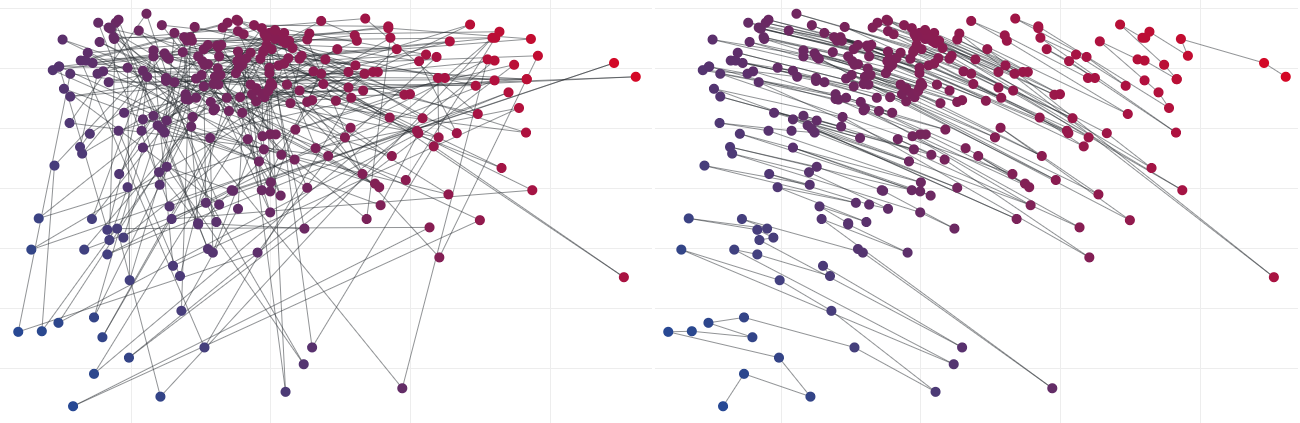 27 | 28 | Example Comparison Visualisation of a Personal Playlists 29 | 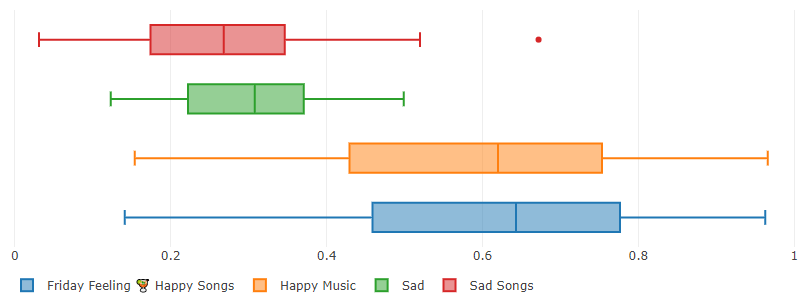 30 | 31 | Example of Applying Filters to Playlists 32 | 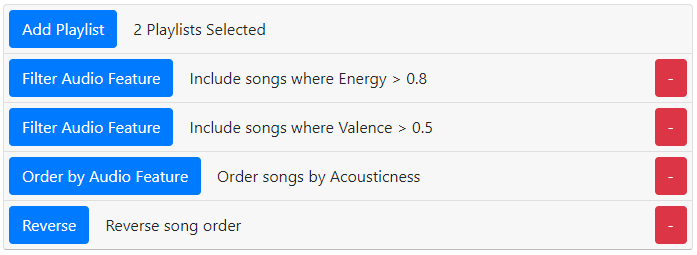 33 | 34 | ## 📝 Features 35 | 36 | - **Spotify authorization for library access** 37 | - **Sort a playlist by valence and energy** - Sorting on these two values can create a transition from sadder/slower songs to more happy/energetic songs. - Can change the sorting audio features and sorting method - Exports to a new playlist 38 | - **Compare playlists** - Compare multiple playlists in 1D, 2D or 7D from selected audio features. 39 | - **Playlist tools** - Add playlists and apply filters and functions to playlists to manipulate song ordering - Exports to a new playlist 40 | 41 | > All [audio features](https://developer.spotify.com/documentation/web-api/reference/tracks/get-audio-features/) used are pre-computed by Spotify and obtained through their API. 42 | 43 | ## ❓ Why? 44 | 45 | Emotionify is an application I had thought about for a few years after doing a project at university on attempting to detect emotion in music and portraying it in an interactive environment. 46 | 47 | I was curious how the method implemented would play out with music I listen to every day and wanted some extra tools for Spotify playlists. 48 | 49 | Emotionify is not 100% accurate as emotion is highly opinion based and the values used to sort songs are averages over the whole song. This tool however does give insight on how well a computer can plot an emotional gradient with a list of songs. 50 | -------------------------------------------------------------------------------- /src/models/Spotify.ts: -------------------------------------------------------------------------------- 1 | export interface SpotifyData { 2 | user: SpotifyApi.UserObjectPrivate | undefined; 3 | playlists: { 4 | [key: string]: PlaylistObjectSimplifiedWithTrackIds; 5 | }; 6 | tracks: { 7 | [key: string]: TrackWithAudioFeatures; 8 | }; 9 | } 10 | 11 | export interface Token { 12 | value: string; 13 | expiry: Date; 14 | } 15 | 16 | export interface PlaylistObjectSimplifiedWithTrackIds extends SpotifyApi.PlaylistObjectSimplified { 17 | track_ids: string[]; 18 | } 19 | 20 | export interface TrackWithAudioFeatures extends SpotifyApi.TrackObjectFull { 21 | audio_features: SpotifyApi.AudioFeaturesObject | null | undefined; // undefined when none have been requested, null when they don't exist (after requesting) 22 | } 23 | 24 | export interface AudioFeatureProperty { 25 | key: keyof SpotifyApi.AudioFeaturesObject; 26 | min: number | undefined; 27 | max: number | undefined; 28 | show_in_sort: boolean; 29 | show_in_compare_radar: boolean; 30 | } 31 | 32 | export const availableTrackAudioFeatures: { [key: string]: AudioFeatureProperty } = { 33 | Acousticness: { 34 | key: "acousticness", 35 | min: 0, 36 | max: 1, 37 | show_in_sort: true, 38 | show_in_compare_radar: true 39 | }, 40 | Danceability: { 41 | key: "danceability", 42 | min: 0, 43 | max: 1, 44 | show_in_sort: true, 45 | show_in_compare_radar: true 46 | }, 47 | Duration: { 48 | key: "duration_ms", 49 | min: 0, 50 | max: undefined, 51 | show_in_sort: true, 52 | show_in_compare_radar: false 53 | }, 54 | Energy: { 55 | key: "energy", 56 | min: 0, 57 | max: 1, 58 | show_in_sort: true, 59 | show_in_compare_radar: true 60 | }, 61 | Instrumentalness: { 62 | key: "instrumentalness", 63 | min: 0, 64 | max: 1, 65 | show_in_sort: true, 66 | show_in_compare_radar: true 67 | }, 68 | Key: { 69 | key: "key", 70 | min: undefined, 71 | max: undefined, 72 | show_in_sort: false, 73 | show_in_compare_radar: false 74 | }, 75 | Liveness: { 76 | key: "liveness", 77 | min: 0, 78 | max: 1, 79 | show_in_sort: true, 80 | show_in_compare_radar: true 81 | }, 82 | Loudness: { 83 | key: "loudness", 84 | min: undefined, 85 | max: 0, 86 | show_in_sort: true, 87 | show_in_compare_radar: false 88 | }, 89 | Mode: { 90 | key: "mode", 91 | min: 0, 92 | max: 1, 93 | show_in_sort: false, 94 | show_in_compare_radar: false 95 | }, 96 | Speechiness: { 97 | key: "speechiness", 98 | min: 0, 99 | max: 1, 100 | show_in_sort: true, 101 | show_in_compare_radar: true 102 | }, 103 | Tempo: { 104 | key: "tempo", 105 | min: undefined, 106 | max: undefined, 107 | show_in_sort: true, 108 | show_in_compare_radar: false 109 | }, 110 | "Time Signature": { 111 | key: "time_signature", 112 | min: 0, 113 | max: undefined, 114 | show_in_sort: false, 115 | show_in_compare_radar: false 116 | }, 117 | Valence: { 118 | key: "valence", 119 | min: 0, 120 | max: 1, 121 | show_in_sort: true, 122 | show_in_compare_radar: true 123 | } 124 | }; 125 | -------------------------------------------------------------------------------- /src/components/TokenRefreshWarning.tsx: -------------------------------------------------------------------------------- 1 | import React, { useState, useEffect } from "react"; 2 | import { navigate } from "hookrouter"; 3 | import { Button, Modal } from "react-bootstrap"; 4 | import { Token } from "../models/Spotify"; 5 | 6 | interface IProps { 7 | token: Token | undefined; 8 | onLogOut: () => void; 9 | } 10 | 11 | const warningMilliseconds = 5 * 60 * 1000; 12 | 13 | const TokenRefreshWarning: React.FunctionComponent77 | We will leave you logged in here so you can still view your data but we will not be 78 | able to get data from Spotify for you. 79 | 80 | ) : ( 81 | <> 82 | Since Spotify issues client side tokens for upto an hour, you will need a new token 83 | soon. Your current token expires at {token.expiry.toLocaleTimeString()}. 84 |
85 | To do this, we'll send you back to the Spotify authorization page again to get a new 86 | token. 87 | 88 | )} 89 |
| Moved | 62 |Title | 63 |64 | Artist(s) 65 | | 66 |{x_audio_feature_name} | 67 |{y_audio_feature_name} | 68 |
|---|---|---|---|---|
| 82 | {track.index.before - track.index.after} 83 | | 84 |{track.name} | 85 |86 | {track.artists.map((a) => a.name).join(", ")} 87 | | 88 |89 | {track.audio_features !== undefined && 90 | track.audio_features !== null && 91 | track.audio_features[x_audio_feature]} 92 | | 93 |94 | {track.audio_features !== undefined && 95 | track.audio_features !== null && 96 | track.audio_features[y_audio_feature]} 97 | | 98 |
Emotionify
17 |24 | Easily create emotionally gradiented Spotify playlists for smoother emotional 25 | transitions in your listening 26 |
27 |Sort Your Playlist
33 |41 | Using features calculated by Spotify for each song, sort your playlist on an emotional 42 | gradient. 43 |
44 |45 | You can also change how and what your songs are sorted by to explore different methods 46 | of sorting playlists and discover new ways to listen to your playlists. 47 |
48 |Compare Playlists
58 |66 | Compare your playlists based off audio features calculated by Spotify. 67 |
68 |69 | Select any number of playlists and compare them in one or two dimensions for any audio 70 | feature or seven dimensions for specific audio features. 71 |
72 |Playlist Tools
82 |90 | Merge, filter and sort your playlists to make a more focused playlist. 91 |
92 |93 | Select playlists, filter and sort by audio features and even randomise your playlists 94 | to make a playlist focused for any occasion. 95 |
96 |Loading...
); 20 | 21 | useEffect(() => { 22 | const params = new URLSearchParams(window.location.search); 23 | const code = params.get("code"); 24 | const error = params.get("error"); 25 | const redirectUri = `${window.location.origin}${window.location.pathname}`; // Don't want this to include the code/error coming back (so no window.location.href) 26 | 27 | if (error) { 28 | setMessage(Authorization failed: {error}
); 29 | return; 30 | } 31 | 32 | if (code === null) { 33 | // No code, initiate authorization request 34 | const codeVerifier = randomString(64); 35 | localStorage.setItem(localStorageCodeVerifierKey, codeVerifier); 36 | 37 | crypto.subtle.digest("SHA-256", new TextEncoder().encode(codeVerifier)).then((buffer) => { 38 | const codeChallenge = btoa(String.fromCharCode(...new Uint8Array(buffer))) 39 | .replace(/\+/g, "-") 40 | .replace(/\//g, "_") 41 | .replace(/=+$/, ""); 42 | 43 | // Redirect 44 | const authUrl = `https://accounts.spotify.com/authorize?${encodeData({ 45 | client_id: config.spotify.clientId, 46 | response_type: "code", 47 | redirect_uri: redirectUri, 48 | code_challenge_method: "S256", 49 | code_challenge: codeChallenge, 50 | scope: config.spotify.permissionScope 51 | })}`; 52 | window.location.href = authUrl; 53 | }); 54 | 55 | setMessage( 56 | <> 57 |Redirecting to Spotify...
59 | 60 | ); 61 | } else { 62 | // Pull out the code verifier we stored previously 63 | const codeVerifier = localStorage.getItem(localStorageCodeVerifierKey); 64 | localStorage.removeItem(localStorageCodeVerifierKey); 65 | if (codeVerifier === null) { 66 | setMessage(Missing code verifier
); 67 | return; 68 | } 69 | 70 | // Exchange code for access token (after authorization request comes back) 71 | fetch("https://accounts.spotify.com/api/token", { 72 | method: "POST", 73 | headers: { "Content-Type": "application/x-www-form-urlencoded" }, 74 | body: encodeData({ 75 | client_id: config.spotify.clientId, 76 | grant_type: "authorization_code", 77 | code, 78 | redirect_uri: redirectUri, 79 | code_verifier: codeVerifier 80 | }) 81 | }) 82 | .then((res) => res.json()) 83 | .then((data) => { 84 | if (data.access_token && data.expires_in) { 85 | // Store token 86 | const expiryDate = new Date(); 87 | expiryDate.setSeconds(expiryDate.getSeconds() + data.expires_in); 88 | onTokenChange({ value: data.access_token, expiry: expiryDate }); 89 | 90 | // Redirect back to where we came from in the application 91 | let local_redirect = localStorage.getItem(localStorageRedirectKey); 92 | if (local_redirect) { 93 | localStorage.removeItem(localStorageRedirectKey); 94 | navigate(local_redirect); 95 | } else { 96 | navigate("/"); 97 | } 98 | 99 | setMessage( 100 | <> 101 |Authorization successful
103 | 104 | ); 105 | } else { 106 | setMessage(Failed to retrieve access token
); 107 | } 108 | }) 109 | .catch(() => setMessage(Error fetching token
)); 110 | } 111 | }, []); 112 | 113 | return ( 114 |Spotify Authorization
116 | {message} 117 |Create New Playlist
63 |Artist: " + 72 | track.artists.map((a) => a.name).join(", ") + 73 | "
" + 74 | x_audio_feature_name + 75 | ": " + 76 | af[x_audio_feature.key] + 77 | "
" + 78 | y_audio_feature_name + 79 | ": " + 80 | af[y_audio_feature.key] 81 | ); 82 | }), 83 | hoverinfo: "text", 84 | mode: "markers", 85 | marker: { 86 | size: 7 87 | }, 88 | name: playlist.name 89 | }))} 90 | layout={{ 91 | hovermode: "closest", 92 | margin: { t: 0, b: 0, l: 0, r: 0 }, 93 | plot_bgcolor: "transparent", 94 | paper_bgcolor: "transparent", 95 | xaxis: { 96 | range: [ 97 | scale_x_min !== undefined ? scale_x_min - plotLimitExpand : undefined, 98 | scale_x_max !== undefined ? scale_x_max + plotLimitExpand : undefined 99 | ], 100 | zeroline: false 101 | }, 102 | yaxis: { 103 | range: [ 104 | scale_y_min !== undefined ? scale_y_min - plotLimitExpand : undefined, 105 | scale_y_max !== undefined ? scale_y_max + plotLimitExpand : undefined 106 | ], 107 | zeroline: false 108 | }, 109 | legend: { 110 | orientation: "h" 111 | } 112 | }} 113 | useResizeHandler={true} 114 | config={{ 115 | displayModeBar: false, 116 | responsive: true 117 | }} 118 | className="w-100 m-auto" 119 | style={{ 120 | maxWidth: 700, 121 | height: 450 122 | }} 123 | /> 124 | ); 125 | }; 126 | 127 | export default ScatterPlotDualAudioFeatureComparison; 128 | -------------------------------------------------------------------------------- /src/serviceWorker.ts: -------------------------------------------------------------------------------- 1 | // This optional code is used to register a service worker. 2 | // register() is not called by default. 3 | 4 | // This lets the app load faster on subsequent visits in production, and gives 5 | // it offline capabilities. However, it also means that developers (and users) 6 | // will only see deployed updates on subsequent visits to a page, after all the 7 | // existing tabs open on the page have been closed, since previously cached 8 | // resources are updated in the background. 9 | 10 | // To learn more about the benefits of this model and instructions on how to 11 | // opt-in, read https://bit.ly/CRA-PWA 12 | 13 | const isLocalhost = Boolean( 14 | window.location.hostname === "localhost" || 15 | // [::1] is the IPv6 localhost address. 16 | window.location.hostname === "[::1]" || 17 | // 127.0.0.1/8 is considered localhost for IPv4. 18 | window.location.hostname.match(/^127(?:\.(?:25[0-5]|2[0-4][0-9]|[01]?[0-9][0-9]?)){3}$/) 19 | ); 20 | 21 | type Config = { 22 | onSuccess?: (registration: ServiceWorkerRegistration) => void; 23 | onUpdate?: (registration: ServiceWorkerRegistration) => void; 24 | }; 25 | 26 | export function register(config?: Config) { 27 | if (process.env.NODE_ENV === "production" && "serviceWorker" in navigator) { 28 | // The URL constructor is available in all browsers that support SW. 29 | const publicUrl = new URL( 30 | (process as { env: { [key: string]: string } }).env.PUBLIC_URL, 31 | window.location.href 32 | ); 33 | if (publicUrl.origin !== window.location.origin) { 34 | // Our service worker won't work if PUBLIC_URL is on a different origin 35 | // from what our page is served on. This might happen if a CDN is used to 36 | // serve assets; see https://github.com/facebook/create-react-app/issues/2374 37 | return; 38 | } 39 | 40 | window.addEventListener("load", () => { 41 | const swUrl = `${process.env.PUBLIC_URL}/service-worker.js`; 42 | 43 | if (isLocalhost) { 44 | // This is running on localhost. Let's check if a service worker still exists or not. 45 | checkValidServiceWorker(swUrl, config); 46 | 47 | // Add some additional logging to localhost, pointing developers to the 48 | // service worker/PWA documentation. 49 | navigator.serviceWorker.ready.then(() => { 50 | console.log( 51 | "This web app is being served cache-first by a service " + 52 | "worker. To learn more, visit https://bit.ly/CRA-PWA" 53 | ); 54 | }); 55 | } else { 56 | // Is not localhost. Just register service worker 57 | registerValidSW(swUrl, config); 58 | } 59 | }); 60 | } 61 | } 62 | 63 | function registerValidSW(swUrl: string, config?: Config) { 64 | navigator.serviceWorker 65 | .register(swUrl) 66 | .then((registration) => { 67 | registration.onupdatefound = () => { 68 | const installingWorker = registration.installing; 69 | if (installingWorker == null) { 70 | return; 71 | } 72 | installingWorker.onstatechange = () => { 73 | if (installingWorker.state === "installed") { 74 | if (navigator.serviceWorker.controller) { 75 | // At this point, the updated precached content has been fetched, 76 | // but the previous service worker will still serve the older 77 | // content until all client tabs are closed. 78 | console.log( 79 | "New content is available and will be used when all " + 80 | "tabs for this page are closed. See https://bit.ly/CRA-PWA." 81 | ); 82 | 83 | // Execute callback 84 | if (config && config.onUpdate) { 85 | config.onUpdate(registration); 86 | } 87 | } else { 88 | // At this point, everything has been precached. 89 | // It's the perfect time to display a 90 | // "Content is cached for offline use." message. 91 | console.log("Content is cached for offline use."); 92 | 93 | // Execute callback 94 | if (config && config.onSuccess) { 95 | config.onSuccess(registration); 96 | } 97 | } 98 | } 99 | }; 100 | }; 101 | }) 102 | .catch((error) => { 103 | console.error("Error during service worker registration:", error); 104 | }); 105 | } 106 | 107 | function checkValidServiceWorker(swUrl: string, config?: Config) { 108 | // Check if the service worker can be found. If it can't reload the page. 109 | fetch(swUrl) 110 | .then((response) => { 111 | // Ensure service worker exists, and that we really are getting a JS file. 112 | const contentType = response.headers.get("content-type"); 113 | if ( 114 | response.status === 404 || 115 | (contentType != null && contentType.indexOf("javascript") === -1) 116 | ) { 117 | // No service worker found. Probably a different app. Reload the page. 118 | navigator.serviceWorker.ready.then((registration) => { 119 | registration.unregister().then(() => { 120 | window.location.reload(); 121 | }); 122 | }); 123 | } else { 124 | // Service worker found. Proceed as normal. 125 | registerValidSW(swUrl, config); 126 | } 127 | }) 128 | .catch(() => { 129 | console.log("No internet connection found. App is running in offline mode."); 130 | }); 131 | } 132 | 133 | export function unregister() { 134 | if ("serviceWorker" in navigator) { 135 | navigator.serviceWorker.ready.then((registration) => { 136 | registration.unregister(); 137 | }); 138 | } 139 | } 140 | -------------------------------------------------------------------------------- /src/logic/PointSorting.ts: -------------------------------------------------------------------------------- 1 | import { TrackWithAudioFeatures } from "../models/Spotify"; 2 | 3 | /* 4 | * Different methods of sorting x y points 5 | */ 6 | 7 | export interface SortablePoint { 8 | id: any; 9 | x: number; 10 | y: number; 11 | } 12 | 13 | export interface IndexedTrackId { 14 | // Minimal stored data 15 | id: string; 16 | index: { 17 | before: number; 18 | after: number; 19 | }; 20 | } 21 | 22 | export interface SpotifyTrackWithIndexes extends TrackWithAudioFeatures, IndexedTrackId {} // Not used here but relates to methods here 23 | 24 | export const availableSortingMethods: { [key: string]: Function } = { 25 | "Distance From Origin": originDistance, 26 | "Nearest Neighbour": nearestNeighbourFromOrigin, 27 | "X Axis": xAxis, 28 | "Y Axis": yAxis, 29 | "No Sorting": noSort 30 | }; 31 | 32 | function distanceToPoint(xOrigin: number, yOrigin: number, x: number, y: number): number { 33 | let a = xOrigin - x; 34 | let b = yOrigin - y; 35 | return Math.sqrt(a * a + b * b); 36 | } 37 | 38 | // Sort points based off their distance from the origin. Not great as it could jump from 1,0 to 0,1 39 | export function originDistance(points: SortablePoint[]): SortablePoint[] { 40 | let distances_from_origin = points.map((p) => { 41 | return { ...p, distance: distanceToPoint(0, 0, p.x, p.y) }; 42 | }); 43 | return distances_from_origin.sort((a, b) => a.distance - b.distance); 44 | } 45 | 46 | // Sorts points by going point to point based off the closest left-over points. Starts at 0,0. 47 | export function nearestNeighbourFromOrigin(points: SortablePoint[]): SortablePoint[] { 48 | if (points.length === 0) { 49 | return []; 50 | } 51 | 52 | let nearest_point_to_origin = points.reduce( 53 | (accumulator: SortablePoint, currentValue: SortablePoint): SortablePoint => { 54 | let acc_dist = distanceToPoint(0, 0, accumulator.x, accumulator.y); 55 | let curr_dist = distanceToPoint(0, 0, currentValue.x, currentValue.y); 56 | return acc_dist > curr_dist ? currentValue : accumulator; 57 | } 58 | ); 59 | 60 | let sorted_points: SortablePoint[] = [nearest_point_to_origin]; // Put the closest point to 0, 0 in the sorted list 61 | let points_left: SortablePoint[] = points.slice(); // Make a copy 62 | points_left = points_left.filter((p) => p.id !== nearest_point_to_origin.id); // Remove nearest point 63 | 64 | let current_point: SortablePoint = nearest_point_to_origin; 65 | const reduce_to_closest_point = ( 66 | accumulator: SortablePoint, 67 | currentValue: SortablePoint 68 | ): SortablePoint => { 69 | // Keep function out of the loop 70 | let acc_dist = distanceToPoint(current_point.x, current_point.y, accumulator.x, accumulator.y); 71 | let curr_dist = distanceToPoint( 72 | current_point.x, 73 | current_point.y, 74 | currentValue.x, 75 | currentValue.y 76 | ); 77 | return acc_dist > curr_dist ? currentValue : accumulator; 78 | }; 79 | while (points_left.length > 0) { 80 | let closest_point: SortablePoint = points_left.reduce(reduce_to_closest_point); 81 | sorted_points.push(closest_point); 82 | points_left = points_left.filter((p) => p.id !== closest_point.id); 83 | current_point = closest_point; 84 | } 85 | 86 | return sorted_points; 87 | } 88 | 89 | // Return the data provided 90 | export function noSort(points: SortablePoint[]): SortablePoint[] { 91 | return points; 92 | } 93 | 94 | // Sort by x 95 | export function xAxis(points: SortablePoint[]): SortablePoint[] { 96 | return points.sort((a, b) => { 97 | return a.x === b.x ? 0 : a.x > b.x ? 1 : -1; 98 | }); 99 | } 100 | 101 | // Sort by y 102 | export function yAxis(points: SortablePoint[]): SortablePoint[] { 103 | return points.sort((a, b) => { 104 | return a.y === b.y ? 0 : a.y > b.y ? 1 : -1; 105 | }); 106 | } 107 | 108 | // Sort tracks given x and y features and a sorting method 109 | export function sort( 110 | tracks: TrackWithAudioFeatures[], 111 | x_audio_feature: keyof SpotifyApi.AudioFeaturesObject, 112 | y_audio_feature: keyof SpotifyApi.AudioFeaturesObject, 113 | sorting_method: Function 114 | ): IndexedTrackId[] { 115 | // Get points initial indexes (to calculate movement) 116 | let tracks_with_playlist_indexes: IndexedTrackId[] = tracks.map((t, i) => { 117 | return { id: t.id, index: { before: i, after: 0 } }; 118 | }); 119 | 120 | // Convert tracks to sortable points 121 | let tracks_as_sp: SortablePoint[] = tracks.map((t) => { 122 | if (t.audio_features !== undefined && t.audio_features !== null) { 123 | let x = t.audio_features[x_audio_feature] as number; // We know better than the compiler 124 | let y = t.audio_features[y_audio_feature] as number; 125 | return { id: t.id, x: x, y: y }; 126 | } else { 127 | // Commonly occurs as t.audioFeatures === undefined on first playlist selection 128 | return { id: t.id, x: 0, y: 0 }; 129 | } 130 | }); 131 | 132 | // Sort the sortable points 133 | let tracks_as_sp_sorted: SortablePoint[] = sorting_method(tracks_as_sp); 134 | 135 | // Calculate new indexes using the sorted points 136 | let tracks_with_sorted_indexes: IndexedTrackId[] = tracks_as_sp_sorted 137 | .map((sp, i) => { 138 | let track = tracks_with_playlist_indexes.find((t) => t.id === sp.id); 139 | if (track !== undefined) { 140 | return { ...track, index: { before: track.index.before, after: i } }; 141 | } else { 142 | console.error("[TrackTable:tracks_with_sorted_indexes] Cannot find match for: " + sp.id); 143 | return null; 144 | } 145 | }) 146 | .filter((t: IndexedTrackId | null): t is IndexedTrackId => t !== null); 147 | 148 | // Quick debugging verification 149 | if (tracks_with_sorted_indexes.length !== tracks.length) { 150 | console.error("PointSorting.sort did not output the same amount of tracks input"); 151 | } 152 | 153 | // Sort tracks by the new indexes 154 | return tracks_with_sorted_indexes.sort((a, b) => a.index.after - b.index.after); 155 | } 156 | -------------------------------------------------------------------------------- /src/pages/Compare/index.tsx: -------------------------------------------------------------------------------- 1 | import React, { useState } from "react"; 2 | import { Container, Spinner } from "react-bootstrap"; 3 | import PlaylistSelection from "../../components/PlaylistSelection"; 4 | import SpotifyLoginStatusButton from "../../components/SpotifyLoginStatusButton"; 5 | import NamedDropdown from "../../components/NamedDropdown"; 6 | import BoxPlotAudioFeatureComparison from "./BoxPlotAudioFeatureComparison"; 7 | import ScatterPlotDualAudioFeatureComparison from "./ScatterPlotDualAudioFeatureComparison"; 8 | import RadarChartAudioFeatureComparison from "./RadarChartAudioFeatureComparison"; 9 | import { 10 | PlaylistObjectSimplifiedWithTrackIds, 11 | availableTrackAudioFeatures, 12 | TrackWithAudioFeatures 13 | } from "../../models/Spotify"; 14 | 15 | interface IProps { 16 | user: SpotifyApi.UserObjectPrivate | undefined; 17 | playlists: { [key: string]: PlaylistObjectSimplifiedWithTrackIds }; 18 | tracks: { [key: string]: TrackWithAudioFeatures }; 19 | playlistsLoading: Set
Compare Playlists
51 |52 | Select playlists and compare them on one audio feature, two audio features or seven 53 | pre-selected audio features. 54 |
55 |Sign into Spotify
64 |65 | To get access to your playlists and the ability to create playlists, you need to sign 66 | into Spotify. 67 |
68 |Select a Playlist
80 |96 | 97 |
Single Audio Feature Comparison
99 | 100 |Dual Audio Feature Comparison
119 | 120 |0-1 Range Audio Feature Comparison
147 | 148 ||
120 | {/* Spotify has recently changed their responses - playlist.images is now nullable */}
121 | {playlist.images !== null && playlist.images.length > 0 && (
122 | |
129 |
130 | {playlist.name}
131 |
132 |
140 | |
141 |
Artist: " + 132 | p.track.artist + 133 | "
" + 134 | x_audio_feature_name + 135 | ": " + 136 | p.x + 137 | "
" + 138 | y_audio_feature_name + 139 | ": " + 140 | p.y 141 | ), 142 | hoverinfo: "text", 143 | mode: "lines+markers", 144 | marker: { 145 | size: 10, 146 | color: points.map((p) => { 147 | let distanceAlongGradient = getDistancePercentageAlongLineTheOfClosestPointOnLineToAnArbitaryPoint( 148 | { x: colour_x_min, y: colour_y_min }, 149 | { x: colour_x_max, y: colour_y_max }, 150 | { x: p.x, y: p.y } 151 | ); 152 | return "#" + getPointAlongColourGradient("00529d", "eb121b", distanceAlongGradient); 153 | }) 154 | }, 155 | line: { 156 | color: "rgba(44, 48, 51, 0.5)", 157 | width: 1 158 | } 159 | } 160 | ]} 161 | layout={{ 162 | hovermode: "closest", 163 | margin: { t: 0, b: 0, l: 0, r: 0 }, 164 | plot_bgcolor: "transparent", 165 | paper_bgcolor: "transparent", 166 | xaxis: { 167 | range: [scale_x_min, scale_x_max] 168 | }, 169 | yaxis: { 170 | range: [scale_y_min, scale_y_max] 171 | } 172 | }} 173 | useResizeHandler={true} 174 | config={{ 175 | displayModeBar: false, 176 | responsive: true 177 | }} 178 | className="w-100 m-auto overflow-hidden" 179 | style={{ 180 | maxWidth: 700, 181 | height: 450, 182 | border: "2px solid #6c757d", 183 | borderRadius: 10 184 | }} 185 | /> 186 | {tracks.filter((a) => a.audio_features === null).length > 0 && ( 187 |
190 | Look in the table below to identify these songs (they will have no values beside them). 191 |
About
10 |11 | Emotionify is an application I had thought about for a few years after doing a project 12 | at university on attempting to detect emotion in music and portraying it in an 13 | interactive environment. 14 |
15 |
16 | By default, choosing a playlist on the Sort page will sort your music by{" "}
17 | Valence and Energy which are{" "}
18 |
19 | audio features calculated by Spotify
20 |
21 | . When researching my project, this is was some of the best public and easily accessible
22 | data that related to emotion in music. Also with Spotify being so large and active among
23 | many people, it allows people to easily organise their own playlists.
24 |
26 | Emotionify is not 100% accurate as emotion is highly opinion based and the values used 27 | to sort songs are averages over the whole song. This tool however does give insight on 28 | how well a computer can plot an emotional gradient with a list of songs. 29 |
30 |31 | I made this project because I was curious if this data really did mean anything and if 32 | my guess of the data being able to be used to sort playlists by emotion was correct. I 33 | can leave that up to you to decide! 34 |
35 |36 | As you can see on the Sort page, I have also made the other audio features available for 37 | you to play around with. 38 |
39 |40 | You can find other projects and tutorials made by me on my site{" "} 41 | nitratine.net. 42 |
43 | 44 |FAQ
45 |Why is this called Emotionify?
46 |
47 | By default, choosing a playlist on the Sort page will sort your music by{" "}
48 | Valence and Energy which I had used in a previous project to
49 | detect vague emotion of songs.
50 |
Will sorting a playlist remove duplicates?
52 |53 | Yes, if the sort functionality didn't remove duplicate songs they would be bunched up by 54 | each other. Removing these allows for proper transitions into a different song. 55 |
56 |Why do I have to log in so much?
57 |58 | When you log in, a token is stored on your machine that's used to ask Spotify for your 59 | playlists (otherwise we couldn't see them). This token only lasts for an hour, meaning 60 | if you use this site for more than an hour at a time, you will need to authorise the 61 | application again. 62 |
63 |What data do you store?
64 |65 | All data received from Spotify is stored locally on your machine; none of this is sent 66 | off to some other server (apart from Spotify itself). You can view a summary of your 67 | stored data by clicking on your name in the top right when logged in. 68 |
69 |How do I clear all my data?
70 |71 | All data is stored in localStorage on your machine; simply logging out will clear all 72 | this data. 73 |
74 |I just added a playlist on Spotify but it isn't showing up here
75 |76 | We look for your playlists when you log in. If you want to use a playlist you 77 | created/added after you logged into this site, log out and then log back in to get the 78 | new playlist. 79 |
80 |What are each of the audio features I select for the axis?
81 |82 | Here are some summaries from{" "} 83 | 84 | Spotify 85 | 86 | : 87 |
88 |-
89 |
-
90 |
Acousticness: A confidence measure from 0 to 1 of whether the track is 91 | acoustic. 1 represents high confidence the track is acoustic. 92 |
93 | -
94 |
Danceability: Danceability describes how suitable a track is for dancing 95 | based on a combination of musical elements. A value of 0 is least danceable and 1 is 96 | most danceable. 97 |
98 | -
99 |
Duration: The duration of the track in milliseconds. 100 |
101 | -
102 |
Energy: Energy is a measure from 0 to 1 and represents a perceptual 103 | measure of intensity and activity. Typically, energetic tracks feel fast, loud, and 104 | noisy. For example, death metal has high energy, while a Bach prelude scores low on 105 | the scale. 106 |
107 | -
108 |
Instrumentalness: Predicts whether a track contains no vocals. The closer 109 | the instrumentalness value is to 1, the greater likelihood the track contains no vocal 110 | content. Values above 0.5 are intended to represent instrumental tracks, but 111 | confidence is higher as the value approaches 1. 112 |
113 | -
114 |
Key: The estimated overall key of the track. (-1 if no key is detected) 115 |
116 | -
117 |
Liveness: Detects the presence of an audience in the recording. Higher 118 | liveness values represent an increased probability that the track was performed live. 119 | A value above 0.8 provides strong likelihood that the track is live. 120 |
121 | -
122 |
Loudness: The overall loudness of a track in decibels (dB). Loudness 123 | values are averaged across the entire track and are useful for comparing relative 124 | loudness of tracks. Values typical range between -60 and 0 db. 125 |
126 | -
127 |
Mode: Mode indicates the modality (major or minor) of a track, the type 128 | of scale from which its melodic content is derived. Major is represented by 1 and 129 | minor is 0. 130 |
131 | -
132 |
Speechiness: Speechiness detects the presence of spoken words in a track. 133 | Talk shows and audio books are closer to 1, songs made entirely of spoken words are 134 | above 0.66, songs that contain both music and speech are typically around 0.33 - 0.66 135 | and values below 0.33 represent music and other non-speech-like tracks. 136 |
137 | -
138 |
Tempo: The overall estimated tempo of a track in beats per minute (BPM). 139 |
140 | -
141 |
Time Signature: An estimated overall time signature of a track. The time 142 | signature (meter) is a notational convention to specify how many beats are in each bar 143 | (or measure). 144 |
145 | -
146 |
Valence: A measure from 0 to 1 describing the musical positiveness 147 | conveyed by a track. Tracks with high valence sound more positive, while tracks with 148 | low valence sound more negative. 149 |
150 |
Playlist Tools
101 |102 | Apply filters and functions to manipulate your playlists. 103 |
104 |Sign into Spotify
113 |114 | To get access to your playlists and the ability to create playlists, you need to sign 115 | into Spotify. 116 |
117 |Playlist Sorting
143 |144 | Here you can select a playlist and look at how the new playlist is sorted. You can then 145 | create the new playlist or select a different playlist. 146 |
147 |Sign into Spotify
156 |157 | To get access to your playlists and the ability to create playlists, you need to sign 158 | into Spotify. 159 |
160 |Select a Playlist
171 |182 | 183 |