├── screenshot.PNG
├── webflow.html
├── LICENSE
├── dist
└── msf.js
└── README.md
/screenshot.PNG:
--------------------------------------------------------------------------------
https://raw.githubusercontent.com/brotame/multi-step-form/HEAD/screenshot.PNG
--------------------------------------------------------------------------------
/webflow.html:
--------------------------------------------------------------------------------
1 |
18 |
--------------------------------------------------------------------------------
/LICENSE:
--------------------------------------------------------------------------------
1 | MIT License
2 |
3 | Copyright (c) 2020 Alex Iglesias
4 |
5 | Permission is hereby granted, free of charge, to any person obtaining a copy
6 | of this software and associated documentation files (the "Software"), to deal
7 | in the Software without restriction, including without limitation the rights
8 | to use, copy, modify, merge, publish, distribute, sublicense, and/or sell
9 | copies of the Software, and to permit persons to whom the Software is
10 | furnished to do so, subject to the following conditions:
11 |
12 | The above copyright notice and this permission notice shall be included in all
13 | copies or substantial portions of the Software.
14 |
15 | THE SOFTWARE IS PROVIDED "AS IS", WITHOUT WARRANTY OF ANY KIND, EXPRESS OR
16 | IMPLIED, INCLUDING BUT NOT LIMITED TO THE WARRANTIES OF MERCHANTABILITY,
17 | FITNESS FOR A PARTICULAR PURPOSE AND NONINFRINGEMENT. IN NO EVENT SHALL THE
18 | AUTHORS OR COPYRIGHT HOLDERS BE LIABLE FOR ANY CLAIM, DAMAGES OR OTHER
19 | LIABILITY, WHETHER IN AN ACTION OF CONTRACT, TORT OR OTHERWISE, ARISING FROM,
20 | OUT OF OR IN CONNECTION WITH THE SOFTWARE OR THE USE OR OTHER DEALINGS IN THE
21 | SOFTWARE.
22 |
--------------------------------------------------------------------------------
/dist/msf.js:
--------------------------------------------------------------------------------
1 | /**
2 | * Multi Step Form functionality for Webflow
3 | * MIT License © Alex Iglesias - https://brota.me.
4 | */
5 |
6 | class MSF {
7 | constructor(data) {
8 | this.currentStep = 0;
9 | this.form = document.getElementById(data.formID);
10 | this.next = document.getElementById(data.nextButtonID);
11 | this.back = document.getElementById(data.backButtonID);
12 | this.submitButton = this.form.querySelector('input[type="submit"]');
13 | this.mask = this.form.querySelector('.w-slider-mask');
14 | this.steps = this.form.querySelectorAll('.w-slide');
15 | this.rightArrow = this.form.querySelector('.w-slider-arrow-right');
16 | this.leftArrow = this.form.querySelector('.w-slider-arrow-left');
17 | this.nextText = data.nextButtonText;
18 | this.submitText = data.submitButtonText;
19 | this.warningClass = data.warningClass;
20 | this.alertText = data.alertText;
21 | if (data.alertElementID) {
22 | this.alertElement = document.getElementById(data.alertElementID);
23 | }
24 | if (data.hiddenFormID) {
25 | this.hiddenForm = document.getElementById(data.hiddenFormID);
26 | this.hiddenSubmitButton = this.hiddenForm.querySelector(
27 | 'input[type="submit"]'
28 | );
29 | }
30 | }
31 |
32 | getInputs(index) {
33 | const inputs = this.steps[index].querySelectorAll(
34 | 'input, select, textarea'
35 | );
36 | return Array.from(inputs);
37 | }
38 |
39 | setMaskHeight() {
40 | this.mask.style.height = '';
41 | this.mask.style.height = `${this.steps[this.currentStep].offsetHeight}px`;
42 | }
43 |
44 | setNextButtonText() {
45 | if (this.currentStep === this.steps.length - 1)
46 | this.next.textContent = this.submitText;
47 | if (this.currentStep === this.steps.length - 2)
48 | this.next.textContent = this.nextText;
49 | }
50 |
51 | goNext() {
52 | this.rightArrow.click();
53 | }
54 |
55 | goBack() {
56 | this.leftArrow.click();
57 | }
58 |
59 | submitForm() {
60 | this.submitButton.click();
61 | }
62 |
63 | submitHiddenForm(index) {
64 | const inputs = this.getInputs(index);
65 |
66 | inputs.forEach((input) => {
67 | const hiddenInput = document.getElementById(`hidden-${input.id}`);
68 |
69 | if (hiddenInput) hiddenInput.value = input.value;
70 | });
71 |
72 | this.hiddenSubmitButton.click();
73 | }
74 |
75 | hideButtons() {
76 | this.next.style.display = 'none';
77 | this.back.style.display = 'none';
78 | }
79 |
80 | addWarningClass(target) {
81 | target.classList.add(this.warningClass);
82 | }
83 |
84 | removeWarningClass(target) {
85 | target.classList.remove(this.warningClass);
86 | }
87 |
88 | showAlert() {
89 | if (this.alertText) alert(this.alertText);
90 | if (this.alertElement) this.alertElement.classList.remove('hidden');
91 | }
92 |
93 | hideAlert() {
94 | if (this.alertElement) this.alertElement.classList.add('hidden');
95 | }
96 |
97 | setConfirmValues() {
98 | const inputs = this.getInputs(this.currentStep);
99 |
100 | inputs.forEach((input) => {
101 | let value, confirmElement;
102 |
103 | if (input.type === 'radio') {
104 | const radioGroup = input.getAttribute('name');
105 | const isChecked = document.querySelector(
106 | `input[name="${radioGroup}"]:checked`
107 | );
108 |
109 | if (isChecked) {
110 | value = isChecked.value;
111 | confirmElement = document.getElementById(`${radioGroup}-value`);
112 | }
113 | } else {
114 | value = input.value;
115 | confirmElement = document.getElementById(`${input.id}-value`);
116 | }
117 |
118 | if (!confirmElement) return;
119 |
120 | confirmElement.textContent = value ? value : '-';
121 | });
122 | }
123 | }
124 |
125 | const msfController = {
126 | init: (msf) => {
127 | const start = () => {
128 | setEventListeners();
129 | msf.setMaskHeight(0);
130 | };
131 |
132 | const setEventListeners = () => {
133 | msf.next.addEventListener('click', nextClick);
134 | msf.back.addEventListener('click', backClick);
135 | if (msf.hiddenForm) {
136 | msf.rightArrow.addEventListener(
137 | 'click',
138 | () => {
139 | msf.submitHiddenForm(0);
140 | },
141 | { once: true }
142 | );
143 | }
144 | };
145 |
146 | const nextClick = () => {
147 | const filledFields = checkRequiredInputs(msf.currentStep);
148 |
149 | if (!filledFields) {
150 | msf.showAlert();
151 | return;
152 | }
153 |
154 | msf.setConfirmValues();
155 | msf.currentStep++;
156 |
157 | if (msf.currentStep === msf.steps.length) {
158 | msf.submitForm();
159 | msf.hideButtons();
160 | } else {
161 | msf.goNext();
162 | msf.setMaskHeight();
163 | msf.setNextButtonText();
164 | }
165 |
166 | msf.hideAlert();
167 | };
168 |
169 | const backClick = () => {
170 | const previousStep = msf.currentStep - 1;
171 |
172 | if (previousStep >= 0) {
173 | msf.goBack();
174 | msf.currentStep = previousStep;
175 | msf.setMaskHeight();
176 | msf.setNextButtonText();
177 | msf.hideAlert();
178 | }
179 | };
180 |
181 | const checkRequiredInputs = (index) => {
182 | const inputs = msf.getInputs(index);
183 | const requiredInputs = inputs.filter((input) => input.required);
184 | const requiredCheckboxes = requiredInputs.filter(
185 | (input) => input.type === 'checkbox'
186 | );
187 | const requiredRadios = requiredInputs.filter(
188 | (input) => input.type === 'radio'
189 | );
190 | let filledInputs = 0;
191 |
192 | requiredInputs.forEach((input) => {
193 | if (!input.value) {
194 | msf.addWarningClass(input);
195 | return;
196 | }
197 |
198 | if (input.type === 'email') {
199 | const correctEmail = validateEmail(input.value);
200 | if (!correctEmail) {
201 | msf.addWarningClass(input);
202 | return;
203 | }
204 |
205 | msf.removeWarningClass(input);
206 | filledInputs++;
207 | return;
208 | }
209 |
210 | msf.removeWarningClass(input);
211 | filledInputs++;
212 | });
213 |
214 | requiredCheckboxes.forEach((input) => {
215 | const checkbox = input.parentNode.querySelector('.w-checkbox-input');
216 |
217 | if (!input.checked) {
218 | if (checkbox) msf.addWarningClass(checkbox);
219 | return;
220 | }
221 |
222 | if (checkbox) msf.removeWarningClass(checkbox);
223 | filledInputs++;
224 | });
225 |
226 | requiredRadios.forEach((input) => {
227 | const radio = input.parentNode.querySelector('.w-radio-input');
228 | const radioGroup = input.getAttribute('name');
229 | const isChecked = document.querySelector(
230 | `input[name="${radioGroup}"]:checked`
231 | );
232 |
233 | if (isChecked) {
234 | msf.removeWarningClass(radio);
235 | filledInputs++;
236 | } else {
237 | msf.addWarningClass(radio);
238 | }
239 | });
240 |
241 | return filledInputs ===
242 | requiredInputs.length +
243 | requiredCheckboxes.length +
244 | requiredRadios.length
245 | ? true
246 | : false;
247 | };
248 |
249 | const validateEmail = (email) => {
250 | const re = /^(([^<>()\[\]\\.,;:\s@"]+(\.[^<>()\[\]\\.,;:\s@"]+)*)|(".+"))@((\[[0-9]{1,3}\.[0-9]{1,3}\.[0-9]{1,3}\.[0-9]{1,3}\])|(([a-zA-Z\-0-9]+\.)+[a-zA-Z]{2,}))$/;
251 | return re.test(String(email).toLowerCase());
252 | };
253 |
254 | start();
255 | },
256 | };
257 |
--------------------------------------------------------------------------------
/README.md:
--------------------------------------------------------------------------------
1 | # Multi Step Form for Webflow
2 |
3 | A custom multi step form made for Webflow websites. You can check the cloneable project [here](https://webflow.com/website/Multi-Step-Form-with-Input-Validation).
4 |
5 | 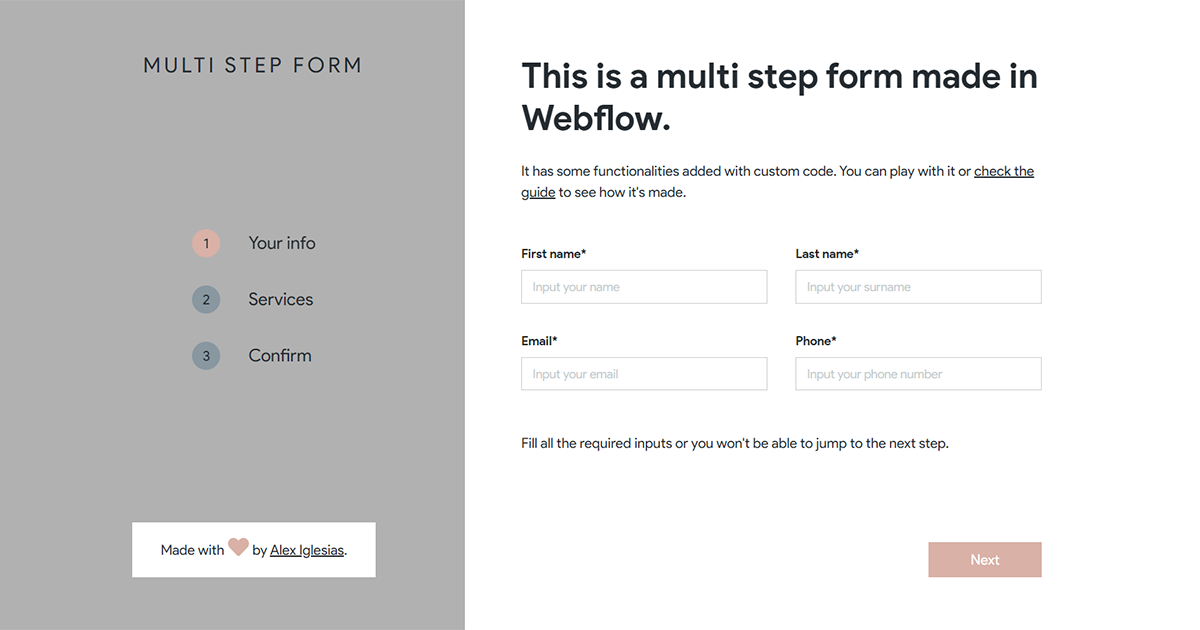 6 |
7 | # How to use it
8 |
9 | In order to make the form work as intended, you will need to:
10 |
11 | 1. [Set up some components in Webflow](#1-webflow-setup)
12 | 2. [Add the custom code](#2-custom-code)
13 |
14 | ## 1. Webflow setup
15 |
16 | If you don't want to do this manually, you will find an already built [starter form](https://brota-msf.webflow.io/starter-cloneable) in the cloneable project.
17 |
18 | ### Form and slider
19 |
20 | Place a slider inside the form that you are using. Inside each slide, you can put all the inputs you want.
21 | Make sure that:
22 |
23 | - The form has a submit button placed anywhere inside it. **Hide it** as the _Next_ button will replace its functionality.
24 | - The form has a unique ID. `I.E: #form`
25 | - The slider has the _Swipe Gestures_ and _Auto Play Slides_ options disabled.
26 |
27 | > Note: Make sure that you give the ID to the **Form** element and not to the _Form Block_ element.
28 |
29 | ### Step change buttons
30 |
31 | You can hide the slider arrows and navigation as you won't use them. Instead, place two buttons **anywhere you want** and give them a unique ID.
32 |
33 | > I.E: place a button with **#next** ID for the _Next Step_ functionality, and a button with **#back** ID for the _Previous Step_ functionality.
34 |
35 | It is recommended to hide the Back button in the first slide using Webflow interactions to avoid confusing users.
36 |
37 | ### _Optional_: Warning class
38 |
39 | When an input is not filled, the script adds a CSS class to it. You can create the CSS class using Webflow itself or via custom code. I.E:
40 |
41 | ```html
42 |
47 | ```
48 |
49 | If you want to apply the class to the _Checkboxes_ and _Radio_ inputs, make sure to set the style to **Custom** inside the element settings in the Webflow designer.
50 |
51 | ### _Optional_: Alert
52 |
53 | Aside from the warning CSS class that is applied to the inputs, you can also alert the user. You have two options:
54 |
55 | 1. Show an alert window with a message: check the [initialize script section](#initialize-the-script) for more info.
56 | 2. Display an element in the form (text block, div, image, etc). To do so, you must place the element anywhere you want and:
57 | - Give the element a unique ID. `I.E: #alert`.
58 | - Give the element a combo CSS class of **.hidden** which sets the element to _display:none_. This is necessary as the script adds or removes the **.hidden** class when the input has to be displayed or not.
59 |
60 | ### _Optional_: Inputs confirm
61 |
62 | If you want to display the value of the inputs that the user provided, you must:
63 |
64 | 1. Give the inputs that you want to display a unique ID.
65 | 2. Place a text block or a paragraph anywhere you want with the following ID:
66 | - `InputID + "-value"` for fields and checkboxes.
67 | - `GroupName + "-value"` for radio inputs.
68 |
69 | > I.E: to display the value of an input that has a **#name** ID, just place a text block with **#name-value** as ID.
70 |
71 | > I.E: to display the value of the selected radio input in the group named **variants**, just place a text block with **#variants-value** as ID.
72 |
73 | ### _Optional_: Submit an additional form on the first step
74 |
75 | You can collect the data from the 1st step into a hidden form and submit it when the user moves to the 2nd step.
76 | In order to do so, you must:
77 |
78 | 1. Place a hidden form anywhere on the page and give it a unique ID. `I.E: #hidden-form`
79 | 2. In the form, place the same inputs that you want to collect and give them the following ID: `"hidden-" + InputID`.
80 |
81 | > I.E: to collect the email field that has **#email** ID, you must place in the hidden form an email field with **#hidden-email** as ID.
82 |
83 | ## 2. Custom Code
84 |
85 | In order to make the form work, you must setup the script and initialize it:
86 |
87 | ### Setup the script
88 |
89 | Include the script tag below in the **before <\/body> tag** section of your page:
90 |
91 | ```html
92 |
93 | ```
94 |
95 | If you don't want to use CDN delivery, you can take the code inside the `/dist/msf.js` file and put it in your project.
96 |
97 | ### Initialize the script
98 |
99 | Place the script tag below in the **before <\/body> tag** section of your page after the main script.
100 |
101 | ```html
102 |
119 | ```
120 |
121 | Replace the following keys (delete the optional ones that you will be not using:
122 |
123 | | Key | Required | Description | Example |
124 | | ------------------ | ---------- | --------------------------------------------------------------------------------------------------------------------------------------------- | ---------------------------------------------------- |
125 | | `formID` | `Yes` | The ID of the Form element. | `formID: "form"` |
126 | | `nextButtonID` | `Yes` | The ID of the Next button. | `nextButtonID: next` |
127 | | `backButtonID` | `Yes` | The ID of the Back button. | `backButtonID: "back"` |
128 | | `nextButtonText` | `Yes` | The text inside the Next button. This is required because the script changes the text of the Next button when the user reaches the last step. | `nextButtonText: "Next Step"` |
129 | | `submitButtonText` | `Yes` | The text that you want to display when the user reaches the last step. | `submitButtonText: "Submit"` |
130 | | `warningClass` | `Optional` | The CSS class that you want to add to the inputs that are not filled. | `warningClass: "warning"` |
131 | | `alertText` | `Optional` | The text that you want to show in an alert window when some inputs are not filled. | `alertText: "Please, fill all the required fields."` |
132 | | `alertElementID` | `Optional` | The element that you want to show when some inputs are not filled. | `alertElementID: "alert"` |
133 | | `hiddenFormID` | `Optional` | The ID of the Hidden Form element. | `hiddenFormID: "hidden-form"` |
134 |
135 | #### Initialize examples
136 |
137 | Form that doesn't use the hidden form functionality and shows an element when a required input is not filled:
138 |
139 | ```html
140 |
155 | ```
156 |
157 | Form that uses the hidden form functionality and shows an alert window when a required input is not filled:
158 |
159 | ```html
160 |
176 | ```
177 |
--------------------------------------------------------------------------------
6 |
7 | # How to use it
8 |
9 | In order to make the form work as intended, you will need to:
10 |
11 | 1. [Set up some components in Webflow](#1-webflow-setup)
12 | 2. [Add the custom code](#2-custom-code)
13 |
14 | ## 1. Webflow setup
15 |
16 | If you don't want to do this manually, you will find an already built [starter form](https://brota-msf.webflow.io/starter-cloneable) in the cloneable project.
17 |
18 | ### Form and slider
19 |
20 | Place a slider inside the form that you are using. Inside each slide, you can put all the inputs you want.
21 | Make sure that:
22 |
23 | - The form has a submit button placed anywhere inside it. **Hide it** as the _Next_ button will replace its functionality.
24 | - The form has a unique ID. `I.E: #form`
25 | - The slider has the _Swipe Gestures_ and _Auto Play Slides_ options disabled.
26 |
27 | > Note: Make sure that you give the ID to the **Form** element and not to the _Form Block_ element.
28 |
29 | ### Step change buttons
30 |
31 | You can hide the slider arrows and navigation as you won't use them. Instead, place two buttons **anywhere you want** and give them a unique ID.
32 |
33 | > I.E: place a button with **#next** ID for the _Next Step_ functionality, and a button with **#back** ID for the _Previous Step_ functionality.
34 |
35 | It is recommended to hide the Back button in the first slide using Webflow interactions to avoid confusing users.
36 |
37 | ### _Optional_: Warning class
38 |
39 | When an input is not filled, the script adds a CSS class to it. You can create the CSS class using Webflow itself or via custom code. I.E:
40 |
41 | ```html
42 |
47 | ```
48 |
49 | If you want to apply the class to the _Checkboxes_ and _Radio_ inputs, make sure to set the style to **Custom** inside the element settings in the Webflow designer.
50 |
51 | ### _Optional_: Alert
52 |
53 | Aside from the warning CSS class that is applied to the inputs, you can also alert the user. You have two options:
54 |
55 | 1. Show an alert window with a message: check the [initialize script section](#initialize-the-script) for more info.
56 | 2. Display an element in the form (text block, div, image, etc). To do so, you must place the element anywhere you want and:
57 | - Give the element a unique ID. `I.E: #alert`.
58 | - Give the element a combo CSS class of **.hidden** which sets the element to _display:none_. This is necessary as the script adds or removes the **.hidden** class when the input has to be displayed or not.
59 |
60 | ### _Optional_: Inputs confirm
61 |
62 | If you want to display the value of the inputs that the user provided, you must:
63 |
64 | 1. Give the inputs that you want to display a unique ID.
65 | 2. Place a text block or a paragraph anywhere you want with the following ID:
66 | - `InputID + "-value"` for fields and checkboxes.
67 | - `GroupName + "-value"` for radio inputs.
68 |
69 | > I.E: to display the value of an input that has a **#name** ID, just place a text block with **#name-value** as ID.
70 |
71 | > I.E: to display the value of the selected radio input in the group named **variants**, just place a text block with **#variants-value** as ID.
72 |
73 | ### _Optional_: Submit an additional form on the first step
74 |
75 | You can collect the data from the 1st step into a hidden form and submit it when the user moves to the 2nd step.
76 | In order to do so, you must:
77 |
78 | 1. Place a hidden form anywhere on the page and give it a unique ID. `I.E: #hidden-form`
79 | 2. In the form, place the same inputs that you want to collect and give them the following ID: `"hidden-" + InputID`.
80 |
81 | > I.E: to collect the email field that has **#email** ID, you must place in the hidden form an email field with **#hidden-email** as ID.
82 |
83 | ## 2. Custom Code
84 |
85 | In order to make the form work, you must setup the script and initialize it:
86 |
87 | ### Setup the script
88 |
89 | Include the script tag below in the **before <\/body> tag** section of your page:
90 |
91 | ```html
92 |
93 | ```
94 |
95 | If you don't want to use CDN delivery, you can take the code inside the `/dist/msf.js` file and put it in your project.
96 |
97 | ### Initialize the script
98 |
99 | Place the script tag below in the **before <\/body> tag** section of your page after the main script.
100 |
101 | ```html
102 |
119 | ```
120 |
121 | Replace the following keys (delete the optional ones that you will be not using:
122 |
123 | | Key | Required | Description | Example |
124 | | ------------------ | ---------- | --------------------------------------------------------------------------------------------------------------------------------------------- | ---------------------------------------------------- |
125 | | `formID` | `Yes` | The ID of the Form element. | `formID: "form"` |
126 | | `nextButtonID` | `Yes` | The ID of the Next button. | `nextButtonID: next` |
127 | | `backButtonID` | `Yes` | The ID of the Back button. | `backButtonID: "back"` |
128 | | `nextButtonText` | `Yes` | The text inside the Next button. This is required because the script changes the text of the Next button when the user reaches the last step. | `nextButtonText: "Next Step"` |
129 | | `submitButtonText` | `Yes` | The text that you want to display when the user reaches the last step. | `submitButtonText: "Submit"` |
130 | | `warningClass` | `Optional` | The CSS class that you want to add to the inputs that are not filled. | `warningClass: "warning"` |
131 | | `alertText` | `Optional` | The text that you want to show in an alert window when some inputs are not filled. | `alertText: "Please, fill all the required fields."` |
132 | | `alertElementID` | `Optional` | The element that you want to show when some inputs are not filled. | `alertElementID: "alert"` |
133 | | `hiddenFormID` | `Optional` | The ID of the Hidden Form element. | `hiddenFormID: "hidden-form"` |
134 |
135 | #### Initialize examples
136 |
137 | Form that doesn't use the hidden form functionality and shows an element when a required input is not filled:
138 |
139 | ```html
140 |
155 | ```
156 |
157 | Form that uses the hidden form functionality and shows an alert window when a required input is not filled:
158 |
159 | ```html
160 |
176 | ```
177 |
--------------------------------------------------------------------------------