├── retro.png
├── favicon.png
├── game_over.ttf
├── game_over.woff
├── README.md
├── index.html
├── main.css
└── script.js
/retro.png:
--------------------------------------------------------------------------------
https://raw.githubusercontent.com/bscottnz/esketch/HEAD/retro.png
--------------------------------------------------------------------------------
/favicon.png:
--------------------------------------------------------------------------------
https://raw.githubusercontent.com/bscottnz/esketch/HEAD/favicon.png
--------------------------------------------------------------------------------
/game_over.ttf:
--------------------------------------------------------------------------------
https://raw.githubusercontent.com/bscottnz/esketch/HEAD/game_over.ttf
--------------------------------------------------------------------------------
/game_over.woff:
--------------------------------------------------------------------------------
https://raw.githubusercontent.com/bscottnz/esketch/HEAD/game_over.woff
--------------------------------------------------------------------------------
/README.md:
--------------------------------------------------------------------------------
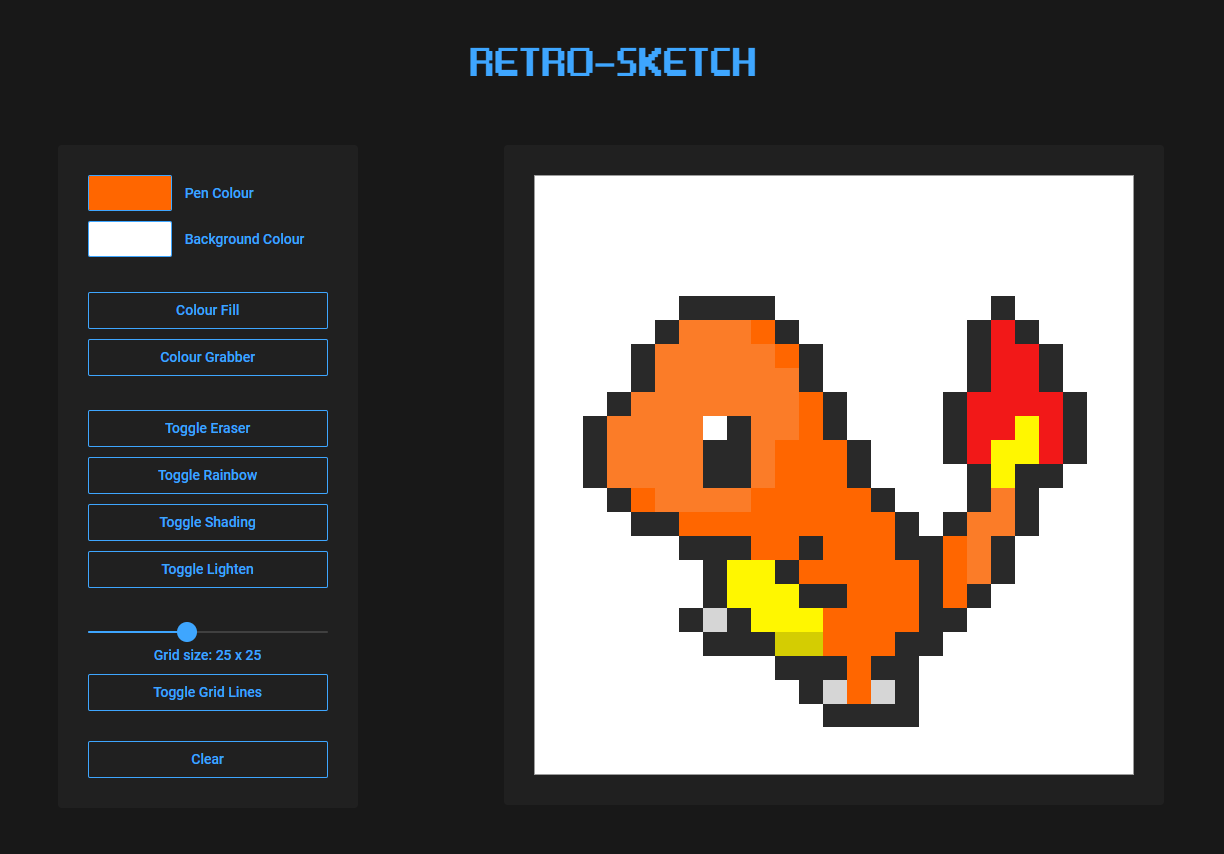
1 | # Retro-Sketch: Pixel Sketch App
2 |
3 | Create your own pixel art.
4 |
5 | - Select any colour for the pen or background.
6 | - Grab used colours from the canvas.
7 | - Colour fill tool fills in shapes with selected colour.
8 | - Rainbow pen colours each cell a random colour.
9 | - Apply shading / lightening that persists over background colour changes.
10 | - Create a grid size up to 60 x 60.
11 |
12 | Feature ideas to implement
13 |
14 | - Save images.
15 | - Export images.
16 | - Undo tool.
17 |
18 | [Live App](https://bscottnz.github.io/esketch/)
19 |
20 | 
21 |
--------------------------------------------------------------------------------
/index.html:
--------------------------------------------------------------------------------
1 |
2 |
3 |
4 |
5 |
6 | Retro-Sketch
7 |
8 |
9 |
10 |
11 |
12 |
15 |
16 |
17 |
18 |
19 |
20 |
21 |
22 |
23 |
24 |
Pen Colour
25 |
26 |
27 |
28 |
29 |
30 |
Background Colour
31 |
32 |
33 |
34 |
35 |
36 |
37 |
38 |
39 |
40 |
41 |
42 |
43 |
48 |
49 |
50 |
Grid size: 24 x 24
51 |
52 |
53 |
54 |
55 |
56 |
59 |
60 |
61 |
62 |
63 |
64 |
65 |
--------------------------------------------------------------------------------
/main.css:
--------------------------------------------------------------------------------
1 | @import url('https://fonts.googleapis.com/css2?family=Roboto:wght@400;500&display=swap');
2 |
3 | /* font from https://www.dafont.com/game-over.font */
4 | @font-face {
5 | font-family: gameover;
6 | src: url('game_over.woff') format('woff'),
7 | url('game_over.ttf') format('ttf');
8 | }
9 |
10 | * {
11 | box-sizing: border-box;
12 | margin: 0;
13 | padding: 0;
14 | }
15 |
16 | :root {
17 | --bg-color: #ffffff;
18 | }
19 |
20 | /* this is the class that is applied to the grid when it is cleared.
21 | after 1.5 seconds the class is removed */
22 |
23 | /* multiple classes so that some pixels will fade faster than others */
24 | .clear-fade {
25 | background-color: var(--bg-color) !important;
26 | transition: background-color 1.5s ease;
27 | }
28 |
29 | .clear-fade-2 {
30 | background-color: var(--bg-color) !important;
31 | transition: background-color 1.4s ease;
32 | }
33 |
34 | .clear-fade-3 {
35 | background-color: var(--bg-color) !important;
36 | transition: background-color 1.3s ease;
37 | }
38 |
39 | .clear-fade-4 {
40 | background-color: var(--bg-color) !important;
41 | transition: background-color 1.2s ease;
42 | }
43 |
44 | .clear-fade-5 {
45 | background-color: var(--bg-color) !important;
46 | transition: background-color 1.1s ease;
47 | }
48 |
49 | .clear-fade-6 {
50 | background-color: var(--bg-color) !important;
51 | transition: background-color 1.0s ease;
52 | }
53 |
54 |
55 | body {
56 | background-color: #181818;
57 | }
58 |
59 | .header {
60 | margin-top: 50px;
61 | color: rgb(62, 166, 255);
62 | font-size: 100px;
63 | text-align: center;
64 | font-family: gameover;
65 | }
66 |
67 | .grid-wrapper {
68 | display: flex;
69 | justify-content: center;
70 | align-items: center;
71 | width: 660px;
72 | height: 660px;
73 | background-color: #202020;
74 | border-radius: 4px;
75 | }
76 |
77 | .grid-container {
78 | /* box-sizing: content-box; */
79 | display: grid;
80 | height: 600px;
81 | width: 600px;
82 | /* background-color: rgb(156, 156, 156); */
83 | border: 1px solid rgb(156, 156, 156);
84 | /* border-radius: 4px; */
85 | /* margin-left: auto;
86 | margin-right: auto; */
87 | }
88 |
89 | .wrapper {
90 | max-width: 1400px;
91 | margin-left: auto;
92 | margin-right: auto;
93 | }
94 | .main {
95 | display: flex;
96 | justify-content: space-evenly;
97 | }
98 |
99 | input[type="color"] {
100 | display: block;
101 | outline: none;
102 | border: none;
103 | /* border: 1px solid rgb(62, 166, 255); */
104 | background-color: rgba(0,0,0,0);
105 | border-radius: 2px;
106 | width: 200%;
107 | /* padding: 4px 8px; */
108 | height: 200%;
109 | transform: translateX(-10px) translateY(-10px);
110 |
111 | }
112 |
113 | .color-box {
114 | height: 36px;
115 | overflow: hidden;
116 | border-radius: 2px;
117 | border: 1px solid rgb(62, 166, 255);
118 | width: 35%;
119 | margin-bottom: 10px;
120 |
121 | /* transform: translateY(-10px); */
122 |
123 |
124 | }
125 |
126 | .color-card {
127 | font-family: roboto;
128 | font-weight: 500;
129 | font-size: 14px;
130 | color: rgb(62, 166, 255);
131 | display: flex;
132 | position: relative;
133 |
134 | }
135 |
136 | .color-card span {
137 | margin-left: 9px;
138 | position: absolute;
139 | top: 10px;
140 | left: 88px;
141 |
142 | }
143 |
144 |
145 |
146 | button {
147 | display: block;
148 | color: rgb(62, 166, 255);
149 | font-weight: 500;
150 | font-family: roboto;
151 | background-color: rgba(0,0,0,0);
152 | font-size: 14px;
153 | outline: none;
154 | border: 1px solid rgb(62, 166, 255);
155 | border-radius: 2px;
156 | padding: 9px 15px;
157 | width: 100%;
158 | margin-bottom: 10px;
159 | }
160 |
161 | .cc2 {
162 | margin-bottom: 25px;
163 | }
164 |
165 | #color-grabber {
166 | margin-bottom: 34px;
167 | }
168 |
169 | #lighten-btn {
170 | margin-bottom: 31px;
171 | }
172 |
173 | .slider-box {
174 | margin-bottom: 10px;
175 | }
176 |
177 | .grid-size {
178 | font-family: roboto;
179 | font-weight: 500;
180 | font-size: 14px;
181 | color: rgb(62, 166, 255);
182 | text-align: center;
183 | margin-bottom: 10px;
184 | }
185 |
186 | #grid-btn {
187 | margin-bottom: 30px ;
188 | }
189 |
190 | #clear-grid {
191 | margin-bottom: 0px;
192 | }
193 |
194 | .btn-on {
195 | background-color: rgb(62, 166, 255);
196 | color: #202020;
197 | }
198 |
199 | .grid-item {
200 | /* background-color: rgb(255, 255, 255); */
201 | user-select: none;
202 | }
203 |
204 | .border-top-left {
205 | border-top: 1px solid rgb(156, 156, 156);
206 | border-left: 1px solid rgb(156, 156, 156);
207 | }
208 |
209 | .border-right {
210 | border-right: 1px solid rgb(156, 156, 156);
211 | }
212 |
213 | .border-bottom {
214 | border-bottom: 1px solid rgb(156, 156, 156);
215 | }
216 |
217 | .slider-box {
218 | position: relative;
219 | width: 100%;
220 | }
221 |
222 | #range-value {
223 | /* position: absolute;
224 | top: 2px;
225 | right: 0px;
226 | padding: 2px;
227 | width: 40px; */
228 | /* background: #fff; */
229 | text-align: center;
230 | }
231 |
232 | /* #range-value::before {
233 | content: "";
234 | position: absolute;
235 | top: 50%;
236 | transform: translateY(-50%) rotate(45deg);
237 | left: -5px;
238 | width: 10px;
239 | height: 10px;
240 | background: #fff;
241 | } */
242 |
243 | .main {
244 | margin-top: 60px;
245 | margin-bottom: 60px;
246 | }
247 |
248 | .controls {
249 | width: 300px;
250 | background-color: #202020;
251 | border-radius: 4px;
252 | padding: 30px;
253 | }
254 | input[type="range"] {
255 | width: 100%;
256 | height: 2px;
257 | background: #404040;
258 | appearance: none;
259 | outline: none;
260 | border-radius: 2px;
261 | }
262 |
263 | input[type="range"]::-webkit-slider-thumb {
264 | appearance: none;
265 | width: 20px;
266 | height: 20px;
267 | border-radius: 50%;
268 | background: rgb(62, 166, 255);
269 | }
270 |
271 | #progress-bar {
272 | width: 40%;
273 | height: 2px;
274 | background-color: rgb(62, 166, 255);
275 | border-radius: 2px;
276 | position: absolute;
277 | top: 12px;
278 | left: 0;
279 | }
280 |
281 |
282 |
283 |
--------------------------------------------------------------------------------
/script.js:
--------------------------------------------------------------------------------
1 | //##############################################################################
2 | // After revisting this project, I was thinking whether or not I should clean up
3 | // the code. I decided to leave it as it was so I would have something to look
4 | // back on. So if you're reading this and it seems messy, I'm sorry but my
5 | // later projects get a lot cleaner and organised.
6 | //##############################################################################
7 |
8 | // number of rows / columns in grid
9 | let gridSize = 24;
10 |
11 | const container = document.querySelector('.grid-container');
12 |
13 | let bgColor = '#ffffff';
14 | container.style.backgroundColor = bgColor;
15 |
16 | //create new grid items to fill the grid
17 | function createGrid() {
18 | // having the grid with each item at 1fr would leave left over space at the end of the grid
19 | // when there were lots of items, doing it this way seemed to fill in that extra space.
20 | // however the grid broke when there were 3 or less items, so the if statment fixes that
21 | let gridWidth = container.offsetWidth / gridSize;
22 | container.style.gridTemplateColumns = `repeat(${gridSize - 3}, ${gridWidth}px) 1fr 1fr 1fr`;
23 | container.style.gridTemplateRows = `repeat(${gridSize - 3}, ${gridWidth}px) 1fr 1fr 1fr`;
24 | if (gridSize < 4) {
25 | container.style.gridTemplateColumns = `repeat(${gridSize},1fr`;
26 | container.style.gridTemplateRows = `repeat(${gridSize}, 1fr`;
27 | }
28 |
29 | for (let i = 0; i < gridSize ** 2; i++) {
30 | const square = document.createElement('div');
31 | square.classList.add('grid-item');
32 | square.setAttribute('draggable', 'false');
33 | square.style.backgroundColor = bgColor;
34 | container.appendChild(square);
35 |
36 | //to avoid double borders, top and left borders are applied to every cell,
37 | //then the remaining borderless cells are determined and given a border.
38 | // i originally used grid gap and had the container background
39 | //color as the borders. However when i changed the background color by changing each
40 | // cell individually, it got quite slow with large grids. I changed un-colored
41 | // grid items to be transperent, so i could use the container background as the
42 | //background color. now when i change the background color i am only changing the
43 | // one container and it is much faster.
44 | //set border top and left to every grid item
45 |
46 | //! Pav: changed transparent color to bgColor to simplify grid traversal for color-fill
47 |
48 | square.classList.add('border-top-left');
49 | }
50 | //add a right border the the right most items
51 | const rightItems = document.querySelectorAll(`.grid-item:nth-child(${gridSize}n)`);
52 | for (let i = 0; i < rightItems.length; i++) {
53 | rightItems[i].setAttribute('data-right', 'true');
54 | rightItems[i].classList.toggle('border-right');
55 | }
56 |
57 | // add a bottom border to the bottom most items
58 | let gridItems = document.querySelectorAll('.grid-item');
59 | const lastItems = Array.from(gridItems).slice(-`${gridSize}`);
60 | for (let i = 0; i < lastItems.length; i++) {
61 | lastItems[i].setAttribute('data-bottom', 'true');
62 | lastItems[i].classList.toggle('border-bottom');
63 | }
64 | }
65 |
66 | createGrid();
67 |
68 | gridItems = document.querySelectorAll('.grid-item');
69 |
70 | // set default colour to black
71 | let ink = '#000000';
72 |
73 | //pen color picker
74 | const colorPicker = document.querySelector('#color-select');
75 | colorPicker.addEventListener('input', (e) => {
76 | ink = e.target.value;
77 | if (grab) {
78 | grab = false;
79 | dropper.classList.remove('btn-on');
80 | }
81 | // fill = false;
82 | // colorFillButton.classList.remove('btn-on');
83 | });
84 |
85 | // bg color picker
86 | // will not change the grid items that have the attribute data-inked = true
87 | const bgColorPicker = document.querySelector('#bg-color-select');
88 |
89 | // toggle button colour when clicked
90 | const buttons = document.getElementsByTagName('button');
91 |
92 | for (let i = 0; i < buttons.length; i++) {
93 | buttons[i].addEventListener('click', () => {
94 | buttons[i].classList.toggle('btn-on');
95 | });
96 | }
97 |
98 | // shading toggle
99 | let shading = false;
100 | const shaderButton = document.querySelector('#shader-btn');
101 | shaderButton.addEventListener('click', () => {
102 | if (shading) {
103 | shading = false;
104 | } else {
105 | shading = true;
106 | rainbow = false;
107 | rainbowButton.classList.remove('btn-on');
108 | lighten = false;
109 | lightenButton.classList.remove('btn-on');
110 | eraser = false;
111 | eraserButton.classList.remove('btn-on');
112 | }
113 | if (grab) {
114 | grab = false;
115 | dropper.classList.remove('btn-on');
116 | }
117 | });
118 |
119 | // lighten toggle
120 | let lighten = false;
121 | const lightenButton = document.querySelector('#lighten-btn');
122 | lightenButton.addEventListener('click', () => {
123 | if (lighten) {
124 | lighten = false;
125 | } else {
126 | lighten = true;
127 | shading = false;
128 | shaderButton.classList.remove('btn-on');
129 | rainbow = false;
130 | rainbowButton.classList.remove('btn-on');
131 | eraser = false;
132 | eraserButton.classList.remove('btn-on');
133 | }
134 | if (grab) {
135 | grab = false;
136 | dropper.classList.remove('btn-on');
137 | }
138 | });
139 |
140 | // shading function
141 |
142 | function RGBToHex(rgb) {
143 | // Choose correct separator
144 | let sep = rgb.indexOf(',') > -1 ? ',' : ' ';
145 | // Turn "rgb(r,g,b)" into [r,g,b]
146 | rgb = rgb.substr(4).split(')')[0].split(sep);
147 |
148 | let r = (+rgb[0]).toString(16),
149 | g = (+rgb[1]).toString(16),
150 | b = (+rgb[2]).toString(16);
151 |
152 | if (r.length == 1) r = '0' + r;
153 | if (g.length == 1) g = '0' + g;
154 | if (b.length == 1) b = '0' + b;
155 | b = (+rgb[2]).toString(16);
156 |
157 | if (r.length == 1) r = '0' + r;
158 | if (g.length == 1) g = '0' + g;
159 | if (b.length == 1) b = '0' + b;
160 | return '#' + r + g + b;
161 | }
162 |
163 | function adjust(RGBToHex, rgb, amount) {
164 | let color = RGBToHex(rgb);
165 | return (
166 | '#' +
167 | color
168 | .replace(/^#/, '')
169 | .replace(/../g, (color) =>
170 | ('0' + Math.min(255, Math.max(0, parseInt(color, 16) + amount)).toString(16)).substr(-2)
171 | )
172 | );
173 | }
174 |
175 | // eyedrop color grabbing tool
176 | const dropper = document.querySelector('#color-grabber');
177 | let grab = false;
178 | dropper.addEventListener('click', () => {
179 | // when grab is true, all drawing is frozen until a color is selected
180 | if (grab) {
181 | grab = false;
182 | dropper.classList.remove('btn-on');
183 | } else {
184 | grab = true;
185 | }
186 |
187 | if (fill) {
188 | fill = false;
189 | colorFillButton.classList.remove('btn-on');
190 | }
191 | });
192 |
193 | // default eraser to false and listen for toggle
194 | let eraser = false;
195 | const eraserButton = document.querySelector('#eraser-btn');
196 | eraserButton.addEventListener('click', () => {
197 | if (eraser) {
198 | eraser = false;
199 | } else {
200 | eraser = true;
201 | shading = false;
202 | shaderButton.classList.remove('btn-on');
203 | rainbow = false;
204 | rainbowButton.classList.remove('btn-on');
205 | lighten = false;
206 | lightenButton.classList.remove('btn-on');
207 | }
208 |
209 | if (grab) {
210 | grab = false;
211 | dropper.classList.remove('btn-on');
212 | }
213 | });
214 |
215 | // default rainbow ink to false and listen for toggle
216 | let rainbow = false;
217 | const rainbowButton = document.querySelector('#rainbow-btn');
218 | rainbowButton.addEventListener('click', () => {
219 | if (rainbow) {
220 | rainbow = false;
221 | } else {
222 | rainbow = true;
223 | shading = false;
224 | shaderButton.classList.remove('btn-on');
225 | lighten = false;
226 | lightenButton.classList.remove('btn-on');
227 | eraser = false;
228 | eraserButton.classList.remove('btn-on');
229 | }
230 |
231 | if (grab) {
232 | grab = false;
233 | dropper.classList.remove('btn-on');
234 | }
235 | });
236 |
237 | //create random colour generator
238 | function randomColor() {
239 | // return "#" + Math.floor(Math.random()*16777215).toString(16);
240 | // this returns fewer colors but they are all nice and bright
241 | return `hsl(${Math.random() * 360}, 100%, 50%)`;
242 | }
243 |
244 | // slider
245 |
246 | let progressBar = document.getElementById('progress-bar');
247 |
248 | function rangeSlider(value) {
249 | let gridLabels = document.querySelectorAll('#range-value');
250 | progressBar.style.width = (value / 60) * 100 + '%';
251 | for (let i = 0; i < gridLabels.length; i++) {
252 | gridLabels[i].textContent = value;
253 | }
254 | // document.querySelectorAll('#range-value').textContent = value;
255 | gridSize = parseInt(value);
256 | deleteGrid();
257 | createGrid();
258 | listen();
259 | reInit();
260 | // turn the grid button back on if it is off.
261 | const gridButton = document.querySelector('#grid-btn');
262 | if (gridButton.classList.contains('btn-on')) {
263 | //pass
264 | } else {
265 | gridButton.classList.toggle('btn-on');
266 | }
267 | }
268 |
269 | function reInit() {
270 | deleteGrid();
271 | createGrid();
272 | listen();
273 | }
274 |
275 | // let progressBar = document.getElementById('progress-bar');
276 |
277 | function rangeSliderValue(value) {
278 | let gridLabels = document.querySelectorAll('#range-value');
279 | for (let i = 0; i < gridLabels.length; i++) {
280 | gridLabels[i].textContent = value;
281 | }
282 | progressBar.style.width = (value / 60) * 100 + '%';
283 | }
284 |
285 | function deleteGrid() {
286 | while (container.firstChild) {
287 | container.removeEventListener('mousedown', drawClick);
288 | container.removeEventListener('mouseenter', drawClickHover);
289 | container.lastChild = null;
290 | container.removeChild(container.lastChild);
291 | }
292 | }
293 |
294 | //fade grid
295 | function fadeGrid(item) {
296 | // if the cell hasnt been coloured, set it to the background color (un marked cells are transperent)
297 | if (item.style.backgroundColor == '' || item.style.backgroundColor == 'transperent') {
298 | item.style.backgroundColor == bgColor;
299 | }
300 |
301 | // attatch class to each item. this fades the color to the background color over 1.5 seconds
302 |
303 | // apply a random fadeout time to each item
304 |
305 | let fadeSpeed = Math.random() * 10;
306 | if (fadeSpeed > 8) {
307 | item.classList.add('clear-fade');
308 | } else if (fadeSpeed > 6) {
309 | item.classList.add('clear-fade-2');
310 | } else if (fadeSpeed > 4) {
311 | item.classList.add('clear-fade-3');
312 | } else if (fadeSpeed > 2) {
313 | item.classList.add('clear-fade-4');
314 | } else {
315 | item.classList.add('clear-fade-5');
316 | }
317 | }
318 |
319 | // clear grid with a fade out
320 | let root = document.documentElement;
321 | const clearButton = document.querySelector('#clear-grid');
322 | function clearGrid() {
323 | // sets the css background color to the js variable bgColor. this is so the fadeout class can be applied, and use its background color
324 | root.style.setProperty('--bg-color', bgColor);
325 | gridItems = document.querySelectorAll('.grid-item');
326 | for (let i = 0; i < gridItems.length; i++) {
327 | fadeGrid(gridItems[i]);
328 | }
329 | // set a timer so the fade has time to execute, then reset all the grid cells.
330 | setTimeout(function () {
331 | for (let i = 0; i < gridItems.length; i++) {
332 | gridItems[i].style.backgroundColor = '';
333 | gridItems[i].removeAttribute('data-inked');
334 | gridItems[i].removeAttribute('data-shade');
335 | gridItems[i].classList.remove('clear-fade');
336 | gridItems[i].classList.remove('clear-fade-2');
337 | gridItems[i].classList.remove('clear-fade-3');
338 | gridItems[i].classList.remove('clear-fade-4');
339 | gridItems[i].classList.remove('clear-fade-5');
340 | }
341 | }, 1500);
342 | container.style.backgroundColor = bgColor;
343 |
344 | // turn off the button after a very short delay
345 | setTimeout(function () {
346 | clearButton.classList.remove('btn-on');
347 | }, 1400);
348 | }
349 | clearButton.addEventListener('click', clearGrid);
350 |
351 | // set fill to true when the color fill button is pressed
352 | // if fill is true set it to false (clicking the button without filling)
353 | // when fill is true all other events on the grid will stop and listen for a grid area to fill
354 | const colorFillButton = document.querySelector('#color-fill');
355 | let fill = false;
356 | colorFillButton.addEventListener('click', () => {
357 | if (grab) {
358 | grab = false;
359 | dropper.classList.remove('btn-on');
360 | }
361 | if (fill) {
362 | fill = false;
363 | } else {
364 | fill = true;
365 | }
366 | });
367 | // convert array into matrix representing the grid
368 | function toMatrix(arr, width) {
369 | return arr.reduce(function (rows, key, index) {
370 | return (index % width == 0 ? rows.push([key]) : rows[rows.length - 1].push(key)) && rows;
371 | }, []);
372 | }
373 |
374 | //helper funtion to grab adjacent cells of a 2d grid
375 | //function getAdjacent2D(x, y) {
376 | // let xAbove = [x - 1, y];
377 |
378 | // let xBellow = [x + 1, y];
379 |
380 | // let xLeft = [x, y - 1];
381 |
382 | // let xRight = [x, y + 1];
383 |
384 | // return [xAbove, xBellow, xLeft, xRight]
385 | //}
386 |
387 | //helper function to grab adjacent cells of a 2d grid stored as a 1d array
388 | // only return cells that do not cross over the edge of the grid
389 |
390 | /*
391 | function getAdjacent1D(x, gridX, gridY) {
392 | let xAbove = null;
393 | let xBellow = null;
394 | let xLeft = null;
395 | let xRight = null;
396 |
397 | // make sure x is not in the top row before returning the cell above
398 | if (gridX != 0) {
399 | xAbove = [x - gridSize];
400 | }
401 | // make sure x is not in the bottom row before returning the cell bellow
402 | if (gridX != gridSize - 1) {
403 | xBellow = [x + gridSize];
404 | }
405 | // make sure x is not in the left column before returning the cell to its left
406 | if (gridY != 0) {
407 | xLeft = [x - 1];
408 | }
409 | // make sure x is not in the right column before returning the cell to its right
410 | if (gridY != gridSize - 1) {
411 | xRight = [x + 1];
412 | }
413 |
414 | // console.log(xAbove, xBellow, xLeft, xRight);
415 | return [xAbove, xBellow, xLeft, xRight];
416 | }
417 | */
418 |
419 | function hexToRGB(hex) {
420 | let r = parseInt(hex[1] + hex[2], 16);
421 | let g = parseInt(hex[3] + hex[4], 16);
422 | let b = parseInt(hex[5] + hex[6], 16);
423 |
424 | return `rgb(${r}, ${g}, ${b})`;
425 | }
426 |
427 | function findNeighbors(matrix, x, y, oldColor, newColor) {
428 | const possibleNeighbors = [
429 | { cell: matrix?.[x]?.[y - 1], x: x, y: y - 1 }, // west
430 | { cell: matrix?.[x]?.[y + 1], x: x, y: y + 1 }, // east
431 | { cell: matrix?.[x - 1]?.[y], x: x - 1, y: y }, // north
432 | { cell: matrix?.[x + 1]?.[y], x: x + 1, y: y }, // south
433 | ];
434 |
435 | const neighbors = [];
436 |
437 | for (const neighbor of possibleNeighbors) {
438 | if (
439 | neighbor.cell !== undefined &&
440 | neighbor.cell.style.backgroundColor === oldColor &&
441 | neighbor.cell.style.backgroundColor !== newColor
442 | ) {
443 | neighbors.push(neighbor);
444 | }
445 | }
446 |
447 | return neighbors;
448 | }
449 |
450 | function floodFill(image, x, y, oldColor, newColor) {
451 | if (oldColor === newColor) return;
452 |
453 | oldColor = hexToRGB(oldColor);
454 | newColor = hexToRGB(newColor);
455 |
456 | const toPaint = [{ x: x, y: y }]; // queue
457 |
458 | while (toPaint.length > 0) {
459 | const { x, y } = toPaint.shift();
460 |
461 | const neighbors = findNeighbors(image, x, y, oldColor, newColor);
462 |
463 | for (const { cell, x, y } of neighbors) {
464 | toPaint.push({ x, y });
465 | cell.style.backgroundColor = rainbow ? randomColor() : newColor;
466 | cell.setAttribute('data-inked', 'true');
467 | }
468 | }
469 | }
470 |
471 | //colorfill
472 | function colorFill(e) {
473 | if (fill) {
474 | //get index of the clicked grid cell
475 | const ogIndex = Array.from(e.target.parentElement.children).indexOf(
476 | e.target
477 | );
478 | // console.log(ogIndex);
479 |
480 | gridItems = document.querySelectorAll('.grid-item');
481 | const gridItemsArray = Array.from(gridItems);
482 | // console.log(gridItemsArray.length);
483 |
484 | // create grid-like representation of grid items
485 | const gridItemsArray2D = toMatrix(gridItemsArray, gridSize);
486 |
487 | // get index of clicked item in 2d array
488 | const gridX = Math.floor(ogIndex / gridSize);
489 | const gridY = ogIndex % gridSize;
490 |
491 | const seed = gridItemsArray2D[gridX][gridY];
492 | const oldInk = seed.style.backgroundColor
493 | ? RGBToHex(seed.style.backgroundColor)
494 | : bgColor;
495 |
496 | floodFill(gridItemsArray2D, gridX, gridY, oldInk, ink);
497 |
498 | colorFillButton.classList.remove('btn-on');
499 | fill = false;
500 | }
501 | }
502 |
503 | // draw on the grid when clicked
504 | function drawClick(e) {
505 | // when fill or grab is true do not do anything (a seperate listener is waiting for fill / grab input)
506 | if (!grab && !fill) {
507 | if (eraser) {
508 | e.target.style.backgroundColor = '';
509 | //data-inked = true means the background color change wont affect these elements
510 | e.target.removeAttribute('data-inked');
511 | e.target.removeAttribute('data-shade');
512 | } else if (rainbow) {
513 | e.target.style.backgroundColor = randomColor();
514 | e.target.setAttribute('data-inked', 'true');
515 | e.target.removeAttribute('data-shade');
516 | } else if (shading) {
517 | // first check to see if this grid item has been shadded. if it hasnt, set data-shade to 1
518 | // this is nessesarry to transfer shading between bg color changes
519 | if (!e.target.dataset.shade) {
520 | e.target.setAttribute('data-shade', '1');
521 | } else {
522 | // if the grid item has been shadded, increment the data-shade value
523 | // this keeps track of how many times the grid item has been shaded
524 | let shadeAmount = parseInt(e.target.getAttribute('data-shade'));
525 | shadeAmount++;
526 | e.target.setAttribute('data-shade', `${shadeAmount}`);
527 | } // a transperent item cant be shadded. if item is transperent first set the cell color to bg color
528 | if (e.target.style.backgroundColor == '' || e.target.style.backgroundColor == 'transperent') {
529 | e.target.style.backgroundColor = bgColor;
530 | }
531 |
532 | e.target.style.backgroundColor = adjust(RGBToHex, e.target.style.backgroundColor, -15);
533 | // e.target.setAttribute('data-inked', 'true');
534 | } else if (lighten) {
535 | if (!e.target.dataset.shade) {
536 | e.target.setAttribute('data-shade', '-1');
537 | } else {
538 | // if the grid item has been lightened, decrement the data-shade value
539 | // this keeps track of how many times the grid item has been shaded
540 | let shadeAmount = parseInt(e.target.getAttribute('data-shade'));
541 | shadeAmount--;
542 | e.target.setAttribute('data-shade', `${shadeAmount}`);
543 | }
544 | if (e.target.style.backgroundColor == '' || e.target.style.backgroundColor == 'transperent') {
545 | e.target.style.backgroundColor = bgColor;
546 | }
547 | e.target.style.backgroundColor = adjust(RGBToHex, e.target.style.backgroundColor, +15);
548 | // e.target.setAttribute('data-inked', 'true');
549 | } else {
550 | e.target.style.backgroundColor = ink;
551 | e.target.setAttribute('data-inked', 'true');
552 | e.target.removeAttribute('data-shade');
553 | }
554 | }
555 | }
556 | // draw when hovering into a grid with the mouse held down
557 | function drawClickHover(e) {
558 | if (e.buttons > 0) {
559 | if (!grab && !fill) {
560 | if (eraser) {
561 | e.target.style.backgroundColor = '';
562 | //data-inked = true means the background color change wont affect these elements
563 | e.target.removeAttribute('data-inked');
564 | e.target.removeAttribute('data-shade');
565 | } else if (rainbow) {
566 | e.target.style.backgroundColor = randomColor();
567 | e.target.setAttribute('data-inked', 'true');
568 | e.target.removeAttribute('data-shade');
569 | } else if (shading) {
570 | // first check to see if this grid item has been shadded. if it hasnt, set data-shade to 1
571 | // this is nessesarry to transfer shading between bg color changes
572 | if (!e.target.dataset.shade) {
573 | e.target.setAttribute('data-shade', '1');
574 | } else {
575 | // if the grid item has been shadded, increment the data-shade value
576 | // this keeps track of how many times the grid item has been shaded
577 | let shadeAmount = parseInt(e.target.getAttribute('data-shade'));
578 | shadeAmount++;
579 | e.target.setAttribute('data-shade', `${shadeAmount}`);
580 | } // a transperent item cant be shadded. if item is transperent first set the cell color to bg color
581 | if (
582 | e.target.style.backgroundColor == '' ||
583 | e.target.style.backgroundColor == 'transperent'
584 | ) {
585 | e.target.style.backgroundColor = bgColor;
586 | }
587 |
588 | e.target.style.backgroundColor = adjust(RGBToHex, e.target.style.backgroundColor, -15);
589 | // e.target.setAttribute('data-inked', 'true');
590 | } else if (lighten) {
591 | if (!e.target.dataset.shade) {
592 | e.target.setAttribute('data-shade', '-1');
593 | } else {
594 | // if the grid item has been lightened, decrement the data-shade value
595 | // this keeps track of how many times the grid item has been shaded
596 | let shadeAmount = parseInt(e.target.getAttribute('data-shade'));
597 | shadeAmount--;
598 | e.target.setAttribute('data-shade', `${shadeAmount}`);
599 | }
600 | if (
601 | e.target.style.backgroundColor == '' ||
602 | e.target.style.backgroundColor == 'transperent'
603 | ) {
604 | e.target.style.backgroundColor = bgColor;
605 | }
606 | e.target.style.backgroundColor = adjust(RGBToHex, e.target.style.backgroundColor, +15);
607 | // e.target.setAttribute('data-inked', 'true');
608 | } else {
609 | e.target.style.backgroundColor = ink;
610 | e.target.setAttribute('data-inked', 'true');
611 | e.target.removeAttribute('data-shade');
612 | }
613 | }
614 | }
615 | }
616 |
617 | // listen for events
618 | function listen() {
619 | gridItems = document.querySelectorAll('.grid-item');
620 | for (let i = 0; i < gridItems.length; i++) {
621 | gridItems[i].addEventListener('mousedown', drawClick);
622 | // listen for a mouse over and change colour only if mouse button is pressed
623 | gridItems[i].addEventListener('mouseenter', drawClickHover);
624 | }
625 |
626 | //listen for clicks on all grid items when grab is true (color picker)
627 | for (let i = 0; i < gridItems.length; i++) {
628 | gridItems[i].addEventListener('click', (e) => {
629 | if (grab) {
630 | ink = e.target.style.backgroundColor;
631 | // if trying to grab the color of the background (transperent cell)
632 | if (ink == '') {
633 | colorPicker.value = bgColor;
634 | } else {
635 | colorPicker.value = RGBToHex(ink);
636 | }
637 | dropper.classList.remove('btn-on');
638 | grab = false;
639 |
640 | // once color has been grabbed, turn off other buttons so you can draw with the new color without
641 | // having to toggle the other button manually
642 | rainbow = false;
643 | rainbowButton.classList.remove('btn-on');
644 | shading = false;
645 | shaderButton.classList.remove('btn-on');
646 | lighten = false;
647 | lightenButton.classList.remove('btn-on');
648 | eraser = false;
649 | eraserButton.classList.remove('btn-on');
650 | }
651 | });
652 | }
653 |
654 | // listen for clicks on all grid items when fill is true (colour fill)
655 | for (let i = 0; i < gridItems.length; i++) {
656 | gridItems[i].addEventListener('click', colorFill);
657 | }
658 |
659 | bgColorPicker.addEventListener('input', (e) => {
660 | gridItems = document.querySelectorAll('.grid-item');
661 | bgColor = e.target.value;
662 | for (let i = 0; i < gridItems.length; i++) {
663 | if (!gridItems[i].dataset.inked) {
664 | container.style.backgroundColor = bgColor;
665 | }
666 | // carry over shading when the bg color changes
667 | //set all shaded items to bg color, so that the shading ran be re-applyed to the new bg color
668 |
669 | // dont change the color of shaded inked cells, only background cells that have been shaded
670 | if (!gridItems[i].dataset.inked) {
671 | if (gridItems[i].dataset.shade) {
672 | gridItems[i].style.backgroundColor = bgColor;
673 | // grab the value of data-shade (the amount of times the cell has been shaded)
674 | let shadeAmount = parseInt(gridItems[i].getAttribute('data-shade'));
675 | // multiply the default shading intensity by shadeAmount, then apply this ammount
676 | //of shading to the cell
677 | let reshadeValue = shadeAmount * -15;
678 | gridItems[i].style.backgroundColor = adjust(
679 | RGBToHex,
680 | gridItems[i].style.backgroundColor,
681 | reshadeValue
682 | );
683 | }
684 | }
685 | }
686 | });
687 |
688 | // toggle grid lines
689 | const gridButton = document.querySelector('#grid-btn');
690 |
691 | gridButton.addEventListener('click', () => {
692 | for (i = 0; i < gridItems.length; i++) {
693 | //toggle top and left cell borders
694 | gridItems[i].classList.toggle('border-top-left');
695 | //toggle the remaining right borders
696 | if (gridItems[i].dataset.right) {
697 | gridItems[i].classList.toggle('border-right');
698 | }
699 | // toggle the remaining bottom borders
700 | if (gridItems[i].dataset.bottom) {
701 | gridItems[i].classList.toggle('border-bottom');
702 | }
703 | }
704 | });
705 | }
706 |
707 | listen();
708 |
--------------------------------------------------------------------------------