├── .gitignore
├── docs
├── public
│ ├── 1.gif
│ ├── home.jpg
│ ├── note.png
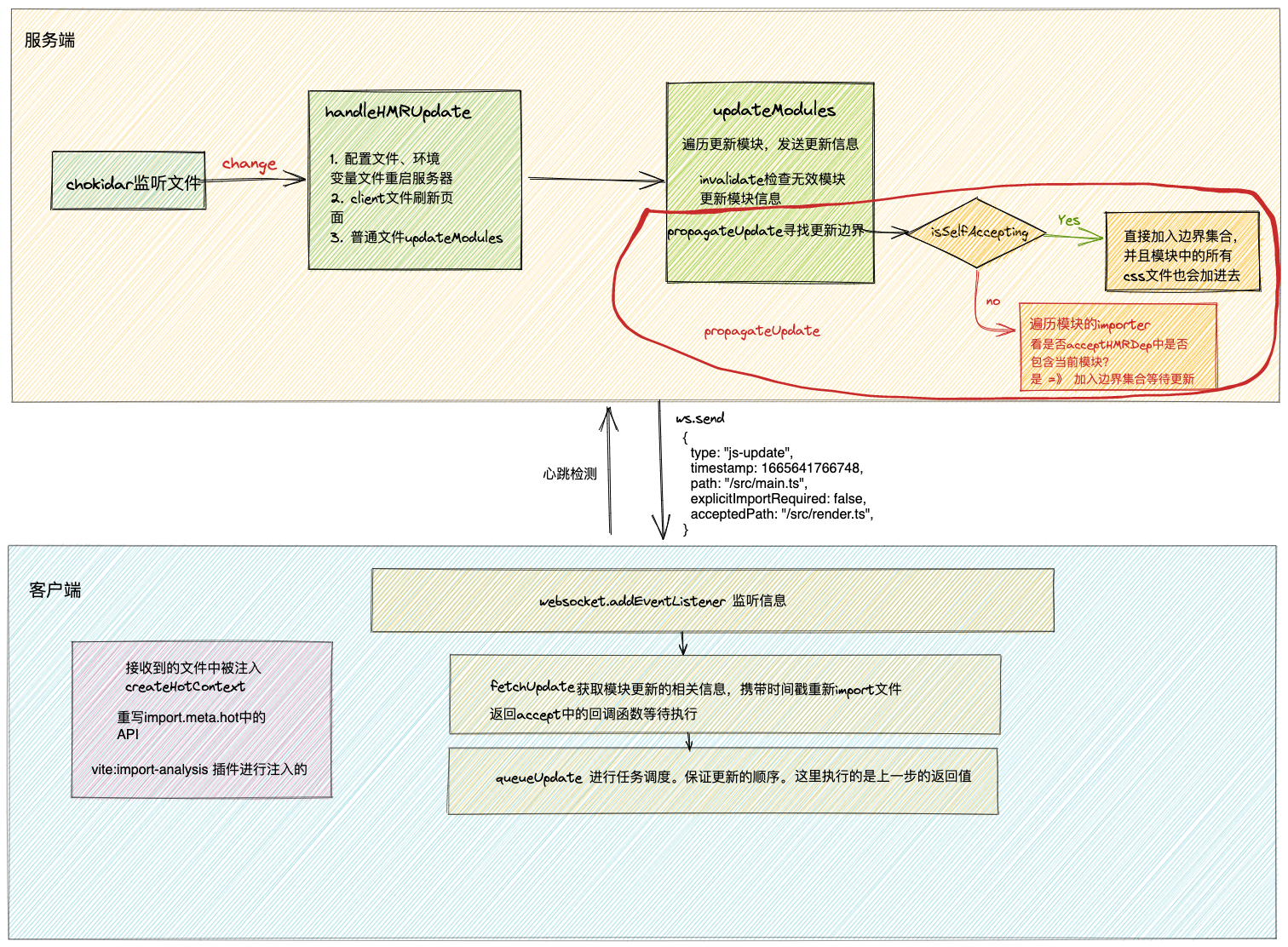
│ ├── copy-1.jpg
│ └── note_2.png
├── note
│ ├── todo.md
│ ├── home.md
│ ├── deadLink.md
│ ├── cache.md
│ ├── CSR&SSR&hydrate.md
│ ├── turborepo.md
│ ├── copy.md
│ ├── hmr-api.md
│ ├── re-render.md
│ └── hmr-vite.md
├── .island
│ ├── plugins
│ │ └── yuque-img.ts
│ └── config.ts
├── index.md
└── article
│ └── choose.md
├── package.json
├── .github
└── dependabot.yml
└── README.md
/.gitignore:
--------------------------------------------------------------------------------
1 | node_modules/
2 | dist
3 |
--------------------------------------------------------------------------------
/docs/public/1.gif:
--------------------------------------------------------------------------------
https://raw.githubusercontent.com/callqh/note/HEAD/docs/public/1.gif
--------------------------------------------------------------------------------
/docs/public/home.jpg:
--------------------------------------------------------------------------------
https://raw.githubusercontent.com/callqh/note/HEAD/docs/public/home.jpg
--------------------------------------------------------------------------------
/docs/public/note.png:
--------------------------------------------------------------------------------
https://raw.githubusercontent.com/callqh/note/HEAD/docs/public/note.png
--------------------------------------------------------------------------------
/docs/public/copy-1.jpg:
--------------------------------------------------------------------------------
https://raw.githubusercontent.com/callqh/note/HEAD/docs/public/copy-1.jpg
--------------------------------------------------------------------------------
/docs/public/note_2.png:
--------------------------------------------------------------------------------
https://raw.githubusercontent.com/callqh/note/HEAD/docs/public/note_2.png
--------------------------------------------------------------------------------
/docs/note/todo.md:
--------------------------------------------------------------------------------
1 | # 待办
2 |
3 | 记录平时的闪现的灵感,以及一些想法。
4 |
5 | - [ ] 思考一下怎么可以自动生成 sidebar
6 |
7 | - [ ] 怎么深入工作中的技术栈?从哪个角度入手?
8 |
--------------------------------------------------------------------------------
/package.json:
--------------------------------------------------------------------------------
1 | {
2 | "name": "Liuqh's note",
3 | "type": "module",
4 | "scripts": {
5 | "dev": "island dev docs",
6 | "build": "island build docs",
7 | "preview": "island start docs"
8 | },
9 | "dependencies": {
10 | "islandjs": "0.7.19",
11 | "unist-util-visit": "^4.1.1"
12 | }
13 | }
14 |
--------------------------------------------------------------------------------
/docs/.island/plugins/yuque-img.ts:
--------------------------------------------------------------------------------
1 | import { visit } from 'unist-util-visit'
2 |
3 | // 解决语雀图片403的问题
4 | export const FixYuQueImgForbidden = () => {
5 | return (tree) => {
6 | visit(tree, 'element', (node, index, parent) => {
7 | if (node.tagName === 'img') {
8 | node.properties.referrerpolicy = 'no-referrer'
9 | }
10 | })
11 | }
12 | }
13 |
--------------------------------------------------------------------------------
/.github/dependabot.yml:
--------------------------------------------------------------------------------
1 | # To get started with Dependabot version updates, you'll need to specify which
2 | # package ecosystems to update and where the package manifests are located.
3 | # Please see the documentation for all configuration options:
4 | # https://docs.github.com/github/administering-a-repository/configuration-options-for-dependency-updates
5 |
6 | version: 2
7 | updates:
8 | - package-ecosystem: "npm" # See documentation for possible values
9 | directory: "/" # Location of package manifests
10 | schedule:
11 | interval: "daily"
12 |
--------------------------------------------------------------------------------
/docs/index.md:
--------------------------------------------------------------------------------
1 | ---
2 | pageType: home
3 |
4 | hero:
5 | name: Liuqh's Note
6 | text: 记录
7 | tagline: 一些有趣的、没趣的乱七八糟的东西
8 | image:
9 | src: /note_2.png
10 | alt: Note
11 | actions:
12 | - theme: brand
13 | text: Enjoy
14 | link: /note/home
15 | - theme: alt
16 | text: GitHub
17 | link: https://github.com/liuqh0609
18 | features:
19 | - title: 宇宙的有趣,我都不在意
20 | details: The universe is interesting, I don't care
21 | icon: 🪐
22 | - title: 我在意的是写的代码有没有bug
23 | details: What I care about is writing code that has no bugs
24 | icon: 🧑🏻💻
25 | - title: 还有就是今天能不能六点下班
26 | details: And can you get off work at six today?
27 | icon: 🏃♂️
28 | ---
29 |
--------------------------------------------------------------------------------
/README.md:
--------------------------------------------------------------------------------
1 | [](https://app.netlify.com/sites/liuqh-note/deploys)
2 |
3 |
Liuqh's Note
4 | 记录一些有趣的,也许也是有用的。
5 |
6 |
7 |
8 | 【
近期有更新 】
9 |
10 |
11 | ## 简易食用指南
12 |
13 | 1. 点击访问👉[网站](https://liuqh-note.netlify.app/)
14 | 2. 查看👉[`issues`](https://github.com/liuqh0609/note/issues),文章会同步到`issues`中,可通过不同`label`去筛选出感兴趣的内容
15 |
16 |
17 |
18 | 
19 |
20 |
21 |
22 |
--------------------------------------------------------------------------------
/docs/note/home.md:
--------------------------------------------------------------------------------
1 | # 这里都放了些什么?
2 |
3 | 
4 |
5 | 一些乱七八糟却想要记录的东西。
6 |
7 | 为什么需要记这些东西呢?
8 |
9 | 可能是想要给自己找点事情做,有时候写点东西很容易进入心流状态。当然还有一方面是把这些东西沉淀下来,以备不时之需。
10 |
11 | > 种一棵树最好的时间是十年前,其次是现在。
12 |
13 | ## 其他的一些记录
14 |
15 | - [我的博客](http://www.liuqh.cn):说不定啥时候域名就过期了 🤡
16 | - [语雀花园](https://www.yuque.com/callmew):博客域名过期了就看这个吧(你可以看看和上面官网有什么区别 )👾
17 | - [稀土掘金](https://juejin.cn/user/3993025017037309/posts):三年发一次 🤖
18 |
19 | ## 推荐阅读
20 |
21 | > 年轻时候写的,可能有错误,欢迎交流。
22 |
23 | - [当初为什么选择走这条路?](https://juejin.cn/post/6987397269771255816)
24 | - [前端大舞台,够胆你就来 👩🏻🌾](https://www.yuque.com/callmew/blog)
25 | - [SWC 初体验](https://www.yuque.com/callmew/blog/plr1g3)
26 | - [`React.memo`的一些东西](https://juejin.cn/post/6917629321112731662)
27 | - [`useState` 和 `useEffect` 的一些细节](https://juejin.cn/post/6917941926599589895)
28 |
--------------------------------------------------------------------------------
/docs/.island/config.ts:
--------------------------------------------------------------------------------
1 | import { defineConfig } from 'islandjs'
2 | import { FixYuQueImgForbidden } from './plugins/yuque-img'
3 |
4 | const getSidebar = () => ({
5 | '/note': [
6 | {
7 | text: '总会有用',
8 | items: [
9 | { text: '简介', link: '/note/home' },
10 | { text: 'TODO', link: '/note/todo' },
11 | { text: 'HMR模块热更新(一)', link: '/note/hmr-api' },
12 | { text: 'vite中的HMR流程(二)', link: '/note/hmr-vite' },
13 | { text: '认识 CSR & SSR & hydrate', link: '/note/CSR&SSR&hydrate' },
14 | { text: 'react中的re-render', link: '/note/re-render' },
15 | { text: 'react中的cache方法', link: '/note/cache' },
16 | { text: 'turborepo笔记', link: '/note/turborepo' },
17 | { text: '实现一键复制功能', link: '/note/copy' },
18 | { text: '死链检测', link: '/note/deadLink' },
19 | ],
20 | },
21 | {
22 | text: '也许有用',
23 | items: [{ text: '当初为什么选择走这条路?', link: '/article/choose' }],
24 | },
25 | ],
26 | })
27 |
28 | const getNav = () => [
29 | {
30 | text: '首页',
31 | link: '/',
32 | activeMatch: '^/$|^/',
33 | },
34 | {
35 | text: 'Github',
36 | link: 'http://github.com/liuqh0609',
37 | },
38 | ]
39 |
40 | export default defineConfig({
41 | title: "Liuqh's Note",
42 | icon: '/note_2.png',
43 | themeConfig: {
44 | lang: 'zh',
45 | locales: {
46 | '/zh/': {
47 | lang: 'zh',
48 | label: '简体中文',
49 | selectText: '语言',
50 | ariaLabel: '语言',
51 | lastUpdatedText: '上次更新',
52 | title: "Liuqh's Note",
53 | outlineTitle: '目录',
54 | prevPageText: '上一页',
55 | nextPageText: '下一页',
56 | editLink: {
57 | pattern: 'https://github.com/liuqh0609/note/tree/master/docs/:path',
58 | text: '📝 在 GitHub 上编辑此页',
59 | },
60 | nav: getNav(),
61 | sidebar: getSidebar(),
62 | },
63 | },
64 | },
65 | markdown: {
66 | rehypePlugins: [FixYuQueImgForbidden],
67 | },
68 | })
69 |
--------------------------------------------------------------------------------
/docs/note/deadLink.md:
--------------------------------------------------------------------------------
1 | # 链接检测(死链检测)
2 |
3 | 死链(`dead link`) 检测是指检测代码或者文档中的链接是否失效,如果失效则会在控制台输出错误信息。排除掉部署到生产环境后链接无法正常跳转的尴尬问题。
4 |
5 | 死链的检查总体上分为两部分:
6 |
7 | 1. 嗅探文档(代码)中的链接
8 | 2. 检测链接是否失效
9 | 1. 内部链接(相对路径`/docs/test`)
10 | 2. 外部链接(`http`/`https`)
11 |
12 | :::tip
13 | 我们重点放在第二步上。
14 |
15 | 因为第一步在不同的情况下处理方式也不同,不过大致都是通过遍历其`ast`找到对应的类型进行收集链接
16 | :::
17 |
18 | ## 嗅探文档(代码)中的链接
19 |
20 | 因为链接分为两种:内部链接和外部链接,这两种链接的处理方式也不同,所以我们需要先区分这两种链接。
21 |
22 | > 是否为内部链接,通过判断 `url` 的开头是否为 `http` 或者 `https`
23 |
24 | ```ts
25 | const externalLinks: string[] = []
26 | const internalLinks: string[] = []
27 | // 省略其他代码
28 | visit(tree, ['link', 'image'], (node: { url: string }) => {
29 | const url = node.url
30 | if (!url) return
31 | if (internalLinks.includes(url) || externalLinks.includes(url)) return
32 |
33 | // 判断是否为内部链接
34 | if (!url.startsWith('http') && !url.startsWith('https')) {
35 | internalLinks.push(normalizeRoutePath(url?.split('#')[0]))
36 | return
37 | }
38 |
39 | //localhost以及127.0.0.1的本地链接跳过
40 | if (/^(http?:\/\/)(localhost|127\.0\.0\.1)(:\d+)?/.test(url)) {
41 | return
42 | }
43 | // 其他则为外部链接
44 | externalLinks.push(url)
45 | })
46 | ```
47 |
48 | 拿到链接后,我们需要对链接进行处理
49 |
50 | :::tip
51 | 这里有个注意点: 因为有些链接是带有锚点(`#`)的,所以我们在收集链接时尽量处理掉这些锚点。
52 | :::
53 |
54 | ## 检测链接是否失效
55 |
56 | ### 内部链接
57 |
58 | 内部链接的判断比较简单,大体上分为两种:
59 |
60 | 1. 通过`fs`模块判断文件是否存在
61 | 2. 如果系统内有对应的路由信息,拿到它并且匹配是否有对应的路由路径(查询路由时可能需要将路径进行处理,比如 `url` 是`docs/zh/index`,其实在路由中是`/docs/zh/`)
62 |
63 | ```ts
64 | internalLinks.map((link) => {
65 | if (!isExistRoute(link)) {
66 | console.log(`Internal link to ${link} is dead`)
67 | }
68 | })
69 |
70 | function isExistRoute(routePath: string) {
71 | // 假设这里的routeData是路由信息
72 | return routeData.find((route) => route.routePath === routePath)
73 | }
74 | ```
75 |
76 | ### 外部链接
77 |
78 | 检测外部链接的原理其实也很简单,就是通过`http`请求,如果请求成功则说明链接是有效的,如果失败则说明链接是无效的。
79 |
80 | 我们这里就不手动去封装 http 请求了,直接使用一些现成的库来做。这里推荐两个库
81 |
82 | - [check-links](https://www.npmjs.com/package/check-links):支持传入数组,方便多个链接的检查,并且会缓存结果,如果有相同的链接在短时间内重复检查,会直接返回缓存结果。(13.3 kB) ---**推荐**
83 | - [link-check](https://www.npmjs.com/package/link-check):仅支持单个链接的检测,如果要检测多个需要自己封装(36.7 kB)
84 |
85 | 下面以`check-links`为例.
86 |
87 | ```ts
88 | const results = await checkLinks(externalLinks, {
89 | // 这里的timeout是请求超时时间,单位是毫秒,如果设置过短的话,有些链接会被检测为死链
90 | // 有些墙外的链接可能会比较慢,所以这里可以适当调大一点
91 | timeout: checkLink?.timeout || 30000,
92 | })
93 |
94 | // result: {
95 | // 'https://alive.com': { status: 'alive', statusCode: 200 }
96 | // 'https://dead.com': { status: 'dead', statusCode: 404 }
97 | // }
98 |
99 | Object.keys(results).forEach((url) => {
100 | const result = results[url]
101 | if (result.status !== 'dead') return
102 |
103 | console.log(`External link to ${url} is dead`)
104 | })
105 | ```
106 |
--------------------------------------------------------------------------------
/docs/article/choose.md:
--------------------------------------------------------------------------------
1 | ## 回首
2 | 这条路是说选择做技术这条职业路线。
3 |
4 | 其实现在回头看自己也不是很明白怎么就上了这条船,不过对于那时候的自己无非就是高薪以及可以玩电脑这两点是有很大诱惑力的。
5 |
6 | 对于高薪这一点,也确实是这样,这好像是大部分人都比较认可的点,认为互联网行业的薪资要比大部分行业稍高出一些(当然不包括某爽的那一行)。
7 |
8 | 这也离不开这些年互联网的发展吧,现在我们这些人好像都是在享受这波互联网浪潮的红利,这也算是走在风口上了吧?只不过我们的风口比较小,飞不了这么高。
9 |
10 | 但是又说回高薪,这个高薪是真的高吗?我是这样认为的,其实这个行业的高薪是说在起步的这一环节要高出其他行业一部分的,但是这个行业的上限也很明显 -- 年纪大没有竞争力,并且能达到自我小康地步的程序员更是少之又少。
11 | 而且一般技术人的寿命也就是有头发的那几年,很多一部分应该都是在某个节点去转到其他岗位,做一些和技术没有这么强相关的事情,毕竟技术这个东西长年更新迭代,每次都要去接受新鲜,而又不能转身丢掉那些旧物件,换谁来其实脑容量也就那么点,没大毅力或者心劲是不怎么能够跟的上这样一种节奏的。
12 |
13 | 好像扯皮扯远了... ...
14 |
15 | 现在拉回正轨,来聊一下为啥我会选择做前端开发。
16 |
17 | 归根结底,可以用一句曾经很时髦的话来概括一下:**不想让自己毕业了就失业**。
18 |
19 | 而且当时自己也没有说有那种要考研的想法,我一直都认为考研这条路不适合所有人。
20 | 而我自认为就是那种没读书天赋的人,更别说让我去背书做题考研了,我也不想再经历一次高中时候的那种“快乐“,所以我到现在都一直很佩服自己考研并且成功上岸的那些同学。
21 |
22 | 那么既然选择了就业,于是当时就给了自己两种选择,要么后端要么前端。当时没有选择后端是因为我大学java课一直在打王者,所以最后考试的时候感觉这个东西怎么这么难。。
23 | 于是就理所应当的走到了前端这条路上(大学也没有前端相关的课程,无知者无畏),而且记得当时特别让我坚定自己选择的一点是**前端给到自己的那种成就感是能很直观的感受到的--**因为在学习`html`和`css`的时候自己做出来的页面和效果能直接展现在眼前,会提升很大的学习信心... ...
24 |
25 | > 其实这里我想分享一下当时在大学里学习技术相关的一些事情的,但是害怕跑偏了,所以这些等有时间了开一个新篇来唠一下。
26 |
27 |
28 | 所以当初为了就业选择的这条路线,对现在的自己有什么影响呢?或者说现在是一个什么样的态度呢?且听下文
29 | ## 现状
30 | 有一句话怎么说来着,日久生情。
31 | 现在能感受到这句话是很在理的,因为从自己选择做前端的这一年来,自己态度转变了很多。
32 | 当时是纯粹为了就业,为了养活自己,而现在怎么说呢,算的上是生活之外的一种热爱吧?
33 | 我不知道大家怎么理解热爱,我个人是觉得**把一件事情可以做到心甘情愿的付出**这种地步就算是热爱吧,而不单纯是为了生活。
34 |
35 | 为什么热爱?
36 | 想了很久为什么... ...
37 | 大概是因为下面这几点吧,当然是除了能给我带来收入之外的点。
38 |
39 | 一是让我认识了一帮可爱的朋友。其实我感觉很多人毕业工作之后,自己的朋友圈子反而是会变小的,因为自己的工作范围总共也就那么大一点,所以想认识什么新朋友并没有想象中的那么简单。而我很庆幸因为前端而发生的一些故事让我认识了这么一群人,这些人呢亦师亦友,可以很快乐的聊天也可以很正经的谈人生谈理想,当你拥有一群志同道合的伙伴时,在你迷茫或者无力和生活折腾的时候总会有人在你旁边敲打一下,这种感觉很微妙,说不上很喜欢,但是绝对很受益... ...
40 |
41 | 二是可以让自己觉得自己是个有用的人。无论是工作中输出的内容,还是自己私下帮朋友做的一些网站,又或是自己心血来潮做的一些小工具,当这些东西实际的进行运转,并且产生了一些正面收益的时候,自己是很开心的,或许这就是助人为乐的乐?
42 | > 当然上面提到的正面收益不是金钱方面的东西,完全是因为自己会这些东西,而那人又是朋友这样子,如果不是朋友 嘛,你给我点钱也不是不行,毕竟还有个猫🐈要养
43 |
44 |
45 | ... ...
46 |
47 | 现状就是这样了,反正就是一片欣欣向荣的景象。
48 | 当然自己的体重也挺欣欣向荣的,这也是我现在苦恼的事情,再怎么说当年也是一帅小伙。恩
49 |
50 | 过去和现在都聊了,那就顺着说一下将来吧。继续看终章。
51 | ## 展望
52 | 居安而思危。
53 |
54 | 因为没怎么了解过其他行业的事情,不知道大家对内卷这个事情怎么想。
55 | 其实我觉得内卷有一部分原因就是现在的人太没有安全感了。怕找不到好工作,怕被淘汰,怕找不到好看的女(男)朋友... ... 于是就开始疯狂的进行自我补充,造成了一波卷时代的潮流。
56 |
57 | 而前端据我了解应该也挺卷的,大家疯狂卷,各种技术无论是深度还是广度,直接给你卷的六亲不认。
58 | 而我不选择躺平,但是也不想随大潮。有自己的规划,所以还是会按照计划走,虽然会经常跳脱出计划外,但是大体上还是照这个方向走吧。我的大概想法是这样的:
59 | 这三到五年还是会选择做技术,但是在这过程中我喜欢可以横向扩展自己的能力和圈子,把握一个机会然后创业。
60 | 之前听我现在的大哥说过,创业简直不是人干的事。说实话虽然我没亲身体验过,但是从自己看的一些传记来看,确实是这样的,尤其是创业初期,难搞的事情一堆,但是怎么说呢因为没有经历过,所以想去经历。
61 |
62 | 其次我是觉得每个人都要有一个自己第二轨道的计划,而我理解的这个第二轨道就是后期可以给自己带来一些收益的事情。就像我现在做前端可以带来收益,但是也仅限与可以养活现在的自己吧,完全谈不上什么自由,而大部分自由的人都不是靠这第一轨道的事业来完成的。
63 |
64 | 所以大概将来是这样的吧,先把握现在的技术,然后寻找人生的第二春。
65 |
66 | > 欢迎大家扫码关注公众号
67 |
68 | 
69 |
--------------------------------------------------------------------------------
/docs/note/cache.md:
--------------------------------------------------------------------------------
1 | # react 中的 cache 方法
2 |
3 | :::tip
4 | 原文链接:[React 内部是如何实现 cache 方法的?](https://mp.weixin.qq.com/s/hCDj4M5UBVMXfeiH7jsZiw)
5 | :::
6 |
7 | 1. 使用 `weekMap` 对对象类型的参数进行缓存
8 | 2. 使用 `map` 对原始类型进行缓存
9 |
10 | ## 实现
11 |
12 | ```js
13 | const UNTERMINATED = 0
14 | const TERMINATED = 1
15 | const ERRORED = 2
16 |
17 | function createCacheRoot() {
18 | return new WeakMap()
19 | }
20 |
21 | function createCacheNode() {
22 | return {
23 | s: UNTERMINATED, // status, represents whether the cached computation returned a value or threw an error
24 | v: undefined, // value, either the cached result or an error, depending on s
25 | o: null, // object cache, a WeakMap where non-primitive arguments are stored
26 | p: null, // primitive cache, a regular Map where primitive arguments are stored.
27 | }
28 | }
29 |
30 | let fnMap = createCacheRoot()
31 |
32 | function cache(fn) {
33 | return function () {
34 | const fnNode = fnMap.get(fn)
35 | let cacheNode
36 | if (fnNode === undefined) {
37 | cacheNode = createCacheNode()
38 | fnMap.set(fn, cacheNode)
39 | } else {
40 | cacheNode = fnNode
41 | }
42 | for (let i = 0, l = arguments.length; i < l; i++) {
43 | const arg = arguments[i]
44 | if (typeof arg === 'function' || (typeof arg === 'object' && arg !== null)) {
45 | // Objects go into a WeakMap
46 | let objectCache = cacheNode.o
47 | if (objectCache === null) {
48 | cacheNode.o = objectCache = new WeakMap()
49 | }
50 | const objectNode = objectCache.get(arg)
51 | if (objectNode === undefined) {
52 | cacheNode = createCacheNode()
53 | objectCache.set(arg, cacheNode)
54 | } else {
55 | cacheNode = objectNode
56 | }
57 | } else {
58 | // Primitives go into a regular Map
59 | let primitiveCache = cacheNode.p
60 | if (primitiveCache === null) {
61 | cacheNode.p = primitiveCache = new Map()
62 | }
63 | const primitiveNode = primitiveCache.get(arg)
64 | if (primitiveNode === undefined) {
65 | cacheNode = createCacheNode()
66 | primitiveCache.set(arg, cacheNode)
67 | } else {
68 | cacheNode = primitiveNode
69 | }
70 | }
71 | }
72 | if (cacheNode.s === TERMINATED) {
73 | return cacheNode.v
74 | }
75 | if (cacheNode.s === ERRORED) {
76 | throw cacheNode.v
77 | }
78 | try {
79 | // $FlowFixMe: We don't want to use rest arguments since we transpile the code.
80 | const result = fn.apply(null, arguments)
81 | const terminatedNode = cacheNode
82 | terminatedNode.s = TERMINATED
83 | terminatedNode.v = result
84 | return result
85 | } catch (error) {
86 | // We store the first error that's thrown and rethrow it.
87 | const erroredNode = cacheNode
88 | erroredNode.s = ERRORED
89 | erroredNode.v = error
90 | throw error
91 | }
92 | }
93 | }
94 |
95 | module.exports = cache
96 | ```
97 |
98 | ## 使用
99 |
100 | ```js
101 | const obj = { obj: 1 }
102 |
103 | const fn = (a, b, c) => {
104 | console.log('a', a)
105 | console.log('b', b)
106 | console.log('c', c)
107 | return b
108 | }
109 |
110 | const c = cache(fn)
111 | c(obj, 1, 2)
112 | c(obj, 3, 2)
113 | c(obj, 1, 2)
114 | c({ haha: 3 }, 1, 2)
115 | ```
116 |
--------------------------------------------------------------------------------
/docs/note/CSR&SSR&hydrate.md:
--------------------------------------------------------------------------------
1 | 本篇文章主要是简单认识一下这些专业词汇的意思。
2 | 没有复杂的源码分析之类的~ 【科普向】
3 |
4 | ## CSR
5 |
6 | `client-side render` 客户端渲染
7 | 
8 |
9 | 1. 客户端发送请求页面数据,服务端进行响应,并且返回对应页面的`js bundle`
10 | 2. 客户端下载`js`
11 | 3. 客户端执行下载来的`js`文件,渲染对应的`dom`树
12 | 4. 页面**可见**并且**可交互**
13 | :::success
14 | 可以发现`CSR`的 html 内容是在客户端执行完成的
15 | :::
16 | 客户端渲染的劣势在于需要先下载`js`然后在执行`js`,才可以渲染出来想要的页面,所以对于首屏渲染不友好。
17 | 因此就出现了`SSR`方案
18 |
19 | ## SSR
20 |
21 | `server-side render`服务端渲染
22 | 
23 |
24 | 1. 客户端请求页面,服务端响应并返回`html`页面
25 | 2. 客户端下载`html`页面并且展示,这时**页面已经可见**,但是**还不能交互**,所以要下载`html`页面对应的`js`文件
26 | 3. 执行下载的`js`文件,进行注水(`hydrate`)_(会不会让页面重新渲染?)_
27 | 4. 注水完成页面**可交互**
28 | :::success
29 | 可见服务端渲染`html`是在服务端就完成的
30 | :::
31 | 从上面也可以看出其实`ssr`在第二步时就可以看到页面了,对于首屏渲染非常友好,只是此时的页面还不能进行交互(`dom`点击),需要进行`hydtate`之后才可以进行交互
32 |
33 | 所以接下来我们看一下`hydrate`是干什么的。
34 | 
35 |
36 | ## hydrate
37 |
38 | 从上面我们可以知道,在`ssr`中浏览器会首先将`html`页面展示出来,但是此时的页面是无法交互的(即没有绑定附加的点击等事件)。
39 | 所以我们后续需要**将一些可交互的事件注入到页面元素中去**,这个过程就是`hydrate`。
40 | 这个过程很像是给一个干瘪的元素注入生机,让他变得更加生动。
41 |
42 | 
43 | 首先我们可以看到上图中绿色的部分其实就是页面中可以交互的部分,上图就是一个完整可交互的`web`页面。
44 | 但是我们在`csr`中,因为客户端需要加载并执行`js`,所以一开始页面是下面这样的(空白页)
45 | 
46 | 而在`ssr`中,因为请求回来的就是一个**干瘪**的`html`页面,是可以直接展示的,像下图那样
47 | 
48 | 此时的页面是只可以看,不可以动的(即没有哪家附加的绑定事件)
49 | 而`hydrate`就是将这个干瘪的`html`注水变成可交互的
50 |
51 | # 推荐阅读
52 |
53 | ● https://blog.saeloun.com/2021/12/16/hydration.html
54 | ● https://zhuanlan.zhihu.com/p/323174003
55 | ● http://www.ayqy.net/blog/react-ssr-under-the-hood/#articleHeader9
56 |
--------------------------------------------------------------------------------
/docs/note/turborepo.md:
--------------------------------------------------------------------------------
1 | ## task
2 | 运行的`lint`、`test`等在`turbo`中被称作任务即`task`
3 | 在代码库的根目录中可以看到,每个命令运行的其实是通过`trubo run xxx`来运行的,
4 | 而这个任务都是需要通过在`turbo.json`中的`pipleline`中去定义的,否则找不到该任务。
5 | 
6 |
7 | 而`turbo run xxx`运行的时候是会找到每个工作区中在`package.json`中在`script`中定义了`xxx`脚本的。
8 | 比如,`trubo run dev`,实际上是会找在各个`workspace`中的`package.json`的`script`中定义了`dev`脚本的去运行,如果没有定义就不会运行
9 | ## cache
10 | `turborepo`中是使用`**本地缓存**`来进行加速的。
11 | 
12 |
13 | 1. 首先会评估你本次任务的输入文件(默认是gitignored中没有忽略的文件),并且根据这些文件生成对应的`hash`值。(`78awdk123`)
14 | 2. 在本地文件系统中查找缓存(`eg: ./node_modules/.cache/turbo/78awdk123`)
15 | 3. 如果没有查找到对应`hash`的文件夹,说明没有缓存,那么就会执行任务
16 | 4. **任务执行完成后,**会将对应的输出(包括输出的文件以及日志log)全部缓存,以便下次使用。
17 |
18 | 经过上面的步骤之后,当下次执行**同样**的`task`时,就会命中缓存。
19 | 
20 |
21 | 1. 当输入的文件没有发生任何变化时,计算出的`hash`是一样的
22 | 2. `turborepo`会去缓存目录中匹配`hash`值的文件
23 | 3. 匹配到之后,就不会再去执行命令,而是直接拿出缓存中的输出文件以及`log`直接使用
24 | ### 配置-输出
25 | 可以通过`outputs`来配置需要缓存哪些文件。
26 | 当设置为空数组时,**只缓存**`**log**`
27 | ```json
28 | {
29 | "$schema": "https://turborepo.org/schema.json",
30 | "pipeline": {
31 | "build": {
32 | "outputs": ["dist/**", ".next/**"],
33 | "dependsOn": ["^build"]
34 | },
35 | "test": {
36 | "outputs": [], // leave empty to only cache logs
37 | "dependsOn": ["build"]
38 | }
39 | }
40 | }
41 | ```
42 | ### 配置-输出
43 | 默认情况下当工作区的任何文件更改,都会任务是该工作区的更新,`hash`值就会刷新。但是有时我们只想关注部分文件(与该任务相关的文件),那么`inputs`属性可以让我们指定当前任务相关的文件。只要这些配置的相关文件更新才会影响到该任务,其他文件的更新并不会影响
44 | ```json
45 | {
46 | "$schema": "https://turborepo.org/schema.json",
47 | "pipeline": {
48 | // ... omitted for brevity
49 |
50 | "test": {
51 | // A workspace's `test` task depends on that workspace's
52 | // own `build` task being completed first.
53 | "dependsOn": ["build"],
54 | "outputs": [],
55 | // A workspace's `test` task should only be rerun when
56 | // either a `.tsx` or `.ts` file has changed.
57 | "inputs": ["src/**/*.tsx", "src/**/*.ts", "test/**/*.ts"]
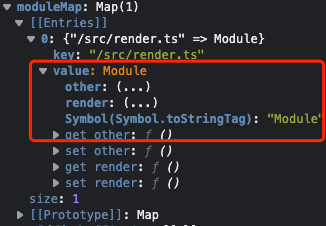
58 | }
59 | }
60 | }
61 | ```
62 | :::danger
63 | `package.json`文件会一直被当做输入文件。
64 | 因为`turbo`中的任务被定义在`script`中,一旦`package.json`文件变动,那么缓存就会失效
65 | :::
66 | ### 配置-关闭缓存
67 |
68 | 1. 命令行参数`--no-cache`。`eg: turbo run dev --no-cache`
69 | 2. 在`turbo.json`中配置
70 | ```json
71 | {
72 | "$schema": "https://turborepo.org/schema.json",
73 | "pipeline": {
74 | "dev": {
75 | "cache": false // 关闭缓存
76 | }
77 | }
78 | }
79 | ```
80 | ### 环境变量-env
81 | 环境变量也会对缓存产生影响。
82 | 不过turborepo,对一些[常用的框架中集成的环境变量](https://turbo.build/repo/docs/core-concepts/caching#automatic-environment-variable-inclusion)已经做到了自动引用,不用我们去手动的声明.
83 | ```json
84 | {
85 | "$schema": "https://turborepo.org/schema.json",
86 | "pipeline": {
87 | "build": {
88 | "dependsOn": ["^build"],
89 | // env vars will impact hashes of all "build" tasks
90 | "env": ["SOME_ENV_VAR"],
91 | "outputs": ["dist/**"]
92 | },
93 |
94 | // override settings for the "build" task for the "web" app
95 | "web#build": {
96 | "dependsOn": ["^build"],
97 | "env": [
98 | // env vars that will impact the hash of "build" task for only "web" app
99 | "STRIPE_SECRET_KEY",
100 | "NEXT_PUBLIC_STRIPE_PUBLIC_KEY",
101 | "NEXT_PUBLIC_ANALYTICS_ID"
102 | ],
103 | "outputs": [".next/**"],
104 | },
105 | },
106 | "globalEnv": [
107 | "GITHUB_TOKEN" // env var that will impact the hashes of all tasks,
108 | ]
109 | }
110 |
111 | ```
112 | > 对于一些自定义的环境变量我们还是需要手动的声明。
113 | > 这里官方推荐了两个eslint相关的插件来规范我们的环境变量相关配置。会帮助我们检测一些忽略掉的环境变量声明
114 | > [https://turbo.build/repo/docs/core-concepts/caching#eslint-config-turbo](https://turbo.build/repo/docs/core-concepts/caching#eslint-config-turbo)
115 |
116 | ### 强制重写缓存
117 | `--force`
118 | ```powershell
119 | # Run `build` npm script in all workspaces,
120 | # ignoring cache hits.
121 | turbo run build --force
122 | ```
123 |
--------------------------------------------------------------------------------
/docs/note/copy.md:
--------------------------------------------------------------------------------
1 | # 在浏览器中实现 copy 功能
2 |
3 | ## 浏览器实现
4 |
5 | 实现 `copy` 功能的方式有很多,其中比较简单的方式就是利用浏览器提供的`API`。
6 |
7 | > https://developer.mozilla.org/zh-CN/docs/Web/API/Clipboard
8 |
9 | ```js
10 | navigator.clipboard.writeText('').then(
11 | function () {
12 | /* clipboard successfully set */
13 | },
14 | function () {
15 | /* clipboard write failed */
16 | }
17 | )
18 | ```
19 |
20 | 当然这个 API 的兼容性还是不太好,所以我们可以使用`execCommand`来实现。
21 |
22 | ## 手动实现 copy 功能
23 |
24 | 大致思路也是比较简单,就是利用`input`的`select`方法来选中文本,然后利用`execCommand`的`copy`来实现复制。
25 |
26 | > 当页面中有选择的文本时,`execCommand`的`copy`命令会复制选中的文本
27 | > 
28 |
29 | 这里的源码参考`vitepress`的实现。
30 |
31 | ```ts
32 | function copy(text) {
33 | const element = document.createElement('textarea')
34 | const previouslyFocusedElement = document.activeElement
35 |
36 | element.value = text
37 |
38 | // Prevent keyboard from showing on mobile
39 | element.setAttribute('readonly', '')
40 |
41 | element.style.contain = 'strict'
42 | element.style.position = 'absolute'
43 | element.style.left = '-9999px'
44 | element.style.fontSize = '12pt' // Prevent zooming on iOS
45 |
46 | const selection = document.getSelection()
47 | const originalRange = selection ? selection.rangeCount > 0 && selection.getRangeAt(0) : null
48 |
49 | document.body.appendChild(element)
50 | element.select()
51 |
52 | // Explicit selection workaround for iOS
53 | element.selectionStart = 0
54 | element.selectionEnd = text.length
55 |
56 | document.execCommand('copy')
57 | document.body.removeChild(element)
58 |
59 | if (originalRange) {
60 | selection!.removeAllRanges() // originalRange can't be truthy when selection is falsy
61 | selection!.addRange(originalRange)
62 | }
63 |
64 | // Get the focus back on the previously focused element, if any
65 | if (previouslyFocusedElement) {
66 | ;(previouslyFocusedElement as HTMLElement).focus()
67 | }
68 | }
69 | ```
70 |
71 | ## 使用第三方库 copy-to-clipboard
72 |
73 | 该库小巧,易用。
74 |
75 | 具体使用方式可以参考[官方文档](https://www.npmjs.com/package/copy-to-clipboard)
76 |
77 | ```js
78 | import copy from 'copy-to-clipboard'
79 |
80 | copy('Text')
81 |
82 | // Copy with options
83 | copy('Text', {
84 | debug: true,
85 | message: 'Press #{key} to copy',
86 | })
87 | ```
88 |
89 | ### 源码
90 |
91 | ```js
92 | 'use strict'
93 |
94 | var deselectCurrent = require('toggle-selection')
95 |
96 | var clipboardToIE11Formatting = {
97 | 'text/plain': 'Text',
98 | 'text/html': 'Url',
99 | default: 'Text',
100 | }
101 |
102 | function copy(text, options) {
103 | var reselectPrevious,
104 | range,
105 | selection,
106 | mark,
107 | success = false
108 | if (!options) {
109 | options = {}
110 | }
111 | try {
112 | reselectPrevious = deselectCurrent()
113 | range = document.createRange()
114 | selection = document.getSelection()
115 |
116 | mark = document.createElement('span')
117 | mark.textContent = text
118 | // avoid screen readers from reading out loud the text
119 | mark.ariaHidden = 'true'
120 | // reset user styles for span element
121 | mark.style.all = 'unset'
122 | // prevents scrolling to the end of the page
123 | mark.style.position = 'fixed'
124 | mark.style.top = 0
125 | mark.style.clip = 'rect(0, 0, 0, 0)'
126 | // used to preserve spaces and line breaks
127 | mark.style.whiteSpace = 'pre'
128 | // do not inherit user-select (it may be `none`)
129 | mark.style.webkitUserSelect = 'text'
130 | mark.style.MozUserSelect = 'text'
131 | mark.style.msUserSelect = 'text'
132 | mark.style.userSelect = 'text'
133 |
134 | // 利用 span 标签来监听 copy 事件
135 | mark.addEventListener('copy', function (e) {
136 | e.stopPropagation()
137 | e.preventDefault()
138 | if (typeof e.clipboardData === 'undefined') {
139 | // 兼容IE 11
140 | window.clipboardData.clearData()
141 | var format = clipboardToIE11Formatting[options.format] || clipboardToIE11Formatting['default']
142 | window.clipboardData.setData(format, text)
143 | } else {
144 | // all other browsers
145 | e.clipboardData.clearData()
146 | e.clipboardData.setData(options.format, text)
147 | }
148 | })
149 |
150 | document.body.appendChild(mark)
151 | // 选中创建的标签文本
152 | range.selectNodeContents(mark)
153 | selection.addRange(range)
154 | // 实现复制方法
155 | var successful = document.execCommand('copy')
156 | if (!successful) {
157 | throw new Error('copy command was unsuccessful')
158 | }
159 | success = true
160 | } catch (err) {
161 | try {
162 | window.clipboardData.setData(options.format || 'text', text)
163 | options.onCopy && options.onCopy(window.clipboardData)
164 | success = true
165 | } catch (err) {}
166 | } finally {
167 | if (selection) {
168 | if (typeof selection.removeRange == 'function') {
169 | selection.removeRange(range)
170 | } else {
171 | selection.removeAllRanges()
172 | }
173 | }
174 |
175 | if (mark) {
176 | document.body.removeChild(mark)
177 | }
178 | reselectPrevious()
179 | }
180 |
181 | return success
182 | }
183 |
184 | module.exports = copy
185 | ```
186 |
187 | > - copy_event: https://developer.mozilla.org/zh-CN/docs/Web/API/Element/copy_event
188 | > - toggle-selection: https://www.npmjs.com/package/toggle-selection
189 |
190 | ## 对比 copy-to-clipboard 和 vitepress 中实现的 copy
191 |
192 | - `copy-to-clipboard`是自己创建一个 `span` 标签,然后改变 `span` 标签为一个可选中的元素`user-select`,当选中元素时,触发 `copy` 事件,然后将选中的文本复制到剪切板中。
193 | > (为啥下面还使用了 `document.execCommand('copy')`,我也不知道,可能是兼容性问题吧?按道理来说,`copy` 事件触发后,剪切板中就已经有了文本,不需要再执行 `document.execCommand('copy')` 了吧?)
194 | -
195 | - `vitepress` 中是用 `textarea` 元素来实现的,直接选中 `textarea` 中的文本,然后实现 `copy`
196 |
--------------------------------------------------------------------------------
/docs/note/hmr-api.md:
--------------------------------------------------------------------------------
1 | ## What(HMR 是什么?)
2 |
3 | > 我们下面讨论的`HMR`都是基于`vite`自身实现的一套`HMR`系统。
4 | > `vite`实现的`HMR`是根据 [ESM HMR 规范](https://github.com/FredKSchott/esm-hmr) 来实现的。
5 |
6 | `HMR`:`Hot Module Reload`模块热更新。
7 | 之前当我们在编辑器中更新代码时,会触发浏览器的页面刷新,但是这个刷新是**全量刷新**,相当于`CMD+R`。这时页面的状态会被重置掉,总之体验不好。
8 | 而模块热更新就是为了解决这样的问题,只是刷新我们编辑的代码所对应的模块,并且能保持页面的状态。
9 |
10 | > 可以看到这里我们在编辑代码时,下面`count`的状态是保存了的。只是热更新了上面的文字部分的模块。
11 |
12 | ## Why(为什么需要 HMR?)
13 |
14 | 其实每个技术的诞生,都是为了解决之前所凸显出来的问题。HMR 也是如此,其实在上面也已经说了原因。
15 | 这里再来总结一下:**为什么需要 HMR?**
16 |
17 | 1. 解决修改代码后页面**全量更新**,体验不好的问题
18 | 2. 解决全量更新导致的**状态丢失**问题
19 |
20 | ## How(怎么使用 HMR?)
21 |
22 | `vite`中实现的`HMR`系统其实是对`ESM HMR`规范中的`API`进行了一层封装。`vite`会主动监听文件的变化,然后触发对应的`API`,来实现模块的热更新。
23 | 所以首先我们来简单了解一下这套规范中的`API`
24 |
25 | ### API
26 |
27 | `hmr`的`API`都注入到了`import.meta`的`hot`中。
28 | 我们访问的时候只需要`import.meta.hot.[name]`即可
29 |
30 | > `import.meta`是浏览器中内置的一个对象。【[MDN](https://developer.mozilla.org/zh-CN/docs/Web/JavaScript/Reference/Operators/import.meta)】
31 |
32 | ```ts
33 | interface ImportMeta {
34 | readonly hot?: {
35 | readonly data: any
36 | // ======触发更新=====
37 | accept(): void //
38 | accept(cb: (mod: any) => void): void
39 | accept(dep: string, cb: (mod: any) => void): void
40 | accept(deps: string[], cb: (mods: any[]) => void): void
41 | // ==================
42 | prune(cb: () => void): void
43 | dispose(cb: (data: any) => void): void
44 | decline(): void
45 | invalidate(): void
46 | // =====监听hmr事件====
47 | on(event: string, cb: (...args: any[]) => void): void
48 | // ===================
49 | }
50 | }
51 | ```
52 |
53 | #### accept(cb)
54 |
55 | `accept`翻译过来就是接受。而在`hmr`中他也是这个意思:接受此次热更新,而接受热更新的模块被称为`HMR`边界
56 | 当我们在文件中加入这行代码的时候,就是手动开启该文件模块的热更新。
57 | 当这个文件中的代码产生更新时,就会接收此次热更新的结果。
58 |
59 | ```ts
60 | if (import.meta.hot) {
61 | import.meta.hot.accept((mod) => {
62 | console.log(mod, '==')
63 | })
64 | }
65 | ```
66 |
67 | :::danger
68 | `accept`中的`mod`就是更新之后的模块中所导出的内容。
69 | :::
70 | 比如我们的文件是下面这样,导出了`render`和`other`:
71 |
72 | ```ts
73 | export const render = () => {
74 | // ...
75 | }
76 |
77 | export const other = () => {
78 | //...
79 | }
80 |
81 | if (import.meta.hot) {
82 | import.meta.hot.accept((mod) => {
83 | console.log(mod, '==')
84 | })
85 | }
86 | ```
87 |
88 | 那么当我们在这个文件中更新代码,接受热更新时此时`mod`中就是:
89 | 
90 | 如果我们需要接受其中一个导出模块的更新,那么直接调用`mod.render()`或者`mod.other()`即可在页面上更新到最新的内容。
91 |
92 | > 如果你的文件中导出方式是默认导出`export default xxx`,那么`mod`中就是`mod.default`
93 |
94 | 在上面的代码中,我们是向`accept`中传递了一个回调函数来主动触发热更新模块中的函数。因为我们这个文件中只是声明了`render`、`other`函数,并没有执行,所以需要在`accpet`的回调中手动触发才可以
95 | 其实有些情况下也不用传回调函数。`accept`会把当前变更的文件中的最新内容执行一遍。就比如我们这个文件就是一个可执行文件(类似自执行函数),当我们`import`这个文件的时候,文件里的代码就会执行,例如下面的情况:
96 |
97 | ```ts
98 | // render.ts
99 | const render = () => {
100 | const app = document.querySelector('#app')!
101 | app.innerHTML = `
102 | Hello Vite12
103 | 是是是
104 | `
105 | }
106 |
107 |
108 | render()
109 |
110 | if (import.meta.hot) {
111 | import.meta.hot.accept()
112 | }
113 |
114 | // main.ts
115 | import './render.tx'’
116 |
117 | ```
118 |
119 | > 在`render`文件执行执行了`render`函数,这时`accept`就会重新执行这个文件,也就理所当然的触发了`render`函数。这时就不需要我们向`accpet`传递回调函数了。
120 |
121 | #### accept(dep, cb)
122 |
123 | `accept`方法中也可以接收一个`dep`参数,也就是当前页面热更新时所依赖的**子模块的路径**。
124 | 这个`dep`参数,可以是一个单独字符串,也可以是一个字符串数组,当是数组时说明**依赖多个子模块**
125 |
126 | ```ts
127 | //main.ts
128 | import { render } from './render'
129 | import { initsate } from './state'
130 |
131 | render()
132 | initsate()
133 |
134 | if (import.meta.hot) {
135 | import.meta.hot.accept('./render.ts', (mod) => {
136 | console.log(mod, '==')
137 | mod?.render()
138 | })
139 | }
140 | ```
141 |
142 | > `main`模块依赖`render`文件
143 | > 当`render`文件变更时,会接收热更新
144 | > 因为此时没有依赖`state`文件,所以当`state`文件发生变更时会`**reload page**`,而不会热更新。
145 | > 因为此时热更新的边界仅仅是`render`模块,只有`render`模块中的变更才会触发`main`的热更新
146 |
147 | ```ts
148 | //main.ts
149 | import { render } from './render'
150 | import { initsate } from './state'
151 |
152 | render()
153 | initsate()
154 |
155 | if (import.meta.hot) {
156 | import.meta.hot.accept(['./render.ts', './state.ts'], ([mod1, mod2]) => {
157 | console.log(mod1, mod2, '==')
158 | mod1?.render()
159 | mod2?.initsate()
160 | })
161 | }
162 | ```
163 |
164 | > 这时,当`state`模块中的文件发生变化时,就也会触发`main`的热更新了。
165 | > 此时,回调函数中的`mod`为:(因为仅仅变更了`state`模块,所以`mod1`是`undefined`,也就说明`render`模块没有更新,符合预期。
166 | > 

167 |
168 | #### dispose()
169 |
170 | 这个函数就是比较简单。就是在**新模块更新前 旧模块销毁时**的钩子。用来清理掉旧模块中的一些副作用。
171 |
172 | ```ts
173 | const timerId = setInterval(() => {
174 | countEle.innerText = Number(countEle.innerText) + 1 + ''
175 | }, 1000)
176 |
177 | if (import.meta.hot) {
178 | import.meta.hot.dispose((data) => {
179 | // 清理副作用
180 | clearInterval(timerId)
181 | })
182 | }
183 | ```
184 |
185 | > 在我们需要 hmr 的模块中如果有定时器之类的操作,我们热更新后如果不提前销毁定时器,就会重复执行定时,那么可能会出现意想不到效果。
186 |
187 | #### on(event,cb)
188 |
189 | 监听**自定义 `HMR` 事件**。
190 | 自定义 HMR 事件,是在服务端定义发送的。在 vite 中,我们可以在插件中完成这件事。
191 | `vite`插件中提供了[`handleHotUpdate`](https://www.vitejs.net/guide/api-plugin.html#handleHotUpdate)
192 |
193 | ```ts
194 | // vite-plugin.tx
195 | // 省略其他代码
196 | handleHotUpdate({ server }) {
197 | server.ws.send({
198 | type: 'custom',
199 | event: 'xxx-file-change', // 自定义事件名称
200 | data: {} // 携带的信息
201 | })
202 | return []
203 | }
204 |
205 | // client
206 | import.meta.hot.on('xxx-file-change', (payload) => {
207 | console.log(payload)
208 | })
209 | ```
210 |
211 | > [https://github.com/sanyuan0704/island.js/pull/79](https://github.com/sanyuan0704/island.js/pull/79)
212 | > 有时自定义 `hmr` 事件,没有触发页面更新。我们可以利用监听自定义事件,来主动触发页面的`rerender`
213 |
214 | #### data
215 |
216 | 该属性用来共享**同一个模块中**更新前后的数据。
217 | 在这里面绑定的数据,不会被`hmr`影响或重置。
218 |
219 | ```ts
220 | import.meta.hot.data.count = 1
221 | ```
222 |
223 | #### decline()
224 |
225 | 表示此模块不可热更新,如果在传播 HMR 更新时遇到此模块,浏览器应该执行**完全重新加载**。
226 |
227 | #### invalidate()
228 |
229 | 重新加载页面。
230 |
231 | ## 下回书
232 |
233 | :::tip
234 | 请看下一篇[文章](./note/hmr-vite.md)
235 | :::
236 |
--------------------------------------------------------------------------------
/docs/note/re-render.md:
--------------------------------------------------------------------------------
1 | :::tip
2 | 原文:[在你写 memo()之前](https://overreacted.io/zh-hans/before-you-memo/)
3 | :::
4 |
5 | ## 文章内容
6 |
7 | 大概意思就是在你写`memo()`去优化组件的时候还有两种方式去优化代码。
8 |
9 | ```tsx
10 | import { useState } from 'react'
11 |
12 | export default function App() {
13 | let [color, setColor] = useState('red')
14 | return (
15 |
16 |
setColor(e.target.value)} />
17 |
Hello, world!
18 |
19 |
20 | )
21 | }
22 |
23 | function ExpensiveTree() {
24 | let now = performance.now()
25 | while (performance.now() - now < 100) {
26 | // Artificial delay -- do nothing for 100ms
27 | }
28 | return I am a very slow component tree.
29 | }
30 | ```
31 |
32 | 上面这个组件现在存在的问题:
33 |
34 | 1. 当我们在`input`中输入`color`后,会导致`App`组件重新渲染,然后`ExpensiveTree`组件虽然不依赖`color`,但是由于父组件`re-render`,他自己也会进行无效的`re-render`
35 |
36 | 为了减少这种无效的`re-render`,我们经常会使用[memo()](https://beta.reactjs.org/apis/react/memo#usage)去包裹组件,来达到缓存组件,减少无效更新的情况。
37 |
38 | ```tsx
39 | import { useState, memo } from 'react'
40 |
41 | export default function App() {
42 | let [color, setColor] = useState('red')
43 | return (
44 | <>
45 | setColor(e.target.value)} />
46 | Hello, world!
47 |
48 | >
49 | )
50 | }
51 | // 使用memo
52 | let ExpensiveTree = memo(() => {
53 | let now = performance.now()
54 | while (performance.now() - now < 100) {
55 | // Artificial delay -- do nothing for 100ms
56 | }
57 | return I am a very slow component tree.
58 | })
59 | ```
60 |
61 | 而这篇文章就是讲解另外两种解决思路。
62 |
63 | ### 1. 向下移动 state
64 |
65 | 这个解决方法其实就是将组件粒度变得更细。
66 | 将`state`下沉到与之相关的组件中去,也就是将与该状态相关的组件抽离成一个单独的组件。
67 |
68 | ```tsx
69 | import { useState } from 'react'
70 |
71 | export default function App() {
72 | return (
73 |
74 |
75 |
76 |
77 | )
78 | }
79 |
80 | // 将state下沉到该组件中
81 | function Form() {
82 | let [color, setColor] = useState('red')
83 | return (
84 | <>
85 | setColor(e.target.value)} />
86 | Hello, world!
87 | >
88 | )
89 | }
90 |
91 | function ExpensiveTree() {
92 | let now = performance.now()
93 | while (performance.now() - now < 100) {
94 | // Artificial delay -- do nothing for 100ms
95 | }
96 | return I am a very slow component tree.
97 | }
98 | ```
99 |
100 | ### 2. 内容提升
101 |
102 | 像上面那种情况,组件可以单独抽离是因为知道`ExpensiveTree`组件不依赖`color`的状态。
103 | 但是如果我们假设是`App`中的`div`依赖`color`呢。这种情况下其实`ExpensiveTree`组件依然不应该刷新。
104 |
105 | ```tsx
106 | import { useState } from 'react'
107 |
108 | export default function App() {
109 | let [color, setColor] = useState('red')
110 | return (
111 |
112 |
setColor(e.target.value)} />
113 |
Hello, world!
114 |
115 |
116 | )
117 | }
118 |
119 | function ExpensiveTree() {
120 | let now = performance.now()
121 | while (performance.now() - now < 100) {
122 | // Artificial delay -- do nothing for 100ms
123 | }
124 | return I am a very slow component tree.
125 | }
126 | ```
127 |
128 | 这种情况下,我们需要将
129 |
130 | ```tsx
131 | import { useState } from 'react'
132 |
133 | export default function App() {
134 | return (
135 |
136 | Hello, world!
137 |
138 |
139 | )
140 | }
141 |
142 | // 将内容提升到该父组件中
143 | function ColorPicker({ children }) {
144 | let [color, setColor] = useState('red')
145 |
146 | return (
147 |
148 | setColor(e.target.value)} />
149 |
150 | {children}
151 |
152 | )
153 | }
154 |
155 | function ExpensiveTree() {
156 | let now = performance.now()
157 | while (performance.now() - now < 100) {
158 | // Artificial delay -- do nothing for 100ms
159 | }
160 | return I am a very slow component tree.
161 | }
162 | ```
163 |
164 | 可以看到我们将 App 组件一分为二。
165 | 将于`color`相关的组件放到`ColorPicker`中,然后不相关的作为`children`传给`ColorPicker`组件。
166 | 这样在`ColorPicker`组件`re-render`的时候,**由于**`**App**`**(父组件)中的组件没有变化,所以拿到的**`**children**`**依然是上一次的(没有发生变化的)所以**`**children**`**部分不会**`**re-render**`**。**
167 | 这样就避免了无效的刷新。
168 |
169 | 其实我理解的这里的内容提升,是指将于本次`re-render`无关的组件提升到父组件中去,通过`props`的方法传递给其他组件。这样其他组件在进行`re-render`的时候其实是不会影响到`props`的。
170 |
171 | ## 案例解析
172 |
173 | 这里我们讲完了上面的两种方法,来看一个案例。加深一下印象
174 |
175 | ```tsx
176 | import React, { ReactNode, StrictMode } from 'react'
177 |
178 | import { useValue, MyContext } from './state'
179 | import Counter from './Counter'
180 | import Person from './Person'
181 |
182 | const Provider = ({ children }: { children: ReactNode }) => {children}
183 |
184 | const Body = () => (
185 |
186 |
Counter
187 |
188 |
189 |
Person
190 |
191 |
192 |
193 | )
194 |
195 | const App = () => (
196 |
197 |
198 |
199 |
200 |
201 | )
202 |
203 | export default App
204 | ```
205 |
206 | 这里省略了很多代码,具体的代码案例,查看上面的链接。
207 | 一句话来说。这是` use-context-seletor` 的官方例子。点击 `+` 或者`-`按钮,下面 `Person` 表单不会刷新。
208 | 但是将此案例稍微更改一下就会发现不一样的效果:
209 |
210 | 1. 删掉`Provider`组件
211 |
212 | ```tsx
213 | import React, { ReactNode, StrictMode } from 'react'
214 |
215 | import { useValue, MyContext } from './state'
216 | import Counter from './Counter'
217 | import Person from './Person'
218 |
219 | const Body = () => (
220 |
221 |
Counter
222 |
223 |
224 |
Person
225 |
226 |
227 |
228 | )
229 |
230 | const App = () => (
231 |
232 |
233 |
234 |
235 |
236 | )
237 |
238 | export default App
239 | ```
240 |
241 | 会发现这时点击 `+` 或者`-`按钮,`Person`组件也会进行`re-render`。
242 |
243 | ### 原因分析
244 |
245 | 1. 删掉`Provider`组件之后。当`MyContext.Provider`组件的`value`值更新时,其会进行`re-reder`,那么作为子组件的`Body`自然也会进行`re-render`。那么在`Body`组件里面的子组件也会进行`re-render`
246 | 2. 对于没修改之前的代码为什么不会产生无效的`re-render`呢?
247 | 1. 可以看到之前的代码里,`Body`组件是作为`props.children`传递给`Provider`组件的,当`MyContext.Provider`组件的`value`值更新时,会触发其进行`re-render`,但是`props`不会受到它的影响,所以`Body`组件没有进行`re-render`,那么父组件没有进行`re-render`他里面的子组件自然不会进行无效的`re-render`.
248 |
249 | ## 总结
250 |
251 | 1. **下沉`state`**。在不变中抽离中变化的部分,将`state`与变化的部分绑定为同一个组件。
252 | 2. **内容提升**。子组件的`re-render`是不会影响`props`的,即与`props`无关。所以我们可以通过`props`的方法传递无关的组件,来避免`re-render`。
253 | 1. 除了`props.children`之外那用其他 `props` 属性可以吗?比如 `} right={} />`,` ``re-render ` 并不会导致 ` `` re-render `。这种方法叫「`componets as props`」。
254 |
--------------------------------------------------------------------------------
/docs/note/hmr-vite.md:
--------------------------------------------------------------------------------
1 | 在上一篇中我们主要是了解了 HMR 的简单概念以及相关 API,也手动实现了文件的 HMR。
2 | 接下来我们来梳理一下在 vite 中,当我们对文件代码做出改变时,整个 HMR 的流程是怎样的。
3 |
4 | > 这里可能还会有疑问,就是我们在上篇文章中都是手动对每个文件添加了`import.meta.hot.accept()`但是在我们实际开发的项目中,其实我们是没有在代码中手动添加热更新相关的代码的,但是他还是会进行 hmr,其实是插件帮我们注入了 hmr 相关的操作。我们在下篇文章中会解析插件(@vite/react-plugin)
5 |
6 | `hmr`其实整体分为两个部分:
7 |
8 | 1. 在服务端监听到模块改动,对模块进行相应的处理,将处理的结果发送给客户端(浏览器)进行热更新。
9 | 2. 客户端收到服务端发送的信息,进行处理,解析出对应需要热更新的模块,重新`import`最新模块,完成`hmr`
10 |
11 | 整个过程中的通信都是通过`websocket`来完成的。
12 |
13 | ## 服务端
14 |
15 | > 首先我们启动服务之后,修改`render.ts`文件来触发`hmr`
16 |
17 | ### chokidar 监听文件
18 |
19 | `vite`中是通过`chokidar`来监听文件的
20 |
21 | > 这里的`moduleGraph`其实是收集的各个模块间的信息。
22 | > 也是`hmr`流程中比较关键的信息,不过这里不展开讲。后续再看这一块
23 | > 现在我们只需要知道这里存放的是所有模块的依赖关系。比如`a`文件`import`什么文件,以及`a`文件被什么文件所依赖
24 |
25 | ```typescript
26 | // packages/vite/src/node/server/index.ts
27 | import chokidar from 'chokidar'
28 |
29 | // 监听根目录下的文件
30 | const watcher = chokidar.watch(path.resolve(root))
31 | // 修改文件
32 | watcher.on('change', async (file) => {
33 | file = normalizePath(file)
34 | moduleGraph.onFileChange(file)
35 | await handleHMRUpdate(file, server)
36 | })
37 | // 新增文件
38 | watcher.on('add', (file) => {
39 | handleFileAddUnlink(normalizePath(file), server)
40 | })
41 | // 删除文件
42 | watcher.on('unlink', (file) => {
43 | handleFileAddUnlink(normalizePath(file), server, true)
44 | })
45 | ```
46 |
47 | ### handleHMRUpdate
48 |
49 | 当文件改变之后(`change`)事件。会进入到`handleHMRUpdate`函数中。
50 |
51 | ```typescript
52 | async function handleHMRUpdate(file, server) {
53 | // 1. 这一部分是对配置文件和环境变量相关的文件进行处理
54 | const { ws, config, moduleGraph } = server
55 | const shortFile = getShortName(file, config.root)
56 | const fileName = path.basename(file)
57 | const isConfig = file === config.configFile
58 | const isConfigDependency = config.configFileDependencies.some((name) => file === name)
59 | const isEnv = config.inlineConfig.envFile !== false && (fileName === '.env' || fileName.startsWith('.env.'))
60 | if (isConfig || isConfigDependency || isEnv) {
61 | // auto restart server
62 | debugHmr(`[config change] ${colors.dim(shortFile)}`)
63 | config.logger.info(colors.green(`${path.relative(process.cwd(), file)} changed, restarting server...`), { clear: true, timestamp: true })
64 | try {
65 | // 服务器重新启动
66 | await server.restart()
67 | } catch (e) {
68 | config.logger.error(colors.red(e))
69 | }
70 | return
71 | }
72 | debugHmr(`[file change] ${colors.dim(shortFile)}`)
73 |
74 | // 客户端注入的文件(vite/dist/client/client.mjs)更改,直接刷新页面
75 | if (file.startsWith(normalizedClientDir)) {
76 | ws.send({
77 | type: 'full-reload',
78 | path: '*',
79 | })
80 | return
81 | }
82 | // ====================================================
83 |
84 | // 2. 对普通文件进行处理
85 | const mods = moduleGraph.getModulesByFile(file)
86 | const timestamp = Date.now()
87 | // 初始化hmr的context(我们在handleHotUpdate中拿的参数)
88 | const hmrContext = {
89 | file,
90 | timestamp,
91 | modules: mods ? [...mods] : [],
92 | read: () => readModifiedFile(file),
93 | server,
94 | }
95 | // 执行插件中 handleHotUpdate 中的钩子,得到需要更新的模块
96 | for (const hook of config.getSortedPluginHooks('handleHotUpdate')) {
97 | const filteredModules = await hook(hmrContext)
98 | if (filteredModules) {
99 | hmrContext.modules = filteredModules
100 | }
101 | }
102 | if (!hmrContext.modules.length) {
103 | // html文件不能hmr,直接刷新页面
104 | if (file.endsWith('.html')) {
105 | config.logger.info(colors.green(`page reload `) + colors.dim(shortFile), {
106 | clear: true,
107 | timestamp: true,
108 | })
109 | ws.send({
110 | type: 'full-reload',
111 | path: config.server.middlewareMode ? '*' : '/' + normalizePath(path.relative(config.root, file)),
112 | })
113 | } else {
114 | // loaded but not in the module graph, probably not js
115 | debugHmr(`[no modules matched] ${colors.dim(shortFile)}`)
116 | }
117 | return
118 | }
119 | // 这里执行主要的模块更新逻辑
120 | updateModules(shortFile, hmrContext.modules, timestamp, server)
121 | }
122 | ```
123 |
124 | :::danger
125 |
126 | **总结:**
127 |
128 | 1. 对配置文件、环境变量相关的文件,会直接重启服务器
129 | 2. 客户端注入的文件(`vite/dist/client/client.mjs`)更改,直接`full-reload`,刷新页面
130 | 3. 之后会执行插件中的所有`handleHotUpdate`钩子,得到需要处理的模块
131 | 4. 执行`updateModules`来进行模块更新(`hmr`的主要逻辑)
132 |
133 | :::
134 |
135 | ### updateModules
136 |
137 | ```typescript
138 | /**
139 | * file: 文件路径(`src/render.ts`)
140 | * module: 更新的模块集合(具体长啥样看下面截图) module[]
141 | * timestamp: 时间戳
142 | * server: 服务端相关配置
143 | */
144 | function updateModules(file, modules, timestamp, { config, ws }) {
145 | // 更新模块的集合
146 | const updates = []
147 | // 无效模块集合(?)
148 | const invalidatedModules = new Set()
149 | // 是否需要刷新页面
150 | let needFullReload = false
151 | // 对更新的模块进行遍历
152 | for (const mod of modules) {
153 | // 检测模块是否无效(即不需要更新)
154 | invalidate(mod, timestamp, invalidatedModules)
155 |
156 | if (needFullReload) {
157 | continue
158 | }
159 | const boundaries = new Set()
160 | // 查找更新的边界
161 | const hasDeadEnd = propagateUpdate(mod, boundaries)
162 | // 如果为true就刷新页面
163 | if (hasDeadEnd) {
164 | needFullReload = true
165 | continue
166 | }
167 | // 记录更新信息
168 | updates.push(
169 | ...[...boundaries].map(({ boundary, acceptedVia }) => ({
170 | type: `${boundary.type}-update`,
171 | timestamp,
172 | path: normalizeHmrUrl(boundary.url),
173 | explicitImportRequired: boundary.type === 'js' ? isExplicitImportRequired(acceptedVia.url) : undefined,
174 | acceptedPath: normalizeHmrUrl(acceptedVia.url),
175 | }))
176 | )
177 | }
178 | if (needFullReload) {
179 | config.logger.info(colors.green(`page reload `) + colors.dim(file), {
180 | clear: true,
181 | timestamp: true,
182 | })
183 | ws.send({
184 | type: 'full-reload',
185 | })
186 | return
187 | }
188 | if (updates.length === 0) {
189 | debugHmr(colors.yellow(`no update happened `) + colors.dim(file))
190 | return
191 | }
192 | // 打印信息
193 | config.logger.info(updates.map(({ path }) => colors.green(`hmr update `) + colors.dim(path)).join('\n'), { clear: true, timestamp: true })
194 |
195 | // updates:{
196 | // type: "js-update",
197 | // timestamp: 1665641766748,
198 | // path: "/src/main.ts",
199 | // explicitImportRequired: false,
200 | // acceptedPath: "/src/render.ts",
201 | // }
202 | ws.send({
203 | type: 'update',
204 | updates,
205 | })
206 | }
207 | ```
208 |
209 | > modules:
210 | > 
211 |
212 | #### propagateUpdate
213 |
214 | 这里面需要注意的是`isSelfAccepting`是否接收自身的更新。这里指的是文件中有`import.meta.hot.accept()`的模块,`accept`中不能有依赖的参数,比如`accept('xxx',()=>{})`
215 |
216 | ```typescript
217 | function propagateUpdate(node, boundaries, currentChain = [node]) {
218 | // 是否接收自身的更新,如果接收就将本身这个模块放到热更新的边界集合中去
219 | if (node.isSelfAccepting) {
220 | boundaries.add({
221 | boundary: node,
222 | acceptedVia: node,
223 | })
224 | // 如果该模块中引用了css,则将css全部加入到边界集合中
225 | for (const importer of node.importers) {
226 | if (isCSSRequest(importer.url) && !currentChain.includes(importer)) {
227 | propagateUpdate(importer, boundaries, currentChain.concat(importer))
228 | }
229 | }
230 | return false
231 | }
232 |
233 | if (node.acceptedHmrExports) {
234 | boundaries.add({
235 | boundary: node,
236 | acceptedVia: node,
237 | })
238 | } else {
239 | // 。。。
240 | }
241 | // 不接受自身更新的,查找引用它的模块是否接收更新
242 | for (const importer of node.importers) {
243 | const subChain = currentChain.concat(importer)
244 | // importer如果将该模块列为acceptedHmrDeps,在将importer列入更新边界中
245 | if (importer.acceptedHmrDeps.has(node)) {
246 | boundaries.add({
247 | boundary: importer,
248 | acceptedVia: node,
249 | })
250 | continue
251 | }
252 | // 。。。
253 | if (currentChain.includes(importer)) {
254 | // 循环依赖直接终止,返回true刷新页面
255 | return true
256 | }
257 | if (propagateUpdate(importer, boundaries, subChain)) {
258 | return true
259 | }
260 | }
261 | // 返回false进行hmr
262 | return false
263 | }
264 | ```
265 |
266 | > 这里有一个问题就是,如果我们在`render.ts`中设置了`acceptI()`,那么`main`中的`accept`中即时依赖了`render.ts`,那么`main`模块也不会出现在`hmr`的边界集合中。
267 | > 也就是一旦这个模块成为了`isSelfAccepting`,那么它更新的边界就是它本身,只有当该文件`isSelfAccepting===false`的时候才会去遍历他的前置依赖者(也就是 import 该模块的父级模块)是否依赖了该模块的更新(就像`main`中依赖了`render`一样)
268 |
269 | #### invalidate
270 |
271 | `invalidate` 函数主要做以下几件事:
272 |
273 | 1. 更新了模块的最后热更时间
274 | 2. 并将代码转换相关的结果(`transformResult`、`ssrTransformResult`)置空
275 | 3. 最后遍历模块的引用者(`importers`,也可叫作前置依赖,具体指哪些模块引用了该模块)
276 |
277 | ```typescript
278 | // 检查是否为无效模块,并且更新mod的信息
279 | function invalidate(mod, timestamp, seen) {
280 | // 防止出现循环依赖
281 | if (seen.has(mod)) {
282 | return
283 | }
284 | seen.add(mod)
285 | // 更新模块上次hmr的时间
286 | mod.lastHMRTimestamp = timestamp
287 | // 置空一系列信息
288 | mod.transformResult = null
289 | mod.ssrModule = null
290 | mod.ssrError = null
291 | mod.ssrTransformResult = null
292 |
293 | // 查看引用该模块的文件中是否接收该模块的hmr---accptedHmrDeps
294 | mod.importers.forEach((importer) => {
295 | // 如果引用该模块的文件的acceptedHmrDeps(可接受的更新依赖模块)中不包含本次文件变动
296 | // 的模块,就证明该importer的不需要更新
297 | // 就继续对该importer进行检测,清空前置依赖的一些引用,更新信息
298 | if (!importer.acceptedHmrDeps.has(mod)) {
299 | invalidate(importer, timestamp, seen)
300 | }
301 | })
302 | }
303 | // 其实在我们的案例中来解释invalidate函数做了什么事:
304 | // 我们是变动的render.ts,此时main是引用了render.ts的,所以这个importer就是main文件。
305 | // 那我们在main的import.meta.hot.accept里面是依赖了render的,所以importer.acceptedHmrDeps
306 | // 就有render.ts,所以main是一个有效的更新模块,即需要hmr
307 |
308 | // 假设我们的main不依赖render,那么importer.acceptedHmrDeps.has(mod)就是false,就会对main进行
309 | // invalidate,清空importer的引用信息更新mod对应的相关信息
310 | ```
311 |
312 | :::danger
313 | **总结:**
314 | 主要就是寻找模块更新的边界。
315 | :::
316 |
317 | 到这里服务端的任务就完成了。
318 | 服务端会将信息发送给客户端,最终发送的信息大概是这样的:
319 |
320 | ```json
321 | {
322 | "type": "js-update",
323 | "timestamp": 1665641766748,
324 | "path": "/src/main.ts",
325 | "explicitImportRequired": false,
326 | "acceptedPath": "/src/render.ts"
327 | }
328 | ```
329 |
330 | 
331 |
332 | ## 客户端
333 |
334 | 当客户端接收到服务端发送过来的`ws`信息之后,也会进行相关的处理。
335 | 而客户端处理信息的代码,也是`vite`注入的,大概长这样:
336 | 
337 | 这里大概就是创建了一个`websocket`服务器,然后监听一些事件。我们这里重点关注的是`handleMessage`,这个函数会在服务端发送过来信息的时候触发,用来处理`hmr`的信息
338 |
339 | ### handleMessage
340 |
341 | ```typescript
342 | async function handleMessage(payload) {
343 | switch (payload.type) {
344 | case 'connected':
345 | console.debug(`[vite] connected.`)
346 | sendMessageBuffer()
347 | // ws心跳检测,保证ws服务处于连接中
348 | setInterval(() => {
349 | if (socket.readyState === socket.OPEN) {
350 | socket.send('{"type":"ping"}')
351 | }
352 | }, __HMR_TIMEOUT__)
353 | break
354 | case 'update':
355 | // 触发vite插件中的对应名称的钩子
356 | notifyListeners('vite:beforeUpdate', payload)
357 | // 。。。
358 | payload.updates.forEach((update) => {
359 | // 对js文件进行处理
360 | if (update.type === 'js-update') {
361 | // 主要逻辑在这里!!!!
362 | queueUpdate(fetchUpdate(update))
363 | } else {
364 | // css-update
365 | // 。。。
366 | console.debug(`[vite] css hot updated: ${searchUrl}`)
367 | }
368 | })
369 | break
370 | case 'custom': {
371 | notifyListeners(payload.event, payload.data)
372 | break
373 | }
374 | case 'full-reload':
375 | notifyListeners('vite:beforeFullReload', payload)
376 | if (payload.path && payload.path.endsWith('.html')) {
377 | // if html file is edited, only reload the page if the browser is
378 | // currently on that page.
379 | const pagePath = decodeURI(location.pathname)
380 | const payloadPath = base + payload.path.slice(1)
381 | if (pagePath === payloadPath || payload.path === '/index.html' || (pagePath.endsWith('/') && pagePath + 'index.html' === payloadPath)) {
382 | location.reload()
383 | }
384 | return
385 | } else {
386 | location.reload()
387 | }
388 | break
389 | case 'prune':
390 | // 。。。。
391 | break
392 | case 'error': {
393 | // 。。。
394 | break
395 | }
396 | default: {
397 | const check = payload
398 | return check
399 | }
400 | }
401 | }
402 | ```
403 |
404 | :::danger
405 | **总结:**
406 | 对服务端发送来的不同类型的消息进行处理。
407 |
408 | 1. 对于不同类型可能需要触发不同的 vite 插件中的钩子。
409 | 2. 我们主要关注 `queueUpdate(fetchUpdate(update))`
410 | :::
411 |
412 | ### queueUpdate
413 |
414 | 这个方法主要是进行更新任务的调度。保证触发顺序。
415 | 参数`p`就是`fetchUpdate(updatre)`中的返回结果,我们把注意里放到这个函数中去。
416 |
417 | ```typescript
418 | // 将由同一src路径更改触发的多个热更新放入队列中,以便按照发送顺序调用它们。
419 | // (否则,由于http请求往返,顺序可能不一致)
420 | async function queueUpdate(p) {
421 | queued.push(p)
422 | // p:执行的就是下面的方法:
423 | // () => {
424 | // for (const { deps, fn } of qualifiedCallbacks) {
425 | // fn(deps.map((dep) => moduleMap.get(dep)));
426 | // }
427 | // };
428 | if (!pending) {
429 | pending = true
430 | await Promise.resolve()
431 | pending = false
432 | const loading = [...queued]
433 | queued = []
434 | ;(await Promise.all(loading)).forEach((fn) => fn && fn())
435 | }
436 | }
437 | ```
438 |
439 | ### fetchUpdate
440 |
441 | ```typescript
442 | /**
443 | * 这个参数就是最终服务端发送的update信息
444 | **/
445 | async function fetchUpdate({ path, acceptedPath, timestamp, explicitImportRequired }) {
446 | const mod = hotModulesMap.get(path)
447 | // 获取到的mod的格式
448 | // {
449 | // "id": "/src/render.ts",
450 | // "callbacks": [
451 | // {
452 | // "deps": [
453 | // "/src/render.ts"
454 | // ],
455 | // "fn": ([mod]) => deps && deps(mod)
456 | // }
457 | // ]
458 | // }
459 | if (!mod) {
460 | return
461 | }
462 | const moduleMap = new Map()
463 | const isSelfUpdate = path === acceptedPath
464 | // 过滤出来对应的依赖路径下面的callback
465 | const filtercb = ({ deps }) => deps.includes(acceptedPath)
466 | const qualifiedCallbacks = mod.callbacks.filter(filtercb)
467 |
468 | if (isSelfUpdate || qualifiedCallbacks.length > 0) {
469 | const dep = acceptedPath
470 | const disposer = disposeMap.get(dep)
471 | if (disposer) await disposer(dataMap.get(dep))
472 | // 获取路径的参数
473 | const [path, query] = dep.split(`?`)
474 | try {
475 | // 重新导入文件获取更新之后的模块
476 | const newMod = await import(
477 | /* @vite-ignore */
478 | base + path.slice(1) + `?${explicitImportRequired ? 'import&' : ''}t=${timestamp}${query ? `&${query}` : ''}`
479 | )
480 | moduleMap.set(dep, newMod)
481 | } catch (e) {
482 | warnFailedFetch(e, dep)
483 | }
484 | }
485 | return () => {
486 | for (const { deps, fn } of qualifiedCallbacks) {
487 | // moduleMap: { key: 'src/render',value: Module }
488 | // moduleMap.get(dep)获取到的是一个模块
489 | // fn([Module]) ===> ([mod]) => deps && deps(mod)
490 | fn(deps.map((dep) => moduleMap.get(dep)))
491 | }
492 | const loggedPath = isSelfUpdate ? path : `${acceptedPath} via ${path}`
493 | console.debug(`[vite] hot updated: ${loggedPath}`)
494 | }
495 | }
496 | ```
497 |
498 | :::danger
499 | **总结:**
500 |
501 | ```ts
502 | const newMod = await import(/* @vite-ignore */ `path + import&t=${timestamp}${query}`)
503 | ```
504 |
505 | 在重新导入模块后,会发送新的请求,来请求最新的模块内容
506 | 
507 | :::
508 |
509 | ### 最后的疑问
510 |
511 | 我们在`fetchUpdate`中通过`hotModulesMap.get`获取到的`mod`,格式是这样的
512 |
513 | ```typescript
514 | {
515 | "id": "/src/render.ts",
516 | "callbacks": [
517 | {
518 | "deps": [
519 | "/src/render.ts"
520 | ],
521 | "fn": ([mod]) => deps && deps(mod)
522 | }
523 | ]
524 | }
525 | ```
526 |
527 | 其实会有个疑问,**这个数据里的 fn 是哪里来的?**`hotModulesMap`又是哪来的?
528 | 这里我们就需要继续往下看!
529 |
530 | 我们先来看下我们在更新模块内容之后,请求回来的文件长什么样?(我们这里还是更改的`render.ts`)
531 |
532 | ```typescript
533 | import { createHotContext as __vite__createHotContext } from '/@vite/client'
534 | import.meta.hot = __vite__createHotContext('/src/render.ts')
535 |
536 | export const render = () => {
537 | const app = document.querySelector('#app')
538 | app.innerHTML = `
539 | Helloss Vite12d
540 | \u662F\u662Ffff\u6492\u53D1\u987A\u4E30\u662Fdfd\uFF01sooo\uFF1F
541 | `
542 | }
543 | export const other = () => {
544 | const p = document.querySelector('#p')
545 | p.innerHTML = `
546 | other
547 | `
548 | }
549 | if (import.meta.hot) {
550 | import.meta.hot.data.count = 1
551 | import.meta.hot.accept((mod) => mod?.render())
552 | }
553 | ```
554 |
555 | > `vite:import-analysis` 插件进行注入的
556 |
557 | 可以看到,在我们文件的头部是被注入了`createHotContext`的,并且重写了我们的`import.meta.hot`中的内容为`createHotContext`的返回值。
558 |
559 | 也就是说我们在 21 行使用的 accept 方法是被`createHotContext`重写过的,那我们就来看看`createHotContext`做了什么?
560 |
561 | #### createHotContext
562 |
563 | 其实这个方法的主要任务就是:重写客户端的`import.meta.hot`中的一系列方法。
564 |
565 | ```typescript
566 | const hotModulesMap = new Map()
567 | // 简化后的代码
568 | /**
569 | * ownerPath: 当前文件的相对路径 "/src/render.ts"
570 | **/
571 | export function createHotContext(ownerPath: string): ViteHotContext {
572 | const mod = hotModulesMap.get(ownerPath)
573 | if (mod) {
574 | mod.callbacks = []
575 | }
576 |
577 | // 2. 再来看这个函数
578 | function acceptDeps(deps: string[], callback: HotCallback['fn'] = () => {}) {
579 | // 先查找缓存,如果没缓存,就新建模块相关信息
580 | const mod: HotModule = hotModulesMap.get(ownerPath) || {
581 | id: ownerPath,
582 | callbacks: [],
583 | }
584 | // 修改模块的相关信息
585 | mod.callbacks.push({
586 | deps,
587 | fn: callback,
588 | })
589 | // 将模块信息放入hotModuleMap中
590 | hotModulesMap.set(ownerPath, mod)
591 | }
592 |
593 | // 1. 先来看最终的返回值,就是对上一篇中提到的hmr中的一些API进行重写
594 | const hot: ViteHotContext = {
595 | get data() {
596 | return dataMap.get(ownerPath)
597 | },
598 |
599 | // 我们重点关注这里,重写accept方法
600 | accept(deps?: any, callback?: any) {
601 | // 第一种情况就是,import.meta.accetpt(mod=>{}) 这样写
602 | if (typeof deps === 'function' || !deps) {
603 | // 我们上面的问题,fn就是在这里注入的,这里的deps其实就是我们传入的回调 mod=>{}
604 | acceptDeps([ownerPath], ([mod]) => deps && deps(mod))
605 | } else if (typeof deps === 'string') {
606 | // 第二种情况是,import.meta.accetpt('xxx', mod=>{})
607 | acceptDeps([deps], ([mod]) => callback && callback(mod))
608 | } else if (Array.isArray(deps)) {
609 | // 第三种情况是,import.meta.accetpt(['xxx','xxxx'], mod=>{})
610 | acceptDeps(deps, callback)
611 | } else {
612 | throw new Error(`invalid hot.accept() usage.`)
613 | }
614 | },
615 |
616 | // export names (first arg) are irrelevant on the client side, they're
617 | // extracted in the server for propagation
618 | acceptExports(_: string | readonly string[], callback?: any) {
619 | acceptDeps([ownerPath], callback && (([mod]) => callback(mod)))
620 | },
621 |
622 | dispose(cb) {
623 | disposeMap.set(ownerPath, cb)
624 | },
625 |
626 | // @ts-expect-error untyped
627 | prune(cb: (data: any) => void) {
628 | pruneMap.set(ownerPath, cb)
629 | },
630 |
631 | decline() {},
632 |
633 | // tell the server to re-perform hmr propagation from this module as root
634 | invalidate() {
635 | notifyListeners('vite:invalidate', { path: ownerPath })
636 | this.send('vite:invalidate', { path: ownerPath })
637 | },
638 |
639 | // custom events
640 | on(event, cb) {
641 | const addToMap = (map: Map) => {
642 | const existing = map.get(event) || []
643 | existing.push(cb)
644 | map.set(event, existing)
645 | }
646 | addToMap(customListenersMap)
647 | addToMap(newListeners)
648 | },
649 |
650 | send(event, data) {
651 | messageBuffer.push(JSON.stringify({ type: 'custom', event, data }))
652 | sendMessageBuffer()
653 | },
654 | }
655 |
656 | return hot
657 | }
658 | ```
659 |
660 | 对于上面这个的`createHotContext`函数我们分为两部分来看:
661 |
662 | 1. 先看返回值`hot`, 这里总结来说就是重写上一篇中我们提到过的`hmr`相关的`API`。 我们重点关注`accept`函数,这里对`accept`函数的三种不同使用方式进行处理:
663 | 1. 第一种情况就是:`import.meta.accetpt(mod=>{})`
664 | 2. 第二种情况是:`import.meta.accetpt('xxx', mod=>{})`
665 | 3. 第三种情况是:`import.meta.accetpt(['xxx','xxxx'], mod=>{})`
666 | 2. 然后再看在返回值里重写`accept`方法时,用到了一个新的方法`acceptDeps`。这个方法其实就是更新`hotModulesMap`信息的。
667 |
668 | **参数:**
669 |
670 | 1. `deps`: 第一种情况下,其实就是传入的本身的路径,其他情况下是在`accpet`中主动声明的依赖
671 | 2. `callback`:
672 |
673 | 1. 第一种情况下,是重新注入的`([mod]) => deps && deps(mod)`,这里的`deps`其实就是我们传入的回调`mod=>{}`
674 | 2. 第二种情况下,也是重新注入的`([mod]) => callback && callback(mod)`,这里的`callback`是我们在 accept 中传入的第二个参数`import.meta.accetpt('xxx', mod=>{})`
675 | 3. 第三种情况就没怎么处理,将两个参数依次传入就好了
676 |
677 | > 我们上面的疑问 ❓:
678 | > 这个 fn 是哪里来的? 其实就是在重新 accpet 时
679 | > `acceptDeps([ownerPath], ([mod]) => deps && deps(mod))`中注入的
680 |
681 | 然后我们最后再来看一下在`queueUpdat`中调度任务最后执行的方法
682 |
683 | ```typescript
684 | // qualifiedCallbacks: {
685 | // "deps": [
686 | // "/src/render.ts"
687 | // ],
688 | // "fn": ([mod]) => deps && deps(mod)
689 | // }
690 | for (const { deps, fn } of qualifiedCallbacks) {
691 | fn(deps.map((dep) => moduleMap.get(dep)))
692 | }
693 | ```
694 |
695 | - `fn`: 就是我们上面解析的`acceptDeps`中的第二个参数`callback`
696 | - `moduleMap.get(dep)`: 获取到的是一个模块的信息`Module`
697 | - 所以最终`fn([mod])` ===>` ([mod]) => cb(mod)`(`cb`就是我们在`accept`中传入的)
698 |
699 | #### 在哪里注入的 createContext
700 |
701 | ```typescript
702 | // vite/src/node/plugins/importAnalysis.ts
703 | if (hasHMR && !ssr) {
704 | debugHmr(`${isSelfAccepting ? `[self-accepts]` : isPartiallySelfAccepting ? `[accepts-exports]` : acceptedUrls.size ? `[accepts-deps]` : `[detected api usage]`} ${prettyImporter}`)
705 | // inject hot context
706 | str().prepend(
707 | `import { createHotContext as __vite__createHotContext } from "${clientPublicPath}";` + `import.meta.hot = __vite__createHotContext(${JSON.stringify(normalizeHmrUrl(importerModule.url))});`
708 | )
709 | }
710 | ```
711 |
712 | ## 总结
713 |
714 | 
715 |
--------------------------------------------------------------------------------