├── guardrail-details
├── images
│ ├── text
│ ├── mfa.png
│ ├── reports.png
│ ├── encrypted-data.png
│ ├── video-at-rest.png
│ ├── encryption-layers.png
│ ├── video-in-transit.png
│ ├── encryption-at-rest-1.png
│ ├── encryption-by-default-1.svg
│ ├── encryption-by-default-2.svg
│ ├── protection-by-default.svg
│ └── whitepaper-transit-01.svg
├── 03-cloud-console-access
│ └── cloud-console-access.md
├── 08-segment-separate
│ └── segment-separate.md
├── 09-network-security-services
│ └── network-security-services.md
├── 04-monitoring-account
│ └── monitoring-account.md
├── 11-logging-and-monitoring
│ └── logging-and-monitoring.md
├── 02-management-administration-privileges
│ └── management-administration-privileges.md
├── 05-data-location
│ └── data-location.md
├── 12-market-place
│ └── marketplace.md
├── 01-mfa-validation
│ └── guardrail-1-mfa.md
├── 07-data-in-transit
│ └── guardrail-7-in-transit.md
└── 06-data-at-rest
│ └── guardrail-6-at-rest.md
├── deployment-templates
└── Terraform
│ └── guardrails
│ ├── 1-guardrails
│ ├── backend.tf
│ ├── bucket.tf
│ ├── variables.tfvar.example
│ ├── README.md
│ ├── projects.tf
│ ├── org-policy.tf
│ ├── provider.tf
│ ├── iam.tf
│ ├── variables.tf
│ └── log_sinks.tf
│ ├── img
│ ├── groups.png
│ ├── console.png
│ ├── cloudshell.png
│ ├── groups-create.png
│ ├── home-workspace.png
│ ├── variables-file.png
│ ├── cloudshell-editor.png
│ ├── groups-create-btn.png
│ └── Screenshot 2021-06-22 14.46.36.png
│ ├── 0-bootstrap
│ └── bootstrap.sh
│ └── README.md
├── SECURITY.md
├── LICENSE
├── .gitignore
├── billing-data-export
├── billing-data-export-setup-vpc-sc.md
└── billing-data-export-setup.md
├── CONTRIBUTING.md
└── README.md
/guardrail-details/images/text:
--------------------------------------------------------------------------------
1 |
2 |
--------------------------------------------------------------------------------
/guardrail-details/images/mfa.png:
--------------------------------------------------------------------------------
https://raw.githubusercontent.com/canada-ca/accelerators_accelerateurs-gcp/HEAD/guardrail-details/images/mfa.png
--------------------------------------------------------------------------------
/guardrail-details/images/reports.png:
--------------------------------------------------------------------------------
https://raw.githubusercontent.com/canada-ca/accelerators_accelerateurs-gcp/HEAD/guardrail-details/images/reports.png
--------------------------------------------------------------------------------
/guardrail-details/images/encrypted-data.png:
--------------------------------------------------------------------------------
https://raw.githubusercontent.com/canada-ca/accelerators_accelerateurs-gcp/HEAD/guardrail-details/images/encrypted-data.png
--------------------------------------------------------------------------------
/guardrail-details/images/video-at-rest.png:
--------------------------------------------------------------------------------
https://raw.githubusercontent.com/canada-ca/accelerators_accelerateurs-gcp/HEAD/guardrail-details/images/video-at-rest.png
--------------------------------------------------------------------------------
/guardrail-details/images/encryption-layers.png:
--------------------------------------------------------------------------------
https://raw.githubusercontent.com/canada-ca/accelerators_accelerateurs-gcp/HEAD/guardrail-details/images/encryption-layers.png
--------------------------------------------------------------------------------
/guardrail-details/images/video-in-transit.png:
--------------------------------------------------------------------------------
https://raw.githubusercontent.com/canada-ca/accelerators_accelerateurs-gcp/HEAD/guardrail-details/images/video-in-transit.png
--------------------------------------------------------------------------------
/guardrail-details/images/encryption-at-rest-1.png:
--------------------------------------------------------------------------------
https://raw.githubusercontent.com/canada-ca/accelerators_accelerateurs-gcp/HEAD/guardrail-details/images/encryption-at-rest-1.png
--------------------------------------------------------------------------------
/deployment-templates/Terraform/guardrails/1-guardrails/backend.tf:
--------------------------------------------------------------------------------
1 | terraform {
2 | backend "gcs" {
3 | bucket = "BUCKETNAME"
4 | prefix = "/orgadmin/seeding/"
5 | }
6 | }
--------------------------------------------------------------------------------
/deployment-templates/Terraform/guardrails/img/groups.png:
--------------------------------------------------------------------------------
https://raw.githubusercontent.com/canada-ca/accelerators_accelerateurs-gcp/HEAD/deployment-templates/Terraform/guardrails/img/groups.png
--------------------------------------------------------------------------------
/deployment-templates/Terraform/guardrails/img/console.png:
--------------------------------------------------------------------------------
https://raw.githubusercontent.com/canada-ca/accelerators_accelerateurs-gcp/HEAD/deployment-templates/Terraform/guardrails/img/console.png
--------------------------------------------------------------------------------
/deployment-templates/Terraform/guardrails/img/cloudshell.png:
--------------------------------------------------------------------------------
https://raw.githubusercontent.com/canada-ca/accelerators_accelerateurs-gcp/HEAD/deployment-templates/Terraform/guardrails/img/cloudshell.png
--------------------------------------------------------------------------------
/deployment-templates/Terraform/guardrails/img/groups-create.png:
--------------------------------------------------------------------------------
https://raw.githubusercontent.com/canada-ca/accelerators_accelerateurs-gcp/HEAD/deployment-templates/Terraform/guardrails/img/groups-create.png
--------------------------------------------------------------------------------
/deployment-templates/Terraform/guardrails/img/home-workspace.png:
--------------------------------------------------------------------------------
https://raw.githubusercontent.com/canada-ca/accelerators_accelerateurs-gcp/HEAD/deployment-templates/Terraform/guardrails/img/home-workspace.png
--------------------------------------------------------------------------------
/deployment-templates/Terraform/guardrails/img/variables-file.png:
--------------------------------------------------------------------------------
https://raw.githubusercontent.com/canada-ca/accelerators_accelerateurs-gcp/HEAD/deployment-templates/Terraform/guardrails/img/variables-file.png
--------------------------------------------------------------------------------
/deployment-templates/Terraform/guardrails/img/cloudshell-editor.png:
--------------------------------------------------------------------------------
https://raw.githubusercontent.com/canada-ca/accelerators_accelerateurs-gcp/HEAD/deployment-templates/Terraform/guardrails/img/cloudshell-editor.png
--------------------------------------------------------------------------------
/deployment-templates/Terraform/guardrails/img/groups-create-btn.png:
--------------------------------------------------------------------------------
https://raw.githubusercontent.com/canada-ca/accelerators_accelerateurs-gcp/HEAD/deployment-templates/Terraform/guardrails/img/groups-create-btn.png
--------------------------------------------------------------------------------
/deployment-templates/Terraform/guardrails/img/Screenshot 2021-06-22 14.46.36.png:
--------------------------------------------------------------------------------
https://raw.githubusercontent.com/canada-ca/accelerators_accelerateurs-gcp/HEAD/deployment-templates/Terraform/guardrails/img/Screenshot 2021-06-22 14.46.36.png
--------------------------------------------------------------------------------
/guardrail-details/03-cloud-console-access/cloud-console-access.md:
--------------------------------------------------------------------------------
1 | ## Cloud Console Access
2 |
3 | ### Limit access to GC managed devices and authorized users
4 |
5 | This will be managed with existing Government of Canada identity provider (IdP).
6 |
--------------------------------------------------------------------------------
/guardrail-details/08-segment-separate/segment-separate.md:
--------------------------------------------------------------------------------
1 | ## 08 - Segment and Separate
2 |
3 | ### Segment and separate information based on sensitivity of information
4 |
5 | This is handled by [Security Foundations Blueprints](https://cloud.google.com/architecture/security-foundations)
6 |
--------------------------------------------------------------------------------
/guardrail-details/09-network-security-services/network-security-services.md:
--------------------------------------------------------------------------------
1 | ## 09 - Network Security Services
2 |
3 | ### Establish external and internal network perimeters and monitor network traffic
4 |
5 | This is handled by [Security Foundations Blueprints](https://cloud.google.com/architecture/security-foundations)
6 |
--------------------------------------------------------------------------------
/deployment-templates/Terraform/guardrails/1-guardrails/bucket.tf:
--------------------------------------------------------------------------------
1 | resource "google_storage_bucket" "guardrails-bucket" {
2 | name = var.bucket_name
3 | location = var.default_region
4 | force_destroy = true
5 | storage_class = "STANDARD"
6 | uniform_bucket_level_access = true
7 |
8 | project = module.administration.project_id
9 |
10 | }
--------------------------------------------------------------------------------
/guardrail-details/04-monitoring-account/monitoring-account.md:
--------------------------------------------------------------------------------
1 |
2 | ## 04 - Enterprise Monitoring Accounts
3 |
4 | ### Create role-based account to enable enterprise monitoring and visibility
5 |
6 | Service accounts to support the roles of enterprise monitoring. The code for this is located [here](../../deployment-templates/Terraform/guardrails/1-guardrails/iam.tf)
7 |
--------------------------------------------------------------------------------
/guardrail-details/11-logging-and-monitoring/logging-and-monitoring.md:
--------------------------------------------------------------------------------
1 | ## Logging and Monitoring
2 |
3 | ### Enable logging for the cloud environment and for cloud-based workloads.
4 |
5 | In order to comply with this guardrail we will validate that a log sink asset and storage bucket is created for capturing platform logs.
6 |
7 | This is performed in the `log_sinks.tf` file located [here](../../deployment-templates/Terraform/guardrails/1-guardrails/log_sinks.tf).
8 |
9 |
--------------------------------------------------------------------------------
/deployment-templates/Terraform/guardrails/1-guardrails/variables.tfvar.example:
--------------------------------------------------------------------------------
1 | audit_data_users="group@email.com"
2 | ssc_broker_users="group@email.com"
3 | org_id="ORG_ID"
4 | terraform_service_account="service-account@email.com"
5 | billing_account="BILLING_ACCOUNT"
6 | billing_data_users="group@email.com"
7 | audit_logs_table_delete_contents_on_destroy=true
8 | log_export_storage_force_destroy=true
9 | allowed_regions=["northamerica-northeast1", "northamerica-northeast2"]
10 | bucket_name="guardrails-asset-bkt"
11 |
--------------------------------------------------------------------------------
/SECURITY.md:
--------------------------------------------------------------------------------
1 | ([Français](#sécurité))
2 |
3 | # Reporting Security Issues
4 |
5 | To report a security issue, email [zztbscybers@tbs-sct.gc.ca](mailto:zztbscybers@tbs-sct.gc.ca) and include the word "SECURITY" in the subject line.
6 |
7 | The TBS team will send a response indicating the next steps in handling your report. After the initial reply to your report, the security team will keep you informed of the progress towards a fix and full announcement, and may ask for additional information or guidance.
8 | ______________________
9 |
10 | ## Sécurité
11 |
12 | TBD
13 |
--------------------------------------------------------------------------------
/guardrail-details/02-management-administration-privileges/management-administration-privileges.md:
--------------------------------------------------------------------------------
1 | ## Management of Administrative Privileges
2 |
3 | ### Establish access control policies and procedures for management of administrative privilege
4 |
5 | The majority of this guardrail will be managed with existing Government of Canada identity provider (IdP). For Granting, changing, and revoking access to resources you can leverage Identity and Access Management (IAM) and details can be found here [Managing Roles and Permissions](https://cloud.google.com/iam/docs/granting-changing-revoking-access).
6 |
7 | Google Cloud security best practices Security Best Pratices
8 |
--------------------------------------------------------------------------------
/deployment-templates/Terraform/guardrails/1-guardrails/README.md:
--------------------------------------------------------------------------------
1 | # Create Administration Resources
2 |
3 | This directory contains the necessary resources to provision the common admin resources to help comply with the 30 Day Guardrails
4 |
5 | By running this terraform script the following will be created
6 |
7 | - Folder and project
8 | - BigQuery Instance for log aggregation
9 | - Log export to BigQuery
10 | - Storage Bucket for Log storage
11 | - Log Export to Storage
12 | - BiqQuery Instance for Billing Data
13 | - Pub/Sub instance for recieving Logs
14 | - The following IAM accounts
15 | - Audit Config for the Org and Project
16 | - BQ Log User
17 | - BQ Data Viewer
18 | - Billing BQ User
19 | - Billing BQ Viewer
20 | - SSC Billing Viewer
21 | - Billing Viewer
22 | - Org Policies
23 | - Resource Location Constraint to prevent resources from being created outside of Canada
--------------------------------------------------------------------------------
/deployment-templates/Terraform/guardrails/1-guardrails/projects.tf:
--------------------------------------------------------------------------------
1 | module "administration"{
2 | source = "terraform-google-modules/project-factory/google"
3 | version = "~> 10.1"
4 | random_project_id = "true"
5 | #impersonate_service_account = var.terraform_service_account
6 | default_service_account = "deprivilege"
7 | name = "guardrails"
8 | org_id = var.org_id
9 | billing_account = var.billing_account
10 | # folder_id = module.folders.id
11 | activate_apis = ["logging.googleapis.com", "bigquery.googleapis.com", "billingbudgets.googleapis.com", "cloudasset.googleapis.com"]
12 |
13 | labels = {
14 | environment = "production"
15 | application_name = "org-logging"
16 | billing_code = "1234" # Replace
17 | primary_contact = "example1" # Replace
18 | secondary_contact = "example2" # Replace
19 | business_code = "abcd" # Replace
20 | env_code = "p" # Replace
21 | }
22 |
23 | }
24 |
--------------------------------------------------------------------------------
/guardrail-details/05-data-location/data-location.md:
--------------------------------------------------------------------------------
1 | ## Data Location
2 |
3 | ### Establish policies to restrict GC sensitive workloads to approved geographic locations
4 |
5 |
6 | The deployment template provides variables to set defaults. One of the variables is default_region which defines the default region to create resources. By setting the default to Montreal which is northamerica-northeast1 then the resource creation will be restricted to only that region. For details on the template please see [Bootstrap Template](../../deployment-templates/Terraform/guardrails/1-guardrails/org-policy.tf)
7 |
8 |
9 | ### Restricting Resource on the entire Organization
10 | You can also choose to provide an Organization Policy which would restrict any future resource creation for the entire organization. You can find details on this option here [Restricting Resource Location]("https://cloud.google.com/resource-manager/docs/organization-policy/defining-locations")
11 |
12 | ### **Validation**
13 | The validation template will search the entire Cloud Asset Inventory for any resources that are not located on the default region
14 |
--------------------------------------------------------------------------------
/LICENSE:
--------------------------------------------------------------------------------
1 | MIT License
2 |
3 | Copyright (c) 2021 Government of Canada - Gouvernement du Canada
4 |
5 | Permission is hereby granted, free of charge, to any person obtaining a copy
6 | of this software and associated documentation files (the "Software"), to deal
7 | in the Software without restriction, including without limitation the rights
8 | to use, copy, modify, merge, publish, distribute, sublicense, and/or sell
9 | copies of the Software, and to permit persons to whom the Software is
10 | furnished to do so, subject to the following conditions:
11 |
12 | The above copyright notice and this permission notice shall be included in all
13 | copies or substantial portions of the Software.
14 |
15 | THE SOFTWARE IS PROVIDED "AS IS", WITHOUT WARRANTY OF ANY KIND, EXPRESS OR
16 | IMPLIED, INCLUDING BUT NOT LIMITED TO THE WARRANTIES OF MERCHANTABILITY,
17 | FITNESS FOR A PARTICULAR PURPOSE AND NONINFRINGEMENT. IN NO EVENT SHALL THE
18 | AUTHORS OR COPYRIGHT HOLDERS BE LIABLE FOR ANY CLAIM, DAMAGES OR OTHER
19 | LIABILITY, WHETHER IN AN ACTION OF CONTRACT, TORT OR OTHERWISE, ARISING FROM,
20 | OUT OF OR IN CONNECTION WITH THE SOFTWARE OR THE USE OR OTHER DEALINGS IN THE
21 | SOFTWARE.
22 |
--------------------------------------------------------------------------------
/deployment-templates/Terraform/guardrails/1-guardrails/org-policy.tf:
--------------------------------------------------------------------------------
1 | /************************
2 | Restrict Deployment of Approved geographic Regions
3 | https://github.com/canada-ca/cloud-guardrails/blob/master/EN/05_Data-Location.md
4 | ************************/
5 |
6 | module "org-policy" {
7 | source = "terraform-google-modules/org-policy/google"
8 | version = "~> 3.0.2"
9 |
10 | constraint = "constraints/gcp.resourceLocations"
11 | policy_type = "list"
12 | organization_id = var.org_id
13 | allow = var.allowed_regions
14 | allow_list_length = 1
15 | #exclude_folders = [""]
16 | #exclude_projects = [""]
17 | policy_for = "organization"
18 | }
19 |
20 | /************************
21 | Restrict the Public Marketplace
22 | https://github.com/canada-ca/cloud-guardrails/blob/master/EN/12_Cloud-Marketplace-Config.md
23 | via
24 | https://registry.terraform.io/modules/terraform-google-modules/org-policy/google/latest
25 | ************************/
26 | module "org-policy-mkt" {
27 | source = "terraform-google-modules/org-policy/google"
28 | version = "~> 3.0.2"
29 |
30 | constraint = "constraints/commerceorggovernance.disablePublicMarketplace"
31 | policy_type = "boolean"
32 | organization_id = var.org_id
33 | enforce = true
34 | policy_for = "organization"
35 | }
36 |
--------------------------------------------------------------------------------
/.gitignore:
--------------------------------------------------------------------------------
1 | # OSX leaves these everywhere on SMB shares
2 | ._*
3 |
4 | # OSX trash
5 | .DS_Store
6 |
7 | # Python
8 | *.pyc
9 |
10 | # Emacs save files
11 | *~
12 | \#*\#
13 | .\#*
14 |
15 | # Vim-related files
16 | [._]*.s[a-w][a-z]
17 | [._]s[a-w][a-z]
18 | *.un~
19 | Session.vim
20 | .netrwhist
21 |
22 | # IntelliJ IDEA files:
23 | .idea/
24 |
25 | ### https://raw.github.com/github/gitignore/90f149de451a5433aebd94d02d11b0e28843a1af/Terraform.gitignore
26 |
27 | # Local .terraform directories
28 | **/.terraform/*
29 |
30 | # .tfstate files
31 | *.tfstate
32 | *.tfstate.*
33 | variables.tfvar
34 |
35 | # Crash log files
36 | crash.log
37 |
38 | # Ignore any .tfvars files that are generated automatically for each Terraform run. Most
39 | # .tfvars files are managed as part of configuration and so should be included in
40 | # version control.
41 | #
42 | # example.tfvars
43 |
44 | # Ignore override files as they are usually used to override resources locally and so
45 | # are not checked in
46 | override.tf
47 | override.tf.json
48 | *_override.tf
49 | *_override.tf.json
50 | .idea/
51 | .vscode/
52 | # Kitchen files
53 | **/inspec.lock
54 | **.gem
55 | **/.kitchen
56 | **/.kitchen.local.yml
57 | **/Gemfile.lock
58 |
59 | test/fixtures/shared/terraform.tfvars
60 |
61 | test/integration/gcloud/config.sh
62 | test/integration/tmp
63 |
64 | credentials.json
65 |
66 | # File to populate env vars used by Docker test runs
67 | .envrc
68 |
--------------------------------------------------------------------------------
/deployment-templates/Terraform/guardrails/1-guardrails/provider.tf:
--------------------------------------------------------------------------------
1 | /*provider "google" {
2 | alias = "gcp-provider"
3 | region = var.default_region
4 | }*/
5 |
6 | # https://cloud.google.com/blog/topics/developers-practitioners/using-google-cloud-service-account-impersonation-your-terraform-code
7 | provider "google" {
8 | alias = "impersonate"
9 | scopes = [
10 | "https://www.googleapis.com/auth/cloud-platform",
11 | "https://www.googleapis.com/auth/userinfo.email",
12 | ]
13 | }
14 | provider "google-beta" {
15 | alias = "impersonate"
16 | scopes = [
17 | "https://www.googleapis.com/auth/cloud-platform",
18 | "https://www.googleapis.com/auth/userinfo.email",
19 | ]
20 | }
21 | provider "google" {
22 | access_token = data.google_service_account_access_token.default.access_token
23 | }
24 | provider "google-beta" {
25 | access_token = data.google_service_account_access_token.default.access_token
26 |
27 | }
28 | provider "null" {
29 |
30 | }
31 |
32 | data "google_service_account_access_token" "default" {
33 | provider = google.impersonate
34 | target_service_account = local.terraform_service_account
35 | scopes = ["userinfo-email", "cloud-platform"]
36 | lifetime = "3600s"
37 | }
38 |
39 | # written from bootstrap.sh via YOUR_SERVICE_ACCOUNT in form SERVICE_ACCOUNT@PROJECT.iam.gserviceaccount.com
40 | locals { terraform_service_account = "YOUR_SERVICE_ACCOUNT" }
--------------------------------------------------------------------------------
/billing-data-export/billing-data-export-setup-vpc-sc.md:
--------------------------------------------------------------------------------
1 | ## Ingress and egress rules setup
2 | If the project where your billing data is being exported to is within a VPC Service Perimeter, consider following the next steps to set up ingress and egress rules to allow sharing your billing data with the CBS team.
3 |
4 | 1. Go to **Security** -> **VPC Service Controls**
5 |
6 |
7 |
8 | 2. Select the corresponding Service Perimeter to **Edit** it.
9 | 3. Create the following **ingress** rule:
10 | * Allow access to the service account: *bigquery-datatransfer@poc-bigquery-dev.iam.gserviceaccount.com*
11 | * Allow access to your billing data project to the BigQuery API service
12 | * The **add projects (id or number)** field should be filled out with your project id
13 |
14 |
15 |
16 | 4. Create the following **egress** rule:
17 | * Allow access to the service account : *bigquery-datatransfer@poc-bigquery-dev.iam.gserviceaccount.com*
18 | * Allow access to the CBS project *364907911525*
19 | * In **Services**, select select the BigQuery API service
20 |
21 |
22 |
23 | 5. Click **Save**.
24 | 6. Contact the CBS team to validate that they can access the billing data.
25 |
26 | ### Disclaimer
27 |
28 | This is not an officially supported Google product.
29 |
--------------------------------------------------------------------------------
/CONTRIBUTING.md:
--------------------------------------------------------------------------------
1 | # Contributing
2 |
3 | ([Français](#comment-contribuer))
4 |
5 | ## How to Contribute
6 |
7 | When contributing, post comments and discuss changes you wish to make via Issues.
8 |
9 | Feel free to propose changes by creating Pull Requests. If you don't have write access, editing a file will create a Fork of this project for you to save your proposed changes to. Submitting a change to a file will write it to a new Branch in your Fork, so you can send a Pull Request.
10 |
11 | If this is your first time contributing on GitHub, don't worry! Let us know if you have any questions.
12 |
13 | ### Security
14 |
15 | **Do not post any security issues on the public repository!** See [SECURITY.md](SECURITY.md)
16 |
17 | ______________________
18 |
19 | ## Comment contribuer
20 |
21 | Lorsque vous contribuez, veuillez également publier des commentaires et discuter des modifications que vous souhaitez apporter par l'entremise des enjeux (Issues).
22 |
23 | N'hésitez pas à proposer des modifications en créant des demandes de tirage (Pull Requests). Si vous n'avez pas accès au mode de rédaction, la modification d'un fichier créera une copie (Fork) de ce projet afin que vous puissiez enregistrer les modifications que vous proposez. Le fait de proposer une modification à un fichier l'écrira dans une nouvelle branche dans votre copie (Fork), de sorte que vous puissiez envoyer une demande de tirage (Pull Request).
24 |
25 | Si c'est la première fois que vous contribuez à GitHub, ne vous en faites pas! Faites-nous part de vos questions.
26 |
27 | ### Sécurité
28 |
29 | **Ne publiez aucun problème de sécurité sur le dépôt publique!** Voir [SECURITY.md](SECURITY.md)
30 |
--------------------------------------------------------------------------------
/guardrail-details/12-market-place/marketplace.md:
--------------------------------------------------------------------------------
1 | ## Configuration of Cloud Marketplaces
2 |
3 | ### Restrict Third-Party CSP Marketplace software to GC-approved products
4 |
5 | ### Private Catalog
6 | To restrict the available solutions to only GC-approved solutions you need to create a private catalog and add solutions to the private catalog. Private Catalogs are where administrators have control over what solutions are available i.e whitelist. Please follow this [quickstart guide](https://cloud.google.com/private-catalog/docs/quickstart)
7 |
8 | These links also provide more details on private catalog:
9 | - [Overview of Private Catalog](https://cloud.google.com/private-catalog/docs)
10 | - [Creating a solution from Cloud Marketplace](https://cloud.google.com/private-catalog/docs/marketplace-products)
11 | - [Access Controls](https://cloud.google.com/private-catalog/docs/access-control)
12 | - [Sharing the catalog](https://cloud.google.com/private-catalog/docs/share-catalog)
13 |
14 | ### Public Marketplace
15 |
16 | Google Cloud also provides Public Marketplace which requires permissions to deploy solutions. Departments do not control what is available in the public marketplace. But by default without the right permissions users cannot deploy solutions from the public marketplace. We suggest that you assign the Billing Administrator (roles/billing.admin) IAM role if you want users to purchase services from Public Cloud Marketplace. For details on access controls for Public Marketplace please see [Access Controls](https://cloud.google.com/marketplace/docs/access-control).
17 |
18 | ### Validation
19 | The validation Guardrail will identify users who should not have the permissions required.
20 |
--------------------------------------------------------------------------------
/guardrail-details/01-mfa-validation/guardrail-1-mfa.md:
--------------------------------------------------------------------------------
1 | ## Protect root / global admins account(s) with Multi-Factor Authentication
2 |
3 | ### Enforce uniform MFA to company-owned resources [MFA][]
4 |
5 | Protect your user accounts and data with a wide variety of MFA verification methods. If Cloud Identity is your identity provider (IdP), you can implement 2SV in several ways. If you use a third-party IdP, check with them about their 2SV offering.
6 |
7 | When you enforce 2-Step Verification, the enforcement method defaults to “Any.” Consider using security keys, which are the most secure 2-Step Verification method. Learn more about Best practices for 2-Step Verification here [Best Pratices](https://support.google.com/a/answer/175197#bestpractices&zippy=%2Cenforce--step-verification-for-administrators-and-key-users%2Cconsider-using-security-keys-in-your-business).
8 |
9 | ### Enforcement methods
10 | Any—Users can set up any 2-Step Verification method.
11 | Any except verification codes via text, phone call—Users can set up any 2-Step Verification method except using their phones to receive 2-Step Verification verification codes. Only security key—Users must set up a security key.
12 |
13 | ### Steps
14 | Follow the steps defined here under enforce [2-Step Verification](https://support.google.com/a/answer/9176657?hl=en#zippy=%2Ctell-your-users-to-enroll-in--step-verification%2Cturn-on-enforcement)
15 |
16 |
17 | ### Validation
18 | As your organization's administrator, you can monitor your users' exposure to data compromise by opening a security report. The security report gives you a comprehensive view of how people share and access data and whether they take appropriate security precautions. You can also see who installs external apps, shares a lot of files, skips 2-Step Verification, uses security keys, and more.
19 |
20 |
21 | [Enforcing MFA](https://cloud.google.com/identity/solutions/enforce-mfa)
22 |
--------------------------------------------------------------------------------
/README.md:
--------------------------------------------------------------------------------
1 |
2 | # GC Accelerators (GCP)
3 |
4 | [](https://console.cloud.google.com/cloudshell/open?git_repo=https://github.com/canada-ca/accelerators_accelerateurs-gcp&page=editor&tutorial=README.md)
5 |
6 | This repository will host the required tooling for deploying a basic GCP environment to be conformant with the the Government of Canada's [Cloud Guardrails Framework](https://github.com/canada-ca/cloud-guardrails).
7 |
8 | The deployment terraform files used to deploy the environments are located in the [deployment folder](https://github.com/canada-ca/accelerators_accelerateurs-gcp/tree/main/deployment-templates/Terraform/guardrails/) and are based off of the [example organization](https://github.com/terraform-google-modules/terraform-example-foundation) using terraform modules from the [Cloud Foundation Toolkit](https://cloud.google.com/foundation-toolkit).
9 |
10 | To deploy the environment please follow the processes outlined in the deployment [README](deployment-templates/Terraform/guardrails/README.md)
11 |
12 | The `guardails-details` folder contains documentation which describes how compliance with the individual guardrails are achieved.
13 |
14 | Currently Available Accelerators
15 | - Guardrails ([link](https://github.com/canada-ca/accelerators_accelerateurs-gcp/tree/main/deployment-templates/Terraform/guardrails))
16 |
17 | ---
18 |
19 | ## How to Contribute
20 |
21 | See [CONTRIBUTING.md](CONTRIBUTING.md)
22 |
23 | ---
24 | ## License
25 |
26 | Unless otherwise noted, the source code of this project is covered under Crown Copyright, Government of Canada, and is distributed under the [MIT License](LICENSE).
27 |
28 | The Canada wordmark and related graphics associated with this distribution are protected under trademark law and copyright law. No permission is granted to use them outside the parameters of the Government of Canada's corporate identity program. For more information, see [Federal identity requirements](https://www.canada.ca/en/treasury-board-secretariat/topics/government-communications/federal-identity-requirements.html).
29 |
--------------------------------------------------------------------------------
/guardrail-details/07-data-in-transit/guardrail-7-in-transit.md:
--------------------------------------------------------------------------------
1 |
2 | # Encryption in Transit in Google Cloud
3 |
4 | ### Comprehensive In-Transit Encryption Method Information: [Encryption In-Transit Whitepaper][]
5 |
6 | GCP uses a FIPS 140-2 validated module called BoringCrypto (certificate 2964) in our production environment. This means that data in transit to the customer and between data centers as well as data at rest is encrypted using FIPS 140-2 validated cryptography. The module that achieved FIPS 140-2 validation is part of our BoringSSL library. All regions and zones currently support FIPS 140-2 mode.
7 |
8 | ## **Encryption in Transit by Default**
9 | Google encrypts and authenticates all data in transit at one or more network layers when data moves outside the physical boundaries controlled by Google. Google uses various methods of encryption, both default and user configurable, for data in transit. The type of encryption used depends on the OSI layer, the type of service and the physical component of the infrastructure. The figures below illustrate the optional and default protections Google Cloud has in place for layers 3, 4 and 7
10 |
11 | - **Protection by Default and Options at Layer 3 & 4 across Google Cloud**
12 | 
13 |
14 | - **Protection by Default and Options at Layer 7 across Google Cloud**
15 |
16 |
17 | Diagram below further depicts protection by default and options overlaid on Google Networking depending on five kinds of routing requests:
18 | 1. End user (Internet) to Google Cloud Service
19 | 2. End user (Internet) to a customer application hosted on Google Cloud
20 | 3. Virtual Machine to Virtual Machine
21 | 4. Virtual Machine to Google Cloud Service
22 | 5. Google Cloud Service to Google Cloud Service
23 |
24 | 
25 |
26 |
27 | ### **Ongoing Innovation in Encryption in Transit**
28 | Google plans to remain the industry leader in encryption in transit. To this end, we have started work in the area of post-quantum cryptography. This type of cryptography allows us to replace existing crypto primitives, that are vulnerable to efficient quantum attacks, with post-quantum candidates that are believed to be more robust. For more information, please refer to: https://cloud.google.com/security/encryption-in-transit#chrome_security_user_experience
29 |
30 |
31 |
32 |
33 | [Encryption In-Transit Whitepaper](https://cloud.google.com/security/encryption-in-transit)
34 |
--------------------------------------------------------------------------------
/billing-data-export/billing-data-export-setup.md:
--------------------------------------------------------------------------------
1 | ## GCP Billing Data Export Setup
2 | This documentation describes the steps to enable billing data export for your assigned Billing Account.
3 | ***
4 | ### Note:
5 | Make sure you have completed the following prerequisites before proceeding with the setup:
6 | * Create a new project for cloud billing data purposes before proceeding with the next steps. Make sure that this project is linked to the Billing Account you will set up billing export for.
7 | * Enable the BigQuery Data Transfer Service API
8 | ***
9 |
10 | 1. Go to the left hand hamburger menu and click on **Billing**.
11 |
12 |
13 |
14 | 2. Click on **MANAGE BILLING ACCOUNTS**.
15 |
16 |
17 |
18 | 3. Select the corresponding billing account. Make sure that the *Billing Account ID* corresponds to the one provided to you by the Cloud Broker Service.
19 | Ensure that you have selected the correct billing account by verifying the *account number* under **Billing account** on the top left side.
20 |
21 |
22 |
23 | 4. Click **Billing export** on the left hand navigation menu.
24 | Under **Standard usage cost**, click on the **EDIT SETTINGS** button.
25 |
26 |
27 |
28 | 5. In the **Projects** dropdown, select the project created for billing data purposes.
29 | In the **Dataset** dropdown, select **Create a new dataset**.
30 |
31 |
32 |
33 | 6. When creating the new dataset, note the following:
34 | * Set **Location type** to **Region** and select *northamerica-northeast1* or *northamerica-northeast2*.
35 | * Make sure you select **Enable table expiration** checkbox and set it to **90 days**. This is to optimize storage and cost.
36 |
37 |
38 |
39 | 7. Click **Create dataset**.
40 | 8. Click **Save** to finalize the billing export setup.
41 | 9. Finally, share the *dataset* name and the *project id* with the CBS team at SSC.
42 |
43 |
44 | ### Disclaimer
45 |
46 | This is not an officially supported Google product.
47 |
--------------------------------------------------------------------------------
/deployment-templates/Terraform/guardrails/1-guardrails/iam.tf:
--------------------------------------------------------------------------------
1 | /**
2 | * Copyright 2020 Google LLC
3 | *
4 | * Licensed under the Apache License, Version 2.0 (the "License");
5 | * you may not use this file except in compliance with the License.
6 | * You may obtain a copy of the License at
7 | *
8 | * http://www.apache.org/licenses/LICENSE-2.0
9 | *
10 | * Unless required by applicable law or agreed to in writing, software
11 | * distributed under the License is distributed on an "AS IS" BASIS,
12 | * WITHOUT WARRANTIES OR CONDITIONS OF ANY KIND, either express or implied.
13 | * See the License for the specific language governing permissions and
14 | * limitations under the License.
15 | */
16 |
17 | /******************************************
18 | Audit Logs - IAM
19 | *****************************************/
20 |
21 | resource "google_organization_iam_audit_config" "org_config" {
22 | count = var.data_access_logs_enabled && var.parent_folder == "" ? 1 : 0
23 | org_id = var.org_id
24 | service = "allServices"
25 |
26 | audit_log_config {
27 | log_type = "DATA_READ"
28 | }
29 | audit_log_config {
30 | log_type = "DATA_WRITE"
31 | }
32 | audit_log_config {
33 | log_type = "ADMIN_READ"
34 | }
35 | }
36 |
37 | resource "google_project_iam_member" "audit_log_bq_user" {
38 | project = module.administration.project_id
39 | role = "roles/bigquery.user"
40 | member = "group:${var.audit_data_users}"
41 | }
42 |
43 | resource "google_project_iam_member" "audit_log_bq_data_viewer" {
44 | project = module.administration.project_id
45 | role = "roles/bigquery.dataViewer"
46 | member = "group:${var.audit_data_users}"
47 | }
48 |
49 |
50 | /******************************************
51 | Billing BigQuery - IAM
52 | *****************************************/
53 |
54 | resource "google_project_iam_member" "billing_bq_user" {
55 | project = module.administration.project_id
56 | role = "roles/bigquery.user"
57 | member = "group:${var.billing_data_users}"
58 | }
59 |
60 | resource "google_project_iam_member" "billing_bq_viewer" {
61 | project = module.administration.project_id
62 | role = "roles/bigquery.dataViewer"
63 | member = "group:${var.billing_data_users}"
64 | }
65 |
66 | /******************************************
67 | SSC CloudBroker Role - IAM
68 |
69 | *****************************************/
70 | resource "google_organization_iam_member" "ssc-billing" {
71 | org_id = var.org_id
72 | role = "roles/billing.viewer"
73 | member = "group:${var.ssc_broker_users}"
74 | }
75 |
76 |
77 | /******************************************
78 | Billing Cloud Console - IAM
79 | *****************************************/
80 |
81 | resource "google_organization_iam_member" "billing_viewer" {
82 | org_id = var.org_id
83 | role = "roles/billing.viewer"
84 | member = "group:${var.billing_data_users}"
85 | }
86 |
87 | /******************************************
88 | Asset Inventory - IAM
89 | *****************************************/
90 | resource "google_organization_iam_member" "asset_inventory_viewer" {
91 | org_id = var.org_id
92 | role = "roles/cloudasset.viewer"
93 | member = "group:${var.ssc_broker_users}"
94 | }
--------------------------------------------------------------------------------
/guardrail-details/06-data-at-rest/guardrail-6-at-rest.md:
--------------------------------------------------------------------------------
1 | # Encryption at rest in Google Cloud
2 |
3 | ### Comprehensive Encryption at rest Information: [Encryption at Rest Whitepaper][]
4 |
5 | ## **Google's default encryption**
6 |
7 | ### **Encryption of data at rest**
8 | Google Cloud Platform **encrypts all customer data at rest without any action required from you**, the customer. Google Cloud Platform encrypts all customer data at rest without any action required from you, the customer. Google uses a common cryptographic library, Keyczar, to implement encryption consistently across almost all Google Cloud Platform products. This includes data stored in cloud storage, computer engine persistent disks, cloud SQL databases, virtually everything.
9 |
10 | ### **Layers of Encryptions**
11 | Google uses several layers of encryption to protect data. Using multiple layers of encryption adds redundant data protection and allows us to select the optimal approach based on application requirements.
12 |
13 | 
14 |
15 | All data stored in GCP is encrypted with a unique data encryption key (DEK). More specifically, data is then broken into sub-file chunks for storage. Each chunk can be up to several gigabytes in size. Each chunk of data is then encrypted at the storage level with a unique key. Two chunks will not have the same encryption key even if they are part of the same Google Cloud storage object owned by the same customer or stored on the same machine.
16 |
17 | 
18 |
19 | Encrypted data chunks are then distributed across Google's storage infrastructure.
20 | This partition of data, each using a different key, means that the blast radius of a potential encryption key compromise is limited to only that data chunk. The data encryption keys are encrypted with or wrapped by key encryption keys or KEKs.
21 | The wrapped data encryption keys are then stored with this data. The key encryption keys are exclusively stored and used inside Google's central Key Management Service or KMS. KMS held keys are also backed up for disaster recovery purposes and are indefinitely recoverable.
22 |
23 | Decrypting data requires the unwrapped data encryption key, DEK, for that data chunk. When a Google Cloud Platform service accesses an encrypted chunk of data: For each chunk the storage system pulls the wrapped DEK stored for that chunk and calls a Google Key Management Service to retrieve the unwrapped data encryption key for that data chunk. The KMS then passes the unwrapped DEK back to the storage system which is then able to decrypt the data chunk.
24 |
25 | ***By default this entire process is enabled by default and is fully managed by Google, including the key encryption keys. There is absolutely nothing to enable or configure.***
26 |
27 | Google also manages the key rotation schedule. This schedule varies slightly depending on the service, but the standard rotation period for KEKs is every 90 days.
28 |
29 | **Encryption at rest options include:**
30 | - Encryption by default
31 | - Customer-managed encryption keys (CMEK) using Cloud KMS
32 | - Customer-supplied encryption keys (CSEK)
33 |
34 |
35 | [Encryption at Rest Whitepaper](https://cloud.google.com/security/encryption-at-rest/default-encryption)
36 |
--------------------------------------------------------------------------------
/guardrail-details/images/encryption-by-default-1.svg:
--------------------------------------------------------------------------------
1 |
--------------------------------------------------------------------------------
/guardrail-details/images/encryption-by-default-2.svg:
--------------------------------------------------------------------------------
1 |
--------------------------------------------------------------------------------
/deployment-templates/Terraform/guardrails/1-guardrails/variables.tf:
--------------------------------------------------------------------------------
1 | variable "org_id" {
2 | description = "The organization id for the associated services"
3 | type = string
4 | }
5 |
6 | # variable "project_id" {
7 | # description = "ID of the target admin project"
8 | # type = string
9 | # }
10 |
11 | variable "billing_account" {
12 | description = "The ID of the billing account to associate this project with"
13 | type = string
14 | }
15 |
16 | variable "terraform_service_account" {
17 | description = "Service account email of the account to impersonate to run Terraform."
18 | type = string
19 | }
20 |
21 | variable "skip_gcloud_download" {
22 | description = "Whether to skip downloading gcloud (assumes gcloud is already available outside the module. If set to true you, must ensure that Gcloud Alpha module is installed.)"
23 | type = bool
24 | default = false
25 | }
26 |
27 | variable "parent_folder" {
28 | description = "The resource name of the parent Folder or Organization"
29 | default = ""
30 | }
31 |
32 | variable "default_region" {
33 | description = "Default region for BigQuery resources."
34 | type = string
35 | default = "northamerica-northeast1"
36 | }
37 |
38 | variable "dns_hub_project_alert_spent_percents" {
39 | description = "A list of percentages of the budget to alert on when threshold is exceeded for the DNS hub project."
40 | type = list(number)
41 | default = [0.5, 0.75, 0.9, 0.95]
42 | }
43 |
44 | variable "dns_hub_project_alert_pubsub_topic" {
45 | description = "The name of the Cloud Pub/Sub topic where budget related messages will be published, in the form of `projects/{project_id}/topics/{topic_id}` for the DNS hub project."
46 | type = string
47 | default = null
48 | }
49 |
50 | variable "org_audit_logs_project_budget_amount" {
51 | description = "The amount to use as the budget for the org audit logs project."
52 | type = number
53 | default = 1000
54 | }
55 |
56 | variable "org_billing_logs_project_alert_spent_percents" {
57 | description = "A list of percentages of the budget to alert on when threshold is exceeded for the org billing logs project."
58 | type = list(number)
59 | default = [0.5, 0.75, 0.9, 0.95]
60 | }
61 |
62 | variable "org_billing_logs_project_alert_pubsub_topic" {
63 | description = "The name of the Cloud Pub/Sub topic where budget related messages will be published, in the form of `projects/{project_id}/topics/{topic_id}` for the org billing logs project."
64 | type = string
65 | default = null
66 | }
67 |
68 | variable "org_billing_logs_project_budget_amount" {
69 | description = "The amount to use as the budget for the org billing logs project."
70 | type = number
71 | default = 1000
72 | }
73 |
74 | variable "log_export_storage_force_destroy" {
75 | description = "(Optional) If set to true, delete all contents when destroying the resource; otherwise, destroying the resource will fail if contents are present."
76 | type = bool
77 | default = false
78 | }
79 |
80 | variable "log_export_storage_retention_policy" {
81 | description = "Configuration of the bucket's data retention policy for how long objects in the bucket should be retained."
82 | type = object({
83 | is_locked = bool
84 | retention_period_days = number
85 | })
86 | default = null
87 | }
88 |
89 | variable "log_export_storage_location" {
90 | description = "The location of the storage bucket used to export logs."
91 | type = string
92 | default = "northamerica-northeast1"
93 | }
94 |
95 | variable "audit_logs_table_delete_contents_on_destroy" {
96 | description = "(Optional) If set to true, delete all the tables in the dataset when destroying the resource; otherwise, destroying the resource will fail if tables are present."
97 | type = bool
98 | default = false
99 | }
100 |
101 | variable "audit_logs_table_expiration_days" {
102 | description = "Period before tables expire for all audit logs in milliseconds. Default is 30 days."
103 | type = number
104 | default = 30
105 | }
106 |
107 | variable "billing_data_users" {
108 | description = "G Suite or Cloud Identity group that have access to billing data set."
109 | type = string
110 | }
111 |
112 | variable "data_access_logs_enabled" {
113 | description = "Enable Data Access logs of types DATA_READ, DATA_WRITE and ADMIN_READ for all GCP services. Enabling Data Access logs might result in your organization being charged for the additional logs usage. See https://cloud.google.com/logging/docs/audit#data-access"
114 | type = bool
115 | default = true
116 | }
117 |
118 | variable "audit_data_users" {
119 | description = "G Suite or Cloud Identity group that have access to audit logs."
120 | type = string
121 | }
122 |
123 | variable "ssc_broker_users" {
124 | description = "G Suite or Cloud Identity group that have access to SSC requirements."
125 | type = string
126 | }
127 |
128 | variable "allowed_regions" {
129 | description = "List of allowed GCP regions"
130 | type = list(string)
131 | default = ["northamerica-northeast1"]
132 | }
133 |
134 | variable "bucket_name" {
135 | description = "Name of storage bucket to be created for storing Guardrails Assets"
136 | type = string
137 | default = "guardrails-asset-bkt"
138 | }
--------------------------------------------------------------------------------
/deployment-templates/Terraform/guardrails/1-guardrails/log_sinks.tf:
--------------------------------------------------------------------------------
1 | /**
2 | * Copyright 2020 Google LLC
3 | *
4 | * Licensed under the Apache License, Version 2.0 (the "License");
5 | * you may not use this file except in compliance with the License.
6 | * You may obtain a copy of the License at
7 | *
8 | * http://www.apache.org/licenses/LICENSE-2.0
9 | *
10 | * Unless required by applicable law or agreed to in writing, software
11 | * distributed under the License is distributed on an "AS IS" BASIS,
12 | * WITHOUT WARRANTIES OR CONDITIONS OF ANY KIND, either express or implied.
13 | * See the License for the specific language governing permissions and
14 | * limitations under the License.
15 | */
16 |
17 | locals {
18 | parent_resource_id = var.org_id
19 | parent_resource_type = "organization"
20 | main_logs_filter = < options:"
27 | echo "syntax: ./bootstrap.sh -d lc_dept_name -p project_id"
28 | # lower case dept only
29 | echo "./bootstrap.sh -d ssc -p accelerator-dev"
30 | }
31 |
32 | getrole()
33 | {
34 | array=( iam.serviceAccountTokenCreator roles/resourcemanager.folderAdmin roles/resourcemanager.organizationAdmin orgpolicy.policyAdmin resourcemanager.projectCreator billing.projectManager )
35 | for i in "${array[@]}"
36 | do
37 | echo "$i"
38 | ROLE=`gcloud organizations get-iam-policy $1 --filter="bindings.members:$2" --flatten="bindings[].members" --format="table(bindings.role)" | grep $i`
39 | if [ -z "$ROLE" ]
40 | then
41 | echo "roles/$i role missing"
42 | exit 1
43 | else
44 | echo "${ROLE} role set OK on super admin account"
45 | fi
46 | done
47 | }
48 |
49 | no_args="true"
50 | while getopts "d:p:" flag;
51 | do
52 | case "${flag}" in
53 | d) dpt=${OPTARG};;
54 | p) project_id=${OPTARG};;
55 | *) usage
56 | exit 1
57 | ;;
58 | esac
59 | no_args="false"
60 | done
61 |
62 | # Exit script and print usage if no arguments are passed.
63 | if [[ $no_args == true ]]; then
64 | usage
65 | exit 1
66 | fi
67 | # get org and billing id based on project
68 | org_id=$(gcloud projects get-ancestors $project_id --format='get(id)' | tail -1)
69 | billing_id=$(gcloud alpha billing projects describe $project_id '--format=value(billingAccountName)' | sed 's/.*\///')
70 |
71 | seed_project_id="${dpt}-seed-project"
72 | echo "seed project id: $seed_project_id";
73 | echo "boostrap project id: $project_id";
74 | echo "org id: $org_id";
75 | echo "billing id: $billing_id";
76 |
77 | act=""
78 |
79 | seed_gcp () {
80 |
81 | # reset project from seed project - if rerunning script
82 | gcloud config set project "${project_id}"
83 |
84 | # verify super admin account has proper roles to use the terraform service account
85 | EMAIL=`gcloud config list account --format "value(core.account)"`
86 | echo "checking roles of current account: ${EMAIL}"
87 |
88 | getrole $org_id $EMAIL
89 | echo "all roles set OK on super admin account: ${EMAIL} - proceeding"
90 |
91 | tf="tfadmin-${dpt}"
92 |
93 | # enable services on current project
94 | echo "enabling pubsub.googleapis.com identitytoolkit cloudresourcemanager iam cloudbilling on $project_id project"
95 | gcloud services enable pubsub.googleapis.com identitytoolkit.googleapis.com cloudresourcemanager.googleapis.com cloudbilling.googleapis.com iam.googleapis.com
96 |
97 | #Step1 Create GCP seed Project
98 | PROJ_EXISTS=$(gcloud projects list --filter ${seed_project_id})
99 | if [ -z "$PROJ_EXISTS" ]
100 | then
101 | gcloud projects create "${seed_project_id}" --organization=${org_id} --quiet
102 | # handle project id already exists collision
103 | else
104 | echo "${seed_project_id} project already exists and will be reused to provision resources"
105 | fi
106 |
107 | #Step 2 : Associate billing id with project
108 | gcloud beta billing projects link "${seed_project_id}" --billing-account "${billing_id}" --quiet
109 |
110 | #Step 3 Create Terraform service account
111 | TF_SA_EXISTS=$(gcloud iam service-accounts list --project=${seed_project_id} --filter $tf)
112 | if [ -z "$TF_SA_EXISTS" ]
113 | then
114 | gcloud iam service-accounts create "${tf}" --display-name "Terraform guardrails service account" --project=${seed_project_id} --quiet
115 | act=`gcloud iam service-accounts list --project="${seed_project_id}" --filter=tfadmin --format="value(email)"`
116 | else
117 | act=`gcloud iam service-accounts list --project="${seed_project_id}" --filter=tfadmin --format="value(email)"`
118 | echo "TF SA Already exists as: ${act}"
119 | fi
120 | # handles only 1 SA at a time
121 |
122 | sed -i "s/YOUR_SERVICE_ACCOUNT/${act}/g" ../1-guardrails/provider.tf
123 |
124 | echo $act
125 | # will show 2+ accounts if rerun with a different name
126 | #Step 4 Assign org level and project level role to TF account
127 | gcloud organizations add-iam-policy-binding ${org_id} --member=serviceAccount:${act} --role=roles/billing.admin
128 | gcloud organizations add-iam-policy-binding ${org_id} --member=serviceAccount:${act} --role=roles/accesscontextmanager.policyAdmin
129 | gcloud organizations add-iam-policy-binding ${org_id} --member=serviceAccount:${act} --role=roles/billing.user
130 | gcloud organizations add-iam-policy-binding ${org_id} --member=serviceAccount:${act} --role=roles/compute.networkAdmin
131 | gcloud organizations add-iam-policy-binding ${org_id} --member=serviceAccount:${act} --role=roles/compute.xpnAdmin
132 | gcloud organizations add-iam-policy-binding ${org_id} --member=serviceAccount:${act} --role=roles/iam.organizationRoleAdmin
133 | gcloud organizations add-iam-policy-binding ${org_id} --member=serviceAccount:${act} --role=roles/resourcemanager.folderAdmin
134 | gcloud organizations add-iam-policy-binding ${org_id} --member=serviceAccount:${act} --role=roles/resourcemanager.organizationAdmin
135 | gcloud organizations add-iam-policy-binding ${org_id} --member=serviceAccount:${act} --role=roles/resourcemanager.projectCreator
136 | gcloud organizations add-iam-policy-binding ${org_id} --member=serviceAccount:${act} --role=roles/resourcemanager.projectDeleter
137 | gcloud organizations add-iam-policy-binding ${org_id} --member=serviceAccount:${act} --role=roles/resourcemanager.projectMover
138 | gcloud organizations add-iam-policy-binding ${org_id} --member=serviceAccount:${act} --role=roles/orgpolicy.policyAdmin
139 | gcloud organizations add-iam-policy-binding ${org_id} --member=serviceAccount:${act} --role=roles/logging.configWriter
140 | gcloud organizations add-iam-policy-binding ${org_id} --member=serviceAccount:${act} --role=roles/resourcemanager.projectIamAdmin
141 | gcloud organizations add-iam-policy-binding ${org_id} --member=serviceAccount:${act} --role=roles/serviceusage.serviceUsageAdmin
142 | gcloud organizations add-iam-policy-binding ${org_id} --member=serviceAccount:${act} --role=roles/bigquery.dataEditor
143 | gcloud organizations add-iam-policy-binding ${org_id} --member=serviceAccount:${act} --role=roles/storage.admin
144 | # only on the super admin account
145 | #gcloud organizations add-iam-policy-binding ${org_id} --member=serviceAccount:${act} --role=roles/iam.serviceAccountTokenCreator
146 | gcloud organizations add-iam-policy-binding ${org_id} --member=serviceAccount:${act} --role=roles/iam.serviceAccountAdmin
147 | gcloud organizations add-iam-policy-binding ${org_id} --member=serviceAccount:${act} --role=roles/pubsub.admin
148 | # Step 5 Create Storage Bucket for Guardrails
149 | echo "gs://${seed_project_id}-guardrails"
150 | # check for existing bucket first - but a ServiceException: 409 is ok on script reentry
151 | gsutil mb -l northamerica-northeast1 -p ${seed_project_id} gs://${seed_project_id}-guardrails
152 | echo "Replace backend.tf bucketname"
153 | sed -i "s/BUCKETNAME/${seed_project_id}-guardrails/g" ../1-guardrails/backend.tf
154 |
155 | # Step 6 Grant Current User Accounts to Storage Bucket
156 | USER=$(gcloud config get-value account)
157 | gsutil iam ch user:${USER}:objectCreator "gs://${seed_project_id}-guardrails"
158 |
159 | # Step 7 Set Project Context
160 | gcloud config set project "${seed_project_id}"
161 |
162 | # Step 8 Set Base `variables.tfvars`
163 | # don't assume the project is off the home dir - it could be off cloudshell_open
164 | # will overwrite the 3 emails on reentry
165 | cp ../1-guardrails/variables.tfvar.example ../1-guardrails/variables.tfvar
166 | sed -i "s/BILLING_ACCOUNT/${billing_id}/g" ../1-guardrails/variables.tfvar
167 | sed -i "s/ORG_ID/${org_id}/g" ../1-guardrails/variables.tfvar
168 | sed -i "s/service-account@email.com/${act}/g" ../1-guardrails/variables.tfvar
169 | sed -i "s/guardrails-asset-bkt/${dpt}-guardrails-assets/g" ../1-guardrails/variables.tfvar
170 | sed -i "s/YOUR_SERVICE_ACCOUNT/${act}/g" ../1-guardrails/provider.tf
171 | echo "wrote TF SA to provider.tf and variables.tfvar along with the bucket, billing account and org id - verify them"
172 |
173 | # services to enable on both projects (guardrails and seed)
174 | echo "enabling pubsub identitytoolkit cloudresourcemanager iam cloudbilling on ${seed_project_id} project"
175 | gcloud services enable pubsub.googleapis.com identitytoolkit.googleapis.com cloudresourcemanager.googleapis.com cloudbilling.googleapis.com iam.googleapis.com
176 | gcloud services list --enabled --project "${seed_project_id}" | grep cloudresourcemanager.googleapis.com
177 | gcloud services list --enabled --project "${seed_project_id}" | grep identitytoolkit.googleapis.com
178 | gcloud services list --enabled --project "${seed_project_id}" | grep pubsub.googleapis.com
179 | gcloud services list --enabled --project "${seed_project_id}" | grep cloudbilling.googleapis.com
180 | ## set on both seed and guardrails project
181 | gcloud services list --enabled --project "${seed_project_id}" | grep iam.googleapis.com
182 |
183 | echo "if you get an iam permission on the guardrails-aaaa project - run gcloud services enable iam.googleapis.com --project guardrails-nnnn"
184 |
185 | }
186 |
187 |
188 | main () {
189 |
190 | seed_gcp
191 | status=$?
192 | echo "Status: ${status}"
193 | if [ $status == 0 ]
194 | then
195 | echo "GCP seed project created project id: ""${seed_project_id} \n"
196 | echo " Terraform Service account to be used for creating GCP landing zone = " "${act} \n"
197 | echo " Terraform Backend Storage Bucket: gs://${seed_project_id}-guardrails"
198 | else
199 | echo " GCP service account creation failed. Please debug and rerun"
200 | fi
201 | }
202 |
203 | main
204 |
205 |
--------------------------------------------------------------------------------
/deployment-templates/Terraform/guardrails/README.md:
--------------------------------------------------------------------------------
1 | # GCP Accelerator Templates
2 |
3 | ## Prerequisites
4 |
5 | - gcloud sdk >= 206.0.0
6 | - gsutil (included in shell.cloud.google.com)
7 | - Terraform (included in shell.cloud.google.com)
8 | - git (included in shell.cloud.google.com)
9 | - An onboarded Google Cloud Organization - see [onboarding scenarios](https://github.com/GoogleCloudPlatform/pbmm-on-gcp-onboarding/blob/main/docs/google-cloud-onboarding.md)
10 | - A super admin (Organization Administrator) role based user in the org
11 | - A billing account id where the super admin above is has the [Billing Account Administrator](https://github.com/GoogleCloudPlatform/pbmm-on-gcp-onboarding/blob/main/docs/google-cloud-onboarding.md#billing) role
12 |
13 | ## Setting up your Environment
14 |
15 | For the easiest path we recommend using Google [Cloud Shell](https://shell.cloud.google.com) to run the deployment as all of the above dependancies are already provided.
16 |
17 | You can access Cloud Shell from the GCP console by clicking console icon in the top right corner.
18 |
19 | Or run the following to open the shell and auto clone the repo into the cloudshell_open directory off your shell user directory.
20 | [](https://console.cloud.google.com/cloudshell/open?git_repo=https://github.com/canada-ca/accelerators_accelerateurs-gcp&page=editor&tutorial=README.md)
21 |
22 | 
23 |
24 | This will provision an environment for you to run the commands in.
25 |
26 | 
27 |
28 | In the new terminal if you previosly ran the "open in cloudshell" - navigate to cloudshell_open/ or run the following commands to download the accelerator repository with the bootstrap and terraform scripts.
29 | ```
30 | git clone https://github.com/canada-ca/accelerators_accelerateurs-gcp.git
31 | cd accelerators_accelerateurs-gcp/
32 | ```
33 |
34 | ### Stage 0 - Bootstrap
35 |
36 | This stage includes a bootstrap shell script which will create the following resources needed to run the Terraform Scripts in Stage 1.
37 |
38 | - Project to store the Seed Project Resources
39 | - Service Account for Terraform with the following permissions
40 | - roles/billing.user
41 | - roles/compute.networkAdmin
42 | - roles/compute.xpnAdmin
43 | - roles/iam.organizationRoleAdmin
44 | - roles/orgpolicy.policyAdmin
45 | - role/resourcemanager.folderAdmin
46 | - roles/resourcemanager.organizationAdmin
47 | - roles/resourcemanager.projectCreator
48 | - roles/resourcemanager.projectDeleter
49 | - roles/resourcemanager.projectIamAdmin
50 | - roles/resourcemanager.projectMover
51 | - roles/orgpolicy.PolicyAdmin
52 | - roles/logging.configWriter
53 | - roles/resourcemanager.projectIamAdmin
54 | - roles/serviceusage.serviceUsageAdmin
55 | - roles/bigquery.dataEditor
56 | - roles/storage.admin
57 | - Storage Bucket to store the terraform state file for the Guardrails scripts
58 | - This will be needed to run the Guardrails scripts. The default name for this bucket is `guardrails-asset-bkt`.
59 |
60 | Assuming you ran the previous steps you should now have the acclererators_accelerateurs-gcp directory in your Cloud Shell enviornment.
61 |
62 | Run the following to move to the `guardrails` directory if you haven't already.
63 |
64 | ```
65 | cd deployment-templates/Terraform/guardrails/
66 | ```
67 |
68 | To execute the bootstrap script run the following command and populate the environment variables "dept" and "your-project" with the correct data. Note: try to pick a globally distinct "dept" or you may run into existing guardrails deployment conflicts with your project names. For example "ssc" will likely be used - use ssc-dept-your_initials or ssc-com-mo for example.
69 |
70 | ```
71 | gcloud config set project your-project
72 | cd 0-bootstrap
73 | ./bootstrap.sh -d unique-dept-prefix -p your-project-id
74 | ```
75 |
76 | ### Stage 1 - Common Resources
77 |
78 | This stage you will deploy the resources listed below using the infrastructure as code utility Terraform to provide the base needed to deploy the 30 day Guardrails.
79 |
80 | - Guardrails Project
81 | - BigQuery Instance for log aggregation
82 | - Log export to BigQuery
83 | - Storage Bucket for Log storage
84 | - Log Export to Storage
85 | - BiqQuery Instance for Billing Data
86 | - Pub/Sub instance for recieving Logs
87 | - The following IAM accounts
88 | - Audit Config for the Org and Project
89 | - BQ Log User
90 | - BQ Data Viewer
91 | - Billing BQ User
92 | - Billing BQ Viewer
93 | - SSC Billing Viewer
94 | - Billing Viewer
95 | - Cloud Asset Inventory Viewer
96 | - Org Policies
97 | - Resource Location Constraint `constraints/gcp.resourceLocations` to prevent resources from being created outside of Canada
98 | - Public Marketplace Constraing `constraints/commerceorggovernance.disablePublicMarketplace` to prevent use of the marketplace
99 |
100 | To run this section you will need to adjust the generated `variables.tfvar` file to use the correct values for your 3 group mails and run the terraform script.
101 |
102 | #### 1. Move to the guardrails dir and prepare to edit the partially generated `variables.tfvar` file.
103 | ```
104 | cd ../1-guardrails
105 | ```
106 |
107 |
108 | To edit the new file you can either open it in an command line editor like VIM and Nano or you can use the built in Cloud Shell Editor.
109 |
110 | 
111 |
112 | For this example we will use the Cloud Shell Editor, open it up by first opening the terminal in a new window and then clicking the Open Editor button (this will take a minute or two). Once it is open select `Open Home Workspace` to open home directory in the editor.
113 |
114 | 
115 |
116 | Click through the directories to get to the variables file as shown in the below image.
117 |
118 | 
119 |
120 | The information that is pre-populated is just placeholder information. Change the values as required by your organization.
121 | | Variable | Description | Default |
122 | |---|---|---|
123 | | org_id | The organization ID. | `none` |
124 | | audit_data_users | audit data user groupThe organization ID. | "group@email.com" |
125 | | billing_account | The ID of the billing account to associate this project with | "BILLING_ID" |
126 | | terraform_service_account | The account which terraform will use to provision the infrastructure. This will be created with the bootstrap script | "tfadmin-DEPT@SEEDPROJECT.iam.gserviceaccount.com" |
127 | | billing_data_users | User group who has access to view billing data | "billing-group@email.com" |
128 | | ssc_broker_users | User group to be used for SSC access. | "ssc-broker-group@email.com" |
129 | | log_export_storage_force_destroy | When deleting a bucket, this boolean option will delete all contained objects. | `true` |
130 | | allowed_regions | Regions that resources will be allowed to deploy to. See [here](https://cloud.google.com/compute/docs/regions-zones) for a list of GCP regions. | ["northamerica-northeast1", "northamerica-northeast2"] |
131 | | bucket_name | The storage bucket name to be used with the Guardrails Validation tool. This needs to be Globally Unique. | `guardrails-asset-bkt` |
132 |
133 | ##### Example variables.tfvar
134 | Note the dept prefix was sgz via a previous ` ./bootstrap.sh -d sgz -p gr-bootstrap-sgz`
135 | ```
136 | audit_data_users="postmaster@domain.com"
137 | ssc_broker_users="postmaster@domain.com"
138 | org_id="221....9996"
139 | terraform_service_account="tfadmin-sgz@sgz-seed-project.iam.gserviceaccount.com"
140 | billing_account="99A9CE-4....6-B44C99"
141 | billing_data_users="postmaster@domain.com"
142 | audit_logs_table_delete_contents_on_destroy=true
143 | log_export_storage_force_destroy=true
144 | allowed_regions=["northamerica-northeast1", "northamerica-northeast2"]
145 | bucket_name="sgz-guardrails-assets"
146 | ```
147 |
148 | The Billing Data and SSC Broker groups will need to be created in Cloud Identity first or the script will fail. To create the groups navigate to your [Google Admin Portal](admin.google.com) and click on the groups card.
149 |
150 | 
151 |
152 | Once in the groups menu you can click the create button to start creating your new group.
153 |
154 | 
155 |
156 | Now you will need to fill out the form as shown below to create the group.
157 |
158 | 
159 |
160 | Repeat this for both groups and when you have the emails you can update the `variables.tfvar` file with the new emails.
161 |
162 | Once the values are updated you can run the Terraform script to provision the necessary infrastructure.
163 |
164 | #### 2. Terraform apply
165 |
166 | Terraform apply will prompt you for confirmation to proceed.
167 |
168 | ```
169 | terraform init
170 |
171 | terraform apply -var-file variables.tfvar
172 | ```
173 |
174 | If you receive a billing permissions exception - check that your user has access to assign a billing account to a project in IAM via the `Billing Account Administrator` role on the billing account | Resource Manager at the organization level via https://console.cloud.google.com/cloud-resource-manager
175 |
176 | Once the script completes you will have the necessary resources to proceed with the guardrails installation. This process should take under 5 minutes.
177 |
178 | ## How does using this help enforce the 30 Day Guardrails?
179 |
180 | Creates the logging and monitoring resources required by Guardrails #4, 11
181 |
182 | Creates the base networking and firewall rules to comply with Guardrails #8, 9
183 |
184 | Creates and Organization Policy to prevent resources from being deployed outside of the Canadian Region (`northamerica-northeast1`) to comply with Guardrail #5.
185 |
186 | ## Next Steps
187 |
188 | ### Guardrails 1 and 2: Set MFA
189 | Guardrails 1 and 2 will require MFA set on the super admin account and the organization. Consult the security controls evidence procedure at https://github.com/GoogleCloudPlatform/pbmm-on-gcp-onboarding/blob/main/docs/google-cloud-security-controls.md#guardrails-evidence-package
190 |
191 | ## Validation
192 |
193 | Now that you have a baseline infrastructure set up for the guardrails you can now run the Guardrails Validator tool. Instructions for how to install and run the validator can be found at [https://github.com/canada-ca/cloud-guardrails-gcp/blob/main/guardrails-validation](https://github.com/canada-ca/cloud-guardrails-gcp/blob/main/guardrails-validation/README.md).
194 |
195 | For Cloud Usage Profiles 1-6 consult [https://github.com/canada-ca/cloud-guardrails/blob/master/EN/00_Applicable-Scope.md](https://github.com/canada-ca/cloud-guardrails/blob/master/EN/00_Applicable-Scope.md)
196 |
--------------------------------------------------------------------------------
/guardrail-details/images/protection-by-default.svg:
--------------------------------------------------------------------------------
1 |
--------------------------------------------------------------------------------
/guardrail-details/images/whitepaper-transit-01.svg:
--------------------------------------------------------------------------------
1 |
--------------------------------------------------------------------------------

 7 |
8 | 2. Select the corresponding Service Perimeter to **Edit** it.
9 | 3. Create the following **ingress** rule:
10 | * Allow access to the service account: *bigquery-datatransfer@poc-bigquery-dev.iam.gserviceaccount.com*
11 | * Allow access to your billing data project to the BigQuery API service
12 | * The **add projects (id or number)** field should be filled out with your project id
13 |
14 |
7 |
8 | 2. Select the corresponding Service Perimeter to **Edit** it.
9 | 3. Create the following **ingress** rule:
10 | * Allow access to the service account: *bigquery-datatransfer@poc-bigquery-dev.iam.gserviceaccount.com*
11 | * Allow access to your billing data project to the BigQuery API service
12 | * The **add projects (id or number)** field should be filled out with your project id
13 |
14 | 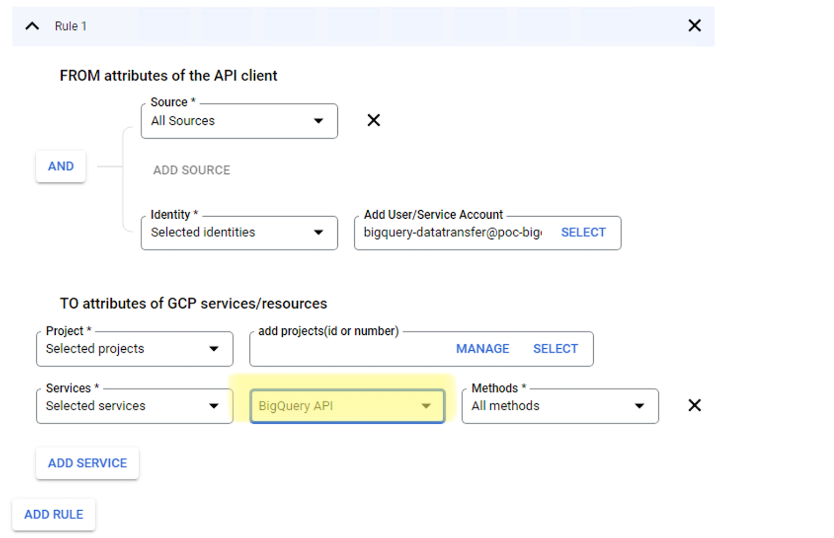 15 |
16 | 4. Create the following **egress** rule:
17 | * Allow access to the service account : *bigquery-datatransfer@poc-bigquery-dev.iam.gserviceaccount.com*
18 | * Allow access to the CBS project *364907911525*
19 | * In **Services**, select select the BigQuery API service
20 |
21 |
15 |
16 | 4. Create the following **egress** rule:
17 | * Allow access to the service account : *bigquery-datatransfer@poc-bigquery-dev.iam.gserviceaccount.com*
18 | * Allow access to the CBS project *364907911525*
19 | * In **Services**, select select the BigQuery API service
20 |
21 |  22 |
23 | 5. Click **Save**.
24 | 6. Contact the CBS team to validate that they can access the billing data.
25 |
26 | ### Disclaimer
27 |
28 | This is not an officially supported Google product.
29 |
--------------------------------------------------------------------------------
/CONTRIBUTING.md:
--------------------------------------------------------------------------------
1 | # Contributing
2 |
3 | ([Français](#comment-contribuer))
4 |
5 | ## How to Contribute
6 |
7 | When contributing, post comments and discuss changes you wish to make via Issues.
8 |
9 | Feel free to propose changes by creating Pull Requests. If you don't have write access, editing a file will create a Fork of this project for you to save your proposed changes to. Submitting a change to a file will write it to a new Branch in your Fork, so you can send a Pull Request.
10 |
11 | If this is your first time contributing on GitHub, don't worry! Let us know if you have any questions.
12 |
13 | ### Security
14 |
15 | **Do not post any security issues on the public repository!** See [SECURITY.md](SECURITY.md)
16 |
17 | ______________________
18 |
19 | ## Comment contribuer
20 |
21 | Lorsque vous contribuez, veuillez également publier des commentaires et discuter des modifications que vous souhaitez apporter par l'entremise des enjeux (Issues).
22 |
23 | N'hésitez pas à proposer des modifications en créant des demandes de tirage (Pull Requests). Si vous n'avez pas accès au mode de rédaction, la modification d'un fichier créera une copie (Fork) de ce projet afin que vous puissiez enregistrer les modifications que vous proposez. Le fait de proposer une modification à un fichier l'écrira dans une nouvelle branche dans votre copie (Fork), de sorte que vous puissiez envoyer une demande de tirage (Pull Request).
24 |
25 | Si c'est la première fois que vous contribuez à GitHub, ne vous en faites pas! Faites-nous part de vos questions.
26 |
27 | ### Sécurité
28 |
29 | **Ne publiez aucun problème de sécurité sur le dépôt publique!** Voir [SECURITY.md](SECURITY.md)
30 |
--------------------------------------------------------------------------------
/guardrail-details/12-market-place/marketplace.md:
--------------------------------------------------------------------------------
1 | ## Configuration of Cloud Marketplaces
2 |
3 | ### Restrict Third-Party CSP Marketplace software to GC-approved products
4 |
5 | ### Private Catalog
6 | To restrict the available solutions to only GC-approved solutions you need to create a private catalog and add solutions to the private catalog. Private Catalogs are where administrators have control over what solutions are available i.e whitelist. Please follow this [quickstart guide](https://cloud.google.com/private-catalog/docs/quickstart)
7 |
8 | These links also provide more details on private catalog:
22 |
23 | 5. Click **Save**.
24 | 6. Contact the CBS team to validate that they can access the billing data.
25 |
26 | ### Disclaimer
27 |
28 | This is not an officially supported Google product.
29 |
--------------------------------------------------------------------------------
/CONTRIBUTING.md:
--------------------------------------------------------------------------------
1 | # Contributing
2 |
3 | ([Français](#comment-contribuer))
4 |
5 | ## How to Contribute
6 |
7 | When contributing, post comments and discuss changes you wish to make via Issues.
8 |
9 | Feel free to propose changes by creating Pull Requests. If you don't have write access, editing a file will create a Fork of this project for you to save your proposed changes to. Submitting a change to a file will write it to a new Branch in your Fork, so you can send a Pull Request.
10 |
11 | If this is your first time contributing on GitHub, don't worry! Let us know if you have any questions.
12 |
13 | ### Security
14 |
15 | **Do not post any security issues on the public repository!** See [SECURITY.md](SECURITY.md)
16 |
17 | ______________________
18 |
19 | ## Comment contribuer
20 |
21 | Lorsque vous contribuez, veuillez également publier des commentaires et discuter des modifications que vous souhaitez apporter par l'entremise des enjeux (Issues).
22 |
23 | N'hésitez pas à proposer des modifications en créant des demandes de tirage (Pull Requests). Si vous n'avez pas accès au mode de rédaction, la modification d'un fichier créera une copie (Fork) de ce projet afin que vous puissiez enregistrer les modifications que vous proposez. Le fait de proposer une modification à un fichier l'écrira dans une nouvelle branche dans votre copie (Fork), de sorte que vous puissiez envoyer une demande de tirage (Pull Request).
24 |
25 | Si c'est la première fois que vous contribuez à GitHub, ne vous en faites pas! Faites-nous part de vos questions.
26 |
27 | ### Sécurité
28 |
29 | **Ne publiez aucun problème de sécurité sur le dépôt publique!** Voir [SECURITY.md](SECURITY.md)
30 |
--------------------------------------------------------------------------------
/guardrail-details/12-market-place/marketplace.md:
--------------------------------------------------------------------------------
1 | ## Configuration of Cloud Marketplaces
2 |
3 | ### Restrict Third-Party CSP Marketplace software to GC-approved products
4 |
5 | ### Private Catalog
6 | To restrict the available solutions to only GC-approved solutions you need to create a private catalog and add solutions to the private catalog. Private Catalogs are where administrators have control over what solutions are available i.e whitelist. Please follow this [quickstart guide](https://cloud.google.com/private-catalog/docs/quickstart)
7 |
8 | These links also provide more details on private catalog: 13 |
14 | 2. Click on **MANAGE BILLING ACCOUNTS**.
15 |
16 |
13 |
14 | 2. Click on **MANAGE BILLING ACCOUNTS**.
15 |
16 | 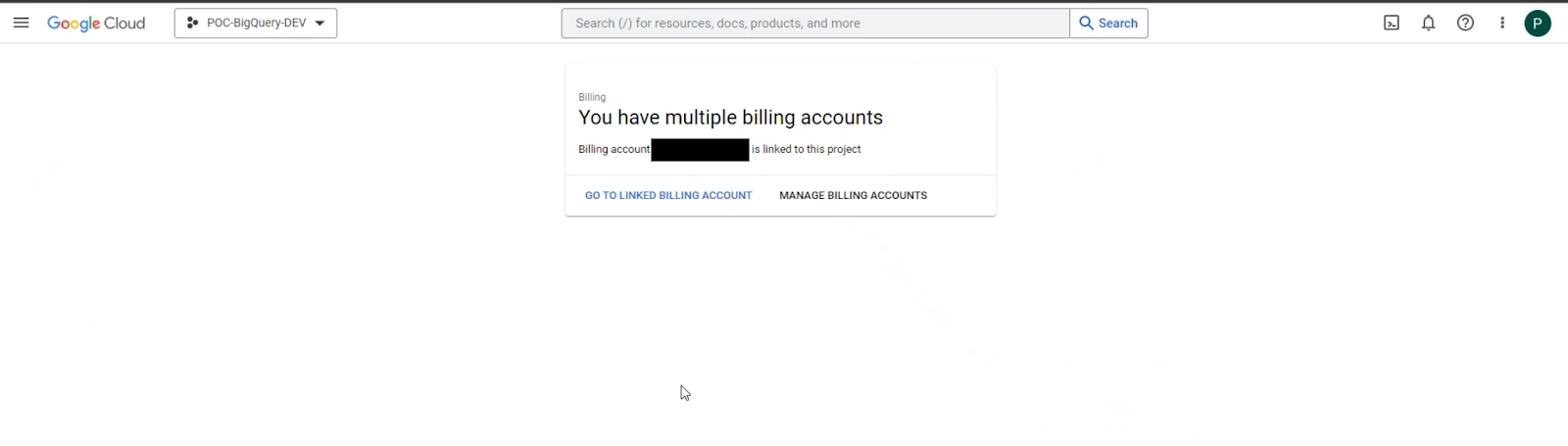 17 |
18 | 3. Select the corresponding billing account. Make sure that the *Billing Account ID* corresponds to the one provided to you by the Cloud Broker Service.
19 | Ensure that you have selected the correct billing account by verifying the *account number* under **Billing account** on the top left side.
20 |
21 |
17 |
18 | 3. Select the corresponding billing account. Make sure that the *Billing Account ID* corresponds to the one provided to you by the Cloud Broker Service.
19 | Ensure that you have selected the correct billing account by verifying the *account number* under **Billing account** on the top left side.
20 |
21 |  22 |
23 | 4. Click **Billing export** on the left hand navigation menu.
24 | Under **Standard usage cost**, click on the **EDIT SETTINGS** button.
25 |
26 |
22 |
23 | 4. Click **Billing export** on the left hand navigation menu.
24 | Under **Standard usage cost**, click on the **EDIT SETTINGS** button.
25 |
26 | 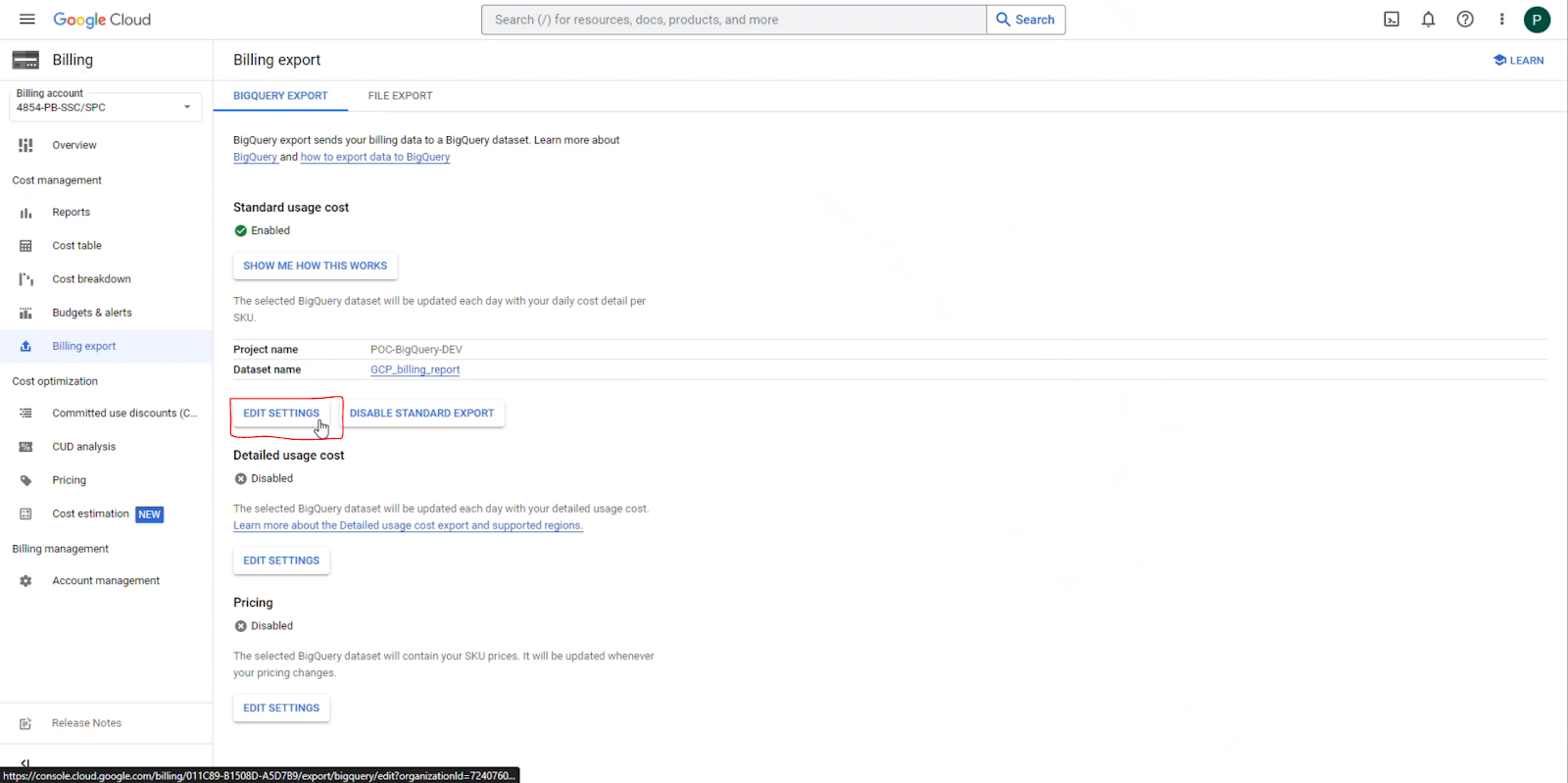 27 |
28 | 5. In the **Projects** dropdown, select the project created for billing data purposes.
29 | In the **Dataset** dropdown, select **Create a new dataset**.
30 |
31 |
27 |
28 | 5. In the **Projects** dropdown, select the project created for billing data purposes.
29 | In the **Dataset** dropdown, select **Create a new dataset**.
30 |
31 | 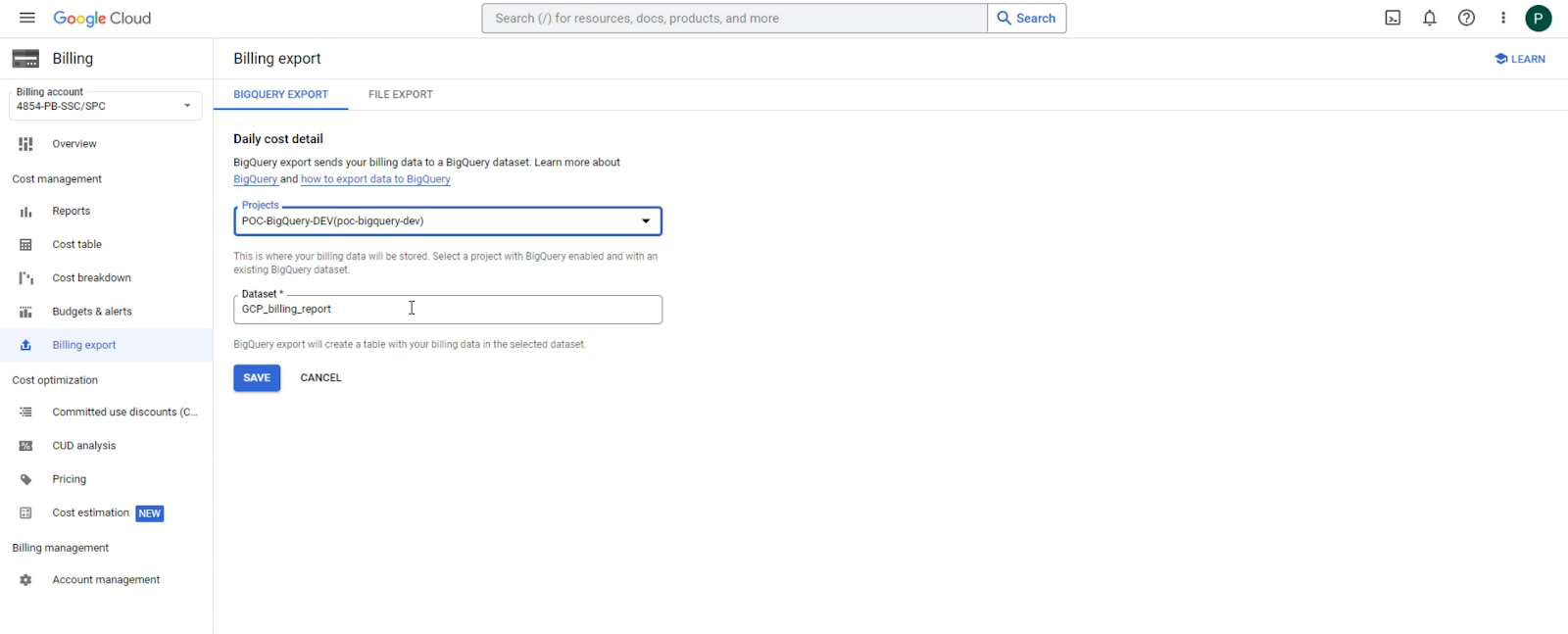 32 |
33 | 6. When creating the new dataset, note the following:
34 | * Set **Location type** to **Region** and select *northamerica-northeast1* or *northamerica-northeast2*.
35 | * Make sure you select **Enable table expiration** checkbox and set it to **90 days**. This is to optimize storage and cost.
36 |
37 |
32 |
33 | 6. When creating the new dataset, note the following:
34 | * Set **Location type** to **Region** and select *northamerica-northeast1* or *northamerica-northeast2*.
35 | * Make sure you select **Enable table expiration** checkbox and set it to **90 days**. This is to optimize storage and cost.
36 |
37 | 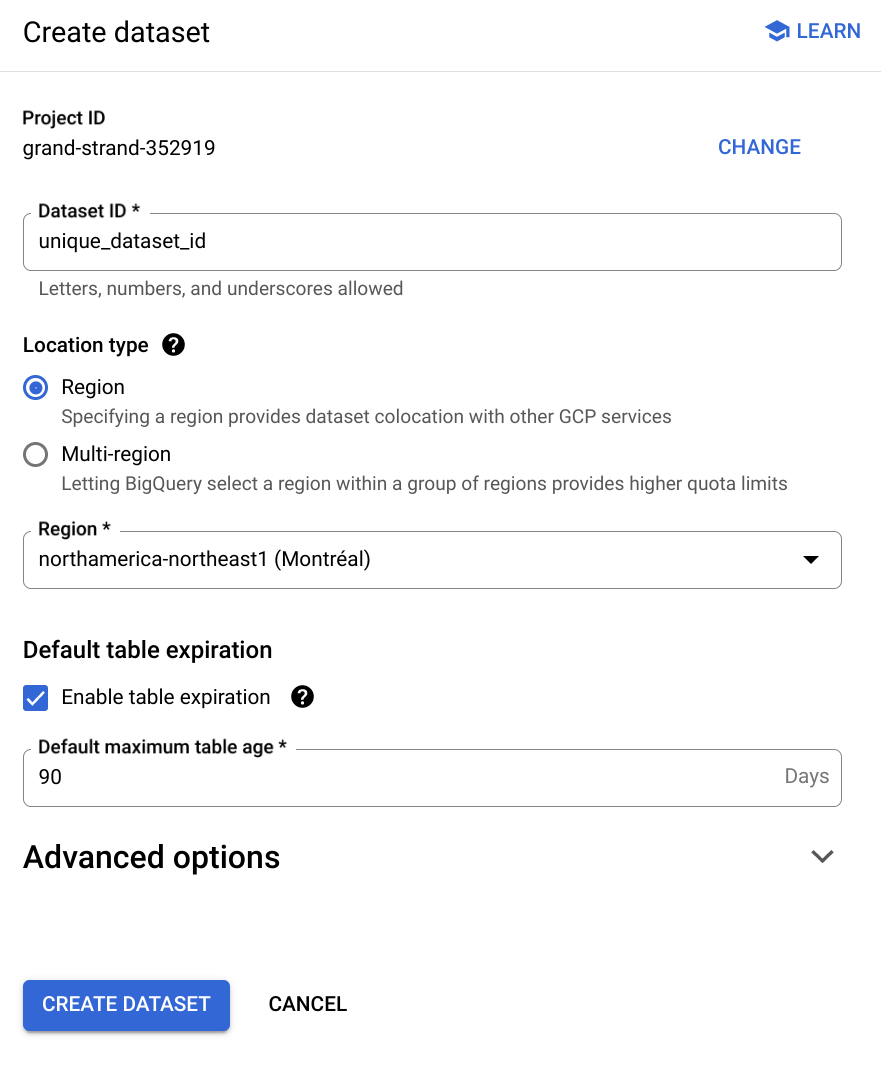 38 |
39 | 7. Click **Create dataset**.
40 | 8. Click **Save** to finalize the billing export setup.
41 | 9. Finally, share the *dataset* name and the *project id* with the CBS team at SSC.
42 |
43 |
44 | ### Disclaimer
45 |
46 | This is not an officially supported Google product.
47 |
--------------------------------------------------------------------------------
/deployment-templates/Terraform/guardrails/1-guardrails/iam.tf:
--------------------------------------------------------------------------------
1 | /**
2 | * Copyright 2020 Google LLC
3 | *
4 | * Licensed under the Apache License, Version 2.0 (the "License");
5 | * you may not use this file except in compliance with the License.
6 | * You may obtain a copy of the License at
7 | *
8 | * http://www.apache.org/licenses/LICENSE-2.0
9 | *
10 | * Unless required by applicable law or agreed to in writing, software
11 | * distributed under the License is distributed on an "AS IS" BASIS,
12 | * WITHOUT WARRANTIES OR CONDITIONS OF ANY KIND, either express or implied.
13 | * See the License for the specific language governing permissions and
14 | * limitations under the License.
15 | */
16 |
17 | /******************************************
18 | Audit Logs - IAM
19 | *****************************************/
20 |
21 | resource "google_organization_iam_audit_config" "org_config" {
22 | count = var.data_access_logs_enabled && var.parent_folder == "" ? 1 : 0
23 | org_id = var.org_id
24 | service = "allServices"
25 |
26 | audit_log_config {
27 | log_type = "DATA_READ"
28 | }
29 | audit_log_config {
30 | log_type = "DATA_WRITE"
31 | }
32 | audit_log_config {
33 | log_type = "ADMIN_READ"
34 | }
35 | }
36 |
37 | resource "google_project_iam_member" "audit_log_bq_user" {
38 | project = module.administration.project_id
39 | role = "roles/bigquery.user"
40 | member = "group:${var.audit_data_users}"
41 | }
42 |
43 | resource "google_project_iam_member" "audit_log_bq_data_viewer" {
44 | project = module.administration.project_id
45 | role = "roles/bigquery.dataViewer"
46 | member = "group:${var.audit_data_users}"
47 | }
48 |
49 |
50 | /******************************************
51 | Billing BigQuery - IAM
52 | *****************************************/
53 |
54 | resource "google_project_iam_member" "billing_bq_user" {
55 | project = module.administration.project_id
56 | role = "roles/bigquery.user"
57 | member = "group:${var.billing_data_users}"
58 | }
59 |
60 | resource "google_project_iam_member" "billing_bq_viewer" {
61 | project = module.administration.project_id
62 | role = "roles/bigquery.dataViewer"
63 | member = "group:${var.billing_data_users}"
64 | }
65 |
66 | /******************************************
67 | SSC CloudBroker Role - IAM
68 |
69 | *****************************************/
70 | resource "google_organization_iam_member" "ssc-billing" {
71 | org_id = var.org_id
72 | role = "roles/billing.viewer"
73 | member = "group:${var.ssc_broker_users}"
74 | }
75 |
76 |
77 | /******************************************
78 | Billing Cloud Console - IAM
79 | *****************************************/
80 |
81 | resource "google_organization_iam_member" "billing_viewer" {
82 | org_id = var.org_id
83 | role = "roles/billing.viewer"
84 | member = "group:${var.billing_data_users}"
85 | }
86 |
87 | /******************************************
88 | Asset Inventory - IAM
89 | *****************************************/
90 | resource "google_organization_iam_member" "asset_inventory_viewer" {
91 | org_id = var.org_id
92 | role = "roles/cloudasset.viewer"
93 | member = "group:${var.ssc_broker_users}"
94 | }
--------------------------------------------------------------------------------
/guardrail-details/06-data-at-rest/guardrail-6-at-rest.md:
--------------------------------------------------------------------------------
1 | # Encryption at rest in Google Cloud
2 |
3 | ### Comprehensive Encryption at rest Information: [Encryption at Rest Whitepaper][]
4 |
5 | ## **Google's default encryption**
6 |
7 | ### **Encryption of data at rest**
8 | Google Cloud Platform **encrypts all customer data at rest without any action required from you**, the customer. Google Cloud Platform encrypts all customer data at rest without any action required from you, the customer. Google uses a common cryptographic library, Keyczar, to implement encryption consistently across almost all Google Cloud Platform products. This includes data stored in cloud storage, computer engine persistent disks, cloud SQL databases, virtually everything.
9 |
10 | ### **Layers of Encryptions**
11 | Google uses several layers of encryption to protect data. Using multiple layers of encryption adds redundant data protection and allows us to select the optimal approach based on application requirements.
12 |
13 | 
14 |
15 | All data stored in GCP is encrypted with a unique data encryption key (DEK). More specifically, data is then broken into sub-file chunks for storage. Each chunk can be up to several gigabytes in size. Each chunk of data is then encrypted at the storage level with a unique key. Two chunks will not have the same encryption key even if they are part of the same Google Cloud storage object owned by the same customer or stored on the same machine.
16 |
17 | 
18 |
19 | Encrypted data chunks are then distributed across Google's storage infrastructure.
20 | This partition of data, each using a different key, means that the blast radius of a potential encryption key compromise is limited to only that data chunk. The data encryption keys are encrypted with or wrapped by key encryption keys or KEKs.
21 | The wrapped data encryption keys are then stored with this data. The key encryption keys are exclusively stored and used inside Google's central Key Management Service or KMS. KMS held keys are also backed up for disaster recovery purposes and are indefinitely recoverable.
22 |
23 | Decrypting data requires the unwrapped data encryption key, DEK, for that data chunk. When a Google Cloud Platform service accesses an encrypted chunk of data: For each chunk the storage system pulls the wrapped DEK stored for that chunk and calls a Google Key Management Service to retrieve the unwrapped data encryption key for that data chunk. The KMS then passes the unwrapped DEK back to the storage system which is then able to decrypt the data chunk.
24 |
25 | ***By default this entire process is enabled by default and is fully managed by Google, including the key encryption keys. There is absolutely nothing to enable or configure.***
26 |
27 | Google also manages the key rotation schedule. This schedule varies slightly depending on the service, but the standard rotation period for KEKs is every 90 days.
28 |
29 | **Encryption at rest options include:**
30 | - Encryption by default
31 | - Customer-managed encryption keys (CMEK) using Cloud KMS
32 | - Customer-supplied encryption keys (CSEK)
33 |
34 |
35 | [Encryption at Rest Whitepaper](https://cloud.google.com/security/encryption-at-rest/default-encryption)
36 |
--------------------------------------------------------------------------------
/guardrail-details/images/encryption-by-default-1.svg:
--------------------------------------------------------------------------------
1 |
--------------------------------------------------------------------------------
/guardrail-details/images/encryption-by-default-2.svg:
--------------------------------------------------------------------------------
1 |
--------------------------------------------------------------------------------
/deployment-templates/Terraform/guardrails/1-guardrails/variables.tf:
--------------------------------------------------------------------------------
1 | variable "org_id" {
2 | description = "The organization id for the associated services"
3 | type = string
4 | }
5 |
6 | # variable "project_id" {
7 | # description = "ID of the target admin project"
8 | # type = string
9 | # }
10 |
11 | variable "billing_account" {
12 | description = "The ID of the billing account to associate this project with"
13 | type = string
14 | }
15 |
16 | variable "terraform_service_account" {
17 | description = "Service account email of the account to impersonate to run Terraform."
18 | type = string
19 | }
20 |
21 | variable "skip_gcloud_download" {
22 | description = "Whether to skip downloading gcloud (assumes gcloud is already available outside the module. If set to true you, must ensure that Gcloud Alpha module is installed.)"
23 | type = bool
24 | default = false
25 | }
26 |
27 | variable "parent_folder" {
28 | description = "The resource name of the parent Folder or Organization"
29 | default = ""
30 | }
31 |
32 | variable "default_region" {
33 | description = "Default region for BigQuery resources."
34 | type = string
35 | default = "northamerica-northeast1"
36 | }
37 |
38 | variable "dns_hub_project_alert_spent_percents" {
39 | description = "A list of percentages of the budget to alert on when threshold is exceeded for the DNS hub project."
40 | type = list(number)
41 | default = [0.5, 0.75, 0.9, 0.95]
42 | }
43 |
44 | variable "dns_hub_project_alert_pubsub_topic" {
45 | description = "The name of the Cloud Pub/Sub topic where budget related messages will be published, in the form of `projects/{project_id}/topics/{topic_id}` for the DNS hub project."
46 | type = string
47 | default = null
48 | }
49 |
50 | variable "org_audit_logs_project_budget_amount" {
51 | description = "The amount to use as the budget for the org audit logs project."
52 | type = number
53 | default = 1000
54 | }
55 |
56 | variable "org_billing_logs_project_alert_spent_percents" {
57 | description = "A list of percentages of the budget to alert on when threshold is exceeded for the org billing logs project."
58 | type = list(number)
59 | default = [0.5, 0.75, 0.9, 0.95]
60 | }
61 |
62 | variable "org_billing_logs_project_alert_pubsub_topic" {
63 | description = "The name of the Cloud Pub/Sub topic where budget related messages will be published, in the form of `projects/{project_id}/topics/{topic_id}` for the org billing logs project."
64 | type = string
65 | default = null
66 | }
67 |
68 | variable "org_billing_logs_project_budget_amount" {
69 | description = "The amount to use as the budget for the org billing logs project."
70 | type = number
71 | default = 1000
72 | }
73 |
74 | variable "log_export_storage_force_destroy" {
75 | description = "(Optional) If set to true, delete all contents when destroying the resource; otherwise, destroying the resource will fail if contents are present."
76 | type = bool
77 | default = false
78 | }
79 |
80 | variable "log_export_storage_retention_policy" {
81 | description = "Configuration of the bucket's data retention policy for how long objects in the bucket should be retained."
82 | type = object({
83 | is_locked = bool
84 | retention_period_days = number
85 | })
86 | default = null
87 | }
88 |
89 | variable "log_export_storage_location" {
90 | description = "The location of the storage bucket used to export logs."
91 | type = string
92 | default = "northamerica-northeast1"
93 | }
94 |
95 | variable "audit_logs_table_delete_contents_on_destroy" {
96 | description = "(Optional) If set to true, delete all the tables in the dataset when destroying the resource; otherwise, destroying the resource will fail if tables are present."
97 | type = bool
98 | default = false
99 | }
100 |
101 | variable "audit_logs_table_expiration_days" {
102 | description = "Period before tables expire for all audit logs in milliseconds. Default is 30 days."
103 | type = number
104 | default = 30
105 | }
106 |
107 | variable "billing_data_users" {
108 | description = "G Suite or Cloud Identity group that have access to billing data set."
109 | type = string
110 | }
111 |
112 | variable "data_access_logs_enabled" {
113 | description = "Enable Data Access logs of types DATA_READ, DATA_WRITE and ADMIN_READ for all GCP services. Enabling Data Access logs might result in your organization being charged for the additional logs usage. See https://cloud.google.com/logging/docs/audit#data-access"
114 | type = bool
115 | default = true
116 | }
117 |
118 | variable "audit_data_users" {
119 | description = "G Suite or Cloud Identity group that have access to audit logs."
120 | type = string
121 | }
122 |
123 | variable "ssc_broker_users" {
124 | description = "G Suite or Cloud Identity group that have access to SSC requirements."
125 | type = string
126 | }
127 |
128 | variable "allowed_regions" {
129 | description = "List of allowed GCP regions"
130 | type = list(string)
131 | default = ["northamerica-northeast1"]
132 | }
133 |
134 | variable "bucket_name" {
135 | description = "Name of storage bucket to be created for storing Guardrails Assets"
136 | type = string
137 | default = "guardrails-asset-bkt"
138 | }
--------------------------------------------------------------------------------
/deployment-templates/Terraform/guardrails/1-guardrails/log_sinks.tf:
--------------------------------------------------------------------------------
1 | /**
2 | * Copyright 2020 Google LLC
3 | *
4 | * Licensed under the Apache License, Version 2.0 (the "License");
5 | * you may not use this file except in compliance with the License.
6 | * You may obtain a copy of the License at
7 | *
8 | * http://www.apache.org/licenses/LICENSE-2.0
9 | *
10 | * Unless required by applicable law or agreed to in writing, software
11 | * distributed under the License is distributed on an "AS IS" BASIS,
12 | * WITHOUT WARRANTIES OR CONDITIONS OF ANY KIND, either express or implied.
13 | * See the License for the specific language governing permissions and
14 | * limitations under the License.
15 | */
16 |
17 | locals {
18 | parent_resource_id = var.org_id
19 | parent_resource_type = "organization"
20 | main_logs_filter = <
38 |
39 | 7. Click **Create dataset**.
40 | 8. Click **Save** to finalize the billing export setup.
41 | 9. Finally, share the *dataset* name and the *project id* with the CBS team at SSC.
42 |
43 |
44 | ### Disclaimer
45 |
46 | This is not an officially supported Google product.
47 |
--------------------------------------------------------------------------------
/deployment-templates/Terraform/guardrails/1-guardrails/iam.tf:
--------------------------------------------------------------------------------
1 | /**
2 | * Copyright 2020 Google LLC
3 | *
4 | * Licensed under the Apache License, Version 2.0 (the "License");
5 | * you may not use this file except in compliance with the License.
6 | * You may obtain a copy of the License at
7 | *
8 | * http://www.apache.org/licenses/LICENSE-2.0
9 | *
10 | * Unless required by applicable law or agreed to in writing, software
11 | * distributed under the License is distributed on an "AS IS" BASIS,
12 | * WITHOUT WARRANTIES OR CONDITIONS OF ANY KIND, either express or implied.
13 | * See the License for the specific language governing permissions and
14 | * limitations under the License.
15 | */
16 |
17 | /******************************************
18 | Audit Logs - IAM
19 | *****************************************/
20 |
21 | resource "google_organization_iam_audit_config" "org_config" {
22 | count = var.data_access_logs_enabled && var.parent_folder == "" ? 1 : 0
23 | org_id = var.org_id
24 | service = "allServices"
25 |
26 | audit_log_config {
27 | log_type = "DATA_READ"
28 | }
29 | audit_log_config {
30 | log_type = "DATA_WRITE"
31 | }
32 | audit_log_config {
33 | log_type = "ADMIN_READ"
34 | }
35 | }
36 |
37 | resource "google_project_iam_member" "audit_log_bq_user" {
38 | project = module.administration.project_id
39 | role = "roles/bigquery.user"
40 | member = "group:${var.audit_data_users}"
41 | }
42 |
43 | resource "google_project_iam_member" "audit_log_bq_data_viewer" {
44 | project = module.administration.project_id
45 | role = "roles/bigquery.dataViewer"
46 | member = "group:${var.audit_data_users}"
47 | }
48 |
49 |
50 | /******************************************
51 | Billing BigQuery - IAM
52 | *****************************************/
53 |
54 | resource "google_project_iam_member" "billing_bq_user" {
55 | project = module.administration.project_id
56 | role = "roles/bigquery.user"
57 | member = "group:${var.billing_data_users}"
58 | }
59 |
60 | resource "google_project_iam_member" "billing_bq_viewer" {
61 | project = module.administration.project_id
62 | role = "roles/bigquery.dataViewer"
63 | member = "group:${var.billing_data_users}"
64 | }
65 |
66 | /******************************************
67 | SSC CloudBroker Role - IAM
68 |
69 | *****************************************/
70 | resource "google_organization_iam_member" "ssc-billing" {
71 | org_id = var.org_id
72 | role = "roles/billing.viewer"
73 | member = "group:${var.ssc_broker_users}"
74 | }
75 |
76 |
77 | /******************************************
78 | Billing Cloud Console - IAM
79 | *****************************************/
80 |
81 | resource "google_organization_iam_member" "billing_viewer" {
82 | org_id = var.org_id
83 | role = "roles/billing.viewer"
84 | member = "group:${var.billing_data_users}"
85 | }
86 |
87 | /******************************************
88 | Asset Inventory - IAM
89 | *****************************************/
90 | resource "google_organization_iam_member" "asset_inventory_viewer" {
91 | org_id = var.org_id
92 | role = "roles/cloudasset.viewer"
93 | member = "group:${var.ssc_broker_users}"
94 | }
--------------------------------------------------------------------------------
/guardrail-details/06-data-at-rest/guardrail-6-at-rest.md:
--------------------------------------------------------------------------------
1 | # Encryption at rest in Google Cloud
2 |
3 | ### Comprehensive Encryption at rest Information: [Encryption at Rest Whitepaper][]
4 |
5 | ## **Google's default encryption**
6 |
7 | ### **Encryption of data at rest**
8 | Google Cloud Platform **encrypts all customer data at rest without any action required from you**, the customer. Google Cloud Platform encrypts all customer data at rest without any action required from you, the customer. Google uses a common cryptographic library, Keyczar, to implement encryption consistently across almost all Google Cloud Platform products. This includes data stored in cloud storage, computer engine persistent disks, cloud SQL databases, virtually everything.
9 |
10 | ### **Layers of Encryptions**
11 | Google uses several layers of encryption to protect data. Using multiple layers of encryption adds redundant data protection and allows us to select the optimal approach based on application requirements.
12 |
13 | 
14 |
15 | All data stored in GCP is encrypted with a unique data encryption key (DEK). More specifically, data is then broken into sub-file chunks for storage. Each chunk can be up to several gigabytes in size. Each chunk of data is then encrypted at the storage level with a unique key. Two chunks will not have the same encryption key even if they are part of the same Google Cloud storage object owned by the same customer or stored on the same machine.
16 |
17 | 
18 |
19 | Encrypted data chunks are then distributed across Google's storage infrastructure.
20 | This partition of data, each using a different key, means that the blast radius of a potential encryption key compromise is limited to only that data chunk. The data encryption keys are encrypted with or wrapped by key encryption keys or KEKs.
21 | The wrapped data encryption keys are then stored with this data. The key encryption keys are exclusively stored and used inside Google's central Key Management Service or KMS. KMS held keys are also backed up for disaster recovery purposes and are indefinitely recoverable.
22 |
23 | Decrypting data requires the unwrapped data encryption key, DEK, for that data chunk. When a Google Cloud Platform service accesses an encrypted chunk of data: For each chunk the storage system pulls the wrapped DEK stored for that chunk and calls a Google Key Management Service to retrieve the unwrapped data encryption key for that data chunk. The KMS then passes the unwrapped DEK back to the storage system which is then able to decrypt the data chunk.
24 |
25 | ***By default this entire process is enabled by default and is fully managed by Google, including the key encryption keys. There is absolutely nothing to enable or configure.***
26 |
27 | Google also manages the key rotation schedule. This schedule varies slightly depending on the service, but the standard rotation period for KEKs is every 90 days.
28 |
29 | **Encryption at rest options include:**
30 | - Encryption by default
31 | - Customer-managed encryption keys (CMEK) using Cloud KMS
32 | - Customer-supplied encryption keys (CSEK)
33 |
34 |
35 | [Encryption at Rest Whitepaper](https://cloud.google.com/security/encryption-at-rest/default-encryption)
36 |
--------------------------------------------------------------------------------
/guardrail-details/images/encryption-by-default-1.svg:
--------------------------------------------------------------------------------
1 |
--------------------------------------------------------------------------------
/guardrail-details/images/encryption-by-default-2.svg:
--------------------------------------------------------------------------------
1 |
--------------------------------------------------------------------------------
/deployment-templates/Terraform/guardrails/1-guardrails/variables.tf:
--------------------------------------------------------------------------------
1 | variable "org_id" {
2 | description = "The organization id for the associated services"
3 | type = string
4 | }
5 |
6 | # variable "project_id" {
7 | # description = "ID of the target admin project"
8 | # type = string
9 | # }
10 |
11 | variable "billing_account" {
12 | description = "The ID of the billing account to associate this project with"
13 | type = string
14 | }
15 |
16 | variable "terraform_service_account" {
17 | description = "Service account email of the account to impersonate to run Terraform."
18 | type = string
19 | }
20 |
21 | variable "skip_gcloud_download" {
22 | description = "Whether to skip downloading gcloud (assumes gcloud is already available outside the module. If set to true you, must ensure that Gcloud Alpha module is installed.)"
23 | type = bool
24 | default = false
25 | }
26 |
27 | variable "parent_folder" {
28 | description = "The resource name of the parent Folder or Organization"
29 | default = ""
30 | }
31 |
32 | variable "default_region" {
33 | description = "Default region for BigQuery resources."
34 | type = string
35 | default = "northamerica-northeast1"
36 | }
37 |
38 | variable "dns_hub_project_alert_spent_percents" {
39 | description = "A list of percentages of the budget to alert on when threshold is exceeded for the DNS hub project."
40 | type = list(number)
41 | default = [0.5, 0.75, 0.9, 0.95]
42 | }
43 |
44 | variable "dns_hub_project_alert_pubsub_topic" {
45 | description = "The name of the Cloud Pub/Sub topic where budget related messages will be published, in the form of `projects/{project_id}/topics/{topic_id}` for the DNS hub project."
46 | type = string
47 | default = null
48 | }
49 |
50 | variable "org_audit_logs_project_budget_amount" {
51 | description = "The amount to use as the budget for the org audit logs project."
52 | type = number
53 | default = 1000
54 | }
55 |
56 | variable "org_billing_logs_project_alert_spent_percents" {
57 | description = "A list of percentages of the budget to alert on when threshold is exceeded for the org billing logs project."
58 | type = list(number)
59 | default = [0.5, 0.75, 0.9, 0.95]
60 | }
61 |
62 | variable "org_billing_logs_project_alert_pubsub_topic" {
63 | description = "The name of the Cloud Pub/Sub topic where budget related messages will be published, in the form of `projects/{project_id}/topics/{topic_id}` for the org billing logs project."
64 | type = string
65 | default = null
66 | }
67 |
68 | variable "org_billing_logs_project_budget_amount" {
69 | description = "The amount to use as the budget for the org billing logs project."
70 | type = number
71 | default = 1000
72 | }
73 |
74 | variable "log_export_storage_force_destroy" {
75 | description = "(Optional) If set to true, delete all contents when destroying the resource; otherwise, destroying the resource will fail if contents are present."
76 | type = bool
77 | default = false
78 | }
79 |
80 | variable "log_export_storage_retention_policy" {
81 | description = "Configuration of the bucket's data retention policy for how long objects in the bucket should be retained."
82 | type = object({
83 | is_locked = bool
84 | retention_period_days = number
85 | })
86 | default = null
87 | }
88 |
89 | variable "log_export_storage_location" {
90 | description = "The location of the storage bucket used to export logs."
91 | type = string
92 | default = "northamerica-northeast1"
93 | }
94 |
95 | variable "audit_logs_table_delete_contents_on_destroy" {
96 | description = "(Optional) If set to true, delete all the tables in the dataset when destroying the resource; otherwise, destroying the resource will fail if tables are present."
97 | type = bool
98 | default = false
99 | }
100 |
101 | variable "audit_logs_table_expiration_days" {
102 | description = "Period before tables expire for all audit logs in milliseconds. Default is 30 days."
103 | type = number
104 | default = 30
105 | }
106 |
107 | variable "billing_data_users" {
108 | description = "G Suite or Cloud Identity group that have access to billing data set."
109 | type = string
110 | }
111 |
112 | variable "data_access_logs_enabled" {
113 | description = "Enable Data Access logs of types DATA_READ, DATA_WRITE and ADMIN_READ for all GCP services. Enabling Data Access logs might result in your organization being charged for the additional logs usage. See https://cloud.google.com/logging/docs/audit#data-access"
114 | type = bool
115 | default = true
116 | }
117 |
118 | variable "audit_data_users" {
119 | description = "G Suite or Cloud Identity group that have access to audit logs."
120 | type = string
121 | }
122 |
123 | variable "ssc_broker_users" {
124 | description = "G Suite or Cloud Identity group that have access to SSC requirements."
125 | type = string
126 | }
127 |
128 | variable "allowed_regions" {
129 | description = "List of allowed GCP regions"
130 | type = list(string)
131 | default = ["northamerica-northeast1"]
132 | }
133 |
134 | variable "bucket_name" {
135 | description = "Name of storage bucket to be created for storing Guardrails Assets"
136 | type = string
137 | default = "guardrails-asset-bkt"
138 | }
--------------------------------------------------------------------------------
/deployment-templates/Terraform/guardrails/1-guardrails/log_sinks.tf:
--------------------------------------------------------------------------------
1 | /**
2 | * Copyright 2020 Google LLC
3 | *
4 | * Licensed under the Apache License, Version 2.0 (the "License");
5 | * you may not use this file except in compliance with the License.
6 | * You may obtain a copy of the License at
7 | *
8 | * http://www.apache.org/licenses/LICENSE-2.0
9 | *
10 | * Unless required by applicable law or agreed to in writing, software
11 | * distributed under the License is distributed on an "AS IS" BASIS,
12 | * WITHOUT WARRANTIES OR CONDITIONS OF ANY KIND, either express or implied.
13 | * See the License for the specific language governing permissions and
14 | * limitations under the License.
15 | */
16 |
17 | locals {
18 | parent_resource_id = var.org_id
19 | parent_resource_type = "organization"
20 | main_logs_filter = <