├── .DS_Store
├── R
├── .DS_Store
├── myget.R
├── editFiles.R
├── editData.R
├── textInput3.R
└── editableDT.R
├── .gitignore
├── inst
├── .DS_Store
├── rstudio
│ └── addins.dcf
├── editData
│ ├── rsconnect
│ │ └── shinyapps.io
│ │ │ └── cardiomoon
│ │ │ └── editData.dcf
│ └── app.R
├── example
│ └── app.R
├── multipleFiles
│ └── app.R
├── multipleData
│ └── app.R
└── multipleFiles2
│ └── app.R
├── .Rbuildignore
├── data
└── sampleData.rda
├── man
├── figures
│ ├── 1.png
│ ├── 2.png
│ ├── 3.png
│ ├── 4.png
│ ├── 5.png
│ ├── 6.png
│ └── 7.png
├── editFiles.Rd
├── maxLength.Rd
├── file2ext.Rd
├── pickerInput3.Rd
├── myget.Rd
├── makeShort.Rd
├── myimport_csv.Rd
├── myimport.Rd
├── sampleData.Rd
├── selectizeInput3.Rd
├── selectInput3.Rd
├── label3.Rd
├── dateInput3.Rd
├── checkboxInput3.Rd
├── editableDTUI.Rd
├── textInput3.Rd
├── editableDT.Rd
├── numericInput3.Rd
├── radioButtons3.Rd
└── editData.Rd
├── vignettes
├── .DS_Store
└── editData.Rmd
├── CRAN-RELEASE
├── cran-comments.md
├── editData.Rproj
├── DESCRIPTION
├── NEWS.md
├── NAMESPACE
└── README.md
/.DS_Store:
--------------------------------------------------------------------------------
https://raw.githubusercontent.com/cardiomoon/editData/HEAD/.DS_Store
--------------------------------------------------------------------------------
/R/.DS_Store:
--------------------------------------------------------------------------------
https://raw.githubusercontent.com/cardiomoon/editData/HEAD/R/.DS_Store
--------------------------------------------------------------------------------
/.gitignore:
--------------------------------------------------------------------------------
1 | .Rproj.user
2 | .Rhistory
3 | .RData
4 | .Ruserdata
5 | inst/doc
6 |
--------------------------------------------------------------------------------
/inst/.DS_Store:
--------------------------------------------------------------------------------
https://raw.githubusercontent.com/cardiomoon/editData/HEAD/inst/.DS_Store
--------------------------------------------------------------------------------
/.Rbuildignore:
--------------------------------------------------------------------------------
1 | ^.*\.Rproj$
2 | ^\.Rproj\.user$
3 | cran-comments.md
4 | ^CRAN-RELEASE$
5 |
--------------------------------------------------------------------------------
/data/sampleData.rda:
--------------------------------------------------------------------------------
https://raw.githubusercontent.com/cardiomoon/editData/HEAD/data/sampleData.rda
--------------------------------------------------------------------------------
/man/figures/1.png:
--------------------------------------------------------------------------------
https://raw.githubusercontent.com/cardiomoon/editData/HEAD/man/figures/1.png
--------------------------------------------------------------------------------
/man/figures/2.png:
--------------------------------------------------------------------------------
https://raw.githubusercontent.com/cardiomoon/editData/HEAD/man/figures/2.png
--------------------------------------------------------------------------------
/man/figures/3.png:
--------------------------------------------------------------------------------
https://raw.githubusercontent.com/cardiomoon/editData/HEAD/man/figures/3.png
--------------------------------------------------------------------------------
/man/figures/4.png:
--------------------------------------------------------------------------------
https://raw.githubusercontent.com/cardiomoon/editData/HEAD/man/figures/4.png
--------------------------------------------------------------------------------
/man/figures/5.png:
--------------------------------------------------------------------------------
https://raw.githubusercontent.com/cardiomoon/editData/HEAD/man/figures/5.png
--------------------------------------------------------------------------------
/man/figures/6.png:
--------------------------------------------------------------------------------
https://raw.githubusercontent.com/cardiomoon/editData/HEAD/man/figures/6.png
--------------------------------------------------------------------------------
/man/figures/7.png:
--------------------------------------------------------------------------------
https://raw.githubusercontent.com/cardiomoon/editData/HEAD/man/figures/7.png
--------------------------------------------------------------------------------
/vignettes/.DS_Store:
--------------------------------------------------------------------------------
https://raw.githubusercontent.com/cardiomoon/editData/HEAD/vignettes/.DS_Store
--------------------------------------------------------------------------------
/inst/rstudio/addins.dcf:
--------------------------------------------------------------------------------
1 | Name: editData
2 | Description: Editing A 'data.frame'
3 | Binding: editData
4 | Interactive: true
5 |
--------------------------------------------------------------------------------
/CRAN-RELEASE:
--------------------------------------------------------------------------------
1 | This package was submitted to CRAN on 2021-04-03.
2 | Once it is accepted, delete this file and tag the release (commit 94dba3c).
3 |
--------------------------------------------------------------------------------
/man/editFiles.Rd:
--------------------------------------------------------------------------------
1 | % Generated by roxygen2: do not edit by hand
2 | % Please edit documentation in R/editFiles.R
3 | \name{editFiles}
4 | \alias{editFiles}
5 | \title{Edit multiple files side by side}
6 | \usage{
7 | editFiles()
8 | }
9 | \description{
10 | Edit multiple files side by side
11 | }
12 |
--------------------------------------------------------------------------------
/R/myget.R:
--------------------------------------------------------------------------------
1 | #' Return the Value of a Named data.frame
2 | #' @param x Name of data.frame
3 | #' @export
4 | #' @examples
5 | #' myget("iris")
6 | #' myget("mtcars")
7 | myget=function(x){
8 |
9 | if (!is.null(x) && nzchar(x) &&
10 | exists(x) && is.data.frame(get(x))) {
11 | get(x)
12 | } else{
13 | NULL
14 | }
15 | }
16 |
--------------------------------------------------------------------------------
/inst/editData/rsconnect/shinyapps.io/cardiomoon/editData.dcf:
--------------------------------------------------------------------------------
1 | name: editData
2 | title: editData
3 | username:
4 | account: cardiomoon
5 | server: shinyapps.io
6 | hostUrl: https://api.shinyapps.io/v1
7 | appId: 3905474
8 | bundleId: 4427296
9 | url: https://cardiomoon.shinyapps.io/editData/
10 | when: 1617458539.27252
11 | asMultiple: FALSE
12 | asStatic: FALSE
13 |
--------------------------------------------------------------------------------
/man/maxLength.Rd:
--------------------------------------------------------------------------------
1 | % Generated by roxygen2: do not edit by hand
2 | % Please edit documentation in R/editableDT.R
3 | \name{maxLength}
4 | \alias{maxLength}
5 | \title{Calculate maximal length}
6 | \usage{
7 | maxLength(x)
8 | }
9 | \arguments{
10 | \item{x}{A vector}
11 | }
12 | \description{
13 | Calculate maximal length
14 | }
15 | \examples{
16 | maxLength(month.name)
17 | }
18 |
--------------------------------------------------------------------------------
/man/file2ext.Rd:
--------------------------------------------------------------------------------
1 | % Generated by roxygen2: do not edit by hand
2 | % Please edit documentation in R/editFiles.R
3 | \name{file2ext}
4 | \alias{file2ext}
5 | \title{Extract extension from a file name}
6 | \usage{
7 | file2ext(filename)
8 | }
9 | \arguments{
10 | \item{filename}{A character string naming a file}
11 | }
12 | \description{
13 | Extract extension from a file name
14 | }
15 |
--------------------------------------------------------------------------------
/man/pickerInput3.Rd:
--------------------------------------------------------------------------------
1 | % Generated by roxygen2: do not edit by hand
2 | % Please edit documentation in R/editableDT.R
3 | \name{pickerInput3}
4 | \alias{pickerInput3}
5 | \title{Side by side pickerInput}
6 | \usage{
7 | pickerInput3(...)
8 | }
9 | \arguments{
10 | \item{...}{Further arguments to be passed to pickerInput}
11 | }
12 | \description{
13 | Side by side pickerInput
14 | }
15 |
--------------------------------------------------------------------------------
/man/myget.Rd:
--------------------------------------------------------------------------------
1 | % Generated by roxygen2: do not edit by hand
2 | % Please edit documentation in R/myget.R
3 | \name{myget}
4 | \alias{myget}
5 | \title{Return the Value of a Named data.frame}
6 | \usage{
7 | myget(x)
8 | }
9 | \arguments{
10 | \item{x}{Name of data.frame}
11 | }
12 | \description{
13 | Return the Value of a Named data.frame
14 | }
15 | \examples{
16 | myget("iris")
17 | myget("mtcars")
18 | }
19 |
--------------------------------------------------------------------------------
/cran-comments.md:
--------------------------------------------------------------------------------
1 | This is an update of the package 'editData'.
2 |
3 | ## Test environments
4 | * local OS X install, R 4.0.4
5 | * win-builder (devel and release)
6 | * rhub
7 |
8 | ## R CMD check results
9 | There were no ERRORs or WARNINGs or NOTEs.
10 |
11 | ## Downstream dependencies
12 | I have also run R CMD check on downstream dependencies of editData.
13 | All packages that I could install passed
14 |
--------------------------------------------------------------------------------
/man/makeShort.Rd:
--------------------------------------------------------------------------------
1 | % Generated by roxygen2: do not edit by hand
2 | % Please edit documentation in R/editableDT.R
3 | \name{makeShort}
4 | \alias{makeShort}
5 | \title{Truncate string to desired length}
6 | \usage{
7 | makeShort(x, length = 50)
8 | }
9 | \arguments{
10 | \item{x}{A vector}
11 |
12 | \item{length}{numeric desired string length}
13 | }
14 | \description{
15 | Truncate string to desired length
16 | }
17 |
--------------------------------------------------------------------------------
/man/myimport_csv.Rd:
--------------------------------------------------------------------------------
1 | % Generated by roxygen2: do not edit by hand
2 | % Please edit documentation in R/editFiles.R
3 | \name{myimport_csv}
4 | \alias{myimport_csv}
5 | \title{read csv file}
6 | \usage{
7 | myimport_csv(file, ...)
8 | }
9 | \arguments{
10 | \item{file}{A character string naming a file}
11 |
12 | \item{...}{Further arguments to be passed to read.csv}
13 | }
14 | \description{
15 | read csv file
16 | }
17 |
--------------------------------------------------------------------------------
/man/myimport.Rd:
--------------------------------------------------------------------------------
1 | % Generated by roxygen2: do not edit by hand
2 | % Please edit documentation in R/editFiles.R
3 | \name{myimport}
4 | \alias{myimport}
5 | \title{Read in a data.frame from a file}
6 | \usage{
7 | myimport(file, ...)
8 | }
9 | \arguments{
10 | \item{file}{A character string naming a file}
11 |
12 | \item{...}{Further arguments to be passed to rio::import}
13 | }
14 | \description{
15 | Read in a data.frame from a file
16 | }
17 |
--------------------------------------------------------------------------------
/editData.Rproj:
--------------------------------------------------------------------------------
1 | Version: 1.0
2 |
3 | RestoreWorkspace: Default
4 | SaveWorkspace: Default
5 | AlwaysSaveHistory: Default
6 |
7 | EnableCodeIndexing: Yes
8 | UseSpacesForTab: Yes
9 | NumSpacesForTab: 5
10 | Encoding: UTF-8
11 |
12 | RnwWeave: Sweave
13 | LaTeX: pdfLaTeX
14 |
15 | AutoAppendNewline: Yes
16 | StripTrailingWhitespace: Yes
17 |
18 | BuildType: Package
19 | PackageUseDevtools: Yes
20 | PackageInstallArgs: --no-multiarch --with-keep.source
21 |
--------------------------------------------------------------------------------
/man/sampleData.Rd:
--------------------------------------------------------------------------------
1 | % Generated by roxygen2: do not edit by hand
2 | % Please edit documentation in R/textInput3.R
3 | \docType{data}
4 | \name{sampleData}
5 | \alias{sampleData}
6 | \title{Sample Data for testing 'editData' addin}
7 | \format{
8 | A data.frame with 4 rows and 6 variables:
9 | \describe{
10 | \item{name}{Last name}
11 | \item{age}{age in years}
12 | \item{country}{Country Name}
13 | \item{sex}{sex, A factor with two levels.}
14 | \item{bloodType}{Blood Type. A factor with four levels}
15 | \item{date}{Date}
16 | }
17 | }
18 | \usage{
19 | sampleData
20 | }
21 | \description{
22 | A sample dataset containing data for 4 people
23 | }
24 | \keyword{datasets}
25 |
--------------------------------------------------------------------------------
/man/selectizeInput3.Rd:
--------------------------------------------------------------------------------
1 | % Generated by roxygen2: do not edit by hand
2 | % Please edit documentation in R/textInput3.R
3 | \name{selectizeInput3}
4 | \alias{selectizeInput3}
5 | \title{side-by-side selectizeInput}
6 | \usage{
7 | selectizeInput3(..., width = 100)
8 | }
9 | \arguments{
10 | \item{...}{Further arguments to be passed to selectizeInput}
11 |
12 | \item{width}{Input width in pixel}
13 | }
14 | \description{
15 | side-by-side selectizeInput
16 | }
17 | \examples{
18 | library(shiny)
19 | # Only run examples in interactive R sessions
20 | if (interactive()) {
21 | ui <- fluidPage(
22 | selectizeInput3("color", "color", choices=colors())
23 | )
24 | server <- function(input, output) {
25 |
26 | }
27 | shinyApp(ui, server)
28 | }
29 | }
30 |
--------------------------------------------------------------------------------
/man/selectInput3.Rd:
--------------------------------------------------------------------------------
1 | % Generated by roxygen2: do not edit by hand
2 | % Please edit documentation in R/textInput3.R
3 | \name{selectInput3}
4 | \alias{selectInput3}
5 | \title{Create a side-by-side selectInput}
6 | \usage{
7 | selectInput3(..., width = 100)
8 | }
9 | \arguments{
10 | \item{...}{arguments to be passed to selectInput}
11 |
12 | \item{width}{The width of the input in pixel}
13 | }
14 | \description{
15 | Create a side-by-side selectInput
16 | }
17 | \examples{
18 | library(shiny)
19 | # Only run examples in interactive R sessions
20 | if (interactive()) {
21 | ui <- fluidPage(
22 | selectInput3("sex", "sex", choices=c("Male","Female")),
23 | selectInput3("smoking", "smokingStatus", choices=c("Never","Ex-smoker","Smoker"))
24 | )
25 | server <- function(input, output) {
26 |
27 | }
28 | shinyApp(ui, server)
29 | }
30 | }
31 |
--------------------------------------------------------------------------------
/inst/example/app.R:
--------------------------------------------------------------------------------
1 | library(shiny)
2 | library(editData)
3 |
4 | ui <- fluidPage(
5 | h2("Data 1"),
6 | textInput("mydata","Enter data name",value="mtcars"),
7 | editableDTUI("table1"),
8 | verbatimTextOutput("test"),
9 | h2("Data 2"),
10 | textInput("mydata2","Enter data name",value="sampleData"),
11 | editableDTUI("table2"),
12 | verbatimTextOutput("test2")
13 | )
14 | server <- function(input, output) {
15 |
16 | data=reactive({
17 | myget(input$mydata)
18 | })
19 |
20 | data2=reactive({
21 | myget(input$mydata2)
22 | })
23 |
24 | df=callModule(editableDT,"table1",data=reactive(data()))
25 |
26 | output$test=renderPrint({
27 | str(df())
28 | })
29 | #mydf<-editData::sampleData
30 | df2=callModule(editableDT,"table2",data=data2)
31 | output$test2=renderPrint({
32 | str(df2())
33 | })
34 | }
35 | shinyApp(ui, server)
36 |
--------------------------------------------------------------------------------
/man/label3.Rd:
--------------------------------------------------------------------------------
1 | % Generated by roxygen2: do not edit by hand
2 | % Please edit documentation in R/textInput3.R
3 | \name{label3}
4 | \alias{label3}
5 | \title{Create a side-by-side label}
6 | \usage{
7 | label3(label, width = 100, bg = NULL, ...)
8 | }
9 | \arguments{
10 | \item{label}{A text to display}
11 |
12 | \item{width}{The width of the input in pixel}
13 |
14 | \item{bg}{The color of text}
15 |
16 | \item{...}{arguments to be passed to label}
17 | }
18 | \description{
19 | Create a side-by-side label
20 | }
21 | \examples{
22 | library(shiny)
23 | # Only run examples in interactive R sessions
24 | if (interactive()) {
25 | ui <- fluidPage(
26 | label3("Welcome"),
27 | checkboxInput3("somevalue", "Some value", FALSE),
28 | verbatimTextOutput("value")
29 | )
30 | server <- function(input, output) {
31 | output$value <- renderText({ input$somevalue })
32 | }
33 | shinyApp(ui, server)
34 | }
35 | }
36 |
--------------------------------------------------------------------------------
/man/dateInput3.Rd:
--------------------------------------------------------------------------------
1 | % Generated by roxygen2: do not edit by hand
2 | % Please edit documentation in R/textInput3.R
3 | \name{dateInput3}
4 | \alias{dateInput3}
5 | \title{Create a side-by-side dateInput}
6 | \usage{
7 | dateInput3(inputId, label, width = 100, ...)
8 | }
9 | \arguments{
10 | \item{inputId}{The input slot that will be used to access the value.}
11 |
12 | \item{label}{Display label for the control, or NULL for no label.}
13 |
14 | \item{width}{The width of the input in pixel}
15 |
16 | \item{...}{arguments to be passed to dateInput}
17 | }
18 | \description{
19 | Create a side-by-side dateInput
20 | }
21 | \examples{
22 | library(shiny)
23 | # Only run examples in interactive R sessions
24 | if (interactive()) {
25 | ui <- fluidPage(
26 | label3("Welcome"),
27 | dateInput3("date", "date"),
28 | verbatimTextOutput("value")
29 | )
30 | server <- function(input, output) {
31 | output$value <- renderText({ input$date })
32 | }
33 | shinyApp(ui, server)
34 | }
35 | }
36 |
--------------------------------------------------------------------------------
/man/checkboxInput3.Rd:
--------------------------------------------------------------------------------
1 | % Generated by roxygen2: do not edit by hand
2 | % Please edit documentation in R/textInput3.R
3 | \name{checkboxInput3}
4 | \alias{checkboxInput3}
5 | \title{Create a side-by-side checkboxInput}
6 | \usage{
7 | checkboxInput3(inputId, label, value = FALSE, width = 100)
8 | }
9 | \arguments{
10 | \item{inputId}{The input slot that will be used to access the value.}
11 |
12 | \item{label}{Display label for the control, or NULL for no label.}
13 |
14 | \item{value}{Initial value.}
15 |
16 | \item{width}{The width of the input in pixel}
17 | }
18 | \description{
19 | Create a side-by-side checkboxInput
20 | }
21 | \examples{
22 | library(shiny)
23 | # Only run examples in interactive R sessions
24 | if (interactive()) {
25 | ui <- fluidPage(
26 | label3("Welcome"),
27 | checkboxInput3("somevalue", "Some value", FALSE),
28 | verbatimTextOutput("value")
29 | )
30 | server <- function(input, output) {
31 | output$value <- renderText({ input$somevalue })
32 | }
33 | shinyApp(ui, server)
34 | }
35 | }
36 |
--------------------------------------------------------------------------------
/DESCRIPTION:
--------------------------------------------------------------------------------
1 | Package: editData
2 | Type: Package
3 | Title: 'RStudio' Addin for Editing a 'data.frame'
4 | Version: 0.2.1
5 | Imports:
6 | shiny (>= 0.13),
7 | miniUI (>= 0.1.1),
8 | rstudioapi (>= 0.5),
9 | DT(>= 0.17),
10 | tibble,
11 | dplyr,
12 | rio,
13 | magrittr,
14 | shinyWidgets,
15 | lubridate,
16 | openxlsx
17 | Authors@R: person("Keon-Woong", "Moon", email = "cardiomoon@gmail.com",
18 | role = c("aut", "cre"))
19 | Description: An 'RStudio' addin for editing a 'data.frame' or a 'tibble'. You can delete, add or update a 'data.frame'
20 | without coding. You can get resultant data as a 'data.frame'. In the package, modularized 'shiny' app codes are provided.
21 | These modules are intended for reuse across applications.
22 | URL: https://github.com/cardiomoon/editData
23 | BugReports: https://github.com/cardiomoon/editData/issues
24 | License: GPL-3
25 | Encoding: UTF-8
26 | Depends: R (>= 2.10)
27 | LazyData: true
28 | RoxygenNote: 7.1.1
29 | Suggests: knitr,
30 | rmarkdown
31 | VignetteBuilder: knitr
32 |
--------------------------------------------------------------------------------
/man/editableDTUI.Rd:
--------------------------------------------------------------------------------
1 | % Generated by roxygen2: do not edit by hand
2 | % Please edit documentation in R/editableDT.R
3 | \name{editableDTUI}
4 | \alias{editableDTUI}
5 | \title{UI of editableDT Shiny module}
6 | \usage{
7 | editableDTUI(id)
8 | }
9 | \arguments{
10 | \item{id}{A string}
11 | }
12 | \description{
13 | UI of editableDT Shiny module
14 | }
15 | \examples{
16 | # Only run examples in interactive R sessions
17 | if (interactive()) {
18 | library(shiny)
19 | ui=fluidPage(
20 | selectInput("select","select",choices=c("mtcars","iris","sampleData")),
21 | textInput("mydata","mydata",value="mtcars"),
22 | hr(),
23 | editableDTUI("editableDT"),
24 | hr(),
25 | verbatimTextOutput("test")
26 | )
27 | server=function(input,output,session){
28 | data=reactive({
29 | myget(input$mydata)
30 | })
31 | observeEvent(input$select,{
32 | updateTextInput(session,"mydata",value=input$select)
33 | })
34 | result=callModule(editableDT,"editableDT",data=data)
35 | output$test=renderPrint({
36 | str(result())
37 | })
38 | }
39 | shinyApp(ui=ui,server=server)
40 | }
41 | }
42 |
--------------------------------------------------------------------------------
/man/textInput3.Rd:
--------------------------------------------------------------------------------
1 | % Generated by roxygen2: do not edit by hand
2 | % Please edit documentation in R/textInput3.R
3 | \name{textInput3}
4 | \alias{textInput3}
5 | \title{Create a side-by-side textInput control for entry of unstructured text values}
6 | \usage{
7 | textInput3(inputId, label, value = "", width = 100, bg = NULL, ...)
8 | }
9 | \arguments{
10 | \item{inputId}{The input slot that will be used to access the value.}
11 |
12 | \item{label}{Display label for the control, or NULL for no label.}
13 |
14 | \item{value}{Initial value.}
15 |
16 | \item{width}{The width of the input in pixel}
17 |
18 | \item{bg}{The color of text}
19 |
20 | \item{...}{arguments to be passed to textInput}
21 | }
22 | \description{
23 | Create a side-by-side textInput control for entry of unstructured text values
24 | }
25 | \examples{
26 | library(shiny)
27 | # Only run examples in interactive R sessions
28 | if (interactive()) {
29 | ui <- fluidPage(
30 | textInput3("id", "id", ""),
31 | textInput3("name","name","")
32 | )
33 | server <- function(input, output) {
34 |
35 | }
36 | shinyApp(ui, server)
37 | }
38 | }
39 |
--------------------------------------------------------------------------------
/man/editableDT.Rd:
--------------------------------------------------------------------------------
1 | % Generated by roxygen2: do not edit by hand
2 | % Please edit documentation in R/editableDT.R
3 | \name{editableDT}
4 | \alias{editableDT}
5 | \title{Server function of editableDT Shiny module}
6 | \usage{
7 | editableDT(
8 | input,
9 | output,
10 | session,
11 | data,
12 | length = 50,
13 | cols = 1:7,
14 | status = "default",
15 | showButtons = TRUE,
16 | enableSave = TRUE,
17 | editable = NULL,
18 | formatList = NULL,
19 | ...
20 | )
21 | }
22 | \arguments{
23 | \item{input}{input}
24 |
25 | \item{output}{output}
26 |
27 | \item{session}{session}
28 |
29 | \item{data}{A reactive data object}
30 |
31 | \item{length}{numeric desired length of string}
32 |
33 | \item{cols}{numeric Initial columns to display}
34 |
35 | \item{status}{character. dropdownButton status. One of c("default","info","primary","danger","warning","success")}
36 |
37 | \item{showButtons}{logical}
38 |
39 | \item{enableSave}{logical}
40 |
41 | \item{editable}{logical}
42 |
43 | \item{formatList}{Null or list. Format list to be passed to formatStyle}
44 |
45 | \item{...}{Further arguments to be passed to datatable()}
46 | }
47 | \description{
48 | Server function of editableDT Shiny module
49 | }
50 |
--------------------------------------------------------------------------------
/man/numericInput3.Rd:
--------------------------------------------------------------------------------
1 | % Generated by roxygen2: do not edit by hand
2 | % Please edit documentation in R/textInput3.R
3 | \name{numericInput3}
4 | \alias{numericInput3}
5 | \title{Create a side-by-side numericInput}
6 | \usage{
7 | numericInput3(
8 | inputId,
9 | label,
10 | value,
11 | min = NA,
12 | max = NA,
13 | step = NA,
14 | width = 100,
15 | ...
16 | )
17 | }
18 | \arguments{
19 | \item{inputId}{The input slot that will be used to access the value.}
20 |
21 | \item{label}{Display label for the control, or NULL for no label.}
22 |
23 | \item{value}{Initial value.}
24 |
25 | \item{min}{Minimum allowed value}
26 |
27 | \item{max}{Maximum allowed value}
28 |
29 | \item{step}{Interval to use when stepping between min and max}
30 |
31 | \item{width}{The width of the input in pixel}
32 |
33 | \item{...}{arguments to be passed to numericInput}
34 | }
35 | \description{
36 | Create a side-by-side numericInput
37 | }
38 | \examples{
39 | library(shiny)
40 | # Only run examples in interactive R sessions
41 | if (interactive()) {
42 | ui <- fluidPage(
43 | textInput3("id", "id", ""),
44 | numericInput3("score","score",value=1)
45 | )
46 | server <- function(input, output) {
47 |
48 | }
49 | shinyApp(ui, server)
50 | }
51 | }
52 |
--------------------------------------------------------------------------------
/inst/multipleFiles/app.R:
--------------------------------------------------------------------------------
1 | library(editData)
2 | library(tidyverse)
3 | library(shiny)
4 |
5 |
6 | ui <- fluidPage(
7 | fileInput("file","Upload File(s) to edit",multiple=TRUE),
8 | uiOutput("editUI")
9 |
10 | )
11 | server <- function(input, output) {
12 |
13 |
14 | output$editUI=renderUI({
15 | data<-uiname<-result<-mylist<-textname<-list()
16 |
17 | count=length(input$file$datapath)
18 |
19 | if(count>0) {
20 | for(i in 1:count){
21 | data[[i]]<-myimport(input$file$datapath[i])
22 | uiname[[i]]<-paste0("table",i)
23 | title=paste0("File No:",i)
24 | mylist[[3*i-2]]<-h2(title)
25 | mylist[[3*i-1]]<-editableDTUI(uiname[[i]])
26 | textname[[i]]=paste0("text",i)
27 | mylist[[3*i]]<-verbatimTextOutput(textname[[i]])
28 |
29 | local({
30 | j<-i
31 | result[[j]]=callModule(editableDT,uiname[[j]],data=reactive(data[[j]]))
32 |
33 | output[[textname[[j]]]]=renderPrint({
34 | head(as.data.frame(result[[j]]()))
35 | })
36 | })
37 | }
38 | do.call(tagList,mylist)
39 | }
40 |
41 | })
42 |
43 | }
44 | shinyApp(ui, server)
45 |
--------------------------------------------------------------------------------
/inst/multipleData/app.R:
--------------------------------------------------------------------------------
1 | library(editData)
2 | library(tidyverse)
3 | library(shiny)
4 |
5 |
6 | ui <- fluidPage(
7 | selectInput("data","Select data to edit",choices=c("mtcars","mpg","faithful","faithfuld","iris"),multiple=TRUE),
8 | uiOutput("editUI")
9 |
10 | )
11 | server <- function(input, output) {
12 |
13 |
14 | output$editUI=renderUI({
15 | data<-uiname<-result<-mylist<-textname<-list()
16 |
17 | count=length(input$data)
18 |
19 | if(count>0) {
20 | for(i in 1:count){
21 |
22 | data[[i]]<-get(input$data[i])
23 | uiname[[i]]<-paste0("table",i)
24 | title=paste0("File No:",i)
25 | mylist[[3*i-2]]<-h2(title)
26 | mylist[[3*i-1]]<-editableDTUI(uiname[[i]])
27 | textname[[i]]=paste0("text",i)
28 | mylist[[3*i]]<-verbatimTextOutput(textname[[i]])
29 |
30 | local({
31 | j<-i
32 | result[[j]]=callModule(editableDT,uiname[[j]],data=reactive(data[[j]]))
33 |
34 | output[[textname[[j]]]]=renderPrint({
35 | head(as.data.frame(result[[j]]()))
36 | })
37 | })
38 | }
39 | do.call(tagList,mylist)
40 | }
41 |
42 | })
43 |
44 | }
45 | shinyApp(ui, server)
46 |
--------------------------------------------------------------------------------
/man/radioButtons3.Rd:
--------------------------------------------------------------------------------
1 | % Generated by roxygen2: do not edit by hand
2 | % Please edit documentation in R/textInput3.R
3 | \name{radioButtons3}
4 | \alias{radioButtons3}
5 | \title{Create a side-by-side radioButtons}
6 | \usage{
7 | radioButtons3(
8 | inputId,
9 | label,
10 | choices,
11 | bg = NULL,
12 | labelwidth = 100,
13 | inline = FALSE,
14 | align = "right",
15 | ...
16 | )
17 | }
18 | \arguments{
19 | \item{inputId}{The input slot that will be used to access the value.}
20 |
21 | \item{label}{Display label for the control, or NULL for no label.}
22 |
23 | \item{choices}{List of values to select from}
24 |
25 | \item{bg}{The color of text}
26 |
27 | \item{labelwidth}{The width of the label in pixel}
28 |
29 | \item{inline}{If TRUE, render the choices inline (i.e. horizontally)}
30 |
31 | \item{align}{text align of label}
32 |
33 | \item{...}{arguments to be passed to radioButtons}
34 | }
35 | \description{
36 | Create a side-by-side radioButtons
37 | }
38 | \examples{
39 | library(shiny)
40 | # Only run examples in interactive R sessions
41 | if (interactive()) {
42 | ui <- fluidPage(
43 | label3("Welcome"),
44 | radioButtons3("mydata", "mydata", choices=c("mtcars","iris")),
45 | verbatimTextOutput("value")
46 | )
47 | server <- function(input, output) {
48 | output$value <- renderText({ input$mydata })
49 | }
50 | shinyApp(ui, server)
51 | }
52 | }
53 |
--------------------------------------------------------------------------------
/man/editData.Rd:
--------------------------------------------------------------------------------
1 | % Generated by roxygen2: do not edit by hand
2 | % Please edit documentation in R/editData.R
3 | \name{editData}
4 | \alias{editData}
5 | \title{A shiny app for editing a 'data.frame'}
6 | \usage{
7 | editData(
8 | data = NULL,
9 | viewer = "dialog",
10 | length = 50,
11 | cols = 1:7,
12 | status = "default",
13 | showButtons = TRUE,
14 | enableSave = TRUE,
15 | editable = NULL,
16 | formatList = NULL,
17 | ...
18 | )
19 | }
20 | \arguments{
21 | \item{data}{A tibble or a tbl_df or a data.frame to manipulate}
22 |
23 | \item{viewer}{Specify where the gadget should be displayed. Possible choices are c("dialog","browser","pane")}
24 |
25 | \item{length}{Numeric desired maximum length of string}
26 |
27 | \item{cols}{numeric}
28 |
29 | \item{status}{character. dropdownButton status. One of c("default","info","primary","danger","warning","success")}
30 |
31 | \item{showButtons}{logical}
32 |
33 | \item{enableSave}{logical}
34 |
35 | \item{editable}{logical}
36 |
37 | \item{formatList}{Null or list. Format list to be passed to formatStyle}
38 |
39 | \item{...}{Further arguments to be passed to datatable()}
40 | }
41 | \value{
42 | A manipulated 'data.frame' or NULL
43 | }
44 | \description{
45 | A shiny app for editing a 'data.frame'
46 | }
47 | \examples{
48 | library(shiny)
49 | library(editData)
50 | # Only run examples in interactive R sessions
51 | if (interactive()) {
52 | result<-editData(mtcars)
53 | result
54 | }
55 | }
56 |
--------------------------------------------------------------------------------
/R/editFiles.R:
--------------------------------------------------------------------------------
1 | #' Edit multiple files side by side
2 | #' @importFrom shiny runApp
3 | #' @export
4 | editFiles=function(){
5 | shiny::runApp(system.file('multipleFiles2',package='editData'))
6 | }
7 |
8 | #' Extract extension from a file name
9 | #' @param filename A character string naming a file
10 | file2ext=function(filename){
11 | namelist=unlist(strsplit(filename,".",fixed=TRUE))
12 | result=namelist[length(namelist)]
13 | return(tolower(result))
14 | }
15 |
16 | #'read csv file
17 | #' @param file A character string naming a file
18 | #' @param ... Further arguments to be passed to read.csv
19 | #' @export
20 | myimport_csv=function(file,...){
21 |
22 | data1<-tryCatch(read.csv(file,...),error = function(e) "error")
23 | if(class(data1)=="character") data1<-tryCatch(read.csv(file,fileEncoding="euc-kr",...),error = function(e) "error")
24 | result<-tryCatch(max(sapply(data1,nchar),na.rm=TRUE),error = function(e) "error")
25 | if(!is.numeric(result)) {
26 | data1=read.csv(file,fileEncoding="euc-kr",...)
27 | }
28 | data1
29 | }
30 |
31 | #' Read in a data.frame from a file
32 | #' @param file A character string naming a file
33 | #' @param ... Further arguments to be passed to rio::import
34 | #' @importFrom utils read.csv
35 | #' @importFrom rio import
36 | #' @export
37 | myimport=function(file,...){
38 | ext=file2ext(file)
39 | if(ext=="csv"){
40 | result<-myimport_csv(file)
41 | } else{
42 | result=rio::import(file,...)
43 | }
44 | result
45 | }
46 |
--------------------------------------------------------------------------------
/inst/editData/app.R:
--------------------------------------------------------------------------------
1 | library(shiny)
2 | library(editData)
3 | library(rio)
4 | library(openxlsx)
5 | library(miniUI)
6 | library(rstudioapi)
7 | library(DT)
8 | library(tibble)
9 | library(dplyr)
10 | library(shinyWidgets)
11 |
12 | options(shiny.sanitize.errors = FALSE)
13 |
14 | ui<-miniPage(
15 | gadgetTitleBar("editable DataTable"),
16 | miniContentPanel(
17 | fluidRow(
18 |
19 | column(6,
20 | fileInput("file1","Upload File")),
21 |
22 | column(6,
23 | textInput3("mydata","Or Enter data name",value="mtcars",width=150,bg="lightcyan"))),
24 | editableDTUI("table1")
25 |
26 | ))
27 |
28 | server=function(input,output,session){
29 |
30 | # if(!isNamespaceLoaded("tidyverse")){
31 | # attachNamespace("tidyverse")
32 | # }
33 |
34 | RV=reactiveValues()
35 |
36 | observeEvent(input$mydata,
37 | RV$df<-myget(input$mydata))
38 |
39 | df=callModule(editableDT,"table1",data=reactive(RV$df))
40 |
41 | observeEvent(input$file1,{
42 | if(!is.null(input$file1)) {
43 | # dataname=ifelse(input$mydata=="uploaded","uploaded1","uploaded")
44 | if(input$mydata!="uploaded"){
45 | uploaded<<-myimport(input$file1$datapath)
46 | updateTextInput(session,"mydata",value="uploaded")
47 | # RV$df<-myimport(input$file1$datapath)
48 |
49 | } else{
50 | uploaded1<<-myimport(input$file1$datapath)
51 | updateTextInput(session,"mydata",value="uploaded1")
52 | }
53 |
54 | }
55 | })
56 |
57 | # output$text1=renderPrint({
58 | # str(RV$df)
59 | #
60 | # })
61 |
62 |
63 | observeEvent(input$done, {
64 |
65 |
66 | result=df()
67 |
68 | stopApp(result)
69 | })
70 |
71 | observeEvent(input$cancel, {
72 |
73 | stopApp()
74 | })
75 | }
76 |
77 | # myviewer <- dialogViewer("editData", width = 1000, height = 800)
78 | shinyApp(ui, server)
79 |
80 |
--------------------------------------------------------------------------------
/NEWS.md:
--------------------------------------------------------------------------------
1 | # editData 0.2.1
2 | =================
3 | (2021-7-9)
4 |
5 | * Bug-fixed
6 |
7 | # editData 0.2.0
8 | =================
9 | (2021-4-9)
10 |
11 | * Bug-fixed
12 |
13 |
14 | # editData 0.1.9
15 | =================
16 | (2021-4-4)
17 |
18 | * Shiny module "editableDT" can deal data with lots of columns and large string length.
19 |
20 | # editData 0.1.8.1
21 | ==================
22 | (2021-4-3)
23 |
24 | * bug-fixed version
25 |
26 | # editData 0.1.8
27 | ================
28 | (2021-4-2)
29 |
30 | * compatible with DT(>=0.17)
31 |
32 | * Enhance function of the editableDT module : no more page reset after edit or delete data
33 |
34 |
35 | # editData 0.1.7
36 | ================
37 | (2020-3-6)
38 |
39 | * compatible with DT(>=0.12)
40 |
41 |
42 | # editData 0.1.6
43 | ================
44 | (2019-1-18)
45 |
46 | * bug-fixed
47 |
48 | * New function "editFiles" added
49 |
50 | # editData 0.1.5
51 | ================
52 | (2018-8-9)
53 |
54 | * support mode argument. See inst/example/app.R
55 |
56 | * Support DT with editable=TRUE. You can edit data by double-click the cell.
57 |
58 |
59 | # editData 0.1.4
60 | ================
61 | (2017-Oct-27)
62 |
63 | * Can manipulate data with dplyr functions
64 |
65 | # editData 0.1.3
66 | ================
67 | (2017-Oct-21)
68 |
69 | * New function "selectizeInput3" added
70 |
71 | * Added "insertRow","new Col","Remove Col" actionButtons in "editableDT" module
72 |
73 | * Bug fixed
74 |
75 | # editData 0.1.2
76 | =================
77 | (2017-Oct-8)
78 |
79 | * Bug fixed
80 |
81 | * Add several example applications in "inst" folder
82 |
83 | # editData 0.1.1
84 | ==================
85 | (2017-Oct-3)
86 |
87 | * Rewrite the R codes for 'editData' function as shiny modules
88 |
89 | * New shiny module functions "editableDTUI" and "editableDT" added. These module are intended for reuse across applications.
90 |
91 | * New function "textInput3","selectInput3","label3","numericInput3","checkboxInput3",
92 | "radioButtons3" and "dateInput3" added for side-by-side input
93 |
94 | # editData 0.1.0
95 | ====================
96 | (2017-Sep-22)
97 |
98 | * new function "editData" added
99 |
--------------------------------------------------------------------------------
/inst/multipleFiles2/app.R:
--------------------------------------------------------------------------------
1 | library(editData)
2 | library(tidyverse)
3 | library(shiny)
4 |
5 | ui <- fluidPage(
6 | h2("Edit Multiple Files"),
7 | p("You can edit upto four files side by side."),
8 | checkboxInput("sidebyside","Side by side",value=TRUE),
9 | fileInput("file","Select File(s) to edit",multiple=TRUE),
10 | uiOutput("editUI")
11 |
12 | )
13 | server <- function(input, output) {
14 |
15 |
16 | output$editUI=renderUI({
17 | data<-uiname<-result<-mylist<-textname<-downloadname<-downloadname2<-list()
18 |
19 | count=length(input$file$datapath)
20 |
21 | if(count>0) {
22 | for(i in 1:count){
23 | # data[[i]]<-readr::read_csv(input$file$datapath[i],comment="#")
24 | data[[i]]<-myimport(input$file$datapath[i])
25 | uiname[[i]]<-paste0("table",i)
26 | title=paste0("File No ",i," : ",input$file$name[i])
27 | mylist[[3*i-2]]<-h2(title)
28 | mylist[[3*i-1]]<-editableDTUI(uiname[[i]])
29 | textname[[i]]=paste0("text",i)
30 |
31 | mylist[[3*i]]<-verbatimTextOutput(textname[[i]])
32 |
33 |
34 | local({
35 | j<-i
36 | result[[j]]=callModule(editableDT,uiname[[j]],data=reactive(data[[j]]))
37 |
38 | output[[textname[[j]]]]=renderPrint({
39 | head(result[[j]]())
40 | })
41 |
42 |
43 | })
44 | }
45 | colwidth=12/count
46 |
47 | if(input$sidebyside){
48 | tagList(
49 | fluidRow(
50 | column(colwidth,
51 | mylist[1:3]
52 | ),
53 | if(count>1) column(colwidth,
54 | mylist[4:6]
55 | ),
56 | if(count>2) column(colwidth,
57 | mylist[7:9]
58 | ),
59 | if(count>3) column(colwidth,
60 | mylist[10:12]
61 | )
62 | )
63 | )
64 | } else{
65 | do.call(tagList,mylist)
66 | }
67 | }
68 |
69 | })
70 |
71 | }
72 | shinyApp(ui, server)
73 |
--------------------------------------------------------------------------------
/NAMESPACE:
--------------------------------------------------------------------------------
1 | # Generated by roxygen2: do not edit by hand
2 |
3 | export(checkboxInput3)
4 | export(dateInput3)
5 | export(editData)
6 | export(editFiles)
7 | export(editableDT)
8 | export(editableDTUI)
9 | export(label3)
10 | export(makeShort)
11 | export(maxLength)
12 | export(myget)
13 | export(myimport)
14 | export(myimport_csv)
15 | export(numericInput3)
16 | export(pickerInput3)
17 | export(radioButtons3)
18 | export(selectInput3)
19 | export(selectizeInput3)
20 | export(textInput3)
21 | importFrom(DT,DTOutput)
22 | importFrom(DT,coerceValue)
23 | importFrom(DT,dataTableProxy)
24 | importFrom(DT,datatable)
25 | importFrom(DT,formatStyle)
26 | importFrom(DT,renderDT)
27 | importFrom(DT,replaceData)
28 | importFrom(lubridate,as_datetime)
29 | importFrom(miniUI,gadgetTitleBar)
30 | importFrom(miniUI,miniContentPanel)
31 | importFrom(miniUI,miniPage)
32 | importFrom(openxlsx,write.xlsx)
33 | importFrom(rio,import)
34 | importFrom(rstudioapi,getActiveDocumentContext)
35 | importFrom(shiny,NS)
36 | importFrom(shiny,actionButton)
37 | importFrom(shiny,br)
38 | importFrom(shiny,browserViewer)
39 | importFrom(shiny,callModule)
40 | importFrom(shiny,checkboxInput)
41 | importFrom(shiny,column)
42 | importFrom(shiny,conditionalPanel)
43 | importFrom(shiny,dateInput)
44 | importFrom(shiny,dialogViewer)
45 | importFrom(shiny,div)
46 | importFrom(shiny,downloadButton)
47 | importFrom(shiny,downloadHandler)
48 | importFrom(shiny,fileInput)
49 | importFrom(shiny,fluidRow)
50 | importFrom(shiny,h4)
51 | importFrom(shiny,hr)
52 | importFrom(shiny,icon)
53 | importFrom(shiny,isolate)
54 | importFrom(shiny,modalButton)
55 | importFrom(shiny,modalDialog)
56 | importFrom(shiny,need)
57 | importFrom(shiny,numericInput)
58 | importFrom(shiny,observeEvent)
59 | importFrom(shiny,paneViewer)
60 | importFrom(shiny,radioButtons)
61 | importFrom(shiny,reactive)
62 | importFrom(shiny,reactiveVal)
63 | importFrom(shiny,reactiveValues)
64 | importFrom(shiny,removeModal)
65 | importFrom(shiny,renderPrint)
66 | importFrom(shiny,renderText)
67 | importFrom(shiny,renderUI)
68 | importFrom(shiny,runApp)
69 | importFrom(shiny,runGadget)
70 | importFrom(shiny,selectInput)
71 | importFrom(shiny,selectizeInput)
72 | importFrom(shiny,showModal)
73 | importFrom(shiny,showNotification)
74 | importFrom(shiny,span)
75 | importFrom(shiny,stopApp)
76 | importFrom(shiny,tagList)
77 | importFrom(shiny,tags)
78 | importFrom(shiny,textAreaInput)
79 | importFrom(shiny,textOutput)
80 | importFrom(shiny,uiOutput)
81 | importFrom(shiny,updateTextInput)
82 | importFrom(shiny,validate)
83 | importFrom(shiny,verbatimTextOutput)
84 | importFrom(shinyWidgets,awesomeCheckbox)
85 | importFrom(shinyWidgets,checkboxGroupButtons)
86 | importFrom(shinyWidgets,dropdownButton)
87 | importFrom(shinyWidgets,pickerInput)
88 | importFrom(shinyWidgets,tooltipOptions)
89 | importFrom(shinyWidgets,updateCheckboxGroupButtons)
90 | importFrom(utils,read.csv)
91 | importFrom(utils,str)
92 | importFrom(utils,write.csv)
93 |
--------------------------------------------------------------------------------
/vignettes/editData.Rmd:
--------------------------------------------------------------------------------
1 | ---
2 | title: "package editData : An RStudio Addin for Editing A 'data.frame'"
3 | author: "Keon-Woong Moon"
4 | date: "`r Sys.Date()`"
5 | output: rmarkdown::html_vignette
6 | vignette: >
7 | %\VignetteIndexEntry{package editData : An RStudio Addin for Editing A 'data.frame'}
8 | %\VignetteEngine{knitr::rmarkdown}
9 | %\VignetteEncoding{UTF-8}
10 | ---
11 |
12 | ```{r setup, include=FALSE}
13 | knitr::opts_chunk$set(echo = TRUE,comment =NA,fig.align='center',out.width="70%")
14 | ```
15 |
16 | # editData
17 |
18 |
19 | The 'editData' is an RStudio addin for editing a 'data.frame' or a 'tibble'. Many RStudio users want to edit a data.frame. With this 'editData' package, you can delete, add or update a 'data.frame' without coding. You don't have to use Microsoft excel or a csv editor any more to edit data. You can get resultant data as a 'tibble' or as a 'data.frame'. You can read a csv file in the disk and save it as a csv format.
20 |
21 | ## Install package
22 |
23 | You can install `editData` package from CRAN.
24 | ```{r,eval=FALSE}
25 | install.packages("editData")
26 | ```
27 |
28 | You can install the developmental version of `editData` package from github.
29 |
30 | ```{r,eval=FALSE}
31 | #install.packages("devtools")
32 | devtools::install_github("cardiomoon/editData")
33 | ```
34 |
35 | After install this `editData` package you can see the `editData` addin in RStudio's addins. (See the second plot).
36 |
37 | ## Usage: As an RStudio Add-in
38 |
39 |
40 | This addin can be used to interactively manipulate a `data.frame` or a `tibble`. The intended way to use this is as follows:
41 |
42 | 1. Highlight a symbol naming a `data.frame` or a `tibble` in your R session, e.g. `mtcars`(1).
43 |
44 | ```{r,echo=FALSE}
45 | knitr::include_graphics("https://raw.githubusercontent.com/cardiomoon/editData/master/man/figures/1.png")
46 | ```
47 |
48 | 2. Execute this addin(arrow), to interactively manipulate it.
49 |
50 | ```{r,echo=FALSE}
51 | knitr::include_graphics("https://raw.githubusercontent.com/cardiomoon/editData/master/man/figures/2.png")
52 | ```
53 |
54 | 3. You can select and unselect a row by clicking a row in dataTable. You can delete the selected row(1), add a new row(2) or edit a row(3).
55 |
56 | ```{r,echo=FALSE}
57 | knitr::include_graphics("https://raw.githubusercontent.com/cardiomoon/editData/master/man/figures/3.png")
58 | ```
59 |
60 | You can enter data name(4) to edit, upload a CSV or excel or RDS file(5) and download the edited data as a csv(6) or xlsx(7) or RDS (8)file.
61 |
62 |
63 | 4. If you press the edit button you can see this window. You can edit individual cell. You can delete the row or update the data.
64 |
65 | ```{r,echo=FALSE}
66 | knitr::include_graphics("https://raw.githubusercontent.com/cardiomoon/editData/master/man/figures/4.png")
67 | ```
68 |
69 | 5. Alternatively, you can edit a cell by double-click.
70 |
71 | ```{r,echo=FALSE}
72 | knitr::include_graphics("https://raw.githubusercontent.com/cardiomoon/editData/master/man/figures/7.png")
73 | ```
74 |
75 |
76 | 6 By default, the `sampleData` included in the `editData` package is selected. The `sex` and `bloodType` column are `factor` variables. A `selectInput` is assigned for a column of class factor.
77 |
78 | ```{r,echo=FALSE}
79 | knitr::include_graphics("https://raw.githubusercontent.com/cardiomoon/editData/master/man/figures/5.png")
80 | ```
81 |
82 | 7. A `dateInput` is assigned for a column of class `date`.
83 |
84 | ```{r,echo=FALSE}
85 | knitr::include_graphics("https://raw.githubusercontent.com/cardiomoon/editData/master/man/figures/6.png")
86 | ```
87 |
88 |
89 |
90 | ## Usage: As a regular function
91 |
92 | You can use the `editData()` function as a regular function, e.g. in a command line.
93 |
94 | ```{r,eval=FALSE}
95 | require(editData)
96 | result <- editData(mtcars)
97 | ```
98 |
99 | The resultant 'tibble' or 'data.frame' is assigned to the object `result`.
100 |
101 |
102 | ## Usage: As a shiny module
103 |
104 | The `editData` package is made of modularized shiny functions. You can use the modularized `editableDTUI()` and `editableDT()` functions in your shiny app. In this package, I have included three examples in the `inst` folder. You can run these examples with one of the following codes.
105 |
106 | ```{r,eval=FALSE}
107 | shiny::runApp(system.file('example',package='editData'))
108 | shiny::runApp(system.file('multipleData',package='editData'))
109 | shiny::runApp(system.file('multipleFiles',package='editData'))
110 | ```
111 |
--------------------------------------------------------------------------------
/R/editData.R:
--------------------------------------------------------------------------------
1 | #' A shiny app for editing a 'data.frame'
2 | #' @param data A tibble or a tbl_df or a data.frame to manipulate
3 | #' @param viewer Specify where the gadget should be displayed. Possible choices are c("dialog","browser","pane")
4 | #' @param length Numeric desired maximum length of string
5 | #' @param cols numeric
6 | #' @param status character. dropdownButton status. One of c("default","info","primary","danger","warning","success")
7 | #' @param showButtons logical
8 | #' @param enableSave logical
9 | #' @param editable logical
10 | #' @param formatList Null or list. Format list to be passed to formatStyle
11 | #' @param ... Further arguments to be passed to datatable()
12 | #' @importFrom rstudioapi getActiveDocumentContext
13 | #' @importFrom miniUI miniPage gadgetTitleBar miniContentPanel
14 | #' @importFrom utils read.csv str write.csv
15 | #' @importFrom shiny stopApp callModule runGadget column fileInput downloadButton renderPrint
16 | #' observeEvent tagList uiOutput browserViewer dialogViewer downloadHandler h4 hr paneViewer
17 | #' checkboxInput need validate reactiveValues
18 | #' @return A manipulated 'data.frame' or NULL
19 | #' @export
20 | #' @examples
21 | #' library(shiny)
22 | #' library(editData)
23 | #'# Only run examples in interactive R sessions
24 | #' if (interactive()) {
25 | #' result<-editData(mtcars)
26 | #' result
27 | #' }
28 | editData=function(data=NULL,viewer="dialog",length=50,cols=1:7,status="default",showButtons=TRUE,enableSave=TRUE,editable=NULL,formatList=NULL,...){
29 |
30 | # data("sampleData",package="editData",envir=environment())
31 | data("sampleData",package="editData",envir=environment())
32 | context <- rstudioapi::getActiveDocumentContext()
33 |
34 | # Set the default data to use based on the selection.
35 | text <- context$selection[[1]]$text
36 | defaultData <- text
37 |
38 | if(is.null(data)) {
39 | if(nzchar(defaultData)) {
40 | mydata=defaultData
41 | } else {
42 | mydata="sampleData"
43 | }
44 | }
45 |
46 | if(any(class(data) %in% c("data.frame","tibble","tbl_df"))) {
47 | mydata=deparse(substitute(data))
48 | } else if(class(data) =="character") {
49 | mydata=data
50 | }
51 |
52 |
53 | ui<-miniPage(
54 | gadgetTitleBar("editable DataTable"),
55 | miniContentPanel(
56 | fluidRow(
57 |
58 | column(6,
59 | fileInput("file1","Upload File")),
60 |
61 | column(6,
62 | textInput3("mydata","Or Enter data name",value=mydata,width=150,bg="lightcyan"))),
63 | editableDTUI("table1")
64 | # ,verbatimTextOutput("text1")
65 |
66 | ))
67 |
68 | server=function(input,output,session){
69 |
70 | # if(!isNamespaceLoaded("tidyverse")){
71 | # attachNamespace("tidyverse")
72 | # }
73 |
74 | RV=reactiveValues(df=c(),mode=1)
75 | uploaded<-uploaded1<-c()
76 |
77 | observeEvent(input$mydata,{
78 | x=input$mydata
79 | if(!is.null(x) && nzchar(x) &&
80 | exists(x) && is.data.frame(get(x))) {
81 | RV$df<-get(x)
82 |
83 | } else {
84 | RV$df<-NULL
85 | }
86 |
87 |
88 | })
89 |
90 |
91 | df=callModule(editableDT,"table1",data=reactive(RV$df),
92 | length=length,cols=cols,status=status,showButtons=showButtons,
93 | enableSave=enableSave,editable=editable,formatList=formatList,...)
94 |
95 |
96 | observeEvent(input$file1,{
97 | if(!is.null(input$file1)) {
98 |
99 | if(input$mydata!="uploaded"){
100 | uploaded<<-myimport(input$file1$datapath)
101 | updateTextInput(session,"mydata",value="uploaded")
102 | # RV$df<-myimport(input$file1$datapath)
103 |
104 | } else{
105 | uploaded1<<-myimport(input$file1$datapath)
106 | updateTextInput(session,"mydata",value="uploaded1")
107 | }
108 |
109 | }
110 | })
111 |
112 | # output$text1=renderPrint({
113 | # str(RV$df)
114 | # str(df())
115 | #
116 | # })
117 |
118 |
119 | observeEvent(input$done, {
120 |
121 |
122 | result=df()
123 |
124 | stopApp(invisible(result))
125 | })
126 |
127 | observeEvent(input$cancel, {
128 |
129 | stopApp()
130 | })
131 | }
132 |
133 | if(viewer=="dialog") myviewer <- dialogViewer("editData", width = 1000, height = 1000)
134 | else if(viewer=="browser") myviewer <- browserViewer()
135 | else myviewer <- paneViewer()
136 | runGadget(ui, server, viewer = myviewer)
137 | }
138 |
139 |
140 |
--------------------------------------------------------------------------------
/README.md:
--------------------------------------------------------------------------------
1 | ---
2 | title: "package editData : An RStudio Addin for Editing A 'data.frame'"
3 | author: "Keon-Woong Moon"
4 | date: "2021-4-2"
5 | output: rmarkdown::html_vignette
6 | vignette: >
7 | %\VignetteIndexEntry{package editData : An RStudio Addin for Editing A 'data.frame'}
8 | %\VignetteEngine{knitr::rmarkdown}
9 | %\VignetteEncoding{UTF-8}
10 | ---
11 |
12 |
13 |
14 | # editData
15 |
16 |
17 | The 'editData' is an RStudio addin for editing a 'data.frame' or a 'tibble'. Many RStudio users want to edit a data.frame. With this 'editData' package, you can delete, add or update a 'data.frame' without coding. You don't have to use Microsoft excel or a csv editor any more to edit data. You can get resultant data as a 'tibble' or as a 'data.frame'. You can read a csv file in the disk and save it as a csv format.
18 |
19 | ## Install package
20 |
21 | You can install `editData` package from CRAN.
22 |
23 | ```r
24 | install.packages("editData")
25 | ```
26 |
27 | You can install the developmental version of `editData` package from github.
28 |
29 |
30 | ```r
31 | #install.packages("devtools")
32 | devtools::install_github("cardiomoon/editData")
33 | ```
34 |
35 | After install this `editData` package you can see the `editData` addin in RStudio's addins. (See the second plot).
36 |
37 | ## Usage: As an RStudio Add-in
38 |
39 |
40 | This addin can be used to interactively manipulate a `data.frame` or a `tibble`. The intended way to use this is as follows:
41 |
42 | 1. Highlight a symbol naming a `data.frame` or a `tibble` in your R session, e.g. `mtcars`(1).
43 |
44 | 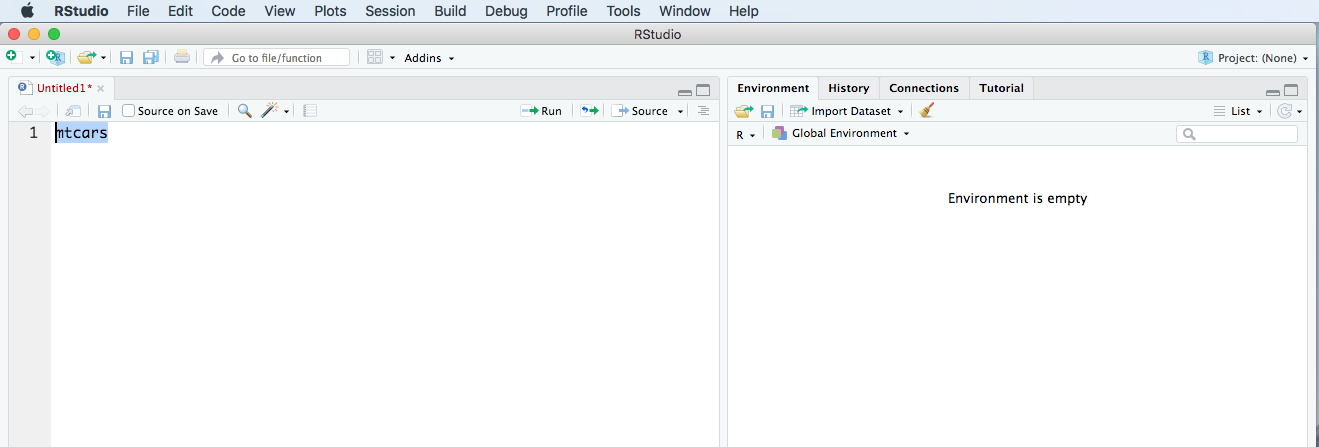 45 |
46 | 2. Execute this addin(arrow), to interactively manipulate it.
47 |
48 |
45 |
46 | 2. Execute this addin(arrow), to interactively manipulate it.
47 |
48 | 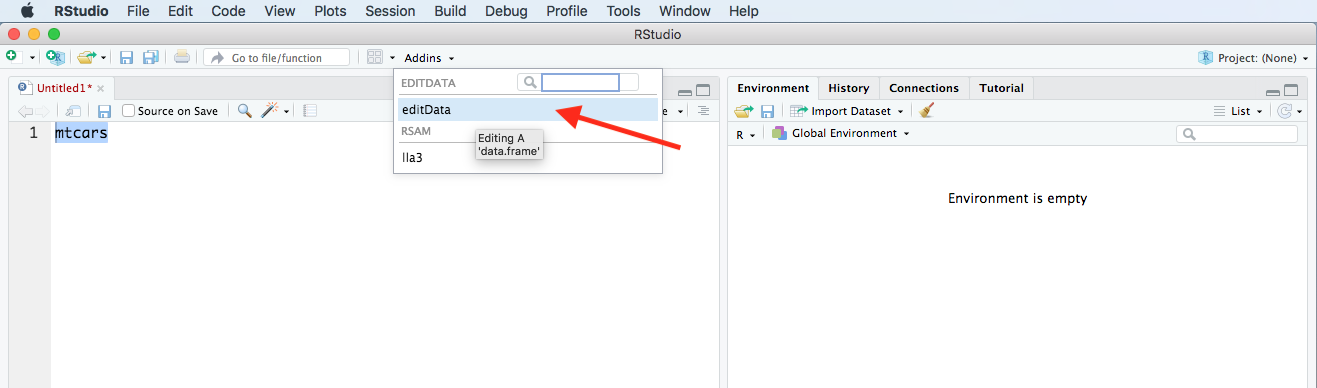 49 |
50 | 3. You can select and unselect a row by clicking a row in dataTable. You can delete the selected row(1), add a new row(2) or edit a row(3).
51 |
52 |
49 |
50 | 3. You can select and unselect a row by clicking a row in dataTable. You can delete the selected row(1), add a new row(2) or edit a row(3).
51 |
52 | 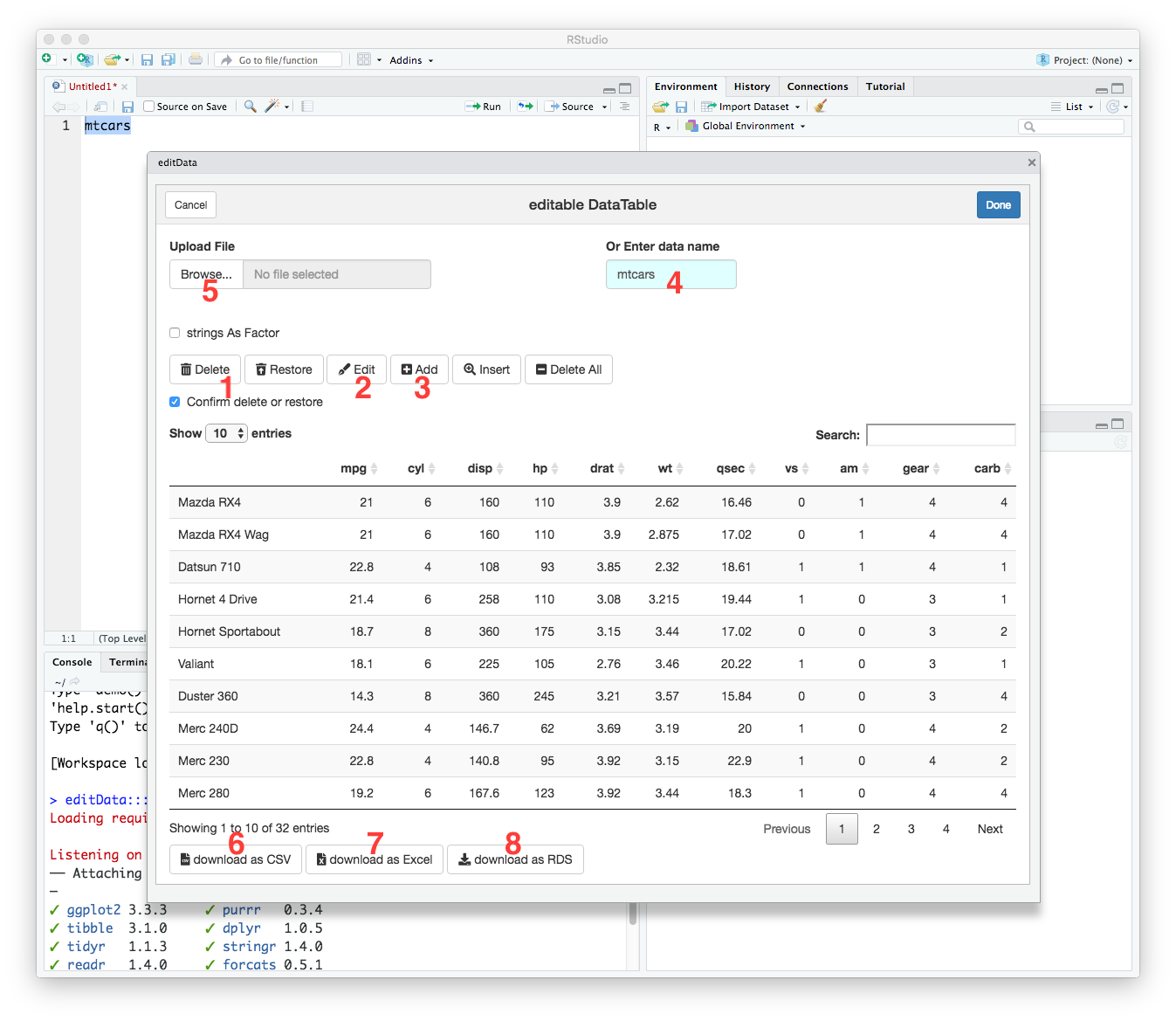 53 |
54 | You can enter data name(4) to edit, upload a CSV or excel or RDS file(5) and download the edited data as a csv(6) or xlsx(7) or RDS (8)file.
55 |
56 | 4. If you press the edit button you can see this window. You can edit individual cell. You can delete the row or update the data. Or you can edit cell by double-click.
57 |
58 |
53 |
54 | You can enter data name(4) to edit, upload a CSV or excel or RDS file(5) and download the edited data as a csv(6) or xlsx(7) or RDS (8)file.
55 |
56 | 4. If you press the edit button you can see this window. You can edit individual cell. You can delete the row or update the data. Or you can edit cell by double-click.
57 |
58 | 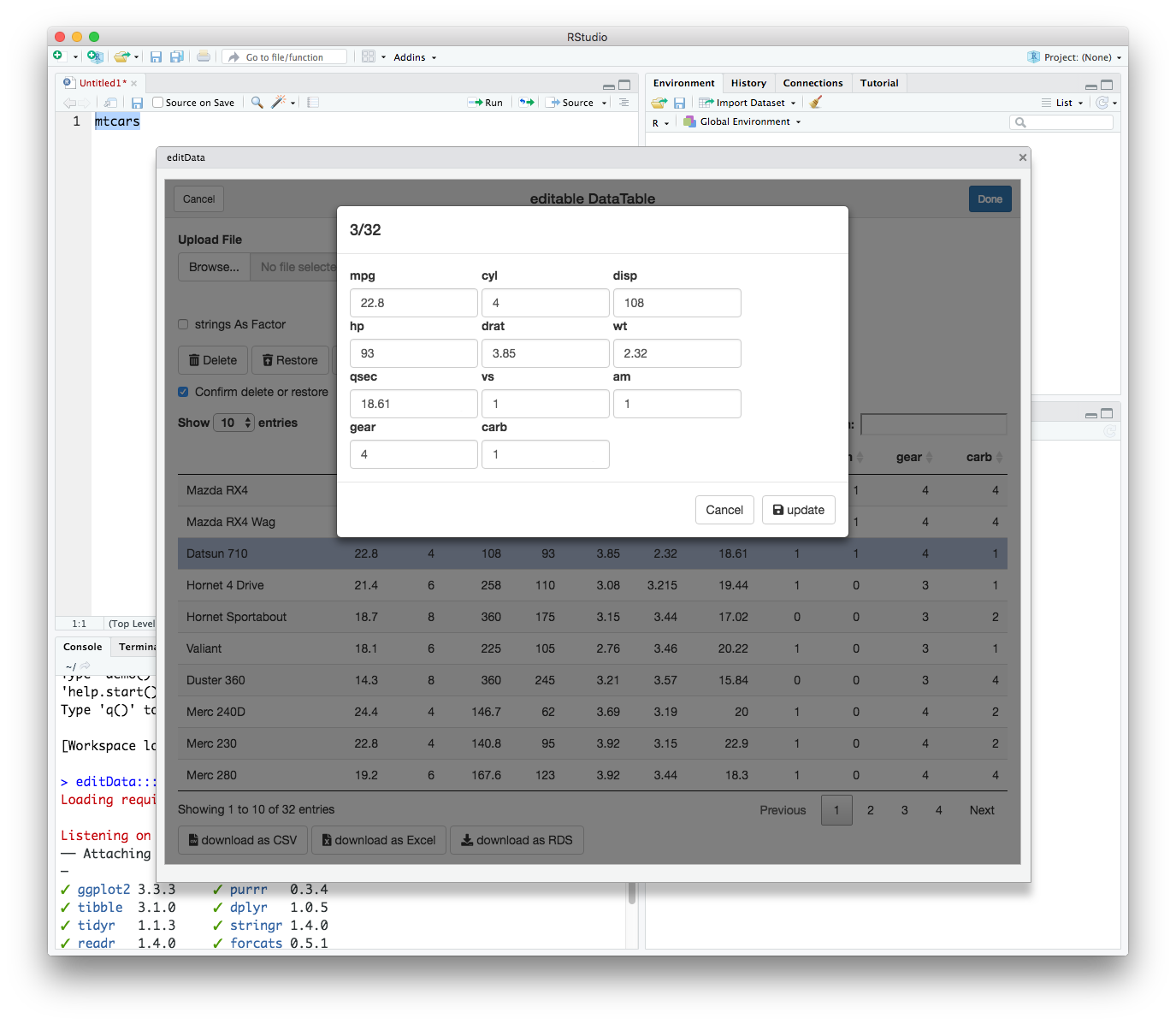 59 |
60 | 5. Alternatively, you can edit a cell by double-click.
61 |
62 |
59 |
60 | 5. Alternatively, you can edit a cell by double-click.
61 |
62 | 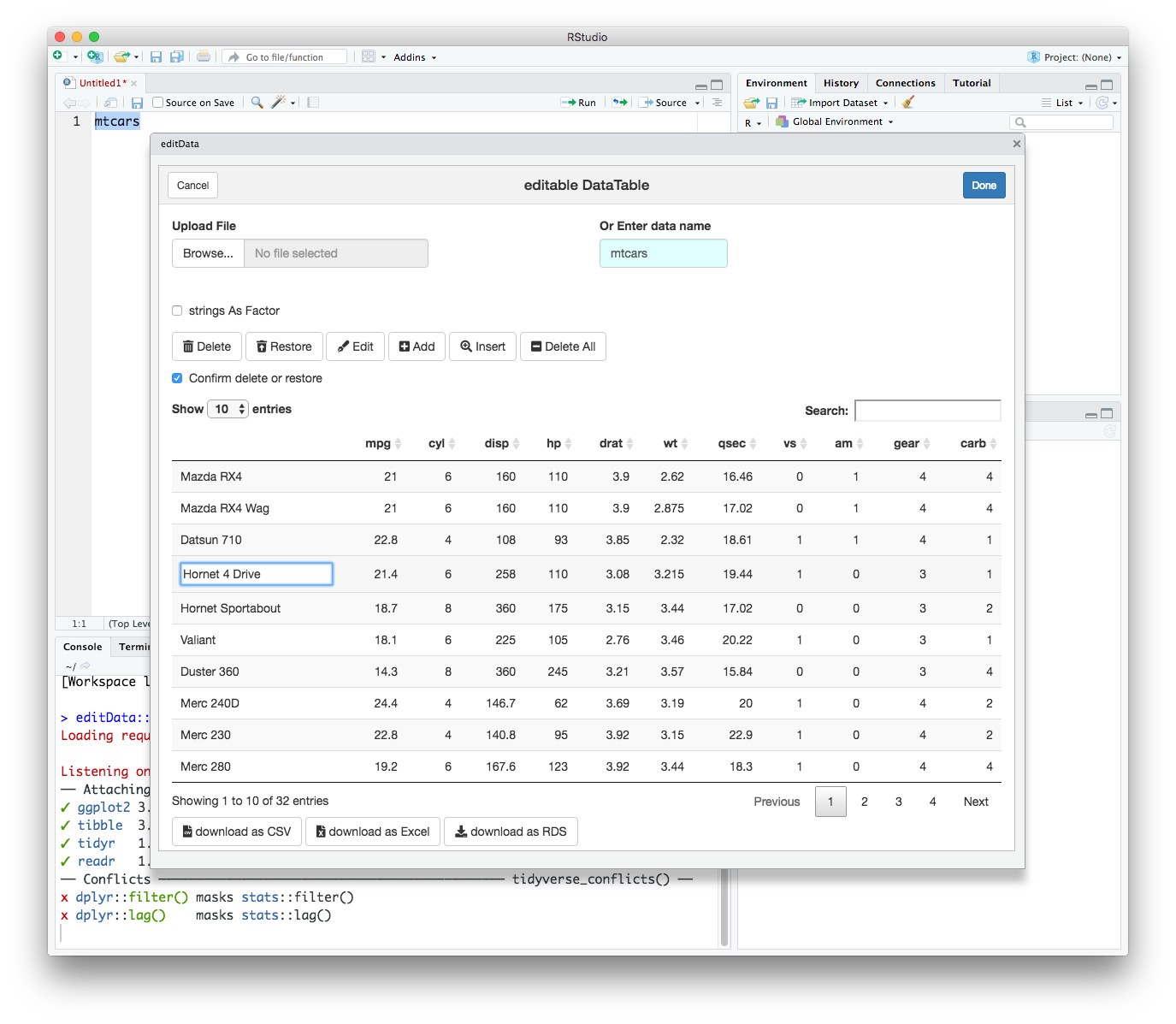 63 |
64 |
65 | 6. By default, the `sampleData` included in the `editData` package is selected. The `sex` and `bloodType` column are `factor` variables. A `selectInput` is assigned for a column of class factor.
66 |
67 |
63 |
64 |
65 | 6. By default, the `sampleData` included in the `editData` package is selected. The `sex` and `bloodType` column are `factor` variables. A `selectInput` is assigned for a column of class factor.
66 |
67 | 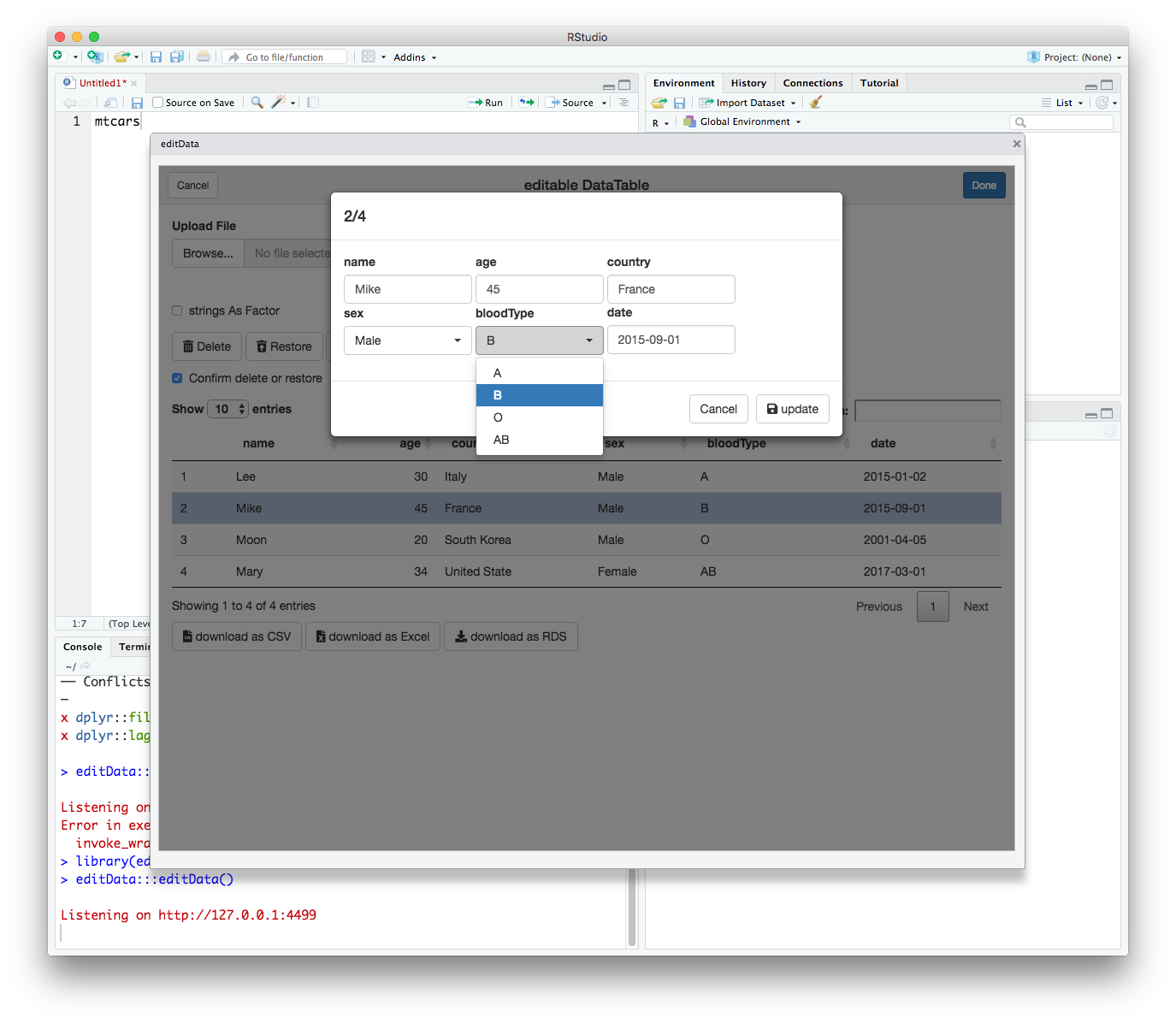 68 |
69 | 7. A `dateInput` is assigned for a column of class `date`.
70 |
71 |
68 |
69 | 7. A `dateInput` is assigned for a column of class `date`.
70 |
71 | 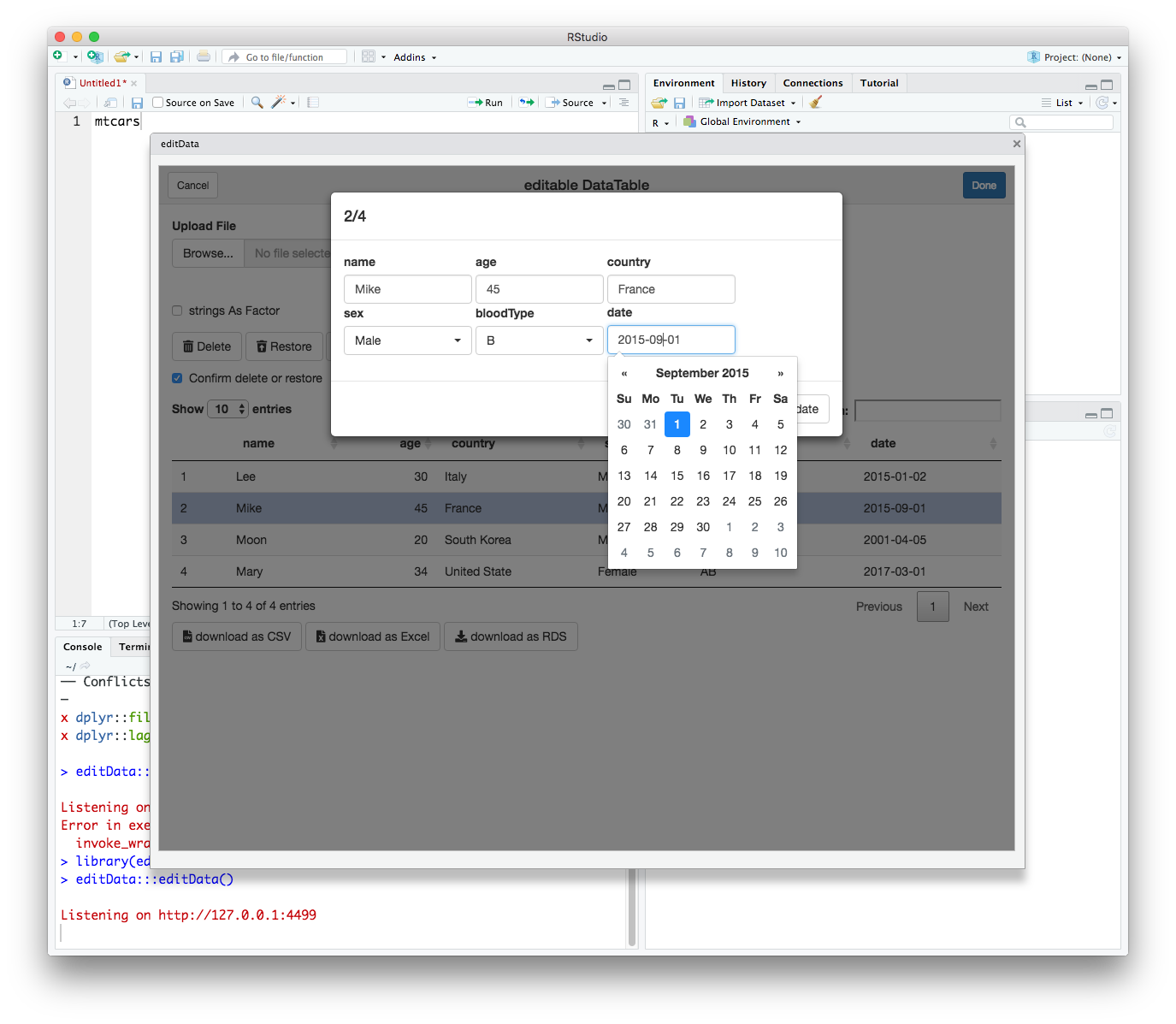 72 |
73 |
74 |
75 | ## Usage: As a regular function
76 |
77 | You can use the `editData()` function as a regular function, e.g. in a command line.
78 |
79 |
80 | ```r
81 | require(editData)
82 | result <- editData(mtcars)
83 | ```
84 |
85 | The resultant 'tibble' or 'data.frame' is assigned to the object `result`.
86 |
87 |
88 | ## Usage: As a shiny module
89 |
90 | The `editData` package is made of modularized shiny functions. You can use the modularized `editableDTUI()` and `editableDT()` functions in your shiny app. In this package, I have included three examples in the `inst` folder. You can run these examples with one of the following codes.
91 |
92 |
93 | ```r
94 | shiny::runApp(system.file('example',package='editData'))
95 | shiny::runApp(system.file('multipleData',package='editData'))
96 | shiny::runApp(system.file('multipleFiles',package='editData'))
97 | ```
98 |
--------------------------------------------------------------------------------
/R/textInput3.R:
--------------------------------------------------------------------------------
1 | #' Sample Data for testing 'editData' addin
2 | #'
3 | #' A sample dataset containing data for 4 people
4 | #'
5 | #' @format A data.frame with 4 rows and 6 variables:
6 | #' \describe{
7 | #' \item{name}{Last name}
8 | #' \item{age}{age in years}
9 | #' \item{country}{Country Name}
10 | #' \item{sex}{sex, A factor with two levels.}
11 | #' \item{bloodType}{Blood Type. A factor with four levels}
12 | #' \item{date}{Date}
13 | #' }
14 | "sampleData"
15 |
16 |
17 | #' Create a side-by-side textInput control for entry of unstructured text values
18 | #'
19 | #'@param inputId The input slot that will be used to access the value.
20 | #'@param label Display label for the control, or NULL for no label.
21 | #'@param value Initial value.
22 | #'@param width The width of the input in pixel
23 | #'@param bg The color of text
24 | #'@param ... arguments to be passed to textInput
25 | #'@importFrom shiny div
26 | #'@export
27 | #'@examples
28 | #'library(shiny)
29 | #'# Only run examples in interactive R sessions
30 | #'if (interactive()) {
31 | #' ui <- fluidPage(
32 | #' textInput3("id", "id", ""),
33 | #' textInput3("name","name","")
34 | #' )
35 | #' server <- function(input, output) {
36 | #'
37 | #' }
38 | #' shinyApp(ui, server)
39 | #'}
40 | textInput3<-function (inputId, label, value = "",width=100,bg=NULL,...)
41 | {
42 | style=paste0("width: ",width,"px;")
43 | if(!is.null(bg)) style=paste0(style,"background-color:",bg,";")
44 | div(style="display:inline-block;",
45 | if(label!="") tags$label(label, `for` = inputId),
46 | tags$input(id = inputId, type = "text", class="form-control",value = value,
47 | style=style,...))
48 | }
49 |
50 | #'Create a side-by-side selectInput
51 | #'@param ... arguments to be passed to selectInput
52 | #'@param width The width of the input in pixel
53 | #'@importFrom shiny selectInput
54 | #'@export
55 | #'@examples
56 | #'library(shiny)
57 | #'# Only run examples in interactive R sessions
58 | #'if (interactive()) {
59 | #' ui <- fluidPage(
60 | #' selectInput3("sex", "sex", choices=c("Male","Female")),
61 | #' selectInput3("smoking", "smokingStatus", choices=c("Never","Ex-smoker","Smoker"))
62 | #' )
63 | #' server <- function(input, output) {
64 | #'
65 | #' }
66 | #' shinyApp(ui, server)
67 | #'}
68 | selectInput3<-function(...,width=100){
69 | mywidth=paste(width,"px",sep="")
70 | div(style="display:inline-block;",selectInput(...,width=mywidth))
71 | }
72 |
73 |
74 | #'Create a side-by-side label
75 | #'@param label A text to display
76 | #'@param width The width of the input in pixel
77 | #'@param bg The color of text
78 | #'@param ... arguments to be passed to label
79 | #'@export
80 | #'@examples
81 | #'library(shiny)
82 | #'# Only run examples in interactive R sessions
83 | #'if (interactive()) {
84 | #' ui <- fluidPage(
85 | #' label3("Welcome"),
86 | #' checkboxInput3("somevalue", "Some value", FALSE),
87 | #' verbatimTextOutput("value")
88 | #' )
89 | #' server <- function(input, output) {
90 | #' output$value <- renderText({ input$somevalue })
91 | #' }
92 | #' shinyApp(ui, server)
93 | #'}
94 | label3<-function(label,width=100,bg=NULL,...){
95 | style=paste0("width: ",width,"px;")
96 | if(!is.null(bg)) style=paste0(style,"background-color:",bg,";")
97 | div(style="display:inline-block;",
98 | tags$label(label, style=style,...))
99 | }
100 |
101 | #'Create a side-by-side numericInput
102 | #'@param inputId The input slot that will be used to access the value.
103 | #'@param label Display label for the control, or NULL for no label.
104 | #'@param value Initial value.
105 | #'@param min Minimum allowed value
106 | #'@param max Maximum allowed value
107 | #'@param step Interval to use when stepping between min and max
108 | #'@param width The width of the input in pixel
109 | #'@param ... arguments to be passed to numericInput
110 | #'@export
111 | #'@examples
112 | #'library(shiny)
113 | #'# Only run examples in interactive R sessions
114 | #'if (interactive()) {
115 | #' ui <- fluidPage(
116 | #' textInput3("id", "id", ""),
117 | #' numericInput3("score","score",value=1)
118 | #' )
119 | #' server <- function(input, output) {
120 | #'
121 | #' }
122 | #' shinyApp(ui, server)
123 | #'}
124 | numericInput3<-function (inputId, label, value, min=NA,max=NA,step=NA,width=100,...)
125 | {
126 | div(style="display:inline-block;",
127 | tags$label(label, `for` = inputId,class="control-label"),
128 | tags$input(id = inputId, type = "number", class="form-control",
129 | value = value, min=min,max=max,step=step,style=paste("width: ",width,"px;",sep=""),...)
130 | )
131 | }
132 |
133 | #'Create a side-by-side checkboxInput
134 | #'@param inputId The input slot that will be used to access the value.
135 | #'@param label Display label for the control, or NULL for no label.
136 | #'@param value Initial value.
137 | #'@param width The width of the input in pixel
138 | #'@export
139 | #'@examples
140 | #'library(shiny)
141 | #'# Only run examples in interactive R sessions
142 | #'if (interactive()) {
143 | #' ui <- fluidPage(
144 | #' label3("Welcome"),
145 | #' checkboxInput3("somevalue", "Some value", FALSE),
146 | #' verbatimTextOutput("value")
147 | #' )
148 | #' server <- function(input, output) {
149 | #' output$value <- renderText({ input$somevalue })
150 | #' }
151 | #' shinyApp(ui, server)
152 | #'}
153 | checkboxInput3<-function(inputId,label,value=FALSE,width=100){
154 | if(value)
155 | div(style="display:inline-block;",
156 |
157 | tags$input(id = inputId, type = "checkbox",checked = "checked"),
158 | tags$label(label, `for` = inputId,
159 | style=paste("width: ",width-15,"px;",sep=""))
160 | )
161 | else
162 | div(style="display:inline-block;",
163 | tags$input(id = inputId, type = "checkbox"),
164 | tags$label(label, `for` = inputId, style=paste("width: ",width-15,"px;",sep=""))
165 | )
166 | }
167 |
168 | #'Create a side-by-side radioButtons
169 | #'@param inputId The input slot that will be used to access the value.
170 | #'@param label Display label for the control, or NULL for no label.
171 | #'@param choices List of values to select from
172 | #'@param bg The color of text
173 | #'@param labelwidth The width of the label in pixel
174 | #'@param inline If TRUE, render the choices inline (i.e. horizontally)
175 | #'@param align text align of label
176 | #'@param ... arguments to be passed to radioButtons
177 | #'@importFrom shiny radioButtons tags
178 | #'@export
179 | #'@examples
180 | #'library(shiny)
181 | #'# Only run examples in interactive R sessions
182 | #'if (interactive()) {
183 | #' ui <- fluidPage(
184 | #' label3("Welcome"),
185 | #' radioButtons3("mydata", "mydata", choices=c("mtcars","iris")),
186 | #' verbatimTextOutput("value")
187 | #' )
188 | #' server <- function(input, output) {
189 | #' output$value <- renderText({ input$mydata })
190 | #' }
191 | #' shinyApp(ui, server)
192 | #'}
193 | radioButtons3<-function(inputId,label,choices,bg=NULL,labelwidth=100,inline=FALSE,align="right",...){
194 | style=paste0("width: ",labelwidth,"px;")
195 | if(inline) style=paste0(style,"text-align:",align,";")
196 | if(!is.null(bg)) style=paste0(style,"background-color:",bg,";")
197 | if(inline){
198 | div(style="display:inline-block;",
199 | tags$label(label, style=style,`for` = inputId,class="control-label"),
200 | div(style="display:inline-block;",
201 | radioButtons(inputId,NULL,choices,inline=inline,...)
202 | )
203 | )
204 | } else{
205 |
206 | div(style="display:inline-block;",
207 | radioButtons(inputId,label,choices,...)
208 |
209 | )
210 |
211 | }
212 | }
213 |
214 | #'Create a side-by-side dateInput
215 | #'@param inputId The input slot that will be used to access the value.
216 | #'@param label Display label for the control, or NULL for no label.
217 | #'@param width The width of the input in pixel
218 | #'@param ... arguments to be passed to dateInput
219 | #'@importFrom shiny dateInput
220 | #'@export
221 | #'@examples
222 | #'library(shiny)
223 | #'# Only run examples in interactive R sessions
224 | #'if (interactive()) {
225 | #' ui <- fluidPage(
226 | #' label3("Welcome"),
227 | #' dateInput3("date", "date"),
228 | #' verbatimTextOutput("value")
229 | #' )
230 | #' server <- function(input, output) {
231 | #' output$value <- renderText({ input$date })
232 | #' }
233 | #' shinyApp(ui, server)
234 | #'}
235 | dateInput3<-function(inputId,label,width=100,...){
236 | div(style="display:inline-block;",
237 | dateInput(inputId,label,width=paste0(width,"px"),...)
238 | )
239 | }
240 |
241 | #' side-by-side selectizeInput
242 | #'
243 | #' @param ... Further arguments to be passed to selectizeInput
244 | #' @param width Input width in pixel
245 | #' @importFrom shiny selectizeInput
246 | #' @export
247 | #'@examples
248 | #'library(shiny)
249 | #'# Only run examples in interactive R sessions
250 | #'if (interactive()) {
251 | #' ui <- fluidPage(
252 | #' selectizeInput3("color", "color", choices=colors())
253 | #' )
254 | #' server <- function(input, output) {
255 | #'
256 | #' }
257 | #' shinyApp(ui, server)
258 | #'}
259 | selectizeInput3=function (..., width = 100)
260 | {
261 | mywidth = paste(width, "px", sep = "")
262 | div(style = "display:inline-block;", selectizeInput(..., width = mywidth))
263 | }
264 |
--------------------------------------------------------------------------------
/R/editableDT.R:
--------------------------------------------------------------------------------
1 | #' Side by side pickerInput
2 | #' @param ... Further arguments to be passed to pickerInput
3 | #' @importFrom shinyWidgets pickerInput
4 | #' @export
5 | pickerInput3=function (...)
6 | {
7 | div(style = "display:inline-block;", pickerInput(...))
8 | }
9 |
10 |
11 | #' Calculate maximal length
12 | #' @param x A vector
13 | #' @export
14 | #' @examples
15 | #' maxLength(month.name)
16 | maxLength=function(x){
17 | if(is.character(x)){
18 | max(nchar(x,type="bytes"),na.rm=TRUE)
19 | } else{
20 | 1
21 | }
22 | }
23 |
24 | #' Truncate string to desired length
25 | #' @param x A vector
26 | #' @param length numeric desired string length
27 | #' @export
28 | makeShort=function(x,length=50){
29 | if(is.character(x)){
30 | if(length(grep("length
32 | select
33 | x[select]<-paste0(substr(x[select],1,length),"...")
34 | }
35 | }
36 | x
37 | }
38 |
39 | #' UI of editableDT Shiny module
40 | #' @param id A string
41 | #' @importFrom shiny NS
42 | #' @export
43 | #' @examples
44 | #'# Only run examples in interactive R sessions
45 | #'if (interactive()) {
46 | #' library(shiny)
47 | #' ui=fluidPage(
48 | #' selectInput("select","select",choices=c("mtcars","iris","sampleData")),
49 | #' textInput("mydata","mydata",value="mtcars"),
50 | #' hr(),
51 | #' editableDTUI("editableDT"),
52 | #' hr(),
53 | #' verbatimTextOutput("test")
54 | #' )
55 | #' server=function(input,output,session){
56 | #' data=reactive({
57 | #' myget(input$mydata)
58 | #' })
59 | #' observeEvent(input$select,{
60 | #' updateTextInput(session,"mydata",value=input$select)
61 | #' })
62 | #' result=callModule(editableDT,"editableDT",data=data)
63 | #' output$test=renderPrint({
64 | #' str(result())
65 | #' })
66 | #' }
67 | #' shinyApp(ui=ui,server=server)
68 | #' }
69 | editableDTUI=function(id){
70 | ns <-NS(id)
71 |
72 | uiOutput(ns("editableDTModule"))
73 | }
74 |
75 |
76 | #' Server function of editableDT Shiny module
77 | #'
78 | #' @param input input
79 | #' @param output output
80 | #' @param session session
81 | #' @param data A reactive data object
82 | #' @param length numeric desired length of string
83 | #' @param cols numeric Initial columns to display
84 | #' @param status character. dropdownButton status. One of c("default","info","primary","danger","warning","success")
85 | #' @param showButtons logical
86 | #' @param enableSave logical
87 | #' @param editable logical
88 | #' @param formatList Null or list. Format list to be passed to formatStyle
89 | #' @param ... Further arguments to be passed to datatable()
90 | #' @importFrom DT DTOutput renderDT dataTableProxy datatable replaceData coerceValue formatStyle
91 | #' @importFrom openxlsx write.xlsx
92 | #' @importFrom shiny br span reactiveVal actionButton fluidRow icon modalButton modalDialog
93 | #' reactive removeModal renderUI showModal textAreaInput updateTextInput isolate conditionalPanel
94 | #' numericInput verbatimTextOutput showNotification textOutput renderText
95 | #' @importFrom shinyWidgets dropdownButton tooltipOptions checkboxGroupButtons awesomeCheckbox
96 | #' updateCheckboxGroupButtons
97 | #' @importFrom lubridate as_datetime
98 | #' @export
99 | editableDT=function(input,output,session,data,length=50,cols=1:7,status="default",showButtons=TRUE,enableSave=TRUE, editable=NULL,formatList=NULL,...){
100 |
101 | ns <- session$ns
102 |
103 | df1<-reactiveVal()
104 |
105 | finalDf<-reactiveVal()
106 |
107 | RV=reactiveValues(cols=cols,editable=FALSE)
108 |
109 | if(!is.null(editable)){
110 | if(editable==FALSE){
111 | showButtons=FALSE
112 | enableSave=FALSE
113 | }
114 | }
115 |
116 | observeEvent(data(),{
117 | finalDf(data())
118 | RV$cols=intersect(cols,1:ncol(finalDf()))
119 | df1(shortdata())
120 |
121 | })
122 |
123 |
124 | shortdata=reactive({
125 | input$Refresh
126 | # data1<-finalDf()
127 | data1<-data()
128 |
129 | if(is.null(data1)){
130 | result=NULL
131 | } else if(ncol(data1)==0){
132 | result=NULL
133 | } else{
134 | RV$cols<-intersect(RV$cols,1:ncol(data1))
135 | result=as.data.frame(lapply(data1[RV$cols],makeShort,isolate(input$length)))
136 | rownames(result)=rownames(data1)
137 | if(is.null(editable)){
138 |
139 | if(identical(RV$cols,1:ncol(data1))&(max(sapply(data1,maxLength),na.rm=TRUE)0){
290 | showModal(modalDialog( span('Do you really want to delete data selected ?'),
291 | footer = tagList(
292 | modalButton("Cancel"),
293 | actionButton(ns("deleteOk"), "Delete",icon=icon("trash-alt"))
294 | ),
295 | easyClose=TRUE
296 | ))
297 | }
298 | }
299 | })
300 |
301 | observeEvent(input$deleteAll,{
302 | showModal(modalDialog( span('Do you really want to delete ALL data ?'),
303 | footer = tagList(
304 | modalButton("Cancel"),
305 | actionButton(ns("deleteAllOk"), "Delete",icon=icon("trash-alt"))
306 | ),
307 | easyClose=TRUE
308 | ))
309 |
310 |
311 | })
312 | observeEvent(input$reset,{
313 | if(!input$confirm){
314 | restoreData()
315 | } else{
316 | showModal(modalDialog( span('Do you really restore original data ?\n You will lost all the changes'),
317 | footer = tagList(
318 | modalButton("Cancel"),
319 | actionButton(ns("resetOk"), "Restore",icon=icon("trash-restore"))
320 | ),
321 | easyClose=TRUE
322 | ))
323 | }
324 | })
325 |
326 | observeEvent(input$table_cell_edit, {
327 | info=input$table_cell_edit
328 |
329 | i=info$row
330 | j=info$col
331 | v=info$value
332 |
333 | newdf <- df1()
334 |
335 | if(j==0){
336 | if(v %in% rownames(newdf)[-i]) {
337 | showNotification("Duplicated rownames is not allowed",duration=3,type="message")
338 |
339 | } else{
340 | rownames(newdf)[i]=v
341 | }
342 | } else{
343 | if("POSIXct" %in% class(newdf[i,j])){
344 | newdf[i,j]<-lubridate::as_datetime(v)
345 | } else{
346 | newdf[i,j]<-DT::coerceValue(v, newdf[i, j])
347 | }
348 | # newdf[i,j]<-DT::coerceValue(v, newdf[i, j])
349 | }
350 | df1(newdf)
351 | replaceData(proxy,df1(),resetPaging=FALSE)
352 | newdf2<-finalDf()
353 | if(j==0){
354 | if(v %in% rownames(newdf)[-i]){
355 | } else{
356 | rownames(newdf2)[i]=v
357 | }
358 | } else{
359 | if("POSIXct" %in% class(newdf[i,j])){
360 | newdf2[i,j]<-lubridate::as_datetime(v)
361 | } else{
362 | newdf2[i,j]<-DT::coerceValue(v, newdf2[i, j])
363 | }
364 | # newdf2[i,j]<-DT::coerceValue(v, newdf2[i, j])
365 |
366 | }
367 | finalDf(newdf2)
368 |
369 |
370 | })
371 |
372 | deleteSelected=function(){
373 | i= input$table_rows_selected
374 |
375 | if(length(i)>0){
376 | newdf <- df1()
377 | newdf <- newdf[-i,]
378 | df1(newdf)
379 | replaceData(proxy,df1(),resetPaging=FALSE)
380 | newdf2<-finalDf()
381 | newdf2 <- newdf2[-i,]
382 | finalDf(newdf2)
383 | }
384 | }
385 | restoreData=function(){
386 | df1(shortdata())
387 | replaceData(proxy,df1(),resetPaging=FALSE)
388 | finalDf(data())
389 | }
390 |
391 | observeEvent(input$deleteOk,{
392 | deleteSelected()
393 | removeModal()
394 | })
395 | observeEvent(input$deleteAllOk,{
396 | newdf=df1()
397 | newdf=newdf[0,]
398 | df1(newdf)
399 | replaceData(proxy,df1(),resetPaging=FALSE)
400 | newdf2=finalDf()
401 | newdf2=newdf2[0,]
402 | finalDf(newdf2)
403 | removeModal()
404 | })
405 |
406 | observeEvent(input$edit,{
407 | i= input$table_rows_selected
408 | if(length(i)>0){
409 | i= input$table_rows_selected[1]
410 | result=data2input(finalDf(),i)
411 | showModal(modalDialog(
412 | do.call(tagList,result),
413 | title=paste0(i,"/",nrow(finalDf())),
414 | footer = tagList(
415 | modalButton("Cancel"),
416 | actionButton(ns("update"), "update",icon=icon("save"))
417 | ),
418 | easyClose = TRUE
419 | ))
420 | }
421 | })
422 |
423 | observeEvent(input$add,{
424 |
425 | i= nrow(df1())+1
426 | result=data2input(finalDf(),i)
427 | showModal(modalDialog(
428 | do.call(tagList,result),
429 | title=paste0(i,"/",nrow(df1())),
430 | footer = tagList(
431 | modalButton("Cancel"),
432 | actionButton(ns("addOk"), "Add",icon=icon("save"))
433 | ),
434 | easyClose = TRUE
435 | ))
436 |
437 | })
438 |
439 | observeEvent(input$insert,{
440 |
441 | i= input$table_rows_selected
442 | if(length(i)==1){
443 | result=data2input(finalDf(),i)
444 | showModal(modalDialog(
445 | do.call(tagList,result),
446 | title=paste0(i,"/",nrow(df1())),
447 | footer = tagList(
448 | modalButton("Cancel"),
449 | actionButton(ns("insertUp"), "InsertUp",icon=icon("thumbs-up")),
450 | actionButton(ns("insertDown"), "InsertDown",icon=icon("thumbs-down"))
451 | ),
452 | easyClose = TRUE
453 | ))
454 | }
455 |
456 | })
457 |
458 | observeEvent(input$update,{
459 | i= input$table_rows_selected[1]
460 | updateRowname=TRUE
461 | if(length(grep("[^0-9]",rownames(finalDf())))==0) {
462 | updateRowname=FALSE
463 | } else if(input$rowname %in% rownames(finalDf())[-i]){
464 | updateRowname=FALSE
465 | showNotification("Duplicated rownames is not allowed",duration=3,type="message")
466 | }
467 | newdf2 <- finalDf()
468 | for(j in 1:ncol(newdf2)){
469 | if("POSIXct" %in% class(newdf2[i,j])){
470 | newdf2[i,j]<-lubridate::as_datetime(input[[paste0("colid",j)]])
471 | } else{
472 | newdf2[i,j]<-DT::coerceValue(input[[paste0("colid",j)]], newdf2[i, j])
473 | }
474 | }
475 | if(updateRowname) rownames(newdf2)[i]=input$rowname
476 | finalDf(newdf2)
477 | # result=as.data.frame(lapply(finalDf(),makeShort,length))
478 | # rownames(result)=rownames(finalDf())
479 | # newdf=result[RV$cols]
480 | # df1(newdf)
481 |
482 |
483 | newdf=df1()
484 | temp=as.data.frame(lapply(finalDf()[i,],makeShort,length))
485 | newdf[i,]=temp[RV$cols]
486 | if(updateRowname) rownames(newdf)[i]=input$rowname
487 | df1(newdf)
488 | replaceData(proxy,df1(),resetPaging=FALSE)
489 |
490 |
491 | removeModal()
492 | })
493 |
494 | observeEvent(input$addOk,{
495 | # newdf2 <- finalDf()
496 | # newdf2[i,j]<-DT::coerceValue(input[[paste0("colid",j)]], newdf2[i, j])
497 | # finalDf(newdf2)
498 | updateRowname=TRUE
499 | if(length(grep("[^0-9]",rownames(finalDf())))==0) {
500 | updateRowname=FALSE
501 | } else if(input$rowname %in% rownames(finalDf())[-i]){
502 | updateRowname=FALSE
503 | showNotification("Duplicated rownames is not allowed",duration=3,type="message")
504 | }
505 |
506 | newdf2=finalDf()
507 | newdf2<-rbind(newdf2,newdf2[nrow(newdf2),])
508 | i=nrow(newdf2)
509 |
510 | newdf2 <- finalDf()
511 | for(j in 1:ncol(finalDf())){
512 | if("POSIXct" %in% class(newdf2[i,j])){
513 | newdf2[i,j]<-lubridate::as_datetime(input[[paste0("colid",j)]])
514 | } else{
515 | newdf2[i,j]<-DT::coerceValue(input[[paste0("colid",j)]], newdf2[i, j])
516 | }
517 |
518 | }
519 | if(updateRowname) rownames(newdf2)[i]=input$rowname
520 | finalDf(newdf2)
521 |
522 | result=as.data.frame(lapply(finalDf(),makeShort,length))
523 | rownames(result)=rownames(finalDf())
524 | newdf=result[RV$cols]
525 | if(updateRowname) rownames(newdf)[i]=input$rowname
526 | df1(newdf)
527 | replaceData(proxy,df1(),resetPaging=FALSE)
528 | removeModal()
529 | })
530 |
531 | observeEvent(input$insertUp,{
532 | i= input$table_rows_selected
533 | updateRowname=TRUE
534 | if(length(grep("[^0-9]",rownames(finalDf())))==0) {
535 | updateRowname=FALSE
536 | } else if(input$rowname %in% rownames(finalDf())[-i]){
537 | updateRowname=FALSE
538 | showNotification("Duplicated rownames is not allowed",duration=3,type="message")
539 | }
540 | newdf2=finalDf()
541 | newdf2<-rbind(newdf2[1:i,],newdf2[i:nrow(newdf2),])
542 |
543 | for(j in 1:ncol(finalDf())){
544 | if("POSIXct" %in% class(newdf2[i,j])){
545 | newdf2[i,j]<-lubridate::as_datetime(input[[paste0("colid",j)]])
546 | } else{
547 | newdf2[i,j]<-DT::coerceValue(input[[paste0("colid",j)]], newdf2[i, j])
548 | }
549 |
550 | }
551 | if(updateRowname) rownames(newdf2)[i]=input$rowname
552 | finalDf(newdf2)
553 | result=as.data.frame(lapply(finalDf(),makeShort,length))
554 | rownames(result)=rownames(finalDf())
555 | newdf=result[RV$cols]
556 | if(updateRowname) rownames(newdf)[i]=input$rowname
557 | df1(newdf)
558 | replaceData(proxy,df1(),resetPaging=FALSE)
559 | removeModal()
560 | })
561 | observeEvent(input$insertDown,{
562 | i= input$table_rows_selected
563 | updateRowname=TRUE
564 | if(length(grep("[^0-9]",rownames(finalDf())))==0) {
565 | updateRowname=FALSE
566 | } else if(input$rowname %in% rownames(finalDf())[-i]){
567 | updateRowname=FALSE
568 | showNotification("Duplicated rownames is not allowed",duration=3,type="message")
569 | }
570 |
571 | newdf2=finalDf()
572 | newdf2<-rbind(newdf2[1:i,],newdf2[i:nrow(newdf2),])
573 | i=i+1
574 | for(j in 1:ncol(finalDf())){
575 | if("POSIXct" %in% class(newdf2[i,j])){
576 | newdf2[i,j]<-lubridate::as_datetime(input[[paste0("colid",j)]])
577 | } else{
578 | newdf2[i,j]<-DT::coerceValue(input[[paste0("colid",j)]], newdf2[i, j])
579 | }
580 |
581 | }
582 | if(updateRowname) rownames(newdf2)[i]=input$rowname
583 | finalDf(newdf2)
584 | result=as.data.frame(lapply(finalDf(),makeShort,length))
585 | rownames(result)=rownames(finalDf())
586 | newdf=result[RV$cols]
587 | if(updateRowname) rownames(newdf)[i]=input$rowname
588 | df1(newdf)
589 | replaceData(proxy,df1(),resetPaging=FALSE)
590 | removeModal()
591 |
592 | })
593 |
594 | data2input=function(data,row){
595 |
596 | lapply(0:ncol(data),vector2input,data,row)
597 |
598 | }
599 |
600 |
601 | vector2input=function(x,data,row){
602 | if(x==0) {
603 | if(length(grep("[^0-9]",rownames(data)))==0){
604 | return(NULL)
605 | } else{
606 | value=rownames(data)[row]
607 | length1=nchar(value,keepNA=FALSE)
608 | label="rowname"
609 | id="rowname"
610 | width=max(nchar(rownames(data)[x]),nchar(label),150)
611 | if(is.na(length1)){
612 | textInput3(ns(id),label,value=value,width=width)
613 | } else if(length1<20){
614 | textInput3(ns(id),label,value=value,width=width)
615 | } else{
616 | textAreaInput(ns(id),label,value=value,width="460px",rows=1+length1/60)
617 | }
618 | }
619 | } else{
620 |
621 | kind=class(data[[x]])
622 | id=paste0("colid",x)
623 | label=names(data)[x]
624 | if(row>nrow(data)){
625 | value=data[[x]][length(data[[x]])]
626 | } else{
627 | value=data[[x]][row]
628 | }
629 | if(is.character(data[[x]])){
630 | width=max(c(max(nchar(data[[x]])),nchar(label),150))
631 | } else if(is.factor(data[[x]])){
632 | width=max(c(max(nchar(levels(data[[x]]))),nchar(label),150))
633 | } else{
634 | width=max(nchar(label),150)
635 | }
636 |
637 | if(kind %in% c("numeric","integer","double")) {
638 | numericInput3(ns(id),label,value=value,width=width)
639 | } else if(kind =="factor"){
640 | pickerInput3(ns(id),label,choices=levels(data[[x]]),
641 | selected=value,width=paste0(width,"px"))
642 | } else if(kind =="Date"){
643 | dateInput3(ns(id),label,value=value,width=width)
644 | } else if(kind =="logical"){
645 | if(is.na(value)) value=FALSE
646 | checkboxInput3(ns(id),label,value=value,width=width)
647 | } else {
648 | if(is.na(value)) value=""
649 | length1=nchar(data[[x]][row],keepNA=FALSE)
650 | width=max(length1*8,150)
651 | if(length1<70){
652 | textInput3(ns(id),label,value=value,width=width)
653 | } else{
654 | textAreaInput(ns(id),label,value=value,width="460px",rows=1+length1/60)
655 | }
656 | }
657 | }
658 |
659 |
660 | }
661 |
662 | output$downloadData <- downloadHandler(
663 | filename = function() {
664 | "mydata.csv"
665 | },
666 | content = function(file) {
667 | updateRowname=TRUE
668 | if(length(grep("[^0-9]",rownames(finalDf())))==0) updateRowname=FALSE
669 | write.csv(finalDf(), file, row.names = updateRowname)
670 | }
671 | )
672 |
673 | output$downloadExcel <- downloadHandler(
674 | filename = function() {
675 | "mydata.xlsx"
676 | },
677 | content = function(file) {
678 | updateRowname=TRUE
679 | if(length(grep("[^0-9]",rownames(finalDf())))==0) updateRowname=FALSE
680 | write.xlsx(finalDf(), file,asTable=TRUE,row.names=updateRowname)
681 | }
682 | )
683 | output$downloadRDS <- downloadHandler(
684 | filename = function() {
685 | "mydata.RDS"
686 | },
687 | content = function(file) {
688 | saveRDS(finalDf(), file)
689 | }
690 | )
691 |
692 | return(reactive(finalDf()))
693 |
694 | }
695 |
--------------------------------------------------------------------------------
72 |
73 |
74 |
75 | ## Usage: As a regular function
76 |
77 | You can use the `editData()` function as a regular function, e.g. in a command line.
78 |
79 |
80 | ```r
81 | require(editData)
82 | result <- editData(mtcars)
83 | ```
84 |
85 | The resultant 'tibble' or 'data.frame' is assigned to the object `result`.
86 |
87 |
88 | ## Usage: As a shiny module
89 |
90 | The `editData` package is made of modularized shiny functions. You can use the modularized `editableDTUI()` and `editableDT()` functions in your shiny app. In this package, I have included three examples in the `inst` folder. You can run these examples with one of the following codes.
91 |
92 |
93 | ```r
94 | shiny::runApp(system.file('example',package='editData'))
95 | shiny::runApp(system.file('multipleData',package='editData'))
96 | shiny::runApp(system.file('multipleFiles',package='editData'))
97 | ```
98 |
--------------------------------------------------------------------------------
/R/textInput3.R:
--------------------------------------------------------------------------------
1 | #' Sample Data for testing 'editData' addin
2 | #'
3 | #' A sample dataset containing data for 4 people
4 | #'
5 | #' @format A data.frame with 4 rows and 6 variables:
6 | #' \describe{
7 | #' \item{name}{Last name}
8 | #' \item{age}{age in years}
9 | #' \item{country}{Country Name}
10 | #' \item{sex}{sex, A factor with two levels.}
11 | #' \item{bloodType}{Blood Type. A factor with four levels}
12 | #' \item{date}{Date}
13 | #' }
14 | "sampleData"
15 |
16 |
17 | #' Create a side-by-side textInput control for entry of unstructured text values
18 | #'
19 | #'@param inputId The input slot that will be used to access the value.
20 | #'@param label Display label for the control, or NULL for no label.
21 | #'@param value Initial value.
22 | #'@param width The width of the input in pixel
23 | #'@param bg The color of text
24 | #'@param ... arguments to be passed to textInput
25 | #'@importFrom shiny div
26 | #'@export
27 | #'@examples
28 | #'library(shiny)
29 | #'# Only run examples in interactive R sessions
30 | #'if (interactive()) {
31 | #' ui <- fluidPage(
32 | #' textInput3("id", "id", ""),
33 | #' textInput3("name","name","")
34 | #' )
35 | #' server <- function(input, output) {
36 | #'
37 | #' }
38 | #' shinyApp(ui, server)
39 | #'}
40 | textInput3<-function (inputId, label, value = "",width=100,bg=NULL,...)
41 | {
42 | style=paste0("width: ",width,"px;")
43 | if(!is.null(bg)) style=paste0(style,"background-color:",bg,";")
44 | div(style="display:inline-block;",
45 | if(label!="") tags$label(label, `for` = inputId),
46 | tags$input(id = inputId, type = "text", class="form-control",value = value,
47 | style=style,...))
48 | }
49 |
50 | #'Create a side-by-side selectInput
51 | #'@param ... arguments to be passed to selectInput
52 | #'@param width The width of the input in pixel
53 | #'@importFrom shiny selectInput
54 | #'@export
55 | #'@examples
56 | #'library(shiny)
57 | #'# Only run examples in interactive R sessions
58 | #'if (interactive()) {
59 | #' ui <- fluidPage(
60 | #' selectInput3("sex", "sex", choices=c("Male","Female")),
61 | #' selectInput3("smoking", "smokingStatus", choices=c("Never","Ex-smoker","Smoker"))
62 | #' )
63 | #' server <- function(input, output) {
64 | #'
65 | #' }
66 | #' shinyApp(ui, server)
67 | #'}
68 | selectInput3<-function(...,width=100){
69 | mywidth=paste(width,"px",sep="")
70 | div(style="display:inline-block;",selectInput(...,width=mywidth))
71 | }
72 |
73 |
74 | #'Create a side-by-side label
75 | #'@param label A text to display
76 | #'@param width The width of the input in pixel
77 | #'@param bg The color of text
78 | #'@param ... arguments to be passed to label
79 | #'@export
80 | #'@examples
81 | #'library(shiny)
82 | #'# Only run examples in interactive R sessions
83 | #'if (interactive()) {
84 | #' ui <- fluidPage(
85 | #' label3("Welcome"),
86 | #' checkboxInput3("somevalue", "Some value", FALSE),
87 | #' verbatimTextOutput("value")
88 | #' )
89 | #' server <- function(input, output) {
90 | #' output$value <- renderText({ input$somevalue })
91 | #' }
92 | #' shinyApp(ui, server)
93 | #'}
94 | label3<-function(label,width=100,bg=NULL,...){
95 | style=paste0("width: ",width,"px;")
96 | if(!is.null(bg)) style=paste0(style,"background-color:",bg,";")
97 | div(style="display:inline-block;",
98 | tags$label(label, style=style,...))
99 | }
100 |
101 | #'Create a side-by-side numericInput
102 | #'@param inputId The input slot that will be used to access the value.
103 | #'@param label Display label for the control, or NULL for no label.
104 | #'@param value Initial value.
105 | #'@param min Minimum allowed value
106 | #'@param max Maximum allowed value
107 | #'@param step Interval to use when stepping between min and max
108 | #'@param width The width of the input in pixel
109 | #'@param ... arguments to be passed to numericInput
110 | #'@export
111 | #'@examples
112 | #'library(shiny)
113 | #'# Only run examples in interactive R sessions
114 | #'if (interactive()) {
115 | #' ui <- fluidPage(
116 | #' textInput3("id", "id", ""),
117 | #' numericInput3("score","score",value=1)
118 | #' )
119 | #' server <- function(input, output) {
120 | #'
121 | #' }
122 | #' shinyApp(ui, server)
123 | #'}
124 | numericInput3<-function (inputId, label, value, min=NA,max=NA,step=NA,width=100,...)
125 | {
126 | div(style="display:inline-block;",
127 | tags$label(label, `for` = inputId,class="control-label"),
128 | tags$input(id = inputId, type = "number", class="form-control",
129 | value = value, min=min,max=max,step=step,style=paste("width: ",width,"px;",sep=""),...)
130 | )
131 | }
132 |
133 | #'Create a side-by-side checkboxInput
134 | #'@param inputId The input slot that will be used to access the value.
135 | #'@param label Display label for the control, or NULL for no label.
136 | #'@param value Initial value.
137 | #'@param width The width of the input in pixel
138 | #'@export
139 | #'@examples
140 | #'library(shiny)
141 | #'# Only run examples in interactive R sessions
142 | #'if (interactive()) {
143 | #' ui <- fluidPage(
144 | #' label3("Welcome"),
145 | #' checkboxInput3("somevalue", "Some value", FALSE),
146 | #' verbatimTextOutput("value")
147 | #' )
148 | #' server <- function(input, output) {
149 | #' output$value <- renderText({ input$somevalue })
150 | #' }
151 | #' shinyApp(ui, server)
152 | #'}
153 | checkboxInput3<-function(inputId,label,value=FALSE,width=100){
154 | if(value)
155 | div(style="display:inline-block;",
156 |
157 | tags$input(id = inputId, type = "checkbox",checked = "checked"),
158 | tags$label(label, `for` = inputId,
159 | style=paste("width: ",width-15,"px;",sep=""))
160 | )
161 | else
162 | div(style="display:inline-block;",
163 | tags$input(id = inputId, type = "checkbox"),
164 | tags$label(label, `for` = inputId, style=paste("width: ",width-15,"px;",sep=""))
165 | )
166 | }
167 |
168 | #'Create a side-by-side radioButtons
169 | #'@param inputId The input slot that will be used to access the value.
170 | #'@param label Display label for the control, or NULL for no label.
171 | #'@param choices List of values to select from
172 | #'@param bg The color of text
173 | #'@param labelwidth The width of the label in pixel
174 | #'@param inline If TRUE, render the choices inline (i.e. horizontally)
175 | #'@param align text align of label
176 | #'@param ... arguments to be passed to radioButtons
177 | #'@importFrom shiny radioButtons tags
178 | #'@export
179 | #'@examples
180 | #'library(shiny)
181 | #'# Only run examples in interactive R sessions
182 | #'if (interactive()) {
183 | #' ui <- fluidPage(
184 | #' label3("Welcome"),
185 | #' radioButtons3("mydata", "mydata", choices=c("mtcars","iris")),
186 | #' verbatimTextOutput("value")
187 | #' )
188 | #' server <- function(input, output) {
189 | #' output$value <- renderText({ input$mydata })
190 | #' }
191 | #' shinyApp(ui, server)
192 | #'}
193 | radioButtons3<-function(inputId,label,choices,bg=NULL,labelwidth=100,inline=FALSE,align="right",...){
194 | style=paste0("width: ",labelwidth,"px;")
195 | if(inline) style=paste0(style,"text-align:",align,";")
196 | if(!is.null(bg)) style=paste0(style,"background-color:",bg,";")
197 | if(inline){
198 | div(style="display:inline-block;",
199 | tags$label(label, style=style,`for` = inputId,class="control-label"),
200 | div(style="display:inline-block;",
201 | radioButtons(inputId,NULL,choices,inline=inline,...)
202 | )
203 | )
204 | } else{
205 |
206 | div(style="display:inline-block;",
207 | radioButtons(inputId,label,choices,...)
208 |
209 | )
210 |
211 | }
212 | }
213 |
214 | #'Create a side-by-side dateInput
215 | #'@param inputId The input slot that will be used to access the value.
216 | #'@param label Display label for the control, or NULL for no label.
217 | #'@param width The width of the input in pixel
218 | #'@param ... arguments to be passed to dateInput
219 | #'@importFrom shiny dateInput
220 | #'@export
221 | #'@examples
222 | #'library(shiny)
223 | #'# Only run examples in interactive R sessions
224 | #'if (interactive()) {
225 | #' ui <- fluidPage(
226 | #' label3("Welcome"),
227 | #' dateInput3("date", "date"),
228 | #' verbatimTextOutput("value")
229 | #' )
230 | #' server <- function(input, output) {
231 | #' output$value <- renderText({ input$date })
232 | #' }
233 | #' shinyApp(ui, server)
234 | #'}
235 | dateInput3<-function(inputId,label,width=100,...){
236 | div(style="display:inline-block;",
237 | dateInput(inputId,label,width=paste0(width,"px"),...)
238 | )
239 | }
240 |
241 | #' side-by-side selectizeInput
242 | #'
243 | #' @param ... Further arguments to be passed to selectizeInput
244 | #' @param width Input width in pixel
245 | #' @importFrom shiny selectizeInput
246 | #' @export
247 | #'@examples
248 | #'library(shiny)
249 | #'# Only run examples in interactive R sessions
250 | #'if (interactive()) {
251 | #' ui <- fluidPage(
252 | #' selectizeInput3("color", "color", choices=colors())
253 | #' )
254 | #' server <- function(input, output) {
255 | #'
256 | #' }
257 | #' shinyApp(ui, server)
258 | #'}
259 | selectizeInput3=function (..., width = 100)
260 | {
261 | mywidth = paste(width, "px", sep = "")
262 | div(style = "display:inline-block;", selectizeInput(..., width = mywidth))
263 | }
264 |
--------------------------------------------------------------------------------
/R/editableDT.R:
--------------------------------------------------------------------------------
1 | #' Side by side pickerInput
2 | #' @param ... Further arguments to be passed to pickerInput
3 | #' @importFrom shinyWidgets pickerInput
4 | #' @export
5 | pickerInput3=function (...)
6 | {
7 | div(style = "display:inline-block;", pickerInput(...))
8 | }
9 |
10 |
11 | #' Calculate maximal length
12 | #' @param x A vector
13 | #' @export
14 | #' @examples
15 | #' maxLength(month.name)
16 | maxLength=function(x){
17 | if(is.character(x)){
18 | max(nchar(x,type="bytes"),na.rm=TRUE)
19 | } else{
20 | 1
21 | }
22 | }
23 |
24 | #' Truncate string to desired length
25 | #' @param x A vector
26 | #' @param length numeric desired string length
27 | #' @export
28 | makeShort=function(x,length=50){
29 | if(is.character(x)){
30 | if(length(grep("length
32 | select
33 | x[select]<-paste0(substr(x[select],1,length),"...")
34 | }
35 | }
36 | x
37 | }
38 |
39 | #' UI of editableDT Shiny module
40 | #' @param id A string
41 | #' @importFrom shiny NS
42 | #' @export
43 | #' @examples
44 | #'# Only run examples in interactive R sessions
45 | #'if (interactive()) {
46 | #' library(shiny)
47 | #' ui=fluidPage(
48 | #' selectInput("select","select",choices=c("mtcars","iris","sampleData")),
49 | #' textInput("mydata","mydata",value="mtcars"),
50 | #' hr(),
51 | #' editableDTUI("editableDT"),
52 | #' hr(),
53 | #' verbatimTextOutput("test")
54 | #' )
55 | #' server=function(input,output,session){
56 | #' data=reactive({
57 | #' myget(input$mydata)
58 | #' })
59 | #' observeEvent(input$select,{
60 | #' updateTextInput(session,"mydata",value=input$select)
61 | #' })
62 | #' result=callModule(editableDT,"editableDT",data=data)
63 | #' output$test=renderPrint({
64 | #' str(result())
65 | #' })
66 | #' }
67 | #' shinyApp(ui=ui,server=server)
68 | #' }
69 | editableDTUI=function(id){
70 | ns <-NS(id)
71 |
72 | uiOutput(ns("editableDTModule"))
73 | }
74 |
75 |
76 | #' Server function of editableDT Shiny module
77 | #'
78 | #' @param input input
79 | #' @param output output
80 | #' @param session session
81 | #' @param data A reactive data object
82 | #' @param length numeric desired length of string
83 | #' @param cols numeric Initial columns to display
84 | #' @param status character. dropdownButton status. One of c("default","info","primary","danger","warning","success")
85 | #' @param showButtons logical
86 | #' @param enableSave logical
87 | #' @param editable logical
88 | #' @param formatList Null or list. Format list to be passed to formatStyle
89 | #' @param ... Further arguments to be passed to datatable()
90 | #' @importFrom DT DTOutput renderDT dataTableProxy datatable replaceData coerceValue formatStyle
91 | #' @importFrom openxlsx write.xlsx
92 | #' @importFrom shiny br span reactiveVal actionButton fluidRow icon modalButton modalDialog
93 | #' reactive removeModal renderUI showModal textAreaInput updateTextInput isolate conditionalPanel
94 | #' numericInput verbatimTextOutput showNotification textOutput renderText
95 | #' @importFrom shinyWidgets dropdownButton tooltipOptions checkboxGroupButtons awesomeCheckbox
96 | #' updateCheckboxGroupButtons
97 | #' @importFrom lubridate as_datetime
98 | #' @export
99 | editableDT=function(input,output,session,data,length=50,cols=1:7,status="default",showButtons=TRUE,enableSave=TRUE, editable=NULL,formatList=NULL,...){
100 |
101 | ns <- session$ns
102 |
103 | df1<-reactiveVal()
104 |
105 | finalDf<-reactiveVal()
106 |
107 | RV=reactiveValues(cols=cols,editable=FALSE)
108 |
109 | if(!is.null(editable)){
110 | if(editable==FALSE){
111 | showButtons=FALSE
112 | enableSave=FALSE
113 | }
114 | }
115 |
116 | observeEvent(data(),{
117 | finalDf(data())
118 | RV$cols=intersect(cols,1:ncol(finalDf()))
119 | df1(shortdata())
120 |
121 | })
122 |
123 |
124 | shortdata=reactive({
125 | input$Refresh
126 | # data1<-finalDf()
127 | data1<-data()
128 |
129 | if(is.null(data1)){
130 | result=NULL
131 | } else if(ncol(data1)==0){
132 | result=NULL
133 | } else{
134 | RV$cols<-intersect(RV$cols,1:ncol(data1))
135 | result=as.data.frame(lapply(data1[RV$cols],makeShort,isolate(input$length)))
136 | rownames(result)=rownames(data1)
137 | if(is.null(editable)){
138 |
139 | if(identical(RV$cols,1:ncol(data1))&(max(sapply(data1,maxLength),na.rm=TRUE)0){
290 | showModal(modalDialog( span('Do you really want to delete data selected ?'),
291 | footer = tagList(
292 | modalButton("Cancel"),
293 | actionButton(ns("deleteOk"), "Delete",icon=icon("trash-alt"))
294 | ),
295 | easyClose=TRUE
296 | ))
297 | }
298 | }
299 | })
300 |
301 | observeEvent(input$deleteAll,{
302 | showModal(modalDialog( span('Do you really want to delete ALL data ?'),
303 | footer = tagList(
304 | modalButton("Cancel"),
305 | actionButton(ns("deleteAllOk"), "Delete",icon=icon("trash-alt"))
306 | ),
307 | easyClose=TRUE
308 | ))
309 |
310 |
311 | })
312 | observeEvent(input$reset,{
313 | if(!input$confirm){
314 | restoreData()
315 | } else{
316 | showModal(modalDialog( span('Do you really restore original data ?\n You will lost all the changes'),
317 | footer = tagList(
318 | modalButton("Cancel"),
319 | actionButton(ns("resetOk"), "Restore",icon=icon("trash-restore"))
320 | ),
321 | easyClose=TRUE
322 | ))
323 | }
324 | })
325 |
326 | observeEvent(input$table_cell_edit, {
327 | info=input$table_cell_edit
328 |
329 | i=info$row
330 | j=info$col
331 | v=info$value
332 |
333 | newdf <- df1()
334 |
335 | if(j==0){
336 | if(v %in% rownames(newdf)[-i]) {
337 | showNotification("Duplicated rownames is not allowed",duration=3,type="message")
338 |
339 | } else{
340 | rownames(newdf)[i]=v
341 | }
342 | } else{
343 | if("POSIXct" %in% class(newdf[i,j])){
344 | newdf[i,j]<-lubridate::as_datetime(v)
345 | } else{
346 | newdf[i,j]<-DT::coerceValue(v, newdf[i, j])
347 | }
348 | # newdf[i,j]<-DT::coerceValue(v, newdf[i, j])
349 | }
350 | df1(newdf)
351 | replaceData(proxy,df1(),resetPaging=FALSE)
352 | newdf2<-finalDf()
353 | if(j==0){
354 | if(v %in% rownames(newdf)[-i]){
355 | } else{
356 | rownames(newdf2)[i]=v
357 | }
358 | } else{
359 | if("POSIXct" %in% class(newdf[i,j])){
360 | newdf2[i,j]<-lubridate::as_datetime(v)
361 | } else{
362 | newdf2[i,j]<-DT::coerceValue(v, newdf2[i, j])
363 | }
364 | # newdf2[i,j]<-DT::coerceValue(v, newdf2[i, j])
365 |
366 | }
367 | finalDf(newdf2)
368 |
369 |
370 | })
371 |
372 | deleteSelected=function(){
373 | i= input$table_rows_selected
374 |
375 | if(length(i)>0){
376 | newdf <- df1()
377 | newdf <- newdf[-i,]
378 | df1(newdf)
379 | replaceData(proxy,df1(),resetPaging=FALSE)
380 | newdf2<-finalDf()
381 | newdf2 <- newdf2[-i,]
382 | finalDf(newdf2)
383 | }
384 | }
385 | restoreData=function(){
386 | df1(shortdata())
387 | replaceData(proxy,df1(),resetPaging=FALSE)
388 | finalDf(data())
389 | }
390 |
391 | observeEvent(input$deleteOk,{
392 | deleteSelected()
393 | removeModal()
394 | })
395 | observeEvent(input$deleteAllOk,{
396 | newdf=df1()
397 | newdf=newdf[0,]
398 | df1(newdf)
399 | replaceData(proxy,df1(),resetPaging=FALSE)
400 | newdf2=finalDf()
401 | newdf2=newdf2[0,]
402 | finalDf(newdf2)
403 | removeModal()
404 | })
405 |
406 | observeEvent(input$edit,{
407 | i= input$table_rows_selected
408 | if(length(i)>0){
409 | i= input$table_rows_selected[1]
410 | result=data2input(finalDf(),i)
411 | showModal(modalDialog(
412 | do.call(tagList,result),
413 | title=paste0(i,"/",nrow(finalDf())),
414 | footer = tagList(
415 | modalButton("Cancel"),
416 | actionButton(ns("update"), "update",icon=icon("save"))
417 | ),
418 | easyClose = TRUE
419 | ))
420 | }
421 | })
422 |
423 | observeEvent(input$add,{
424 |
425 | i= nrow(df1())+1
426 | result=data2input(finalDf(),i)
427 | showModal(modalDialog(
428 | do.call(tagList,result),
429 | title=paste0(i,"/",nrow(df1())),
430 | footer = tagList(
431 | modalButton("Cancel"),
432 | actionButton(ns("addOk"), "Add",icon=icon("save"))
433 | ),
434 | easyClose = TRUE
435 | ))
436 |
437 | })
438 |
439 | observeEvent(input$insert,{
440 |
441 | i= input$table_rows_selected
442 | if(length(i)==1){
443 | result=data2input(finalDf(),i)
444 | showModal(modalDialog(
445 | do.call(tagList,result),
446 | title=paste0(i,"/",nrow(df1())),
447 | footer = tagList(
448 | modalButton("Cancel"),
449 | actionButton(ns("insertUp"), "InsertUp",icon=icon("thumbs-up")),
450 | actionButton(ns("insertDown"), "InsertDown",icon=icon("thumbs-down"))
451 | ),
452 | easyClose = TRUE
453 | ))
454 | }
455 |
456 | })
457 |
458 | observeEvent(input$update,{
459 | i= input$table_rows_selected[1]
460 | updateRowname=TRUE
461 | if(length(grep("[^0-9]",rownames(finalDf())))==0) {
462 | updateRowname=FALSE
463 | } else if(input$rowname %in% rownames(finalDf())[-i]){
464 | updateRowname=FALSE
465 | showNotification("Duplicated rownames is not allowed",duration=3,type="message")
466 | }
467 | newdf2 <- finalDf()
468 | for(j in 1:ncol(newdf2)){
469 | if("POSIXct" %in% class(newdf2[i,j])){
470 | newdf2[i,j]<-lubridate::as_datetime(input[[paste0("colid",j)]])
471 | } else{
472 | newdf2[i,j]<-DT::coerceValue(input[[paste0("colid",j)]], newdf2[i, j])
473 | }
474 | }
475 | if(updateRowname) rownames(newdf2)[i]=input$rowname
476 | finalDf(newdf2)
477 | # result=as.data.frame(lapply(finalDf(),makeShort,length))
478 | # rownames(result)=rownames(finalDf())
479 | # newdf=result[RV$cols]
480 | # df1(newdf)
481 |
482 |
483 | newdf=df1()
484 | temp=as.data.frame(lapply(finalDf()[i,],makeShort,length))
485 | newdf[i,]=temp[RV$cols]
486 | if(updateRowname) rownames(newdf)[i]=input$rowname
487 | df1(newdf)
488 | replaceData(proxy,df1(),resetPaging=FALSE)
489 |
490 |
491 | removeModal()
492 | })
493 |
494 | observeEvent(input$addOk,{
495 | # newdf2 <- finalDf()
496 | # newdf2[i,j]<-DT::coerceValue(input[[paste0("colid",j)]], newdf2[i, j])
497 | # finalDf(newdf2)
498 | updateRowname=TRUE
499 | if(length(grep("[^0-9]",rownames(finalDf())))==0) {
500 | updateRowname=FALSE
501 | } else if(input$rowname %in% rownames(finalDf())[-i]){
502 | updateRowname=FALSE
503 | showNotification("Duplicated rownames is not allowed",duration=3,type="message")
504 | }
505 |
506 | newdf2=finalDf()
507 | newdf2<-rbind(newdf2,newdf2[nrow(newdf2),])
508 | i=nrow(newdf2)
509 |
510 | newdf2 <- finalDf()
511 | for(j in 1:ncol(finalDf())){
512 | if("POSIXct" %in% class(newdf2[i,j])){
513 | newdf2[i,j]<-lubridate::as_datetime(input[[paste0("colid",j)]])
514 | } else{
515 | newdf2[i,j]<-DT::coerceValue(input[[paste0("colid",j)]], newdf2[i, j])
516 | }
517 |
518 | }
519 | if(updateRowname) rownames(newdf2)[i]=input$rowname
520 | finalDf(newdf2)
521 |
522 | result=as.data.frame(lapply(finalDf(),makeShort,length))
523 | rownames(result)=rownames(finalDf())
524 | newdf=result[RV$cols]
525 | if(updateRowname) rownames(newdf)[i]=input$rowname
526 | df1(newdf)
527 | replaceData(proxy,df1(),resetPaging=FALSE)
528 | removeModal()
529 | })
530 |
531 | observeEvent(input$insertUp,{
532 | i= input$table_rows_selected
533 | updateRowname=TRUE
534 | if(length(grep("[^0-9]",rownames(finalDf())))==0) {
535 | updateRowname=FALSE
536 | } else if(input$rowname %in% rownames(finalDf())[-i]){
537 | updateRowname=FALSE
538 | showNotification("Duplicated rownames is not allowed",duration=3,type="message")
539 | }
540 | newdf2=finalDf()
541 | newdf2<-rbind(newdf2[1:i,],newdf2[i:nrow(newdf2),])
542 |
543 | for(j in 1:ncol(finalDf())){
544 | if("POSIXct" %in% class(newdf2[i,j])){
545 | newdf2[i,j]<-lubridate::as_datetime(input[[paste0("colid",j)]])
546 | } else{
547 | newdf2[i,j]<-DT::coerceValue(input[[paste0("colid",j)]], newdf2[i, j])
548 | }
549 |
550 | }
551 | if(updateRowname) rownames(newdf2)[i]=input$rowname
552 | finalDf(newdf2)
553 | result=as.data.frame(lapply(finalDf(),makeShort,length))
554 | rownames(result)=rownames(finalDf())
555 | newdf=result[RV$cols]
556 | if(updateRowname) rownames(newdf)[i]=input$rowname
557 | df1(newdf)
558 | replaceData(proxy,df1(),resetPaging=FALSE)
559 | removeModal()
560 | })
561 | observeEvent(input$insertDown,{
562 | i= input$table_rows_selected
563 | updateRowname=TRUE
564 | if(length(grep("[^0-9]",rownames(finalDf())))==0) {
565 | updateRowname=FALSE
566 | } else if(input$rowname %in% rownames(finalDf())[-i]){
567 | updateRowname=FALSE
568 | showNotification("Duplicated rownames is not allowed",duration=3,type="message")
569 | }
570 |
571 | newdf2=finalDf()
572 | newdf2<-rbind(newdf2[1:i,],newdf2[i:nrow(newdf2),])
573 | i=i+1
574 | for(j in 1:ncol(finalDf())){
575 | if("POSIXct" %in% class(newdf2[i,j])){
576 | newdf2[i,j]<-lubridate::as_datetime(input[[paste0("colid",j)]])
577 | } else{
578 | newdf2[i,j]<-DT::coerceValue(input[[paste0("colid",j)]], newdf2[i, j])
579 | }
580 |
581 | }
582 | if(updateRowname) rownames(newdf2)[i]=input$rowname
583 | finalDf(newdf2)
584 | result=as.data.frame(lapply(finalDf(),makeShort,length))
585 | rownames(result)=rownames(finalDf())
586 | newdf=result[RV$cols]
587 | if(updateRowname) rownames(newdf)[i]=input$rowname
588 | df1(newdf)
589 | replaceData(proxy,df1(),resetPaging=FALSE)
590 | removeModal()
591 |
592 | })
593 |
594 | data2input=function(data,row){
595 |
596 | lapply(0:ncol(data),vector2input,data,row)
597 |
598 | }
599 |
600 |
601 | vector2input=function(x,data,row){
602 | if(x==0) {
603 | if(length(grep("[^0-9]",rownames(data)))==0){
604 | return(NULL)
605 | } else{
606 | value=rownames(data)[row]
607 | length1=nchar(value,keepNA=FALSE)
608 | label="rowname"
609 | id="rowname"
610 | width=max(nchar(rownames(data)[x]),nchar(label),150)
611 | if(is.na(length1)){
612 | textInput3(ns(id),label,value=value,width=width)
613 | } else if(length1<20){
614 | textInput3(ns(id),label,value=value,width=width)
615 | } else{
616 | textAreaInput(ns(id),label,value=value,width="460px",rows=1+length1/60)
617 | }
618 | }
619 | } else{
620 |
621 | kind=class(data[[x]])
622 | id=paste0("colid",x)
623 | label=names(data)[x]
624 | if(row>nrow(data)){
625 | value=data[[x]][length(data[[x]])]
626 | } else{
627 | value=data[[x]][row]
628 | }
629 | if(is.character(data[[x]])){
630 | width=max(c(max(nchar(data[[x]])),nchar(label),150))
631 | } else if(is.factor(data[[x]])){
632 | width=max(c(max(nchar(levels(data[[x]]))),nchar(label),150))
633 | } else{
634 | width=max(nchar(label),150)
635 | }
636 |
637 | if(kind %in% c("numeric","integer","double")) {
638 | numericInput3(ns(id),label,value=value,width=width)
639 | } else if(kind =="factor"){
640 | pickerInput3(ns(id),label,choices=levels(data[[x]]),
641 | selected=value,width=paste0(width,"px"))
642 | } else if(kind =="Date"){
643 | dateInput3(ns(id),label,value=value,width=width)
644 | } else if(kind =="logical"){
645 | if(is.na(value)) value=FALSE
646 | checkboxInput3(ns(id),label,value=value,width=width)
647 | } else {
648 | if(is.na(value)) value=""
649 | length1=nchar(data[[x]][row],keepNA=FALSE)
650 | width=max(length1*8,150)
651 | if(length1<70){
652 | textInput3(ns(id),label,value=value,width=width)
653 | } else{
654 | textAreaInput(ns(id),label,value=value,width="460px",rows=1+length1/60)
655 | }
656 | }
657 | }
658 |
659 |
660 | }
661 |
662 | output$downloadData <- downloadHandler(
663 | filename = function() {
664 | "mydata.csv"
665 | },
666 | content = function(file) {
667 | updateRowname=TRUE
668 | if(length(grep("[^0-9]",rownames(finalDf())))==0) updateRowname=FALSE
669 | write.csv(finalDf(), file, row.names = updateRowname)
670 | }
671 | )
672 |
673 | output$downloadExcel <- downloadHandler(
674 | filename = function() {
675 | "mydata.xlsx"
676 | },
677 | content = function(file) {
678 | updateRowname=TRUE
679 | if(length(grep("[^0-9]",rownames(finalDf())))==0) updateRowname=FALSE
680 | write.xlsx(finalDf(), file,asTable=TRUE,row.names=updateRowname)
681 | }
682 | )
683 | output$downloadRDS <- downloadHandler(
684 | filename = function() {
685 | "mydata.RDS"
686 | },
687 | content = function(file) {
688 | saveRDS(finalDf(), file)
689 | }
690 | )
691 |
692 | return(reactive(finalDf()))
693 |
694 | }
695 |
--------------------------------------------------------------------------------