├── code
└── .gitkeep
├── data
└── .gitkeep
├── learners
├── .gitkeep
├── discuss.md
├── about.md
├── reference.md
├── setup.md
└── figures.md
├── episodes
├── fig
│ ├── .gitkeep
│ └── SingularityInDocker.png
├── files
│ ├── .gitkeep
│ └── osu_latency.slurm.template
├── 02-singularity-cache.md
├── 03-singularity-shell.md
├── 05-singularity-docker.md
├── 04-singularity-files.md
├── 01-singularity-gettingstarted.md
├── 06-singularity-images-prep.md
└── 07-singularity-images-building.md
├── AUTHORS
├── .github
├── workflows
│ ├── sandpaper-version.txt
│ ├── pr-close-signal.yaml
│ ├── pr-post-remove-branch.yaml
│ ├── pr-preflight.yaml
│ ├── sandpaper-main.yaml
│ ├── workbench-beta-phase.yml
│ ├── update-workflows.yaml
│ ├── pr-receive.yaml
│ ├── update-cache.yaml
│ ├── template.yml
│ ├── pr-comment.yaml
│ └── README.md
├── FUNDING.yml
├── PULL_REQUEST_TEMPLATE.md
└── ISSUE_TEMPLATE.md
├── bin
├── boilerplate
│ ├── CITATION
│ ├── AUTHORS
│ ├── setup.md
│ ├── _extras
│ │ ├── discuss.md
│ │ ├── guide.md
│ │ ├── about.md
│ │ └── figures.md
│ ├── reference.md
│ ├── _episodes
│ │ └── 01-introduction.md
│ ├── index.md
│ ├── README.md
│ ├── .travis.yml
│ ├── _config.yml
│ └── CONTRIBUTING.md
├── install_r_deps.sh
├── run-make-docker-serve.sh
├── knit_lessons.sh
├── markdown_ast.rb
├── test_lesson_check.py
├── lesson_initialize.py
├── generate_md_episodes.R
├── dependencies.R
├── chunk-options.R
├── repo_check.py
├── util.py
└── workshop_check.py
├── site
└── README.md
├── profiles
└── learner-profiles.md
├── .gitignore
├── CITATION
├── Gemfile
├── aio.md
├── CODE_OF_CONDUCT.md
├── .editorconfig
├── .travis.yml
├── README.md
├── config.yaml
├── index.md
├── LICENSE.md
├── instructors
└── instructor-notes.md
├── Makefile
└── CONTRIBUTING.md
/code/.gitkeep:
--------------------------------------------------------------------------------
1 |
--------------------------------------------------------------------------------
/data/.gitkeep:
--------------------------------------------------------------------------------
1 |
--------------------------------------------------------------------------------
/learners/.gitkeep:
--------------------------------------------------------------------------------
1 |
--------------------------------------------------------------------------------
/episodes/fig/.gitkeep:
--------------------------------------------------------------------------------
1 |
--------------------------------------------------------------------------------
/episodes/files/.gitkeep:
--------------------------------------------------------------------------------
1 |
--------------------------------------------------------------------------------
/AUTHORS:
--------------------------------------------------------------------------------
1 | Jeremy Cohen
2 | Andrew Turner
--------------------------------------------------------------------------------
/.github/workflows/sandpaper-version.txt:
--------------------------------------------------------------------------------
1 | 0.16.2
2 |
--------------------------------------------------------------------------------
/bin/boilerplate/CITATION:
--------------------------------------------------------------------------------
1 | FIXME: describe how to cite this lesson.
--------------------------------------------------------------------------------
/bin/boilerplate/AUTHORS:
--------------------------------------------------------------------------------
1 | FIXME: list authors' names and email addresses.
--------------------------------------------------------------------------------
/learners/discuss.md:
--------------------------------------------------------------------------------
1 | ---
2 | title: Discussion
3 | ---
4 |
5 | FIXME
6 |
7 |
8 |
9 |
10 |
--------------------------------------------------------------------------------
/bin/boilerplate/setup.md:
--------------------------------------------------------------------------------
1 | ---
2 | title: Setup
3 | ---
4 | FIXME
5 |
6 |
7 | {% include links.md %}
8 |
--------------------------------------------------------------------------------
/site/README.md:
--------------------------------------------------------------------------------
1 | This directory contains rendered lesson materials. Please do not edit files
2 | here.
3 |
--------------------------------------------------------------------------------
/learners/about.md:
--------------------------------------------------------------------------------
1 | ---
2 | title: About
3 | ---
4 | {% include carpentries.html %}
5 | {% include links.md %}
6 |
--------------------------------------------------------------------------------
/bin/boilerplate/_extras/discuss.md:
--------------------------------------------------------------------------------
1 | ---
2 | title: Discussion
3 | ---
4 | FIXME
5 |
6 | {% include links.md %}
7 |
--------------------------------------------------------------------------------
/bin/boilerplate/_extras/guide.md:
--------------------------------------------------------------------------------
1 | ---
2 | title: "Instructor Notes"
3 | ---
4 | FIXME
5 |
6 | {% include links.md %}
7 |
--------------------------------------------------------------------------------
/bin/boilerplate/_extras/about.md:
--------------------------------------------------------------------------------
1 | ---
2 | title: About
3 | ---
4 | {% include carpentries.html %}
5 | {% include links.md %}
6 |
--------------------------------------------------------------------------------
/learners/reference.md:
--------------------------------------------------------------------------------
1 | ---
2 | title: 'Glossary'
3 | ---
4 |
5 | ## Glossary
6 |
7 | FIXME
8 |
9 |
10 |
11 |
12 |
--------------------------------------------------------------------------------
/profiles/learner-profiles.md:
--------------------------------------------------------------------------------
1 | ---
2 | title: FIXME
3 | ---
4 |
5 | This is a placeholder file. Please add content here.
6 |
--------------------------------------------------------------------------------
/.github/FUNDING.yml:
--------------------------------------------------------------------------------
1 | github: [carpentries, swcarpentry, datacarpentry, librarycarpentry]
2 | custom: ["https://carpentries.wedid.it"]
3 |
--------------------------------------------------------------------------------
/bin/boilerplate/reference.md:
--------------------------------------------------------------------------------
1 | ---
2 | layout: reference
3 | ---
4 |
5 | ## Glossary
6 |
7 | FIXME
8 |
9 | {% include links.md %}
10 |
--------------------------------------------------------------------------------
/bin/install_r_deps.sh:
--------------------------------------------------------------------------------
1 | Rscript -e "source(file.path('bin', 'dependencies.R')); install_required_packages(); install_dependencies(identify_dependencies())"
2 |
--------------------------------------------------------------------------------
/episodes/fig/SingularityInDocker.png:
--------------------------------------------------------------------------------
https://raw.githubusercontent.com/carpentries-incubator/singularity-introduction/HEAD/episodes/fig/SingularityInDocker.png
--------------------------------------------------------------------------------
/bin/run-make-docker-serve.sh:
--------------------------------------------------------------------------------
1 | #!/bin/bash
2 |
3 | set -o errexit
4 | set -o pipefail
5 | set -o nounset
6 |
7 |
8 | bundle install
9 | bundle update
10 | exec bundle exec jekyll serve --host 0.0.0.0
11 |
--------------------------------------------------------------------------------
/.gitignore:
--------------------------------------------------------------------------------
1 | *.pyc
2 | *~
3 | .DS_Store
4 | .ipynb_checkpoints
5 | .sass-cache
6 | .jekyll-cache/
7 | __pycache__
8 | _site
9 | .Rproj.user
10 | .Rhistory
11 | .RData
12 | .bundle/
13 | .vendor/
14 | vendor/
15 | .docker-vendor/
16 | Gemfile.lock
17 | .*history
18 |
--------------------------------------------------------------------------------
/bin/knit_lessons.sh:
--------------------------------------------------------------------------------
1 | #!/usr/bin/env bash
2 |
3 | # Only try running R to translate files if there are some files present.
4 | # The Makefile passes in the names of files.
5 |
6 | if [ $# -eq 2 ] ; then
7 | Rscript -e "source('bin/generate_md_episodes.R')" "$@"
8 | fi
9 |
--------------------------------------------------------------------------------
/CITATION:
--------------------------------------------------------------------------------
1 | Please cite as:
2 |
3 | J. Cohen and A. Turner. "Reproducible computational environments
4 | using containers: Introduction to Singularity". Version 2020.08a,
5 | August 2020. Carpentries Incubator.
6 | https://github.com/carpentries-incubator/singularity-introduction
--------------------------------------------------------------------------------
/Gemfile:
--------------------------------------------------------------------------------
1 | # frozen_string_literal: true
2 |
3 | source 'https://rubygems.org'
4 |
5 | git_source(:github) {|repo_name| "https://github.com/#{repo_name}" }
6 |
7 | # Synchronize with https://pages.github.com/versions
8 | ruby '>=2.5.8'
9 |
10 | gem 'github-pages', group: :jekyll_plugins
11 |
--------------------------------------------------------------------------------
/bin/markdown_ast.rb:
--------------------------------------------------------------------------------
1 | #!/usr/bin/env ruby
2 |
3 | # Use Kramdown parser to produce AST for Markdown document.
4 |
5 | require "kramdown"
6 | require "json"
7 |
8 | markdown = STDIN.read()
9 | doc = Kramdown::Document.new(markdown)
10 | tree = doc.to_hash_a_s_t
11 | puts JSON.pretty_generate(tree)
12 |
--------------------------------------------------------------------------------
/bin/boilerplate/_episodes/01-introduction.md:
--------------------------------------------------------------------------------
1 | ---
2 | title: "Introduction"
3 | teaching: 0
4 | exercises: 0
5 | questions:
6 | - "Key question (FIXME)"
7 | objectives:
8 | - "First learning objective. (FIXME)"
9 | keypoints:
10 | - "First key point. Brief Answer to questions. (FIXME)"
11 | ---
12 | FIXME
13 |
14 | {% include links.md %}
15 |
16 |
--------------------------------------------------------------------------------
/aio.md:
--------------------------------------------------------------------------------
1 | ---
2 | permalink: /aio/index.html
3 | ---
4 |
5 | {% comment %}
6 | As a maintainer, you don't need to edit this file.
7 | If you notice that something doesn't work, please
8 | open an issue: https://github.com/carpentries/styles/issues/new
9 | {% endcomment %}
10 |
11 | {% include base_path.html %}
12 |
13 | {% include aio-script.md %}
14 |
--------------------------------------------------------------------------------
/CODE_OF_CONDUCT.md:
--------------------------------------------------------------------------------
1 | ---
2 | layout: page
3 | title: "Contributor Code of Conduct"
4 | ---
5 | As contributors and maintainers of this project,
6 | we pledge to follow the [Carpentry Code of Conduct][coc].
7 |
8 | Instances of abusive, harassing, or otherwise unacceptable behavior
9 | may be reported by following our [reporting guidelines][coc-reporting].
10 |
11 | {% include links.md %}
12 |
--------------------------------------------------------------------------------
/bin/boilerplate/index.md:
--------------------------------------------------------------------------------
1 | ---
2 | layout: lesson
3 | root: . # Is the only page that doesn't follow the pattern /:path/index.html
4 | permalink: index.html # Is the only page that doesn't follow the pattern /:path/index.html
5 | ---
6 | FIXME: home page introduction
7 |
8 |
9 |
10 | {% comment %} This is a comment in Liquid {% endcomment %}
11 |
12 | > ## Prerequisites
13 | >
14 | > FIXME
15 | {: .prereq}
16 |
17 | {% include links.md %}
18 |
--------------------------------------------------------------------------------
/.editorconfig:
--------------------------------------------------------------------------------
1 | root = true
2 |
3 | [*]
4 | charset = utf-8
5 | insert_final_newline = true
6 | trim_trailing_whitespace = true
7 |
8 | [*.md]
9 | indent_size = 2
10 | indent_style = space
11 | max_line_length = 100 # Please keep this in sync with bin/lesson_check.py!
12 |
13 | [*.r]
14 | max_line_length = 80
15 |
16 | [*.py]
17 | indent_size = 4
18 | indent_style = space
19 | max_line_length = 79
20 |
21 | [*.sh]
22 | end_of_line = lf
23 |
24 | [Makefile]
25 | indent_style = tab
26 |
--------------------------------------------------------------------------------
/bin/test_lesson_check.py:
--------------------------------------------------------------------------------
1 | import unittest
2 |
3 | import lesson_check
4 | import util
5 |
6 |
7 | class TestFileList(unittest.TestCase):
8 | def setUp(self):
9 | self.reporter = util.Reporter() # TODO: refactor reporter class.
10 |
11 | def test_file_list_has_expected_entries(self):
12 | # For first pass, simply assume that all required files are present
13 |
14 | lesson_check.check_fileset('', self.reporter, lesson_check.REQUIRED_FILES)
15 | self.assertEqual(len(self.reporter.messages), 0)
16 |
17 |
18 | if __name__ == "__main__":
19 | unittest.main()
20 |
--------------------------------------------------------------------------------
/.github/workflows/pr-close-signal.yaml:
--------------------------------------------------------------------------------
1 | name: "Bot: Send Close Pull Request Signal"
2 |
3 | on:
4 | pull_request:
5 | types:
6 | [closed]
7 |
8 | jobs:
9 | send-close-signal:
10 | name: "Send closing signal"
11 | runs-on: ubuntu-latest
12 | if: ${{ github.event.action == 'closed' }}
13 | steps:
14 | - name: "Create PRtifact"
15 | run: |
16 | mkdir -p ./pr
17 | printf ${{ github.event.number }} > ./pr/NUM
18 | - name: Upload Diff
19 | uses: actions/upload-artifact@v3
20 | with:
21 | name: pr
22 | path: ./pr
23 |
24 |
--------------------------------------------------------------------------------
/.github/PULL_REQUEST_TEMPLATE.md:
--------------------------------------------------------------------------------
1 |
2 | Instructions
3 |
4 | Thanks for contributing! :heart:
5 |
6 | If this contribution is for instructor training, please email the link to this contribution to
7 | checkout@carpentries.org so we can record your progress. You've completed your contribution
8 | step for instructor checkout by submitting this contribution!
9 |
10 | Keep in mind that **lesson maintainers are volunteers** and it may take them some time to
11 | respond to your contribution. Although not all contributions can be incorporated into the lesson
12 | materials, we appreciate your time and effort to improve the curriculum. If you have any questions
13 | about the lesson maintenance process or would like to volunteer your time as a contribution
14 | reviewer, please contact The Carpentries Team at team@carpentries.org.
15 |
16 | You may delete these instructions from your comment.
17 |
18 | \- The Carpentries
19 |
20 |
--------------------------------------------------------------------------------
/learners/setup.md:
--------------------------------------------------------------------------------
1 | ---
2 | title: Setup
3 | ---
4 |
5 | If you are attending a taught version of this lesson, it is likely that the course organisers will provide access to a platform with Singularity and MPI pre-installed for undertaking parts of the lesson. You may be required to undertake an account registration process in order to gain access this platform. The course organisers will provide details in advance.
6 |
7 | For building containers, you'll need access to a platform with [Docker](https://www.docker.com/) installed, where either your user is in the `docker` group (i.e. you can run and commit containers and run other docker commands as your own user without having to prefix docker commands with `sudo`), or where your user is configured for sudo access on the system and you can run Docker commands when prefixing them with `sudo`.
8 |
9 | Beyond any account registration that may be required and the prerequisites described on the main lesson page, there is no further lesson setup to complete.
10 |
11 |
12 |
13 |
14 |
--------------------------------------------------------------------------------
/.github/workflows/pr-post-remove-branch.yaml:
--------------------------------------------------------------------------------
1 | name: "Bot: Remove Temporary PR Branch"
2 |
3 | on:
4 | workflow_run:
5 | workflows: ["Bot: Send Close Pull Request Signal"]
6 | types:
7 | - completed
8 |
9 | jobs:
10 | delete:
11 | name: "Delete branch from Pull Request"
12 | runs-on: ubuntu-latest
13 | if: >
14 | github.event.workflow_run.event == 'pull_request' &&
15 | github.event.workflow_run.conclusion == 'success'
16 | permissions:
17 | contents: write
18 | steps:
19 | - name: 'Download artifact'
20 | uses: carpentries/actions/download-workflow-artifact@main
21 | with:
22 | run: ${{ github.event.workflow_run.id }}
23 | name: pr
24 | - name: "Get PR Number"
25 | id: get-pr
26 | run: |
27 | unzip pr.zip
28 | echo "NUM=$(<./NUM)" >> $GITHUB_OUTPUT
29 | - name: 'Remove branch'
30 | uses: carpentries/actions/remove-branch@main
31 | with:
32 | pr: ${{ steps.get-pr.outputs.NUM }}
33 |
--------------------------------------------------------------------------------
/.github/ISSUE_TEMPLATE.md:
--------------------------------------------------------------------------------
1 |
2 | Instructions
3 |
4 | Thanks for contributing! :heart:
5 |
6 | If this contribution is for instructor training, please email the link to this contribution to
7 | checkout@carpentries.org so we can record your progress. You've completed your contribution
8 | step for instructor checkout by submitting this contribution!
9 |
10 | If this issue is about a specific episode within a lesson, please provide its link or filename.
11 |
12 | Keep in mind that **lesson maintainers are volunteers** and it may take them some time to
13 | respond to your contribution. Although not all contributions can be incorporated into the lesson
14 | materials, we appreciate your time and effort to improve the curriculum. If you have any questions
15 | about the lesson maintenance process or would like to volunteer your time as a contribution
16 | reviewer, please contact The Carpentries Team at team@carpentries.org.
17 |
18 | You may delete these instructions from your comment.
19 |
20 | \- The Carpentries
21 |
22 |
--------------------------------------------------------------------------------
/bin/lesson_initialize.py:
--------------------------------------------------------------------------------
1 | """Initialize a newly-created repository."""
2 |
3 |
4 | import sys
5 | import os
6 | import shutil
7 |
8 | BOILERPLATE = (
9 | '.travis.yml',
10 | 'AUTHORS',
11 | 'CITATION',
12 | 'CONTRIBUTING.md',
13 | 'README.md',
14 | '_config.yml',
15 | os.path.join('_episodes', '01-introduction.md'),
16 | os.path.join('_extras', 'about.md'),
17 | os.path.join('_extras', 'discuss.md'),
18 | os.path.join('_extras', 'figures.md'),
19 | os.path.join('_extras', 'guide.md'),
20 | 'index.md',
21 | 'reference.md',
22 | 'setup.md',
23 | )
24 |
25 |
26 | def main():
27 | """Check for collisions, then create."""
28 |
29 | # Check.
30 | errors = False
31 | for path in BOILERPLATE:
32 | if os.path.exists(path):
33 | print('Warning: {0} already exists.'.format(path), file=sys.stderr)
34 | errors = True
35 | if errors:
36 | print('**Exiting without creating files.**', file=sys.stderr)
37 | sys.exit(1)
38 |
39 | # Create.
40 | for path in BOILERPLATE:
41 | shutil.copyfile(
42 | os.path.join('bin', 'boilerplate', path),
43 | path
44 | )
45 |
46 |
47 | if __name__ == '__main__':
48 | main()
49 |
--------------------------------------------------------------------------------
/bin/generate_md_episodes.R:
--------------------------------------------------------------------------------
1 | generate_md_episodes <- function() {
2 |
3 | ## get the Rmd file to process from the command line, and generate the path
4 | ## for their respective outputs
5 | args <- commandArgs(trailingOnly = TRUE)
6 | if (!identical(length(args), 2L)) {
7 | stop("input and output file must be passed to the script")
8 | }
9 |
10 | src_rmd <- args[1]
11 | dest_md <- args[2]
12 |
13 | ## knit the Rmd into markdown
14 | knitr::knit(src_rmd, output = dest_md)
15 |
16 | # Read the generated md files and add comments advising not to edit them
17 | add_no_edit_comment <- function(y) {
18 | con <- file(y)
19 | mdfile <- readLines(con)
20 | if (mdfile[1] != "---")
21 | stop("Input file does not have a valid header")
22 | mdfile <- append(
23 | mdfile,
24 | "# Please do not edit this file directly; it is auto generated.",
25 | after = 1
26 | )
27 | mdfile <- append(
28 | mdfile,
29 | paste("# Instead, please edit", basename(y), "in _episodes_rmd/"),
30 | after = 2
31 | )
32 | writeLines(mdfile, con)
33 | close(con)
34 | return(paste("Warning added to YAML header of", y))
35 | }
36 |
37 | vapply(dest_md, add_no_edit_comment, character(1))
38 | }
39 |
40 | generate_md_episodes()
41 |
--------------------------------------------------------------------------------
/.github/workflows/pr-preflight.yaml:
--------------------------------------------------------------------------------
1 | name: "Pull Request Preflight Check"
2 |
3 | on:
4 | pull_request_target:
5 | branches:
6 | ["main"]
7 | types:
8 | ["opened", "synchronize", "reopened"]
9 |
10 | jobs:
11 | test-pr:
12 | name: "Test if pull request is valid"
13 | if: ${{ github.event.action != 'closed' }}
14 | runs-on: ubuntu-latest
15 | outputs:
16 | is_valid: ${{ steps.check-pr.outputs.VALID }}
17 | permissions:
18 | pull-requests: write
19 | steps:
20 | - name: "Get Invalid Hashes File"
21 | id: hash
22 | run: |
23 | echo "json<> $GITHUB_OUTPUT
26 | - name: "Check PR"
27 | id: check-pr
28 | uses: carpentries/actions/check-valid-pr@main
29 | with:
30 | pr: ${{ github.event.number }}
31 | invalid: ${{ fromJSON(steps.hash.outputs.json)[github.repository] }}
32 | fail_on_error: true
33 | - name: "Comment result of validation"
34 | id: comment-diff
35 | if: ${{ always() }}
36 | uses: carpentries/actions/comment-diff@main
37 | with:
38 | pr: ${{ github.event.number }}
39 | body: ${{ steps.check-pr.outputs.MSG }}
40 |
--------------------------------------------------------------------------------
/episodes/files/osu_latency.slurm.template:
--------------------------------------------------------------------------------
1 | #!/bin/bash
2 |
3 | # Slurm job options (name, compute nodes, job time)
4 | #SBATCH --job-name=
5 | #SBATCH --time=0:10:0
6 | #SBATCH --nodes=2
7 | #SBATCH --tasks-per-node=128
8 | #SBATCH --cpus-per-task=1
9 |
10 | # Replace [budget code] below with your budget code (e.g. t01)
11 | #SBATCH --partition=standard
12 | #SBATCH --qos=standard
13 | #SBATCH --account=
14 |
15 | # Setup the job environment (this module needs to be loaded before any other modules)
16 | module load epcc-job-env
17 |
18 | # Set the number of threads to 1
19 | # This prevents any threaded system libraries from automatically
20 | # using threading.
21 | export OMP_NUM_THREADS=1
22 |
23 | # Set the LD_LIBRARY_PATH environment variable within the Singularity container
24 | # to ensure that it used the correct MPI libraries
25 | export SINGULARITYENV_LD_LIBRARY_PATH=/opt/cray/pe/mpich/8.0.16/ofi/gnu/9.1/lib-abi-mpich:/usr/lib/x86_64-linux-gnu/libibverbs:/opt/cray/pe/pmi/6.0.7/lib:/opt/cray/libfabric/1.11.0.0.233/lib64:/usr/lib64/host:/.singularity.d/libs
26 |
27 | # Set the options for the Singularity executable
28 | # This makes sure the locations with Cray Slingshot interconnect libraries are available
29 | singopts="-B /opt/cray,/usr/lib64:/usr/lib64/host,/usr/lib64/tcl,/var/spool/slurmd/mpi_cray_shasta"
30 |
31 | # Launch the parallel job
32 | srun --hint=nomultithread --distribution=block:block singularity run $singopts osu_benchmarks.sif collective/osu_allreduce
33 |
--------------------------------------------------------------------------------
/bin/dependencies.R:
--------------------------------------------------------------------------------
1 | install_required_packages <- function(lib = NULL, repos = getOption("repos")) {
2 |
3 | if (is.null(lib)) {
4 | lib <- .libPaths()
5 | }
6 |
7 | message("lib paths: ", paste(lib, collapse = ", "))
8 | missing_pkgs <- setdiff(
9 | c("rprojroot", "desc", "remotes", "renv"),
10 | rownames(installed.packages(lib.loc = lib))
11 | )
12 |
13 | install.packages(missing_pkgs, lib = lib, repos = repos)
14 |
15 | }
16 |
17 | find_root <- function() {
18 |
19 | cfg <- rprojroot::has_file_pattern("^_config.y*ml$")
20 | root <- rprojroot::find_root(cfg)
21 |
22 | root
23 | }
24 |
25 | identify_dependencies <- function() {
26 |
27 | root <- find_root()
28 |
29 | required_pkgs <- unique(c(
30 | ## Packages for episodes
31 | renv::dependencies(file.path(root, "_episodes_rmd"), progress = FALSE, error = "ignore")$Package,
32 | ## Packages for tools
33 | renv::dependencies(file.path(root, "bin"), progress = FALSE, error = "ignore")$Package
34 | ))
35 |
36 | required_pkgs
37 | }
38 |
39 | create_description <- function(required_pkgs) {
40 | d <- desc::description$new("!new")
41 | lapply(required_pkgs, function(x) d$set_dep(x))
42 | d$write("DESCRIPTION")
43 | }
44 |
45 | install_dependencies <- function(required_pkgs, ...) {
46 |
47 | create_description(required_pkgs)
48 | on.exit(file.remove("DESCRIPTION"))
49 | remotes::install_deps(dependencies = TRUE, ...)
50 |
51 | if (require("knitr") && packageVersion("knitr") < '1.9.19') {
52 | stop("knitr must be version 1.9.20 or higher")
53 | }
54 |
55 | }
56 |
--------------------------------------------------------------------------------
/bin/boilerplate/README.md:
--------------------------------------------------------------------------------
1 | # FIXME Lesson title
2 |
3 | [](https://swc-slack-invite.herokuapp.com/)
4 |
5 | This repository generates the corresponding lesson website from [The Carpentries](https://carpentries.org/) repertoire of lessons.
6 |
7 | ## Contributing
8 |
9 | We welcome all contributions to improve the lesson! Maintainers will do their best to help you if you have any
10 | questions, concerns, or experience any difficulties along the way.
11 |
12 | We'd like to ask you to familiarize yourself with our [Contribution Guide](CONTRIBUTING.md) and have a look at
13 | the [more detailed guidelines][lesson-example] on proper formatting, ways to render the lesson locally, and even
14 | how to write new episodes.
15 |
16 | Please see the current list of [issues][FIXME] for ideas for contributing to this
17 | repository. For making your contribution, we use the GitHub flow, which is
18 | nicely explained in the chapter [Contributing to a Project](http://git-scm.com/book/en/v2/GitHub-Contributing-to-a-Project) in Pro Git
19 | by Scott Chacon.
20 | Look for the tag . This indicates that the maintainers will welcome a pull request fixing this issue.
21 |
22 |
23 | ## Maintainer(s)
24 |
25 | Current maintainers of this lesson are
26 |
27 | * FIXME
28 | * FIXME
29 | * FIXME
30 |
31 |
32 | ## Authors
33 |
34 | A list of contributors to the lesson can be found in [AUTHORS](AUTHORS)
35 |
36 | ## Citation
37 |
38 | To cite this lesson, please consult with [CITATION](CITATION)
39 |
40 | [lesson-example]: https://carpentries.github.io/lesson-example
41 |
--------------------------------------------------------------------------------
/.github/workflows/sandpaper-main.yaml:
--------------------------------------------------------------------------------
1 | name: "01 Build and Deploy Site"
2 |
3 | on:
4 | push:
5 | branches:
6 | - main
7 | - master
8 | schedule:
9 | - cron: '0 0 * * 2'
10 | workflow_dispatch:
11 | inputs:
12 | name:
13 | description: 'Who triggered this build?'
14 | required: true
15 | default: 'Maintainer (via GitHub)'
16 | reset:
17 | description: 'Reset cached markdown files'
18 | required: false
19 | default: false
20 | type: boolean
21 | jobs:
22 | full-build:
23 | name: "Build Full Site"
24 | runs-on: ubuntu-latest
25 | permissions:
26 | checks: write
27 | contents: write
28 | pages: write
29 | env:
30 | GITHUB_PAT: ${{ secrets.GITHUB_TOKEN }}
31 | RENV_PATHS_ROOT: ~/.local/share/renv/
32 | steps:
33 |
34 | - name: "Checkout Lesson"
35 | uses: actions/checkout@v3
36 |
37 | - name: "Set up R"
38 | uses: r-lib/actions/setup-r@v2
39 | with:
40 | use-public-rspm: true
41 | install-r: false
42 |
43 | - name: "Set up Pandoc"
44 | uses: r-lib/actions/setup-pandoc@v2
45 |
46 | - name: "Setup Lesson Engine"
47 | uses: carpentries/actions/setup-sandpaper@main
48 | with:
49 | cache-version: ${{ secrets.CACHE_VERSION }}
50 |
51 | - name: "Setup Package Cache"
52 | uses: carpentries/actions/setup-lesson-deps@main
53 | with:
54 | cache-version: ${{ secrets.CACHE_VERSION }}
55 |
56 | - name: "Deploy Site"
57 | run: |
58 | reset <- "${{ github.event.inputs.reset }}" == "true"
59 | sandpaper::package_cache_trigger(TRUE)
60 | sandpaper:::ci_deploy(reset = reset)
61 | shell: Rscript {0}
62 |
--------------------------------------------------------------------------------
/.github/workflows/workbench-beta-phase.yml:
--------------------------------------------------------------------------------
1 | name: "Deploy to AWS"
2 |
3 | on:
4 | workflow_run:
5 | workflows: ["01 Build and Deploy Site"]
6 | types:
7 | - completed
8 | workflow_dispatch:
9 |
10 | jobs:
11 | preflight:
12 | name: "Preflight Check"
13 | runs-on: ubuntu-latest
14 | outputs:
15 | ok: ${{ steps.check.outputs.ok }}
16 | folder: ${{ steps.check.outputs.folder }}
17 | steps:
18 | - id: check
19 | run: |
20 | if [[ -z "${{ secrets.DISTRIBUTION }}" || -z "${{ secrets.AWS_ACCESS_KEY_ID }}" || -z "${{ secrets.AWS_SECRET_ACCESS_KEY }}" ]]; then
21 | echo ":information_source: No site configured" >> $GITHUB_STEP_SUMMARY
22 | echo "" >> $GITHUB_STEP_SUMMARY
23 | echo 'To deploy the preview on AWS, you need the `AWS_ACCESS_KEY_ID`, `AWS_SECRET_ACCESS_KEY` and `DISTRIBUTION` secrets set up' >> $GITHUB_STEP_SUMMARY
24 | else
25 | echo "::set-output name=folder::"$(sed -E 's^.+/(.+)^\1^' <<< ${{ github.repository }})
26 | echo "::set-output name=ok::true"
27 | fi
28 |
29 | full-build:
30 | name: "Deploy to AWS"
31 | needs: [preflight]
32 | if: ${{ needs.preflight.outputs.ok }}
33 | runs-on: ubuntu-latest
34 | steps:
35 |
36 | - name: "Checkout site folder"
37 | uses: actions/checkout@v3
38 | with:
39 | ref: 'gh-pages'
40 | path: 'source'
41 |
42 | - name: "Deploy to Bucket"
43 | uses: jakejarvis/s3-sync-action@v0.5.1
44 | with:
45 | args: --acl public-read --follow-symlinks --delete --exclude '.git/*'
46 | env:
47 | AWS_S3_BUCKET: preview.carpentries.org
48 | AWS_ACCESS_KEY_ID: ${{ secrets.AWS_ACCESS_KEY_ID }}
49 | AWS_SECRET_ACCESS_KEY: ${{ secrets.AWS_SECRET_ACCESS_KEY }}
50 | SOURCE_DIR: 'source'
51 | DEST_DIR: ${{ needs.preflight.outputs.folder }}
52 |
53 | - name: "Invalidate CloudFront"
54 | uses: chetan/invalidate-cloudfront-action@master
55 | env:
56 | PATHS: /*
57 | AWS_REGION: 'us-east-1'
58 | DISTRIBUTION: ${{ secrets.DISTRIBUTION }}
59 | AWS_ACCESS_KEY_ID: ${{ secrets.AWS_ACCESS_KEY_ID }}
60 | AWS_SECRET_ACCESS_KEY: ${{ secrets.AWS_SECRET_ACCESS_KEY }}
61 |
--------------------------------------------------------------------------------
/.github/workflows/update-workflows.yaml:
--------------------------------------------------------------------------------
1 | name: "02 Maintain: Update Workflow Files"
2 |
3 | on:
4 | workflow_dispatch:
5 | inputs:
6 | name:
7 | description: 'Who triggered this build (enter github username to tag yourself)?'
8 | required: true
9 | default: 'weekly run'
10 | clean:
11 | description: 'Workflow files/file extensions to clean (no wildcards, enter "" for none)'
12 | required: false
13 | default: '.yaml'
14 | schedule:
15 | # Run every Tuesday
16 | - cron: '0 0 * * 2'
17 |
18 | jobs:
19 | check_token:
20 | name: "Check SANDPAPER_WORKFLOW token"
21 | runs-on: ubuntu-latest
22 | outputs:
23 | workflow: ${{ steps.validate.outputs.wf }}
24 | repo: ${{ steps.validate.outputs.repo }}
25 | steps:
26 | - name: "validate token"
27 | id: validate
28 | uses: carpentries/actions/check-valid-credentials@main
29 | with:
30 | token: ${{ secrets.SANDPAPER_WORKFLOW }}
31 |
32 | update_workflow:
33 | name: "Update Workflow"
34 | runs-on: ubuntu-latest
35 | needs: check_token
36 | if: ${{ needs.check_token.outputs.workflow == 'true' }}
37 | steps:
38 | - name: "Checkout Repository"
39 | uses: actions/checkout@v3
40 |
41 | - name: Update Workflows
42 | id: update
43 | uses: carpentries/actions/update-workflows@main
44 | with:
45 | clean: ${{ github.event.inputs.clean }}
46 |
47 | - name: Create Pull Request
48 | id: cpr
49 | if: "${{ steps.update.outputs.new }}"
50 | uses: carpentries/create-pull-request@main
51 | with:
52 | token: ${{ secrets.SANDPAPER_WORKFLOW }}
53 | delete-branch: true
54 | branch: "update/workflows"
55 | commit-message: "[actions] update sandpaper workflow to version ${{ steps.update.outputs.new }}"
56 | title: "Update Workflows to Version ${{ steps.update.outputs.new }}"
57 | body: |
58 | :robot: This is an automated build
59 |
60 | Update Workflows from sandpaper version ${{ steps.update.outputs.old }} -> ${{ steps.update.outputs.new }}
61 |
62 | - Auto-generated by [create-pull-request][1] on ${{ steps.update.outputs.date }}
63 |
64 | [1]: https://github.com/carpentries/create-pull-request/tree/main
65 | labels: "type: template and tools"
66 | draft: false
67 |
--------------------------------------------------------------------------------
/.travis.yml:
--------------------------------------------------------------------------------
1 | # Travis CI is only used to check the lesson and is not involved in its deployment
2 | dist: bionic
3 | language: ruby
4 | rvm:
5 | - 2.7.1
6 |
7 | branches:
8 | only:
9 | - gh-pages
10 | - /.*/
11 |
12 | cache:
13 | apt: true
14 | bundler: true
15 | directories:
16 | - /home/travis/.rvm/
17 | - $R_LIBS_USER
18 | - $HOME/.cache/pip
19 |
20 | env:
21 | global:
22 | - NOKOGIRI_USE_SYSTEM_LIBRARIES=true # speeds up installation of html-proofer
23 | - R_LIBS_USER=~/R/Library
24 | - R_LIBS_SITE=/usr/local/lib/R/site-library:/usr/lib/R/site-library
25 | - R_VERSION=4.0.2
26 |
27 | before_install:
28 | ## Install R + pandoc + dependencies
29 | - sudo add-apt-repository -y "ppa:marutter/rrutter4.0"
30 | - sudo add-apt-repository -y "ppa:c2d4u.team/c2d4u4.0+"
31 | - sudo add-apt-repository -y "ppa:ubuntugis/ppa"
32 | - sudo add-apt-repository -y "ppa:cran/travis"
33 | - travis_apt_get_update
34 | - sudo apt-get install -y --no-install-recommends build-essential gcc g++ libblas-dev liblapack-dev libncurses5-dev libreadline-dev libjpeg-dev libpcre3-dev libpng-dev zlib1g-dev libbz2-dev liblzma-dev libicu-dev cdbs qpdf texinfo libssh2-1-dev gfortran jq python3.5 python3-pip r-base
35 | - export PATH=${TRAVIS_HOME}/R-bin/bin:$PATH
36 | - export LD_LIBRARY_PATH=${TRAVIS_HOME}/R-bin/lib:$LD_LIBRARY_PATH
37 | - sudo mkdir -p /usr/local/lib/R/site-library $R_LIBS_USER
38 | - sudo chmod 2777 /usr/local/lib/R /usr/local/lib/R/site-library $R_LIBS_USER
39 | - echo 'options(repos = c(CRAN = "https://packagemanager.rstudio.com/all/__linux__/bionic/latest"))' > ~/.Rprofile.site
40 | - export R_PROFILE=~/.Rprofile.site
41 | - curl -fLo /tmp/texlive.tar.gz https://github.com/jimhester/ubuntu-bin/releases/download/latest/texlive.tar.gz
42 | - tar xzf /tmp/texlive.tar.gz -C ~
43 | - export PATH=${TRAVIS_HOME}/texlive/bin/x86_64-linux:$PATH
44 | - tlmgr update --self
45 | - curl -fLo /tmp/pandoc-2.2-1-amd64.deb https://github.com/jgm/pandoc/releases/download/2.2/pandoc-2.2-1-amd64.deb
46 | - sudo dpkg -i /tmp/pandoc-2.2-1-amd64.deb
47 | - sudo apt-get install -f
48 | - rm /tmp/pandoc-2.2-1-amd64.deb
49 | - Rscript -e "install.packages(setdiff(c('renv', 'rprojroot'), installed.packages()), loc = Sys.getenv('R_LIBS_USER')); update.packages(lib.loc = Sys.getenv('R_LIBS_USER'), ask = FALSE, checkBuilt = TRUE)"
50 | - Rscript -e 'sessionInfo()'
51 | ## Install python and dependencies
52 | - python3 -m pip install --upgrade pip setuptools wheel
53 | - python3 -m pip install pyyaml
54 |
55 | script:
56 | - make lesson-check-all
57 | - make --always-make site
58 |
--------------------------------------------------------------------------------
/README.md:
--------------------------------------------------------------------------------
1 | > **ATTENTION** This is an experimental test of [The Carpentries Workbench](https://carpentries.github.io/workbench) lesson infrastructure.
2 | > It was automatically converted from the source lesson via [the lesson transition script](https://github.com/carpentries/lesson-transition/).
3 | >
4 | > If anything seems off, please contact Zhian Kamvar [zkamvar@carpentries.org](mailto:zkamvar@carpentries.org)
5 |
6 | # Reproducible computational environments using containers: Introduction to Singularity
7 |
8 | [](https://swc-slack-invite.herokuapp.com/)
9 |
10 | This lesson provides an introduction to the [Singularity container platform](https://github.com/hpcng/singularity).
11 |
12 | It covers the basics of using Singularity and creating containers:
13 |
14 | - What is Singularity?
15 | - Installing/running Singularity on the command line
16 | - Running containers
17 | - Creating Singularity images
18 | - Running an MPI parallel application from a Singularity container
19 |
20 | ## Contributing
21 |
22 | We welcome all contributions to improve the lesson! Maintainers will do their best to help you if you have any
23 | questions, concerns, or experience any difficulties along the way.
24 |
25 | We'd like to ask you to familiarize yourself with our [Contribution Guide](CONTRIBUTING.md) and have a look at
26 | the [more detailed guidelines][lesson-example] on proper formatting, ways to render the lesson locally, and even
27 | how to write new episodes.
28 |
29 | Please see the current list of [issues] for ideas for contributing to this
30 | repository. For making your contribution, we use the GitHub flow, which is
31 | nicely explained in the chapter [Contributing to a Project](https://git-scm.com/book/en/v2/GitHub-Contributing-to-a-Project) in Pro Git
32 | by Scott Chacon.
33 | Look for the tag . This indicates that the maintainers will welcome a pull request fixing this issue.
34 |
35 | ## Maintainer(s)
36 |
37 | Current maintainers of this lesson are
38 |
39 | - [Jeremy Cohen](https://github.com/jcohen02)
40 | - [Andy Turner](https://github.com/aturner-epcc)
41 |
42 | ## Authors
43 |
44 | A list of contributors to the lesson can be found in [AUTHORS](AUTHORS)
45 |
46 | ## Citation
47 |
48 | To cite this lesson, please consult with [CITATION](CITATION)
49 |
50 | [lesson-example]: https://carpentries.github.io/lesson-example
51 | [issues]: https://github.com/carpentries-incubator/singularity-introduction/issues
52 |
53 |
54 |
55 |
--------------------------------------------------------------------------------
/bin/boilerplate/.travis.yml:
--------------------------------------------------------------------------------
1 | # Travis CI is only used to check the lesson and is not involved in its deployment
2 | dist: bionic
3 | language: ruby
4 | rvm:
5 | - 2.7.1
6 |
7 | branches:
8 | only:
9 | - gh-pages
10 | - /.*/
11 |
12 | cache:
13 | apt: true
14 | bundler: true
15 | directories:
16 | - /home/travis/.rvm/
17 | - $R_LIBS_USER
18 | - $HOME/.cache/pip
19 |
20 | env:
21 | global:
22 | - NOKOGIRI_USE_SYSTEM_LIBRARIES=true # speeds up installation of html-proofer
23 | - R_LIBS_USER=~/R/Library
24 | - R_LIBS_SITE=/usr/local/lib/R/site-library:/usr/lib/R/site-library
25 | - R_VERSION=4.0.2
26 |
27 | before_install:
28 | ## Install R + pandoc + dependencies
29 | - sudo add-apt-repository -y "ppa:marutter/rrutter4.0"
30 | - sudo add-apt-repository -y "ppa:c2d4u.team/c2d4u4.0+"
31 | - sudo add-apt-repository -y "ppa:ubuntugis/ppa"
32 | - sudo add-apt-repository -y "ppa:cran/travis"
33 | - travis_apt_get_update
34 | - sudo apt-get install -y --no-install-recommends build-essential gcc g++ libblas-dev liblapack-dev libncurses5-dev libreadline-dev libjpeg-dev libpcre3-dev libpng-dev zlib1g-dev libbz2-dev liblzma-dev libicu-dev cdbs qpdf texinfo libssh2-1-dev gfortran jq python3.5 python3-pip r-base
35 | - export PATH=${TRAVIS_HOME}/R-bin/bin:$PATH
36 | - export LD_LIBRARY_PATH=${TRAVIS_HOME}/R-bin/lib:$LD_LIBRARY_PATH
37 | - sudo mkdir -p /usr/local/lib/R/site-library $R_LIBS_USER
38 | - sudo chmod 2777 /usr/local/lib/R /usr/local/lib/R/site-library $R_LIBS_USER
39 | - echo 'options(repos = c(CRAN = "https://packagemanager.rstudio.com/all/__linux__/bionic/latest"))' > ~/.Rprofile.site
40 | - export R_PROFILE=~/.Rprofile.site
41 | - curl -fLo /tmp/texlive.tar.gz https://github.com/jimhester/ubuntu-bin/releases/download/latest/texlive.tar.gz
42 | - tar xzf /tmp/texlive.tar.gz -C ~
43 | - export PATH=${TRAVIS_HOME}/texlive/bin/x86_64-linux:$PATH
44 | - tlmgr update --self
45 | - curl -fLo /tmp/pandoc-2.2-1-amd64.deb https://github.com/jgm/pandoc/releases/download/2.2/pandoc-2.2-1-amd64.deb
46 | - sudo dpkg -i /tmp/pandoc-2.2-1-amd64.deb
47 | - sudo apt-get install -f
48 | - rm /tmp/pandoc-2.2-1-amd64.deb
49 | - Rscript -e "install.packages(setdiff(c('renv', 'rprojroot'), installed.packages()), loc = Sys.getenv('R_LIBS_USER')); update.packages(lib.loc = Sys.getenv('R_LIBS_USER'), ask = FALSE, checkBuilt = TRUE)"
50 | - Rscript -e 'sessionInfo()'
51 | ## Install python and dependencies
52 | - python3 -m pip install --upgrade pip setuptools wheel
53 | - python3 -m pip install pyyaml
54 |
55 | script:
56 | - make lesson-check-all
57 | - make --always-make site
58 |
--------------------------------------------------------------------------------
/bin/chunk-options.R:
--------------------------------------------------------------------------------
1 | # These settings control the behavior of all chunks in the novice R materials.
2 | # For example, to generate the lessons with all the output hidden, simply change
3 | # `results` from "markup" to "hide".
4 | # For more information on available chunk options, see
5 | # http://yihui.name/knitr/options#chunk_options
6 |
7 | library("knitr")
8 |
9 | fix_fig_path <- function(pth) file.path("..", pth)
10 |
11 |
12 | ## We set the path for the figures globally below, so if we want to
13 | ## customize it for individual episodes, we can append a prefix to the
14 | ## global path. For instance, if we call knitr_fig_path("01-") in the
15 | ## first episode of the lesson, it will generate the figures in
16 | ## `fig/rmd-01-`
17 | knitr_fig_path <- function(prefix) {
18 | new_path <- paste0(opts_chunk$get("fig.path"),
19 | prefix)
20 | opts_chunk$set(fig.path = new_path)
21 | }
22 |
23 | ## We use the rmd- prefix for the figures generated by the lessons so
24 | ## they can be easily identified and deleted by `make clean-rmd`. The
25 | ## working directory when the lessons are generated is the root so the
26 | ## figures need to be saved in fig/, but when the site is generated,
27 | ## the episodes will be one level down. We fix the path using the
28 | ## `fig.process` option.
29 |
30 | opts_chunk$set(tidy = FALSE, results = "markup", comment = NA,
31 | fig.align = "center", fig.path = "fig/rmd-",
32 | fig.process = fix_fig_path,
33 | fig.width = 8.5, fig.height = 8.5,
34 | fig.retina = 2)
35 |
36 | # The hooks below add html tags to the code chunks and their output so that they
37 | # are properly formatted when the site is built.
38 |
39 | hook_in <- function(x, options) {
40 | lg <- tolower(options$engine)
41 | style <- paste0(".language-", lg)
42 |
43 | stringr::str_c("\n\n~~~\n",
44 | paste0(x, collapse="\n"),
45 | "\n~~~\n{: ", style, "}\n\n")
46 | }
47 |
48 | hook_out <- function(x, options) {
49 | x <- gsub("\n$", "", x)
50 | stringr::str_c("\n\n~~~\n",
51 | paste0(x, collapse="\n"),
52 | "\n~~~\n{: .output}\n\n")
53 | }
54 |
55 | hook_error <- function(x, options) {
56 | x <- gsub("\n$", "", x)
57 | stringr::str_c("\n\n~~~\n",
58 | paste0(x, collapse="\n"),
59 | "\n~~~\n{: .error}\n\n")
60 | }
61 |
62 | hook_warning <- function(x, options) {
63 | x <- gsub("\n$", "", x)
64 | stringr::str_c("\n\n~~~\n",
65 | paste0(x, collapse = "\n"),
66 | "\n~~~\n{: .warning}\n\n")
67 | }
68 |
69 | knit_hooks$set(source = hook_in, output = hook_out, warning = hook_warning,
70 | error = hook_error, message = hook_out)
71 |
--------------------------------------------------------------------------------
/config.yaml:
--------------------------------------------------------------------------------
1 | #------------------------------------------------------------
2 | # Values for this lesson.
3 | #------------------------------------------------------------
4 |
5 | # Which carpentry is this (swc, dc, lc, or cp)?
6 | # swc: Software Carpentry
7 | # dc: Data Carpentry
8 | # lc: Library Carpentry
9 | # cp: Carpentries (to use for instructor training for instance)
10 | # incubator: The Carpentries Incubator
11 | carpentry: 'incubator'
12 |
13 | # Overall title for pages.
14 | title: 'Reproducible computational environments using containers: Introduction to Singularity'
15 |
16 | # Date the lesson was created (YYYY-MM-DD, this is empty by default)
17 | created:
18 |
19 | # Comma-separated list of keywords for the lesson
20 | keywords: 'software, data, lesson, The Carpentries'
21 |
22 | # Life cycle stage of the lesson
23 | # possible values: pre-alpha, alpha, beta, stable
24 | life_cycle: 'alpha'
25 |
26 | # License of the lesson materials (recommended CC-BY 4.0)
27 | license: 'CC-BY 4.0'
28 |
29 | # Link to the source repository for this lesson
30 | source: 'https://github.com/fishtree-attempt/singularity-introduction/'
31 |
32 | # Default branch of your lesson
33 | branch: 'main'
34 |
35 | # Who to contact if there are any issues
36 | contact: 'jeremy.cohen@imperial.ac.uk'
37 |
38 | # Navigation ------------------------------------------------
39 | #
40 | # Use the following menu items to specify the order of
41 | # individual pages in each dropdown section. Leave blank to
42 | # include all pages in the folder.
43 | #
44 | # Example -------------
45 | #
46 | # episodes:
47 | # - introduction.md
48 | # - first-steps.md
49 | #
50 | # learners:
51 | # - setup.md
52 | #
53 | # instructors:
54 | # - instructor-notes.md
55 | #
56 | # profiles:
57 | # - one-learner.md
58 | # - another-learner.md
59 |
60 | # Order of episodes in your lesson
61 | episodes:
62 | - 01-singularity-gettingstarted.md
63 | - 02-singularity-cache.md
64 | - 03-singularity-shell.md
65 | - 04-singularity-files.md
66 | - 05-singularity-docker.md
67 | - 06-singularity-images-prep.md
68 | - 07-singularity-images-building.md
69 | - 08-singularity-mpi.md
70 |
71 | # Information for Learners
72 | learners:
73 |
74 | # Information for Instructors
75 | instructors:
76 |
77 | # Learner Profiles
78 | profiles:
79 |
80 | # Customisation ---------------------------------------------
81 | #
82 | # This space below is where custom yaml items (e.g. pinning
83 | # sandpaper and varnish versions) should live
84 |
85 |
86 | carpentry_description: Lesson Description
87 | url: https://preview.carpentries.org/singularity-introduction
88 | analytics: carpentries
89 | lang: en
90 | workbench-beta: yes
91 |
--------------------------------------------------------------------------------
/index.md:
--------------------------------------------------------------------------------
1 | ---
2 | permalink: index.html
3 | site: sandpaper::sandpaper_site
4 | ---
5 |
6 | This lesson provides an introduction to using the [Singularity container platform](https://github.com/hpcng/singularity). Singularity is particularly suited to running containers on infrastructure where users don't have administrative privileges, for example shared infrastructure such as High Performance Computing (HPC) clusters.
7 |
8 | This lesson will introduce Singularity from scratch showing you how to run a simple container and building up to creating your own containers and running parallel scientific workloads on HPC infrastructure.
9 |
10 | :::::::::::::::::::::::::::::::::::::::::: prereq
11 |
12 | ## Prerequisites
13 |
14 | There are two core elements to this lesson - *running containers* and *building containers*. The prerequisites are slightly different for each and are explained below.
15 |
16 | **Running containers:** (episodes 1-5 and 8)
17 |
18 | - Access to a local or remote platform with Singularity pre-installed and accessible to you as a user (i.e. no administrator/root access required).
19 | - If you are attending a taught version of this material, it is expected that the course organisers will provide access to a platform (e.g. an institutional HPC cluster) that you can use for these sections of the material.
20 | - The platform you will be using should also have MPI installed (required for episode 8).
21 |
22 | **Building containers:** (episodes 6 and 7)
23 | Building containers requires access to a platform with an installation of Singularity on which you also have administrative access. If you run Linux and are comfortable with following the [Singularity installation instructions](https://sylabs.io/guides/3.5/admin-guide/installation.html), then installing Singularity directly on your system is an option. However, we strongly recommend using the [Docker Singularity container](https://quay.io/repository/singularity/singularity?tab=tags) for this section of the material. Details are provided on how to use the container in the relevant section of the lesson material. To support building containers, the prerequisite is therefore:
24 |
25 | - Access to a system with Docker installed on which you can run the Docker Singularity container.
26 |
27 | OR
28 |
29 | - Access to a local or remote Linux-based system on which you have administrator (root) access and can install the Singularity software.
30 |
31 | **Please note that the version of Singularity used in this part of the course is *version 3.5.3* which was the latest stable release at the time of writing.** If you are installing Singularity on your own system for use in the course, you are recommneded to install version 3.5.3.
32 |
33 |
34 | ::::::::::::::::::::::::::::::::::::::::::::::::::
35 |
--------------------------------------------------------------------------------
/learners/figures.md:
--------------------------------------------------------------------------------
1 | ---
2 | title: Figures
3 | ---
4 |
5 | {% include base_path.html %}
6 | {% include manual_episode_order.html %}
7 |
8 |
67 |
68 | {% comment %} Create anchor for each one of the episodes. {% endcomment %}
69 |
70 | {% for lesson_episode in lesson_episodes %}
71 | {% if site.episode_order %}
72 | {% assign episode = site.episodes | where: "slug", lesson_episode | first %}
73 | {% else %}
74 | {% assign episode = lesson_episode %}
75 | {% endif %}
76 |
77 | {% endfor %}
78 |
79 | {% include links.md %}
80 |
--------------------------------------------------------------------------------
/bin/boilerplate/_extras/figures.md:
--------------------------------------------------------------------------------
1 | ---
2 | title: Figures
3 | ---
4 |
5 | {% include base_path.html %}
6 | {% include manual_episode_order.html %}
7 |
8 |
67 |
68 | {% comment %} Create anchor for each one of the episodes. {% endcomment %}
69 |
70 | {% for lesson_episode in lesson_episodes %}
71 | {% if site.episode_order %}
72 | {% assign episode = site.episodes | where: "slug", lesson_episode | first %}
73 | {% else %}
74 | {% assign episode = lesson_episode %}
75 | {% endif %}
76 |
77 | {% endfor %}
78 |
79 | {% include links.md %}
80 |
--------------------------------------------------------------------------------
/LICENSE.md:
--------------------------------------------------------------------------------
1 | ---
2 | layout: page
3 | title: "Licenses"
4 | root: .
5 | ---
6 | ## Instructional Material
7 |
8 | All Software Carpentry, Data Carpentry, and Library Carpentry instructional material is
9 | made available under the [Creative Commons Attribution
10 | license][cc-by-human]. The following is a human-readable summary of
11 | (and not a substitute for) the [full legal text of the CC BY 4.0
12 | license][cc-by-legal].
13 |
14 | You are free:
15 |
16 | * to **Share**---copy and redistribute the material in any medium or format
17 | * to **Adapt**---remix, transform, and build upon the material
18 |
19 | for any purpose, even commercially.
20 |
21 | The licensor cannot revoke these freedoms as long as you follow the
22 | license terms.
23 |
24 | Under the following terms:
25 |
26 | * **Attribution**---You must give appropriate credit (mentioning that
27 | your work is derived from work that is Copyright © Software
28 | Carpentry and, where practical, linking to
29 | http://software-carpentry.org/), provide a [link to the
30 | license][cc-by-human], and indicate if changes were made. You may do
31 | so in any reasonable manner, but not in any way that suggests the
32 | licensor endorses you or your use.
33 |
34 | **No additional restrictions**---You may not apply legal terms or
35 | technological measures that legally restrict others from doing
36 | anything the license permits. With the understanding that:
37 |
38 | Notices:
39 |
40 | * You do not have to comply with the license for elements of the
41 | material in the public domain or where your use is permitted by an
42 | applicable exception or limitation.
43 | * No warranties are given. The license may not give you all of the
44 | permissions necessary for your intended use. For example, other
45 | rights such as publicity, privacy, or moral rights may limit how you
46 | use the material.
47 |
48 | ## Software
49 |
50 | Except where otherwise noted, the example programs and other software
51 | provided by Software Carpentry and Data Carpentry are made available under the
52 | [OSI][osi]-approved
53 | [MIT license][mit-license].
54 |
55 | Permission is hereby granted, free of charge, to any person obtaining
56 | a copy of this software and associated documentation files (the
57 | "Software"), to deal in the Software without restriction, including
58 | without limitation the rights to use, copy, modify, merge, publish,
59 | distribute, sublicense, and/or sell copies of the Software, and to
60 | permit persons to whom the Software is furnished to do so, subject to
61 | the following conditions:
62 |
63 | The above copyright notice and this permission notice shall be
64 | included in all copies or substantial portions of the Software.
65 |
66 | THE SOFTWARE IS PROVIDED "AS IS", WITHOUT WARRANTY OF ANY KIND,
67 | EXPRESS OR IMPLIED, INCLUDING BUT NOT LIMITED TO THE WARRANTIES OF
68 | MERCHANTABILITY, FITNESS FOR A PARTICULAR PURPOSE AND
69 | NONINFRINGEMENT. IN NO EVENT SHALL THE AUTHORS OR COPYRIGHT HOLDERS BE
70 | LIABLE FOR ANY CLAIM, DAMAGES OR OTHER LIABILITY, WHETHER IN AN ACTION
71 | OF CONTRACT, TORT OR OTHERWISE, ARISING FROM, OUT OF OR IN CONNECTION
72 | WITH THE SOFTWARE OR THE USE OR OTHER DEALINGS IN THE SOFTWARE.
73 |
74 | ## Trademark
75 |
76 | "Software Carpentry" and "Data Carpentry" and their respective logos
77 | are registered trademarks of [Community Initiatives][CI].
78 |
79 | [cc-by-human]: https://creativecommons.org/licenses/by/4.0/
80 | [cc-by-legal]: https://creativecommons.org/licenses/by/4.0/legalcode
81 | [mit-license]: https://opensource.org/licenses/mit-license.html
82 | [ci]: http://communityin.org/
83 | [osi]: https://opensource.org
84 |
--------------------------------------------------------------------------------
/bin/boilerplate/_config.yml:
--------------------------------------------------------------------------------
1 | #------------------------------------------------------------
2 | # Values for this lesson.
3 | #------------------------------------------------------------
4 |
5 | # Which carpentry is this ("swc", "dc", "lc", or "cp")?
6 | # swc: Software Carpentry
7 | # dc: Data Carpentry
8 | # lc: Library Carpentry
9 | # cp: Carpentries (to use for instructor traning for instance)
10 | carpentry: "swc"
11 |
12 | # Overall title for pages.
13 | title: "Lesson Title"
14 |
15 | # Life cycle stage of the lesson
16 | # See this page for more details: https://cdh.carpentries.org/the-lesson-life-cycle.html
17 | # Possible values: "pre-alpha", "alpha", "beta", "stable"
18 | life_cycle: "pre-alpha"
19 |
20 | #------------------------------------------------------------
21 | # Generic settings (should not need to change).
22 | #------------------------------------------------------------
23 |
24 | # What kind of thing is this ("workshop" or "lesson")?
25 | kind: "lesson"
26 |
27 | # Magic to make URLs resolve both locally and on GitHub.
28 | # See https://help.github.com/articles/repository-metadata-on-github-pages/.
29 | # Please don't change it: / is correct.
30 | repository: /
31 |
32 | # Email address, no mailto:
33 | email: "team@carpentries.org"
34 |
35 | # Sites.
36 | amy_site: "https://amy.carpentries.org/"
37 | carpentries_github: "https://github.com/carpentries"
38 | carpentries_pages: "https://carpentries.github.io"
39 | carpentries_site: "https://carpentries.org/"
40 | dc_site: "https://datacarpentry.org"
41 | example_repo: "https://github.com/carpentries/lesson-example"
42 | example_site: "https://carpentries.github.io/lesson-example"
43 | lc_site: "https://librarycarpentry.org/"
44 | swc_github: "https://github.com/swcarpentry"
45 | swc_pages: "https://swcarpentry.github.io"
46 | swc_site: "https://software-carpentry.org"
47 | template_repo: "https://github.com/carpentries/styles"
48 | training_site: "https://carpentries.github.io/instructor-training"
49 | workshop_repo: "https://github.com/carpentries/workshop-template"
50 | workshop_site: "https://carpentries.github.io/workshop-template"
51 | cc_by_human: "https://creativecommons.org/licenses/by/4.0/"
52 |
53 | # Surveys.
54 | pre_survey: "https://carpentries.typeform.com/to/wi32rS?slug="
55 | post_survey: "https://carpentries.typeform.com/to/UgVdRQ?slug="
56 | instructor_pre_survey: "https://www.surveymonkey.com/r/instructor_training_pre_survey?workshop_id="
57 | instructor_post_survey: "https://www.surveymonkey.com/r/instructor_training_post_survey?workshop_id="
58 |
59 |
60 | # Start time in minutes (0 to be clock-independent, 540 to show a start at 09:00 am).
61 | start_time: 0
62 |
63 | # Specify that things in the episodes collection should be output.
64 | collections:
65 | episodes:
66 | output: true
67 | permalink: /:path/index.html
68 | extras:
69 | output: true
70 | permalink: /:path/index.html
71 |
72 | # Set the default layout for things in the episodes collection.
73 | defaults:
74 | - values:
75 | root: .
76 | layout: page
77 | - scope:
78 | path: ""
79 | type: episodes
80 | values:
81 | root: ..
82 | layout: episode
83 | - scope:
84 | path: ""
85 | type: extras
86 | values:
87 | root: ..
88 | layout: page
89 |
90 | # Files and directories that are not to be copied.
91 | exclude:
92 | - Makefile
93 | - bin/
94 | - .Rproj.user/
95 | - .vendor/
96 | - vendor/
97 | - .docker-vendor/
98 |
99 | # Turn on built-in syntax highlighting.
100 | highlighter: rouge
101 |
--------------------------------------------------------------------------------
/episodes/02-singularity-cache.md:
--------------------------------------------------------------------------------
1 | ---
2 | title: The Singularity cache
3 | teaching: 10
4 | exercises: 0
5 | ---
6 |
7 | ::::::::::::::::::::::::::::::::::::::: objectives
8 |
9 | - Learn about Singularity's image cache.
10 | - Learn how to manage Singularity images stored locally.
11 |
12 | ::::::::::::::::::::::::::::::::::::::::::::::::::
13 |
14 | :::::::::::::::::::::::::::::::::::::::: questions
15 |
16 | - Why does Singularity use a local cache?
17 | - Where does Singularity store images?
18 |
19 | ::::::::::::::::::::::::::::::::::::::::::::::::::
20 |
21 | ## Singularity's image cache
22 |
23 | While Singularity doesn't have a local image repository in the same way as Docker, it does cache downloaded image files. As we saw in the previous episode, images are simply `.sif` files stored on your local disk.
24 |
25 | If you delete a local `.sif` image that you have pulled from a remote image repository and then pull it again, if the image is unchanged from the version you previously pulled, you will be given a copy of the image file from your local cache rather than the image being downloaded again from the remote source. This removes unnecessary network transfers and is particularly useful for large images which may take some time to transfer over the network. To demonstrate this, remove the `hello-world.sif` file stored in your `test` directory and then issue the `pull` command again:
26 |
27 | ```bash
28 | $ rm hello-world.sif
29 | $ singularity pull hello-world.sif shub://vsoch/hello-world
30 | ```
31 |
32 | ```output
33 | INFO: Use image from cache
34 | ```
35 |
36 | As we can see in the above output, the image has been returned from the cache and we don't see the output that we saw previously showing the image being downloaded from Singularity Hub.
37 |
38 | How do we know what is stored in the local cache? We can find out using the `singularity cache` command:
39 |
40 | ```bash
41 | $ singularity cache list
42 | ```
43 |
44 | ```output
45 | There are 1 container file(s) using 62.65 MB and 0 oci blob file(s) using 0.00 kB of space
46 | Total space used: 62.65 MB
47 | ```
48 |
49 | This tells us how many container files are stored in the cache and how much disk space the cache is using but it doesn't tell us *what* is actually being stored. To find out more information we can add the `-v` verbose flag to the `list` command:
50 |
51 | ```bash
52 | $ singularity cache list -v
53 | ```
54 |
55 | ```output
56 | NAME DATE CREATED SIZE TYPE
57 | hello-world_latest.sif 2020-04-03 13:20:44 62.65 MB shub
58 |
59 | There are 1 container file(s) using 62.65 MB and 0 oci blob file(s) using 0.00 kB of space
60 | Total space used: 62.65 MB
61 | ```
62 |
63 | This provides us with some more useful information about the actual images stored in the cache. In the `TYPE` column we can see that our image type is `shub` because it's a `SIF` image that has been pulled from Singularity Hub.
64 |
65 | ::::::::::::::::::::::::::::::::::::::::: callout
66 |
67 | ## Cleaning the Singularity image cache
68 |
69 | We can remove images from the cache using the `singularity cache clean` command. Running the command without any options will display a warning and ask you to confirm that you want to remove everything from your cache.
70 |
71 | You can also remove specific images or all images of a particular type. Look at the output of `singularity cache clean --help` for more information.
72 |
73 |
74 | ::::::::::::::::::::::::::::::::::::::::::::::::::
75 |
76 | ::::::::::::::::::::::::::::::::::::::::: callout
77 |
78 | ## Cache location
79 |
80 | By default, Singularity uses `$HOME/.singularity/cache` as the location for the cache. You can change the location of the cache by setting the `SINGULARITY_CACHEDIR` environment variable to the cache location you want to use.
81 |
82 |
83 | ::::::::::::::::::::::::::::::::::::::::::::::::::
84 |
85 | :::::::::::::::::::::::::::::::::::::::: keypoints
86 |
87 | - Singularity caches downloaded images so that an unchanged image isn't downloaded again when it is requested using the `singularity pull` command.
88 | - You can free up space in the cache by removing all locally cached images or by specifying individual images to remove.
89 |
90 | ::::::::::::::::::::::::::::::::::::::::::::::::::
91 |
92 |
93 |
--------------------------------------------------------------------------------
/instructors/instructor-notes.md:
--------------------------------------------------------------------------------
1 | ---
2 | title: Instructor Notes
3 | ---
4 |
5 | ## Resouces for Instructors
6 |
7 | ## Workshop Structure
8 |
9 | *[Instructors, please add notes here reporting on your experiences of teaching this module, either standalone, or as part of a wider workshop.]*
10 |
11 | - **Containers course covering Docker and Singularity:** This Singularity module is regularly taught alongside the [Introduction to Docker](https://github.com/carpentries-incubator/docker-introduction) module as part of a 2-day course "*Reproducible computational environments using containers*" run through the [ARCHER2 training programme](https://www.archer2.ac.uk/training/) in the UK. [See an example](https://www.archer2.ac.uk/training/courses/221207-containers/) of this course run in December 2022.
12 |
13 | This course has been run both online and in person. Experience suggests that this Singularity module requires between 5 and 6 hours of time to run effectively. The main aspect that takes a significant amount of time is the material at the end of the module looking at building a Singularity image containing an MPI code and then running this in parallel on an HPC platform. The variation in timing depends on how much experience the learners already have with running parallel jobs on HPC platforms and how much they wish to go into the details of the processes of running parallel jobs. For some groups of learners, the MPI use case is not something that is relevant and they may request to cover this material without the section on running parallel MPI jobs. In this case, the material can comfortably be compelted in 4 hours.
14 |
15 | ## Technical tips and tricks
16 |
17 | - **HPC access:** Many learners will be keen to learn Singularity so that they can make use of it on a remote High Performance Computing (HPC) cluster. It is therefore strongly recommended that workshop organizers provide course attendees with access to an HPC platform that has Singularity pre-installed for undertaking this module. Where necessary, it is also recommended that guest accounts are set up and learners are asked to test access to the platform before the workshop.
18 |
19 | - **Use of the Singularity Docker container:** Singularity is a Linux tool. The optimal approach to building Singularity images, a key aspect of the material in this module, requires that the learner have a platform with Singularity installed, on which they have admin/root access. Since it's likely that many learners undertaking this module will not be using Linux as the main operating system on the computer on which they are undertaking the training, we need an alternative option. To address this, we use Docker to run the [Singularity Docker container](https://quay.io/repository/singularity/singularity). This ensures that learners have access to a local Singularity deployment (running within a Docker container) on which they have root access and can build Singularity images. The layers of indirection that this requires can prove confusing and we are looking at alternatives but from experience of teaching the module so far, this has proved to be the most reasonable solution at present.
20 |
21 | #### Pre-workshop Planning / Installation / Setup
22 |
23 | As highlighted above, this module is designed to support learners who wish to use Singularity on an HPC cluster. Elements of the module are therefore designed to be run on a High Performance Computing cluster (i.e. clusters that run SLURM, SGE, or other job scheduling software). It is possible for learners to undertake large parts of the module on their own computer. However, since a key use case for Singularity containers is their use on HPC infrastructure, it is recommended that an HPC platform be used in the teaching of this module. In such a case, if Singularity is not already on the cluster, admin rights would be required to install Singularity cluster-wide. Practically, it is likely that this will require a support ticket to be raised with cluster administrators and may require some time for them to investigate the software if they are unfamiliar with Singularity.
24 |
25 | ## Common problems
26 |
27 | Some installs of Singularity require the use of `--bind` for compatibility between the container and the host system, if the host system does not have a directory that is a default or required directory in the container that directory will need to be bound elsewhere in order to work correctly: (i.e. `--bind /data:/mnt`)
28 |
29 |
30 |
--------------------------------------------------------------------------------
/.github/workflows/pr-receive.yaml:
--------------------------------------------------------------------------------
1 | name: "Receive Pull Request"
2 |
3 | on:
4 | pull_request:
5 | types:
6 | [opened, synchronize, reopened]
7 |
8 | concurrency:
9 | group: ${{ github.ref }}
10 | cancel-in-progress: true
11 |
12 | jobs:
13 | test-pr:
14 | name: "Record PR number"
15 | if: ${{ github.event.action != 'closed' }}
16 | runs-on: ubuntu-latest
17 | outputs:
18 | is_valid: ${{ steps.check-pr.outputs.VALID }}
19 | steps:
20 | - name: "Record PR number"
21 | id: record
22 | if: ${{ always() }}
23 | run: |
24 | echo ${{ github.event.number }} > ${{ github.workspace }}/NR # 2022-03-02: artifact name fixed to be NR
25 | - name: "Upload PR number"
26 | id: upload
27 | if: ${{ always() }}
28 | uses: actions/upload-artifact@v3
29 | with:
30 | name: pr
31 | path: ${{ github.workspace }}/NR
32 | - name: "Get Invalid Hashes File"
33 | id: hash
34 | run: |
35 | echo "json<> $GITHUB_OUTPUT
38 | - name: "echo output"
39 | run: |
40 | echo "${{ steps.hash.outputs.json }}"
41 | - name: "Check PR"
42 | id: check-pr
43 | uses: carpentries/actions/check-valid-pr@main
44 | with:
45 | pr: ${{ github.event.number }}
46 | invalid: ${{ fromJSON(steps.hash.outputs.json)[github.repository] }}
47 |
48 | build-md-source:
49 | name: "Build markdown source files if valid"
50 | needs: test-pr
51 | runs-on: ubuntu-latest
52 | if: ${{ needs.test-pr.outputs.is_valid == 'true' }}
53 | env:
54 | GITHUB_PAT: ${{ secrets.GITHUB_TOKEN }}
55 | RENV_PATHS_ROOT: ~/.local/share/renv/
56 | CHIVE: ${{ github.workspace }}/site/chive
57 | PR: ${{ github.workspace }}/site/pr
58 | MD: ${{ github.workspace }}/site/built
59 | steps:
60 | - name: "Check Out Main Branch"
61 | uses: actions/checkout@v3
62 |
63 | - name: "Check Out Staging Branch"
64 | uses: actions/checkout@v3
65 | with:
66 | ref: md-outputs
67 | path: ${{ env.MD }}
68 |
69 | - name: "Set up R"
70 | uses: r-lib/actions/setup-r@v2
71 | with:
72 | use-public-rspm: true
73 | install-r: false
74 |
75 | - name: "Set up Pandoc"
76 | uses: r-lib/actions/setup-pandoc@v2
77 |
78 | - name: "Setup Lesson Engine"
79 | uses: carpentries/actions/setup-sandpaper@main
80 | with:
81 | cache-version: ${{ secrets.CACHE_VERSION }}
82 |
83 | - name: "Setup Package Cache"
84 | uses: carpentries/actions/setup-lesson-deps@main
85 | with:
86 | cache-version: ${{ secrets.CACHE_VERSION }}
87 |
88 | - name: "Validate and Build Markdown"
89 | id: build-site
90 | run: |
91 | sandpaper::package_cache_trigger(TRUE)
92 | sandpaper::validate_lesson(path = '${{ github.workspace }}')
93 | sandpaper:::build_markdown(path = '${{ github.workspace }}', quiet = FALSE)
94 | shell: Rscript {0}
95 |
96 | - name: "Generate Artifacts"
97 | id: generate-artifacts
98 | run: |
99 | sandpaper:::ci_bundle_pr_artifacts(
100 | repo = '${{ github.repository }}',
101 | pr_number = '${{ github.event.number }}',
102 | path_md = '${{ env.MD }}',
103 | path_pr = '${{ env.PR }}',
104 | path_archive = '${{ env.CHIVE }}',
105 | branch = 'md-outputs'
106 | )
107 | shell: Rscript {0}
108 |
109 | - name: "Upload PR"
110 | uses: actions/upload-artifact@v3
111 | with:
112 | name: pr
113 | path: ${{ env.PR }}
114 |
115 | - name: "Upload Diff"
116 | uses: actions/upload-artifact@v3
117 | with:
118 | name: diff
119 | path: ${{ env.CHIVE }}
120 | retention-days: 1
121 |
122 | - name: "Upload Build"
123 | uses: actions/upload-artifact@v3
124 | with:
125 | name: built
126 | path: ${{ env.MD }}
127 | retention-days: 1
128 |
129 | - name: "Teardown"
130 | run: sandpaper::reset_site()
131 | shell: Rscript {0}
132 |
--------------------------------------------------------------------------------
/.github/workflows/update-cache.yaml:
--------------------------------------------------------------------------------
1 | name: "03 Maintain: Update Package Cache"
2 |
3 | on:
4 | workflow_dispatch:
5 | inputs:
6 | name:
7 | description: 'Who triggered this build (enter github username to tag yourself)?'
8 | required: true
9 | default: 'monthly run'
10 | schedule:
11 | # Run every tuesday
12 | - cron: '0 0 * * 2'
13 |
14 | jobs:
15 | preflight:
16 | name: "Preflight Check"
17 | runs-on: ubuntu-latest
18 | outputs:
19 | ok: ${{ steps.check.outputs.ok }}
20 | steps:
21 | - id: check
22 | run: |
23 | if [[ ${{ github.event_name }} == 'workflow_dispatch' ]]; then
24 | echo "ok=true" >> $GITHUB_OUTPUT
25 | echo "Running on request"
26 | # using single brackets here to avoid 08 being interpreted as octal
27 | # https://github.com/carpentries/sandpaper/issues/250
28 | elif [ `date +%d` -le 7 ]; then
29 | # If the Tuesday lands in the first week of the month, run it
30 | echo "ok=true" >> $GITHUB_OUTPUT
31 | echo "Running on schedule"
32 | else
33 | echo "ok=false" >> $GITHUB_OUTPUT
34 | echo "Not Running Today"
35 | fi
36 |
37 | check_renv:
38 | name: "Check if We Need {renv}"
39 | runs-on: ubuntu-latest
40 | needs: preflight
41 | if: ${{ needs.preflight.outputs.ok == 'true'}}
42 | outputs:
43 | needed: ${{ steps.renv.outputs.exists }}
44 | steps:
45 | - name: "Checkout Lesson"
46 | uses: actions/checkout@v3
47 | - id: renv
48 | run: |
49 | if [[ -d renv ]]; then
50 | echo "exists=true" >> $GITHUB_OUTPUT
51 | fi
52 |
53 | check_token:
54 | name: "Check SANDPAPER_WORKFLOW token"
55 | runs-on: ubuntu-latest
56 | needs: check_renv
57 | if: ${{ needs.check_renv.outputs.needed == 'true' }}
58 | outputs:
59 | workflow: ${{ steps.validate.outputs.wf }}
60 | repo: ${{ steps.validate.outputs.repo }}
61 | steps:
62 | - name: "validate token"
63 | id: validate
64 | uses: carpentries/actions/check-valid-credentials@main
65 | with:
66 | token: ${{ secrets.SANDPAPER_WORKFLOW }}
67 |
68 | update_cache:
69 | name: "Update Package Cache"
70 | needs: check_token
71 | if: ${{ needs.check_token.outputs.repo== 'true' }}
72 | runs-on: ubuntu-latest
73 | env:
74 | GITHUB_PAT: ${{ secrets.GITHUB_TOKEN }}
75 | RENV_PATHS_ROOT: ~/.local/share/renv/
76 | steps:
77 |
78 | - name: "Checkout Lesson"
79 | uses: actions/checkout@v3
80 |
81 | - name: "Set up R"
82 | uses: r-lib/actions/setup-r@v2
83 | with:
84 | use-public-rspm: true
85 | install-r: false
86 |
87 | - name: "Update {renv} deps and determine if a PR is needed"
88 | id: update
89 | uses: carpentries/actions/update-lockfile@main
90 | with:
91 | cache-version: ${{ secrets.CACHE_VERSION }}
92 |
93 | - name: Create Pull Request
94 | id: cpr
95 | if: ${{ steps.update.outputs.n > 0 }}
96 | uses: carpentries/create-pull-request@main
97 | with:
98 | token: ${{ secrets.SANDPAPER_WORKFLOW }}
99 | delete-branch: true
100 | branch: "update/packages"
101 | commit-message: "[actions] update ${{ steps.update.outputs.n }} packages"
102 | title: "Update ${{ steps.update.outputs.n }} packages"
103 | body: |
104 | :robot: This is an automated build
105 |
106 | This will update ${{ steps.update.outputs.n }} packages in your lesson with the following versions:
107 |
108 | ```
109 | ${{ steps.update.outputs.report }}
110 | ```
111 |
112 | :stopwatch: In a few minutes, a comment will appear that will show you how the output has changed based on these updates.
113 |
114 | If you want to inspect these changes locally, you can use the following code to check out a new branch:
115 |
116 | ```bash
117 | git fetch origin update/packages
118 | git checkout update/packages
119 | ```
120 |
121 | - Auto-generated by [create-pull-request][1] on ${{ steps.update.outputs.date }}
122 |
123 | [1]: https://github.com/carpentries/create-pull-request/tree/main
124 | labels: "type: package cache"
125 | draft: false
126 |
--------------------------------------------------------------------------------
/.github/workflows/template.yml:
--------------------------------------------------------------------------------
1 | name: Template
2 | on:
3 | push:
4 | branches: gh-pages
5 | pull_request:
6 | jobs:
7 | check-template:
8 | name: Test lesson template
9 | if: github.repository == 'carpentries/styles'
10 | runs-on: ${{ matrix.os }}
11 | strategy:
12 | fail-fast: false
13 | matrix:
14 | lesson: [swcarpentry/shell-novice, datacarpentry/r-intro-geospatial, librarycarpentry/lc-git]
15 | os: [ubuntu-latest, macos-latest, windows-latest]
16 | defaults:
17 | run:
18 | shell: bash # forces 'Git for Windows' on Windows
19 | env:
20 | RSPM: 'https://packagemanager.rstudio.com/cran/__linux__/bionic/latest'
21 | steps:
22 | - name: Set up Ruby
23 | uses: actions/setup-ruby@main
24 | with:
25 | ruby-version: '2.7.1'
26 |
27 | - name: Set up Python
28 | uses: actions/setup-python@v2
29 | with:
30 | python-version: '3.x'
31 |
32 | - name: Install GitHub Pages, Bundler, and kramdown gems
33 | run: |
34 | gem install github-pages bundler kramdown
35 |
36 | - name: Install Python modules
37 | run: |
38 | if [[ $RUNNER_OS == macOS || $RUNNER_OS == Linux ]]; then
39 | python3 -m pip install --upgrade pip setuptools wheel pyyaml==5.3.1 requests
40 | elif [[ $RUNNER_OS == Windows ]]; then
41 | python -m pip install --upgrade pip setuptools wheel pyyaml==5.3.1 requests
42 | fi
43 |
44 | - name: Checkout the ${{ matrix.lesson }} lesson
45 | uses: actions/checkout@master
46 | with:
47 | repository: ${{ matrix.lesson }}
48 | path: lesson
49 | fetch-depth: 0
50 |
51 | - name: Determine the proper reference to use
52 | id: styles-ref
53 | run: |
54 | if [[ -n "${{ github.event.pull_request.number }}" ]]; then
55 | echo "::set-output name=ref::refs/pull/${{ github.event.pull_request.number }}/head"
56 | else
57 | echo "::set-output name=ref::gh-pages"
58 | fi
59 |
60 | - name: Sync lesson with carpentries/styles
61 | working-directory: lesson
62 | run: |
63 | git config --global user.email "team@carpentries.org"
64 | git config --global user.name "The Carpentries Bot"
65 | git remote add styles https://github.com/carpentries/styles.git
66 | git config --local remote.styles.tagOpt --no-tags
67 | git fetch styles ${{ steps.styles-ref.outputs.ref }}:styles-ref
68 | git merge -s recursive -Xtheirs --no-commit styles-ref
69 | git commit -m "Sync lesson with carpentries/styles"
70 |
71 | - name: Look for R-markdown files
72 | id: check-rmd
73 | working-directory: lesson
74 | run: |
75 | echo "count=$(shopt -s nullglob; files=($(find . -iname '*.Rmd')); echo ${#files[@]})" >> $GITHUB_OUTPUT
76 |
77 | - name: Set up R
78 | if: steps.check-rmd.outputs.count != 0
79 | uses: r-lib/actions/setup-r@v2
80 | with:
81 | use-public-rspm: true
82 | install-r: false
83 | r-version: 'release'
84 |
85 | - name: Install needed packages
86 | if: steps.check-rmd.outputs.count != 0
87 | run: |
88 | install.packages(c('remotes', 'rprojroot', 'renv', 'desc', 'rmarkdown', 'knitr'))
89 | shell: Rscript {0}
90 |
91 | - name: Query dependencies
92 | if: steps.check-rmd.outputs.count != 0
93 | working-directory: lesson
94 | run: |
95 | source('bin/dependencies.R')
96 | deps <- identify_dependencies()
97 | create_description(deps)
98 | saveRDS(remotes::dev_package_deps(dependencies = TRUE), ".github/depends.Rds", version = 2)
99 | writeLines(sprintf("R-%i.%i", getRversion()$major, getRversion()$minor), ".github/R-version")
100 | shell: Rscript {0}
101 |
102 | - name: Cache R packages
103 | if: runner.os != 'Windows' && steps.check-rmd.outputs.count != 0
104 | uses: actions/cache@v1
105 | with:
106 | path: ${{ env.R_LIBS_USER }}
107 | key: ${{ runner.os }}-${{ hashFiles('.github/R-version') }}-1-${{ hashFiles('.github/depends.Rds') }}
108 | restore-keys: ${{ runner.os }}-${{ hashFiles('.github/R-version') }}-1-
109 |
110 | - name: Install system dependencies for R packages
111 | if: runner.os == 'Linux' && steps.check-rmd.outputs.count != 0
112 | working-directory: lesson
113 | run: |
114 | while read -r cmd
115 | do
116 | eval sudo $cmd
117 | done < <(Rscript -e 'cat(remotes::system_requirements("ubuntu", "18.04"), sep = "\n")')
118 |
119 | - run: make site
120 | working-directory: lesson
121 |
--------------------------------------------------------------------------------
/episodes/03-singularity-shell.md:
--------------------------------------------------------------------------------
1 | ---
2 | title: Using Singularity containers to run commands
3 | teaching: 10
4 | exercises: 5
5 | ---
6 |
7 | ::::::::::::::::::::::::::::::::::::::: objectives
8 |
9 | - Learn how to run different commands when starting a container.
10 | - Learn how to open an interactive shell within a container environment.
11 |
12 | ::::::::::::::::::::::::::::::::::::::::::::::::::
13 |
14 | :::::::::::::::::::::::::::::::::::::::: questions
15 |
16 | - How do I run different commands within a container?
17 | - How do I access an interactive shell within a container?
18 |
19 | ::::::::::::::::::::::::::::::::::::::::::::::::::
20 |
21 | ## Running specific commands within a container
22 |
23 | We saw earlier that we can use the `singularity inspect` command to see the run script that a container is configured to run by default. What if we want to run a different command within a container?
24 |
25 | If we know the path of an executable that we want to run within a container, we can use the `singularity exec` command. For example, using the `hello-world.sif` container that we've already pulled from Singularity Hub, we can run the following within the `test` directory where the `hello-world.sif` file is located:
26 |
27 | ```bash
28 | $ singularity exec hello-world.sif /bin/echo Hello World!
29 | ```
30 |
31 | ```output
32 | Hello World!
33 | ```
34 |
35 | Here we see that a container has been started from the `hello-world.sif` image and the `/bin/echo` command has been run within the container, passing the input `Hello World!`. The command has echoed the provided input to the console and the container has terminated.
36 |
37 | Note that the use of `singularity exec` has overriden any run script set within the image metadata and the command that we specified as an argument to `singularity exec` has been run instead.
38 |
39 | ::::::::::::::::::::::::::::::::::::::: challenge
40 |
41 | ## Basic exercise: Running a different command within the "hello-world" container
42 |
43 | Can you run a container based on the `hello-world.sif` image that **prints the current date and time**?
44 |
45 | ::::::::::::::: solution
46 |
47 | ## Solution
48 |
49 | ```bash
50 | $ singularity exec hello-world.sif /bin/date
51 | ```
52 |
53 | ```output
54 | Fri Jun 26 15:17:44 BST 2020
55 | ```
56 |
57 | :::::::::::::::::::::::::
58 |
59 | ::::::::::::::::::::::::::::::::::::::::::::::::::
60 |
61 |
62 | #### **The difference between `singularity run` and `singularity exec`**
63 |
64 | Above we used the `singularity exec` command. In earlier episodes of this
65 | course we used `singularity run`. To clarify, the difference between these
66 | two commands is:
67 |
68 | - `singularity run`: This will run the default command set for containers
69 | based on the specfied image. This default command is set within
70 | the image metadata when the image is built (we'll see more about this
71 | in later episodes). You do not specify a command to run when using
72 | `singularity run`, you simply specify the image file name. As we saw
73 | earlier, you can use the `singularity inspect` command to see what command
74 | is run by default when starting a new container based on an image.
75 |
76 | - `singularity exec`: This will start a container based on the specified
77 | image and run the command provided on the command line following
78 | `singularity exec `. This will override any default
79 | command specified within the image metadata that would otherwise be
80 | run if you used `singularity run`.
81 |
82 | ## Opening an interactive shell within a container
83 |
84 | If you want to open an interactive shell within a container, Singularity provides the `singularity shell` command. Again, using the `hello-world.sif` image, and within our `test` directory, we can run a shell within a container from the hello-world image:
85 |
86 | ```bash
87 | $ singularity shell hello-world.sif
88 | ```
89 |
90 | ```output
91 | Singularity> whoami
92 | []
93 | Singularity> ls
94 | hello-world.sif
95 | Singularity>
96 | ```
97 |
98 | As shown above, we have opened a shell in a new container started from the `hello-world.sif` image. Note that the shell prompt has changed to show we are now within the Singularity container.
99 |
100 | :::::::::::::::::::::::::::::::::::::: discussion
101 |
102 | ## Discussion: Running a shell inside a Singularity container
103 |
104 | Q: What do you notice about the output of the above commands entered within the Singularity container shell?
105 |
106 | Q: Does this differ from what you might see within a Docker container?
107 |
108 |
109 | ::::::::::::::::::::::::::::::::::::::::::::::::::
110 |
111 | Use the `exit` command to exit from the container shell.
112 |
113 | :::::::::::::::::::::::::::::::::::::::: keypoints
114 |
115 | - The `singularity exec` is an alternative to `singularity run` that allows you to start a container running a specific command.
116 | - The `singularity shell` command can be used to start a container and run an interactive shell within it.
117 |
118 | ::::::::::::::::::::::::::::::::::::::::::::::::::
119 |
120 |
121 |
--------------------------------------------------------------------------------
/Makefile:
--------------------------------------------------------------------------------
1 | ## ========================================
2 | ## Commands for both workshop and lesson websites.
3 |
4 | # Settings
5 | MAKEFILES=Makefile $(wildcard *.mk)
6 | JEKYLL=bundle config --local set path .vendor/bundle && bundle install && bundle update && bundle exec jekyll
7 | PARSER=bin/markdown_ast.rb
8 | DST=_site
9 |
10 | # Check Python 3 is installed and determine if it's called via python3 or python
11 | # (https://stackoverflow.com/a/4933395)
12 | PYTHON3_EXE := $(shell which python3 2>/dev/null)
13 | ifneq (, $(PYTHON3_EXE))
14 | ifeq (,$(findstring Microsoft/WindowsApps/python3,$(subst \,/,$(PYTHON3_EXE))))
15 | PYTHON := python3
16 | endif
17 | endif
18 |
19 | ifeq (,$(PYTHON))
20 | PYTHON_EXE := $(shell which python 2>/dev/null)
21 | ifneq (, $(PYTHON_EXE))
22 | PYTHON_VERSION_FULL := $(wordlist 2,4,$(subst ., ,$(shell python --version 2>&1)))
23 | PYTHON_VERSION_MAJOR := $(word 1,${PYTHON_VERSION_FULL})
24 | ifneq (3, ${PYTHON_VERSION_MAJOR})
25 | $(error "Your system does not appear to have Python 3 installed.")
26 | endif
27 | PYTHON := python
28 | else
29 | $(error "Your system does not appear to have any Python installed.")
30 | endif
31 | endif
32 |
33 |
34 | # Controls
35 | .PHONY : commands clean files
36 |
37 | # Default target
38 | .DEFAULT_GOAL := commands
39 |
40 | ## I. Commands for both workshop and lesson websites
41 | ## =================================================
42 |
43 | ## * serve : render website and run a local server
44 | serve : lesson-md
45 | ${JEKYLL} serve
46 |
47 | ## * site : build website but do not run a server
48 | site : lesson-md
49 | ${JEKYLL} build
50 |
51 | ## * docker-serve : use Docker to serve the site
52 | docker-serve :
53 | docker pull carpentries/lesson-docker:latest
54 | docker run --rm -it \
55 | -v $${PWD}:/home/rstudio \
56 | -p 4000:4000 \
57 | -p 8787:8787 \
58 | -e USERID=$$(id -u) \
59 | -e GROUPID=$$(id -g) \
60 | carpentries/lesson-docker:latest
61 |
62 | ## * repo-check : check repository settings
63 | repo-check :
64 | @${PYTHON} bin/repo_check.py -s .
65 |
66 | ## * clean : clean up junk files
67 | clean :
68 | @rm -rf ${DST}
69 | @rm -rf .sass-cache
70 | @rm -rf bin/__pycache__
71 | @find . -name .DS_Store -exec rm {} \;
72 | @find . -name '*~' -exec rm {} \;
73 | @find . -name '*.pyc' -exec rm {} \;
74 |
75 | ## * clean-rmd : clean intermediate R files (that need to be committed to the repo)
76 | clean-rmd :
77 | @rm -rf ${RMD_DST}
78 | @rm -rf fig/rmd-*
79 |
80 |
81 | ##
82 | ## II. Commands specific to workshop websites
83 | ## =================================================
84 |
85 | .PHONY : workshop-check
86 |
87 | ## * workshop-check : check workshop homepage
88 | workshop-check :
89 | @${PYTHON} bin/workshop_check.py .
90 |
91 |
92 | ##
93 | ## III. Commands specific to lesson websites
94 | ## =================================================
95 |
96 | .PHONY : lesson-check lesson-md lesson-files lesson-fixme install-rmd-deps
97 |
98 | # RMarkdown files
99 | RMD_SRC = $(wildcard _episodes_rmd/??-*.Rmd)
100 | RMD_DST = $(patsubst _episodes_rmd/%.Rmd,_episodes/%.md,$(RMD_SRC))
101 |
102 | # Lesson source files in the order they appear in the navigation menu.
103 | MARKDOWN_SRC = \
104 | index.md \
105 | CODE_OF_CONDUCT.md \
106 | setup.md \
107 | $(sort $(wildcard _episodes/*.md)) \
108 | reference.md \
109 | $(sort $(wildcard _extras/*.md)) \
110 | LICENSE.md
111 |
112 | # Generated lesson files in the order they appear in the navigation menu.
113 | HTML_DST = \
114 | ${DST}/index.html \
115 | ${DST}/conduct/index.html \
116 | ${DST}/setup/index.html \
117 | $(patsubst _episodes/%.md,${DST}/%/index.html,$(sort $(wildcard _episodes/*.md))) \
118 | ${DST}/reference/index.html \
119 | $(patsubst _extras/%.md,${DST}/%/index.html,$(sort $(wildcard _extras/*.md))) \
120 | ${DST}/license/index.html
121 |
122 | ## * install-rmd-deps : Install R packages dependencies to build the RMarkdown lesson
123 | install-rmd-deps:
124 | @${SHELL} bin/install_r_deps.sh
125 |
126 | ## * lesson-md : convert Rmarkdown files to markdown
127 | lesson-md : ${RMD_DST}
128 |
129 | _episodes/%.md: _episodes_rmd/%.Rmd install-rmd-deps
130 | @mkdir -p _episodes
131 | @bin/knit_lessons.sh $< $@
132 |
133 | ## * lesson-check : validate lesson Markdown
134 | lesson-check : lesson-fixme
135 | @${PYTHON} bin/lesson_check.py -s . -p ${PARSER} -r _includes/links.md
136 |
137 | ## * lesson-check-all : validate lesson Markdown, checking line lengths and trailing whitespace
138 | lesson-check-all :
139 | @${PYTHON} bin/lesson_check.py -s . -p ${PARSER} -r _includes/links.md -l -w --permissive
140 |
141 | ## * unittest : run unit tests on checking tools
142 | unittest :
143 | @${PYTHON} bin/test_lesson_check.py
144 |
145 | ## * lesson-files : show expected names of generated files for debugging
146 | lesson-files :
147 | @echo 'RMD_SRC:' ${RMD_SRC}
148 | @echo 'RMD_DST:' ${RMD_DST}
149 | @echo 'MARKDOWN_SRC:' ${MARKDOWN_SRC}
150 | @echo 'HTML_DST:' ${HTML_DST}
151 |
152 | ## * lesson-fixme : show FIXME markers embedded in source files
153 | lesson-fixme :
154 | @grep --fixed-strings --word-regexp --line-number --no-messages FIXME ${MARKDOWN_SRC} || true
155 |
156 | ##
157 | ## IV. Auxililary (plumbing) commands
158 | ## =================================================
159 |
160 | ## * commands : show all commands.
161 | commands :
162 | @sed -n -e '/^##/s|^##[[:space:]]*||p' $(MAKEFILE_LIST)
163 |
--------------------------------------------------------------------------------
/bin/repo_check.py:
--------------------------------------------------------------------------------
1 | """
2 | Check repository settings.
3 | """
4 |
5 |
6 | import sys
7 | import os
8 | from subprocess import Popen, PIPE
9 | import re
10 | from argparse import ArgumentParser
11 |
12 | from util import Reporter, require
13 |
14 | # Import this way to produce a more useful error message.
15 | try:
16 | import requests
17 | except ImportError:
18 | print('Unable to import requests module: please install requests', file=sys.stderr)
19 | sys.exit(1)
20 |
21 |
22 | # Pattern to match Git command-line output for remotes => (user name, project name).
23 | P_GIT_REMOTE = re.compile(r'upstream\s+(?:https://|git@)github.com[:/]([^/]+)/([^.]+)(\.git)?\s+\(fetch\)')
24 |
25 | # Repository URL format string.
26 | F_REPO_URL = 'https://github.com/{0}/{1}/'
27 |
28 | # Pattern to match repository URLs => (user name, project name)
29 | P_REPO_URL = re.compile(r'https?://github\.com/([^.]+)/([^/]+)/?')
30 |
31 | # API URL format string.
32 | F_API_URL = 'https://api.github.com/repos/{0}/{1}/labels'
33 |
34 | # Expected labels and colors.
35 | EXPECTED = {
36 | 'help wanted': 'dcecc7',
37 | 'status:in progress': '9bcc65',
38 | 'status:changes requested': '679f38',
39 | 'status:wait': 'fff2df',
40 | 'status:refer to cac': 'ffdfb2',
41 | 'status:need more info': 'ee6c00',
42 | 'status:blocked': 'e55100',
43 | 'status:out of scope': 'eeeeee',
44 | 'status:duplicate': 'bdbdbd',
45 | 'type:typo text': 'f8bad0',
46 | 'type:bug': 'eb3f79',
47 | 'type:formatting': 'ac1357',
48 | 'type:template and tools': '7985cb',
49 | 'type:instructor guide': '00887a',
50 | 'type:discussion': 'b2e5fc',
51 | 'type:enhancement': '7fdeea',
52 | 'type:clarification': '00acc0',
53 | 'type:teaching example': 'ced8dc',
54 | 'good first issue': 'ffeb3a',
55 | 'high priority': 'd22e2e'
56 | }
57 |
58 |
59 | def main():
60 | """
61 | Main driver.
62 | """
63 |
64 | args = parse_args()
65 | reporter = Reporter()
66 | repo_url = get_repo_url(args.repo_url)
67 | check_labels(reporter, repo_url)
68 | reporter.report()
69 |
70 |
71 | def parse_args():
72 | """
73 | Parse command-line arguments.
74 | """
75 |
76 | parser = ArgumentParser(description="""Check repository settings.""")
77 | parser.add_argument('-r', '--repo',
78 | default=None,
79 | dest='repo_url',
80 | help='repository URL')
81 | parser.add_argument('-s', '--source',
82 | default=os.curdir,
83 | dest='source_dir',
84 | help='source directory')
85 |
86 | args, extras = parser.parse_known_args()
87 | require(not extras,
88 | 'Unexpected trailing command-line arguments "{0}"'.format(extras))
89 |
90 | return args
91 |
92 |
93 | def get_repo_url(repo_url):
94 | """
95 | Figure out which repository to query.
96 | """
97 |
98 | # Explicitly specified.
99 | if repo_url is not None:
100 | return repo_url
101 |
102 | # Guess.
103 | cmd = 'git remote -v'
104 | p = Popen(cmd, shell=True, stdin=PIPE, stdout=PIPE,
105 | close_fds=True, universal_newlines=True, encoding='utf-8')
106 | stdout_data, stderr_data = p.communicate()
107 | stdout_data = stdout_data.split('\n')
108 | matches = [P_GIT_REMOTE.match(line) for line in stdout_data]
109 | matches = [m for m in matches if m is not None]
110 | require(len(matches) == 1,
111 | 'Unexpected output from git remote command: "{0}"'.format(matches))
112 |
113 | username = matches[0].group(1)
114 | require(
115 | username, 'empty username in git remote output {0}'.format(matches[0]))
116 |
117 | project_name = matches[0].group(2)
118 | require(
119 | username, 'empty project name in git remote output {0}'.format(matches[0]))
120 |
121 | url = F_REPO_URL.format(username, project_name)
122 | return url
123 |
124 |
125 | def check_labels(reporter, repo_url):
126 | """
127 | Check labels in repository.
128 | """
129 |
130 | actual = get_labels(repo_url)
131 | extra = set(actual.keys()) - set(EXPECTED.keys())
132 |
133 | reporter.check(not extra,
134 | None,
135 | 'Extra label(s) in repository {0}: {1}',
136 | repo_url, ', '.join(sorted(extra)))
137 |
138 | missing = set(EXPECTED.keys()) - set(actual.keys())
139 | reporter.check(not missing,
140 | None,
141 | 'Missing label(s) in repository {0}: {1}',
142 | repo_url, ', '.join(sorted(missing)))
143 |
144 | overlap = set(EXPECTED.keys()).intersection(set(actual.keys()))
145 | for name in sorted(overlap):
146 | reporter.check(EXPECTED[name].lower() == actual[name].lower(),
147 | None,
148 | 'Color mis-match for label {0} in {1}: expected {2}, found {3}',
149 | name, repo_url, EXPECTED[name], actual[name])
150 |
151 |
152 | def get_labels(repo_url):
153 | """
154 | Get actual labels from repository.
155 | """
156 |
157 | m = P_REPO_URL.match(repo_url)
158 | require(
159 | m, 'repository URL {0} does not match expected pattern'.format(repo_url))
160 |
161 | username = m.group(1)
162 | require(username, 'empty username in repository URL {0}'.format(repo_url))
163 |
164 | project_name = m.group(2)
165 | require(
166 | username, 'empty project name in repository URL {0}'.format(repo_url))
167 |
168 | url = F_API_URL.format(username, project_name)
169 | r = requests.get(url)
170 | require(r.status_code == 200,
171 | 'Request for {0} failed with {1}'.format(url, r.status_code))
172 |
173 | result = {}
174 | for entry in r.json():
175 | result[entry['name']] = entry['color']
176 | return result
177 |
178 |
179 | if __name__ == '__main__':
180 | main()
181 |
--------------------------------------------------------------------------------
/bin/util.py:
--------------------------------------------------------------------------------
1 | import sys
2 | import os
3 | import json
4 | from subprocess import Popen, PIPE
5 |
6 | # Import this way to produce a more useful error message.
7 | try:
8 | import yaml
9 | except ImportError:
10 | print('Unable to import YAML module: please install PyYAML', file=sys.stderr)
11 | sys.exit(1)
12 |
13 |
14 | # Things an image file's name can end with.
15 | IMAGE_FILE_SUFFIX = {
16 | '.gif',
17 | '.jpg',
18 | '.png',
19 | '.svg'
20 | }
21 |
22 | # Files that shouldn't be present.
23 | UNWANTED_FILES = [
24 | '.nojekyll'
25 | ]
26 |
27 | # Marker to show that an expected value hasn't been provided.
28 | # (Can't use 'None' because that might be a legitimate value.)
29 | REPORTER_NOT_SET = []
30 |
31 |
32 | class Reporter:
33 | """Collect and report errors."""
34 |
35 | def __init__(self):
36 | """Constructor."""
37 | self.messages = []
38 |
39 | def check_field(self, filename, name, values, key, expected=REPORTER_NOT_SET):
40 | """Check that a dictionary has an expected value."""
41 |
42 | if key not in values:
43 | self.add(filename, '{0} does not contain {1}', name, key)
44 | elif expected is REPORTER_NOT_SET:
45 | pass
46 | elif type(expected) in (tuple, set, list):
47 | if values[key] not in expected:
48 | self.add(
49 | filename, '{0} {1} value {2} is not in {3}', name, key, values[key], expected)
50 | elif values[key] != expected:
51 | self.add(filename, '{0} {1} is {2} not {3}',
52 | name, key, values[key], expected)
53 |
54 | def check(self, condition, location, fmt, *args):
55 | """Append error if condition not met."""
56 |
57 | if not condition:
58 | self.add(location, fmt, *args)
59 |
60 | def add(self, location, fmt, *args):
61 | """Append error unilaterally."""
62 |
63 | self.messages.append((location, fmt.format(*args)))
64 |
65 | @staticmethod
66 | def pretty(item):
67 | location, message = item
68 | if isinstance(location, type(None)):
69 | return message
70 | elif isinstance(location, str):
71 | return location + ': ' + message
72 | elif isinstance(location, tuple):
73 | return '{0}:{1}: '.format(*location) + message
74 |
75 | print('Unknown item "{0}"'.format(item), file=sys.stderr)
76 | return NotImplemented
77 |
78 | @staticmethod
79 | def key(item):
80 | location, message = item
81 | if isinstance(location, type(None)):
82 | return ('', -1, message)
83 | elif isinstance(location, str):
84 | return (location, -1, message)
85 | elif isinstance(location, tuple):
86 | return (location[0], location[1], message)
87 |
88 | print('Unknown item "{0}"'.format(item), file=sys.stderr)
89 | return NotImplemented
90 |
91 | def report(self, stream=sys.stdout):
92 | """Report all messages in order."""
93 |
94 | if not self.messages:
95 | return
96 |
97 | for m in sorted(self.messages, key=self.key):
98 | print(self.pretty(m), file=stream)
99 |
100 |
101 | def read_markdown(parser, path):
102 | """
103 | Get YAML and AST for Markdown file, returning
104 | {'metadata':yaml, 'metadata_len':N, 'text':text, 'lines':[(i, line, len)], 'doc':doc}.
105 | """
106 |
107 | # Split and extract YAML (if present).
108 | with open(path, 'r', encoding='utf-8') as reader:
109 | body = reader.read()
110 | metadata_raw, metadata_yaml, body = split_metadata(path, body)
111 |
112 | # Split into lines.
113 | metadata_len = 0 if metadata_raw is None else metadata_raw.count('\n')
114 | lines = [(metadata_len+i+1, line, len(line))
115 | for (i, line) in enumerate(body.split('\n'))]
116 |
117 | # Parse Markdown.
118 | cmd = 'ruby {0}'.format(parser)
119 | p = Popen(cmd, shell=True, stdin=PIPE, stdout=PIPE,
120 | close_fds=True, universal_newlines=True, encoding='utf-8')
121 | stdout_data, stderr_data = p.communicate(body)
122 | doc = json.loads(stdout_data)
123 |
124 | return {
125 | 'metadata': metadata_yaml,
126 | 'metadata_len': metadata_len,
127 | 'text': body,
128 | 'lines': lines,
129 | 'doc': doc
130 | }
131 |
132 |
133 | def split_metadata(path, text):
134 | """
135 | Get raw (text) metadata, metadata as YAML, and rest of body.
136 | If no metadata, return (None, None, body).
137 | """
138 |
139 | metadata_raw = None
140 | metadata_yaml = None
141 |
142 | pieces = text.split('---', 2)
143 | if len(pieces) == 3:
144 | metadata_raw = pieces[1]
145 | text = pieces[2]
146 | try:
147 | metadata_yaml = yaml.load(metadata_raw, Loader=yaml.SafeLoader)
148 | except yaml.YAMLError as e:
149 | print('Unable to parse YAML header in {0}:\n{1}'.format(
150 | path, e), file=sys.stderr)
151 | sys.exit(1)
152 |
153 | return metadata_raw, metadata_yaml, text
154 |
155 |
156 | def load_yaml(filename):
157 | """
158 | Wrapper around YAML loading so that 'import yaml' is only needed
159 | in one file.
160 | """
161 |
162 | try:
163 | with open(filename, 'r', encoding='utf-8') as reader:
164 | return yaml.load(reader, Loader=yaml.SafeLoader)
165 | except (yaml.YAMLError, IOError) as e:
166 | print('Unable to load YAML file {0}:\n{1}'.format(
167 | filename, e), file=sys.stderr)
168 | sys.exit(1)
169 |
170 |
171 | def check_unwanted_files(dir_path, reporter):
172 | """
173 | Check that unwanted files are not present.
174 | """
175 |
176 | for filename in UNWANTED_FILES:
177 | path = os.path.join(dir_path, filename)
178 | reporter.check(not os.path.exists(path),
179 | path,
180 | "Unwanted file found")
181 |
182 |
183 | def require(condition, message):
184 | """Fail if condition not met."""
185 |
186 | if not condition:
187 | print(message, file=sys.stderr)
188 | sys.exit(1)
189 |
--------------------------------------------------------------------------------
/.github/workflows/pr-comment.yaml:
--------------------------------------------------------------------------------
1 | name: "Bot: Comment on the Pull Request"
2 |
3 | # read-write repo token
4 | # access to secrets
5 | on:
6 | workflow_run:
7 | workflows: ["Receive Pull Request"]
8 | types:
9 | - completed
10 |
11 | concurrency:
12 | group: pr-${{ github.event.workflow_run.pull_requests[0].number }}
13 | cancel-in-progress: true
14 |
15 |
16 | jobs:
17 | # Pull requests are valid if:
18 | # - they match the sha of the workflow run head commit
19 | # - they are open
20 | # - no .github files were committed
21 | test-pr:
22 | name: "Test if pull request is valid"
23 | runs-on: ubuntu-latest
24 | if: >
25 | github.event.workflow_run.event == 'pull_request' &&
26 | github.event.workflow_run.conclusion == 'success'
27 | outputs:
28 | is_valid: ${{ steps.check-pr.outputs.VALID }}
29 | payload: ${{ steps.check-pr.outputs.payload }}
30 | number: ${{ steps.get-pr.outputs.NUM }}
31 | msg: ${{ steps.check-pr.outputs.MSG }}
32 | steps:
33 | - name: 'Download PR artifact'
34 | id: dl
35 | uses: carpentries/actions/download-workflow-artifact@main
36 | with:
37 | run: ${{ github.event.workflow_run.id }}
38 | name: 'pr'
39 |
40 | - name: "Get PR Number"
41 | if: ${{ steps.dl.outputs.success == 'true' }}
42 | id: get-pr
43 | run: |
44 | unzip pr.zip
45 | echo "NUM=$(<./NR)" >> $GITHUB_OUTPUT
46 |
47 | - name: "Fail if PR number was not present"
48 | id: bad-pr
49 | if: ${{ steps.dl.outputs.success != 'true' }}
50 | run: |
51 | echo '::error::A pull request number was not recorded. The pull request that triggered this workflow is likely malicious.'
52 | exit 1
53 | - name: "Get Invalid Hashes File"
54 | id: hash
55 | run: |
56 | echo "json<> $GITHUB_OUTPUT
59 | - name: "Check PR"
60 | id: check-pr
61 | if: ${{ steps.dl.outputs.success == 'true' }}
62 | uses: carpentries/actions/check-valid-pr@main
63 | with:
64 | pr: ${{ steps.get-pr.outputs.NUM }}
65 | sha: ${{ github.event.workflow_run.head_sha }}
66 | headroom: 3 # if it's within the last three commits, we can keep going, because it's likely rapid-fire
67 | invalid: ${{ fromJSON(steps.hash.outputs.json)[github.repository] }}
68 | fail_on_error: true
69 |
70 | # Create an orphan branch on this repository with two commits
71 | # - the current HEAD of the md-outputs branch
72 | # - the output from running the current HEAD of the pull request through
73 | # the md generator
74 | create-branch:
75 | name: "Create Git Branch"
76 | needs: test-pr
77 | runs-on: ubuntu-latest
78 | if: ${{ needs.test-pr.outputs.is_valid == 'true' }}
79 | env:
80 | NR: ${{ needs.test-pr.outputs.number }}
81 | permissions:
82 | contents: write
83 | steps:
84 | - name: 'Checkout md outputs'
85 | uses: actions/checkout@v3
86 | with:
87 | ref: md-outputs
88 | path: built
89 | fetch-depth: 1
90 |
91 | - name: 'Download built markdown'
92 | id: dl
93 | uses: carpentries/actions/download-workflow-artifact@main
94 | with:
95 | run: ${{ github.event.workflow_run.id }}
96 | name: 'built'
97 |
98 | - if: ${{ steps.dl.outputs.success == 'true' }}
99 | run: unzip built.zip
100 |
101 | - name: "Create orphan and push"
102 | if: ${{ steps.dl.outputs.success == 'true' }}
103 | run: |
104 | cd built/
105 | git config --local user.email "actions@github.com"
106 | git config --local user.name "GitHub Actions"
107 | CURR_HEAD=$(git rev-parse HEAD)
108 | git checkout --orphan md-outputs-PR-${NR}
109 | git add -A
110 | git commit -m "source commit: ${CURR_HEAD}"
111 | ls -A | grep -v '^.git$' | xargs -I _ rm -r '_'
112 | cd ..
113 | unzip -o -d built built.zip
114 | cd built
115 | git add -A
116 | git commit --allow-empty -m "differences for PR #${NR}"
117 | git push -u --force --set-upstream origin md-outputs-PR-${NR}
118 |
119 | # Comment on the Pull Request with a link to the branch and the diff
120 | comment-pr:
121 | name: "Comment on Pull Request"
122 | needs: [test-pr, create-branch]
123 | runs-on: ubuntu-latest
124 | if: ${{ needs.test-pr.outputs.is_valid == 'true' }}
125 | env:
126 | NR: ${{ needs.test-pr.outputs.number }}
127 | permissions:
128 | pull-requests: write
129 | steps:
130 | - name: 'Download comment artifact'
131 | id: dl
132 | uses: carpentries/actions/download-workflow-artifact@main
133 | with:
134 | run: ${{ github.event.workflow_run.id }}
135 | name: 'diff'
136 |
137 | - if: ${{ steps.dl.outputs.success == 'true' }}
138 | run: unzip ${{ github.workspace }}/diff.zip
139 |
140 | - name: "Comment on PR"
141 | id: comment-diff
142 | if: ${{ steps.dl.outputs.success == 'true' }}
143 | uses: carpentries/actions/comment-diff@main
144 | with:
145 | pr: ${{ env.NR }}
146 | path: ${{ github.workspace }}/diff.md
147 |
148 | # Comment if the PR is open and matches the SHA, but the workflow files have
149 | # changed
150 | comment-changed-workflow:
151 | name: "Comment if workflow files have changed"
152 | needs: test-pr
153 | runs-on: ubuntu-latest
154 | if: ${{ always() && needs.test-pr.outputs.is_valid == 'false' }}
155 | env:
156 | NR: ${{ github.event.workflow_run.pull_requests[0].number }}
157 | body: ${{ needs.test-pr.outputs.msg }}
158 | permissions:
159 | pull-requests: write
160 | steps:
161 | - name: 'Check for spoofing'
162 | id: dl
163 | uses: carpentries/actions/download-workflow-artifact@main
164 | with:
165 | run: ${{ github.event.workflow_run.id }}
166 | name: 'built'
167 |
168 | - name: 'Alert if spoofed'
169 | id: spoof
170 | if: ${{ steps.dl.outputs.success == 'true' }}
171 | run: |
172 | echo 'body<> $GITHUB_ENV
173 | echo '' >> $GITHUB_ENV
174 | echo '## :x: DANGER :x:' >> $GITHUB_ENV
175 | echo 'This pull request has modified workflows that created output. Close this now.' >> $GITHUB_ENV
176 | echo '' >> $GITHUB_ENV
177 | echo 'EOF' >> $GITHUB_ENV
178 |
179 | - name: "Comment on PR"
180 | id: comment-diff
181 | uses: carpentries/actions/comment-diff@main
182 | with:
183 | pr: ${{ env.NR }}
184 | body: ${{ env.body }}
185 |
186 |
--------------------------------------------------------------------------------
/episodes/05-singularity-docker.md:
--------------------------------------------------------------------------------
1 | ---
2 | title: Using Docker images with Singularity
3 | teaching: 5
4 | exercises: 10
5 | ---
6 |
7 | ::::::::::::::::::::::::::::::::::::::: objectives
8 |
9 | - Learn how to run Singularity containers based on Docker images.
10 |
11 | ::::::::::::::::::::::::::::::::::::::::::::::::::
12 |
13 | :::::::::::::::::::::::::::::::::::::::: questions
14 |
15 | - How do I use Docker images with Singularity?
16 |
17 | ::::::::::::::::::::::::::::::::::::::::::::::::::
18 |
19 | ## Using Docker images with Singularity
20 |
21 | Singularity can also start containers directly from Docker images, opening up access to a huge number of existing container images available on [Docker Hub](https://hub.docker.com/) and other registries.
22 |
23 | While Singularity doesn't actually run a container using the Docker image (it first converts it to a format suitable for use by Singularity), the approach used provides a seamless experience for the end user. When you direct Singularity to run a container based on pull a Docker image, Singularity pulls the slices or *layers* that make up the Docker image and converts them into a single-file Singularity SIF image.
24 |
25 | For example, moving on from the simple *Hello World* examples that we've looked at so far, let's pull one of the [official Docker Python images](https://hub.docker.com/_/python). We'll use the image with the tag `3.9.6-slim-buster` which has Python 3.9.6 installed on Debian's [Buster](https://www.debian.org/releases/buster/) (v10) Linux distribution:
26 |
27 | ```bash
28 | $ singularity pull python-3.9.6.sif docker://python:3.9.6-slim-buster
29 | ```
30 |
31 | ```output
32 | INFO: Converting OCI blobs to SIF format
33 | INFO: Starting build...
34 | Getting image source signatures
35 | Copying blob 33847f680f63 done
36 | Copying blob b693dfa28d38 done
37 | Copying blob ef8f1a8cefd1 done
38 | Copying blob 248d7d56b4a7 done
39 | Copying blob 478d2dfa1a8d done
40 | Copying config c7d70af7c3 done
41 | Writing manifest to image destination
42 | Storing signatures
43 | 2021/07/27 17:23:38 info unpack layer: sha256:33847f680f63fb1b343a9fc782e267b5abdbdb50d65d4b9bd2a136291d67cf75
44 | 2021/07/27 17:23:40 info unpack layer: sha256:b693dfa28d38fd92288f84a9e7ffeba93eba5caff2c1b7d9fe3385b6dd972b5d
45 | 2021/07/27 17:23:40 info unpack layer: sha256:ef8f1a8cefd144b4ee4871a7d0d9e34f67c8c266f516c221e6d20bca001ce2a5
46 | 2021/07/27 17:23:40 info unpack layer: sha256:248d7d56b4a792ca7bdfe866fde773a9cf2028f973216160323684ceabb36451
47 | 2021/07/27 17:23:40 info unpack layer: sha256:478d2dfa1a8d7fc4d9957aca29ae4f4187bc2e5365400a842aaefce8b01c2658
48 | INFO: Creating SIF file...
49 | ```
50 |
51 | Note how we see singularity saying that it's "*Converting OCI blobs to SIF format*". We then see the layers of the Docker image being downloaded and unpacked and written into a single SIF file. Once the process is complete, we should see the python-3.9.6.sif image file in the current directory.
52 |
53 | We can now run a container from this image as we would with any other singularity image.
54 |
55 | ::::::::::::::::::::::::::::::::::::::: challenge
56 |
57 | ## Running the Python 3.9.6 image that we just pulled from Docker Hub
58 |
59 | Try running the Python 3.9.6 image. What happens?
60 |
61 | Try running some simple Python statements...
62 |
63 | ::::::::::::::: solution
64 |
65 | ## Running the Python 3.9.6 image
66 |
67 | ```bash
68 | $ singularity run python-3.9.6.sif
69 | ```
70 |
71 | This should put you straight into a Python interactive shell within the running container:
72 |
73 | ```
74 | Python 3.9.6 (default, Jul 22 2021, 15:24:21)
75 | [GCC 8.3.0] on linux
76 | Type "help", "copyright", "credits" or "license" for more information.
77 | >>>
78 | ```
79 |
80 | Now try running some simple Python statements:
81 |
82 | ```python
83 | >>> import math
84 | >>> math.pi
85 | 3.141592653589793
86 | >>>
87 | ```
88 |
89 | :::::::::::::::::::::::::
90 |
91 | ::::::::::::::::::::::::::::::::::::::::::::::::::
92 |
93 | In addition to running a container and having it run the default run script, you could also start a container running a shell in case you want to undertake any configuration prior to running Python. This is covered in the following exercise:
94 |
95 | ::::::::::::::::::::::::::::::::::::::: challenge
96 |
97 | ## Open a shell within a Python container
98 |
99 | Try to run a shell within a singularity container based on the `python-3.9.6.sif` image. That is, run a container that opens a shell rather than the default Python interactive console as we saw above.
100 | See if you can find more than one way to achieve this.
101 |
102 | Within the shell, try starting the Python interactive console and running some Python commands.
103 |
104 | ::::::::::::::: solution
105 |
106 | ## Solution
107 |
108 | Recall from the earlier material that we can use the `singularity shell` command to open a shell within a container. To open a regular shell within a container based on the `python-3.9.6.sif` image, we can therefore simply run:
109 |
110 | ```bash
111 | $ singularity shell python-3.9.6.sif
112 | ```
113 |
114 | ```output
115 | Singularity> echo $SHELL
116 | /bin/bash
117 | Singularity> cat /etc/issue
118 | Debian GNU/Linux 10 \n \l
119 |
120 | Singularity> python
121 | Python 3.9.6 (default, Jul 22 2021, 15:24:21)
122 | [GCC 8.3.0] on linux
123 | Type "help", "copyright", "credits" or "license" for more information.
124 | >>> print('Hello World!')
125 | Hello World!
126 | >>> exit()
127 |
128 | Singularity> exit
129 | $
130 | ```
131 |
132 | It is also possible to use the `singularity exec` command to run an executable within a container. We could, therefore, use the `exec` command to run `/bin/bash`:
133 |
134 | ```bash
135 | $ singularity exec python-3.9.6.sif /bin/bash
136 | ```
137 |
138 | ```output
139 | Singularity> echo $SHELL
140 | /bin/bash
141 | ```
142 |
143 | You can run the Python console from your container shell simply by running the `python` command.
144 |
145 |
146 |
147 | :::::::::::::::::::::::::
148 |
149 | ::::::::::::::::::::::::::::::::::::::::::::::::::
150 |
151 | This concludes the fifth episode and Part I of the Singularity material. Part II contains a further three episodes where we'll look at creating your own images and then more advanced use of containers for running MPI parallel applications.
152 |
153 | ## References
154 |
155 | \[1\] Gregory M. Kurzer, Containers for Science, Reproducibility and Mobility: Singularity P2. Intel HPC Developer Conference, 2017. Available at: [https://www.intel.com/content/dam/www/public/us/en/documents/presentation/hpc-containers-singularity-advanced.pdf](https://www.intel.com/content/dam/www/public/us/en/documents/presentation/hpc-containers-singularity-advanced.pdf)
156 |
157 | :::::::::::::::::::::::::::::::::::::::: keypoints
158 |
159 | - Singularity can start a container from a Docker image which can be pulled directly from Docker Hub.
160 |
161 | ::::::::::::::::::::::::::::::::::::::::::::::::::
162 |
163 |
164 |
--------------------------------------------------------------------------------
/CONTRIBUTING.md:
--------------------------------------------------------------------------------
1 | # Contributing
2 |
3 | [The Carpentries][c-site] ([Software Carpentry][swc-site], [Data Carpentry][dc-site], and [Library Carpentry][lc-site]) are open source projects,
4 | and we welcome contributions of all kinds:
5 | new lessons,
6 | fixes to existing material,
7 | bug reports,
8 | and reviews of proposed changes are all welcome.
9 |
10 | ## Contributor Agreement
11 |
12 | By contributing,
13 | you agree that we may redistribute your work under [our license](LICENSE.md).
14 | In exchange,
15 | we will address your issues and/or assess your change proposal as promptly as we can,
16 | and help you become a member of our community.
17 | Everyone involved in [The Carpentries][c-site]
18 | agrees to abide by our [code of conduct](CODE_OF_CONDUCT.md).
19 |
20 | ## How to Contribute
21 |
22 | The easiest way to get started is to file an issue
23 | to tell us about a spelling mistake,
24 | some awkward wording,
25 | or a factual error.
26 | This is a good way to introduce yourself
27 | and to meet some of our community members.
28 |
29 | 1. If you do not have a [GitHub][github] account,
30 | you can [send us comments by email][email].
31 | However,
32 | we will be able to respond more quickly if you use one of the other methods described below.
33 |
34 | 2. If you have a [GitHub][github] account,
35 | or are willing to [create one][github-join],
36 | but do not know how to use Git,
37 | you can report problems or suggest improvements by [creating an issue][issues].
38 | This allows us to assign the item to someone
39 | and to respond to it in a threaded discussion.
40 |
41 | 3. If you are comfortable with Git,
42 | and would like to add or change material,
43 | you can submit a pull request (PR).
44 | Instructions for doing this are [included below](#using-github).
45 |
46 | ## Where to Contribute
47 |
48 | 1. If you wish to change this lesson,
49 | please work in ,
50 | which can be viewed at .
51 |
52 | 2. If you wish to change the example lesson,
53 | please work in ,
54 | which documents the format of our lessons
55 | and can be viewed at .
56 |
57 | 3. If you wish to change the template used for workshop websites,
58 | please work in .
59 | The home page of that repository explains how to set up workshop websites,
60 | while the extra pages in
61 | provide more background on our design choices.
62 |
63 | 4. If you wish to change CSS style files, tools,
64 | or HTML boilerplate for lessons or workshops stored in `_includes` or `_layouts`,
65 | please work in .
66 |
67 | ## What to Contribute
68 |
69 | There are many ways to contribute,
70 | from writing new exercises and improving existing ones
71 | to updating or filling in the documentation
72 | and submitting [bug reports][issues]
73 | about things that don't work, aren't clear, or are missing.
74 | If you are looking for ideas, please see the 'Issues' tab for
75 | a list of issues associated with this repository,
76 | or you may also look at the issues for [Data Carpentry][dc-issues],
77 | [Software Carpentry][swc-issues], and [Library Carpentry][lc-issues] projects.
78 |
79 | Comments on issues and reviews of pull requests are just as welcome:
80 | we are smarter together than we are on our own.
81 | Reviews from novices and newcomers are particularly valuable:
82 | it's easy for people who have been using these lessons for a while
83 | to forget how impenetrable some of this material can be,
84 | so fresh eyes are always welcome.
85 |
86 | ## What *Not* to Contribute
87 |
88 | Our lessons already contain more material than we can cover in a typical workshop,
89 | so we are usually *not* looking for more concepts or tools to add to them.
90 | As a rule,
91 | if you want to introduce a new idea,
92 | you must (a) estimate how long it will take to teach
93 | and (b) explain what you would take out to make room for it.
94 | The first encourages contributors to be honest about requirements;
95 | the second, to think hard about priorities.
96 |
97 | We are also not looking for exercises or other material that only run on one platform.
98 | Our workshops typically contain a mixture of Windows, macOS, and Linux users;
99 | in order to be usable,
100 | our lessons must run equally well on all three.
101 |
102 | ## Using GitHub
103 |
104 | If you choose to contribute via GitHub, you may want to look at
105 | [How to Contribute to an Open Source Project on GitHub][how-contribute].
106 | To manage changes, we follow [GitHub flow][github-flow].
107 | Each lesson has two maintainers who review issues and pull requests or encourage others to do so.
108 | The maintainers are community volunteers and have final say over what gets merged into the lesson.
109 | To use the web interface for contributing to a lesson:
110 |
111 | 1. Fork the originating repository to your GitHub profile.
112 | 2. Within your version of the forked repository, move to the `gh-pages` branch and
113 | create a new branch for each significant change being made.
114 | 3. Navigate to the file(s) you wish to change within the new branches and make revisions as required.
115 | 4. Commit all changed files within the appropriate branches.
116 | 5. Create individual pull requests from each of your changed branches
117 | to the `gh-pages` branch within the originating repository.
118 | 6. If you receive feedback, make changes using your issue-specific branches of the forked
119 | repository and the pull requests will update automatically.
120 | 7. Repeat as needed until all feedback has been addressed.
121 |
122 | When starting work, please make sure your clone of the originating `gh-pages` branch is up-to-date
123 | before creating your own revision-specific branch(es) from there.
124 | Additionally, please only work from your newly-created branch(es) and *not*
125 | your clone of the originating `gh-pages` branch.
126 | Lastly, published copies of all the lessons are available in the `gh-pages` branch of the originating
127 | repository for reference while revising.
128 |
129 | ## Other Resources
130 |
131 | General discussion of [Software Carpentry][swc-site] and [Data Carpentry][dc-site]
132 | happens on the [discussion mailing list][discuss-list],
133 | which everyone is welcome to join.
134 | You can also [reach us by email][email].
135 |
136 | [email]: mailto:admin@software-carpentry.org
137 | [dc-issues]: https://github.com/issues?q=user%3Adatacarpentry
138 | [dc-lessons]: http://datacarpentry.org/lessons/
139 | [dc-site]: http://datacarpentry.org/
140 | [discuss-list]: http://lists.software-carpentry.org/listinfo/discuss
141 | [github]: https://github.com
142 | [github-flow]: https://guides.github.com/introduction/flow/
143 | [github-join]: https://github.com/join
144 | [how-contribute]: https://egghead.io/series/how-to-contribute-to-an-open-source-project-on-github
145 | [issues]: https://guides.github.com/features/issues/
146 | [swc-issues]: https://github.com/issues?q=user%3Aswcarpentry
147 | [swc-lessons]: https://software-carpentry.org/lessons/
148 | [swc-site]: https://software-carpentry.org/
149 | [c-site]: https://carpentries.org/
150 | [lc-site]: https://librarycarpentry.org/
151 | [lc-issues]: https://github.com/issues?q=user%3Alibrarycarpentry
152 |
--------------------------------------------------------------------------------
/bin/boilerplate/CONTRIBUTING.md:
--------------------------------------------------------------------------------
1 | # Contributing
2 |
3 | [The Carpentries][c-site] ([Software Carpentry][swc-site], [Data Carpentry][dc-site], and [Library Carpentry][lc-site]) are open source projects,
4 | and we welcome contributions of all kinds:
5 | new lessons,
6 | fixes to existing material,
7 | bug reports,
8 | and reviews of proposed changes are all welcome.
9 |
10 | ## Contributor Agreement
11 |
12 | By contributing,
13 | you agree that we may redistribute your work under [our license](LICENSE.md).
14 | In exchange,
15 | we will address your issues and/or assess your change proposal as promptly as we can,
16 | and help you become a member of our community.
17 | Everyone involved in [The Carpentries][c-site]
18 | agrees to abide by our [code of conduct](CODE_OF_CONDUCT.md).
19 |
20 | ## How to Contribute
21 |
22 | The easiest way to get started is to file an issue
23 | to tell us about a spelling mistake,
24 | some awkward wording,
25 | or a factual error.
26 | This is a good way to introduce yourself
27 | and to meet some of our community members.
28 |
29 | 1. If you do not have a [GitHub][github] account,
30 | you can [send us comments by email][email].
31 | However,
32 | we will be able to respond more quickly if you use one of the other methods described below.
33 |
34 | 2. If you have a [GitHub][github] account,
35 | or are willing to [create one][github-join],
36 | but do not know how to use Git,
37 | you can report problems or suggest improvements by [creating an issue][issues].
38 | This allows us to assign the item to someone
39 | and to respond to it in a threaded discussion.
40 |
41 | 3. If you are comfortable with Git,
42 | and would like to add or change material,
43 | you can submit a pull request (PR).
44 | Instructions for doing this are [included below](#using-github).
45 |
46 | ## Where to Contribute
47 |
48 | 1. If you wish to change this lesson,
49 | please work in ,
50 | which can be viewed at .
51 |
52 | 2. If you wish to change the example lesson,
53 | please work in ,
54 | which documents the format of our lessons
55 | and can be viewed at .
56 |
57 | 3. If you wish to change the template used for workshop websites,
58 | please work in .
59 | The home page of that repository explains how to set up workshop websites,
60 | while the extra pages in
61 | provide more background on our design choices.
62 |
63 | 4. If you wish to change CSS style files, tools,
64 | or HTML boilerplate for lessons or workshops stored in `_includes` or `_layouts`,
65 | please work in .
66 |
67 | ## What to Contribute
68 |
69 | There are many ways to contribute,
70 | from writing new exercises and improving existing ones
71 | to updating or filling in the documentation
72 | and submitting [bug reports][issues]
73 | about things that don't work, aren't clear, or are missing.
74 | If you are looking for ideas, please see the 'Issues' tab for
75 | a list of issues associated with this repository,
76 | or you may also look at the issues for [Data Carpentry][dc-issues],
77 | [Software Carpentry][swc-issues], and [Library Carpentry][lc-issues] projects.
78 |
79 | Comments on issues and reviews of pull requests are just as welcome:
80 | we are smarter together than we are on our own.
81 | Reviews from novices and newcomers are particularly valuable:
82 | it's easy for people who have been using these lessons for a while
83 | to forget how impenetrable some of this material can be,
84 | so fresh eyes are always welcome.
85 |
86 | ## What *Not* to Contribute
87 |
88 | Our lessons already contain more material than we can cover in a typical workshop,
89 | so we are usually *not* looking for more concepts or tools to add to them.
90 | As a rule,
91 | if you want to introduce a new idea,
92 | you must (a) estimate how long it will take to teach
93 | and (b) explain what you would take out to make room for it.
94 | The first encourages contributors to be honest about requirements;
95 | the second, to think hard about priorities.
96 |
97 | We are also not looking for exercises or other material that only run on one platform.
98 | Our workshops typically contain a mixture of Windows, macOS, and Linux users;
99 | in order to be usable,
100 | our lessons must run equally well on all three.
101 |
102 | ## Using GitHub
103 |
104 | If you choose to contribute via GitHub, you may want to look at
105 | [How to Contribute to an Open Source Project on GitHub][how-contribute].
106 | To manage changes, we follow [GitHub flow][github-flow].
107 | Each lesson has two maintainers who review issues and pull requests or encourage others to do so.
108 | The maintainers are community volunteers and have final say over what gets merged into the lesson.
109 | To use the web interface for contributing to a lesson:
110 |
111 | 1. Fork the originating repository to your GitHub profile.
112 | 2. Within your version of the forked repository, move to the `gh-pages` branch and
113 | create a new branch for each significant change being made.
114 | 3. Navigate to the file(s) you wish to change within the new branches and make revisions as required.
115 | 4. Commit all changed files within the appropriate branches.
116 | 5. Create individual pull requests from each of your changed branches
117 | to the `gh-pages` branch within the originating repository.
118 | 6. If you receive feedback, make changes using your issue-specific branches of the forked
119 | repository and the pull requests will update automatically.
120 | 7. Repeat as needed until all feedback has been addressed.
121 |
122 | When starting work, please make sure your clone of the originating `gh-pages` branch is up-to-date
123 | before creating your own revision-specific branch(es) from there.
124 | Additionally, please only work from your newly-created branch(es) and *not*
125 | your clone of the originating `gh-pages` branch.
126 | Lastly, published copies of all the lessons are available in the `gh-pages` branch of the originating
127 | repository for reference while revising.
128 |
129 | ## Other Resources
130 |
131 | General discussion of [Software Carpentry][swc-site] and [Data Carpentry][dc-site]
132 | happens on the [discussion mailing list][discuss-list],
133 | which everyone is welcome to join.
134 | You can also [reach us by email][email].
135 |
136 | [email]: mailto:admin@software-carpentry.org
137 | [dc-issues]: https://github.com/issues?q=user%3Adatacarpentry
138 | [dc-lessons]: http://datacarpentry.org/lessons/
139 | [dc-site]: http://datacarpentry.org/
140 | [discuss-list]: http://lists.software-carpentry.org/listinfo/discuss
141 | [github]: https://github.com
142 | [github-flow]: https://guides.github.com/introduction/flow/
143 | [github-join]: https://github.com/join
144 | [how-contribute]: https://egghead.io/series/how-to-contribute-to-an-open-source-project-on-github
145 | [issues]: https://guides.github.com/features/issues/
146 | [swc-issues]: https://github.com/issues?q=user%3Aswcarpentry
147 | [swc-lessons]: https://software-carpentry.org/lessons/
148 | [swc-site]: https://software-carpentry.org/
149 | [c-site]: https://carpentries.org/
150 | [lc-site]: https://librarycarpentry.org/
151 | [lc-issues]: https://github.com/issues?q=user%3Alibrarycarpentry
152 |
--------------------------------------------------------------------------------
/.github/workflows/README.md:
--------------------------------------------------------------------------------
1 | # Carpentries Workflows
2 |
3 | This directory contains workflows to be used for Lessons using the {sandpaper}
4 | lesson infrastructure. Two of these workflows require R (`sandpaper-main.yaml`
5 | and `pr-recieve.yaml`) and the rest are bots to handle pull request management.
6 |
7 | These workflows will likely change as {sandpaper} evolves, so it is important to
8 | keep them up-to-date. To do this in your lesson you can do the following in your
9 | R console:
10 |
11 | ```r
12 | # Install/Update sandpaper
13 | options(repos = c(carpentries = "https://carpentries.r-universe.dev/",
14 | CRAN = "https://cloud.r-project.org"))
15 | install.packages("sandpaper")
16 |
17 | # update the workflows in your lesson
18 | library("sandpaper")
19 | update_github_workflows()
20 | ```
21 |
22 | Inside this folder, you will find a file called `sandpaper-version.txt`, which
23 | will contain a version number for sandpaper. This will be used in the future to
24 | alert you if a workflow update is needed.
25 |
26 | What follows are the descriptions of the workflow files:
27 |
28 | ## Deployment
29 |
30 | ### 01 Build and Deploy (sandpaper-main.yaml)
31 |
32 | This is the main driver that will only act on the main branch of the repository.
33 | This workflow does the following:
34 |
35 | 1. checks out the lesson
36 | 2. provisions the following resources
37 | - R
38 | - pandoc
39 | - lesson infrastructure (stored in a cache)
40 | - lesson dependencies if needed (stored in a cache)
41 | 3. builds the lesson via `sandpaper:::ci_deploy()`
42 |
43 | #### Caching
44 |
45 | This workflow has two caches; one cache is for the lesson infrastructure and
46 | the other is for the the lesson dependencies if the lesson contains rendered
47 | content. These caches are invalidated by new versions of the infrastructure and
48 | the `renv.lock` file, respectively. If there is a problem with the cache,
49 | manual invaliation is necessary. You will need maintain access to the repository
50 | and you can either go to the actions tab and [click on the caches button to find
51 | and invalidate the failing cache](https://github.blog/changelog/2022-10-20-manage-caches-in-your-actions-workflows-from-web-interface/)
52 | or by setting the `CACHE_VERSION` secret to the current date (which will
53 | invalidate all of the caches).
54 |
55 | ## Updates
56 |
57 | ### Setup Information
58 |
59 | These workflows run on a schedule and at the maintainer's request. Because they
60 | create pull requests that update workflows/require the downstream actions to run,
61 | they need a special repository/organization secret token called
62 | `SANDPAPER_WORKFLOW` and it must have the `public_repo` and `workflow` scope.
63 |
64 | This can be an individual user token, OR it can be a trusted bot account. If you
65 | have a repository in one of the official Carpentries accounts, then you do not
66 | need to worry about this token being present because the Carpentries Core Team
67 | will take care of supplying this token.
68 |
69 | If you want to use your personal account: you can go to
70 |
71 | to create a token. Once you have created your token, you should copy it to your
72 | clipboard and then go to your repository's settings > secrets > actions and
73 | create or edit the `SANDPAPER_WORKFLOW` secret, pasting in the generated token.
74 |
75 | If you do not specify your token correctly, the runs will not fail and they will
76 | give you instructions to provide the token for your repository.
77 |
78 | ### 02 Maintain: Update Workflow Files (update-workflow.yaml)
79 |
80 | The {sandpaper} repository was designed to do as much as possible to separate
81 | the tools from the content. For local builds, this is absolutely true, but
82 | there is a minor issue when it comes to workflow files: they must live inside
83 | the repository.
84 |
85 | This workflow ensures that the workflow files are up-to-date. The way it work is
86 | to download the update-workflows.sh script from GitHub and run it. The script
87 | will do the following:
88 |
89 | 1. check the recorded version of sandpaper against the current version on github
90 | 2. update the files if there is a difference in versions
91 |
92 | After the files are updated, if there are any changes, they are pushed to a
93 | branch called `update/workflows` and a pull request is created. Maintainers are
94 | encouraged to review the changes and accept the pull request if the outputs
95 | are okay.
96 |
97 | This update is run ~~weekly or~~ on demand.
98 |
99 | ### 03 Maintain: Update Package Cache (update-cache.yaml)
100 |
101 | For lessons that have generated content, we use {renv} to ensure that the output
102 | is stable. This is controlled by a single lockfile which documents the packages
103 | needed for the lesson and the version numbers. This workflow is skipped in
104 | lessons that do not have generated content.
105 |
106 | Because the lessons need to remain current with the package ecosystem, it's a
107 | good idea to make sure these packages can be updated periodically. The
108 | update cache workflow will do this by checking for updates, applying them in a
109 | branch called `updates/packages` and creating a pull request with _only the
110 | lockfile changed_.
111 |
112 | From here, the markdown documents will be rebuilt and you can inspect what has
113 | changed based on how the packages have updated.
114 |
115 | ## Pull Request and Review Management
116 |
117 | Because our lessons execute code, pull requests are a secruity risk for any
118 | lesson and thus have security measures associted with them. **Do not merge any
119 | pull requests that do not pass checks and do not have bots commented on them.**
120 |
121 | This series of workflows all go together and are described in the following
122 | diagram and the below sections:
123 |
124 | 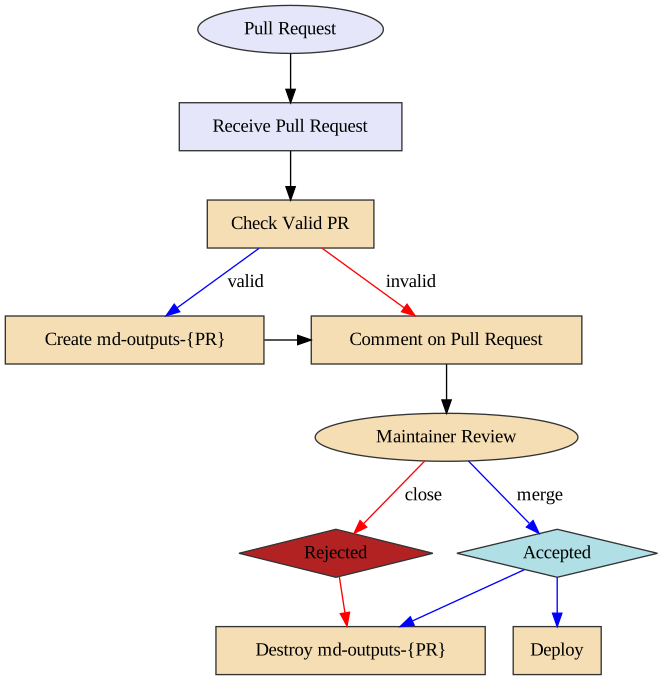
125 |
126 | ### Pre Flight Pull Request Validation (pr-preflight.yaml)
127 |
128 | This workflow runs every time a pull request is created and its purpose is to
129 | validate that the pull request is okay to run. This means the following things:
130 |
131 | 1. The pull request does not contain modified workflow files
132 | 2. If the pull request contains modified workflow files, it does not contain
133 | modified content files (such as a situation where @carpentries-bot will
134 | make an automated pull request)
135 | 3. The pull request does not contain an invalid commit hash (e.g. from a fork
136 | that was made before a lesson was transitioned from styles to use the
137 | workbench).
138 |
139 | Once the checks are finished, a comment is issued to the pull request, which
140 | will allow maintainers to determine if it is safe to run the
141 | "Receive Pull Request" workflow from new contributors.
142 |
143 | ### Recieve Pull Request (pr-recieve.yaml)
144 |
145 | **Note of caution:** This workflow runs arbitrary code by anyone who creates a
146 | pull request. GitHub has safeguarded the token used in this workflow to have no
147 | priviledges in the repository, but we have taken precautions to protect against
148 | spoofing.
149 |
150 | This workflow is triggered with every push to a pull request. If this workflow
151 | is already running and a new push is sent to the pull request, the workflow
152 | running from the previous push will be cancelled and a new workflow run will be
153 | started.
154 |
155 | The first step of this workflow is to check if it is valid (e.g. that no
156 | workflow files have been modified). If there are workflow files that have been
157 | modified, a comment is made that indicates that the workflow is not run. If
158 | both a workflow file and lesson content is modified, an error will occurr.
159 |
160 | The second step (if valid) is to build the generated content from the pull
161 | request. This builds the content and uploads three artifacts:
162 |
163 | 1. The pull request number (pr)
164 | 2. A summary of changes after the rendering process (diff)
165 | 3. The rendered files (build)
166 |
167 | Because this workflow builds generated content, it follows the same general
168 | process as the `sandpaper-main` workflow with the same caching mechanisms.
169 |
170 | The artifacts produced are used by the next workflow.
171 |
172 | ### Comment on Pull Request (pr-comment.yaml)
173 |
174 | This workflow is triggered if the `pr-recieve.yaml` workflow is successful.
175 | The steps in this workflow are:
176 |
177 | 1. Test if the workflow is valid and comment the validity of the workflow to the
178 | pull request.
179 | 2. If it is valid: create an orphan branch with two commits: the current state
180 | of the repository and the proposed changes.
181 | 3. If it is valid: update the pull request comment with the summary of changes
182 |
183 | Importantly: if the pull request is invalid, the branch is not created so any
184 | malicious code is not published.
185 |
186 | From here, the maintainer can request changes from the author and eventually
187 | either merge or reject the PR. When this happens, if the PR was valid, the
188 | preview branch needs to be deleted.
189 |
190 | ### Send Close PR Signal (pr-close-signal.yaml)
191 |
192 | Triggered any time a pull request is closed. This emits an artifact that is the
193 | pull request number for the next action
194 |
195 | ### Remove Pull Request Branch (pr-post-remove-branch.yaml)
196 |
197 | Tiggered by `pr-close-signal.yaml`. This removes the temporary branch associated with
198 | the pull request (if it was created).
199 |
--------------------------------------------------------------------------------
/episodes/04-singularity-files.md:
--------------------------------------------------------------------------------
1 | ---
2 | title: Files in Singularity containers
3 | teaching: 10
4 | exercises: 10
5 | ---
6 |
7 | ::::::::::::::::::::::::::::::::::::::: objectives
8 |
9 | - Understand that some data from the host system is usually made available by default within a container
10 | - Learn more about how Singularity handles users and binds directories from the host filesystem.
11 |
12 | ::::::::::::::::::::::::::::::::::::::::::::::::::
13 |
14 | :::::::::::::::::::::::::::::::::::::::: questions
15 |
16 | - How do I make data available in a Singularity container?
17 | - What data is made available by default in a Singularity container?
18 |
19 | ::::::::::::::::::::::::::::::::::::::::::::::::::
20 |
21 | The way in which user accounts and access permissions are handeld in Singularity containers is very different from that in Docker (where you effectively always have superuser/root access). When running a Singularity container, you only have the same permissions to access files as the user you are running as on the host system.
22 |
23 | In this episode we'll look at working with files in the context of Singularity containers and how this links with Singularity's approach to users and permissions within containers.
24 |
25 | ## Users within a Singularity container
26 |
27 | The first thing to note is that when you ran `whoami` within the container shell you started at the end of the previous episode, you should have seen the username that you were signed in as on the host system when you ran the container.
28 |
29 | For example, if my username were `jc1000`, I'd expect to see the following:
30 |
31 | ```bash
32 | $ singularity shell hello-world.sif
33 | Singularity> whoami
34 | jc1000
35 | ```
36 |
37 | But hang on! I downloaded the standard, public version of the `hello-world.sif` image from Singularity Hub. I haven't customised it in any way. How is it configured with my own user details?!
38 |
39 | If you have any familiarity with Linux system administration, you may be aware that in Linux, users and their Unix groups are configured in the `/etc/passwd` and `/etc/group` files respectively. In order for the shell within the container to know of my user, the relevant user information needs to be available within these files within the container.
40 |
41 | Assuming this feature is enabled within the installation of Singularity on your system, when the container is started, Singularity appends the relevant user and group lines from the host system to the `/etc/passwd` and `/etc/group` files within the container [\[1\]](https://www.intel.com/content/dam/www/public/us/en/documents/presentation/hpc-containers-singularity-advanced.pdf).
42 |
43 | This means that the host system can effectively ensure that you cannot access/modify/delete any data you should not be able to on the host system and you cannot run anything that you would not have permission to run on the host system since you are restricted to the same user permissions within the container as you are on the host system.
44 |
45 | ## Files and directories within a Singularity container
46 |
47 | Singularity also *binds* some *directories* from the host system where you are running the `singularity` command into the container that you're starting. Note that this bind process is not copying files into the running container, it is making an existing directory on the host system visible and accessible within the container environment. If you write files to this directory within the running container, when the container shuts down, those changes will persist in the relevant location on the host system.
48 |
49 | There is a default configuration of which files and directories are bound into the container but ultimate control of how things are set up on the system where you are running Singularity is determined by the system administrator. As a result, this section provides an overview but you may find that things are a little different on the system that you're running on.
50 |
51 | One directory that is likely to be accessible within a container that you start is your *home directory*. You may also find that the directory from which you issued the `singularity` command (the *current working directory*) is also mapped.
52 |
53 | The mapping of file content and directories from a host system into a Singularity container is illustrated in the example below showing a subset of the directories on the host Linux system and in a Singularity container:
54 |
55 | ```output
56 | Host system: Singularity container:
57 | ------------- ----------------------
58 | / /
59 | ├── bin ├── bin
60 | ├── etc ├── etc
61 | │ ├── ... │ ├── ...
62 | │ ├── group ─> user's group added to group file in container ─>│ ├── group
63 | │ └── passwd ──> user info added to passwd file in container ──>│ └── passwd
64 | ├── home ├── usr
65 | │ └── jc1000 ───> user home directory made available ──> ─┐ ├── sbin
66 | ├── usr in container via bind mount │ ├── home
67 | ├── sbin └────────>└── jc1000
68 | └── ... └── ...
69 |
70 | ```
71 |
72 | ::::::::::::::::::::::::::::::::::::::: challenge
73 |
74 | ## Questions and exercises: Files in Singularity containers
75 |
76 | **Q1:** What do you notice about the ownership of files in a container started from the hello-world image? (e.g. take a look at the ownership of files in the root directory (`/`))
77 |
78 | **Exercise 1:** In this container, try editing (for example using the editor `vi` which should be avaiable in the container) the `/rawr.sh` file. What do you notice?
79 |
80 | *If you're not familiar with `vi` there are many quick reference pages online showing the main commands for using the editor, for example [this one](https://web.mit.edu/merolish/Public/vi-ref.pdf).*
81 |
82 | **Exercise 2:** In your home directory within the container shell, try and create a simple text file. Is it possible to do this? If so, why? If not, why not?! If you can successfully create a file, what happens to it when you exit the shell and the container shuts down?
83 |
84 | ::::::::::::::: solution
85 |
86 | ## Answers
87 |
88 | **A1:** Use the `ls -l` command to see a detailed file listing including file ownership and permission details. You should see that most of the files in the `/` directory are owned by `root`, as you'd probably expect on any Linux system. If you look at the files in your home directory, they should be owned by you.
89 |
90 | **A Ex1:** We've already seen from the previous answer that the files in `/` are owned by `root` so we wouldn't expect to be able to edit them if we're not the root user. However, if you tried to edit `/rawr.sh` you probably saw that the file was read only and, if you tried for example to delete the file you would have seen an error similar to the following: `cannot remove '/rawr.sh': Read-only file system`. This tells us something else about the filesystem. It's not just that we don't have permission to delete the file, the filesystem itself is read-only so even the `root` user wouldn't be able to edit/delete this file. We'll look at this in more detail shortly.
91 |
92 | **A Ex2:** Within your home directory, you *should* be able to successfully create a file. Since you're seeing your home directory on the host system which has been bound into the container, when you exit and the container shuts down, the file that you created within the container should still be present when you look at your home directory on the host system.
93 |
94 |
95 |
96 | :::::::::::::::::::::::::
97 |
98 | ::::::::::::::::::::::::::::::::::::::::::::::::::
99 |
100 | ## Binding additional host system directories to the container
101 |
102 | You will sometimes need to bind additional host system directories into a container you are using over and above those bound by default. For example:
103 |
104 | - There may be a shared dataset in a shard location that you need access to in the container
105 | - You may require executables and software libraries in the container
106 |
107 | The `-B` option to the `singularity` command is used to specify additonal binds. For example, to bind the `/work/z19/shared` directory into a container you could use (note this directory is unlikely to exist on the host system you are using so you'll need to test this using a different directory):
108 |
109 | ```bash
110 | $ singularity shell -B /work/z19/shared hello-world.sif
111 | Singularity> ls /work/z19/shared
112 | ```
113 |
114 | ```output
115 | CP2K-regtest cube eleanor image256x192.pgm kevin pblas q-e-qe-6.7
116 | ebe evince.simg image512x384.pgm low_priority.slurm pblas.tar.gz q-qe
117 | Q1529568 edge192x128.pgm extrae image768x1152.pgm mkdir petsc regtest-ls-rtp_forCray
118 | adrianj edge256x192.pgm gnuplot-5.4.1.tar.gz image768x768.pgm moose.job petsc-hypre udunits-2.2.28.tar.gz
119 | antlr-2.7.7.tar.gz edge512x384.pgm hj job-defmpi-cpe-21.03-robust mrb4cab petsc-hypre-cpe21.03 xios-2.5
120 | cdo-archer2.sif edge768x768.pgm image192x128.pgm jsindt paraver petsc-hypre-cpe21.03-gcc10.2.0
121 | ```
122 |
123 | Note that, by default, a bind is mounted at the same path in the container as on the host system. You can also specify where a host directory is mounted in the container by separating the host path from the container path by a colon (`:`) in the option:
124 |
125 | ```bash
126 | $ singularity shell -B /work/z19/shared:/shared-data hello-world.sif
127 | Singularity> ls /shared-data
128 | ```
129 |
130 | ```output
131 | CP2K-regtest cube eleanor image256x192.pgm kevin pblas q-e-qe-6.7
132 | ebe evince.simg image512x384.pgm low_priority.slurm pblas.tar.gz q-qe
133 | Q1529568 edge192x128.pgm extrae image768x1152.pgm mkdir petsc regtest-ls-rtp_forCray
134 | adrianj edge256x192.pgm gnuplot-5.4.1.tar.gz image768x768.pgm moose.job petsc-hypre udunits-2.2.28.tar.gz
135 | antlr-2.7.7.tar.gz edge512x384.pgm hj job-defmpi-cpe-21.03-robust mrb4cab petsc-hypre-cpe21.03 xios-2.5
136 | cdo-archer2.sif edge768x768.pgm image192x128.pgm jsindt paraver petsc-hypre-cpe21.03-gcc10.2.0
137 | ```
138 |
139 | You can also specify multiple binds to `-B` by separating them by commas (`,`).
140 |
141 | You can also copy data into a container image at build time if there is some static data required in the image. We cover this later in the section on building Singularity containers.
142 |
143 | ## References
144 |
145 | \[1\] Gregory M. Kurzer, Containers for Science, Reproducibility and Mobility: Singularity P2. Intel HPC Developer Conference, 2017. Available at: [https://www.intel.com/content/dam/www/public/us/en/documents/presentation/hpc-containers-singularity-advanced.pdf](https://www.intel.com/content/dam/www/public/us/en/documents/presentation/hpc-containers-singularity-advanced.pdf)
146 |
147 | :::::::::::::::::::::::::::::::::::::::: keypoints
148 |
149 | - Your current directory and home directory are usually available by default in a container.
150 | - You have the same username and permissions in a container as on the host system.
151 | - You can specify additional host system directories to be available in the container.
152 |
153 | ::::::::::::::::::::::::::::::::::::::::::::::::::
154 |
155 |
156 |
--------------------------------------------------------------------------------
/episodes/01-singularity-gettingstarted.md:
--------------------------------------------------------------------------------
1 | ---
2 | title: 'Singularity: Getting started'
3 | start: yes
4 | teaching: 30
5 | exercises: 20
6 | ---
7 |
8 | ::::::::::::::::::::::::::::::::::::::: objectives
9 |
10 | - Understand what Singularity is and when you might want to use it.
11 | - Undertake your first run of a simple Singularity container.
12 |
13 | ::::::::::::::::::::::::::::::::::::::::::::::::::
14 |
15 | :::::::::::::::::::::::::::::::::::::::: questions
16 |
17 | - What is Singularity and why might I want to use it?
18 |
19 | ::::::::::::::::::::::::::::::::::::::::::::::::::
20 |
21 | The episodes in this lesson will introduce you to the [Singularity](https://sylabs.io/singularity/) container platform and demonstrate how to set up and use Singularity.
22 |
23 | This material is split into 2 parts:
24 |
25 | *Part I: Basic usage, working with images*
26 |
27 | 1. **Singularity: Getting started**: This introductory episode
28 |
29 | Working with Singularity containers:
30 |
31 |
32 | - The singularity cache: Why, where and how does Singularity cache images locally?
33 | - Running commands within a Singularity container: How to run commands within a Singularity container.
34 | - Working with files and Singularity containers: Moving files into a Singularity container; accessing files on the host from within a container.
35 | - Using Docker images with Singularity: How to run Singularity containers from Docker images.
36 |
37 | *Part II: Creating images, running parallel codes*
38 | - Preparing to build Singularity images: Getting started with the Docker Singularity container.
- Building Singularity images: Explaining how to build and share your own Singularity images.
- Running MPI parallel jobs using Singularity containers: Explaining how to run MPI parallel codes from within Singularity containers.
39 |
40 |
41 | ::::::::::::::::::::::::::::::::::::::::: callout
42 |
43 | ## Work in progress...
44 |
45 | This lesson is new material that is under ongoing development. We will introduce Singularity and demonstrate how to work with it. As the tools and best practices continue to develop, elements of this material are likely to evolve. We welcome any comments or suggestions on how the material can be improved or extended.
46 |
47 |
48 | ::::::::::::::::::::::::::::::::::::::::::::::::::
49 |
50 | ## Singularity - Part I
51 |
52 | ## What is Singularity?
53 |
54 | [Singularity](https://sylabs.io/singularity/) is a container platform that allows software engineers and researchers to easily share their work with others by packaging and deploying their software applications in a portable and reproducible manner. When you download a Singularity container image, you essentially receive a virtual computer disk that contains all of the necessary software, libraries and configuration to run one or more applications or undertake a particular task, e.g. to support a specific research project. This saves you the time and effort of installing and configuring software on your own system or setting up a new computer from scratch, as you can simply run a Singularity container from the image and have a virtual environment that is identical to the one used by the person who created the image. Container platforms like Singularity provide a convenient and consistent way to access and run software and tools. Singularity is increasingly widely used in the research community for supporting research projects as it allows users to isolate their software environments from the host operating system and can simplify tasks such as running multiple experiments simultaneously.
55 |
56 | You may be familiar with Docker, another container platform that is now used widely. If you are, you will see that in some ways, Singularity is similar to Docker. However, in others, particularly in the system's architecture, it is fundamentally different. These differences mean that Singularity is particularly well-suited to running on distributed, High Performance Computing (HPC) infrastructure, as well as a Linux laptop or desktop!
57 |
58 | *Later in this material, when we come to look at building Singularity images ourselves, we will make use of Docker to provide an environment in which we can run Singularity with administrative privileges. In this context, some basic knowledge of Docker is strongly recommended. If you are covering this module independently, or as part of a course that hasn't covered Docker, you can find an introduction to Docker in the "[Reproducible Computational Environments Using Containers: Introduction to Docker](https://carpentries-incubator.github.io/docker-introduction/index.html)" lesson.*
59 |
60 | System administrators will not, generally, install Docker on shared computing platforms such as lab desktops, research clusters or HPC platforms because the design of Docker presents potential security issues for shared platforms with multiple users. Singularity, on the other hand, can be run by end-users entirely within "user space", that is, no special administrative privileges need to be assigned to a user in order for them to run and interact with containers on a platform where Singularity has been installed.
61 |
62 | ## What is the relationship between Singularity, SingularityCE and Apptainer?
63 |
64 | Singularity is open source and was initially developed within the research community. The company [Sylabs](https://sylabs.io/) was founded in 2018 to provide commercial support for Singularity. In [May 2021](https://sylabs.io/2021/05/singularity-community-edition/), Sylabs "forked" the codebase to create a new project called [SingularityCE]((https://sylabs.io/singularity)) (where CE means "Community Edition"). This in effect marks a common point from which two projects---SingularityCE and Singularity---developed. Sylabs continue to develop both the free, open source SingularityCE and a Pro/Enterprise edition of the software. In November 2021, the original open source Singularity project [renamed itself to Apptainer](https://apptainer.org/news/community-announcement-20211130/) and [joined the Linux Foundation](https://www.linuxfoundation.org/press/press-release/new-linux-foundation-project-accelerates-collaboration-on-container-systems-between-enterprise-and-high-performance-computing-environments).
65 |
66 | At the time of writing, in the context of the material covered in this lesson, Apptainer and Singularity are effectively interchangeable. If you are working on a platform that now has Apptainer installed, you might find that the only change you need to make when working through this material is to use the the command `apptainer` instead of `singularity`. This course will continue to refer to Singularity until differences between the projects warrant choosing one project or the other for the course material.
67 |
68 | ## Getting started with Singularity
69 |
70 | Initially developed within the research community, Singularity is open source and the [repository](https://github.com/hpcng/singularity) is currently available in the "[The Next Generation of High Performance Computing](https://github.com/hpcng)" GitHub organisation. Part I of this Singularity material is intended to be undertaken on a remote platform where Singularity has been pre-installed.
71 |
72 | *If you're attending a taught version of this course, you will be provided with access details for a remote platform made available to you for use for Part I of the Singularity material. This platform will have the Singularity software pre-installed.*
73 |
74 | ::::::::::::::::::::::::::::::::::::::::: callout
75 |
76 | ## Installing Singularity on your own laptop/desktop
77 |
78 | If you have a Linux system on which you have administrator access and you would like to install Singularity on this system, some information is provided at the start of [Part II of the Singularity material](06-singularity-images-prep.md).
79 |
80 |
81 | ::::::::::::::::::::::::::::::::::::::::::::::::::
82 |
83 | Sign in to the remote platform, with Singularity installed, that you've been provided with access to. Check that the `singularity` command is available in your terminal:
84 |
85 | ::::::::::::::::::::::::::::::::::::::::: callout
86 |
87 | ## Loading a module
88 |
89 | HPC systems often use *modules* to provide access to software on the system so you may need to use the command:
90 |
91 | ```bash
92 | $ module load singularity
93 | ```
94 |
95 | before you can use the `singularity` command on the system.
96 |
97 |
98 | ::::::::::::::::::::::::::::::::::::::::::::::::::
99 |
100 | ```bash
101 | $ singularity --version
102 | ```
103 |
104 | ```output
105 | singularity version 3.5.3
106 | ```
107 |
108 | Depending on the version of Singularity installed on your system, you may see a different version. At the time of writing, `v3.5.3` is the latest release of Singularity.
109 |
110 | ## Images and containers
111 |
112 | We'll start with a brief note on the terminology used in this section of the course. We refer to both ***images*** and ***containers***. What is the distinction between these two terms?
113 |
114 | ***Images*** are bundles of files including an operating system, software and potentially data and other application-related files. They may sometimes be referred to as a *disk image* or *container image* and they may be stored in different ways, perhaps as a single file, or as a group of files. Either way, we refer to this file, or collection of files, as an image.
115 |
116 | A ***container*** is a virtual environment that is based on an image. That is, the files, applications, tools, etc that are available within a running container are determined by the image that the container is started from. It may be possible to start multiple container instances from an image. You could, perhaps, consider an image to be a form of template from which running container instances can be started.
117 |
118 | ## Getting an image and running a Singularity container
119 |
120 | If you recall from learning about Docker, Docker images are formed of a set of *layers* that make up the complete image. When you pull a Docker image from Docker Hub, you see the different layers being downloaded to your system. They are stored in your local Docker repository on your system and you can see details of the available images using the `docker` command.
121 |
122 | Singularity images are a little different. Singularity uses the [Singularity Image Format (SIF)](https://github.com/sylabs/sif) and images are provided as single `SIF` files (with a `.sif` filename extension). Singularity images can be pulled from [Singularity Hub](https://singularity-hub.org/), a registry for container images. Singularity is also capable of running containers based on images pulled from [Docker Hub](https://hub.docker.com/) and some other sources. We'll look at accessing containers from Docker Hub later in the Singularity material.
123 |
124 | ::::::::::::::::::::::::::::::::::::::::: callout
125 |
126 | ## Singularity Hub
127 |
128 | Note that in addition to providing a repository that you can pull images from, [Singularity Hub](https://singularity-hub.org/) can also build Singularity images for you from a ***recipe*** - a configuration file defining the steps to build an image. We'll look at recipes and building images later.
129 |
130 |
131 | ::::::::::::::::::::::::::::::::::::::::::::::::::
132 |
133 | Let's begin by creating a `test` directory, changing into it and *pulling* a test *Hello World* image from Singularity Hub:
134 |
135 | ```bash
136 | $ mkdir test
137 | $ cd test
138 | $ singularity pull hello-world.sif shub://vsoch/hello-world
139 | ```
140 |
141 | ```output
142 | INFO: Downloading shub image
143 | 59.75 MiB / 59.75 MiB [===============================================================================================================] 100.00% 52.03 MiB/s 1s
144 | ```
145 |
146 | What just happened?! We pulled a SIF image from Singularity Hub using the `singularity pull` command and directed it to store the image file using the name `hello-world.sif` in the current directory. If you run the `ls` command, you should see that the `hello-world.sif` file is now present in the current directory. This is our image and we can now run a container based on this image:
147 |
148 | ```bash
149 | $ singularity run hello-world.sif
150 | ```
151 |
152 | ```output
153 | RaawwWWWWWRRRR!! Avocado!
154 | ```
155 |
156 | The above command ran the *hello-world* container from the image we downloaded from Singularity Hub and the resulting output was shown.
157 |
158 | How did the container determine what to do when we ran it?! What did running the container actually do to result in the displayed output?
159 |
160 | When you run a container from a Singularity image without using any additional command line arguments, the container runs the default run script that is embedded within the image. This is a shell script that can be used to run commands, tools or applications stored within the image on container startup. We can inspect the image's run script using the `singularity inspect` command:
161 |
162 | ```bash
163 | $ singularity inspect -r hello-world.sif
164 | ```
165 |
166 | ```output
167 | #!/bin/sh
168 |
169 | exec /bin/bash /rawr.sh
170 |
171 | ```
172 |
173 | This shows us the script within the `hello-world.sif` image configured to run by default when we use the `singularity run` command.
174 |
175 | That concludes this introductory Singularity episode. The next episode looks in more detail at running containers.
176 |
177 | :::::::::::::::::::::::::::::::::::::::: keypoints
178 |
179 | - Singularity is another container platform and it is often used in cluster/HPC/research environments.
180 | - Singularity has a different security model to other container platforms, one of the key reasons that it is well suited to HPC and cluster environments.
181 | - Singularity has its own container image format (SIF).
182 | - The `singularity` command can be used to pull images from Singularity Hub and run a container from an image file.
183 |
184 | ::::::::::::::::::::::::::::::::::::::::::::::::::
185 |
--------------------------------------------------------------------------------
/episodes/06-singularity-images-prep.md:
--------------------------------------------------------------------------------
1 | ---
2 | title: Preparing to build Singularity images
3 | teaching: 15
4 | exercises: 20
5 | ---
6 |
7 | ::::::::::::::::::::::::::::::::::::::: objectives
8 |
9 | - Understand how to the Docker Singularity image provides an environment for building Singularity images.
10 | - Understand different ways to run containers based on the Docker Singularity image.
11 |
12 | ::::::::::::::::::::::::::::::::::::::::::::::::::
13 |
14 | :::::::::::::::::::::::::::::::::::::::: questions
15 |
16 | - What environment do I need to build a Singularity image and how do I set it up?
17 |
18 | ::::::::::::::::::::::::::::::::::::::::::::::::::
19 |
20 | ## Singularity - Part II
21 |
22 | ## Brief recap
23 |
24 | In the five episodes covering Part I of this Singularity material we've seen how Singularity can be used on a computing platform where you don't have any administrative privileges. The software was pre-installed and it was possible to work with existing images such as Singularity image files already stored on the platform or images obtained from a remote image repository such as Singularity Hub or Docker Hub.
25 |
26 | It is clear that between Singularity Hub and Docker Hub there is a huge array of images available, pre-configured with a wide range of software applications, tools and services. But what if you want to create your own images or customise existing images?
27 |
28 | In this first of three episodes in Part II of the Singularity material, we'll look at preparing to build Singularity images.
29 |
30 | ## Preparing to use Singularity for building images
31 |
32 | So far you've been able to work with Singularity from your own user account as a non-privileged user. This part of the Singularity material requires that you use Singularity in an environment where you have administrative (root) access. While it is possible to build Singularity containers without root access, it is highly recommended that you do this as the *root* user, as highlighted in [this section](https://sylabs.io/guides/3.5/user-guide/build_a_container.html#creating-writable-sandbox-directories) of the Singularity documentation. Bear in mind that the system that you use to build containers doesn't have to be the system where you intend to run the containers. If, for example, you are intending to build a container that you can subsequently run on a Linux-based cluster, you could build the container on your own Linux-based desktop or laptop computer. You could then transfer the built image directly to the target platform or upload it to an image repository and pull it onto the target platform from this repository.
33 |
34 | There are **three** different options for accessing a suitable environment to undertake the material in this part of the course:
35 |
36 | 1. Run Singularity from within a Docker container - this will enable you to have the required privileges to build images
37 | 2. Install Singularity locally on a system where you have administrative access
38 | 3. Use Singularity on a system where it is already pre-installed and you have administrative (root) access
39 |
40 | We'll focus on the first option in this part of the course - *running singularity from within a Docker container*. If you would like to install Singularity directly on your system, see the box below for some further pointers. However, please note that the installation process is an advanced task that is beyond the scope of this course so we won't be covering this.
41 |
42 | ::::::::::::::::::::::::::::::::::::::::: callout
43 |
44 | ## Installing Singularity on your local system (optional) \[Advanced task\]
45 |
46 | If you are running Linux and would like to install Singularity locally on your system, the source code is provided via the [The Next Generation of High Performance Computing (HPCng) community](https://github.com/hpcng)'s [Singularity repository](https://github.com/hpcng/singularity). See the releases [here](https://github.com/hpcng/singularity/releases). You will need to install various dependencies on your system and then build Singularity from source code.
47 |
48 | *If you are not familiar with building applications from source code, it is strongly recommended that you use the Docker Singularity image, as described below in the "Getting started with the Docker Singularity image" section rather than attempting to build and install Singularity yourself. The installation process is an advanced task that is beyond the scope of this session.*
49 |
50 | However, if you have Linux systems knowledge and would like to attempt a local install of Singularity, you can find details in the [INSTALL.md](https://github.com/hpcng/singularity/blob/master/INSTALL.md) file within the Singularity repository that explains how to install the prerequisites and build and install the software. Singularity is written in the [Go](https://golang.org/) programming language and Go is the main dependency that you'll need to install on your system. The process of installing Go and any other requirements is detailed in the INSTALL.md file.
51 |
52 | ::::::::::::::::::::::::::::::::::::::::::::::::::
53 |
54 | ::::::::::::::::::::::::::::::::::::::::: callout
55 |
56 | ## Note
57 |
58 | If you do not have access to a system with Docker installed, or a Linux system where you can build and install Singularity but you have administrative privileges on another system, you could look at installing a virtualisation tool such as [VirtualBox](https://www.virtualbox.org/) on which you could run a Linux Virtual Machine (VM) image. Within the Linux VM image, you will be able to install Singularity. Again this is beyond the scope of the course.
59 |
60 | If you are not able to access/run Singularity yourself on a system where you have administrative privileges, you can still follow through this material as it is being taught (or read through it in your own time if you're not participating in a taught version of the course) since it will be helpful to have an understanding of how Singularity images can be built.
61 |
62 | You could also attempt to follow this section of the lesson without using root and instead using the `singularity` command's [`--fakeroot`](https://sylabs.io/guides/3.5/user-guide/fakeroot.html) option. However, you may encounter issues with permissions when trying to build images and run your containers and this is why running the commands as root is strongly recommended and is the approach described in this lesson.
63 |
64 |
65 | ::::::::::::::::::::::::::::::::::::::::::::::::::
66 |
67 | ## Getting started with the Docker Singularity image
68 |
69 | The [Singularity Docker image](https://quay.io/repository/singularity/singularity) is available from [Quay.io](https://quay.io/).
70 |
71 | ::::::::::::::::::::::::::::::::::::::: challenge
72 |
73 | ## Familiarise yourself with the Docker Singularity image
74 |
75 | - Using your previously acquired Docker knowledge, get the Singularity image for `v3.5.3` and ensure that you can run a Docker container using this image. For this exercise, we recommend using the image with the `v3.5.3-slim` tag since it's a much smaller image.
76 |
77 | - Create a directory (e.g. `$HOME/singularity_data`) on your host machine that you can use for storage of *definition files* (we'll introduce these shortly) and generated image files.
78 |
79 | This directory should be bind mounted into the Docker container at the location `/home/singularity` every time you run it - this will give you a location in which to store built images so that they are available on the host system once the container exits. (take a look at the `-v` switch to the `docker run` command)
80 |
81 | *Hint: To be able to build an image using the Docker Singularity container, you'll need to add the `--privileged` switch to your docker command line.*
82 |
83 | *Hint: If you want to run a shell within the Docker Singularity container, you'll need to override the entrypoint to tell the container to run `/bin/bash` - take a look at Docker's `--entrypoint` switch.*
84 |
85 | Questions / Exercises:
86 |
87 | 1. Can you run a container from the Docker Singularity image? What is happening when you run the container?
88 | 2. Can you run an interactive `/bin/sh` shell in the Docker Singularity container?
89 | 3. Can you run an interactive Singularity shell in a Singularity container, within the Docker Singularity container?!
90 |
91 | ::::::::::::::: solution
92 |
93 | ## Running a container from the image
94 |
95 | Answers:
96 |
97 | 1. *Can you run a container from the Docker Singularity image? What is happening when you run the container?*
98 |
99 | The name/tag of the Docker Singularity image we'll be using is: `quay.io/singularity/singularity:v3.5.3-slim`
100 |
101 | Having a bound directory from the host system accessible within your running Docker Singularity container will give you somewhere to place created Singularity images so that they are accessible on the host system after the container exits. Begin by changing into the directory that you created above for storing your definiton files and built images (e.g. `$HOME/singularity_data`).
102 |
103 | Running a Docker container from the image and binding the current directory to `/home/singularity` within the container can be achieved as follows:
104 |
105 | ```
106 | docker run --privileged --rm -v ${PWD}:/home/singularity quay.io/singularity/singularity:v3.5.3-slim
107 | ```
108 |
109 | Note that the image is configured to run the `singularity` command by default. So, when you run a container from it with no arguments, you see the singularity help output as if you had Singularity installed locally and had typed `singularity` on the command line.
110 |
111 | To run a Singularity command, such as `singularity cache list`, within the docker container directly from the host system's terminal you'd enter:
112 |
113 | ```
114 | docker run --privileged --rm -v ${PWD}:/home/singularity quay.io/singularity/singularity:v3.5.3-slim cache list
115 | ```
116 |
117 | The following diagram shows how the Docker Singularity image is being used to run a container on your host system and how a Singularity container can, in turn, be started within the Docker container:
118 |
119 | 
120 |
121 | 2. *Can you run an interactive shell in the Docker Singularity container?*
122 |
123 | To start a shell within the Singularity Docker container where you can then run the `singularity` command directly:
124 |
125 | ```
126 | docker run -it --entrypoint=/bin/sh --privileged --rm -v ${PWD}:/home/singularity quay.io/singularity/singularity:v3.5.3-slim
127 | ```
128 |
129 | Here we use the `--entrypoint` switch to the `docker` command to override the default behaviour when starting the container and instead of running the `singularity` command directly, we run a 'sh' shell. We also add the `-it` switch to provide an interactive terminal connection.
130 |
131 | 3. *Can you run an interactive Singularity shell in a Singularity container, within the Docker Singularity container?!*
132 |
133 | As shown in the diagram above, you can do this. It is necessary to run `singularity shell ` within the Docker Singularity container. You would use a command similar to the following (assuming that `my_test_image.sif` is in the current directory where you run this command):
134 |
135 | ```
136 | docker run --rm -it --privileged -v ${PWD}:/home/singularity quay.io/singularity/singularity:v3.5.3-slim shell --contain /home/singularity/my_test_image.sif
137 | ```
138 |
139 | You may notice there's a flag being passed to singularity shell (`--contain` - `-c` is the short form and also works). What is this doing? When running a singularity container, you may remember that we highlighted that some key files/directories from the host system are mapped into containers by default when you start them. The configuration in the Docker Singularity container attempts to mount the file `/etc/localtime` into the Singularity container but there is not a timezone configuration present in the Docker Singularity container and this file doesn't exist resulting in an error. `--contain` prevents the default mounting of some key files/directories into the container and prevents this error from occurring. Later in this material, there's an example of how to rectify the issue by creating a timezone configuration in the Docker Singularity container so that the `--contain` switch is no longer needed.
140 |
141 | *Summary / Comments:*
142 |
143 | You may choose to:
144 |
145 | - open a shell within the Docker image so you can work at a command prompt and run the `singularity` command directly
146 | - use the `docker run` command to run a new container instance every time you want to run the `singularity` command (the Docker Singularity image is configured with the `singularity` command as its entrypoint).
147 |
148 | Either option is fine for this section of the material.
149 |
150 | To make things easier to read in the remainder of the material, command examples will use the `singularity` command directly, e.g. `singularity cache list`. If you're running a shell in the Docker Singularity container, you can enter the commands as they appear. If you're using the container's default run behaviour and running a container instance for each run of the command, you'll need to replace `singularity` with `docker run --privileged -v ${PWD}:/home/singularity quay.io/singularity/singularity:v3.5.3-slim` or similar.
151 |
152 | This can be a little cumbersome to work with. However, if you're using Linux or macOS on your host system, you can add a *command alias* to alias the command `singularity` on your host system to run the Docker Singularity container, e.g. (for bash shells - syntax for other shells varies):
153 |
154 | ```
155 | alias singularity='docker run --privileged -v ${PWD}:/home/singularity quay.io/singularity/singularity:v3.5.3-slim'
156 | ```
157 |
158 | This means you'll only have to type `singularity` at the command line as shown in the examples throughout this section of the material
159 |
160 | :::::::::::::::::::::::::
161 |
162 | ::::::::::::::::::::::::::::::::::::::::::::::::::
163 |
164 | :::::::::::::::::::::::::::::::::::::::: keypoints
165 |
166 | - A Docker image is provided to run Singularity - this avoids the need to have a local Singularity installation on your system.
167 | - The Docker Singularity image can be used to build containers on Linux, macOS and Windows.
168 | - You can also run Singularity containers within the Docker Singularity image.
169 |
170 | ::::::::::::::::::::::::::::::::::::::::::::::::::
171 |
172 |
173 |
--------------------------------------------------------------------------------
/bin/workshop_check.py:
--------------------------------------------------------------------------------
1 | '''Check that a workshop's index.html metadata is valid. See the
2 | docstrings on the checking functions for a summary of the checks.
3 | '''
4 |
5 |
6 | import sys
7 | import os
8 | import re
9 | from datetime import date
10 | from util import Reporter, split_metadata, load_yaml, check_unwanted_files
11 |
12 | # Metadata field patterns.
13 | EMAIL_PATTERN = r'[^@]+@[^@]+\.[^@]+'
14 | HUMANTIME_PATTERN = r'((0?[1-9]|1[0-2]):[0-5]\d(am|pm)(-|to)(0?[1-9]|1[0-2]):[0-5]\d(am|pm))|((0?\d|1\d|2[0-3]):[0-5]\d(-|to)(0?\d|1\d|2[0-3]):[0-5]\d)'
15 | EVENTBRITE_PATTERN = r'\d{9,10}'
16 | URL_PATTERN = r'https?://.+'
17 |
18 | # Defaults.
19 | CARPENTRIES = ("dc", "swc", "lc", "cp")
20 | DEFAULT_CONTACT_EMAIL = 'admin@software-carpentry.org'
21 |
22 | USAGE = 'Usage: "workshop_check.py path/to/root/directory"'
23 |
24 | # Country and language codes. Note that codes mean different things: 'ar'
25 | # is 'Arabic' as a language but 'Argentina' as a country.
26 |
27 | ISO_COUNTRY = [
28 | 'ad', 'ae', 'af', 'ag', 'ai', 'al', 'am', 'an', 'ao', 'aq', 'ar', 'as',
29 | 'at', 'au', 'aw', 'ax', 'az', 'ba', 'bb', 'bd', 'be', 'bf', 'bg', 'bh',
30 | 'bi', 'bj', 'bm', 'bn', 'bo', 'br', 'bs', 'bt', 'bv', 'bw', 'by', 'bz',
31 | 'ca', 'cc', 'cd', 'cf', 'cg', 'ch', 'ci', 'ck', 'cl', 'cm', 'cn', 'co',
32 | 'cr', 'cu', 'cv', 'cx', 'cy', 'cz', 'de', 'dj', 'dk', 'dm', 'do', 'dz',
33 | 'ec', 'ee', 'eg', 'eh', 'er', 'es', 'et', 'eu', 'fi', 'fj', 'fk', 'fm',
34 | 'fo', 'fr', 'ga', 'gb', 'gd', 'ge', 'gf', 'gg', 'gh', 'gi', 'gl', 'gm',
35 | 'gn', 'gp', 'gq', 'gr', 'gs', 'gt', 'gu', 'gw', 'gy', 'hk', 'hm', 'hn',
36 | 'hr', 'ht', 'hu', 'id', 'ie', 'il', 'im', 'in', 'io', 'iq', 'ir', 'is',
37 | 'it', 'je', 'jm', 'jo', 'jp', 'ke', 'kg', 'kh', 'ki', 'km', 'kn', 'kp',
38 | 'kr', 'kw', 'ky', 'kz', 'la', 'lb', 'lc', 'li', 'lk', 'lr', 'ls', 'lt',
39 | 'lu', 'lv', 'ly', 'ma', 'mc', 'md', 'me', 'mg', 'mh', 'mk', 'ml', 'mm',
40 | 'mn', 'mo', 'mp', 'mq', 'mr', 'ms', 'mt', 'mu', 'mv', 'mw', 'mx', 'my',
41 | 'mz', 'na', 'nc', 'ne', 'nf', 'ng', 'ni', 'nl', 'no', 'np', 'nr', 'nu',
42 | 'nz', 'om', 'pa', 'pe', 'pf', 'pg', 'ph', 'pk', 'pl', 'pm', 'pn', 'pr',
43 | 'ps', 'pt', 'pw', 'py', 'qa', 're', 'ro', 'rs', 'ru', 'rw', 'sa', 'sb',
44 | 'sc', 'sd', 'se', 'sg', 'sh', 'si', 'sj', 'sk', 'sl', 'sm', 'sn', 'so',
45 | 'sr', 'st', 'sv', 'sy', 'sz', 'tc', 'td', 'tf', 'tg', 'th', 'tj', 'tk',
46 | 'tl', 'tm', 'tn', 'to', 'tr', 'tt', 'tv', 'tw', 'tz', 'ua', 'ug', 'um',
47 | 'us', 'uy', 'uz', 'va', 'vc', 've', 'vg', 'vi', 'vn', 'vu', 'wf', 'ws',
48 | 'ye', 'yt', 'za', 'zm', 'zw'
49 | ]
50 |
51 | ISO_LANGUAGE = [
52 | 'aa', 'ab', 'ae', 'af', 'ak', 'am', 'an', 'ar', 'as', 'av', 'ay', 'az',
53 | 'ba', 'be', 'bg', 'bh', 'bi', 'bm', 'bn', 'bo', 'br', 'bs', 'ca', 'ce',
54 | 'ch', 'co', 'cr', 'cs', 'cu', 'cv', 'cy', 'da', 'de', 'dv', 'dz', 'ee',
55 | 'el', 'en', 'eo', 'es', 'et', 'eu', 'fa', 'ff', 'fi', 'fj', 'fo', 'fr',
56 | 'fy', 'ga', 'gd', 'gl', 'gn', 'gu', 'gv', 'ha', 'he', 'hi', 'ho', 'hr',
57 | 'ht', 'hu', 'hy', 'hz', 'ia', 'id', 'ie', 'ig', 'ii', 'ik', 'io', 'is',
58 | 'it', 'iu', 'ja', 'jv', 'ka', 'kg', 'ki', 'kj', 'kk', 'kl', 'km', 'kn',
59 | 'ko', 'kr', 'ks', 'ku', 'kv', 'kw', 'ky', 'la', 'lb', 'lg', 'li', 'ln',
60 | 'lo', 'lt', 'lu', 'lv', 'mg', 'mh', 'mi', 'mk', 'ml', 'mn', 'mr', 'ms',
61 | 'mt', 'my', 'na', 'nb', 'nd', 'ne', 'ng', 'nl', 'nn', 'no', 'nr', 'nv',
62 | 'ny', 'oc', 'oj', 'om', 'or', 'os', 'pa', 'pi', 'pl', 'ps', 'pt', 'qu',
63 | 'rm', 'rn', 'ro', 'ru', 'rw', 'sa', 'sc', 'sd', 'se', 'sg', 'si', 'sk',
64 | 'sl', 'sm', 'sn', 'so', 'sq', 'sr', 'ss', 'st', 'su', 'sv', 'sw', 'ta',
65 | 'te', 'tg', 'th', 'ti', 'tk', 'tl', 'tn', 'to', 'tr', 'ts', 'tt', 'tw',
66 | 'ty', 'ug', 'uk', 'ur', 'uz', 've', 'vi', 'vo', 'wa', 'wo', 'xh', 'yi',
67 | 'yo', 'za', 'zh', 'zu'
68 | ]
69 |
70 |
71 | def look_for_fixme(func):
72 | """Decorator to fail test if text argument starts with "FIXME"."""
73 |
74 | def inner(arg):
75 | if (arg is not None) and \
76 | isinstance(arg, str) and \
77 | arg.lstrip().startswith('FIXME'):
78 | return False
79 | return func(arg)
80 | return inner
81 |
82 |
83 | @look_for_fixme
84 | def check_layout(layout):
85 | '''"layout" in YAML header must be "workshop".'''
86 |
87 | return layout == 'workshop'
88 |
89 |
90 | @look_for_fixme
91 | def check_carpentry(layout):
92 | '''"carpentry" in YAML header must be "dc", "swc", "lc", or "cp".'''
93 |
94 | return layout in CARPENTRIES
95 |
96 |
97 | @look_for_fixme
98 | def check_country(country):
99 | '''"country" must be a lowercase ISO-3166 two-letter code.'''
100 |
101 | return country in ISO_COUNTRY
102 |
103 |
104 | @look_for_fixme
105 | def check_language(language):
106 | '''"language" must be a lowercase ISO-639 two-letter code.'''
107 |
108 | return language in ISO_LANGUAGE
109 |
110 |
111 | @look_for_fixme
112 | def check_humandate(date):
113 | """
114 | 'humandate' must be a human-readable date with a 3-letter month
115 | and 4-digit year. Examples include 'Feb 18-20, 2025' and 'Feb 18
116 | and 20, 2025'. It may be in languages other than English, but the
117 | month name should be kept short to aid formatting of the main
118 | Carpentries web site.
119 | """
120 |
121 | if ',' not in date:
122 | return False
123 |
124 | month_dates, year = date.split(',')
125 |
126 | # The first three characters of month_dates are not empty
127 | month = month_dates[:3]
128 | if any(char == ' ' for char in month):
129 | return False
130 |
131 | # But the fourth character is empty ("February" is illegal)
132 | if month_dates[3] != ' ':
133 | return False
134 |
135 | # year contains *only* numbers
136 | try:
137 | int(year)
138 | except:
139 | return False
140 |
141 | return True
142 |
143 |
144 | @look_for_fixme
145 | def check_humantime(time):
146 | """
147 | 'humantime' is a human-readable start and end time for the
148 | workshop, such as '09:00 - 16:00'.
149 | """
150 |
151 | return bool(re.match(HUMANTIME_PATTERN, time.replace(' ', '')))
152 |
153 |
154 | def check_date(this_date):
155 | """
156 | 'startdate' and 'enddate' are machine-readable start and end dates
157 | for the workshop, and must be in YYYY-MM-DD format, e.g.,
158 | '2015-07-01'.
159 | """
160 |
161 | # YAML automatically loads valid dates as datetime.date.
162 | return isinstance(this_date, date)
163 |
164 |
165 | @look_for_fixme
166 | def check_latitude_longitude(latlng):
167 | """
168 | 'latlng' must be a valid latitude and longitude represented as two
169 | floating-point numbers separated by a comma.
170 | """
171 |
172 | try:
173 | lat, lng = latlng.split(',')
174 | lat = float(lat)
175 | lng = float(lng)
176 | return (-90.0 <= lat <= 90.0) and (-180.0 <= lng <= 180.0)
177 | except ValueError:
178 | return False
179 |
180 |
181 | def check_instructors(instructors):
182 | """
183 | 'instructor' must be a non-empty comma-separated list of quoted
184 | names, e.g. ['First name', 'Second name', ...']. Do not use 'TBD'
185 | or other placeholders.
186 | """
187 |
188 | # YAML automatically loads list-like strings as lists.
189 | return isinstance(instructors, list) and len(instructors) > 0
190 |
191 |
192 | def check_helpers(helpers):
193 | """
194 | 'helper' must be a comma-separated list of quoted names,
195 | e.g. ['First name', 'Second name', ...']. The list may be empty.
196 | Do not use 'TBD' or other placeholders.
197 | """
198 |
199 | # YAML automatically loads list-like strings as lists.
200 | return isinstance(helpers, list) and len(helpers) >= 0
201 |
202 |
203 | @look_for_fixme
204 | def check_emails(emails):
205 | """
206 | 'emails' must be a comma-separated list of valid email addresses.
207 | The list may be empty. A valid email address consists of characters,
208 | an '@', and more characters. It should not contain the default contact
209 | """
210 |
211 | # YAML automatically loads list-like strings as lists.
212 | if (isinstance(emails, list) and len(emails) >= 0):
213 | for email in emails:
214 | if ((not bool(re.match(EMAIL_PATTERN, email))) or (email == DEFAULT_CONTACT_EMAIL)):
215 | return False
216 | else:
217 | return False
218 |
219 | return True
220 |
221 |
222 | def check_eventbrite(eventbrite):
223 | """
224 | 'eventbrite' (the Eventbrite registration key) must be 9 or more
225 | digits. It may appear as an integer or as a string.
226 | """
227 |
228 | if isinstance(eventbrite, int):
229 | return True
230 | else:
231 | return bool(re.match(EVENTBRITE_PATTERN, eventbrite))
232 |
233 |
234 | @look_for_fixme
235 | def check_collaborative_notes(collaborative_notes):
236 | """
237 | 'collaborative_notes' must be a valid URL.
238 | """
239 |
240 | return bool(re.match(URL_PATTERN, collaborative_notes))
241 |
242 |
243 | @look_for_fixme
244 | def check_pass(value):
245 | """
246 | This test always passes (it is used for 'checking' things like the
247 | workshop address, for which no sensible validation is feasible).
248 | """
249 |
250 | return True
251 |
252 |
253 | HANDLERS = {
254 | 'layout': (True, check_layout, 'layout isn\'t "workshop"'),
255 |
256 | 'carpentry': (True, check_carpentry, 'carpentry isn\'t in ' +
257 | ', '.join(CARPENTRIES)),
258 |
259 | 'country': (True, check_country,
260 | 'country invalid: must use lowercase two-letter ISO code ' +
261 | 'from ' + ', '.join(ISO_COUNTRY)),
262 |
263 | 'language': (False, check_language,
264 | 'language invalid: must use lowercase two-letter ISO code' +
265 | ' from ' + ', '.join(ISO_LANGUAGE)),
266 |
267 | 'humandate': (True, check_humandate,
268 | 'humandate invalid. Please use three-letter months like ' +
269 | '"Jan" and four-letter years like "2025"'),
270 |
271 | 'humantime': (True, check_humantime,
272 | 'humantime doesn\'t include numbers'),
273 |
274 | 'startdate': (True, check_date,
275 | 'startdate invalid. Must be of format year-month-day, ' +
276 | 'i.e., 2014-01-31'),
277 |
278 | 'enddate': (False, check_date,
279 | 'enddate invalid. Must be of format year-month-day, i.e.,' +
280 | ' 2014-01-31'),
281 |
282 | 'latlng': (True, check_latitude_longitude,
283 | 'latlng invalid. Check that it is two floating point ' +
284 | 'numbers, separated by a comma'),
285 |
286 | 'instructor': (True, check_instructors,
287 | 'instructor list isn\'t a valid list of format ' +
288 | '["First instructor", "Second instructor",..]'),
289 |
290 | 'helper': (True, check_helpers,
291 | 'helper list isn\'t a valid list of format ' +
292 | '["First helper", "Second helper",..]'),
293 |
294 | 'email': (True, check_emails,
295 | 'contact email list isn\'t a valid list of format ' +
296 | '["me@example.org", "you@example.org",..] or contains incorrectly formatted email addresses or ' +
297 | '"{0}".'.format(DEFAULT_CONTACT_EMAIL)),
298 |
299 | 'eventbrite': (False, check_eventbrite, 'Eventbrite key appears invalid'),
300 |
301 | 'collaborative_notes': (False, check_collaborative_notes, 'Collaborative Notes URL appears invalid'),
302 |
303 | 'venue': (False, check_pass, 'venue name not specified'),
304 |
305 | 'address': (False, check_pass, 'address not specified')
306 | }
307 |
308 | # REQUIRED is all required categories.
309 | REQUIRED = {k for k in HANDLERS if HANDLERS[k][0]}
310 |
311 | # OPTIONAL is all optional categories.
312 | OPTIONAL = {k for k in HANDLERS if not HANDLERS[k][0]}
313 |
314 |
315 | def check_blank_lines(reporter, raw):
316 | """
317 | Blank lines are not allowed in category headers.
318 | """
319 |
320 | lines = [(i, x) for (i, x) in enumerate(
321 | raw.strip().split('\n')) if not x.strip()]
322 | reporter.check(not lines,
323 | None,
324 | 'Blank line(s) in header: {0}',
325 | ', '.join(["{0}: {1}".format(i, x.rstrip()) for (i, x) in lines]))
326 |
327 |
328 | def check_categories(reporter, left, right, msg):
329 | """
330 | Report differences (if any) between two sets of categories.
331 | """
332 |
333 | diff = left - right
334 | reporter.check(len(diff) == 0,
335 | None,
336 | '{0}: offending entries {1}',
337 | msg, sorted(list(diff)))
338 |
339 |
340 | def check_file(reporter, path, data):
341 | """
342 | Get header from file, call all other functions, and check file for
343 | validity.
344 | """
345 |
346 | # Get metadata as text and as YAML.
347 | raw, header, body = split_metadata(path, data)
348 |
349 | # Do we have any blank lines in the header?
350 | check_blank_lines(reporter, raw)
351 |
352 | # Look through all header entries. If the category is in the input
353 | # file and is either required or we have actual data (as opposed to
354 | # a commented-out entry), we check it. If it *isn't* in the header
355 | # but is required, report an error.
356 | for category in HANDLERS:
357 | required, handler, message = HANDLERS[category]
358 | if category in header:
359 | if required or header[category]:
360 | reporter.check(handler(header[category]),
361 | None,
362 | '{0}\n actual value "{1}"',
363 | message, header[category])
364 | elif required:
365 | reporter.add(None,
366 | 'Missing mandatory key "{0}"',
367 | category)
368 |
369 | # Check whether we have missing or too many categories
370 | seen_categories = set(header.keys())
371 | check_categories(reporter, REQUIRED, seen_categories,
372 | 'Missing categories')
373 | check_categories(reporter, seen_categories, REQUIRED.union(OPTIONAL),
374 | 'Superfluous categories')
375 |
376 |
377 | def check_config(reporter, filename):
378 | """
379 | Check YAML configuration file.
380 | """
381 |
382 | config = load_yaml(filename)
383 |
384 | kind = config.get('kind', None)
385 | reporter.check(kind == 'workshop',
386 | filename,
387 | 'Missing or unknown kind of event: {0}',
388 | kind)
389 |
390 | carpentry = config.get('carpentry', None)
391 | reporter.check(carpentry in ('swc', 'dc', 'lc', 'cp'),
392 | filename,
393 | 'Missing or unknown carpentry: {0}',
394 | carpentry)
395 |
396 |
397 | def main():
398 | '''Run as the main program.'''
399 |
400 | if len(sys.argv) != 2:
401 | print(USAGE, file=sys.stderr)
402 | sys.exit(1)
403 |
404 | root_dir = sys.argv[1]
405 | index_file = os.path.join(root_dir, 'index.html')
406 | config_file = os.path.join(root_dir, '_config.yml')
407 |
408 | reporter = Reporter()
409 | check_config(reporter, config_file)
410 | check_unwanted_files(root_dir, reporter)
411 | with open(index_file, encoding='utf-8') as reader:
412 | data = reader.read()
413 | check_file(reporter, index_file, data)
414 | reporter.report()
415 |
416 |
417 | if __name__ == '__main__':
418 | main()
419 |
--------------------------------------------------------------------------------
/episodes/07-singularity-images-building.md:
--------------------------------------------------------------------------------
1 | ---
2 | title: Building Singularity images
3 | teaching: 30
4 | exercises: 30
5 | ---
6 |
7 | ::::::::::::::::::::::::::::::::::::::: objectives
8 |
9 | - Understand the different Singularity container file formats.
10 | - Understand how to build and share your own Singularity containers.
11 |
12 | ::::::::::::::::::::::::::::::::::::::::::::::::::
13 |
14 | :::::::::::::::::::::::::::::::::::::::: questions
15 |
16 | - How do I create my own Singularity images?
17 |
18 | ::::::::::::::::::::::::::::::::::::::::::::::::::
19 |
20 | ## Building Singularity images
21 |
22 | ### Introduction
23 |
24 | As a platform that is widely used in the scientific/research software and HPC communities, Singularity provides great support for reproducibility. If you build a Singularity image for some scientific software, it's likely that you and/or others will want to be able to reproduce exactly the same environment again. Maybe you want to verify the results of the code or provide a means that others can use to verify the results to support a paper or report. Maybe you're making a tool available to others and want to ensure that they have exactly the right version/configuration of the code.
25 |
26 | Similarly to Docker and many other modern software tools, Singularity follows the "Configuration as code" approach and a container configuration can be stored in a file which can then be committed to your version control system alongside other code. Assuming it is suitably configured, this file can then be used by you or other individuals (or by automated build tools) to reproduce a container with the same configuration at some point in the future.
27 |
28 | ### Different approaches to building images
29 |
30 | There are various approaches to building Singularity images. We highlight two different approaches here and focus on one of them:
31 |
32 | - *Building within a sandbox:* You can build a container interactively within a sandbox environment. This means you get a shell within the container environment and install and configure packages and code as you wish before exiting the sandbox and converting it into a container image.
33 | - *Building from a [Singularity Definition File](https://sylabs.io/guides/3.5/user-guide/build_a_container.html#creating-writable-sandbox-directories)*: This is Singularity's equivalent to building a Docker container from a `Dockerfile` and we'll discuss this approach in this section.
34 |
35 | You can take a look at Singularity's "[Build a Container](https://sylabs.io/guides/3.5/user-guide/build_a_container.html)" documentation for more details on different approaches to building containers.
36 |
37 | ::::::::::::::::::::::::::::::::::::::: challenge
38 |
39 | ## Why look at Singularity Definition Files?
40 |
41 | Why do you think we might be looking at the *definition file approach* here rather than the *sandbox approach*?
42 |
43 | ::::::::::::::: solution
44 |
45 | ## Discussion
46 |
47 | The sandbox approach is great for prototyping and testing out an image configuration but it doesn't provide the best support for our ultimate goal of *reproducibility*. If you spend time sitting at your terminal in front of a shell typing different commands to add configuration, maybe you realise you made a mistake so you undo one piece of configuration and change it. This goes on until you have your completed, working configuration but there's no explicit record of exactly what you did to create that configuration.
48 |
49 | Say your container image file gets deleted by accident, or someone else wants to create an equivalent image to test something. How will they do this and know for sure that they have the same configuration that you had?
50 | With a definition file, the configuration steps are explicitly defined and can be easily stored (and re-run).
51 |
52 | Definition files are small text files while container files may be very large, multi-gigabyte files that are difficult and time consuming to move around. This makes definition files ideal for storing in a version control system along with their revisions.
53 |
54 |
55 |
56 | :::::::::::::::::::::::::
57 |
58 | ::::::::::::::::::::::::::::::::::::::::::::::::::
59 |
60 | ### Creating a Singularity Definition File
61 |
62 | A Singularity Definition File is a text file that contains a series of statements that are used to create a container image. In line with the *configuration as code* approach mentioned above, the definition file can be stored in your code repository alongside your application code and used to create a reproducible image. This means that for a given commit in your repository, the version of the definition file present at that commit can be used to reproduce a container with a known state. It was pointed out earlier in the course, when covering Docker, that this property also applies for Dockerfiles.
63 |
64 | We'll now look at a very simple example of a definition file:
65 |
66 | ```bash
67 | Bootstrap: docker
68 | From: ubuntu:20.04
69 |
70 | %post
71 | apt-get -y update && apt-get install -y python
72 |
73 | %runscript
74 | python -c 'print("Hello World! Hello from our custom Singularity image!")'
75 | ```
76 |
77 | A definition file has a number of optional sections, specified using the `%` prefix, that are used to define or undertake different configuration during different stages of the image build process. You can find full details in Singularity's [Definition Files documentation](https://sylabs.io/guides/3.5/user-guide/definition_files.html). In our very simple example here, we only use the `%post` and `%runscript` sections.
78 |
79 | Let's step through this definition file and look at the lines in more detail:
80 |
81 | ```bash
82 | Bootstrap: docker
83 | From: ubuntu:20.04
84 | ```
85 |
86 | These first two lines define where to *bootstrap* our image from. Why can't we just put some application binaries into a blank image? Any applications or tools that we want to run will need to interact with standard system libraries and potentially a wide range of other libraries and tools. These need to be available within the image and we therefore need some sort of operating system as the basis for our image. The most straightforward way to achieve this is to start from an existing base image containing an operating system. In this case, we're going to start from a minimal Ubuntu 20.04 Linux Docker image. Note that we're using a Docker image as the basis for creating a Singularity image. This demonstrates the flexibility in being able to start from different types of images when creating a new Singularity image.
87 |
88 | The `Bootstrap: docker` line is similar to prefixing an image path with `docker://` when using, for example, the `singularity pull` command. A range of [different bootstrap options](https://sylabs.io/guides/3.5/user-guide/definition_files.html#preferred-bootstrap-agents) are supported. `From: ubuntu:20.04` says that we want to use the `ubuntu` image with the tag `20.04` from Docker Hub.
89 |
90 | Next we have the `%post` section of the definition file:
91 |
92 | ```bash
93 | %post
94 | apt-get -y update && apt-get install -y python3
95 | ```
96 |
97 | In this section of the file we can do tasks such as package installation, pulling data files from remote locations and undertaking local configuration within the image. The commands that appear in this section are standard shell commands and they are run *within* the context of our new container image. So, in the case of this example, these commands are being run within the context of a minimal Ubuntu 20.04 image that initially has only a very small set of core packages installed.
98 |
99 | Here we use Ubuntu's package manager to update our package indexes and then install the `python3` package along with any required dependencies. The `-y` switches are used to accept, by default, interactive prompts that might appear asking you to confirm package updates or installation. This is required because our definition file should be able to run in an unattended, non-interactive environment.
100 |
101 | Finally we have the `%runscript` section:
102 |
103 | ```bash
104 | %runscript
105 | python3 -c 'print("Hello World! Hello from our custom Singularity image!")'
106 | ```
107 |
108 | This section is used to define a script that should be run when a container is started based on this image using the `singularity run` command. In this simple example we use `python3` to print out some text to the console.
109 |
110 | We can now save the contents of the simple defintion file shown above to a file and build an image based on it. In the case of this example, the definition file has been named `my_test_image.def`. (Note that the instructions here assume you've bound the image output directory you created to the `/home/singularity` directory in your Docker Singularity container, as explained in the "[*Getting started with the Docker Singularity image*](#getting-started-with-the-docker-singularity-image)" section above.):
111 |
112 | ```bash
113 | $ singularity build /home/singularity/my_test_image.sif /home/singularity/my_test_image.def
114 | ```
115 |
116 | Recall from the details at the start of this section that if you are running your command from the host system command line, running an instance of a Docker container for each run of the command, your command will look something like this:
117 |
118 | ```bash
119 | $ docker run --privileged --rm -v ${PWD}:/home/singularity quay.io/singularity/singularity:v3.5.3-slim build /home/singularity/my_test_image.sif /home/singularity/my_test_image.def
120 | ```
121 |
122 | The above command requests the building of an image based on the `my_test_image.def` file with the resulting image saved to the `my_test_image.sif` file. Note that you will need to prefix the command with `sudo` if you're running a locally installed version of Singularity and not running via Docker because it is necessary to have administrative privileges to build the image. You should see output similar to the following:
123 |
124 | ```output
125 | INFO: Starting build...
126 | Getting image source signatures
127 | Copying blob d51af753c3d3 skipped: already exists
128 | Copying blob fc878cd0a91c skipped: already exists
129 | Copying blob 6154df8ff988 skipped: already exists
130 | Copying blob fee5db0ff82f skipped: already exists
131 | Copying config 95c3f3755f done
132 | Writing manifest to image destination
133 | Storing signatures
134 | 2020/04/29 13:36:35 info unpack layer: sha256:d51af753c3d3a984351448ec0f85ddafc580680fd6dfce9f4b09fdb367ee1e3e
135 | 2020/04/29 13:36:36 info unpack layer: sha256:fc878cd0a91c7bece56f668b2c79a19d94dd5471dae41fe5a7e14b4ae65251f6
136 | 2020/04/29 13:36:36 info unpack layer: sha256:6154df8ff9882934dc5bf265b8b85a3aeadba06387447ffa440f7af7f32b0e1d
137 | 2020/04/29 13:36:36 info unpack layer: sha256:fee5db0ff82f7aa5ace63497df4802bbadf8f2779ed3e1858605b791dc449425
138 | INFO: Running post scriptlet
139 | + apt-get -y update
140 | Get:1 http://archive.ubuntu.com/ubuntu focal InRelease [265 kB]
141 | ...
142 | [Package update output truncated]
143 | ...
144 | Fetched 13.4 MB in 2s (5575 kB/s)
145 | Reading package lists... Done
146 | + apt-get install -y python3
147 | Reading package lists... Done
148 | ...
149 | [Package install output truncated]
150 | ...Processing triggers for libc-bin (2.31-0ubuntu9) ...
151 | INFO: Adding runscript
152 | INFO: Creating SIF file...
153 | INFO: Build complete: my_test_image.sif
154 | $
155 | ```
156 |
157 | You should now have a `my_test_image.sif` file in the current directory. Note that in the above output, where it says `INFO: Starting build...` there is a series of `skipped: already exists` messages for the `Copying blob` lines. This is because the Docker image slices for the Ubuntu 20.04 image have previously been downloaded and are cached on the system where this example is being run. On your system, if the image is not already cached, you will see the slices being downloaded from Docker Hub when these lines of output appear.
158 |
159 | ::::::::::::::::::::::::::::::::::::::::: callout
160 |
161 | ## Permissions of the created image file
162 |
163 | You may find that the created Singularity image file on your host filesystem is owned by the `root` user and not your user. In this case, you won't be able to change the ownership/permissions of the file directly if you don't have root access.
164 |
165 | However, the image file will be readable by you and you should be able to take a copy of the file under a new name which you will then own. You will then be able to modify the permissions of this copy of the image and delete the original root-owned file since the default permissions should allow this.
166 |
167 | ::::::::::::::::::::::::::::::::::::::::::::::::::
168 |
169 | ::::::::::::::::::::::::::::::::::::::::: callout
170 |
171 | ## Cluster platform configuration for running Singularity containers
172 |
173 | ***Note to instructors:** Add details into this box of any custom configuration that needs to be done on the cluster platform or other remote system that you're providing access to for the purpose of undertaking this course. If `singularity` does not require any custom configuration by the user on the host platform, you can remove this box.*
174 |
175 | ::::::::::::::::::::::::::::::::::::::::::::::::::
176 |
177 | It is recommended that you move the created `.sif` file to a platform with an installation of Singularity, rather than attempting to run the image using the Docker container. However, if you do wish to try using the Docker container, see the notes below on "*Using singularity run from within the Docker container*" for further information.
178 |
179 | If you have access to a remote platform with Singularity installed on it, you should now move your created `.sif` image file to this platform. You could, for example, do this using the command line secure copy command `scp`.
180 |
181 | ::::::::::::::::::::::::::::::::::::::::: callout
182 |
183 | ## Using `scp` (secure copy) to copy files between systems
184 |
185 | `scp` is a widely used tool that uses the SSH protocol to securely copy files between systems. As such, the syntax is similar to that of SSH.
186 |
187 | For example, if you want to copy the `my_image.sif` file from the current directory on your local system to your home directory (e.g. `/home/myuser/`) on a remote system (e.g. *hpc.myinstitution.ac.uk*) where an SSH private key is required for login, you would use a command similar to the following:
188 |
189 | ```
190 | scp -i /path/to/keyfile/id_mykey ./my_image.sif myuser@hpc.myinstitution.ac.uk:/home/myuser/
191 | ```
192 |
193 | Note that if you leave off the `/home/myuser` and just end the command with the `:`, the file will, by default, be copied to your home directory.
194 |
195 | ::::::::::::::::::::::::::::::::::::::::::::::::::
196 |
197 | We can now attempt to run a container from the image that we built:
198 |
199 | ```bash
200 | $ singularity run my_test_image.sif
201 | ```
202 |
203 | If everything worked successfully, you should see the message printed by Python:
204 |
205 | ```output
206 | Hello World! Hello from our custom Singularity image!
207 | ```
208 |
209 | ::::::::::::::::::::::::::::::::::::::::: callout
210 |
211 | ## Using `singularity run` from within the Docker container
212 |
213 | It is strongly recommended that you don't use the Docker container for running Singularity images, only for creating them, since the Singularity command runs within the container as the root user.
214 |
215 | However, for the purposes of this simple example, and potentially for testing/debugging purposes it is useful to know how to run a Singularity container within the Docker Singularity container. You may recall from the [Running a container from the image](06-singularity-images-prep.md) section in the previous episode that we used the `--contain` switch with the `singularity` command. If you don't use this switch, it is likely that you will get an error relating to `/etc/localtime` similar to the following:
216 |
217 | ```output
218 | WARNING: skipping mount of /etc/localtime: no such file or directory
219 | FATAL: container creation failed: mount /etc/localtime->/etc/localtime error: while mounting /etc/localtime: mount source /etc/localtime doesn't exist
220 | ```
221 |
222 | This occurs because the `/etc/localtime` file that provides timezone configuration is not present within the Docker container. If you want to use the Docker container to test that your newly created image runs, you can use the `--contain` switch, or you can open a shell in the Docker container and add a timezone configuration as described in the [Alpine Linux documentation](https://wiki.alpinelinux.org/wiki/Setting_the_timezone):
223 |
224 | ```bash
225 | $ apk add tzdata
226 | $ cp /usr/share/zoneinfo/Europe/London /etc/localtime
227 | ```
228 |
229 | The `singularity run` command should now work successfully without needing to use `--contain`. Bear in mind that once you exit the Docker Singularity container shell and shutdown the container, this configuration will not persist.
230 |
231 |
232 | ::::::::::::::::::::::::::::::::::::::::::::::::::
233 |
234 | ### More advanced definition files
235 |
236 | Here we've looked at a very simple example of how to create an image. At this stage, you might want to have a go at creating your own definition file for some code of your own or an application that you work with regularly. There are several definition file sections that were *not* used in the above example, these are:
237 |
238 | - `%setup`
239 | - `%files`
240 | - `%environment`
241 | - `%startscript`
242 | - `%test`
243 | - `%labels`
244 | - `%help`
245 |
246 | The [`Sections` part of the definition file documentation](https://sylabs.io/guides/3.5/user-guide/definition_files.html#sections) details all the sections and provides an example definition file that makes use of all the sections.
247 |
248 | ### Additional Singularity features
249 |
250 | Singularity has a wide range of features. You can find full details in the [Singularity User Guide](https://sylabs.io/guides/3.5/user-guide/index.html) and we highlight a couple of key features here that may be of use/interest:
251 |
252 | **Remote Builder Capabilities:** If you have access to a platform with Singularity installed but you don't have root access to create containers, you may be able to use the [Remote Builder](https://cloud.sylabs.io/builder) functionality to offload the process of building an image to remote cloud resources. You'll need to register for a *cloud token* via the link on the [Remote Builder](https://cloud.sylabs.io/builder) page.
253 |
254 | **Signing containers:** If you do want to share container image (`.sif`) files directly with colleagues or collaborators, how can the people you send an image to be sure that they have received the file without it being tampered with or suffering from corruption during transfer/storage? And how can you be sure that the same goes for any container image file you receive from others? Singularity supports signing containers. This allows a digital signature to be linked to an image file. This signature can be used to verify that an image file has been signed by the holder of a specific key and that the file is unchanged from when it was signed. You can find full details of how to use this functionality in the Singularity documentation on [Signing and Verifying Containers](https://sylabs.io/guides/3.0/user-guide/signNverify.html).
255 |
256 | :::::::::::::::::::::::::::::::::::::::: keypoints
257 |
258 | - Singularity definition files are used to define the build process and configuration for an image.
259 | - Singularity's Docker container provides a way to build images on a platform where Singularity is not installed but Docker is available.
260 | - Existing images from remote registries such as Docker Hub and Singularity Hub can be used as a base for creating new Singularity images.
261 |
262 | ::::::::::::::::::::::::::::::::::::::::::::::::::
263 |
264 |
265 |
--------------------------------------------------------------------------------